Test Planning (KPMG)
Test Design (KPMG)
Test Execution(KPMG)
QA Release
Sprint Release (CJP)
Verify Functional and Business Rulers
Team Allocation
Test Environment
Preparation
Ex: Install software
Prepare Test device
ALM
Smoke Test
Test Case
Requirement
Traceability
Matrix
CJP
1
2
4
5
Round 1 QA
Round 1 Bug
Fixed Release
KPMG
6
Testing Strategy (Smoke / Black Box /Unit Test..)
Specification based test :
@ Equivalence partitioning @ Boundary analysis
@ Decision Tables @ User Case
@ Classification tree @ State Transition Table
Execute Test Cases Report the bugs
BR and FR
approval
3
7
Test case
Review
and approval
QA Release Note
Functional Testing
Report
Usability testing
Report
Testing tools output
Test Cases Report
Non functional
resting report
Round Release
and
Bug Fixing
8
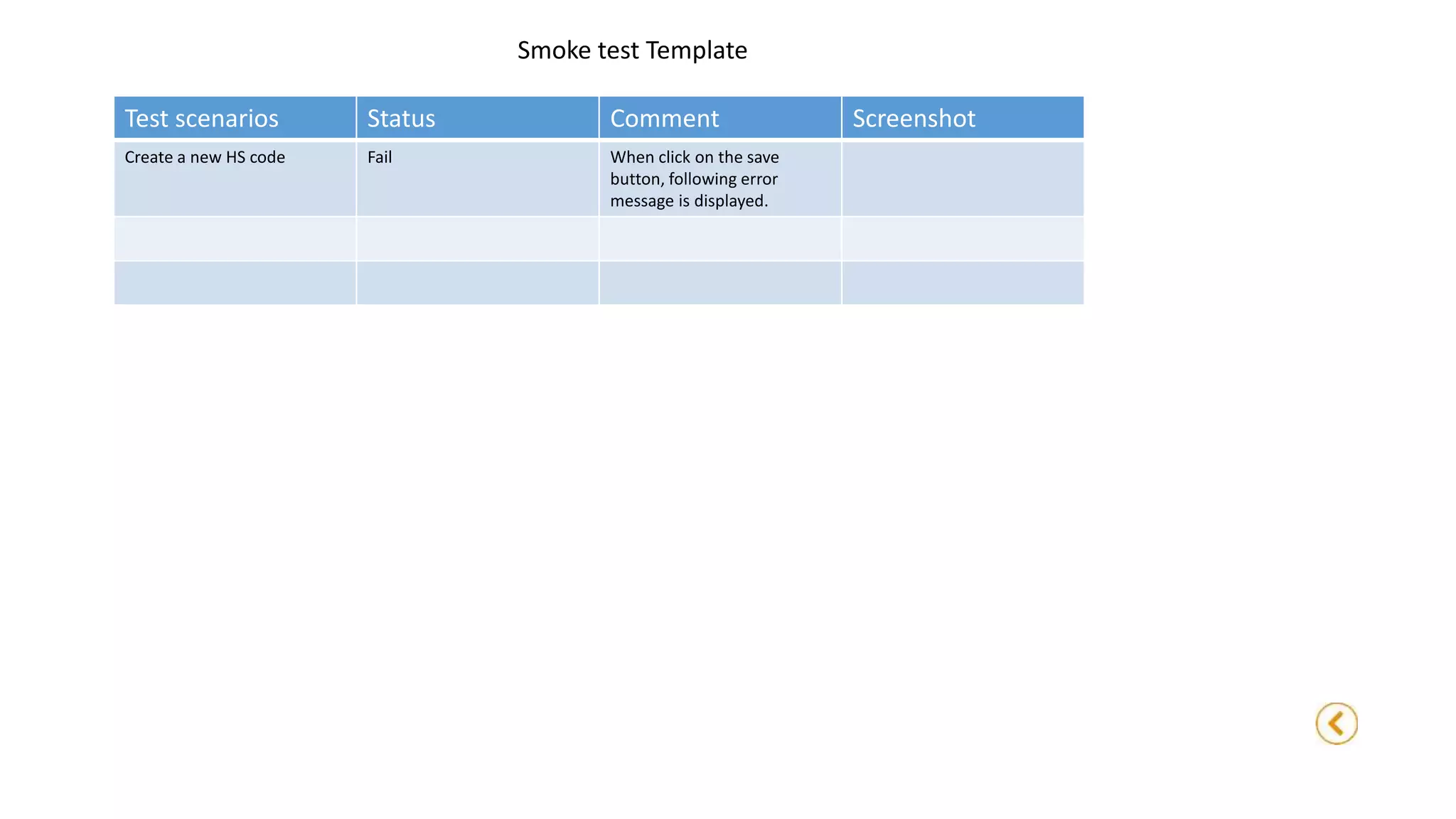
Smoke test Template
Test scenarios Status Comment Screenshot
Create a new HS code Fail When click on the save
button, following error
message is displayed.
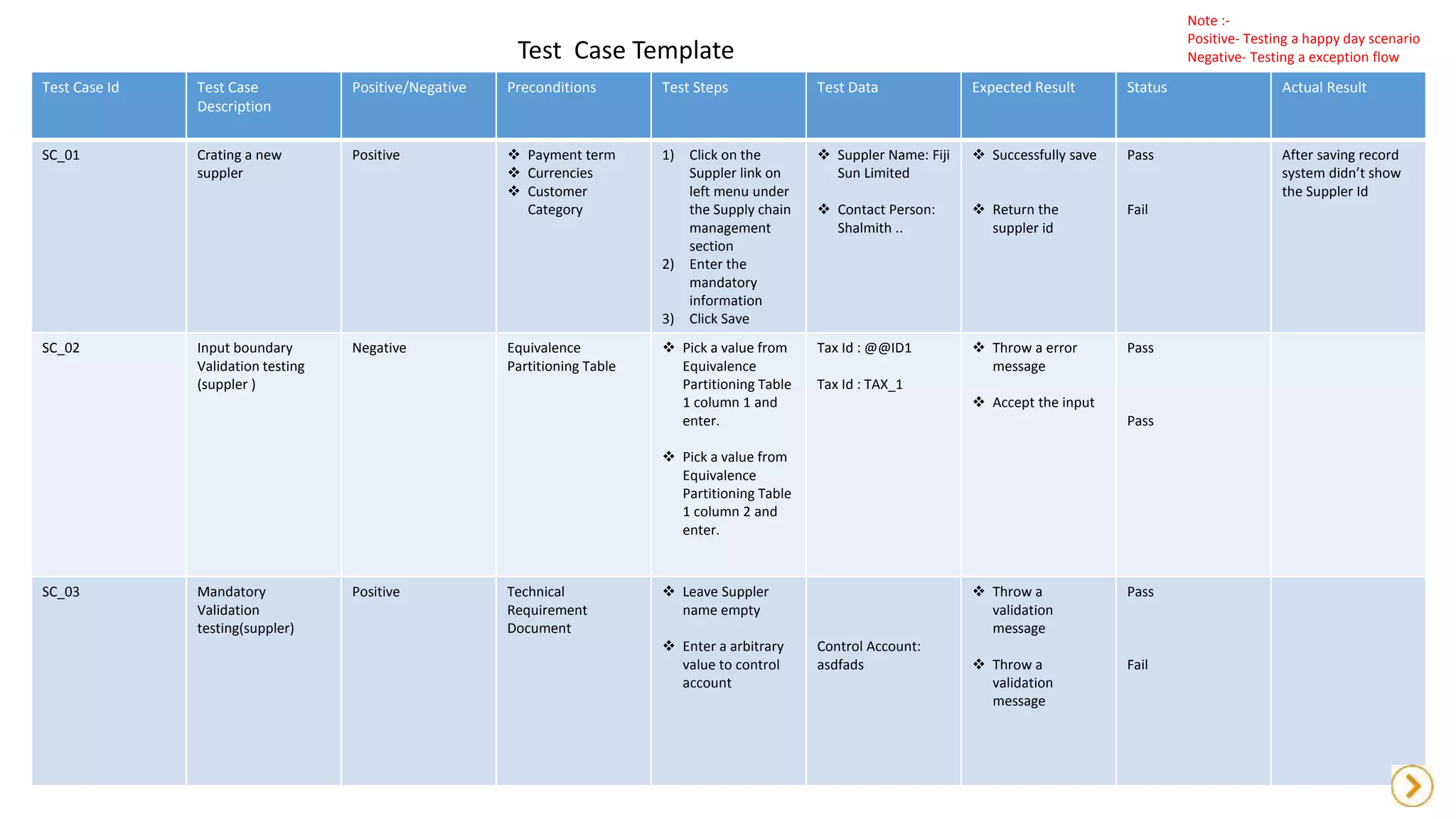
Test Case Template
Test Case Id Test Case
Description
Positive/Negative Preconditions Test Steps Test Data Expected Result Status Actual Result
SC_01 Crating a new
suppler
Positive  Payment term
 Currencies
 Customer
Category
1) Click on the
Suppler link on
left menu under
the Supply chain
management
section
2) Enter the
mandatory
information
3) Click Save
 Suppler Name: Fiji
Sun Limited
 Contact Person:
Shalmith ..
 Successfully save
 Return the
suppler id
Pass
Fail
After saving record
system didn’t show
the Suppler Id
SC_02 Input boundary
Validation testing
(suppler )
Negative Equivalence
Partitioning Table
 Pick a value from
Equivalence
Partitioning Table
1 column 1 and
enter.
 Pick a value from
Equivalence
Partitioning Table
1 column 2 and
enter.
Tax Id : @@ID1
Tax Id : TAX_1
 Throw a error
message
 Accept the input
Pass
Pass
SC_03 Mandatory
Validation
testing(suppler)
Positive Technical
Requirement
Document
 Leave Suppler
name empty
 Enter a arbitrary
value to control
account
Control Account:
asdfads
 Throw a
validation
message
 Throw a
validation
message
Pass
Fail
Note :-
Positive- Testing a happy day scenario
Negative- Testing a exception flow
Equivalence Partitioning Table 1
Invalid Partition Valid Partition
@@ID1 TAX_01
#$% TAX05
Technical Requirement Document (TRD)
Entity ID Description Message
Suppler TR_SUP_01 Suppler Name should not be
blank.
Please Enter a Suppler Name.
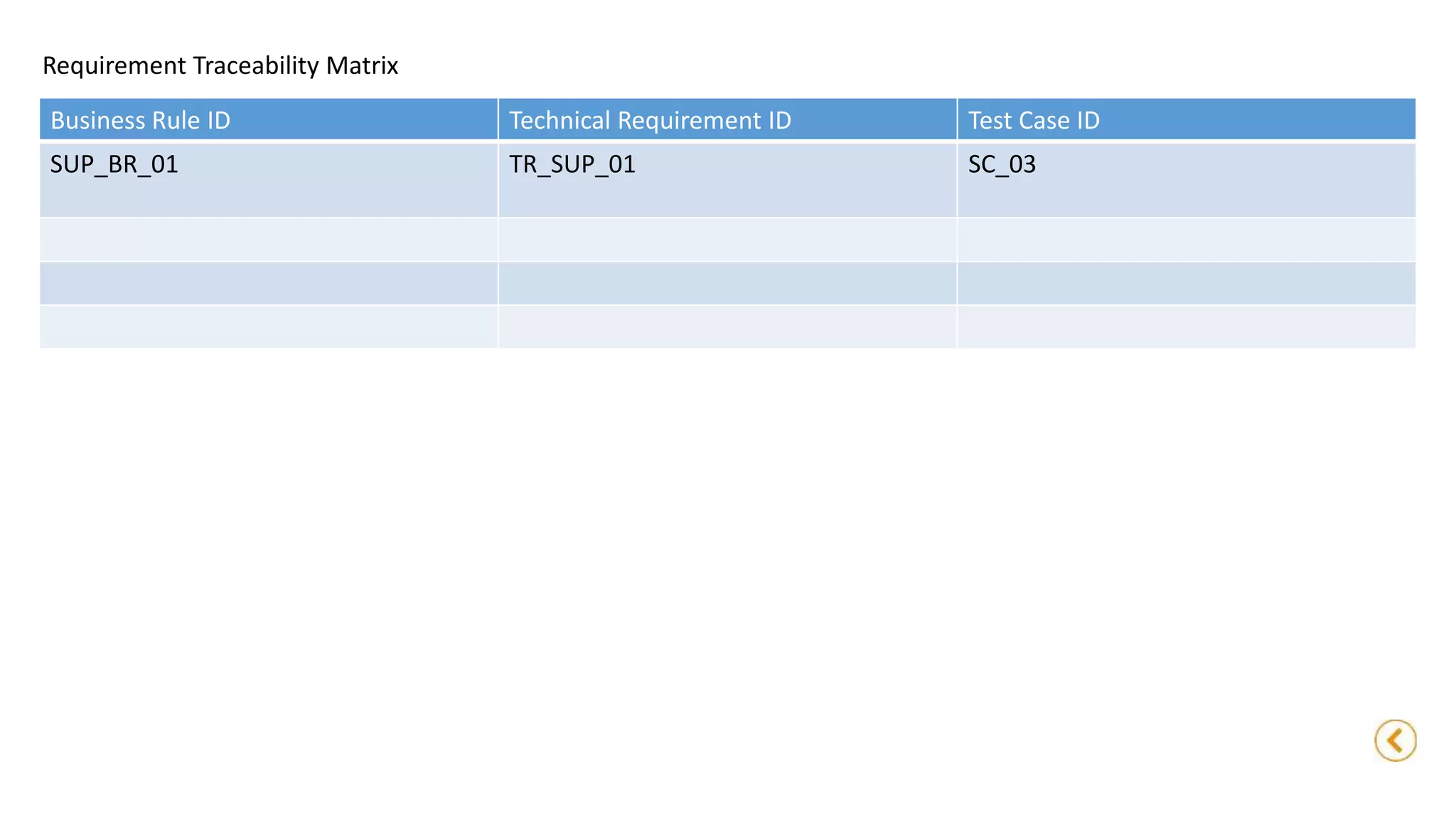
Requirement Traceability Matrix
Business Rule ID Technical Requirement ID Test Case ID
SUP_BR_01 TR_SUP_01 SC_03

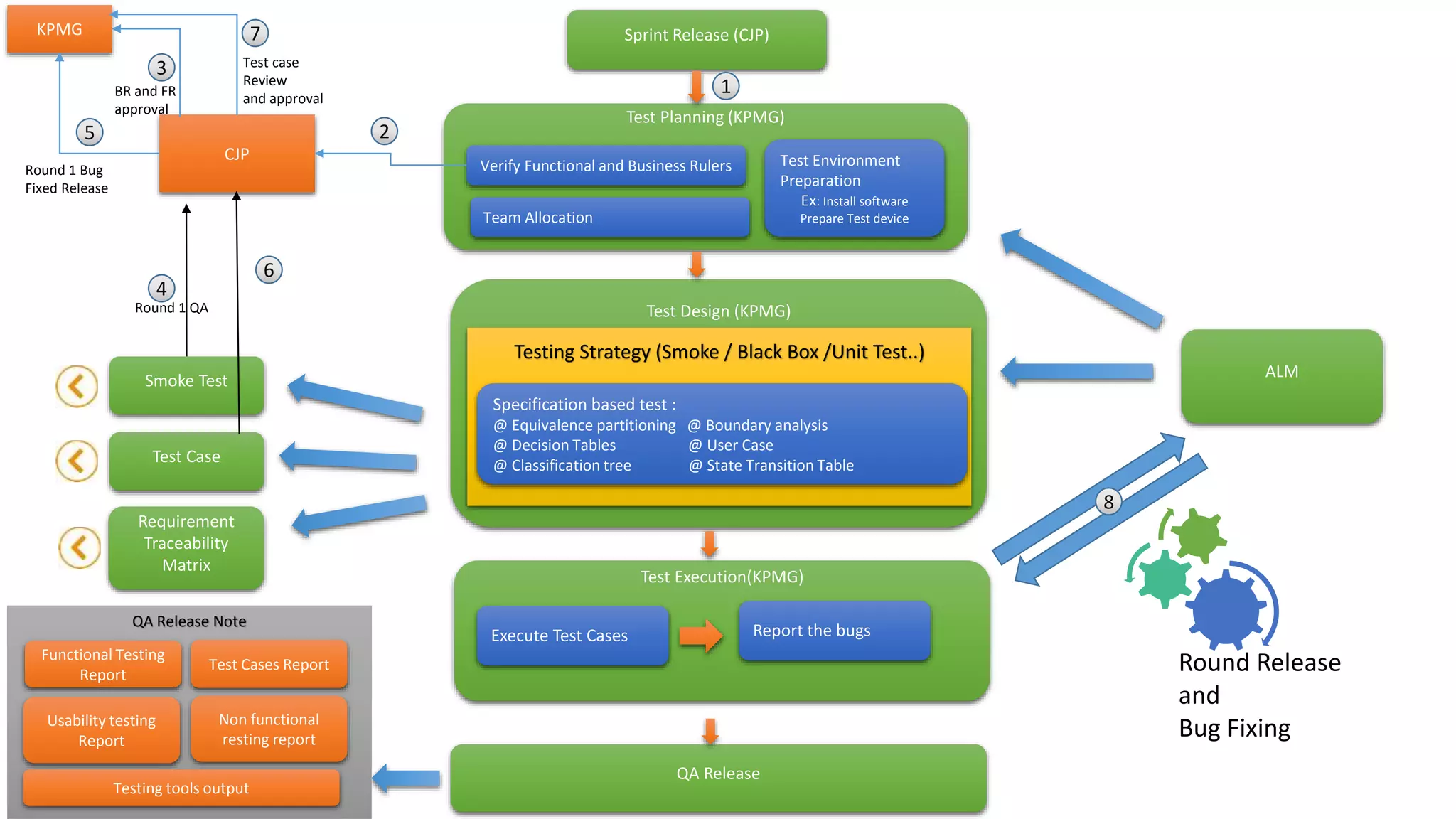
QA Workflow

  • 1.
    Test Planning (KPMG) TestDesign (KPMG) Test Execution(KPMG) QA Release Sprint Release (CJP) Verify Functional and Business Rulers Team Allocation Test Environment Preparation Ex: Install software Prepare Test device ALM Smoke Test Test Case Requirement Traceability Matrix CJP 1 2 4 5 Round 1 QA Round 1 Bug Fixed Release KPMG 6 Testing Strategy (Smoke / Black Box /Unit Test..) Specification based test : @ Equivalence partitioning @ Boundary analysis @ Decision Tables @ User Case @ Classification tree @ State Transition Table Execute Test Cases Report the bugs BR and FR approval 3 7 Test case Review and approval QA Release Note Functional Testing Report Usability testing Report Testing tools output Test Cases Report Non functional resting report Round Release and Bug Fixing 8
  • 2.
    Smoke test Template Testscenarios Status Comment Screenshot Create a new HS code Fail When click on the save button, following error message is displayed.
  • 3.
    Test Case Template TestCase Id Test Case Description Positive/Negative Preconditions Test Steps Test Data Expected Result Status Actual Result SC_01 Crating a new suppler Positive  Payment term  Currencies  Customer Category 1) Click on the Suppler link on left menu under the Supply chain management section 2) Enter the mandatory information 3) Click Save  Suppler Name: Fiji Sun Limited  Contact Person: Shalmith ..  Successfully save  Return the suppler id Pass Fail After saving record system didn’t show the Suppler Id SC_02 Input boundary Validation testing (suppler ) Negative Equivalence Partitioning Table  Pick a value from Equivalence Partitioning Table 1 column 1 and enter.  Pick a value from Equivalence Partitioning Table 1 column 2 and enter. Tax Id : @@ID1 Tax Id : TAX_1  Throw a error message  Accept the input Pass Pass SC_03 Mandatory Validation testing(suppler) Positive Technical Requirement Document  Leave Suppler name empty  Enter a arbitrary value to control account Control Account: asdfads  Throw a validation message  Throw a validation message Pass Fail Note :- Positive- Testing a happy day scenario Negative- Testing a exception flow
  • 4.
    Equivalence Partitioning Table1 Invalid Partition Valid Partition @@ID1 TAX_01 #$% TAX05 Technical Requirement Document (TRD) Entity ID Description Message Suppler TR_SUP_01 Suppler Name should not be blank. Please Enter a Suppler Name.
  • 5.
    Requirement Traceability Matrix BusinessRule ID Technical Requirement ID Test Case ID SUP_BR_01 TR_SUP_01 SC_03