In what ways does your media product
 use, develop or challenge forms and
 conventions of real media products?
      - music magazine cover
I looked at a variety of different music magazine covers. I already had
a idea of what style I wan to create as I brought in advice and ideas
that I did in AS however I needed to up my game.

I looked at Empire, Entertainment Weekly and Total Film for the
majority of research. I took aspects from different types to create my
own cover. Such as, the mast head situation and the cover image
mainly being a extreme close up of the star. Having your film as the
front cover of a film magazine is excellent promotion. The magazines
have the biggest films about to be released at the movies. So the
actors on the front are well known.

I created my cover on Photoshop. Photoshop has allowed me to work
more professionally with what the software has to offer. It allowed me
to work in more depth with layers and editing the background image.
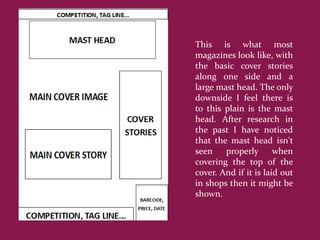
This is what most
magazines look like, with
the basic cover stories
along one side and a
large mast head. The only
downside I feel there is
to this plain is the mast
head. After research in
the past I have noticed
that the mast head isn't
seen    properly       when
covering the top of the
cover. And if it is laid out
in shops then it might be
shown.
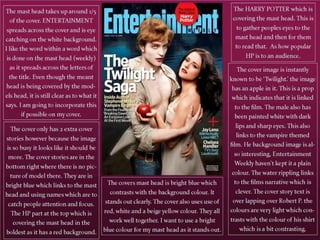
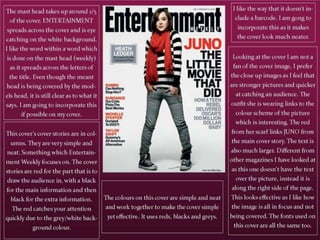
I have decided to firstly look at ENTERTAINMENT.
 They seemed to use images that were taken further
 away. This makes it harder for the viewers to catch
  their eye on. The title is also different, this way is
    used when the words include more then one
syllable. It works well with the title style though and
       I like the final effect it has on the title.
3 - Entertainment
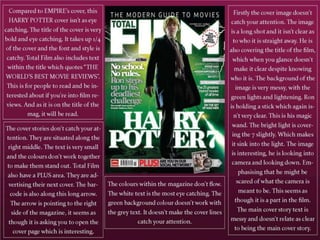
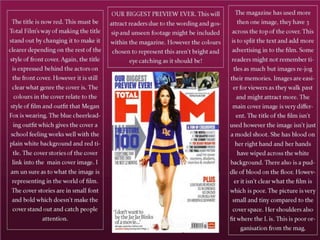
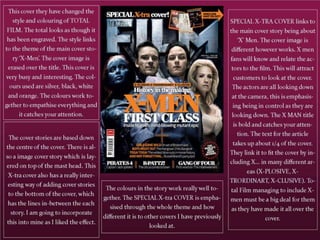
Secondly I looked at TOTAL FILM. They seemed to
use images that were taken further away. This makes
 it harder for the viewers to catch their eye on. The
   title is also different, this way is used when the
words include more then one syllable. It works well
 with the title style though and I like the final effect
                    it has on the title.
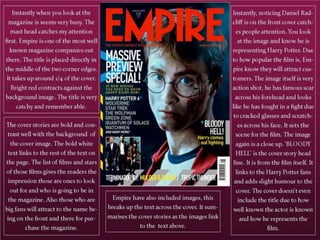
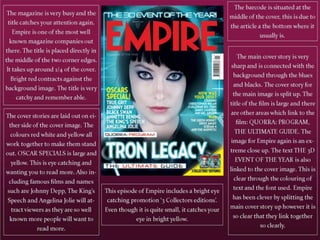
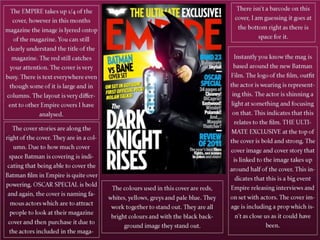
I have decided to secondly look at EMPIRE. Their
magazines are very sharp and neat. They organise
  their covers in columns I have found. They all
link together with the same title style and colour
 and using the same Ariel plain font throughout
       the cover stories on the front covers.
After looking through the 9 magazines I analysed I found I liked
Entertainment most. I liked the simplicity that they expressed
through the covers. They keep the cover focused plainly on the film
related to the cover. It works really well and makes the covers look
much neater and simpler compared to Total Film. I preferred
Empire’s photography style, with close ups of the actors. Total Film
was messy and confusing and messy. The colours didn’t connect
together and each cover I looked at was too confusing. I decided to
relate my magazine most to Entertainment. However I did decide to
create my own magazine title. I linked this to
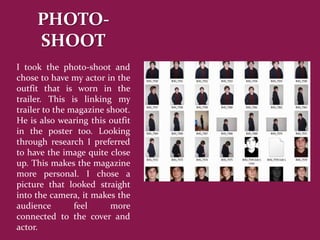
PHOTO-
     SHOOT
I took the photo-shoot and
chose to have my actor in the
outfit that is worn in the
trailer. This is linking my
trailer to the magazine shoot.
He is also wearing this outfit
in the poster too. Looking
through research I preferred
to have the image quite close
up. This makes the magazine
more personal. I chose a
picture that looked straight
into the camera, it makes the
audience        feel     more
connected to the cover and
actor.
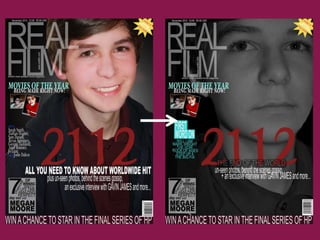
I firstly decided to create a cover that was my own with my own title. I
chose a image which was smiley and looking up to the camera. The cover
was busy and the title of my trailer (21 12) was the same font. However
when looking back over research my image doesn’t represent the film as
much as other magazines had. I chose to change the image and relate
my covers back to research with more depth. I did however link it to
research with the mast head being on the left and having a banner
across the bottom. I also included images on the cover and not just text.
I edited the cover image to back and white and a close up image. I think
it represents the film genre more. I kept a lot of aspects the same
however I linked the colours of the cover to each other more, the bright
blues, whites and blacks then a bold yellow extra in the top right of the
cover. I think the second cover works a lot better however it doesn’t catch
your attention as it should do and like the research covers I did. On the
next slide my first design was the image on the left and then I re-did it to
the image on the right.
I changed the image as I didn’t feel the picture represented my film
clearly and I wanted to choose a image that did.
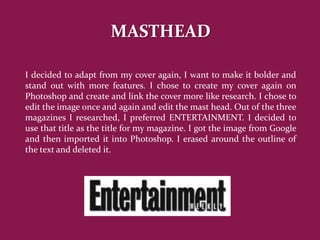
MASTHEAD

I decided to adapt from my cover again, I want to make it bolder and
stand out with more features. I chose to create my cover again on
Photoshop and create and link the cover more like research. I chose to
edit the image once and again and edit the mast head. Out of the three
magazines I researched, I preferred ENTERTAINMENT. I decided to
use that title as the title for my magazine. I got the image from Google
and then imported it into Photoshop. I erased around the outline of
the text and deleted it.
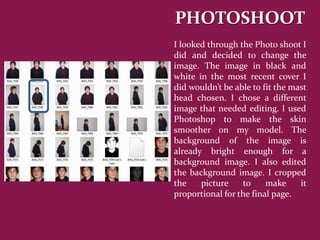
PHOTOSHOOT
I looked through the Photo shoot I
did and decided to change the
image. The image in black and
white in the most recent cover I
did wouldn’t be able to fit the mast
head chosen. I chose a different
image that needed editing. I used
Photoshop to make the skin
smoother on my model. The
background of the image is
already bright enough for a
background image. I also edited
the background image. I cropped
the    picture    to     make     it
proportional for the final page.
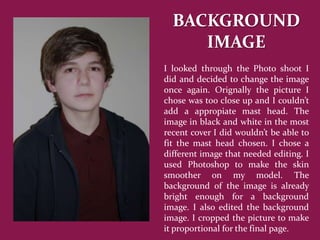
BACKGROUND
     IMAGE
I looked through the Photo shoot I
did and decided to change the image
once again. Orignally the picture I
chose was too close up and I couldn’t
add a appropiate mast head. The
image in black and white in the most
recent cover I did wouldn’t be able to
fit the mast head chosen. I chose a
different image that needed editing. I
used Photoshop to make the skin
smoother on my model. The
background of the image is already
bright enough for a background
image. I also edited the background
image. I cropped the picture to make
it proportional for the final page.
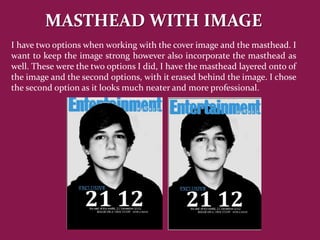
MASTHEAD WITH IMAGE
I have two options when working with the cover image and the masthead. I
want to keep the image strong however also incorporate the masthead as
well. These were the two options I did, I have the masthead layered onto of
the image and the second options, with it erased behind the image. I chose
the second option as it looks much neater and more professional.
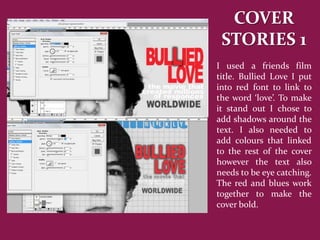
COVER
 STORIES 1
I used a friends film
title. Bullied Love I put
into red font to link to
the word ‘love’. To make
it stand out I chose to
add shadows around the
text. I also needed to
add colours that linked
to the rest of the cover
however the text also
needs to be eye catching.
The red and blues work
together to make the
cover bold.
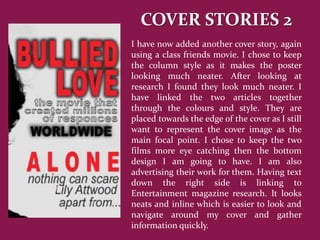
COVER STORIES 2
I have now added another cover story, again
using a class friends movie. I chose to keep
the column style as it makes the poster
looking much neater. After looking at
research I found they look much neater. I
have linked the two articles together
through the colours and style. They are
placed towards the edge of the cover as I still
want to represent the cover image as the
main focal point. I chose to keep the two
films more eye catching then the bottom
design I am going to have. I am also
advertising their work for them. Having text
down the right side is linking to
Entertainment magazine research. It looks
neats and inline which is easier to look and
navigate around my cover and gather
information quickly.
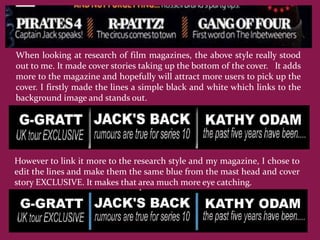
When looking at research of film magazines, the above style really stood
out to me. It made cover stories taking up the bottom of the cover. It adds
more to the magazine and hopefully will attract more users to pick up the
cover. I firstly made the lines a simple black and white which links to the
background image and stands out.


However to link it more to the research style and my magazine, I chose to
edit the lines and make them the same blue from the mast head and cover
story EXCLUSIVE. It makes that area much more eye catching.
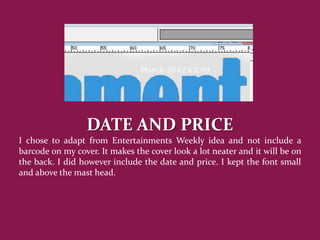
DATE AND PRICE
I chose to adapt from Entertainments Weekly idea and not include a
barcode on my cover. It makes the cover look a lot neater and it will be on
the back. I did however include the date and price. I kept the font small
and above the mast head.
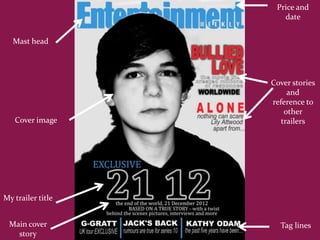
Price and
                      date


   Mast head


                   Cover stories
                        and
                   reference to
                       other
   Cover image        trailers


My trailer title


 Main cover          Tag lines
   story
In conclusion my media products relates back to research. I have focused
mainly on Entertainment Weekly. Their layout was very neat and
something I wanted to do. I chose conventions from other magazines
too, such as Total Film’s X MEN special, this I used the tag line and cover
story layout a the bottom of the cover. The colour scheme for my cover I
wanted to keep bright, bold and eye caching. The black and white sharp
image stands out with the reds and bright blues.
The picture design was a intake from all three magazines. Out of the ones
I looked at I really liked the close up images. The images that were a long
shot of an actor I didn’t feel were as eye catching (Entertainment Weekly
cover about Juno.)
I am really pleased with my final cover, the colour scheme and
background works really well with the whole style of the cover. It isnt too
messy which I like and yet the background image is strong. The picture
represents my trailer as well. Just like Total Film’s covers staring X-Men
and Empire’s cover staring Batman, they all have conventions that link
them to their film. I wanted to express my genre of film through the
image. The final image I chose is very stern and straight face as he looks
straight into the camera. This expresses scared and aloneness through the
facial expression.

Q1

  • 1.
    In what waysdoes your media product use, develop or challenge forms and conventions of real media products? - music magazine cover
  • 2.
    I looked ata variety of different music magazine covers. I already had a idea of what style I wan to create as I brought in advice and ideas that I did in AS however I needed to up my game. I looked at Empire, Entertainment Weekly and Total Film for the majority of research. I took aspects from different types to create my own cover. Such as, the mast head situation and the cover image mainly being a extreme close up of the star. Having your film as the front cover of a film magazine is excellent promotion. The magazines have the biggest films about to be released at the movies. So the actors on the front are well known. I created my cover on Photoshop. Photoshop has allowed me to work more professionally with what the software has to offer. It allowed me to work in more depth with layers and editing the background image.
  • 3.
    This is whatmost magazines look like, with the basic cover stories along one side and a large mast head. The only downside I feel there is to this plain is the mast head. After research in the past I have noticed that the mast head isn't seen properly when covering the top of the cover. And if it is laid out in shops then it might be shown.
  • 4.
    I have decidedto firstly look at ENTERTAINMENT. They seemed to use images that were taken further away. This makes it harder for the viewers to catch their eye on. The title is also different, this way is used when the words include more then one syllable. It works well with the title style though and I like the final effect it has on the title.
  • 7.
  • 8.
    Secondly I lookedat TOTAL FILM. They seemed to use images that were taken further away. This makes it harder for the viewers to catch their eye on. The title is also different, this way is used when the words include more then one syllable. It works well with the title style though and I like the final effect it has on the title.
  • 12.
    I have decidedto secondly look at EMPIRE. Their magazines are very sharp and neat. They organise their covers in columns I have found. They all link together with the same title style and colour and using the same Ariel plain font throughout the cover stories on the front covers.
  • 16.
    After looking throughthe 9 magazines I analysed I found I liked Entertainment most. I liked the simplicity that they expressed through the covers. They keep the cover focused plainly on the film related to the cover. It works really well and makes the covers look much neater and simpler compared to Total Film. I preferred Empire’s photography style, with close ups of the actors. Total Film was messy and confusing and messy. The colours didn’t connect together and each cover I looked at was too confusing. I decided to relate my magazine most to Entertainment. However I did decide to create my own magazine title. I linked this to
  • 17.
    PHOTO- SHOOT I took the photo-shoot and chose to have my actor in the outfit that is worn in the trailer. This is linking my trailer to the magazine shoot. He is also wearing this outfit in the poster too. Looking through research I preferred to have the image quite close up. This makes the magazine more personal. I chose a picture that looked straight into the camera, it makes the audience feel more connected to the cover and actor.
  • 18.
    I firstly decidedto create a cover that was my own with my own title. I chose a image which was smiley and looking up to the camera. The cover was busy and the title of my trailer (21 12) was the same font. However when looking back over research my image doesn’t represent the film as much as other magazines had. I chose to change the image and relate my covers back to research with more depth. I did however link it to research with the mast head being on the left and having a banner across the bottom. I also included images on the cover and not just text. I edited the cover image to back and white and a close up image. I think it represents the film genre more. I kept a lot of aspects the same however I linked the colours of the cover to each other more, the bright blues, whites and blacks then a bold yellow extra in the top right of the cover. I think the second cover works a lot better however it doesn’t catch your attention as it should do and like the research covers I did. On the next slide my first design was the image on the left and then I re-did it to the image on the right. I changed the image as I didn’t feel the picture represented my film clearly and I wanted to choose a image that did.
  • 20.
    MASTHEAD I decided toadapt from my cover again, I want to make it bolder and stand out with more features. I chose to create my cover again on Photoshop and create and link the cover more like research. I chose to edit the image once and again and edit the mast head. Out of the three magazines I researched, I preferred ENTERTAINMENT. I decided to use that title as the title for my magazine. I got the image from Google and then imported it into Photoshop. I erased around the outline of the text and deleted it.
  • 21.
    PHOTOSHOOT I looked throughthe Photo shoot I did and decided to change the image. The image in black and white in the most recent cover I did wouldn’t be able to fit the mast head chosen. I chose a different image that needed editing. I used Photoshop to make the skin smoother on my model. The background of the image is already bright enough for a background image. I also edited the background image. I cropped the picture to make it proportional for the final page.
  • 22.
    BACKGROUND IMAGE I looked through the Photo shoot I did and decided to change the image once again. Orignally the picture I chose was too close up and I couldn’t add a appropiate mast head. The image in black and white in the most recent cover I did wouldn’t be able to fit the mast head chosen. I chose a different image that needed editing. I used Photoshop to make the skin smoother on my model. The background of the image is already bright enough for a background image. I also edited the background image. I cropped the picture to make it proportional for the final page.
  • 23.
    MASTHEAD WITH IMAGE Ihave two options when working with the cover image and the masthead. I want to keep the image strong however also incorporate the masthead as well. These were the two options I did, I have the masthead layered onto of the image and the second options, with it erased behind the image. I chose the second option as it looks much neater and more professional.
  • 24.
    COVER STORIES 1 Iused a friends film title. Bullied Love I put into red font to link to the word ‘love’. To make it stand out I chose to add shadows around the text. I also needed to add colours that linked to the rest of the cover however the text also needs to be eye catching. The red and blues work together to make the cover bold.
  • 25.
    COVER STORIES 2 Ihave now added another cover story, again using a class friends movie. I chose to keep the column style as it makes the poster looking much neater. After looking at research I found they look much neater. I have linked the two articles together through the colours and style. They are placed towards the edge of the cover as I still want to represent the cover image as the main focal point. I chose to keep the two films more eye catching then the bottom design I am going to have. I am also advertising their work for them. Having text down the right side is linking to Entertainment magazine research. It looks neats and inline which is easier to look and navigate around my cover and gather information quickly.
  • 26.
    When looking atresearch of film magazines, the above style really stood out to me. It made cover stories taking up the bottom of the cover. It adds more to the magazine and hopefully will attract more users to pick up the cover. I firstly made the lines a simple black and white which links to the background image and stands out. However to link it more to the research style and my magazine, I chose to edit the lines and make them the same blue from the mast head and cover story EXCLUSIVE. It makes that area much more eye catching.
  • 27.
    DATE AND PRICE Ichose to adapt from Entertainments Weekly idea and not include a barcode on my cover. It makes the cover look a lot neater and it will be on the back. I did however include the date and price. I kept the font small and above the mast head.
  • 28.
    Price and date Mast head Cover stories and reference to other Cover image trailers My trailer title Main cover Tag lines story
  • 29.
    In conclusion mymedia products relates back to research. I have focused mainly on Entertainment Weekly. Their layout was very neat and something I wanted to do. I chose conventions from other magazines too, such as Total Film’s X MEN special, this I used the tag line and cover story layout a the bottom of the cover. The colour scheme for my cover I wanted to keep bright, bold and eye caching. The black and white sharp image stands out with the reds and bright blues. The picture design was a intake from all three magazines. Out of the ones I looked at I really liked the close up images. The images that were a long shot of an actor I didn’t feel were as eye catching (Entertainment Weekly cover about Juno.) I am really pleased with my final cover, the colour scheme and background works really well with the whole style of the cover. It isnt too messy which I like and yet the background image is strong. The picture represents my trailer as well. Just like Total Film’s covers staring X-Men and Empire’s cover staring Batman, they all have conventions that link them to their film. I wanted to express my genre of film through the image. The final image I chose is very stern and straight face as he looks straight into the camera. This expresses scared and aloneness through the facial expression.