Step by Step
Creating my Movie Magazine Cover
In order to create my
movie magazine cover I
have used Adobe Photo
Shop CS6. Through other
tasks back at AS I have
gained a wealth of
knowledge that I was
able to apply in my
construction of my
magazine cover.
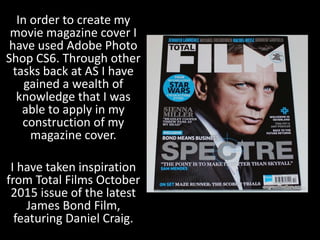
I have taken inspiration
from Total Films October
2015 issue of the latest
James Bond Film,
featuring Daniel Craig.
To begin my construction I uploaded an image I had taken on my iPhone
from the day I shot my location photographs. I chose to edit the image in
a false 3D lense effect as I use this heavily in the beginning sequence of
my teaser trailer, therefore, I thought it was appropriate.
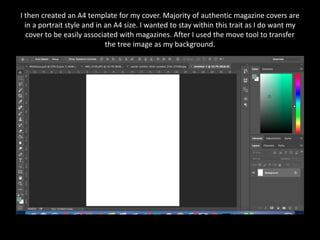
I then created an A4 template for my cover. Majority of authentic magazine covers are
in a portrait style and in an A4 size. I wanted to stay within this trait as I do want my
cover to be easily associated with magazines. After I used the move tool to transfer
the tree image as my background.
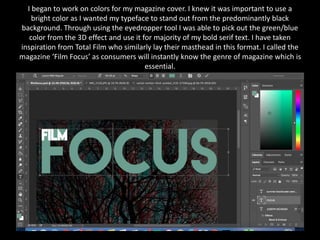
I began to work on colors for my magazine cover. I knew it was important to use a
bright color as I wanted my typeface to stand out from the predominantly black
background. Through using the eyedropper tool I was able to pick out the green/blue
color from the 3D effect and use it for majority of my bold serif text. I have taken
inspiration from Total Film who similarly lay their masthead in this format. I called the
magazine ‘Film Focus’ as consumers will instantly know the genre of magazine which is
essential.
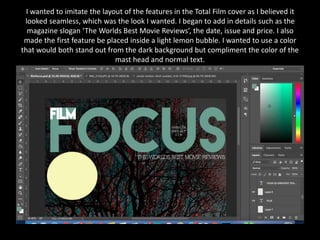
I wanted to imitate the layout of the features in the Total Film cover as I believed it
looked seamless, which was the look I wanted. I began to add in details such as the
magazine slogan ‘The Worlds Best Movie Reviews’, the date, issue and price. I also
made the first feature be placed inside a light lemon bubble. I wanted to use a color
that would both stand out from the dark background but compliment the color of the
mast head and normal text.
This was the first feature I added onto the cover of my movie magazine. I have taken
inspiration from the Total Film cover. However through my own interpretation I have
used the actual Star Wars font which I downloaded off DaFont.com. This is a vast and
highly recognizable brand and therefore would attract fans of that particular franchise.
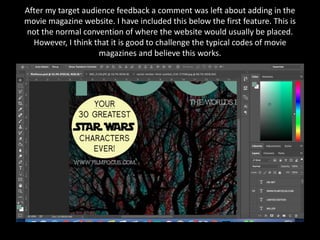
After my target audience feedback a comment was left about adding in the
movie magazine website. I have included this below the first feature. This is
not the normal convention of where the website would usually be placed.
However, I think that it is good to challenge the typical codes of movie
magazines and believe this works.
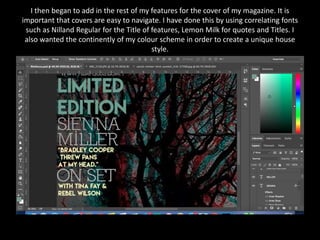
I then began to add in the rest of my features for the cover of my magazine. It is
important that covers are easy to navigate. I have done this by using correlating fonts
such as Nilland Regular for the Title of features, Lemon Milk for quotes and Titles. I
also wanted the continently of my colour scheme in order to create a unique house
style.
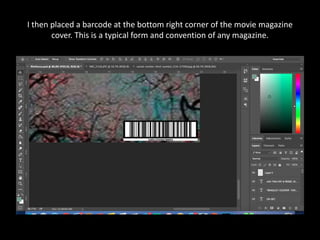
I then placed a barcode at the bottom right corner of the movie magazine
cover. This is a typical form and convention of any magazine.
I then added in a feature saying ‘Exclusive’ – I have deliberately made the text center
around a white box to make it stand out. This will immediately draw the consumers
eye straight to the main feature of the cover which is for my film ‘Vivid’. I have kept
the title of my film as the same font Octin Spraypaint which I have used throughout all
my three products.
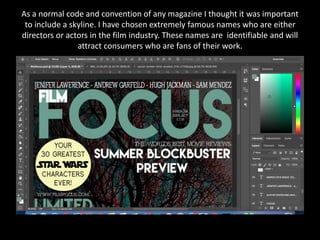
As a normal code and convention of any magazine I thought it was important
to include a skyline. I have chosen extremely famous names who are either
directors or actors in the film industry. These names are identifiable and will
attract consumers who are fans of their work.
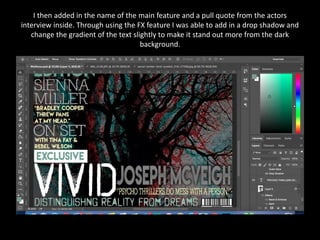
I then added in the name of the main feature and a pull quote from the actors
interview inside. Through using the FX feature I was able to add in a drop shadow and
change the gradient of the text slightly to make it stand out more from the dark
background.
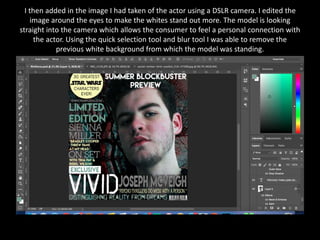
I then added in the image I had taken of the actor using a DSLR camera. I edited the
image around the eyes to make the whites stand out more. The model is looking
straight into the camera which allows the consumer to feel a personal connection with
the actor. Using the quick selection tool and blur tool I was able to remove the
previous white background from which the model was standing.
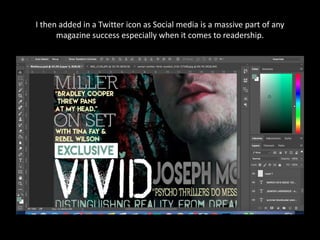
I then added in a Twitter icon as Social media is a massive part of any
magazine success especially when it comes to readership.
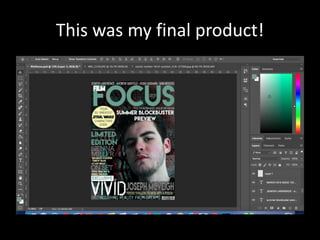
This was my final product!

Step by Step

  • 1.
    Step by Step Creatingmy Movie Magazine Cover
  • 2.
    In order tocreate my movie magazine cover I have used Adobe Photo Shop CS6. Through other tasks back at AS I have gained a wealth of knowledge that I was able to apply in my construction of my magazine cover. I have taken inspiration from Total Films October 2015 issue of the latest James Bond Film, featuring Daniel Craig.
  • 3.
    To begin myconstruction I uploaded an image I had taken on my iPhone from the day I shot my location photographs. I chose to edit the image in a false 3D lense effect as I use this heavily in the beginning sequence of my teaser trailer, therefore, I thought it was appropriate.
  • 4.
    I then createdan A4 template for my cover. Majority of authentic magazine covers are in a portrait style and in an A4 size. I wanted to stay within this trait as I do want my cover to be easily associated with magazines. After I used the move tool to transfer the tree image as my background.
  • 5.
    I began towork on colors for my magazine cover. I knew it was important to use a bright color as I wanted my typeface to stand out from the predominantly black background. Through using the eyedropper tool I was able to pick out the green/blue color from the 3D effect and use it for majority of my bold serif text. I have taken inspiration from Total Film who similarly lay their masthead in this format. I called the magazine ‘Film Focus’ as consumers will instantly know the genre of magazine which is essential.
  • 6.
    I wanted toimitate the layout of the features in the Total Film cover as I believed it looked seamless, which was the look I wanted. I began to add in details such as the magazine slogan ‘The Worlds Best Movie Reviews’, the date, issue and price. I also made the first feature be placed inside a light lemon bubble. I wanted to use a color that would both stand out from the dark background but compliment the color of the mast head and normal text.
  • 7.
    This was thefirst feature I added onto the cover of my movie magazine. I have taken inspiration from the Total Film cover. However through my own interpretation I have used the actual Star Wars font which I downloaded off DaFont.com. This is a vast and highly recognizable brand and therefore would attract fans of that particular franchise.
  • 8.
    After my targetaudience feedback a comment was left about adding in the movie magazine website. I have included this below the first feature. This is not the normal convention of where the website would usually be placed. However, I think that it is good to challenge the typical codes of movie magazines and believe this works.
  • 9.
    I then beganto add in the rest of my features for the cover of my magazine. It is important that covers are easy to navigate. I have done this by using correlating fonts such as Nilland Regular for the Title of features, Lemon Milk for quotes and Titles. I also wanted the continently of my colour scheme in order to create a unique house style.
  • 10.
    I then placeda barcode at the bottom right corner of the movie magazine cover. This is a typical form and convention of any magazine.
  • 11.
    I then addedin a feature saying ‘Exclusive’ – I have deliberately made the text center around a white box to make it stand out. This will immediately draw the consumers eye straight to the main feature of the cover which is for my film ‘Vivid’. I have kept the title of my film as the same font Octin Spraypaint which I have used throughout all my three products.
  • 12.
    As a normalcode and convention of any magazine I thought it was important to include a skyline. I have chosen extremely famous names who are either directors or actors in the film industry. These names are identifiable and will attract consumers who are fans of their work.
  • 13.
    I then addedin the name of the main feature and a pull quote from the actors interview inside. Through using the FX feature I was able to add in a drop shadow and change the gradient of the text slightly to make it stand out more from the dark background.
  • 14.
    I then addedin the image I had taken of the actor using a DSLR camera. I edited the image around the eyes to make the whites stand out more. The model is looking straight into the camera which allows the consumer to feel a personal connection with the actor. Using the quick selection tool and blur tool I was able to remove the previous white background from which the model was standing.
  • 15.
    I then addedin a Twitter icon as Social media is a massive part of any magazine success especially when it comes to readership.
  • 16.
    This was myfinal product!