Python Syntax
Python Indentation
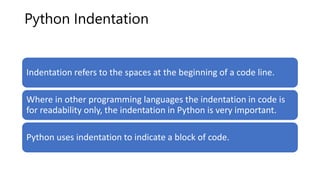
Indentation refers to the spaces at the beginning of a code line.
Where in other programming languages the indentation in code is
for readability only, the indentation in Python is very important.
Python uses indentation to indicate a block of code.
Example Get your own Python Server:
if 5 > 2:
print("Five is greater than two!")
Python will give you an error if you skip the indentation:
Syntax Error:
if 5 > 2:
print("Five is greater than two!")
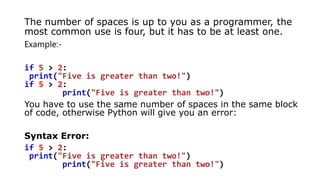
The number of spaces is up to you as a programmer, the
most common use is four, but it has to be at least one.
Example:-
if 5 > 2:
print("Five is greater than two!")
if 5 > 2:
print("Five is greater than two!")
You have to use the same number of spaces in the same block
of code, otherwise Python will give you an error:
Syntax Error:
if 5 > 2:
print("Five is greater than two!")
Python Variables
In Python, variables are created when you assign a value
to it:
Variables in Python:
x = 5
y = "Hello, World!"
Python has no command for declaring a variable.
Comments
• Python has commenting capability for the purpose of
in-code documentation.
• Comments start with a #, and Python will render the
rest of the line as a comment:
Example:-
Comments in Python:
#This is a comment.
print("Hello, World!")
Python Comments
• Comments can be used to explain Python code.
• Comments can be used to make the code more
readable.
• Comments can be used to prevent execution when
testing code.
Creating a Comment
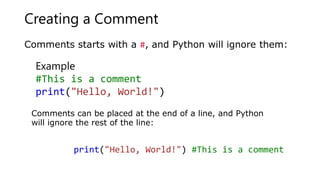
Comments starts with a #, and Python will ignore them:
Exampler
#This is a comment
print("Hello, World!")
Comments can be placed at the end of a line, and Python
will ignore the rest of the line:
print("Hello, World!") #This is a comment
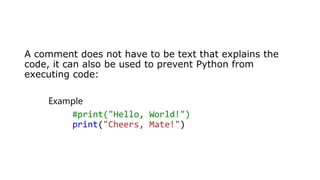
A comment does not have to be text that explains the
code, it can also be used to prevent Python from
executing code:
Example
#print("Hello, World!")
print("Cheers, Mate!")
Multiline Comments
Example
#This is a comment
#written in
#more than just one line
print("Hello, World!")
Python does not really have a syntax for multiline comments.
To add a multiline comment you could insert a # for each line:
• Or, not quite as intended, you can use a multiline string.
• Since Python will ignore string literals that are not
assigned to a variable, you can add a multiline string
(triple quotes) in your code, and place your comment
inside it:
Example:-
"""
This is a comment
written in
more than just one line
"""
print("Hello, World!")
As long as the string is not assigned to a variable, Python will read the code, but then
ignore it, and you have made a multiline comment.
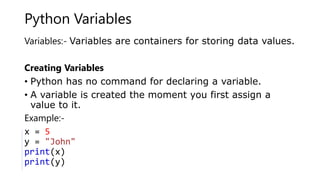
Python Variables
Variables:- Variables are containers for storing data values.
Creating Variables
• Python has no command for declaring a variable.
• A variable is created the moment you first assign a
value to it.
Example:-G
x = 5
y = "John"
print(x)
print(y)
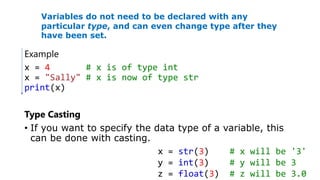
Example
x = 4 # x is of type int
x = "Sally" # x is now of type str
print(x)
Type Casting
• If you want to specify the data type of a variable, this
can be done with casting.
Variables do not need to be declared with any
particular type, and can even change type after they
have been set.
x = str(3) # x will be '3'
y = int(3) # y will be 3
z = float(3) # z will be 3.0
Get the Type
You can get the data type of a variable with the type() function.
Example
x = 5
y = "John"
print(type(x))
print(type(y))
Single or Double
Quotes?
String variables can be declared
either by using single or double
quotes:
Example
x = "John"
# is the same as
x = 'John'
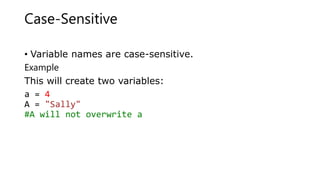
Case-Sensitive
• Variable names are case-sensitive.
Example
This will create two variables:
a = 4
A = "Sally"
#A will not overwrite a
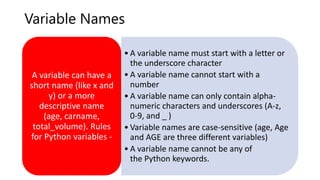
Variable Names
• A variable name must start with a letter or
the underscore character
• A variable name cannot start with a
number
• A variable name can only contain alpha-
numeric characters and underscores (A-z,
0-9, and _ )
• Variable names are case-sensitive (age, Age
and AGE are three different variables)
• A variable name cannot be any of
the Python keywords.
A variable can have a
short name (like x and
y) or a more
descriptive name
(age, carname,
total_volume). Rules
for Python variables -
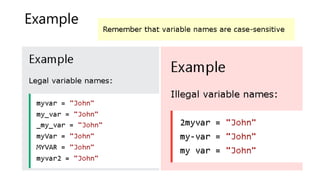
Example
CASING
Multi Words Variable Names
• Variable names with more than one word can be
difficult to read.
• There are several techniques you can use to make them
more readable:
Camel Case,Pascal Case,Snake Case
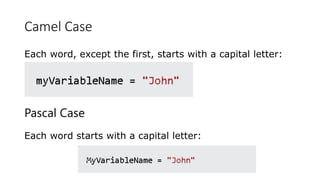
Camel Case
Each word, except the first, starts with a capital letter:
Pascal Case
Each word starts with a capital letter:
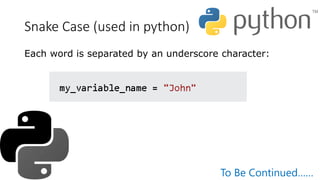
Snake Case (used in python)
Each word is separated by an underscore character:
To Be Continued……

Python comments and variables.pptx

  • 1.
  • 2.
    Python Indentation Indentation refersto the spaces at the beginning of a code line. Where in other programming languages the indentation in code is for readability only, the indentation in Python is very important. Python uses indentation to indicate a block of code.
  • 3.
    Example Get yourown Python Server: if 5 > 2: print("Five is greater than two!") Python will give you an error if you skip the indentation: Syntax Error: if 5 > 2: print("Five is greater than two!")
  • 4.
    The number ofspaces is up to you as a programmer, the most common use is four, but it has to be at least one. Example:- if 5 > 2: print("Five is greater than two!") if 5 > 2: print("Five is greater than two!") You have to use the same number of spaces in the same block of code, otherwise Python will give you an error: Syntax Error: if 5 > 2: print("Five is greater than two!") print("Five is greater than two!")
  • 5.
    Python Variables In Python,variables are created when you assign a value to it: Variables in Python: x = 5 y = "Hello, World!" Python has no command for declaring a variable.
  • 6.
    Comments • Python hascommenting capability for the purpose of in-code documentation. • Comments start with a #, and Python will render the rest of the line as a comment: Example:- Comments in Python: #This is a comment. print("Hello, World!")
  • 7.
    Python Comments • Commentscan be used to explain Python code. • Comments can be used to make the code more readable. • Comments can be used to prevent execution when testing code.
  • 8.
    Creating a Comment Commentsstarts with a #, and Python will ignore them: Exampler #This is a comment print("Hello, World!") Comments can be placed at the end of a line, and Python will ignore the rest of the line: print("Hello, World!") #This is a comment
  • 9.
    A comment doesnot have to be text that explains the code, it can also be used to prevent Python from executing code: Example #print("Hello, World!") print("Cheers, Mate!")
  • 10.
    Multiline Comments Example #This isa comment #written in #more than just one line print("Hello, World!") Python does not really have a syntax for multiline comments. To add a multiline comment you could insert a # for each line:
  • 11.
    • Or, notquite as intended, you can use a multiline string. • Since Python will ignore string literals that are not assigned to a variable, you can add a multiline string (triple quotes) in your code, and place your comment inside it: Example:- """ This is a comment written in more than just one line """ print("Hello, World!") As long as the string is not assigned to a variable, Python will read the code, but then ignore it, and you have made a multiline comment.
  • 12.
    Python Variables Variables:- Variablesare containers for storing data values. Creating Variables • Python has no command for declaring a variable. • A variable is created the moment you first assign a value to it. Example:-G x = 5 y = "John" print(x) print(y)
  • 13.
    Example x = 4# x is of type int x = "Sally" # x is now of type str print(x) Type Casting • If you want to specify the data type of a variable, this can be done with casting. Variables do not need to be declared with any particular type, and can even change type after they have been set. x = str(3) # x will be '3' y = int(3) # y will be 3 z = float(3) # z will be 3.0
  • 14.
    Get the Type Youcan get the data type of a variable with the type() function. Example x = 5 y = "John" print(type(x)) print(type(y)) Single or Double Quotes? String variables can be declared either by using single or double quotes: Example x = "John" # is the same as x = 'John'
  • 15.
    Case-Sensitive • Variable namesare case-sensitive. Example This will create two variables: a = 4 A = "Sally" #A will not overwrite a
  • 16.
    Variable Names • Avariable name must start with a letter or the underscore character • A variable name cannot start with a number • A variable name can only contain alpha- numeric characters and underscores (A-z, 0-9, and _ ) • Variable names are case-sensitive (age, Age and AGE are three different variables) • A variable name cannot be any of the Python keywords. A variable can have a short name (like x and y) or a more descriptive name (age, carname, total_volume). Rules for Python variables -
  • 17.
  • 18.
    CASING Multi Words VariableNames • Variable names with more than one word can be difficult to read. • There are several techniques you can use to make them more readable: Camel Case,Pascal Case,Snake Case
  • 19.
    Camel Case Each word,except the first, starts with a capital letter: Pascal Case Each word starts with a capital letter:
  • 20.
    Snake Case (usedin python) Each word is separated by an underscore character: To Be Continued……