PYTHON APPLICATION PROGRAMMING -18EC646
MODULE 2
STRINGS
Prof. Krishnananda L
Department of ECE
Govt SKSJTI
Bengaluru
STRINGS:
 A string is a group/ a sequence of characters. Since Python has no provision
for arrays, we simply use strings. We use a pair of single or double quotes to
declare a string.
 Strings is “sequence data type” in python: meaning – its ordered, elements
can be accessed using positional index
 String may contain alphabets, numerals, special characters or a combination
of all these.
 String is a sequence of characters represented in Unicode. Each character of
a string corresponds to an index number, starting with zero.
 Strings are “immutable” i.e., once defined, the string literals cannot be
reassigned directly.
 Python supports positive indexing of string starting from the beginning of the
string as well as negative indexing of string starting from the end of the
string .
 Python has a vast library having built-in methods to operate on strings
2
STRING EXAMPLE PROGRAM:
 Example1
 INPUT:
>>> print(‘Hello world’)
 OUTPUT:
Hello world
 INPUT:
>>> print(“Hello world@@”)
 OUTPUT:
Hello world@@
 Example 2
 INPUT:
>>>a = 'Hello world’
>>>print(a)
 OUTPUT:
Hello world
 INPUT:
>>>a = 'Hello world’
>>> a
 OUTPUT:
‘Hello world’
 Example 3
 INPUT:
>>>a = 'Hello world’
>>>a[0]=‘M’
 OUTPUT:
 Traceback (most recent call last):
File "<pyshell#19>", line 1, in
<module>
a[0]='M'
TypeError: 'str' object does not
support item assignment
Note: String is “immutable” Not
possible to change the elements of the
string through assignment operator
3
POSITIVEAND NEGATIVE INDEXING OF A STRING:
 Positive indexing:
 INPUT:
>>>a = ‘Hello world’
print(a[1])
 OUTPUT:
e
 Negative indexing:
 INPUT:
>>> a = 'Hello World’
>>> print(a[-1])
 OUTPUT:
d
>>>a = "Hello, World!"
>>>print(a[7])
W
4
MULTILINE STRINGS:
 using three quotes:
 INPUT:
a = “””Python is an interpreted high-level
general-purpose programming language. Python's
design philosophy emphasizes code readability
with significant indentation.”””
print(a)
 OUTPUT:
Python is an interpreted high-level general-
purpose programming language. Python's design
philosophy emphasizes code readability with
significant indentation.
 Using three single quotes:
 INPUT:
a = ‘’’Python is an interpreted high-level
general-purpose programming language. Python's
design philosophy emphasizes code readability
with significant indentation.’’’
print(a)
 OUTPUT:
Python is an interpreted high-level general-
purpose programming language. Python's design
philosophy emphasizes code readability with
significant indentation. 5
LOOPING THROUGHA STRING:
 For loop:
 INPUT:
for x in “hello":
print(x)
 OUTPUT:
h
e
l
l
o
 While loop:
 INPUT:
st=“hello"
i=0
while i<len(st):
print(st[i], end=‘ ’))
i=i+1
 OUTPUT:
hello
str = "welcome to Python class "
for k in str:
if k == 'P':
break
print(k, end=' ')
Output:
welcome to
str = "welcome to Python class "
for k in str:
print(k, end=' ')
if k == 'P':
break
Output:
welcome to P
6
LOOPING CONTD…
## to print names of the list
print ("illustration of for loop--- printing names
from list")
names=["anand", "arun", "akshata", "anusha"]
for i in names:
print ("hello " , i)
print ("COMPLETED ---")
# prints all letters except 'a' and 'k'
## illustration of continue
## illustration of logical operators
i = 0
str1 = ‘all is well'
while i < len(str1):
if str1[i] == ‘s' or str1[i] == ‘l':
i += 1
continue
print('Current Letter :', str1[i])
i += 1
Current Letter : a
Current Letter :
Current Letter : i
Current Letter :
Current Letter : w
Current Letter : e 7
LOOPING CONTD..
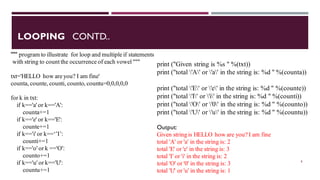
""" program to illustrate for loop and multiple if statements
with string to count the occurrence of each vowel """
txt='HELLO how are you? I am fine'
counta, counte, counti, counto, countu=0,0,0,0,0
for k in txt:
if k=='a' or k=='A':
counta+=1
if k=='e' or k=='E':
counte+=1
if k=='i' or k==‘’I’:
counti+=1
if k=='o' or k =='O':
counto+=1
if k=='u' or k=='U':
countu+=1
print ("Given string is %s " %(txt))
print ("total 'A' or 'a' in the string is: %d " %(counta))
print ("total 'E' or 'e' in the string is: %d " %(counte))
print ("total 'I' or 'i' in the string is: %d " %(counti))
print ("total 'O' or '0' in the string is: %d " %(counto))
print ("total 'U' or 'u' in the string is: %d " %(countu))
Output:
Given string is HELLO how are you? I am fine
total 'A' or 'a' in the string is: 2
total 'E' or 'e' in the string is: 3
total 'I' or 'i' in the string is: 2
total 'O' or '0' in the string is: 3
total 'U' or 'u' in the string is: 1
8
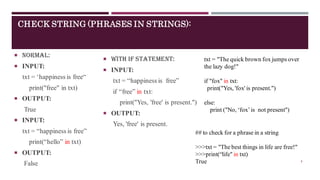
CHECK STRING (PHRASES IN STRINGS):
 Normal:
 INPUT:
txt = ‘happiness is free“
print("free" in txt)
 OUTPUT:
True
 INPUT:
txt = “happiness is free”
print(“hello” in txt)
 OUTPUT:
False
 With if statement:
 INPUT:
txt = “happiness is free”
if “free” in txt:
print("Yes, 'free' is present.")
 OUTPUT:
Yes, 'free' is present.
txt = "The quick brown fox jumps over
the lazy dog!"
if "fox" in txt:
print("Yes, 'fox' is present.")
else:
print ("No, ‘fox’is not present")
## to check for a phrase in a string
>>>txt = "The best things in life are free!"
>>>print(“life" in txt)
True 9
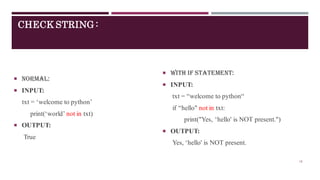
CHECK STRING :
 Normal:
 INPUT:
txt = ‘welcome to python’
print(‘world’ not in txt)
 OUTPUT:
True
 With if statement:
 INPUT:
txt = “welcome to python“
if “hello" not in txt:
print("Yes, ‘hello' is NOT present.")
 OUTPUT:
Yes, ‘hello' is NOT present.
10
STRING LENGTH AND SLICING:
 String length:
 INPUT:
a = "Hello World”
print(len(a))
 OUTPUT:
11
 INPUT:
a = “Welcome to Python programming @@@“
print (len(a))
 OUTPUT:
33
 String slicing:
 INPUT:
b = "Hello World“
print(b[2:5]) ## from index 2 to index4
 OUTPUT:
llo
 INPUT:
b = "Hello World“
print(b[:5]) ## from beginning 5 characters
 OUTPUT:
Hello
11
STRING SLICING METHODS:
 From the Start:
 INPUT:
>>>b = ‘’python is high level
programming language“
>>>print(b[:10])
 OUTPUT:
python is
## consider from the
beginning 10 characters and
print
 Till the End:
 INPUT:
>>>b = "python is high level
programming language“
>>>print(b[10:])
 OUTPUT:
high level programming
language
## skip first 10 characters
from the beginning and print
remaining till end of string
 With Negative indexing
 INPUT:
>>>b = "python is high level
programming language“
>>>print (b[:-5])
OUTPUT:
python is high level programming lan
>>>print (b[-5:])
OUTPUT:
guage 12
STRING SLICING CONTD…
## illustration of slicing
## get a range of characters from the complete string
>>>txt = "Govt SKSJTI Bengaluru"
# print characters in position 5 to 10. (position 11 not
included)
>>>print(txt[5:11])
SKSJTI
## slicing from the beginning without initial index
>>>txt = "Govt SKSJTI Bengaluru"
>>>print(txt[:4]) # from start to position 3
Govt
### slicing till the end without last index
>>>txt = "Govt SKSJTI Bengaluru"
>>>print(txt[7:]) ## from position 7 to last character
SJTI Bengaluru
### Negative indexing
>>>txt = "Govt SKSJTI Bengaluru"
>>> print(txt[-16:-8]) ## position -8 not
included
SKSJTI B
>>>txt = "Govt SKSJTI Bengaluru"
>>> print(txt[:-16])
Govt
>>>txt = "Govt SKSJTI Bengaluru"
>>> print(txt[-9:])
Bengaluru 13
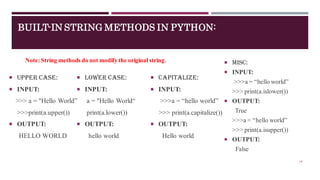
BUILT-IN STRING METHODS IN PYTHON:
 Upper case:
 INPUT:
>>> a = "Hello World”
>>>print(a.upper())
 OUTPUT:
HELLO WORLD
 Lower case:
 INPUT:
a = "Hello World“
print(a.lower())
 OUTPUT:
hello world
 capitalize:
 INPUT:
>>>a = “hello world”
>>> print(a.capitalize())
 OUTPUT:
Hello world
 Misc:
 INPUT:
>>>a = “hello world”
>>> print(a.islower())
 OUTPUT:
True
>>>a = “hello world”
>>> print(a.isupper())
 OUTPUT:
False
Note:String methods do not modify the original string.
14
BUILT-IN STRING METHODS IN PYTHON
 Remove Whitespace(strip):
 INPUT:
>>> a = " Hello World "
>>>print(a.strip())
 OUTPUT:
Hello World
## remove white spaces at the
beginning and end of the string
>>> a = " our first python prog"
>>>print(a.lstrip(‘our’))
OUTPUT:
first python prog
 Splitting string:
 INPUT:
>>> a = " hello and welcome”
>>>print(a.split())
 OUTPUT:
['hello', 'and', 'welcome']
#list with 3 elements
>>>a = " hello,how,are,you”
>>>print(a.split())
 OUTPUT:
['hello,how,are,you']
## list with single element
 INPUT:
>>>a = " hello,how,are,you”
>>>print(a.split(‘,’))
 OUTPUT:
['hello', 'how', 'are', 'you']
## list with 4 elements
## splits the string at the specified
separator and returns a list. Default
separator white space
>>>a = “but put cut”
>>>print(a.split(‘t’))
 OUTPUT:
['bu', ' pu', ' cu', '']
15
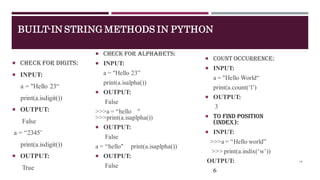
 Count occurrence:
 INPUT:
a = "Hello World“
print(a.count(‘l’)
 OUTPUT:
3
 To find position
(index):
 INPUT:
>>>a = “Hello world”
>>> print(a.indix(‘w’))
OUTPUT:
6
BUILT-IN STRING METHODS IN PYTHON
 Check for digits:
 INPUT:
a = "Hello 23“
print(a.isdigit())
 OUTPUT:
False
a = “2345’
print(a.isdigit())
 OUTPUT:
True
 Check for alphabets:
 INPUT:
a = "Hello 23”
print(a.isalpha())
 OUTPUT:
False
>>>a = “hello "
>>>print(a.isaplpha())
 OUTPUT:
False
a = “hello" print(a.isaplpha())
 OUTPUT:
False
16
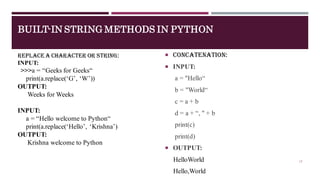
 Concatenation:
 INPUT:
a = "Hello“
b = "World“
c = a + b
d = a + “, " + b
print(c)
print(d)
 OUTPUT:
HelloWorld
Hello,World
BUILT-IN STRING METHODS IN PYTHON
Replace a character or string:
INPUT:
>>>a = “Geeks for Geeks“
print(a.replace(‘G’, ‘W’))
OUTPUT:
Weeks for Weeks
INPUT:
a = “Hello welcome to Python“
print(a.replace(‘Hello’, ‘Krishna’)
OUTPUT:
Krishna welcome to Python
17
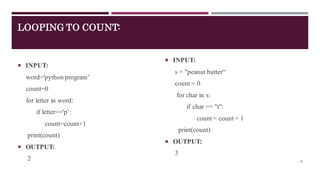
LOOPING TO COUNT:
 INPUT:
word='python program’
count=0
for letter in word:
if letter=='p’:
count=count+1
print(count)
 OUTPUT:
2
 INPUT:
s = "peanut butter“
count = 0
for char in s:
if char == "t":
count = count + 1
print(count)
 OUTPUT:
3
18
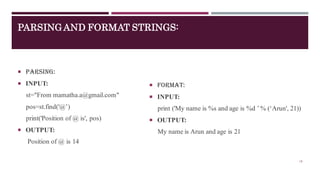
PARSINGAND FORMAT STRINGS:
 Parsing:
 INPUT:
st="From mamatha.a@gmail.com"
pos=st.find('@’)
print('Position of @ is', pos)
 OUTPUT:
Position of @ is 14
 Format:
 INPUT:
print ('My name is %s and age is %d ’% (‘Arun', 21))
 OUTPUT:
My name is Arun and age is 21
19
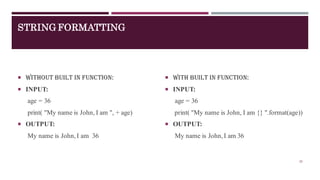
STRING FORMATTING
 Without built in function:
 INPUT:
age = 36
print( "My name is John, I am ", + age)
 OUTPUT:
My name is John,I am 36
 With built in function:
 INPUT:
age = 36
print( "My name is John, I am {} ".format(age))
 OUTPUT:
My name is John, I am 36
20
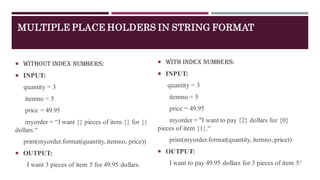
MULTIPLE PLACE HOLDERS IN STRING FORMAT
 Without index numbers:
 INPUT:
quantity = 3
itemno = 5
price = 49.95
myorder = “I want {} pieces of item {} for {}
dollars.“
print(myorder.format(quantity, itemno, price))
 OUTPUT:
I want 3 pieces of item 5 for 49.95 dollars.
 With index numbers:
 INPUT:
quantity = 3
itemno = 5
price = 49.95
myorder = "I want to pay {2} dollars for {0}
pieces of item {1}.“
print(myorder.format(quantity, itemno, price))
 OUTPUT:
I want to pay 49.95 dollars for 3 pieces of item 5.
21
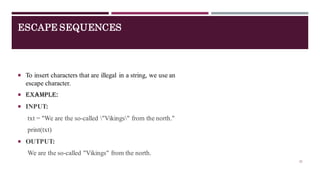
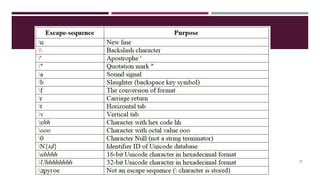
ESCAPE SEQUENCES
 To insert characters that are illegal in a string, we use an
escape character.
 Example:
 INPUT:
txt = "We are the so-called "Vikings" from the north."
print(txt)
 OUTPUT:
We are the so-called "Vikings" from the north.
22
23
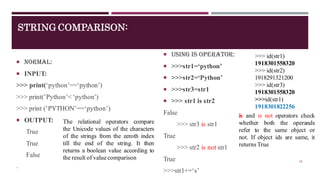
STRING COMPARISON:
 Normal:
 INPUT:
>>> print(‘python’==‘python’)
>>> print(’Python’< ‘python’)
>>> print (’PYTHON’==‘python’)
 OUTPUT:
True
True
False
.
 Using is operator:
 >>>str1=‘python’
 >>>str2=‘Python’
 >>>str3=str1
 >>> str1 is str2
False
>>> str3 is str1
True
>>> str2 is not str1
True
>>>str1+=‘s’
>>> id(str1)
1918301558320
>>> id(str2)
1918291321200
>>> id(str3)
1918301558320
>>>id(str1)
1918301822256
The relational operators compare
the Unicode values of the characters
of the strings from the zeroth index
till the end of the string. It then
returns a boolean value according to
the result of value comparison
is and is not operators check
whether both the operands
refer to the same object or
not. If object ids are same, it
returns True
24
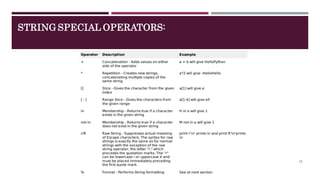
STRING SPECIAL OPERATORS:
25
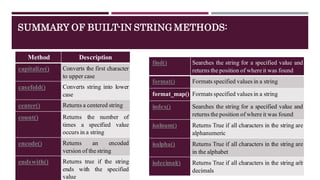
SUMMARY OF BUILT-IN STRING METHODS:
Method Description
capitalize() Converts the first character
to upper case
casefold() Converts string into lower
case
center() Returns a centered string
count() Returns the number of
times a specified value
occurs in a string
encode() Returns an encoded
version of the string
endswith() Returns true if the string
ends with the specified
value
find() Searches the string for a specified value and
returns the position of where it was found
format() Formats specified values in a string
format_map() Formats specified values in a string
index() Searches the string for a specified value and
returns the position of where it was found
isalnum() Returns True if all characters in the string are
alphanumeric
isalpha() Returns True if all characters in the string are
in the alphabet
isdecimal() Returns True if all characters in the string are
decimals
26
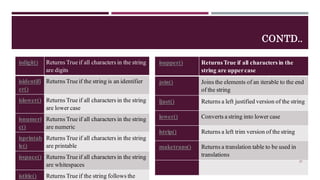
CONTD..
isdigit() Returns True if all characters in the string
are digits
isidentifi
er()
Returns True if the string is an identifier
islower() Returns True if all characters in the string
are lower case
isnumeri
c()
Returns True if all characters in the string
are numeric
isprintab
le()
Returns True if all characters in the string
are printable
isspace() Returns True if all characters in the string
are whitespaces
istitle() Returns True if the string follows the
isupper() ReturnsTrue if all characters in the
string are uppercase
join() Joins the elements of an iterable to the end
of the string
ljust() Returns a left justified version of the string
lower() Converts a string into lower case
lstrip() Returns a left trim version of the string
maketrans() Returns a translation table to be used in
translations
27
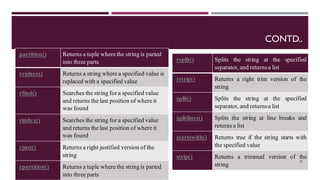
CONTD..
partition() Returns a tuple where the string is parted
into three parts
replace() Returns a string where a specified value is
replaced with a specified value
rfind() Searches the string for a specified value
and returns the last position of where it
was found
rindex() Searches the string for a specified value
and returns the last position of where it
was found
rjust() Returns a right justified version of the
string
rpartition() Returns a tuple where the string is parted
into three parts
rsplit() Splits the string at the specified
separator, and returnsa list
rstrip() Returns a right trim version of the
string
split() Splits the string at the specified
separator, and returnsa list
splitlines() Splits the string at line breaks and
returns a list
startswith() Returns true if the string starts with
the specified value
strip() Returns a trimmed version of the
string
28

Python- strings

  • 1.
    PYTHON APPLICATION PROGRAMMING-18EC646 MODULE 2 STRINGS Prof. Krishnananda L Department of ECE Govt SKSJTI Bengaluru
  • 2.
    STRINGS:  A stringis a group/ a sequence of characters. Since Python has no provision for arrays, we simply use strings. We use a pair of single or double quotes to declare a string.  Strings is “sequence data type” in python: meaning – its ordered, elements can be accessed using positional index  String may contain alphabets, numerals, special characters or a combination of all these.  String is a sequence of characters represented in Unicode. Each character of a string corresponds to an index number, starting with zero.  Strings are “immutable” i.e., once defined, the string literals cannot be reassigned directly.  Python supports positive indexing of string starting from the beginning of the string as well as negative indexing of string starting from the end of the string .  Python has a vast library having built-in methods to operate on strings 2
  • 3.
    STRING EXAMPLE PROGRAM: Example1  INPUT: >>> print(‘Hello world’)  OUTPUT: Hello world  INPUT: >>> print(“Hello world@@”)  OUTPUT: Hello world@@  Example 2  INPUT: >>>a = 'Hello world’ >>>print(a)  OUTPUT: Hello world  INPUT: >>>a = 'Hello world’ >>> a  OUTPUT: ‘Hello world’  Example 3  INPUT: >>>a = 'Hello world’ >>>a[0]=‘M’  OUTPUT:  Traceback (most recent call last): File "<pyshell#19>", line 1, in <module> a[0]='M' TypeError: 'str' object does not support item assignment Note: String is “immutable” Not possible to change the elements of the string through assignment operator 3
  • 4.
    POSITIVEAND NEGATIVE INDEXINGOF A STRING:  Positive indexing:  INPUT: >>>a = ‘Hello world’ print(a[1])  OUTPUT: e  Negative indexing:  INPUT: >>> a = 'Hello World’ >>> print(a[-1])  OUTPUT: d >>>a = "Hello, World!" >>>print(a[7]) W 4
  • 5.
    MULTILINE STRINGS:  usingthree quotes:  INPUT: a = “””Python is an interpreted high-level general-purpose programming language. Python's design philosophy emphasizes code readability with significant indentation.””” print(a)  OUTPUT: Python is an interpreted high-level general- purpose programming language. Python's design philosophy emphasizes code readability with significant indentation.  Using three single quotes:  INPUT: a = ‘’’Python is an interpreted high-level general-purpose programming language. Python's design philosophy emphasizes code readability with significant indentation.’’’ print(a)  OUTPUT: Python is an interpreted high-level general- purpose programming language. Python's design philosophy emphasizes code readability with significant indentation. 5
  • 6.
    LOOPING THROUGHA STRING: For loop:  INPUT: for x in “hello": print(x)  OUTPUT: h e l l o  While loop:  INPUT: st=“hello" i=0 while i<len(st): print(st[i], end=‘ ’)) i=i+1  OUTPUT: hello str = "welcome to Python class " for k in str: if k == 'P': break print(k, end=' ') Output: welcome to str = "welcome to Python class " for k in str: print(k, end=' ') if k == 'P': break Output: welcome to P 6
  • 7.
    LOOPING CONTD… ## toprint names of the list print ("illustration of for loop--- printing names from list") names=["anand", "arun", "akshata", "anusha"] for i in names: print ("hello " , i) print ("COMPLETED ---") # prints all letters except 'a' and 'k' ## illustration of continue ## illustration of logical operators i = 0 str1 = ‘all is well' while i < len(str1): if str1[i] == ‘s' or str1[i] == ‘l': i += 1 continue print('Current Letter :', str1[i]) i += 1 Current Letter : a Current Letter : Current Letter : i Current Letter : Current Letter : w Current Letter : e 7
  • 8.
    LOOPING CONTD.. """ programto illustrate for loop and multiple if statements with string to count the occurrence of each vowel """ txt='HELLO how are you? I am fine' counta, counte, counti, counto, countu=0,0,0,0,0 for k in txt: if k=='a' or k=='A': counta+=1 if k=='e' or k=='E': counte+=1 if k=='i' or k==‘’I’: counti+=1 if k=='o' or k =='O': counto+=1 if k=='u' or k=='U': countu+=1 print ("Given string is %s " %(txt)) print ("total 'A' or 'a' in the string is: %d " %(counta)) print ("total 'E' or 'e' in the string is: %d " %(counte)) print ("total 'I' or 'i' in the string is: %d " %(counti)) print ("total 'O' or '0' in the string is: %d " %(counto)) print ("total 'U' or 'u' in the string is: %d " %(countu)) Output: Given string is HELLO how are you? I am fine total 'A' or 'a' in the string is: 2 total 'E' or 'e' in the string is: 3 total 'I' or 'i' in the string is: 2 total 'O' or '0' in the string is: 3 total 'U' or 'u' in the string is: 1 8
  • 9.
    CHECK STRING (PHRASESIN STRINGS):  Normal:  INPUT: txt = ‘happiness is free“ print("free" in txt)  OUTPUT: True  INPUT: txt = “happiness is free” print(“hello” in txt)  OUTPUT: False  With if statement:  INPUT: txt = “happiness is free” if “free” in txt: print("Yes, 'free' is present.")  OUTPUT: Yes, 'free' is present. txt = "The quick brown fox jumps over the lazy dog!" if "fox" in txt: print("Yes, 'fox' is present.") else: print ("No, ‘fox’is not present") ## to check for a phrase in a string >>>txt = "The best things in life are free!" >>>print(“life" in txt) True 9
  • 10.
    CHECK STRING : Normal:  INPUT: txt = ‘welcome to python’ print(‘world’ not in txt)  OUTPUT: True  With if statement:  INPUT: txt = “welcome to python“ if “hello" not in txt: print("Yes, ‘hello' is NOT present.")  OUTPUT: Yes, ‘hello' is NOT present. 10
  • 11.
    STRING LENGTH ANDSLICING:  String length:  INPUT: a = "Hello World” print(len(a))  OUTPUT: 11  INPUT: a = “Welcome to Python programming @@@“ print (len(a))  OUTPUT: 33  String slicing:  INPUT: b = "Hello World“ print(b[2:5]) ## from index 2 to index4  OUTPUT: llo  INPUT: b = "Hello World“ print(b[:5]) ## from beginning 5 characters  OUTPUT: Hello 11
  • 12.
    STRING SLICING METHODS: From the Start:  INPUT: >>>b = ‘’python is high level programming language“ >>>print(b[:10])  OUTPUT: python is ## consider from the beginning 10 characters and print  Till the End:  INPUT: >>>b = "python is high level programming language“ >>>print(b[10:])  OUTPUT: high level programming language ## skip first 10 characters from the beginning and print remaining till end of string  With Negative indexing  INPUT: >>>b = "python is high level programming language“ >>>print (b[:-5]) OUTPUT: python is high level programming lan >>>print (b[-5:]) OUTPUT: guage 12
  • 13.
    STRING SLICING CONTD… ##illustration of slicing ## get a range of characters from the complete string >>>txt = "Govt SKSJTI Bengaluru" # print characters in position 5 to 10. (position 11 not included) >>>print(txt[5:11]) SKSJTI ## slicing from the beginning without initial index >>>txt = "Govt SKSJTI Bengaluru" >>>print(txt[:4]) # from start to position 3 Govt ### slicing till the end without last index >>>txt = "Govt SKSJTI Bengaluru" >>>print(txt[7:]) ## from position 7 to last character SJTI Bengaluru ### Negative indexing >>>txt = "Govt SKSJTI Bengaluru" >>> print(txt[-16:-8]) ## position -8 not included SKSJTI B >>>txt = "Govt SKSJTI Bengaluru" >>> print(txt[:-16]) Govt >>>txt = "Govt SKSJTI Bengaluru" >>> print(txt[-9:]) Bengaluru 13
  • 14.
    BUILT-IN STRING METHODSIN PYTHON:  Upper case:  INPUT: >>> a = "Hello World” >>>print(a.upper())  OUTPUT: HELLO WORLD  Lower case:  INPUT: a = "Hello World“ print(a.lower())  OUTPUT: hello world  capitalize:  INPUT: >>>a = “hello world” >>> print(a.capitalize())  OUTPUT: Hello world  Misc:  INPUT: >>>a = “hello world” >>> print(a.islower())  OUTPUT: True >>>a = “hello world” >>> print(a.isupper())  OUTPUT: False Note:String methods do not modify the original string. 14
  • 15.
    BUILT-IN STRING METHODSIN PYTHON  Remove Whitespace(strip):  INPUT: >>> a = " Hello World " >>>print(a.strip())  OUTPUT: Hello World ## remove white spaces at the beginning and end of the string >>> a = " our first python prog" >>>print(a.lstrip(‘our’)) OUTPUT: first python prog  Splitting string:  INPUT: >>> a = " hello and welcome” >>>print(a.split())  OUTPUT: ['hello', 'and', 'welcome'] #list with 3 elements >>>a = " hello,how,are,you” >>>print(a.split())  OUTPUT: ['hello,how,are,you'] ## list with single element  INPUT: >>>a = " hello,how,are,you” >>>print(a.split(‘,’))  OUTPUT: ['hello', 'how', 'are', 'you'] ## list with 4 elements ## splits the string at the specified separator and returns a list. Default separator white space >>>a = “but put cut” >>>print(a.split(‘t’))  OUTPUT: ['bu', ' pu', ' cu', ''] 15
  • 16.
     Count occurrence: INPUT: a = "Hello World“ print(a.count(‘l’)  OUTPUT: 3  To find position (index):  INPUT: >>>a = “Hello world” >>> print(a.indix(‘w’)) OUTPUT: 6 BUILT-IN STRING METHODS IN PYTHON  Check for digits:  INPUT: a = "Hello 23“ print(a.isdigit())  OUTPUT: False a = “2345’ print(a.isdigit())  OUTPUT: True  Check for alphabets:  INPUT: a = "Hello 23” print(a.isalpha())  OUTPUT: False >>>a = “hello " >>>print(a.isaplpha())  OUTPUT: False a = “hello" print(a.isaplpha())  OUTPUT: False 16
  • 17.
     Concatenation:  INPUT: a= "Hello“ b = "World“ c = a + b d = a + “, " + b print(c) print(d)  OUTPUT: HelloWorld Hello,World BUILT-IN STRING METHODS IN PYTHON Replace a character or string: INPUT: >>>a = “Geeks for Geeks“ print(a.replace(‘G’, ‘W’)) OUTPUT: Weeks for Weeks INPUT: a = “Hello welcome to Python“ print(a.replace(‘Hello’, ‘Krishna’) OUTPUT: Krishna welcome to Python 17
  • 18.
    LOOPING TO COUNT: INPUT: word='python program’ count=0 for letter in word: if letter=='p’: count=count+1 print(count)  OUTPUT: 2  INPUT: s = "peanut butter“ count = 0 for char in s: if char == "t": count = count + 1 print(count)  OUTPUT: 3 18
  • 19.
    PARSINGAND FORMAT STRINGS: Parsing:  INPUT: st="From mamatha.a@gmail.com" pos=st.find('@’) print('Position of @ is', pos)  OUTPUT: Position of @ is 14  Format:  INPUT: print ('My name is %s and age is %d ’% (‘Arun', 21))  OUTPUT: My name is Arun and age is 21 19
  • 20.
    STRING FORMATTING  Withoutbuilt in function:  INPUT: age = 36 print( "My name is John, I am ", + age)  OUTPUT: My name is John,I am 36  With built in function:  INPUT: age = 36 print( "My name is John, I am {} ".format(age))  OUTPUT: My name is John, I am 36 20
  • 21.
    MULTIPLE PLACE HOLDERSIN STRING FORMAT  Without index numbers:  INPUT: quantity = 3 itemno = 5 price = 49.95 myorder = “I want {} pieces of item {} for {} dollars.“ print(myorder.format(quantity, itemno, price))  OUTPUT: I want 3 pieces of item 5 for 49.95 dollars.  With index numbers:  INPUT: quantity = 3 itemno = 5 price = 49.95 myorder = "I want to pay {2} dollars for {0} pieces of item {1}.“ print(myorder.format(quantity, itemno, price))  OUTPUT: I want to pay 49.95 dollars for 3 pieces of item 5. 21
  • 22.
    ESCAPE SEQUENCES  Toinsert characters that are illegal in a string, we use an escape character.  Example:  INPUT: txt = "We are the so-called "Vikings" from the north." print(txt)  OUTPUT: We are the so-called "Vikings" from the north. 22
  • 23.
  • 24.
    STRING COMPARISON:  Normal: INPUT: >>> print(‘python’==‘python’) >>> print(’Python’< ‘python’) >>> print (’PYTHON’==‘python’)  OUTPUT: True True False .  Using is operator:  >>>str1=‘python’  >>>str2=‘Python’  >>>str3=str1  >>> str1 is str2 False >>> str3 is str1 True >>> str2 is not str1 True >>>str1+=‘s’ >>> id(str1) 1918301558320 >>> id(str2) 1918291321200 >>> id(str3) 1918301558320 >>>id(str1) 1918301822256 The relational operators compare the Unicode values of the characters of the strings from the zeroth index till the end of the string. It then returns a boolean value according to the result of value comparison is and is not operators check whether both the operands refer to the same object or not. If object ids are same, it returns True 24
  • 25.
  • 26.
    SUMMARY OF BUILT-INSTRING METHODS: Method Description capitalize() Converts the first character to upper case casefold() Converts string into lower case center() Returns a centered string count() Returns the number of times a specified value occurs in a string encode() Returns an encoded version of the string endswith() Returns true if the string ends with the specified value find() Searches the string for a specified value and returns the position of where it was found format() Formats specified values in a string format_map() Formats specified values in a string index() Searches the string for a specified value and returns the position of where it was found isalnum() Returns True if all characters in the string are alphanumeric isalpha() Returns True if all characters in the string are in the alphabet isdecimal() Returns True if all characters in the string are decimals 26
  • 27.
    CONTD.. isdigit() Returns Trueif all characters in the string are digits isidentifi er() Returns True if the string is an identifier islower() Returns True if all characters in the string are lower case isnumeri c() Returns True if all characters in the string are numeric isprintab le() Returns True if all characters in the string are printable isspace() Returns True if all characters in the string are whitespaces istitle() Returns True if the string follows the isupper() ReturnsTrue if all characters in the string are uppercase join() Joins the elements of an iterable to the end of the string ljust() Returns a left justified version of the string lower() Converts a string into lower case lstrip() Returns a left trim version of the string maketrans() Returns a translation table to be used in translations 27
  • 28.
    CONTD.. partition() Returns atuple where the string is parted into three parts replace() Returns a string where a specified value is replaced with a specified value rfind() Searches the string for a specified value and returns the last position of where it was found rindex() Searches the string for a specified value and returns the last position of where it was found rjust() Returns a right justified version of the string rpartition() Returns a tuple where the string is parted into three parts rsplit() Splits the string at the specified separator, and returnsa list rstrip() Returns a right trim version of the string split() Splits the string at the specified separator, and returnsa list splitlines() Splits the string at line breaks and returns a list startswith() Returns true if the string starts with the specified value strip() Returns a trimmed version of the string 28