





• What is Spyder?
• Features of Spyder
• Python Spyder IDE Installation
• Creating a File/ Project
• Writing the Code
www.edureka.co/python
• Variable Explorer
• File Explorer
• Configuring Spyder
• Help
What is Spyder?
www.edureka.co/python
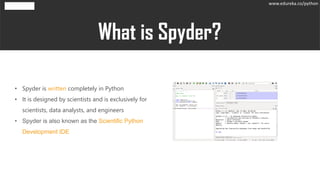
• Spyder is written completely in Python
• It is designed by scientists and is exclusively for
scientists, data analysts, and engineers
• Spyder is also known as the Scientific Python
Development IDE
What is Spyder?
www.edureka.co/python
• Syntax Highlighting
• Availability of breakpoints
• Interactive execution
• Run configurations
• Can clear variables automatically
• Navigation through cells, functions, blocks, etc
• It provides real-time code introspection
• Automatic colon insertion after if, while, etc
• Supports all IPython magic commands
• Inline display for graphics produced using Matplotlib
• Also provides features such as help, file explorer, find files, etc
www.edureka.co/python
01 Go to the Anaconda website : https://www.anaconda.com
02Click on the Download option on the top right
03 Choose the version that is suitable for your OS and click on Download.
04Complete the Setup and click on Finish.
05 Launch Spyder From the Anaconda Navigator
www.edureka.co/python
Copyright © 2017, edureka and/or its affiliates. All rights reserved.
www.edureka.co
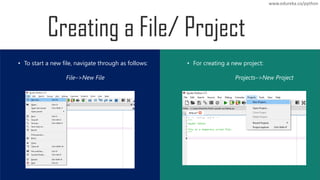
• To start a new file, navigate through as follows:
File–>New File
• For creating a new project:
Projects–>New Project
www.edureka.co/python
• The editor provides many features such as syntax
highlighting, real-time analysis of code, style
analysis, on-demand completion, etc that help you
write effective code
• The code can also be divided into different sections
using the code cells
• In case you make an error, the editor notifies it
through a caution symbol and a message describing
the error
www.edureka.co/python
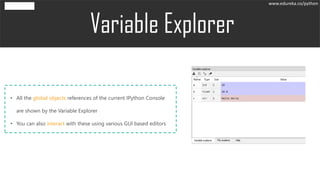
• All the global objects references of the current IPython Console
are shown by the Variable Explorer
• You can also interact with these using various GUI based editors.
www.edureka.co/python
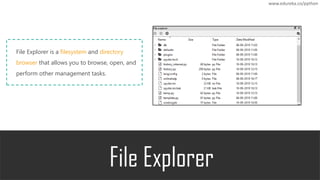
File Explorer is a filesystem and directory
browser that allows you to browse, open, and
perform other management tasks.
www.edureka.co/python
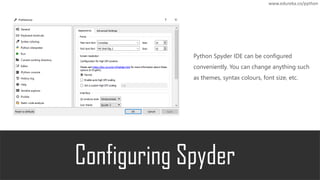
Python Spyder IDE can be configured
conveniently. You can change anything such
as themes, syntax colours, font size, etc.
www.edureka.co/python
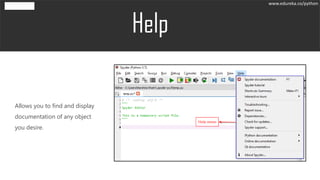
Allows you to find and display
documentation of any object
you desire.
www.edureka.co/python

Python Spyder IDE | Edureka

  • 2.
    • What isSpyder? • Features of Spyder • Python Spyder IDE Installation • Creating a File/ Project • Writing the Code www.edureka.co/python • Variable Explorer • File Explorer • Configuring Spyder • Help
  • 3.
  • 4.
    • Spyder iswritten completely in Python • It is designed by scientists and is exclusively for scientists, data analysts, and engineers • Spyder is also known as the Scientific Python Development IDE What is Spyder? www.edureka.co/python
  • 5.
  • 6.
    • Syntax Highlighting •Availability of breakpoints • Interactive execution • Run configurations • Can clear variables automatically • Navigation through cells, functions, blocks, etc • It provides real-time code introspection • Automatic colon insertion after if, while, etc • Supports all IPython magic commands • Inline display for graphics produced using Matplotlib • Also provides features such as help, file explorer, find files, etc www.edureka.co/python
  • 7.
  • 8.
    01 Go tothe Anaconda website : https://www.anaconda.com 02Click on the Download option on the top right 03 Choose the version that is suitable for your OS and click on Download. 04Complete the Setup and click on Finish. 05 Launch Spyder From the Anaconda Navigator www.edureka.co/python
  • 9.
  • 10.
    Copyright © 2017,edureka and/or its affiliates. All rights reserved. www.edureka.co
  • 11.
    • To starta new file, navigate through as follows: File–>New File • For creating a new project: Projects–>New Project www.edureka.co/python
  • 12.
  • 13.
    • The editorprovides many features such as syntax highlighting, real-time analysis of code, style analysis, on-demand completion, etc that help you write effective code • The code can also be divided into different sections using the code cells • In case you make an error, the editor notifies it through a caution symbol and a message describing the error www.edureka.co/python
  • 14.
  • 15.
    • All theglobal objects references of the current IPython Console are shown by the Variable Explorer • You can also interact with these using various GUI based editors. www.edureka.co/python
  • 16.
  • 17.
    File Explorer isa filesystem and directory browser that allows you to browse, open, and perform other management tasks. www.edureka.co/python
  • 18.
  • 19.
    Python Spyder IDEcan be configured conveniently. You can change anything such as themes, syntax colours, font size, etc. www.edureka.co/python
  • 20.
  • 21.
    Allows you tofind and display documentation of any object you desire. www.edureka.co/python
  • 22.