Python Integration with Firebase
What is Firebase
• A powerful API to store and sync data in
realtime.
• BAAS (Backend as a services)
• Combination of
– Datastore
– Tools to get realtime updates for changes
• Gives the ability to create Apps without
setting up backend
How does it work
• Developers install firebase by including a library
in their applications.
• This library provides a data structure that is
automatically synchronised between all clients
and with firebase servers.
• If one client changes a piece of data, every other
client observing the same piece of data will be
updated as well within milliseconds.
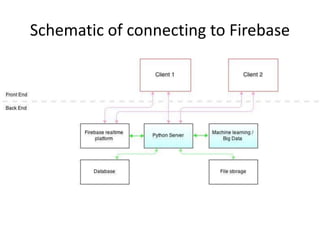
Schematic of connecting to Firebase
Firebase Integrations available
• Firebase has support for the web, iOS, OS X,
and Android clients.
• In addition, it has a Node.js and a Java library
designed for server-side use.
• A REST API is provided which allows any other
type of apps to connect with Firebase
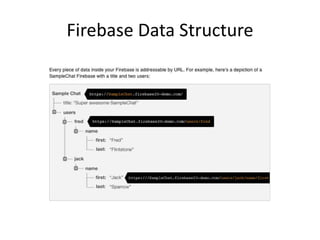
Firebase Data Structure
Python - Firebase
• Leverage the REST API implementation – Use
Python-Firebase a Python Wrapper over REST
API
• Use Server Sent Event (SSE) streams
• A complete example at
https://github.com/firebase/EventSource-
Examples
Develop a simple chat client
• Demo + Workshop
• Write data to Firebase
• Read data from Firebase
• Simple Chat Client
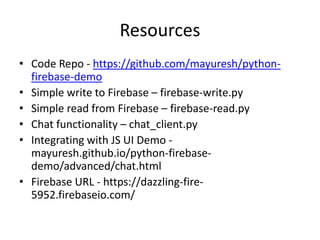
Resources
• Code Repo - https://github.com/mayuresh/python-
firebase-demo
• Simple write to Firebase – firebase-write.py
• Simple read from Firebase – firebase-read.py
• Chat functionality – chat_client.py
• Integrating with JS UI Demo -
mayuresh.github.io/python-firebase-
demo/advanced/chat.html
• Firebase URL - https://dazzling-fire-
5952.firebaseio.com/

Python integration with firebase

  • 1.
  • 2.
    What is Firebase •A powerful API to store and sync data in realtime. • BAAS (Backend as a services) • Combination of – Datastore – Tools to get realtime updates for changes • Gives the ability to create Apps without setting up backend
  • 3.
    How does itwork • Developers install firebase by including a library in their applications. • This library provides a data structure that is automatically synchronised between all clients and with firebase servers. • If one client changes a piece of data, every other client observing the same piece of data will be updated as well within milliseconds.
  • 4.
  • 5.
    Firebase Integrations available •Firebase has support for the web, iOS, OS X, and Android clients. • In addition, it has a Node.js and a Java library designed for server-side use. • A REST API is provided which allows any other type of apps to connect with Firebase
  • 6.
  • 7.
    Python - Firebase •Leverage the REST API implementation – Use Python-Firebase a Python Wrapper over REST API • Use Server Sent Event (SSE) streams • A complete example at https://github.com/firebase/EventSource- Examples
  • 8.
    Develop a simplechat client • Demo + Workshop • Write data to Firebase • Read data from Firebase • Simple Chat Client
  • 9.
    Resources • Code Repo- https://github.com/mayuresh/python- firebase-demo • Simple write to Firebase – firebase-write.py • Simple read from Firebase – firebase-read.py • Chat functionality – chat_client.py • Integrating with JS UI Demo - mayuresh.github.io/python-firebase- demo/advanced/chat.html • Firebase URL - https://dazzling-fire- 5952.firebaseio.com/