Visual Studio 2019 launch
• Software Architect @
o 17+ years professional experience
• Microsoft MVP (Azure)
• External Expert: Horizon 2020
• External Expert: Eurostars-Eureka
• External Expert: InnoFund Denmark
• Professional Interests
o Web, SOA, Integration
o IoT, Machine Learning
o Performance
• Contact
ivelin.andreev@icb.bg
www.linkedin.com/in/ivelin
www.slideshare.net/ivoandreev
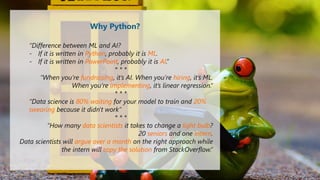
“Difference between ML and AI?
- If it is written in Python, probably it is ML.
- If it is written in PowerPoint, probably it is AI.”
* * *
“When you’re fundraising, it’s AI. When you’re hiring, it’s ML.
When you’re implementing, it’s linear regression.“
* * *
“Data science is 80% waiting for your model to train and 20%
swearing because it didn't work”
* * *
“How many data scientists it takes to change a light bulb?
20 seniors and one intern.
Data scientists will argue over a month on the right approach while
the intern will copy the solution from StackOverflow.”
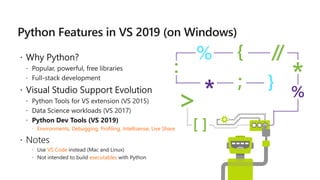
Why Python?
 Environments, Debugging, Profiling, Intellisense, Live Share
VS Code
executables
Visual Studio 2019 launch
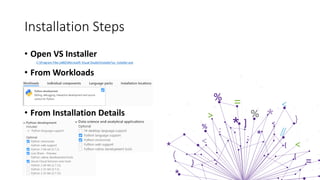
• Open VS Installer
C:Program Files (x86)Microsoft Visual StudioInstallervs_installer.exe
• From Workloads
• From Installation Details
Installation Steps
Visual Studio 2019 launch
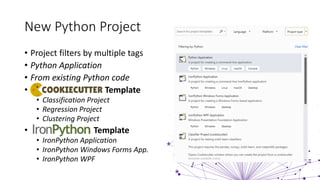
• Project filters by multiple tags
• Python Application
• From existing Python code
• Template
• Classification Project
• Regression Project
• Clustering Project
• Template
• IronPython Application
• IronPython Windows Forms App.
• IronPython WPF
New Python Project
Visual Studio 2019 launch
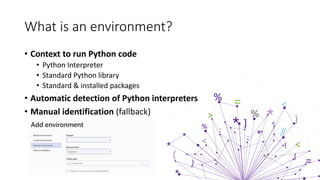
What is an environment?
• Context to run Python code
• Python Interpreter
• Standard Python library
• Standard & installed packages
• Automatic detection of Python interpreters
• Manual identification (fallback)
VS2019 Environment Types
• Global
• Available to all projects on computer
• Changes are valid for all projects on that environment
• Prone to version conflicts (different package versions from different projects)
• Easily gets cluttered, no application isolation
• Virtual
• Environment subfolder with copy of interpreter
• Any modifications are valid only in environment
• Environment config. in requirements.txt
• Conda (Miniconda or Anaconda)
• Created with Conda package manager
• Require Anaconda/Miniconda
• Environment config. in a environment.yml
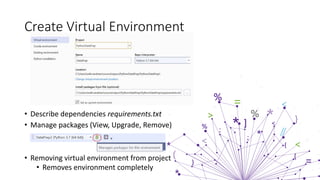
Create Virtual Environment
• Describe dependencies requirements.txt
• Manage packages (View, Upgrade, Remove)
• Removing virtual environment from project
• Removes environment completely
Visual Studio 2019 launch
Interactive Window
• For runtime experimentation of editor code
• Individual for Python environment
• Improved REPL (Read Eval Print Loop) Shell
• Meta commands
• $help, $clear, $cls, $load, $reset, $attach (debug)
• Scope
• Project startup file (default)
• Import [module name] changes scope
• dir() – display valid identifiers in scope
Visual Studio 2019 launch
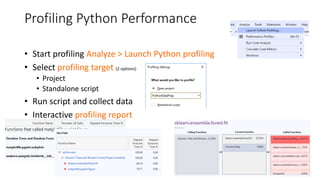
Profiling Python Performance
• Start profiling Analyze > Launch Python profiling
• Select profiling target (2 options)
• Project
• Standalone script
• Run script and collect data
• Interactive profiling report
DEMO
• Python Project
• Python Toolbar
• Add Environment
• Manage Packages
• Intellisense
• Debugging
• Live Share Session
• Interactive Window
aka.ms/pythonvs
aka.ms/pythonblog

Python Development in VS2019

  • 1.
  • 2.
    • Software Architect@ o 17+ years professional experience • Microsoft MVP (Azure) • External Expert: Horizon 2020 • External Expert: Eurostars-Eureka • External Expert: InnoFund Denmark • Professional Interests o Web, SOA, Integration o IoT, Machine Learning o Performance • Contact ivelin.andreev@icb.bg www.linkedin.com/in/ivelin www.slideshare.net/ivoandreev
  • 3.
    “Difference between MLand AI? - If it is written in Python, probably it is ML. - If it is written in PowerPoint, probably it is AI.” * * * “When you’re fundraising, it’s AI. When you’re hiring, it’s ML. When you’re implementing, it’s linear regression.“ * * * “Data science is 80% waiting for your model to train and 20% swearing because it didn't work” * * * “How many data scientists it takes to change a light bulb? 20 seniors and one intern. Data scientists will argue over a month on the right approach while the intern will copy the solution from StackOverflow.” Why Python?
  • 4.
     Environments, Debugging,Profiling, Intellisense, Live Share VS Code executables
  • 5.
  • 6.
    • Open VSInstaller C:Program Files (x86)Microsoft Visual StudioInstallervs_installer.exe • From Workloads • From Installation Details Installation Steps
  • 7.
  • 8.
    • Project filtersby multiple tags • Python Application • From existing Python code • Template • Classification Project • Regression Project • Clustering Project • Template • IronPython Application • IronPython Windows Forms App. • IronPython WPF New Python Project
  • 9.
  • 10.
    What is anenvironment? • Context to run Python code • Python Interpreter • Standard Python library • Standard & installed packages • Automatic detection of Python interpreters • Manual identification (fallback)
  • 11.
    VS2019 Environment Types •Global • Available to all projects on computer • Changes are valid for all projects on that environment • Prone to version conflicts (different package versions from different projects) • Easily gets cluttered, no application isolation • Virtual • Environment subfolder with copy of interpreter • Any modifications are valid only in environment • Environment config. in requirements.txt • Conda (Miniconda or Anaconda) • Created with Conda package manager • Require Anaconda/Miniconda • Environment config. in a environment.yml
  • 12.
    Create Virtual Environment •Describe dependencies requirements.txt • Manage packages (View, Upgrade, Remove) • Removing virtual environment from project • Removes environment completely
  • 13.
  • 14.
    Interactive Window • Forruntime experimentation of editor code • Individual for Python environment • Improved REPL (Read Eval Print Loop) Shell • Meta commands • $help, $clear, $cls, $load, $reset, $attach (debug) • Scope • Project startup file (default) • Import [module name] changes scope • dir() – display valid identifiers in scope
  • 15.
  • 16.
    Profiling Python Performance •Start profiling Analyze > Launch Python profiling • Select profiling target (2 options) • Project • Standalone script • Run script and collect data • Interactive profiling report
  • 17.
    DEMO • Python Project •Python Toolbar • Add Environment • Manage Packages • Intellisense • Debugging • Live Share Session • Interactive Window
  • 18.