PUPPET DESIGN PATTERNS
David Danzilio
Kovarus, Inc.
➤ Architect with Kovarus
➤ Joined in May 2016
➤ Previously at Constant Contact, Sandia
National Laboratories, and a few other
places you’ve never heard of
➤ Operations background, but more of a
developer these days
➤ One of the maintainers of Vox Pupuli
➤ Organizer of the Boston Puppet User
Group
ABOUT ME
ABOUT DESIGN PATTERNS
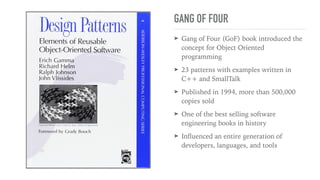
GANG OF FOUR
➤ Gang of Four (GoF) book introduced the
concept for Object Oriented
programming
➤ 23 patterns with examples written in
C++ and SmallTalk
➤ Published in 1994, more than 500,000
copies sold
➤ One of the best selling software
engineering books in history
➤ Influenced an entire generation of
developers, languages, and tools
DESIGN PATTERNS
➤ Can be highly contextual and language dependent, but a lot can be learned from all
of them
➤ The GoF focused on statically-typed, object oriented, compiled languages
➤ Some languages have implemented primitives for these patterns
➤ Not many of the GoF patterns directly apply to Puppet
➤ All of the GoF patterns focus on reinforcing a set of design principles
WHY DESIGN PATTERNS?
DESIGN PRINCIPLES
SEPARATE THINGS
THAT CHANGE
Minimize risk when making changes
LOOSE COUPLING
Reduce dependencies, increase
modularity
SEPARATION OF
CONCERNS
Divide your application into distinct
features
SINGLE
RESPONSIBILITY
Do one thing well
LEAST
KNOWLEDGE
Components should know as little as
possible about their neighbors
DON’T REPEAT
YOURSELF
DRY, because we’re lazy
PROGRAM TO AN
INTERFACE
Interfaces are more stable than the
implementation
SIX PATTERNS
SIX PATTERNS
➤ Resource Wrapper: adding functionality to code you don’t own
➤ Package, File, Service: breaking up monolithic classes
➤ Params: delegating parameter defaults
➤ Strategy: doing the same thing differently
➤ Roles and Profiles: organizing your code for modularity
➤ Factory: creating resources on the fly
THE RESOURCE
WRAPPER
PATTERN
Extending existing resources
ABOUT THE WRAPPER PATTERN
➤ Problem: resources you don’t own are missing some functionality or feature
required to implement your requirements
➤ Solution: use composition to add your required functionality without modifying the
code you don’t own
ABOUT THE WRAPPER PATTERN
➤ Use the resource wrapper pattern when you need to add functionality to an
existing resource
➤ When you feel the need to write your own resources, or to make changes to Forge
modules, think about whether you should really be using the wrapper pattern
➤ You can do this in Puppet 3 and Puppet 4, but it’s much cleaner in Puppet 4
➤ This pattern forms the basis of many other patterns you’ll see today
EXAMPLE: MANAGING USERS
➤ We want to manage our employee user accounts
➤ Requirements:
➤ The user’s UID should be set to their employee ID
➤ All employees need to be members of the ‘employees’ group
➤ We should manage a user’s bash profile by default, but users may opt out of this
upon request
EXAMPLE: MANAGING USERS
define mycompany::user (
$employee_id,
$gid,
$groups = ['employees'],
$username = $title,
$manage_profile = true,
) {
if $manage_profile {
file { "/home/${username}/.bash_profile":
ensure => file,
owner => $username,
require => User[$username],
}
}
user { $username:
uid => $employee_id,
gid => $gid,
groups => $groups,
}
}
All employees should be in the ‘employees’ group
Employee ID is used for the user ID
Feature flag to manage your user’s bash profile
Manage ~/.bash_profile with a file resource
Pass your parameters to the user resource
EXAMPLE: MANAGING USERS
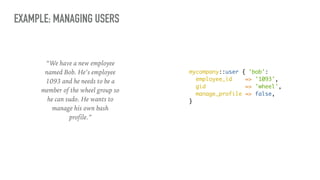
mycompany::user { 'bob':
employee_id => '1093',
gid => 'wheel',
manage_profile => false,
}
“We have a new employee
named Bob. He’s employee
1093 and he needs to be a
member of the wheel group so
he can sudo. He wants to
manage his own bash
profile.”
EXAMPLE: MANAGING USERS
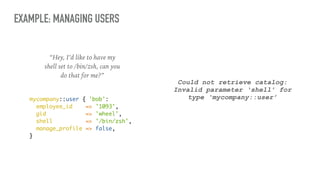
“Hey, I’d like to have my
shell set to /bin/zsh, can you
do that for me?”
mycompany::user { 'bob':
employee_id => '1093',
gid => 'wheel',
shell => '/bin/zsh',
manage_profile => false,
}
Could not retrieve catalog:
Invalid parameter ‘shell’ for
type ‘mycompany::user’
EXAMPLE: MANAGING USERS define mycompany::user (
$employee_id,
$gid,
$groups = ['employees'],
$username = $title,
$manage_profile = true,
) {
if $manage_profile {
file { "/home/${username}/.bash_profile":
ensure => file,
owner => $username,
require => User[$username],
}
}
user { $username:
uid => $employee_id,
gid => $gid,
groups => $groups,
}
}
Problem
You must maintain these parameters.
EXAMPLE: MANAGING USERS (PUPPET 3)
define mycompany::user (
$username = $title,
$manage_profile = true,
$user = {}
) {
if $manage_profile {
file { "/home/${username}/.bash_profile":
ensure => file,
owner => $username,
require => User[$username],
}
}
$user_defaults = { ‘groups’ => [‘employees’] }
$user_params = merge($user, $user_defaults)
create_resources(‘user’, $username, $user_params)
}
Much more flexible interface
Enforce business rules
Create the user resource by passing
the hash to create_resources
EXAMPLE: MANAGING USERS (PUPPET 4)
define mycompany::user (
String $username = $title,
Boolean $manage_profile = true,
Hash $user = {}
) {
if $manage_profile {
file { "/home/${username}/.bash_profile":
ensure => file,
owner => $username,
require => User[$username],
}
}
$user_defaults = { 'groups' => [‘employees’] }
user { $username:
* => $user_defaults + $user,
}
}
Much more flexible interface
Enforce business rules
Use splat operator to pass hash keys
as parameters to the user resource
EXAMPLE: MANAGING USERS
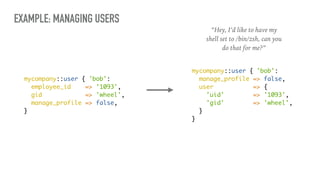
mycompany::user { 'bob':
employee_id => '1093',
gid => 'wheel',
manage_profile => false,
}
“Hey, I’d like to have my
shell set to /bin/zsh, can you
do that for me?”
mycompany::user { 'bob':
manage_profile => false,
user => {
'uid' => '1093',
'gid' => 'wheel',
}
}
EXAMPLE: MANAGING USERS
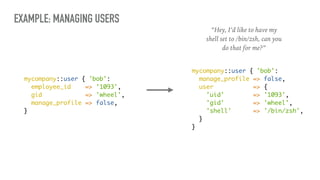
mycompany::user { 'bob':
employee_id => '1093',
gid => 'wheel',
manage_profile => false,
}
mycompany::user { 'bob':
manage_profile => false,
user => {
'uid' => '1093',
'gid' => 'wheel',
'shell' => '/bin/zsh',
}
}
“Hey, I’d like to have my
shell set to /bin/zsh, can you
do that for me?”
THE PACKAGE/
FILE/SERVICE
PATTERN
Assembling complex behavior
ABOUT THE PACKAGE/FILE/SERVICE PATTERN
➤ Problem: your module’s init.pp is getting too cluttered because all of your code
lives in that one file
➤ Solution: break out the basic functions of your module into separate classes,
generally into a package, config, and service class
ABOUT THE PACKAGE/FILE/SERVICE PATTERN
➤ This is one of the first patterns you see when learning Puppet
➤ This is the embodiment of the Single Responsibility and Separation of Concerns
principles
➤ Most modules can be broken down into some form of Package, Config File, and
Service management
➤ Use this specific pattern any time you write a module that manages these things
➤ Keep the spirit of this pattern in mind whenever you write a module that is more
than a few lines long
➤ This has the added benefit of allowing us to utilize class containment for cleaner
resource ordering
EXAMPLE: NTP
class ntp {
case $::osfamily {
'Solaris': {
$package_name = ['SUNWntpr', 'SUNWntpu']
$config_file = '/etc/inet/ntp.conf'
$service_name = 'network/ntp'
}
'RedHat': {
$package_name = 'ntp'
$config_file = '/etc/ntp.conf'
$service_name = 'ntpd'
}
}
package { $package_name:
ensure => installed,
}
file { $config_file:
ensure => file,
content => template('ntp/ntpd.conf.erb'),
require => Package[$package_name],
notify => Service[$service_name],
}
service { $service_name:
ensure => running
}
}
Installs the ntp package for that platform
Places the ntp config file
Ensures that the package is installed first
Notifies the ntp service of changes to the file
Manages the ntp service
Set some variables based on the osfamily fact
class ntp {
case $osfamily {
'Solaris': {
$package_name = ['SUNWntpr', 'SUNWntpu']
$config_file = '/etc/inet/ntp.conf'
$service_name = 'network/ntp'
}
'RedHat': {
$package_name = 'ntp'
$config_file = '/etc/ntp.conf'
$service_name = 'ntpd'
}
}
class { 'ntp::install': } ->
class { 'ntp::config': } ~>
class { 'ntp::service': }
}
EXAMPLE: NTP
Installs the ntp package
Places the ntp config file
Package is installed first
Manages the ntp service
Notifies the service of changes
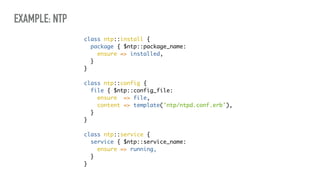
class ntp::install {
package { $ntp::package_name:
ensure => installed,
}
}
class ntp::config {
file { $ntp::config_file:
ensure => file,
content => template('ntp/ntpd.conf.erb'),
}
}
class ntp::service {
service { $ntp::service_name:
ensure => running,
}
}
EXAMPLE: NTP
THE PARAMS
PATTERN
Separating out your data
ABOUT THE PARAMS PATTERN
➤ Problem: hard-coded data makes modules fragile, verbose parameter default and
variable setting logic make classes hard to read
➤ Solution: convert embedded data to parameters and move that data to a separate
class where it can be used as parameter defaults
ABOUT THE PARAMS PATTERN
➤ The params pattern breaks out your variable assignment and parameter defaults
into a separate class, typically named params
➤ Makes classes easier to read by moving the default setting logic into a purpose-built
class
➤ Delegates responsibility for setting defaults to the params class
➤ Module data is a new feature designed to eliminate the params pattern by moving
this logic into Hiera
➤ Until module data becomes more ubiquitous, you’ll see params in use in almost
every module
➤ Use this pattern any time you have data that must live in your module
EXAMPLE: NTP
Problems
Only supports Solaris and RedHat
~70% of this class is devoted to data
class ntp {
case $osfamily {
'Solaris': {
$package_name = ['SUNWntpr', 'SUNWntpu']
$config_file = '/etc/inet/ntp.conf'
$service_name = 'network/ntp'
}
'RedHat': {
$package_name = 'ntp'
$config_file = '/etc/ntp.conf'
$service_name = 'ntpd'
}
}
class { 'ntp::install': } ->
class { 'ntp::config': } ~>
class { 'ntp::service': }
}
EXAMPLE: NTP
class ntp::params {
case $::osfamily {
'Solaris': {
$package_name = ['SUNWntpr', 'SUNWntpu']
$config_file = '/etc/inet/ntp.conf'
$service_name = 'network/ntp'
}
'RedHat': {
$package_name = 'ntp'
$config_file = '/etc/ntp.conf'
$service_name = 'ntpd'
}
}
}
Create a purpose-built class
to store your module’s data
These variables become the default
values for your class parameters
EXAMPLE: NTP
class ntp (
$package_name = $ntp::params::package_name,
$config_file = $ntp::params::config_file,
$service_name = $ntp::params::service_name,
) inherits ntp::params {
class { 'ntp::install': } ->
class { 'ntp::config': } ~>
class { 'ntp::service': }
}
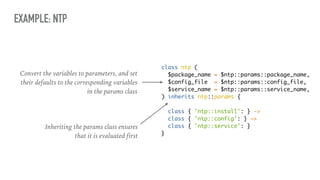
Inheriting the params class ensures
that it is evaluated first
Convert the variables to parameters, and set
their defaults to the corresponding variables
in the params class
THE STRATEGY
PATTERN
Varying the algorithm
ABOUT THE STRATEGY PATTERN
➤ Problem: you have multiple ways to achieve basically the same thing in your
module, but you need to choose one way based on some criteria (usually a fact)
➤ Solution: break each approach into separate classes and let your caller decide which
to include
ABOUT THE STRATEGY PATTERN
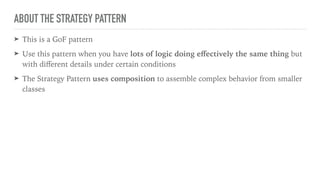
➤ This is a GoF pattern
➤ Use this pattern when you have lots of logic doing effectively the same thing but
with different details under certain conditions
➤ The Strategy Pattern uses composition to assemble complex behavior from smaller
classes
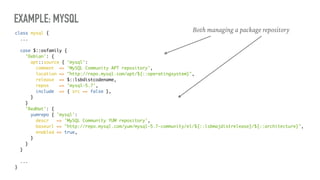
EXAMPLE: MYSQL
class mysql {
...
case $::osfamily {
'Debian': {
apt::source { 'mysql':
comment => 'MySQL Community APT repository',
location => "http://repo.mysql.com/apt/${::operatingsystem}",
release => $::lsbdistcodename,
repos => 'mysql-5.7',
include => { src => false },
}
}
'RedHat': {
yumrepo { 'mysql':
descr => 'MySQL Community YUM repository',
baseurl => "http://repo.mysql.com/yum/mysql-5.7-community/el/${::lsbmajdistrelease}/${::architecture}",
enabled => true,
}
}
}
...
}
Both managing a package repository
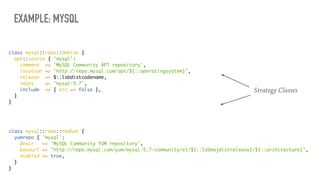
EXAMPLE: MYSQL
class mysql::repo::redhat {
yumrepo { 'mysql':
descr => 'MySQL Community YUM repository',
baseurl => "http://repo.mysql.com/yum/mysql-5.7-community/el/${::lsbmajdistrelease}/${::architecture}",
enabled => true,
}
}
class mysql::repo::debian {
apt::source { 'mysql':
comment => 'MySQL Community APT repository',
location => "http://repo.mysql.com/apt/${::operatingsystem}",
release => $::lsbdistcodename,
repos => 'mysql-5.7',
include => { src => false },
}
}
Strategy Classes
EXAMPLE: MYSQL
class mysql {
...
case $::osfamily {
'Debian': { include mysql::repo::debian }
'RedHat': { include mysql::repo::redhat }
}
...
}
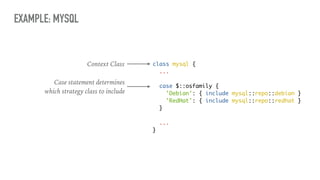
Context Class
Case statement determines
which strategy class to include
THE ROLES AND
PROFILES
PATTERN
Organizing your code for modularity
ABOUT THE ROLES AND PROFILES PATTERN
➤ Problem: large node statements with many classes, lots of inherited node
statements, difficulty identifying what a server’s purpose is in your environment
➤ Solution: add an extra layer of abstraction between your node and your modules
ABOUT THE ROLES AND PROFILES PATTERN
➤ The Roles and Profiles pattern was described by Craig Dunn in his blog post
Designing Puppet - Roles and Profiles
➤ This is one of the most comprehensive design patterns for Puppet
➤ It is the “official” way to structure your Puppet code
➤ You should always use Roles and Profiles
➤ Craig does an excellent job describing these concepts in depth, you should read his
blog post here: http://www.craigdunn.org/2012/05/239/
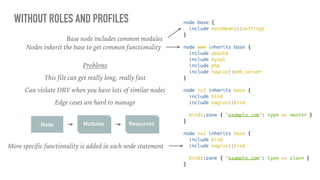
WITHOUT ROLES AND PROFILES node base {
include mycompany::settings
}
node www inherits base {
include apache
include mysql
include php
include nagios::web_server
}
node ns1 inherits base {
include bind
include nagios::bind
bind::zone { ‘example.com': type => master }
}
node ns2 inherits base {
include bind
include nagios::bind
bind::zone { ‘example.com': type => slave }
}
Base node includes common modules
Nodes inherit the base to get common functionality
More specific functionality is added in each node statement
Problems
This file can get really long, really fast
Can violate DRY when you have lots of similar nodes
Edge cases are hard to manage
Node ModulesModules ResourcesResources
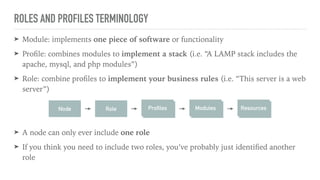
ROLES AND PROFILES TERMINOLOGY
➤ Module: implements one piece of software or functionality
➤ Profile: combines modules to implement a stack (i.e. “A LAMP stack includes the
apache, mysql, and php modules”)
➤ Role: combine profiles to implement your business rules (i.e. “This server is a web
server”)
➤ A node can only ever include one role
➤ If you think you need to include two roles, you’ve probably just identified another
role
Node ModulesModules ResourcesResourcesRole ModulesProfiles
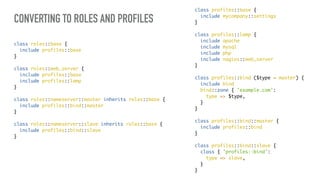
CONVERTING TO ROLES AND PROFILES
class roles::base {
include profiles::base
}
class roles::web_server {
include profiles::base
include profiles::lamp
}
class roles::nameserver::master inherits roles::base {
include profiles::bind::master
}
class roles::nameserver::slave inherits roles::base {
include profiles::bind::slave
}
class profiles::base {
include mycompany::settings
}
class profiles::lamp {
include apache
include mysql
include php
include nagios::web_server
}
class profiles::bind ($type = master) {
include bind
bind::zone { 'example.com':
type => $type,
}
}
class profiles::bind::master {
include profiles::bind
}
class profiles::bind::slave {
class { 'profiles::bind':
type => slave,
}
}
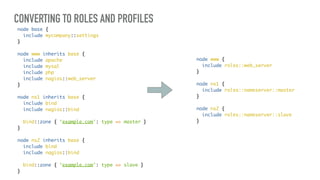
CONVERTING TO ROLES AND PROFILES
node www {
include roles::web_server
}
node ns1 {
include roles::nameserver::master
}
node ns2 {
include roles::nameserver::slave
}
node base {
include mycompany::settings
}
node www inherits base {
include apache
include mysql
include php
include nagios::web_server
}
node ns1 inherits base {
include bind
include nagios::bind
bind::zone { ‘example.com': type => master }
}
node ns2 inherits base {
include bind
include nagios::bind
bind::zone { ‘example.com': type => slave }
}
THE FACTORY
PATTERN
Creating resources in your classes
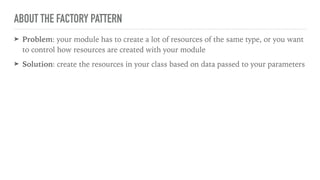
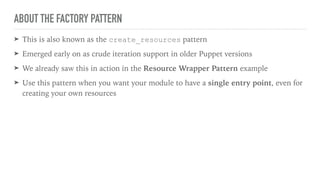
ABOUT THE FACTORY PATTERN
➤ Problem: your module has to create a lot of resources of the same type, or you want
to control how resources are created with your module
➤ Solution: create the resources in your class based on data passed to your parameters
ABOUT THE FACTORY PATTERN
➤ This is also known as the create_resources pattern
➤ Emerged early on as crude iteration support in older Puppet versions
➤ We already saw this in action in the Resource Wrapper Pattern example
➤ Use this pattern when you want your module to have a single entry point, even for
creating your own resources
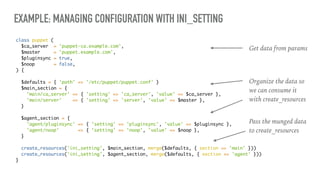
EXAMPLE: MANAGING CONFIGURATION WITH INI_SETTING
class puppet (
$ca_server = 'puppet-ca.example.com',
$master = 'puppet.example.com',
$pluginsync = true,
$noop = false,
) {
$defaults = { 'path' => '/etc/puppet/puppet.conf' }
$main_section = {
'main/ca_server' => { 'setting' => 'ca_server', 'value' => $ca_server },
'main/server' => { 'setting' => 'server', 'value' => $master },
}
$agent_section = {
'agent/pluginsync' => { 'setting' => 'pluginsync', 'value' => $pluginsync },
'agent/noop' => { 'setting' => 'noop', 'value' => $noop },
}
create_resources('ini_setting', $main_section, merge($defaults, { section => 'main' }))
create_resources('ini_setting', $agent_section, merge($defaults, { section => 'agent' }))
}
Get data from params
Organize the data so
we can consume it
with create_resources
Pass the munged data
to create_resources
EXAMPLE: MANAGING CONFIGURATION WITH INI_SETTING (PUPPET 4)
class puppet (
String $path = '/etc/puppet/puppet.conf',
Hash $main_section = {
'ca_server' => 'puppet-ca.example.com',
'server' => 'puppet.example.com'
},
Hash $agent_section = {
'pluginsync' => true,
'noop' => false,
},
) {
['agent', 'main'].each |$section| {
$data = getvar("${section}_section")
$data.each |$key,$val| {
ini_setting { "${section}/${key}":
path => $path,
section => $section,
setting => $key,
value => $val,
}
}
}
}
Pass a hash for each section
Iterate over each section name
Fetch the variable that holds that section’s data
Iterate over that data, passing it to an
ini_setting resource
THE END
STAY TUNED FOR MORE PATTERNS
CONTACT INFO
➤ @djdanzilio on Twitter
➤ danzilio on Freenode (you can usually
find me in #voxpupuli, #puppet-dev, and
#puppet)
➤ danzilio on GitHub and The Forge
➤ ddanzilio (at) kovarus (dot) com
➤ blog.danzil.io
➤ www.kovarus.com

Puppet Design Patterns

  • 1.
    PUPPET DESIGN PATTERNS DavidDanzilio Kovarus, Inc.
  • 2.
    ➤ Architect withKovarus ➤ Joined in May 2016 ➤ Previously at Constant Contact, Sandia National Laboratories, and a few other places you’ve never heard of ➤ Operations background, but more of a developer these days ➤ One of the maintainers of Vox Pupuli ➤ Organizer of the Boston Puppet User Group ABOUT ME
  • 4.
  • 5.
    GANG OF FOUR ➤Gang of Four (GoF) book introduced the concept for Object Oriented programming ➤ 23 patterns with examples written in C++ and SmallTalk ➤ Published in 1994, more than 500,000 copies sold ➤ One of the best selling software engineering books in history ➤ Influenced an entire generation of developers, languages, and tools
  • 6.
    DESIGN PATTERNS ➤ Canbe highly contextual and language dependent, but a lot can be learned from all of them ➤ The GoF focused on statically-typed, object oriented, compiled languages ➤ Some languages have implemented primitives for these patterns ➤ Not many of the GoF patterns directly apply to Puppet ➤ All of the GoF patterns focus on reinforcing a set of design principles
  • 7.
  • 8.
  • 9.
    SEPARATE THINGS THAT CHANGE Minimizerisk when making changes
  • 10.
  • 11.
    SEPARATION OF CONCERNS Divide yourapplication into distinct features
  • 12.
  • 13.
    LEAST KNOWLEDGE Components should knowas little as possible about their neighbors
  • 14.
  • 15.
    PROGRAM TO AN INTERFACE Interfacesare more stable than the implementation
  • 16.
  • 17.
    SIX PATTERNS ➤ ResourceWrapper: adding functionality to code you don’t own ➤ Package, File, Service: breaking up monolithic classes ➤ Params: delegating parameter defaults ➤ Strategy: doing the same thing differently ➤ Roles and Profiles: organizing your code for modularity ➤ Factory: creating resources on the fly
  • 18.
  • 19.
    ABOUT THE WRAPPERPATTERN ➤ Problem: resources you don’t own are missing some functionality or feature required to implement your requirements ➤ Solution: use composition to add your required functionality without modifying the code you don’t own
  • 20.
    ABOUT THE WRAPPERPATTERN ➤ Use the resource wrapper pattern when you need to add functionality to an existing resource ➤ When you feel the need to write your own resources, or to make changes to Forge modules, think about whether you should really be using the wrapper pattern ➤ You can do this in Puppet 3 and Puppet 4, but it’s much cleaner in Puppet 4 ➤ This pattern forms the basis of many other patterns you’ll see today
  • 21.
    EXAMPLE: MANAGING USERS ➤We want to manage our employee user accounts ➤ Requirements: ➤ The user’s UID should be set to their employee ID ➤ All employees need to be members of the ‘employees’ group ➤ We should manage a user’s bash profile by default, but users may opt out of this upon request
  • 22.
    EXAMPLE: MANAGING USERS definemycompany::user ( $employee_id, $gid, $groups = ['employees'], $username = $title, $manage_profile = true, ) { if $manage_profile { file { "/home/${username}/.bash_profile": ensure => file, owner => $username, require => User[$username], } } user { $username: uid => $employee_id, gid => $gid, groups => $groups, } } All employees should be in the ‘employees’ group Employee ID is used for the user ID Feature flag to manage your user’s bash profile Manage ~/.bash_profile with a file resource Pass your parameters to the user resource
  • 23.
    EXAMPLE: MANAGING USERS mycompany::user{ 'bob': employee_id => '1093', gid => 'wheel', manage_profile => false, } “We have a new employee named Bob. He’s employee 1093 and he needs to be a member of the wheel group so he can sudo. He wants to manage his own bash profile.”
  • 24.
    EXAMPLE: MANAGING USERS “Hey,I’d like to have my shell set to /bin/zsh, can you do that for me?” mycompany::user { 'bob': employee_id => '1093', gid => 'wheel', shell => '/bin/zsh', manage_profile => false, } Could not retrieve catalog: Invalid parameter ‘shell’ for type ‘mycompany::user’
  • 25.
    EXAMPLE: MANAGING USERSdefine mycompany::user ( $employee_id, $gid, $groups = ['employees'], $username = $title, $manage_profile = true, ) { if $manage_profile { file { "/home/${username}/.bash_profile": ensure => file, owner => $username, require => User[$username], } } user { $username: uid => $employee_id, gid => $gid, groups => $groups, } } Problem You must maintain these parameters.
  • 26.
    EXAMPLE: MANAGING USERS(PUPPET 3) define mycompany::user ( $username = $title, $manage_profile = true, $user = {} ) { if $manage_profile { file { "/home/${username}/.bash_profile": ensure => file, owner => $username, require => User[$username], } } $user_defaults = { ‘groups’ => [‘employees’] } $user_params = merge($user, $user_defaults) create_resources(‘user’, $username, $user_params) } Much more flexible interface Enforce business rules Create the user resource by passing the hash to create_resources
  • 27.
    EXAMPLE: MANAGING USERS(PUPPET 4) define mycompany::user ( String $username = $title, Boolean $manage_profile = true, Hash $user = {} ) { if $manage_profile { file { "/home/${username}/.bash_profile": ensure => file, owner => $username, require => User[$username], } } $user_defaults = { 'groups' => [‘employees’] } user { $username: * => $user_defaults + $user, } } Much more flexible interface Enforce business rules Use splat operator to pass hash keys as parameters to the user resource
  • 28.
    EXAMPLE: MANAGING USERS mycompany::user{ 'bob': employee_id => '1093', gid => 'wheel', manage_profile => false, } “Hey, I’d like to have my shell set to /bin/zsh, can you do that for me?” mycompany::user { 'bob': manage_profile => false, user => { 'uid' => '1093', 'gid' => 'wheel', } }
  • 29.
    EXAMPLE: MANAGING USERS mycompany::user{ 'bob': employee_id => '1093', gid => 'wheel', manage_profile => false, } mycompany::user { 'bob': manage_profile => false, user => { 'uid' => '1093', 'gid' => 'wheel', 'shell' => '/bin/zsh', } } “Hey, I’d like to have my shell set to /bin/zsh, can you do that for me?”
  • 30.
  • 31.
    ABOUT THE PACKAGE/FILE/SERVICEPATTERN ➤ Problem: your module’s init.pp is getting too cluttered because all of your code lives in that one file ➤ Solution: break out the basic functions of your module into separate classes, generally into a package, config, and service class
  • 32.
    ABOUT THE PACKAGE/FILE/SERVICEPATTERN ➤ This is one of the first patterns you see when learning Puppet ➤ This is the embodiment of the Single Responsibility and Separation of Concerns principles ➤ Most modules can be broken down into some form of Package, Config File, and Service management ➤ Use this specific pattern any time you write a module that manages these things ➤ Keep the spirit of this pattern in mind whenever you write a module that is more than a few lines long ➤ This has the added benefit of allowing us to utilize class containment for cleaner resource ordering
  • 33.
    EXAMPLE: NTP class ntp{ case $::osfamily { 'Solaris': { $package_name = ['SUNWntpr', 'SUNWntpu'] $config_file = '/etc/inet/ntp.conf' $service_name = 'network/ntp' } 'RedHat': { $package_name = 'ntp' $config_file = '/etc/ntp.conf' $service_name = 'ntpd' } } package { $package_name: ensure => installed, } file { $config_file: ensure => file, content => template('ntp/ntpd.conf.erb'), require => Package[$package_name], notify => Service[$service_name], } service { $service_name: ensure => running } } Installs the ntp package for that platform Places the ntp config file Ensures that the package is installed first Notifies the ntp service of changes to the file Manages the ntp service Set some variables based on the osfamily fact
  • 34.
    class ntp { case$osfamily { 'Solaris': { $package_name = ['SUNWntpr', 'SUNWntpu'] $config_file = '/etc/inet/ntp.conf' $service_name = 'network/ntp' } 'RedHat': { $package_name = 'ntp' $config_file = '/etc/ntp.conf' $service_name = 'ntpd' } } class { 'ntp::install': } -> class { 'ntp::config': } ~> class { 'ntp::service': } } EXAMPLE: NTP Installs the ntp package Places the ntp config file Package is installed first Manages the ntp service Notifies the service of changes
  • 35.
    class ntp::install { package{ $ntp::package_name: ensure => installed, } } class ntp::config { file { $ntp::config_file: ensure => file, content => template('ntp/ntpd.conf.erb'), } } class ntp::service { service { $ntp::service_name: ensure => running, } } EXAMPLE: NTP
  • 36.
  • 37.
    ABOUT THE PARAMSPATTERN ➤ Problem: hard-coded data makes modules fragile, verbose parameter default and variable setting logic make classes hard to read ➤ Solution: convert embedded data to parameters and move that data to a separate class where it can be used as parameter defaults
  • 38.
    ABOUT THE PARAMSPATTERN ➤ The params pattern breaks out your variable assignment and parameter defaults into a separate class, typically named params ➤ Makes classes easier to read by moving the default setting logic into a purpose-built class ➤ Delegates responsibility for setting defaults to the params class ➤ Module data is a new feature designed to eliminate the params pattern by moving this logic into Hiera ➤ Until module data becomes more ubiquitous, you’ll see params in use in almost every module ➤ Use this pattern any time you have data that must live in your module
  • 39.
    EXAMPLE: NTP Problems Only supportsSolaris and RedHat ~70% of this class is devoted to data class ntp { case $osfamily { 'Solaris': { $package_name = ['SUNWntpr', 'SUNWntpu'] $config_file = '/etc/inet/ntp.conf' $service_name = 'network/ntp' } 'RedHat': { $package_name = 'ntp' $config_file = '/etc/ntp.conf' $service_name = 'ntpd' } } class { 'ntp::install': } -> class { 'ntp::config': } ~> class { 'ntp::service': } }
  • 40.
    EXAMPLE: NTP class ntp::params{ case $::osfamily { 'Solaris': { $package_name = ['SUNWntpr', 'SUNWntpu'] $config_file = '/etc/inet/ntp.conf' $service_name = 'network/ntp' } 'RedHat': { $package_name = 'ntp' $config_file = '/etc/ntp.conf' $service_name = 'ntpd' } } } Create a purpose-built class to store your module’s data These variables become the default values for your class parameters
  • 41.
    EXAMPLE: NTP class ntp( $package_name = $ntp::params::package_name, $config_file = $ntp::params::config_file, $service_name = $ntp::params::service_name, ) inherits ntp::params { class { 'ntp::install': } -> class { 'ntp::config': } ~> class { 'ntp::service': } } Inheriting the params class ensures that it is evaluated first Convert the variables to parameters, and set their defaults to the corresponding variables in the params class
  • 42.
  • 43.
    ABOUT THE STRATEGYPATTERN ➤ Problem: you have multiple ways to achieve basically the same thing in your module, but you need to choose one way based on some criteria (usually a fact) ➤ Solution: break each approach into separate classes and let your caller decide which to include
  • 44.
    ABOUT THE STRATEGYPATTERN ➤ This is a GoF pattern ➤ Use this pattern when you have lots of logic doing effectively the same thing but with different details under certain conditions ➤ The Strategy Pattern uses composition to assemble complex behavior from smaller classes
  • 45.
    EXAMPLE: MYSQL class mysql{ ... case $::osfamily { 'Debian': { apt::source { 'mysql': comment => 'MySQL Community APT repository', location => "http://repo.mysql.com/apt/${::operatingsystem}", release => $::lsbdistcodename, repos => 'mysql-5.7', include => { src => false }, } } 'RedHat': { yumrepo { 'mysql': descr => 'MySQL Community YUM repository', baseurl => "http://repo.mysql.com/yum/mysql-5.7-community/el/${::lsbmajdistrelease}/${::architecture}", enabled => true, } } } ... } Both managing a package repository
  • 46.
    EXAMPLE: MYSQL class mysql::repo::redhat{ yumrepo { 'mysql': descr => 'MySQL Community YUM repository', baseurl => "http://repo.mysql.com/yum/mysql-5.7-community/el/${::lsbmajdistrelease}/${::architecture}", enabled => true, } } class mysql::repo::debian { apt::source { 'mysql': comment => 'MySQL Community APT repository', location => "http://repo.mysql.com/apt/${::operatingsystem}", release => $::lsbdistcodename, repos => 'mysql-5.7', include => { src => false }, } } Strategy Classes
  • 47.
    EXAMPLE: MYSQL class mysql{ ... case $::osfamily { 'Debian': { include mysql::repo::debian } 'RedHat': { include mysql::repo::redhat } } ... } Context Class Case statement determines which strategy class to include
  • 48.
  • 49.
    ABOUT THE ROLESAND PROFILES PATTERN ➤ Problem: large node statements with many classes, lots of inherited node statements, difficulty identifying what a server’s purpose is in your environment ➤ Solution: add an extra layer of abstraction between your node and your modules
  • 50.
    ABOUT THE ROLESAND PROFILES PATTERN ➤ The Roles and Profiles pattern was described by Craig Dunn in his blog post Designing Puppet - Roles and Profiles ➤ This is one of the most comprehensive design patterns for Puppet ➤ It is the “official” way to structure your Puppet code ➤ You should always use Roles and Profiles ➤ Craig does an excellent job describing these concepts in depth, you should read his blog post here: http://www.craigdunn.org/2012/05/239/
  • 51.
    WITHOUT ROLES ANDPROFILES node base { include mycompany::settings } node www inherits base { include apache include mysql include php include nagios::web_server } node ns1 inherits base { include bind include nagios::bind bind::zone { ‘example.com': type => master } } node ns2 inherits base { include bind include nagios::bind bind::zone { ‘example.com': type => slave } } Base node includes common modules Nodes inherit the base to get common functionality More specific functionality is added in each node statement Problems This file can get really long, really fast Can violate DRY when you have lots of similar nodes Edge cases are hard to manage Node ModulesModules ResourcesResources
  • 52.
    ROLES AND PROFILESTERMINOLOGY ➤ Module: implements one piece of software or functionality ➤ Profile: combines modules to implement a stack (i.e. “A LAMP stack includes the apache, mysql, and php modules”) ➤ Role: combine profiles to implement your business rules (i.e. “This server is a web server”) ➤ A node can only ever include one role ➤ If you think you need to include two roles, you’ve probably just identified another role Node ModulesModules ResourcesResourcesRole ModulesProfiles
  • 53.
    CONVERTING TO ROLESAND PROFILES class roles::base { include profiles::base } class roles::web_server { include profiles::base include profiles::lamp } class roles::nameserver::master inherits roles::base { include profiles::bind::master } class roles::nameserver::slave inherits roles::base { include profiles::bind::slave } class profiles::base { include mycompany::settings } class profiles::lamp { include apache include mysql include php include nagios::web_server } class profiles::bind ($type = master) { include bind bind::zone { 'example.com': type => $type, } } class profiles::bind::master { include profiles::bind } class profiles::bind::slave { class { 'profiles::bind': type => slave, } }
  • 54.
    CONVERTING TO ROLESAND PROFILES node www { include roles::web_server } node ns1 { include roles::nameserver::master } node ns2 { include roles::nameserver::slave } node base { include mycompany::settings } node www inherits base { include apache include mysql include php include nagios::web_server } node ns1 inherits base { include bind include nagios::bind bind::zone { ‘example.com': type => master } } node ns2 inherits base { include bind include nagios::bind bind::zone { ‘example.com': type => slave } }
  • 55.
  • 56.
    ABOUT THE FACTORYPATTERN ➤ Problem: your module has to create a lot of resources of the same type, or you want to control how resources are created with your module ➤ Solution: create the resources in your class based on data passed to your parameters
  • 57.
    ABOUT THE FACTORYPATTERN ➤ This is also known as the create_resources pattern ➤ Emerged early on as crude iteration support in older Puppet versions ➤ We already saw this in action in the Resource Wrapper Pattern example ➤ Use this pattern when you want your module to have a single entry point, even for creating your own resources
  • 58.
    EXAMPLE: MANAGING CONFIGURATIONWITH INI_SETTING class puppet ( $ca_server = 'puppet-ca.example.com', $master = 'puppet.example.com', $pluginsync = true, $noop = false, ) { $defaults = { 'path' => '/etc/puppet/puppet.conf' } $main_section = { 'main/ca_server' => { 'setting' => 'ca_server', 'value' => $ca_server }, 'main/server' => { 'setting' => 'server', 'value' => $master }, } $agent_section = { 'agent/pluginsync' => { 'setting' => 'pluginsync', 'value' => $pluginsync }, 'agent/noop' => { 'setting' => 'noop', 'value' => $noop }, } create_resources('ini_setting', $main_section, merge($defaults, { section => 'main' })) create_resources('ini_setting', $agent_section, merge($defaults, { section => 'agent' })) } Get data from params Organize the data so we can consume it with create_resources Pass the munged data to create_resources
  • 59.
    EXAMPLE: MANAGING CONFIGURATIONWITH INI_SETTING (PUPPET 4) class puppet ( String $path = '/etc/puppet/puppet.conf', Hash $main_section = { 'ca_server' => 'puppet-ca.example.com', 'server' => 'puppet.example.com' }, Hash $agent_section = { 'pluginsync' => true, 'noop' => false, }, ) { ['agent', 'main'].each |$section| { $data = getvar("${section}_section") $data.each |$key,$val| { ini_setting { "${section}/${key}": path => $path, section => $section, setting => $key, value => $val, } } } } Pass a hash for each section Iterate over each section name Fetch the variable that holds that section’s data Iterate over that data, passing it to an ini_setting resource
  • 60.
  • 61.
    STAY TUNED FORMORE PATTERNS
  • 62.
    CONTACT INFO ➤ @djdanzilioon Twitter ➤ danzilio on Freenode (you can usually find me in #voxpupuli, #puppet-dev, and #puppet) ➤ danzilio on GitHub and The Forge ➤ ddanzilio (at) kovarus (dot) com ➤ blog.danzil.io ➤ www.kovarus.com