Advanced Capture
PSIGEN Software, Inc.
John Sutton
John.Sutton@psigen.com
949-916-7700 x236
Capture vs. Scanning
• A scanning application is just a means to take paper, and
quickly and easily convert it from paper to digital form. They
are well suited to environments with very basic needs, and
what I call "onsie-twosie" scanning, or low volume
environments.
• Capture software can be utilized for basic scanning needs,
but takes you to a whole new level from a "capture"
perspective. These applications typically have a number of
ways to "slice and dice" documents, and really focus on
efficiency, and minimizing the time required to scan, index
and capture data.
The Capture Equation
Our Process
Capture Process Publish
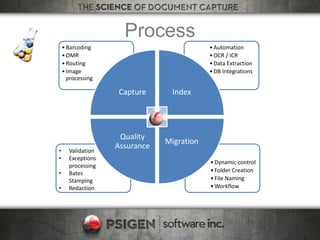
Process
• Validation
• Exceptions
processing
• Bates
Stamping
• Redaction
•Dynamic control
•Folder Creation
•File Naming
•Workflow
•Automation
•OCR / ICR
•Data Extraction
•DB Integrations
•Barcoding
•OMR
•Routing
•Image
processing
Capture Index
Migration
Quality
Assurance
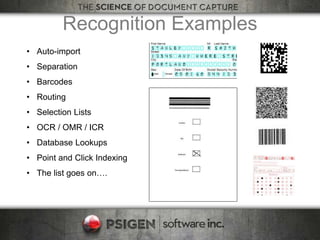
Recognition Examples
• Auto-import
• Separation
• Barcodes
• Routing
• Selection Lists
• OCR / OMR / ICR
• Database Lookups
• Point and Click Indexing
• The list goes on….
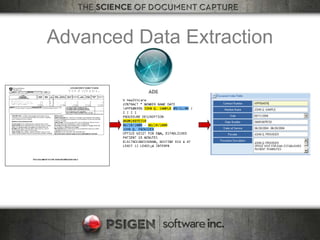
Advanced Data Extraction
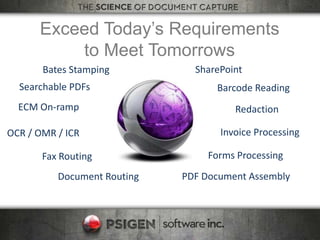
Exceed Today’s Requirements
to Meet Tomorrows
Bates Stamping
Redaction
Searchable PDFs
Invoice ProcessingOCR / OMR / ICR
Barcode Reading
ECM On-ramp
SharePoint
Forms ProcessingFax Routing
Document Routing PDF Document Assembly
Migration(s)
12332
ATT
1232.00
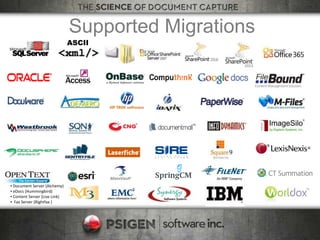
Supported Migrations
ASCII
▪ Document Server (Alchemy)
▪ eDocs (Hummingbird)
▪ Content Server (Live Link)
▪ Fax Server (Rightfax )
PSIGEN Overview
• Founded 1995
• Mature capture company
• Innovative Capture
• Focus on High Volume and
Automation
• Integration with 63 Document
Management Systems

PSIGEN Document Capture

  • 1.
    Advanced Capture PSIGEN Software,Inc. John Sutton John.Sutton@psigen.com 949-916-7700 x236
  • 2.
    Capture vs. Scanning •A scanning application is just a means to take paper, and quickly and easily convert it from paper to digital form. They are well suited to environments with very basic needs, and what I call "onsie-twosie" scanning, or low volume environments. • Capture software can be utilized for basic scanning needs, but takes you to a whole new level from a "capture" perspective. These applications typically have a number of ways to "slice and dice" documents, and really focus on efficiency, and minimizing the time required to scan, index and capture data.
  • 3.
  • 4.
  • 5.
    Process • Validation • Exceptions processing •Bates Stamping • Redaction •Dynamic control •Folder Creation •File Naming •Workflow •Automation •OCR / ICR •Data Extraction •DB Integrations •Barcoding •OMR •Routing •Image processing Capture Index Migration Quality Assurance
  • 6.
    Recognition Examples • Auto-import •Separation • Barcodes • Routing • Selection Lists • OCR / OMR / ICR • Database Lookups • Point and Click Indexing • The list goes on….
  • 7.
  • 8.
    Exceed Today’s Requirements toMeet Tomorrows Bates Stamping Redaction Searchable PDFs Invoice ProcessingOCR / OMR / ICR Barcode Reading ECM On-ramp SharePoint Forms ProcessingFax Routing Document Routing PDF Document Assembly
  • 9.
  • 10.
    Supported Migrations ASCII ▪ DocumentServer (Alchemy) ▪ eDocs (Hummingbird) ▪ Content Server (Live Link) ▪ Fax Server (Rightfax )
  • 11.
    PSIGEN Overview • Founded1995 • Mature capture company • Innovative Capture • Focus on High Volume and Automation • Integration with 63 Document Management Systems