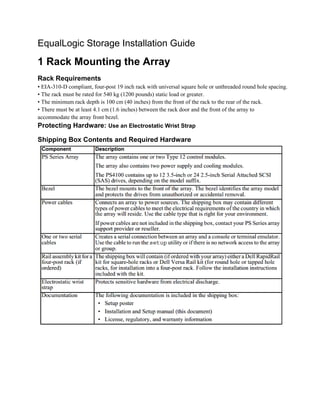
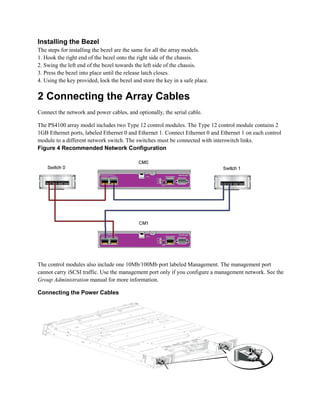
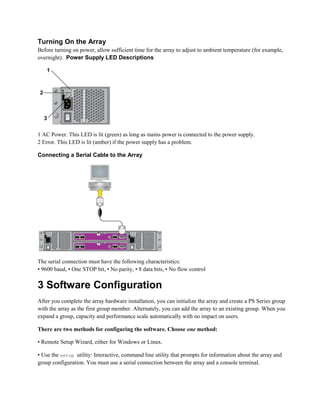
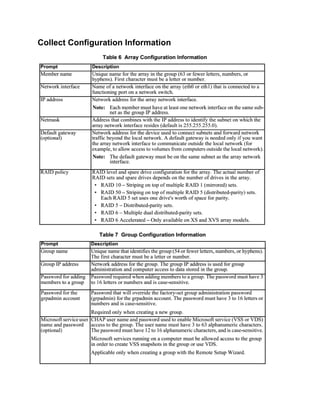
Downloaded 113 times

![Start the Software Configuration
‘Setup Utility’ to Configure the Software
1. On the console or terminal emulator that has the serial connection to the array, press the Enter key.
2. At the login prompt, enter grpadmin for both the account (login) name and the password.
3. When prompted, enter y to start the setup utility.
4. When prompted, enter the array and group configuration information from Collect Configuration
Information page. Press the Enter to accept a default value. Enter a question mark (?) to get help.
5. Specify to create a group with the array as the first member or add the array to an existing group.
After setup completes, you must set the member’s RAID policy in order to use the disk storage.
EXAMPLE - Using the setup Utility
Login: grpadmin
Password: xxxxxxxx
The setup utility establishes the initial network and storage configuration for a storage
array and then configures the array
as a member or a new or existing group of arrays.
For help, enter a question mark (?) at a prompt.
Welcome to Group Manager
Copyright 2011 Dell, Inc.
It appears that the storage array has not been configured.
Would you like to configure the array now? (y/n) [n] y
Group Manager Setup Utility
Do you want to proceed (yes | no) [no]? yes
Initializing. This may take several minutes to complete.
Enter the network configuration for the array:
Member name []: member1
Network interface [eth0]: eth0
IP address for network interface []: 192.17.2.41
Netmask [255.255.255.0]:
Default gateway [192.17.2.1]:
Enter the name and IP address of the group that the array will join.
Group name []: group1
Group IP address []: 192.17.2.20
Searching to see if the group exists. This may take a few minutes.
The group does not exist or currently cannot be reached. Make sure you have entered the
correct group IP address and group name.
Do you want to create a new group (yes | no) [yes]? yes
Group Configuration
Group Name: group1
Group IP address: 192.17.2.20
Do you want to use the group settings shown above (yes | no) [yes]: yes
Password for managing group membership:
Retype password for verification:
Password for the default group administration account:
Retype password for verification:
Saving the configuration ...
Waiting for configuration to become active......Done
Group member member1 now active in the group.](https://image.slidesharecdn.com/686aa665-50a1-4cd6-b13b-9678fd573452-150923194336-lva1-app6891/85/PS4100-EqualLogic-Storage-Installation-Guide-6-320.jpg)


![4 Storage Allocation
Allocating group storage space to users involves the following steps:
1. Create a Volume.
2. Connect a Computer to a Volume
Create a Volume
To allocate group storage space to users and applications, use the Group Manager CLI or GUI to create
volumes. A volume appears on the network as an iSCSI target. When you create a volume, specify the
information described in Table 8 Volume Configuration Information
You can set aside space for volume snapshots or configure a volume with thin provisioning. However, thin
provisioning is not appropriate for all storage environments. See the PS Series Group Administration manual
for information about advanced volume functionality.
Using the CLI to Create a Volume
1. Log in to the group. Use Serial connection to a member or Telnet/ ssh connection to the group IP address.
2. At the Group Manager command prompt, use the following command to create the volume:
volume create volume_name size [GB]
Specify the volume name and size (the default unit of measure is megabytes).
3. Use the following command to create an access control record for the volume:
volume select volume_name access create access_control
The access_control parameter can be one or more of the following:
• initiator initiator_name
• ipaddress ip_address
You can create a maximum of 16 access control records for a volume.
Example: The following example creates a 50 GB volume and one access control record. Only a computer with
the specified initiator name will be able to access the volume.
group1> volume create staff1 50GB](https://image.slidesharecdn.com/686aa665-50a1-4cd6-b13b-9678fd573452-150923194336-lva1-app6891/85/PS4100-EqualLogic-Storage-Installation-Guide-10-320.jpg)






This document provides instructions for installing and configuring an EqualLogic storage array. Key steps include: 1) Mounting the array in an EIA-310-D compliant rack 2) Connecting the power and network cables 3) Using the setup utility or remote setup wizard to initialize the array and create a storage group 4) Setting the RAID policy for new group members to enable use of disk storage 5) Creating iSCSI volumes on the storage group to allocate storage space to users


