



Crownhill Associates
smart electronic solutions
Crownhill reserves the right to make changes to the products contained in this publication in order to
improve design, performance or reliability. Except for the limited warranty covering the physical CD-
ROM and Hardware License key supplied with this publication as provided in the End-User License
agreement, the information and material content of this publication and accompanying CD-ROM are
provided “as is” without warranty of any kind express or implied including without limitation any war-
ranty concerning the accuracy adequacy or completeness of such information or material or the results
to be obtained from using such information or material. Neither Crownhill Associates Limited or the au-
thor shall be responsible for any claims attributable to errors omissions or other inaccuracies in the in-
formation or materials contained in this publication and in no event shall Crownhill Associates or the
author be liable for direct indirect or special incidental or consequential damages arising out of the
use of such information or material. Neither Crownhill or the author convey any license under any pat-
ent or other right, and make no representation that the circuits are free of patent infringement. Charts
and schedules contained herein reflect representative operating parameters, and may vary depending
upon a user’s specific application.
All terms mentioned in this book that are known to be trademarks or service marks have been appro-
priately marked. Use of a term in this publication should not be regarded as affecting the validity of any
trademark.
PICmicrotm
is a trade name of Microchip Technologies Inc. www.microchip.com
PROTONtm
is a trade name of Crownhill Associates Ltd. www.crownhill.co.uk
EPICtm
is a trade name of microEngineering Labs Inc. www.microengineeringlabs.com
The Proton IDE was written by David Barker of Mecanique www.mecanique.co.uk
Proteus VSM © Copyright Labcenter Electronics Ltd 2004 www.labcenter.co.uk
Web url’s correct at time of publication
The PROTON+ compiler and documentation was written by Les Johnson and published by Crownhill
Associates Limited, Cambridge ,England, 2004.
Cover design © 2004 Crownhill Associates Limited – All rights reserved
All Manufacturer Trademarks Acknowledged
This publication was printed and bound in the United Kingdom.
No part of this publication may be reproduced or utilized in any form or by any means, electronic or
mechanical, including photocopying, recording, or by any information storage and retrieval system,
without permission in writing from the publisher.
If you should find any anomalies or omission in this document, please contact us, as we appreciate
your assistance in improving our products and services.
First published by Crownhill Associates Limited, Cambridge ,England, 2004.
PROTON+ Compiler Development Suite
1
 Crownhill Associates Limited 2004 - All Rights Reserved Revision 1.2 2004-10-18
Introduction
The PROTON+ compiler was written with simplicity and flexibility in mind. Using BASIC, which is al-
most certainly the easiest programming language around, you can now produce extremely powerful
applications for your PICmicrotm
without having to learn the relative complexity of assembler, or wade
through the gibberish that is C. Having said this, various 'enhancements' for extra versatility and ease
of use have been included in the event that assembler is required.
The PROTON+ IDE provides a seamless development environment, which allows you to write, debug
and compile your code within the same Windows environment, and by using a compatible program-
mer, just one key press allows you to program and verify the resulting code in the PICmicrotm
of your
choice!
The front end of the compilers are Windows based. Simply specify the device at the program begin-
ning and the code produced will be fully compatible with that device.
Contact Details
For your convenience we have set up a web site www.picbasic.org, where there is a section for us-
ers of the PROTON+ compiler, to discuss the compiler, and provide self help with programs written for
PROTON BASIC, or download sample programs. The web site is well worth a visit now and then, ei-
ther to learn a bit about how other peoples code works or to request help should you encounter any
problems with programs that you have written.
Should you need to get in touch with us for any reason our details are as follows: -
Postal
Crownhill Associates Limited.
Old Station Yard
Station Road
Ely
Cambridgeshire.
CB6 3PZ.
Telephone
(+44) 01353 749990
Fax
(+44) 01353 749991
Email
sales@crownhill.co.uk
Web Sites
http://www.crownhill.co.uk
http://www.picbasic.org
PROTON+ Compiler Development Suite
2
 Crownhill Associates Limited 2004 - All Rights Reserved Revision 1.2 2004-10-18
Table of Contents.
Introduction ............................................................................................................................... 1
Table of Contents...................................................................................................................... 2
PROTON IDE Overview............................................................................................................. 9
Menu Bar ............................................................................................................................... 10
Edit Toolbar ........................................................................................................................... 12
Code Explorer........................................................................................................................ 14
Results View.......................................................................................................................... 17
Editor Options........................................................................................................................ 18
Highlighter Options ................................................................................................................ 20
On Line Updating................................................................................................................... 21
Compile and Program Options............................................................................................... 22
Installing a Programmer......................................................................................................... 23
Creating a custom Programmer Entry.................................................................................... 24
Microcode Loader .................................................................................................................. 26
Loader Options ...................................................................................................................... 28
Loader Main Toolbar.............................................................................................................. 29
IDE Plugins............................................................................................................................ 30
ASCII Table ........................................................................................................................... 31
HEX View............................................................................................................................... 31
Assembler Window ................................................................................................................ 32
Assembler Main Toolbar........................................................................................................ 33
Assemble and Program Toolbar ............................................................................................ 34
Assembler Editor Options ...................................................................................................... 34
Serial Communicator ............................................................................................................. 35
Serial Communicator Main Toolbar ....................................................................................... 36
Labcenter Electronics PROTEUS VSM ................................................................................. 39
ISIS Simulator Quick Start Guide........................................................................................... 39
PICmicrotm
Devices................................................................................................................. 44
Limited 12-bit Device Compatibility........................................................................................ 44
Programming Considerations for 12-bit Devices.................................................................... 45
Device Specific issues ........................................................................................................... 46
Identifiers ............................................................................................................................... 47
Line Labels ............................................................................................................................ 47
Variables................................................................................................................................ 48
Floating Point Math................................................................................................................ 50
PROTON+ Compiler Development Suite
3
 Crownhill Associates Limited 2004 - All Rights Reserved Revision 1.2 2004-10-18
Aliases ................................................................................................................................... 53
Constants............................................................................................................................... 56
Symbols................................................................................................................................. 56
Numeric Representations ......................................................................................................57
Quoted String of Characters .................................................................................................. 57
Ports and other Registers ......................................................................................................57
General Format...................................................................................................................... 58
Line Continuation Character '_'.............................................................................................. 58
Inline Commands within Comparisons................................................................................. 59
Creating and using Arrays ..................................................................................................... 60
Creating and using Strings .................................................................................................... 66
Creating and using VIRTUAL STRINGS with CDATA........................................................... 72
Creating and using VIRTUAL Strings with EDATA .............................................................. 74
STRING Comparisons.............................................................................................................76
Relational Operators............................................................................................................... 79
Boolean Logic Operators ....................................................................................................... 80
MATH OPERATORS................................................................................................................ 81
ABS........................................................................................................................................ 90
ACOS..................................................................................................................................... 91
ASIN ...................................................................................................................................... 92
ATAN ..................................................................................................................................... 93
COS....................................................................................................................................... 94
DCD....................................................................................................................................... 95
EXP........................................................................................................................................ 96
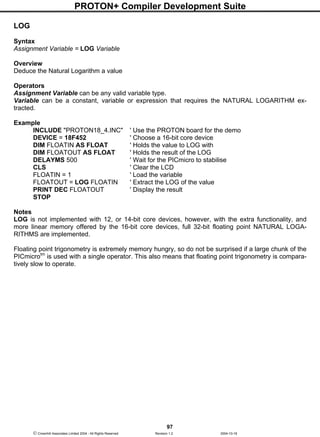
LOG ....................................................................................................................................... 97
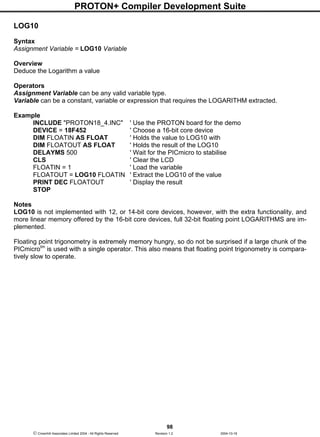
LOG10 ................................................................................................................................... 98
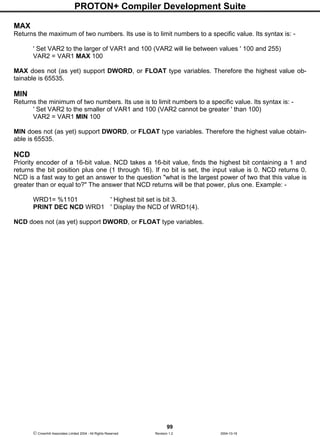
MAX....................................................................................................................................... 99
MIN ........................................................................................................................................ 99
NCD....................................................................................................................................... 99
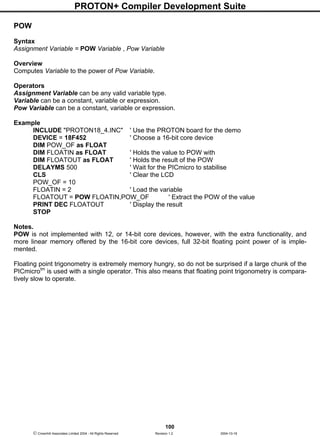
POW .................................................................................................................................... 100
REV ..................................................................................................................................... 101
SIN....................................................................................................................................... 102
SQR..................................................................................................................................... 103
TAN...................................................................................................................................... 104
PROTON+ Compiler Development Suite
4
 Crownhill Associates Limited 2004 - All Rights Reserved Revision 1.2 2004-10-18
DIV32................................................................................................................................... 105
ADIN .................................................................................................................................... 111
ASM..ENDASM....................................................................................................................113
BOX ..................................................................................................................................... 114
BRANCH.............................................................................................................................. 115
BRANCHL............................................................................................................................ 116
BREAK................................................................................................................................. 117
BSTART............................................................................................................................... 119
BSTOP................................................................................................................................. 120
BRESTART.......................................................................................................................... 120
BUSACK.............................................................................................................................. 120
BUSIN.................................................................................................................................. 121
BUSOUT.............................................................................................................................. 124
BUTTON.............................................................................................................................. 128
CALL.................................................................................................................................... 130
CDATA................................................................................................................................. 131
CF_INIT ............................................................................................................................... 136
CF_SECTOR....................................................................................................................... 137
CF_READ............................................................................................................................ 142
CF_WRITE .......................................................................................................................... 145
CIRCLE................................................................................................................................ 149
CLEAR................................................................................................................................. 150
CLEARBIT ........................................................................................................................... 151
CLS...................................................................................................................................... 152
CONFIG............................................................................................................................... 153
COUNTER........................................................................................................................... 154
CREAD ................................................................................................................................ 155
CURSOR ............................................................................................................................. 156
CWRITE............................................................................................................................... 157
DATA ................................................................................................................................... 158
DEC ..................................................................................................................................... 160
PROTON+ Compiler Development Suite
5
 Crownhill Associates Limited 2004 - All Rights Reserved Revision 1.2 2004-10-18
DECLARE............................................................................................................................ 161
MISC Declares. ................................................................................................................ 161
TRIGONOMETRY Declares. ............................................................................................ 164
ADIN Declares..................................................................................................................165
BUSIN - BUSOUT Declares. ............................................................................................ 165
HBUSIN - HBUSOUT Declare.......................................................................................... 166
HSERIN, HSEROUT, HRSIN and HRSOUT Declares. .................................................... 166
Second USART Declares for use with HRSIN2, HSERIN2, HRSOUT2 and HSEROUT2.167
HPWM Declares............................................................................................................... 168
LCD PRINT Declares. ...................................................................................................... 169
GRAPHIC LCD Declares.................................................................................................. 170
KEYPAD Declare.............................................................................................................. 171
RSIN - RSOUT Declares. ................................................................................................. 171
SERIN - SEROUT Declare. .............................................................................................. 172
SHIN - SHOUT Declare.................................................................................................... 173
Compact Flash Interface Declares ................................................................................... 174
CRYSTAL Frequency Declare.......................................................................................... 175
DELAYMS............................................................................................................................ 176
DELAYUS............................................................................................................................ 177
DEVICE ............................................................................................................................... 178
DIG ...................................................................................................................................... 179
DIM ...................................................................................................................................... 180
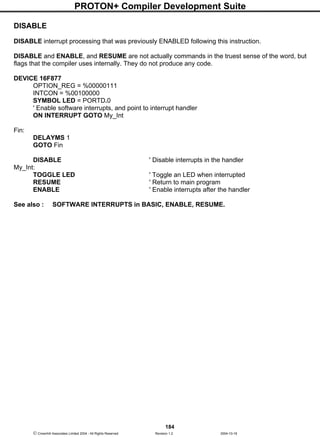
DISABLE.............................................................................................................................. 184
DTMFOUT ........................................................................................................................... 185
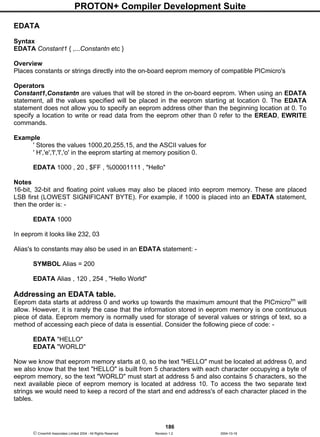
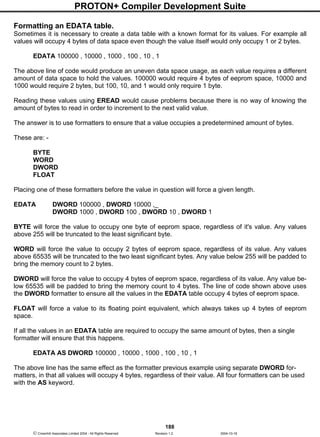
EDATA................................................................................................................................. 186
ENABLE............................................................................................................................... 191
Software Interrupts in BASIC............................................................................................ 192
END ..................................................................................................................................... 193
EREAD ................................................................................................................................ 194
EWRITE............................................................................................................................... 195
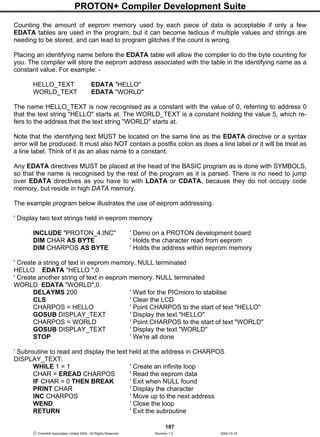
FOR...NEXT...STEP ............................................................................................................ 196
FREQOUT ........................................................................................................................... 198
GETBIT................................................................................................................................ 200
GOSUB................................................................................................................................ 201
GOTO .................................................................................................................................. 205
HBSTART............................................................................................................................ 206
HBSTOP.............................................................................................................................. 207
HBRESTART....................................................................................................................... 207
HBUSACK ........................................................................................................................... 207
HBUSIN ............................................................................................................................... 208
HBUSOUT ........................................................................................................................... 211
HIGH.................................................................................................................................... 214
PROTON+ Compiler Development Suite
6
 Crownhill Associates Limited 2004 - All Rights Reserved Revision 1.2 2004-10-18
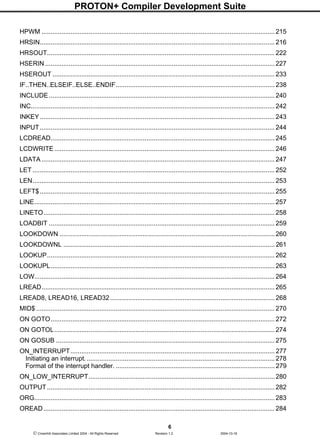
HPWM ................................................................................................................................. 215
HRSIN.................................................................................................................................. 216
HRSOUT.............................................................................................................................. 222
HSERIN ............................................................................................................................... 227
HSEROUT ........................................................................................................................... 233
IF..THEN..ELSEIF..ELSE..ENDIF........................................................................................ 238
INCLUDE............................................................................................................................. 240
INC....................................................................................................................................... 242
INKEY.................................................................................................................................. 243
INPUT.................................................................................................................................. 244
LCDREAD............................................................................................................................ 245
LCDWRITE.......................................................................................................................... 246
LDATA ................................................................................................................................. 247
LET ...................................................................................................................................... 252
LEN...................................................................................................................................... 253
LEFT$.................................................................................................................................. 255
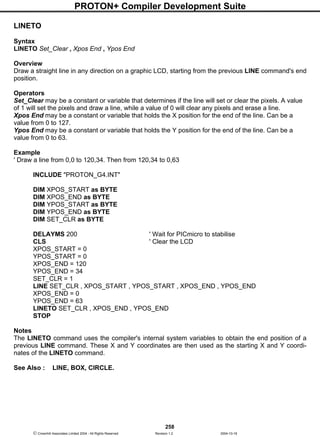
LINE..................................................................................................................................... 257
LINETO................................................................................................................................ 258
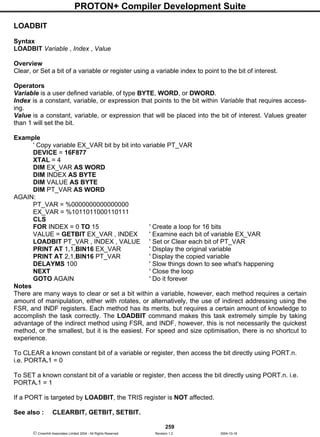
LOADBIT ............................................................................................................................. 259
LOOKDOWN .......................................................................................................................260
LOOKDOWNL ..................................................................................................................... 261
LOOKUP.............................................................................................................................. 262
LOOKUPL............................................................................................................................ 263
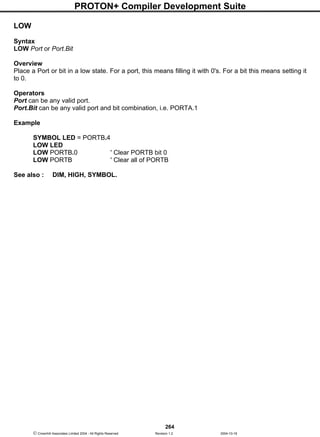
LOW..................................................................................................................................... 264
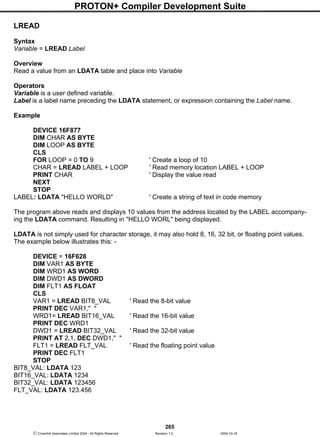
LREAD................................................................................................................................. 265
LREAD8, LREAD16, LREAD32 ........................................................................................... 268
MID$ .................................................................................................................................... 270
ON GOTO............................................................................................................................ 272
ON GOTOL.......................................................................................................................... 274
ON GOSUB ......................................................................................................................... 275
ON_INTERRUPT................................................................................................................. 277
Initiating an interrupt......................................................................................................... 278
Format of the interrupt handler. ........................................................................................ 279
ON_LOW_INTERRUPT.......................................................................................................280
OUTPUT.............................................................................................................................. 282
ORG..................................................................................................................................... 283
OREAD................................................................................................................................ 284
PROTON+ Compiler Development Suite
7
 Crownhill Associates Limited 2004 - All Rights Reserved Revision 1.2 2004-10-18
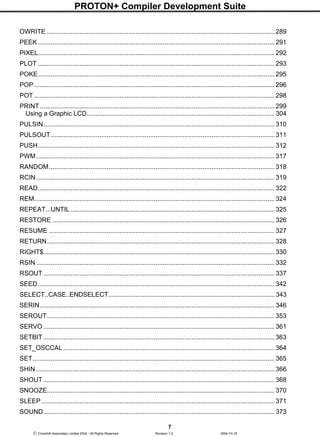
OWRITE .............................................................................................................................. 289
PEEK ................................................................................................................................... 291
PIXEL................................................................................................................................... 292
PLOT ................................................................................................................................... 293
POKE................................................................................................................................... 295
POP ..................................................................................................................................... 296
POT ..................................................................................................................................... 298
PRINT.................................................................................................................................. 299
Using a Graphic LCD........................................................................................................ 304
PULSIN................................................................................................................................ 310
PULSOUT............................................................................................................................ 311
PUSH................................................................................................................................... 312
PWM.................................................................................................................................... 317
RANDOM............................................................................................................................. 318
RCIN.................................................................................................................................... 319
READ................................................................................................................................... 322
REM..................................................................................................................................... 324
REPEAT...UNTIL .................................................................................................................325
RESTORE ........................................................................................................................... 326
RESUME ............................................................................................................................. 327
RETURN.............................................................................................................................. 328
RIGHT$................................................................................................................................ 330
RSIN .................................................................................................................................... 332
RSOUT ................................................................................................................................ 337
SEED................................................................................................................................... 342
SELECT..CASE..ENDSELECT............................................................................................ 343
SERIN.................................................................................................................................. 346
SEROUT.............................................................................................................................. 353
SERVO ................................................................................................................................ 361
SETBIT ................................................................................................................................ 363
SET_OSCCAL.....................................................................................................................364
SET...................................................................................................................................... 365
SHIN .................................................................................................................................... 366
SHOUT ................................................................................................................................ 368
SNOOZE.............................................................................................................................. 370
SLEEP ................................................................................................................................. 371
SOUND................................................................................................................................ 373
PROTON+ Compiler Development Suite
8
 Crownhill Associates Limited 2004 - All Rights Reserved Revision 1.2 2004-10-18
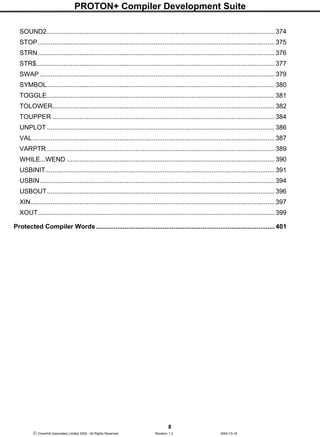
SOUND2.............................................................................................................................. 374
STOP................................................................................................................................... 375
STRN................................................................................................................................... 376
STR$.................................................................................................................................... 377
SWAP .................................................................................................................................. 379
SYMBOL.............................................................................................................................. 380
TOGGLE.............................................................................................................................. 381
TOLOWER........................................................................................................................... 382
TOUPPER ........................................................................................................................... 384
UNPLOT .............................................................................................................................. 386
VAL...................................................................................................................................... 387
VARPTR .............................................................................................................................. 389
WHILE...WEND ...................................................................................................................390
USBINIT............................................................................................................................... 391
USBIN.................................................................................................................................. 394
USBOUT.............................................................................................................................. 396
XIN....................................................................................................................................... 397
XOUT................................................................................................................................... 399
Protected Compiler Words................................................................................................... 401
PROTON+ Compiler Development Suite
9
 Crownhill Associates Limited 2004 - All Rights Reserved Revision 1.2 2004-10-18
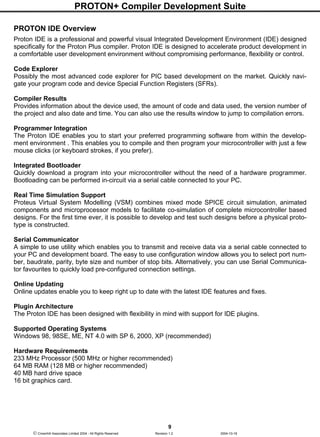
PROTON IDE Overview
Proton IDE is a professional and powerful visual Integrated Development Environment (IDE) designed
specifically for the Proton Plus compiler. Proton IDE is designed to accelerate product development in
a comfortable user development environment without compromising performance, flexibility or control.
Code Explorer
Possibly the most advanced code explorer for PIC based development on the market. Quickly navi-
gate your program code and device Special Function Registers (SFRs).
Compiler Results
Provides information about the device used, the amount of code and data used, the version number of
the project and also date and time. You can also use the results window to jump to compilation errors.
Programmer Integration
The Proton IDE enables you to start your preferred programming software from within the develop-
ment environment . This enables you to compile and then program your microcontroller with just a few
mouse clicks (or keyboard strokes, if you prefer).
Integrated Bootloader
Quickly download a program into your microcontroller without the need of a hardware programmer.
Bootloading can be performed in-circuit via a serial cable connected to your PC.
Real Time Simulation Support
Proteus Virtual System Modelling (VSM) combines mixed mode SPICE circuit simulation, animated
components and microprocessor models to facilitate co-simulation of complete microcontroller based
designs. For the first time ever, it is possible to develop and test such designs before a physical proto-
type is constructed.
Serial Communicator
A simple to use utility which enables you to transmit and receive data via a serial cable connected to
your PC and development board. The easy to use configuration window allows you to select port num-
ber, baudrate, parity, byte size and number of stop bits. Alternatively, you can use Serial Communica-
tor favourites to quickly load pre-configured connection settings.
Online Updating
Online updates enable you to keep right up to date with the latest IDE features and fixes.
Plugin Architecture
The Proton IDE has been designed with flexibility in mind with support for IDE plugins.
Supported Operating Systems
Windows 98, 98SE, ME, NT 4.0 with SP 6, 2000, XP (recommended)
Hardware Requirements
233 MHz Processor (500 MHz or higher recommended)
64 MB RAM (128 MB or higher recommended)
40 MB hard drive space
16 bit graphics card.
PROTON+ Compiler Development Suite
10
 Crownhill Associates Limited 2004 - All Rights Reserved Revision 1.2 2004-10-18
Menu Bar
File Menu
• New - Creates a new document. A header is automatically generated, showing information
such as author, copyright and date. To toggle this feature on or off, or edit the header proper-
ties, you should select editor options.
• Open - Displays a open dialog box, enabling you to load a document into the Proton IDE. If the
document is already open, then the document is made the active editor page.
• Save - Saves a document to disk. This button is normally disabled unless the document has
been changed. If the document is 'untitled', a save as dialog is invoked. A save as dialog is also
invoked if the document you are trying to save is marked as read only.
• Save As - Displays a save as dialog, enabling you to name and save a document to disk.
•
Close - Closes the currently active document.
• Close All - Closes all editor documents and then creates a new editor document.
• Reopen - Displays a list of Most Recently Used (MRU) documents.
• Print Setup - Displays a print setup dialog.
• Print Preview - Displays a print preview window.
• Print - Prints the currently active editor page.
• Exit - Enables you to exit the Proton IDE.
Edit Menu
• Undo - Cancels any changes made to the currently active document page.
• Redo - Reverse an undo command.
• Cut - Cuts any selected text from the active document page and places it into the clipboard.
This option is disabled if no text has been selected. Clipboard data is placed as both plain text
and RTF.
• Copy - Copies any selected text from the active document page and places it into the clipboard.
This option is disabled if no text has been selected. Clipboard data is placed as both plain text
and RTF.
• Paste - Paste the contents of the clipboard into the active document page. This option is dis-
abled if the clipboard does not contain any suitable text.
• Delete - Deletes any selected text. This option is disabled if no text has been selected.
• Select All - Selects the entire text in the active document page.
• Change Case - Allows you to change the case of a selected block of text.
PROTON+ Compiler Development Suite
11
 Crownhill Associates Limited 2004 - All Rights Reserved Revision 1.2 2004-10-18
• Find - Displays a find dialog.
• Replace - Displays a find and replace dialog.
• Find Next - Automatically searches for the next occurrence of a word. If no search word has
been selected, then the word at the current cursor position is used. You can also select a whole
phrase to be used as a search term. If the editor is still unable to identify a search word, a find
dialog is displayed.
View Menu
• Results - Display or hide the results window.
• Code Explorer - Display or hide the code explorer window.
• Loader - Displays the MicroCode Loader application.
• Loader Options - Displays the MicroCode Loader options dialog.
• Compile and Program Options - Displays the compile and program options dialog.
• Editor Options - Displays the application editor options dialog.
• Toolbars - Display or hide the main, edit and compile and program toolbars. You can also tog-
gle the toolbar icon size.
• Plugin - Display a drop down list of available IDE plugins.
• Online Updates - Executes the IDE online update process, which checks online and installs
the latest IDE updates.
Help Menu
• Help Topics - Displays the helpfile section for the toolbar.
• Online Forum - Opens your default web browser and connects to the online Proton Plus de-
veloper forum.
• About - Display about dialog, giving both the Proton IDE and Proton compiler version numbers.
Main Toolbar
New
Creates a new document. A header is automatically generated, showing information such as author,
copyright and date. To toggle this feature on or off, or edit the header properties, you should select the
editor options dialog from the main menu.
Open
Displays a open dialog box, enabling you to load a document into the Proton IDE. If the document is
already open, then the document is made the active editor page.
PROTON+ Compiler Development Suite
12
 Crownhill Associates Limited 2004 - All Rights Reserved Revision 1.2 2004-10-18
Save
Saves a document to disk. This button is normally disabled unless the document has been changed. If
the document is 'untitled', a save as dialog is invoked. A save as dialog is also invoked if the document
you are trying to save is marked as read only.
Cut
Cuts any selected text from the active document page and places it into the clipboard. This option is
disabled if no text has been selected. Clipboard data is placed as both plain text and RTF.
Copy
Copies any selected text from the active document page and places it into the clipboard. This option is
disabled if no text has been selected. Clipboard data is placed as both plain text and RTF.
Paste
Paste the contents of the clipboard into the active document page. This option is disabled if the clip-
board does not contain any suitable text.
Undo
Cancels any changes made to the currently active document page.
Redo
Reverse an undo command.
Print
Prints the currently active editor page.
Edit Toolbar
Find
Displays a find dialog.
Find and Replace
Displays a find and replace dialog.
Indent
Shifts all selected lines to the next tab stop. If multiple lines are not selected, a single line is moved
from the current cursor position. All lines in the selection (or cursor position) are moved the same
number of spaces to retain the same relative indentation within the selected block. You can change
the tab width from the editor options dialog.
Outdent
Shifts all selected lines to the previous tab stop. If multiple lines are not selected, a single line is
moved from the current cursor position. All lines in the selection (or cursor position) are moved the
same number of spaces to retain the same relative indentation within the selected block. You can
change the tab width from the editor options dialog.
PROTON+ Compiler Development Suite
13
 Crownhill Associates Limited 2004 - All Rights Reserved Revision 1.2 2004-10-18
Block Comment
Adds the comment character to each line of a selected block of text. If multiple lines are not selected,
a single comment is added to the start of the line containing the cursor.
Block Uncomment
Removes the comment character from each line of a selected block of text. If multiple lines are not se-
lected, a single comment is removed from the start of the line containing the cursor.
Compile and Program Toolbar
Compile
Pressing this button, or F9, will compile the currently active editor page. The compile button will gen-
erate a *.hex file, which you then have to manually program into your microcontroller. Pressing the
compile button will automatically save all open files to disk. This is to ensure that the compiler is
passed an up to date copy of the file(s) your are editing.
Compile and Program
Pressing this button, or F10, will compile the currently active editor page. Pressing the compile and
program button will automatically save all open files to disk. This is to ensure that the compiler is
passed an up to date copy of the file(s) your are editing.
Unlike the compile button, the Proton IDE will then automatically invoke a user selectable application
and pass the compiler output to it. The target application is normally a device programmer, for exam-
ple, MicroCode Loader. This enables you to program the generated *.hex file into your MCU. Alterna-
tively, the compiler output can be sent to an IDE Plugin. For example, the Labcenter Electronics Pro-
teus VSM simulator. You can select a different programmer or Plugin by pressing the small down ar-
row, located to the right of the compile and program button...
In the above example, MicroCode Loader has been selected as the default device programmer. The
compile and program drop down menu also enables you to install new programming software. Just se-
lect the 'Install New Programmer...' option to invoke the programmer configuration wizard. Once a pro-
gram has been compiled, you can use F11 to automatically start your programming software or plugin.
You do not have to re-compile, unless of course your program has been changed.
Loader Verify
This button will verify a *.hex file (if one is available) against the program resident on the microcontrol-
ler. The loader verify button is only enabled if MicroCode Loader is the currently selected programmer.
PROTON+ Compiler Development Suite
14
 Crownhill Associates Limited 2004 - All Rights Reserved Revision 1.2 2004-10-18
Loader Read
This button will upload the code and data contents of a microcontroller to MicroCode Loader. The
loader read button is only enabled if MicroCode Loader is the currently selected programmer.
Loader Erase
This button will erase program memory for the 18Fxxx(x) series of microcontroller. The loader erase
button is only enabled if MicroCode Loader is the currently selected programmer.
Loader Information
This button will display the microcontroller loader firmware version. The loader information button is
only enabled if MicroCode Loader is the currently selected programmer.
Code Explorer
The code explorer enables you to easily navigate your program code. The code explorer tree displays
your currently selected processor, include files, declares, constants, variables, alias and modifiers,
labels, macros and data labels.
Device Node
The device node is the first node in the explorer tree. It displays your currently selected processor
type. For example, if you program has the declaration: -
DEVICE 16F877
then the name of the device node will be 16F877. You don't need to explicitly give the device name in
your program for it to be displayed in the explorer. For example, you may have an include file with the
device type already declared. The code explorer looks at all include files to determine the device type.
The last device declaration encountered is the one used in the explorer window. If you expand the de-
vice node, then all Special Function Registers (SFRs) belonging to the selected device are displayed
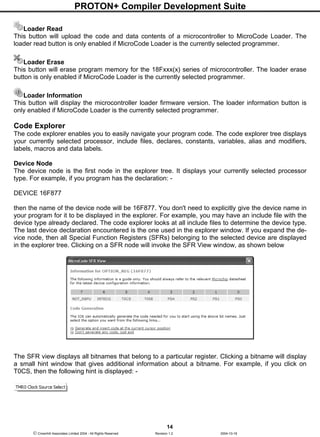
in the explorer tree. Clicking on a SFR node will invoke the SFR View window, as shown below
The SFR view displays all bitnames that belong to a particular register. Clicking a bitname will display
a small hint window that gives additional information about a bitname. For example, if you click on
T0CS, then the following hint is displayed: -
PROTON+ Compiler Development Suite
15
 Crownhill Associates Limited 2004 - All Rights Reserved Revision 1.2 2004-10-18
The SFR view window can automatically generate the code needed for you to start using the bitnames
in your program. All you need to do is place your cursor at the point in your program where you want
the code placed, and then select the generate code option. Using the above OPTION_REG example
above will generate: -
Symbol PS0 = OPTION_REG.0 ' Prescaler Rate Select
Symbol PS1 = OPTION_REG.1 ' Prescaler Rate Select
Symbol PS2 = OPTION_REG.2 ' Prescaler Rate Select
Symbol PSA = OPTION_REG.3 ' Prescaler Assignment
Symbol T0SE = OPTION_REG.4 ' TMR0 Source Edge Select
Symbol T0CS = OPTION_REG.5 ' TMR0 Clock Source Select
Symbol INTEDG = OPTION_REG.6 ' Interrupt Edge Select
Symbol NOT_RBPU = OPTION_REG.7 ' PORTB Pull-up Enable
Please note that the SFR View window is not currently implemented for all device types.
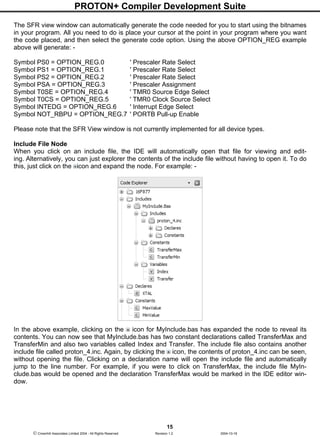
Include File Node
When you click on an include file, the IDE will automatically open that file for viewing and edit-
ing. Alternatively, you can just explorer the contents of the include file without having to open it. To do
this, just click on the icon and expand the node. For example: -
In the above example, clicking on the icon for MyInclude.bas has expanded the node to reveal its
contents. You can now see that MyInclude.bas has two constant declarations called TransferMax and
TransferMin and also two variables called Index and Transfer. The include file also contains another
include file called proton_4.inc. Again, by clicking the icon, the contents of proton_4.inc can be seen,
without opening the file. Clicking on a declaration name will open the include file and automatically
jump to the line number. For example, if you were to click on TransferMax, the include file MyIn-
clude.bas would be opened and the declaration TransferMax would be marked in the IDE editor win-
dow.
PROTON+ Compiler Development Suite
16
 Crownhill Associates Limited 2004 - All Rights Reserved Revision 1.2 2004-10-18
When using the code explorer with include files, you can use the explorer history buttons to go back-
wards or forwards. The explorer history buttons are normally located to the left of the main editors file
select tabs,
History back button
History forward button
Additional Nodes
Declares, constants, variables, alias and modifiers, labels, macros and data label explorer nodes work
in much the same way. Clicking on any of these nodes will take you to its declaration. If you want to
find the next occurrence of a declaration, you should enable automatically select variable on code ex-
plorer click from VIEW...EDITOR OPTIONS.
Selecting this option will load the search name into the 'find dialog' search buffer. You then just need
to press F3 to search for the next occurrence of the declaration in your program.
To sort the explorer nodes, right click on the code explorer and check the Sort Nodes option.
Explorer Warnings and Errors
The code explorer can identify duplicate declarations. If a declaration duplicate is found, the explorer
node icon changes from its default state to a . For example,
DIM MyVar AS BYTE
DIM MyVar AS BYTE
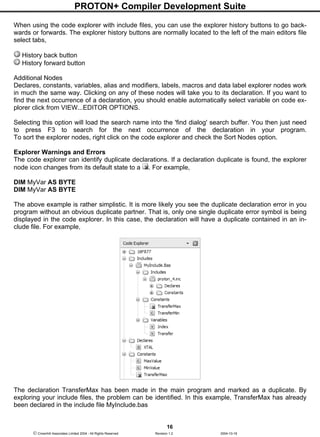
The above example is rather simplistic. It is more likely you see the duplicate declaration error in you
program without an obvious duplicate partner. That is, only one single duplicate error symbol is being
displayed in the code explorer. In this case, the declaration will have a duplicate contained in an in-
clude file. For example,
The declaration TransferMax has been made in the main program and marked as a duplicate. By
exploring your include files, the problem can be identified. In this example, TransferMax has already
been declared in the include file MyInclude.bas
PROTON+ Compiler Development Suite
17
 Crownhill Associates Limited 2004 - All Rights Reserved Revision 1.2 2004-10-18
Some features of the compiler of not available for some MCU types. For example, you cannot have a
string declaration when using a 14 core part (for example, the 16F877). If you try to do this, the ex-
plorer node icon changes from its default state and displays a . You will also see this icon displayed
if the SFR View feature for a device is not available.
Notes
The code explorer uses an optimised parse and pattern match strategy in order to update the tree in
real time. The explorer process is threaded so as not to interfere or slow down other IDE tasks, such
as typing in new code. However, if you run computationally expensive background tasks on your ma-
chine (for example, circuit simulation) you will notice a drop in update performance, due to the
threaded nature of the code explorer.
Results View
The results view performs two main tasks. These are (a) display a list of error messages, should either
compilation or assembly fail and (b) provide a summary on compilation success.
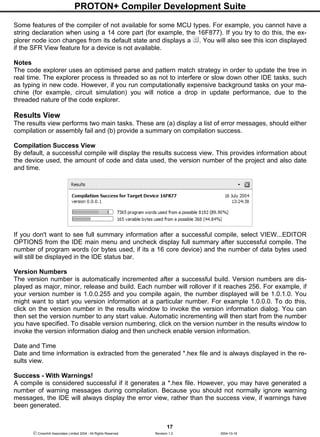
Compilation Success View
By default, a successful compile will display the results success view. This provides information about
the device used, the amount of code and data used, the version number of the project and also date
and time.
If you don't want to see full summary information after a successful compile, select VIEW...EDITOR
OPTIONS from the IDE main menu and uncheck display full summary after successful compile. The
number of program words (or bytes used, if its a 16 core device) and the number of data bytes used
will still be displayed in the IDE status bar.
Version Numbers
The version number is automatically incremented after a successful build. Version numbers are dis-
played as major, minor, release and build. Each number will rollover if it reaches 256. For example, if
your version number is 1.0.0.255 and you compile again, the number displayed will be 1.0.1.0. You
might want to start you version information at a particular number. For example 1.0.0.0. To do this,
click on the version number in the results window to invoke the version information dialog. You can
then set the version number to any start value. Automatic incrementing will then start from the number
you have specified. To disable version numbering, click on the version number in the results window to
invoke the version information dialog and then uncheck enable version information.
Date and Time
Date and time information is extracted from the generated *.hex file and is always displayed in the re-
sults view.
Success - With Warnings!
A compile is considered successful if it generates a *.hex file. However, you may have generated a
number of warning messages during compilation. Because you should not normally ignore warning
messages, the IDE will always display the error view, rather than the success view, if warnings have
been generated.
PROTON+ Compiler Development Suite
18
 Crownhill Associates Limited 2004 - All Rights Reserved Revision 1.2 2004-10-18
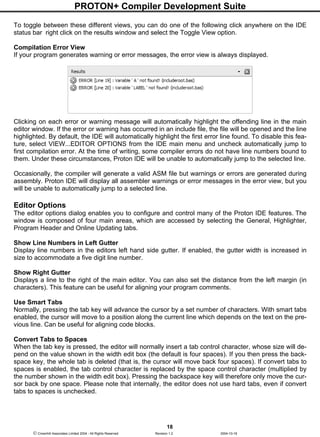
To toggle between these different views, you can do one of the following click anywhere on the IDE
status bar right click on the results window and select the Toggle View option.
Compilation Error View
If your program generates warning or error messages, the error view is always displayed.
Clicking on each error or warning message will automatically highlight the offending line in the main
editor window. If the error or warning has occurred in an include file, the file will be opened and the line
highlighted. By default, the IDE will automatically highlight the first error line found. To disable this fea-
ture, select VIEW...EDITOR OPTIONS from the IDE main menu and uncheck automatically jump to
first compilation error. At the time of writing, some compiler errors do not have line numbers bound to
them. Under these circumstances, Proton IDE will be unable to automatically jump to the selected line.
Occasionally, the compiler will generate a valid ASM file but warnings or errors are generated during
assembly. Proton IDE will display all assembler warnings or error messages in the error view, but you
will be unable to automatically jump to a selected line.
Editor Options
The editor options dialog enables you to configure and control many of the Proton IDE features. The
window is composed of four main areas, which are accessed by selecting the General, Highlighter,
Program Header and Online Updating tabs.
Show Line Numbers in Left Gutter
Display line numbers in the editors left hand side gutter. If enabled, the gutter width is increased in
size to accommodate a five digit line number.
Show Right Gutter
Displays a line to the right of the main editor. You can also set the distance from the left margin (in
characters). This feature can be useful for aligning your program comments.
Use Smart Tabs
Normally, pressing the tab key will advance the cursor by a set number of characters. With smart tabs
enabled, the cursor will move to a position along the current line which depends on the text on the pre-
vious line. Can be useful for aligning code blocks.
Convert Tabs to Spaces
When the tab key is pressed, the editor will normally insert a tab control character, whose size will de-
pend on the value shown in the width edit box (the default is four spaces). If you then press the back-
space key, the whole tab is deleted (that is, the cursor will move back four spaces). If convert tabs to
spaces is enabled, the tab control character is replaced by the space control character (multiplied by
the number shown in the width edit box). Pressing the backspace key will therefore only move the cur-
sor back by one space. Please note that internally, the editor does not use hard tabs, even if convert
tabs to spaces is unchecked.
PROTON+ Compiler Development Suite
19
 Crownhill Associates Limited 2004 - All Rights Reserved Revision 1.2 2004-10-18
Automatically Indent
When the carriage return key is pressed in the editor window, automatically indent will advance the
cursor to a position just below the first word occurrence of the previous line. When this feature is un-
checked, the cursor just moves to the beginning of the next line.
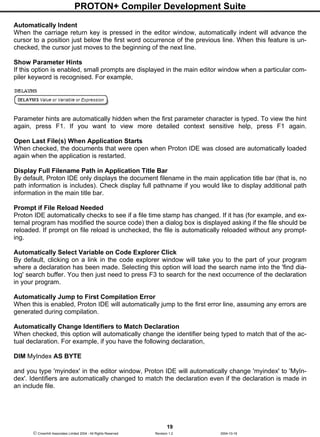
Show Parameter Hints
If this option is enabled, small prompts are displayed in the main editor window when a particular com-
piler keyword is recognised. For example,
Parameter hints are automatically hidden when the first parameter character is typed. To view the hint
again, press F1. If you want to view more detailed context sensitive help, press F1 again.
Open Last File(s) When Application Starts
When checked, the documents that were open when Proton IDE was closed are automatically loaded
again when the application is restarted.
Display Full Filename Path in Application Title Bar
By default, Proton IDE only displays the document filename in the main application title bar (that is, no
path information is includes). Check display full pathname if you would like to display additional path
information in the main title bar.
Prompt if File Reload Needed
Proton IDE automatically checks to see if a file time stamp has changed. If it has (for example, and ex-
ternal program has modified the source code) then a dialog box is displayed asking if the file should be
reloaded. If prompt on file reload is unchecked, the file is automatically reloaded without any prompt-
ing.
Automatically Select Variable on Code Explorer Click
By default, clicking on a link in the code explorer window will take you to the part of your program
where a declaration has been made. Selecting this option will load the search name into the 'find dia-
log' search buffer. You then just need to press F3 to search for the next occurrence of the declaration
in your program.
Automatically Jump to First Compilation Error
When this is enabled, Proton IDE will automatically jump to the first error line, assuming any errors are
generated during compilation.
Automatically Change Identifiers to Match Declaration
When checked, this option will automatically change the identifier being typed to match that of the ac-
tual declaration. For example, if you have the following declaration,
DIM MyIndex AS BYTE
and you type 'myindex' in the editor window, Proton IDE will automatically change 'myindex' to 'MyIn-
dex'. Identifiers are automatically changed to match the declaration even if the declaration is made in
an include file.
PROTON+ Compiler Development Suite
20
 Crownhill Associates Limited 2004 - All Rights Reserved Revision 1.2 2004-10-18
Please note that the actual text is not physically changed, it just changes the way it is displayed in the
editor window. For example, if you save the above example and load it into wordpad or another text
editor, it will still show as 'myindex'. If you print the document, the identifier will be shown as 'MyIndex'.
If you copy and paste into another document, the identifier will be shown as 'MyIndex', if the target ap-
plication supports formatted text (for example Microsoft Word).
In short, this feature is very useful for printing, copying and making you programs look consistent
throughout.
Clear Undo History After Successful Compile
If checked, a successful compilation will clear the undo history buffer. A history buffer takes up system
resources, especially if many documents are open at the same time. It's a good idea to have this fea-
ture enabled if you plan to work on many documents at the same time.
Display Full Summary After Successful Compile
If checked, a successful compilation will display a full summary in the results window. Disabling this
option will still give a short summary in the IDE status bar, but the results window will not be displayed.
Default Source Folder
Proton IDE will automatically go to this folder when you invoke the file open or save as dialogs. To dis-
able this feature, uncheck the 'Enabled' option, shown directly below the default source folder.
Highlighter Options
Item Properties
The syntax highlighter tab lets you change the colour and attributes (for example, bold and italic) of the
following items: -
Comment
Device Name
Identifier
Keyword (ASM)
Keyword (Declare)
Keyword (Important)
Keyword (Macro Parameter)
Keyword (Proton)
Keyword (User)
Number
Number (Binary)
Number (Hex)
SFR
SFR (Bitname)
String
Symbol
The point size is ranged between 6pt to 16pt and is global. That is, you cannot have different point
sizes for individual items.
PROTON+ Compiler Development Suite
21
 Crownhill Associates Limited 2004 - All Rights Reserved Revision 1.2 2004-10-18
Reserved Word Formatting
This option enables you to set how Proton IDE displays keywords. Options include: -
Database Default - the IDE will display the keyword as declared in the applications keyword data-
base.
Uppercase - the IDE will display the keyword in uppercase.
Lowercase - the IDE will display the keyword in lowercase.
As Typed - the IDE will display the keyword as you have typed it.
Please note that the actual keyword text is not physically changed, it just changes the way it is dis-
played in the editor window. For example, if you save your document and load it into wordpad or an-
other text editor, the keyword text will be displayed as you typed it. If you print the document, the key-
word will be formatted. If you copy and paste into another document, the keyword will be formatted, if
the target application supports formatted text (for example Microsoft Word).
Header options allows you to change the author and copyright name that is placed in a header when a
new document is created. For example: -
*****************************************************************
'* Name : UNTITLED.BAS *
'* Author : David John Barker *
'* Notice : Copyright (c) 2001 Mecanique *
'* : All Rights Reserved *
'* Date : 10/15/01 *
'* Version : 1.0 *
'* Notes : *
'* : *
'****************************************************************
If you do not want to use this feature, simply deselect the enable check box.
On Line Updating
Dial Up Connection
Checking the 'Dial Up Connection' option will force the Proton IDE to automatically check for updates
every time you start the software. It will only do this if you are currently connected to the internet. Pro-
ton IDE will not start dialling up your ISP every time you start the program!
LAN or Broadband Connection
Checking the 'LAN or Broadband Connection' option will force Proton IDE to automatically check for
updates every time you start the software. This option assumes you have a permanent connection to
the internet.
Manual Connection
Checking this option means Proton IDE will never check for online updates, unless requested to do so
from the main menu.
PROTON+ Compiler Development Suite
22
 Crownhill Associates Limited 2004 - All Rights Reserved Revision 1.2 2004-10-18
Compile and Program Options
Compiler Tab
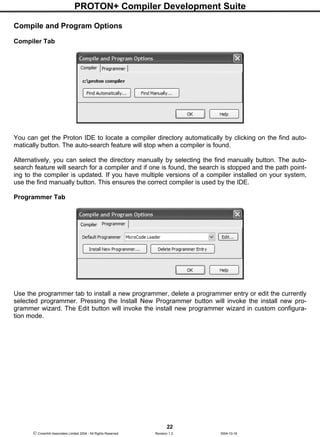
You can get the Proton IDE to locate a compiler directory automatically by clicking on the find auto-
matically button. The auto-search feature will stop when a compiler is found.
Alternatively, you can select the directory manually by selecting the find manually button. The auto-
search feature will search for a compiler and if one is found, the search is stopped and the path point-
ing to the compiler is updated. If you have multiple versions of a compiler installed on your system,
use the find manually button. This ensures the correct compiler is used by the IDE.
Programmer Tab
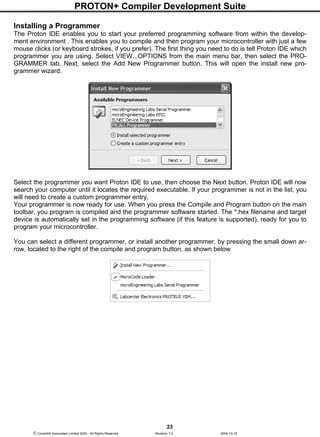
Use the programmer tab to install a new programmer, delete a programmer entry or edit the currently
selected programmer. Pressing the Install New Programmer button will invoke the install new pro-
grammer wizard. The Edit button will invoke the install new programmer wizard in custom configura-
tion mode.
PROTON+ Compiler Development Suite
23
 Crownhill Associates Limited 2004 - All Rights Reserved Revision 1.2 2004-10-18
Installing a Programmer
The Proton IDE enables you to start your preferred programming software from within the develop-
ment environment . This enables you to compile and then program your microcontroller with just a few
mouse clicks (or keyboard strokes, if you prefer). The first thing you need to do is tell Proton IDE which
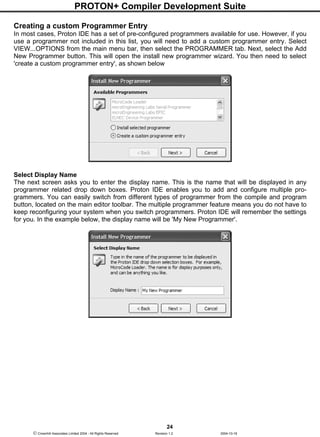
programmer you are using. Select VIEW...OPTIONS from the main menu bar, then select the PRO-
GRAMMER tab. Next, select the Add New Programmer button. This will open the install new pro-
grammer wizard.
Select the programmer you want Proton IDE to use, then choose the Next button. Proton IDE will now
search your computer until it locates the required executable. If your programmer is not in the list, you
will need to create a custom programmer entry.
Your programmer is now ready for use. When you press the Compile and Program button on the main
toolbar, you program is compiled and the programmer software started. The *.hex filename and target
device is automatically set in the programming software (if this feature is supported), ready for you to
program your microcontroller.
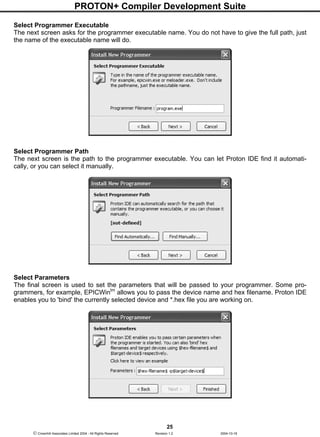
You can select a different programmer, or install another programmer, by pressing the small down ar-
row, located to the right of the compile and program button, as shown below
PROTON+ Compiler Development Suite
24
 Crownhill Associates Limited 2004 - All Rights Reserved Revision 1.2 2004-10-18
Creating a custom Programmer Entry
In most cases, Proton IDE has a set of pre-configured programmers available for use. However, if you
use a programmer not included in this list, you will need to add a custom programmer entry. Select
VIEW...OPTIONS from the main menu bar, then select the PROGRAMMER tab. Next, select the Add
New Programmer button. This will open the install new programmer wizard. You then need to select
'create a custom programmer entry', as shown below
Select Display Name
The next screen asks you to enter the display name. This is the name that will be displayed in any
programmer related drop down boxes. Proton IDE enables you to add and configure multiple pro-
grammers. You can easily switch from different types of programmer from the compile and program
button, located on the main editor toolbar. The multiple programmer feature means you do not have to
keep reconfiguring your system when you switch programmers. Proton IDE will remember the settings
for you. In the example below, the display name will be 'My New Programmer'.
PROTON+ Compiler Development Suite
25
 Crownhill Associates Limited 2004 - All Rights Reserved Revision 1.2 2004-10-18
Select Programmer Executable
The next screen asks for the programmer executable name. You do not have to give the full path, just
the name of the executable name will do.
Select Programmer Path
The next screen is the path to the programmer executable. You can let Proton IDE find it automati-
cally, or you can select it manually.
Select Parameters
The final screen is used to set the parameters that will be passed to your programmer. Some pro-
grammers, for example, EPICWintm
allows you to pass the device name and hex filename. Proton IDE
enables you to 'bind' the currently selected device and *.hex file you are working on.
PROTON+ Compiler Development Suite
26
 Crownhill Associates Limited 2004 - All Rights Reserved Revision 1.2 2004-10-18
For example, if you are compiling 'blink.bas' in the Proton IDE using a 16F628, you would want to pass
the 'blink.hex' file to the programmer and also the name of the microcontroller you intend to program.
Here is the EPICWintm
example: -
-pPIC$target-device$ $hex-filename$
When EPICWintm
is started, the device name and hex filename are 'bound' to $target-device$ and
$hex-filename$ respectively. In the 'blink.bas' example, the actual parameter passed to the program-
mer would be: -
-pPIC16F628 blink.hex
Parameter Summary
Parameter Description
$target-device$ Microcontroller name
$hex-filename$ HEX filename and path, DOS 8.3 format
$long-hex-filename$ HEX filename and path
$asm-filename$ ASM filename and path, DOS 8.3 format
$long-asm-filename$ ASM filename and path
Microcode Loader
The PIC16F87x(A), 16F8x and PIC18Fxxx(x) series of microcontrollers have the ability to write to their
own program memory, without the need of a hardware programmer. A small piece of software called a
bootloader resides on the target microcontroller, which allows user code and EEPROM data to be
transmitted over a serial cable and written to the device. The MicroCode Loader application is the
software which resides on the computer. Together, these two components enable a user to program,
verify and read their program and EEPROM data all in circuit.
When power is first applied to the microcontroller (or it is reset), the bootloader first checks to see if
the MicroCode Loader application has something for it to do (for example, program your code into the
target device). If it does, the bootloader gives control to MicroCode Loader until it is told to exit. How-
ever, if the bootloader does not receive any instructions with the first few hundred milliseconds of start-
ing, the bootloader will exit and the code previously written to the target device will start to execute.
The bootloader software resides in the upper 256 words of program memory (336 words for 18Fxxx
devices), with the rest of the microcontroller code space being available for your program. All
EEPROM data memory and microcontroller registers are available for use by your program. Please
note that only the program code space and EEPROM data space may be programmed, verified and
read by MicroCode Loader. The microcontroller ID location and configuration fuses are not available to
the loader process. Configuration fuses must therefore be set at the time the bootloader software is
programmed into the target microcontroller.
Hardware Requirements
MicroCode Loader communicates with the target microcontroller using its hardware Universal Syn-
chronous Asynchronous Receiver Transmitter (USART). You will therefore need a development board
that supports RS232 serial communication in order to use the loader. There are many boards available
which support RS232.
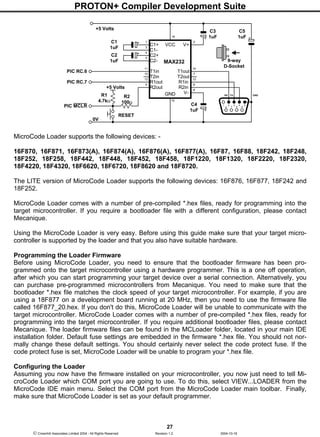
Whatever board you have, if the board has a 9 pin serial connector on it, the chances are it will have a
MAX232 or equivalent located on the board. This is ideal for MicroCode Loader to communicate with
the target device using a serial cable connected to your computer. Alternatively, you can use the fol-
lowing circuit and build your own.
PROTON+ Compiler Development Suite
27
 Crownhill Associates Limited 2004 - All Rights Reserved Revision 1.2 2004-10-18
MicroCode Loader supports the following devices: -
16F870, 16F871, 16F873(A), 16F874(A), 16F876(A), 16F877(A), 16F87, 16F88, 18F242, 18F248,
18F252, 18F258, 18F442, 18F448, 18F452, 18F458, 18F1220, 18F1320, 18F2220, 18F2320,
18F4220, 18F4320, 18F6620, 18F6720, 18F8620 and 18F8720.
The LITE version of MicroCode Loader supports the following devices: 16F876, 16F877, 18F242 and
18F252.
MicroCode Loader comes with a number of pre-compiled *.hex files, ready for programming into the
target microcontroller. If you require a bootloader file with a different configuration, please contact
Mecanique.
Using the MicroCode Loader is very easy. Before using this guide make sure that your target micro-
controller is supported by the loader and that you also have suitable hardware.
Programming the Loader Firmware
Before using MicroCode Loader, you need to ensure that the bootloader firmware has been pro-
grammed onto the target microcontroller using a hardware programmer. This is a one off operation,
after which you can start programming your target device over a serial connection. Alternatively, you
can purchase pre-programmed microcontrollers from Mecanique. You need to make sure that the
bootloader *.hex file matches the clock speed of your target microcontroller. For example, if you are
using a 18F877 on a development board running at 20 MHz, then you need to use the firmware file
called 16F877_20.hex. If you don't do this, MicroCode Loader will be unable to communicate with the
target microcontroller. MicroCode Loader comes with a number of pre-compiled *.hex files, ready for
programming into the target microcontroller. If you require additional bootloader files, please contact
Mecanique. The loader firmware files can be found in the MCLoader folder, located in your main IDE
installation folder. Default fuse settings are embedded in the firmware *.hex file. You should not nor-
mally change these default settings. You should certainly never select the code protect fuse. If the
code protect fuse is set, MicroCode Loader will be unable to program your *.hex file.
Configuring the Loader
Assuming you now have the firmware installed on your microcontroller, you now just need to tell Mi-
croCode Loader which COM port you are going to use. To do this, select VIEW...LOADER from the
MicroCode IDE main menu. Select the COM port from the MicroCode Loader main toolbar. Finally,
make sure that MicroCode Loader is set as your default programmer.
C1
1uF
+5 Volts
V+
V+VCC
GND
MAX232
10
9
12
11 14
15
13
8
7
6
5
4
3
21
16
C1+
C1-
C2+
C2-
V-
T1in
T2in
R1out
R2out
T1out
T2out
R1in
R2in
C2
1uF
C3
1uF
C4
1uF
6
21 53
7
4
8 9
RX TX GND
9-way
D-Socket
0V
PIC RC.6
PIC RC.7
C5
1uF
+5 Volts
R2
100Ω
R1
4.7kΩ
RESET
PIC MCLR
PROTON+ Compiler Development Suite
28
 Crownhill Associates Limited 2004 - All Rights Reserved Revision 1.2 2004-10-18
Click on the down arrow, to the right of the Compile and Program button. Check the MicroCode Loader
option, like this: -
Using MicroCode Loader
Connect a serial cable between your computer and development board. Apply power to the board.
Press 'Compile and Program' or F10 to compile your program. If there are no compilation errors, the
MicroCode Loader application will start. It may ask you to reset the development board in order to es-
tablish communications with the resident microcontroller bootloader. This is perfectly normal for devel-
opment boards that do not implement a software reset circuit. If required, press reset to establish
communications and program you microcontroller.
Loader Options
Loader options can be set by selecting the OPTIONS menu item, located on the main menu bar.
Program Code
Optionally program user code when writing to the target microcontroller. Uncheck this option to pre-
vent user code from being programmed. The default is ON.
Program Data
Optionally program EEPROM data when writing to the target microcontroller. Uncheck this option to
prevent EEPROM data from being programmed. The default is ON.
Verify Code When Programming
Optionally verify a code write operation when programming. Uncheck this option to prevent user code
from being verified when programming. The default is ON.
Verify Data When Programming
Optionally verify a data write operation when programming. Uncheck this option to prevent user data
from being verified when programming. The default is ON.
Verify Code
Optionally verify user code when verifying the loaded *.hex file. Uncheck this option to prevent user
code from being verified. The default is ON.
Verify Data
Optionally verify EEPROM data when verifying the loaded *.hex file. Uncheck this option to prevent
EEPROM data from being verified. The default is ON.
Verify After Programming
Performs an additional verification operation immediately after the target microcontroller has been pro-
grammed. The default is OFF.
PROTON+ Compiler Development Suite
29
 Crownhill Associates Limited 2004 - All Rights Reserved Revision 1.2 2004-10-18
Run User Code After Programming
Exit the bootloader process immediately after programming and then start running the target user
code. The default is ON.
Load File Before Programming
Optionally load the latest version of the *.hex file immediately before programming the target micro-
controller. The default is OFF.
Baud Rate
Select the speed at which the computer communicates with the target microcontroller. By default, the
Auto Detect option is enabled. This feature enables MicroCode Loader to determine the speed of the
target microcontroller and set the best communication speed for that device.
If you select one of the baud rates manually, it must match the baud rate of the loader software pro-
grammed onto the target microcontroller. For devices running at less that 20MHz, this is 19200 baud.
For devices running at 20MHz, you can select either 19200 or 115200 baud.
Loader Main Toolbar
Open Hex File
The open button loads a *.hex file ready for programming.
Program
The program button will program the loaded hex file code and EEPROM data into the target microcon-
troller. When programming the target device, a verification is normally done to ensure the integrity of
the programmed user code and EEPROM data. You can override this feature by un-checking either
Verify Code When Programming or Verify Data When Programming. You can also optionally verify the
complete *.hex file after programming by selecting the Verify After Programming option.
Pressing the program button will normally program the currently loaded *.hex file. However, you can
load the latest version of the *.hex file immediately before programming by checking Load File Before
Programming option. You can also set the loader to start running the user code immediately after pro-
gramming by checking the Run User Code After Programming option. When programming the target
device, both user code and EEPROM data are programmed by default (recommended). However, you
may want to just program code or EEPROM data. To change the default configuration, use the
Program Code and Program Data options.
Should any problems arise when programming the target device, a dialog window will be displayed
giving additional details. If no problems are encountered when programming the device, the status
window will close at the end of the write sequence.
Read
The read button will read the current code and EEPROM data from the target microcontroller.
Should any problems arise when reading the target device, a dialog window will be displayed giving
additional details. If no problems are encountered when reading the device, the status window will
close at the end of the read sequence.
PROTON+ Compiler Development Suite
30
 Crownhill Associates Limited 2004 - All Rights Reserved Revision 1.2 2004-10-18
Verify
The verify button will compare the currently loaded *.hex file code and EEPROM data with the code
and EEPROM data located on the target microcontroller. When verifying the target device, both user
code and EEPROM data are verified by default. However, you may want to just verify code or
EEPROM data. To change the default configuration, use the Verify Code and Verify Data options.
Should any problems arise when verifying the target device, a dialog window will be displayed giving
additional details. If no problems are encountered when verifying the device, the status window will
close at the end of the verification sequence.
Erase
The erase button will erase all of the code memory on a PIC 16F8x and PIC18Fxxx(x) microcontroller.
Run User Code
The run user code button will cause the bootloader process to exit and then start running the program
loaded on the target microcontroller.
Loader Information
The loader information button displays the loader firmware version and the name of the target micro-
controller, for example PIC16F877.
Loader Serial Port
The loader serial port drop down box allows you to select the com port used to communicate with the
target microcontroller.
IDE Plugins
The Proton IDE has been designed with flexibility in mind. Plugins enable the functionality of the IDE
to be extended by through additional third party software, which can be integrated into the develop-
ment environment. Proton IDE comes with a default set of plugins which you can use straight away.
These are: -
ASCII Table
Assembler
HEX View
Serial Communicator
Labcenter Electronics PROTEUS VSM
To access a plugin, select the plugin icon just above the main editor window. A drop down list of avail-
able plugins will then be displayed. Plugins can also be selected from the main menu, or by right click-
ing on the main editor window.
Plugin Developer Notes
The plugin architecture has been designed to make writing third party plugins very easy, using the de-
velopment environment of your choice (for example Visual BASIC, C++ or Borland Delphi). This archi-
tecture is currently evolving and is therefore publicly undocumented until all of the protocols have been
finalised. As soon as the protocol details have been finalised, this documentation will be made public.
For more information, please feel free to contact us.
PROTON+ Compiler Development Suite
31
 Crownhill Associates Limited 2004 - All Rights Reserved Revision 1.2 2004-10-18
ASCII Table
The American Standard Code for Information Interchange (ASCII) is a set of numerical codes, with
each code representing a single character, for example, 'a' or '$'.
The ASCII table plugin enables you to view these codes in either decimal, hexadecimal or binary. The
first 32 codes (0..31) are often referred to as non-printing characters, and are displayed as grey text.
HEX View
The HEX view plugin enables you to view program code and EEPROM data for 14 and 16 core de-
vices.
The HEX View window is automatically updated after a successful compile, or if you switch program
tabs in the IDE. By default, the HEX view window remains on top of the main IDE window. To disable
this feature, right click on the HEX View window and uncheck the Stay on Top option.
PROTON+ Compiler Development Suite
32
 Crownhill Associates Limited 2004 - All Rights Reserved Revision 1.2 2004-10-18
Assembler Window
The Assembler plugin allows you to view and modify the *.asm file generated by the compiler. Using
the Assembler window to modify the generated *.asm file is not really recommended, unless you have
some experience using assembler.
Assembler Menu Bar
File Menu
New - Creates a new document. A header is automatically generated, showing information such as
author, copyright and date.
• Open - Displays a open dialog box, enabling you to load a document into the Assembler plugin.
If the document is already open, then the document is made the active editor page.
• Save - Saves a document to disk. This button is normally disabled unless the document has
been changed. If the document is 'untitled', a save as dialog is invoked. A save as dialog is also
invoked if the document you are trying to save is marked as read only.
• Save As - Displays a save as dialog, enabling you to name and save a document to disk.
• Close - Closes the currently active document.
• Close All - Closes all editor documents and then creates a new editor document.
• Reopen - Displays a list of Most Recently Used (MRU) documents.
• Print Setup - Displays a print setup dialog.
• Print - Prints the currently active editor page.
• Exit - Enables you to exit the Assembler plugin.
Edit Menu
• Undo - Cancels any changes made to the currently active document page.
• Redo - Reverse an undo command.
• Cut - Cuts any selected text from the active document page and places it into the clipboard.
• Copy - Copies any selected text from the active document page and places it into the clipboard.
• Paste - Paste the contents of the clipboard into the active document page. This option is dis-
abled if the clipboard does not contain any suitable text.
• Delete - Deletes any selected text. This option is disabled if no text has been selected.
• Select All - Selects the entire text in the active document page.
PROTON+ Compiler Development Suite
33
 Crownhill Associates Limited 2004 - All Rights Reserved Revision 1.2 2004-10-18
• Find - Displays a find dialog.
• Replace - Displays a find and replace dialog.
• Find Next - Automatically searches for the next occurrence of a word. If no search word has
been selected, then the word at the current cursor position is used. You can also select a whole
phrase to be used as a search term. If the editor is still unable to identify a search word, a find
dialog is displayed.
View Menu
• Options - Displays the application editor options dialog.
• Toolbars - Display or hide the main and assemble and program toolbars. You can also toggle
the toolbar icon size.
Help Menu
• Help Topics - Displays the IDE help file.
• About - Display about dialog, giving the Assembler plugin version number.
Assembler Main Toolbar
New
Creates a new document. A header is automatically generated, showing information such as author,
copyright and date.
Open
Displays a open dialog box, enabling you to load a document into the Assembler plugin. If the docu-
ment is already open, then the document is made the active editor page.
Save
Saves a document to disk. This button is normally disabled unless the document has been changed. If
the document is 'untitled', a save as dialog is invoked. A save as dialog is also invoked if the document
you are trying to save is marked as read only.
Cut
Cuts any selected text from the active document page and places it into the clipboard. This option is
disabled if no text has been selected.
Copy
Copies any selected text from the active document page and places it into the clipboard. This option is
disabled if no text has been selected.
Paste
Paste the contents of the clipboard into the active document page. This option is disabled if the clip-
board does not contain any suitable text.
Undo
Cancels any changes made to the currently active document page.
PROTON+ Compiler Development Suite
34
 Crownhill Associates Limited 2004 - All Rights Reserved Revision 1.2 2004-10-18
Redo
Reverse an undo command.
Assemble and Program Toolbar
Assemble
Pressing this button, or F9, will compile the currently active editor page. The compile button will gen-
erate a *.hex file, which you then have to manually program into your microcontroller. Pressing the as-
semble button will automatically save all open files to disk.
Assemble and Program
Pressing this button, or F10, will compile the currently active editor page. Pressing the assemble and
program button will automatically save all open files to disk.
Unlike the assemble button, the Assembler plugin will then automatically invoke a user selectable ap-
plication and pass the assembler output to it. The target application is normally a device programmer,
for example, MicroCode Loader. This enables you to program the generated *.hex file into your MCU.
Assembler Editor Options
Show Line Numbers in Left Gutter
Display line numbers in the editors left hand side gutter. If enabled, the gutter width is increased in
size to accommodate a five digit line number.
Show Right Gutter
Displays a line to the right of the main editor. You can also set the distance from the left margin (in
characters). This feature can be useful for aligning your program comments.
Use Smart Tabs
Normally, pressing the tab key will advance the cursor by a set number of characters. With smart tabs
enabled, the cursor will move to a position along the current line which depends on the text on the pre-
vious line. Can be useful for aligning code blocks.
Convert Tabs to Spaces
When the tab key is pressed, the editor will normally insert a tab control character, whose size will de-
pend on the value shown in the width edit box (the default is four spaces). If you then press the back-
space key, the whole tab is deleted (that is, the cursor will move back four spaces). If convert tabs to
spaces is enabled, the tab control character is replaced by the space control character (multiplied by
the number shown in the width edit box). Pressing the backspace key will therefore only move the cur-
sor back by one space. Please note that internally, the editor does not use hard tabs, even if convert
tabs to spaces is unchecked.
Automatically Indent
When the carriage return key is pressed in the editor window, automatically indent will advance the
cursor to a position just below the first word occurrence of the previous line. When this feature is un-
checked, the cursor just moves to the beginning of the next line.
Show Parameter Hints
If this option is enabled, small prompts are displayed in the main editor window when a particular com-
piler keyword is recognised.
PROTON+ Compiler Development Suite
35
 Crownhill Associates Limited 2004 - All Rights Reserved Revision 1.2 2004-10-18
Open Last File(s) When Application Starts
When checked, the documents that were open when the Assembler plugin was closed are automati-
cally loaded again when the application is restarted.
Display Full Filename Path in Application Title Bar
By default, the Assembler plugin only displays the document filename in the main application title bar
(that is, no path information is included). Check display full pathname if you would like to display addi-
tional path information in the main title bar.
Prompt if File Reload Needed
The Assembler plugin automatically checks to see if a file time stamp has changed. If it has (for exam-
ple, and external program has modified the source code) then a dialog box is displayed asking if the
file should be reloaded. If prompt on file reload is unchecked, the file is automatically reloaded without
any prompting.
Automatically Jump to First Compilation Error
When this is enabled, the Assembler plugin will automatically jump to the first error line, assuming any
errors are generated during compilation.
Clear Undo History After Successful Compile
If checked, a successful compilation will clear the undo history buffer. A history buffer takes up system
resources, especially if many documents are open at the same time. It's a good idea to have this fea-
ture enabled if you plan to work on many documents at the same time.
Default Source Folder
The Assembler plugin will automatically go to this folder when you invoke the file open or save as dia-
logs. To disable this feature, uncheck the 'Enabled' option, shown directly below the default source
folder.
Serial Communicator
The Serial Communicator plugin is a simple to use utility which enables you to transmit and receive
data via a serial cable connected to your PC and development board. The easy to use configuration
window allows you to select port number, baudrate, parity, byte size and number of stop bits. Alterna-
tively, you can use Serial Communicator favourites to quickly load pre-configured connection settings.
Menu options
File Menu
• Clear - Clears the contents of either the transmit or receive window.
• Open - Displays a open dialog box, enabling you to load data into the transmit window.
• Save As - Displays a save as dialog, enabling you to name and save the contents of the
receive window.
• Exit - Enables you to exit the Serial Communicator software.
Edit Menu
• Undo - Cancels any changes made to either the transmit or receive window.
• Cut - Cuts any selected text from either the transmit or receive window.
PROTON+ Compiler Development Suite
36
 Crownhill Associates Limited 2004 - All Rights Reserved Revision 1.2 2004-10-18
• Copy - Copies any selected text from either the transmit or receive window.
• Paste - Paste the contents of the clipboard into either the transmit or receive window. This op-
tion is disabled if the clipboard does not contain any suitable text.
• Delete - Deletes any selected text. This option is disabled if no text has been selected.
View Menu
• Configuration Window - Display or hide the configuration window.
• Toolbars - Display small or large toolbar icons.
Help Menu
• Help Topics - Displays the serial communicator help file.
• About - Display about dialog, giving software version information.
Serial Communicator Main Toolbar
Clear
Clears the contents of either the transmit or receive window.
Open
Displays a open dialog box, enabling you to load data into the transmit window.
Save As
Displays a save as dialog, enabling you to name and save the contents of the receive window.
Cut
Cuts any selected text from either the transmit or receive window.
Copy
Copies any selected text from either the transmit or receive window.
Paste
Paste the contents of the clipboard into either the transmit or receive window. This option is disabled if
the clipboard does not contain any suitable text.
Connect
Connects the Serial Communicator software to an available serial port. Before connecting, you should
ensure that your communication options have been configured correctly using the configuration win-
dow.
Disconnect
Disconnect the Serial Communicator from a serial port.
PROTON+ Compiler Development Suite
37
 Crownhill Associates Limited 2004 - All Rights Reserved Revision 1.2 2004-10-18
Configuration
The configuration window is used to select the COM port you want to connect to and also set the cor-
rect communications protocols.
Clicking on a configuration link will display a drop down menu, listing available options. A summary of
selected options is shown below the configuration links. For example, in the image above, summary
information is displayed under the heading 19200 Configuration.
Favourites
Pressing the favourite icon will display a number of options allowing you to add, manage or load con-
figuration favourites.
Add to Favourites
Select this option if you wish to save your current configuration. You can give your configuration a
unique name, which will be displayed in the favourite drop down menu. For example, 9600 Configura-
tion or 115200 Configuration
Manage Favourites
Select this option to remove a previously saved configuration favourite.
Notes
After pressing the connect icon on the main toolbar, the configuration window is automatically closed
and opened again when disconnect is pressed. If you don't want the configuration window to auto-
matically close, right click on the configuration window and un-check the Auto-Hide option.
PROTON+ Compiler Development Suite
38
 Crownhill Associates Limited 2004 - All Rights Reserved Revision 1.2 2004-10-18
Transmit Window
The transmit window enables you to send serial data to an external device connected to a PC serial
port. In addition to textual data, the send window also enables you to send control characters. To dis-
play a list of transmit options, right click on the transmit window.
Clear
Clear the contents of the transmit window.
Word Wrap
This option allows you to wrap the text displayed in the transmit window.
Auto Clear After Transmit
Enabling this option will automatically clear the contents of the transmit window when data is sent.
Transmit on Carriage Return
This option will automatically transmit data when the carriage return key is pressed. If this option is dis-
abled, you will need to manually press the send button or press F4 to transmit.
Line Terminator
You can append your data with a number of line terminations characters. These include CR, CR and
LF, LF and CR, NULL and No Terminator.
Parse Control Characters
When enabled, the parse control characters option enables you to send control characters in your
message, using either a decimal or hexadecimal notation. For example, if you want to send hello
world followed by a carriage return and line feed character, you would use hello world#13#10 for
decimal, or hello world$D$A for hex. Only numbers in the range 0 to 255 will be converted. For exam-
ple, sending the message letter #9712345 will be interpreted as letter a12345.
If the sequence of characters does not form a legal number, the sequence is interpreted as normal
characters. For example, hello world#here I am. If you don't want characters to be interpreted as a
control sequence, but rather send it as normal characters, then all you need to do is use the tilda sym-
bol (~). For example, letter ~#9712345 would be sent as letter #9712345.
PROTON+ Compiler Development Suite
39
 Crownhill Associates Limited 2004 - All Rights Reserved Revision 1.2 2004-10-18
Receive Window
The receive window is used to capture data sent from an external device (for example, a PIC MCU) to
your PC. To display a list of transmit options, right click on the receive window.
Clear
Clear the contents of the receive window.
Word Wrap
When enabled, incoming data is automatically word wrapped.
Notes
In order to advance the cursor to the next line in the receive window, you must transmit either a CR
($D) or a CR LF pair ($D $A) from your external device.
Labcenter Electronics PROTEUS VSM
Proteus Virtual System Modelling (VSM) combines mixed mode SPICE circuit simulation, animated
components and microprocessor models to facilitate co-simulation of complete microcontroller based
designs. For the first time ever, it is possible to develop and test such designs before a physical proto-
type is constructed.
The Proton Plus Development Suite comes shipped with a free demonstration version of the PRO-
TEUS simulation environment and also a number of pre-configured Virtual Hardware Boards (VHB).
Unlike the professional version of PROTEUS, you are unable to make any changes to the pre-
configured boards or create your own boards.
If you already have a full version of PROTEUS VSM installed on your system (6.5.0.5 or higher), then
this is the version that will be used by the IDE. If you don't have the full version, the IDE will default to
using the demonstration installation.
System Requirements
Windows 98SE, ME, 2000 or XP
64MB RAM (128 MB or higher recommended)
300 MHz Processor (500 MHz or higher recommended)
Further Information
You can find out more about the simulator supplied with the Proton Development Suite from Labcentre
Electronics
ISIS Simulator Quick Start Guide
This brief tutorial aims to outline the steps you need to take in order to use Labcenter Electronics
PROTEUS Virtual System Modelling (VSM) with the Proton IDE. The first thing you need to do is load
or create a program to simulate. In this worked example, we will keep things simple and use a classic
flashing LED program. In the IDE, press the New toolbar button and type in the following: -
Device = 16F877
XTAL = 20
Symbol LED = PORTD.0
MainProgram:
High LED
PROTON+ Compiler Development Suite
40
 Crownhill Associates Limited 2004 - All Rights Reserved Revision 1.2 2004-10-18
Delayms 500
Low LED
Delayms 500
Goto MainProgram
You now need to make sure that the output of the compile and program process is re-directed to the
simulator. Normally, pressing compile and program will create a *.hex file which is then sent to your
chosen programmer. However, we want the output to be sent to the simulator, not a device program-
mer. To do this, press the small down arrow to the right of the compile and program toolbar icon and
check the Labcenter Electronics PROTEUS VSM option, as shown below: -
After selecting the above option, save your program and then press the compile and program toolbar
button to build your project. This will then start the Virtual Hardware Board (VHB) Explorer, as shown
below: -
VHB Explorer is the IDE plugin that co-ordinates activity between the IDE and the simulator. Its pri-
mary purpose is to bind a Virtual Hardware Board to your program. In this example, the program has
been built for the 16F877 MCU which flashes an LED connected to PORTD.0. To run the simulation
for this program, just double click on the PIC16_ALCD_VHB hardware board item. This will invoke the
PROTEUS simulator which will then automatically start executing your program using the selected
board.
Additional Integration Tips
If you followed the PROTEUS VSM quick start guide, you will know how easy it is to load you program
into the simulation environment with the Virtual Hardware Board (VHB) Explorer. However, one thing
you might have noticed is that each time you press compile and program the VHB Explorer is always
displayed. If you are using the same simulation board over and over again, manually having to select
the board using VHB Explorer can become a little tiresome.
PROTON+ Compiler Development Suite
41
 Crownhill Associates Limited 2004 - All Rights Reserved Revision 1.2 2004-10-18
Virtual Hardware Boards Favourites
The good news is that every time you select a board using VHB Explorer, it is saved as a VHB Ex-
plorer favourite. You can access VHB Explorer favourites from within Proton IDE by right clicking on
the main editor window and selecting the Virtual Hardware Boards option, as shown below : -
In the quick start guide, the program was bound to a simulation board called PIC16_ALCD_VHB. If we
check this favourite and then press compile and program, VHB Explorer is not displayed. Instead, you
project is loaded immediately into the PROTEUS simulation environment. You can have more than
one board bound to your project, allowing you to quickly switch between target simulation boards dur-
ing project development.
To add additional boards to your project, manually start VHB Explorer by selecting the plugin icon
and clicking on the Labcenter Electronics PROTEUS VSM... option. When VHB Explorer starts, just
double click on the board you want to be bound to your current project. Your new board selection will
be displayed next time you right click on the main editor window and select Virtual Hardware Boards.
You can delete a favourite board by manually starting VHB Explorer and pressing the Favourites tool-
bar icon. Choose the Manage Favourites option to remove the virtual hardware board from the favour-
ites list.
PROTON+ Compiler Development Suite
42
 Crownhill Associates Limited 2004 - All Rights Reserved Revision 1.2 2004-10-18
Online Updates
Online updates enable you to keep right up to date with the latest IDE features and fixes. To access
online updates, select VIEW...ONLINE UPDATES from the main menu. This will invoke the IDE up-
date manager, as shown below: -
Update Manager
Before installing an update, it is important you review the changes that will be made to your system. If
your system is up to date, you will see the following message: -
Update Options
Online updating will work with a dial-up, LAN or broadband connection. The IDE will only check for
online updates if requested to do so. That is, you explicitly select VIEW...ONLINE UPDATES. If you
want the update manager to automatically check from updates each time Proton IDE starts, then se-
lect VIEW...EDITOR OPTIONS and choose the Online Updating tab.
Please note that selecting VIEW...ONLINE UPDATES will always force a dial up connection (assum-
ing that you use a dial up connection and you are not already connected to the internet). If Proton IDE
has made a connection for you, it terminates the connection when the update process has completed.
Firewalls
If you have a firewall installed, online updating will only work if the IDE has been granted access to the
internet.
Confidentiality
The online update process is a proprietary system developed by Mecanique that is both safe and se-
cure. The update manager will only send information it needs to authenticate access to online up-
dates. The update manager will not send any personal information whatsoever to the update server.
The update manager will not send any information relating to third party software installed on your sys-
tem to the update server.
PROTON+ Compiler Development Suite
43
 Crownhill Associates Limited 2004 - All Rights Reserved Revision 1.2 2004-10-18
Compiler
Overview.
PROTON+ Compiler Development Suite
44
 Crownhill Associates Limited 2004 - All Rights Reserved Revision 1.2 2004-10-18
PICmicrotm
Devices
The compiler support most of the PICmicrotm
range of devices, and takes full advantage of their vari-
ous features e.g. The A/D converter in the 16F87x series, the data memory eeprom area in the16F84,
the hardware multiply present on the 16-bit core devices etc.
This manual is not intended to give you details about PICmicrotm
devices, therefore, for further infor-
mation visit the Microchip website at www.microchip.com, and download the multitude of datasheets
and application notes available.
Limited 12-bit Device Compatibility.
The 12-bit core PICmicrotm
microcontrollers have been available for a long time, and are at the heart
of many excellent, and complex projects. However, with their limited architecture, they were never in-
tended to be used for high level languages such as BASIC. Some of these limits include only a two-
level hardware stack and small amounts of general purpose RAM memory. The code page size is also
small at 512 bytes. There is also a limitation that calls and computed jumps can only be made to the
first half (256 words) of any code page. Therefore, these limitations have made it necessary to elimi-
nate some compiler commands and modify the operation of others.
While many useful programs can be written for the 12-bit core PICmicros using the compiler, there will
be some applications that are not suited to these devices. Choosing a 14-bit core device with more re-
sources will, in most instances, be the best solution.
Some of the commands that are not supported for the 12-bit core PICmicros are illustrated in the table
below: -
Command Reason for omission
DWORDs Memory limitations
FLOATs Memory limitations
ADIN No internal ADCs
CDATA No write modify feature
CLS Limited stack size
CREAD No write modify feature
CURSOR Limited stack size
CWRITE No write modify feature
DATA Page size limitations
DTMFOUT Limited stack size
EDATA No on-board EEPROM
EREAD No on-board EEPROM
EWRITE No on-board EEPROM
FREQOUT Limited stack size
LCDREAD No graphic LCD support
LCDWRITE No graphic LCD support
HPWM No 12-bit MSSP modules
HRSIN No hardware serial port
HRSOUT No hardware serial port
HSERIN No hardware serial port
HSEROUT No hardware serial port
INTERRUPTS No Interrupts
PIXEL No graphic LCD support
PLOT No graphic LCD support
READ Page size limitations
PROTON+ Compiler Development Suite
45
 Crownhill Associates Limited 2004 - All Rights Reserved Revision 1.2 2004-10-18
RESTORE Limited memory
SEROUT Limited memory
SERIN Limited memory
SOUND2 Limited resources
UNPLOT No graphic LCD support
USBIN No 12-bit USB devices
USBOUT No 12-bit USB devices
XIN Limited stack size
XOUT Limited stack size
Trying to use any of the above commands with 12-bit core devices will result in the compiler producing
numerous SYNTAX errors. If any of these commands are a necessity, then choose a comparable 14-
bit core device.
The available commands that have had their operation modified are: -
PRINT, RSOUT, BUSIN, BUSOUT
Most of the modifiers are not supported for these commands because of memory and stack size limita-
tions, this includes the AT , and the STR modifier. However, the @, DEC and DEC3 modifiers are still
available.
Programming Considerations for 12-bit Devices.
Because of the limited architecture of the 12-bit core PICmicrotm
microcontrollers, programs compiled
for them by the compiler will be larger and slower than programs compiled for the 14-bit core devices.
The two main programming limitations that will most likely occur are running out of RAM memory for
variables, and running past the first 256 word limit for the library routines.
Even though the compiler arranges its internal SYSTEM variables more intuitively than previous ver-
sions, it still needs to create temporary variables for complex expressions etc. It also needs to allocate
extra RAM for use as a SOFTWARE-STACK so that the BASIC program is still able to nest GOSUBs
up to 4 levels deep.
Some PICmicrotm
devices only have 25 bytes of RAM so there is very little space for user variables on
those devices. Therefore, use variables sparingly, and always use the appropriately sized variable for
a specific task. i.e. BYTE variable if 0-255 is required, WORD variable if 0-65535 required, BIT vari-
ables if a true or false situation is required. Try to alias any commonly used variables, such as loops or
temporary stores etc.
As was mentioned earlier, 12-bit core PICmicrotm
microcontrollers can call only into the first half (256
words) of a code page. Since the compiler's library routines are all accessed by calls, they must reside
entirely in the first 256 words of the PICmicrotm
code space. Many library routines, such as BUSIN, are
quite large. It may only take a few routines to outgrow the first 256 words of code space. There is no
work around for this, and if it is necessary to use more library routines that will fit into the first half of
the first code page, it will be necessary to move to a 14-bit core PICmicrotm
instead of the 12-bit core
device.
No 32-bit or floating point variable support with 12-bit devices.
Because of the profound lack of RAM space available on most 12-bit core devices, the PROTON+
compiler does not allow 32-bit DWORD type variables to be used. For 32-bit support, use on of the
many 14, or 16-bit core equivalent devices. Floating point variables are also not supported with 12-bit
core devices.
PROTON+ Compiler Development Suite
46
 Crownhill Associates Limited 2004 - All Rights Reserved Revision 1.2 2004-10-18
Device Specific issues
Before venturing into your latest project, always read the datasheet for the specific device being used.
Because some devices have features that may interfere with expected pin operations. The PIC16C62x
and the 16F62x devices are examples of this. These PICmicros have analogue comparators on
PORTA. When these chips first power up, PORTA is set to analogue mode. This makes the pin func-
tions on PORTA work in a strange manner. To change the pins to digital, simply add the following line
near the front of your BASIC program, or before any of the pins are accessed: -
CMCON = 7
Any PICmicrotm
with analogue inputs, such as the PIC16C7xx, PIC16F87x and PIC12C67x series de-
vices, will power up in analogue mode. If you intend to use them as digital types you must set the pins
to digital by using the following line of code: -
ADCON1 = 7
Alternatively, you can use a special command that sets all the pins to digital mode: -
ALL_DIGITAL = TRUE
This will set analogue pins to digital on any compatible device.
Another example of potential problems is that bit-4 of PORTA (PORTA.4) exhibits unusual behaviour
when used as an output. This is because the pin has an open drain output rather than the usual bipo-
lar stage as in the rest of the output pins. This means it can pull to ground when set to 0 (low), but it
will simply float when set to a 1 (high), instead of going high.
To make this pin act as expected, add a pull-up resistor between the pin and 5 Volts. A typical value
resistor may be between 1K and 33K, depending on the device it is driving. If the pin is used as an in-
put, it behaves the same as any other pin.
Some PICmicros, such as the PIC16F87x range, allow low-voltage programming. This function takes
over one of the PORTB (PORTB.3) pins and can cause the device to act erratically if this pin is not
pulled low. In normal use, It's best to make sure that low-voltage programming is disabled at the time
the PICmicrotm
is programmed. By default, the low voltage programming fuse is disabled, however, if
the CONFIG directive is used, then it may inadvertently be omitted.
All of the PICmicrotm
pins are set to inputs on power-up. If you need a pin to be an output, set it to an
output before you use it, or use a BASIC command that does it for you. Once again, always read the
PICmicrotm
data sheets to become familiar with the particular part.
The name of the port pins on the 8 pin devices such as the PIC12C50X, PIC12C67x ,12CE67x and
12F675 is GPIO. The name for the TRIS register is TRISIO: -
GPIO.0 = 1 ' Set GPIO.0 high
TRISIO = %101010 ' Manipulate ins and outs
However, these are also mapped as PORTB, therefore any reference to PORTB on these devices will
point to the relevant pin.
PROTON+ Compiler Development Suite
47
 Crownhill Associates Limited 2004 - All Rights Reserved Revision 1.2 2004-10-18
Some devices have internal pull-up resistors on PORTB, or GPIO. These may be enabled or disabled
by issuing the PORTB_PULLUPS command: -
PORTB_PULLUPS = ON ' Enable PORTB pull-up resistors
or
PORTB_PULLUPS = OFF ' Disable PORTB pull-up resistors
Identifiers
An identifier is a technical term for a name. Identifiers are used for line labels, variable names, and
constant aliases. An identifier is any sequence of letters, digits, and underscores, although it must not
start with a digit. Identifiers are not case sensitive, therefore label, LABEL, and Label are all treated as
equivalent. And while labels might be any number of characters in length, only the first 32 are recog-
nised.
Line Labels
In order to mark statements that the program may wish to reference with the GOTO, CALL, or GO-
SUB commands, the compiler uses line labels. Unlike many older BASICs, the compiler does not al-
low or require line numbers and doesn’t require that each line be labelled. Instead, any line may start
with a line label, which is simply an identifier followed by a colon ':'.
Lab:
PRINT "Hello World"
GOTO Lab
PROTON+ Compiler Development Suite
48
 Crownhill Associates Limited 2004 - All Rights Reserved Revision 1.2 2004-10-18
Variables
Variables are where temporary data is stored in a BASIC program. They are created using the DIM
keyword. Because RAM space on PICmicros is somewhat limited in size, choosing the right size vari-
able for a specific task is important. Variables may be BITS, BYTES, WORDS, DWORDS or FLOATS.
Space for each variable is automatically allocated in the microcontroller's RAM area. The format for
creating a variable is as follows: -
DIM Label AS Size
Label is any identifier, (excluding keywords). Size is BIT, BYTE, WORD, DWORD or FLOAT. Some
examples of creating variables are: -
DIM Dog AS BYTE ' Create an 8-bit unsigned variable (0 to 255)
DIM Cat AS BIT ' Create a single bit variable (0 or 1)
DIM Rat AS WORD ' Create a 16-bit unsigned variable (0 to 65535)
DIM Large_Rat as DWORD ' Create a 32-bit signed variable (-2147483648 to
‘ +2147483647)
DIM Pointy_Rat as FLOAT ' Create a 32-bit floating point variable
The number of variables available depends on the amount of RAM on a particular device and the size
of the variables within the BASIC program. The compiler may reserve approximately 26 RAM locations
for its own use. It may also create additional temporary (SYSTEM) variables for use when calculating
complex equations, or more complex command structures. Especially if floating point calculations are
carried out.
Intuitive Variable Handling.
The compiler handles its SYSTEM variables intuitively, in that it only creates those that it requires.
Each of the compiler's built in library subroutines i.e. PRINT, RSOUT etc, require a certain amount of
SYSTEM RAM as internal variables. Previous versions of the compiler defaulted to 26 RAM spaces
being created before a program had been compiled. However, with the 12-bit core device compatibil-
ity, 26 RAM slots is more than some devices possess.
Try the following program, and look at the RAM usage message on the bottom STATUS bar.
DIM WRD1 AS WORD ' Create a WORD variable i.e. 16-bits
Loop:
HIGH PORTB.0 ' Set bit 0 of PORTB high
FOR WRD1= 1 TO 20000 : NEXT ' Create a delay without using a library call
LOW PORTB.0 ' Set bit 0 of PORTB high
FOR WRD1= 1 TO 20000 : NEXT ' Create a delay without using a library call
GOTO Loop ' Do it forever
Only two bytes of RAM were used, and those were the ones declared in the program as variable
WRD1.
The compiler will increase it's SYSTEM RAM requirements as programs get larger, or more complex
structures are used, such as complex expressions, inline commands used in conditions, Boolean logic
used etc. However, with the limited RAM space available on some PICmicrotm
devices, every byte
counts.
PROTON+ Compiler Development Suite
49
 Crownhill Associates Limited 2004 - All Rights Reserved Revision 1.2 2004-10-18
There are certain reserved words that cannot be used as variable names, these are the system vari-
ables used by the compiler.
The following reserved words should not be used as variable names, as the compiler will create these
names when required: -
PP0, PP0H, PP1, PP1H, PP2, PP2H, PP3, PP3H, PP4, PP4H, PP5, PP5H, PP6, PP6H, PP7, PP7H,
PP8, PP9H,GEN, GENH, GEN2, GEN2H, GEN3, GEN3H, GEN4, GEN4H, GPR, BPF, BPFH.
RAM space required.
Each type of variable requires differing amounts of RAM memory for its allocation. The list below illus-
trates this.
FLOAT Requires 4 bytes of RAM.
DWORD Requires 4 bytes of RAM.
WORD Requires 2 bytes of RAM.
BYTE Requires 1 byte of RAM.
BIT Requires 1 byte of RAM for every 8 BIT variables used.
Each type of variable may hold a different minimum and maximum value.
FLOAT type variables may theoretically hold a value from -1e37 to +1e38, but because of the 32-bit
architecture of the compiler, a maximum and minimum value should be thought of as -
2147483646.999 to +2147483646.999 making this the most accurate of the variable family types.
However, more so than DWORD types, this comes at a price as FLOAT calculations and comparisons
will use more code space within the PICmicrotm
. Use this type of variable sparingly, and only when
strictly necessary. Smaller floating point values offer more accuracy.
DWORD type variables may hold a value from -2147483648 to +2147483647 making this the largest
of the variable family types. This comes at a price however, as DWORD calculations and comparisons
will use more code space within the PICmicrotm
. Use this type of variable sparingly, and only when
necessary.
WORD type variables may hold a value from 0 to 65535, which is usually large enough for most appli-
cations. It still uses more memory, but not nearly as much as a DWORD type.
BYTE type variables may hold a value for 0 to 255, and are the usual work horses of most programs.
Code produced for BYTE sized variables is very low compared to WORD, FLOAT, or DWORD types,
and should be chosen if the program requires faster, or more efficient operation.
BIT type variables may hold a 0 or a 1. These are created 8 at a time, therefore declaring a single BIT
type variable in a program will not save RAM space, but it will save code space, as BIT type variables
produce the most efficient use of code for comparisons etc.
See also : ALIASES, ARRAYS, DIM, CONSTANTS SYMBOL, Floating Point Math.
PROTON+ Compiler Development Suite
50
 Crownhill Associates Limited 2004 - All Rights Reserved Revision 1.2 2004-10-18
Floating Point Math
The PROTON+ compiler can perform 32 x 32 bit IEEE 754 'Compliant' Floating Point calculations.
Declaring a variable as FLOAT will enable floating point calculations on that variable.
DIM FLT AS FLOAT
To create a floating point constant, add a decimal point. Especially if the value is a whole number.
SYMBOL PI = 3.14 ' Create an obvious floating point constant
SYMBOL FL_NUM = 5.0 ' Create a floating point format value of a whole number
Please note. Floating point arithmetic is not the utmost in accuracy, it is merely a means of compress-
ing a complex or large value into a small space (4 bytes in the compiler's case). Perfectly adequate
results can usually be obtained from correct scaling of integer variables, with an increase in speed and
a saving of RAM and code space. 32 bit floating point math is extremely microcontroller intensive
since the PICmicrotm
is only an 8 bit processor. It also consumes large amounts of RAM, and code
space for its operation, therefore always use floating point sparingly, and only when strictly necessary.
Floating point is not available on 12-bit core PICmicros because of memory restrictions, and is most
efficient when used with 16-bit core devices because of the more linear code and RAM specifications.
Floating Point Format
The PROTON+ compiler uses the Microchip variation of IEEE 754 floating point format. The differ-
ences to standard IEEE 745 are minor, and well documented in Microchip application note AN575
(downloadable from www.microchip.com).
Floating point numbers are represented in a modified IEEE-754 format. This format allows the floating-
point routines to take advantage of the PICmicro's architecture and reduce the amount of overhead
required in the calculations. The representation is shown below compared to the IEEE-754 format:
where s is the sign bit, y is the lsb of the exponent and x is a placeholder for the mantissa and expo-
nent bits.
The two formats may be easily converted from one to the other by manipulation of the Exponent and
Mantissa 0 bytes. The following assembly code shows an example of this operation.
Format Exponent Mantissa 0 Mantissa 1 Mantissa 2
IEEE-754 sxxx xxxx yxxx xxxx xxxx xxxx xxxx xxxx
Microchip xxxx xxxy sxxx xxxx xxxx xxxx xxxx xxxx
IEEE-754 TO MICROCHIP
RLF MANTISSA0
RLF EXPONENT
RRF MANTISSA0
MICROCHIP TO IEEE-754
RLF MANTISSA0
RRF EXPONENT
RRF MANTISSA0
PROTON+ Compiler Development Suite
51
 Crownhill Associates Limited 2004 - All Rights Reserved Revision 1.2 2004-10-18
Variables Used by the Floating Point Libraries.
Several 8-bit RAM registers are used by the math routines to hold the operands for and results of float-
ing point operations. Since there may be two operands required for a floating point operation (such as
multiplication or division), there are two sets of exponent and mantissa registers reserved (A and B).
For argument A, PBP_AARGHHH holds the exponent and PBP_AARGHH, PBP_AARGH and
PBP_AARG hold the mantissa. For argument B, PBP_BARGHHH holds the exponent and
PBP_BARGHH, PBP_BARGH and PBP_BARG hold the mantissa.
Floating Point Example Programs.
' Multiply two floating point values
DEVICE = 18F452
XTAL = 4
DIM FLT AS FLOAT
SYMBOL FL_NUM = 1.234 ' Create a floating point constant value
CLS
FLT = FL_NUM *10
PRINT DEC FLT
STOP
' Add two floating point variables
DEVICE = 18F452
XTAL = 4
DIM FLT AS FLOAT
DIM FLT1 AS FLOAT
DIM FLT2 AS FLOAT
CLS
FLT1 = 1.23
FLT2 = 1000.1
FLT = FLT1 + FLT2
PRINT DEC FLT
STOP
' A digital voltmeter, using the on-board ADC
DEVICE = 16F877
XTAL = 4
ADIN_RES = 10 ' 10-bit result required
ADIN_TAD = FRC ' RC OSC chosen
ADIN_DELAY = 50 ' Allow 50us sample time
DIM RAW AS WORD
DIM VOLTS AS FLOAT
SYMBOL QUANTA = 5.0 / 1024 ' Calculate the quantising value
CLS
TRISA = %00000001 ' Configure AN0 (PORTA.0) as an input
ADCON1 = %10000000 ' Set analogue input on PORTA.0
WHILE 1 = 1
RAW = ADIN 0
VOLTS = RAW * QUANTA
PRINT AT 1,1,DEC2 VOLTS,"V "
WEND
PROTON+ Compiler Development Suite
52
 Crownhill Associates Limited 2004 - All Rights Reserved Revision 1.2 2004-10-18
Notes.
Floating point expressions containing more than 3 operands are not allowed, due to the extra RAM
space required for a software stack.
Any expression that contains a floating point variable or value will be calculated as a floating point.
Even if the expression also contains a BYTE, WORD, or DWORD value or variable.
If the assignment variable is a BYTE, WORD, or DWORD variable, but the expression is of a floating
point nature. Then the floating point result will be converted into an integer.
DEVICE = 16F877
DIM DWD AS DWORD
DIM FLT AS FLOAT
SYMBOL PI = 3.14
FLT = 10
DWD = FLT + PI ' Float calculation will result in 13.14, but reduced to integer 13
PRINT DEC DWD ' Display the integer result 13
STOP
For a more in-depth explanation of floating point, download the Microchip application notes AN575,
and AN660. These can be found at www.microchip.com.
Code space requirements.
As mentioned above, floating point accuracy comes at a price of speed, and code space. Both these
issues are not a problem if a 16-bit core device is used, however 14-bit core devices can pose a prob-
lem. The compiler attempts to load the floating point libraries into low memory, along with all the other
library subroutines, but if it does not fit within the first 2048 bytes of code space, and the PICmicrotm
has more than 2048 bytes of code available, the floating point libraries will be loaded into the top 1000
bytes of code memory. This is invisible to the user, however, the compiler will warn that this is occur-
ring in case that part of memory is being used by your BASIC program.
More Accurate Display or Conversion of Floating Point values.
By default, the compiler uses a relatively small routine for converting floating point values to decimal,
ready for RSOUT, PRINT STR$ etc. However, because of its size, it does not perform any rounding of
the value first, and is only capable of converting relatively small values. i.e. approx 6 digits of accu-
racy. In order to produce a more accurate result, the compiler needs to use a larger routine. This is
implemented by using a DECLARE: -
FLOAT_DISPLAY_TYPE = LARGE or STANDARD
Using the LARGE model for the above declare will trigger the compiler into using the more accurate
floating point to decimal routine. Note that even though the routine is larger than the standard con-
verter, it actually operates much faster.
The compiler defaults to STANDARD if the DECLARE is not issued in the BASIC program.
See also : DIM, SYMBOL, ALIASES, ARRAYS, CONSTANTS .
PROTON+ Compiler Development Suite
53
 Crownhill Associates Limited 2004 - All Rights Reserved Revision 1.2 2004-10-18
Aliases
The SYMBOL directive is the primary method of creating an alias, however DIM can also be used to
create an alias to a variable. This is extremely useful for accessing the separate parts of a variable.
DIM Fido as Dog ' Fido is another name for Dog
DIM Mouse as Rat.LOWBYTE ' Mouse is the first byte (low byte) of word Rat
DIM Tail as Rat.HIGHBYTE ' Tail is the second byte (high byte) of word Rat
DIM Flea as Dog.0 ' Flea is bit-0 of Dog
There are modifiers that may also be used with variables. These are HIGHBYTE, LOWBYTE, BYTE0,
BYTE1, BYTE2, BYTE3, WORD0, and WORD1.
WORD0, WORD1, BYTE2, and BYTE3 may only be used in conjunction with a 32-bit DWORD type
variable.
HIGHBYTE and BYTE1 are one and the same thing, when used with a WORD type variable, they re-
fer to the High byte of a WORD type variable: -
DIM WRD as WORD ' Declare a WORD sized variable
DIM WRD_HI as WRD.HIGHBYTE
' WRD_HI now represents the HIGHBYTE of variable WRD
Variable WRD_HI is now accessed as a BYTE sized type, but any reference to it actually alters the
high byte of WRD.
However, if BYTE1 is used in conjunction with a DWORD type variable, it will extract the second byte.
HIGHBYTE will still extract the high byte of the variable, as will BYTE3.
The same is true of LOWBYTE and BYTE0, but they refer to the Low Byte of a WORD type variable: -
DIM WRD as WORD ' Declare a WORD sized variable
DIM WRD_LO as WRD.LOWBYTE
' WRD_LO now represents the LOWBYTE of variable WRD
Variable WRD_LO is now accessed as a BYTE sized type, but any reference to it actually alters the
low byte of WRD.
The modifier BYTE2 will extract the 3rd byte from a 32-bit DWORD type variable, as an alias. Likewise
BYTE3 will extract the high byte of a 32-bit variable.
DIM DWD as DWORD ' Declare a 32-bit variable named DWD
DIM PART1 as DWD.BYTE0 ' Alias PART1 to the low byte of DWD
DIM PART2 as DWD.BYTE1 ' Alias PART2 to the 2nd byte of DWD
DIM PART3 as DWD.BYTE2 ' Alias PART3 to the 3rd byte of DWD
DIM PART4 as DWD.BYTE3 ' Alias PART3 to the high (4th) byte of DWD
PROTON+ Compiler Development Suite
54
 Crownhill Associates Limited 2004 - All Rights Reserved Revision 1.2 2004-10-18
The WORD0 and WORD1 modifiers extract the low word and high word of a DWORD type variable,
and is used the same as the BYTEn modifiers.
DIM DWD as DWORD ' Declare a 32-bit variable named DWD
DIM PART1 as DWD.WORD0 ' Alias PART1 to the low word of DWD
DIM PART2 as DWD.WORD1 ' Alias PART2 to the high word of DWD
RAM space for variables is allocated within the PICmicrotm
in the order that they are placed in the BA-
SIC code. For example: -
DIM VAR1 as BYTE
DIM VAR2 as BYTE
Places VAR1 first, then VAR2: -
VAR1 EQU n
VAR2 EQU n
This means that on a PICmicrotm
with more than one BANK, the first n variables will always be in
BANK0 (the value of n depends on the specific PICmicrotm
used).
Finer points for variable handling.
The position of the variable within BANKs is usually of little importance if BASIC code is used, how-
ever, if assembler routines are being implemented, always assign any variables used within them first.
Problems may also arise if a WORD, or DWORD variable crosses a BANK boundary. If this happens,
a warning message will be displayed in the error window. Most of the time, this will not cause any
problems, however, to err on the side of caution, try and ensure that WORD, or DWORD type vari-
ables are fully inside a BANK. This is easily accomplished by placing a dummy BYTE variable before
the offending WORD, or DWORD type variable, or relocating the offending variable within the list of
DIM statements.
WORD type variables have a low byte and a high byte. The high byte may be accessed by simply add-
ing the letter H to the end of the variable's name. For example: -
DIM WRD as WORD
Will produce the assembler code: -
WRD EQU n
WRDH EQU n
To access the high byte of variable WRD, use: -
WRDH = 1
This is especially useful when assembler routines are being implemented, such as: -
MOVLW 1
MOVWF WRDH ; Load the high byte of WRD with 1
PROTON+ Compiler Development Suite
55
 Crownhill Associates Limited 2004 - All Rights Reserved Revision 1.2 2004-10-18
DWORD type variables have a low, mid1, mid2, and hi byte. The high byte may be accessed by add-
ing three letter H's to the variable's name. For example: -
DIM DWD as DWORD
Will produce the assembler code: -
DWD EQU n
DWDH EQU n
DWDHH EQU n
DWDHHH EQU n
To access the high byte of variable WRD, use: -
DWDHHH = 1
or
DWD.HIGHBYTE = 1
The low, and mid bytes may be similarly accessed by adding or removing the "H" after the variable's
name.
PROTON+ Compiler Development Suite
56
 Crownhill Associates Limited 2004 - All Rights Reserved Revision 1.2 2004-10-18
Constants
Named constants may be created in the same manner as variables. It can be more informative to use
a constant name instead of a constant number. Once a constant is declared, it cannot be changed
later, hence the name ‘constant'.
DIM Label as Constant expression
DIM MOUSE as 1
DIM MICE as MOUSE * 400
DIM MOUSE_PI as MOUSE + 2.14
Although DIM can be uses to create constants, SYMBOL is more often used.
Symbols
SYMBOL provides yet another method for aliasing variables and constants. SYMBOL cannot be used
to create a variable. Constants declared using SYMBOL do not use any RAM within the PICmicrotm
.
SYMBOL CAT = 123
SYMBOL TIGER = CAT ' TIGER now holds the value of CAT
SYMBOL MOUSE = 1 ' Same as DIM Mouse AS 1
SYMBOL TIGOUSE = TIGER + MOUSE ' Add Tiger to Mouse to make Tigouse
Floating point constants may also be created using SYMBOL by simply adding a decimal point to a
value.
SYMBOL PI = 3.14 ' Create a floating point constant named PI
SYMBOL FL_NUM = 5.0 ' Create a floating point constant holding the value 5
Floating point constant can also be created using expressions.
' Create a floating point constant holding the result of the expression
SYMBOL QUANTA = 5.0 / 1024
If a variable or register's name is used in a constant expression then the variable's or register's ad-
dress will be substituted, not the value held in the variable or register: -
SYMBOL CON = (PORTA + 1) ' CON will hold the value 6 (5+1)
SYMBOL is also useful for aliasing Ports and Registers: -
SYMBOL LED = PORTA.1 ' LED now references bit-1 of PORTA
SYMBOL T0IF = INTCON.2 ' T0IF now references bit-2 of INTCON register
The equal sign between the Constant's name and the alias value is optional: -
SYMBOL LED PORTA.1 ' Same as SYMBOL LED=PORTA.1
PROTON+ Compiler Development Suite
57
 Crownhill Associates Limited 2004 - All Rights Reserved Revision 1.2 2004-10-18
Numeric Representations
PROTON and PROTON+ recognise several different number representations: -
Binary is prefixed by %. i.e. %0101
Hexadecimal is prefixed by $. i.e. $0A
Character byte is surrounded by quotes. i.e. "a" represents a value of 97
Decimal values need no prefix.
Floating point is created by using a decimal point. i.e. 3.14 (PROTON+ only)
Quoted String of Characters
A Quoted String of Characters contains one or more characters (maximum 200) and is delimited by
double quotes. Such as "Hello World"
Strings are usually treated as a list of individual character values, and are used by commands such as
PRINT, RSOUT, BUSOUT, EWRITE etc. And of course, STRING variables.
NULL Terminated
NULL is a term used in computer languages for zero. So a NULL terminated STRING is a collection of
characters followed by a zero in order to signify the end of characters. For example, the string of char-
acters "HELLO", would be stored as: -
"H" , "E" , "L" , "L" ,"O" , 0
Notice that the terminating NULL is the value 0 not the character "0".
Ports and other Registers
All of the PICmicrotm
registers, including the ports, can be accessed just like any other byte-sized vari-
able. This means that they can be read from, written to or used in equations directly.
PORTA = %01010101 ' Write value to PORTA
VAR1 = WRD * PORTA ' Multiply variable WRD with the contents of PORTA
The compiler can also combine16-bit registers such as TMR1 into a WORD type variable. Which
makes loading and reading these registers simple: -
' Combine TMR1L, and TMR1H into WORD variable TIMER1
DIM TIMER1 AS TMR1L.WORD
TIMER1 = 12345 ' Load TMR1 with value 12345
or
WRD1 = TIMER1 ' Load WRD1 with contents of TMR1
The .WORD extension links registers TMR1L, and TMR1H, (which are assigned in the .LBP file asso-
ciated with relevant PICmicrotm
used).
Any hardware register that can hold a 16-bit result can be assigned as a WORD type variable: -
' Combine ADRESL, and ADRESH into WORD variable AD_RESULT
DIM AD_RESULT AS ADRES.WORD
' Combine PRODL, and PRODH into WORD variable MUL_PROD
DIM MUL_PROD AS PRODL.WORD
PROTON+ Compiler Development Suite
58
 Crownhill Associates Limited 2004 - All Rights Reserved Revision 1.2 2004-10-18
General Format
The compiler is not case sensitive, except when processing string constants such as "hello".
Multiple instructions and labels can be combined on the same line by separating them with colons ':'.
The examples below show the same program as separate lines and as a single-line: -
Multiple-line version: -
TRISB = %00000000 ' Make all pins on PORTB outputs
FOR VAR1 = 0 TO 100 ' Count from 0 to 100
PORTB = VAR1 ' Make PORTB = count (VAR1)
NEXT ' Continue counting until 100 is reached
Single-line version: -
TRISB = %00000000 : FOR VAR1 = 0 TO 100 : PORTB = VAR1 : NEXT
Line Continuation Character '_'
Lines that are too long to display, may be split using the continuation character '_'. This will direct the
continuation of a command to the next line. It's use is only permitted after a comma delimiter: -
VAR1 = LOOKUP VAR2,[1,2,3,_
4,5,6,7,8]
or
PRINT AT 1,1,_
"HELLO WORLD",_
DEC VAR1,_
HEX VAR2
PROTON+ Compiler Development Suite
59
 Crownhill Associates Limited 2004 - All Rights Reserved Revision 1.2 2004-10-18
Inline Commands within Comparisons
A very useful addition to the compiler is the ability to mix most INLINE commands into comparisons.
For example: -
ADIN, BUSIN, COUNTER, DIG, EREAD, HBUSIN, INKEY, LCDREAD, LOOKDOWN, LOOK-
DOWNL, LOOKUP, LOOKUPL, PIXEL, POT, PULSIN, RANDOM, SHIN, RCIN, RSIN etc.
All these commands may be used in an IF-THEN, SELECT-CASE, WHILE-WEND, or REPEAT-
UNTIL structure. For example, with the previous versions of the compiler, to read a key using the
INKEY command required a two stage process: -
VAR1 = INKEY
IF VAR1 = 12 THEN { do something }
Now, the structure: -
IF INKEY = 12 THEN { do something }
is perfectly valid. And so is: -
IF ADIN 0 = 1020 THEN { do something } ' Test the ADC from channel 0
The new structure of the in-line commands does not always save code space, however, it does make
the program easier to write, and a lot easier to understand, or debug if things go wrong.
The LOOKUP, LOOKUPL, LOOKDOWN, and LOOKDOWNL commands may also use another in-
line command instead of a variable. For example, to read and re-arrange a key press from a keypad: -
KEY = LOOKUP INKEY, [1,2,3,15,4,5,6,14,7,8,9,13,10,0,11,12,255]
In-line command differences do not stop there. They may now also be used for display purposes in the
RSOUT, SEROUT, HRSOUT, and PRINT commands: -
LABEL: RSOUT LOOKUP INKEY, [1,2,3,15,4,5,6,14,7,8,9,13,10,0,11,12,255] : GOTO LABEL
How's that for a simple serial keypad program. Or: -
WHILE 1 = 1 : PRINT RSIN : WEND
Believe it or not, the above single line of code is a simple serial LCD controller. Accepting serial data
through the RSIN command, and displaying the data with the PRINT command.
PROTON+ Compiler Development Suite
60
 Crownhill Associates Limited 2004 - All Rights Reserved Revision 1.2 2004-10-18
Creating and using Arrays
The PROTON+ compiler supports multi part BYTE, and WORD variables named arrays. An array is a
group of variables of the same size (8-bits wide, or 16-bits wide), sharing a single name, but split into
numbered cells, called elements.
An array is defined using the following syntax: -
DIM Name[ length ] AS BYTE
DIM Name[ length ] AS WORD
where Name is the variable's given name, and the new argument, [ length ], informs the compiler how
many elements you want the array to contain. For example: -
DIM MYARRAY[10] AS BYTE ' Create a 10 element byte array.
DIM MYARRAY[10] AS WORD ' Create a 10 element word array.
A unique feature of the compiler is the ability to allow up to 256 elements within a BYTE array, and
128 elements in a WORD array. However, because of the rather complex way that some PICmicro's
RAM cells are organised (i.e. BANKS), there are a few rules that need to be observed when creating
arrays.
PICmicrotm
Memory Map Complexities.
Larger PICmicros have more RAM available for variable storage, however, accessing the RAM on the
14-bit core devices is not as straightforward as one might expect. The RAM is organised in BANKS,
where each BANK is 128 bytes in length. Crossing these BANKs requires bits 5 and 6 of the STATUS
register to be manipulated. The larger PICmicros such as the 16F877 device have 512 RAM locations,
but only 368 of these are available for variable storage, the rest are known as SYSTEM REGISTERS
and are used to control certain aspects of the PICmicrotm
i.e. TRIS, IO ports, UART etc. The compiler
attempts to make this complex system of BANK switching as transparent to the user as possible, and
succeeds where standard BIT, BYTE, WORD, and DWORD variables are concerned. However, AR-
RAY variables will inevitably need to cross the BANKS in order to create arrays larger than 96 bytes,
which is the largest section of RAM within BANK0. Coincidently, this is also the largest array size per-
missible by most other compilers at the time of writing this manual.
Large arrays (normally over 96 elements) require that their STARTING address be located within the
first 255 bytes of RAM (i.e. within BANK0 and BANK2), the array itself may cross this boundary. This
is easily accomplished by declaring them at, or near the top of the list of variables. The Compiler does
not manipulate the variable declarations. If a variable is placed first in the list, it will be placed in the
first available RAM slot within the PICmicrotm
. This way, you, the programmer maintains finite control
of the variable usage. For example, commonly used variables should be placed near the top of the list
of declared variables. An example of declaring an array is illustrated below: -
DEVICE 16F877 ' Choose a PICmicro with extra RAM
DIM SMALL_ARRAY[20] AS BYTE ' Create a small array of 20 elements
DIM VAR1 AS BYTE ' Create a standard BYTE variable
DIM LARGE_ARRAY[256] AS BYTE ' Create a BYTE array of 256 elements
or
DIM ARRAY1[120] AS BYTE ' Create an array of 120 elements
DIM ARRAY2[100] AS BYTE ' Create another smaller array of 100 elements
PROTON+ Compiler Development Suite
61
 Crownhill Associates Limited 2004 - All Rights Reserved Revision 1.2 2004-10-18
If an array cannot be resolved, then a warning will be issued informing you of the offending line:
WARNING Array ‘array name' is declared at address ‘array address'. Which is over the 255
RAM address limit, and crosses BANK3 boundary!
Ignoring this warning will spell certain failure of your program.
The following array declaration will produce a warning when compiled for a 16F877 device: -
DEVICE 16F877 ' Choose a PICmicro with extra RAM
DIM ARRAY1[200] AS BYTE ' Create an array of 200 elements
DIM ARRAY2[100] AS BYTE ' Create another smaller array of 100 elements
Examining the assembler code produced, will reveal that ARRAY1 starts at address 32 and finishes at
address 295. This is acceptable and the compiler will not complain. Now look at ARRAY2, its start ad-
dress is at 296 which is over the 255 address limit, thus producing a warning message.
The above warning is easily remedied by re-arranging the variable declaration list: -
DIM ARRAY2[100] AS BYTE ' Create a small array of 100 elements
DIM ARRAY1[200] AS BYTE ' Create an array of 200 elements
Again, examining the asm code produced, now reveals that ARRAY2 starts at address 32 and finishes
at address 163. everything OK there then. And ARRAY1 starts at address 164 and finishes at address
427, again, its starting address was within the 255 limit so everything's OK there as well, even though
the array itself crossed several BANKs. A simple re-arrangement of code meant the difference be-
tween a working and not working program.
Of course, the smaller PICmicrotm
devices do not have this limitation as they do not have 255 RAM
cells anyway. Therefore, arrays may be located anywhere in the variable declaration list. The same
goes for the 16-bit core devices, as these can address any area of their RAM.
16-bit core simplicity.
The 16-bit core devices i.e. PIC18XXX, have no such complexities in their memory map as the 14-bit
core devices do. The memory is still banked, but each bank is 256 bytes in length, and runs linearly
from one to the other. Add to that, the ability to access all RAM areas using indirect addressing, makes
arrays extremely easy to use. If many large arrays are required in a program, then the 16-bit core de-
vices (especially the Flash types) are highly recommended.
Once an array is created, its elements may be accessed numerically. Numbering starts at 0 and ends
at n-1. For example: -
MYARRAY [3] = 57
PRINT "MYARRAY[3] = " , DEC MYARRAY[3]
The above example will access the fourth element in the BYTE array and display "MYARRAY[3] = 57"
on the LCD. The true flexibility of arrays is that the index value itself may be a variable. For example: -
DEVICE 16F84 ' We'll use a smaller device this time
DIM MYARRAY[10] AS BYTE ' Create a 10-byte array.
DIM INDEX AS BYTE ' Create a normal BYTE variable.
FOR INDEX = 0 TO 9 ' Repeat with INDEX= 0,1,2...9
PROTON+ Compiler Development Suite
62
 Crownhill Associates Limited 2004 - All Rights Reserved Revision 1.2 2004-10-18
MYARRAY[INDEX] = INDEX * 10 ' Write INDEX*10 to each element of the array.
NEXT
FOR INDEX = 0 TO 9 ' Repeat with INDEX= 0,1,2...9
PRINT AT 1 , 1 , DEC MYARRAY [INDEX] ' Show the contents of each element.
DELAYMS 500 ' Wait long enough to view the values
NEXT
STOP
If the above program is run, 10 values will be displayed, counting from 0 to 90 i.e. INDEX * 10.
A word of caution regarding arrays: If you're familiar with other BASICs and have used their arrays,
you may have run into the "subscript out of range" error. Subscript is simply another term for the index
value. It is considered 'out-of range' when it exceeds the maximum value for the size of the array.
For example, in the example above, MYARRAY is a 10-element array. Allowable index values are 0
through 9. If your program exceeds this range, the compiler will not respond with an error message.
Instead, it will access the next RAM location past the end of the array.
If you are not careful about this, it can cause all sorts of subtle anomalies, as previously loaded vari-
ables are overwritten. It's up to the programmer (you!) to help prevent this from happening.
Even more flexibility is allowed with arrays because the index value may also be an expression.
DEVICE 16F84 ' We'll use a smaller device
DIM MYARRAY[10] AS BYTE ' Create a 10-byte array.
DIM INDEX AS BYTE ' Create a normal BYTE variable.
FOR INDEX = 0 TO 8 ' Repeat with INDEX= 0,1,2...8
MYARRAY[INDEX + 1] = INDEX * 10 ' Write INDEX*10 to each element of the array.
NEXT
FOR INDEX = 0 TO 8 ' Repeat with INDEX= 0,1,2...8
PRINT AT 1 , 1 , DEC MYARRAY [INDEX + 1] ' Show the contents of each element.
DELAYMS 500 ' Wait long enough to view the values
NEXT
STOP
The expression within the square braces should be kept simple, and arrays are not allowed as part of
the expression.
Using Arrays in Expressions.
Of course, arrays are allowed within expressions themselves. For example: -
DIM MYARRAY[10] AS BYTE ' Create a 10-byte array.
DIM INDEX AS BYTE ' Create a normal BYTE variable.
DIM VAR1 AS BYTE ' Create another BYTE variable
DIM Result AS BYTE ' Create a variable to hold the result of the expression
INDEX = 5 ' And INDEX now holds the value 5
VAR1 = 10 ' Variable VAR1 now holds the value 10
MYARRAY[INDEX] = 20 ' Load the 6th
element of MYARRAY with value 20
Result = ( VAR1 * MYARRAY[INDEX] ) / 20 ' Do a simple expression
PRINT AT 1 , 1 , DEC Result , " " ' Display the result of the expression
STOP
PROTON+ Compiler Development Suite
63
 Crownhill Associates Limited 2004 - All Rights Reserved Revision 1.2 2004-10-18
The previous example will display 10 on the LCD, because the expression reads as: -
(10 * 20) / 20
VAR1 holds a value of 10, MYARRAY[INDEX] holds a value of 20, these two variables are multiplied
together which will yield 200, then they're divided by the constant 20 to produce a result of 10.
Arrays as Strings
Arrays may also be used as simple strings in certain commands, because after all, a string is simply a
byte array used to store text.
For this, the STR modifier is used.
The commands that support the STR modifier are: -
BUSOUT - BUSIN
HBUSOUT - HBUSIN (PROTON+ Only)
HRSOUT - HRSIN (PROTON+ Only)
OWRITE - OREAD (PROTON+ Only)
RSOUT - RSIN
SEROUT - SERIN
SHOUT - SHIN
PRINT
The STR modifier works in two ways, it outputs data from a pre-declared array in commands that send
data i.e. RSOUT, PRINT etc, and loads data into an array, in commands that input information i.e.
RSIN, SERIN etc. The following examples illustrate the STR modifier in each compatible command.
Using STR with the BUSIN and BUSOUT commands.
Refer to the sections explaining the BUSIN and BUSOUT commands.
Using STR with the HBUSIN and HBUSOUT commands.
Refer to the sections explaining the HBUSIN and HBUSOUT commands.
Using STR with the RSIN command.
DIM ARRAY1[10] AS BYTE ' Create a 10-byte array named ARRAY1
RSIN STR ARRAY1 ' Load 10 bytes of data directly into ARRAY1
Using STR with the RSOUT command.
DIM ARRAY1[10] AS BYTE ' Create a 10-byte array named ARRAY1
RSOUT STR ARRAY1 ' Send 10 bytes of data directly from ARRAY1
Using STR with the HRSIN and HRSOUT commands.
Refer to the sections explaining the HRSOUT and HRSIN commands.
PROTON+ Compiler Development Suite
64
 Crownhill Associates Limited 2004 - All Rights Reserved Revision 1.2 2004-10-18
Using STR with the SHOUT command.
SYMBOL DTA = PORTA.0 ' Define the two lines for the SHOUT command
SYMBOL CLK = PORTA.1
DIM ARRAY1[10] AS BYTE ' Create a 10-byte array named ARRAY1
' Send 10 bytes of data from ARRAY1
SHOUT DTA, CLK, MSBFIRST, [ STR ARRAY1 ]
Using STR with the SHIN command.
SYMBOL DTA = PORTA.0 ' Define the two lines for the SHIN command
SYMBOL CLK = PORTA.1
DIM ARRAY1[10] AS BYTE ' Create a 10-byte array named ARRAY1
' Load 10 bytes of data directly into ARRAY1
SHIN DTA, CLK, MSBPRE , [ STR ARRAY1 ]
Using STR with the PRINT command.
DIM ARRAY1[10] AS BYTE ' Create a 10-byte array named ARRAY1
PRINT STR ARRAY1 ' Send 10 bytes of data directly from ARRAY1
Using STR with the SEROUT and SERIN commands.
Refer to the sections explaining the SERIN and SEROUT commands.
Using STR with the OREAD and OWRITE commands.
Refer to the sections explaining the OREAD and OWRITE commands.
The STR modifier has two forms for variable-width and fixed-width data, shown below: -
STR bytearray ASCII string from bytearray until byte = 0 (NULL terminated).
Or array length is reached.
STR bytearrayn ASCII string consisting of n bytes from bytearray.
NULL terminated means that a zero (NULL) is placed at the end of the string of ASCII characters to
signal that the string has finished.
The example below is the variable-width form of the STR modifier: -
DIM MYARRAY[5] AS BYTE ' Create a 5 element array
MYARRAY[0] = "A" ' Fill the array with ASCII
MYARRAY[1] = "B"
MYARRAY[2] = "C"
MYARRAY[3] = "D"
MYARRAY[4] = 0 ' Add the NULL Terminator
PRINT STR MYARRAY ' Display the string
The code above displays "ABCD" on the LCD. In this form, the STR formatter displays each character
contained in the byte array until it finds a character that is equal to 0 (value 0, not ASCII "0"). NOTE: If
the byte array does not end with 0 (NULL), the compiler will read and
PROTON+ Compiler Development Suite
65
 Crownhill Associates Limited 2004 - All Rights Reserved Revision 1.2 2004-10-18
output all RAM register contents until it cycles through all RAM locations for the declared length of the
byte array.
For example, the same code as before without a NULL terminator is: -
DIM MYARRAY[4] AS BYTE ' Create a 4 element array
MYARRAY[0] = "A" ' Fill the array with ASCII
MYARRAY[1] = "B"
MYARRAY[2] = "C"
MYARRAY[3] = "D"
PRINT STR MYARRAY ' Display the string
The code above will display the whole of the array, because the array was declared with only four ele-
ments, and each element was filled with an ASCII character i.e. "ABCD".
To specify a fixed-width format for the STR modifier, use the form STR MYARRAYn; where MYAR-
RAY is the byte array and n is the number of characters to display, or transmit. Changing the PRINT
line in the examples above to: -
PRINT STR MYARRAY  2
would display "AB" on the LCD.
STR is not only used as a modifier, it is also a command, and is used for initially filling an array with
data. The above examples may be re-written as: -
DIM MYARRAY[5] AS BYTE ' Create a 5 element array
STR MYARRAY = "ABCD" , 0 ' Fill the array with ASCII, and NULL terminate it
PRINT STR MYARRAY ' Display the string
Strings may also be copied into other strings: -
DIM String1[5] AS BYTE ' Create a 5 element array
DIM String2[5] AS BYTE ' Create another 5 element array
STR String1 = "ABCD" , 0 ' Fill the array with ASCII, and NULL terminate it
STR String2 = "EFGH" , 0 ' Fill the other array with ASCII, and NULL terminate it
STR String1 = STR String2 ' Copy String2 into String1
PRINT STR String1 ' Display the string
The above example will display "EFGH", because String1 has been overwritten by String2.
Using the STR command with BUSOUT, HBUSOUT, SHOUT, and OWRITE differs from using it with
commands SEROUT, PRINT, HRSOUT, and RSOUT in that, the latter commands are used more for
dealing with text, or ASCII data, therefore these are NULL terminated.
The HBUSOUT, BUSOUT, SHOUT, and OWRITE commands are not commonly used for sending
ASCII data, and are more inclined to send standard 8-bit bytes. Thus, a NULL terminator would cut
short a string of byte data, if one of the values happened to be a 0. So these commands will output
data until the length of the array is reached, or a fixed length terminator is used i.e. MYARRAYn.
PROTON+ Compiler Development Suite
66
 Crownhill Associates Limited 2004 - All Rights Reserved Revision 1.2 2004-10-18
Creating and using Strings
The PROTON+ compiler supports STRING variables, only when targeting a 16-bit core PICmicrotm
device.
The syntax to create a string is : -
DIM String Name as STRING * String Length
String Name can be any valid variable name. See DIM .
String Length can be any value up to 255, allowing up to 255 characters to be stored.
The line of code below will create a STRING named ST that can hold 20 characters: -
DIM ST as STRING * 20
Two or more strings can be concatenated (linked together) by using the plus (+) operator: -
DEVICE = 18F452 ' Must be a 16-bit core device for Strings
' Create three strings capable of holding 20 characters
DIM DEST_STRING as STRING * 20
DIM SOURCE_STRING1 as STRING * 20
DIM SOURCE_STRING2 as STRING * 20
SOURCE_STRING1 = "HELLO " ' Load String SOURCE_STRING1 with the text HELLO
' Load String SOURCE_STRING2 with the text WORLD
SOURCE_STRING2 = "WORLD"
' Add both Source Strings together. Place result into String DEST_STRING
DEST_STRING= SOURCE_STRING1+ SOURCE_STRING2
The String DEST_STRING now contains the text "HELLO WORLD", and can be transmitted serially or
displayed on an LCD: -
PRINT DEST_STRING
The Destination String itself can be added to if it is placed as one of the variables in the addition ex-
pression. For example, the above code could be written as: -
DEVICE = 18F452 ' Must be a 16-bit core device for Strings
DIM DEST_STRING as STRING * 20 ' Create a String capable of holding 20 characters
' Create another String capable of holding 20 characters
DIM SOURCE_STRING as STRING * 20
DEST_STRING = "HELLO " ' Pre-load String DEST_STRING with the text HELLO
SOURCE_STRING = "WORLD" ' Load String SOURCE_STRING with the text WORLD
' Concatenate DEST_STRING with SOURCE_STRING
DEST_STRING = DEST_STRING + SOURCE_STRING
PRINT DEST_STRING ' Display the result which is "HELLO WORLD"
STOP
Note that Strings cannot be subtracted, multiplied or divided, and cannot be used as part of a regular
expression otherwise a syntax error will be produced.
PROTON+ Compiler Development Suite
67
 Crownhill Associates Limited 2004 - All Rights Reserved Revision 1.2 2004-10-18
It's not only other strings that can be added to a string, the functions CSTR, ESTR, MID$, LEFT$,
RIGHT$, STR$, TOUPPER, and TOLOWER can also be used as one of variables to concatenate.
A few examples of using these functions are shown below: -
CSTR Example
' Use the CSTR function in order to place a code memory string into a String variable
DEVICE = 18F452 ' Must be a 16-bit core device for Strings
DIM DEST_STRING as STRING * 20 ' Create a String capable of holding 20 characters
DIM SOURCE_STRING as STRING * 20 ' Create another String
SOURCE_STRING = "HELLO " ' Load the string with characters
DEST_STRING = SOURCE_STRING + CSTR CODE_STR ' Concatenate the string
PRINT DEST_STRING ' Display the result which is "HELLO WORLD"
STOP
CODE_STR:
CDATA "WORLD",0
The above example is really only for demonstration because if a LABEL name is placed as one of the
parameters in a string concatenation, an automatic (more efficient) CSTR operation will be carried out.
Therefore the above example should be written as: -
More efficient Example of above code
' Place a code memory string into a String variable more efficiently than using CSTR
DEVICE = 18F452 ' Must be a 16-bit core device for Strings
DIM DEST_STRING as STRING * 20 ' Create a String capable of holding 20 characters
DIM SOURCE_STRING as STRING * 20 ' Create another String
SOURCE_STRING = "HELLO " ' Load the string with characters
DEST_STRING = SOURCE_STRING + CODE_STR ' Concatenate the string
PRINT DEST_STRING ' Display the result which is "HELLO WORLD"
STOP
CODE_STR:
CDATA "WORLD",0
A NULL terminated string of characters held in DATA (on-board eeprom) memory can also be loaded
or concatenated to a string by using the ESTR function: -
ESTR Example
' Use the ESTR function in order to place a DATA memory string into a String variable
' Remember to place EDATA before the main code, so it’s recognised as a constant value
DEVICE = 18F452 ' Must be a 16-bit core device for Strings
DIM DEST_STRING as STRING * 20 ' Create a String capable of holding 20 characters
DIM SOURCE_STRING as STRING * 20 ' Create another String
DATA_STR EDATA "WORLD",0 ' Create a string in DATA memory named DATA_STR
SOURCE_STRING = "HELLO " ' Load the string with characters
DEST_STRING = SOURCE_STRING + ESTR DATA_STR ' Concatenate the string
PRINT DEST_STRING ' Display the result which is "HELLO WORLD"
STOP
PROTON+ Compiler Development Suite
68
 Crownhill Associates Limited 2004 - All Rights Reserved Revision 1.2 2004-10-18
Converting an integer or floating point value into a string is accomplished by using the STR$ function: -
STR$ Example
' Use the STR$ function in order to concatenate an integer value into a String variable
DEVICE = 18F452 ' Must be a 16-bit core device for Strings
DIM DEST_STRING as STRING * 30 ' Create a String capable of holding 30 characters
DIM SOURCE_STRING as STRING * 20 ' Create another String
DIM WRD1 as WORD ' Create a Word variable
WRD1 = 1234 ' Load the Word variable with a value
SOURCE_STRING = "VALUE = " ' Load the string with characters
DEST_STRING = SOURCE_STRING + STR$ (DEC WRD1) ' Concatenate the string
PRINT DEST_STRING ' Display the result which is "VALUE = 1234"
STOP
LEFT$ Example
' Copy 5 characters from the left of SOURCE_STRING and add to a quoted character string
DEVICE = 18F452 ' Must be a 16-bit core device for Strings
DIM SOURCE_STRING as STRING * 20 ' Create a String
DIM DEST_STRING as STRING * 20 ' Create another String
SOURCE_STRING = "HELLO WORLD" ' Load the source string with characters
DEST_STRING = LEFT$ (SOURCE_STRING , 5) + " WORLD"
PRINT DEST_STRING ' Display the result which is "HELLO WORLD"
STOP
RIGHT$ Example
' Copy 5 characters from the right of SOURCE_STRING and add to a quoted character string
DEVICE = 18F452 ' Must be a 16-bit core device for Strings
DIM SOURCE_STRING as STRING * 20 ' Create a String
DIM DEST_STRING as STRING * 20 ' Create another String
SOURCE_STRING = "HELLO WORLD" ' Load the source string with characters
DEST_STRING = "HELLO " + RIGHT$ (SOURCE_STRING , 5)
PRINT DEST_STRING ' Display the result which is "HELLO WORLD"
STOP
MID$ Example
' Copy 5 characters from position 4 of SOURCE_STRING and add to quoted character strings
DEVICE = 18F452 ' Must be a 16-bit core device for Strings
DIM SOURCE_STRING as STRING * 20 ' Create a String
DIM DEST_STRING as STRING * 20 ' Create another String
SOURCE_STRING = "HELLO WORLD" ' Load the source string with characters
DEST_STRING = "HEL" + MID$ (SOURCE_STRING , 4 , 5) + "RLD"
PRINT DEST_STRING ' Display the result which is "HELLO WORLD"
STOP
PROTON+ Compiler Development Suite
69
 Crownhill Associates Limited 2004 - All Rights Reserved Revision 1.2 2004-10-18
Converting a string into uppercase or lowercase is accomplished by the functions TOUPPER and
TOLOWER: -
TOUPPER Example
' Convert the characters in SOURCE_STRING to upper case
DEVICE = 18F452 ' Must be a 16-bit core device for Strings
DIM SOURCE_STRING as STRING * 20 ' Create a String
DIM DEST_STRING as STRING * 20 ' Create another String
SOURCE_STRING = "hello world" ' Load the source string with lowercase characters
DEST_STRING = TOUPPER(SOURCE_STRING )
PRINT DEST_STRING ' Display the result which is "HELLO WORLD"
STOP
TOLOWER Example
' Convert the characters in SOURCE_STRING to lower case
DEVICE = 18F452 ' Must be a 16-bit core device for Strings
DIM SOURCE_STRING as STRING * 20 ' Create a String
DIM DEST_STRING as STRING * 20 ' Create another String
SOURCE_STRING = "HELLO WORLD" ' Load the string with uppercase characters
DEST_STRING = TOLOWER(SOURCE_STRING )
PRINT DEST_STRING ' Display the result which is "hello world"
STOP
Loading a String Indirectly
If the Source String is a BYTE, WORD, BYTE_ARRAY, WORD_ARRAY or FLOAT variable, the
value contained within the variable is used as a pointer to the start of the Source String's address in
RAM.
Example
' Copy SOURCE_STRING into DEST_STRING using a pointer to SOURCE_STRING
DEVICE = 18F452 ' Must be a 16-bit core device for Strings
DIM SOURCE_STRING as STRING * 20 ' Create a String
DIM DEST_STRING as STRING * 20 ' Create another String
' Create a WORD variable to hold the address of SOURCE_STRING
DIM STRING_ADDR as WORD
SOURCE_STRING = "HELLO WORLD" ' Load the source string with characters
' Locate the start address of SOURCE_STRING in RAM
STRING_ADDR = VARPTR (SOURCE_STRING)
DEST_STRING = STRING_ADDR ' Source string into the destination string
PRINT DEST_STRING ' Display the result, which will be "HELLO"
STOP
PROTON+ Compiler Development Suite
70
 Crownhill Associates Limited 2004 - All Rights Reserved Revision 1.2 2004-10-18
Slicing a STRING into pieces.
Each position within the string can be accessed the same as a BYTE ARRAY by using square braces:
-
DEVICE = 18F452 ' Must be a 16-bit core device for Strings
DIM SOURCE_STRING as STRING * 20 ' Create a String
SOURCE_STRING[0] = "H" ' Place the letter "H" as the first character in the string
SOURCE_STRING[1] = "E" ' Place the letter "E" as the second character
SOURCE_STRING[2] = "L" ' Place the letter "L" as the third character
SOURCE_STRING[3] = "L" ' Place the letter "L" as the fourth character
SOURCE_STRING[4] = "O" ' Place the letter "O" as the fifth character
SOURCE_STRING[5] = 0 ' Add a NULL to terminate the string
PRINT SOURCE_STRING ' Display the string, which will be "HELLO"
STOP
The example above demonstrates the ability to place individual characters anywhere in the string. Of
course, you wouldn't use the code above in an actual BASIC program.
A string can also be read character by character by using the same method as shown above: -
DEVICE = 18F452 ' Must be a 16-bit core device for Strings
DIM SOURCE_STRING as STRING * 20 ' Create a String
DIM VAR1 as BYTE
SOURCE_STRING = "HELLO" ' Load the source string with characters
' Copy character 1 from the source string and place it into VAR1
VAR1 = SOURCE_STRING[1]
PRINT VAR1 ' Display the character extracted from the string. Which will be "E"
STOP
When using the above method of reading and writing to a string variable, the first character in the
string is referenced at 0 onwards, just like a BYTE ARRAY.
The example below shows a more practical STRING slicing demonstration.
' Display a string's text by examining each character individually
DEVICE = 18F452 ' Must be a 16-bit core device for Strings
DIM SOURCE_STRING as STRING * 20 ' Create a String
DIM CHARPOS as BYTE ' Holds the position within the string
SOURCE_STRING = "HELLO WORLD" ' Load the source string with characters
CHARPOS = 0 ' Start at position 0 within the string
REPEAT ' Create a loop
' Display the character extracted from the string
PRINT SOURCE_STRING[CHARPOS]
INC CHARPOS ' Move to the next position within the string
' Keep looping until the end of the string is found
UNTIL CHARPOS = LEN (SOURCE_STRING)
STOP
PROTON+ Compiler Development Suite
71
 Crownhill Associates Limited 2004 - All Rights Reserved Revision 1.2 2004-10-18
Notes
A word of caution regarding Strings: If you're familiar with interpreted BASICs and have used their
String variables, you may have run into the "subscript out of range" error. This error occurs when the
amount of characters placed in the string exceeds its maximum size.
For example, in the examples above, most of the strings are capable of holding 20 characters. If your
program exceeds this range by trying to place 21 characters into a string only created for 20 charac-
ters, the compiler will not respond with an error message. Instead, it will access the next RAM location
past the end of the String.
If you are not careful about this, it can cause all sorts of subtle anomalies, as previously loaded vari-
ables are overwritten. It's up to the programmer (you!) to help prevent this from happening by ensuring
that the STRING in question is large enough to accommodate all the characters required, but not too
large that it uses up too much precious RAM.
The compiler will help by giving a reminder message when appropriate, but this can be ignored if you
are confident that the STRING is large enough.
See also : Creating and using VIRTUAL STRINGS with CDATA
Creating and using VIRTUAL STRINGS with EDATA
CDATA, LEN, LEFT$, MID$, RIGHT$
STRING Comparisons, STR$, TOLOWER, TOUPPER, VARPTR .
PROTON+ Compiler Development Suite
72
 Crownhill Associates Limited 2004 - All Rights Reserved Revision 1.2 2004-10-18
Creating and using VIRTUAL STRINGS with CDATA
Some PICmicros such as the 16F87x range and all the 18FXXX range, have the ability to read and
write to their own flash memory. And although writing to this memory too many times is unhealthy for
the PICmicrotm
, reading this memory is both fast, and harmless. Which offers a unique form of data
storage and retrieval, the CDATA command proves this, as it uses the mechanism of reading and
storing in the PICmicro's flash memory.
Combining the unique features of the 'self modifying PICmicros ' with a string format, the compiler is
capable of reducing the overhead of printing, or transmitting large amounts of text data. The CSTR
modifier may be used in commands that deal with text processing i.e. PRINT, SEROUT, HRSOUT,
and RSOUT .
The CSTR modifier is used in conjunction with the CDATA command. The CDATA command is used
for initially creating the string of characters: -
STRING1: CDATA "HELLO WORLD" , 0
The above line of code will create, in flash memory, the values that make up the ASCII text "HELLO
WORLD", at address STRING1. Note the NULL terminator after the ASCII text.
NULL terminated means that a zero (NULL) is placed at the end of the string of ASCII characters to
signal that the string has finished.
To display, or transmit this string of characters, the following command structure could be used:
PRINT CSTR STRING1
The label that declared the address where the list of CDATA values resided, now becomes the string's
name. In a large program with lots of text formatting, this type of structure can save quite literally hun-
dreds of bytes of valuable code space.
Try both these small programs, and you'll see that using CSTR saves a few bytes of code: -
First the standard way of displaying text: -
DEVICE 16F877
CLS
PRINT "HELLO WORLD"
PRINT "HOW ARE YOU?"
PRINT "I AM FINE!"
STOP
Now using the CSTR modifier: -
CLS
PRINT CSTR TEXT1
PRINT CSTR TEXT2
PRINT CSTR TEXT3
STOP
TEXT1: CDATA "HELLO WORLD" , 0
TEXT2: CDATA "HOW ARE YOU?" , 0
TEXT3: CDATA "I AM FINE!" , 0
PROTON+ Compiler Development Suite
73
 Crownhill Associates Limited 2004 - All Rights Reserved Revision 1.2 2004-10-18
Again, note the NULL terminators after the ASCII text in the CDATA commands. Without these, the
PICmicrotm
will continue to transmit data in an endless loop.
The term 'virtual string' relates to the fact that a string formed from the CDATA command cannot
(rather should not) be written too, but only read from.
Not only label names can be used with the CSTR modifier, constants, variables and expressions can
also be used that will hold the address of the CDATA 's label (a pointer). For example, the program
below uses a WORD size variable to hold 2 pointers (address of a label, variable or array) to 2 individ-
ual NULL terminated text strings formed by CDATA .
' Use the PROTON development board for the example
INCLUDE "PROTON_4.INC"
DIM ADDRESS AS WORD ' Pointer variable
DELAYMS 200 ' Wait for PICmicro to stabilise
CLS ' Clear the LCD
ADDRESS = STRING1 ' Point address to string 1
PRINT CSTR ADDRESS ' Display string 1
ADDRESS = STRING2 ' Point ADDRESS to string 2
PRINT CSTR ADDRESS ' Display string 2
STOP
' Create the text to display
STRING1:
CDATA "HELLO ", 0
STRING2:
CDATA "WORLD", 0
PROTON+ Compiler Development Suite
74
 Crownhill Associates Limited 2004 - All Rights Reserved Revision 1.2 2004-10-18
Creating and using VIRTUAL Strings with EDATA
Some 14-bit core and all 16-bit core PICmicros have on-board eeprom memory, and although writing
to this memory too many times is unhealthy for the PICmicrotm
, reading this memory is both fast and
harmless. Which offers a great place for text storage and retrieval.
Combining the eeprom memory of PICmicros with a string format, the compiler is capable of reducing
the overhead of printing, or transmitting large amounts of text data using a memory resource that is
very often left unused and ignored. The ESTR modifier may be used in commands that deal with text
processing i.e. PRINT, SEROUT, HRSOUT, and RSOUT and STRING handling etc.
The ESTR modifier is used in conjunction with the EDATA command, which is used to initially create
the string of characters: -
STRING1 EDATA "HELLO WORLD" , 0
The above line of code will create, in eeprom memory, the values that make up the ASCII text "HELLO
WORLD", at address STRING1 in DATA memory. Note the NULL terminator after the ASCII text.
To display, or transmit this string of characters, the following command structure could be used:
PRINT ESTR STRING1
The identifier that declared the address where the list of EDATA values resided, now becomes the
string's name. In a large program with lots of text formatting, this type of structure can save many
bytes of valuable code space.
Try both these small programs, and you'll see that using ESTR saves code space: -
First the standard way of displaying text: -
DEVICE 16F877
CLS
PRINT "HELLO WORLD"
PRINT "HOW ARE YOU?"
PRINT "I AM FINE!"
STOP
Now using the ESTR modifier: -
TEXT1 EDATA "HELLO WORLD" , 0
TEXT2 EDATA "HOW ARE YOU?" , 0
TEXT3 EDATA "I AM FINE!" , 0
CLS
PRINT ESTR TEXT1
PRINT ESTR TEXT2
PRINT ESTR TEXT3
STOP
Again, note the NULL terminators after the ASCII text in the EDATA commands. Without these, the
PICmicrotm
will continue to transmit data in an endless loop.
PROTON+ Compiler Development Suite
75
 Crownhill Associates Limited 2004 - All Rights Reserved Revision 1.2 2004-10-18
The term 'virtual string' relates to the fact that a string formed from the EDATA command cannot
(rather should not) be written to often, but can be read as many times as wished without causing harm
to the device.
Not only identifiers can be used with the ESTR modifier, constants, variables and expressions can
also be used that will hold the address of the EDATA's identifier (a pointer). For example, the program
below uses a BYTE size variable to hold 2 pointers (address of a variable or array) to 2 individual
NULL terminated text strings formed by EDATA .
' Use the PROTON development board for the example
INCLUDE "PROTON_4.INC"
DIM ADDRESS AS WORD ' Pointer variable
' Create the text to display in eeprom memory
STRING1 EDATA "HELLO ", 0
STRING2 EDATA "WORLD", 0
DELAYMS 200 ' Wait for PICmicro to stabilise
CLS ' Clear the LCD
ADDRESS = STRING1 ' Point address to string 1
PRINT ESTR ADDRESS ' Display string 1
ADDRESS = STRING2 ' Point ADDRESS to string 2
PRINT ESTR ADDRESS ' Display string 2
STOP
Notes
Note that the identifying text MUST be located on the same line as the EDATA directive or a syntax
error will be produced. It must also NOT contain a postfix colon as does a line label or it will be treat as
a line label. Think of it as an alias name to a constant.
Any EDATA directives MUST be placed at the head of the BASIC program as is done with SYMBOLS,
so that the name is recognised by the rest of the program as it is parsed. There is no need to jump
over EDATA directives as you have to with LDATA or CDATA, because they do not occupy code
memory, but reside in high DATA memory.
PROTON+ Compiler Development Suite
76
 Crownhill Associates Limited 2004 - All Rights Reserved Revision 1.2 2004-10-18
STRING Comparisons
Just like any other variable type, STRING variables can be used within comparisons such as IF-THEN,
REPEAT-UNTIL, and WHILE-WEND . In fact, it's an essential element of any programming language.
However, there are a few rules to obey because of the PICmicro's architecture.
Equal (=)or Not Equal (<>) comparisons are the only type that apply to STRINGS, because one
STRING can only ever be equal or not equal to another STRING. It would be unusual (unless your us-
ing the C language) to compare if one STRING was greater or less than another.
So a valid comparison could look something like the lines of code below: -
IF STRING1 = STRING2 THEN PRINT "EQUAL" : ELSE PRINT "NOT EQUAL"
or
IF STRING1 <> STRING2 THEN PRINT "NOT EQUAL" : ELSE PRINT "EQUAL"
But as you've found out if you read the Creating STRINGs section, there is more than one type of
STRING in a PICmicrotm
. There is a STRING variable, a code memory string, and a quoted character
string .
Note that pointers to STRING variables are not allowed in comparisons, and a syntax error will be pro-
duced if attempted.
Starting with the simplest of string comparisons, where one string variable is compared to another
string variable. The line of code would look similar to either of the two lines above.
Example 1
' Simple string variable comparison
DEVICE = 18F452 ' Must be a 16-bit core device for Strings
DIM STRING1 as STRING * 20 ' Create a String capable of holding 20 characters
DIM STRING2 as STRING * 20 ' Create another String
CLS
STRING1 = "EGGS" ' Pre-load String STRING1 with the text EGGS
STRING2 = "BACON" ' Load String STRING2 with the text BACON
IF STRING1 = STRING2 THEN ' Is STRING1 equal to STRING2 ?
PRINT AT 1,1, "EQUAL" ' Yes. So display EQUAL on line 1 of the LCD
ELSE ' Otherwise
PRINT AT 1,1, "NOT EQUAL" ' Display NOT EQUAL on line 1 of the LCD
ENDIF
STRING2 = "EGGS" ' Now make the strings the same as each other
IF STRING1 = STRING2 THEN ' Is STRING1 equal to STRING2 ?
PRINT AT 2,1, "EQUAL" ' Yes. So display EQUAL on line 2 of the LCD
ELSE ' Otherwise
PRINT AT 2,1, "NOT EQUAL" ' Display NOT EQUAL on line 2 of the LCD
ENDIF
STOP
The example above will display NOT EQUAL on line one of the LCD because STRING1 contains the
text "EGGS" while STRING2 contains the text "BACON", so they are clearly not equal.
PROTON+ Compiler Development Suite
77
 Crownhill Associates Limited 2004 - All Rights Reserved Revision 1.2 2004-10-18
Line two of the LCD will show EQUAL because STRING2 is then loaded with the text "EGGS" which is
the same as STRING1, therefore the comparison is equal.
A similar example to the one above uses a quoted character string instead of one of the STRING vari-
ables.
Example 2
' String variable to Quoted character string comparison
DEVICE = 18F452 ' Must be a 16-bit core device for Strings
DIM STRING1 as STRING * 20 ' Create a String capable of holding 20 characters
CLS
STRING1 = "EGGS" ' Pre-load String STRING1 with the text EGGS
IF STRING1 = "BACON" THEN ' Is STRING1 equal to "BACON" ?
PRINT AT 1,1, "EQUAL" ' Yes. So display EQUAL on line 1 of the LCD
ELSE ' Otherwise
PRINT AT 1,1, "NOT EQUAL" ' Display NOT EQUAL on line 1 of the LCD
ENDIF
IF STRING1 = "EGGS" THEN ' Is STRING1 equal to "EGGS" ?
PRINT AT 2,1, "EQUAL" ' Yes. So display EQUAL on line 2 of the LCD
ELSE ' Otherwise
PRINT AT 2,1, "NOT EQUAL" ' Display NOT EQUAL on line 2 of the LCD
ENDIF
STOP
The example above produces exactly the same results as example1 because the first comparison is
clearly not equal, while the second comparison is equal.
Example 3
' Use a string comparison in a REPEAT-UNTIL loop
DEVICE = 18F452 ' Must be a 16-bit core device for Strings
DIM SOURCE_STRING as STRING * 20 ' Create a String
DIM DEST_STRING as STRING * 20 ' Create another String
DIM CHARPOS as Byte ' Character position within the strings
CLS
CLEAR DEST_STRING ' Fill DEST_STRING with NULLs
SOURCE_STRING = "HELLO" ' Load String SOURCE_STRING with the text HELLO
REPEAT ' Create a loop
' Copy SOURCE_STRING into DEST_STRING one character at a time
DEST_STRING[CHARPOS] = SOURCE_STRING[CHARPOS]
INC CHARPOS ' Move to the next character in the strings
' Stop when DEST_STRING is equal to the text "HELLO"
UNTIL DEST_STRING = "HELLO"
PRINT DEST_STRING ' Display DEST_STRING
STOP
PROTON+ Compiler Development Suite
78
 Crownhill Associates Limited 2004 - All Rights Reserved Revision 1.2 2004-10-18
Example 4
' Compare a string variable to a string held in code memory
DEVICE = 18F452 ' Must be a 16-bit core device for Strings
DIM STRING1 as STRING * 20 ' Create a String capable of holding 20 characters
CLS
STRING1 = "BACON" ' Pre-load String STRING1 with the text BACON
IF CODE_STRING= "BACON" THEN ' Is CODE_STRING equal to "BACON" ?
PRINT AT 1,1, "EQUAL" ' Yes. So display EQUAL on line 1 of the LCD
ELSE ' Otherwise
PRINT AT 1,1, "NOT EQUAL" ' Display NOT EQUAL on line 1 of the LCD
ENDIF
STRING1 = "EGGS" ' Pre-load String STRING1 with the text EGGS
IF STRING1 = CODE_STRING THEN ' Is STRING1 equal to CODE_STRING ?
PRINT AT 2,1, "EQUAL" ' Yes. So display EQUAL on line 2 of the LCD
ELSE ' Otherwise
PRINT AT 2,1, "NOT EQUAL" ' Display NOT EQUAL on line 2 of the LCD
ENDIF
STOP
CODE_STRING: CDATA "EGGS" , 0
Example 5
' String comparisons using SELECT-CASE
DEVICE = 18F452 ' Must be a 16-bit core device for Strings
DIM STRING1 as STRING * 20 ' Create a String capable of holding 20 characters
CLS
STRING1 = "EGGS" ' Pre-load String STRING1 with the text EGGS
SELECT STRING1 ' Start comparing the string
CASE "EGGS" ' Is STRING1 equal to EGGS?
PRINT AT 1,1,"FOUND EGGS"
CASE "BACON" ' Is STRING1 equal to BACON?
PRINT AT 1,1,"FOUND BACON"
CASE "COFFEE" ' Is STRING1 equal to COFFEE?
PRINT AT 1,1,"FOUND COFFEE"
CASE ELSE ' Default to...
PRINT AT 1,1,"NO MATCH" ' Displaying no match
ENDSELECT
STOP
See also : Creating and using STRINGS
Creating and using VIRTUAL STRINGS with CDATA
CDATA, IF-THEN-ELSE-ENDIF, REPEAT-UNTIL
SELECT-CASE, WHILE-WEND .
PROTON+ Compiler Development Suite
79
 Crownhill Associates Limited 2004 - All Rights Reserved Revision 1.2 2004-10-18
Relational Operators
Relational operators are used to compare two values. The result can be used to make a decision re-
garding program flow.
The list below shows the valid relational operators accepted by the compiler:
Operator Relation Expression Type
= Equality X = Y
== Equality X == Y (Same as above Equality)
<> Inequality X <> Y
!= Inequality X != Y (Same as above Inequality )
< Less than X < Y
> Greater than X > Y
<= Less than or Equal to X <= Y
>= Greater than or Equal to X >= Y
See also : IF-THEN-ELSE-ENDIF, REPEAT-UNTIL, SELECT-CASE, WHILE-WEND.
PROTON+ Compiler Development Suite
80
 Crownhill Associates Limited 2004 - All Rights Reserved Revision 1.2 2004-10-18
Boolean Logic Operators
The IF-THEN-ELSE-ENDIF, WHILE-WEND, and REPEAT-UNTIL conditions now support the logical
operators NOT, AND, OR, and XOR. The NOT operator inverts the outcome of a condition, changing
false to true, and true to false. The following two IF-THEN conditions are equivalent: -
IF VAR1 <> 100 THEN NotEqual ' Goto notEqual if VAR1 is not 100.
IF NOT VAR1 = 100 THEN NotEqual ' Goto notEqual if VAR1 is not 100.
The operators AND, OR, and XOR join the results of two conditions to produce a single true/false re-
sult. AND and OR work the same as they do in everyday speech. Run the example below once with
AND (as shown) and again, substituting OR for AND: -
DIM VAR1 AS BYTE
DIM VAR2 AS BYTE
CLS
VAR1 = 5
VAR2 = 9
IF VAR1 = 5 AND VAR2 = 10 THEN Res_True
STOP
Res_True:
PRINT "RESULT IS TRUE."
STOP
The condition "VAR1 = 5 AND VAR2 = 10" is not true. Although VAR1 is 5, VAR2 is not 10. AND
works just as it does in plain English, both conditions must be true for the statement to be true. OR
also works in a familiar way; if one or the other or both conditions are true, then the statement is true.
XOR (short for exclusive-OR) may not be familiar, but it does have an English counterpart: If one con-
dition or the other (but not both) is true, then the statement is true.
Parenthesis (or rather the lack of it!).
Every compiler has it's quirky rules, and the PROTON+ compiler is no exception. One of its quirks
means that parenthesis is not supported in a Boolean condition, or indeed with any of the IF-THEN-
ELSE-ENDIF, WHILE-WEND, and REPEAT-UNTIL conditions. Parenthesis in an expression within a
condition is allowed however. So, for example, the expression: -
IF (VAR1 + 3) = 10 THEN do something. Is allowed.
But: -
IF( (VAR1 + 3) = 10) THEN do something. Is NOT allowed.
The Boolean operands do have a precedence in a condition. The AND operand has the highest prior-
ity, then the OR, then the XOR. This means that a condition such as: -
IF VAR1 = 2 AND VAR2 = 3 OR VAR3 = 4 THEN do something
Will compare VAR1 and VAR2 to see if the AND condition is true. It will then see if the OR condition is
true, based on the result of the AND condition.
THEN operand always required.
The PROTON+ compiler relies heavily on the THEN part. Therefore, if the THEN part of a condition is
left out of the code listing, a SYNTAX ERROR will be produced.
PROTON+ Compiler Development Suite
81
 Crownhill Associates Limited 2004 - All Rights Reserved Revision 1.2 2004-10-18
MATH OPERATORS
The PROTON+ compiler performs all math operations in full hierarchal order. Which means that there
is precedence to the operators. For example, multiplies and divides are performed before adds and
subtracts. To ensure the operations are carried out in the correct order use parenthesis to group the
operations: -
A = (( B - C ) * ( D + E )) / F
All math operations are signed or unsigned depending on the variable type used, and performed with
16, or 32-bit precision, again, depending on the variable types and constant values used in the ex-
pression.
The operators supported are: -
Addition '+'. Adds variables and/or constants.
Subtraction '-'. Subtracts variables and/or constants.
Multiply '*'. Multiplies variables and/or constants.
Multiply HIGH '**'. Returns the high 16 bits of the 16-bit multiply result.
Multiply MIDDLE '*/'. Returns the middle 16 bits of the 16-bit multiply result.
Divide '/'. Divides variables and/or constants.
Modulus '//'. Returns the remainder after dividing one value by another.
Bitwise AND '&'. Returns the bitwise AND of two values.
Bitwise OR '|'. Returns the bitwise OR of two values.
Bitwise XOR '^'. Returns the bitwise XOR of two values.
Bitwise SHIFT LEFT '<<'. Shifts the bits of a value left a specified number of places.
Bitwise SHIFT RIGHT '>>'. Shifts the bits of a value right a specified number of places.
Bitwise Complement '~'. Reverses the bits in a variable.
ABS. Returns the absolute value of a number.
ACOS Returns the ARC COSINE of a value in RADIANS.
ASIN Returns the ARC SINE of a value in RADIANS.
ATAN Returns the ARC TANGENT of a value in RADIANS.
COS. Returns the COSINE of a value in RADIANS.
DCD. 2 n -power decoder of a four-bit value.
DIG. Returns the specified decimal digit of a positive value.
EXP Deduce the exponential function of a value.
LOG Returns the NATURAL LOG of a value.
LOG10 Returns the LOG of a value.
MAX. Returns the maximum of two numbers.
MIN. Returns the minimum of two numbers.
NCD. Priority encoder of a 16-bit value.
POW Computes a Variable to the power of another.
REV. Reverses the order of the lowest bits in a value.
SIN. Returns the SINE of a value in RADIANS.
SQR. Returns the SQUARE ROOT of a value.
TAN Returns the TANGENT of a value in RADIANS.
DIV32. 15-bit x 31 bit divide. (For PBP compatibility only)
PROTON+ Compiler Development Suite
82
 Crownhill Associates Limited 2004 - All Rights Reserved Revision 1.2 2004-10-18
ADD '+'.
Syntax
Assignment Variable = Variable + Variable
Overview
Adds variables and/or constants, returning an 8, 16, 32-bit or floating point result.
Operators
Assignment Variable can be any valid variable type.
Variable can be a constant, variable or expression.
Addition works exactly as you would expect with signed and unsigned integers as well as floating
point.
DIM Value1 as WORD
DIM Value2 as WORD
Value1 = 1575
Value2 = 976
Value1 = Value1 + Value2 ' Add the numbers.
PRINT DEC Value1 ' Display the result
' 32-bit addition
DIM Value1 as WORD
DIM Value2 as DWORD
Value1 = 1575
Value2 = 9763647
Value2 = Value2 + Value1 ' Add the numbers.
PRINT DEC Value1 ' Display the result
SUBTRACT '-'.
Syntax
Assignment Variable = Variable - Variable
Overview
Subtracts variables and/or constants, returning an 8, 16, 32-bit or floating point result.
Operators
Assignment Variable can be any valid variable type.
Variable can be a constant, variable or expression.
Subtract works exactly as you would expect with signed and unsigned integers as well as floating
point.
DIM Value1 as WORD
DIM Value2 as WORD
Value1 = 1000
Value2 = 999
Value1 = Value1 - Value2 ' Subtract the numbers.
PRINT DEC Value1 ' Display the result
PROTON+ Compiler Development Suite
83
 Crownhill Associates Limited 2004 - All Rights Reserved Revision 1.2 2004-10-18
' 32-bit subtraction
DIM Value1 as WORD
DIM Value2 as DWORD
Value1 = 1575
Value2 = 9763647
Value2 = Value2 - Value1 ' Subtract the numbers.
PRINT DEC Value1 ' Display the result
' 32-bit signed subtraction
DIM Value1 as DWORD
DIM Value2 as DWORD
Value1 = 1575
Value2 = 9763647
Value1 = Value1 - Value2 ' Subtract the numbers.
PRINT SDEC Value1 ' Display the result
MULTIPLY '*'.
Syntax
Assignment Variable = Variable * Variable
Overview
Multiplies variables and/or constants, returning an 8, 16, 32-bit or floating point result.
Operators
Assignment Variable can be any valid variable type.
Variable can be a constant, variable or expression.
Multiply works exactly as you would expect with signed or unsigned integers from -2147483648 to
+2147483647 as well as floating point. If the result of multiplication is larger than 2147483647 when
using 32-bit variables, the excess bit will be lost.
DIM Value1 as WORD
DIM Value2 as WORD
Value1 = 1000
Value2 = 19
Value1 = Value1 * Value2 ' Multiply Value1 by Value2.
PRINT DEC Value1 ' Display the result
' 32-bit multiplication
DIM Value1 as WORD
DIM Value2 as DWORD
Value1 = 100
Value2 = 10000
Value2 = Value2 * Value1 ' Multiply the numbers.
PRINT DEC Value1 ' Display the result
PROTON+ Compiler Development Suite
84
 Crownhill Associates Limited 2004 - All Rights Reserved Revision 1.2 2004-10-18
MULTIPLY HIGH '**'.
Syntax
Assignment Variable = Variable ** Variable
Overview
Multiplies 8 or 16-bit variables and/or constants, returning the high 16 bits of the result.
Operators
Assignment Variable can be any valid variable type.
Variable can be a constant, variable or expression.
When multiplying two 16-bit values, the result can be as large as 32 bits. Since the largest variable
supported by the compiler is 16-bits, the highest 16 bits of a 32-bit multiplication result are normally
lost. The ** (double-star) operand produces these upper 16 bits.
For example, suppose 65000 ($FDE8) is multiplied by itself. The result is 4,225,000,000 or
$FBD46240. The * (star, or normal multiplication) instruction would return the lower 16 bits, $6240.
The ** instruction returns $FBD4.
DIM Value1 as WORD
DIM Value2 as WORD
Value1 = $FDE8
Value2 = Value1 ** Value1 ' Multiply $FDE8 by itself
PRINT HEX Value2 ' Return high 16 bits.
Notes.
This operand enables compatibility with BASIC STAMP code, and melab's compiler code, but is rather
obsolete considering the 32-bit capabilities of the PROTON+ compiler.
MULTIPLY MIDDLE '*/'.
Syntax
Assignment Variable = Variable */ Variable
Overview
Multiplies variables and/or constants, returning the middle 16 bits of the 32-bit result.
Operators
Assignment Variable can be any valid variable type.
Variable can be a constant, variable or expression.
The Multiply Middle operator (*/) has the effect of multiplying a value by a whole number and a frac-
tion. The whole number is the upper byte of the multiplier (0 to 255 whole units) and the fraction is the
lower byte of the multiplier (0 to 255 units of 1/256 each). The */ operand allows a workaround for the
compiler's integer-only math.
Suppose we are required to multiply a value by 1.5. The whole number, and therefore the upper byte
of the multiplier, would be 1, and the lower byte (fractional part) would be 128, since 128/256 = 0.5. It
may be clearer to express the */ multiplier in HEX as $0180, since hex keeps the contents of the upper
and lower bytes separate. Here's an example: -
PROTON+ Compiler Development Suite
85
 Crownhill Associates Limited 2004 - All Rights Reserved Revision 1.2 2004-10-18
DIM Value1 as WORD
Value1 = 100
Value1 = Value1 */ $0180 ' Multiply by 1.5 [1 + (128/256)]
PRINT DEC Value1 ' Display result (150).
To calculate constants for use with the */ instruction, put the whole number portion in the upper byte,
then use the following formula for the value of the lower byte: -
INT(fraction * 256)
For example, take Pi (3.14159). The upper byte would be $03 (the whole number), and the lower
would be INT(0.14159 * 256) = 36 ($24). So the constant Pi for use with */ would be $0324. This isn't a
perfect match for Pi, but the error is only about 0.1%.
Notes.
This operand enables compatibility with BASIC STAMP code, and melab's compiler code, but is rather
obsolete considering the 32-bit capabilities of the PROTON+ compiler.
DIVIDE '/'.
Syntax
Assignment Variable = Variable / Variable
Overview
Divides variables and/or constants, returning an 8, 16, 32-bit or floating point result.
Operators
Assignment Variable can be any valid variable type.
Variable can be a constant, variable or expression.
The Divide operator (/) works exactly as you would expect with signed or unsigned integers from -
2147483648 to +2147483647 as well as floating point.
DIM Value1 as WORD
DIM Value2 as WORD
Value1 = 1000
Value2 = 5
Value1 = Value1 / Value2 ' Divide the numbers.
PRINT DEC Value1 ' Display the result (200).
' 32-bit division
DIM Value1 as WORD
DIM Value2 as DWORD
Value1 = 100
Value2 = 10000
Value2 = Value2 / Value1 ' Divide the numbers.
PRINT DEC Value1 ' Display the result
PROTON+ Compiler Development Suite
86
 Crownhill Associates Limited 2004 - All Rights Reserved Revision 1.2 2004-10-18
MODULUS '//'.
Syntax
Assignment Variable = Variable // Variable
Overview
Return the remainder left after dividing one value by another.
Operators
Assignment Variable can be any valid variable type.
Variable can be a constant, variable or expression.
Some division problems don't have a whole-number result; they return a whole number and a fraction.
For example, 1000/6 = 166.667. Integer math doesn't allow the fractional portion of the result, so
1000/6 = 166. However, 166 is an approximate answer, because 166*6 = 996. The division operation
left a remainder of 4. The // returns the remainder of a given division operation. Numbers that divide
evenly, such as 1000/5, produce a remainder of 0: -
DIM Value1 as WORD
DIM Value2 as WORD
Value1 = 1000
Value2 = 6
Value1 = Value1 // Value2 ' Get remainder of Value1 / Value2.
PRINT DEC Value1 ' Display the result (4).
' 32-bit modulus
DIM Value1 as WORD
DIM Value2 as DWORD
Value1 = 100
Value2 = 99999
Value2 = Value2 // Value1 ' mod the numbers.
PRINT DEC Value1 ' Display the result
The modulus operator does not operate with floating point values or variables.
PROTON+ Compiler Development Suite
87
 Crownhill Associates Limited 2004 - All Rights Reserved Revision 1.2 2004-10-18
BITWISE AND '&'.
The And operator (&) returns the bitwise AND of two values. Each bit of the values is subject to the
following logic: -
0 AND 0 = 0
0 AND 1 = 0
1 AND 0 = 0
1 AND 1 = 1
The result returned by & will contain 1s in only those bit positions in which both input values contain
1s: -
DIM Value1 as BYTE
DIM Value2 as BYTE
DIM Result as BYTE
Value1 = %00001111
Value2 = %10101101
Result = Value1 & Value2
PRINT BIN Result ' Display AND result (%00001101)
or
PRINT BIN ( %00001111 & %10101101 ) ' Display AND result (%00001101)
Bitwise operations are not permissible with floating point values or variables.
BITWISE OR '|'.
The OR operator (|) returns the bitwise OR of two values. Each bit of the values is subject to the fol-
lowing logic: -
0 OR 0 = 0
0 OR 1 = 1
1 OR 0 = 1
1 OR 1 = 1
The result returned by | will contain 1s in any bit positions in which one or the other (or both) input val-
ues contain 1s: -
DIM Value1 as BYTE
DIM Value2 as BYTE
DIM Result as BYTE
Value1 = %00001111
Value2 = %10101001
Result = Value1 | Value2
PRINT bin Result ' Display OR result (%10101111)
or
PRINT bin ( %00001111 | %10101001 ) ' Display OR result (%10101111)
Bitwise operations are not permissible with floating point values or variables.
PROTON+ Compiler Development Suite
88
 Crownhill Associates Limited 2004 - All Rights Reserved Revision 1.2 2004-10-18
BITWISE XOR '^'.
The Xor operator (^) returns the bitwise XOR of two values. Each bit of the values is subject to the fol-
lowing logic: -
0 XOR 0 = 0
0 XOR 1 = 1
1 XOR 0 = 1
1 XOR 1 = 0
The result returned by ^ will contain 1s in any bit positions in which one or the other (but not both) in-
put values contain 1s: -
DIM Value1 as BYTE
DIM Value2 as BYTE
DIM Result as BYTE
Value1 = %00001111
Value2 = %10101001
Result = Value1 ^ Value2
PRINT bin Result ' Display XOR result (%10100110)
or
PRINT bin ( %00001111 ^ %10101001 ) ' Display XOR result (%10100110)
Bitwise operations are not permissible with floating point values or variables.
BITWISE SHIFT LEFT '<<'.
Shifts the bits of a value to the left a specified number of places. Bits shifted off the left end of a num-
ber are lost; bits shifted into the right end of the number are 0s. Shifting the bits of a value left n num-
ber of times also has the effect of multiplying that number by two to the nth power.
For example 100 << 3 (shift the bits of the decimal number 100 left three places) is equivalent to 100 *
23.
DIM Value1 as WORD
DIM Loop as BYTE
Value1 = %1111111111111111
FOR Loop = 1 TO 16 ' Repeat with b0 = 1 to 16.
PRINT bin Value1 << Loop ' Shift Value1 left Loop places.
NEXT
Bitwise operations are not permissible with floating point values or variables.
PROTON+ Compiler Development Suite
89
 Crownhill Associates Limited 2004 - All Rights Reserved Revision 1.2 2004-10-18
BITWISE SHIFT RIGHT '>>'.
Shifts the bits of a variable to the right a specified number of places. Bits shifted off the right end of a
number are lost; bits shifted into the left end of the number are 0s. Shifting the bits of a value right n
number of times also has the effect of dividing that number by two to the nth power.
For example 100 >> 3 (shift the bits of the decimal number 100 right three places) is equivalent to 100
/ 23.
DIM Value1 as WORD
DIM Loop as BYTE
Value1 = %1111111111111111
FOR Loop = 1 TO 16 ' Repeat with b0 = 1 to 16.
PRINT bin Value1 >> Loop ' Shift Value1 right Loop places.
NEXT
BITWISE COMPLEMENT ‘~’
The Complement operator (~) Complements (inverts) the bits of a number. Each bit that contains a 1
is changed to 0 and each bit containing 0 is changed to 1. This process is also known as a "bitwise
NOT".
DIM Value1 as WORD
DIM Value2 as WORD
Value2 = %1111000011110000
Value1 = ~Value2 ' Complement Value2.
PRINT BIN16 Value1 ' Display the result
Complementing can be carried out with all variable types except FLOATs. Attempting to complement
a floating point variable will produce a syntax error.
PROTON+ Compiler Development Suite
90
 Crownhill Associates Limited 2004 - All Rights Reserved Revision 1.2 2004-10-18
ABS
Syntax
Assignment Variable = ABS Variable
Overview
Return the absolute value of a constant, variable or expression.
Operators
Assignment Variable can be any valid variable type.
Variable can be a constant, variable or expression.
32-bit Example
DEVICE = 16F877
DIM DWD1 AS DWORD ' Declare a DWORD variable
DIM DWD2 AS DWORD ' Declare a DWORD variable
CLS
DWD1 = -1234567 ' Load DWD1 with value -1234567
DWD2 = ABS DWD1 ' Extract the absolute value from DWD1
PRINT DEC DWD2 ' Display the result, which is 1234567
STOP
Floating Point example
DEVICE = 16F877
DIM FLP1 AS FLOAT ' Declare a FLOAT variable
DIM FLP2 AS FLOAT ' Declare a FLOAT variable
CLS
FLP1 = -1234567 ' Load FLP1 with value -1234567.123
FLP2 = ABS FLP1 ' Extract the absolute value from FLP1
PRINT DEC FLP2 ' Display the result, which is 1234567.123
STOP
PROTON+ Compiler Development Suite
91
 Crownhill Associates Limited 2004 - All Rights Reserved Revision 1.2 2004-10-18
ACOS
Syntax
Assignment Variable = ACOS Variable
Overview
Deduce the Arc Cosine of a value
Operators
Assignment Variable can be any valid variable type.
Variable can be a constant, variable or expression that requires the ARC COSINE (Inverse Cosine)
extracted. The value expected and returned by the floating point ACOS is in RADIANS. The value
must be in the range of -1 to +1
Example
INCLUDE "PROTON18_4.INC" ' Use the PROTON board for the demo
DEVICE = 18F452 ' Choose a 16-bit core device
DIM FLOATIN AS FLOAT ' Holds the value to ACOS
DIM FLOATOUT AS FLOAT ' Holds the result of the ACOS
DELAYMS 500 ' Wait for the PICmicro to stabilise
CLS ' Clear the LCD
FLOATIN = 0.8 ' Load the variable
FLOATOUT = ACOS FLOATIN ' Extract the ACOS of the value
PRINT DEC FLOATOUT ' Display the result
STOP
Notes
ACOS is not implemented with 12, or 14-bit core devices, however, with the extra functionality, and
more linear memory offered by the 16-bit core devices, full 32-bit floating point ARC COSINE is im-
plemented.
Floating point trigonometry is extremely memory hungry, so do not be surprised if a large chunk of the
PICmicrotm
is used with a single operator. This also means that floating point trigonometry is compara-
tively slow to operate.
PROTON+ Compiler Development Suite
92
 Crownhill Associates Limited 2004 - All Rights Reserved Revision 1.2 2004-10-18
ASIN
Syntax
Assignment Variable = ASIN Variable
Overview
Deduce the Arc Sine of a value
Operators
Assignment Variable can be any valid variable type.
Variable can be a constant, variable or expression that requires the ARC SINE (Inverse Sine) ex-
tracted. The value expected and returned by ASIN is in RADIANS. The value must be in the range of -
1 to +1
Example
INCLUDE "PROTON18_4.INC" ' Use the PROTON board for the demo
DEVICE = 18F452 ' Choose a 16-bit core device
DIM FLOATIN AS FLOAT ' Holds the value to ASIN
DIM FLOATOUT AS FLOAT ' Holds the result of the ASIN
DELAYMS 500 ' Wait for the PICmicro to stabilise
CLS ' Clear the LCD
FLOATIN = 0.8 ' Load the variable
FLOATOUT = ASIN FLOATIN ' Extract the ASIN of the value
PRINT DEC FLOATOUT ' Display the result
STOP
Notes
ASIN is not implemented with 12, or 14-bit core devices, however, with the extra functionality, and
more linear memory offered by the 16-bit core devices, full 32-bit floating point ARC SINE is imple-
mented.
Floating point trigonometry is extremely memory hungry, so do not be surprised if a large chunk of the
PICmicrotm
is used with a single operator. This also means that floating point trigonometry is compara-
tively slow to operate.
PROTON+ Compiler Development Suite
93
 Crownhill Associates Limited 2004 - All Rights Reserved Revision 1.2 2004-10-18
ATAN
Syntax
Assignment Variable = ATAN Variable
Overview
Deduce the Arc Tangent of a value
Operators
Assignment Variable can be any valid variable type.
Variable can be a constant, variable or expression that requires the ARC TANGENT (Inverse Tan-
gent) extracted. The value expected and returned by the floating point ATAN is in RADIANS.
Example
INCLUDE "PROTON18_4.INC" ' Use the PROTON board for the demo
DEVICE = 18F452 ' Choose a 16-bit core device
DIM FLOATIN AS FLOAT ' Holds the value to ATAN
DIM FLOATOUT AS FLOAT ' Holds the result of the ATAN
DELAYMS 500 ' Wait for the PICmicro to stabilise
CLS ' Clear the LCD
FLOATIN = 1 ' Load the variable
FLOATOUT = ATAN FLOATIN ' Extract the ATAN of the value
PRINT DEC FLOATOUT ' Display the result
STOP
Notes
ATAN is not implemented with 12, or 14-bit core devices, however, with the extra functionality, and
more linear memory offered by the 16-bit core devices, full 32-bit floating point ARC TANGENT is im-
plemented.
Floating point trigonometry is extremely memory hungry, so do not be surprised if a large chunk of the
PICmicrotm
is used with a single operator. This also means that floating point trigonometry is compara-
tively slow to operate.
PROTON+ Compiler Development Suite
94
 Crownhill Associates Limited 2004 - All Rights Reserved Revision 1.2 2004-10-18
COS
Syntax
Assignment Variable = COS Variable
Overview
Deduce the Cosine of a value
Operators
Assignment Variable can be any valid variable type.
Variable can be a constant, variable or expression that requires the COSINE extracted. The value ex-
pected and returned by COS is in RADIANS.
Example
INCLUDE "PROTON18_4.INC" ' Use the PROTON board for the demo
DEVICE = 18F452 ' Choose a 16-bit core device
DIM FLOATIN AS FLOAT ' Holds the value to COS with
DIM FLOATOUT AS FLOAT ' Holds the result of the COS
DELAYMS 500 ' Wait for the PICmicro to stabilise
CLS ' Clear the LCD
FLOATIN = 123 ' Load the variable
FLOATOUT = COS FLOATIN ' Extract the COS of the value
PRINT DEC FLOATOUT ' Display the result
STOP
Notes
With 12, and 14-bit core devices, COS returns the 8-bit cosine of a value, compatible with the BASIC
Stamp syntax. The result is in two's complement form (i.e. -127 to 127). COS starts with a value in bi-
nary radians, 0 to 255, instead of the customary 0 to 359 degrees.
However, with the extra functionality, and more linear memory offered by the 16-bit core devices, full
32-bit floating point COSINE is implemented.
Floating point trigonometry is extremely memory hungry, so do not be surprised if a large chunk of the
PICmicrotm
is used with a single operator. This also means that floating point trigonometry is compara-
tively slow to operate.
PROTON+ Compiler Development Suite
95
 Crownhill Associates Limited 2004 - All Rights Reserved Revision 1.2 2004-10-18
DCD
2 n -power decoder of a four-bit value. DCD accepts a value from 0 to 15, and returns a 16-bit number
with that bit number set to 1. For example: -
WRD1= DCD 12 ' Set bit 12.
PRINT BIN16 WRD1 ' Display result (%0001000000000000)
DCD does not (as yet) support DWORD, or FLOAT type variables. Therefore the highest value ob-
tainable is 65535.
DIG (BASIC Stamp version)
In this form, the DIG operator is compatible with the BASIC STAMP, and the melab's PicBASIC Pro
compiler. DIG returns the specified decimal digit of a 16-bit positive value. Digits are numbered from 0
(the rightmost digit) to 4 (the leftmost digit of a 16- bit number; 0 to 65535). Example: -
WRD1= 9742
PRINT WRD1 DIG 2 ' Display digit 2 (7)
FOR Loop = 0 TO 4
PRINT WRD1 DIG Loop ' Display digits 0 through 4 of 9742.
NEXT
Note
DIG does not support FLOAT type variables.
PROTON+ Compiler Development Suite
96
 Crownhill Associates Limited 2004 - All Rights Reserved Revision 1.2 2004-10-18
EXP
Syntax
Assignment Variable = EXP Variable
Overview
Deduce the exponential function of a value. This is e to the power of value where e is the base of natu-
ral logarithms. EXP 1 is 2.7182818.
Operators
Assignment Variable can be any valid variable type.
Variable can be a constant, variable or expression.
Example
INCLUDE "PROTON18_4.INC" ' Use the PROTON board for the demo
DEVICE = 18F452 ' Choose a 16-bit core device
DIM FLOATIN AS FLOAT ' Holds the value to EXP with
DIM FLOATOUT AS FLOAT ' Holds the result of the EXP
DELAYMS 500 ' Wait for the PICmicro to stabilise
CLS ' Clear the LCD
FLOATIN = 1 ' Load the variable
FLOATOUT = EXP FLOATIN ' Extract the EXP of the value
PRINT DEC FLOATOUT ' Display the result
STOP
Notes
EXP is not implemented with 12, or 14-bit core devices, however, with the extra functionality, and
more linear memory offered by the 16-bit core devices, full 32-bit floating point exponentials are im-
plemented.
Floating point trigonometry is extremely memory hungry, so do not be surprised if a large chunk of the
PICmicrotm
is used with a single operator. This also means that floating point trigonometry is compara-
tively slow to operate.
PROTON+ Compiler Development Suite
97
 Crownhill Associates Limited 2004 - All Rights Reserved Revision 1.2 2004-10-18
LOG
Syntax
Assignment Variable = LOG Variable
Overview
Deduce the Natural Logarithm a value
Operators
Assignment Variable can be any valid variable type.
Variable can be a constant, variable or expression that requires the NATURAL LOGARITHM ex-
tracted.
Example
INCLUDE "PROTON18_4.INC" ' Use the PROTON board for the demo
DEVICE = 18F452 ' Choose a 16-bit core device
DIM FLOATIN AS FLOAT ' Holds the value to LOG with
DIM FLOATOUT AS FLOAT ' Holds the result of the LOG
DELAYMS 500 ' Wait for the PICmicro to stabilise
CLS ' Clear the LCD
FLOATIN = 1 ' Load the variable
FLOATOUT = LOG FLOATIN ' Extract the LOG of the value
PRINT DEC FLOATOUT ' Display the result
STOP
Notes
LOG is not implemented with 12, or 14-bit core devices, however, with the extra functionality, and
more linear memory offered by the 16-bit core devices, full 32-bit floating point NATURAL LOGA-
RITHMS are implemented.
Floating point trigonometry is extremely memory hungry, so do not be surprised if a large chunk of the
PICmicrotm
is used with a single operator. This also means that floating point trigonometry is compara-
tively slow to operate.
PROTON+ Compiler Development Suite
98
 Crownhill Associates Limited 2004 - All Rights Reserved Revision 1.2 2004-10-18
LOG10
Syntax
Assignment Variable = LOG10 Variable
Overview
Deduce the Logarithm a value
Operators
Assignment Variable can be any valid variable type.
Variable can be a constant, variable or expression that requires the LOGARITHM extracted.
Example
INCLUDE "PROTON18_4.INC" ' Use the PROTON board for the demo
DEVICE = 18F452 ' Choose a 16-bit core device
DIM FLOATIN AS FLOAT ' Holds the value to LOG10 with
DIM FLOATOUT AS FLOAT ' Holds the result of the LOG10
DELAYMS 500 ' Wait for the PICmicro to stabilise
CLS ' Clear the LCD
FLOATIN = 1 ' Load the variable
FLOATOUT = LOG10 FLOATIN ' Extract the LOG10 of the value
PRINT DEC FLOATOUT ' Display the result
STOP
Notes
LOG10 is not implemented with 12, or 14-bit core devices, however, with the extra functionality, and
more linear memory offered by the 16-bit core devices, full 32-bit floating point LOGARITHMS are im-
plemented.
Floating point trigonometry is extremely memory hungry, so do not be surprised if a large chunk of the
PICmicrotm
is used with a single operator. This also means that floating point trigonometry is compara-
tively slow to operate.
PROTON+ Compiler Development Suite
99
 Crownhill Associates Limited 2004 - All Rights Reserved Revision 1.2 2004-10-18
MAX
Returns the maximum of two numbers. Its use is to limit numbers to a specific value. Its syntax is: -
' Set VAR2 to the larger of VAR1 and 100 (VAR2 will lie between values ' 100 and 255)
VAR2 = VAR1 MAX 100
MAX does not (as yet) support DWORD, or FLOAT type variables. Therefore the highest value ob-
tainable is 65535.
MIN
Returns the minimum of two numbers. Its use is to limit numbers to a specific value. Its syntax is: -
' Set VAR2 to the smaller of VAR1 and 100 (VAR2 cannot be greater ' than 100)
VAR2 = VAR1 MIN 100
MIN does not (as yet) support DWORD, or FLOAT type variables. Therefore the highest value obtain-
able is 65535.
NCD
Priority encoder of a 16-bit value. NCD takes a 16-bit value, finds the highest bit containing a 1 and
returns the bit position plus one (1 through 16). If no bit is set, the input value is 0. NCD returns 0.
NCD is a fast way to get an answer to the question "what is the largest power of two that this value is
greater than or equal to?" The answer that NCD returns will be that power, plus one. Example: -
WRD1= %1101 ' Highest bit set is bit 3.
PRINT DEC NCD WRD1 ' Display the NCD of WRD1(4).
NCD does not (as yet) support DWORD, or FLOAT type variables.
PROTON+ Compiler Development Suite
100
 Crownhill Associates Limited 2004 - All Rights Reserved Revision 1.2 2004-10-18
POW
Syntax
Assignment Variable = POW Variable , Pow Variable
Overview
Computes Variable to the power of Pow Variable.
Operators
Assignment Variable can be any valid variable type.
Variable can be a constant, variable or expression.
Pow Variable can be a constant, variable or expression.
Example
INCLUDE "PROTON18_4.INC" ' Use the PROTON board for the demo
DEVICE = 18F452 ' Choose a 16-bit core device
DIM POW_OF as FLOAT
DIM FLOATIN as FLOAT ' Holds the value to POW with
DIM FLOATOUT as FLOAT ' Holds the result of the POW
DELAYMS 500 ' Wait for the PICmicro to stabilise
CLS ' Clear the LCD
POW_OF = 10
FLOATIN = 2 ' Load the variable
FLOATOUT = POW FLOATIN,POW_OF ' Extract the POW of the value
PRINT DEC FLOATOUT ' Display the result
STOP
Notes.
POW is not implemented with 12, or 14-bit core devices, however, with the extra functionality, and
more linear memory offered by the 16-bit core devices, full 32-bit floating point power of is imple-
mented.
Floating point trigonometry is extremely memory hungry, so do not be surprised if a large chunk of the
PICmicrotm
is used with a single operator. This also means that floating point trigonometry is compara-
tively slow to operate.
PROTON+ Compiler Development Suite
101
 Crownhill Associates Limited 2004 - All Rights Reserved Revision 1.2 2004-10-18
REV
Reverses the order of the lowest bits in a value. The number of bits to be reversed is from 1 to 32. Its
syntax is: -
VAR1 = %10101100 REV 4 ' Sets VAR1 to %10100011
or
DIM DWD AS DWORD
' Sets DWD to %10101010000000001111111110100011
DWD = %10101010000000001111111110101100 REV 4
PROTON+ Compiler Development Suite
102
 Crownhill Associates Limited 2004 - All Rights Reserved Revision 1.2 2004-10-18
SIN
Syntax
Assignment Variable = SIN Variable
Overview
Deduce the Sine of a value
Operators
Assignment Variable can be any valid variable type.
Variable can be a constant, variable or expression that requires the SINE extracted. The value ex-
pected and returned by SIN is in RADIANS.
Example
INCLUDE "PROTON18_4.INC" ' Use the PROTON board for the demo
DEVICE = 18F452 ' Choose a 16-bit core device
DIM FLOATIN AS FLOAT ' Holds the value to SIN
DIM FLOATOUT AS FLOAT ' Holds the result of the SIN
DELAYMS 500 ' Wait for the PICmicro to stabilise
CLS ' Clear the LCD
FLOATIN = 123 ' Load the variable
FLOATOUT = SIN FLOATIN ' Extract the SIN of the value
PRINT DEC FLOATOUT ' Display the result
STOP
Notes
With 12, and 14-bit core devices, SIN returns the 8-bit sine of a value, compatible with the BASIC
Stamp syntax. The result is in two's complement form (i.e. -127 to 127). SIN starts with a value in bi-
nary radians, 0 to 255, instead of the customary 0 to 359 degrees.
However, with the extra functionality, and more linear memory offered by the 16-bit core devices, full
32-bit floating point SINE is implemented.
Floating point trigonometry is extremely memory hungry, so do not be surprised if a large chunk of the
PICmicrotm
is used with a single operator. This also means that floating point trigonometry is compara-
tively slow to operate.
PROTON+ Compiler Development Suite
103
 Crownhill Associates Limited 2004 - All Rights Reserved Revision 1.2 2004-10-18
SQR
Syntax
Assignment Variable = SQR Variable
Overview
Deduce the Square Root of a value
Operators
Assignment Variable can be any valid variable type.
Variable can be a constant, variable or expression that requires the SQUARE ROOT extracted.
Notes
With 12, and 14-bit core devices, SQR returns an integer square root of a value, compatible with the
BASIC Stamp syntax. Remember that most square roots have a fractional part that the compiler dis-
cards in doing its integer-only math. Therefore it computes the square root of 100 as 10 (correct), but
the square root of 99 as 9 (the actual is close to 9.95). Example: -
VAR1 = SQR VAR2
or
PRINT SQR 100 ' Display square root of 100 (10).
PRINT SQR 99 ' Display of square root of 99 (9 due to truncation)
However, with the extra functionality, and more linear memory offered by the 16-bit core devices, full
32-bit floating point SQR is implemented.
Example
INCLUDE "PROTON18_4.INC" ' Use the PROTON board for the demo
DIM FLOATIN AS FLOAT ' Holds the value to SQR
DIM FLOATOUT AS FLOAT ' Holds the result of the SQR
DELAYMS 500 ' Wait for the PICmicro to stabilise
CLS ' Clear the LCD
FLOATIN = 600 ' Load the variable
FLOATOUT = SQR FLOATIN ' Extract the SQR of the value
PRINT DEC FLOATOUT ' Display the result
STOP
Floating point trigonometry is extremely memory hungry, so do not be surprised if a large chunk of the
PICmicrotm
is used with a single operator. This also means that floating point trigonometry is compara-
tively slow to operate.
PROTON+ Compiler Development Suite
104
 Crownhill Associates Limited 2004 - All Rights Reserved Revision 1.2 2004-10-18
TAN
Syntax
Assignment Variable = TAN Variable
Overview
Deduce the Tangent of a value
Operators
Assignment Variable can be any valid variable type.
Variable can be a constant, variable or expression that requires the TANGENT extracted. The value
expected and returned by the floating point TAN is in RADIANS.
Example
INCLUDE "PROTON18_4.INC" ' Use the PROTON board for the demo
DEVICE = 18F452 ' Choose a 16-bit core device
DIM FLOATIN AS FLOAT ' Holds the value to TAN
DIM FLOATOUT AS FLOAT ' Holds the result of the TAN
DELAYMS 500 ' Wait for the PICmicro to stabilise
CLS ' Clear the LCD
FLOATIN = 1 ' Load the variable
FLOATOUT = TAN FLOATIN ' Extract the TAN of the value
PRINT DEC FLOATOUT ' Display the result
STOP
Notes
TAN is not implemented with 12, or 14-bit core devices, however, with the extra functionality, and
more linear memory offered by the 16-bit core devices, full 32-bit floating point TANGENT is imple-
mented.
Floating point trigonometry is extremely memory hungry, so do not be surprised if a large chunk of the
PICmicrotm
is used with a single operator. This also means that floating point trigonometry is compara-
tively slow to operate.
PROTON+ Compiler Development Suite
105
 Crownhill Associates Limited 2004 - All Rights Reserved Revision 1.2 2004-10-18
DIV32
In order to make the PROTON+ compiler more compatible with code produced for the melab's
PicBASIC Pro compiler, the DIV32 operator has been added. The melab's compiler's multiply operand
operates as a 16-bit x 16-bit multiply, thus producing a 32-bit result. However, since the compiler only
supports a maximum variable size of 16 bits (WORD), access to the result had to happen in 2 stages:
-
Var = VAR1 * VAR2 returns the lower 16 bits of the multiply
while…
Var = VAR1 ** VAR2 returns the upper 16 bits of the multiply
There was no way to access the 32-bit result as a valid single value.
In many cases it is desirable to be able to divide the entire 32-bit result of the multiply by a 16-bit num-
ber for averaging, or scaling. DIV32 is actually limited to dividing a 31-bit unsigned integer (0 -
2147483647) by a 15-bit unsigned integer (0 - 32767). This ought to be sufficient in most situations.
Because the melab's compiler only allows a maximum variable size of 16 bits (0 - 65535), DIV32 relies
on the fact that a multiply was performed just prior to the DIV32 command, and that the internal com-
piler variables still contain the 32-bit result of the multiply. No other operation may occur between the
multiply and the DIV32 or the internal variables may be altered, thus destroying the 32-bit multiplica-
tion result.
The following example demonstrates the operation of DIV32: -
DIM WRD1 AS WORD
DIM WRD2 AS WORD
DIM WRD3 AS WORD
DIM Fake AS WORD ' Must be a WORD type variable for result
WRD2 = 300
WRD3 = 1000
Fake = WRD2 * WRD3 ' Operators ** or */ could also be used instead
WRD1= DIV32 100
PRINT DEC WRD1
The above program assigns WRD2 the value 300 and WRD3 the value 1000. When multiplied to-
gether, the result is 300000. However, this number exceeds the 16-bit word size of a variable (65535).
Therefore, the dummy variable, FAKE, contains only the lower 16 bits of the result. DIV32 uses the
compiler's internal (SYSTEM) variables as the operands.
Notes.
This operand enables a certain compatibility with melab's compiler code, but is rather obsolete con-
sidering the 32-bit, and floating point capabilities of the PROTON+ compiler.
PROTON+ Compiler Development Suite
106
 Crownhill Associates Limited 2004 - All Rights Reserved Revision 1.2 2004-10-18
Notes
PROTON+ Compiler Development Suite
107
 Crownhill Associates Limited 2004 - All Rights Reserved Revision 1.2 2004-10-18
Commands
and
Directives
PROTON+ Compiler Development Suite
108
 Crownhill Associates Limited 2004 - All Rights Reserved Revision 1.2 2004-10-18
ADIN Read the on-board analogue to digital converter.
ASM-ENDASM Insert assembly language code section.
BOX Draw a square on a graphic LCD.
BRANCH Computed GOTO (equiv. to ON..GOTO).
BRANCHL BRANCH out of page (long BRANCH).
BREAK Exit a loop prematurely.
BSTART Send a START condition to the I2
C bus.
BSTOP Send a STOP condition to the I2
C bus.
BRESTART Send a RESTART condition to the I2
C bus.
BUSACK Send an ACKNOWLEDGE condition to the I2
C bus.
BUSIN Read bytes from an I2
C device.
BUSOUT Write bytes to an I2
C device.
BUTTON Detect and debounce a key press.
CALL Call an assembly language subroutine.
CDATA Define initial contents in memory.
CF_INIT Initialise the interface to a Compact Flash card.
CF_SECTOR Point to the sector of interest in a Compact Flash card.
CF_READ Read data from a Compact Flash card.
CF_WRITE Write data to a Compact Flash card.
CIRCLE Draw a circle on a graphic LCD.
CLEAR Place a variable or bit in a low state, or clear all RAM area.
CLEARBIT Clear a bit of a port or variable, using a variable index.
CLS Clear the LCD.
CONFIG Set or Reset programming fuse configurations.
COUNTER Count the number of pulses occurring on a pin.
CREAD Read data from code memory.
CURSOR Position the cursor on the LCD.
CWRITE Write data to code memory.
DATA Define initial contents in memory.
DEC Decrement a variable.
DECLARE Adjust library routine parameters.
DELAYMS Delay (1mSec resolution).
DELAYUS Delay (1uSec resolution).
DEVICE Choose the type of PICmicrotm
to compile with.
DIG Return the value of a decimal digit.
DIM Create a variable.
DISABLE DISABLE software interrupts previously ENABLED.
DTMFOUT Produce a DTMF Touch Tone note.
EDATA Define initial contents of on-board EEPROM.
ENABLE ENABLE software interrupts previously DISABLED.
END Stop execution of the BASIC program.
EREAD Read a value from on-board EEPROM.
EWRITE Write a value to on-board EEPROM.
FOR…TO…NEXT…STEP Repeatedly execute statements.
FREQOUT Generate one or two tones, of differing or the same frequencies.
GETBIT Examine a bit of a port or variable, using a variable index.
GOSUB Call a BASIC subroutine at a specified label.
GOTO Continue execution at a specified label.
HBSTART Send a START condition to the I2
C bus using the MSSP module.
HBSTOP Send a STOP condition to the I2
C bus using the MSSP module.
HBRESTART Send a RESTART condition to the I2
C bus using the MSSP module.
HBUSACK Send an ACK condition to the I2
C bus using the MSSP module.
HBUSIN Read from an I2
C device using the MSSP module.
PROTON+ Compiler Development Suite
109
 Crownhill Associates Limited 2004 - All Rights Reserved Revision 1.2 2004-10-18
HBUSOUT Write to an I2
C device using the MSSP module.
HIGH Make a pin or port high.
HPWM Generate a PWM signal using the CCP module.
HRSIN Receive data from the serial port on devices that contain a USART.
HRSOUT Transmit data from the serial port on devices that contain a USART.
HSERIN Receive data from the serial port on devices that contain a USART.
HSEROUT Transmit data from the serial port on devices that contain a USART.
HRSIN2 Same as HRSIN but using a 2nd USART if available.
HRSOUT2 Same as HRSOUT but using a 2nd USART if available.
HSERIN2 Same as HSERIN but using a 2nd USART if available.
HSEROUT2 Same as HSEROUT but using a 2nd USART if available.
IF..THEN..ELSEIF..ELSE..ENDIF Conditionally execute statements.
INC Increment a variable.
INCLUDE Load a BASIC file into the source code.
INKEY Scan a keypad.
INPUT Make pin an input.
[LET] Assign the result of an expression to a variable. (Optional command).
LCDREAD Read a single byte from a Graphic LCD.
LCDWRITE Write bytes to a Graphic LCD.
LEFT$ Extract n amount of characters
from the left of a String. For 18F devices only.
LDATA Place information into code memory. For access by LREAD.
LINE Draw a line in any direction on a graphic LCD.
LINETO Draw a straight line in any direction on a graphic LCD, starting from the
previous LINE command's end position.
LOADBIT Set or Clear a bit of a port or variable, using a variable index.
LOOKDOWN Search a constant lookdown table for a value.
LOOKDOWNL Search constant or variable lookdown table for a value.
LOOKUP Fetch a constant value from a lookup table.
LOOKUPL Fetch a constant or variable value from lookup table.
LOW Make a pin or port low.
LREAD Read a value from an LDATA table and place into Variable.
LREAD8, LREAD16, LREAD32 Read a single or multi-byte value from an LDATA table with
more efficiency than LREAD.
MID$ Extract n amount of characters from a String beginning at n characters
from the left. For 18F devices only.
ON INTERRUPT Execute a subroutine using a SOFTWARE interrupt.
ON_INTERRUPT Execute an ASSEMBLER subroutine on a HARWARE interrupt.
ON_LOW_INTERRUPT Execute an ASSEMBLER subroutine when a LOW PRIORITY
HARDWARE interrupt occurs on a 16-bit core device.
ON GOSUB Call a Subroutine based on an Index value. For 18F devices only.
ON GOTO Jump to an address in code memory based on an Index value.
(Primarily for smaller PICmicros)
ON GOTOL Jump to an address in code memory based on an Index value.
(Primarily for larger PICmicros)
OUTPUT Make a pin an output.
OREAD Receive data from a device using the Dallas 1-wire protocol.
OWRITE Send data to a device using the Dallas 1-wire protocol.
ORG Set Program Origin.
PEEK Read a byte from a register or variable. Rarely used, now obsolete.
PIXEL Read a single pixel from a Graphic LCD.
PLOT Set a single pixel on a Graphic LCD.
POKE Write a byte to register or variable. Rarely used, now obsolete, command.
PROTON+ Compiler Development Suite
110
 Crownhill Associates Limited 2004 - All Rights Reserved Revision 1.2 2004-10-18
POT Read a potentiometer on specified pin.
PRINT Display characters on an LCD.
PULSIN Measure the pulse width on a pin.
PULSOUT Generate a pulse to a pin.
PWM Output a pulse width modulated pulse train to pin.
RANDOM Generate a pseudo-random number.
RCIN Measure a pulse width on a pin.
READ Read a value from memory.
REM Add a remark to the source code.
REPEAT...UNTIL Execute a block of instructions until a condition is true.
RESTORE Adjust the position of data to READ.
RESUME Re-enable software interrupts and return.
RETURN Continue at the statement following the last GOSUB.
RIGHT$ Extract n amount of characters
from the right of a String. For 18F devices only.
RSIN Asynchronous serial input from a fixed pin and baud rate.
RSOUT Asynchronous serial output to a fixed pin and baud rate.
SEED Seed the random number generator, to obtain a more random result.
SELECT..CASE..ENDSELECT Conditionally run blocks of code.
SERIN Receive asynchronous serial data (i.e. RS232 data).
SEROUT Transmit asynchronous serial data (i.e. RS232 data).
SERVO Control a servo motor.
SET Place a variable or bit in a high state.
SET_OSCCAL Calibrate the internal oscillator found on some PICmicrotm
devices.
SETBIT Set a bit of a port or variable, using a variable index.
SHIN Synchronous serial input.
SHOUT Synchronous serial output.
SLEEP Power down the processor for a period of time.
SNOOZE Power down the processor for short period of time.
SOUND Generate a tone or white-noise on a specified pin.
SOUND2 Generate 2 tones from 2 separate pins.
STOP Stop program execution.
STR Load a Byte array with values.
STRN Create a NULL terminated Byte array.
STR$ Convert the contents of a variable to a NULL terminated String.
SWAP Exchange the values of two variables.
SYMBOL Create an alias to a constant, port, pin, or register.
TOGGLE Reverse the state of a port's bit.
TOLOWER Convert the characters in a String to lower case. For 18F devices only.
TOUPPER Convert the characters in a String to UPPER case. For 18F devices only.
UNPLOT Clear a single pixel on a Graphic LCD.
USBINIT Initialise the USB interrupt on devices that contain a USB module.
USBIN Receive data via a USB endpoint on devices that contain a USB module.
USBOUT Transmit data via a USB endpoint on devices that contain a USB module.
VAL Convert a NULL terminated String to an integer value.
VARPTR Locate the address of a variable.
WHILE…WEND Execute statements while condition is true.
XIN Receive data using the X10 protocol.
XOUT Transmit data using the X10 protocol.
PROTON+ Compiler Development Suite
111
 Crownhill Associates Limited 2004 - All Rights Reserved Revision 1.2 2004-10-18
ADIN
Syntax
Variable = ADIN channel number
Overview
Read the value from the on-board Analogue to Digital Converter.
Operators
Variable is a user defined variable.
Channel number can be a constant or a variable expression.
Example
'Read the value from channel 0 of the ADC and place in variable VAR1.
ADIN_RES = 10 ' 10-bit result required
ADIN_TAD = FRC ' RC OSC chosen
ADIN_STIME = 50 ' Allow 50us sample time
DIM VAR1 AS WORD
TRISA = %00000001 ' Configure AN0 (PORTA.0) as an input
ADCON1 = %10000000 ' Set analogue input on PORTA.0
VAR1 = ADIN 0 ' Place the conversion into variable VAR1
ADIN Declares
There are three DECLARE directives for use with ADIN. These are: -
DECLARE ADIN_RES 8 , 10 , or 12.
Sets the number of bits in the result.
If this DECLARE is not used, then the default is the resolution of the PICmicrotm
type used. For exam-
ple, the 16F87X range will result in a resolution of 10-bits, along with the 16-bit core devices, while the
standard PICmicrotm
types will produce an 8-bit result. Using the above DECLARE allows an 8-bit re-
sult to be obtained from the 10-bit PICmicrotm
types, but NOT 10-bits from the 8-bit types.
DECLARE ADIN_TAD 2_FOSC , 8_FOSC , 32_FOSC , 64_FOSC , or FRC.
Sets the ADC's clock source.
All compatible PICs have four options for the clock source used by the ADC. 2_FOSC, 8_FOSC,
32_FOSC, and 64_FOSC are ratios of the external oscillator, while FRC is the PICmicro's internal RC
oscillator. Instead of using the predefined names for the clock source, values from 0 to 3 may be used.
These reflect the settings of bits 0-1 in register ADCON0.
Care must be used when issuing this DECLARE, as the wrong type of clock source may result in poor
resolution, or no conversion at all. If in doubt use FRC which will produce a slight reduction in resolu-
tion and conversion speed, but is guaranteed to work first time, every time. FRC is the default setting if
the DECLARE is not issued in the BASIC listing.
DECLARE ADIN_STIME 0 to 65535 microseconds (us).
Allows the internal capacitors to fully charge before a sample is taken. This may be a value from 0 to
65535 microseconds (us).
PROTON+ Compiler Development Suite
112
 Crownhill Associates Limited 2004 - All Rights Reserved Revision 1.2 2004-10-18
A value too small may result in a reduction of resolution. While too large a value will result in poor con-
version speeds without any extra resolution being attained.
A typical value for ADIN_STIME is 50 to 100. This allows adequate charge time without loosing too
much conversion speed. But experimentation will produce the right value for your particular require-
ment. The default value if the DECLARE is not used in the BASIC listing is 50.
Notes
Before the ADIN command may be used, the appropriate TRIS register must be manipulated to set
the desired pin to an input. Also, the ADCON1 register must be set according to which pin is required
as an analogue input, and in some cases, to configure the format of the conversion's result. See the
numerous Microchip datasheets for more information on these registers and how to set them up cor-
rectly for the specific device used.
If multiple conversions are being implemented, then a small delay should be used after the ADIN com-
mand. This allows the ADC's internal capacitors to discharge fully: -
Again:
VAR1 = ADIN 3 ' Place the conversion into variable VAR1
DELAYUS 1 ' Wait for 1us
GOTO Again ' Read the ADC forever
The circuit below shows a typical setup for a simple ADC test.
See also : RCIN, POT.
RB7
VDD
RB6
RB5
RB4
RB3
RB2
RB1
RB0
RA4
RA3
RA2
RA1
RA0
MCLR
OSC1
OSC2
VSS
20
PIC16F876
C4
15pF
C2
0.1uF
C1
10uF
C3
15pF
Regulated 5 Volts
18
RC0
RC1
RC2
RC3
RC4
RC5
RC6
RC7
VSS
RA5
20MHz
Crystal
0v
R1
4.7k
17
16
15
14
13
12
11
28
27
26
25
24
23
22
21
7
6
5
4
3
2
19 8
10
9
1
To
Serial
LCD
VR1
100k
linear
PROTON+ Compiler Development Suite
113
 Crownhill Associates Limited 2004 - All Rights Reserved Revision 1.2 2004-10-18
ASM..ENDASM
Syntax
ASM
assembler mnemonics
ENDASM
or
@ assembler mnemonic
Overview
Incorporate in-line assembler in the BASIC code. The mnemonics are passed directly to the assembler
without the compiler interfering in any way. This allows a great deal of flexibility that cannot always be
achieved using BASIC commands alone.
PROTON+ Compiler Development Suite
114
 Crownhill Associates Limited 2004 - All Rights Reserved Revision 1.2 2004-10-18
BOX
Syntax
BOX Set_Clear , Xpos Start , Ypos Start , Size
Overview
Draw a square on a graphic LCD.
Operators
Set_Clear may be a constant or variable that determines if the square will set or clear the pixels. A
value of 1 will set the pixels and draw a square, while a value of 0 will clear any pixels and erase a
square .
Xpos Start may be a constant or variable that holds the X position for the centre of the square. Can
be a value from 0 to 127.
Ypos Start may be a constant or variable that holds the Y position for the centre of the square. Can
be a value from 0 to 63.
Size may be a constant or variable that holds the Size of the square (in pixels). Can be a value from 0
to 255.
Example
' Draw a square at position 63,32 with a size of 20 pixels
INCLUDE "PROTON_G4.INT"
DIM XPOS as BYTE
DIM YPOS as BYTE
DIM SIZE as BYTE
DIM SET_CLR as BYTE
DELAYMS 200 ' Wait for PICmicro to stabilise
CLS ' Clear the LCD
XPOS = 63
YPOS = 32
SIZE = 20
SET_CLR = 1
BOX SET_CLR , XPOS , YPOS , RADIUS
STOP
Notes
Because of the aspect ratio of the pixels on the graphic LCD (approx 1.5 times higher than wide) the
square will appear elongated.
See Also : CIRCLE, LINE, LINETO.
PROTON+ Compiler Development Suite
115
 Crownhill Associates Limited 2004 - All Rights Reserved Revision 1.2 2004-10-18
BRANCH
Syntax
BRANCH Index, [Label1 {,...Labeln }]
Overview
Cause the program to jump to different locations based on a variable index. On a PICmicrotm
device
with only one page of memory.
Operators
Index is a constant, variable, or expression, that specifies the address to branch to.
Label1,...Labeln are valid labels that specify where to branch to. A maximum of 255 labels may be
placed between the square brackets, 256 if using a 16-bit core device.
Example
DEVICE 16F84
DIM INDEX AS BYTE
Start: INDEX = 2 ' Assign INDEX a value of 2
' Jump to label 2 (Lab_2) because INDEX = 2
BRANCH INDEX,[Lab_0, Lab_1, Lab_2]
Lab_0: INDEX = 2 ' INDEX now equals 2
GOTO Start
Lab_1: INDEX = 0 ' INDEX now equals 0
GOTO Start
Lab_2: INDEX = 1 ' INDEX now equals 1
GOTO Start
The above example we first assign the index variable a value of 2, then we define our labels. Since the
first position is considered 0 and the variable index equals 2 the BRANCH command will cause the
program to jump to the third label in the brackets [Lab_2].
Notes
BRANCH operates the same as ON x GOTO. It's useful when you want to organise a structure such
as: -
IF VAR1 = 0 THEN GOTO Lab_0 ' VAR1 =0: go to label "Lab_0"
IF VAR1 = 1 THEN GOTO Lab_1 ' VAR1 =1: go to label "Lab_1"
IF VAR1 = 2 THEN GOTO Lab_2 ' VAR1 =2: go to label "Lab_2"
You can use BRANCH to organise this into a single statement: -
BRANCH VAR1, [Lab_0 , Lab_1, Lab_2]
This works exactly the same as the above IF...THEN example. If the value is not in range (in this case
if VAR1 is greater than 2), BRANCH does nothing. The program continues with the next instruction..
The BRANCH command is primarily for use with PICmicrotm
devices that have one page of memory
(0-2047). If larger PICmicro's are used and you suspect that the branch label will be over a page
boundary, use the BRANCHL command instead.
See also : BRANCHL
PROTON+ Compiler Development Suite
116
 Crownhill Associates Limited 2004 - All Rights Reserved Revision 1.2 2004-10-18
BRANCHL
Syntax
BRANCHL Index, [Label1 {,...Labeln }]
Overview
Cause the program to jump to different locations based on a variable index. On a PICmicrotm
device
with more than one page of memory.
Operators
Index is a constant, variable, or expression, that specifies the address to branch to.
Label1,...Labeln are valid labels that specify where to branch to. A maximum of 127 labels may be
placed between the square brackets, 256 if using a 16-bit core device.
Example
DEVICE 16F877
DIM INDEX AS BYTE
Start: INDEX = 2 ' Assign INDEX a value of 2
' Jump to label 2 (Lab_2) because INDEX = 2
BRANCHL INDEX,[Lab_0, Lab_1, Lab_2]
Lab_0: INDEX = 2 ' INDEX now equals 2
GOTO Start
Lab_1: INDEX = 0 ' INDEX now equals 0
GOTO Start
Lab_2: INDEX = 1 ' INDEX now equals 1
GOTO Start
The above example we first assign the index variable a value of 2, then we define our labels. Since the
first position is considered 0 and the variable index equals 2 the BRANCHL command will cause the
program to jump to the third label in the brackets [Lab_2].
Notes
The BRANCHL command is mainly for use with PICmicrotm
devices that have more than one page of
memory (greater than 2048). It may also be used on any PICmicrotm
device, but does produce code
that is larger than BRANCH.
See also : BRANCH
PROTON+ Compiler Development Suite
117
 Crownhill Associates Limited 2004 - All Rights Reserved Revision 1.2 2004-10-18
BREAK
Syntax
BREAK
Overview
Exit a FOR...NEXT, WHILE...WEND or REPEAT...UNTIL loop prematurely.
Example 1
' Break out of a FOR NEXT loop when the count reaches 10
INCLUDE "PROTON_4.INC" ' Demo using PROTON Dev board
DIM VAR1 as BYTE
DELAYMS 200 ' Wait for PICmicro to stabilise
CLS ' Clear the LCD
FOR VAR1 = 0 TO 39 ' Create a loop of 40 revolutions
PRINT AT 1,1,DEC VAR1 ' Print the revolutions on the first line of the LCD
IF VAR1 = 10 THEN BREAK ' Break out of the loop when VAR1 = 10
DELAYMS 200 ' Delay so we can see what's happening
NEXT ' Close the FOR-NEXT loop
PRINT AT 2,1,"EXITED AT " , DEC VAR1 ' Display the value when the loop was broken
STOP
Example 2
' Break out of a REPEAT-UNTIL loop when the count reaches 10
INCLUDE "PROTON_4.INC" ' Demo using PROTON Dev board
DIM VAR1 as BYTE
DELAYMS 200 ' Wait for PICmicro to stabilise
CLS ' Clear the LCD
VAR1 = 0
REPEAT ' Create a loop
PRINT AT 1,1,DEC VAR1 ' Print the revolutions on the first line of the LCD
IF VAR1 = 10 THEN BREAK ' Break out of the loop when VAR1 = 10
DELAYMS 200 ' Delay so we can see what's happening
INC VAR1
UNTIL VAR1 > 39 ' Close the loop after 40 revolutions
PRINT AT 2,1,"EXITED AT " , DEC VAR1 ' Display the value when the loop was broken
STOP
PROTON+ Compiler Development Suite
118
 Crownhill Associates Limited 2004 - All Rights Reserved Revision 1.2 2004-10-18
Example 3
' Break out of a WHILE-WEND loop when the count reaches 10
INCLUDE "PROTON_4.INC" ' Demo using PROTON Dev board
DIM VAR1 as BYTE
DELAYMS 200 ' Wait for PICmicro to stabilise
CLS ' Clear the LCD
VAR1 = 0
WHILE VAR1 < 40 ' Create a loop of 40 revolutions
PRINT AT 1,1,DEC VAR1 ' Print the revolutions on the first line of the LCD
IF VAR1 = 10 THEN BREAK ' Break out of the loop when VAR1 = 10
DELAYMS 200 ' Delay so we can see what's happening
INC VAR1
WEND ' Close the loop
PRINT AT 2,1,"EXITED AT " , DEC VAR1 ' Display the value when the loop was broken
STOP
Notes
The BREAK command is similar to a GOTO but operates internally. When the BREAK command is
encountered, the compiler will force a jump to the loop's internal exit label.
If the BREAK command is used outside of a FOR-NEXT REPEAT-UNTIL or WHILE-WEND loop, an
error will be produced.
See also : FOR...NEXT, WHILE...WEND, REPEAT...UNTIL.
PROTON+ Compiler Development Suite
119
 Crownhill Associates Limited 2004 - All Rights Reserved Revision 1.2 2004-10-18
BSTART
Syntax
BSTART
Overview
Send a START condition to the I2
C bus.
Notes
Because of the subtleties involved in interfacing to some I2
C devices, the compiler's standard BUSIN,
and BUSOUT commands were found lacking somewhat. Therefore, individual pieces of the I2
C proto-
col may be used in association with the new structure of BUSIN, and BUSOUT. See relevant sections
for more information.
Example
' Interface to a 24LC32 serial eeprom
DEVICE = 16F877
DIM Loop AS BYTE
DIM Array[10] AS BYTE
' Transmit bytes to the I2C bus
BSTART ' Send a START condition
BUSOUT %10100000 ' Target an eeprom, and send a WRITE command
BUSOUT 0 ' Send the HIGHBYTE of the address
BUSOUT 0 ' Send the LOWBYTE of the address
FOR LOOP = 48 TO 57 ' Create a loop containing ASCII 0 to 9
BUSOUT LOOP ' Send the value of LOOP to the eeprom
NEXT ' Close the loop
BSTOP ' Send a STOP condition
DELAYMS 10 ' Wait for the data to be entered into eeprom matrix
' Receive bytes from the I2C bus
BSTART ' Send a START condition
BUSOUT %10100000 ' Target an eeprom, and send a WRITE command
BUSOUT 0 ' Send the HIGHBYTE of the address
BUSOUT 0 ' Send the LOWBYTE of the address
BRESTART ' Send a RESTART condition
BUSOUT %10100001 ' Target an eeprom, and send a READ command
FOR Loop = 0 TO 9 ' Create a loop
Array[Loop] = BUSIN ' Load an array with bytes received
IF Loop = 9 THEN BSTOP : ELSE BUSACK ' ACK or STOP ?
NEXT ' Close the loop
PRINT AT 1,1, STR Array ' Display the Array as a STRING
STOP
See also: BSTOP, BRESTART, BUSACK, BUSIN, BUSOUT, HBSTART, HBRESTART, HBU-
SACK, HBUSIN, HBUSOUT.
PROTON+ Compiler Development Suite
120
 Crownhill Associates Limited 2004 - All Rights Reserved Revision 1.2 2004-10-18
BSTOP
Syntax
BSTOP
Overview
Send a STOP condition to the I2
C bus.
BRESTART
Syntax
BRESTART
Overview
Send a RESTART condition to the I2
C bus.
BUSACK
Syntax
BUSACK
Overview
Send an ACKNOWLEDGE condition to the I2
C bus.
See also: BSTOP, BSTART, BRESTART, BUSIN, BUSOUT, HBSTART, HBRESTART, HBU-
SACK, HBUSIN, HBUSOUT.
PROTON+ Compiler Development Suite
121
 Crownhill Associates Limited 2004 - All Rights Reserved Revision 1.2 2004-10-18
BUSIN
Syntax
Variable = BUSIN Control , { Address }
or
Variable = BUSIN
or
BUSIN Control , { Address }, [ Variable {, Variable…} ]
or
BUSIN Variable
Overview
Receives a value from the I2
C bus, and places it into variable/s. If structures TWO or FOUR (see
above) are used, then NO ACKNOWLEDGE, or STOP is sent after the data. Structures ONE and
THREE first send the control and optional address out of the clock pin (SCL), and data pin (SDA).
Operators
Variable is a user defined variable or constant.
Control may be a constant value or a BYTE sized variable expression.
Address may be a constant value or a variable expression.
The four variations of the BUSIN command may be used in the same BASIC program. The SECOND
and FOURTH types are useful for simply receiving a single byte from the bus, and must be used in
conjunction with one of the low level commands. i.e. BSTART, BRESTART, BUSACK, or BSTOP. The
FIRST, and THIRD types may be used to receive several values and designate each to a separate
variable, or variable type.
The BUSIN command operates as an I2
C master, using the PICmicro's MSSP module, and may be
used to interface with any device that complies with the 2-wire I2
C protocol.
The most significant 7-bits of control byte contain the control code and the slave address of the device
being interfaced with. Bit-0 is the flag that indicates whether a read or write command is being imple-
mented.
For example, if we were interfacing to an external eeprom such as the 24C32, the control code would
be %10100001 or $A1. The most significant 4-bits (1010) are the eeprom's unique slave address. Bits
2 to 3 reflect the three address pins of the eeprom. And bit-0 is set to signify that we wish to read from
the eeprom. Note that this bit is automatically set by the BUSIN command, regardless of its initial set-
ting.
Example
' Receive a byte from the I2
C bus and place it into variable VAR1.
DIM VAR1 AS BYTE ' We'll only read 8-bits
DIM ADDRESS AS WORD ' 16-bit address required
SYMBOL Control %10100001 ' Target an eeprom
PROTON+ Compiler Development Suite
122
 Crownhill Associates Limited 2004 - All Rights Reserved Revision 1.2 2004-10-18
ADDRESS = 20 ' Read the value at address 20
VAR1 = BUSIN Control , ADDRESS ' Read the byte from the eeprom
or
BUSIN Control , ADDRESS, [ VAR1 ] ' Read the byte from the eeprom
Address, is an optional parameter that may be an 8-bit or 16-bit value. If a variable is used in this po-
sition, the size of address is dictated by the size of the variable used (BYTE or WORD). In the case of
the previous eeprom interfacing, the 24C32 eeprom requires a 16-bit address. While the smaller types
require an 8-bit address. Make sure you assign the right size address for the device interfaced with, or
you may not achieve the results you intended.
The value received from the bus depends on the size of the variables used, except for variation three,
which only receives a BYTE (8-bits). For example: -
DIM WRD AS WORD ' Declare a WORD size variable
WRD = BUSIN Control , Address
Will receive a 16-bit value from the bus. While: -
DIM VAR1 AS BYTE ' Declare a BYTE size variable
VAR1 = BUSIN Control , Address
Will receive an 8-bit value from the bus.
Using the THIRD variation of the BUSIN command allows differing variable assignments. For exam-
ple: -
DIM VAR1 AS BYTE
DIM WRD AS WORD
BUSIN Control , Address , [ VAR1 , WRD ]
Will receive two values from the bus, the first being an 8-bit value dictated by the size of variable
VAR1 which has been declared as a byte. And a 16-bit value, this time dictated by the size of the vari-
able WRD which has been declared as a word. Of course, BIT type variables may also be used, but in
most cases these are not of any practical use as they still take up a byte within the eeprom.
The SECOND and FOURTH variations allow all the subtleties of the I2
C protocol to be exploited, as
each operation may be broken down into its constituent parts. It is advisable to refer to the datasheet
of the device being interfaced to fully understand its requirements. See section on BSTART,
BRESTART, BUSACK, or BSTOP, for example code.
Declares
See BUSOUT for declare explanations.
Notes
When the BUSOUT command is used, the appropriate SDA and SCL Port and Pin are automatically
setup as inputs, and outputs.
Because the I2
C protocol calls for an open-collector interface, pull-up resistors are required on both
the SDA and SCL lines. Values of 4.7KΩ to 10KΩwill suffice.
PROTON+ Compiler Development Suite
123
 Crownhill Associates Limited 2004 - All Rights Reserved Revision 1.2 2004-10-18
You may imagine that it's limiting having a fixed set of pins for the I2
C interface, but you must remem-
ber that several different devices may be attached to a single bus, each having a unique slave ad-
dress. Which means there is usually no need to use up more than two pins on the PICmicrotm
, in order
to interface to many devices.
STR modifier with BUSIN
Using the STR modifier allows variations THREE and FOUR of the BUSIN command to transfer the
bytes received from the I2
C bus directly into a byte array. If the amount of received characters is not
enough to fill the entire array, then a formatter may be placed after the array's name, which will only
receive characters until the specified length is reached. An example of each is shown below: -
DIM Array[10] AS BYTE ' Define an array of 10 bytes
DIM Address AS BYTE ' Create a word sized variable
BUSIN %10100000 , Address , [ STR Array] ' Load data into all the array
' Load data into only the first 5 elements of the array
BUSIN %10100000 , Address , [ STR Array5]
BSTART ' Send a START condition
BUSOUT %10100000 ' Target an eeprom, and send a WRITE command
BUSOUT 0 ' Send the HIGHBYTE of the address
BUSOUT 0 ' Send the LOWBYTE of the address
BRESTART ' Send a RESTART condition
BUSOUT %10100001 ' Target an eeprom, and send a READ command
BUSIN STR Array ' Load all the array with bytes received
BSTOP ' Send a STOP condition
An alternative ending to the above example is: -
BUSIN STR Array5 ' Load data into only the first 5 elements of the array
BSTOP ' Send a STOP condition
See also : BUSACK, BSTART, BRESTART, BSTOP, BUSOUT, HBSTART, HBRESTART,
HBUSACK, HBUSIN, HBUSOUT.
PROTON+ Compiler Development Suite
124
 Crownhill Associates Limited 2004 - All Rights Reserved Revision 1.2 2004-10-18
BUSOUT
Syntax
BUSOUT Control , { Address } , [ Variable {, Variable…} ]
or
BUSOUT Variable
Overview
Transmit a value to the I2
C bus, by first sending the control and optional address out of the clock pin
(SCL), and data pin (SDA). Or alternatively, if only one operator is included after the BUSOUT com-
mand, a single value will be transmitted, along with an ACK reception.
Operators
Variable is a user defined variable or constant.
Control may be a constant value or a BYTE sized variable expression.
Address may be a constant, variable, or expression.
The BUSOUT command operates as an I2
C master and may be used to interface with any device that
complies with the 2-wire I2
C protocol.
The most significant 7-bits of control byte contain the control code and the slave address of the device
being interfaced with. Bit-0 is the flag that indicates whether a read or write command is being imple-
mented.
For example, if we were interfacing to an external eeprom such as the 24C32, the control code would
be %10100000 or $A0. The most significant 4-bits (1010) are the eeprom's unique slave address. Bits
2 to 3 reflect the three address pins of the eeprom. And Bit-0 is clear to signify that we wish to write to
the eeprom. Note that this bit is automatically cleared by the BUSOUT command, regardless of its ini-
tial value.
Example
' Send a byte to the I2
C bus.
DIM VAR1 AS BYTE ' We'll only read 8-bits
DIM Address AS WORD ' 16-bit address required
SYMBOL Control = %10100000 ' Target an eeprom
Address = 20 ' Write to address 20
VAR1 = 200 ' The value place into address 20
BUSOUT Control , Address , [ VAR1 ] ' Send the byte to the eeprom
DELAYMS 10 ' Allow time for allocation of byte
Address, is an optional parameter that may be an 8-bit or 16-bit value. If a variable is used in this po-
sition, the size of address is dictated by the size of the variable used (BYTE or WORD). In the case of
the above eeprom interfacing, the 24C32 eeprom requires a 16-bit address. While the smaller types
require an 8-bit address. Make sure you assign the right size address for the device interfaced with, or
you may not achieve the results you intended.
PROTON+ Compiler Development Suite
125
 Crownhill Associates Limited 2004 - All Rights Reserved Revision 1.2 2004-10-18
The value sent to the bus depends on the size of the variables used. For example: -
DIM WRD AS WORD ' Declare a WORD size variable
BUSOUT Control , Address , [ WRD ]
Will send a 16-bit value to the bus. While: -
DIM VAR1 AS BYTE ' Declare a BYTE size variable
BUSOUT Control , Address , [ VAR1 ]
Will send an 8-bit value to the bus.
Using more than one variable within the brackets allows differing variable sizes to be sent. For exam-
ple: -
DIM VAR1 AS BYTE
DIM WRD AS WORD
BUSOUT Control , Address , [ VAR1 , WRD ]
Will send two values to the bus, the first being an 8-bit value dictated by the size of variable VAR1
which has been declared as a byte. And a 16-bit value, this time dictated by the size of the variable
WRD which has been declared as a word. Of course, BIT type variables may also be used, but in
most cases these are not of any practical use as they still take up a byte within the eeprom.
A string of characters can also be transmitted, by enclosing them in quotes: -
BUSOUT Control , Address , [ "Hello World" , VAR1 , WRD ]
Using the second variation of the BUSOUT command, necessitates using the low level commands i.e.
BSTART, BRESTART, BUSACK, or BSTOP.
Using the BUSOUT command with only one value after it, sends a byte of data to the I2
C bus, and re-
turns holding the ACKNOWLEDGE reception. This acknowledge indicates whether the data has been
received by the slave device.
The ACK reception is returned in the PICmicro's CARRY flag, which is STATUS.0, and also SYSTEM
variable PP4.0. A value of zero indicates that the data was received correctly, while a one indicates
that the data was not received, or that the slave device has sent a NACK return. You must read and
understand the datasheet for the device being interfacing to, before the ACK return can be used suc-
cessfully. An code snippet is shown below: -
' Transmit a byte to a 24LC32 serial eeprom
DIM PP4 AS BYTE SYSTEM ‘ Bring the system variable into the BASIC program
BSTART ' Send a START condition
BUSOUT %10100000 ' Target an eeprom, and send a WRITE command
BUSOUT 0 ' Send the HIGHBYTE of the address
BUSOUT 0 ' Send the LOWBYTE of the address
BUSOUT "A" ' Send the value 65 to the bus
IF PP4.0 = 1 THEN GOTO Not_Received ' Has ACK been received OK ?
BSTOP ' Send a STOP condition
DELAYMS 10 ' Wait for the data to be entered into eeprom matrix
PROTON+ Compiler Development Suite
126
 Crownhill Associates Limited 2004 - All Rights Reserved Revision 1.2 2004-10-18
STR modifier with BUSOUT.
The STR modifier is used for transmitting a string of bytes from a byte array variable. A string is a set
of bytes sized values that are arranged or accessed in a certain order. The values 1, 2, 3 would be
stored in a string with the value 1 first, followed by 2 then followed by the value 3. A byte array is a
similar concept to a string; it contains data that is arranged in a certain order. Each of the elements in
an array is the same size. The string 1,2,3 would be stored in a byte array containing three bytes
(elements).
Below is an example that sends four bytes from an array: -
DIM MYARRAY[10] AS BYTE ' Create a 10-byte array.
MYARRAY [0] = "A" ' Load the first 4 bytes of the array
MYARRAY [1] = "B" ' With the data to send
MYARRAY [2] = "C"
MYARRAY [3] = "D"
BUSOUT %10100000 , Address , [ STR MYARRAY 4 ] ' Send 4-byte string.
Note that we use the optional n argument of STR. If we didn't specify this, the program would try to
keep sending characters until all 10 bytes of the array were transmitted. Since we do not wish all 10
bytes to be transmitted, we chose to tell it explicitly to only send the first 4 bytes.
The above example may also be written as: -
DIM MYARRAY [10] AS BYTE ' Create a 10-byte array.
STR MYARRAY = "ABCD" ' Load the first 4 bytes of the array
BSTART ' Send a START condition
BUSOUT %10100000 ' Target an eeprom, and send a WRITE command
BUSOUT 0 ' Send the HIGHBYTE of the address
BUSOUT 0 ' Send the LOWBYTE of the address
BUSOUT STR MYARRAY 4 ' Send 4-byte string.
BSTOP ' Send a STOP condition
The above example, has exactly the same function as the previous one. The only differences are that
the string is now constructed using the STR as a command instead of a modifier, and the low-level
HBUS commands have been used.
Declares
There are three DECLARE directives for use with BUSOUT.
These are: -
DECLARE SDA_PIN PORT . PIN
Declares the port and pin used for the data line (SDA). This may be any valid port on the PICmicrotm
. If
this declare is not issued in the BASIC program, then the default Port and Pin is PORTA.0
DECLARE SCL_PIN PORT . PIN
Declares the port and pin used for the clock line (SCL). This may be any valid port on the PICmicrotm
.
If this declare is not issued in the BASIC program, then the default Port and Pin is PORTA.1
These declares, as is the case with all the DECLARES, may only be issued once in any single pro-
gram, as they setup the I2
C library code at design time.
PROTON+ Compiler Development Suite
127
 Crownhill Associates Limited 2004 - All Rights Reserved Revision 1.2 2004-10-18
DECLARE SLOW_BUS ON - OFF or 1 - 0
Slows the bus speed when using an oscillator higher than 4MHz.
The standard speed for the I2
C bus is 100KHz. Some devices use a higher bus speed of 400KHz. If
you use an 8MHz or higher oscillator, the bus speed may exceed the devices specs, which will result
in intermittent transactions, or in some cases, no transactions at all. Therefore, use this DECLARE if
you are not sure of the device's spec. The datasheet for the device used will inform you of its bus
speed.
Notes
When the BUSOUT command is used, the appropriate SDA and SCL Port and Pin are automatically
setup as inputs, and outputs.
Because the I2
C protocol calls for an open-collector interface, pull-up resistors are required on both
the SDA and SCL lines. Values of 4.7KΩ to 10KΩ will suffice.
You may imagine that it's limiting having a fixed set of pins for the I2
C interface, but you must remem-
ber that several different devices may be attached to a single bus, each having a unique slave ad-
dress. Which means there is usually no need to use up more than two pins on the PICmicrotm
, in order
to interface to many devices.
A typical use for the I2
C commands is for interfacing with serial eeproms. Shown below is the connec-
tions to the I2
C bus of a 24C32 serial eeprom.
See also : BUSACK, BSTART, BRESTART, BSTOP, BUSIN, HBSTART, HBRESTART,
HBUSACK, HBUSIN, HBUSOUT.
VCC
WP
SCL
A1
A2
VSS
24C32
7
8
A0
SDA
1
2
3
4
6
5
To RB1 or RC4
To RB0 or RC3
0v
+5 Volts
R2
10k
R1
10k
PROTON+ Compiler Development Suite
128
 Crownhill Associates Limited 2004 - All Rights Reserved Revision 1.2 2004-10-18
BUTTON
Syntax
BUTTON Pin , DownState , Delay , Rate , Workspace , TargetState , Label
Overview
Debounce button input, perform auto-repeat, and branch to address if button is in target state.
Button circuits may be active-low or active-high.
Operators
Pin is a PORT.BIT, constant, or variable (0 - 15), that specifies the I/O pin to use. This pin will
automatically be set to input.
DownState is a variable, constant, or expression (0 or 1) that specifies which logical state occurs
when the button is pressed.
Delay is a variable, constant, or expression (0 - 255) that specifies how long the button must be
pressed before auto-repeat starts. The delay is measured in cycles of the BUTTON routine. Delay has
two special settings: 0 and 255. If Delay is 0, BUTTON performs no debounce or auto-repeat. If Delay
is 255, BUTTON performs debounce, but no auto-repeat.
Rate is a variable, constant, or expression (0 – 255) that specifies the number of cycles between auto-
repeats. The rate is expressed in cycles of the BUTTON routine.
Workspace is a byte variable used by BUTTON for workspace. It must be cleared to 0 before being
used by BUTTON for the first time and should not be adjusted outside of the BUTTON command.
TargetState is a variable, constant, or expression (0 or 1) that specifies which state the button should
be in for a branch to occur. (0 = not pressed, 1 = pressed).
Label is a label that specifies where to branch if the button is in the target state.
Example
DIM BTNVAR AS BYTE ' Workspace for BUTTON instruction.
Loop: ' Go to NoPress unless BTNVAR = 0.
BUTTON 0 , 0 , 255 , 250 , BTNVAR, 0 , NoPress
PRINT "* "
NoPress:
GOTO Loop
Notes
When a button is pressed, the contacts make or break a connection. A short (1 to 20ms) burst
of noise occurs as the contacts scrape and bounce against each other. BUTTON’s debounce
feature prevents this noise from being interpreted as more than one switch action.
BUTTON also reacts to a button press the way a computer keyboard does to a key press. When a key
is pressed, a character immediately appears on the screen. If the key is held down, there’s a delay,
then a rapid stream of characters appears on the screen. BUTTON’s auto-repeat function can be set
up to work much the same way.
BUTTON is designed for use inside a program loop. Each time through the loop, BUTTON checks the
state of the specified pin. When it first matches DownState, the switch is debounced. Then, as dictated
by TargetState, it either branches to address (TargetState = 1) or doesn’t (TargetState = 0).
PROTON+ Compiler Development Suite
129
 Crownhill Associates Limited 2004 - All Rights Reserved Revision 1.2 2004-10-18
If the switch stays in DownState, BUTTON counts the number of program loops that execute.
When this count equals Delay, BUTTON once again triggers the action specified by Target-
State and address. Thereafter, if the switch remains in DownState, BUTTON waits Rate num-
ber of cycles between actions. The Workspace variable is used by BUTTON to keep track of
how many cycles have occurred since the pin switched to TargetState or since the last auto-
repeat.
BUTTON does not stop program execution. In order for its delay and auto repeat functions to
work properly, BUTTON must be executed from within a program loop.
Two suitable circuits for use with BUTTON are shown below.
+5V
0V
47k
Pullup
To Pin of the
PIC
Push
Switch
+5V
0V
47k
Pulldown
To Pin of the
PIC
Push
Switch
Active LOW Active HIGH
PROTON+ Compiler Development Suite
130
 Crownhill Associates Limited 2004 - All Rights Reserved Revision 1.2 2004-10-18
CALL
Syntax
CALL Label
Overview
Execute the assembly language subroutine named label.
Operators
Label must be a valid label name.
Example
' Call an assembler routine
CALL Asm_Sub
ASM
Asm_Sub
{mnemonics}
Return
ENDASM
Notes
The GOSUB command is usually used to execute a BASIC subroutine. However, if your subroutine
happens to be written in assembler, the CALL command should be used. The main difference be-
tween GOSUB and CALL is that when CALL is used, the label's existence is not checked until as-
sembly time. Using CALL, a label in an assembly language section can be accessed that would oth-
erwise be inaccessible to GOSUB. This also means that any errors produced will be assembler types.
The CALL command adds PAGE and BANK switching instructions prior to actually calling the subrou-
tine, however, if CALL is used in an all assembler environment, the extra mnemonics preceding the
command can interfere with carefully sculptured code such as bit tests etc. By wrapping the subrou-
tine's name in parenthesis, the BANK and PAGE instructions are suppressed, and the CALL com-
mand becomes the CALL mnemonic.
CALL (SUBROUTINE_NAME)
Only use the mnemonic variation of CALL, if you know that your destination is within the same PAGE
as the section of code calling it. This is not an issue if using 16-bit core devices, as they have a more
linear memory organisation.
See also : GOSUB, GOTO
PROTON+ Compiler Development Suite
131
 Crownhill Associates Limited 2004 - All Rights Reserved Revision 1.2 2004-10-18
CDATA
Syntax
CDATA { alphanumeric data }
Overview
Place information directly into memory for access by CREAD and CWRITE.
Operators
alphanumeric data can be any value, alphabetic character, or string enclosed in quotes (") or numeric
data without quotes.
Example
DEVICE 16F877 ' Use a 16F877 PICmicro
DIM VAR1 AS BYTE
VAR1 = CREAD 2000 ' Read the data from address 2000
ORG 2000 ' Set the address of the CDATA command
CDATA 120 ' Place 120 at address 2000
In the above example, the data is located at address 2000 within the PICmicrotm
, then it's read using
the CREAD command.
Notes
CDATA is only available on the newer PICmicrotm
types that have self-modifying features, such as the
16F87x range and the 16-bit core devices, and offer an efficient use of precious code space.
The CREAD and CWRITE commands can also use a label address as a location variable. For exam-
ple: -
DEVICE 16F877 ' A device with code modifying features
DIM DByte AS BYTE
DIM Loop AS BYTE
FOR Loop = 0 TO 9 ' Create a loop of 10
DByte = CREAD Address + Loop ' Read memory location ADDRESS + LOOP
PRINT Dbyte ' Display the value read
NEXT
STOP
ADDRESS: CDATA "HELLO WORLD" ' Create a string of text in FLASH memory
The program above reads and displays 10 values from the address located by the LABEL accompany-
ing the CDATA command. Resulting in "HELLO WORL" being displayed.
Using the new in-line commands structure, the CREAD and PRINT parts of the above program may
be written as: -
' Read and display memory location ADDRESS + LOOP
PRINT CREAD Address + Loop
PROTON+ Compiler Development Suite
132
 Crownhill Associates Limited 2004 - All Rights Reserved Revision 1.2 2004-10-18
The CWRITE command uses the same technique for writing to memory: -
DEVICE 16F877 ' A device with code modifying features
DIM DByte AS BYTE
DIM Loop AS BYTE
' Write a string to FLASH memory at location ADDRESS
CWRITE Address , [ "HELLO WORLD" ]
FOR Loop = 0 TO 9 ' Create a loop of 10
' Read and display memory location ADDRESS + LOOP
PRINT CREAD Address + Loop
NEXT
STOP
' Reserve 10 spaces in FLASH memory
ADDRESS: CDATA 32 , 32 , 32 , 32 , 32 , 32 , 32 , 32 , 32 , 32
Notice the string text now allowed in the CWRITE command. This allows the whole PICmicrotm
to be
used for data storage and retrieval if desired.
Important Note
Take care not to overwrite existing code when using the CWRITE command, and also remember that
the all PICmicrotm
devices have a finite amount of write cycles (approx 1000). A single program can
easily exceed this limit, making that particular memory cell or cells inaccessible.
The configuration fuse setting WRTE must be enabled before CDATA, CREAD and CWRITE may be
used. This enables the self-modifying feature. If the CONFIG directive is used, then the WRTE_ON
fuse setting must be included in the list: -
CONFIG WDT_ON , XT_OSC , WRTE_ON
Because the 14-bit core devices are only capable of holding 14 bits to a WORD, values greater than
16383 ($3FFF) cannot be stored.
16-bit device requirements.
Because the 16-bit core devices are BYTE oriented, as opposed to the 14-bit types which are WORD
oriented. The CDATA tables should contain an even number of values, or corruption may occur on the
last value read. For example: -
EVEN: CDATA 1,2,3,"123"
ODD: CDATA 1,2,3,"12"
Formatting a CDATA table with a 16-bit core device.
Sometimes it is necessary to create a data table with a known format for its values. For example all
values will occupy 4 bytes of data space even though the value itself would only occupy 1 or 2 bytes.
Formatters are not supported with 14-bit core devices, because they can only hold a maximum value
of $3FFF (16383). i.e. 14-bits.
CDATA 100000 , 10000 , 1000 , 100 , 10 , 1
The above line of code would produce an uneven code space usage, as each value requires a differ-
ent amount of code space to hold the values. 100000 would require 4 bytes of code space, 10000 and
1000 would require 2 bytes, but 100, 10, and 1 would only require 1 byte.
PROTON+ Compiler Development Suite
133
 Crownhill Associates Limited 2004 - All Rights Reserved Revision 1.2 2004-10-18
Reading these values using CREAD would cause problems because there is no way of knowing the
amount of bytes to read in order to increment to the next valid value.
The answer is to use formatters to ensure that a value occupies a predetermined amount of bytes.
These are: -
BYTE
WORD
DWORD
FLOAT
Placing one of these formatters before the value in question will force a given length.
CDATA DWORD 100000 , DWORD 10000 , DWORD 1000 ,_
DWORD 100 , DWORD 10 , DWORD 1
BYTE will force the value to occupy one byte of code space, regardless of it's value. Any values above
255 will be truncated to the least significant byte.
WORD will force the value to occupy 2 bytes of code space, regardless of its value. Any values above
65535 will be truncated to the two least significant bytes. Any value below 255 will be padded to bring
the memory count to 2 bytes.
DWORD will force the value to occupy 4 bytes of code space, regardless of its value. Any value below
65535 will be padded to bring the memory count to 4 bytes. The line of code shown above uses the
DWORD formatter to ensure all the values in the CDATA table occupy 4 bytes of code space.
FLOAT will force a value to its floating point equivalent, which always takes up 4 bytes of code space.
If all the values in an CDATA table are required to occupy the same amount of bytes, then a single
formatter will ensure that this happens.
CDATA AS DWORD 100000 , 10000 , 1000 , 100 , 10 , 1
The above line has the same effect as the formatter previous example using separate DWORD for-
matters, in that all values will occupy 4 bytes, regardless of their value. All four formatters can be used
with the AS keyword.
The example below illustrates the formatters in use.
' Convert a DWORD value into a string array
' Using only BASIC commands
' Similar principle to the STR$ command
INCLUDE "PROTON18_4.INC" ' Use a 16-bit core device
DIM P10 AS DWORD ' Power of 10 variable
DIM CNT AS BYTE
DIM J AS BYTE
DIM VALUE AS DWORD ' Value to convert
DIM STRING1[11] AS BYTE ' Holds the converted value
PROTON+ Compiler Development Suite
134
 Crownhill Associates Limited 2004 - All Rights Reserved Revision 1.2 2004-10-18
DIM PTR AS BYTE ' Pointer within the Byte array
DELAYMS 500 ' Wait for PICmicro to stabilise
CLS ' Clear the LCD
CLEAR ' Clear all RAM before we start
VALUE = 1234576 ' Value to convert
GOSUB DWORD_TO_STR ' Convert VALUE to string
PRINT STR STRING1 ' Display the result
STOP
'-------------------------------------------------------------
' Convert a DWORD value into a string array
' Value to convert is placed in 'VALUE'
' Byte array 'STRING1' is built up with the ASCII equivalent
DWORD_TO_STR:
PTR = 0
J = 0
REPEAT
P10 = CREAD DWORD_TBL + (J * 4)
CNT = 0
WHILE VALUE >= P10
VALUE = VALUE - P10
INC CNT
WEND
IF CNT <> 0 THEN
STRING1[PTR] = CNT + "0"
INC PTR
ENDIF
INC J
UNTIL J > 8
STRING1[PTR] = VALUE + "0"
INC PTR
STRING1[PTR] = 0 ' Add the NULL to terminate the string
RETURN
' CDATA table is formatted for all 32 bit values.
' Which means each value will require 4 bytes of code space
DWORD_TBL:
CDATA AS DWORD 1000000000, 100000000, 10000000, 1000000, 100000, 10000, 1000,_
100, 10
Label names as pointers.
If a label's name is used in the list of values in a CDATA table, the labels address will be used. This is
useful for accessing other tables of data using their address from a lookup table. See example below.
Note that this is not always permitted with 14-bit core devices, because they may not be able to hold
the value in a 14-bit word.
PROTON+ Compiler Development Suite
135
 Crownhill Associates Limited 2004 - All Rights Reserved Revision 1.2 2004-10-18
' Display text from two CDATA tables
' Based on their address located in a separate table
INCLUDE "PROTON18_4.INC" ' Use a 16-bit core device
DIM ADDRESS AS WORD
DIM LOOP AS WORD
DIM DATA_BYTE AS BYTE
DELAYMS 200 ' Wait for PICmicro to stabilise
CLS ' Clear the LCD
ADDRESS = CREAD ADDR_TABLE ' Locate the address of the first string
WHILE 1 = 1 ' Create an infinite loop
DATA_BYTE = CREAD ADDRESS ' Read each character from the CDATA string
IF DATA_BYTE = 0 THEN EXIT_LOOP ' Exit if NULL found
PRINT DATA_BYTE ' Display the character
INC ADDRESS ' Next character
WEND ' Close the loop
EXIT_LOOP:
CURSOR 2,1 ' Point to line 2 of the LCD
ADDRESS = CREAD ADDR_TABLE + 2 ' Locate the address of the second string
WHILE 1 = 1 ' Create an infinite loop
DATA_BYTE = CREAD ADDRESS ' Read each character from the CDATA string
IF DATA_BYTE = 0 THEN EXIT_LOOP2 ' Exit if NULL found
PRINT DATA_BYTE ' Display the character
INC ADDRESS ' Next character
WEND ' Close the loop
EXIT_LOOP2:
STOP
ADDR_TABLE: ' Table of address's
CDATA WORD STRING1,WORD STRING2
STRING1:
CDATA "HELLO",0
STRING2:
CDATA "WORLD",0
See also : CONFIG, CREAD, CWRITE, DATA, LDATA, LREAD, READ.
PROTON+ Compiler Development Suite
136
 Crownhill Associates Limited 2004 - All Rights Reserved Revision 1.2 2004-10-18
CF_INIT
Syntax
CF_INIT
Overview
Initialise the lines used for Compact Flash access by CF_SECTOR, CF_READ and CF_WRITE.
Notes
CF_INIT sets the pins used for the Compact Flash card to inputs and outputs accordingly. And must
be issued before any Compact Flash commands are used in the program.
Essentially what the CF_INIT command does can be shown by the BASIC code listed below: -
Low CF_DTPORT ‘ Set Data lines to output low
Low CF_ADPORT ‘ Set Address lines to output low
Output CF_WEPIN ‘ Set the CF WE pin to output
Low CF_CE1PIN ‘ Set the CF CE1 pin to output low
Output CF_OEPIN ‘ Set the CF OE pin to output
Input CF_CD1PIN ‘ Set the CF CD1 pin to input
Input CF_RDYPIN ‘ Set the CF RDY_BSY pin to input
High CF_RSTPIN ‘ Set the CF RESET pin to output high
Delayus 1 ‘ Delay between toggles
Low CF_RSTPIN ‘ Set the CF RESET pin to output low
If the CF_RSTPIN DECLARE is not issued in the BASIC program, then the CF_RSTPIN’s port.bit is
not set up and no reset will occur through software. However, you must remember to tie the Compact
Flash RESET pin to ground.
The same applies to the CE1PIN. If the CF_CE1PIN DECLARE is not issued in the BASIC program,
then this pin is not manipulated in any way, and you must remember to tie the Compact Flash CE1 pin
to ground
See Also CF_SECTOR (for a suitable circuit), CF_READ, CF_WRITE (for declares).
PROTON+ Compiler Development Suite
137
 Crownhill Associates Limited 2004 - All Rights Reserved Revision 1.2 2004-10-18
CF_SECTOR
Syntax
CF_SECTOR Sector Number , Operation , {Amount of Sectors}
Overview
Setup the sector in the Compact Flash card that is to be written or read by the commands CF_READ
and CF_WRITE.
Operators
Sector Number is the sector of interest in the Compact Flash card. This may be a constant value,
variable, or expression. However, remember that there are potentially hundreds of thousands of sec-
tors in a Compact Flash card so this variable will usually be a WORD or DWORD type.
Operation is the operation required by the Compact Flash card, this may either be the texts WRITE or
READ. Or the values $30 or $20 which correspond to the texts accordingly.
Amount of Sectors is an optional parameter that informs the Compact Flash card as to how many
sectors will be read or written in a single operation. This may be a constant value, variable, or expres-
sion. However, according to the Compact Flash data sheet, this may only be a value of 1 to 127, and
is normally set to 1. The parameter is optional because it is usually only required once per READ or
WRITE operation.
Example
‘ Write 20 sectors on a compact flash card then read them back and display serially
Device = 18F452 ‘ We’ll use a 16-bit core device
XTAL = 4
HSERIAL_BAUD = 9600 ' Set baud rate for USART serial coms
HSERIAL_RCSTA = %10010000 ' Enable serial port and continuous receive
HSERIAL_TXSTA = %00100100 ' Enable transmit and asynchronous mode
'---------------------------------------------------------------------------------------------------------------------
' CF Card Declarations
CF_DTPORT = PORTD ‘ Assign the CF data port to PORTD
CF_ADPORT = PORTE ‘ Assign the CF address port to PORTE
CF_WEPIN = PORTC.5 ‘ Assign the CF WE pin to PORTC.5
CF_CE1PIN = PORTC.0 ‘ Assign the CF CE1 pin to PORTC.0
CF_RDYPIN = PORTC.4 ‘ Assign the CF RDY_BSY pin to PORTC.4
CF_OEPIN = PORTC.1 ‘ Assign the CF OE pin to PORTC.1
CF_RSTPIN = PORTC.3 ‘ Assign the CF RESET pin to PORTC.3
CF_CD1PIN = PORTA.5 ‘ Assign the CF CD1 pin to PORTA.5
CF_ADPORT_MASK = False ‘ No masking of address data required
CF_READ_WRITE_INLINE = False ‘ Use subroutines for CF_READ/CFWRITE
Symbol CF_CD1 = PORTA.5 ‘ Alias the CD1 pin to PORTA.5
'---------------------------------------------------------------------------------------------------------------------
' Variable Declarations
Dim DATA_IO as Byte ‘ Bytes read/written to CF card
Dim BUFFER_SIZE as Word ‘ Internal counter of bytes in sector (i.e.512)
Dim SECTOR_NUMBER as Dword ‘ Sector of interest
PROTON+ Compiler Development Suite
138
 Crownhill Associates Limited 2004 - All Rights Reserved Revision 1.2 2004-10-18
'---------------------------------------------------------------------------------------------------------------------
‘ Main Program Starts Here
Delayms 100
ALL_DIGITAL = True
CF_INIT ' Initialise the CF card's IO lines
While CF_CD1 = 1 : Wend ' Is the Card inserted?
'---------------------------------------------------------------------------------------------------------------------
' WRITE 8-bit values from sector 0 to sector 20
WRITE_CF:
DATA_IO = 0 ‘ Clear the data to write to the card
SECTOR_NUMBER = 0 ‘ Start at sector 0
' Set up the CF card for Writing 1 sector at a time in LBA mode
CF_SECTOR SECTOR_NUMBER,WRITE,1
Repeat ‘ Form a loop for the sectors
BUFFER_SIZE = 0
Hserout ["WRITING SECTOR ",Dec SECTOR_NUMBER,13]
Repeat ‘ Form a loop for bytes in sector
CF_WRITE [DATA_IO] ‘ Write a byte to the CF card
Inc BUFFER_SIZE ‘ Move up a byte
Inc DATA_IO ‘ Increment the data to write
Until BUFFER_SIZE = 512 ‘ Until all bytes are written
Inc SECTOR_NUMBER ' Move up to the next sector
' And Set up the CF card for Writing in LBA mode
CF_SECTOR SECTOR_NUMBER,WRITE
Until SECTOR_NUMBER > 20 ‘ Until all sectors are written
'---------------------------------------------------------------------------------------------------------------------
' READ 8-bit values from sector 0 to sector 20
' And display serially In columns and rows format
READ_CF:
SECTOR_NUMBER = 0 ‘ Start at sector 0
' Set up the CF card for reading 1 sector at a time in LBA mode
CF_SECTOR SECTOR_NUMBER,READ,1
Repeat ‘ Form a loop for the sectors
BUFFER_SIZE = 1
Hserout ["SECTOR ",Dec SECTOR_NUMBER,13]
Repeat ‘ Form a loop for bytes in sector
DATA_IO = CF_READ ‘ Read a byte from the CF card
Hserout [HEX2 DATA_IO," "] ‘ Display it in Hexadecimal
If BUFFER_SIZE // 32 = 0 Then Hserout [13] ‘ Check if row finished
Inc BUFFER_SIZE ‘ Move up a byte
Until BUFFER_SIZE > 512 ‘ Until all bytes are read
Hserout [Rep "-"95,13] ' Draw a line under each sector
Inc SECTOR_NUMBER ' Move up to the next sector
' And set up the CF card for reading in LBA mode
CF_SECTOR SECTOR_NUMBER,READ
Until SECTOR_NUMBER > 20 ‘ Until all sectors are read
Stop
PROTON+ Compiler Development Suite
139
 Crownhill Associates Limited 2004 - All Rights Reserved Revision 1.2 2004-10-18
Example 2
‘ Display a summary of the Compact Flash
Device = 18F452 ‘ We’ll use a 16-bit core device
XTAL = 4
HSERIAL_BAUD = 9600 ' Set baud rate for USART serial coms
HSERIAL_RCSTA = %10010000 ' Enable serial port and continuous receive
HSERIAL_TXSTA = %00100100 ' Enable transmit and asynchronous mode
' CF Card Declarations
CF_DTPORT = PORTD ‘ Assign the CF data port to PORTD
CF_ADPORT = PORTE ‘ Assign the CF address port to PORTE
CF_WEPIN = PORTC.5 ‘ Assign the CF WE pin to PORTC.5
CF_CE1PIN = PORTC.0 ‘ Assign the CF CE1 pin to PORTC.0
CF_RDYPIN = PORTC.4 ‘ Assign the CF RDY_BSY pin to PORTC.4
CF_OEPIN = PORTC.1 ‘ Assign the CF OE pin to PORTC.1
CF_RSTPIN = PORTC.3 ‘ Assign the CF RESET pin to PORTC.3
CF_CD1PIN = PORTA.5 ‘ Assign the CF CD1 pin to PORTA.5
CF_ADPORT_MASK = False ‘ No masking of address data required
CF_READ_WRITE_INLINE = False ‘ Use subroutines for CF_READ/CFWRITE
Symbol CF_CD1 = PORTA.5 ‘ Alias the CD1 pin to PORTA.5
' Variable Declarations
Dim DATA_IO as Word ‘ Words read from CF card
Dim SER_LOOP as Word ‘ Internal counter of bytes
Dim SECTORS_PER_CARD as Dword ‘ The amount of sectors in the CF card
Delayms 100
ALL_DIGITAL = True
CF_INIT ' Initialise the CF card's IO lines
While CF_CD1 = 1 : Wend ' Is the Card inserted?
CF_Write 7,[$EC] ' Write CF execute identify drive command
CF_Write $20,[] ' Set address for READ SECTOR
DATA_IO = CF_Read ‘ Read from the CF card
Hserout ["General configuration = ",Hex4 DATA_IO,13]
DATA_IO = CF_Read ‘ Read from the CF card
Hserout ["Default number of cylinders = ",Dec DATA_IO,13]
DATA_IO = CF_Read ‘ Read from the CF card
Hserout ["Reserved = ",Dec DATA_IO,13]
DATA_IO = CF_Read ‘ Read from the CF card
Hserout ["Default number of heads = ",Dec DATA_IO,13]
DATA_IO = CF_Read ‘ Read from the CF card
Hserout ["Number of unformatted bytes per track = ",Dec DATA_IO,13]
DATA_IO = CF_Read ‘ Read from the CF card
Hserout ["Number of unformatted bytes per sector = ",Dec DATA_IO,13]
DATA_IO = CF_Read ‘ Read from the CF card
Hserout ["Default number of sectors per track = ",Dec DATA_IO,13]
DATA_IO = CF_Read ‘ Read from the CF card
SECTORS_PER_CARD.HighWord = DATA_IO
DATA_IO = CF_Read ‘ Read from the CF card
SECTORS_PER_CARD.LowWord = DATA_IO
Hserout ["Number of sectors per card = ",Dec SECTORS_PER_CARD,13]
DATA_IO = CF_Read ‘ Read from the CF card
Hserout ["Vendor Unique = ",Dec DATA_IO,13]
Hserout ["Serial number in ASCII (Right Justified) = "]
PROTON+ Compiler Development Suite
140
 Crownhill Associates Limited 2004 - All Rights Reserved Revision 1.2 2004-10-18
For SER_LOOP = 0 to 19
DATA_IO.LowByte = CF_Read ‘ Read from the CF card
Hserout [DATA_IO.LowByte]
Next
Hserout [13]
DATA_IO = CF_Read ‘ Read from the CF card
Hserout ["Buffer type = ",Dec DATA_IO,13]
DATA_IO = CF_Read ‘ Read from the CF card
Hserout ["Buffer size in 512 byte increments = ",Dec DATA_IO,13]
DATA_IO = CF_Read ‘ Read from the CF card
Hserout ["# of ECC bytes passed on Read/Write Long Commands = ",_
Dec DATA_IO,13]
Stop
The above example will display on the serial terminal, some details concerning the Compact Flash
card being interfaced. This is ideal for testing if the circuit is working, but is also useful for ascertaining
how many sectors the Compact Flash card contains.
Notes
Accessing a compact flash card is not the same as accessing standard memory. In so much as a
complete sector must be written. i.e. all 512 bytes in a single operation. Reading from a compact flash
card is more conventional in that once the sector is chosen using the CF_SECTOR command, any of
the 512 bytes may be read from that sector.
The compiler’s Compact Flash access commands operate in what is called LBA (Logical Block Ad-
dress) mode. Which means that it is accessed sector by sector instead of the more involved Cylin-
der/Head/Sector mode. LBA mode makes accessing Compact Flash easier and more intuitive. How-
ever, it is important to read and understand the CF+ and Compact Flash specifications document
which can be obtained via the internet at www.compactflash.org.
A typical circuit for interfacing a Compact Flash card is shown below: -
C2
0.1uF
5 Volts
A9
VCC
A10
OE
CE1
WE
RDY/BSY
CSEL
GND
13
CF CARD
20
A0
A1
A5
A4
A3
A2
D1
D0
GND
RESET
19
18
17
16
15
14
12
10
8
7
9
36
41
37
32
39
21
1 50
44
D7
D6
D5
D4
D3
D2
CD1
CE2
REG
VCC
38
26
22
23
2
3
4
5
6
11
A6
A7
A8
R1
47k
PORTD.0
PORTD.1
PORTD.2
PORTD.3
PORTD.4
PORTD.5
PORTD.6
PORTD.7
PORTA.5
PORTE.0
PORTE.1
PORTE.2
PORTC.0
PORTC.1
PORTC.3
PORTC.4
PORTC.2
0V
TOPICMICRO
PROTON+ Compiler Development Suite
141
 Crownhill Associates Limited 2004 - All Rights Reserved Revision 1.2 2004-10-18
The circuit shown overleaf can be used with the code examples listed earlier.
The RESET and CE1 lines are not essential to the operation of interfacing. The RESET line and the
CE1 line must be connected to ground. However, the CE1 line is useful if multiplexing is used as the
Compact Flash card will ignore all commands if the CE1 line is set high. And the RESET line is useful
for a clean start up of the Compact Flash card.
The CF commands were written and tested only on the more modern “higher speed” compact flash
cards. These operate at up to 40 times faster than conventional Compact Flash and also, more impor-
tantly, operate from a 3.3 Volt and 5 Volt power source. However, the low level routines used by the
commands, when not in inline mode, are contained in a separate INC file located inside the compiler’s
INC folder. The file is named CF_CMS.INC, and can be altered if slower access is required. It is sim-
ply a matter of adding more NOP mnemonics inside the CF@WR and CF@RD subroutines.
See Also CF_INIT, CF_READ, CF_WRITE (for declares).
PROTON+ Compiler Development Suite
142
 Crownhill Associates Limited 2004 - All Rights Reserved Revision 1.2 2004-10-18
CF_READ
Syntax
Variable = CF_READ
Overview
Read data from a Compact Flash card.
Operators
Variable can be a BIT, BYTE, WORD, DWORD or FLOAT type variable that will be loaded with data
read from the Compact Flash card.
Example
‘ Read 16-bit values from 20 sectors in a compact flash card and display serially
Device = 16F877 ‘ We’ll use a 14-bit core device
XTAL = 4
HSERIAL_BAUD = 9600 ' Set baud rate for USART serial coms
HSERIAL_RCSTA = %10010000 ' Enable serial port and continuous receive
HSERIAL_TXSTA = %00100100 ' Enable transmit and asynchronous mode
'---------------------------------------------------------------------------------------------------------------------
' CF Card Declarations
CF_DTPORT = PORTD ‘ Assign the CF data port to PORTD
CF_ADPORT = PORTE ‘ Assign the CF address port to PORTE
CF_WEPIN = PORTC.5 ‘ Assign the CF WE pin to PORTC.5
CF_CE1PIN = PORTC.0 ‘ Assign the CF CE1 pin to PORTC.0
CF_RDYPIN = PORTC.4 ‘ Assign the CF RDY_BSY pin to PORTC.4
CF_OEPIN = PORTC.1 ‘ Assign the CF OE pin to PORTC.1
CF_RSTPIN = PORTC.3 ‘ Assign the CF RESET pin to PORTC.3
CF_CD1PIN = PORTA.5 ‘ Assign the CF CD1 pin to PORTA.5
CF_ADPORT_MASK = False ‘ No masking of address data required
CF_READ_WRITE_INLINE = False ‘ Use subroutines for CF_READ/CFWRITE
Symbol CF_CD1 = PORTA.5 ‘ Alias the CD1 pin to PORTA.5
'---------------------------------------------------------------------------------------------------------------------
' Variable Declarations
Dim DATA_IO as Word ‘ Words read from CF card
Dim BUFFER_SIZE as Word ‘ Internal counter of bytes in sector (i.e.512)
Dim SECTOR_NUMBER as Dword ‘ Sector of interest
'---------------------------------------------------------------------------------------------------------------------
‘ Main Program Starts Here
Delayms 100
ALL_DIGITAL = True
CF_INIT ' Initialise the CF card's IO lines
While CF_CD1 = 1 : Wend ' Is the Card inserted?
'---------------------------------------------------------------------------------------------------------------------
' READ 8-bit values from sector 0 to sector 20
' And display serially In columns and rows format
READ_CF:
SECTOR_NUMBER = 0 ‘ Start at sector 0
' Set up the CF card for reading 1 sector at a time in LBA mode
CF_SECTOR SECTOR_NUMBER,READ,1
PROTON+ Compiler Development Suite
143
 Crownhill Associates Limited 2004 - All Rights Reserved Revision 1.2 2004-10-18
Repeat ‘ Form a loop for the sectors
BUFFER_SIZE = 1
Hserout ["SECTOR ",Dec SECTOR_NUMBER,13]
Repeat ‘ Form a loop for words in sector
DATA_IO = CF_READ ‘ Read a Word from the CF card
Hserout [HEX4 DATA_IO," "] ‘ Display it in Hexadecimal
If BUFFER_SIZE // 32 = 0 Then Hserout [13] ‘ Check if row finished
Inc BUFFER_SIZE ‘ Move up a word
Until BUFFER_SIZE > 256 ‘ Until all words are read
Hserout [Rep "-"95,13] ' Draw a line under each sector
Inc SECTOR_NUMBER ' Move up to the next sector
' And set up the CF card for reading in LBA mode
CF_SECTOR SECTOR_NUMBER,READ
Until SECTOR_NUMBER > 20 ‘ Until all sectors are read
Stop
Notes
The amount of bytes read from the Compact Card depends on the variable type used as the assign-
ment. i.e. the variable before the equals operator: -
A BIT type variable will read 1 byte from the Compact Flash card.
A BYTE type variable will also read 1 byte from the Compact Flash card.
A WORD type variable will read 2 bytes from the Compact Flash card Least Significant Byte First
(LSB).
A DWORD type variable will read 4 bytes from the Compact Flash card Least Significant Byte First
(LSB).
A FLOAT type variable will also read 4 bytes from the Compact Flash card in the correct format for a
floating point variable.
Accessing Compact Flash memory is not the same as conventional memory. There is no mechanism
for choosing the address of the data in question. You can only choose the sector then sequentially
read the data from the card. In essence, the sector is the equivalent of the address in a conventional
piece of memory, but instead of containing 1 byte of data, it contains 512 bytes.
Once the sector is chosen using the CF_SECTOR command, any amount of the 512 bytes available
can be read from the card. Once a read has been accomplished, the Compact Flash card automati-
cally increments to the next byte in the sector ready for another read. So that a simple loop as shown
below will read all the bytes in a sector: -
BUFFER_SIZE = 0
Repeat ‘ Form a loop for bytes in sector
DATA_IO = CF_READ ‘ Read a Byte from the CF card
Inc BUFFER_SIZE ‘ Increment the byte counter
Until BUFFER_SIZE = 512 ‘ Until all Bytes are read
PROTON+ Compiler Development Suite
144
 Crownhill Associates Limited 2004 - All Rights Reserved Revision 1.2 2004-10-18
In order to extract a specific piece of data from a sector, a similar loop can be used, but with a condi-
tion attached that will drop out at the correct position: -
BUFFER_SIZE = 0
While 1 = 1 ‘ Form an infinite loop
DATA_IO = CF_READ ‘ Read a Byte from the CF card
If BUFFER_SIZE = 20 Then Break ‘ Exit when correct position reached
Inc BUFFER_SIZE ‘ Increment the byte counter
Wend ‘ Close the loop
The snippet above will exit the loop when the 20th
byte has been read from the card.
Of course Arrays can also be loaded from a Compact Flash card in a similar way, but remember, the
maximum size of an array in PROTON BASIC is 256 elements. The snippets below show two possible
methods of loading an array with the data read from a Compact Flash card.
Dim AR1[256] as Byte ‘ Create a 256 element array
Dim BUFFER_SIZE as Word ‘ Internal counter of bytes in sector
BUFFER_SIZE = 0
Repeat ‘ Form a loop for bytes in sector
AR1[BUFFER_SIZE] = CF_READ ‘ Read a Byte from the CF card
Inc BUFFER_SIZE ‘ Increment the byte counter
Until BUFFER_SIZE = 256 ‘ Until all Bytes are read
Large arrays such as the one above are best suited to the 16-bit core devices. Not only because they
generally have more RAM, but because their RAM is accessed more linearly and there are no BANK
boundaries when using arrays. Also, by accessing some low level registers in a 16-bit core device it is
possible to efficiently place all 512 bytes from a sector into 2 arrays:
Device = 18F452 ‘ Choose a 16-bit core device
Dim AR1[256] as Byte ‘ Create a 256 element array
Dim AR2[256] as Byte ‘ Create another 256 element array
Dim BUFFER_SIZE as Word ‘ Internal counter of bytes in sector
Dim FSR0 as FSR0L.Word ‘ Combine FSR0L/H as a 16-bit register
BUFFER_SIZE = 0
FSR0 = Varptr(AR1) ‘ Get the address of AR1 into FSR0L/H
Repeat ‘ Form a loop for bytes in sector
POSTINC0 = CF_READ ‘ Read a Byte from the CF card and place
‘ directly into memory, then increment to
‘ the next address in PIC RAM
Inc BUFFER_SIZE ‘ Increment the byte counter
Until BUFFER_SIZE = 512 ‘ Until all Bytes are read
When the above loop is finished, arrays AR1 and AR2 will hold the data read from the Compact Flash
card’s sector. Of course you will need to pad out the snippets with the appropriate declares and the
CF_SECTOR command.
See Also CF_INIT, CF_SECTOR (for a suitable circuit), CF_WRITE (for declares).
PROTON+ Compiler Development Suite
145
 Crownhill Associates Limited 2004 - All Rights Reserved Revision 1.2 2004-10-18
CF_WRITE
Syntax
CF_WRITE {Address Data} , [ Variable {Variable {, Variable etc}]
Overview
Write data to a Compact Flash card.
Operators
Address Data is an optional value that is placed on the Compact Flash card’s Address lines. This is
not always required when writing to a card.
Variable can be a BIT, BYTE, WORD, DWORD, FLOAT, or STRING type variable that will be written
to the Compact Flash card. More than one variable can be placed between the square braces if more
than one write is required in a single operation.
The variable part of the CF_WRITE command is also optional, as some configurations only require the
card’s address lines to be loaded. In this case, use the syntax: -
CF_WRITE Address Data , [ ]
See example 2 in the CF_SECTOR section for an example of its use.
Example
‘ Write 20 sectors on a compact flash card
Device = 18F452 ‘ We’ll use a 16-bit core device
XTAL = 4
HSERIAL_BAUD = 9600 ' Set baud rate for USART serial coms
HSERIAL_RCSTA = %10010000 ' Enable serial port and continuous receive
HSERIAL_TXSTA = %00100100 ' Enable transmit and asynchronous mode
'---------------------------------------------------------------------------------------------------------------------
' CF Card Declarations
CF_DTPORT = PORTD ‘ Assign the CF data port to PORTD
CF_ADPORT = PORTE ‘ Assign the CF address port to PORTE
CF_WEPIN = PORTC.5 ‘ Assign the CF WE pin to PORTC.5
CF_CE1PIN = PORTC.0 ‘ Assign the CF CE1 pin to PORTC.0
CF_RDYPIN = PORTC.4 ‘ Assign the CF RDY_BSY pin to PORTC.4
CF_OEPIN = PORTC.1 ‘ Assign the CF OE pin to PORTC.1
CF_RSTPIN = PORTC.3 ‘ Assign the CF RESET pin to PORTC.3
CF_CD1PIN = PORTA.5 ‘ Assign the CF CD1 pin to PORTA.5
CF_ADPORT_MASK = False ‘ No masking of address data required
CF_READ_WRITE_INLINE = False ‘ Use subroutines for CF_READ/CFWRITE
Symbol CF_CD1 = PORTA.5 ‘ Alias the CD1 pin to PORTA.5
'---------------------------------------------------------------------------------------------------------------------
' Variable Declarations
Dim DATA_IO as Byte ‘ Bytes written to CF card
Dim BUFFER_SIZE as Word ‘ Internal counter of bytes in sector (i.e.512)
Dim SECTOR_NUMBER as Dword ‘ Sector of interest
'---------------------------------------------------------------------------------------------------------------------
‘ Main Program Starts Here
Delayms 100
ALL_DIGITAL = True
PROTON+ Compiler Development Suite
146
 Crownhill Associates Limited 2004 - All Rights Reserved Revision 1.2 2004-10-18
CF_INIT ' Initialise the CF card's IO lines
While CF_CD1 = 1 : Wend ' Is the Card inserted?
'---------------------------------------------------------------------------------------------------------------------
' WRITE 8-bit values from sector 0 to sector 20
WRITE_CF:
DATA_IO = 0 ‘ Clear the data to write to the card
SECTOR_NUMBER = 0 ‘ Start at sector 0
' Set up the CF card for Writing 1 sector at a time in LBA mode
CF_SECTOR SECTOR_NUMBER,WRITE,1
Repeat ‘ Form a loop for the sectors
BUFFER_SIZE = 0
Hserout ["WRITING SECTOR ",Dec SECTOR_NUMBER,13]
Repeat ‘ Form a loop for bytes in sector
CF_WRITE [DATA_IO] ‘ Write a byte to the CF card
Inc BUFFER_SIZE ‘ Move up a byte
Inc DATA_IO ‘ Increment the data to write
Until BUFFER_SIZE = 512 ‘ Until all bytes are written
Inc SECTOR_NUMBER ' Move up to the next sector
' And Set up the CF card for Writing in LBA mode
CF_SECTOR SECTOR_NUMBER,WRITE
Until SECTOR_NUMBER > 20 ‘ Until all sectors are written
Stop
Notes
The amount of bytes written to the Compact Card depends on the variable type used between the
square braces: -
A BIT type variable will write 1 byte to the Compact Flash card.
A BYTE type variable will also write 1 byte to the Compact Flash card.
A WORD type variable will write 2 bytes to the Compact Flash card Least Significant Byte First (LSB).
A DWORD type variable will write 4 bytes to the Compact Flash card Least Significant Byte First
(LSB).
A FLOAT type variable will also write 4 bytes to the Compact Flash card in the correct format of a
floating point variable.
Accessing Compact Flash memory is not the same as conventional memory. There is no mechanism
for choosing the address of the data in question. You can only choose the sector then sequentially
write the data to the card. In essence, the sector is the equivalent of the address in a conventional
piece of memory, but instead of containing 1 byte of data, it contains 512 bytes.
Once the sector is chosen using the CF_SECTOR command and a write operation is started, all 512
bytes contained in the sector must be written before they are transferred to the card’s flash memory.
PROTON+ Compiler Development Suite
147
 Crownhill Associates Limited 2004 - All Rights Reserved Revision 1.2 2004-10-18
Once a single write has been accomplished, the Compact Flash card automatically increments to the
next byte in the sector ready for another write. So that a simple loop as shown below will write all the
bytes in a sector: -
BUFFER_SIZE = 0
Repeat ‘ Form a loop for bytes in sector
CF_WRITE [DATA_IO] ‘ Write a Byte to the CF card
Inc BUFFER_SIZE ‘ Increment the byte counter
Until BUFFER_SIZE = 512 ‘ Until all Bytes are written
Compact Flash Interface Declares
There are several declares that need to be manipulated when interfacing to a Compact Flash card.
There are the obvious port pins, but there are also some declares that optimise or speed up access to
the card.
DECLARE CF_DTPORT PORT
This declare assigns the Compact Flash card’s data lines. The data line consists of 8-bits so it is only
suitable for ports that contain 8-bits such as PORTB, PORTC, PORTD etc.
DECLARE LCD_ADPORT PORT
This declare assigns the Compact Flash card’s address lines. The address line consists of 3-bits, but
A0 of the compact flash card must be attached to bit-0 of whatever port is used. For example, if the
Compact Flash card’s address lines were attached to PORTA of the PICmicrotm
, then A0 of the CF
card must attach to PORTA.0, A1 or the CF card must attach to PORTA.1, and A2 of the CF card
must attach to PORTA.2.
The CF access commands will mask the data before transferring it to the particular port that is being
used so that the rest of it’s pins are not effected. PORTE is perfect for the address lines as it contains
only 3 pins on a 40-pin device, and the compiler can make full use of this by using the
CF_ADPORT_MASK declare.
DECLARE CF_ADPORT_MASK = ON or OFF, or TRUE or FALSE, or 1, 0
Both the CF_WRITE and CF_SECTOR commands write to the Compact Flash card’s address lines.
However, these only contain 3-bits, so the commands need to ensure that the other bits of the
PICmicro’s PORT are not effected. This is accomplished by masking the unwanted data before trans-
ferring it to the address lines. This takes a little extra code space, and thus a little extra time to accom-
plish. However, there are occasions when the condition of the other bits on the PORT are not impor-
tant, or when a PORT is used that only has 3-bits to it. i.e. PORTE with a 40-pin device. Issuing the
CF_ADPORT_MASK declare and setting it FALSE, will remove the masking mnemonics, thus reduc-
ing code used and time taken.
DECLARE CF_RDYPIN PORT . PIN
Assigns the Compact Flash card’s RDY/BSY line.
DECLARE CF_OEPIN PORT . PIN
Assigns the Compact Flash card’s OE line.
DECLARE CF_WEPIN PORT . PIN
Assigns the Compact Flash card’s WE line.
PROTON+ Compiler Development Suite
148
 Crownhill Associates Limited 2004 - All Rights Reserved Revision 1.2 2004-10-18
DECLARE CF_CD1PIN PORT . PIN
Assigns the Compact Flash card’s CD1 line. The CD1 line is not actually used by any of the com-
mands, but is set to input if the declare is issued in the BASIC program. The CD1 line is used to indi-
cate whether the card is inserted into its socket.
DECLARE CF_RSTPIN PORT . PIN
Assigns the Compact Flash card’s RESET line. The RESET line is not essential for interfacing to a
Compact Flash card, but is useful if a clean power up is required. If the declare is not issued in the
BASIC program, all reference to it is removed from the CF_INIT command. If the RESET line is not
used for the card, ensure that it is tied to ground.
DECLARE CF_CE1PIN PORT . PIN
Assigns the Compact Flash card’s CE1 line. As with the RESET line, the CE1 line is not essential for
interfacing to a Compact Flash card, but is useful when multiplexing pins, as the card will ignore all
commands when the CE1 line is set high. If the declare is not issued in the BASIC program, all refer-
ence to it is removed from the CF_INIT command. If the CE1 line is not used for the card, ensure that
it is tied to ground.
DECLARE CF_READ_WRITE_INLINE = ON or OFF, or TRUE or FALSE, or 1, 0
Sometimes, speed is of the essence when accessing a Compact Flash card, especially when interfac-
ing to the new breed of card which is 40 times faster than the normal type. Because of this, the com-
piler has the ability to create the code used for the CF_WRITE and CF_READ commands inline, which
means it does not call its library subroutines, and can tailor itself when reading or writing WORD,
DWORD, or FLOAT variables. However, this comes at a price of code memory, as each command is
stretched out for speed, not optimisation. It also means that the inline type of commands are really
only suitable for the higher speed Compact Flash cards.
If the declare is not used in the BASIC program, the default is not to use inline commands.
PROTON+ Compiler Development Suite
149
 Crownhill Associates Limited 2004 - All Rights Reserved Revision 1.2 2004-10-18
CIRCLE
Syntax
CIRCLE Set_Clear , Xpos , Ypos , Radius
Overview
Draw a circle on a graphic LCD.
Operators
Set_Clear may be a constant or variable that determines if the circle will set or clear the pixels. A
value of 1 will set the pixels and draw a circle, while a value of 0 will clear any pixels and erase a cir-
cle.
Xpos may be a constant or variable that holds the X position for the centre of the circle. Can be a
value from 0 to 127.
Ypos may be a constant or variable that holds the Y position for the centre of the circle. Can be a
value from 0 to 63.
Radius may be a constant or variable that holds the Radius of the circle. Can be a value from 0 to
255.
Example
' Draw a circle at position 63,32 with a radius of 20 pixels
INCLUDE "PROTON_G4.INT"
DIM XPOS as BYTE
DIM YPOS as BYTE
DIM RADIUS as BYTE
DIM SET_CLR as BYTE
DELAYMS 200 ' Wait for PICmicro to stabilise
CLS ' Clear the LCD
XPOS = 63
YPOS = 32
RADIUS = 20
SET_CLR = 1
CIRCLE SET_CLR , XPOS , YPOS , RADIUS
STOP
Notes
Because of the aspect ratio of the pixels on the graphic LCD (approx 1.5 times higher than wide) the
circle will appear elongated.
See Also : BOX, LINE.
PROTON+ Compiler Development Suite
150
 Crownhill Associates Limited 2004 - All Rights Reserved Revision 1.2 2004-10-18
CLEAR
Syntax
CLEAR Variable or Variable.Bit
CLEAR
Overview
Place a variable or bit in a low state. For a variable, this means filling it with 0's. For a bit this means
setting it to 0.
CLEAR has another purpose. If no variable is present after the command, all RAM area on the
PICmicrotm
used is cleared.
Operators
Variable can be any variable or register.
Variable.Bit can be any variable and bit combination.
Example
CLEAR ' Clear ALL RAM area
CLEAR VAR1.3 ' Clear bit 3 of VAR1
CLEAR VAR1 ' Load VAR1 with the value of 0
CLEAR STATUS.0 ' Clear the carry flag high
Notes
There IS a major difference between the CLEAR and LOW command. CLEAR does not alter the TRIS
register if a PORT is targeted.
See Also : SET, LOW, HIGH
PROTON+ Compiler Development Suite
151
 Crownhill Associates Limited 2004 - All Rights Reserved Revision 1.2 2004-10-18
CLEARBIT
Syntax
CLEARBIT Variable , Index
Overview
Clear a bit of a variable or register using a variable index to the bit of interest.
Operators
Variable is a user defined variable, of type BYTE, WORD, or DWORD.
Index is a constant, variable, or expression that points to the bit within Variable that requires clearing.
Example
' Clear then Set each bit of variable EX_VAR
DEVICE = 16F877
XTAL = 4
DIM EX_VAR AS BYTE
DIM INDEX AS BYTE
CLS
EX_VAR = %11111111
AGAIN:
FOR INDEX = 0 TO 7 ' Create a loop for 8 bits
CLEARBIT EX_VAR,INDEX ' Clear each bit of EX_VAR
PRINT AT 1,1,BIN8 EX_VAR ' Display the binary result
DELAYMS 100 ' Slow things down to see what's happening
NEXT ' Close the loop
FOR INDEX = 7 TO 0 STEP -1 ' Create a loop for 8 bits
SETBIT EX_VAR,INDEX ' Set each bit of EX_VAR
PRINT AT 1,1,BIN8 EX_VAR ' Display the binary result
DELAYMS 100 ' Slow things down to see what's happening
NEXT ' Close the loop
GOTO AGAIN ' Do it forever
Notes
There are many ways to clear a bit within a variable, however, each method requires a certain amount
of manipulation, either with rotates, or alternatively, the use of indirect addressing using the FSR, and
INDF registers. Each method has its merits, but requires a certain amount of knowledge to accomplish
the task correctly. The CLEARBIT command makes this task extremely simple using a register rotate
method, however, this is not necessarily the quickest method, or the smallest, but it is the easiest. For
speed and size optimisation, there is no shortcut to experience.
To CLEAR a known constant bit of a variable or register, then access the bit directly using PORT.n.
PORTA.1 = 0
or
VAR1.4 = 0
If a PORT is targeted by CLEARBIT, the TRIS register is NOT affected.
See also : GETBIT, LOADBIT, SETBIT.
PROTON+ Compiler Development Suite
152
 Crownhill Associates Limited 2004 - All Rights Reserved Revision 1.2 2004-10-18
CLS
Syntax
CLS
Overview
Clears the alphanumeric or graphic LCD and places the cursor at the home position i.e. line 1, position
1
Example
CLS ' Clear the LCD
PRINT "HELLO" ' Display the word "HELLO" on the LCD
CURSOR 2 , 1 ' Move the cursor to line 2, position 1
PRINT "WORLD" ' Display the word "WORLD" on the LCD
In the above example, the LCD is cleared using the CLS command, which also places the cursor at
the home position i.e. line 1, position 1. Next, the word HELLO is displayed in the top left corner. The
cursor is then moved to line 2 position 1, and the word WORLD is displayed.
See also : CURSOR, PRINT
PROTON+ Compiler Development Suite
153
 Crownhill Associates Limited 2004 - All Rights Reserved Revision 1.2 2004-10-18
CONFIG
Syntax
CONFIG { configuration fuse settings }
Overview
Enable or Disable particular fuse settings for the PICmicrotm
type used.
Operators
configuration fuse settings vary from PICmicrotm
to PICmicrotm
, however, certain settings are stan-
dard to most PICmicrotm
types. Refer to the PICmicro’s datasheet for details.
Example
' Disable the Watchdog timer and specify an HS_OSC etc, on a PIC16F877 device
CONFIG HS_OSC , WDT_OFF , PWRTE_ON , BODEN_OFF , LVP_OFF , _
WRTE_ON , CP_OFF , DEBUG_OFF
Important.
Because of the complexity that the16-bit core devices require for adjusting their fuse settings, the
CONFIG directive is not compatible with these devices directly. If the fuse settings requires altering,
then dropping into assembler will be required, either by using the ASM - END_ASM directives, or the
@ character. Alternatively, the fuse settings may be altered at programming time.
The example below will set the fuses for a 18F452 device: -
@ CONFIG_REQ
@ __CONFIG CONFIG1H, OSCS_OFF_1 & HS_OSC_1
@ __CONFIG CONFIG2L, BOR_ON_2 & BORV_20_2 & PWRT_ON_2
@ __CONFIG CONFIG2H, WDT_OFF_2 & WDTPS_128_2
@ __CONFIG CONFIG3H, CCP2MX_ON_3
@ __CONFIG CONFIG4L, STVR_ON_4 & LVP_OFF_4 & DEBUG_OFF_4
The fuse names may be found at the end of the PICmicro's .LPB file, situated within the INC folder of
the compiler's directory.
Notes
If the CONFIG directive is not used within the BASIC program then default values are used. These
may be found in the .LPB files in the INC folder.
When using the CONFIG directive, always use all the fuse settings for the particular PICmicrotm
used.
Any fuse names that are omitted from the CONFIG list will normally assume an OFF or DISABLED
state. However, this is not always the case, and unpredictable results may occur, or the PICmicrotm
may refuse to start up altogether..
Before programming the PICmicrotm
, always check the fuse settings at programming time to ensure
that the settings are correct.
Always read the datasheet for the particular PICmicrotm
of interest, before using this directive.
PROTON+ Compiler Development Suite
154
 Crownhill Associates Limited 2004 - All Rights Reserved Revision 1.2 2004-10-18
COUNTER
Syntax
Variable = COUNTER Pin , Period
Overview
Count the number of pulses that appear on pin during period, and store the result in variable.
Operators
Variable is a user-defined variable.
Pin is a Port.Pin constant declaration i.e. PORTA.0.
Period may be a constant, variable, or expression.
Example
' Count the pulses that occur on PORTA.0 within a 100ms period
‘ and displays the results.
DIM WRD AS WORD ' Declare a word size variable
SYMBOL Pin = PORTA.0 ' Assign the input pin to PORTA.0
CLS
Loop:
WRD = COUNTER Pin , 100 ' Variable WRD now contains the Count
CURSOR 1 , 1
PRINT DEC WRD , " " ' Display the decimal result on the LCD
GOTO Loop ' Do it indefinitely
Notes
The resolution of period is in milliseconds (ms). It obtains its scaling from the oscillator declaration,
DECLARE XTAL.
COUNTER checks the state of the pin in a concise loop, and counts the rising edge of a transition (low
to high).
With a 4MHz oscillator, the pin is checked every 20us, and every 4us with a 20MHz oscillator. From
this we can determine that the highest frequency of pulses that may be counted is: -
25KHz using a 4MHz oscillator.
125KHz using a 20MHz oscillator.
See also : PULSIN, RCIN.
PROTON+ Compiler Development Suite
155
 Crownhill Associates Limited 2004 - All Rights Reserved Revision 1.2 2004-10-18
CREAD
Syntax
Variable = CREAD Address
Overview
Read data from anywhere in memory.
Operators
Variable is a user defined variable, of type BYTE, WORD, or DWORD.
Address is a constant, variable, label, or expression that represents any valid address within the
PICmicrotm
.
Example
' Read memory locations within the PICmicro
DEVICE 16F877 ' Needs to be a 16F87x type PICmicro
DIM VAR1 AS BYTE
DIM WRD AS WORD
DIM Address AS WORD
Address = 1000 ' Address now holds the base address
VAR1 = CREAD 1000 ' Read 8-bit data at address 1000 into VAR1
WRD = CREAD Address+10 ' Read 14-bit data at address 1000+10
Notes
The CREAD command takes advantage of the new self-modifying feature that is available in the
newer 16F87x, and 18 series devices.
If a WORD size variable is used as the assignment, then a 14-bit WORD will be read. If a BYTE sized
variable is used as the assignment, then 8-bits will be read.
Because the 14-bit core devices are only capable of holding 14 bits to a WORD, values greater than
16383 ($3FFF) cannot be read. However, the 16-bit core devices may hold values up to 65535
($FFFF).
The configuration fuse setting WRTE must be enabled before CDATA, CREAD, and CWRITE may be
used, this is the default setting. This enables the self-modifying feature. If the CONFIG directive is
used, then the WRTE_ON fuse setting must be included in the list: -
CONFIG WDT_ON , XT_OSC , WRTE_ON
See also : DATA, CDATA, CONFIG, CWRITE, LDATA, LREAD, READ, RESTORE .
PROTON+ Compiler Development Suite
156
 Crownhill Associates Limited 2004 - All Rights Reserved Revision 1.2 2004-10-18
CURSOR
Syntax
CURSOR Line , Position
Overview
Move the cursor position on the LCD to a specified line and position.
Operators
Line is a constant, variable, or expression that corresponds to the line number from 1 to maximum
lines.
Position is a constant, variable, or expression that moves the position within the line chosen, from 1 to
maximum position.
Example 1
DIM Line AS BYTE
DIM Xpos AS BYTE
Line = 2
Xpos = 1
CLS ' Clear the LCD
PRINT "HELLO" ' Display the word "HELLO" on the LCD
CURSOR Line , Xpos ' Move the cursor to line 2, position 1
PRINT "WORLD" ' Display the word "WORLD" on the LCD
In the above example, the LCD is cleared using the CLS command, which also places the cursor at
the home position i.e. line 1, position 1. Next, the word HELLO is displayed in the top left corner. The
cursor is then moved to line 2 position 1, and the word WORLD is displayed.
Example 2
DIM Xpos AS BYTE
DIM Ypos AS BYTE
Again:
Ypos = 1 ' Start on line 1
FOR Xpos = 1 TO 16 ' Create a loop of 16
CLS ' Clear the LCD
CURSOR Ypos , Xpos ' Move the cursor to position Ypos,Xpos
PRINT "*" ' Display the character
DELAYMS 100
NEXT
Ypos = 2 ' Move to line 2
FOR Xpos = 16 TO 1 STEP -1 ' Create another loop, this time reverse
CLS ' Clear the LCD
CURSOR Ypos , Xpos ' Move the cursor to position Ypos,Xpos
PRINT "*" ' Display the character
DELAYMS 100
NEXT
GOTO Again ' Repeat forever
Example 2 displays an asterisk character moving around the perimeter of a 2-line by 16 character
LCD.
See also : CLS, PRINT
PROTON+ Compiler Development Suite
157
 Crownhill Associates Limited 2004 - All Rights Reserved Revision 1.2 2004-10-18
CWRITE
Syntax
CWRITE Address , [ Variable { , Variable…} ]
Overview
Write data to anywhere in memory.
Operators
Variable can be a constant, variable, or expression.
Address is a constant, variable, label, or expression that represents any valid address within the
PICmicrotm
.
Example
' Write to memory location 2000+ within the PICmicro
DEVICE 16F877 ' Needs to be a 16F87x type PICmicro
DIM VAR1 AS BYTE
DIM WRD AS WORD
DIM Address AS WORD
Address = 2000 ' Address now holds the base address
VAR1 = 234
WRD = 1043
CWRITE Address, [10, VAR1, WRD ] ' Write to address 2000 +
ORG 2000
Notes
The CWRITE command takes advantage of the new self-modifying feature that is available in the
newer 16F87x, and 18 series devices.
If a WORD size variable is used as the assignment, then a 14-bit WORD will be written. If a BYTE
sized variable is used as the assignment, then 8-bits will be written.
Because the 14-bit core devices are only capable of holding 14 bits to a WORD, values greater than
16383 ($3FFF) cannot be written. However, the 16-bit core devices may hold values up to 65535
($FFFF).
The configuration fuse setting WRTE must be enabled before CDATA, CREAD, and CWRITE may be
used, this is the default setting. This enables the self-modifying feature. If the CONFIG directive is
used, then the WRTE_ON fuse setting must be included in the list: -
CONFIG WDT_ON , XT_OSC , WRTE_ON
See also : CDATA, CONFIG, CREAD, ORG.
PROTON+ Compiler Development Suite
158
 Crownhill Associates Limited 2004 - All Rights Reserved Revision 1.2 2004-10-18
DATA
Syntax
DATA { alphanumeric data }
Overview
Place information into code memory using the RETLW instruction when used with 14-bit core devices,
and FLASH memory when using a 16-bit core device. For access by READ.
Operators
alphanumeric data can be a 8,16, 32 bit value, or floating point values, or any alphabetic character or
string enclosed in quotes.
Example
DIM VAR1 AS BYTE
DATA 5 , 8 , "fred" , 12
RESTORE
READ VAR1 ' Variable VAR1 will now contain the value 5
READ VAR1 ' Variable VAR1 will now contain the value 8
' Pointer now placed at location 4 in our data table i.e. "r"
RESTORE 3
' VAR1 will now contain the value 114 i.e. the 'r' character in decimal
READ VAR1
The data table is defined with the values 5,8,102,114,101,100,12 as "fred" equates to f:102, r:114,
e:101, d:100 in decimal. The table pointer is immediately restored to the beginning of the table. This is
not always required but as a general rule, it is a good idea to prevent table reading from overflowing.
The first READ VAR1, takes the first item of data from the table and increments the table pointer. The
next READ VAR1 therefore takes the second item of data. RESTORE 3 moves the table pointer to the
fourth location (first location is pointer position 0) in the table - in this case where the letter 'r' is. READ
VAR1 now retrieves the decimal equivalent of 'r' which is 114.
Notes
DATA tables should be placed near the beginning of your program. Attempts to read past the end of
the table will result in errors and unpredictable results.
Only one instance of DATA is allowed per program, however, they be of any length. If the alphanu-
meric contents of the DATA statement will not fit on one line then the extra information must be placed
directly below using another DATA statement: -
DATA "HELLO "
DATA "WORLD"
is the same as: -
DATA "HELLO WORLD"
PROTON+ Compiler Development Suite
159
 Crownhill Associates Limited 2004 - All Rights Reserved Revision 1.2 2004-10-18
16-bit device requirements.
The compiler uses a different method of holding information in a DATA statement when using 16-bit
core devices. It uses the unique capability of these devices to read 16-bit values from their own code
space, which offers optimisations when values larger than 8-bits are stored. However, because the 16-
bit core devices are BYTE oriented, as opposed to the 14-bit types which are WORD oriented. The
DATA table should contain an even number of values, or corruption may occur on the last value read.
For example: -
DATA 1,2,3,"123"
DATA 1,2,3,"12"
A DATA table containing an ODD amount of values will produce a compiler WARNING message.
DATA, READ, and RESTORE are a remnant of previous compiler versions and have been super-
ceded by LDATA, LREAD, LREAD8, LREAD16, LREAD32, CDATA, and CREAD. Using DATA,
READ, or RESTORE is not recommended for new programs.
See also: CDATA, CREAD, CWRITE, LDATA, LREAD, READ , RESTORE.
PROTON+ Compiler Development Suite
160
 Crownhill Associates Limited 2004 - All Rights Reserved Revision 1.2 2004-10-18
DEC
Syntax
DEC Variable
Overview
Decrement a variable i.e. VAR1 = VAR1 - 1
Operators
Variable is a user defined variable
Example
VAR1 = 11
REPEAT
DEC VAR1
PRINT DEC VAR1 , " "
DELAYMS 200
UNTIL VAR1 = 0
The above example shows the equivalent to the FOR-NEXT loop: -
FOR VAR1 = 10 TO 0 STEP -1 : NEXT
See also : INC.
PROTON+ Compiler Development Suite
161
 Crownhill Associates Limited 2004 - All Rights Reserved Revision 1.2 2004-10-18
DECLARE
Syntax
[DECLARE] code modifying directive = modifying value
Overview
Adjust certain aspects of the produced code, i.e. Crystal frequency, LCD port and pins, serial baud
rate etc.
Operators
code modifying directive is a set of pre-defined words. See list below.
modifying value is the value that corresponds to the command. See list below.
The DECLARE directive is an indispensable part of the compiler. It moulds the library subroutines,
and passes essential user information to them. However, the DECLARE part of a declare directive is
optional.
For example, instead of using: -
DECLARE XTAL 4
The text: -
XTAL = 4
May be used.
Notice that there is an optional equals character separating the declare command and the value to
pass. The structure will still be referred to as a DECLARE in the manual, help file, and any future pro-
jects.
MISC Declares.
DECLARE WATCHDOG = ON or OFF, or TRUE or FALSE, or 1, 0
The WATCHDOG DECLARE directive enables or disables the watchdog timer. It also sets the
PICmicro's CONFIG fuses for no watchdog. In addition, it removes any CLRWDT mnemonics from the
assembled code, thus producing slightly smaller programs. The default for the compiler is WATCH-
DOG OFF, therefore, if the watchdog timer is required, then this DECLARE will need to be invoked.
The WATCHDOG DECLARE can be issued multiple times within the BASIC code, enabling and dis-
abling the watchdog timer as and when required.
DECLARE BOOTLOADER = ON or OFF, or TRUE or FALSE, or 1, 0
The BOOTLOADER DECLARE directive enables or disables the special settings that a serial boot-
loader requires at the start of code space. This directive is ignored if a PICmicrotm
without bootloading
capabilities is targeted.
Disabling the bootloader will free a few bytes from the code produced. This doesn't seem a great deal,
however, these few bytes may be the difference between a working or non-working program. The de-
fault for the compiler is BOOTLOADER ON
DECLARE SHOW_SYSTEM_VARIABLES = ON or OFF, or TRUE or FALSE, or 1, 0
PROTON+ Compiler Development Suite
162
 Crownhill Associates Limited 2004 - All Rights Reserved Revision 1.2 2004-10-18
When using the PROTEUS VSM to simulate BASIC code, it is sometimes beneficial to observe the
behaviour of the compiler's SYSTEM variables that are used for its library routines. The
SHOW_SYSTEM_VARIABLES DECLARE enables or disables this option.
DECLARE FSR_CONTEXT_SAVE = ON or OFF, or TRUE or FALSE, or 1, 0
When using HARDWARE interrupts, it is not always necessary to save the FSR register. So in order to
save code space and time spent within the interrupt handler, the FSR_CONTEXT_SAVE DECLARE
can enable or disable the auto CONTEXT saving and restoring of the FSR register.
For 16-bit core devices, this will enable/disable FSR0 context handling. If STRING variables are used
in the BASIC program, the FSR1L/H register pair will also be saved/restored. And FSR2L/H registers
will be saved/restored if a stack is implemented.
DECLARE PLL_REQ = ON or OFF, or TRUE or FALSE, or 1, 0
Most 16-bit core devices have a built in PLL (Phase Locked Loop) that can multiply the oscillator by a
factor of 4. This is set by the fuses at programming time, and the PLL_REQ DECLARE enables or
disables the PLL fuse. Using the PLL fuse allows a 1:1 ratio of instructions to clock cycles instead of
the normal 4:1 ratio. It can be used with XTAL settings from 4 to 10MHz. Note that the compiler will
automatically set it's frequency to a multiple of 4 if the PLL_REQ DECLARE is used to enable the PLL
fuse. For example, if a 4MHz XTAL setting is declared, and the PLL_REQ DECLARE is used in the
BASIC program, the compiler will automatically set itself up as using a 16MHz XTAL. i.e. 4 * 4. Thus
keeping the timings for library functions correct.
DECLARE WARNINGS = ON or OFF, or TRUE or FALSE, or 1, 0
The WARNINGS DECLARE directive enables or disables the compiler's warning messages. This can
have disastrous results if a warning is missed or ignored, so use this directive sparingly, and at your
own peril.
The WARNINGS DECLARE can be issued multiple times within the BASIC code, enabling and dis-
abling the warning messages at key points in the code as and when required.
DECLARE REMINDERS = ON or OFF, or TRUE or FALSE, or 1, 0
The REMINDERS DECLARE directive enables or disables the compiler's reminder messages. The
compiler issues a reminder for a reason, so use this directive sparingly, and at your own peril.
The REMINDERS DECLARE can be issued multiple times within the BASIC code, enabling and dis-
abling the warning messages at key points in the code as and when required.
DECLARE LABEL_BANK_RESETS = ON or OFF, or TRUE or FALSE, or 1, 0
The compiler has very intuitive RAM bank handling, however, if you think that an anomaly is occurring
due to misplaced or mishandled RAM bank settings, you can issue this DECLARE and it will reset the
RAM bank on every BASIC label, which will force the compiler to re-calculate its bank settings. If noth-
ing else, it will reassure you that bank handling is not the cause of the problem, and you can get on
with finding the cause of the programming problem. However, if it does cure a problem then please let
me know and I will make sure the anomaly is fixed as quickly as possible.
Using this DECLARE will increase the size of the code produced, as it will place BCF mnemonics in
the case of a 12 or 14-bit core device, and a MOVLB mnemonic in the case of a 16-bit core device.
PROTON+ Compiler Development Suite
163
 Crownhill Associates Limited 2004 - All Rights Reserved Revision 1.2 2004-10-18
The LABEL_BANK_RESETS DECLARE can be issued multiple times within the BASIC code, ena-
bling and disabling the bank resets at key points in the code as and when required. See LINE LABELS
for more information.
DECLARE FLOAT_DISPLAY_TYPE = LARGE or STANDARD
By default, the compiler uses a relatively small routine for converting floating point values to decimal,
ready for RSOUT, PRINT, STR$ etc. However, because of its size, it does not perform any rounding of
the value first, and is only capable of converting relatively small values. i.e. approx 6 digits of accu-
racy. In order to produce a more accurate result, the compiler needs to use a larger routine. This is
implemented by using the above DECLARE.
Using the LARGE model for the above DECLARE will trigger the compiler into using the more accu-
rate floating point to decimal routine. Note that even though the routine is larger than the standard
converter, it actually operates much faster.
The compiler defaults to STANDARD if the DECLARE is not issued in the BASIC program.
DECLARE ICD_REQ = ON or OFF, or TRUE or FALSE, or 1, 0
When the ICD_REQ DECLARE is set to ON, the compiler configures itself so that the Microchip ICD2
In-Circuit-Debugger can be used. The ICD2 is very invasive to the program, in so much that it requires
certain RAM areas for itself. This can be up to 26 bytes on some PICmicros. It also requires 2 call-
stack levels, so be careful when using a 14-bit core device or you may overflow the call-stack with dis-
astrous results.
With a 14-bit core device, the top of BANK0 RAM is reserved for the ICD, for 16-bit core devices, the
RAM usage is not so noticeable because of its linear nature, but it still requires 12 bytes reserved at
the end of RAM.
The list below highlights the requirements for the ICD2 with the most recent PICmicros that support it.
Device RAM Usage
P12F675 $54 - $5F
P12F629 $54 - $5F
P16F627A $70 - $7F
P16F628A $70 - $7F
P16F648A $70 - $7F
P16F630 $54 - $5F
P16F676 $54 - $5F
P16F87 $70 - $7F
P16F88 $70 - $7F
P16F818 $65 - $7F
P16F819 $65 - $7F
P16F870 $70 - $7F, $B5 - $BF
P16F871 $70 - $7F, $B5 - $BF
P16F872 $70 - $7F, $B5 - $BF
PROTON+ Compiler Development Suite
164
 Crownhill Associates Limited 2004 - All Rights Reserved Revision 1.2 2004-10-18
P16F873/873A $74 - $7F
P16F874/874A $74 - $7F
P16F876/876A $70 - $7F
P16F877/877A $70 - $7F
P18F242/442 $02F4 - $02FF
P18F252/452 $05F4 - $05FF
P18F248/448 $02F4 - $02FF
P18F258/458 $05F4 - $05FF
P18F1220 $F4 - $FF
P18F1320 $F4 - $FF
P18F2220/4220 $01F4 - $01FF
P18F2320/4320 $01F4 - $01FF
P18F2331/4331 $02F4 - $02FF
P18F2431/4431 $02F4 - $02FF
P18F2680/4680 $0CF4 - $0CFF
P18F6520/8520 $0EF4 - $0EFF
P18F6620/8620 $0EF4 - $0EFF
P18F6720/8720 $0EF4 - $0EFF
Whenever ICD2 compatibility is enabled, the compiler will automatically deduct the reserved RAM
from the available RAM within the PICmicrotm
, therefore you must take this into account when declar-
ing variables. Remember, there aren't as many variables available with the ICD enabled.
If the ICD is enabled along with hardware interrupts, the compiler will also reserve the RAM required
for context saving and restoring. This also will be reflected in the amount of RAM available within the
PICmicrotm
.
Note that the above list will increase as new PICmicrotm
devices are released. Therefore, the help file
will contain the most up to date listing of compatible devices.
TRIGONOMETRY Declares.
When using a 16-bit core device, the compiler defaults to using floating point trigonometry functions
SIN and COS, as well as SQR . However, if only the BASIC Stamp compatible integer functions are
required, they can be enabled by the following three declares. Note that by enabling the integer type
function, the floating point function will be disabled permanently within the BASIC code. As with most
of the declares, only one of any type is recognised per program.
DECLARE STAMP_COMPATIBLE_COS = ON or OFF, or TRUE or FALSE, or 1, 0
Enable/Disable floating point COS function in favour of the BASIC Stamp compatible integer COS
function.
DECLARE STAMP_COMPATIBLE_SIN = ON or OFF, or TRUE or FALSE, or 1, 0
Enable/Disable floating point SIN function in favour of the BASIC Stamp compatible integer SIN func-
tion.
DECLARE STAMP_COMPATIBLE_SQR = ON or OFF, or TRUE or FALSE, or 1, 0
Enable/Disable floating point SQR (square root) function in favour of the BASIC Stamp compatible in-
teger SQR function.
PROTON+ Compiler Development Suite
165
 Crownhill Associates Limited 2004 - All Rights Reserved Revision 1.2 2004-10-18
ADIN Declares.
DECLARE ADIN_RES 8 , 10 , or 12.
Sets the number of bits in the result.
If this DECLARE is not used, then the default is the resolution of the PICmicrotm
type used. For exam-
ple, the new 16F87X range will result in a resolution of 10-bits, while the standard PICmicrotm
types
will produce an 8-bit result. Using the above DECLARE allows an 8-bit result to be obtained from the
10-bit PICmicrotm
types, but NOT 10-bits from the 8-bit types.
DECLARE ADIN_TAD 2_FOSC , 8_FOSC , 32_FOSC , or FRC.
Sets the ADC's clock source.
All compatible PICmicros have four options for the clock source used by the ADC; 2_FOSC, 8_FOSC,
and 32_FOSC, are ratios of the external oscillator, while FRC is the PICmicro's internal RC oscillator.
Instead of using the predefined names for the clock source, values from 0 to 3 may be used. These
reflect the settings of bits 0-1 in register ADCON0.
Care must be used when issuing this DECLARE, as the wrong type of clock source may result in poor
resolution, or no conversion at all. If in doubt use FRC which will produce a slight reduction in resolu-
tion and conversion speed, but is guaranteed to work first time, every time. FRC is the default setting if
the DECLARE is not issued in the BASIC listing.
DECLARE ADIN_STIME 0 to 65535 microseconds (us).
Allows the internal capacitors to fully charge before a sample is taken. This may be a value from 0 to
65535 microseconds (us).
A value too small may result in a reduction of resolution. While too large a value will result in poor con-
version speeds without any extra resolution being attained.
A typical value for ADIN_STIME is 50 to 100. This allows adequate charge time without loosing too
much conversion speed.
But experimentation will produce the right value for your particular requirement. The default value if the
DECLARE is not used in the BASIC listing is 50.
BUSIN - BUSOUT Declares.
DECLARE SDA_PIN PORT . PIN
Declares the port and pin used for the data line (SDA). This may be any valid port on the PICmicrotm
. If
this declare is not issued in the BASIC program, then the default Port and Pin is PORTA.0
DECLARE SCL_PIN PORT . PIN
PROTON+ Compiler Development Suite
166
 Crownhill Associates Limited 2004 - All Rights Reserved Revision 1.2 2004-10-18
Declares the port and pin used for the clock line (SCL). This may be any valid port on the PICmicrotm
.
If this declare is not issued in the BASIC program, then the default Port and Pin is PORTA.1
DECLARE SLOW_BUS ON - OFF or 1 - 0
Slows the bus speed when using an oscillator higher than 4MHz.
The standard speed for the I2
C bus is 100KHz. Some devices use a higher bus speed of 400KHz. If
you use an 8MHz or higher oscillator, the bus speed may exceed the devices specs, which will result
in intermittent writes or reads, or in some cases, none at all. Therefore, use this DECLARE if you are
not sure of the device's spec. The datasheet for the device used will inform you of its bus speed.
DECLARE BUS_SCL ON - OFF, 1 - 0 or TRUE - FALSE
Eliminates the necessity for a pull-up resistor on the SCL line.
The I2
C protocol dictates that a pull-up resistor is required on both the SCL and SDA lines, however,
this is not always possible due to circuit restrictions etc, so once the BUS_SCL ON DECLARE is is-
sued at the top of the program, the resistor on the SCL line can be omitted from the circuit. The default
for the compiler if the BUS_SCL DECLARE is not issued, is that a pull-up resistor is required.
HBUSIN - HBUSOUT Declare.
DECLARE HBUS_BITRATE Constant 100, 400, 1000 etc.
The standard speed for the I2
C bus is 100KHz. Some devices use a higher bus speed of 400KHz. The
above DECLARE allows the I2
C bus speed to be increased or decreased. Use this DECLARE with
caution, as too high a bit rate may exceed the device's specs, which will result in intermittent transac-
tions, or in some cases, no transactions at all. The datasheet for the device used will inform you of its
bus speed. The default bit rate is the standard 100KHz.
HSERIN, HSEROUT, HRSIN and HRSOUT Declares.
DECLARE HSERIAL_BAUD Constant value
Sets the BAUD rate that will be used to receive a value serially. The baud rate is calculated using the
XTAL frequency declared in the program. The default baud rate if the DECLARE is not included in the
program listing is 2400 baud.
DECLARE HSERIAL_RCSTA Constant value (0 to 255)
HSERIAL_RCSTA, sets the respective PICmicrotm
hardware register RCSTA, to the value in the DE-
CLARE. See the Microchip data sheet for the device used for more information regarding this register.
DECLARE HSERIAL_TXSTA Constant value (0 to 255)
HSERIAL_TXSTA, sets the respective PICmicrotm
hardware register, TXSTA, to the value in the DE-
CLARE. See the Microchip data sheet for the device used for more information regarding this register.
The TXSTA register BRGH bit (bit 2) controls the high speed mode for the baud rate generator. Cer-
tain baud rates at certain oscillator speeds require this bit to be set to operate properly. To do this, set
HSERIAL_TXSTA to a value of $24 instead of the default $20. Refer to the Microchip data sheet for
the hardware serial port baud rate tables and additional information.
DECLARE HSERIAL_PARITY ODD or EVEN
PROTON+ Compiler Development Suite
167
 Crownhill Associates Limited 2004 - All Rights Reserved Revision 1.2 2004-10-18
Enables/Disables parity on the serial port. For HRSIN, HRSOUT, HSERIN and HSEROUT. The de-
fault serial data format is 8N1, 8 data bits, no parity bit and 1 stop bit. 7E1 (7 data bits, even parity, 1
stop bit) or 7O1 (7data bits, odd parity, 1 stop bit) may be enabled using the HSERIAL_PARITY de-
clare.
DECLARE HSERIAL_PARITY = EVEN ' Use if even parity desired
DECLARE HSERIAL_PARITY = ODD ' Use if odd parity desired
DECLARE HSERIAL_CLEAR ON or OFF
Clear the overflow error bit before commencing a read.
Because the hardware serial port only has a 2-byte input buffer, it can easily overflow is characters are
not read from it often enough. When this occurs, the USART stops accepting any new characters, and
requires resetting. This overflow error can be reset by strobing the CREN bit within the RCSTA regis-
ter. Example: -
RCSTA.4 = 0
RCSTA.4 = 1
or
CLEAR RCSTA.4
SET RCSTA.4
Alternatively, the HSERIAL_CLEAR declare can be used to automatically clear this error, even if no
error occurred. However, the program will not know if an error occurred while reading, therefore some
characters may be lost.
DECLARE HSERIAL_CLEAR = ON
Second USART Declares for use with HRSIN2, HSERIN2, HRSOUT2 and HSE-
ROUT2.
DECLARE HSERIAL2_BAUD Constant value
Sets the BAUD rate that will be used to transmit a value serially. The baud rate is calculated using the
XTAL frequency declared in the program. The default baud rate if the DECLARE is not included in the
program listing is 2400 baud.
DECLARE HSERIAL2_RCSTA Constant value (0 to 255)
HSERIAL2_RCSTA, sets the respective PICmicrotm
hardware register RCSTA2, to the value in the
DECLARE. See the Microchip data sheet for the device used for more information regarding this reg-
ister. Refer to the upgrade manual pages for a description of the RCSTA2 register.
DECLARE HSERIAL2_TXSTA Constant value (0 to 255)
HSERIAL2_TXSTA, sets the respective PICmicrotm
hardware register, TXSTA2, to the value in the
DECLARE. See the Microchip data sheet for the device used for more information regarding this reg-
ister. The TXSTA register BRGH2 bit (bit 2) controls the high speed mode for the baud rate generator.
Certain baud rates at certain oscillator speeds require this bit to be set to operate properly. To do this,
set HSERIAL2_TXSTA to a value of $24 instead of the default $20. Refer to the Microchip data sheet
for the hardware serial port baud rate tables and additional information. Refer to the upgrade manual
pages for a description of the TXSTA2 register.
PROTON+ Compiler Development Suite
168
 Crownhill Associates Limited 2004 - All Rights Reserved Revision 1.2 2004-10-18
DECLARE HSERIAL2_PARITY ODD or EVEN
Enables/Disables parity on the serial port. For HRSOUT2, HRSIN2, HSEROUT2 and HSERIN2. The
default serial data format is 8N1, 8 data bits, no parity bit and 1 stop bit. 7E1 (7 data bits, even parity,
1 stop bit) or 7O1 (7data bits, odd parity, 1 stop bit) may be enabled using the HSERIAL2_PARITY
declare.
DECLARE HSERIAL2_PARITY = EVEN ' Use if even parity desired
DECLARE HSERIAL2_PARITY = ODD ' Use if odd parity desired
DECLARE HSERIAL2_CLEAR ON or OFF
Clear the overflow error bit before commencing a read.
Because the hardware serial port only has a 2-byte input buffer, it can easily overflow is characters are
not read from it often enough. When this occurs, the USART stops accepting any new characters, and
requires resetting. This overflow error can be reset by strobing the CREN bit within the RCSTA2 regis-
ter. Example: -
RCSTA2.4 = 0
RCSTA2.4 = 1
or
CLEAR RCSTA2.4
SET RCSTA2.4
Alternatively, the HSERIAL2_CLEAR declare can be used to automatically clear this error, even if no
error occurred. However, the program will not know if an error occurred while reading, therefore some
characters may be lost.
DECLARE HSERIAL2_CLEAR = ON
HPWM Declares.
Some devices, such as the PIC16F62x, and PIC18F4xx, have alternate pins that may be used for
HPWM. The following DECLARES allow the use of different pins: -
DECLARE CCP1_PIN PORT . PIN ' Select HPWM port and bit for CCP1 module. i.e. ch 1
DECLARE CCP2_PIN PORT . PIN ' Select HPWM port and bit for CCP2 module. i.e. ch 2
PROTON+ Compiler Development Suite
169
 Crownhill Associates Limited 2004 - All Rights Reserved Revision 1.2 2004-10-18
LCD PRINT Declares.
DECLARE LCD_DTPIN PORT . PIN
Assigns the Port and Pins that the LCD's DT lines will attach to.
The LCD may be connected to the PICmicrotm
using either a 4-bit bus or an 8-bit bus. If an 8-bit bus is
used, all 8 bits must be on one port. If a 4-bit bus is used, it must be connected to either the bottom 4
or top 4 bits of one port. For example: -
DECLARE LCD_DTPIN PORTB.4 ' Used for 4-line interface.
DECLARE LCD_DTPIN PORTB.0 ' Used for 8-line interface.
In the above examples, PORTB is only a personal preference. The LCD's DT lines can be attached to
any valid port on the PICmicrotm
. If the DECLARE is not used in the program, then the default Port and
Pin is PORTB.4, which assumes a 4-line interface.
DECLARE LCD_ENPIN PORT . PIN
Assigns the Port and Pin that the LCD's EN line will attach to. This also assigns the graphic LCD's EN
pin, however, the default value remains the same as for the alphanumeric type, so this will require
changing.
If the DECLARE is not used in the program, then the default Port and Pin is PORTB.2.
DECLARE LCD_RSPIN PORT . PIN
Assigns the Port and Pins that the LCD's RS line will attach to. This also assigns the graphic LCD's
RS pin, however, the default value remains the same as for the alphanumeric type, so this will require
changing.
If the DECLARE is not used in the program, then the default Port and Pin is PORTB.3.
DECLARE LCD_INTERFACE 4 or 8
Inform the compiler as to whether a 4-line or 8-line interface is required by the LCD.
If the DECLARE is not used in the program, then the default interface is a 4-line type.
DECLARE LCD_LINES 1 , 2 , or 4
Inform the compiler as to how many lines the LCD has.
LCD's come in a range of sizes, the most popular being the 2 line by 16 character types. However,
there are 4-line types as well. Simply place the number of lines that the particular LCD has into the de-
clare.
If the DECLARE is not used in the program, then the default number of lines is 2.
PROTON+ Compiler Development Suite
170
 Crownhill Associates Limited 2004 - All Rights Reserved Revision 1.2 2004-10-18
GRAPHIC LCD Declares.
DECLARE LCD_TYPE 1 or 0 , GRAPHIC or ALPHA
Inform the compiler as to the type of LCD that the PRINT command will output to. If GRAPHIC or 1 is
chosen then any output by the PRINT command will be directed to a graphic LCD based on the Sam-
sung S6B0108 chipset. A value of 0 or ALPHA, or if the DECLARE is not issued will target the stan-
dard alphanumeric LCD type
Targeting the graphic LCD will also enable commands such as PLOT, UNPLOT, LCDREAD, and
LCDWRITE.
DECLARE LCD_DTPORT PORT
Assign the port that will output the 8-bit data to the graphic LCD.
If the DECLARE is not used, then the default port is PORTB.
DECLARE LCD_RWPIN PORT . PIN
Assigns the Port and Pin that the graphic LCD's RW line will attach to.
If the DECLARE is not used in the program, then the default Port and Pin is PORTC.0.
DECLARE LCD_CS1PIN PORT . PIN
Assigns the Port and Pin that the graphic LCD's CS1 line will attach to.
If the DECLARE is not used in the program, then the default Port and Pin is PORTC.0.
DECLARE LCD_CS2PIN PORT . PIN
Assigns the Port and Pin that the graphic LCD's CS2 line will attach to.
If the DECLARE is not used in the program, then the default Port and Pin is PORTC.0.
DECLARE INTERNAL_FONT ON - OFF, 1 or 0
The graphic LCD's that are compatible with PROTON+ are non-intelligent types, therefore, a separate
character set is required. This may be in one of two places, either externally, in an I2
C eeprom, or in-
ternally in a CDATA table.
If an external font is chosen, the I2
C eeprom must be connected to the specified SDA and SCL pins
(as dictated by DECLARE SDA and DECLARE SCL).
If an internal font is chosen, it must be on a PICmicrotm
device that has self modifying code features,
such as the 16F87X, or 18XXXX range.
The CDATA table that contains the font must have a label, named FONT: preceding it. For example: -
FONT: CDATA $7E , $11 , $11 , $11 , $7E , $0 ' Chr "A"
CDATA $7F , $49 , $49 , $49 , $36 , $0 ' Chr "B"
{ rest of font table }
The font table may be anywhere in memory, however, it is best placed after the main program code.
If the DECLARE is omitted from the program, then an external font is the default setting.
PROTON+ Compiler Development Suite
171
 Crownhill Associates Limited 2004 - All Rights Reserved Revision 1.2 2004-10-18
DECLARE FONT_ADDR 0 to 7
Set the slave address for the I2
C eeprom that contains the font.
When an external source for the font is chosen, it may be on any one of 8 eeproms attached to the I2
C
bus. So as not to interfere with any other eeproms attached, the slave address of the eeprom carrying
the font code may be chosen.
If the DECLARE is omitted from the program, then address 0 is the default slave address of the font
eeprom.
DECLARE GLCD_CS_INVERT ON - OFF, 1 or 0
Some graphic LCD types have inverters on their CS lines. Which means that the LCD displays left
hand data on the right side, and vice-versa. The GLCD_CS_INVERT DECLARE, adjusts the library
LCD handling library subroutines to take this into account.
DECLARE GLCD_STROBE_DELAY 0 to 65535 us (microseconds).
Create a delay of n microseconds between strobing the EN line of the graphic LCD. This can help
noisy, or badly decoupled circuits overcome random bits appearing on the LCD. The default if the DE-
CLARE is not used in the BASIC program is a delay of 0.
KEYPAD Declare.
DECLARE KEYPAD_PORT PORT
Assigns the Port that the keypad is attached to.
The keypad routine requires pull-up resistors, therefore, the best Port for this device is PORTB which
comes equipped with internal pull-ups. If the DECLARE is not used in the program, then PORTB is the
default Port.
RSIN - RSOUT Declares.
DECLARE RSOUT_PIN PORT . PIN
Assigns the Port and Pin that will be used to output serial data from the RSOUT command. This may
be any valid port on the PICmicrotm
.
If the DECLARE is not used in the program, then the default Port and Pin is PORTB.0.
DECLARE RSIN_PIN PORT . PIN
Assigns the Port and Pin that will be used to input serial data by the RSIN command. This may be any
valid port on the PICmicrotm
.
If the DECLARE is not used in the program, then the default Port and Pin is PORTB.1.
DECLARE RSOUT_MODE INVERTED , TRUE or 1 , 0
Sets the serial mode for the data transmitted by RSOUT. This may be inverted or true. Alternatively, a
value of 1 may be substituted to represent inverted, and 0 for true.
If the DECLARE is not used in the program, then the default mode is INVERTED.
DECLARE RSIN_MODE INVERTED , TRUE or 1 , 0
Sets the serial mode for the data received by RSIN. This may be inverted or true. Alternatively, a value
of 1 may be substituted to represent inverted, and 0 for true.
PROTON+ Compiler Development Suite
172
 Crownhill Associates Limited 2004 - All Rights Reserved Revision 1.2 2004-10-18
If the DECLARE is not used in the program, then the default mode is INVERTED.
DECLARE SERIAL_BAUD 0 to 65535 bps (baud)
Informs the RSIN and RSOUT routines as to what baud rate to receive and transmit data.
Virtually any baud rate may be transmitted and received, but there are standard bauds, namely: -
300, 600, 1200, 2400, 4800, 9600, and 19200.
When using a 4MHz crystal, the highest baud rate that is reliably achievable is 9600. However, an in-
crease in the oscillator speed allows higher baud rates to be achieved, including 38400 baud.
If the DECLARE is not used in the program, then the default baud is 9600.
DECLARE RSOUT_PACE 0 to 65535 microseconds (us)
Implements a delay between characters transmitted by the RSOUT command.
On occasion, the characters transmitted serially are in a stream that is too fast for the receiver to
catch, this results in missed characters. To alleviate this, a delay may be implemented between each
individual character transmitted by RSOUT.
If the DECLARE is not used in the program, then the default is no delay between characters.
DECLARE RSIN_TIMEOUT 0 to 65535 milliseconds (ms)
Sets the time, in ms, that RSIN will wait for a start bit to occur.
RSIN waits in a tight loop for the presence of a start bit. If no timeout parameter is issued, then it will
wait forever.
The RSIN command has the option of jumping out of the loop if no start bit is detected within the time
allocated by timeout.
If the DECLARE is not used in the program, then the default timeout value is 10000ms which is 10
seconds.
SERIN - SEROUT Declare.
If communications are with existing software or hardware, its speed and mode will determine the
choice of baud rate and mode. In general, 7-bit/even-parity (7E) mode is used for text, and 8-bit/no-
parity (8N) for byte-oriented data. Note: the most common mode is 8-bit/no-parity, even when the data
transmitted is just text. Most devices that use a 7-bit data mode do so in order to take advantage of the
parity feature. Parity can detect some communication errors, but to use it you lose one data bit. This
means that incoming data bytes transferred in 7E (even-parity) mode can only represent values from 0
to 127, rather than the 0 to 255 of 8N (no-parity) mode.
The compiler's serial commands SERIN and SEROUT have the option of still using a parity bit with 4
to 8 data bits. This is through the use of a DECLARE: -
PROTON+ Compiler Development Suite
173
 Crownhill Associates Limited 2004 - All Rights Reserved Revision 1.2 2004-10-18
With parity disabled (the default setting): -
DECLARE SERIAL_DATA 4 ' Set SERIN and SEROUT data bits to 4
DECLARE SERIAL_DATA 5 ' Set SERIN and SEROUT data bits to 5
DECLARE SERIAL_DATA 6 ' Set SERIN and SEROUT data bits to 6
DECLARE SERIAL_DATA 7 ' Set SERIN and SEROUT data bits to 7
DECLARE SERIAL_DATA 8 ' Set SERIN and SEROUT data bits to 8 (default)
With parity enabled: -
DECLARE SERIAL_DATA 5 ' Set SERIN and SEROUT data bits to 4
DECLARE SERIAL_DATA 6 ' Set SERIN and SEROUT data bits to 5
DECLARE SERIAL_DATA 7 ' Set SERIN and SEROUT data bits to 6
DECLARE SERIAL_DATA 8 ' Set SERIN and SEROUT data bits to 7 (default)
DECLARE SERIAL_DATA 9 ' Set SERIN and SEROUT data bits to 8
SERIAL_DATA data bits may range from 4 bits to 8 (the default if no DECLARE is issued). Enabling
parity uses one of the number of bits specified.
Declaring SERIAL_DATA as 9 allows 8 bits to be read and written along with a 9th parity bit.
Parity is a simple error-checking feature. When a serial sender is set for even parity (the mode the
compiler supports) it counts the number of 1s in an outgoing byte and uses the parity bit to make that
number even. For example, if it is sending the 7-bit value: %0011010, it sets the parity bit to 1 in order
to make an even number of 1s (four).
The receiver also counts the data bits to calculate what the parity bit should be. If it matches the parity
bit received, the serial receiver assumes that the data was received correctly. Of course, this is not
necessarily true, since two incorrectly received bits could make parity seem correct when the data was
wrong, or the parity bit itself could be bad when the rest of the data was correct.
Many systems that work exclusively with text use 7-bit/ even-parity mode. For example, to receive one
data byte through bit-0 of PORTA at 9600 baud, 7E, inverted:
SHIN - SHOUT Declare.
DECLARE SHIFT_DELAYUS 0 - 65535 microseconds (us)
Extend the active state of the shift clock.
The clock used by SHIN and SHOUT runs at approximately 45KHz dependent on the oscillator. The
active state is held for a minimum of 2 microseconds. By placing this declare in the program, the active
state of the clock is extended by an additional number of microseconds up to 65535 (65.535 millisec-
onds) to slow down the clock rate.
If the DECLARE is not used in the program, then the default is no clock delay.
PROTON+ Compiler Development Suite
174
 Crownhill Associates Limited 2004 - All Rights Reserved Revision 1.2 2004-10-18
Compact Flash Interface Declares
There are several declares that need to be manipulated when interfacing to a Compact Flash card.
There are the obvious port pins, but there are also some declares that optimise or speed up access to
the card.
DECLARE CF_DTPORT PORT
This declare assigns the Compact Flash card’s data lines. The data line consists of 8-bits so it is only
suitable for ports that contain 8-bits such as PORTB, PORTC, PORTD etc.
DECLARE LCD_ADPORT PORT
This declare assigns the Compact Flash card’s address lines. The address line consists of 3-bits, but
A0 of the compact flash card must be attached to bit-0 of whatever port is used. For example, if the
Compact Flash card’s address lines were attached to PORTA of the PICmicrotm
, then A0 of the CF
card must attach to PORTA.0, A1 or the CF card must attach to PORTA.1, and A2 of the CF card
must attach to PORTA.2.
The CF access commands will mask the data before transferring it to the particular port that is being
used so that the rest of it’s pins are not effected. PORTE is perfect for the address lines as it contains
only 3 pins on a 40-pin device, and the compiler can make full use of this by using the
CF_ADPORT_MASK declare.
DECLARE CF_ADPORT_MASK = ON or OFF, or TRUE or FALSE, or 1, 0
Both the CF_WRITE and CF_SECTOR commands write to the Compact Flash card’s address lines.
However, these only contain 3-bits, so the commands need to ensure that the other bits of the
PICmicro’s PORT are not effected. This is accomplished by masking the unwanted data before trans-
ferring it to the address lines. This takes a little extra code space, and thus a little extra time to accom-
plish. However, there are occasions when the condition of the other bits on the PORT are not impor-
tant, or when a PORT is used that only has 3-bits to it. i.e. PORTE with a 40-pin device. Issuing the
CF_ADPORT_MASK declare and setting it FALSE, will remove the masking mnemonics, thus reduc-
ing code used and time taken.
DECLARE CF_RDYPIN PORT . PIN
Assigns the Compact Flash card’s RDY/BSY line.
DECLARE CF_OEPIN PORT . PIN
Assigns the Compact Flash card’s OE line.
DECLARE CF_WEPIN PORT . PIN
Assigns the Compact Flash card’s WE line.
DECLARE CF_CD1PIN PORT . PIN
Assigns the Compact Flash card’s CD1 line. The CD1 line is not actually used by any of the com-
mands, but is set to input if the declare is issued in the BASIC program. The CD1 line is used to indi-
cate whether the card is inserted into its socket.
DECLARE CF_RSTPIN PORT . PIN
Assigns the Compact Flash card’s RESET line. The RESET line is not essential for interfacing to a
Compact Flash card, but is useful if a clean power up is required. If the declare is not issued in the
BASIC program, all reference to it is removed from the CF_INIT command. If the RESET line is not
used for the card, ensure that it is tied to ground.
PROTON+ Compiler Development Suite
175
 Crownhill Associates Limited 2004 - All Rights Reserved Revision 1.2 2004-10-18
DECLARE CF_CE1PIN PORT . PIN
Assigns the Compact Flash card’s CE1 line. As with the RESET line, the CE1 line is not essential for
interfacing to a Compact Flash card, but is useful when multiplexing pins, as the card will ignore all
commands when the CE1 line is set high. If the declare is not issued in the BASIC program, all refer-
ence to it is removed from the CF_INIT command. If the CE1 line is not used for the card, ensure that
it is tied to ground.
DECLARE CF_READ_WRITE_INLINE = ON or OFF, or TRUE or FALSE, or 1, 0
Sometimes, speed is of the essence when accessing a Compact Flash card, especially when interfac-
ing to the new breed of card which is 40 times faster than the normal type. Because of this, the com-
piler has the ability to create the code used for the CF_WRITE and CF_READ commands inline, which
means it does not call its library subroutines, and can tailor itself when reading or writing WORD,
DWORD, or FLOAT variables. However, this comes at a price of code memory, as each command is
stretched out for speed, not optimisation. It also means that the inline type of commands are really
only suitable for the higher speed Compact Flash cards.
If the declare is not used in the BASIC program, the default is not to use inline commands.
CRYSTAL Frequency Declare.
DECLARE XTAL 4, 8, 10, 12, 16, or 20. For 12-bit core devices.
DECLARE XTAL 3, 4, 8, 10, 12, 14, 16, 20, or 24. For 14-bit core devices.
DECLARE XTAL 3, 4, 8, 10, 12, 14, 16, 20, 24, 25, 32, 33, or 40. For 16-bit core devices.
Inform the compiler as to what frequency crystal is being used.
Some commands are very dependant on the oscillator frequency, RSIN, RSOUT, DELAYMS, and
DELAYUS being just a few. In order for the compiler to adjust the correct timing for these commands,
it must know what frequency crystal is being used.
The XTAL frequencies 3 and 14 are for 3.58MHz and 14.32MHz respectively. 14.32MHz is a 4x multi-
ply of 3.58MHz.
If the DECLARE is not used in the program, then the default frequency is 4MHz.
Notes
The DECLARE directive usually alters the corresponding library subroutine at runtime. This means
that once the DECLARE is added to the BASIC program, it usually cannot be UNDECLARED later, or
changed in any way. However, there are some declares that alter the flow of code, and can be en-
abled and disabled throughout the BASIC listing.
The DECLARE directive is also capable of passing information to an assembly routine. For example: -
DECLARE USE_THIS_PIN PORTA , 1
Notice the use of a comma, instead of a point for separating the register and bit number. This is be-
cause it is being passed directly to the assembler as a #DEFINE directive.
PROTON+ Compiler Development Suite
176
 Crownhill Associates Limited 2004 - All Rights Reserved Revision 1.2 2004-10-18
DELAYMS
Syntax
DELAYMS Length
Overview
Delay execution for length x milliseconds (ms). Delays may be up to 65535ms (65.535 seconds) long.
Operators
Length can be a constant, variable, or expression.
Example
XTAL = 4
DIM VAR1 AS BYTE
DIM WRD1 AS WORD
VAR1 = 50
WRD1= 1000
DELAYMS 100 ' Delay for 100ms
DELAYMS VAR1 ' Delay for 50ms
DELAYMS WRD1 ' Delay for 1000ms
DELAYMS WRD1+ 10 ' Delay for 1010ms
Notes
DELAYMS is oscillator independent, as long as you inform the compiler of the crystal frequency to
use, using the DECLARE directive.
See also : DELAYUS, SLEEP, SNOOZE.
PROTON+ Compiler Development Suite
177
 Crownhill Associates Limited 2004 - All Rights Reserved Revision 1.2 2004-10-18
DELAYUS
Syntax
DELAYUS Length
Overview
Delay execution for length x microseconds (us). Delays may be up to 65535us (65.535 milliseconds)
long.
Operators
Length can be a constant, variable, or expression.
Example
DECLARE XTAL 20
DIM VAR1 AS BYTE
DIM WRD1 AS WORD
VAR1 = 50
WRD1= 1000
DELAYUS 1 ' Delay for 1us
DELAYUS 100 ' Delay for 100us
DELAYUS VAR1 ' Delay for 50us
DELAYUS WRD1 ' Delay for 1000us
DELAYUS WRD1+ 10 ' Delay for 1010us
Notes
DELAYUS is oscillator independent, as long as you inform the compiler of the crystal frequency to
use, using the XTAL directive.
If a constant is used as length, then delays down to 1us can be achieved, however, if a variable is
used as length, then there's a minimum delay time depending on the frequency of the crystal used: -
CRYSTAL FREQ MINIMUM DELAY
4MHz 24us
8MHz 12us
10MHz 8us
16MHz 5us
20MHz 2us
24MHz 2us
25MHz 2us
32MHz 2us
33MHz 2us
40MHz 2us
See also : DECLARE, DELAYMS, SLEEP, SNOOZE
PROTON+ Compiler Development Suite
178
 Crownhill Associates Limited 2004 - All Rights Reserved Revision 1.2 2004-10-18
DEVICE
Syntax
DEVICE Device number
Overview
Inform the compiler which PICmicrotm
device is being used.
Operators
Device number can be a 12-bit, 14-bit, or 16-bit core device.
Example
DEVICE = 16F877 ' Produce code for a 16F877 PICmicro device
or
DEVICE = 16F84 ' Produce code for a 16F84 PICmicro device
or
DEVICE = 12C508 ' Produce code for a 12-bit core 12C508 PICmicro device
or
DEVICE = 18F452 ' Produce code for a 18F452 PICmicro device
DEVICE should be the first command placed in the program.
If the DEVICE directive is not used in the BASIC program, the code produced will default to the ever-
popular (but now outdated) 16F84 device.
For an up-to-date list of compatible devices refer to the help file.
PROTON+ Compiler Development Suite
179
 Crownhill Associates Limited 2004 - All Rights Reserved Revision 1.2 2004-10-18
DIG
Syntax
Variable = DIG Value , Digit number
Overview
Returns the value of a decimal digit.
Operators
Value is a constant, 8-bit, 16-bit, 32-bit variable or expression, from which the digit number is to be ex-
tracted.
Digit number is a constant, variable, or expression, that represents the digit to extract from value. (0 -
4 with 0 being the rightmost digit).
Example
DIM VAR1 AS BYTE
DIM VAR2 AS BYTE
VAR1 = 124
VAR2 = DIG VAR1 , 1 ' Extract the second digit's value
PRINT DEC VAR2 ' Display the value, which is 2
PROTON+ Compiler Development Suite
180
 Crownhill Associates Limited 2004 - All Rights Reserved Revision 1.2 2004-10-18
DIM
Syntax
DIM Variable { as } { Size }
Overview
All user-defined variables must be declared using the DIM statement.
Operators
Variable can be any alphanumeric character or string.
as is required when the size of the variable is stated.
Size is the physical size of the variable, it may be BIT, BYTE, WORD, DWORD, FLOAT, or STRING.
Example 1
' Declare the variables all as BYTE sized
DIM A , B , My_VAR1 , fred , cat , zz
Example 1 only applies to BYTE sized variables, and is merely a left over from a previous version of
the compiler. But is too commonly used to remove it.
Example 2
' Declare different sized variables
DIM VAR1 AS BYTE ' Declare an 8-bit BYTE sized variable
DIM WRD1 AS WORD ' Declare a 16-bit WORD sized variable
DIM DWRD1 AS DWORD ' Declare a 32-bit DWORD sized variable
DIM BITVAR AS BIT ' Declare a 1-bit BIT sized variable
DIM FLT AS FLOAT ' Create a 32-bit floating point variable
DIM STRNG AS STRING*20 ‘ Create a 20 character string variable
Notes
Any variable that is declared without the 'AS' text after it, will assume an 8-bit BYTE type.
DIM should be placed near the beginning of the program. Any references to variables not declared or
before they are declared may, in some cases, produce errors.
Variable names, as in the case or labels, may freely mix numeric content and underscores.
DIM MyVar AS BYTE
or
DIM MY_VAR AS WORD
or
DIM My_Var2 AS BIT
Variable names may start with an underscore, but must NOT start with a number. They can be no
more than 32 characters long. Any characters after this limit will be ignored.
DIM 2MyVar is NOT allowed.
Variable names are case insensitive, which means that the variable: -
PROTON+ Compiler Development Suite
181
 Crownhill Associates Limited 2004 - All Rights Reserved Revision 1.2 2004-10-18
DIM MYVAR
Is the same as…
DIM MYVAR
DIM can also be used to create constants i.e. numbers: -
DIM Num AS 100 ' NUM now represents the value 100
DIM BigNum AS 1000 ' BIGNUM now represents 1000
DIM VeryBigNum AS 1000000 ' VERYBIGNUM now represents 1000,000
Constant values differ to their variable counterparts because they do not take up any RAM space.
They are simply ALIAS's to numbers.
Numeric constants may contain complex equations: -
DIM Complex AS (( 2000 / 54 ) << 2) & 255)
Floating point constants may also be created using DIM by simply adding a decimal point to a value.
DIM PI AS 3.14 ' Create a floating point constant named PI
DIM FL_NUM AS 5.0 ' Create a floating point constant holding the value 5
Floating point constant can also be created using expressions.
DIM QUANTA AS 5.0 / 1024 ' Create a floating point constant holding the result of the ex-
pression
DIM can also be used to create ALIAS's to other variables or constants: -
DIM VAR1 AS BYTE ' Declare a BYTE sized variable
DIM VAR_BIT AS VAR1.1 ' VAR_BIT now represents Bit-1 of VAR1
ALIAS's, as in the case of constants, do not require any RAM space, because they point to a variable,
or part of a variable that has already been declared.
RAM space required.
Each type of variable requires differing amounts of RAM memory for its allocation. The list below illus-
trates this.
STRING Requires the specified length of characters + 1.
FLOAT Requires 4 bytes of RAM.
DWORD Requires 4 bytes of RAM.
WORD Requires 2 bytes of RAM.
BYTE Requires 1 byte of RAM.
BIT Requires 1 byte of RAM for every 8 BIT variables used.
Each type of variable may hold a different minimum and maximum value.
PROTON+ Compiler Development Suite
182
 Crownhill Associates Limited 2004 - All Rights Reserved Revision 1.2 2004-10-18
STRING type variables are only useable with 16-bit core devices, and can hold a maximum of 255
characters.
FLOAT type variables may theoretically hold a value from -1e37 to +1e38, but because of the 32-bit
architecture of the compiler, a maximum and minimum value should be thought of as -
2147483646.999 to +2147483646.999 making this the most accurate of the variable family types.
However, more so than DWORD types, this comes at a price as FLOAT calculations and comparisons
will use more code space within the PICmicrotm
. Use this type of variable sparingly, and only when
strictly necessary. Smaller floating point values offer more accuracy.
DWORD type variables may hold a value from -2147483648 to +2147483647 making this one of the
largest of the variable family types. This comes at a price however, as DWORD calculations and com-
parisons will use more code space within the PICmicrotm
. Use this type of variable sparingly, and only
when necessary.
WORD type variables may hold a value from 0 to 65535, which is usually large enough for most appli-
cations. It still uses more memory, but not nearly as much as a DWORD type.
BYTE type variables may hold a value for 0 to 255, and are the usual work horses of most programs.
Code produced for BYTE sized variables is very low compared to WORD, or DWORD types, and
should be chosen if the program requires faster, or more efficient operation.
BIT type variables may hold a 0 or a 1. These are created 8 at a time, therefore declaring a single BIT
type variable in a program will not save RAM space, but it will save code space, as BIT type variables
produce the most efficient use of code for comparisons etc.
There are modifiers that may also be used with variables. These are HIGHBYTE, LOWBYTE, BYTE0,
BYTE1, BYTE2, and BYTE3.
BYTE2, and BYTE3 may only be used in conjunction with a 32-bit DWORD type variable.
HIGHBYTE and BYTE1 are one and the same thing, when used with a WORD type variable, they re-
fer to the High byte of a WORD type variable: -
DIM WRD AS WORD ' Declare a WORD sized variable
DIM WRD_HI AS WRD.HIGHBYTE
' WRD_HI now represents the HIGHBYTE of variable WRD
Variable WRD_HI is now accessed as a BYTE sized type, but any reference to it actually alters the
high byte of WRD.
However, if BYTE1 is used in conjunction with a DWORD type variable, it will extract the second byte.
HIGHBYTE will still extract the high byte of the variable, as will BYTE3.
The same is true of LOWBYTE and BYTE0, but they refer to the Low Byte of a WORD type variable: -
DIM WRD AS WORD ' Declare a WORD sized variable
DIM WRD_LO AS WRD.LOWBYTE
' WRD_LO now represents the LOWBYTE of variable WRD
Variable WRD_LO is now accessed as a BYTE sized type, but any reference to it actually alters the
low byte of WRD.
PROTON+ Compiler Development Suite
183
 Crownhill Associates Limited 2004 - All Rights Reserved Revision 1.2 2004-10-18
The modifier BYTE2 will extract the 3rd byte from a 32-bit DWORD type variable, as an alias. Likewise
BYTE3 will extract the high byte of a 32-bit variable.
RAM space for variables is allocated within the PICmicrotm
in the order that they are placed in the BA-
SIC code. For example: -
DIM VAR1 AS BYTE
DIM VAR2 AS BYTE
Places VAR1 first, then VAR2: -
VAR1 EQU n
VAR2 EQU n
This means that on a PICmicrotm
with more than one BANK, the first n variables will always be in
BANK0 (the value of n depends on the specific PICmicrotm
used).
The position of the variable within BANKs is usually of little importance if BASIC code is used, how-
ever, if assembler routines are being implemented, always assign any variables used within them first.
Problems may also arise if a WORD, or DWORD variable crosses a BANK boundary. If this happens,
a warning message will be displayed in the error window. Most of the time, this will not cause any
problems, however, to err on the side of caution, try and ensure that WORD, or DWORD type vari-
ables are fully inside a BANK. This is easily accomplished by placing a dummy BYTE variable before
the offending WORD, or DWORD type variable, or relocating the offending variable within the list of
DIM statements.
See Also : ALIASES, DECLARING ARRAYS, ARRAYS, CONSTANTS Floating Point
Math SYMBOL, SYMBOLS, Creating and using Strings .
PROTON+ Compiler Development Suite
184
 Crownhill Associates Limited 2004 - All Rights Reserved Revision 1.2 2004-10-18
DISABLE
DISABLE interrupt processing that was previously ENABLED following this instruction.
DISABLE and ENABLE, and RESUME are not actually commands in the truest sense of the word, but
flags that the compiler uses internally. They do not produce any code.
DEVICE 16F877
OPTION_REG = %00000111
INTCON = %00100000
SYMBOL LED = PORTD.0
' Enable software interrupts, and point to interrupt handler
ON INTERRUPT GOTO My_Int
Fin:
DELAYMS 1
GOTO Fin
DISABLE ' Disable interrupts in the handler
My_Int:
TOGGLE LED ' Toggle an LED when interrupted
RESUME ' Return to main program
ENABLE ' Enable interrupts after the handler
See also : SOFTWARE INTERRUPTS in BASIC, ENABLE, RESUME.
PROTON+ Compiler Development Suite
185
 Crownhill Associates Limited 2004 - All Rights Reserved Revision 1.2 2004-10-18
DTMFOUT
Syntax
DTMFOUT Pin , { OnTime } , { OffTime, } [ Tone {, Tone…} ]
Overview
Produce a DTMF Touch Tone sequence on Pin.
Operators
Pin is a PORT.BIT constant that specifies the I/O pin to use. This pin will be set to output during
generation of tones and set to input after the command is finished.
OnTime is an optional variable, constant, or expression (0 - 65535) specifying the duration, in ms, of
the tone. If the OnTime parameter is not used, then the default time is 200ms
OffTime is an optional variable, constant, or expression (0 - 65535) specifying the length of silent de-
lay, in ms, after a tone (or between tones, if multiple tones are specified). If the OffTime parameter is
not used, then the default time is 50ms
Tone may be a variable, constant, or expression (0 - 15) specifying the DTMF tone to generate. Tones
0 through 11 correspond to the standard layout of the telephone keypad, while 12 through 15 are the
fourth-column tones used by phone test equipment and in some radio applications.
Example
DTMFOUT PORTA.0 , [ 7 , 4 , 9 , 9 , 9 , 0 ] ' Call Crownhill.
If the PICmicrotm
was connected to the phone line correctly, the above command would dial 666-709.
If you wanted to slow down the dialling in order to break through a noisy phone line or radio link, you
could use the optional OnTime and OffTime values: -
‘Set the OnTime to 500ms and OffTime to 100ms
DTMFOUT PORTA.0 , 500 , 100 , [ 7 , 4 , 9 , 9 , 9 , 0 ] ' Call Crownhill Slowly.
Notes DTMF tones are used to dial a telephone, or re-
motely control pieces of radio equipment. The PICmicrotm
can
generate these tones digitally using the DTMFOUT
command. However, to achieve the best quality tones, a higher
crystal frequency is required. A 4MHz type will work but the
quality of the sound produced will suffer. The circuits
illustrate how to connect a speaker or audio amplifier to hear
the tones produced.
The PICmicrotm
is a digital device, however, DTMF tones are
analogue waveforms, consisting of a mixture of two sine waves
at different audio frequencies. So how can a digital device
generate an analogue output? The PICmicrotm
creates and
mixes two sine waves mathematically, then uses the resulting stream of numbers to control the duty
cycle of an extremely fast pulse-width modulation (PWM) routine. Therefore, what’s actually being
produced from the I/O pin is a rapid stream of pulses. The purpose of the filtering arrangements illus-
trated above is to smooth out the high-frequency PWM, leaving behind only the lower frequency audio.
You should keep this in mind if you wish to interface the PICmicro’s DTMF output to radios and other
equipment that could be adversely affected by the presence of high-frequency noise on the input.
Make sure to filter the DTMF output scrupulously. The circuits above are only a foundation; you may
want to use an active low-pass filter with a cut-off frequency of approximately 2KHz.
C2
0.1uF
R2
1k
To Audio
Amplifier
R1
1k
C1
0.1uF
From PIC
I/O pin
From PIC
I/O pin
Speaker
C1
10uF
C2
10uF
PROTON+ Compiler Development Suite
186
 Crownhill Associates Limited 2004 - All Rights Reserved Revision 1.2 2004-10-18
EDATA
Syntax
EDATA Constant1 { ,...Constantn etc }
Overview
Places constants or strings directly into the on-board eeprom memory of compatible PICmicro's
Operators
Constant1,Constantn are values that will be stored in the on-board eeprom. When using an EDATA
statement, all the values specified will be placed in the eeprom starting at location 0. The EDATA
statement does not allow you to specify an eeprom address other than the beginning location at 0. To
specify a location to write or read data from the eeprom other than 0 refer to the EREAD, EWRITE
commands.
Example
' Stores the values 1000,20,255,15, and the ASCII values for
' H','e','l','l','o' in the eeprom starting at memory position 0.
EDATA 1000 , 20 , $FF , %00001111 , "Hello"
Notes
16-bit, 32-bit and floating point values may also be placed into eeprom memory. These are placed
LSB first (LOWEST SIGNIFICANT BYTE). For example, if 1000 is placed into an EDATA statement,
then the order is: -
EDATA 1000
In eeprom it looks like 232, 03
Alias's to constants may also be used in an EDATA statement: -
SYMBOL Alias = 200
EDATA Alias , 120 , 254 , "Hello World"
Addressing an EDATA table.
Eeprom data starts at address 0 and works up towards the maximum amount that the PICmicrotm
will
allow. However, it is rarely the case that the information stored in eeprom memory is one continuous
piece of data. Eeprom memory is normally used for storage of several values or strings of text, so a
method of accessing each piece of data is essential. Consider the following piece of code: -
EDATA "HELLO"
EDATA "WORLD"
Now we know that eeprom memory starts at 0, so the text "HELLO" must be located at address 0, and
we also know that the text "HELLO" is built from 5 characters with each character occupying a byte of
eeprom memory, so the text "WORLD" must start at address 5 and also contains 5 characters, so the
next available piece of eeprom memory is located at address 10. To access the two separate text
strings we would need to keep a record of the start and end address's of each character placed in the
tables.
PROTON+ Compiler Development Suite
187
 Crownhill Associates Limited 2004 - All Rights Reserved Revision 1.2 2004-10-18
Counting the amount of eeprom memory used by each piece of data is acceptable if only a few
EDATA tables are used in the program, but it can become tedious if multiple values and strings are
needing to be stored, and can lead to program glitches if the count is wrong.
Placing an identifying name before the EDATA table will allow the compiler to do the byte counting for
you. The compiler will store the eeprom address associated with the table in the identifying name as a
constant value. For example: -
HELLO_TEXT EDATA "HELLO"
WORLD_TEXT EDATA "WORLD"
The name HELLO_TEXT is now recognised as a constant with the value of 0, referring to address 0
that the text string "HELLO" starts at. The WORLD_TEXT is a constant holding the value 5, which re-
fers to the address that the text string "WORLD" starts at.
Note that the identifying text MUST be located on the same line as the EDATA directive or a syntax
error will be produced. It must also NOT contain a postfix colon as does a line label or it will be treat as
a line label. Think of it as an alias name to a constant.
Any EDATA directives MUST be placed at the head of the BASIC program as is done with SYMBOLS,
so that the name is recognised by the rest of the program as it is parsed. There is no need to jump
over EDATA directives as you have to with LDATA or CDATA, because they do not occupy code
memory, but reside in high DATA memory.
The example program below illustrates the use of eeprom addressing.
' Display two text strings held in eeprom memory
INCLUDE "PROTON_4.INC" ' Demo on a PROTON development board
DIM CHAR AS BYTE ' Holds the character read from eeprom
DIM CHARPOS AS BYTE ' Holds the address within eeprom memory
' Create a string of text in eeprom memory. NULL terminated
HELLO EDATA "HELLO ",0
' Create another string of text in eeprom memory. NULL terminated
WORLD EDATA "WORLD",0
DELAYMS 200 ' Wait for the PICmicro to stabilise
CLS ' Clear the LCD
CHARPOS = HELLO ' Point CHARPOS to the start of text "HELLO"
GOSUB DISPLAY_TEXT ' Display the text "HELLO"
CHARPOS = WORLD ' Point CHARPOS to the start of text "WORLD"
GOSUB DISPLAY_TEXT ' Display the text "WORLD"
STOP ' We're all done
' Subroutine to read and display the text held at the address in CHARPOS
DISPLAY_TEXT:
WHILE 1 = 1 ' Create an infinite loop
CHAR = EREAD CHARPOS ' Read the eeprom data
IF CHAR = 0 THEN BREAK ' Exit when NULL found
PRINT CHAR ' Display the character
INC CHARPOS ' Move up to the next address
WEND ' Close the loop
RETURN ' Exit the subroutine
PROTON+ Compiler Development Suite
188
 Crownhill Associates Limited 2004 - All Rights Reserved Revision 1.2 2004-10-18
Formatting an EDATA table.
Sometimes it is necessary to create a data table with a known format for its values. For example all
values will occupy 4 bytes of data space even though the value itself would only occupy 1 or 2 bytes.
EDATA 100000 , 10000 , 1000 , 100 , 10 , 1
The above line of code would produce an uneven data space usage, as each value requires a different
amount of data space to hold the values. 100000 would require 4 bytes of eeprom space, 10000 and
1000 would require 2 bytes, but 100, 10, and 1 would only require 1 byte.
Reading these values using EREAD would cause problems because there is no way of knowing the
amount of bytes to read in order to increment to the next valid value.
The answer is to use formatters to ensure that a value occupies a predetermined amount of bytes.
These are: -
BYTE
WORD
DWORD
FLOAT
Placing one of these formatters before the value in question will force a given length.
EDATA DWORD 100000 , DWORD 10000 ,_
DWORD 1000 , DWORD 100 , DWORD 10 , DWORD 1
BYTE will force the value to occupy one byte of eeprom space, regardless of it's value. Any values
above 255 will be truncated to the least significant byte.
WORD will force the value to occupy 2 bytes of eeprom space, regardless of its value. Any values
above 65535 will be truncated to the two least significant bytes. Any value below 255 will be padded to
bring the memory count to 2 bytes.
DWORD will force the value to occupy 4 bytes of eeprom space, regardless of its value. Any value be-
low 65535 will be padded to bring the memory count to 4 bytes. The line of code shown above uses
the DWORD formatter to ensure all the values in the EDATA table occupy 4 bytes of eeprom space.
FLOAT will force a value to its floating point equivalent, which always takes up 4 bytes of eeprom
space.
If all the values in an EDATA table are required to occupy the same amount of bytes, then a single
formatter will ensure that this happens.
EDATA AS DWORD 100000 , 10000 , 1000 , 100 , 10 , 1
The above line has the same effect as the formatter previous example using separate DWORD for-
matters, in that all values will occupy 4 bytes, regardless of their value. All four formatters can be used
with the AS keyword.
PROTON+ Compiler Development Suite
189
 Crownhill Associates Limited 2004 - All Rights Reserved Revision 1.2 2004-10-18
The example below illustrates the formatters in use.
' Convert a DWORD value into a string array
' Using only BASIC commands
' Similar principle to the STR$ command
INCLUDE "PROTON_4.INC"
DIM P10 AS DWORD ' Power of 10 variable
DIM CNT AS BYTE
DIM J AS BYTE
DIM VALUE AS DWORD ' Value to convert
DIM STRING1[11] AS BYTE ' Holds the converted value
DIM PTR AS BYTE ' Pointer within the Byte array
DELAYMS 500 ' Wait for PICmicro to stabilise
CLS ' Clear the LCD
CLEAR ' Clear all RAM before we start
VALUE = 1234576 ' Value to convert
GOSUB DWORD_TO_STR ' Convert VALUE to string
PRINT STR STRING1 ' Display the result
STOP
'-------------------------------------------------------------
' Convert a DWORD value into a string array
' Value to convert is placed in 'VALUE'
' Byte array 'STRING1' is built up with the ASCII equivalent
DWORD_TO_STR:
PTR = 0
J = 0
REPEAT
P10 = EREAD J * 4
CNT = 0
WHILE VALUE >= P10
VALUE = VALUE - P10
INC CNT
WEND
IF CNT <> 0 THEN
STRING1[PTR] = CNT + "0"
INC PTR
ENDIF
INC J
UNTIL J > 8
STRING1[PTR] = VALUE + "0"
INC PTR
STRING1[PTR] = 0 ' Add the NULL to terminate the string
RETURN
' EDATA table is formatted for all 32 bit values.
' Which means each value will require 4 bytes of eeprom space
EDATA AS DWORD 1000000000, 100000000, 10000000, 1000000,100000, 10000, 1000,_
100, 10
PROTON+ Compiler Development Suite
190
 Crownhill Associates Limited 2004 - All Rights Reserved Revision 1.2 2004-10-18
Label names as pointers in an EDATA table.
If a label's name is used in the list of values in an EDATA table, the labels address will be used. This
is useful for accessing other tables of data using their address from a lookup table. See example be-
low.
' Display text from two CDATA tables
' Based on their address located in a separate table
INCLUDE "PROTON_4.INC" ' Use a 14-bit core device
DIM ADDRESS AS WORD
DIM DATA_BYTE AS BYTE
DELAYMS 200 ' Wait for PICmicro to stabilise
CLS ' Clear the LCD
ADDRESS = EREAD 0 ' Locate the address of the first string
While 1 = 1 ' Create an infinite loop
DATA_BYTE = CREAD ADDRESS ' Read each character from the CDATA string
IF DATA_BYTE = 0 THEN EXIT_LOOP ' Exit if NULL found
PRINT DATA_BYTE ' Display the character
INC ADDRESS ' Next character
WEND ' Close the loop
EXIT_LOOP:
CURSOR 2,1 ' Point to line 2 of the LCD
ADDRESS = EREAD 2 ' Locate the address of the second string
While 1 = 1 ' Create an infinite loop
DATA_BYTE = CREAD ADDRESS ' Read each character from the CDATA string
IF DATA_BYTE = 0 THEN EXIT_LOOP2 ' Exit if NULL found
PRINT DATA_BYTE ' Display the character
INC ADDRESS ' Next character
WEND ' Close the loop
EXIT_LOOP2:
STOP
' Table of address's located in eeprom memory
EDATA AS WORD STRING1, STRING2
STRING1:
CDATA "HELLO",0
STRING2:
CDATA "WORLD",0
See also : EREAD, EWRITE.
PROTON+ Compiler Development Suite
191
 Crownhill Associates Limited 2004 - All Rights Reserved Revision 1.2 2004-10-18
ENABLE
ENABLE interrupt processing that was previously DISABLED following this instruction.
DISABLE and ENABLE, and RESUME are not actually commands in the truest sense of the word, but
flags that the compiler uses internally. They do not produce any code.
DEVICE 16F877
OPTION_REG = %00000111
INTCON = %00100000
SYMBOL LED = PORTD.0
' Enable software interrupts, and point to interrupt handler
ON INTERRUPT GOTO My_Int
Fin:
DELAYMS 1
GOTO Fin
DISABLE ' Disable interrupts in the handler
My_Int:
TOGGLE LED ' Toggle an LED when interrupted
RESUME ' Return to main program
ENABLE ' Enable interrupts after the handler
See also : SOFTWARE INTERRUPTS in BASIC, DISABLE, RESUME.
PROTON+ Compiler Development Suite
192
 Crownhill Associates Limited 2004 - All Rights Reserved Revision 1.2 2004-10-18
Software Interrupts in BASIC
Although the most efficient method of using an interrupt is in assembler, hardware interrupts and BA-
SIC are poor bedfellows. By far the easiest way to write an interrupt handler is to write it in BASIC, in
combination with the ON INTERRUPT statement. This is not the same as the compiler's
ON_INTERRUPT statement, which initiates a HARDWARE interrupt. ON INTERRUPT (two separate
words.. ON INTERRUPT) informs the compiler to activate its internal interrupt handling and to jump to
the BASIC interrupt handler as soon as it's capable, after receiving an interrupt. However, there's no
such thing as a free lunch, and there are some penalties to pay for the ease of use that this method
brings.
The statement ON_HARDWARE_INTERRUPT are also recognised by the compiler in order to clarify
which type of interrupt is being implemented.
When ON INTERRUPT is used, the compiler simply flags that the interrupt has happened and imme-
diately goes back to what it was doing, before it was rudely interrupted. Unlike a hardware interrupt, it
does not immediately jump to the interrupt handler. And since the compiler's commands are non re-
entrant, there could be a considerable delay before the interrupt is actually handled.
For example, if the program has just started to execute a DELAYMS 2000 command when an inter-
rupt occurs, the compiler will flag the interrupt and continue with the delay. It could be as much as 2
seconds later before the interrupt handler is executed. Any time critical routines dependant on the in-
terrupt occurring regularly will be ruined. For example, multiplexing seven segment display.
To minimise the above problem, use only statements that don't take long to execute. For example, in-
stead of DELAYMS 2000, use DELAYMS 1 in a FOR..NEXT, or REPEAT..UNTIL loop. This will allow
the compiler to complete each command more quickly and handle any awaiting interrupts: -
FOR VAR1 = 0 TO 199 : DELAYMS 1 : NEXT ' Delay for 200ms
If interrupt processing needs to occur more regularly, then there is no choice but to use a hardware
interrupt, with all it's quirks.
Exactly what happens when ON INTERRUPT is used is this: A short interrupt handler is placed at lo-
cation 4 in the PICmicrotm
. This interrupt handler is simply a RETURN. What this does is send the pro-
gram back to what it was doing before the interrupt occurred. It does not require any processor context
saving. What it doesn't do is re-enable Global Interrupts as happens when using a RETFIE instruction.
A Call to a short subroutine is placed before each command in the BASIC program once an ON IN-
TERRUPT statement is encountered. This short subroutine checks the state of the Global Interrupt
Enable bit (GIE). If it's off, an interrupt is awaiting so it vectors to the users interrupt handler. Which is
essentially a BASIC subroutine.
If it is still set, the program continues with the next BASIC statement, after which, the GIE bit is
checked again, and so forth.
See also : ENABLE, DISABLE, RESUME.
PROTON+ Compiler Development Suite
193
 Crownhill Associates Limited 2004 - All Rights Reserved Revision 1.2 2004-10-18
END
Syntax
END
Overview
The END statement stops compilation of source, and creates an infinite loop.
Notes
END stops the PICmicrotm
processing by placing it into a continuous loop. The port pins remain the
same and the device is placed in low power mode.
See also : STOP, SLEEP, SNOOZE.
PROTON+ Compiler Development Suite
194
 Crownhill Associates Limited 2004 - All Rights Reserved Revision 1.2 2004-10-18
EREAD
Syntax
Variable = EREAD Address
Overview
Read information from the on-board eeprom available on some PICmicrotm
types.
Operators
Variable is a user defined variable.
Address is a constant, variable, or expression, that contains the address of interest within eeprom
memory.
Example
DEVICE 16F84 ' A PICmicro with on-board eeprom
DIM VAR1 AS BYTE
DIM WRD1 AS WORD
DIM DWRD1 AS DWORD
EDATA 10 , 354 , 123456789 ' Place some data into the eeprom
VAR1 = EREAD 0 ' Read the 8-bit value from address 0
WRD1= EREAD 1 ' Read the 16-bit value from address 1
DWRD1 = EREAD 3 ' Read the 32-bit value from address 3
Notes
If a FLOAT, or DWORD type variable is used as the assignment variable, then 4-bytes will be read
from the eeprom. Similarly, if a WORD type variable is used as the assignment variable, then a 16-bit
value (2-bytes)will be read from eeprom, and if a BYTE type variable is used, then 8-bits will be read.
To read an 8-bit value while using a WORD sized variable, use the LOWBYTE modifier: -
WRD1.LOWBYTE = EREAD 0 ' Read an 8-bit value
WRD1.HIGHBYTE = 0 ' Clear the high byte of WRD
If a 16-bit (WORD) size value is read from the eeprom, the address must be incremented by two for
the next read. Also, if a FLOAT or DWORD type variable is read, then the address must be incre-
mented by 4.
Most of the Flash PICmicrotm
types have a portion of memory set aside for storage of information. The
amount of memory is specific to the individual PICmicrotm
type, some, such as the 16F84, has 64
bytes, the 16F877 device has 256 bytes, and some of the 16-bit core devices have upwards of 512
bytes.
Eeprom memory is non-volatile, and is an excellent place for storage of long-term information, or ta-
bles of values.
Reading data with the EREAD command is almost instantaneous, but writing data to the eeprom can
take up to 10ms per byte.
See also : EDATA, EWRITE
PROTON+ Compiler Development Suite
195
 Crownhill Associates Limited 2004 - All Rights Reserved Revision 1.2 2004-10-18
EWRITE
Syntax
EWRITE Address , [ Variable {, Variable…etc } ]
Overview
Write information to the on-board eeprom available on some PICmicrotm
types.
Operators
Address is a constant, variable, or expression, that contains the address of interest within eeprom
memory.
Variable is a user defined variable.
Example
DEVICE 16F628 ' A PICmicro with on-board eeprom
DIM VAR1 AS BYTE
DIM WRD1 AS WORD
DIM ADDRESS AS BYTE
VAR1 = 200
WRD1= 2456
ADDRESS = 0 ' Point to address 0 within the eeprom
EWRITE ADDRESS , [ WRD , VAR1 ] ' Write a 16-bit then an 8-bit value
Notes
If a DWORD type variable is used, then a 32-bit value (4-bytes) will be written to the eeprom. Similarly,
if a WORD type variable is used, then a 16-bit value (2-bytes) will be written to eeprom, and if a BYTE
type variable is used, then 8-bits will be written. To write an 8-bit value while using a WORD sized vari-
able, use the LOWBYTE modifier: -
EWRITE ADDRESS , [ WRD.LOWBYTE , VAR1 ]
If a 16-bit (WORD) size value is written to the eeprom, the address must be incremented by two before
the next write: -
FOR ADDRESS = 0 TO 64 STEP 2
EWRITE ADDRESS , [ WRD ]
NEXT
Most of the Flash PICmicrotm
types have a portion of memory set aside for storage of information. The
amount of memory is specific to the individual PICmicrotm
type, some, such as the 16F84, has 64
bytes, while the newer 16F877, and 18FXXX devices have 256 bytes.
Eeprom memory is non-volatile, and is an excellent place for storage of long-term information, or ta-
bles of values.
Writing data with the EWRITE command can take up to 10ms per byte, but reading data from the
eeprom is almost instantaneous,.
See also : EDATA, EREAD
PROTON+ Compiler Development Suite
196
 Crownhill Associates Limited 2004 - All Rights Reserved Revision 1.2 2004-10-18
FOR...NEXT...STEP
Syntax
FOR Variable = Startcount TO Endcount [ STEP { Stepval } ]
{code body}
NEXT
Overview
The FOR…NEXT loop is used to execute a statement, or series of statements a predetermined
amount of times.
Operators
Variable refers to an index variable used for the sake of the loop. This index variable can itself be
used in the code body but beware of altering its value within the loop as this can cause many prob-
lems.
Startcount is the start number of the loop, which will initially be assigned to the variable. This does not
have to be an actual number - it could be the contents of another variable.
Endcount is the number on which the loop will finish. This does not have to be an actual number, it
could be the contents of another variable, or an expression.
Stepval is an optional constant or variable by which the variable increases or decreases with each trip
through the FOR-NEXT loop. If startcount is larger than endcount, then a minus sign must precede
stepval.
Example 1
' Display in decimal, all the values of WRD within an upward loop
DIM WRD AS WORD
FOR WRD = 0 TO 2000 STEP 2 ' Perform an upward loop
PRINT DEC WRD ," " ' Display the value of WRD
NEXT ' Close the loop
Example 2
' Display in decimal, all the values of WRD within a downward loop
DIM WRD AS WORD
FOR WRD = 2000 TO 0 STEP -2 ' Perform a downward loop
PRINT DEC WRD ," " ' Display the value of WRD
NEXT ' Close the loop
Example 3
' Display in decimal, all the values of DWRD within a downward loop
DIM DWRD AS DWORD
FOR DWRD = 200000 TO 0 STEP -200 ' Perform a downward loop
PRINT DEC DWRD ," " ' Display the value of DWRD
NEXT ' Close the loop
PROTON+ Compiler Development Suite
197
 Crownhill Associates Limited 2004 - All Rights Reserved Revision 1.2 2004-10-18
Example 4
' Display all the values of WRD1 using a expressions as parts of the FOR-NEXT construct
DIM WRD1 AS WORD
DIM WRD2 AS WORD
WRD2 = 1000
FOR WRD1= WRD2 + 10 TO WRD2 +1000 ' Perform a loop
PRINT DEC WRD1," " ' Display the value of WRD1
NEXT ' Close the loop
Notes
You may have noticed from the above examples, that no variable is present after the NEXT command.
A variable after NEXT is purely optional.
FOR-NEXT loops may be nested as deeply as the memory on the PICmicrotm
will allow. To break out
of a loop you may use the GOTO command without any ill effects: -
FOR VAR1 = 0 TO 20 ‘ Create a loop of 21
IF VAR1 = 10 THEN GOTO BREAK_OUT ‘ Break out of loop when VAR1 is 10
NEXT ‘ Close the loop
BREAK_OUT:
STOP
See also : WHILE...WEND, REPEAT...UNTIL.
PROTON+ Compiler Development Suite
198
 Crownhill Associates Limited 2004 - All Rights Reserved Revision 1.2 2004-10-18
FREQOUT
Syntax
FREQOUT Pin , Period , Freq1 { , Freq2}
Overview
Generate one or two sine-wave tones, of differing or the same frequencies, for a specified period.
Operators
Pin is a PORT-BIT combination that specifies which I/O pin to use.
Period may be a variable, constant, or expression (0 - 65535) specifying the amount of time to gener-
ate the tone(s).
Freq1 may be a variable, constant, or expression (0 - 32767) specifying frequency of the first tone.
Freq2 may be a variable, constant, or expression (0 - 32767) specifying frequency of the second tone.
When specified, two frequencies will be mixed together on the same I/O pin.
Example
' Generate a 2500Hz (2.5KHz) tone for 1 second (1000 ms) on bit 0 of PORTA.
FREQOUT PORTA.0 , 1000 , 2500
' Play two tones at once for 1000ms. One at 2.5KHz, the other at 3KHz.
FREQOUT PORTA.0 , 1000 , 2500 , 30000
Notes
FREQOUT generates one or two sine waves using a pulse-width modulation algorithm. FREQOUT will
work with a 4MHz crystal, however, it is best used with higher frequency crystals, and operates best
with a 20MHz type. The raw output from FREQOUT requires filtering, to eliminate most of the switch-
ing noise. The circuits shown below will filter the signal in order to play the tones through a speaker or
audio amplifier.
The two circuits shown above, work by filtering out the high-frequency PWM used to generate the sine
waves. FREQOUT works over a very wide range of frequencies (0 to 32767KHz) so at the upper end
of its range, the PWM filters will also filter out most of the desired frequency. You may need to reduce
the values of the parallel capacitors shown in the circuit, or to create an active filter for your applica-
tion.
C2
0.1uF
R2
1k
To Audio
Amplifier
R1
1k
C1
0.1uF
From PIC
I/O pin
From PIC
I/O pin
Speaker
C1
10uF
C2
10uF
PROTON+ Compiler Development Suite
199
 Crownhill Associates Limited 2004 - All Rights Reserved Revision 1.2 2004-10-18
Example 2
‘ Play a tune using FREQOUT to generate the notes
DEVICE 16F877
DECLARE XTAL 20
DIM Loop AS BYTE ' Counter for notes.
DIM Freq1 AS WORD ' Frequency1.
DIM Freq2 AS WORD ' Frequency2
SYMBOL C = 2092 ' C note
SYMBOL D = 2348 ' D note
SYMBOL E = 2636 ' E note
SYMBOL G = 3136 ' G note
SYMBOL R = 0 ' Silent pause.
SYMBOL Pin = PORTA.0 ' Sound output pin
ADCON1 = 7 ' Set PORTA and PORTE to all digital
Loop = 0
REPEAT ' Create a loop for 29 notes within the LOOKUPL table.
Freq1 = LOOKUPL Loop , [E,D,C,D,E,E,E,R,D,D,D,R,E,G,G,R,E,D,C,D,E,E,E,E,D,D,E,D,C]
IF Freq1 = 0 THEN Freq2 = 0 : ELSE Freq2 = Freq1 - 8
FREQOUT Pin , 225 , Freq1 , Freq2
INC Loop
UNTIL Loop > 28
STOP
See also : DTMFOUT, SOUND, SOUND2.
PROTON+ Compiler Development Suite
200
 Crownhill Associates Limited 2004 - All Rights Reserved Revision 1.2 2004-10-18
GETBIT
Syntax
Variable = GETBIT Variable , Index
Overview
Examine a bit of a variable, or register.
Operators
Variable is a user defined variable, of type BYTE, WORD, or DWORD.
Index is a constant, variable, or expression that points to the bit within Variable that requires examin-
ing.
Example
' Examine and display each bit of variable EX_VAR
DEVICE = 16F877
XTAL = 4
DIM EX_VAR AS BYTE
DIM INDEX AS BYTE
DIM VAR1 AS BYTE
EX_VAR = %10110111
AGAIN:
CLS
PRINT AT 1,1,BIN8 EX_VAR ' Display the original variable
CURSOR 2,1 ' Position the cursor at line 2
FOR INDEX = 7 TO 0 STEP -1 ' Create a loop for 8 bits
VAR1 = GETBIT EX_VAR,INDEX ' Examine each bit of EX_VAR
PRINT DEC1 VAR1 ' Display the binary result
DELAYMS 100 ' Slow things down to see what's happening
NEXT ' Close the loop
GOTO AGAIN ' Do it forever
See also : CLEARBIT, LOADBIT, SETBIT.
PROTON+ Compiler Development Suite
201
 Crownhill Associates Limited 2004 - All Rights Reserved Revision 1.2 2004-10-18
GOSUB
Syntax
GOSUB Label
or
GOSUB Label [Variable, {Variable, Variable... etc}] , Receipt Variable
Overview
GOSUB jumps the program to a defined label and continues execution from there. Once the program
hits a RETURN command the program returns to the instruction following the GOSUB that called it
and continues execution from that point.
If using a 16-bit core device, parameters can be pushed onto a software stack before the call is made,
and a variable can be popped from the stack before continuing execution of the next commands.
Operators
Label is a user-defined label placed at the beginning of a line which must have a colon ':' directly after
it.
Variable is a user defined variable of type BIT, BYTE, BYTE_ARRAY, WORD, WORD_ARRAY,
DWORD, FLOAT, or STRING, or constant value, that will be pushed onto the stack before the call to
a subroutine is performed.
Receipt Variable is a user defined variable of type BIT, BYTE, BYTE_ARRAY, WORD,
WORD_ARRAY, DWORD, FLOAT, or STRING, that will hold a value popped from the stack after the
subroutine has returned.
Example 1
' Implement a standard subroutine call
GOTO Start ' Jump over the subroutines
SubA: { subroutine A code
……
……
}
RETURN
SubB: { subroutine B code
……
……
}
RETURN
' Actual start of the main program
Start: GOSUB SubA
GOSUB SubB
STOP
PROTON+ Compiler Development Suite
202
 Crownhill Associates Limited 2004 - All Rights Reserved Revision 1.2 2004-10-18
Example 2
' Call a subroutine with parameters
DEVICE = 18F452 ' Stack only suitable for 16-bit core devices
STACK_SIZE = 20 ' Create a small stack capable of holding 20 bytes
DIM WRD1 as WORD ' Create a WORD variable
DIM WRD2 as WORD ' Create another WORD variable
DIM RECEIPT as WORD ' Create a variable to hold result
WRD1 = 1234 ' Load the WORD variable with a value
WRD2 = 567 ' Load the other WORD variable with a value
' Call the subroutine and return a value
GOSUB ADD_THEM [WRD1 , WRD2] , RECEIPT
PRINT DEC RECEIPT ' Display the result as decimal
STOP
' Subroutine starts here. Add the two parameters passed and return the result
ADD_THEM:
DIM ADD_WRD1 as WORD ' Create two uniquely named variables
DIM ADD_WRD2 as WORD
POP ADD_WRD2 ' Pop the last variable pushed
POP ADD_WRD1 ' Pop the first variable pushed
ADD_WRD1 = ADD_WRD1 + ADD_WRD2 ' Add the values together
RETURN ADD_WRD1 ' Return the result of the addition
In reality, what's happening with the GOSUB in the above program is simple, if we break it into its con-
stituent events: -
PUSH WRD1
PUSH WRD2
GOSUB ADD_THEM
POP RECEIPT
Notes
Only one parameter can be returned from the subroutine, any others will be ignored.
If a parameter is to be returned from a subroutine but no parameters passed to the subroutine, simply
issue a pair of empty square braces: -
GOSUB LABEL [ ] , RECEIPT
The same rules apply for the parameters as they do for PUSH, which is after all, what is happening.
PROTON+ allows any amount of GOSUBs in a program, but the 14-bit PICmicrotm
architecture only
has an 8-level return address stack, which only allows 8 GOSUBs to be nested. The compiler only
ever uses a maximum of 4-levels for it's library subroutines, therefore do not use more than 4 GO-
SUBs within subroutines. The 16-bit core devices however, have a 28-level return address stack
which allows any combination of up to 28 GOSUBS to occur.
A subroutine must always end with a RETURN command.
PROTON+ Compiler Development Suite
203
 Crownhill Associates Limited 2004 - All Rights Reserved Revision 1.2 2004-10-18
What is a STACK?
All microprocessors and most microcontrollers have access to a STACK, which is an area of RAM al-
located for temporary data storage. But this is sadly lacking on a PICmicrotm
device. However, the 16-
bit core devices have an architecture and low-level mnemonics that allow a STACK to be created and
used very efficiently.
A stack is first created in high memory by issuing the STACK_SIZE Declare.
STACK_SIZE = 40
The above line of code will reserve 40 bytes at the top of RAM that cannot be touched by any BASIC
command, other than PUSH and POP. This means that it is a safe place for temporary variable stor-
age.
Taking the above line of code as an example, we can examine what happens when a variable is
pushed on to the 40 byte stack, and then popped off again.
First the RAM is allocated. For this explanation we will assume that a 18F452 PICmicrotm
device is be-
ing used. The 18F452 has 1536 bytes of RAM that stretches linearly from address 0 to 1535. Reserv-
ing a stack of 40 bytes will reduce the top of memory so that the compiler will only see 1495 bytes
(1535 - 40). This will ensure that it will not inadvertently try and use it for normal variable storage.
Pushing.
When a WORD variable is pushed onto the stack, the memory map would look like the diagram below:
-
Top of Memory |................Empty RAM.............................| Address 1535
~ ~
~ ~
|................Empty RAM.............................| Address 1502
|................Empty RAM.............................| Address 1501
| Low Byte address of WORD variable | Address 1496
Start of Stack | High Byte address of WORD variable | Address 1495
The high byte of the variable is first pushed on to the stack, then the low byte. And as you can see, the
stack grows in an upward direction whenever a PUSH is implemented, which means it shrinks back
down whenever a POP is implemented.
If we were to PUSH a DWORD variable on to the stack as well as the WORD variable, the stack
memory would look like: -
Top of Memory |................Empty RAM.............................| Address 1535
~ ~
~ ~
|................Empty RAM.............................| Address 1502
|................Empty RAM.............................| Address 1501
| Low Byte address of DWORD variable | Address 1500
| Mid1 Byte address of DWORD variable| Address 1499
| Mid2 Byte address of DWORD variable| Address 1498
| High Byte address of DWORD variable| Address 1497
| Low Byte address of WORD variable | Address 1496
Start of Stack | High Byte address of WORD variable | Address 1495
PROTON+ Compiler Development Suite
204
 Crownhill Associates Limited 2004 - All Rights Reserved Revision 1.2 2004-10-18
Popping.
When using the POP command, the same variable type that was pushed last must be popped first, or
the stack will become out of phase and any variables that are subsequently popped will contain invalid
data. For example, using the above analogy, we need to POP a DWORD variable first. The DWORD
variable will be popped Low Byte first, then MID1 Byte, then MID2 Byte, then lastly the High Byte. This
will ensure that the same value pushed will be reconstructed correctly when placed into its recipient
variable. After the POP, the stack memory map will look like: -
Top of Memory |................Empty RAM.............................| Address 1535
~ ~
~ ~
|................Empty RAM.............................| Address 1502
|................Empty RAM.............................| Address 1501
| Low Byte address of WORD variable | Address 1496
Start of Stack | High Byte address of WORD variable | Address 1495
If a WORD variable was then popped, the stack will be empty, however, what if we popped a BYTE
variable instead? the stack would contain the remnants of the WORD variable previously pushed. Now
what if we popped a DWORD variable instead of the required WORD variable? the stack would under-
flow by two bytes and corrupt any variables using those address's . The compiler cannot warn you of
this occurring, so it is up to you, the programmer, to ensure that proper stack management is carried
out. The same is true if the stack overflows. i.e. goes beyond the top of RAM. The compiler cannot
give a warning.
Technical Details of Stack implementation.
The stack implemented by the compiler is known as an Incrementing Last-In First-Out Stack. Incre-
menting because it grows upwards in memory. Last-In First-Out because the last variable pushed, will
be the first variable popped.
The stack is not circular in operation, so that a stack overflow will rollover into the PICmicro's hardware
register, and an underflow will simply overwrite RAM immediately below the Start of Stack memory. If
a circular operating stack is required, it will need to be coded in the main BASIC program, by examina-
tion and manipulation of the stack pointer (see below).
Indirect register pair FSR2L and FSR2H are used as a 16-bit stack pointer, and are incremented for
every BYTE pushed, and decremented for every BYTE popped. Therefore checking the FSR2 regis-
ters in the BASIC program will give an indication of the stack's condition if required. This also means
that the BASIC program cannot use the FSR2 register pair as part of its code, unless for manipulating
the stack. Note that none of the compiler's commands, other than PUSH and POP, use FSR2.
Whenever a variable is popped from the stack, the stack's memory is not actually cleared, only the
stack pointer is moved. Therefore, the above diagrams are not quite true when they show empty RAM,
but unless you have use of the remnants of the variable, it should be considered as empty, and will be
overwritten by the next PUSH command.
See also : CALL, GOTO, PUSH, POP.
PROTON+ Compiler Development Suite
205
 Crownhill Associates Limited 2004 - All Rights Reserved Revision 1.2 2004-10-18
GOTO
Syntax
GOTO Label
Overview
Jump to a defined label and continue execution from there.
Operators
Label is a user-defined label placed at the beginning of a line which must have a colon ':' directly after
it.
Example
IF VAR1 = 3 THEN GOTO Jumpover
{
code here executed only if VAR1<>3
……
……
}
Jumpover:
{continue code execution}
In this example, if VAR1=3 then the program jumps over all the code below it until it reaches the label
JUMPOVER where program execution continues as normal.
See also : CALL, GOSUB.
PROTON+ Compiler Development Suite
206
 Crownhill Associates Limited 2004 - All Rights Reserved Revision 1.2 2004-10-18
HBSTART
Syntax
HBSTART
Overview
Send a START condition to the I2
C bus using the PICmicro's MSSP module.
Notes
Because of the subtleties involved in interfacing to some I2
C devices, the compiler's standard
HBUSIN, and HBUSOUT commands were found lacking. Therefore, individual pieces of the I2
C proto-
col may be used in association with the new structure of HBUSIN, and HBUSOUT. See relevant sec-
tions for more information.
Example
' Interface to a 24LC32 serial eeprom
DEVICE = 16F877 ' Use a device with an MSSP module
DIM Loop AS BYTE
DIM Array[10] AS BYTE
' Transmit bytes to the I2C bus
HBSTART ' Send a START condition
HBUSOUT %10100000 ' Target an eeprom, and send a WRITE command
HBUSOUT 0 ' Send the HIGHBYTE of the address
HBUSOUT 0 ' Send the LOWBYTE of the address
FOR LOOP = 48 TO 57 ' Create a loop containing ASCII 0 to 9
HBUSOUT LOOP ' Send the value of LOOP to the eeprom
NEXT ' Close the loop
HBSTOP ' Send a STOP condition
DELAYMS 10 ' Wait for the data to be entered into eeprom matrix
' Receive bytes from the I2C bus
HBSTART ' Send a START condition
HBUSOUT %10100000 ' Target an eeprom, and send a WRITE command
HBUSOUT 0 ' Send the HIGHBYTE of the address
HBUSOUT 0 ' Send the LOWBYTE of the address
HBRESTART ' Send a RESTART condition
HBUSOUT %10100001 ' Target an eeprom, and send a READ command
FOR Loop = 0 TO 9 ' Create a loop
Array[Loop] = HBUSIN ' Load an array with bytes received
IF Loop = 9 THEN HBSTOP : ELSE HBUSACK ' ACK or STOP ?
NEXT ' Close the loop
PRINT AT 1,1, STR Array ' Display the Array as a STRING
See also : HBUSACK, HBRESTART, HBSTOP, HBUSIN, HBUSOUT.
PROTON+ Compiler Development Suite
207
 Crownhill Associates Limited 2004 - All Rights Reserved Revision 1.2 2004-10-18
HBSTOP
Syntax
HBSTOP
Overview
Send a STOP condition to the I2
C bus using the PICmicro's MSSP module.
HBRESTART
Syntax
HBRESTART
Overview
Send a RESTART condition to the I2
C bus using the PICmicro's MSSP module.
HBUSACK
Syntax
HBUSACK
Overview
Send an ACKNOWLEDGE condition to the I2
C bus using the PICmicro's MSSP module.
See also : HBSTART, HBRESTART, HBSTOP, HBUSIN, HBUSOUT.
PROTON+ Compiler Development Suite
208
 Crownhill Associates Limited 2004 - All Rights Reserved Revision 1.2 2004-10-18
HBUSIN
Syntax
Variable = HBUSIN Control , { Address }
or
Variable = HBUSIN
or
HBUSIN Control , { Address }, [ Variable {, Variable…} ]
or
HBUSIN Variable
Overview
Receives a value from the I2
C bus using the MSSP module, and places it into variable/s. If structures
TWO or FOUR (see above) are used, then NO ACKNOWLEDGE, or STOP is sent after the data.
Structures ONE and THREE first send the control and optional address out of the clock pin (SCL), and
data pin (SDA).
Operators
Variable is a user defined variable or constant.
Control may be a constant value or a BYTE sized variable expression.
Address may be a constant value or a variable expression.
The four variations of the HBUSIN command may be used in the same BASIC program. The SEC-
OND and FOURTH types are useful for simply receiving a single byte from the bus, and must be used
in conjunction with one of the low level commands. i.e. HBSTART, HBRESTART, HBUSACK, or
HBSTOP. The FIRST, and THIRD types may be used to receive several values and designate each to
a separate variable, or variable type.
The HBUSIN command operates as an I2
C master, using the PICmicro's MSSP module, and may be
used to interface with any device that complies with the 2-wire I2
C protocol.
The most significant 7-bits of control byte contain the control code and the slave address of the device
being interfaced with. Bit-0 is the flag that indicates whether a read or write command is being imple-
mented.
For example, if we were interfacing to an external eeprom such as the 24C32, the control code would
be %10100001 or $A1. The most significant 4-bits (1010) are the eeprom's unique slave address. Bits
2 to 3 reflect the three address pins of the eeprom. And bit-0 is set to signify that we wish to read from
the eeprom. Note that this bit is automatically set by the HBUSIN command, regardless of its initial
setting.
PROTON+ Compiler Development Suite
209
 Crownhill Associates Limited 2004 - All Rights Reserved Revision 1.2 2004-10-18
Example
' Receive a byte from the I2
C bus and place it into variable VAR1.
DIM VAR1 AS BYTE ' We'll only read 8-bits
DIM ADDRESS AS WORD ' 16-bit address required
SYMBOL Control %10100001 ' Target an eeprom
ADDRESS = 20 ' Read the value at address 20
VAR1 = HBUSIN Control , Address ' Read the byte from the eeprom
or
HBUSIN Control , ADDRESS, [ VAR1 ] ' Read the byte from the eeprom
Address, is an optional parameter that may be an 8-bit or 16-bit value. If a variable is used in this po-
sition, the size of address is dictated by the size of the variable used (BYTE or WORD). In the case of
the previous eeprom interfacing, the 24C32 eeprom requires a 16-bit address. While the smaller types
require an 8-bit address. Make sure you assign the right size address for the device interfaced with, or
you may not achieve the results you intended.
The value received from the bus depends on the size of the variables used, except for variation three,
which only receives a BYTE (8-bits). For example: -
DIM WRD AS WORD ' Declare a WORD size variable
WRD = HBUSIN Control , Address
Will receive a 16-bit value from the bus. While: -
DIM VAR1 AS BYTE ' Declare a BYTE size variable
VAR1 = HBUSIN Control , Address
Will receive an 8-bit value from the bus.
Using the THIRD variation of the HBUSIN command allows differing variable assignments. For exam-
ple: -
DIM VAR1 AS BYTE
DIM WRD AS WORD
HBUSIN Control , Address , [ VAR1 , WRD ]
Will receive two values from the bus, the first being an 8-bit value dictated by the size of variable
VAR1 which has been declared as a byte. And a 16-bit value, this time dictated by the size of the vari-
able WRD which has been declared as a word. Of course, BIT type variables may also be used, but in
most cases these are not of any practical use as they still take up a byte within the eeprom.
The SECOND and FOURTH variations allow all the subtleties of the I2
C protocol to be exploited, as
each operation may be broken down into its constituent parts. It is advisable to refer to the datasheet
of the device being interfaced to fully understand its requirements. See section on HBSTART,
HBRESTART, HBUSACK, or HBSTOP, for example code.
HBUSIN Declare
DECLARE HBUS_BITRATE Constant 100, 400, 1000
PROTON+ Compiler Development Suite
210
 Crownhill Associates Limited 2004 - All Rights Reserved Revision 1.2 2004-10-18
The standard speed for the I2
C bus is 100KHz. Some devices use a higher bus speed of 400KHz. The
above DECLARE allows the I2
C bus speed to be increased or decreased. Use this DECLARE with
caution, as too high a bit rate may exceed the device's specs, which will result in intermittent transac-
tions, or in some cases, no transactions at all. The datasheet for the device used will inform you of its
bus speed. The default bit rate is the standard 100KHz.
Notes
Not all PICmicrotm
devices contain an MSSP module, some only contain an SSP type, which only al-
lows I2
C SLAVE operations. These types of devices may not be used with any of the HBUS com-
mands. Therefore, always read and understand the datasheet for the PICmicrotm
device used.
When the HBUSIN command is used, the appropriate SDA and SCL Port and Pin are automatically
setup as inputs. The SDA, and SCL lines are predetermined as hardware pins on the PICmicrotm
i.e.
For a 16F877 device, the SCL pin is PORTC.3, and SDA is PORTC.4. Therefore, there is no need to
pre-declare these.
Because the I2
C protocol calls for an open-collector interface, pull-up resistors are required on both
the SDA and SCL lines. Values of 4.7KΩ to 10KΩ will suffice.
STR modifier with HBUSIN
Using the STR modifier allows variations THREE and FOUR of the HBUSIN command to transfer the
bytes received from the I2
C bus directly into a byte array. If the amount of received characters is not
enough to fill the entire array, then a formatter may be placed after the array's name, which will only
receive characters until the specified length is reached. An example of each is shown below: -
DIM Array[10] AS BYTE ' Define an array of 10 bytes
DIM ADDRESS AS BYTE ' Create a word sized variable
HBUSIN %10100000 , ADDRESS, [ STR Array] ' Load data into all the array
' Load data into only the first 5 elements of the array
HBUSIN %10100000 , ADDRESS, [ STR Array5]
HBSTART ' Send a START condition
HBUSOUT %10100000 ' Target an eeprom, and send a WRITE command
HBUSOUT 0 ' Send the HIGHBYTE of the address
HBUSOUT 0 ' Send the LOWBYTE of the address
HBRESTART ' Send a RESTART condition
HBUSOUT %10100001 ' Target an eeprom, and send a READ command
HBUSIN STR Array ' Load all the array with bytes received
HBSTOP ' Send a STOP condition
An alternative ending to the above example is: -
HBUSIN STR Array5 ' Load data into only the first 5 elements of the array
HBSTOP ' Send a STOP condition
See also : HBUSACK, HBRESTART, HBSTOP, HBSTART, HBUSOUT.
PROTON+ Compiler Development Suite
211
 Crownhill Associates Limited 2004 - All Rights Reserved Revision 1.2 2004-10-18
HBUSOUT
Syntax
HBUSOUT Control , { Address } , [ Variable {, Variable…} ]
or
HBUSOUT Variable
Overview
Transmit a value to the I2
C bus using the PICmicro's on-board MSSP module, by first sending the con-
trol and optional address out of the clock pin (SCL), and data pin (SDA). Or alternatively, if only one
operator is included after the HBUSOUT command, a single value will be transmitted, along with an
ACK reception.
Operators
Variable is a user defined variable or constant.
Control may be a constant value or a BYTE sized variable expression.
Address may be a constant, variable, or expression.
The HBUSOUT command operates as an I2
C master and may be used to interface with any device
that complies with the 2-wire I2
C protocol.
The most significant 7-bits of control byte contain the control code and the slave address of the device
being interfaced with. Bit-0 is the flag that indicates whether a read or write command is being imple-
mented.
For example, if we were interfacing to an external eeprom such as the 24C32, the control code would
be %10100000 or $A0. The most significant 4-bits (1010) are the eeprom's unique slave address. Bits
2 to 3 reflect the three address pins of the eeprom. And Bit-0 is clear to signify that we wish to write to
the eeprom. Note that this bit is automatically cleared by the HBUSOUT command, regardless of its
initial value.
Example
' Send a byte to the I2
C bus.
DIM VAR1 AS BYTE ' We'll only read 8-bits
DIM ADDRESS AS WORD ' 16-bit address required
SYMBOL Control = %10100000 ' Target an eeprom
ADDRESS = 20 ' Write to address 20
VAR1 = 200 ' The value place into address 20
HBUSOUT Control , ADDRESS, [ VAR1 ] ' Send the byte to the eeprom
DELAYMS 10 ' Allow time for allocation of byte
Address, is an optional parameter that may be an 8-bit or 16-bit value. If a variable is used in this po-
sition, the size of address is dictated by the size of the variable used (BYTE or WORD). In the case of
the above eeprom interfacing, the 24C32 eeprom requires a 16-bit address. While the smaller types
require an 8-bit address. Make sure you assign the right size address for the device interfaced with, or
you may not achieve the results you intended.
PROTON+ Compiler Development Suite
212
 Crownhill Associates Limited 2004 - All Rights Reserved Revision 1.2 2004-10-18
The value sent to the bus depends on the size of the variables used. For example: -
DIM WRD AS WORD ' Declare a WORD size variable
HBUSOUT Control , Address , [ WRD ]
Will send a 16-bit value to the bus. While: -
DIM VAR1 AS BYTE ' Declare a BYTE size variable
HBUSOUT Control , Address , [ VAR1 ]
Will send an 8-bit value to the bus.
Using more than one variable within the brackets allows differing variable sizes to be sent. For exam-
ple: -
DIM VAR1 AS BYTE
DIM WRD AS WORD
HBUSOUT Control , Address , [ VAR1 , WRD ]
Will send two values to the bus, the first being an 8-bit value dictated by the size of variable VAR1
which has been declared as a byte. And a 16-bit value, this time dictated by the size of the variable
WRD which has been declared as a word. Of course, BIT type variables may also be used, but in
most cases these are not of any practical use as they still take up a byte within the eeprom.
A string of characters can also be transmitted, by enclosing them in quotes: -
HBUSOUT Control , Address , [ "Hello World" , VAR1 , WRD ]
Using the second variation of the HBUSOUT command, necessitates using the low level commands
i.e. HBSTART, HBRESTART, HBUSACK, or HBSTOP.
Using the HBUSOUT command with only one value after it, sends a byte of data to the I2
C bus, and
returns holding the ACKNOWLEDGE reception. This acknowledge indicates whether the data has
been received by the slave device.
The ACK reception is returned in the PICmicro's CARRY flag, which is STATUS.0, and also SYSTEM
variable PP4.0. A value of zero indicates that the data was received correctly, while a one indicates
that the data was not received, or that the slave device has sent a NACK return. You must read and
understand the datasheet for the device being interfacing to, before the ACK return can be used suc-
cessfully. An code snippet is shown below: -
' Transmit a byte to a 24LC32 serial eeprom
DIM PP4 AS BYTE SYSTEM
HBSTART ' Send a START condition
HBUSOUT %10100000 ' Target an eeprom, and send a WRITE command
HBUSOUT 0 ' Send the HIGHBYTE of the address
HBUSOUT 0 ' Send the LOWBYTE of the address
HBUSOUT "A" ' Send the value 65 to the bus
IF PP4.0 = 1 THEN GOTO Not_Received ' Has ACK been received OK ?
HBSTOP ' Send a STOP condition
DELAYMS 10 ' Wait for the data to be entered into eeprom matrix
PROTON+ Compiler Development Suite
213
 Crownhill Associates Limited 2004 - All Rights Reserved Revision 1.2 2004-10-18
STR modifier with HBUSOUT.
The STR modifier is used for transmitting a string of bytes from a byte array variable. A string is a set
of bytes sized values that are arranged or accessed in a certain order. The values 1, 2, 3 would be
stored in a string with the value 1 first, followed by 2 then followed by the value 3. A byte array is a
similar concept to a string; it contains data that is arranged in a certain order. Each of the elements in
an array is the same size. The string 1,2,3 would be stored in a byte array containing three bytes
(elements).
Below is an example that sends four bytes from an array: -
DIM MYARRAY[10] AS BYTE ' Create a 10-byte array.
MYARRAY [0] = "A" ' Load the first 4 bytes of the array
MYARRAY [1] = "B" ' With the data to send
MYARRAY [2] = "C"
MYARRAY [3] = "D"
HBUSOUT %10100000 , Address , [ STR MYARRAY 4 ] ' Send 4-byte string.
Note that we use the optional n argument of STR. If we didn't specify this, the program would try to
keep sending characters until all 10 bytes of the array were transmitted. Since we do not wish all 10
bytes to be transmitted, we chose to tell it explicitly to only send the first 4 bytes.
The above example may also be written as: -
DIM MYARRAY [10] AS BYTE ' Create a 10-byte array.
STR MYARRAY = "ABCD" ' Load the first 4 bytes of the array
HBSTART ' Send a START condition
HBUSOUT %10100000 ' Target an eeprom, and send a WRITE command
HBUSOUT 0 ' Send the HIGHBYTE of the address
HBUSOUT 0 ' Send the LOWBYTE of the address
HBUSOUT STR MYARRAY 4 ' Send 4-byte string.
HBSTOP ' Send a STOP condition
The above example, has exactly the same function as the previous one. The only differences are that
the string is now constructed using the STR as a command instead of a modifier, and the low-level
HBUS commands have been used.
Notes
Not all PICmicrotm
devices contain an MSSP module, some only contain an SSP type, which only al-
lows I2
C SLAVE operations. These types of devices may not be used with any of the HBUS com-
mands. Therefore, always read and understand the datasheet for the PICmicrotm
device used.
When the HBUSOUT command is used, the appropriate SDA and SCL Port and Pin are automatically
setup as inputs. The SDA, and SCL lines are predetermined as hardware pins on the PICmicrotm
i.e.
For a 16F877 device, the SCL pin is PORTC.3, and SDA is PORTC.4. Therefore, there is no need to
pre-declare these. Because the I2
C protocol calls for an open-collector interface, pull-up resistors are
required on both the SDA and SCL lines. Values of 4.7K to 10K will suffice.
See also : HBUSACK, HBRESTART, HBSTOP, HBUSIN, HBSTART.
PROTON+ Compiler Development Suite
214
 Crownhill Associates Limited 2004 - All Rights Reserved Revision 1.2 2004-10-18
HIGH
Syntax
HIGH Port or Port.Bit
Overview
Place a Port or bit in a high state. For a Port, this means filling it with 1's. For a bit this means setting it
to 1.
Operators
Port can be any valid port.
Port.Bit can be any valid port and bit combination, i.e. PORTA.1
Example
SYMBOL LED = PORTB.4
HIGH LED
See also : CLEAR, DIM, LOW, SET, SYMBOL.
PROTON+ Compiler Development Suite
215
 Crownhill Associates Limited 2004 - All Rights Reserved Revision 1.2 2004-10-18
HPWM
Syntax
HPWM Channel , Dutycycle , Frequency
Overview
Output a pulse width modulated pulse train using the CCP modules PWM hardware, available on
some PICmicros. The PWM pulses produced can run continuously in the background while the pro-
gram is executing other instructions.
Operators
Channel is a constant value that specifies which hardware PWM channel to use. Some devices have
1, 2 or 3 PWM channels. On devices with 2 channels, the Frequency must be the same on both chan-
nels. It must be noted, that this is a limitation of the PICmicrotm
not the compiler. The data sheet for the
particular device used shows the fixed hardware pin for each Channel. For example, for a PIC16F877,
Channel 1 is CCP1 which is pin PORTC.2. Channel 2 is CCP2 which is pin PORTC.1.
Dutycycle is a variable, constant (0-255), or expression that specifies the on/off (high/low) ratio of the
signal. It ranges from 0 to 255, where 0 is off (low all the time) and 255 is on (high) all the time. A
value of 127 gives a 50% duty cycle (square wave).
Frequency is a variable, constant (0-32767), or expression that specifies the desired frequency of the
PWM signal. Not all frequencies are available at all oscillator settings. The highest frequency at any
oscillator speed is 32767Hz. The lowest usable HPWM Frequency at each oscillator setting is shown
in the table below: -
XTAL frequency Lowest useable PWM frequency
4MHz 145Hz
8MHz 489Hz
10MHz 611Hz
12MHz 733Hz
16MHz 977Hz
20MHz 1221Hz
24MHz 1465Hz
33MHz 2015Hz
40MHz 2442Hz
Example
DEVICE = 16F877
XTAL = 20
HPWM 1,127,1000 ' Send a 50% duty cycle PWM signal at 1KHz
DELAYMS 500
HPWM 1,64,2000 ' Send a 25% duty cycle PWM signal at 2KHz
STOP
Notes
Some devices, such as the PIC16F62x, and PIC18F4xx, have alternate pins that may be used for
HPWM. The following DECLARES allow the use of different pins: -
DECLARE CCP1_PIN PORT . PIN ' Select HPWM port and bit for CCP1 module.
DECLARE CCP2_PIN PORT . PIN ' Select HPWM port and bit for CCP2 module.
See also : PWM, PULSOUT, SERVO.
PROTON+ Compiler Development Suite
216
 Crownhill Associates Limited 2004 - All Rights Reserved Revision 1.2 2004-10-18
HRSIN
Syntax
Variable = HRSIN , { Timeout , Timeout Label }
or
HRSIN { Timeout , Timeout Label } , { Parity Error Label } , Modifiers , Variable {, Variable... }
Overview
Receive one or more values from the serial port on devices that contain a hardware USART.
Operators
Timeout is an OPTIONAL value for the length of time the HRSIN command will wait before jumping to
label TIMEOUT LABEL. Timeout is specified in 1 millisecond units.
Timeout Label is an OPTIONAL valid BASIC label where HRSIN will jump to in the event that a char-
acter has not been received within the time specified by TIMEOUT.
Parity Error Label is an OPTIONAL valid BASIC label where HRSIN will jump to in the event that a
PARITY error is received. Parity is set using DECLARES. Parity Error detecting is not supported in the
inline version of HRSIN (first syntax example above).
Modifier is one of the many formatting modifiers, explained below.
Variable is a BIT, BYTE, WORD, or DWORD variable, that will be loaded by HRSIN.
Example
' Receive values serially and timeout if no reception after 1 second (1000ms).
DEVICE 16F877
XTAL = 4
HSERIAL_BAUD = 9600 ' Set baud rate to 9600
HSERIAL_RCSTA = %10010000 ' Enable serial port and continuous receive
HSERIAL_TXSTA = %00100000 ' Enable transmit and asynchronous mode
HSERIAL_CLEAR = ON ' Optionally clear the buffer before receiving
DIM VAR1 AS BYTE
Loop: VAR1 = HRSIN , {1000 , Timeout} ' Receive a byte serially into VAR1
PRINT DEC VAR1 , " " ' Display the byte received
GOTO Loop ' Loop forever
Timeout:
CLS
PRINT "TIMED OUT" ' Display an error if HRSIN timed out
STOP
HRSIN MODIFIERS.
As we already know, RSIN will wait for and receive a single byte of data, and store it in a variable . If
the PICmicrotm
were connected to a PC running a terminal program and the user pressed the "A" key
on the keyboard, after the HRSIN command executed, the variable would contain 65, which is the
ASCII code for the letter "A"
What would happen if the user pressed the "1" key? The result would be that the variable would con-
tain the value 49 (the ASCII code for the character "1"). This is an important point to remember: every
time you press a character on the keyboard, the computer receives the ASCII value of that character.
It is up to the receiving side to interpret the values as necessary.
PROTON+ Compiler Development Suite
217
 Crownhill Associates Limited 2004 - All Rights Reserved Revision 1.2 2004-10-18
In this case, perhaps we actually wanted the variable to end up with the value 1, rather than the ASCII
code 49.
The HRSIN command provides a modifier, called the decimal modifier, which will interpret this for us.
Look at the following code: -
DIM SERDATA AS BYTE
HRSIN DEC SERDATA
Notice the decimal modifier in the HRSIN command that appears just to the left of the SERDATA vari-
able. This tells HRSIN to convert incoming text representing decimal numbers into true decimal form
and store the result in SERDATA. If the user running the terminal software pressed the "1", "2" and
then "3" keys followed by a space or other non-numeric text, the value 123 will be stored in the vari-
able SERDATA, allowing the rest of the program to perform any numeric operation on the variable.
Without the decimal modifier, however, you would have been forced to receive each character ("1", "2"
and "3") separately, and then would still have to do some manual conversion to arrive at the number
123 (one hundred twenty three) before you can do the desired calculations on it.
The decimal modifier is designed to seek out text that represents decimal numbers. The characters
that represent decimal numbers are the characters "0" through "9". Once the HRSIN command is
asked to use the decimal modifier for a particular variable, it monitors the incoming serial data, looking
for the first decimal character. Once it finds the first decimal character, it will continue looking for more
(accumulating the entire multi-digit number) until is finds a non-decimal numeric character. Remember
that it will not finish until it finds at least one decimal character followed by at least one non-decimal
character.
To illustrate this further, examine the following examples (assuming we're using the same code exam-
ple as above): -
Serial input: "ABC"
Result: The program halts at the HRSIN command, continuously waiting for decimal text.
Serial input: "123" (with no characters following it)
Result: The program halts at the HRSIN command. It recognises the characters "1", "2" and "3" as the
number one hundred twenty three, but since no characters follow the "3", it waits continuously, since
there's no way to tell whether 123 is the entire number or not.
Serial input: "123" (followed by a space character)
Result: Similar to the above example, except once the space character is received, the program
knows the entire number is 123, and stores this value in SERDATA. The HRSIN command then ends,
allowing the next line of code to run.
Serial input: "123A"
Result: Same as the example above. The "A" character, just like the space character, is the first non-
decimal text after the number 123, indicating to the program that it has received the entire number.
PROTON+ Compiler Development Suite
218
 Crownhill Associates Limited 2004 - All Rights Reserved Revision 1.2 2004-10-18
Serial input: "ABCD123EFGH"
Result: Similar to examples 3 and 4 above. The characters "ABCD" are ignored (since they're not
decimal text), the characters "123" are evaluated to be the number 123 and the following character,
"E", indicates to the program that it has received the entire number.
The final result of the DEC modifier is limited to 16 bits (up to the value 65535). If a value larger than
this is received by the decimal modifier, the end result will be incorrect because the result rolled-over
the maximum 16-bit value. Therefore, HRSIN modifiers may not (at this time) be used to load DWORD
(32-bit) variables.
The decimal modifier is only one of a family of conversion modifiers available with HRSIN See below
for a list of available conversion modifiers. All of the conversion modifiers work similar to the decimal
modifier (as described above). The modifiers receive bytes of data, waiting for the first byte that falls
within the range of characters they accept (e.g., "0" or "1" for binary, "0" to "9" for decimal, "0" to "9"
and "A" to "F" for hex. Once they receive a numeric character, they keep accepting input until a non-
numeric character arrives, or in the case of the fixed length modifiers, the maximum specified number
of digits arrives.
While very effective at filtering and converting input text, the modifiers aren't completely foolproof. As
mentioned before, many conversion modifiers will keep accepting text until the first non-numeric text
arrives, even if the resulting value exceeds the size of the variable. After HRSIN, a BYTE variable will
contain the lowest 8 bits of the value entered and a WORD (16-bits) would contain the lowest 16 bits.
You can control this to some degree by using a modifier that specifies the number of digits, such as
DEC2, which would accept values only in the range of 0 to 99.
Conversion Modifier Type of Number Numeric Characters Accepted
DEC{1..10} Decimal, optionally limited 0 through 9
to 1 - 10 digits
HEX{1..8} Hexadecimal, optionally limited 0 through 9,
to 1 - 8 digits A through F
BIN{1..32} Binary, optionally limited 0, 1
to 1 - 32 digits
A variable preceded by BIN will receive the ASCII representation of its binary value.
For example, if BIN VAR1 is specified and "1000" is received, VAR1 will be set to 8.
A variable preceded by DEC will receive the ASCII representation of its decimal value.
For example, if DEC VAR1 is specified and "123" is received, VAR1 will be set to 123.
A variable preceded by HEX will receive the ASCII representation of its hexadecimal value.
For example, if HEX VAR1 is specified and "FE" is received, VAR1 will be set to 254.
SKIP followed by a count will skip that many characters in the input stream.
For example, SKIP 4 will skip 4 characters.
The HRSIN command can be configured to wait for a specified sequence of characters before it re-
trieves any additional input. For example, suppose a device attached to the PICmicrotm
is known to
send many different sequences of data, but the only data you wish to observe happens to appear right
after the unique characters, "XYZ". A modifier named WAIT can be used for this purpose: -
HRSIN WAIT( "XYZ" ) , SERDATA
PROTON+ Compiler Development Suite
219
 Crownhill Associates Limited 2004 - All Rights Reserved Revision 1.2 2004-10-18
The above code waits for the characters "X", "Y" and "Z" to be received, in that order, then it receives
the next data byte and places it into variable SERDATA.
STR modifier.
The HRSIN command also has a modifier for handling a string of characters, named STR.
The STR modifier is used for receiving a string of characters into a byte array variable.
A string is a set of characters that are arranged or accessed in a certain order. The characters "ABC"
would be stored in a string with the "A" first, followed by the "B" then followed by the "C". A byte array
is a similar concept to a string; it contains data that is arranged in a certain order. Each of the ele-
ments in an array is the same size. The string "ABC" would be stored in a byte array containing three
bytes (elements).
Below is an example that receives ten bytes and stores them in the 10-byte array, SERSTRING: -
DIM SerString[10] AS BYTE ' Create a 10-byte array.
HRSIN STR SerString ' Fill the array with received data.
PRINT STR SerString ' Display the string.
If the amount of received characters is not enough to fill the entire array, then a formatter may be
placed after the array's name, which will only receive characters until the specified length is reached.
For example: -
DIM SerString[10] AS BYTE ' Create a 10-byte array.
HRSIN STR SerString5 ' Fill the first 5-bytes of the array
PRINT STR SerString5 ' Display the 5-character string.
The example above illustrates how to fill only the first n bytes of an array, and then how to display only
the first n bytes of the array. n refers to the value placed after the backslash.
Because of its complexity, serial communication can be rather difficult to work with at times. Using the
guidelines below when developing a project using the HRSIN and HRSOUT commands may help to
eliminate some obvious errors: -
Always build your project in steps.
Start with small, manageable pieces of code, (that deal with serial communication) and test them, one
individually.
Add more and more small pieces, testing them each time, as you go.
Never write a large portion of code that works with serial communication without testing its smallest
workable pieces first.
Pay attention to timing.
Be careful to calculate and overestimate the amount of time, operations should take within the
PICmicrotm
for a given oscillator frequency. Misunderstanding the timing constraints is the source of
most problems with code that communicate serially. If the serial communication in your project is bi-
directional, the above statement is even more critical.
Pay attention to wiring.
Take extra time to study and verify serial communication wiring diagrams. A mistake in wiring can
cause strange problems in communication, or no communication at all. Make sure to connect the
ground pins (Vss) between the devices that are communicating serially.
PROTON+ Compiler Development Suite
220
 Crownhill Associates Limited 2004 - All Rights Reserved Revision 1.2 2004-10-18
Verify port setting on the PC and in the HRSIN / HRSOUT commands.
Unmatched settings on the sender and receiver side will cause garbled data transfers or no data trans-
fers. This is never more critical than when a line transceiver is used(i.e. MAX232). Always remember
that a line transceiver inverts the serial polarity.
If the serial data received is unreadable, it is most likely caused by a baud rate setting error, or a polar-
ity error.
If receiving data from another device that is not a PICmicrotm
, try to use baud rates of 9600 and below,
or alternatively, use a higher frequency crystal.
Because of additional overheads in the PICmicrotm
, and the fact that the HRSIN command only offers
a 2 level receive buffer for serial communication, received data may sometimes be missed or garbled.
If this occurs, try lowering the baud rate, or increasing the crystal frequency. Using simple variables
(not arrays) will also increase the chance that the PICmicrotm
will receive the data properly.
Declares
There are five DECLARE directives for use with HRSIN. These are: -
DECLARE HSERIAL_BAUD Constant value
Sets the BAUD rate that will be used to receive a value serially. The baud rate is calculated using the
XTAL frequency declared in the program. The default baud rate if the DECLARE is not included in the
program listing is 2400 baud.
DECLARE HSERIAL_RCSTA Constant value (0 to 255)
HSERIAL_RCSTA, sets the respective PICmicrotm
hardware register RCSTA, to the value in the DE-
CLARE. See the Microchip data sheet for the device used for more information regarding this register.
DECLARE HSERIAL_TXSTA Constant value (0 to 255)
HSERIAL_TXSTA, sets the respective PICmicrotm
hardware register, TXSTA, to the value in the DE-
CLARE. See the Microchip data sheet for the device used for more information regarding this register.
The TXSTA register BRGH bit (bit 2) controls the high speed mode for the baud rate generator. Cer-
tain baud rates at certain oscillator speeds require this bit to be set to operate properly. To do this, set
HSERIAL_TXSTA to a value of 24h instead of the normal 20h. Refer to the Microchip data sheet for
the hardware serial port baud rate tables and additional information.
DECLARE HSERIAL_PARITY ODD or EVEN
Enables/Disables parity on the serial port. For both HRSIN and HRSOUT The default serial data for-
mat is 8N1, 8 data bits, no parity bit and 1 stop bit. 7E1 (7 data bits, even parity, 1 stop bit) or 7O1
(7data bits, odd parity, 1 stop bit) may be enabled using the HSERIAL_PARITY declare.
DECLARE HSERIAL_PARITY = EVEN ' Use if even parity desired
DECLARE HSERIAL_PARITY = ODD ' Use if odd parity desired
DECLARE HSERIAL_CLEAR ON or OFF
Clear the overflow error bit before commencing a read.
Because the hardware serial port only has a 2-byte input buffer, it can easily overflow is characters are
not read from it often enough. When this occurs, the USART stops accepting any new
PROTON+ Compiler Development Suite
221
 Crownhill Associates Limited 2004 - All Rights Reserved Revision 1.2 2004-10-18
characters, and requires resetting. This overflow error can be reset by strobing the CREN bit within the
RCSTA register. Example: -
RCSTA.4 = 0
RCSTA.4 = 1
or
CLEAR RCSTA.4
SET RCSTA.4
Alternatively, the HSERIAL_CLEAR declare can be used to automatically clear this error, even if no
error occurred. However, the program will not know if an error occurred while reading, therefore some
characters may be lost.
DECLARE HSERIAL_CLEAR = ON
Notes
HRSIN can only be used with devices that contain a hardware USART. See the specific device's data
sheet for further information concerning the serial input pin as well as other relevant parameters.
Since the serial transmission is done in hardware, it is not possible to set the levels to an inverted
state to eliminate an RS232 driver. Therefore a suitable driver should be used with HRSIN. Just such
a circuit using a MAX232 is shown below.
A simpler, and somewhat more elegant transceiver circuit using only 5 discrete components is shown
in the diagram below.
See also : DECLARE, RSIN, RSOUT, SERIN, SEROUT, HRSOUT, HSERIN, HSEROUT.
6
2 15 3
7
4
89
+5V
R3
4.7k
R1
4.7k
R2
10k
+5V
To
RB6
To
RB7 SERIAL
IN
SERIAL
OUT
T1
BC147
T2
BCR183
C1
1uF
5 Volts
V+
V+VCC
GND
MAX232
10
9
12
11 14
15
13
8
7
6
5
4
3
21
16
C1+
C1-
C2+
C2-
V-
T1in
T2in
R1out
R2out
T1out
T2out
R1in
R2in
C2
1uF
C3
1uF
C4
1uF
6
21 53
7
4
8 9
RX TX GND
9-way
D-Socket
0V
From PIC
Serial Output
To PIC
Serial Input
C5
1uF
PROTON+ Compiler Development Suite
222
 Crownhill Associates Limited 2004 - All Rights Reserved Revision 1.2 2004-10-18
HRSOUT
Syntax
HRSOUT Item { , Item... }
Overview
Transmit one or more Items from the hardware serial port on devices that support asynchronous serial
communications in hardware.
Operators
Item may be a constant, variable, expression, string list, or inline command.
There are no operators as such, instead there are modifiers. For example, if an at sign'@' precedes an
Item, the ASCII representation for each digit is transmitted.
The modifiers are listed below: -
Modifier Operation
AT ypos,xpos Position the cursor on a serial LCD
CLS Clear a serial LCD (also creates a 30ms delay)
BIN{1..32} Send binary digits
DEC{1..10} Send decimal digits
HEX{1..8} Send hexadecimal digits
SBIN{1..32} Send signed binary digits
SDEC{1..10} Send signed decimal digits
SHEX{1..8} Send signed hexadecimal digits
IBIN{1..32} Send binary digits with a preceding '%' identifier
IDEC{1..10} Send decimal digits with a preceding '#' identifier
IHEX{1..8} Send hexadecimal digits with a preceding '$' identifier
ISBIN{1..32} Send signed binary digits with a preceding '%' identifier
ISDEC{1..10} Send signed decimal digits with a preceding '#' identifier
ISHEX{1..8} Send signed hexadecimal digits with a preceding '$' identifier
REP cn Send character c repeated n times
STR arrayn Send all or part of an array
CSTR cdata Send string data defined in a CDATA statement.
The numbers after the BIN, DEC, and HEX modifiers are optional. If they are omitted, then the default
is all the digits that make up the value will be displayed.
If a floating point variable is to be displayed, then the digits after the DEC modifier determine how
many remainder digits are send. i.e. numbers after the decimal point.
DIM FLT AS FLOAT
FLT = 3.145
HRSOUT DEC2 FLT ' Send 2 values after the decimal point
The above program will send 3.14
If the digit after the DEC modifier is omitted, then 3 values will be displayed after the decimal point.
PROTON+ Compiler Development Suite
223
 Crownhill Associates Limited 2004 - All Rights Reserved Revision 1.2 2004-10-18
DIM FLT AS FLOAT
FLT = 3.1456
HRSOUT DEC FLT ' Send 3 values after the decimal point
The above program will send 3.145
There is no need to use the SDEC modifier for signed floating point values, as the compiler's DEC
modifier will automatically display a minus result: -
DIM FLT AS FLOAT
FLT = -3.1456
HRSOUT DEC FLT ' Send 3 values after the decimal point
The above program will send -3.145
HEX or BIN modifiers cannot be used with floating point values or variables.
The Xpos and Ypos values in the AT modifier both start at 1. For example, to place the text "HELLO
WORLD" on line 1, position 1, the code would be: -
HRSOUT AT 1 , 1 , "HELLO WORLD"
Example 1
DIM VAR1 AS BYTE
DIM WRD AS WORD
DIM DWD AS DWORD
HRSOUT "Hello World" ' Display the text "Hello World"
HRSOUT "VAR1= " , DEC VAR1 ' Display the decimal value of VAR1
HRSOUT "VAR1= " , HEX VAR1 ' Display the hexadecimal value of VAR1
HRSOUT "VAR1= " , BIN VAR1 ' Display the binary value of VAR1
HRSOUT "VAR1= " , @VAR1 ' Display the decimal value of VAR1
HRSOUT "DWD= " , HEX6 DWD ' Display 6 hex characters of a DWORD type variable
Example 2
' Display a negative value on a serial LCD.
SYMBOL NEGATIVE = -200
HRSOUT AT 1 , 1 , SDEC NEGATIVE
Example 3
' Display a negative value on a serial LCD with a preceding identifier.
HRSOUT AT 1 , 1 , ISHEX -$1234
Example 3 will produce the text "$-1234" on the LCD.
Some PICmicros such as the 16F87x, and 18FXXX range have the ability to read and write to their
own flash memory. And although writing to this memory too many times is unhealthy for the
PICmicrotm
, reading this memory is both fast, and harmless. Which offers a unique form of data stor-
age and retrieval, the CDATA command proves this, as it uses the mechanism of reading and storing
in the PICmicro's flash memory.
Combining the unique features of the ‘self modifying PICmicro's' with a string format, the compiler is
capable of reducing the overhead of printing, or transmitting large amounts of text data.
PROTON+ Compiler Development Suite
224
 Crownhill Associates Limited 2004 - All Rights Reserved Revision 1.2 2004-10-18
The CSTR modifier may be used in commands that deal with text processing i.e. SEROUT, HSE-
ROUT, and PRINT etc.
The CSTR modifier is used in conjunction with the CDATA command. The CDATA command is used
for initially creating the string of characters: -
STRING1: CDATA "HELLO WORLD" , 0
The above line of case will create, in flash memory, the values that make up the ASCII text "HELLO
WORLD", at address STRING1. Note the NULL terminator after the ASCII text.
NULL terminated means that a zero (NULL) is placed at the end of the string of ASCII characters to
signal that the string has finished.
To display, or transmit this string of characters, the following command structure could be used:
HRSOUT CSTR STRING1
The label that declared the address where the list of CDATA values resided, now becomes the string's
name. In a large program with lots of text formatting, this type of structure can save quite literally hun-
dreds of bytes of valuable code space.
Try both these small programs, and you'll see that using CSTR saves a few bytes of code: -
First the standard way of displaying text: -
DEVICE 16F877
CLS
HRSOUT "HELLO WORLD",13
HRSOUT "HOW ARE YOU?",13
HRSOUT "I AM FINE!",13
STOP
Now using the CSTR modifier: -
CLS
HRSOUT CSTR TEXT1
HRSOUT CSTR TEXT2
HRSOUT CSTR TEXT3
STOP
TEXT1: CDATA "HELLO WORLD" , 13, 0
TEXT2: CDATA "HOW ARE YOU?" , 13, 0
TEXT3: CDATA "I AM FINE!" , 13, 0
Again, note the NULL terminators after the ASCII text in the CDATA commands. Without these, the
PICmicrotm
will continue to transmit data in an endless loop.
The term 'virtual string' relates to the fact that a string formed from the CDATA command cannot be
written too, but only read from.
PROTON+ Compiler Development Suite
225
 Crownhill Associates Limited 2004 - All Rights Reserved Revision 1.2 2004-10-18
The STR modifier is used for sending a string of bytes from a byte array variable. A string is a set of
bytes sized values that are arranged or accessed in a certain order. The values 1, 2, 3 would be
stored in a string with the value 1 first, followed by 2 then followed by the value 3. A byte array is a
similar concept to a string; it contains data that is arranged in a certain order. Each of the elements in
an array is the same size. The string 1,2,3 would be stored in a byte array containing three bytes
(elements).
Below is an example that displays four bytes (from a byte array): -
DIM MYARRAY[10] AS BYTE ' Create a 10-byte array.
MYARRAY [0] = "H" ' Load the first 5 bytes of the array
MYARRAY [1] = "E" ' With the data to send
MYARRAY [2] = "L"
MYARRAY [3] = "L"
MYARRAY [4] = "O"
HRSOUT STR MYARRAY 5 ' Display a 5-byte string.
Note that we use the optional n argument of STR. If we didn't specify this, the PICmicrotm
would try to
keep sending characters until all 10 bytes of the array were transmitted. Since we do not wish all 10
bytes to be transmitted, we chose to tell it explicitly to only send the first 5 bytes.
The above example may also be written as: -
DIM MYARRAY [10] AS BYTE ' Create a 10-byte array.
STR MYARRAY = "HELLO" ' Load the first 5 bytes of the array
HRSOUT STR MYARRAY 5 ' Send 5-byte string.
The above example, has exactly the same function as the previous one. The only difference is that the
string is now constructed using STR as a command instead of a modifier.
Declares
There are four DECLARE directives for use with HRSOUT. These are: -
DECLARE HSERIAL_BAUD Constant value
Sets the BAUD rate that will be used to transmit a value serially. The baud rate is calculated using the
XTAL frequency declared in the program. The default baud rate if the DECLARE is not included in the
program listing is 2400 baud.
DECLARE HSERIAL_RCSTA Constant value (0 to 255)
HSERIAL_RCSTA, sets the respective PICmicrotm
hardware register RCSTA, to the value in the DE-
CLARE. See the Microchip data sheet for the device used for more information regarding this register.
Refer to the upgrade manual pages for a description of the RCSTA register.
DECLARE HSERIAL_TXSTA Constant value (0 to 255)
HSERIAL_TXSTA, sets the respective PICmicrotm
hardware register, TXSTA, to the value in the DE-
CLARE. See the Microchip data sheet for the device used for more information regarding this register.
The TXSTA register BRGH bit (bit 2) controls the high speed mode for the baud rate generator. Cer-
tain baud rates at certain oscillator speeds require this bit to be set to operate properly. To do this, set
HSERIAL_TXSTA to a value of 24h instead of the normal 20h. Refer to the Microchip data sheet for
the hardware serial port baud rate tables and additional information. Refer to the upgrade manual
pages for a description of the TXSTA register.
PROTON+ Compiler Development Suite
226
 Crownhill Associates Limited 2004 - All Rights Reserved Revision 1.2 2004-10-18
DECLARE HSERIAL_PARITY ODD or EVEN
Enables/Disables parity on the serial port. For both HRSOUT and HRSIN The default serial data for-
mat is 8N1, 8 data bits, no parity bit and 1 stop bit. 7E1 (7 data bits, even parity, 1 stop bit) or 7O1
(7data bits, odd parity, 1 stop bit) may be enabled using the HSERIAL_PARITY declare.
DECLARE HSERIAL_PARITY = EVEN ' Use if even parity desired
DECLARE HSERIAL_PARITY = ODD ' Use if odd parity desired
Notes
HRSOUT can only be used with devices that contain a hardware USART. See the specific device's
data sheet for further information concerning the serial input pin as well as other relevant parameters.
Since the serial transmission is done in hardware, it is not possible to set the levels to an inverted
state in order to eliminate an RS232 driver. Therefore a suitable driver should be used with HRSOUT.
See HRSIN for circuits.
See also : DECLARE, RSIN, RSOUT, SERIN, SEROUT, HRSIN, HSERIN, HSEROUT.
PROTON+ Compiler Development Suite
227
 Crownhill Associates Limited 2004 - All Rights Reserved Revision 1.2 2004-10-18
HSERIN
Syntax
HSERIN Timeout , Timeout Label , Parity Error Label , [Modifiers , Variable {, Variable... }]
Overview
Receive one or more values from the serial port on devices that contain a hardware USART. (Com-
patible with the melabs compiler)
Operators
Timeout is an OPTIONAL value for the length of time the HRSIN command will wait before jumping to
label TIMEOUT LABEL. Timeout is specified in 1 millisecond units.
Timeout Label is an OPTIONAL valid BASIC label where HRSIN will jump to in the event that a char-
acter has not been received within the time specified by TIMEOUT.
Parity Error Label is an OPTIONAL valid BASIC label where HRSIN will jump to in the event that a
PARITY error is received. Parity is set using DECLARES. Parity Error detecting is not supported in the
inline version of HRSIN (first syntax example above).
Modifier is one of the many formatting modifiers, explained below.
Variable is a BIT, BYTE, WORD, or DWORD variable, that will be loaded by HSERIN.
Example
' Receive values serially and timeout if no reception after 1 second (1000ms).
DEVICE 16F877
XTAL = 4
HSERIAL_BAUD = 9600 ' Set baud rate to 9600
HSERIAL_RCSTA = %10010000 ' Enable serial port and continuous receive
HSERIAL_TXSTA = %00100000 ' Enable transmit and asynchronous mode
HSERIAL_CLEAR = ON ' Optionally clear the buffer before receiving
DIM VAR1 AS BYTE
Loop: HSERIN 1000 , Timeout , [VAR1] ' Receive a byte serially into VAR1
PRINT DEC VAR1 , " " ' Display the byte received
GOTO Loop ' Loop forever
Timeout:
CLS
PRINT "TIMED OUT" ' Display an error if HSERIN timed out
STOP
HSERIN MODIFIERS.
As we already know, HSERIN will wait for and receive a single byte of data, and store it in a variable .
If the PICmicrotm
were connected to a PC running a terminal program and the user pressed the "A"
key on the keyboard, after the HSERIN command executed, the variable would contain 65, which is
the ASCII code for the letter "A"
What would happen if the user pressed the "1" key? The result would be that the variable would con-
tain the value 49 (the ASCII code for the character "1"). This is an important point to remember: every
time you press a character on the keyboard, the computer receives the ASCII value of that character.
It is up to the receiving side to interpret the values as necessary. In this case, perhaps we actually
wanted the variable to end up with the value 1, rather than the ASCII code 49.
PROTON+ Compiler Development Suite
228
 Crownhill Associates Limited 2004 - All Rights Reserved Revision 1.2 2004-10-18
The HSERIN command provides a modifier, called the decimal modifier, which will interpret this for us.
Look at the following code: -
DIM SERDATA AS BYTE
HSERIN [DEC SERDATA]
Notice the decimal modifier in the HSERIN command that appears just to the left of the SERDATA
variable. This tells HSERIN to convert incoming text representing decimal numbers into true decimal
form and store the result in SERDATA. If the user running the terminal software pressed the "1", "2"
and then "3" keys followed by a space or other non-numeric text, the value 123 will be stored in the
variable SERDATA, allowing the rest of the program to perform any numeric operation on the variable.
Without the decimal modifier, however, you would have been forced to receive each character ("1", "2"
and "3") separately, and then would still have to do some manual conversion to arrive at the number
123 (one hundred twenty three) before you can do the desired calculations on it.
The decimal modifier is designed to seek out text that represents decimal numbers. The characters
that represent decimal numbers are the characters "0" through "9". Once the HSERIN command is
asked to use the decimal modifier for a particular variable, it monitors the incoming serial data, looking
for the first decimal character. Once it finds the first decimal character, it will continue looking for more
(accumulating the entire multi-digit number) until is finds a non-decimal numeric character. Remember
that it will not finish until it finds at least one decimal character followed by at least one non-decimal
character.
To illustrate this further, examine the following examples (assuming we're using the same code exam-
ple as above): -
Serial input: "ABC"
Result: The program halts at the HSERIN command, continuously waiting for decimal text.
Serial input: "123" (with no characters following it)
Result: The program halts at the HSERIN command. It recognises the characters "1", "2" and "3" as
the number one hundred twenty three, but since no characters follow the "3", it waits continuously,
since there's no way to tell whether 123 is the entire number or not.
Serial input: "123" (followed by a space character)
Result: Similar to the above example, except once the space character is received, the program
knows the entire number is 123, and stores this value in SERDATA. The HSERIN command then
ends, allowing the next line of code to run.
Serial input: "123A"
Result: Same as the example above. The "A" character, just like the space character, is the first non-
decimal text after the number 123, indicating to the program that it has received the entire number.
Serial input: "ABCD123EFGH"
Result: Similar to examples 3 and 4 above. The characters "ABCD" are ignored (since they're not
decimal text), the characters "123" are evaluated to be the number 123 and the following character,
"E", indicates to the program that it has received the entire number.
The final result of the DEC modifier is limited to 16 bits (up to the value 65535). If a value larger than
this is received by the decimal modifier, the end result will be incorrect because the
PROTON+ Compiler Development Suite
229
 Crownhill Associates Limited 2004 - All Rights Reserved Revision 1.2 2004-10-18
result rolled-over the maximum 16-bit value. Therefore, HSERIN modifiers may not (at this time) be
used to load DWORD (32-bit) variables.
The decimal modifier is only one of a family of conversion modifiers available with HSERIN See below
for a list of available conversion modifiers. All of the conversion modifiers work similar to the decimal
modifier (as described above). The modifiers receive bytes of data, waiting for the first byte that falls
within the range of characters they accept (e.g., "0" or "1" for binary, "0" to "9" for decimal, "0" to "9"
and "A" to "F" for hex. Once they receive a numeric character, they keep accepting input until a non-
numeric character arrives, or in the case of the fixed length modifiers, the maximum specified number
of digits arrives.
While very effective at filtering and converting input text, the modifiers aren't completely foolproof. As
mentioned before, many conversion modifiers will keep accepting text until the first non-numeric text
arrives, even if the resulting value exceeds the size of the variable. After HSERIN, a BYTE variable
will contain the lowest 8 bits of the value entered and a WORD (16-bits) would contain the lowest 16
bits. You can control this to some degree by using a modifier that specifies the number of digits, such
as DEC2, which would accept values only in the range of 0 to 99.
Conversion Modifier Type of Number Numeric Characters Accepted
DEC{1..10} Decimal, optionally limited 0 through 9
to 1 - 10 digits
HEX{1..8} Hexadecimal, optionally limited 0 through 9,
to 1 - 8 digits A through F
BIN{1..32} Binary, optionally limited 0, 1
to 1 - 32 digits
A variable preceded by BIN will receive the ASCII representation of its binary value.
For example, if BIN VAR1 is specified and "1000" is received, VAR1 will be set to 8.
A variable preceded by DEC will receive the ASCII representation of its decimal value.
For example, if DEC VAR1 is specified and "123" is received, VAR1 will be set to 123.
A variable preceded by HEX will receive the ASCII representation of its hexadecimal value.
For example, if HEX VAR1 is specified and "FE" is received, VAR1 will be set to 254.
SKIP followed by a count will skip that many characters in the input stream.
For example, SKIP 4 will skip 4 characters.
The HSERIN command can be configured to wait for a specified sequence of characters before it re-
trieves any additional input. For example, suppose a device attached to the PICmicrotm
is known to
send many different sequences of data, but the only data you wish to observe happens to appear right
after the unique characters, "XYZ". A modifier named WAIT can be used for this purpose: -
HSERIN [WAIT( "XYZ" ) , SERDATA]
The above code waits for the characters "X", "Y" and "Z" to be received, in that order, then it receives
the next data byte and places it into variable SERDATA.
PROTON+ Compiler Development Suite
230
 Crownhill Associates Limited 2004 - All Rights Reserved Revision 1.2 2004-10-18
STR modifier.
The HSERIN command also has a modifier for handling a string of characters, named STR.
The STR modifier is used for receiving a string of characters into a byte array variable.
A string is a set of characters that are arranged or accessed in a certain order. The characters "ABC"
would be stored in a string with the "A" first, followed by the "B" then followed by the "C". A byte array
is a similar concept to a string; it contains data that is arranged in a certain order. Each of the ele-
ments in an array is the same size. The string "ABC" would be stored in a byte array containing three
bytes (elements).
Below is an example that receives ten bytes and stores them in the 10-byte array, SERSTRING: -
DIM SerString[10] AS BYTE ' Create a 10-byte array.
HSERIN [STR SerString] ' Fill the array with received data.
PRINT STR SerString ' Display the string.
If the amount of received characters is not enough to fill the entire array, then a formatter may be
placed after the array's name, which will only receive characters until the specified length is reached.
For example: -
DIM SerString[10] AS BYTE ' Create a 10-byte array.
HSERIN [STR SerString5] ' Fill the first 5-bytes of the array
PRINT STR SerString5 ' Display the 5-character string.
The example above illustrates how to fill only the first n bytes of an array, and then how to display only
the first n bytes of the array. n refers to the value placed after the backslash.
Because of its complexity, serial communication can be rather difficult to work with at times. Using the
guidelines below when developing a project using the HSERIN and HSEROUT commands may help
to eliminate some obvious errors: -
Always build your project in steps.
Start with small, manageable pieces of code, (that deal with serial communication) and test them, one
individually.
Add more and more small pieces, testing them each time, as you go.
Never write a large portion of code that works with serial communication without testing its smallest
workable pieces first.
Pay attention to timing.
Be careful to calculate and overestimate the amount of time, operations should take within the
PICmicrotm
for a given oscillator frequency. Misunderstanding the timing constraints is the source of
most problems with code that communicate serially. If the serial communication in your project is bi-
directional, the above statement is even more critical.
Pay attention to wiring.
Take extra time to study and verify serial communication wiring diagrams. A mistake in wiring can
cause strange problems in communication, or no communication at all. Make sure to connect the
ground pins (Vss) between the devices that are communicating serially.
PROTON+ Compiler Development Suite
231
 Crownhill Associates Limited 2004 - All Rights Reserved Revision 1.2 2004-10-18
Verify port setting on the PC and in the HSERIN / HSEROUT commands.
Unmatched settings on the sender and receiver side will cause garbled data transfers or no data trans-
fers. This is never more critical than when a line transceiver is used(i.e. MAX232). Always remember
that a line transceiver inverts the serial polarity.
If the serial data received is unreadable, it is most likely caused by a baud rate setting error, or a polar-
ity error.
If receiving data from another device that is not a PICmicrotm
, try to use baud rates of 9600 and below,
or alternatively, use a higher frequency crystal.
Because of additional overheads in the PICmicrotm
, and the fact that the HSERIN command offers a 2
level hardware receive buffer for serial communication, received data may sometimes be missed or
garbled. If this occurs, try lowering the baud rate, or increasing the crystal frequency. Using simple
variables (not arrays) will also increase the chance that the PICmicrotm
will receive the data properly.
Declares
There are five DECLARE directives for use with HSERIN . These are: -
DECLARE HSERIAL_BAUD Constant value
Sets the BAUD rate that will be used to receive a value serially. The baud rate is calculated using the
XTAL frequency declared in the program. The default baud rate if the DECLARE is not included in the
program listing is 2400 baud.
DECLARE HSERIAL_RCSTA Constant value (0 to 255)
HSERIAL_RCSTA, sets the respective PICmicrotm
hardware register RCSTA, to the value in the DE-
CLARE. See the Microchip data sheet for the device used for more information regarding this register.
DECLARE HSERIAL_TXSTA Constant value (0 to 255)
HSERIAL_TXSTA, sets the respective PICmicrotm
hardware register, TXSTA, to the value in the DE-
CLARE. See the Microchip data sheet for the device used for more information regarding this register.
The TXSTA register BRGH bit (bit 2) controls the high speed mode for the baud rate generator. Cer-
tain baud rates at certain oscillator speeds require this bit to be set to operate properly. To do this, set
HSERIAL_TXSTA to a value of 24h instead of the normal 20h. Refer to the Microchip data sheet for
the hardware serial port baud rate tables and additional information.
DECLARE HSERIAL_PARITY ODD or EVEN
Enables/Disables parity on the serial port. For both HSERIN and HRSOUT The default serial data
format is 8N1, 8 data bits, no parity bit and 1 stop bit. 7E1 (7 data bits, even parity, 1 stop bit) or 7O1
(7data bits, odd parity, 1 stop bit) may be enabled using the HSERIAL_PARITY declare.
DECLARE HSERIAL_PARITY = EVEN ' Use if even parity desired
DECLARE HSERIAL_PARITY = ODD ' Use if odd parity desired
DECLARE HSERIAL_CLEAR ON or OFF
Clear the overflow error bit before commencing a read.
Because the hardware serial port only has a 2-byte input buffer, it can easily overflow is characters are
not read from it often enough. When this occurs, the USART stops accepting any new characters, and
requires resetting. This overflow error can be reset by strobing the CREN bit within the RCSTA regis-
ter.
PROTON+ Compiler Development Suite
232
 Crownhill Associates Limited 2004 - All Rights Reserved Revision 1.2 2004-10-18
Example: -
RCSTA.4 = 0
RCSTA.4 = 1
or
CLEAR RCSTA.4
SET RCSTA.4
Alternatively, the HSERIAL_CLEAR declare can be used to automatically clear this error, even if no
error occurred. However, the program will not know if an error occurred while reading, therefore some
characters may be lost.
DECLARE HSERIAL_CLEAR = ON
Notes
HSERIN can only be used with devices that contain a hardware USART. See the specific device's
data sheet for further information concerning the serial input pin as well as other relevant parameters.
Since the serial transmission is done in hardware, it is not possible to set the levels to an inverted
state to eliminate an RS232 driver. Therefore a suitable driver should be used with HSERIN . See
HRSIN for suitable circuits.
See also : DECLARE, HSEROUT, HRSIN, HRSOUT, RSIN, RSOUT, SERIN, SEROUT.
PROTON+ Compiler Development Suite
233
 Crownhill Associates Limited 2004 - All Rights Reserved Revision 1.2 2004-10-18
HSEROUT
Syntax
HSEROUT [Item { , Item... }]
Overview
Transmit one or more Items from the hardware serial port on devices that support asynchronous serial
communications in hardware.
Operators
Item may be a constant, variable, expression, string list, or inline command.
There are no operators as such, instead there are modifiers. For example, if an at sign'@' precedes an
Item, the ASCII representation for each digit is transmitted.
The modifiers are listed below: -
Modifier Operation
AT ypos,xpos Position the cursor on a serial LCD
CLS Clear a serial LCD (also creates a 30ms delay)
BIN{1..32} Send binary digits
DEC{1..10} Send decimal digits
HEX{1..8} Send hexadecimal digits
SBIN{1..32} Send signed binary digits
SDEC{1..10} Send signed decimal digits
SHEX{1..8} Send signed hexadecimal digits
IBIN{1..32} Send binary digits with a preceding '%' identifier
IDEC{1..10} Send decimal digits with a preceding '#' identifier
IHEX{1..8} Send hexadecimal digits with a preceding '$' identifier
ISBIN{1..32} Send signed binary digits with a preceding '%' identifier
ISDEC{1..10} Send signed decimal digits with a preceding '#' identifier
ISHEX{1..8} Send signed hexadecimal digits with a preceding '$' identifier
REP cn Send character c repeated n times
STR arrayn Send all or part of an array
CSTR cdata Send string data defined in a CDATA statement.
The numbers after the BIN, DEC, and HEX modifiers are optional. If they are omitted, then the default
is all the digits that make up the value will be displayed.
If a floating point variable is to be displayed, then the digits after the DEC modifier determine how
many remainder digits are send. i.e. numbers after the decimal point.
DIM FLT AS FLOAT
FLT = 3.145
HSEROUT [DEC2 FLT] ' Send 2 values after the decimal point
The above program will send 3.14
PROTON+ Compiler Development Suite
234
 Crownhill Associates Limited 2004 - All Rights Reserved Revision 1.2 2004-10-18
If the digit after the DEC modifier is omitted, then 3 values will be displayed after the decimal point.
DIM FLT AS FLOAT
FLT = 3.1456
HSEROUT [DEC FLT] ' Send 3 values after the decimal point
The above program will send 3.145
There is no need to use the SDEC modifier for signed floating point values, as the compiler's DEC
modifier will automatically display a minus result: -
DIM FLT AS FLOAT
FLT = -3.1456
HSEROUT [DEC FLT] ' Send 3 values after the decimal point
The above program will send -3.145
HEX or BIN modifiers cannot be used with floating point values or variables.
The Xpos and Ypos values in the AT modifier both start at 1. For example, to place the text "HELLO
WORLD" on line 1, position 1, the code would be: -
HSEROUT [AT 1 , 1 , "HELLO WORLD"]
Example 1
DIM VAR1 AS BYTE
DIM WRD AS WORD
DIM DWD AS DWORD
HSEROUT ["Hello World" ' Display the text "Hello World"
HSEROUT ["VAR1= " , DEC VAR1] ' Display the decimal value of VAR1
HSEROUT ["VAR1= " , HEX VAR1] ' Display the hexadecimal value of VAR1
HSEROUT ["VAR1= " , BIN VAR1] ' Display the binary value of VAR1
HSEROUT ["VAR1= " , @VAR1] ' Display the decimal value of VAR1
' Display 6 hex characters of a DWORD type variable
HSEROUT ["DWD= " , HEX6 DWD]
Example 2
' Display a negative value on a serial LCD.
SYMBOL NEGATIVE = -200
HSEROUT [AT 1 , 1 , SDEC NEGATIVE]
Example 3
' Display a negative value on a serial LCD with a preceding identifier.
HSEROUT [AT 1 , 1 , ISHEX -$1234]
Example 3 will produce the text "$-1234" on the LCD.
Some PICmicros such as the 16F87x, and 18FXXX range have the ability to read and write to their
own flash memory. And although writing to this memory too many times is unhealthy for the
PICmicrotm
, reading this memory is both fast, and harmless.
PROTON+ Compiler Development Suite
235
 Crownhill Associates Limited 2004 - All Rights Reserved Revision 1.2 2004-10-18
Which offers a unique form of data storage and retrieval, the CDATA command proves this, as it uses
the mechanism of reading and storing in the PICmicro's flash memory.
Combining the unique features of the ‘self modifying PICmicro's' with a string format, the compiler is
capable of reducing the overhead of printing, or transmitting large amounts of text data. The CSTR
modifier may be used in commands that deal with text processing i.e. SEROUT, HRSOUT, and PRINT
etc.
The CSTR modifier is used in conjunction with the CDATA command. The CDATA command is used
for initially creating the string of characters: -
STRING1: CDATA "HELLO WORLD" , 0
The above line of case will create, in flash memory, the values that make up the ASCII text "HELLO
WORLD", at address STRING1. Note the NULL terminator after the ASCII text.
NULL terminated means that a zero (NULL) is placed at the end of the string of ASCII characters to
signal that the string has finished.
To display, or transmit this string of characters, the following command structure could be used:
HSEROUT [CSTR STRING1]
The label that declared the address where the list of CDATA values resided, now becomes the string's
name. In a large program with lots of text formatting, this type of structure can save quite literally hun-
dreds of bytes of valuable code space.
Try both these small programs, and you'll see that using CSTR saves a few bytes of code: -
First the standard way of displaying text: -
DEVICE 16F877
CLS
HSEROUT ["HELLO WORLD",13]
HSEROUT ["HOW ARE YOU?",13]
HSEROUT ["I AM FINE!",13]
STOP
Now using the CSTR modifier: -
CLS
HSEROUT [CSTR TEXT1]
HSEROUT [CSTR TEXT2]
HSEROUT [CSTR TEXT3]
STOP
TEXT1: CDATA "HELLO WORLD" , 13, 0
TEXT2: CDATA "HOW ARE YOU?" , 13, 0
TEXT3: CDATA "I AM FINE!" , 13, 0
Again, note the NULL terminators after the ASCII text in the CDATA commands. Without these, the
PICmicrotm
will continue to transmit data in an endless loop.
PROTON+ Compiler Development Suite
236
 Crownhill Associates Limited 2004 - All Rights Reserved Revision 1.2 2004-10-18
The term 'virtual string' relates to the fact that a string formed from the CDATA command cannot be
written too, but only read from.
The STR modifier is used for sending a string of bytes from a byte array variable. A string is a set of
bytes sized values that are arranged or accessed in a certain order. The values 1, 2, 3 would be
stored in a string with the value 1 first, followed by 2 then followed by the value 3. A byte array is a
similar concept to a string; it contains data that is arranged in a certain order. Each of the elements in
an array is the same size. The string 1,2,3 would be stored in a byte array containing three bytes
(elements).
Below is an example that displays four bytes (from a byte array): -
DIM MYARRAY[10] AS BYTE ' Create a 10-byte array.
MYARRAY [0] = "H" ' Load the first 5 bytes of the array
MYARRAY [1] = "E" ' With the data to send
MYARRAY [2] = "L"
MYARRAY [3] = "L"
MYARRAY [4] = "O"
HRSOUT STR MYARRAY 5 ' Display a 5-byte string.
Note that we use the optional n argument of STR. If we didn't specify this, the PICmicrotm
would try to
keep sending characters until all 10 bytes of the array were transmitted. Since we do not wish all 10
bytes to be transmitted, we chose to tell it explicitly to only send the first 5 bytes.
The above example may also be written as: -
DIM MYARRAY [10] AS BYTE ' Create a 10-byte array.
STR MYARRAY = "HELLO" ' Load the first 5 bytes of the array
HRSOUT STR MYARRAY 5 ' Send 5-byte string.
The above example, has exactly the same function as the previous one. The only difference is that the
string is now constructed using STR as a command instead of a modifier.
Declares
There are four DECLARE directives for use with HRSOUT. These are: -
DECLARE HSERIAL_BAUD Constant value
Sets the BAUD rate that will be used to transmit a value serially. The baud rate is calculated using the
XTAL frequency declared in the program. The default baud rate if the DECLARE is not included in the
program listing is 2400 baud.
DECLARE HSERIAL_RCSTA Constant value (0 to 255)
HSERIAL_RCSTA, sets the respective PICmicrotm
hardware register RCSTA, to the value in the DE-
CLARE. See the Microchip data sheet for the device used for more information regarding this register.
Refer to the upgrade manual pages for a description of the RCSTA register.
DECLARE HSERIAL_TXSTA Constant value (0 to 255)
HSERIAL_TXSTA, sets the respective PICmicrotm
hardware register, TXSTA, to the value in the DE-
CLARE. See the Microchip data sheet for the device used for more information regarding this register.
The TXSTA register BRGH bit (bit 2) controls the high speed mode for the baud rate generator. Cer-
tain baud rates at certain oscillator speeds require this bit to be set to operate properly. To do this, set
HSERIAL_TXSTA to a value of 24h instead of the normal 20h.
PROTON+ Compiler Development Suite
237
 Crownhill Associates Limited 2004 - All Rights Reserved Revision 1.2 2004-10-18
Refer to the Microchip data sheet for the hardware serial port baud rate tables and additional informa-
tion. Refer to the upgrade manual pages for a description of the TXSTA register.
DECLARE HSERIAL_PARITY ODD or EVEN
Enables/Disables parity on the serial port. For both HSEROUT and HSERIN The default serial data
format is 8N1, 8 data bits, no parity bit and 1 stop bit. 7E1 (7 data bits, even parity, 1 stop bit) or 7O1
(7data bits, odd parity, 1 stop bit) may be enabled using the HSERIAL_PARITY declare.
DECLARE HSERIAL_PARITY = EVEN ' Use if even parity desired
DECLARE HSERIAL_PARITY = ODD ' Use if odd parity desired
Notes
HSEROUT can only be used with devices that contain a hardware USART. See the specific device's
data sheet for further information concerning the serial input pin as well as other relevant parameters.
Since the serial transmission is done in hardware, it is not possible to set the levels to an inverted
state in order to eliminate an RS232 driver. Therefore a suitable driver should be used with HSEROUT
. See HRSIN for circuit examples
See also : DECLARE, RSIN, RSOUT, SERIN, SEROUT, HRSIN, HSERIN.
PROTON+ Compiler Development Suite
238
 Crownhill Associates Limited 2004 - All Rights Reserved Revision 1.2 2004-10-18
IF..THEN..ELSEIF..ELSE..ENDIF
Syntax
IF Comparison THEN Instruction : { Instruction }
Or, you can use the single line form syntax:
IF Comparison THEN Instruction : { Instruction } : ELSEIF Comparison THEN Instruction : ELSE In-
struction
Or, you can use the block form syntax:
IF Comparison THEN
Instruction(s)
ELSEIF Comparison THEN
Instruction(s)
{
ELSEIF Comparison THEN
Instruction(s)
}
ELSE
Instruction(s)
ENDIF
The curly braces signify optional conditions.
Note that ELSEIF is only available with the PROTON+ compiler.
Overview
Evaluates the comparison and, if it fulfils the criteria, executes expression. If comparison is not fulfilled
the instruction is ignored, unless an ELSE directive is used, in which case the code after it is imple-
mented until the ENDIF is found.
When all the instruction are on the same line as the IF-THEN statement, all the instructions on the line
are carried out if the condition is fulfilled.
Operators
Comparison is composed of variables, numbers and comparators.
Instruction is the statement to be executed should the comparison fulfil the IF criteria
Example 1
SYMBOL LED = PORTB.4
VAR1 = 3
LOW LED
IF VAR1 > 4 THEN HIGH LED : DELAYMS 500 : LOW LED
In the above example, VAR1 is not greater than 4 so the IF criteria isn't fulfilled. Consequently, the
HIGH LED statement is never executed leaving the state of port pin PORTB.4 low. However, if we
change the value of variable VAR1 to 5, then the LED will turn on for 500ms then off, because VAR1 is
now greater than 4, so fulfils the comparison criteria.
A second form of IF, evaluates the expression and if it is true then the first block of instructions is exe-
cuted. If it is false then the second block (after the ELSE) is executed.
PROTON+ Compiler Development Suite
239
 Crownhill Associates Limited 2004 - All Rights Reserved Revision 1.2 2004-10-18
The program continues after the ENDIF instruction.
The ELSE is optional. If it is missed out then if the expression is false the program continues after the
ENDIF line.
Example 2
IF X & 1 = 0 THEN
A = 0
B = 1
ELSE
A = 1
ENDIF
IF Z = 1 THEN
A = 0
B = 0
ENDIF
Example 3
IF X = 10 THEN
HIGH LED1
ELSEIF X = 20 THEN
HIGH LED2
ELSE
HIGH LED3
ENDIF
A forth form of IF, allows the ELSE or ELSEIF to be placed on the same line as the IF: -
IF X = 10 THEN HIGH LED1 : ELSEIF X = 20 THEN HIGH LED2 : ELSE HIGH LED3
Notice that there is no ENDIF instruction. The comparison is automatically terminated by the end of
line condition. So in the above example, if X is equal to 10 then LED1 will illuminate, if X equals 20
then LED will illuminate, otherwise, LED3 will illuminate.
The IF statement allows any type of variable, register or constant to be compared. A common use for
this is checking a Port bit: -
IF PORTA.0 = 1 THEN HIGH LED : ELSE : LOW LED
Any commands on the same line after THEN will only be executed if the comparison if fulfilled: -
IF VAR1 = 1 THEN HIGH LED : DELAYMS 500 : LOW LED
Notes
A GOTO command is optional after the THEN: -
IF PORTB.0 = 1 THEN LABEL
THEN operand always required.
The PROTON+ compiler relies heavily on the THEN part. Therefore, if the THEN part of a construct is
left out of the code listing, a SYNTAX ERROR will be produced.
See also : BOOLEAN LOGIC OPERATORS, SELECT..CASE..ENDSELECT.
PROTON+ Compiler Development Suite
240
 Crownhill Associates Limited 2004 - All Rights Reserved Revision 1.2 2004-10-18
INCLUDE
Syntax
INCLUDE "Filename"
Overview
Include another file at the current point in the compilation. All the lines in the new file are compiled as if
they were in the current file at the point of the INCLUDE directive.
A Common use for the include command is shown in the example below. Here a small master docu-
ment is used to include a number of smaller library files which are all compiled together to make the
overall program.
Operators
Filename is any valid PROTON+ file.
Example
' Main Program INCLUDES sub files
INCLUDE "STARTCODE.BAS"
INCLUDE "MAINCODE.BAS"
INCLUDE "ENDCODE.BAS"
Notes
The file to be included into the BASIC listing may be in one of three places on the hard drive.
1… Within the BASIC program's directory.
2… Within the Compiler's current directory.
3… Within the INC folder of the compiler's current directory.
The list above also shows the order in which they are searched for.
Using INCLUDE files to tidy up your code.
If the include file contains assembler subroutines then it must always be placed at the beginning of the
program. This allows the subroutine/s to be placed within the first bank of memory (0..2048), thus
avoiding any bank boundary errors. Placing the include file at the beginning of the program also allows
all of the variables used by the routines held within it to be pre-declared. This again makes for a tidier
program, as a long list of variables is not present in the main program.
There are some considerations that must be taken into account when writing code for an include file,
these are: -
1). Always jump over the subroutines.
When the include file is placed at the top of the program this is the first place that the compiler starts,
therefore, it will run the subroutine/s first and the RETURN command will be pointing to a random
place within the code. To overcome this, place a GOTO statement just before the subroutine starts.
PROTON+ Compiler Development Suite
241
 Crownhill Associates Limited 2004 - All Rights Reserved Revision 1.2 2004-10-18
For example: -
GOTO OVER_THIS_SUBROUTINE ' Jump over the subroutine
' The subroutine is placed here
OVER_THIS_SUBROUTINE: ' Jump to here first
2). Variable and Label names should be as meaningful as possible.
For example. Instead of naming a variable LOOP, change it to ISUB_LOOP. This will help eliminate
any possible duplication errors, caused by the main program trying to use the same variable or label
name. However, try not to make them too obscure as your code will be harder to read and understand,
it might make sense at the time of writing, but come back to it after a few weeks and it will be meaning-
less.
3). Comment, Comment, and Comment some more.
This cannot be emphasised enough. ALWAYS place a plethora of remarks and comments. The pur-
pose of the subroutine/s within the include file should be clearly explained at the top of the program,
also, add comments after virtually every command line, and clearly explain the purpose of all variables
and constants used. This will allow the subroutine to be used many weeks or months after its concep-
tion. A rule of thumb that I use is that I can understand what is going on within the code by reading
only the comments to the right of the command lines.
PROTON+ Compiler Development Suite
242
 Crownhill Associates Limited 2004 - All Rights Reserved Revision 1.2 2004-10-18
INC
Syntax
INC Variable
Overview
Increment a variable i.e. VAR1 = VAR1 + 1
Operators
Variable is a user defined variable
Example
VAR1 = 1
REPEAT
PRINT DEC VAR1 , " "
DELAYMS 200
INC VAR1
UNTIL VAR1 > 10
The above example shows the equivalent to the FOR-NEXT loop: -
FOR VAR1 = 1 TO 10 : NEXT
See also : DEC.
PROTON+ Compiler Development Suite
243
 Crownhill Associates Limited 2004 - All Rights Reserved Revision 1.2 2004-10-18
INKEY
Syntax
Variable = INKEY
Overview
Scan a keypad and place the returned value into variable
Operators
Variable is a user defined variable
Example
DIM VAR1 AS BYTE
VAR1 = INKEY ' Scan the keypad
DELAYMS 50 ' Debounce by waiting 50ms
PRINT DEC VAR1 , " " ' Display the result on the LCD
Notes
INKEY will return a value between 0 and 16. If no key is pressed, the value returned is 16.
Using a LOOKUP command, the returned values can be re-arranged to correspond with the legends
printed on the keypad: -
VAR1 = INKEY
KEY = LOOKUP VAR1, [255,1,4,7,"*",2,5,8,0,3,6,9,"#",0,0,0]
The above example is only a demonstration, the values inside the LOOKUP command will need to be
re-arranged for the type of keypad used, and it's connection configuration.
Declare
DECLARE KEYPAD_PORT PORT
Assigns the Port that the keypad is attached to.
The keypad routine requires pull-up resistors, therefore, the best Port for this device is PORTB, which
comes equipped with internal pull-ups. If the DECLARE is not used in the program, then PORTB is the
default Port.
The diagram illustrates a typical
connection of a 12-button key-
pad to a PIC16F84. If a 16-
button type is used, then COL-
UMN 4 will connect to PORTB.7
(RB7).
RB7VDD
RB6
RB5
RB4
RB3
RB2
RB1
RB0
13
RA4
RA3
RA2
RA1
RA0
MCLR
OSC1
OSC2
VSS
14
PIC16F84
C4
22pf
C1
10uf
C2
0.1uf
R1
4.7k
+5 Volts
C3
22pf
4MHz
Crystal
12
11
10
9
8
7
6
3
2
1
18
17
5
4
16
15
0v
1 2 3
654
7 8 9
0 #*
R2-R5
470
COLUMNS
R
O
W
S
PROTON+ Compiler Development Suite
244
 Crownhill Associates Limited 2004 - All Rights Reserved Revision 1.2 2004-10-18
INPUT
Syntax
INPUT Port . Pin
Overview
Makes the specified Port or Pin an input.
Operators
Port.Pin must be a Port, or Port.Pin constant declaration.
Example
INPUT PORTA.0 ' Make bit-0 of PORTA an input
INPUT PORTA ' Make all of PORTA an input
Notes
An Alternative method for making a particular pin an input is by directly modifying the TRIS register: -
TRISB.0 = 1 ' Set PORTB, bit-0 to an input
All of the pins on a port may be set to inputs by setting the whole TRIS register at once: -
TRISB = %11111111 ' Set all of PORTB to inputs
In the above examples, setting a TRIS bit to 1 makes the pin an input, and conversely, setting the bit
to 0 makes the pin an output.
See also : OUTPUT.
PROTON+ Compiler Development Suite
245
 Crownhill Associates Limited 2004 - All Rights Reserved Revision 1.2 2004-10-18
LCDREAD
Syntax
Variable = LCDREAD Line Number , Xpos
Overview
Read a byte from a graphic LCD.
Operators
Variable is a user defined variable.
Line Number may be a constant, variable or expression within the range of 0 to 7. This corresponds
to the line number of the LCD, with 0 being the top row.
Xpos may be a constant, variable or expression with a value of 0 to 127. This corresponds to the X
position of the LCD, with 0 being the far left column.
Example
' Read and display the top row of the LCD
DEVICE 16F877
LCD_TYPE = GRAPHIC ' Target a graphic LCD
DIM VAR1 AS BYTE
DIM XPOS AS BYTE
CLS ' Clear the LCD
PRINT "Testing 1 2 3"
FOR XPOS = 0 TO 127 ' Create a loop of 128
VAR1 = LCDREAD 0 , Xpos ' Read the LCD's top line
PRINT AT 1 , 0 , "Chr= " , DEC VAR1," "
DELAYMS 100
NEXT
STOP
Notes
The graphic LCDs that are compatible with PROTON+ are non- intelligent types based on the Sam-
sung S6B0108 chipset. These have a pixel resolution of 64 x 128. The 64 being the Y axis, made up
of 8 lines each having 8-bits. The 128 being the X axis, made up of 128 positions. See LCDWRITE.
As with LCDWRITE, the graphic LCD must be targeted using the LCD_TYPE DECLARE directive be-
fore this command may be used.
See also : LCDWRITE, PLOT, UNPLOT, see PRINT for LCD connections.
PROTON+ Compiler Development Suite
246
 Crownhill Associates Limited 2004 - All Rights Reserved Revision 1.2 2004-10-18
LCDWRITE
Syntax
LCDWRITE Line number , Xpos , [ Value ,{ Value etc…} ]
Overview
Write a byte to a graphic LCD.
Operators
Line Number may be a constant, variable or expression within the range of 0 to 7. This corresponds
to the line number of the LCD, with 0 being the top row.
Xpos may be a constant, variable or expression within the value of 0 to 127. This corresponds to the X
position of the LCD, with 0 being the far left column.
Value may be a constant, variable, or expression, within the range of 0 to 255 (byte).
Example
'Display a line on the top row of the LCD
DEVICE 16F877
LCD_TYPE = GRAPHIC ' Target a graphic LCD
DIM XPOS AS BYTE
CLS ' Clear the LCD
FOR XPOS = 0 TO 127 ' Create a loop of 128
LCDWRITE 0 , XPOS, [%00001111 ] ' Write to the LCD's top line
DELAYMS 100
NEXT
STOP
Notes
The graphic LCDs that are compatible with PROTON+ are non-intelligent types based on the Sam-
sung S6B0108 chipset. These have a pixel resolution of 64 x 128. The 64 being the Y axis, made up
of 8 lines each having 8-bits. The 128 being the X axis, made up of 128 positions. See below: -
The diagram illustrates the position of one byte at
position 0,0 on the LCD screen. The least signifi-
cant bit is located at the top. The byte displayed
has a value of 149 (10010101).
See also : LCDREAD, PLOT, UNPLOT, see
PRINT for LCD connections.
Xpos 0 - 127
Ypos0-63
lsb
Line 0
Line 1
Line 2
Line 3
msb
PROTON+ Compiler Development Suite
247
 Crownhill Associates Limited 2004 - All Rights Reserved Revision 1.2 2004-10-18
LDATA
Syntax
LDATA { alphanumeric data }
Overview
Place information into code memory using the RETLW instruction when used with 14-bit core devices,
and FLASH memory when using a 16-bit core device. For access by LREAD.
Operators
alphanumeric data can be a 8,16, 32 bit value, or floating point values, or any alphabetic character or
string enclosed in quotes.
Example
DEVICE 16F877
DIM CHAR AS BYTE
DIM LOOP AS BYTE
CLS
FOR LOOP = 0 TO 9 ' Create a loop of 10
CHAR = LREAD LABEL + LOOP ' Read memory location LABEL + LOOP
PRINT CHAR ' Display the value read
NEXT
STOP
LABEL: LDATA "HELLO WORLD" ' Create a string of text in code memory
The program above reads and displays 10 values from the address located by the LABEL accompany-
ing the LDATA command. Resulting in "HELLO WORL" being displayed.
LDATA is not simply used for character storage, it may also hold 8, 16, 32 bit, or floating point values.
The example below illustrates this: -
DEVICE = 16F628
DIM VAR1 AS BYTE
DIM WRD1 AS WORD
DIM DWD1 AS DWORD
DIM FLT1 AS FLOAT
CLS
VAR1 = LREAD BIT8_VAL ' Read the 8-bit value
PRINT DEC VAR1," "
WRD1= LREAD BIT16_VAL ' Read the 16-bit value
PRINT DEC WRD1
DWD1 = LREAD BIT32_VAL ' Read the 32-bit value
PRINT AT 2,1, DEC DWD1," "
FLT1 = LREAD FLT_VAL ' Read the floating point value
PRINT DEC FLT1
STOP
BIT8_VAL: LDATA 123
BIT16_VAL: LDATA 1234
BIT32_VAL: LDATA 123456
FLT_VAL: LDATA 123.456
PROTON+ Compiler Development Suite
248
 Crownhill Associates Limited 2004 - All Rights Reserved Revision 1.2 2004-10-18
Floating point examples.
14-bit core example
' 14-bit read floating point data from a table and display the results
DEVICE = 16F877
DIM FLT AS FLOAT ' Declare a FLOATING POINT variable
DIM F_COUNT AS BYTE
CLS ' Clear the LCD
F_COUNT = 0 ' Clear the table counter
REPEAT ' Create a loop
FLT = LREAD FL_TABLE + F_COUNT ' Read the data from the LDATA table
PRINT AT 1 , 1 , DEC3 FLT ' Display the data read
F_COUNT = F_COUNT + 4 ' Point to next value, by adding 4 to counter
DELAYMS 1000 ' Slow things down
UNTIL FLT = 0.005 ' Stop when 0.005 is read
STOP
FL_TABLE:
LDATA AS FLOAT 3.14 , 65535.123 , 1234.5678 , -1243.456 , -3.14 , 998999.12 ,_
0.005
16-bit core example
' 16-bit read floating point data from a table and display the results
DEVICE = 18F452
DIM FLT AS FLOAT ' Declare a FLOATING POINT variable
DIM F_COUNT AS BYTE
CLS ' Clear the LCD
F_COUNT = 0 ' Clear the table counter
REPEAT ' Create a loop
FLT = LREAD FL_TABLE + F_COUNT ' Read the data from the LDATA table
PRINT AT 1 , 1 , DEC3 FLT ' Display the data read
F_COUNT = F_COUNT + 2 ' Point to next value, by adding 2 to counter
DELAYMS 1000 ' Slow things down
UNTIL FLT = 0.005 ' Stop when 0.005 is read
STOP
FL_TABLE:
LDATA AS FLOAT 3.14 , 65535.123 , 1234.5678 , -1243.456 , -3.14 , 998999.12 ,_
0.005
Notes
LDATA tables should be placed at the end of the BASIC program. If an LDATA table is placed at the
beginning of the program, then a GOTO command must jump over the tables, to the main body of
code.
GOTO OVER_DATA_TABLE
LDATA 1,2,3,4,5,6
OVER_DATA_TABLE:
{ rest of code here}
With 14-bit core devices, an 8-bit value (0 - 255) in an LDATA statement will occupy a single code
space, however, 16-bit data (0 - 65535) will occupy two spaces, 32-bit and floating point values will
occupy 4 spaces. This must be taken into account when using the LREAD command. See 14-bit float-
ing point example above.
PROTON+ Compiler Development Suite
249
 Crownhill Associates Limited 2004 - All Rights Reserved Revision 1.2 2004-10-18
With 16-bit core devices, an 8, and 16-bit value in an LDATA statement will occupy a single code
space, however, 32-bit and floating point values will occupy 2 spaces. This must be taken into account
when using the LREAD command. See 16-bit floating point example above.
16-bit device requirements.
The compiler uses a different method of holding information in an LDATA statement when using 16-bit
core devices. It uses the unique capability of these devices to read from their own code space, which
offers optimisations when values larger than 8-bits are stored. However, because the 16-bit core de-
vices are BYTE oriented, as opposed to the 14-bit types which are WORD oriented. The LDATA ta-
bles should contain an even number of values, or corruption may occur on the last value read. For ex-
ample: -
EVEN: LDATA 1,2,3,"123"
ODD: LDATA 1,2,3,"12"
An LDATA table containing an ODD amount of values will produce a compiler WARNING message.
Formatting an LDATA table.
Sometimes it is necessary to create a data table with an known format for its values. For example all
values will occupy 4 bytes of code space even though the value itself would only occupy 1 or 2 bytes. I
use the name BYTE loosely, as 14-bit core devices use 14-bit Words, as opposed to 16-bit core de-
vices that do actually use Bytes.
LDATA 100000 , 10000 , 1000 , 100 , 10 , 1
The above line of code would produce an uneven code space usage, as each value requires a differ-
ent amount of code space to hold the values. 100000 would require 4 bytes of code space, 10000 and
1000 would require 2 bytes, but 100, 10, and 1 would only require 1 byte.
Reading these values using LREAD would cause problems because there is no way of knowing the
amount of bytes to read in order to increment to the next valid value.
The answer is to use formatters to ensure that a value occupies a predetermined amount of bytes.
These are: -
BYTE
WORD
DWORD
FLOAT
Placing one of these formatters before the value in question will force a given length.
LDATA DWORD 100000 , DWORD 10000 , DWORD 1000 ,_
DWORD 100 , DWORD 10 , DWORD 1
BYTE will force the value to occupy one byte of code space, regardless of it's value. Any values above
255 will be truncated to the least significant byte.
WORD will force the value to occupy 2 bytes of code space, regardless of its value. Any values above
65535 will be truncated to the two least significant bytes. Any value below 255 will be padded to bring
the memory count to 2 bytes.
PROTON+ Compiler Development Suite
250
 Crownhill Associates Limited 2004 - All Rights Reserved Revision 1.2 2004-10-18
DWORD will force the value to occupy 4 bytes of code space, regardless of its value. Any value below
65535 will be padded to bring the memory count to 4 bytes. The line of code shown above uses the
DWORD formatter to ensure all the values in the LDATA table occupy 4 bytes of code space.
FLOAT will force a value to its floating point equivalent, which always takes up 4 bytes of code space.
If all the values in an LDATA table are required to occupy the same amount of bytes, then a single
formatter will ensure that this happens.
LDATA AS DWORD 100000 , 10000 , 1000 , 100 , 10 , 1
The above line has the same effect as the formatter previous example using separate DWORD for-
matters, in that all values will occupy 4 bytes, regardless of their value. All four formatters can be used
with the AS keyword.
The example below illustrates the formatters in use.
' Convert a DWORD value into a string array using only BASIC commands
' Similar principle to the STR$ command
INCLUDE "PROTON_4.INC"
DIM P10 AS DWORD ' Power of 10 variable
DIM CNT AS BYTE
DIM J AS BYTE
DIM VALUE AS BYTE ' Value to convert
DIM STRING1[11] AS BYTE ' Holds the converted value
DIM PTR AS BYTE ' Pointer within the Byte array
DELAYMS 500 ' Wait for PICmicro to stabilise
CLS ' Clear the LCD
Clear ' Clear all RAM before we start
VALUE = 1234576 ' Value to convert
GOSUB DWORD_TO_STR ' Convert VALUE to string
PRINT STR STRING1 ' Display the result
Stop
'-------------------------------------------------------------
' Convert a DWORD value into a string array. Value to convert is placed in 'VALUE'
' Byte array 'STRING1' is built up with the ASCII equivalent
DWORD_TO_STR:
PTR = 0
J = 0
REPEAT
P10 = LREAD DWORD_TBL + (J * 4)
CNT = 0
WHILE VALUE >= P10
VALUE = VALUE - P10
INC CNT
WEND
IF CNT <> 0 THEN
STRING1[PTR] = CNT + "0"
PROTON+ Compiler Development Suite
251
 Crownhill Associates Limited 2004 - All Rights Reserved Revision 1.2 2004-10-18
INC PTR
ENDIF
INC J
UNTIL J > 8
STRING1[PTR] = VALUE + "0"
INC PTR
STRING1[PTR] = 0 ' Add the NULL to terminate the string
RETURN
' LDATA table is formatted for all 32 bit values.
' Which means each value will require 4 bytes of code space
DWORD_TBL:
LDATA AS DWORD 1000000000, 100000000, 10000000, 1000000, 100000, 10000, 1000, 100, 10
Label names as pointers.
If a label's name is used in the list of values in an LDATA table, the label's address will be used. This
is useful for accessing other tables of data using their address from a lookup table. See example be-
low.
' Display text from two LDATA tables
' Based on their address located in a separate table
INCLUDE "PROTON_4.INC" ' Use a 14-bit core device
DIM ADDRESS AS WORD
DIM DATA_BYTE AS BYTE
DELAYMS 200 ' Wait for PICmicro to stabilise
CLS ' Clear the LCD
ADDRESS = LREAD ADDR_TABLE ' Locate the address of the first string
WHILE 1 = 1 ' Create an infinite loop
DATA_BYTE = LREAD ADDRESS ' Read each character from the LDATA string
IF DATA_BYTE = 0 THEN EXIT_LOOP ' Exit if NULL found
PRINT DATA_BYTE ' Display the character
INC ADDRESS ' Next character
WEND ' Close the loop
EXIT_LOOP:
CURSOR 2,1 ' Point to line 2 of the LCD
ADDRESS = LREAD ADDR_TABLE + 2 ' Locate the address of the second string
WHILE 1 = 1 ' Create an infinite loop
DATA_BYTE = LREAD ADDRESS ' Read each character from the LDATA string
IF DATA_BYTE = 0 THEN EXIT_LOOP2 ' Exit if NULL found
PRINT DATA_BYTE ' Display the character
INC ADDRESS ' Next character
WEND ' Close the loop
EXIT_LOOP2:
STOP
ADDR_TABLE: ' Table of address's
LDATA AS WORD STRING1, STRING2
STRING1:
LDATA "HELLO",0
STRING2:
LDATA "WORLD",0
See also : CDATA, CREAD, DATA, EDATA, LREAD, READ, RESTORE.
PROTON+ Compiler Development Suite
252
 Crownhill Associates Limited 2004 - All Rights Reserved Revision 1.2 2004-10-18
LET
Syntax
[LET] Variable = Expression
Overview
Assigns an expression, command result, variable, or constant, to a variable
Operators
Variable is a user defined variable.
Expression is one of many options - these can be a combination of variables, expressions, and num-
bers or other command calls.
Example 1
LET A = 1
A = 1
Both the above statements are the same
Example 2
A = B + 3
Example 3
A = A << 1
Example 4
LET B = EREAD C + 8
Notes
The LET command is optional, and is a leftover from earlier BASICs.
See also : DIM, SYMBOL.
PROTON+ Compiler Development Suite
253
 Crownhill Associates Limited 2004 - All Rights Reserved Revision 1.2 2004-10-18
LEN
Syntax
Variable = LEN (Source String)
Overview
Find the length of a STRING. (not including the NULL terminator ) .
Operators
Variable is a user defined variable of type BIT, BYTE, BYTE_ARRAY, WORD, WORD_ARRAY,
DWORD, or FLOAT.
Source String can be a STRING variable, or a Quoted String of Characters. The Source String can
also be a BYTE, WORD, BYTE_ARRAY, WORD_ARRAY or FLOAT variable, in which case the value
contained within the variable is used as a pointer to the start of the Source String's address in RAM. A
third possibility for Source String is a LABEL name, in which case a NULL terminated Quoted String of
Characters is read from a CDATA table.
Example 1
' Display the length of SOURCE_STRING
DEVICE = 18F452 ' Must be a 16-bit core device for Strings
DIM SOURCE_STRING as STRING * 20 ' Create a String capable of 20 characters
DIM LENGTH as BYTE
SOURCE_STRING = "HELLO WORLD" ' Load the source string with characters
LENGTH = LEN (SOURCE_STRING) ' Find the length
PRINT DEC LENGTH ' Display the result, which will be 11
STOP
Example 2
' Display the length of a Quoted Character String
DEVICE = 18F452 ' Must be a 16-bit core device for Strings
DIM LENGTH as BYTE
LENGTH = LEN ("HELLO WORLD") ' Find the length
PRINT DEC LENGTH ' Display the result, which will be 11
STOP
Example 3
' Display the length of SOURCE_STRING using a pointer to SOURCE_STRING
DEVICE = 18F452 ' Must be a 16-bit core device for Strings
DIM SOURCE_STRING as STRING * 20 ' Create a String capable of 20 characters
DIM LENGTH as BYTE
' Create a WORD variable to hold the address of SOURCE_STRING
DIM STRING_ADDR as WORD
SOURCE_STRING = "HELLO WORLD" ' Load the source string with characters
STRING_ADDR = VARPTR (SOURCE_STRING) ' Locate the start address of
SOURCE_STRING in RAM
LENGTH = LEN(STRING_ADDR) ' Find the length
PRINT DEC LENGTH ' Display the result, which will be 11
STOP
PROTON+ Compiler Development Suite
254
 Crownhill Associates Limited 2004 - All Rights Reserved Revision 1.2 2004-10-18
Example 4
' Display the length of a CDATA string
DEVICE = 18F452 ' Must be a 16-bit core device for Strings
DIM LENGTH as BYTE
LENGTH = LEN (SOURCE) ' Find the length
PRINT DEC LENGTH ' Display the result, which will be 11
STOP
' Create a NULL terminated string of characters in code memory
SOURCE:
CDATA "HELLO WORLD" , 0
See also : Creating and using Strings , Creating and using VIRTUAL STRINGS with
CDATA, CDATA, LEFT$, MID$, RIGHT$, STR$, TOLOWER,
TOUPPER, VARPTR .
PROTON+ Compiler Development Suite
255
 Crownhill Associates Limited 2004 - All Rights Reserved Revision 1.2 2004-10-18
LEFT$
Syntax
Destination String = LEFT$ (Source String , Amount of characters)
Overview
Extract n amount of characters from the left of a source string and copy them into a destination string.
Operators
Destination String can only be a STRING variable, and should be large enough to hold the correct
amount of characters extracted from the Source String.
Source String can be a STRING variable, or a Quoted String of Characters. See below for more vari-
able types that can be used for Source String.
Amount of characters can be any valid variable type, expression or constant value, that signifies the
amount of characters to extract from the left of the Source String. Values start at 1 for the leftmost part
of the string and should not exceed 255 which is the maximum allowable length of a STRING variable.
Example 1.
' Copy 5 characters from the left of SOURCE_STRING into DEST_STRING
DEVICE = 18F452 ' Must be a 16-bit core device for Strings
DIM SOURCE_STRING as STRING * 20 ' Create a String capable of 20 characters
DIM DEST_STRING as STRING * 20 ' Create another String for 20 characters
SOURCE_STRING = "HELLO WORLD" ' Load the source string with characters
' Copy 5 characters from the source string into the destination string
DEST_STRING = LEFT$ (SOURCE_STRING , 5)
PRINT DEST_STRING ' Display the result, which will be "HELLO"
STOP
Example 2.
' Copy 5 characters from the left of a Quoted Character String into DEST_STRING
DEVICE = 18F452 ' Must be a 16-bit core device for Strings
DIM DEST_STRING as STRING * 20 ' Create a String capable of 20 characters
' Copy 5 characters from the quoted string into the destination string
DEST_STRING = LEFT$ ("HELLO WORLD" , 5)
PRINT DEST_STRING ' Display the result, which will be "HELLO"
STOP
The Source String can also be a BYTE, WORD, BYTE_ARRAY, WORD_ARRAY or FLOAT variable,
in which case the value contained within the variable is used as a pointer to the start of the Source
String's address in RAM.
PROTON+ Compiler Development Suite
256
 Crownhill Associates Limited 2004 - All Rights Reserved Revision 1.2 2004-10-18
Example 3.
' Copy 5 characters from the left of SOURCE_STRING into DEST_STRING using a pointer to
‘ SOURCE_STRING
DEVICE = 18F452 ' Must be a 16-bit core device for Strings
DIM SOURCE_STRING as STRING * 20 ' Create a String capable of 20 characters
DIM DEST_STRING as STRING * 20 ' Create another String for 20 characters
' Create a WORD variable to hold the address of SOURCE_STRING
DIM STRING_ADDR as WORD
SOURCE_STRING = "HELLO WORLD" ' Load the source string with characters
' Locate the start address of SOURCE_STRING in RAM
STRING_ADDR = VARPTR (SOURCE_STRING)
' Copy 5 characters from the source string into the destination string
DEST_STRING = LEFT$ (STRING_ADDR , 5)
PRINT DEST_STRING ' Display the result, which will be "HELLO"
STOP
A third possibility for Source String is a LABEL name, in which case a NULL terminated Quoted String
of Characters is read from a CDATA table.
Example 4.
' Copy 5 characters from the left of a CDATA table into DEST_STRING
DEVICE = 18F452 ' Must be a 16-bit core device for Strings
DIM DEST_STRING as STRING * 20 ' Create a String capable of 20 characters
' Copy 5 characters from label SOURCE into the destination string
DEST_STRING = LEFT$ (SOURCE , 5)
PRINT DEST_STRING ' Display the result, which will be "HELLO"
STOP
' Create a NULL terminated string of characters in code memory
SOURCE:
CDATA "HELLO WORLD" , 0
See also : Creating and using Strings, Creating and using VIRTUAL STRINGS with
CDATA, CDATA, LEN, MID$, RIGHT$, STR$, TOLOWER, TOUPPER ,
VARPTR .
PROTON+ Compiler Development Suite
257
 Crownhill Associates Limited 2004 - All Rights Reserved Revision 1.2 2004-10-18
LINE
Syntax
LINE Set_Clear , Xpos Start , Ypos Start , Xpos End , Ypos End
Overview
Draw a straight line in any direction on a graphic LCD.
Operators
Set_Clear may be a constant or variable that determines if the line will set or clear the pixels. A value
of 1 will set the pixels and draw a line, while a value of 0 will clear any pixels and erase a line.
Xpos Start may be a constant or variable that holds the X position for the start of the line. Can be a
value from 0 to 127.
Ypos Start may be a constant or variable that holds the Y position for the start of the line. Can be a
value from 0 to 63.
Xpos End may be a constant or variable that holds the X position for the end of the line. Can be a
value from 0 to 127.
Ypos End may be a constant or variable that holds the Y position for the end of the line. Can be a
value from 0 to 63.
Example
' Draw a line from 0,0 to 120,34
INCLUDE "PROTON_G4.INT"
DIM XPOS_START as BYTE
DIM XPOS_END as BYTE
DIM YPOS_START as BYTE
DIM YPOS_END as BYTE
DIM SET_CLR as BYTE
DELAYMS 200 ' Wait for PICmicro to stabilise
CLS ' Clear the LCD
XPOS_START = 0
YPOS_START = 0
XPOS_END = 120
YPOS_END = 34
SET_CLR = 1
LINE SET_CLR , XPOS_START , YPOS_START , XPOS_END , YPOS_END
STOP
See Also : BOX, CIRCLE.
PROTON+ Compiler Development Suite
258
 Crownhill Associates Limited 2004 - All Rights Reserved Revision 1.2 2004-10-18
LINETO
Syntax
LINETO Set_Clear , Xpos End , Ypos End
Overview
Draw a straight line in any direction on a graphic LCD, starting from the previous LINE command's end
position.
Operators
Set_Clear may be a constant or variable that determines if the line will set or clear the pixels. A value
of 1 will set the pixels and draw a line, while a value of 0 will clear any pixels and erase a line.
Xpos End may be a constant or variable that holds the X position for the end of the line. Can be a
value from 0 to 127.
Ypos End may be a constant or variable that holds the Y position for the end of the line. Can be a
value from 0 to 63.
Example
' Draw a line from 0,0 to 120,34. Then from 120,34 to 0,63
INCLUDE "PROTON_G4.INT"
DIM XPOS_START as BYTE
DIM XPOS_END as BYTE
DIM YPOS_START as BYTE
DIM YPOS_END as BYTE
DIM SET_CLR as BYTE
DELAYMS 200 ' Wait for PICmicro to stabilise
CLS ' Clear the LCD
XPOS_START = 0
YPOS_START = 0
XPOS_END = 120
YPOS_END = 34
SET_CLR = 1
LINE SET_CLR , XPOS_START , YPOS_START , XPOS_END , YPOS_END
XPOS_END = 0
YPOS_END = 63
LINETO SET_CLR , XPOS_END , YPOS_END
STOP
Notes
The LINETO command uses the compiler's internal system variables to obtain the end position of a
previous LINE command. These X and Y coordinates are then used as the starting X and Y coordi-
nates of the LINETO command.
See Also : LINE, BOX, CIRCLE.
PROTON+ Compiler Development Suite
259
 Crownhill Associates Limited 2004 - All Rights Reserved Revision 1.2 2004-10-18
LOADBIT
Syntax
LOADBIT Variable , Index , Value
Overview
Clear, or Set a bit of a variable or register using a variable index to point to the bit of interest.
Operators
Variable is a user defined variable, of type BYTE, WORD, or DWORD.
Index is a constant, variable, or expression that points to the bit within Variable that requires access-
ing.
Value is a constant, variable, or expression that will be placed into the bit of interest. Values greater
than 1 will set the bit.
Example
' Copy variable EX_VAR bit by bit into variable PT_VAR
DEVICE = 16F877
XTAL = 4
DIM EX_VAR AS WORD
DIM INDEX AS BYTE
DIM VALUE AS BYTE
DIM PT_VAR AS WORD
AGAIN:
PT_VAR = %0000000000000000
EX_VAR = %1011011000110111
CLS
FOR INDEX = 0 TO 15 ' Create a loop for 16 bits
VALUE = GETBIT EX_VAR , INDEX ' Examine each bit of variable EX_VAR
LOADBIT PT_VAR , INDEX , VALUE ' Set or Clear each bit of PT_VAR
PRINT AT 1,1,BIN16 EX_VAR ' Display the original variable
PRINT AT 2,1,BIN16 PT_VAR ' Display the copied variable
DELAYMS 100 ' Slow things down to see what's happening
NEXT ' Close the loop
GOTO AGAIN ' Do it forever
Notes
There are many ways to clear or set a bit within a variable, however, each method requires a certain
amount of manipulation, either with rotates, or alternatively, the use of indirect addressing using the
FSR, and INDF registers. Each method has its merits, but requires a certain amount of knowledge to
accomplish the task correctly. The LOADBIT command makes this task extremely simple by taking
advantage of the indirect method using FSR, and INDF, however, this is not necessarily the quickest
method, or the smallest, but it is the easiest. For speed and size optimisation, there is no shortcut to
experience.
To CLEAR a known constant bit of a variable or register, then access the bit directly using PORT.n.
i.e. PORTA.1 = 0
To SET a known constant bit of a variable or register, then access the bit directly using PORT.n. i.e.
PORTA.1 = 1
If a PORT is targeted by LOADBIT, the TRIS register is NOT affected.
See also : CLEARBIT, GETBIT, SETBIT.
PROTON+ Compiler Development Suite
260
 Crownhill Associates Limited 2004 - All Rights Reserved Revision 1.2 2004-10-18
LOOKDOWN
Syntax
Variable = LOOKDOWN Index , [ Constant { , Constant…etc } ]
Overview
Search constants(s) for index value. If index matches one of the constants, then store the matching
constant's position (0-N) in variable. If no match is found, then the variable is unaffected.
Operators
Variable is a user define variable that holds the result of the search.
Index is the variable/constant being sought.
Constant(s),... is a list of values. A maximum of 255 values may be placed between the square
brackets, 256 if using a 16-bit core device.
Example
DIM Value AS BYTE
DIM Result AS BYTE
Value = 177 ' The value to look for in the list
Result = 255 ' Default to value 255
Result = LOOKDOWN Value , [75,177,35,1,8,29,245]
PRINT "Value matches " , DEC Result , " in list"
In the above example, PRINT displays, "Value matches 1 in list" because VALUE (177) matches item
1 of [75,177,35,1,8,29,245]. Note that index numbers count up from 0, not 1; that is in the list
[75,177,35,1,8,29,245], 75 is item 0.
If the value is not in the list, then RESULT is unchanged.
Notes
LOOKDOWN is similar to the index of a book. You search for a topic and the index gives you the page
number. Lookdown searches for a value in a list, and stores the item number of the first match in a
variable.
LOOKDOWN also supports text phrases, which are basically lists of byte values, so they are also eli-
gible for Lookdown searches:
DIM Value AS BYTE
DIM Result AS BYTE
Value = 101 ' ASCII "e". the value to look for in the list
Result = 255 ' Default to value 255
Result = LOOKDOWN Value , ["Hello World"]
In the above example, RESULT will hold a value of 1, which is the position of character 'e'
See also : CDATA, CREAD, DATA, EDATA, EREAD, LDATA, LOOKDOWNL, LOOKUP,
LOOKUPL, LREAD, READ, RESTORE.
PROTON+ Compiler Development Suite
261
 Crownhill Associates Limited 2004 - All Rights Reserved Revision 1.2 2004-10-18
LOOKDOWNL
Syntax
Variable = LOOKDOWNL Index , {Operator} [ Value { , Value…etc } ]
Overview
A comparison is made between index and value; if the result is true, 0 is written into variable. If that
comparison was false, another comparison is made between value and value1; if the result is true, 1 is
written into variable. This process continues until a true is yielded, at which time the index is written
into variable, or until all entries are exhausted, in which case variable is unaffected.
Operators
Variable is a user define variable that holds the result of the search.
Index is the variable/constant being sought.
Value(s) can be a mixture of 16-bit constants, string constants and variables. Expressions may not be
used in the Value list, although they may be used as the index value. A maximum of 85 values may be
placed between the square brackets, 256 if using a 16-bit core device.
Operator is an optional comparison operator and may be one of the following: -
= equal
<> not equal
> greater than
< less than
>= greater than or equal to
<= less than or equal to
The optional operator can be used to perform a test for other than equal to ("=") while searching the
list. For example, the list could be searched for the first Value greater than the index parameter by
using ">" as the operator. If operator is left out, "=" is assumed.
Example
VAR1 = LOOKDOWNL WRD , [ 512 , WRD1, 1024 ]
VAR1 = LOOKDOWNL WRD , < [ 10 , 100 , 1000 ]
Notes
Because LOOKDOWNL is more versatile than the standard LOOKDOWN command, it generates lar-
ger code. Therefore, if the search list is made up only of 8-bit constants and strings, use LOOK-
DOWN.
See also : CDATA, CREAD, DATA, EDATA, EREAD, LDATA, LOOKDOWN, LOOKUP,
LOOKUPL, LREAD, READ, RESTORE.
PROTON+ Compiler Development Suite
262
 Crownhill Associates Limited 2004 - All Rights Reserved Revision 1.2 2004-10-18
LOOKUP
Syntax
Variable = LOOKUP Index , [ Constant { , Constant…etc } ]
Overview
Look up the value specified by the index and store it in variable. If the index exceeds the highest index
value of the items in the list, then variable remains unchanged.
Operators
Variable may be a constant, variable, or expression. This is where the retrieved value will be stored.
Index may be a constant of variable. This is the item number of the value to be retrieved from the list.
Constant(s) may be any 8-bit value (0-255). A maximum of 255 values may be placed between the
square brackets, 256 if using a 16-bit core device.
Example
' Create an animation of a spinning line.
DIM INDEX AS BYTE
DIM Frame AS BYTE
CLS ' Clear the LCD
Rotate:
FOR INDEX = 0 TO 3 ' Create a loop of 4
Frame = LOOKUP INDEX , [ "|-/" ] ' Table of animation characters
PRINT AT 1 , 1 , Frame ' Display the character
DELAYMS 200 ' So we can see the animation
NEXT ' Close the loop
GOTO Rotate ' Repeat forever
Notes
index starts at value 0. For example, in the LOOKUP command below. If the first value (10) is re-
quired, then index will be loaded with 0, and 1 for the second value (20) etc.
VAR1 = LOOKUP INDEX , [ 10 , 20 , 30 ]
See also : CDATA, CREAD, DATA, EDATA, EREAD, LDATA, LOOKDOWN,
LOOKDOWNL, LOOKUPL, LREAD, READ, RESTORE.
PROTON+ Compiler Development Suite
263
 Crownhill Associates Limited 2004 - All Rights Reserved Revision 1.2 2004-10-18
LOOKUPL
Syntax
Variable = LOOKUPL Index , [ Value { , Value…etc } ]
Overview
Look up the value specified by the index and store it in variable. If the index exceeds the highest index
value of the items in the list, then variable remains unchanged. Works exactly the same as LOOKUP,
but allows variable types or constants in the list of values.
Operators
Variable may be a constant, variable, or expression. This is where the retrieved value will be stored.
Index may be a constant of variable. This is the item number of the value to be retrieved from the list.
Value(s) can be a mixture of 16-bit constants, string constants and variables. A maximum of 85 values
may be placed between the square brackets, 256 if using a 16-bit core device.
Example
DIM VAR1 AS BYTE
DIM WRD AS WORD
DIM INDEX AS BYTE
DIM Assign AS WORD
VAR1 = 10
WRD = 1234
INDEX = 0 ' Point to the first value in the list (WRD)
Assign = LOOKUPL INDEX , [ WRD , VAR1 , 12345 ]
Notes
Expressions may not be used in the Value list, although they may be used as the Index value.
Because LOOKUPL is capable of processing any variable and constant type, the code produced is a
lot larger than that of LOOKUP. Therefore, if only 8-bit constants are required in the list, use LOOKUP
instead.
See also : CDATA, CREAD, DATA, EDATA, EREAD, LDATA, LOOKDOWN,
LOOKDOWNL, LOOKUP, LREAD, READ, RESTORE.
PROTON+ Compiler Development Suite
264
 Crownhill Associates Limited 2004 - All Rights Reserved Revision 1.2 2004-10-18
LOW
Syntax
LOW Port or Port.Bit
Overview
Place a Port or bit in a low state. For a port, this means filling it with 0's. For a bit this means setting it
to 0.
Operators
Port can be any valid port.
Port.Bit can be any valid port and bit combination, i.e. PORTA.1
Example
SYMBOL LED = PORTB.4
LOW LED
LOW PORTB.0 ' Clear PORTB bit 0
LOW PORTB ' Clear all of PORTB
See also : DIM, HIGH, SYMBOL.
PROTON+ Compiler Development Suite
265
 Crownhill Associates Limited 2004 - All Rights Reserved Revision 1.2 2004-10-18
LREAD
Syntax
Variable = LREAD Label
Overview
Read a value from an LDATA table and place into Variable
Operators
Variable is a user defined variable.
Label is a label name preceding the LDATA statement, or expression containing the Label name.
Example
DEVICE 16F877
DIM CHAR AS BYTE
DIM LOOP AS BYTE
CLS
FOR LOOP = 0 TO 9 ' Create a loop of 10
CHAR = LREAD LABEL + LOOP ' Read memory location LABEL + LOOP
PRINT CHAR ' Display the value read
NEXT
STOP
LABEL: LDATA "HELLO WORLD" ' Create a string of text in code memory
The program above reads and displays 10 values from the address located by the LABEL accompany-
ing the LDATA command. Resulting in "HELLO WORL" being displayed.
LDATA is not simply used for character storage, it may also hold 8, 16, 32 bit, or floating point values.
The example below illustrates this: -
DEVICE = 16F628
DIM VAR1 AS BYTE
DIM WRD1 AS WORD
DIM DWD1 AS DWORD
DIM FLT1 AS FLOAT
CLS
VAR1 = LREAD BIT8_VAL ' Read the 8-bit value
PRINT DEC VAR1," "
WRD1= LREAD BIT16_VAL ' Read the 16-bit value
PRINT DEC WRD1
DWD1 = LREAD BIT32_VAL ' Read the 32-bit value
PRINT AT 2,1, DEC DWD1," "
FLT1 = LREAD FLT_VAL ' Read the floating point value
PRINT DEC FLT1
STOP
BIT8_VAL: LDATA 123
BIT16_VAL: LDATA 1234
BIT32_VAL: LDATA 123456
FLT_VAL: LDATA 123.456
PROTON+ Compiler Development Suite
266
 Crownhill Associates Limited 2004 - All Rights Reserved Revision 1.2 2004-10-18
Floating point examples.
14-bit core example
' 14-bit read floating point data from a table and display the results
DEVICE = 16F877
DIM FLT AS FLOAT ' Declare a FLOATING POINT variable
DIM F_COUNT AS BYTE
CLS ' Clear the LCD
F_COUNT = 0 ' Clear the table counter
REPEAT ' Create a loop
FLT = LREAD FL_TABLE + F_COUNT ' Read the data from the LDATA table
PRINT AT 1 , 1 , DEC3 FLT ' Display the data read
F_COUNT = F_COUNT + 4 ' Point to next value, by adding 4 to counter
DELAYMS 1000 ' Slow things down
UNTIL FLT = 0.005 ' Stop when 0.005 is read
STOP
FL_TABLE:
LDATA AS FLOAT 3.14 , 65535.123 , 1234.5678 , -1243.456 , -3.14 , 998999.12 ,_
0.005
16-bit core example
' 16-bit read floating point data from a table and display the results
DEVICE = 18F452
DIM FLT AS FLOAT ' Declare a FLOATING POINT variable
DIM F_COUNT AS BYTE
CLS ' Clear the LCD
F_COUNT = 0 ' Clear the table counter
REPEAT ' Create a loop
FLT = LREAD FL_TABLE + F_COUNT ' Read the data from the LDATA table
PRINT AT 1 , 1 , DEC3 FLT ' Display the data read
F_COUNT = F_COUNT + 2 ' Point to next value, by adding 2 to counter
DELAYMS 1000 ' Slow things down
UNTIL FLT = 0.005 ' Stop when 0.005 is read
STOP
FL_TABLE:
LDATA AS FLOAT 3.14 , 65535.123 , 1234.5678 , -1243.456 , -3.14 , 998999.12 ,_
0.005
Notes
LDATA tables should be placed at the end of the BASIC program. If an LDATA table is placed at the
beginning of the program, then a GOTO command must jump over the tables, to the main body of
code.
GOTO OVER_DATA_TABLE
LDATA 1,2,3,4,5,6
OVER_DATA_TABLE:
{ rest of code here}
With 14-bit core devices, an 8-bit value (0 - 255) in an LDATA statement will occupy a single code
space, however, 16-bit data (0 - 65535) will occupy two spaces, 32-bit and floating point values will
occupy 4 spaces. This must be taken into account when using the LREAD command. See 14-bit float-
ing point example above.
PROTON+ Compiler Development Suite
267
 Crownhill Associates Limited 2004 - All Rights Reserved Revision 1.2 2004-10-18
With 16-bit core devices, an 8, and 16-bit value in an LDATA statement will occupy a single code
space, however, 32-bit and floating point values will occupy 2 spaces. This must be taken into account
when using the LREAD command. See previous 16-bit floating point example.
See also : CDATA, CREAD, DATA, LDATA, READ, RESTORE.
PROTON+ Compiler Development Suite
268
 Crownhill Associates Limited 2004 - All Rights Reserved Revision 1.2 2004-10-18
LREAD8, LREAD16, LREAD32
Syntax
Variable = LREAD8 Label [ Offset Variable ]
or
Variable = LREAD16 Label [ Offset Variable ]
or
Variable = LREAD32 Label [ Offset Variable ]
Overview
Read an 8, 16, or 32-bit value from an LDATA table using an offset of Offset Variable and place into
Variable, with more efficiency than using LREAD . For PICmicro’s that can access their own code
memory, such as the 16F87x and all the 18F range.
LREAD8 will access 8-bit values from an LDATA table.
LREAD16 will access 16-bit values from an LDATA table.
LREAD32 will access 32-bit values from an LDATA table, this also includes floating point values.
Operators
Variable is a user defined variable of type BIT, BYTE, BYTE_ARRAY, WORD, WORD_ARRAY,
DWORD, or FLOAT.
Label is a label name preceding the LDATA statement of which values will be read from.
Offset Variable can be a constant value, variable, or expression that points to the location of interest
within the LDATA table.
LREAD8 Example
' Extract the second value from within an 8-bit LDATA table
DEVICE = 16F877
DIM OFFSET AS BYTE ' Declare a BYTE size variable for the offset
DIM RESULT AS BYTE ' Declare a BYTE size variable to hold the result
CLS ' Clear the LCD
OFFSET = 1 ' Point to the second value in the LDATA table
' Read the 8-bit value pointed to by OFFSET
RESULT = LREAD8 BYTE_TABLE [OFFSET]
PRINT DEC RESULT ' Display the decimal result on the LCD
STOP
' Create a table containing only 8-bit values
BYTE_TABLE: LDATA AS BYTE 100 , 200
PROTON+ Compiler Development Suite
269
 Crownhill Associates Limited 2004 - All Rights Reserved Revision 1.2 2004-10-18
LREAD16 Example
' Extract the second value from within a 16-bit LDATA table
DEVICE = 16F877
DIM OFFSET AS BYTE ' Declare a BYTE size variable for the offset
DIM RESULT AS WORD ' Declare a WORD size variable to hold the result
CLS ' Clear the LCD
OFFSET = 1 ' Point to the second value in the LDATA table
' Read the 16-bit value pointed to by OFFSET
RESULT = LREAD16 WORD_TABLE [OFFSET]
PRINT DEC RESULT ' Display the decimal result on the LCD
STOP
' Create a table containing only 16-bit values
WORD_TABLE: LDATA AS WORD 1234 , 5678
LREAD32 Example
' Extract the second value from within a 32-bit LDATA table
DEVICE = 16F877
DIM OFFSET AS BYTE ' Declare a BYTE size variable for the offset
DIM RESULT AS DWORD ' Declare a DWORD size variable to hold the result
CLS ' Clear the LCD
OFFSET = 1 ' Point to the second value in the LDATA table
' Read the 32-bit value pointed to by OFFSET
RESULT = LREAD32 DWORD_TABLE [OFFSET]
PRINT DEC RESULT ' Display the decimal result on the LCD
STOP
' Create a table containing only 32-bit values
DWORD_TABLE: LDATA AS DWORD 12340 , 56780
Notes
Data storage in any program is of paramount importance, and although the standard LREAD com-
mand can access multi-byte values from an LDATA table, it was not originally intended as such, and
is more suited to accessing character data or single 8-bit values. However, the LREAD8, LREAD16,
and LREAD32 commands are specifically written in order to efficiently read data from an LDATA ta-
ble, and use the least amount of code space in doing so, thus increasing the speed of operation.
Which means that wherever possible, LREAD should be replaced by LREAD8, LREAD16, or
LREAD32.
See also : CDATA, CREAD, DATA, LDATA, LREAD, READ, RESTORE .
PROTON+ Compiler Development Suite
270
 Crownhill Associates Limited 2004 - All Rights Reserved Revision 1.2 2004-10-18
MID$
Syntax
Destination String = MID$ (Source String , Position within String , Amount of characters)
Overview
Extract n amount of characters from a source string beginning at n characters from the left, and copy
them into a destination string.
Operators
Destination String can only be a STRING variable, and should be large enough to hold the correct
amount of characters extracted from the Source String.
Source String can be a STRING variable, or a Quoted String of Characters. See below for more
variable types that can be used for Source String.
Position within String can be any valid variable type, expression or constant value, that signifies the
position within the Source String from which to start extracting characters. Values start at 1 for the
leftmost part of the string and should not exceed 255 which is the maximum allowable length of a
STRING variable.
Amount of characters can be any valid variable type, expression or constant value, that signifies the
amount of characters to extract from the left of the Source String. Values start at 1 and should not ex-
ceed 255 which is the maximum allowable length of a STRING variable.
Example 1
' Copy 5 characters from position 4 of SOURCE_STRING into DEST_STRING
DEVICE = 18F452 ' Must be a 16-bit core device for Strings
DIM SOURCE_STRING as STRING * 20 ‘ Create a String of 20 characters
DIM DEST_STRING as STRING * 20 ‘ Create another String
SOURCE_STRING = "HELLO WORLD" ' Load the source string with characters
' Copy 5 characters from the source string into the destination string
DEST_STRING = MID$ (SOURCE_STRING , 4 , 5)
PRINT DEST_STRING ' Display the result, which will be "LO WO"
STOP
Example 2
' Copy 5 characters from position 4 of a Quoted Character String into DEST_STRING
DEVICE = 18F452 ' Must be a 16-bit core device for Strings
DIM DEST_STRING as STRING * 20 ‘ Create a String of 20 characters
' Copy 5 characters from the quoted string into the destination string
DEST_STRING = MID$ ("HELLO WORLD" , 4 , 5)
PRINT DEST_STRING ' Display the result, which will be "LO WO"
STOP
The Source String can also be a BYTE, WORD, BYTE_ARRAY, WORD_ARRAY or FLOAT variable,
in which case the value contained within the variable is used as a pointer to the start of the Source
String's address in RAM.
PROTON+ Compiler Development Suite
271
 Crownhill Associates Limited 2004 - All Rights Reserved Revision 1.2 2004-10-18
Example 3
' Copy 5 characters from position 4 of SOURCE_STRING into DEST_STRING using a pointer
‘ to SOURCE_STRING
DEVICE = 18F452 ' Must be a 16-bit core device for Strings
DIM SOURCE_STRING as STRING * 20 ‘ Create a String of 20 characters
DIM DEST_STRING as STRING * 20 ‘ Create another String
' Create a WORD variable to hold the address of SOURCE_STRING
DIM STRING_ADDR as WORD
SOURCE_STRING = "HELLO WORLD" ' Load the source string with characters
' Locate the start address of SOURCE_STRING in RAM
STRING_ADDR = VARPTR (SOURCE_STRING)
' Copy 5 characters from the source string into the destination string
DEST_STRING = MID$ (STRING_ADDR , 4 , 5)
PRINT DEST_STRING ' Display the result, which will be "LO WO"
STOP
A third possibility for Source String is a LABEL name, in which case a NULL terminated Quoted String
of Characters is read from a CDATA table.
Example 4
' Copy 5 characters from position 4 of a CDATA table into DEST_STRING
DEVICE = 18F452 ' Must be a 16-bit core device for Strings
DIM DEST_STRING as STRING * 20 ‘ Create a String of 20 characters
' Copy 5 characters from label SOURCE into the destination string
DEST_STRING = MID$ (SOURCE , 4 , 5)
PRINT DEST_STRING ' Display the result, which will be "LO WO"
STOP
' Create a NULL terminated string of characters in code memory
SOURCE:
CDATA "HELLO WORLD" , 0
See also : Creating and using Strings, Creating and using VIRTUAL STRINGS with
CDATA, CDATA, LEN, LEFT$, RIGHT$, STR$, TOLOWER, TOUPPER
VARPTR .
PROTON+ Compiler Development Suite
272
 Crownhill Associates Limited 2004 - All Rights Reserved Revision 1.2 2004-10-18
ON GOTO
Syntax
ON Index Variable GOTO Label1 {,...Labeln }
Overview
Cause the program to jump to different locations based on a variable index. On a PICmicrotm
device
with only one page of memory. Exactly the same functionality as BRANCH.
Operators
Index Variable is a constant, variable, or expression, that specifies the label to jump to.
Label1...Labeln are valid labels that specify where to branch to. A maximum of 255 labels may be
placed after the GOTO, 256 if using a 16-bit core device.
Example
DEVICE = 16F84
DIM INDEX as BYTE
CLS ' Clear the LCD
INDEX = 2 ' Assign INDEX a value of 2
START: ' Jump to label 2 (LABEL_2) because INDEX = 2
ON INDEX GOTO LABEL_0, LABEL_1, LABEL_2
LABEL_0: INDEX = 2 ' INDEX now equals 2
PRINT AT 1,1,"LABEL 0" ' Display the LABEL name on the LCD
DELAYMS 500 ' Wait 500ms
GOTO START ' Jump back to START
LABEL_1: INDEX = 0 ' INDEX now equals 0
PRINT AT 1,1,"LABEL 1" ' Display the LABEL name on the LCD
DELAYMS 500 ' Wait 500ms
GOTO START ' Jump back to START
LABEL_2: INDEX = 1 ' INDEX now equals 1
PRINT AT 1,1,"LABEL 2" ' Display the LABEL name on the LCD
DELAYMS 500 ' Wait 500ms
GOTO START ' Jump back to START
The above example we first assign the index variable a value of 2, then we define our labels. Since the
first position is considered 0 and the variable INDEX equals 2 the ON GOTO command will cause the
program to jump to the third label in the list, which is LABEL_2.
PROTON+ Compiler Development Suite
273
 Crownhill Associates Limited 2004 - All Rights Reserved Revision 1.2 2004-10-18
Notes
ON GOTO is useful when you want to organise a structure such as: -
IF VAR1 = 0 THEN GOTO LABEL_0 ' VAR1 = 0: go to label "LABEL_0"
IF VAR1 = 1 THEN GOTO LABEL_1 ' VAR1 = 1: go to label "LABEL_1"
IF VAR1 = 2 THEN GOTO LABEL_2 ' VAR1 = 2: go to label "LABEL_2"
You can use ON GOTO to organise this into a single statement: -
ON VAR1 GOTO LABEL_0 , LABEL_1, LABEL_2
This works exactly the same as the above IF...THEN example. If the value is not in range (in this case
if VAR1 is greater than 2), ON GOTO does nothing. The program continues with the next instruction.
The ON GOTO command is primarily for use with PICmicrotm
devices that have one page of memory
(0-2047). If larger PICmicros are used and you suspect that the branch label will be over a page
boundary, use the ON GOTOL command instead.
See also : BRANCH, BRANCHL, ON GOTOL, ON GOSUB.
PROTON+ Compiler Development Suite
274
 Crownhill Associates Limited 2004 - All Rights Reserved Revision 1.2 2004-10-18
ON GOTOL
Syntax
ON Index Variable GOTOL Label1 {,...Labeln }
Overview
Cause the program to jump to different locations based on a variable index. On a PICmicrotm
device
with more than one page of memory, or 16-bit core devices. Exactly the same functionality as
BRANCHL.
Operators
Index Variable is a constant, variable, or expression, that specifies the label to jump to.
Label1...Labeln are valid labels that specify where to branch to. A maximum of 127 labels may be
placed after the GOTOL, 256 if using a 16-bit core device.
Example
DEVICE = 16F877 ' Use a larger PICmicro device
DIM INDEX as BYTE
CLS ' Clear the LCD
INDEX = 2 ' Assign INDEX a value of 2
START: ' Jump to label 2 (LABEL_2) because INDEX = 2
ON INDEX GOTOL LABEL_0, LABEL_1, LABEL_2
LABEL_0: INDEX = 2 ' INDEX now equals 2
PRINT AT 1,1,"LABEL 0" ' Display the LABEL name on the LCD
DELAYMS 500 ' Wait 500ms
GOTO START ' Jump back to START
LABEL_1: INDEX = 0 ' INDEX now equals 0
PRINT AT 1,1,"LABEL 1" ' Display the LABEL name on the LCD
DELAYMS 500 ' Wait 500ms
GOTO START ' Jump back to START
LABEL_2: INDEX = 1 ' INDEX now equals 1
PRINT AT 1,1,"LABEL 2" ' Display the LABEL name on the LCD
DELAYMS 500 ' Wait 500ms
GOTO START ' Jump back to START
The above example we first assign the index variable a value of 2, then we define our labels. Since the
first position is considered 0 and the variable INDEX equals 2 the ON GOTOL command will cause the
program to jump to the third label in the list, which is LABEL_2.
Notes
The ON GOTOL command is mainly for use with PICmicrotm
devices that have more than one page of
memory (greater than 2048). It may also be used on any PICmicrotm
device, but does produce code
that is larger than ON GOTO.
See also : BRANCH, BRANCHL, ON GOTO, ON GOSUB .
PROTON+ Compiler Development Suite
275
 Crownhill Associates Limited 2004 - All Rights Reserved Revision 1.2 2004-10-18
ON GOSUB
Syntax
ON Index Variable GOSUB Label1 {,...Labeln }
Overview
Cause the program to Call a subroutine based on an index value. A subsequent RETURN will con-
tinue the program immediately following the ON GOSUB command.
Operators
Index Variable is a constant, variable, or expression, that specifies the label to call.
Label1...Labeln are valid labels that specify where to call. A maximum of 256 labels may be placed
after the GOSUB.
Example
DEVICE = 18F452 ' Use a 16-bit core PICmicro
DIM INDEX as BYTE
CLS ' Clear the LCD
WHILE 1 = 1 ' Create an infinite loop
FOR INDEX = 0 TO 2 ' Create a loop to call all the labels
' Call the label depending on the value of INDEX
ON INDEX GOSUB LABEL_0, LABEL_1, LABEL_2
DELAYMS 500 ' Wait 500ms after the subroutine has returned
NEXT
WEND ' Do it forever
LABEL_0:
PRINT AT 1,1,"LABEL 0" ' Display the LABEL name on the LCD
RETURN
LABEL_1:
PRINT AT 1,1,"LABEL 1" ' Display the LABEL name on the LCD
RETURN
LABEL_2:
PRINT AT 1,1,"LABEL 2" ' Display the LABEL name on the LCD
RETURN
The above example, a loop is formed that will load the variable INDEX with values 0 to 2. The ON
GOSUB command will then use that value to call each subroutine in turn. Each subroutine will RE-
TURN to the DELAYMS command, ready for the next scan of the loop.
PROTON+ Compiler Development Suite
276
 Crownhill Associates Limited 2004 - All Rights Reserved Revision 1.2 2004-10-18
Notes
ON GOSUB is useful when you want to organise a structure such as: -
IF VAR1 = 0 THEN GOSUB LABEL_0 ' VAR1 = 0: call label "LABEL_0"
IF VAR1 = 1 THEN GOSUB LABEL_1 ' VAR1 = 1: call label "LABEL_1"
IF VAR1 = 2 THEN GOSUB LABEL_2 ' VAR1 = 2: call label "LABEL_2"
You can use ON GOSUB to organise this into a single statement: -
ON VAR1 GOSUB LABEL_0 , LABEL_1, LABEL_2
This works exactly the same as the above IF...THEN example. If the value is not in range (in this case
if VAR1 is greater than 2), ON GOSUB does nothing. The program continues with the next instruction..
ON GOSUB is only supported with 16-bit core devices because they are the only PICmicrotm
devices
that allow code access to their return stack, which is required for the computed RETURN address.
See also : BRANCH, BRANCHL, ON GOTO, ON GOTOL.
PROTON+ Compiler Development Suite
277
 Crownhill Associates Limited 2004 - All Rights Reserved Revision 1.2 2004-10-18
ON_INTERRUPT
Syntax
ON_INTERRUPT Label
Overview
Jump to a subroutine when a HARDWARE interrupt occurs
Operators
Label is a valid identifier
Example
' Flash an LED attached to PORTB.0 at a different rate to the
' LED attached to PORTB.1
DEVICE 16F84
ON_INTERRUPT Flash
' Assign some Interrupt associated aliases
SYMBOL T0IE INTCON.5 ' TMR0 Overflow Interrupt Enable
SYMBOL T0IF INTCON.2 ' TMR0 Overflow Interrupt Flag
SYMBOL GIE INTCON.7 ' Global Interrupt Enable
SYMBOL PS0 OPTION_REG.0 ' Prescaler ratio bit-0
SYMBOL PS1 OPTION_REG.1 ' Prescaler ratio bit-1
SYMBOL PS2 OPTION_REG.2 ' Prescaler ratio bit-2
' Prescaler Assignment (1=assigned to WDT 0=assigned to oscillator)
SYMBOL PSA OPTION_REG.3
' Timer0 Clock Source Select (0=Internal clock 1=External PORTA.4)
SYMBOL T0CS OPTION_REG.5
SYMBOL LED PORTB.1
GOTO Over_interrupt ' Jump over the interrupt subroutine
' Interrupt routine starts here
Flash:
' XOR PORTB with 1, Which will turn on with one interrupt
' and turn off with the next the LED connected to PORTB.0
PORTB = PORTB ^ 1
T0IF = 0 ' Clear the TMR0 overflow flag
CONTEXT RESTORE ' Restore the registers and exit the interrupt
Over_interrupt :
TRISB = %00000000 ' Configure PORTB as outputs
PORTB = 0 ' Clear PORTB
' Initiate the interrupt
GIE = 0 ' Turn off global interrupts
PSA = 0 ' Assign the prescaler to external oscillator
PS0 = 1 ' Set the prescaler
PS1 = 1 ' to increment TMR0
PS2 = 1 ' every 256th instruction cycle
T0CS = 0 ' Assign TMR0 clock to internal source
TMR0 = 0 ' Clear TMR0 initially
T0IE = 1 ' Enable TMR0 overflow interrupt
GIE = 1 ' Enable global interrupts
PROTON+ Compiler Development Suite
278
 Crownhill Associates Limited 2004 - All Rights Reserved Revision 1.2 2004-10-18
Inf:
LOW LED
DELAYMS 500
HIGH LED
DELAYMS 500
GOTO Inf
Initiating an interrupt.
Before we can change any bits that correspond to interrupts we need to make sure that global inter-
rupts are disabled. This is done by clearing the GIE bit of INTCON (INTCON.7).
GIE = 0 ' Disable global interrupts
The prescaler attachment to TMR0 is controlled by bits 0:2 of the OPTION_REG (PS0, 1, 2). The table
below shows their relationship to the prescaled ratio applied. But before the prescaler can be calcu-
lated we must inform the PICmicrotm
as to what clock governs TMR0. This is done by setting or clear-
ing the PSA bit of OPTION_REG (OPTION_REG.3). If PSA is cleared then TMR0 is attached to the
external crystal oscillator. If it is set then it is attached to the watchdog timer, which uses the internal
RC oscillator. This is important to remember; as the prescale ratio differs according to which oscillator
it is attached to.
PS2 PS1 PS0
PSA=0 (External
crystal OSC)
PSA=1 (Internal
WDT OSC)
0 0 0 1 : 2 1 : 1
0 0 1 1 : 4 1 : 2
0 1 0 1 : 8 1 : 4
0 1 1 1 : 16 1 : 8
1 0 0 1 : 32 1 : 16
1 0 1 1 : 64 1 : 32
1 1 0 1 : 128 1 : 64
1 1 1 1 : 256 1 : 128
TMR0 prescaler ratio configurations.
As can be seen from the above table, if we require TMR0 to increment on every instruction cycle
(4/OSC) we must clear PS2..0 and set PSA, which would attach it to the watchdog timer. This will
cause an interrupt to occur every 256us (assuming a 4MHz crystal). If the same values were placed
into PS2..0 and PSA was cleared (attached to the external oscillator) then TMR0 would increment on
every 2nd
instruction cycle and cause an interrupt to occur every 512us.
There is however, another way TMR0 may be incremented. By setting the T0CS bit of the OP-
TION_REG (OPTION_REG.5) a rising or falling transition on PORTA.0 will also increment TMR0. Set-
ting T0CS will attach TMR0 to PORTA.0 and clearing TOCS will attach it to the oscillators. If PORTA.0
is chosen then an associated bit, T0SE (OPTION_REG.4) must be set or cleared. Clearing T0SE will
increment TMR0 with a low to high transition, while setting T0SE will increment TMR0 with a high to
low transition.
The prescaler's ratio is still valid when PORTA.0 is chosen as the source, so that every nth
transition
on PORTA.0 will increment TMR0. Where n is the prescaler ratio.
PROTON+ Compiler Development Suite
279
 Crownhill Associates Limited 2004 - All Rights Reserved Revision 1.2 2004-10-18
Before the interrupt is enabled, TMR0 itself should be assigned a value, as any variable should be
when first starting a program. In most cases clearing TMR0 will suffice. This is necessary because,
when the PICmicrotm
is first powered up the value of TMR0 could be anything from 0 to 255
We are now ready to allow TMR0 to trigger an interrupt. This is accomplished by setting the T0IE bit of
INTCON (INTCON.5). Setting this bit will not cause a global interrupt to occur just yet, but will inform
the PICmicrotm
that when global interrupts are enabled, TMR0 will be one possible cause. When
TMR0 overflows (rolls over from 255 to 0) the T0IF (INTCON.2) flag is set. This is not important yet but
will become crucial in the interrupt handler subroutine.
The final act is to enable global interrupts by setting the GIE bit of the INTCON register (INTCON.7).
Format of the interrupt handler.
The interrupt handler subroutine must always follow a fixed pattern. First, the contents of the STATUS,
PCLATH, FSR, and Working register (WREG) must be saved, this is termed context saving, and is
performed automatically by the compiler, and variable space is automatically allocated for the registers
in the shared portion of memory located at the top of BANK 0.
When the interrupt handler was called the GIE bit was automatically cleared by hardware, disabling
any more interrupts. If this were not the case, another interrupt might occur while the interrupt handler
was processing the first one, which would lead to disaster.
Now the T0IF (TMR0 overflow) flag becomes important. Because, before exiting the interrupt handler it
must be cleared to signal that we have finished with the interrupt and are ready for another one.
T0IF = 0 ' Clear the TMR0 overflow flag
The STATUS, PCLATH, FSR, and Working register (WREG) must be returned to their original condi-
tions (context restoring). The CONTEXT RESTORE command may be used for this. i.e. CONTEXT
RESTORE. The CONTEXT RESTORE command also returns the PICmicrotm
back to the main body
code where the interrupt was called from. In other words it performs a RETFIE instruction
Precautions.
Because a hardware interrupt may occur at any time, It cannot be fully guaranteed that a SYS-
TEM variable will not be disturbed while inside the interrupt handler, therefore, the safest way
to use a HARDWARE interrupt is to write the code in assembler, or to implement a SOFTWARE
interrupt using the ON INTERRUPT directive. This will guarantee that no system variables are be-
ing altered.
The code within the interrupt handler should be as quick and efficient as possible because, while it's
processing the code the main program is halted. When using assembler interrupts, care should be
taken to ensure that the watchdog timer does not time-out. Placing a CLRWDT instruction at regular
intervals within the code will prevent this from happening. An alternative approach would be to disable
the watchdog timer altogether at programming time.
See also : ON_LOW_INTERRUPT, SOFTWARE INTERRUPTS in BASIC.
PROTON+ Compiler Development Suite
280
 Crownhill Associates Limited 2004 - All Rights Reserved Revision 1.2 2004-10-18
ON_LOW_INTERRUPT
Syntax
ON_LOW_INTERRUPT Label
Overview
Jump to a subroutine when a LOW PRIORITY HARDWARE interrupt occurs on a 16-bit core device.
Operators
Label is a valid identifier
Example
' This program uses TIMER1 and TIMER3 to demonstrate the use of interrupt priority.
' TIMER1 is configured for high-priority interrupts and TIMER3 is configured for low-priority interrupts.
' By writing to the PORTD LEDS, it is shown that a high-priority interrupts override low-priority inter-
rupts.
' Connect three LEDs to PORTD pins 0,1, and 7
' LEDs 0, 7 flash in the background using interrupts, while the LED connected to PORTD.1
' Flashes slowly in the foreground
' Note the use of assembler commands without the ASM-ENDASM directives
DEVICE = 18F452
XTAL = 4
' Create a WORD variable from two hardware registers
SYMBOL TIMER1 = TMR1L.WORD
' Create a WORD variable from two hardware registers
SYMBOL TIMER3 = TMR3L.WORD
SYMBOL IPEN = RCON.7
SYMBOL TMR1IP = IPR1.0
SYMBOL TMR3IP = IPR2.1
SYMBOL TMR1IF = PIR1.0
SYMBOL TMR3IF = PIR2.1
SYMBOL TMR1IE = PIE1.0
SYMBOL TMR3IE = PIE2.1
SYMBOL GIEH = INTCON.7
SYMBOL GIEL = INTCON.6
SYMBOL TMR1ON = T1CON.0
SYMBOL TMR3ON = T3CON.0
' Declare interrupt Vectors
' Point to the HIGH priority interrupt subroutine
ON_INTERRUPT GOTO TMR1_ISR
' Point to the LOW priority interrupt subroutine
ON_LOW_INTERRUPT GOTO TMR3_ISR
GOTO OVER_INTERRUPTS ' Jump over the interrupt subroutines
'---------------------------------------------------------------------------
PROTON+ Compiler Development Suite
281
 Crownhill Associates Limited 2004 - All Rights Reserved Revision 1.2 2004-10-18
' HIGH PRIORITY INTERRUPT
TMR1_ISR:
CLEAR TMR1IF ' Clear the Timer1 interrupt flag.
' Turn off PORTB.0 to indicate high priority interrupt has overridden low priority.
CLEAR PORTD.0
SET PORTD.7 ' Turn on PORTB.7 to indicate high priority interrupt is occurring.
BTFSS TMR1IF ' Poll TMR11 interrupt flag to wait for another TMR1 overflow.
BRA $ - 2
CLEAR TMR1IF ' Clear the Timer1 interrupt flag again.
CLEAR PORTD.7 ' Turn off PORTB.7 to indicate the high-priority ISR is over.
RETFIE
'---------------------------------------------------------------------------
' LOW PRIORITY INTERRUPT
TMR3_ISR:
CLEAR TMR3IF ' Clear the TMR3 interrupt flag.
TIMER3 = $F000 ' Load TMR3 with the value $F000
SET PORTD.0 ' Turn on PORTB.0 to indicate low priority interrupt is occurring.
BTFSS TMR3IF ' Poll TMR3 interrupt flag to wait for another TMR3 overflow.
BRA $ - 2
TIMER3 = $F000 ' Load TMR3 with the value $F000 again.
CLEAR TMR3IF ' Clear the Timer3 interrupt flag again.
CLEAR PORTD.0 ' Turn off PORTB.0. to indicate the low-priority ISR is over.
RETFIE
'---------------------------------------------------------------------------
' MAIN PROGRAM STARTS HERE
OVER_INTERRUPTS:
LOW PORTD ' Setup PORTB for outputs
'Set up priority interrupts.
IPEN = 1 ' Enable priority interrupts.
TMR1IP = 1 ' Set Timer1 as a high priority interrupt source
TMR3IP = 0 ' Set Timer3 as a low priority interrupt source
TMR1IF = 0 ' Clear the Timer1 interrupt flag
TMR3IF = 0 ' Clear the Timer3 interrupt flag
TMR1IE = 1 ' Enable Timer1 interrupts
TMR3IE = 1 ' Enable Timer3 interrupts
GIEH = 1 ' Set the global interrupt enable bits
GIEL = 1
'TIMER1 setup
T1CON = 0
TIMER1 = 0 ' Clear TIMER 1
TMR1ON = 1 ' Turn on Timer1
'TIMER3 setup
T3CON = 0
TIMER3 = $F000 ' Write $F000 to Timer3
TMR3ON = 1 ' Turn on Timer3
WHILE 1 = 1 ' Flash the LED on PORTB.1
HIGH PORTD.1
DELAYMS 300
LOW PORTD.1
DELAYMS 300
WEND
See also : ON_INTERRUPT, SOFTWARE INTERRUPTS in BASIC).
PROTON+ Compiler Development Suite
282
 Crownhill Associates Limited 2004 - All Rights Reserved Revision 1.2 2004-10-18
OUTPUT
Syntax
OUTPUT Port or Port . Pin
Overview
Makes the specified Port or Port.Pin an output.
Operators
Port.Pin must be a Port.Pin constant declaration.
Example
OUTPUT PORTA.0 ' Make bit-0 of PORTA an output
OUTPUT PORTA ' Make all of PORTA an output
Notes
An Alternative method for making a particular pin an output is by directly modifying the TRIS: -
TRISB.0 = 0 ' Set PORTB, bit-0 to an output
All of the pins on a port may be set to output by setting the whole TRIS register at once: -
TRISB = %00000000 ' Set all of PORTB to outputs
In the above examples, setting a TRIS bit to 0 makes the pin an output, and conversely, setting the bit
to 1 makes the pin an input.
See also : INPUT.
PROTON+ Compiler Development Suite
283
 Crownhill Associates Limited 2004 - All Rights Reserved Revision 1.2 2004-10-18
ORG
Syntax
ORG Value
Overview
Set the program origin for subsequent code at the address defined in Value
Operators
Value can be any constant value within the range of the particular PICmicro's memory.
Example
DEVICE 16F877
ORG 2000 ' Set the origin to address 2000
CDATA 120 , 243 , "Hello" ' Place data starting at address 2000
or
SYMBOL Address = 2000
ORG Address + 1 ' Set the origin to address 2001
CDATA 120 , 243 , "Hello" ' Place data starting at address 2001
Notes
If more complex values are required after the ORG directive, such as assembler variables etc. Use : -
@ ORG { assembler variables etc }
PROTON+ Compiler Development Suite
284
 Crownhill Associates Limited 2004 - All Rights Reserved Revision 1.2 2004-10-18
OREAD
Syntax
OREAD Pin , Mode , [ Inputdata ]
Overview
Receive data from a device using the Dallas Semiconductor 1-wire protocol. The 1-wire protocol is a
form of asynchronous serial communication developed by Dallas Semiconductor. It requires only one
I/O pin which may be shared between multiple 1-wire devices.
Operators
Pin is a PORT-BIT combination that specifies which I/O pin to use. 1-wire devices require only one I/O
pin (normally called DQ) to communicate. This I/O pin will be toggled between output and input mode
during the OREAD command and will be set to input mode by the end of the OREAD command.
Mode is a numeric constant (0 - 7) indicating the mode of data transfer. The Mode argument control's
the placement of reset pulses and detection of presence pulses, as well as byte or bit input. See notes
below.
Inputdata is a list of variables or arrays to store the incoming data into.
Example
DIM Result AS BYTE
SYMBOL DQ = PORTA.0
OREAD DQ, 1 , [ Result ]
The above example code will transmit a 'reset' pulse to a 1-wire device (connected to bit 0 of PORTA)
and will then detect the device's 'presence' pulse and receive one byte and store it in the variable Re-
sult.
Notes
The Mode operator is used to control placement of reset pulses (and detection of presence pulses)
and to designate byte or bit input. The table below shows the meaning of each of the 8 possible value
combinations for Mode.
The correct value for Mode depends on the 1-wire device and the portion of the communication that is
being dealt with. Consult the data sheet for the device in question to determine the correct value for
Mode. In many cases, however, when using the OREAD command, Mode should be set for either No
Reset (to receive data from a transaction already started by an OWRITE
Mode
Value
Effect
0 No Reset, Byte mode
1 Reset before data, Byte mode
2 Reset after data, Byte mode
3 Reset before and after data, Byte mode
4 No Reset, Bit mode
5 Reset before data, Bit mode
6 Reset after data, Bit mode
7 Reset before and after data, Bit mode
PROTON+ Compiler Development Suite
285
 Crownhill Associates Limited 2004 - All Rights Reserved Revision 1.2 2004-10-18
command) or a Reset after data (to terminate the session after data is received). However, this may
vary due to device and application requirements.
When using the Bit (rather than Byte) mode of data transfer, all variables in the InputData argument
will only receive one bit. For example, the following code could be used to receive two bits using this
mode: -
DIM BitVar1 AS BIT
DIM BitVar2 AS BIT
OREAD PORTA.0 , 6 , [ BitVar1, BitVar2 ]
In the example code shown, a value of 6 was chosen for Mode. This sets Bit transfer and Reset after
data mode.
We could also have chosen to make the BitVar1 and BitVar2 variables each a BYTE type, however,
they would still only have received one bit each in the OREAD command, due to the Mode that was
chosen.
The compiler also has a modifier for handling a string of data, named STR.
The STR modifier is used for receiving data and placing it directly into a byte array variable.
A string is a set of bytes that are arranged or accessed in a certain order. The values 1, 2, 3 would be
stored in a string with the value 1 first, followed by 2 then followed by the value 3. A byte array is a
similar concept to a string; it contains data that is arranged in a certain order. Each of the elements in
an array is the same size. The string 1 2 3 would be stored in a byte array containing three bytes
(elements).
Below is an example that receives ten bytes through a 1-wire interface and stores them in the 10-byte
array, MYARRAY: -
DIM MyArray[10] AS BYTE ' Create a 10-byte array.
OREAD DQ, 1 , [STR MyArray]
PRINT DEC STR MyArray ' Display the values.
If the amount of received characters is not enough to fill the entire array, then a formatter may be
placed after the array's name, which will only receive characters until the specified length is reached.
For example: -
DIM MyArray[10] AS BYTE ' Create a 10-byte array.
OREAD DQ, 1 , [ STR MyArray 5 ] ' Fill the first 5-bytes of the array with
' received data.
PRINT STR MyArray 5 ' Display the 5-value string.
The example above illustrates how to fill only the first n bytes of an array, and then how to display only
the first n bytes of the array. n refers to the value placed after the backslash.
PROTON+ Compiler Development Suite
286
 Crownhill Associates Limited 2004 - All Rights Reserved Revision 1.2 2004-10-18
DALLAS 1-Wire Protocol.
The 1-wire protocol has a well defined standard for transaction sequences. Every transaction se-
quence consists of four parts: -
Initialisation.
ROM Function Command.
Memory Function Command.
Transaction / Data.
Additionally, the ROM Function Command and Memory Function Command are always 8 bits wide
and are sent least-significant-bit first (LSB).
The Initialisation consists of a reset pulse (generated by the master) that is followed by a presence
pulse (generated by all slave devices).
The reset pulse is controlled by the lowest two bits of the Mode argument in the OREAD command. It
can be made to appear before the ROM Function Command (Mode = 1), after the Transaction / Data
portion (Mode = 2), before and after the entire transaction (Mode = 3) or not at all (Mode = 0).
Following the Initialisation, comes the ROM Function Command. The ROM Function Command is
used to address the desired 1-wire device. The above table shows a few common ROM Function
Commands. If only a single 1 wire device is connected, the Match ROM command can be used to ad-
dress it. If more than one 1-wire device is attached, the PICmicrotm
will ultimately have to address
them individually using the Match ROM command.
The third part, the Memory Function Command, allows the PICmicrotm
to address specific memory lo-
cations, or features, of the 1-wire device. Refer to the 1-wire device's data sheet for a list of the avail-
able Memory Function Commands.
Finally, the Transaction / Data section is used to read or write
data to the 1-wire device. The OREAD command will read
data at this point in the transaction. A read is accomplished by
generating a brief low-pulse and sampling the line within
15us of the falling edge of the pulse. This is called a 'Read
Slot'.
The following program demonstrates interfacing to a Dallas Semiconductor DS1820 1-wire digital
thermometer device using the compiler's 1-wire commands, and connections as per the diagram to the
right.
Command Value Action
Read ROM $33
Reads the 64-bit ID of the 1-wire device. This command can
only be used if there is a single 1-wire device on the line.
Match ROM $55
This command, followed by a 64-bit ID, allows the PICmicro
to address a specific 1-wire device.
Skip ROM $CC
Address a 1-wire device without its 64-bit ID. This command
can only be used if there is a single 1-wire device on the
line.
Search
ROM
$F0
Reads the 64-bit IDs of all the 1-wire devices on the line. A
process of elimination is used to distinguish each unique
device.
DS1820
VDD
DQ
GND
3
1
2
R1
4.7k
+5 Volts
0v
To RA1
1 2 3
DS1820
1..GND
2..DQ
3..VCC
PROTON+ Compiler Development Suite
287
 Crownhill Associates Limited 2004 - All Rights Reserved Revision 1.2 2004-10-18
The code reads the Counts Remaining and Counts per Degree Centigrade registers within the
DS1820 device in order to provide a more accurate temperature (down to 1/10th of a degree).
DEVICE 16F84
DECLARE XTAL 4
SYMBOL DQ = PortA.1 ' Place the DS1820 on bit-1 of PORTA
DIM Temp AS WORD ' Holds the temperature value
DIM C AS BYTE ' Holds the counts remaining value
DIM CPerD AS BYTE ' Holds the Counts per degree C value
CLS ' Clear the LCD before we start
Again:
OWRITE DQ, 1, [$CC, $44] ' Send Calculate Temperature command
REPEAT
DELAYMS 25 ' Wait until conversion is complete
OREAD DQ, 4, [C] ' Keep reading low pulses until
UNTIL C <> 0 ' the DS1820 is finished.
OWRITE DQ, 1, [$CC, $BE] ' Send Read ScratchPad command
OREAD DQ, 2,[Temp.LOWBYTE,Temp.HIGHBYTE, C, C, C, C, C, CPerD]
' Calculate the temperature in degrees Centigrade
Temp = (((Temp >> 1) * 100) - 25) + (((CPerD - C) * 100) / CPerD)
PRINT AT 1,1, DEC Temp / 100, ".", DEC2 Temp," ", AT 1,8,"C"
GOTO Again
Note. The equation used in the program above will not work correctly with negative temperatures. Also
note that the 4.7kΩ pull-up resistor (R1) is required for correct operation.
Inline OREAD Command.
The standard structure of the OREAD command is: -
OREAD Pin , Mode , [ Inputdata ]
However, this did not allow it to be used in conditions such as IF-THEN, WHILE-WEND etc. Therefore,
there is now an additional structure to the OREAD command: -
Var = OREAD Pin , Mode
Operands Pin and Mode have not changed their function, but the result from the 1-wire read is now
placed directly into the assignment variable.
PROTON+ Compiler Development Suite
288
 Crownhill Associates Limited 2004 - All Rights Reserved Revision 1.2 2004-10-18
OREAD - OWRITE Presence Detection.
Another important feature to both the OREAD and OWRITE commands is the ability to jump to a sec-
tion of the program if a presence is not detected on the 1-wire bus.
OWRITE Pin , Mode , Label , [ Outputdata ]
OREAD Pin , Mode , Label , [ Inputdata ]
Var = OREAD Pin , Mode, Label
The LABEL operand is an optional condition, but if used, it must reference a valid BASIC label.
' Skip ROM search & do temp conversion
OWRITE DQ, 1, NO_PRES, [$CC, $44]
WHILE OREAD DQ, 4, NO_PRES != 0 : WEND ' Read busy-bit,' Still busy..?
' Skip ROM search & read scratchpad memory
OWRITE DQ, 1, NO_PRES, [$CC, $BE]
OREAD DQ, 2, NO_PRES, [Temp.Lowbyte, Temp.Highbyte] ' Read two bytes
RETURN
NO_PRES:
PRINT "No Presence"
STOP
See also : OWRITE.
PROTON+ Compiler Development Suite
289
 Crownhill Associates Limited 2004 - All Rights Reserved Revision 1.2 2004-10-18
OWRITE
Syntax
OWRITE Pin , Mode , [ Outputdata ]
Overview
Send data to a device using the Dallas Semiconductor 1-wire protocol. The 1-wire protocol is a form of
asynchronous serial communication developed by Dallas Semiconductor. It requires only one I/O pin
which may be shared between multiple 1-wire d vices.
Operators
Pin is a PORT-BIT combination that specifies which I/O pin to use. 1-wire devices require only one I/O
pin (normally called DQ) to communicate. This I/O pin will be toggled between output and input mode
during the OWRITE command and will be set to input mode by the end of the OWRITE command.
Mode is a numeric constant (0 - 7) indicating the mode of data transfer. The Mode operator control's
the placement of reset pulses and detection of presence pulses, as well as byte or bit input. See notes
below.
Outputdata is a list of variables or arrays transmit individual or repeating bytes.
Example
SYMBOL DQ = PORTA.0
OWRITE DQ, 1 , [ $4E ]
The above example will transmit a 'reset' pulse to a 1-wire device (connected to bit 0 of PORTA) and
will then detect the device's 'presence' pulse and transmit one byte (the value $4E).
Notes
The Mode operator is used to control placement of reset pulses (and detection of presence pulses)
and to designate byte or bit input. The table below shows the meaning of each of the 8 possible value
combinations for Mode.
The correct value for Mode depends on the 1-wire device and the portion of the communication you're
dealing with. Consult the data sheet for the device in question to determine the correct value for Mode.
In many cases, however, when using the OWRITE command, Mode should be set for a Reset before
data (to initialise the transaction). However, this may vary due to device and application requirements.
Mode
Value
Effect
0 No Reset, Byte mode
1 Reset before data, Byte mode
2 Reset after data, Byte mode
3 Reset before and after data, Byte mode
4 No Reset, Bit mode
5 Reset before data, Bit mode
6 Reset after data, Bit mode
7 Reset before and after data, Bit mode
PROTON+ Compiler Development Suite
290
 Crownhill Associates Limited 2004 - All Rights Reserved Revision 1.2 2004-10-18
When using the Bit (rather than Byte) mode of data transfer, all variables in the InputData argument
will only receive one bit. For example, the following code could be used to receive two bits using this
mode: -
DIM BitVar1 AS BIT
DIM BitVar2 AS BIT
OWRITE PORTA.0 , 6 , [ BitVar1, BitVar2 ]
In the example code shown, a value of 6 was chosen for Mode. This sets Bit transfer and Reset after
data mode. We could also have chosen to make the BitVar1 and BitVar2 variables each a BYTE type,
however, they would still only use their lowest bit (BIT0) as the value to transmit in the OWRITE com-
mand, due to the Mode value chosen.
The STR Modifier
The STR modifier is used for transmitting a string of bytes from a byte array variable. A string is a set
of bytes sized values that are arranged or accessed in a certain order. The values 1, 2, 3 would be
stored in a string with the value 1 first, followed by 2 then followed by the value 3. A byte array is a
similar concept to a string; it contains data that is arranged in a certain order. Each of the elements in
an array is the same size. The string 1,2,3 would be stored in a byte array containing three bytes
(elements).
Below is an example that sends four bytes (from a byte array) through bit-0 of PORTA: -
DIM MyArray[10] AS BYTE ' Create a 10-byte array.
MyArray [0] = $CC ' Load the first 4 bytes of the array
MyArray [1] = $44 ' With the data to send
MyArray [2] = $CC
MyArray [3] = $4E
OWRITE PORTA.0 , 1 , [ STR MyArray 4 ] ' Send 4-byte string.
Note that we use the optional n argument of STR. If we didn't specify this, the PICmicrotm
would try to
keep sending characters until all 10 bytes of the array were transmitted. Since we do not wish all 10
bytes to be transmitted, we chose to tell it explicitly to only send the first 4 bytes.
The above example may also be written as: -
DIM MyArray [10] AS BYTE ' Create a 10-byte array.
STR MyArray = $CC,$44,$CC,$4E ' Load the first 4 bytes of the array
OWRITE PORTA.0 , 1 , [ STR MyArray 4 ] ' Send 4-byte string.
The above example, has exactly the same function as the previous one. The only difference is that the
string is now constructed using the STR as a command instead of a modifier.
See also : OREAD for example code, and 1-wire protocol.
PROTON+ Compiler Development Suite
291
 Crownhill Associates Limited 2004 - All Rights Reserved Revision 1.2 2004-10-18
PEEK
Syntax
Variable = PEEK Address
Overview
Retrieve the value of a register and place into a variable
Operators
Variable is a user defined variable.
Address can be a constant or a variable, pointing to the address of a register.
Example 1
A = PEEK 15
Variable A will contain the value of Register 15. If the device is a 16F84, for example, this register is
one of the 68 general-purpose registers (RAM).
Example 2
B = 15
A = PEEK B
Same function as example 1
Notes
Use of the PEEK command is not recommended. A more efficient way of retrieving the value from a
register is by accessing the register directly: -
VARIABLE = REGISTER
See also : POKE.
PROTON+ Compiler Development Suite
292
 Crownhill Associates Limited 2004 - All Rights Reserved Revision 1.2 2004-10-18
PIXEL
Syntax
Variable = PIXEL Ypos , Xpos
Overview
Read the condition of an individual pixel on a 64x128 element graphic LCD. The returned value will be
1 if the pixel is set, and 0 if the pixel is clear.
Operators
Variable is a user defined variable.
Xpos can be a constant, variable, or expression, pointing to the X-axis location of the pixel to exam-
ine. This must be a value of 0 to 127. Where 0 is the far left row of pixels.
Ypos can be a constant, variable, or expression, pointing to the Y-axis location of the pixel to exam-
ine. This must be a value of 0 to 63. Where 0 is the top column of pixels.
Example
DEVICE 16F877
LCD_TYPE = GRAPHIC ' Use a Graphic LCD
INTERNAL_FONT = OFF ' Use an external chr set
FONT_ADDR = 0 ' Eeprom's address is 0
' Graphic LCD Pin Assignments
LCD_DTPORT = PORTD
LCD_RSPIN = PORTC.2
LCD_RWPIN = PORTE.0
LCD_ENPIN = PORTC.5
LCD_CS1PIN = PORTE.1
LCD_CS2PIN = PORTE.2
' Character set eeprom Pin Assignments
SDA_PIN = PORTC.4
SCL_PIN = PORTC.3
DIM XPOS AS BYTE
DIM Ypos AS BYTE
DIM Result AS BYTE
CLS
PRINT AT 0 , 0 , "TESTING 1-2-3"
' Read the top row and display the result
FOR XPOS = 0 TO 127
Result = PIXEL 0 , XPOS ' Read the top row
PRINT AT 1 , 0 , DEC Result
DELAYMS 400
NEXT
STOP
See also : LCDREAD, LCDWRITE, PLOT, UNPLOT. See PRINT for circuit.
PROTON+ Compiler Development Suite
293
 Crownhill Associates Limited 2004 - All Rights Reserved Revision 1.2 2004-10-18
PLOT
Syntax
PLOT Ypos , Xpos
Overview
Set an individual pixel on a 64x128 element graphic LCD.
Operators
Xpos can be a constant, variable, or expression, pointing to the X-axis location of the pixel to set. This
must be a value of 0 to 127. Where 0 is the far left row of pixels.
Ypos can be a constant, variable, or expression, pointing to the Y-axis location of the pixel to set. This
must be a value of 0 to 63. Where 0 is the top column of pixels.
Example
DEVICE 16F877
LCD_TYPE = GRAPHIC ' Use a Graphic LCD
' Graphic LCD Pin Assignments
LCD_DTPORT = PORTD
LCD_RSPIN = PORTC.2
LCD_RWPIN = PORTE.0
LCD_ENPIN = PORTC.5
LCD_CS1PIN = PORTE.1
LCD_CS2PIN = PORTE.2
DIM XPOS AS BYTE
ADCON1 = 7 ' Set PORTA and PORTE to all digital
' Draw a line across the LCD
Again:
FOR XPOS = 0 TO 127
PLOT 20 , Xpos
DELAYMS 10
NEXT
' Now erase the line
FOR XPOS = 0 TO 127
UNPLOT 20 , XPOS
DELAYMS 10
NEXT
GOTO Again
See also : LCDREAD, LCDWRITE, PIXEL, UNPLOT. See PRINT for circuit.
PROTON+ Compiler Development Suite
294
 Crownhill Associates Limited 2004 - All Rights Reserved Revision 1.2 2004-10-18
Graphic LCD pixel configuration.
Xpos0-127
Ypos0-63
0
0
63
0127
63
0
127
Line0
Line1
Line2
Line3
Line4
Line5
Line6
Line7
PROTON+ Compiler Development Suite
295
 Crownhill Associates Limited 2004 - All Rights Reserved Revision 1.2 2004-10-18
POKE
Syntax
POKE Address , Variable
Overview
Assign a value to a register.
Operators
Address can be a constant or a variable, pointing to the address of a register.
Variable can be a constant or a variable.
Example
A = 15
POKE 12 , A ' Register 12 will be assigned the value 15.
POKE A , 0 ' Register 15 will be assigned the value 0
Notes
Use of the POKE command is not recommended. A more efficient way of assigning a value to a regis-
ter is by accessing the register directly: -
REGISTER = VALUE
See also : PEEK.
PROTON+ Compiler Development Suite
296
 Crownhill Associates Limited 2004 - All Rights Reserved Revision 1.2 2004-10-18
POP
Syntax
POP Variable, {Variable, Variable etc}
Overview
Pull a single variable or multiple variables from a software stack.
If the POP command is issued without a following variable, it will implement the assembler mnemonic
POP, which manipulates the PICmicro's call stack.
Operators
Variable is a user defined variable of type BIT, BYTE, BYTE_ARRAY, WORD, WORD_ARRAY,
DWORD, FLOAT, or STRING.
The amount of bytes pushed on to the stack varies with the variable type used. The list below shows
how many bytes are pushed for a particular variable type, and their order.
BIT 1 Byte is popped containing the value of the bit pushed.
BYTE 1 Byte is popped containing the value of the byte pushed.
BYTE_ARRAY 1 Byte is popped containing the value of the byte pushed.
WORD 2 Bytes are popped. Low Byte then High Byte containing
the value of the word pushed.
WORD_ARRAY 2 Bytes are popped. Low Byte then High Byte containing
the value of the word pushed.
DWORD 4 Bytes are popped. Low Byte, Mid1 Byte, Mid2 Byte then High Byte
containing the value of the dword pushed.
FLOAT 4 Bytes are popped. Low Byte, Mid1 Byte, Mid2 Byte then High Byte
containing the value of the float pushed.
STRING 2 Bytes are popped. Low Byte then High Byte that point to the
start address of the string previously pushed.
Example 1
' Push two variables on to the stack then retrieve them
DEVICE = 18F452 ' Stack only suitable for 16-bit core devices
STACK_SIZE = 20 ' Create a small stack capable of holding 20 bytes
DIM WRD as WORD ' Create a WORD variable
DIM DWD as DWORD ' Create a DWORD variable
WRD = 1234 ' Load the WORD variable with a value
DWD = 567890 ' Load the DWORD variable with a value
PUSH WRD , DWD ' Push the WORD variable then the DWORD variable
CLEAR WRD ' Clear the WORD variable
CLEAR DWD ' Clear the DWORD variable
POP DWD , WRD ' Pop the DWORD variable then the WORD variable
PRINT DEC WRD , " " , DEC DWD ' Display the variables as decimal
STOP
PROTON+ Compiler Development Suite
297
 Crownhill Associates Limited 2004 - All Rights Reserved Revision 1.2 2004-10-18
Example 2
' Push a STRING on to the stack then retrieve it
DEVICE = 18F452 ' Stack only suitable for 16-bit core devices
STACK_SIZE = 10 ' Create a small stack capable of holding 10 bytes
DIM SOURCE_STRING as STRING * 20 ' Create a STRING variable
DIM DEST_STRING as STRING * 20 ' Create another STRING variable
SOURCE_STRING = "HELLO WORLD" ' Load the STRING variable with characters
PUSH SOURCE_STRING ' Push the STRING variable's address
POP DEST_STRING ' Pop the previously pushed STRING into DEST_STRING
PRINT DEST_STRING ' Display the string, which will be "HELLO WORLD"
STOP
Example 3
' Push a Quoted character string on to the stack then retrieve it
DEVICE = 18F452 ' Stack only suitable for 16-bit core devices
STACK_SIZE = 10 ' Create a small stack capable of holding 10 bytes
DIM DEST_STRING as STRING * 20 ' Create a STRING variable
PUSH "HELLO WORLD" ' Push the Quoted String of Characters on to the stack
POP DEST_STRING ' Pop the previously pushed STRING into DEST_STRING
PRINT DEST_STRING ' Display the string, which will be "HELLO WORLD"
STOP
See also : PUSH, GOSUB, RETURN, See PUSH for technical details of stack
manipulation.
PROTON+ Compiler Development Suite
298
 Crownhill Associates Limited 2004 - All Rights Reserved Revision 1.2 2004-10-18
POT
Syntax
Variable = POT Pin , Scale
Overview
Read a potentiometer, thermistor, photocell, or other variable resistance.
Operators
Variable is a user defined variable.
Pin is a Port.Pin constant that specifies the I/O pin to use.
Scale is a constant, variable, or expression, used to scale the instruction's internal 16-bit result. The
16- bit reading is multiplied by (scale/ 256), so a scale value of 128 would reduce the range by ap-
proximately 50%, a scale of 64 would reduce to 25%, and so on.
Example
DIM VAR1 AS BYTE
Loop:
VAR1 = POT PORTB.0 , 100 ' Read potentiometer on pin 0 of PORTB.
PRINT DEC VAR1 , " " ' Display the potentiometer reading
GOTO Loop ' Repeat the process.
Notes
Internally, the POT instruction calculates a 16-bit value, which is scaled down to an 8-bit value. The
amount by which the internal value must be scaled varies with the size of the resistor being used.
The pin specified by POT must be connected to one side of a resistor, whose other side is connected
through a capacitor to ground. A resistance measurement is taken by timing how long it takes to dis-
charge the capacitor through the resistor.
The value of scale must be determined by experimentation, however, this is easily accomplished as
follows: -
Set the device under measure, the pot in this instance, to maximum resistance and read it with scale
set to 255. The value returned in VAR1 can now be used as scale: -
VAR1 = POT PORTB.0 , 255
See also : ADIN, RCIN.
To
I/O Pin
5-50k
0.1uF
PROTON+ Compiler Development Suite
299
 Crownhill Associates Limited 2004 - All Rights Reserved Revision 1.2 2004-10-18
PRINT
Syntax
PRINT Item { , Item... }
Overview
Send Text to an LCD module using the Hitachi 44780 controller or a graphic LCD based on the Sam-
sung S6B0108 chipset.
Operators
Item may be a constant, variable, expression, modifier, or string list.
There are no operators as such, instead there are modifiers. For example, if an at sign'@' precedes an
Item, the ASCII representation for each digit is sent to the LCD.
The modifiers are listed below: -
Modifier Operation
AT ypos (1 to n),xpos(1 to n) Position the cursor on the LCD
CLS Clear the LCD (also creates a 30ms delay)
BIN{1..32} Display binary digits
DEC{1..10} Display decimal digits
HEX{1..8} Display hexadecimal digits
SBIN{1..32} Display signed binary digits
SDEC{1..10} Display signed decimal digits
SHEX{1..8} Display signed hexadecimal digits
IBIN{1..32} Display binary digits with a preceding '%' identifier
IDEC{1..10} Display decimal digits with a preceding '#' identifier
IHEX{1..8} Display hexadecimal digits with a preceding '$' identifier
ISBIN{1..32} Display signed binary digits with a preceding '%' identifier
ISDEC{1..10} Display signed decimal digits with a preceding '#' identifier
ISHEX{1..8} Display signed hexadecimal digits with a preceding '$' identifier
REP cn Display character c repeated n times
STR arrayn Display all or part of an array
CSTR cdata Display string data defined in a CDATA statement.
The numbers after the BIN, DEC, and HEX modifiers are optional. If they are omitted, then the default
is all the digits that make up the value will be displayed.
If a floating point variable is to be displayed, then the digits after the DEC modifier determine how
many remainder digits are printed. i.e. numbers after the decimal point.
DIM FLT AS FLOAT
FLT = 3.145
PRINT DEC2 FLT ' Display 2 values after the decimal point
The above program will display 3.14
If the digit after the DEC modifier is omitted, then 3 values will be displayed after the decimal point.
PROTON+ Compiler Development Suite
300
 Crownhill Associates Limited 2004 - All Rights Reserved Revision 1.2 2004-10-18
DIM FLT AS FLOAT
FLT = 3.1456
PRINT DEC FLT ' Display 3 values after the decimal point
The above program will display 3.145
There is no need to use the SDEC modifier for signed floating point values, as the compiler's DEC
modifier will automatically display a minus result: -
DIM FLT AS FLOAT
FLT = -3.1456
PRINT DEC FLT ' Display 3 values after the decimal point
The above program will display -3.145
HEX or BIN modifiers cannot be used with floating point values or variables.
The Xpos and Ypos values in the AT modifier both start at 1. For example, to place the text "HELLO
WORLD" on line 1, position 1, the code would be: -
PRINT AT 1 , 1 , "HELLO WORLD"
Example 1
DIM VAR1 AS BYTE
DIM WRD AS WORD
DIM DWD AS DWORD
PRINT "Hello World" ' Display the text "Hello World"
PRINT "VAR1= " , DEC VAR1 ' Display the decimal value of VAR1
PRINT "VAR1= " , HEX VAR1 ' Display the hexadecimal value of VAR1
PRINT "VAR1= " , BIN VAR1 ' Display the binary value of VAR1
PRINT "VAR1= " , @VAR1 ' Display the decimal value of VAR1
PRINT "DWD= " , HEX6 DWD ' Display 6 hex characters of a DWORD type variable
Example 2
' Display a negative value on the LCD.
SYMBOL NEGATIVE = -200
PRINT AT 1 , 1 , SDEC NEGATIVE
Example 3
' Display a negative value on the LCD with a preceding identifier.
PRINT AT 1 , 1 , ISHEX -$1234
Example 3 will produce the text "$-1234" on the LCD.
Some PICmicros such as the 16F87x, and 18FXXX range have the ability to read and write to their
own flash memory. And although writing to this memory too many times is unhealthy for the
PICmicrotm
, reading this memory is both fast, and harmless. Which offers a unique form of data stor-
age and retrieval, the CDATA command proves this, as it uses the mechanism of reading and storing
in the PICmicro's flash memory.
PROTON+ Compiler Development Suite
301
 Crownhill Associates Limited 2004 - All Rights Reserved Revision 1.2 2004-10-18
Combining the unique features of the ‘self modifying PICmicro's' with a string format, the compiler is
capable of reducing the overhead of printing, or transmitting large amounts of text data. The CSTR
modifier may be used in commands that deal with text processing i.e. SEROUT, HRSOUT, and
RSOUT etc.
The CSTR modifier is used in conjunction with the CDATA command. The CDATA command is used
for initially creating the string of characters: -
STRING1: CDATA "HELLO WORLD" , 0
The above line of case will create, in flash memory, the values that make up the ASCII text "HELLO
WORLD", at address STRING1. Note the NULL terminator after the ASCII text.
NULL terminated means that a zero (NULL) is placed at the end of the string of ASCII characters to
signal that the string has finished.
To display this string of characters, the following command structure could be used: -
PRINT CSTR STRING1
The label that declared the address where the list of CDATA values resided, now becomes the string's
name. In a large program with lots of text formatting, this type of structure can save quite literally hun-
dreds of bytes of valuable code space.
Try both these small programs, and you'll see that using CSTR saves a few bytes of code: -
First the standard way of displaying text: -
DEVICE 16F877
CLS
PRINT "HELLO WORLD"
PRINT "HOW ARE YOU?"
PRINT "I AM FINE!"
STOP
Now using the CSTR modifier: -
CLS
PRINT CSTR TEXT1
PRINT CSTR TEXT2
PRINT CSTR TEXT3
STOP
TEXT1: CDATA "HELLO WORLD" , 0
TEXT2: CDATA "HOW ARE YOU?" , 0
TEXT3: CDATA "I AM FINE!" , 0
Again, note the NULL terminators after the ASCII text in the CDATA commands. Without these, the
PICmicrotm
will continue to transmit data in an endless loop.
The term 'virtual string' relates to the fact that a string formed from the CDATA command cannot be
written too, but only read from.
PROTON+ Compiler Development Suite
302
 Crownhill Associates Limited 2004 - All Rights Reserved Revision 1.2 2004-10-18
The STR modifier is used for sending a string of bytes from a byte array variable. A string is a set of
bytes sized values that are arranged or accessed in a certain order. The values 1, 2, 3 would be
stored in a string with the value 1 first, followed by 2 then followed by the value 3. A byte array is a
similar concept to a string; it contains data that is arranged in a certain order. Each of the elements in
an array is the same size. The string 1,2,3 would be stored in a byte array containing three bytes
(elements).
Below is an example that displays four bytes (from a byte array): -
DIM MYARRAY[10] AS BYTE ' Create a 10-byte array.
MYARRAY [0] = "H" ' Load the first 5 bytes of the array
MYARRAY [1] = "E" ' With the data to send
MYARRAY [2] = "L"
MYARRAY [3] = "L"
MYARRAY [4] = "O"
PRINT STR MYARRAY 5 ' Display a 5-byte string.
Note that we use the optional n argument of STR. If we didn't specify this, the PICmicrotm
would try to
keep sending characters until all 10 bytes of the array were transmitted. Since we do not wish all 10
bytes to be transmitted, we chose to tell it explicitly to only send the first 5 bytes.
The above example may also be written as: -
DIM MYARRAY [10] AS BYTE ' Create a 10-byte array.
STR MYARRAY = "HELLO" ' Load the first 5 bytes of the array
PRINT STR MYARRAY 5 ' Send 5-byte string.
The above example, has exactly the same function as the previous one. The only difference is that the
string is now constructed using STR as a command instead of a modifier.
Declares
There are six DECLARES for use with an alphanumeric LCD and PRINT: -
DECLARE LCD_TYPE 1 or 0 , GRAPHIC or ALPHA
Inform the compiler as to the type of LCD that the PRINT command will output to. If GRAPHIC or 1 is
chosen then any output by the PRINT command will be directed to a graphic LCD based on the Sam-
sung S6B0108 chipset. A value of 0 or ALPHA, or if the DECLARE is not issued will target the stan-
dard alphanumeric LCD type
Targeting the graphic LCD will also enable commands such as PLOT, UNPLOT, LCDREAD, and
LCDWRITE.
DECLARE LCD_DTPIN PORT . PIN
Assigns the Port and Pins that the LCD's DT (data) lines will attach to.
The LCD may be connected to the PICmicrotm
using either a 4-bit bus or an 8-bit bus. If an 8-bit bus is
used, all 8 bits must be on one port. If a 4-bit bus is used, it must be connected to either the bottom 4
or top 4 bits of one port. For example: -
DECLARE LCD_DTPIN PORTB.4 ' Used for 4-line interface.
DECLARE LCD_DTPIN PORTB.0 ' Used for 8-line interface.
PROTON+ Compiler Development Suite
303
 Crownhill Associates Limited 2004 - All Rights Reserved Revision 1.2 2004-10-18
In the previous examples, PORTB is only a personal preference. The LCD's DT lines may be attached
to any valid port on the PICmicrotm
. If the DECLARE is not used in the program, then the default Port
and Pin is PORTB.4, which assumes a 4-line interface.
DECLARE LCD_ENPIN PORT . PIN
Assigns the Port and Pin that the LCD's EN line will attach to.
If the DECLARE is not used in the program, then the default Port and Pin is PORTB.2.
DECLARE LCD_RSPIN PORT . PIN
Assigns the Port and Pins that the LCD's RS line will attach to.
If the DECLARE is not used in the program, then the default Port and Pin is PORTB.3.
DECLARE LCD_INTERFACE 4 or 8
Inform the compiler as to whether a 4-line or 8-line interface is required by the LCD.
If the DECLARE is not used in the program, then the default interface is a 4-line type.
DECLARE LCD_LINES 1 , 2 , or 4
Inform the compiler as to how many lines the LCD has.
LCD's come in a range of sizes, the most popular being the 2 line by 16 character types. However,
there are 4-line types as well. Simply place the number of lines that the particular LCD has, into the
declare.
If the DECLARE is not used in the program, then the default number of lines is 2.
Notes
If no modifier precedes an item in a PRINT command, then the characters value is sent to the LCD.
This is useful for sending control codes to the LCD. For example: -
PRINT $FE , 128
Will move the cursor to line 1, position 1 (HOME).
Below is a list of useful control commands: -
Control Command Operation
$FE, 1 Clear display
$FE, 2 Return home (beginning of first line)
$FE, $0C Cursor off
$FE, $0E Underline cursor on
$FE, $0F Blinking cursor on
$FE, $10 Move cursor left one position
$FE, $14 Move cursor right one position
$FE, $C0 Move cursor to beginning of second line
$FE, $94 Move cursor to beginning of third line
$FE, $D4 Move cursor to beginning of fourth line
PROTON+ Compiler Development Suite
304
 Crownhill Associates Limited 2004 - All Rights Reserved Revision 1.2 2004-10-18
Note that if the command for clearing the LCD is used, then a small delay should follow it: -
PRINT $FE , 1 : DELAYMS 30
The above diagram shows the default connections for an alphanumeric LCD module. In this instance,
connected to the 16F84 PICmicrotm
.
Using a Graphic LCD
Once a graphic LCD has been chosen using the DECLARE LCD_TYPE directive, all PRINT outputs
will be directed to that LCD.
The standard modifiers used by an alphanumeric LCD may also be used with the graphics LCD. Most
of the above modifiers still work in the expected manner, however, the AT modifier now starts at Ypos
0 and Xpos 0, where values 0,0 will be the top left corner of the LCD.
There are also four new modifiers. These are: -
FONT 0 to n Choose the nth
font, if available
INVERSE 0-1 Invert the characters sent to the LCD
OR 0-1 OR the new character with the original
XOR 0-1 XOR the new character with the original
Once one of the four new modifiers has been enabled, all future PRINT commands will use that par-
ticular feature until the modifier is disabled. For example: -
' Enable inverted characters from this point
PRINT AT 0 , 0 , INVERSE 1 , "HELLO WORLD"
PRINT AT 1 , 0 , "STILL INVERTED"
' Now use normal characters
PRINT AT 2 , 0 , INVERSE 0 , "NORMAL CHARACTERS"
If no modifiers are present, then the character's ASCII representation will be displayed: -
' Print characters A and B
PRINT AT 0 , 0 , 65 , 66
RB7VDD
RB6
RB5
RB4
RB3
RB2
RB1
RB0
13
RA4
RA3
RA2
RA1
RA0
MCLR
OSC1
OSC2
VSS
14
PIC16F84
C4
22pF
C1
10uF
C2
0.1uF
R1
4.7k
5 Volts
C3
22pF
4mHz
Crystal
12
11
10
9
8
7
6
3
2
1
18
17
5
4
16
15
0V
INTELLIGENT LCD
MODULE
DB7
DB6
DB5
DB4
DB3
DB2
DB1
DB0
EN
R/W
RS
Vo
Vdd
Vss
Contrast
47K
linear
+5V
PROTON+ Compiler Development Suite
305
 Crownhill Associates Limited 2004 - All Rights Reserved Revision 1.2 2004-10-18
Declares
There are nine declares associated with a graphic LCD.
DECLARE LCD_DTPORT PORT
Assign the port that will output the 8-bit data to the graphic LCD.
If the DECLARE is not used, then the default port is PORTD.
DECLARE LCD_RWPIN PORT . PIN
Assigns the Port and Pin that the graphic LCD's RW line will attach to.
If the DECLARE is not used in the program, then the default Port and Pin is PortE.0.
DECLARE LCD_CS1PIN PORT . PIN
Assigns the Port and Pin that the graphic LCD's CS1 line will attach to.
If the DECLARE is not used in the program, then the default Port and Pin is PORTC.0.
DECLARE LCD_CS2PIN PORT . PIN
Assigns the Port and Pin that the graphic LCD's CS2 line will attach to.
If the DECLARE is not used in the program, then the default Port and Pin is PORTC.2.
Note
Along with the new declares, two of the existing LCD declares must also be used. Namely, RS_PIN
and EN_PIN.
DECLARE INTERNAL_FONT ON - OFF, 1 or 0
The graphic LCDs that are compatible with PROTON+ are non-intelligent types, therefore, a separate
character set is required. This may be in one of two places, either externally, in an I2
C eeprom, or in-
ternally in a CDATA table.
If the DECLARE is omitted from the program, then an external font is the default setting.
If an external font is chosen, the I2
C eeprom must be connected to the specified SDA and SCL pins
(as dictated by DECLARE SDA and DECLARE SCL).
If an internal font is chosen, it must be on a PICmicrotm
device that has self modifying code features,
such as the 16F87X range.
The CDATA table that contains the font must have a label, named FONT: preceding it. For example: -
FONT:- { data for characters 0 to 64 }
CDATA $7E , $11 , $11 , $11 , $7E , $0' Chr 65 "A"
CDATA $7F , $49 , $49 , $49 , $36 , $0' Chr 66 "B"
{ rest of font table }
Notice the dash after the font's label, this disables any bank switching code that may otherwise disturb
the location in memory of the CDATA table.
The font table may be anywhere in memory, however, it is best placed after the main program code.
PROTON+ Compiler Development Suite
306
 Crownhill Associates Limited 2004 - All Rights Reserved Revision 1.2 2004-10-18
The font is built up of an 8x6 cell, with only 5 of the 6 rows, and 7 of the 8 columns being used for al-
phanumeric characters. See the diagram below.
If a graphic character is chosen (chr 0 to 31), the whole of the 8x6 cell is used. In this way, large fonts
and graphics may be easily constructed.
The character set itself is 128 characters long (0 -127). Which means that all the ASCII characters are
present, including $, %, &, # etc.
There are two programs on the compiler's CDROM, that are for use with internal and external fonts.
INT_FONT.BAS, contains a CDATA table that may be cut and pasted into your own program if an in-
ternal font is chosen. EXT_FONT.BAS, writes the character set to a 24C32 I2
C eeprom for use with an
external font. Both programs are fully commented.
DECLARE FONT_ADDR 0 to 7
Set the slave address for the I2
C eeprom that contains the font.
When an external source for the font is used, it may be on any one of 8 eeproms attached to the I2
C
bus. So as not to interfere with any other eeproms attached, the slave address of the eeprom carrying
the font code may be chosen.
If the DECLARE is omitted from the program, then address 0 is the default slave address of the font
eeprom.
$
7
E
$
0
0
$
1
1
$
1
1
$
1
1
$
7
E
PROTON+ Compiler Development Suite
307
 Crownhill Associates Limited 2004 - All Rights Reserved Revision 1.2 2004-10-18
DECLARE GLCD_CS_INVERT ON - OFF, 1 or 0
Some graphic LCD types have inverters on the CS lines. Which means that the LCD displays left-hand
data on the right side, and vice-versa. The GLCD_CS_INVERT DECLARE, adjusts the library LCD
handling subroutines to take this into account.
DECLARE GLCD_STROBE_DELAY 0 to 65535 microseconds (us).
If a noisy circuit layout is unavoidable when using a graphic LCD, then the above DECLARE may be
used. This will create a delay between the ENABLE line being strobed. This can ease random data
being produced on the LCD's screen. See below for more details on circuit layout for graphic LCDs.
If the DECLARE is not used in the program, then no delay is created between strobes, and the LCD is
accessed at full efficiency.
DECLARE GLCD_READ_DELAY 0 to 65535 microseconds (us).
Create a delay of n microseconds between strobing the EN line of the graphic LCD, when reading
from the GLCD. This can help noisy, or badly decoupled circuits overcome random bits being exam-
ined. The default if the DECLARE is not used in the BASIC program is a delay of 0.
Important
Because of the complexity involved with interfacing to the graphic LCD, six of the eight stack levels
available on the 14-bit core devices, are used when the PRINT command is issued with an external
font. Therefore, be aware that if PRINT is used within a subroutine, you must limit the amount of sub-
routine nesting that may take place.
If an internal font is implemented, then only four stack levels are used.
If the default setting of PORTE is used for the LCD's CS1, CS2, and RW pin connections, then these
pins must be set to digital by issuing the following line of code near the beginning of the program: -
ADCON1 = 7 ' Set PORTA and PORTE to all digital
or alternatively, you may use the directive: -
ALL_DIGITAL = TRUE
You will need to refer to the PICmicro's datasheet for ADCON1 settings if PORTA is to be used for
analogue inputs.
PROTON+ Compiler Development Suite
308
 Crownhill Associates Limited 2004 - All Rights Reserved Revision 1.2 2004-10-18
RB7
VDD
RB6
RB5
RB4
RB3
RB2
RB1
RB0
RA4
RA3
RA2
RA1
RA0
MCLR
OSC1
OSC2
VSS
32
PIC16F877
C4
15pF
C2
0.1uF
C1
10uF
C3
15pF
5 Volts
26
RC0
RC1
RC2
RC3
RC4
RC5
RC6
RC7
VSS
RA5
20MHz
Crystal
0V
R1
4.7k
25
24
23
18
17
16
15
40
39
38
37
36
35
34
33
7
6
5
4
3
2
3112
14
13
1
RD0
RD1
RD2
RD3
RD4
RD5
RD6
RD7
RE0
RE1
RE2VDD
11
10
9
8
30
29
28
27
22
21
20
19
5 Volts
Contrast
47k
VCC
WP
SCL
A1
A2
VSS
24C32
7
8
A0
SDA
1
2
3
4
6
5
2x
4.7k
5 Volts
64x128
DOT MATRIX
GRAPHIC LCD
DB7
DB6
DB5
DB4
DB3
DB2
DB1
DB0
EN
R/W
RS
Vo
Vcc
Gnd
CS1
CS2
RST
-Vout
120
LEDA
LEDK
PROTON+ Compiler Development Suite
309
 Crownhill Associates Limited 2004 - All Rights Reserved Revision 1.2 2004-10-18
The diagram above shows the connections required for an external font. The eeprom has a slave ad-
dress of 0. If an internal font is used, then the eeprom may be omitted.
PROTON+ Compiler Development Suite
310
 Crownhill Associates Limited 2004 - All Rights Reserved Revision 1.2 2004-10-18
PULSIN
Syntax
Variable = PULSIN Pin , State
Overview
Change the specified pin to input and measure an input pulse.
Operators
Variable is a user defined variable. This may be a word variable with a range of 1 to 65535, or a byte
variable with a range of 1 to 255.
Pin is a Port.Pin constant that specifies the I/O pin to use.
State is a constant (0 or 1) or name HIGH - LOW that specifies which edge must occur before begin-
ning the measurement.
Example
DIM VAR1 AS BYTE
Loop:
VAR1 = PULSIN PORTB.0 , 1 ' Measure a pulse on pin 0 of PORTB.
PRINT DEC VAR1 , " " ' Display the reading
GOTO Loop ' Repeat the process.
Notes
PULSIN acts as a fast clock that is triggered by a change in state (0 or 1) on the specified pin. When
the state on the pin changes to the state specified, the clock starts counting. When the state on the pin
changes again, the clock stops. If the state of the pin doesn't change (even if it is already in the state
specified in the PULSIN instruction), the clock won't trigger. PULSIN waits a maximum of 0.65535
seconds for a trigger, then returns with 0 in variable.
The variable can be either a WORD or a BYTE . If the variable is a word, the value returned by
PULSIN can range from 1 to 65535 units.
The units are dependant on the frequency of the crystal used. If a 4MHz crystal is used, then each unit
is 10us, while a 20MHz crystal produces a unit length of 2us.
If the variable is a byte and the crystal is 4MHz, the value returned can range from 1 to 255 units of
10µs. Internally, PULSIN always uses a 16-bit timer. When your program specifies a byte, PULSIN
stores the lower 8 bits of the internal counter into it. Pulse widths longer than 2550µs will give false,
low readings with a byte variable. For example, a 2560µs pulse returns a reading of 256 with a word
variable and 0 with a byte variable.
See also : COUNTER, PULSOUT, RCIN.
PROTON+ Compiler Development Suite
311
 Crownhill Associates Limited 2004 - All Rights Reserved Revision 1.2 2004-10-18
PULSOUT
Syntax
PULSOUT Pin , Period, { Initial State }
Overview
Generate a pulse on Pin of specified Period. The pulse is generated by toggling the pin twice, thus the
initial state of the pin determines the polarity of the pulse. Or alternatively, the initial state may be set
by using HIGH-LOW or 1-0 after the Period. Pin is automatically made an output.
Operators
Pin is a Port.Pin constant that specifies the I/O pin to use.
Period can be a constant of user defined variable. See notes.
State is an optional constant (0 or 1) or name HIGH - LOW that specifies the state of the outgoing
pulse.
Example
' Send a high pulse 1ms long (at 4MHz) to PORTB Pin5
LOW PORTB.5
PULSOUT PORTB.5 , 100
' Send a high pulse 1ms long (at 4MHz) to PORTB Pin5
PULSOUT PORTB.5 , 100 , HIGH
Notes
The resolution of PULSOUT is dependent upon the oscillator frequency. If a 4MHz oscillator is used,
the Period of the generated pulse will be in 10us increments. If a 20MHz oscillator is used, Period will
have a 2us resolution. Declaring an XTAL value has no effect on PULSOUT. The resolution always
changes with the actual oscillator speed.
See also : COUNTER , PULSIN, RCIN.
PROTON+ Compiler Development Suite
312
 Crownhill Associates Limited 2004 - All Rights Reserved Revision 1.2 2004-10-18
PUSH
Syntax
PUSH Variable, {Variable, Variable etc}
Overview
Place a single variable or multiple variables onto a software stack.
If the PUSH command is issued without a following variable, it will implement the assembler mne-
monic PUSH, which manipulates the PICmicro's call stack.
Operators
Variable is a user defined variable of type BIT, BYTE, BYTE_ARRAY, WORD, WORD_ARRAY,
DWORD, FLOAT, or STRING, or constant value.
The amount of bytes pushed on to the stack varies with the variable type used. The list below shows
how many bytes are pushed for a particular variable type, and their order.
BIT 1 Byte is pushed that holds the condition of the bit.
BYTE 1 Byte is pushed.
BYTE_ARRAY 1 Byte is pushed.
WORD 2 Bytes are pushed. High Byte then Low Byte.
WORD_ARRAY 2 Bytes are pushed. High Byte then Low Byte.
DWORD 4 Bytes are pushed. High Byte, Mid2 Byte, Mid1 Byte then Low Byte.
FLOAT 4 Bytes are pushed. High Byte, Mid2 Byte, Mid1 Byte then Low Byte.
STRING 2 Bytes are pushed. High Byte then Low Byte that point to the start
address of the string in memory.
CONSTANT Amount of bytes varies according to the value pushed. High Byte first.
Example 1
' Push two variables on to the stack then retrieve them
DEVICE = 18F452 ' Stack only suitable for 16-bit core devices
STACK_SIZE = 20 ' Create a small stack capable of holding 20 bytes
DIM WRD as WORD ' Create a WORD variable
DIM DWD as DWORD ' Create a DWORD variable
WRD = 1234 ' Load the WORD variable with a value
DWD = 567890 ' Load the DWORD variable with a value
PUSH WRD , DWD ' Push the WORD variable then the DWORD variable
CLEAR WRD ' Clear the WORD variable
CLEAR DWD ' Clear the DWORD variable
POP DWD , WRD ' Pop the DWORD variable then the WORD variable
PRINT DEC WRD , " " , DEC DWD ' Display the variables as decimal
STOP
PROTON+ Compiler Development Suite
313
 Crownhill Associates Limited 2004 - All Rights Reserved Revision 1.2 2004-10-18
Example 2
' Push a STRING on to the stack then retrieve it
DEVICE = 18F452 ' Stack only suitable for 16-bit core devices
STACK_SIZE = 10 ' Create a small stack capable of holding 10 bytes
DIM SOURCE_STRING as STRING * 20 ' Create a STRING variable
DIM DEST_STRING as STRING * 20 ' Create another STRING variable
SOURCE_STRING = "HELLO WORLD" ' Load the STRING variable with characters
PUSH SOURCE_STRING ' Push the STRING variable's address
POP DEST_STRING ' Pop the previously pushed STRING into DEST_STRING
PRINT DEST_STRING ' Display the string, which will be "HELLO WORLD"
STOP
Formatting a PUSH.
Each variable type, and more so, constant value, will push a different amount of bytes on to the stack.
This can be a problem where values are concerned because it will not be known what size variable is
required in order to POP the required amount of bytes from the stack. For example, the code below
will push a constant value of 200 on to the stack, which requires 1 byte.
PUSH 200
All well and good, but what if the recipient popped variable is of a WORD or DWORD type.
POP WRD
Popping from the stack into a WORD variable will actually pull 2 bytes from the stack, however, the
code above has only pushed on byte, so the stack will become out of phase with the values or vari-
ables previously pushed. This is not really a problem where variables are concerned, as each variable
has a known byte count and the user knows if a WORD is pushed, a WORD should be popped.
The answer lies in using a formatter preceding the value or variable pushed, that will force the amount
of bytes loaded on to the stack. The formatters are BYTE, WORD, DWORD or FLOAT.
The BYTE formatter will force any variable or value following it to push only 1 byte to the stack.
PUSH BYTE 12345
The WORD formatter will force any variable or value following it to push only 2 bytes to the stack: -
PUSH WORD 123
The DWORD formatter will force any variable or value following it to push only 4 bytes to the stack: -
PUSH DWORD 123
PROTON+ Compiler Development Suite
314
 Crownhill Associates Limited 2004 - All Rights Reserved Revision 1.2 2004-10-18
The FLOAT formatter will force any variable or value following it to push only 4 bytes to the stack, and
will convert a constant value into the 4-byte floating point format: -
PUSH FLOAT 123
So for the PUSH of 200 code above, you would use: -
PUSH WORD 200
In order for it to be popped back into a WORD variable, because the push would be the high byte of
200, then the low byte.
If using the multiple variable PUSH, each parameter can have a different formatter preceding it.
PUSH WORD 200 , DWORD 1234 , FLOAT 1234
Note that if a floating point value is pushed, 4 bytes will be placed on the stack because this is a
known format.
What is a STACK?
All microprocessors and most microcontrollers have access to a STACK, which is an area of RAM al-
located for temporary data storage. But this is sadly lacking on a PICmicrotm
device. However, the 16-
bit core devices have an architecture and low-level mnemonics that allow a STACK to be created and
used very efficiently.
A stack is first created in high memory by issuing the STACK_SIZE Declare.
STACK_SIZE = 40
The above line of code will reserve 40 bytes at the top of RAM that cannot be touched by any BASIC
command, other than PUSH and POP. This means that it is a safe place for temporary variable stor-
age.
Taking the above line of code as an example, we can examine what happens when a variable is
pushed on to the 40 byte stack, and then popped off again.
First the RAM is allocated. For this explanation we will assume that a 18F452 PICmicrotm
device is be-
ing used. The 18F452 has 1536 bytes of RAM that stretches linearly from address 0 to 1535. Reserv-
ing a stack of 40 bytes will reduce the top of memory so that the compiler will only see 1495 bytes
(1535 - 40). This will ensure that it will not inadvertently try and use it for normal variable storage.
Pushing.
When a WORD variable is pushed onto the stack, the memory map would look like the diagram below:
-
Top of Memory |................Empty RAM.............................| Address 1535
~ ~
~ ~
|................Empty RAM.............................| Address 1502
|................Empty RAM.............................| Address 1501
| Low Byte address of WORD variable | Address 1496
Start of Stack | High Byte address of WORD variable | Address 1495
PROTON+ Compiler Development Suite
315
 Crownhill Associates Limited 2004 - All Rights Reserved Revision 1.2 2004-10-18
The high byte of the variable is first pushed on to the stack, then the low byte. And as you can see, the
stack grows in an upward direction whenever a PUSH is implemented, which means it shrinks back
down whenever a POP is implemented.
If we were to PUSH a DWORD variable on to the stack as well as the WORD variable, the stack mem-
ory would look like: -
Top of Memory |................Empty RAM.............................| Address 1535
~ ~
~ ~
|................Empty RAM.............................| Address 1502
|................Empty RAM.............................| Address 1501
| Low Byte address of DWORD variable | Address 1500
| Mid1 Byte address of DWORD variable| Address 1499
| Mid2 Byte address of DWORD variable| Address 1498
| High Byte address of DWORD variable| Address 1497
| Low Byte address of WORD variable | Address 1496
Start of Stack | High Byte address of WORD variable | Address 1495
Popping.
When using the POP command, the same variable type that was pushed last must be popped first, or
the stack will become out of phase and any variables that are subsequently popped will contain invalid
data. For example, using the above analogy, we need to POP a DWORD variable first. The DWORD
variable will be popped Low Byte first, then MID1 Byte, then MID2 Byte, then lastly the High Byte. This
will ensure that the same value pushed will be reconstructed correctly when placed into its recipient
variable. After the POP, the stack memory map will look like: -
Top of Memory |................Empty RAM............................| Address 1535
~ ~
~ ~
|................Empty RAM.............................| Address 1502
|................Empty RAM.............................| Address 1501
| Low Byte address of WORD variable | Address 1496
Start of Stack | High Byte address of WORD variable | Address 1495
If a WORD variable was then popped, the stack will be empty, however, what if we popped a BYTE
variable instead? the stack would contain the remnants of the WORD variable previously pushed. Now
what if we popped a DWORD variable instead of the required WORD variable? the stack would under-
flow by two bytes and corrupt any variables using those address's . The compiler cannot warn you of
this occurring, so it is up to you, the programmer, to ensure that proper stack management is carried
out. The same is true if the stack overflows. i.e. goes beyond the top of RAM. The compiler cannot
give a warning.
PROTON+ Compiler Development Suite
316
 Crownhill Associates Limited 2004 - All Rights Reserved Revision 1.2 2004-10-18
Technical Details of Stack implementation.
The stack implemented by the compiler is known as an Incrementing Last-In First-Out Stack. Incre-
menting because it grows upwards in memory. Last-In First-Out because the last variable pushed, will
be the first variable popped.
The stack is not circular in operation, so that a stack overflow will rollover into the PICmicro's hardware
register, and an underflow will simply overwrite RAM immediately below the Start of Stack memory. If
a circular operating stack is required, it will need to be coded in the main BASIC program, by examina-
tion and manipulation of the stack pointer (see below).
Indirect register pair FSR2L and FSR2H are used as a 16-bit stack pointer, and are incremented for
every BYTE pushed, and decremented for every BYTE popped. Therefore checking the FSR2 regis-
ters in the BASIC program will give an indication of the stack's condition if required. This also means
that the BASIC program cannot use the FSR2 register pair as part of its code, unless for manipulating
the stack. Note that none of the compiler's commands, other than PUSH and POP, use FSR2.
Whenever a variable is popped from the stack, the stack's memory is not actually cleared, only the
stack pointer is moved. Therefore, the above diagrams are not quite true when they show empty RAM,
but unless you have use of the remnants of the variable, it should be considered as empty, and will be
overwritten by the next PUSH command.
See also : POP, GOSUB, RETURN .
PROTON+ Compiler Development Suite
317
 Crownhill Associates Limited 2004 - All Rights Reserved Revision 1.2 2004-10-18
PWM
Syntax
PWM Pin , Duty , Cycles
Overview
Output pulse-width-modulation on a pin, then return the pin to input state.
Operators
Pin is a Port.Pin constant that specifies the I/O pin to use.
Duty is a variable, constant (0-255), or expression, which specifies the analogue level desired (0-5
volts).
Cycles is a variable or constant (0-255) which specifies the number of cycles to output. Larger capaci-
tors require multiple cycles to fully charge. Cycle time is dependant on Xtal frequency. If a 4MHz crys-
tal is used, then cycle takes approx 5 ms. If a 20MHz crystal is used, then cycle takes approx 1 ms.
Notes
PWM can be used to generate analogue voltages (0-5V) through a pin connected to a resistor and ca-
pacitor to ground; the resistor-capacitor junction is the analogue output (see circuit). Since the capaci-
tor gradually discharges, PWM should be executed periodically to refresh the analogue voltage.
PWM emits a burst of 1s and 0s whose ratio is proportional to the duty value
you specify. If duty is 0, then the pin is continuously low (0); if duty is 255, then
the pin is continuously high. For values in between, the proportion is duty/255.
For example, if duty is 100, the ratio of 1s to 0s is 100/255 = 0.392, approxi-
mately 39 percent.
When such a burst is used to charge a capacitor arranged, the voltage across the capacitor is equal
to:-
(duty/ 255) * 5.
So if duty is 100, the capacitor voltage is
(100/255) * 5 = 1.96 volts.
This voltage will drop as the capacitor dis-
charges through whatever load it is driving.
The rate of discharge is proportional to the
current drawn by the load; more current =
faster discharge. You can reduce this effect
in software by refreshing the capacitor's
charge with frequent use of the PWM com-
mand. You can also buffer the output using
an op-amp to greatly reduce the need for
frequent PWM cycles.
See also : HPWM, PULSOUT, SERVO.
To
I/O Pin
Analogue
Voltage
Output
10k
10uF
RB7VDD
RB6
RB5
RB4
RB3
RB2
RB1
RB0
13
RA4
RA3
RA2
RA1
RA0
MCLR
OSC1
OSC2
VSS
14
PIC16F84
C4
56pf
C1
10uf
C2
0.1uf
R1
4.7k
Regulated 5 Volts
C3
56pf
4Mhz
Crystal
12
11
10
9
8
7
6
3
2
1
18
17
5
4
16
14
0v
IN OUT
GND
78L05
C6
.1uf R2
10k
C5
1uf
LED
R3
470
LMC662
3
2
4
8
1
9 Volts
In
0- 5 Volts
Out
-
+
IC1
IC2
IC3
9 Volts
PROTON+ Compiler Development Suite
318
 Crownhill Associates Limited 2004 - All Rights Reserved Revision 1.2 2004-10-18
RANDOM
Syntax
Variable = RANDOM
or
RANDOM Variable
Overview
Generate a pseudo-randomisation on Variable. Variable should be a 16-bit variable.
Operators
Variable to store the result. The pseudo-random algorithm used has a working length of 1 to 65535
(only zero is not produced).
Example
VAR1 = RANDOM ' Get a random number into VAR1
RANDOM VAR1 ' Get a random number into VAR1
See also: SEED.
PROTON+ Compiler Development Suite
319
 Crownhill Associates Limited 2004 - All Rights Reserved Revision 1.2 2004-10-18
RCIN
Syntax
Variable = RCIN Pin , State
Overview
Count time while pin remains in state, usually used to measure the charge/ discharge time of resis-
tor/capacitor (RC) circuit.
Operators
Pin is a Port.Pin constant that specifies the I/O pin to use. This pin will be placed into input mode and
left in that state when the instruction finishes.
State is a variable or constant (1 or 0) that will end the Rcin period. Text, HIGH or LOW may also be
used instead of 1 or 0.
Variable is a variable in which the time measurement will be stored.
Example
DIM Result AS WORD ' Word variable to hold result.
HIGH PORTB.0 ' Discharge the cap
DELAYMS 1 ' Wait for 1 ms.
Result = RCIN PORTB.0 , High ' Measure RC charge time.
PRINT DEC Result , " " ' Display the value on an LCD.
Notes
The resolution of RCIN is dependent upon the oscillator frequency. If a 4MHz oscillator is used, the
time in state is returned in 10us increments. If a 20MHz oscillator is used, the time in state will have a
2us resolution. Declaring an XTAL value has no effect on RCIN. The resolution always changes with
the actual oscillator speed. If the pin never changes state 0 is returned.
When RCIN executes, it starts a counter. The counter stops as soon as the specified pin is no longer
in State (0 or 1). If pin is not in State when the instruction executes, RCIN will return 1 in Variable,
since the instruction requires one timing cycle to discover this fact. If pin remains in State longer than
65535 timing cycles RCIN returns 0.
Figure A Figure B
The diagrams above show two suitable RC circuits for use with RCIN. The circuit in figure B is pre-
ferred, because the PICmicro’s logic threshold is approximately 1.5 volts. This means that the voltage
seen by the pin will start at 5V then fall to 1.5V (a span of 3.5V) before RCIN stops. With the circuit in
figure A, the voltage will start at 0V and rise to 1.5V (spanning only 1.5V) before RCIN stops.
To
I/O Pin
R
C 220Ω
+5 Volts
To
I/O Pin
R
C 220Ω
+5 Volts
PROTON+ Compiler Development Suite
320
 Crownhill Associates Limited 2004 - All Rights Reserved Revision 1.2 2004-10-18
For the same combination of R and C, the circuit shown in figure A will produce a higher result, and
therefore more resolution than figure B.
Before RCIN executes, the capacitor must be put into the state specified in the RCIN command. For
example, with figure B, the capacitor must be discharged until both plates (sides of the capacitor) are
at 5V. It may seem strange that discharging the capacitor makes the input high, but you must remem-
ber that a capacitor is charged when there is a voltage difference between its plates. When both sides
are at +5 Volts, the capacitor is considered discharged. Below is a typical sequence of instructions for
the circuit in figure A.
DIM Result AS WORD ' Word variable to hold result.
HIGH PORTB.0 ' Discharge the cap
DELAYMS 1 ' Wait for 1 ms.
Result = RCIN PORTB.0 , High ' Measure RC charge time.
PRINT DEC Result , “ “ ' Display the value on an LCD.
Using RCIN is very straightforward, except for one detail: For a given R and C, what value will RCIN
return? It’s actually rather easy to calculate, based on a value called the RC time constant, or tau (τ)
for short. Tau represents the time required for a given RC combination to charge or discharge by 63
percent of the total change in voltage that they will undergo. More importantly, the value τ is used in
the generalized RC timing calculation. Tau’s formula is just R multiplied by C: -
τ = R x C
The general RC timing formula uses τ to tell us the time required for an RC circuit to change from one
voltage to another: -
time = -τ * ( ln (Vfinal / Vinitial ) )
In this formula ln is the natural logarithm. Assume we’re interested in a 10kΩ resistor and 0.1µF cap.
Calculate τ: -
τ = (10 x 103
) x (0.1 x 10⁻⁶
) = 1 x 10⁻³
The RC time constant is 1 x 10⁻³
or 1 millisecond. Now calculate the time required for this RC circuit to
go from 5V to 1.5V (as in figure B):
Time = -1 x 10⁻³
* ( ln(5.0v / 1.5v) ) = 1.204 x 10⁻³
Using a 20MHz crystal, the unit of time is 2µs, that time (1.204 x 10⁻³
) works out to 602 units. With a
10kΩ resistor and 0.1µF capacitor, RCIN would return a value of approximately 600. Since Vinitial and
Vfinal don't change, we can use a simplified rule of thumb to estimate RCIN results for circuits similar to
figure A: -
RCIN units = 600 x R (in kΩ) x C (in µF)
Another useful rule of thumb can help calculate how long to charge/discharge the capacitor before
RCIN. In the example shown, that’s the purpose of the HIGH and DELAYMS commands. A given RC
charges or discharges 98 percent of the way in 4 time constants (4 x R x C).
In both circuits, the charge/discharge current passes through a 220Ω series resistor and the capacitor.
So if the capacitor were 0.1µF, the minimum charge/discharge time should be: -
PROTON+ Compiler Development Suite
321
 Crownhill Associates Limited 2004 - All Rights Reserved Revision 1.2 2004-10-18
Charge time = 4 x 220 x (0.1 x 10-6
) = 88 x 10-6
So it takes only 88µs for the cap to charge/discharge, which means that the 1ms charge/discharge
time of the example is more than adequate.
You may be wondering why the 220Ω resistor is necessary at all. Consider what would happen if re-
sistor R in figure A were a pot, and was adjusted to 0Ω. When the I/O pin went high to discharge the
cap, it would see a short direct to ground. The 220Ω series resistor would limit the short circuit current
to 5V/220Ω = 23mA and protect the PICmicrotm
from any possible damage.
See also : ADIN, COUNTER, POT, PULSIN.
PROTON+ Compiler Development Suite
322
 Crownhill Associates Limited 2004 - All Rights Reserved Revision 1.2 2004-10-18
READ
Syntax
READ Variable
Overview
READ the next value from a DATA table and place into variable
Operators
Variable is a user defined variable.
Example 1
DIM VAR1 AS BYTE
DATA 5 , 8 , "fred" , 12
RESTORE
READ VAR1 ' VAR1 will now contain the value 5
READ VAR1 ' VAR1 will now contain the value 8
RESTORE 3 ' Pointer now placed at location 4 in our data table i.e. "r"
READ VAR1 ' VAR1 will now contain the value 114 i.e. the 'r' character in decimal
The data table is defined with the values 5,8,102,114,101,100,12 as "fred" equates to
f:102,r:114,e:101,d:100 in decimal. The table pointer is immediately restored to the beginning of the
table. This is not always required but as a general rule, it is a good idea to prevent table reading from
overflowing.
The first READ VAR1 takes the first item of data from the table and increments the table pointer. The
next READ VAR1 therefore takes the second item of data.
RESTORE 3 moves the table pointer to the fourth location in the table, in this case where the letter 'r'
is. READ VAR1 now retrieves the decimal equivalent of 'r' which is 114.
Example 2
DEVICE 16F877
DIM CHAR AS BYTE
DIM LOOP AS BYTE
DATA "HELLO WORLD" ' Create a string of text in code memory
CLS
FOR LOOP = 0 TO 9 ' Create a loop of 10
RESTORE LOOP ' Point to position within the DATA statement
READ CHAR ' Read data into CHAR
PRINT CHAR ' Display the value read
NEXT
STOP
The program above reads and displays 10 values from the accompanying DATA statement. Resulting
in "HELLO WORL" being displayed.
DATA is not simply used for character storage, it may also hold 8, 16, 32 bit, or floating point values.
The example below illustrates this: -
DEVICE = 16F628
DIM VAR1 AS BYTE
DIM WRD1 AS WORD
PROTON+ Compiler Development Suite
323
 Crownhill Associates Limited 2004 - All Rights Reserved Revision 1.2 2004-10-18
DIM DWD1 AS DWORD
DIM FLT1 AS FLOAT
DATA 123 , 1234 , 123456 , 123.456
CLS
RESTORE ' Point to first location within DATA
READ VAR1 ' Read the 8-bit value
PRINT DEC VAR1," "
READ WRD1 ' Read the 16-bit value
PRINT DEC WRD1
READ DWD1 ' Read the 32-bit value
PRINT AT 2,1, DEC DWD1," "
READ FLT1 ' Read the floating point value
PRINT DEC FLT1
STOP
Floating point examples.
14-bit core example
' 14-bit read floating point data from a table and display the results
DEVICE = 16F877
DIM FLT AS FLOAT ' Declare a FLOATING POINT variable
DATA 3.14 , 65535.123 , 1234.5678 , -1243.456 , -3.14 , 998999.12 , 0.005
CLS ' Clear the LCD
RESTORE ' Point to first location within DATA
REPEAT ' Create a loop
READ FLT ' Read the data from the DATA table
PRINT AT 1 , 1 , DEC3 FLT ' Display the data read
DELAYMS 1000 ' Slow things down
UNTIL FLT = 0.005 ' Stop when 0.005 is read
STOP
16-bit core example
' 16-bit read floating point data from a table and display the results
DEVICE = 18F452
DIM FLT AS FLOAT ' Declare a FLOATING POINT variable
DATA 3.14 , 65535.123 , 1234.5678 , -1243.456 , -3.14 , 998999.12 , 0.005
CLS ' Clear the LCD
RESTORE ' Point to first location within DATA
REPEAT ' Create a loop
READ FLT ' Read the data from the DATA table
PRINT AT 1 , 1 , DEC3 FLT ' Display the data read
DELAYMS 1000 ' Slow things down
UNTIL FLT = 0.005 ' Stop when 0.005 is read
STOP
Notes
If a FLOAT, DWORD, or WORD size variable is used in the READ command, then a 32, or 16-bit (re-
spectively) value is read from the data table. Consequently, if a BYTE size variable is used, then 8-bits
are read. BIT sized variables also read 8-bits from the table, but any value greater than 0 is treated as
a 1.
Attempts to read past the end of the table will result in errors and undetermined results.
See also : CDATA, CREAD, CWRITE, DATA, LDATA, LREAD, LOOKUP, RESTORE.
PROTON+ Compiler Development Suite
324
 Crownhill Associates Limited 2004 - All Rights Reserved Revision 1.2 2004-10-18
REM
Syntax
REM Comments or' Comments or ; Comments
Overview
Insert reminders in your BASIC source code. These lines are not compiled and are used merely to
provide information to the person viewing the source.
Operators
Comments can be any alphanumeric text.
Example
DIM A , B , C
A = 12 : B = 4
REM Now add them together
C = A + B
' Now subtract them
C = A - B' They are now subtracted
Notes
Semicolon ; single quote' and REM are the same.
Remarks in the assembler listing are turned off by default. To turn them on, use the following com-
mand near the top of your program: -
REMARKS ON
To turn off the remarks, use OFF instead of ON.
PROTON+ Compiler Development Suite
325
 Crownhill Associates Limited 2004 - All Rights Reserved Revision 1.2 2004-10-18
REPEAT...UNTIL
Syntax
REPEAT Condition
Instructions
Instructions
UNTIL Condition
or
REPEAT { Instructions : } UNTIL Condition
Overview
Execute a block of instructions until a condition is true.
Example
VAR1 = 1
REPEAT
PRINT DEC VAR1 , " "
DELAYMS 200
INC VAR1
UNTIL VAR1 > 10
or
REPEAT HIGH LED : UNTIL PORTA.0 = 1 ' Wait for a Port change
Notes
The REPEAT-UNTIL loop differs from the WHILE-WEND type in that, the REPEAT loop will carry out
the instructions within the loop at least once, then continuously until the condition is true, but the
WHILE loop only carries out the instructions if the condition is true.
The REPEAT-UNTIL loop is an ideal replacement to a FOR-NEXT loop, and actually takes less code
space, thus performing the loop faster.
Two commands have been added especially for a REPEAT loop, these are INC and DEC.
INC. Increment a variable i.e. VAR1 = VAR1 + 1
DEC. Decrement a variable i.e. VAR1 = VAR1 - 1
The above example shows the equivalent to the FOR-NEXT loop: -
FOR VAR1 = 1 TO 10 : NEXT
See also : WHILE...WEND, FOR...NEXT...STEP.
PROTON+ Compiler Development Suite
326
 Crownhill Associates Limited 2004 - All Rights Reserved Revision 1.2 2004-10-18
RESTORE
Syntax
RESTORE Value
Overview
Moves the pointer in a DATA table to the position specified by value
Operators
Value can be a constant, variable, or expression.
Example
DIM VAR1
DATA 5 , 8 , "fred" , 12
RESTORE
READ VAR1
' VAR1 will now contain the value 5
READ VAR1
' VAR1 will now contain the value 8
RESTORE 3
' Pointer now placed at location 4 in our data table i.e. "r"
READ VAR1
'VAR1 will now contain the value 114 i.e. the 'r' character in decimal
The data table is defined with the values 5,8,102,114,101,100,12 as "fred" equates to
f:102,r:114,e:101,d:100 in decimal. The table pointer is immediately restored to the beginning of the
table. This is not always required but as a general rule, it is a good idea to prevent table reading from
overflowing.
The first READ VAR1 takes the first item of data from the table and increments the table pointer. The
next READ VAR1 therefore takes the second item of data.
RESTORE 3 moves the table pointer to the fourth location (first location is pointer position 0) in the ta-
ble - in this case where the letter 'r' is. READ VAR1 now retrieves the decimal equivalent of 'r' which is
114.
DATA, READ, and RESTORE are a remnant of previous compiler versions and have been super-
ceded by LDATA, LREAD, LREAD8, LREAD16, LREAD32, CDATA, and CREAD. Using DATA,
READ, or RESTORE is not recommended for new programs.
See also : CDATA, CREAD, CWRITE, DATA, LOOKUP, READ.
PROTON+ Compiler Development Suite
327
 Crownhill Associates Limited 2004 - All Rights Reserved Revision 1.2 2004-10-18
RESUME
When the RESUME statement is encountered at the end of the BASIC interrupt handler, it sets the
GIE bit to re-enable interrupts and returns to where the program was before the interrupt occurred.
DISABLE stops the compiler from inserting the Call to the interrupt checker before each command.
This allows sections of code to execute without the possibility of being interrupted. ENABLE allows the
insertion to continue.
A DISABLE should be placed before the interrupt handler so that it will not be restarted every time the
GIE bit is checked. If it is desired to turn off interrupts for some reason after ON INTERRUPT is en-
countered, you must not turn off the GIE bit. Turning off this bit informs the compiler an interrupt has
happened and it will execute the interrupt handler forever.
Instead use: -
INTCON = $80
This disables all the individual interrupts but leaves the Global Interrupt Enable bit set.
A final note about interrupts in BASIC is if the program uses the command structure: -
Fin: GOTO Fin
You must remember the interrupt flag is checked before each instruction. It immediately jumps to label
Fin with no interrupt check. Other commands must be placed in the loop for the interrupt check to hap-
pen: -
Fin: DELAYMS 1
GOTO Fin
See also : SOFTWARE INTERRUPTS in BASIC, DISABLE, ENABLE.
PROTON+ Compiler Development Suite
328
 Crownhill Associates Limited 2004 - All Rights Reserved Revision 1.2 2004-10-18
RETURN
Syntax
RETURN
or
RETURN Variable
Availability
All devices. But a parameter return is only supported with 16-bit core devices.
Overview
Return from a subroutine.
If using a 16-bit core device, a parameter can be pushed onto a software stack before the return mne-
monic is implemented.
Variable is a user defined variable of type BIT, BYTE, BYTE_ARRAY, WORD, WORD_ARRAY,
DWORD, FLOAT, or STRING, or constant value, that will be pushed onto the stack before the sub-
routine is exited.
Example
' Call a subroutine with parameters
DEVICE = 18F452 ' Stack only suitable for 16-bit core devices
STACK_SIZE = 20 ' Create a small stack capable of holding 20 bytes
DIM WRD1 as WORD ' Create a WORD variable
DIM WRD2 as WORD ' Create another WORD variable
DIM RECEIPT as WORD ' Create a variable to hold result
WRD1 = 1234 ' Load the WORD variable with a value
WRD2 = 567 ' Load the other WORD variable with a value
' Call the subroutine and return a value
GOSUB ADD_THEM [WRD1 , WRD2] , RECEIPT
PRINT DEC RECEIPT ' Display the result as decimal
STOP
' Subroutine starts here. Add the two parameters passed and return the result
ADD_THEM:
DIM ADD_WRD1 as WORD ' Create two uniquely named variables
DIM ADD_WRD2 as WORD
POP ADD_WRD2 ' Pop the last variable pushed
POP ADD_WRD1 ' Pop the first variable pushed
ADD_WRD1 = ADD_WRD1 + ADD_WRD2 ' Add the values together
RETURN ADD_WRD1 ' Return the result of the addition
PROTON+ Compiler Development Suite
329
 Crownhill Associates Limited 2004 - All Rights Reserved Revision 1.2 2004-10-18
In reality, what's happening with the RETURN in the above program is simple, if we break it into its
constituent events: -
PUSH ADD_WRD1
RETURN
Notes
The same rules apply for the variable returned as they do for POP, which is after all, what is happen-
ing when a variable is returned.
RETURN resumes execution at the statement following the GOSUB which called the subroutine.
See also : CALL, GOSUB, PUSH, POP .
PROTON+ Compiler Development Suite
330
 Crownhill Associates Limited 2004 - All Rights Reserved Revision 1.2 2004-10-18
RIGHT$
Syntax
Destination String = RIGHT$ (Source String , Amount of characters)
Overview
Extract n amount of characters from the right of a source string and copy them into a destination
string.
Overview
Destination String can only be a STRING variable, and should be large enough to hold the correct
amount of characters extracted from the Source String.
Source String can be a STRING variable, or a Quoted String of Characters. See below for more
variable types that can be used for Source String.
Amount of characters can be any valid variable type, expression or constant value, that signifies the
amount of characters to extract from the right of the Source String. Values start at 1 for the rightmost
part of the string and should not exceed 255 which is the maximum allowable length of a STRING
variable.
Example 1
' Copy 5 characters from the right of SOURCE_STRING into DEST_STRING
DEVICE = 18F452 ' Must be a 16-bit core device for Strings
DIM SOURCE_STRING as STRING * 20 ‘ Create a String of 20 characters
DIM DEST_STRING as STRING * 20 ‘ Create another String
SOURCE_STRING = "HELLO WORLD" ' Load the source string with characters
' Copy 5 characters from the source string into the destination string
DEST_STRING = RIGHT$ (SOURCE_STRING , 5)
PRINT DEST_STRING ' Display the result, which will be "WORLD"
STOP
Example 2
' Copy 5 characters from the right of a Quoted Character String into DEST_STRING
DEVICE = 18F452 ' Must be a 16-bit core device for Strings
DIM DEST_STRING as STRING * 20 ‘ Create a String of 20 characters
' Copy 5 characters from the quoted string into the destination string
DEST_STRING = RIGHT$ ("HELLO WORLD" , 5)
PRINT DEST_STRING ' Display the result, which will be "WORLD"
STOP
The Source String can also be a BYTE, WORD, BYTE_ARRAY, WORD_ARRAY or FLOAT variable,
in which case the value contained within the variable is used as a pointer to the start of the Source
String's address in RAM.
PROTON+ Compiler Development Suite
331
 Crownhill Associates Limited 2004 - All Rights Reserved Revision 1.2 2004-10-18
Example 3
' Copy 5 characters from the right of SOURCE_STRING into DEST_STRING using a pointer to
‘ SOURCE_STRING
DEVICE = 18F452 ' Must be a 16-bit core device for Strings
DIM SOURCE_STRING as STRING * 20 ‘ Create a String of 20 characters
DIM DEST_STRING as STRING * 20 ‘ Create another String
' Create a WORD variable to hold the address of SOURCE_STRING
DIM STRING_ADDR as WORD
SOURCE_STRING = "HELLO WORLD" ' Load the source string with characters
' Locate the start address of SOURCE_STRING in RAM
STRING_ADDR = VARPTR (SOURCE_STRING)
' Copy 5 characters from the source string into the destination string
DEST_STRING = RIGHT$ (STRING_ADDR , 5)
PRINT DEST_STRING ' Display the result, which will be "WORLD"
STOP
A third possibility for Source String is a LABEL name, in which case a NULL terminated Quoted String
of Characters is read from a CDATA table.
Example 4
' Copy 5 characters from the right of a CDATA table into DEST_STRING
DEVICE = 18F452 ' Must be a 16-bit core device for Strings
DIM DEST_STRING as STRING * 20 ‘ Create a String of 20 characters
' Copy 5 characters from label SOURCE into the destination string
DEST_STRING = RIGHT$ (SOURCE , 5)
PRINT DEST_STRING ' Display the result, which will be "WORLD"
STOP
' Create a NULL terminated string of characters in code memory
SOURCE:
CDATA "HELLO WORLD" , 0
See also : Creating and using Strings, Creating and using VIRTUAL STRINGS with
CDATA, CDATA, LEN, LEFT$, MID$, STR$, TOLOWER, TOUPPER
VARPTR .
PROTON+ Compiler Development Suite
332
 Crownhill Associates Limited 2004 - All Rights Reserved Revision 1.2 2004-10-18
RSIN
Syntax
Variable = RSIN , { Timeout Label }
or
RSIN { Timeout Label }, Modifier..Variable { , Modifier.. Variable...}
Overview
Receive one or more bytes from a predetermined pin at a predetermined baud rate in standard asyn-
chronous format using 8 data bits, no parity and 1 stop bit (8N1). The pin is automatically made an in-
put.
Operators
Modifiers may be one of the serial data modifiers explained below.
Variable can be any user defined variable.
An optional Timeout Label may be included to allow the program to continue if a character is not re-
ceived within a certain amount of time. Timeout is specified in units of 1 millisecond and is specified by
using a DECLARE directive.
Example
RSIN_TIMEOUT = 2000 ' Timeout after 2 seconds
DIM VAR1 AS BYTE
DIM WRD AS WORD
VAR1 = RSIN , {Label}
RSIN VAR1 , WRD
RSIN { Label } , VAR1 , WRD
Label: { do something when timed out }
Declares
There are four DECLARES for use with RSIN. These are : -
DECLARE RSIN_PIN PORT . PIN
Assigns the Port and Pin that will be used to input serial data by the RSIN command. This may be any
valid port on the PICmicrotm
.
If the DECLARE is not used in the program, then the default Port and Pin is PORTB.1.
DECLARE RSIN_MODE INVERTED , TRUE or 1 , 0
Sets the serial mode for the data received by RSIN. This may be inverted or true. Alternatively, a value
of 1 may be substituted to represent inverted, and 0 for true.
If the DECLARE is not used in the program, then the default mode is INVERTED.
DECLARE SERIAL_BAUD 0 to 65535 bps (baud)
Informs the RSIN and RSOUT routines as to what baud rate to receive and transmit data.
Virtually any baud rate may be transmitted and received, but there are standard bauds: -
300, 600, 1200, 2400, 4800, 9600, and 19200.
PROTON+ Compiler Development Suite
333
 Crownhill Associates Limited 2004 - All Rights Reserved Revision 1.2 2004-10-18
When using a 4MHz crystal, the highest baud rate that is reliably achievable is 9600. However, an in-
crease in the oscillator speed allows higher baud rates to be achieved, including 38400 baud.
If the DECLARE is not used in the program, then the default baud is 9600.
DECLARE RSIN_TIMEOUT 0 to 65535 milliseconds (ms)
Sets the time, in milliseconds, that RSIN will wait for a start bit to occur.
RSIN waits in a tight loop for the presence of a start bit. If no timeout value is used, then it will wait for-
ever. The RSIN command has the option of jumping out of the loop if no start bit is detected within the
time allocated by timeout.
If the DECLARE is not used in the program, then the default timeout value is 10000ms or 10 seconds.
RSIN MODIFIERS.
As we already know, RSIN will wait for and receive a single byte of data, and store it in a variable . If
the PICmicrotm
were connected to a PC running a terminal program and the user pressed the "A" key
on the keyboard, after the RSIN command executed, the variable would contain 65, which is the ASCII
code for the letter "A"
What would happen if the user pressed the "1" key? The result would be that the variable would con-
tain the value 49 (the ASCII code for the character "1"). This is an important point to remember: every
time you press a character on the keyboard, the computer receives the ASCII value of that character.
It is up to the receiving side to interpret the values as necessary. In this case, perhaps we actually
wanted the variable to end up with the value 1, rather than the ASCII code 49.
The RSIN command provides a modifier, called the decimal modifier, which will interpret this for us.
Look at the following code: -
DIM SERDATA AS BYTE
RSIN DEC SERDATA
Notice the decimal modifier in the RSIN command that appears just to the left of the SERDATA vari-
able. This tells RSIN to convert incoming text representing decimal numbers into true decimal form
and store the result in SERDATA. If the user running the terminal software pressed the "1", "2" and
then "3" keys followed by a space or other non-numeric text, the value 123 will be stored in the vari-
able SERDATA, allowing the rest of the program to perform any numeric operation on the variable.
Without the decimal modifier, however, you would have been forced to receive each character ("1", "2"
and "3") separately, and then would still have to do some manual conversion to arrive at the number
123 (one hundred twenty three) before you can do the desired calculations on it.
The decimal modifier is designed to seek out text that represents decimal numbers. The characters
that represent decimal numbers are the characters "0" through "9". Once the RSIN command is asked
to use the decimal modifier for a particular variable, it monitors the incoming serial data, looking for the
first decimal character. Once it finds the first decimal character, it will continue looking for more (ac-
cumulating the entire multi-digit number) until is finds a non-decimal numeric character. Remember
that it will not finish until it finds at least one decimal character followed by at least one non-decimal
character.
To illustrate this further, examine the following examples (assuming we're using the same code exam-
ple as above): -
PROTON+ Compiler Development Suite
334
 Crownhill Associates Limited 2004 - All Rights Reserved Revision 1.2 2004-10-18
Serial input: "ABC"
Result: The program halts at the RSIN command, continuously waiting for decimal text.
Serial input: "123" (with no characters following it)
Result: The program halts at the RSIN command. It recognises the characters "1", "2" and "3" as the
number one hundred twenty three, but since no characters follow the "3", it waits continuously, since
there's no way to tell whether 123 is the entire number or not.
Serial input: "123" (followed by a space character)
Result: Similar to the above example, except once the space character is received, the program
knows the entire number is 123, and stores this value in SERDATA. The RSIN command then ends,
allowing the next line of code to run.
Serial input: "123A"
Result: Same as the example above. The "A" character, just like the space character, is the first non-
decimal text after the number 123, indicating to the program that it has received the entire number.
Serial input: "ABCD123EFGH"
Result: Similar to examples 3 and 4 above. The characters "ABCD" are ignored (since they're not
decimal text), the characters "123" are evaluated to be the number 123 and the following character,
"E", indicates to the program that it has received the entire number.
The final result of the DEC modifier is limited to 16 bits (up to the value 65535). If a value larger than
this is received by the decimal modifier, the end result will be incorrect because the result rolled-over
the maximum 16-bit value. Therefore, RSIN modifiers may not (at this time) be used to load DWORD
(32-bit) variables.
The decimal modifier is only one of a family of conversion modifiers available with RSIN See below for
a list of available conversion modifiers. All of the conversion modifiers work similar to the decimal
modifier (as described above). The modifiers receive bytes of data, waiting for the first byte that falls
within the range of characters they accept (e.g., "0" or "1" for binary, "0" to "9" for decimal, "0" to "9"
and "A" to "F" for hex. Once they receive a numeric character, they keep accepting input until a non-
numeric character arrives, or in the case of the fixed length modifiers, the maximum specified number
of digits arrives.
While very effective at filtering and converting input text, the modifiers aren't completely foolproof. As
mentioned before, many conversion modifiers will keep accepting text until the first non-numeric text
arrives, even if the resulting value exceeds the size of the variable. After RSIN, a BYTE variable will
contain the lowest 8 bits of the value entered and a WORD (16-bits) would contain the lowest 16 bits.
You can control this to some degree by using a modifier that specifies the number of digits, such as
DEC2, which would accept values only in the range of 0 to 99.
Conversion Modifier Type of Number Numeric Characters Accepted
DEC{1..10} Decimal, optionally limited 0 through 9
to 1 - 10 digits
HEX{1..8} Hexadecimal, optionally limited 0 through 9,
to 1 - 8 digits A through F
BIN{1..32} Binary, optionally limited 0, 1
to 1 - 32 digits
PROTON+ Compiler Development Suite
335
 Crownhill Associates Limited 2004 - All Rights Reserved Revision 1.2 2004-10-18
A variable preceded by BIN will receive the ASCII representation of its binary value.
For example, if BIN VAR1 is specified and "1000" is received, VAR1 will be set to 8.
A variable preceded by DEC will receive the ASCII representation of its decimal value.
For example, if DEC VAR1 is specified and "123" is received, VAR1 will be set to 123.
A variable preceded by HEX will receive the ASCII representation of its hexadecimal value.
For example, if HEX VAR1 is specified and "FE" is received, VAR1 will be set to 254.
SKIP followed by a count will skip that many characters in the input stream.
For example, SKIP 4 will skip 4 characters.
The RSIN command can be configured to wait for a specified sequence of characters before it re-
trieves any additional input. For example, suppose a device attached to the PICmicrotm
is known to
send many different sequences of data, but the only data you wish to observe happens to appear right
after the unique characters, "XYZ". A modifier named WAIT can be used for this purpose: -
RSIN WAIT( "XYZ" ) , SERDATA
The above code waits for the characters "X", "Y" and "Z" to be received, in that order, then it receives
the next data byte and places it into variable SERDATA.
STR modifier.
The RSIN command also has a modifier for handling a string of characters, named STR.
The STR modifier is used for receiving a string of characters into a byte array variable.
A string is a set of characters that are arranged or accessed in a certain order. The characters "ABC"
would be stored in a string with the "A" first, followed by the "B" then followed by the "C". A byte array
is a similar concept to a string; it contains data that is arranged in a certain order. Each of the ele-
ments in an array is the same size. The string "ABC" would be stored in a byte array containing three
bytes (elements).
Below is an example that receives ten bytes and stores them in the 10-byte array, SERSTRING: -
DIM SerString[10] AS BYTE ' Create a 10-byte array.
RSIN STR SerString ' Fill the array with received data.
PRINT STR SerString ' Display the string.
If the amount of received characters is not enough to fill the entire array, then a formatter may be
placed after the array's name, which will only receive characters until the specified length is reached.
For example: -
DIM SerString[10] AS BYTE ' Create a 10-byte array.
RSIN STR SerString5 ' Fill the first 5-bytes of the array
PRINT STR SerString5 ' Display the 5-character string.
The example above illustrates how to fill only the first n bytes of an array, and then how to display only
the first n bytes of the array. n refers to the value placed after the backslash.
PROTON+ Compiler Development Suite
336
 Crownhill Associates Limited 2004 - All Rights Reserved Revision 1.2 2004-10-18
Because of its complexity, serial communication can be rather difficult to work with at times. Using the
guidelines below when developing a project using the RSIN and RSOUT commands may help to
eliminate some obvious errors: -
Always build your project in steps.
Start with small, manageable pieces of code, (that deal with serial communication) and test them, one
individually.
Add more and more small pieces, testing them each time, as you go.
Never write a large portion of code that works with serial communication without testing its smallest
workable pieces first.
Pay attention to timing.
Be careful to calculate and overestimate the amount of time, operations should take within the
PICmicrotm
for a given oscillator frequency. Misunderstanding the timing constraints is the source of
most problems with code that communicate serially. If the serial communication in your project is bi-
directional, the above statement is even more critical.
Pay attention to wiring.
Take extra time to study and verify serial communication wiring diagrams. A mistake in wiring can
cause strange problems in communication, or no communication at all. Make sure to connect the
ground pins (Vss) between the devices that are communicating serially.
Verify port setting on the PC and in the RSIN / RSOUT commands.
Unmatched settings on the sender and receiver side will cause garbled data transfers or no data trans-
fers. This is never more critical than when a line transceiver is used(i.e. MAX232). Always remember
that a line transceiver inverts the serial polarity.
If the serial data received is unreadable, it is most likely caused by a baud rate setting error, or a polar-
ity error.
If receiving data from another device that is not a PICmicrotm
, try to use baud rates of 9600 and below,
or alternatively, use a higher frequency crystal.
Because of additional overheads in the PICmicrotm
, and the fact that the RSIN command offers no
hardware receive buffer for serial communication, received data may sometimes be missed or garbled.
If this occurs, try lowering the baud rate, or increasing the crystal frequency. Using simple variables
(not arrays) will also increase the chance that the PICmicrotm
will receive the data properly.
Notes
RSIN is oscillator independent as long as the crystal frequency is declared at the top of the program. If
no XTAL DECLARE is used, then RSIN defaults to a 4MHz crystal frequency for its bit timing.
See also : DECLARE, RSOUT, SERIN, SEROUT, HRSIN, HRSOUT, HSERIN, HSEROUT.
PROTON+ Compiler Development Suite
337
 Crownhill Associates Limited 2004 - All Rights Reserved Revision 1.2 2004-10-18
RSOUT
Syntax
RSOUT Item { , Item... }
Overview
Send one or more Items to a predetermined pin at a predetermined baud rate in standard asynchro-
nous format using 8 data bits, no parity and 1 stop bit (8N1). The pin is automatically made an output.
Operators
Item may be a constant, variable, expression, or string list.
There are no operators as such, instead there are modifiers. For example, if an at sign'@' precedes an
Item, the ASCII representation for each digit is transmitted.
The modifiers are listed below: -
Modifier Operation
AT ypos,xpos Position the cursor on a serial LCD
CLS Clear a serial LCD (also creates a 30ms delay)
BIN{1..32} Send binary digits
DEC{1..10} Send decimal digits
HEX{1..8} Send hexadecimal digits
SBIN{1..32} Send signed binary digits
SDEC{1..10} Send signed decimal digits
SHEX{1..8} Send signed hexadecimal digits
IBIN{1..32} Send binary digits with a preceding '%' identifier
IDEC{1..10} Send decimal digits with a preceding '#' identifier
IHEX{1..8} Send hexadecimal digits with a preceding '$' identifier
ISBIN{1..32} Send signed binary digits with a preceding '%' identifier
ISDEC{1..10} Send signed decimal digits with a preceding '#' identifier
ISHEX{1..8} Send signed hexadecimal digits with a preceding '$' identifier
REP cn Send character c repeated n times
STR arrayn Send all or part of an array
CSTR cdata Send string data defined in a CDATA statement.
The numbers after the BIN, DEC, and HEX modifiers are optional. If they are omitted, then the default
is all the digits that make up the value will be displayed.
If a floating point variable is to be displayed, then the digits after the DEC modifier determine how
many remainder digits are send. i.e. numbers after the decimal point.
DIM FLT AS FLOAT
FLT = 3.145
RSOUT DEC2 FLT ' Send 2 values after the decimal point
The above program will send 3.14
If the digit after the DEC modifier is omitted, then 3 values will be displayed after the decimal point.
PROTON+ Compiler Development Suite
338
 Crownhill Associates Limited 2004 - All Rights Reserved Revision 1.2 2004-10-18
DIM FLT AS FLOAT
FLT = 3.1456
RSOUT DEC FLT ' Send 3 values after the decimal point
The above program will send 3.145
There is no need to use the SDEC modifier for signed floating point values, as the compiler's DEC
modifier will automatically display a minus result: -
DIM FLT AS FLOAT
FLT = -3.1456
RSOUT DEC FLT ' Send 3 values after the decimal point
The above program will send -3.145
HEX or BIN modifiers cannot be used with floating point values or variables.
The Xpos and Ypos values in the AT modifier both start at 1. For example, to place the text "HELLO
WORLD" on line 1, position 1, the code would be: -
RSOUT AT 1 , 1 , "HELLO WORLD"
Example 1
DIM VAR1 AS BYTE
DIM WRD AS WORD
DIM DWD AS DWORD
RSOUT "Hello World" ' Display the text "Hello World"
RSOUT "VAR1= " , DEC VAR1 ' Display the decimal value of VAR1
RSOUT "VAR1= " , HEX VAR1 ' Display the hexadecimal value of VAR1
RSOUT "VAR1= " , BIN VAR1 ' Display the binary value of VAR1
RSOUT "VAR1= " , @VAR1 ' Display the decimal value of VAR1
RSOUT "DWD= " , HEX6 DWD ' Display 6 hex characters of a DWORD type variable
Example 2
' Display a negative value on a serial LCD.
SYMBOL NEGATIVE = -200
RSOUT AT 1 , 1 , SDEC NEGATIVE
Example 3
' Display a negative value on a serial LCD with a preceding identifier.
RSOUT AT 1 , 1 , ISHEX -$1234
Example 3 will produce the text "$-1234" on the LCD.
Some PICmicros such as the 16F87x, and 18FXXX range have the ability to read and write to their
own flash memory. And although writing to this memory too many times is unhealthy for the
PICmicrotm
, reading this memory is both fast, and harmless. Which offers a unique form of data stor-
age and retrieval, the CDATA command proves this, as it uses the mechanism of reading and storing
in the PICmicro's flash memory.
Combining the unique features of the ‘self modifying PICmicro's' with a string format, the compiler is
capable of reducing the overhead of printing, or transmitting large amounts of text data.
PROTON+ Compiler Development Suite
339
 Crownhill Associates Limited 2004 - All Rights Reserved Revision 1.2 2004-10-18
The CSTR modifier may be used in commands that deal with text processing i.e. SEROUT, HRSOUT,
and PRINT etc.
The CSTR modifier is used in conjunction with the CDATA command. The CDATA command is used
for initially creating the string of characters: -
STRING1: CDATA "HELLO WORLD" , 0
The above line of case will create, in flash memory, the values that make up the ASCII text "HELLO
WORLD", at address STRING1. Note the NULL terminator after the ASCII text.
NULL terminated means that a zero (NULL) is placed at the end of the string of ASCII characters to
signal that the string has finished.
To display, or transmit this string of characters, the following command structure could be used:
RSOUT CSTR STRING1
The label that declared the address where the list of CDATA values resided, now becomes the string's
name. In a large program with lots of text formatting, this type of structure can save quite literally hun-
dreds of bytes of valuable code space.
Try both these small programs, and you'll see that using CSTR saves a few bytes of code: -
First the standard way of displaying text: -
DEVICE 16F877
CLS
RSOUT "HELLO WORLD"
RSOUT "HOW ARE YOU?"
RSOUT "I AM FINE!"
STOP
Now using the CSTR modifier: -
CLS
RSOUT CSTR TEXT1
RSOUT CSTR TEXT2
RSOUT CSTR TEXT3
STOP
TEXT1: CDATA "HELLO WORLD" , 13, 0
TEXT2: CDATA "HOW ARE YOU?" , 13, 0
TEXT3: CDATA "I AM FINE!" , 13, 0
Again, note the NULL terminators after the ASCII text in the CDATA commands. Without these, the
PICmicrotm
will continue to transmit data in an endless loop.
The term 'virtual string' relates to the fact that a string formed from the CDATA command cannot be
written too, but only read from.
The STR modifier is used for sending a string of bytes from a byte array variable. A string is a set of
bytes sized values that are arranged or accessed in a certain order.
PROTON+ Compiler Development Suite
340
 Crownhill Associates Limited 2004 - All Rights Reserved Revision 1.2 2004-10-18
The values 1, 2, 3 would be stored in a string with the value 1 first, followed by 2 then followed by the
value 3. A byte array is a similar concept to a string; it contains data that is arranged in a certain order.
Each of the elements in an array is the same size. The string 1,2,3 would be stored in a byte array
containing three bytes (elements).
Below is an example that displays four bytes (from a byte array): -
DIM MYARRAY[10] AS BYTE ' Create a 10-byte array.
MYARRAY [0] = "H" ' Load the first 5 bytes of the array
MYARRAY [1] = "E" ' With the data to send
MYARRAY [2] = "L"
MYARRAY [3] = "L"
MYARRAY [4] = "O"
RSOUT STR MYARRAY 5 ' Display a 5-byte string.
Note that we use the optional n argument of STR. If we didn't specify this, the PICmicrotm
would try to
keep sending characters until all 10 bytes of the array were transmitted. Since we do not wish all 10
bytes to be transmitted, we chose to tell it explicitly to only send the first 5 bytes.
The above example may also be written as: -
DIM MYARRAY [10] AS BYTE ' Create a 10-byte array.
STR MYARRAY = "HELLO" ' Load the first 5 bytes of the array
RSOUT STR MYARRAY 5 ' Send 5-byte string.
The above example, has exactly the same function as the previous one. The only difference is that the
string is now constructed using STR as a command instead of a modifier.
Declares
There are four DECLARES for use with RSOUT. These are : -
DECLARE RSOUT_PIN PORT . PIN
Assigns the Port and Pin that will be used to output serial data from the RSOUT command. This may
be any valid port on the PICmicrotm
.
If the DECLARE is not used in the program, then the default Port and Pin is PORTB.0.
DECLARE RSOUT_MODE INVERTED , TRUE or 1 , 0
Sets the serial mode for the data transmitted by RSOUT. This may be inverted or true. Alternatively, a
value of 1 may be substituted to represent inverted, and 0 for true.
If the DECLARE is not used in the program, then the default mode is INVERTED.
DECLARE SERIAL_BAUD 0 to 65535 bps (baud)
Informs the RSIN and RSOUT routines as to what baud rate to receive and transmit data.
Virtually any baud rate may be transmitted and received, but there are standard bauds: -
300, 600, 1200, 2400, 4800, 9600, and 19200.
PROTON+ Compiler Development Suite
341
 Crownhill Associates Limited 2004 - All Rights Reserved Revision 1.2 2004-10-18
When using a 4MHz crystal, the highest baud rate that is reliably achievable is 9600. However, an in-
crease in the oscillator speed allows higher baud rates to be achieved, including 38400 baud.
If the DECLARE is not used in the program, then the default baud is 9600.
DECLARE RSOUT_PACE 0 to 65535 microseconds (us)
Implements a delay between characters transmitted by the RSOUT command.
On occasion, the characters transmitted serially are in a stream that is too fast for the receiver to
catch, this results in missed characters. To alleviate this, a delay may be implemented between each
individual character transmitted by RSOUT.
If the DECLARE is not used in the program, then the default is no delay between characters.
Notes
RSOUT is oscillator independent as long as the crystal frequency is declared at the top of the pro-
gram. If no declare is used, then RSOUT defaults to a 4MHz crystal frequency for its bit timing.
The AT and CLS modifiers are primarily intended for use with serial LCD modules. Using the following
command sequence will first clear the LCD, then display text at position 5 of line 2: -
RSOUT CLS , AT 2 , 5 , "HELLO WORLD"
The values after the AT modifier may also be variables.
See also : DECLARE, RSIN , SERIN, SEROUT, HRSIN, HRSOUT, HSERIN, HSEROUT.
PROTON+ Compiler Development Suite
342
 Crownhill Associates Limited 2004 - All Rights Reserved Revision 1.2 2004-10-18
SEED
Syntax
SEED Value
Overview
Seed the random number generator, in order to obtain a more random result.
Operators
Value can be a variable, constant or expression, with a value from 1 to 65535. A value of $0345 is a
good starting point.
Example
' Create and display a RANDOM number
DEVICE = 16F877
XTAL = 4
DIM RND AS WORD
SEED $0345
CLS
AGAIN:
RND = RANDOM
PRINT AT 1,1,DEC RND, " "
DELAYMS 500
GOTO AGAIN
See also: RANDOM.
PROTON+ Compiler Development Suite
343
 Crownhill Associates Limited 2004 - All Rights Reserved Revision 1.2 2004-10-18
SELECT..CASE..ENDSELECT
Syntax
SELECT Expression
CASE Condition(s)
Instructions
{
CASE Condition(s)
Instructions
CASE ELSE
Statement(s)
}
ENDSELECT
The curly braces signify optional conditions.
Overview
Evaluate an Expression then continually execute a block of BASIC code based upon comparisons to
Condition(s). After executing a block of code, the program continues at the line following the END-
CASE. If no conditions are found to be True and a CASE ELSE block is included, the code after the
CASE ELSE leading to the ENDSELECT will be executed.
Operators
Expression can be any valid variable, constant, expression or inline command that will be compared
to the Conditions.
Condition(s) is a statement that can evaluate as True or False. The Condition can be a simple or
complex relationship, as described below. Multiple conditions within the same CASE can be separated
by commas.
Instructions can be any valid BASIC command that will be operated on if the CASE condition pro-
duces a True result.
Example
' Load variable RESULT according to the contents of variable VAR1
' Result will return a value of 255 if no valid condition was met
INCLUDE "PROTON_4.INC" ' Use the PROTON development board for the demo
DIM VAR1 AS BYTE
DIM RESULT AS BYTE
DELAYMS 300 ' Wait for PICmicro to stabilise
CLS ' Clear the LCD
RESULT = 0 ' Clear the result variable before we start
VAR1 = 1 ' Variable to base the conditions upon
SELECT VAR1
CASE 1 ' Is VAR1 equal to 1 ?
RESULT = 1 ' Load RESULT with 1 if yes
CASE 2 ' Is VAR1 equal to 2 ?
PROTON+ Compiler Development Suite
344
 Crownhill Associates Limited 2004 - All Rights Reserved Revision 1.2 2004-10-18
RESULT = 2 ' Load RESULT with 2 if yes
CASE 3 ' Is VAR1 equal to 3 ?
RESULT = 3 ' Load RESULT with 3 if yes
CASE ELSE ' Otherwise...
RESULT = 255 ' Load RESULT with 255
ENDSELECT
PRINT DEC RESULT ' Display the result
STOP
Notes
SELECT..CASE is simply an advanced form of the IF..THEN..ELSEIF..ELSE construct, in which mul-
tiple ELSEIF statements are executed by the use of the CASE command.
Taking a closer look at the CASE command: -
CASE Conditional_Op Expression
Where Conditional_Op can be an = operator (which is implied if absent), or one of the standard com-
parison operators <>, <, >, >= or <=. Multiple conditions within the same CASE can be separated by
commas. If, for example, you wanted to run a CASE block based on a value being less than one or
greater than nine, the syntax would look like: -
CASE <1, >9
Another way to implement CASE is: -
CASE value1 TO value2
In this form, the valid range is from Value1 to Value2, inclusive. So if you wished to run a CASE block
on a value being between the values 1 AND 9 inclusive, the syntax would look like: -
CASE 1 TO 9
For those of you that are familiar with C or Java, you will know that in those languages the statements
in a CASE block fall through to the next CASE block unless the keyword break is encountered. In BA-
SIC however, the code under an executed CASE block jumps to the code immediately after ENDSE-
LECT.
Shown below is a typical SELECT CASE structure with its corresponding IF..THEN equivalent code
alongside.
SELECT VAR1
CASE 6, 9, 99, 66
' IF VAR1 = 6 OR VAR1 = 9 OR VAR1 = 99 OR VAR1 = 66 THEN
PRINT "OR VALUES"
CASE 110 TO 200
' ELSEIF VAR1 >= 110 AND VAR1 <= 200 THEN
PROTON+ Compiler Development Suite
345
 Crownhill Associates Limited 2004 - All Rights Reserved Revision 1.2 2004-10-18
PRINT "AND VALUES"
CASE 100
' ELSEIF VAR1 = 100 THEN
PRINT "EQUAL VALUE"
CASE >300
' ELSEIF VAR1 > 300 THEN
PRINT "GREATER VALUE"
CASE ELSE
' ELSE
PRINT "DEFAULT VALUE"
ENDSELECT
' ENDIF
See also : IF..THEN..ELSEIF..ELSE..ENDIF.
PROTON+ Compiler Development Suite
346
 Crownhill Associates Limited 2004 - All Rights Reserved Revision 1.2 2004-10-18
SERIN
Syntax
SERIN Rpin {  Fpin } , Baudmode , { Plabel, } { Timeout , Tlabel, } [ InputData ]
Overview
Receive asynchronous serial data (i.e. RS232 data).
Operators
Rpin is a PORT.BIT constant that specifies the I/O pin through which the serial data will be received.
This pin will be set to input mode.
Fpin is an optional PORT.BIT constant that specifies the I/O pin to indicate flow control status on. This
pin will be set to output mode.
Baudmode may be a variable, constant, or expression (0 - 65535) that specifies serial timing and con-
figuration.
Plabel is an optional label indicating where the program should jump to in the event of a parity error.
This argument should only be provided if Baudmode indicates that parity is required.
Timeout is an optional constant (0 - 65535) that informs SERIN how long to wait for incoming data. If
data does not arrive in time, the program will jump to the address specified by Tlable.
Tlabel is an optional label that must be provided along with Timeout, indicating where the program
should go in the event that data does not arrive within the period specified by Timeout.
InputData is list of variables and modifiers that informs SERIN what to do with incoming data. SERIN
may store data in a variable, array, or an array string using the STR modifier.
Notes
One of the most popular forms of communication between electronic devices is serial communication.
There are two major types of serial communication; asynchronous and synchronous. The RSIN,
RSOUT, SERIN and SEROUT commands are all used to send and receive asynchronous serial data.
While the SHIN and SHOUT commands are for use with synchronous communications.
The term asynchronous means ‘no clock.’ More specifically, ‘asynchronous serial communication’
means data is transmitted and received without the use of a separate ‘clock’ line. Data can be sent us-
ing as few as two wires; one for data and one for ground. The PC's serial ports (also called COM ports
or RS232 ports) use asynchronous serial communication. Note: the other kind of serial communica-
tion, synchronous, uses at least three wires; one for clock, one for data and one for ground.
RS232 is the electrical specification for the signals that PC serial ports use. Unlike standard TTL logic,
where 5 volts is a logic 1 and 0 volts is logic 0, RS232 uses -12 volts for logic 1 and +12 volts for logic
0. This specification allows communication over longer wire lengths without amplification.
Most circuits that work with RS232 use a line driver / receiver (transceiver). This component does two
things: -
Convert the ±12 volts of RS-232 to TTL compatible 0 to 5 volt levels.
Invert the voltage levels, so that 5 volts = logic 1 and 0 volts = logic 0.
By far, the most common line driver device is the MAX232 from Maxim semiconductor. With the addi-
tion of a few capacitors, a complete 2-way level converter is realised. Figure 1 shows a typical circuit
for one of these devices. The MAX232 is not the only device available, there are
PROTON+ Compiler Development Suite
347
 Crownhill Associates Limited 2004 - All Rights Reserved Revision 1.2 2004-10-18
other types that do not require any external capacitors at all. Visit Maxim’s excellent web site at
www.maxim.com, and download one of their many detailed datasheets.
Typical MAX232 RS232 line-transceiver circuit.
Because of the excellent IO capabilities of the PICmicrotm
range of devices, and the adoption of TTL
levels on most modern PC serial ports, a line driver is often unnecessary unless long distances are
involved between the transmitter and the receiver. Instead a simple current limiting resistor is all that’s
required. As shown below: -
Directly connected RS232 circuit.
You should remember that when using a line transceiver such as the MAX232, the serial mode (polar-
ity) is inverted in the process of converting the signal levels, however, if using the direct connection,
the mode is untouched. This is the single most common cause of errors when connecting serial de-
vices, therefore you must make allowances for this within your software.
Asynchronous serial communication relies on precise timing. Both the sender and receiver must be set
for identical timing, this is commonly expressed in bits per second (bps) called baud. SERIN requires a
value called Baudmode that informs it of the relevant characteristics of the incoming serial data; the bit
period, number of data and parity bits, and polarity.
The Baudmode argument for SERIN accepts a 16-bit value that determines its characteristics: 1-stop
bit, 8-data bits/no-parity or 7-data bits/even-parity and virtually any speed from as low as 300 baud to
greater than 57K baud (depending on the crystal frequency used). The following table shows how
Baudmode is calculated, while table 1 shows some common baudmodes for standard serial baud
rates.
C1
1uF
5 Volts
V+
V+VCC
GND
MAX232
10
9
12
11 14
15
13
8
7
6
5
4
3
21
16
C1+
C1-
C2+
C2-
V-
T1in
T2in
R1out
R2out
T1out
T2out
R1in
R2in
C2
1uF
C3
1uF
C4
1uF
6
21 53
7
4
8 9
RX TX GND
9-way
D-Socket
0V
From PIC
Serial Output
To PIC
Serial Input
C5
1uF
To PC
Serial Port
6
21 53
7
4
8 9
RX TX GND
9-way
D-Socket
From PIC
Serial Output
To PIC
Serial Input
To PC's
Serial Port
To PIC
Circuit's GND
R1
1K
R2
1K
PROTON+ Compiler Development Suite
348
 Crownhill Associates Limited 2004 - All Rights Reserved Revision 1.2 2004-10-18
Step 1. Determine the bit period. (bits 0 – 11) (1,000,000 / baud rate) – 20
Step 2.
data bits and parity. (bit 13)
8-bit/no-parity = step 1 + 0
7-bit/even-parity = step 1 + 8192
Step 3.
Select polarity. (bit 14)
True (noninverted) = step 2 + 0
Inverted = step 2 + 16384
Baudmode calculation.
Add the results of steps 1, 2 3, and 3 to determine the correct value for the Baudmode operator.
BaudRate
8-bit no-parity
inverted
8-bit no-parity
true
7-bit even-parity
inverted
7-bit even-parity
true
300 19697 3313 27889 11505
600 18030 1646 26222 9838
1200 17197 813 25389 9005
2400 16780 396 24972 8588
4800 16572 188 24764 8380
9600 16468 84 24660 8276
Table 1. Common baud rates and corresponding Baudmodes.
If communications are with existing software or hardware, its speed and mode will determine the
choice of baud rate and mode. In general, 7-bit/even-parity (7E) mode is used for text, and 8-bit/no-
parity (8N) for byte-oriented data. Note: the most common mode is 8-bit/no-parity, even when the data
transmitted is just text. Most devices that use a 7-bit data mode do so in order to take advantage of the
parity feature. Parity can detect some communication errors, but to use it you lose one data bit. This
means that incoming data bytes transferred in 7E (even-parity) mode can only represent values from 0
to 127, rather than the 0 to 255 of 8N (no-parity) mode.
The compiler’s serial commands SERIN and SEROUT, have the option of still using a parity bit with 4
to 8 data bits. This is through the use of a DECLARE: -
With parity disabled (the default setting): -
DECLARE SERIAL_DATA 4 ' Set SERIN and SEROUT data bits to 4
DECLARE SERIAL_DATA 5 ' Set SERIN and SEROUT data bits to 5
DECLARE SERIAL_DATA 6 ' Set SERIN and SEROUT data bits to 6
DECLARE SERIAL_DATA 7 ' Set SERIN and SEROUT data bits to 7
DECLARE SERIAL_DATA 8 ' Set SERIN and SEROUT data bits to 8 (default)
With parity enabled: -
DECLARE SERIAL_DATA 5 ' Set SERIN and SEROUT data bits to 4
DECLARE SERIAL_DATA 6 ' Set SERIN and SEROUT data bits to 5
DECLARE SERIAL_DATA 7 ' Set SERIN and SEROUT data bits to 6
DECLARE SERIAL_DATA 8 ' Set SERIN and SEROUT data bits to 7 (default)
DECLARE SERIAL_DATA 9 ' Set SERIN and SEROUT data bits to 8
SERIAL_DATA data bits may range from 4 bits to 8 (the default if no DECLARE is issued). Enabling
parity uses one of the number of bits specified.
PROTON+ Compiler Development Suite
349
 Crownhill Associates Limited 2004 - All Rights Reserved Revision 1.2 2004-10-18
Declaring SERIAL_DATA as 9 allows 8 bits to be read and written along with a 9th
parity bit.
Parity is a simple error-checking feature. When a serial sender is set for even parity (the mode the
compiler supports) it counts the number of 1s in an outgoing byte and uses the parity bit to make that
number even. For example, if it is sending the 7-bit value: %0011010, it sets the parity bit to 1 in order
to make an even number of 1s (four).
The receiver also counts the data bits to calculate what the parity bit should be. If it matches the parity
bit received, the serial receiver assumes that the data was received correctly. Of course, this is not
necessarily true, since two incorrectly received bits could make parity seem correct when the data was
wrong, or the parity bit itself could be bad when the rest of the data was correct.
Many systems that work exclusively with text use 7-bit/ even-parity mode. For example, to receive one
data byte through bit-0 of PORTA at 9600 baud, 7E, inverted:
SERIN PORTA.0 , 24660 , [SerData]
The above example will work correctly, however it doesn’t inform the program what to do in the event
of a parity error.
Below, is an improved version that uses the optional Plabel argument:
SERIN PORTA.0 , 24660 , P_ERROR , [SerData]
PRINT DEC SerData
STOP
P_ERROR:
PRINT "Parity Error"
STOP
If the parity matches, the program continues at the PRINT instruction after SERIN. If the parity doesn’t
match, the program jumps to the label P_ERROR. Note that a parity error takes precedence over
other InputData specifications (as soon as an error is detected, SERIN aborts and jumps to the Plabel
routine).
In the examples above, the only way to end the SERIN instruction (other than RESET or power-off) is
to give SERIN the serial data it needs. If no serial data arrives, the program is stuck in an endless
loop. However, you can force SERIN to abort if it doesn’t receive data within a specified number of mil-
liseconds.
For example, to receive a value through bit-0 of PORTA at 9600 baud, 8N, inverted and abort SERIN
after 2 seconds (2000 ms) if no data arrives: -
SERIN PORTA.0 , 16468 , 2000 , TO_ERROR , [SerData]
PRINT CLS , DEC Result
STOP
TO_ERROR:
PRINT CLS , "Timed Out"
STOP
If no serial data arrives within 2 seconds, SERIN aborts and continues at the label TO_ERROR.
Both Parity and Serial Timeouts may be combined. Below is an example to receive a value through
bit-0 of PORTA at 2400 baud, 7E, inverted with a 10-second timeout: -
PROTON+ Compiler Development Suite
350
 Crownhill Associates Limited 2004 - All Rights Reserved Revision 1.2 2004-10-18
DIM SerData AS BYTE
Again:
SERIN PORTA.0 , 24660 , P_ERROR , 10000 , TO_ERROR , [SerData]
PRINT CLS , DEC SerData
GOTO Again
TO_ERROR:
PRINT CLS , “Timed Out"
GOTO Again
P_ERROR:
PRINT CLS , "Parity Error"
GOTO Again
When designing an application that requires serial communication between PICs, you should remem-
ber to work within these limitations: -
When the PICmicrotm
is sending or receiving data, it cannot execute other instructions.
When the PICmicrotm
is executing other instructions, it cannot send or receive data.
The compiler does not offer a serial buffer as there is in PCs. At lower crystal frequencies, and higher
serial rates, the PICmicrotm
cannot receive data via SERIN, process it, and execute another SERIN in
time to catch the next chunk of data, unless there are significant pauses between data transmissions.
These limitations can sometimes be addressed by using flow control; the Fpin option for SERIN and
SEROUT. Through Fpin, SERIN can inform another PICmicrotm
sender when it is ready to receive
data. (Fpin flow control follows the rules of other serial handshaking schemes, however most com-
puters other than the PICmicrotm
cannot start and stop serial transmission on a byte-by-byte basis.
That is why this discussion is limited to communication between PICmicros.)
Below is an example using flow control with data through bit-0 of PORTA, and flow control through bit-
1 of PORTA, 9600 baud, N8, noninverted: -
SERIN PORTA.0PORTA.1 , 84 , [SerData]
When SERIN executes, bit-0 of PORTA (Rpin) is made an input in preparation for incoming data, and
bit-1 of PORTA (Fpin) is made an output low, to signal “go” to the sender. After SERIN finishes receiv-
ing data, bit-1 of PORTA is brought high to notify the sender to stop. If an inverted BaudMode had
been specified, the Fpin’s responses would have been reversed. The table below illustrates the rela-
tionship of serial polarity to Fpin states.
Serial Polar-
ity
Ready to Receive
("Go")
Not Ready to Receive
("Stop")
Inverted Fpin is High (1) Fpin is Low (0)
Non-inverted Fpin is Low (0) Fpin is High (1)
See the following circuit for a flow control example using two 16F84 devices. In the demonstration
program example, the sender transmits the whole word “HELLO!” in approx 6 ms. The receiver
catches the first byte at most; by the time it got back from the first 1-second delay (DELAYMS 1000),
the rest of the data would be long gone. With flow control, communication is flawless since the sender
waits for the receiver to catch up.
In the circuit below, the flow control pin (PORTA.1) is pulled to ground through a 10k resistor. This is
to ensure that the sender sees a stop signal (0 for inverted communications) when the receiver is first
powered up.
PROTON+ Compiler Development Suite
351
 Crownhill Associates Limited 2004 - All Rights Reserved Revision 1.2 2004-10-18
Communicating Communication between two PICs using flow control.
‘ SENDER CODE. Program into the SENDER PICmicro.
Loop:
SEROUT PORTA.0PORTA.1 , 16468 , [ "HELLO!" ] ' Send the message.
DELAYMS 2500 ‘ Delay for 2.5 seconds
GOTO Loop ‘ Repeat the message forever
‘ RECEIVER CODE. Program into the RECEIVER PICmicro.
DIM Message AS BYTE
Again:
SERIN PORTA.0PORTA.1 , 16468 , [Message] ' Get 1 byte.
PRINT Message ' Display the byte on LCD.
DELAYMS 1000 ' Delay for 1 second.
GOTO Again ‘ Repeat forever
SERIN Modifiers.
The SERIN command can be configured to wait for a specified sequence of characters before it re-
trieves any additional input. For example, suppose a device attached to the PICmicrotm
is known to
send many different sequences of data, but the only data you wish to observe happens to appear right
after the unique characters, “XYZ”. A modifier named WAIT can be used for this purpose: -
SERIN PORTA.0 , 16468, [ WAIT( "XYZ" ) , SERDATA]
The above code waits for the characters “X”, “Y” and “Z” to be received, in that order, then it receives
the next data byte and p[laces it into variable SERDATA.
The compiler also has a modifier for handling a string of characters, named STR.
The STR modifier is used for receiving a string of characters into a byte array variable.
A string is a set of characters that are arranged or accessed in a certain order. The characters "ABC"
would be stored in a string with the "A" first, followed by the "B" then followed by the "C". A byte array
is a similar concept to a string; it contains data that is arranged in a certain order. Each of the ele-
ments in an array is the same size. The string "ABC" would be stored in a byte array containing three
bytes (elements).
RB7VDD
RB6
RB5
RB4
RB3
RB2
RB1
RB0
13
RA4
RA3
RA2
RA1
RA0
MCLR
OSC1
OSC2
VSS
14
PIC16F84
C4
22pF
C1
10uF
C2
0.1uF
R1
4.7k
5 Volts
C3
22pF
4MHz
Crystal
12
11
10
9
8
7
6
3
2
1
18
17
5
4
16
15
0V
RB7 VDD
RB6
RB5
RB4
RB3
RB2
RB1
RB0
13
RA4
RA3
RA2
RA1
RA0
MCLR
OSC1
OSC2
VSS
14
PIC16F84
C8
22pF
C5
10uF
C6
0.1uF
R3
4.7k
5 Volts
C7
22pF
4MHz
Crystal
12
11
10
9
8
7
6
3
2
1
18
17
5
4
16
15
0V
R2
10k
SENDER RECEIVER
TO
LCDMODULE
PROTON+ Compiler Development Suite
352
 Crownhill Associates Limited 2004 - All Rights Reserved Revision 1.2 2004-10-18
Below is an example that receives ten bytes through bit-0 of PORTA at 9600 bps, N81/inverted, and
stores them in the 10-byte array, SERSTRING: -
DIM SerString[10] AS BYTE ' Create a 10-byte array.
SERIN PORTA.0 , 16468, [ STR SerString ] ' Fill the array with received data.
PRINT STR SerString ' Display the string.
If the amount of received characters is not enough to fill the entire array, then a formatter may be
placed after the array’s name, which will only receive characters until the specified length is reached.
For example: -
DIM SerString[10] AS BYTE ' Create a 10-byte array.
SERIN PORTA.0 , 16468, [ STR SerString5 ] ' Fill the first 5-bytes of the array
PRINT STR SerString5 ' Display the 5-character string.
The example above illustrates how to fill only the first n bytes of an array, and then how to display only
the first n bytes of the array. n refers to the value placed after the backslash.
Because of its complexity, serial communication can be rather difficult to work with at times. Using the
guidelines below when developing a project using the SERIN and SEROUT commands may help to
eliminate some obvious errors: -
Always build your project in steps.
Start with small, manageable pieces of code, (that deal with serial communication) and test them, one
individually.
Add more and more small pieces, testing them each time, as you go.
Never write a large portion of code that works with serial communication without testing its smallest
workable pieces first.
Pay attention to timing.
Be careful to calculate and overestimate the amount of time, operations should take within the
PICmicrotm
for a given oscillator frequency. Misunderstanding the timing constraints is the source of
most problems with code that communicate serially. If the serial communication in your project is bi-
directional, the above statement is even more critical.
Pay attention to wiring.
Take extra time to study and verify serial communication wiring diagrams. A mistake in wiring can
cause strange problems in communication, or no communication at all. Make sure to connect the
ground pins (Vss) between the devices that are communicating serially.
Verify port setting on the PC and in the SERIN / SEROUT commands.
Unmatched settings on the sender and receiver side will cause garbled data transfers or no data trans-
fers. This is never more critical than when a line transceiver is used(i.e. MAX232). Always remember
that a line transceiver inverts the serial polarity.
If the serial data received is unreadable, it is most likely caused by a baud rate setting error, or a polar-
ity error. If receiving data from another device that is not a PICmicrotm
, try to use baud rates of 9600
and below, or alternatively, use a higher frequency crystal.
Because of additional overheads in the PICmicrotm
, and the fact that the SERIN command offers no
hardware receive buffer for serial communication, received data may sometimes be missed or garbled.
If this occurs, try lowering the baud rate, or increasing the crystal frequency. Using simple variables
(not arrays) will also increase the chance that the PICmicrotm
will receive the data properly.
See also : HRSIN, HRSOUT, HSERIN, HSEROUT, RSIN, RSOUT.
PROTON+ Compiler Development Suite
353
 Crownhill Associates Limited 2004 - All Rights Reserved Revision 1.2 2004-10-18
SEROUT
Syntax
SEROUT Tpin {  Fpin } , Baudmode , { Pace, } { Timeout , Tlabel, } [ OutputData ]
Overview
Transmit asynchronous serial data (i.e. RS232 data).
Operators
Tpin is a PORT.BIT constant that specifies the I/O pin through which the serial data will be transmit-
ted. This pin will be set to output mode while operating. The state of this pin when finished is deter-
mined by the driver bit in Baudmode.
Fpin is an optional PORT.BIT constant that specifies the I/O pin to monitor for flow control status. This
pin will be set to input mode. Note: Fpin must be specified in order to use the optional Timeout and
Tlabel operators in the SEROUT command.
Baudmode may be a variable, constant, or expression (0 - 65535) that specifies serial timing and con-
figuration.
Pace is an optional variable, constant, or expression (0 - 65535) that determines the length of the de-
lay between transmitted bytes. Note: Pace cannot be used simultaneously with Timeout.
Timeout is an optional variable or constant (0 - 65535) that informs SEROUT how long to wait for Fpin
permission to send. If permission does not arrive in time, the program will jump to the address speci-
fied by Tlable. NOTE: Fpin must be specified in order to use the optional Timeout and Tlabel operators
in the SEROUT command.
Tlabel is an optional label that must be provided along with Timeout. Tlabel indicates where the pro-
gram should jump to in the event that permission to send data is not granted within the period speci-
fied by Timeout.
OutputData is list of variables, constants, expressions and modifiers that informs SEROUT how to
format outgoing data. SEROUT can transmit individual or repeating bytes, convert values into decimal,
hex or binary text representations, or transmit strings of bytes from variable arrays, and CDATA con-
structs. These actions can be combined in any order in the OutputData list.
Notes
One of the most popular forms of communication between electronic devices is serial communication.
There are two major types of serial communication; asynchronous and synchronous. The RSIN,
RSOUT, SERIN and SEROUT commands are all used to send and receive asynchronous serial data.
While the SHIN and SHOUT commands are for use with synchronous communications.
The term asynchronous means ‘no clock.' More specifically, ‘asynchronous serial communication'
means data is transmitted and received without the use of a separate ‘clock' line. Data can be sent us-
ing as few as two wires; one for data and one for ground. The PC's serial ports (also called COM ports
or RS232 ports) use asynchronous serial communication. Note: the other kind of serial communica-
tion, synchronous, uses at least three wires; one for clock, one for data and one for ground.
RS232 is the electrical specification for the signals that PC serial ports use. Unlike standard TTL logic,
where 5 volts is a logic 1 and 0 volts is logic 0, RS232 uses -12 volts for logic 1 and +12 volts for logic
0. This specification allows communication over longer wire lengths without amplification.
PROTON+ Compiler Development Suite
354
 Crownhill Associates Limited 2004 - All Rights Reserved Revision 1.2 2004-10-18
Most circuits that work with RS232 use a line driver / receiver (transceiver). This component does two
things: -
Convert the ±12 volts of RS-232 to TTL compatible 0 to 5 volt levels.
Invert the voltage levels, so that 5 volts = logic 1 and 0 volts = logic 0.
By far, the most common line driver device is the MAX232 from MAXIM semiconductor. With the addi-
tion of a few capacitors, a complete 2-way level converter is realised (see SERIN for circuit).
The MAX232 is not the only device available, there are other types that do not require any external
capacitors at all. Visit Maxim's excellent web site at www.maxim.com <http://www.maxim.com>,
and download one of their many detailed datasheets.
Because of the excellent IO capabilities of the PICmicrotm
range of devices, and the adoption of TTL
levels on most modern PC serial ports, a line driver is often unnecessary unless long distances are
involved between the transmitter and the receiver. Instead a simple current limiting resistor is all that's
required (see SERIN for circuit).
You should remember that when using a line transceiver such as the MAX232, the serial mode (polar-
ity) is inverted in the process of converting the signal levels, however, if using the direct connection,
the mode is untouched. This is the single most common cause of errors when connecting serial de-
vices, therefore you must make allowances for this within your software.
Asynchronous serial communication relies on precise timing. Both the sender and receiver must be set
for identical timing, this is commonly expressed in bits per second (bps) called baud. SEROUT re-
quires a value called Baudmode that informs it of the relevant characteristics of the incoming serial
data; the bit period, number of data and parity bits, and polarity.
The Baudmode argument for SEROUT accepts a 16-bit value that determines its characteristics: 1-
stop bit, 8-data bits/no-parity or 7-data bits/even-parity and virtually any speed from as low as 300
baud to greater than 38K baud (depending on the crystal frequency used). Table 2 below shows how
Baudmode is calculated, while table 3 shows some common baudmodes for standard serial baud
rates.
Step 1. Determine the bit period. (bits 0 – 11) (1,000,000 / baud rate) – 20
Step 2.
data bits and parity. (bit 13)
8-bit/no-parity = step 1 + 0
7-bit/even-parity = step 1 + 8192
Step 3.
Select polarity. (bit 14)
True (noninverted) = step 2 + 0
Inverted = step 2 + 16384
Baudmode calculation.
Add the results of steps 1, 2 3, and 3 to determine the correct value for the Baudmode operator
BaudRate
8-bit no-parity
inverted
8-bit no-parity
true
7-bit even-parity
inverted
7-bit even-parity
true
300 19697 3313 27889 11505
600 18030 1646 26222 9838
1200 17197 813 25389 9005
2400 16780 396 24972 8588
4800 16572 188 24764 8380
9600 16468 84 24660 8276
PROTON+ Compiler Development Suite
355
 Crownhill Associates Limited 2004 - All Rights Reserved Revision 1.2 2004-10-18
Note
For 'open' baudmodes used in networking, add 32768 to the values from the previous table.
If communications are with existing software or hardware, its speed and mode will determine the
choice of baud rate and mode. In general, 7-bit/even-parity (7E) mode is used for text, and 8-bit/no-
parity (8N) for byte-oriented data. Note: the most common mode is 8-bit/no-parity, even when the data
transmitted is just text. Most devices that use a 7-bit data mode do so in order to take advantage of the
parity feature. Parity can detect some communication errors, but to use it you lose one data bit. This
means that incoming data bytes transferred in 7E (even-parity) mode can only represent values from 0
to 127, rather than the 0 to 255 of 8N (no-parity) mode.
The compiler's serial commands SEROUT and SERIN, have the option of still using a parity bit with 4
to 8 data bits. This is through the use of a DECLARE: -
With parity disabled (the default setting): -
DECLARE SERIAL_DATA 4 ' Set SEROUT and SERIN data bits to 4
DECLARE SERIAL_DATA 5 ' Set SEROUT and SERIN data bits to 5
DECLARE SERIAL_DATA 6 ' Set SEROUT and SERIN data bits to 6
DECLARE SERIAL_DATA 7 ' Set SEROUT and SERIN data bits to 7
DECLARE SERIAL_DATA 8 ' Set SEROUT and SERIN data bits to 8 (default)
With parity enabled: -
DECLARE SERIAL_DATA 5 ' Set SEROUT and SERIN data bits to 4
DECLARE SERIAL_DATA 6 ' Set SEROUT and SERIN data bits to 5
DECLARE SERIAL_DATA 7 ' Set SEROUT and SERIN data bits to 6
DECLARE SERIAL_DATA 8 ' Set SEROUT and SERIN data bits to 7 (default)
DECLARE SERIAL_DATA 9 ' Set SEROUT and SERIN data bits to 8
SERIAL_DATA data bits may range from 4 bits to 8 (the default if no DECLARE is issued). Enabling
parity uses one of the number of bits specified.
Declaring SERIAL_DATA as 9 allows 8 bits to be read and written along with a 9th
parity bit.
Parity is a simple error-checking feature. When the SEROUT command's Baudmode is set for even
parity (compiler default) it counts the number of 1s in the outgoing byte and uses the parity bit to make
that number even. For example, if it is sending the 7-bit value: %0011010, it sets the parity bit to 1 in
order to make an even number of 1s (four).
The receiver also counts the data bits to calculate what the parity bit should be. If it matches the parity
bit received, the serial receiver assumes that the data was received correctly. Of course, this is not
necessarily true, since two incorrectly received bits could make parity seem correct when the data was
wrong, or the parity bit itself could be bad when the rest of the data was correct. Parity errors are only
detected on the receiver side.
Normally, the receiver determines how to handle an error. In a more robust application, the receiver
and transmitter might be set up in such that the receiver can request a re-send of data that was re-
ceived with a parity error.
PROTON+ Compiler Development Suite
356
 Crownhill Associates Limited 2004 - All Rights Reserved Revision 1.2 2004-10-18
SEROUT Modifiers.
The example below will transmit a single byte through bit-0 of PORTA at 2400 baud, 8N1, inverted: -
SEROUT PORTA.0 , 16780 , [ 65 ]
In the above example, SEROUT will transmit a byte equal to 65 (the ASCII value of the character "A" )
through PORTA.0. If the PICmicrotm
was connected to a PC running a terminal program such as
HyperTerminal set to the same baud rate, the character "A" would appear on the screen. Always re-
membering that the polarity will differ if a line transceiver such as the MAX232 is used.
What if you wanted the value 65 to appear on the PC's screen? As was stated earlier, it is up to the
receiving side (in serial communication) to interpret the values. In this case, the PC is interpreting the
byte-sized value to be the ASCII code for the character "A". Unless you're also writing the software for
the PC, you cannot change how the PC interprets the incoming serial data, therefore to solve this
problem, the data needs to be translated before it is sent.
The SEROUT command provides a modifier which will translate the value 65 into two ASCII codes for
the characters "6" and "5" and then transmit them: -
SEROUT PORTA.0 , 16780 , [ @ 65 ]
or
SEROUT PORTA.0 , 16780 , [ DEC 65 ]
Notice that the decimal modifier in the SEROUT command is the character @ or word DEC, both
these modifiers do the same thing, which is to inform SEROUT to convert the number into separate
ASCII characters which represent the value in decimal form. If the value 65 in the code were changed
to 123, the SEROUT command would send three bytes (49, 50 and 51) corresponding to the charac-
ters "1", "2" and "3".
This is exactly the same modifier that is used in the RSOUT and PRINT commands.
As well as the DEC modifier, SEROUT may use HEX, or BIN modifiers, again, these are the same as
used in the RSOUT and PRINT commands. Therefore, please refer to the RSOUT or PRINT com-
mand descriptions for an explanation of these. The SEROUT command sends quoted text exactly as it
appears in the OutputData list:
SEROUT PORTA.0 , 16780 , [ "HELLO WORLD" , 13 ]
SEROUT PORTA.0 , 16780 , [ "Num = " , DEC 100 ]
The above code will display "HELLO WORLD" on one line and "Num = 100" on the next line. Notice
that you can combine data to output in one SEROUT command, separated by commas. In the exam-
ple above, we could have written it as one line of code: -
SEROUT PORTA.0 , 16780 , [ "HELLO WORLD" , 13 , "Num = " , DEC 100 ]
PROTON+ Compiler Development Suite
357
 Crownhill Associates Limited 2004 - All Rights Reserved Revision 1.2 2004-10-18
SEROUT also has some other modifiers. These are listed below: -
Modifier Operation
AT ypos,xpos Position the cursor on a serial LCD
CLS Clear a serial LCD (also creates a 30ms delay)
BIN{1..32} Send binary digits
DEC{1..10} Send decimal digits
HEX{1..8} Send hexadecimal digits
SBIN{1..32} Send signed binary digits
SDEC{1..10} Send signed decimal digits
SHEX{1..8} Send signed hexadecimal digits
IBIN{1..32} Send binary digits with a preceding '%' identifier
IDEC{1..10} Send decimal digits with a preceding '#' identifier
IHEX{1..8} Send hexadecimal digits with a preceding '$' identifier
ISBIN{1..32} Send signed binary digits with a preceding '%' identifier
ISDEC{1..10} Send signed decimal digits with a preceding '#' identifier
ISHEX{1..8} Send signed hexadecimal digits with a preceding '$' identifier
REP cn Send character c repeated n times
If a floating point variable is to be displayed, then the digits after the DEC modifier determine how
many remainder digits are printed. i.e. numbers after the decimal point.
DIM FLT AS FLOAT
FLT = 3.145
SEROUT PORTA.0 , 16780 , [DEC2 FLT] ' Send 2 values after the decimal point
The above program will send 3.14
If the digit after the DEC modifier is omitted, then 3 values will be displayed after the decimal point.
DIM FLT AS FLOAT
FLT = 3.1456
SEROUT PORTA.0 , 16780 , [DEC FLT] ' Send 3 values after the decimal point
The above program will send 3.145
There is no need to use the SDEC modifier for signed floating point values, as the compiler's DEC
modifier will automatically display a minus result: -
DIM FLT AS FLOAT
FLT = -3.1456
SEROUT PORTA.0 , 16780 , [DEC FLT] ' Send 3 values after the decimal point
The above program will send -3.145
HEX or BIN modifiers cannot be used with floating point values or variables.
PROTON+ Compiler Development Suite
358
 Crownhill Associates Limited 2004 - All Rights Reserved Revision 1.2 2004-10-18
Using Strings with SEROUT.
The STR modifier is used for transmitting a string of characters from a byte array variable. A string is a
set of characters that are arranged or accessed in a certain order. The characters "ABC" would be
stored in a string with the "A" first, followed by the "B" then followed by the "C". A byte array is a simi-
lar concept to a string; it contains data that is arranged in a certain order. Each of the elements in an
array is the same size. The string "ABC" would be stored in a byte array containing three bytes (ele-
ments).
Below is an example that transmits five bytes (from a byte array) through bit-0 of PORTA at 9600 bps,
N81/inverted: -
DIM SerString[10] AS BYTE ' Create a 10-byte array.
SerString[0] = "H" ' Load the first 5 bytes of the array
SerString[1] = "E" ' With the word "HELLO"
SerString[2] = "L"
SerString[3] = "L"
SerString[4] = "O"
SEROUT PORTA.0 , 16468 , [ STR SerString5 ] ' Send 5-byte string.
Note that we use the optional n argument of STR. If we didn't specify this, the PICmicrotm
would try to
keep sending characters until all 10 bytes of the array were transmitted, or it found a byte equal to 0 (a
NULL terminator). Since we didn't specify a last byte of 0 in the array, and we do not wish the last five
bytes to be transmitted, we chose to tell it explicitly to only send the first 5 characters.
The above example may also be written as: -
DIM SerString[10] AS BYTE ' Create a 10-byte array.
STR SerString = "HELLO" , 0 ' Load the first 6 bytes of the array
SEROUT PORTA.0 , 16468 , [ STR SerString] ' Send first 5-bytes of string.
In the above example, we specifically added a NULL terminator to the end of the string (a zero).
Therefore, the STR modifier within the SEROUT command will output data until this is reached. An al-
ternative to this would be to create the array exactly the size of the text. In our example, the array
would have been 5 elements in length.
Another form of string is used by the CSTR modifier. Note: Because this uses the CDATA command
to create the individual elements it is only for use with PICs that support self-modifying features, such
as the 16F87X, and 18XXXX range of devices.
Below is an example of using the CSTR modifier. It's function is the same as the above examples,
however, no RAM is used for creating arrays.
SEROUT PORTA.0 , 16468 , [ CSTR SerString]
SerString: CDATA "HELLO" , 0
The CSTR modifier will always be terminated by a NULL (i.e. zero at the end of the text or data). If the
NULL is omitted, then the SEROUT command will continue transmitting characters forever.
The SEROUT command can also be configured to pause between transmitted bytes. This is the pur-
pose of the optional Pace operator. For example (9600 baud N8, inverted): -
SEROUT PORTA.0 , 16468 , 1000 , [ "Send this message Slowly" ]
PROTON+ Compiler Development Suite
359
 Crownhill Associates Limited 2004 - All Rights Reserved Revision 1.2 2004-10-18
Here, the PICmicrotm
transmits the message "Send this message Slowly" with a 1 second delay be-
tween each character.
A good reason to use the Pace feature is to support devices that require more than one stop bit. Nor-
mally, the PICmicrotm
sends data as fast as it can (with a minimum of 1 stop bit between bytes). Since
a stop bit is really just a resting state in the line (no data transmitted), using the Pace option will effec-
tively add multiple stop bits. Since the requirement for 2 or more stop bits (on some devices) is really
just a minimum requirement, the receiving side should receive this data correctly.
SEROUT Flow Control.
When designing an application that requires serial communication between PICs, you need to work
within these limitations: -
When the PICmicrotm
is sending or receiving data, it cannot execute other instructions.
When the PICmicrotm
is executing other instructions, it cannot send or receive data.
The compiler does not offer a serial buffer as there is in PCs. At lower crystal frequencies, and higher
serial rates, the PICmicrotm
cannot receive data via SERIN, process it, and execute another SERIN in
time to catch the next chunk of data, unless there are significant pauses between data transmissions.
These limitations can sometimes be addressed by using flow control; the Fpin option for SEROUT and
SERIN. Through Fpin, SERIN can inform another PICmicrotm
sender when it is ready to receive data
and SEROUT (on the sender) will wait for permission to send. Fpin flow control follows the rules of
other serial handshaking schemes, however most computers other than the PICmicrotm
cannot start
and stop serial transmission on a byte-by-byte basis. That is why this discussion is limited to commu-
nication between PICmicros.
Below is an example using flow control with data through bit-0 of PORTA, and flow control through bit-
1 of PORTA, 9600 baud, N8, noninverted: -
SEROUT PORTA.0PORTA.1 , 84 , [SerData]
When SERIN executes, bit-0 of PORTA (Tpin) is made an output in preparation for sending data, and
bit-1 of PORTA (Fpin) is made an input, to wait for the "go" signal from the receiver. The table below
illustrates the relationship of serial polarity to Fpin states.
Serial Polarity Ready to Receive ("Go") Not Ready to Receive ("Stop")
Inverted Fpin is High (1) Fpin is Low (0)
Non-inverted Fpin is Low (0) Fpin is High (1)
See SERIN for a flow control circuit.
The SEROUT command supports open-drain and open-source output, which makes it possible to
network multiple PICs on a single pair of wires. These ‘open baudmodes' only actively drive the Tpin in
one state (for the other state, they simply disconnect the pin; setting it to an input mode). If two PICs in
a network had their SEROUT lines connected together (while a third device listened on that line) and
the PICs were using always-driven baudmodes, they could simultaneously output two opposite states
(i.e. +5 volts and ground). This would create a short circuit. The heavy current flow would likely dam-
age the I/O pins or the PICs themselves.
PROTON+ Compiler Development Suite
360
 Crownhill Associates Limited 2004 - All Rights Reserved Revision 1.2 2004-10-18
Since the open baudmodes only drive in one state and float in the other, there's no chance of this kind
of short happening.
The polarity selected for SEROUT determines which state is driven and which is open as shown in the
table below.
Serial Polarity State(0) State(1) Resistor Pulled to:
Inverted Open Driven Gnd (Vss)
Non-inverted Driven Open +5V (Vdd)
Since open baudmodes only drive to one state, they need a resistor to pull the networked line into the
opposite state, as shown in the above table and in the circuits below. Open baudmodes allow the
PICmicrotm
to share a line, however it is up to your program to resolve other networking issues such
as who talks when, and how to detect, prevent and fix data errors.
See also : RSIN, RSOUT, HRSIN, HRSOUT, HSERIN, HSEROUT, SERIN.
PROTON+ Compiler Development Suite
361
 Crownhill Associates Limited 2004 - All Rights Reserved Revision 1.2 2004-10-18
SERVO
Syntax
SERVO Pin , Rotation Value
Overview
Control a remote control type servo motor.
Operators
Pin is a Port.Pin constant that specifies the I/O pin for the attachment of the motor's control terminal.
Rotation Value is a 16-bit (0-65535) constant or WORD variable that dictates the position of the mo-
tor. A value of approx 500 being a rotation to the farthest position in a direction and approx 2500 being
the farthest rotation in the opposite direction. A value of 1500 would normally centre the servo but this
depends on the motor type.
Example
' Control a servo motor attached to pin 3 of PORTA
DEVICE 16F628 ' We'll use the new PICmicro
DIM Pos AS WORD ' Servo Position
SYMBOL Pin = PORTA.3 ' Alias the servo pin
CMCON = 7 ' PORTA to digital
CLS ' Clear the LCD
Pos = 1500 ' Centre the servo
PORTA = 0 ' PORTA lines low to read buttons
TRISA = %00000111 ' Enable the button pins as inputs
' ** Check any button pressed to move servo **
Main:
IF PORTA.0 = 0 Then IF Pos < 3000 Then Pos = Pos + 1 ' Move servo left
IF PORTA.1 = 0 Then Pos = 1500 ' Centre servo
IF PORTA.2 = 0 Then IF Pos > 0 Then Pos = Pos - 1 ' Move servo right
SERVO Pin , Pos
DELAYMS 5 ' Servo update rate
PRINT AT 1 , 1 , "Position=" , DEC Pos , " "
GOTO Main
Notes
Servos of the sort used in radio-controlled models are finding increasing applications in this robotics
age we live in. They simplify the job of moving objects in the real world by eliminating much of the me-
chanical design. For a given signal input, you get a predictable amount of motion as an output.
To enable a servo to move it must be connected to a 5 Volt power supply capable of delivering an am-
pere or more of peak current. It then needs to be supplied with a positioning signal. The signal is nor-
mally a 5 Volt, positive-going pulse between 1 and 2 milliseconds (ms) long, repeated approximately
50 times per second.
The width of the pulse determines the position of the servo. Since a servo's travel can vary from model
to model, there is not a definite correspondence between a given pulse width and a particular servo
angle, however most servos will move to the centre of their travel when receiving 1.5ms pulses.
PROTON+ Compiler Development Suite
362
 Crownhill Associates Limited 2004 - All Rights Reserved Revision 1.2 2004-10-18
Servos are closed-loop devices. This means that they are constantly comparing their commanded po-
sition (proportional to the pulse width) to their actual position (proportional to the resistance of an in-
ternal potentiometer mechanically linked to the shaft). If there is more than a small difference between
the two, the servo's electronics will turn on the motor to eliminate the error. In addition to moving in re-
sponse to changing input signals, this active error correction means that servos will resist mechanical
forces that try to move them away from a commanded position. When the servo is unpowered or not
receiving positioning pulses, the output shaft may be easily turned by hand. However, when the servo
is powered and receiving signals, it won't move from its position.
Driving servos with PROTON+ is extremely easy. The SERVO command generates a pulse in
1microsecond (µs) units, so the following code would command a servo to its centred position and
hold it there: -
Again:
SERVO PORTA.0 , 1500
DELAYMS 20
GOTO Again
The 20ms delay ensures that the program sends the pulse at the standard 50 pulse-per-second rate.
However, this may be lengthened or shortened depending on individual motor characteristics.
The SERVO command is oscillator independent and will always produce 1us pulses regardless of the
crystal frequency used.
See also : PULSOUT.
PROTON+ Compiler Development Suite
363
 Crownhill Associates Limited 2004 - All Rights Reserved Revision 1.2 2004-10-18
SETBIT
Syntax
SETBIT Variable , Index
Overview
Set a bit of a variable or register using a variable index to the bit of interest.
Operators
Variable is a user defined variable, of type BYTE, WORD, or DWORD.
Index is a constant, variable, or expression that points to the bit within Variable that requires setting.
Example
' Clear then Set each bit of variable EX_VAR
DEVICE = 16F877
XTAL = 4
DIM EX_VAR AS BYTE
DIM INDEX AS BYTE
CLS
EX_VAR = %11111111
AGAIN:
FOR INDEX = 0 TO 7 ' Create a loop for 8 bits
CLEARBIT EX_VAR,INDEX ' Clear each bit of EX_VAR
PRINT AT 1,1,BIN8 EX_VAR ' Display the binary result
DELAYMS 100 ' Slow things down to see what's happening
NEXT ' Close the loop
FOR INDEX = 7 TO 0 STEP -1 ' Create a loop for 8 bits
SETBIT EX_VAR,INDEX ' Set each bit of EX_VAR
PRINT AT 1,1,BIN8 EX_VAR ' Display the binary result
DELAYMS 100 ' Slow things down to see what's happening
NEXT ' Close the loop
GOTO AGAIN ' Do it forever
Notes
There are many ways to set a bit within a variable, however, each method requires a certain amount of
manipulation, either with rotates, or alternatively, the use of indirect addressing using the FSR, and
INDF registers. Each method has its merits, but requires a certain amount of knowledge to accomplish
the task correctly. The SETBIT command makes this task extremely simple using a register rotate
method, however, this is not necessarily the quickest method, or the smallest, but it is the easiest. For
speed and size optimisation, there is no shortcut to experience.
To SET a known constant bit of a variable or register, then access the bit directly using PORT.n.
PORTA.1 = 1
or
VAR1.4 = 1
If a PORT is targeted by SETBIT, the TRIS register is NOT affected.
See also : CLEARBIT, GETBIT, LOADBIT.
PROTON+ Compiler Development Suite
364
 Crownhill Associates Limited 2004 - All Rights Reserved Revision 1.2 2004-10-18
SET_OSCCAL
Syntax
SET_OSCCAL
Overview
Calibrate the on-chip oscillator found on some PICmicrotm
devices.
Notes
Some PICmicrotm
devices, such as the PIC12C67x or 16F62x range, have on-chip RC oscillators.
These devices contain an oscillator calibration factor in the last location of code space. The on-chip
oscillator may be fine-tuned by reading the data from this location and moving it into the OSCCAL reg-
ister. The command SET_OSCCAL has been specially created to perform this task automatically each
time the program starts: -
DEVICE 12C671
SET_OSCCAL ' Set OSCCAL for 1K device 12C671
Add this command near the beginning of the program to perform the setting of OSCCAL.
If a UV erasable (windowed) device has been erased, the value cannot be read from memory. To set
the OSCCAL register on an erased part, add the following line near the beginning of the program: -
OSCCAL = $C0 ' Set OSCCAL register to $C0
The value $C0 is only an example. The part would need to be read before it is erased to obtain the ac-
tual OSCCAL value for that particular device.
Always refer to the Microchip data sheets for more information on OSCCAL.
PROTON+ Compiler Development Suite
365
 Crownhill Associates Limited 2004 - All Rights Reserved Revision 1.2 2004-10-18
SET
Syntax
SET Variable or Variable.Bit
Overview
Place a variable or bit in a high state. For a variable, this means filling it with 1's. For a bit this means
setting it to 1.
Operators
Variable can be any variable or register.
Variable.Bit can be any variable and bit combination.
Example
SET VAR1.3 ' Set bit 3 of VAR1
SET VAR1 ' Load VAR1 with the value of 255
SET STATUS.0 ' Set the carry flag high
Notes
SET does not alter the TRIS register if a PORT is targeted.
See also : CLEAR, HIGH, LOW.
PROTON+ Compiler Development Suite
366
 Crownhill Associates Limited 2004 - All Rights Reserved Revision 1.2 2004-10-18
SHIN
Syntax
SHIN dpin , cpin , mode , [ result { bits } { ,result { bits }...} ]
or
Var = SHIN dpin , cpin , mode , shifts
Overview
Shift data in from a synchronous-serial device.
Operators
Dpin is a Port.Pin constant that specifies the I/O pin that will be connected to the synchronous-serial
device's data output. This pin's I/O direction will be changed to input and will remain in that state after
the instruction is completed.
Cpin is a Port.Pin constant that specifies the I/O pin that will be connected to the synchronous-serial
device's clock input. This pin's I/O direction will be changed to output.
Mode is a constant that tells SHIN the order in which data bits are to be arranged and the relationship
of clock pulses to valid data. Below are the symbols, values, and their meanings: -
Symbol Value Description
MSBPRE
MSBPRE_L
0 Shift data in highest bit first. Read data before
sending clock. Clock idles low
LSBPRE
LSBPRE_L
1 Shift data in lowest bit first. Read data before send-
ing clock. Clock idles low
MSBPOST
MSBPOST_L
2 Shift data in highest bit first. Read data after send-
ing clock. Clock idles low
LSBPOST
LSBPOST_L
3 Shift data in highest bit first. Read data after send-
ing clock. Clock idles low
MSBPRE_H 4 Shift data in highest bit first. Read data before
sending clock. Clock idles high
LSBPRE_H 5 Shift data in lowest bit first. Read data before send-
ing clock. Clock idles high
MSBPOST_H 6 Shift data in highest bit first. Read data after send-
ing clock. Clock idles high
LSBPOST_H 7 Shift data in lowest bit first. Read data after sending
clock. Clock idles high
Result is a bit, byte, or word variable in which incoming data bits will be stored.
Bits is an optional constant specifying how many bits (1-16) are to be input by SHIN. If no bits entry is
given, SHIN defaults to 8 bits.
Shifts informs the SHIN command as to how many bit to shift in to the assignment variable, when
used in the inline format.
Notes
SHIN provides a method of acquiring data from synchronous-serial devices, without resorting to the
hardware SPI modules resident on some PICmicrotm
types. Data bits may be valid after the rising or
falling edge of the clock line. This kind of serial protocol is commonly used by controller peripherals
such as ADCs, DACs, clocks, memory devices, etc.
The SHIN instruction causes the following sequence of events to occur: -
PROTON+ Compiler Development Suite
367
 Crownhill Associates Limited 2004 - All Rights Reserved Revision 1.2 2004-10-18
Makes the clock pin (cpin) output low.
Makes the data pin (dpin) an input.
Copies the state of the data bit into the msb (lsb-modes) or lsb (msb modes) either before (-pre
modes) or after (-post modes) the clock pulse.
Pulses the clock pin high.
Shifts the bits of the result left (msb- modes) or right (lsb-modes).
Repeats the appropriate sequence of getting data bits, pulsing the clock pin, and shifting the result un-
til the specified number of bits is shifted into the variable.
Making SHIN work with a particular device is a matter of matching the mode and number of bits to that
device's protocol. Most manufacturers use a timing diagram to illustrate the relationship of clock and
data.
SYMBOL CLK = PORTB.0
SYMBOL DTA = PORTB.1
SHIN DTA , CLK , MSBPRE , [VAR1] ' Shiftin msb-first, pre-clock.
In the above example, both SHIN instructions are set up for msb-first operation, so the first bit they ac-
quire ends up in the msb (leftmost bit) of the variable.
The post-clock Shift in, acquires its bits after each clock pulse. The initial pulse changes the data line
from 1 to 0, so the post-clock Shiftin returns %01010101.
By default, SHIN acquires eight bits, but you can set it to shift any number of bits from 1 to 16 with an
optional entry following the variable name. In the example above, substitute this for the first SHIN in-
struction: -
SHIN DTA , CLK , MSBPRE , [VAR1  4] 'Shift in 4 bits.
Some devices return more than 16 bits. For example, most 8-bit shift registers can be daisy-chained
together to form any multiple of 8 bits; 16, 24, 32, 40... You can use a single SHIN instruction with mul-
tiple variables.
Each variable can be assigned a particular number of bits with the
backslash () option. Modify the previous example: -
' 5 bits into VAR1; 8 bits into VAR2.
SHIN DTA , CLK , MSBPRE , [ VAR1  5 , VAR2 ]
PRINT "1st variable: " , BIN8 VAR1
PRINT "2nd variable: " , BIN8 VAR2
Inline SHIN Command.
The structure of the INLINE SHIN command is: -
Var = SHIN dpin , cpin , mode , shifts
DPIN, CPIN, and MODE have not changed in any way, however, the INLINE structure has a new op-
erand, namely SHIFTS. This informs the SHIN command as to how many bit to shift in to the assign-
ment variable. For example, to shift in an 8-bit value from a serial device, we would use: -
VAR1 = SHIN DT , CK , MSBPRE , 8
To shift 16-bits into a WORD variable: -
WRD = SHIN DT , CK , MSBPRE , 16
PROTON+ Compiler Development Suite
368
 Crownhill Associates Limited 2004 - All Rights Reserved Revision 1.2 2004-10-18
SHOUT
Syntax
SHOUT Dpin, Cpin, Mode, [OutputData {Bits} {,OutputData {Bits}..} ]
Overview
Shift data out to a synchronous serial device.
Operators
Dpin is a Port.Pin constant that specifies the I/O pin that will be connected to the synchronous serial
device's data input. This pin will be set to output mode.
Cpin is a Port.Pin constant that specifies the I/O pin that will be connected to the synchronous serial
device's clock input. This pin will be set to output mode.
Mode is a constant that tells SHOUT the order in which data bits are to be arranged. Below are the
symbols, values, and their meanings: -
Symbol Value Description
LSBFIRST
LSBFIRST _L
0
Shift data out lowest bit first.
Clock idles low
MSBFIRST
MSBFIRST_L
1
Shift data out highest bit first.
Clock idles low
LSBFIRST _H 4
Shift data out lowest bit first.
Clock idles high
MSBFIRST_H 5
Shift data out highest bit first.
Clock idles high
OutputData is a variable, constant, or expression containing the data to be sent.
Bits is an optional constant specifying how many bits are to be output by SHOUT. If no Bits entry is
given, SHOUT defaults to 8 bits.
Notes
SHIN and SHOUT provide a method of acquiring data from synchronous serial devices. Data bits may
be valid after the rising or falling edge of the clock line. This kind of serial protocol is commonly used
by controller peripherals like ADCs, DACs, clocks, memory devices, etc.
At their heart, synchronous-serial devices are essentially shift-registers; trains of flip flops that receive
data bits in a bucket brigade fashion from a single data input pin. Another bit is input each time the ap-
propriate edge (rising or falling, depending on the device) appears on the clock line.
The SHOUT instruction first causes the clock pin to output low and the data pin to switch to output
mode. Then, SHOUT sets the data pin to the next bit state to be output and generates a clock pulse.
SHOUT continues to generate clock pulses and places the next data bit on the data pin for as many
data bits as are required for transmission.
Making SHOUT work with a particular device is a matter of matching the mode and number of bits to
that device's protocol. Most manufacturers use a timing diagram to illustrate the relationship of clock
and data. One of the most important items to look for is which bit of the data should be transmitted
first; most significant bit (MSB) or least significant bit (LSB).
PROTON+ Compiler Development Suite
369
 Crownhill Associates Limited 2004 - All Rights Reserved Revision 1.2 2004-10-18
Example
SHOUT DTA , CLK , MSBFIRST , [ 250 ]
In the above example, the SHOUT command will write to I/O pin DTA (the Dpin) and will generate a
clock signal on I/O CLK (the Cpin). The SHOUT command will generate eight clock pulses while writ-
ing each bit (of the 8-bit value 250) onto the data pin (Dpin). In this case, it will start with the most sig-
nificant bit first as indicated by the Mode value of MSBFIRST.
By default, SHOUT transmits eight bits, but you can set it to shift any number of bits from 1 to 16 with
the Bits argument. For example: -
SHOUT DTA , CLK , MSBFIRST , [ 250  4 ]
Will only output the lowest 4 bits (%0000 in this case). Some devices require more than 16 bits. To
solve this, you can use a single SHOUT command with multiple values. Each value can be assigned a
particular number of bits with the Bits argument. As in: -
SHOUT DTA , CLK , MSBFIRST , [ 250  4 , 1045  16]
The above code will first shift out four bits of the number 250 (%1111) and then 16 bits of the number
1045 (%0000010000010101). The two values together make up a 20 bit value.
See also : SHIN.
PROTON+ Compiler Development Suite
370
 Crownhill Associates Limited 2004 - All Rights Reserved Revision 1.2 2004-10-18
SNOOZE
Syntax
SNOOZE Period
Overview
Enter sleep mode for a short period. Power consumption is reduced to approx 50 µA assuming no
loads are being driven.
Operators
Period is a variable or constant that determines the duration of the reduced power nap. The duration
is (2^period) * 18 ms. (Read as "2 raised to the power of ‘period', times 18 ms.") Period can range
from 0 to 7, resulting in the following snooze lengths: -
Period Length of SNOOZE
0 - 1 18ms
1 - 2 36ms
2 - 4 72ms
3 - 8 144ms
4 - 16 288ms
5 - 32 576ms
6 - 64 1152ms (1.152 seconds)
7 - 128 2304ms (2.304 seconds)
Example
SNOOZE 6 'Low power mode for approx 1.152 seconds
Notes
SNOOZE intervals are directly controlled by the watchdog timer without compensation. Variations in
temperature, supply voltage, and manufacturing tolerance of the PICmicrotm
chip you are using can
cause the actual timing to vary by as much as -50, +100 percent
See also : SLEEP.
PROTON+ Compiler Development Suite
371
 Crownhill Associates Limited 2004 - All Rights Reserved Revision 1.2 2004-10-18
SLEEP
Syntax
SLEEP { Length }
Overview
Places the PICmicrotm
into low power mode for approx n seconds. i.e. power down but leaves the port
pins in their previous states.
Operators
Length is an optional variable or constant (1-65535) that specifies the duration of sleep in seconds. If
length is omitted, then the SLEEP command is assumed to be the assembler mnemonic, which means
the PICmicrotm
will sleep continuously, or until the Watchdog timer wakes it up.
Example
SYMBOL LED = PORTA.0
Again:
HIGH LED ' Turn LED on.
DELAYMS 1000 ' Wait 1 second.
LOW LED ' Turn LED off.
SLEEP 60 ' Sleep for 1 minute.
GOTO Again
Notes
SLEEP will place the PICmicrotm
into a low power mode for the specified period of seconds. Period is
16 bits, so delays of up to 65,535 seconds are the limit (a little over 18 hours) SLEEP uses the Watch-
dog Timer so it is independent of the oscillator frequency. The smallest units is about 2.3 seconds and
may vary depending on specific environmental conditions and the device used.
The SLEEP command is used to put the PICmicrotm
in a low power mode without resetting the regis-
ters. Allowing continual program execution upon waking up from the SLEEP period.
Waking a 14-bit core PICmicrotm
from SLEEP
All the PICmicrotm
range have the ability to be placed into a low power mode, consuming micro Amps
of current.
The command for doing this is SLEEP. The compiler's SLEEP command or the assembler's SLEEP
instruction may be used. The compiler's SLEEP command differs somewhat to the assembler's in that
the compiler's version will place the PICmicrotm
into low power mode for n seconds (where n is a value
from 0 to 65535). The assembler's version still places the PICmicrotm
into low power mode, however, it
does this forever, or until an internal or external source wakes it. This same source also wakes the
PICmicrotm
when using the compiler's command.
Many things can wake the PICmicrotm
from its sleep, the WATCHDOG TIMER is the main cause and
is what the compiler's SLEEP command uses.
Another method of waking the PICmicrotm
is an external one, a change on one of the port pins. We will
examine more closely the use of an external source. There are two main ways of waking the
PICmicrotm
using an external source. One is a change on bits 4..7 of PORTB.
PROTON+ Compiler Development Suite
372
 Crownhill Associates Limited 2004 - All Rights Reserved Revision 1.2 2004-10-18
Another is a change on bit-0 of PORTB. We shall first look at the wake up on change of PORTB,bits-
4..7.
As its name suggests, any change on these pins either high to low or low to high will wake the
PICmicrotm
. However, to setup this mode of operation several bits within registers INTCON and OP-
TION_REG need to be manipulated. One of the first things required is to enable the weak PORTB
pull-up resistors. This is accomplished by clearing the RBPU bit of OPTION_REG (OPTION_REG.7).
If this was not done, then the pins would be floating and random input states would occur waking the
PICmicrotm
up prematurely. Although technically we are enabling a form of interrupt, we are not inter-
ested in actually running an interrupt handler. Therefore, we must make sure that GLOBAL interrupts
are disabled, or the PICmicrotm
will jump to an interrupt handler every time a change occurs on
PORTB. This is done by clearing the GIE bit of INTCON (INTCON.7).
The interrupt we are concerned with is the RB port change type. This is enabled by setting the RBIE
bit of the INTCON register (INTCON.3). All this will do is set a flag whenever a change occurs (and of
course wake up the PICmicrotm
). The flag in question is RBIF, which is bit-0 of the INTCON register.
For now we are not particularly interested in this flag, however, if global interrupts were enabled, this
flag could be examined to see if it was the cause of the interrupt. The RBIF flag is not cleared by
hardware so before entering SLEEP it should be cleared. It must also be cleared before an interrupt
handler is exited.
The SLEEP command itself is then used. Upon a change of PORTB, bits 4..7 the PICmicrotm
will wake
up and perform the next instruction (or command) after the SLEEP command was used. A second ex-
ternal source for waking the PICmicrotm
is a pulse applied to PORTB.0. This interrupt is triggered by
the edge of the pulse, high to low or low to high. The INTEDG bit of OPTION_REG (OPTION_REG.6)
determines what type of pulse will trigger the interrupt. If it is set, then a low to high pulse will trigger it,
and if it is cleared then a high to low pulse will trigger it.
To allow the PORTB.0 interrupt to wake the PICmicrotm
the INTE bit must be set, this is bit-4 of the
INTCON register. This will allow the flag INTF (INTCON.1) to be set when a pulse with the right edge
is sensed. This flag is only of any importance when determining what caused the interrupt. However, it
is not cleared by hardware and should be cleared before the SLEEP command is used (or the interrupt
handler is exited). The program below will wake the PICmicrotm
when a change occurs on PORTB,
bits 4-7.
SYMBOL LED = PORTB.0 ' Assign the LED's pin
SYMBOL RBIF = INTCON.0 ' PORTB[4..7] Change Interrupt Flag
SYMBOL RBIE = INTCON.3 ' PORTB[4..7] Change Interrupt Enable
SYMBOL RBPU = OPTION_REG.7 ' PortB pull-ups
SYMBOL GIE = INTCON.7 ' Global interrupt enable/disable
Main: GIE = 0 ' Turn OFF global interrupts
TRISB.4 = 1 ' Set PORTB.4 as an Input
RBPU = 0 ' Enable PORTB Pull-up Resistors
RBIE = 1 ' Enable PORTB[4..7] interrupt
Again: DELAYMS 100
LOW LED ' Turn off the LED
RBIF = 0 ' Clear the PORTB[4..7] interrupt flag
SLEEP ' Put the PICmicro to sleep
DELAYMS 100 ' When it wakes up, delay for 100ms
HIGH LED ' Then light the LED
GOTO Again ' Do it forever
PROTON+ Compiler Development Suite
373
 Crownhill Associates Limited 2004 - All Rights Reserved Revision 1.2 2004-10-18
SOUND
Syntax
SOUND Pin, [ Note,Duration {,Note,Duration...} ]
Overview
Generates tone and/or white noise on the specified Pin. Pin is automatically made an output.
Operators
Pin is a Port.Pin constant that specifies the output pin on the PICmicrotm
.
Note can be an 8-bit variable or constant. 0 is silence. Notes 1-127 are tones. Notes 128-255 are
white noise. Tones and white noises are in ascending order (i.e. 1 and 128 are the lowest frequencies,
127 and 255 are the highest). Note 1 is approx 78.74Hz and Note 127 is approx 10,000Hz.
Duration can be an 8-bit variable or constant that determines how long the Note is played in approx
10ms increments.
Example
' Star Trek The Next Generation...Theme and ship take-off
DEVICE 16F877
XTAL = 4
DIM LOOP AS BYTE
SYMBOL PIN = PORTB.0
THEME:
SOUND PIN, [50,60,70,20,85,120,83,40,70,20,50,20,70,20,90,120,90,20,98,160]
DELAYMS 500
FOR LOOP = 128 TO 255 ' Ascending white noises
SOUND PIN, [LOOP,2] ' For warp drive sound
NEXT
SOUND PIN, [43,80,63,20,77,20,71,80,51,20,_
90,20,85,140,77,20,80,20,85,20,_
90,20,80,20,85,60,90,60,92,60,87,_
60,96,70,0,10,96,10,0,10,96,10,0,_
10,96,30,0,10,92,30,0,10,87,30,0,_
10,96,40,0,20,63,10,0,10,63,10,0,_
10,63,10,0,10,63,20]
DELAYMS 10000
GOTO THEME
Notes
With the excellent I/O characteristics of the PICmicrotm
, a speaker can be driven through a capacitor
directly from the pin of the PICmicrotm
. The value of the capacitor should be determined based on the
frequencies of interest and the speaker load. Piezo speakers can be driven directly.
See also : FREQOUT, DTMFOUT, SOUND2.
PROTON+ Compiler Development Suite
374
 Crownhill Associates Limited 2004 - All Rights Reserved Revision 1.2 2004-10-18
SOUND2
Syntax
SOUND2 Pin2, Pin2, [ Note1Note2Duration {,Note1,Note2Duration...} ]
Overview
Generate specific notes on each of the two defined pins. With the SOUND2 command more complex
notes can be played by the PICmicrotm
.
Operators
Pin1 and Pin2 are Port.Pin constants that specify the output pins on the PICmicrotm
.
Note is a variable or constant specifying frequency in Hertz (Hz, 0 to 16000) of the tones.
Duration can be a variable or constant that determines how long the Notes are played. In approx 1ms
increments (0 to 65535).
Example 1
' Generate a 2500Hz tone and a 3500Hz tone for 1 second.
' The 2500Hz note is played from the first pin specified (PORTB.0),
' and the 3500Hz note is played from the second pin specified (PORTB.1).
DEVICE = 16F877
XTAL = 20
SYMBOL PIN1 = PORTB.0
SYMBOL PIN2 = PORTB.1
SOUND2 PIN1 , PIN2 , [2500  3500  1000]
STOP
Example 2
' Play two sets of notes 2500Hz and 3500Hz for 1 second
' and the second two notes, 2500Hz and 3500Hz for 2 seconds.
DEVICE = 16F877
XTAL = 20
SYMBOL PIN1 = PORTB.0
SYMBOL PIN2 = PORTB.1
SOUND2 PIN1 , PIN2 , [2500  3500  1000 , 2500  3500  2000 ]
STOP
Notes
SOUND2 generates two pulses at the required frequency one on each pin specified. The SOUND2
command can be used to play tones through a speaker or audio amplifier. SOUND2 can also be used
to play more complicated notes. By generating two frequencies on separate pins, a more defined
sound can be produced. SOUND2 is somewhat dependent on the crystal frequency used for its note
frequency, and duration.
SOUND2 does not require any filtering on the output, and produces a
cleaner note than FREQOUT. However, unlike FREQOUT, the note is
not a SINE wave. See diagram: -
See also : FREQOUT, DTMFOUT, SOUND.
R1
220
R2
220
PIN 1
PIN 2
PROTON+ Compiler Development Suite
375
 Crownhill Associates Limited 2004 - All Rights Reserved Revision 1.2 2004-10-18
STOP
Syntax
STOP
Overview
STOP halts program execution by sending the PICmicrotm
into an infinite loop.
Example
IF A > 12 THEN STOP
{ code data }
If variable A contains a value greater than 12 then stop program execution. code data will not be exe-
cuted.
Notes
Although STOP halts the PICmicrotm
in its tracks it does not prevent any code listed in the BASIC
source after it being compiled. To do this, use the END command.
See also : END, SLEEP, SNOOZE.
PROTON+ Compiler Development Suite
376
 Crownhill Associates Limited 2004 - All Rights Reserved Revision 1.2 2004-10-18
STRN
Syntax
STRN Byte Array = Item
Overview
Load a Byte Array with NULL terminated data, which can be likened to creating a pseudo String vari-
able.
Operators
Byte Array is the variable that will be loaded with values.
Item can be another STRN command, a STR command, STR$ command, or a quoted character string
Example
' Load the Byte Array STRING1 with NULL terminated characters
INCLUDE "PROTON_4.INC" ' Demonstration based on the PROTON dev board
DIM STRING1[21] as BYTE ' Create a Byte array with 21 elements
DELAYMS 200 ' Wait for PICmicro to stabilise
CLS ' Clear the LCD
STRN STRING1 = "HELLO WORLD"
' Load STRING1 with characters and NULL terminate it
PRINT STR STRING1 ' Display the string
STOP
See also: Arrays as Strings, STR$.
PROTON+ Compiler Development Suite
377
 Crownhill Associates Limited 2004 - All Rights Reserved Revision 1.2 2004-10-18
STR$
Syntax
STR Byte Array = STR$ (Modifier Variable)
Overview
Convert a DECIMAL, HEX, BINARY, or FLOATING POINT value or variable into a NULL terminated
string held in a byte array. For use only with the STR and STRN commands.
Operators
Modifier is one of the standard modifiers used with PRINT, RSOUT, HSEROUT etc. See list below.
Variable is a variable that holds the value to convert. This may be a BIT, BYTE, WORD, DWORD, or
FLOAT.
Byte Array must be of sufficient size to hold the resulting conversion and a terminating NULL charac-
ter (0).
Notice that there is no comma separating the Modifier from the Variable. This is because the compiler
borrows the format and subroutines used in PRINT. Which is why the modifiers are the same: -
BIN{1..32} Convert to binary digits
DEC{1..10} Convert to decimal digits
HEX{1..8} Convert to hexadecimal digits
SBIN{1..32} Convert to signed binary digits
SDEC{1..10} Convert to signed decimal digits
SHEX{1..8} Convert to signed hexadecimal digits
IBIN{1..32} Convert to binary digits with a preceding '%' identifier
IDEC{1..10} Convert to decimal digits with a preceding '#' identifier
IHEX{1..8} Convert to hexadecimal digits with a preceding '$' identifier
ISBIN{1..32} Convert to signed binary digits with a preceding '%' identifier
ISDEC{1..10} Convert to signed decimal digits with a preceding '#' identifier
ISHEX{1..8} Convert to signed hexadecimal digits with a preceding '$' identifier
Example 1
' Convert a WORD variable to a NULL terminated STRING of characters in a BYTE array.
INCLUDE "PROTON_4.INC" ' Use the PROTON board for the demo
' Create a byte array long enough to hold converted value, and NULL terminator
DIM STRING1[11] AS BYTE
DIM WRD1 AS WORD
DELAYMS 500 ' Wait for PICmicro to stabilise
CLS ' Clear the LCD
WRD1 = 1234 ' Load the variable with a value
STRN STRING1 = STR$(DEC WRD1) ' Convert the Integer to a STRING
PRINT STR STRING1 ' Display the string
STOP
Example 2
' Convert a DWORD variable to a NULL terminated STRING of characters in a BYTE array.
INCLUDE "PROTON_4.INC" ' Use the PROTON board for the demo
' Create a byte array long enough to hold converted value, and NULL terminator
DIM STRING1[11] AS BYTE
DIM DWD1 AS DWORD
PROTON+ Compiler Development Suite
378
 Crownhill Associates Limited 2004 - All Rights Reserved Revision 1.2 2004-10-18
DELAYMS 500 ' Wait for PICmicro to stabilise
CLS ' Clear the LCD
DWD1 = 1234 ' Load the variable with a value
STRN STRING1 = STR$(DEC DWD1) ' Convert the Integer to a STRING
PRINT STR STRING1 ' Display the string
STOP
Example 3
' Convert a FLOAT variable to a NULL terminated STRING of characters in a BYTE array.
INCLUDE "PROTON_4.INC" ' Use the PROTON board for the demo
' Create a byte array long enough to hold converted value, and NULL terminator
DIM STRING1[11] AS BYTE
DIM FLT1 AS FLOAT
DELAYMS 500 ' Wait for PICmicro to stabilise
CLS ' Clear the LCD
FLT1 = 3.14 ' Load the variable with a value
STRN STRING1 = STR$(DEC FLT1 ) ' Convert the Float to a STRING
PRINT STR STRING1 ' Display the string
STOP
Example 4
' Convert a WORD variable to a NULL terminated BINARY STRING
‘ of characters in a BYTE array.
INCLUDE "PROTON_4.INC" ' Use the PROTON board for the demo
' Create a byte array long enough to hold converted value, and NULL terminator
DIM STRING1[34] AS BYTE
DIM WRD1 AS WORD
DELAYMS 500 ' Wait for PICmicro to stabilise
CLS ' Clear the LCD
WRD1 = 1234 ' Load the variable with a value
STRN STRING1 = STR$(BIN WRD1 ) ' Convert the Integer to a STRING
PRINT STR STRING1 ' Display the string
STOP
If we examine the resulting string (Byte Array) converted with example 2, it will contain: -
character 1, character 2, character 3, character 4, 0
The zero is not character zero, but value zero. This is a NULL terminated string.
Notes
The Byte Array created to hold the resulting conversion, must be large enough to accommodate all the
resulting digits, including a possible minus sign and preceding identifying character. %, $, or # if the I
version modifiers are used. The compiler will try and warn you if it thinks the array may not be large
enough, but this is a rough guide, and you as the programmer must decide whether it is correct or not.
If the size is not correct, any adjacent variables will be overwritten, with potentially catastrophic results.
See also : STRN, Arrays as Strings.
PROTON+ Compiler Development Suite
379
 Crownhill Associates Limited 2004 - All Rights Reserved Revision 1.2 2004-10-18
SWAP
Syntax
SWAP Variable , Variable
Overview
Swap any two variable's values with each other.
Operators
Variable is the value to be swapped
Example
' If Dog = 2 and Cat = 10 then by using the swap command
' Dog will now equal 10 and Cat will equal 2.
VAR1 = 10 ' VAR1 equals 10
VAR2 = 20 ' VAR2 equals 20
SWAP VAR1 , VAR2 ' VAR2 now equals 20 and VAR1 now equals 10
PROTON+ Compiler Development Suite
380
 Crownhill Associates Limited 2004 - All Rights Reserved Revision 1.2 2004-10-18
SYMBOL
Syntax
SYMBOL Name { = } Value
Overview
Assign an alias to a register, variable, or constant value
Operators
Name can be any valid identifier.
Value can be any previously declared variable, system register, or a Register.Bit combination.
The equals '=' symbol is optional, and may be omitted if desired.
When creating a program it can be beneficial to use identifiers for certain values that don't change: -
SYMBOL Meter = 1
SYMBOL Centimetre = 100
SYMBOL Millimetre = 1000
This way you can keep your program very readable and if for some reason a constant changes later,
you only have to make one change to the program to change all the values. Another good use of the
constant is when you have values that are based on other values.
SYMBOL Meter = 1
SYMBOL Centimetre = Meter / 100
SYMBOL Millimetre = Centimetre / 10
In the example above you can see how the centimetre and millimetre were derived from the Meter.
Another use of the SYMBOL command is for assigning Port.Bit constants: -
SYMBOL LED = PORTA.0
HIGH LED
In the above example, whenever the text LED is encountered, Bit-0 of PORTA is actually referenced.
Floating point constants may also be created using SYMBOL by simply adding a decimal point to a
value.
SYMBOL PI = 3.14 ' Create a floating point constant named PI
SYMBOL FL_NUM = 5.0 ' Create a floating point constant holding the value 5
Floating point constant can also be created using expressions.
' Create a floating point constant holding the result of the expression
SYMBOL QUANTA = 5.0 / 1024
Notes
SYMBOL cannot create new variables, it simply aliases an identifier to a previously assigned variable,
or assigns a constant to an identifier.
PROTON+ Compiler Development Suite
381
 Crownhill Associates Limited 2004 - All Rights Reserved Revision 1.2 2004-10-18
TOGGLE
Syntax
TOGGLE Port.Bit
Overview
Sets a pin to output mode and reverses the output state of the pin, changing 0 to 1 and 1 to 0.
Operators
Port.Bit can be any valid Port and Bit combination.
Example
HIGH PORTB.0 ' Set bit 0 of PORTB high
TOGGLE PORTB.0 ' And now reverse the bit
STOP
See also : HIGH, LOW.
PROTON+ Compiler Development Suite
382
 Crownhill Associates Limited 2004 - All Rights Reserved Revision 1.2 2004-10-18
TOLOWER
Syntax
Destination String = TOLOWER (Source String)
Overview
Convert the characters from a source string to lower case.
Overview
Destination String can only be a STRING variable, and should be large enough to hold the correct
amount of characters extracted from the Source String.
Source String can be a STRING variable, or a Quoted String of Characters. The Source String can
also be a BYTE, WORD, BYTE_ARRAY, WORD_ARRAY or FLOAT variable, in which case the value
contained within the variable is used as a pointer to the start of the Source String's address in RAM. A
third possibility for Source String is a LABEL name, in which case a NULL terminated Quoted String of
Characters is read from a CDATA table.
Example 1
' Convert the characters from SOURCE_STRING to lowercase and place the result into
‘ DEST_STRING
DEVICE = 18F452 ' Must be a 16-bit core device for Strings
DIM SOURCE_STRING as STRING * 20 ‘ Create a String of 20 characters
DIM DEST_STRING as STRING * 20 ‘ Create another String
SOURCE_STRING = "HELLO WORLD" ' Load the source string with characters
DEST_STRING = TOLOWER (SOURCE_STRING) ' Convert to lowercase
PRINT DEST_STRING ' Display the result, which will be "hello world"
STOP
Example 2
' Convert the characters from a Quoted Character String to lowercase and place the result into
‘ DEST_STRING
DEVICE = 18F452 ' Must be a 16-bit core device for Strings
DIM DEST_STRING as STRING * 20 ‘ Create a String of 20 characters
DEST_STRING = TOLOWER ("HELLO WORLD") ' Convert to lowercase
PRINT DEST_STRING ' Display the result, which will be "hello world"
STOP
Example 3
' Convert to lowercase from SOURCE_STRING into DEST_STRING using a pointer to
‘ SOURCE_STRING
DEVICE = 18F452 ' Must be a 16-bit core device for Strings
DIM SOURCE_STRING as STRING * 20 ‘ Create a String of 20 characters
DIM DEST_STRING as STRING * 20 ‘ Create another String
' Create a WORD variable to hold the address of SOURCE_STRING
DIM STRING_ADDR as WORD
PROTON+ Compiler Development Suite
383
 Crownhill Associates Limited 2004 - All Rights Reserved Revision 1.2 2004-10-18
SOURCE_STRING = "HELLO WORLD" ' Load the source string with characters
' Locate the start address of SOURCE_STRING in RAM
STRING_ADDR = VARPTR (SOURCE_STRING)
DEST_STRING = TOLOWER(STRING_ADDR) ' Convert to lowercase
PRINT DEST_STRING ' Display the result, which will be "hello world"
STOP
Example 4
' Convert characters from a CDATA table to lowercase and place result into DEST_STRING
DEVICE = 18F452 ' Must be a 16-bit core device for Strings
DIM DEST_STRING as STRING * 20 ‘ Create a String of 20 characters
DEST_STRING = TOLOWER (SOURCE) ' Convert to lowercase
PRINT DEST_STRING ' Display the result, which will be "hello world"
STOP
' Create a NULL terminated string of characters in code memory
SOURCE:
CDATA "HELLO WORLD" , 0
See also : Creating and using Strings
Creating and using VIRTUAL STRINGS with CDATA, CDATA, LEN
LEFT$, MID$, RIGHT$, STR$, TOUPPER, VARPTR .
PROTON+ Compiler Development Suite
384
 Crownhill Associates Limited 2004 - All Rights Reserved Revision 1.2 2004-10-18
TOUPPER
Syntax
Destination String = TOUPPER (Source String)
Overview
Convert the characters from a source string to UPPER case.
Overview
Destination String can only be a STRING variable, and should be large enough to hold the correct
amount of characters extracted from the Source String.
Source String can be a STRING variable, or a Quoted String of Characters . The Source String can
also be a BYTE, WORD, BYTE_ARRAY, WORD_ARRAY or FLOAT variable, in which case the value
contained within the variable is used as a pointer to the start of the Source String's address in RAM. A
third possibility for Source String is a LABEL name, in which case a NULL terminated Quoted String of
Characters is read from a CDATA table.
Example 1
' Convert the characters from SOURCE_STRING to uppercase and place the result into
‘ DEST_STRING
DEVICE = 18F452 ' Must be a 16-bit core device for Strings
DIM SOURCE_STRING as STRING * 20 ‘ Create a String of 20 characters
DIM DEST_STRING as STRING * 20 ‘ Create another String
SOURCE_STRING = "hello world" ' Load the source string with characters
DEST_STRING = TOUPPER (SOURCE_STRING) ' Convert to uppercase
PRINT DEST_STRING ' Display the result, which will be "HELLO WORLD"
STOP
Example 2
' Convert the characters from a Quoted Character String to uppercase and place the result into
‘ DEST_STRING
DEVICE = 18F452 ' Must be a 16-bit core device for Strings
DIM DEST_STRING as STRING * 20 ‘ Create a String of 20 characters
DEST_STRING = TOUPPER ("hello world") ' Convert to uppercase
PRINT DEST_STRING ' Display the result, which will be "HELLO WORLD"
STOP
Example 3
' Convert to uppercase from SOURCE_STRING into DEST_STRING using a pointer to
‘ SOURCE_STRING
DEVICE = 18F452 ' Must be a 16-bit core device for Strings
DIM SOURCE_STRING as STRING * 20 ‘ Create a String of 20 characters
DIM DEST_STRING as STRING * 20 ‘ Create another String
' Create a WORD variable to hold the address of SOURCE_STRING
DIM STRING_ADDR as WORD
PROTON+ Compiler Development Suite
385
 Crownhill Associates Limited 2004 - All Rights Reserved Revision 1.2 2004-10-18
' Load the source string with characters
SOURCE_STRING = "hello world"
' Locate the start address of SOURCE_STRING in RAM
STRING_ADDR = VARPTR (SOURCE_STRING)
DEST_STRING = TOUPPER (STRING_ADDR) ' Convert to uppercase
PRINT DEST_STRING ' Display the result, which will be "HELLO WORLD"
STOP
Example 4
' Convert characters from a CDATA table to uppercase and place result into DEST_STRING
DEVICE = 18F452 ' Must be a 16-bit core device for Strings
DIM DEST_STRING as STRING * 20 ‘ Create a String of 20 characters
DEST_STRING = TOUPPER (SOURCE) ' Convert to uppercase
PRINT DEST_STRING ' Display the result, which will be "HELLO WORLD"
STOP
' Create a NULL terminated string of characters in code memory
SOURCE:
CDATA "hello world" , 0
See also : Creating and using Strings
Creating and using VIRTUAL STRINGS with CDATA, CDATA, LEN
LEFT$, MID$, RIGHT$, STR$, TOLOWER, VARPTR .
PROTON+ Compiler Development Suite
386
 Crownhill Associates Limited 2004 - All Rights Reserved Revision 1.2 2004-10-18
UNPLOT
Syntax
UNPLOT Ypos , Xpos
Overview
Clear an individual pixel on a 64x128 element graphic LCD.
Operators
Xpos can be a constant, variable, or expression, pointing to the X-axis location of the pixel to clear.
This must be a value of 0 to 127. Where 0 is the far left row of pixels.
Ypos can be a constant, variable, or expression, pointing to the Y-axis location of the pixel to clear.
This must be a value of 0 to 63. Where 0 is the top column of pixels.
Example
DEVICE 16F877
LCD_TYPE = GRAPHIC ' Use a Graphic LCD
' Graphic LCD Pin Assignments
LCD_DTPORT = PORTD
LCD_RSPIN = PORTC.2
LCD_RWPIN = PORTE.0
LCD_ENPIN = PORTC.5
LCD_CS1PIN = PORTE.1
LCD_CS2PIN = PORTE.2
DIM XPOS AS BYTE
ADCON1 = 7 ' Set PORTA and PORTE to all digital
' Draw a line across the LCD
Again:
FOR XPOS = 0 TO 127
PLOT 20 , XPOS
DELAYMS 10
NEXT
' Now erase the line
FOR XPOS = 0 TO 127
UNPLOT 20 , XPOS
DELAYMS 10
NEXT
GOTO Again
See also : LCDREAD, LCDWRITE, PIXEL, PLOT. See PRINT for circuit.
PROTON+ Compiler Development Suite
387
 Crownhill Associates Limited 2004 - All Rights Reserved Revision 1.2 2004-10-18
VAL
Syntax
Variable = VAL (Array Variable , Modifier)
Overview
Convert a Byte Array containing DECIMAL, HEX, or BINARY numeric text into it's integer equivalent.
Operators
Array Variable is a byte array containing the alphanumeric digits to convert and terminated by a NULL
(i.e. value 0).
Modifier can be HEX, DEC, or BIN. To convert a HEX string, use the HEX modifier, for BINARY, use
the BIN modifier, for DECIMAL use the DEC modifier.
Variable is a variable that will contain the converted value. Floating point characters and variables
cannot be converted, and will be rounded down to the nearest integer value.
Example 1
' Convert a string of HEXADECIMAL characters to an integer
INCLUDE "PROTON_4.INC" ' Use the PROTON board for the demo
DIM STRING1[10] AS BYTE ' Create a byte array as a STRING
DIM WRD1 AS WORD ' Create a variable to hold result
DELAYMS 500 ' Wait for PICmicro to stabilise
CLS ' Clear the LCD
STR STRING1 = "12AF",0 ' Load the STRING with HEX digits
WRD1 = VAL(STRING1,HEX) ' Convert the STRING into an integer
PRINT HEX WRD1 ' Display the integer as HEX
STOP
Example 2
' Convert a string of DECIMAL characters to an integer
INCLUDE "PROTON_4.INC" ' Use the PROTON board for the demo
DIM STRING1[10] AS BYTE ' Create a byte array as a STRING
DIM WRD1 AS WORD ' Create a variable to hold result
DELAYMS 500 ' Wait for PICmicro to stabilise
CLS ' Clear the LCD
STR STRING1 = "1234",0 ' Load the STRING with DECIMAL digits
WRD1 = VAL(STRING1,DEC) ' Convert the STRING into an integer
PRINT DEC WRD1 ' Display the integer as DECIMAL
STOP
Example 3
' Convert a string of BINARY characters to an integer
INCLUDE "PROTON_4.INC" ' Use the PROTON board for the demo
DIM STRING1[17] AS BYTE ' Create a byte array as a STRING
DIM WRD1 AS WORD ' Create a variable to hold result
DELAYMS 500 ' Wait for PICmicro to stabilise
CLS ' Clear the LCD
STR STRING1 = "1010101010000000",0 ' Load the STRING with BINARY digits
WRD1 = VAL(STRING1,BIN) ' Convert the STRING into an integer
PRINT BIN WRD1 ' Display the integer as BINARY
STOP
PROTON+ Compiler Development Suite
388
 Crownhill Associates Limited 2004 - All Rights Reserved Revision 1.2 2004-10-18
Notes
There are limitations with the VAL command when used on a 14-bit core device, in that the array must
fit into a single RAM bank. But this is not really a problem, just a little thought when placing the vari-
ables will suffice. The compiler will inform you if the array is not fully located inside a BANK, and there-
fore not suitable for use with the VAL command.
This is not a problem with 16-bit core devices, as they are able to access all their memory very easily.
The VAL command is not recommended inside an expression, as the results are not predictable.
However, the VAL command can be used within an IF-THEN, WHILE-WEND, or REPEAT-UNTIL
construct, but the code produced is not as efficient as using it outside a construct, because the com-
piler must assume a worst case scenario, and use DWORD comparisons.
INCLUDE "PROTON_4.INC" ' Use the PROTON board for the demo
DIM STRING1[10] AS BYTE ' Create a byte array as a STRING
DELAYMS 500 ' Wait for PICmicro to stabilise
CLS ' Clear the LCD
STR STRING1 = "123",0 ' Load the STRING with DEC digits
IF VAL(STRING1,HEX) = 123 THEN ' Compare the result
PRINT AT 1,1,DEC VAL (STRING1,HEX)
ELSE
PRINT AT 1,1,"NOT EQUAL"
ENDIF
STOP
See also: STR, STR$.
PROTON+ Compiler Development Suite
389
 Crownhill Associates Limited 2004 - All Rights Reserved Revision 1.2 2004-10-18
VARPTR
Syntax
Assignment Variable = VARPTR ( Variable )
Overview
Returns the address of the variable in RAM. Commonly known as a pointer to a variable.
Operators
Assignment Variable can be any of the compiler's variable types, and will receive the pointer to the
variable's address.
Variable can be any variable name used in the BASIC program.
Notes
Be careful if using VARPTR to locate the starting address of an array when using a 14-bit device, as
arrays can cross bank boundaries, and the finishing address of the array may be in a different bank to
its start address. The compiler can track bank changes internally when accessing arrays, but BASIC
code generally cannot. For example, the most common use for VARPTR is when implementing indi-
rect addressing using the PICmicro's FSR and INDF registers. This is not the case with 16-bit core de-
vices, as the FSR0, 1, and 2 registers can access all memory areas.
PROTON+ Compiler Development Suite
390
 Crownhill Associates Limited 2004 - All Rights Reserved Revision 1.2 2004-10-18
WHILE...WEND
Syntax
WHILE Condition
Instructions
Instructions
WEND
or
WHILE Condition { Instructions : } WEND
Overview
Execute a block of instructions while a condition is true.
Example
VAR1 = 1
WHILE VAR1 <= 10
PRINT DEC VAR1 , " "
VAR1 = VAR1 + 1
WEND
or
WHILE PORTA.0 = 1: WEND ' Wait for a change on the Port
Notes
WHILE-WEND, repeatedly executes Instructions WHILE Condition is true. When the Condition is no
longer true, execution continues at the statement following the WEND. Condition may be any compari-
son expression.
See also : IF-THEN, REPEAT-UNTIL, FOR-NEXT.
PROTON+ Compiler Development Suite
391
 Crownhill Associates Limited 2004 - All Rights Reserved Revision 1.2 2004-10-18
USBINIT
Syntax
USBINIT
Overview
Initialise the USB hardware of the PICmicrotm
and wait until the USB bus is configured and enabled.
This instruction may only be used with a PICmicrotm
that has an on-chip USB port such as the
PIC16C745 or PIC16C765.
Notes
USBINIT needs to be one of the first statements in a program that uses USB communications.
USB communications is a whole lot more complicated than synchronous (SHIN and SHOUT) and
asynchronous (SERIN, SEROUT etc) communications. There is much more to know about USB op-
eration that can possibly be described in this document, as whole books have been written dealing
with USB.
The USB subdirectory, located in the INC folder, contains the Microchip USB libraries modified for the
PROTON+ Compiler. USB programs require several additional files to operate correctly, some of
which may require modification for your particular application. The files in the USB subdirectory are: -
HIDCLASS.ASM Modified Microchip HID class assembler file
MOUSDESC.ASM Descriptor file for mouse demo
USB_CH9.ASM Modified Microchip USB chapter 9 assembler file
USB_DEFS.INC Modified Microchip USB definitions file
USB-UGV1.PDF Microchip USB PDF file
The modifications involved removing all linker specific operands, includes to header files and END in-
structions. Label names that were the same except for the case have been changed to make them
unique. Variable names now have a preceding underscore to help prevent duplicate variable errors in
the BASIC program.
A USB program consists of the BASIC source code along with the appropriate USB files, including
HIDCLASS.ASM, USB_CH9.ASM, USB_DEFS.INC and a USB descriptor file. The BASIC program
must setup an assembler interrupt handler, as most USB operations are handled by interrupts.
When the compiler sees that a PIC16C745 or PIC16C765 is required, it will automatically include the
required Microchip files into the BASIC program. However, a DESCRIPTOR file must be created and
loaded into the BASIC program. This is done by a DECLARE: -
DECLARE USB_DESCRIPTOR "FILENAME"
The above DECLARE will load the appropriate DESCRIPTOR file for use with the USB routines. The
descriptor file may be in the BASIC program's directory, or located in the USB directory (found in the
INC folder). The compiler will first look in the BASIC program's directory, and if the file is there, it will
use that, otherwise, it will look in the USB directory. This allows descriptors with the same name to
have unique features. If the file named in the DECLARE is not found, then an error will be produced.
PROTON+ Compiler Development Suite
392
 Crownhill Associates Limited 2004 - All Rights Reserved Revision 1.2 2004-10-18
There are three other DECLARES that may be used when implementing USB. These are: -
DECLARE USB_CLASS_FILE = "FILENAME" ' Point to the CLASS file
This DECLARE points to the CLASS file required. Not all USB operation use the HID class, some use
a more efficient and unique communications method. However, the PICmicrotm
is really only intended
for HID class, slow speed communications, so this DECLARE may be omitted from the program, and
the HIDCLASS.ASM file will automatically be loaded.
DECLARE USB_COUNT_ERRORS TRUE/FALSE ON/OFF 1 or 0
The USB routines supplied by Microchip have some error detection pointers built into the software.
The above DECLARE enables or disables these. To use the error pointers, the following ALIAS's
should be created at the top of the BASIC program: -
SYMBOL USB_WRITE_ERROR = _USB_WRT_ERR.WORD
SYMBOL USB_BTO_ERROR = _USB_BTO_ERR.WORD
SYMBOL USB_OWN_ERROR = _USB_OWN_ERR.WORD
SYMBOL USB_BTS_ERROR = _USB_BTS_ERR.WORD
SYMBOL USB_DFN8_ERROR = _USB_DFN8_ERR.WORD
SYMBOL USB_CRC16_ERROR = _USB_CRC16_ERR.WORD
SYMBOL USB_CRC5_ERROR = _USB_CRC5_ERR.WORD
SYMBOL USB_PID_ERROR = _USB_PID_ERR.WORD
DECLARE USB_SHOW_ENUM TRUE/FALSE ON/OFF 1 or 0
The Microchip USB routines can indicate the state of the bus by means of LED's attached to PORTB
of the PICmicrotm
. The above DECLARE enables or disables this feature.
USB Code and Memory Concerns.
The Microchip USB routines occupy the whole of PAGE3 within the PICmicrotm
, and also require sev-
eral RAM spaces. The variable names used by the USB routines are listed below. Make sure you do
not use the same variables names in the BASIC program, or a duplicate variable error will be pro-
duced: -
_BUFFER_DESCRIPTOR
_BUFFER_DESCRIPTOR#1
_BUFFER_DESCRIPTOR#2
_BUFFER_DATA
_BUFFER_DATA#1
_BUFFER_DATA#2
_BUFFER_DATA#3
_BUFFER_DATA#4
_BUFFER_DATA#5
_BUFFER_DATA#6
_BUFFER_DATA#7
_USBMASKEDINTERRUPTS
_USB_CURR_CONFIG
_USB_STATUS_DEVICE
_USB_DEV_REQ
_USB_ADDRESS_PENDING
_USBMASKEDERRORS
_PIDS
PROTON+ Compiler Development Suite
393
 Crownhill Associates Limited 2004 - All Rights Reserved Revision 1.2 2004-10-18
EP0_START
EP0_STARTH
_EP0_END
_EP0_MAXLENGTH
TEMP
TEMP2
_GP_TEMP
_BUF_INDEX
_USB_INTERFACE
_USB_INTERFACE#1
_USB_INTERFACE#2
_USB_INNER
_USB_OUTER
_DEST_PTR
_SOURCE_PTR
_HID_DEST_PTR
_HID_SOURCE_PTR
_USB_COUNTER
_BYTE_COUNTER
_RP_SAVE
_IS_IDLE
_USB_USTAT
_USB_PID_ERR
_USB_PID_ERRH
_USB_CRC5_ERR
_USB_CRC5_ERRH
_USB_CRC16_ERR
_USB_CRC16_ERRH
_USB_DFN8_ERR
_USB_DFN8_ERRH
_USB_BTO_ERR
_USB_BTO_ERRH
_USB_WRT_ERR
_USB_WRT_ERRH
_USB_OWN_ERR
_USB_OWN_ERRH
_USB_BTS_ERR
_USB_BTS_ERRH
The USB information on the Microchip web site needs to be studied carefully. Also, the books "USB
Complete", and "USB by example" may be helpful.
See also : USBOUT, USBIN for an example and circuit..
PROTON+ Compiler Development Suite
394
 Crownhill Associates Limited 2004 - All Rights Reserved Revision 1.2 2004-10-18
USBIN
Syntax
USBIN Endpoint, Buffer, Countvar, Label
Overview
Receive USB data from the host computer and place it into Buffer.
Operators
Endpoint is a constant value (0 - 2) that indicates which ENDPOINT to receive data from.
Buffer is a BYTE array consisting of no more than 8 elements. The USB adopted by the PICmicrotm
,
only allows 8 pieces of data to be received in a single operation.
Countvar is a constant value (2 - 8) that indicates how many bytes are transferred from the Buffer.
Label must be a valid BASIC label, that USBIN will jump to in the event that no data is available.
Example 1
DIM BUFFER[8] AS BYTE
TRY_AGAIN:
USBIN 1, BUFFER, 4, TRY_AGAIN
Example 2
' Program to demonstrate the USB commands
' Moves the computer's cursor in a small square
DEVICE = 16C765
XTAL = 24
USB_DESCRIPTOR = "MOUSDESC.ASM" ' Point to the DESCRIPTOR file
' Point to the CLASS file (not always required)
USB_CLASS_FILE = "HIDCLASS.ASM"
USB_COUNT_ERRORS = False ' Enable/Disable error monitors
USB_SHOW_ENUM = False ' Enable/Disable PORTB monitor
DIM BUFFER[8] AS BYTE
DIM LOOPCNT AS BYTE
DIM DIRECTION AS Byte
SYMBOL LED = PORTA.5 ' Red LED on PORTA bit 5
' Define the hardware interrupt handler for the USB vector
ON_INTERRUPT GOTO USBINT
'-----------------------------------------------------------------------------------
GOTO START ' Jump over the interrupt handler
'-----------------------------------------------------------------------------------
' Assembly language interrupt handler to check interrupt source and vector to it
USBINT:
MOVLW (Service@USBInt >> 8)
MOVWF PCLATH ' Point PCLATH to the USB subroutines
BTFSC PIR1, USBIF ' Make sure it is a USB interrupt
CALL (Service@USBInt) ' Implement the USB subroutines
CONTEXT RESTORE ' Restore saved registers
'-----------------------------------------------------------------------------------
PROTON+ Compiler Development Suite
395
 Crownhill Associates Limited 2004 - All Rights Reserved Revision 1.2 2004-10-18
' *** THE MAIN PROGRAM LOOP STARTS HERE ***
START:
ALL_DIGITAL = True ' Make PORTA, and PORTE all digital
LOW LED
USBINIT ' Initialise USB and wait until configured
HIGH LED ' Turn on LED for USB ready
STR BUFFER = 0,0,0,0,0,0,0,0 ' Clear the buffer array
' Move the computer's cursor in a small square
MOVECURSOR:
DIRECTION = 0
REPEAT
LOOPCNT = 0
REPEAT
IF DIRECTION = 0 THEN BUFFER#1 = 0 : BUFFER#2 = -2 : GOTO SENDIT
IF DIRECTION = 1 THEN BUFFER#1 = -2 : BUFFER#2 = 0 : GOTO SENDIT
IF DIRECTION = 2 THEN BUFFER#1 = 0 : BUFFER#2 = 2 : GOTO SENDIT
IF DIRECTION = 3 THEN BUFFER#1 = 2 : BUFFER#2 = 0
SENDIT:
USBOUT 1, BUFFER, 4, SENDIT ' Send BUFFER to endpoint 1
INC LOOPCNT
UNTIL LOOPCNT = 16 ' 16 steps in each direction
INC DIRECTION
UNTIL DIRECTION = 4
GOTO MOVECURSOR ' Do it forever
A suitable circuit for the above example is shown below: -
Notes
USB communications is a whole lot more
complicated than synchronous (SHIN and
SHOUT) and asynchronous (SERIN, SE-
ROUT etc) communications. There is much
more to know about USB operation that can
possibly be described in this help file, as
whole books have been written dealing with
USB.
The USB information on the Microchip web
site needs to be studied carefully. Also, the
books "USB Complete", and "USB by exam-
ple" may be helpful.
See also : USBINIT, USBOUT.
VDD
D+
MCLR
OSC1
OSC2
VSS
32
PIC16C765
C3
C2
220nF
C4
33pF
VSS
6MHz
Crystal
R1
1.5k
24
23
18
31
12
14
13
1
VDD
11
C1
100nF
33pF
USB Cable to
Computer
D-
Vusb
PROTON+ Compiler Development Suite
396
 Crownhill Associates Limited 2004 - All Rights Reserved Revision 1.2 2004-10-18
USBOUT
Syntax
USBOUT Endpoint, Buffer, Countvar, Label
Overview
Take Countvar number of bytes from the array variable Buffer and send them to the USB Endpoint.
Operators
Endpoint is a constant value (0 - 2) that indicates which ENDPOINT to send data to.
Buffer is a BYTE array consisting of no more than 8 elements. The USB adopted by the PICmicrotm
,
only allows 8 pieces of data to be sent in a single operation.
Countvar is a constant value (2 - 8) that indicates how many bytes are transferred to the Buffer.
Label must be a valid BASIC label, that USBOUT will jump to in the event that the USB buffer does
not have room for the data because of a pending transmission.
Example
DIM BUFFER[8] AS BYTE
TRY_AGAIN:
USBOUT 1, BUFFER, 4, TRY_AGAIN
Notes
The USB subdirectory contains modified Microchip USB libraries. USB programs requires several ad-
ditional files to operate, some of which will require modification for your particular application. See the
text file in the USB subdirectory for more information on the USB commands.
USB communications is a whole lot more complicated than synchronous (SHIN and SHOUT) and
asynchronous (SERIN, SEROUT etc) communications. There is much more to know about USB op-
eration that can possibly be described in this help file, as whole books have been written dealing with
USB.
The USB information on the Microchip web site needs to be studied carefully. Also, the books "USB
Complete", and "USB by example" may be helpful.
See also : USBINIT, USBIN for an example and circuit.
PROTON+ Compiler Development Suite
397
 Crownhill Associates Limited 2004 - All Rights Reserved Revision 1.2 2004-10-18
XIN
Syntax
XIN DataPin , ZeroPin , {Timeout , Timeout Label} , [Variable{,...}]
Overview
Receive X-10 data and store the House Code and Key Code in a variable.
Operators
DataPin is a constant (0 - 15), Port.Bit, or variable, that receives the data from an X-10 interface. This
pin is automatically made an input to receive data, and should be pulled up to 5 Volts with a 4.7KΩ re-
sistor.
ZeroPin is a constant (0 - 15), Port.Bit, or variable, that is used to synchronise to a zero-cross event.
This pin is automatically made an input to received the zero crossing timing, and should also be pulled
up to 5 Volts with a 4.7KΩ resistor.
Timeout is an optional value that allows program continuation if X-10 data is not received within a cer-
tain length of time. Timeout is specified in AC power line half-cycles (approximately 8.33 milliseconds).
Timeout Label is where the program will jump to upon a timeout.
Example
DIM HOUSEKEY AS WORD
CLS
LOOP:
' Receive X-10 data, go to NODATA if none
XIN PORTA.2 , PORTA.0 , 10 , NODATA , [HOUSEKEY]
' Display X-10 data on an LCD
PRINT AT 1 , 1 , "House=" , @HOUSEKEY.BYTE1 , "Key=" , @HOUSEKEY.BYTE0
GOTO LOOP ' Do it forever
NODATA:
PRINT "NO DATA"
STOP
XOUT and XIN Declares
In order to make the XIN command's results more in keeping with the BASIC Stamp interpreter, two
declares have been included for both XIN and XOUT These are.
DECLARE XOUT_TRANSLATE = On/Off, True/False or 1/0
and
DECLARE XIN_TRANSLATE = On/Off, True/False or 1/0
Notes
XIN processes data at each zero crossing of the AC power line as received on ZeroPin. If there are no
transitions on this line, XIN will effectively wait forever.
XIN is used to receive information from X-10 devices that can transmit the appropriate data. X-10
modules are available from a wide variety of sources under several trade names. An interface is re-
quired to connect the PICmicrotm
to the AC power line. The TW-523 for two-way X-10 communications
is required by XIN. This device contains the power line interface and isolates the PICmicrotm
from the
AC line.
PROTON+ Compiler Development Suite
398
 Crownhill Associates Limited 2004 - All Rights Reserved Revision 1.2 2004-10-18
If Variable is a WORD sized variable, then each House Code received will be stored in the upper 8-
bits of the WORD And each received Key Code will be stored in the lower 8-bits of the WORD vari-
able. If Variable is a BYTE sized variable, then only the Key Code will be stored.
The House Code is a number between 0 and 15 that corresponds to the House Code set on the X-10
module A through P.
The Key Code can be either the number of a specific X-10 module or the function that is to be per-
formed by a module. In normal operation, a command is first sent, specifying the X-10 module num-
ber, followed by a command specifying the desired function. Some functions operate on all modules at
once so the module number is unnecessary. Key Code numbers 0-15 correspond to module numbers
1-16.
WARNING. Under no circumstances should the PICmicrotm
be connected directly to the AC
power line. Voltage potentials carried by the power line will not only instantly destroy the
PICmicrotm
, but could also pose a serious health hazard.
See also : XOUT.
PROTON+ Compiler Development Suite
399
 Crownhill Associates Limited 2004 - All Rights Reserved Revision 1.2 2004-10-18
XOUT
Syntax
XOUT DataPin , ZeroPin , [HouseCodeKeyCode {Repeat} { , ...}]
Overview
Transmit a HouseCode followed by a KeyCode in X-10 format.
Operators
DataPin is a constant (0 - 15), Port.Bit, or variable, that transmits the data to an X-10 interface. This
pin is automatically made an output.
ZeroPin is a constant (0 - 15), Port.Bit, or variable, that is used to synchronise to a zero-cross event.
This pin is automatically made an input to received the zero crossing timing, and should also be pulled
up to 5 Volts with a 4.7KΩ resistor.
HouseCode is a number between 0 and 15 that corresponds to the House Code set on the X-10
module A through P. The proper HouseCode must be sent as part of each command.
KeyCode can be either the number of a specific X-10 module, or the function that is to be performed
by a module. In normal use, a command is first sent specifying the X-10 module number, followed by a
command specifying the function required. Some functions operate on all modules at once so the
module number is unnecessary. KeyCode numbers 0-15 correspond to module numbers 1-16.
Repeat is an optional operator, and if it is NOT included, then a repeat of 2 times (the minimum) is as-
sumed. Repeat is normally reserved for use with the X-10 Bright and Dim commands.
Example
DIM HOUSE AS BYTE
DIM UNIT AS BYTE
' Create some aliases of the keycodes
SYMBOL UnitOn = %10010 ' Turn module on
SYMBOL UnitOff = %11010 ' Turn module off
SYMBOL UnitsOff = %11100 ' Turn all modules off
SYMBOL LightsOn = %10100 ' Turn all light modules on
SYMBOL LightsOff = %10000 ' Turn all light modules off
SYMBOL Bright = %10110 ' Brighten light module
SYMBOL DimIt = %11110 ' Dim light module
' Create aliases for the pins used
SYMBOL DATAPIN = PORTA.1
SYMBOL ZERO_C = PORTA.0
HOUSE = 0 ' Set house to 0 (A)
UNIT = 8 ' Set unit to 8 (9)
' Turn on unit 8 in house 0
XOUT DATAPIN ,ZERO_C,[HOUSE  UNIT,HOUSE  UnitOn ]
XOUT DATAPIN ,ZERO_C,[HOUSE  LightsOff ]' Turn off all the lights in house 0
XOUT DATAPIN ,ZERO_C,[HOUSE  0] ' Blink light 0 on and off every 10 seconds
LOOP:
XOUT DATAPIN ,ZERO_C,[HOUSE  UnitOn ]
DELAYMS 10000 ' Wait 10 seconds
XOUT DATAPIN ,ZERO_C,[HOUSE  UnitOff ]
DELAYMS 10000 ' Wait 10 seconds
GOTO LOOP
PROTON+ Compiler Development Suite
400
 Crownhill Associates Limited 2004 - All Rights Reserved Revision 1.2 2004-10-18
XOUT and XIN Declares
In order to make the XOUT command's results more in keeping with the BASIC Stamp interpreter, two
declares have been included for both XIN and XOUT. These are.
DECLARE XOUT_TRANSLATE = On/Off, True/False or 1/0
and
DECLARE XIN_TRANSLATE = On/Off, True/False or 1/0
Notes
XOUT only transmits data at each zero crossing of the AC power line, as received on ZeroPin. If there
are no transitions on this line, XOUT will effectively wait forever.
XOUT is used to transmit information from X-10 devices that can receive the appropriate data. X-10
modules are available from a wide variety of sources under several trade names. An interface is re-
quired to connect the PICmicrotm
to the AC power line. Either the PL-513 for send only, or the TW-523
for two-way X-10 communications are required. These devices contain the power line interface and
isolate the PICmicrotm
from the AC line.
The KeyCode numbers and their corresponding operations are listed below: -
KeyCode KeyCode No. Operation
UnitOn %10010 Turn module on
UnitOff %11010 Turn module off
UnitsOff %11100 Turn all modules off
LightsOn %10100 Turn all light modules on
LightsOff %10000 Turn all light modules off
Bright %10110 Brighten light module
Dim %11110 Dim light module
Wiring to the X-10 interfaces requires 4 connections. Output from the X-10 interface (zero crossing
and receive data) are open-collector, which is the reason for the pull-up resistors on the PICmicrotm
.
Wiring for each type of interface is shown below: -
PL-513 Wiring
Wire No. Wire Colour Connection
1 Black Zero crossing output
2 Red Zero crossing common
3 Green X-10 transmit common
4 Yellow X-10 transmit input
TW-523 Wiring
Wire No. Wire Colour Connection
1 Black Zero crossing output
2 Red Common
3 Green X-10 receive output
4 Yellow X-10 transmit input
WARNING. Under no circumstances should the PICmicrotm
be connected directly to the AC
power line. Voltage potentials carried by the power line will not only instantly destroy the
PICmicrotm
, but could also pose a serious health hazard.
See also : XIN.
PROTON+ Compiler Development Suite
401
 Crownhill Associates Limited 2004 - All Rights Reserved Revision 1.2 2004-10-18
Protected Compiler Words
Below is a list of protected words that the compiler uses internally. Be sure not to use any of these
words as variable or label names, or errors will be produced.
ABS, ACTUAL_BANKS, ADC_RESOLUTION, ADIN, ADIN_RES, ADIN_STIME, ADIN_TAD
ALL_DIGITAL, ASM, AVAILABLE_RAM
BANK0_END, BANK0_START, BANK10_END, BANK10_START, BANK11_END, BANK11_START
BANK12_END, BANK12_START
BANK13_END, BANK13_START, BANK14_END, BANK14_START, BANK15_END,
BANK15_START
BANK1_END, BANK1_START
BANK2_END, BANK2_START, BANK3_END, BANK3_START, BANK4_END, BANK4_START
BANK5_END, BANK5_START
BANK6_END, BANK6_START, BANK7_END, BANK7_START, BANK8_END, BANK8_START
BANK9_END, BANK9_START
BANK_SELECT_SWITCH, BANKA_END, BANKA_START, BIT, BOOTLOADER, BOX, BRANCH
BRANCHL, BRESTART, BREAK, BSTART, BSTOP, BUS_DELAYMS, BUSACK
BUSIN, BUSOUT
BUTTON, BUTTON_DELAY, BYTE, CALL, CCP1_PIN, CCP2_PIN, CASE, CDATA
CERASE, CIRCLE, CLEAR, CLEARBIT, CLS, CON, CONFIG, CONTEXT, CORE, COS COUNT,
COUNT_ERRORS, COUNTER, CREAD, CURSOR, CWRITE, CF_READ, CF_WRITE, CF_INIT,
CF_SECTOR, DATA, DB, DC
DCD, DE, DEC, DECLARE, DEFINE, DELAYMS, DELAYUS, DEVICE
DIG, DIM, DISABLE, DIV2, DT, DTMFOUT, DW, DWORD, EDATA
EEPROM_SIZE, ELSE, ELSEIF, ENABLE, END, ENDCASE ENDASM, ENDIF, ENDM
EQU, EREAD, EWRITE, EXITM, FILE_REF, FLASH_CAPABLE
FLOAT, FONT_ADDR, FOR, FREQOUT, FSRSAVE
GETBIT, GLCD_CS_INVERT, GLCD_FAST_STROBE, GOSUB, GOTO
HBRESTART, HBSTART, HBSTOP, HBUS_BITRATE, HBUSACK
HBUSIN, HBUSOUT, HIGH, HPWM, HRSIN, HRSOUT, HSERIAL_BAUD
HSERIAL_CLEAR, HSERIAL_PARITY, HSERIAL_RCSTA, HSERIAL_SPBRG
HSERIAL_TXSTA
I2CREAD, I2CWRITE, IF, INC, INCLUDE, INKEY, INPUT, INTERNAL_BUS
INTERNAL_FONT, KEYPAD_PORT, KEYBOARD_IN
LCD_CS1PIN, LCD_CS2PIN, LCD_DTPIN, LCD_DTPORT, LCD_ENPIN
LCD_INTERFACE, LCD_LINES, LCD_RSPIN, LCD_RWPIN, LCD_TYPE
LCDOUT, LCDREAD, LCDWRITE, LET, LIBRARY, LINE, LOADBIT, LOCAL
LOOKDOWN, LOOKDOWNL, LOOKUP, LOOKUPL, LOW, LREAD, LREAD8,
LREAD16, LREAD32, MACRO_PARAMS, MAX, MIN, MSSP_TYPE, MOUSE_IN, NCD
NEXT, ON_INTERRUPT, ON_LOW_INTERRUPT, ONBOARD_ADC, ONBOARD_UART
ONBOARD_USB, OREAD, ORG, OUTPUT, OWRITE
PAUSE, PAUSEUS, PEEK, PEEKCODE, PIC_PAGES
PIXEL, PLOT, POKE, POKECODE, PORTB_PULLUPS
POT, PRINT, PSAVE, PULSIN, PULSIN_MAXIMUM
PULSOUT, PWM, RAM_BANK, RAM_BANKS
RANDOM, RCIN, RCTIME, READ, REM, REMARKS
REPEAT, RES, RESTORE, RESUME, RETURN, REV
RSIN, RSIN_MODE, RSIN_PIN, RSIN_TIMEOUT, RSOUT
PROTON+ Compiler Development Suite
402
 Crownhill Associates Limited 2004 - All Rights Reserved Revision 1.2 2004-10-18
RSOUT_MODE, RSOUT_PACE, RSOUT_PIN, S_ASM
SCL_PIN, SDA_PIN, SERIAL_BAUD, SEED, SELECT, SERIAL_DATA
SERIN, SERIN2, SEROUT, SEROUT2, SERVO
SET, SETBIT, SET_DEFAULTS, SET_OSCCAL, SHIFT_DELAYUS
SHIN, SHOUT, SIN, SLEEP, SLOW_BUS, SNOOZE
SOUND, SOUND2, SQR, SSAVE, STEP, STOP, STR, SWAP, SYMBOL
THEN, TO, TOGGLE
UNPLOT, UNTIL, UPPER, USB_CLASS_FILE
USB_DESCRIPTOR, USB_SHOW_ENUM, USBIN
USBINIT, USBOUT
VAR, VAL, VARPTR, WATCHDOG, WEND, WHILE, WORD
WRITE, WSAVE, XIN, XOUT, XTAL
PROTON+ Compiler Development Suite
403
 Crownhill Associates Limited 2004 - All Rights Reserved Revision 1.2 2004-10-18
NOTES.

Proton ds userguide

  • 1.
  • 2.
    Crownhill reserves theright to make changes to the products contained in this publication in order to improve design, performance or reliability. Except for the limited warranty covering the physical CD- ROM and Hardware License key supplied with this publication as provided in the End-User License agreement, the information and material content of this publication and accompanying CD-ROM are provided “as is” without warranty of any kind express or implied including without limitation any war- ranty concerning the accuracy adequacy or completeness of such information or material or the results to be obtained from using such information or material. Neither Crownhill Associates Limited or the au- thor shall be responsible for any claims attributable to errors omissions or other inaccuracies in the in- formation or materials contained in this publication and in no event shall Crownhill Associates or the author be liable for direct indirect or special incidental or consequential damages arising out of the use of such information or material. Neither Crownhill or the author convey any license under any pat- ent or other right, and make no representation that the circuits are free of patent infringement. Charts and schedules contained herein reflect representative operating parameters, and may vary depending upon a user’s specific application. All terms mentioned in this book that are known to be trademarks or service marks have been appro- priately marked. Use of a term in this publication should not be regarded as affecting the validity of any trademark. PICmicrotm is a trade name of Microchip Technologies Inc. www.microchip.com PROTONtm is a trade name of Crownhill Associates Ltd. www.crownhill.co.uk EPICtm is a trade name of microEngineering Labs Inc. www.microengineeringlabs.com The Proton IDE was written by David Barker of Mecanique www.mecanique.co.uk Proteus VSM © Copyright Labcenter Electronics Ltd 2004 www.labcenter.co.uk Web url’s correct at time of publication The PROTON+ compiler and documentation was written by Les Johnson and published by Crownhill Associates Limited, Cambridge ,England, 2004. Cover design © 2004 Crownhill Associates Limited – All rights reserved All Manufacturer Trademarks Acknowledged This publication was printed and bound in the United Kingdom. No part of this publication may be reproduced or utilized in any form or by any means, electronic or mechanical, including photocopying, recording, or by any information storage and retrieval system, without permission in writing from the publisher. If you should find any anomalies or omission in this document, please contact us, as we appreciate your assistance in improving our products and services. First published by Crownhill Associates Limited, Cambridge ,England, 2004.
  • 3.
    PROTON+ Compiler DevelopmentSuite 1  Crownhill Associates Limited 2004 - All Rights Reserved Revision 1.2 2004-10-18 Introduction The PROTON+ compiler was written with simplicity and flexibility in mind. Using BASIC, which is al- most certainly the easiest programming language around, you can now produce extremely powerful applications for your PICmicrotm without having to learn the relative complexity of assembler, or wade through the gibberish that is C. Having said this, various 'enhancements' for extra versatility and ease of use have been included in the event that assembler is required. The PROTON+ IDE provides a seamless development environment, which allows you to write, debug and compile your code within the same Windows environment, and by using a compatible program- mer, just one key press allows you to program and verify the resulting code in the PICmicrotm of your choice! The front end of the compilers are Windows based. Simply specify the device at the program begin- ning and the code produced will be fully compatible with that device. Contact Details For your convenience we have set up a web site www.picbasic.org, where there is a section for us- ers of the PROTON+ compiler, to discuss the compiler, and provide self help with programs written for PROTON BASIC, or download sample programs. The web site is well worth a visit now and then, ei- ther to learn a bit about how other peoples code works or to request help should you encounter any problems with programs that you have written. Should you need to get in touch with us for any reason our details are as follows: - Postal Crownhill Associates Limited. Old Station Yard Station Road Ely Cambridgeshire. CB6 3PZ. Telephone (+44) 01353 749990 Fax (+44) 01353 749991 Email sales@crownhill.co.uk Web Sites http://www.crownhill.co.uk http://www.picbasic.org
  • 4.
    PROTON+ Compiler DevelopmentSuite 2  Crownhill Associates Limited 2004 - All Rights Reserved Revision 1.2 2004-10-18 Table of Contents. Introduction ............................................................................................................................... 1 Table of Contents...................................................................................................................... 2 PROTON IDE Overview............................................................................................................. 9 Menu Bar ............................................................................................................................... 10 Edit Toolbar ........................................................................................................................... 12 Code Explorer........................................................................................................................ 14 Results View.......................................................................................................................... 17 Editor Options........................................................................................................................ 18 Highlighter Options ................................................................................................................ 20 On Line Updating................................................................................................................... 21 Compile and Program Options............................................................................................... 22 Installing a Programmer......................................................................................................... 23 Creating a custom Programmer Entry.................................................................................... 24 Microcode Loader .................................................................................................................. 26 Loader Options ...................................................................................................................... 28 Loader Main Toolbar.............................................................................................................. 29 IDE Plugins............................................................................................................................ 30 ASCII Table ........................................................................................................................... 31 HEX View............................................................................................................................... 31 Assembler Window ................................................................................................................ 32 Assembler Main Toolbar........................................................................................................ 33 Assemble and Program Toolbar ............................................................................................ 34 Assembler Editor Options ...................................................................................................... 34 Serial Communicator ............................................................................................................. 35 Serial Communicator Main Toolbar ....................................................................................... 36 Labcenter Electronics PROTEUS VSM ................................................................................. 39 ISIS Simulator Quick Start Guide........................................................................................... 39 PICmicrotm Devices................................................................................................................. 44 Limited 12-bit Device Compatibility........................................................................................ 44 Programming Considerations for 12-bit Devices.................................................................... 45 Device Specific issues ........................................................................................................... 46 Identifiers ............................................................................................................................... 47 Line Labels ............................................................................................................................ 47 Variables................................................................................................................................ 48 Floating Point Math................................................................................................................ 50
  • 5.
    PROTON+ Compiler DevelopmentSuite 3  Crownhill Associates Limited 2004 - All Rights Reserved Revision 1.2 2004-10-18 Aliases ................................................................................................................................... 53 Constants............................................................................................................................... 56 Symbols................................................................................................................................. 56 Numeric Representations ......................................................................................................57 Quoted String of Characters .................................................................................................. 57 Ports and other Registers ......................................................................................................57 General Format...................................................................................................................... 58 Line Continuation Character '_'.............................................................................................. 58 Inline Commands within Comparisons................................................................................. 59 Creating and using Arrays ..................................................................................................... 60 Creating and using Strings .................................................................................................... 66 Creating and using VIRTUAL STRINGS with CDATA........................................................... 72 Creating and using VIRTUAL Strings with EDATA .............................................................. 74 STRING Comparisons.............................................................................................................76 Relational Operators............................................................................................................... 79 Boolean Logic Operators ....................................................................................................... 80 MATH OPERATORS................................................................................................................ 81 ABS........................................................................................................................................ 90 ACOS..................................................................................................................................... 91 ASIN ...................................................................................................................................... 92 ATAN ..................................................................................................................................... 93 COS....................................................................................................................................... 94 DCD....................................................................................................................................... 95 EXP........................................................................................................................................ 96 LOG ....................................................................................................................................... 97 LOG10 ................................................................................................................................... 98 MAX....................................................................................................................................... 99 MIN ........................................................................................................................................ 99 NCD....................................................................................................................................... 99 POW .................................................................................................................................... 100 REV ..................................................................................................................................... 101 SIN....................................................................................................................................... 102 SQR..................................................................................................................................... 103 TAN...................................................................................................................................... 104
  • 6.
    PROTON+ Compiler DevelopmentSuite 4  Crownhill Associates Limited 2004 - All Rights Reserved Revision 1.2 2004-10-18 DIV32................................................................................................................................... 105 ADIN .................................................................................................................................... 111 ASM..ENDASM....................................................................................................................113 BOX ..................................................................................................................................... 114 BRANCH.............................................................................................................................. 115 BRANCHL............................................................................................................................ 116 BREAK................................................................................................................................. 117 BSTART............................................................................................................................... 119 BSTOP................................................................................................................................. 120 BRESTART.......................................................................................................................... 120 BUSACK.............................................................................................................................. 120 BUSIN.................................................................................................................................. 121 BUSOUT.............................................................................................................................. 124 BUTTON.............................................................................................................................. 128 CALL.................................................................................................................................... 130 CDATA................................................................................................................................. 131 CF_INIT ............................................................................................................................... 136 CF_SECTOR....................................................................................................................... 137 CF_READ............................................................................................................................ 142 CF_WRITE .......................................................................................................................... 145 CIRCLE................................................................................................................................ 149 CLEAR................................................................................................................................. 150 CLEARBIT ........................................................................................................................... 151 CLS...................................................................................................................................... 152 CONFIG............................................................................................................................... 153 COUNTER........................................................................................................................... 154 CREAD ................................................................................................................................ 155 CURSOR ............................................................................................................................. 156 CWRITE............................................................................................................................... 157 DATA ................................................................................................................................... 158 DEC ..................................................................................................................................... 160
  • 7.
    PROTON+ Compiler DevelopmentSuite 5  Crownhill Associates Limited 2004 - All Rights Reserved Revision 1.2 2004-10-18 DECLARE............................................................................................................................ 161 MISC Declares. ................................................................................................................ 161 TRIGONOMETRY Declares. ............................................................................................ 164 ADIN Declares..................................................................................................................165 BUSIN - BUSOUT Declares. ............................................................................................ 165 HBUSIN - HBUSOUT Declare.......................................................................................... 166 HSERIN, HSEROUT, HRSIN and HRSOUT Declares. .................................................... 166 Second USART Declares for use with HRSIN2, HSERIN2, HRSOUT2 and HSEROUT2.167 HPWM Declares............................................................................................................... 168 LCD PRINT Declares. ...................................................................................................... 169 GRAPHIC LCD Declares.................................................................................................. 170 KEYPAD Declare.............................................................................................................. 171 RSIN - RSOUT Declares. ................................................................................................. 171 SERIN - SEROUT Declare. .............................................................................................. 172 SHIN - SHOUT Declare.................................................................................................... 173 Compact Flash Interface Declares ................................................................................... 174 CRYSTAL Frequency Declare.......................................................................................... 175 DELAYMS............................................................................................................................ 176 DELAYUS............................................................................................................................ 177 DEVICE ............................................................................................................................... 178 DIG ...................................................................................................................................... 179 DIM ...................................................................................................................................... 180 DISABLE.............................................................................................................................. 184 DTMFOUT ........................................................................................................................... 185 EDATA................................................................................................................................. 186 ENABLE............................................................................................................................... 191 Software Interrupts in BASIC............................................................................................ 192 END ..................................................................................................................................... 193 EREAD ................................................................................................................................ 194 EWRITE............................................................................................................................... 195 FOR...NEXT...STEP ............................................................................................................ 196 FREQOUT ........................................................................................................................... 198 GETBIT................................................................................................................................ 200 GOSUB................................................................................................................................ 201 GOTO .................................................................................................................................. 205 HBSTART............................................................................................................................ 206 HBSTOP.............................................................................................................................. 207 HBRESTART....................................................................................................................... 207 HBUSACK ........................................................................................................................... 207 HBUSIN ............................................................................................................................... 208 HBUSOUT ........................................................................................................................... 211 HIGH.................................................................................................................................... 214
  • 8.
    PROTON+ Compiler DevelopmentSuite 6  Crownhill Associates Limited 2004 - All Rights Reserved Revision 1.2 2004-10-18 HPWM ................................................................................................................................. 215 HRSIN.................................................................................................................................. 216 HRSOUT.............................................................................................................................. 222 HSERIN ............................................................................................................................... 227 HSEROUT ........................................................................................................................... 233 IF..THEN..ELSEIF..ELSE..ENDIF........................................................................................ 238 INCLUDE............................................................................................................................. 240 INC....................................................................................................................................... 242 INKEY.................................................................................................................................. 243 INPUT.................................................................................................................................. 244 LCDREAD............................................................................................................................ 245 LCDWRITE.......................................................................................................................... 246 LDATA ................................................................................................................................. 247 LET ...................................................................................................................................... 252 LEN...................................................................................................................................... 253 LEFT$.................................................................................................................................. 255 LINE..................................................................................................................................... 257 LINETO................................................................................................................................ 258 LOADBIT ............................................................................................................................. 259 LOOKDOWN .......................................................................................................................260 LOOKDOWNL ..................................................................................................................... 261 LOOKUP.............................................................................................................................. 262 LOOKUPL............................................................................................................................ 263 LOW..................................................................................................................................... 264 LREAD................................................................................................................................. 265 LREAD8, LREAD16, LREAD32 ........................................................................................... 268 MID$ .................................................................................................................................... 270 ON GOTO............................................................................................................................ 272 ON GOTOL.......................................................................................................................... 274 ON GOSUB ......................................................................................................................... 275 ON_INTERRUPT................................................................................................................. 277 Initiating an interrupt......................................................................................................... 278 Format of the interrupt handler. ........................................................................................ 279 ON_LOW_INTERRUPT.......................................................................................................280 OUTPUT.............................................................................................................................. 282 ORG..................................................................................................................................... 283 OREAD................................................................................................................................ 284
  • 9.
    PROTON+ Compiler DevelopmentSuite 7  Crownhill Associates Limited 2004 - All Rights Reserved Revision 1.2 2004-10-18 OWRITE .............................................................................................................................. 289 PEEK ................................................................................................................................... 291 PIXEL................................................................................................................................... 292 PLOT ................................................................................................................................... 293 POKE................................................................................................................................... 295 POP ..................................................................................................................................... 296 POT ..................................................................................................................................... 298 PRINT.................................................................................................................................. 299 Using a Graphic LCD........................................................................................................ 304 PULSIN................................................................................................................................ 310 PULSOUT............................................................................................................................ 311 PUSH................................................................................................................................... 312 PWM.................................................................................................................................... 317 RANDOM............................................................................................................................. 318 RCIN.................................................................................................................................... 319 READ................................................................................................................................... 322 REM..................................................................................................................................... 324 REPEAT...UNTIL .................................................................................................................325 RESTORE ........................................................................................................................... 326 RESUME ............................................................................................................................. 327 RETURN.............................................................................................................................. 328 RIGHT$................................................................................................................................ 330 RSIN .................................................................................................................................... 332 RSOUT ................................................................................................................................ 337 SEED................................................................................................................................... 342 SELECT..CASE..ENDSELECT............................................................................................ 343 SERIN.................................................................................................................................. 346 SEROUT.............................................................................................................................. 353 SERVO ................................................................................................................................ 361 SETBIT ................................................................................................................................ 363 SET_OSCCAL.....................................................................................................................364 SET...................................................................................................................................... 365 SHIN .................................................................................................................................... 366 SHOUT ................................................................................................................................ 368 SNOOZE.............................................................................................................................. 370 SLEEP ................................................................................................................................. 371 SOUND................................................................................................................................ 373
  • 10.
    PROTON+ Compiler DevelopmentSuite 8  Crownhill Associates Limited 2004 - All Rights Reserved Revision 1.2 2004-10-18 SOUND2.............................................................................................................................. 374 STOP................................................................................................................................... 375 STRN................................................................................................................................... 376 STR$.................................................................................................................................... 377 SWAP .................................................................................................................................. 379 SYMBOL.............................................................................................................................. 380 TOGGLE.............................................................................................................................. 381 TOLOWER........................................................................................................................... 382 TOUPPER ........................................................................................................................... 384 UNPLOT .............................................................................................................................. 386 VAL...................................................................................................................................... 387 VARPTR .............................................................................................................................. 389 WHILE...WEND ...................................................................................................................390 USBINIT............................................................................................................................... 391 USBIN.................................................................................................................................. 394 USBOUT.............................................................................................................................. 396 XIN....................................................................................................................................... 397 XOUT................................................................................................................................... 399 Protected Compiler Words................................................................................................... 401
  • 11.
    PROTON+ Compiler DevelopmentSuite 9  Crownhill Associates Limited 2004 - All Rights Reserved Revision 1.2 2004-10-18 PROTON IDE Overview Proton IDE is a professional and powerful visual Integrated Development Environment (IDE) designed specifically for the Proton Plus compiler. Proton IDE is designed to accelerate product development in a comfortable user development environment without compromising performance, flexibility or control. Code Explorer Possibly the most advanced code explorer for PIC based development on the market. Quickly navi- gate your program code and device Special Function Registers (SFRs). Compiler Results Provides information about the device used, the amount of code and data used, the version number of the project and also date and time. You can also use the results window to jump to compilation errors. Programmer Integration The Proton IDE enables you to start your preferred programming software from within the develop- ment environment . This enables you to compile and then program your microcontroller with just a few mouse clicks (or keyboard strokes, if you prefer). Integrated Bootloader Quickly download a program into your microcontroller without the need of a hardware programmer. Bootloading can be performed in-circuit via a serial cable connected to your PC. Real Time Simulation Support Proteus Virtual System Modelling (VSM) combines mixed mode SPICE circuit simulation, animated components and microprocessor models to facilitate co-simulation of complete microcontroller based designs. For the first time ever, it is possible to develop and test such designs before a physical proto- type is constructed. Serial Communicator A simple to use utility which enables you to transmit and receive data via a serial cable connected to your PC and development board. The easy to use configuration window allows you to select port num- ber, baudrate, parity, byte size and number of stop bits. Alternatively, you can use Serial Communica- tor favourites to quickly load pre-configured connection settings. Online Updating Online updates enable you to keep right up to date with the latest IDE features and fixes. Plugin Architecture The Proton IDE has been designed with flexibility in mind with support for IDE plugins. Supported Operating Systems Windows 98, 98SE, ME, NT 4.0 with SP 6, 2000, XP (recommended) Hardware Requirements 233 MHz Processor (500 MHz or higher recommended) 64 MB RAM (128 MB or higher recommended) 40 MB hard drive space 16 bit graphics card.
  • 12.
    PROTON+ Compiler DevelopmentSuite 10  Crownhill Associates Limited 2004 - All Rights Reserved Revision 1.2 2004-10-18 Menu Bar File Menu • New - Creates a new document. A header is automatically generated, showing information such as author, copyright and date. To toggle this feature on or off, or edit the header proper- ties, you should select editor options. • Open - Displays a open dialog box, enabling you to load a document into the Proton IDE. If the document is already open, then the document is made the active editor page. • Save - Saves a document to disk. This button is normally disabled unless the document has been changed. If the document is 'untitled', a save as dialog is invoked. A save as dialog is also invoked if the document you are trying to save is marked as read only. • Save As - Displays a save as dialog, enabling you to name and save a document to disk. • Close - Closes the currently active document. • Close All - Closes all editor documents and then creates a new editor document. • Reopen - Displays a list of Most Recently Used (MRU) documents. • Print Setup - Displays a print setup dialog. • Print Preview - Displays a print preview window. • Print - Prints the currently active editor page. • Exit - Enables you to exit the Proton IDE. Edit Menu • Undo - Cancels any changes made to the currently active document page. • Redo - Reverse an undo command. • Cut - Cuts any selected text from the active document page and places it into the clipboard. This option is disabled if no text has been selected. Clipboard data is placed as both plain text and RTF. • Copy - Copies any selected text from the active document page and places it into the clipboard. This option is disabled if no text has been selected. Clipboard data is placed as both plain text and RTF. • Paste - Paste the contents of the clipboard into the active document page. This option is dis- abled if the clipboard does not contain any suitable text. • Delete - Deletes any selected text. This option is disabled if no text has been selected. • Select All - Selects the entire text in the active document page. • Change Case - Allows you to change the case of a selected block of text.
  • 13.
    PROTON+ Compiler DevelopmentSuite 11  Crownhill Associates Limited 2004 - All Rights Reserved Revision 1.2 2004-10-18 • Find - Displays a find dialog. • Replace - Displays a find and replace dialog. • Find Next - Automatically searches for the next occurrence of a word. If no search word has been selected, then the word at the current cursor position is used. You can also select a whole phrase to be used as a search term. If the editor is still unable to identify a search word, a find dialog is displayed. View Menu • Results - Display or hide the results window. • Code Explorer - Display or hide the code explorer window. • Loader - Displays the MicroCode Loader application. • Loader Options - Displays the MicroCode Loader options dialog. • Compile and Program Options - Displays the compile and program options dialog. • Editor Options - Displays the application editor options dialog. • Toolbars - Display or hide the main, edit and compile and program toolbars. You can also tog- gle the toolbar icon size. • Plugin - Display a drop down list of available IDE plugins. • Online Updates - Executes the IDE online update process, which checks online and installs the latest IDE updates. Help Menu • Help Topics - Displays the helpfile section for the toolbar. • Online Forum - Opens your default web browser and connects to the online Proton Plus de- veloper forum. • About - Display about dialog, giving both the Proton IDE and Proton compiler version numbers. Main Toolbar New Creates a new document. A header is automatically generated, showing information such as author, copyright and date. To toggle this feature on or off, or edit the header properties, you should select the editor options dialog from the main menu. Open Displays a open dialog box, enabling you to load a document into the Proton IDE. If the document is already open, then the document is made the active editor page.
  • 14.
    PROTON+ Compiler DevelopmentSuite 12  Crownhill Associates Limited 2004 - All Rights Reserved Revision 1.2 2004-10-18 Save Saves a document to disk. This button is normally disabled unless the document has been changed. If the document is 'untitled', a save as dialog is invoked. A save as dialog is also invoked if the document you are trying to save is marked as read only. Cut Cuts any selected text from the active document page and places it into the clipboard. This option is disabled if no text has been selected. Clipboard data is placed as both plain text and RTF. Copy Copies any selected text from the active document page and places it into the clipboard. This option is disabled if no text has been selected. Clipboard data is placed as both plain text and RTF. Paste Paste the contents of the clipboard into the active document page. This option is disabled if the clip- board does not contain any suitable text. Undo Cancels any changes made to the currently active document page. Redo Reverse an undo command. Print Prints the currently active editor page. Edit Toolbar Find Displays a find dialog. Find and Replace Displays a find and replace dialog. Indent Shifts all selected lines to the next tab stop. If multiple lines are not selected, a single line is moved from the current cursor position. All lines in the selection (or cursor position) are moved the same number of spaces to retain the same relative indentation within the selected block. You can change the tab width from the editor options dialog. Outdent Shifts all selected lines to the previous tab stop. If multiple lines are not selected, a single line is moved from the current cursor position. All lines in the selection (or cursor position) are moved the same number of spaces to retain the same relative indentation within the selected block. You can change the tab width from the editor options dialog.
  • 15.
    PROTON+ Compiler DevelopmentSuite 13  Crownhill Associates Limited 2004 - All Rights Reserved Revision 1.2 2004-10-18 Block Comment Adds the comment character to each line of a selected block of text. If multiple lines are not selected, a single comment is added to the start of the line containing the cursor. Block Uncomment Removes the comment character from each line of a selected block of text. If multiple lines are not se- lected, a single comment is removed from the start of the line containing the cursor. Compile and Program Toolbar Compile Pressing this button, or F9, will compile the currently active editor page. The compile button will gen- erate a *.hex file, which you then have to manually program into your microcontroller. Pressing the compile button will automatically save all open files to disk. This is to ensure that the compiler is passed an up to date copy of the file(s) your are editing. Compile and Program Pressing this button, or F10, will compile the currently active editor page. Pressing the compile and program button will automatically save all open files to disk. This is to ensure that the compiler is passed an up to date copy of the file(s) your are editing. Unlike the compile button, the Proton IDE will then automatically invoke a user selectable application and pass the compiler output to it. The target application is normally a device programmer, for exam- ple, MicroCode Loader. This enables you to program the generated *.hex file into your MCU. Alterna- tively, the compiler output can be sent to an IDE Plugin. For example, the Labcenter Electronics Pro- teus VSM simulator. You can select a different programmer or Plugin by pressing the small down ar- row, located to the right of the compile and program button... In the above example, MicroCode Loader has been selected as the default device programmer. The compile and program drop down menu also enables you to install new programming software. Just se- lect the 'Install New Programmer...' option to invoke the programmer configuration wizard. Once a pro- gram has been compiled, you can use F11 to automatically start your programming software or plugin. You do not have to re-compile, unless of course your program has been changed. Loader Verify This button will verify a *.hex file (if one is available) against the program resident on the microcontrol- ler. The loader verify button is only enabled if MicroCode Loader is the currently selected programmer.
  • 16.
    PROTON+ Compiler DevelopmentSuite 14  Crownhill Associates Limited 2004 - All Rights Reserved Revision 1.2 2004-10-18 Loader Read This button will upload the code and data contents of a microcontroller to MicroCode Loader. The loader read button is only enabled if MicroCode Loader is the currently selected programmer. Loader Erase This button will erase program memory for the 18Fxxx(x) series of microcontroller. The loader erase button is only enabled if MicroCode Loader is the currently selected programmer. Loader Information This button will display the microcontroller loader firmware version. The loader information button is only enabled if MicroCode Loader is the currently selected programmer. Code Explorer The code explorer enables you to easily navigate your program code. The code explorer tree displays your currently selected processor, include files, declares, constants, variables, alias and modifiers, labels, macros and data labels. Device Node The device node is the first node in the explorer tree. It displays your currently selected processor type. For example, if you program has the declaration: - DEVICE 16F877 then the name of the device node will be 16F877. You don't need to explicitly give the device name in your program for it to be displayed in the explorer. For example, you may have an include file with the device type already declared. The code explorer looks at all include files to determine the device type. The last device declaration encountered is the one used in the explorer window. If you expand the de- vice node, then all Special Function Registers (SFRs) belonging to the selected device are displayed in the explorer tree. Clicking on a SFR node will invoke the SFR View window, as shown below The SFR view displays all bitnames that belong to a particular register. Clicking a bitname will display a small hint window that gives additional information about a bitname. For example, if you click on T0CS, then the following hint is displayed: -
  • 17.
    PROTON+ Compiler DevelopmentSuite 15  Crownhill Associates Limited 2004 - All Rights Reserved Revision 1.2 2004-10-18 The SFR view window can automatically generate the code needed for you to start using the bitnames in your program. All you need to do is place your cursor at the point in your program where you want the code placed, and then select the generate code option. Using the above OPTION_REG example above will generate: - Symbol PS0 = OPTION_REG.0 ' Prescaler Rate Select Symbol PS1 = OPTION_REG.1 ' Prescaler Rate Select Symbol PS2 = OPTION_REG.2 ' Prescaler Rate Select Symbol PSA = OPTION_REG.3 ' Prescaler Assignment Symbol T0SE = OPTION_REG.4 ' TMR0 Source Edge Select Symbol T0CS = OPTION_REG.5 ' TMR0 Clock Source Select Symbol INTEDG = OPTION_REG.6 ' Interrupt Edge Select Symbol NOT_RBPU = OPTION_REG.7 ' PORTB Pull-up Enable Please note that the SFR View window is not currently implemented for all device types. Include File Node When you click on an include file, the IDE will automatically open that file for viewing and edit- ing. Alternatively, you can just explorer the contents of the include file without having to open it. To do this, just click on the icon and expand the node. For example: - In the above example, clicking on the icon for MyInclude.bas has expanded the node to reveal its contents. You can now see that MyInclude.bas has two constant declarations called TransferMax and TransferMin and also two variables called Index and Transfer. The include file also contains another include file called proton_4.inc. Again, by clicking the icon, the contents of proton_4.inc can be seen, without opening the file. Clicking on a declaration name will open the include file and automatically jump to the line number. For example, if you were to click on TransferMax, the include file MyIn- clude.bas would be opened and the declaration TransferMax would be marked in the IDE editor win- dow.
  • 18.
    PROTON+ Compiler DevelopmentSuite 16  Crownhill Associates Limited 2004 - All Rights Reserved Revision 1.2 2004-10-18 When using the code explorer with include files, you can use the explorer history buttons to go back- wards or forwards. The explorer history buttons are normally located to the left of the main editors file select tabs, History back button History forward button Additional Nodes Declares, constants, variables, alias and modifiers, labels, macros and data label explorer nodes work in much the same way. Clicking on any of these nodes will take you to its declaration. If you want to find the next occurrence of a declaration, you should enable automatically select variable on code ex- plorer click from VIEW...EDITOR OPTIONS. Selecting this option will load the search name into the 'find dialog' search buffer. You then just need to press F3 to search for the next occurrence of the declaration in your program. To sort the explorer nodes, right click on the code explorer and check the Sort Nodes option. Explorer Warnings and Errors The code explorer can identify duplicate declarations. If a declaration duplicate is found, the explorer node icon changes from its default state to a . For example, DIM MyVar AS BYTE DIM MyVar AS BYTE The above example is rather simplistic. It is more likely you see the duplicate declaration error in you program without an obvious duplicate partner. That is, only one single duplicate error symbol is being displayed in the code explorer. In this case, the declaration will have a duplicate contained in an in- clude file. For example, The declaration TransferMax has been made in the main program and marked as a duplicate. By exploring your include files, the problem can be identified. In this example, TransferMax has already been declared in the include file MyInclude.bas
  • 19.
    PROTON+ Compiler DevelopmentSuite 17  Crownhill Associates Limited 2004 - All Rights Reserved Revision 1.2 2004-10-18 Some features of the compiler of not available for some MCU types. For example, you cannot have a string declaration when using a 14 core part (for example, the 16F877). If you try to do this, the ex- plorer node icon changes from its default state and displays a . You will also see this icon displayed if the SFR View feature for a device is not available. Notes The code explorer uses an optimised parse and pattern match strategy in order to update the tree in real time. The explorer process is threaded so as not to interfere or slow down other IDE tasks, such as typing in new code. However, if you run computationally expensive background tasks on your ma- chine (for example, circuit simulation) you will notice a drop in update performance, due to the threaded nature of the code explorer. Results View The results view performs two main tasks. These are (a) display a list of error messages, should either compilation or assembly fail and (b) provide a summary on compilation success. Compilation Success View By default, a successful compile will display the results success view. This provides information about the device used, the amount of code and data used, the version number of the project and also date and time. If you don't want to see full summary information after a successful compile, select VIEW...EDITOR OPTIONS from the IDE main menu and uncheck display full summary after successful compile. The number of program words (or bytes used, if its a 16 core device) and the number of data bytes used will still be displayed in the IDE status bar. Version Numbers The version number is automatically incremented after a successful build. Version numbers are dis- played as major, minor, release and build. Each number will rollover if it reaches 256. For example, if your version number is 1.0.0.255 and you compile again, the number displayed will be 1.0.1.0. You might want to start you version information at a particular number. For example 1.0.0.0. To do this, click on the version number in the results window to invoke the version information dialog. You can then set the version number to any start value. Automatic incrementing will then start from the number you have specified. To disable version numbering, click on the version number in the results window to invoke the version information dialog and then uncheck enable version information. Date and Time Date and time information is extracted from the generated *.hex file and is always displayed in the re- sults view. Success - With Warnings! A compile is considered successful if it generates a *.hex file. However, you may have generated a number of warning messages during compilation. Because you should not normally ignore warning messages, the IDE will always display the error view, rather than the success view, if warnings have been generated.
  • 20.
    PROTON+ Compiler DevelopmentSuite 18  Crownhill Associates Limited 2004 - All Rights Reserved Revision 1.2 2004-10-18 To toggle between these different views, you can do one of the following click anywhere on the IDE status bar right click on the results window and select the Toggle View option. Compilation Error View If your program generates warning or error messages, the error view is always displayed. Clicking on each error or warning message will automatically highlight the offending line in the main editor window. If the error or warning has occurred in an include file, the file will be opened and the line highlighted. By default, the IDE will automatically highlight the first error line found. To disable this fea- ture, select VIEW...EDITOR OPTIONS from the IDE main menu and uncheck automatically jump to first compilation error. At the time of writing, some compiler errors do not have line numbers bound to them. Under these circumstances, Proton IDE will be unable to automatically jump to the selected line. Occasionally, the compiler will generate a valid ASM file but warnings or errors are generated during assembly. Proton IDE will display all assembler warnings or error messages in the error view, but you will be unable to automatically jump to a selected line. Editor Options The editor options dialog enables you to configure and control many of the Proton IDE features. The window is composed of four main areas, which are accessed by selecting the General, Highlighter, Program Header and Online Updating tabs. Show Line Numbers in Left Gutter Display line numbers in the editors left hand side gutter. If enabled, the gutter width is increased in size to accommodate a five digit line number. Show Right Gutter Displays a line to the right of the main editor. You can also set the distance from the left margin (in characters). This feature can be useful for aligning your program comments. Use Smart Tabs Normally, pressing the tab key will advance the cursor by a set number of characters. With smart tabs enabled, the cursor will move to a position along the current line which depends on the text on the pre- vious line. Can be useful for aligning code blocks. Convert Tabs to Spaces When the tab key is pressed, the editor will normally insert a tab control character, whose size will de- pend on the value shown in the width edit box (the default is four spaces). If you then press the back- space key, the whole tab is deleted (that is, the cursor will move back four spaces). If convert tabs to spaces is enabled, the tab control character is replaced by the space control character (multiplied by the number shown in the width edit box). Pressing the backspace key will therefore only move the cur- sor back by one space. Please note that internally, the editor does not use hard tabs, even if convert tabs to spaces is unchecked.
  • 21.
    PROTON+ Compiler DevelopmentSuite 19  Crownhill Associates Limited 2004 - All Rights Reserved Revision 1.2 2004-10-18 Automatically Indent When the carriage return key is pressed in the editor window, automatically indent will advance the cursor to a position just below the first word occurrence of the previous line. When this feature is un- checked, the cursor just moves to the beginning of the next line. Show Parameter Hints If this option is enabled, small prompts are displayed in the main editor window when a particular com- piler keyword is recognised. For example, Parameter hints are automatically hidden when the first parameter character is typed. To view the hint again, press F1. If you want to view more detailed context sensitive help, press F1 again. Open Last File(s) When Application Starts When checked, the documents that were open when Proton IDE was closed are automatically loaded again when the application is restarted. Display Full Filename Path in Application Title Bar By default, Proton IDE only displays the document filename in the main application title bar (that is, no path information is includes). Check display full pathname if you would like to display additional path information in the main title bar. Prompt if File Reload Needed Proton IDE automatically checks to see if a file time stamp has changed. If it has (for example, and ex- ternal program has modified the source code) then a dialog box is displayed asking if the file should be reloaded. If prompt on file reload is unchecked, the file is automatically reloaded without any prompt- ing. Automatically Select Variable on Code Explorer Click By default, clicking on a link in the code explorer window will take you to the part of your program where a declaration has been made. Selecting this option will load the search name into the 'find dia- log' search buffer. You then just need to press F3 to search for the next occurrence of the declaration in your program. Automatically Jump to First Compilation Error When this is enabled, Proton IDE will automatically jump to the first error line, assuming any errors are generated during compilation. Automatically Change Identifiers to Match Declaration When checked, this option will automatically change the identifier being typed to match that of the ac- tual declaration. For example, if you have the following declaration, DIM MyIndex AS BYTE and you type 'myindex' in the editor window, Proton IDE will automatically change 'myindex' to 'MyIn- dex'. Identifiers are automatically changed to match the declaration even if the declaration is made in an include file.
  • 22.
    PROTON+ Compiler DevelopmentSuite 20  Crownhill Associates Limited 2004 - All Rights Reserved Revision 1.2 2004-10-18 Please note that the actual text is not physically changed, it just changes the way it is displayed in the editor window. For example, if you save the above example and load it into wordpad or another text editor, it will still show as 'myindex'. If you print the document, the identifier will be shown as 'MyIndex'. If you copy and paste into another document, the identifier will be shown as 'MyIndex', if the target ap- plication supports formatted text (for example Microsoft Word). In short, this feature is very useful for printing, copying and making you programs look consistent throughout. Clear Undo History After Successful Compile If checked, a successful compilation will clear the undo history buffer. A history buffer takes up system resources, especially if many documents are open at the same time. It's a good idea to have this fea- ture enabled if you plan to work on many documents at the same time. Display Full Summary After Successful Compile If checked, a successful compilation will display a full summary in the results window. Disabling this option will still give a short summary in the IDE status bar, but the results window will not be displayed. Default Source Folder Proton IDE will automatically go to this folder when you invoke the file open or save as dialogs. To dis- able this feature, uncheck the 'Enabled' option, shown directly below the default source folder. Highlighter Options Item Properties The syntax highlighter tab lets you change the colour and attributes (for example, bold and italic) of the following items: - Comment Device Name Identifier Keyword (ASM) Keyword (Declare) Keyword (Important) Keyword (Macro Parameter) Keyword (Proton) Keyword (User) Number Number (Binary) Number (Hex) SFR SFR (Bitname) String Symbol The point size is ranged between 6pt to 16pt and is global. That is, you cannot have different point sizes for individual items.
  • 23.
    PROTON+ Compiler DevelopmentSuite 21  Crownhill Associates Limited 2004 - All Rights Reserved Revision 1.2 2004-10-18 Reserved Word Formatting This option enables you to set how Proton IDE displays keywords. Options include: - Database Default - the IDE will display the keyword as declared in the applications keyword data- base. Uppercase - the IDE will display the keyword in uppercase. Lowercase - the IDE will display the keyword in lowercase. As Typed - the IDE will display the keyword as you have typed it. Please note that the actual keyword text is not physically changed, it just changes the way it is dis- played in the editor window. For example, if you save your document and load it into wordpad or an- other text editor, the keyword text will be displayed as you typed it. If you print the document, the key- word will be formatted. If you copy and paste into another document, the keyword will be formatted, if the target application supports formatted text (for example Microsoft Word). Header options allows you to change the author and copyright name that is placed in a header when a new document is created. For example: - ***************************************************************** '* Name : UNTITLED.BAS * '* Author : David John Barker * '* Notice : Copyright (c) 2001 Mecanique * '* : All Rights Reserved * '* Date : 10/15/01 * '* Version : 1.0 * '* Notes : * '* : * '**************************************************************** If you do not want to use this feature, simply deselect the enable check box. On Line Updating Dial Up Connection Checking the 'Dial Up Connection' option will force the Proton IDE to automatically check for updates every time you start the software. It will only do this if you are currently connected to the internet. Pro- ton IDE will not start dialling up your ISP every time you start the program! LAN or Broadband Connection Checking the 'LAN or Broadband Connection' option will force Proton IDE to automatically check for updates every time you start the software. This option assumes you have a permanent connection to the internet. Manual Connection Checking this option means Proton IDE will never check for online updates, unless requested to do so from the main menu.
  • 24.
    PROTON+ Compiler DevelopmentSuite 22  Crownhill Associates Limited 2004 - All Rights Reserved Revision 1.2 2004-10-18 Compile and Program Options Compiler Tab You can get the Proton IDE to locate a compiler directory automatically by clicking on the find auto- matically button. The auto-search feature will stop when a compiler is found. Alternatively, you can select the directory manually by selecting the find manually button. The auto- search feature will search for a compiler and if one is found, the search is stopped and the path point- ing to the compiler is updated. If you have multiple versions of a compiler installed on your system, use the find manually button. This ensures the correct compiler is used by the IDE. Programmer Tab Use the programmer tab to install a new programmer, delete a programmer entry or edit the currently selected programmer. Pressing the Install New Programmer button will invoke the install new pro- grammer wizard. The Edit button will invoke the install new programmer wizard in custom configura- tion mode.
  • 25.
    PROTON+ Compiler DevelopmentSuite 23  Crownhill Associates Limited 2004 - All Rights Reserved Revision 1.2 2004-10-18 Installing a Programmer The Proton IDE enables you to start your preferred programming software from within the develop- ment environment . This enables you to compile and then program your microcontroller with just a few mouse clicks (or keyboard strokes, if you prefer). The first thing you need to do is tell Proton IDE which programmer you are using. Select VIEW...OPTIONS from the main menu bar, then select the PRO- GRAMMER tab. Next, select the Add New Programmer button. This will open the install new pro- grammer wizard. Select the programmer you want Proton IDE to use, then choose the Next button. Proton IDE will now search your computer until it locates the required executable. If your programmer is not in the list, you will need to create a custom programmer entry. Your programmer is now ready for use. When you press the Compile and Program button on the main toolbar, you program is compiled and the programmer software started. The *.hex filename and target device is automatically set in the programming software (if this feature is supported), ready for you to program your microcontroller. You can select a different programmer, or install another programmer, by pressing the small down ar- row, located to the right of the compile and program button, as shown below
  • 26.
    PROTON+ Compiler DevelopmentSuite 24  Crownhill Associates Limited 2004 - All Rights Reserved Revision 1.2 2004-10-18 Creating a custom Programmer Entry In most cases, Proton IDE has a set of pre-configured programmers available for use. However, if you use a programmer not included in this list, you will need to add a custom programmer entry. Select VIEW...OPTIONS from the main menu bar, then select the PROGRAMMER tab. Next, select the Add New Programmer button. This will open the install new programmer wizard. You then need to select 'create a custom programmer entry', as shown below Select Display Name The next screen asks you to enter the display name. This is the name that will be displayed in any programmer related drop down boxes. Proton IDE enables you to add and configure multiple pro- grammers. You can easily switch from different types of programmer from the compile and program button, located on the main editor toolbar. The multiple programmer feature means you do not have to keep reconfiguring your system when you switch programmers. Proton IDE will remember the settings for you. In the example below, the display name will be 'My New Programmer'.
  • 27.
    PROTON+ Compiler DevelopmentSuite 25  Crownhill Associates Limited 2004 - All Rights Reserved Revision 1.2 2004-10-18 Select Programmer Executable The next screen asks for the programmer executable name. You do not have to give the full path, just the name of the executable name will do. Select Programmer Path The next screen is the path to the programmer executable. You can let Proton IDE find it automati- cally, or you can select it manually. Select Parameters The final screen is used to set the parameters that will be passed to your programmer. Some pro- grammers, for example, EPICWintm allows you to pass the device name and hex filename. Proton IDE enables you to 'bind' the currently selected device and *.hex file you are working on.
  • 28.
    PROTON+ Compiler DevelopmentSuite 26  Crownhill Associates Limited 2004 - All Rights Reserved Revision 1.2 2004-10-18 For example, if you are compiling 'blink.bas' in the Proton IDE using a 16F628, you would want to pass the 'blink.hex' file to the programmer and also the name of the microcontroller you intend to program. Here is the EPICWintm example: - -pPIC$target-device$ $hex-filename$ When EPICWintm is started, the device name and hex filename are 'bound' to $target-device$ and $hex-filename$ respectively. In the 'blink.bas' example, the actual parameter passed to the program- mer would be: - -pPIC16F628 blink.hex Parameter Summary Parameter Description $target-device$ Microcontroller name $hex-filename$ HEX filename and path, DOS 8.3 format $long-hex-filename$ HEX filename and path $asm-filename$ ASM filename and path, DOS 8.3 format $long-asm-filename$ ASM filename and path Microcode Loader The PIC16F87x(A), 16F8x and PIC18Fxxx(x) series of microcontrollers have the ability to write to their own program memory, without the need of a hardware programmer. A small piece of software called a bootloader resides on the target microcontroller, which allows user code and EEPROM data to be transmitted over a serial cable and written to the device. The MicroCode Loader application is the software which resides on the computer. Together, these two components enable a user to program, verify and read their program and EEPROM data all in circuit. When power is first applied to the microcontroller (or it is reset), the bootloader first checks to see if the MicroCode Loader application has something for it to do (for example, program your code into the target device). If it does, the bootloader gives control to MicroCode Loader until it is told to exit. How- ever, if the bootloader does not receive any instructions with the first few hundred milliseconds of start- ing, the bootloader will exit and the code previously written to the target device will start to execute. The bootloader software resides in the upper 256 words of program memory (336 words for 18Fxxx devices), with the rest of the microcontroller code space being available for your program. All EEPROM data memory and microcontroller registers are available for use by your program. Please note that only the program code space and EEPROM data space may be programmed, verified and read by MicroCode Loader. The microcontroller ID location and configuration fuses are not available to the loader process. Configuration fuses must therefore be set at the time the bootloader software is programmed into the target microcontroller. Hardware Requirements MicroCode Loader communicates with the target microcontroller using its hardware Universal Syn- chronous Asynchronous Receiver Transmitter (USART). You will therefore need a development board that supports RS232 serial communication in order to use the loader. There are many boards available which support RS232. Whatever board you have, if the board has a 9 pin serial connector on it, the chances are it will have a MAX232 or equivalent located on the board. This is ideal for MicroCode Loader to communicate with the target device using a serial cable connected to your computer. Alternatively, you can use the fol- lowing circuit and build your own.
  • 29.
    PROTON+ Compiler DevelopmentSuite 27  Crownhill Associates Limited 2004 - All Rights Reserved Revision 1.2 2004-10-18 MicroCode Loader supports the following devices: - 16F870, 16F871, 16F873(A), 16F874(A), 16F876(A), 16F877(A), 16F87, 16F88, 18F242, 18F248, 18F252, 18F258, 18F442, 18F448, 18F452, 18F458, 18F1220, 18F1320, 18F2220, 18F2320, 18F4220, 18F4320, 18F6620, 18F6720, 18F8620 and 18F8720. The LITE version of MicroCode Loader supports the following devices: 16F876, 16F877, 18F242 and 18F252. MicroCode Loader comes with a number of pre-compiled *.hex files, ready for programming into the target microcontroller. If you require a bootloader file with a different configuration, please contact Mecanique. Using the MicroCode Loader is very easy. Before using this guide make sure that your target micro- controller is supported by the loader and that you also have suitable hardware. Programming the Loader Firmware Before using MicroCode Loader, you need to ensure that the bootloader firmware has been pro- grammed onto the target microcontroller using a hardware programmer. This is a one off operation, after which you can start programming your target device over a serial connection. Alternatively, you can purchase pre-programmed microcontrollers from Mecanique. You need to make sure that the bootloader *.hex file matches the clock speed of your target microcontroller. For example, if you are using a 18F877 on a development board running at 20 MHz, then you need to use the firmware file called 16F877_20.hex. If you don't do this, MicroCode Loader will be unable to communicate with the target microcontroller. MicroCode Loader comes with a number of pre-compiled *.hex files, ready for programming into the target microcontroller. If you require additional bootloader files, please contact Mecanique. The loader firmware files can be found in the MCLoader folder, located in your main IDE installation folder. Default fuse settings are embedded in the firmware *.hex file. You should not nor- mally change these default settings. You should certainly never select the code protect fuse. If the code protect fuse is set, MicroCode Loader will be unable to program your *.hex file. Configuring the Loader Assuming you now have the firmware installed on your microcontroller, you now just need to tell Mi- croCode Loader which COM port you are going to use. To do this, select VIEW...LOADER from the MicroCode IDE main menu. Select the COM port from the MicroCode Loader main toolbar. Finally, make sure that MicroCode Loader is set as your default programmer. C1 1uF +5 Volts V+ V+VCC GND MAX232 10 9 12 11 14 15 13 8 7 6 5 4 3 21 16 C1+ C1- C2+ C2- V- T1in T2in R1out R2out T1out T2out R1in R2in C2 1uF C3 1uF C4 1uF 6 21 53 7 4 8 9 RX TX GND 9-way D-Socket 0V PIC RC.6 PIC RC.7 C5 1uF +5 Volts R2 100Ω R1 4.7kΩ RESET PIC MCLR
  • 30.
    PROTON+ Compiler DevelopmentSuite 28  Crownhill Associates Limited 2004 - All Rights Reserved Revision 1.2 2004-10-18 Click on the down arrow, to the right of the Compile and Program button. Check the MicroCode Loader option, like this: - Using MicroCode Loader Connect a serial cable between your computer and development board. Apply power to the board. Press 'Compile and Program' or F10 to compile your program. If there are no compilation errors, the MicroCode Loader application will start. It may ask you to reset the development board in order to es- tablish communications with the resident microcontroller bootloader. This is perfectly normal for devel- opment boards that do not implement a software reset circuit. If required, press reset to establish communications and program you microcontroller. Loader Options Loader options can be set by selecting the OPTIONS menu item, located on the main menu bar. Program Code Optionally program user code when writing to the target microcontroller. Uncheck this option to pre- vent user code from being programmed. The default is ON. Program Data Optionally program EEPROM data when writing to the target microcontroller. Uncheck this option to prevent EEPROM data from being programmed. The default is ON. Verify Code When Programming Optionally verify a code write operation when programming. Uncheck this option to prevent user code from being verified when programming. The default is ON. Verify Data When Programming Optionally verify a data write operation when programming. Uncheck this option to prevent user data from being verified when programming. The default is ON. Verify Code Optionally verify user code when verifying the loaded *.hex file. Uncheck this option to prevent user code from being verified. The default is ON. Verify Data Optionally verify EEPROM data when verifying the loaded *.hex file. Uncheck this option to prevent EEPROM data from being verified. The default is ON. Verify After Programming Performs an additional verification operation immediately after the target microcontroller has been pro- grammed. The default is OFF.
  • 31.
    PROTON+ Compiler DevelopmentSuite 29  Crownhill Associates Limited 2004 - All Rights Reserved Revision 1.2 2004-10-18 Run User Code After Programming Exit the bootloader process immediately after programming and then start running the target user code. The default is ON. Load File Before Programming Optionally load the latest version of the *.hex file immediately before programming the target micro- controller. The default is OFF. Baud Rate Select the speed at which the computer communicates with the target microcontroller. By default, the Auto Detect option is enabled. This feature enables MicroCode Loader to determine the speed of the target microcontroller and set the best communication speed for that device. If you select one of the baud rates manually, it must match the baud rate of the loader software pro- grammed onto the target microcontroller. For devices running at less that 20MHz, this is 19200 baud. For devices running at 20MHz, you can select either 19200 or 115200 baud. Loader Main Toolbar Open Hex File The open button loads a *.hex file ready for programming. Program The program button will program the loaded hex file code and EEPROM data into the target microcon- troller. When programming the target device, a verification is normally done to ensure the integrity of the programmed user code and EEPROM data. You can override this feature by un-checking either Verify Code When Programming or Verify Data When Programming. You can also optionally verify the complete *.hex file after programming by selecting the Verify After Programming option. Pressing the program button will normally program the currently loaded *.hex file. However, you can load the latest version of the *.hex file immediately before programming by checking Load File Before Programming option. You can also set the loader to start running the user code immediately after pro- gramming by checking the Run User Code After Programming option. When programming the target device, both user code and EEPROM data are programmed by default (recommended). However, you may want to just program code or EEPROM data. To change the default configuration, use the Program Code and Program Data options. Should any problems arise when programming the target device, a dialog window will be displayed giving additional details. If no problems are encountered when programming the device, the status window will close at the end of the write sequence. Read The read button will read the current code and EEPROM data from the target microcontroller. Should any problems arise when reading the target device, a dialog window will be displayed giving additional details. If no problems are encountered when reading the device, the status window will close at the end of the read sequence.
  • 32.
    PROTON+ Compiler DevelopmentSuite 30  Crownhill Associates Limited 2004 - All Rights Reserved Revision 1.2 2004-10-18 Verify The verify button will compare the currently loaded *.hex file code and EEPROM data with the code and EEPROM data located on the target microcontroller. When verifying the target device, both user code and EEPROM data are verified by default. However, you may want to just verify code or EEPROM data. To change the default configuration, use the Verify Code and Verify Data options. Should any problems arise when verifying the target device, a dialog window will be displayed giving additional details. If no problems are encountered when verifying the device, the status window will close at the end of the verification sequence. Erase The erase button will erase all of the code memory on a PIC 16F8x and PIC18Fxxx(x) microcontroller. Run User Code The run user code button will cause the bootloader process to exit and then start running the program loaded on the target microcontroller. Loader Information The loader information button displays the loader firmware version and the name of the target micro- controller, for example PIC16F877. Loader Serial Port The loader serial port drop down box allows you to select the com port used to communicate with the target microcontroller. IDE Plugins The Proton IDE has been designed with flexibility in mind. Plugins enable the functionality of the IDE to be extended by through additional third party software, which can be integrated into the develop- ment environment. Proton IDE comes with a default set of plugins which you can use straight away. These are: - ASCII Table Assembler HEX View Serial Communicator Labcenter Electronics PROTEUS VSM To access a plugin, select the plugin icon just above the main editor window. A drop down list of avail- able plugins will then be displayed. Plugins can also be selected from the main menu, or by right click- ing on the main editor window. Plugin Developer Notes The plugin architecture has been designed to make writing third party plugins very easy, using the de- velopment environment of your choice (for example Visual BASIC, C++ or Borland Delphi). This archi- tecture is currently evolving and is therefore publicly undocumented until all of the protocols have been finalised. As soon as the protocol details have been finalised, this documentation will be made public. For more information, please feel free to contact us.
  • 33.
    PROTON+ Compiler DevelopmentSuite 31  Crownhill Associates Limited 2004 - All Rights Reserved Revision 1.2 2004-10-18 ASCII Table The American Standard Code for Information Interchange (ASCII) is a set of numerical codes, with each code representing a single character, for example, 'a' or '$'. The ASCII table plugin enables you to view these codes in either decimal, hexadecimal or binary. The first 32 codes (0..31) are often referred to as non-printing characters, and are displayed as grey text. HEX View The HEX view plugin enables you to view program code and EEPROM data for 14 and 16 core de- vices. The HEX View window is automatically updated after a successful compile, or if you switch program tabs in the IDE. By default, the HEX view window remains on top of the main IDE window. To disable this feature, right click on the HEX View window and uncheck the Stay on Top option.
  • 34.
    PROTON+ Compiler DevelopmentSuite 32  Crownhill Associates Limited 2004 - All Rights Reserved Revision 1.2 2004-10-18 Assembler Window The Assembler plugin allows you to view and modify the *.asm file generated by the compiler. Using the Assembler window to modify the generated *.asm file is not really recommended, unless you have some experience using assembler. Assembler Menu Bar File Menu New - Creates a new document. A header is automatically generated, showing information such as author, copyright and date. • Open - Displays a open dialog box, enabling you to load a document into the Assembler plugin. If the document is already open, then the document is made the active editor page. • Save - Saves a document to disk. This button is normally disabled unless the document has been changed. If the document is 'untitled', a save as dialog is invoked. A save as dialog is also invoked if the document you are trying to save is marked as read only. • Save As - Displays a save as dialog, enabling you to name and save a document to disk. • Close - Closes the currently active document. • Close All - Closes all editor documents and then creates a new editor document. • Reopen - Displays a list of Most Recently Used (MRU) documents. • Print Setup - Displays a print setup dialog. • Print - Prints the currently active editor page. • Exit - Enables you to exit the Assembler plugin. Edit Menu • Undo - Cancels any changes made to the currently active document page. • Redo - Reverse an undo command. • Cut - Cuts any selected text from the active document page and places it into the clipboard. • Copy - Copies any selected text from the active document page and places it into the clipboard. • Paste - Paste the contents of the clipboard into the active document page. This option is dis- abled if the clipboard does not contain any suitable text. • Delete - Deletes any selected text. This option is disabled if no text has been selected. • Select All - Selects the entire text in the active document page.
  • 35.
    PROTON+ Compiler DevelopmentSuite 33  Crownhill Associates Limited 2004 - All Rights Reserved Revision 1.2 2004-10-18 • Find - Displays a find dialog. • Replace - Displays a find and replace dialog. • Find Next - Automatically searches for the next occurrence of a word. If no search word has been selected, then the word at the current cursor position is used. You can also select a whole phrase to be used as a search term. If the editor is still unable to identify a search word, a find dialog is displayed. View Menu • Options - Displays the application editor options dialog. • Toolbars - Display or hide the main and assemble and program toolbars. You can also toggle the toolbar icon size. Help Menu • Help Topics - Displays the IDE help file. • About - Display about dialog, giving the Assembler plugin version number. Assembler Main Toolbar New Creates a new document. A header is automatically generated, showing information such as author, copyright and date. Open Displays a open dialog box, enabling you to load a document into the Assembler plugin. If the docu- ment is already open, then the document is made the active editor page. Save Saves a document to disk. This button is normally disabled unless the document has been changed. If the document is 'untitled', a save as dialog is invoked. A save as dialog is also invoked if the document you are trying to save is marked as read only. Cut Cuts any selected text from the active document page and places it into the clipboard. This option is disabled if no text has been selected. Copy Copies any selected text from the active document page and places it into the clipboard. This option is disabled if no text has been selected. Paste Paste the contents of the clipboard into the active document page. This option is disabled if the clip- board does not contain any suitable text. Undo Cancels any changes made to the currently active document page.
  • 36.
    PROTON+ Compiler DevelopmentSuite 34  Crownhill Associates Limited 2004 - All Rights Reserved Revision 1.2 2004-10-18 Redo Reverse an undo command. Assemble and Program Toolbar Assemble Pressing this button, or F9, will compile the currently active editor page. The compile button will gen- erate a *.hex file, which you then have to manually program into your microcontroller. Pressing the as- semble button will automatically save all open files to disk. Assemble and Program Pressing this button, or F10, will compile the currently active editor page. Pressing the assemble and program button will automatically save all open files to disk. Unlike the assemble button, the Assembler plugin will then automatically invoke a user selectable ap- plication and pass the assembler output to it. The target application is normally a device programmer, for example, MicroCode Loader. This enables you to program the generated *.hex file into your MCU. Assembler Editor Options Show Line Numbers in Left Gutter Display line numbers in the editors left hand side gutter. If enabled, the gutter width is increased in size to accommodate a five digit line number. Show Right Gutter Displays a line to the right of the main editor. You can also set the distance from the left margin (in characters). This feature can be useful for aligning your program comments. Use Smart Tabs Normally, pressing the tab key will advance the cursor by a set number of characters. With smart tabs enabled, the cursor will move to a position along the current line which depends on the text on the pre- vious line. Can be useful for aligning code blocks. Convert Tabs to Spaces When the tab key is pressed, the editor will normally insert a tab control character, whose size will de- pend on the value shown in the width edit box (the default is four spaces). If you then press the back- space key, the whole tab is deleted (that is, the cursor will move back four spaces). If convert tabs to spaces is enabled, the tab control character is replaced by the space control character (multiplied by the number shown in the width edit box). Pressing the backspace key will therefore only move the cur- sor back by one space. Please note that internally, the editor does not use hard tabs, even if convert tabs to spaces is unchecked. Automatically Indent When the carriage return key is pressed in the editor window, automatically indent will advance the cursor to a position just below the first word occurrence of the previous line. When this feature is un- checked, the cursor just moves to the beginning of the next line. Show Parameter Hints If this option is enabled, small prompts are displayed in the main editor window when a particular com- piler keyword is recognised.
  • 37.
    PROTON+ Compiler DevelopmentSuite 35  Crownhill Associates Limited 2004 - All Rights Reserved Revision 1.2 2004-10-18 Open Last File(s) When Application Starts When checked, the documents that were open when the Assembler plugin was closed are automati- cally loaded again when the application is restarted. Display Full Filename Path in Application Title Bar By default, the Assembler plugin only displays the document filename in the main application title bar (that is, no path information is included). Check display full pathname if you would like to display addi- tional path information in the main title bar. Prompt if File Reload Needed The Assembler plugin automatically checks to see if a file time stamp has changed. If it has (for exam- ple, and external program has modified the source code) then a dialog box is displayed asking if the file should be reloaded. If prompt on file reload is unchecked, the file is automatically reloaded without any prompting. Automatically Jump to First Compilation Error When this is enabled, the Assembler plugin will automatically jump to the first error line, assuming any errors are generated during compilation. Clear Undo History After Successful Compile If checked, a successful compilation will clear the undo history buffer. A history buffer takes up system resources, especially if many documents are open at the same time. It's a good idea to have this fea- ture enabled if you plan to work on many documents at the same time. Default Source Folder The Assembler plugin will automatically go to this folder when you invoke the file open or save as dia- logs. To disable this feature, uncheck the 'Enabled' option, shown directly below the default source folder. Serial Communicator The Serial Communicator plugin is a simple to use utility which enables you to transmit and receive data via a serial cable connected to your PC and development board. The easy to use configuration window allows you to select port number, baudrate, parity, byte size and number of stop bits. Alterna- tively, you can use Serial Communicator favourites to quickly load pre-configured connection settings. Menu options File Menu • Clear - Clears the contents of either the transmit or receive window. • Open - Displays a open dialog box, enabling you to load data into the transmit window. • Save As - Displays a save as dialog, enabling you to name and save the contents of the receive window. • Exit - Enables you to exit the Serial Communicator software. Edit Menu • Undo - Cancels any changes made to either the transmit or receive window. • Cut - Cuts any selected text from either the transmit or receive window.
  • 38.
    PROTON+ Compiler DevelopmentSuite 36  Crownhill Associates Limited 2004 - All Rights Reserved Revision 1.2 2004-10-18 • Copy - Copies any selected text from either the transmit or receive window. • Paste - Paste the contents of the clipboard into either the transmit or receive window. This op- tion is disabled if the clipboard does not contain any suitable text. • Delete - Deletes any selected text. This option is disabled if no text has been selected. View Menu • Configuration Window - Display or hide the configuration window. • Toolbars - Display small or large toolbar icons. Help Menu • Help Topics - Displays the serial communicator help file. • About - Display about dialog, giving software version information. Serial Communicator Main Toolbar Clear Clears the contents of either the transmit or receive window. Open Displays a open dialog box, enabling you to load data into the transmit window. Save As Displays a save as dialog, enabling you to name and save the contents of the receive window. Cut Cuts any selected text from either the transmit or receive window. Copy Copies any selected text from either the transmit or receive window. Paste Paste the contents of the clipboard into either the transmit or receive window. This option is disabled if the clipboard does not contain any suitable text. Connect Connects the Serial Communicator software to an available serial port. Before connecting, you should ensure that your communication options have been configured correctly using the configuration win- dow. Disconnect Disconnect the Serial Communicator from a serial port.
  • 39.
    PROTON+ Compiler DevelopmentSuite 37  Crownhill Associates Limited 2004 - All Rights Reserved Revision 1.2 2004-10-18 Configuration The configuration window is used to select the COM port you want to connect to and also set the cor- rect communications protocols. Clicking on a configuration link will display a drop down menu, listing available options. A summary of selected options is shown below the configuration links. For example, in the image above, summary information is displayed under the heading 19200 Configuration. Favourites Pressing the favourite icon will display a number of options allowing you to add, manage or load con- figuration favourites. Add to Favourites Select this option if you wish to save your current configuration. You can give your configuration a unique name, which will be displayed in the favourite drop down menu. For example, 9600 Configura- tion or 115200 Configuration Manage Favourites Select this option to remove a previously saved configuration favourite. Notes After pressing the connect icon on the main toolbar, the configuration window is automatically closed and opened again when disconnect is pressed. If you don't want the configuration window to auto- matically close, right click on the configuration window and un-check the Auto-Hide option.
  • 40.
    PROTON+ Compiler DevelopmentSuite 38  Crownhill Associates Limited 2004 - All Rights Reserved Revision 1.2 2004-10-18 Transmit Window The transmit window enables you to send serial data to an external device connected to a PC serial port. In addition to textual data, the send window also enables you to send control characters. To dis- play a list of transmit options, right click on the transmit window. Clear Clear the contents of the transmit window. Word Wrap This option allows you to wrap the text displayed in the transmit window. Auto Clear After Transmit Enabling this option will automatically clear the contents of the transmit window when data is sent. Transmit on Carriage Return This option will automatically transmit data when the carriage return key is pressed. If this option is dis- abled, you will need to manually press the send button or press F4 to transmit. Line Terminator You can append your data with a number of line terminations characters. These include CR, CR and LF, LF and CR, NULL and No Terminator. Parse Control Characters When enabled, the parse control characters option enables you to send control characters in your message, using either a decimal or hexadecimal notation. For example, if you want to send hello world followed by a carriage return and line feed character, you would use hello world#13#10 for decimal, or hello world$D$A for hex. Only numbers in the range 0 to 255 will be converted. For exam- ple, sending the message letter #9712345 will be interpreted as letter a12345. If the sequence of characters does not form a legal number, the sequence is interpreted as normal characters. For example, hello world#here I am. If you don't want characters to be interpreted as a control sequence, but rather send it as normal characters, then all you need to do is use the tilda sym- bol (~). For example, letter ~#9712345 would be sent as letter #9712345.
  • 41.
    PROTON+ Compiler DevelopmentSuite 39  Crownhill Associates Limited 2004 - All Rights Reserved Revision 1.2 2004-10-18 Receive Window The receive window is used to capture data sent from an external device (for example, a PIC MCU) to your PC. To display a list of transmit options, right click on the receive window. Clear Clear the contents of the receive window. Word Wrap When enabled, incoming data is automatically word wrapped. Notes In order to advance the cursor to the next line in the receive window, you must transmit either a CR ($D) or a CR LF pair ($D $A) from your external device. Labcenter Electronics PROTEUS VSM Proteus Virtual System Modelling (VSM) combines mixed mode SPICE circuit simulation, animated components and microprocessor models to facilitate co-simulation of complete microcontroller based designs. For the first time ever, it is possible to develop and test such designs before a physical proto- type is constructed. The Proton Plus Development Suite comes shipped with a free demonstration version of the PRO- TEUS simulation environment and also a number of pre-configured Virtual Hardware Boards (VHB). Unlike the professional version of PROTEUS, you are unable to make any changes to the pre- configured boards or create your own boards. If you already have a full version of PROTEUS VSM installed on your system (6.5.0.5 or higher), then this is the version that will be used by the IDE. If you don't have the full version, the IDE will default to using the demonstration installation. System Requirements Windows 98SE, ME, 2000 or XP 64MB RAM (128 MB or higher recommended) 300 MHz Processor (500 MHz or higher recommended) Further Information You can find out more about the simulator supplied with the Proton Development Suite from Labcentre Electronics ISIS Simulator Quick Start Guide This brief tutorial aims to outline the steps you need to take in order to use Labcenter Electronics PROTEUS Virtual System Modelling (VSM) with the Proton IDE. The first thing you need to do is load or create a program to simulate. In this worked example, we will keep things simple and use a classic flashing LED program. In the IDE, press the New toolbar button and type in the following: - Device = 16F877 XTAL = 20 Symbol LED = PORTD.0 MainProgram: High LED
  • 42.
    PROTON+ Compiler DevelopmentSuite 40  Crownhill Associates Limited 2004 - All Rights Reserved Revision 1.2 2004-10-18 Delayms 500 Low LED Delayms 500 Goto MainProgram You now need to make sure that the output of the compile and program process is re-directed to the simulator. Normally, pressing compile and program will create a *.hex file which is then sent to your chosen programmer. However, we want the output to be sent to the simulator, not a device program- mer. To do this, press the small down arrow to the right of the compile and program toolbar icon and check the Labcenter Electronics PROTEUS VSM option, as shown below: - After selecting the above option, save your program and then press the compile and program toolbar button to build your project. This will then start the Virtual Hardware Board (VHB) Explorer, as shown below: - VHB Explorer is the IDE plugin that co-ordinates activity between the IDE and the simulator. Its pri- mary purpose is to bind a Virtual Hardware Board to your program. In this example, the program has been built for the 16F877 MCU which flashes an LED connected to PORTD.0. To run the simulation for this program, just double click on the PIC16_ALCD_VHB hardware board item. This will invoke the PROTEUS simulator which will then automatically start executing your program using the selected board. Additional Integration Tips If you followed the PROTEUS VSM quick start guide, you will know how easy it is to load you program into the simulation environment with the Virtual Hardware Board (VHB) Explorer. However, one thing you might have noticed is that each time you press compile and program the VHB Explorer is always displayed. If you are using the same simulation board over and over again, manually having to select the board using VHB Explorer can become a little tiresome.
  • 43.
    PROTON+ Compiler DevelopmentSuite 41  Crownhill Associates Limited 2004 - All Rights Reserved Revision 1.2 2004-10-18 Virtual Hardware Boards Favourites The good news is that every time you select a board using VHB Explorer, it is saved as a VHB Ex- plorer favourite. You can access VHB Explorer favourites from within Proton IDE by right clicking on the main editor window and selecting the Virtual Hardware Boards option, as shown below : - In the quick start guide, the program was bound to a simulation board called PIC16_ALCD_VHB. If we check this favourite and then press compile and program, VHB Explorer is not displayed. Instead, you project is loaded immediately into the PROTEUS simulation environment. You can have more than one board bound to your project, allowing you to quickly switch between target simulation boards dur- ing project development. To add additional boards to your project, manually start VHB Explorer by selecting the plugin icon and clicking on the Labcenter Electronics PROTEUS VSM... option. When VHB Explorer starts, just double click on the board you want to be bound to your current project. Your new board selection will be displayed next time you right click on the main editor window and select Virtual Hardware Boards. You can delete a favourite board by manually starting VHB Explorer and pressing the Favourites tool- bar icon. Choose the Manage Favourites option to remove the virtual hardware board from the favour- ites list.
  • 44.
    PROTON+ Compiler DevelopmentSuite 42  Crownhill Associates Limited 2004 - All Rights Reserved Revision 1.2 2004-10-18 Online Updates Online updates enable you to keep right up to date with the latest IDE features and fixes. To access online updates, select VIEW...ONLINE UPDATES from the main menu. This will invoke the IDE up- date manager, as shown below: - Update Manager Before installing an update, it is important you review the changes that will be made to your system. If your system is up to date, you will see the following message: - Update Options Online updating will work with a dial-up, LAN or broadband connection. The IDE will only check for online updates if requested to do so. That is, you explicitly select VIEW...ONLINE UPDATES. If you want the update manager to automatically check from updates each time Proton IDE starts, then se- lect VIEW...EDITOR OPTIONS and choose the Online Updating tab. Please note that selecting VIEW...ONLINE UPDATES will always force a dial up connection (assum- ing that you use a dial up connection and you are not already connected to the internet). If Proton IDE has made a connection for you, it terminates the connection when the update process has completed. Firewalls If you have a firewall installed, online updating will only work if the IDE has been granted access to the internet. Confidentiality The online update process is a proprietary system developed by Mecanique that is both safe and se- cure. The update manager will only send information it needs to authenticate access to online up- dates. The update manager will not send any personal information whatsoever to the update server. The update manager will not send any information relating to third party software installed on your sys- tem to the update server.
  • 45.
    PROTON+ Compiler DevelopmentSuite 43  Crownhill Associates Limited 2004 - All Rights Reserved Revision 1.2 2004-10-18 Compiler Overview.
  • 46.
    PROTON+ Compiler DevelopmentSuite 44  Crownhill Associates Limited 2004 - All Rights Reserved Revision 1.2 2004-10-18 PICmicrotm Devices The compiler support most of the PICmicrotm range of devices, and takes full advantage of their vari- ous features e.g. The A/D converter in the 16F87x series, the data memory eeprom area in the16F84, the hardware multiply present on the 16-bit core devices etc. This manual is not intended to give you details about PICmicrotm devices, therefore, for further infor- mation visit the Microchip website at www.microchip.com, and download the multitude of datasheets and application notes available. Limited 12-bit Device Compatibility. The 12-bit core PICmicrotm microcontrollers have been available for a long time, and are at the heart of many excellent, and complex projects. However, with their limited architecture, they were never in- tended to be used for high level languages such as BASIC. Some of these limits include only a two- level hardware stack and small amounts of general purpose RAM memory. The code page size is also small at 512 bytes. There is also a limitation that calls and computed jumps can only be made to the first half (256 words) of any code page. Therefore, these limitations have made it necessary to elimi- nate some compiler commands and modify the operation of others. While many useful programs can be written for the 12-bit core PICmicros using the compiler, there will be some applications that are not suited to these devices. Choosing a 14-bit core device with more re- sources will, in most instances, be the best solution. Some of the commands that are not supported for the 12-bit core PICmicros are illustrated in the table below: - Command Reason for omission DWORDs Memory limitations FLOATs Memory limitations ADIN No internal ADCs CDATA No write modify feature CLS Limited stack size CREAD No write modify feature CURSOR Limited stack size CWRITE No write modify feature DATA Page size limitations DTMFOUT Limited stack size EDATA No on-board EEPROM EREAD No on-board EEPROM EWRITE No on-board EEPROM FREQOUT Limited stack size LCDREAD No graphic LCD support LCDWRITE No graphic LCD support HPWM No 12-bit MSSP modules HRSIN No hardware serial port HRSOUT No hardware serial port HSERIN No hardware serial port HSEROUT No hardware serial port INTERRUPTS No Interrupts PIXEL No graphic LCD support PLOT No graphic LCD support READ Page size limitations
  • 47.
    PROTON+ Compiler DevelopmentSuite 45  Crownhill Associates Limited 2004 - All Rights Reserved Revision 1.2 2004-10-18 RESTORE Limited memory SEROUT Limited memory SERIN Limited memory SOUND2 Limited resources UNPLOT No graphic LCD support USBIN No 12-bit USB devices USBOUT No 12-bit USB devices XIN Limited stack size XOUT Limited stack size Trying to use any of the above commands with 12-bit core devices will result in the compiler producing numerous SYNTAX errors. If any of these commands are a necessity, then choose a comparable 14- bit core device. The available commands that have had their operation modified are: - PRINT, RSOUT, BUSIN, BUSOUT Most of the modifiers are not supported for these commands because of memory and stack size limita- tions, this includes the AT , and the STR modifier. However, the @, DEC and DEC3 modifiers are still available. Programming Considerations for 12-bit Devices. Because of the limited architecture of the 12-bit core PICmicrotm microcontrollers, programs compiled for them by the compiler will be larger and slower than programs compiled for the 14-bit core devices. The two main programming limitations that will most likely occur are running out of RAM memory for variables, and running past the first 256 word limit for the library routines. Even though the compiler arranges its internal SYSTEM variables more intuitively than previous ver- sions, it still needs to create temporary variables for complex expressions etc. It also needs to allocate extra RAM for use as a SOFTWARE-STACK so that the BASIC program is still able to nest GOSUBs up to 4 levels deep. Some PICmicrotm devices only have 25 bytes of RAM so there is very little space for user variables on those devices. Therefore, use variables sparingly, and always use the appropriately sized variable for a specific task. i.e. BYTE variable if 0-255 is required, WORD variable if 0-65535 required, BIT vari- ables if a true or false situation is required. Try to alias any commonly used variables, such as loops or temporary stores etc. As was mentioned earlier, 12-bit core PICmicrotm microcontrollers can call only into the first half (256 words) of a code page. Since the compiler's library routines are all accessed by calls, they must reside entirely in the first 256 words of the PICmicrotm code space. Many library routines, such as BUSIN, are quite large. It may only take a few routines to outgrow the first 256 words of code space. There is no work around for this, and if it is necessary to use more library routines that will fit into the first half of the first code page, it will be necessary to move to a 14-bit core PICmicrotm instead of the 12-bit core device. No 32-bit or floating point variable support with 12-bit devices. Because of the profound lack of RAM space available on most 12-bit core devices, the PROTON+ compiler does not allow 32-bit DWORD type variables to be used. For 32-bit support, use on of the many 14, or 16-bit core equivalent devices. Floating point variables are also not supported with 12-bit core devices.
  • 48.
    PROTON+ Compiler DevelopmentSuite 46  Crownhill Associates Limited 2004 - All Rights Reserved Revision 1.2 2004-10-18 Device Specific issues Before venturing into your latest project, always read the datasheet for the specific device being used. Because some devices have features that may interfere with expected pin operations. The PIC16C62x and the 16F62x devices are examples of this. These PICmicros have analogue comparators on PORTA. When these chips first power up, PORTA is set to analogue mode. This makes the pin func- tions on PORTA work in a strange manner. To change the pins to digital, simply add the following line near the front of your BASIC program, or before any of the pins are accessed: - CMCON = 7 Any PICmicrotm with analogue inputs, such as the PIC16C7xx, PIC16F87x and PIC12C67x series de- vices, will power up in analogue mode. If you intend to use them as digital types you must set the pins to digital by using the following line of code: - ADCON1 = 7 Alternatively, you can use a special command that sets all the pins to digital mode: - ALL_DIGITAL = TRUE This will set analogue pins to digital on any compatible device. Another example of potential problems is that bit-4 of PORTA (PORTA.4) exhibits unusual behaviour when used as an output. This is because the pin has an open drain output rather than the usual bipo- lar stage as in the rest of the output pins. This means it can pull to ground when set to 0 (low), but it will simply float when set to a 1 (high), instead of going high. To make this pin act as expected, add a pull-up resistor between the pin and 5 Volts. A typical value resistor may be between 1K and 33K, depending on the device it is driving. If the pin is used as an in- put, it behaves the same as any other pin. Some PICmicros, such as the PIC16F87x range, allow low-voltage programming. This function takes over one of the PORTB (PORTB.3) pins and can cause the device to act erratically if this pin is not pulled low. In normal use, It's best to make sure that low-voltage programming is disabled at the time the PICmicrotm is programmed. By default, the low voltage programming fuse is disabled, however, if the CONFIG directive is used, then it may inadvertently be omitted. All of the PICmicrotm pins are set to inputs on power-up. If you need a pin to be an output, set it to an output before you use it, or use a BASIC command that does it for you. Once again, always read the PICmicrotm data sheets to become familiar with the particular part. The name of the port pins on the 8 pin devices such as the PIC12C50X, PIC12C67x ,12CE67x and 12F675 is GPIO. The name for the TRIS register is TRISIO: - GPIO.0 = 1 ' Set GPIO.0 high TRISIO = %101010 ' Manipulate ins and outs However, these are also mapped as PORTB, therefore any reference to PORTB on these devices will point to the relevant pin.
  • 49.
    PROTON+ Compiler DevelopmentSuite 47  Crownhill Associates Limited 2004 - All Rights Reserved Revision 1.2 2004-10-18 Some devices have internal pull-up resistors on PORTB, or GPIO. These may be enabled or disabled by issuing the PORTB_PULLUPS command: - PORTB_PULLUPS = ON ' Enable PORTB pull-up resistors or PORTB_PULLUPS = OFF ' Disable PORTB pull-up resistors Identifiers An identifier is a technical term for a name. Identifiers are used for line labels, variable names, and constant aliases. An identifier is any sequence of letters, digits, and underscores, although it must not start with a digit. Identifiers are not case sensitive, therefore label, LABEL, and Label are all treated as equivalent. And while labels might be any number of characters in length, only the first 32 are recog- nised. Line Labels In order to mark statements that the program may wish to reference with the GOTO, CALL, or GO- SUB commands, the compiler uses line labels. Unlike many older BASICs, the compiler does not al- low or require line numbers and doesn’t require that each line be labelled. Instead, any line may start with a line label, which is simply an identifier followed by a colon ':'. Lab: PRINT "Hello World" GOTO Lab
  • 50.
    PROTON+ Compiler DevelopmentSuite 48  Crownhill Associates Limited 2004 - All Rights Reserved Revision 1.2 2004-10-18 Variables Variables are where temporary data is stored in a BASIC program. They are created using the DIM keyword. Because RAM space on PICmicros is somewhat limited in size, choosing the right size vari- able for a specific task is important. Variables may be BITS, BYTES, WORDS, DWORDS or FLOATS. Space for each variable is automatically allocated in the microcontroller's RAM area. The format for creating a variable is as follows: - DIM Label AS Size Label is any identifier, (excluding keywords). Size is BIT, BYTE, WORD, DWORD or FLOAT. Some examples of creating variables are: - DIM Dog AS BYTE ' Create an 8-bit unsigned variable (0 to 255) DIM Cat AS BIT ' Create a single bit variable (0 or 1) DIM Rat AS WORD ' Create a 16-bit unsigned variable (0 to 65535) DIM Large_Rat as DWORD ' Create a 32-bit signed variable (-2147483648 to ‘ +2147483647) DIM Pointy_Rat as FLOAT ' Create a 32-bit floating point variable The number of variables available depends on the amount of RAM on a particular device and the size of the variables within the BASIC program. The compiler may reserve approximately 26 RAM locations for its own use. It may also create additional temporary (SYSTEM) variables for use when calculating complex equations, or more complex command structures. Especially if floating point calculations are carried out. Intuitive Variable Handling. The compiler handles its SYSTEM variables intuitively, in that it only creates those that it requires. Each of the compiler's built in library subroutines i.e. PRINT, RSOUT etc, require a certain amount of SYSTEM RAM as internal variables. Previous versions of the compiler defaulted to 26 RAM spaces being created before a program had been compiled. However, with the 12-bit core device compatibil- ity, 26 RAM slots is more than some devices possess. Try the following program, and look at the RAM usage message on the bottom STATUS bar. DIM WRD1 AS WORD ' Create a WORD variable i.e. 16-bits Loop: HIGH PORTB.0 ' Set bit 0 of PORTB high FOR WRD1= 1 TO 20000 : NEXT ' Create a delay without using a library call LOW PORTB.0 ' Set bit 0 of PORTB high FOR WRD1= 1 TO 20000 : NEXT ' Create a delay without using a library call GOTO Loop ' Do it forever Only two bytes of RAM were used, and those were the ones declared in the program as variable WRD1. The compiler will increase it's SYSTEM RAM requirements as programs get larger, or more complex structures are used, such as complex expressions, inline commands used in conditions, Boolean logic used etc. However, with the limited RAM space available on some PICmicrotm devices, every byte counts.
  • 51.
    PROTON+ Compiler DevelopmentSuite 49  Crownhill Associates Limited 2004 - All Rights Reserved Revision 1.2 2004-10-18 There are certain reserved words that cannot be used as variable names, these are the system vari- ables used by the compiler. The following reserved words should not be used as variable names, as the compiler will create these names when required: - PP0, PP0H, PP1, PP1H, PP2, PP2H, PP3, PP3H, PP4, PP4H, PP5, PP5H, PP6, PP6H, PP7, PP7H, PP8, PP9H,GEN, GENH, GEN2, GEN2H, GEN3, GEN3H, GEN4, GEN4H, GPR, BPF, BPFH. RAM space required. Each type of variable requires differing amounts of RAM memory for its allocation. The list below illus- trates this. FLOAT Requires 4 bytes of RAM. DWORD Requires 4 bytes of RAM. WORD Requires 2 bytes of RAM. BYTE Requires 1 byte of RAM. BIT Requires 1 byte of RAM for every 8 BIT variables used. Each type of variable may hold a different minimum and maximum value. FLOAT type variables may theoretically hold a value from -1e37 to +1e38, but because of the 32-bit architecture of the compiler, a maximum and minimum value should be thought of as - 2147483646.999 to +2147483646.999 making this the most accurate of the variable family types. However, more so than DWORD types, this comes at a price as FLOAT calculations and comparisons will use more code space within the PICmicrotm . Use this type of variable sparingly, and only when strictly necessary. Smaller floating point values offer more accuracy. DWORD type variables may hold a value from -2147483648 to +2147483647 making this the largest of the variable family types. This comes at a price however, as DWORD calculations and comparisons will use more code space within the PICmicrotm . Use this type of variable sparingly, and only when necessary. WORD type variables may hold a value from 0 to 65535, which is usually large enough for most appli- cations. It still uses more memory, but not nearly as much as a DWORD type. BYTE type variables may hold a value for 0 to 255, and are the usual work horses of most programs. Code produced for BYTE sized variables is very low compared to WORD, FLOAT, or DWORD types, and should be chosen if the program requires faster, or more efficient operation. BIT type variables may hold a 0 or a 1. These are created 8 at a time, therefore declaring a single BIT type variable in a program will not save RAM space, but it will save code space, as BIT type variables produce the most efficient use of code for comparisons etc. See also : ALIASES, ARRAYS, DIM, CONSTANTS SYMBOL, Floating Point Math.
  • 52.
    PROTON+ Compiler DevelopmentSuite 50  Crownhill Associates Limited 2004 - All Rights Reserved Revision 1.2 2004-10-18 Floating Point Math The PROTON+ compiler can perform 32 x 32 bit IEEE 754 'Compliant' Floating Point calculations. Declaring a variable as FLOAT will enable floating point calculations on that variable. DIM FLT AS FLOAT To create a floating point constant, add a decimal point. Especially if the value is a whole number. SYMBOL PI = 3.14 ' Create an obvious floating point constant SYMBOL FL_NUM = 5.0 ' Create a floating point format value of a whole number Please note. Floating point arithmetic is not the utmost in accuracy, it is merely a means of compress- ing a complex or large value into a small space (4 bytes in the compiler's case). Perfectly adequate results can usually be obtained from correct scaling of integer variables, with an increase in speed and a saving of RAM and code space. 32 bit floating point math is extremely microcontroller intensive since the PICmicrotm is only an 8 bit processor. It also consumes large amounts of RAM, and code space for its operation, therefore always use floating point sparingly, and only when strictly necessary. Floating point is not available on 12-bit core PICmicros because of memory restrictions, and is most efficient when used with 16-bit core devices because of the more linear code and RAM specifications. Floating Point Format The PROTON+ compiler uses the Microchip variation of IEEE 754 floating point format. The differ- ences to standard IEEE 745 are minor, and well documented in Microchip application note AN575 (downloadable from www.microchip.com). Floating point numbers are represented in a modified IEEE-754 format. This format allows the floating- point routines to take advantage of the PICmicro's architecture and reduce the amount of overhead required in the calculations. The representation is shown below compared to the IEEE-754 format: where s is the sign bit, y is the lsb of the exponent and x is a placeholder for the mantissa and expo- nent bits. The two formats may be easily converted from one to the other by manipulation of the Exponent and Mantissa 0 bytes. The following assembly code shows an example of this operation. Format Exponent Mantissa 0 Mantissa 1 Mantissa 2 IEEE-754 sxxx xxxx yxxx xxxx xxxx xxxx xxxx xxxx Microchip xxxx xxxy sxxx xxxx xxxx xxxx xxxx xxxx IEEE-754 TO MICROCHIP RLF MANTISSA0 RLF EXPONENT RRF MANTISSA0 MICROCHIP TO IEEE-754 RLF MANTISSA0 RRF EXPONENT RRF MANTISSA0
  • 53.
    PROTON+ Compiler DevelopmentSuite 51  Crownhill Associates Limited 2004 - All Rights Reserved Revision 1.2 2004-10-18 Variables Used by the Floating Point Libraries. Several 8-bit RAM registers are used by the math routines to hold the operands for and results of float- ing point operations. Since there may be two operands required for a floating point operation (such as multiplication or division), there are two sets of exponent and mantissa registers reserved (A and B). For argument A, PBP_AARGHHH holds the exponent and PBP_AARGHH, PBP_AARGH and PBP_AARG hold the mantissa. For argument B, PBP_BARGHHH holds the exponent and PBP_BARGHH, PBP_BARGH and PBP_BARG hold the mantissa. Floating Point Example Programs. ' Multiply two floating point values DEVICE = 18F452 XTAL = 4 DIM FLT AS FLOAT SYMBOL FL_NUM = 1.234 ' Create a floating point constant value CLS FLT = FL_NUM *10 PRINT DEC FLT STOP ' Add two floating point variables DEVICE = 18F452 XTAL = 4 DIM FLT AS FLOAT DIM FLT1 AS FLOAT DIM FLT2 AS FLOAT CLS FLT1 = 1.23 FLT2 = 1000.1 FLT = FLT1 + FLT2 PRINT DEC FLT STOP ' A digital voltmeter, using the on-board ADC DEVICE = 16F877 XTAL = 4 ADIN_RES = 10 ' 10-bit result required ADIN_TAD = FRC ' RC OSC chosen ADIN_DELAY = 50 ' Allow 50us sample time DIM RAW AS WORD DIM VOLTS AS FLOAT SYMBOL QUANTA = 5.0 / 1024 ' Calculate the quantising value CLS TRISA = %00000001 ' Configure AN0 (PORTA.0) as an input ADCON1 = %10000000 ' Set analogue input on PORTA.0 WHILE 1 = 1 RAW = ADIN 0 VOLTS = RAW * QUANTA PRINT AT 1,1,DEC2 VOLTS,"V " WEND
  • 54.
    PROTON+ Compiler DevelopmentSuite 52  Crownhill Associates Limited 2004 - All Rights Reserved Revision 1.2 2004-10-18 Notes. Floating point expressions containing more than 3 operands are not allowed, due to the extra RAM space required for a software stack. Any expression that contains a floating point variable or value will be calculated as a floating point. Even if the expression also contains a BYTE, WORD, or DWORD value or variable. If the assignment variable is a BYTE, WORD, or DWORD variable, but the expression is of a floating point nature. Then the floating point result will be converted into an integer. DEVICE = 16F877 DIM DWD AS DWORD DIM FLT AS FLOAT SYMBOL PI = 3.14 FLT = 10 DWD = FLT + PI ' Float calculation will result in 13.14, but reduced to integer 13 PRINT DEC DWD ' Display the integer result 13 STOP For a more in-depth explanation of floating point, download the Microchip application notes AN575, and AN660. These can be found at www.microchip.com. Code space requirements. As mentioned above, floating point accuracy comes at a price of speed, and code space. Both these issues are not a problem if a 16-bit core device is used, however 14-bit core devices can pose a prob- lem. The compiler attempts to load the floating point libraries into low memory, along with all the other library subroutines, but if it does not fit within the first 2048 bytes of code space, and the PICmicrotm has more than 2048 bytes of code available, the floating point libraries will be loaded into the top 1000 bytes of code memory. This is invisible to the user, however, the compiler will warn that this is occur- ring in case that part of memory is being used by your BASIC program. More Accurate Display or Conversion of Floating Point values. By default, the compiler uses a relatively small routine for converting floating point values to decimal, ready for RSOUT, PRINT STR$ etc. However, because of its size, it does not perform any rounding of the value first, and is only capable of converting relatively small values. i.e. approx 6 digits of accu- racy. In order to produce a more accurate result, the compiler needs to use a larger routine. This is implemented by using a DECLARE: - FLOAT_DISPLAY_TYPE = LARGE or STANDARD Using the LARGE model for the above declare will trigger the compiler into using the more accurate floating point to decimal routine. Note that even though the routine is larger than the standard con- verter, it actually operates much faster. The compiler defaults to STANDARD if the DECLARE is not issued in the BASIC program. See also : DIM, SYMBOL, ALIASES, ARRAYS, CONSTANTS .
  • 55.
    PROTON+ Compiler DevelopmentSuite 53  Crownhill Associates Limited 2004 - All Rights Reserved Revision 1.2 2004-10-18 Aliases The SYMBOL directive is the primary method of creating an alias, however DIM can also be used to create an alias to a variable. This is extremely useful for accessing the separate parts of a variable. DIM Fido as Dog ' Fido is another name for Dog DIM Mouse as Rat.LOWBYTE ' Mouse is the first byte (low byte) of word Rat DIM Tail as Rat.HIGHBYTE ' Tail is the second byte (high byte) of word Rat DIM Flea as Dog.0 ' Flea is bit-0 of Dog There are modifiers that may also be used with variables. These are HIGHBYTE, LOWBYTE, BYTE0, BYTE1, BYTE2, BYTE3, WORD0, and WORD1. WORD0, WORD1, BYTE2, and BYTE3 may only be used in conjunction with a 32-bit DWORD type variable. HIGHBYTE and BYTE1 are one and the same thing, when used with a WORD type variable, they re- fer to the High byte of a WORD type variable: - DIM WRD as WORD ' Declare a WORD sized variable DIM WRD_HI as WRD.HIGHBYTE ' WRD_HI now represents the HIGHBYTE of variable WRD Variable WRD_HI is now accessed as a BYTE sized type, but any reference to it actually alters the high byte of WRD. However, if BYTE1 is used in conjunction with a DWORD type variable, it will extract the second byte. HIGHBYTE will still extract the high byte of the variable, as will BYTE3. The same is true of LOWBYTE and BYTE0, but they refer to the Low Byte of a WORD type variable: - DIM WRD as WORD ' Declare a WORD sized variable DIM WRD_LO as WRD.LOWBYTE ' WRD_LO now represents the LOWBYTE of variable WRD Variable WRD_LO is now accessed as a BYTE sized type, but any reference to it actually alters the low byte of WRD. The modifier BYTE2 will extract the 3rd byte from a 32-bit DWORD type variable, as an alias. Likewise BYTE3 will extract the high byte of a 32-bit variable. DIM DWD as DWORD ' Declare a 32-bit variable named DWD DIM PART1 as DWD.BYTE0 ' Alias PART1 to the low byte of DWD DIM PART2 as DWD.BYTE1 ' Alias PART2 to the 2nd byte of DWD DIM PART3 as DWD.BYTE2 ' Alias PART3 to the 3rd byte of DWD DIM PART4 as DWD.BYTE3 ' Alias PART3 to the high (4th) byte of DWD
  • 56.
    PROTON+ Compiler DevelopmentSuite 54  Crownhill Associates Limited 2004 - All Rights Reserved Revision 1.2 2004-10-18 The WORD0 and WORD1 modifiers extract the low word and high word of a DWORD type variable, and is used the same as the BYTEn modifiers. DIM DWD as DWORD ' Declare a 32-bit variable named DWD DIM PART1 as DWD.WORD0 ' Alias PART1 to the low word of DWD DIM PART2 as DWD.WORD1 ' Alias PART2 to the high word of DWD RAM space for variables is allocated within the PICmicrotm in the order that they are placed in the BA- SIC code. For example: - DIM VAR1 as BYTE DIM VAR2 as BYTE Places VAR1 first, then VAR2: - VAR1 EQU n VAR2 EQU n This means that on a PICmicrotm with more than one BANK, the first n variables will always be in BANK0 (the value of n depends on the specific PICmicrotm used). Finer points for variable handling. The position of the variable within BANKs is usually of little importance if BASIC code is used, how- ever, if assembler routines are being implemented, always assign any variables used within them first. Problems may also arise if a WORD, or DWORD variable crosses a BANK boundary. If this happens, a warning message will be displayed in the error window. Most of the time, this will not cause any problems, however, to err on the side of caution, try and ensure that WORD, or DWORD type vari- ables are fully inside a BANK. This is easily accomplished by placing a dummy BYTE variable before the offending WORD, or DWORD type variable, or relocating the offending variable within the list of DIM statements. WORD type variables have a low byte and a high byte. The high byte may be accessed by simply add- ing the letter H to the end of the variable's name. For example: - DIM WRD as WORD Will produce the assembler code: - WRD EQU n WRDH EQU n To access the high byte of variable WRD, use: - WRDH = 1 This is especially useful when assembler routines are being implemented, such as: - MOVLW 1 MOVWF WRDH ; Load the high byte of WRD with 1
  • 57.
    PROTON+ Compiler DevelopmentSuite 55  Crownhill Associates Limited 2004 - All Rights Reserved Revision 1.2 2004-10-18 DWORD type variables have a low, mid1, mid2, and hi byte. The high byte may be accessed by add- ing three letter H's to the variable's name. For example: - DIM DWD as DWORD Will produce the assembler code: - DWD EQU n DWDH EQU n DWDHH EQU n DWDHHH EQU n To access the high byte of variable WRD, use: - DWDHHH = 1 or DWD.HIGHBYTE = 1 The low, and mid bytes may be similarly accessed by adding or removing the "H" after the variable's name.
  • 58.
    PROTON+ Compiler DevelopmentSuite 56  Crownhill Associates Limited 2004 - All Rights Reserved Revision 1.2 2004-10-18 Constants Named constants may be created in the same manner as variables. It can be more informative to use a constant name instead of a constant number. Once a constant is declared, it cannot be changed later, hence the name ‘constant'. DIM Label as Constant expression DIM MOUSE as 1 DIM MICE as MOUSE * 400 DIM MOUSE_PI as MOUSE + 2.14 Although DIM can be uses to create constants, SYMBOL is more often used. Symbols SYMBOL provides yet another method for aliasing variables and constants. SYMBOL cannot be used to create a variable. Constants declared using SYMBOL do not use any RAM within the PICmicrotm . SYMBOL CAT = 123 SYMBOL TIGER = CAT ' TIGER now holds the value of CAT SYMBOL MOUSE = 1 ' Same as DIM Mouse AS 1 SYMBOL TIGOUSE = TIGER + MOUSE ' Add Tiger to Mouse to make Tigouse Floating point constants may also be created using SYMBOL by simply adding a decimal point to a value. SYMBOL PI = 3.14 ' Create a floating point constant named PI SYMBOL FL_NUM = 5.0 ' Create a floating point constant holding the value 5 Floating point constant can also be created using expressions. ' Create a floating point constant holding the result of the expression SYMBOL QUANTA = 5.0 / 1024 If a variable or register's name is used in a constant expression then the variable's or register's ad- dress will be substituted, not the value held in the variable or register: - SYMBOL CON = (PORTA + 1) ' CON will hold the value 6 (5+1) SYMBOL is also useful for aliasing Ports and Registers: - SYMBOL LED = PORTA.1 ' LED now references bit-1 of PORTA SYMBOL T0IF = INTCON.2 ' T0IF now references bit-2 of INTCON register The equal sign between the Constant's name and the alias value is optional: - SYMBOL LED PORTA.1 ' Same as SYMBOL LED=PORTA.1
  • 59.
    PROTON+ Compiler DevelopmentSuite 57  Crownhill Associates Limited 2004 - All Rights Reserved Revision 1.2 2004-10-18 Numeric Representations PROTON and PROTON+ recognise several different number representations: - Binary is prefixed by %. i.e. %0101 Hexadecimal is prefixed by $. i.e. $0A Character byte is surrounded by quotes. i.e. "a" represents a value of 97 Decimal values need no prefix. Floating point is created by using a decimal point. i.e. 3.14 (PROTON+ only) Quoted String of Characters A Quoted String of Characters contains one or more characters (maximum 200) and is delimited by double quotes. Such as "Hello World" Strings are usually treated as a list of individual character values, and are used by commands such as PRINT, RSOUT, BUSOUT, EWRITE etc. And of course, STRING variables. NULL Terminated NULL is a term used in computer languages for zero. So a NULL terminated STRING is a collection of characters followed by a zero in order to signify the end of characters. For example, the string of char- acters "HELLO", would be stored as: - "H" , "E" , "L" , "L" ,"O" , 0 Notice that the terminating NULL is the value 0 not the character "0". Ports and other Registers All of the PICmicrotm registers, including the ports, can be accessed just like any other byte-sized vari- able. This means that they can be read from, written to or used in equations directly. PORTA = %01010101 ' Write value to PORTA VAR1 = WRD * PORTA ' Multiply variable WRD with the contents of PORTA The compiler can also combine16-bit registers such as TMR1 into a WORD type variable. Which makes loading and reading these registers simple: - ' Combine TMR1L, and TMR1H into WORD variable TIMER1 DIM TIMER1 AS TMR1L.WORD TIMER1 = 12345 ' Load TMR1 with value 12345 or WRD1 = TIMER1 ' Load WRD1 with contents of TMR1 The .WORD extension links registers TMR1L, and TMR1H, (which are assigned in the .LBP file asso- ciated with relevant PICmicrotm used). Any hardware register that can hold a 16-bit result can be assigned as a WORD type variable: - ' Combine ADRESL, and ADRESH into WORD variable AD_RESULT DIM AD_RESULT AS ADRES.WORD ' Combine PRODL, and PRODH into WORD variable MUL_PROD DIM MUL_PROD AS PRODL.WORD
  • 60.
    PROTON+ Compiler DevelopmentSuite 58  Crownhill Associates Limited 2004 - All Rights Reserved Revision 1.2 2004-10-18 General Format The compiler is not case sensitive, except when processing string constants such as "hello". Multiple instructions and labels can be combined on the same line by separating them with colons ':'. The examples below show the same program as separate lines and as a single-line: - Multiple-line version: - TRISB = %00000000 ' Make all pins on PORTB outputs FOR VAR1 = 0 TO 100 ' Count from 0 to 100 PORTB = VAR1 ' Make PORTB = count (VAR1) NEXT ' Continue counting until 100 is reached Single-line version: - TRISB = %00000000 : FOR VAR1 = 0 TO 100 : PORTB = VAR1 : NEXT Line Continuation Character '_' Lines that are too long to display, may be split using the continuation character '_'. This will direct the continuation of a command to the next line. It's use is only permitted after a comma delimiter: - VAR1 = LOOKUP VAR2,[1,2,3,_ 4,5,6,7,8] or PRINT AT 1,1,_ "HELLO WORLD",_ DEC VAR1,_ HEX VAR2
  • 61.
    PROTON+ Compiler DevelopmentSuite 59  Crownhill Associates Limited 2004 - All Rights Reserved Revision 1.2 2004-10-18 Inline Commands within Comparisons A very useful addition to the compiler is the ability to mix most INLINE commands into comparisons. For example: - ADIN, BUSIN, COUNTER, DIG, EREAD, HBUSIN, INKEY, LCDREAD, LOOKDOWN, LOOK- DOWNL, LOOKUP, LOOKUPL, PIXEL, POT, PULSIN, RANDOM, SHIN, RCIN, RSIN etc. All these commands may be used in an IF-THEN, SELECT-CASE, WHILE-WEND, or REPEAT- UNTIL structure. For example, with the previous versions of the compiler, to read a key using the INKEY command required a two stage process: - VAR1 = INKEY IF VAR1 = 12 THEN { do something } Now, the structure: - IF INKEY = 12 THEN { do something } is perfectly valid. And so is: - IF ADIN 0 = 1020 THEN { do something } ' Test the ADC from channel 0 The new structure of the in-line commands does not always save code space, however, it does make the program easier to write, and a lot easier to understand, or debug if things go wrong. The LOOKUP, LOOKUPL, LOOKDOWN, and LOOKDOWNL commands may also use another in- line command instead of a variable. For example, to read and re-arrange a key press from a keypad: - KEY = LOOKUP INKEY, [1,2,3,15,4,5,6,14,7,8,9,13,10,0,11,12,255] In-line command differences do not stop there. They may now also be used for display purposes in the RSOUT, SEROUT, HRSOUT, and PRINT commands: - LABEL: RSOUT LOOKUP INKEY, [1,2,3,15,4,5,6,14,7,8,9,13,10,0,11,12,255] : GOTO LABEL How's that for a simple serial keypad program. Or: - WHILE 1 = 1 : PRINT RSIN : WEND Believe it or not, the above single line of code is a simple serial LCD controller. Accepting serial data through the RSIN command, and displaying the data with the PRINT command.
  • 62.
    PROTON+ Compiler DevelopmentSuite 60  Crownhill Associates Limited 2004 - All Rights Reserved Revision 1.2 2004-10-18 Creating and using Arrays The PROTON+ compiler supports multi part BYTE, and WORD variables named arrays. An array is a group of variables of the same size (8-bits wide, or 16-bits wide), sharing a single name, but split into numbered cells, called elements. An array is defined using the following syntax: - DIM Name[ length ] AS BYTE DIM Name[ length ] AS WORD where Name is the variable's given name, and the new argument, [ length ], informs the compiler how many elements you want the array to contain. For example: - DIM MYARRAY[10] AS BYTE ' Create a 10 element byte array. DIM MYARRAY[10] AS WORD ' Create a 10 element word array. A unique feature of the compiler is the ability to allow up to 256 elements within a BYTE array, and 128 elements in a WORD array. However, because of the rather complex way that some PICmicro's RAM cells are organised (i.e. BANKS), there are a few rules that need to be observed when creating arrays. PICmicrotm Memory Map Complexities. Larger PICmicros have more RAM available for variable storage, however, accessing the RAM on the 14-bit core devices is not as straightforward as one might expect. The RAM is organised in BANKS, where each BANK is 128 bytes in length. Crossing these BANKs requires bits 5 and 6 of the STATUS register to be manipulated. The larger PICmicros such as the 16F877 device have 512 RAM locations, but only 368 of these are available for variable storage, the rest are known as SYSTEM REGISTERS and are used to control certain aspects of the PICmicrotm i.e. TRIS, IO ports, UART etc. The compiler attempts to make this complex system of BANK switching as transparent to the user as possible, and succeeds where standard BIT, BYTE, WORD, and DWORD variables are concerned. However, AR- RAY variables will inevitably need to cross the BANKS in order to create arrays larger than 96 bytes, which is the largest section of RAM within BANK0. Coincidently, this is also the largest array size per- missible by most other compilers at the time of writing this manual. Large arrays (normally over 96 elements) require that their STARTING address be located within the first 255 bytes of RAM (i.e. within BANK0 and BANK2), the array itself may cross this boundary. This is easily accomplished by declaring them at, or near the top of the list of variables. The Compiler does not manipulate the variable declarations. If a variable is placed first in the list, it will be placed in the first available RAM slot within the PICmicrotm . This way, you, the programmer maintains finite control of the variable usage. For example, commonly used variables should be placed near the top of the list of declared variables. An example of declaring an array is illustrated below: - DEVICE 16F877 ' Choose a PICmicro with extra RAM DIM SMALL_ARRAY[20] AS BYTE ' Create a small array of 20 elements DIM VAR1 AS BYTE ' Create a standard BYTE variable DIM LARGE_ARRAY[256] AS BYTE ' Create a BYTE array of 256 elements or DIM ARRAY1[120] AS BYTE ' Create an array of 120 elements DIM ARRAY2[100] AS BYTE ' Create another smaller array of 100 elements
  • 63.
    PROTON+ Compiler DevelopmentSuite 61  Crownhill Associates Limited 2004 - All Rights Reserved Revision 1.2 2004-10-18 If an array cannot be resolved, then a warning will be issued informing you of the offending line: WARNING Array ‘array name' is declared at address ‘array address'. Which is over the 255 RAM address limit, and crosses BANK3 boundary! Ignoring this warning will spell certain failure of your program. The following array declaration will produce a warning when compiled for a 16F877 device: - DEVICE 16F877 ' Choose a PICmicro with extra RAM DIM ARRAY1[200] AS BYTE ' Create an array of 200 elements DIM ARRAY2[100] AS BYTE ' Create another smaller array of 100 elements Examining the assembler code produced, will reveal that ARRAY1 starts at address 32 and finishes at address 295. This is acceptable and the compiler will not complain. Now look at ARRAY2, its start ad- dress is at 296 which is over the 255 address limit, thus producing a warning message. The above warning is easily remedied by re-arranging the variable declaration list: - DIM ARRAY2[100] AS BYTE ' Create a small array of 100 elements DIM ARRAY1[200] AS BYTE ' Create an array of 200 elements Again, examining the asm code produced, now reveals that ARRAY2 starts at address 32 and finishes at address 163. everything OK there then. And ARRAY1 starts at address 164 and finishes at address 427, again, its starting address was within the 255 limit so everything's OK there as well, even though the array itself crossed several BANKs. A simple re-arrangement of code meant the difference be- tween a working and not working program. Of course, the smaller PICmicrotm devices do not have this limitation as they do not have 255 RAM cells anyway. Therefore, arrays may be located anywhere in the variable declaration list. The same goes for the 16-bit core devices, as these can address any area of their RAM. 16-bit core simplicity. The 16-bit core devices i.e. PIC18XXX, have no such complexities in their memory map as the 14-bit core devices do. The memory is still banked, but each bank is 256 bytes in length, and runs linearly from one to the other. Add to that, the ability to access all RAM areas using indirect addressing, makes arrays extremely easy to use. If many large arrays are required in a program, then the 16-bit core de- vices (especially the Flash types) are highly recommended. Once an array is created, its elements may be accessed numerically. Numbering starts at 0 and ends at n-1. For example: - MYARRAY [3] = 57 PRINT "MYARRAY[3] = " , DEC MYARRAY[3] The above example will access the fourth element in the BYTE array and display "MYARRAY[3] = 57" on the LCD. The true flexibility of arrays is that the index value itself may be a variable. For example: - DEVICE 16F84 ' We'll use a smaller device this time DIM MYARRAY[10] AS BYTE ' Create a 10-byte array. DIM INDEX AS BYTE ' Create a normal BYTE variable. FOR INDEX = 0 TO 9 ' Repeat with INDEX= 0,1,2...9
  • 64.
    PROTON+ Compiler DevelopmentSuite 62  Crownhill Associates Limited 2004 - All Rights Reserved Revision 1.2 2004-10-18 MYARRAY[INDEX] = INDEX * 10 ' Write INDEX*10 to each element of the array. NEXT FOR INDEX = 0 TO 9 ' Repeat with INDEX= 0,1,2...9 PRINT AT 1 , 1 , DEC MYARRAY [INDEX] ' Show the contents of each element. DELAYMS 500 ' Wait long enough to view the values NEXT STOP If the above program is run, 10 values will be displayed, counting from 0 to 90 i.e. INDEX * 10. A word of caution regarding arrays: If you're familiar with other BASICs and have used their arrays, you may have run into the "subscript out of range" error. Subscript is simply another term for the index value. It is considered 'out-of range' when it exceeds the maximum value for the size of the array. For example, in the example above, MYARRAY is a 10-element array. Allowable index values are 0 through 9. If your program exceeds this range, the compiler will not respond with an error message. Instead, it will access the next RAM location past the end of the array. If you are not careful about this, it can cause all sorts of subtle anomalies, as previously loaded vari- ables are overwritten. It's up to the programmer (you!) to help prevent this from happening. Even more flexibility is allowed with arrays because the index value may also be an expression. DEVICE 16F84 ' We'll use a smaller device DIM MYARRAY[10] AS BYTE ' Create a 10-byte array. DIM INDEX AS BYTE ' Create a normal BYTE variable. FOR INDEX = 0 TO 8 ' Repeat with INDEX= 0,1,2...8 MYARRAY[INDEX + 1] = INDEX * 10 ' Write INDEX*10 to each element of the array. NEXT FOR INDEX = 0 TO 8 ' Repeat with INDEX= 0,1,2...8 PRINT AT 1 , 1 , DEC MYARRAY [INDEX + 1] ' Show the contents of each element. DELAYMS 500 ' Wait long enough to view the values NEXT STOP The expression within the square braces should be kept simple, and arrays are not allowed as part of the expression. Using Arrays in Expressions. Of course, arrays are allowed within expressions themselves. For example: - DIM MYARRAY[10] AS BYTE ' Create a 10-byte array. DIM INDEX AS BYTE ' Create a normal BYTE variable. DIM VAR1 AS BYTE ' Create another BYTE variable DIM Result AS BYTE ' Create a variable to hold the result of the expression INDEX = 5 ' And INDEX now holds the value 5 VAR1 = 10 ' Variable VAR1 now holds the value 10 MYARRAY[INDEX] = 20 ' Load the 6th element of MYARRAY with value 20 Result = ( VAR1 * MYARRAY[INDEX] ) / 20 ' Do a simple expression PRINT AT 1 , 1 , DEC Result , " " ' Display the result of the expression STOP
  • 65.
    PROTON+ Compiler DevelopmentSuite 63  Crownhill Associates Limited 2004 - All Rights Reserved Revision 1.2 2004-10-18 The previous example will display 10 on the LCD, because the expression reads as: - (10 * 20) / 20 VAR1 holds a value of 10, MYARRAY[INDEX] holds a value of 20, these two variables are multiplied together which will yield 200, then they're divided by the constant 20 to produce a result of 10. Arrays as Strings Arrays may also be used as simple strings in certain commands, because after all, a string is simply a byte array used to store text. For this, the STR modifier is used. The commands that support the STR modifier are: - BUSOUT - BUSIN HBUSOUT - HBUSIN (PROTON+ Only) HRSOUT - HRSIN (PROTON+ Only) OWRITE - OREAD (PROTON+ Only) RSOUT - RSIN SEROUT - SERIN SHOUT - SHIN PRINT The STR modifier works in two ways, it outputs data from a pre-declared array in commands that send data i.e. RSOUT, PRINT etc, and loads data into an array, in commands that input information i.e. RSIN, SERIN etc. The following examples illustrate the STR modifier in each compatible command. Using STR with the BUSIN and BUSOUT commands. Refer to the sections explaining the BUSIN and BUSOUT commands. Using STR with the HBUSIN and HBUSOUT commands. Refer to the sections explaining the HBUSIN and HBUSOUT commands. Using STR with the RSIN command. DIM ARRAY1[10] AS BYTE ' Create a 10-byte array named ARRAY1 RSIN STR ARRAY1 ' Load 10 bytes of data directly into ARRAY1 Using STR with the RSOUT command. DIM ARRAY1[10] AS BYTE ' Create a 10-byte array named ARRAY1 RSOUT STR ARRAY1 ' Send 10 bytes of data directly from ARRAY1 Using STR with the HRSIN and HRSOUT commands. Refer to the sections explaining the HRSOUT and HRSIN commands.
  • 66.
    PROTON+ Compiler DevelopmentSuite 64  Crownhill Associates Limited 2004 - All Rights Reserved Revision 1.2 2004-10-18 Using STR with the SHOUT command. SYMBOL DTA = PORTA.0 ' Define the two lines for the SHOUT command SYMBOL CLK = PORTA.1 DIM ARRAY1[10] AS BYTE ' Create a 10-byte array named ARRAY1 ' Send 10 bytes of data from ARRAY1 SHOUT DTA, CLK, MSBFIRST, [ STR ARRAY1 ] Using STR with the SHIN command. SYMBOL DTA = PORTA.0 ' Define the two lines for the SHIN command SYMBOL CLK = PORTA.1 DIM ARRAY1[10] AS BYTE ' Create a 10-byte array named ARRAY1 ' Load 10 bytes of data directly into ARRAY1 SHIN DTA, CLK, MSBPRE , [ STR ARRAY1 ] Using STR with the PRINT command. DIM ARRAY1[10] AS BYTE ' Create a 10-byte array named ARRAY1 PRINT STR ARRAY1 ' Send 10 bytes of data directly from ARRAY1 Using STR with the SEROUT and SERIN commands. Refer to the sections explaining the SERIN and SEROUT commands. Using STR with the OREAD and OWRITE commands. Refer to the sections explaining the OREAD and OWRITE commands. The STR modifier has two forms for variable-width and fixed-width data, shown below: - STR bytearray ASCII string from bytearray until byte = 0 (NULL terminated). Or array length is reached. STR bytearrayn ASCII string consisting of n bytes from bytearray. NULL terminated means that a zero (NULL) is placed at the end of the string of ASCII characters to signal that the string has finished. The example below is the variable-width form of the STR modifier: - DIM MYARRAY[5] AS BYTE ' Create a 5 element array MYARRAY[0] = "A" ' Fill the array with ASCII MYARRAY[1] = "B" MYARRAY[2] = "C" MYARRAY[3] = "D" MYARRAY[4] = 0 ' Add the NULL Terminator PRINT STR MYARRAY ' Display the string The code above displays "ABCD" on the LCD. In this form, the STR formatter displays each character contained in the byte array until it finds a character that is equal to 0 (value 0, not ASCII "0"). NOTE: If the byte array does not end with 0 (NULL), the compiler will read and
  • 67.
    PROTON+ Compiler DevelopmentSuite 65  Crownhill Associates Limited 2004 - All Rights Reserved Revision 1.2 2004-10-18 output all RAM register contents until it cycles through all RAM locations for the declared length of the byte array. For example, the same code as before without a NULL terminator is: - DIM MYARRAY[4] AS BYTE ' Create a 4 element array MYARRAY[0] = "A" ' Fill the array with ASCII MYARRAY[1] = "B" MYARRAY[2] = "C" MYARRAY[3] = "D" PRINT STR MYARRAY ' Display the string The code above will display the whole of the array, because the array was declared with only four ele- ments, and each element was filled with an ASCII character i.e. "ABCD". To specify a fixed-width format for the STR modifier, use the form STR MYARRAYn; where MYAR- RAY is the byte array and n is the number of characters to display, or transmit. Changing the PRINT line in the examples above to: - PRINT STR MYARRAY 2 would display "AB" on the LCD. STR is not only used as a modifier, it is also a command, and is used for initially filling an array with data. The above examples may be re-written as: - DIM MYARRAY[5] AS BYTE ' Create a 5 element array STR MYARRAY = "ABCD" , 0 ' Fill the array with ASCII, and NULL terminate it PRINT STR MYARRAY ' Display the string Strings may also be copied into other strings: - DIM String1[5] AS BYTE ' Create a 5 element array DIM String2[5] AS BYTE ' Create another 5 element array STR String1 = "ABCD" , 0 ' Fill the array with ASCII, and NULL terminate it STR String2 = "EFGH" , 0 ' Fill the other array with ASCII, and NULL terminate it STR String1 = STR String2 ' Copy String2 into String1 PRINT STR String1 ' Display the string The above example will display "EFGH", because String1 has been overwritten by String2. Using the STR command with BUSOUT, HBUSOUT, SHOUT, and OWRITE differs from using it with commands SEROUT, PRINT, HRSOUT, and RSOUT in that, the latter commands are used more for dealing with text, or ASCII data, therefore these are NULL terminated. The HBUSOUT, BUSOUT, SHOUT, and OWRITE commands are not commonly used for sending ASCII data, and are more inclined to send standard 8-bit bytes. Thus, a NULL terminator would cut short a string of byte data, if one of the values happened to be a 0. So these commands will output data until the length of the array is reached, or a fixed length terminator is used i.e. MYARRAYn.
  • 68.
    PROTON+ Compiler DevelopmentSuite 66  Crownhill Associates Limited 2004 - All Rights Reserved Revision 1.2 2004-10-18 Creating and using Strings The PROTON+ compiler supports STRING variables, only when targeting a 16-bit core PICmicrotm device. The syntax to create a string is : - DIM String Name as STRING * String Length String Name can be any valid variable name. See DIM . String Length can be any value up to 255, allowing up to 255 characters to be stored. The line of code below will create a STRING named ST that can hold 20 characters: - DIM ST as STRING * 20 Two or more strings can be concatenated (linked together) by using the plus (+) operator: - DEVICE = 18F452 ' Must be a 16-bit core device for Strings ' Create three strings capable of holding 20 characters DIM DEST_STRING as STRING * 20 DIM SOURCE_STRING1 as STRING * 20 DIM SOURCE_STRING2 as STRING * 20 SOURCE_STRING1 = "HELLO " ' Load String SOURCE_STRING1 with the text HELLO ' Load String SOURCE_STRING2 with the text WORLD SOURCE_STRING2 = "WORLD" ' Add both Source Strings together. Place result into String DEST_STRING DEST_STRING= SOURCE_STRING1+ SOURCE_STRING2 The String DEST_STRING now contains the text "HELLO WORLD", and can be transmitted serially or displayed on an LCD: - PRINT DEST_STRING The Destination String itself can be added to if it is placed as one of the variables in the addition ex- pression. For example, the above code could be written as: - DEVICE = 18F452 ' Must be a 16-bit core device for Strings DIM DEST_STRING as STRING * 20 ' Create a String capable of holding 20 characters ' Create another String capable of holding 20 characters DIM SOURCE_STRING as STRING * 20 DEST_STRING = "HELLO " ' Pre-load String DEST_STRING with the text HELLO SOURCE_STRING = "WORLD" ' Load String SOURCE_STRING with the text WORLD ' Concatenate DEST_STRING with SOURCE_STRING DEST_STRING = DEST_STRING + SOURCE_STRING PRINT DEST_STRING ' Display the result which is "HELLO WORLD" STOP Note that Strings cannot be subtracted, multiplied or divided, and cannot be used as part of a regular expression otherwise a syntax error will be produced.
  • 69.
    PROTON+ Compiler DevelopmentSuite 67  Crownhill Associates Limited 2004 - All Rights Reserved Revision 1.2 2004-10-18 It's not only other strings that can be added to a string, the functions CSTR, ESTR, MID$, LEFT$, RIGHT$, STR$, TOUPPER, and TOLOWER can also be used as one of variables to concatenate. A few examples of using these functions are shown below: - CSTR Example ' Use the CSTR function in order to place a code memory string into a String variable DEVICE = 18F452 ' Must be a 16-bit core device for Strings DIM DEST_STRING as STRING * 20 ' Create a String capable of holding 20 characters DIM SOURCE_STRING as STRING * 20 ' Create another String SOURCE_STRING = "HELLO " ' Load the string with characters DEST_STRING = SOURCE_STRING + CSTR CODE_STR ' Concatenate the string PRINT DEST_STRING ' Display the result which is "HELLO WORLD" STOP CODE_STR: CDATA "WORLD",0 The above example is really only for demonstration because if a LABEL name is placed as one of the parameters in a string concatenation, an automatic (more efficient) CSTR operation will be carried out. Therefore the above example should be written as: - More efficient Example of above code ' Place a code memory string into a String variable more efficiently than using CSTR DEVICE = 18F452 ' Must be a 16-bit core device for Strings DIM DEST_STRING as STRING * 20 ' Create a String capable of holding 20 characters DIM SOURCE_STRING as STRING * 20 ' Create another String SOURCE_STRING = "HELLO " ' Load the string with characters DEST_STRING = SOURCE_STRING + CODE_STR ' Concatenate the string PRINT DEST_STRING ' Display the result which is "HELLO WORLD" STOP CODE_STR: CDATA "WORLD",0 A NULL terminated string of characters held in DATA (on-board eeprom) memory can also be loaded or concatenated to a string by using the ESTR function: - ESTR Example ' Use the ESTR function in order to place a DATA memory string into a String variable ' Remember to place EDATA before the main code, so it’s recognised as a constant value DEVICE = 18F452 ' Must be a 16-bit core device for Strings DIM DEST_STRING as STRING * 20 ' Create a String capable of holding 20 characters DIM SOURCE_STRING as STRING * 20 ' Create another String DATA_STR EDATA "WORLD",0 ' Create a string in DATA memory named DATA_STR SOURCE_STRING = "HELLO " ' Load the string with characters DEST_STRING = SOURCE_STRING + ESTR DATA_STR ' Concatenate the string PRINT DEST_STRING ' Display the result which is "HELLO WORLD" STOP
  • 70.
    PROTON+ Compiler DevelopmentSuite 68  Crownhill Associates Limited 2004 - All Rights Reserved Revision 1.2 2004-10-18 Converting an integer or floating point value into a string is accomplished by using the STR$ function: - STR$ Example ' Use the STR$ function in order to concatenate an integer value into a String variable DEVICE = 18F452 ' Must be a 16-bit core device for Strings DIM DEST_STRING as STRING * 30 ' Create a String capable of holding 30 characters DIM SOURCE_STRING as STRING * 20 ' Create another String DIM WRD1 as WORD ' Create a Word variable WRD1 = 1234 ' Load the Word variable with a value SOURCE_STRING = "VALUE = " ' Load the string with characters DEST_STRING = SOURCE_STRING + STR$ (DEC WRD1) ' Concatenate the string PRINT DEST_STRING ' Display the result which is "VALUE = 1234" STOP LEFT$ Example ' Copy 5 characters from the left of SOURCE_STRING and add to a quoted character string DEVICE = 18F452 ' Must be a 16-bit core device for Strings DIM SOURCE_STRING as STRING * 20 ' Create a String DIM DEST_STRING as STRING * 20 ' Create another String SOURCE_STRING = "HELLO WORLD" ' Load the source string with characters DEST_STRING = LEFT$ (SOURCE_STRING , 5) + " WORLD" PRINT DEST_STRING ' Display the result which is "HELLO WORLD" STOP RIGHT$ Example ' Copy 5 characters from the right of SOURCE_STRING and add to a quoted character string DEVICE = 18F452 ' Must be a 16-bit core device for Strings DIM SOURCE_STRING as STRING * 20 ' Create a String DIM DEST_STRING as STRING * 20 ' Create another String SOURCE_STRING = "HELLO WORLD" ' Load the source string with characters DEST_STRING = "HELLO " + RIGHT$ (SOURCE_STRING , 5) PRINT DEST_STRING ' Display the result which is "HELLO WORLD" STOP MID$ Example ' Copy 5 characters from position 4 of SOURCE_STRING and add to quoted character strings DEVICE = 18F452 ' Must be a 16-bit core device for Strings DIM SOURCE_STRING as STRING * 20 ' Create a String DIM DEST_STRING as STRING * 20 ' Create another String SOURCE_STRING = "HELLO WORLD" ' Load the source string with characters DEST_STRING = "HEL" + MID$ (SOURCE_STRING , 4 , 5) + "RLD" PRINT DEST_STRING ' Display the result which is "HELLO WORLD" STOP
  • 71.
    PROTON+ Compiler DevelopmentSuite 69  Crownhill Associates Limited 2004 - All Rights Reserved Revision 1.2 2004-10-18 Converting a string into uppercase or lowercase is accomplished by the functions TOUPPER and TOLOWER: - TOUPPER Example ' Convert the characters in SOURCE_STRING to upper case DEVICE = 18F452 ' Must be a 16-bit core device for Strings DIM SOURCE_STRING as STRING * 20 ' Create a String DIM DEST_STRING as STRING * 20 ' Create another String SOURCE_STRING = "hello world" ' Load the source string with lowercase characters DEST_STRING = TOUPPER(SOURCE_STRING ) PRINT DEST_STRING ' Display the result which is "HELLO WORLD" STOP TOLOWER Example ' Convert the characters in SOURCE_STRING to lower case DEVICE = 18F452 ' Must be a 16-bit core device for Strings DIM SOURCE_STRING as STRING * 20 ' Create a String DIM DEST_STRING as STRING * 20 ' Create another String SOURCE_STRING = "HELLO WORLD" ' Load the string with uppercase characters DEST_STRING = TOLOWER(SOURCE_STRING ) PRINT DEST_STRING ' Display the result which is "hello world" STOP Loading a String Indirectly If the Source String is a BYTE, WORD, BYTE_ARRAY, WORD_ARRAY or FLOAT variable, the value contained within the variable is used as a pointer to the start of the Source String's address in RAM. Example ' Copy SOURCE_STRING into DEST_STRING using a pointer to SOURCE_STRING DEVICE = 18F452 ' Must be a 16-bit core device for Strings DIM SOURCE_STRING as STRING * 20 ' Create a String DIM DEST_STRING as STRING * 20 ' Create another String ' Create a WORD variable to hold the address of SOURCE_STRING DIM STRING_ADDR as WORD SOURCE_STRING = "HELLO WORLD" ' Load the source string with characters ' Locate the start address of SOURCE_STRING in RAM STRING_ADDR = VARPTR (SOURCE_STRING) DEST_STRING = STRING_ADDR ' Source string into the destination string PRINT DEST_STRING ' Display the result, which will be "HELLO" STOP
  • 72.
    PROTON+ Compiler DevelopmentSuite 70  Crownhill Associates Limited 2004 - All Rights Reserved Revision 1.2 2004-10-18 Slicing a STRING into pieces. Each position within the string can be accessed the same as a BYTE ARRAY by using square braces: - DEVICE = 18F452 ' Must be a 16-bit core device for Strings DIM SOURCE_STRING as STRING * 20 ' Create a String SOURCE_STRING[0] = "H" ' Place the letter "H" as the first character in the string SOURCE_STRING[1] = "E" ' Place the letter "E" as the second character SOURCE_STRING[2] = "L" ' Place the letter "L" as the third character SOURCE_STRING[3] = "L" ' Place the letter "L" as the fourth character SOURCE_STRING[4] = "O" ' Place the letter "O" as the fifth character SOURCE_STRING[5] = 0 ' Add a NULL to terminate the string PRINT SOURCE_STRING ' Display the string, which will be "HELLO" STOP The example above demonstrates the ability to place individual characters anywhere in the string. Of course, you wouldn't use the code above in an actual BASIC program. A string can also be read character by character by using the same method as shown above: - DEVICE = 18F452 ' Must be a 16-bit core device for Strings DIM SOURCE_STRING as STRING * 20 ' Create a String DIM VAR1 as BYTE SOURCE_STRING = "HELLO" ' Load the source string with characters ' Copy character 1 from the source string and place it into VAR1 VAR1 = SOURCE_STRING[1] PRINT VAR1 ' Display the character extracted from the string. Which will be "E" STOP When using the above method of reading and writing to a string variable, the first character in the string is referenced at 0 onwards, just like a BYTE ARRAY. The example below shows a more practical STRING slicing demonstration. ' Display a string's text by examining each character individually DEVICE = 18F452 ' Must be a 16-bit core device for Strings DIM SOURCE_STRING as STRING * 20 ' Create a String DIM CHARPOS as BYTE ' Holds the position within the string SOURCE_STRING = "HELLO WORLD" ' Load the source string with characters CHARPOS = 0 ' Start at position 0 within the string REPEAT ' Create a loop ' Display the character extracted from the string PRINT SOURCE_STRING[CHARPOS] INC CHARPOS ' Move to the next position within the string ' Keep looping until the end of the string is found UNTIL CHARPOS = LEN (SOURCE_STRING) STOP
  • 73.
    PROTON+ Compiler DevelopmentSuite 71  Crownhill Associates Limited 2004 - All Rights Reserved Revision 1.2 2004-10-18 Notes A word of caution regarding Strings: If you're familiar with interpreted BASICs and have used their String variables, you may have run into the "subscript out of range" error. This error occurs when the amount of characters placed in the string exceeds its maximum size. For example, in the examples above, most of the strings are capable of holding 20 characters. If your program exceeds this range by trying to place 21 characters into a string only created for 20 charac- ters, the compiler will not respond with an error message. Instead, it will access the next RAM location past the end of the String. If you are not careful about this, it can cause all sorts of subtle anomalies, as previously loaded vari- ables are overwritten. It's up to the programmer (you!) to help prevent this from happening by ensuring that the STRING in question is large enough to accommodate all the characters required, but not too large that it uses up too much precious RAM. The compiler will help by giving a reminder message when appropriate, but this can be ignored if you are confident that the STRING is large enough. See also : Creating and using VIRTUAL STRINGS with CDATA Creating and using VIRTUAL STRINGS with EDATA CDATA, LEN, LEFT$, MID$, RIGHT$ STRING Comparisons, STR$, TOLOWER, TOUPPER, VARPTR .
  • 74.
    PROTON+ Compiler DevelopmentSuite 72  Crownhill Associates Limited 2004 - All Rights Reserved Revision 1.2 2004-10-18 Creating and using VIRTUAL STRINGS with CDATA Some PICmicros such as the 16F87x range and all the 18FXXX range, have the ability to read and write to their own flash memory. And although writing to this memory too many times is unhealthy for the PICmicrotm , reading this memory is both fast, and harmless. Which offers a unique form of data storage and retrieval, the CDATA command proves this, as it uses the mechanism of reading and storing in the PICmicro's flash memory. Combining the unique features of the 'self modifying PICmicros ' with a string format, the compiler is capable of reducing the overhead of printing, or transmitting large amounts of text data. The CSTR modifier may be used in commands that deal with text processing i.e. PRINT, SEROUT, HRSOUT, and RSOUT . The CSTR modifier is used in conjunction with the CDATA command. The CDATA command is used for initially creating the string of characters: - STRING1: CDATA "HELLO WORLD" , 0 The above line of code will create, in flash memory, the values that make up the ASCII text "HELLO WORLD", at address STRING1. Note the NULL terminator after the ASCII text. NULL terminated means that a zero (NULL) is placed at the end of the string of ASCII characters to signal that the string has finished. To display, or transmit this string of characters, the following command structure could be used: PRINT CSTR STRING1 The label that declared the address where the list of CDATA values resided, now becomes the string's name. In a large program with lots of text formatting, this type of structure can save quite literally hun- dreds of bytes of valuable code space. Try both these small programs, and you'll see that using CSTR saves a few bytes of code: - First the standard way of displaying text: - DEVICE 16F877 CLS PRINT "HELLO WORLD" PRINT "HOW ARE YOU?" PRINT "I AM FINE!" STOP Now using the CSTR modifier: - CLS PRINT CSTR TEXT1 PRINT CSTR TEXT2 PRINT CSTR TEXT3 STOP TEXT1: CDATA "HELLO WORLD" , 0 TEXT2: CDATA "HOW ARE YOU?" , 0 TEXT3: CDATA "I AM FINE!" , 0
  • 75.
    PROTON+ Compiler DevelopmentSuite 73  Crownhill Associates Limited 2004 - All Rights Reserved Revision 1.2 2004-10-18 Again, note the NULL terminators after the ASCII text in the CDATA commands. Without these, the PICmicrotm will continue to transmit data in an endless loop. The term 'virtual string' relates to the fact that a string formed from the CDATA command cannot (rather should not) be written too, but only read from. Not only label names can be used with the CSTR modifier, constants, variables and expressions can also be used that will hold the address of the CDATA 's label (a pointer). For example, the program below uses a WORD size variable to hold 2 pointers (address of a label, variable or array) to 2 individ- ual NULL terminated text strings formed by CDATA . ' Use the PROTON development board for the example INCLUDE "PROTON_4.INC" DIM ADDRESS AS WORD ' Pointer variable DELAYMS 200 ' Wait for PICmicro to stabilise CLS ' Clear the LCD ADDRESS = STRING1 ' Point address to string 1 PRINT CSTR ADDRESS ' Display string 1 ADDRESS = STRING2 ' Point ADDRESS to string 2 PRINT CSTR ADDRESS ' Display string 2 STOP ' Create the text to display STRING1: CDATA "HELLO ", 0 STRING2: CDATA "WORLD", 0
  • 76.
    PROTON+ Compiler DevelopmentSuite 74  Crownhill Associates Limited 2004 - All Rights Reserved Revision 1.2 2004-10-18 Creating and using VIRTUAL Strings with EDATA Some 14-bit core and all 16-bit core PICmicros have on-board eeprom memory, and although writing to this memory too many times is unhealthy for the PICmicrotm , reading this memory is both fast and harmless. Which offers a great place for text storage and retrieval. Combining the eeprom memory of PICmicros with a string format, the compiler is capable of reducing the overhead of printing, or transmitting large amounts of text data using a memory resource that is very often left unused and ignored. The ESTR modifier may be used in commands that deal with text processing i.e. PRINT, SEROUT, HRSOUT, and RSOUT and STRING handling etc. The ESTR modifier is used in conjunction with the EDATA command, which is used to initially create the string of characters: - STRING1 EDATA "HELLO WORLD" , 0 The above line of code will create, in eeprom memory, the values that make up the ASCII text "HELLO WORLD", at address STRING1 in DATA memory. Note the NULL terminator after the ASCII text. To display, or transmit this string of characters, the following command structure could be used: PRINT ESTR STRING1 The identifier that declared the address where the list of EDATA values resided, now becomes the string's name. In a large program with lots of text formatting, this type of structure can save many bytes of valuable code space. Try both these small programs, and you'll see that using ESTR saves code space: - First the standard way of displaying text: - DEVICE 16F877 CLS PRINT "HELLO WORLD" PRINT "HOW ARE YOU?" PRINT "I AM FINE!" STOP Now using the ESTR modifier: - TEXT1 EDATA "HELLO WORLD" , 0 TEXT2 EDATA "HOW ARE YOU?" , 0 TEXT3 EDATA "I AM FINE!" , 0 CLS PRINT ESTR TEXT1 PRINT ESTR TEXT2 PRINT ESTR TEXT3 STOP Again, note the NULL terminators after the ASCII text in the EDATA commands. Without these, the PICmicrotm will continue to transmit data in an endless loop.
  • 77.
    PROTON+ Compiler DevelopmentSuite 75  Crownhill Associates Limited 2004 - All Rights Reserved Revision 1.2 2004-10-18 The term 'virtual string' relates to the fact that a string formed from the EDATA command cannot (rather should not) be written to often, but can be read as many times as wished without causing harm to the device. Not only identifiers can be used with the ESTR modifier, constants, variables and expressions can also be used that will hold the address of the EDATA's identifier (a pointer). For example, the program below uses a BYTE size variable to hold 2 pointers (address of a variable or array) to 2 individual NULL terminated text strings formed by EDATA . ' Use the PROTON development board for the example INCLUDE "PROTON_4.INC" DIM ADDRESS AS WORD ' Pointer variable ' Create the text to display in eeprom memory STRING1 EDATA "HELLO ", 0 STRING2 EDATA "WORLD", 0 DELAYMS 200 ' Wait for PICmicro to stabilise CLS ' Clear the LCD ADDRESS = STRING1 ' Point address to string 1 PRINT ESTR ADDRESS ' Display string 1 ADDRESS = STRING2 ' Point ADDRESS to string 2 PRINT ESTR ADDRESS ' Display string 2 STOP Notes Note that the identifying text MUST be located on the same line as the EDATA directive or a syntax error will be produced. It must also NOT contain a postfix colon as does a line label or it will be treat as a line label. Think of it as an alias name to a constant. Any EDATA directives MUST be placed at the head of the BASIC program as is done with SYMBOLS, so that the name is recognised by the rest of the program as it is parsed. There is no need to jump over EDATA directives as you have to with LDATA or CDATA, because they do not occupy code memory, but reside in high DATA memory.
  • 78.
    PROTON+ Compiler DevelopmentSuite 76  Crownhill Associates Limited 2004 - All Rights Reserved Revision 1.2 2004-10-18 STRING Comparisons Just like any other variable type, STRING variables can be used within comparisons such as IF-THEN, REPEAT-UNTIL, and WHILE-WEND . In fact, it's an essential element of any programming language. However, there are a few rules to obey because of the PICmicro's architecture. Equal (=)or Not Equal (<>) comparisons are the only type that apply to STRINGS, because one STRING can only ever be equal or not equal to another STRING. It would be unusual (unless your us- ing the C language) to compare if one STRING was greater or less than another. So a valid comparison could look something like the lines of code below: - IF STRING1 = STRING2 THEN PRINT "EQUAL" : ELSE PRINT "NOT EQUAL" or IF STRING1 <> STRING2 THEN PRINT "NOT EQUAL" : ELSE PRINT "EQUAL" But as you've found out if you read the Creating STRINGs section, there is more than one type of STRING in a PICmicrotm . There is a STRING variable, a code memory string, and a quoted character string . Note that pointers to STRING variables are not allowed in comparisons, and a syntax error will be pro- duced if attempted. Starting with the simplest of string comparisons, where one string variable is compared to another string variable. The line of code would look similar to either of the two lines above. Example 1 ' Simple string variable comparison DEVICE = 18F452 ' Must be a 16-bit core device for Strings DIM STRING1 as STRING * 20 ' Create a String capable of holding 20 characters DIM STRING2 as STRING * 20 ' Create another String CLS STRING1 = "EGGS" ' Pre-load String STRING1 with the text EGGS STRING2 = "BACON" ' Load String STRING2 with the text BACON IF STRING1 = STRING2 THEN ' Is STRING1 equal to STRING2 ? PRINT AT 1,1, "EQUAL" ' Yes. So display EQUAL on line 1 of the LCD ELSE ' Otherwise PRINT AT 1,1, "NOT EQUAL" ' Display NOT EQUAL on line 1 of the LCD ENDIF STRING2 = "EGGS" ' Now make the strings the same as each other IF STRING1 = STRING2 THEN ' Is STRING1 equal to STRING2 ? PRINT AT 2,1, "EQUAL" ' Yes. So display EQUAL on line 2 of the LCD ELSE ' Otherwise PRINT AT 2,1, "NOT EQUAL" ' Display NOT EQUAL on line 2 of the LCD ENDIF STOP The example above will display NOT EQUAL on line one of the LCD because STRING1 contains the text "EGGS" while STRING2 contains the text "BACON", so they are clearly not equal.
  • 79.
    PROTON+ Compiler DevelopmentSuite 77  Crownhill Associates Limited 2004 - All Rights Reserved Revision 1.2 2004-10-18 Line two of the LCD will show EQUAL because STRING2 is then loaded with the text "EGGS" which is the same as STRING1, therefore the comparison is equal. A similar example to the one above uses a quoted character string instead of one of the STRING vari- ables. Example 2 ' String variable to Quoted character string comparison DEVICE = 18F452 ' Must be a 16-bit core device for Strings DIM STRING1 as STRING * 20 ' Create a String capable of holding 20 characters CLS STRING1 = "EGGS" ' Pre-load String STRING1 with the text EGGS IF STRING1 = "BACON" THEN ' Is STRING1 equal to "BACON" ? PRINT AT 1,1, "EQUAL" ' Yes. So display EQUAL on line 1 of the LCD ELSE ' Otherwise PRINT AT 1,1, "NOT EQUAL" ' Display NOT EQUAL on line 1 of the LCD ENDIF IF STRING1 = "EGGS" THEN ' Is STRING1 equal to "EGGS" ? PRINT AT 2,1, "EQUAL" ' Yes. So display EQUAL on line 2 of the LCD ELSE ' Otherwise PRINT AT 2,1, "NOT EQUAL" ' Display NOT EQUAL on line 2 of the LCD ENDIF STOP The example above produces exactly the same results as example1 because the first comparison is clearly not equal, while the second comparison is equal. Example 3 ' Use a string comparison in a REPEAT-UNTIL loop DEVICE = 18F452 ' Must be a 16-bit core device for Strings DIM SOURCE_STRING as STRING * 20 ' Create a String DIM DEST_STRING as STRING * 20 ' Create another String DIM CHARPOS as Byte ' Character position within the strings CLS CLEAR DEST_STRING ' Fill DEST_STRING with NULLs SOURCE_STRING = "HELLO" ' Load String SOURCE_STRING with the text HELLO REPEAT ' Create a loop ' Copy SOURCE_STRING into DEST_STRING one character at a time DEST_STRING[CHARPOS] = SOURCE_STRING[CHARPOS] INC CHARPOS ' Move to the next character in the strings ' Stop when DEST_STRING is equal to the text "HELLO" UNTIL DEST_STRING = "HELLO" PRINT DEST_STRING ' Display DEST_STRING STOP
  • 80.
    PROTON+ Compiler DevelopmentSuite 78  Crownhill Associates Limited 2004 - All Rights Reserved Revision 1.2 2004-10-18 Example 4 ' Compare a string variable to a string held in code memory DEVICE = 18F452 ' Must be a 16-bit core device for Strings DIM STRING1 as STRING * 20 ' Create a String capable of holding 20 characters CLS STRING1 = "BACON" ' Pre-load String STRING1 with the text BACON IF CODE_STRING= "BACON" THEN ' Is CODE_STRING equal to "BACON" ? PRINT AT 1,1, "EQUAL" ' Yes. So display EQUAL on line 1 of the LCD ELSE ' Otherwise PRINT AT 1,1, "NOT EQUAL" ' Display NOT EQUAL on line 1 of the LCD ENDIF STRING1 = "EGGS" ' Pre-load String STRING1 with the text EGGS IF STRING1 = CODE_STRING THEN ' Is STRING1 equal to CODE_STRING ? PRINT AT 2,1, "EQUAL" ' Yes. So display EQUAL on line 2 of the LCD ELSE ' Otherwise PRINT AT 2,1, "NOT EQUAL" ' Display NOT EQUAL on line 2 of the LCD ENDIF STOP CODE_STRING: CDATA "EGGS" , 0 Example 5 ' String comparisons using SELECT-CASE DEVICE = 18F452 ' Must be a 16-bit core device for Strings DIM STRING1 as STRING * 20 ' Create a String capable of holding 20 characters CLS STRING1 = "EGGS" ' Pre-load String STRING1 with the text EGGS SELECT STRING1 ' Start comparing the string CASE "EGGS" ' Is STRING1 equal to EGGS? PRINT AT 1,1,"FOUND EGGS" CASE "BACON" ' Is STRING1 equal to BACON? PRINT AT 1,1,"FOUND BACON" CASE "COFFEE" ' Is STRING1 equal to COFFEE? PRINT AT 1,1,"FOUND COFFEE" CASE ELSE ' Default to... PRINT AT 1,1,"NO MATCH" ' Displaying no match ENDSELECT STOP See also : Creating and using STRINGS Creating and using VIRTUAL STRINGS with CDATA CDATA, IF-THEN-ELSE-ENDIF, REPEAT-UNTIL SELECT-CASE, WHILE-WEND .
  • 81.
    PROTON+ Compiler DevelopmentSuite 79  Crownhill Associates Limited 2004 - All Rights Reserved Revision 1.2 2004-10-18 Relational Operators Relational operators are used to compare two values. The result can be used to make a decision re- garding program flow. The list below shows the valid relational operators accepted by the compiler: Operator Relation Expression Type = Equality X = Y == Equality X == Y (Same as above Equality) <> Inequality X <> Y != Inequality X != Y (Same as above Inequality ) < Less than X < Y > Greater than X > Y <= Less than or Equal to X <= Y >= Greater than or Equal to X >= Y See also : IF-THEN-ELSE-ENDIF, REPEAT-UNTIL, SELECT-CASE, WHILE-WEND.
  • 82.
    PROTON+ Compiler DevelopmentSuite 80  Crownhill Associates Limited 2004 - All Rights Reserved Revision 1.2 2004-10-18 Boolean Logic Operators The IF-THEN-ELSE-ENDIF, WHILE-WEND, and REPEAT-UNTIL conditions now support the logical operators NOT, AND, OR, and XOR. The NOT operator inverts the outcome of a condition, changing false to true, and true to false. The following two IF-THEN conditions are equivalent: - IF VAR1 <> 100 THEN NotEqual ' Goto notEqual if VAR1 is not 100. IF NOT VAR1 = 100 THEN NotEqual ' Goto notEqual if VAR1 is not 100. The operators AND, OR, and XOR join the results of two conditions to produce a single true/false re- sult. AND and OR work the same as they do in everyday speech. Run the example below once with AND (as shown) and again, substituting OR for AND: - DIM VAR1 AS BYTE DIM VAR2 AS BYTE CLS VAR1 = 5 VAR2 = 9 IF VAR1 = 5 AND VAR2 = 10 THEN Res_True STOP Res_True: PRINT "RESULT IS TRUE." STOP The condition "VAR1 = 5 AND VAR2 = 10" is not true. Although VAR1 is 5, VAR2 is not 10. AND works just as it does in plain English, both conditions must be true for the statement to be true. OR also works in a familiar way; if one or the other or both conditions are true, then the statement is true. XOR (short for exclusive-OR) may not be familiar, but it does have an English counterpart: If one con- dition or the other (but not both) is true, then the statement is true. Parenthesis (or rather the lack of it!). Every compiler has it's quirky rules, and the PROTON+ compiler is no exception. One of its quirks means that parenthesis is not supported in a Boolean condition, or indeed with any of the IF-THEN- ELSE-ENDIF, WHILE-WEND, and REPEAT-UNTIL conditions. Parenthesis in an expression within a condition is allowed however. So, for example, the expression: - IF (VAR1 + 3) = 10 THEN do something. Is allowed. But: - IF( (VAR1 + 3) = 10) THEN do something. Is NOT allowed. The Boolean operands do have a precedence in a condition. The AND operand has the highest prior- ity, then the OR, then the XOR. This means that a condition such as: - IF VAR1 = 2 AND VAR2 = 3 OR VAR3 = 4 THEN do something Will compare VAR1 and VAR2 to see if the AND condition is true. It will then see if the OR condition is true, based on the result of the AND condition. THEN operand always required. The PROTON+ compiler relies heavily on the THEN part. Therefore, if the THEN part of a condition is left out of the code listing, a SYNTAX ERROR will be produced.
  • 83.
    PROTON+ Compiler DevelopmentSuite 81  Crownhill Associates Limited 2004 - All Rights Reserved Revision 1.2 2004-10-18 MATH OPERATORS The PROTON+ compiler performs all math operations in full hierarchal order. Which means that there is precedence to the operators. For example, multiplies and divides are performed before adds and subtracts. To ensure the operations are carried out in the correct order use parenthesis to group the operations: - A = (( B - C ) * ( D + E )) / F All math operations are signed or unsigned depending on the variable type used, and performed with 16, or 32-bit precision, again, depending on the variable types and constant values used in the ex- pression. The operators supported are: - Addition '+'. Adds variables and/or constants. Subtraction '-'. Subtracts variables and/or constants. Multiply '*'. Multiplies variables and/or constants. Multiply HIGH '**'. Returns the high 16 bits of the 16-bit multiply result. Multiply MIDDLE '*/'. Returns the middle 16 bits of the 16-bit multiply result. Divide '/'. Divides variables and/or constants. Modulus '//'. Returns the remainder after dividing one value by another. Bitwise AND '&'. Returns the bitwise AND of two values. Bitwise OR '|'. Returns the bitwise OR of two values. Bitwise XOR '^'. Returns the bitwise XOR of two values. Bitwise SHIFT LEFT '<<'. Shifts the bits of a value left a specified number of places. Bitwise SHIFT RIGHT '>>'. Shifts the bits of a value right a specified number of places. Bitwise Complement '~'. Reverses the bits in a variable. ABS. Returns the absolute value of a number. ACOS Returns the ARC COSINE of a value in RADIANS. ASIN Returns the ARC SINE of a value in RADIANS. ATAN Returns the ARC TANGENT of a value in RADIANS. COS. Returns the COSINE of a value in RADIANS. DCD. 2 n -power decoder of a four-bit value. DIG. Returns the specified decimal digit of a positive value. EXP Deduce the exponential function of a value. LOG Returns the NATURAL LOG of a value. LOG10 Returns the LOG of a value. MAX. Returns the maximum of two numbers. MIN. Returns the minimum of two numbers. NCD. Priority encoder of a 16-bit value. POW Computes a Variable to the power of another. REV. Reverses the order of the lowest bits in a value. SIN. Returns the SINE of a value in RADIANS. SQR. Returns the SQUARE ROOT of a value. TAN Returns the TANGENT of a value in RADIANS. DIV32. 15-bit x 31 bit divide. (For PBP compatibility only)
  • 84.
    PROTON+ Compiler DevelopmentSuite 82  Crownhill Associates Limited 2004 - All Rights Reserved Revision 1.2 2004-10-18 ADD '+'. Syntax Assignment Variable = Variable + Variable Overview Adds variables and/or constants, returning an 8, 16, 32-bit or floating point result. Operators Assignment Variable can be any valid variable type. Variable can be a constant, variable or expression. Addition works exactly as you would expect with signed and unsigned integers as well as floating point. DIM Value1 as WORD DIM Value2 as WORD Value1 = 1575 Value2 = 976 Value1 = Value1 + Value2 ' Add the numbers. PRINT DEC Value1 ' Display the result ' 32-bit addition DIM Value1 as WORD DIM Value2 as DWORD Value1 = 1575 Value2 = 9763647 Value2 = Value2 + Value1 ' Add the numbers. PRINT DEC Value1 ' Display the result SUBTRACT '-'. Syntax Assignment Variable = Variable - Variable Overview Subtracts variables and/or constants, returning an 8, 16, 32-bit or floating point result. Operators Assignment Variable can be any valid variable type. Variable can be a constant, variable or expression. Subtract works exactly as you would expect with signed and unsigned integers as well as floating point. DIM Value1 as WORD DIM Value2 as WORD Value1 = 1000 Value2 = 999 Value1 = Value1 - Value2 ' Subtract the numbers. PRINT DEC Value1 ' Display the result
  • 85.
    PROTON+ Compiler DevelopmentSuite 83  Crownhill Associates Limited 2004 - All Rights Reserved Revision 1.2 2004-10-18 ' 32-bit subtraction DIM Value1 as WORD DIM Value2 as DWORD Value1 = 1575 Value2 = 9763647 Value2 = Value2 - Value1 ' Subtract the numbers. PRINT DEC Value1 ' Display the result ' 32-bit signed subtraction DIM Value1 as DWORD DIM Value2 as DWORD Value1 = 1575 Value2 = 9763647 Value1 = Value1 - Value2 ' Subtract the numbers. PRINT SDEC Value1 ' Display the result MULTIPLY '*'. Syntax Assignment Variable = Variable * Variable Overview Multiplies variables and/or constants, returning an 8, 16, 32-bit or floating point result. Operators Assignment Variable can be any valid variable type. Variable can be a constant, variable or expression. Multiply works exactly as you would expect with signed or unsigned integers from -2147483648 to +2147483647 as well as floating point. If the result of multiplication is larger than 2147483647 when using 32-bit variables, the excess bit will be lost. DIM Value1 as WORD DIM Value2 as WORD Value1 = 1000 Value2 = 19 Value1 = Value1 * Value2 ' Multiply Value1 by Value2. PRINT DEC Value1 ' Display the result ' 32-bit multiplication DIM Value1 as WORD DIM Value2 as DWORD Value1 = 100 Value2 = 10000 Value2 = Value2 * Value1 ' Multiply the numbers. PRINT DEC Value1 ' Display the result
  • 86.
    PROTON+ Compiler DevelopmentSuite 84  Crownhill Associates Limited 2004 - All Rights Reserved Revision 1.2 2004-10-18 MULTIPLY HIGH '**'. Syntax Assignment Variable = Variable ** Variable Overview Multiplies 8 or 16-bit variables and/or constants, returning the high 16 bits of the result. Operators Assignment Variable can be any valid variable type. Variable can be a constant, variable or expression. When multiplying two 16-bit values, the result can be as large as 32 bits. Since the largest variable supported by the compiler is 16-bits, the highest 16 bits of a 32-bit multiplication result are normally lost. The ** (double-star) operand produces these upper 16 bits. For example, suppose 65000 ($FDE8) is multiplied by itself. The result is 4,225,000,000 or $FBD46240. The * (star, or normal multiplication) instruction would return the lower 16 bits, $6240. The ** instruction returns $FBD4. DIM Value1 as WORD DIM Value2 as WORD Value1 = $FDE8 Value2 = Value1 ** Value1 ' Multiply $FDE8 by itself PRINT HEX Value2 ' Return high 16 bits. Notes. This operand enables compatibility with BASIC STAMP code, and melab's compiler code, but is rather obsolete considering the 32-bit capabilities of the PROTON+ compiler. MULTIPLY MIDDLE '*/'. Syntax Assignment Variable = Variable */ Variable Overview Multiplies variables and/or constants, returning the middle 16 bits of the 32-bit result. Operators Assignment Variable can be any valid variable type. Variable can be a constant, variable or expression. The Multiply Middle operator (*/) has the effect of multiplying a value by a whole number and a frac- tion. The whole number is the upper byte of the multiplier (0 to 255 whole units) and the fraction is the lower byte of the multiplier (0 to 255 units of 1/256 each). The */ operand allows a workaround for the compiler's integer-only math. Suppose we are required to multiply a value by 1.5. The whole number, and therefore the upper byte of the multiplier, would be 1, and the lower byte (fractional part) would be 128, since 128/256 = 0.5. It may be clearer to express the */ multiplier in HEX as $0180, since hex keeps the contents of the upper and lower bytes separate. Here's an example: -
  • 87.
    PROTON+ Compiler DevelopmentSuite 85  Crownhill Associates Limited 2004 - All Rights Reserved Revision 1.2 2004-10-18 DIM Value1 as WORD Value1 = 100 Value1 = Value1 */ $0180 ' Multiply by 1.5 [1 + (128/256)] PRINT DEC Value1 ' Display result (150). To calculate constants for use with the */ instruction, put the whole number portion in the upper byte, then use the following formula for the value of the lower byte: - INT(fraction * 256) For example, take Pi (3.14159). The upper byte would be $03 (the whole number), and the lower would be INT(0.14159 * 256) = 36 ($24). So the constant Pi for use with */ would be $0324. This isn't a perfect match for Pi, but the error is only about 0.1%. Notes. This operand enables compatibility with BASIC STAMP code, and melab's compiler code, but is rather obsolete considering the 32-bit capabilities of the PROTON+ compiler. DIVIDE '/'. Syntax Assignment Variable = Variable / Variable Overview Divides variables and/or constants, returning an 8, 16, 32-bit or floating point result. Operators Assignment Variable can be any valid variable type. Variable can be a constant, variable or expression. The Divide operator (/) works exactly as you would expect with signed or unsigned integers from - 2147483648 to +2147483647 as well as floating point. DIM Value1 as WORD DIM Value2 as WORD Value1 = 1000 Value2 = 5 Value1 = Value1 / Value2 ' Divide the numbers. PRINT DEC Value1 ' Display the result (200). ' 32-bit division DIM Value1 as WORD DIM Value2 as DWORD Value1 = 100 Value2 = 10000 Value2 = Value2 / Value1 ' Divide the numbers. PRINT DEC Value1 ' Display the result
  • 88.
    PROTON+ Compiler DevelopmentSuite 86  Crownhill Associates Limited 2004 - All Rights Reserved Revision 1.2 2004-10-18 MODULUS '//'. Syntax Assignment Variable = Variable // Variable Overview Return the remainder left after dividing one value by another. Operators Assignment Variable can be any valid variable type. Variable can be a constant, variable or expression. Some division problems don't have a whole-number result; they return a whole number and a fraction. For example, 1000/6 = 166.667. Integer math doesn't allow the fractional portion of the result, so 1000/6 = 166. However, 166 is an approximate answer, because 166*6 = 996. The division operation left a remainder of 4. The // returns the remainder of a given division operation. Numbers that divide evenly, such as 1000/5, produce a remainder of 0: - DIM Value1 as WORD DIM Value2 as WORD Value1 = 1000 Value2 = 6 Value1 = Value1 // Value2 ' Get remainder of Value1 / Value2. PRINT DEC Value1 ' Display the result (4). ' 32-bit modulus DIM Value1 as WORD DIM Value2 as DWORD Value1 = 100 Value2 = 99999 Value2 = Value2 // Value1 ' mod the numbers. PRINT DEC Value1 ' Display the result The modulus operator does not operate with floating point values or variables.
  • 89.
    PROTON+ Compiler DevelopmentSuite 87  Crownhill Associates Limited 2004 - All Rights Reserved Revision 1.2 2004-10-18 BITWISE AND '&'. The And operator (&) returns the bitwise AND of two values. Each bit of the values is subject to the following logic: - 0 AND 0 = 0 0 AND 1 = 0 1 AND 0 = 0 1 AND 1 = 1 The result returned by & will contain 1s in only those bit positions in which both input values contain 1s: - DIM Value1 as BYTE DIM Value2 as BYTE DIM Result as BYTE Value1 = %00001111 Value2 = %10101101 Result = Value1 & Value2 PRINT BIN Result ' Display AND result (%00001101) or PRINT BIN ( %00001111 & %10101101 ) ' Display AND result (%00001101) Bitwise operations are not permissible with floating point values or variables. BITWISE OR '|'. The OR operator (|) returns the bitwise OR of two values. Each bit of the values is subject to the fol- lowing logic: - 0 OR 0 = 0 0 OR 1 = 1 1 OR 0 = 1 1 OR 1 = 1 The result returned by | will contain 1s in any bit positions in which one or the other (or both) input val- ues contain 1s: - DIM Value1 as BYTE DIM Value2 as BYTE DIM Result as BYTE Value1 = %00001111 Value2 = %10101001 Result = Value1 | Value2 PRINT bin Result ' Display OR result (%10101111) or PRINT bin ( %00001111 | %10101001 ) ' Display OR result (%10101111) Bitwise operations are not permissible with floating point values or variables.
  • 90.
    PROTON+ Compiler DevelopmentSuite 88  Crownhill Associates Limited 2004 - All Rights Reserved Revision 1.2 2004-10-18 BITWISE XOR '^'. The Xor operator (^) returns the bitwise XOR of two values. Each bit of the values is subject to the fol- lowing logic: - 0 XOR 0 = 0 0 XOR 1 = 1 1 XOR 0 = 1 1 XOR 1 = 0 The result returned by ^ will contain 1s in any bit positions in which one or the other (but not both) in- put values contain 1s: - DIM Value1 as BYTE DIM Value2 as BYTE DIM Result as BYTE Value1 = %00001111 Value2 = %10101001 Result = Value1 ^ Value2 PRINT bin Result ' Display XOR result (%10100110) or PRINT bin ( %00001111 ^ %10101001 ) ' Display XOR result (%10100110) Bitwise operations are not permissible with floating point values or variables. BITWISE SHIFT LEFT '<<'. Shifts the bits of a value to the left a specified number of places. Bits shifted off the left end of a num- ber are lost; bits shifted into the right end of the number are 0s. Shifting the bits of a value left n num- ber of times also has the effect of multiplying that number by two to the nth power. For example 100 << 3 (shift the bits of the decimal number 100 left three places) is equivalent to 100 * 23. DIM Value1 as WORD DIM Loop as BYTE Value1 = %1111111111111111 FOR Loop = 1 TO 16 ' Repeat with b0 = 1 to 16. PRINT bin Value1 << Loop ' Shift Value1 left Loop places. NEXT Bitwise operations are not permissible with floating point values or variables.
  • 91.
    PROTON+ Compiler DevelopmentSuite 89  Crownhill Associates Limited 2004 - All Rights Reserved Revision 1.2 2004-10-18 BITWISE SHIFT RIGHT '>>'. Shifts the bits of a variable to the right a specified number of places. Bits shifted off the right end of a number are lost; bits shifted into the left end of the number are 0s. Shifting the bits of a value right n number of times also has the effect of dividing that number by two to the nth power. For example 100 >> 3 (shift the bits of the decimal number 100 right three places) is equivalent to 100 / 23. DIM Value1 as WORD DIM Loop as BYTE Value1 = %1111111111111111 FOR Loop = 1 TO 16 ' Repeat with b0 = 1 to 16. PRINT bin Value1 >> Loop ' Shift Value1 right Loop places. NEXT BITWISE COMPLEMENT ‘~’ The Complement operator (~) Complements (inverts) the bits of a number. Each bit that contains a 1 is changed to 0 and each bit containing 0 is changed to 1. This process is also known as a "bitwise NOT". DIM Value1 as WORD DIM Value2 as WORD Value2 = %1111000011110000 Value1 = ~Value2 ' Complement Value2. PRINT BIN16 Value1 ' Display the result Complementing can be carried out with all variable types except FLOATs. Attempting to complement a floating point variable will produce a syntax error.
  • 92.
    PROTON+ Compiler DevelopmentSuite 90  Crownhill Associates Limited 2004 - All Rights Reserved Revision 1.2 2004-10-18 ABS Syntax Assignment Variable = ABS Variable Overview Return the absolute value of a constant, variable or expression. Operators Assignment Variable can be any valid variable type. Variable can be a constant, variable or expression. 32-bit Example DEVICE = 16F877 DIM DWD1 AS DWORD ' Declare a DWORD variable DIM DWD2 AS DWORD ' Declare a DWORD variable CLS DWD1 = -1234567 ' Load DWD1 with value -1234567 DWD2 = ABS DWD1 ' Extract the absolute value from DWD1 PRINT DEC DWD2 ' Display the result, which is 1234567 STOP Floating Point example DEVICE = 16F877 DIM FLP1 AS FLOAT ' Declare a FLOAT variable DIM FLP2 AS FLOAT ' Declare a FLOAT variable CLS FLP1 = -1234567 ' Load FLP1 with value -1234567.123 FLP2 = ABS FLP1 ' Extract the absolute value from FLP1 PRINT DEC FLP2 ' Display the result, which is 1234567.123 STOP
  • 93.
    PROTON+ Compiler DevelopmentSuite 91  Crownhill Associates Limited 2004 - All Rights Reserved Revision 1.2 2004-10-18 ACOS Syntax Assignment Variable = ACOS Variable Overview Deduce the Arc Cosine of a value Operators Assignment Variable can be any valid variable type. Variable can be a constant, variable or expression that requires the ARC COSINE (Inverse Cosine) extracted. The value expected and returned by the floating point ACOS is in RADIANS. The value must be in the range of -1 to +1 Example INCLUDE "PROTON18_4.INC" ' Use the PROTON board for the demo DEVICE = 18F452 ' Choose a 16-bit core device DIM FLOATIN AS FLOAT ' Holds the value to ACOS DIM FLOATOUT AS FLOAT ' Holds the result of the ACOS DELAYMS 500 ' Wait for the PICmicro to stabilise CLS ' Clear the LCD FLOATIN = 0.8 ' Load the variable FLOATOUT = ACOS FLOATIN ' Extract the ACOS of the value PRINT DEC FLOATOUT ' Display the result STOP Notes ACOS is not implemented with 12, or 14-bit core devices, however, with the extra functionality, and more linear memory offered by the 16-bit core devices, full 32-bit floating point ARC COSINE is im- plemented. Floating point trigonometry is extremely memory hungry, so do not be surprised if a large chunk of the PICmicrotm is used with a single operator. This also means that floating point trigonometry is compara- tively slow to operate.
  • 94.
    PROTON+ Compiler DevelopmentSuite 92  Crownhill Associates Limited 2004 - All Rights Reserved Revision 1.2 2004-10-18 ASIN Syntax Assignment Variable = ASIN Variable Overview Deduce the Arc Sine of a value Operators Assignment Variable can be any valid variable type. Variable can be a constant, variable or expression that requires the ARC SINE (Inverse Sine) ex- tracted. The value expected and returned by ASIN is in RADIANS. The value must be in the range of - 1 to +1 Example INCLUDE "PROTON18_4.INC" ' Use the PROTON board for the demo DEVICE = 18F452 ' Choose a 16-bit core device DIM FLOATIN AS FLOAT ' Holds the value to ASIN DIM FLOATOUT AS FLOAT ' Holds the result of the ASIN DELAYMS 500 ' Wait for the PICmicro to stabilise CLS ' Clear the LCD FLOATIN = 0.8 ' Load the variable FLOATOUT = ASIN FLOATIN ' Extract the ASIN of the value PRINT DEC FLOATOUT ' Display the result STOP Notes ASIN is not implemented with 12, or 14-bit core devices, however, with the extra functionality, and more linear memory offered by the 16-bit core devices, full 32-bit floating point ARC SINE is imple- mented. Floating point trigonometry is extremely memory hungry, so do not be surprised if a large chunk of the PICmicrotm is used with a single operator. This also means that floating point trigonometry is compara- tively slow to operate.
  • 95.
    PROTON+ Compiler DevelopmentSuite 93  Crownhill Associates Limited 2004 - All Rights Reserved Revision 1.2 2004-10-18 ATAN Syntax Assignment Variable = ATAN Variable Overview Deduce the Arc Tangent of a value Operators Assignment Variable can be any valid variable type. Variable can be a constant, variable or expression that requires the ARC TANGENT (Inverse Tan- gent) extracted. The value expected and returned by the floating point ATAN is in RADIANS. Example INCLUDE "PROTON18_4.INC" ' Use the PROTON board for the demo DEVICE = 18F452 ' Choose a 16-bit core device DIM FLOATIN AS FLOAT ' Holds the value to ATAN DIM FLOATOUT AS FLOAT ' Holds the result of the ATAN DELAYMS 500 ' Wait for the PICmicro to stabilise CLS ' Clear the LCD FLOATIN = 1 ' Load the variable FLOATOUT = ATAN FLOATIN ' Extract the ATAN of the value PRINT DEC FLOATOUT ' Display the result STOP Notes ATAN is not implemented with 12, or 14-bit core devices, however, with the extra functionality, and more linear memory offered by the 16-bit core devices, full 32-bit floating point ARC TANGENT is im- plemented. Floating point trigonometry is extremely memory hungry, so do not be surprised if a large chunk of the PICmicrotm is used with a single operator. This also means that floating point trigonometry is compara- tively slow to operate.
  • 96.
    PROTON+ Compiler DevelopmentSuite 94  Crownhill Associates Limited 2004 - All Rights Reserved Revision 1.2 2004-10-18 COS Syntax Assignment Variable = COS Variable Overview Deduce the Cosine of a value Operators Assignment Variable can be any valid variable type. Variable can be a constant, variable or expression that requires the COSINE extracted. The value ex- pected and returned by COS is in RADIANS. Example INCLUDE "PROTON18_4.INC" ' Use the PROTON board for the demo DEVICE = 18F452 ' Choose a 16-bit core device DIM FLOATIN AS FLOAT ' Holds the value to COS with DIM FLOATOUT AS FLOAT ' Holds the result of the COS DELAYMS 500 ' Wait for the PICmicro to stabilise CLS ' Clear the LCD FLOATIN = 123 ' Load the variable FLOATOUT = COS FLOATIN ' Extract the COS of the value PRINT DEC FLOATOUT ' Display the result STOP Notes With 12, and 14-bit core devices, COS returns the 8-bit cosine of a value, compatible with the BASIC Stamp syntax. The result is in two's complement form (i.e. -127 to 127). COS starts with a value in bi- nary radians, 0 to 255, instead of the customary 0 to 359 degrees. However, with the extra functionality, and more linear memory offered by the 16-bit core devices, full 32-bit floating point COSINE is implemented. Floating point trigonometry is extremely memory hungry, so do not be surprised if a large chunk of the PICmicrotm is used with a single operator. This also means that floating point trigonometry is compara- tively slow to operate.
  • 97.
    PROTON+ Compiler DevelopmentSuite 95  Crownhill Associates Limited 2004 - All Rights Reserved Revision 1.2 2004-10-18 DCD 2 n -power decoder of a four-bit value. DCD accepts a value from 0 to 15, and returns a 16-bit number with that bit number set to 1. For example: - WRD1= DCD 12 ' Set bit 12. PRINT BIN16 WRD1 ' Display result (%0001000000000000) DCD does not (as yet) support DWORD, or FLOAT type variables. Therefore the highest value ob- tainable is 65535. DIG (BASIC Stamp version) In this form, the DIG operator is compatible with the BASIC STAMP, and the melab's PicBASIC Pro compiler. DIG returns the specified decimal digit of a 16-bit positive value. Digits are numbered from 0 (the rightmost digit) to 4 (the leftmost digit of a 16- bit number; 0 to 65535). Example: - WRD1= 9742 PRINT WRD1 DIG 2 ' Display digit 2 (7) FOR Loop = 0 TO 4 PRINT WRD1 DIG Loop ' Display digits 0 through 4 of 9742. NEXT Note DIG does not support FLOAT type variables.
  • 98.
    PROTON+ Compiler DevelopmentSuite 96  Crownhill Associates Limited 2004 - All Rights Reserved Revision 1.2 2004-10-18 EXP Syntax Assignment Variable = EXP Variable Overview Deduce the exponential function of a value. This is e to the power of value where e is the base of natu- ral logarithms. EXP 1 is 2.7182818. Operators Assignment Variable can be any valid variable type. Variable can be a constant, variable or expression. Example INCLUDE "PROTON18_4.INC" ' Use the PROTON board for the demo DEVICE = 18F452 ' Choose a 16-bit core device DIM FLOATIN AS FLOAT ' Holds the value to EXP with DIM FLOATOUT AS FLOAT ' Holds the result of the EXP DELAYMS 500 ' Wait for the PICmicro to stabilise CLS ' Clear the LCD FLOATIN = 1 ' Load the variable FLOATOUT = EXP FLOATIN ' Extract the EXP of the value PRINT DEC FLOATOUT ' Display the result STOP Notes EXP is not implemented with 12, or 14-bit core devices, however, with the extra functionality, and more linear memory offered by the 16-bit core devices, full 32-bit floating point exponentials are im- plemented. Floating point trigonometry is extremely memory hungry, so do not be surprised if a large chunk of the PICmicrotm is used with a single operator. This also means that floating point trigonometry is compara- tively slow to operate.
  • 99.
    PROTON+ Compiler DevelopmentSuite 97  Crownhill Associates Limited 2004 - All Rights Reserved Revision 1.2 2004-10-18 LOG Syntax Assignment Variable = LOG Variable Overview Deduce the Natural Logarithm a value Operators Assignment Variable can be any valid variable type. Variable can be a constant, variable or expression that requires the NATURAL LOGARITHM ex- tracted. Example INCLUDE "PROTON18_4.INC" ' Use the PROTON board for the demo DEVICE = 18F452 ' Choose a 16-bit core device DIM FLOATIN AS FLOAT ' Holds the value to LOG with DIM FLOATOUT AS FLOAT ' Holds the result of the LOG DELAYMS 500 ' Wait for the PICmicro to stabilise CLS ' Clear the LCD FLOATIN = 1 ' Load the variable FLOATOUT = LOG FLOATIN ' Extract the LOG of the value PRINT DEC FLOATOUT ' Display the result STOP Notes LOG is not implemented with 12, or 14-bit core devices, however, with the extra functionality, and more linear memory offered by the 16-bit core devices, full 32-bit floating point NATURAL LOGA- RITHMS are implemented. Floating point trigonometry is extremely memory hungry, so do not be surprised if a large chunk of the PICmicrotm is used with a single operator. This also means that floating point trigonometry is compara- tively slow to operate.
  • 100.
    PROTON+ Compiler DevelopmentSuite 98  Crownhill Associates Limited 2004 - All Rights Reserved Revision 1.2 2004-10-18 LOG10 Syntax Assignment Variable = LOG10 Variable Overview Deduce the Logarithm a value Operators Assignment Variable can be any valid variable type. Variable can be a constant, variable or expression that requires the LOGARITHM extracted. Example INCLUDE "PROTON18_4.INC" ' Use the PROTON board for the demo DEVICE = 18F452 ' Choose a 16-bit core device DIM FLOATIN AS FLOAT ' Holds the value to LOG10 with DIM FLOATOUT AS FLOAT ' Holds the result of the LOG10 DELAYMS 500 ' Wait for the PICmicro to stabilise CLS ' Clear the LCD FLOATIN = 1 ' Load the variable FLOATOUT = LOG10 FLOATIN ' Extract the LOG10 of the value PRINT DEC FLOATOUT ' Display the result STOP Notes LOG10 is not implemented with 12, or 14-bit core devices, however, with the extra functionality, and more linear memory offered by the 16-bit core devices, full 32-bit floating point LOGARITHMS are im- plemented. Floating point trigonometry is extremely memory hungry, so do not be surprised if a large chunk of the PICmicrotm is used with a single operator. This also means that floating point trigonometry is compara- tively slow to operate.
  • 101.
    PROTON+ Compiler DevelopmentSuite 99  Crownhill Associates Limited 2004 - All Rights Reserved Revision 1.2 2004-10-18 MAX Returns the maximum of two numbers. Its use is to limit numbers to a specific value. Its syntax is: - ' Set VAR2 to the larger of VAR1 and 100 (VAR2 will lie between values ' 100 and 255) VAR2 = VAR1 MAX 100 MAX does not (as yet) support DWORD, or FLOAT type variables. Therefore the highest value ob- tainable is 65535. MIN Returns the minimum of two numbers. Its use is to limit numbers to a specific value. Its syntax is: - ' Set VAR2 to the smaller of VAR1 and 100 (VAR2 cannot be greater ' than 100) VAR2 = VAR1 MIN 100 MIN does not (as yet) support DWORD, or FLOAT type variables. Therefore the highest value obtain- able is 65535. NCD Priority encoder of a 16-bit value. NCD takes a 16-bit value, finds the highest bit containing a 1 and returns the bit position plus one (1 through 16). If no bit is set, the input value is 0. NCD returns 0. NCD is a fast way to get an answer to the question "what is the largest power of two that this value is greater than or equal to?" The answer that NCD returns will be that power, plus one. Example: - WRD1= %1101 ' Highest bit set is bit 3. PRINT DEC NCD WRD1 ' Display the NCD of WRD1(4). NCD does not (as yet) support DWORD, or FLOAT type variables.
  • 102.
    PROTON+ Compiler DevelopmentSuite 100  Crownhill Associates Limited 2004 - All Rights Reserved Revision 1.2 2004-10-18 POW Syntax Assignment Variable = POW Variable , Pow Variable Overview Computes Variable to the power of Pow Variable. Operators Assignment Variable can be any valid variable type. Variable can be a constant, variable or expression. Pow Variable can be a constant, variable or expression. Example INCLUDE "PROTON18_4.INC" ' Use the PROTON board for the demo DEVICE = 18F452 ' Choose a 16-bit core device DIM POW_OF as FLOAT DIM FLOATIN as FLOAT ' Holds the value to POW with DIM FLOATOUT as FLOAT ' Holds the result of the POW DELAYMS 500 ' Wait for the PICmicro to stabilise CLS ' Clear the LCD POW_OF = 10 FLOATIN = 2 ' Load the variable FLOATOUT = POW FLOATIN,POW_OF ' Extract the POW of the value PRINT DEC FLOATOUT ' Display the result STOP Notes. POW is not implemented with 12, or 14-bit core devices, however, with the extra functionality, and more linear memory offered by the 16-bit core devices, full 32-bit floating point power of is imple- mented. Floating point trigonometry is extremely memory hungry, so do not be surprised if a large chunk of the PICmicrotm is used with a single operator. This also means that floating point trigonometry is compara- tively slow to operate.
  • 103.
    PROTON+ Compiler DevelopmentSuite 101  Crownhill Associates Limited 2004 - All Rights Reserved Revision 1.2 2004-10-18 REV Reverses the order of the lowest bits in a value. The number of bits to be reversed is from 1 to 32. Its syntax is: - VAR1 = %10101100 REV 4 ' Sets VAR1 to %10100011 or DIM DWD AS DWORD ' Sets DWD to %10101010000000001111111110100011 DWD = %10101010000000001111111110101100 REV 4
  • 104.
    PROTON+ Compiler DevelopmentSuite 102  Crownhill Associates Limited 2004 - All Rights Reserved Revision 1.2 2004-10-18 SIN Syntax Assignment Variable = SIN Variable Overview Deduce the Sine of a value Operators Assignment Variable can be any valid variable type. Variable can be a constant, variable or expression that requires the SINE extracted. The value ex- pected and returned by SIN is in RADIANS. Example INCLUDE "PROTON18_4.INC" ' Use the PROTON board for the demo DEVICE = 18F452 ' Choose a 16-bit core device DIM FLOATIN AS FLOAT ' Holds the value to SIN DIM FLOATOUT AS FLOAT ' Holds the result of the SIN DELAYMS 500 ' Wait for the PICmicro to stabilise CLS ' Clear the LCD FLOATIN = 123 ' Load the variable FLOATOUT = SIN FLOATIN ' Extract the SIN of the value PRINT DEC FLOATOUT ' Display the result STOP Notes With 12, and 14-bit core devices, SIN returns the 8-bit sine of a value, compatible with the BASIC Stamp syntax. The result is in two's complement form (i.e. -127 to 127). SIN starts with a value in bi- nary radians, 0 to 255, instead of the customary 0 to 359 degrees. However, with the extra functionality, and more linear memory offered by the 16-bit core devices, full 32-bit floating point SINE is implemented. Floating point trigonometry is extremely memory hungry, so do not be surprised if a large chunk of the PICmicrotm is used with a single operator. This also means that floating point trigonometry is compara- tively slow to operate.
  • 105.
    PROTON+ Compiler DevelopmentSuite 103  Crownhill Associates Limited 2004 - All Rights Reserved Revision 1.2 2004-10-18 SQR Syntax Assignment Variable = SQR Variable Overview Deduce the Square Root of a value Operators Assignment Variable can be any valid variable type. Variable can be a constant, variable or expression that requires the SQUARE ROOT extracted. Notes With 12, and 14-bit core devices, SQR returns an integer square root of a value, compatible with the BASIC Stamp syntax. Remember that most square roots have a fractional part that the compiler dis- cards in doing its integer-only math. Therefore it computes the square root of 100 as 10 (correct), but the square root of 99 as 9 (the actual is close to 9.95). Example: - VAR1 = SQR VAR2 or PRINT SQR 100 ' Display square root of 100 (10). PRINT SQR 99 ' Display of square root of 99 (9 due to truncation) However, with the extra functionality, and more linear memory offered by the 16-bit core devices, full 32-bit floating point SQR is implemented. Example INCLUDE "PROTON18_4.INC" ' Use the PROTON board for the demo DIM FLOATIN AS FLOAT ' Holds the value to SQR DIM FLOATOUT AS FLOAT ' Holds the result of the SQR DELAYMS 500 ' Wait for the PICmicro to stabilise CLS ' Clear the LCD FLOATIN = 600 ' Load the variable FLOATOUT = SQR FLOATIN ' Extract the SQR of the value PRINT DEC FLOATOUT ' Display the result STOP Floating point trigonometry is extremely memory hungry, so do not be surprised if a large chunk of the PICmicrotm is used with a single operator. This also means that floating point trigonometry is compara- tively slow to operate.
  • 106.
    PROTON+ Compiler DevelopmentSuite 104  Crownhill Associates Limited 2004 - All Rights Reserved Revision 1.2 2004-10-18 TAN Syntax Assignment Variable = TAN Variable Overview Deduce the Tangent of a value Operators Assignment Variable can be any valid variable type. Variable can be a constant, variable or expression that requires the TANGENT extracted. The value expected and returned by the floating point TAN is in RADIANS. Example INCLUDE "PROTON18_4.INC" ' Use the PROTON board for the demo DEVICE = 18F452 ' Choose a 16-bit core device DIM FLOATIN AS FLOAT ' Holds the value to TAN DIM FLOATOUT AS FLOAT ' Holds the result of the TAN DELAYMS 500 ' Wait for the PICmicro to stabilise CLS ' Clear the LCD FLOATIN = 1 ' Load the variable FLOATOUT = TAN FLOATIN ' Extract the TAN of the value PRINT DEC FLOATOUT ' Display the result STOP Notes TAN is not implemented with 12, or 14-bit core devices, however, with the extra functionality, and more linear memory offered by the 16-bit core devices, full 32-bit floating point TANGENT is imple- mented. Floating point trigonometry is extremely memory hungry, so do not be surprised if a large chunk of the PICmicrotm is used with a single operator. This also means that floating point trigonometry is compara- tively slow to operate.
  • 107.
    PROTON+ Compiler DevelopmentSuite 105  Crownhill Associates Limited 2004 - All Rights Reserved Revision 1.2 2004-10-18 DIV32 In order to make the PROTON+ compiler more compatible with code produced for the melab's PicBASIC Pro compiler, the DIV32 operator has been added. The melab's compiler's multiply operand operates as a 16-bit x 16-bit multiply, thus producing a 32-bit result. However, since the compiler only supports a maximum variable size of 16 bits (WORD), access to the result had to happen in 2 stages: - Var = VAR1 * VAR2 returns the lower 16 bits of the multiply while… Var = VAR1 ** VAR2 returns the upper 16 bits of the multiply There was no way to access the 32-bit result as a valid single value. In many cases it is desirable to be able to divide the entire 32-bit result of the multiply by a 16-bit num- ber for averaging, or scaling. DIV32 is actually limited to dividing a 31-bit unsigned integer (0 - 2147483647) by a 15-bit unsigned integer (0 - 32767). This ought to be sufficient in most situations. Because the melab's compiler only allows a maximum variable size of 16 bits (0 - 65535), DIV32 relies on the fact that a multiply was performed just prior to the DIV32 command, and that the internal com- piler variables still contain the 32-bit result of the multiply. No other operation may occur between the multiply and the DIV32 or the internal variables may be altered, thus destroying the 32-bit multiplica- tion result. The following example demonstrates the operation of DIV32: - DIM WRD1 AS WORD DIM WRD2 AS WORD DIM WRD3 AS WORD DIM Fake AS WORD ' Must be a WORD type variable for result WRD2 = 300 WRD3 = 1000 Fake = WRD2 * WRD3 ' Operators ** or */ could also be used instead WRD1= DIV32 100 PRINT DEC WRD1 The above program assigns WRD2 the value 300 and WRD3 the value 1000. When multiplied to- gether, the result is 300000. However, this number exceeds the 16-bit word size of a variable (65535). Therefore, the dummy variable, FAKE, contains only the lower 16 bits of the result. DIV32 uses the compiler's internal (SYSTEM) variables as the operands. Notes. This operand enables a certain compatibility with melab's compiler code, but is rather obsolete con- sidering the 32-bit, and floating point capabilities of the PROTON+ compiler.
  • 108.
    PROTON+ Compiler DevelopmentSuite 106  Crownhill Associates Limited 2004 - All Rights Reserved Revision 1.2 2004-10-18 Notes
  • 109.
    PROTON+ Compiler DevelopmentSuite 107  Crownhill Associates Limited 2004 - All Rights Reserved Revision 1.2 2004-10-18 Commands and Directives
  • 110.
    PROTON+ Compiler DevelopmentSuite 108  Crownhill Associates Limited 2004 - All Rights Reserved Revision 1.2 2004-10-18 ADIN Read the on-board analogue to digital converter. ASM-ENDASM Insert assembly language code section. BOX Draw a square on a graphic LCD. BRANCH Computed GOTO (equiv. to ON..GOTO). BRANCHL BRANCH out of page (long BRANCH). BREAK Exit a loop prematurely. BSTART Send a START condition to the I2 C bus. BSTOP Send a STOP condition to the I2 C bus. BRESTART Send a RESTART condition to the I2 C bus. BUSACK Send an ACKNOWLEDGE condition to the I2 C bus. BUSIN Read bytes from an I2 C device. BUSOUT Write bytes to an I2 C device. BUTTON Detect and debounce a key press. CALL Call an assembly language subroutine. CDATA Define initial contents in memory. CF_INIT Initialise the interface to a Compact Flash card. CF_SECTOR Point to the sector of interest in a Compact Flash card. CF_READ Read data from a Compact Flash card. CF_WRITE Write data to a Compact Flash card. CIRCLE Draw a circle on a graphic LCD. CLEAR Place a variable or bit in a low state, or clear all RAM area. CLEARBIT Clear a bit of a port or variable, using a variable index. CLS Clear the LCD. CONFIG Set or Reset programming fuse configurations. COUNTER Count the number of pulses occurring on a pin. CREAD Read data from code memory. CURSOR Position the cursor on the LCD. CWRITE Write data to code memory. DATA Define initial contents in memory. DEC Decrement a variable. DECLARE Adjust library routine parameters. DELAYMS Delay (1mSec resolution). DELAYUS Delay (1uSec resolution). DEVICE Choose the type of PICmicrotm to compile with. DIG Return the value of a decimal digit. DIM Create a variable. DISABLE DISABLE software interrupts previously ENABLED. DTMFOUT Produce a DTMF Touch Tone note. EDATA Define initial contents of on-board EEPROM. ENABLE ENABLE software interrupts previously DISABLED. END Stop execution of the BASIC program. EREAD Read a value from on-board EEPROM. EWRITE Write a value to on-board EEPROM. FOR…TO…NEXT…STEP Repeatedly execute statements. FREQOUT Generate one or two tones, of differing or the same frequencies. GETBIT Examine a bit of a port or variable, using a variable index. GOSUB Call a BASIC subroutine at a specified label. GOTO Continue execution at a specified label. HBSTART Send a START condition to the I2 C bus using the MSSP module. HBSTOP Send a STOP condition to the I2 C bus using the MSSP module. HBRESTART Send a RESTART condition to the I2 C bus using the MSSP module. HBUSACK Send an ACK condition to the I2 C bus using the MSSP module. HBUSIN Read from an I2 C device using the MSSP module.
  • 111.
    PROTON+ Compiler DevelopmentSuite 109  Crownhill Associates Limited 2004 - All Rights Reserved Revision 1.2 2004-10-18 HBUSOUT Write to an I2 C device using the MSSP module. HIGH Make a pin or port high. HPWM Generate a PWM signal using the CCP module. HRSIN Receive data from the serial port on devices that contain a USART. HRSOUT Transmit data from the serial port on devices that contain a USART. HSERIN Receive data from the serial port on devices that contain a USART. HSEROUT Transmit data from the serial port on devices that contain a USART. HRSIN2 Same as HRSIN but using a 2nd USART if available. HRSOUT2 Same as HRSOUT but using a 2nd USART if available. HSERIN2 Same as HSERIN but using a 2nd USART if available. HSEROUT2 Same as HSEROUT but using a 2nd USART if available. IF..THEN..ELSEIF..ELSE..ENDIF Conditionally execute statements. INC Increment a variable. INCLUDE Load a BASIC file into the source code. INKEY Scan a keypad. INPUT Make pin an input. [LET] Assign the result of an expression to a variable. (Optional command). LCDREAD Read a single byte from a Graphic LCD. LCDWRITE Write bytes to a Graphic LCD. LEFT$ Extract n amount of characters from the left of a String. For 18F devices only. LDATA Place information into code memory. For access by LREAD. LINE Draw a line in any direction on a graphic LCD. LINETO Draw a straight line in any direction on a graphic LCD, starting from the previous LINE command's end position. LOADBIT Set or Clear a bit of a port or variable, using a variable index. LOOKDOWN Search a constant lookdown table for a value. LOOKDOWNL Search constant or variable lookdown table for a value. LOOKUP Fetch a constant value from a lookup table. LOOKUPL Fetch a constant or variable value from lookup table. LOW Make a pin or port low. LREAD Read a value from an LDATA table and place into Variable. LREAD8, LREAD16, LREAD32 Read a single or multi-byte value from an LDATA table with more efficiency than LREAD. MID$ Extract n amount of characters from a String beginning at n characters from the left. For 18F devices only. ON INTERRUPT Execute a subroutine using a SOFTWARE interrupt. ON_INTERRUPT Execute an ASSEMBLER subroutine on a HARWARE interrupt. ON_LOW_INTERRUPT Execute an ASSEMBLER subroutine when a LOW PRIORITY HARDWARE interrupt occurs on a 16-bit core device. ON GOSUB Call a Subroutine based on an Index value. For 18F devices only. ON GOTO Jump to an address in code memory based on an Index value. (Primarily for smaller PICmicros) ON GOTOL Jump to an address in code memory based on an Index value. (Primarily for larger PICmicros) OUTPUT Make a pin an output. OREAD Receive data from a device using the Dallas 1-wire protocol. OWRITE Send data to a device using the Dallas 1-wire protocol. ORG Set Program Origin. PEEK Read a byte from a register or variable. Rarely used, now obsolete. PIXEL Read a single pixel from a Graphic LCD. PLOT Set a single pixel on a Graphic LCD. POKE Write a byte to register or variable. Rarely used, now obsolete, command.
  • 112.
    PROTON+ Compiler DevelopmentSuite 110  Crownhill Associates Limited 2004 - All Rights Reserved Revision 1.2 2004-10-18 POT Read a potentiometer on specified pin. PRINT Display characters on an LCD. PULSIN Measure the pulse width on a pin. PULSOUT Generate a pulse to a pin. PWM Output a pulse width modulated pulse train to pin. RANDOM Generate a pseudo-random number. RCIN Measure a pulse width on a pin. READ Read a value from memory. REM Add a remark to the source code. REPEAT...UNTIL Execute a block of instructions until a condition is true. RESTORE Adjust the position of data to READ. RESUME Re-enable software interrupts and return. RETURN Continue at the statement following the last GOSUB. RIGHT$ Extract n amount of characters from the right of a String. For 18F devices only. RSIN Asynchronous serial input from a fixed pin and baud rate. RSOUT Asynchronous serial output to a fixed pin and baud rate. SEED Seed the random number generator, to obtain a more random result. SELECT..CASE..ENDSELECT Conditionally run blocks of code. SERIN Receive asynchronous serial data (i.e. RS232 data). SEROUT Transmit asynchronous serial data (i.e. RS232 data). SERVO Control a servo motor. SET Place a variable or bit in a high state. SET_OSCCAL Calibrate the internal oscillator found on some PICmicrotm devices. SETBIT Set a bit of a port or variable, using a variable index. SHIN Synchronous serial input. SHOUT Synchronous serial output. SLEEP Power down the processor for a period of time. SNOOZE Power down the processor for short period of time. SOUND Generate a tone or white-noise on a specified pin. SOUND2 Generate 2 tones from 2 separate pins. STOP Stop program execution. STR Load a Byte array with values. STRN Create a NULL terminated Byte array. STR$ Convert the contents of a variable to a NULL terminated String. SWAP Exchange the values of two variables. SYMBOL Create an alias to a constant, port, pin, or register. TOGGLE Reverse the state of a port's bit. TOLOWER Convert the characters in a String to lower case. For 18F devices only. TOUPPER Convert the characters in a String to UPPER case. For 18F devices only. UNPLOT Clear a single pixel on a Graphic LCD. USBINIT Initialise the USB interrupt on devices that contain a USB module. USBIN Receive data via a USB endpoint on devices that contain a USB module. USBOUT Transmit data via a USB endpoint on devices that contain a USB module. VAL Convert a NULL terminated String to an integer value. VARPTR Locate the address of a variable. WHILE…WEND Execute statements while condition is true. XIN Receive data using the X10 protocol. XOUT Transmit data using the X10 protocol.
  • 113.
    PROTON+ Compiler DevelopmentSuite 111  Crownhill Associates Limited 2004 - All Rights Reserved Revision 1.2 2004-10-18 ADIN Syntax Variable = ADIN channel number Overview Read the value from the on-board Analogue to Digital Converter. Operators Variable is a user defined variable. Channel number can be a constant or a variable expression. Example 'Read the value from channel 0 of the ADC and place in variable VAR1. ADIN_RES = 10 ' 10-bit result required ADIN_TAD = FRC ' RC OSC chosen ADIN_STIME = 50 ' Allow 50us sample time DIM VAR1 AS WORD TRISA = %00000001 ' Configure AN0 (PORTA.0) as an input ADCON1 = %10000000 ' Set analogue input on PORTA.0 VAR1 = ADIN 0 ' Place the conversion into variable VAR1 ADIN Declares There are three DECLARE directives for use with ADIN. These are: - DECLARE ADIN_RES 8 , 10 , or 12. Sets the number of bits in the result. If this DECLARE is not used, then the default is the resolution of the PICmicrotm type used. For exam- ple, the 16F87X range will result in a resolution of 10-bits, along with the 16-bit core devices, while the standard PICmicrotm types will produce an 8-bit result. Using the above DECLARE allows an 8-bit re- sult to be obtained from the 10-bit PICmicrotm types, but NOT 10-bits from the 8-bit types. DECLARE ADIN_TAD 2_FOSC , 8_FOSC , 32_FOSC , 64_FOSC , or FRC. Sets the ADC's clock source. All compatible PICs have four options for the clock source used by the ADC. 2_FOSC, 8_FOSC, 32_FOSC, and 64_FOSC are ratios of the external oscillator, while FRC is the PICmicro's internal RC oscillator. Instead of using the predefined names for the clock source, values from 0 to 3 may be used. These reflect the settings of bits 0-1 in register ADCON0. Care must be used when issuing this DECLARE, as the wrong type of clock source may result in poor resolution, or no conversion at all. If in doubt use FRC which will produce a slight reduction in resolu- tion and conversion speed, but is guaranteed to work first time, every time. FRC is the default setting if the DECLARE is not issued in the BASIC listing. DECLARE ADIN_STIME 0 to 65535 microseconds (us). Allows the internal capacitors to fully charge before a sample is taken. This may be a value from 0 to 65535 microseconds (us).
  • 114.
    PROTON+ Compiler DevelopmentSuite 112  Crownhill Associates Limited 2004 - All Rights Reserved Revision 1.2 2004-10-18 A value too small may result in a reduction of resolution. While too large a value will result in poor con- version speeds without any extra resolution being attained. A typical value for ADIN_STIME is 50 to 100. This allows adequate charge time without loosing too much conversion speed. But experimentation will produce the right value for your particular require- ment. The default value if the DECLARE is not used in the BASIC listing is 50. Notes Before the ADIN command may be used, the appropriate TRIS register must be manipulated to set the desired pin to an input. Also, the ADCON1 register must be set according to which pin is required as an analogue input, and in some cases, to configure the format of the conversion's result. See the numerous Microchip datasheets for more information on these registers and how to set them up cor- rectly for the specific device used. If multiple conversions are being implemented, then a small delay should be used after the ADIN com- mand. This allows the ADC's internal capacitors to discharge fully: - Again: VAR1 = ADIN 3 ' Place the conversion into variable VAR1 DELAYUS 1 ' Wait for 1us GOTO Again ' Read the ADC forever The circuit below shows a typical setup for a simple ADC test. See also : RCIN, POT. RB7 VDD RB6 RB5 RB4 RB3 RB2 RB1 RB0 RA4 RA3 RA2 RA1 RA0 MCLR OSC1 OSC2 VSS 20 PIC16F876 C4 15pF C2 0.1uF C1 10uF C3 15pF Regulated 5 Volts 18 RC0 RC1 RC2 RC3 RC4 RC5 RC6 RC7 VSS RA5 20MHz Crystal 0v R1 4.7k 17 16 15 14 13 12 11 28 27 26 25 24 23 22 21 7 6 5 4 3 2 19 8 10 9 1 To Serial LCD VR1 100k linear
  • 115.
    PROTON+ Compiler DevelopmentSuite 113  Crownhill Associates Limited 2004 - All Rights Reserved Revision 1.2 2004-10-18 ASM..ENDASM Syntax ASM assembler mnemonics ENDASM or @ assembler mnemonic Overview Incorporate in-line assembler in the BASIC code. The mnemonics are passed directly to the assembler without the compiler interfering in any way. This allows a great deal of flexibility that cannot always be achieved using BASIC commands alone.
  • 116.
    PROTON+ Compiler DevelopmentSuite 114  Crownhill Associates Limited 2004 - All Rights Reserved Revision 1.2 2004-10-18 BOX Syntax BOX Set_Clear , Xpos Start , Ypos Start , Size Overview Draw a square on a graphic LCD. Operators Set_Clear may be a constant or variable that determines if the square will set or clear the pixels. A value of 1 will set the pixels and draw a square, while a value of 0 will clear any pixels and erase a square . Xpos Start may be a constant or variable that holds the X position for the centre of the square. Can be a value from 0 to 127. Ypos Start may be a constant or variable that holds the Y position for the centre of the square. Can be a value from 0 to 63. Size may be a constant or variable that holds the Size of the square (in pixels). Can be a value from 0 to 255. Example ' Draw a square at position 63,32 with a size of 20 pixels INCLUDE "PROTON_G4.INT" DIM XPOS as BYTE DIM YPOS as BYTE DIM SIZE as BYTE DIM SET_CLR as BYTE DELAYMS 200 ' Wait for PICmicro to stabilise CLS ' Clear the LCD XPOS = 63 YPOS = 32 SIZE = 20 SET_CLR = 1 BOX SET_CLR , XPOS , YPOS , RADIUS STOP Notes Because of the aspect ratio of the pixels on the graphic LCD (approx 1.5 times higher than wide) the square will appear elongated. See Also : CIRCLE, LINE, LINETO.
  • 117.
    PROTON+ Compiler DevelopmentSuite 115  Crownhill Associates Limited 2004 - All Rights Reserved Revision 1.2 2004-10-18 BRANCH Syntax BRANCH Index, [Label1 {,...Labeln }] Overview Cause the program to jump to different locations based on a variable index. On a PICmicrotm device with only one page of memory. Operators Index is a constant, variable, or expression, that specifies the address to branch to. Label1,...Labeln are valid labels that specify where to branch to. A maximum of 255 labels may be placed between the square brackets, 256 if using a 16-bit core device. Example DEVICE 16F84 DIM INDEX AS BYTE Start: INDEX = 2 ' Assign INDEX a value of 2 ' Jump to label 2 (Lab_2) because INDEX = 2 BRANCH INDEX,[Lab_0, Lab_1, Lab_2] Lab_0: INDEX = 2 ' INDEX now equals 2 GOTO Start Lab_1: INDEX = 0 ' INDEX now equals 0 GOTO Start Lab_2: INDEX = 1 ' INDEX now equals 1 GOTO Start The above example we first assign the index variable a value of 2, then we define our labels. Since the first position is considered 0 and the variable index equals 2 the BRANCH command will cause the program to jump to the third label in the brackets [Lab_2]. Notes BRANCH operates the same as ON x GOTO. It's useful when you want to organise a structure such as: - IF VAR1 = 0 THEN GOTO Lab_0 ' VAR1 =0: go to label "Lab_0" IF VAR1 = 1 THEN GOTO Lab_1 ' VAR1 =1: go to label "Lab_1" IF VAR1 = 2 THEN GOTO Lab_2 ' VAR1 =2: go to label "Lab_2" You can use BRANCH to organise this into a single statement: - BRANCH VAR1, [Lab_0 , Lab_1, Lab_2] This works exactly the same as the above IF...THEN example. If the value is not in range (in this case if VAR1 is greater than 2), BRANCH does nothing. The program continues with the next instruction.. The BRANCH command is primarily for use with PICmicrotm devices that have one page of memory (0-2047). If larger PICmicro's are used and you suspect that the branch label will be over a page boundary, use the BRANCHL command instead. See also : BRANCHL
  • 118.
    PROTON+ Compiler DevelopmentSuite 116  Crownhill Associates Limited 2004 - All Rights Reserved Revision 1.2 2004-10-18 BRANCHL Syntax BRANCHL Index, [Label1 {,...Labeln }] Overview Cause the program to jump to different locations based on a variable index. On a PICmicrotm device with more than one page of memory. Operators Index is a constant, variable, or expression, that specifies the address to branch to. Label1,...Labeln are valid labels that specify where to branch to. A maximum of 127 labels may be placed between the square brackets, 256 if using a 16-bit core device. Example DEVICE 16F877 DIM INDEX AS BYTE Start: INDEX = 2 ' Assign INDEX a value of 2 ' Jump to label 2 (Lab_2) because INDEX = 2 BRANCHL INDEX,[Lab_0, Lab_1, Lab_2] Lab_0: INDEX = 2 ' INDEX now equals 2 GOTO Start Lab_1: INDEX = 0 ' INDEX now equals 0 GOTO Start Lab_2: INDEX = 1 ' INDEX now equals 1 GOTO Start The above example we first assign the index variable a value of 2, then we define our labels. Since the first position is considered 0 and the variable index equals 2 the BRANCHL command will cause the program to jump to the third label in the brackets [Lab_2]. Notes The BRANCHL command is mainly for use with PICmicrotm devices that have more than one page of memory (greater than 2048). It may also be used on any PICmicrotm device, but does produce code that is larger than BRANCH. See also : BRANCH
  • 119.
    PROTON+ Compiler DevelopmentSuite 117  Crownhill Associates Limited 2004 - All Rights Reserved Revision 1.2 2004-10-18 BREAK Syntax BREAK Overview Exit a FOR...NEXT, WHILE...WEND or REPEAT...UNTIL loop prematurely. Example 1 ' Break out of a FOR NEXT loop when the count reaches 10 INCLUDE "PROTON_4.INC" ' Demo using PROTON Dev board DIM VAR1 as BYTE DELAYMS 200 ' Wait for PICmicro to stabilise CLS ' Clear the LCD FOR VAR1 = 0 TO 39 ' Create a loop of 40 revolutions PRINT AT 1,1,DEC VAR1 ' Print the revolutions on the first line of the LCD IF VAR1 = 10 THEN BREAK ' Break out of the loop when VAR1 = 10 DELAYMS 200 ' Delay so we can see what's happening NEXT ' Close the FOR-NEXT loop PRINT AT 2,1,"EXITED AT " , DEC VAR1 ' Display the value when the loop was broken STOP Example 2 ' Break out of a REPEAT-UNTIL loop when the count reaches 10 INCLUDE "PROTON_4.INC" ' Demo using PROTON Dev board DIM VAR1 as BYTE DELAYMS 200 ' Wait for PICmicro to stabilise CLS ' Clear the LCD VAR1 = 0 REPEAT ' Create a loop PRINT AT 1,1,DEC VAR1 ' Print the revolutions on the first line of the LCD IF VAR1 = 10 THEN BREAK ' Break out of the loop when VAR1 = 10 DELAYMS 200 ' Delay so we can see what's happening INC VAR1 UNTIL VAR1 > 39 ' Close the loop after 40 revolutions PRINT AT 2,1,"EXITED AT " , DEC VAR1 ' Display the value when the loop was broken STOP
  • 120.
    PROTON+ Compiler DevelopmentSuite 118  Crownhill Associates Limited 2004 - All Rights Reserved Revision 1.2 2004-10-18 Example 3 ' Break out of a WHILE-WEND loop when the count reaches 10 INCLUDE "PROTON_4.INC" ' Demo using PROTON Dev board DIM VAR1 as BYTE DELAYMS 200 ' Wait for PICmicro to stabilise CLS ' Clear the LCD VAR1 = 0 WHILE VAR1 < 40 ' Create a loop of 40 revolutions PRINT AT 1,1,DEC VAR1 ' Print the revolutions on the first line of the LCD IF VAR1 = 10 THEN BREAK ' Break out of the loop when VAR1 = 10 DELAYMS 200 ' Delay so we can see what's happening INC VAR1 WEND ' Close the loop PRINT AT 2,1,"EXITED AT " , DEC VAR1 ' Display the value when the loop was broken STOP Notes The BREAK command is similar to a GOTO but operates internally. When the BREAK command is encountered, the compiler will force a jump to the loop's internal exit label. If the BREAK command is used outside of a FOR-NEXT REPEAT-UNTIL or WHILE-WEND loop, an error will be produced. See also : FOR...NEXT, WHILE...WEND, REPEAT...UNTIL.
  • 121.
    PROTON+ Compiler DevelopmentSuite 119  Crownhill Associates Limited 2004 - All Rights Reserved Revision 1.2 2004-10-18 BSTART Syntax BSTART Overview Send a START condition to the I2 C bus. Notes Because of the subtleties involved in interfacing to some I2 C devices, the compiler's standard BUSIN, and BUSOUT commands were found lacking somewhat. Therefore, individual pieces of the I2 C proto- col may be used in association with the new structure of BUSIN, and BUSOUT. See relevant sections for more information. Example ' Interface to a 24LC32 serial eeprom DEVICE = 16F877 DIM Loop AS BYTE DIM Array[10] AS BYTE ' Transmit bytes to the I2C bus BSTART ' Send a START condition BUSOUT %10100000 ' Target an eeprom, and send a WRITE command BUSOUT 0 ' Send the HIGHBYTE of the address BUSOUT 0 ' Send the LOWBYTE of the address FOR LOOP = 48 TO 57 ' Create a loop containing ASCII 0 to 9 BUSOUT LOOP ' Send the value of LOOP to the eeprom NEXT ' Close the loop BSTOP ' Send a STOP condition DELAYMS 10 ' Wait for the data to be entered into eeprom matrix ' Receive bytes from the I2C bus BSTART ' Send a START condition BUSOUT %10100000 ' Target an eeprom, and send a WRITE command BUSOUT 0 ' Send the HIGHBYTE of the address BUSOUT 0 ' Send the LOWBYTE of the address BRESTART ' Send a RESTART condition BUSOUT %10100001 ' Target an eeprom, and send a READ command FOR Loop = 0 TO 9 ' Create a loop Array[Loop] = BUSIN ' Load an array with bytes received IF Loop = 9 THEN BSTOP : ELSE BUSACK ' ACK or STOP ? NEXT ' Close the loop PRINT AT 1,1, STR Array ' Display the Array as a STRING STOP See also: BSTOP, BRESTART, BUSACK, BUSIN, BUSOUT, HBSTART, HBRESTART, HBU- SACK, HBUSIN, HBUSOUT.
  • 122.
    PROTON+ Compiler DevelopmentSuite 120  Crownhill Associates Limited 2004 - All Rights Reserved Revision 1.2 2004-10-18 BSTOP Syntax BSTOP Overview Send a STOP condition to the I2 C bus. BRESTART Syntax BRESTART Overview Send a RESTART condition to the I2 C bus. BUSACK Syntax BUSACK Overview Send an ACKNOWLEDGE condition to the I2 C bus. See also: BSTOP, BSTART, BRESTART, BUSIN, BUSOUT, HBSTART, HBRESTART, HBU- SACK, HBUSIN, HBUSOUT.
  • 123.
    PROTON+ Compiler DevelopmentSuite 121  Crownhill Associates Limited 2004 - All Rights Reserved Revision 1.2 2004-10-18 BUSIN Syntax Variable = BUSIN Control , { Address } or Variable = BUSIN or BUSIN Control , { Address }, [ Variable {, Variable…} ] or BUSIN Variable Overview Receives a value from the I2 C bus, and places it into variable/s. If structures TWO or FOUR (see above) are used, then NO ACKNOWLEDGE, or STOP is sent after the data. Structures ONE and THREE first send the control and optional address out of the clock pin (SCL), and data pin (SDA). Operators Variable is a user defined variable or constant. Control may be a constant value or a BYTE sized variable expression. Address may be a constant value or a variable expression. The four variations of the BUSIN command may be used in the same BASIC program. The SECOND and FOURTH types are useful for simply receiving a single byte from the bus, and must be used in conjunction with one of the low level commands. i.e. BSTART, BRESTART, BUSACK, or BSTOP. The FIRST, and THIRD types may be used to receive several values and designate each to a separate variable, or variable type. The BUSIN command operates as an I2 C master, using the PICmicro's MSSP module, and may be used to interface with any device that complies with the 2-wire I2 C protocol. The most significant 7-bits of control byte contain the control code and the slave address of the device being interfaced with. Bit-0 is the flag that indicates whether a read or write command is being imple- mented. For example, if we were interfacing to an external eeprom such as the 24C32, the control code would be %10100001 or $A1. The most significant 4-bits (1010) are the eeprom's unique slave address. Bits 2 to 3 reflect the three address pins of the eeprom. And bit-0 is set to signify that we wish to read from the eeprom. Note that this bit is automatically set by the BUSIN command, regardless of its initial set- ting. Example ' Receive a byte from the I2 C bus and place it into variable VAR1. DIM VAR1 AS BYTE ' We'll only read 8-bits DIM ADDRESS AS WORD ' 16-bit address required SYMBOL Control %10100001 ' Target an eeprom
  • 124.
    PROTON+ Compiler DevelopmentSuite 122  Crownhill Associates Limited 2004 - All Rights Reserved Revision 1.2 2004-10-18 ADDRESS = 20 ' Read the value at address 20 VAR1 = BUSIN Control , ADDRESS ' Read the byte from the eeprom or BUSIN Control , ADDRESS, [ VAR1 ] ' Read the byte from the eeprom Address, is an optional parameter that may be an 8-bit or 16-bit value. If a variable is used in this po- sition, the size of address is dictated by the size of the variable used (BYTE or WORD). In the case of the previous eeprom interfacing, the 24C32 eeprom requires a 16-bit address. While the smaller types require an 8-bit address. Make sure you assign the right size address for the device interfaced with, or you may not achieve the results you intended. The value received from the bus depends on the size of the variables used, except for variation three, which only receives a BYTE (8-bits). For example: - DIM WRD AS WORD ' Declare a WORD size variable WRD = BUSIN Control , Address Will receive a 16-bit value from the bus. While: - DIM VAR1 AS BYTE ' Declare a BYTE size variable VAR1 = BUSIN Control , Address Will receive an 8-bit value from the bus. Using the THIRD variation of the BUSIN command allows differing variable assignments. For exam- ple: - DIM VAR1 AS BYTE DIM WRD AS WORD BUSIN Control , Address , [ VAR1 , WRD ] Will receive two values from the bus, the first being an 8-bit value dictated by the size of variable VAR1 which has been declared as a byte. And a 16-bit value, this time dictated by the size of the vari- able WRD which has been declared as a word. Of course, BIT type variables may also be used, but in most cases these are not of any practical use as they still take up a byte within the eeprom. The SECOND and FOURTH variations allow all the subtleties of the I2 C protocol to be exploited, as each operation may be broken down into its constituent parts. It is advisable to refer to the datasheet of the device being interfaced to fully understand its requirements. See section on BSTART, BRESTART, BUSACK, or BSTOP, for example code. Declares See BUSOUT for declare explanations. Notes When the BUSOUT command is used, the appropriate SDA and SCL Port and Pin are automatically setup as inputs, and outputs. Because the I2 C protocol calls for an open-collector interface, pull-up resistors are required on both the SDA and SCL lines. Values of 4.7KΩ to 10KΩwill suffice.
  • 125.
    PROTON+ Compiler DevelopmentSuite 123  Crownhill Associates Limited 2004 - All Rights Reserved Revision 1.2 2004-10-18 You may imagine that it's limiting having a fixed set of pins for the I2 C interface, but you must remem- ber that several different devices may be attached to a single bus, each having a unique slave ad- dress. Which means there is usually no need to use up more than two pins on the PICmicrotm , in order to interface to many devices. STR modifier with BUSIN Using the STR modifier allows variations THREE and FOUR of the BUSIN command to transfer the bytes received from the I2 C bus directly into a byte array. If the amount of received characters is not enough to fill the entire array, then a formatter may be placed after the array's name, which will only receive characters until the specified length is reached. An example of each is shown below: - DIM Array[10] AS BYTE ' Define an array of 10 bytes DIM Address AS BYTE ' Create a word sized variable BUSIN %10100000 , Address , [ STR Array] ' Load data into all the array ' Load data into only the first 5 elements of the array BUSIN %10100000 , Address , [ STR Array5] BSTART ' Send a START condition BUSOUT %10100000 ' Target an eeprom, and send a WRITE command BUSOUT 0 ' Send the HIGHBYTE of the address BUSOUT 0 ' Send the LOWBYTE of the address BRESTART ' Send a RESTART condition BUSOUT %10100001 ' Target an eeprom, and send a READ command BUSIN STR Array ' Load all the array with bytes received BSTOP ' Send a STOP condition An alternative ending to the above example is: - BUSIN STR Array5 ' Load data into only the first 5 elements of the array BSTOP ' Send a STOP condition See also : BUSACK, BSTART, BRESTART, BSTOP, BUSOUT, HBSTART, HBRESTART, HBUSACK, HBUSIN, HBUSOUT.
  • 126.
    PROTON+ Compiler DevelopmentSuite 124  Crownhill Associates Limited 2004 - All Rights Reserved Revision 1.2 2004-10-18 BUSOUT Syntax BUSOUT Control , { Address } , [ Variable {, Variable…} ] or BUSOUT Variable Overview Transmit a value to the I2 C bus, by first sending the control and optional address out of the clock pin (SCL), and data pin (SDA). Or alternatively, if only one operator is included after the BUSOUT com- mand, a single value will be transmitted, along with an ACK reception. Operators Variable is a user defined variable or constant. Control may be a constant value or a BYTE sized variable expression. Address may be a constant, variable, or expression. The BUSOUT command operates as an I2 C master and may be used to interface with any device that complies with the 2-wire I2 C protocol. The most significant 7-bits of control byte contain the control code and the slave address of the device being interfaced with. Bit-0 is the flag that indicates whether a read or write command is being imple- mented. For example, if we were interfacing to an external eeprom such as the 24C32, the control code would be %10100000 or $A0. The most significant 4-bits (1010) are the eeprom's unique slave address. Bits 2 to 3 reflect the three address pins of the eeprom. And Bit-0 is clear to signify that we wish to write to the eeprom. Note that this bit is automatically cleared by the BUSOUT command, regardless of its ini- tial value. Example ' Send a byte to the I2 C bus. DIM VAR1 AS BYTE ' We'll only read 8-bits DIM Address AS WORD ' 16-bit address required SYMBOL Control = %10100000 ' Target an eeprom Address = 20 ' Write to address 20 VAR1 = 200 ' The value place into address 20 BUSOUT Control , Address , [ VAR1 ] ' Send the byte to the eeprom DELAYMS 10 ' Allow time for allocation of byte Address, is an optional parameter that may be an 8-bit or 16-bit value. If a variable is used in this po- sition, the size of address is dictated by the size of the variable used (BYTE or WORD). In the case of the above eeprom interfacing, the 24C32 eeprom requires a 16-bit address. While the smaller types require an 8-bit address. Make sure you assign the right size address for the device interfaced with, or you may not achieve the results you intended.
  • 127.
    PROTON+ Compiler DevelopmentSuite 125  Crownhill Associates Limited 2004 - All Rights Reserved Revision 1.2 2004-10-18 The value sent to the bus depends on the size of the variables used. For example: - DIM WRD AS WORD ' Declare a WORD size variable BUSOUT Control , Address , [ WRD ] Will send a 16-bit value to the bus. While: - DIM VAR1 AS BYTE ' Declare a BYTE size variable BUSOUT Control , Address , [ VAR1 ] Will send an 8-bit value to the bus. Using more than one variable within the brackets allows differing variable sizes to be sent. For exam- ple: - DIM VAR1 AS BYTE DIM WRD AS WORD BUSOUT Control , Address , [ VAR1 , WRD ] Will send two values to the bus, the first being an 8-bit value dictated by the size of variable VAR1 which has been declared as a byte. And a 16-bit value, this time dictated by the size of the variable WRD which has been declared as a word. Of course, BIT type variables may also be used, but in most cases these are not of any practical use as they still take up a byte within the eeprom. A string of characters can also be transmitted, by enclosing them in quotes: - BUSOUT Control , Address , [ "Hello World" , VAR1 , WRD ] Using the second variation of the BUSOUT command, necessitates using the low level commands i.e. BSTART, BRESTART, BUSACK, or BSTOP. Using the BUSOUT command with only one value after it, sends a byte of data to the I2 C bus, and re- turns holding the ACKNOWLEDGE reception. This acknowledge indicates whether the data has been received by the slave device. The ACK reception is returned in the PICmicro's CARRY flag, which is STATUS.0, and also SYSTEM variable PP4.0. A value of zero indicates that the data was received correctly, while a one indicates that the data was not received, or that the slave device has sent a NACK return. You must read and understand the datasheet for the device being interfacing to, before the ACK return can be used suc- cessfully. An code snippet is shown below: - ' Transmit a byte to a 24LC32 serial eeprom DIM PP4 AS BYTE SYSTEM ‘ Bring the system variable into the BASIC program BSTART ' Send a START condition BUSOUT %10100000 ' Target an eeprom, and send a WRITE command BUSOUT 0 ' Send the HIGHBYTE of the address BUSOUT 0 ' Send the LOWBYTE of the address BUSOUT "A" ' Send the value 65 to the bus IF PP4.0 = 1 THEN GOTO Not_Received ' Has ACK been received OK ? BSTOP ' Send a STOP condition DELAYMS 10 ' Wait for the data to be entered into eeprom matrix
  • 128.
    PROTON+ Compiler DevelopmentSuite 126  Crownhill Associates Limited 2004 - All Rights Reserved Revision 1.2 2004-10-18 STR modifier with BUSOUT. The STR modifier is used for transmitting a string of bytes from a byte array variable. A string is a set of bytes sized values that are arranged or accessed in a certain order. The values 1, 2, 3 would be stored in a string with the value 1 first, followed by 2 then followed by the value 3. A byte array is a similar concept to a string; it contains data that is arranged in a certain order. Each of the elements in an array is the same size. The string 1,2,3 would be stored in a byte array containing three bytes (elements). Below is an example that sends four bytes from an array: - DIM MYARRAY[10] AS BYTE ' Create a 10-byte array. MYARRAY [0] = "A" ' Load the first 4 bytes of the array MYARRAY [1] = "B" ' With the data to send MYARRAY [2] = "C" MYARRAY [3] = "D" BUSOUT %10100000 , Address , [ STR MYARRAY 4 ] ' Send 4-byte string. Note that we use the optional n argument of STR. If we didn't specify this, the program would try to keep sending characters until all 10 bytes of the array were transmitted. Since we do not wish all 10 bytes to be transmitted, we chose to tell it explicitly to only send the first 4 bytes. The above example may also be written as: - DIM MYARRAY [10] AS BYTE ' Create a 10-byte array. STR MYARRAY = "ABCD" ' Load the first 4 bytes of the array BSTART ' Send a START condition BUSOUT %10100000 ' Target an eeprom, and send a WRITE command BUSOUT 0 ' Send the HIGHBYTE of the address BUSOUT 0 ' Send the LOWBYTE of the address BUSOUT STR MYARRAY 4 ' Send 4-byte string. BSTOP ' Send a STOP condition The above example, has exactly the same function as the previous one. The only differences are that the string is now constructed using the STR as a command instead of a modifier, and the low-level HBUS commands have been used. Declares There are three DECLARE directives for use with BUSOUT. These are: - DECLARE SDA_PIN PORT . PIN Declares the port and pin used for the data line (SDA). This may be any valid port on the PICmicrotm . If this declare is not issued in the BASIC program, then the default Port and Pin is PORTA.0 DECLARE SCL_PIN PORT . PIN Declares the port and pin used for the clock line (SCL). This may be any valid port on the PICmicrotm . If this declare is not issued in the BASIC program, then the default Port and Pin is PORTA.1 These declares, as is the case with all the DECLARES, may only be issued once in any single pro- gram, as they setup the I2 C library code at design time.
  • 129.
    PROTON+ Compiler DevelopmentSuite 127  Crownhill Associates Limited 2004 - All Rights Reserved Revision 1.2 2004-10-18 DECLARE SLOW_BUS ON - OFF or 1 - 0 Slows the bus speed when using an oscillator higher than 4MHz. The standard speed for the I2 C bus is 100KHz. Some devices use a higher bus speed of 400KHz. If you use an 8MHz or higher oscillator, the bus speed may exceed the devices specs, which will result in intermittent transactions, or in some cases, no transactions at all. Therefore, use this DECLARE if you are not sure of the device's spec. The datasheet for the device used will inform you of its bus speed. Notes When the BUSOUT command is used, the appropriate SDA and SCL Port and Pin are automatically setup as inputs, and outputs. Because the I2 C protocol calls for an open-collector interface, pull-up resistors are required on both the SDA and SCL lines. Values of 4.7KΩ to 10KΩ will suffice. You may imagine that it's limiting having a fixed set of pins for the I2 C interface, but you must remem- ber that several different devices may be attached to a single bus, each having a unique slave ad- dress. Which means there is usually no need to use up more than two pins on the PICmicrotm , in order to interface to many devices. A typical use for the I2 C commands is for interfacing with serial eeproms. Shown below is the connec- tions to the I2 C bus of a 24C32 serial eeprom. See also : BUSACK, BSTART, BRESTART, BSTOP, BUSIN, HBSTART, HBRESTART, HBUSACK, HBUSIN, HBUSOUT. VCC WP SCL A1 A2 VSS 24C32 7 8 A0 SDA 1 2 3 4 6 5 To RB1 or RC4 To RB0 or RC3 0v +5 Volts R2 10k R1 10k
  • 130.
    PROTON+ Compiler DevelopmentSuite 128  Crownhill Associates Limited 2004 - All Rights Reserved Revision 1.2 2004-10-18 BUTTON Syntax BUTTON Pin , DownState , Delay , Rate , Workspace , TargetState , Label Overview Debounce button input, perform auto-repeat, and branch to address if button is in target state. Button circuits may be active-low or active-high. Operators Pin is a PORT.BIT, constant, or variable (0 - 15), that specifies the I/O pin to use. This pin will automatically be set to input. DownState is a variable, constant, or expression (0 or 1) that specifies which logical state occurs when the button is pressed. Delay is a variable, constant, or expression (0 - 255) that specifies how long the button must be pressed before auto-repeat starts. The delay is measured in cycles of the BUTTON routine. Delay has two special settings: 0 and 255. If Delay is 0, BUTTON performs no debounce or auto-repeat. If Delay is 255, BUTTON performs debounce, but no auto-repeat. Rate is a variable, constant, or expression (0 – 255) that specifies the number of cycles between auto- repeats. The rate is expressed in cycles of the BUTTON routine. Workspace is a byte variable used by BUTTON for workspace. It must be cleared to 0 before being used by BUTTON for the first time and should not be adjusted outside of the BUTTON command. TargetState is a variable, constant, or expression (0 or 1) that specifies which state the button should be in for a branch to occur. (0 = not pressed, 1 = pressed). Label is a label that specifies where to branch if the button is in the target state. Example DIM BTNVAR AS BYTE ' Workspace for BUTTON instruction. Loop: ' Go to NoPress unless BTNVAR = 0. BUTTON 0 , 0 , 255 , 250 , BTNVAR, 0 , NoPress PRINT "* " NoPress: GOTO Loop Notes When a button is pressed, the contacts make or break a connection. A short (1 to 20ms) burst of noise occurs as the contacts scrape and bounce against each other. BUTTON’s debounce feature prevents this noise from being interpreted as more than one switch action. BUTTON also reacts to a button press the way a computer keyboard does to a key press. When a key is pressed, a character immediately appears on the screen. If the key is held down, there’s a delay, then a rapid stream of characters appears on the screen. BUTTON’s auto-repeat function can be set up to work much the same way. BUTTON is designed for use inside a program loop. Each time through the loop, BUTTON checks the state of the specified pin. When it first matches DownState, the switch is debounced. Then, as dictated by TargetState, it either branches to address (TargetState = 1) or doesn’t (TargetState = 0).
  • 131.
    PROTON+ Compiler DevelopmentSuite 129  Crownhill Associates Limited 2004 - All Rights Reserved Revision 1.2 2004-10-18 If the switch stays in DownState, BUTTON counts the number of program loops that execute. When this count equals Delay, BUTTON once again triggers the action specified by Target- State and address. Thereafter, if the switch remains in DownState, BUTTON waits Rate num- ber of cycles between actions. The Workspace variable is used by BUTTON to keep track of how many cycles have occurred since the pin switched to TargetState or since the last auto- repeat. BUTTON does not stop program execution. In order for its delay and auto repeat functions to work properly, BUTTON must be executed from within a program loop. Two suitable circuits for use with BUTTON are shown below. +5V 0V 47k Pullup To Pin of the PIC Push Switch +5V 0V 47k Pulldown To Pin of the PIC Push Switch Active LOW Active HIGH
  • 132.
    PROTON+ Compiler DevelopmentSuite 130  Crownhill Associates Limited 2004 - All Rights Reserved Revision 1.2 2004-10-18 CALL Syntax CALL Label Overview Execute the assembly language subroutine named label. Operators Label must be a valid label name. Example ' Call an assembler routine CALL Asm_Sub ASM Asm_Sub {mnemonics} Return ENDASM Notes The GOSUB command is usually used to execute a BASIC subroutine. However, if your subroutine happens to be written in assembler, the CALL command should be used. The main difference be- tween GOSUB and CALL is that when CALL is used, the label's existence is not checked until as- sembly time. Using CALL, a label in an assembly language section can be accessed that would oth- erwise be inaccessible to GOSUB. This also means that any errors produced will be assembler types. The CALL command adds PAGE and BANK switching instructions prior to actually calling the subrou- tine, however, if CALL is used in an all assembler environment, the extra mnemonics preceding the command can interfere with carefully sculptured code such as bit tests etc. By wrapping the subrou- tine's name in parenthesis, the BANK and PAGE instructions are suppressed, and the CALL com- mand becomes the CALL mnemonic. CALL (SUBROUTINE_NAME) Only use the mnemonic variation of CALL, if you know that your destination is within the same PAGE as the section of code calling it. This is not an issue if using 16-bit core devices, as they have a more linear memory organisation. See also : GOSUB, GOTO
  • 133.
    PROTON+ Compiler DevelopmentSuite 131  Crownhill Associates Limited 2004 - All Rights Reserved Revision 1.2 2004-10-18 CDATA Syntax CDATA { alphanumeric data } Overview Place information directly into memory for access by CREAD and CWRITE. Operators alphanumeric data can be any value, alphabetic character, or string enclosed in quotes (") or numeric data without quotes. Example DEVICE 16F877 ' Use a 16F877 PICmicro DIM VAR1 AS BYTE VAR1 = CREAD 2000 ' Read the data from address 2000 ORG 2000 ' Set the address of the CDATA command CDATA 120 ' Place 120 at address 2000 In the above example, the data is located at address 2000 within the PICmicrotm , then it's read using the CREAD command. Notes CDATA is only available on the newer PICmicrotm types that have self-modifying features, such as the 16F87x range and the 16-bit core devices, and offer an efficient use of precious code space. The CREAD and CWRITE commands can also use a label address as a location variable. For exam- ple: - DEVICE 16F877 ' A device with code modifying features DIM DByte AS BYTE DIM Loop AS BYTE FOR Loop = 0 TO 9 ' Create a loop of 10 DByte = CREAD Address + Loop ' Read memory location ADDRESS + LOOP PRINT Dbyte ' Display the value read NEXT STOP ADDRESS: CDATA "HELLO WORLD" ' Create a string of text in FLASH memory The program above reads and displays 10 values from the address located by the LABEL accompany- ing the CDATA command. Resulting in "HELLO WORL" being displayed. Using the new in-line commands structure, the CREAD and PRINT parts of the above program may be written as: - ' Read and display memory location ADDRESS + LOOP PRINT CREAD Address + Loop
  • 134.
    PROTON+ Compiler DevelopmentSuite 132  Crownhill Associates Limited 2004 - All Rights Reserved Revision 1.2 2004-10-18 The CWRITE command uses the same technique for writing to memory: - DEVICE 16F877 ' A device with code modifying features DIM DByte AS BYTE DIM Loop AS BYTE ' Write a string to FLASH memory at location ADDRESS CWRITE Address , [ "HELLO WORLD" ] FOR Loop = 0 TO 9 ' Create a loop of 10 ' Read and display memory location ADDRESS + LOOP PRINT CREAD Address + Loop NEXT STOP ' Reserve 10 spaces in FLASH memory ADDRESS: CDATA 32 , 32 , 32 , 32 , 32 , 32 , 32 , 32 , 32 , 32 Notice the string text now allowed in the CWRITE command. This allows the whole PICmicrotm to be used for data storage and retrieval if desired. Important Note Take care not to overwrite existing code when using the CWRITE command, and also remember that the all PICmicrotm devices have a finite amount of write cycles (approx 1000). A single program can easily exceed this limit, making that particular memory cell or cells inaccessible. The configuration fuse setting WRTE must be enabled before CDATA, CREAD and CWRITE may be used. This enables the self-modifying feature. If the CONFIG directive is used, then the WRTE_ON fuse setting must be included in the list: - CONFIG WDT_ON , XT_OSC , WRTE_ON Because the 14-bit core devices are only capable of holding 14 bits to a WORD, values greater than 16383 ($3FFF) cannot be stored. 16-bit device requirements. Because the 16-bit core devices are BYTE oriented, as opposed to the 14-bit types which are WORD oriented. The CDATA tables should contain an even number of values, or corruption may occur on the last value read. For example: - EVEN: CDATA 1,2,3,"123" ODD: CDATA 1,2,3,"12" Formatting a CDATA table with a 16-bit core device. Sometimes it is necessary to create a data table with a known format for its values. For example all values will occupy 4 bytes of data space even though the value itself would only occupy 1 or 2 bytes. Formatters are not supported with 14-bit core devices, because they can only hold a maximum value of $3FFF (16383). i.e. 14-bits. CDATA 100000 , 10000 , 1000 , 100 , 10 , 1 The above line of code would produce an uneven code space usage, as each value requires a differ- ent amount of code space to hold the values. 100000 would require 4 bytes of code space, 10000 and 1000 would require 2 bytes, but 100, 10, and 1 would only require 1 byte.
  • 135.
    PROTON+ Compiler DevelopmentSuite 133  Crownhill Associates Limited 2004 - All Rights Reserved Revision 1.2 2004-10-18 Reading these values using CREAD would cause problems because there is no way of knowing the amount of bytes to read in order to increment to the next valid value. The answer is to use formatters to ensure that a value occupies a predetermined amount of bytes. These are: - BYTE WORD DWORD FLOAT Placing one of these formatters before the value in question will force a given length. CDATA DWORD 100000 , DWORD 10000 , DWORD 1000 ,_ DWORD 100 , DWORD 10 , DWORD 1 BYTE will force the value to occupy one byte of code space, regardless of it's value. Any values above 255 will be truncated to the least significant byte. WORD will force the value to occupy 2 bytes of code space, regardless of its value. Any values above 65535 will be truncated to the two least significant bytes. Any value below 255 will be padded to bring the memory count to 2 bytes. DWORD will force the value to occupy 4 bytes of code space, regardless of its value. Any value below 65535 will be padded to bring the memory count to 4 bytes. The line of code shown above uses the DWORD formatter to ensure all the values in the CDATA table occupy 4 bytes of code space. FLOAT will force a value to its floating point equivalent, which always takes up 4 bytes of code space. If all the values in an CDATA table are required to occupy the same amount of bytes, then a single formatter will ensure that this happens. CDATA AS DWORD 100000 , 10000 , 1000 , 100 , 10 , 1 The above line has the same effect as the formatter previous example using separate DWORD for- matters, in that all values will occupy 4 bytes, regardless of their value. All four formatters can be used with the AS keyword. The example below illustrates the formatters in use. ' Convert a DWORD value into a string array ' Using only BASIC commands ' Similar principle to the STR$ command INCLUDE "PROTON18_4.INC" ' Use a 16-bit core device DIM P10 AS DWORD ' Power of 10 variable DIM CNT AS BYTE DIM J AS BYTE DIM VALUE AS DWORD ' Value to convert DIM STRING1[11] AS BYTE ' Holds the converted value
  • 136.
    PROTON+ Compiler DevelopmentSuite 134  Crownhill Associates Limited 2004 - All Rights Reserved Revision 1.2 2004-10-18 DIM PTR AS BYTE ' Pointer within the Byte array DELAYMS 500 ' Wait for PICmicro to stabilise CLS ' Clear the LCD CLEAR ' Clear all RAM before we start VALUE = 1234576 ' Value to convert GOSUB DWORD_TO_STR ' Convert VALUE to string PRINT STR STRING1 ' Display the result STOP '------------------------------------------------------------- ' Convert a DWORD value into a string array ' Value to convert is placed in 'VALUE' ' Byte array 'STRING1' is built up with the ASCII equivalent DWORD_TO_STR: PTR = 0 J = 0 REPEAT P10 = CREAD DWORD_TBL + (J * 4) CNT = 0 WHILE VALUE >= P10 VALUE = VALUE - P10 INC CNT WEND IF CNT <> 0 THEN STRING1[PTR] = CNT + "0" INC PTR ENDIF INC J UNTIL J > 8 STRING1[PTR] = VALUE + "0" INC PTR STRING1[PTR] = 0 ' Add the NULL to terminate the string RETURN ' CDATA table is formatted for all 32 bit values. ' Which means each value will require 4 bytes of code space DWORD_TBL: CDATA AS DWORD 1000000000, 100000000, 10000000, 1000000, 100000, 10000, 1000,_ 100, 10 Label names as pointers. If a label's name is used in the list of values in a CDATA table, the labels address will be used. This is useful for accessing other tables of data using their address from a lookup table. See example below. Note that this is not always permitted with 14-bit core devices, because they may not be able to hold the value in a 14-bit word.
  • 137.
    PROTON+ Compiler DevelopmentSuite 135  Crownhill Associates Limited 2004 - All Rights Reserved Revision 1.2 2004-10-18 ' Display text from two CDATA tables ' Based on their address located in a separate table INCLUDE "PROTON18_4.INC" ' Use a 16-bit core device DIM ADDRESS AS WORD DIM LOOP AS WORD DIM DATA_BYTE AS BYTE DELAYMS 200 ' Wait for PICmicro to stabilise CLS ' Clear the LCD ADDRESS = CREAD ADDR_TABLE ' Locate the address of the first string WHILE 1 = 1 ' Create an infinite loop DATA_BYTE = CREAD ADDRESS ' Read each character from the CDATA string IF DATA_BYTE = 0 THEN EXIT_LOOP ' Exit if NULL found PRINT DATA_BYTE ' Display the character INC ADDRESS ' Next character WEND ' Close the loop EXIT_LOOP: CURSOR 2,1 ' Point to line 2 of the LCD ADDRESS = CREAD ADDR_TABLE + 2 ' Locate the address of the second string WHILE 1 = 1 ' Create an infinite loop DATA_BYTE = CREAD ADDRESS ' Read each character from the CDATA string IF DATA_BYTE = 0 THEN EXIT_LOOP2 ' Exit if NULL found PRINT DATA_BYTE ' Display the character INC ADDRESS ' Next character WEND ' Close the loop EXIT_LOOP2: STOP ADDR_TABLE: ' Table of address's CDATA WORD STRING1,WORD STRING2 STRING1: CDATA "HELLO",0 STRING2: CDATA "WORLD",0 See also : CONFIG, CREAD, CWRITE, DATA, LDATA, LREAD, READ.
  • 138.
    PROTON+ Compiler DevelopmentSuite 136  Crownhill Associates Limited 2004 - All Rights Reserved Revision 1.2 2004-10-18 CF_INIT Syntax CF_INIT Overview Initialise the lines used for Compact Flash access by CF_SECTOR, CF_READ and CF_WRITE. Notes CF_INIT sets the pins used for the Compact Flash card to inputs and outputs accordingly. And must be issued before any Compact Flash commands are used in the program. Essentially what the CF_INIT command does can be shown by the BASIC code listed below: - Low CF_DTPORT ‘ Set Data lines to output low Low CF_ADPORT ‘ Set Address lines to output low Output CF_WEPIN ‘ Set the CF WE pin to output Low CF_CE1PIN ‘ Set the CF CE1 pin to output low Output CF_OEPIN ‘ Set the CF OE pin to output Input CF_CD1PIN ‘ Set the CF CD1 pin to input Input CF_RDYPIN ‘ Set the CF RDY_BSY pin to input High CF_RSTPIN ‘ Set the CF RESET pin to output high Delayus 1 ‘ Delay between toggles Low CF_RSTPIN ‘ Set the CF RESET pin to output low If the CF_RSTPIN DECLARE is not issued in the BASIC program, then the CF_RSTPIN’s port.bit is not set up and no reset will occur through software. However, you must remember to tie the Compact Flash RESET pin to ground. The same applies to the CE1PIN. If the CF_CE1PIN DECLARE is not issued in the BASIC program, then this pin is not manipulated in any way, and you must remember to tie the Compact Flash CE1 pin to ground See Also CF_SECTOR (for a suitable circuit), CF_READ, CF_WRITE (for declares).
  • 139.
    PROTON+ Compiler DevelopmentSuite 137  Crownhill Associates Limited 2004 - All Rights Reserved Revision 1.2 2004-10-18 CF_SECTOR Syntax CF_SECTOR Sector Number , Operation , {Amount of Sectors} Overview Setup the sector in the Compact Flash card that is to be written or read by the commands CF_READ and CF_WRITE. Operators Sector Number is the sector of interest in the Compact Flash card. This may be a constant value, variable, or expression. However, remember that there are potentially hundreds of thousands of sec- tors in a Compact Flash card so this variable will usually be a WORD or DWORD type. Operation is the operation required by the Compact Flash card, this may either be the texts WRITE or READ. Or the values $30 or $20 which correspond to the texts accordingly. Amount of Sectors is an optional parameter that informs the Compact Flash card as to how many sectors will be read or written in a single operation. This may be a constant value, variable, or expres- sion. However, according to the Compact Flash data sheet, this may only be a value of 1 to 127, and is normally set to 1. The parameter is optional because it is usually only required once per READ or WRITE operation. Example ‘ Write 20 sectors on a compact flash card then read them back and display serially Device = 18F452 ‘ We’ll use a 16-bit core device XTAL = 4 HSERIAL_BAUD = 9600 ' Set baud rate for USART serial coms HSERIAL_RCSTA = %10010000 ' Enable serial port and continuous receive HSERIAL_TXSTA = %00100100 ' Enable transmit and asynchronous mode '--------------------------------------------------------------------------------------------------------------------- ' CF Card Declarations CF_DTPORT = PORTD ‘ Assign the CF data port to PORTD CF_ADPORT = PORTE ‘ Assign the CF address port to PORTE CF_WEPIN = PORTC.5 ‘ Assign the CF WE pin to PORTC.5 CF_CE1PIN = PORTC.0 ‘ Assign the CF CE1 pin to PORTC.0 CF_RDYPIN = PORTC.4 ‘ Assign the CF RDY_BSY pin to PORTC.4 CF_OEPIN = PORTC.1 ‘ Assign the CF OE pin to PORTC.1 CF_RSTPIN = PORTC.3 ‘ Assign the CF RESET pin to PORTC.3 CF_CD1PIN = PORTA.5 ‘ Assign the CF CD1 pin to PORTA.5 CF_ADPORT_MASK = False ‘ No masking of address data required CF_READ_WRITE_INLINE = False ‘ Use subroutines for CF_READ/CFWRITE Symbol CF_CD1 = PORTA.5 ‘ Alias the CD1 pin to PORTA.5 '--------------------------------------------------------------------------------------------------------------------- ' Variable Declarations Dim DATA_IO as Byte ‘ Bytes read/written to CF card Dim BUFFER_SIZE as Word ‘ Internal counter of bytes in sector (i.e.512) Dim SECTOR_NUMBER as Dword ‘ Sector of interest
  • 140.
    PROTON+ Compiler DevelopmentSuite 138  Crownhill Associates Limited 2004 - All Rights Reserved Revision 1.2 2004-10-18 '--------------------------------------------------------------------------------------------------------------------- ‘ Main Program Starts Here Delayms 100 ALL_DIGITAL = True CF_INIT ' Initialise the CF card's IO lines While CF_CD1 = 1 : Wend ' Is the Card inserted? '--------------------------------------------------------------------------------------------------------------------- ' WRITE 8-bit values from sector 0 to sector 20 WRITE_CF: DATA_IO = 0 ‘ Clear the data to write to the card SECTOR_NUMBER = 0 ‘ Start at sector 0 ' Set up the CF card for Writing 1 sector at a time in LBA mode CF_SECTOR SECTOR_NUMBER,WRITE,1 Repeat ‘ Form a loop for the sectors BUFFER_SIZE = 0 Hserout ["WRITING SECTOR ",Dec SECTOR_NUMBER,13] Repeat ‘ Form a loop for bytes in sector CF_WRITE [DATA_IO] ‘ Write a byte to the CF card Inc BUFFER_SIZE ‘ Move up a byte Inc DATA_IO ‘ Increment the data to write Until BUFFER_SIZE = 512 ‘ Until all bytes are written Inc SECTOR_NUMBER ' Move up to the next sector ' And Set up the CF card for Writing in LBA mode CF_SECTOR SECTOR_NUMBER,WRITE Until SECTOR_NUMBER > 20 ‘ Until all sectors are written '--------------------------------------------------------------------------------------------------------------------- ' READ 8-bit values from sector 0 to sector 20 ' And display serially In columns and rows format READ_CF: SECTOR_NUMBER = 0 ‘ Start at sector 0 ' Set up the CF card for reading 1 sector at a time in LBA mode CF_SECTOR SECTOR_NUMBER,READ,1 Repeat ‘ Form a loop for the sectors BUFFER_SIZE = 1 Hserout ["SECTOR ",Dec SECTOR_NUMBER,13] Repeat ‘ Form a loop for bytes in sector DATA_IO = CF_READ ‘ Read a byte from the CF card Hserout [HEX2 DATA_IO," "] ‘ Display it in Hexadecimal If BUFFER_SIZE // 32 = 0 Then Hserout [13] ‘ Check if row finished Inc BUFFER_SIZE ‘ Move up a byte Until BUFFER_SIZE > 512 ‘ Until all bytes are read Hserout [Rep "-"95,13] ' Draw a line under each sector Inc SECTOR_NUMBER ' Move up to the next sector ' And set up the CF card for reading in LBA mode CF_SECTOR SECTOR_NUMBER,READ Until SECTOR_NUMBER > 20 ‘ Until all sectors are read Stop
  • 141.
    PROTON+ Compiler DevelopmentSuite 139  Crownhill Associates Limited 2004 - All Rights Reserved Revision 1.2 2004-10-18 Example 2 ‘ Display a summary of the Compact Flash Device = 18F452 ‘ We’ll use a 16-bit core device XTAL = 4 HSERIAL_BAUD = 9600 ' Set baud rate for USART serial coms HSERIAL_RCSTA = %10010000 ' Enable serial port and continuous receive HSERIAL_TXSTA = %00100100 ' Enable transmit and asynchronous mode ' CF Card Declarations CF_DTPORT = PORTD ‘ Assign the CF data port to PORTD CF_ADPORT = PORTE ‘ Assign the CF address port to PORTE CF_WEPIN = PORTC.5 ‘ Assign the CF WE pin to PORTC.5 CF_CE1PIN = PORTC.0 ‘ Assign the CF CE1 pin to PORTC.0 CF_RDYPIN = PORTC.4 ‘ Assign the CF RDY_BSY pin to PORTC.4 CF_OEPIN = PORTC.1 ‘ Assign the CF OE pin to PORTC.1 CF_RSTPIN = PORTC.3 ‘ Assign the CF RESET pin to PORTC.3 CF_CD1PIN = PORTA.5 ‘ Assign the CF CD1 pin to PORTA.5 CF_ADPORT_MASK = False ‘ No masking of address data required CF_READ_WRITE_INLINE = False ‘ Use subroutines for CF_READ/CFWRITE Symbol CF_CD1 = PORTA.5 ‘ Alias the CD1 pin to PORTA.5 ' Variable Declarations Dim DATA_IO as Word ‘ Words read from CF card Dim SER_LOOP as Word ‘ Internal counter of bytes Dim SECTORS_PER_CARD as Dword ‘ The amount of sectors in the CF card Delayms 100 ALL_DIGITAL = True CF_INIT ' Initialise the CF card's IO lines While CF_CD1 = 1 : Wend ' Is the Card inserted? CF_Write 7,[$EC] ' Write CF execute identify drive command CF_Write $20,[] ' Set address for READ SECTOR DATA_IO = CF_Read ‘ Read from the CF card Hserout ["General configuration = ",Hex4 DATA_IO,13] DATA_IO = CF_Read ‘ Read from the CF card Hserout ["Default number of cylinders = ",Dec DATA_IO,13] DATA_IO = CF_Read ‘ Read from the CF card Hserout ["Reserved = ",Dec DATA_IO,13] DATA_IO = CF_Read ‘ Read from the CF card Hserout ["Default number of heads = ",Dec DATA_IO,13] DATA_IO = CF_Read ‘ Read from the CF card Hserout ["Number of unformatted bytes per track = ",Dec DATA_IO,13] DATA_IO = CF_Read ‘ Read from the CF card Hserout ["Number of unformatted bytes per sector = ",Dec DATA_IO,13] DATA_IO = CF_Read ‘ Read from the CF card Hserout ["Default number of sectors per track = ",Dec DATA_IO,13] DATA_IO = CF_Read ‘ Read from the CF card SECTORS_PER_CARD.HighWord = DATA_IO DATA_IO = CF_Read ‘ Read from the CF card SECTORS_PER_CARD.LowWord = DATA_IO Hserout ["Number of sectors per card = ",Dec SECTORS_PER_CARD,13] DATA_IO = CF_Read ‘ Read from the CF card Hserout ["Vendor Unique = ",Dec DATA_IO,13] Hserout ["Serial number in ASCII (Right Justified) = "]
  • 142.
    PROTON+ Compiler DevelopmentSuite 140  Crownhill Associates Limited 2004 - All Rights Reserved Revision 1.2 2004-10-18 For SER_LOOP = 0 to 19 DATA_IO.LowByte = CF_Read ‘ Read from the CF card Hserout [DATA_IO.LowByte] Next Hserout [13] DATA_IO = CF_Read ‘ Read from the CF card Hserout ["Buffer type = ",Dec DATA_IO,13] DATA_IO = CF_Read ‘ Read from the CF card Hserout ["Buffer size in 512 byte increments = ",Dec DATA_IO,13] DATA_IO = CF_Read ‘ Read from the CF card Hserout ["# of ECC bytes passed on Read/Write Long Commands = ",_ Dec DATA_IO,13] Stop The above example will display on the serial terminal, some details concerning the Compact Flash card being interfaced. This is ideal for testing if the circuit is working, but is also useful for ascertaining how many sectors the Compact Flash card contains. Notes Accessing a compact flash card is not the same as accessing standard memory. In so much as a complete sector must be written. i.e. all 512 bytes in a single operation. Reading from a compact flash card is more conventional in that once the sector is chosen using the CF_SECTOR command, any of the 512 bytes may be read from that sector. The compiler’s Compact Flash access commands operate in what is called LBA (Logical Block Ad- dress) mode. Which means that it is accessed sector by sector instead of the more involved Cylin- der/Head/Sector mode. LBA mode makes accessing Compact Flash easier and more intuitive. How- ever, it is important to read and understand the CF+ and Compact Flash specifications document which can be obtained via the internet at www.compactflash.org. A typical circuit for interfacing a Compact Flash card is shown below: - C2 0.1uF 5 Volts A9 VCC A10 OE CE1 WE RDY/BSY CSEL GND 13 CF CARD 20 A0 A1 A5 A4 A3 A2 D1 D0 GND RESET 19 18 17 16 15 14 12 10 8 7 9 36 41 37 32 39 21 1 50 44 D7 D6 D5 D4 D3 D2 CD1 CE2 REG VCC 38 26 22 23 2 3 4 5 6 11 A6 A7 A8 R1 47k PORTD.0 PORTD.1 PORTD.2 PORTD.3 PORTD.4 PORTD.5 PORTD.6 PORTD.7 PORTA.5 PORTE.0 PORTE.1 PORTE.2 PORTC.0 PORTC.1 PORTC.3 PORTC.4 PORTC.2 0V TOPICMICRO
  • 143.
    PROTON+ Compiler DevelopmentSuite 141  Crownhill Associates Limited 2004 - All Rights Reserved Revision 1.2 2004-10-18 The circuit shown overleaf can be used with the code examples listed earlier. The RESET and CE1 lines are not essential to the operation of interfacing. The RESET line and the CE1 line must be connected to ground. However, the CE1 line is useful if multiplexing is used as the Compact Flash card will ignore all commands if the CE1 line is set high. And the RESET line is useful for a clean start up of the Compact Flash card. The CF commands were written and tested only on the more modern “higher speed” compact flash cards. These operate at up to 40 times faster than conventional Compact Flash and also, more impor- tantly, operate from a 3.3 Volt and 5 Volt power source. However, the low level routines used by the commands, when not in inline mode, are contained in a separate INC file located inside the compiler’s INC folder. The file is named CF_CMS.INC, and can be altered if slower access is required. It is sim- ply a matter of adding more NOP mnemonics inside the CF@WR and CF@RD subroutines. See Also CF_INIT, CF_READ, CF_WRITE (for declares).
  • 144.
    PROTON+ Compiler DevelopmentSuite 142  Crownhill Associates Limited 2004 - All Rights Reserved Revision 1.2 2004-10-18 CF_READ Syntax Variable = CF_READ Overview Read data from a Compact Flash card. Operators Variable can be a BIT, BYTE, WORD, DWORD or FLOAT type variable that will be loaded with data read from the Compact Flash card. Example ‘ Read 16-bit values from 20 sectors in a compact flash card and display serially Device = 16F877 ‘ We’ll use a 14-bit core device XTAL = 4 HSERIAL_BAUD = 9600 ' Set baud rate for USART serial coms HSERIAL_RCSTA = %10010000 ' Enable serial port and continuous receive HSERIAL_TXSTA = %00100100 ' Enable transmit and asynchronous mode '--------------------------------------------------------------------------------------------------------------------- ' CF Card Declarations CF_DTPORT = PORTD ‘ Assign the CF data port to PORTD CF_ADPORT = PORTE ‘ Assign the CF address port to PORTE CF_WEPIN = PORTC.5 ‘ Assign the CF WE pin to PORTC.5 CF_CE1PIN = PORTC.0 ‘ Assign the CF CE1 pin to PORTC.0 CF_RDYPIN = PORTC.4 ‘ Assign the CF RDY_BSY pin to PORTC.4 CF_OEPIN = PORTC.1 ‘ Assign the CF OE pin to PORTC.1 CF_RSTPIN = PORTC.3 ‘ Assign the CF RESET pin to PORTC.3 CF_CD1PIN = PORTA.5 ‘ Assign the CF CD1 pin to PORTA.5 CF_ADPORT_MASK = False ‘ No masking of address data required CF_READ_WRITE_INLINE = False ‘ Use subroutines for CF_READ/CFWRITE Symbol CF_CD1 = PORTA.5 ‘ Alias the CD1 pin to PORTA.5 '--------------------------------------------------------------------------------------------------------------------- ' Variable Declarations Dim DATA_IO as Word ‘ Words read from CF card Dim BUFFER_SIZE as Word ‘ Internal counter of bytes in sector (i.e.512) Dim SECTOR_NUMBER as Dword ‘ Sector of interest '--------------------------------------------------------------------------------------------------------------------- ‘ Main Program Starts Here Delayms 100 ALL_DIGITAL = True CF_INIT ' Initialise the CF card's IO lines While CF_CD1 = 1 : Wend ' Is the Card inserted? '--------------------------------------------------------------------------------------------------------------------- ' READ 8-bit values from sector 0 to sector 20 ' And display serially In columns and rows format READ_CF: SECTOR_NUMBER = 0 ‘ Start at sector 0 ' Set up the CF card for reading 1 sector at a time in LBA mode CF_SECTOR SECTOR_NUMBER,READ,1
  • 145.
    PROTON+ Compiler DevelopmentSuite 143  Crownhill Associates Limited 2004 - All Rights Reserved Revision 1.2 2004-10-18 Repeat ‘ Form a loop for the sectors BUFFER_SIZE = 1 Hserout ["SECTOR ",Dec SECTOR_NUMBER,13] Repeat ‘ Form a loop for words in sector DATA_IO = CF_READ ‘ Read a Word from the CF card Hserout [HEX4 DATA_IO," "] ‘ Display it in Hexadecimal If BUFFER_SIZE // 32 = 0 Then Hserout [13] ‘ Check if row finished Inc BUFFER_SIZE ‘ Move up a word Until BUFFER_SIZE > 256 ‘ Until all words are read Hserout [Rep "-"95,13] ' Draw a line under each sector Inc SECTOR_NUMBER ' Move up to the next sector ' And set up the CF card for reading in LBA mode CF_SECTOR SECTOR_NUMBER,READ Until SECTOR_NUMBER > 20 ‘ Until all sectors are read Stop Notes The amount of bytes read from the Compact Card depends on the variable type used as the assign- ment. i.e. the variable before the equals operator: - A BIT type variable will read 1 byte from the Compact Flash card. A BYTE type variable will also read 1 byte from the Compact Flash card. A WORD type variable will read 2 bytes from the Compact Flash card Least Significant Byte First (LSB). A DWORD type variable will read 4 bytes from the Compact Flash card Least Significant Byte First (LSB). A FLOAT type variable will also read 4 bytes from the Compact Flash card in the correct format for a floating point variable. Accessing Compact Flash memory is not the same as conventional memory. There is no mechanism for choosing the address of the data in question. You can only choose the sector then sequentially read the data from the card. In essence, the sector is the equivalent of the address in a conventional piece of memory, but instead of containing 1 byte of data, it contains 512 bytes. Once the sector is chosen using the CF_SECTOR command, any amount of the 512 bytes available can be read from the card. Once a read has been accomplished, the Compact Flash card automati- cally increments to the next byte in the sector ready for another read. So that a simple loop as shown below will read all the bytes in a sector: - BUFFER_SIZE = 0 Repeat ‘ Form a loop for bytes in sector DATA_IO = CF_READ ‘ Read a Byte from the CF card Inc BUFFER_SIZE ‘ Increment the byte counter Until BUFFER_SIZE = 512 ‘ Until all Bytes are read
  • 146.
    PROTON+ Compiler DevelopmentSuite 144  Crownhill Associates Limited 2004 - All Rights Reserved Revision 1.2 2004-10-18 In order to extract a specific piece of data from a sector, a similar loop can be used, but with a condi- tion attached that will drop out at the correct position: - BUFFER_SIZE = 0 While 1 = 1 ‘ Form an infinite loop DATA_IO = CF_READ ‘ Read a Byte from the CF card If BUFFER_SIZE = 20 Then Break ‘ Exit when correct position reached Inc BUFFER_SIZE ‘ Increment the byte counter Wend ‘ Close the loop The snippet above will exit the loop when the 20th byte has been read from the card. Of course Arrays can also be loaded from a Compact Flash card in a similar way, but remember, the maximum size of an array in PROTON BASIC is 256 elements. The snippets below show two possible methods of loading an array with the data read from a Compact Flash card. Dim AR1[256] as Byte ‘ Create a 256 element array Dim BUFFER_SIZE as Word ‘ Internal counter of bytes in sector BUFFER_SIZE = 0 Repeat ‘ Form a loop for bytes in sector AR1[BUFFER_SIZE] = CF_READ ‘ Read a Byte from the CF card Inc BUFFER_SIZE ‘ Increment the byte counter Until BUFFER_SIZE = 256 ‘ Until all Bytes are read Large arrays such as the one above are best suited to the 16-bit core devices. Not only because they generally have more RAM, but because their RAM is accessed more linearly and there are no BANK boundaries when using arrays. Also, by accessing some low level registers in a 16-bit core device it is possible to efficiently place all 512 bytes from a sector into 2 arrays: Device = 18F452 ‘ Choose a 16-bit core device Dim AR1[256] as Byte ‘ Create a 256 element array Dim AR2[256] as Byte ‘ Create another 256 element array Dim BUFFER_SIZE as Word ‘ Internal counter of bytes in sector Dim FSR0 as FSR0L.Word ‘ Combine FSR0L/H as a 16-bit register BUFFER_SIZE = 0 FSR0 = Varptr(AR1) ‘ Get the address of AR1 into FSR0L/H Repeat ‘ Form a loop for bytes in sector POSTINC0 = CF_READ ‘ Read a Byte from the CF card and place ‘ directly into memory, then increment to ‘ the next address in PIC RAM Inc BUFFER_SIZE ‘ Increment the byte counter Until BUFFER_SIZE = 512 ‘ Until all Bytes are read When the above loop is finished, arrays AR1 and AR2 will hold the data read from the Compact Flash card’s sector. Of course you will need to pad out the snippets with the appropriate declares and the CF_SECTOR command. See Also CF_INIT, CF_SECTOR (for a suitable circuit), CF_WRITE (for declares).
  • 147.
    PROTON+ Compiler DevelopmentSuite 145  Crownhill Associates Limited 2004 - All Rights Reserved Revision 1.2 2004-10-18 CF_WRITE Syntax CF_WRITE {Address Data} , [ Variable {Variable {, Variable etc}] Overview Write data to a Compact Flash card. Operators Address Data is an optional value that is placed on the Compact Flash card’s Address lines. This is not always required when writing to a card. Variable can be a BIT, BYTE, WORD, DWORD, FLOAT, or STRING type variable that will be written to the Compact Flash card. More than one variable can be placed between the square braces if more than one write is required in a single operation. The variable part of the CF_WRITE command is also optional, as some configurations only require the card’s address lines to be loaded. In this case, use the syntax: - CF_WRITE Address Data , [ ] See example 2 in the CF_SECTOR section for an example of its use. Example ‘ Write 20 sectors on a compact flash card Device = 18F452 ‘ We’ll use a 16-bit core device XTAL = 4 HSERIAL_BAUD = 9600 ' Set baud rate for USART serial coms HSERIAL_RCSTA = %10010000 ' Enable serial port and continuous receive HSERIAL_TXSTA = %00100100 ' Enable transmit and asynchronous mode '--------------------------------------------------------------------------------------------------------------------- ' CF Card Declarations CF_DTPORT = PORTD ‘ Assign the CF data port to PORTD CF_ADPORT = PORTE ‘ Assign the CF address port to PORTE CF_WEPIN = PORTC.5 ‘ Assign the CF WE pin to PORTC.5 CF_CE1PIN = PORTC.0 ‘ Assign the CF CE1 pin to PORTC.0 CF_RDYPIN = PORTC.4 ‘ Assign the CF RDY_BSY pin to PORTC.4 CF_OEPIN = PORTC.1 ‘ Assign the CF OE pin to PORTC.1 CF_RSTPIN = PORTC.3 ‘ Assign the CF RESET pin to PORTC.3 CF_CD1PIN = PORTA.5 ‘ Assign the CF CD1 pin to PORTA.5 CF_ADPORT_MASK = False ‘ No masking of address data required CF_READ_WRITE_INLINE = False ‘ Use subroutines for CF_READ/CFWRITE Symbol CF_CD1 = PORTA.5 ‘ Alias the CD1 pin to PORTA.5 '--------------------------------------------------------------------------------------------------------------------- ' Variable Declarations Dim DATA_IO as Byte ‘ Bytes written to CF card Dim BUFFER_SIZE as Word ‘ Internal counter of bytes in sector (i.e.512) Dim SECTOR_NUMBER as Dword ‘ Sector of interest '--------------------------------------------------------------------------------------------------------------------- ‘ Main Program Starts Here Delayms 100 ALL_DIGITAL = True
  • 148.
    PROTON+ Compiler DevelopmentSuite 146  Crownhill Associates Limited 2004 - All Rights Reserved Revision 1.2 2004-10-18 CF_INIT ' Initialise the CF card's IO lines While CF_CD1 = 1 : Wend ' Is the Card inserted? '--------------------------------------------------------------------------------------------------------------------- ' WRITE 8-bit values from sector 0 to sector 20 WRITE_CF: DATA_IO = 0 ‘ Clear the data to write to the card SECTOR_NUMBER = 0 ‘ Start at sector 0 ' Set up the CF card for Writing 1 sector at a time in LBA mode CF_SECTOR SECTOR_NUMBER,WRITE,1 Repeat ‘ Form a loop for the sectors BUFFER_SIZE = 0 Hserout ["WRITING SECTOR ",Dec SECTOR_NUMBER,13] Repeat ‘ Form a loop for bytes in sector CF_WRITE [DATA_IO] ‘ Write a byte to the CF card Inc BUFFER_SIZE ‘ Move up a byte Inc DATA_IO ‘ Increment the data to write Until BUFFER_SIZE = 512 ‘ Until all bytes are written Inc SECTOR_NUMBER ' Move up to the next sector ' And Set up the CF card for Writing in LBA mode CF_SECTOR SECTOR_NUMBER,WRITE Until SECTOR_NUMBER > 20 ‘ Until all sectors are written Stop Notes The amount of bytes written to the Compact Card depends on the variable type used between the square braces: - A BIT type variable will write 1 byte to the Compact Flash card. A BYTE type variable will also write 1 byte to the Compact Flash card. A WORD type variable will write 2 bytes to the Compact Flash card Least Significant Byte First (LSB). A DWORD type variable will write 4 bytes to the Compact Flash card Least Significant Byte First (LSB). A FLOAT type variable will also write 4 bytes to the Compact Flash card in the correct format of a floating point variable. Accessing Compact Flash memory is not the same as conventional memory. There is no mechanism for choosing the address of the data in question. You can only choose the sector then sequentially write the data to the card. In essence, the sector is the equivalent of the address in a conventional piece of memory, but instead of containing 1 byte of data, it contains 512 bytes. Once the sector is chosen using the CF_SECTOR command and a write operation is started, all 512 bytes contained in the sector must be written before they are transferred to the card’s flash memory.
  • 149.
    PROTON+ Compiler DevelopmentSuite 147  Crownhill Associates Limited 2004 - All Rights Reserved Revision 1.2 2004-10-18 Once a single write has been accomplished, the Compact Flash card automatically increments to the next byte in the sector ready for another write. So that a simple loop as shown below will write all the bytes in a sector: - BUFFER_SIZE = 0 Repeat ‘ Form a loop for bytes in sector CF_WRITE [DATA_IO] ‘ Write a Byte to the CF card Inc BUFFER_SIZE ‘ Increment the byte counter Until BUFFER_SIZE = 512 ‘ Until all Bytes are written Compact Flash Interface Declares There are several declares that need to be manipulated when interfacing to a Compact Flash card. There are the obvious port pins, but there are also some declares that optimise or speed up access to the card. DECLARE CF_DTPORT PORT This declare assigns the Compact Flash card’s data lines. The data line consists of 8-bits so it is only suitable for ports that contain 8-bits such as PORTB, PORTC, PORTD etc. DECLARE LCD_ADPORT PORT This declare assigns the Compact Flash card’s address lines. The address line consists of 3-bits, but A0 of the compact flash card must be attached to bit-0 of whatever port is used. For example, if the Compact Flash card’s address lines were attached to PORTA of the PICmicrotm , then A0 of the CF card must attach to PORTA.0, A1 or the CF card must attach to PORTA.1, and A2 of the CF card must attach to PORTA.2. The CF access commands will mask the data before transferring it to the particular port that is being used so that the rest of it’s pins are not effected. PORTE is perfect for the address lines as it contains only 3 pins on a 40-pin device, and the compiler can make full use of this by using the CF_ADPORT_MASK declare. DECLARE CF_ADPORT_MASK = ON or OFF, or TRUE or FALSE, or 1, 0 Both the CF_WRITE and CF_SECTOR commands write to the Compact Flash card’s address lines. However, these only contain 3-bits, so the commands need to ensure that the other bits of the PICmicro’s PORT are not effected. This is accomplished by masking the unwanted data before trans- ferring it to the address lines. This takes a little extra code space, and thus a little extra time to accom- plish. However, there are occasions when the condition of the other bits on the PORT are not impor- tant, or when a PORT is used that only has 3-bits to it. i.e. PORTE with a 40-pin device. Issuing the CF_ADPORT_MASK declare and setting it FALSE, will remove the masking mnemonics, thus reduc- ing code used and time taken. DECLARE CF_RDYPIN PORT . PIN Assigns the Compact Flash card’s RDY/BSY line. DECLARE CF_OEPIN PORT . PIN Assigns the Compact Flash card’s OE line. DECLARE CF_WEPIN PORT . PIN Assigns the Compact Flash card’s WE line.
  • 150.
    PROTON+ Compiler DevelopmentSuite 148  Crownhill Associates Limited 2004 - All Rights Reserved Revision 1.2 2004-10-18 DECLARE CF_CD1PIN PORT . PIN Assigns the Compact Flash card’s CD1 line. The CD1 line is not actually used by any of the com- mands, but is set to input if the declare is issued in the BASIC program. The CD1 line is used to indi- cate whether the card is inserted into its socket. DECLARE CF_RSTPIN PORT . PIN Assigns the Compact Flash card’s RESET line. The RESET line is not essential for interfacing to a Compact Flash card, but is useful if a clean power up is required. If the declare is not issued in the BASIC program, all reference to it is removed from the CF_INIT command. If the RESET line is not used for the card, ensure that it is tied to ground. DECLARE CF_CE1PIN PORT . PIN Assigns the Compact Flash card’s CE1 line. As with the RESET line, the CE1 line is not essential for interfacing to a Compact Flash card, but is useful when multiplexing pins, as the card will ignore all commands when the CE1 line is set high. If the declare is not issued in the BASIC program, all refer- ence to it is removed from the CF_INIT command. If the CE1 line is not used for the card, ensure that it is tied to ground. DECLARE CF_READ_WRITE_INLINE = ON or OFF, or TRUE or FALSE, or 1, 0 Sometimes, speed is of the essence when accessing a Compact Flash card, especially when interfac- ing to the new breed of card which is 40 times faster than the normal type. Because of this, the com- piler has the ability to create the code used for the CF_WRITE and CF_READ commands inline, which means it does not call its library subroutines, and can tailor itself when reading or writing WORD, DWORD, or FLOAT variables. However, this comes at a price of code memory, as each command is stretched out for speed, not optimisation. It also means that the inline type of commands are really only suitable for the higher speed Compact Flash cards. If the declare is not used in the BASIC program, the default is not to use inline commands.
  • 151.
    PROTON+ Compiler DevelopmentSuite 149  Crownhill Associates Limited 2004 - All Rights Reserved Revision 1.2 2004-10-18 CIRCLE Syntax CIRCLE Set_Clear , Xpos , Ypos , Radius Overview Draw a circle on a graphic LCD. Operators Set_Clear may be a constant or variable that determines if the circle will set or clear the pixels. A value of 1 will set the pixels and draw a circle, while a value of 0 will clear any pixels and erase a cir- cle. Xpos may be a constant or variable that holds the X position for the centre of the circle. Can be a value from 0 to 127. Ypos may be a constant or variable that holds the Y position for the centre of the circle. Can be a value from 0 to 63. Radius may be a constant or variable that holds the Radius of the circle. Can be a value from 0 to 255. Example ' Draw a circle at position 63,32 with a radius of 20 pixels INCLUDE "PROTON_G4.INT" DIM XPOS as BYTE DIM YPOS as BYTE DIM RADIUS as BYTE DIM SET_CLR as BYTE DELAYMS 200 ' Wait for PICmicro to stabilise CLS ' Clear the LCD XPOS = 63 YPOS = 32 RADIUS = 20 SET_CLR = 1 CIRCLE SET_CLR , XPOS , YPOS , RADIUS STOP Notes Because of the aspect ratio of the pixels on the graphic LCD (approx 1.5 times higher than wide) the circle will appear elongated. See Also : BOX, LINE.
  • 152.
    PROTON+ Compiler DevelopmentSuite 150  Crownhill Associates Limited 2004 - All Rights Reserved Revision 1.2 2004-10-18 CLEAR Syntax CLEAR Variable or Variable.Bit CLEAR Overview Place a variable or bit in a low state. For a variable, this means filling it with 0's. For a bit this means setting it to 0. CLEAR has another purpose. If no variable is present after the command, all RAM area on the PICmicrotm used is cleared. Operators Variable can be any variable or register. Variable.Bit can be any variable and bit combination. Example CLEAR ' Clear ALL RAM area CLEAR VAR1.3 ' Clear bit 3 of VAR1 CLEAR VAR1 ' Load VAR1 with the value of 0 CLEAR STATUS.0 ' Clear the carry flag high Notes There IS a major difference between the CLEAR and LOW command. CLEAR does not alter the TRIS register if a PORT is targeted. See Also : SET, LOW, HIGH
  • 153.
    PROTON+ Compiler DevelopmentSuite 151  Crownhill Associates Limited 2004 - All Rights Reserved Revision 1.2 2004-10-18 CLEARBIT Syntax CLEARBIT Variable , Index Overview Clear a bit of a variable or register using a variable index to the bit of interest. Operators Variable is a user defined variable, of type BYTE, WORD, or DWORD. Index is a constant, variable, or expression that points to the bit within Variable that requires clearing. Example ' Clear then Set each bit of variable EX_VAR DEVICE = 16F877 XTAL = 4 DIM EX_VAR AS BYTE DIM INDEX AS BYTE CLS EX_VAR = %11111111 AGAIN: FOR INDEX = 0 TO 7 ' Create a loop for 8 bits CLEARBIT EX_VAR,INDEX ' Clear each bit of EX_VAR PRINT AT 1,1,BIN8 EX_VAR ' Display the binary result DELAYMS 100 ' Slow things down to see what's happening NEXT ' Close the loop FOR INDEX = 7 TO 0 STEP -1 ' Create a loop for 8 bits SETBIT EX_VAR,INDEX ' Set each bit of EX_VAR PRINT AT 1,1,BIN8 EX_VAR ' Display the binary result DELAYMS 100 ' Slow things down to see what's happening NEXT ' Close the loop GOTO AGAIN ' Do it forever Notes There are many ways to clear a bit within a variable, however, each method requires a certain amount of manipulation, either with rotates, or alternatively, the use of indirect addressing using the FSR, and INDF registers. Each method has its merits, but requires a certain amount of knowledge to accomplish the task correctly. The CLEARBIT command makes this task extremely simple using a register rotate method, however, this is not necessarily the quickest method, or the smallest, but it is the easiest. For speed and size optimisation, there is no shortcut to experience. To CLEAR a known constant bit of a variable or register, then access the bit directly using PORT.n. PORTA.1 = 0 or VAR1.4 = 0 If a PORT is targeted by CLEARBIT, the TRIS register is NOT affected. See also : GETBIT, LOADBIT, SETBIT.
  • 154.
    PROTON+ Compiler DevelopmentSuite 152  Crownhill Associates Limited 2004 - All Rights Reserved Revision 1.2 2004-10-18 CLS Syntax CLS Overview Clears the alphanumeric or graphic LCD and places the cursor at the home position i.e. line 1, position 1 Example CLS ' Clear the LCD PRINT "HELLO" ' Display the word "HELLO" on the LCD CURSOR 2 , 1 ' Move the cursor to line 2, position 1 PRINT "WORLD" ' Display the word "WORLD" on the LCD In the above example, the LCD is cleared using the CLS command, which also places the cursor at the home position i.e. line 1, position 1. Next, the word HELLO is displayed in the top left corner. The cursor is then moved to line 2 position 1, and the word WORLD is displayed. See also : CURSOR, PRINT
  • 155.
    PROTON+ Compiler DevelopmentSuite 153  Crownhill Associates Limited 2004 - All Rights Reserved Revision 1.2 2004-10-18 CONFIG Syntax CONFIG { configuration fuse settings } Overview Enable or Disable particular fuse settings for the PICmicrotm type used. Operators configuration fuse settings vary from PICmicrotm to PICmicrotm , however, certain settings are stan- dard to most PICmicrotm types. Refer to the PICmicro’s datasheet for details. Example ' Disable the Watchdog timer and specify an HS_OSC etc, on a PIC16F877 device CONFIG HS_OSC , WDT_OFF , PWRTE_ON , BODEN_OFF , LVP_OFF , _ WRTE_ON , CP_OFF , DEBUG_OFF Important. Because of the complexity that the16-bit core devices require for adjusting their fuse settings, the CONFIG directive is not compatible with these devices directly. If the fuse settings requires altering, then dropping into assembler will be required, either by using the ASM - END_ASM directives, or the @ character. Alternatively, the fuse settings may be altered at programming time. The example below will set the fuses for a 18F452 device: - @ CONFIG_REQ @ __CONFIG CONFIG1H, OSCS_OFF_1 & HS_OSC_1 @ __CONFIG CONFIG2L, BOR_ON_2 & BORV_20_2 & PWRT_ON_2 @ __CONFIG CONFIG2H, WDT_OFF_2 & WDTPS_128_2 @ __CONFIG CONFIG3H, CCP2MX_ON_3 @ __CONFIG CONFIG4L, STVR_ON_4 & LVP_OFF_4 & DEBUG_OFF_4 The fuse names may be found at the end of the PICmicro's .LPB file, situated within the INC folder of the compiler's directory. Notes If the CONFIG directive is not used within the BASIC program then default values are used. These may be found in the .LPB files in the INC folder. When using the CONFIG directive, always use all the fuse settings for the particular PICmicrotm used. Any fuse names that are omitted from the CONFIG list will normally assume an OFF or DISABLED state. However, this is not always the case, and unpredictable results may occur, or the PICmicrotm may refuse to start up altogether.. Before programming the PICmicrotm , always check the fuse settings at programming time to ensure that the settings are correct. Always read the datasheet for the particular PICmicrotm of interest, before using this directive.
  • 156.
    PROTON+ Compiler DevelopmentSuite 154  Crownhill Associates Limited 2004 - All Rights Reserved Revision 1.2 2004-10-18 COUNTER Syntax Variable = COUNTER Pin , Period Overview Count the number of pulses that appear on pin during period, and store the result in variable. Operators Variable is a user-defined variable. Pin is a Port.Pin constant declaration i.e. PORTA.0. Period may be a constant, variable, or expression. Example ' Count the pulses that occur on PORTA.0 within a 100ms period ‘ and displays the results. DIM WRD AS WORD ' Declare a word size variable SYMBOL Pin = PORTA.0 ' Assign the input pin to PORTA.0 CLS Loop: WRD = COUNTER Pin , 100 ' Variable WRD now contains the Count CURSOR 1 , 1 PRINT DEC WRD , " " ' Display the decimal result on the LCD GOTO Loop ' Do it indefinitely Notes The resolution of period is in milliseconds (ms). It obtains its scaling from the oscillator declaration, DECLARE XTAL. COUNTER checks the state of the pin in a concise loop, and counts the rising edge of a transition (low to high). With a 4MHz oscillator, the pin is checked every 20us, and every 4us with a 20MHz oscillator. From this we can determine that the highest frequency of pulses that may be counted is: - 25KHz using a 4MHz oscillator. 125KHz using a 20MHz oscillator. See also : PULSIN, RCIN.
  • 157.
    PROTON+ Compiler DevelopmentSuite 155  Crownhill Associates Limited 2004 - All Rights Reserved Revision 1.2 2004-10-18 CREAD Syntax Variable = CREAD Address Overview Read data from anywhere in memory. Operators Variable is a user defined variable, of type BYTE, WORD, or DWORD. Address is a constant, variable, label, or expression that represents any valid address within the PICmicrotm . Example ' Read memory locations within the PICmicro DEVICE 16F877 ' Needs to be a 16F87x type PICmicro DIM VAR1 AS BYTE DIM WRD AS WORD DIM Address AS WORD Address = 1000 ' Address now holds the base address VAR1 = CREAD 1000 ' Read 8-bit data at address 1000 into VAR1 WRD = CREAD Address+10 ' Read 14-bit data at address 1000+10 Notes The CREAD command takes advantage of the new self-modifying feature that is available in the newer 16F87x, and 18 series devices. If a WORD size variable is used as the assignment, then a 14-bit WORD will be read. If a BYTE sized variable is used as the assignment, then 8-bits will be read. Because the 14-bit core devices are only capable of holding 14 bits to a WORD, values greater than 16383 ($3FFF) cannot be read. However, the 16-bit core devices may hold values up to 65535 ($FFFF). The configuration fuse setting WRTE must be enabled before CDATA, CREAD, and CWRITE may be used, this is the default setting. This enables the self-modifying feature. If the CONFIG directive is used, then the WRTE_ON fuse setting must be included in the list: - CONFIG WDT_ON , XT_OSC , WRTE_ON See also : DATA, CDATA, CONFIG, CWRITE, LDATA, LREAD, READ, RESTORE .
  • 158.
    PROTON+ Compiler DevelopmentSuite 156  Crownhill Associates Limited 2004 - All Rights Reserved Revision 1.2 2004-10-18 CURSOR Syntax CURSOR Line , Position Overview Move the cursor position on the LCD to a specified line and position. Operators Line is a constant, variable, or expression that corresponds to the line number from 1 to maximum lines. Position is a constant, variable, or expression that moves the position within the line chosen, from 1 to maximum position. Example 1 DIM Line AS BYTE DIM Xpos AS BYTE Line = 2 Xpos = 1 CLS ' Clear the LCD PRINT "HELLO" ' Display the word "HELLO" on the LCD CURSOR Line , Xpos ' Move the cursor to line 2, position 1 PRINT "WORLD" ' Display the word "WORLD" on the LCD In the above example, the LCD is cleared using the CLS command, which also places the cursor at the home position i.e. line 1, position 1. Next, the word HELLO is displayed in the top left corner. The cursor is then moved to line 2 position 1, and the word WORLD is displayed. Example 2 DIM Xpos AS BYTE DIM Ypos AS BYTE Again: Ypos = 1 ' Start on line 1 FOR Xpos = 1 TO 16 ' Create a loop of 16 CLS ' Clear the LCD CURSOR Ypos , Xpos ' Move the cursor to position Ypos,Xpos PRINT "*" ' Display the character DELAYMS 100 NEXT Ypos = 2 ' Move to line 2 FOR Xpos = 16 TO 1 STEP -1 ' Create another loop, this time reverse CLS ' Clear the LCD CURSOR Ypos , Xpos ' Move the cursor to position Ypos,Xpos PRINT "*" ' Display the character DELAYMS 100 NEXT GOTO Again ' Repeat forever Example 2 displays an asterisk character moving around the perimeter of a 2-line by 16 character LCD. See also : CLS, PRINT
  • 159.
    PROTON+ Compiler DevelopmentSuite 157  Crownhill Associates Limited 2004 - All Rights Reserved Revision 1.2 2004-10-18 CWRITE Syntax CWRITE Address , [ Variable { , Variable…} ] Overview Write data to anywhere in memory. Operators Variable can be a constant, variable, or expression. Address is a constant, variable, label, or expression that represents any valid address within the PICmicrotm . Example ' Write to memory location 2000+ within the PICmicro DEVICE 16F877 ' Needs to be a 16F87x type PICmicro DIM VAR1 AS BYTE DIM WRD AS WORD DIM Address AS WORD Address = 2000 ' Address now holds the base address VAR1 = 234 WRD = 1043 CWRITE Address, [10, VAR1, WRD ] ' Write to address 2000 + ORG 2000 Notes The CWRITE command takes advantage of the new self-modifying feature that is available in the newer 16F87x, and 18 series devices. If a WORD size variable is used as the assignment, then a 14-bit WORD will be written. If a BYTE sized variable is used as the assignment, then 8-bits will be written. Because the 14-bit core devices are only capable of holding 14 bits to a WORD, values greater than 16383 ($3FFF) cannot be written. However, the 16-bit core devices may hold values up to 65535 ($FFFF). The configuration fuse setting WRTE must be enabled before CDATA, CREAD, and CWRITE may be used, this is the default setting. This enables the self-modifying feature. If the CONFIG directive is used, then the WRTE_ON fuse setting must be included in the list: - CONFIG WDT_ON , XT_OSC , WRTE_ON See also : CDATA, CONFIG, CREAD, ORG.
  • 160.
    PROTON+ Compiler DevelopmentSuite 158  Crownhill Associates Limited 2004 - All Rights Reserved Revision 1.2 2004-10-18 DATA Syntax DATA { alphanumeric data } Overview Place information into code memory using the RETLW instruction when used with 14-bit core devices, and FLASH memory when using a 16-bit core device. For access by READ. Operators alphanumeric data can be a 8,16, 32 bit value, or floating point values, or any alphabetic character or string enclosed in quotes. Example DIM VAR1 AS BYTE DATA 5 , 8 , "fred" , 12 RESTORE READ VAR1 ' Variable VAR1 will now contain the value 5 READ VAR1 ' Variable VAR1 will now contain the value 8 ' Pointer now placed at location 4 in our data table i.e. "r" RESTORE 3 ' VAR1 will now contain the value 114 i.e. the 'r' character in decimal READ VAR1 The data table is defined with the values 5,8,102,114,101,100,12 as "fred" equates to f:102, r:114, e:101, d:100 in decimal. The table pointer is immediately restored to the beginning of the table. This is not always required but as a general rule, it is a good idea to prevent table reading from overflowing. The first READ VAR1, takes the first item of data from the table and increments the table pointer. The next READ VAR1 therefore takes the second item of data. RESTORE 3 moves the table pointer to the fourth location (first location is pointer position 0) in the table - in this case where the letter 'r' is. READ VAR1 now retrieves the decimal equivalent of 'r' which is 114. Notes DATA tables should be placed near the beginning of your program. Attempts to read past the end of the table will result in errors and unpredictable results. Only one instance of DATA is allowed per program, however, they be of any length. If the alphanu- meric contents of the DATA statement will not fit on one line then the extra information must be placed directly below using another DATA statement: - DATA "HELLO " DATA "WORLD" is the same as: - DATA "HELLO WORLD"
  • 161.
    PROTON+ Compiler DevelopmentSuite 159  Crownhill Associates Limited 2004 - All Rights Reserved Revision 1.2 2004-10-18 16-bit device requirements. The compiler uses a different method of holding information in a DATA statement when using 16-bit core devices. It uses the unique capability of these devices to read 16-bit values from their own code space, which offers optimisations when values larger than 8-bits are stored. However, because the 16- bit core devices are BYTE oriented, as opposed to the 14-bit types which are WORD oriented. The DATA table should contain an even number of values, or corruption may occur on the last value read. For example: - DATA 1,2,3,"123" DATA 1,2,3,"12" A DATA table containing an ODD amount of values will produce a compiler WARNING message. DATA, READ, and RESTORE are a remnant of previous compiler versions and have been super- ceded by LDATA, LREAD, LREAD8, LREAD16, LREAD32, CDATA, and CREAD. Using DATA, READ, or RESTORE is not recommended for new programs. See also: CDATA, CREAD, CWRITE, LDATA, LREAD, READ , RESTORE.
  • 162.
    PROTON+ Compiler DevelopmentSuite 160  Crownhill Associates Limited 2004 - All Rights Reserved Revision 1.2 2004-10-18 DEC Syntax DEC Variable Overview Decrement a variable i.e. VAR1 = VAR1 - 1 Operators Variable is a user defined variable Example VAR1 = 11 REPEAT DEC VAR1 PRINT DEC VAR1 , " " DELAYMS 200 UNTIL VAR1 = 0 The above example shows the equivalent to the FOR-NEXT loop: - FOR VAR1 = 10 TO 0 STEP -1 : NEXT See also : INC.
  • 163.
    PROTON+ Compiler DevelopmentSuite 161  Crownhill Associates Limited 2004 - All Rights Reserved Revision 1.2 2004-10-18 DECLARE Syntax [DECLARE] code modifying directive = modifying value Overview Adjust certain aspects of the produced code, i.e. Crystal frequency, LCD port and pins, serial baud rate etc. Operators code modifying directive is a set of pre-defined words. See list below. modifying value is the value that corresponds to the command. See list below. The DECLARE directive is an indispensable part of the compiler. It moulds the library subroutines, and passes essential user information to them. However, the DECLARE part of a declare directive is optional. For example, instead of using: - DECLARE XTAL 4 The text: - XTAL = 4 May be used. Notice that there is an optional equals character separating the declare command and the value to pass. The structure will still be referred to as a DECLARE in the manual, help file, and any future pro- jects. MISC Declares. DECLARE WATCHDOG = ON or OFF, or TRUE or FALSE, or 1, 0 The WATCHDOG DECLARE directive enables or disables the watchdog timer. It also sets the PICmicro's CONFIG fuses for no watchdog. In addition, it removes any CLRWDT mnemonics from the assembled code, thus producing slightly smaller programs. The default for the compiler is WATCH- DOG OFF, therefore, if the watchdog timer is required, then this DECLARE will need to be invoked. The WATCHDOG DECLARE can be issued multiple times within the BASIC code, enabling and dis- abling the watchdog timer as and when required. DECLARE BOOTLOADER = ON or OFF, or TRUE or FALSE, or 1, 0 The BOOTLOADER DECLARE directive enables or disables the special settings that a serial boot- loader requires at the start of code space. This directive is ignored if a PICmicrotm without bootloading capabilities is targeted. Disabling the bootloader will free a few bytes from the code produced. This doesn't seem a great deal, however, these few bytes may be the difference between a working or non-working program. The de- fault for the compiler is BOOTLOADER ON DECLARE SHOW_SYSTEM_VARIABLES = ON or OFF, or TRUE or FALSE, or 1, 0
  • 164.
    PROTON+ Compiler DevelopmentSuite 162  Crownhill Associates Limited 2004 - All Rights Reserved Revision 1.2 2004-10-18 When using the PROTEUS VSM to simulate BASIC code, it is sometimes beneficial to observe the behaviour of the compiler's SYSTEM variables that are used for its library routines. The SHOW_SYSTEM_VARIABLES DECLARE enables or disables this option. DECLARE FSR_CONTEXT_SAVE = ON or OFF, or TRUE or FALSE, or 1, 0 When using HARDWARE interrupts, it is not always necessary to save the FSR register. So in order to save code space and time spent within the interrupt handler, the FSR_CONTEXT_SAVE DECLARE can enable or disable the auto CONTEXT saving and restoring of the FSR register. For 16-bit core devices, this will enable/disable FSR0 context handling. If STRING variables are used in the BASIC program, the FSR1L/H register pair will also be saved/restored. And FSR2L/H registers will be saved/restored if a stack is implemented. DECLARE PLL_REQ = ON or OFF, or TRUE or FALSE, or 1, 0 Most 16-bit core devices have a built in PLL (Phase Locked Loop) that can multiply the oscillator by a factor of 4. This is set by the fuses at programming time, and the PLL_REQ DECLARE enables or disables the PLL fuse. Using the PLL fuse allows a 1:1 ratio of instructions to clock cycles instead of the normal 4:1 ratio. It can be used with XTAL settings from 4 to 10MHz. Note that the compiler will automatically set it's frequency to a multiple of 4 if the PLL_REQ DECLARE is used to enable the PLL fuse. For example, if a 4MHz XTAL setting is declared, and the PLL_REQ DECLARE is used in the BASIC program, the compiler will automatically set itself up as using a 16MHz XTAL. i.e. 4 * 4. Thus keeping the timings for library functions correct. DECLARE WARNINGS = ON or OFF, or TRUE or FALSE, or 1, 0 The WARNINGS DECLARE directive enables or disables the compiler's warning messages. This can have disastrous results if a warning is missed or ignored, so use this directive sparingly, and at your own peril. The WARNINGS DECLARE can be issued multiple times within the BASIC code, enabling and dis- abling the warning messages at key points in the code as and when required. DECLARE REMINDERS = ON or OFF, or TRUE or FALSE, or 1, 0 The REMINDERS DECLARE directive enables or disables the compiler's reminder messages. The compiler issues a reminder for a reason, so use this directive sparingly, and at your own peril. The REMINDERS DECLARE can be issued multiple times within the BASIC code, enabling and dis- abling the warning messages at key points in the code as and when required. DECLARE LABEL_BANK_RESETS = ON or OFF, or TRUE or FALSE, or 1, 0 The compiler has very intuitive RAM bank handling, however, if you think that an anomaly is occurring due to misplaced or mishandled RAM bank settings, you can issue this DECLARE and it will reset the RAM bank on every BASIC label, which will force the compiler to re-calculate its bank settings. If noth- ing else, it will reassure you that bank handling is not the cause of the problem, and you can get on with finding the cause of the programming problem. However, if it does cure a problem then please let me know and I will make sure the anomaly is fixed as quickly as possible. Using this DECLARE will increase the size of the code produced, as it will place BCF mnemonics in the case of a 12 or 14-bit core device, and a MOVLB mnemonic in the case of a 16-bit core device.
  • 165.
    PROTON+ Compiler DevelopmentSuite 163  Crownhill Associates Limited 2004 - All Rights Reserved Revision 1.2 2004-10-18 The LABEL_BANK_RESETS DECLARE can be issued multiple times within the BASIC code, ena- bling and disabling the bank resets at key points in the code as and when required. See LINE LABELS for more information. DECLARE FLOAT_DISPLAY_TYPE = LARGE or STANDARD By default, the compiler uses a relatively small routine for converting floating point values to decimal, ready for RSOUT, PRINT, STR$ etc. However, because of its size, it does not perform any rounding of the value first, and is only capable of converting relatively small values. i.e. approx 6 digits of accu- racy. In order to produce a more accurate result, the compiler needs to use a larger routine. This is implemented by using the above DECLARE. Using the LARGE model for the above DECLARE will trigger the compiler into using the more accu- rate floating point to decimal routine. Note that even though the routine is larger than the standard converter, it actually operates much faster. The compiler defaults to STANDARD if the DECLARE is not issued in the BASIC program. DECLARE ICD_REQ = ON or OFF, or TRUE or FALSE, or 1, 0 When the ICD_REQ DECLARE is set to ON, the compiler configures itself so that the Microchip ICD2 In-Circuit-Debugger can be used. The ICD2 is very invasive to the program, in so much that it requires certain RAM areas for itself. This can be up to 26 bytes on some PICmicros. It also requires 2 call- stack levels, so be careful when using a 14-bit core device or you may overflow the call-stack with dis- astrous results. With a 14-bit core device, the top of BANK0 RAM is reserved for the ICD, for 16-bit core devices, the RAM usage is not so noticeable because of its linear nature, but it still requires 12 bytes reserved at the end of RAM. The list below highlights the requirements for the ICD2 with the most recent PICmicros that support it. Device RAM Usage P12F675 $54 - $5F P12F629 $54 - $5F P16F627A $70 - $7F P16F628A $70 - $7F P16F648A $70 - $7F P16F630 $54 - $5F P16F676 $54 - $5F P16F87 $70 - $7F P16F88 $70 - $7F P16F818 $65 - $7F P16F819 $65 - $7F P16F870 $70 - $7F, $B5 - $BF P16F871 $70 - $7F, $B5 - $BF P16F872 $70 - $7F, $B5 - $BF
  • 166.
    PROTON+ Compiler DevelopmentSuite 164  Crownhill Associates Limited 2004 - All Rights Reserved Revision 1.2 2004-10-18 P16F873/873A $74 - $7F P16F874/874A $74 - $7F P16F876/876A $70 - $7F P16F877/877A $70 - $7F P18F242/442 $02F4 - $02FF P18F252/452 $05F4 - $05FF P18F248/448 $02F4 - $02FF P18F258/458 $05F4 - $05FF P18F1220 $F4 - $FF P18F1320 $F4 - $FF P18F2220/4220 $01F4 - $01FF P18F2320/4320 $01F4 - $01FF P18F2331/4331 $02F4 - $02FF P18F2431/4431 $02F4 - $02FF P18F2680/4680 $0CF4 - $0CFF P18F6520/8520 $0EF4 - $0EFF P18F6620/8620 $0EF4 - $0EFF P18F6720/8720 $0EF4 - $0EFF Whenever ICD2 compatibility is enabled, the compiler will automatically deduct the reserved RAM from the available RAM within the PICmicrotm , therefore you must take this into account when declar- ing variables. Remember, there aren't as many variables available with the ICD enabled. If the ICD is enabled along with hardware interrupts, the compiler will also reserve the RAM required for context saving and restoring. This also will be reflected in the amount of RAM available within the PICmicrotm . Note that the above list will increase as new PICmicrotm devices are released. Therefore, the help file will contain the most up to date listing of compatible devices. TRIGONOMETRY Declares. When using a 16-bit core device, the compiler defaults to using floating point trigonometry functions SIN and COS, as well as SQR . However, if only the BASIC Stamp compatible integer functions are required, they can be enabled by the following three declares. Note that by enabling the integer type function, the floating point function will be disabled permanently within the BASIC code. As with most of the declares, only one of any type is recognised per program. DECLARE STAMP_COMPATIBLE_COS = ON or OFF, or TRUE or FALSE, or 1, 0 Enable/Disable floating point COS function in favour of the BASIC Stamp compatible integer COS function. DECLARE STAMP_COMPATIBLE_SIN = ON or OFF, or TRUE or FALSE, or 1, 0 Enable/Disable floating point SIN function in favour of the BASIC Stamp compatible integer SIN func- tion. DECLARE STAMP_COMPATIBLE_SQR = ON or OFF, or TRUE or FALSE, or 1, 0 Enable/Disable floating point SQR (square root) function in favour of the BASIC Stamp compatible in- teger SQR function.
  • 167.
    PROTON+ Compiler DevelopmentSuite 165  Crownhill Associates Limited 2004 - All Rights Reserved Revision 1.2 2004-10-18 ADIN Declares. DECLARE ADIN_RES 8 , 10 , or 12. Sets the number of bits in the result. If this DECLARE is not used, then the default is the resolution of the PICmicrotm type used. For exam- ple, the new 16F87X range will result in a resolution of 10-bits, while the standard PICmicrotm types will produce an 8-bit result. Using the above DECLARE allows an 8-bit result to be obtained from the 10-bit PICmicrotm types, but NOT 10-bits from the 8-bit types. DECLARE ADIN_TAD 2_FOSC , 8_FOSC , 32_FOSC , or FRC. Sets the ADC's clock source. All compatible PICmicros have four options for the clock source used by the ADC; 2_FOSC, 8_FOSC, and 32_FOSC, are ratios of the external oscillator, while FRC is the PICmicro's internal RC oscillator. Instead of using the predefined names for the clock source, values from 0 to 3 may be used. These reflect the settings of bits 0-1 in register ADCON0. Care must be used when issuing this DECLARE, as the wrong type of clock source may result in poor resolution, or no conversion at all. If in doubt use FRC which will produce a slight reduction in resolu- tion and conversion speed, but is guaranteed to work first time, every time. FRC is the default setting if the DECLARE is not issued in the BASIC listing. DECLARE ADIN_STIME 0 to 65535 microseconds (us). Allows the internal capacitors to fully charge before a sample is taken. This may be a value from 0 to 65535 microseconds (us). A value too small may result in a reduction of resolution. While too large a value will result in poor con- version speeds without any extra resolution being attained. A typical value for ADIN_STIME is 50 to 100. This allows adequate charge time without loosing too much conversion speed. But experimentation will produce the right value for your particular requirement. The default value if the DECLARE is not used in the BASIC listing is 50. BUSIN - BUSOUT Declares. DECLARE SDA_PIN PORT . PIN Declares the port and pin used for the data line (SDA). This may be any valid port on the PICmicrotm . If this declare is not issued in the BASIC program, then the default Port and Pin is PORTA.0 DECLARE SCL_PIN PORT . PIN
  • 168.
    PROTON+ Compiler DevelopmentSuite 166  Crownhill Associates Limited 2004 - All Rights Reserved Revision 1.2 2004-10-18 Declares the port and pin used for the clock line (SCL). This may be any valid port on the PICmicrotm . If this declare is not issued in the BASIC program, then the default Port and Pin is PORTA.1 DECLARE SLOW_BUS ON - OFF or 1 - 0 Slows the bus speed when using an oscillator higher than 4MHz. The standard speed for the I2 C bus is 100KHz. Some devices use a higher bus speed of 400KHz. If you use an 8MHz or higher oscillator, the bus speed may exceed the devices specs, which will result in intermittent writes or reads, or in some cases, none at all. Therefore, use this DECLARE if you are not sure of the device's spec. The datasheet for the device used will inform you of its bus speed. DECLARE BUS_SCL ON - OFF, 1 - 0 or TRUE - FALSE Eliminates the necessity for a pull-up resistor on the SCL line. The I2 C protocol dictates that a pull-up resistor is required on both the SCL and SDA lines, however, this is not always possible due to circuit restrictions etc, so once the BUS_SCL ON DECLARE is is- sued at the top of the program, the resistor on the SCL line can be omitted from the circuit. The default for the compiler if the BUS_SCL DECLARE is not issued, is that a pull-up resistor is required. HBUSIN - HBUSOUT Declare. DECLARE HBUS_BITRATE Constant 100, 400, 1000 etc. The standard speed for the I2 C bus is 100KHz. Some devices use a higher bus speed of 400KHz. The above DECLARE allows the I2 C bus speed to be increased or decreased. Use this DECLARE with caution, as too high a bit rate may exceed the device's specs, which will result in intermittent transac- tions, or in some cases, no transactions at all. The datasheet for the device used will inform you of its bus speed. The default bit rate is the standard 100KHz. HSERIN, HSEROUT, HRSIN and HRSOUT Declares. DECLARE HSERIAL_BAUD Constant value Sets the BAUD rate that will be used to receive a value serially. The baud rate is calculated using the XTAL frequency declared in the program. The default baud rate if the DECLARE is not included in the program listing is 2400 baud. DECLARE HSERIAL_RCSTA Constant value (0 to 255) HSERIAL_RCSTA, sets the respective PICmicrotm hardware register RCSTA, to the value in the DE- CLARE. See the Microchip data sheet for the device used for more information regarding this register. DECLARE HSERIAL_TXSTA Constant value (0 to 255) HSERIAL_TXSTA, sets the respective PICmicrotm hardware register, TXSTA, to the value in the DE- CLARE. See the Microchip data sheet for the device used for more information regarding this register. The TXSTA register BRGH bit (bit 2) controls the high speed mode for the baud rate generator. Cer- tain baud rates at certain oscillator speeds require this bit to be set to operate properly. To do this, set HSERIAL_TXSTA to a value of $24 instead of the default $20. Refer to the Microchip data sheet for the hardware serial port baud rate tables and additional information. DECLARE HSERIAL_PARITY ODD or EVEN
  • 169.
    PROTON+ Compiler DevelopmentSuite 167  Crownhill Associates Limited 2004 - All Rights Reserved Revision 1.2 2004-10-18 Enables/Disables parity on the serial port. For HRSIN, HRSOUT, HSERIN and HSEROUT. The de- fault serial data format is 8N1, 8 data bits, no parity bit and 1 stop bit. 7E1 (7 data bits, even parity, 1 stop bit) or 7O1 (7data bits, odd parity, 1 stop bit) may be enabled using the HSERIAL_PARITY de- clare. DECLARE HSERIAL_PARITY = EVEN ' Use if even parity desired DECLARE HSERIAL_PARITY = ODD ' Use if odd parity desired DECLARE HSERIAL_CLEAR ON or OFF Clear the overflow error bit before commencing a read. Because the hardware serial port only has a 2-byte input buffer, it can easily overflow is characters are not read from it often enough. When this occurs, the USART stops accepting any new characters, and requires resetting. This overflow error can be reset by strobing the CREN bit within the RCSTA regis- ter. Example: - RCSTA.4 = 0 RCSTA.4 = 1 or CLEAR RCSTA.4 SET RCSTA.4 Alternatively, the HSERIAL_CLEAR declare can be used to automatically clear this error, even if no error occurred. However, the program will not know if an error occurred while reading, therefore some characters may be lost. DECLARE HSERIAL_CLEAR = ON Second USART Declares for use with HRSIN2, HSERIN2, HRSOUT2 and HSE- ROUT2. DECLARE HSERIAL2_BAUD Constant value Sets the BAUD rate that will be used to transmit a value serially. The baud rate is calculated using the XTAL frequency declared in the program. The default baud rate if the DECLARE is not included in the program listing is 2400 baud. DECLARE HSERIAL2_RCSTA Constant value (0 to 255) HSERIAL2_RCSTA, sets the respective PICmicrotm hardware register RCSTA2, to the value in the DECLARE. See the Microchip data sheet for the device used for more information regarding this reg- ister. Refer to the upgrade manual pages for a description of the RCSTA2 register. DECLARE HSERIAL2_TXSTA Constant value (0 to 255) HSERIAL2_TXSTA, sets the respective PICmicrotm hardware register, TXSTA2, to the value in the DECLARE. See the Microchip data sheet for the device used for more information regarding this reg- ister. The TXSTA register BRGH2 bit (bit 2) controls the high speed mode for the baud rate generator. Certain baud rates at certain oscillator speeds require this bit to be set to operate properly. To do this, set HSERIAL2_TXSTA to a value of $24 instead of the default $20. Refer to the Microchip data sheet for the hardware serial port baud rate tables and additional information. Refer to the upgrade manual pages for a description of the TXSTA2 register.
  • 170.
    PROTON+ Compiler DevelopmentSuite 168  Crownhill Associates Limited 2004 - All Rights Reserved Revision 1.2 2004-10-18 DECLARE HSERIAL2_PARITY ODD or EVEN Enables/Disables parity on the serial port. For HRSOUT2, HRSIN2, HSEROUT2 and HSERIN2. The default serial data format is 8N1, 8 data bits, no parity bit and 1 stop bit. 7E1 (7 data bits, even parity, 1 stop bit) or 7O1 (7data bits, odd parity, 1 stop bit) may be enabled using the HSERIAL2_PARITY declare. DECLARE HSERIAL2_PARITY = EVEN ' Use if even parity desired DECLARE HSERIAL2_PARITY = ODD ' Use if odd parity desired DECLARE HSERIAL2_CLEAR ON or OFF Clear the overflow error bit before commencing a read. Because the hardware serial port only has a 2-byte input buffer, it can easily overflow is characters are not read from it often enough. When this occurs, the USART stops accepting any new characters, and requires resetting. This overflow error can be reset by strobing the CREN bit within the RCSTA2 regis- ter. Example: - RCSTA2.4 = 0 RCSTA2.4 = 1 or CLEAR RCSTA2.4 SET RCSTA2.4 Alternatively, the HSERIAL2_CLEAR declare can be used to automatically clear this error, even if no error occurred. However, the program will not know if an error occurred while reading, therefore some characters may be lost. DECLARE HSERIAL2_CLEAR = ON HPWM Declares. Some devices, such as the PIC16F62x, and PIC18F4xx, have alternate pins that may be used for HPWM. The following DECLARES allow the use of different pins: - DECLARE CCP1_PIN PORT . PIN ' Select HPWM port and bit for CCP1 module. i.e. ch 1 DECLARE CCP2_PIN PORT . PIN ' Select HPWM port and bit for CCP2 module. i.e. ch 2
  • 171.
    PROTON+ Compiler DevelopmentSuite 169  Crownhill Associates Limited 2004 - All Rights Reserved Revision 1.2 2004-10-18 LCD PRINT Declares. DECLARE LCD_DTPIN PORT . PIN Assigns the Port and Pins that the LCD's DT lines will attach to. The LCD may be connected to the PICmicrotm using either a 4-bit bus or an 8-bit bus. If an 8-bit bus is used, all 8 bits must be on one port. If a 4-bit bus is used, it must be connected to either the bottom 4 or top 4 bits of one port. For example: - DECLARE LCD_DTPIN PORTB.4 ' Used for 4-line interface. DECLARE LCD_DTPIN PORTB.0 ' Used for 8-line interface. In the above examples, PORTB is only a personal preference. The LCD's DT lines can be attached to any valid port on the PICmicrotm . If the DECLARE is not used in the program, then the default Port and Pin is PORTB.4, which assumes a 4-line interface. DECLARE LCD_ENPIN PORT . PIN Assigns the Port and Pin that the LCD's EN line will attach to. This also assigns the graphic LCD's EN pin, however, the default value remains the same as for the alphanumeric type, so this will require changing. If the DECLARE is not used in the program, then the default Port and Pin is PORTB.2. DECLARE LCD_RSPIN PORT . PIN Assigns the Port and Pins that the LCD's RS line will attach to. This also assigns the graphic LCD's RS pin, however, the default value remains the same as for the alphanumeric type, so this will require changing. If the DECLARE is not used in the program, then the default Port and Pin is PORTB.3. DECLARE LCD_INTERFACE 4 or 8 Inform the compiler as to whether a 4-line or 8-line interface is required by the LCD. If the DECLARE is not used in the program, then the default interface is a 4-line type. DECLARE LCD_LINES 1 , 2 , or 4 Inform the compiler as to how many lines the LCD has. LCD's come in a range of sizes, the most popular being the 2 line by 16 character types. However, there are 4-line types as well. Simply place the number of lines that the particular LCD has into the de- clare. If the DECLARE is not used in the program, then the default number of lines is 2.
  • 172.
    PROTON+ Compiler DevelopmentSuite 170  Crownhill Associates Limited 2004 - All Rights Reserved Revision 1.2 2004-10-18 GRAPHIC LCD Declares. DECLARE LCD_TYPE 1 or 0 , GRAPHIC or ALPHA Inform the compiler as to the type of LCD that the PRINT command will output to. If GRAPHIC or 1 is chosen then any output by the PRINT command will be directed to a graphic LCD based on the Sam- sung S6B0108 chipset. A value of 0 or ALPHA, or if the DECLARE is not issued will target the stan- dard alphanumeric LCD type Targeting the graphic LCD will also enable commands such as PLOT, UNPLOT, LCDREAD, and LCDWRITE. DECLARE LCD_DTPORT PORT Assign the port that will output the 8-bit data to the graphic LCD. If the DECLARE is not used, then the default port is PORTB. DECLARE LCD_RWPIN PORT . PIN Assigns the Port and Pin that the graphic LCD's RW line will attach to. If the DECLARE is not used in the program, then the default Port and Pin is PORTC.0. DECLARE LCD_CS1PIN PORT . PIN Assigns the Port and Pin that the graphic LCD's CS1 line will attach to. If the DECLARE is not used in the program, then the default Port and Pin is PORTC.0. DECLARE LCD_CS2PIN PORT . PIN Assigns the Port and Pin that the graphic LCD's CS2 line will attach to. If the DECLARE is not used in the program, then the default Port and Pin is PORTC.0. DECLARE INTERNAL_FONT ON - OFF, 1 or 0 The graphic LCD's that are compatible with PROTON+ are non-intelligent types, therefore, a separate character set is required. This may be in one of two places, either externally, in an I2 C eeprom, or in- ternally in a CDATA table. If an external font is chosen, the I2 C eeprom must be connected to the specified SDA and SCL pins (as dictated by DECLARE SDA and DECLARE SCL). If an internal font is chosen, it must be on a PICmicrotm device that has self modifying code features, such as the 16F87X, or 18XXXX range. The CDATA table that contains the font must have a label, named FONT: preceding it. For example: - FONT: CDATA $7E , $11 , $11 , $11 , $7E , $0 ' Chr "A" CDATA $7F , $49 , $49 , $49 , $36 , $0 ' Chr "B" { rest of font table } The font table may be anywhere in memory, however, it is best placed after the main program code. If the DECLARE is omitted from the program, then an external font is the default setting.
  • 173.
    PROTON+ Compiler DevelopmentSuite 171  Crownhill Associates Limited 2004 - All Rights Reserved Revision 1.2 2004-10-18 DECLARE FONT_ADDR 0 to 7 Set the slave address for the I2 C eeprom that contains the font. When an external source for the font is chosen, it may be on any one of 8 eeproms attached to the I2 C bus. So as not to interfere with any other eeproms attached, the slave address of the eeprom carrying the font code may be chosen. If the DECLARE is omitted from the program, then address 0 is the default slave address of the font eeprom. DECLARE GLCD_CS_INVERT ON - OFF, 1 or 0 Some graphic LCD types have inverters on their CS lines. Which means that the LCD displays left hand data on the right side, and vice-versa. The GLCD_CS_INVERT DECLARE, adjusts the library LCD handling library subroutines to take this into account. DECLARE GLCD_STROBE_DELAY 0 to 65535 us (microseconds). Create a delay of n microseconds between strobing the EN line of the graphic LCD. This can help noisy, or badly decoupled circuits overcome random bits appearing on the LCD. The default if the DE- CLARE is not used in the BASIC program is a delay of 0. KEYPAD Declare. DECLARE KEYPAD_PORT PORT Assigns the Port that the keypad is attached to. The keypad routine requires pull-up resistors, therefore, the best Port for this device is PORTB which comes equipped with internal pull-ups. If the DECLARE is not used in the program, then PORTB is the default Port. RSIN - RSOUT Declares. DECLARE RSOUT_PIN PORT . PIN Assigns the Port and Pin that will be used to output serial data from the RSOUT command. This may be any valid port on the PICmicrotm . If the DECLARE is not used in the program, then the default Port and Pin is PORTB.0. DECLARE RSIN_PIN PORT . PIN Assigns the Port and Pin that will be used to input serial data by the RSIN command. This may be any valid port on the PICmicrotm . If the DECLARE is not used in the program, then the default Port and Pin is PORTB.1. DECLARE RSOUT_MODE INVERTED , TRUE or 1 , 0 Sets the serial mode for the data transmitted by RSOUT. This may be inverted or true. Alternatively, a value of 1 may be substituted to represent inverted, and 0 for true. If the DECLARE is not used in the program, then the default mode is INVERTED. DECLARE RSIN_MODE INVERTED , TRUE or 1 , 0 Sets the serial mode for the data received by RSIN. This may be inverted or true. Alternatively, a value of 1 may be substituted to represent inverted, and 0 for true.
  • 174.
    PROTON+ Compiler DevelopmentSuite 172  Crownhill Associates Limited 2004 - All Rights Reserved Revision 1.2 2004-10-18 If the DECLARE is not used in the program, then the default mode is INVERTED. DECLARE SERIAL_BAUD 0 to 65535 bps (baud) Informs the RSIN and RSOUT routines as to what baud rate to receive and transmit data. Virtually any baud rate may be transmitted and received, but there are standard bauds, namely: - 300, 600, 1200, 2400, 4800, 9600, and 19200. When using a 4MHz crystal, the highest baud rate that is reliably achievable is 9600. However, an in- crease in the oscillator speed allows higher baud rates to be achieved, including 38400 baud. If the DECLARE is not used in the program, then the default baud is 9600. DECLARE RSOUT_PACE 0 to 65535 microseconds (us) Implements a delay between characters transmitted by the RSOUT command. On occasion, the characters transmitted serially are in a stream that is too fast for the receiver to catch, this results in missed characters. To alleviate this, a delay may be implemented between each individual character transmitted by RSOUT. If the DECLARE is not used in the program, then the default is no delay between characters. DECLARE RSIN_TIMEOUT 0 to 65535 milliseconds (ms) Sets the time, in ms, that RSIN will wait for a start bit to occur. RSIN waits in a tight loop for the presence of a start bit. If no timeout parameter is issued, then it will wait forever. The RSIN command has the option of jumping out of the loop if no start bit is detected within the time allocated by timeout. If the DECLARE is not used in the program, then the default timeout value is 10000ms which is 10 seconds. SERIN - SEROUT Declare. If communications are with existing software or hardware, its speed and mode will determine the choice of baud rate and mode. In general, 7-bit/even-parity (7E) mode is used for text, and 8-bit/no- parity (8N) for byte-oriented data. Note: the most common mode is 8-bit/no-parity, even when the data transmitted is just text. Most devices that use a 7-bit data mode do so in order to take advantage of the parity feature. Parity can detect some communication errors, but to use it you lose one data bit. This means that incoming data bytes transferred in 7E (even-parity) mode can only represent values from 0 to 127, rather than the 0 to 255 of 8N (no-parity) mode. The compiler's serial commands SERIN and SEROUT have the option of still using a parity bit with 4 to 8 data bits. This is through the use of a DECLARE: -
  • 175.
    PROTON+ Compiler DevelopmentSuite 173  Crownhill Associates Limited 2004 - All Rights Reserved Revision 1.2 2004-10-18 With parity disabled (the default setting): - DECLARE SERIAL_DATA 4 ' Set SERIN and SEROUT data bits to 4 DECLARE SERIAL_DATA 5 ' Set SERIN and SEROUT data bits to 5 DECLARE SERIAL_DATA 6 ' Set SERIN and SEROUT data bits to 6 DECLARE SERIAL_DATA 7 ' Set SERIN and SEROUT data bits to 7 DECLARE SERIAL_DATA 8 ' Set SERIN and SEROUT data bits to 8 (default) With parity enabled: - DECLARE SERIAL_DATA 5 ' Set SERIN and SEROUT data bits to 4 DECLARE SERIAL_DATA 6 ' Set SERIN and SEROUT data bits to 5 DECLARE SERIAL_DATA 7 ' Set SERIN and SEROUT data bits to 6 DECLARE SERIAL_DATA 8 ' Set SERIN and SEROUT data bits to 7 (default) DECLARE SERIAL_DATA 9 ' Set SERIN and SEROUT data bits to 8 SERIAL_DATA data bits may range from 4 bits to 8 (the default if no DECLARE is issued). Enabling parity uses one of the number of bits specified. Declaring SERIAL_DATA as 9 allows 8 bits to be read and written along with a 9th parity bit. Parity is a simple error-checking feature. When a serial sender is set for even parity (the mode the compiler supports) it counts the number of 1s in an outgoing byte and uses the parity bit to make that number even. For example, if it is sending the 7-bit value: %0011010, it sets the parity bit to 1 in order to make an even number of 1s (four). The receiver also counts the data bits to calculate what the parity bit should be. If it matches the parity bit received, the serial receiver assumes that the data was received correctly. Of course, this is not necessarily true, since two incorrectly received bits could make parity seem correct when the data was wrong, or the parity bit itself could be bad when the rest of the data was correct. Many systems that work exclusively with text use 7-bit/ even-parity mode. For example, to receive one data byte through bit-0 of PORTA at 9600 baud, 7E, inverted: SHIN - SHOUT Declare. DECLARE SHIFT_DELAYUS 0 - 65535 microseconds (us) Extend the active state of the shift clock. The clock used by SHIN and SHOUT runs at approximately 45KHz dependent on the oscillator. The active state is held for a minimum of 2 microseconds. By placing this declare in the program, the active state of the clock is extended by an additional number of microseconds up to 65535 (65.535 millisec- onds) to slow down the clock rate. If the DECLARE is not used in the program, then the default is no clock delay.
  • 176.
    PROTON+ Compiler DevelopmentSuite 174  Crownhill Associates Limited 2004 - All Rights Reserved Revision 1.2 2004-10-18 Compact Flash Interface Declares There are several declares that need to be manipulated when interfacing to a Compact Flash card. There are the obvious port pins, but there are also some declares that optimise or speed up access to the card. DECLARE CF_DTPORT PORT This declare assigns the Compact Flash card’s data lines. The data line consists of 8-bits so it is only suitable for ports that contain 8-bits such as PORTB, PORTC, PORTD etc. DECLARE LCD_ADPORT PORT This declare assigns the Compact Flash card’s address lines. The address line consists of 3-bits, but A0 of the compact flash card must be attached to bit-0 of whatever port is used. For example, if the Compact Flash card’s address lines were attached to PORTA of the PICmicrotm , then A0 of the CF card must attach to PORTA.0, A1 or the CF card must attach to PORTA.1, and A2 of the CF card must attach to PORTA.2. The CF access commands will mask the data before transferring it to the particular port that is being used so that the rest of it’s pins are not effected. PORTE is perfect for the address lines as it contains only 3 pins on a 40-pin device, and the compiler can make full use of this by using the CF_ADPORT_MASK declare. DECLARE CF_ADPORT_MASK = ON or OFF, or TRUE or FALSE, or 1, 0 Both the CF_WRITE and CF_SECTOR commands write to the Compact Flash card’s address lines. However, these only contain 3-bits, so the commands need to ensure that the other bits of the PICmicro’s PORT are not effected. This is accomplished by masking the unwanted data before trans- ferring it to the address lines. This takes a little extra code space, and thus a little extra time to accom- plish. However, there are occasions when the condition of the other bits on the PORT are not impor- tant, or when a PORT is used that only has 3-bits to it. i.e. PORTE with a 40-pin device. Issuing the CF_ADPORT_MASK declare and setting it FALSE, will remove the masking mnemonics, thus reduc- ing code used and time taken. DECLARE CF_RDYPIN PORT . PIN Assigns the Compact Flash card’s RDY/BSY line. DECLARE CF_OEPIN PORT . PIN Assigns the Compact Flash card’s OE line. DECLARE CF_WEPIN PORT . PIN Assigns the Compact Flash card’s WE line. DECLARE CF_CD1PIN PORT . PIN Assigns the Compact Flash card’s CD1 line. The CD1 line is not actually used by any of the com- mands, but is set to input if the declare is issued in the BASIC program. The CD1 line is used to indi- cate whether the card is inserted into its socket. DECLARE CF_RSTPIN PORT . PIN Assigns the Compact Flash card’s RESET line. The RESET line is not essential for interfacing to a Compact Flash card, but is useful if a clean power up is required. If the declare is not issued in the BASIC program, all reference to it is removed from the CF_INIT command. If the RESET line is not used for the card, ensure that it is tied to ground.
  • 177.
    PROTON+ Compiler DevelopmentSuite 175  Crownhill Associates Limited 2004 - All Rights Reserved Revision 1.2 2004-10-18 DECLARE CF_CE1PIN PORT . PIN Assigns the Compact Flash card’s CE1 line. As with the RESET line, the CE1 line is not essential for interfacing to a Compact Flash card, but is useful when multiplexing pins, as the card will ignore all commands when the CE1 line is set high. If the declare is not issued in the BASIC program, all refer- ence to it is removed from the CF_INIT command. If the CE1 line is not used for the card, ensure that it is tied to ground. DECLARE CF_READ_WRITE_INLINE = ON or OFF, or TRUE or FALSE, or 1, 0 Sometimes, speed is of the essence when accessing a Compact Flash card, especially when interfac- ing to the new breed of card which is 40 times faster than the normal type. Because of this, the com- piler has the ability to create the code used for the CF_WRITE and CF_READ commands inline, which means it does not call its library subroutines, and can tailor itself when reading or writing WORD, DWORD, or FLOAT variables. However, this comes at a price of code memory, as each command is stretched out for speed, not optimisation. It also means that the inline type of commands are really only suitable for the higher speed Compact Flash cards. If the declare is not used in the BASIC program, the default is not to use inline commands. CRYSTAL Frequency Declare. DECLARE XTAL 4, 8, 10, 12, 16, or 20. For 12-bit core devices. DECLARE XTAL 3, 4, 8, 10, 12, 14, 16, 20, or 24. For 14-bit core devices. DECLARE XTAL 3, 4, 8, 10, 12, 14, 16, 20, 24, 25, 32, 33, or 40. For 16-bit core devices. Inform the compiler as to what frequency crystal is being used. Some commands are very dependant on the oscillator frequency, RSIN, RSOUT, DELAYMS, and DELAYUS being just a few. In order for the compiler to adjust the correct timing for these commands, it must know what frequency crystal is being used. The XTAL frequencies 3 and 14 are for 3.58MHz and 14.32MHz respectively. 14.32MHz is a 4x multi- ply of 3.58MHz. If the DECLARE is not used in the program, then the default frequency is 4MHz. Notes The DECLARE directive usually alters the corresponding library subroutine at runtime. This means that once the DECLARE is added to the BASIC program, it usually cannot be UNDECLARED later, or changed in any way. However, there are some declares that alter the flow of code, and can be en- abled and disabled throughout the BASIC listing. The DECLARE directive is also capable of passing information to an assembly routine. For example: - DECLARE USE_THIS_PIN PORTA , 1 Notice the use of a comma, instead of a point for separating the register and bit number. This is be- cause it is being passed directly to the assembler as a #DEFINE directive.
  • 178.
    PROTON+ Compiler DevelopmentSuite 176  Crownhill Associates Limited 2004 - All Rights Reserved Revision 1.2 2004-10-18 DELAYMS Syntax DELAYMS Length Overview Delay execution for length x milliseconds (ms). Delays may be up to 65535ms (65.535 seconds) long. Operators Length can be a constant, variable, or expression. Example XTAL = 4 DIM VAR1 AS BYTE DIM WRD1 AS WORD VAR1 = 50 WRD1= 1000 DELAYMS 100 ' Delay for 100ms DELAYMS VAR1 ' Delay for 50ms DELAYMS WRD1 ' Delay for 1000ms DELAYMS WRD1+ 10 ' Delay for 1010ms Notes DELAYMS is oscillator independent, as long as you inform the compiler of the crystal frequency to use, using the DECLARE directive. See also : DELAYUS, SLEEP, SNOOZE.
  • 179.
    PROTON+ Compiler DevelopmentSuite 177  Crownhill Associates Limited 2004 - All Rights Reserved Revision 1.2 2004-10-18 DELAYUS Syntax DELAYUS Length Overview Delay execution for length x microseconds (us). Delays may be up to 65535us (65.535 milliseconds) long. Operators Length can be a constant, variable, or expression. Example DECLARE XTAL 20 DIM VAR1 AS BYTE DIM WRD1 AS WORD VAR1 = 50 WRD1= 1000 DELAYUS 1 ' Delay for 1us DELAYUS 100 ' Delay for 100us DELAYUS VAR1 ' Delay for 50us DELAYUS WRD1 ' Delay for 1000us DELAYUS WRD1+ 10 ' Delay for 1010us Notes DELAYUS is oscillator independent, as long as you inform the compiler of the crystal frequency to use, using the XTAL directive. If a constant is used as length, then delays down to 1us can be achieved, however, if a variable is used as length, then there's a minimum delay time depending on the frequency of the crystal used: - CRYSTAL FREQ MINIMUM DELAY 4MHz 24us 8MHz 12us 10MHz 8us 16MHz 5us 20MHz 2us 24MHz 2us 25MHz 2us 32MHz 2us 33MHz 2us 40MHz 2us See also : DECLARE, DELAYMS, SLEEP, SNOOZE
  • 180.
    PROTON+ Compiler DevelopmentSuite 178  Crownhill Associates Limited 2004 - All Rights Reserved Revision 1.2 2004-10-18 DEVICE Syntax DEVICE Device number Overview Inform the compiler which PICmicrotm device is being used. Operators Device number can be a 12-bit, 14-bit, or 16-bit core device. Example DEVICE = 16F877 ' Produce code for a 16F877 PICmicro device or DEVICE = 16F84 ' Produce code for a 16F84 PICmicro device or DEVICE = 12C508 ' Produce code for a 12-bit core 12C508 PICmicro device or DEVICE = 18F452 ' Produce code for a 18F452 PICmicro device DEVICE should be the first command placed in the program. If the DEVICE directive is not used in the BASIC program, the code produced will default to the ever- popular (but now outdated) 16F84 device. For an up-to-date list of compatible devices refer to the help file.
  • 181.
    PROTON+ Compiler DevelopmentSuite 179  Crownhill Associates Limited 2004 - All Rights Reserved Revision 1.2 2004-10-18 DIG Syntax Variable = DIG Value , Digit number Overview Returns the value of a decimal digit. Operators Value is a constant, 8-bit, 16-bit, 32-bit variable or expression, from which the digit number is to be ex- tracted. Digit number is a constant, variable, or expression, that represents the digit to extract from value. (0 - 4 with 0 being the rightmost digit). Example DIM VAR1 AS BYTE DIM VAR2 AS BYTE VAR1 = 124 VAR2 = DIG VAR1 , 1 ' Extract the second digit's value PRINT DEC VAR2 ' Display the value, which is 2
  • 182.
    PROTON+ Compiler DevelopmentSuite 180  Crownhill Associates Limited 2004 - All Rights Reserved Revision 1.2 2004-10-18 DIM Syntax DIM Variable { as } { Size } Overview All user-defined variables must be declared using the DIM statement. Operators Variable can be any alphanumeric character or string. as is required when the size of the variable is stated. Size is the physical size of the variable, it may be BIT, BYTE, WORD, DWORD, FLOAT, or STRING. Example 1 ' Declare the variables all as BYTE sized DIM A , B , My_VAR1 , fred , cat , zz Example 1 only applies to BYTE sized variables, and is merely a left over from a previous version of the compiler. But is too commonly used to remove it. Example 2 ' Declare different sized variables DIM VAR1 AS BYTE ' Declare an 8-bit BYTE sized variable DIM WRD1 AS WORD ' Declare a 16-bit WORD sized variable DIM DWRD1 AS DWORD ' Declare a 32-bit DWORD sized variable DIM BITVAR AS BIT ' Declare a 1-bit BIT sized variable DIM FLT AS FLOAT ' Create a 32-bit floating point variable DIM STRNG AS STRING*20 ‘ Create a 20 character string variable Notes Any variable that is declared without the 'AS' text after it, will assume an 8-bit BYTE type. DIM should be placed near the beginning of the program. Any references to variables not declared or before they are declared may, in some cases, produce errors. Variable names, as in the case or labels, may freely mix numeric content and underscores. DIM MyVar AS BYTE or DIM MY_VAR AS WORD or DIM My_Var2 AS BIT Variable names may start with an underscore, but must NOT start with a number. They can be no more than 32 characters long. Any characters after this limit will be ignored. DIM 2MyVar is NOT allowed. Variable names are case insensitive, which means that the variable: -
  • 183.
    PROTON+ Compiler DevelopmentSuite 181  Crownhill Associates Limited 2004 - All Rights Reserved Revision 1.2 2004-10-18 DIM MYVAR Is the same as… DIM MYVAR DIM can also be used to create constants i.e. numbers: - DIM Num AS 100 ' NUM now represents the value 100 DIM BigNum AS 1000 ' BIGNUM now represents 1000 DIM VeryBigNum AS 1000000 ' VERYBIGNUM now represents 1000,000 Constant values differ to their variable counterparts because they do not take up any RAM space. They are simply ALIAS's to numbers. Numeric constants may contain complex equations: - DIM Complex AS (( 2000 / 54 ) << 2) & 255) Floating point constants may also be created using DIM by simply adding a decimal point to a value. DIM PI AS 3.14 ' Create a floating point constant named PI DIM FL_NUM AS 5.0 ' Create a floating point constant holding the value 5 Floating point constant can also be created using expressions. DIM QUANTA AS 5.0 / 1024 ' Create a floating point constant holding the result of the ex- pression DIM can also be used to create ALIAS's to other variables or constants: - DIM VAR1 AS BYTE ' Declare a BYTE sized variable DIM VAR_BIT AS VAR1.1 ' VAR_BIT now represents Bit-1 of VAR1 ALIAS's, as in the case of constants, do not require any RAM space, because they point to a variable, or part of a variable that has already been declared. RAM space required. Each type of variable requires differing amounts of RAM memory for its allocation. The list below illus- trates this. STRING Requires the specified length of characters + 1. FLOAT Requires 4 bytes of RAM. DWORD Requires 4 bytes of RAM. WORD Requires 2 bytes of RAM. BYTE Requires 1 byte of RAM. BIT Requires 1 byte of RAM for every 8 BIT variables used. Each type of variable may hold a different minimum and maximum value.
  • 184.
    PROTON+ Compiler DevelopmentSuite 182  Crownhill Associates Limited 2004 - All Rights Reserved Revision 1.2 2004-10-18 STRING type variables are only useable with 16-bit core devices, and can hold a maximum of 255 characters. FLOAT type variables may theoretically hold a value from -1e37 to +1e38, but because of the 32-bit architecture of the compiler, a maximum and minimum value should be thought of as - 2147483646.999 to +2147483646.999 making this the most accurate of the variable family types. However, more so than DWORD types, this comes at a price as FLOAT calculations and comparisons will use more code space within the PICmicrotm . Use this type of variable sparingly, and only when strictly necessary. Smaller floating point values offer more accuracy. DWORD type variables may hold a value from -2147483648 to +2147483647 making this one of the largest of the variable family types. This comes at a price however, as DWORD calculations and com- parisons will use more code space within the PICmicrotm . Use this type of variable sparingly, and only when necessary. WORD type variables may hold a value from 0 to 65535, which is usually large enough for most appli- cations. It still uses more memory, but not nearly as much as a DWORD type. BYTE type variables may hold a value for 0 to 255, and are the usual work horses of most programs. Code produced for BYTE sized variables is very low compared to WORD, or DWORD types, and should be chosen if the program requires faster, or more efficient operation. BIT type variables may hold a 0 or a 1. These are created 8 at a time, therefore declaring a single BIT type variable in a program will not save RAM space, but it will save code space, as BIT type variables produce the most efficient use of code for comparisons etc. There are modifiers that may also be used with variables. These are HIGHBYTE, LOWBYTE, BYTE0, BYTE1, BYTE2, and BYTE3. BYTE2, and BYTE3 may only be used in conjunction with a 32-bit DWORD type variable. HIGHBYTE and BYTE1 are one and the same thing, when used with a WORD type variable, they re- fer to the High byte of a WORD type variable: - DIM WRD AS WORD ' Declare a WORD sized variable DIM WRD_HI AS WRD.HIGHBYTE ' WRD_HI now represents the HIGHBYTE of variable WRD Variable WRD_HI is now accessed as a BYTE sized type, but any reference to it actually alters the high byte of WRD. However, if BYTE1 is used in conjunction with a DWORD type variable, it will extract the second byte. HIGHBYTE will still extract the high byte of the variable, as will BYTE3. The same is true of LOWBYTE and BYTE0, but they refer to the Low Byte of a WORD type variable: - DIM WRD AS WORD ' Declare a WORD sized variable DIM WRD_LO AS WRD.LOWBYTE ' WRD_LO now represents the LOWBYTE of variable WRD Variable WRD_LO is now accessed as a BYTE sized type, but any reference to it actually alters the low byte of WRD.
  • 185.
    PROTON+ Compiler DevelopmentSuite 183  Crownhill Associates Limited 2004 - All Rights Reserved Revision 1.2 2004-10-18 The modifier BYTE2 will extract the 3rd byte from a 32-bit DWORD type variable, as an alias. Likewise BYTE3 will extract the high byte of a 32-bit variable. RAM space for variables is allocated within the PICmicrotm in the order that they are placed in the BA- SIC code. For example: - DIM VAR1 AS BYTE DIM VAR2 AS BYTE Places VAR1 first, then VAR2: - VAR1 EQU n VAR2 EQU n This means that on a PICmicrotm with more than one BANK, the first n variables will always be in BANK0 (the value of n depends on the specific PICmicrotm used). The position of the variable within BANKs is usually of little importance if BASIC code is used, how- ever, if assembler routines are being implemented, always assign any variables used within them first. Problems may also arise if a WORD, or DWORD variable crosses a BANK boundary. If this happens, a warning message will be displayed in the error window. Most of the time, this will not cause any problems, however, to err on the side of caution, try and ensure that WORD, or DWORD type vari- ables are fully inside a BANK. This is easily accomplished by placing a dummy BYTE variable before the offending WORD, or DWORD type variable, or relocating the offending variable within the list of DIM statements. See Also : ALIASES, DECLARING ARRAYS, ARRAYS, CONSTANTS Floating Point Math SYMBOL, SYMBOLS, Creating and using Strings .
  • 186.
    PROTON+ Compiler DevelopmentSuite 184  Crownhill Associates Limited 2004 - All Rights Reserved Revision 1.2 2004-10-18 DISABLE DISABLE interrupt processing that was previously ENABLED following this instruction. DISABLE and ENABLE, and RESUME are not actually commands in the truest sense of the word, but flags that the compiler uses internally. They do not produce any code. DEVICE 16F877 OPTION_REG = %00000111 INTCON = %00100000 SYMBOL LED = PORTD.0 ' Enable software interrupts, and point to interrupt handler ON INTERRUPT GOTO My_Int Fin: DELAYMS 1 GOTO Fin DISABLE ' Disable interrupts in the handler My_Int: TOGGLE LED ' Toggle an LED when interrupted RESUME ' Return to main program ENABLE ' Enable interrupts after the handler See also : SOFTWARE INTERRUPTS in BASIC, ENABLE, RESUME.
  • 187.
    PROTON+ Compiler DevelopmentSuite 185  Crownhill Associates Limited 2004 - All Rights Reserved Revision 1.2 2004-10-18 DTMFOUT Syntax DTMFOUT Pin , { OnTime } , { OffTime, } [ Tone {, Tone…} ] Overview Produce a DTMF Touch Tone sequence on Pin. Operators Pin is a PORT.BIT constant that specifies the I/O pin to use. This pin will be set to output during generation of tones and set to input after the command is finished. OnTime is an optional variable, constant, or expression (0 - 65535) specifying the duration, in ms, of the tone. If the OnTime parameter is not used, then the default time is 200ms OffTime is an optional variable, constant, or expression (0 - 65535) specifying the length of silent de- lay, in ms, after a tone (or between tones, if multiple tones are specified). If the OffTime parameter is not used, then the default time is 50ms Tone may be a variable, constant, or expression (0 - 15) specifying the DTMF tone to generate. Tones 0 through 11 correspond to the standard layout of the telephone keypad, while 12 through 15 are the fourth-column tones used by phone test equipment and in some radio applications. Example DTMFOUT PORTA.0 , [ 7 , 4 , 9 , 9 , 9 , 0 ] ' Call Crownhill. If the PICmicrotm was connected to the phone line correctly, the above command would dial 666-709. If you wanted to slow down the dialling in order to break through a noisy phone line or radio link, you could use the optional OnTime and OffTime values: - ‘Set the OnTime to 500ms and OffTime to 100ms DTMFOUT PORTA.0 , 500 , 100 , [ 7 , 4 , 9 , 9 , 9 , 0 ] ' Call Crownhill Slowly. Notes DTMF tones are used to dial a telephone, or re- motely control pieces of radio equipment. The PICmicrotm can generate these tones digitally using the DTMFOUT command. However, to achieve the best quality tones, a higher crystal frequency is required. A 4MHz type will work but the quality of the sound produced will suffer. The circuits illustrate how to connect a speaker or audio amplifier to hear the tones produced. The PICmicrotm is a digital device, however, DTMF tones are analogue waveforms, consisting of a mixture of two sine waves at different audio frequencies. So how can a digital device generate an analogue output? The PICmicrotm creates and mixes two sine waves mathematically, then uses the resulting stream of numbers to control the duty cycle of an extremely fast pulse-width modulation (PWM) routine. Therefore, what’s actually being produced from the I/O pin is a rapid stream of pulses. The purpose of the filtering arrangements illus- trated above is to smooth out the high-frequency PWM, leaving behind only the lower frequency audio. You should keep this in mind if you wish to interface the PICmicro’s DTMF output to radios and other equipment that could be adversely affected by the presence of high-frequency noise on the input. Make sure to filter the DTMF output scrupulously. The circuits above are only a foundation; you may want to use an active low-pass filter with a cut-off frequency of approximately 2KHz. C2 0.1uF R2 1k To Audio Amplifier R1 1k C1 0.1uF From PIC I/O pin From PIC I/O pin Speaker C1 10uF C2 10uF
  • 188.
    PROTON+ Compiler DevelopmentSuite 186  Crownhill Associates Limited 2004 - All Rights Reserved Revision 1.2 2004-10-18 EDATA Syntax EDATA Constant1 { ,...Constantn etc } Overview Places constants or strings directly into the on-board eeprom memory of compatible PICmicro's Operators Constant1,Constantn are values that will be stored in the on-board eeprom. When using an EDATA statement, all the values specified will be placed in the eeprom starting at location 0. The EDATA statement does not allow you to specify an eeprom address other than the beginning location at 0. To specify a location to write or read data from the eeprom other than 0 refer to the EREAD, EWRITE commands. Example ' Stores the values 1000,20,255,15, and the ASCII values for ' H','e','l','l','o' in the eeprom starting at memory position 0. EDATA 1000 , 20 , $FF , %00001111 , "Hello" Notes 16-bit, 32-bit and floating point values may also be placed into eeprom memory. These are placed LSB first (LOWEST SIGNIFICANT BYTE). For example, if 1000 is placed into an EDATA statement, then the order is: - EDATA 1000 In eeprom it looks like 232, 03 Alias's to constants may also be used in an EDATA statement: - SYMBOL Alias = 200 EDATA Alias , 120 , 254 , "Hello World" Addressing an EDATA table. Eeprom data starts at address 0 and works up towards the maximum amount that the PICmicrotm will allow. However, it is rarely the case that the information stored in eeprom memory is one continuous piece of data. Eeprom memory is normally used for storage of several values or strings of text, so a method of accessing each piece of data is essential. Consider the following piece of code: - EDATA "HELLO" EDATA "WORLD" Now we know that eeprom memory starts at 0, so the text "HELLO" must be located at address 0, and we also know that the text "HELLO" is built from 5 characters with each character occupying a byte of eeprom memory, so the text "WORLD" must start at address 5 and also contains 5 characters, so the next available piece of eeprom memory is located at address 10. To access the two separate text strings we would need to keep a record of the start and end address's of each character placed in the tables.
  • 189.
    PROTON+ Compiler DevelopmentSuite 187  Crownhill Associates Limited 2004 - All Rights Reserved Revision 1.2 2004-10-18 Counting the amount of eeprom memory used by each piece of data is acceptable if only a few EDATA tables are used in the program, but it can become tedious if multiple values and strings are needing to be stored, and can lead to program glitches if the count is wrong. Placing an identifying name before the EDATA table will allow the compiler to do the byte counting for you. The compiler will store the eeprom address associated with the table in the identifying name as a constant value. For example: - HELLO_TEXT EDATA "HELLO" WORLD_TEXT EDATA "WORLD" The name HELLO_TEXT is now recognised as a constant with the value of 0, referring to address 0 that the text string "HELLO" starts at. The WORLD_TEXT is a constant holding the value 5, which re- fers to the address that the text string "WORLD" starts at. Note that the identifying text MUST be located on the same line as the EDATA directive or a syntax error will be produced. It must also NOT contain a postfix colon as does a line label or it will be treat as a line label. Think of it as an alias name to a constant. Any EDATA directives MUST be placed at the head of the BASIC program as is done with SYMBOLS, so that the name is recognised by the rest of the program as it is parsed. There is no need to jump over EDATA directives as you have to with LDATA or CDATA, because they do not occupy code memory, but reside in high DATA memory. The example program below illustrates the use of eeprom addressing. ' Display two text strings held in eeprom memory INCLUDE "PROTON_4.INC" ' Demo on a PROTON development board DIM CHAR AS BYTE ' Holds the character read from eeprom DIM CHARPOS AS BYTE ' Holds the address within eeprom memory ' Create a string of text in eeprom memory. NULL terminated HELLO EDATA "HELLO ",0 ' Create another string of text in eeprom memory. NULL terminated WORLD EDATA "WORLD",0 DELAYMS 200 ' Wait for the PICmicro to stabilise CLS ' Clear the LCD CHARPOS = HELLO ' Point CHARPOS to the start of text "HELLO" GOSUB DISPLAY_TEXT ' Display the text "HELLO" CHARPOS = WORLD ' Point CHARPOS to the start of text "WORLD" GOSUB DISPLAY_TEXT ' Display the text "WORLD" STOP ' We're all done ' Subroutine to read and display the text held at the address in CHARPOS DISPLAY_TEXT: WHILE 1 = 1 ' Create an infinite loop CHAR = EREAD CHARPOS ' Read the eeprom data IF CHAR = 0 THEN BREAK ' Exit when NULL found PRINT CHAR ' Display the character INC CHARPOS ' Move up to the next address WEND ' Close the loop RETURN ' Exit the subroutine
  • 190.
    PROTON+ Compiler DevelopmentSuite 188  Crownhill Associates Limited 2004 - All Rights Reserved Revision 1.2 2004-10-18 Formatting an EDATA table. Sometimes it is necessary to create a data table with a known format for its values. For example all values will occupy 4 bytes of data space even though the value itself would only occupy 1 or 2 bytes. EDATA 100000 , 10000 , 1000 , 100 , 10 , 1 The above line of code would produce an uneven data space usage, as each value requires a different amount of data space to hold the values. 100000 would require 4 bytes of eeprom space, 10000 and 1000 would require 2 bytes, but 100, 10, and 1 would only require 1 byte. Reading these values using EREAD would cause problems because there is no way of knowing the amount of bytes to read in order to increment to the next valid value. The answer is to use formatters to ensure that a value occupies a predetermined amount of bytes. These are: - BYTE WORD DWORD FLOAT Placing one of these formatters before the value in question will force a given length. EDATA DWORD 100000 , DWORD 10000 ,_ DWORD 1000 , DWORD 100 , DWORD 10 , DWORD 1 BYTE will force the value to occupy one byte of eeprom space, regardless of it's value. Any values above 255 will be truncated to the least significant byte. WORD will force the value to occupy 2 bytes of eeprom space, regardless of its value. Any values above 65535 will be truncated to the two least significant bytes. Any value below 255 will be padded to bring the memory count to 2 bytes. DWORD will force the value to occupy 4 bytes of eeprom space, regardless of its value. Any value be- low 65535 will be padded to bring the memory count to 4 bytes. The line of code shown above uses the DWORD formatter to ensure all the values in the EDATA table occupy 4 bytes of eeprom space. FLOAT will force a value to its floating point equivalent, which always takes up 4 bytes of eeprom space. If all the values in an EDATA table are required to occupy the same amount of bytes, then a single formatter will ensure that this happens. EDATA AS DWORD 100000 , 10000 , 1000 , 100 , 10 , 1 The above line has the same effect as the formatter previous example using separate DWORD for- matters, in that all values will occupy 4 bytes, regardless of their value. All four formatters can be used with the AS keyword.
  • 191.
    PROTON+ Compiler DevelopmentSuite 189  Crownhill Associates Limited 2004 - All Rights Reserved Revision 1.2 2004-10-18 The example below illustrates the formatters in use. ' Convert a DWORD value into a string array ' Using only BASIC commands ' Similar principle to the STR$ command INCLUDE "PROTON_4.INC" DIM P10 AS DWORD ' Power of 10 variable DIM CNT AS BYTE DIM J AS BYTE DIM VALUE AS DWORD ' Value to convert DIM STRING1[11] AS BYTE ' Holds the converted value DIM PTR AS BYTE ' Pointer within the Byte array DELAYMS 500 ' Wait for PICmicro to stabilise CLS ' Clear the LCD CLEAR ' Clear all RAM before we start VALUE = 1234576 ' Value to convert GOSUB DWORD_TO_STR ' Convert VALUE to string PRINT STR STRING1 ' Display the result STOP '------------------------------------------------------------- ' Convert a DWORD value into a string array ' Value to convert is placed in 'VALUE' ' Byte array 'STRING1' is built up with the ASCII equivalent DWORD_TO_STR: PTR = 0 J = 0 REPEAT P10 = EREAD J * 4 CNT = 0 WHILE VALUE >= P10 VALUE = VALUE - P10 INC CNT WEND IF CNT <> 0 THEN STRING1[PTR] = CNT + "0" INC PTR ENDIF INC J UNTIL J > 8 STRING1[PTR] = VALUE + "0" INC PTR STRING1[PTR] = 0 ' Add the NULL to terminate the string RETURN ' EDATA table is formatted for all 32 bit values. ' Which means each value will require 4 bytes of eeprom space EDATA AS DWORD 1000000000, 100000000, 10000000, 1000000,100000, 10000, 1000,_ 100, 10
  • 192.
    PROTON+ Compiler DevelopmentSuite 190  Crownhill Associates Limited 2004 - All Rights Reserved Revision 1.2 2004-10-18 Label names as pointers in an EDATA table. If a label's name is used in the list of values in an EDATA table, the labels address will be used. This is useful for accessing other tables of data using their address from a lookup table. See example be- low. ' Display text from two CDATA tables ' Based on their address located in a separate table INCLUDE "PROTON_4.INC" ' Use a 14-bit core device DIM ADDRESS AS WORD DIM DATA_BYTE AS BYTE DELAYMS 200 ' Wait for PICmicro to stabilise CLS ' Clear the LCD ADDRESS = EREAD 0 ' Locate the address of the first string While 1 = 1 ' Create an infinite loop DATA_BYTE = CREAD ADDRESS ' Read each character from the CDATA string IF DATA_BYTE = 0 THEN EXIT_LOOP ' Exit if NULL found PRINT DATA_BYTE ' Display the character INC ADDRESS ' Next character WEND ' Close the loop EXIT_LOOP: CURSOR 2,1 ' Point to line 2 of the LCD ADDRESS = EREAD 2 ' Locate the address of the second string While 1 = 1 ' Create an infinite loop DATA_BYTE = CREAD ADDRESS ' Read each character from the CDATA string IF DATA_BYTE = 0 THEN EXIT_LOOP2 ' Exit if NULL found PRINT DATA_BYTE ' Display the character INC ADDRESS ' Next character WEND ' Close the loop EXIT_LOOP2: STOP ' Table of address's located in eeprom memory EDATA AS WORD STRING1, STRING2 STRING1: CDATA "HELLO",0 STRING2: CDATA "WORLD",0 See also : EREAD, EWRITE.
  • 193.
    PROTON+ Compiler DevelopmentSuite 191  Crownhill Associates Limited 2004 - All Rights Reserved Revision 1.2 2004-10-18 ENABLE ENABLE interrupt processing that was previously DISABLED following this instruction. DISABLE and ENABLE, and RESUME are not actually commands in the truest sense of the word, but flags that the compiler uses internally. They do not produce any code. DEVICE 16F877 OPTION_REG = %00000111 INTCON = %00100000 SYMBOL LED = PORTD.0 ' Enable software interrupts, and point to interrupt handler ON INTERRUPT GOTO My_Int Fin: DELAYMS 1 GOTO Fin DISABLE ' Disable interrupts in the handler My_Int: TOGGLE LED ' Toggle an LED when interrupted RESUME ' Return to main program ENABLE ' Enable interrupts after the handler See also : SOFTWARE INTERRUPTS in BASIC, DISABLE, RESUME.
  • 194.
    PROTON+ Compiler DevelopmentSuite 192  Crownhill Associates Limited 2004 - All Rights Reserved Revision 1.2 2004-10-18 Software Interrupts in BASIC Although the most efficient method of using an interrupt is in assembler, hardware interrupts and BA- SIC are poor bedfellows. By far the easiest way to write an interrupt handler is to write it in BASIC, in combination with the ON INTERRUPT statement. This is not the same as the compiler's ON_INTERRUPT statement, which initiates a HARDWARE interrupt. ON INTERRUPT (two separate words.. ON INTERRUPT) informs the compiler to activate its internal interrupt handling and to jump to the BASIC interrupt handler as soon as it's capable, after receiving an interrupt. However, there's no such thing as a free lunch, and there are some penalties to pay for the ease of use that this method brings. The statement ON_HARDWARE_INTERRUPT are also recognised by the compiler in order to clarify which type of interrupt is being implemented. When ON INTERRUPT is used, the compiler simply flags that the interrupt has happened and imme- diately goes back to what it was doing, before it was rudely interrupted. Unlike a hardware interrupt, it does not immediately jump to the interrupt handler. And since the compiler's commands are non re- entrant, there could be a considerable delay before the interrupt is actually handled. For example, if the program has just started to execute a DELAYMS 2000 command when an inter- rupt occurs, the compiler will flag the interrupt and continue with the delay. It could be as much as 2 seconds later before the interrupt handler is executed. Any time critical routines dependant on the in- terrupt occurring regularly will be ruined. For example, multiplexing seven segment display. To minimise the above problem, use only statements that don't take long to execute. For example, in- stead of DELAYMS 2000, use DELAYMS 1 in a FOR..NEXT, or REPEAT..UNTIL loop. This will allow the compiler to complete each command more quickly and handle any awaiting interrupts: - FOR VAR1 = 0 TO 199 : DELAYMS 1 : NEXT ' Delay for 200ms If interrupt processing needs to occur more regularly, then there is no choice but to use a hardware interrupt, with all it's quirks. Exactly what happens when ON INTERRUPT is used is this: A short interrupt handler is placed at lo- cation 4 in the PICmicrotm . This interrupt handler is simply a RETURN. What this does is send the pro- gram back to what it was doing before the interrupt occurred. It does not require any processor context saving. What it doesn't do is re-enable Global Interrupts as happens when using a RETFIE instruction. A Call to a short subroutine is placed before each command in the BASIC program once an ON IN- TERRUPT statement is encountered. This short subroutine checks the state of the Global Interrupt Enable bit (GIE). If it's off, an interrupt is awaiting so it vectors to the users interrupt handler. Which is essentially a BASIC subroutine. If it is still set, the program continues with the next BASIC statement, after which, the GIE bit is checked again, and so forth. See also : ENABLE, DISABLE, RESUME.
  • 195.
    PROTON+ Compiler DevelopmentSuite 193  Crownhill Associates Limited 2004 - All Rights Reserved Revision 1.2 2004-10-18 END Syntax END Overview The END statement stops compilation of source, and creates an infinite loop. Notes END stops the PICmicrotm processing by placing it into a continuous loop. The port pins remain the same and the device is placed in low power mode. See also : STOP, SLEEP, SNOOZE.
  • 196.
    PROTON+ Compiler DevelopmentSuite 194  Crownhill Associates Limited 2004 - All Rights Reserved Revision 1.2 2004-10-18 EREAD Syntax Variable = EREAD Address Overview Read information from the on-board eeprom available on some PICmicrotm types. Operators Variable is a user defined variable. Address is a constant, variable, or expression, that contains the address of interest within eeprom memory. Example DEVICE 16F84 ' A PICmicro with on-board eeprom DIM VAR1 AS BYTE DIM WRD1 AS WORD DIM DWRD1 AS DWORD EDATA 10 , 354 , 123456789 ' Place some data into the eeprom VAR1 = EREAD 0 ' Read the 8-bit value from address 0 WRD1= EREAD 1 ' Read the 16-bit value from address 1 DWRD1 = EREAD 3 ' Read the 32-bit value from address 3 Notes If a FLOAT, or DWORD type variable is used as the assignment variable, then 4-bytes will be read from the eeprom. Similarly, if a WORD type variable is used as the assignment variable, then a 16-bit value (2-bytes)will be read from eeprom, and if a BYTE type variable is used, then 8-bits will be read. To read an 8-bit value while using a WORD sized variable, use the LOWBYTE modifier: - WRD1.LOWBYTE = EREAD 0 ' Read an 8-bit value WRD1.HIGHBYTE = 0 ' Clear the high byte of WRD If a 16-bit (WORD) size value is read from the eeprom, the address must be incremented by two for the next read. Also, if a FLOAT or DWORD type variable is read, then the address must be incre- mented by 4. Most of the Flash PICmicrotm types have a portion of memory set aside for storage of information. The amount of memory is specific to the individual PICmicrotm type, some, such as the 16F84, has 64 bytes, the 16F877 device has 256 bytes, and some of the 16-bit core devices have upwards of 512 bytes. Eeprom memory is non-volatile, and is an excellent place for storage of long-term information, or ta- bles of values. Reading data with the EREAD command is almost instantaneous, but writing data to the eeprom can take up to 10ms per byte. See also : EDATA, EWRITE
  • 197.
    PROTON+ Compiler DevelopmentSuite 195  Crownhill Associates Limited 2004 - All Rights Reserved Revision 1.2 2004-10-18 EWRITE Syntax EWRITE Address , [ Variable {, Variable…etc } ] Overview Write information to the on-board eeprom available on some PICmicrotm types. Operators Address is a constant, variable, or expression, that contains the address of interest within eeprom memory. Variable is a user defined variable. Example DEVICE 16F628 ' A PICmicro with on-board eeprom DIM VAR1 AS BYTE DIM WRD1 AS WORD DIM ADDRESS AS BYTE VAR1 = 200 WRD1= 2456 ADDRESS = 0 ' Point to address 0 within the eeprom EWRITE ADDRESS , [ WRD , VAR1 ] ' Write a 16-bit then an 8-bit value Notes If a DWORD type variable is used, then a 32-bit value (4-bytes) will be written to the eeprom. Similarly, if a WORD type variable is used, then a 16-bit value (2-bytes) will be written to eeprom, and if a BYTE type variable is used, then 8-bits will be written. To write an 8-bit value while using a WORD sized vari- able, use the LOWBYTE modifier: - EWRITE ADDRESS , [ WRD.LOWBYTE , VAR1 ] If a 16-bit (WORD) size value is written to the eeprom, the address must be incremented by two before the next write: - FOR ADDRESS = 0 TO 64 STEP 2 EWRITE ADDRESS , [ WRD ] NEXT Most of the Flash PICmicrotm types have a portion of memory set aside for storage of information. The amount of memory is specific to the individual PICmicrotm type, some, such as the 16F84, has 64 bytes, while the newer 16F877, and 18FXXX devices have 256 bytes. Eeprom memory is non-volatile, and is an excellent place for storage of long-term information, or ta- bles of values. Writing data with the EWRITE command can take up to 10ms per byte, but reading data from the eeprom is almost instantaneous,. See also : EDATA, EREAD
  • 198.
    PROTON+ Compiler DevelopmentSuite 196  Crownhill Associates Limited 2004 - All Rights Reserved Revision 1.2 2004-10-18 FOR...NEXT...STEP Syntax FOR Variable = Startcount TO Endcount [ STEP { Stepval } ] {code body} NEXT Overview The FOR…NEXT loop is used to execute a statement, or series of statements a predetermined amount of times. Operators Variable refers to an index variable used for the sake of the loop. This index variable can itself be used in the code body but beware of altering its value within the loop as this can cause many prob- lems. Startcount is the start number of the loop, which will initially be assigned to the variable. This does not have to be an actual number - it could be the contents of another variable. Endcount is the number on which the loop will finish. This does not have to be an actual number, it could be the contents of another variable, or an expression. Stepval is an optional constant or variable by which the variable increases or decreases with each trip through the FOR-NEXT loop. If startcount is larger than endcount, then a minus sign must precede stepval. Example 1 ' Display in decimal, all the values of WRD within an upward loop DIM WRD AS WORD FOR WRD = 0 TO 2000 STEP 2 ' Perform an upward loop PRINT DEC WRD ," " ' Display the value of WRD NEXT ' Close the loop Example 2 ' Display in decimal, all the values of WRD within a downward loop DIM WRD AS WORD FOR WRD = 2000 TO 0 STEP -2 ' Perform a downward loop PRINT DEC WRD ," " ' Display the value of WRD NEXT ' Close the loop Example 3 ' Display in decimal, all the values of DWRD within a downward loop DIM DWRD AS DWORD FOR DWRD = 200000 TO 0 STEP -200 ' Perform a downward loop PRINT DEC DWRD ," " ' Display the value of DWRD NEXT ' Close the loop
  • 199.
    PROTON+ Compiler DevelopmentSuite 197  Crownhill Associates Limited 2004 - All Rights Reserved Revision 1.2 2004-10-18 Example 4 ' Display all the values of WRD1 using a expressions as parts of the FOR-NEXT construct DIM WRD1 AS WORD DIM WRD2 AS WORD WRD2 = 1000 FOR WRD1= WRD2 + 10 TO WRD2 +1000 ' Perform a loop PRINT DEC WRD1," " ' Display the value of WRD1 NEXT ' Close the loop Notes You may have noticed from the above examples, that no variable is present after the NEXT command. A variable after NEXT is purely optional. FOR-NEXT loops may be nested as deeply as the memory on the PICmicrotm will allow. To break out of a loop you may use the GOTO command without any ill effects: - FOR VAR1 = 0 TO 20 ‘ Create a loop of 21 IF VAR1 = 10 THEN GOTO BREAK_OUT ‘ Break out of loop when VAR1 is 10 NEXT ‘ Close the loop BREAK_OUT: STOP See also : WHILE...WEND, REPEAT...UNTIL.
  • 200.
    PROTON+ Compiler DevelopmentSuite 198  Crownhill Associates Limited 2004 - All Rights Reserved Revision 1.2 2004-10-18 FREQOUT Syntax FREQOUT Pin , Period , Freq1 { , Freq2} Overview Generate one or two sine-wave tones, of differing or the same frequencies, for a specified period. Operators Pin is a PORT-BIT combination that specifies which I/O pin to use. Period may be a variable, constant, or expression (0 - 65535) specifying the amount of time to gener- ate the tone(s). Freq1 may be a variable, constant, or expression (0 - 32767) specifying frequency of the first tone. Freq2 may be a variable, constant, or expression (0 - 32767) specifying frequency of the second tone. When specified, two frequencies will be mixed together on the same I/O pin. Example ' Generate a 2500Hz (2.5KHz) tone for 1 second (1000 ms) on bit 0 of PORTA. FREQOUT PORTA.0 , 1000 , 2500 ' Play two tones at once for 1000ms. One at 2.5KHz, the other at 3KHz. FREQOUT PORTA.0 , 1000 , 2500 , 30000 Notes FREQOUT generates one or two sine waves using a pulse-width modulation algorithm. FREQOUT will work with a 4MHz crystal, however, it is best used with higher frequency crystals, and operates best with a 20MHz type. The raw output from FREQOUT requires filtering, to eliminate most of the switch- ing noise. The circuits shown below will filter the signal in order to play the tones through a speaker or audio amplifier. The two circuits shown above, work by filtering out the high-frequency PWM used to generate the sine waves. FREQOUT works over a very wide range of frequencies (0 to 32767KHz) so at the upper end of its range, the PWM filters will also filter out most of the desired frequency. You may need to reduce the values of the parallel capacitors shown in the circuit, or to create an active filter for your applica- tion. C2 0.1uF R2 1k To Audio Amplifier R1 1k C1 0.1uF From PIC I/O pin From PIC I/O pin Speaker C1 10uF C2 10uF
  • 201.
    PROTON+ Compiler DevelopmentSuite 199  Crownhill Associates Limited 2004 - All Rights Reserved Revision 1.2 2004-10-18 Example 2 ‘ Play a tune using FREQOUT to generate the notes DEVICE 16F877 DECLARE XTAL 20 DIM Loop AS BYTE ' Counter for notes. DIM Freq1 AS WORD ' Frequency1. DIM Freq2 AS WORD ' Frequency2 SYMBOL C = 2092 ' C note SYMBOL D = 2348 ' D note SYMBOL E = 2636 ' E note SYMBOL G = 3136 ' G note SYMBOL R = 0 ' Silent pause. SYMBOL Pin = PORTA.0 ' Sound output pin ADCON1 = 7 ' Set PORTA and PORTE to all digital Loop = 0 REPEAT ' Create a loop for 29 notes within the LOOKUPL table. Freq1 = LOOKUPL Loop , [E,D,C,D,E,E,E,R,D,D,D,R,E,G,G,R,E,D,C,D,E,E,E,E,D,D,E,D,C] IF Freq1 = 0 THEN Freq2 = 0 : ELSE Freq2 = Freq1 - 8 FREQOUT Pin , 225 , Freq1 , Freq2 INC Loop UNTIL Loop > 28 STOP See also : DTMFOUT, SOUND, SOUND2.
  • 202.
    PROTON+ Compiler DevelopmentSuite 200  Crownhill Associates Limited 2004 - All Rights Reserved Revision 1.2 2004-10-18 GETBIT Syntax Variable = GETBIT Variable , Index Overview Examine a bit of a variable, or register. Operators Variable is a user defined variable, of type BYTE, WORD, or DWORD. Index is a constant, variable, or expression that points to the bit within Variable that requires examin- ing. Example ' Examine and display each bit of variable EX_VAR DEVICE = 16F877 XTAL = 4 DIM EX_VAR AS BYTE DIM INDEX AS BYTE DIM VAR1 AS BYTE EX_VAR = %10110111 AGAIN: CLS PRINT AT 1,1,BIN8 EX_VAR ' Display the original variable CURSOR 2,1 ' Position the cursor at line 2 FOR INDEX = 7 TO 0 STEP -1 ' Create a loop for 8 bits VAR1 = GETBIT EX_VAR,INDEX ' Examine each bit of EX_VAR PRINT DEC1 VAR1 ' Display the binary result DELAYMS 100 ' Slow things down to see what's happening NEXT ' Close the loop GOTO AGAIN ' Do it forever See also : CLEARBIT, LOADBIT, SETBIT.
  • 203.
    PROTON+ Compiler DevelopmentSuite 201  Crownhill Associates Limited 2004 - All Rights Reserved Revision 1.2 2004-10-18 GOSUB Syntax GOSUB Label or GOSUB Label [Variable, {Variable, Variable... etc}] , Receipt Variable Overview GOSUB jumps the program to a defined label and continues execution from there. Once the program hits a RETURN command the program returns to the instruction following the GOSUB that called it and continues execution from that point. If using a 16-bit core device, parameters can be pushed onto a software stack before the call is made, and a variable can be popped from the stack before continuing execution of the next commands. Operators Label is a user-defined label placed at the beginning of a line which must have a colon ':' directly after it. Variable is a user defined variable of type BIT, BYTE, BYTE_ARRAY, WORD, WORD_ARRAY, DWORD, FLOAT, or STRING, or constant value, that will be pushed onto the stack before the call to a subroutine is performed. Receipt Variable is a user defined variable of type BIT, BYTE, BYTE_ARRAY, WORD, WORD_ARRAY, DWORD, FLOAT, or STRING, that will hold a value popped from the stack after the subroutine has returned. Example 1 ' Implement a standard subroutine call GOTO Start ' Jump over the subroutines SubA: { subroutine A code …… …… } RETURN SubB: { subroutine B code …… …… } RETURN ' Actual start of the main program Start: GOSUB SubA GOSUB SubB STOP
  • 204.
    PROTON+ Compiler DevelopmentSuite 202  Crownhill Associates Limited 2004 - All Rights Reserved Revision 1.2 2004-10-18 Example 2 ' Call a subroutine with parameters DEVICE = 18F452 ' Stack only suitable for 16-bit core devices STACK_SIZE = 20 ' Create a small stack capable of holding 20 bytes DIM WRD1 as WORD ' Create a WORD variable DIM WRD2 as WORD ' Create another WORD variable DIM RECEIPT as WORD ' Create a variable to hold result WRD1 = 1234 ' Load the WORD variable with a value WRD2 = 567 ' Load the other WORD variable with a value ' Call the subroutine and return a value GOSUB ADD_THEM [WRD1 , WRD2] , RECEIPT PRINT DEC RECEIPT ' Display the result as decimal STOP ' Subroutine starts here. Add the two parameters passed and return the result ADD_THEM: DIM ADD_WRD1 as WORD ' Create two uniquely named variables DIM ADD_WRD2 as WORD POP ADD_WRD2 ' Pop the last variable pushed POP ADD_WRD1 ' Pop the first variable pushed ADD_WRD1 = ADD_WRD1 + ADD_WRD2 ' Add the values together RETURN ADD_WRD1 ' Return the result of the addition In reality, what's happening with the GOSUB in the above program is simple, if we break it into its con- stituent events: - PUSH WRD1 PUSH WRD2 GOSUB ADD_THEM POP RECEIPT Notes Only one parameter can be returned from the subroutine, any others will be ignored. If a parameter is to be returned from a subroutine but no parameters passed to the subroutine, simply issue a pair of empty square braces: - GOSUB LABEL [ ] , RECEIPT The same rules apply for the parameters as they do for PUSH, which is after all, what is happening. PROTON+ allows any amount of GOSUBs in a program, but the 14-bit PICmicrotm architecture only has an 8-level return address stack, which only allows 8 GOSUBs to be nested. The compiler only ever uses a maximum of 4-levels for it's library subroutines, therefore do not use more than 4 GO- SUBs within subroutines. The 16-bit core devices however, have a 28-level return address stack which allows any combination of up to 28 GOSUBS to occur. A subroutine must always end with a RETURN command.
  • 205.
    PROTON+ Compiler DevelopmentSuite 203  Crownhill Associates Limited 2004 - All Rights Reserved Revision 1.2 2004-10-18 What is a STACK? All microprocessors and most microcontrollers have access to a STACK, which is an area of RAM al- located for temporary data storage. But this is sadly lacking on a PICmicrotm device. However, the 16- bit core devices have an architecture and low-level mnemonics that allow a STACK to be created and used very efficiently. A stack is first created in high memory by issuing the STACK_SIZE Declare. STACK_SIZE = 40 The above line of code will reserve 40 bytes at the top of RAM that cannot be touched by any BASIC command, other than PUSH and POP. This means that it is a safe place for temporary variable stor- age. Taking the above line of code as an example, we can examine what happens when a variable is pushed on to the 40 byte stack, and then popped off again. First the RAM is allocated. For this explanation we will assume that a 18F452 PICmicrotm device is be- ing used. The 18F452 has 1536 bytes of RAM that stretches linearly from address 0 to 1535. Reserv- ing a stack of 40 bytes will reduce the top of memory so that the compiler will only see 1495 bytes (1535 - 40). This will ensure that it will not inadvertently try and use it for normal variable storage. Pushing. When a WORD variable is pushed onto the stack, the memory map would look like the diagram below: - Top of Memory |................Empty RAM.............................| Address 1535 ~ ~ ~ ~ |................Empty RAM.............................| Address 1502 |................Empty RAM.............................| Address 1501 | Low Byte address of WORD variable | Address 1496 Start of Stack | High Byte address of WORD variable | Address 1495 The high byte of the variable is first pushed on to the stack, then the low byte. And as you can see, the stack grows in an upward direction whenever a PUSH is implemented, which means it shrinks back down whenever a POP is implemented. If we were to PUSH a DWORD variable on to the stack as well as the WORD variable, the stack memory would look like: - Top of Memory |................Empty RAM.............................| Address 1535 ~ ~ ~ ~ |................Empty RAM.............................| Address 1502 |................Empty RAM.............................| Address 1501 | Low Byte address of DWORD variable | Address 1500 | Mid1 Byte address of DWORD variable| Address 1499 | Mid2 Byte address of DWORD variable| Address 1498 | High Byte address of DWORD variable| Address 1497 | Low Byte address of WORD variable | Address 1496 Start of Stack | High Byte address of WORD variable | Address 1495
  • 206.
    PROTON+ Compiler DevelopmentSuite 204  Crownhill Associates Limited 2004 - All Rights Reserved Revision 1.2 2004-10-18 Popping. When using the POP command, the same variable type that was pushed last must be popped first, or the stack will become out of phase and any variables that are subsequently popped will contain invalid data. For example, using the above analogy, we need to POP a DWORD variable first. The DWORD variable will be popped Low Byte first, then MID1 Byte, then MID2 Byte, then lastly the High Byte. This will ensure that the same value pushed will be reconstructed correctly when placed into its recipient variable. After the POP, the stack memory map will look like: - Top of Memory |................Empty RAM.............................| Address 1535 ~ ~ ~ ~ |................Empty RAM.............................| Address 1502 |................Empty RAM.............................| Address 1501 | Low Byte address of WORD variable | Address 1496 Start of Stack | High Byte address of WORD variable | Address 1495 If a WORD variable was then popped, the stack will be empty, however, what if we popped a BYTE variable instead? the stack would contain the remnants of the WORD variable previously pushed. Now what if we popped a DWORD variable instead of the required WORD variable? the stack would under- flow by two bytes and corrupt any variables using those address's . The compiler cannot warn you of this occurring, so it is up to you, the programmer, to ensure that proper stack management is carried out. The same is true if the stack overflows. i.e. goes beyond the top of RAM. The compiler cannot give a warning. Technical Details of Stack implementation. The stack implemented by the compiler is known as an Incrementing Last-In First-Out Stack. Incre- menting because it grows upwards in memory. Last-In First-Out because the last variable pushed, will be the first variable popped. The stack is not circular in operation, so that a stack overflow will rollover into the PICmicro's hardware register, and an underflow will simply overwrite RAM immediately below the Start of Stack memory. If a circular operating stack is required, it will need to be coded in the main BASIC program, by examina- tion and manipulation of the stack pointer (see below). Indirect register pair FSR2L and FSR2H are used as a 16-bit stack pointer, and are incremented for every BYTE pushed, and decremented for every BYTE popped. Therefore checking the FSR2 regis- ters in the BASIC program will give an indication of the stack's condition if required. This also means that the BASIC program cannot use the FSR2 register pair as part of its code, unless for manipulating the stack. Note that none of the compiler's commands, other than PUSH and POP, use FSR2. Whenever a variable is popped from the stack, the stack's memory is not actually cleared, only the stack pointer is moved. Therefore, the above diagrams are not quite true when they show empty RAM, but unless you have use of the remnants of the variable, it should be considered as empty, and will be overwritten by the next PUSH command. See also : CALL, GOTO, PUSH, POP.
  • 207.
    PROTON+ Compiler DevelopmentSuite 205  Crownhill Associates Limited 2004 - All Rights Reserved Revision 1.2 2004-10-18 GOTO Syntax GOTO Label Overview Jump to a defined label and continue execution from there. Operators Label is a user-defined label placed at the beginning of a line which must have a colon ':' directly after it. Example IF VAR1 = 3 THEN GOTO Jumpover { code here executed only if VAR1<>3 …… …… } Jumpover: {continue code execution} In this example, if VAR1=3 then the program jumps over all the code below it until it reaches the label JUMPOVER where program execution continues as normal. See also : CALL, GOSUB.
  • 208.
    PROTON+ Compiler DevelopmentSuite 206  Crownhill Associates Limited 2004 - All Rights Reserved Revision 1.2 2004-10-18 HBSTART Syntax HBSTART Overview Send a START condition to the I2 C bus using the PICmicro's MSSP module. Notes Because of the subtleties involved in interfacing to some I2 C devices, the compiler's standard HBUSIN, and HBUSOUT commands were found lacking. Therefore, individual pieces of the I2 C proto- col may be used in association with the new structure of HBUSIN, and HBUSOUT. See relevant sec- tions for more information. Example ' Interface to a 24LC32 serial eeprom DEVICE = 16F877 ' Use a device with an MSSP module DIM Loop AS BYTE DIM Array[10] AS BYTE ' Transmit bytes to the I2C bus HBSTART ' Send a START condition HBUSOUT %10100000 ' Target an eeprom, and send a WRITE command HBUSOUT 0 ' Send the HIGHBYTE of the address HBUSOUT 0 ' Send the LOWBYTE of the address FOR LOOP = 48 TO 57 ' Create a loop containing ASCII 0 to 9 HBUSOUT LOOP ' Send the value of LOOP to the eeprom NEXT ' Close the loop HBSTOP ' Send a STOP condition DELAYMS 10 ' Wait for the data to be entered into eeprom matrix ' Receive bytes from the I2C bus HBSTART ' Send a START condition HBUSOUT %10100000 ' Target an eeprom, and send a WRITE command HBUSOUT 0 ' Send the HIGHBYTE of the address HBUSOUT 0 ' Send the LOWBYTE of the address HBRESTART ' Send a RESTART condition HBUSOUT %10100001 ' Target an eeprom, and send a READ command FOR Loop = 0 TO 9 ' Create a loop Array[Loop] = HBUSIN ' Load an array with bytes received IF Loop = 9 THEN HBSTOP : ELSE HBUSACK ' ACK or STOP ? NEXT ' Close the loop PRINT AT 1,1, STR Array ' Display the Array as a STRING See also : HBUSACK, HBRESTART, HBSTOP, HBUSIN, HBUSOUT.
  • 209.
    PROTON+ Compiler DevelopmentSuite 207  Crownhill Associates Limited 2004 - All Rights Reserved Revision 1.2 2004-10-18 HBSTOP Syntax HBSTOP Overview Send a STOP condition to the I2 C bus using the PICmicro's MSSP module. HBRESTART Syntax HBRESTART Overview Send a RESTART condition to the I2 C bus using the PICmicro's MSSP module. HBUSACK Syntax HBUSACK Overview Send an ACKNOWLEDGE condition to the I2 C bus using the PICmicro's MSSP module. See also : HBSTART, HBRESTART, HBSTOP, HBUSIN, HBUSOUT.
  • 210.
    PROTON+ Compiler DevelopmentSuite 208  Crownhill Associates Limited 2004 - All Rights Reserved Revision 1.2 2004-10-18 HBUSIN Syntax Variable = HBUSIN Control , { Address } or Variable = HBUSIN or HBUSIN Control , { Address }, [ Variable {, Variable…} ] or HBUSIN Variable Overview Receives a value from the I2 C bus using the MSSP module, and places it into variable/s. If structures TWO or FOUR (see above) are used, then NO ACKNOWLEDGE, or STOP is sent after the data. Structures ONE and THREE first send the control and optional address out of the clock pin (SCL), and data pin (SDA). Operators Variable is a user defined variable or constant. Control may be a constant value or a BYTE sized variable expression. Address may be a constant value or a variable expression. The four variations of the HBUSIN command may be used in the same BASIC program. The SEC- OND and FOURTH types are useful for simply receiving a single byte from the bus, and must be used in conjunction with one of the low level commands. i.e. HBSTART, HBRESTART, HBUSACK, or HBSTOP. The FIRST, and THIRD types may be used to receive several values and designate each to a separate variable, or variable type. The HBUSIN command operates as an I2 C master, using the PICmicro's MSSP module, and may be used to interface with any device that complies with the 2-wire I2 C protocol. The most significant 7-bits of control byte contain the control code and the slave address of the device being interfaced with. Bit-0 is the flag that indicates whether a read or write command is being imple- mented. For example, if we were interfacing to an external eeprom such as the 24C32, the control code would be %10100001 or $A1. The most significant 4-bits (1010) are the eeprom's unique slave address. Bits 2 to 3 reflect the three address pins of the eeprom. And bit-0 is set to signify that we wish to read from the eeprom. Note that this bit is automatically set by the HBUSIN command, regardless of its initial setting.
  • 211.
    PROTON+ Compiler DevelopmentSuite 209  Crownhill Associates Limited 2004 - All Rights Reserved Revision 1.2 2004-10-18 Example ' Receive a byte from the I2 C bus and place it into variable VAR1. DIM VAR1 AS BYTE ' We'll only read 8-bits DIM ADDRESS AS WORD ' 16-bit address required SYMBOL Control %10100001 ' Target an eeprom ADDRESS = 20 ' Read the value at address 20 VAR1 = HBUSIN Control , Address ' Read the byte from the eeprom or HBUSIN Control , ADDRESS, [ VAR1 ] ' Read the byte from the eeprom Address, is an optional parameter that may be an 8-bit or 16-bit value. If a variable is used in this po- sition, the size of address is dictated by the size of the variable used (BYTE or WORD). In the case of the previous eeprom interfacing, the 24C32 eeprom requires a 16-bit address. While the smaller types require an 8-bit address. Make sure you assign the right size address for the device interfaced with, or you may not achieve the results you intended. The value received from the bus depends on the size of the variables used, except for variation three, which only receives a BYTE (8-bits). For example: - DIM WRD AS WORD ' Declare a WORD size variable WRD = HBUSIN Control , Address Will receive a 16-bit value from the bus. While: - DIM VAR1 AS BYTE ' Declare a BYTE size variable VAR1 = HBUSIN Control , Address Will receive an 8-bit value from the bus. Using the THIRD variation of the HBUSIN command allows differing variable assignments. For exam- ple: - DIM VAR1 AS BYTE DIM WRD AS WORD HBUSIN Control , Address , [ VAR1 , WRD ] Will receive two values from the bus, the first being an 8-bit value dictated by the size of variable VAR1 which has been declared as a byte. And a 16-bit value, this time dictated by the size of the vari- able WRD which has been declared as a word. Of course, BIT type variables may also be used, but in most cases these are not of any practical use as they still take up a byte within the eeprom. The SECOND and FOURTH variations allow all the subtleties of the I2 C protocol to be exploited, as each operation may be broken down into its constituent parts. It is advisable to refer to the datasheet of the device being interfaced to fully understand its requirements. See section on HBSTART, HBRESTART, HBUSACK, or HBSTOP, for example code. HBUSIN Declare DECLARE HBUS_BITRATE Constant 100, 400, 1000
  • 212.
    PROTON+ Compiler DevelopmentSuite 210  Crownhill Associates Limited 2004 - All Rights Reserved Revision 1.2 2004-10-18 The standard speed for the I2 C bus is 100KHz. Some devices use a higher bus speed of 400KHz. The above DECLARE allows the I2 C bus speed to be increased or decreased. Use this DECLARE with caution, as too high a bit rate may exceed the device's specs, which will result in intermittent transac- tions, or in some cases, no transactions at all. The datasheet for the device used will inform you of its bus speed. The default bit rate is the standard 100KHz. Notes Not all PICmicrotm devices contain an MSSP module, some only contain an SSP type, which only al- lows I2 C SLAVE operations. These types of devices may not be used with any of the HBUS com- mands. Therefore, always read and understand the datasheet for the PICmicrotm device used. When the HBUSIN command is used, the appropriate SDA and SCL Port and Pin are automatically setup as inputs. The SDA, and SCL lines are predetermined as hardware pins on the PICmicrotm i.e. For a 16F877 device, the SCL pin is PORTC.3, and SDA is PORTC.4. Therefore, there is no need to pre-declare these. Because the I2 C protocol calls for an open-collector interface, pull-up resistors are required on both the SDA and SCL lines. Values of 4.7KΩ to 10KΩ will suffice. STR modifier with HBUSIN Using the STR modifier allows variations THREE and FOUR of the HBUSIN command to transfer the bytes received from the I2 C bus directly into a byte array. If the amount of received characters is not enough to fill the entire array, then a formatter may be placed after the array's name, which will only receive characters until the specified length is reached. An example of each is shown below: - DIM Array[10] AS BYTE ' Define an array of 10 bytes DIM ADDRESS AS BYTE ' Create a word sized variable HBUSIN %10100000 , ADDRESS, [ STR Array] ' Load data into all the array ' Load data into only the first 5 elements of the array HBUSIN %10100000 , ADDRESS, [ STR Array5] HBSTART ' Send a START condition HBUSOUT %10100000 ' Target an eeprom, and send a WRITE command HBUSOUT 0 ' Send the HIGHBYTE of the address HBUSOUT 0 ' Send the LOWBYTE of the address HBRESTART ' Send a RESTART condition HBUSOUT %10100001 ' Target an eeprom, and send a READ command HBUSIN STR Array ' Load all the array with bytes received HBSTOP ' Send a STOP condition An alternative ending to the above example is: - HBUSIN STR Array5 ' Load data into only the first 5 elements of the array HBSTOP ' Send a STOP condition See also : HBUSACK, HBRESTART, HBSTOP, HBSTART, HBUSOUT.
  • 213.
    PROTON+ Compiler DevelopmentSuite 211  Crownhill Associates Limited 2004 - All Rights Reserved Revision 1.2 2004-10-18 HBUSOUT Syntax HBUSOUT Control , { Address } , [ Variable {, Variable…} ] or HBUSOUT Variable Overview Transmit a value to the I2 C bus using the PICmicro's on-board MSSP module, by first sending the con- trol and optional address out of the clock pin (SCL), and data pin (SDA). Or alternatively, if only one operator is included after the HBUSOUT command, a single value will be transmitted, along with an ACK reception. Operators Variable is a user defined variable or constant. Control may be a constant value or a BYTE sized variable expression. Address may be a constant, variable, or expression. The HBUSOUT command operates as an I2 C master and may be used to interface with any device that complies with the 2-wire I2 C protocol. The most significant 7-bits of control byte contain the control code and the slave address of the device being interfaced with. Bit-0 is the flag that indicates whether a read or write command is being imple- mented. For example, if we were interfacing to an external eeprom such as the 24C32, the control code would be %10100000 or $A0. The most significant 4-bits (1010) are the eeprom's unique slave address. Bits 2 to 3 reflect the three address pins of the eeprom. And Bit-0 is clear to signify that we wish to write to the eeprom. Note that this bit is automatically cleared by the HBUSOUT command, regardless of its initial value. Example ' Send a byte to the I2 C bus. DIM VAR1 AS BYTE ' We'll only read 8-bits DIM ADDRESS AS WORD ' 16-bit address required SYMBOL Control = %10100000 ' Target an eeprom ADDRESS = 20 ' Write to address 20 VAR1 = 200 ' The value place into address 20 HBUSOUT Control , ADDRESS, [ VAR1 ] ' Send the byte to the eeprom DELAYMS 10 ' Allow time for allocation of byte Address, is an optional parameter that may be an 8-bit or 16-bit value. If a variable is used in this po- sition, the size of address is dictated by the size of the variable used (BYTE or WORD). In the case of the above eeprom interfacing, the 24C32 eeprom requires a 16-bit address. While the smaller types require an 8-bit address. Make sure you assign the right size address for the device interfaced with, or you may not achieve the results you intended.
  • 214.
    PROTON+ Compiler DevelopmentSuite 212  Crownhill Associates Limited 2004 - All Rights Reserved Revision 1.2 2004-10-18 The value sent to the bus depends on the size of the variables used. For example: - DIM WRD AS WORD ' Declare a WORD size variable HBUSOUT Control , Address , [ WRD ] Will send a 16-bit value to the bus. While: - DIM VAR1 AS BYTE ' Declare a BYTE size variable HBUSOUT Control , Address , [ VAR1 ] Will send an 8-bit value to the bus. Using more than one variable within the brackets allows differing variable sizes to be sent. For exam- ple: - DIM VAR1 AS BYTE DIM WRD AS WORD HBUSOUT Control , Address , [ VAR1 , WRD ] Will send two values to the bus, the first being an 8-bit value dictated by the size of variable VAR1 which has been declared as a byte. And a 16-bit value, this time dictated by the size of the variable WRD which has been declared as a word. Of course, BIT type variables may also be used, but in most cases these are not of any practical use as they still take up a byte within the eeprom. A string of characters can also be transmitted, by enclosing them in quotes: - HBUSOUT Control , Address , [ "Hello World" , VAR1 , WRD ] Using the second variation of the HBUSOUT command, necessitates using the low level commands i.e. HBSTART, HBRESTART, HBUSACK, or HBSTOP. Using the HBUSOUT command with only one value after it, sends a byte of data to the I2 C bus, and returns holding the ACKNOWLEDGE reception. This acknowledge indicates whether the data has been received by the slave device. The ACK reception is returned in the PICmicro's CARRY flag, which is STATUS.0, and also SYSTEM variable PP4.0. A value of zero indicates that the data was received correctly, while a one indicates that the data was not received, or that the slave device has sent a NACK return. You must read and understand the datasheet for the device being interfacing to, before the ACK return can be used suc- cessfully. An code snippet is shown below: - ' Transmit a byte to a 24LC32 serial eeprom DIM PP4 AS BYTE SYSTEM HBSTART ' Send a START condition HBUSOUT %10100000 ' Target an eeprom, and send a WRITE command HBUSOUT 0 ' Send the HIGHBYTE of the address HBUSOUT 0 ' Send the LOWBYTE of the address HBUSOUT "A" ' Send the value 65 to the bus IF PP4.0 = 1 THEN GOTO Not_Received ' Has ACK been received OK ? HBSTOP ' Send a STOP condition DELAYMS 10 ' Wait for the data to be entered into eeprom matrix
  • 215.
    PROTON+ Compiler DevelopmentSuite 213  Crownhill Associates Limited 2004 - All Rights Reserved Revision 1.2 2004-10-18 STR modifier with HBUSOUT. The STR modifier is used for transmitting a string of bytes from a byte array variable. A string is a set of bytes sized values that are arranged or accessed in a certain order. The values 1, 2, 3 would be stored in a string with the value 1 first, followed by 2 then followed by the value 3. A byte array is a similar concept to a string; it contains data that is arranged in a certain order. Each of the elements in an array is the same size. The string 1,2,3 would be stored in a byte array containing three bytes (elements). Below is an example that sends four bytes from an array: - DIM MYARRAY[10] AS BYTE ' Create a 10-byte array. MYARRAY [0] = "A" ' Load the first 4 bytes of the array MYARRAY [1] = "B" ' With the data to send MYARRAY [2] = "C" MYARRAY [3] = "D" HBUSOUT %10100000 , Address , [ STR MYARRAY 4 ] ' Send 4-byte string. Note that we use the optional n argument of STR. If we didn't specify this, the program would try to keep sending characters until all 10 bytes of the array were transmitted. Since we do not wish all 10 bytes to be transmitted, we chose to tell it explicitly to only send the first 4 bytes. The above example may also be written as: - DIM MYARRAY [10] AS BYTE ' Create a 10-byte array. STR MYARRAY = "ABCD" ' Load the first 4 bytes of the array HBSTART ' Send a START condition HBUSOUT %10100000 ' Target an eeprom, and send a WRITE command HBUSOUT 0 ' Send the HIGHBYTE of the address HBUSOUT 0 ' Send the LOWBYTE of the address HBUSOUT STR MYARRAY 4 ' Send 4-byte string. HBSTOP ' Send a STOP condition The above example, has exactly the same function as the previous one. The only differences are that the string is now constructed using the STR as a command instead of a modifier, and the low-level HBUS commands have been used. Notes Not all PICmicrotm devices contain an MSSP module, some only contain an SSP type, which only al- lows I2 C SLAVE operations. These types of devices may not be used with any of the HBUS com- mands. Therefore, always read and understand the datasheet for the PICmicrotm device used. When the HBUSOUT command is used, the appropriate SDA and SCL Port and Pin are automatically setup as inputs. The SDA, and SCL lines are predetermined as hardware pins on the PICmicrotm i.e. For a 16F877 device, the SCL pin is PORTC.3, and SDA is PORTC.4. Therefore, there is no need to pre-declare these. Because the I2 C protocol calls for an open-collector interface, pull-up resistors are required on both the SDA and SCL lines. Values of 4.7K to 10K will suffice. See also : HBUSACK, HBRESTART, HBSTOP, HBUSIN, HBSTART.
  • 216.
    PROTON+ Compiler DevelopmentSuite 214  Crownhill Associates Limited 2004 - All Rights Reserved Revision 1.2 2004-10-18 HIGH Syntax HIGH Port or Port.Bit Overview Place a Port or bit in a high state. For a Port, this means filling it with 1's. For a bit this means setting it to 1. Operators Port can be any valid port. Port.Bit can be any valid port and bit combination, i.e. PORTA.1 Example SYMBOL LED = PORTB.4 HIGH LED See also : CLEAR, DIM, LOW, SET, SYMBOL.
  • 217.
    PROTON+ Compiler DevelopmentSuite 215  Crownhill Associates Limited 2004 - All Rights Reserved Revision 1.2 2004-10-18 HPWM Syntax HPWM Channel , Dutycycle , Frequency Overview Output a pulse width modulated pulse train using the CCP modules PWM hardware, available on some PICmicros. The PWM pulses produced can run continuously in the background while the pro- gram is executing other instructions. Operators Channel is a constant value that specifies which hardware PWM channel to use. Some devices have 1, 2 or 3 PWM channels. On devices with 2 channels, the Frequency must be the same on both chan- nels. It must be noted, that this is a limitation of the PICmicrotm not the compiler. The data sheet for the particular device used shows the fixed hardware pin for each Channel. For example, for a PIC16F877, Channel 1 is CCP1 which is pin PORTC.2. Channel 2 is CCP2 which is pin PORTC.1. Dutycycle is a variable, constant (0-255), or expression that specifies the on/off (high/low) ratio of the signal. It ranges from 0 to 255, where 0 is off (low all the time) and 255 is on (high) all the time. A value of 127 gives a 50% duty cycle (square wave). Frequency is a variable, constant (0-32767), or expression that specifies the desired frequency of the PWM signal. Not all frequencies are available at all oscillator settings. The highest frequency at any oscillator speed is 32767Hz. The lowest usable HPWM Frequency at each oscillator setting is shown in the table below: - XTAL frequency Lowest useable PWM frequency 4MHz 145Hz 8MHz 489Hz 10MHz 611Hz 12MHz 733Hz 16MHz 977Hz 20MHz 1221Hz 24MHz 1465Hz 33MHz 2015Hz 40MHz 2442Hz Example DEVICE = 16F877 XTAL = 20 HPWM 1,127,1000 ' Send a 50% duty cycle PWM signal at 1KHz DELAYMS 500 HPWM 1,64,2000 ' Send a 25% duty cycle PWM signal at 2KHz STOP Notes Some devices, such as the PIC16F62x, and PIC18F4xx, have alternate pins that may be used for HPWM. The following DECLARES allow the use of different pins: - DECLARE CCP1_PIN PORT . PIN ' Select HPWM port and bit for CCP1 module. DECLARE CCP2_PIN PORT . PIN ' Select HPWM port and bit for CCP2 module. See also : PWM, PULSOUT, SERVO.
  • 218.
    PROTON+ Compiler DevelopmentSuite 216  Crownhill Associates Limited 2004 - All Rights Reserved Revision 1.2 2004-10-18 HRSIN Syntax Variable = HRSIN , { Timeout , Timeout Label } or HRSIN { Timeout , Timeout Label } , { Parity Error Label } , Modifiers , Variable {, Variable... } Overview Receive one or more values from the serial port on devices that contain a hardware USART. Operators Timeout is an OPTIONAL value for the length of time the HRSIN command will wait before jumping to label TIMEOUT LABEL. Timeout is specified in 1 millisecond units. Timeout Label is an OPTIONAL valid BASIC label where HRSIN will jump to in the event that a char- acter has not been received within the time specified by TIMEOUT. Parity Error Label is an OPTIONAL valid BASIC label where HRSIN will jump to in the event that a PARITY error is received. Parity is set using DECLARES. Parity Error detecting is not supported in the inline version of HRSIN (first syntax example above). Modifier is one of the many formatting modifiers, explained below. Variable is a BIT, BYTE, WORD, or DWORD variable, that will be loaded by HRSIN. Example ' Receive values serially and timeout if no reception after 1 second (1000ms). DEVICE 16F877 XTAL = 4 HSERIAL_BAUD = 9600 ' Set baud rate to 9600 HSERIAL_RCSTA = %10010000 ' Enable serial port and continuous receive HSERIAL_TXSTA = %00100000 ' Enable transmit and asynchronous mode HSERIAL_CLEAR = ON ' Optionally clear the buffer before receiving DIM VAR1 AS BYTE Loop: VAR1 = HRSIN , {1000 , Timeout} ' Receive a byte serially into VAR1 PRINT DEC VAR1 , " " ' Display the byte received GOTO Loop ' Loop forever Timeout: CLS PRINT "TIMED OUT" ' Display an error if HRSIN timed out STOP HRSIN MODIFIERS. As we already know, RSIN will wait for and receive a single byte of data, and store it in a variable . If the PICmicrotm were connected to a PC running a terminal program and the user pressed the "A" key on the keyboard, after the HRSIN command executed, the variable would contain 65, which is the ASCII code for the letter "A" What would happen if the user pressed the "1" key? The result would be that the variable would con- tain the value 49 (the ASCII code for the character "1"). This is an important point to remember: every time you press a character on the keyboard, the computer receives the ASCII value of that character. It is up to the receiving side to interpret the values as necessary.
  • 219.
    PROTON+ Compiler DevelopmentSuite 217  Crownhill Associates Limited 2004 - All Rights Reserved Revision 1.2 2004-10-18 In this case, perhaps we actually wanted the variable to end up with the value 1, rather than the ASCII code 49. The HRSIN command provides a modifier, called the decimal modifier, which will interpret this for us. Look at the following code: - DIM SERDATA AS BYTE HRSIN DEC SERDATA Notice the decimal modifier in the HRSIN command that appears just to the left of the SERDATA vari- able. This tells HRSIN to convert incoming text representing decimal numbers into true decimal form and store the result in SERDATA. If the user running the terminal software pressed the "1", "2" and then "3" keys followed by a space or other non-numeric text, the value 123 will be stored in the vari- able SERDATA, allowing the rest of the program to perform any numeric operation on the variable. Without the decimal modifier, however, you would have been forced to receive each character ("1", "2" and "3") separately, and then would still have to do some manual conversion to arrive at the number 123 (one hundred twenty three) before you can do the desired calculations on it. The decimal modifier is designed to seek out text that represents decimal numbers. The characters that represent decimal numbers are the characters "0" through "9". Once the HRSIN command is asked to use the decimal modifier for a particular variable, it monitors the incoming serial data, looking for the first decimal character. Once it finds the first decimal character, it will continue looking for more (accumulating the entire multi-digit number) until is finds a non-decimal numeric character. Remember that it will not finish until it finds at least one decimal character followed by at least one non-decimal character. To illustrate this further, examine the following examples (assuming we're using the same code exam- ple as above): - Serial input: "ABC" Result: The program halts at the HRSIN command, continuously waiting for decimal text. Serial input: "123" (with no characters following it) Result: The program halts at the HRSIN command. It recognises the characters "1", "2" and "3" as the number one hundred twenty three, but since no characters follow the "3", it waits continuously, since there's no way to tell whether 123 is the entire number or not. Serial input: "123" (followed by a space character) Result: Similar to the above example, except once the space character is received, the program knows the entire number is 123, and stores this value in SERDATA. The HRSIN command then ends, allowing the next line of code to run. Serial input: "123A" Result: Same as the example above. The "A" character, just like the space character, is the first non- decimal text after the number 123, indicating to the program that it has received the entire number.
  • 220.
    PROTON+ Compiler DevelopmentSuite 218  Crownhill Associates Limited 2004 - All Rights Reserved Revision 1.2 2004-10-18 Serial input: "ABCD123EFGH" Result: Similar to examples 3 and 4 above. The characters "ABCD" are ignored (since they're not decimal text), the characters "123" are evaluated to be the number 123 and the following character, "E", indicates to the program that it has received the entire number. The final result of the DEC modifier is limited to 16 bits (up to the value 65535). If a value larger than this is received by the decimal modifier, the end result will be incorrect because the result rolled-over the maximum 16-bit value. Therefore, HRSIN modifiers may not (at this time) be used to load DWORD (32-bit) variables. The decimal modifier is only one of a family of conversion modifiers available with HRSIN See below for a list of available conversion modifiers. All of the conversion modifiers work similar to the decimal modifier (as described above). The modifiers receive bytes of data, waiting for the first byte that falls within the range of characters they accept (e.g., "0" or "1" for binary, "0" to "9" for decimal, "0" to "9" and "A" to "F" for hex. Once they receive a numeric character, they keep accepting input until a non- numeric character arrives, or in the case of the fixed length modifiers, the maximum specified number of digits arrives. While very effective at filtering and converting input text, the modifiers aren't completely foolproof. As mentioned before, many conversion modifiers will keep accepting text until the first non-numeric text arrives, even if the resulting value exceeds the size of the variable. After HRSIN, a BYTE variable will contain the lowest 8 bits of the value entered and a WORD (16-bits) would contain the lowest 16 bits. You can control this to some degree by using a modifier that specifies the number of digits, such as DEC2, which would accept values only in the range of 0 to 99. Conversion Modifier Type of Number Numeric Characters Accepted DEC{1..10} Decimal, optionally limited 0 through 9 to 1 - 10 digits HEX{1..8} Hexadecimal, optionally limited 0 through 9, to 1 - 8 digits A through F BIN{1..32} Binary, optionally limited 0, 1 to 1 - 32 digits A variable preceded by BIN will receive the ASCII representation of its binary value. For example, if BIN VAR1 is specified and "1000" is received, VAR1 will be set to 8. A variable preceded by DEC will receive the ASCII representation of its decimal value. For example, if DEC VAR1 is specified and "123" is received, VAR1 will be set to 123. A variable preceded by HEX will receive the ASCII representation of its hexadecimal value. For example, if HEX VAR1 is specified and "FE" is received, VAR1 will be set to 254. SKIP followed by a count will skip that many characters in the input stream. For example, SKIP 4 will skip 4 characters. The HRSIN command can be configured to wait for a specified sequence of characters before it re- trieves any additional input. For example, suppose a device attached to the PICmicrotm is known to send many different sequences of data, but the only data you wish to observe happens to appear right after the unique characters, "XYZ". A modifier named WAIT can be used for this purpose: - HRSIN WAIT( "XYZ" ) , SERDATA
  • 221.
    PROTON+ Compiler DevelopmentSuite 219  Crownhill Associates Limited 2004 - All Rights Reserved Revision 1.2 2004-10-18 The above code waits for the characters "X", "Y" and "Z" to be received, in that order, then it receives the next data byte and places it into variable SERDATA. STR modifier. The HRSIN command also has a modifier for handling a string of characters, named STR. The STR modifier is used for receiving a string of characters into a byte array variable. A string is a set of characters that are arranged or accessed in a certain order. The characters "ABC" would be stored in a string with the "A" first, followed by the "B" then followed by the "C". A byte array is a similar concept to a string; it contains data that is arranged in a certain order. Each of the ele- ments in an array is the same size. The string "ABC" would be stored in a byte array containing three bytes (elements). Below is an example that receives ten bytes and stores them in the 10-byte array, SERSTRING: - DIM SerString[10] AS BYTE ' Create a 10-byte array. HRSIN STR SerString ' Fill the array with received data. PRINT STR SerString ' Display the string. If the amount of received characters is not enough to fill the entire array, then a formatter may be placed after the array's name, which will only receive characters until the specified length is reached. For example: - DIM SerString[10] AS BYTE ' Create a 10-byte array. HRSIN STR SerString5 ' Fill the first 5-bytes of the array PRINT STR SerString5 ' Display the 5-character string. The example above illustrates how to fill only the first n bytes of an array, and then how to display only the first n bytes of the array. n refers to the value placed after the backslash. Because of its complexity, serial communication can be rather difficult to work with at times. Using the guidelines below when developing a project using the HRSIN and HRSOUT commands may help to eliminate some obvious errors: - Always build your project in steps. Start with small, manageable pieces of code, (that deal with serial communication) and test them, one individually. Add more and more small pieces, testing them each time, as you go. Never write a large portion of code that works with serial communication without testing its smallest workable pieces first. Pay attention to timing. Be careful to calculate and overestimate the amount of time, operations should take within the PICmicrotm for a given oscillator frequency. Misunderstanding the timing constraints is the source of most problems with code that communicate serially. If the serial communication in your project is bi- directional, the above statement is even more critical. Pay attention to wiring. Take extra time to study and verify serial communication wiring diagrams. A mistake in wiring can cause strange problems in communication, or no communication at all. Make sure to connect the ground pins (Vss) between the devices that are communicating serially.
  • 222.
    PROTON+ Compiler DevelopmentSuite 220  Crownhill Associates Limited 2004 - All Rights Reserved Revision 1.2 2004-10-18 Verify port setting on the PC and in the HRSIN / HRSOUT commands. Unmatched settings on the sender and receiver side will cause garbled data transfers or no data trans- fers. This is never more critical than when a line transceiver is used(i.e. MAX232). Always remember that a line transceiver inverts the serial polarity. If the serial data received is unreadable, it is most likely caused by a baud rate setting error, or a polar- ity error. If receiving data from another device that is not a PICmicrotm , try to use baud rates of 9600 and below, or alternatively, use a higher frequency crystal. Because of additional overheads in the PICmicrotm , and the fact that the HRSIN command only offers a 2 level receive buffer for serial communication, received data may sometimes be missed or garbled. If this occurs, try lowering the baud rate, or increasing the crystal frequency. Using simple variables (not arrays) will also increase the chance that the PICmicrotm will receive the data properly. Declares There are five DECLARE directives for use with HRSIN. These are: - DECLARE HSERIAL_BAUD Constant value Sets the BAUD rate that will be used to receive a value serially. The baud rate is calculated using the XTAL frequency declared in the program. The default baud rate if the DECLARE is not included in the program listing is 2400 baud. DECLARE HSERIAL_RCSTA Constant value (0 to 255) HSERIAL_RCSTA, sets the respective PICmicrotm hardware register RCSTA, to the value in the DE- CLARE. See the Microchip data sheet for the device used for more information regarding this register. DECLARE HSERIAL_TXSTA Constant value (0 to 255) HSERIAL_TXSTA, sets the respective PICmicrotm hardware register, TXSTA, to the value in the DE- CLARE. See the Microchip data sheet for the device used for more information regarding this register. The TXSTA register BRGH bit (bit 2) controls the high speed mode for the baud rate generator. Cer- tain baud rates at certain oscillator speeds require this bit to be set to operate properly. To do this, set HSERIAL_TXSTA to a value of 24h instead of the normal 20h. Refer to the Microchip data sheet for the hardware serial port baud rate tables and additional information. DECLARE HSERIAL_PARITY ODD or EVEN Enables/Disables parity on the serial port. For both HRSIN and HRSOUT The default serial data for- mat is 8N1, 8 data bits, no parity bit and 1 stop bit. 7E1 (7 data bits, even parity, 1 stop bit) or 7O1 (7data bits, odd parity, 1 stop bit) may be enabled using the HSERIAL_PARITY declare. DECLARE HSERIAL_PARITY = EVEN ' Use if even parity desired DECLARE HSERIAL_PARITY = ODD ' Use if odd parity desired DECLARE HSERIAL_CLEAR ON or OFF Clear the overflow error bit before commencing a read. Because the hardware serial port only has a 2-byte input buffer, it can easily overflow is characters are not read from it often enough. When this occurs, the USART stops accepting any new
  • 223.
    PROTON+ Compiler DevelopmentSuite 221  Crownhill Associates Limited 2004 - All Rights Reserved Revision 1.2 2004-10-18 characters, and requires resetting. This overflow error can be reset by strobing the CREN bit within the RCSTA register. Example: - RCSTA.4 = 0 RCSTA.4 = 1 or CLEAR RCSTA.4 SET RCSTA.4 Alternatively, the HSERIAL_CLEAR declare can be used to automatically clear this error, even if no error occurred. However, the program will not know if an error occurred while reading, therefore some characters may be lost. DECLARE HSERIAL_CLEAR = ON Notes HRSIN can only be used with devices that contain a hardware USART. See the specific device's data sheet for further information concerning the serial input pin as well as other relevant parameters. Since the serial transmission is done in hardware, it is not possible to set the levels to an inverted state to eliminate an RS232 driver. Therefore a suitable driver should be used with HRSIN. Just such a circuit using a MAX232 is shown below. A simpler, and somewhat more elegant transceiver circuit using only 5 discrete components is shown in the diagram below. See also : DECLARE, RSIN, RSOUT, SERIN, SEROUT, HRSOUT, HSERIN, HSEROUT. 6 2 15 3 7 4 89 +5V R3 4.7k R1 4.7k R2 10k +5V To RB6 To RB7 SERIAL IN SERIAL OUT T1 BC147 T2 BCR183 C1 1uF 5 Volts V+ V+VCC GND MAX232 10 9 12 11 14 15 13 8 7 6 5 4 3 21 16 C1+ C1- C2+ C2- V- T1in T2in R1out R2out T1out T2out R1in R2in C2 1uF C3 1uF C4 1uF 6 21 53 7 4 8 9 RX TX GND 9-way D-Socket 0V From PIC Serial Output To PIC Serial Input C5 1uF
  • 224.
    PROTON+ Compiler DevelopmentSuite 222  Crownhill Associates Limited 2004 - All Rights Reserved Revision 1.2 2004-10-18 HRSOUT Syntax HRSOUT Item { , Item... } Overview Transmit one or more Items from the hardware serial port on devices that support asynchronous serial communications in hardware. Operators Item may be a constant, variable, expression, string list, or inline command. There are no operators as such, instead there are modifiers. For example, if an at sign'@' precedes an Item, the ASCII representation for each digit is transmitted. The modifiers are listed below: - Modifier Operation AT ypos,xpos Position the cursor on a serial LCD CLS Clear a serial LCD (also creates a 30ms delay) BIN{1..32} Send binary digits DEC{1..10} Send decimal digits HEX{1..8} Send hexadecimal digits SBIN{1..32} Send signed binary digits SDEC{1..10} Send signed decimal digits SHEX{1..8} Send signed hexadecimal digits IBIN{1..32} Send binary digits with a preceding '%' identifier IDEC{1..10} Send decimal digits with a preceding '#' identifier IHEX{1..8} Send hexadecimal digits with a preceding '$' identifier ISBIN{1..32} Send signed binary digits with a preceding '%' identifier ISDEC{1..10} Send signed decimal digits with a preceding '#' identifier ISHEX{1..8} Send signed hexadecimal digits with a preceding '$' identifier REP cn Send character c repeated n times STR arrayn Send all or part of an array CSTR cdata Send string data defined in a CDATA statement. The numbers after the BIN, DEC, and HEX modifiers are optional. If they are omitted, then the default is all the digits that make up the value will be displayed. If a floating point variable is to be displayed, then the digits after the DEC modifier determine how many remainder digits are send. i.e. numbers after the decimal point. DIM FLT AS FLOAT FLT = 3.145 HRSOUT DEC2 FLT ' Send 2 values after the decimal point The above program will send 3.14 If the digit after the DEC modifier is omitted, then 3 values will be displayed after the decimal point.
  • 225.
    PROTON+ Compiler DevelopmentSuite 223  Crownhill Associates Limited 2004 - All Rights Reserved Revision 1.2 2004-10-18 DIM FLT AS FLOAT FLT = 3.1456 HRSOUT DEC FLT ' Send 3 values after the decimal point The above program will send 3.145 There is no need to use the SDEC modifier for signed floating point values, as the compiler's DEC modifier will automatically display a minus result: - DIM FLT AS FLOAT FLT = -3.1456 HRSOUT DEC FLT ' Send 3 values after the decimal point The above program will send -3.145 HEX or BIN modifiers cannot be used with floating point values or variables. The Xpos and Ypos values in the AT modifier both start at 1. For example, to place the text "HELLO WORLD" on line 1, position 1, the code would be: - HRSOUT AT 1 , 1 , "HELLO WORLD" Example 1 DIM VAR1 AS BYTE DIM WRD AS WORD DIM DWD AS DWORD HRSOUT "Hello World" ' Display the text "Hello World" HRSOUT "VAR1= " , DEC VAR1 ' Display the decimal value of VAR1 HRSOUT "VAR1= " , HEX VAR1 ' Display the hexadecimal value of VAR1 HRSOUT "VAR1= " , BIN VAR1 ' Display the binary value of VAR1 HRSOUT "VAR1= " , @VAR1 ' Display the decimal value of VAR1 HRSOUT "DWD= " , HEX6 DWD ' Display 6 hex characters of a DWORD type variable Example 2 ' Display a negative value on a serial LCD. SYMBOL NEGATIVE = -200 HRSOUT AT 1 , 1 , SDEC NEGATIVE Example 3 ' Display a negative value on a serial LCD with a preceding identifier. HRSOUT AT 1 , 1 , ISHEX -$1234 Example 3 will produce the text "$-1234" on the LCD. Some PICmicros such as the 16F87x, and 18FXXX range have the ability to read and write to their own flash memory. And although writing to this memory too many times is unhealthy for the PICmicrotm , reading this memory is both fast, and harmless. Which offers a unique form of data stor- age and retrieval, the CDATA command proves this, as it uses the mechanism of reading and storing in the PICmicro's flash memory. Combining the unique features of the ‘self modifying PICmicro's' with a string format, the compiler is capable of reducing the overhead of printing, or transmitting large amounts of text data.
  • 226.
    PROTON+ Compiler DevelopmentSuite 224  Crownhill Associates Limited 2004 - All Rights Reserved Revision 1.2 2004-10-18 The CSTR modifier may be used in commands that deal with text processing i.e. SEROUT, HSE- ROUT, and PRINT etc. The CSTR modifier is used in conjunction with the CDATA command. The CDATA command is used for initially creating the string of characters: - STRING1: CDATA "HELLO WORLD" , 0 The above line of case will create, in flash memory, the values that make up the ASCII text "HELLO WORLD", at address STRING1. Note the NULL terminator after the ASCII text. NULL terminated means that a zero (NULL) is placed at the end of the string of ASCII characters to signal that the string has finished. To display, or transmit this string of characters, the following command structure could be used: HRSOUT CSTR STRING1 The label that declared the address where the list of CDATA values resided, now becomes the string's name. In a large program with lots of text formatting, this type of structure can save quite literally hun- dreds of bytes of valuable code space. Try both these small programs, and you'll see that using CSTR saves a few bytes of code: - First the standard way of displaying text: - DEVICE 16F877 CLS HRSOUT "HELLO WORLD",13 HRSOUT "HOW ARE YOU?",13 HRSOUT "I AM FINE!",13 STOP Now using the CSTR modifier: - CLS HRSOUT CSTR TEXT1 HRSOUT CSTR TEXT2 HRSOUT CSTR TEXT3 STOP TEXT1: CDATA "HELLO WORLD" , 13, 0 TEXT2: CDATA "HOW ARE YOU?" , 13, 0 TEXT3: CDATA "I AM FINE!" , 13, 0 Again, note the NULL terminators after the ASCII text in the CDATA commands. Without these, the PICmicrotm will continue to transmit data in an endless loop. The term 'virtual string' relates to the fact that a string formed from the CDATA command cannot be written too, but only read from.
  • 227.
    PROTON+ Compiler DevelopmentSuite 225  Crownhill Associates Limited 2004 - All Rights Reserved Revision 1.2 2004-10-18 The STR modifier is used for sending a string of bytes from a byte array variable. A string is a set of bytes sized values that are arranged or accessed in a certain order. The values 1, 2, 3 would be stored in a string with the value 1 first, followed by 2 then followed by the value 3. A byte array is a similar concept to a string; it contains data that is arranged in a certain order. Each of the elements in an array is the same size. The string 1,2,3 would be stored in a byte array containing three bytes (elements). Below is an example that displays four bytes (from a byte array): - DIM MYARRAY[10] AS BYTE ' Create a 10-byte array. MYARRAY [0] = "H" ' Load the first 5 bytes of the array MYARRAY [1] = "E" ' With the data to send MYARRAY [2] = "L" MYARRAY [3] = "L" MYARRAY [4] = "O" HRSOUT STR MYARRAY 5 ' Display a 5-byte string. Note that we use the optional n argument of STR. If we didn't specify this, the PICmicrotm would try to keep sending characters until all 10 bytes of the array were transmitted. Since we do not wish all 10 bytes to be transmitted, we chose to tell it explicitly to only send the first 5 bytes. The above example may also be written as: - DIM MYARRAY [10] AS BYTE ' Create a 10-byte array. STR MYARRAY = "HELLO" ' Load the first 5 bytes of the array HRSOUT STR MYARRAY 5 ' Send 5-byte string. The above example, has exactly the same function as the previous one. The only difference is that the string is now constructed using STR as a command instead of a modifier. Declares There are four DECLARE directives for use with HRSOUT. These are: - DECLARE HSERIAL_BAUD Constant value Sets the BAUD rate that will be used to transmit a value serially. The baud rate is calculated using the XTAL frequency declared in the program. The default baud rate if the DECLARE is not included in the program listing is 2400 baud. DECLARE HSERIAL_RCSTA Constant value (0 to 255) HSERIAL_RCSTA, sets the respective PICmicrotm hardware register RCSTA, to the value in the DE- CLARE. See the Microchip data sheet for the device used for more information regarding this register. Refer to the upgrade manual pages for a description of the RCSTA register. DECLARE HSERIAL_TXSTA Constant value (0 to 255) HSERIAL_TXSTA, sets the respective PICmicrotm hardware register, TXSTA, to the value in the DE- CLARE. See the Microchip data sheet for the device used for more information regarding this register. The TXSTA register BRGH bit (bit 2) controls the high speed mode for the baud rate generator. Cer- tain baud rates at certain oscillator speeds require this bit to be set to operate properly. To do this, set HSERIAL_TXSTA to a value of 24h instead of the normal 20h. Refer to the Microchip data sheet for the hardware serial port baud rate tables and additional information. Refer to the upgrade manual pages for a description of the TXSTA register.
  • 228.
    PROTON+ Compiler DevelopmentSuite 226  Crownhill Associates Limited 2004 - All Rights Reserved Revision 1.2 2004-10-18 DECLARE HSERIAL_PARITY ODD or EVEN Enables/Disables parity on the serial port. For both HRSOUT and HRSIN The default serial data for- mat is 8N1, 8 data bits, no parity bit and 1 stop bit. 7E1 (7 data bits, even parity, 1 stop bit) or 7O1 (7data bits, odd parity, 1 stop bit) may be enabled using the HSERIAL_PARITY declare. DECLARE HSERIAL_PARITY = EVEN ' Use if even parity desired DECLARE HSERIAL_PARITY = ODD ' Use if odd parity desired Notes HRSOUT can only be used with devices that contain a hardware USART. See the specific device's data sheet for further information concerning the serial input pin as well as other relevant parameters. Since the serial transmission is done in hardware, it is not possible to set the levels to an inverted state in order to eliminate an RS232 driver. Therefore a suitable driver should be used with HRSOUT. See HRSIN for circuits. See also : DECLARE, RSIN, RSOUT, SERIN, SEROUT, HRSIN, HSERIN, HSEROUT.
  • 229.
    PROTON+ Compiler DevelopmentSuite 227  Crownhill Associates Limited 2004 - All Rights Reserved Revision 1.2 2004-10-18 HSERIN Syntax HSERIN Timeout , Timeout Label , Parity Error Label , [Modifiers , Variable {, Variable... }] Overview Receive one or more values from the serial port on devices that contain a hardware USART. (Com- patible with the melabs compiler) Operators Timeout is an OPTIONAL value for the length of time the HRSIN command will wait before jumping to label TIMEOUT LABEL. Timeout is specified in 1 millisecond units. Timeout Label is an OPTIONAL valid BASIC label where HRSIN will jump to in the event that a char- acter has not been received within the time specified by TIMEOUT. Parity Error Label is an OPTIONAL valid BASIC label where HRSIN will jump to in the event that a PARITY error is received. Parity is set using DECLARES. Parity Error detecting is not supported in the inline version of HRSIN (first syntax example above). Modifier is one of the many formatting modifiers, explained below. Variable is a BIT, BYTE, WORD, or DWORD variable, that will be loaded by HSERIN. Example ' Receive values serially and timeout if no reception after 1 second (1000ms). DEVICE 16F877 XTAL = 4 HSERIAL_BAUD = 9600 ' Set baud rate to 9600 HSERIAL_RCSTA = %10010000 ' Enable serial port and continuous receive HSERIAL_TXSTA = %00100000 ' Enable transmit and asynchronous mode HSERIAL_CLEAR = ON ' Optionally clear the buffer before receiving DIM VAR1 AS BYTE Loop: HSERIN 1000 , Timeout , [VAR1] ' Receive a byte serially into VAR1 PRINT DEC VAR1 , " " ' Display the byte received GOTO Loop ' Loop forever Timeout: CLS PRINT "TIMED OUT" ' Display an error if HSERIN timed out STOP HSERIN MODIFIERS. As we already know, HSERIN will wait for and receive a single byte of data, and store it in a variable . If the PICmicrotm were connected to a PC running a terminal program and the user pressed the "A" key on the keyboard, after the HSERIN command executed, the variable would contain 65, which is the ASCII code for the letter "A" What would happen if the user pressed the "1" key? The result would be that the variable would con- tain the value 49 (the ASCII code for the character "1"). This is an important point to remember: every time you press a character on the keyboard, the computer receives the ASCII value of that character. It is up to the receiving side to interpret the values as necessary. In this case, perhaps we actually wanted the variable to end up with the value 1, rather than the ASCII code 49.
  • 230.
    PROTON+ Compiler DevelopmentSuite 228  Crownhill Associates Limited 2004 - All Rights Reserved Revision 1.2 2004-10-18 The HSERIN command provides a modifier, called the decimal modifier, which will interpret this for us. Look at the following code: - DIM SERDATA AS BYTE HSERIN [DEC SERDATA] Notice the decimal modifier in the HSERIN command that appears just to the left of the SERDATA variable. This tells HSERIN to convert incoming text representing decimal numbers into true decimal form and store the result in SERDATA. If the user running the terminal software pressed the "1", "2" and then "3" keys followed by a space or other non-numeric text, the value 123 will be stored in the variable SERDATA, allowing the rest of the program to perform any numeric operation on the variable. Without the decimal modifier, however, you would have been forced to receive each character ("1", "2" and "3") separately, and then would still have to do some manual conversion to arrive at the number 123 (one hundred twenty three) before you can do the desired calculations on it. The decimal modifier is designed to seek out text that represents decimal numbers. The characters that represent decimal numbers are the characters "0" through "9". Once the HSERIN command is asked to use the decimal modifier for a particular variable, it monitors the incoming serial data, looking for the first decimal character. Once it finds the first decimal character, it will continue looking for more (accumulating the entire multi-digit number) until is finds a non-decimal numeric character. Remember that it will not finish until it finds at least one decimal character followed by at least one non-decimal character. To illustrate this further, examine the following examples (assuming we're using the same code exam- ple as above): - Serial input: "ABC" Result: The program halts at the HSERIN command, continuously waiting for decimal text. Serial input: "123" (with no characters following it) Result: The program halts at the HSERIN command. It recognises the characters "1", "2" and "3" as the number one hundred twenty three, but since no characters follow the "3", it waits continuously, since there's no way to tell whether 123 is the entire number or not. Serial input: "123" (followed by a space character) Result: Similar to the above example, except once the space character is received, the program knows the entire number is 123, and stores this value in SERDATA. The HSERIN command then ends, allowing the next line of code to run. Serial input: "123A" Result: Same as the example above. The "A" character, just like the space character, is the first non- decimal text after the number 123, indicating to the program that it has received the entire number. Serial input: "ABCD123EFGH" Result: Similar to examples 3 and 4 above. The characters "ABCD" are ignored (since they're not decimal text), the characters "123" are evaluated to be the number 123 and the following character, "E", indicates to the program that it has received the entire number. The final result of the DEC modifier is limited to 16 bits (up to the value 65535). If a value larger than this is received by the decimal modifier, the end result will be incorrect because the
  • 231.
    PROTON+ Compiler DevelopmentSuite 229  Crownhill Associates Limited 2004 - All Rights Reserved Revision 1.2 2004-10-18 result rolled-over the maximum 16-bit value. Therefore, HSERIN modifiers may not (at this time) be used to load DWORD (32-bit) variables. The decimal modifier is only one of a family of conversion modifiers available with HSERIN See below for a list of available conversion modifiers. All of the conversion modifiers work similar to the decimal modifier (as described above). The modifiers receive bytes of data, waiting for the first byte that falls within the range of characters they accept (e.g., "0" or "1" for binary, "0" to "9" for decimal, "0" to "9" and "A" to "F" for hex. Once they receive a numeric character, they keep accepting input until a non- numeric character arrives, or in the case of the fixed length modifiers, the maximum specified number of digits arrives. While very effective at filtering and converting input text, the modifiers aren't completely foolproof. As mentioned before, many conversion modifiers will keep accepting text until the first non-numeric text arrives, even if the resulting value exceeds the size of the variable. After HSERIN, a BYTE variable will contain the lowest 8 bits of the value entered and a WORD (16-bits) would contain the lowest 16 bits. You can control this to some degree by using a modifier that specifies the number of digits, such as DEC2, which would accept values only in the range of 0 to 99. Conversion Modifier Type of Number Numeric Characters Accepted DEC{1..10} Decimal, optionally limited 0 through 9 to 1 - 10 digits HEX{1..8} Hexadecimal, optionally limited 0 through 9, to 1 - 8 digits A through F BIN{1..32} Binary, optionally limited 0, 1 to 1 - 32 digits A variable preceded by BIN will receive the ASCII representation of its binary value. For example, if BIN VAR1 is specified and "1000" is received, VAR1 will be set to 8. A variable preceded by DEC will receive the ASCII representation of its decimal value. For example, if DEC VAR1 is specified and "123" is received, VAR1 will be set to 123. A variable preceded by HEX will receive the ASCII representation of its hexadecimal value. For example, if HEX VAR1 is specified and "FE" is received, VAR1 will be set to 254. SKIP followed by a count will skip that many characters in the input stream. For example, SKIP 4 will skip 4 characters. The HSERIN command can be configured to wait for a specified sequence of characters before it re- trieves any additional input. For example, suppose a device attached to the PICmicrotm is known to send many different sequences of data, but the only data you wish to observe happens to appear right after the unique characters, "XYZ". A modifier named WAIT can be used for this purpose: - HSERIN [WAIT( "XYZ" ) , SERDATA] The above code waits for the characters "X", "Y" and "Z" to be received, in that order, then it receives the next data byte and places it into variable SERDATA.
  • 232.
    PROTON+ Compiler DevelopmentSuite 230  Crownhill Associates Limited 2004 - All Rights Reserved Revision 1.2 2004-10-18 STR modifier. The HSERIN command also has a modifier for handling a string of characters, named STR. The STR modifier is used for receiving a string of characters into a byte array variable. A string is a set of characters that are arranged or accessed in a certain order. The characters "ABC" would be stored in a string with the "A" first, followed by the "B" then followed by the "C". A byte array is a similar concept to a string; it contains data that is arranged in a certain order. Each of the ele- ments in an array is the same size. The string "ABC" would be stored in a byte array containing three bytes (elements). Below is an example that receives ten bytes and stores them in the 10-byte array, SERSTRING: - DIM SerString[10] AS BYTE ' Create a 10-byte array. HSERIN [STR SerString] ' Fill the array with received data. PRINT STR SerString ' Display the string. If the amount of received characters is not enough to fill the entire array, then a formatter may be placed after the array's name, which will only receive characters until the specified length is reached. For example: - DIM SerString[10] AS BYTE ' Create a 10-byte array. HSERIN [STR SerString5] ' Fill the first 5-bytes of the array PRINT STR SerString5 ' Display the 5-character string. The example above illustrates how to fill only the first n bytes of an array, and then how to display only the first n bytes of the array. n refers to the value placed after the backslash. Because of its complexity, serial communication can be rather difficult to work with at times. Using the guidelines below when developing a project using the HSERIN and HSEROUT commands may help to eliminate some obvious errors: - Always build your project in steps. Start with small, manageable pieces of code, (that deal with serial communication) and test them, one individually. Add more and more small pieces, testing them each time, as you go. Never write a large portion of code that works with serial communication without testing its smallest workable pieces first. Pay attention to timing. Be careful to calculate and overestimate the amount of time, operations should take within the PICmicrotm for a given oscillator frequency. Misunderstanding the timing constraints is the source of most problems with code that communicate serially. If the serial communication in your project is bi- directional, the above statement is even more critical. Pay attention to wiring. Take extra time to study and verify serial communication wiring diagrams. A mistake in wiring can cause strange problems in communication, or no communication at all. Make sure to connect the ground pins (Vss) between the devices that are communicating serially.
  • 233.
    PROTON+ Compiler DevelopmentSuite 231  Crownhill Associates Limited 2004 - All Rights Reserved Revision 1.2 2004-10-18 Verify port setting on the PC and in the HSERIN / HSEROUT commands. Unmatched settings on the sender and receiver side will cause garbled data transfers or no data trans- fers. This is never more critical than when a line transceiver is used(i.e. MAX232). Always remember that a line transceiver inverts the serial polarity. If the serial data received is unreadable, it is most likely caused by a baud rate setting error, or a polar- ity error. If receiving data from another device that is not a PICmicrotm , try to use baud rates of 9600 and below, or alternatively, use a higher frequency crystal. Because of additional overheads in the PICmicrotm , and the fact that the HSERIN command offers a 2 level hardware receive buffer for serial communication, received data may sometimes be missed or garbled. If this occurs, try lowering the baud rate, or increasing the crystal frequency. Using simple variables (not arrays) will also increase the chance that the PICmicrotm will receive the data properly. Declares There are five DECLARE directives for use with HSERIN . These are: - DECLARE HSERIAL_BAUD Constant value Sets the BAUD rate that will be used to receive a value serially. The baud rate is calculated using the XTAL frequency declared in the program. The default baud rate if the DECLARE is not included in the program listing is 2400 baud. DECLARE HSERIAL_RCSTA Constant value (0 to 255) HSERIAL_RCSTA, sets the respective PICmicrotm hardware register RCSTA, to the value in the DE- CLARE. See the Microchip data sheet for the device used for more information regarding this register. DECLARE HSERIAL_TXSTA Constant value (0 to 255) HSERIAL_TXSTA, sets the respective PICmicrotm hardware register, TXSTA, to the value in the DE- CLARE. See the Microchip data sheet for the device used for more information regarding this register. The TXSTA register BRGH bit (bit 2) controls the high speed mode for the baud rate generator. Cer- tain baud rates at certain oscillator speeds require this bit to be set to operate properly. To do this, set HSERIAL_TXSTA to a value of 24h instead of the normal 20h. Refer to the Microchip data sheet for the hardware serial port baud rate tables and additional information. DECLARE HSERIAL_PARITY ODD or EVEN Enables/Disables parity on the serial port. For both HSERIN and HRSOUT The default serial data format is 8N1, 8 data bits, no parity bit and 1 stop bit. 7E1 (7 data bits, even parity, 1 stop bit) or 7O1 (7data bits, odd parity, 1 stop bit) may be enabled using the HSERIAL_PARITY declare. DECLARE HSERIAL_PARITY = EVEN ' Use if even parity desired DECLARE HSERIAL_PARITY = ODD ' Use if odd parity desired DECLARE HSERIAL_CLEAR ON or OFF Clear the overflow error bit before commencing a read. Because the hardware serial port only has a 2-byte input buffer, it can easily overflow is characters are not read from it often enough. When this occurs, the USART stops accepting any new characters, and requires resetting. This overflow error can be reset by strobing the CREN bit within the RCSTA regis- ter.
  • 234.
    PROTON+ Compiler DevelopmentSuite 232  Crownhill Associates Limited 2004 - All Rights Reserved Revision 1.2 2004-10-18 Example: - RCSTA.4 = 0 RCSTA.4 = 1 or CLEAR RCSTA.4 SET RCSTA.4 Alternatively, the HSERIAL_CLEAR declare can be used to automatically clear this error, even if no error occurred. However, the program will not know if an error occurred while reading, therefore some characters may be lost. DECLARE HSERIAL_CLEAR = ON Notes HSERIN can only be used with devices that contain a hardware USART. See the specific device's data sheet for further information concerning the serial input pin as well as other relevant parameters. Since the serial transmission is done in hardware, it is not possible to set the levels to an inverted state to eliminate an RS232 driver. Therefore a suitable driver should be used with HSERIN . See HRSIN for suitable circuits. See also : DECLARE, HSEROUT, HRSIN, HRSOUT, RSIN, RSOUT, SERIN, SEROUT.
  • 235.
    PROTON+ Compiler DevelopmentSuite 233  Crownhill Associates Limited 2004 - All Rights Reserved Revision 1.2 2004-10-18 HSEROUT Syntax HSEROUT [Item { , Item... }] Overview Transmit one or more Items from the hardware serial port on devices that support asynchronous serial communications in hardware. Operators Item may be a constant, variable, expression, string list, or inline command. There are no operators as such, instead there are modifiers. For example, if an at sign'@' precedes an Item, the ASCII representation for each digit is transmitted. The modifiers are listed below: - Modifier Operation AT ypos,xpos Position the cursor on a serial LCD CLS Clear a serial LCD (also creates a 30ms delay) BIN{1..32} Send binary digits DEC{1..10} Send decimal digits HEX{1..8} Send hexadecimal digits SBIN{1..32} Send signed binary digits SDEC{1..10} Send signed decimal digits SHEX{1..8} Send signed hexadecimal digits IBIN{1..32} Send binary digits with a preceding '%' identifier IDEC{1..10} Send decimal digits with a preceding '#' identifier IHEX{1..8} Send hexadecimal digits with a preceding '$' identifier ISBIN{1..32} Send signed binary digits with a preceding '%' identifier ISDEC{1..10} Send signed decimal digits with a preceding '#' identifier ISHEX{1..8} Send signed hexadecimal digits with a preceding '$' identifier REP cn Send character c repeated n times STR arrayn Send all or part of an array CSTR cdata Send string data defined in a CDATA statement. The numbers after the BIN, DEC, and HEX modifiers are optional. If they are omitted, then the default is all the digits that make up the value will be displayed. If a floating point variable is to be displayed, then the digits after the DEC modifier determine how many remainder digits are send. i.e. numbers after the decimal point. DIM FLT AS FLOAT FLT = 3.145 HSEROUT [DEC2 FLT] ' Send 2 values after the decimal point The above program will send 3.14
  • 236.
    PROTON+ Compiler DevelopmentSuite 234  Crownhill Associates Limited 2004 - All Rights Reserved Revision 1.2 2004-10-18 If the digit after the DEC modifier is omitted, then 3 values will be displayed after the decimal point. DIM FLT AS FLOAT FLT = 3.1456 HSEROUT [DEC FLT] ' Send 3 values after the decimal point The above program will send 3.145 There is no need to use the SDEC modifier for signed floating point values, as the compiler's DEC modifier will automatically display a minus result: - DIM FLT AS FLOAT FLT = -3.1456 HSEROUT [DEC FLT] ' Send 3 values after the decimal point The above program will send -3.145 HEX or BIN modifiers cannot be used with floating point values or variables. The Xpos and Ypos values in the AT modifier both start at 1. For example, to place the text "HELLO WORLD" on line 1, position 1, the code would be: - HSEROUT [AT 1 , 1 , "HELLO WORLD"] Example 1 DIM VAR1 AS BYTE DIM WRD AS WORD DIM DWD AS DWORD HSEROUT ["Hello World" ' Display the text "Hello World" HSEROUT ["VAR1= " , DEC VAR1] ' Display the decimal value of VAR1 HSEROUT ["VAR1= " , HEX VAR1] ' Display the hexadecimal value of VAR1 HSEROUT ["VAR1= " , BIN VAR1] ' Display the binary value of VAR1 HSEROUT ["VAR1= " , @VAR1] ' Display the decimal value of VAR1 ' Display 6 hex characters of a DWORD type variable HSEROUT ["DWD= " , HEX6 DWD] Example 2 ' Display a negative value on a serial LCD. SYMBOL NEGATIVE = -200 HSEROUT [AT 1 , 1 , SDEC NEGATIVE] Example 3 ' Display a negative value on a serial LCD with a preceding identifier. HSEROUT [AT 1 , 1 , ISHEX -$1234] Example 3 will produce the text "$-1234" on the LCD. Some PICmicros such as the 16F87x, and 18FXXX range have the ability to read and write to their own flash memory. And although writing to this memory too many times is unhealthy for the PICmicrotm , reading this memory is both fast, and harmless.
  • 237.
    PROTON+ Compiler DevelopmentSuite 235  Crownhill Associates Limited 2004 - All Rights Reserved Revision 1.2 2004-10-18 Which offers a unique form of data storage and retrieval, the CDATA command proves this, as it uses the mechanism of reading and storing in the PICmicro's flash memory. Combining the unique features of the ‘self modifying PICmicro's' with a string format, the compiler is capable of reducing the overhead of printing, or transmitting large amounts of text data. The CSTR modifier may be used in commands that deal with text processing i.e. SEROUT, HRSOUT, and PRINT etc. The CSTR modifier is used in conjunction with the CDATA command. The CDATA command is used for initially creating the string of characters: - STRING1: CDATA "HELLO WORLD" , 0 The above line of case will create, in flash memory, the values that make up the ASCII text "HELLO WORLD", at address STRING1. Note the NULL terminator after the ASCII text. NULL terminated means that a zero (NULL) is placed at the end of the string of ASCII characters to signal that the string has finished. To display, or transmit this string of characters, the following command structure could be used: HSEROUT [CSTR STRING1] The label that declared the address where the list of CDATA values resided, now becomes the string's name. In a large program with lots of text formatting, this type of structure can save quite literally hun- dreds of bytes of valuable code space. Try both these small programs, and you'll see that using CSTR saves a few bytes of code: - First the standard way of displaying text: - DEVICE 16F877 CLS HSEROUT ["HELLO WORLD",13] HSEROUT ["HOW ARE YOU?",13] HSEROUT ["I AM FINE!",13] STOP Now using the CSTR modifier: - CLS HSEROUT [CSTR TEXT1] HSEROUT [CSTR TEXT2] HSEROUT [CSTR TEXT3] STOP TEXT1: CDATA "HELLO WORLD" , 13, 0 TEXT2: CDATA "HOW ARE YOU?" , 13, 0 TEXT3: CDATA "I AM FINE!" , 13, 0 Again, note the NULL terminators after the ASCII text in the CDATA commands. Without these, the PICmicrotm will continue to transmit data in an endless loop.
  • 238.
    PROTON+ Compiler DevelopmentSuite 236  Crownhill Associates Limited 2004 - All Rights Reserved Revision 1.2 2004-10-18 The term 'virtual string' relates to the fact that a string formed from the CDATA command cannot be written too, but only read from. The STR modifier is used for sending a string of bytes from a byte array variable. A string is a set of bytes sized values that are arranged or accessed in a certain order. The values 1, 2, 3 would be stored in a string with the value 1 first, followed by 2 then followed by the value 3. A byte array is a similar concept to a string; it contains data that is arranged in a certain order. Each of the elements in an array is the same size. The string 1,2,3 would be stored in a byte array containing three bytes (elements). Below is an example that displays four bytes (from a byte array): - DIM MYARRAY[10] AS BYTE ' Create a 10-byte array. MYARRAY [0] = "H" ' Load the first 5 bytes of the array MYARRAY [1] = "E" ' With the data to send MYARRAY [2] = "L" MYARRAY [3] = "L" MYARRAY [4] = "O" HRSOUT STR MYARRAY 5 ' Display a 5-byte string. Note that we use the optional n argument of STR. If we didn't specify this, the PICmicrotm would try to keep sending characters until all 10 bytes of the array were transmitted. Since we do not wish all 10 bytes to be transmitted, we chose to tell it explicitly to only send the first 5 bytes. The above example may also be written as: - DIM MYARRAY [10] AS BYTE ' Create a 10-byte array. STR MYARRAY = "HELLO" ' Load the first 5 bytes of the array HRSOUT STR MYARRAY 5 ' Send 5-byte string. The above example, has exactly the same function as the previous one. The only difference is that the string is now constructed using STR as a command instead of a modifier. Declares There are four DECLARE directives for use with HRSOUT. These are: - DECLARE HSERIAL_BAUD Constant value Sets the BAUD rate that will be used to transmit a value serially. The baud rate is calculated using the XTAL frequency declared in the program. The default baud rate if the DECLARE is not included in the program listing is 2400 baud. DECLARE HSERIAL_RCSTA Constant value (0 to 255) HSERIAL_RCSTA, sets the respective PICmicrotm hardware register RCSTA, to the value in the DE- CLARE. See the Microchip data sheet for the device used for more information regarding this register. Refer to the upgrade manual pages for a description of the RCSTA register. DECLARE HSERIAL_TXSTA Constant value (0 to 255) HSERIAL_TXSTA, sets the respective PICmicrotm hardware register, TXSTA, to the value in the DE- CLARE. See the Microchip data sheet for the device used for more information regarding this register. The TXSTA register BRGH bit (bit 2) controls the high speed mode for the baud rate generator. Cer- tain baud rates at certain oscillator speeds require this bit to be set to operate properly. To do this, set HSERIAL_TXSTA to a value of 24h instead of the normal 20h.
  • 239.
    PROTON+ Compiler DevelopmentSuite 237  Crownhill Associates Limited 2004 - All Rights Reserved Revision 1.2 2004-10-18 Refer to the Microchip data sheet for the hardware serial port baud rate tables and additional informa- tion. Refer to the upgrade manual pages for a description of the TXSTA register. DECLARE HSERIAL_PARITY ODD or EVEN Enables/Disables parity on the serial port. For both HSEROUT and HSERIN The default serial data format is 8N1, 8 data bits, no parity bit and 1 stop bit. 7E1 (7 data bits, even parity, 1 stop bit) or 7O1 (7data bits, odd parity, 1 stop bit) may be enabled using the HSERIAL_PARITY declare. DECLARE HSERIAL_PARITY = EVEN ' Use if even parity desired DECLARE HSERIAL_PARITY = ODD ' Use if odd parity desired Notes HSEROUT can only be used with devices that contain a hardware USART. See the specific device's data sheet for further information concerning the serial input pin as well as other relevant parameters. Since the serial transmission is done in hardware, it is not possible to set the levels to an inverted state in order to eliminate an RS232 driver. Therefore a suitable driver should be used with HSEROUT . See HRSIN for circuit examples See also : DECLARE, RSIN, RSOUT, SERIN, SEROUT, HRSIN, HSERIN.
  • 240.
    PROTON+ Compiler DevelopmentSuite 238  Crownhill Associates Limited 2004 - All Rights Reserved Revision 1.2 2004-10-18 IF..THEN..ELSEIF..ELSE..ENDIF Syntax IF Comparison THEN Instruction : { Instruction } Or, you can use the single line form syntax: IF Comparison THEN Instruction : { Instruction } : ELSEIF Comparison THEN Instruction : ELSE In- struction Or, you can use the block form syntax: IF Comparison THEN Instruction(s) ELSEIF Comparison THEN Instruction(s) { ELSEIF Comparison THEN Instruction(s) } ELSE Instruction(s) ENDIF The curly braces signify optional conditions. Note that ELSEIF is only available with the PROTON+ compiler. Overview Evaluates the comparison and, if it fulfils the criteria, executes expression. If comparison is not fulfilled the instruction is ignored, unless an ELSE directive is used, in which case the code after it is imple- mented until the ENDIF is found. When all the instruction are on the same line as the IF-THEN statement, all the instructions on the line are carried out if the condition is fulfilled. Operators Comparison is composed of variables, numbers and comparators. Instruction is the statement to be executed should the comparison fulfil the IF criteria Example 1 SYMBOL LED = PORTB.4 VAR1 = 3 LOW LED IF VAR1 > 4 THEN HIGH LED : DELAYMS 500 : LOW LED In the above example, VAR1 is not greater than 4 so the IF criteria isn't fulfilled. Consequently, the HIGH LED statement is never executed leaving the state of port pin PORTB.4 low. However, if we change the value of variable VAR1 to 5, then the LED will turn on for 500ms then off, because VAR1 is now greater than 4, so fulfils the comparison criteria. A second form of IF, evaluates the expression and if it is true then the first block of instructions is exe- cuted. If it is false then the second block (after the ELSE) is executed.
  • 241.
    PROTON+ Compiler DevelopmentSuite 239  Crownhill Associates Limited 2004 - All Rights Reserved Revision 1.2 2004-10-18 The program continues after the ENDIF instruction. The ELSE is optional. If it is missed out then if the expression is false the program continues after the ENDIF line. Example 2 IF X & 1 = 0 THEN A = 0 B = 1 ELSE A = 1 ENDIF IF Z = 1 THEN A = 0 B = 0 ENDIF Example 3 IF X = 10 THEN HIGH LED1 ELSEIF X = 20 THEN HIGH LED2 ELSE HIGH LED3 ENDIF A forth form of IF, allows the ELSE or ELSEIF to be placed on the same line as the IF: - IF X = 10 THEN HIGH LED1 : ELSEIF X = 20 THEN HIGH LED2 : ELSE HIGH LED3 Notice that there is no ENDIF instruction. The comparison is automatically terminated by the end of line condition. So in the above example, if X is equal to 10 then LED1 will illuminate, if X equals 20 then LED will illuminate, otherwise, LED3 will illuminate. The IF statement allows any type of variable, register or constant to be compared. A common use for this is checking a Port bit: - IF PORTA.0 = 1 THEN HIGH LED : ELSE : LOW LED Any commands on the same line after THEN will only be executed if the comparison if fulfilled: - IF VAR1 = 1 THEN HIGH LED : DELAYMS 500 : LOW LED Notes A GOTO command is optional after the THEN: - IF PORTB.0 = 1 THEN LABEL THEN operand always required. The PROTON+ compiler relies heavily on the THEN part. Therefore, if the THEN part of a construct is left out of the code listing, a SYNTAX ERROR will be produced. See also : BOOLEAN LOGIC OPERATORS, SELECT..CASE..ENDSELECT.
  • 242.
    PROTON+ Compiler DevelopmentSuite 240  Crownhill Associates Limited 2004 - All Rights Reserved Revision 1.2 2004-10-18 INCLUDE Syntax INCLUDE "Filename" Overview Include another file at the current point in the compilation. All the lines in the new file are compiled as if they were in the current file at the point of the INCLUDE directive. A Common use for the include command is shown in the example below. Here a small master docu- ment is used to include a number of smaller library files which are all compiled together to make the overall program. Operators Filename is any valid PROTON+ file. Example ' Main Program INCLUDES sub files INCLUDE "STARTCODE.BAS" INCLUDE "MAINCODE.BAS" INCLUDE "ENDCODE.BAS" Notes The file to be included into the BASIC listing may be in one of three places on the hard drive. 1… Within the BASIC program's directory. 2… Within the Compiler's current directory. 3… Within the INC folder of the compiler's current directory. The list above also shows the order in which they are searched for. Using INCLUDE files to tidy up your code. If the include file contains assembler subroutines then it must always be placed at the beginning of the program. This allows the subroutine/s to be placed within the first bank of memory (0..2048), thus avoiding any bank boundary errors. Placing the include file at the beginning of the program also allows all of the variables used by the routines held within it to be pre-declared. This again makes for a tidier program, as a long list of variables is not present in the main program. There are some considerations that must be taken into account when writing code for an include file, these are: - 1). Always jump over the subroutines. When the include file is placed at the top of the program this is the first place that the compiler starts, therefore, it will run the subroutine/s first and the RETURN command will be pointing to a random place within the code. To overcome this, place a GOTO statement just before the subroutine starts.
  • 243.
    PROTON+ Compiler DevelopmentSuite 241  Crownhill Associates Limited 2004 - All Rights Reserved Revision 1.2 2004-10-18 For example: - GOTO OVER_THIS_SUBROUTINE ' Jump over the subroutine ' The subroutine is placed here OVER_THIS_SUBROUTINE: ' Jump to here first 2). Variable and Label names should be as meaningful as possible. For example. Instead of naming a variable LOOP, change it to ISUB_LOOP. This will help eliminate any possible duplication errors, caused by the main program trying to use the same variable or label name. However, try not to make them too obscure as your code will be harder to read and understand, it might make sense at the time of writing, but come back to it after a few weeks and it will be meaning- less. 3). Comment, Comment, and Comment some more. This cannot be emphasised enough. ALWAYS place a plethora of remarks and comments. The pur- pose of the subroutine/s within the include file should be clearly explained at the top of the program, also, add comments after virtually every command line, and clearly explain the purpose of all variables and constants used. This will allow the subroutine to be used many weeks or months after its concep- tion. A rule of thumb that I use is that I can understand what is going on within the code by reading only the comments to the right of the command lines.
  • 244.
    PROTON+ Compiler DevelopmentSuite 242  Crownhill Associates Limited 2004 - All Rights Reserved Revision 1.2 2004-10-18 INC Syntax INC Variable Overview Increment a variable i.e. VAR1 = VAR1 + 1 Operators Variable is a user defined variable Example VAR1 = 1 REPEAT PRINT DEC VAR1 , " " DELAYMS 200 INC VAR1 UNTIL VAR1 > 10 The above example shows the equivalent to the FOR-NEXT loop: - FOR VAR1 = 1 TO 10 : NEXT See also : DEC.
  • 245.
    PROTON+ Compiler DevelopmentSuite 243  Crownhill Associates Limited 2004 - All Rights Reserved Revision 1.2 2004-10-18 INKEY Syntax Variable = INKEY Overview Scan a keypad and place the returned value into variable Operators Variable is a user defined variable Example DIM VAR1 AS BYTE VAR1 = INKEY ' Scan the keypad DELAYMS 50 ' Debounce by waiting 50ms PRINT DEC VAR1 , " " ' Display the result on the LCD Notes INKEY will return a value between 0 and 16. If no key is pressed, the value returned is 16. Using a LOOKUP command, the returned values can be re-arranged to correspond with the legends printed on the keypad: - VAR1 = INKEY KEY = LOOKUP VAR1, [255,1,4,7,"*",2,5,8,0,3,6,9,"#",0,0,0] The above example is only a demonstration, the values inside the LOOKUP command will need to be re-arranged for the type of keypad used, and it's connection configuration. Declare DECLARE KEYPAD_PORT PORT Assigns the Port that the keypad is attached to. The keypad routine requires pull-up resistors, therefore, the best Port for this device is PORTB, which comes equipped with internal pull-ups. If the DECLARE is not used in the program, then PORTB is the default Port. The diagram illustrates a typical connection of a 12-button key- pad to a PIC16F84. If a 16- button type is used, then COL- UMN 4 will connect to PORTB.7 (RB7). RB7VDD RB6 RB5 RB4 RB3 RB2 RB1 RB0 13 RA4 RA3 RA2 RA1 RA0 MCLR OSC1 OSC2 VSS 14 PIC16F84 C4 22pf C1 10uf C2 0.1uf R1 4.7k +5 Volts C3 22pf 4MHz Crystal 12 11 10 9 8 7 6 3 2 1 18 17 5 4 16 15 0v 1 2 3 654 7 8 9 0 #* R2-R5 470 COLUMNS R O W S
  • 246.
    PROTON+ Compiler DevelopmentSuite 244  Crownhill Associates Limited 2004 - All Rights Reserved Revision 1.2 2004-10-18 INPUT Syntax INPUT Port . Pin Overview Makes the specified Port or Pin an input. Operators Port.Pin must be a Port, or Port.Pin constant declaration. Example INPUT PORTA.0 ' Make bit-0 of PORTA an input INPUT PORTA ' Make all of PORTA an input Notes An Alternative method for making a particular pin an input is by directly modifying the TRIS register: - TRISB.0 = 1 ' Set PORTB, bit-0 to an input All of the pins on a port may be set to inputs by setting the whole TRIS register at once: - TRISB = %11111111 ' Set all of PORTB to inputs In the above examples, setting a TRIS bit to 1 makes the pin an input, and conversely, setting the bit to 0 makes the pin an output. See also : OUTPUT.
  • 247.
    PROTON+ Compiler DevelopmentSuite 245  Crownhill Associates Limited 2004 - All Rights Reserved Revision 1.2 2004-10-18 LCDREAD Syntax Variable = LCDREAD Line Number , Xpos Overview Read a byte from a graphic LCD. Operators Variable is a user defined variable. Line Number may be a constant, variable or expression within the range of 0 to 7. This corresponds to the line number of the LCD, with 0 being the top row. Xpos may be a constant, variable or expression with a value of 0 to 127. This corresponds to the X position of the LCD, with 0 being the far left column. Example ' Read and display the top row of the LCD DEVICE 16F877 LCD_TYPE = GRAPHIC ' Target a graphic LCD DIM VAR1 AS BYTE DIM XPOS AS BYTE CLS ' Clear the LCD PRINT "Testing 1 2 3" FOR XPOS = 0 TO 127 ' Create a loop of 128 VAR1 = LCDREAD 0 , Xpos ' Read the LCD's top line PRINT AT 1 , 0 , "Chr= " , DEC VAR1," " DELAYMS 100 NEXT STOP Notes The graphic LCDs that are compatible with PROTON+ are non- intelligent types based on the Sam- sung S6B0108 chipset. These have a pixel resolution of 64 x 128. The 64 being the Y axis, made up of 8 lines each having 8-bits. The 128 being the X axis, made up of 128 positions. See LCDWRITE. As with LCDWRITE, the graphic LCD must be targeted using the LCD_TYPE DECLARE directive be- fore this command may be used. See also : LCDWRITE, PLOT, UNPLOT, see PRINT for LCD connections.
  • 248.
    PROTON+ Compiler DevelopmentSuite 246  Crownhill Associates Limited 2004 - All Rights Reserved Revision 1.2 2004-10-18 LCDWRITE Syntax LCDWRITE Line number , Xpos , [ Value ,{ Value etc…} ] Overview Write a byte to a graphic LCD. Operators Line Number may be a constant, variable or expression within the range of 0 to 7. This corresponds to the line number of the LCD, with 0 being the top row. Xpos may be a constant, variable or expression within the value of 0 to 127. This corresponds to the X position of the LCD, with 0 being the far left column. Value may be a constant, variable, or expression, within the range of 0 to 255 (byte). Example 'Display a line on the top row of the LCD DEVICE 16F877 LCD_TYPE = GRAPHIC ' Target a graphic LCD DIM XPOS AS BYTE CLS ' Clear the LCD FOR XPOS = 0 TO 127 ' Create a loop of 128 LCDWRITE 0 , XPOS, [%00001111 ] ' Write to the LCD's top line DELAYMS 100 NEXT STOP Notes The graphic LCDs that are compatible with PROTON+ are non-intelligent types based on the Sam- sung S6B0108 chipset. These have a pixel resolution of 64 x 128. The 64 being the Y axis, made up of 8 lines each having 8-bits. The 128 being the X axis, made up of 128 positions. See below: - The diagram illustrates the position of one byte at position 0,0 on the LCD screen. The least signifi- cant bit is located at the top. The byte displayed has a value of 149 (10010101). See also : LCDREAD, PLOT, UNPLOT, see PRINT for LCD connections. Xpos 0 - 127 Ypos0-63 lsb Line 0 Line 1 Line 2 Line 3 msb
  • 249.
    PROTON+ Compiler DevelopmentSuite 247  Crownhill Associates Limited 2004 - All Rights Reserved Revision 1.2 2004-10-18 LDATA Syntax LDATA { alphanumeric data } Overview Place information into code memory using the RETLW instruction when used with 14-bit core devices, and FLASH memory when using a 16-bit core device. For access by LREAD. Operators alphanumeric data can be a 8,16, 32 bit value, or floating point values, or any alphabetic character or string enclosed in quotes. Example DEVICE 16F877 DIM CHAR AS BYTE DIM LOOP AS BYTE CLS FOR LOOP = 0 TO 9 ' Create a loop of 10 CHAR = LREAD LABEL + LOOP ' Read memory location LABEL + LOOP PRINT CHAR ' Display the value read NEXT STOP LABEL: LDATA "HELLO WORLD" ' Create a string of text in code memory The program above reads and displays 10 values from the address located by the LABEL accompany- ing the LDATA command. Resulting in "HELLO WORL" being displayed. LDATA is not simply used for character storage, it may also hold 8, 16, 32 bit, or floating point values. The example below illustrates this: - DEVICE = 16F628 DIM VAR1 AS BYTE DIM WRD1 AS WORD DIM DWD1 AS DWORD DIM FLT1 AS FLOAT CLS VAR1 = LREAD BIT8_VAL ' Read the 8-bit value PRINT DEC VAR1," " WRD1= LREAD BIT16_VAL ' Read the 16-bit value PRINT DEC WRD1 DWD1 = LREAD BIT32_VAL ' Read the 32-bit value PRINT AT 2,1, DEC DWD1," " FLT1 = LREAD FLT_VAL ' Read the floating point value PRINT DEC FLT1 STOP BIT8_VAL: LDATA 123 BIT16_VAL: LDATA 1234 BIT32_VAL: LDATA 123456 FLT_VAL: LDATA 123.456
  • 250.
    PROTON+ Compiler DevelopmentSuite 248  Crownhill Associates Limited 2004 - All Rights Reserved Revision 1.2 2004-10-18 Floating point examples. 14-bit core example ' 14-bit read floating point data from a table and display the results DEVICE = 16F877 DIM FLT AS FLOAT ' Declare a FLOATING POINT variable DIM F_COUNT AS BYTE CLS ' Clear the LCD F_COUNT = 0 ' Clear the table counter REPEAT ' Create a loop FLT = LREAD FL_TABLE + F_COUNT ' Read the data from the LDATA table PRINT AT 1 , 1 , DEC3 FLT ' Display the data read F_COUNT = F_COUNT + 4 ' Point to next value, by adding 4 to counter DELAYMS 1000 ' Slow things down UNTIL FLT = 0.005 ' Stop when 0.005 is read STOP FL_TABLE: LDATA AS FLOAT 3.14 , 65535.123 , 1234.5678 , -1243.456 , -3.14 , 998999.12 ,_ 0.005 16-bit core example ' 16-bit read floating point data from a table and display the results DEVICE = 18F452 DIM FLT AS FLOAT ' Declare a FLOATING POINT variable DIM F_COUNT AS BYTE CLS ' Clear the LCD F_COUNT = 0 ' Clear the table counter REPEAT ' Create a loop FLT = LREAD FL_TABLE + F_COUNT ' Read the data from the LDATA table PRINT AT 1 , 1 , DEC3 FLT ' Display the data read F_COUNT = F_COUNT + 2 ' Point to next value, by adding 2 to counter DELAYMS 1000 ' Slow things down UNTIL FLT = 0.005 ' Stop when 0.005 is read STOP FL_TABLE: LDATA AS FLOAT 3.14 , 65535.123 , 1234.5678 , -1243.456 , -3.14 , 998999.12 ,_ 0.005 Notes LDATA tables should be placed at the end of the BASIC program. If an LDATA table is placed at the beginning of the program, then a GOTO command must jump over the tables, to the main body of code. GOTO OVER_DATA_TABLE LDATA 1,2,3,4,5,6 OVER_DATA_TABLE: { rest of code here} With 14-bit core devices, an 8-bit value (0 - 255) in an LDATA statement will occupy a single code space, however, 16-bit data (0 - 65535) will occupy two spaces, 32-bit and floating point values will occupy 4 spaces. This must be taken into account when using the LREAD command. See 14-bit float- ing point example above.
  • 251.
    PROTON+ Compiler DevelopmentSuite 249  Crownhill Associates Limited 2004 - All Rights Reserved Revision 1.2 2004-10-18 With 16-bit core devices, an 8, and 16-bit value in an LDATA statement will occupy a single code space, however, 32-bit and floating point values will occupy 2 spaces. This must be taken into account when using the LREAD command. See 16-bit floating point example above. 16-bit device requirements. The compiler uses a different method of holding information in an LDATA statement when using 16-bit core devices. It uses the unique capability of these devices to read from their own code space, which offers optimisations when values larger than 8-bits are stored. However, because the 16-bit core de- vices are BYTE oriented, as opposed to the 14-bit types which are WORD oriented. The LDATA ta- bles should contain an even number of values, or corruption may occur on the last value read. For ex- ample: - EVEN: LDATA 1,2,3,"123" ODD: LDATA 1,2,3,"12" An LDATA table containing an ODD amount of values will produce a compiler WARNING message. Formatting an LDATA table. Sometimes it is necessary to create a data table with an known format for its values. For example all values will occupy 4 bytes of code space even though the value itself would only occupy 1 or 2 bytes. I use the name BYTE loosely, as 14-bit core devices use 14-bit Words, as opposed to 16-bit core de- vices that do actually use Bytes. LDATA 100000 , 10000 , 1000 , 100 , 10 , 1 The above line of code would produce an uneven code space usage, as each value requires a differ- ent amount of code space to hold the values. 100000 would require 4 bytes of code space, 10000 and 1000 would require 2 bytes, but 100, 10, and 1 would only require 1 byte. Reading these values using LREAD would cause problems because there is no way of knowing the amount of bytes to read in order to increment to the next valid value. The answer is to use formatters to ensure that a value occupies a predetermined amount of bytes. These are: - BYTE WORD DWORD FLOAT Placing one of these formatters before the value in question will force a given length. LDATA DWORD 100000 , DWORD 10000 , DWORD 1000 ,_ DWORD 100 , DWORD 10 , DWORD 1 BYTE will force the value to occupy one byte of code space, regardless of it's value. Any values above 255 will be truncated to the least significant byte. WORD will force the value to occupy 2 bytes of code space, regardless of its value. Any values above 65535 will be truncated to the two least significant bytes. Any value below 255 will be padded to bring the memory count to 2 bytes.
  • 252.
    PROTON+ Compiler DevelopmentSuite 250  Crownhill Associates Limited 2004 - All Rights Reserved Revision 1.2 2004-10-18 DWORD will force the value to occupy 4 bytes of code space, regardless of its value. Any value below 65535 will be padded to bring the memory count to 4 bytes. The line of code shown above uses the DWORD formatter to ensure all the values in the LDATA table occupy 4 bytes of code space. FLOAT will force a value to its floating point equivalent, which always takes up 4 bytes of code space. If all the values in an LDATA table are required to occupy the same amount of bytes, then a single formatter will ensure that this happens. LDATA AS DWORD 100000 , 10000 , 1000 , 100 , 10 , 1 The above line has the same effect as the formatter previous example using separate DWORD for- matters, in that all values will occupy 4 bytes, regardless of their value. All four formatters can be used with the AS keyword. The example below illustrates the formatters in use. ' Convert a DWORD value into a string array using only BASIC commands ' Similar principle to the STR$ command INCLUDE "PROTON_4.INC" DIM P10 AS DWORD ' Power of 10 variable DIM CNT AS BYTE DIM J AS BYTE DIM VALUE AS BYTE ' Value to convert DIM STRING1[11] AS BYTE ' Holds the converted value DIM PTR AS BYTE ' Pointer within the Byte array DELAYMS 500 ' Wait for PICmicro to stabilise CLS ' Clear the LCD Clear ' Clear all RAM before we start VALUE = 1234576 ' Value to convert GOSUB DWORD_TO_STR ' Convert VALUE to string PRINT STR STRING1 ' Display the result Stop '------------------------------------------------------------- ' Convert a DWORD value into a string array. Value to convert is placed in 'VALUE' ' Byte array 'STRING1' is built up with the ASCII equivalent DWORD_TO_STR: PTR = 0 J = 0 REPEAT P10 = LREAD DWORD_TBL + (J * 4) CNT = 0 WHILE VALUE >= P10 VALUE = VALUE - P10 INC CNT WEND IF CNT <> 0 THEN STRING1[PTR] = CNT + "0"
  • 253.
    PROTON+ Compiler DevelopmentSuite 251  Crownhill Associates Limited 2004 - All Rights Reserved Revision 1.2 2004-10-18 INC PTR ENDIF INC J UNTIL J > 8 STRING1[PTR] = VALUE + "0" INC PTR STRING1[PTR] = 0 ' Add the NULL to terminate the string RETURN ' LDATA table is formatted for all 32 bit values. ' Which means each value will require 4 bytes of code space DWORD_TBL: LDATA AS DWORD 1000000000, 100000000, 10000000, 1000000, 100000, 10000, 1000, 100, 10 Label names as pointers. If a label's name is used in the list of values in an LDATA table, the label's address will be used. This is useful for accessing other tables of data using their address from a lookup table. See example be- low. ' Display text from two LDATA tables ' Based on their address located in a separate table INCLUDE "PROTON_4.INC" ' Use a 14-bit core device DIM ADDRESS AS WORD DIM DATA_BYTE AS BYTE DELAYMS 200 ' Wait for PICmicro to stabilise CLS ' Clear the LCD ADDRESS = LREAD ADDR_TABLE ' Locate the address of the first string WHILE 1 = 1 ' Create an infinite loop DATA_BYTE = LREAD ADDRESS ' Read each character from the LDATA string IF DATA_BYTE = 0 THEN EXIT_LOOP ' Exit if NULL found PRINT DATA_BYTE ' Display the character INC ADDRESS ' Next character WEND ' Close the loop EXIT_LOOP: CURSOR 2,1 ' Point to line 2 of the LCD ADDRESS = LREAD ADDR_TABLE + 2 ' Locate the address of the second string WHILE 1 = 1 ' Create an infinite loop DATA_BYTE = LREAD ADDRESS ' Read each character from the LDATA string IF DATA_BYTE = 0 THEN EXIT_LOOP2 ' Exit if NULL found PRINT DATA_BYTE ' Display the character INC ADDRESS ' Next character WEND ' Close the loop EXIT_LOOP2: STOP ADDR_TABLE: ' Table of address's LDATA AS WORD STRING1, STRING2 STRING1: LDATA "HELLO",0 STRING2: LDATA "WORLD",0 See also : CDATA, CREAD, DATA, EDATA, LREAD, READ, RESTORE.
  • 254.
    PROTON+ Compiler DevelopmentSuite 252  Crownhill Associates Limited 2004 - All Rights Reserved Revision 1.2 2004-10-18 LET Syntax [LET] Variable = Expression Overview Assigns an expression, command result, variable, or constant, to a variable Operators Variable is a user defined variable. Expression is one of many options - these can be a combination of variables, expressions, and num- bers or other command calls. Example 1 LET A = 1 A = 1 Both the above statements are the same Example 2 A = B + 3 Example 3 A = A << 1 Example 4 LET B = EREAD C + 8 Notes The LET command is optional, and is a leftover from earlier BASICs. See also : DIM, SYMBOL.
  • 255.
    PROTON+ Compiler DevelopmentSuite 253  Crownhill Associates Limited 2004 - All Rights Reserved Revision 1.2 2004-10-18 LEN Syntax Variable = LEN (Source String) Overview Find the length of a STRING. (not including the NULL terminator ) . Operators Variable is a user defined variable of type BIT, BYTE, BYTE_ARRAY, WORD, WORD_ARRAY, DWORD, or FLOAT. Source String can be a STRING variable, or a Quoted String of Characters. The Source String can also be a BYTE, WORD, BYTE_ARRAY, WORD_ARRAY or FLOAT variable, in which case the value contained within the variable is used as a pointer to the start of the Source String's address in RAM. A third possibility for Source String is a LABEL name, in which case a NULL terminated Quoted String of Characters is read from a CDATA table. Example 1 ' Display the length of SOURCE_STRING DEVICE = 18F452 ' Must be a 16-bit core device for Strings DIM SOURCE_STRING as STRING * 20 ' Create a String capable of 20 characters DIM LENGTH as BYTE SOURCE_STRING = "HELLO WORLD" ' Load the source string with characters LENGTH = LEN (SOURCE_STRING) ' Find the length PRINT DEC LENGTH ' Display the result, which will be 11 STOP Example 2 ' Display the length of a Quoted Character String DEVICE = 18F452 ' Must be a 16-bit core device for Strings DIM LENGTH as BYTE LENGTH = LEN ("HELLO WORLD") ' Find the length PRINT DEC LENGTH ' Display the result, which will be 11 STOP Example 3 ' Display the length of SOURCE_STRING using a pointer to SOURCE_STRING DEVICE = 18F452 ' Must be a 16-bit core device for Strings DIM SOURCE_STRING as STRING * 20 ' Create a String capable of 20 characters DIM LENGTH as BYTE ' Create a WORD variable to hold the address of SOURCE_STRING DIM STRING_ADDR as WORD SOURCE_STRING = "HELLO WORLD" ' Load the source string with characters STRING_ADDR = VARPTR (SOURCE_STRING) ' Locate the start address of SOURCE_STRING in RAM LENGTH = LEN(STRING_ADDR) ' Find the length PRINT DEC LENGTH ' Display the result, which will be 11 STOP
  • 256.
    PROTON+ Compiler DevelopmentSuite 254  Crownhill Associates Limited 2004 - All Rights Reserved Revision 1.2 2004-10-18 Example 4 ' Display the length of a CDATA string DEVICE = 18F452 ' Must be a 16-bit core device for Strings DIM LENGTH as BYTE LENGTH = LEN (SOURCE) ' Find the length PRINT DEC LENGTH ' Display the result, which will be 11 STOP ' Create a NULL terminated string of characters in code memory SOURCE: CDATA "HELLO WORLD" , 0 See also : Creating and using Strings , Creating and using VIRTUAL STRINGS with CDATA, CDATA, LEFT$, MID$, RIGHT$, STR$, TOLOWER, TOUPPER, VARPTR .
  • 257.
    PROTON+ Compiler DevelopmentSuite 255  Crownhill Associates Limited 2004 - All Rights Reserved Revision 1.2 2004-10-18 LEFT$ Syntax Destination String = LEFT$ (Source String , Amount of characters) Overview Extract n amount of characters from the left of a source string and copy them into a destination string. Operators Destination String can only be a STRING variable, and should be large enough to hold the correct amount of characters extracted from the Source String. Source String can be a STRING variable, or a Quoted String of Characters. See below for more vari- able types that can be used for Source String. Amount of characters can be any valid variable type, expression or constant value, that signifies the amount of characters to extract from the left of the Source String. Values start at 1 for the leftmost part of the string and should not exceed 255 which is the maximum allowable length of a STRING variable. Example 1. ' Copy 5 characters from the left of SOURCE_STRING into DEST_STRING DEVICE = 18F452 ' Must be a 16-bit core device for Strings DIM SOURCE_STRING as STRING * 20 ' Create a String capable of 20 characters DIM DEST_STRING as STRING * 20 ' Create another String for 20 characters SOURCE_STRING = "HELLO WORLD" ' Load the source string with characters ' Copy 5 characters from the source string into the destination string DEST_STRING = LEFT$ (SOURCE_STRING , 5) PRINT DEST_STRING ' Display the result, which will be "HELLO" STOP Example 2. ' Copy 5 characters from the left of a Quoted Character String into DEST_STRING DEVICE = 18F452 ' Must be a 16-bit core device for Strings DIM DEST_STRING as STRING * 20 ' Create a String capable of 20 characters ' Copy 5 characters from the quoted string into the destination string DEST_STRING = LEFT$ ("HELLO WORLD" , 5) PRINT DEST_STRING ' Display the result, which will be "HELLO" STOP The Source String can also be a BYTE, WORD, BYTE_ARRAY, WORD_ARRAY or FLOAT variable, in which case the value contained within the variable is used as a pointer to the start of the Source String's address in RAM.
  • 258.
    PROTON+ Compiler DevelopmentSuite 256  Crownhill Associates Limited 2004 - All Rights Reserved Revision 1.2 2004-10-18 Example 3. ' Copy 5 characters from the left of SOURCE_STRING into DEST_STRING using a pointer to ‘ SOURCE_STRING DEVICE = 18F452 ' Must be a 16-bit core device for Strings DIM SOURCE_STRING as STRING * 20 ' Create a String capable of 20 characters DIM DEST_STRING as STRING * 20 ' Create another String for 20 characters ' Create a WORD variable to hold the address of SOURCE_STRING DIM STRING_ADDR as WORD SOURCE_STRING = "HELLO WORLD" ' Load the source string with characters ' Locate the start address of SOURCE_STRING in RAM STRING_ADDR = VARPTR (SOURCE_STRING) ' Copy 5 characters from the source string into the destination string DEST_STRING = LEFT$ (STRING_ADDR , 5) PRINT DEST_STRING ' Display the result, which will be "HELLO" STOP A third possibility for Source String is a LABEL name, in which case a NULL terminated Quoted String of Characters is read from a CDATA table. Example 4. ' Copy 5 characters from the left of a CDATA table into DEST_STRING DEVICE = 18F452 ' Must be a 16-bit core device for Strings DIM DEST_STRING as STRING * 20 ' Create a String capable of 20 characters ' Copy 5 characters from label SOURCE into the destination string DEST_STRING = LEFT$ (SOURCE , 5) PRINT DEST_STRING ' Display the result, which will be "HELLO" STOP ' Create a NULL terminated string of characters in code memory SOURCE: CDATA "HELLO WORLD" , 0 See also : Creating and using Strings, Creating and using VIRTUAL STRINGS with CDATA, CDATA, LEN, MID$, RIGHT$, STR$, TOLOWER, TOUPPER , VARPTR .
  • 259.
    PROTON+ Compiler DevelopmentSuite 257  Crownhill Associates Limited 2004 - All Rights Reserved Revision 1.2 2004-10-18 LINE Syntax LINE Set_Clear , Xpos Start , Ypos Start , Xpos End , Ypos End Overview Draw a straight line in any direction on a graphic LCD. Operators Set_Clear may be a constant or variable that determines if the line will set or clear the pixels. A value of 1 will set the pixels and draw a line, while a value of 0 will clear any pixels and erase a line. Xpos Start may be a constant or variable that holds the X position for the start of the line. Can be a value from 0 to 127. Ypos Start may be a constant or variable that holds the Y position for the start of the line. Can be a value from 0 to 63. Xpos End may be a constant or variable that holds the X position for the end of the line. Can be a value from 0 to 127. Ypos End may be a constant or variable that holds the Y position for the end of the line. Can be a value from 0 to 63. Example ' Draw a line from 0,0 to 120,34 INCLUDE "PROTON_G4.INT" DIM XPOS_START as BYTE DIM XPOS_END as BYTE DIM YPOS_START as BYTE DIM YPOS_END as BYTE DIM SET_CLR as BYTE DELAYMS 200 ' Wait for PICmicro to stabilise CLS ' Clear the LCD XPOS_START = 0 YPOS_START = 0 XPOS_END = 120 YPOS_END = 34 SET_CLR = 1 LINE SET_CLR , XPOS_START , YPOS_START , XPOS_END , YPOS_END STOP See Also : BOX, CIRCLE.
  • 260.
    PROTON+ Compiler DevelopmentSuite 258  Crownhill Associates Limited 2004 - All Rights Reserved Revision 1.2 2004-10-18 LINETO Syntax LINETO Set_Clear , Xpos End , Ypos End Overview Draw a straight line in any direction on a graphic LCD, starting from the previous LINE command's end position. Operators Set_Clear may be a constant or variable that determines if the line will set or clear the pixels. A value of 1 will set the pixels and draw a line, while a value of 0 will clear any pixels and erase a line. Xpos End may be a constant or variable that holds the X position for the end of the line. Can be a value from 0 to 127. Ypos End may be a constant or variable that holds the Y position for the end of the line. Can be a value from 0 to 63. Example ' Draw a line from 0,0 to 120,34. Then from 120,34 to 0,63 INCLUDE "PROTON_G4.INT" DIM XPOS_START as BYTE DIM XPOS_END as BYTE DIM YPOS_START as BYTE DIM YPOS_END as BYTE DIM SET_CLR as BYTE DELAYMS 200 ' Wait for PICmicro to stabilise CLS ' Clear the LCD XPOS_START = 0 YPOS_START = 0 XPOS_END = 120 YPOS_END = 34 SET_CLR = 1 LINE SET_CLR , XPOS_START , YPOS_START , XPOS_END , YPOS_END XPOS_END = 0 YPOS_END = 63 LINETO SET_CLR , XPOS_END , YPOS_END STOP Notes The LINETO command uses the compiler's internal system variables to obtain the end position of a previous LINE command. These X and Y coordinates are then used as the starting X and Y coordi- nates of the LINETO command. See Also : LINE, BOX, CIRCLE.
  • 261.
    PROTON+ Compiler DevelopmentSuite 259  Crownhill Associates Limited 2004 - All Rights Reserved Revision 1.2 2004-10-18 LOADBIT Syntax LOADBIT Variable , Index , Value Overview Clear, or Set a bit of a variable or register using a variable index to point to the bit of interest. Operators Variable is a user defined variable, of type BYTE, WORD, or DWORD. Index is a constant, variable, or expression that points to the bit within Variable that requires access- ing. Value is a constant, variable, or expression that will be placed into the bit of interest. Values greater than 1 will set the bit. Example ' Copy variable EX_VAR bit by bit into variable PT_VAR DEVICE = 16F877 XTAL = 4 DIM EX_VAR AS WORD DIM INDEX AS BYTE DIM VALUE AS BYTE DIM PT_VAR AS WORD AGAIN: PT_VAR = %0000000000000000 EX_VAR = %1011011000110111 CLS FOR INDEX = 0 TO 15 ' Create a loop for 16 bits VALUE = GETBIT EX_VAR , INDEX ' Examine each bit of variable EX_VAR LOADBIT PT_VAR , INDEX , VALUE ' Set or Clear each bit of PT_VAR PRINT AT 1,1,BIN16 EX_VAR ' Display the original variable PRINT AT 2,1,BIN16 PT_VAR ' Display the copied variable DELAYMS 100 ' Slow things down to see what's happening NEXT ' Close the loop GOTO AGAIN ' Do it forever Notes There are many ways to clear or set a bit within a variable, however, each method requires a certain amount of manipulation, either with rotates, or alternatively, the use of indirect addressing using the FSR, and INDF registers. Each method has its merits, but requires a certain amount of knowledge to accomplish the task correctly. The LOADBIT command makes this task extremely simple by taking advantage of the indirect method using FSR, and INDF, however, this is not necessarily the quickest method, or the smallest, but it is the easiest. For speed and size optimisation, there is no shortcut to experience. To CLEAR a known constant bit of a variable or register, then access the bit directly using PORT.n. i.e. PORTA.1 = 0 To SET a known constant bit of a variable or register, then access the bit directly using PORT.n. i.e. PORTA.1 = 1 If a PORT is targeted by LOADBIT, the TRIS register is NOT affected. See also : CLEARBIT, GETBIT, SETBIT.
  • 262.
    PROTON+ Compiler DevelopmentSuite 260  Crownhill Associates Limited 2004 - All Rights Reserved Revision 1.2 2004-10-18 LOOKDOWN Syntax Variable = LOOKDOWN Index , [ Constant { , Constant…etc } ] Overview Search constants(s) for index value. If index matches one of the constants, then store the matching constant's position (0-N) in variable. If no match is found, then the variable is unaffected. Operators Variable is a user define variable that holds the result of the search. Index is the variable/constant being sought. Constant(s),... is a list of values. A maximum of 255 values may be placed between the square brackets, 256 if using a 16-bit core device. Example DIM Value AS BYTE DIM Result AS BYTE Value = 177 ' The value to look for in the list Result = 255 ' Default to value 255 Result = LOOKDOWN Value , [75,177,35,1,8,29,245] PRINT "Value matches " , DEC Result , " in list" In the above example, PRINT displays, "Value matches 1 in list" because VALUE (177) matches item 1 of [75,177,35,1,8,29,245]. Note that index numbers count up from 0, not 1; that is in the list [75,177,35,1,8,29,245], 75 is item 0. If the value is not in the list, then RESULT is unchanged. Notes LOOKDOWN is similar to the index of a book. You search for a topic and the index gives you the page number. Lookdown searches for a value in a list, and stores the item number of the first match in a variable. LOOKDOWN also supports text phrases, which are basically lists of byte values, so they are also eli- gible for Lookdown searches: DIM Value AS BYTE DIM Result AS BYTE Value = 101 ' ASCII "e". the value to look for in the list Result = 255 ' Default to value 255 Result = LOOKDOWN Value , ["Hello World"] In the above example, RESULT will hold a value of 1, which is the position of character 'e' See also : CDATA, CREAD, DATA, EDATA, EREAD, LDATA, LOOKDOWNL, LOOKUP, LOOKUPL, LREAD, READ, RESTORE.
  • 263.
    PROTON+ Compiler DevelopmentSuite 261  Crownhill Associates Limited 2004 - All Rights Reserved Revision 1.2 2004-10-18 LOOKDOWNL Syntax Variable = LOOKDOWNL Index , {Operator} [ Value { , Value…etc } ] Overview A comparison is made between index and value; if the result is true, 0 is written into variable. If that comparison was false, another comparison is made between value and value1; if the result is true, 1 is written into variable. This process continues until a true is yielded, at which time the index is written into variable, or until all entries are exhausted, in which case variable is unaffected. Operators Variable is a user define variable that holds the result of the search. Index is the variable/constant being sought. Value(s) can be a mixture of 16-bit constants, string constants and variables. Expressions may not be used in the Value list, although they may be used as the index value. A maximum of 85 values may be placed between the square brackets, 256 if using a 16-bit core device. Operator is an optional comparison operator and may be one of the following: - = equal <> not equal > greater than < less than >= greater than or equal to <= less than or equal to The optional operator can be used to perform a test for other than equal to ("=") while searching the list. For example, the list could be searched for the first Value greater than the index parameter by using ">" as the operator. If operator is left out, "=" is assumed. Example VAR1 = LOOKDOWNL WRD , [ 512 , WRD1, 1024 ] VAR1 = LOOKDOWNL WRD , < [ 10 , 100 , 1000 ] Notes Because LOOKDOWNL is more versatile than the standard LOOKDOWN command, it generates lar- ger code. Therefore, if the search list is made up only of 8-bit constants and strings, use LOOK- DOWN. See also : CDATA, CREAD, DATA, EDATA, EREAD, LDATA, LOOKDOWN, LOOKUP, LOOKUPL, LREAD, READ, RESTORE.
  • 264.
    PROTON+ Compiler DevelopmentSuite 262  Crownhill Associates Limited 2004 - All Rights Reserved Revision 1.2 2004-10-18 LOOKUP Syntax Variable = LOOKUP Index , [ Constant { , Constant…etc } ] Overview Look up the value specified by the index and store it in variable. If the index exceeds the highest index value of the items in the list, then variable remains unchanged. Operators Variable may be a constant, variable, or expression. This is where the retrieved value will be stored. Index may be a constant of variable. This is the item number of the value to be retrieved from the list. Constant(s) may be any 8-bit value (0-255). A maximum of 255 values may be placed between the square brackets, 256 if using a 16-bit core device. Example ' Create an animation of a spinning line. DIM INDEX AS BYTE DIM Frame AS BYTE CLS ' Clear the LCD Rotate: FOR INDEX = 0 TO 3 ' Create a loop of 4 Frame = LOOKUP INDEX , [ "|-/" ] ' Table of animation characters PRINT AT 1 , 1 , Frame ' Display the character DELAYMS 200 ' So we can see the animation NEXT ' Close the loop GOTO Rotate ' Repeat forever Notes index starts at value 0. For example, in the LOOKUP command below. If the first value (10) is re- quired, then index will be loaded with 0, and 1 for the second value (20) etc. VAR1 = LOOKUP INDEX , [ 10 , 20 , 30 ] See also : CDATA, CREAD, DATA, EDATA, EREAD, LDATA, LOOKDOWN, LOOKDOWNL, LOOKUPL, LREAD, READ, RESTORE.
  • 265.
    PROTON+ Compiler DevelopmentSuite 263  Crownhill Associates Limited 2004 - All Rights Reserved Revision 1.2 2004-10-18 LOOKUPL Syntax Variable = LOOKUPL Index , [ Value { , Value…etc } ] Overview Look up the value specified by the index and store it in variable. If the index exceeds the highest index value of the items in the list, then variable remains unchanged. Works exactly the same as LOOKUP, but allows variable types or constants in the list of values. Operators Variable may be a constant, variable, or expression. This is where the retrieved value will be stored. Index may be a constant of variable. This is the item number of the value to be retrieved from the list. Value(s) can be a mixture of 16-bit constants, string constants and variables. A maximum of 85 values may be placed between the square brackets, 256 if using a 16-bit core device. Example DIM VAR1 AS BYTE DIM WRD AS WORD DIM INDEX AS BYTE DIM Assign AS WORD VAR1 = 10 WRD = 1234 INDEX = 0 ' Point to the first value in the list (WRD) Assign = LOOKUPL INDEX , [ WRD , VAR1 , 12345 ] Notes Expressions may not be used in the Value list, although they may be used as the Index value. Because LOOKUPL is capable of processing any variable and constant type, the code produced is a lot larger than that of LOOKUP. Therefore, if only 8-bit constants are required in the list, use LOOKUP instead. See also : CDATA, CREAD, DATA, EDATA, EREAD, LDATA, LOOKDOWN, LOOKDOWNL, LOOKUP, LREAD, READ, RESTORE.
  • 266.
    PROTON+ Compiler DevelopmentSuite 264  Crownhill Associates Limited 2004 - All Rights Reserved Revision 1.2 2004-10-18 LOW Syntax LOW Port or Port.Bit Overview Place a Port or bit in a low state. For a port, this means filling it with 0's. For a bit this means setting it to 0. Operators Port can be any valid port. Port.Bit can be any valid port and bit combination, i.e. PORTA.1 Example SYMBOL LED = PORTB.4 LOW LED LOW PORTB.0 ' Clear PORTB bit 0 LOW PORTB ' Clear all of PORTB See also : DIM, HIGH, SYMBOL.
  • 267.
    PROTON+ Compiler DevelopmentSuite 265  Crownhill Associates Limited 2004 - All Rights Reserved Revision 1.2 2004-10-18 LREAD Syntax Variable = LREAD Label Overview Read a value from an LDATA table and place into Variable Operators Variable is a user defined variable. Label is a label name preceding the LDATA statement, or expression containing the Label name. Example DEVICE 16F877 DIM CHAR AS BYTE DIM LOOP AS BYTE CLS FOR LOOP = 0 TO 9 ' Create a loop of 10 CHAR = LREAD LABEL + LOOP ' Read memory location LABEL + LOOP PRINT CHAR ' Display the value read NEXT STOP LABEL: LDATA "HELLO WORLD" ' Create a string of text in code memory The program above reads and displays 10 values from the address located by the LABEL accompany- ing the LDATA command. Resulting in "HELLO WORL" being displayed. LDATA is not simply used for character storage, it may also hold 8, 16, 32 bit, or floating point values. The example below illustrates this: - DEVICE = 16F628 DIM VAR1 AS BYTE DIM WRD1 AS WORD DIM DWD1 AS DWORD DIM FLT1 AS FLOAT CLS VAR1 = LREAD BIT8_VAL ' Read the 8-bit value PRINT DEC VAR1," " WRD1= LREAD BIT16_VAL ' Read the 16-bit value PRINT DEC WRD1 DWD1 = LREAD BIT32_VAL ' Read the 32-bit value PRINT AT 2,1, DEC DWD1," " FLT1 = LREAD FLT_VAL ' Read the floating point value PRINT DEC FLT1 STOP BIT8_VAL: LDATA 123 BIT16_VAL: LDATA 1234 BIT32_VAL: LDATA 123456 FLT_VAL: LDATA 123.456
  • 268.
    PROTON+ Compiler DevelopmentSuite 266  Crownhill Associates Limited 2004 - All Rights Reserved Revision 1.2 2004-10-18 Floating point examples. 14-bit core example ' 14-bit read floating point data from a table and display the results DEVICE = 16F877 DIM FLT AS FLOAT ' Declare a FLOATING POINT variable DIM F_COUNT AS BYTE CLS ' Clear the LCD F_COUNT = 0 ' Clear the table counter REPEAT ' Create a loop FLT = LREAD FL_TABLE + F_COUNT ' Read the data from the LDATA table PRINT AT 1 , 1 , DEC3 FLT ' Display the data read F_COUNT = F_COUNT + 4 ' Point to next value, by adding 4 to counter DELAYMS 1000 ' Slow things down UNTIL FLT = 0.005 ' Stop when 0.005 is read STOP FL_TABLE: LDATA AS FLOAT 3.14 , 65535.123 , 1234.5678 , -1243.456 , -3.14 , 998999.12 ,_ 0.005 16-bit core example ' 16-bit read floating point data from a table and display the results DEVICE = 18F452 DIM FLT AS FLOAT ' Declare a FLOATING POINT variable DIM F_COUNT AS BYTE CLS ' Clear the LCD F_COUNT = 0 ' Clear the table counter REPEAT ' Create a loop FLT = LREAD FL_TABLE + F_COUNT ' Read the data from the LDATA table PRINT AT 1 , 1 , DEC3 FLT ' Display the data read F_COUNT = F_COUNT + 2 ' Point to next value, by adding 2 to counter DELAYMS 1000 ' Slow things down UNTIL FLT = 0.005 ' Stop when 0.005 is read STOP FL_TABLE: LDATA AS FLOAT 3.14 , 65535.123 , 1234.5678 , -1243.456 , -3.14 , 998999.12 ,_ 0.005 Notes LDATA tables should be placed at the end of the BASIC program. If an LDATA table is placed at the beginning of the program, then a GOTO command must jump over the tables, to the main body of code. GOTO OVER_DATA_TABLE LDATA 1,2,3,4,5,6 OVER_DATA_TABLE: { rest of code here} With 14-bit core devices, an 8-bit value (0 - 255) in an LDATA statement will occupy a single code space, however, 16-bit data (0 - 65535) will occupy two spaces, 32-bit and floating point values will occupy 4 spaces. This must be taken into account when using the LREAD command. See 14-bit float- ing point example above.
  • 269.
    PROTON+ Compiler DevelopmentSuite 267  Crownhill Associates Limited 2004 - All Rights Reserved Revision 1.2 2004-10-18 With 16-bit core devices, an 8, and 16-bit value in an LDATA statement will occupy a single code space, however, 32-bit and floating point values will occupy 2 spaces. This must be taken into account when using the LREAD command. See previous 16-bit floating point example. See also : CDATA, CREAD, DATA, LDATA, READ, RESTORE.
  • 270.
    PROTON+ Compiler DevelopmentSuite 268  Crownhill Associates Limited 2004 - All Rights Reserved Revision 1.2 2004-10-18 LREAD8, LREAD16, LREAD32 Syntax Variable = LREAD8 Label [ Offset Variable ] or Variable = LREAD16 Label [ Offset Variable ] or Variable = LREAD32 Label [ Offset Variable ] Overview Read an 8, 16, or 32-bit value from an LDATA table using an offset of Offset Variable and place into Variable, with more efficiency than using LREAD . For PICmicro’s that can access their own code memory, such as the 16F87x and all the 18F range. LREAD8 will access 8-bit values from an LDATA table. LREAD16 will access 16-bit values from an LDATA table. LREAD32 will access 32-bit values from an LDATA table, this also includes floating point values. Operators Variable is a user defined variable of type BIT, BYTE, BYTE_ARRAY, WORD, WORD_ARRAY, DWORD, or FLOAT. Label is a label name preceding the LDATA statement of which values will be read from. Offset Variable can be a constant value, variable, or expression that points to the location of interest within the LDATA table. LREAD8 Example ' Extract the second value from within an 8-bit LDATA table DEVICE = 16F877 DIM OFFSET AS BYTE ' Declare a BYTE size variable for the offset DIM RESULT AS BYTE ' Declare a BYTE size variable to hold the result CLS ' Clear the LCD OFFSET = 1 ' Point to the second value in the LDATA table ' Read the 8-bit value pointed to by OFFSET RESULT = LREAD8 BYTE_TABLE [OFFSET] PRINT DEC RESULT ' Display the decimal result on the LCD STOP ' Create a table containing only 8-bit values BYTE_TABLE: LDATA AS BYTE 100 , 200
  • 271.
    PROTON+ Compiler DevelopmentSuite 269  Crownhill Associates Limited 2004 - All Rights Reserved Revision 1.2 2004-10-18 LREAD16 Example ' Extract the second value from within a 16-bit LDATA table DEVICE = 16F877 DIM OFFSET AS BYTE ' Declare a BYTE size variable for the offset DIM RESULT AS WORD ' Declare a WORD size variable to hold the result CLS ' Clear the LCD OFFSET = 1 ' Point to the second value in the LDATA table ' Read the 16-bit value pointed to by OFFSET RESULT = LREAD16 WORD_TABLE [OFFSET] PRINT DEC RESULT ' Display the decimal result on the LCD STOP ' Create a table containing only 16-bit values WORD_TABLE: LDATA AS WORD 1234 , 5678 LREAD32 Example ' Extract the second value from within a 32-bit LDATA table DEVICE = 16F877 DIM OFFSET AS BYTE ' Declare a BYTE size variable for the offset DIM RESULT AS DWORD ' Declare a DWORD size variable to hold the result CLS ' Clear the LCD OFFSET = 1 ' Point to the second value in the LDATA table ' Read the 32-bit value pointed to by OFFSET RESULT = LREAD32 DWORD_TABLE [OFFSET] PRINT DEC RESULT ' Display the decimal result on the LCD STOP ' Create a table containing only 32-bit values DWORD_TABLE: LDATA AS DWORD 12340 , 56780 Notes Data storage in any program is of paramount importance, and although the standard LREAD com- mand can access multi-byte values from an LDATA table, it was not originally intended as such, and is more suited to accessing character data or single 8-bit values. However, the LREAD8, LREAD16, and LREAD32 commands are specifically written in order to efficiently read data from an LDATA ta- ble, and use the least amount of code space in doing so, thus increasing the speed of operation. Which means that wherever possible, LREAD should be replaced by LREAD8, LREAD16, or LREAD32. See also : CDATA, CREAD, DATA, LDATA, LREAD, READ, RESTORE .
  • 272.
    PROTON+ Compiler DevelopmentSuite 270  Crownhill Associates Limited 2004 - All Rights Reserved Revision 1.2 2004-10-18 MID$ Syntax Destination String = MID$ (Source String , Position within String , Amount of characters) Overview Extract n amount of characters from a source string beginning at n characters from the left, and copy them into a destination string. Operators Destination String can only be a STRING variable, and should be large enough to hold the correct amount of characters extracted from the Source String. Source String can be a STRING variable, or a Quoted String of Characters. See below for more variable types that can be used for Source String. Position within String can be any valid variable type, expression or constant value, that signifies the position within the Source String from which to start extracting characters. Values start at 1 for the leftmost part of the string and should not exceed 255 which is the maximum allowable length of a STRING variable. Amount of characters can be any valid variable type, expression or constant value, that signifies the amount of characters to extract from the left of the Source String. Values start at 1 and should not ex- ceed 255 which is the maximum allowable length of a STRING variable. Example 1 ' Copy 5 characters from position 4 of SOURCE_STRING into DEST_STRING DEVICE = 18F452 ' Must be a 16-bit core device for Strings DIM SOURCE_STRING as STRING * 20 ‘ Create a String of 20 characters DIM DEST_STRING as STRING * 20 ‘ Create another String SOURCE_STRING = "HELLO WORLD" ' Load the source string with characters ' Copy 5 characters from the source string into the destination string DEST_STRING = MID$ (SOURCE_STRING , 4 , 5) PRINT DEST_STRING ' Display the result, which will be "LO WO" STOP Example 2 ' Copy 5 characters from position 4 of a Quoted Character String into DEST_STRING DEVICE = 18F452 ' Must be a 16-bit core device for Strings DIM DEST_STRING as STRING * 20 ‘ Create a String of 20 characters ' Copy 5 characters from the quoted string into the destination string DEST_STRING = MID$ ("HELLO WORLD" , 4 , 5) PRINT DEST_STRING ' Display the result, which will be "LO WO" STOP The Source String can also be a BYTE, WORD, BYTE_ARRAY, WORD_ARRAY or FLOAT variable, in which case the value contained within the variable is used as a pointer to the start of the Source String's address in RAM.
  • 273.
    PROTON+ Compiler DevelopmentSuite 271  Crownhill Associates Limited 2004 - All Rights Reserved Revision 1.2 2004-10-18 Example 3 ' Copy 5 characters from position 4 of SOURCE_STRING into DEST_STRING using a pointer ‘ to SOURCE_STRING DEVICE = 18F452 ' Must be a 16-bit core device for Strings DIM SOURCE_STRING as STRING * 20 ‘ Create a String of 20 characters DIM DEST_STRING as STRING * 20 ‘ Create another String ' Create a WORD variable to hold the address of SOURCE_STRING DIM STRING_ADDR as WORD SOURCE_STRING = "HELLO WORLD" ' Load the source string with characters ' Locate the start address of SOURCE_STRING in RAM STRING_ADDR = VARPTR (SOURCE_STRING) ' Copy 5 characters from the source string into the destination string DEST_STRING = MID$ (STRING_ADDR , 4 , 5) PRINT DEST_STRING ' Display the result, which will be "LO WO" STOP A third possibility for Source String is a LABEL name, in which case a NULL terminated Quoted String of Characters is read from a CDATA table. Example 4 ' Copy 5 characters from position 4 of a CDATA table into DEST_STRING DEVICE = 18F452 ' Must be a 16-bit core device for Strings DIM DEST_STRING as STRING * 20 ‘ Create a String of 20 characters ' Copy 5 characters from label SOURCE into the destination string DEST_STRING = MID$ (SOURCE , 4 , 5) PRINT DEST_STRING ' Display the result, which will be "LO WO" STOP ' Create a NULL terminated string of characters in code memory SOURCE: CDATA "HELLO WORLD" , 0 See also : Creating and using Strings, Creating and using VIRTUAL STRINGS with CDATA, CDATA, LEN, LEFT$, RIGHT$, STR$, TOLOWER, TOUPPER VARPTR .
  • 274.
    PROTON+ Compiler DevelopmentSuite 272  Crownhill Associates Limited 2004 - All Rights Reserved Revision 1.2 2004-10-18 ON GOTO Syntax ON Index Variable GOTO Label1 {,...Labeln } Overview Cause the program to jump to different locations based on a variable index. On a PICmicrotm device with only one page of memory. Exactly the same functionality as BRANCH. Operators Index Variable is a constant, variable, or expression, that specifies the label to jump to. Label1...Labeln are valid labels that specify where to branch to. A maximum of 255 labels may be placed after the GOTO, 256 if using a 16-bit core device. Example DEVICE = 16F84 DIM INDEX as BYTE CLS ' Clear the LCD INDEX = 2 ' Assign INDEX a value of 2 START: ' Jump to label 2 (LABEL_2) because INDEX = 2 ON INDEX GOTO LABEL_0, LABEL_1, LABEL_2 LABEL_0: INDEX = 2 ' INDEX now equals 2 PRINT AT 1,1,"LABEL 0" ' Display the LABEL name on the LCD DELAYMS 500 ' Wait 500ms GOTO START ' Jump back to START LABEL_1: INDEX = 0 ' INDEX now equals 0 PRINT AT 1,1,"LABEL 1" ' Display the LABEL name on the LCD DELAYMS 500 ' Wait 500ms GOTO START ' Jump back to START LABEL_2: INDEX = 1 ' INDEX now equals 1 PRINT AT 1,1,"LABEL 2" ' Display the LABEL name on the LCD DELAYMS 500 ' Wait 500ms GOTO START ' Jump back to START The above example we first assign the index variable a value of 2, then we define our labels. Since the first position is considered 0 and the variable INDEX equals 2 the ON GOTO command will cause the program to jump to the third label in the list, which is LABEL_2.
  • 275.
    PROTON+ Compiler DevelopmentSuite 273  Crownhill Associates Limited 2004 - All Rights Reserved Revision 1.2 2004-10-18 Notes ON GOTO is useful when you want to organise a structure such as: - IF VAR1 = 0 THEN GOTO LABEL_0 ' VAR1 = 0: go to label "LABEL_0" IF VAR1 = 1 THEN GOTO LABEL_1 ' VAR1 = 1: go to label "LABEL_1" IF VAR1 = 2 THEN GOTO LABEL_2 ' VAR1 = 2: go to label "LABEL_2" You can use ON GOTO to organise this into a single statement: - ON VAR1 GOTO LABEL_0 , LABEL_1, LABEL_2 This works exactly the same as the above IF...THEN example. If the value is not in range (in this case if VAR1 is greater than 2), ON GOTO does nothing. The program continues with the next instruction. The ON GOTO command is primarily for use with PICmicrotm devices that have one page of memory (0-2047). If larger PICmicros are used and you suspect that the branch label will be over a page boundary, use the ON GOTOL command instead. See also : BRANCH, BRANCHL, ON GOTOL, ON GOSUB.
  • 276.
    PROTON+ Compiler DevelopmentSuite 274  Crownhill Associates Limited 2004 - All Rights Reserved Revision 1.2 2004-10-18 ON GOTOL Syntax ON Index Variable GOTOL Label1 {,...Labeln } Overview Cause the program to jump to different locations based on a variable index. On a PICmicrotm device with more than one page of memory, or 16-bit core devices. Exactly the same functionality as BRANCHL. Operators Index Variable is a constant, variable, or expression, that specifies the label to jump to. Label1...Labeln are valid labels that specify where to branch to. A maximum of 127 labels may be placed after the GOTOL, 256 if using a 16-bit core device. Example DEVICE = 16F877 ' Use a larger PICmicro device DIM INDEX as BYTE CLS ' Clear the LCD INDEX = 2 ' Assign INDEX a value of 2 START: ' Jump to label 2 (LABEL_2) because INDEX = 2 ON INDEX GOTOL LABEL_0, LABEL_1, LABEL_2 LABEL_0: INDEX = 2 ' INDEX now equals 2 PRINT AT 1,1,"LABEL 0" ' Display the LABEL name on the LCD DELAYMS 500 ' Wait 500ms GOTO START ' Jump back to START LABEL_1: INDEX = 0 ' INDEX now equals 0 PRINT AT 1,1,"LABEL 1" ' Display the LABEL name on the LCD DELAYMS 500 ' Wait 500ms GOTO START ' Jump back to START LABEL_2: INDEX = 1 ' INDEX now equals 1 PRINT AT 1,1,"LABEL 2" ' Display the LABEL name on the LCD DELAYMS 500 ' Wait 500ms GOTO START ' Jump back to START The above example we first assign the index variable a value of 2, then we define our labels. Since the first position is considered 0 and the variable INDEX equals 2 the ON GOTOL command will cause the program to jump to the third label in the list, which is LABEL_2. Notes The ON GOTOL command is mainly for use with PICmicrotm devices that have more than one page of memory (greater than 2048). It may also be used on any PICmicrotm device, but does produce code that is larger than ON GOTO. See also : BRANCH, BRANCHL, ON GOTO, ON GOSUB .
  • 277.
    PROTON+ Compiler DevelopmentSuite 275  Crownhill Associates Limited 2004 - All Rights Reserved Revision 1.2 2004-10-18 ON GOSUB Syntax ON Index Variable GOSUB Label1 {,...Labeln } Overview Cause the program to Call a subroutine based on an index value. A subsequent RETURN will con- tinue the program immediately following the ON GOSUB command. Operators Index Variable is a constant, variable, or expression, that specifies the label to call. Label1...Labeln are valid labels that specify where to call. A maximum of 256 labels may be placed after the GOSUB. Example DEVICE = 18F452 ' Use a 16-bit core PICmicro DIM INDEX as BYTE CLS ' Clear the LCD WHILE 1 = 1 ' Create an infinite loop FOR INDEX = 0 TO 2 ' Create a loop to call all the labels ' Call the label depending on the value of INDEX ON INDEX GOSUB LABEL_0, LABEL_1, LABEL_2 DELAYMS 500 ' Wait 500ms after the subroutine has returned NEXT WEND ' Do it forever LABEL_0: PRINT AT 1,1,"LABEL 0" ' Display the LABEL name on the LCD RETURN LABEL_1: PRINT AT 1,1,"LABEL 1" ' Display the LABEL name on the LCD RETURN LABEL_2: PRINT AT 1,1,"LABEL 2" ' Display the LABEL name on the LCD RETURN The above example, a loop is formed that will load the variable INDEX with values 0 to 2. The ON GOSUB command will then use that value to call each subroutine in turn. Each subroutine will RE- TURN to the DELAYMS command, ready for the next scan of the loop.
  • 278.
    PROTON+ Compiler DevelopmentSuite 276  Crownhill Associates Limited 2004 - All Rights Reserved Revision 1.2 2004-10-18 Notes ON GOSUB is useful when you want to organise a structure such as: - IF VAR1 = 0 THEN GOSUB LABEL_0 ' VAR1 = 0: call label "LABEL_0" IF VAR1 = 1 THEN GOSUB LABEL_1 ' VAR1 = 1: call label "LABEL_1" IF VAR1 = 2 THEN GOSUB LABEL_2 ' VAR1 = 2: call label "LABEL_2" You can use ON GOSUB to organise this into a single statement: - ON VAR1 GOSUB LABEL_0 , LABEL_1, LABEL_2 This works exactly the same as the above IF...THEN example. If the value is not in range (in this case if VAR1 is greater than 2), ON GOSUB does nothing. The program continues with the next instruction.. ON GOSUB is only supported with 16-bit core devices because they are the only PICmicrotm devices that allow code access to their return stack, which is required for the computed RETURN address. See also : BRANCH, BRANCHL, ON GOTO, ON GOTOL.
  • 279.
    PROTON+ Compiler DevelopmentSuite 277  Crownhill Associates Limited 2004 - All Rights Reserved Revision 1.2 2004-10-18 ON_INTERRUPT Syntax ON_INTERRUPT Label Overview Jump to a subroutine when a HARDWARE interrupt occurs Operators Label is a valid identifier Example ' Flash an LED attached to PORTB.0 at a different rate to the ' LED attached to PORTB.1 DEVICE 16F84 ON_INTERRUPT Flash ' Assign some Interrupt associated aliases SYMBOL T0IE INTCON.5 ' TMR0 Overflow Interrupt Enable SYMBOL T0IF INTCON.2 ' TMR0 Overflow Interrupt Flag SYMBOL GIE INTCON.7 ' Global Interrupt Enable SYMBOL PS0 OPTION_REG.0 ' Prescaler ratio bit-0 SYMBOL PS1 OPTION_REG.1 ' Prescaler ratio bit-1 SYMBOL PS2 OPTION_REG.2 ' Prescaler ratio bit-2 ' Prescaler Assignment (1=assigned to WDT 0=assigned to oscillator) SYMBOL PSA OPTION_REG.3 ' Timer0 Clock Source Select (0=Internal clock 1=External PORTA.4) SYMBOL T0CS OPTION_REG.5 SYMBOL LED PORTB.1 GOTO Over_interrupt ' Jump over the interrupt subroutine ' Interrupt routine starts here Flash: ' XOR PORTB with 1, Which will turn on with one interrupt ' and turn off with the next the LED connected to PORTB.0 PORTB = PORTB ^ 1 T0IF = 0 ' Clear the TMR0 overflow flag CONTEXT RESTORE ' Restore the registers and exit the interrupt Over_interrupt : TRISB = %00000000 ' Configure PORTB as outputs PORTB = 0 ' Clear PORTB ' Initiate the interrupt GIE = 0 ' Turn off global interrupts PSA = 0 ' Assign the prescaler to external oscillator PS0 = 1 ' Set the prescaler PS1 = 1 ' to increment TMR0 PS2 = 1 ' every 256th instruction cycle T0CS = 0 ' Assign TMR0 clock to internal source TMR0 = 0 ' Clear TMR0 initially T0IE = 1 ' Enable TMR0 overflow interrupt GIE = 1 ' Enable global interrupts
  • 280.
    PROTON+ Compiler DevelopmentSuite 278  Crownhill Associates Limited 2004 - All Rights Reserved Revision 1.2 2004-10-18 Inf: LOW LED DELAYMS 500 HIGH LED DELAYMS 500 GOTO Inf Initiating an interrupt. Before we can change any bits that correspond to interrupts we need to make sure that global inter- rupts are disabled. This is done by clearing the GIE bit of INTCON (INTCON.7). GIE = 0 ' Disable global interrupts The prescaler attachment to TMR0 is controlled by bits 0:2 of the OPTION_REG (PS0, 1, 2). The table below shows their relationship to the prescaled ratio applied. But before the prescaler can be calcu- lated we must inform the PICmicrotm as to what clock governs TMR0. This is done by setting or clear- ing the PSA bit of OPTION_REG (OPTION_REG.3). If PSA is cleared then TMR0 is attached to the external crystal oscillator. If it is set then it is attached to the watchdog timer, which uses the internal RC oscillator. This is important to remember; as the prescale ratio differs according to which oscillator it is attached to. PS2 PS1 PS0 PSA=0 (External crystal OSC) PSA=1 (Internal WDT OSC) 0 0 0 1 : 2 1 : 1 0 0 1 1 : 4 1 : 2 0 1 0 1 : 8 1 : 4 0 1 1 1 : 16 1 : 8 1 0 0 1 : 32 1 : 16 1 0 1 1 : 64 1 : 32 1 1 0 1 : 128 1 : 64 1 1 1 1 : 256 1 : 128 TMR0 prescaler ratio configurations. As can be seen from the above table, if we require TMR0 to increment on every instruction cycle (4/OSC) we must clear PS2..0 and set PSA, which would attach it to the watchdog timer. This will cause an interrupt to occur every 256us (assuming a 4MHz crystal). If the same values were placed into PS2..0 and PSA was cleared (attached to the external oscillator) then TMR0 would increment on every 2nd instruction cycle and cause an interrupt to occur every 512us. There is however, another way TMR0 may be incremented. By setting the T0CS bit of the OP- TION_REG (OPTION_REG.5) a rising or falling transition on PORTA.0 will also increment TMR0. Set- ting T0CS will attach TMR0 to PORTA.0 and clearing TOCS will attach it to the oscillators. If PORTA.0 is chosen then an associated bit, T0SE (OPTION_REG.4) must be set or cleared. Clearing T0SE will increment TMR0 with a low to high transition, while setting T0SE will increment TMR0 with a high to low transition. The prescaler's ratio is still valid when PORTA.0 is chosen as the source, so that every nth transition on PORTA.0 will increment TMR0. Where n is the prescaler ratio.
  • 281.
    PROTON+ Compiler DevelopmentSuite 279  Crownhill Associates Limited 2004 - All Rights Reserved Revision 1.2 2004-10-18 Before the interrupt is enabled, TMR0 itself should be assigned a value, as any variable should be when first starting a program. In most cases clearing TMR0 will suffice. This is necessary because, when the PICmicrotm is first powered up the value of TMR0 could be anything from 0 to 255 We are now ready to allow TMR0 to trigger an interrupt. This is accomplished by setting the T0IE bit of INTCON (INTCON.5). Setting this bit will not cause a global interrupt to occur just yet, but will inform the PICmicrotm that when global interrupts are enabled, TMR0 will be one possible cause. When TMR0 overflows (rolls over from 255 to 0) the T0IF (INTCON.2) flag is set. This is not important yet but will become crucial in the interrupt handler subroutine. The final act is to enable global interrupts by setting the GIE bit of the INTCON register (INTCON.7). Format of the interrupt handler. The interrupt handler subroutine must always follow a fixed pattern. First, the contents of the STATUS, PCLATH, FSR, and Working register (WREG) must be saved, this is termed context saving, and is performed automatically by the compiler, and variable space is automatically allocated for the registers in the shared portion of memory located at the top of BANK 0. When the interrupt handler was called the GIE bit was automatically cleared by hardware, disabling any more interrupts. If this were not the case, another interrupt might occur while the interrupt handler was processing the first one, which would lead to disaster. Now the T0IF (TMR0 overflow) flag becomes important. Because, before exiting the interrupt handler it must be cleared to signal that we have finished with the interrupt and are ready for another one. T0IF = 0 ' Clear the TMR0 overflow flag The STATUS, PCLATH, FSR, and Working register (WREG) must be returned to their original condi- tions (context restoring). The CONTEXT RESTORE command may be used for this. i.e. CONTEXT RESTORE. The CONTEXT RESTORE command also returns the PICmicrotm back to the main body code where the interrupt was called from. In other words it performs a RETFIE instruction Precautions. Because a hardware interrupt may occur at any time, It cannot be fully guaranteed that a SYS- TEM variable will not be disturbed while inside the interrupt handler, therefore, the safest way to use a HARDWARE interrupt is to write the code in assembler, or to implement a SOFTWARE interrupt using the ON INTERRUPT directive. This will guarantee that no system variables are be- ing altered. The code within the interrupt handler should be as quick and efficient as possible because, while it's processing the code the main program is halted. When using assembler interrupts, care should be taken to ensure that the watchdog timer does not time-out. Placing a CLRWDT instruction at regular intervals within the code will prevent this from happening. An alternative approach would be to disable the watchdog timer altogether at programming time. See also : ON_LOW_INTERRUPT, SOFTWARE INTERRUPTS in BASIC.
  • 282.
    PROTON+ Compiler DevelopmentSuite 280  Crownhill Associates Limited 2004 - All Rights Reserved Revision 1.2 2004-10-18 ON_LOW_INTERRUPT Syntax ON_LOW_INTERRUPT Label Overview Jump to a subroutine when a LOW PRIORITY HARDWARE interrupt occurs on a 16-bit core device. Operators Label is a valid identifier Example ' This program uses TIMER1 and TIMER3 to demonstrate the use of interrupt priority. ' TIMER1 is configured for high-priority interrupts and TIMER3 is configured for low-priority interrupts. ' By writing to the PORTD LEDS, it is shown that a high-priority interrupts override low-priority inter- rupts. ' Connect three LEDs to PORTD pins 0,1, and 7 ' LEDs 0, 7 flash in the background using interrupts, while the LED connected to PORTD.1 ' Flashes slowly in the foreground ' Note the use of assembler commands without the ASM-ENDASM directives DEVICE = 18F452 XTAL = 4 ' Create a WORD variable from two hardware registers SYMBOL TIMER1 = TMR1L.WORD ' Create a WORD variable from two hardware registers SYMBOL TIMER3 = TMR3L.WORD SYMBOL IPEN = RCON.7 SYMBOL TMR1IP = IPR1.0 SYMBOL TMR3IP = IPR2.1 SYMBOL TMR1IF = PIR1.0 SYMBOL TMR3IF = PIR2.1 SYMBOL TMR1IE = PIE1.0 SYMBOL TMR3IE = PIE2.1 SYMBOL GIEH = INTCON.7 SYMBOL GIEL = INTCON.6 SYMBOL TMR1ON = T1CON.0 SYMBOL TMR3ON = T3CON.0 ' Declare interrupt Vectors ' Point to the HIGH priority interrupt subroutine ON_INTERRUPT GOTO TMR1_ISR ' Point to the LOW priority interrupt subroutine ON_LOW_INTERRUPT GOTO TMR3_ISR GOTO OVER_INTERRUPTS ' Jump over the interrupt subroutines '---------------------------------------------------------------------------
  • 283.
    PROTON+ Compiler DevelopmentSuite 281  Crownhill Associates Limited 2004 - All Rights Reserved Revision 1.2 2004-10-18 ' HIGH PRIORITY INTERRUPT TMR1_ISR: CLEAR TMR1IF ' Clear the Timer1 interrupt flag. ' Turn off PORTB.0 to indicate high priority interrupt has overridden low priority. CLEAR PORTD.0 SET PORTD.7 ' Turn on PORTB.7 to indicate high priority interrupt is occurring. BTFSS TMR1IF ' Poll TMR11 interrupt flag to wait for another TMR1 overflow. BRA $ - 2 CLEAR TMR1IF ' Clear the Timer1 interrupt flag again. CLEAR PORTD.7 ' Turn off PORTB.7 to indicate the high-priority ISR is over. RETFIE '--------------------------------------------------------------------------- ' LOW PRIORITY INTERRUPT TMR3_ISR: CLEAR TMR3IF ' Clear the TMR3 interrupt flag. TIMER3 = $F000 ' Load TMR3 with the value $F000 SET PORTD.0 ' Turn on PORTB.0 to indicate low priority interrupt is occurring. BTFSS TMR3IF ' Poll TMR3 interrupt flag to wait for another TMR3 overflow. BRA $ - 2 TIMER3 = $F000 ' Load TMR3 with the value $F000 again. CLEAR TMR3IF ' Clear the Timer3 interrupt flag again. CLEAR PORTD.0 ' Turn off PORTB.0. to indicate the low-priority ISR is over. RETFIE '--------------------------------------------------------------------------- ' MAIN PROGRAM STARTS HERE OVER_INTERRUPTS: LOW PORTD ' Setup PORTB for outputs 'Set up priority interrupts. IPEN = 1 ' Enable priority interrupts. TMR1IP = 1 ' Set Timer1 as a high priority interrupt source TMR3IP = 0 ' Set Timer3 as a low priority interrupt source TMR1IF = 0 ' Clear the Timer1 interrupt flag TMR3IF = 0 ' Clear the Timer3 interrupt flag TMR1IE = 1 ' Enable Timer1 interrupts TMR3IE = 1 ' Enable Timer3 interrupts GIEH = 1 ' Set the global interrupt enable bits GIEL = 1 'TIMER1 setup T1CON = 0 TIMER1 = 0 ' Clear TIMER 1 TMR1ON = 1 ' Turn on Timer1 'TIMER3 setup T3CON = 0 TIMER3 = $F000 ' Write $F000 to Timer3 TMR3ON = 1 ' Turn on Timer3 WHILE 1 = 1 ' Flash the LED on PORTB.1 HIGH PORTD.1 DELAYMS 300 LOW PORTD.1 DELAYMS 300 WEND See also : ON_INTERRUPT, SOFTWARE INTERRUPTS in BASIC).
  • 284.
    PROTON+ Compiler DevelopmentSuite 282  Crownhill Associates Limited 2004 - All Rights Reserved Revision 1.2 2004-10-18 OUTPUT Syntax OUTPUT Port or Port . Pin Overview Makes the specified Port or Port.Pin an output. Operators Port.Pin must be a Port.Pin constant declaration. Example OUTPUT PORTA.0 ' Make bit-0 of PORTA an output OUTPUT PORTA ' Make all of PORTA an output Notes An Alternative method for making a particular pin an output is by directly modifying the TRIS: - TRISB.0 = 0 ' Set PORTB, bit-0 to an output All of the pins on a port may be set to output by setting the whole TRIS register at once: - TRISB = %00000000 ' Set all of PORTB to outputs In the above examples, setting a TRIS bit to 0 makes the pin an output, and conversely, setting the bit to 1 makes the pin an input. See also : INPUT.
  • 285.
    PROTON+ Compiler DevelopmentSuite 283  Crownhill Associates Limited 2004 - All Rights Reserved Revision 1.2 2004-10-18 ORG Syntax ORG Value Overview Set the program origin for subsequent code at the address defined in Value Operators Value can be any constant value within the range of the particular PICmicro's memory. Example DEVICE 16F877 ORG 2000 ' Set the origin to address 2000 CDATA 120 , 243 , "Hello" ' Place data starting at address 2000 or SYMBOL Address = 2000 ORG Address + 1 ' Set the origin to address 2001 CDATA 120 , 243 , "Hello" ' Place data starting at address 2001 Notes If more complex values are required after the ORG directive, such as assembler variables etc. Use : - @ ORG { assembler variables etc }
  • 286.
    PROTON+ Compiler DevelopmentSuite 284  Crownhill Associates Limited 2004 - All Rights Reserved Revision 1.2 2004-10-18 OREAD Syntax OREAD Pin , Mode , [ Inputdata ] Overview Receive data from a device using the Dallas Semiconductor 1-wire protocol. The 1-wire protocol is a form of asynchronous serial communication developed by Dallas Semiconductor. It requires only one I/O pin which may be shared between multiple 1-wire devices. Operators Pin is a PORT-BIT combination that specifies which I/O pin to use. 1-wire devices require only one I/O pin (normally called DQ) to communicate. This I/O pin will be toggled between output and input mode during the OREAD command and will be set to input mode by the end of the OREAD command. Mode is a numeric constant (0 - 7) indicating the mode of data transfer. The Mode argument control's the placement of reset pulses and detection of presence pulses, as well as byte or bit input. See notes below. Inputdata is a list of variables or arrays to store the incoming data into. Example DIM Result AS BYTE SYMBOL DQ = PORTA.0 OREAD DQ, 1 , [ Result ] The above example code will transmit a 'reset' pulse to a 1-wire device (connected to bit 0 of PORTA) and will then detect the device's 'presence' pulse and receive one byte and store it in the variable Re- sult. Notes The Mode operator is used to control placement of reset pulses (and detection of presence pulses) and to designate byte or bit input. The table below shows the meaning of each of the 8 possible value combinations for Mode. The correct value for Mode depends on the 1-wire device and the portion of the communication that is being dealt with. Consult the data sheet for the device in question to determine the correct value for Mode. In many cases, however, when using the OREAD command, Mode should be set for either No Reset (to receive data from a transaction already started by an OWRITE Mode Value Effect 0 No Reset, Byte mode 1 Reset before data, Byte mode 2 Reset after data, Byte mode 3 Reset before and after data, Byte mode 4 No Reset, Bit mode 5 Reset before data, Bit mode 6 Reset after data, Bit mode 7 Reset before and after data, Bit mode
  • 287.
    PROTON+ Compiler DevelopmentSuite 285  Crownhill Associates Limited 2004 - All Rights Reserved Revision 1.2 2004-10-18 command) or a Reset after data (to terminate the session after data is received). However, this may vary due to device and application requirements. When using the Bit (rather than Byte) mode of data transfer, all variables in the InputData argument will only receive one bit. For example, the following code could be used to receive two bits using this mode: - DIM BitVar1 AS BIT DIM BitVar2 AS BIT OREAD PORTA.0 , 6 , [ BitVar1, BitVar2 ] In the example code shown, a value of 6 was chosen for Mode. This sets Bit transfer and Reset after data mode. We could also have chosen to make the BitVar1 and BitVar2 variables each a BYTE type, however, they would still only have received one bit each in the OREAD command, due to the Mode that was chosen. The compiler also has a modifier for handling a string of data, named STR. The STR modifier is used for receiving data and placing it directly into a byte array variable. A string is a set of bytes that are arranged or accessed in a certain order. The values 1, 2, 3 would be stored in a string with the value 1 first, followed by 2 then followed by the value 3. A byte array is a similar concept to a string; it contains data that is arranged in a certain order. Each of the elements in an array is the same size. The string 1 2 3 would be stored in a byte array containing three bytes (elements). Below is an example that receives ten bytes through a 1-wire interface and stores them in the 10-byte array, MYARRAY: - DIM MyArray[10] AS BYTE ' Create a 10-byte array. OREAD DQ, 1 , [STR MyArray] PRINT DEC STR MyArray ' Display the values. If the amount of received characters is not enough to fill the entire array, then a formatter may be placed after the array's name, which will only receive characters until the specified length is reached. For example: - DIM MyArray[10] AS BYTE ' Create a 10-byte array. OREAD DQ, 1 , [ STR MyArray 5 ] ' Fill the first 5-bytes of the array with ' received data. PRINT STR MyArray 5 ' Display the 5-value string. The example above illustrates how to fill only the first n bytes of an array, and then how to display only the first n bytes of the array. n refers to the value placed after the backslash.
  • 288.
    PROTON+ Compiler DevelopmentSuite 286  Crownhill Associates Limited 2004 - All Rights Reserved Revision 1.2 2004-10-18 DALLAS 1-Wire Protocol. The 1-wire protocol has a well defined standard for transaction sequences. Every transaction se- quence consists of four parts: - Initialisation. ROM Function Command. Memory Function Command. Transaction / Data. Additionally, the ROM Function Command and Memory Function Command are always 8 bits wide and are sent least-significant-bit first (LSB). The Initialisation consists of a reset pulse (generated by the master) that is followed by a presence pulse (generated by all slave devices). The reset pulse is controlled by the lowest two bits of the Mode argument in the OREAD command. It can be made to appear before the ROM Function Command (Mode = 1), after the Transaction / Data portion (Mode = 2), before and after the entire transaction (Mode = 3) or not at all (Mode = 0). Following the Initialisation, comes the ROM Function Command. The ROM Function Command is used to address the desired 1-wire device. The above table shows a few common ROM Function Commands. If only a single 1 wire device is connected, the Match ROM command can be used to ad- dress it. If more than one 1-wire device is attached, the PICmicrotm will ultimately have to address them individually using the Match ROM command. The third part, the Memory Function Command, allows the PICmicrotm to address specific memory lo- cations, or features, of the 1-wire device. Refer to the 1-wire device's data sheet for a list of the avail- able Memory Function Commands. Finally, the Transaction / Data section is used to read or write data to the 1-wire device. The OREAD command will read data at this point in the transaction. A read is accomplished by generating a brief low-pulse and sampling the line within 15us of the falling edge of the pulse. This is called a 'Read Slot'. The following program demonstrates interfacing to a Dallas Semiconductor DS1820 1-wire digital thermometer device using the compiler's 1-wire commands, and connections as per the diagram to the right. Command Value Action Read ROM $33 Reads the 64-bit ID of the 1-wire device. This command can only be used if there is a single 1-wire device on the line. Match ROM $55 This command, followed by a 64-bit ID, allows the PICmicro to address a specific 1-wire device. Skip ROM $CC Address a 1-wire device without its 64-bit ID. This command can only be used if there is a single 1-wire device on the line. Search ROM $F0 Reads the 64-bit IDs of all the 1-wire devices on the line. A process of elimination is used to distinguish each unique device. DS1820 VDD DQ GND 3 1 2 R1 4.7k +5 Volts 0v To RA1 1 2 3 DS1820 1..GND 2..DQ 3..VCC
  • 289.
    PROTON+ Compiler DevelopmentSuite 287  Crownhill Associates Limited 2004 - All Rights Reserved Revision 1.2 2004-10-18 The code reads the Counts Remaining and Counts per Degree Centigrade registers within the DS1820 device in order to provide a more accurate temperature (down to 1/10th of a degree). DEVICE 16F84 DECLARE XTAL 4 SYMBOL DQ = PortA.1 ' Place the DS1820 on bit-1 of PORTA DIM Temp AS WORD ' Holds the temperature value DIM C AS BYTE ' Holds the counts remaining value DIM CPerD AS BYTE ' Holds the Counts per degree C value CLS ' Clear the LCD before we start Again: OWRITE DQ, 1, [$CC, $44] ' Send Calculate Temperature command REPEAT DELAYMS 25 ' Wait until conversion is complete OREAD DQ, 4, [C] ' Keep reading low pulses until UNTIL C <> 0 ' the DS1820 is finished. OWRITE DQ, 1, [$CC, $BE] ' Send Read ScratchPad command OREAD DQ, 2,[Temp.LOWBYTE,Temp.HIGHBYTE, C, C, C, C, C, CPerD] ' Calculate the temperature in degrees Centigrade Temp = (((Temp >> 1) * 100) - 25) + (((CPerD - C) * 100) / CPerD) PRINT AT 1,1, DEC Temp / 100, ".", DEC2 Temp," ", AT 1,8,"C" GOTO Again Note. The equation used in the program above will not work correctly with negative temperatures. Also note that the 4.7kΩ pull-up resistor (R1) is required for correct operation. Inline OREAD Command. The standard structure of the OREAD command is: - OREAD Pin , Mode , [ Inputdata ] However, this did not allow it to be used in conditions such as IF-THEN, WHILE-WEND etc. Therefore, there is now an additional structure to the OREAD command: - Var = OREAD Pin , Mode Operands Pin and Mode have not changed their function, but the result from the 1-wire read is now placed directly into the assignment variable.
  • 290.
    PROTON+ Compiler DevelopmentSuite 288  Crownhill Associates Limited 2004 - All Rights Reserved Revision 1.2 2004-10-18 OREAD - OWRITE Presence Detection. Another important feature to both the OREAD and OWRITE commands is the ability to jump to a sec- tion of the program if a presence is not detected on the 1-wire bus. OWRITE Pin , Mode , Label , [ Outputdata ] OREAD Pin , Mode , Label , [ Inputdata ] Var = OREAD Pin , Mode, Label The LABEL operand is an optional condition, but if used, it must reference a valid BASIC label. ' Skip ROM search & do temp conversion OWRITE DQ, 1, NO_PRES, [$CC, $44] WHILE OREAD DQ, 4, NO_PRES != 0 : WEND ' Read busy-bit,' Still busy..? ' Skip ROM search & read scratchpad memory OWRITE DQ, 1, NO_PRES, [$CC, $BE] OREAD DQ, 2, NO_PRES, [Temp.Lowbyte, Temp.Highbyte] ' Read two bytes RETURN NO_PRES: PRINT "No Presence" STOP See also : OWRITE.
  • 291.
    PROTON+ Compiler DevelopmentSuite 289  Crownhill Associates Limited 2004 - All Rights Reserved Revision 1.2 2004-10-18 OWRITE Syntax OWRITE Pin , Mode , [ Outputdata ] Overview Send data to a device using the Dallas Semiconductor 1-wire protocol. The 1-wire protocol is a form of asynchronous serial communication developed by Dallas Semiconductor. It requires only one I/O pin which may be shared between multiple 1-wire d vices. Operators Pin is a PORT-BIT combination that specifies which I/O pin to use. 1-wire devices require only one I/O pin (normally called DQ) to communicate. This I/O pin will be toggled between output and input mode during the OWRITE command and will be set to input mode by the end of the OWRITE command. Mode is a numeric constant (0 - 7) indicating the mode of data transfer. The Mode operator control's the placement of reset pulses and detection of presence pulses, as well as byte or bit input. See notes below. Outputdata is a list of variables or arrays transmit individual or repeating bytes. Example SYMBOL DQ = PORTA.0 OWRITE DQ, 1 , [ $4E ] The above example will transmit a 'reset' pulse to a 1-wire device (connected to bit 0 of PORTA) and will then detect the device's 'presence' pulse and transmit one byte (the value $4E). Notes The Mode operator is used to control placement of reset pulses (and detection of presence pulses) and to designate byte or bit input. The table below shows the meaning of each of the 8 possible value combinations for Mode. The correct value for Mode depends on the 1-wire device and the portion of the communication you're dealing with. Consult the data sheet for the device in question to determine the correct value for Mode. In many cases, however, when using the OWRITE command, Mode should be set for a Reset before data (to initialise the transaction). However, this may vary due to device and application requirements. Mode Value Effect 0 No Reset, Byte mode 1 Reset before data, Byte mode 2 Reset after data, Byte mode 3 Reset before and after data, Byte mode 4 No Reset, Bit mode 5 Reset before data, Bit mode 6 Reset after data, Bit mode 7 Reset before and after data, Bit mode
  • 292.
    PROTON+ Compiler DevelopmentSuite 290  Crownhill Associates Limited 2004 - All Rights Reserved Revision 1.2 2004-10-18 When using the Bit (rather than Byte) mode of data transfer, all variables in the InputData argument will only receive one bit. For example, the following code could be used to receive two bits using this mode: - DIM BitVar1 AS BIT DIM BitVar2 AS BIT OWRITE PORTA.0 , 6 , [ BitVar1, BitVar2 ] In the example code shown, a value of 6 was chosen for Mode. This sets Bit transfer and Reset after data mode. We could also have chosen to make the BitVar1 and BitVar2 variables each a BYTE type, however, they would still only use their lowest bit (BIT0) as the value to transmit in the OWRITE com- mand, due to the Mode value chosen. The STR Modifier The STR modifier is used for transmitting a string of bytes from a byte array variable. A string is a set of bytes sized values that are arranged or accessed in a certain order. The values 1, 2, 3 would be stored in a string with the value 1 first, followed by 2 then followed by the value 3. A byte array is a similar concept to a string; it contains data that is arranged in a certain order. Each of the elements in an array is the same size. The string 1,2,3 would be stored in a byte array containing three bytes (elements). Below is an example that sends four bytes (from a byte array) through bit-0 of PORTA: - DIM MyArray[10] AS BYTE ' Create a 10-byte array. MyArray [0] = $CC ' Load the first 4 bytes of the array MyArray [1] = $44 ' With the data to send MyArray [2] = $CC MyArray [3] = $4E OWRITE PORTA.0 , 1 , [ STR MyArray 4 ] ' Send 4-byte string. Note that we use the optional n argument of STR. If we didn't specify this, the PICmicrotm would try to keep sending characters until all 10 bytes of the array were transmitted. Since we do not wish all 10 bytes to be transmitted, we chose to tell it explicitly to only send the first 4 bytes. The above example may also be written as: - DIM MyArray [10] AS BYTE ' Create a 10-byte array. STR MyArray = $CC,$44,$CC,$4E ' Load the first 4 bytes of the array OWRITE PORTA.0 , 1 , [ STR MyArray 4 ] ' Send 4-byte string. The above example, has exactly the same function as the previous one. The only difference is that the string is now constructed using the STR as a command instead of a modifier. See also : OREAD for example code, and 1-wire protocol.
  • 293.
    PROTON+ Compiler DevelopmentSuite 291  Crownhill Associates Limited 2004 - All Rights Reserved Revision 1.2 2004-10-18 PEEK Syntax Variable = PEEK Address Overview Retrieve the value of a register and place into a variable Operators Variable is a user defined variable. Address can be a constant or a variable, pointing to the address of a register. Example 1 A = PEEK 15 Variable A will contain the value of Register 15. If the device is a 16F84, for example, this register is one of the 68 general-purpose registers (RAM). Example 2 B = 15 A = PEEK B Same function as example 1 Notes Use of the PEEK command is not recommended. A more efficient way of retrieving the value from a register is by accessing the register directly: - VARIABLE = REGISTER See also : POKE.
  • 294.
    PROTON+ Compiler DevelopmentSuite 292  Crownhill Associates Limited 2004 - All Rights Reserved Revision 1.2 2004-10-18 PIXEL Syntax Variable = PIXEL Ypos , Xpos Overview Read the condition of an individual pixel on a 64x128 element graphic LCD. The returned value will be 1 if the pixel is set, and 0 if the pixel is clear. Operators Variable is a user defined variable. Xpos can be a constant, variable, or expression, pointing to the X-axis location of the pixel to exam- ine. This must be a value of 0 to 127. Where 0 is the far left row of pixels. Ypos can be a constant, variable, or expression, pointing to the Y-axis location of the pixel to exam- ine. This must be a value of 0 to 63. Where 0 is the top column of pixels. Example DEVICE 16F877 LCD_TYPE = GRAPHIC ' Use a Graphic LCD INTERNAL_FONT = OFF ' Use an external chr set FONT_ADDR = 0 ' Eeprom's address is 0 ' Graphic LCD Pin Assignments LCD_DTPORT = PORTD LCD_RSPIN = PORTC.2 LCD_RWPIN = PORTE.0 LCD_ENPIN = PORTC.5 LCD_CS1PIN = PORTE.1 LCD_CS2PIN = PORTE.2 ' Character set eeprom Pin Assignments SDA_PIN = PORTC.4 SCL_PIN = PORTC.3 DIM XPOS AS BYTE DIM Ypos AS BYTE DIM Result AS BYTE CLS PRINT AT 0 , 0 , "TESTING 1-2-3" ' Read the top row and display the result FOR XPOS = 0 TO 127 Result = PIXEL 0 , XPOS ' Read the top row PRINT AT 1 , 0 , DEC Result DELAYMS 400 NEXT STOP See also : LCDREAD, LCDWRITE, PLOT, UNPLOT. See PRINT for circuit.
  • 295.
    PROTON+ Compiler DevelopmentSuite 293  Crownhill Associates Limited 2004 - All Rights Reserved Revision 1.2 2004-10-18 PLOT Syntax PLOT Ypos , Xpos Overview Set an individual pixel on a 64x128 element graphic LCD. Operators Xpos can be a constant, variable, or expression, pointing to the X-axis location of the pixel to set. This must be a value of 0 to 127. Where 0 is the far left row of pixels. Ypos can be a constant, variable, or expression, pointing to the Y-axis location of the pixel to set. This must be a value of 0 to 63. Where 0 is the top column of pixels. Example DEVICE 16F877 LCD_TYPE = GRAPHIC ' Use a Graphic LCD ' Graphic LCD Pin Assignments LCD_DTPORT = PORTD LCD_RSPIN = PORTC.2 LCD_RWPIN = PORTE.0 LCD_ENPIN = PORTC.5 LCD_CS1PIN = PORTE.1 LCD_CS2PIN = PORTE.2 DIM XPOS AS BYTE ADCON1 = 7 ' Set PORTA and PORTE to all digital ' Draw a line across the LCD Again: FOR XPOS = 0 TO 127 PLOT 20 , Xpos DELAYMS 10 NEXT ' Now erase the line FOR XPOS = 0 TO 127 UNPLOT 20 , XPOS DELAYMS 10 NEXT GOTO Again See also : LCDREAD, LCDWRITE, PIXEL, UNPLOT. See PRINT for circuit.
  • 296.
    PROTON+ Compiler DevelopmentSuite 294  Crownhill Associates Limited 2004 - All Rights Reserved Revision 1.2 2004-10-18 Graphic LCD pixel configuration. Xpos0-127 Ypos0-63 0 0 63 0127 63 0 127 Line0 Line1 Line2 Line3 Line4 Line5 Line6 Line7
  • 297.
    PROTON+ Compiler DevelopmentSuite 295  Crownhill Associates Limited 2004 - All Rights Reserved Revision 1.2 2004-10-18 POKE Syntax POKE Address , Variable Overview Assign a value to a register. Operators Address can be a constant or a variable, pointing to the address of a register. Variable can be a constant or a variable. Example A = 15 POKE 12 , A ' Register 12 will be assigned the value 15. POKE A , 0 ' Register 15 will be assigned the value 0 Notes Use of the POKE command is not recommended. A more efficient way of assigning a value to a regis- ter is by accessing the register directly: - REGISTER = VALUE See also : PEEK.
  • 298.
    PROTON+ Compiler DevelopmentSuite 296  Crownhill Associates Limited 2004 - All Rights Reserved Revision 1.2 2004-10-18 POP Syntax POP Variable, {Variable, Variable etc} Overview Pull a single variable or multiple variables from a software stack. If the POP command is issued without a following variable, it will implement the assembler mnemonic POP, which manipulates the PICmicro's call stack. Operators Variable is a user defined variable of type BIT, BYTE, BYTE_ARRAY, WORD, WORD_ARRAY, DWORD, FLOAT, or STRING. The amount of bytes pushed on to the stack varies with the variable type used. The list below shows how many bytes are pushed for a particular variable type, and their order. BIT 1 Byte is popped containing the value of the bit pushed. BYTE 1 Byte is popped containing the value of the byte pushed. BYTE_ARRAY 1 Byte is popped containing the value of the byte pushed. WORD 2 Bytes are popped. Low Byte then High Byte containing the value of the word pushed. WORD_ARRAY 2 Bytes are popped. Low Byte then High Byte containing the value of the word pushed. DWORD 4 Bytes are popped. Low Byte, Mid1 Byte, Mid2 Byte then High Byte containing the value of the dword pushed. FLOAT 4 Bytes are popped. Low Byte, Mid1 Byte, Mid2 Byte then High Byte containing the value of the float pushed. STRING 2 Bytes are popped. Low Byte then High Byte that point to the start address of the string previously pushed. Example 1 ' Push two variables on to the stack then retrieve them DEVICE = 18F452 ' Stack only suitable for 16-bit core devices STACK_SIZE = 20 ' Create a small stack capable of holding 20 bytes DIM WRD as WORD ' Create a WORD variable DIM DWD as DWORD ' Create a DWORD variable WRD = 1234 ' Load the WORD variable with a value DWD = 567890 ' Load the DWORD variable with a value PUSH WRD , DWD ' Push the WORD variable then the DWORD variable CLEAR WRD ' Clear the WORD variable CLEAR DWD ' Clear the DWORD variable POP DWD , WRD ' Pop the DWORD variable then the WORD variable PRINT DEC WRD , " " , DEC DWD ' Display the variables as decimal STOP
  • 299.
    PROTON+ Compiler DevelopmentSuite 297  Crownhill Associates Limited 2004 - All Rights Reserved Revision 1.2 2004-10-18 Example 2 ' Push a STRING on to the stack then retrieve it DEVICE = 18F452 ' Stack only suitable for 16-bit core devices STACK_SIZE = 10 ' Create a small stack capable of holding 10 bytes DIM SOURCE_STRING as STRING * 20 ' Create a STRING variable DIM DEST_STRING as STRING * 20 ' Create another STRING variable SOURCE_STRING = "HELLO WORLD" ' Load the STRING variable with characters PUSH SOURCE_STRING ' Push the STRING variable's address POP DEST_STRING ' Pop the previously pushed STRING into DEST_STRING PRINT DEST_STRING ' Display the string, which will be "HELLO WORLD" STOP Example 3 ' Push a Quoted character string on to the stack then retrieve it DEVICE = 18F452 ' Stack only suitable for 16-bit core devices STACK_SIZE = 10 ' Create a small stack capable of holding 10 bytes DIM DEST_STRING as STRING * 20 ' Create a STRING variable PUSH "HELLO WORLD" ' Push the Quoted String of Characters on to the stack POP DEST_STRING ' Pop the previously pushed STRING into DEST_STRING PRINT DEST_STRING ' Display the string, which will be "HELLO WORLD" STOP See also : PUSH, GOSUB, RETURN, See PUSH for technical details of stack manipulation.
  • 300.
    PROTON+ Compiler DevelopmentSuite 298  Crownhill Associates Limited 2004 - All Rights Reserved Revision 1.2 2004-10-18 POT Syntax Variable = POT Pin , Scale Overview Read a potentiometer, thermistor, photocell, or other variable resistance. Operators Variable is a user defined variable. Pin is a Port.Pin constant that specifies the I/O pin to use. Scale is a constant, variable, or expression, used to scale the instruction's internal 16-bit result. The 16- bit reading is multiplied by (scale/ 256), so a scale value of 128 would reduce the range by ap- proximately 50%, a scale of 64 would reduce to 25%, and so on. Example DIM VAR1 AS BYTE Loop: VAR1 = POT PORTB.0 , 100 ' Read potentiometer on pin 0 of PORTB. PRINT DEC VAR1 , " " ' Display the potentiometer reading GOTO Loop ' Repeat the process. Notes Internally, the POT instruction calculates a 16-bit value, which is scaled down to an 8-bit value. The amount by which the internal value must be scaled varies with the size of the resistor being used. The pin specified by POT must be connected to one side of a resistor, whose other side is connected through a capacitor to ground. A resistance measurement is taken by timing how long it takes to dis- charge the capacitor through the resistor. The value of scale must be determined by experimentation, however, this is easily accomplished as follows: - Set the device under measure, the pot in this instance, to maximum resistance and read it with scale set to 255. The value returned in VAR1 can now be used as scale: - VAR1 = POT PORTB.0 , 255 See also : ADIN, RCIN. To I/O Pin 5-50k 0.1uF
  • 301.
    PROTON+ Compiler DevelopmentSuite 299  Crownhill Associates Limited 2004 - All Rights Reserved Revision 1.2 2004-10-18 PRINT Syntax PRINT Item { , Item... } Overview Send Text to an LCD module using the Hitachi 44780 controller or a graphic LCD based on the Sam- sung S6B0108 chipset. Operators Item may be a constant, variable, expression, modifier, or string list. There are no operators as such, instead there are modifiers. For example, if an at sign'@' precedes an Item, the ASCII representation for each digit is sent to the LCD. The modifiers are listed below: - Modifier Operation AT ypos (1 to n),xpos(1 to n) Position the cursor on the LCD CLS Clear the LCD (also creates a 30ms delay) BIN{1..32} Display binary digits DEC{1..10} Display decimal digits HEX{1..8} Display hexadecimal digits SBIN{1..32} Display signed binary digits SDEC{1..10} Display signed decimal digits SHEX{1..8} Display signed hexadecimal digits IBIN{1..32} Display binary digits with a preceding '%' identifier IDEC{1..10} Display decimal digits with a preceding '#' identifier IHEX{1..8} Display hexadecimal digits with a preceding '$' identifier ISBIN{1..32} Display signed binary digits with a preceding '%' identifier ISDEC{1..10} Display signed decimal digits with a preceding '#' identifier ISHEX{1..8} Display signed hexadecimal digits with a preceding '$' identifier REP cn Display character c repeated n times STR arrayn Display all or part of an array CSTR cdata Display string data defined in a CDATA statement. The numbers after the BIN, DEC, and HEX modifiers are optional. If they are omitted, then the default is all the digits that make up the value will be displayed. If a floating point variable is to be displayed, then the digits after the DEC modifier determine how many remainder digits are printed. i.e. numbers after the decimal point. DIM FLT AS FLOAT FLT = 3.145 PRINT DEC2 FLT ' Display 2 values after the decimal point The above program will display 3.14 If the digit after the DEC modifier is omitted, then 3 values will be displayed after the decimal point.
  • 302.
    PROTON+ Compiler DevelopmentSuite 300  Crownhill Associates Limited 2004 - All Rights Reserved Revision 1.2 2004-10-18 DIM FLT AS FLOAT FLT = 3.1456 PRINT DEC FLT ' Display 3 values after the decimal point The above program will display 3.145 There is no need to use the SDEC modifier for signed floating point values, as the compiler's DEC modifier will automatically display a minus result: - DIM FLT AS FLOAT FLT = -3.1456 PRINT DEC FLT ' Display 3 values after the decimal point The above program will display -3.145 HEX or BIN modifiers cannot be used with floating point values or variables. The Xpos and Ypos values in the AT modifier both start at 1. For example, to place the text "HELLO WORLD" on line 1, position 1, the code would be: - PRINT AT 1 , 1 , "HELLO WORLD" Example 1 DIM VAR1 AS BYTE DIM WRD AS WORD DIM DWD AS DWORD PRINT "Hello World" ' Display the text "Hello World" PRINT "VAR1= " , DEC VAR1 ' Display the decimal value of VAR1 PRINT "VAR1= " , HEX VAR1 ' Display the hexadecimal value of VAR1 PRINT "VAR1= " , BIN VAR1 ' Display the binary value of VAR1 PRINT "VAR1= " , @VAR1 ' Display the decimal value of VAR1 PRINT "DWD= " , HEX6 DWD ' Display 6 hex characters of a DWORD type variable Example 2 ' Display a negative value on the LCD. SYMBOL NEGATIVE = -200 PRINT AT 1 , 1 , SDEC NEGATIVE Example 3 ' Display a negative value on the LCD with a preceding identifier. PRINT AT 1 , 1 , ISHEX -$1234 Example 3 will produce the text "$-1234" on the LCD. Some PICmicros such as the 16F87x, and 18FXXX range have the ability to read and write to their own flash memory. And although writing to this memory too many times is unhealthy for the PICmicrotm , reading this memory is both fast, and harmless. Which offers a unique form of data stor- age and retrieval, the CDATA command proves this, as it uses the mechanism of reading and storing in the PICmicro's flash memory.
  • 303.
    PROTON+ Compiler DevelopmentSuite 301  Crownhill Associates Limited 2004 - All Rights Reserved Revision 1.2 2004-10-18 Combining the unique features of the ‘self modifying PICmicro's' with a string format, the compiler is capable of reducing the overhead of printing, or transmitting large amounts of text data. The CSTR modifier may be used in commands that deal with text processing i.e. SEROUT, HRSOUT, and RSOUT etc. The CSTR modifier is used in conjunction with the CDATA command. The CDATA command is used for initially creating the string of characters: - STRING1: CDATA "HELLO WORLD" , 0 The above line of case will create, in flash memory, the values that make up the ASCII text "HELLO WORLD", at address STRING1. Note the NULL terminator after the ASCII text. NULL terminated means that a zero (NULL) is placed at the end of the string of ASCII characters to signal that the string has finished. To display this string of characters, the following command structure could be used: - PRINT CSTR STRING1 The label that declared the address where the list of CDATA values resided, now becomes the string's name. In a large program with lots of text formatting, this type of structure can save quite literally hun- dreds of bytes of valuable code space. Try both these small programs, and you'll see that using CSTR saves a few bytes of code: - First the standard way of displaying text: - DEVICE 16F877 CLS PRINT "HELLO WORLD" PRINT "HOW ARE YOU?" PRINT "I AM FINE!" STOP Now using the CSTR modifier: - CLS PRINT CSTR TEXT1 PRINT CSTR TEXT2 PRINT CSTR TEXT3 STOP TEXT1: CDATA "HELLO WORLD" , 0 TEXT2: CDATA "HOW ARE YOU?" , 0 TEXT3: CDATA "I AM FINE!" , 0 Again, note the NULL terminators after the ASCII text in the CDATA commands. Without these, the PICmicrotm will continue to transmit data in an endless loop. The term 'virtual string' relates to the fact that a string formed from the CDATA command cannot be written too, but only read from.
  • 304.
    PROTON+ Compiler DevelopmentSuite 302  Crownhill Associates Limited 2004 - All Rights Reserved Revision 1.2 2004-10-18 The STR modifier is used for sending a string of bytes from a byte array variable. A string is a set of bytes sized values that are arranged or accessed in a certain order. The values 1, 2, 3 would be stored in a string with the value 1 first, followed by 2 then followed by the value 3. A byte array is a similar concept to a string; it contains data that is arranged in a certain order. Each of the elements in an array is the same size. The string 1,2,3 would be stored in a byte array containing three bytes (elements). Below is an example that displays four bytes (from a byte array): - DIM MYARRAY[10] AS BYTE ' Create a 10-byte array. MYARRAY [0] = "H" ' Load the first 5 bytes of the array MYARRAY [1] = "E" ' With the data to send MYARRAY [2] = "L" MYARRAY [3] = "L" MYARRAY [4] = "O" PRINT STR MYARRAY 5 ' Display a 5-byte string. Note that we use the optional n argument of STR. If we didn't specify this, the PICmicrotm would try to keep sending characters until all 10 bytes of the array were transmitted. Since we do not wish all 10 bytes to be transmitted, we chose to tell it explicitly to only send the first 5 bytes. The above example may also be written as: - DIM MYARRAY [10] AS BYTE ' Create a 10-byte array. STR MYARRAY = "HELLO" ' Load the first 5 bytes of the array PRINT STR MYARRAY 5 ' Send 5-byte string. The above example, has exactly the same function as the previous one. The only difference is that the string is now constructed using STR as a command instead of a modifier. Declares There are six DECLARES for use with an alphanumeric LCD and PRINT: - DECLARE LCD_TYPE 1 or 0 , GRAPHIC or ALPHA Inform the compiler as to the type of LCD that the PRINT command will output to. If GRAPHIC or 1 is chosen then any output by the PRINT command will be directed to a graphic LCD based on the Sam- sung S6B0108 chipset. A value of 0 or ALPHA, or if the DECLARE is not issued will target the stan- dard alphanumeric LCD type Targeting the graphic LCD will also enable commands such as PLOT, UNPLOT, LCDREAD, and LCDWRITE. DECLARE LCD_DTPIN PORT . PIN Assigns the Port and Pins that the LCD's DT (data) lines will attach to. The LCD may be connected to the PICmicrotm using either a 4-bit bus or an 8-bit bus. If an 8-bit bus is used, all 8 bits must be on one port. If a 4-bit bus is used, it must be connected to either the bottom 4 or top 4 bits of one port. For example: - DECLARE LCD_DTPIN PORTB.4 ' Used for 4-line interface. DECLARE LCD_DTPIN PORTB.0 ' Used for 8-line interface.
  • 305.
    PROTON+ Compiler DevelopmentSuite 303  Crownhill Associates Limited 2004 - All Rights Reserved Revision 1.2 2004-10-18 In the previous examples, PORTB is only a personal preference. The LCD's DT lines may be attached to any valid port on the PICmicrotm . If the DECLARE is not used in the program, then the default Port and Pin is PORTB.4, which assumes a 4-line interface. DECLARE LCD_ENPIN PORT . PIN Assigns the Port and Pin that the LCD's EN line will attach to. If the DECLARE is not used in the program, then the default Port and Pin is PORTB.2. DECLARE LCD_RSPIN PORT . PIN Assigns the Port and Pins that the LCD's RS line will attach to. If the DECLARE is not used in the program, then the default Port and Pin is PORTB.3. DECLARE LCD_INTERFACE 4 or 8 Inform the compiler as to whether a 4-line or 8-line interface is required by the LCD. If the DECLARE is not used in the program, then the default interface is a 4-line type. DECLARE LCD_LINES 1 , 2 , or 4 Inform the compiler as to how many lines the LCD has. LCD's come in a range of sizes, the most popular being the 2 line by 16 character types. However, there are 4-line types as well. Simply place the number of lines that the particular LCD has, into the declare. If the DECLARE is not used in the program, then the default number of lines is 2. Notes If no modifier precedes an item in a PRINT command, then the characters value is sent to the LCD. This is useful for sending control codes to the LCD. For example: - PRINT $FE , 128 Will move the cursor to line 1, position 1 (HOME). Below is a list of useful control commands: - Control Command Operation $FE, 1 Clear display $FE, 2 Return home (beginning of first line) $FE, $0C Cursor off $FE, $0E Underline cursor on $FE, $0F Blinking cursor on $FE, $10 Move cursor left one position $FE, $14 Move cursor right one position $FE, $C0 Move cursor to beginning of second line $FE, $94 Move cursor to beginning of third line $FE, $D4 Move cursor to beginning of fourth line
  • 306.
    PROTON+ Compiler DevelopmentSuite 304  Crownhill Associates Limited 2004 - All Rights Reserved Revision 1.2 2004-10-18 Note that if the command for clearing the LCD is used, then a small delay should follow it: - PRINT $FE , 1 : DELAYMS 30 The above diagram shows the default connections for an alphanumeric LCD module. In this instance, connected to the 16F84 PICmicrotm . Using a Graphic LCD Once a graphic LCD has been chosen using the DECLARE LCD_TYPE directive, all PRINT outputs will be directed to that LCD. The standard modifiers used by an alphanumeric LCD may also be used with the graphics LCD. Most of the above modifiers still work in the expected manner, however, the AT modifier now starts at Ypos 0 and Xpos 0, where values 0,0 will be the top left corner of the LCD. There are also four new modifiers. These are: - FONT 0 to n Choose the nth font, if available INVERSE 0-1 Invert the characters sent to the LCD OR 0-1 OR the new character with the original XOR 0-1 XOR the new character with the original Once one of the four new modifiers has been enabled, all future PRINT commands will use that par- ticular feature until the modifier is disabled. For example: - ' Enable inverted characters from this point PRINT AT 0 , 0 , INVERSE 1 , "HELLO WORLD" PRINT AT 1 , 0 , "STILL INVERTED" ' Now use normal characters PRINT AT 2 , 0 , INVERSE 0 , "NORMAL CHARACTERS" If no modifiers are present, then the character's ASCII representation will be displayed: - ' Print characters A and B PRINT AT 0 , 0 , 65 , 66 RB7VDD RB6 RB5 RB4 RB3 RB2 RB1 RB0 13 RA4 RA3 RA2 RA1 RA0 MCLR OSC1 OSC2 VSS 14 PIC16F84 C4 22pF C1 10uF C2 0.1uF R1 4.7k 5 Volts C3 22pF 4mHz Crystal 12 11 10 9 8 7 6 3 2 1 18 17 5 4 16 15 0V INTELLIGENT LCD MODULE DB7 DB6 DB5 DB4 DB3 DB2 DB1 DB0 EN R/W RS Vo Vdd Vss Contrast 47K linear +5V
  • 307.
    PROTON+ Compiler DevelopmentSuite 305  Crownhill Associates Limited 2004 - All Rights Reserved Revision 1.2 2004-10-18 Declares There are nine declares associated with a graphic LCD. DECLARE LCD_DTPORT PORT Assign the port that will output the 8-bit data to the graphic LCD. If the DECLARE is not used, then the default port is PORTD. DECLARE LCD_RWPIN PORT . PIN Assigns the Port and Pin that the graphic LCD's RW line will attach to. If the DECLARE is not used in the program, then the default Port and Pin is PortE.0. DECLARE LCD_CS1PIN PORT . PIN Assigns the Port and Pin that the graphic LCD's CS1 line will attach to. If the DECLARE is not used in the program, then the default Port and Pin is PORTC.0. DECLARE LCD_CS2PIN PORT . PIN Assigns the Port and Pin that the graphic LCD's CS2 line will attach to. If the DECLARE is not used in the program, then the default Port and Pin is PORTC.2. Note Along with the new declares, two of the existing LCD declares must also be used. Namely, RS_PIN and EN_PIN. DECLARE INTERNAL_FONT ON - OFF, 1 or 0 The graphic LCDs that are compatible with PROTON+ are non-intelligent types, therefore, a separate character set is required. This may be in one of two places, either externally, in an I2 C eeprom, or in- ternally in a CDATA table. If the DECLARE is omitted from the program, then an external font is the default setting. If an external font is chosen, the I2 C eeprom must be connected to the specified SDA and SCL pins (as dictated by DECLARE SDA and DECLARE SCL). If an internal font is chosen, it must be on a PICmicrotm device that has self modifying code features, such as the 16F87X range. The CDATA table that contains the font must have a label, named FONT: preceding it. For example: - FONT:- { data for characters 0 to 64 } CDATA $7E , $11 , $11 , $11 , $7E , $0' Chr 65 "A" CDATA $7F , $49 , $49 , $49 , $36 , $0' Chr 66 "B" { rest of font table } Notice the dash after the font's label, this disables any bank switching code that may otherwise disturb the location in memory of the CDATA table. The font table may be anywhere in memory, however, it is best placed after the main program code.
  • 308.
    PROTON+ Compiler DevelopmentSuite 306  Crownhill Associates Limited 2004 - All Rights Reserved Revision 1.2 2004-10-18 The font is built up of an 8x6 cell, with only 5 of the 6 rows, and 7 of the 8 columns being used for al- phanumeric characters. See the diagram below. If a graphic character is chosen (chr 0 to 31), the whole of the 8x6 cell is used. In this way, large fonts and graphics may be easily constructed. The character set itself is 128 characters long (0 -127). Which means that all the ASCII characters are present, including $, %, &, # etc. There are two programs on the compiler's CDROM, that are for use with internal and external fonts. INT_FONT.BAS, contains a CDATA table that may be cut and pasted into your own program if an in- ternal font is chosen. EXT_FONT.BAS, writes the character set to a 24C32 I2 C eeprom for use with an external font. Both programs are fully commented. DECLARE FONT_ADDR 0 to 7 Set the slave address for the I2 C eeprom that contains the font. When an external source for the font is used, it may be on any one of 8 eeproms attached to the I2 C bus. So as not to interfere with any other eeproms attached, the slave address of the eeprom carrying the font code may be chosen. If the DECLARE is omitted from the program, then address 0 is the default slave address of the font eeprom. $ 7 E $ 0 0 $ 1 1 $ 1 1 $ 1 1 $ 7 E
  • 309.
    PROTON+ Compiler DevelopmentSuite 307  Crownhill Associates Limited 2004 - All Rights Reserved Revision 1.2 2004-10-18 DECLARE GLCD_CS_INVERT ON - OFF, 1 or 0 Some graphic LCD types have inverters on the CS lines. Which means that the LCD displays left-hand data on the right side, and vice-versa. The GLCD_CS_INVERT DECLARE, adjusts the library LCD handling subroutines to take this into account. DECLARE GLCD_STROBE_DELAY 0 to 65535 microseconds (us). If a noisy circuit layout is unavoidable when using a graphic LCD, then the above DECLARE may be used. This will create a delay between the ENABLE line being strobed. This can ease random data being produced on the LCD's screen. See below for more details on circuit layout for graphic LCDs. If the DECLARE is not used in the program, then no delay is created between strobes, and the LCD is accessed at full efficiency. DECLARE GLCD_READ_DELAY 0 to 65535 microseconds (us). Create a delay of n microseconds between strobing the EN line of the graphic LCD, when reading from the GLCD. This can help noisy, or badly decoupled circuits overcome random bits being exam- ined. The default if the DECLARE is not used in the BASIC program is a delay of 0. Important Because of the complexity involved with interfacing to the graphic LCD, six of the eight stack levels available on the 14-bit core devices, are used when the PRINT command is issued with an external font. Therefore, be aware that if PRINT is used within a subroutine, you must limit the amount of sub- routine nesting that may take place. If an internal font is implemented, then only four stack levels are used. If the default setting of PORTE is used for the LCD's CS1, CS2, and RW pin connections, then these pins must be set to digital by issuing the following line of code near the beginning of the program: - ADCON1 = 7 ' Set PORTA and PORTE to all digital or alternatively, you may use the directive: - ALL_DIGITAL = TRUE You will need to refer to the PICmicro's datasheet for ADCON1 settings if PORTA is to be used for analogue inputs.
  • 310.
    PROTON+ Compiler DevelopmentSuite 308  Crownhill Associates Limited 2004 - All Rights Reserved Revision 1.2 2004-10-18 RB7 VDD RB6 RB5 RB4 RB3 RB2 RB1 RB0 RA4 RA3 RA2 RA1 RA0 MCLR OSC1 OSC2 VSS 32 PIC16F877 C4 15pF C2 0.1uF C1 10uF C3 15pF 5 Volts 26 RC0 RC1 RC2 RC3 RC4 RC5 RC6 RC7 VSS RA5 20MHz Crystal 0V R1 4.7k 25 24 23 18 17 16 15 40 39 38 37 36 35 34 33 7 6 5 4 3 2 3112 14 13 1 RD0 RD1 RD2 RD3 RD4 RD5 RD6 RD7 RE0 RE1 RE2VDD 11 10 9 8 30 29 28 27 22 21 20 19 5 Volts Contrast 47k VCC WP SCL A1 A2 VSS 24C32 7 8 A0 SDA 1 2 3 4 6 5 2x 4.7k 5 Volts 64x128 DOT MATRIX GRAPHIC LCD DB7 DB6 DB5 DB4 DB3 DB2 DB1 DB0 EN R/W RS Vo Vcc Gnd CS1 CS2 RST -Vout 120 LEDA LEDK
  • 311.
    PROTON+ Compiler DevelopmentSuite 309  Crownhill Associates Limited 2004 - All Rights Reserved Revision 1.2 2004-10-18 The diagram above shows the connections required for an external font. The eeprom has a slave ad- dress of 0. If an internal font is used, then the eeprom may be omitted.
  • 312.
    PROTON+ Compiler DevelopmentSuite 310  Crownhill Associates Limited 2004 - All Rights Reserved Revision 1.2 2004-10-18 PULSIN Syntax Variable = PULSIN Pin , State Overview Change the specified pin to input and measure an input pulse. Operators Variable is a user defined variable. This may be a word variable with a range of 1 to 65535, or a byte variable with a range of 1 to 255. Pin is a Port.Pin constant that specifies the I/O pin to use. State is a constant (0 or 1) or name HIGH - LOW that specifies which edge must occur before begin- ning the measurement. Example DIM VAR1 AS BYTE Loop: VAR1 = PULSIN PORTB.0 , 1 ' Measure a pulse on pin 0 of PORTB. PRINT DEC VAR1 , " " ' Display the reading GOTO Loop ' Repeat the process. Notes PULSIN acts as a fast clock that is triggered by a change in state (0 or 1) on the specified pin. When the state on the pin changes to the state specified, the clock starts counting. When the state on the pin changes again, the clock stops. If the state of the pin doesn't change (even if it is already in the state specified in the PULSIN instruction), the clock won't trigger. PULSIN waits a maximum of 0.65535 seconds for a trigger, then returns with 0 in variable. The variable can be either a WORD or a BYTE . If the variable is a word, the value returned by PULSIN can range from 1 to 65535 units. The units are dependant on the frequency of the crystal used. If a 4MHz crystal is used, then each unit is 10us, while a 20MHz crystal produces a unit length of 2us. If the variable is a byte and the crystal is 4MHz, the value returned can range from 1 to 255 units of 10µs. Internally, PULSIN always uses a 16-bit timer. When your program specifies a byte, PULSIN stores the lower 8 bits of the internal counter into it. Pulse widths longer than 2550µs will give false, low readings with a byte variable. For example, a 2560µs pulse returns a reading of 256 with a word variable and 0 with a byte variable. See also : COUNTER, PULSOUT, RCIN.
  • 313.
    PROTON+ Compiler DevelopmentSuite 311  Crownhill Associates Limited 2004 - All Rights Reserved Revision 1.2 2004-10-18 PULSOUT Syntax PULSOUT Pin , Period, { Initial State } Overview Generate a pulse on Pin of specified Period. The pulse is generated by toggling the pin twice, thus the initial state of the pin determines the polarity of the pulse. Or alternatively, the initial state may be set by using HIGH-LOW or 1-0 after the Period. Pin is automatically made an output. Operators Pin is a Port.Pin constant that specifies the I/O pin to use. Period can be a constant of user defined variable. See notes. State is an optional constant (0 or 1) or name HIGH - LOW that specifies the state of the outgoing pulse. Example ' Send a high pulse 1ms long (at 4MHz) to PORTB Pin5 LOW PORTB.5 PULSOUT PORTB.5 , 100 ' Send a high pulse 1ms long (at 4MHz) to PORTB Pin5 PULSOUT PORTB.5 , 100 , HIGH Notes The resolution of PULSOUT is dependent upon the oscillator frequency. If a 4MHz oscillator is used, the Period of the generated pulse will be in 10us increments. If a 20MHz oscillator is used, Period will have a 2us resolution. Declaring an XTAL value has no effect on PULSOUT. The resolution always changes with the actual oscillator speed. See also : COUNTER , PULSIN, RCIN.
  • 314.
    PROTON+ Compiler DevelopmentSuite 312  Crownhill Associates Limited 2004 - All Rights Reserved Revision 1.2 2004-10-18 PUSH Syntax PUSH Variable, {Variable, Variable etc} Overview Place a single variable or multiple variables onto a software stack. If the PUSH command is issued without a following variable, it will implement the assembler mne- monic PUSH, which manipulates the PICmicro's call stack. Operators Variable is a user defined variable of type BIT, BYTE, BYTE_ARRAY, WORD, WORD_ARRAY, DWORD, FLOAT, or STRING, or constant value. The amount of bytes pushed on to the stack varies with the variable type used. The list below shows how many bytes are pushed for a particular variable type, and their order. BIT 1 Byte is pushed that holds the condition of the bit. BYTE 1 Byte is pushed. BYTE_ARRAY 1 Byte is pushed. WORD 2 Bytes are pushed. High Byte then Low Byte. WORD_ARRAY 2 Bytes are pushed. High Byte then Low Byte. DWORD 4 Bytes are pushed. High Byte, Mid2 Byte, Mid1 Byte then Low Byte. FLOAT 4 Bytes are pushed. High Byte, Mid2 Byte, Mid1 Byte then Low Byte. STRING 2 Bytes are pushed. High Byte then Low Byte that point to the start address of the string in memory. CONSTANT Amount of bytes varies according to the value pushed. High Byte first. Example 1 ' Push two variables on to the stack then retrieve them DEVICE = 18F452 ' Stack only suitable for 16-bit core devices STACK_SIZE = 20 ' Create a small stack capable of holding 20 bytes DIM WRD as WORD ' Create a WORD variable DIM DWD as DWORD ' Create a DWORD variable WRD = 1234 ' Load the WORD variable with a value DWD = 567890 ' Load the DWORD variable with a value PUSH WRD , DWD ' Push the WORD variable then the DWORD variable CLEAR WRD ' Clear the WORD variable CLEAR DWD ' Clear the DWORD variable POP DWD , WRD ' Pop the DWORD variable then the WORD variable PRINT DEC WRD , " " , DEC DWD ' Display the variables as decimal STOP
  • 315.
    PROTON+ Compiler DevelopmentSuite 313  Crownhill Associates Limited 2004 - All Rights Reserved Revision 1.2 2004-10-18 Example 2 ' Push a STRING on to the stack then retrieve it DEVICE = 18F452 ' Stack only suitable for 16-bit core devices STACK_SIZE = 10 ' Create a small stack capable of holding 10 bytes DIM SOURCE_STRING as STRING * 20 ' Create a STRING variable DIM DEST_STRING as STRING * 20 ' Create another STRING variable SOURCE_STRING = "HELLO WORLD" ' Load the STRING variable with characters PUSH SOURCE_STRING ' Push the STRING variable's address POP DEST_STRING ' Pop the previously pushed STRING into DEST_STRING PRINT DEST_STRING ' Display the string, which will be "HELLO WORLD" STOP Formatting a PUSH. Each variable type, and more so, constant value, will push a different amount of bytes on to the stack. This can be a problem where values are concerned because it will not be known what size variable is required in order to POP the required amount of bytes from the stack. For example, the code below will push a constant value of 200 on to the stack, which requires 1 byte. PUSH 200 All well and good, but what if the recipient popped variable is of a WORD or DWORD type. POP WRD Popping from the stack into a WORD variable will actually pull 2 bytes from the stack, however, the code above has only pushed on byte, so the stack will become out of phase with the values or vari- ables previously pushed. This is not really a problem where variables are concerned, as each variable has a known byte count and the user knows if a WORD is pushed, a WORD should be popped. The answer lies in using a formatter preceding the value or variable pushed, that will force the amount of bytes loaded on to the stack. The formatters are BYTE, WORD, DWORD or FLOAT. The BYTE formatter will force any variable or value following it to push only 1 byte to the stack. PUSH BYTE 12345 The WORD formatter will force any variable or value following it to push only 2 bytes to the stack: - PUSH WORD 123 The DWORD formatter will force any variable or value following it to push only 4 bytes to the stack: - PUSH DWORD 123
  • 316.
    PROTON+ Compiler DevelopmentSuite 314  Crownhill Associates Limited 2004 - All Rights Reserved Revision 1.2 2004-10-18 The FLOAT formatter will force any variable or value following it to push only 4 bytes to the stack, and will convert a constant value into the 4-byte floating point format: - PUSH FLOAT 123 So for the PUSH of 200 code above, you would use: - PUSH WORD 200 In order for it to be popped back into a WORD variable, because the push would be the high byte of 200, then the low byte. If using the multiple variable PUSH, each parameter can have a different formatter preceding it. PUSH WORD 200 , DWORD 1234 , FLOAT 1234 Note that if a floating point value is pushed, 4 bytes will be placed on the stack because this is a known format. What is a STACK? All microprocessors and most microcontrollers have access to a STACK, which is an area of RAM al- located for temporary data storage. But this is sadly lacking on a PICmicrotm device. However, the 16- bit core devices have an architecture and low-level mnemonics that allow a STACK to be created and used very efficiently. A stack is first created in high memory by issuing the STACK_SIZE Declare. STACK_SIZE = 40 The above line of code will reserve 40 bytes at the top of RAM that cannot be touched by any BASIC command, other than PUSH and POP. This means that it is a safe place for temporary variable stor- age. Taking the above line of code as an example, we can examine what happens when a variable is pushed on to the 40 byte stack, and then popped off again. First the RAM is allocated. For this explanation we will assume that a 18F452 PICmicrotm device is be- ing used. The 18F452 has 1536 bytes of RAM that stretches linearly from address 0 to 1535. Reserv- ing a stack of 40 bytes will reduce the top of memory so that the compiler will only see 1495 bytes (1535 - 40). This will ensure that it will not inadvertently try and use it for normal variable storage. Pushing. When a WORD variable is pushed onto the stack, the memory map would look like the diagram below: - Top of Memory |................Empty RAM.............................| Address 1535 ~ ~ ~ ~ |................Empty RAM.............................| Address 1502 |................Empty RAM.............................| Address 1501 | Low Byte address of WORD variable | Address 1496 Start of Stack | High Byte address of WORD variable | Address 1495
  • 317.
    PROTON+ Compiler DevelopmentSuite 315  Crownhill Associates Limited 2004 - All Rights Reserved Revision 1.2 2004-10-18 The high byte of the variable is first pushed on to the stack, then the low byte. And as you can see, the stack grows in an upward direction whenever a PUSH is implemented, which means it shrinks back down whenever a POP is implemented. If we were to PUSH a DWORD variable on to the stack as well as the WORD variable, the stack mem- ory would look like: - Top of Memory |................Empty RAM.............................| Address 1535 ~ ~ ~ ~ |................Empty RAM.............................| Address 1502 |................Empty RAM.............................| Address 1501 | Low Byte address of DWORD variable | Address 1500 | Mid1 Byte address of DWORD variable| Address 1499 | Mid2 Byte address of DWORD variable| Address 1498 | High Byte address of DWORD variable| Address 1497 | Low Byte address of WORD variable | Address 1496 Start of Stack | High Byte address of WORD variable | Address 1495 Popping. When using the POP command, the same variable type that was pushed last must be popped first, or the stack will become out of phase and any variables that are subsequently popped will contain invalid data. For example, using the above analogy, we need to POP a DWORD variable first. The DWORD variable will be popped Low Byte first, then MID1 Byte, then MID2 Byte, then lastly the High Byte. This will ensure that the same value pushed will be reconstructed correctly when placed into its recipient variable. After the POP, the stack memory map will look like: - Top of Memory |................Empty RAM............................| Address 1535 ~ ~ ~ ~ |................Empty RAM.............................| Address 1502 |................Empty RAM.............................| Address 1501 | Low Byte address of WORD variable | Address 1496 Start of Stack | High Byte address of WORD variable | Address 1495 If a WORD variable was then popped, the stack will be empty, however, what if we popped a BYTE variable instead? the stack would contain the remnants of the WORD variable previously pushed. Now what if we popped a DWORD variable instead of the required WORD variable? the stack would under- flow by two bytes and corrupt any variables using those address's . The compiler cannot warn you of this occurring, so it is up to you, the programmer, to ensure that proper stack management is carried out. The same is true if the stack overflows. i.e. goes beyond the top of RAM. The compiler cannot give a warning.
  • 318.
    PROTON+ Compiler DevelopmentSuite 316  Crownhill Associates Limited 2004 - All Rights Reserved Revision 1.2 2004-10-18 Technical Details of Stack implementation. The stack implemented by the compiler is known as an Incrementing Last-In First-Out Stack. Incre- menting because it grows upwards in memory. Last-In First-Out because the last variable pushed, will be the first variable popped. The stack is not circular in operation, so that a stack overflow will rollover into the PICmicro's hardware register, and an underflow will simply overwrite RAM immediately below the Start of Stack memory. If a circular operating stack is required, it will need to be coded in the main BASIC program, by examina- tion and manipulation of the stack pointer (see below). Indirect register pair FSR2L and FSR2H are used as a 16-bit stack pointer, and are incremented for every BYTE pushed, and decremented for every BYTE popped. Therefore checking the FSR2 regis- ters in the BASIC program will give an indication of the stack's condition if required. This also means that the BASIC program cannot use the FSR2 register pair as part of its code, unless for manipulating the stack. Note that none of the compiler's commands, other than PUSH and POP, use FSR2. Whenever a variable is popped from the stack, the stack's memory is not actually cleared, only the stack pointer is moved. Therefore, the above diagrams are not quite true when they show empty RAM, but unless you have use of the remnants of the variable, it should be considered as empty, and will be overwritten by the next PUSH command. See also : POP, GOSUB, RETURN .
  • 319.
    PROTON+ Compiler DevelopmentSuite 317  Crownhill Associates Limited 2004 - All Rights Reserved Revision 1.2 2004-10-18 PWM Syntax PWM Pin , Duty , Cycles Overview Output pulse-width-modulation on a pin, then return the pin to input state. Operators Pin is a Port.Pin constant that specifies the I/O pin to use. Duty is a variable, constant (0-255), or expression, which specifies the analogue level desired (0-5 volts). Cycles is a variable or constant (0-255) which specifies the number of cycles to output. Larger capaci- tors require multiple cycles to fully charge. Cycle time is dependant on Xtal frequency. If a 4MHz crys- tal is used, then cycle takes approx 5 ms. If a 20MHz crystal is used, then cycle takes approx 1 ms. Notes PWM can be used to generate analogue voltages (0-5V) through a pin connected to a resistor and ca- pacitor to ground; the resistor-capacitor junction is the analogue output (see circuit). Since the capaci- tor gradually discharges, PWM should be executed periodically to refresh the analogue voltage. PWM emits a burst of 1s and 0s whose ratio is proportional to the duty value you specify. If duty is 0, then the pin is continuously low (0); if duty is 255, then the pin is continuously high. For values in between, the proportion is duty/255. For example, if duty is 100, the ratio of 1s to 0s is 100/255 = 0.392, approxi- mately 39 percent. When such a burst is used to charge a capacitor arranged, the voltage across the capacitor is equal to:- (duty/ 255) * 5. So if duty is 100, the capacitor voltage is (100/255) * 5 = 1.96 volts. This voltage will drop as the capacitor dis- charges through whatever load it is driving. The rate of discharge is proportional to the current drawn by the load; more current = faster discharge. You can reduce this effect in software by refreshing the capacitor's charge with frequent use of the PWM com- mand. You can also buffer the output using an op-amp to greatly reduce the need for frequent PWM cycles. See also : HPWM, PULSOUT, SERVO. To I/O Pin Analogue Voltage Output 10k 10uF RB7VDD RB6 RB5 RB4 RB3 RB2 RB1 RB0 13 RA4 RA3 RA2 RA1 RA0 MCLR OSC1 OSC2 VSS 14 PIC16F84 C4 56pf C1 10uf C2 0.1uf R1 4.7k Regulated 5 Volts C3 56pf 4Mhz Crystal 12 11 10 9 8 7 6 3 2 1 18 17 5 4 16 14 0v IN OUT GND 78L05 C6 .1uf R2 10k C5 1uf LED R3 470 LMC662 3 2 4 8 1 9 Volts In 0- 5 Volts Out - + IC1 IC2 IC3 9 Volts
  • 320.
    PROTON+ Compiler DevelopmentSuite 318  Crownhill Associates Limited 2004 - All Rights Reserved Revision 1.2 2004-10-18 RANDOM Syntax Variable = RANDOM or RANDOM Variable Overview Generate a pseudo-randomisation on Variable. Variable should be a 16-bit variable. Operators Variable to store the result. The pseudo-random algorithm used has a working length of 1 to 65535 (only zero is not produced). Example VAR1 = RANDOM ' Get a random number into VAR1 RANDOM VAR1 ' Get a random number into VAR1 See also: SEED.
  • 321.
    PROTON+ Compiler DevelopmentSuite 319  Crownhill Associates Limited 2004 - All Rights Reserved Revision 1.2 2004-10-18 RCIN Syntax Variable = RCIN Pin , State Overview Count time while pin remains in state, usually used to measure the charge/ discharge time of resis- tor/capacitor (RC) circuit. Operators Pin is a Port.Pin constant that specifies the I/O pin to use. This pin will be placed into input mode and left in that state when the instruction finishes. State is a variable or constant (1 or 0) that will end the Rcin period. Text, HIGH or LOW may also be used instead of 1 or 0. Variable is a variable in which the time measurement will be stored. Example DIM Result AS WORD ' Word variable to hold result. HIGH PORTB.0 ' Discharge the cap DELAYMS 1 ' Wait for 1 ms. Result = RCIN PORTB.0 , High ' Measure RC charge time. PRINT DEC Result , " " ' Display the value on an LCD. Notes The resolution of RCIN is dependent upon the oscillator frequency. If a 4MHz oscillator is used, the time in state is returned in 10us increments. If a 20MHz oscillator is used, the time in state will have a 2us resolution. Declaring an XTAL value has no effect on RCIN. The resolution always changes with the actual oscillator speed. If the pin never changes state 0 is returned. When RCIN executes, it starts a counter. The counter stops as soon as the specified pin is no longer in State (0 or 1). If pin is not in State when the instruction executes, RCIN will return 1 in Variable, since the instruction requires one timing cycle to discover this fact. If pin remains in State longer than 65535 timing cycles RCIN returns 0. Figure A Figure B The diagrams above show two suitable RC circuits for use with RCIN. The circuit in figure B is pre- ferred, because the PICmicro’s logic threshold is approximately 1.5 volts. This means that the voltage seen by the pin will start at 5V then fall to 1.5V (a span of 3.5V) before RCIN stops. With the circuit in figure A, the voltage will start at 0V and rise to 1.5V (spanning only 1.5V) before RCIN stops. To I/O Pin R C 220Ω +5 Volts To I/O Pin R C 220Ω +5 Volts
  • 322.
    PROTON+ Compiler DevelopmentSuite 320  Crownhill Associates Limited 2004 - All Rights Reserved Revision 1.2 2004-10-18 For the same combination of R and C, the circuit shown in figure A will produce a higher result, and therefore more resolution than figure B. Before RCIN executes, the capacitor must be put into the state specified in the RCIN command. For example, with figure B, the capacitor must be discharged until both plates (sides of the capacitor) are at 5V. It may seem strange that discharging the capacitor makes the input high, but you must remem- ber that a capacitor is charged when there is a voltage difference between its plates. When both sides are at +5 Volts, the capacitor is considered discharged. Below is a typical sequence of instructions for the circuit in figure A. DIM Result AS WORD ' Word variable to hold result. HIGH PORTB.0 ' Discharge the cap DELAYMS 1 ' Wait for 1 ms. Result = RCIN PORTB.0 , High ' Measure RC charge time. PRINT DEC Result , “ “ ' Display the value on an LCD. Using RCIN is very straightforward, except for one detail: For a given R and C, what value will RCIN return? It’s actually rather easy to calculate, based on a value called the RC time constant, or tau (τ) for short. Tau represents the time required for a given RC combination to charge or discharge by 63 percent of the total change in voltage that they will undergo. More importantly, the value τ is used in the generalized RC timing calculation. Tau’s formula is just R multiplied by C: - τ = R x C The general RC timing formula uses τ to tell us the time required for an RC circuit to change from one voltage to another: - time = -τ * ( ln (Vfinal / Vinitial ) ) In this formula ln is the natural logarithm. Assume we’re interested in a 10kΩ resistor and 0.1µF cap. Calculate τ: - τ = (10 x 103 ) x (0.1 x 10⁻⁶ ) = 1 x 10⁻³ The RC time constant is 1 x 10⁻³ or 1 millisecond. Now calculate the time required for this RC circuit to go from 5V to 1.5V (as in figure B): Time = -1 x 10⁻³ * ( ln(5.0v / 1.5v) ) = 1.204 x 10⁻³ Using a 20MHz crystal, the unit of time is 2µs, that time (1.204 x 10⁻³ ) works out to 602 units. With a 10kΩ resistor and 0.1µF capacitor, RCIN would return a value of approximately 600. Since Vinitial and Vfinal don't change, we can use a simplified rule of thumb to estimate RCIN results for circuits similar to figure A: - RCIN units = 600 x R (in kΩ) x C (in µF) Another useful rule of thumb can help calculate how long to charge/discharge the capacitor before RCIN. In the example shown, that’s the purpose of the HIGH and DELAYMS commands. A given RC charges or discharges 98 percent of the way in 4 time constants (4 x R x C). In both circuits, the charge/discharge current passes through a 220Ω series resistor and the capacitor. So if the capacitor were 0.1µF, the minimum charge/discharge time should be: -
  • 323.
    PROTON+ Compiler DevelopmentSuite 321  Crownhill Associates Limited 2004 - All Rights Reserved Revision 1.2 2004-10-18 Charge time = 4 x 220 x (0.1 x 10-6 ) = 88 x 10-6 So it takes only 88µs for the cap to charge/discharge, which means that the 1ms charge/discharge time of the example is more than adequate. You may be wondering why the 220Ω resistor is necessary at all. Consider what would happen if re- sistor R in figure A were a pot, and was adjusted to 0Ω. When the I/O pin went high to discharge the cap, it would see a short direct to ground. The 220Ω series resistor would limit the short circuit current to 5V/220Ω = 23mA and protect the PICmicrotm from any possible damage. See also : ADIN, COUNTER, POT, PULSIN.
  • 324.
    PROTON+ Compiler DevelopmentSuite 322  Crownhill Associates Limited 2004 - All Rights Reserved Revision 1.2 2004-10-18 READ Syntax READ Variable Overview READ the next value from a DATA table and place into variable Operators Variable is a user defined variable. Example 1 DIM VAR1 AS BYTE DATA 5 , 8 , "fred" , 12 RESTORE READ VAR1 ' VAR1 will now contain the value 5 READ VAR1 ' VAR1 will now contain the value 8 RESTORE 3 ' Pointer now placed at location 4 in our data table i.e. "r" READ VAR1 ' VAR1 will now contain the value 114 i.e. the 'r' character in decimal The data table is defined with the values 5,8,102,114,101,100,12 as "fred" equates to f:102,r:114,e:101,d:100 in decimal. The table pointer is immediately restored to the beginning of the table. This is not always required but as a general rule, it is a good idea to prevent table reading from overflowing. The first READ VAR1 takes the first item of data from the table and increments the table pointer. The next READ VAR1 therefore takes the second item of data. RESTORE 3 moves the table pointer to the fourth location in the table, in this case where the letter 'r' is. READ VAR1 now retrieves the decimal equivalent of 'r' which is 114. Example 2 DEVICE 16F877 DIM CHAR AS BYTE DIM LOOP AS BYTE DATA "HELLO WORLD" ' Create a string of text in code memory CLS FOR LOOP = 0 TO 9 ' Create a loop of 10 RESTORE LOOP ' Point to position within the DATA statement READ CHAR ' Read data into CHAR PRINT CHAR ' Display the value read NEXT STOP The program above reads and displays 10 values from the accompanying DATA statement. Resulting in "HELLO WORL" being displayed. DATA is not simply used for character storage, it may also hold 8, 16, 32 bit, or floating point values. The example below illustrates this: - DEVICE = 16F628 DIM VAR1 AS BYTE DIM WRD1 AS WORD
  • 325.
    PROTON+ Compiler DevelopmentSuite 323  Crownhill Associates Limited 2004 - All Rights Reserved Revision 1.2 2004-10-18 DIM DWD1 AS DWORD DIM FLT1 AS FLOAT DATA 123 , 1234 , 123456 , 123.456 CLS RESTORE ' Point to first location within DATA READ VAR1 ' Read the 8-bit value PRINT DEC VAR1," " READ WRD1 ' Read the 16-bit value PRINT DEC WRD1 READ DWD1 ' Read the 32-bit value PRINT AT 2,1, DEC DWD1," " READ FLT1 ' Read the floating point value PRINT DEC FLT1 STOP Floating point examples. 14-bit core example ' 14-bit read floating point data from a table and display the results DEVICE = 16F877 DIM FLT AS FLOAT ' Declare a FLOATING POINT variable DATA 3.14 , 65535.123 , 1234.5678 , -1243.456 , -3.14 , 998999.12 , 0.005 CLS ' Clear the LCD RESTORE ' Point to first location within DATA REPEAT ' Create a loop READ FLT ' Read the data from the DATA table PRINT AT 1 , 1 , DEC3 FLT ' Display the data read DELAYMS 1000 ' Slow things down UNTIL FLT = 0.005 ' Stop when 0.005 is read STOP 16-bit core example ' 16-bit read floating point data from a table and display the results DEVICE = 18F452 DIM FLT AS FLOAT ' Declare a FLOATING POINT variable DATA 3.14 , 65535.123 , 1234.5678 , -1243.456 , -3.14 , 998999.12 , 0.005 CLS ' Clear the LCD RESTORE ' Point to first location within DATA REPEAT ' Create a loop READ FLT ' Read the data from the DATA table PRINT AT 1 , 1 , DEC3 FLT ' Display the data read DELAYMS 1000 ' Slow things down UNTIL FLT = 0.005 ' Stop when 0.005 is read STOP Notes If a FLOAT, DWORD, or WORD size variable is used in the READ command, then a 32, or 16-bit (re- spectively) value is read from the data table. Consequently, if a BYTE size variable is used, then 8-bits are read. BIT sized variables also read 8-bits from the table, but any value greater than 0 is treated as a 1. Attempts to read past the end of the table will result in errors and undetermined results. See also : CDATA, CREAD, CWRITE, DATA, LDATA, LREAD, LOOKUP, RESTORE.
  • 326.
    PROTON+ Compiler DevelopmentSuite 324  Crownhill Associates Limited 2004 - All Rights Reserved Revision 1.2 2004-10-18 REM Syntax REM Comments or' Comments or ; Comments Overview Insert reminders in your BASIC source code. These lines are not compiled and are used merely to provide information to the person viewing the source. Operators Comments can be any alphanumeric text. Example DIM A , B , C A = 12 : B = 4 REM Now add them together C = A + B ' Now subtract them C = A - B' They are now subtracted Notes Semicolon ; single quote' and REM are the same. Remarks in the assembler listing are turned off by default. To turn them on, use the following com- mand near the top of your program: - REMARKS ON To turn off the remarks, use OFF instead of ON.
  • 327.
    PROTON+ Compiler DevelopmentSuite 325  Crownhill Associates Limited 2004 - All Rights Reserved Revision 1.2 2004-10-18 REPEAT...UNTIL Syntax REPEAT Condition Instructions Instructions UNTIL Condition or REPEAT { Instructions : } UNTIL Condition Overview Execute a block of instructions until a condition is true. Example VAR1 = 1 REPEAT PRINT DEC VAR1 , " " DELAYMS 200 INC VAR1 UNTIL VAR1 > 10 or REPEAT HIGH LED : UNTIL PORTA.0 = 1 ' Wait for a Port change Notes The REPEAT-UNTIL loop differs from the WHILE-WEND type in that, the REPEAT loop will carry out the instructions within the loop at least once, then continuously until the condition is true, but the WHILE loop only carries out the instructions if the condition is true. The REPEAT-UNTIL loop is an ideal replacement to a FOR-NEXT loop, and actually takes less code space, thus performing the loop faster. Two commands have been added especially for a REPEAT loop, these are INC and DEC. INC. Increment a variable i.e. VAR1 = VAR1 + 1 DEC. Decrement a variable i.e. VAR1 = VAR1 - 1 The above example shows the equivalent to the FOR-NEXT loop: - FOR VAR1 = 1 TO 10 : NEXT See also : WHILE...WEND, FOR...NEXT...STEP.
  • 328.
    PROTON+ Compiler DevelopmentSuite 326  Crownhill Associates Limited 2004 - All Rights Reserved Revision 1.2 2004-10-18 RESTORE Syntax RESTORE Value Overview Moves the pointer in a DATA table to the position specified by value Operators Value can be a constant, variable, or expression. Example DIM VAR1 DATA 5 , 8 , "fred" , 12 RESTORE READ VAR1 ' VAR1 will now contain the value 5 READ VAR1 ' VAR1 will now contain the value 8 RESTORE 3 ' Pointer now placed at location 4 in our data table i.e. "r" READ VAR1 'VAR1 will now contain the value 114 i.e. the 'r' character in decimal The data table is defined with the values 5,8,102,114,101,100,12 as "fred" equates to f:102,r:114,e:101,d:100 in decimal. The table pointer is immediately restored to the beginning of the table. This is not always required but as a general rule, it is a good idea to prevent table reading from overflowing. The first READ VAR1 takes the first item of data from the table and increments the table pointer. The next READ VAR1 therefore takes the second item of data. RESTORE 3 moves the table pointer to the fourth location (first location is pointer position 0) in the ta- ble - in this case where the letter 'r' is. READ VAR1 now retrieves the decimal equivalent of 'r' which is 114. DATA, READ, and RESTORE are a remnant of previous compiler versions and have been super- ceded by LDATA, LREAD, LREAD8, LREAD16, LREAD32, CDATA, and CREAD. Using DATA, READ, or RESTORE is not recommended for new programs. See also : CDATA, CREAD, CWRITE, DATA, LOOKUP, READ.
  • 329.
    PROTON+ Compiler DevelopmentSuite 327  Crownhill Associates Limited 2004 - All Rights Reserved Revision 1.2 2004-10-18 RESUME When the RESUME statement is encountered at the end of the BASIC interrupt handler, it sets the GIE bit to re-enable interrupts and returns to where the program was before the interrupt occurred. DISABLE stops the compiler from inserting the Call to the interrupt checker before each command. This allows sections of code to execute without the possibility of being interrupted. ENABLE allows the insertion to continue. A DISABLE should be placed before the interrupt handler so that it will not be restarted every time the GIE bit is checked. If it is desired to turn off interrupts for some reason after ON INTERRUPT is en- countered, you must not turn off the GIE bit. Turning off this bit informs the compiler an interrupt has happened and it will execute the interrupt handler forever. Instead use: - INTCON = $80 This disables all the individual interrupts but leaves the Global Interrupt Enable bit set. A final note about interrupts in BASIC is if the program uses the command structure: - Fin: GOTO Fin You must remember the interrupt flag is checked before each instruction. It immediately jumps to label Fin with no interrupt check. Other commands must be placed in the loop for the interrupt check to hap- pen: - Fin: DELAYMS 1 GOTO Fin See also : SOFTWARE INTERRUPTS in BASIC, DISABLE, ENABLE.
  • 330.
    PROTON+ Compiler DevelopmentSuite 328  Crownhill Associates Limited 2004 - All Rights Reserved Revision 1.2 2004-10-18 RETURN Syntax RETURN or RETURN Variable Availability All devices. But a parameter return is only supported with 16-bit core devices. Overview Return from a subroutine. If using a 16-bit core device, a parameter can be pushed onto a software stack before the return mne- monic is implemented. Variable is a user defined variable of type BIT, BYTE, BYTE_ARRAY, WORD, WORD_ARRAY, DWORD, FLOAT, or STRING, or constant value, that will be pushed onto the stack before the sub- routine is exited. Example ' Call a subroutine with parameters DEVICE = 18F452 ' Stack only suitable for 16-bit core devices STACK_SIZE = 20 ' Create a small stack capable of holding 20 bytes DIM WRD1 as WORD ' Create a WORD variable DIM WRD2 as WORD ' Create another WORD variable DIM RECEIPT as WORD ' Create a variable to hold result WRD1 = 1234 ' Load the WORD variable with a value WRD2 = 567 ' Load the other WORD variable with a value ' Call the subroutine and return a value GOSUB ADD_THEM [WRD1 , WRD2] , RECEIPT PRINT DEC RECEIPT ' Display the result as decimal STOP ' Subroutine starts here. Add the two parameters passed and return the result ADD_THEM: DIM ADD_WRD1 as WORD ' Create two uniquely named variables DIM ADD_WRD2 as WORD POP ADD_WRD2 ' Pop the last variable pushed POP ADD_WRD1 ' Pop the first variable pushed ADD_WRD1 = ADD_WRD1 + ADD_WRD2 ' Add the values together RETURN ADD_WRD1 ' Return the result of the addition
  • 331.
    PROTON+ Compiler DevelopmentSuite 329  Crownhill Associates Limited 2004 - All Rights Reserved Revision 1.2 2004-10-18 In reality, what's happening with the RETURN in the above program is simple, if we break it into its constituent events: - PUSH ADD_WRD1 RETURN Notes The same rules apply for the variable returned as they do for POP, which is after all, what is happen- ing when a variable is returned. RETURN resumes execution at the statement following the GOSUB which called the subroutine. See also : CALL, GOSUB, PUSH, POP .
  • 332.
    PROTON+ Compiler DevelopmentSuite 330  Crownhill Associates Limited 2004 - All Rights Reserved Revision 1.2 2004-10-18 RIGHT$ Syntax Destination String = RIGHT$ (Source String , Amount of characters) Overview Extract n amount of characters from the right of a source string and copy them into a destination string. Overview Destination String can only be a STRING variable, and should be large enough to hold the correct amount of characters extracted from the Source String. Source String can be a STRING variable, or a Quoted String of Characters. See below for more variable types that can be used for Source String. Amount of characters can be any valid variable type, expression or constant value, that signifies the amount of characters to extract from the right of the Source String. Values start at 1 for the rightmost part of the string and should not exceed 255 which is the maximum allowable length of a STRING variable. Example 1 ' Copy 5 characters from the right of SOURCE_STRING into DEST_STRING DEVICE = 18F452 ' Must be a 16-bit core device for Strings DIM SOURCE_STRING as STRING * 20 ‘ Create a String of 20 characters DIM DEST_STRING as STRING * 20 ‘ Create another String SOURCE_STRING = "HELLO WORLD" ' Load the source string with characters ' Copy 5 characters from the source string into the destination string DEST_STRING = RIGHT$ (SOURCE_STRING , 5) PRINT DEST_STRING ' Display the result, which will be "WORLD" STOP Example 2 ' Copy 5 characters from the right of a Quoted Character String into DEST_STRING DEVICE = 18F452 ' Must be a 16-bit core device for Strings DIM DEST_STRING as STRING * 20 ‘ Create a String of 20 characters ' Copy 5 characters from the quoted string into the destination string DEST_STRING = RIGHT$ ("HELLO WORLD" , 5) PRINT DEST_STRING ' Display the result, which will be "WORLD" STOP The Source String can also be a BYTE, WORD, BYTE_ARRAY, WORD_ARRAY or FLOAT variable, in which case the value contained within the variable is used as a pointer to the start of the Source String's address in RAM.
  • 333.
    PROTON+ Compiler DevelopmentSuite 331  Crownhill Associates Limited 2004 - All Rights Reserved Revision 1.2 2004-10-18 Example 3 ' Copy 5 characters from the right of SOURCE_STRING into DEST_STRING using a pointer to ‘ SOURCE_STRING DEVICE = 18F452 ' Must be a 16-bit core device for Strings DIM SOURCE_STRING as STRING * 20 ‘ Create a String of 20 characters DIM DEST_STRING as STRING * 20 ‘ Create another String ' Create a WORD variable to hold the address of SOURCE_STRING DIM STRING_ADDR as WORD SOURCE_STRING = "HELLO WORLD" ' Load the source string with characters ' Locate the start address of SOURCE_STRING in RAM STRING_ADDR = VARPTR (SOURCE_STRING) ' Copy 5 characters from the source string into the destination string DEST_STRING = RIGHT$ (STRING_ADDR , 5) PRINT DEST_STRING ' Display the result, which will be "WORLD" STOP A third possibility for Source String is a LABEL name, in which case a NULL terminated Quoted String of Characters is read from a CDATA table. Example 4 ' Copy 5 characters from the right of a CDATA table into DEST_STRING DEVICE = 18F452 ' Must be a 16-bit core device for Strings DIM DEST_STRING as STRING * 20 ‘ Create a String of 20 characters ' Copy 5 characters from label SOURCE into the destination string DEST_STRING = RIGHT$ (SOURCE , 5) PRINT DEST_STRING ' Display the result, which will be "WORLD" STOP ' Create a NULL terminated string of characters in code memory SOURCE: CDATA "HELLO WORLD" , 0 See also : Creating and using Strings, Creating and using VIRTUAL STRINGS with CDATA, CDATA, LEN, LEFT$, MID$, STR$, TOLOWER, TOUPPER VARPTR .
  • 334.
    PROTON+ Compiler DevelopmentSuite 332  Crownhill Associates Limited 2004 - All Rights Reserved Revision 1.2 2004-10-18 RSIN Syntax Variable = RSIN , { Timeout Label } or RSIN { Timeout Label }, Modifier..Variable { , Modifier.. Variable...} Overview Receive one or more bytes from a predetermined pin at a predetermined baud rate in standard asyn- chronous format using 8 data bits, no parity and 1 stop bit (8N1). The pin is automatically made an in- put. Operators Modifiers may be one of the serial data modifiers explained below. Variable can be any user defined variable. An optional Timeout Label may be included to allow the program to continue if a character is not re- ceived within a certain amount of time. Timeout is specified in units of 1 millisecond and is specified by using a DECLARE directive. Example RSIN_TIMEOUT = 2000 ' Timeout after 2 seconds DIM VAR1 AS BYTE DIM WRD AS WORD VAR1 = RSIN , {Label} RSIN VAR1 , WRD RSIN { Label } , VAR1 , WRD Label: { do something when timed out } Declares There are four DECLARES for use with RSIN. These are : - DECLARE RSIN_PIN PORT . PIN Assigns the Port and Pin that will be used to input serial data by the RSIN command. This may be any valid port on the PICmicrotm . If the DECLARE is not used in the program, then the default Port and Pin is PORTB.1. DECLARE RSIN_MODE INVERTED , TRUE or 1 , 0 Sets the serial mode for the data received by RSIN. This may be inverted or true. Alternatively, a value of 1 may be substituted to represent inverted, and 0 for true. If the DECLARE is not used in the program, then the default mode is INVERTED. DECLARE SERIAL_BAUD 0 to 65535 bps (baud) Informs the RSIN and RSOUT routines as to what baud rate to receive and transmit data. Virtually any baud rate may be transmitted and received, but there are standard bauds: - 300, 600, 1200, 2400, 4800, 9600, and 19200.
  • 335.
    PROTON+ Compiler DevelopmentSuite 333  Crownhill Associates Limited 2004 - All Rights Reserved Revision 1.2 2004-10-18 When using a 4MHz crystal, the highest baud rate that is reliably achievable is 9600. However, an in- crease in the oscillator speed allows higher baud rates to be achieved, including 38400 baud. If the DECLARE is not used in the program, then the default baud is 9600. DECLARE RSIN_TIMEOUT 0 to 65535 milliseconds (ms) Sets the time, in milliseconds, that RSIN will wait for a start bit to occur. RSIN waits in a tight loop for the presence of a start bit. If no timeout value is used, then it will wait for- ever. The RSIN command has the option of jumping out of the loop if no start bit is detected within the time allocated by timeout. If the DECLARE is not used in the program, then the default timeout value is 10000ms or 10 seconds. RSIN MODIFIERS. As we already know, RSIN will wait for and receive a single byte of data, and store it in a variable . If the PICmicrotm were connected to a PC running a terminal program and the user pressed the "A" key on the keyboard, after the RSIN command executed, the variable would contain 65, which is the ASCII code for the letter "A" What would happen if the user pressed the "1" key? The result would be that the variable would con- tain the value 49 (the ASCII code for the character "1"). This is an important point to remember: every time you press a character on the keyboard, the computer receives the ASCII value of that character. It is up to the receiving side to interpret the values as necessary. In this case, perhaps we actually wanted the variable to end up with the value 1, rather than the ASCII code 49. The RSIN command provides a modifier, called the decimal modifier, which will interpret this for us. Look at the following code: - DIM SERDATA AS BYTE RSIN DEC SERDATA Notice the decimal modifier in the RSIN command that appears just to the left of the SERDATA vari- able. This tells RSIN to convert incoming text representing decimal numbers into true decimal form and store the result in SERDATA. If the user running the terminal software pressed the "1", "2" and then "3" keys followed by a space or other non-numeric text, the value 123 will be stored in the vari- able SERDATA, allowing the rest of the program to perform any numeric operation on the variable. Without the decimal modifier, however, you would have been forced to receive each character ("1", "2" and "3") separately, and then would still have to do some manual conversion to arrive at the number 123 (one hundred twenty three) before you can do the desired calculations on it. The decimal modifier is designed to seek out text that represents decimal numbers. The characters that represent decimal numbers are the characters "0" through "9". Once the RSIN command is asked to use the decimal modifier for a particular variable, it monitors the incoming serial data, looking for the first decimal character. Once it finds the first decimal character, it will continue looking for more (ac- cumulating the entire multi-digit number) until is finds a non-decimal numeric character. Remember that it will not finish until it finds at least one decimal character followed by at least one non-decimal character. To illustrate this further, examine the following examples (assuming we're using the same code exam- ple as above): -
  • 336.
    PROTON+ Compiler DevelopmentSuite 334  Crownhill Associates Limited 2004 - All Rights Reserved Revision 1.2 2004-10-18 Serial input: "ABC" Result: The program halts at the RSIN command, continuously waiting for decimal text. Serial input: "123" (with no characters following it) Result: The program halts at the RSIN command. It recognises the characters "1", "2" and "3" as the number one hundred twenty three, but since no characters follow the "3", it waits continuously, since there's no way to tell whether 123 is the entire number or not. Serial input: "123" (followed by a space character) Result: Similar to the above example, except once the space character is received, the program knows the entire number is 123, and stores this value in SERDATA. The RSIN command then ends, allowing the next line of code to run. Serial input: "123A" Result: Same as the example above. The "A" character, just like the space character, is the first non- decimal text after the number 123, indicating to the program that it has received the entire number. Serial input: "ABCD123EFGH" Result: Similar to examples 3 and 4 above. The characters "ABCD" are ignored (since they're not decimal text), the characters "123" are evaluated to be the number 123 and the following character, "E", indicates to the program that it has received the entire number. The final result of the DEC modifier is limited to 16 bits (up to the value 65535). If a value larger than this is received by the decimal modifier, the end result will be incorrect because the result rolled-over the maximum 16-bit value. Therefore, RSIN modifiers may not (at this time) be used to load DWORD (32-bit) variables. The decimal modifier is only one of a family of conversion modifiers available with RSIN See below for a list of available conversion modifiers. All of the conversion modifiers work similar to the decimal modifier (as described above). The modifiers receive bytes of data, waiting for the first byte that falls within the range of characters they accept (e.g., "0" or "1" for binary, "0" to "9" for decimal, "0" to "9" and "A" to "F" for hex. Once they receive a numeric character, they keep accepting input until a non- numeric character arrives, or in the case of the fixed length modifiers, the maximum specified number of digits arrives. While very effective at filtering and converting input text, the modifiers aren't completely foolproof. As mentioned before, many conversion modifiers will keep accepting text until the first non-numeric text arrives, even if the resulting value exceeds the size of the variable. After RSIN, a BYTE variable will contain the lowest 8 bits of the value entered and a WORD (16-bits) would contain the lowest 16 bits. You can control this to some degree by using a modifier that specifies the number of digits, such as DEC2, which would accept values only in the range of 0 to 99. Conversion Modifier Type of Number Numeric Characters Accepted DEC{1..10} Decimal, optionally limited 0 through 9 to 1 - 10 digits HEX{1..8} Hexadecimal, optionally limited 0 through 9, to 1 - 8 digits A through F BIN{1..32} Binary, optionally limited 0, 1 to 1 - 32 digits
  • 337.
    PROTON+ Compiler DevelopmentSuite 335  Crownhill Associates Limited 2004 - All Rights Reserved Revision 1.2 2004-10-18 A variable preceded by BIN will receive the ASCII representation of its binary value. For example, if BIN VAR1 is specified and "1000" is received, VAR1 will be set to 8. A variable preceded by DEC will receive the ASCII representation of its decimal value. For example, if DEC VAR1 is specified and "123" is received, VAR1 will be set to 123. A variable preceded by HEX will receive the ASCII representation of its hexadecimal value. For example, if HEX VAR1 is specified and "FE" is received, VAR1 will be set to 254. SKIP followed by a count will skip that many characters in the input stream. For example, SKIP 4 will skip 4 characters. The RSIN command can be configured to wait for a specified sequence of characters before it re- trieves any additional input. For example, suppose a device attached to the PICmicrotm is known to send many different sequences of data, but the only data you wish to observe happens to appear right after the unique characters, "XYZ". A modifier named WAIT can be used for this purpose: - RSIN WAIT( "XYZ" ) , SERDATA The above code waits for the characters "X", "Y" and "Z" to be received, in that order, then it receives the next data byte and places it into variable SERDATA. STR modifier. The RSIN command also has a modifier for handling a string of characters, named STR. The STR modifier is used for receiving a string of characters into a byte array variable. A string is a set of characters that are arranged or accessed in a certain order. The characters "ABC" would be stored in a string with the "A" first, followed by the "B" then followed by the "C". A byte array is a similar concept to a string; it contains data that is arranged in a certain order. Each of the ele- ments in an array is the same size. The string "ABC" would be stored in a byte array containing three bytes (elements). Below is an example that receives ten bytes and stores them in the 10-byte array, SERSTRING: - DIM SerString[10] AS BYTE ' Create a 10-byte array. RSIN STR SerString ' Fill the array with received data. PRINT STR SerString ' Display the string. If the amount of received characters is not enough to fill the entire array, then a formatter may be placed after the array's name, which will only receive characters until the specified length is reached. For example: - DIM SerString[10] AS BYTE ' Create a 10-byte array. RSIN STR SerString5 ' Fill the first 5-bytes of the array PRINT STR SerString5 ' Display the 5-character string. The example above illustrates how to fill only the first n bytes of an array, and then how to display only the first n bytes of the array. n refers to the value placed after the backslash.
  • 338.
    PROTON+ Compiler DevelopmentSuite 336  Crownhill Associates Limited 2004 - All Rights Reserved Revision 1.2 2004-10-18 Because of its complexity, serial communication can be rather difficult to work with at times. Using the guidelines below when developing a project using the RSIN and RSOUT commands may help to eliminate some obvious errors: - Always build your project in steps. Start with small, manageable pieces of code, (that deal with serial communication) and test them, one individually. Add more and more small pieces, testing them each time, as you go. Never write a large portion of code that works with serial communication without testing its smallest workable pieces first. Pay attention to timing. Be careful to calculate and overestimate the amount of time, operations should take within the PICmicrotm for a given oscillator frequency. Misunderstanding the timing constraints is the source of most problems with code that communicate serially. If the serial communication in your project is bi- directional, the above statement is even more critical. Pay attention to wiring. Take extra time to study and verify serial communication wiring diagrams. A mistake in wiring can cause strange problems in communication, or no communication at all. Make sure to connect the ground pins (Vss) between the devices that are communicating serially. Verify port setting on the PC and in the RSIN / RSOUT commands. Unmatched settings on the sender and receiver side will cause garbled data transfers or no data trans- fers. This is never more critical than when a line transceiver is used(i.e. MAX232). Always remember that a line transceiver inverts the serial polarity. If the serial data received is unreadable, it is most likely caused by a baud rate setting error, or a polar- ity error. If receiving data from another device that is not a PICmicrotm , try to use baud rates of 9600 and below, or alternatively, use a higher frequency crystal. Because of additional overheads in the PICmicrotm , and the fact that the RSIN command offers no hardware receive buffer for serial communication, received data may sometimes be missed or garbled. If this occurs, try lowering the baud rate, or increasing the crystal frequency. Using simple variables (not arrays) will also increase the chance that the PICmicrotm will receive the data properly. Notes RSIN is oscillator independent as long as the crystal frequency is declared at the top of the program. If no XTAL DECLARE is used, then RSIN defaults to a 4MHz crystal frequency for its bit timing. See also : DECLARE, RSOUT, SERIN, SEROUT, HRSIN, HRSOUT, HSERIN, HSEROUT.
  • 339.
    PROTON+ Compiler DevelopmentSuite 337  Crownhill Associates Limited 2004 - All Rights Reserved Revision 1.2 2004-10-18 RSOUT Syntax RSOUT Item { , Item... } Overview Send one or more Items to a predetermined pin at a predetermined baud rate in standard asynchro- nous format using 8 data bits, no parity and 1 stop bit (8N1). The pin is automatically made an output. Operators Item may be a constant, variable, expression, or string list. There are no operators as such, instead there are modifiers. For example, if an at sign'@' precedes an Item, the ASCII representation for each digit is transmitted. The modifiers are listed below: - Modifier Operation AT ypos,xpos Position the cursor on a serial LCD CLS Clear a serial LCD (also creates a 30ms delay) BIN{1..32} Send binary digits DEC{1..10} Send decimal digits HEX{1..8} Send hexadecimal digits SBIN{1..32} Send signed binary digits SDEC{1..10} Send signed decimal digits SHEX{1..8} Send signed hexadecimal digits IBIN{1..32} Send binary digits with a preceding '%' identifier IDEC{1..10} Send decimal digits with a preceding '#' identifier IHEX{1..8} Send hexadecimal digits with a preceding '$' identifier ISBIN{1..32} Send signed binary digits with a preceding '%' identifier ISDEC{1..10} Send signed decimal digits with a preceding '#' identifier ISHEX{1..8} Send signed hexadecimal digits with a preceding '$' identifier REP cn Send character c repeated n times STR arrayn Send all or part of an array CSTR cdata Send string data defined in a CDATA statement. The numbers after the BIN, DEC, and HEX modifiers are optional. If they are omitted, then the default is all the digits that make up the value will be displayed. If a floating point variable is to be displayed, then the digits after the DEC modifier determine how many remainder digits are send. i.e. numbers after the decimal point. DIM FLT AS FLOAT FLT = 3.145 RSOUT DEC2 FLT ' Send 2 values after the decimal point The above program will send 3.14 If the digit after the DEC modifier is omitted, then 3 values will be displayed after the decimal point.
  • 340.
    PROTON+ Compiler DevelopmentSuite 338  Crownhill Associates Limited 2004 - All Rights Reserved Revision 1.2 2004-10-18 DIM FLT AS FLOAT FLT = 3.1456 RSOUT DEC FLT ' Send 3 values after the decimal point The above program will send 3.145 There is no need to use the SDEC modifier for signed floating point values, as the compiler's DEC modifier will automatically display a minus result: - DIM FLT AS FLOAT FLT = -3.1456 RSOUT DEC FLT ' Send 3 values after the decimal point The above program will send -3.145 HEX or BIN modifiers cannot be used with floating point values or variables. The Xpos and Ypos values in the AT modifier both start at 1. For example, to place the text "HELLO WORLD" on line 1, position 1, the code would be: - RSOUT AT 1 , 1 , "HELLO WORLD" Example 1 DIM VAR1 AS BYTE DIM WRD AS WORD DIM DWD AS DWORD RSOUT "Hello World" ' Display the text "Hello World" RSOUT "VAR1= " , DEC VAR1 ' Display the decimal value of VAR1 RSOUT "VAR1= " , HEX VAR1 ' Display the hexadecimal value of VAR1 RSOUT "VAR1= " , BIN VAR1 ' Display the binary value of VAR1 RSOUT "VAR1= " , @VAR1 ' Display the decimal value of VAR1 RSOUT "DWD= " , HEX6 DWD ' Display 6 hex characters of a DWORD type variable Example 2 ' Display a negative value on a serial LCD. SYMBOL NEGATIVE = -200 RSOUT AT 1 , 1 , SDEC NEGATIVE Example 3 ' Display a negative value on a serial LCD with a preceding identifier. RSOUT AT 1 , 1 , ISHEX -$1234 Example 3 will produce the text "$-1234" on the LCD. Some PICmicros such as the 16F87x, and 18FXXX range have the ability to read and write to their own flash memory. And although writing to this memory too many times is unhealthy for the PICmicrotm , reading this memory is both fast, and harmless. Which offers a unique form of data stor- age and retrieval, the CDATA command proves this, as it uses the mechanism of reading and storing in the PICmicro's flash memory. Combining the unique features of the ‘self modifying PICmicro's' with a string format, the compiler is capable of reducing the overhead of printing, or transmitting large amounts of text data.
  • 341.
    PROTON+ Compiler DevelopmentSuite 339  Crownhill Associates Limited 2004 - All Rights Reserved Revision 1.2 2004-10-18 The CSTR modifier may be used in commands that deal with text processing i.e. SEROUT, HRSOUT, and PRINT etc. The CSTR modifier is used in conjunction with the CDATA command. The CDATA command is used for initially creating the string of characters: - STRING1: CDATA "HELLO WORLD" , 0 The above line of case will create, in flash memory, the values that make up the ASCII text "HELLO WORLD", at address STRING1. Note the NULL terminator after the ASCII text. NULL terminated means that a zero (NULL) is placed at the end of the string of ASCII characters to signal that the string has finished. To display, or transmit this string of characters, the following command structure could be used: RSOUT CSTR STRING1 The label that declared the address where the list of CDATA values resided, now becomes the string's name. In a large program with lots of text formatting, this type of structure can save quite literally hun- dreds of bytes of valuable code space. Try both these small programs, and you'll see that using CSTR saves a few bytes of code: - First the standard way of displaying text: - DEVICE 16F877 CLS RSOUT "HELLO WORLD" RSOUT "HOW ARE YOU?" RSOUT "I AM FINE!" STOP Now using the CSTR modifier: - CLS RSOUT CSTR TEXT1 RSOUT CSTR TEXT2 RSOUT CSTR TEXT3 STOP TEXT1: CDATA "HELLO WORLD" , 13, 0 TEXT2: CDATA "HOW ARE YOU?" , 13, 0 TEXT3: CDATA "I AM FINE!" , 13, 0 Again, note the NULL terminators after the ASCII text in the CDATA commands. Without these, the PICmicrotm will continue to transmit data in an endless loop. The term 'virtual string' relates to the fact that a string formed from the CDATA command cannot be written too, but only read from. The STR modifier is used for sending a string of bytes from a byte array variable. A string is a set of bytes sized values that are arranged or accessed in a certain order.
  • 342.
    PROTON+ Compiler DevelopmentSuite 340  Crownhill Associates Limited 2004 - All Rights Reserved Revision 1.2 2004-10-18 The values 1, 2, 3 would be stored in a string with the value 1 first, followed by 2 then followed by the value 3. A byte array is a similar concept to a string; it contains data that is arranged in a certain order. Each of the elements in an array is the same size. The string 1,2,3 would be stored in a byte array containing three bytes (elements). Below is an example that displays four bytes (from a byte array): - DIM MYARRAY[10] AS BYTE ' Create a 10-byte array. MYARRAY [0] = "H" ' Load the first 5 bytes of the array MYARRAY [1] = "E" ' With the data to send MYARRAY [2] = "L" MYARRAY [3] = "L" MYARRAY [4] = "O" RSOUT STR MYARRAY 5 ' Display a 5-byte string. Note that we use the optional n argument of STR. If we didn't specify this, the PICmicrotm would try to keep sending characters until all 10 bytes of the array were transmitted. Since we do not wish all 10 bytes to be transmitted, we chose to tell it explicitly to only send the first 5 bytes. The above example may also be written as: - DIM MYARRAY [10] AS BYTE ' Create a 10-byte array. STR MYARRAY = "HELLO" ' Load the first 5 bytes of the array RSOUT STR MYARRAY 5 ' Send 5-byte string. The above example, has exactly the same function as the previous one. The only difference is that the string is now constructed using STR as a command instead of a modifier. Declares There are four DECLARES for use with RSOUT. These are : - DECLARE RSOUT_PIN PORT . PIN Assigns the Port and Pin that will be used to output serial data from the RSOUT command. This may be any valid port on the PICmicrotm . If the DECLARE is not used in the program, then the default Port and Pin is PORTB.0. DECLARE RSOUT_MODE INVERTED , TRUE or 1 , 0 Sets the serial mode for the data transmitted by RSOUT. This may be inverted or true. Alternatively, a value of 1 may be substituted to represent inverted, and 0 for true. If the DECLARE is not used in the program, then the default mode is INVERTED. DECLARE SERIAL_BAUD 0 to 65535 bps (baud) Informs the RSIN and RSOUT routines as to what baud rate to receive and transmit data. Virtually any baud rate may be transmitted and received, but there are standard bauds: - 300, 600, 1200, 2400, 4800, 9600, and 19200.
  • 343.
    PROTON+ Compiler DevelopmentSuite 341  Crownhill Associates Limited 2004 - All Rights Reserved Revision 1.2 2004-10-18 When using a 4MHz crystal, the highest baud rate that is reliably achievable is 9600. However, an in- crease in the oscillator speed allows higher baud rates to be achieved, including 38400 baud. If the DECLARE is not used in the program, then the default baud is 9600. DECLARE RSOUT_PACE 0 to 65535 microseconds (us) Implements a delay between characters transmitted by the RSOUT command. On occasion, the characters transmitted serially are in a stream that is too fast for the receiver to catch, this results in missed characters. To alleviate this, a delay may be implemented between each individual character transmitted by RSOUT. If the DECLARE is not used in the program, then the default is no delay between characters. Notes RSOUT is oscillator independent as long as the crystal frequency is declared at the top of the pro- gram. If no declare is used, then RSOUT defaults to a 4MHz crystal frequency for its bit timing. The AT and CLS modifiers are primarily intended for use with serial LCD modules. Using the following command sequence will first clear the LCD, then display text at position 5 of line 2: - RSOUT CLS , AT 2 , 5 , "HELLO WORLD" The values after the AT modifier may also be variables. See also : DECLARE, RSIN , SERIN, SEROUT, HRSIN, HRSOUT, HSERIN, HSEROUT.
  • 344.
    PROTON+ Compiler DevelopmentSuite 342  Crownhill Associates Limited 2004 - All Rights Reserved Revision 1.2 2004-10-18 SEED Syntax SEED Value Overview Seed the random number generator, in order to obtain a more random result. Operators Value can be a variable, constant or expression, with a value from 1 to 65535. A value of $0345 is a good starting point. Example ' Create and display a RANDOM number DEVICE = 16F877 XTAL = 4 DIM RND AS WORD SEED $0345 CLS AGAIN: RND = RANDOM PRINT AT 1,1,DEC RND, " " DELAYMS 500 GOTO AGAIN See also: RANDOM.
  • 345.
    PROTON+ Compiler DevelopmentSuite 343  Crownhill Associates Limited 2004 - All Rights Reserved Revision 1.2 2004-10-18 SELECT..CASE..ENDSELECT Syntax SELECT Expression CASE Condition(s) Instructions { CASE Condition(s) Instructions CASE ELSE Statement(s) } ENDSELECT The curly braces signify optional conditions. Overview Evaluate an Expression then continually execute a block of BASIC code based upon comparisons to Condition(s). After executing a block of code, the program continues at the line following the END- CASE. If no conditions are found to be True and a CASE ELSE block is included, the code after the CASE ELSE leading to the ENDSELECT will be executed. Operators Expression can be any valid variable, constant, expression or inline command that will be compared to the Conditions. Condition(s) is a statement that can evaluate as True or False. The Condition can be a simple or complex relationship, as described below. Multiple conditions within the same CASE can be separated by commas. Instructions can be any valid BASIC command that will be operated on if the CASE condition pro- duces a True result. Example ' Load variable RESULT according to the contents of variable VAR1 ' Result will return a value of 255 if no valid condition was met INCLUDE "PROTON_4.INC" ' Use the PROTON development board for the demo DIM VAR1 AS BYTE DIM RESULT AS BYTE DELAYMS 300 ' Wait for PICmicro to stabilise CLS ' Clear the LCD RESULT = 0 ' Clear the result variable before we start VAR1 = 1 ' Variable to base the conditions upon SELECT VAR1 CASE 1 ' Is VAR1 equal to 1 ? RESULT = 1 ' Load RESULT with 1 if yes CASE 2 ' Is VAR1 equal to 2 ?
  • 346.
    PROTON+ Compiler DevelopmentSuite 344  Crownhill Associates Limited 2004 - All Rights Reserved Revision 1.2 2004-10-18 RESULT = 2 ' Load RESULT with 2 if yes CASE 3 ' Is VAR1 equal to 3 ? RESULT = 3 ' Load RESULT with 3 if yes CASE ELSE ' Otherwise... RESULT = 255 ' Load RESULT with 255 ENDSELECT PRINT DEC RESULT ' Display the result STOP Notes SELECT..CASE is simply an advanced form of the IF..THEN..ELSEIF..ELSE construct, in which mul- tiple ELSEIF statements are executed by the use of the CASE command. Taking a closer look at the CASE command: - CASE Conditional_Op Expression Where Conditional_Op can be an = operator (which is implied if absent), or one of the standard com- parison operators <>, <, >, >= or <=. Multiple conditions within the same CASE can be separated by commas. If, for example, you wanted to run a CASE block based on a value being less than one or greater than nine, the syntax would look like: - CASE <1, >9 Another way to implement CASE is: - CASE value1 TO value2 In this form, the valid range is from Value1 to Value2, inclusive. So if you wished to run a CASE block on a value being between the values 1 AND 9 inclusive, the syntax would look like: - CASE 1 TO 9 For those of you that are familiar with C or Java, you will know that in those languages the statements in a CASE block fall through to the next CASE block unless the keyword break is encountered. In BA- SIC however, the code under an executed CASE block jumps to the code immediately after ENDSE- LECT. Shown below is a typical SELECT CASE structure with its corresponding IF..THEN equivalent code alongside. SELECT VAR1 CASE 6, 9, 99, 66 ' IF VAR1 = 6 OR VAR1 = 9 OR VAR1 = 99 OR VAR1 = 66 THEN PRINT "OR VALUES" CASE 110 TO 200 ' ELSEIF VAR1 >= 110 AND VAR1 <= 200 THEN
  • 347.
    PROTON+ Compiler DevelopmentSuite 345  Crownhill Associates Limited 2004 - All Rights Reserved Revision 1.2 2004-10-18 PRINT "AND VALUES" CASE 100 ' ELSEIF VAR1 = 100 THEN PRINT "EQUAL VALUE" CASE >300 ' ELSEIF VAR1 > 300 THEN PRINT "GREATER VALUE" CASE ELSE ' ELSE PRINT "DEFAULT VALUE" ENDSELECT ' ENDIF See also : IF..THEN..ELSEIF..ELSE..ENDIF.
  • 348.
    PROTON+ Compiler DevelopmentSuite 346  Crownhill Associates Limited 2004 - All Rights Reserved Revision 1.2 2004-10-18 SERIN Syntax SERIN Rpin { Fpin } , Baudmode , { Plabel, } { Timeout , Tlabel, } [ InputData ] Overview Receive asynchronous serial data (i.e. RS232 data). Operators Rpin is a PORT.BIT constant that specifies the I/O pin through which the serial data will be received. This pin will be set to input mode. Fpin is an optional PORT.BIT constant that specifies the I/O pin to indicate flow control status on. This pin will be set to output mode. Baudmode may be a variable, constant, or expression (0 - 65535) that specifies serial timing and con- figuration. Plabel is an optional label indicating where the program should jump to in the event of a parity error. This argument should only be provided if Baudmode indicates that parity is required. Timeout is an optional constant (0 - 65535) that informs SERIN how long to wait for incoming data. If data does not arrive in time, the program will jump to the address specified by Tlable. Tlabel is an optional label that must be provided along with Timeout, indicating where the program should go in the event that data does not arrive within the period specified by Timeout. InputData is list of variables and modifiers that informs SERIN what to do with incoming data. SERIN may store data in a variable, array, or an array string using the STR modifier. Notes One of the most popular forms of communication between electronic devices is serial communication. There are two major types of serial communication; asynchronous and synchronous. The RSIN, RSOUT, SERIN and SEROUT commands are all used to send and receive asynchronous serial data. While the SHIN and SHOUT commands are for use with synchronous communications. The term asynchronous means ‘no clock.’ More specifically, ‘asynchronous serial communication’ means data is transmitted and received without the use of a separate ‘clock’ line. Data can be sent us- ing as few as two wires; one for data and one for ground. The PC's serial ports (also called COM ports or RS232 ports) use asynchronous serial communication. Note: the other kind of serial communica- tion, synchronous, uses at least three wires; one for clock, one for data and one for ground. RS232 is the electrical specification for the signals that PC serial ports use. Unlike standard TTL logic, where 5 volts is a logic 1 and 0 volts is logic 0, RS232 uses -12 volts for logic 1 and +12 volts for logic 0. This specification allows communication over longer wire lengths without amplification. Most circuits that work with RS232 use a line driver / receiver (transceiver). This component does two things: - Convert the ±12 volts of RS-232 to TTL compatible 0 to 5 volt levels. Invert the voltage levels, so that 5 volts = logic 1 and 0 volts = logic 0. By far, the most common line driver device is the MAX232 from Maxim semiconductor. With the addi- tion of a few capacitors, a complete 2-way level converter is realised. Figure 1 shows a typical circuit for one of these devices. The MAX232 is not the only device available, there are
  • 349.
    PROTON+ Compiler DevelopmentSuite 347  Crownhill Associates Limited 2004 - All Rights Reserved Revision 1.2 2004-10-18 other types that do not require any external capacitors at all. Visit Maxim’s excellent web site at www.maxim.com, and download one of their many detailed datasheets. Typical MAX232 RS232 line-transceiver circuit. Because of the excellent IO capabilities of the PICmicrotm range of devices, and the adoption of TTL levels on most modern PC serial ports, a line driver is often unnecessary unless long distances are involved between the transmitter and the receiver. Instead a simple current limiting resistor is all that’s required. As shown below: - Directly connected RS232 circuit. You should remember that when using a line transceiver such as the MAX232, the serial mode (polar- ity) is inverted in the process of converting the signal levels, however, if using the direct connection, the mode is untouched. This is the single most common cause of errors when connecting serial de- vices, therefore you must make allowances for this within your software. Asynchronous serial communication relies on precise timing. Both the sender and receiver must be set for identical timing, this is commonly expressed in bits per second (bps) called baud. SERIN requires a value called Baudmode that informs it of the relevant characteristics of the incoming serial data; the bit period, number of data and parity bits, and polarity. The Baudmode argument for SERIN accepts a 16-bit value that determines its characteristics: 1-stop bit, 8-data bits/no-parity or 7-data bits/even-parity and virtually any speed from as low as 300 baud to greater than 57K baud (depending on the crystal frequency used). The following table shows how Baudmode is calculated, while table 1 shows some common baudmodes for standard serial baud rates. C1 1uF 5 Volts V+ V+VCC GND MAX232 10 9 12 11 14 15 13 8 7 6 5 4 3 21 16 C1+ C1- C2+ C2- V- T1in T2in R1out R2out T1out T2out R1in R2in C2 1uF C3 1uF C4 1uF 6 21 53 7 4 8 9 RX TX GND 9-way D-Socket 0V From PIC Serial Output To PIC Serial Input C5 1uF To PC Serial Port 6 21 53 7 4 8 9 RX TX GND 9-way D-Socket From PIC Serial Output To PIC Serial Input To PC's Serial Port To PIC Circuit's GND R1 1K R2 1K
  • 350.
    PROTON+ Compiler DevelopmentSuite 348  Crownhill Associates Limited 2004 - All Rights Reserved Revision 1.2 2004-10-18 Step 1. Determine the bit period. (bits 0 – 11) (1,000,000 / baud rate) – 20 Step 2. data bits and parity. (bit 13) 8-bit/no-parity = step 1 + 0 7-bit/even-parity = step 1 + 8192 Step 3. Select polarity. (bit 14) True (noninverted) = step 2 + 0 Inverted = step 2 + 16384 Baudmode calculation. Add the results of steps 1, 2 3, and 3 to determine the correct value for the Baudmode operator. BaudRate 8-bit no-parity inverted 8-bit no-parity true 7-bit even-parity inverted 7-bit even-parity true 300 19697 3313 27889 11505 600 18030 1646 26222 9838 1200 17197 813 25389 9005 2400 16780 396 24972 8588 4800 16572 188 24764 8380 9600 16468 84 24660 8276 Table 1. Common baud rates and corresponding Baudmodes. If communications are with existing software or hardware, its speed and mode will determine the choice of baud rate and mode. In general, 7-bit/even-parity (7E) mode is used for text, and 8-bit/no- parity (8N) for byte-oriented data. Note: the most common mode is 8-bit/no-parity, even when the data transmitted is just text. Most devices that use a 7-bit data mode do so in order to take advantage of the parity feature. Parity can detect some communication errors, but to use it you lose one data bit. This means that incoming data bytes transferred in 7E (even-parity) mode can only represent values from 0 to 127, rather than the 0 to 255 of 8N (no-parity) mode. The compiler’s serial commands SERIN and SEROUT, have the option of still using a parity bit with 4 to 8 data bits. This is through the use of a DECLARE: - With parity disabled (the default setting): - DECLARE SERIAL_DATA 4 ' Set SERIN and SEROUT data bits to 4 DECLARE SERIAL_DATA 5 ' Set SERIN and SEROUT data bits to 5 DECLARE SERIAL_DATA 6 ' Set SERIN and SEROUT data bits to 6 DECLARE SERIAL_DATA 7 ' Set SERIN and SEROUT data bits to 7 DECLARE SERIAL_DATA 8 ' Set SERIN and SEROUT data bits to 8 (default) With parity enabled: - DECLARE SERIAL_DATA 5 ' Set SERIN and SEROUT data bits to 4 DECLARE SERIAL_DATA 6 ' Set SERIN and SEROUT data bits to 5 DECLARE SERIAL_DATA 7 ' Set SERIN and SEROUT data bits to 6 DECLARE SERIAL_DATA 8 ' Set SERIN and SEROUT data bits to 7 (default) DECLARE SERIAL_DATA 9 ' Set SERIN and SEROUT data bits to 8 SERIAL_DATA data bits may range from 4 bits to 8 (the default if no DECLARE is issued). Enabling parity uses one of the number of bits specified.
  • 351.
    PROTON+ Compiler DevelopmentSuite 349  Crownhill Associates Limited 2004 - All Rights Reserved Revision 1.2 2004-10-18 Declaring SERIAL_DATA as 9 allows 8 bits to be read and written along with a 9th parity bit. Parity is a simple error-checking feature. When a serial sender is set for even parity (the mode the compiler supports) it counts the number of 1s in an outgoing byte and uses the parity bit to make that number even. For example, if it is sending the 7-bit value: %0011010, it sets the parity bit to 1 in order to make an even number of 1s (four). The receiver also counts the data bits to calculate what the parity bit should be. If it matches the parity bit received, the serial receiver assumes that the data was received correctly. Of course, this is not necessarily true, since two incorrectly received bits could make parity seem correct when the data was wrong, or the parity bit itself could be bad when the rest of the data was correct. Many systems that work exclusively with text use 7-bit/ even-parity mode. For example, to receive one data byte through bit-0 of PORTA at 9600 baud, 7E, inverted: SERIN PORTA.0 , 24660 , [SerData] The above example will work correctly, however it doesn’t inform the program what to do in the event of a parity error. Below, is an improved version that uses the optional Plabel argument: SERIN PORTA.0 , 24660 , P_ERROR , [SerData] PRINT DEC SerData STOP P_ERROR: PRINT "Parity Error" STOP If the parity matches, the program continues at the PRINT instruction after SERIN. If the parity doesn’t match, the program jumps to the label P_ERROR. Note that a parity error takes precedence over other InputData specifications (as soon as an error is detected, SERIN aborts and jumps to the Plabel routine). In the examples above, the only way to end the SERIN instruction (other than RESET or power-off) is to give SERIN the serial data it needs. If no serial data arrives, the program is stuck in an endless loop. However, you can force SERIN to abort if it doesn’t receive data within a specified number of mil- liseconds. For example, to receive a value through bit-0 of PORTA at 9600 baud, 8N, inverted and abort SERIN after 2 seconds (2000 ms) if no data arrives: - SERIN PORTA.0 , 16468 , 2000 , TO_ERROR , [SerData] PRINT CLS , DEC Result STOP TO_ERROR: PRINT CLS , "Timed Out" STOP If no serial data arrives within 2 seconds, SERIN aborts and continues at the label TO_ERROR. Both Parity and Serial Timeouts may be combined. Below is an example to receive a value through bit-0 of PORTA at 2400 baud, 7E, inverted with a 10-second timeout: -
  • 352.
    PROTON+ Compiler DevelopmentSuite 350  Crownhill Associates Limited 2004 - All Rights Reserved Revision 1.2 2004-10-18 DIM SerData AS BYTE Again: SERIN PORTA.0 , 24660 , P_ERROR , 10000 , TO_ERROR , [SerData] PRINT CLS , DEC SerData GOTO Again TO_ERROR: PRINT CLS , “Timed Out" GOTO Again P_ERROR: PRINT CLS , "Parity Error" GOTO Again When designing an application that requires serial communication between PICs, you should remem- ber to work within these limitations: - When the PICmicrotm is sending or receiving data, it cannot execute other instructions. When the PICmicrotm is executing other instructions, it cannot send or receive data. The compiler does not offer a serial buffer as there is in PCs. At lower crystal frequencies, and higher serial rates, the PICmicrotm cannot receive data via SERIN, process it, and execute another SERIN in time to catch the next chunk of data, unless there are significant pauses between data transmissions. These limitations can sometimes be addressed by using flow control; the Fpin option for SERIN and SEROUT. Through Fpin, SERIN can inform another PICmicrotm sender when it is ready to receive data. (Fpin flow control follows the rules of other serial handshaking schemes, however most com- puters other than the PICmicrotm cannot start and stop serial transmission on a byte-by-byte basis. That is why this discussion is limited to communication between PICmicros.) Below is an example using flow control with data through bit-0 of PORTA, and flow control through bit- 1 of PORTA, 9600 baud, N8, noninverted: - SERIN PORTA.0PORTA.1 , 84 , [SerData] When SERIN executes, bit-0 of PORTA (Rpin) is made an input in preparation for incoming data, and bit-1 of PORTA (Fpin) is made an output low, to signal “go” to the sender. After SERIN finishes receiv- ing data, bit-1 of PORTA is brought high to notify the sender to stop. If an inverted BaudMode had been specified, the Fpin’s responses would have been reversed. The table below illustrates the rela- tionship of serial polarity to Fpin states. Serial Polar- ity Ready to Receive ("Go") Not Ready to Receive ("Stop") Inverted Fpin is High (1) Fpin is Low (0) Non-inverted Fpin is Low (0) Fpin is High (1) See the following circuit for a flow control example using two 16F84 devices. In the demonstration program example, the sender transmits the whole word “HELLO!” in approx 6 ms. The receiver catches the first byte at most; by the time it got back from the first 1-second delay (DELAYMS 1000), the rest of the data would be long gone. With flow control, communication is flawless since the sender waits for the receiver to catch up. In the circuit below, the flow control pin (PORTA.1) is pulled to ground through a 10k resistor. This is to ensure that the sender sees a stop signal (0 for inverted communications) when the receiver is first powered up.
  • 353.
    PROTON+ Compiler DevelopmentSuite 351  Crownhill Associates Limited 2004 - All Rights Reserved Revision 1.2 2004-10-18 Communicating Communication between two PICs using flow control. ‘ SENDER CODE. Program into the SENDER PICmicro. Loop: SEROUT PORTA.0PORTA.1 , 16468 , [ "HELLO!" ] ' Send the message. DELAYMS 2500 ‘ Delay for 2.5 seconds GOTO Loop ‘ Repeat the message forever ‘ RECEIVER CODE. Program into the RECEIVER PICmicro. DIM Message AS BYTE Again: SERIN PORTA.0PORTA.1 , 16468 , [Message] ' Get 1 byte. PRINT Message ' Display the byte on LCD. DELAYMS 1000 ' Delay for 1 second. GOTO Again ‘ Repeat forever SERIN Modifiers. The SERIN command can be configured to wait for a specified sequence of characters before it re- trieves any additional input. For example, suppose a device attached to the PICmicrotm is known to send many different sequences of data, but the only data you wish to observe happens to appear right after the unique characters, “XYZ”. A modifier named WAIT can be used for this purpose: - SERIN PORTA.0 , 16468, [ WAIT( "XYZ" ) , SERDATA] The above code waits for the characters “X”, “Y” and “Z” to be received, in that order, then it receives the next data byte and p[laces it into variable SERDATA. The compiler also has a modifier for handling a string of characters, named STR. The STR modifier is used for receiving a string of characters into a byte array variable. A string is a set of characters that are arranged or accessed in a certain order. The characters "ABC" would be stored in a string with the "A" first, followed by the "B" then followed by the "C". A byte array is a similar concept to a string; it contains data that is arranged in a certain order. Each of the ele- ments in an array is the same size. The string "ABC" would be stored in a byte array containing three bytes (elements). RB7VDD RB6 RB5 RB4 RB3 RB2 RB1 RB0 13 RA4 RA3 RA2 RA1 RA0 MCLR OSC1 OSC2 VSS 14 PIC16F84 C4 22pF C1 10uF C2 0.1uF R1 4.7k 5 Volts C3 22pF 4MHz Crystal 12 11 10 9 8 7 6 3 2 1 18 17 5 4 16 15 0V RB7 VDD RB6 RB5 RB4 RB3 RB2 RB1 RB0 13 RA4 RA3 RA2 RA1 RA0 MCLR OSC1 OSC2 VSS 14 PIC16F84 C8 22pF C5 10uF C6 0.1uF R3 4.7k 5 Volts C7 22pF 4MHz Crystal 12 11 10 9 8 7 6 3 2 1 18 17 5 4 16 15 0V R2 10k SENDER RECEIVER TO LCDMODULE
  • 354.
    PROTON+ Compiler DevelopmentSuite 352  Crownhill Associates Limited 2004 - All Rights Reserved Revision 1.2 2004-10-18 Below is an example that receives ten bytes through bit-0 of PORTA at 9600 bps, N81/inverted, and stores them in the 10-byte array, SERSTRING: - DIM SerString[10] AS BYTE ' Create a 10-byte array. SERIN PORTA.0 , 16468, [ STR SerString ] ' Fill the array with received data. PRINT STR SerString ' Display the string. If the amount of received characters is not enough to fill the entire array, then a formatter may be placed after the array’s name, which will only receive characters until the specified length is reached. For example: - DIM SerString[10] AS BYTE ' Create a 10-byte array. SERIN PORTA.0 , 16468, [ STR SerString5 ] ' Fill the first 5-bytes of the array PRINT STR SerString5 ' Display the 5-character string. The example above illustrates how to fill only the first n bytes of an array, and then how to display only the first n bytes of the array. n refers to the value placed after the backslash. Because of its complexity, serial communication can be rather difficult to work with at times. Using the guidelines below when developing a project using the SERIN and SEROUT commands may help to eliminate some obvious errors: - Always build your project in steps. Start with small, manageable pieces of code, (that deal with serial communication) and test them, one individually. Add more and more small pieces, testing them each time, as you go. Never write a large portion of code that works with serial communication without testing its smallest workable pieces first. Pay attention to timing. Be careful to calculate and overestimate the amount of time, operations should take within the PICmicrotm for a given oscillator frequency. Misunderstanding the timing constraints is the source of most problems with code that communicate serially. If the serial communication in your project is bi- directional, the above statement is even more critical. Pay attention to wiring. Take extra time to study and verify serial communication wiring diagrams. A mistake in wiring can cause strange problems in communication, or no communication at all. Make sure to connect the ground pins (Vss) between the devices that are communicating serially. Verify port setting on the PC and in the SERIN / SEROUT commands. Unmatched settings on the sender and receiver side will cause garbled data transfers or no data trans- fers. This is never more critical than when a line transceiver is used(i.e. MAX232). Always remember that a line transceiver inverts the serial polarity. If the serial data received is unreadable, it is most likely caused by a baud rate setting error, or a polar- ity error. If receiving data from another device that is not a PICmicrotm , try to use baud rates of 9600 and below, or alternatively, use a higher frequency crystal. Because of additional overheads in the PICmicrotm , and the fact that the SERIN command offers no hardware receive buffer for serial communication, received data may sometimes be missed or garbled. If this occurs, try lowering the baud rate, or increasing the crystal frequency. Using simple variables (not arrays) will also increase the chance that the PICmicrotm will receive the data properly. See also : HRSIN, HRSOUT, HSERIN, HSEROUT, RSIN, RSOUT.
  • 355.
    PROTON+ Compiler DevelopmentSuite 353  Crownhill Associates Limited 2004 - All Rights Reserved Revision 1.2 2004-10-18 SEROUT Syntax SEROUT Tpin { Fpin } , Baudmode , { Pace, } { Timeout , Tlabel, } [ OutputData ] Overview Transmit asynchronous serial data (i.e. RS232 data). Operators Tpin is a PORT.BIT constant that specifies the I/O pin through which the serial data will be transmit- ted. This pin will be set to output mode while operating. The state of this pin when finished is deter- mined by the driver bit in Baudmode. Fpin is an optional PORT.BIT constant that specifies the I/O pin to monitor for flow control status. This pin will be set to input mode. Note: Fpin must be specified in order to use the optional Timeout and Tlabel operators in the SEROUT command. Baudmode may be a variable, constant, or expression (0 - 65535) that specifies serial timing and con- figuration. Pace is an optional variable, constant, or expression (0 - 65535) that determines the length of the de- lay between transmitted bytes. Note: Pace cannot be used simultaneously with Timeout. Timeout is an optional variable or constant (0 - 65535) that informs SEROUT how long to wait for Fpin permission to send. If permission does not arrive in time, the program will jump to the address speci- fied by Tlable. NOTE: Fpin must be specified in order to use the optional Timeout and Tlabel operators in the SEROUT command. Tlabel is an optional label that must be provided along with Timeout. Tlabel indicates where the pro- gram should jump to in the event that permission to send data is not granted within the period speci- fied by Timeout. OutputData is list of variables, constants, expressions and modifiers that informs SEROUT how to format outgoing data. SEROUT can transmit individual or repeating bytes, convert values into decimal, hex or binary text representations, or transmit strings of bytes from variable arrays, and CDATA con- structs. These actions can be combined in any order in the OutputData list. Notes One of the most popular forms of communication between electronic devices is serial communication. There are two major types of serial communication; asynchronous and synchronous. The RSIN, RSOUT, SERIN and SEROUT commands are all used to send and receive asynchronous serial data. While the SHIN and SHOUT commands are for use with synchronous communications. The term asynchronous means ‘no clock.' More specifically, ‘asynchronous serial communication' means data is transmitted and received without the use of a separate ‘clock' line. Data can be sent us- ing as few as two wires; one for data and one for ground. The PC's serial ports (also called COM ports or RS232 ports) use asynchronous serial communication. Note: the other kind of serial communica- tion, synchronous, uses at least three wires; one for clock, one for data and one for ground. RS232 is the electrical specification for the signals that PC serial ports use. Unlike standard TTL logic, where 5 volts is a logic 1 and 0 volts is logic 0, RS232 uses -12 volts for logic 1 and +12 volts for logic 0. This specification allows communication over longer wire lengths without amplification.
  • 356.
    PROTON+ Compiler DevelopmentSuite 354  Crownhill Associates Limited 2004 - All Rights Reserved Revision 1.2 2004-10-18 Most circuits that work with RS232 use a line driver / receiver (transceiver). This component does two things: - Convert the ±12 volts of RS-232 to TTL compatible 0 to 5 volt levels. Invert the voltage levels, so that 5 volts = logic 1 and 0 volts = logic 0. By far, the most common line driver device is the MAX232 from MAXIM semiconductor. With the addi- tion of a few capacitors, a complete 2-way level converter is realised (see SERIN for circuit). The MAX232 is not the only device available, there are other types that do not require any external capacitors at all. Visit Maxim's excellent web site at www.maxim.com <http://www.maxim.com>, and download one of their many detailed datasheets. Because of the excellent IO capabilities of the PICmicrotm range of devices, and the adoption of TTL levels on most modern PC serial ports, a line driver is often unnecessary unless long distances are involved between the transmitter and the receiver. Instead a simple current limiting resistor is all that's required (see SERIN for circuit). You should remember that when using a line transceiver such as the MAX232, the serial mode (polar- ity) is inverted in the process of converting the signal levels, however, if using the direct connection, the mode is untouched. This is the single most common cause of errors when connecting serial de- vices, therefore you must make allowances for this within your software. Asynchronous serial communication relies on precise timing. Both the sender and receiver must be set for identical timing, this is commonly expressed in bits per second (bps) called baud. SEROUT re- quires a value called Baudmode that informs it of the relevant characteristics of the incoming serial data; the bit period, number of data and parity bits, and polarity. The Baudmode argument for SEROUT accepts a 16-bit value that determines its characteristics: 1- stop bit, 8-data bits/no-parity or 7-data bits/even-parity and virtually any speed from as low as 300 baud to greater than 38K baud (depending on the crystal frequency used). Table 2 below shows how Baudmode is calculated, while table 3 shows some common baudmodes for standard serial baud rates. Step 1. Determine the bit period. (bits 0 – 11) (1,000,000 / baud rate) – 20 Step 2. data bits and parity. (bit 13) 8-bit/no-parity = step 1 + 0 7-bit/even-parity = step 1 + 8192 Step 3. Select polarity. (bit 14) True (noninverted) = step 2 + 0 Inverted = step 2 + 16384 Baudmode calculation. Add the results of steps 1, 2 3, and 3 to determine the correct value for the Baudmode operator BaudRate 8-bit no-parity inverted 8-bit no-parity true 7-bit even-parity inverted 7-bit even-parity true 300 19697 3313 27889 11505 600 18030 1646 26222 9838 1200 17197 813 25389 9005 2400 16780 396 24972 8588 4800 16572 188 24764 8380 9600 16468 84 24660 8276
  • 357.
    PROTON+ Compiler DevelopmentSuite 355  Crownhill Associates Limited 2004 - All Rights Reserved Revision 1.2 2004-10-18 Note For 'open' baudmodes used in networking, add 32768 to the values from the previous table. If communications are with existing software or hardware, its speed and mode will determine the choice of baud rate and mode. In general, 7-bit/even-parity (7E) mode is used for text, and 8-bit/no- parity (8N) for byte-oriented data. Note: the most common mode is 8-bit/no-parity, even when the data transmitted is just text. Most devices that use a 7-bit data mode do so in order to take advantage of the parity feature. Parity can detect some communication errors, but to use it you lose one data bit. This means that incoming data bytes transferred in 7E (even-parity) mode can only represent values from 0 to 127, rather than the 0 to 255 of 8N (no-parity) mode. The compiler's serial commands SEROUT and SERIN, have the option of still using a parity bit with 4 to 8 data bits. This is through the use of a DECLARE: - With parity disabled (the default setting): - DECLARE SERIAL_DATA 4 ' Set SEROUT and SERIN data bits to 4 DECLARE SERIAL_DATA 5 ' Set SEROUT and SERIN data bits to 5 DECLARE SERIAL_DATA 6 ' Set SEROUT and SERIN data bits to 6 DECLARE SERIAL_DATA 7 ' Set SEROUT and SERIN data bits to 7 DECLARE SERIAL_DATA 8 ' Set SEROUT and SERIN data bits to 8 (default) With parity enabled: - DECLARE SERIAL_DATA 5 ' Set SEROUT and SERIN data bits to 4 DECLARE SERIAL_DATA 6 ' Set SEROUT and SERIN data bits to 5 DECLARE SERIAL_DATA 7 ' Set SEROUT and SERIN data bits to 6 DECLARE SERIAL_DATA 8 ' Set SEROUT and SERIN data bits to 7 (default) DECLARE SERIAL_DATA 9 ' Set SEROUT and SERIN data bits to 8 SERIAL_DATA data bits may range from 4 bits to 8 (the default if no DECLARE is issued). Enabling parity uses one of the number of bits specified. Declaring SERIAL_DATA as 9 allows 8 bits to be read and written along with a 9th parity bit. Parity is a simple error-checking feature. When the SEROUT command's Baudmode is set for even parity (compiler default) it counts the number of 1s in the outgoing byte and uses the parity bit to make that number even. For example, if it is sending the 7-bit value: %0011010, it sets the parity bit to 1 in order to make an even number of 1s (four). The receiver also counts the data bits to calculate what the parity bit should be. If it matches the parity bit received, the serial receiver assumes that the data was received correctly. Of course, this is not necessarily true, since two incorrectly received bits could make parity seem correct when the data was wrong, or the parity bit itself could be bad when the rest of the data was correct. Parity errors are only detected on the receiver side. Normally, the receiver determines how to handle an error. In a more robust application, the receiver and transmitter might be set up in such that the receiver can request a re-send of data that was re- ceived with a parity error.
  • 358.
    PROTON+ Compiler DevelopmentSuite 356  Crownhill Associates Limited 2004 - All Rights Reserved Revision 1.2 2004-10-18 SEROUT Modifiers. The example below will transmit a single byte through bit-0 of PORTA at 2400 baud, 8N1, inverted: - SEROUT PORTA.0 , 16780 , [ 65 ] In the above example, SEROUT will transmit a byte equal to 65 (the ASCII value of the character "A" ) through PORTA.0. If the PICmicrotm was connected to a PC running a terminal program such as HyperTerminal set to the same baud rate, the character "A" would appear on the screen. Always re- membering that the polarity will differ if a line transceiver such as the MAX232 is used. What if you wanted the value 65 to appear on the PC's screen? As was stated earlier, it is up to the receiving side (in serial communication) to interpret the values. In this case, the PC is interpreting the byte-sized value to be the ASCII code for the character "A". Unless you're also writing the software for the PC, you cannot change how the PC interprets the incoming serial data, therefore to solve this problem, the data needs to be translated before it is sent. The SEROUT command provides a modifier which will translate the value 65 into two ASCII codes for the characters "6" and "5" and then transmit them: - SEROUT PORTA.0 , 16780 , [ @ 65 ] or SEROUT PORTA.0 , 16780 , [ DEC 65 ] Notice that the decimal modifier in the SEROUT command is the character @ or word DEC, both these modifiers do the same thing, which is to inform SEROUT to convert the number into separate ASCII characters which represent the value in decimal form. If the value 65 in the code were changed to 123, the SEROUT command would send three bytes (49, 50 and 51) corresponding to the charac- ters "1", "2" and "3". This is exactly the same modifier that is used in the RSOUT and PRINT commands. As well as the DEC modifier, SEROUT may use HEX, or BIN modifiers, again, these are the same as used in the RSOUT and PRINT commands. Therefore, please refer to the RSOUT or PRINT com- mand descriptions for an explanation of these. The SEROUT command sends quoted text exactly as it appears in the OutputData list: SEROUT PORTA.0 , 16780 , [ "HELLO WORLD" , 13 ] SEROUT PORTA.0 , 16780 , [ "Num = " , DEC 100 ] The above code will display "HELLO WORLD" on one line and "Num = 100" on the next line. Notice that you can combine data to output in one SEROUT command, separated by commas. In the exam- ple above, we could have written it as one line of code: - SEROUT PORTA.0 , 16780 , [ "HELLO WORLD" , 13 , "Num = " , DEC 100 ]
  • 359.
    PROTON+ Compiler DevelopmentSuite 357  Crownhill Associates Limited 2004 - All Rights Reserved Revision 1.2 2004-10-18 SEROUT also has some other modifiers. These are listed below: - Modifier Operation AT ypos,xpos Position the cursor on a serial LCD CLS Clear a serial LCD (also creates a 30ms delay) BIN{1..32} Send binary digits DEC{1..10} Send decimal digits HEX{1..8} Send hexadecimal digits SBIN{1..32} Send signed binary digits SDEC{1..10} Send signed decimal digits SHEX{1..8} Send signed hexadecimal digits IBIN{1..32} Send binary digits with a preceding '%' identifier IDEC{1..10} Send decimal digits with a preceding '#' identifier IHEX{1..8} Send hexadecimal digits with a preceding '$' identifier ISBIN{1..32} Send signed binary digits with a preceding '%' identifier ISDEC{1..10} Send signed decimal digits with a preceding '#' identifier ISHEX{1..8} Send signed hexadecimal digits with a preceding '$' identifier REP cn Send character c repeated n times If a floating point variable is to be displayed, then the digits after the DEC modifier determine how many remainder digits are printed. i.e. numbers after the decimal point. DIM FLT AS FLOAT FLT = 3.145 SEROUT PORTA.0 , 16780 , [DEC2 FLT] ' Send 2 values after the decimal point The above program will send 3.14 If the digit after the DEC modifier is omitted, then 3 values will be displayed after the decimal point. DIM FLT AS FLOAT FLT = 3.1456 SEROUT PORTA.0 , 16780 , [DEC FLT] ' Send 3 values after the decimal point The above program will send 3.145 There is no need to use the SDEC modifier for signed floating point values, as the compiler's DEC modifier will automatically display a minus result: - DIM FLT AS FLOAT FLT = -3.1456 SEROUT PORTA.0 , 16780 , [DEC FLT] ' Send 3 values after the decimal point The above program will send -3.145 HEX or BIN modifiers cannot be used with floating point values or variables.
  • 360.
    PROTON+ Compiler DevelopmentSuite 358  Crownhill Associates Limited 2004 - All Rights Reserved Revision 1.2 2004-10-18 Using Strings with SEROUT. The STR modifier is used for transmitting a string of characters from a byte array variable. A string is a set of characters that are arranged or accessed in a certain order. The characters "ABC" would be stored in a string with the "A" first, followed by the "B" then followed by the "C". A byte array is a simi- lar concept to a string; it contains data that is arranged in a certain order. Each of the elements in an array is the same size. The string "ABC" would be stored in a byte array containing three bytes (ele- ments). Below is an example that transmits five bytes (from a byte array) through bit-0 of PORTA at 9600 bps, N81/inverted: - DIM SerString[10] AS BYTE ' Create a 10-byte array. SerString[0] = "H" ' Load the first 5 bytes of the array SerString[1] = "E" ' With the word "HELLO" SerString[2] = "L" SerString[3] = "L" SerString[4] = "O" SEROUT PORTA.0 , 16468 , [ STR SerString5 ] ' Send 5-byte string. Note that we use the optional n argument of STR. If we didn't specify this, the PICmicrotm would try to keep sending characters until all 10 bytes of the array were transmitted, or it found a byte equal to 0 (a NULL terminator). Since we didn't specify a last byte of 0 in the array, and we do not wish the last five bytes to be transmitted, we chose to tell it explicitly to only send the first 5 characters. The above example may also be written as: - DIM SerString[10] AS BYTE ' Create a 10-byte array. STR SerString = "HELLO" , 0 ' Load the first 6 bytes of the array SEROUT PORTA.0 , 16468 , [ STR SerString] ' Send first 5-bytes of string. In the above example, we specifically added a NULL terminator to the end of the string (a zero). Therefore, the STR modifier within the SEROUT command will output data until this is reached. An al- ternative to this would be to create the array exactly the size of the text. In our example, the array would have been 5 elements in length. Another form of string is used by the CSTR modifier. Note: Because this uses the CDATA command to create the individual elements it is only for use with PICs that support self-modifying features, such as the 16F87X, and 18XXXX range of devices. Below is an example of using the CSTR modifier. It's function is the same as the above examples, however, no RAM is used for creating arrays. SEROUT PORTA.0 , 16468 , [ CSTR SerString] SerString: CDATA "HELLO" , 0 The CSTR modifier will always be terminated by a NULL (i.e. zero at the end of the text or data). If the NULL is omitted, then the SEROUT command will continue transmitting characters forever. The SEROUT command can also be configured to pause between transmitted bytes. This is the pur- pose of the optional Pace operator. For example (9600 baud N8, inverted): - SEROUT PORTA.0 , 16468 , 1000 , [ "Send this message Slowly" ]
  • 361.
    PROTON+ Compiler DevelopmentSuite 359  Crownhill Associates Limited 2004 - All Rights Reserved Revision 1.2 2004-10-18 Here, the PICmicrotm transmits the message "Send this message Slowly" with a 1 second delay be- tween each character. A good reason to use the Pace feature is to support devices that require more than one stop bit. Nor- mally, the PICmicrotm sends data as fast as it can (with a minimum of 1 stop bit between bytes). Since a stop bit is really just a resting state in the line (no data transmitted), using the Pace option will effec- tively add multiple stop bits. Since the requirement for 2 or more stop bits (on some devices) is really just a minimum requirement, the receiving side should receive this data correctly. SEROUT Flow Control. When designing an application that requires serial communication between PICs, you need to work within these limitations: - When the PICmicrotm is sending or receiving data, it cannot execute other instructions. When the PICmicrotm is executing other instructions, it cannot send or receive data. The compiler does not offer a serial buffer as there is in PCs. At lower crystal frequencies, and higher serial rates, the PICmicrotm cannot receive data via SERIN, process it, and execute another SERIN in time to catch the next chunk of data, unless there are significant pauses between data transmissions. These limitations can sometimes be addressed by using flow control; the Fpin option for SEROUT and SERIN. Through Fpin, SERIN can inform another PICmicrotm sender when it is ready to receive data and SEROUT (on the sender) will wait for permission to send. Fpin flow control follows the rules of other serial handshaking schemes, however most computers other than the PICmicrotm cannot start and stop serial transmission on a byte-by-byte basis. That is why this discussion is limited to commu- nication between PICmicros. Below is an example using flow control with data through bit-0 of PORTA, and flow control through bit- 1 of PORTA, 9600 baud, N8, noninverted: - SEROUT PORTA.0PORTA.1 , 84 , [SerData] When SERIN executes, bit-0 of PORTA (Tpin) is made an output in preparation for sending data, and bit-1 of PORTA (Fpin) is made an input, to wait for the "go" signal from the receiver. The table below illustrates the relationship of serial polarity to Fpin states. Serial Polarity Ready to Receive ("Go") Not Ready to Receive ("Stop") Inverted Fpin is High (1) Fpin is Low (0) Non-inverted Fpin is Low (0) Fpin is High (1) See SERIN for a flow control circuit. The SEROUT command supports open-drain and open-source output, which makes it possible to network multiple PICs on a single pair of wires. These ‘open baudmodes' only actively drive the Tpin in one state (for the other state, they simply disconnect the pin; setting it to an input mode). If two PICs in a network had their SEROUT lines connected together (while a third device listened on that line) and the PICs were using always-driven baudmodes, they could simultaneously output two opposite states (i.e. +5 volts and ground). This would create a short circuit. The heavy current flow would likely dam- age the I/O pins or the PICs themselves.
  • 362.
    PROTON+ Compiler DevelopmentSuite 360  Crownhill Associates Limited 2004 - All Rights Reserved Revision 1.2 2004-10-18 Since the open baudmodes only drive in one state and float in the other, there's no chance of this kind of short happening. The polarity selected for SEROUT determines which state is driven and which is open as shown in the table below. Serial Polarity State(0) State(1) Resistor Pulled to: Inverted Open Driven Gnd (Vss) Non-inverted Driven Open +5V (Vdd) Since open baudmodes only drive to one state, they need a resistor to pull the networked line into the opposite state, as shown in the above table and in the circuits below. Open baudmodes allow the PICmicrotm to share a line, however it is up to your program to resolve other networking issues such as who talks when, and how to detect, prevent and fix data errors. See also : RSIN, RSOUT, HRSIN, HRSOUT, HSERIN, HSEROUT, SERIN.
  • 363.
    PROTON+ Compiler DevelopmentSuite 361  Crownhill Associates Limited 2004 - All Rights Reserved Revision 1.2 2004-10-18 SERVO Syntax SERVO Pin , Rotation Value Overview Control a remote control type servo motor. Operators Pin is a Port.Pin constant that specifies the I/O pin for the attachment of the motor's control terminal. Rotation Value is a 16-bit (0-65535) constant or WORD variable that dictates the position of the mo- tor. A value of approx 500 being a rotation to the farthest position in a direction and approx 2500 being the farthest rotation in the opposite direction. A value of 1500 would normally centre the servo but this depends on the motor type. Example ' Control a servo motor attached to pin 3 of PORTA DEVICE 16F628 ' We'll use the new PICmicro DIM Pos AS WORD ' Servo Position SYMBOL Pin = PORTA.3 ' Alias the servo pin CMCON = 7 ' PORTA to digital CLS ' Clear the LCD Pos = 1500 ' Centre the servo PORTA = 0 ' PORTA lines low to read buttons TRISA = %00000111 ' Enable the button pins as inputs ' ** Check any button pressed to move servo ** Main: IF PORTA.0 = 0 Then IF Pos < 3000 Then Pos = Pos + 1 ' Move servo left IF PORTA.1 = 0 Then Pos = 1500 ' Centre servo IF PORTA.2 = 0 Then IF Pos > 0 Then Pos = Pos - 1 ' Move servo right SERVO Pin , Pos DELAYMS 5 ' Servo update rate PRINT AT 1 , 1 , "Position=" , DEC Pos , " " GOTO Main Notes Servos of the sort used in radio-controlled models are finding increasing applications in this robotics age we live in. They simplify the job of moving objects in the real world by eliminating much of the me- chanical design. For a given signal input, you get a predictable amount of motion as an output. To enable a servo to move it must be connected to a 5 Volt power supply capable of delivering an am- pere or more of peak current. It then needs to be supplied with a positioning signal. The signal is nor- mally a 5 Volt, positive-going pulse between 1 and 2 milliseconds (ms) long, repeated approximately 50 times per second. The width of the pulse determines the position of the servo. Since a servo's travel can vary from model to model, there is not a definite correspondence between a given pulse width and a particular servo angle, however most servos will move to the centre of their travel when receiving 1.5ms pulses.
  • 364.
    PROTON+ Compiler DevelopmentSuite 362  Crownhill Associates Limited 2004 - All Rights Reserved Revision 1.2 2004-10-18 Servos are closed-loop devices. This means that they are constantly comparing their commanded po- sition (proportional to the pulse width) to their actual position (proportional to the resistance of an in- ternal potentiometer mechanically linked to the shaft). If there is more than a small difference between the two, the servo's electronics will turn on the motor to eliminate the error. In addition to moving in re- sponse to changing input signals, this active error correction means that servos will resist mechanical forces that try to move them away from a commanded position. When the servo is unpowered or not receiving positioning pulses, the output shaft may be easily turned by hand. However, when the servo is powered and receiving signals, it won't move from its position. Driving servos with PROTON+ is extremely easy. The SERVO command generates a pulse in 1microsecond (µs) units, so the following code would command a servo to its centred position and hold it there: - Again: SERVO PORTA.0 , 1500 DELAYMS 20 GOTO Again The 20ms delay ensures that the program sends the pulse at the standard 50 pulse-per-second rate. However, this may be lengthened or shortened depending on individual motor characteristics. The SERVO command is oscillator independent and will always produce 1us pulses regardless of the crystal frequency used. See also : PULSOUT.
  • 365.
    PROTON+ Compiler DevelopmentSuite 363  Crownhill Associates Limited 2004 - All Rights Reserved Revision 1.2 2004-10-18 SETBIT Syntax SETBIT Variable , Index Overview Set a bit of a variable or register using a variable index to the bit of interest. Operators Variable is a user defined variable, of type BYTE, WORD, or DWORD. Index is a constant, variable, or expression that points to the bit within Variable that requires setting. Example ' Clear then Set each bit of variable EX_VAR DEVICE = 16F877 XTAL = 4 DIM EX_VAR AS BYTE DIM INDEX AS BYTE CLS EX_VAR = %11111111 AGAIN: FOR INDEX = 0 TO 7 ' Create a loop for 8 bits CLEARBIT EX_VAR,INDEX ' Clear each bit of EX_VAR PRINT AT 1,1,BIN8 EX_VAR ' Display the binary result DELAYMS 100 ' Slow things down to see what's happening NEXT ' Close the loop FOR INDEX = 7 TO 0 STEP -1 ' Create a loop for 8 bits SETBIT EX_VAR,INDEX ' Set each bit of EX_VAR PRINT AT 1,1,BIN8 EX_VAR ' Display the binary result DELAYMS 100 ' Slow things down to see what's happening NEXT ' Close the loop GOTO AGAIN ' Do it forever Notes There are many ways to set a bit within a variable, however, each method requires a certain amount of manipulation, either with rotates, or alternatively, the use of indirect addressing using the FSR, and INDF registers. Each method has its merits, but requires a certain amount of knowledge to accomplish the task correctly. The SETBIT command makes this task extremely simple using a register rotate method, however, this is not necessarily the quickest method, or the smallest, but it is the easiest. For speed and size optimisation, there is no shortcut to experience. To SET a known constant bit of a variable or register, then access the bit directly using PORT.n. PORTA.1 = 1 or VAR1.4 = 1 If a PORT is targeted by SETBIT, the TRIS register is NOT affected. See also : CLEARBIT, GETBIT, LOADBIT.
  • 366.
    PROTON+ Compiler DevelopmentSuite 364  Crownhill Associates Limited 2004 - All Rights Reserved Revision 1.2 2004-10-18 SET_OSCCAL Syntax SET_OSCCAL Overview Calibrate the on-chip oscillator found on some PICmicrotm devices. Notes Some PICmicrotm devices, such as the PIC12C67x or 16F62x range, have on-chip RC oscillators. These devices contain an oscillator calibration factor in the last location of code space. The on-chip oscillator may be fine-tuned by reading the data from this location and moving it into the OSCCAL reg- ister. The command SET_OSCCAL has been specially created to perform this task automatically each time the program starts: - DEVICE 12C671 SET_OSCCAL ' Set OSCCAL for 1K device 12C671 Add this command near the beginning of the program to perform the setting of OSCCAL. If a UV erasable (windowed) device has been erased, the value cannot be read from memory. To set the OSCCAL register on an erased part, add the following line near the beginning of the program: - OSCCAL = $C0 ' Set OSCCAL register to $C0 The value $C0 is only an example. The part would need to be read before it is erased to obtain the ac- tual OSCCAL value for that particular device. Always refer to the Microchip data sheets for more information on OSCCAL.
  • 367.
    PROTON+ Compiler DevelopmentSuite 365  Crownhill Associates Limited 2004 - All Rights Reserved Revision 1.2 2004-10-18 SET Syntax SET Variable or Variable.Bit Overview Place a variable or bit in a high state. For a variable, this means filling it with 1's. For a bit this means setting it to 1. Operators Variable can be any variable or register. Variable.Bit can be any variable and bit combination. Example SET VAR1.3 ' Set bit 3 of VAR1 SET VAR1 ' Load VAR1 with the value of 255 SET STATUS.0 ' Set the carry flag high Notes SET does not alter the TRIS register if a PORT is targeted. See also : CLEAR, HIGH, LOW.
  • 368.
    PROTON+ Compiler DevelopmentSuite 366  Crownhill Associates Limited 2004 - All Rights Reserved Revision 1.2 2004-10-18 SHIN Syntax SHIN dpin , cpin , mode , [ result { bits } { ,result { bits }...} ] or Var = SHIN dpin , cpin , mode , shifts Overview Shift data in from a synchronous-serial device. Operators Dpin is a Port.Pin constant that specifies the I/O pin that will be connected to the synchronous-serial device's data output. This pin's I/O direction will be changed to input and will remain in that state after the instruction is completed. Cpin is a Port.Pin constant that specifies the I/O pin that will be connected to the synchronous-serial device's clock input. This pin's I/O direction will be changed to output. Mode is a constant that tells SHIN the order in which data bits are to be arranged and the relationship of clock pulses to valid data. Below are the symbols, values, and their meanings: - Symbol Value Description MSBPRE MSBPRE_L 0 Shift data in highest bit first. Read data before sending clock. Clock idles low LSBPRE LSBPRE_L 1 Shift data in lowest bit first. Read data before send- ing clock. Clock idles low MSBPOST MSBPOST_L 2 Shift data in highest bit first. Read data after send- ing clock. Clock idles low LSBPOST LSBPOST_L 3 Shift data in highest bit first. Read data after send- ing clock. Clock idles low MSBPRE_H 4 Shift data in highest bit first. Read data before sending clock. Clock idles high LSBPRE_H 5 Shift data in lowest bit first. Read data before send- ing clock. Clock idles high MSBPOST_H 6 Shift data in highest bit first. Read data after send- ing clock. Clock idles high LSBPOST_H 7 Shift data in lowest bit first. Read data after sending clock. Clock idles high Result is a bit, byte, or word variable in which incoming data bits will be stored. Bits is an optional constant specifying how many bits (1-16) are to be input by SHIN. If no bits entry is given, SHIN defaults to 8 bits. Shifts informs the SHIN command as to how many bit to shift in to the assignment variable, when used in the inline format. Notes SHIN provides a method of acquiring data from synchronous-serial devices, without resorting to the hardware SPI modules resident on some PICmicrotm types. Data bits may be valid after the rising or falling edge of the clock line. This kind of serial protocol is commonly used by controller peripherals such as ADCs, DACs, clocks, memory devices, etc. The SHIN instruction causes the following sequence of events to occur: -
  • 369.
    PROTON+ Compiler DevelopmentSuite 367  Crownhill Associates Limited 2004 - All Rights Reserved Revision 1.2 2004-10-18 Makes the clock pin (cpin) output low. Makes the data pin (dpin) an input. Copies the state of the data bit into the msb (lsb-modes) or lsb (msb modes) either before (-pre modes) or after (-post modes) the clock pulse. Pulses the clock pin high. Shifts the bits of the result left (msb- modes) or right (lsb-modes). Repeats the appropriate sequence of getting data bits, pulsing the clock pin, and shifting the result un- til the specified number of bits is shifted into the variable. Making SHIN work with a particular device is a matter of matching the mode and number of bits to that device's protocol. Most manufacturers use a timing diagram to illustrate the relationship of clock and data. SYMBOL CLK = PORTB.0 SYMBOL DTA = PORTB.1 SHIN DTA , CLK , MSBPRE , [VAR1] ' Shiftin msb-first, pre-clock. In the above example, both SHIN instructions are set up for msb-first operation, so the first bit they ac- quire ends up in the msb (leftmost bit) of the variable. The post-clock Shift in, acquires its bits after each clock pulse. The initial pulse changes the data line from 1 to 0, so the post-clock Shiftin returns %01010101. By default, SHIN acquires eight bits, but you can set it to shift any number of bits from 1 to 16 with an optional entry following the variable name. In the example above, substitute this for the first SHIN in- struction: - SHIN DTA , CLK , MSBPRE , [VAR1 4] 'Shift in 4 bits. Some devices return more than 16 bits. For example, most 8-bit shift registers can be daisy-chained together to form any multiple of 8 bits; 16, 24, 32, 40... You can use a single SHIN instruction with mul- tiple variables. Each variable can be assigned a particular number of bits with the backslash () option. Modify the previous example: - ' 5 bits into VAR1; 8 bits into VAR2. SHIN DTA , CLK , MSBPRE , [ VAR1 5 , VAR2 ] PRINT "1st variable: " , BIN8 VAR1 PRINT "2nd variable: " , BIN8 VAR2 Inline SHIN Command. The structure of the INLINE SHIN command is: - Var = SHIN dpin , cpin , mode , shifts DPIN, CPIN, and MODE have not changed in any way, however, the INLINE structure has a new op- erand, namely SHIFTS. This informs the SHIN command as to how many bit to shift in to the assign- ment variable. For example, to shift in an 8-bit value from a serial device, we would use: - VAR1 = SHIN DT , CK , MSBPRE , 8 To shift 16-bits into a WORD variable: - WRD = SHIN DT , CK , MSBPRE , 16
  • 370.
    PROTON+ Compiler DevelopmentSuite 368  Crownhill Associates Limited 2004 - All Rights Reserved Revision 1.2 2004-10-18 SHOUT Syntax SHOUT Dpin, Cpin, Mode, [OutputData {Bits} {,OutputData {Bits}..} ] Overview Shift data out to a synchronous serial device. Operators Dpin is a Port.Pin constant that specifies the I/O pin that will be connected to the synchronous serial device's data input. This pin will be set to output mode. Cpin is a Port.Pin constant that specifies the I/O pin that will be connected to the synchronous serial device's clock input. This pin will be set to output mode. Mode is a constant that tells SHOUT the order in which data bits are to be arranged. Below are the symbols, values, and their meanings: - Symbol Value Description LSBFIRST LSBFIRST _L 0 Shift data out lowest bit first. Clock idles low MSBFIRST MSBFIRST_L 1 Shift data out highest bit first. Clock idles low LSBFIRST _H 4 Shift data out lowest bit first. Clock idles high MSBFIRST_H 5 Shift data out highest bit first. Clock idles high OutputData is a variable, constant, or expression containing the data to be sent. Bits is an optional constant specifying how many bits are to be output by SHOUT. If no Bits entry is given, SHOUT defaults to 8 bits. Notes SHIN and SHOUT provide a method of acquiring data from synchronous serial devices. Data bits may be valid after the rising or falling edge of the clock line. This kind of serial protocol is commonly used by controller peripherals like ADCs, DACs, clocks, memory devices, etc. At their heart, synchronous-serial devices are essentially shift-registers; trains of flip flops that receive data bits in a bucket brigade fashion from a single data input pin. Another bit is input each time the ap- propriate edge (rising or falling, depending on the device) appears on the clock line. The SHOUT instruction first causes the clock pin to output low and the data pin to switch to output mode. Then, SHOUT sets the data pin to the next bit state to be output and generates a clock pulse. SHOUT continues to generate clock pulses and places the next data bit on the data pin for as many data bits as are required for transmission. Making SHOUT work with a particular device is a matter of matching the mode and number of bits to that device's protocol. Most manufacturers use a timing diagram to illustrate the relationship of clock and data. One of the most important items to look for is which bit of the data should be transmitted first; most significant bit (MSB) or least significant bit (LSB).
  • 371.
    PROTON+ Compiler DevelopmentSuite 369  Crownhill Associates Limited 2004 - All Rights Reserved Revision 1.2 2004-10-18 Example SHOUT DTA , CLK , MSBFIRST , [ 250 ] In the above example, the SHOUT command will write to I/O pin DTA (the Dpin) and will generate a clock signal on I/O CLK (the Cpin). The SHOUT command will generate eight clock pulses while writ- ing each bit (of the 8-bit value 250) onto the data pin (Dpin). In this case, it will start with the most sig- nificant bit first as indicated by the Mode value of MSBFIRST. By default, SHOUT transmits eight bits, but you can set it to shift any number of bits from 1 to 16 with the Bits argument. For example: - SHOUT DTA , CLK , MSBFIRST , [ 250 4 ] Will only output the lowest 4 bits (%0000 in this case). Some devices require more than 16 bits. To solve this, you can use a single SHOUT command with multiple values. Each value can be assigned a particular number of bits with the Bits argument. As in: - SHOUT DTA , CLK , MSBFIRST , [ 250 4 , 1045 16] The above code will first shift out four bits of the number 250 (%1111) and then 16 bits of the number 1045 (%0000010000010101). The two values together make up a 20 bit value. See also : SHIN.
  • 372.
    PROTON+ Compiler DevelopmentSuite 370  Crownhill Associates Limited 2004 - All Rights Reserved Revision 1.2 2004-10-18 SNOOZE Syntax SNOOZE Period Overview Enter sleep mode for a short period. Power consumption is reduced to approx 50 µA assuming no loads are being driven. Operators Period is a variable or constant that determines the duration of the reduced power nap. The duration is (2^period) * 18 ms. (Read as "2 raised to the power of ‘period', times 18 ms.") Period can range from 0 to 7, resulting in the following snooze lengths: - Period Length of SNOOZE 0 - 1 18ms 1 - 2 36ms 2 - 4 72ms 3 - 8 144ms 4 - 16 288ms 5 - 32 576ms 6 - 64 1152ms (1.152 seconds) 7 - 128 2304ms (2.304 seconds) Example SNOOZE 6 'Low power mode for approx 1.152 seconds Notes SNOOZE intervals are directly controlled by the watchdog timer without compensation. Variations in temperature, supply voltage, and manufacturing tolerance of the PICmicrotm chip you are using can cause the actual timing to vary by as much as -50, +100 percent See also : SLEEP.
  • 373.
    PROTON+ Compiler DevelopmentSuite 371  Crownhill Associates Limited 2004 - All Rights Reserved Revision 1.2 2004-10-18 SLEEP Syntax SLEEP { Length } Overview Places the PICmicrotm into low power mode for approx n seconds. i.e. power down but leaves the port pins in their previous states. Operators Length is an optional variable or constant (1-65535) that specifies the duration of sleep in seconds. If length is omitted, then the SLEEP command is assumed to be the assembler mnemonic, which means the PICmicrotm will sleep continuously, or until the Watchdog timer wakes it up. Example SYMBOL LED = PORTA.0 Again: HIGH LED ' Turn LED on. DELAYMS 1000 ' Wait 1 second. LOW LED ' Turn LED off. SLEEP 60 ' Sleep for 1 minute. GOTO Again Notes SLEEP will place the PICmicrotm into a low power mode for the specified period of seconds. Period is 16 bits, so delays of up to 65,535 seconds are the limit (a little over 18 hours) SLEEP uses the Watch- dog Timer so it is independent of the oscillator frequency. The smallest units is about 2.3 seconds and may vary depending on specific environmental conditions and the device used. The SLEEP command is used to put the PICmicrotm in a low power mode without resetting the regis- ters. Allowing continual program execution upon waking up from the SLEEP period. Waking a 14-bit core PICmicrotm from SLEEP All the PICmicrotm range have the ability to be placed into a low power mode, consuming micro Amps of current. The command for doing this is SLEEP. The compiler's SLEEP command or the assembler's SLEEP instruction may be used. The compiler's SLEEP command differs somewhat to the assembler's in that the compiler's version will place the PICmicrotm into low power mode for n seconds (where n is a value from 0 to 65535). The assembler's version still places the PICmicrotm into low power mode, however, it does this forever, or until an internal or external source wakes it. This same source also wakes the PICmicrotm when using the compiler's command. Many things can wake the PICmicrotm from its sleep, the WATCHDOG TIMER is the main cause and is what the compiler's SLEEP command uses. Another method of waking the PICmicrotm is an external one, a change on one of the port pins. We will examine more closely the use of an external source. There are two main ways of waking the PICmicrotm using an external source. One is a change on bits 4..7 of PORTB.
  • 374.
    PROTON+ Compiler DevelopmentSuite 372  Crownhill Associates Limited 2004 - All Rights Reserved Revision 1.2 2004-10-18 Another is a change on bit-0 of PORTB. We shall first look at the wake up on change of PORTB,bits- 4..7. As its name suggests, any change on these pins either high to low or low to high will wake the PICmicrotm . However, to setup this mode of operation several bits within registers INTCON and OP- TION_REG need to be manipulated. One of the first things required is to enable the weak PORTB pull-up resistors. This is accomplished by clearing the RBPU bit of OPTION_REG (OPTION_REG.7). If this was not done, then the pins would be floating and random input states would occur waking the PICmicrotm up prematurely. Although technically we are enabling a form of interrupt, we are not inter- ested in actually running an interrupt handler. Therefore, we must make sure that GLOBAL interrupts are disabled, or the PICmicrotm will jump to an interrupt handler every time a change occurs on PORTB. This is done by clearing the GIE bit of INTCON (INTCON.7). The interrupt we are concerned with is the RB port change type. This is enabled by setting the RBIE bit of the INTCON register (INTCON.3). All this will do is set a flag whenever a change occurs (and of course wake up the PICmicrotm ). The flag in question is RBIF, which is bit-0 of the INTCON register. For now we are not particularly interested in this flag, however, if global interrupts were enabled, this flag could be examined to see if it was the cause of the interrupt. The RBIF flag is not cleared by hardware so before entering SLEEP it should be cleared. It must also be cleared before an interrupt handler is exited. The SLEEP command itself is then used. Upon a change of PORTB, bits 4..7 the PICmicrotm will wake up and perform the next instruction (or command) after the SLEEP command was used. A second ex- ternal source for waking the PICmicrotm is a pulse applied to PORTB.0. This interrupt is triggered by the edge of the pulse, high to low or low to high. The INTEDG bit of OPTION_REG (OPTION_REG.6) determines what type of pulse will trigger the interrupt. If it is set, then a low to high pulse will trigger it, and if it is cleared then a high to low pulse will trigger it. To allow the PORTB.0 interrupt to wake the PICmicrotm the INTE bit must be set, this is bit-4 of the INTCON register. This will allow the flag INTF (INTCON.1) to be set when a pulse with the right edge is sensed. This flag is only of any importance when determining what caused the interrupt. However, it is not cleared by hardware and should be cleared before the SLEEP command is used (or the interrupt handler is exited). The program below will wake the PICmicrotm when a change occurs on PORTB, bits 4-7. SYMBOL LED = PORTB.0 ' Assign the LED's pin SYMBOL RBIF = INTCON.0 ' PORTB[4..7] Change Interrupt Flag SYMBOL RBIE = INTCON.3 ' PORTB[4..7] Change Interrupt Enable SYMBOL RBPU = OPTION_REG.7 ' PortB pull-ups SYMBOL GIE = INTCON.7 ' Global interrupt enable/disable Main: GIE = 0 ' Turn OFF global interrupts TRISB.4 = 1 ' Set PORTB.4 as an Input RBPU = 0 ' Enable PORTB Pull-up Resistors RBIE = 1 ' Enable PORTB[4..7] interrupt Again: DELAYMS 100 LOW LED ' Turn off the LED RBIF = 0 ' Clear the PORTB[4..7] interrupt flag SLEEP ' Put the PICmicro to sleep DELAYMS 100 ' When it wakes up, delay for 100ms HIGH LED ' Then light the LED GOTO Again ' Do it forever
  • 375.
    PROTON+ Compiler DevelopmentSuite 373  Crownhill Associates Limited 2004 - All Rights Reserved Revision 1.2 2004-10-18 SOUND Syntax SOUND Pin, [ Note,Duration {,Note,Duration...} ] Overview Generates tone and/or white noise on the specified Pin. Pin is automatically made an output. Operators Pin is a Port.Pin constant that specifies the output pin on the PICmicrotm . Note can be an 8-bit variable or constant. 0 is silence. Notes 1-127 are tones. Notes 128-255 are white noise. Tones and white noises are in ascending order (i.e. 1 and 128 are the lowest frequencies, 127 and 255 are the highest). Note 1 is approx 78.74Hz and Note 127 is approx 10,000Hz. Duration can be an 8-bit variable or constant that determines how long the Note is played in approx 10ms increments. Example ' Star Trek The Next Generation...Theme and ship take-off DEVICE 16F877 XTAL = 4 DIM LOOP AS BYTE SYMBOL PIN = PORTB.0 THEME: SOUND PIN, [50,60,70,20,85,120,83,40,70,20,50,20,70,20,90,120,90,20,98,160] DELAYMS 500 FOR LOOP = 128 TO 255 ' Ascending white noises SOUND PIN, [LOOP,2] ' For warp drive sound NEXT SOUND PIN, [43,80,63,20,77,20,71,80,51,20,_ 90,20,85,140,77,20,80,20,85,20,_ 90,20,80,20,85,60,90,60,92,60,87,_ 60,96,70,0,10,96,10,0,10,96,10,0,_ 10,96,30,0,10,92,30,0,10,87,30,0,_ 10,96,40,0,20,63,10,0,10,63,10,0,_ 10,63,10,0,10,63,20] DELAYMS 10000 GOTO THEME Notes With the excellent I/O characteristics of the PICmicrotm , a speaker can be driven through a capacitor directly from the pin of the PICmicrotm . The value of the capacitor should be determined based on the frequencies of interest and the speaker load. Piezo speakers can be driven directly. See also : FREQOUT, DTMFOUT, SOUND2.
  • 376.
    PROTON+ Compiler DevelopmentSuite 374  Crownhill Associates Limited 2004 - All Rights Reserved Revision 1.2 2004-10-18 SOUND2 Syntax SOUND2 Pin2, Pin2, [ Note1Note2Duration {,Note1,Note2Duration...} ] Overview Generate specific notes on each of the two defined pins. With the SOUND2 command more complex notes can be played by the PICmicrotm . Operators Pin1 and Pin2 are Port.Pin constants that specify the output pins on the PICmicrotm . Note is a variable or constant specifying frequency in Hertz (Hz, 0 to 16000) of the tones. Duration can be a variable or constant that determines how long the Notes are played. In approx 1ms increments (0 to 65535). Example 1 ' Generate a 2500Hz tone and a 3500Hz tone for 1 second. ' The 2500Hz note is played from the first pin specified (PORTB.0), ' and the 3500Hz note is played from the second pin specified (PORTB.1). DEVICE = 16F877 XTAL = 20 SYMBOL PIN1 = PORTB.0 SYMBOL PIN2 = PORTB.1 SOUND2 PIN1 , PIN2 , [2500 3500 1000] STOP Example 2 ' Play two sets of notes 2500Hz and 3500Hz for 1 second ' and the second two notes, 2500Hz and 3500Hz for 2 seconds. DEVICE = 16F877 XTAL = 20 SYMBOL PIN1 = PORTB.0 SYMBOL PIN2 = PORTB.1 SOUND2 PIN1 , PIN2 , [2500 3500 1000 , 2500 3500 2000 ] STOP Notes SOUND2 generates two pulses at the required frequency one on each pin specified. The SOUND2 command can be used to play tones through a speaker or audio amplifier. SOUND2 can also be used to play more complicated notes. By generating two frequencies on separate pins, a more defined sound can be produced. SOUND2 is somewhat dependent on the crystal frequency used for its note frequency, and duration. SOUND2 does not require any filtering on the output, and produces a cleaner note than FREQOUT. However, unlike FREQOUT, the note is not a SINE wave. See diagram: - See also : FREQOUT, DTMFOUT, SOUND. R1 220 R2 220 PIN 1 PIN 2
  • 377.
    PROTON+ Compiler DevelopmentSuite 375  Crownhill Associates Limited 2004 - All Rights Reserved Revision 1.2 2004-10-18 STOP Syntax STOP Overview STOP halts program execution by sending the PICmicrotm into an infinite loop. Example IF A > 12 THEN STOP { code data } If variable A contains a value greater than 12 then stop program execution. code data will not be exe- cuted. Notes Although STOP halts the PICmicrotm in its tracks it does not prevent any code listed in the BASIC source after it being compiled. To do this, use the END command. See also : END, SLEEP, SNOOZE.
  • 378.
    PROTON+ Compiler DevelopmentSuite 376  Crownhill Associates Limited 2004 - All Rights Reserved Revision 1.2 2004-10-18 STRN Syntax STRN Byte Array = Item Overview Load a Byte Array with NULL terminated data, which can be likened to creating a pseudo String vari- able. Operators Byte Array is the variable that will be loaded with values. Item can be another STRN command, a STR command, STR$ command, or a quoted character string Example ' Load the Byte Array STRING1 with NULL terminated characters INCLUDE "PROTON_4.INC" ' Demonstration based on the PROTON dev board DIM STRING1[21] as BYTE ' Create a Byte array with 21 elements DELAYMS 200 ' Wait for PICmicro to stabilise CLS ' Clear the LCD STRN STRING1 = "HELLO WORLD" ' Load STRING1 with characters and NULL terminate it PRINT STR STRING1 ' Display the string STOP See also: Arrays as Strings, STR$.
  • 379.
    PROTON+ Compiler DevelopmentSuite 377  Crownhill Associates Limited 2004 - All Rights Reserved Revision 1.2 2004-10-18 STR$ Syntax STR Byte Array = STR$ (Modifier Variable) Overview Convert a DECIMAL, HEX, BINARY, or FLOATING POINT value or variable into a NULL terminated string held in a byte array. For use only with the STR and STRN commands. Operators Modifier is one of the standard modifiers used with PRINT, RSOUT, HSEROUT etc. See list below. Variable is a variable that holds the value to convert. This may be a BIT, BYTE, WORD, DWORD, or FLOAT. Byte Array must be of sufficient size to hold the resulting conversion and a terminating NULL charac- ter (0). Notice that there is no comma separating the Modifier from the Variable. This is because the compiler borrows the format and subroutines used in PRINT. Which is why the modifiers are the same: - BIN{1..32} Convert to binary digits DEC{1..10} Convert to decimal digits HEX{1..8} Convert to hexadecimal digits SBIN{1..32} Convert to signed binary digits SDEC{1..10} Convert to signed decimal digits SHEX{1..8} Convert to signed hexadecimal digits IBIN{1..32} Convert to binary digits with a preceding '%' identifier IDEC{1..10} Convert to decimal digits with a preceding '#' identifier IHEX{1..8} Convert to hexadecimal digits with a preceding '$' identifier ISBIN{1..32} Convert to signed binary digits with a preceding '%' identifier ISDEC{1..10} Convert to signed decimal digits with a preceding '#' identifier ISHEX{1..8} Convert to signed hexadecimal digits with a preceding '$' identifier Example 1 ' Convert a WORD variable to a NULL terminated STRING of characters in a BYTE array. INCLUDE "PROTON_4.INC" ' Use the PROTON board for the demo ' Create a byte array long enough to hold converted value, and NULL terminator DIM STRING1[11] AS BYTE DIM WRD1 AS WORD DELAYMS 500 ' Wait for PICmicro to stabilise CLS ' Clear the LCD WRD1 = 1234 ' Load the variable with a value STRN STRING1 = STR$(DEC WRD1) ' Convert the Integer to a STRING PRINT STR STRING1 ' Display the string STOP Example 2 ' Convert a DWORD variable to a NULL terminated STRING of characters in a BYTE array. INCLUDE "PROTON_4.INC" ' Use the PROTON board for the demo ' Create a byte array long enough to hold converted value, and NULL terminator DIM STRING1[11] AS BYTE DIM DWD1 AS DWORD
  • 380.
    PROTON+ Compiler DevelopmentSuite 378  Crownhill Associates Limited 2004 - All Rights Reserved Revision 1.2 2004-10-18 DELAYMS 500 ' Wait for PICmicro to stabilise CLS ' Clear the LCD DWD1 = 1234 ' Load the variable with a value STRN STRING1 = STR$(DEC DWD1) ' Convert the Integer to a STRING PRINT STR STRING1 ' Display the string STOP Example 3 ' Convert a FLOAT variable to a NULL terminated STRING of characters in a BYTE array. INCLUDE "PROTON_4.INC" ' Use the PROTON board for the demo ' Create a byte array long enough to hold converted value, and NULL terminator DIM STRING1[11] AS BYTE DIM FLT1 AS FLOAT DELAYMS 500 ' Wait for PICmicro to stabilise CLS ' Clear the LCD FLT1 = 3.14 ' Load the variable with a value STRN STRING1 = STR$(DEC FLT1 ) ' Convert the Float to a STRING PRINT STR STRING1 ' Display the string STOP Example 4 ' Convert a WORD variable to a NULL terminated BINARY STRING ‘ of characters in a BYTE array. INCLUDE "PROTON_4.INC" ' Use the PROTON board for the demo ' Create a byte array long enough to hold converted value, and NULL terminator DIM STRING1[34] AS BYTE DIM WRD1 AS WORD DELAYMS 500 ' Wait for PICmicro to stabilise CLS ' Clear the LCD WRD1 = 1234 ' Load the variable with a value STRN STRING1 = STR$(BIN WRD1 ) ' Convert the Integer to a STRING PRINT STR STRING1 ' Display the string STOP If we examine the resulting string (Byte Array) converted with example 2, it will contain: - character 1, character 2, character 3, character 4, 0 The zero is not character zero, but value zero. This is a NULL terminated string. Notes The Byte Array created to hold the resulting conversion, must be large enough to accommodate all the resulting digits, including a possible minus sign and preceding identifying character. %, $, or # if the I version modifiers are used. The compiler will try and warn you if it thinks the array may not be large enough, but this is a rough guide, and you as the programmer must decide whether it is correct or not. If the size is not correct, any adjacent variables will be overwritten, with potentially catastrophic results. See also : STRN, Arrays as Strings.
  • 381.
    PROTON+ Compiler DevelopmentSuite 379  Crownhill Associates Limited 2004 - All Rights Reserved Revision 1.2 2004-10-18 SWAP Syntax SWAP Variable , Variable Overview Swap any two variable's values with each other. Operators Variable is the value to be swapped Example ' If Dog = 2 and Cat = 10 then by using the swap command ' Dog will now equal 10 and Cat will equal 2. VAR1 = 10 ' VAR1 equals 10 VAR2 = 20 ' VAR2 equals 20 SWAP VAR1 , VAR2 ' VAR2 now equals 20 and VAR1 now equals 10
  • 382.
    PROTON+ Compiler DevelopmentSuite 380  Crownhill Associates Limited 2004 - All Rights Reserved Revision 1.2 2004-10-18 SYMBOL Syntax SYMBOL Name { = } Value Overview Assign an alias to a register, variable, or constant value Operators Name can be any valid identifier. Value can be any previously declared variable, system register, or a Register.Bit combination. The equals '=' symbol is optional, and may be omitted if desired. When creating a program it can be beneficial to use identifiers for certain values that don't change: - SYMBOL Meter = 1 SYMBOL Centimetre = 100 SYMBOL Millimetre = 1000 This way you can keep your program very readable and if for some reason a constant changes later, you only have to make one change to the program to change all the values. Another good use of the constant is when you have values that are based on other values. SYMBOL Meter = 1 SYMBOL Centimetre = Meter / 100 SYMBOL Millimetre = Centimetre / 10 In the example above you can see how the centimetre and millimetre were derived from the Meter. Another use of the SYMBOL command is for assigning Port.Bit constants: - SYMBOL LED = PORTA.0 HIGH LED In the above example, whenever the text LED is encountered, Bit-0 of PORTA is actually referenced. Floating point constants may also be created using SYMBOL by simply adding a decimal point to a value. SYMBOL PI = 3.14 ' Create a floating point constant named PI SYMBOL FL_NUM = 5.0 ' Create a floating point constant holding the value 5 Floating point constant can also be created using expressions. ' Create a floating point constant holding the result of the expression SYMBOL QUANTA = 5.0 / 1024 Notes SYMBOL cannot create new variables, it simply aliases an identifier to a previously assigned variable, or assigns a constant to an identifier.
  • 383.
    PROTON+ Compiler DevelopmentSuite 381  Crownhill Associates Limited 2004 - All Rights Reserved Revision 1.2 2004-10-18 TOGGLE Syntax TOGGLE Port.Bit Overview Sets a pin to output mode and reverses the output state of the pin, changing 0 to 1 and 1 to 0. Operators Port.Bit can be any valid Port and Bit combination. Example HIGH PORTB.0 ' Set bit 0 of PORTB high TOGGLE PORTB.0 ' And now reverse the bit STOP See also : HIGH, LOW.
  • 384.
    PROTON+ Compiler DevelopmentSuite 382  Crownhill Associates Limited 2004 - All Rights Reserved Revision 1.2 2004-10-18 TOLOWER Syntax Destination String = TOLOWER (Source String) Overview Convert the characters from a source string to lower case. Overview Destination String can only be a STRING variable, and should be large enough to hold the correct amount of characters extracted from the Source String. Source String can be a STRING variable, or a Quoted String of Characters. The Source String can also be a BYTE, WORD, BYTE_ARRAY, WORD_ARRAY or FLOAT variable, in which case the value contained within the variable is used as a pointer to the start of the Source String's address in RAM. A third possibility for Source String is a LABEL name, in which case a NULL terminated Quoted String of Characters is read from a CDATA table. Example 1 ' Convert the characters from SOURCE_STRING to lowercase and place the result into ‘ DEST_STRING DEVICE = 18F452 ' Must be a 16-bit core device for Strings DIM SOURCE_STRING as STRING * 20 ‘ Create a String of 20 characters DIM DEST_STRING as STRING * 20 ‘ Create another String SOURCE_STRING = "HELLO WORLD" ' Load the source string with characters DEST_STRING = TOLOWER (SOURCE_STRING) ' Convert to lowercase PRINT DEST_STRING ' Display the result, which will be "hello world" STOP Example 2 ' Convert the characters from a Quoted Character String to lowercase and place the result into ‘ DEST_STRING DEVICE = 18F452 ' Must be a 16-bit core device for Strings DIM DEST_STRING as STRING * 20 ‘ Create a String of 20 characters DEST_STRING = TOLOWER ("HELLO WORLD") ' Convert to lowercase PRINT DEST_STRING ' Display the result, which will be "hello world" STOP Example 3 ' Convert to lowercase from SOURCE_STRING into DEST_STRING using a pointer to ‘ SOURCE_STRING DEVICE = 18F452 ' Must be a 16-bit core device for Strings DIM SOURCE_STRING as STRING * 20 ‘ Create a String of 20 characters DIM DEST_STRING as STRING * 20 ‘ Create another String ' Create a WORD variable to hold the address of SOURCE_STRING DIM STRING_ADDR as WORD
  • 385.
    PROTON+ Compiler DevelopmentSuite 383  Crownhill Associates Limited 2004 - All Rights Reserved Revision 1.2 2004-10-18 SOURCE_STRING = "HELLO WORLD" ' Load the source string with characters ' Locate the start address of SOURCE_STRING in RAM STRING_ADDR = VARPTR (SOURCE_STRING) DEST_STRING = TOLOWER(STRING_ADDR) ' Convert to lowercase PRINT DEST_STRING ' Display the result, which will be "hello world" STOP Example 4 ' Convert characters from a CDATA table to lowercase and place result into DEST_STRING DEVICE = 18F452 ' Must be a 16-bit core device for Strings DIM DEST_STRING as STRING * 20 ‘ Create a String of 20 characters DEST_STRING = TOLOWER (SOURCE) ' Convert to lowercase PRINT DEST_STRING ' Display the result, which will be "hello world" STOP ' Create a NULL terminated string of characters in code memory SOURCE: CDATA "HELLO WORLD" , 0 See also : Creating and using Strings Creating and using VIRTUAL STRINGS with CDATA, CDATA, LEN LEFT$, MID$, RIGHT$, STR$, TOUPPER, VARPTR .
  • 386.
    PROTON+ Compiler DevelopmentSuite 384  Crownhill Associates Limited 2004 - All Rights Reserved Revision 1.2 2004-10-18 TOUPPER Syntax Destination String = TOUPPER (Source String) Overview Convert the characters from a source string to UPPER case. Overview Destination String can only be a STRING variable, and should be large enough to hold the correct amount of characters extracted from the Source String. Source String can be a STRING variable, or a Quoted String of Characters . The Source String can also be a BYTE, WORD, BYTE_ARRAY, WORD_ARRAY or FLOAT variable, in which case the value contained within the variable is used as a pointer to the start of the Source String's address in RAM. A third possibility for Source String is a LABEL name, in which case a NULL terminated Quoted String of Characters is read from a CDATA table. Example 1 ' Convert the characters from SOURCE_STRING to uppercase and place the result into ‘ DEST_STRING DEVICE = 18F452 ' Must be a 16-bit core device for Strings DIM SOURCE_STRING as STRING * 20 ‘ Create a String of 20 characters DIM DEST_STRING as STRING * 20 ‘ Create another String SOURCE_STRING = "hello world" ' Load the source string with characters DEST_STRING = TOUPPER (SOURCE_STRING) ' Convert to uppercase PRINT DEST_STRING ' Display the result, which will be "HELLO WORLD" STOP Example 2 ' Convert the characters from a Quoted Character String to uppercase and place the result into ‘ DEST_STRING DEVICE = 18F452 ' Must be a 16-bit core device for Strings DIM DEST_STRING as STRING * 20 ‘ Create a String of 20 characters DEST_STRING = TOUPPER ("hello world") ' Convert to uppercase PRINT DEST_STRING ' Display the result, which will be "HELLO WORLD" STOP Example 3 ' Convert to uppercase from SOURCE_STRING into DEST_STRING using a pointer to ‘ SOURCE_STRING DEVICE = 18F452 ' Must be a 16-bit core device for Strings DIM SOURCE_STRING as STRING * 20 ‘ Create a String of 20 characters DIM DEST_STRING as STRING * 20 ‘ Create another String ' Create a WORD variable to hold the address of SOURCE_STRING DIM STRING_ADDR as WORD
  • 387.
    PROTON+ Compiler DevelopmentSuite 385  Crownhill Associates Limited 2004 - All Rights Reserved Revision 1.2 2004-10-18 ' Load the source string with characters SOURCE_STRING = "hello world" ' Locate the start address of SOURCE_STRING in RAM STRING_ADDR = VARPTR (SOURCE_STRING) DEST_STRING = TOUPPER (STRING_ADDR) ' Convert to uppercase PRINT DEST_STRING ' Display the result, which will be "HELLO WORLD" STOP Example 4 ' Convert characters from a CDATA table to uppercase and place result into DEST_STRING DEVICE = 18F452 ' Must be a 16-bit core device for Strings DIM DEST_STRING as STRING * 20 ‘ Create a String of 20 characters DEST_STRING = TOUPPER (SOURCE) ' Convert to uppercase PRINT DEST_STRING ' Display the result, which will be "HELLO WORLD" STOP ' Create a NULL terminated string of characters in code memory SOURCE: CDATA "hello world" , 0 See also : Creating and using Strings Creating and using VIRTUAL STRINGS with CDATA, CDATA, LEN LEFT$, MID$, RIGHT$, STR$, TOLOWER, VARPTR .
  • 388.
    PROTON+ Compiler DevelopmentSuite 386  Crownhill Associates Limited 2004 - All Rights Reserved Revision 1.2 2004-10-18 UNPLOT Syntax UNPLOT Ypos , Xpos Overview Clear an individual pixel on a 64x128 element graphic LCD. Operators Xpos can be a constant, variable, or expression, pointing to the X-axis location of the pixel to clear. This must be a value of 0 to 127. Where 0 is the far left row of pixels. Ypos can be a constant, variable, or expression, pointing to the Y-axis location of the pixel to clear. This must be a value of 0 to 63. Where 0 is the top column of pixels. Example DEVICE 16F877 LCD_TYPE = GRAPHIC ' Use a Graphic LCD ' Graphic LCD Pin Assignments LCD_DTPORT = PORTD LCD_RSPIN = PORTC.2 LCD_RWPIN = PORTE.0 LCD_ENPIN = PORTC.5 LCD_CS1PIN = PORTE.1 LCD_CS2PIN = PORTE.2 DIM XPOS AS BYTE ADCON1 = 7 ' Set PORTA and PORTE to all digital ' Draw a line across the LCD Again: FOR XPOS = 0 TO 127 PLOT 20 , XPOS DELAYMS 10 NEXT ' Now erase the line FOR XPOS = 0 TO 127 UNPLOT 20 , XPOS DELAYMS 10 NEXT GOTO Again See also : LCDREAD, LCDWRITE, PIXEL, PLOT. See PRINT for circuit.
  • 389.
    PROTON+ Compiler DevelopmentSuite 387  Crownhill Associates Limited 2004 - All Rights Reserved Revision 1.2 2004-10-18 VAL Syntax Variable = VAL (Array Variable , Modifier) Overview Convert a Byte Array containing DECIMAL, HEX, or BINARY numeric text into it's integer equivalent. Operators Array Variable is a byte array containing the alphanumeric digits to convert and terminated by a NULL (i.e. value 0). Modifier can be HEX, DEC, or BIN. To convert a HEX string, use the HEX modifier, for BINARY, use the BIN modifier, for DECIMAL use the DEC modifier. Variable is a variable that will contain the converted value. Floating point characters and variables cannot be converted, and will be rounded down to the nearest integer value. Example 1 ' Convert a string of HEXADECIMAL characters to an integer INCLUDE "PROTON_4.INC" ' Use the PROTON board for the demo DIM STRING1[10] AS BYTE ' Create a byte array as a STRING DIM WRD1 AS WORD ' Create a variable to hold result DELAYMS 500 ' Wait for PICmicro to stabilise CLS ' Clear the LCD STR STRING1 = "12AF",0 ' Load the STRING with HEX digits WRD1 = VAL(STRING1,HEX) ' Convert the STRING into an integer PRINT HEX WRD1 ' Display the integer as HEX STOP Example 2 ' Convert a string of DECIMAL characters to an integer INCLUDE "PROTON_4.INC" ' Use the PROTON board for the demo DIM STRING1[10] AS BYTE ' Create a byte array as a STRING DIM WRD1 AS WORD ' Create a variable to hold result DELAYMS 500 ' Wait for PICmicro to stabilise CLS ' Clear the LCD STR STRING1 = "1234",0 ' Load the STRING with DECIMAL digits WRD1 = VAL(STRING1,DEC) ' Convert the STRING into an integer PRINT DEC WRD1 ' Display the integer as DECIMAL STOP Example 3 ' Convert a string of BINARY characters to an integer INCLUDE "PROTON_4.INC" ' Use the PROTON board for the demo DIM STRING1[17] AS BYTE ' Create a byte array as a STRING DIM WRD1 AS WORD ' Create a variable to hold result DELAYMS 500 ' Wait for PICmicro to stabilise CLS ' Clear the LCD STR STRING1 = "1010101010000000",0 ' Load the STRING with BINARY digits WRD1 = VAL(STRING1,BIN) ' Convert the STRING into an integer PRINT BIN WRD1 ' Display the integer as BINARY STOP
  • 390.
    PROTON+ Compiler DevelopmentSuite 388  Crownhill Associates Limited 2004 - All Rights Reserved Revision 1.2 2004-10-18 Notes There are limitations with the VAL command when used on a 14-bit core device, in that the array must fit into a single RAM bank. But this is not really a problem, just a little thought when placing the vari- ables will suffice. The compiler will inform you if the array is not fully located inside a BANK, and there- fore not suitable for use with the VAL command. This is not a problem with 16-bit core devices, as they are able to access all their memory very easily. The VAL command is not recommended inside an expression, as the results are not predictable. However, the VAL command can be used within an IF-THEN, WHILE-WEND, or REPEAT-UNTIL construct, but the code produced is not as efficient as using it outside a construct, because the com- piler must assume a worst case scenario, and use DWORD comparisons. INCLUDE "PROTON_4.INC" ' Use the PROTON board for the demo DIM STRING1[10] AS BYTE ' Create a byte array as a STRING DELAYMS 500 ' Wait for PICmicro to stabilise CLS ' Clear the LCD STR STRING1 = "123",0 ' Load the STRING with DEC digits IF VAL(STRING1,HEX) = 123 THEN ' Compare the result PRINT AT 1,1,DEC VAL (STRING1,HEX) ELSE PRINT AT 1,1,"NOT EQUAL" ENDIF STOP See also: STR, STR$.
  • 391.
    PROTON+ Compiler DevelopmentSuite 389  Crownhill Associates Limited 2004 - All Rights Reserved Revision 1.2 2004-10-18 VARPTR Syntax Assignment Variable = VARPTR ( Variable ) Overview Returns the address of the variable in RAM. Commonly known as a pointer to a variable. Operators Assignment Variable can be any of the compiler's variable types, and will receive the pointer to the variable's address. Variable can be any variable name used in the BASIC program. Notes Be careful if using VARPTR to locate the starting address of an array when using a 14-bit device, as arrays can cross bank boundaries, and the finishing address of the array may be in a different bank to its start address. The compiler can track bank changes internally when accessing arrays, but BASIC code generally cannot. For example, the most common use for VARPTR is when implementing indi- rect addressing using the PICmicro's FSR and INDF registers. This is not the case with 16-bit core de- vices, as the FSR0, 1, and 2 registers can access all memory areas.
  • 392.
    PROTON+ Compiler DevelopmentSuite 390  Crownhill Associates Limited 2004 - All Rights Reserved Revision 1.2 2004-10-18 WHILE...WEND Syntax WHILE Condition Instructions Instructions WEND or WHILE Condition { Instructions : } WEND Overview Execute a block of instructions while a condition is true. Example VAR1 = 1 WHILE VAR1 <= 10 PRINT DEC VAR1 , " " VAR1 = VAR1 + 1 WEND or WHILE PORTA.0 = 1: WEND ' Wait for a change on the Port Notes WHILE-WEND, repeatedly executes Instructions WHILE Condition is true. When the Condition is no longer true, execution continues at the statement following the WEND. Condition may be any compari- son expression. See also : IF-THEN, REPEAT-UNTIL, FOR-NEXT.
  • 393.
    PROTON+ Compiler DevelopmentSuite 391  Crownhill Associates Limited 2004 - All Rights Reserved Revision 1.2 2004-10-18 USBINIT Syntax USBINIT Overview Initialise the USB hardware of the PICmicrotm and wait until the USB bus is configured and enabled. This instruction may only be used with a PICmicrotm that has an on-chip USB port such as the PIC16C745 or PIC16C765. Notes USBINIT needs to be one of the first statements in a program that uses USB communications. USB communications is a whole lot more complicated than synchronous (SHIN and SHOUT) and asynchronous (SERIN, SEROUT etc) communications. There is much more to know about USB op- eration that can possibly be described in this document, as whole books have been written dealing with USB. The USB subdirectory, located in the INC folder, contains the Microchip USB libraries modified for the PROTON+ Compiler. USB programs require several additional files to operate correctly, some of which may require modification for your particular application. The files in the USB subdirectory are: - HIDCLASS.ASM Modified Microchip HID class assembler file MOUSDESC.ASM Descriptor file for mouse demo USB_CH9.ASM Modified Microchip USB chapter 9 assembler file USB_DEFS.INC Modified Microchip USB definitions file USB-UGV1.PDF Microchip USB PDF file The modifications involved removing all linker specific operands, includes to header files and END in- structions. Label names that were the same except for the case have been changed to make them unique. Variable names now have a preceding underscore to help prevent duplicate variable errors in the BASIC program. A USB program consists of the BASIC source code along with the appropriate USB files, including HIDCLASS.ASM, USB_CH9.ASM, USB_DEFS.INC and a USB descriptor file. The BASIC program must setup an assembler interrupt handler, as most USB operations are handled by interrupts. When the compiler sees that a PIC16C745 or PIC16C765 is required, it will automatically include the required Microchip files into the BASIC program. However, a DESCRIPTOR file must be created and loaded into the BASIC program. This is done by a DECLARE: - DECLARE USB_DESCRIPTOR "FILENAME" The above DECLARE will load the appropriate DESCRIPTOR file for use with the USB routines. The descriptor file may be in the BASIC program's directory, or located in the USB directory (found in the INC folder). The compiler will first look in the BASIC program's directory, and if the file is there, it will use that, otherwise, it will look in the USB directory. This allows descriptors with the same name to have unique features. If the file named in the DECLARE is not found, then an error will be produced.
  • 394.
    PROTON+ Compiler DevelopmentSuite 392  Crownhill Associates Limited 2004 - All Rights Reserved Revision 1.2 2004-10-18 There are three other DECLARES that may be used when implementing USB. These are: - DECLARE USB_CLASS_FILE = "FILENAME" ' Point to the CLASS file This DECLARE points to the CLASS file required. Not all USB operation use the HID class, some use a more efficient and unique communications method. However, the PICmicrotm is really only intended for HID class, slow speed communications, so this DECLARE may be omitted from the program, and the HIDCLASS.ASM file will automatically be loaded. DECLARE USB_COUNT_ERRORS TRUE/FALSE ON/OFF 1 or 0 The USB routines supplied by Microchip have some error detection pointers built into the software. The above DECLARE enables or disables these. To use the error pointers, the following ALIAS's should be created at the top of the BASIC program: - SYMBOL USB_WRITE_ERROR = _USB_WRT_ERR.WORD SYMBOL USB_BTO_ERROR = _USB_BTO_ERR.WORD SYMBOL USB_OWN_ERROR = _USB_OWN_ERR.WORD SYMBOL USB_BTS_ERROR = _USB_BTS_ERR.WORD SYMBOL USB_DFN8_ERROR = _USB_DFN8_ERR.WORD SYMBOL USB_CRC16_ERROR = _USB_CRC16_ERR.WORD SYMBOL USB_CRC5_ERROR = _USB_CRC5_ERR.WORD SYMBOL USB_PID_ERROR = _USB_PID_ERR.WORD DECLARE USB_SHOW_ENUM TRUE/FALSE ON/OFF 1 or 0 The Microchip USB routines can indicate the state of the bus by means of LED's attached to PORTB of the PICmicrotm . The above DECLARE enables or disables this feature. USB Code and Memory Concerns. The Microchip USB routines occupy the whole of PAGE3 within the PICmicrotm , and also require sev- eral RAM spaces. The variable names used by the USB routines are listed below. Make sure you do not use the same variables names in the BASIC program, or a duplicate variable error will be pro- duced: - _BUFFER_DESCRIPTOR _BUFFER_DESCRIPTOR#1 _BUFFER_DESCRIPTOR#2 _BUFFER_DATA _BUFFER_DATA#1 _BUFFER_DATA#2 _BUFFER_DATA#3 _BUFFER_DATA#4 _BUFFER_DATA#5 _BUFFER_DATA#6 _BUFFER_DATA#7 _USBMASKEDINTERRUPTS _USB_CURR_CONFIG _USB_STATUS_DEVICE _USB_DEV_REQ _USB_ADDRESS_PENDING _USBMASKEDERRORS _PIDS
  • 395.
    PROTON+ Compiler DevelopmentSuite 393  Crownhill Associates Limited 2004 - All Rights Reserved Revision 1.2 2004-10-18 EP0_START EP0_STARTH _EP0_END _EP0_MAXLENGTH TEMP TEMP2 _GP_TEMP _BUF_INDEX _USB_INTERFACE _USB_INTERFACE#1 _USB_INTERFACE#2 _USB_INNER _USB_OUTER _DEST_PTR _SOURCE_PTR _HID_DEST_PTR _HID_SOURCE_PTR _USB_COUNTER _BYTE_COUNTER _RP_SAVE _IS_IDLE _USB_USTAT _USB_PID_ERR _USB_PID_ERRH _USB_CRC5_ERR _USB_CRC5_ERRH _USB_CRC16_ERR _USB_CRC16_ERRH _USB_DFN8_ERR _USB_DFN8_ERRH _USB_BTO_ERR _USB_BTO_ERRH _USB_WRT_ERR _USB_WRT_ERRH _USB_OWN_ERR _USB_OWN_ERRH _USB_BTS_ERR _USB_BTS_ERRH The USB information on the Microchip web site needs to be studied carefully. Also, the books "USB Complete", and "USB by example" may be helpful. See also : USBOUT, USBIN for an example and circuit..
  • 396.
    PROTON+ Compiler DevelopmentSuite 394  Crownhill Associates Limited 2004 - All Rights Reserved Revision 1.2 2004-10-18 USBIN Syntax USBIN Endpoint, Buffer, Countvar, Label Overview Receive USB data from the host computer and place it into Buffer. Operators Endpoint is a constant value (0 - 2) that indicates which ENDPOINT to receive data from. Buffer is a BYTE array consisting of no more than 8 elements. The USB adopted by the PICmicrotm , only allows 8 pieces of data to be received in a single operation. Countvar is a constant value (2 - 8) that indicates how many bytes are transferred from the Buffer. Label must be a valid BASIC label, that USBIN will jump to in the event that no data is available. Example 1 DIM BUFFER[8] AS BYTE TRY_AGAIN: USBIN 1, BUFFER, 4, TRY_AGAIN Example 2 ' Program to demonstrate the USB commands ' Moves the computer's cursor in a small square DEVICE = 16C765 XTAL = 24 USB_DESCRIPTOR = "MOUSDESC.ASM" ' Point to the DESCRIPTOR file ' Point to the CLASS file (not always required) USB_CLASS_FILE = "HIDCLASS.ASM" USB_COUNT_ERRORS = False ' Enable/Disable error monitors USB_SHOW_ENUM = False ' Enable/Disable PORTB monitor DIM BUFFER[8] AS BYTE DIM LOOPCNT AS BYTE DIM DIRECTION AS Byte SYMBOL LED = PORTA.5 ' Red LED on PORTA bit 5 ' Define the hardware interrupt handler for the USB vector ON_INTERRUPT GOTO USBINT '----------------------------------------------------------------------------------- GOTO START ' Jump over the interrupt handler '----------------------------------------------------------------------------------- ' Assembly language interrupt handler to check interrupt source and vector to it USBINT: MOVLW (Service@USBInt >> 8) MOVWF PCLATH ' Point PCLATH to the USB subroutines BTFSC PIR1, USBIF ' Make sure it is a USB interrupt CALL (Service@USBInt) ' Implement the USB subroutines CONTEXT RESTORE ' Restore saved registers '-----------------------------------------------------------------------------------
  • 397.
    PROTON+ Compiler DevelopmentSuite 395  Crownhill Associates Limited 2004 - All Rights Reserved Revision 1.2 2004-10-18 ' *** THE MAIN PROGRAM LOOP STARTS HERE *** START: ALL_DIGITAL = True ' Make PORTA, and PORTE all digital LOW LED USBINIT ' Initialise USB and wait until configured HIGH LED ' Turn on LED for USB ready STR BUFFER = 0,0,0,0,0,0,0,0 ' Clear the buffer array ' Move the computer's cursor in a small square MOVECURSOR: DIRECTION = 0 REPEAT LOOPCNT = 0 REPEAT IF DIRECTION = 0 THEN BUFFER#1 = 0 : BUFFER#2 = -2 : GOTO SENDIT IF DIRECTION = 1 THEN BUFFER#1 = -2 : BUFFER#2 = 0 : GOTO SENDIT IF DIRECTION = 2 THEN BUFFER#1 = 0 : BUFFER#2 = 2 : GOTO SENDIT IF DIRECTION = 3 THEN BUFFER#1 = 2 : BUFFER#2 = 0 SENDIT: USBOUT 1, BUFFER, 4, SENDIT ' Send BUFFER to endpoint 1 INC LOOPCNT UNTIL LOOPCNT = 16 ' 16 steps in each direction INC DIRECTION UNTIL DIRECTION = 4 GOTO MOVECURSOR ' Do it forever A suitable circuit for the above example is shown below: - Notes USB communications is a whole lot more complicated than synchronous (SHIN and SHOUT) and asynchronous (SERIN, SE- ROUT etc) communications. There is much more to know about USB operation that can possibly be described in this help file, as whole books have been written dealing with USB. The USB information on the Microchip web site needs to be studied carefully. Also, the books "USB Complete", and "USB by exam- ple" may be helpful. See also : USBINIT, USBOUT. VDD D+ MCLR OSC1 OSC2 VSS 32 PIC16C765 C3 C2 220nF C4 33pF VSS 6MHz Crystal R1 1.5k 24 23 18 31 12 14 13 1 VDD 11 C1 100nF 33pF USB Cable to Computer D- Vusb
  • 398.
    PROTON+ Compiler DevelopmentSuite 396  Crownhill Associates Limited 2004 - All Rights Reserved Revision 1.2 2004-10-18 USBOUT Syntax USBOUT Endpoint, Buffer, Countvar, Label Overview Take Countvar number of bytes from the array variable Buffer and send them to the USB Endpoint. Operators Endpoint is a constant value (0 - 2) that indicates which ENDPOINT to send data to. Buffer is a BYTE array consisting of no more than 8 elements. The USB adopted by the PICmicrotm , only allows 8 pieces of data to be sent in a single operation. Countvar is a constant value (2 - 8) that indicates how many bytes are transferred to the Buffer. Label must be a valid BASIC label, that USBOUT will jump to in the event that the USB buffer does not have room for the data because of a pending transmission. Example DIM BUFFER[8] AS BYTE TRY_AGAIN: USBOUT 1, BUFFER, 4, TRY_AGAIN Notes The USB subdirectory contains modified Microchip USB libraries. USB programs requires several ad- ditional files to operate, some of which will require modification for your particular application. See the text file in the USB subdirectory for more information on the USB commands. USB communications is a whole lot more complicated than synchronous (SHIN and SHOUT) and asynchronous (SERIN, SEROUT etc) communications. There is much more to know about USB op- eration that can possibly be described in this help file, as whole books have been written dealing with USB. The USB information on the Microchip web site needs to be studied carefully. Also, the books "USB Complete", and "USB by example" may be helpful. See also : USBINIT, USBIN for an example and circuit.
  • 399.
    PROTON+ Compiler DevelopmentSuite 397  Crownhill Associates Limited 2004 - All Rights Reserved Revision 1.2 2004-10-18 XIN Syntax XIN DataPin , ZeroPin , {Timeout , Timeout Label} , [Variable{,...}] Overview Receive X-10 data and store the House Code and Key Code in a variable. Operators DataPin is a constant (0 - 15), Port.Bit, or variable, that receives the data from an X-10 interface. This pin is automatically made an input to receive data, and should be pulled up to 5 Volts with a 4.7KΩ re- sistor. ZeroPin is a constant (0 - 15), Port.Bit, or variable, that is used to synchronise to a zero-cross event. This pin is automatically made an input to received the zero crossing timing, and should also be pulled up to 5 Volts with a 4.7KΩ resistor. Timeout is an optional value that allows program continuation if X-10 data is not received within a cer- tain length of time. Timeout is specified in AC power line half-cycles (approximately 8.33 milliseconds). Timeout Label is where the program will jump to upon a timeout. Example DIM HOUSEKEY AS WORD CLS LOOP: ' Receive X-10 data, go to NODATA if none XIN PORTA.2 , PORTA.0 , 10 , NODATA , [HOUSEKEY] ' Display X-10 data on an LCD PRINT AT 1 , 1 , "House=" , @HOUSEKEY.BYTE1 , "Key=" , @HOUSEKEY.BYTE0 GOTO LOOP ' Do it forever NODATA: PRINT "NO DATA" STOP XOUT and XIN Declares In order to make the XIN command's results more in keeping with the BASIC Stamp interpreter, two declares have been included for both XIN and XOUT These are. DECLARE XOUT_TRANSLATE = On/Off, True/False or 1/0 and DECLARE XIN_TRANSLATE = On/Off, True/False or 1/0 Notes XIN processes data at each zero crossing of the AC power line as received on ZeroPin. If there are no transitions on this line, XIN will effectively wait forever. XIN is used to receive information from X-10 devices that can transmit the appropriate data. X-10 modules are available from a wide variety of sources under several trade names. An interface is re- quired to connect the PICmicrotm to the AC power line. The TW-523 for two-way X-10 communications is required by XIN. This device contains the power line interface and isolates the PICmicrotm from the AC line.
  • 400.
    PROTON+ Compiler DevelopmentSuite 398  Crownhill Associates Limited 2004 - All Rights Reserved Revision 1.2 2004-10-18 If Variable is a WORD sized variable, then each House Code received will be stored in the upper 8- bits of the WORD And each received Key Code will be stored in the lower 8-bits of the WORD vari- able. If Variable is a BYTE sized variable, then only the Key Code will be stored. The House Code is a number between 0 and 15 that corresponds to the House Code set on the X-10 module A through P. The Key Code can be either the number of a specific X-10 module or the function that is to be per- formed by a module. In normal operation, a command is first sent, specifying the X-10 module num- ber, followed by a command specifying the desired function. Some functions operate on all modules at once so the module number is unnecessary. Key Code numbers 0-15 correspond to module numbers 1-16. WARNING. Under no circumstances should the PICmicrotm be connected directly to the AC power line. Voltage potentials carried by the power line will not only instantly destroy the PICmicrotm , but could also pose a serious health hazard. See also : XOUT.
  • 401.
    PROTON+ Compiler DevelopmentSuite 399  Crownhill Associates Limited 2004 - All Rights Reserved Revision 1.2 2004-10-18 XOUT Syntax XOUT DataPin , ZeroPin , [HouseCodeKeyCode {Repeat} { , ...}] Overview Transmit a HouseCode followed by a KeyCode in X-10 format. Operators DataPin is a constant (0 - 15), Port.Bit, or variable, that transmits the data to an X-10 interface. This pin is automatically made an output. ZeroPin is a constant (0 - 15), Port.Bit, or variable, that is used to synchronise to a zero-cross event. This pin is automatically made an input to received the zero crossing timing, and should also be pulled up to 5 Volts with a 4.7KΩ resistor. HouseCode is a number between 0 and 15 that corresponds to the House Code set on the X-10 module A through P. The proper HouseCode must be sent as part of each command. KeyCode can be either the number of a specific X-10 module, or the function that is to be performed by a module. In normal use, a command is first sent specifying the X-10 module number, followed by a command specifying the function required. Some functions operate on all modules at once so the module number is unnecessary. KeyCode numbers 0-15 correspond to module numbers 1-16. Repeat is an optional operator, and if it is NOT included, then a repeat of 2 times (the minimum) is as- sumed. Repeat is normally reserved for use with the X-10 Bright and Dim commands. Example DIM HOUSE AS BYTE DIM UNIT AS BYTE ' Create some aliases of the keycodes SYMBOL UnitOn = %10010 ' Turn module on SYMBOL UnitOff = %11010 ' Turn module off SYMBOL UnitsOff = %11100 ' Turn all modules off SYMBOL LightsOn = %10100 ' Turn all light modules on SYMBOL LightsOff = %10000 ' Turn all light modules off SYMBOL Bright = %10110 ' Brighten light module SYMBOL DimIt = %11110 ' Dim light module ' Create aliases for the pins used SYMBOL DATAPIN = PORTA.1 SYMBOL ZERO_C = PORTA.0 HOUSE = 0 ' Set house to 0 (A) UNIT = 8 ' Set unit to 8 (9) ' Turn on unit 8 in house 0 XOUT DATAPIN ,ZERO_C,[HOUSE UNIT,HOUSE UnitOn ] XOUT DATAPIN ,ZERO_C,[HOUSE LightsOff ]' Turn off all the lights in house 0 XOUT DATAPIN ,ZERO_C,[HOUSE 0] ' Blink light 0 on and off every 10 seconds LOOP: XOUT DATAPIN ,ZERO_C,[HOUSE UnitOn ] DELAYMS 10000 ' Wait 10 seconds XOUT DATAPIN ,ZERO_C,[HOUSE UnitOff ] DELAYMS 10000 ' Wait 10 seconds GOTO LOOP
  • 402.
    PROTON+ Compiler DevelopmentSuite 400  Crownhill Associates Limited 2004 - All Rights Reserved Revision 1.2 2004-10-18 XOUT and XIN Declares In order to make the XOUT command's results more in keeping with the BASIC Stamp interpreter, two declares have been included for both XIN and XOUT. These are. DECLARE XOUT_TRANSLATE = On/Off, True/False or 1/0 and DECLARE XIN_TRANSLATE = On/Off, True/False or 1/0 Notes XOUT only transmits data at each zero crossing of the AC power line, as received on ZeroPin. If there are no transitions on this line, XOUT will effectively wait forever. XOUT is used to transmit information from X-10 devices that can receive the appropriate data. X-10 modules are available from a wide variety of sources under several trade names. An interface is re- quired to connect the PICmicrotm to the AC power line. Either the PL-513 for send only, or the TW-523 for two-way X-10 communications are required. These devices contain the power line interface and isolate the PICmicrotm from the AC line. The KeyCode numbers and their corresponding operations are listed below: - KeyCode KeyCode No. Operation UnitOn %10010 Turn module on UnitOff %11010 Turn module off UnitsOff %11100 Turn all modules off LightsOn %10100 Turn all light modules on LightsOff %10000 Turn all light modules off Bright %10110 Brighten light module Dim %11110 Dim light module Wiring to the X-10 interfaces requires 4 connections. Output from the X-10 interface (zero crossing and receive data) are open-collector, which is the reason for the pull-up resistors on the PICmicrotm . Wiring for each type of interface is shown below: - PL-513 Wiring Wire No. Wire Colour Connection 1 Black Zero crossing output 2 Red Zero crossing common 3 Green X-10 transmit common 4 Yellow X-10 transmit input TW-523 Wiring Wire No. Wire Colour Connection 1 Black Zero crossing output 2 Red Common 3 Green X-10 receive output 4 Yellow X-10 transmit input WARNING. Under no circumstances should the PICmicrotm be connected directly to the AC power line. Voltage potentials carried by the power line will not only instantly destroy the PICmicrotm , but could also pose a serious health hazard. See also : XIN.
  • 403.
    PROTON+ Compiler DevelopmentSuite 401  Crownhill Associates Limited 2004 - All Rights Reserved Revision 1.2 2004-10-18 Protected Compiler Words Below is a list of protected words that the compiler uses internally. Be sure not to use any of these words as variable or label names, or errors will be produced. ABS, ACTUAL_BANKS, ADC_RESOLUTION, ADIN, ADIN_RES, ADIN_STIME, ADIN_TAD ALL_DIGITAL, ASM, AVAILABLE_RAM BANK0_END, BANK0_START, BANK10_END, BANK10_START, BANK11_END, BANK11_START BANK12_END, BANK12_START BANK13_END, BANK13_START, BANK14_END, BANK14_START, BANK15_END, BANK15_START BANK1_END, BANK1_START BANK2_END, BANK2_START, BANK3_END, BANK3_START, BANK4_END, BANK4_START BANK5_END, BANK5_START BANK6_END, BANK6_START, BANK7_END, BANK7_START, BANK8_END, BANK8_START BANK9_END, BANK9_START BANK_SELECT_SWITCH, BANKA_END, BANKA_START, BIT, BOOTLOADER, BOX, BRANCH BRANCHL, BRESTART, BREAK, BSTART, BSTOP, BUS_DELAYMS, BUSACK BUSIN, BUSOUT BUTTON, BUTTON_DELAY, BYTE, CALL, CCP1_PIN, CCP2_PIN, CASE, CDATA CERASE, CIRCLE, CLEAR, CLEARBIT, CLS, CON, CONFIG, CONTEXT, CORE, COS COUNT, COUNT_ERRORS, COUNTER, CREAD, CURSOR, CWRITE, CF_READ, CF_WRITE, CF_INIT, CF_SECTOR, DATA, DB, DC DCD, DE, DEC, DECLARE, DEFINE, DELAYMS, DELAYUS, DEVICE DIG, DIM, DISABLE, DIV2, DT, DTMFOUT, DW, DWORD, EDATA EEPROM_SIZE, ELSE, ELSEIF, ENABLE, END, ENDCASE ENDASM, ENDIF, ENDM EQU, EREAD, EWRITE, EXITM, FILE_REF, FLASH_CAPABLE FLOAT, FONT_ADDR, FOR, FREQOUT, FSRSAVE GETBIT, GLCD_CS_INVERT, GLCD_FAST_STROBE, GOSUB, GOTO HBRESTART, HBSTART, HBSTOP, HBUS_BITRATE, HBUSACK HBUSIN, HBUSOUT, HIGH, HPWM, HRSIN, HRSOUT, HSERIAL_BAUD HSERIAL_CLEAR, HSERIAL_PARITY, HSERIAL_RCSTA, HSERIAL_SPBRG HSERIAL_TXSTA I2CREAD, I2CWRITE, IF, INC, INCLUDE, INKEY, INPUT, INTERNAL_BUS INTERNAL_FONT, KEYPAD_PORT, KEYBOARD_IN LCD_CS1PIN, LCD_CS2PIN, LCD_DTPIN, LCD_DTPORT, LCD_ENPIN LCD_INTERFACE, LCD_LINES, LCD_RSPIN, LCD_RWPIN, LCD_TYPE LCDOUT, LCDREAD, LCDWRITE, LET, LIBRARY, LINE, LOADBIT, LOCAL LOOKDOWN, LOOKDOWNL, LOOKUP, LOOKUPL, LOW, LREAD, LREAD8, LREAD16, LREAD32, MACRO_PARAMS, MAX, MIN, MSSP_TYPE, MOUSE_IN, NCD NEXT, ON_INTERRUPT, ON_LOW_INTERRUPT, ONBOARD_ADC, ONBOARD_UART ONBOARD_USB, OREAD, ORG, OUTPUT, OWRITE PAUSE, PAUSEUS, PEEK, PEEKCODE, PIC_PAGES PIXEL, PLOT, POKE, POKECODE, PORTB_PULLUPS POT, PRINT, PSAVE, PULSIN, PULSIN_MAXIMUM PULSOUT, PWM, RAM_BANK, RAM_BANKS RANDOM, RCIN, RCTIME, READ, REM, REMARKS REPEAT, RES, RESTORE, RESUME, RETURN, REV RSIN, RSIN_MODE, RSIN_PIN, RSIN_TIMEOUT, RSOUT
  • 404.
    PROTON+ Compiler DevelopmentSuite 402  Crownhill Associates Limited 2004 - All Rights Reserved Revision 1.2 2004-10-18 RSOUT_MODE, RSOUT_PACE, RSOUT_PIN, S_ASM SCL_PIN, SDA_PIN, SERIAL_BAUD, SEED, SELECT, SERIAL_DATA SERIN, SERIN2, SEROUT, SEROUT2, SERVO SET, SETBIT, SET_DEFAULTS, SET_OSCCAL, SHIFT_DELAYUS SHIN, SHOUT, SIN, SLEEP, SLOW_BUS, SNOOZE SOUND, SOUND2, SQR, SSAVE, STEP, STOP, STR, SWAP, SYMBOL THEN, TO, TOGGLE UNPLOT, UNTIL, UPPER, USB_CLASS_FILE USB_DESCRIPTOR, USB_SHOW_ENUM, USBIN USBINIT, USBOUT VAR, VAL, VARPTR, WATCHDOG, WEND, WHILE, WORD WRITE, WSAVE, XIN, XOUT, XTAL
  • 405.
    PROTON+ Compiler DevelopmentSuite 403  Crownhill Associates Limited 2004 - All Rights Reserved Revision 1.2 2004-10-18 NOTES.