Copyright © 2020 Trogdor Heavy Industries – All Rights Reserved
Password Vaults:
Protecting Yourself
Online & In Real Life
Dan Houser, CISSP-ISSAP-ISSMP CISM CGEIT CSSLP CCFP-US CISA
InfoSec Leader & Architect
Dan.houser@gmail.com
@SecWonk #CPE4Free / #CPEs4Free
Copyright © 2020 Trogdor Heavy Industries – All Rights Reserved
Keeping your digital identity SAFE
Armoring Up
Installing Password Manager
Copyright © 2020 Trogdor Heavy Industries – All Rights Reserved
3
4000 year old technology
Most predominant
authentication method
– Halt! Who Goes There?
[Identification]
– What is the password?
[Authentication]
Most common form of
authentication used
No end in sight
Copyright © 2020 Trogdor Heavy Industries – All Rights Reserved
But does it work?
...ish
Copyright (c) 2019, Trogdor Heavy Industries, All Rights Reserved bit.ly/2019InfoSecSummit
Copyright © 2020 Trogdor Heavy Industries – All Rights Reserved
CyberCrime & Passwords
2018 CyberCrime Losses: $3.3 TRILLION
#1 Corporate Vector: email Phishing -> stealing passwords
#1 Consumer vector: Stolen passwords
Jan 2019: Collection 1-6
– Collection 1: 773Million passwords, emails, login IDs
– Collections 2,3,4,5,6: Total 3.3 BILLION passwords & emails
– Cost to download: $2
5
Copyright © 2020 Trogdor Heavy Industries – All Rights Reserved
Why this talk?
“Only amateurs attack machines; professionals target people.”
-Bruce Schneier
“Cryptographic systems are only as strong as the underlying
implementations…. Even though the [cryptographic] protocol itself is
believed to be solid, a ‘lock’ icon is hardly of much significance when
displayed by a bug-riddled browser running on a spyware-infested
computer talking to a compromised Web server. “
- Paul Kocher
Wizards Bank
Galleons to Muggle
Ministry Transfers Sign In
Flue powder chat with a
personal banker now
Copyright © 2020 Trogdor Heavy Industries – All Rights Reserved
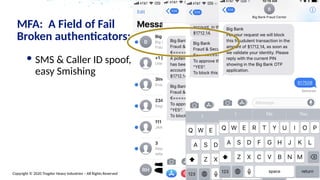
SMS & Caller ID spoof,
easy Smishing
MFA: A Field of Fail
Broken authenticators: Human Factor
Copyright © 2020 Trogdor Heavy Industries – All Rights Reserved 8
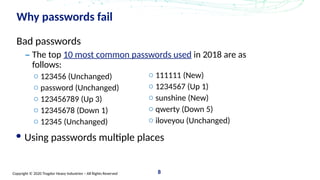
Why passwords fail
Bad passwords
– The top 10 most common passwords used in 2018 are as
follows:
o 123456 (Unchanged)
o password (Unchanged)
o 123456789 (Up 3)
o 12345678 (Down 1)
o 12345 (Unchanged)
Using passwords multiple places
o 111111 (New)
o 1234567 (Up 1)
o sunshine (New)
o qwerty (Down 5)
o iloveyou (Unchanged)
Copyright © 2020 Trogdor Heavy Industries – All Rights Reserved
Armoring Up
Use a password manager
Use Multi-Factored Authentication
Protect your accounts, don’t share!
Split your accounts:
• Use different accounts for different persons
• Use multiple emails:
• One email for banking/financials
• One email for social media
• One email for online purchases
• One for everything else
Copyright © 2020 Trogdor Heavy Industries – All Rights Reserved
Multi-Factored Authentication
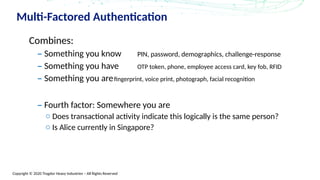
Combines:
– Something you know PIN, password, demographics, challenge-response
– Something you have OTP token, phone, employee access card, key fob, RFID
– Something you arefingerprint, voice print, photograph, facial recognition
– Fourth factor: Somewhere you are
o Does transactional activity indicate this logically is the same person?
o Is Alice currently in Singapore?
Copyright © 2020 Trogdor Heavy Industries – All Rights Reserved
MFA: Multi-Factored Auth
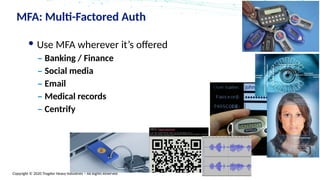
Use MFA wherever it’s offered
– Banking / Finance
– Social media
– Email
– Medical records
– Centrify
Copyright © 2020 Trogdor Heavy Industries – All Rights Reserved
Why Different email accounts?
Cascade Failure in Web of Trust
Compromise of one account often enables compromise of others:
Personal email -> social media -> banking credential reset -> corporate
credential reset -> phone carrier reset -> new SIM -> OTP token reset ->
cryptocoin wallet unlock…
The challenge here is that reset of a credential ALWAYS relies on other
credentials, and most are in-band
Password reset is the weakest link of all
FAIL MODES: Using same password for cat GIFs and banking
Copyright © 2020 Trogdor Heavy Industries – All Rights Reserved
PROTECT PASSWORDS of those you love
Password Protection Methods & the reality
of non-technical family members
 Phishing exists because of this
dichotomy
 How to protect…
 Techno-Phobe?
 Grandma?
 Middle Schooler?
 Mentally Incompetent?
Copyright © 2020 Trogdor Heavy Industries – All Rights Reserved
PROTECT PASSWORDS
Use a password manager:
• 1Password
• KeePass / KeePassXC
• LastPass
• BitWarden
Unique passwords for every site
No more stress about
“where else have I used this
password?”
Copyright © 2020 Trogdor Heavy Industries – All Rights Reserved
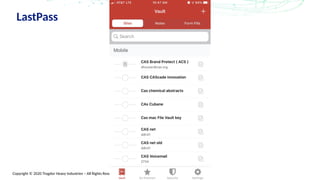
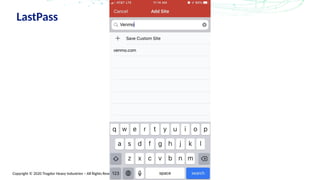
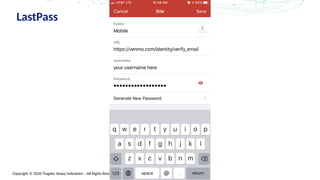
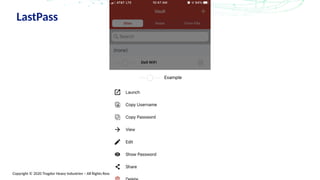
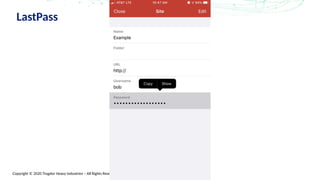
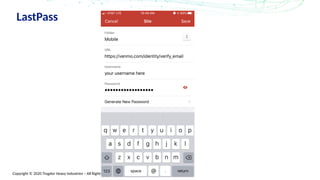
LastPass Interactive Demo
Get on Guest Wifi
guest@place.org
HowNowBC?
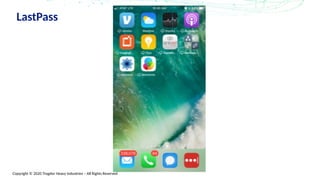
Install LastPass
Copyright © 2020 Trogdor Heavy Industries – All Rights Reserved
LastPass
Copyright © 2020 Trogdor Heavy Industries – All Rights Reserved
LastPass
Copyright © 2020 Trogdor Heavy Industries – All Rights Reserved
LastPass
Copyright © 2020 Trogdor Heavy Industries – All Rights Reserved
LastPass
Copyright © 2020 Trogdor Heavy Industries – All Rights Reserved
LastPass
Copyright © 2020 Trogdor Heavy Industries – All Rights Reserved
LastPass
Copyright © 2020 Trogdor Heavy Industries – All Rights Reserved
LastPass
Copyright © 2020 Trogdor Heavy Industries – All Rights Reserved
LastPass
Copyright © 2020 Trogdor Heavy Industries – All Rights Reserved
Armoring Up
Use a password manager
Use Multi-Factored Authentication
Protect your accounts, don’t share!
Split your accounts:
• Use different accounts for different persons
• Use multiple emails:
• One email for banking/financials
• One email for social media
• One email for online purchases
• One for everything else
Copyright © 2020 Trogdor Heavy Industries – All Rights Reserved 25
“Apply” Slide
Next week you should:
– START
Over the next 3 months you should:
– Inventory all credentials, paths, flows for establish & reset
– Normalize identity verification standards & scripts
Within 6 months you should:
– Instrument velocity checks on all authentication paths
– Create backup MFA plan / solution
– Migrate insecure credentials; consider NIST 800-63-3 as credential standard
Copyright © 2020 Trogdor Heavy Industries – All Rights Reserved
26
Q&A
Copyright FarWorks & Gary Larson

Protect passwords - User Awareness Training

  • 1.
    Copyright © 2020Trogdor Heavy Industries – All Rights Reserved Password Vaults: Protecting Yourself Online & In Real Life Dan Houser, CISSP-ISSAP-ISSMP CISM CGEIT CSSLP CCFP-US CISA InfoSec Leader & Architect Dan.houser@gmail.com @SecWonk #CPE4Free / #CPEs4Free
  • 2.
    Copyright © 2020Trogdor Heavy Industries – All Rights Reserved Keeping your digital identity SAFE Armoring Up Installing Password Manager
  • 3.
    Copyright © 2020Trogdor Heavy Industries – All Rights Reserved 3 4000 year old technology Most predominant authentication method – Halt! Who Goes There? [Identification] – What is the password? [Authentication] Most common form of authentication used No end in sight
  • 4.
    Copyright © 2020Trogdor Heavy Industries – All Rights Reserved But does it work? ...ish Copyright (c) 2019, Trogdor Heavy Industries, All Rights Reserved bit.ly/2019InfoSecSummit
  • 5.
    Copyright © 2020Trogdor Heavy Industries – All Rights Reserved CyberCrime & Passwords 2018 CyberCrime Losses: $3.3 TRILLION #1 Corporate Vector: email Phishing -> stealing passwords #1 Consumer vector: Stolen passwords Jan 2019: Collection 1-6 – Collection 1: 773Million passwords, emails, login IDs – Collections 2,3,4,5,6: Total 3.3 BILLION passwords & emails – Cost to download: $2 5
  • 6.
    Copyright © 2020Trogdor Heavy Industries – All Rights Reserved Why this talk? “Only amateurs attack machines; professionals target people.” -Bruce Schneier “Cryptographic systems are only as strong as the underlying implementations…. Even though the [cryptographic] protocol itself is believed to be solid, a ‘lock’ icon is hardly of much significance when displayed by a bug-riddled browser running on a spyware-infested computer talking to a compromised Web server. “ - Paul Kocher Wizards Bank Galleons to Muggle Ministry Transfers Sign In Flue powder chat with a personal banker now
  • 7.
    Copyright © 2020Trogdor Heavy Industries – All Rights Reserved SMS & Caller ID spoof, easy Smishing MFA: A Field of Fail Broken authenticators: Human Factor
  • 8.
    Copyright © 2020Trogdor Heavy Industries – All Rights Reserved 8 Why passwords fail Bad passwords – The top 10 most common passwords used in 2018 are as follows: o 123456 (Unchanged) o password (Unchanged) o 123456789 (Up 3) o 12345678 (Down 1) o 12345 (Unchanged) Using passwords multiple places o 111111 (New) o 1234567 (Up 1) o sunshine (New) o qwerty (Down 5) o iloveyou (Unchanged)
  • 9.
    Copyright © 2020Trogdor Heavy Industries – All Rights Reserved Armoring Up Use a password manager Use Multi-Factored Authentication Protect your accounts, don’t share! Split your accounts: • Use different accounts for different persons • Use multiple emails: • One email for banking/financials • One email for social media • One email for online purchases • One for everything else
  • 10.
    Copyright © 2020Trogdor Heavy Industries – All Rights Reserved Multi-Factored Authentication Combines: – Something you know PIN, password, demographics, challenge-response – Something you have OTP token, phone, employee access card, key fob, RFID – Something you arefingerprint, voice print, photograph, facial recognition – Fourth factor: Somewhere you are o Does transactional activity indicate this logically is the same person? o Is Alice currently in Singapore?
  • 11.
    Copyright © 2020Trogdor Heavy Industries – All Rights Reserved MFA: Multi-Factored Auth Use MFA wherever it’s offered – Banking / Finance – Social media – Email – Medical records – Centrify
  • 12.
    Copyright © 2020Trogdor Heavy Industries – All Rights Reserved Why Different email accounts? Cascade Failure in Web of Trust Compromise of one account often enables compromise of others: Personal email -> social media -> banking credential reset -> corporate credential reset -> phone carrier reset -> new SIM -> OTP token reset -> cryptocoin wallet unlock… The challenge here is that reset of a credential ALWAYS relies on other credentials, and most are in-band Password reset is the weakest link of all FAIL MODES: Using same password for cat GIFs and banking
  • 13.
    Copyright © 2020Trogdor Heavy Industries – All Rights Reserved PROTECT PASSWORDS of those you love Password Protection Methods & the reality of non-technical family members  Phishing exists because of this dichotomy  How to protect…  Techno-Phobe?  Grandma?  Middle Schooler?  Mentally Incompetent?
  • 14.
    Copyright © 2020Trogdor Heavy Industries – All Rights Reserved PROTECT PASSWORDS Use a password manager: • 1Password • KeePass / KeePassXC • LastPass • BitWarden Unique passwords for every site No more stress about “where else have I used this password?”
  • 15.
    Copyright © 2020Trogdor Heavy Industries – All Rights Reserved LastPass Interactive Demo Get on Guest Wifi guest@place.org HowNowBC? Install LastPass
  • 16.
    Copyright © 2020Trogdor Heavy Industries – All Rights Reserved LastPass
  • 17.
    Copyright © 2020Trogdor Heavy Industries – All Rights Reserved LastPass
  • 18.
    Copyright © 2020Trogdor Heavy Industries – All Rights Reserved LastPass
  • 19.
    Copyright © 2020Trogdor Heavy Industries – All Rights Reserved LastPass
  • 20.
    Copyright © 2020Trogdor Heavy Industries – All Rights Reserved LastPass
  • 21.
    Copyright © 2020Trogdor Heavy Industries – All Rights Reserved LastPass
  • 22.
    Copyright © 2020Trogdor Heavy Industries – All Rights Reserved LastPass
  • 23.
    Copyright © 2020Trogdor Heavy Industries – All Rights Reserved LastPass
  • 24.
    Copyright © 2020Trogdor Heavy Industries – All Rights Reserved Armoring Up Use a password manager Use Multi-Factored Authentication Protect your accounts, don’t share! Split your accounts: • Use different accounts for different persons • Use multiple emails: • One email for banking/financials • One email for social media • One email for online purchases • One for everything else
  • 25.
    Copyright © 2020Trogdor Heavy Industries – All Rights Reserved 25 “Apply” Slide Next week you should: – START Over the next 3 months you should: – Inventory all credentials, paths, flows for establish & reset – Normalize identity verification standards & scripts Within 6 months you should: – Instrument velocity checks on all authentication paths – Create backup MFA plan / solution – Migrate insecure credentials; consider NIST 800-63-3 as credential standard
  • 26.
    Copyright © 2020Trogdor Heavy Industries – All Rights Reserved 26 Q&A Copyright FarWorks & Gary Larson

Editor's Notes

  • #14 We know how tough it is in today’s cyber world. It seems like every day you hear of another company or bank being hacked. People are hacked everyday too; often, it is due to a poor password. We all have dozens of passwords to remember and the minimum requirements are getting bigger. Passwords used to be just that - a word; and often with only four characters. Now sites and apps require you to have 12 or more characters with numbers, capital letters and symbols.   These password requirements are not going to get shorter or easier so you might want to get ahead of the game. Ever wonder how you can possibly remember all of these passwords while still making them secure?   Make each password a phrase, a saying or even lyrics from a song. Just put all the letters and numbers together and you are on your way to a new “password.” Do not use: Passwords obtained from previous breaches, dictionary words, repetitive or sequential characters (aaaaa or 123456) and context-specific words like the name or purpose of the site requiring the password. Teach your kids to have fun creating passwords and making them as secure as possible. Remember never to share your passwords and teach your children the same. Use passwords on lock screens for all mobile devices and computers. Now that you’ve safely entered the cyber world, be careful what you let your children download into your world.