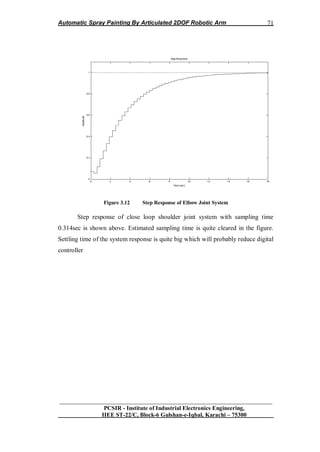
Final Project Report of BE (IE) 2007
PR IIEE 15b 433 2007
Automatic Spray Painter Using Articulated
2-DOF Robotic Arm
Shahzad Ali 1533
M. Ayaz Butt 1520
M. Zeeshan Taj 1528
S.M. Umer 1537
Submitted to In-charge
Final Project
Ashab Mirza
Associate Professor IIEE
SUPERVISORS OF THE PROJECT
EExxtteerrnnaall PPrroojjeecctt SSuuppeerrvviissoorr
MMrr.. KKaasshhiiff IIsshhaaqq
LLeeccttuurreerr aatt PPAAFFKKIIEETT KKaarraacchhii
BBEE ((IInndduussttrriiaall EEllccttrroonniiccss)) IIIIEEEE NNEEDDUUEETT,,
KKaarraacchhii
EEmmaaiill:: kkaasshhiiff99774444@@ggmmaaiill..ccoomm
IInntteerrnnaall PPrroojjeecctt SSuuppeerrvviissoorr
MMrr.. AAssiiff MMeemmoonn
LLeeccttuurreerr aatt IIIIEEEE KKaarraacchhii
BBEE ((EElleeccttrriiccaall)) KKUUEETT
PPrroojjeecctt WWoorrkk IInncchhaarrggee
MMrr.. AAsshhaabb MMiirrzzaa
AAssssoocciiaattee PPrrooffeessssoorr aatt IIIIEEEE
MMSS ((AAeerroossppaaccee EEnngggg..)) EENNSSAAEE,, TToouulloouussee,, FFrraannccee
BBEE ((EElleeccttrroonniiccss)) NNEEDDUUEETT,, KKaarraacchhii
EEmmaaiill:: aasshhaabbmmiirrzzaa@@yyaahhoooo..ccoomm
TEAM MEMBERS Enrollment No.
Shahzad Ali IIEE-610
(Group Leader)
Cell: +92-333-2881912
Email: shahzad_iiee@yahoo.com
M. Ayaz Butt IIEE-597
Cell: +92-321-2325699
Email: buttie85@yahoo.com
M. Zeeshan Taj IIEE-605
Cell: +92-334-6046054
Email: zeeshantaj@yahoo.com
S.M. Umer IIEE-614
Cell: +92-0321-2507838
Email: iiee_1537@yahoo.com
.
ACKNOWLEDGMENT
We would like to express our sincere thanks to SIR H.K Raza (NEDUET), who
contributed in our project selection by giving basic information about primary design
criterion and initial steps for the task; Sir Farhan Khan (NUST Karachi), who helps us in
the selection of dc servo motor of specific parameter suitable for this task; Sir Shafiq
(UIT Karachi), his valuable comments and suggestions have greatly inspired us to
proceed with this project especially for hardware design; Sir Ashab Mirza (IIEE
Karachi), whose valuable comments greatly helped us in completion of this project and
especially in documenting this report; and many more whose suggestions and valuable
comments paid the role in completing this project. It was their affection for us that they
guided us time to time for the successful completion of our project. They transferred their
practical experience to us very devotedly. Their great affection on this occasion enabled
us to have a practical view of the concepts we gained in the theory subjects.
CONTENTS
PREFACE 1
1. PROCESS AUTOMATION
1.1. Introduction 4
1.2. Automation and Robotics 4
1.3. Project Description 8
1.4. Block Diagram 15
1.5. Overall System 17
1.6. Possible Solutions 21
1.7. ON-OFF Controller 22
1.8. Summary 24
2. ANALYSIS AND SIMULATION
2.1. Introduction 25
2.2. Mathematical model 25
2.3. Stability of Open Loop System 33
2.4. Kinematics of Robotic Arm 37
2.5. Robotic Arm Trajectory Planning 44
2.6. Summary 49
3. IMPLEMENTATION PROPOSAL
3.1. Introduction 50
3.2. Sensory System of Robotic Arm 50
3.3. Controller and Electronics 53
3.4. Actuation System for the Task 56
3.5. Arm Manipulator 65
3.6. Designing of Digital Controller 67
3.7. Transient Analysis 68
3.8. Software Section 72
3.9. Summary 81
4. MECHANICAL STRUCTURE
4.1. Introduction 82
4.2. Material Selection 82
4.3. Physical Parameters 82
4.4. Problems and Solutions 83
4.5. Parts of Robot 83
4.6. End-Effector 88
5. CONCLUSION
5.1. Achievements 91
5.2. Recommendations 92
BIBLOGRAPHY & REFERENCES 93
APPENDEX
A-1 PIC16F877A Coding
A-2 Visual Basic Coding
A-3 Data Sheets
Automatic Spray Painting By Articulated 2DOF Robotic Arm
__________________________________________________________________
PCSIR - Institute of Industrial Electronics Engineering,
IIEE ST-22/C, Block-6 Gulshan-e-Iqbal, Karachi – 75300
1
PREFACE
The Project named “Automatic Spray Painter by Articulated 2-DOF
Robotic Arm” is selected on mutual understanding due to keen interest in
Automation and Robotics field and found only way to learn about Automation and
Robotic technology by this Project. Automation and Robotics technology is future
of our industries and leading technology of western industries. This project is
concerned with our Engineering field Industrial Electronics so this gave great
opportunity to perform the task. This Project covers almost all subjects that are
studied during our studies from simple Electronics to Digital Control Engineering.
Purpose of this project is to learn problem solving techniques and design
techniques on this level. This project would give much knowledge about linear
control system practically. The reason to choose spray painting operation for
automation was due to the fact that Spray Painting is the most common example of
the general class of the robotic arm application. The later termed suggests the
broader range of the possible application which includes painting. The spray
coating process makes use spray gun directed at the object to be coated fluid (e.g.
paint) flows through the nozzle of the spray gun to be dispersed applied over the
surface of the object. The work environment of the human being who performs this
process is filled with health hazards. These hazards include noxious fumes in the
air, risk of the flash fires & noise from nozzle. The environment is also believed to
poise a carcinogenic risk for workers. Largely because of these hazards, robotic
arms are being used with increase frequency for spray coating task.
The initial problem faced in the selection of this task is the feasibility of
this project and physical realization on this level. For this initial decision was to
design two DOF Robotic Arm rather than three as it was suppose to be suitable for
design on this level. The next problem was its dynamics and Kinematics. Most of
dynamics and Kinematics of Arm Manipulator is based on non-linear theory. For
this our group consulted with teachers associated with this field and concluded that
the first step of designing is to assume the area of workspace and modeled the
system to estimate the span, displacement, velocity and acceleration of each joint.
Automatic Spray Painting By Articulated 2DOF Robotic Arm
__________________________________________________________________
PCSIR - Institute of Industrial Electronics Engineering,
IIEE ST-22/C, Block-6 Gulshan-e-Iqbal, Karachi – 75300
2
For the modeling of system it was necessary to develop linear model which was
most difficult due to the fact that most of Robotic Arm modeling is based on non-
linear theory. The solution of this problem took some time and after long internet
search it was found that Arm manipulator is the application of Inverted Pendulum,
so this solved our Dynamics problem and thus, system was modeled easily.
Another problem faced was the Mechanical design. For this many rough sketches
were drawn and many of models were downloaded from various websites. The
difficult thing was the selection of mechanical design with respect to our design
requirement. Our design requirement was yaw movement of shoulder and pitch
movement of elbow with simplicity because of level of designing. Mechanical
designs downloaded were not at our level as they were on professional level. The
solution of the problem was the visit of different universities and institutions to
view existing mechanical designs of many Robotic Arms projects. Different
concepts were taken from mechanical designs, from those concepts rough sketches
were drawn and after modifications mechanical designs was finalized. Another
problem was the selection of motor for actuation purpose. The choice of Servo
motor over stepper motor was due to the fact that it made design of control system
easy and simple. Selection of motor was not so problem as our project in charge
suggested us for servo motor in the beginning of task. Type of servo motor selected
was RC-coupled servo motor because it provides six slider potentiometer as
feedback position sensor, comparator, PID-controller and H-bridge of MOSFETs
for motor driving stage which made system designing very easy. The real problem
was the selection of motor of particular torque. This all is done through
mathematical model. The last problem was the selection of type of digital
controller to be design for the system. There were several options for controllers
but choice was to be made from digital PID-controller or simple ON-OFF
controller. For our level ON-OFF controller was the best option. These were
several problems faced by us during performance but by the grace of Allah
almighty and with the help of teachers these problems were solved easily.
We would like to express our sincere thanks to SIR H.K Raza (NEDUET),
who contributed in our project selection by giving basic information about primary
Automatic Spray Painting By Articulated 2DOF Robotic Arm
__________________________________________________________________
PCSIR - Institute of Industrial Electronics Engineering,
IIEE ST-22/C, Block-6 Gulshan-e-Iqbal, Karachi – 75300
3
design criterion and initial steps for the task; Sir Farhan Khan (NUST Karachi),
who helps us in the selection of dc servo motor of specific parameter suitable for
this task; Sir Shafiq (UIT Karachi), his valuable comments and suggestions have
greatly inspired us to proceed with this project especially for hardware design; Sir
Ashab Mirza (IIEE Karachi), whose valuable comments great helped us in
completion of this project and especially in documenting this report; and many
more whose suggestions and valuable comments paid the role in completing this
project. It was their affection for us that they guided us time to time for the
successful completion of our project. They transferred their practical experience to
us very devotedly. Their great affection on this occasion enabled us to have a
practical view of the concepts we gained in the theory subjects
CHAPTER 1
Automatic Spray Painting By Articulated 2DOF Robotic Arm
__________________________________________________________________
PCSIR - Institute of Industrial Electronics Engineering,
IIEE ST-22/C, Block-6 Gulshan-e-Iqbal, Karachi – 75300
4
1.1 INTRODUCTION
This chapter deals with detail concept about industrial automation and
robotics. This chapter concern with basic concepts about our task and type of robot
selected for our project and type of joint used in it. Detail Block diagram and
general schematics are also discussed with type of digital controller used. After
going through this chapter readers find them selves well aware about automation
and robotics and about our project.
1.2 Automation and Robotics
Automation is the use of electrical, hydraulic or pneumatic power to move stage
machinery, staging, performers or scenery. The effectiveness of any automation
system depends entirely on the quality of its underlying electrical, mechanical and
control engineering. As computers have changed all aspects of the entertainment
industry so the advances have revolutionized automation making sophisticated
effects ever more widely available. Both in a performance environment and as part
of the supporting infrastructure, the uses and advantages of automation are
manifold. [25]
1.2.1 Advantages of Automation
Absolute control of speed and position Repeatability of moves
1. Coordinating multiple piece moves
2. Offline editing and simulation
3. Moving pieces in complicated paths
4. Reduced manual handling
5. Repeating moves indefinitely
6. Automatic safety checking
7. Improved efficiency
8. Safe movement of a single piece controlled by
9. several motors
10. Movement in confined spaces
Automatic Spray Painting By Articulated 2DOF Robotic Arm
__________________________________________________________________
PCSIR - Institute of Industrial Electronics Engineering,
IIEE ST-22/C, Block-6 Gulshan-e-Iqbal, Karachi – 75300
5
1.2.2 Robotics: Flexible Automation
Most manufacturing automation is called fixed automation. A stamping
machine can stamp only one kind of sheet metal part without being retooled, for
example, or a boring machine bores only one kind of hole in one kind of part.
When robots are part of an automatic process, the process can be changed by
changing the programming of the robots. Robotic automation is called flexible
automation [28].
1.2.2.1 Definition of Robot
Robots are more and more used in industrial and commercial applications.
Now, the number of robots in use is increasing at the rate of about 35% per year.
Sales volume is also increasing at the same rate.
Some of the reasons for the increased use of robots are as follows:
 Reduced Production Cost.
 Increased Productivity.
 Improved Product Quality.
 Operation in Hazardous and Hostile Environment.
 Improved Management.
 Decreased Reaction and Debugging Time
A robot is an autonomous artifact that obtains information by sensing the world
around it and uses the information to manipulate its environment to achieve goals.
Robot sensing includes vision, sound, touch, and others. Manipulation includes the
use of specialized tools and dexterous manipulation. Robots often have the ability
to change their locations in the world (locomotion).
Automatic Spray Painting By Articulated 2DOF Robotic Arm
__________________________________________________________________
PCSIR - Institute of Industrial Electronics Engineering,
IIEE ST-22/C, Block-6 Gulshan-e-Iqbal, Karachi – 75300
6
1.2.2.2 Sensing
If robots didn‟t have autonomy, they wouldn‟t need sensing. They could
have all their actions pre-programmed into them, but their capabilities would be
considerably limited. With sensing, the robot must use the information acquired
from the sensors in deciding what to do next.
The information from the sensors will only make sense if the robot has
some way of using the information to create or modify a model of the world. The
process of using sensor data is called representation. Representation and decision
making require intelligence
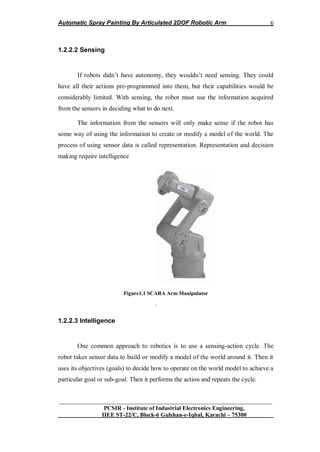
Figure1.1 SCARA Arm Manipulator
.
1.2.2.3 Intelligence
One common approach to robotics is to use a sensing-action cycle. The
robot takes sensor data to build or modify a model of the world around it. Then it
uses its objectives (goals) to decide how to operate on the world model to achieve a
particular goal or sub-goal. Then it performs the action and repeats the cycle.
Automatic Spray Painting By Articulated 2DOF Robotic Arm
__________________________________________________________________
PCSIR - Institute of Industrial Electronics Engineering,
IIEE ST-22/C, Block-6 Gulshan-e-Iqbal, Karachi – 75300
7
Different robot applications require different intelligence strategies. Some
applications require complex planning algorithms. Others where speed is important
have simple and fast programs
1.2.2.4 Manipulation
Manipulation is the area of robotics concerned with finding a good grip
(grasping) and then handling objects so that objectives are met.
In handling an object, there are a large number of “configurations” of the
gripper on the object. The robot has to know how to compute an acceptable grip. If
there is an error, the robot could drop the object it picks up, or won‟t be able to
properly hand it off or put it where it belongs.
For example, suppose a robot needs to hand a pan of water to a person or
another robot. If the first robot‟s hand completely covers the handle, the person or
second robot won‟t be able to take the pan.
1.2.2.5 Computer Vision
Another very rich and interesting research area is computer vision. This
usually requires constructing a 3D model of the world based on the images from
one or more cameras.
Many vision systems use “binocular vision” similar to humans. Others use
laser range finders, sonar, or radar. Stereoscopic vision can be constructed using
one camera and moving it from place to place in the scene to be modeled.
1.2.2.6 Artificial Intelligence
Navigation, manipulation, and computer vision all require artificial
intelligence. However, artificial intelligence goes beyond those three strictly
Automatic Spray Painting By Articulated 2DOF Robotic Arm
__________________________________________________________________
PCSIR - Institute of Industrial Electronics Engineering,
IIEE ST-22/C, Block-6 Gulshan-e-Iqbal, Karachi – 75300
8
robotic disciplines. Realizing the fullest capabilities of robots will require speech
understanding and common sense reasoning. For a robot to communicate with
people, it will require to have understanding of the world, or at least understanding
of its domain environment. Research projects to achieve this goal have been
underway at universities for many years [28].
1.3 PROJECT DESCRIPTION
Our Project named “Automatic Spray Painter By Articulated 2DOF-
Robotic Arm” is the implementation of theoretical concepts of Modern Control
System. This Project is related with Automation and Robotics (as a Linear System)
theory in Laboratory conditions.
The theme of this Project is to Design 2 Degree of Freedom Robotic Arm
Control in which 2DOF Control will be:
1) Yaw Control of Shoulder.
2) Pitch Control of Elbow.
All of these Controls will be Servo Mechanism based. The Controls of this
system is based on Linear Control system (as some of Robotic Arm Control
System considered as Non-Linear) and is an application of Inverted pendulum. The
End Effecter of this System is Nozzle connected with small compressor (filled with
color) through thin rubber pipe. Flow control of color from Nozzle is through
Servo control Valve. The Work space is Thin Metal Plate of specific Dimensions.
Our goal is to Design Economical, Light Weight, Reliable System which
could be useful for future students to work with this system to achieve more
achievements in Automation & Robotics field.
.
Automatic Spray Painting By Articulated 2DOF Robotic Arm
__________________________________________________________________
PCSIR - Institute of Industrial Electronics Engineering,
IIEE ST-22/C, Block-6 Gulshan-e-Iqbal, Karachi – 75300
9
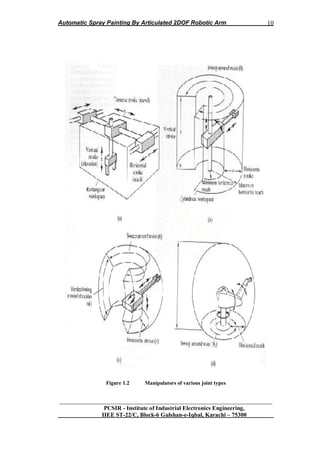
1.3.1 Types of Arm Manipulators
Manipulators are grouped into classes according to the combination of
joints used in their construction. A Cartesian geometry arm (sometimes called a
gantry crane) uses only prismatic joints, and can reach any position in its
rectangular workspace by Cartesian motions of the links. By replacing the waist
joint of a Cartesian arm with a revolute joint, a cylindrical geometry arm is formed.
This arm can reach any point in its cylindrical workspace (a thick-shelled cylinder)
by a combination of rotation and translation. If the shoulder joint is also replaced
by a revolute joint, an arm with a polar geometry is formed. The workspace of this
arm is half thick spherical shell, and end effectors positions are best described with
polar coordinates. Finally, replacing the elbow joint with a revolute joint results in
a revolute geometry, or articulated arm. The workspace of an articulated arm is a
rather complex thick walled spherical shell. The outside of the shell is a single
sphere, but the inside is a set of intersecting spheres.
Automatic Spray Painting By Articulated 2DOF Robotic Arm
__________________________________________________________________
PCSIR - Institute of Industrial Electronics Engineering,
IIEE ST-22/C, Block-6 Gulshan-e-Iqbal, Karachi – 75300
10
Figure 1.2 Manipulators of various joint types
Automatic Spray Painting By Articulated 2DOF Robotic Arm
__________________________________________________________________
PCSIR - Institute of Industrial Electronics Engineering,
IIEE ST-22/C, Block-6 Gulshan-e-Iqbal, Karachi – 75300
11
1.3.2 Cartesian Arm Manipulator
Looking at figure 2.1(a), type of each joint of manipulator is:
 Prismatic waist
 Prismatic shoulder
 Prismatic elbow
Advantages of above mentioned Cartesian arm manipulator are:
 Linear motion in three dimensions
 Simple kinematics model
 Rigid structure
 Easy to visualize
 Can use inexpensive pneumatic drives for pick and place operation.
Besides above mentioned advantages, it has a few drawbacks also. Which are:
 Requires a large volume to operate in
 Work space is smaller than robot volume
 Unable to reach areas under objects
 Guiding surfaces of prismatic joints
 Must be covered to prevent ingress of dust
1.3.3 Cylindrical Arm Manipulator
Looking at figure 2.1(b), type of each joint of manipulator is:
 Revolute waist
 Prismatic shoulder.
 Prismatic elbow
Advantages of above mentioned cylindrical arm manipulator are:
 Simple kinematics model
 Easy to visualize
 Good access into cavities and machine openings
 Very powerful when hydraulic drives used
Besides above mentioned advantages, it has a few drawbacks also. Which are:
 Restricted work space
Automatic Spray Painting By Articulated 2DOF Robotic Arm
__________________________________________________________________
PCSIR - Institute of Industrial Electronics Engineering,
IIEE ST-22/C, Block-6 Gulshan-e-Iqbal, Karachi – 75300
12
 Prismatic guides difficult to seal from dust and liquids
 Back of robot can overlap work volume
1.3.4 Spherical Arm Manipulator
Looking at figure 2.1(c), type of each joint of manipulator is:
 Revolute waist.
 Revolute shoulder
 Prismatic elbow
Advantages of above mentioned spherical arm manipulator are:
 Covers a large volume from a central support
 Can bend down to pick objects up off the floor
Besides above mentioned advantages, it has a few drawbacks also. Which are:
 Complex kinematics model
 Difficult to visualize
1.3.5 Articulated Arm Manipulator
 Revolute waist.
 Revolute shoulder.
 Revolute elbow
Advantages of above mentioned spherical arm manipulator are:
 Maximum flexibility
 Covers a large work space relative to volume of robots
 Revolute joints are easy to seal
 Suits electric motors
 Can reach over and under objects
Besides above mentioned advantages, it has a few drawbacks also. Which are:
 Complex kinematics
 Difficult to visualize
 Control of linear motion is difficult
 Structure not very rigid at full reach
Automatic Spray Painting By Articulated 2DOF Robotic Arm
__________________________________________________________________
PCSIR - Institute of Industrial Electronics Engineering,
IIEE ST-22/C, Block-6 Gulshan-e-Iqbal, Karachi – 75300
13
1.3.6 Joint selected for the task
1.3.6.1 Articulated Arm Manipulator
The common industrial manipulator is often referred to as a robot arm, with
links and joints described in similar terms. Manipulators which emulate the
characteristics of a human arm recalled articulated arms. All their joints are rotary
(or revolute). Representative articulated manipulators are the ASEA robot
1.3.6.2 Degree of freedoms
The motion of articulated robot arms differs from the motion of the human
arm. While robot joints have fewer degrees of freedom, they can move through
greater angles. For example, the elbow of an articulated robot can bend up or down
whereas a person can only bend their elbow in one direction with respect to the
straight arm position. Many applications do not require arms with articulated (or
revolute) geometries. Simpler geometries involving prismatic or sliding joints are
often adequate. Prismatic and revolute joints represent the opposite extremes of a
universal screw. In a revolute joint, the screw pitch is zero, constraining the joint to
pure rotation. In a prismatic joint, the pitch is infinite, constraining the joint to pure
sliding motion. Revolute joints are often preferred because of the strength, low
friction and reliability of ball bearings. Joints that allow a combination of
translation and rotation (such as lead screws) are not normally used to join the
links of robot arms [29].
1.3.6.3 Work space consideration
Workspace considerations, particularly reach and collision avoidance, play an
important part in the selection of a robot for an application. All manufacturers give
detailed specifications of the work space of their robots and associated equipment.
Automatic Spray Painting By Articulated 2DOF Robotic Arm
__________________________________________________________________
PCSIR - Institute of Industrial Electronics Engineering,
IIEE ST-22/C, Block-6 Gulshan-e-Iqbal, Karachi – 75300
14
1.3.7 SCARA Robot
Consideration of the motions involved in assembly has led to the
development of simpler arm geometry for use in assembly applications, known as
the SCARA (Selective Compliance Automatic Robot Arm) geometry. While all
SCARA robots have the same geometry the name SCARA does not have a
geometric basis. Most assembly operations involve building up the assembly by
placing parts on top of a partially complete assembly. A SCARA arm has two
revolute joints in the horizontal plane, allowing it to reach any point within a
horizontal planar workspace defined by two concentric circles. At the end of the
arm is a vertical link which can translate in the vertical direction, allowing parts to
be raised from a tray and placed on to the assembly. A gripper placed at the end of
this link may be able to rotate about the vertical axis of this link, facilitating
control of part orientation in a horizontal plane. One problem in achieving
spherical wrist design is the physical difficulty of fitting all the components into
the available space. The size of the human wrist is small because the muscles
which power it are located in the forearm, not in the wrist. Wrist design is a
complex task, involving conflicting goals. Desirable features of a wrist include
[29]
 Small size
 Axes close together to increase mechanical efficiency
 Tool plate close to the axes to increase strength and precision
 Soluble mathematical model
 No singularities in the work volume
 Back-driving to allow programming by teach and playback
 Decoupling between motions around the three axes
 Actuators mounted away from the wrist to allow size reduction
 Paths for end effectors control and power through the wrist
 Power proportionate to the proposed task
 Rugged housing.
Automatic Spray Painting By Articulated 2DOF Robotic Arm
__________________________________________________________________
PCSIR - Institute of Industrial Electronics Engineering,
IIEE ST-22/C, Block-6 Gulshan-e-Iqbal, Karachi – 75300
15
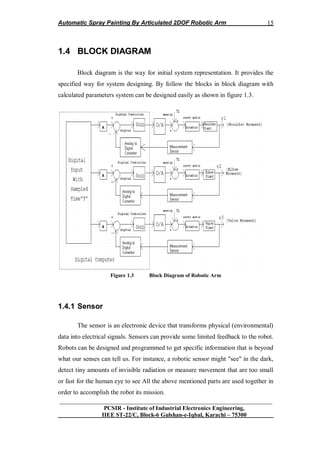
1.4 BLOCK DIAGRAM
Block diagram is the way for initial system representation. It provides the
specified way for system designing. By follow the blocks in block diagram with
calculated parameters system can be designed easily as shown in figure 1.3.
Figure 1.3 Block Diagram of Robotic Arm
1.4.1 Sensor
The sensor is an electronic device that transforms physical (environmental)
data into electrical signals. Sensors can provide some limited feedback to the robot.
Robots can be designed and programmed to get specific information that is beyond
what our senses can tell us. For instance, a robotic sensor might "see" in the dark,
detect tiny amounts of invisible radiation or measure movement that are too small
or fast for the human eye to see All the above mentioned parts are used together in
order to accomplish the robot its mission.
Automatic Spray Painting By Articulated 2DOF Robotic Arm
__________________________________________________________________
PCSIR - Institute of Industrial Electronics Engineering,
IIEE ST-22/C, Block-6 Gulshan-e-Iqbal, Karachi – 75300
16
1.4.2 Controller
Every robot is connected to a controller (usually a microcontroller), also it
can be connected to a simple home PC, which keeps the pieces of the arm working
together. The controller functions as the "brain" of the robot. Robots today have
controllers that run programs. Usually, entirely pre-programmed by people, robots
have very specific jobs to accomplish.
In the block diagram representation of Robotic Arm system there are three
separate servo- Control systems(feedback control loops) due to the fact that
physics involve in system dynamics(motor as an actuator) in Robotic Arm is on the
concept of “Absolute Frame of Reference “. So, three separate Feedback control
loops are drawn having digital input through digital computer with designed
sampled time “T” having switching sequence between loops as desired.
Digital controllers are of “ON-OFF type” for shoulder, elbow and valve
dynamics which are Plants of the system. Feedback sensor is position sensor and is
part of Servo motor by combining called Servomechanism. TL is the Load Torque
on joints due to Actuation Mechanism involving gear & belt system. D/A converter
is to convert discrete signal in to Continuous time signal and A/D converter is to
convert Continuous time signal in to Discrete signal [12].
1.4.3 Robotic Arm
Robotic arms come in all shapes and sizes. The arm is the part of the robot
that sets the end- effectors and sensors to do their preprogrammed job. Many (but
not all) resemble human arms and have shoulders, elbows, and wrists, even fingers.
Each joint gives to the robot one degree of freedom. So, a simple robotic arm with
three degrees of freedom could move in three ways: up and down, left and right,
forward and backward.
Automatic Spray Painting By Articulated 2DOF Robotic Arm
__________________________________________________________________
PCSIR - Institute of Industrial Electronics Engineering,
IIEE ST-22/C, Block-6 Gulshan-e-Iqbal, Karachi – 75300
17
1.4.4 Actuation System and Drive
The drive is the engine that drives the links (the sections between the joints)
into their desired position. Very common devices that robots use as drives are
Servomotors and Step-Motors. These two categories are usually connected directly
to a microcontroller. The microcontroller triggers them by generating specific
pulses. They are very useful because they have flexible moving and opposed to the
simple motors they can be set at very specific positions each time. Also, a
characteristic that makes them useful for robots is that they can handle with heavy
items. In other words these kinds of motors can carry heavy parts [15].
1.4.5 End-Effectors
The end-effectors is the "hand" connected to the robots‟ arm. It could be a
tool such as a gripper, tweezers or a scalpel. So, the end-effectors are the part of
the robotic system that characterizes its implementation.
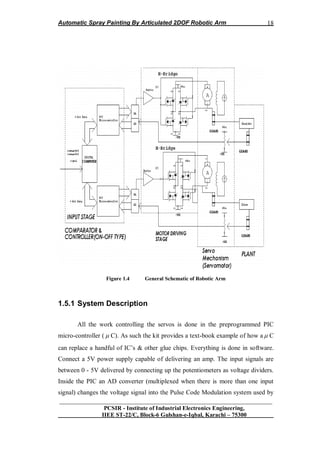
1.5 OVER ALL SYSTEM
Over all system is represented by General Schematics. The General
Schematics of the system have four parts. First part is Comparator and Controller
part which is digital controller (ON-OFF type). Comparison and Controller is done
by using PIC microcontroller. Second part of the system is motor driving stage
consist of H-bridge for bidirectional switching of system. Third stage is servo
mechanism consist of Servo motor with gear system. The last stage is the Plant
which of course Arm Manipulator. General Schematic of system is shown in
figure 1.4.
Automatic Spray Painting By Articulated 2DOF Robotic Arm
__________________________________________________________________
PCSIR - Institute of Industrial Electronics Engineering,
IIEE ST-22/C, Block-6 Gulshan-e-Iqbal, Karachi – 75300
18
Figure 1.4 General Schematic of Robotic Arm
1.5.1 System Description
All the work controlling the servos is done in the preprogrammed PIC
micro-controller (  C). As such the kit provides a text-book example of how a  C
can replace a handful of IC‟s & other glue chips. Everything is done in software.
Connect a 5V power supply capable of delivering an amp. The input signals are
between 0 - 5V delivered by connecting up the potentiometers as voltage dividers.
Inside the PIC an AD converter (multiplexed when there is more than one input
signal) changes the voltage signal into the Pulse Code Modulation system used by
Automatic Spray Painting By Articulated 2DOF Robotic Arm
__________________________________________________________________
PCSIR - Institute of Industrial Electronics Engineering,
IIEE ST-22/C, Block-6 Gulshan-e-Iqbal, Karachi – 75300
19
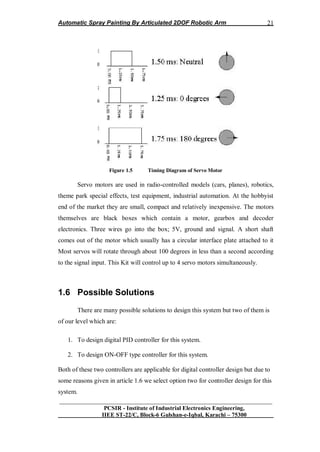
servo motors. This signal is a 5V pulse between 1 and 2 mSec long repeated 50
times per second. That is, a 20msec frame rate.
The width of the pulse determines the position of the server. Most servos
will move to the center of their travel when they receive a 1.5msec pulse. One
extreme of motion generally equates to a pulse width of 1.0msec; the other extreme
to 2.0msec with a smooth variation throughout the range, and neutral at 1.5msec.
The period between the pulses is used to synchronize the receiver. Servos are
closed loop devices. They are constantly comparing their position (proportional to
the pulse width) to their actual position (proportional to the signal voltage input.) If
there is a difference between the two the servo electronics will turn the motor to
adjust the difference error. This also means that servos will resist forces which try
to change their position. When a servo is not receiving positioning pulses (i-e not
being provided with power) the output shaft can be easily turned by hand. [18]
1.5.2 Electronics
To guide the servomotors on when and how to move, an electronic board is
needed. On the board (Figure 1), there are some electronic circuits that give to the
preprogrammed microcontroller the ability to communicate with the peripheral
devices (servomotors, sensors, PCs). The board has inputs and outputs that are
connected to the microcontroller. Four outputs are used for the servomotors and
one input for the sensor. One I/O interface based on a DB-9 RS-232 is used for
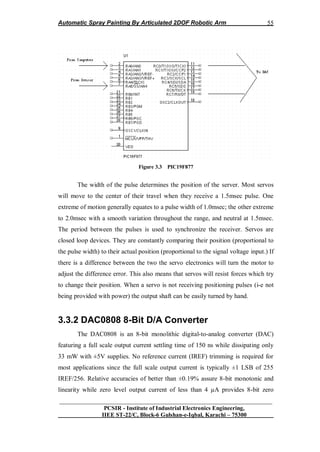
transferring data from and to a PC when connected. The microcontroller is a PIC
model 16F877A (Microchip). PIC has 13 I/O pins, an 8-bit microprocessor and 1K
of RAM. Its circuit is a usual TTL/CMOS based and so its V is +5V. Using the
PWM (Pulse Width Modulation) technique, PIC controls the servomotors. Also
PIC inputs receive signals that come from sensors and may be useable at any case.
In our work we use a supersonic sensor, which transmits high frequencies and then
receives the reflections. In this way PIC can understand where and in which height
a CD is, related to the ground. The board may also communicate with other
external sensors via the PC interface (for sensors connected on the PC) or get
Automatic Spray Painting By Articulated 2DOF Robotic Arm
__________________________________________________________________
PCSIR - Institute of Industrial Electronics Engineering,
IIEE ST-22/C, Block-6 Gulshan-e-Iqbal, Karachi – 75300
20
connected with more sensors attached to the board directly via its integrated
sockets (PIC16F877 Tutorial and basic explanations; Microchip PIC16F877A
Technical Specifications 2002; PIC16F877 Fundamentals and Programming
Examples; Programming the PIC16F877 Micro Controller and Data Sheets
Resource Centers Internet Sites).
1.5.3 Assembly
Check the components in the kit against the Components List. Some of the
resistors stand up on the board. Make sure to get the electrolytic capacitor and the
IC1 around the correct way. To complete the kit between 5K - 10K potentiometers
are required to produce the input signal. Connect each pot as a voltage divider with
the center pin going to the signal input. Servo motors are required. They have not
been included in this kit because users will usually have their own particular servos
they wish to control.
1.5.4 Servo Motor
Servo is a small device that has an output shaft. This shaft can be
positioned to specific angular positions by sending the servo a coded signal. As
long as the coded signal exists on the input line, the servo will maintain the angular
position of the shaft. As the coded signal changes, the angular position of the shaft
changes. In practice, servos are used in radio controlled airplanes to position
control surfaces like the elevators and rudders. They are also used in radio
controlled cars, puppets, and of course, robots [20].
Automatic Spray Painting By Articulated 2DOF Robotic Arm
__________________________________________________________________
PCSIR - Institute of Industrial Electronics Engineering,
IIEE ST-22/C, Block-6 Gulshan-e-Iqbal, Karachi – 75300
21
Figure 1.5 Timing Diagram of Servo Motor
Servo motors are used in radio-controlled models (cars, planes), robotics,
theme park special effects, test equipment, industrial automation. At the hobbyist
end of the market they are small, compact and relatively inexpensive. The motors
themselves are black boxes which contain a motor, gearbox and decoder
electronics. Three wires go into the box; 5V, ground and signal. A short shaft
comes out of the motor which usually has a circular interface plate attached to it
Most servos will rotate through about 100 degrees in less than a second according
to the signal input. This Kit will control up to 4 servo motors simultaneously.
1.6 Possible Solutions
There are many possible solutions to design this system but two of them is
of our level which are:
1. To design digital PID controller for this system.
2. To design ON-OFF type controller for this system.
Both of these two controllers are applicable for digital controller design but due to
some reasons given in article 1.6 we select option two for controller design for this
system.
Automatic Spray Painting By Articulated 2DOF Robotic Arm
__________________________________________________________________
PCSIR - Institute of Industrial Electronics Engineering,
IIEE ST-22/C, Block-6 Gulshan-e-Iqbal, Karachi – 75300
22
1.7 ON-OFF Controller
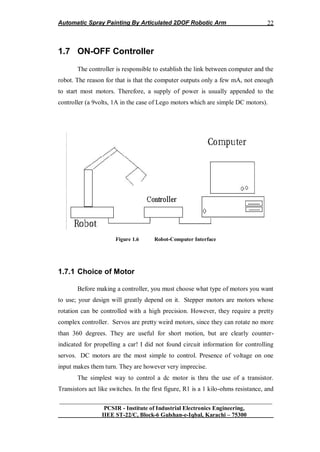
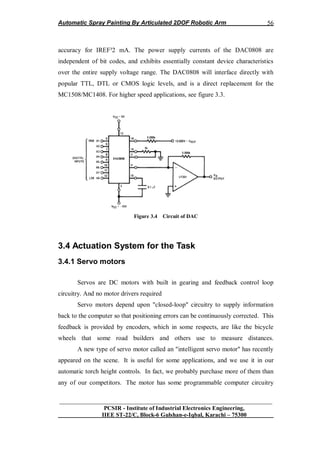
The controller is responsible to establish the link between computer and the
robot. The reason for that is that the computer outputs only a few mA, not enough
to start most motors. Therefore, a supply of power is usually appended to the
controller (a 9volts, 1A in the case of Lego motors which are simple DC motors).
Figure 1.6 Robot-Computer Interface
1.7.1 Choice of Motor
Before making a controller, you must choose what type of motors you want
to use; your design will greatly depend on it. Stepper motors are motors whose
rotation can be controlled with a high precision. However, they require a pretty
complex controller. Servos are pretty weird motors, since they can rotate no more
than 360 degrees. They are useful for short motion, but are clearly counter-
indicated for propelling a car! I did not found circuit information for controlling
servos. DC motors are the most simple to control. Presence of voltage on one
input makes them turn. They are however very imprecise.
The simplest way to control a dc motor is thru the use of a transistor.
Transistors act like switches. In the first figure, R1 is a 1 kilo-ohms resistance, and
Automatic Spray Painting By Articulated 2DOF Robotic Arm
__________________________________________________________________
PCSIR - Institute of Industrial Electronics Engineering,
IIEE ST-22/C, Block-6 Gulshan-e-Iqbal, Karachi – 75300
23
R2 is any small resistance (10-300 ohms). Q1 is a very common type of transistor:
a 2N2222. See part list for a drawing of these, and this for a picture. A transistor
costs no more than 50 cents.
In order to control bi-directional a motor (ON/OFF, and clockwise or
counterclockwise), a H-type circuit is needed. In the second picture, if both upper
left and lower right transistors are ON, the current will flow through the motor
from left to right, yielding a CW rotation.
Trouble is that there is a lost of power. I have not been able to sink more than 500
mA through the motor in the H circuit. It is enough for small motors, but not for
the Lego-type motors who need a full 1 ampere of current.
One alternative is to replace transistors with power-MOSFET. I haven't try,
but you might look at MOSFET H-Bridge Schematic & Theory of Operation for
more. Another alternative that I explored in tutorial 2 is to use a mechanical switch
to control the direction of motion. Relays are electro-magnetic switch that can be
controlled easily with a transistor. Since the current is independent of the
transistor-magnet circuit, there is no lost of power [25].
1.7.2 Communication port
Personal computer needs to communicate to the controller. The two likely
methods are to use the ports available. There is two kind of port. The parallel port
(or printer port) is easy to program, but has a limited capacity at any given time. In
the best case, it can only output 8 bits of information, and can input from sensor 8
bits.
There is a large variety in sensors, ranging from electronic thermometer to
pressure sensors. The simplest kind is the on/off sensors. When pressure is applied,
the switch turns on. One bit of information is enough per sensor.
Automatic Spray Painting By Articulated 2DOF Robotic Arm
__________________________________________________________________
PCSIR - Institute of Industrial Electronics Engineering,
IIEE ST-22/C, Block-6 Gulshan-e-Iqbal, Karachi – 75300
24
1.7.3 Sending Command/Receive Data
The first layer is only a list of what can possibly be done with your robot.
Now we need to send specific commands to your robot. Commands can be very
simple, such as "Start motor 3 now", or more complex, such as "Start motor 3, wait
5 seconds, start motor 2, and when sensor 2 gets on, stop all moves." The VBASIC
interface that I proposed in another page is an example which can send only simple
commands. A better interface would accept commands such as "Turn motor 3 for x
seconds" or "Turn motor 3 until sensor 2 gets on".
1.7.4 Constrain Control
Not all moves are safe for the health of your robots. For example, turning
the arm to the left for an indefinite time is risky if your arm cannot do more than
360 degree turns (and most arms can not do that much).
In order to avoid wreckage, your robot should know things about its
limitations. These are called constraints. Example of constraints are:
If the base is turning for more than 5 seconds, then you ought to stop turning the
base.[25].
1.8 Summary
A basic of Robotic Arm is so important for every engineer to step in
Automation and robotics technology. Basic information provided in this chapter is
so helpful for the student of this level to design such type of manipulator on this
level that we proposed in this chapter. Type of block diagram, schematic, type of
controller etc is much helpful to collect idea for their designs.
CHAPTER 2
Automatic Spray Painting By Articulated 2DOF Robotic Arm
__________________________________________________________________
PCSIR - Institute of Industrial Electronics Engineering,
IIEE ST-22/C, Block-6 Gulshan-e-Iqbal, Karachi – 75300
25
2.1 INTRODUCTION
This chapter contains mathematical work on robot manipulator dynamics
and kinematics. Concept of linear system is discussed in this chapter while
kinematics of manipulator is discussed by simple Trigonometrical relations.
Trajectory planning is discussed in this chapter on the behalf of kinematics. Open
loop stability of each joint is being issue in this chapter by using mathematical
tools and also by MATLAB.
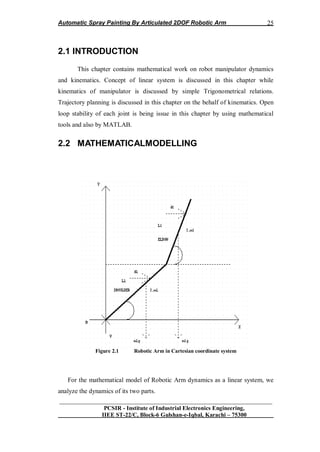
2.2 MATHEMATICALMODELLING
Figure 2.1 Robotic Arm in Cartesian coordinate system
For the mathematical model of Robotic Arm dynamics as a linear system, we
analyze the dynamics of its two parts.
Automatic Spray Painting By Articulated 2DOF Robotic Arm
__________________________________________________________________
PCSIR - Institute of Industrial Electronics Engineering,
IIEE ST-22/C, Block-6 Gulshan-e-Iqbal, Karachi – 75300
26
1. Shoulder dynamics
2. Elbow dynamics
Let us represent our system graphically in Cartesian coordinate system and analyze
its dynamics by considering some of important parameters involved in its
dynamics.
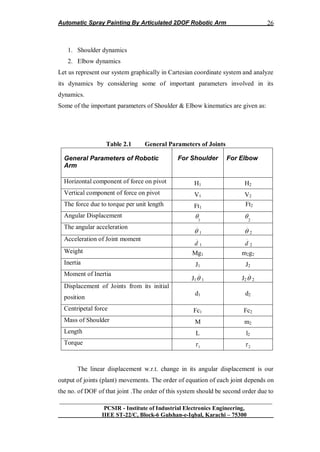
Some of the important parameters of Shoulder & Elbow kinematics are given as:
Table 2.1 General Parameters of Joints
General Parameters of Robotic
Arm
For Shoulder For Elbow
Horizontal component of force on pivot H1 H2
Vertical component of force on pivot V1 V2
The force due to torque per unit length Ft1
Ft2
Angular Displacement
1
 2

The angular acceleration ..
 1
..
 2
Acceleration of Joint moment ..
d 1
..
d 2
Weight Mg1 m2g2
Inertia J1 J2
Moment of Inertia
J1
..
 1 J2
..
 2
Displacement of Joints from its initial
position
d1 d2
Centripetal force Fc1 Fc2
Mass of Shoulder M m2
Length L l2
Torque
1 2
The linear displacement w.r.t. change in its angular displacement is our
output of joints (plant) movements. The order of equation of each joint depends on
the no. of DOF of that joint .The order of this system should be second order due to
Automatic Spray Painting By Articulated 2DOF Robotic Arm
__________________________________________________________________
PCSIR - Institute of Industrial Electronics Engineering,
IIEE ST-22/C, Block-6 Gulshan-e-Iqbal, Karachi – 75300
27
one DOF of each joint. As this system is one of many applications of Inverted
Pendulum so linear model of this system is established by study the dynamics of
Inverted Pendulum. Many of models of Robotic Arm system is based on nonlinear
system on undergraduate level which is due to lack of awareness of designing on
this level. Following mathematical modeling lead the undergraduate engineers to
aware the proper analyses of dynamics of robotic arm system by consider it as
linear system [27].
To analyze dynamics of arm manipulator, first analyze their Direct
Kinematics & inverse kinematics of joints moment, then analyze the Transfer
Function of whole system.
To analyze the kinematics of arm joints, it is important to analyze kinematics of
shoulder & elbow separately. For this first of all sum the forces perpendicular to
the shoulder & elbow.
Applying condition of equilibrium
For Shoulder joint
1 1 1
J  
For Elbow joint
2 2 2
J  
Solving the systems along these axis ends up saving lot of algebra.
You should get the following equations [27].
For Shoulder
.. ..
1 1 1 1 1 1 1 1 1sin cos sin cosV H Mg ML M d        (2.1)
For Elbow
.. ..
2 2 2 2 2 2 2 2 2 2 2 2 2sin cos sin cosV H m g m l m d        (2.2)
Torque () on Shoulder joint
Automatic Spray Painting By Articulated 2DOF Robotic Arm
__________________________________________________________________
PCSIR - Institute of Industrial Electronics Engineering,
IIEE ST-22/C, Block-6 Gulshan-e-Iqbal, Karachi – 75300
28
1 1 1
J  
Torque on Elbow joint
2 2 2
J   (2.3)
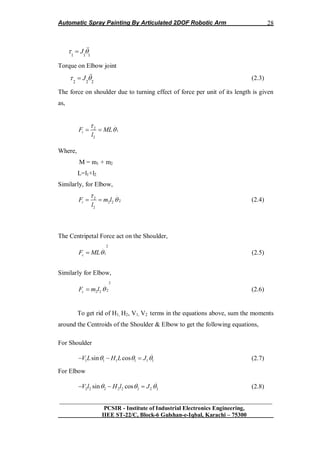
The force on shoulder due to turning effect of force per unit of its length is given
as,
..
2
1
2
tF ML
l

 
Where,
M = m1 + m2
L=l1+l2
Similarly, for Elbow,
..
2
22 2
2
tF m l
l

  (2.4)
The Centripetal Force act on the Shoulder,
2.
1cF ML (2.5)
Similarly for Elbow,
2.
22 2cF m l  (2.6)
To get rid of H1, H2, V1, V2 terms in the equations above, sum the moments
around the Centroids of the Shoulder & Elbow to get the following equations,
For Shoulder
..
1 1 1 1 1 1sin cosV L H L J     (2.7)
For Elbow
..
2 2 2 2 2 2 2 2sin cosV l H l J     (2.8)
Automatic Spray Painting By Articulated 2DOF Robotic Arm
__________________________________________________________________
PCSIR - Institute of Industrial Electronics Engineering,
IIEE ST-22/C, Block-6 Gulshan-e-Iqbal, Karachi – 75300
29
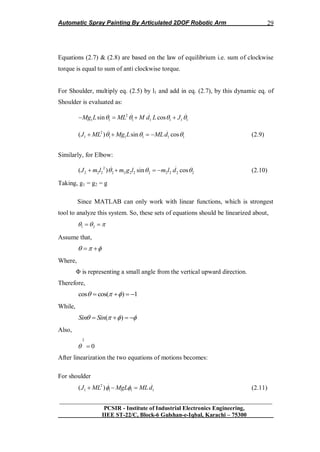
Equations (2.7) & (2.8) are based on the law of equilibrium i.e. sum of clockwise
torque is equal to sum of anti clockwise torque.
For Shoulder, multiply eq. (2.5) by l1 and add in eq. (2.7), by this dynamic eq. of
Shoulder is evaluated as:
.. .. ..
2
1 1 1 1 1 1 1sin cosMg L ML M d L J      
.. ..
2
1 1 1 1 1 1( ) sin cosJ ML Mg L MLd      (2.9)
Similarly, for Elbow:
.. ..
2
2 2 2 2 2 2 2 2 2 2 2 2( ) sin cosJ m l m g l m l d      (2.10)
Taking, g1 = g2 = g
Since MATLAB can only work with linear functions, which is strongest
tool to analyze this system. So, these sets of equations should be linearized about,
1 2   
Assume that,
   
Where,
Φ is representing a small angle from the vertical upward direction.
Therefore,
cos cos( ) 1     
While,
( )Sin Sin      
Also,
2.
0 
After linearization the two equations of motions becomes:
For shoulder
.. ..
2
1 1 1 1( )J ML MgL MLd    (2.11)
Automatic Spray Painting By Articulated 2DOF Robotic Arm
__________________________________________________________________
PCSIR - Institute of Industrial Electronics Engineering,
IIEE ST-22/C, Block-6 Gulshan-e-Iqbal, Karachi – 75300
30
For Elbow
.. ..
2
2 2 2 2 2 2 2 2 2 2( )J m l m gl m l d    (2.12)
The direct kinematics of the system is given as:
For shoulder
2 2 2
1 1 1 1( )J ML D MgL ML D d   
Therefore time domain analysis of shoulder:
2 2
1 1
2
1
( ) ( )
( )
d t J ML D MgL
t MLD

 (2.13)
For Elbow
2 2
2 2 2 2 2 2
2
2 2 2
( ) ( )
( )
d t J m l D m gl
t m l D

 (2.14)
The above sets of equations for Elbow and shoulder represent the direct kinematics
of plant.
For inverse kinematics i.e. analyzing angular displacements of plants for given
space coordinate [27].
2.2.1 Actuation Mechanism
The actuation mechanism consists of belt & gear, driven by the DC motor
by which plant works (i.e. shoulder & elbow move).
So overall transfer function depends upon actuation mechanism will depend on
transfer function of DC motor, belt & external gear.
Automatic Spray Painting By Articulated 2DOF Robotic Arm
__________________________________________________________________
PCSIR - Institute of Industrial Electronics Engineering,
IIEE ST-22/C, Block-6 Gulshan-e-Iqbal, Karachi – 75300
31
2.2.1.1 Belt & Gear
Load inertial to the motor consists of gear (of radius „r‟) & masses of
shoulder (i.e. m1) & elbow (i.e. m2).
Therefore, Load Torque is given as;
For elbow joint system
1
2
1 1.LT Mr D
Or,
1
2 2
1 1. ( )LT Mr D t
For elbow joint system
2
2 2
2 2 2. ( )LT m r D t
2.2.1.2 Motor
Dynamics of motor will also affect the transfer function of the actuation
mechanism.
Experimentally, the transfer function of armature control servo dc motor is given
as, [27]
.
( )
( ) 1
m
m
Kt
E t D




(2.15)
Or,
( )
( ) ( 1)
m
m
Kt
E t D D




(2.16)
Where,
Km = Steady state gain in rad/s/v
τm = Time constant for motor in sec
Therefore, overall actuation mechanism is given as for shoulder & elbow,
Automatic Spray Painting By Articulated 2DOF Robotic Arm
__________________________________________________________________
PCSIR - Institute of Industrial Electronics Engineering,
IIEE ST-22/C, Block-6 Gulshan-e-Iqbal, Karachi – 75300
32
For elbow joint system
2 2
1 1
1
( )
( ) ( 1)
m
m
K Mr Dt
E t D D




2
11
1
( )
( ) ( 1)
m
m
K Mr Dt
E t D




(2.17)
For elbow joint system
Similarly,
2
2 2 2
2
( )
( ) ( 1)
m
m
K m r Dt
E t D




(2.18)
Differential equation of overall system
For shoulder joint system
 
 
2 2 2
1 1 1 1
1
2
1 1
( )
( ) 1
m
m
J Ml D Mgl K Mr Dd t
E t Ml D D
   

 
 
2 2 2
1 1 1 1
1
1 1
( )
( ) 1
m
m
K Mr J Ml D Mgld t
E t Ml D D
    
 
 
 
2 22
1 1 111
2
1 1
( )
( ) 1
m
m
J Ml D MglK rt
E t l D D


  
 
  
(2.19)
For elbow joint system
 
 
2 22
2 2 2 2 222
2
2 2
( )
( ) 1
m
m
J m l D m glK rt
E t l D D


  
 
  
(2.20)
By inserting transfer function values from specification table; differential equations
are given as, [27]
Automatic Spray Painting By Articulated 2DOF Robotic Arm
__________________________________________________________________
PCSIR - Institute of Industrial Electronics Engineering,
IIEE ST-22/C, Block-6 Gulshan-e-Iqbal, Karachi – 75300
33
For shoulder joint system
 
2
1
1
( ) 21.4
0.2
( ) 5.52
t D
E t D D
  
  
 
(2.21)
For elbow joint system
 
2
2
2
( ) 20.7
0.076
( ) 5.52
t D
E t D D
  
  
 
(2.22)
Transfer function for Shoulder joint system,
2
1
2
1
( ) 0.2 4.28
( ) 5.52
s s
E s s s
 


(2.23)
Transfer function of Elbow joint system,
2
2
2
2
( ) 0.076 1.55
( ) 5.52
s s
E s s s
 


(2.24)
2.3 Stability of Open Loop System
In the light of mathematical model and transfer function in s-domain in
section 2.2. The next step towards designing of system is the analysis of its
stability. There are two ways of analysis. First by mathematical way and second
one is by computer simulation which is actually confirmation of mathematical way
of analysis.[2]
It is clear from the above roots of the system that system is marginary
stable in open loop that one of its pole lie at origin while others are at the left side.
Let the stability of system be analyzed by evaluating d(t) by applying
impulse at input i.e.
e(t) = σ(t)
Where, σ (t) = impulse input
From equation (2.23),
c(t) = 0 .775 – 0.575e-5.52t
(2.25)
Fort , c(∞) = 0.775
Above result clearly shows that system is not unstable in open loop and is
marginary stable for the roots mention above.
Automatic Spray Painting By Articulated 2DOF Robotic Arm
__________________________________________________________________
PCSIR - Institute of Industrial Electronics Engineering,
IIEE ST-22/C, Block-6 Gulshan-e-Iqbal, Karachi – 75300
34
It is clear from the above roots of the system that system is marginary
stable in open loop that one of its pole lie at origin while others are at the left
side.[2]
Let the stability of system be analyzed by evaluating d(t) by applying impulse at
input i.e.
e(t) = σ(t)
Where, σ (t) = impulse input
From equation (2.24),
c(t) = 0 .280 – 0.21e-5.52t
(2.26)
Fort , c(∞) = 0.280
Above result clearly shows that system is not unstable in open loop and is
marginary stable for the roots mention above.
Results from computer simulation clearly confirm the mathematics for
stability analysis for open loop system. Pole-Zero maps in figure 2.2 of the
Shoulder joint system clearly proves that system is marginary stable.
From equation (2.23) in section 2.2 roots for Shoulder joint system is given as,
z1= j4.63, z2= -j4.63, p1= 0, p2= 5.52
Pole-Zero Map
Real Axis
ImaginaryAxis
-6 -5 -4 -3 -2 -1 0 1
-6
-4
-2
0
2
4
6
p=5.52
p=0
z=j4.63
z=-j4.63
Figure 2.2 Pole-Zero Map of Shoulder Joint
Automatic Spray Painting By Articulated 2DOF Robotic Arm
__________________________________________________________________
PCSIR - Institute of Industrial Electronics Engineering,
IIEE ST-22/C, Block-6 Gulshan-e-Iqbal, Karachi – 75300
35
In open loop due to the fact in pole-zero maps one of the pole lie at origin
and other at left side confirms the marginal stability of shoulder joint system.
Figure 2.3 Impulse Response for Shoulder Joint
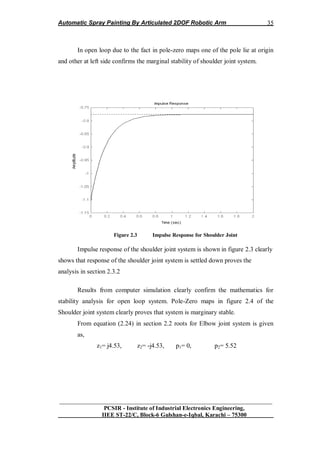
Impulse response of the shoulder joint system is shown in figure 2.3 clearly
shows that response of the shoulder joint system is settled down proves the
analysis in section 2.3.2
Results from computer simulation clearly confirm the mathematics for
stability analysis for open loop system. Pole-Zero maps in figure 2.4 of the
Shoulder joint system clearly proves that system is marginary stable.
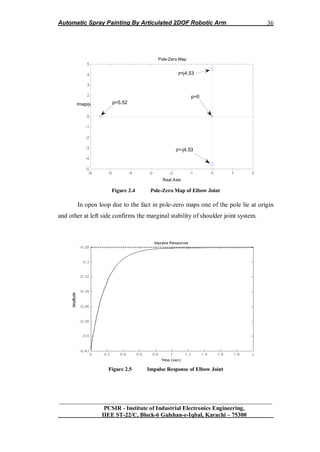
From equation (2.24) in section 2.2 roots for Elbow joint system is given
as,
z1= j4.53, z2= -j4.53, p1= 0, p2= 5.52
Automatic Spray Painting By Articulated 2DOF Robotic Arm
__________________________________________________________________
PCSIR - Institute of Industrial Electronics Engineering,
IIEE ST-22/C, Block-6 Gulshan-e-Iqbal, Karachi – 75300
36
Figure 2.4 Pole-Zero Map of Elbow Joint
In open loop due to the fact in pole-zero maps one of the pole lie at origin
and other at left side confirms the marginal stability of shoulder joint system.
Figure 2.5 Impulse Response of Elbow Joint
Pole-Zero Map
Real Axis
Imaginary Axis
-6 -5 -4 -3 -2 -1 0 1 2
-5
-4
-3
-2
-1
0
1
2
3
4
5
z=-j4.53
z=j4.53
p=5.52
p=0
Automatic Spray Painting By Articulated 2DOF Robotic Arm
__________________________________________________________________
PCSIR - Institute of Industrial Electronics Engineering,
IIEE ST-22/C, Block-6 Gulshan-e-Iqbal, Karachi – 75300
37
Impulse response of the shoulder joint system is shown in figure clearly
shows that response of the shoulder joint system is settled down proves the
analysis in section 2.3.2
2.4 Kinematics of Robotic Arm
Robotic arms are common place in today's world. They are used to weld
automobile bodies, employed to locate merchandise in computerized warehouses,
and used by the Space Shuttle to retrieve satellites from orbit. They are reliable and
accurate. This reliability and accuracy is due to the computer a robot arm uses in
determining where and how it should move. This control computer is programmed
with some basic mathematics. In this paper, we will look at the mathematics
behind robot arms [21].
We will study the two-link robot arm shown in Figure 2.6
Figure 2.6 Two-Link Robotic Arm
Let, θ1 =A and θ2 =B
Most robot arms are more complicated than this, using three links and a
moveable "hand," but with these complications come much more difficult
mathematics. Operation of the two-link arm is simple. The first link (length L1)
Automatic Spray Painting By Articulated 2DOF Robotic Arm
__________________________________________________________________
PCSIR - Institute of Industrial Electronics Engineering,
IIEE ST-22/C, Block-6 Gulshan-e-Iqbal, Karachi – 75300
38
pivots around the origin of an XY Cartesian coordinate system while the second
link (length L2) pivots about the connection between the two links. The two pivot
points are drawn as circles. The angle the first link makes with the horizontal (X)
axis is designated A, while the angle the second link makes with the first link is
designated B. The end of the second link is the position of the robot arm, (X, Y).
Arm position (X, Y)? This is simple trigonometry. The second problem is
"inverse kinematics." Here, we want to ask: given the position (X, Y), what angles,
A and B, yield this position? This is a more difficult problem. Lastly, we need to
look at the problem of "trajectory planning." In trajectory planning, we ask: given
our current position (X, Y) and some desired new position, how do we change the
angles A and B to arrive at this new position? We examine each of these problems
separately, using the two-link robot arm [21].
2.4.1 Forward Kinematics
The kinematics problem requires computation of the robot arm Cartesian
position (X, Y), knowing the two link angles, A and B. Referring to Figure 2.6
We can see the position of the end of the first link (X1, Y1) is given by
X1 = L1 cos (A)
Y1 = L1 sin (A)
Then, the end of the second link (X, Y) is simply
X = X1 + L2 cos (A + B)
Y = Y1 + L2 sin (A + B)
Combining these two sets of equations provides the solution to the
kinematics problem:
X = L1 cos (A) + L2 cos (A + B) (2.27)
Automatic Spray Painting By Articulated 2DOF Robotic Arm
__________________________________________________________________
PCSIR - Institute of Industrial Electronics Engineering,
IIEE ST-22/C, Block-6 Gulshan-e-Iqbal, Karachi – 75300
39
Y = L1 sin (A) + L2 sin (A + B) (2.28)
An interesting question at this point is: if we cycle A and B through all possible
combinations (-180 degrees < A < 180 degrees, -180 degrees < B < 180 degrees),
what would the region of coverage look like? If L1 and L2 are equal, the region
would be a circle (radius L1 + L2). If L1 and L2 are not equal, the region would be
armular (like a donut). This coverage region becomes important in the inverse
kinematics problem, where we need to know if it's possible to reach a given point
by adjusting the link angles.
2.4.2 Inverse Kinematics
The kinematics problem is seen to be fairly easy to solve. The inverse
problem, that of finding A and B, knowing (X, Y) is not nearly as simple. Let's see
why. [21]
Figure 2.7 Inverse Kinematics
Using the kinematics equations, if we know X and Y, we need to solve the
following for A and B:
Automatic Spray Painting By Articulated 2DOF Robotic Arm
__________________________________________________________________
PCSIR - Institute of Industrial Electronics Engineering,
IIEE ST-22/C, Block-6 Gulshan-e-Iqbal, Karachi – 75300
40
L1 cos A) + L2 cos (A + B) = X (2.29)
L1 sin (A) + L2 sin (A + B) = Y (2.30)
This is a nonlinear problem. There are two possible solution approaches:
algebraic and geometric. The algebraic approach (solving the equations directly) is
tedious and involved. For the two-link robot arm, the geometric approach is more
straightforward. We will outline the steps of the algebraic approach to illustrate
some salient points of the inverse kinematics problem. Also, by outlining these
steps, we allow the more industrious reader to see if he/she can solve the problem
algebraically. After this outline, we will develop the solution to the problem with a
geometric approach.
2.4.3 Algebraic Solution
In the algebraic solution, we first square both of the above equations and
add them together. Then, we apply these trigonometric identities: [21]
Cos (A + B) = cos (A) cos (B) – sin (A) sin (B)
Sin (A + B) = cos (A) sin (B) + sin (A) cos (B)
sin2
(C) + cos2
(C) = 1
Where C is any angle
Following these steps, we are able to obtain a relation for cos (B) simply in
terms of X, Y, L1, and L2. That relation is (see if you can find it)
Cos (B) = (X2
+ Y2
– L1
2
- L2
2
)/2L1L2 (2.31)
With this, we can find B by applying the inverse cosine, or can we? What if
cos (B) is greater than one or less than minus one? In these cases, there is no
solution! When this happens, the desired point (X, Y) is not within the coverage
region of the robot arm (as discussed in the previous section). If (X, Y) is in the
Automatic Spray Painting By Articulated 2DOF Robotic Arm
__________________________________________________________________
PCSIR - Institute of Industrial Electronics Engineering,
IIEE ST-22/C, Block-6 Gulshan-e-Iqbal, Karachi – 75300
41
coverage region, can we find a unique B? No, just knowing the cosine is not
sufficient. If B is a solution to the above equation, so is -B since
Cos (B) = cos (-B)
Hence, the inverse kinematics problem always has two solutions. This is
shown in Figure 2.7. In "robotics talk," one solution is referred to as "elbow-out"
and one is "elbow-in." To specify which solution we want, we must also find the
sine of B.
Knowing the cosine of B, the sine is given by
Sin (B) = + [1 - cos2
(B)] ½
(2.32)
The angle B is then completely specified by selecting either a plus or minus
sign in this expression. The robot designer must decide which sign to choose based
on problem geometry and current arm configuration. This choice is discussed in
detail in the "Trajectory Planning" section. Figure 2.8 shows the Cartesian
quadrant in which an angle belongs, based on the sign of the two trigonometric
functions.
Figure 2.8 Quadrant System
Automatic Spray Painting By Articulated 2DOF Robotic Arm
__________________________________________________________________
PCSIR - Institute of Industrial Electronics Engineering,
IIEE ST-22/C, Block-6 Gulshan-e-Iqbal, Karachi – 75300
42
At this point in the algebraic solution process, we have the angle B. How
do we find A? Knowing B, and hence sin (B) and cos (B), we substitute this (along
with X and Y) back into the kinematics equations. Using the relations for the sine
and cosine of the sum of two angles, the resulting equations will be (again, see if
you can get these)
[L1 + L2 cos (B)] cos (A) – L2 sin (B) sin (A) = X (2.33)
L2 sin (B) cos (A) + [L1 + L2 cos (B)] sin (A) = Y (2.34)
Here, we have two linear equations with two unknowns: sin (A) and cos (A).
Solving these equations (use Cramer's rule) and applying the angle
convention in Figure 2.8 will yield a unique value for A. At this point, we have
solved the inverse kinematics problem with an algebraic approach.
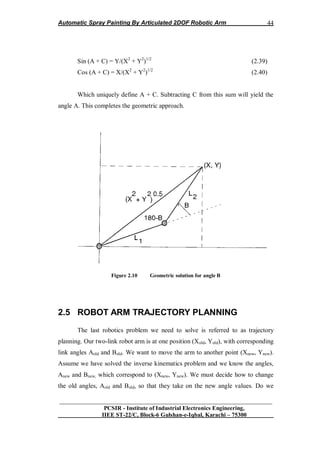
2.4.4 Geometric Solution
The geometric solution is more direct. We can develop expressions for the
angles A and B by simply looking at the geometry of the problem. First, we'll find
B. Figure 4 sketches the configuration necessary for this evaluation. If we look at
the triangle formed by the two links and the line [of length (X2
+ Y2
)1/2
] connecting
the origin to the point (X, Y), we can use the law of cosines to write [21]
X2
+ Y2
= L1
2
+ L2
2
- 2L1 L2 cos (180º - B) (2.35)
But, cos (180º - B) = -cos (B). Substituting this into the equation and
solving for cos (B) yields
Cos (B) = (X2
+ Y2
- L1
2
- L2
2
)/2L1L2 (2.36)
Automatic Spray Painting By Articulated 2DOF Robotic Arm
__________________________________________________________________
PCSIR - Institute of Industrial Electronics Engineering,
IIEE ST-22/C, Block-6 Gulshan-e-Iqbal, Karachi – 75300
43
This is exactly the result obtained using the algebraic approach. The
geometric approach is seen to be much simpler. Recall, though, that this does
define a unique angle B. This definition is made by establishing a value for sin (B),
as outlined in the algebraic approach.
The other angle, A, is found with a two step procedure. If we define the
angle between link 1 and the line [length (X2
+ Y2
)1/2
] from (0, 0) to (X, Y) as C
(see Figure 2.9).
Figure 2.9 Geometric solutions for angle A
We can write
Sin (C) = L2 sin (B)/(X2
+ Y2
)1/2
(2.37)
Cos (C) = [L1 + L2 cos (B)]/(X2
+ Y2
)1/2
(2.38)
These expressions define a unique C. Now, using the right triangle (Figure
2.9) defined by the three coordinates (0, 0), (X, 0), and (X, Y), we have
Automatic Spray Painting By Articulated 2DOF Robotic Arm
__________________________________________________________________
PCSIR - Institute of Industrial Electronics Engineering,
IIEE ST-22/C, Block-6 Gulshan-e-Iqbal, Karachi – 75300
44
Sin (A + C) = Y/(X2
+ Y2
)1/2
(2.39)
Cos (A + C) = X/(X2
+ Y2
)1/2
(2.40)
Which uniquely define A + C. Subtracting C from this sum will yield the
angle A. This completes the geometric approach.
Figure 2.10 Geometric solution for angle B
2.5 ROBOT ARM TRAJECTORY PLANNING
The last robotics problem we need to solve is referred to as trajectory
planning. Our two-link robot arm is at one position (Xold, Yold), with corresponding
link angles Aold and Bold. We want to move the arm to another point (Xnew, Ynew).
Assume we have solved the inverse kinematics problem and we know the angles,
Anew and Bnew, which correspond to (Xnew, Ynew). We must decide how to change
the old angles, Aold and Bold, so that they take on the new angle values. Do we
Automatic Spray Painting By Articulated 2DOF Robotic Arm
__________________________________________________________________
PCSIR - Institute of Industrial Electronics Engineering,
IIEE ST-22/C, Block-6 Gulshan-e-Iqbal, Karachi – 75300
45
change A first, B first, or both simultaneously? In which direction do we change
them? Clockwise? Counterclockwise? This is not a difficult problem if there are no
obstacles in the path of the robot arm, i.e. we have complete freedom of
movement. In that case, we usually move A and B in the direction of smaller
change. That way, we minimize the energy required to move the arm and the time
required to change configuration. [21]
As an example, look at Figure 2.11(a).
Figure 2.11(a): Graph-I
Here, L1 = L2 = 3, Aold = -45 degrees, and Bold = 90 degrees, which
corresponds to a Cartesian location of (Xold, Yold) = (4.24, 0). Check the math using
the kinematics equations. Say we want to move to (Xnew, Ynew) = (-4, 4). To reach
this point, the inverse kinematics equations yield Anew = 115 degrees, Bnew = 39
degrees (see if you can get the same values - I have rounded to the nearest degree).
We'll assume we can only change the angles one at a time. So, to go from (4.24, 0)
to (-4, 4) with minimum angle change, we swing A from -45 to 115 degrees
(counterclockwise) and then B from 90 degrees to 39 degrees (clockwise), as
shown in Figure 2 11(a). What if there was a solid wall in the quadrant where X >
0 and Y > O? In that case, the trajectory in Figure 2.6(a) would not be possible?
Automatic Spray Painting By Articulated 2DOF Robotic Arm
__________________________________________________________________
PCSIR - Institute of Industrial Electronics Engineering,
IIEE ST-22/C, Block-6 Gulshan-e-Iqbal, Karachi – 75300
46
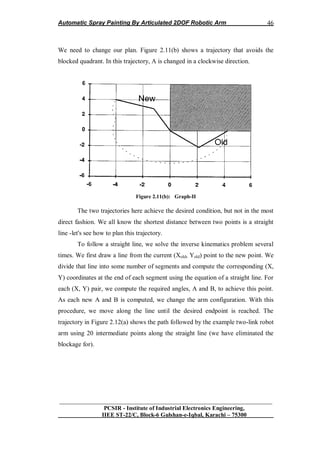
We need to change our plan. Figure 2.11(b) shows a trajectory that avoids the
blocked quadrant. In this trajectory, A is changed in a clockwise direction.
Figure 2.11(b): Graph-II
The two trajectories here achieve the desired condition, but not in the most
direct fashion. We all know the shortest distance between two points is a straight
line -let's see how to plan this trajectory.
To follow a straight line, we solve the inverse kinematics problem several
times. We first draw a line from the current (Xold, Yold) point to the new point. We
divide that line into some number of segments and compute the corresponding (X,
Y) coordinates at the end of each segment using the equation of a straight line. For
each (X, Y) pair, we compute the required angles, A and B, to achieve this point.
As each new A and B is computed, we change the arm configuration. With this
procedure, we move along the line until the desired endpoint is reached. The
trajectory in Figure 2.12(a) shows the path followed by the example two-link robot
arm using 20 intermediate points along the straight line (we have eliminated the
blockage for).
Automatic Spray Painting By Articulated 2DOF Robotic Arm
__________________________________________________________________
PCSIR - Institute of Industrial Electronics Engineering,
IIEE ST-22/C, Block-6 Gulshan-e-Iqbal, Karachi – 75300
47
Figure 2.12(a): Path Followed By Two-Link Robot
The path is not a straight line due to the nonlinearities of the robot arm and
the motions as the angles are changed sequentially. If we changed the angles
simultaneously, the path followed would be much smoother. We can extend this
procedure to follow any desired trajectory. This allows us to get around any
obstacles that might be in the way of the arm. Simply draw the desired path and
compute Cartesian points along the path, along with the corresponding joint angles.
Then, cycle through each pair of A and B values until the endpoint is reached.
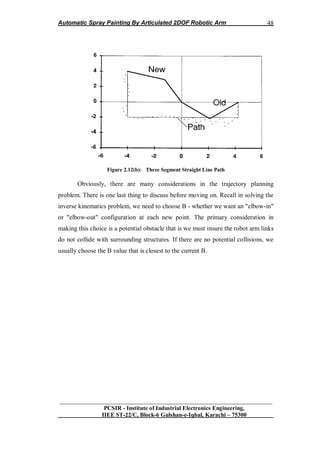
Figure 2.12(b) shows the arm following a three-segment straight line path from
(4.24, 0) to (-4, 4). Again, this path would be smoother if the angles changed
simultaneously. [21]
Automatic Spray Painting By Articulated 2DOF Robotic Arm
__________________________________________________________________
PCSIR - Institute of Industrial Electronics Engineering,
IIEE ST-22/C, Block-6 Gulshan-e-Iqbal, Karachi – 75300
48
Figure 2.12(b): Three Segment Straight Line Path
Obviously, there are many considerations in the trajectory planning
problem. There is one last thing to discuss before moving on. Recall in solving the
inverse kinematics problem, we need to choose B - whether we want an "elbow-in"
or "elbow-out" configuration at each new point. The primary consideration in
making this choice is a potential obstacle that is we must insure the robot arm links
do not collide with surrounding structures. If there are no potential collisions, we
usually choose the B value that is closest to the current B.
Automatic Spray Painting By Articulated 2DOF Robotic Arm
__________________________________________________________________
PCSIR - Institute of Industrial Electronics Engineering,
IIEE ST-22/C, Block-6 Gulshan-e-Iqbal, Karachi – 75300
49
2.6 Summary
The robot arm problem is a very interesting mathematical exercise. It
represents nonlinear equations which may or may not have a solution. And, if a
solution exists, there are multiple (two, in this case) solutions. And then, once the
problem has been solved, many decisions must be made about how to implement
the solution.
An obvious use for the equations as presented is to program them on a
computer using a language such as Visual Basic or Java. Use graphics and allow
the user to manipulate the angles A and B to watch the robot arm move. Allow for
variable length links to investigate the potential coverage regions. Implement the
inverse kinematics solution to allow for trajectory planning. Make sure you can
detect solution existence. Determine methods of trajectory planning. Allow the
angles to change one at a time or simultaneously. Can your robotic arm follow a
straight line? Can you program it to follow any prescribed path? With such an
implementation comes a question of resolution. In the discrete world of a
computer, there are no two angles that will exactly correspond to some point (X,
Y). However, there are angles that correspond "closely" to (X, Y). The robot
designer has to decide what is close. If we can establish angles to within only 5
degrees, we have to allow for that sloppiness in our design. If we need more
precision, we need to make it possible to have finer angle adjustments.
CHAPTER 3
Automatic Spray Painting By Articulated 2DOF Robotic Arm
__________________________________________________________________
PCSIR - Institute of Industrial Electronics Engineering,
IIEE ST-22/C, Block-6 Gulshan-e-Iqbal, Karachi – 75300
50
3.1 INTRODUCTION
This chapter contain practical design implementation of digital controller
for each joint and concept of difference equation. Transient response is also
discussed in detail by using MATLAB. Hardware design is also presented in this
chapter contain specification table and three dimensional views of different part of
designed manipulator. Software section is also discussed contain algorithms and
Flowcharts for each joint controller and also for master controller.
Robotic Arm System is represented by blocks in figure 3.1 consists of four
parts named Sensory System, controller and Electronics, Actuation System and
Manipulator Joints as plant.
Figure 1.1 Manipulation Systems
3.2 Sensory System of Robotic Arm
Sensors are the sensory system of a robot much like the five senses that
humans have: touch, sight, sound, smell and taste and measure environmental data
like touch, distance, light, sound, strain, rotation, magnetism, smell, temperature,
inclination, pressure, or altitude. Sensors provide the raw data that must be
processed to provide information to allow the robot to appropriately respond to its
environment. Robots are equipped with sensors so they can have an understanding
of their surrounding environment and make changes in their behavior based on the
information they have gathered. [24]
Sensors allow robots to detect objects and variations in the environment. A
robot will invariably be equipped with a number of sensors which may include: an
acoustic sensor to detect sound, motion or location, infrared sensors to detect heat
Sensory
System
Controller
&
Electronics
Electro-
Mechanical
Actuator
Plant
Manipulator
Joints
Automatic Spray Painting By Articulated 2DOF Robotic Arm
__________________________________________________________________
PCSIR - Institute of Industrial Electronics Engineering,
IIEE ST-22/C, Block-6 Gulshan-e-Iqbal, Karachi – 75300
51
sources, contact sensors, tactile sensors to give a sense of touch, or optical/vision
sensors. A robot can also monitor itself with sensors.
3.2.1 Common Sensors for Manipulators
3.2.1.1 Touch Sensors
Touch sensors are basically variable switching devices that work through
pressure.
3.2.1.2 Global Positioning Systems
Global Positioning Systems (GPS) receive signals from orbiting satellites
that pinpoint the location of an outdoor robot on the Earth. [24]
3.2.1.3 Light Sensor
It measures the level of light as a number between 0% (total darkness) and
100% (very bright). Can differentiate light levels reflected from bright and dark
surfaces. Inside the light sensor is a photo-transistor. The photo-transistor acts like
a valve for electricity. The more light energy it senses, the more electricity
flows.[24]
3.2.1.4 Rotation Sensor
It measures the rotation of an axle or shaft. The rotation sensor sends out a
series of voltage pulses. There will be a number of pulses per rotation. In the lego
robotics kits there are 16 of these pulses per one revolution. These pulses are also
referred to as “ticks”, “clicks”, or “counts”.
Automatic Spray Painting By Articulated 2DOF Robotic Arm
__________________________________________________________________
PCSIR - Institute of Industrial Electronics Engineering,
IIEE ST-22/C, Block-6 Gulshan-e-Iqbal, Karachi – 75300
52
3.2.2 Sensor Selected for the Task
Rotation sensors (also called encoders) measure the rotation of a shaft or
axle. They are used to measure the angle of a robotic arm, or how far a mobile
robot‟s wheel has turned. [24]
3.2.1.1 Rotation Sensor
It measures the rotation of an axle or shaft. The rotation sensor sends out a
series of voltage pulses. There will be a number of pulses per rotation. In the lego
robotics kits there are 16 of these pulses per one revolution. These pulses are also
referred to as “ticks”, “clicks”, or “counts”.
Figure 2.2 Series of Voltage pulses
3.2.1.2 Pull to Position
In the case of autonomous mobile robots operating in unstructured
environments the position, geometry and orientation of objects of interest are not
Automatic Spray Painting By Articulated 2DOF Robotic Arm
__________________________________________________________________
PCSIR - Institute of Industrial Electronics Engineering,
IIEE ST-22/C, Block-6 Gulshan-e-Iqbal, Karachi – 75300
53
known. We aim to use sensor inputs from targets directly to control the motion of
the robot and thereby use the world and its objects as its own best model. The robot
arm structure, dimensions and joint angles, however, are well known and so can be
used for control.
The approach used here is to develop a simple structured linked model of
the articulated limb. The model records link lengths, joint angles and joint
stiffness. The model is manipulated to 'pull' the end of the limb towards the desired
destination position and orientation. The direction of this pulls being derived from
robot sensors. Then the actual motion is realized by driving the joints and linkages
through the trajectories followed by the model. By incorporating continuous
sensory feed-back of joint angles and deriving updated target vectors from target
sensors very simple limb models are sufficient for the control task. Simply 'pulling'
the limb end point [24] towards the destination entails a simple vector mapping
(figure 3.1). Employing servo control of motion direction rather than position
means that the limb will achieve the target point even with simplified modeling.
There is no med to accurately model linkage weights and friction. This control
approach could be considered to be a primitive version of the perception driven
control which living creatures can employ.
3.3 CONTROLLER AND ELECTRONICS
3.3.1 ON-OFF Controller
The controller is responsible to establish the link between computer
and the robot. The reason for that is that the computer outputs only a few mA, not
enough to start most motors. Therefore, a supply of power is usually appended to
the controller (a 9volts, 1A in the case of Lego motors which are simple DC
motors).
Automatic Spray Painting By Articulated 2DOF Robotic Arm
__________________________________________________________________
PCSIR - Institute of Industrial Electronics Engineering,
IIEE ST-22/C, Block-6 Gulshan-e-Iqbal, Karachi – 75300
54
Digital controllers are of “ON-OFF type” for shoulder, elbow and valve dynamics
which are Plants of the system. Feedback sensor is position sensor and is part of
Servo motor by combining called Servomechanism. TL is the Load Torque on
joints due to Actuation Mechanism involving gear & belt system. D/A converter is
to convert discrete signal in to Continuous time signal and A/D converter is to
convert Continuous time signal in to discrete signal.
The switching sequence in ON-OFF controller is programmed by computer
and interfaces it with plant through microcontroller. When ever interrupt or
switching occur for any joint moment module for that joint moment recalls in
microcontroller according to sequence discussed in algorithm for master controller
in section 3.9.2.
3.3.2 PIC Microcontroller
Microcontroller used in for controlling purpose is PIC microcontroller due many
advantages over 8051 microcontroller. It is forty pins microcontroller having 8bits
port B (RB.0 to RB.7) and 8bits port C (RC.0 to RC.7) and 6bits port A. Output
from the sensor for each joint directly interfaced with port A.0 as no ADC is
needed for this purpose. This is one of the great feature of PIC microcontroller to
accept analog input if its level in the range of 0V to 5V. Reference input from
computer is connected with microcontroller through DB-9 at port RA.1. 8bits
output is connected with DAC to convert 8bits digital output signal into analog
signal of specific level.
Automatic Spray Painting By Articulated 2DOF Robotic Arm
__________________________________________________________________
PCSIR - Institute of Industrial Electronics Engineering,
IIEE ST-22/C, Block-6 Gulshan-e-Iqbal, Karachi – 75300
55
Figure 3.3 PIC19F877
The width of the pulse determines the position of the server. Most servos
will move to the center of their travel when they receive a 1.5msec pulse. One
extreme of motion generally equates to a pulse width of 1.0msec; the other extreme
to 2.0msec with a smooth variation throughout the range, and neutral at 1.5msec.
The period between the pulses is used to synchronize the receiver. Servos are
closed loop devices. They are constantly comparing their position (proportional to
the pulse width) to their actual position (proportional to the signal voltage input.) If
there is a difference between the two the servo electronics will turn the motor to
adjust the difference error. This also means that servos will resist forces which try
to change their position. When a servo is not receiving positioning pulses (i-e not
being provided with power) the output shaft can be easily turned by hand.
3.3.2 DAC0808 8-Bit D/A Converter
The DAC0808 is an 8-bit monolithic digital-to-analog converter (DAC)
featuring a full scale output current settling time of 150 ns while dissipating only
33 mW with ±5V supplies. No reference current (IREF) trimming is required for
most applications since the full scale output current is typically ±1 LSB of 255
IREF/256. Relative accuracies of better than ±0.19% assure 8-bit monotonic and
linearity while zero level output current of less than 4 µA provides 8-bit zero
Automatic Spray Painting By Articulated 2DOF Robotic Arm
__________________________________________________________________
PCSIR - Institute of Industrial Electronics Engineering,
IIEE ST-22/C, Block-6 Gulshan-e-Iqbal, Karachi – 75300
56
accuracy for IREF³2 mA. The power supply currents of the DAC0808 are
independent of bit codes, and exhibits essentially constant device characteristics
over the entire supply voltage range. The DAC0808 will interface directly with
popular TTL, DTL or CMOS logic levels, and is a direct replacement for the
MC1508/MC1408. For higher speed applications, see figure 3.3.
Figure 3.4 Circuit of DAC
3.4 Actuation System for the Task
3.4.1 Servo motors
Servos are DC motors with built in gearing and feedback control loop
circuitry. And no motor drivers required
Servo motors depend upon "closed-loop" circuitry to supply information
back to the computer so that positioning errors can be continuously corrected. This
feedback is provided by encoders, which in some respects, are like the bicycle
wheels that some road builders and others use to measure distances.
A new type of servo motor called an "intelligent servo motor" has recently
appeared on the scene. It is useful for some applications, and we use it in our
automatic torch height controls. In fact, we probably purchase more of them than
any of our competitors. The motor has some programmable computer circuitry
Automatic Spray Painting By Articulated 2DOF Robotic Arm
__________________________________________________________________
PCSIR - Institute of Industrial Electronics Engineering,
IIEE ST-22/C, Block-6 Gulshan-e-Iqbal, Karachi – 75300
57
incorporated into it, which lets it independently follow simple instructions. It
works well with our torch height controls, due to their low torque demand. We
believe intelligent motors are impractical for driving a cnc machine, for reasons
given below.
The following paragraphs explain each of these types of motors in more
detail.
Figure 3.5 Torque-Speed Curves of Servo Motor
Servo motors are somewhat more expensive than steppers -- perhaps
double the price, or more. They are generally just as accurate, if maintained in a
proper state of tune, however they rely on encoders to provide positioning
information back to the computer. Thus the complexity of the system is at least
doubled, with no accuracy advantage, greater initial cost, and more maintenance
issues. The "closed loop" rhetoric that some manufacturers play up sounds
convincing to the uninitiated, but provides no benefit over a simpler and more
reliable stepper system. [25]
Servo motors are available in larger sizes than stepper motors, and
powerful servos are generally used on heavy machines with gantry carriages in the
Automatic Spray Painting By Articulated 2DOF Robotic Arm
__________________________________________________________________
PCSIR - Institute of Industrial Electronics Engineering,
IIEE ST-22/C, Block-6 Gulshan-e-Iqbal, Karachi – 75300
58
500 to 1,000 lb range. They offer no advantage whatsoever on lighter machines,
such as Torch mate and its competitors.
Small intelligent motors with 50 oz. in. peak torque and 28 oz. in.
continuous torque are used on one new competitor's cnc machine, although this is
disguised by the citing of output torque at the gearbox. Although these small
motors are expensive, larger intelligent motors would be far more costly. The only
way these relatively low power motors can drive a gantry on a cnc machine is to
run them at a very high rpm with a large gear reduction. This is kind of like
driving your stick shift car around in low gear. This high rpm greatly increases
motor wear, and introduces planetary gearbox backlash into the equation. When a
gearbox first turns in one direction, and then the other, as in cutting a circle, the
backlash in the gear train must be taken up before the direction changes. Unless
super-expensive low-backlash planetary gear boxes are used, as on the large
$100,000 plus machines, circles don't end up in the same place they started, etc.
[25]
Servos are extremely popular with robot, RC plane, and RC boat builders.
Most servo motors can rotate about 90 to 180 degrees. Some rotate through a full
360 degrees or more. However, servos are unable to continually rotate, meaning
they can't be used for driving wheels (unless modified), but their precision
positioning makes them ideal for robot arms and legs, rack and pinion steering, and
sensor scanners to name a few. Since servos are fully self contained, the velocity
and angle control loops are very easy to implement, while prices remain very
affordable. To use a servo, simply connect the black wire to ground, the red to a
4.8-6V source, and the yellow/white wire to a signal generator (such as from your
microcontroller). Vary the square wave pulse width from 1-2ms and your servo is
now position/velocity controlled
Automatic Spray Painting By Articulated 2DOF Robotic Arm
__________________________________________________________________
PCSIR - Institute of Industrial Electronics Engineering,
IIEE ST-22/C, Block-6 Gulshan-e-Iqbal, Karachi – 75300
59
3.4.2 Servo Voltage (Red and Black/Brown wires)
Servos can operate under a range of voltages. Typical operation is from 4.8V to
6V. There are a few micro sized servos that can operate at less, and now a few
Hitec servos that operate at much more. The reason for this standard range is
because most microcontrollers and RC receivers operate near this voltage. So what
voltage should you operate at? Well, unless you have a battery
voltage/current/power limitation, you should operate at 6V. This is simply because
DC motors have higher torque at higher voltages
3.4.3 Signal Wire (Yellow/Orange/White wire)
While the black and red wires provide power to the motor, the signal wire
is what you use to command the servo. The general concept is to simply send an
ordinary logic square wave to your servo at a specific wave length, and your servo
goes to a particular angle (or velocity if your servo is modified). The wavelength
directly maps to servo angle so how do you apply this square wave to your servo?
If your robot is remote controlled, your RC receiver will apply the proper square
wave for you. If however your robot is running from a microcontroller, you must:
bring high a digital port wait between 1-2ms bring low the same digital port
cycle a few dozen times per second
Note, if you are running multiple servos simultaneously, you can just put a
few of these program blocks in sequential order. You can run as many servos as
you have of digital ports. [25]
So how many milliseconds do you keep the port high? It all depends on the
servo. You may have to tweak for each individual servo some several
microseconds‟ difference.
The standard time vs. angle is represented in this chart:
Automatic Spray Painting By Articulated 2DOF Robotic Arm
__________________________________________________________________
PCSIR - Institute of Industrial Electronics Engineering,
IIEE ST-22/C, Block-6 Gulshan-e-Iqbal, Karachi – 75300
60
Figure 3.6 Timing diagram of servo motor
3.4.4 Servo Current
Servo current operates the same as in a DC motor, except that you now also
have a hard to predict feedback control system to contend with. If your DC motor
is not at the specified angle, it will suddenly draw huge amounts of current to reach
that angle. But there are other peculiarities as well. If you run an experiment with a
servo at a fixed angle and hang precision weights from the servo horn, the
measured current will not be what you expect. One would think that the current
would increase at some fixed rate as the weights increased linearly. Instead you
will get unpredictable curves and multiple rates. In conclusion, servo current draw
is very unpredictable. [25]
3.4.4.1 Stall Torque, Stall Current, Current Drain
Since servos contain DC motors, please read my DC motor tutorial to learn about
servo stall characteristics.
Automatic Spray Painting By Articulated 2DOF Robotic Arm
__________________________________________________________________
PCSIR - Institute of Industrial Electronics Engineering,
IIEE ST-22/C, Block-6 Gulshan-e-Iqbal, Karachi – 75300
61
Figure 3.7 Hitch RC-servo motor
3.4.5 Gear Types
More expensive servos come with metal gears for higher torque and longer
life, followed by carbonite and then nylon gears for the cheapest.
3.4.5.1 Nylon Gears
Nylon gears are most common in servos. They are extremely smooth with
little or no wear factors. They are also very lightweight, but lack in durability and
strength.
3.4.5.2 Karbonite Gears
Karbonite gears are relatively new to the market. They offer almost 5 times
the strength of nylon gears and also better wear resistance. Cycle times of well
over 300,000 have been observed with these gears with virtually no wear. Servos
with these gears are more expensive but what you get in durability is more than
equaled.
3.4.5.3 Metal Gears
Metal gears have been around for sometime now. Although the heaviest
and having the highest wear rate of all gear types, they offer unparalleled strength.
With a metal output shaft, side-loads can be much greater. Ever had a nylon output
shaft crack? I have. In applications that are jarred around, metal gears are best.
Automatic Spray Painting By Articulated 2DOF Robotic Arm
__________________________________________________________________
PCSIR - Institute of Industrial Electronics Engineering,
IIEE ST-22/C, Block-6 Gulshan-e-Iqbal, Karachi – 75300
62
Unfortunately, due to wear, metal gears will eventually develop slight play in the
gear-train. Accuracy will slowly be lost. [25]
3.4.6 Velocity
The servo turn rate, or transit time, is used for determining servo rotational
velocity. This is the amount of time it takes for the servo to move a set amount,
usually 60 degrees. For example, suppose you have a servo with a transit time of
0.17sec/60 degrees at no load. This means it would take nearly half a second to
rotate an entire 180 degrees. More if the servo were under a load. This information
is very important if high servo response speed is a requirement of your robot
application. It is also useful for determining the maximum forward velocity of your
robot if your servo is modified for full rotation. Remember, the worst case turning
time is when the servo is at the minimum rotation angle and is then commanded to
go to maximum rotation angle, all while under load. This can take several seconds
on a very high torque servo.
3.4.7 Efficiency and Noise
Due to noise and control circuitry requirements, servos are less efficient
than DC motors uncontrolled. To begin with, the control circuitry typically drains
5-8mA just on idle. Secondly, noise can more than triple current draw during a
holding position (not moving), and almost double current during rotation. Noise is
often a major source of servo inefficiency and therefore should be avoided. Ever
notice your servo jitter or vibrate? This is because your servo is rapidly jumping
between two different angles due to interference. What causes this interference?
Well the signal wire is no different than long antennae, capable of accepting
unwanted foreign signals and sending them straight to your servo as a command. A
common interference source is usually from other nearby servos and/or servo
wiring. How to prevent this problem? Keep your signal wire short, meaning do not
add say 3+ feet of extension cables to your servo. If you have many servo wires
going through one area, and it isn‟t feasible to keep them apart, then twist them
together. Supposedly this reduces cross interference and I've heard it works,
Automatic Spray Painting By Articulated 2DOF Robotic Arm
__________________________________________________________________
PCSIR - Institute of Industrial Electronics Engineering,
IIEE ST-22/C, Block-6 Gulshan-e-Iqbal, Karachi – 75300
63
although I cannot really tell for sure myself. You can also buy something called a
servo booster extension which buffers and amplifies the signal Digital Servos vs
Analog Servos Digital servos, at the user end, are controlled no differently than
analog servos. The difference is in how the servo motor is controlled via the circuit
board (amplifier). The motor of an analog servo receives a signal from the
amplifier 30 times a second or at 30Hz. This signal allows the amplifier to update
the motor position. Digital servos use a high frequency amplifier that updates the
servo motor position 300 times a second or at 300Hz. By updating the motor
position more often, the digital servo can deliver full torque from the beginning of
movement and increases the holding power of the servo. The quick refresh also
allows the digital servo to have a tighter dead band.
3.4.8 Digital Servos VS Analog Servos
With the exception of a higher cost, there are only advantages for digital
servos over analog servos.
The digital micro processor is 10 times faster than an analog servo. This
results in a much quicker response from the beginning with the servo developing
all the rated torque 1 degree off of the center point. Be aware that this faster
response also results in higher starting currents, so make sure your batteries can
handle it.
Digital servos can be programmed for direction of rotation, center and end
points, failsafe option, speed, and dead bandwidth adjustment. This is great for
matching sets of servos for dead band width, center and end points in giant scale
aircraft applications, and for reversing a digital servo when two are used on a "Y"
harness. If you do not want to deal with the added complication of programming,
no worries! Hitec digital servos will perform like standard servos out of the box. It
is not required to program them before use.
The standing torque of a digital servo is 3 times that of its analog
counterpart. This means digital servos are typically smaller and have more torque.
Automatic Spray Painting By Articulated 2DOF Robotic Arm
__________________________________________________________________
PCSIR - Institute of Industrial Electronics Engineering,
IIEE ST-22/C, Block-6 Gulshan-e-Iqbal, Karachi – 75300
64
3.4.9 Hitec vs Futaba
There are actually four major servo manufacturers - Hitec, Futaba,
Airtronics, and JR Radios. The last two are uncommon today, so I wont talk about
them. Hitec and Futaba servos work the same, but there are several interfacing
differences which you should be aware of.
Figure 3.8 (a) Wire Configuration (b) Wire Configuration
The first is wire color, as Hitec uses a yellow signal wire while Futaba uses
a white one. The wiring order is the same, just different colors.
The second is connector compatibility. Futaba (J type) has a special flange thingy
while Hitec (S type, for universal) does not. Futaba has the extra flange to help the
user plug in the servo correctly, although there are only two ways to do it and
connecting a servo in the wrong way will not actually damage anything. If you
want to connect a Futaba servo to a Hitec device, just clip the flange off and use
sandpaper to file it down until it fits. If you ever need to connect a Hitec connector
to something Futaba, just use sandpaper to decrease the connector width until it
fits. [25]
The third is price. All things kept the same; Hitec servos are cheaper than
Futaba servos. But don't let this be your only determining factor in your decision,
as Futaba has some servo sizes that Hitec does not.
The last major difference is in the spline. The spline is the output shaft of
the servo. This is where you would attach your servo horn or servo arm. Standard
Hitec splines have 24 teeth while standard Futaba splines have 25 teeth. What
makes this important is that servo horns built for one will not work with the other.
Automatic Spray Painting By Articulated 2DOF Robotic Arm
__________________________________________________________________
PCSIR - Institute of Industrial Electronics Engineering,
IIEE ST-22/C, Block-6 Gulshan-e-Iqbal, Karachi – 75300
65
3.5 ARM MANIPULATOR
Plant of the System is the manipulator joints called Shoulder joint and
Elbow joint. Main feature of these joints are Link joints, material selection,
Specification of different joints parameters and sketches of views of different parts
discussed in below.
3.5.1 Hardware Design
This section reports the mechanical design of actuators and links of the
robotic arm. [23]
3.5.2 Planning about Hardware of the System
 To considered the Area of Work space.
 Length and Span of Shoulder & Elbow w.r.t. Work Space
 Maximum Angular Displacement of both joints.
 Other Geometrical Parameters.
 Mass of shoulder & elbow.
 Mathematical modeling & Trajectory Planning.
 Selection of Light, Stiff & Easy to Fabricate Material.
 Selection of Servomotors of proper power & load bearing capability
3.5.3 Link Design
We use finite-element method to optimize the design of two links of robotic
arm. The objective of optimization was to converge on link design that would
cause the robotic arm to exhibit high structural vibration frequencies over entire
workspace of the robotic arm. The continuously varying nature of structure results
in change in the stiffness and mass characteristic relative to a fixed reference,
necessitating a range of resonant frequencies is predicted. Hence we optimized the
design and evaluated structural vibration modes over a large chunk of the
workspace.
Automatic Spray Painting By Articulated 2DOF Robotic Arm
__________________________________________________________________
PCSIR - Institute of Industrial Electronics Engineering,
IIEE ST-22/C, Block-6 Gulshan-e-Iqbal, Karachi – 75300
66
3.5.4 Material Selection Criterion
This section also comprises with specification table consist of estimated
parameters with their proper values. Material used for hardware design is
Aluminum due to light weight and great stiffness over wide range of variations in
physical and mechanical properties.
3.5.5 Specification Table
.
Table 3.1 Specification Table
Parameters Minimum Rating Maximum Rating
1. Length of shoulder.(l1)
2. Length of Elbow.(l2)
3. Total Length of Arm.(L)
4. Mass of Shoulder.( m1)
5. Mass of Elbow.( m2)
6. Total mass of Arm.(M)
7. Radial range of Shoulder(ф1)
8. Radial range of Elbow.( ф2)
9. Span of Shoulder.(d1)
10. Span of Elbow.(d2)
11. Initial angle of Shoulder(w.r.t. x-
axis)
12. Initial angle of Elbow(w.r.t. x-axis)
13. Height of supporting rod.(H)
14. Volume of base(V)
15. Radial displacement of Shoulder
16. Radial displacement of Elbow
17. Area of Workspace(A)
18. Time constant of motor for
Shoulder(K1)
19. Gain of motor for Shoulder.
20. Time constant of motor for
Elbow(K2)
21. Gain of motor for Elbow.
22. Inertia of Shoulder joint(I)
23. Inertia of Elbow joint(I)
8 in(.2m)
6 in(.15m)
14 in(.35m)
1.2kg
.8kg
2kg
-1.1rad
-1.1rad
-
-
0rad
0rad
10 in(.25m)
188 in3
( .0018m3
)
-
-
-
-
-
-
-
-
-
10 in (.25m)
8 in(.2m)
18 in(.4m)
1.4kg
1.0kg
2.4kg
1.1rad
1.1rad
21 in(.52m)
12.56 in(.314m)
.35rad
.35rad
12 in(.3m)
192 in3
(.0025m3
)
2.1rad
2.1rad
12 in2
(.0225m2
)
.181sec
5.25rad/sec/V
.181sec
5.25rad/sec/V
.054
.054
Automatic Spray Painting By Articulated 2DOF Robotic Arm
__________________________________________________________________
PCSIR - Institute of Industrial Electronics Engineering,
IIEE ST-22/C, Block-6 Gulshan-e-Iqbal, Karachi – 75300
67
3.6 Designing of Digital Controller
Digital controller used for this task is ON-OFF type as mention in
Article 1.2.3. [2]
There are several steps in Digital control design which are:
Step1: Output parameter D(z) for step input R(z).
)(
)(1
)(
)( zR
zG
zG
zC

 [2] (3.1)
Therefore, for Shoulder
)4493.4492.12.1)(1(
2726.02722.02.0(
)( 2
2
2



zzz
zzz
zC (3.2)
Similarly, for Elbow
)279.2827.1076.1)(1(
)1023.01057.0076.0(.
)( 2
2
2



zzz
zzz
zC (3.3)
Step 2: Digital Controller Gc(z)
))(/)(1(
)(/)(
)(
1
)(
zRzC
zRzC
zG
zGc

 [2] (3.4)
Therefore, for shoulder
2726.02722.02.0
1767.177.1
)( 2
2
1



zz
zz
zGc (3.5)
Similarly for Elbow
3813.3884.1
1767.0177.1
)( 2
2
2



zz
zz
zGc (3.6)
Step3: Manu plated Output Variable
M(z) = Gc(z) E(z) (3.7)
Difference equation of controller for shoulder
m1(k) = 1.131m(k-1)-0.2m(k-2) +1.25e(k)-1.5e(k-1)+0.221e(k-2) (3.8)
Difference equation of controller for Elbow
m2(k) = 1.3884m(k-1)-0.3818m(k-2)+e(k)-1.177e(k-1)+0.1767e(k-2) (3.9)
Automatic Spray Painting By Articulated 2DOF Robotic Arm
__________________________________________________________________
PCSIR - Institute of Industrial Electronics Engineering,
IIEE ST-22/C, Block-6 Gulshan-e-Iqbal, Karachi – 75300
68
3.7 Transient Analysis of System
Root Locus
Real Axis
ImaginaryAxis
-1 -0.8 -0.6 -0.4 -0.2 0 0.2 0.4 0.6 0.8 1
-1
-0.8
-0.6
-0.4
-0.2
0
0.2
0.4
0.6
0.8
1
K=11.4
K=0.94
K=0
K=11.4
K=infinite
k=infinite
Figure 3.9 Root Locus of Shoulder Joint System
Root locus of the system in the designing of digital controller (ON-OFF
type) is much helpful in the estimation of sampling time for which system remain
stable for high range of over all gain of the system. Above root locus is of shoulder
dynamics of robotic arm system. Several root loci were plot for various sample
times on MATLAB, and best of all is figured above with sample time 0.314sec.
This is because stability of the system was found satisfactory and stability of
system is in the suitable range of gain i.e.
0 ≤ K ≤ 11.4
Automatic Spray Painting By Articulated 2DOF Robotic Arm
__________________________________________________________________
PCSIR - Institute of Industrial Electronics Engineering,
IIEE ST-22/C, Block-6 Gulshan-e-Iqbal, Karachi – 75300
69
Figure 3.10 Step Response of Shoulder Joint System
Step response of close loop shoulder joint system with sampling time
0.314sec is shown above. Estimated sampling time is quite cleared in the
figure3.13. Settling time of the system response is quite big which will probably
reduce digital controller.
Automatic Spray Painting By Articulated 2DOF Robotic Arm
__________________________________________________________________
PCSIR - Institute of Industrial Electronics Engineering,
IIEE ST-22/C, Block-6 Gulshan-e-Iqbal, Karachi – 75300
70
-1 -0.8 -0.6 -0.4 -0.2 0 0.2 0.4 0.6 0.8 1
-1
-0.8
-0.6
-0.4
-0.2
0
0.2
0.4
0.6
0.8
1
Root Locus
Real Axis
ImaginaryAxis
K=37.7
K=0 K=1.91
K37.7
K=0
K=Infinite
Figure 3.11 Root Locus of Elbow Joint System
Root locus of the system in the designing of digital controller (ON-OFF
type) is much helpful in the estimation of sampling time for which system remain
stable for high range of over all gain of the system. Above root locus is of shoulder
dynamics of robotic arm system. Several root loci were plot for various sample
times on MATLAB, and best of all is figured above with sample time 0.314sec.
This is because stability of the system was found satisfactory and stability of
system is in the suitable range of gain i.e.
0 ≤ K ≤ 37.7
Automatic Spray Painting By Articulated 2DOF Robotic Arm
__________________________________________________________________
PCSIR - Institute of Industrial Electronics Engineering,
IIEE ST-22/C, Block-6 Gulshan-e-Iqbal, Karachi – 75300
71
Figure 3.12 Step Response of Elbow Joint System
Step response of close loop shoulder joint system with sampling time
0.314sec is shown above. Estimated sampling time is quite cleared in the figure.
Settling time of the system response is quite big which will probably reduce digital
controller
Automatic Spray Painting By Articulated 2DOF Robotic Arm
__________________________________________________________________
PCSIR - Institute of Industrial Electronics Engineering,
IIEE ST-22/C, Block-6 Gulshan-e-Iqbal, Karachi – 75300
72
3.8 Software Section
This section deals with algorithms and flowcharts for each joint and for
Master Controller.
3.8.1 Algorithms and Flow Charts for Joint Controller
Algorithm for Shoulder joint system
1 Start the program.
2 Initialize the values of error variables and controller variables and Input
feedback variable.
3 Calculation for error signal.
4 Output current value of controller variable.
5 Save the value of current variable
6 Interrupt occurs due to other input variable.
7 If yes then end of present procedure and goes to procedure due input B as
Written above.
8 If no then goes to step 3rd
with commanded delay
Automatic Spray Painting By Articulated 2DOF Robotic Arm
__________________________________________________________________
PCSIR - Institute of Industrial Electronics Engineering,
IIEE ST-22/C, Block-6 Gulshan-e-Iqbal, Karachi – 75300
73
Figure 3.13 Flow Chart for Shoulder Joint Controller
START
INPUT
fbk
mk2=mk1, mk1= mk
ek2 = ek1, ek1=ek
mk =1.3884mk1-0.3813mk2+ek-
1.177ek1+0.1767ek2
DELAY
(T 1m sec)
Interrupt
OUT m(k)
ek = r - fbk
r=1, mk=0,
mk1=0, mk2=0,
ek=0, ek1=0,
ek2=0
END
No
Yes
Automatic Spray Painting By Articulated 2DOF Robotic Arm
__________________________________________________________________
PCSIR - Institute of Industrial Electronics Engineering,
IIEE ST-22/C, Block-6 Gulshan-e-Iqbal, Karachi – 75300
74
Algorithm for Elbow joint system is given as,
1 Start the program.
2 Initialize the values of error variables and controller variables and input
variable.
3 Input feedback variable.
4 Calculation for error signal.
5 Output current value of controller variable.
6 Save the value of current variable
7 Interrupt occur due to other input variable.
8 If yes then end of present procedure and goes to procedure due input B as
written above.
9 If no then goes to step 3rd
with commanded delay
Automatic Spray Painting By Articulated 2DOF Robotic Arm
__________________________________________________________________
PCSIR - Institute of Industrial Electronics Engineering,
IIEE ST-22/C, Block-6 Gulshan-e-Iqbal, Karachi – 75300
75
Figure 3.14 Flow Chart for Elbow Joint System
START
INPUT
fbk
mk2=mk1, mk1= mk
ek2 = ek1, ek1=ek
mk =1.3884mk1-0.3813mk2+ek-
1.177ek1+0.1767ek2
DELAY
(T 1m sec)
Interrupt
OUT m(k)
ek = r - fbk
r=1, mk=0,
mk1=0, mk2=0,
ek=0, ek1=0,
ek2=0
END
No
Yes
Automatic Spray Painting By Articulated 2DOF Robotic Arm
__________________________________________________________________
PCSIR - Institute of Industrial Electronics Engineering,
IIEE ST-22/C, Block-6 Gulshan-e-Iqbal, Karachi – 75300
76
3.8.2 Algorithm and Flowchart for Master Controller
Algorithm for Master controller is given as
1. Start the program.
2. Input variables A and B for pulse trigging for joints motors M1 and M2 and
for valve motor M3.
3. Out put variables M1, M2 and M3.
4. Pulse trigging A applied of commanded width.
5. Motor M1 and M3 started.
6. Weather motor M1 is in the range of workspace.
7. If not, then return the motor M1 to home position and ask for continue the
process.
8. If user wants to continue then ask for new value of A and hold the pulse
width of B if any. Other wise end task.
9. If M1 is in range of work space then check motor is commanded to move in
forward direction.
10. If yes then motor moves in forward direction other wise motor moves in
reverse direction.
11. Check condition whether interrupt occur due input B.
12. If no then save the present value of pulse A and add the differential value
for next input, hold the pulse width of B if any and start the loop for M1
again.
13. If yes then hold the pulse width of A if any and start the motor M2 without
interrupting the current status of M3.
14. Weather motor M2 is in the range of workspace.
15. If not, then return the motor M2 to home position and ask for continue the
process.
16. If user wants to continue then ask for new value of B and hold the pulse
width of A if any. Other wise end task.
Automatic Spray Painting By Articulated 2DOF Robotic Arm
__________________________________________________________________
PCSIR - Institute of Industrial Electronics Engineering,
IIEE ST-22/C, Block-6 Gulshan-e-Iqbal, Karachi – 75300
77
17. If M2 is in range of work space then check motor is commanded to move in
forward direction.
18. If yes then motor moves in forward direction other wise motor moves in
reverse direction.
19. Check condition whether interrupt occur due input A.
20. If no then save the present value of pulse B and add the differential value
for next input, hold the pulse width of A if any and start the loop for M2
again.
21. If yes then hold the pulse width of B if any and start the motor M1 without
interrupting the current status of M3.
Automatic Spray Painting By Articulated 2DOF Robotic Arm
__________________________________________________________________
PCSIR - Institute of Industrial Electronics Engineering,
IIEE ST-22/C, Block-6 Gulshan-e-Iqbal, Karachi – 75300
78
HOME
POSITION
COMMANDED
PULSE A OF
WIDTH Y1
INPUT A
INPUT B
VAR M2
VAR M1
M1 DUE TO A
RANGE
A
CONTIN
UE
B D
NEW I/P A OF
COMMANDED
WIDTH
START
END
Yes
Yes
No
No
HOLD PULSE
DUE TO I/P B
Automatic Spray Painting By Articulated 2DOF Robotic Arm
__________________________________________________________________
PCSIR - Institute of Industrial Electronics Engineering,
IIEE ST-22/C, Block-6 Gulshan-e-Iqbal, Karachi – 75300
79
M2 DUE TO B
HOLD THE
PULSE DUE TO
I/P B
HOME
POSITION
M1 MOVES IN
FRD
DIRECTION
HOLD PULSE
DUE I/P A
INTER
RUPT
DUE B
C
FARWARD
DIRECTION
A
H (m secs)
M1 MOVES IN
REVERSE
DIRECTION
B
RANG
E
CONTI
NUE
NEW I/P B OF
COMMANDED
WIDTH
HOLD PULSE
DUE TO I/P A
E
END
Yes
Yes
Yes
Yes
No
No
No
No
Automatic Spray Painting By Articulated 2DOF Robotic Arm
__________________________________________________________________
PCSIR - Institute of Industrial Electronics Engineering,
IIEE ST-22/C, Block-6 Gulshan-e-Iqbal, Karachi – 75300
80
Figure 3.15 Flow Chart for ON-OFF Controller
HOLD THE
PULSE DUE TO
I/P A
M2 MOVES IN
FRD
DIRECTION
HOLD PULSE
DUE I/P B
INTER
RUPT
DUE A
E
FARWAD
DIRECTIO
N
C
H (m secs)
M2 MOVES IN
REVERSE
DIRECTION
D
HOLD THE
CURRENT
PULSE
Yes
Yes
No
No
Automatic Spray Painting By Articulated 2DOF Robotic Arm
__________________________________________________________________
PCSIR - Institute of Industrial Electronics Engineering,
IIEE ST-22/C, Block-6 Gulshan-e-Iqbal, Karachi – 75300
81
3.9 Summary
Designing of digital controller is little bit tricky and tough but with the help
of advance mathematical tools designing criterion become easy as we have done in
this chapter. Further more information about sensing system, Actuation system was
the main issue in this chapter. Software section is also discussed in this chapter
contain Algorithms and Flowcharts of joint controllers and Master Controller
provide pathway to develop modules. Hardware Designing is also discussed along
with views of different parts of our manipulator.
CHAPTER 4
Automatic Spray Painting By Articulated 2DOF Robotic Arm
__________________________________________________________________
PCSIR - Institute of Industrial Electronics Engineering,
IIEE ST-22/C, Block-6 Gulshan-e-Iqbal, Karachi – 75300
82
4.1 Introduction
This Chapter deals with the detail description of Mechanical structure of
Arm Manipulator. The Chapter Includes stage wise process of Manufacturing of
Robotic Arm including Material Selection, Machining, Parts Assembly, Coupling
of Motors and Joints. To get the idea of the mechanical model of the robotic arm
group went Usman Institute where they had model in their lab for the
experimentation purpose we also visited the model made by students last year. It
was 3-dof model .The model in their lab was copied in shape. We got an idea of
movement there. We got an idea of assembly.
4.2 Material Selection
Mainly two materials were under consideration
1. Aluminum.
2. PVC (Poly Vinyl Chloride).
Aluminum suited the best, because it was better in some aspects the only thing
PVC was better in was its price .aluminum was selected because it was
1. Lighter in weight.
2. Mechineable.
3. Economical.
4. Good looking (silvery white).
5. Market Availability it is available in the market as it is widely use in
windows frames.
6. Durable.
4.3 Physical Parameters
Aluminum has a melting point of 660.37°C. Specific gravity of 2.6989
(20°C). Pure aluminum is a silvery-white metal. It is soft, light, relatively nontoxic,
with a high thermal conductivity, and high corrosion resistance.
Automatic Spray Painting By Articulated 2DOF Robotic Arm
__________________________________________________________________
PCSIR - Institute of Industrial Electronics Engineering,
IIEE ST-22/C, Block-6 Gulshan-e-Iqbal, Karachi – 75300
83
It can be easily formed, machined, or cast. Aluminum is nonmagnetic and non-
sparking. It is second among metals in terms of malleability and sixth in ductility.
Aluminum coatings are highly reflective of both visible and radiant heat. The
coatings form a thin layer of protective oxide and do not deteriorate like silver
coatings.
4.4 Problems and Solutions
U- Channels were required for manufacturing process because we could
machine through them easily. We could take the cables along these u channels and
cover them after wards. We could keep our motors and circuits inside them after
having all these benefits we could cover our model. Ball bearings were to be used
must in the model for friction free movement of the joints as friction is been used
in the ball bearings by three way. We had get the material from the hard ware
market in the form of different pipes.
We required U-channels of Aluminum but in market only rectangular
shaped pipes were available. Ball Bearing could not be used due to their more
weight and greater volume specifications. Material was not available of every size
in any market. They had bigger 20 feet pipes but we required materials only in
inches
So we had to cut rectangular pipes remover their upper sheets and use them
as u channels. Ball Bearing could not be used due to their more weight and greater
volume specifications. We gathered material from different markets such as Water
Pump, Dak Khana, Sadder, Bolton market etc. It was preferable to design the
model for the robot that could be assembled and de-assembled at any time.
4.5 Parts of Robot
Main parts of Robotic Arm are Base, Neck, Joint 1, Shoulder, Joint 2, and
Elbow.
All these parts are named on the basis of Human body parts.
Automatic Spray Painting By Articulated 2DOF Robotic Arm
__________________________________________________________________
PCSIR - Institute of Industrial Electronics Engineering,
IIEE ST-22/C, Block-6 Gulshan-e-Iqbal, Karachi – 75300
84
4.5.1 Base
We have an assembly of base of the size (85*81*76) mm. We have a slit at
the centre such that it is at the start of one sheet and at the end of the other sheet.
The slit was of the same size as the neck. To hold the neck tight and perpendicular
to the surface of base we have screwed two materials on both the sides of the neck
coming down beneath the slit.
Figure 4.1 Base of Robotic Arm
4.5.2 Neck
Neck of the size (265*50*24) mm is assembled into the base. It
strengthened internally with the help of an iron rod which can be named as
Backbone. Iron rod is screwed with the material for strength under the surface of
base. On the upper side this rod is screwed directly with the „T‟.
4.5.3 Joint 1
Joint 1 connects the shoulder with the neck. It consists of Aluminum piece
(40*40) mm. A hole has been drilled in the last portion of the shoulder. Aluminum
piece with the same size hole at the centre is placed on it such that they both
coincide with each other Aluminum piece is fixed in the shoulder with the help of
four screws at the corners. A needle bearing is there of the size (marketed as 16,
21 bore) is fixed in that Aluminum piece. The hole had been tapered 0.5 mm on the
Automatic Spray Painting By Articulated 2DOF Robotic Arm
__________________________________________________________________
PCSIR - Institute of Industrial Electronics Engineering,
IIEE ST-22/C, Block-6 Gulshan-e-Iqbal, Karachi – 75300
85
lower side of the Aluminum piece hole. A T-shaped cylindrical rod fixed at the
neck, able to rotate shoulder around it self and coupled with the motor. It is fixed
with the neck as it has been screwed in the iron rod at three places. It is passing
through the aluminum hole as it has been poured into it from upper side. Is called
a t as it contains a horizontal rod on the top making a “T” virtually. it is 59 mms
long and bears two holes on the two corners for the coupling of motor.
Figure 4.2 Joint 1 of Robotic Arm
4.5.4 Shoulder
It‟s responsible for Yawing (turning left and right) of the robot. Lower
Central Part contains a slit S1 (40*15) to hold Motor 1. Four minute holes are there
for capturing of the motor we also sandwiched an Aluminum piece between motor
and shoulder surface for stability and holding purpose as the motor is with bigger
torque. A slit (S3) is been carved in the face of shoulder for the coupling of Elbow.
The slit contains two holes on the two sides each two of them just hold an
Aluminum piece each these two Aluminum pieces contain a hole at the centre.
Between S1 & S3, there is a slit (S2) for Motor#2(25*10) mm. As the
motor is placed vertically. Motor 1 is coupled with the “T” with the help of 2 push
rods having Z-ends on both the sides the two holes on both the sides are
equidistant which is 5.6 mm we have used a two sided wing having three holes
Automatic Spray Painting By Articulated 2DOF Robotic Arm
__________________________________________________________________
PCSIR - Institute of Industrial Electronics Engineering,
IIEE ST-22/C, Block-6 Gulshan-e-Iqbal, Karachi – 75300
86
on each side but we used the far sides both push rod are of the same length. Motor
2 is placed vertically with the help of a square wave shaped on the lower side & an
omega shaped clamper on the upper side.
4 metal pieces screwed horizontally with the shoulder and vertically with the roof.
Figure 4.3 Shoulder of Robotic Arm
4.5.5 Joint 2
A P-shaped Al piece fixed with the Elbow & able to swing on a rod, having
a needle bearing pressed in the round part after getting the hole tapered. The long
part of the p shaped material having three holes is screwed with the elbow and
further with an iron rod. An MS rod passing from the “P” hole and held by the Al
pieces to let the Elbow swing vertically.
Automatic Spray Painting By Articulated 2DOF Robotic Arm
__________________________________________________________________
PCSIR - Institute of Industrial Electronics Engineering,
IIEE ST-22/C, Block-6 Gulshan-e-Iqbal, Karachi – 75300
87
Figure 4.4 Joint 2 of Robotic Arm
4.5.6 Elbow
It‟s responsible for the pitching (tilting up and down) of the robot. An iron
rod at the centre to hold it stable at increased load. It is screwed on the front part
with two screws and with three holes on back sides slit at the face to hold spray
Gun. Four Aluminum piece adjust on roof.
Figure 4.5 Elbow of Robotic Arm
Automatic Spray Painting By Articulated 2DOF Robotic Arm
__________________________________________________________________
PCSIR - Institute of Industrial Electronics Engineering,
IIEE ST-22/C, Block-6 Gulshan-e-Iqbal, Karachi – 75300
88
4.6 End Effector
Our goal to manufacture an automatic spray painter so we designed a spray
painting system separately which consisted of the following parts listed and
explained below
4.6.1 Compressor
As an energy source for the pressurized air we used the compressor
designed for refrigerators of the model no (marketed as 1/3compressor) it is the
biggest of the models used in the refrigerators giving air pressure of almost 8 bars.
It takes natural air as input and gives pressurized air as output.
4.6.2 Charging Lead
A hollow pipe welded at the opening of the compressor to get it further
coupled with the pressure pipe.
4.6.3 Pressure Pipe
A pressure pipe able to convey a liquid from one place to another with out
any loss ion pressure and able couple it self it self tightly on both ends.
4.6.4 Tank
Storage for the color. It is also being used as a weight to support the
shoulder stay balanced on the neck
4.6.5 Transparent Pipe
After the tank we used a transparent pipe to see whether the paint is
traveling at the required rate or not. Then check this rate and use it further in the
opening and closing of valve.
Automatic Spray Painting By Articulated 2DOF Robotic Arm
__________________________________________________________________
PCSIR - Institute of Industrial Electronics Engineering,
IIEE ST-22/C, Block-6 Gulshan-e-Iqbal, Karachi – 75300
89
4.6.6 SOLENOID VALVE
We used a pneumatic valve here it had one input and two outputs .one of
the outputs is the exhaust. When the input is given the paint is outputted at the
exhaust and when the valve is activated the output hole drains the paint off. So we
used the Solenoid Valve of pressure (7.5kg/cm2
). Valve by closing the opening of
the exhaust and using just the input and output.
4.6.7 Spray Gun
An assembly used to make a shower of paint using the pressurized air as
input following are the explanation of the input and output and controls. It has two
inputs air and color. It takes pressurized air as input which travels through this gun.
It takes color as its second input
It also bears controls for air and color. A hole in the way of air an which a needle
face rod has been inserted which is responsible for the opening and closing of the
way and so it controls the passage of air. It also works on the same principle and a
rod is there to control it too. We get a shower of paint at the output.
At the output it bears a cap and inside the cap we have two openings the
color opening is above the air hole as the color drops down air with pressure
compels it to spread and travel a long way till 6 inches.
Automatic Spray Painting By Articulated 2DOF Robotic Arm
__________________________________________________________________
PCSIR - Institute of Industrial Electronics Engineering,
IIEE ST-22/C, Block-6 Gulshan-e-Iqbal, Karachi – 75300
90
Complete Mechanical Structure of Robotic Arm
Complete Mechanical Structure of 2-DOF Robotic Arm is given below
Figure 4.5 Elbow of Robotic Arm
CHAPTER 5
Automatic Spray Painting By Articulated 2DOF Robotic Arm
__________________________________________________________________
PCSIR - Institute of Industrial Electronics Engineering,
IIEE ST-22/C, Block-6 Gulshan-e-Iqbal, Karachi – 75300
91
5.1 CONCLUSION
5.1.1 ACHIEVMENT
In the following task main Strategy was to design robotic arm in proper
manner. Most of ungraduate engineers in this level try to achieve their goal by trial
and error method. They do remain successful most of time but they never achieve
their aim i.e. designing. By this task we achieve our goal by design the system with
proper steps and with proper planning. One of great achievement that we achieved
by performing this task was the solution of dynamics and Kinematics problem and
analysis of system and estimation of some parameters and Trajectory planning on
behalf of that because The robot arm problem is a very interesting mathematical
exercise. It represents nonlinear equations which may or may not have a solution.
And, if a solution exists, there are multiple (two, in this case) solutions. And then,
once the problem has been solved, many decisions must be made about how to
implement the solution.
An obvious use for the equations as presented is to program them on a computer
using a language such as Visual Basic or Java. Use graphics and allow the user to
manipulate the angles A and B to watch the robot arm move. Allow for variable
length links to investigate the potential coverage regions. Implement the inverse
kinematics solution to allow for trajectory planning. Make sure you can detect
solution existence. Determine methods of trajectory planning. Allow the angles to
change one at a time or simultaneously. Can your robotic arm follow a straight
line? Can you program it to follow any prescribed path? With such an
implementation comes a question of resolution. In the discrete world of a
computer, there are no two angles that will exactly correspond to some point (X,
Y). However, there are angles that correspond "closely" to (X, Y). The robot
designer has to decide what is close. If we can establish angles to within only 5
degrees, we have to allow for that sloppiness in our design. If we need more
precision, we need to make it possible to have finer angle adjustments
Automatic Spray Painting By Articulated 2DOF Robotic Arm
__________________________________________________________________
PCSIR - Institute of Industrial Electronics Engineering,
IIEE ST-22/C, Block-6 Gulshan-e-Iqbal, Karachi – 75300
92
Another one of the great achievement was the designing of digital controller
system in proper manner using proper designing steps for which we are feeling
great honor to done this on this level. By doing all of these procedures we all kept
one point straight and that was simplicity. During our performance we never try to
take the problem in complicated region for the sake of proven our selves genius.
We always remain under that level in which we are studying. So due all this we
achieve our goal.
5.1.2 RECOMMENDATIONS
In last, we recommend some of important facts that we observe during our our
task performance. One of the important recommendations for our colleges and
junior undergraduates is that to perform their project in simple manner and do not
try to be made their task complicated just to show their selves genius or some other
type of their personal visions. This might disturb their aim and achievement.
Secondly, always made some proper criterion before start their task because proper
planning could help them to achieve their destination. Always take help from their
concern teachers in each and every step of their task. Their help always lead the
task in proper direction. Their suggestions are very important for us for
professional approach. It is important to design the system rather than apply trial
and error method to perform the task. Because designing is the charm of
engineering but designing should be in proper manner. Many of models of Robotic
Arm system is based on nonlinear system on undergraduate level which is due to
lack of awareness of designing on this level. Following mathematical modeling
lead the undergraduate engineers to aware the proper analyses of dynamics of
robotic arm system by consider it as linear system.
Automatic Spray Painting By Articulated 2DOF Robotic Arm
__________________________________________________________________
PCSIR - Institute of Industrial Electronics Engineering,
IIEE ST-22/C, Block-6 Gulshan-e-Iqbal, Karachi – 75300
93
BIBLIOGRAPHY & REFERENCES
1. D’Azzo, John J and Houpis, Linear Control System Analysis and
Design 4th Edition
2. Francis H. Raven, Automatic Control Engineering
3. H.M.Berlin, Principle of Electronic Instrumentation and Measurement
4. J.W.Dally, instrumentation for Engineering Measurement
5. Kip. Irvine, Assembly language for Intel based Processors
6. Nebojsa Matic, Basic for PIC Microcontrollers
7. Ramakant K. Gaykward, Operational Amplifiers and linear
integrated circuits
8. Richard C. Dorf, Modern Control Systems
9. Thomas L. Floyd ,“Digital Fundamentals”, Seventh Edition
10. http://mot-sps.com/motor/tutorial/blac.html
11. http://www.seattlearobotics.org/guide/servos.html
12. http://www.galilmc.com/training/webconf.html
13. http://www.imagesco.com/brackets/servo-motor-brackets.html
14.http://wwww.imagesco.com/brackets/servo-motors-brackets.html
15. http://www.national.com/pf/AD/ADC0820.html
16. http://wikimediafoundation.org/ADC AND H BRIDGEAnalog-to-
digital converter - Wikipedia, the free encyclopedia.htm
17.http://www.datasheet.org.uk/pdf/dac8080-datasheet.html
18. http://www.globelspace.com/industrial-directory/robotic-arm.html
19. http://www.omi-wave.com/link.html
20. http://www.fiacopetti.it/pic16F877db12/en.html
21. http://www.kidsware.com/trajectoryplannig.html
22. http://www.vicman.net/liv/calculus.html
23. http://www.springlink.com/index/K90N3V025G4703T2.html
24. http://www.filedudes.com/files/calculus-tutorial.html
25. http://www.bettscomputers.com/roboticsystemsensors.html
Automatic Spray Painting By Articulated 2DOF Robotic Arm
__________________________________________________________________
PCSIR - Institute of Industrial Electronics Engineering,
IIEE ST-22/C, Block-6 Gulshan-e-Iqbal, Karachi – 75300
94
26. http://www.freepatentsonline.com/4964062.html
27. http://www.ctm.com/invertedpendulum/modelling.html
28. http://www.industrialautomationguide.com
29. http://www.teamster.usc.edu/fixture/robotics/automation.html
Automatic Spray Painting By Articulated 2DOF Robotic Arm
__________________________________________________________________
PCSIR - Institute of Industrial Electronics Engineering,
IIEE ST-22/C, Block-6 Gulshan-e-Iqbal, Karachi – 75300
I
APPENDIX-A: PIC16F877A PROGRAME
'****************************************************************
'* Name : FinalCode.BAS *
'* Author : Shahzad Ali & Ayaz Butt *
'* Date : 22/09/2007 *
'****************************************************************
Device=16F877A ‘Selects Controller 16F877A from PIC Family
TRISD=%00000000 „Initializes PortD as output port
TRISB=%10000000 „Initializes portB as output port except
„PortB.7
‘***************************************************************
‘* Variable Declaration Portion *
‘***************************************************************
Dim info As Byte
Dim i As Byte
Dim j As Byte
Dim delay As Word
‘***************************************************************
‘* Symbol Declaration Portion *
‘***************************************************************
Symbol shoulder=PORTD.1
Symbol elbow=PORTD.2
Symbol valve=PORTD.4
delay = 6
‘***************************************************************
‘* Main Program Portion *
‘***************************************************************
main:
Low valve „Close valve for Paint
For i = 1 To 255
Servo elbow,1600 „Home Position For Elbow Servo
DelayMS 4
Next i
For j = 1 To 255
Servo shoulder,1500 „Home Position for Shoulder Servo
Automatic Spray Painting By Articulated 2DOF Robotic Arm
__________________________________________________________________
PCSIR - Institute of Industrial Electronics Engineering,
IIEE ST-22/C, Block-6 Gulshan-e-Iqbal, Karachi – 75300
II
DelayMS 4
Next j
SerIn PORTB.7,16468,[info] „Receive Data serially and „save in
“info” variable
‘**********************************************************************
‘* Decide on the base of received data which sub routine to execute *
‘**********************************************************************
If info="A" Then
GoSub sub_A
EndIf
If info="B" Then
GoSub sub_B
EndIf
If info="C" Then
GoSub sub_C
EndIf
If info="D" Then
GoSub sub_D
EndIf
If info="E" Then
GoSub sub_E
EndIf
If info="F" Then
GoSub sub_F
EndIf
If info="G" Then
GoSub sub_G
EndIf
If info="H" Then
GoSub sub_H
EndIf
If info="I" Then
GoSub sub_I
EndIf
If info="J" Then
GoSub sub_J
Automatic Spray Painting By Articulated 2DOF Robotic Arm
__________________________________________________________________
PCSIR - Institute of Industrial Electronics Engineering,
IIEE ST-22/C, Block-6 Gulshan-e-Iqbal, Karachi – 75300
III
EndIf
If info="K" Then
GoSub sub_K
EndIf
If info="L" Then
GoSub sub_L
EndIf
If info="M" Then
GoSub sub_M
EndIf
If info="N" Then
GoSub sub_N
EndIf
If info="O" Then
GoSub sub_O
EndIf
If info="P" Then
GoSub sub_P
EndIf
If info="Q" Then
GoSub sub_Q
EndIf
If info="R" Then
GoSub sub_R
EndIf
If info="S" Then
GoSub sub_S
EndIf
If info="T" Then
GoSub sub_T
EndIf
If info="U" Then
GoSub sub_U
EndIf
If info="W" Then
GoSub sub_W
EndIf
Automatic Spray Painting By Articulated 2DOF Robotic Arm
__________________________________________________________________
PCSIR - Institute of Industrial Electronics Engineering,
IIEE ST-22/C, Block-6 Gulshan-e-Iqbal, Karachi – 75300
IV
If info="X" Then
GoSub sub_X
EndIf
If info="Y" Then
GoSub sub_Y
EndIf
If info="Z" Then
GoSub sub_Z
EndIf
If info="0" Then
GoSub sub_0
EndIf
If info="1" Then
GoSub sub_1
EndIf
If info="2" Then
GoSub sub_2
EndIf
If info="3" Then
GoSub sub_3
EndIf
If info="4" Then
GoSub sub_4
EndIf
If info="5" Then
GoSub sub_5
EndIf
If info="6" Then
GoSub sub_6
EndIf
If info="7" Then
GoSub sub_7
EndIf
If info="8" Then
GoSub sub_8
EndIf
If info="9" Then
Automatic Spray Painting By Articulated 2DOF Robotic Arm
__________________________________________________________________
PCSIR - Institute of Industrial Electronics Engineering,
IIEE ST-22/C, Block-6 Gulshan-e-Iqbal, Karachi – 75300
V
GoSub sub_9
EndIf
GoTo main
‘***************************************************************
‘* Sub-Routines Defined Below *
‘***************************************************************
sub_A: „Sub-Routine For Character “A”
For i = 1 To 255
Servo elbow,1600 „Move Elbow Servo to Initial Position
DelayMS delay
High valve
Next i
For i = 1 To 255
Servo elbow,1100 „Move Elbow Servo 2 Segments up
DelayMS 4
Next i
For j = 1 To 255
Servo shoulder,1248 „Move Shoulder Servo 2 Segments right
Servo elbow,1100 „Hold Elbow Servo still
DelayMS 4
Next j
For i = 1 To 255
Servo shoulder,1248 „Hold Shoulder Servo still
Servo elbow,1600 „Move Elbow Servo 2 Segments down
DelayMS 4
Next i
For i = 1 To 255
Servo shoulder,1248 „Hold Shoulder Servo still
Servo elbow,1350 „Move Elbow Servo 1 Segments up
DelayMS 4
Next i
For j = 1 To 255
Automatic Spray Painting By Articulated 2DOF Robotic Arm
__________________________________________________________________
PCSIR - Institute of Industrial Electronics Engineering,
IIEE ST-22/C, Block-6 Gulshan-e-Iqbal, Karachi – 75300
VI
Servo shoulder,1500 „Move Shoulder Servo 2 Segments left
Servo elbow,1350 „Hold Elbow Servo still
DelayMS 4
Next j
Return
sub_B: „Sub-Routine For Character “B”
For i = 1 To 255
Servo elbow,1600 „Move Elbow Servo to Initial Position
DelayMS delay
High valve
Next i
For i = 1 To 255
Servo elbow,1100 „Move Elbow Servo 2 Segments up
DelayMS 4
Next i
For j = 1 To 255
Servo shoulder,1374 „Move Shoulder Servo 2 Segments right
Servo elbow,1100 „Hold Elbow Servo still
DelayMS 4
Next j
For i = 1 To 255
Servo shoulder,1374 „Hold Shoulder Servo still
Servo elbow,1350 „Move Elbow Servo 1 Segments down
DelayMS 4
Next i
For j = 1 To 255
Servo shoulder,1500 „Move Shoulder Servo 2 Segments left
Servo elbow,1350 „Hold Elbow Servo still
DelayMS 4
Next j
For j = 1 To 255
Servo shoulder,1248 „Move Shoulder Servo 2 Segments right
Servo elbow,1350 „Hold Elbow Servo still
DelayMS 4
Next j
For i = 1 To 255
Automatic Spray Painting By Articulated 2DOF Robotic Arm
__________________________________________________________________
PCSIR - Institute of Industrial Electronics Engineering,
IIEE ST-22/C, Block-6 Gulshan-e-Iqbal, Karachi – 75300
VII
Servo shoulder,1248 „Hold Shoulder Servo still
Servo elbow,1600 „Move Elbow Servo 1 Segments down
DelayMS 4
Next i
For j = 1 To 255
Servo shoulder,1500 „Move Shoulder Servo 2 Segments left
Servo elbow,1600 „Hold Elbow Servo still
DelayMS 4
Next j
Return
sub_C: „Sub-Routine For Character “C”
For i = 1 To 255
Servo elbow,1100 „Move Elbow Servo to Initial Position
DelayMS delay
High valve
Next i
For i = i To 255
Servo shoulder,1852 „Move Shoulder Servo 2 Segments left
Servo elbow,1100 „Hold Elbow Servo still
DelayMS 4
Next i
For j = 1 To 255
Servo shoulder,1852 „Hold Shoulder Servo still
Servo elbow,1600 „Move Elbow Servo 2 Segments up
DelayMS 4
Next j
For i = 1 To 255
Servo shoulder,1500 „Move Shoulder Servo 2 Segments right
Servo elbow,1600 „Hold Elbow Servo still
DelayMS 4
Next i
Return
sub_D: „Sub-Routine For Character “D”
For i = 1 To 255
Servo elbow,1600
Automatic Spray Painting By Articulated 2DOF Robotic Arm
__________________________________________________________________
PCSIR - Institute of Industrial Electronics Engineering,
IIEE ST-22/C, Block-6 Gulshan-e-Iqbal, Karachi – 75300
VIII
DelayMS delay
High valve
Next i
For i = i To 255
Servo shoulder,1248
Servo elbow,1600
DelayMS 4
Next i
For j = 1 To 255
Servo shoulder,1248
Servo elbow,1100
DelayMS 4
Next j
For i = 1 To 255
Servo shoulder,1500
Servo elbow,1100
DelayMS 4
Next i
For j = 1 To 255
Servo shoulder,1424
Servo elbow,1100
DelayMS 4
Next j
For i = 1 To 255
Servo shoulder,1424
Servo elbow,1600
DelayMS 4
Next i
Return
sub_E: „Sub-Routine For Character “E”
For i = 1 To 255
Servo elbow,1100
DelayMS delay
High valve
Next i
For i = 1 To 255
Automatic Spray Painting By Articulated 2DOF Robotic Arm
__________________________________________________________________
PCSIR - Institute of Industrial Electronics Engineering,
IIEE ST-22/C, Block-6 Gulshan-e-Iqbal, Karachi – 75300
IX
Servo shoulder,1852
Servo elbow,1100
DelayMS 4
Next i
For j = 1 To 255
Servo shoulder,1852
Servo elbow,1350
DelayMS 4
Next j
For i = 1 To 255
Servo shoulder,1500
Servo elbow,1350
DelayMS 4
Next i
For j = 1 To 255
Servo shoulder,1852
Servo elbow,1350
DelayMS 4
Next j
For i = 1 To 255
Servo shoulder,1852
Servo elbow,1600
DelayMS 4
Next i
For j = 1 To 255
Servo shoulder,1500
Servo elbow,1600
DelayMS 4
Next j
Return
sub_F: „Sub-Routine For Character “F”
For i = 1 To 255
Servo elbow,1100
DelayMS delay
High valve
Next i
Automatic Spray Painting By Articulated 2DOF Robotic Arm
__________________________________________________________________
PCSIR - Institute of Industrial Electronics Engineering,
IIEE ST-22/C, Block-6 Gulshan-e-Iqbal, Karachi – 75300
X
For i = 1 To 255
Servo shoulder,1852
Servo elbow,1100
DelayMS 4
Next i
For j = 1 To 255
Servo shoulder,1600
Servo elbow,1350
DelayMS 4
Next j
For i = 1 To 255
Servo shoulder,1852
Servo elbow,1350
DelayMS 4
Next i
For j = 1 To 255
Servo shoulder,1852
Servo elbow,1600
DelayMS 4
Next j
Return
sub_G: „Sub-Routine For Character “G”
For i = 1 To 255
Servo elbow,1100
DelayMS delay
High valve
Next i
For i = 1 To 255
Servo shoulder,1852
Servo elbow,1100
DelayMS 4
Next i
For j = 1 To 255
Servo shoulder,1852
Servo elbow,1600
DelayMS 4
Automatic Spray Painting By Articulated 2DOF Robotic Arm
__________________________________________________________________
PCSIR - Institute of Industrial Electronics Engineering,
IIEE ST-22/C, Block-6 Gulshan-e-Iqbal, Karachi – 75300
XI
Next j
For i = 1 To 255
Servo shoulder,1500
Servo elbow,1600
DelayMS 4
Next i
For j = 1 To 255
Servo shoulder,1500
Servo elbow,1350
DelayMS 4
Next j
For i = 1 To 255
Servo shoulder,1700
Servo elbow,1350
DelayMS 4
Next i
For j = 1 To 255
Servo shoulder,1500
Servo elbow,1350
DelayMS 4
Next j
For i = 1 To 255
Servo shoulder,1500
Servo elbow,1600
DelayMS 4
Next i
Return
sub_H: „Sub-Routine For Character “H”
For i = 1 To 255
Servo elbow,1600
DelayMS delay
High valve
Next i
For i = 1 To 255
Servo elbow,1100
DelayMS 4
Automatic Spray Painting By Articulated 2DOF Robotic Arm
__________________________________________________________________
PCSIR - Institute of Industrial Electronics Engineering,
IIEE ST-22/C, Block-6 Gulshan-e-Iqbal, Karachi – 75300
XII
Next i
For j = 1 To 255
Servo elbow,1350
Servo shoulder,1500
DelayMS 4
Next j
For i = 1 To 255
Servo shoulder,1852
Servo elbow,1350
DelayMS 4
Next i
For j = 1 To 255
Servo elbow,1100
Servo shoulder,1852
DelayMS 4
Next j
For i = 1 To 255
Servo elbow,1600
Servo shoulder,1852
DelayMS 4
Next i
Return
sub_I: „Sub-Routine For Character “I”
For i = 1 To 255
Servo elbow,1100
DelayMS delay
High valve
Next i
For i = 1 To 255
Servo shoulder,1726
Servo elbow,1100
DelayMS 4
Next i
For j = 1 To 255
Servo shoulder,1374
Servo elbow,1100
Automatic Spray Painting By Articulated 2DOF Robotic Arm
__________________________________________________________________
PCSIR - Institute of Industrial Electronics Engineering,
IIEE ST-22/C, Block-6 Gulshan-e-Iqbal, Karachi – 75300
XIII
DelayMS 4
Next j
For i = 1 To 255
Servo shoulder,1500
Servo elbow,1100
DelayMS 4
Next i
For j = 1 To 255
Servo shoulder,1500
Servo elbow,1600
DelayMS 4
Next j
For i = 1 To 255
Servo shoulder,1726
Servo elbow,1600
DelayMS 4
Next i
For i = 1 To 255
Servo shoulder,1424
Servo elbow,1600
DelayMS 4
Next i
Return
sub_J: „Sub-Routine For Character “J”
For i = 1 To 255
Servo elbow,1100
DelayMS delay
High valve
Next i
For i = 1 To 255
Servo shoulder,1726
Servo elbow,1100
DelayMS 4
Next i
For j = 1 To 255
Servo shoulder,1424
Automatic Spray Painting By Articulated 2DOF Robotic Arm
__________________________________________________________________
PCSIR - Institute of Industrial Electronics Engineering,
IIEE ST-22/C, Block-6 Gulshan-e-Iqbal, Karachi – 75300
XIV
Servo elbow,1100
DelayMS 4
Next j
For i = 1 To 255
Servo shoulder,1500
Servo elbow,1100
DelayMS 4
Next i
For j = 1 To 255
Servo shoulder,1500
Servo elbow,1600
DelayMS 4
Next j
For j = 1 To 255
Servo shoulder,1726
Servo elbow,1600
DelayMS 4
Next j
Return
sub_K: „Sub-Routine For Character “K”
For i = 1 To 255
Servo elbow,1600
DelayMS delay
High valve
Next i
For i = 1 To 255
Servo elbow,1100
DelayMS 4
Next i
For j = 1 To 255
Servo shoulder,1500
Servo elbow,1350
DelayMS 4
Next j
For i = 1 To 255
Servo shoulder,1248
Automatic Spray Painting By Articulated 2DOF Robotic Arm
__________________________________________________________________
PCSIR - Institute of Industrial Electronics Engineering,
IIEE ST-22/C, Block-6 Gulshan-e-Iqbal, Karachi – 75300
XV
Servo elbow,1350
DelayMS 4
Next i
For j = 1 To 255
Servo shoulder,1248
Servo elbow,1100
DelayMS 4
Next j
For j = 1 To 255
Servo shoulder,1248
Servo elbow,1350
DelayMS 4
Next j
For i = 1 To 255
Servo shoulder,1374
Servo elbow,1350
DelayMS 4
Next i
For j = 1 To 255
Servo shoulder,1374
Servo elbow,1600
DelayMS 4
Next j
For j = 1 To 255
Servo shoulder,1248
Servo elbow,1600
DelayMS 4
Next j
Return
sub_L: „Sub-Routine For Character “L”
For i = 1 To 255
Servo elbow,1100
DelayMS delay
High valve
Next i
For i = 1 To 255
Automatic Spray Painting By Articulated 2DOF Robotic Arm
__________________________________________________________________
PCSIR - Institute of Industrial Electronics Engineering,
IIEE ST-22/C, Block-6 Gulshan-e-Iqbal, Karachi – 75300
XVI
Servo shoulder,1500
Servo elbow,1600
DelayMS 4
Next i
For j = 1 To 255
Servo shoulder,1248
Servo elbow,1600
DelayMS 4
Next j
Return
sub_M: „Sub-Routine For Character “M”
For i = 1 To 255
Servo elbow,1600
DelayMS delay
High valve
Next i
For i = 1 To 255
Servo elbow,1100
DelayMS 4
Next i
For j = 1 To 255
Servo shoulder,1374
Servo elbow,1100
DelayMS 4
Next j
For i = 1 To 255
Servo shoulder,1374
Servo elbow,1350
DelayMS 4
Next i
For i = 1 To 255
Servo shoulder,1374
Servo elbow,1100
DelayMS 4
Next i
For j = 1 To 255
Automatic Spray Painting By Articulated 2DOF Robotic Arm
__________________________________________________________________
PCSIR - Institute of Industrial Electronics Engineering,
IIEE ST-22/C, Block-6 Gulshan-e-Iqbal, Karachi – 75300
XVII
Servo shoulder,1248
Servo elbow,1100
DelayMS 4
Next j
For i = 1 To 255
Servo shoulder,1248
Servo elbow,1600
DelayMS 4
Next i
Return
sub_N: „Sub-Routine For Character “N”
For i = 1 To 255
Servo elbow,1100
DelayMS delay
High valve
Next i
For i = 1 To 255
Servo shoulder,1500
Servo elbow,1600
DelayMS 4
Next i
For j = 1 To 255
Servo shoulder,1700
Servo elbow,1600
DelayMS 4
Next j
For i = 1 To 255
Servo shoulder,1700
Servo elbow,1100
DelayMS 4
Next i
For j = 1 To 255
Servo shoulder,1852
Servo elbow,1100
DelayMS 4
Next j
Automatic Spray Painting By Articulated 2DOF Robotic Arm
__________________________________________________________________
PCSIR - Institute of Industrial Electronics Engineering,
IIEE ST-22/C, Block-6 Gulshan-e-Iqbal, Karachi – 75300
XVIII
For i = 1 To 255
Servo shoulder,1852
Servo elbow,1600
DelayMS 4
Next i
Return
sub_O: „Sub-Routine For Character “O”
For i = 1 To 255
Servo elbow,1600
DelayMS delay
High valve
Next i
For i = 1 To 255
Servo shoulder,1248
Servo elbow,1600
DelayMS 4
Next i
For j = 1 To 255
Servo shoulder,1248
Servo elbow,1100
DelayMS 4
Next j
For i = 1 To 255
Servo shoulder,1500
Servo elbow,1100
DelayMS 4
Next i
For j = 1 To 255
Servo shoulder,1500
Servo elbow,1600
DelayMS 4
Next j
Return
sub_P: „Sub-Routine For Character “P”
For i = 1 To 255
Automatic Spray Painting By Articulated 2DOF Robotic Arm
__________________________________________________________________
PCSIR - Institute of Industrial Electronics Engineering,
IIEE ST-22/C, Block-6 Gulshan-e-Iqbal, Karachi – 75300
XIX
Servo elbow,1100
DelayMS delay
High valve
Next i
For i = 1 To 255
Servo shoulder,1500
Servo elbow,1350
DelayMS 4
Next i
For j = 1 To 255
Servo shoulder,1374
Servo elbow,1350
DelayMS 4
Next j
For i = 1 To 255
Servo shoulder,1374
Servo elbow,1100
DelayMS 4
Next i
For j = 1 To 255
Servo shoulder,1500
Servo elbow,1100
DelayMS 4
Next j
For j = 1 To 255
Servo shoulder,1500
Servo elbow,1600
DelayMS 4
Next j
Return
sub_Q: „Sub-Routine For Character “Q”
For i = 1 To 255
Servo elbow,1600
DelayMS delay
High valve
Next i
Automatic Spray Painting By Articulated 2DOF Robotic Arm
__________________________________________________________________
PCSIR - Institute of Industrial Electronics Engineering,
IIEE ST-22/C, Block-6 Gulshan-e-Iqbal, Karachi – 75300
XX
For j = 1 To 255
Servo shoulder,1852
Servo elbow,1600
DelayMS 4
Next j
For i = 1 To 255
Servo shoulder,1852
Servo elbow,1100
DelayMS 4
Next i
For j = 1 To 255
Servo shoulder,1500
Servo elbow,1100
DelayMS 4
Next j
For i = 1 To 255
Servo shoulder,1500
Servo elbow,1600
DelayMS 4
Next i
For i = 1 To 255
Servo shoulder,1374
Servo elbow,1600
DelayMS 4
Next i
Return
sub_R: „Sub-Routine For Character “R”
For i = 1 To 255
Servo elbow,1600
DelayMS delay
High valve
Next i
For i = 1 To 255
Servo elbow,1100
DelayMS 4
Next i
Automatic Spray Painting By Articulated 2DOF Robotic Arm
__________________________________________________________________
PCSIR - Institute of Industrial Electronics Engineering,
IIEE ST-22/C, Block-6 Gulshan-e-Iqbal, Karachi – 75300
XXI
For j = 1 To 255
Servo shoulder,1248
Servo elbow,1100
DelayMS 4
Next j
For i = 1 To 255
Servo shoulder,1248
Servo elbow,1350
DelayMS 4
Next i
For j = 1 To 255
Servo shoulder,1500
Servo elbow,1350
DelayMS 4
Next j
For i = 1 To 255
Servo shoulder,1374
Servo elbow,1350
DelayMS 4
Next i
For j = 1 To 255
Servo shoulder,1374
Servo elbow,1600
DelayMS 4
Next j
Return
sub_S: „Sub-Routine For Character “S”
For i = 1 To 255
Servo elbow,1100
DelayMS delay
High valve
Next i
For i = 1 To 255
Servo shoulder,1248
Servo elbow,1100
DelayMS 4
Automatic Spray Painting By Articulated 2DOF Robotic Arm
__________________________________________________________________
PCSIR - Institute of Industrial Electronics Engineering,
IIEE ST-22/C, Block-6 Gulshan-e-Iqbal, Karachi – 75300
XXII
Next i
For j = 1 To 255
Servo shoulder,1500
Servo elbow,1100
DelayMS 4
Next j
For i = 1 To 255
Servo shoulder,1500
Servo elbow,1350
DelayMS 4
Next i
For j = 1 To 255
Servo shoulder,1248
Servo elbow,1350
DelayMS 4
Next j
For i = 1 To 255
Servo shoulder,1248
Servo elbow,1600
DelayMS 4
Next i
For i = 1 To 255
Servo shoulder,1500
Servo elbow,1600
DelayMS 4
Next i
Return
sub_T: „Sub-Routine For Character “T”
For i = 1 To 255
Servo elbow,1100
DelayMS delay
High valve
Next i
For i = 1 To 255
Servo shoulder,1852
Servo elbow,1100
Automatic Spray Painting By Articulated 2DOF Robotic Arm
__________________________________________________________________
PCSIR - Institute of Industrial Electronics Engineering,
IIEE ST-22/C, Block-6 Gulshan-e-Iqbal, Karachi – 75300
XXIII
DelayMS 4
Next i
For j = 1 To 255
Servo shoulder,1650
Servo elbow,1100
DelayMS 4
Next j
For i = 1 To 255
Servo shoulder,1650
Servo elbow,1600
DelayMS 4
Next i
Return
sub_U: „Sub-Routine For Character “U”
For i = 1 To 255
Servo elbow,1600
DelayMS delay
Low valve
Next i
For i = 1 To 255
Servo elbow,1100
DelayMS 4
Next i
For j = 1 To 255
Servo elbow,1600
DelayMS 4
Next j
For i = 1 To 255
Servo shoulder,1248
Servo elbow,1600
DelayMS 4
Next i
For j = 1 To 255
Servo shoulder,1248
Servo elbow,1100
DelayMS 4
Automatic Spray Painting By Articulated 2DOF Robotic Arm
__________________________________________________________________
PCSIR - Institute of Industrial Electronics Engineering,
IIEE ST-22/C, Block-6 Gulshan-e-Iqbal, Karachi – 75300
XXIV
Next j
For i = 1 To 255
Servo shoulder,1248
Servo elbow,1600
DelayMS 4
Next i
Return
sub_W: „Sub-Routine For Character “W”
For i = 1 To 255
Servo elbow,1600
DelayMS delay
High valve
Next i
For i = 1 To 255
Servo elbow,1100
DelayMS 4
Next i
For i = 1 To 255
Servo elbow,1600
DelayMS 4
Next i
For j = 1 To 255
Servo shoulder,1374
Servo elbow,1600
DelayMS 4
Next j
For i = 1 To 255
Servo shoulder,1374
Servo elbow,1350
DelayMS 4
Next i
For i = 1 To 255
Servo shoulder,1374
Servo elbow,1600
DelayMS 4
Next i
Automatic Spray Painting By Articulated 2DOF Robotic Arm
__________________________________________________________________
PCSIR - Institute of Industrial Electronics Engineering,
IIEE ST-22/C, Block-6 Gulshan-e-Iqbal, Karachi – 75300
XXV
For j = 1 To 255
Servo shoulder,1248
Servo elbow,1600
DelayMS 4
Next j
For i = 1 To 255
Servo shoulder,1248
Servo elbow,1100
DelayMS 4
Next i
For j = 1 To 255
Servo shoulder,1248
Servo elbow,1600
DelayMS 4
Next j
Return
sub_X: „Sub-Routine For Character “X”
For i = 1 To 255
Servo elbow,1100
DelayMS delay
High valve
Next i
For i = 1 To 255
Servo shoulder,1248
Servo elbow,1100
DelayMS 4
Next i
For i = 1 To 255
Servo shoulder,1500
Servo elbow,1100
DelayMS 4
Next i
For i = 1 To 255
Servo shoulder,1500
Servo elbow,1225
DelayMS 4
Automatic Spray Painting By Articulated 2DOF Robotic Arm
__________________________________________________________________
PCSIR - Institute of Industrial Electronics Engineering,
IIEE ST-22/C, Block-6 Gulshan-e-Iqbal, Karachi – 75300
XXVI
Next i
For i = 1 To 255
Servo shoulder,1700
Servo elbow,1225
DelayMS 4
Next i
For i = 1 To 255
Servo shoulder,1500
Servo elbow,1225
DelayMS 4
Next i
For i = 1 To 255
Servo shoulder,1500
Servo elbow,1475
DelayMS 4
Next i
For i = 1 To 255
Servo shoulder,1400
Servo elbow,1475
DelayMS 4
Next i
For i = 1 To 255
Servo shoulder,1500
Servo elbow,1475
DelayMS 4
Next i
For i = 1 To 255
Servo shoulder,1500
Servo elbow,1600
DelayMS 4
Next i
For i = 1 To 255
Servo shoulder,1700
Servo elbow,1600
DelayMS 4
Next i
Return
Automatic Spray Painting By Articulated 2DOF Robotic Arm
__________________________________________________________________
PCSIR - Institute of Industrial Electronics Engineering,
IIEE ST-22/C, Block-6 Gulshan-e-Iqbal, Karachi – 75300
XXVII
sub_Y: „Sub-Routine For Character “Y”
For i = 1 To 255
Servo elbow,1100
DelayMS delay
High valve
Next i
For i = 1 To 255
Servo shoulder,1500
Servo elbow,1350
DelayMS 4
Next i
For j = 1 To 255
Servo shoulder,1400
Servo elbow,1350
DelayMS 4
Next j
For i = 1 To 255
Servo shoulder,1248
Servo elbow,1350
DelayMS 4
Next i
For i = 1 To 255
Servo shoulder,1248
Servo elbow,1100
DelayMS 4
Next i
For j = 1 To 255
Servo shoulder,1248
Servo elbow,1350
DelayMS 4
Next j
For i = 1 To 255
Servo shoulder,1400
Servo elbow,1350
DelayMS 4
Next i
Automatic Spray Painting By Articulated 2DOF Robotic Arm
__________________________________________________________________
PCSIR - Institute of Industrial Electronics Engineering,
IIEE ST-22/C, Block-6 Gulshan-e-Iqbal, Karachi – 75300
XXVIII
For i = 1 To 255
Servo shoulder,1400
Servo elbow,1600
DelayMS 4
Next i
Return
sub_Z: „Sub-Routine For Character “Z”
For i = 1 To 255
Servo elbow,1100
DelayMS delay
High valve
Next i
For i = 1 To 255
Servo shoulder,1400
Servo elbow,1100
DelayMS 4
Next i
For j = 1 To 255
Servo shoulder,1400
Servo elbow,1600
DelayMS 4
Next j
For i = 1 To 255
Servo shoulder,1248
Servo elbow,1600
DelayMS 4
Next i
Return
sub_0: „Sub-Routine For Number “0”
Call sub_O
Return
sub_1: „Sub-Routine For Number “1”
For i = 1 To 255
Servo elbow,1100
Automatic Spray Painting By Articulated 2DOF Robotic Arm
__________________________________________________________________
PCSIR - Institute of Industrial Electronics Engineering,
IIEE ST-22/C, Block-6 Gulshan-e-Iqbal, Karachi – 75300
XXIX
DelayMS delay
High valve
Next i
For i = 1 To 255
Servo shoulder,1726
Servo elbow,1100
DelayMS 4
Next i
For i = 1 To 255
Servo shoulder,1500
Servo elbow,1100
DelayMS 4
Next i
For j = 1 To 255
Servo shoulder,1726
Servo elbow,1600
DelayMS 4
Next j
For i = 1 To 255
Servo shoulder,1374
Servo elbow,1600
DelayMS 4
Next i
Return
sub_2: „Sub-Routine For Number “2”
For i = 1 To 255
Servo elbow,1100
DelayMS delay
High valve
Next i
For i = 1 To 255
Servo shoulder,1248
Servo elbow,1100
DelayMS 4
Next i
For j = 1 To 255
Automatic Spray Painting By Articulated 2DOF Robotic Arm
__________________________________________________________________
PCSIR - Institute of Industrial Electronics Engineering,
IIEE ST-22/C, Block-6 Gulshan-e-Iqbal, Karachi – 75300
XXX
Servo shoulder,1248
Servo elbow,1350
DelayMS 4
Next j
For i = 1 To 255
Servo shoulder,1500
Servo elbow,1350
DelayMS 4
Next i
For j = 1 To 255
Servo shoulder,1500
Servo elbow,1600
DelayMS 4
Next j
For i = 1 To 255
Servo shoulder,1248
Servo elbow,1600
DelayMS 4
Next i
Return
sub_3: „Sub-Routine For Number “3”
For i = 1 To 255
Servo elbow,1100
DelayMS delay
High valve
Next i
For i = 1 To 255
Servo shoulder,1248
Servo elbow,1100
DelayMS 4
Next i
For j = 1 To 255
Servo shoulder,1248
Servo elbow,1350
DelayMS 4
Next j
Automatic Spray Painting By Articulated 2DOF Robotic Arm
__________________________________________________________________
PCSIR - Institute of Industrial Electronics Engineering,
IIEE ST-22/C, Block-6 Gulshan-e-Iqbal, Karachi – 75300
XXXI
For i = 1 To 255
Servo shoulder,1500
Servo elbow,1350
DelayMS 4
Next i
For i = 1 To 255
Servo shoulder,1248
Servo elbow,1350
DelayMS 4
Next i
For j = 1 To 255
Servo shoulder,1248
Servo elbow,1600
DelayMS 4
Next j
For i = 1 To 255
Servo shoulder,1500
Servo elbow,1600
DelayMS 4
Next i
Return
sub_4: „Sub-Routine For Number “4”
For i = 1 To 255
Servo elbow,1100
DelayMS delay
High valve
Next i
For j = 1 To 255
Servo shoulder,1500
Servo elbow,1350
DelayMS 4
Next j
For j = 1 To 255
Servo shoulder,1248
Servo elbow,1350
DelayMS 4
Automatic Spray Painting By Articulated 2DOF Robotic Arm
__________________________________________________________________
PCSIR - Institute of Industrial Electronics Engineering,
IIEE ST-22/C, Block-6 Gulshan-e-Iqbal, Karachi – 75300
XXXII
Next j
For i = 1 To 255
Servo shoulder,1248
Servo elbow,1100
DelayMS 4
Next i
For j = 1 To 255
Servo shoulder,1248
Servo elbow,1600
DelayMS 4
Next j
Return
sub_5: „Sub-Routine For Number “5”
For i = 1 To 255
Servo elbow,1100
DelayMS delay
High valve
Next i
For i = 1 To 255
Servo shoulder,1852
Servo elbow,1100
DelayMS 4
Next i
For j = 1 To 255
Servo shoulder,1852
Servo elbow,1350
DelayMS 4
Next j
For i = 1 To 255
Servo shoulder,1600
Servo elbow,1350
DelayMS 4
Next i
For j = 1 To 255
Servo shoulder,1600
Servo elbow,1600
Automatic Spray Painting By Articulated 2DOF Robotic Arm
__________________________________________________________________
PCSIR - Institute of Industrial Electronics Engineering,
IIEE ST-22/C, Block-6 Gulshan-e-Iqbal, Karachi – 75300
XXXIII
DelayMS 4
Next j
For i = 1 To 255
Servo shoulder,1852
Servo elbow,1600
DelayMS 4
Next i
Return
sub_6: „Sub-Routine For Number “6”
For i = 1 To 255
Servo elbow,1100
DelayMS delay
High valve
Next i
For j = 1 To 255
Servo shoulder,1852
Servo elbow,1100
DelayMS 4
Next j
For i = 1 To 255
Servo shoulder,1852
Servo elbow,1600
DelayMS 4
Next i
For j = 1 To 255
Servo shoulder,1500
Servo elbow,1600
DelayMS 4
Next j
For i = 1 To 255
Servo shoulder,1500
Servo elbow,1350
DelayMS 4
Next i
For j = 1 To 255
Servo shoulder,1852
Automatic Spray Painting By Articulated 2DOF Robotic Arm
__________________________________________________________________
PCSIR - Institute of Industrial Electronics Engineering,
IIEE ST-22/C, Block-6 Gulshan-e-Iqbal, Karachi – 75300
XXXIV
Servo elbow,1350
DelayMS 4
Next j
For i = 1 To 255
Servo shoulder,1852
Servo elbow,1600
DelayMS 4
Next i
Return
sub_7: „Sub-Routine For Number “7”
For i = 1 To 255
Servo elbow,1100
DelayMS delay
High valve
Next i
For j = 1 To 255
Servo shoulder,1248
Servo elbow,1100
DelayMS 4
Next j
For i = 1 To 255
Servo shoulder,1248
Servo elbow,1600
DelayMS 4
Next i
Return
sub_8: „Sub-Routine For Number “8”
For i = 1 To 255
Servo elbow,1600
DelayMS delay
High valve
Next i
For i = 1 To 255
Servo elbow,1350
DelayMS 4
Automatic Spray Painting By Articulated 2DOF Robotic Arm
__________________________________________________________________
PCSIR - Institute of Industrial Electronics Engineering,
IIEE ST-22/C, Block-6 Gulshan-e-Iqbal, Karachi – 75300
XXXV
Next i
For j = 1 To 255
Servo shoulder,1400
Servo elbow,1350
DelayMS 4
Next j
For i = 1 To 255
Servo shoulder,1400
Servo elbow,1100
DelayMS 4
Next i
For j = 1 To 255
Servo shoulder,1500
Servo elbow,1100
DelayMS 4
Next j
For i = 1 To 255
Servo shoulder,1500
Servo elbow,1350
DelayMS 4
Next i
For j = 1 To 255
Servo shoulder,1400
Servo elbow,1350
DelayMS 4
Next j
For i = 1 To 255
Servo shoulder,1400
Servo elbow,1600
DelayMS 4
Next i
For j = 1 To 255
Servo shoulder,1500
Servo elbow,1600
DelayMS 4
Next j
Return
Automatic Spray Painting By Articulated 2DOF Robotic Arm
__________________________________________________________________
PCSIR - Institute of Industrial Electronics Engineering,
IIEE ST-22/C, Block-6 Gulshan-e-Iqbal, Karachi – 75300
XXXVI
sub_9: „Sub-Routine For Number “9”
For i = 1 To 255
Servo elbow,1100
DelayMS delay
High valve
Next i
For i = 1 To 255
Servo elbow,1350
DelayMS delay
Next i
For i = 1 To 255
Servo shoulder,1248
Servo elbow,1350
DelayMS 4
Next i
For j = 1 To 255
Servo shoulder,1248
Servo elbow,1100
DelayMS 4
Next j
For i = 1 To 255
Servo shoulder,1500
Servo elbow,1100
DelayMS 4
Next i
For j = 1 To 255
Servo shoulder,1248
Servo elbow,1100
DelayMS 4
Next j
For i = 1 To 255
Servo shoulder,1248
Servo elbow,1600
DelayMS 4
Next i
For i = 1 To 255
Automatic Spray Painting By Articulated 2DOF Robotic Arm
__________________________________________________________________
PCSIR - Institute of Industrial Electronics Engineering,
IIEE ST-22/C, Block-6 Gulshan-e-Iqbal, Karachi – 75300
XXXVII
Servo shoulder,1500
Servo elbow,1600
DelayMS 4
Next i
Return
End
Automatic Spray Painting By Articulated 2DOF Robotic Arm
__________________________________________________________________
PCSIR - Institute of Industrial Electronics Engineering,
IIEE ST-22/C, Block-6 Gulshan-e-Iqbal, Karachi – 75300
APPENDIX-B: VISUAL BASIC PROGRAM
Private Sub Command1_Click()
MSComm1.Output = Text1.Text
End Sub
------------------------------------------------------------------------------------------------------------
Private Sub Command2_Click()
Text1.Text = ""
End Sub
------------------------------------------------------------------------------------------------------------
Private Sub Command3_Click()
End
End Sub
------------------------------------------------------------------------------------------------------------
Private Sub Form_Load()
MSComm1.CommPort = 1
MSComm1.PortOpen = True
MSComm1.RThreshold = 1
MSComm1.InputLen = 1
End Sub
 2001 Microchip Technology Inc. Advance Information DS39582A-page 1
M PIC16F87XA
Devices Included in this Data Sheet:
High Performance RISC CPU:
• Only 35 single word instructions to learn
• All single cycle instructions except for program
branches, which are two-cycle
• Operating speed: DC - 20 MHz clock input
DC - 200 ns instruction cycle
• Up to 8K x 14 words of FLASH Program Memory,
Up to 368 x 8 bytes of Data Memory (RAM),
Up to 256 x 8 bytes of EEPROM Data Memory
• Pinout compatible to other 28-pin or 40/44-pin
PIC16CXXX and PIC16FXXX microcontrollers
Peripheral Features:
• Timer0: 8-bit timer/counter with 8-bit prescaler
• Timer1: 16-bit timer/counter with prescaler,
can be incremented during SLEEP via external
crystal/clock
• Timer2: 8-bit timer/counter with 8-bit period
register, prescaler and postscaler
• Two Capture, Compare, PWM modules
- Capture is 16-bit, max. resolution is 12.5 ns
- Compare is 16-bit, max. resolution is 200 ns
- PWM max. resolution is 10-bit
• Synchronous Serial Port (SSP) with SPI™
(Master mode) and I2C™ (Master/Slave)
• Universal Synchronous Asynchronous Receiver
Transmitter (USART/SCI) with 9-bit address detection
• Parallel Slave Port (PSP) 8-bits wide, with
external RD, WR and CS controls (40/44-pin only)
• Brown-out detection circuitry for
Brown-out Reset (BOR)
Analog Features:
• 10-bit, up to 8 channel Analog-to-Digital
Converter (A/D)
• Brown-out Reset (BOR)
• Analog Comparator module with:
- Two analog comparators
- Programmable on-chip voltage reference
(VREF) module
- Programmable input multiplexing from device
inputs and internal voltage reference
- Comparator outputs are externally accessible
Special Microcontroller Features:
• 100,000 erase/write cycle Enhanced FLASH
program memory typical
• 1,000,000 erase/write cycle Data EEPROM
memory typical
• Data EEPROM Retention > 40 years
• Self-reprogrammable under software control
• In-Circuit Serial Programming™ (ICSP™) via two pins
• Single supply 5V In-Circuit Serial Programming
• Watchdog Timer (WDT) with its own on-chip RC
oscillator for reliable operation
• Programmable code protection
• Power saving SLEEP mode
• Selectable oscillator options
• In-Circuit Debug (ICD) via two pins
CMOS Technology:
• Low power, high speed FLASH/EEPROM technology
• Fully static design
• Wide operating voltage range (2.0V to 5.5V)
• Commercial and Industrial temperature ranges
• Low power consumption
• PIC16F873A
• PIC16F874A
• PIC16F876A
• PIC16F877A
Device
Program Memory Data
SRAM
(Bytes)
EEPROM
(Bytes)
I/O
10-bit
A/D (ch)
CCP
(PWM)
MSSP
USART
Timers
8/16-bit
Comparators
Bytes
# Single Word
Instructions
SPI
Master
I2
C
PIC16F873A 7.2K 4096 192 128 22 5 2 Yes Yes Yes 2/1 2
PIC16F874A 7.2K 4096 192 128 33 8 2 Yes Yes Yes 2/1 2
PIC16F876A 14.3K 8192 368 256 22 5 2 Yes Yes Yes 2/1 2
PIC16F877A 14.3K 8192 368 256 33 8 2 Yes Yes Yes 2/1 2
28/40-Pin Enhanced FLASH Microcontrollers

Project_Report_433

  • 2.
    Final Project Reportof BE (IE) 2007 PR IIEE 15b 433 2007 Automatic Spray Painter Using Articulated 2-DOF Robotic Arm Shahzad Ali 1533 M. Ayaz Butt 1520 M. Zeeshan Taj 1528 S.M. Umer 1537 Submitted to In-charge Final Project Ashab Mirza Associate Professor IIEE
  • 3.
    SUPERVISORS OF THEPROJECT EExxtteerrnnaall PPrroojjeecctt SSuuppeerrvviissoorr MMrr.. KKaasshhiiff IIsshhaaqq LLeeccttuurreerr aatt PPAAFFKKIIEETT KKaarraacchhii BBEE ((IInndduussttrriiaall EEllccttrroonniiccss)) IIIIEEEE NNEEDDUUEETT,, KKaarraacchhii EEmmaaiill:: kkaasshhiiff99774444@@ggmmaaiill..ccoomm IInntteerrnnaall PPrroojjeecctt SSuuppeerrvviissoorr MMrr.. AAssiiff MMeemmoonn LLeeccttuurreerr aatt IIIIEEEE KKaarraacchhii BBEE ((EElleeccttrriiccaall)) KKUUEETT PPrroojjeecctt WWoorrkk IInncchhaarrggee MMrr.. AAsshhaabb MMiirrzzaa AAssssoocciiaattee PPrrooffeessssoorr aatt IIIIEEEE MMSS ((AAeerroossppaaccee EEnngggg..)) EENNSSAAEE,, TToouulloouussee,, FFrraannccee BBEE ((EElleeccttrroonniiccss)) NNEEDDUUEETT,, KKaarraacchhii EEmmaaiill:: aasshhaabbmmiirrzzaa@@yyaahhoooo..ccoomm
  • 4.
    TEAM MEMBERS EnrollmentNo. Shahzad Ali IIEE-610 (Group Leader) Cell: +92-333-2881912 Email: shahzad_iiee@yahoo.com M. Ayaz Butt IIEE-597 Cell: +92-321-2325699 Email: buttie85@yahoo.com M. Zeeshan Taj IIEE-605 Cell: +92-334-6046054 Email: zeeshantaj@yahoo.com S.M. Umer IIEE-614 Cell: +92-0321-2507838 Email: iiee_1537@yahoo.com .
  • 5.
    ACKNOWLEDGMENT We would liketo express our sincere thanks to SIR H.K Raza (NEDUET), who contributed in our project selection by giving basic information about primary design criterion and initial steps for the task; Sir Farhan Khan (NUST Karachi), who helps us in the selection of dc servo motor of specific parameter suitable for this task; Sir Shafiq (UIT Karachi), his valuable comments and suggestions have greatly inspired us to proceed with this project especially for hardware design; Sir Ashab Mirza (IIEE Karachi), whose valuable comments greatly helped us in completion of this project and especially in documenting this report; and many more whose suggestions and valuable comments paid the role in completing this project. It was their affection for us that they guided us time to time for the successful completion of our project. They transferred their practical experience to us very devotedly. Their great affection on this occasion enabled us to have a practical view of the concepts we gained in the theory subjects.
  • 6.
    CONTENTS PREFACE 1 1. PROCESSAUTOMATION 1.1. Introduction 4 1.2. Automation and Robotics 4 1.3. Project Description 8 1.4. Block Diagram 15 1.5. Overall System 17 1.6. Possible Solutions 21 1.7. ON-OFF Controller 22 1.8. Summary 24 2. ANALYSIS AND SIMULATION 2.1. Introduction 25 2.2. Mathematical model 25 2.3. Stability of Open Loop System 33 2.4. Kinematics of Robotic Arm 37 2.5. Robotic Arm Trajectory Planning 44 2.6. Summary 49 3. IMPLEMENTATION PROPOSAL 3.1. Introduction 50 3.2. Sensory System of Robotic Arm 50 3.3. Controller and Electronics 53 3.4. Actuation System for the Task 56 3.5. Arm Manipulator 65 3.6. Designing of Digital Controller 67 3.7. Transient Analysis 68 3.8. Software Section 72 3.9. Summary 81
  • 7.
    4. MECHANICAL STRUCTURE 4.1.Introduction 82 4.2. Material Selection 82 4.3. Physical Parameters 82 4.4. Problems and Solutions 83 4.5. Parts of Robot 83 4.6. End-Effector 88 5. CONCLUSION 5.1. Achievements 91 5.2. Recommendations 92 BIBLOGRAPHY & REFERENCES 93 APPENDEX A-1 PIC16F877A Coding A-2 Visual Basic Coding A-3 Data Sheets
  • 8.
    Automatic Spray PaintingBy Articulated 2DOF Robotic Arm __________________________________________________________________ PCSIR - Institute of Industrial Electronics Engineering, IIEE ST-22/C, Block-6 Gulshan-e-Iqbal, Karachi – 75300 1 PREFACE The Project named “Automatic Spray Painter by Articulated 2-DOF Robotic Arm” is selected on mutual understanding due to keen interest in Automation and Robotics field and found only way to learn about Automation and Robotic technology by this Project. Automation and Robotics technology is future of our industries and leading technology of western industries. This project is concerned with our Engineering field Industrial Electronics so this gave great opportunity to perform the task. This Project covers almost all subjects that are studied during our studies from simple Electronics to Digital Control Engineering. Purpose of this project is to learn problem solving techniques and design techniques on this level. This project would give much knowledge about linear control system practically. The reason to choose spray painting operation for automation was due to the fact that Spray Painting is the most common example of the general class of the robotic arm application. The later termed suggests the broader range of the possible application which includes painting. The spray coating process makes use spray gun directed at the object to be coated fluid (e.g. paint) flows through the nozzle of the spray gun to be dispersed applied over the surface of the object. The work environment of the human being who performs this process is filled with health hazards. These hazards include noxious fumes in the air, risk of the flash fires & noise from nozzle. The environment is also believed to poise a carcinogenic risk for workers. Largely because of these hazards, robotic arms are being used with increase frequency for spray coating task. The initial problem faced in the selection of this task is the feasibility of this project and physical realization on this level. For this initial decision was to design two DOF Robotic Arm rather than three as it was suppose to be suitable for design on this level. The next problem was its dynamics and Kinematics. Most of dynamics and Kinematics of Arm Manipulator is based on non-linear theory. For this our group consulted with teachers associated with this field and concluded that the first step of designing is to assume the area of workspace and modeled the system to estimate the span, displacement, velocity and acceleration of each joint.
  • 9.
    Automatic Spray PaintingBy Articulated 2DOF Robotic Arm __________________________________________________________________ PCSIR - Institute of Industrial Electronics Engineering, IIEE ST-22/C, Block-6 Gulshan-e-Iqbal, Karachi – 75300 2 For the modeling of system it was necessary to develop linear model which was most difficult due to the fact that most of Robotic Arm modeling is based on non- linear theory. The solution of this problem took some time and after long internet search it was found that Arm manipulator is the application of Inverted Pendulum, so this solved our Dynamics problem and thus, system was modeled easily. Another problem faced was the Mechanical design. For this many rough sketches were drawn and many of models were downloaded from various websites. The difficult thing was the selection of mechanical design with respect to our design requirement. Our design requirement was yaw movement of shoulder and pitch movement of elbow with simplicity because of level of designing. Mechanical designs downloaded were not at our level as they were on professional level. The solution of the problem was the visit of different universities and institutions to view existing mechanical designs of many Robotic Arms projects. Different concepts were taken from mechanical designs, from those concepts rough sketches were drawn and after modifications mechanical designs was finalized. Another problem was the selection of motor for actuation purpose. The choice of Servo motor over stepper motor was due to the fact that it made design of control system easy and simple. Selection of motor was not so problem as our project in charge suggested us for servo motor in the beginning of task. Type of servo motor selected was RC-coupled servo motor because it provides six slider potentiometer as feedback position sensor, comparator, PID-controller and H-bridge of MOSFETs for motor driving stage which made system designing very easy. The real problem was the selection of motor of particular torque. This all is done through mathematical model. The last problem was the selection of type of digital controller to be design for the system. There were several options for controllers but choice was to be made from digital PID-controller or simple ON-OFF controller. For our level ON-OFF controller was the best option. These were several problems faced by us during performance but by the grace of Allah almighty and with the help of teachers these problems were solved easily. We would like to express our sincere thanks to SIR H.K Raza (NEDUET), who contributed in our project selection by giving basic information about primary
  • 10.
    Automatic Spray PaintingBy Articulated 2DOF Robotic Arm __________________________________________________________________ PCSIR - Institute of Industrial Electronics Engineering, IIEE ST-22/C, Block-6 Gulshan-e-Iqbal, Karachi – 75300 3 design criterion and initial steps for the task; Sir Farhan Khan (NUST Karachi), who helps us in the selection of dc servo motor of specific parameter suitable for this task; Sir Shafiq (UIT Karachi), his valuable comments and suggestions have greatly inspired us to proceed with this project especially for hardware design; Sir Ashab Mirza (IIEE Karachi), whose valuable comments great helped us in completion of this project and especially in documenting this report; and many more whose suggestions and valuable comments paid the role in completing this project. It was their affection for us that they guided us time to time for the successful completion of our project. They transferred their practical experience to us very devotedly. Their great affection on this occasion enabled us to have a practical view of the concepts we gained in the theory subjects
  • 11.
  • 12.
    Automatic Spray PaintingBy Articulated 2DOF Robotic Arm __________________________________________________________________ PCSIR - Institute of Industrial Electronics Engineering, IIEE ST-22/C, Block-6 Gulshan-e-Iqbal, Karachi – 75300 4 1.1 INTRODUCTION This chapter deals with detail concept about industrial automation and robotics. This chapter concern with basic concepts about our task and type of robot selected for our project and type of joint used in it. Detail Block diagram and general schematics are also discussed with type of digital controller used. After going through this chapter readers find them selves well aware about automation and robotics and about our project. 1.2 Automation and Robotics Automation is the use of electrical, hydraulic or pneumatic power to move stage machinery, staging, performers or scenery. The effectiveness of any automation system depends entirely on the quality of its underlying electrical, mechanical and control engineering. As computers have changed all aspects of the entertainment industry so the advances have revolutionized automation making sophisticated effects ever more widely available. Both in a performance environment and as part of the supporting infrastructure, the uses and advantages of automation are manifold. [25] 1.2.1 Advantages of Automation Absolute control of speed and position Repeatability of moves 1. Coordinating multiple piece moves 2. Offline editing and simulation 3. Moving pieces in complicated paths 4. Reduced manual handling 5. Repeating moves indefinitely 6. Automatic safety checking 7. Improved efficiency 8. Safe movement of a single piece controlled by 9. several motors 10. Movement in confined spaces
  • 13.
    Automatic Spray PaintingBy Articulated 2DOF Robotic Arm __________________________________________________________________ PCSIR - Institute of Industrial Electronics Engineering, IIEE ST-22/C, Block-6 Gulshan-e-Iqbal, Karachi – 75300 5 1.2.2 Robotics: Flexible Automation Most manufacturing automation is called fixed automation. A stamping machine can stamp only one kind of sheet metal part without being retooled, for example, or a boring machine bores only one kind of hole in one kind of part. When robots are part of an automatic process, the process can be changed by changing the programming of the robots. Robotic automation is called flexible automation [28]. 1.2.2.1 Definition of Robot Robots are more and more used in industrial and commercial applications. Now, the number of robots in use is increasing at the rate of about 35% per year. Sales volume is also increasing at the same rate. Some of the reasons for the increased use of robots are as follows:  Reduced Production Cost.  Increased Productivity.  Improved Product Quality.  Operation in Hazardous and Hostile Environment.  Improved Management.  Decreased Reaction and Debugging Time A robot is an autonomous artifact that obtains information by sensing the world around it and uses the information to manipulate its environment to achieve goals. Robot sensing includes vision, sound, touch, and others. Manipulation includes the use of specialized tools and dexterous manipulation. Robots often have the ability to change their locations in the world (locomotion).
  • 14.
    Automatic Spray PaintingBy Articulated 2DOF Robotic Arm __________________________________________________________________ PCSIR - Institute of Industrial Electronics Engineering, IIEE ST-22/C, Block-6 Gulshan-e-Iqbal, Karachi – 75300 6 1.2.2.2 Sensing If robots didn‟t have autonomy, they wouldn‟t need sensing. They could have all their actions pre-programmed into them, but their capabilities would be considerably limited. With sensing, the robot must use the information acquired from the sensors in deciding what to do next. The information from the sensors will only make sense if the robot has some way of using the information to create or modify a model of the world. The process of using sensor data is called representation. Representation and decision making require intelligence Figure1.1 SCARA Arm Manipulator . 1.2.2.3 Intelligence One common approach to robotics is to use a sensing-action cycle. The robot takes sensor data to build or modify a model of the world around it. Then it uses its objectives (goals) to decide how to operate on the world model to achieve a particular goal or sub-goal. Then it performs the action and repeats the cycle.
  • 15.
    Automatic Spray PaintingBy Articulated 2DOF Robotic Arm __________________________________________________________________ PCSIR - Institute of Industrial Electronics Engineering, IIEE ST-22/C, Block-6 Gulshan-e-Iqbal, Karachi – 75300 7 Different robot applications require different intelligence strategies. Some applications require complex planning algorithms. Others where speed is important have simple and fast programs 1.2.2.4 Manipulation Manipulation is the area of robotics concerned with finding a good grip (grasping) and then handling objects so that objectives are met. In handling an object, there are a large number of “configurations” of the gripper on the object. The robot has to know how to compute an acceptable grip. If there is an error, the robot could drop the object it picks up, or won‟t be able to properly hand it off or put it where it belongs. For example, suppose a robot needs to hand a pan of water to a person or another robot. If the first robot‟s hand completely covers the handle, the person or second robot won‟t be able to take the pan. 1.2.2.5 Computer Vision Another very rich and interesting research area is computer vision. This usually requires constructing a 3D model of the world based on the images from one or more cameras. Many vision systems use “binocular vision” similar to humans. Others use laser range finders, sonar, or radar. Stereoscopic vision can be constructed using one camera and moving it from place to place in the scene to be modeled. 1.2.2.6 Artificial Intelligence Navigation, manipulation, and computer vision all require artificial intelligence. However, artificial intelligence goes beyond those three strictly
  • 16.
    Automatic Spray PaintingBy Articulated 2DOF Robotic Arm __________________________________________________________________ PCSIR - Institute of Industrial Electronics Engineering, IIEE ST-22/C, Block-6 Gulshan-e-Iqbal, Karachi – 75300 8 robotic disciplines. Realizing the fullest capabilities of robots will require speech understanding and common sense reasoning. For a robot to communicate with people, it will require to have understanding of the world, or at least understanding of its domain environment. Research projects to achieve this goal have been underway at universities for many years [28]. 1.3 PROJECT DESCRIPTION Our Project named “Automatic Spray Painter By Articulated 2DOF- Robotic Arm” is the implementation of theoretical concepts of Modern Control System. This Project is related with Automation and Robotics (as a Linear System) theory in Laboratory conditions. The theme of this Project is to Design 2 Degree of Freedom Robotic Arm Control in which 2DOF Control will be: 1) Yaw Control of Shoulder. 2) Pitch Control of Elbow. All of these Controls will be Servo Mechanism based. The Controls of this system is based on Linear Control system (as some of Robotic Arm Control System considered as Non-Linear) and is an application of Inverted pendulum. The End Effecter of this System is Nozzle connected with small compressor (filled with color) through thin rubber pipe. Flow control of color from Nozzle is through Servo control Valve. The Work space is Thin Metal Plate of specific Dimensions. Our goal is to Design Economical, Light Weight, Reliable System which could be useful for future students to work with this system to achieve more achievements in Automation & Robotics field. .
  • 17.
    Automatic Spray PaintingBy Articulated 2DOF Robotic Arm __________________________________________________________________ PCSIR - Institute of Industrial Electronics Engineering, IIEE ST-22/C, Block-6 Gulshan-e-Iqbal, Karachi – 75300 9 1.3.1 Types of Arm Manipulators Manipulators are grouped into classes according to the combination of joints used in their construction. A Cartesian geometry arm (sometimes called a gantry crane) uses only prismatic joints, and can reach any position in its rectangular workspace by Cartesian motions of the links. By replacing the waist joint of a Cartesian arm with a revolute joint, a cylindrical geometry arm is formed. This arm can reach any point in its cylindrical workspace (a thick-shelled cylinder) by a combination of rotation and translation. If the shoulder joint is also replaced by a revolute joint, an arm with a polar geometry is formed. The workspace of this arm is half thick spherical shell, and end effectors positions are best described with polar coordinates. Finally, replacing the elbow joint with a revolute joint results in a revolute geometry, or articulated arm. The workspace of an articulated arm is a rather complex thick walled spherical shell. The outside of the shell is a single sphere, but the inside is a set of intersecting spheres.
  • 18.
    Automatic Spray PaintingBy Articulated 2DOF Robotic Arm __________________________________________________________________ PCSIR - Institute of Industrial Electronics Engineering, IIEE ST-22/C, Block-6 Gulshan-e-Iqbal, Karachi – 75300 10 Figure 1.2 Manipulators of various joint types
  • 19.
    Automatic Spray PaintingBy Articulated 2DOF Robotic Arm __________________________________________________________________ PCSIR - Institute of Industrial Electronics Engineering, IIEE ST-22/C, Block-6 Gulshan-e-Iqbal, Karachi – 75300 11 1.3.2 Cartesian Arm Manipulator Looking at figure 2.1(a), type of each joint of manipulator is:  Prismatic waist  Prismatic shoulder  Prismatic elbow Advantages of above mentioned Cartesian arm manipulator are:  Linear motion in three dimensions  Simple kinematics model  Rigid structure  Easy to visualize  Can use inexpensive pneumatic drives for pick and place operation. Besides above mentioned advantages, it has a few drawbacks also. Which are:  Requires a large volume to operate in  Work space is smaller than robot volume  Unable to reach areas under objects  Guiding surfaces of prismatic joints  Must be covered to prevent ingress of dust 1.3.3 Cylindrical Arm Manipulator Looking at figure 2.1(b), type of each joint of manipulator is:  Revolute waist  Prismatic shoulder.  Prismatic elbow Advantages of above mentioned cylindrical arm manipulator are:  Simple kinematics model  Easy to visualize  Good access into cavities and machine openings  Very powerful when hydraulic drives used Besides above mentioned advantages, it has a few drawbacks also. Which are:  Restricted work space
  • 20.
    Automatic Spray PaintingBy Articulated 2DOF Robotic Arm __________________________________________________________________ PCSIR - Institute of Industrial Electronics Engineering, IIEE ST-22/C, Block-6 Gulshan-e-Iqbal, Karachi – 75300 12  Prismatic guides difficult to seal from dust and liquids  Back of robot can overlap work volume 1.3.4 Spherical Arm Manipulator Looking at figure 2.1(c), type of each joint of manipulator is:  Revolute waist.  Revolute shoulder  Prismatic elbow Advantages of above mentioned spherical arm manipulator are:  Covers a large volume from a central support  Can bend down to pick objects up off the floor Besides above mentioned advantages, it has a few drawbacks also. Which are:  Complex kinematics model  Difficult to visualize 1.3.5 Articulated Arm Manipulator  Revolute waist.  Revolute shoulder.  Revolute elbow Advantages of above mentioned spherical arm manipulator are:  Maximum flexibility  Covers a large work space relative to volume of robots  Revolute joints are easy to seal  Suits electric motors  Can reach over and under objects Besides above mentioned advantages, it has a few drawbacks also. Which are:  Complex kinematics  Difficult to visualize  Control of linear motion is difficult  Structure not very rigid at full reach
  • 21.
    Automatic Spray PaintingBy Articulated 2DOF Robotic Arm __________________________________________________________________ PCSIR - Institute of Industrial Electronics Engineering, IIEE ST-22/C, Block-6 Gulshan-e-Iqbal, Karachi – 75300 13 1.3.6 Joint selected for the task 1.3.6.1 Articulated Arm Manipulator The common industrial manipulator is often referred to as a robot arm, with links and joints described in similar terms. Manipulators which emulate the characteristics of a human arm recalled articulated arms. All their joints are rotary (or revolute). Representative articulated manipulators are the ASEA robot 1.3.6.2 Degree of freedoms The motion of articulated robot arms differs from the motion of the human arm. While robot joints have fewer degrees of freedom, they can move through greater angles. For example, the elbow of an articulated robot can bend up or down whereas a person can only bend their elbow in one direction with respect to the straight arm position. Many applications do not require arms with articulated (or revolute) geometries. Simpler geometries involving prismatic or sliding joints are often adequate. Prismatic and revolute joints represent the opposite extremes of a universal screw. In a revolute joint, the screw pitch is zero, constraining the joint to pure rotation. In a prismatic joint, the pitch is infinite, constraining the joint to pure sliding motion. Revolute joints are often preferred because of the strength, low friction and reliability of ball bearings. Joints that allow a combination of translation and rotation (such as lead screws) are not normally used to join the links of robot arms [29]. 1.3.6.3 Work space consideration Workspace considerations, particularly reach and collision avoidance, play an important part in the selection of a robot for an application. All manufacturers give detailed specifications of the work space of their robots and associated equipment.
  • 22.
    Automatic Spray PaintingBy Articulated 2DOF Robotic Arm __________________________________________________________________ PCSIR - Institute of Industrial Electronics Engineering, IIEE ST-22/C, Block-6 Gulshan-e-Iqbal, Karachi – 75300 14 1.3.7 SCARA Robot Consideration of the motions involved in assembly has led to the development of simpler arm geometry for use in assembly applications, known as the SCARA (Selective Compliance Automatic Robot Arm) geometry. While all SCARA robots have the same geometry the name SCARA does not have a geometric basis. Most assembly operations involve building up the assembly by placing parts on top of a partially complete assembly. A SCARA arm has two revolute joints in the horizontal plane, allowing it to reach any point within a horizontal planar workspace defined by two concentric circles. At the end of the arm is a vertical link which can translate in the vertical direction, allowing parts to be raised from a tray and placed on to the assembly. A gripper placed at the end of this link may be able to rotate about the vertical axis of this link, facilitating control of part orientation in a horizontal plane. One problem in achieving spherical wrist design is the physical difficulty of fitting all the components into the available space. The size of the human wrist is small because the muscles which power it are located in the forearm, not in the wrist. Wrist design is a complex task, involving conflicting goals. Desirable features of a wrist include [29]  Small size  Axes close together to increase mechanical efficiency  Tool plate close to the axes to increase strength and precision  Soluble mathematical model  No singularities in the work volume  Back-driving to allow programming by teach and playback  Decoupling between motions around the three axes  Actuators mounted away from the wrist to allow size reduction  Paths for end effectors control and power through the wrist  Power proportionate to the proposed task  Rugged housing.
  • 23.
    Automatic Spray PaintingBy Articulated 2DOF Robotic Arm __________________________________________________________________ PCSIR - Institute of Industrial Electronics Engineering, IIEE ST-22/C, Block-6 Gulshan-e-Iqbal, Karachi – 75300 15 1.4 BLOCK DIAGRAM Block diagram is the way for initial system representation. It provides the specified way for system designing. By follow the blocks in block diagram with calculated parameters system can be designed easily as shown in figure 1.3. Figure 1.3 Block Diagram of Robotic Arm 1.4.1 Sensor The sensor is an electronic device that transforms physical (environmental) data into electrical signals. Sensors can provide some limited feedback to the robot. Robots can be designed and programmed to get specific information that is beyond what our senses can tell us. For instance, a robotic sensor might "see" in the dark, detect tiny amounts of invisible radiation or measure movement that are too small or fast for the human eye to see All the above mentioned parts are used together in order to accomplish the robot its mission.
  • 24.
    Automatic Spray PaintingBy Articulated 2DOF Robotic Arm __________________________________________________________________ PCSIR - Institute of Industrial Electronics Engineering, IIEE ST-22/C, Block-6 Gulshan-e-Iqbal, Karachi – 75300 16 1.4.2 Controller Every robot is connected to a controller (usually a microcontroller), also it can be connected to a simple home PC, which keeps the pieces of the arm working together. The controller functions as the "brain" of the robot. Robots today have controllers that run programs. Usually, entirely pre-programmed by people, robots have very specific jobs to accomplish. In the block diagram representation of Robotic Arm system there are three separate servo- Control systems(feedback control loops) due to the fact that physics involve in system dynamics(motor as an actuator) in Robotic Arm is on the concept of “Absolute Frame of Reference “. So, three separate Feedback control loops are drawn having digital input through digital computer with designed sampled time “T” having switching sequence between loops as desired. Digital controllers are of “ON-OFF type” for shoulder, elbow and valve dynamics which are Plants of the system. Feedback sensor is position sensor and is part of Servo motor by combining called Servomechanism. TL is the Load Torque on joints due to Actuation Mechanism involving gear & belt system. D/A converter is to convert discrete signal in to Continuous time signal and A/D converter is to convert Continuous time signal in to Discrete signal [12]. 1.4.3 Robotic Arm Robotic arms come in all shapes and sizes. The arm is the part of the robot that sets the end- effectors and sensors to do their preprogrammed job. Many (but not all) resemble human arms and have shoulders, elbows, and wrists, even fingers. Each joint gives to the robot one degree of freedom. So, a simple robotic arm with three degrees of freedom could move in three ways: up and down, left and right, forward and backward.
  • 25.
    Automatic Spray PaintingBy Articulated 2DOF Robotic Arm __________________________________________________________________ PCSIR - Institute of Industrial Electronics Engineering, IIEE ST-22/C, Block-6 Gulshan-e-Iqbal, Karachi – 75300 17 1.4.4 Actuation System and Drive The drive is the engine that drives the links (the sections between the joints) into their desired position. Very common devices that robots use as drives are Servomotors and Step-Motors. These two categories are usually connected directly to a microcontroller. The microcontroller triggers them by generating specific pulses. They are very useful because they have flexible moving and opposed to the simple motors they can be set at very specific positions each time. Also, a characteristic that makes them useful for robots is that they can handle with heavy items. In other words these kinds of motors can carry heavy parts [15]. 1.4.5 End-Effectors The end-effectors is the "hand" connected to the robots‟ arm. It could be a tool such as a gripper, tweezers or a scalpel. So, the end-effectors are the part of the robotic system that characterizes its implementation. 1.5 OVER ALL SYSTEM Over all system is represented by General Schematics. The General Schematics of the system have four parts. First part is Comparator and Controller part which is digital controller (ON-OFF type). Comparison and Controller is done by using PIC microcontroller. Second part of the system is motor driving stage consist of H-bridge for bidirectional switching of system. Third stage is servo mechanism consist of Servo motor with gear system. The last stage is the Plant which of course Arm Manipulator. General Schematic of system is shown in figure 1.4.
  • 26.
    Automatic Spray PaintingBy Articulated 2DOF Robotic Arm __________________________________________________________________ PCSIR - Institute of Industrial Electronics Engineering, IIEE ST-22/C, Block-6 Gulshan-e-Iqbal, Karachi – 75300 18 Figure 1.4 General Schematic of Robotic Arm 1.5.1 System Description All the work controlling the servos is done in the preprogrammed PIC micro-controller (  C). As such the kit provides a text-book example of how a  C can replace a handful of IC‟s & other glue chips. Everything is done in software. Connect a 5V power supply capable of delivering an amp. The input signals are between 0 - 5V delivered by connecting up the potentiometers as voltage dividers. Inside the PIC an AD converter (multiplexed when there is more than one input signal) changes the voltage signal into the Pulse Code Modulation system used by
  • 27.
    Automatic Spray PaintingBy Articulated 2DOF Robotic Arm __________________________________________________________________ PCSIR - Institute of Industrial Electronics Engineering, IIEE ST-22/C, Block-6 Gulshan-e-Iqbal, Karachi – 75300 19 servo motors. This signal is a 5V pulse between 1 and 2 mSec long repeated 50 times per second. That is, a 20msec frame rate. The width of the pulse determines the position of the server. Most servos will move to the center of their travel when they receive a 1.5msec pulse. One extreme of motion generally equates to a pulse width of 1.0msec; the other extreme to 2.0msec with a smooth variation throughout the range, and neutral at 1.5msec. The period between the pulses is used to synchronize the receiver. Servos are closed loop devices. They are constantly comparing their position (proportional to the pulse width) to their actual position (proportional to the signal voltage input.) If there is a difference between the two the servo electronics will turn the motor to adjust the difference error. This also means that servos will resist forces which try to change their position. When a servo is not receiving positioning pulses (i-e not being provided with power) the output shaft can be easily turned by hand. [18] 1.5.2 Electronics To guide the servomotors on when and how to move, an electronic board is needed. On the board (Figure 1), there are some electronic circuits that give to the preprogrammed microcontroller the ability to communicate with the peripheral devices (servomotors, sensors, PCs). The board has inputs and outputs that are connected to the microcontroller. Four outputs are used for the servomotors and one input for the sensor. One I/O interface based on a DB-9 RS-232 is used for transferring data from and to a PC when connected. The microcontroller is a PIC model 16F877A (Microchip). PIC has 13 I/O pins, an 8-bit microprocessor and 1K of RAM. Its circuit is a usual TTL/CMOS based and so its V is +5V. Using the PWM (Pulse Width Modulation) technique, PIC controls the servomotors. Also PIC inputs receive signals that come from sensors and may be useable at any case. In our work we use a supersonic sensor, which transmits high frequencies and then receives the reflections. In this way PIC can understand where and in which height a CD is, related to the ground. The board may also communicate with other external sensors via the PC interface (for sensors connected on the PC) or get
  • 28.
    Automatic Spray PaintingBy Articulated 2DOF Robotic Arm __________________________________________________________________ PCSIR - Institute of Industrial Electronics Engineering, IIEE ST-22/C, Block-6 Gulshan-e-Iqbal, Karachi – 75300 20 connected with more sensors attached to the board directly via its integrated sockets (PIC16F877 Tutorial and basic explanations; Microchip PIC16F877A Technical Specifications 2002; PIC16F877 Fundamentals and Programming Examples; Programming the PIC16F877 Micro Controller and Data Sheets Resource Centers Internet Sites). 1.5.3 Assembly Check the components in the kit against the Components List. Some of the resistors stand up on the board. Make sure to get the electrolytic capacitor and the IC1 around the correct way. To complete the kit between 5K - 10K potentiometers are required to produce the input signal. Connect each pot as a voltage divider with the center pin going to the signal input. Servo motors are required. They have not been included in this kit because users will usually have their own particular servos they wish to control. 1.5.4 Servo Motor Servo is a small device that has an output shaft. This shaft can be positioned to specific angular positions by sending the servo a coded signal. As long as the coded signal exists on the input line, the servo will maintain the angular position of the shaft. As the coded signal changes, the angular position of the shaft changes. In practice, servos are used in radio controlled airplanes to position control surfaces like the elevators and rudders. They are also used in radio controlled cars, puppets, and of course, robots [20].
  • 29.
    Automatic Spray PaintingBy Articulated 2DOF Robotic Arm __________________________________________________________________ PCSIR - Institute of Industrial Electronics Engineering, IIEE ST-22/C, Block-6 Gulshan-e-Iqbal, Karachi – 75300 21 Figure 1.5 Timing Diagram of Servo Motor Servo motors are used in radio-controlled models (cars, planes), robotics, theme park special effects, test equipment, industrial automation. At the hobbyist end of the market they are small, compact and relatively inexpensive. The motors themselves are black boxes which contain a motor, gearbox and decoder electronics. Three wires go into the box; 5V, ground and signal. A short shaft comes out of the motor which usually has a circular interface plate attached to it Most servos will rotate through about 100 degrees in less than a second according to the signal input. This Kit will control up to 4 servo motors simultaneously. 1.6 Possible Solutions There are many possible solutions to design this system but two of them is of our level which are: 1. To design digital PID controller for this system. 2. To design ON-OFF type controller for this system. Both of these two controllers are applicable for digital controller design but due to some reasons given in article 1.6 we select option two for controller design for this system.
  • 30.
    Automatic Spray PaintingBy Articulated 2DOF Robotic Arm __________________________________________________________________ PCSIR - Institute of Industrial Electronics Engineering, IIEE ST-22/C, Block-6 Gulshan-e-Iqbal, Karachi – 75300 22 1.7 ON-OFF Controller The controller is responsible to establish the link between computer and the robot. The reason for that is that the computer outputs only a few mA, not enough to start most motors. Therefore, a supply of power is usually appended to the controller (a 9volts, 1A in the case of Lego motors which are simple DC motors). Figure 1.6 Robot-Computer Interface 1.7.1 Choice of Motor Before making a controller, you must choose what type of motors you want to use; your design will greatly depend on it. Stepper motors are motors whose rotation can be controlled with a high precision. However, they require a pretty complex controller. Servos are pretty weird motors, since they can rotate no more than 360 degrees. They are useful for short motion, but are clearly counter- indicated for propelling a car! I did not found circuit information for controlling servos. DC motors are the most simple to control. Presence of voltage on one input makes them turn. They are however very imprecise. The simplest way to control a dc motor is thru the use of a transistor. Transistors act like switches. In the first figure, R1 is a 1 kilo-ohms resistance, and
  • 31.
    Automatic Spray PaintingBy Articulated 2DOF Robotic Arm __________________________________________________________________ PCSIR - Institute of Industrial Electronics Engineering, IIEE ST-22/C, Block-6 Gulshan-e-Iqbal, Karachi – 75300 23 R2 is any small resistance (10-300 ohms). Q1 is a very common type of transistor: a 2N2222. See part list for a drawing of these, and this for a picture. A transistor costs no more than 50 cents. In order to control bi-directional a motor (ON/OFF, and clockwise or counterclockwise), a H-type circuit is needed. In the second picture, if both upper left and lower right transistors are ON, the current will flow through the motor from left to right, yielding a CW rotation. Trouble is that there is a lost of power. I have not been able to sink more than 500 mA through the motor in the H circuit. It is enough for small motors, but not for the Lego-type motors who need a full 1 ampere of current. One alternative is to replace transistors with power-MOSFET. I haven't try, but you might look at MOSFET H-Bridge Schematic & Theory of Operation for more. Another alternative that I explored in tutorial 2 is to use a mechanical switch to control the direction of motion. Relays are electro-magnetic switch that can be controlled easily with a transistor. Since the current is independent of the transistor-magnet circuit, there is no lost of power [25]. 1.7.2 Communication port Personal computer needs to communicate to the controller. The two likely methods are to use the ports available. There is two kind of port. The parallel port (or printer port) is easy to program, but has a limited capacity at any given time. In the best case, it can only output 8 bits of information, and can input from sensor 8 bits. There is a large variety in sensors, ranging from electronic thermometer to pressure sensors. The simplest kind is the on/off sensors. When pressure is applied, the switch turns on. One bit of information is enough per sensor.
  • 32.
    Automatic Spray PaintingBy Articulated 2DOF Robotic Arm __________________________________________________________________ PCSIR - Institute of Industrial Electronics Engineering, IIEE ST-22/C, Block-6 Gulshan-e-Iqbal, Karachi – 75300 24 1.7.3 Sending Command/Receive Data The first layer is only a list of what can possibly be done with your robot. Now we need to send specific commands to your robot. Commands can be very simple, such as "Start motor 3 now", or more complex, such as "Start motor 3, wait 5 seconds, start motor 2, and when sensor 2 gets on, stop all moves." The VBASIC interface that I proposed in another page is an example which can send only simple commands. A better interface would accept commands such as "Turn motor 3 for x seconds" or "Turn motor 3 until sensor 2 gets on". 1.7.4 Constrain Control Not all moves are safe for the health of your robots. For example, turning the arm to the left for an indefinite time is risky if your arm cannot do more than 360 degree turns (and most arms can not do that much). In order to avoid wreckage, your robot should know things about its limitations. These are called constraints. Example of constraints are: If the base is turning for more than 5 seconds, then you ought to stop turning the base.[25]. 1.8 Summary A basic of Robotic Arm is so important for every engineer to step in Automation and robotics technology. Basic information provided in this chapter is so helpful for the student of this level to design such type of manipulator on this level that we proposed in this chapter. Type of block diagram, schematic, type of controller etc is much helpful to collect idea for their designs.
  • 33.
  • 34.
    Automatic Spray PaintingBy Articulated 2DOF Robotic Arm __________________________________________________________________ PCSIR - Institute of Industrial Electronics Engineering, IIEE ST-22/C, Block-6 Gulshan-e-Iqbal, Karachi – 75300 25 2.1 INTRODUCTION This chapter contains mathematical work on robot manipulator dynamics and kinematics. Concept of linear system is discussed in this chapter while kinematics of manipulator is discussed by simple Trigonometrical relations. Trajectory planning is discussed in this chapter on the behalf of kinematics. Open loop stability of each joint is being issue in this chapter by using mathematical tools and also by MATLAB. 2.2 MATHEMATICALMODELLING Figure 2.1 Robotic Arm in Cartesian coordinate system For the mathematical model of Robotic Arm dynamics as a linear system, we analyze the dynamics of its two parts.
  • 35.
    Automatic Spray PaintingBy Articulated 2DOF Robotic Arm __________________________________________________________________ PCSIR - Institute of Industrial Electronics Engineering, IIEE ST-22/C, Block-6 Gulshan-e-Iqbal, Karachi – 75300 26 1. Shoulder dynamics 2. Elbow dynamics Let us represent our system graphically in Cartesian coordinate system and analyze its dynamics by considering some of important parameters involved in its dynamics. Some of the important parameters of Shoulder & Elbow kinematics are given as: Table 2.1 General Parameters of Joints General Parameters of Robotic Arm For Shoulder For Elbow Horizontal component of force on pivot H1 H2 Vertical component of force on pivot V1 V2 The force due to torque per unit length Ft1 Ft2 Angular Displacement 1  2  The angular acceleration ..  1 ..  2 Acceleration of Joint moment .. d 1 .. d 2 Weight Mg1 m2g2 Inertia J1 J2 Moment of Inertia J1 ..  1 J2 ..  2 Displacement of Joints from its initial position d1 d2 Centripetal force Fc1 Fc2 Mass of Shoulder M m2 Length L l2 Torque 1 2 The linear displacement w.r.t. change in its angular displacement is our output of joints (plant) movements. The order of equation of each joint depends on the no. of DOF of that joint .The order of this system should be second order due to
  • 36.
    Automatic Spray PaintingBy Articulated 2DOF Robotic Arm __________________________________________________________________ PCSIR - Institute of Industrial Electronics Engineering, IIEE ST-22/C, Block-6 Gulshan-e-Iqbal, Karachi – 75300 27 one DOF of each joint. As this system is one of many applications of Inverted Pendulum so linear model of this system is established by study the dynamics of Inverted Pendulum. Many of models of Robotic Arm system is based on nonlinear system on undergraduate level which is due to lack of awareness of designing on this level. Following mathematical modeling lead the undergraduate engineers to aware the proper analyses of dynamics of robotic arm system by consider it as linear system [27]. To analyze dynamics of arm manipulator, first analyze their Direct Kinematics & inverse kinematics of joints moment, then analyze the Transfer Function of whole system. To analyze the kinematics of arm joints, it is important to analyze kinematics of shoulder & elbow separately. For this first of all sum the forces perpendicular to the shoulder & elbow. Applying condition of equilibrium For Shoulder joint 1 1 1 J   For Elbow joint 2 2 2 J   Solving the systems along these axis ends up saving lot of algebra. You should get the following equations [27]. For Shoulder .. .. 1 1 1 1 1 1 1 1 1sin cos sin cosV H Mg ML M d        (2.1) For Elbow .. .. 2 2 2 2 2 2 2 2 2 2 2 2 2sin cos sin cosV H m g m l m d        (2.2) Torque () on Shoulder joint
  • 37.
    Automatic Spray PaintingBy Articulated 2DOF Robotic Arm __________________________________________________________________ PCSIR - Institute of Industrial Electronics Engineering, IIEE ST-22/C, Block-6 Gulshan-e-Iqbal, Karachi – 75300 28 1 1 1 J   Torque on Elbow joint 2 2 2 J   (2.3) The force on shoulder due to turning effect of force per unit of its length is given as, .. 2 1 2 tF ML l    Where, M = m1 + m2 L=l1+l2 Similarly, for Elbow, .. 2 22 2 2 tF m l l    (2.4) The Centripetal Force act on the Shoulder, 2. 1cF ML (2.5) Similarly for Elbow, 2. 22 2cF m l  (2.6) To get rid of H1, H2, V1, V2 terms in the equations above, sum the moments around the Centroids of the Shoulder & Elbow to get the following equations, For Shoulder .. 1 1 1 1 1 1sin cosV L H L J     (2.7) For Elbow .. 2 2 2 2 2 2 2 2sin cosV l H l J     (2.8)
  • 38.
    Automatic Spray PaintingBy Articulated 2DOF Robotic Arm __________________________________________________________________ PCSIR - Institute of Industrial Electronics Engineering, IIEE ST-22/C, Block-6 Gulshan-e-Iqbal, Karachi – 75300 29 Equations (2.7) & (2.8) are based on the law of equilibrium i.e. sum of clockwise torque is equal to sum of anti clockwise torque. For Shoulder, multiply eq. (2.5) by l1 and add in eq. (2.7), by this dynamic eq. of Shoulder is evaluated as: .. .. .. 2 1 1 1 1 1 1 1sin cosMg L ML M d L J       .. .. 2 1 1 1 1 1 1( ) sin cosJ ML Mg L MLd      (2.9) Similarly, for Elbow: .. .. 2 2 2 2 2 2 2 2 2 2 2 2 2( ) sin cosJ m l m g l m l d      (2.10) Taking, g1 = g2 = g Since MATLAB can only work with linear functions, which is strongest tool to analyze this system. So, these sets of equations should be linearized about, 1 2    Assume that,     Where, Φ is representing a small angle from the vertical upward direction. Therefore, cos cos( ) 1      While, ( )Sin Sin       Also, 2. 0  After linearization the two equations of motions becomes: For shoulder .. .. 2 1 1 1 1( )J ML MgL MLd    (2.11)
  • 39.
    Automatic Spray PaintingBy Articulated 2DOF Robotic Arm __________________________________________________________________ PCSIR - Institute of Industrial Electronics Engineering, IIEE ST-22/C, Block-6 Gulshan-e-Iqbal, Karachi – 75300 30 For Elbow .. .. 2 2 2 2 2 2 2 2 2 2 2( )J m l m gl m l d    (2.12) The direct kinematics of the system is given as: For shoulder 2 2 2 1 1 1 1( )J ML D MgL ML D d    Therefore time domain analysis of shoulder: 2 2 1 1 2 1 ( ) ( ) ( ) d t J ML D MgL t MLD   (2.13) For Elbow 2 2 2 2 2 2 2 2 2 2 2 2 ( ) ( ) ( ) d t J m l D m gl t m l D   (2.14) The above sets of equations for Elbow and shoulder represent the direct kinematics of plant. For inverse kinematics i.e. analyzing angular displacements of plants for given space coordinate [27]. 2.2.1 Actuation Mechanism The actuation mechanism consists of belt & gear, driven by the DC motor by which plant works (i.e. shoulder & elbow move). So overall transfer function depends upon actuation mechanism will depend on transfer function of DC motor, belt & external gear.
  • 40.
    Automatic Spray PaintingBy Articulated 2DOF Robotic Arm __________________________________________________________________ PCSIR - Institute of Industrial Electronics Engineering, IIEE ST-22/C, Block-6 Gulshan-e-Iqbal, Karachi – 75300 31 2.2.1.1 Belt & Gear Load inertial to the motor consists of gear (of radius „r‟) & masses of shoulder (i.e. m1) & elbow (i.e. m2). Therefore, Load Torque is given as; For elbow joint system 1 2 1 1.LT Mr D Or, 1 2 2 1 1. ( )LT Mr D t For elbow joint system 2 2 2 2 2 2. ( )LT m r D t 2.2.1.2 Motor Dynamics of motor will also affect the transfer function of the actuation mechanism. Experimentally, the transfer function of armature control servo dc motor is given as, [27] . ( ) ( ) 1 m m Kt E t D     (2.15) Or, ( ) ( ) ( 1) m m Kt E t D D     (2.16) Where, Km = Steady state gain in rad/s/v τm = Time constant for motor in sec Therefore, overall actuation mechanism is given as for shoulder & elbow,
  • 41.
    Automatic Spray PaintingBy Articulated 2DOF Robotic Arm __________________________________________________________________ PCSIR - Institute of Industrial Electronics Engineering, IIEE ST-22/C, Block-6 Gulshan-e-Iqbal, Karachi – 75300 32 For elbow joint system 2 2 1 1 1 ( ) ( ) ( 1) m m K Mr Dt E t D D     2 11 1 ( ) ( ) ( 1) m m K Mr Dt E t D     (2.17) For elbow joint system Similarly, 2 2 2 2 2 ( ) ( ) ( 1) m m K m r Dt E t D     (2.18) Differential equation of overall system For shoulder joint system     2 2 2 1 1 1 1 1 2 1 1 ( ) ( ) 1 m m J Ml D Mgl K Mr Dd t E t Ml D D          2 2 2 1 1 1 1 1 1 1 ( ) ( ) 1 m m K Mr J Ml D Mgld t E t Ml D D            2 22 1 1 111 2 1 1 ( ) ( ) 1 m m J Ml D MglK rt E t l D D           (2.19) For elbow joint system     2 22 2 2 2 2 222 2 2 2 ( ) ( ) 1 m m J m l D m glK rt E t l D D           (2.20) By inserting transfer function values from specification table; differential equations are given as, [27]
  • 42.
    Automatic Spray PaintingBy Articulated 2DOF Robotic Arm __________________________________________________________________ PCSIR - Institute of Industrial Electronics Engineering, IIEE ST-22/C, Block-6 Gulshan-e-Iqbal, Karachi – 75300 33 For shoulder joint system   2 1 1 ( ) 21.4 0.2 ( ) 5.52 t D E t D D         (2.21) For elbow joint system   2 2 2 ( ) 20.7 0.076 ( ) 5.52 t D E t D D         (2.22) Transfer function for Shoulder joint system, 2 1 2 1 ( ) 0.2 4.28 ( ) 5.52 s s E s s s     (2.23) Transfer function of Elbow joint system, 2 2 2 2 ( ) 0.076 1.55 ( ) 5.52 s s E s s s     (2.24) 2.3 Stability of Open Loop System In the light of mathematical model and transfer function in s-domain in section 2.2. The next step towards designing of system is the analysis of its stability. There are two ways of analysis. First by mathematical way and second one is by computer simulation which is actually confirmation of mathematical way of analysis.[2] It is clear from the above roots of the system that system is marginary stable in open loop that one of its pole lie at origin while others are at the left side. Let the stability of system be analyzed by evaluating d(t) by applying impulse at input i.e. e(t) = σ(t) Where, σ (t) = impulse input From equation (2.23), c(t) = 0 .775 – 0.575e-5.52t (2.25) Fort , c(∞) = 0.775 Above result clearly shows that system is not unstable in open loop and is marginary stable for the roots mention above.
  • 43.
    Automatic Spray PaintingBy Articulated 2DOF Robotic Arm __________________________________________________________________ PCSIR - Institute of Industrial Electronics Engineering, IIEE ST-22/C, Block-6 Gulshan-e-Iqbal, Karachi – 75300 34 It is clear from the above roots of the system that system is marginary stable in open loop that one of its pole lie at origin while others are at the left side.[2] Let the stability of system be analyzed by evaluating d(t) by applying impulse at input i.e. e(t) = σ(t) Where, σ (t) = impulse input From equation (2.24), c(t) = 0 .280 – 0.21e-5.52t (2.26) Fort , c(∞) = 0.280 Above result clearly shows that system is not unstable in open loop and is marginary stable for the roots mention above. Results from computer simulation clearly confirm the mathematics for stability analysis for open loop system. Pole-Zero maps in figure 2.2 of the Shoulder joint system clearly proves that system is marginary stable. From equation (2.23) in section 2.2 roots for Shoulder joint system is given as, z1= j4.63, z2= -j4.63, p1= 0, p2= 5.52 Pole-Zero Map Real Axis ImaginaryAxis -6 -5 -4 -3 -2 -1 0 1 -6 -4 -2 0 2 4 6 p=5.52 p=0 z=j4.63 z=-j4.63 Figure 2.2 Pole-Zero Map of Shoulder Joint
  • 44.
    Automatic Spray PaintingBy Articulated 2DOF Robotic Arm __________________________________________________________________ PCSIR - Institute of Industrial Electronics Engineering, IIEE ST-22/C, Block-6 Gulshan-e-Iqbal, Karachi – 75300 35 In open loop due to the fact in pole-zero maps one of the pole lie at origin and other at left side confirms the marginal stability of shoulder joint system. Figure 2.3 Impulse Response for Shoulder Joint Impulse response of the shoulder joint system is shown in figure 2.3 clearly shows that response of the shoulder joint system is settled down proves the analysis in section 2.3.2 Results from computer simulation clearly confirm the mathematics for stability analysis for open loop system. Pole-Zero maps in figure 2.4 of the Shoulder joint system clearly proves that system is marginary stable. From equation (2.24) in section 2.2 roots for Elbow joint system is given as, z1= j4.53, z2= -j4.53, p1= 0, p2= 5.52
  • 45.
    Automatic Spray PaintingBy Articulated 2DOF Robotic Arm __________________________________________________________________ PCSIR - Institute of Industrial Electronics Engineering, IIEE ST-22/C, Block-6 Gulshan-e-Iqbal, Karachi – 75300 36 Figure 2.4 Pole-Zero Map of Elbow Joint In open loop due to the fact in pole-zero maps one of the pole lie at origin and other at left side confirms the marginal stability of shoulder joint system. Figure 2.5 Impulse Response of Elbow Joint Pole-Zero Map Real Axis Imaginary Axis -6 -5 -4 -3 -2 -1 0 1 2 -5 -4 -3 -2 -1 0 1 2 3 4 5 z=-j4.53 z=j4.53 p=5.52 p=0
  • 46.
    Automatic Spray PaintingBy Articulated 2DOF Robotic Arm __________________________________________________________________ PCSIR - Institute of Industrial Electronics Engineering, IIEE ST-22/C, Block-6 Gulshan-e-Iqbal, Karachi – 75300 37 Impulse response of the shoulder joint system is shown in figure clearly shows that response of the shoulder joint system is settled down proves the analysis in section 2.3.2 2.4 Kinematics of Robotic Arm Robotic arms are common place in today's world. They are used to weld automobile bodies, employed to locate merchandise in computerized warehouses, and used by the Space Shuttle to retrieve satellites from orbit. They are reliable and accurate. This reliability and accuracy is due to the computer a robot arm uses in determining where and how it should move. This control computer is programmed with some basic mathematics. In this paper, we will look at the mathematics behind robot arms [21]. We will study the two-link robot arm shown in Figure 2.6 Figure 2.6 Two-Link Robotic Arm Let, θ1 =A and θ2 =B Most robot arms are more complicated than this, using three links and a moveable "hand," but with these complications come much more difficult mathematics. Operation of the two-link arm is simple. The first link (length L1)
  • 47.
    Automatic Spray PaintingBy Articulated 2DOF Robotic Arm __________________________________________________________________ PCSIR - Institute of Industrial Electronics Engineering, IIEE ST-22/C, Block-6 Gulshan-e-Iqbal, Karachi – 75300 38 pivots around the origin of an XY Cartesian coordinate system while the second link (length L2) pivots about the connection between the two links. The two pivot points are drawn as circles. The angle the first link makes with the horizontal (X) axis is designated A, while the angle the second link makes with the first link is designated B. The end of the second link is the position of the robot arm, (X, Y). Arm position (X, Y)? This is simple trigonometry. The second problem is "inverse kinematics." Here, we want to ask: given the position (X, Y), what angles, A and B, yield this position? This is a more difficult problem. Lastly, we need to look at the problem of "trajectory planning." In trajectory planning, we ask: given our current position (X, Y) and some desired new position, how do we change the angles A and B to arrive at this new position? We examine each of these problems separately, using the two-link robot arm [21]. 2.4.1 Forward Kinematics The kinematics problem requires computation of the robot arm Cartesian position (X, Y), knowing the two link angles, A and B. Referring to Figure 2.6 We can see the position of the end of the first link (X1, Y1) is given by X1 = L1 cos (A) Y1 = L1 sin (A) Then, the end of the second link (X, Y) is simply X = X1 + L2 cos (A + B) Y = Y1 + L2 sin (A + B) Combining these two sets of equations provides the solution to the kinematics problem: X = L1 cos (A) + L2 cos (A + B) (2.27)
  • 48.
    Automatic Spray PaintingBy Articulated 2DOF Robotic Arm __________________________________________________________________ PCSIR - Institute of Industrial Electronics Engineering, IIEE ST-22/C, Block-6 Gulshan-e-Iqbal, Karachi – 75300 39 Y = L1 sin (A) + L2 sin (A + B) (2.28) An interesting question at this point is: if we cycle A and B through all possible combinations (-180 degrees < A < 180 degrees, -180 degrees < B < 180 degrees), what would the region of coverage look like? If L1 and L2 are equal, the region would be a circle (radius L1 + L2). If L1 and L2 are not equal, the region would be armular (like a donut). This coverage region becomes important in the inverse kinematics problem, where we need to know if it's possible to reach a given point by adjusting the link angles. 2.4.2 Inverse Kinematics The kinematics problem is seen to be fairly easy to solve. The inverse problem, that of finding A and B, knowing (X, Y) is not nearly as simple. Let's see why. [21] Figure 2.7 Inverse Kinematics Using the kinematics equations, if we know X and Y, we need to solve the following for A and B:
  • 49.
    Automatic Spray PaintingBy Articulated 2DOF Robotic Arm __________________________________________________________________ PCSIR - Institute of Industrial Electronics Engineering, IIEE ST-22/C, Block-6 Gulshan-e-Iqbal, Karachi – 75300 40 L1 cos A) + L2 cos (A + B) = X (2.29) L1 sin (A) + L2 sin (A + B) = Y (2.30) This is a nonlinear problem. There are two possible solution approaches: algebraic and geometric. The algebraic approach (solving the equations directly) is tedious and involved. For the two-link robot arm, the geometric approach is more straightforward. We will outline the steps of the algebraic approach to illustrate some salient points of the inverse kinematics problem. Also, by outlining these steps, we allow the more industrious reader to see if he/she can solve the problem algebraically. After this outline, we will develop the solution to the problem with a geometric approach. 2.4.3 Algebraic Solution In the algebraic solution, we first square both of the above equations and add them together. Then, we apply these trigonometric identities: [21] Cos (A + B) = cos (A) cos (B) – sin (A) sin (B) Sin (A + B) = cos (A) sin (B) + sin (A) cos (B) sin2 (C) + cos2 (C) = 1 Where C is any angle Following these steps, we are able to obtain a relation for cos (B) simply in terms of X, Y, L1, and L2. That relation is (see if you can find it) Cos (B) = (X2 + Y2 – L1 2 - L2 2 )/2L1L2 (2.31) With this, we can find B by applying the inverse cosine, or can we? What if cos (B) is greater than one or less than minus one? In these cases, there is no solution! When this happens, the desired point (X, Y) is not within the coverage region of the robot arm (as discussed in the previous section). If (X, Y) is in the
  • 50.
    Automatic Spray PaintingBy Articulated 2DOF Robotic Arm __________________________________________________________________ PCSIR - Institute of Industrial Electronics Engineering, IIEE ST-22/C, Block-6 Gulshan-e-Iqbal, Karachi – 75300 41 coverage region, can we find a unique B? No, just knowing the cosine is not sufficient. If B is a solution to the above equation, so is -B since Cos (B) = cos (-B) Hence, the inverse kinematics problem always has two solutions. This is shown in Figure 2.7. In "robotics talk," one solution is referred to as "elbow-out" and one is "elbow-in." To specify which solution we want, we must also find the sine of B. Knowing the cosine of B, the sine is given by Sin (B) = + [1 - cos2 (B)] ½ (2.32) The angle B is then completely specified by selecting either a plus or minus sign in this expression. The robot designer must decide which sign to choose based on problem geometry and current arm configuration. This choice is discussed in detail in the "Trajectory Planning" section. Figure 2.8 shows the Cartesian quadrant in which an angle belongs, based on the sign of the two trigonometric functions. Figure 2.8 Quadrant System
  • 51.
    Automatic Spray PaintingBy Articulated 2DOF Robotic Arm __________________________________________________________________ PCSIR - Institute of Industrial Electronics Engineering, IIEE ST-22/C, Block-6 Gulshan-e-Iqbal, Karachi – 75300 42 At this point in the algebraic solution process, we have the angle B. How do we find A? Knowing B, and hence sin (B) and cos (B), we substitute this (along with X and Y) back into the kinematics equations. Using the relations for the sine and cosine of the sum of two angles, the resulting equations will be (again, see if you can get these) [L1 + L2 cos (B)] cos (A) – L2 sin (B) sin (A) = X (2.33) L2 sin (B) cos (A) + [L1 + L2 cos (B)] sin (A) = Y (2.34) Here, we have two linear equations with two unknowns: sin (A) and cos (A). Solving these equations (use Cramer's rule) and applying the angle convention in Figure 2.8 will yield a unique value for A. At this point, we have solved the inverse kinematics problem with an algebraic approach. 2.4.4 Geometric Solution The geometric solution is more direct. We can develop expressions for the angles A and B by simply looking at the geometry of the problem. First, we'll find B. Figure 4 sketches the configuration necessary for this evaluation. If we look at the triangle formed by the two links and the line [of length (X2 + Y2 )1/2 ] connecting the origin to the point (X, Y), we can use the law of cosines to write [21] X2 + Y2 = L1 2 + L2 2 - 2L1 L2 cos (180º - B) (2.35) But, cos (180º - B) = -cos (B). Substituting this into the equation and solving for cos (B) yields Cos (B) = (X2 + Y2 - L1 2 - L2 2 )/2L1L2 (2.36)
  • 52.
    Automatic Spray PaintingBy Articulated 2DOF Robotic Arm __________________________________________________________________ PCSIR - Institute of Industrial Electronics Engineering, IIEE ST-22/C, Block-6 Gulshan-e-Iqbal, Karachi – 75300 43 This is exactly the result obtained using the algebraic approach. The geometric approach is seen to be much simpler. Recall, though, that this does define a unique angle B. This definition is made by establishing a value for sin (B), as outlined in the algebraic approach. The other angle, A, is found with a two step procedure. If we define the angle between link 1 and the line [length (X2 + Y2 )1/2 ] from (0, 0) to (X, Y) as C (see Figure 2.9). Figure 2.9 Geometric solutions for angle A We can write Sin (C) = L2 sin (B)/(X2 + Y2 )1/2 (2.37) Cos (C) = [L1 + L2 cos (B)]/(X2 + Y2 )1/2 (2.38) These expressions define a unique C. Now, using the right triangle (Figure 2.9) defined by the three coordinates (0, 0), (X, 0), and (X, Y), we have
  • 53.
    Automatic Spray PaintingBy Articulated 2DOF Robotic Arm __________________________________________________________________ PCSIR - Institute of Industrial Electronics Engineering, IIEE ST-22/C, Block-6 Gulshan-e-Iqbal, Karachi – 75300 44 Sin (A + C) = Y/(X2 + Y2 )1/2 (2.39) Cos (A + C) = X/(X2 + Y2 )1/2 (2.40) Which uniquely define A + C. Subtracting C from this sum will yield the angle A. This completes the geometric approach. Figure 2.10 Geometric solution for angle B 2.5 ROBOT ARM TRAJECTORY PLANNING The last robotics problem we need to solve is referred to as trajectory planning. Our two-link robot arm is at one position (Xold, Yold), with corresponding link angles Aold and Bold. We want to move the arm to another point (Xnew, Ynew). Assume we have solved the inverse kinematics problem and we know the angles, Anew and Bnew, which correspond to (Xnew, Ynew). We must decide how to change the old angles, Aold and Bold, so that they take on the new angle values. Do we
  • 54.
    Automatic Spray PaintingBy Articulated 2DOF Robotic Arm __________________________________________________________________ PCSIR - Institute of Industrial Electronics Engineering, IIEE ST-22/C, Block-6 Gulshan-e-Iqbal, Karachi – 75300 45 change A first, B first, or both simultaneously? In which direction do we change them? Clockwise? Counterclockwise? This is not a difficult problem if there are no obstacles in the path of the robot arm, i.e. we have complete freedom of movement. In that case, we usually move A and B in the direction of smaller change. That way, we minimize the energy required to move the arm and the time required to change configuration. [21] As an example, look at Figure 2.11(a). Figure 2.11(a): Graph-I Here, L1 = L2 = 3, Aold = -45 degrees, and Bold = 90 degrees, which corresponds to a Cartesian location of (Xold, Yold) = (4.24, 0). Check the math using the kinematics equations. Say we want to move to (Xnew, Ynew) = (-4, 4). To reach this point, the inverse kinematics equations yield Anew = 115 degrees, Bnew = 39 degrees (see if you can get the same values - I have rounded to the nearest degree). We'll assume we can only change the angles one at a time. So, to go from (4.24, 0) to (-4, 4) with minimum angle change, we swing A from -45 to 115 degrees (counterclockwise) and then B from 90 degrees to 39 degrees (clockwise), as shown in Figure 2 11(a). What if there was a solid wall in the quadrant where X > 0 and Y > O? In that case, the trajectory in Figure 2.6(a) would not be possible?
  • 55.
    Automatic Spray PaintingBy Articulated 2DOF Robotic Arm __________________________________________________________________ PCSIR - Institute of Industrial Electronics Engineering, IIEE ST-22/C, Block-6 Gulshan-e-Iqbal, Karachi – 75300 46 We need to change our plan. Figure 2.11(b) shows a trajectory that avoids the blocked quadrant. In this trajectory, A is changed in a clockwise direction. Figure 2.11(b): Graph-II The two trajectories here achieve the desired condition, but not in the most direct fashion. We all know the shortest distance between two points is a straight line -let's see how to plan this trajectory. To follow a straight line, we solve the inverse kinematics problem several times. We first draw a line from the current (Xold, Yold) point to the new point. We divide that line into some number of segments and compute the corresponding (X, Y) coordinates at the end of each segment using the equation of a straight line. For each (X, Y) pair, we compute the required angles, A and B, to achieve this point. As each new A and B is computed, we change the arm configuration. With this procedure, we move along the line until the desired endpoint is reached. The trajectory in Figure 2.12(a) shows the path followed by the example two-link robot arm using 20 intermediate points along the straight line (we have eliminated the blockage for).
  • 56.
    Automatic Spray PaintingBy Articulated 2DOF Robotic Arm __________________________________________________________________ PCSIR - Institute of Industrial Electronics Engineering, IIEE ST-22/C, Block-6 Gulshan-e-Iqbal, Karachi – 75300 47 Figure 2.12(a): Path Followed By Two-Link Robot The path is not a straight line due to the nonlinearities of the robot arm and the motions as the angles are changed sequentially. If we changed the angles simultaneously, the path followed would be much smoother. We can extend this procedure to follow any desired trajectory. This allows us to get around any obstacles that might be in the way of the arm. Simply draw the desired path and compute Cartesian points along the path, along with the corresponding joint angles. Then, cycle through each pair of A and B values until the endpoint is reached. Figure 2.12(b) shows the arm following a three-segment straight line path from (4.24, 0) to (-4, 4). Again, this path would be smoother if the angles changed simultaneously. [21]
  • 57.
    Automatic Spray PaintingBy Articulated 2DOF Robotic Arm __________________________________________________________________ PCSIR - Institute of Industrial Electronics Engineering, IIEE ST-22/C, Block-6 Gulshan-e-Iqbal, Karachi – 75300 48 Figure 2.12(b): Three Segment Straight Line Path Obviously, there are many considerations in the trajectory planning problem. There is one last thing to discuss before moving on. Recall in solving the inverse kinematics problem, we need to choose B - whether we want an "elbow-in" or "elbow-out" configuration at each new point. The primary consideration in making this choice is a potential obstacle that is we must insure the robot arm links do not collide with surrounding structures. If there are no potential collisions, we usually choose the B value that is closest to the current B.
  • 58.
    Automatic Spray PaintingBy Articulated 2DOF Robotic Arm __________________________________________________________________ PCSIR - Institute of Industrial Electronics Engineering, IIEE ST-22/C, Block-6 Gulshan-e-Iqbal, Karachi – 75300 49 2.6 Summary The robot arm problem is a very interesting mathematical exercise. It represents nonlinear equations which may or may not have a solution. And, if a solution exists, there are multiple (two, in this case) solutions. And then, once the problem has been solved, many decisions must be made about how to implement the solution. An obvious use for the equations as presented is to program them on a computer using a language such as Visual Basic or Java. Use graphics and allow the user to manipulate the angles A and B to watch the robot arm move. Allow for variable length links to investigate the potential coverage regions. Implement the inverse kinematics solution to allow for trajectory planning. Make sure you can detect solution existence. Determine methods of trajectory planning. Allow the angles to change one at a time or simultaneously. Can your robotic arm follow a straight line? Can you program it to follow any prescribed path? With such an implementation comes a question of resolution. In the discrete world of a computer, there are no two angles that will exactly correspond to some point (X, Y). However, there are angles that correspond "closely" to (X, Y). The robot designer has to decide what is close. If we can establish angles to within only 5 degrees, we have to allow for that sloppiness in our design. If we need more precision, we need to make it possible to have finer angle adjustments.
  • 59.
  • 60.
    Automatic Spray PaintingBy Articulated 2DOF Robotic Arm __________________________________________________________________ PCSIR - Institute of Industrial Electronics Engineering, IIEE ST-22/C, Block-6 Gulshan-e-Iqbal, Karachi – 75300 50 3.1 INTRODUCTION This chapter contain practical design implementation of digital controller for each joint and concept of difference equation. Transient response is also discussed in detail by using MATLAB. Hardware design is also presented in this chapter contain specification table and three dimensional views of different part of designed manipulator. Software section is also discussed contain algorithms and Flowcharts for each joint controller and also for master controller. Robotic Arm System is represented by blocks in figure 3.1 consists of four parts named Sensory System, controller and Electronics, Actuation System and Manipulator Joints as plant. Figure 1.1 Manipulation Systems 3.2 Sensory System of Robotic Arm Sensors are the sensory system of a robot much like the five senses that humans have: touch, sight, sound, smell and taste and measure environmental data like touch, distance, light, sound, strain, rotation, magnetism, smell, temperature, inclination, pressure, or altitude. Sensors provide the raw data that must be processed to provide information to allow the robot to appropriately respond to its environment. Robots are equipped with sensors so they can have an understanding of their surrounding environment and make changes in their behavior based on the information they have gathered. [24] Sensors allow robots to detect objects and variations in the environment. A robot will invariably be equipped with a number of sensors which may include: an acoustic sensor to detect sound, motion or location, infrared sensors to detect heat Sensory System Controller & Electronics Electro- Mechanical Actuator Plant Manipulator Joints
  • 61.
    Automatic Spray PaintingBy Articulated 2DOF Robotic Arm __________________________________________________________________ PCSIR - Institute of Industrial Electronics Engineering, IIEE ST-22/C, Block-6 Gulshan-e-Iqbal, Karachi – 75300 51 sources, contact sensors, tactile sensors to give a sense of touch, or optical/vision sensors. A robot can also monitor itself with sensors. 3.2.1 Common Sensors for Manipulators 3.2.1.1 Touch Sensors Touch sensors are basically variable switching devices that work through pressure. 3.2.1.2 Global Positioning Systems Global Positioning Systems (GPS) receive signals from orbiting satellites that pinpoint the location of an outdoor robot on the Earth. [24] 3.2.1.3 Light Sensor It measures the level of light as a number between 0% (total darkness) and 100% (very bright). Can differentiate light levels reflected from bright and dark surfaces. Inside the light sensor is a photo-transistor. The photo-transistor acts like a valve for electricity. The more light energy it senses, the more electricity flows.[24] 3.2.1.4 Rotation Sensor It measures the rotation of an axle or shaft. The rotation sensor sends out a series of voltage pulses. There will be a number of pulses per rotation. In the lego robotics kits there are 16 of these pulses per one revolution. These pulses are also referred to as “ticks”, “clicks”, or “counts”.
  • 62.
    Automatic Spray PaintingBy Articulated 2DOF Robotic Arm __________________________________________________________________ PCSIR - Institute of Industrial Electronics Engineering, IIEE ST-22/C, Block-6 Gulshan-e-Iqbal, Karachi – 75300 52 3.2.2 Sensor Selected for the Task Rotation sensors (also called encoders) measure the rotation of a shaft or axle. They are used to measure the angle of a robotic arm, or how far a mobile robot‟s wheel has turned. [24] 3.2.1.1 Rotation Sensor It measures the rotation of an axle or shaft. The rotation sensor sends out a series of voltage pulses. There will be a number of pulses per rotation. In the lego robotics kits there are 16 of these pulses per one revolution. These pulses are also referred to as “ticks”, “clicks”, or “counts”. Figure 2.2 Series of Voltage pulses 3.2.1.2 Pull to Position In the case of autonomous mobile robots operating in unstructured environments the position, geometry and orientation of objects of interest are not
  • 63.
    Automatic Spray PaintingBy Articulated 2DOF Robotic Arm __________________________________________________________________ PCSIR - Institute of Industrial Electronics Engineering, IIEE ST-22/C, Block-6 Gulshan-e-Iqbal, Karachi – 75300 53 known. We aim to use sensor inputs from targets directly to control the motion of the robot and thereby use the world and its objects as its own best model. The robot arm structure, dimensions and joint angles, however, are well known and so can be used for control. The approach used here is to develop a simple structured linked model of the articulated limb. The model records link lengths, joint angles and joint stiffness. The model is manipulated to 'pull' the end of the limb towards the desired destination position and orientation. The direction of this pulls being derived from robot sensors. Then the actual motion is realized by driving the joints and linkages through the trajectories followed by the model. By incorporating continuous sensory feed-back of joint angles and deriving updated target vectors from target sensors very simple limb models are sufficient for the control task. Simply 'pulling' the limb end point [24] towards the destination entails a simple vector mapping (figure 3.1). Employing servo control of motion direction rather than position means that the limb will achieve the target point even with simplified modeling. There is no med to accurately model linkage weights and friction. This control approach could be considered to be a primitive version of the perception driven control which living creatures can employ. 3.3 CONTROLLER AND ELECTRONICS 3.3.1 ON-OFF Controller The controller is responsible to establish the link between computer and the robot. The reason for that is that the computer outputs only a few mA, not enough to start most motors. Therefore, a supply of power is usually appended to the controller (a 9volts, 1A in the case of Lego motors which are simple DC motors).
  • 64.
    Automatic Spray PaintingBy Articulated 2DOF Robotic Arm __________________________________________________________________ PCSIR - Institute of Industrial Electronics Engineering, IIEE ST-22/C, Block-6 Gulshan-e-Iqbal, Karachi – 75300 54 Digital controllers are of “ON-OFF type” for shoulder, elbow and valve dynamics which are Plants of the system. Feedback sensor is position sensor and is part of Servo motor by combining called Servomechanism. TL is the Load Torque on joints due to Actuation Mechanism involving gear & belt system. D/A converter is to convert discrete signal in to Continuous time signal and A/D converter is to convert Continuous time signal in to discrete signal. The switching sequence in ON-OFF controller is programmed by computer and interfaces it with plant through microcontroller. When ever interrupt or switching occur for any joint moment module for that joint moment recalls in microcontroller according to sequence discussed in algorithm for master controller in section 3.9.2. 3.3.2 PIC Microcontroller Microcontroller used in for controlling purpose is PIC microcontroller due many advantages over 8051 microcontroller. It is forty pins microcontroller having 8bits port B (RB.0 to RB.7) and 8bits port C (RC.0 to RC.7) and 6bits port A. Output from the sensor for each joint directly interfaced with port A.0 as no ADC is needed for this purpose. This is one of the great feature of PIC microcontroller to accept analog input if its level in the range of 0V to 5V. Reference input from computer is connected with microcontroller through DB-9 at port RA.1. 8bits output is connected with DAC to convert 8bits digital output signal into analog signal of specific level.
  • 65.
    Automatic Spray PaintingBy Articulated 2DOF Robotic Arm __________________________________________________________________ PCSIR - Institute of Industrial Electronics Engineering, IIEE ST-22/C, Block-6 Gulshan-e-Iqbal, Karachi – 75300 55 Figure 3.3 PIC19F877 The width of the pulse determines the position of the server. Most servos will move to the center of their travel when they receive a 1.5msec pulse. One extreme of motion generally equates to a pulse width of 1.0msec; the other extreme to 2.0msec with a smooth variation throughout the range, and neutral at 1.5msec. The period between the pulses is used to synchronize the receiver. Servos are closed loop devices. They are constantly comparing their position (proportional to the pulse width) to their actual position (proportional to the signal voltage input.) If there is a difference between the two the servo electronics will turn the motor to adjust the difference error. This also means that servos will resist forces which try to change their position. When a servo is not receiving positioning pulses (i-e not being provided with power) the output shaft can be easily turned by hand. 3.3.2 DAC0808 8-Bit D/A Converter The DAC0808 is an 8-bit monolithic digital-to-analog converter (DAC) featuring a full scale output current settling time of 150 ns while dissipating only 33 mW with ±5V supplies. No reference current (IREF) trimming is required for most applications since the full scale output current is typically ±1 LSB of 255 IREF/256. Relative accuracies of better than ±0.19% assure 8-bit monotonic and linearity while zero level output current of less than 4 µA provides 8-bit zero
  • 66.
    Automatic Spray PaintingBy Articulated 2DOF Robotic Arm __________________________________________________________________ PCSIR - Institute of Industrial Electronics Engineering, IIEE ST-22/C, Block-6 Gulshan-e-Iqbal, Karachi – 75300 56 accuracy for IREF³2 mA. The power supply currents of the DAC0808 are independent of bit codes, and exhibits essentially constant device characteristics over the entire supply voltage range. The DAC0808 will interface directly with popular TTL, DTL or CMOS logic levels, and is a direct replacement for the MC1508/MC1408. For higher speed applications, see figure 3.3. Figure 3.4 Circuit of DAC 3.4 Actuation System for the Task 3.4.1 Servo motors Servos are DC motors with built in gearing and feedback control loop circuitry. And no motor drivers required Servo motors depend upon "closed-loop" circuitry to supply information back to the computer so that positioning errors can be continuously corrected. This feedback is provided by encoders, which in some respects, are like the bicycle wheels that some road builders and others use to measure distances. A new type of servo motor called an "intelligent servo motor" has recently appeared on the scene. It is useful for some applications, and we use it in our automatic torch height controls. In fact, we probably purchase more of them than any of our competitors. The motor has some programmable computer circuitry
  • 67.
    Automatic Spray PaintingBy Articulated 2DOF Robotic Arm __________________________________________________________________ PCSIR - Institute of Industrial Electronics Engineering, IIEE ST-22/C, Block-6 Gulshan-e-Iqbal, Karachi – 75300 57 incorporated into it, which lets it independently follow simple instructions. It works well with our torch height controls, due to their low torque demand. We believe intelligent motors are impractical for driving a cnc machine, for reasons given below. The following paragraphs explain each of these types of motors in more detail. Figure 3.5 Torque-Speed Curves of Servo Motor Servo motors are somewhat more expensive than steppers -- perhaps double the price, or more. They are generally just as accurate, if maintained in a proper state of tune, however they rely on encoders to provide positioning information back to the computer. Thus the complexity of the system is at least doubled, with no accuracy advantage, greater initial cost, and more maintenance issues. The "closed loop" rhetoric that some manufacturers play up sounds convincing to the uninitiated, but provides no benefit over a simpler and more reliable stepper system. [25] Servo motors are available in larger sizes than stepper motors, and powerful servos are generally used on heavy machines with gantry carriages in the
  • 68.
    Automatic Spray PaintingBy Articulated 2DOF Robotic Arm __________________________________________________________________ PCSIR - Institute of Industrial Electronics Engineering, IIEE ST-22/C, Block-6 Gulshan-e-Iqbal, Karachi – 75300 58 500 to 1,000 lb range. They offer no advantage whatsoever on lighter machines, such as Torch mate and its competitors. Small intelligent motors with 50 oz. in. peak torque and 28 oz. in. continuous torque are used on one new competitor's cnc machine, although this is disguised by the citing of output torque at the gearbox. Although these small motors are expensive, larger intelligent motors would be far more costly. The only way these relatively low power motors can drive a gantry on a cnc machine is to run them at a very high rpm with a large gear reduction. This is kind of like driving your stick shift car around in low gear. This high rpm greatly increases motor wear, and introduces planetary gearbox backlash into the equation. When a gearbox first turns in one direction, and then the other, as in cutting a circle, the backlash in the gear train must be taken up before the direction changes. Unless super-expensive low-backlash planetary gear boxes are used, as on the large $100,000 plus machines, circles don't end up in the same place they started, etc. [25] Servos are extremely popular with robot, RC plane, and RC boat builders. Most servo motors can rotate about 90 to 180 degrees. Some rotate through a full 360 degrees or more. However, servos are unable to continually rotate, meaning they can't be used for driving wheels (unless modified), but their precision positioning makes them ideal for robot arms and legs, rack and pinion steering, and sensor scanners to name a few. Since servos are fully self contained, the velocity and angle control loops are very easy to implement, while prices remain very affordable. To use a servo, simply connect the black wire to ground, the red to a 4.8-6V source, and the yellow/white wire to a signal generator (such as from your microcontroller). Vary the square wave pulse width from 1-2ms and your servo is now position/velocity controlled
  • 69.
    Automatic Spray PaintingBy Articulated 2DOF Robotic Arm __________________________________________________________________ PCSIR - Institute of Industrial Electronics Engineering, IIEE ST-22/C, Block-6 Gulshan-e-Iqbal, Karachi – 75300 59 3.4.2 Servo Voltage (Red and Black/Brown wires) Servos can operate under a range of voltages. Typical operation is from 4.8V to 6V. There are a few micro sized servos that can operate at less, and now a few Hitec servos that operate at much more. The reason for this standard range is because most microcontrollers and RC receivers operate near this voltage. So what voltage should you operate at? Well, unless you have a battery voltage/current/power limitation, you should operate at 6V. This is simply because DC motors have higher torque at higher voltages 3.4.3 Signal Wire (Yellow/Orange/White wire) While the black and red wires provide power to the motor, the signal wire is what you use to command the servo. The general concept is to simply send an ordinary logic square wave to your servo at a specific wave length, and your servo goes to a particular angle (or velocity if your servo is modified). The wavelength directly maps to servo angle so how do you apply this square wave to your servo? If your robot is remote controlled, your RC receiver will apply the proper square wave for you. If however your robot is running from a microcontroller, you must: bring high a digital port wait between 1-2ms bring low the same digital port cycle a few dozen times per second Note, if you are running multiple servos simultaneously, you can just put a few of these program blocks in sequential order. You can run as many servos as you have of digital ports. [25] So how many milliseconds do you keep the port high? It all depends on the servo. You may have to tweak for each individual servo some several microseconds‟ difference. The standard time vs. angle is represented in this chart:
  • 70.
    Automatic Spray PaintingBy Articulated 2DOF Robotic Arm __________________________________________________________________ PCSIR - Institute of Industrial Electronics Engineering, IIEE ST-22/C, Block-6 Gulshan-e-Iqbal, Karachi – 75300 60 Figure 3.6 Timing diagram of servo motor 3.4.4 Servo Current Servo current operates the same as in a DC motor, except that you now also have a hard to predict feedback control system to contend with. If your DC motor is not at the specified angle, it will suddenly draw huge amounts of current to reach that angle. But there are other peculiarities as well. If you run an experiment with a servo at a fixed angle and hang precision weights from the servo horn, the measured current will not be what you expect. One would think that the current would increase at some fixed rate as the weights increased linearly. Instead you will get unpredictable curves and multiple rates. In conclusion, servo current draw is very unpredictable. [25] 3.4.4.1 Stall Torque, Stall Current, Current Drain Since servos contain DC motors, please read my DC motor tutorial to learn about servo stall characteristics.
  • 71.
    Automatic Spray PaintingBy Articulated 2DOF Robotic Arm __________________________________________________________________ PCSIR - Institute of Industrial Electronics Engineering, IIEE ST-22/C, Block-6 Gulshan-e-Iqbal, Karachi – 75300 61 Figure 3.7 Hitch RC-servo motor 3.4.5 Gear Types More expensive servos come with metal gears for higher torque and longer life, followed by carbonite and then nylon gears for the cheapest. 3.4.5.1 Nylon Gears Nylon gears are most common in servos. They are extremely smooth with little or no wear factors. They are also very lightweight, but lack in durability and strength. 3.4.5.2 Karbonite Gears Karbonite gears are relatively new to the market. They offer almost 5 times the strength of nylon gears and also better wear resistance. Cycle times of well over 300,000 have been observed with these gears with virtually no wear. Servos with these gears are more expensive but what you get in durability is more than equaled. 3.4.5.3 Metal Gears Metal gears have been around for sometime now. Although the heaviest and having the highest wear rate of all gear types, they offer unparalleled strength. With a metal output shaft, side-loads can be much greater. Ever had a nylon output shaft crack? I have. In applications that are jarred around, metal gears are best.
  • 72.
    Automatic Spray PaintingBy Articulated 2DOF Robotic Arm __________________________________________________________________ PCSIR - Institute of Industrial Electronics Engineering, IIEE ST-22/C, Block-6 Gulshan-e-Iqbal, Karachi – 75300 62 Unfortunately, due to wear, metal gears will eventually develop slight play in the gear-train. Accuracy will slowly be lost. [25] 3.4.6 Velocity The servo turn rate, or transit time, is used for determining servo rotational velocity. This is the amount of time it takes for the servo to move a set amount, usually 60 degrees. For example, suppose you have a servo with a transit time of 0.17sec/60 degrees at no load. This means it would take nearly half a second to rotate an entire 180 degrees. More if the servo were under a load. This information is very important if high servo response speed is a requirement of your robot application. It is also useful for determining the maximum forward velocity of your robot if your servo is modified for full rotation. Remember, the worst case turning time is when the servo is at the minimum rotation angle and is then commanded to go to maximum rotation angle, all while under load. This can take several seconds on a very high torque servo. 3.4.7 Efficiency and Noise Due to noise and control circuitry requirements, servos are less efficient than DC motors uncontrolled. To begin with, the control circuitry typically drains 5-8mA just on idle. Secondly, noise can more than triple current draw during a holding position (not moving), and almost double current during rotation. Noise is often a major source of servo inefficiency and therefore should be avoided. Ever notice your servo jitter or vibrate? This is because your servo is rapidly jumping between two different angles due to interference. What causes this interference? Well the signal wire is no different than long antennae, capable of accepting unwanted foreign signals and sending them straight to your servo as a command. A common interference source is usually from other nearby servos and/or servo wiring. How to prevent this problem? Keep your signal wire short, meaning do not add say 3+ feet of extension cables to your servo. If you have many servo wires going through one area, and it isn‟t feasible to keep them apart, then twist them together. Supposedly this reduces cross interference and I've heard it works,
  • 73.
    Automatic Spray PaintingBy Articulated 2DOF Robotic Arm __________________________________________________________________ PCSIR - Institute of Industrial Electronics Engineering, IIEE ST-22/C, Block-6 Gulshan-e-Iqbal, Karachi – 75300 63 although I cannot really tell for sure myself. You can also buy something called a servo booster extension which buffers and amplifies the signal Digital Servos vs Analog Servos Digital servos, at the user end, are controlled no differently than analog servos. The difference is in how the servo motor is controlled via the circuit board (amplifier). The motor of an analog servo receives a signal from the amplifier 30 times a second or at 30Hz. This signal allows the amplifier to update the motor position. Digital servos use a high frequency amplifier that updates the servo motor position 300 times a second or at 300Hz. By updating the motor position more often, the digital servo can deliver full torque from the beginning of movement and increases the holding power of the servo. The quick refresh also allows the digital servo to have a tighter dead band. 3.4.8 Digital Servos VS Analog Servos With the exception of a higher cost, there are only advantages for digital servos over analog servos. The digital micro processor is 10 times faster than an analog servo. This results in a much quicker response from the beginning with the servo developing all the rated torque 1 degree off of the center point. Be aware that this faster response also results in higher starting currents, so make sure your batteries can handle it. Digital servos can be programmed for direction of rotation, center and end points, failsafe option, speed, and dead bandwidth adjustment. This is great for matching sets of servos for dead band width, center and end points in giant scale aircraft applications, and for reversing a digital servo when two are used on a "Y" harness. If you do not want to deal with the added complication of programming, no worries! Hitec digital servos will perform like standard servos out of the box. It is not required to program them before use. The standing torque of a digital servo is 3 times that of its analog counterpart. This means digital servos are typically smaller and have more torque.
  • 74.
    Automatic Spray PaintingBy Articulated 2DOF Robotic Arm __________________________________________________________________ PCSIR - Institute of Industrial Electronics Engineering, IIEE ST-22/C, Block-6 Gulshan-e-Iqbal, Karachi – 75300 64 3.4.9 Hitec vs Futaba There are actually four major servo manufacturers - Hitec, Futaba, Airtronics, and JR Radios. The last two are uncommon today, so I wont talk about them. Hitec and Futaba servos work the same, but there are several interfacing differences which you should be aware of. Figure 3.8 (a) Wire Configuration (b) Wire Configuration The first is wire color, as Hitec uses a yellow signal wire while Futaba uses a white one. The wiring order is the same, just different colors. The second is connector compatibility. Futaba (J type) has a special flange thingy while Hitec (S type, for universal) does not. Futaba has the extra flange to help the user plug in the servo correctly, although there are only two ways to do it and connecting a servo in the wrong way will not actually damage anything. If you want to connect a Futaba servo to a Hitec device, just clip the flange off and use sandpaper to file it down until it fits. If you ever need to connect a Hitec connector to something Futaba, just use sandpaper to decrease the connector width until it fits. [25] The third is price. All things kept the same; Hitec servos are cheaper than Futaba servos. But don't let this be your only determining factor in your decision, as Futaba has some servo sizes that Hitec does not. The last major difference is in the spline. The spline is the output shaft of the servo. This is where you would attach your servo horn or servo arm. Standard Hitec splines have 24 teeth while standard Futaba splines have 25 teeth. What makes this important is that servo horns built for one will not work with the other.
  • 75.
    Automatic Spray PaintingBy Articulated 2DOF Robotic Arm __________________________________________________________________ PCSIR - Institute of Industrial Electronics Engineering, IIEE ST-22/C, Block-6 Gulshan-e-Iqbal, Karachi – 75300 65 3.5 ARM MANIPULATOR Plant of the System is the manipulator joints called Shoulder joint and Elbow joint. Main feature of these joints are Link joints, material selection, Specification of different joints parameters and sketches of views of different parts discussed in below. 3.5.1 Hardware Design This section reports the mechanical design of actuators and links of the robotic arm. [23] 3.5.2 Planning about Hardware of the System  To considered the Area of Work space.  Length and Span of Shoulder & Elbow w.r.t. Work Space  Maximum Angular Displacement of both joints.  Other Geometrical Parameters.  Mass of shoulder & elbow.  Mathematical modeling & Trajectory Planning.  Selection of Light, Stiff & Easy to Fabricate Material.  Selection of Servomotors of proper power & load bearing capability 3.5.3 Link Design We use finite-element method to optimize the design of two links of robotic arm. The objective of optimization was to converge on link design that would cause the robotic arm to exhibit high structural vibration frequencies over entire workspace of the robotic arm. The continuously varying nature of structure results in change in the stiffness and mass characteristic relative to a fixed reference, necessitating a range of resonant frequencies is predicted. Hence we optimized the design and evaluated structural vibration modes over a large chunk of the workspace.
  • 76.
    Automatic Spray PaintingBy Articulated 2DOF Robotic Arm __________________________________________________________________ PCSIR - Institute of Industrial Electronics Engineering, IIEE ST-22/C, Block-6 Gulshan-e-Iqbal, Karachi – 75300 66 3.5.4 Material Selection Criterion This section also comprises with specification table consist of estimated parameters with their proper values. Material used for hardware design is Aluminum due to light weight and great stiffness over wide range of variations in physical and mechanical properties. 3.5.5 Specification Table . Table 3.1 Specification Table Parameters Minimum Rating Maximum Rating 1. Length of shoulder.(l1) 2. Length of Elbow.(l2) 3. Total Length of Arm.(L) 4. Mass of Shoulder.( m1) 5. Mass of Elbow.( m2) 6. Total mass of Arm.(M) 7. Radial range of Shoulder(ф1) 8. Radial range of Elbow.( ф2) 9. Span of Shoulder.(d1) 10. Span of Elbow.(d2) 11. Initial angle of Shoulder(w.r.t. x- axis) 12. Initial angle of Elbow(w.r.t. x-axis) 13. Height of supporting rod.(H) 14. Volume of base(V) 15. Radial displacement of Shoulder 16. Radial displacement of Elbow 17. Area of Workspace(A) 18. Time constant of motor for Shoulder(K1) 19. Gain of motor for Shoulder. 20. Time constant of motor for Elbow(K2) 21. Gain of motor for Elbow. 22. Inertia of Shoulder joint(I) 23. Inertia of Elbow joint(I) 8 in(.2m) 6 in(.15m) 14 in(.35m) 1.2kg .8kg 2kg -1.1rad -1.1rad - - 0rad 0rad 10 in(.25m) 188 in3 ( .0018m3 ) - - - - - - - - - 10 in (.25m) 8 in(.2m) 18 in(.4m) 1.4kg 1.0kg 2.4kg 1.1rad 1.1rad 21 in(.52m) 12.56 in(.314m) .35rad .35rad 12 in(.3m) 192 in3 (.0025m3 ) 2.1rad 2.1rad 12 in2 (.0225m2 ) .181sec 5.25rad/sec/V .181sec 5.25rad/sec/V .054 .054
  • 77.
    Automatic Spray PaintingBy Articulated 2DOF Robotic Arm __________________________________________________________________ PCSIR - Institute of Industrial Electronics Engineering, IIEE ST-22/C, Block-6 Gulshan-e-Iqbal, Karachi – 75300 67 3.6 Designing of Digital Controller Digital controller used for this task is ON-OFF type as mention in Article 1.2.3. [2] There are several steps in Digital control design which are: Step1: Output parameter D(z) for step input R(z). )( )(1 )( )( zR zG zG zC   [2] (3.1) Therefore, for Shoulder )4493.4492.12.1)(1( 2726.02722.02.0( )( 2 2 2    zzz zzz zC (3.2) Similarly, for Elbow )279.2827.1076.1)(1( )1023.01057.0076.0(. )( 2 2 2    zzz zzz zC (3.3) Step 2: Digital Controller Gc(z) ))(/)(1( )(/)( )( 1 )( zRzC zRzC zG zGc   [2] (3.4) Therefore, for shoulder 2726.02722.02.0 1767.177.1 )( 2 2 1    zz zz zGc (3.5) Similarly for Elbow 3813.3884.1 1767.0177.1 )( 2 2 2    zz zz zGc (3.6) Step3: Manu plated Output Variable M(z) = Gc(z) E(z) (3.7) Difference equation of controller for shoulder m1(k) = 1.131m(k-1)-0.2m(k-2) +1.25e(k)-1.5e(k-1)+0.221e(k-2) (3.8) Difference equation of controller for Elbow m2(k) = 1.3884m(k-1)-0.3818m(k-2)+e(k)-1.177e(k-1)+0.1767e(k-2) (3.9)
  • 78.
    Automatic Spray PaintingBy Articulated 2DOF Robotic Arm __________________________________________________________________ PCSIR - Institute of Industrial Electronics Engineering, IIEE ST-22/C, Block-6 Gulshan-e-Iqbal, Karachi – 75300 68 3.7 Transient Analysis of System Root Locus Real Axis ImaginaryAxis -1 -0.8 -0.6 -0.4 -0.2 0 0.2 0.4 0.6 0.8 1 -1 -0.8 -0.6 -0.4 -0.2 0 0.2 0.4 0.6 0.8 1 K=11.4 K=0.94 K=0 K=11.4 K=infinite k=infinite Figure 3.9 Root Locus of Shoulder Joint System Root locus of the system in the designing of digital controller (ON-OFF type) is much helpful in the estimation of sampling time for which system remain stable for high range of over all gain of the system. Above root locus is of shoulder dynamics of robotic arm system. Several root loci were plot for various sample times on MATLAB, and best of all is figured above with sample time 0.314sec. This is because stability of the system was found satisfactory and stability of system is in the suitable range of gain i.e. 0 ≤ K ≤ 11.4
  • 79.
    Automatic Spray PaintingBy Articulated 2DOF Robotic Arm __________________________________________________________________ PCSIR - Institute of Industrial Electronics Engineering, IIEE ST-22/C, Block-6 Gulshan-e-Iqbal, Karachi – 75300 69 Figure 3.10 Step Response of Shoulder Joint System Step response of close loop shoulder joint system with sampling time 0.314sec is shown above. Estimated sampling time is quite cleared in the figure3.13. Settling time of the system response is quite big which will probably reduce digital controller.
  • 80.
    Automatic Spray PaintingBy Articulated 2DOF Robotic Arm __________________________________________________________________ PCSIR - Institute of Industrial Electronics Engineering, IIEE ST-22/C, Block-6 Gulshan-e-Iqbal, Karachi – 75300 70 -1 -0.8 -0.6 -0.4 -0.2 0 0.2 0.4 0.6 0.8 1 -1 -0.8 -0.6 -0.4 -0.2 0 0.2 0.4 0.6 0.8 1 Root Locus Real Axis ImaginaryAxis K=37.7 K=0 K=1.91 K37.7 K=0 K=Infinite Figure 3.11 Root Locus of Elbow Joint System Root locus of the system in the designing of digital controller (ON-OFF type) is much helpful in the estimation of sampling time for which system remain stable for high range of over all gain of the system. Above root locus is of shoulder dynamics of robotic arm system. Several root loci were plot for various sample times on MATLAB, and best of all is figured above with sample time 0.314sec. This is because stability of the system was found satisfactory and stability of system is in the suitable range of gain i.e. 0 ≤ K ≤ 37.7
  • 81.
    Automatic Spray PaintingBy Articulated 2DOF Robotic Arm __________________________________________________________________ PCSIR - Institute of Industrial Electronics Engineering, IIEE ST-22/C, Block-6 Gulshan-e-Iqbal, Karachi – 75300 71 Figure 3.12 Step Response of Elbow Joint System Step response of close loop shoulder joint system with sampling time 0.314sec is shown above. Estimated sampling time is quite cleared in the figure. Settling time of the system response is quite big which will probably reduce digital controller
  • 82.
    Automatic Spray PaintingBy Articulated 2DOF Robotic Arm __________________________________________________________________ PCSIR - Institute of Industrial Electronics Engineering, IIEE ST-22/C, Block-6 Gulshan-e-Iqbal, Karachi – 75300 72 3.8 Software Section This section deals with algorithms and flowcharts for each joint and for Master Controller. 3.8.1 Algorithms and Flow Charts for Joint Controller Algorithm for Shoulder joint system 1 Start the program. 2 Initialize the values of error variables and controller variables and Input feedback variable. 3 Calculation for error signal. 4 Output current value of controller variable. 5 Save the value of current variable 6 Interrupt occurs due to other input variable. 7 If yes then end of present procedure and goes to procedure due input B as Written above. 8 If no then goes to step 3rd with commanded delay
  • 83.
    Automatic Spray PaintingBy Articulated 2DOF Robotic Arm __________________________________________________________________ PCSIR - Institute of Industrial Electronics Engineering, IIEE ST-22/C, Block-6 Gulshan-e-Iqbal, Karachi – 75300 73 Figure 3.13 Flow Chart for Shoulder Joint Controller START INPUT fbk mk2=mk1, mk1= mk ek2 = ek1, ek1=ek mk =1.3884mk1-0.3813mk2+ek- 1.177ek1+0.1767ek2 DELAY (T 1m sec) Interrupt OUT m(k) ek = r - fbk r=1, mk=0, mk1=0, mk2=0, ek=0, ek1=0, ek2=0 END No Yes
  • 84.
    Automatic Spray PaintingBy Articulated 2DOF Robotic Arm __________________________________________________________________ PCSIR - Institute of Industrial Electronics Engineering, IIEE ST-22/C, Block-6 Gulshan-e-Iqbal, Karachi – 75300 74 Algorithm for Elbow joint system is given as, 1 Start the program. 2 Initialize the values of error variables and controller variables and input variable. 3 Input feedback variable. 4 Calculation for error signal. 5 Output current value of controller variable. 6 Save the value of current variable 7 Interrupt occur due to other input variable. 8 If yes then end of present procedure and goes to procedure due input B as written above. 9 If no then goes to step 3rd with commanded delay
  • 85.
    Automatic Spray PaintingBy Articulated 2DOF Robotic Arm __________________________________________________________________ PCSIR - Institute of Industrial Electronics Engineering, IIEE ST-22/C, Block-6 Gulshan-e-Iqbal, Karachi – 75300 75 Figure 3.14 Flow Chart for Elbow Joint System START INPUT fbk mk2=mk1, mk1= mk ek2 = ek1, ek1=ek mk =1.3884mk1-0.3813mk2+ek- 1.177ek1+0.1767ek2 DELAY (T 1m sec) Interrupt OUT m(k) ek = r - fbk r=1, mk=0, mk1=0, mk2=0, ek=0, ek1=0, ek2=0 END No Yes
  • 86.
    Automatic Spray PaintingBy Articulated 2DOF Robotic Arm __________________________________________________________________ PCSIR - Institute of Industrial Electronics Engineering, IIEE ST-22/C, Block-6 Gulshan-e-Iqbal, Karachi – 75300 76 3.8.2 Algorithm and Flowchart for Master Controller Algorithm for Master controller is given as 1. Start the program. 2. Input variables A and B for pulse trigging for joints motors M1 and M2 and for valve motor M3. 3. Out put variables M1, M2 and M3. 4. Pulse trigging A applied of commanded width. 5. Motor M1 and M3 started. 6. Weather motor M1 is in the range of workspace. 7. If not, then return the motor M1 to home position and ask for continue the process. 8. If user wants to continue then ask for new value of A and hold the pulse width of B if any. Other wise end task. 9. If M1 is in range of work space then check motor is commanded to move in forward direction. 10. If yes then motor moves in forward direction other wise motor moves in reverse direction. 11. Check condition whether interrupt occur due input B. 12. If no then save the present value of pulse A and add the differential value for next input, hold the pulse width of B if any and start the loop for M1 again. 13. If yes then hold the pulse width of A if any and start the motor M2 without interrupting the current status of M3. 14. Weather motor M2 is in the range of workspace. 15. If not, then return the motor M2 to home position and ask for continue the process. 16. If user wants to continue then ask for new value of B and hold the pulse width of A if any. Other wise end task.
  • 87.
    Automatic Spray PaintingBy Articulated 2DOF Robotic Arm __________________________________________________________________ PCSIR - Institute of Industrial Electronics Engineering, IIEE ST-22/C, Block-6 Gulshan-e-Iqbal, Karachi – 75300 77 17. If M2 is in range of work space then check motor is commanded to move in forward direction. 18. If yes then motor moves in forward direction other wise motor moves in reverse direction. 19. Check condition whether interrupt occur due input A. 20. If no then save the present value of pulse B and add the differential value for next input, hold the pulse width of A if any and start the loop for M2 again. 21. If yes then hold the pulse width of B if any and start the motor M1 without interrupting the current status of M3.
  • 88.
    Automatic Spray PaintingBy Articulated 2DOF Robotic Arm __________________________________________________________________ PCSIR - Institute of Industrial Electronics Engineering, IIEE ST-22/C, Block-6 Gulshan-e-Iqbal, Karachi – 75300 78 HOME POSITION COMMANDED PULSE A OF WIDTH Y1 INPUT A INPUT B VAR M2 VAR M1 M1 DUE TO A RANGE A CONTIN UE B D NEW I/P A OF COMMANDED WIDTH START END Yes Yes No No HOLD PULSE DUE TO I/P B
  • 89.
    Automatic Spray PaintingBy Articulated 2DOF Robotic Arm __________________________________________________________________ PCSIR - Institute of Industrial Electronics Engineering, IIEE ST-22/C, Block-6 Gulshan-e-Iqbal, Karachi – 75300 79 M2 DUE TO B HOLD THE PULSE DUE TO I/P B HOME POSITION M1 MOVES IN FRD DIRECTION HOLD PULSE DUE I/P A INTER RUPT DUE B C FARWARD DIRECTION A H (m secs) M1 MOVES IN REVERSE DIRECTION B RANG E CONTI NUE NEW I/P B OF COMMANDED WIDTH HOLD PULSE DUE TO I/P A E END Yes Yes Yes Yes No No No No
  • 90.
    Automatic Spray PaintingBy Articulated 2DOF Robotic Arm __________________________________________________________________ PCSIR - Institute of Industrial Electronics Engineering, IIEE ST-22/C, Block-6 Gulshan-e-Iqbal, Karachi – 75300 80 Figure 3.15 Flow Chart for ON-OFF Controller HOLD THE PULSE DUE TO I/P A M2 MOVES IN FRD DIRECTION HOLD PULSE DUE I/P B INTER RUPT DUE A E FARWAD DIRECTIO N C H (m secs) M2 MOVES IN REVERSE DIRECTION D HOLD THE CURRENT PULSE Yes Yes No No
  • 91.
    Automatic Spray PaintingBy Articulated 2DOF Robotic Arm __________________________________________________________________ PCSIR - Institute of Industrial Electronics Engineering, IIEE ST-22/C, Block-6 Gulshan-e-Iqbal, Karachi – 75300 81 3.9 Summary Designing of digital controller is little bit tricky and tough but with the help of advance mathematical tools designing criterion become easy as we have done in this chapter. Further more information about sensing system, Actuation system was the main issue in this chapter. Software section is also discussed in this chapter contain Algorithms and Flowcharts of joint controllers and Master Controller provide pathway to develop modules. Hardware Designing is also discussed along with views of different parts of our manipulator.
  • 92.
  • 93.
    Automatic Spray PaintingBy Articulated 2DOF Robotic Arm __________________________________________________________________ PCSIR - Institute of Industrial Electronics Engineering, IIEE ST-22/C, Block-6 Gulshan-e-Iqbal, Karachi – 75300 82 4.1 Introduction This Chapter deals with the detail description of Mechanical structure of Arm Manipulator. The Chapter Includes stage wise process of Manufacturing of Robotic Arm including Material Selection, Machining, Parts Assembly, Coupling of Motors and Joints. To get the idea of the mechanical model of the robotic arm group went Usman Institute where they had model in their lab for the experimentation purpose we also visited the model made by students last year. It was 3-dof model .The model in their lab was copied in shape. We got an idea of movement there. We got an idea of assembly. 4.2 Material Selection Mainly two materials were under consideration 1. Aluminum. 2. PVC (Poly Vinyl Chloride). Aluminum suited the best, because it was better in some aspects the only thing PVC was better in was its price .aluminum was selected because it was 1. Lighter in weight. 2. Mechineable. 3. Economical. 4. Good looking (silvery white). 5. Market Availability it is available in the market as it is widely use in windows frames. 6. Durable. 4.3 Physical Parameters Aluminum has a melting point of 660.37°C. Specific gravity of 2.6989 (20°C). Pure aluminum is a silvery-white metal. It is soft, light, relatively nontoxic, with a high thermal conductivity, and high corrosion resistance.
  • 94.
    Automatic Spray PaintingBy Articulated 2DOF Robotic Arm __________________________________________________________________ PCSIR - Institute of Industrial Electronics Engineering, IIEE ST-22/C, Block-6 Gulshan-e-Iqbal, Karachi – 75300 83 It can be easily formed, machined, or cast. Aluminum is nonmagnetic and non- sparking. It is second among metals in terms of malleability and sixth in ductility. Aluminum coatings are highly reflective of both visible and radiant heat. The coatings form a thin layer of protective oxide and do not deteriorate like silver coatings. 4.4 Problems and Solutions U- Channels were required for manufacturing process because we could machine through them easily. We could take the cables along these u channels and cover them after wards. We could keep our motors and circuits inside them after having all these benefits we could cover our model. Ball bearings were to be used must in the model for friction free movement of the joints as friction is been used in the ball bearings by three way. We had get the material from the hard ware market in the form of different pipes. We required U-channels of Aluminum but in market only rectangular shaped pipes were available. Ball Bearing could not be used due to their more weight and greater volume specifications. Material was not available of every size in any market. They had bigger 20 feet pipes but we required materials only in inches So we had to cut rectangular pipes remover their upper sheets and use them as u channels. Ball Bearing could not be used due to their more weight and greater volume specifications. We gathered material from different markets such as Water Pump, Dak Khana, Sadder, Bolton market etc. It was preferable to design the model for the robot that could be assembled and de-assembled at any time. 4.5 Parts of Robot Main parts of Robotic Arm are Base, Neck, Joint 1, Shoulder, Joint 2, and Elbow. All these parts are named on the basis of Human body parts.
  • 95.
    Automatic Spray PaintingBy Articulated 2DOF Robotic Arm __________________________________________________________________ PCSIR - Institute of Industrial Electronics Engineering, IIEE ST-22/C, Block-6 Gulshan-e-Iqbal, Karachi – 75300 84 4.5.1 Base We have an assembly of base of the size (85*81*76) mm. We have a slit at the centre such that it is at the start of one sheet and at the end of the other sheet. The slit was of the same size as the neck. To hold the neck tight and perpendicular to the surface of base we have screwed two materials on both the sides of the neck coming down beneath the slit. Figure 4.1 Base of Robotic Arm 4.5.2 Neck Neck of the size (265*50*24) mm is assembled into the base. It strengthened internally with the help of an iron rod which can be named as Backbone. Iron rod is screwed with the material for strength under the surface of base. On the upper side this rod is screwed directly with the „T‟. 4.5.3 Joint 1 Joint 1 connects the shoulder with the neck. It consists of Aluminum piece (40*40) mm. A hole has been drilled in the last portion of the shoulder. Aluminum piece with the same size hole at the centre is placed on it such that they both coincide with each other Aluminum piece is fixed in the shoulder with the help of four screws at the corners. A needle bearing is there of the size (marketed as 16, 21 bore) is fixed in that Aluminum piece. The hole had been tapered 0.5 mm on the
  • 96.
    Automatic Spray PaintingBy Articulated 2DOF Robotic Arm __________________________________________________________________ PCSIR - Institute of Industrial Electronics Engineering, IIEE ST-22/C, Block-6 Gulshan-e-Iqbal, Karachi – 75300 85 lower side of the Aluminum piece hole. A T-shaped cylindrical rod fixed at the neck, able to rotate shoulder around it self and coupled with the motor. It is fixed with the neck as it has been screwed in the iron rod at three places. It is passing through the aluminum hole as it has been poured into it from upper side. Is called a t as it contains a horizontal rod on the top making a “T” virtually. it is 59 mms long and bears two holes on the two corners for the coupling of motor. Figure 4.2 Joint 1 of Robotic Arm 4.5.4 Shoulder It‟s responsible for Yawing (turning left and right) of the robot. Lower Central Part contains a slit S1 (40*15) to hold Motor 1. Four minute holes are there for capturing of the motor we also sandwiched an Aluminum piece between motor and shoulder surface for stability and holding purpose as the motor is with bigger torque. A slit (S3) is been carved in the face of shoulder for the coupling of Elbow. The slit contains two holes on the two sides each two of them just hold an Aluminum piece each these two Aluminum pieces contain a hole at the centre. Between S1 & S3, there is a slit (S2) for Motor#2(25*10) mm. As the motor is placed vertically. Motor 1 is coupled with the “T” with the help of 2 push rods having Z-ends on both the sides the two holes on both the sides are equidistant which is 5.6 mm we have used a two sided wing having three holes
  • 97.
    Automatic Spray PaintingBy Articulated 2DOF Robotic Arm __________________________________________________________________ PCSIR - Institute of Industrial Electronics Engineering, IIEE ST-22/C, Block-6 Gulshan-e-Iqbal, Karachi – 75300 86 on each side but we used the far sides both push rod are of the same length. Motor 2 is placed vertically with the help of a square wave shaped on the lower side & an omega shaped clamper on the upper side. 4 metal pieces screwed horizontally with the shoulder and vertically with the roof. Figure 4.3 Shoulder of Robotic Arm 4.5.5 Joint 2 A P-shaped Al piece fixed with the Elbow & able to swing on a rod, having a needle bearing pressed in the round part after getting the hole tapered. The long part of the p shaped material having three holes is screwed with the elbow and further with an iron rod. An MS rod passing from the “P” hole and held by the Al pieces to let the Elbow swing vertically.
  • 98.
    Automatic Spray PaintingBy Articulated 2DOF Robotic Arm __________________________________________________________________ PCSIR - Institute of Industrial Electronics Engineering, IIEE ST-22/C, Block-6 Gulshan-e-Iqbal, Karachi – 75300 87 Figure 4.4 Joint 2 of Robotic Arm 4.5.6 Elbow It‟s responsible for the pitching (tilting up and down) of the robot. An iron rod at the centre to hold it stable at increased load. It is screwed on the front part with two screws and with three holes on back sides slit at the face to hold spray Gun. Four Aluminum piece adjust on roof. Figure 4.5 Elbow of Robotic Arm
  • 99.
    Automatic Spray PaintingBy Articulated 2DOF Robotic Arm __________________________________________________________________ PCSIR - Institute of Industrial Electronics Engineering, IIEE ST-22/C, Block-6 Gulshan-e-Iqbal, Karachi – 75300 88 4.6 End Effector Our goal to manufacture an automatic spray painter so we designed a spray painting system separately which consisted of the following parts listed and explained below 4.6.1 Compressor As an energy source for the pressurized air we used the compressor designed for refrigerators of the model no (marketed as 1/3compressor) it is the biggest of the models used in the refrigerators giving air pressure of almost 8 bars. It takes natural air as input and gives pressurized air as output. 4.6.2 Charging Lead A hollow pipe welded at the opening of the compressor to get it further coupled with the pressure pipe. 4.6.3 Pressure Pipe A pressure pipe able to convey a liquid from one place to another with out any loss ion pressure and able couple it self it self tightly on both ends. 4.6.4 Tank Storage for the color. It is also being used as a weight to support the shoulder stay balanced on the neck 4.6.5 Transparent Pipe After the tank we used a transparent pipe to see whether the paint is traveling at the required rate or not. Then check this rate and use it further in the opening and closing of valve.
  • 100.
    Automatic Spray PaintingBy Articulated 2DOF Robotic Arm __________________________________________________________________ PCSIR - Institute of Industrial Electronics Engineering, IIEE ST-22/C, Block-6 Gulshan-e-Iqbal, Karachi – 75300 89 4.6.6 SOLENOID VALVE We used a pneumatic valve here it had one input and two outputs .one of the outputs is the exhaust. When the input is given the paint is outputted at the exhaust and when the valve is activated the output hole drains the paint off. So we used the Solenoid Valve of pressure (7.5kg/cm2 ). Valve by closing the opening of the exhaust and using just the input and output. 4.6.7 Spray Gun An assembly used to make a shower of paint using the pressurized air as input following are the explanation of the input and output and controls. It has two inputs air and color. It takes pressurized air as input which travels through this gun. It takes color as its second input It also bears controls for air and color. A hole in the way of air an which a needle face rod has been inserted which is responsible for the opening and closing of the way and so it controls the passage of air. It also works on the same principle and a rod is there to control it too. We get a shower of paint at the output. At the output it bears a cap and inside the cap we have two openings the color opening is above the air hole as the color drops down air with pressure compels it to spread and travel a long way till 6 inches.
  • 101.
    Automatic Spray PaintingBy Articulated 2DOF Robotic Arm __________________________________________________________________ PCSIR - Institute of Industrial Electronics Engineering, IIEE ST-22/C, Block-6 Gulshan-e-Iqbal, Karachi – 75300 90 Complete Mechanical Structure of Robotic Arm Complete Mechanical Structure of 2-DOF Robotic Arm is given below Figure 4.5 Elbow of Robotic Arm
  • 102.
  • 103.
    Automatic Spray PaintingBy Articulated 2DOF Robotic Arm __________________________________________________________________ PCSIR - Institute of Industrial Electronics Engineering, IIEE ST-22/C, Block-6 Gulshan-e-Iqbal, Karachi – 75300 91 5.1 CONCLUSION 5.1.1 ACHIEVMENT In the following task main Strategy was to design robotic arm in proper manner. Most of ungraduate engineers in this level try to achieve their goal by trial and error method. They do remain successful most of time but they never achieve their aim i.e. designing. By this task we achieve our goal by design the system with proper steps and with proper planning. One of great achievement that we achieved by performing this task was the solution of dynamics and Kinematics problem and analysis of system and estimation of some parameters and Trajectory planning on behalf of that because The robot arm problem is a very interesting mathematical exercise. It represents nonlinear equations which may or may not have a solution. And, if a solution exists, there are multiple (two, in this case) solutions. And then, once the problem has been solved, many decisions must be made about how to implement the solution. An obvious use for the equations as presented is to program them on a computer using a language such as Visual Basic or Java. Use graphics and allow the user to manipulate the angles A and B to watch the robot arm move. Allow for variable length links to investigate the potential coverage regions. Implement the inverse kinematics solution to allow for trajectory planning. Make sure you can detect solution existence. Determine methods of trajectory planning. Allow the angles to change one at a time or simultaneously. Can your robotic arm follow a straight line? Can you program it to follow any prescribed path? With such an implementation comes a question of resolution. In the discrete world of a computer, there are no two angles that will exactly correspond to some point (X, Y). However, there are angles that correspond "closely" to (X, Y). The robot designer has to decide what is close. If we can establish angles to within only 5 degrees, we have to allow for that sloppiness in our design. If we need more precision, we need to make it possible to have finer angle adjustments
  • 104.
    Automatic Spray PaintingBy Articulated 2DOF Robotic Arm __________________________________________________________________ PCSIR - Institute of Industrial Electronics Engineering, IIEE ST-22/C, Block-6 Gulshan-e-Iqbal, Karachi – 75300 92 Another one of the great achievement was the designing of digital controller system in proper manner using proper designing steps for which we are feeling great honor to done this on this level. By doing all of these procedures we all kept one point straight and that was simplicity. During our performance we never try to take the problem in complicated region for the sake of proven our selves genius. We always remain under that level in which we are studying. So due all this we achieve our goal. 5.1.2 RECOMMENDATIONS In last, we recommend some of important facts that we observe during our our task performance. One of the important recommendations for our colleges and junior undergraduates is that to perform their project in simple manner and do not try to be made their task complicated just to show their selves genius or some other type of their personal visions. This might disturb their aim and achievement. Secondly, always made some proper criterion before start their task because proper planning could help them to achieve their destination. Always take help from their concern teachers in each and every step of their task. Their help always lead the task in proper direction. Their suggestions are very important for us for professional approach. It is important to design the system rather than apply trial and error method to perform the task. Because designing is the charm of engineering but designing should be in proper manner. Many of models of Robotic Arm system is based on nonlinear system on undergraduate level which is due to lack of awareness of designing on this level. Following mathematical modeling lead the undergraduate engineers to aware the proper analyses of dynamics of robotic arm system by consider it as linear system.
  • 106.
    Automatic Spray PaintingBy Articulated 2DOF Robotic Arm __________________________________________________________________ PCSIR - Institute of Industrial Electronics Engineering, IIEE ST-22/C, Block-6 Gulshan-e-Iqbal, Karachi – 75300 93 BIBLIOGRAPHY & REFERENCES 1. D’Azzo, John J and Houpis, Linear Control System Analysis and Design 4th Edition 2. Francis H. Raven, Automatic Control Engineering 3. H.M.Berlin, Principle of Electronic Instrumentation and Measurement 4. J.W.Dally, instrumentation for Engineering Measurement 5. Kip. Irvine, Assembly language for Intel based Processors 6. Nebojsa Matic, Basic for PIC Microcontrollers 7. Ramakant K. Gaykward, Operational Amplifiers and linear integrated circuits 8. Richard C. Dorf, Modern Control Systems 9. Thomas L. Floyd ,“Digital Fundamentals”, Seventh Edition 10. http://mot-sps.com/motor/tutorial/blac.html 11. http://www.seattlearobotics.org/guide/servos.html 12. http://www.galilmc.com/training/webconf.html 13. http://www.imagesco.com/brackets/servo-motor-brackets.html 14.http://wwww.imagesco.com/brackets/servo-motors-brackets.html 15. http://www.national.com/pf/AD/ADC0820.html 16. http://wikimediafoundation.org/ADC AND H BRIDGEAnalog-to- digital converter - Wikipedia, the free encyclopedia.htm 17.http://www.datasheet.org.uk/pdf/dac8080-datasheet.html 18. http://www.globelspace.com/industrial-directory/robotic-arm.html 19. http://www.omi-wave.com/link.html 20. http://www.fiacopetti.it/pic16F877db12/en.html 21. http://www.kidsware.com/trajectoryplannig.html 22. http://www.vicman.net/liv/calculus.html 23. http://www.springlink.com/index/K90N3V025G4703T2.html 24. http://www.filedudes.com/files/calculus-tutorial.html 25. http://www.bettscomputers.com/roboticsystemsensors.html
  • 107.
    Automatic Spray PaintingBy Articulated 2DOF Robotic Arm __________________________________________________________________ PCSIR - Institute of Industrial Electronics Engineering, IIEE ST-22/C, Block-6 Gulshan-e-Iqbal, Karachi – 75300 94 26. http://www.freepatentsonline.com/4964062.html 27. http://www.ctm.com/invertedpendulum/modelling.html 28. http://www.industrialautomationguide.com 29. http://www.teamster.usc.edu/fixture/robotics/automation.html
  • 109.
    Automatic Spray PaintingBy Articulated 2DOF Robotic Arm __________________________________________________________________ PCSIR - Institute of Industrial Electronics Engineering, IIEE ST-22/C, Block-6 Gulshan-e-Iqbal, Karachi – 75300 I APPENDIX-A: PIC16F877A PROGRAME '**************************************************************** '* Name : FinalCode.BAS * '* Author : Shahzad Ali & Ayaz Butt * '* Date : 22/09/2007 * '**************************************************************** Device=16F877A ‘Selects Controller 16F877A from PIC Family TRISD=%00000000 „Initializes PortD as output port TRISB=%10000000 „Initializes portB as output port except „PortB.7 ‘*************************************************************** ‘* Variable Declaration Portion * ‘*************************************************************** Dim info As Byte Dim i As Byte Dim j As Byte Dim delay As Word ‘*************************************************************** ‘* Symbol Declaration Portion * ‘*************************************************************** Symbol shoulder=PORTD.1 Symbol elbow=PORTD.2 Symbol valve=PORTD.4 delay = 6 ‘*************************************************************** ‘* Main Program Portion * ‘*************************************************************** main: Low valve „Close valve for Paint For i = 1 To 255 Servo elbow,1600 „Home Position For Elbow Servo DelayMS 4 Next i For j = 1 To 255 Servo shoulder,1500 „Home Position for Shoulder Servo
  • 110.
    Automatic Spray PaintingBy Articulated 2DOF Robotic Arm __________________________________________________________________ PCSIR - Institute of Industrial Electronics Engineering, IIEE ST-22/C, Block-6 Gulshan-e-Iqbal, Karachi – 75300 II DelayMS 4 Next j SerIn PORTB.7,16468,[info] „Receive Data serially and „save in “info” variable ‘********************************************************************** ‘* Decide on the base of received data which sub routine to execute * ‘********************************************************************** If info="A" Then GoSub sub_A EndIf If info="B" Then GoSub sub_B EndIf If info="C" Then GoSub sub_C EndIf If info="D" Then GoSub sub_D EndIf If info="E" Then GoSub sub_E EndIf If info="F" Then GoSub sub_F EndIf If info="G" Then GoSub sub_G EndIf If info="H" Then GoSub sub_H EndIf If info="I" Then GoSub sub_I EndIf If info="J" Then GoSub sub_J
  • 111.
    Automatic Spray PaintingBy Articulated 2DOF Robotic Arm __________________________________________________________________ PCSIR - Institute of Industrial Electronics Engineering, IIEE ST-22/C, Block-6 Gulshan-e-Iqbal, Karachi – 75300 III EndIf If info="K" Then GoSub sub_K EndIf If info="L" Then GoSub sub_L EndIf If info="M" Then GoSub sub_M EndIf If info="N" Then GoSub sub_N EndIf If info="O" Then GoSub sub_O EndIf If info="P" Then GoSub sub_P EndIf If info="Q" Then GoSub sub_Q EndIf If info="R" Then GoSub sub_R EndIf If info="S" Then GoSub sub_S EndIf If info="T" Then GoSub sub_T EndIf If info="U" Then GoSub sub_U EndIf If info="W" Then GoSub sub_W EndIf
  • 112.
    Automatic Spray PaintingBy Articulated 2DOF Robotic Arm __________________________________________________________________ PCSIR - Institute of Industrial Electronics Engineering, IIEE ST-22/C, Block-6 Gulshan-e-Iqbal, Karachi – 75300 IV If info="X" Then GoSub sub_X EndIf If info="Y" Then GoSub sub_Y EndIf If info="Z" Then GoSub sub_Z EndIf If info="0" Then GoSub sub_0 EndIf If info="1" Then GoSub sub_1 EndIf If info="2" Then GoSub sub_2 EndIf If info="3" Then GoSub sub_3 EndIf If info="4" Then GoSub sub_4 EndIf If info="5" Then GoSub sub_5 EndIf If info="6" Then GoSub sub_6 EndIf If info="7" Then GoSub sub_7 EndIf If info="8" Then GoSub sub_8 EndIf If info="9" Then
  • 113.
    Automatic Spray PaintingBy Articulated 2DOF Robotic Arm __________________________________________________________________ PCSIR - Institute of Industrial Electronics Engineering, IIEE ST-22/C, Block-6 Gulshan-e-Iqbal, Karachi – 75300 V GoSub sub_9 EndIf GoTo main ‘*************************************************************** ‘* Sub-Routines Defined Below * ‘*************************************************************** sub_A: „Sub-Routine For Character “A” For i = 1 To 255 Servo elbow,1600 „Move Elbow Servo to Initial Position DelayMS delay High valve Next i For i = 1 To 255 Servo elbow,1100 „Move Elbow Servo 2 Segments up DelayMS 4 Next i For j = 1 To 255 Servo shoulder,1248 „Move Shoulder Servo 2 Segments right Servo elbow,1100 „Hold Elbow Servo still DelayMS 4 Next j For i = 1 To 255 Servo shoulder,1248 „Hold Shoulder Servo still Servo elbow,1600 „Move Elbow Servo 2 Segments down DelayMS 4 Next i For i = 1 To 255 Servo shoulder,1248 „Hold Shoulder Servo still Servo elbow,1350 „Move Elbow Servo 1 Segments up DelayMS 4 Next i For j = 1 To 255
  • 114.
    Automatic Spray PaintingBy Articulated 2DOF Robotic Arm __________________________________________________________________ PCSIR - Institute of Industrial Electronics Engineering, IIEE ST-22/C, Block-6 Gulshan-e-Iqbal, Karachi – 75300 VI Servo shoulder,1500 „Move Shoulder Servo 2 Segments left Servo elbow,1350 „Hold Elbow Servo still DelayMS 4 Next j Return sub_B: „Sub-Routine For Character “B” For i = 1 To 255 Servo elbow,1600 „Move Elbow Servo to Initial Position DelayMS delay High valve Next i For i = 1 To 255 Servo elbow,1100 „Move Elbow Servo 2 Segments up DelayMS 4 Next i For j = 1 To 255 Servo shoulder,1374 „Move Shoulder Servo 2 Segments right Servo elbow,1100 „Hold Elbow Servo still DelayMS 4 Next j For i = 1 To 255 Servo shoulder,1374 „Hold Shoulder Servo still Servo elbow,1350 „Move Elbow Servo 1 Segments down DelayMS 4 Next i For j = 1 To 255 Servo shoulder,1500 „Move Shoulder Servo 2 Segments left Servo elbow,1350 „Hold Elbow Servo still DelayMS 4 Next j For j = 1 To 255 Servo shoulder,1248 „Move Shoulder Servo 2 Segments right Servo elbow,1350 „Hold Elbow Servo still DelayMS 4 Next j For i = 1 To 255
  • 115.
    Automatic Spray PaintingBy Articulated 2DOF Robotic Arm __________________________________________________________________ PCSIR - Institute of Industrial Electronics Engineering, IIEE ST-22/C, Block-6 Gulshan-e-Iqbal, Karachi – 75300 VII Servo shoulder,1248 „Hold Shoulder Servo still Servo elbow,1600 „Move Elbow Servo 1 Segments down DelayMS 4 Next i For j = 1 To 255 Servo shoulder,1500 „Move Shoulder Servo 2 Segments left Servo elbow,1600 „Hold Elbow Servo still DelayMS 4 Next j Return sub_C: „Sub-Routine For Character “C” For i = 1 To 255 Servo elbow,1100 „Move Elbow Servo to Initial Position DelayMS delay High valve Next i For i = i To 255 Servo shoulder,1852 „Move Shoulder Servo 2 Segments left Servo elbow,1100 „Hold Elbow Servo still DelayMS 4 Next i For j = 1 To 255 Servo shoulder,1852 „Hold Shoulder Servo still Servo elbow,1600 „Move Elbow Servo 2 Segments up DelayMS 4 Next j For i = 1 To 255 Servo shoulder,1500 „Move Shoulder Servo 2 Segments right Servo elbow,1600 „Hold Elbow Servo still DelayMS 4 Next i Return sub_D: „Sub-Routine For Character “D” For i = 1 To 255 Servo elbow,1600
  • 116.
    Automatic Spray PaintingBy Articulated 2DOF Robotic Arm __________________________________________________________________ PCSIR - Institute of Industrial Electronics Engineering, IIEE ST-22/C, Block-6 Gulshan-e-Iqbal, Karachi – 75300 VIII DelayMS delay High valve Next i For i = i To 255 Servo shoulder,1248 Servo elbow,1600 DelayMS 4 Next i For j = 1 To 255 Servo shoulder,1248 Servo elbow,1100 DelayMS 4 Next j For i = 1 To 255 Servo shoulder,1500 Servo elbow,1100 DelayMS 4 Next i For j = 1 To 255 Servo shoulder,1424 Servo elbow,1100 DelayMS 4 Next j For i = 1 To 255 Servo shoulder,1424 Servo elbow,1600 DelayMS 4 Next i Return sub_E: „Sub-Routine For Character “E” For i = 1 To 255 Servo elbow,1100 DelayMS delay High valve Next i For i = 1 To 255
  • 117.
    Automatic Spray PaintingBy Articulated 2DOF Robotic Arm __________________________________________________________________ PCSIR - Institute of Industrial Electronics Engineering, IIEE ST-22/C, Block-6 Gulshan-e-Iqbal, Karachi – 75300 IX Servo shoulder,1852 Servo elbow,1100 DelayMS 4 Next i For j = 1 To 255 Servo shoulder,1852 Servo elbow,1350 DelayMS 4 Next j For i = 1 To 255 Servo shoulder,1500 Servo elbow,1350 DelayMS 4 Next i For j = 1 To 255 Servo shoulder,1852 Servo elbow,1350 DelayMS 4 Next j For i = 1 To 255 Servo shoulder,1852 Servo elbow,1600 DelayMS 4 Next i For j = 1 To 255 Servo shoulder,1500 Servo elbow,1600 DelayMS 4 Next j Return sub_F: „Sub-Routine For Character “F” For i = 1 To 255 Servo elbow,1100 DelayMS delay High valve Next i
  • 118.
    Automatic Spray PaintingBy Articulated 2DOF Robotic Arm __________________________________________________________________ PCSIR - Institute of Industrial Electronics Engineering, IIEE ST-22/C, Block-6 Gulshan-e-Iqbal, Karachi – 75300 X For i = 1 To 255 Servo shoulder,1852 Servo elbow,1100 DelayMS 4 Next i For j = 1 To 255 Servo shoulder,1600 Servo elbow,1350 DelayMS 4 Next j For i = 1 To 255 Servo shoulder,1852 Servo elbow,1350 DelayMS 4 Next i For j = 1 To 255 Servo shoulder,1852 Servo elbow,1600 DelayMS 4 Next j Return sub_G: „Sub-Routine For Character “G” For i = 1 To 255 Servo elbow,1100 DelayMS delay High valve Next i For i = 1 To 255 Servo shoulder,1852 Servo elbow,1100 DelayMS 4 Next i For j = 1 To 255 Servo shoulder,1852 Servo elbow,1600 DelayMS 4
  • 119.
    Automatic Spray PaintingBy Articulated 2DOF Robotic Arm __________________________________________________________________ PCSIR - Institute of Industrial Electronics Engineering, IIEE ST-22/C, Block-6 Gulshan-e-Iqbal, Karachi – 75300 XI Next j For i = 1 To 255 Servo shoulder,1500 Servo elbow,1600 DelayMS 4 Next i For j = 1 To 255 Servo shoulder,1500 Servo elbow,1350 DelayMS 4 Next j For i = 1 To 255 Servo shoulder,1700 Servo elbow,1350 DelayMS 4 Next i For j = 1 To 255 Servo shoulder,1500 Servo elbow,1350 DelayMS 4 Next j For i = 1 To 255 Servo shoulder,1500 Servo elbow,1600 DelayMS 4 Next i Return sub_H: „Sub-Routine For Character “H” For i = 1 To 255 Servo elbow,1600 DelayMS delay High valve Next i For i = 1 To 255 Servo elbow,1100 DelayMS 4
  • 120.
    Automatic Spray PaintingBy Articulated 2DOF Robotic Arm __________________________________________________________________ PCSIR - Institute of Industrial Electronics Engineering, IIEE ST-22/C, Block-6 Gulshan-e-Iqbal, Karachi – 75300 XII Next i For j = 1 To 255 Servo elbow,1350 Servo shoulder,1500 DelayMS 4 Next j For i = 1 To 255 Servo shoulder,1852 Servo elbow,1350 DelayMS 4 Next i For j = 1 To 255 Servo elbow,1100 Servo shoulder,1852 DelayMS 4 Next j For i = 1 To 255 Servo elbow,1600 Servo shoulder,1852 DelayMS 4 Next i Return sub_I: „Sub-Routine For Character “I” For i = 1 To 255 Servo elbow,1100 DelayMS delay High valve Next i For i = 1 To 255 Servo shoulder,1726 Servo elbow,1100 DelayMS 4 Next i For j = 1 To 255 Servo shoulder,1374 Servo elbow,1100
  • 121.
    Automatic Spray PaintingBy Articulated 2DOF Robotic Arm __________________________________________________________________ PCSIR - Institute of Industrial Electronics Engineering, IIEE ST-22/C, Block-6 Gulshan-e-Iqbal, Karachi – 75300 XIII DelayMS 4 Next j For i = 1 To 255 Servo shoulder,1500 Servo elbow,1100 DelayMS 4 Next i For j = 1 To 255 Servo shoulder,1500 Servo elbow,1600 DelayMS 4 Next j For i = 1 To 255 Servo shoulder,1726 Servo elbow,1600 DelayMS 4 Next i For i = 1 To 255 Servo shoulder,1424 Servo elbow,1600 DelayMS 4 Next i Return sub_J: „Sub-Routine For Character “J” For i = 1 To 255 Servo elbow,1100 DelayMS delay High valve Next i For i = 1 To 255 Servo shoulder,1726 Servo elbow,1100 DelayMS 4 Next i For j = 1 To 255 Servo shoulder,1424
  • 122.
    Automatic Spray PaintingBy Articulated 2DOF Robotic Arm __________________________________________________________________ PCSIR - Institute of Industrial Electronics Engineering, IIEE ST-22/C, Block-6 Gulshan-e-Iqbal, Karachi – 75300 XIV Servo elbow,1100 DelayMS 4 Next j For i = 1 To 255 Servo shoulder,1500 Servo elbow,1100 DelayMS 4 Next i For j = 1 To 255 Servo shoulder,1500 Servo elbow,1600 DelayMS 4 Next j For j = 1 To 255 Servo shoulder,1726 Servo elbow,1600 DelayMS 4 Next j Return sub_K: „Sub-Routine For Character “K” For i = 1 To 255 Servo elbow,1600 DelayMS delay High valve Next i For i = 1 To 255 Servo elbow,1100 DelayMS 4 Next i For j = 1 To 255 Servo shoulder,1500 Servo elbow,1350 DelayMS 4 Next j For i = 1 To 255 Servo shoulder,1248
  • 123.
    Automatic Spray PaintingBy Articulated 2DOF Robotic Arm __________________________________________________________________ PCSIR - Institute of Industrial Electronics Engineering, IIEE ST-22/C, Block-6 Gulshan-e-Iqbal, Karachi – 75300 XV Servo elbow,1350 DelayMS 4 Next i For j = 1 To 255 Servo shoulder,1248 Servo elbow,1100 DelayMS 4 Next j For j = 1 To 255 Servo shoulder,1248 Servo elbow,1350 DelayMS 4 Next j For i = 1 To 255 Servo shoulder,1374 Servo elbow,1350 DelayMS 4 Next i For j = 1 To 255 Servo shoulder,1374 Servo elbow,1600 DelayMS 4 Next j For j = 1 To 255 Servo shoulder,1248 Servo elbow,1600 DelayMS 4 Next j Return sub_L: „Sub-Routine For Character “L” For i = 1 To 255 Servo elbow,1100 DelayMS delay High valve Next i For i = 1 To 255
  • 124.
    Automatic Spray PaintingBy Articulated 2DOF Robotic Arm __________________________________________________________________ PCSIR - Institute of Industrial Electronics Engineering, IIEE ST-22/C, Block-6 Gulshan-e-Iqbal, Karachi – 75300 XVI Servo shoulder,1500 Servo elbow,1600 DelayMS 4 Next i For j = 1 To 255 Servo shoulder,1248 Servo elbow,1600 DelayMS 4 Next j Return sub_M: „Sub-Routine For Character “M” For i = 1 To 255 Servo elbow,1600 DelayMS delay High valve Next i For i = 1 To 255 Servo elbow,1100 DelayMS 4 Next i For j = 1 To 255 Servo shoulder,1374 Servo elbow,1100 DelayMS 4 Next j For i = 1 To 255 Servo shoulder,1374 Servo elbow,1350 DelayMS 4 Next i For i = 1 To 255 Servo shoulder,1374 Servo elbow,1100 DelayMS 4 Next i For j = 1 To 255
  • 125.
    Automatic Spray PaintingBy Articulated 2DOF Robotic Arm __________________________________________________________________ PCSIR - Institute of Industrial Electronics Engineering, IIEE ST-22/C, Block-6 Gulshan-e-Iqbal, Karachi – 75300 XVII Servo shoulder,1248 Servo elbow,1100 DelayMS 4 Next j For i = 1 To 255 Servo shoulder,1248 Servo elbow,1600 DelayMS 4 Next i Return sub_N: „Sub-Routine For Character “N” For i = 1 To 255 Servo elbow,1100 DelayMS delay High valve Next i For i = 1 To 255 Servo shoulder,1500 Servo elbow,1600 DelayMS 4 Next i For j = 1 To 255 Servo shoulder,1700 Servo elbow,1600 DelayMS 4 Next j For i = 1 To 255 Servo shoulder,1700 Servo elbow,1100 DelayMS 4 Next i For j = 1 To 255 Servo shoulder,1852 Servo elbow,1100 DelayMS 4 Next j
  • 126.
    Automatic Spray PaintingBy Articulated 2DOF Robotic Arm __________________________________________________________________ PCSIR - Institute of Industrial Electronics Engineering, IIEE ST-22/C, Block-6 Gulshan-e-Iqbal, Karachi – 75300 XVIII For i = 1 To 255 Servo shoulder,1852 Servo elbow,1600 DelayMS 4 Next i Return sub_O: „Sub-Routine For Character “O” For i = 1 To 255 Servo elbow,1600 DelayMS delay High valve Next i For i = 1 To 255 Servo shoulder,1248 Servo elbow,1600 DelayMS 4 Next i For j = 1 To 255 Servo shoulder,1248 Servo elbow,1100 DelayMS 4 Next j For i = 1 To 255 Servo shoulder,1500 Servo elbow,1100 DelayMS 4 Next i For j = 1 To 255 Servo shoulder,1500 Servo elbow,1600 DelayMS 4 Next j Return sub_P: „Sub-Routine For Character “P” For i = 1 To 255
  • 127.
    Automatic Spray PaintingBy Articulated 2DOF Robotic Arm __________________________________________________________________ PCSIR - Institute of Industrial Electronics Engineering, IIEE ST-22/C, Block-6 Gulshan-e-Iqbal, Karachi – 75300 XIX Servo elbow,1100 DelayMS delay High valve Next i For i = 1 To 255 Servo shoulder,1500 Servo elbow,1350 DelayMS 4 Next i For j = 1 To 255 Servo shoulder,1374 Servo elbow,1350 DelayMS 4 Next j For i = 1 To 255 Servo shoulder,1374 Servo elbow,1100 DelayMS 4 Next i For j = 1 To 255 Servo shoulder,1500 Servo elbow,1100 DelayMS 4 Next j For j = 1 To 255 Servo shoulder,1500 Servo elbow,1600 DelayMS 4 Next j Return sub_Q: „Sub-Routine For Character “Q” For i = 1 To 255 Servo elbow,1600 DelayMS delay High valve Next i
  • 128.
    Automatic Spray PaintingBy Articulated 2DOF Robotic Arm __________________________________________________________________ PCSIR - Institute of Industrial Electronics Engineering, IIEE ST-22/C, Block-6 Gulshan-e-Iqbal, Karachi – 75300 XX For j = 1 To 255 Servo shoulder,1852 Servo elbow,1600 DelayMS 4 Next j For i = 1 To 255 Servo shoulder,1852 Servo elbow,1100 DelayMS 4 Next i For j = 1 To 255 Servo shoulder,1500 Servo elbow,1100 DelayMS 4 Next j For i = 1 To 255 Servo shoulder,1500 Servo elbow,1600 DelayMS 4 Next i For i = 1 To 255 Servo shoulder,1374 Servo elbow,1600 DelayMS 4 Next i Return sub_R: „Sub-Routine For Character “R” For i = 1 To 255 Servo elbow,1600 DelayMS delay High valve Next i For i = 1 To 255 Servo elbow,1100 DelayMS 4 Next i
  • 129.
    Automatic Spray PaintingBy Articulated 2DOF Robotic Arm __________________________________________________________________ PCSIR - Institute of Industrial Electronics Engineering, IIEE ST-22/C, Block-6 Gulshan-e-Iqbal, Karachi – 75300 XXI For j = 1 To 255 Servo shoulder,1248 Servo elbow,1100 DelayMS 4 Next j For i = 1 To 255 Servo shoulder,1248 Servo elbow,1350 DelayMS 4 Next i For j = 1 To 255 Servo shoulder,1500 Servo elbow,1350 DelayMS 4 Next j For i = 1 To 255 Servo shoulder,1374 Servo elbow,1350 DelayMS 4 Next i For j = 1 To 255 Servo shoulder,1374 Servo elbow,1600 DelayMS 4 Next j Return sub_S: „Sub-Routine For Character “S” For i = 1 To 255 Servo elbow,1100 DelayMS delay High valve Next i For i = 1 To 255 Servo shoulder,1248 Servo elbow,1100 DelayMS 4
  • 130.
    Automatic Spray PaintingBy Articulated 2DOF Robotic Arm __________________________________________________________________ PCSIR - Institute of Industrial Electronics Engineering, IIEE ST-22/C, Block-6 Gulshan-e-Iqbal, Karachi – 75300 XXII Next i For j = 1 To 255 Servo shoulder,1500 Servo elbow,1100 DelayMS 4 Next j For i = 1 To 255 Servo shoulder,1500 Servo elbow,1350 DelayMS 4 Next i For j = 1 To 255 Servo shoulder,1248 Servo elbow,1350 DelayMS 4 Next j For i = 1 To 255 Servo shoulder,1248 Servo elbow,1600 DelayMS 4 Next i For i = 1 To 255 Servo shoulder,1500 Servo elbow,1600 DelayMS 4 Next i Return sub_T: „Sub-Routine For Character “T” For i = 1 To 255 Servo elbow,1100 DelayMS delay High valve Next i For i = 1 To 255 Servo shoulder,1852 Servo elbow,1100
  • 131.
    Automatic Spray PaintingBy Articulated 2DOF Robotic Arm __________________________________________________________________ PCSIR - Institute of Industrial Electronics Engineering, IIEE ST-22/C, Block-6 Gulshan-e-Iqbal, Karachi – 75300 XXIII DelayMS 4 Next i For j = 1 To 255 Servo shoulder,1650 Servo elbow,1100 DelayMS 4 Next j For i = 1 To 255 Servo shoulder,1650 Servo elbow,1600 DelayMS 4 Next i Return sub_U: „Sub-Routine For Character “U” For i = 1 To 255 Servo elbow,1600 DelayMS delay Low valve Next i For i = 1 To 255 Servo elbow,1100 DelayMS 4 Next i For j = 1 To 255 Servo elbow,1600 DelayMS 4 Next j For i = 1 To 255 Servo shoulder,1248 Servo elbow,1600 DelayMS 4 Next i For j = 1 To 255 Servo shoulder,1248 Servo elbow,1100 DelayMS 4
  • 132.
    Automatic Spray PaintingBy Articulated 2DOF Robotic Arm __________________________________________________________________ PCSIR - Institute of Industrial Electronics Engineering, IIEE ST-22/C, Block-6 Gulshan-e-Iqbal, Karachi – 75300 XXIV Next j For i = 1 To 255 Servo shoulder,1248 Servo elbow,1600 DelayMS 4 Next i Return sub_W: „Sub-Routine For Character “W” For i = 1 To 255 Servo elbow,1600 DelayMS delay High valve Next i For i = 1 To 255 Servo elbow,1100 DelayMS 4 Next i For i = 1 To 255 Servo elbow,1600 DelayMS 4 Next i For j = 1 To 255 Servo shoulder,1374 Servo elbow,1600 DelayMS 4 Next j For i = 1 To 255 Servo shoulder,1374 Servo elbow,1350 DelayMS 4 Next i For i = 1 To 255 Servo shoulder,1374 Servo elbow,1600 DelayMS 4 Next i
  • 133.
    Automatic Spray PaintingBy Articulated 2DOF Robotic Arm __________________________________________________________________ PCSIR - Institute of Industrial Electronics Engineering, IIEE ST-22/C, Block-6 Gulshan-e-Iqbal, Karachi – 75300 XXV For j = 1 To 255 Servo shoulder,1248 Servo elbow,1600 DelayMS 4 Next j For i = 1 To 255 Servo shoulder,1248 Servo elbow,1100 DelayMS 4 Next i For j = 1 To 255 Servo shoulder,1248 Servo elbow,1600 DelayMS 4 Next j Return sub_X: „Sub-Routine For Character “X” For i = 1 To 255 Servo elbow,1100 DelayMS delay High valve Next i For i = 1 To 255 Servo shoulder,1248 Servo elbow,1100 DelayMS 4 Next i For i = 1 To 255 Servo shoulder,1500 Servo elbow,1100 DelayMS 4 Next i For i = 1 To 255 Servo shoulder,1500 Servo elbow,1225 DelayMS 4
  • 134.
    Automatic Spray PaintingBy Articulated 2DOF Robotic Arm __________________________________________________________________ PCSIR - Institute of Industrial Electronics Engineering, IIEE ST-22/C, Block-6 Gulshan-e-Iqbal, Karachi – 75300 XXVI Next i For i = 1 To 255 Servo shoulder,1700 Servo elbow,1225 DelayMS 4 Next i For i = 1 To 255 Servo shoulder,1500 Servo elbow,1225 DelayMS 4 Next i For i = 1 To 255 Servo shoulder,1500 Servo elbow,1475 DelayMS 4 Next i For i = 1 To 255 Servo shoulder,1400 Servo elbow,1475 DelayMS 4 Next i For i = 1 To 255 Servo shoulder,1500 Servo elbow,1475 DelayMS 4 Next i For i = 1 To 255 Servo shoulder,1500 Servo elbow,1600 DelayMS 4 Next i For i = 1 To 255 Servo shoulder,1700 Servo elbow,1600 DelayMS 4 Next i Return
  • 135.
    Automatic Spray PaintingBy Articulated 2DOF Robotic Arm __________________________________________________________________ PCSIR - Institute of Industrial Electronics Engineering, IIEE ST-22/C, Block-6 Gulshan-e-Iqbal, Karachi – 75300 XXVII sub_Y: „Sub-Routine For Character “Y” For i = 1 To 255 Servo elbow,1100 DelayMS delay High valve Next i For i = 1 To 255 Servo shoulder,1500 Servo elbow,1350 DelayMS 4 Next i For j = 1 To 255 Servo shoulder,1400 Servo elbow,1350 DelayMS 4 Next j For i = 1 To 255 Servo shoulder,1248 Servo elbow,1350 DelayMS 4 Next i For i = 1 To 255 Servo shoulder,1248 Servo elbow,1100 DelayMS 4 Next i For j = 1 To 255 Servo shoulder,1248 Servo elbow,1350 DelayMS 4 Next j For i = 1 To 255 Servo shoulder,1400 Servo elbow,1350 DelayMS 4 Next i
  • 136.
    Automatic Spray PaintingBy Articulated 2DOF Robotic Arm __________________________________________________________________ PCSIR - Institute of Industrial Electronics Engineering, IIEE ST-22/C, Block-6 Gulshan-e-Iqbal, Karachi – 75300 XXVIII For i = 1 To 255 Servo shoulder,1400 Servo elbow,1600 DelayMS 4 Next i Return sub_Z: „Sub-Routine For Character “Z” For i = 1 To 255 Servo elbow,1100 DelayMS delay High valve Next i For i = 1 To 255 Servo shoulder,1400 Servo elbow,1100 DelayMS 4 Next i For j = 1 To 255 Servo shoulder,1400 Servo elbow,1600 DelayMS 4 Next j For i = 1 To 255 Servo shoulder,1248 Servo elbow,1600 DelayMS 4 Next i Return sub_0: „Sub-Routine For Number “0” Call sub_O Return sub_1: „Sub-Routine For Number “1” For i = 1 To 255 Servo elbow,1100
  • 137.
    Automatic Spray PaintingBy Articulated 2DOF Robotic Arm __________________________________________________________________ PCSIR - Institute of Industrial Electronics Engineering, IIEE ST-22/C, Block-6 Gulshan-e-Iqbal, Karachi – 75300 XXIX DelayMS delay High valve Next i For i = 1 To 255 Servo shoulder,1726 Servo elbow,1100 DelayMS 4 Next i For i = 1 To 255 Servo shoulder,1500 Servo elbow,1100 DelayMS 4 Next i For j = 1 To 255 Servo shoulder,1726 Servo elbow,1600 DelayMS 4 Next j For i = 1 To 255 Servo shoulder,1374 Servo elbow,1600 DelayMS 4 Next i Return sub_2: „Sub-Routine For Number “2” For i = 1 To 255 Servo elbow,1100 DelayMS delay High valve Next i For i = 1 To 255 Servo shoulder,1248 Servo elbow,1100 DelayMS 4 Next i For j = 1 To 255
  • 138.
    Automatic Spray PaintingBy Articulated 2DOF Robotic Arm __________________________________________________________________ PCSIR - Institute of Industrial Electronics Engineering, IIEE ST-22/C, Block-6 Gulshan-e-Iqbal, Karachi – 75300 XXX Servo shoulder,1248 Servo elbow,1350 DelayMS 4 Next j For i = 1 To 255 Servo shoulder,1500 Servo elbow,1350 DelayMS 4 Next i For j = 1 To 255 Servo shoulder,1500 Servo elbow,1600 DelayMS 4 Next j For i = 1 To 255 Servo shoulder,1248 Servo elbow,1600 DelayMS 4 Next i Return sub_3: „Sub-Routine For Number “3” For i = 1 To 255 Servo elbow,1100 DelayMS delay High valve Next i For i = 1 To 255 Servo shoulder,1248 Servo elbow,1100 DelayMS 4 Next i For j = 1 To 255 Servo shoulder,1248 Servo elbow,1350 DelayMS 4 Next j
  • 139.
    Automatic Spray PaintingBy Articulated 2DOF Robotic Arm __________________________________________________________________ PCSIR - Institute of Industrial Electronics Engineering, IIEE ST-22/C, Block-6 Gulshan-e-Iqbal, Karachi – 75300 XXXI For i = 1 To 255 Servo shoulder,1500 Servo elbow,1350 DelayMS 4 Next i For i = 1 To 255 Servo shoulder,1248 Servo elbow,1350 DelayMS 4 Next i For j = 1 To 255 Servo shoulder,1248 Servo elbow,1600 DelayMS 4 Next j For i = 1 To 255 Servo shoulder,1500 Servo elbow,1600 DelayMS 4 Next i Return sub_4: „Sub-Routine For Number “4” For i = 1 To 255 Servo elbow,1100 DelayMS delay High valve Next i For j = 1 To 255 Servo shoulder,1500 Servo elbow,1350 DelayMS 4 Next j For j = 1 To 255 Servo shoulder,1248 Servo elbow,1350 DelayMS 4
  • 140.
    Automatic Spray PaintingBy Articulated 2DOF Robotic Arm __________________________________________________________________ PCSIR - Institute of Industrial Electronics Engineering, IIEE ST-22/C, Block-6 Gulshan-e-Iqbal, Karachi – 75300 XXXII Next j For i = 1 To 255 Servo shoulder,1248 Servo elbow,1100 DelayMS 4 Next i For j = 1 To 255 Servo shoulder,1248 Servo elbow,1600 DelayMS 4 Next j Return sub_5: „Sub-Routine For Number “5” For i = 1 To 255 Servo elbow,1100 DelayMS delay High valve Next i For i = 1 To 255 Servo shoulder,1852 Servo elbow,1100 DelayMS 4 Next i For j = 1 To 255 Servo shoulder,1852 Servo elbow,1350 DelayMS 4 Next j For i = 1 To 255 Servo shoulder,1600 Servo elbow,1350 DelayMS 4 Next i For j = 1 To 255 Servo shoulder,1600 Servo elbow,1600
  • 141.
    Automatic Spray PaintingBy Articulated 2DOF Robotic Arm __________________________________________________________________ PCSIR - Institute of Industrial Electronics Engineering, IIEE ST-22/C, Block-6 Gulshan-e-Iqbal, Karachi – 75300 XXXIII DelayMS 4 Next j For i = 1 To 255 Servo shoulder,1852 Servo elbow,1600 DelayMS 4 Next i Return sub_6: „Sub-Routine For Number “6” For i = 1 To 255 Servo elbow,1100 DelayMS delay High valve Next i For j = 1 To 255 Servo shoulder,1852 Servo elbow,1100 DelayMS 4 Next j For i = 1 To 255 Servo shoulder,1852 Servo elbow,1600 DelayMS 4 Next i For j = 1 To 255 Servo shoulder,1500 Servo elbow,1600 DelayMS 4 Next j For i = 1 To 255 Servo shoulder,1500 Servo elbow,1350 DelayMS 4 Next i For j = 1 To 255 Servo shoulder,1852
  • 142.
    Automatic Spray PaintingBy Articulated 2DOF Robotic Arm __________________________________________________________________ PCSIR - Institute of Industrial Electronics Engineering, IIEE ST-22/C, Block-6 Gulshan-e-Iqbal, Karachi – 75300 XXXIV Servo elbow,1350 DelayMS 4 Next j For i = 1 To 255 Servo shoulder,1852 Servo elbow,1600 DelayMS 4 Next i Return sub_7: „Sub-Routine For Number “7” For i = 1 To 255 Servo elbow,1100 DelayMS delay High valve Next i For j = 1 To 255 Servo shoulder,1248 Servo elbow,1100 DelayMS 4 Next j For i = 1 To 255 Servo shoulder,1248 Servo elbow,1600 DelayMS 4 Next i Return sub_8: „Sub-Routine For Number “8” For i = 1 To 255 Servo elbow,1600 DelayMS delay High valve Next i For i = 1 To 255 Servo elbow,1350 DelayMS 4
  • 143.
    Automatic Spray PaintingBy Articulated 2DOF Robotic Arm __________________________________________________________________ PCSIR - Institute of Industrial Electronics Engineering, IIEE ST-22/C, Block-6 Gulshan-e-Iqbal, Karachi – 75300 XXXV Next i For j = 1 To 255 Servo shoulder,1400 Servo elbow,1350 DelayMS 4 Next j For i = 1 To 255 Servo shoulder,1400 Servo elbow,1100 DelayMS 4 Next i For j = 1 To 255 Servo shoulder,1500 Servo elbow,1100 DelayMS 4 Next j For i = 1 To 255 Servo shoulder,1500 Servo elbow,1350 DelayMS 4 Next i For j = 1 To 255 Servo shoulder,1400 Servo elbow,1350 DelayMS 4 Next j For i = 1 To 255 Servo shoulder,1400 Servo elbow,1600 DelayMS 4 Next i For j = 1 To 255 Servo shoulder,1500 Servo elbow,1600 DelayMS 4 Next j Return
  • 144.
    Automatic Spray PaintingBy Articulated 2DOF Robotic Arm __________________________________________________________________ PCSIR - Institute of Industrial Electronics Engineering, IIEE ST-22/C, Block-6 Gulshan-e-Iqbal, Karachi – 75300 XXXVI sub_9: „Sub-Routine For Number “9” For i = 1 To 255 Servo elbow,1100 DelayMS delay High valve Next i For i = 1 To 255 Servo elbow,1350 DelayMS delay Next i For i = 1 To 255 Servo shoulder,1248 Servo elbow,1350 DelayMS 4 Next i For j = 1 To 255 Servo shoulder,1248 Servo elbow,1100 DelayMS 4 Next j For i = 1 To 255 Servo shoulder,1500 Servo elbow,1100 DelayMS 4 Next i For j = 1 To 255 Servo shoulder,1248 Servo elbow,1100 DelayMS 4 Next j For i = 1 To 255 Servo shoulder,1248 Servo elbow,1600 DelayMS 4 Next i For i = 1 To 255
  • 145.
    Automatic Spray PaintingBy Articulated 2DOF Robotic Arm __________________________________________________________________ PCSIR - Institute of Industrial Electronics Engineering, IIEE ST-22/C, Block-6 Gulshan-e-Iqbal, Karachi – 75300 XXXVII Servo shoulder,1500 Servo elbow,1600 DelayMS 4 Next i Return End
  • 146.
    Automatic Spray PaintingBy Articulated 2DOF Robotic Arm __________________________________________________________________ PCSIR - Institute of Industrial Electronics Engineering, IIEE ST-22/C, Block-6 Gulshan-e-Iqbal, Karachi – 75300 APPENDIX-B: VISUAL BASIC PROGRAM Private Sub Command1_Click() MSComm1.Output = Text1.Text End Sub ------------------------------------------------------------------------------------------------------------ Private Sub Command2_Click() Text1.Text = "" End Sub ------------------------------------------------------------------------------------------------------------ Private Sub Command3_Click() End End Sub ------------------------------------------------------------------------------------------------------------ Private Sub Form_Load() MSComm1.CommPort = 1 MSComm1.PortOpen = True MSComm1.RThreshold = 1 MSComm1.InputLen = 1 End Sub
  • 147.
     2001 MicrochipTechnology Inc. Advance Information DS39582A-page 1 M PIC16F87XA Devices Included in this Data Sheet: High Performance RISC CPU: • Only 35 single word instructions to learn • All single cycle instructions except for program branches, which are two-cycle • Operating speed: DC - 20 MHz clock input DC - 200 ns instruction cycle • Up to 8K x 14 words of FLASH Program Memory, Up to 368 x 8 bytes of Data Memory (RAM), Up to 256 x 8 bytes of EEPROM Data Memory • Pinout compatible to other 28-pin or 40/44-pin PIC16CXXX and PIC16FXXX microcontrollers Peripheral Features: • Timer0: 8-bit timer/counter with 8-bit prescaler • Timer1: 16-bit timer/counter with prescaler, can be incremented during SLEEP via external crystal/clock • Timer2: 8-bit timer/counter with 8-bit period register, prescaler and postscaler • Two Capture, Compare, PWM modules - Capture is 16-bit, max. resolution is 12.5 ns - Compare is 16-bit, max. resolution is 200 ns - PWM max. resolution is 10-bit • Synchronous Serial Port (SSP) with SPI™ (Master mode) and I2C™ (Master/Slave) • Universal Synchronous Asynchronous Receiver Transmitter (USART/SCI) with 9-bit address detection • Parallel Slave Port (PSP) 8-bits wide, with external RD, WR and CS controls (40/44-pin only) • Brown-out detection circuitry for Brown-out Reset (BOR) Analog Features: • 10-bit, up to 8 channel Analog-to-Digital Converter (A/D) • Brown-out Reset (BOR) • Analog Comparator module with: - Two analog comparators - Programmable on-chip voltage reference (VREF) module - Programmable input multiplexing from device inputs and internal voltage reference - Comparator outputs are externally accessible Special Microcontroller Features: • 100,000 erase/write cycle Enhanced FLASH program memory typical • 1,000,000 erase/write cycle Data EEPROM memory typical • Data EEPROM Retention > 40 years • Self-reprogrammable under software control • In-Circuit Serial Programming™ (ICSP™) via two pins • Single supply 5V In-Circuit Serial Programming • Watchdog Timer (WDT) with its own on-chip RC oscillator for reliable operation • Programmable code protection • Power saving SLEEP mode • Selectable oscillator options • In-Circuit Debug (ICD) via two pins CMOS Technology: • Low power, high speed FLASH/EEPROM technology • Fully static design • Wide operating voltage range (2.0V to 5.5V) • Commercial and Industrial temperature ranges • Low power consumption • PIC16F873A • PIC16F874A • PIC16F876A • PIC16F877A Device Program Memory Data SRAM (Bytes) EEPROM (Bytes) I/O 10-bit A/D (ch) CCP (PWM) MSSP USART Timers 8/16-bit Comparators Bytes # Single Word Instructions SPI Master I2 C PIC16F873A 7.2K 4096 192 128 22 5 2 Yes Yes Yes 2/1 2 PIC16F874A 7.2K 4096 192 128 33 8 2 Yes Yes Yes 2/1 2 PIC16F876A 14.3K 8192 368 256 22 5 2 Yes Yes Yes 2/1 2 PIC16F877A 14.3K 8192 368 256 33 8 2 Yes Yes Yes 2/1 2 28/40-Pin Enhanced FLASH Microcontrollers