PROGRAMMING 
LANGUAGE PROJECT 
REMOTE SOCCER WEB GAME 
Team NullPointException 
presented by Ikwhan Chang 
12/12/14
INDEX 
• Team NullPointException 
• Introduction 
• How to Play? 
• Game Rule 
• Open Source 
• How to Use? 
• System Architecture 
• System Environment 
• Demo 
• Q & A
TEAM NullPointException 
• Team Name : NullPointException 
• Team Mission 
• Make new experience in a web 
• Make no-error program in JavaScript 
• Team Member & Role 
Name St.No Part 
Ikwhan Chang 20060957 Project Manager, Server-sided programming 
Jinwoo Park 20091487 System Design, UX 
Sanghu Han 20091551 Game Client Programming 
Hwan Lim 20091527 Game Client Programming 
MyoungHwan Gong 20091451 Encryption, Packet Design
INTRODUCTION 
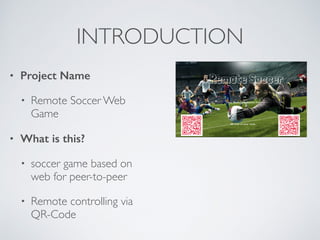
• Project Name 
• Remote Soccer Web 
Game 
• What is this? 
• soccer game based on 
web for peer-to-peer 
• Remote controlling via 
QR-Code
HOW TO PLAY? 
1. connect our game’s website
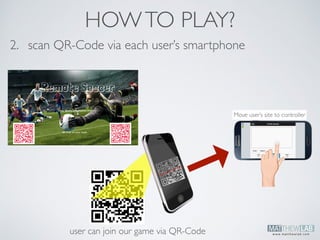
2. scan QR-Code via each user’s smartphone 
user can join our game via QR-Code 
Move user’s site to controller 
QR Controller 
HOW TO PLAY?
HOW TO PLAY? 
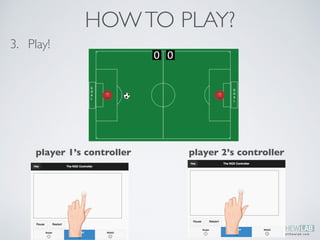
3. Play! 
player 1’s controller player 2’s controller
GAME RULE 
•Two players, One ball 
•each side has their own goal post 
•ball can move inside rectangle area. 
•Available action 
•Moving : any coordinated by x-y 
•If the ball go into the opposite’s goalpost, on the ground during game, the user 
can get a single point 
•Time limitation : 3 min 
•Score limitation : it’s random or user can select before game start
OPEN SOURCE 
•Any developer who want to use our qr-controller 
can easily use our npe-qrctl. 
js library 
•npe-qrctl.js is a javascript library based 
on jQuery. 
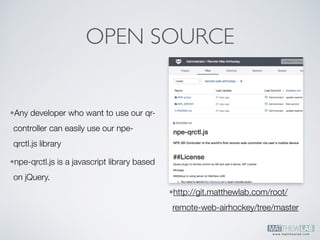
•http://git.matthewlab.com/root/ 
remote-web-airhockey/tree/master
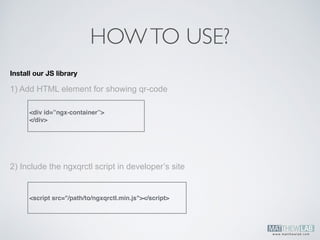
HOW TO USE? 
Install our JS library 
1) Add HTML element for showing qr-code 
<div id=”ngx-container”> 
</div> 
2) Include the ngxqrctl script in developer’s site 
<script src="/path/to/ngxqrctl.min.js"></script>
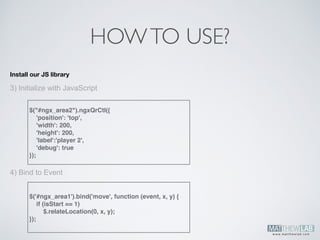
Install our JS library 
3) Initialize with JavaScript 
4) Bind to Event 
HOW TO USE? 
$("#ngx_area2").ngxQrCtl({ 
'position': 'top', 
'width': 200, 
'height': 200, 
'label':'player 2', 
'debug': true 
}); 
$('#ngx_area1').bind('move', function (event, x, y) { 
if (isStart == 1) 
$.relateLocation(0, x, y); 
});
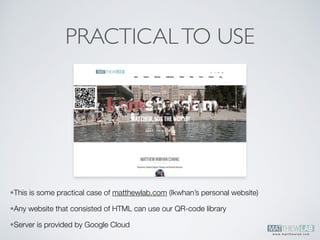
PRACTICAL TO USE 
•This is some practical case of matthewlab.com (Ikwhan’s personal website) 
•Any website that consisted of HTML can use our QR-code library 
•Server is provided by Google Cloud
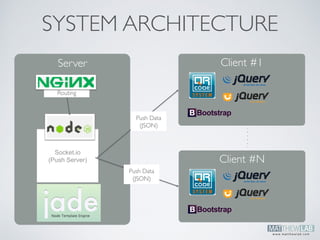
SYSTEM ARCHITECTURE 
Server Client #1 
Routing 
..!. . . . 
Push Data! 
(JSON) 
Socket.io 
(Push Server) Client #N 
Push Data! 
(JSON)
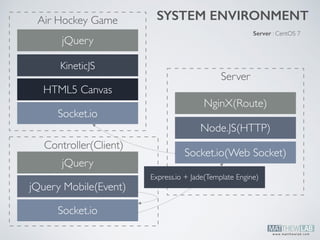
SYSTEM ENVIRONMENT 
Server 
NginX(Route) 
Node.JS(HTTP) 
Air Hockey Game 
jQuery 
KineticJS 
HTML5 Canvas 
Socket.io 
Controller(Client) 
Socket.io 
Server : CentOS 7 
Socket.io(Web Socket) 
Express.io + Jade(Template Engine) 
jQuery 
jQuery Mobile(Event)
WEB SOCKET(SOCKET.IO) 
C/S 
Communication 
Our Platform 
•Traditionally, if developer want to use the real-time communication between client and server, there is 
just few synchronized option. 
•WebSocket is synchronized options and it is more convenience than simple Ajax communication
HTML5 & ADOBE EDGE 
•Since we made our game using 
HTML5, any web browser can run 
our game even iPad or Android 
Browser. 
•Adobe Edge can make our game 
rapidly, especially CSS3 transition 
animation. 
Adobe Edge
PROS & CONS 
•PROS 
•1) The developer can use our qr-code in any website 
•2) Rapid responsive speed 
•3) Multiplatform(our main platform is HTML5!) 
•CONS 
•1) Game is too simple UI and functions(just move..) 
•2) Looks like not a football game(we tried to make soccer game but it looks like 
air hockey game..) 
•3) There is just two player, not multiplay
DEMO
Q & A
THANKS!

Programming Language Final PPT

  • 1.
    PROGRAMMING LANGUAGE PROJECT REMOTE SOCCER WEB GAME Team NullPointException presented by Ikwhan Chang 12/12/14
  • 2.
    INDEX • TeamNullPointException • Introduction • How to Play? • Game Rule • Open Source • How to Use? • System Architecture • System Environment • Demo • Q & A
  • 3.
    TEAM NullPointException •Team Name : NullPointException • Team Mission • Make new experience in a web • Make no-error program in JavaScript • Team Member & Role Name St.No Part Ikwhan Chang 20060957 Project Manager, Server-sided programming Jinwoo Park 20091487 System Design, UX Sanghu Han 20091551 Game Client Programming Hwan Lim 20091527 Game Client Programming MyoungHwan Gong 20091451 Encryption, Packet Design
  • 4.
    INTRODUCTION • ProjectName • Remote Soccer Web Game • What is this? • soccer game based on web for peer-to-peer • Remote controlling via QR-Code
  • 5.
    HOW TO PLAY? 1. connect our game’s website
  • 6.
    2. scan QR-Codevia each user’s smartphone user can join our game via QR-Code Move user’s site to controller QR Controller HOW TO PLAY?
  • 7.
    HOW TO PLAY? 3. Play! player 1’s controller player 2’s controller
  • 8.
    GAME RULE •Twoplayers, One ball •each side has their own goal post •ball can move inside rectangle area. •Available action •Moving : any coordinated by x-y •If the ball go into the opposite’s goalpost, on the ground during game, the user can get a single point •Time limitation : 3 min •Score limitation : it’s random or user can select before game start
  • 9.
    OPEN SOURCE •Anydeveloper who want to use our qr-controller can easily use our npe-qrctl. js library •npe-qrctl.js is a javascript library based on jQuery. •http://git.matthewlab.com/root/ remote-web-airhockey/tree/master
  • 10.
    HOW TO USE? Install our JS library 1) Add HTML element for showing qr-code <div id=”ngx-container”> </div> 2) Include the ngxqrctl script in developer’s site <script src="/path/to/ngxqrctl.min.js"></script>
  • 11.
    Install our JSlibrary 3) Initialize with JavaScript 4) Bind to Event HOW TO USE? $("#ngx_area2").ngxQrCtl({ 'position': 'top', 'width': 200, 'height': 200, 'label':'player 2', 'debug': true }); $('#ngx_area1').bind('move', function (event, x, y) { if (isStart == 1) $.relateLocation(0, x, y); });
  • 12.
    PRACTICAL TO USE •This is some practical case of matthewlab.com (Ikwhan’s personal website) •Any website that consisted of HTML can use our QR-code library •Server is provided by Google Cloud
  • 13.
    SYSTEM ARCHITECTURE ServerClient #1 Routing ..!. . . . Push Data! (JSON) Socket.io (Push Server) Client #N Push Data! (JSON)
  • 14.
    SYSTEM ENVIRONMENT Server NginX(Route) Node.JS(HTTP) Air Hockey Game jQuery KineticJS HTML5 Canvas Socket.io Controller(Client) Socket.io Server : CentOS 7 Socket.io(Web Socket) Express.io + Jade(Template Engine) jQuery jQuery Mobile(Event)
  • 15.
    WEB SOCKET(SOCKET.IO) C/S Communication Our Platform •Traditionally, if developer want to use the real-time communication between client and server, there is just few synchronized option. •WebSocket is synchronized options and it is more convenience than simple Ajax communication
  • 16.
    HTML5 & ADOBEEDGE •Since we made our game using HTML5, any web browser can run our game even iPad or Android Browser. •Adobe Edge can make our game rapidly, especially CSS3 transition animation. Adobe Edge
  • 17.
    PROS & CONS •PROS •1) The developer can use our qr-code in any website •2) Rapid responsive speed •3) Multiplatform(our main platform is HTML5!) •CONS •1) Game is too simple UI and functions(just move..) •2) Looks like not a football game(we tried to make soccer game but it looks like air hockey game..) •3) There is just two player, not multiplay
  • 18.
  • 19.
  • 20.