I
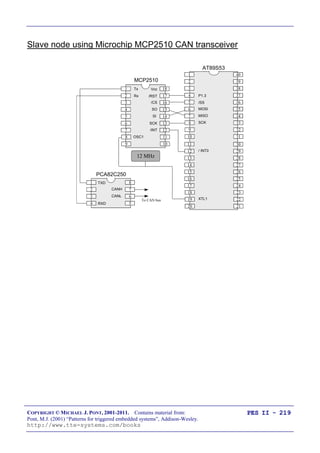
Programming
Embedded
Systems II
A 10-week course, using C
40
39
38
37
36
35
34
1
2
3
4
5
6
7
„8051‟
8
9
10
33
32
31
30
29
28
27
26
25
24
11
12
13
14
15
16
17
18
19
20
23
22
21
P3.0
P1.7
RST
P1.6
P1.5
P1.4
P1.2
P1.3
P1.1
P1.0
VSS
XTL2
XTL1
P3.7
P3.6
P3.5
P3.3
P3.4
P3.2
P3.1
/EA
P0.6
P0.7
P0.5
P0.4
P0.3
P0.1
P0.2
P0.0
VCC
P2.0
P2.2
P2.1
P2.3
P2.4
P2.5
P2.7
P2.6
/PSEN
ALE
Michael J. Pont
University of Leicester
[v2.3]
Further info:
http://www.tte-systems.com/services/Certified_Embedded_C_Programmer
II
Copyright © Michael J. Pont, 2002-2011
This document may be freely distributed and copied, provided that copyright notice at
the foot of each OHP page is clearly visible in all copies.
III
Seminar 1: 1
IV
Seminar 2: A flexible scheduler for single-processor embedded systems 1
Overview of this seminar 2
Overview of this course 3
By the end of the course you‟ll be able to … 4
Main course text 5
IMPORTANT: Course prerequisites 6
Review: Why use C? 7
Review: The 8051 microcontroller 8
Review: The “super loop” software architecture 9
Review: An introduction to schedulers 10
Review: Building a scheduler 11
Overview of this seminar 12
The Co-operative Scheduler 13
Overview 14
The scheduler data structure and task array 15
The size of the task array 16
One possible initialisation function: 17
IMPORTANT: The „one interrupt per microcontroller‟ rule! 18
The „Update‟ function 19
The „Add Task‟ function 20
The „Dispatcher‟ 22
Function arguments 24
Function pointers and Keil linker options 25
The „Start‟ function 28
The „Delete Task‟ function 29
Reducing power consumption 30
Reporting errors 31
Displaying error codes 34
Hardware resource implications 35
What is the CPU load of the scheduler? 36
Determining the required tick interval 38
Guidelines for predictable and reliable scheduling 40
Overall strengths and weaknesses of the scheduler 41
Preparations for the next seminar 42
V
Seminar 3: Analogue I/O using ADCs and PWM 43
Overview of this seminar 44
PATTERN: One-Shot ADC 45
PATTERN: One-Shot ADC 46
Using a microcontroller with on-chip ADC 47
Using an external parallel ADC 48
Example: Using a Max150 ADC 49
Using an external serial ADC 51
Example: Using an external SPI ADC 52
Overview of SPI 53
Back to the example … 54
Example: Using an external I2
C ADC 55
Overview of I2C 56
Back to the example … 57
What is PWM? 58
PATTERN: Software PWM 59
Preparations for the next seminar 62
VI
Seminar 4: A closer look at co-operative task scheduling (and some alternatives) 63
Overview of this seminar 64
Review: Co-operative scheduling 65
The pre-emptive scheduler 66
Why do we avoid pre-emptive schedulers in this course? 67
Why is a co-operative scheduler (generally) more reliable? 68
Critical sections of code 69
How do we deal with critical sections in a pre-emptive system? 70
Building a “lock” mechanism 71
The “best of both worlds” - a hybrid scheduler 75
Creating a hybrid scheduler 76
The „Update‟ function for a hybrid scheduler. 78
Reliability and safety issues 81
The safest way to use the hybrid scheduler 83
Other forms of co-operative scheduler 85
PATTERN: 255-TICK SCHEDULER 86
PATTERN: ONE-TASK SCHEDULER 87
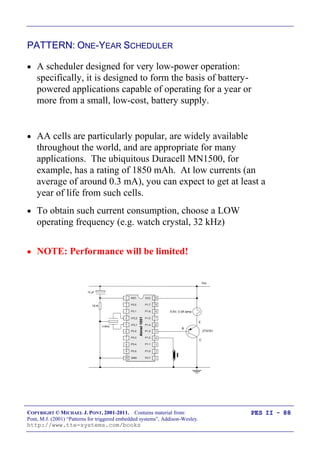
PATTERN: ONE-YEAR SCHEDULER 88
PATTERN: STABLE SCHEDULER 89
Mix and match … 90
Preparations for the next seminar 91
VII
Seminar 5: Improving system reliability using watchdog timers 93
Overview of this seminar 94
The watchdog analogy 95
PATTERN: Watchdog Recovery 96
Choice of hardware 97
Time-based error detection 98
Other uses for watchdog-induced resets 99
Recovery behaviour 100
Risk assessment 101
The limitations of single-processor designs 102
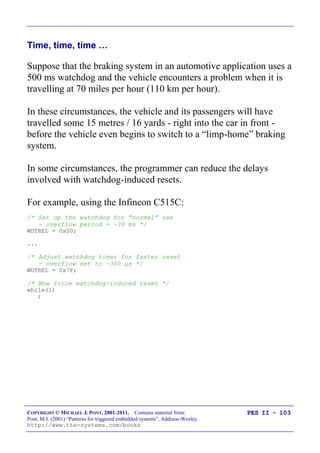
Time, time, time … 103
Watchdogs: Overall strengths and weaknesses 104
PATTERN: Scheduler Watchdog 105
Selecting the overflow period - “hard” constraints 106
Selecting the overflow period - “soft” constraints 107
PATTERN: Program-Flow Watchdog 108
Dealing with errors 110
Hardware resource implications 111
Speeding up the response 112
PATTERN: Reset Recovery 114
PATTERN: Fail-Silent Recovery 115
Example: Fail-Silent behaviour in the Airbus A310 116
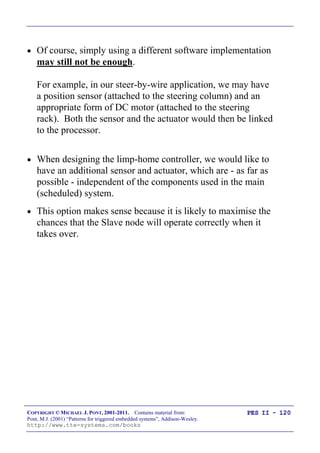
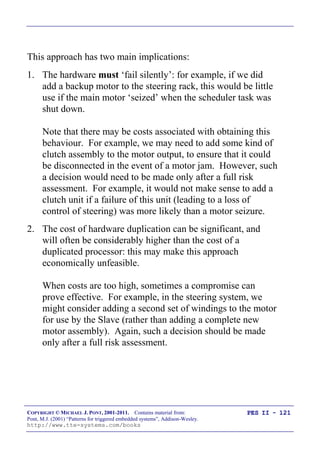
Example: Fail-Silent behaviour in a steer-by-wire application 117
PATTERN: Limp-Home Recovery 118
Example: Limp-home behaviour in a steer-by-wire application 119
PATTERN: Oscillator Watchdog 122
Preparations for the next seminar 124
VIII
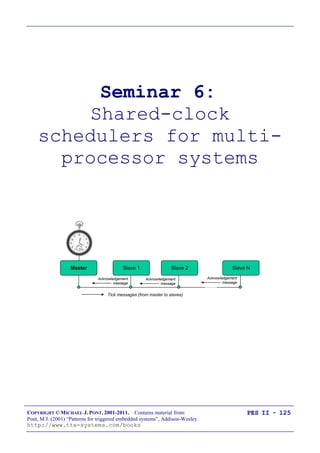
Seminar 6: Shared-clock schedulers for multi-processor systems 125
Overview of this seminar 126
Why use more than one processor? 127
Additional CPU performance and hardware facilities 128
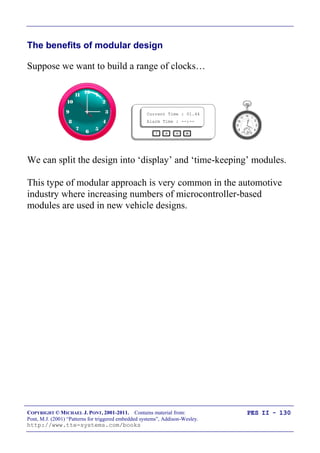
The benefits of modular design 130
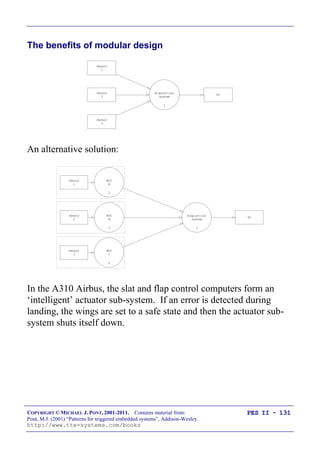
The benefits of modular design 131
So - how do we link more than one processor? 132
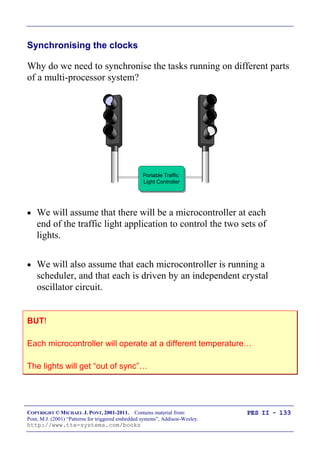
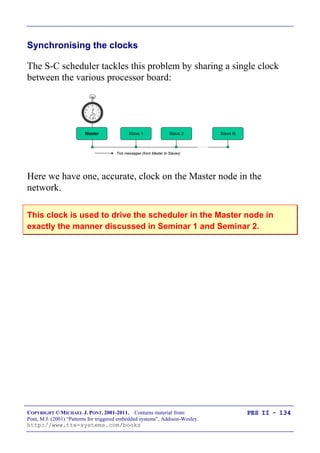
Synchronising the clocks 133
Synchronising the clocks 134
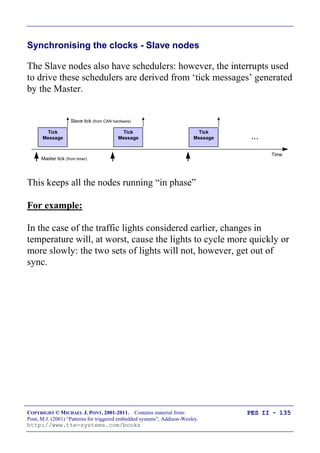
Synchronising the clocks - Slave nodes 135
Transferring data 136
Transferring data (Master to Slave) 137
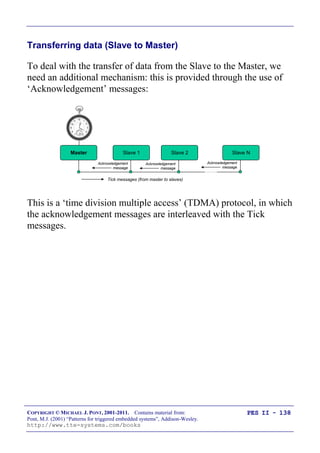
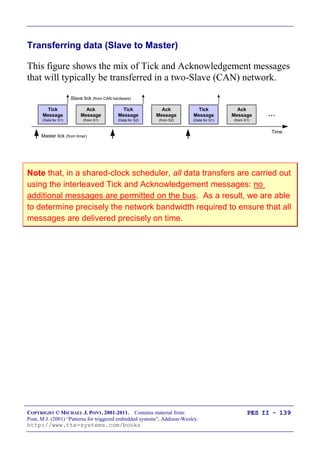
Transferring data (Slave to Master) 138
Transferring data (Slave to Master) 139
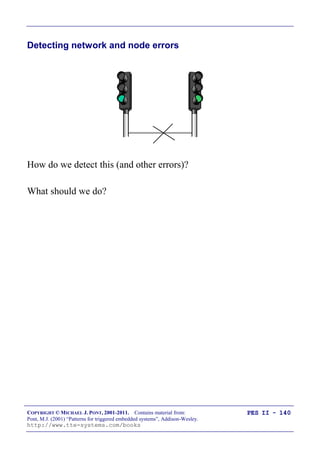
Detecting network and node errors 140
Detecting errors in the Slave(s) 141
Detecting errors in the Master 142
Handling errors detected by the Slave 143
Handling errors detected by the Master 144
Enter a safe state and shut down the network 145
Reset the network 146
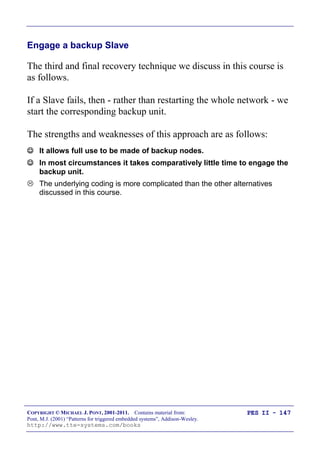
Engage a backup Slave 147
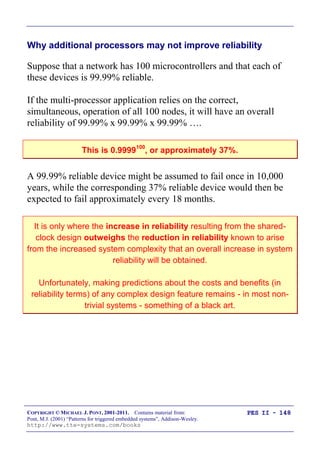
Why additional processors may not improve reliability 148
Redundant networks do not guarantee increased reliability 149
Replacing the human operator - implications 150
Are multi-processor designs ever safe? 151
Preparations for the next seminar 152
IX
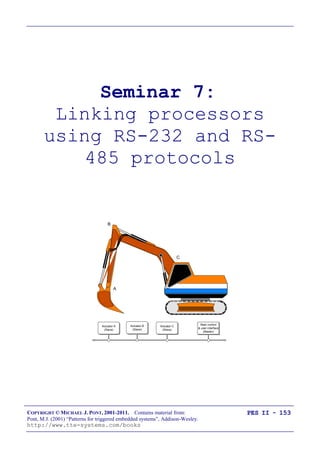
Seminar 7: Linking processors using RS-232 and RS-485 protocols 153
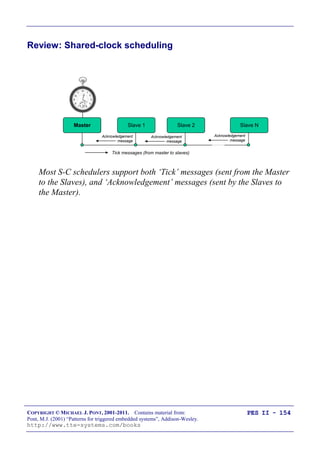
Review: Shared-clock scheduling 154
Overview of this seminar 155
Review: What is „RS-232‟? 156
Review: Basic RS-232 Protocol 157
Review: Transferring data to a PC using RS-232 158
PATTERN: SCU SCHEDULER (LOCAL) 159
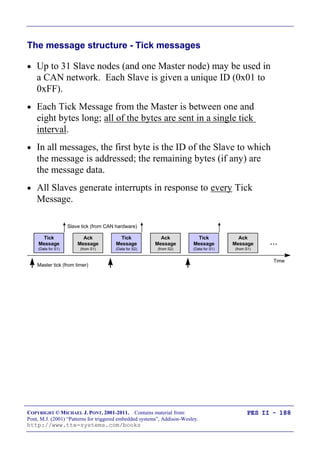
The message structure 160
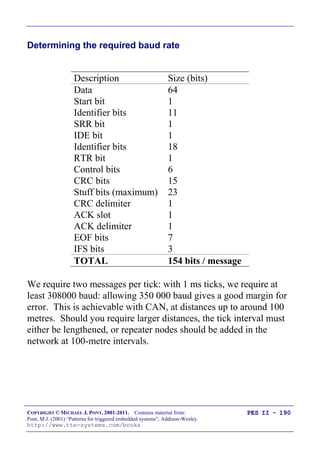
Determining the required baud rate 163
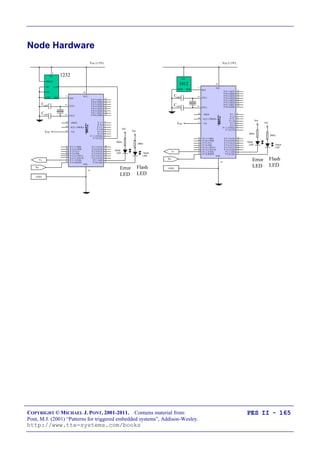
Node Hardware 165
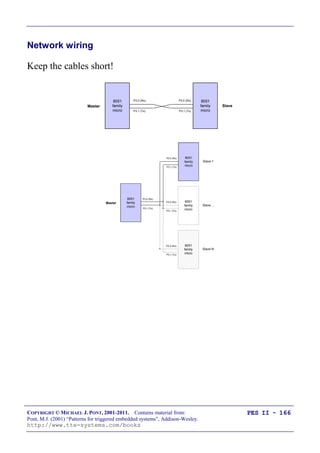
Network wiring 166
Overall strengths and weaknesses 167
PATTERN: SCU Scheduler (RS-232) 168
PATTERN: SCU Scheduler (RS-485) 169
RS-232 vs RS-485 [number of nodes] 170
RS-232 vs RS-485 [range and baud rates] 171
RS-232 vs RS-485 [cabling] 172
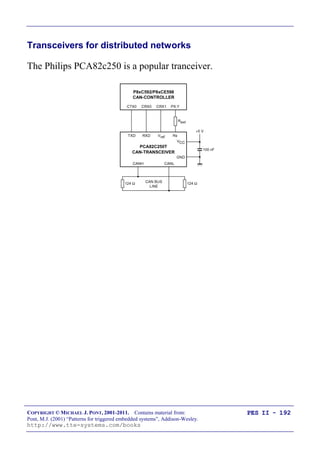
RS-232 vs RS-485 [transceivers] 173
Software considerations: enable inputs 174
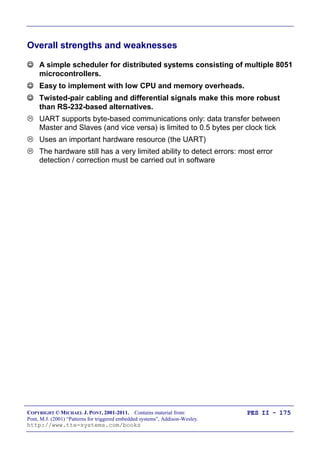
Overall strengths and weaknesses 175
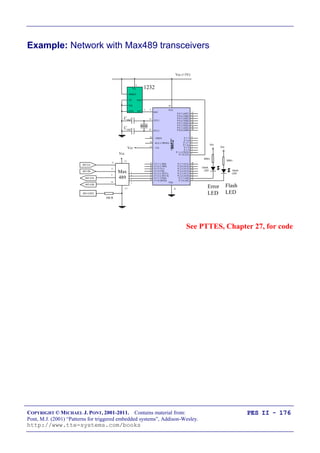
Example: Network with Max489 transceivers 176
Preparations for the next seminar 177
X
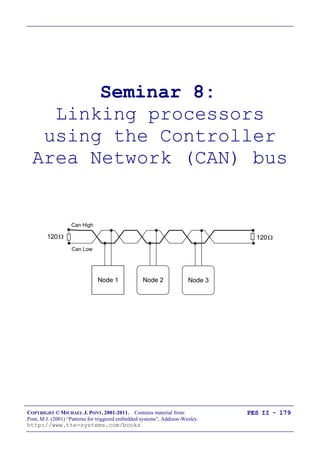
Seminar 8: Linking processors using the Controller Area Network (CAN) bus 179
Overview of this seminar 180
PATTERN: SCC Scheduler 181
What is CAN? 182
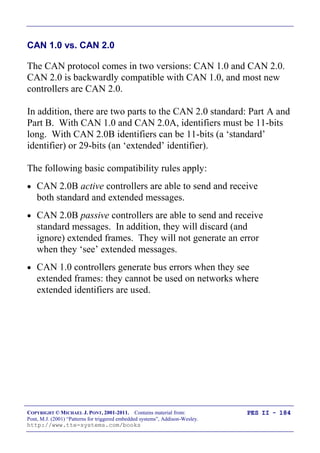
CAN 1.0 vs. CAN 2.0 184
Basic CAN vs. Full CAN 185
Which microcontrollers have support for CAN? 186
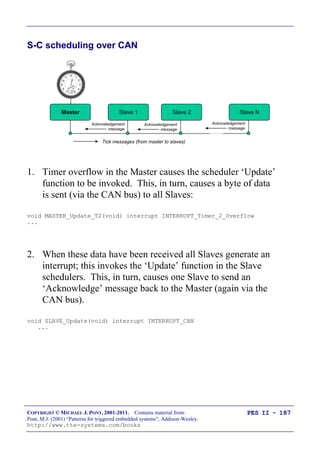
S-C scheduling over CAN 187
The message structure - Tick messages 188
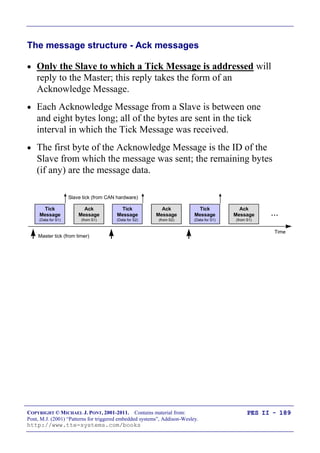
The message structure - Ack messages 189
Determining the required baud rate 190
Transceivers for distributed networks 192
Node wiring for distributed networks 193
Hardware and wiring for local networks 194
Software for the shared-clock CAN scheduler 195
Overall strengths and weaknesses 196
Example: Creating a CAN-based scheduler using the Infineon C515c 197
Master Software 198
Slave Software 211
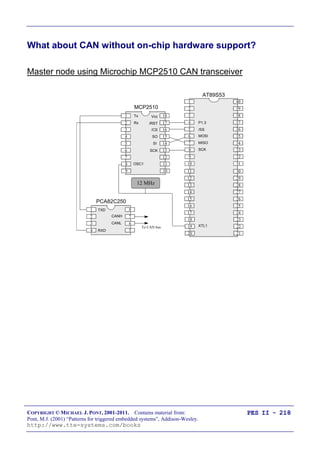
What about CAN without on-chip hardware support? 218
Preparations for the next seminar 220
XI
Seminar 9: Applying “Proportional Integral Differential” (PID) control 221
Overview of this seminar 222
Why do we need closed-loop control? 223
Closed-loop control 227
What closed-loop algorithm should you use? 228
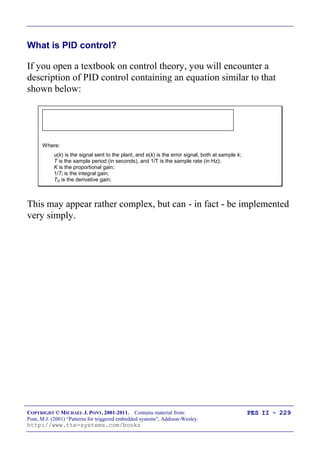
What is PID control? 229
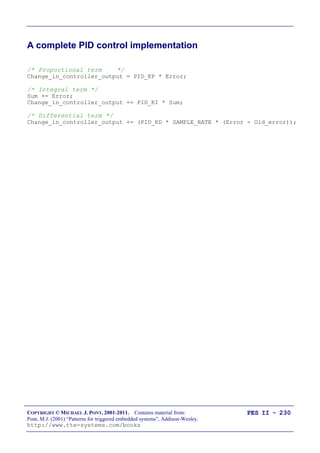
A complete PID control implementation 230
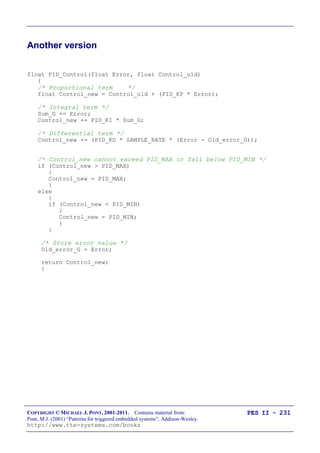
Another version 231
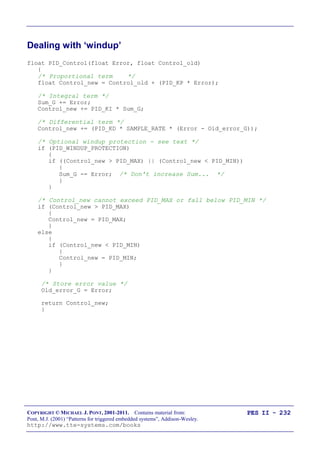
Dealing with „windup‟ 232
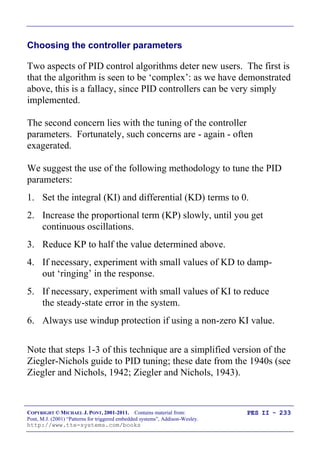
Choosing the controller parameters 233
What sample rate? 234
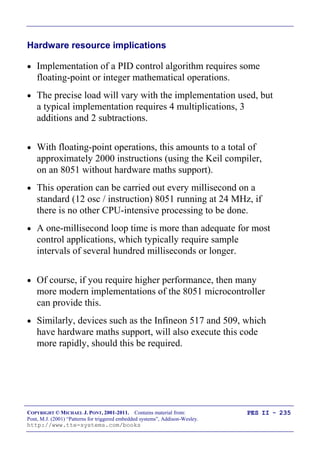
Hardware resource implications 235
PID: Overall strengths and weaknesses 236
Why open-loop controllers are still (sometimes) useful 237
Limitations of PID control 238
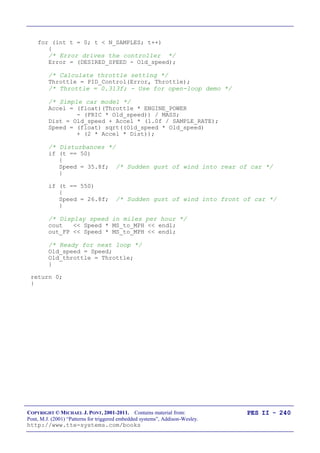
Example: Tuning the parameters of a cruise-control system 239
Open-loop test 241
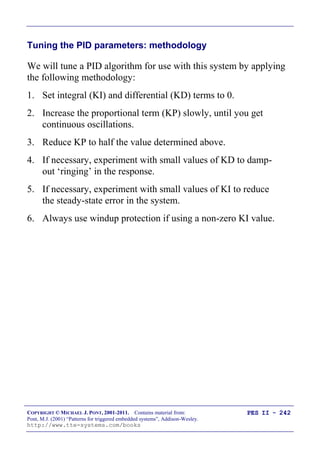
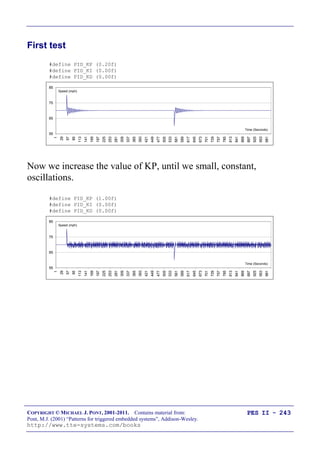
Tuning the PID parameters: methodology 242
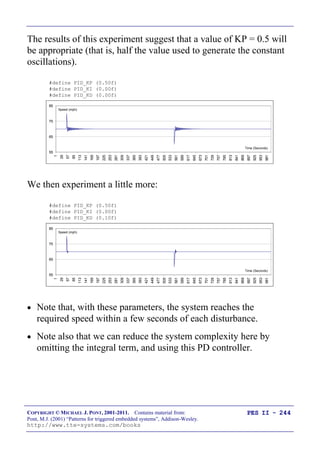
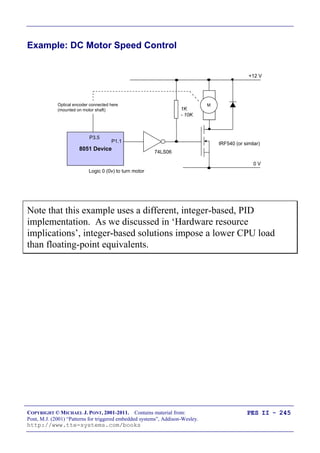
First test 243
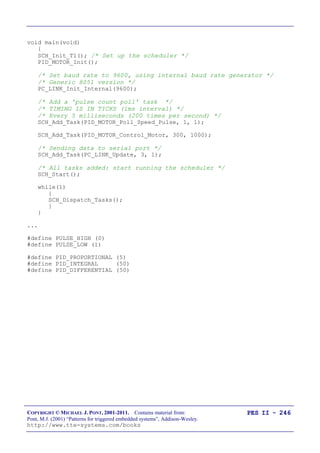
Example: DC Motor Speed Control 245
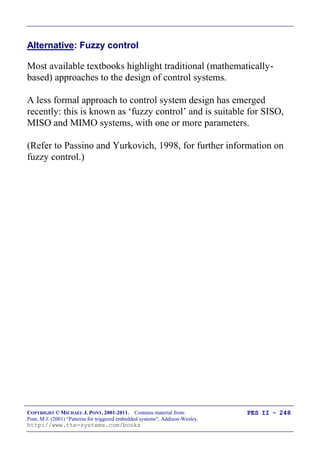
Alternative: Fuzzy control 248
Preparations for the next seminar 249
XII
Seminar 10: Case study: Automotive cruise control using PID and CAN 251
Overview of this seminar 252
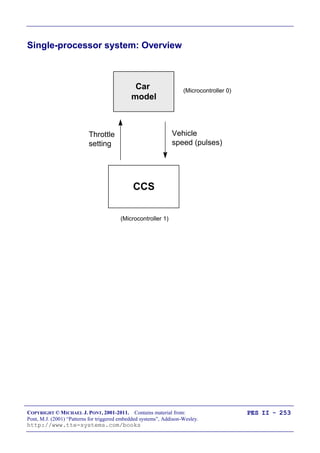
Single-processor system: Overview 253
Single-processor system: Code 254
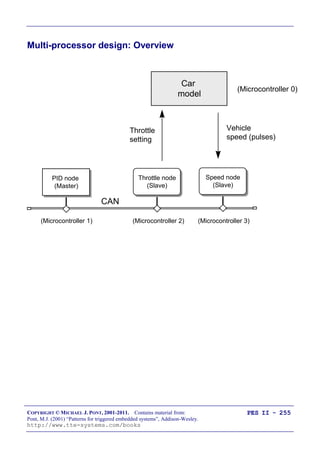
Multi-processor design: Overview 255
Multi-processor design: Code (PID node) 256
Multi-processor design: Code (Speed node) 257
Multi-processor design: Code (Throttle node) 258
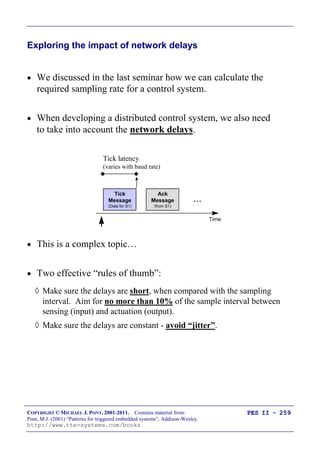
Exploring the impact of network delays 259
Example: Impact of network delays on the CCS system 260
That‟s it! 261
XIII
COPYRIGHT © MICHAEL J. PONT, 2001-2011. Contains material from:
Pont, M.J. (2001) “Patterns for triggered embedded systems”, Addison-Wesley.
http://www.tte-systems.com/books
PES II - 1
Seminar 1:
Seminar 2:
A flexible scheduler
for single-processor
embedded systems
40
39
38
37
36
35
34
1
2
3
4
5
6
7
„8051‟
8
9
10
33
32
31
30
29
28
27
26
25
24
11
12
13
14
15
16
17
18
19
20
23
22
21
P3.0
P1.7
RST
P1.6
P1.5
P1.4
P1.2
P1.3
P1.1
P1.0
VSS
XTL2
XTL1
P3.7
P3.6
P3.5
P3.3
P3.4
P3.2
P3.1
/EA
P0.6
P0.7
P0.5
P0.4
P0.3
P0.1
P0.2
P0.0
VCC
P2.0
P2.2
P2.1
P2.3
P2.4
P2.5
P2.7
P2.6
/PSEN
ALE
COPYRIGHT © MICHAEL J. PONT, 2001-2011. Contains material from:
Pont, M.J. (2001) “Patterns for triggered embedded systems”, Addison-Wesley.
http://www.tte-systems.com/books
PES II - 2
Overview of this seminar
This introductory seminar will run over TWO SESSIONS:
It will:
 Provide an overview of this course (this seminar slot)
 Describe the design and implementation of a flexible
scheduler (this slot and the next slot)
COPYRIGHT © MICHAEL J. PONT, 2001-2011. Contains material from:
Pont, M.J. (2001) “Patterns for triggered embedded systems”, Addison-Wesley.
http://www.tte-systems.com/books
PES II - 3
Overview of this course
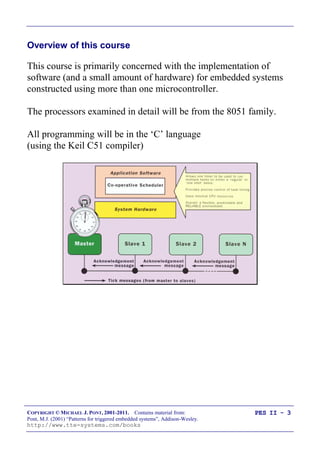
This course is primarily concerned with the implementation of
software (and a small amount of hardware) for embedded systems
constructed using more than one microcontroller.
The processors examined in detail will be from the 8051 family.
All programming will be in the „C‟ language
(using the Keil C51 compiler)
COPYRIGHT © MICHAEL J. PONT, 2001-2011. Contains material from:
Pont, M.J. (2001) “Patterns for triggered embedded systems”, Addison-Wesley.
http://www.tte-systems.com/books
PES II - 4
By the end of the course you‟ll be able to …
By the end of the course, you will be able to:
1. Design software for multi-processor embedded applications
based on small, industry standard, microcontrollers;
2. Implement the above designs using a modern, high-level
programming language („C‟), and
3. Understand more about the effect that software design and
programming designs can have on the reliability and safety
of multi-processor embedded systems.
COPYRIGHT © MICHAEL J. PONT, 2001-2011. Contains material from:
Pont, M.J. (2001) “Patterns for triggered embedded systems”, Addison-Wesley.
http://www.tte-systems.com/books
PES II - 5
Main course text
Throughout this course, we will be making heavy use of this book:
Patterns for time-triggered embedded
systems: Building reliable applications with
the 8051 family of microcontrollers,
by Michael J. Pont (2001)
Addison-Wesley / ACM Press.
[ISBN: 0-201-331381]
You can download this book (PDF) here:
http://www.tte-systems.com/books/pttes
COPYRIGHT © MICHAEL J. PONT, 2001-2011. Contains material from:
Pont, M.J. (2001) “Patterns for triggered embedded systems”, Addison-Wesley.
http://www.tte-systems.com/books
PES II - 6
IMPORTANT: Course prerequisites
 It is assumed that - before taking this course - you have
previously completed “Programming Embedded Systems I”
(or a similar course).
See:
http://www.tte-systems.com/services/Certified_Embedded_C_Programmer
B
E
C
5.5V, 0.3A lamp
ZTX751
4V - 6V (battery)
10 K
10 µF
4 MHz
20
19
18
17
16
15
14
1
2
3
4
5
6
7 Atmel2051
8
9
10
13
12
11GND
P3.4
P3.5
P3.3
P3.2
XTL1
P3.1
XTL2
P3.0
RST
P3.7
P1.1
P1.0
P1.2
P1.3
P1.4
P1.6
P1.5
P1.7
VCC
40
39
38
37
36
35
34
1
2
3
4
5
6
7
„8051‟
8
9
10
33
32
31
30
29
28
27
26
25
24
11
12
13
14
15
16
17
18
19
20
23
22
21
P3.0
P1.7
RST
P1.6
P1.5
P1.4
P1.2
P1.3
P1.1
P1.0
VSS
XTL2
XTL1
P3.7
P3.6
P3.5
P3.3
P3.4
P3.2
P3.1
/EA
P0.6
P0.7
P0.5
P0.4
P0.3
P0.1
P0.2
P0.0
VCC
P2.0
P2.2
P2.1
P2.3
P2.4
P2.5
P2.7
P2.6
/PSEN
ALE
COPYRIGHT © MICHAEL J. PONT, 2001-2011. Contains material from:
Pont, M.J. (2001) “Patterns for triggered embedded systems”, Addison-Wesley.
http://www.tte-systems.com/books
PES II - 7
Review: Why use C?
 It is a „mid-level‟ language, with „high-level‟ features (such
as support for functions and modules), and „low-level‟
features (such as good access to hardware via pointers);
 It is very efficient;
 It is popular and well understood;
 Even desktop developers who have used only Java or C++
can soon understand C syntax;
 Good, well-proven compilers are available for every
embedded processor (8-bit to 32-bit or more);
 Experienced staff are available;
 Books, training courses, code samples and WWW sites
discussing the use of the language are all widely available.
Overall, C may not be an ideal language for developing embedded
systems, but it is a good choice (and is unlikely that a „perfect‟ language
will ever be created).
COPYRIGHT © MICHAEL J. PONT, 2001-2011. Contains material from:
Pont, M.J. (2001) “Patterns for triggered embedded systems”, Addison-Wesley.
http://www.tte-systems.com/books
PES II - 8
Review: The 8051 microcontroller
40
39
38
37
36
35
34
1
2
3
4
5
6
7
„8051‟
8
9
10
33
32
31
30
29
28
27
26
25
24
11
12
13
14
15
16
17
18
19
20
23
22
21
P3.0
P1.7
RST
P1.6
P1.5
P1.4
P1.2
P1.3
P1.1
P1.0
VSS
XTL2
XTL1
P3.7
P3.6
P3.5
P3.3
P3.4
P3.2
P3.1
/EA
P0.6
P0.7
P0.5
P0.4
P0.3
P0.1
P0.2
P0.0
VCC
P2.0
P2.2
P2.1
P2.3
P2.4
P2.5
P2.7
P2.6
/PSEN
ALE
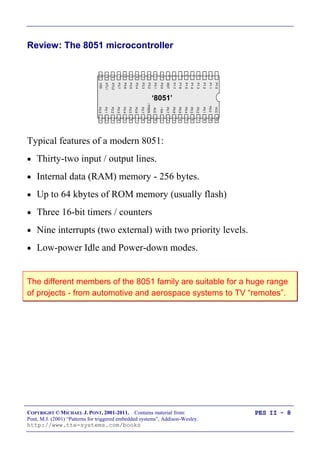
Typical features of a modern 8051:
 Thirty-two input / output lines.
 Internal data (RAM) memory - 256 bytes.
 Up to 64 kbytes of ROM memory (usually flash)
 Three 16-bit timers / counters
 Nine interrupts (two external) with two priority levels.
 Low-power Idle and Power-down modes.
The different members of the 8051 family are suitable for a huge range
of projects - from automotive and aerospace systems to TV “remotes”.
COPYRIGHT © MICHAEL J. PONT, 2001-2011. Contains material from:
Pont, M.J. (2001) “Patterns for triggered embedded systems”, Addison-Wesley.
http://www.tte-systems.com/books
PES II - 9
Review: The “super loop” software architecture
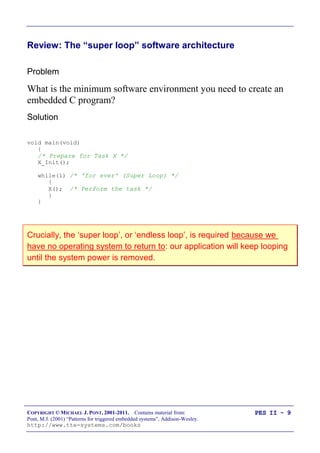
Problem
What is the minimum software environment you need to create an
embedded C program?
Solution
void main(void)
{
/* Prepare for Task X */
X_Init();
while(1) /* 'for ever' (Super Loop) */
{
X(); /* Perform the task */
}
}
Crucially, the „super loop‟, or „endless loop‟, is required because we
have no operating system to return to: our application will keep looping
until the system power is removed.
COPYRIGHT © MICHAEL J. PONT, 2001-2011. Contains material from:
Pont, M.J. (2001) “Patterns for triggered embedded systems”, Addison-Wesley.
http://www.tte-systems.com/books
PES II - 10
Review: An introduction to schedulers
Operating System
BIOS
Hardware
Word Processor
OS provides „common code‟ for:
• Graphics
• Printing
• File storage
• Sound
• ...
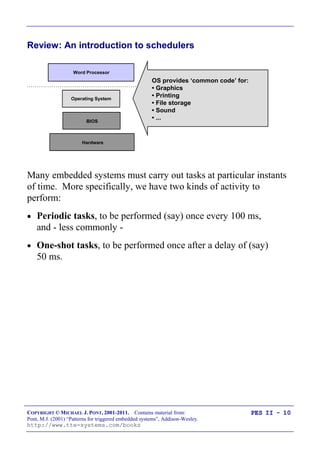
Many embedded systems must carry out tasks at particular instants
of time. More specifically, we have two kinds of activity to
perform:
 Periodic tasks, to be performed (say) once every 100 ms,
and - less commonly -
 One-shot tasks, to be performed once after a delay of (say)
50 ms.
COPYRIGHT © MICHAEL J. PONT, 2001-2011. Contains material from:
Pont, M.J. (2001) “Patterns for triggered embedded systems”, Addison-Wesley.
http://www.tte-systems.com/books
PES II - 11
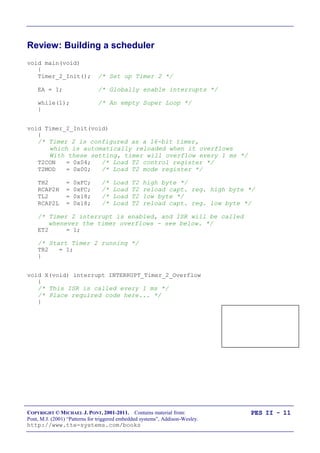
Review: Building a scheduler
void main(void)
{
Timer_2_Init(); /* Set up Timer 2 */
EA = 1; /* Globally enable interrupts */
while(1); /* An empty Super Loop */
}
void Timer_2_Init(void)
{
/* Timer 2 is configured as a 16-bit timer,
which is automatically reloaded when it overflows
With these setting, timer will overflow every 1 ms */
T2CON = 0x04; /* Load T2 control register */
T2MOD = 0x00; /* Load T2 mode register */
TH2 = 0xFC; /* Load T2 high byte */
RCAP2H = 0xFC; /* Load T2 reload capt. reg. high byte */
TL2 = 0x18; /* Load T2 low byte */
RCAP2L = 0x18; /* Load T2 reload capt. reg. low byte */
/* Timer 2 interrupt is enabled, and ISR will be called
whenever the timer overflows - see below. */
ET2 = 1;
/* Start Timer 2 running */
TR2 = 1;
}
void X(void) interrupt INTERRUPT_Timer_2_Overflow
{
/* This ISR is called every 1 ms */
/* Place required code here... */
}
COPYRIGHT © MICHAEL J. PONT, 2001-2011. Contains material from:
Pont, M.J. (2001) “Patterns for triggered embedded systems”, Addison-Wesley.
http://www.tte-systems.com/books
PES II - 12
Overview of this seminar
This seminar will consider the design of a very flexible scheduler.
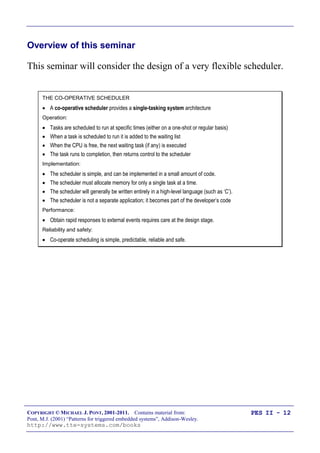
THE CO-OPERATIVE SCHEDULER
 A co-operative scheduler provides a single-tasking system architecture
Operation:
 Tasks are scheduled to run at specific times (either on a one-shot or regular basis)
 When a task is scheduled to run it is added to the waiting list
 When the CPU is free, the next waiting task (if any) is executed
 The task runs to completion, then returns control to the scheduler
Implementation:
 The scheduler is simple, and can be implemented in a small amount of code.
 The scheduler must allocate memory for only a single task at a time.
 The scheduler will generally be written entirely in a high-level language (such as ‘C’).
 The scheduler is not a separate application; it becomes part of the developer’s code
Performance:
 Obtain rapid responses to external events requires care at the design stage.
Reliability and safety:
 Co-operate scheduling is simple, predictable, reliable and safe.
COPYRIGHT © MICHAEL J. PONT, 2001-2011. Contains material from:
Pont, M.J. (2001) “Patterns for triggered embedded systems”, Addison-Wesley.
http://www.tte-systems.com/books
PES II - 13
The Co-operative Scheduler
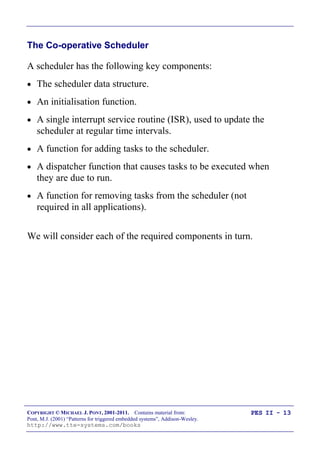
A scheduler has the following key components:
 The scheduler data structure.
 An initialisation function.
 A single interrupt service routine (ISR), used to update the
scheduler at regular time intervals.
 A function for adding tasks to the scheduler.
 A dispatcher function that causes tasks to be executed when
they are due to run.
 A function for removing tasks from the scheduler (not
required in all applications).
We will consider each of the required components in turn.
COPYRIGHT © MICHAEL J. PONT, 2001-2011. Contains material from:
Pont, M.J. (2001) “Patterns for triggered embedded systems”, Addison-Wesley.
http://www.tte-systems.com/books
PES II - 14
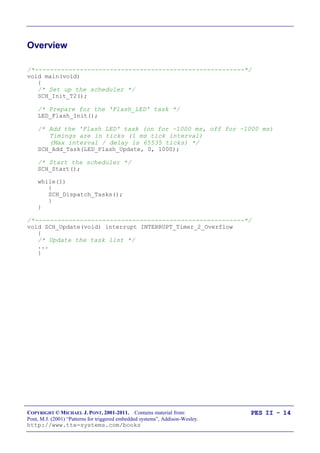
Overview
/*--------------------------------------------------------*/
void main(void)
{
/* Set up the scheduler */
SCH_Init_T2();
/* Prepare for the 'Flash_LED' task */
LED_Flash_Init();
/* Add the 'Flash LED' task (on for ~1000 ms, off for ~1000 ms)
Timings are in ticks (1 ms tick interval)
(Max interval / delay is 65535 ticks) */
SCH_Add_Task(LED_Flash_Update, 0, 1000);
/* Start the scheduler */
SCH_Start();
while(1)
{
SCH_Dispatch_Tasks();
}
}
/*--------------------------------------------------------*/
void SCH_Update(void) interrupt INTERRUPT_Timer_2_Overflow
{
/* Update the task list */
...
}
COPYRIGHT © MICHAEL J. PONT, 2001-2011. Contains material from:
Pont, M.J. (2001) “Patterns for triggered embedded systems”, Addison-Wesley.
http://www.tte-systems.com/books
PES II - 15
The scheduler data structure and task array
/* Store in DATA area, if possible, for rapid access
Total memory per task is 7 bytes */
typedef data struct
{
/* Pointer to the task (must be a 'void (void)' function) */
void (code * pTask)(void);
/* Delay (ticks) until the function will (next) be run
- see SCH_Add_Task() for further details */
tWord Delay;
/* Interval (ticks) between subsequent runs.
- see SCH_Add_Task() for further details */
tWord Repeat;
/* Incremented (by scheduler) when task is due to execute */
tByte RunMe;
} sTask;
File Sch51.H also includes the constant SCH_MAX_TASKS:
/* The maximum number of tasks required at any one time
during the execution of the program
MUST BE ADJUSTED FOR EACH NEW PROJECT */
#define SCH_MAX_TASKS (1)
Both the sTask data type and the SCH_MAX_TASKS constant are
used to create - in the file Sch51.C - the array of tasks that is
referred to throughout the scheduler:
/* The array of tasks */
sTask SCH_tasks_G[SCH_MAX_TASKS];
COPYRIGHT © MICHAEL J. PONT, 2001-2011. Contains material from:
Pont, M.J. (2001) “Patterns for triggered embedded systems”, Addison-Wesley.
http://www.tte-systems.com/books
PES II - 16
The size of the task array
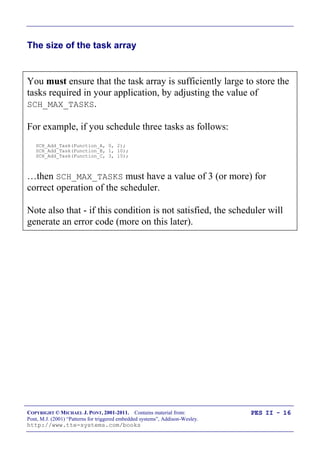
You must ensure that the task array is sufficiently large to store the
tasks required in your application, by adjusting the value of
SCH_MAX_TASKS.
For example, if you schedule three tasks as follows:
SCH_Add_Task(Function_A, 0, 2);
SCH_Add_Task(Function_B, 1, 10);
SCH_Add_Task(Function_C, 3, 15);
…then SCH_MAX_TASKS must have a value of 3 (or more) for
correct operation of the scheduler.
Note also that - if this condition is not satisfied, the scheduler will
generate an error code (more on this later).
COPYRIGHT © MICHAEL J. PONT, 2001-2011. Contains material from:
Pont, M.J. (2001) “Patterns for triggered embedded systems”, Addison-Wesley.
http://www.tte-systems.com/books
PES II - 17
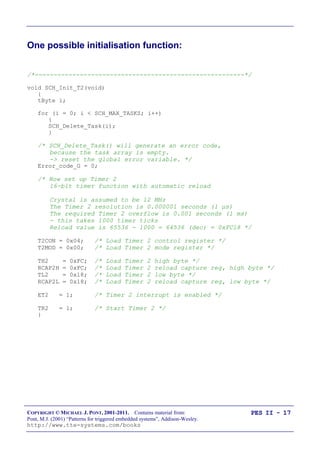
One possible initialisation function:
/*--------------------------------------------------------*/
void SCH_Init_T2(void)
{
tByte i;
for (i = 0; i < SCH_MAX_TASKS; i++)
{
SCH_Delete_Task(i);
}
/* SCH_Delete_Task() will generate an error code,
because the task array is empty.
-> reset the global error variable. */
Error_code_G = 0;
/* Now set up Timer 2
16-bit timer function with automatic reload
Crystal is assumed to be 12 MHz
The Timer 2 resolution is 0.000001 seconds (1 µs)
The required Timer 2 overflow is 0.001 seconds (1 ms)
- this takes 1000 timer ticks
Reload value is 65536 - 1000 = 64536 (dec) = 0xFC18 */
T2CON = 0x04; /* Load Timer 2 control register */
T2MOD = 0x00; /* Load Timer 2 mode register */
TH2 = 0xFC; /* Load Timer 2 high byte */
RCAP2H = 0xFC; /* Load Timer 2 reload capture reg, high byte */
TL2 = 0x18; /* Load Timer 2 low byte */
RCAP2L = 0x18; /* Load Timer 2 reload capture reg, low byte */
ET2 = 1; /* Timer 2 interrupt is enabled */
TR2 = 1; /* Start Timer 2 */
}
COPYRIGHT © MICHAEL J. PONT, 2001-2011. Contains material from:
Pont, M.J. (2001) “Patterns for triggered embedded systems”, Addison-Wesley.
http://www.tte-systems.com/books
PES II - 18
IMPORTANT:
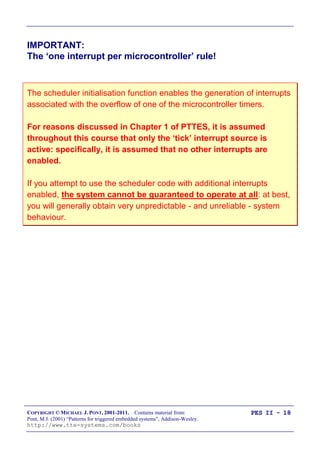
The „one interrupt per microcontroller‟ rule!
The scheduler initialisation function enables the generation of interrupts
associated with the overflow of one of the microcontroller timers.
For reasons discussed in Chapter 1 of PTTES, it is assumed
throughout this course that only the „tick‟ interrupt source is
active: specifically, it is assumed that no other interrupts are
enabled.
If you attempt to use the scheduler code with additional interrupts
enabled, the system cannot be guaranteed to operate at all: at best,
you will generally obtain very unpredictable - and unreliable - system
behaviour.
COPYRIGHT © MICHAEL J. PONT, 2001-2011. Contains material from:
Pont, M.J. (2001) “Patterns for triggered embedded systems”, Addison-Wesley.
http://www.tte-systems.com/books
PES II - 19
The „Update‟ function
/*--------------------------------------------------------*/
void SCH_Update(void) interrupt INTERRUPT_Timer_2_Overflow
{
tByte Index;
TF2 = 0; /* Have to manually clear this. */
/* NOTE: calculations are in *TICKS* (not milliseconds) */
for (Index = 0; Index < SCH_MAX_TASKS; Index++)
{
/* Check if there is a task at this location */
if (SCH_tasks_G[Index].pTask)
{
if (--SCH_tasks_G[Index].Delay == 0)
{
/* The task is due to run */
SCH_tasks_G[Index].RunMe += 1; /* Inc. 'RunMe' flag */
if (SCH_tasks_G[Index].Period)
{
/* Schedule regular tasks to run again */
SCH_tasks_G[Index].Delay = SCH_tasks_G[Index].Period;
}
}
}
}
}
COPYRIGHT © MICHAEL J. PONT, 2001-2011. Contains material from:
Pont, M.J. (2001) “Patterns for triggered embedded systems”, Addison-Wesley.
http://www.tte-systems.com/books
PES II - 20
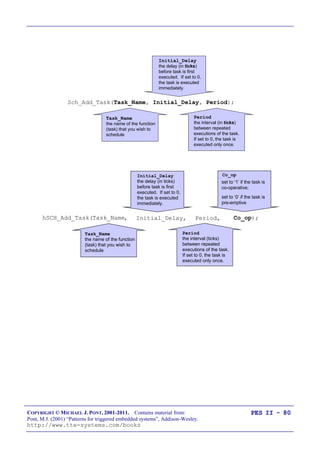
The „Add Task‟ function
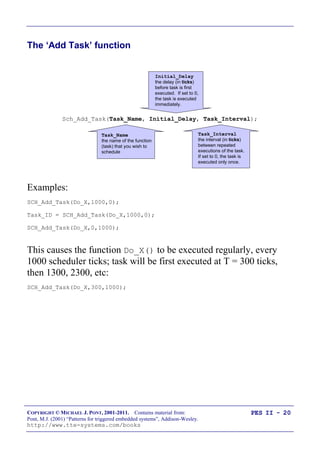
Sch_Add_Task(Task_Name, Initial_Delay, Task_Interval);
Task_Name
the name of the function
(task) that you wish to
schedule
Task_Interval
the interval (in ticks)
between repeated
executions of the task.
If set to 0, the task is
executed only once.
Initial_Delay
the delay (in ticks)
before task is first
executed. If set to 0,
the task is executed
immediately.
Examples:
SCH_Add_Task(Do_X,1000,0);
Task_ID = SCH_Add_Task(Do_X,1000,0);
SCH_Add_Task(Do_X,0,1000);
This causes the function Do_X() to be executed regularly, every
1000 scheduler ticks; task will be first executed at T = 300 ticks,
then 1300, 2300, etc:
SCH_Add_Task(Do_X,300,1000);
COPYRIGHT © MICHAEL J. PONT, 2001-2011. Contains material from:
Pont, M.J. (2001) “Patterns for triggered embedded systems”, Addison-Wesley.
http://www.tte-systems.com/books
PES II - 21
/*--------------------------------------------------------*-
SCH_Add_Task()
Causes a task (function) to be executed at regular
intervals, or after a user-defined delay.
-*--------------------------------------------------------*/
tByte SCH_Add_Task(void (code * pFunction)(),
const tWord DELAY,
const tWord PERIOD)
{
tByte Index = 0;
/* First find a gap in the array (if there is one) */
while ((SCH_tasks_G[Index].pTask != 0) && (Index < SCH_MAX_TASKS))
{
Index++;
}
/* Have we reached the end of the list? */
if (Index == SCH_MAX_TASKS)
{
/* Task list is full
-> set the global error variable */
Error_code_G = ERROR_SCH_TOO_MANY_TASKS;
/* Also return an error code */
return SCH_MAX_TASKS;
}
/* If we're here, there is a space in the task array */
SCH_tasks_G[Index].pTask = pFunction;
SCH_tasks_G[Index].Delay = DELAY + 1;
SCH_tasks_G[Index].Period = PERIOD;
SCH_tasks_G[Index].RunMe = 0;
return Index; /* return pos. of task (to allow deletion) */
}
COPYRIGHT © MICHAEL J. PONT, 2001-2011. Contains material from:
Pont, M.J. (2001) “Patterns for triggered embedded systems”, Addison-Wesley.
http://www.tte-systems.com/books
PES II - 22
The „Dispatcher‟
/*--------------------------------------------------------*-
SCH_Dispatch_Tasks()
This is the 'dispatcher' function. When a task (function)
is due to run, SCH_Dispatch_Tasks() will run it.
This function must be called (repeatedly) from the main loop.
-*--------------------------------------------------------*/
void SCH_Dispatch_Tasks(void)
{
tByte Index;
/* Dispatches (runs) the next task (if one is ready) */
for (Index = 0; Index < SCH_MAX_TASKS; Index++)
{
if (SCH_tasks_G[Index].RunMe > 0)
{
(*SCH_tasks_G[Index].pTask)(); /* Run the task */
SCH_tasks_G[Index].RunMe -= 1; /* Reduce RunMe count */
/* Periodic tasks will automatically run again
- if this is a 'one shot' task, delete it */
if (SCH_tasks_G[Index].Period == 0)
{
SCH_Delete_Task(Index);
}
}
}
/* Report system status */
SCH_Report_Status();
/* The scheduler enters idle mode at this point */
SCH_Go_To_Sleep();
}
COPYRIGHT © MICHAEL J. PONT, 2001-2011. Contains material from:
Pont, M.J. (2001) “Patterns for triggered embedded systems”, Addison-Wesley.
http://www.tte-systems.com/books
PES II - 23
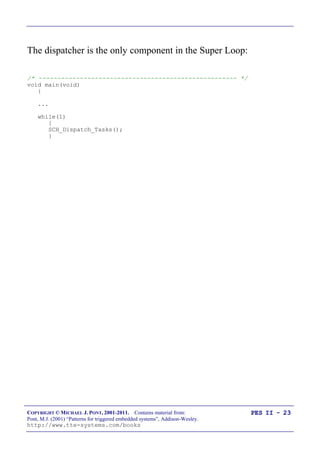
The dispatcher is the only component in the Super Loop:
/* ----------------------------------------------------- */
void main(void)
{
...
while(1)
{
SCH_Dispatch_Tasks();
}
COPYRIGHT © MICHAEL J. PONT, 2001-2011. Contains material from:
Pont, M.J. (2001) “Patterns for triggered embedded systems”, Addison-Wesley.
http://www.tte-systems.com/books
PES II - 24
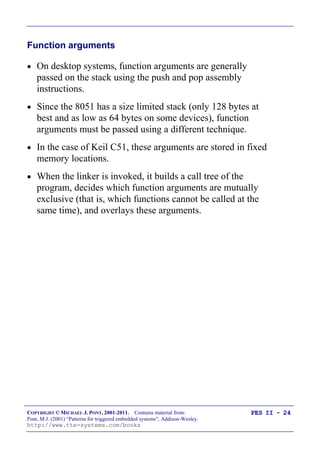
Function arguments
 On desktop systems, function arguments are generally
passed on the stack using the push and pop assembly
instructions.
 Since the 8051 has a size limited stack (only 128 bytes at
best and as low as 64 bytes on some devices), function
arguments must be passed using a different technique.
 In the case of Keil C51, these arguments are stored in fixed
memory locations.
 When the linker is invoked, it builds a call tree of the
program, decides which function arguments are mutually
exclusive (that is, which functions cannot be called at the
same time), and overlays these arguments.
COPYRIGHT © MICHAEL J. PONT, 2001-2011. Contains material from:
Pont, M.J. (2001) “Patterns for triggered embedded systems”, Addison-Wesley.
http://www.tte-systems.com/books
PES II - 25
Function pointers and Keil linker options
When we write:
SCH_Add_Task(Do_X,1000,0);
…the first parameter of the „Add Task‟ function is a pointer to the
function Do_X().
This function pointer is then passed to the Dispatch function and it
is through this function that the task is executed:
if (SCH_tasks_G[Index].RunMe > 0)
{
(*SCH_tasks_G[Index].pTask)(); /* Run the task */
BUT
The linker has difficulty determining the correct call tree when function
pointers are used as arguments.
COPYRIGHT © MICHAEL J. PONT, 2001-2011. Contains material from:
Pont, M.J. (2001) “Patterns for triggered embedded systems”, Addison-Wesley.
http://www.tte-systems.com/books
PES II - 26
To deal with this situation, you have two realistic options:
1. You can prevent the compiler from using the OVERLAY
directive by disabling overlays as part of the linker options
for your project.
Note that, compared to applications using overlays, you will
generally require more RAM to run your program.
2. You can tell the linker how to create the correct call tree for
your application by explicitly providing this information in
the linker „Additional Options‟ dialogue box.
This approach is used in most of the examples in the
“PTTES” book.
COPYRIGHT © MICHAEL J. PONT, 2001-2011. Contains material from:
Pont, M.J. (2001) “Patterns for triggered embedded systems”, Addison-Wesley.
http://www.tte-systems.com/books
PES II - 27
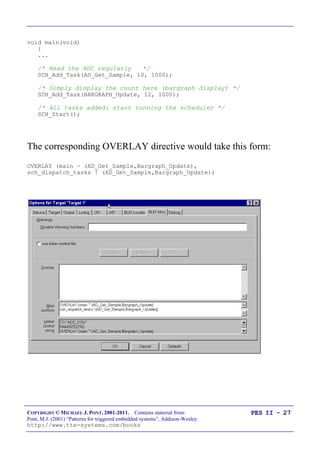
void main(void)
{
...
/* Read the ADC regularly */
SCH_Add_Task(AD_Get_Sample, 10, 1000);
/* Simply display the count here (bargraph display) */
SCH_Add_Task(BARGRAPH_Update, 12, 1000);
/* All tasks added: start running the scheduler */
SCH_Start();
The corresponding OVERLAY directive would take this form:
OVERLAY (main ~ (AD_Get_Sample,Bargraph_Update),
sch_dispatch_tasks ! (AD_Get_Sample,Bargraph_Update))
COPYRIGHT © MICHAEL J. PONT, 2001-2011. Contains material from:
Pont, M.J. (2001) “Patterns for triggered embedded systems”, Addison-Wesley.
http://www.tte-systems.com/books
PES II - 28
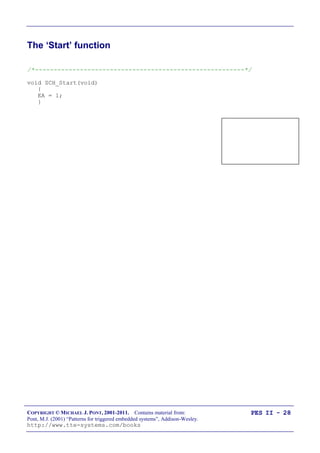
The „Start‟ function
/*--------------------------------------------------------*/
void SCH_Start(void)
{
EA = 1;
}
COPYRIGHT © MICHAEL J. PONT, 2001-2011. Contains material from:
Pont, M.J. (2001) “Patterns for triggered embedded systems”, Addison-Wesley.
http://www.tte-systems.com/books
PES II - 29
The „Delete Task‟ function
When tasks are added to the task array, SCH_Add_Task() returns
the position in the task array at which the task has been added:
Task_ID = SCH_Add_Task(Do_X,1000,0);
Sometimes it can be necessary to delete tasks from the array.
You can do so as follows: SCH_Delete_Task(Task_ID);
bit SCH_Delete_Task(const tByte TASK_INDEX)
{
bit Return_code;
if (SCH_tasks_G[TASK_INDEX].pTask == 0)
{
/* No task at this location...
-> set the global error variable */
Error_code_G = ERROR_SCH_CANNOT_DELETE_TASK;
/* ...also return an error code */
Return_code = RETURN_ERROR;
}
else
{
Return_code = RETURN_NORMAL;
}
SCH_tasks_G[TASK_INDEX].pTask = 0x0000;
SCH_tasks_G[TASK_INDEX].Delay = 0;
SCH_tasks_G[TASK_INDEX].Period = 0;
SCH_tasks_G[TASK_INDEX].RunMe = 0;
return Return_code; /* return status */
}
COPYRIGHT © MICHAEL J. PONT, 2001-2011. Contains material from:
Pont, M.J. (2001) “Patterns for triggered embedded systems”, Addison-Wesley.
http://www.tte-systems.com/books
PES II - 30
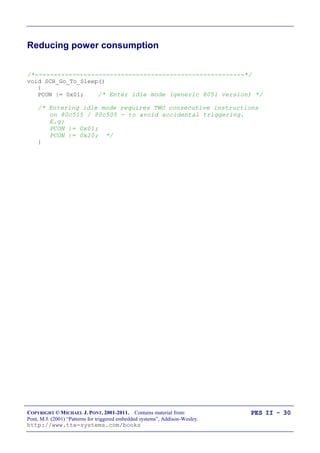
Reducing power consumption
/*--------------------------------------------------------*/
void SCH_Go_To_Sleep()
{
PCON |= 0x01; /* Enter idle mode (generic 8051 version) */
/* Entering idle mode requires TWO consecutive instructions
on 80c515 / 80c505 - to avoid accidental triggering.
E.g:
PCON |= 0x01;
PCON |= 0x20; */
}
COPYRIGHT © MICHAEL J. PONT, 2001-2011. Contains material from:
Pont, M.J. (2001) “Patterns for triggered embedded systems”, Addison-Wesley.
http://www.tte-systems.com/books
PES II - 31
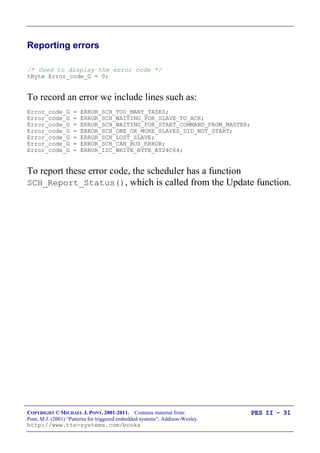
Reporting errors
/* Used to display the error code */
tByte Error_code_G = 0;
To record an error we include lines such as:
Error_code_G = ERROR_SCH_TOO_MANY_TASKS;
Error_code_G = ERROR_SCH_WAITING_FOR_SLAVE_TO_ACK;
Error_code_G = ERROR_SCH_WAITING_FOR_START_COMMAND_FROM_MASTER;
Error_code_G = ERROR_SCH_ONE_OR_MORE_SLAVES_DID_NOT_START;
Error_code_G = ERROR_SCH_LOST_SLAVE;
Error_code_G = ERROR_SCH_CAN_BUS_ERROR;
Error_code_G = ERROR_I2C_WRITE_BYTE_AT24C64;
To report these error code, the scheduler has a function
SCH_Report_Status(), which is called from the Update function.
COPYRIGHT © MICHAEL J. PONT, 2001-2011. Contains material from:
Pont, M.J. (2001) “Patterns for triggered embedded systems”, Addison-Wesley.
http://www.tte-systems.com/books
PES II - 32
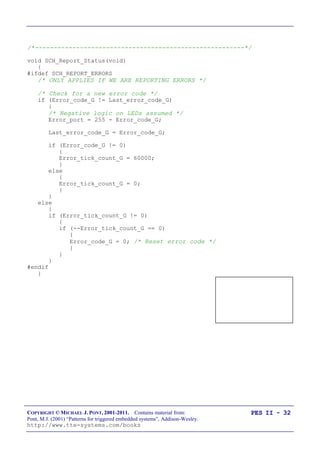
/*--------------------------------------------------------*/
void SCH_Report_Status(void)
{
#ifdef SCH_REPORT_ERRORS
/* ONLY APPLIES IF WE ARE REPORTING ERRORS */
/* Check for a new error code */
if (Error_code_G != Last_error_code_G)
{
/* Negative logic on LEDs assumed */
Error_port = 255 - Error_code_G;
Last_error_code_G = Error_code_G;
if (Error_code_G != 0)
{
Error_tick_count_G = 60000;
}
else
{
Error_tick_count_G = 0;
}
}
else
{
if (Error_tick_count_G != 0)
{
if (--Error_tick_count_G == 0)
{
Error_code_G = 0; /* Reset error code */
}
}
}
#endif
}
COPYRIGHT © MICHAEL J. PONT, 2001-2011. Contains material from:
Pont, M.J. (2001) “Patterns for triggered embedded systems”, Addison-Wesley.
http://www.tte-systems.com/books
PES II - 33
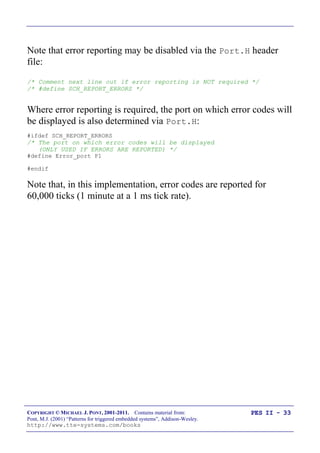
Note that error reporting may be disabled via the Port.H header
file:
/* Comment next line out if error reporting is NOT required */
/* #define SCH_REPORT_ERRORS */
Where error reporting is required, the port on which error codes will
be displayed is also determined via Port.H:
#ifdef SCH_REPORT_ERRORS
/* The port on which error codes will be displayed
(ONLY USED IF ERRORS ARE REPORTED) */
#define Error_port P1
#endif
Note that, in this implementation, error codes are reported for
60,000 ticks (1 minute at a 1 ms tick rate).
COPYRIGHT © MICHAEL J. PONT, 2001-2011. Contains material from:
Pont, M.J. (2001) “Patterns for triggered embedded systems”, Addison-Wesley.
http://www.tte-systems.com/books
PES II - 34
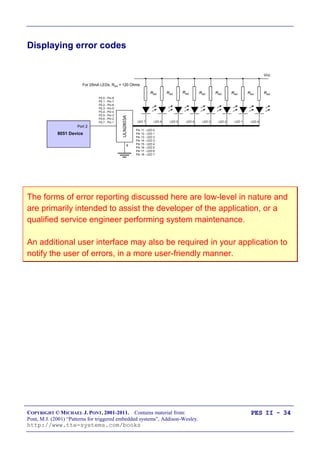
Displaying error codes
Rled Rled
Rled Rled Rled Rled Rled Rled
LED 7 LED 6 LED 5 LED 4 LED 3 LED 2 LED 1 LED 0
8051 Device
Port 2
Vcc
ULN2803A
9
P2.0 - Pin 8
P2.1 - Pin 7
P2.2 - Pin 6
P2.3 - Pin 5
P2.4 - Pin 4
P2.5 - Pin 3
P2.6 - Pin 2
P2.7 - Pin 1
Pin 11 - LED 0
Pin 12 - LED 1
Pin 13 - LED 2
Pin 14 - LED 3
Pin 15 - LED 4
Pin 16 - LED 5
Pin 17 - LED 6
Pin 18 - LED 7
For 25mA LEDs, Rled = 120 Ohms
The forms of error reporting discussed here are low-level in nature and
are primarily intended to assist the developer of the application, or a
qualified service engineer performing system maintenance.
An additional user interface may also be required in your application to
notify the user of errors, in a more user-friendly manner.
COPYRIGHT © MICHAEL J. PONT, 2001-2011. Contains material from:
Pont, M.J. (2001) “Patterns for triggered embedded systems”, Addison-Wesley.
http://www.tte-systems.com/books
PES II - 35
Hardware resource implications
Timer
The scheduler requires one hardware timer. If possible, this should
be a 16-bit timer, with auto-reload capabilities (usually Timer 2).
Memory
This main scheduler memory requirement is 7 bytes of memory per
task.
Most applications require around six tasks or less. Even in a
standard 8051/8052 with 256 bytes of internal memory the total
memory overhead is small.
COPYRIGHT © MICHAEL J. PONT, 2001-2011. Contains material from:
Pont, M.J. (2001) “Patterns for triggered embedded systems”, Addison-Wesley.
http://www.tte-systems.com/books
PES II - 36
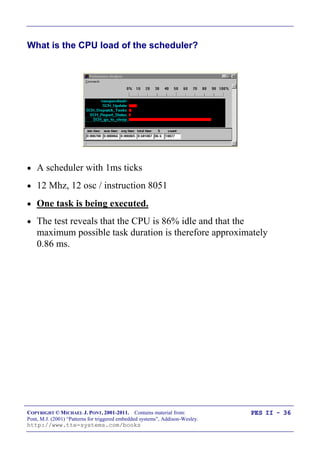
What is the CPU load of the scheduler?
 A scheduler with 1ms ticks
 12 Mhz, 12 osc / instruction 8051
 One task is being executed.
 The test reveals that the CPU is 86% idle and that the
maximum possible task duration is therefore approximately
0.86 ms.
COPYRIGHT © MICHAEL J. PONT, 2001-2011. Contains material from:
Pont, M.J. (2001) “Patterns for triggered embedded systems”, Addison-Wesley.
http://www.tte-systems.com/books
PES II - 37
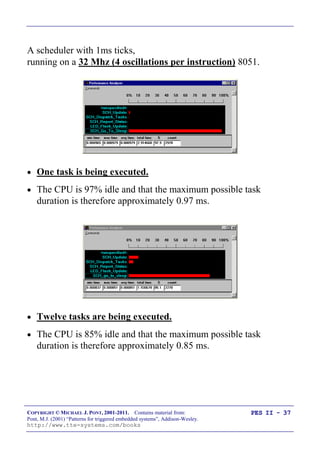
A scheduler with 1ms ticks,
running on a 32 Mhz (4 oscillations per instruction) 8051.
 One task is being executed.
 The CPU is 97% idle and that the maximum possible task
duration is therefore approximately 0.97 ms.
 Twelve tasks are being executed.
 The CPU is 85% idle and that the maximum possible task
duration is therefore approximately 0.85 ms.
COPYRIGHT © MICHAEL J. PONT, 2001-2011. Contains material from:
Pont, M.J. (2001) “Patterns for triggered embedded systems”, Addison-Wesley.
http://www.tte-systems.com/books
PES II - 38
Determining the required tick interval
In most instances, the simplest way of meeting the needs of the
various task intervals is to allocate a scheduler tick interval of 1 ms.
To keep the scheduler load as low as possible (and to reduce the
power consumption), it can help to use a long tick interval.
If you want to reduce overheads and power consumption to a
minimum, the scheduler tick interval should be set to match the
„greatest common factor‟ of all the task (and offset intervals).
COPYRIGHT © MICHAEL J. PONT, 2001-2011. Contains material from:
Pont, M.J. (2001) “Patterns for triggered embedded systems”, Addison-Wesley.
http://www.tte-systems.com/books
PES II - 39
Suppose we have three tasks (X,Y,Z), and Task X is to be run every
10 ms, Task Y every 30 ms and Task Z every 25 ms. The scheduler
tick interval needs to be set by determining the relevant factors, as
follows:
 The factors of the Task X interval (10 ms) are: 1 ms, 2ms, 5
ms, 10 ms.
 Similarly, the factors of the Task Y interval (30 ms) are as
follows: 1 ms, 2 ms, 3 ms, 5 ms, 6 ms, 10 ms, 15 ms and 30
ms.
 Finally, the factors of the Task Z interval (25 ms) are as
follows: 1 ms, 5 ms and 25 ms.
In this case, therefore, the greatest common factor is 5 ms: this is
the required tick interval.
COPYRIGHT © MICHAEL J. PONT, 2001-2011. Contains material from:
Pont, M.J. (2001) “Patterns for triggered embedded systems”, Addison-Wesley.
http://www.tte-systems.com/books
PES II - 40
Guidelines for predictable and reliable scheduling
1. For precise scheduling, the scheduler tick interval should be
set to match the „greatest common factor‟ of all the task
intervals.
2. All tasks should have a duration less than the schedule tick
interval, to ensure that the dispatcher is always free to call
any task that is due to execute. Software simulation can
often be used to measure the task duration.
3. In order to meet Condition 2, all tasks must „timeout‟ so
that they cannot block the scheduler under any
circumstances.
4. The total time required to execute all of the scheduled tasks
must be less than the available processor time. Of course,
the total processor time must include both this „task time‟
and the „scheduler time‟ required to execute the scheduler
update and dispatcher operations.
5. Tasks should be scheduled so that they are never required to
execute simultaneously: that is, task overlaps should be
minimised. Note that where all tasks are of a duration much
less than the scheduler tick interval, and that some task jitter
can be tolerated, this problem may not be significant.
COPYRIGHT © MICHAEL J. PONT, 2001-2011. Contains material from:
Pont, M.J. (2001) “Patterns for triggered embedded systems”, Addison-Wesley.
http://www.tte-systems.com/books
PES II - 41
Overall strengths and weaknesses of the scheduler
 The scheduler is simple, and can be implemented in a small amount of
code.
 The scheduler is written entirely in „C‟: it is not a separate application,
but becomes part of the developer‟s code
 The applications based on the scheduler are inherently predictable,
safe and reliable.
 The scheduler supports team working, since individual tasks can
often be developed largely independently and then assembled into the
final system.
 Obtain rapid responses to external events requires care at the design
stage.
 The tasks cannot safely use interrupts: the only interrupt that should be
used in the application is the timer-related interrupt that drives the
scheduler itself.
COPYRIGHT © MICHAEL J. PONT, 2001-2011. Contains material from:
Pont, M.J. (2001) “Patterns for triggered embedded systems”, Addison-Wesley.
http://www.tte-systems.com/books
PES II - 42
Preparations for the next seminar
Please read “PTTES” Chapter 32 before the next seminar.
40
39
38
37
36
35
34
1
2
3
4
5
6
7
„8051‟
8
9
10
33
32
31
30
29
28
27
26
25
24
11
12
13
14
15
16
17
18
19
20
23
22
21
P3.0
P1.7
RST
P1.6
P1.5
P1.4
P1.2
P1.3
P1.1
P1.0
VSS
XTL2
XTL1
P3.7
P3.6
P3.5
P3.3
P3.4
P3.2
P3.1
/EA
P0.6
P0.7
P0.5
P0.4
P0.3
P0.1
P0.2
P0.0
VCC
P2.0
P2.2
P2.1
P2.3
P2.4
P2.5
P2.7
P2.6
/PSEN
ALE
COPYRIGHT © MICHAEL J. PONT, 2001-2011. Contains material from:
Pont, M.J. (2001) “Patterns for triggered embedded systems”, Addison-Wesley.
http://www.tte-systems.com/books
PES II - 43
Seminar 3:
Analogue I/O using
ADCs and PWM
Transmitter
(Master)
Transmitter
(Master)
Receiver A
(Slave)
Receiver A
(Slave)
Receiver B
(Slave)
Receiver B
(Slave)
Receiver C
(Slave)
Receiver C
(Slave)
COPYRIGHT © MICHAEL J. PONT, 2001-2011. Contains material from:
Pont, M.J. (2001) “Patterns for triggered embedded systems”, Addison-Wesley.
http://www.tte-systems.com/books
PES II - 44
Overview of this seminar
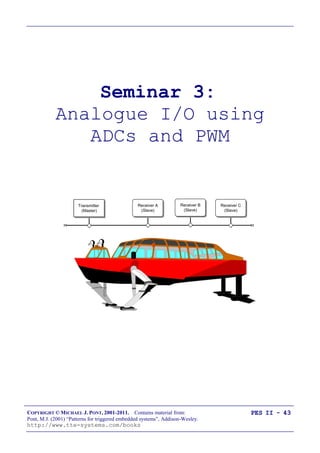
In this seminar, we will begin to consider how to make
measurements of analogue voltages using a microcontroller.
We‟ll also consider how PWM can be used to generate analogue
voltage values.
COPYRIGHT © MICHAEL J. PONT, 2001-2011. Contains material from:
Pont, M.J. (2001) “Patterns for triggered embedded systems”, Addison-Wesley.
http://www.tte-systems.com/books
PES II - 45
PATTERN: One-Shot ADC1
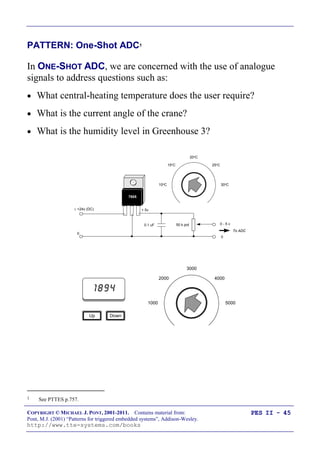
In ONE-SHOT ADC, we are concerned with the use of analogue
signals to address questions such as:
 What central-heating temperature does the user require?
 What is the current angle of the crane?
 What is the humidity level in Greenhouse 3?
20oC
15oC 25oC
10oC 30oC
0.1 uF
 +24v (DC)
0
50 k pot
+ 5v
0 - 5 v
0
To ADC
7805
1894
DownUp
3000
2000 4000
1000 5000
1 See PTTES p.757.
COPYRIGHT © MICHAEL J. PONT, 2001-2011. Contains material from:
Pont, M.J. (2001) “Patterns for triggered embedded systems”, Addison-Wesley.
http://www.tte-systems.com/books
PES II - 46
PATTERN: One-Shot ADC
We begin by considering some of the hardware options that are
available to allow the measurement of analogue voltage signals
using a microcontroller.
Specifically, we will consider four options:
 Using a microcontroller with on-chip ADC;
 Using an external serial ADC;
 Using an external parallel ADC;
 Using a current-mode ADC.
COPYRIGHT © MICHAEL J. PONT, 2001-2011. Contains material from:
Pont, M.J. (2001) “Patterns for triggered embedded systems”, Addison-Wesley.
http://www.tte-systems.com/books
PES II - 47
Using a microcontroller with on-chip ADC
Many members of the 8051 family contain on-board ADCs.
In general, use of an internal ADC (rather than an external one) will
result in increased reliability, since both hardware and software
complexity will generally be lower.
In addition, the „internal‟ solution will usually be physically
smaller, and have a lower system cost.
COPYRIGHT © MICHAEL J. PONT, 2001-2011. Contains material from:
Pont, M.J. (2001) “Patterns for triggered embedded systems”, Addison-Wesley.
http://www.tte-systems.com/books
PES II - 48
Using an external parallel ADC
The „traditional‟ alternative to an on-chip ADC is a parallel ADC.
In general, parallel ADCs have the following strengths and
weaknesses:
 They can provide fast data transfers
 They tend to be inexpensive
 They require a very simple software framework
 They tend to require a large number of port pins. In the case of a 16-bit
conversion, the external ADC will require 16 pins for the data transfer, plus
between 1 and 3 pins to control the data transfers.
 The wiring complexity can be a source of reliability problems in some
environments.
We give examples of the use of a parallel ADC below.
COPYRIGHT © MICHAEL J. PONT, 2001-2011. Contains material from:
Pont, M.J. (2001) “Patterns for triggered embedded systems”, Addison-Wesley.
http://www.tte-systems.com/books
PES II - 49
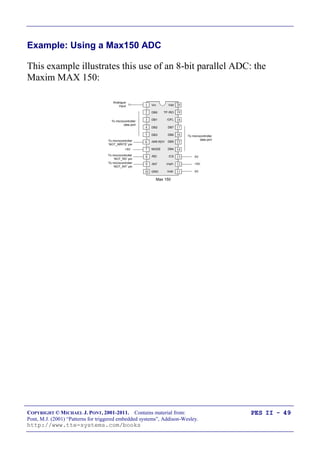
Example: Using a Max150 ADC
This example illustrates this use of an 8-bit parallel ADC: the
Maxim MAX 150:
To microcontroller
„NOT_RD‟ pin
To microcontroller
„NOT_INT‟ pin
+5V
To microcontroller
„NOT_WRITE‟ pin
+5V
0V
0V
20
19
18
17
16
15
14
1
2
3
4
5
6
7
8
9
10
13
12
11GND
/RD
/INT
MODE
/WR RDY
DB3
DB1
DB2
DB0
Vin
Vref-
/CS
Vref+
DB4
DB5
DB6
/OFL
DB7
TP /RO
Vdd
Max 150
Analogue
Input
To microcontroller
data port
To microcontroller
data port
COPYRIGHT © MICHAEL J. PONT, 2001-2011. Contains material from:
Pont, M.J. (2001) “Patterns for triggered embedded systems”, Addison-Wesley.
http://www.tte-systems.com/books
PES II - 50
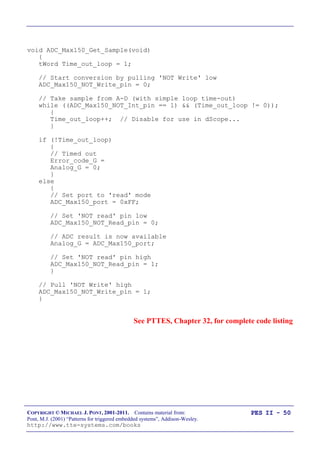
void ADC_Max150_Get_Sample(void)
{
tWord Time_out_loop = 1;
// Start conversion by pulling 'NOT Write' low
ADC_Max150_NOT_Write_pin = 0;
// Take sample from A-D (with simple loop time-out)
while ((ADC_Max150_NOT_Int_pin == 1) && (Time_out_loop != 0));
{
Time_out_loop++; // Disable for use in dScope...
}
if (!Time_out_loop)
{
// Timed out
Error_code_G =
Analog_G = 0;
}
else
{
// Set port to 'read' mode
ADC_Max150_port = 0xFF;
// Set 'NOT read' pin low
ADC_Max150_NOT_Read_pin = 0;
// ADC result is now available
Analog_G = ADC_Max150_port;
// Set 'NOT read' pin high
ADC_Max150_NOT_Read_pin = 1;
}
// Pull 'NOT Write' high
ADC_Max150_NOT_Write_pin = 1;
}
See PTTES, Chapter 32, for complete code listing
COPYRIGHT © MICHAEL J. PONT, 2001-2011. Contains material from:
Pont, M.J. (2001) “Patterns for triggered embedded systems”, Addison-Wesley.
http://www.tte-systems.com/books
PES II - 51
Using an external serial ADC
Many more recent ADCs have a serial interface. In general, serial
ADCs have the following strengths and weaknesses:
 They require a small number of port pins (between 2 and 4),
regardless of the ADC resolution.
 They require on-chip support for the serial protocol, or the use of a suitable
software library.
 The data transfer may be slower than a parallel alternative.
 They can be comparatively expensive.
We give two examples of the use of serial ADCs below.
COPYRIGHT © MICHAEL J. PONT, 2001-2011. Contains material from:
Pont, M.J. (2001) “Patterns for triggered embedded systems”, Addison-Wesley.
http://www.tte-systems.com/books
PES II - 52
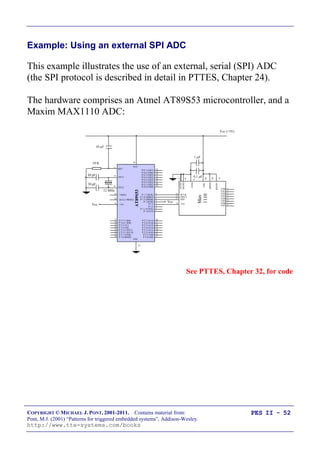
Example: Using an external SPI ADC
This example illustrates the use of an external, serial (SPI) ADC
(the SPI protocol is described in detail in PTTES, Chapter 24).
The hardware comprises an Atmel AT89S53 microcontroller, and a
Maxim MAX1110 ADC:
1
2
3
4
5
6
7
8
Vcc
P 0.7 (AD7) 32
P 0.6 (AD6) 33
P 0.5 (AD5) 34
P 0.4 (AD4) 35
P 0.3 (AD3) 36
P 0.2 (AD2) 37
P 0.1 (AD1) 38
P 0.0 (AD0) 39
8
7
6
5
4
3
2
1
P 2.7 (A15) 28
P 2.6 (A14) 27
P 2.5 (A13) 26
P 2.4 (A12) 25
P 2.3 (A11) 24
P 2.2 (A10) 23
P 2.1 (A9) 22
P 2.0 (A8) 21
/ PSEN
ALE (/ PROG)
29
30
31
XTL1
19
XTL2
18
RST
40
VCC
VSS
AT89S53
Vcc (+5V)
Vcc
30 pF
30 pF
10 F
10 K
20
P 3.7 (/ RD)
P 3.6 (/ WR)
P 3.5 (T1)
P 3.4 (T0)
P 3.3 (/ INT1)
P 3.2 (/ INT 0)
P 3.1 (TXD)
P 3.0 (RXD)
/ EA
17
16
15
14
13
12
11
10
9
P 1.7 (SCK)
P 1.6 (MISO)
P 1.5 (MOSI)
P 1.4(/SS)
P 1.3
P 1.2
P 1.1 (T2EX)
P 1.0 (T2)
12 MHz
Max
1110
CH0
CH1
CH2
CH3
CH4
CH5
CH6
CH7
AGND
DGND
COM
13
14
9
1 F
0.1 F
SCLK
DOUT
DIN
/CS
19
15
17
18
/SHDN
20
REFIN
11
Vdd
10
See PTTES, Chapter 32, for code
COPYRIGHT © MICHAEL J. PONT, 2001-2011. Contains material from:
Pont, M.J. (2001) “Patterns for triggered embedded systems”, Addison-Wesley.
http://www.tte-systems.com/books
PES II - 53
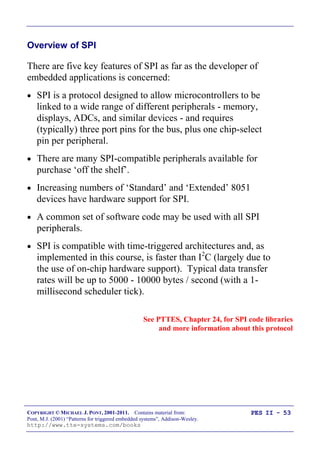
Overview of SPI
There are five key features of SPI as far as the developer of
embedded applications is concerned:
 SPI is a protocol designed to allow microcontrollers to be
linked to a wide range of different peripherals - memory,
displays, ADCs, and similar devices - and requires
(typically) three port pins for the bus, plus one chip-select
pin per peripheral.
 There are many SPI-compatible peripherals available for
purchase „off the shelf‟.
 Increasing numbers of „Standard‟ and „Extended‟ 8051
devices have hardware support for SPI.
 A common set of software code may be used with all SPI
peripherals.
 SPI is compatible with time-triggered architectures and, as
implemented in this course, is faster than I2
C (largely due to
the use of on-chip hardware support). Typical data transfer
rates will be up to 5000 - 10000 bytes / second (with a 1-
millisecond scheduler tick).
See PTTES, Chapter 24, for SPI code libraries
and more information about this protocol
COPYRIGHT © MICHAEL J. PONT, 2001-2011. Contains material from:
Pont, M.J. (2001) “Patterns for triggered embedded systems”, Addison-Wesley.
http://www.tte-systems.com/books
PES II - 54
Back to the example …
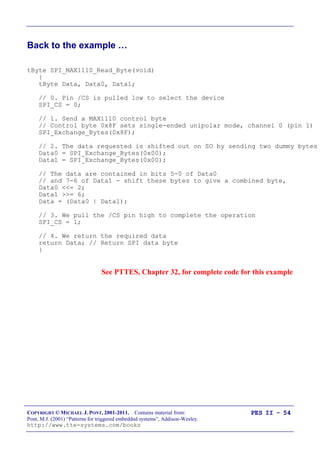
tByte SPI_MAX1110_Read_Byte(void)
{
tByte Data, Data0, Data1;
// 0. Pin /CS is pulled low to select the device
SPI_CS = 0;
// 1. Send a MAX1110 control byte
// Control byte 0x8F sets single-ended unipolar mode, channel 0 (pin 1)
SPI_Exchange_Bytes(0x8F);
// 2. The data requested is shifted out on SO by sending two dummy bytes
Data0 = SPI_Exchange_Bytes(0x00);
Data1 = SPI_Exchange_Bytes(0x00);
// The data are contained in bits 5-0 of Data0
// and 7-6 of Data1 - shift these bytes to give a combined byte,
Data0 <<= 2;
Data1 >>= 6;
Data = (Data0 | Data1);
// 3. We pull the /CS pin high to complete the operation
SPI_CS = 1;
// 4. We return the required data
return Data; // Return SPI data byte
}
See PTTES, Chapter 32, for complete code for this example
COPYRIGHT © MICHAEL J. PONT, 2001-2011. Contains material from:
Pont, M.J. (2001) “Patterns for triggered embedded systems”, Addison-Wesley.
http://www.tte-systems.com/books
PES II - 55
Example: Using an external I2
C ADC
This example illustrates the use of an external, serial (I2
C) ADC
(the I2
C protocol is described in detail in PTTES, Chapter 23).
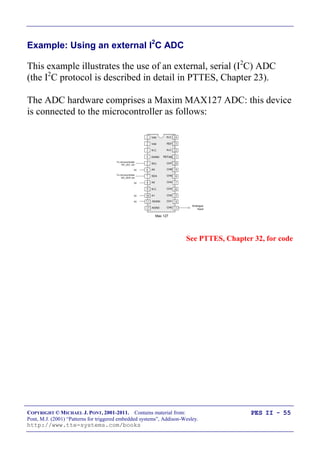
The ADC hardware comprises a Maxim MAX127 ADC: this device
is connected to the microcontroller as follows:
Analogue
Input
0V
0V
0V
0V
To microcontroller
„I2C_SCL‟ pin
To microcontroller
„I2C_SDA‟ pin
24
23
22
21
20
19
1
2
3
4
5
6 A0
SCL
N.C.
DGND
Vdd
Vdd
7 18
8
9
10
17
16
15A1
A2
N.C.
SDA
Max 127
11 14
12 13AGND
/SHDN
CH2
CH4
CH3
CH5
CH6
CH7
N.C.
REFadj
REF
N.C.
CH0
CH1
See PTTES, Chapter 32, for code
COPYRIGHT © MICHAEL J. PONT, 2001-2011. Contains material from:
Pont, M.J. (2001) “Patterns for triggered embedded systems”, Addison-Wesley.
http://www.tte-systems.com/books
PES II - 56
Overview of I2C
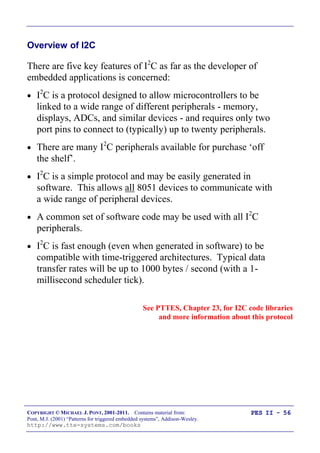
There are five key features of I2
C as far as the developer of
embedded applications is concerned:
 I2
C is a protocol designed to allow microcontrollers to be
linked to a wide range of different peripherals - memory,
displays, ADCs, and similar devices - and requires only two
port pins to connect to (typically) up to twenty peripherals.
 There are many I2
C peripherals available for purchase „off
the shelf‟.
 I2
C is a simple protocol and may be easily generated in
software. This allows all 8051 devices to communicate with
a wide range of peripheral devices.
 A common set of software code may be used with all I2
C
peripherals.
 I2
C is fast enough (even when generated in software) to be
compatible with time-triggered architectures. Typical data
transfer rates will be up to 1000 bytes / second (with a 1-
millisecond scheduler tick).
See PTTES, Chapter 23, for I2C code libraries
and more information about this protocol
COPYRIGHT © MICHAEL J. PONT, 2001-2011. Contains material from:
Pont, M.J. (2001) “Patterns for triggered embedded systems”, Addison-Wesley.
http://www.tte-systems.com/books
PES II - 57
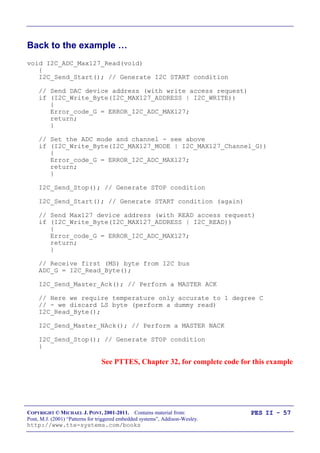
Back to the example …
void I2C_ADC_Max127_Read(void)
{
I2C_Send_Start(); // Generate I2C START condition
// Send DAC device address (with write access request)
if (I2C_Write_Byte(I2C_MAX127_ADDRESS | I2C_WRITE))
{
Error_code_G = ERROR_I2C_ADC_MAX127;
return;
}
// Set the ADC mode and channel - see above
if (I2C_Write_Byte(I2C_MAX127_MODE | I2C_MAX127_Channel_G))
{
Error_code_G = ERROR_I2C_ADC_MAX127;
return;
}
I2C_Send_Stop(); // Generate STOP condition
I2C_Send_Start(); // Generate START condition (again)
// Send Max127 device address (with READ access request)
if (I2C_Write_Byte(I2C_MAX127_ADDRESS | I2C_READ))
{
Error_code_G = ERROR_I2C_ADC_MAX127;
return;
}
// Receive first (MS) byte from I2C bus
ADC_G = I2C_Read_Byte();
I2C_Send_Master_Ack(); // Perform a MASTER ACK
// Here we require temperature only accurate to 1 degree C
// - we discard LS byte (perform a dummy read)
I2C_Read_Byte();
I2C_Send_Master_NAck(); // Perform a MASTER NACK
I2C_Send_Stop(); // Generate STOP condition
}
See PTTES, Chapter 32, for complete code for this example
COPYRIGHT © MICHAEL J. PONT, 2001-2011. Contains material from:
Pont, M.J. (2001) “Patterns for triggered embedded systems”, Addison-Wesley.
http://www.tte-systems.com/books
PES II - 58
What is PWM?
x yV
Time
Duty cycle (%) =
Period = x + y, where x and y are in seconds.
Frequency = , where x and y are in seconds.
The key point to note is that the average voltage seen by the load is
given by the duty cycle multiplied by the load voltage.
See PTTES, Chapter 33
COPYRIGHT © MICHAEL J. PONT, 2001-2011. Contains material from:
Pont, M.J. (2001) “Patterns for triggered embedded systems”, Addison-Wesley.
http://www.tte-systems.com/books
PES II - 59
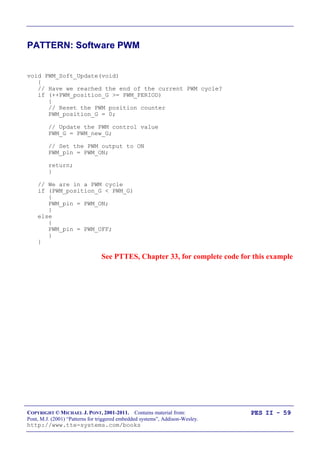
PATTERN: Software PWM
void PWM_Soft_Update(void)
{
// Have we reached the end of the current PWM cycle?
if (++PWM_position_G >= PWM_PERIOD)
{
// Reset the PWM position counter
PWM_position_G = 0;
// Update the PWM control value
PWM_G = PWM_new_G;
// Set the PWM output to ON
PWM_pin = PWM_ON;
return;
}
// We are in a PWM cycle
if (PWM_position_G < PWM_G)
{
PWM_pin = PWM_ON;
}
else
{
PWM_pin = PWM_OFF;
}
}
See PTTES, Chapter 33, for complete code for this example
COPYRIGHT © MICHAEL J. PONT, 2001-2011. Contains material from:
Pont, M.J. (2001) “Patterns for triggered embedded systems”, Addison-Wesley.
http://www.tte-systems.com/books
PES II - 60
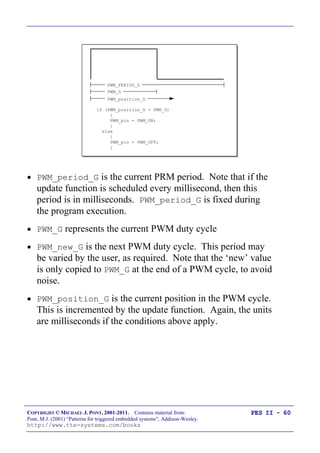
PWM_PERIOD_G
PWM_position_G
if (PWM_position_G < PWM_G)
{
PWM_pin = PWM_ON;
}
else
{
PWM_pin = PWM_OFF;
}
PWM_G
 PWM_period_G is the current PRM period. Note that if the
update function is scheduled every millisecond, then this
period is in milliseconds. PWM_period_G is fixed during
the program execution.
 PWM_G represents the current PWM duty cycle
 PWM_new_G is the next PWM duty cycle. This period may
be varied by the user, as required. Note that the „new‟ value
is only copied to PWM_G at the end of a PWM cycle, to avoid
noise.
 PWM_position_G is the current position in the PWM cycle.
This is incremented by the update function. Again, the units
are milliseconds if the conditions above apply.
COPYRIGHT © MICHAEL J. PONT, 2001-2011. Contains material from:
Pont, M.J. (2001) “Patterns for triggered embedded systems”, Addison-Wesley.
http://www.tte-systems.com/books
PES II - 61
Using a 1 ms scheduler, the PWM frequency (Hz) and PWM
resolution (%) we obtain are given by:
and,
ResolutionPWM %
where N is the number of PWM bits you use.
For example, 5-bit PWM allows you to control the output to a
resolution of approximately 3%, at a frequency of approximately
31Hz.
COPYRIGHT © MICHAEL J. PONT, 2001-2011. Contains material from:
Pont, M.J. (2001) “Patterns for triggered embedded systems”, Addison-Wesley.
http://www.tte-systems.com/books
PES II - 62
Preparations for the next seminar
Please read “PTTES” Chapter 17 (and skim read 36 and 37)
before the next seminar.40
39
38
37
36
35
34
1
2
3
4
5
6
7
„8051‟
8
9
10
33
32
31
30
29
28
27
26
25
24
11
12
13
14
15
16
17
18
19
20
23
22
21
P3.0
P1.7
RST
P1.6
P1.5
P1.4
P1.2
P1.3
P1.1
P1.0
VSS
XTL2
XTL1
P3.7
P3.6
P3.5
P3.3
P3.4
P3.2
P3.1
/EA
P0.6
P0.7
P0.5
P0.4
P0.3
P0.1
P0.2
P0.0
VCC
P2.0
P2.2
P2.1
P2.3
P2.4
P2.5
P2.7
P2.6
/PSEN
ALE
COPYRIGHT © MICHAEL J. PONT, 2001-2011. Contains material from:
Pont, M.J. (2001) “Patterns for triggered embedded systems”, Addison-Wesley.
http://www.tte-systems.com/books
PES II - 63
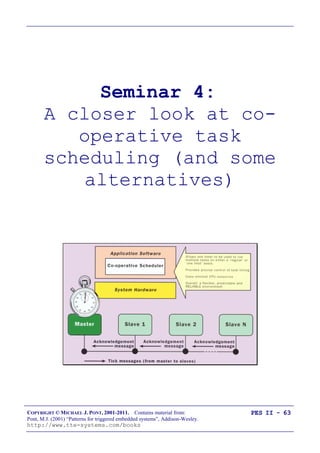
Seminar 4:
A closer look at co-
operative task
scheduling (and some
alternatives)
COPYRIGHT © MICHAEL J. PONT, 2001-2011. Contains material from:
Pont, M.J. (2001) “Patterns for triggered embedded systems”, Addison-Wesley.
http://www.tte-systems.com/books
PES II - 64
Overview of this seminar
 In this seminar, we‟ll review some of the features of the co-
operative scheduler discussed in seminars 1 and 2.
 We‟ll then consider the features of a pre-emptive scheduler
 We‟ll go on to develop a hybrid scheduler, which has
many of the useful features of both co-operative and pre-
emptive schedulers (but is simpler to build - and generally
more reliable - than a fully pre-emptive design)
 Finally, we‟ll look at a range of different designs for other
forms of (co-operative) scheduler.
COPYRIGHT © MICHAEL J. PONT, 2001-2011. Contains material from:
Pont, M.J. (2001) “Patterns for triggered embedded systems”, Addison-Wesley.
http://www.tte-systems.com/books
PES II - 65
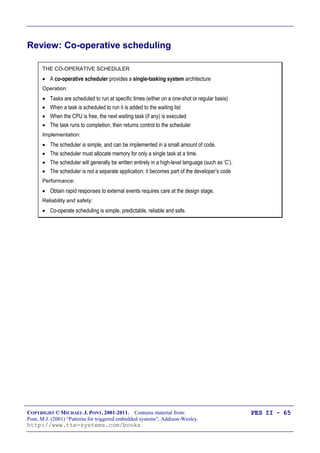
Review: Co-operative scheduling
THE CO-OPERATIVE SCHEDULER
 A co-operative scheduler provides a single-tasking system architecture
Operation:
 Tasks are scheduled to run at specific times (either on a one-shot or regular basis)
 When a task is scheduled to run it is added to the waiting list
 When the CPU is free, the next waiting task (if any) is executed
 The task runs to completion, then returns control to the scheduler
Implementation:
 The scheduler is simple, and can be implemented in a small amount of code.
 The scheduler must allocate memory for only a single task at a time.
 The scheduler will generally be written entirely in a high-level language (such as ‘C’).
 The scheduler is not a separate application; it becomes part of the developer’s code
Performance:
 Obtain rapid responses to external events requires care at the design stage.
Reliability and safety:
 Co-operate scheduling is simple, predictable, reliable and safe.
COPYRIGHT © MICHAEL J. PONT, 2001-2011. Contains material from:
Pont, M.J. (2001) “Patterns for triggered embedded systems”, Addison-Wesley.
http://www.tte-systems.com/books
PES II - 66
The pre-emptive scheduler
Overview:
THE PRE-EMPTIVE SCHEDULER
 A pre-emptive scheduler provides a multi-tasking system architecture
Operation:
 Tasks are scheduled to run at specific times (either on a one-shot or regular basis)
 When a task is scheduled to run it is added to the waiting list
 Waiting tasks (if any) are run for a fixed period then - if not completed - are paused and placed back in
the waiting list. The next waiting task is then run for a fixed period, and so on.
Implementation:
 The scheduler is comparatively complicated, not least because features such as semaphores must be
implemented to avoid conflicts when ‘concurrent’ tasks attempt to access shared resources.
 The scheduler must allocate memory is to hold all the intermediate states of pre-empted tasks.
 The scheduler will generally be written (at least in part) in assembly language.
 The scheduler is generally created as a separate application.
Performance:
 Rapid responses to external events can be obtained.
Reliability and safety:
 Generally considered to be less predictable, and less reliable, than co-operative approaches.
COPYRIGHT © MICHAEL J. PONT, 2001-2011. Contains material from:
Pont, M.J. (2001) “Patterns for triggered embedded systems”, Addison-Wesley.
http://www.tte-systems.com/books
PES II - 67
Why do we avoid pre-emptive schedulers in this course?
Various research studies have demonstrated that, compared to pre-
emptive schedulers, co-operative schedulers have a number of
desirable features, particularly for use in safety-related systems.
“[Pre-emptive] schedules carry greater runtime overheads
because of the need for context switching - storage and retrieval
of partially computed results. [Co-operative] algorithms do not
incur such overheads. Other advantages of [co-operative]
algorithms include their better understandability, greater
predictability, ease of testing and their inherent capability for
guaranteeing exclusive access to any shared resource or data.”.
Nissanke (1997, p.237)
“Significant advantages are obtained when using this [co-
operative] technique. Since the processes are not interruptable,
poor synchronisation does not give rise to the problem of
shared data. Shared subroutines can be implemented without
producing re-entrant code or implementing lock and unlock
mechanisms”.
Allworth (1981, p.53-54)
Compared to pre-emptive alternatives, co-operative schedulers
have the following advantages: [1] The scheduler is simpler; [2]
The overheads are reduced; [3] Testing is easier; [4]
Certification authorities tend to support this form of scheduling.
Bate (2000)
[See PTTES, Chapter 13]
COPYRIGHT © MICHAEL J. PONT, 2001-2011. Contains material from:
Pont, M.J. (2001) “Patterns for triggered embedded systems”, Addison-Wesley.
http://www.tte-systems.com/books
PES II - 68
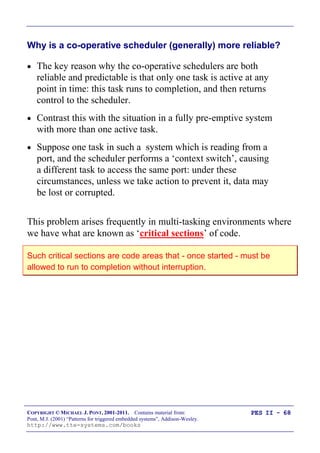
Why is a co-operative scheduler (generally) more reliable?
 The key reason why the co-operative schedulers are both
reliable and predictable is that only one task is active at any
point in time: this task runs to completion, and then returns
control to the scheduler.
 Contrast this with the situation in a fully pre-emptive system
with more than one active task.
 Suppose one task in such a system which is reading from a
port, and the scheduler performs a „context switch‟, causing
a different task to access the same port: under these
circumstances, unless we take action to prevent it, data may
be lost or corrupted.
This problem arises frequently in multi-tasking environments where
we have what are known as „critical sections‟ of code.
Such critical sections are code areas that - once started - must be
allowed to run to completion without interruption.
COPYRIGHT © MICHAEL J. PONT, 2001-2011. Contains material from:
Pont, M.J. (2001) “Patterns for triggered embedded systems”, Addison-Wesley.
http://www.tte-systems.com/books
PES II - 69
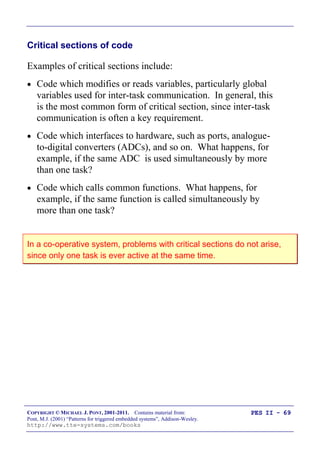
Critical sections of code
Examples of critical sections include:
 Code which modifies or reads variables, particularly global
variables used for inter-task communication. In general, this
is the most common form of critical section, since inter-task
communication is often a key requirement.
 Code which interfaces to hardware, such as ports, analogue-
to-digital converters (ADCs), and so on. What happens, for
example, if the same ADC is used simultaneously by more
than one task?
 Code which calls common functions. What happens, for
example, if the same function is called simultaneously by
more than one task?
In a co-operative system, problems with critical sections do not arise,
since only one task is ever active at the same time.
COPYRIGHT © MICHAEL J. PONT, 2001-2011. Contains material from:
Pont, M.J. (2001) “Patterns for triggered embedded systems”, Addison-Wesley.
http://www.tte-systems.com/books
PES II - 70
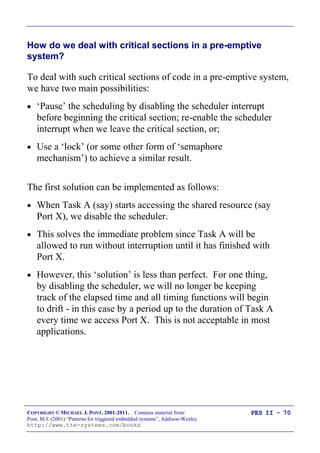
How do we deal with critical sections in a pre-emptive
system?
To deal with such critical sections of code in a pre-emptive system,
we have two main possibilities:
 „Pause‟ the scheduling by disabling the scheduler interrupt
before beginning the critical section; re-enable the scheduler
interrupt when we leave the critical section, or;
 Use a „lock‟ (or some other form of „semaphore
mechanism‟) to achieve a similar result.
The first solution can be implemented as follows:
 When Task A (say) starts accessing the shared resource (say
Port X), we disable the scheduler.
 This solves the immediate problem since Task A will be
allowed to run without interruption until it has finished with
Port X.
 However, this „solution‟ is less than perfect. For one thing,
by disabling the scheduler, we will no longer be keeping
track of the elapsed time and all timing functions will begin
to drift - in this case by a period up to the duration of Task A
every time we access Port X. This is not acceptable in most
applications.
COPYRIGHT © MICHAEL J. PONT, 2001-2011. Contains material from:
Pont, M.J. (2001) “Patterns for triggered embedded systems”, Addison-Wesley.
http://www.tte-systems.com/books
PES II - 71
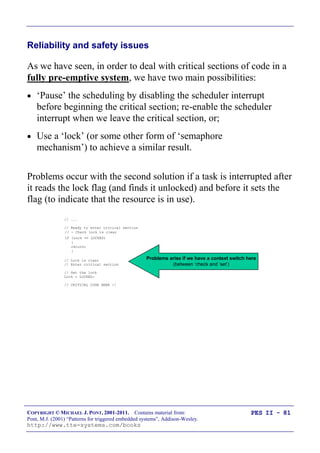
Building a “lock” mechanism
The use of locks is a better solution.
Before entering the critical section of code, we „lock‟ the associated
resource; when we have finished with the resource we „unlock‟ it.
While locked, no other process may enter the critical section.
This is one way we might try to achieve this:
1. Task A checks the „lock‟ for Port X it wishes to access.
2. If the section is locked, Task A waits.
3. When the port is unlocked, Task A sets the lock and then uses
the port.
4. When Task A has finished with the port, it leaves the critical
section and unlocks the port.
COPYRIGHT © MICHAEL J. PONT, 2001-2011. Contains material from:
Pont, M.J. (2001) “Patterns for triggered embedded systems”, Addison-Wesley.
http://www.tte-systems.com/books
PES II - 72
Implementing this algorithm in code also seems straightforward:
#define UNLOCKED 0
#define LOCKED 1
bit Lock; // Global lock flag
// ...
// Ready to enter critical section
// - Wait for lock to become clear
// (FOR SIMPLICITY, NO TIMEOUT CAPABILITY IS SHOWN)
while(Lock == LOCKED);
// Lock is clear
// Enter critical section
// Set the lock
Lock = LOCKED;
// CRITICAL CODE HERE //
// Ready to leave critical section
// Release the lock
Lock = UNLOCKED;
// ...
A
COPYRIGHT © MICHAEL J. PONT, 2001-2011. Contains material from:
Pont, M.J. (2001) “Patterns for triggered embedded systems”, Addison-Wesley.
http://www.tte-systems.com/books
PES II - 73
However, the above code cannot be guaranteed to work correctly
under all circumstances.
Consider the part of the code labelled „A‟. If our system is fully
pre-emptive, then our task can reach this point at the same time as
the scheduler performs a context switch and allows (say) Task B
access to the CPU. If Task Y also wants to access the Port X, we
can then have a situation as follows:
 Task A has checked the lock for Port X and found that the
port is available; Task A has, however, not yet changed the
lock flag.
 Task B is then „switched in‟. Task B checks the lock flag
and it is still clear. Task B sets the lock flag and begins to
use Port X.
 Task A is „switched in‟ again. As far as Task A is
concerned, the port is not locked; this task therefore sets the
flag, and starts to use the port, unaware that Task B is
already doing so.
 …
As we can see, this simple lock code violates the principal of
mutual exclusion: that is, it allows more than one task to access a
critical code section. The problem arises because it is possible for
the context switch to occur after a task has checked the lock flag but
before the task changes the lock flag. In other words, the lock
„check and set code‟ (designed to control access to a critical
section of code), is itself a critical section.
COPYRIGHT © MICHAEL J. PONT, 2001-2011. Contains material from:
Pont, M.J. (2001) “Patterns for triggered embedded systems”, Addison-Wesley.
http://www.tte-systems.com/books
PES II - 74
 This problem can be solved.
 For example, because it takes little time to „check and set‟
the lock code, we can disable interrupts for this period.
 However, this is not in itself a complete solution: because
there is a chance that an interrupt may have occurred even in
the short period of „check and set‟, we then need to check
the relevant interrupt flag(s) and - if necessary - call the
relevant ISR(s). This can be done, but it adds substantially
to the complexity of the operating environment.
Even if we build a working lock mechanism, this is only a partial solution
to the problems caused by multi-tasking. If the purpose of Task A is to
read from an ADC, and Task B has locked the ADC when the Task A is
invoked, then Task A cannot carry out its required activity. Use of locks
(or any other mechanism), can prevent the system from crashing, but
cannot allow two tasks to have access to the ADC simultaneously.
When using a co-operative scheduler, such problems do not arise.
COPYRIGHT © MICHAEL J. PONT, 2001-2011. Contains material from:
Pont, M.J. (2001) “Patterns for triggered embedded systems”, Addison-Wesley.
http://www.tte-systems.com/books
PES II - 75
The “best of both worlds” - a hybrid scheduler
THE HYBRID SCHEDULER
 A hybrid scheduler provides limited multi-tasking capabilities
Operation:
 Supports any number of co-operatively-scheduled tasks
 Supports a single pre-emptive task (which can interrupt the co-operative tasks)
Implementation:
 The scheduler is simple, and can be implemented in a small amount of code.
 The scheduler must allocate memory for - at most - two tasks at a time.
 The scheduler will generally be written entirely in a high-level language (such as ‘C’).
 The scheduler is not a separate application; it becomes part of the developer’s code
Performance:
 Rapid responses to external events can be obtained.
Reliability and safety:
 With careful design, can be as reliable as a (pure) co-operative scheduler.
COPYRIGHT © MICHAEL J. PONT, 2001-2011. Contains material from:
Pont, M.J. (2001) “Patterns for triggered embedded systems”, Addison-Wesley.
http://www.tte-systems.com/books
PES II - 76
Creating a hybrid scheduler
The „update‟ function from a co-operative scheduler:
void SCH_Update(void) interrupt INTERRUPT_Timer_2_Overflow
{
tByte Index;
TF2 = 0; /* Have to manually clear this. */
/* NOTE: calculations are in *TICKS* (not milliseconds) */
for (Index = 0; Index < SCH_MAX_TASKS; Index++)
{
/* Check if there is a task at this location */
if (SCH_tasks_G[Index].Task_p)
{
if (--SCH_tasks_G[Index].Delay == 0)
{
/* The task is due to run */
SCH_tasks_G[Index].RunMe += 1; /* Inc. RunMe */
if (SCH_tasks_G[Index].Period)
{
/* Schedule periodic tasks to run again */
SCH_tasks_G[Index].Delay = SCH_tasks_G[Index].Period;
}
}
}
}
}
COPYRIGHT © MICHAEL J. PONT, 2001-2011. Contains material from:
Pont, M.J. (2001) “Patterns for triggered embedded systems”, Addison-Wesley.
http://www.tte-systems.com/books
PES II - 77
The co-operative version assumes a scheduler data type as follows:
/* Store in DATA area, if possible, for rapid access
[Total memory per task is 7 bytes] */
typedef data struct
{
/* Pointer to the task (must be a 'void (void)' function) */
void (code * Task_p)(void);
/* Delay (ticks) until the function will (next) be run
- see SCH_Add_Task() for further details */
tWord Delay;
/* Interval (ticks) between subsequent runs.
- see SCH_Add_Task() for further details */
tWord Period;
/* Set to 1 (by scheduler) when task is due to execute */
tByte RunMe;
} sTask;
COPYRIGHT © MICHAEL J. PONT, 2001-2011. Contains material from:
Pont, M.J. (2001) “Patterns for triggered embedded systems”, Addison-Wesley.
http://www.tte-systems.com/books
PES II - 78
The „Update‟ function for a hybrid scheduler.
void hSCH_Update(void) interrupt INTERRUPT_Timer_2_Overflow
{
tByte Index;
TF2 = 0; /* Have to manually clear this. */
/* NOTE: calculations are in *TICKS* (not milliseconds) */
for (Index = 0; Index < hSCH_MAX_TASKS; Index++)
{
/* Check if there is a task at this location */
if (hSCH_tasks_G[Index].pTask)
{
if (--hSCH_tasks_G[Index].Delay == 0)
{
/* The task is due to run */
if (hSCH_tasks_G[Index].Co_op)
{
/* If it is co-op, inc. RunMe */
hSCH_tasks_G[Index].RunMe += 1;
}
else
{
/* If it is a pre-emp, run it IMMEDIATELY */
(*hSCH_tasks_G[Index].pTask)();
hSCH_tasks_G[Index].RunMe -= 1; /* Dec RunMe */
/* Periodic tasks will automatically run again
- if this is a 'one shot' task, delete it. */
if (hSCH_tasks_G[Index].Period == 0)
{
hSCH_tasks_G[Index].pTask = 0;
}
}
if (hSCH_tasks_G[Index].Period)
{
/* Schedule regular tasks to run again */
hSCH_tasks_G[Index].Delay = hSCH_tasks_G[Index].Period;
}
}
}
}
COPYRIGHT © MICHAEL J. PONT, 2001-2011. Contains material from:
Pont, M.J. (2001) “Patterns for triggered embedded systems”, Addison-Wesley.
http://www.tte-systems.com/books
PES II - 79
The hybrid version assumes a scheduler data type as follows:
/* Store in DATA area, if possible, for rapid access
[Total memory per task is 8 bytes] */
typedef data struct
{
/* Pointer to the task (must be a 'void (void)' function) */
void (code * Task_p)(void);
/* Delay (ticks) until the function will (next) be run
- see SCH_Add_Task() for further details. */
tWord Delay;
/* Interval (ticks) between subsequent runs.
- see SCH_Add_Task() for further details. */
tWord Period;
/* Set to 1 (by scheduler) when task is due to execute */
tByte RunMe;
/* Set to 1 if task is co-operative;
Set to 0 if task is pre-emptive. */
tByte Co_op;
} sTask;
COPYRIGHT © MICHAEL J. PONT, 2001-2011. Contains material from:
Pont, M.J. (2001) “Patterns for triggered embedded systems”, Addison-Wesley.
http://www.tte-systems.com/books
PES II - 80
Sch_Add_Task(Task_Name, Initial_Delay, Period);
Task_Name
the name of the function
(task) that you wish to
schedule
Period
the interval (in ticks)
between repeated
executions of the task.
If set to 0, the task is
executed only once.
Initial_Delay
the delay (in ticks)
before task is first
executed. If set to 0,
the task is executed
immediately.
hSCH_Add_Task(Task_Name, Initial_Delay, Period, Co_op);
Task_Name
the name of the function
(task) that you wish to
schedule
Period
the interval (ticks)
between repeated
executions of the task.
If set to 0, the task is
executed only once.
Initial_Delay
the delay (in ticks)
before task is first
executed. If set to 0,
the task is executed
immediately.
Co_op
set to „1‟ if the task is
co-operative;
set to „0‟ if the task is
pre-emptive
COPYRIGHT © MICHAEL J. PONT, 2001-2011. Contains material from:
Pont, M.J. (2001) “Patterns for triggered embedded systems”, Addison-Wesley.
http://www.tte-systems.com/books
PES II - 81
Reliability and safety issues
As we have seen, in order to deal with critical sections of code in a
fully pre-emptive system, we have two main possibilities:
 „Pause‟ the scheduling by disabling the scheduler interrupt
before beginning the critical section; re-enable the scheduler
interrupt when we leave the critical section, or;
 Use a „lock‟ (or some other form of „semaphore
mechanism‟) to achieve a similar result.
Problems occur with the second solution if a task is interrupted after
it reads the lock flag (and finds it unlocked) and before it sets the
flag (to indicate that the resource is in use).
// ...
// Ready to enter critical section
// - Check lock is clear
if (Lock == LOCKED)
{
return;
}
// Lock is clear
// Enter critical section
// Set the lock
Lock = LOCKED;
// CRITICAL CODE HERE //
Problems arise if we have a context switch here
(between „check and „set‟)
COPYRIGHT © MICHAEL J. PONT, 2001-2011. Contains material from:
Pont, M.J. (2001) “Patterns for triggered embedded systems”, Addison-Wesley.
http://www.tte-systems.com/books
PES II - 82
The problem does not occur in a hybrid scheduler, for the following
reasons:
 In the case of pre-emptive tasks - because they cannot be
interrupted - the „interrupt between check and lock‟ situation
cannot arise.
 In the case of co-operative tasks (which can be interrupted),
the problem again cannot occur, for slightly different
reasons.
Co-operative tasks can be interrupted „between check and
lock‟, but only by a pre-emptive task. If the pre-emptive
task interrupts and finds that a critical section is unlocked, it
will set the lock2, use the resource, then clear the lock: that
is, it will run to completion. The co-operative task will then
resume and will find the system in the same state that it
was in before the pre-emptive task interrupted: as a
result, there can be no breach of the mutual exclusion rule.
Note that the hybrid scheduler solves the problem of access to
critical sections of code in a simple way: unlike the complete pre-
emptive scheduler, we do not require the creation of complex code
„lock‟ or „semaphore‟ structures.
2 Strictly, setting the lock flag is not necessary, as no interruption is possible.
COPYRIGHT © MICHAEL J. PONT, 2001-2011. Contains material from:
Pont, M.J. (2001) “Patterns for triggered embedded systems”, Addison-Wesley.
http://www.tte-systems.com/books
PES II - 83
The safest way to use the hybrid scheduler
The most reliable way to use the hybrid scheduler is as follows
 Create as many co-operative tasks as you require. It is
likely that you will be using a hybrid scheduler because one
or more of these tasks may have a duration greater than the
tick interval; this can be done safely with a hybrid
scheduler, but you must ensure that the tasks do not overlap.
 Implement one pre-emptive task; typically (but not
necessarily) this will be called at every tick interval. A good
use of this task is, for example, to check for errors or
emergency conditions: this task can thereby be used to
ensure that your system is able to respond within (say) 10ms
to an external event, even if its main purpose is to run (say)
a 1000 ms co-operative task.
 Remember that the pre-emptive task(s) can interrupt the co-
operative tasks. If there are critical code sections, you need
to implement a simple lock mechanism
 The pre-emptive task must be short (with a maximum
duration of around 50% of the tick interval - preferably
much less), otherwise overall system performance will be
greatly impaired.
 Test the application carefully, under a full range of
operating conditions, and monitor for errors.
COPYRIGHT © MICHAEL J. PONT, 2001-2011. Contains material from:
Pont, M.J. (2001) “Patterns for triggered embedded systems”, Addison-Wesley.
http://www.tte-systems.com/books
PES II - 84
Overall strengths and weaknesses
The overall strengths and weaknesses of Hybrid Scheduler may be
summarised as follows:
 Has the ability to deal with both „long infrequent tasks‟ and (a single)
„short frequent task‟ that cannot be provided by a pure Co-operative
Scheduler.
 Is safe and predictable, if used according to the guidelines.
 It must be handled with caution.
COPYRIGHT © MICHAEL J. PONT, 2001-2011. Contains material from:
Pont, M.J. (2001) “Patterns for triggered embedded systems”, Addison-Wesley.
http://www.tte-systems.com/books
PES II - 85
Other forms of co-operative scheduler
 255-TICK SCHEDULER [PTTES, p.747]
A scheduler designed to run multiple tasks, but with reduced
memory (and CPU) overheads. This scheduler operates in
the same way as the standard co-operative schedulers, but
all information is stored in byte-sized (rather than word-
sized) variables: this reduces the required memory for each
task by around 30%.
 ONE-TASK SCHEDULER [PTTES, p.749]
A stripped-down, co-operative scheduler able to manage a
single task. This very simple scheduler makes very efficient
use of hardware resources, with the bare minimum of CPU
and memory overheads.
 ONE-YEAR SCHEDULER [PTTES, p.755]
A scheduler designed for very low-power operation:
specifically, it is designed to form the basis of battery-
powered applications capable of operating for a year or
more from a small, low-cost, battery supply.
 STABLE SCHEDULER [PTTES, p.932]
is a temperature-compensated scheduler that adjusts its
behaviour to take into account changes in ambient
temperature.
COPYRIGHT © MICHAEL J. PONT, 2001-2011. Contains material from:
Pont, M.J. (2001) “Patterns for triggered embedded systems”, Addison-Wesley.
http://www.tte-systems.com/books
PES II - 86
PATTERN: 255-TICK SCHEDULER
 A scheduler designed to run multiple tasks, but with reduced
memory (and CPU) overheads. This scheduler operates in
the same way as the standard co-operative schedulers, but
all information is stored in byte-sized (rather than word-
sized) variables: this reduces the required memory for each
task by around 30%.
/* Store in DATA area, if possible, for rapid access
[Total memory per task is 5 bytes)] */
typedef data struct
{
/* Pointer to the task (must be a 'void (void)' function) */
void (code * pTask)(void);
/* Delay (ticks) until the function will (next) be run
- see SCH_Add_Task() for further details. */
tByte Delay;
/* Interval (ticks) between subsequent runs.
- see SCH_Add_Task() for further details. */
tByte Period;
/* Incremented (by scheduler) when task is due to execute */
tByte RunMe;
} sTask;
COPYRIGHT © MICHAEL J. PONT, 2001-2011. Contains material from:
Pont, M.J. (2001) “Patterns for triggered embedded systems”, Addison-Wesley.
http://www.tte-systems.com/books
PES II - 87
PATTERN: ONE-TASK SCHEDULER
 A stripped-down, co-operative scheduler able to manage a
single task. This very simple scheduler makes very efficient
use of hardware resources, with the bare minimum of CPU
and memory overheads.
 Very similar in structure (and use) to “sEOS” (in PES I).
 The scheduler will consume no significant CPU resources:
short of implementing the application as a SUPER LOOP
(with all the disadvantages of this rudimentary architecture),
there is generally no more efficient way of implementing
your application in a high-level language.
 Allows 0.1 ms tick intervals - even on the most basic
8051.
This approach can be both safe and reliable, provided that you do not
attempt to „shoe-horn‟ a multi-task design into this single-task
framework.
COPYRIGHT © MICHAEL J. PONT, 2001-2011. Contains material from:
Pont, M.J. (2001) “Patterns for triggered embedded systems”, Addison-Wesley.
http://www.tte-systems.com/books
PES II - 88
PATTERN: ONE-YEAR SCHEDULER
 A scheduler designed for very low-power operation:
specifically, it is designed to form the basis of battery-
powered applications capable of operating for a year or
more from a small, low-cost, battery supply.
 AA cells are particularly popular, are widely available
throughout the world, and are appropriate for many
applications. The ubiquitous Duracell MN1500, for
example, has a rating of 1850 mAh. At low currents (an
average of around 0.3 mA), you can expect to get at least a
year of life from such cells.
 To obtain such current consumption, choose a LOW
operating frequency (e.g. watch crystal, 32 kHz)
 NOTE: Performance will be limited!
B
E
C
5.5V, 0.3A lamp
ZTX751
Vcc
10 K
10 µF
4 MHz
20
19
18
17
16
15
14
1
2
3
4
5
6
7
Atmel1051
8
9
10
13
12
11GND
P3.4
P3.5
P3.3
P3.2
XTL1
P3.1
XTL2
P3.0
RST
P3.7
P1.1
P1.0
P1.2
P1.3
P1.4
P1.6
P1.5
P1.7
VCC
COPYRIGHT © MICHAEL J. PONT, 2001-2011. Contains material from:
Pont, M.J. (2001) “Patterns for triggered embedded systems”, Addison-Wesley.
http://www.tte-systems.com/books
PES II - 89
PATTERN: STABLE SCHEDULER
 A temperature-compensated scheduler that adjusts its
behaviour to take into account changes in ambient
temperature.
/* The temperature compensation data
The Timer 2 reload values (low and high bytes) are varied depending
on the current average temperature.
NOTE (1):
Only temperature values from 10 - 30 celsius are considered
in this version
NOTE (2):
Adjust these values to match your hardware! */
tByte code T2_reload_L[21] =
/* 10 11 12 13 14 15 16 17 18 19 */
{0xBA,0xB9,0xB8,0xB7,0xB6,0xB5,0xB4,0xB3,0xB2,0xB1,
/* 20 21 22 23 24 25 26 27 28 29 30 */
0xB0,0xAF,0xAE,0xAD,0xAC,0xAB,0xAA,0xA9,0xA8,0xA7,0xA6};
tByte code T2_reload_H[21] =
/* 10 11 12 13 14 15 16 17 18 19 */
{0x3C,0x3C,0x3C,0x3C,0x3C,0x3C,0x3C,0x3C,0x3C,0x3C,
/* 20 21 22 23 24 25 26 27 28 29 30 */
0x3C,0x3C,0x3C,0x3C,0x3C,0x3C,0x3C,0x3C,0x3C,0x3C,0x3C};
COPYRIGHT © MICHAEL J. PONT, 2001-2011. Contains material from:
Pont, M.J. (2001) “Patterns for triggered embedded systems”, Addison-Wesley.
http://www.tte-systems.com/books
PES II - 90
Mix and match …
 Many of these different techniques can be combined
 For example, using the one-year and one-task schedulers
together will further reduce current consumption.
 For example, using the “stable scheduler” as the Master
node in a multi-processor system will improve the time-
keeping in the whole network
[More on this in later seminars …]
COPYRIGHT © MICHAEL J. PONT, 2001-2011. Contains material from:
Pont, M.J. (2001) “Patterns for triggered embedded systems”, Addison-Wesley.
http://www.tte-systems.com/books
PES II - 91
Preparations for the next seminar
In the next seminar we‟ll discuss the use of watchdog timers with
embedded systems.
You‟ll find some information about this topic in PTTES (Chapter
12).
You‟ll find a more detailed version of the material introduced in the
next seminar in this paper:
Pont, M.J. and Ong, H.L.R. (2002) "Using watchdog timers to
improve the reliability of TTCS embedded systems: Seven new
patterns and a case study", to appear in the proceedings of
VikingPLOP 2002, Denmark, September 2002.
A copy is available on the following WWW site:
http://www.engg.le.ac.uk/books/Pont/downloads.htm
You may find it useful to have a copy of this paper with you at the
seminar.
40
39
38
37
36
35
34
1
2
3
4
5
6
7
„8051‟
8
9
10
33
32
31
30
29
28
27
26
25
24
11
12
13
14
15
16
17
18
19
20
23
22
21
P3.0
P1.7
RST
P1.6
P1.5
P1.4
P1.2
P1.3
P1.1
P1.0
VSS
XTL2
XTL1
P3.7
P3.6
P3.5
P3.3
P3.4
P3.2
P3.1
/EA
P0.6
P0.7
P0.5
P0.4
P0.3
P0.1
P0.2
P0.0
VCC
P2.0
P2.2
P2.1
P2.3
P2.4
P2.5
P2.7
P2.6
/PSEN
ALE
COPYRIGHT © MICHAEL J. PONT, 2001-2011. Contains material from:
Pont, M.J. (2001) “Patterns for triggered embedded systems”, Addison-Wesley.
http://www.tte-systems.com/books
PES II - 92
COPYRIGHT © MICHAEL J. PONT, 2001-2011. Contains material from:
Pont, M.J. (2001) “Patterns for triggered embedded systems”, Addison-Wesley.
http://www.tte-systems.com/books
PES II - 93
Seminar 5:
Improving system
reliability using
watchdog timers
COPYRIGHT © MICHAEL J. PONT, 2001-2011. Contains material from:
Pont, M.J. (2001) “Patterns for triggered embedded systems”, Addison-Wesley.
http://www.tte-systems.com/books
PES II - 94
Overview of this seminar
In this seminar we‟ll discuss the use of watchdog timers with
embedded systems.
You‟ll find a more detailed version of the material introduced in
this seminar in this paper:
Pont, M.J. and Ong, H.L.R. (2002) "Using watchdog timers to
improve the reliability of TTCS embedded systems: Seven new
patterns and a case study", to appear in the proceedings of
VikingPLOP 2002, Denmark, September 2002.
A copy is available on the following WWW site:
http://www.engg.le.ac.uk/books/Pont/downloads.htm
You may find it useful to have a copy of this paper with you at the
seminar.
COPYRIGHT © MICHAEL J. PONT, 2001-2011. Contains material from:
Pont, M.J. (2001) “Patterns for triggered embedded systems”, Addison-Wesley.
http://www.tte-systems.com/books
PES II - 95
The watchdog analogy
Watchdog timers will - usually - have the following two features:
 The timer must be refreshed at regular, well-defined,
intervals.
If the timer is not refreshed at the required time it will
overflow, an process which will usually cause the associated
microcontroller to be reset.
 When starting up, the microcontroller can determine the
cause of the reset.
That is, it can determine if it has been started „normally‟, or
re-started as a result of a watchdog overflow. This means
that, in the latter case, the programmer can ensure that the
system will try to handle the error that caused the watchdog
overflow.
COPYRIGHT © MICHAEL J. PONT, 2001-2011. Contains material from:
Pont, M.J. (2001) “Patterns for triggered embedded systems”, Addison-Wesley.
http://www.tte-systems.com/books
PES II - 96
PATTERN: Watchdog Recovery
Understanding the basic operation of watchdog timer hardware is
not difficult.
However, making good use of this hardware in a TTCS application
requires some care. As we will see, there are three main issues
which need to be considered:
 Choice of hardware;
 The watchdog-induced reset;
 The recovery process.
COPYRIGHT © MICHAEL J. PONT, 2001-2011. Contains material from:
Pont, M.J. (2001) “Patterns for triggered embedded systems”, Addison-Wesley.
http://www.tte-systems.com/books
PES II - 97
Choice of hardware
We have seen in many previous cases that, where available, the use
of on-chip components is to be preferred to the use of equivalent
off-chip components. Specifically, on-chip components tend to
offer the following benefits:
 Reduced hardware complexity, which tends to result in
increased system reliability.
 Reduced application cost.
 Reduced application size.
These factors also apply when selecting a watchdog timer.
In addition, when implementing WATCHDOG RECOVERY, it is
usually important that the system is able to determine - as it begins
operation - whether it was reset as a result of normal power cycling,
or because of a watchdog timeout.
In most cases, only on-chip watchdogs allow you to determine the
cause of the reset in a simple and reliable manner.
COPYRIGHT © MICHAEL J. PONT, 2001-2011. Contains material from:
Pont, M.J. (2001) “Patterns for triggered embedded systems”, Addison-Wesley.
http://www.tte-systems.com/books
PES II - 98
Time-based error detection
A key requirement in applications using a co-operative scheduler is
that, for all tasks, under all circumstances, the following condition
must be adhered to:
Where: is the task duration, and is the system
„tick interval‟.
It is possible to use a watchdog timer to detect task overflows, as
follows:
 Set the watchdog timer to overflow at a period greater than
the tick interval.
 Create a task that will update the watchdog timer shortly
before it overflows.
 Start the watchdog.
[We‟ll say more about this shortly]
COPYRIGHT © MICHAEL J. PONT, 2001-2011. Contains material from:
Pont, M.J. (2001) “Patterns for triggered embedded systems”, Addison-Wesley.
http://www.tte-systems.com/books
PES II - 99
Other uses for watchdog-induced resets
If your system uses timer-based error detection techniques, then it
can make sense to also use watchdog-induced resets to handle other
errors. Doing this means that you can integrate some or all of your
error-handling mechanisms in a single place (usually in some form
of system initialisation function). This can - in many systems -
provide a very “clean” and approach to error handling that is easy to
understand (and maintain).
Note that this combined approach is only appropriate where the
recovery behaviour you will implement is the same for the different
errors you are trying to detect.
Here are some suggestions for the types of errors that can be
effectively handled in this way:
 Failure of on-chip hardware (e.g. analogue-to-digital
converters, ports).
 Failure of external actuators (e.g. DC motors in an industrial
robot; stepper motors in a printer).
 Failure of external sensors (e.g. ultraviolet sensor in an art
gallery; vibration sensor in an automotive system).
 Temporary reduction is power-supply voltage.
COPYRIGHT © MICHAEL J. PONT, 2001-2011. Contains material from:
Pont, M.J. (2001) “Patterns for triggered embedded systems”, Addison-Wesley.
http://www.tte-systems.com/books
PES II - 100
Recovery behaviour
Before we decide whether we need to carry out recovery behaviour,
we assume that the system has been reset.
If the reset was “normal” we simply start the scheduler and run the
standard system configuration.
If, instead, the cause of the reset was a watchdog overflow, then
there are three main options:
 We can simply continue as if the processor had undergone
an “ordinary” reset.
 We can try to “freeze” the system in the reset state. This
option is known as “fail-silent recovery”.
 We can try to have the system run a different algorithm
(typically, a very simple version of the original algorithm,
often without using the scheduler). This is often referred to
as “limp home recovery”.
COPYRIGHT © MICHAEL J. PONT, 2001-2011. Contains material from:
Pont, M.J. (2001) “Patterns for triggered embedded systems”, Addison-Wesley.
http://www.tte-systems.com/books
PES II - 101
Risk assessment
In safety-related or safety-critical systems, this pattern should not be
implemented before a complete risk-assessment study has been
conducted (by suitably-qualified individuals).
Successful use of this pattern requires a full understanding of the errors
that are likely to be detected by your error-detection strategies (and
those that will be missed), plus an equal understanding of the recovery
strategy that you have chosen to implement.
Without a complete investigation of these issues, you cannot be sure
that implementation of the pattern you will increase (rather than
decrease) the reliability of your application.
COPYRIGHT © MICHAEL J. PONT, 2001-2011. Contains material from:
Pont, M.J. (2001) “Patterns for triggered embedded systems”, Addison-Wesley.
http://www.tte-systems.com/books
PES II - 102
The limitations of single-processor designs
It is important to appreciate that there is a limit to the extent to
which reliability of a single-processor embedded system can be
improved using a watchdog timer.
For example, LIMP-HOME RECOVERY is the most sophisticated
recovery strategy considered in this seminar.
If implemented with due care, it can prove very effective.
However, it relies for its operation on the fact that - even in the
presence of an error - the processor itself (and key support circuitry,
such as the oscillator, power supply, etc) still continues to function.
If the processor or oscillator suffer physical damage, or power is
removed, LIMP-HOME RECOVERY cannot help your system to
recover.
In the event of physical damage to your “main” processor (or its
support hardware), you may need to have some means of engaging
another processor to take over the required computational task.
COPYRIGHT © MICHAEL J. PONT, 2001-2011. Contains material from:
Pont, M.J. (2001) “Patterns for triggered embedded systems”, Addison-Wesley.
http://www.tte-systems.com/books
PES II - 103
Time, time, time …
Suppose that the braking system in an automotive application uses a
500 ms watchdog and the vehicle encounters a problem when it is
travelling at 70 miles per hour (110 km per hour).
In these circumstances, the vehicle and its passengers will have
travelled some 15 metres / 16 yards - right into the car in front -
before the vehicle even begins to switch to a “limp-home” braking
system.
In some circumstances, the programmer can reduce the delays
involved with watchdog-induced resets.
For example, using the Infineon C515C:
/* Set up the watchdog for “normal” use
- overflow period = ~39 ms */
WDTREL = 0x00;
...
/* Adjust watchdog timer for faster reset
- overflow set to ~300 µs */
WDTREL = 0x7F;
/* Now force watchdog-induced reset */
while(1)
;
COPYRIGHT © MICHAEL J. PONT, 2001-2011. Contains material from:
Pont, M.J. (2001) “Patterns for triggered embedded systems”, Addison-Wesley.
http://www.tte-systems.com/books
PES II - 104
Watchdogs: Overall strengths and weaknesses
 Watchdogs can provide a „last resort‟ form of error recovery. If you
think of the use of watchdogs in terms of „if all else fails, then we‟ll let
the watchdog reset the system‟, you are taking a realistic view of the
capabilities of this approach.
 Use of this technique usually requires an on-chip watchdog.
 Used without due care at the design phase and / or adequate testing,
watchdogs can reduce the system reliability dramatically. In particular, in
the presence of sustained faults, badly-designed watchdog “recovery”
mechanisms can cause your system to repeatedly reset itself. This can be
very dangerous.
 Watchdogs with long timeout periods are unsuitable for many applications.
COPYRIGHT © MICHAEL J. PONT, 2001-2011. Contains material from:
Pont, M.J. (2001) “Patterns for triggered embedded systems”, Addison-Wesley.
http://www.tte-systems.com/books
PES II - 105
PATTERN: Scheduler Watchdog
As we have mentioned, a key requirement in applications using a
co-operative scheduler is that, for all tasks, under all circumstances,
the following condition must be adhered to:
Where: is the task duration, and is the system
„tick interval‟.
It is possible to use a watchdog timer to detect task overflows, as
follows:
 Set the watchdog timer to overflow at a period greater than
the tick interval.
 Create a task that will update the watchdog timer shortly
before it overflows.
 Start the watchdog.
So - how do you select the watchdog overflow period?
COPYRIGHT © MICHAEL J. PONT, 2001-2011. Contains material from:
Pont, M.J. (2001) “Patterns for triggered embedded systems”, Addison-Wesley.
http://www.tte-systems.com/books
PES II - 106
Selecting the overflow period - “hard” constraints
For systems with “hard” timing constraints for one or more tasks, it
is usually appropriate to set the watchdog overflow period to a
value slightly greater than the tick interval (e.g. 1.1 ms overflow in
a system with 1 ms ticks).
Please note that to do this, the watchdog timer will usually need to
be driven by a crystal oscillator (or the timing will not be
sufficiently accurate).
In addition, the watchdog timer will need to give you enough
control over the timer settings, so that the required overflow period
can be set.
COPYRIGHT © MICHAEL J. PONT, 2001-2011. Contains material from:
Pont, M.J. (2001) “Patterns for triggered embedded systems”, Addison-Wesley.
http://www.tte-systems.com/books
PES II - 107
Selecting the overflow period - “soft” constraints
Many („soft‟) TTCS systems continue to operate safely and effectively,
even if - occasionally - the duration of the task(s) that are scheduled to
run at a particular time exceeds the tick interval.
To give a simple example, a scheduler with a 1 ms tick interval can
- without problems - schedule a single task with a duration of 10 ms
that is called every 20 ms.
Of course, if the same system is also trying to schedule a task of
duration 0.1 ms every 5 ms, then the 0.1 ms task will sometimes be
blocked. Often careful design will avoid this blockage but - even if
it occurs - it still may not matter because, although the 0.1 ms will
not always run on time, it will always run (that is, it will run 200
times every second, as required).
For some tasks - with soft deadlines - this type of behaviour may be
acceptable. If so:
 Set the watchdog to overflow after a period of around 100
ms.
 Feed the watchdog every millisecond, using an appropriate
task.
 Only if the scheduling is blocked for more than 100 ms will
the system be reset.
COPYRIGHT © MICHAEL J. PONT, 2001-2011. Contains material from:
Pont, M.J. (2001) “Patterns for triggered embedded systems”, Addison-Wesley.
http://www.tte-systems.com/books
PES II - 108
PATTERN: Program-Flow Watchdog
Use of PROGRAM-FLOW WATCHDOG may help to improve
reliability of your system in the presence of program-flow errors
(which may, in turn, result from EMI).
Arguably, the most serious form of program-flow error in an
embedded microcontroller is corruption of the program counter
(PC), also known as the instruction pointer.
Since the PC of the 8051 is a 16-bit wide register, we make the
reasonable assumption that – in response to PC corruption – the PC
may take on any value in the range 0 to 65535. In these
circumstances, the 8051 processor will fetch and execute the next
instruction from the code memory location pointed to by the
corrupted PC register. This can be very dangerous!
COPYRIGHT © MICHAEL J. PONT, 2001-2011. Contains material from:
Pont, M.J. (2001) “Patterns for triggered embedded systems”, Addison-Wesley.
http://www.tte-systems.com/books
PES II - 109
The most straightforward implementation of PROGRAM-FLOW
WATCHDOG involves two stages:
 We fill unused locations at the end of the program code
memory with single-byte “No Operation” (NOP), or
equivalent, instructions.
 We place a “PC Error Handler” (PCEH) at the end of code
memory to deal with the error.
COPYRIGHT © MICHAEL J. PONT, 2001-2011. Contains material from:
Pont, M.J. (2001) “Patterns for triggered embedded systems”, Addison-Wesley.
http://www.tte-systems.com/books
PES II - 110
Dealing with errors
Here, we will assume that the PCEH will consist mainly of a loop:
/* Force watchdog timeout */
while(1)
;
This means that, as discussed in WATCHDOG RECOVERY [this
seminar] the watchdog timer will force a clean system reset.
Please note that, as also discussed in WATCHDOG RECOVERY, we
may be able to reduce the time taken to reset the processor by
adapting the watchdog timing. For example:
/* Set up the watchdog for “normal” use
- overflow period = ~39 ms */
WDTREL = 0x00;
...
/* Adjust watchdog timer for faster reset
- overflow set to ~300 µs */
WDTREL = 0x7F;
/* Now force watchdog-induced reset */
while(1)
;
After the watchdog-induced reset, we need to implement a suitable
recovery strategy. A range of different options are discussed in
RESET RECOVERY [this seminar], FAIL-SILENT RECOVERY [this
seminar] and LIMP-HOME RECOVERY [this seminar].
COPYRIGHT © MICHAEL J. PONT, 2001-2011. Contains material from:
Pont, M.J. (2001) “Patterns for triggered embedded systems”, Addison-Wesley.
http://www.tte-systems.com/books
PES II - 111
Hardware resource implications
PROGRAM-FLOW WATCHDOG can only be guaranteed to work
where the corrupted PC points to an “empty” memory location.
Maximum effectiveness will therefore be obtained with
comparatively small programs (a few kilobytes of code memory),
and larger areas of empty memory.
If devices with less than 64kB of code memory are used, a problem
known as “memory aliasing” can occur:
Code
0kB 2kB 64kB0xA552
64kB physical code memory – no memory aliasing
Code Code Code Code
16kB physical code memory – memory overlap 4 times due to aliasing
0kB 2kB 64kB
0x6552
16kB 18kB 32kB 34kB 48kB 50kB
0xE5520xA5520x2552
Aliased section
If you want to increase the chances of detecting program-flow errors
using this approach, you need to use the maximum amount of (code)
memory that is supported by your processor. In the case of the 8051
family, this generally means selecting a device with 64 kB of memory.
Clearly, this choice will have cost implications.
COPYRIGHT © MICHAEL J. PONT, 2001-2011. Contains material from:
Pont, M.J. (2001) “Patterns for triggered embedded systems”, Addison-Wesley.
http://www.tte-systems.com/books
PES II - 112
Speeding up the response
We stated in “Solution” that the most straightforward
implementation of PROGRAM-FLOW WATCHDOG involves two
stages:
 We fill unused locations at the end of the program code
memory with single-byte “No Operation” (NOP), or
equivalent, instructions.
 Second, a small amount of program code, in the form of an
“PC Error Handler” (PCEH), is placed at the end of code
memory to deal with the error.
Two problems:
 It may take an appreciable period of time for the processor
to reach the error handler.
 The time taken to recover from an error is highly variable
(since it depends on the value of the corrupted PC).
COPYRIGHT © MICHAEL J. PONT, 2001-2011. Contains material from:
Pont, M.J. (2001) “Patterns for triggered embedded systems”, Addison-Wesley.
http://www.tte-systems.com/books
PES II - 113
An alternative is to fill the memory not with “NOP” instructions but
with “jump” instructions.
(In effect, we want to fill each location with “Jump to address X”
instructions, and then place the error handler at address X.)
 In the 8051, the simplest implementation is to fill the empty
memory with “long jump” instructions (0x02).
 The error handler will then be located at address 0x0202.
COPYRIGHT © MICHAEL J. PONT, 2001-2011. Contains material from:
Pont, M.J. (2001) “Patterns for triggered embedded systems”, Addison-Wesley.
http://www.tte-systems.com/books
PES II - 114
PATTERN: Reset Recovery
Using RESET RECOVERY we assume that the best way to deal with
an error (the presence of which is indicated by a watchdog-induced
reset) is to re-start the system, in its normal configuration.
Implementation
RESET RECOVERY is very to easy to implement. We require a
basic watchdog timer, such as the common “1232” external device,
available from various manufacturers (we show how to use this
device in an example below).
Using such a device, the cause of a system reset cannot be easily
determined. However, this does not present a problem when
implementing RESET RECOVERY. After any reset, we simply start
(or re-start) the scheduler and try to carry out the normal system
operations.
The particular problem with RESET RECOVERY is that, if the error that
gave rise to the watchdog reset is permanent (or long-lived), then you
are likely to lose control of your system as it enters an endless loop
(reset, watchdog overflow, reset, watchdog overflow, …).
This lack of control can have disastrous consequences in many
systems.
COPYRIGHT © MICHAEL J. PONT, 2001-2011. Contains material from:
Pont, M.J. (2001) “Patterns for triggered embedded systems”, Addison-Wesley.
http://www.tte-systems.com/books
PES II - 115
PATTERN: Fail-Silent Recovery
When using FAIL-SILENT RECOVERY, our aim is to shut the system
down after a watchdog-induced reset. This type of response is
referred to as “fail silent” behaviour because the processor becomes
“silent” in the event of an error.
FAIL-SILENT RECOVERY is implemented after every “Normal” reset
as follows:
 The scheduler is started and program execution is normal.
By contrast, after a watchdog-induced reset, FAIL-SILENT
RECOVERY will typically be implemented as follows:
 Any necessary port pins will be set to appropriate levels (for
example, levels which will shut down any attached
machinery).
 Where required, an error port will be set to report the cause
of the error,
 All interrupts will be disabled, and,
 The system will be stopped, either by entering an endless
loop or (preferably) by entering power-down or idle mode.
(Power-down or idle mode is used because, in the event that the
problems were caused by EMI or ESD, this is thought likely to
make the system more robust in the event of another interference
burst.)
COPYRIGHT © MICHAEL J. PONT, 2001-2011. Contains material from:
Pont, M.J. (2001) “Patterns for triggered embedded systems”, Addison-Wesley.
http://www.tte-systems.com/books
PES II - 116
Example: Fail-Silent behaviour in the Airbus A310
 In the A310 Airbus, the slat and flap control computers form
an „intelligent‟ actuator sub-system.
 If an error is detected during landing, the wings are set to a
safe state and then the actuator sub-system shuts itself down
(Burns and Wellings, 1997, p.102).
[Please note that the mechanisms underlying this “fail silent”
behaviour are unknown.]
COPYRIGHT © MICHAEL J. PONT, 2001-2011. Contains material from:
Pont, M.J. (2001) “Patterns for triggered embedded systems”, Addison-Wesley.
http://www.tte-systems.com/books
PES II - 117
Example: Fail-Silent behaviour in a steer-by-wire application
Suppose that an automotive steer-by-wire system has been created
that runs a single task, every 10 ms. We will assume that the
system is being monitored to check for task over-runs (see
SCHEDULER WATCHDOG [this seminar]). We will also assume that
the system has been well designed, and has appropriate timeout
code, etc, implemented.
Further suppose that a passenger car using this system is being
driven on a motorway, and that an error is detected, resulting in a
watchdog reset. What recovery behaviour should be implemented?
We could simply re-start the scheduler and “hope for the best”.
However, this form of “reset recovery” is probably not appropriate.
In this case, if we simply perform a reset, we may leave the driver
without control of their vehicle (see RESET RECOVERY [this
seminar]).
Instead, we could implement a fail-silent strategy. In this case, we
would simply aim to bring the vehicle, slowly, to a halt. To warn
other road vehicles that there was a problem, we could choose to
flash all the lights on the vehicle on an off (continuously), and to
pulse the horn. This strategy (which may - in fact - be far from
silent) is not ideal, because there can be no guarantee that the driver
and passengers (or other road vehicles) will survive the incident.
However, it the event of a very serious system failure, it may be all
that we can do.
COPYRIGHT © MICHAEL J. PONT, 2001-2011. Contains material from:
Pont, M.J. (2001) “Patterns for triggered embedded systems”, Addison-Wesley.
http://www.tte-systems.com/books
PES II - 118
PATTERN: Limp-Home Recovery
In using LIMP-HOME RECOVERY, we make two assumptions about
our system:
 A watchdog-induced reset indicates that a significant error
has occurred.
 Although a full (normal) re-start is considered too risky, it
may still be possible to let the system “limp home” by
running a simple version of the original algorithm.
Overall, in using this pattern, we are looking for ways of ensuring
that the system continues to function - even in a very limited way -
in the event of an error.
LIMP-HOME RECOVERY is implemented after ever “Normal” reset
as follows:
 The scheduler is started and program execution is normal.
By contrast, after a watchdog-induced reset, LIMP-HOME
RECOVERY will typically be implemented as follows:
 The scheduler will not be started.
 A simple version of the original algorithm will be executed.
COPYRIGHT © MICHAEL J. PONT, 2001-2011. Contains material from:
Pont, M.J. (2001) “Patterns for triggered embedded systems”, Addison-Wesley.
http://www.tte-systems.com/books
PES II - 119
Example: Limp-home behaviour in a steer-by-wire
application
In FAIL-SILENT RECOVERY [this seminar], we considered one
possible recovery strategy in a steer-by-sire application.
As an alternative to the approach discussed in the previous example,
we may wish to consider a limp-home control strategy. In this case,
a suitable strategy might involve a code structure like this:
while(1)
{
Update_basic_steering_control();
Software_delay_10ms();
}
This is a basic software architecture (based on SUPER LOOP
[PTTES, p.162]).
In creating this version, we have avoided use of the scheduler code.
We might also wish to use a different (simpler) control algorithm at
the heart of this system. For example, the main control algorithm
may use measurements of the current speed, in order to ensure a
smooth response even when the vehicle is moving rapidly. We
could omit this feature in the “limp home” version.
COPYRIGHT © MICHAEL J. PONT, 2001-2011. Contains material from:
Pont, M.J. (2001) “Patterns for triggered embedded systems”, Addison-Wesley.
http://www.tte-systems.com/books
PES II - 120
 Of course, simply using a different software implementation
may still not be enough.
For example, in our steer-by-wire application, we may have
a position sensor (attached to the steering column) and an
appropriate form of DC motor (attached to the steering
rack). Both the sensor and the actuator would then be linked
to the processor.
 When designing the limp-home controller, we would like to
have an additional sensor and actuator, which are - as far as
possible - independent of the components used in the main
(scheduled) system.
 This option makes sense because it is likely to maximise the
chances that the Slave node will operate correctly when it
takes over.
COPYRIGHT © MICHAEL J. PONT, 2001-2011. Contains material from:
Pont, M.J. (2001) “Patterns for triggered embedded systems”, Addison-Wesley.
http://www.tte-systems.com/books
PES II - 121
This approach has two main implications:
1. The hardware must „fail silently‟: for example, if we did
add a backup motor to the steering rack, this would be little
use if the main motor „seized‟ when the scheduler task was
shut down.
Note that there may be costs associated with obtaining this
behaviour. For example, we may need to add some kind of
clutch assembly to the motor output, to ensure that it could
be disconnected in the event of a motor jam. However, such
a decision would need to be made only after a full risk
assessment. For example, it would not make sense to add a
clutch unit if a failure of this unit (leading to a loss of
control of steering) was more likely than a motor seizure.
2. The cost of hardware duplication can be significant, and
will often be considerably higher than the cost of a
duplicated processor: this may make this approach
economically unfeasible.
When costs are too high, sometimes a compromise can
prove effective. For example, in the steering system, we
might consider adding a second set of windings to the motor
for use by the Slave (rather than adding a complete new
motor assembly). Again, such a decision should be made
only after a full risk assessment.
COPYRIGHT © MICHAEL J. PONT, 2001-2011. Contains material from:
Pont, M.J. (2001) “Patterns for triggered embedded systems”, Addison-Wesley.
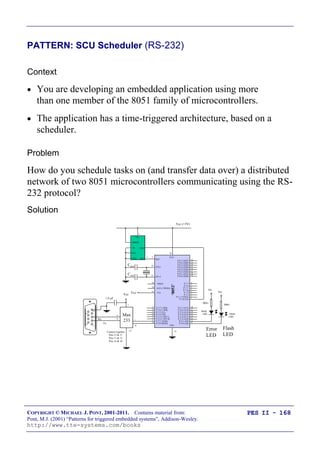
http://www.tte-systems.com/books
PES II - 122
PATTERN: Oscillator Watchdog
People sometimes assume that watchdog timer is a good way of
detecting oscillator failure. However, a few moments thought
quickly reveals that this is very rarely the case.
When the oscillator fails, the associated microcontroller will stop.
Even if (by using a watchdog timer, or some other technique) you detect
that the oscillator has failed, you cannot execute any code to deal with
the situation.
In these circumstances, you may be able to improve the reliability
of your system by using an oscillator watchdog.
The OW operates as follows: if an oscillator failure is detected, the
microcontroller is forced into a reset state: this means that port
pins take on their reset values.
The state of the port pins is crucial, since it means that the developer
has a chance to ensure that hardware devices controlled by the
processor (for example, dangerous machinery) will be shut down if the
oscillator fails.
COPYRIGHT © MICHAEL J. PONT, 2001-2011. Contains material from:
Pont, M.J. (2001) “Patterns for triggered embedded systems”, Addison-Wesley.
http://www.tte-systems.com/books
PES II - 123
What happens next?
 In most cases, the microcontroller will be held in a reset
state “for ever”.
 However, most oscillator watchdogs will continue to
monitor the clock input to the chip: if the main oscillator is
restored, the system will leave reset and will begin operating
again.
COPYRIGHT © MICHAEL J. PONT, 2001-2011. Contains material from:
Pont, M.J. (2001) “Patterns for triggered embedded systems”, Addison-Wesley.
http://www.tte-systems.com/books
PES II - 124
Preparations for the next seminar
In the next seminar, we will begin to consider techniques for linking
together multiple processors.
Please read PTTES Chapter 25 before the next seminar.
40
39
38
37
36
35
34
1
2
3
4
5
6
7
„8051‟
8
9
10
33
32
31
30
29
28
27
26
25
24
11
12
13
14
15
16
17
18
19
20
23
22
21
P3.0
P1.7
RST
P1.6
P1.5
P1.4
P1.2
P1.3
P1.1
P1.0
VSS
XTL2
XTL1
P3.7
P3.6
P3.5
P3.3
P3.4
P3.2
P3.1
/EA
P0.6
P0.7
P0.5
P0.4
P0.3
P0.1
P0.2
P0.0
VCC
P2.0
P2.2
P2.1
P2.3
P2.4
P2.5
P2.7
P2.6
/PSEN
ALE
COPYRIGHT © MICHAEL J. PONT, 2001-2011. Contains material from:
Pont, M.J. (2001) “Patterns for triggered embedded systems”, Addison-Wesley.
http://www.tte-systems.com/books
PES II - 125
Seminar 6:
Shared-clock
schedulers for multi-
processor systems
Master Slave 2Slave 1 Slave N
Tick messages (from master to slaves)
Acknowledgement
message
Acknowledgement
message
Acknowledgement
message
COPYRIGHT © MICHAEL J. PONT, 2001-2011. Contains material from:
Pont, M.J. (2001) “Patterns for triggered embedded systems”, Addison-Wesley.
http://www.tte-systems.com/books
PES II - 126
Overview of this seminar
We now turn our attention to multi-processor applications. As we
will see, an important advantage of the time-triggered (co-
operative) scheduling architecture is that it is inherently scaleable,
and that its use extends naturally to multi-processor environments.
In this seminar:
 We consider some of the advantages - and disadvantages -
that can result from the use of multiple processors.
 We introduce the shared-clock scheduler.
 We consider the implementation of shared-clock designs
schedulers that are kept synchronised through the use of
external interrupts on the Slave microcontrollers.
COPYRIGHT © MICHAEL J. PONT, 2001-2011. Contains material from:
Pont, M.J. (2001) “Patterns for triggered embedded systems”, Addison-Wesley.
http://www.tte-systems.com/books
PES II - 127
Why use more than one processor?
Many modern embedded systems contain more than one processor.
For example, a modern passenger car might contain some forty such
devices, controlling brakes, door windows and mirrors, steering, air
bags, and so forth.
Similarly, an industrial fire detection system might typically have
200 or more processors, associated - for example - with a range of
different sensors and actuators.
Two main reasons:
 Additional CPU performance and hardware facilities
 Benefits of modular design
COPYRIGHT © MICHAEL J. PONT, 2001-2011. Contains material from:
Pont, M.J. (2001) “Patterns for triggered embedded systems”, Addison-Wesley.
http://www.tte-systems.com/books
PES II - 128
Additional CPU performance and hardware facilities
Suppose we require a microcontroller with the following
specification:
 60+ port pins
 Six timers
 Two USARTS
 128 kbytes of ROM
 512 bytes of RAM
 A cost of around $1.00 (US)
… how can we achieve this???
COPYRIGHT © MICHAEL J. PONT, 2001-2011. Contains material from:
Pont, M.J. (2001) “Patterns for triggered embedded systems”, Addison-Wesley.
http://www.tte-systems.com/books
PES II - 129
P 2.7 (A15) 28
P 2.6 (A14) 27
P 2.5 (A13) 26
P 2.4 (A12) 25
P 2.3 (A11) 24
P 2.2 (A10) 23
P 2.1 (A9) 22
P 2.0 (A8) 21
ALE (/PROG)
/ EA
/PSEN
31
30
29
19 XTL1
XTL218
RST9
40
VCC
20
VSS
“8051”
P 1.7
1
2
3
4
5
P 1.56
7
P 1.0 [T2]
P 1.1 [T2EX]
P 1.2
P 1.3
P 1.4
P 1.6
8
P 3.0 (RXD)
P 3.1 (TXD)
P 3.2 (/INT0)
P 3.3 (/INT1)
P 3.4 (T0)
P 3.5 (T1)
P 3.6 (/WR)
P 3.7 (/RD)
10
11
12
13
14
15
16
17
P 0.0 (AD0) 39
P 0.1 (AD1) 38
P 0.2 (AD2) 37
P 0.3 (AD3) 36
P 0.4 (AD4) 35
P 0.5 (AD5) 34
P 0.6 (AD6) 33
P 0.7 (AD7) 32
P 2.7 (A15) 28
P 2.6 (A14) 27
P 2.5 (A13) 26
P 2.4 (A12) 25
P 2.3 (A11) 24
P 2.2 (A10) 23
P 2.1 (A9) 22
P 2.0 (A8) 21
ALE (/PROG)
/ EA
/PSEN
31
30
29
19 XTL1
XTL218
RST9
40
VCC
20
VSS
“8051”
P 1.7
1
2
3
4
5
P 1.56
7
P 1.0 [T2]
P 1.1 [T2EX]
P 1.2
P 1.3
P 1.4
P 1.6
8
P 3.0 (RXD)
P 3.1 (TXD)
P 3.2 (/INT0)
P 3.3 (/INT1)
P 3.4 (T0)
P 3.5 (T1)
P 3.6 (/WR)
P 3.7 (/RD)
10
11
12
13
14
15
16
17
P 0.0 (AD0) 39
P 0.1 (AD1) 38
P 0.2 (AD2) 37
P 0.3 (AD3) 36
P 0.4 (AD4) 35
P 0.5 (AD5) 34
P 0.6 (AD6) 33
P 0.7 (AD7) 32
 A flexible environment with 62 free port pins, 5 free timers,
two UARTs, etc.
 Further microcontrollers may be added without difficulty,
 The communication over a single wire (plus ground) will
ensure that the tasks on all processors are synchronised.
 The two-microcontroller design also has two CPUs:
true multi-tasking is possibly.
COPYRIGHT © MICHAEL J. PONT, 2001-2011. Contains material from:
Pont, M.J. (2001) “Patterns for triggered embedded systems”, Addison-Wesley.
http://www.tte-systems.com/books
PES II - 130
The benefits of modular design
Suppose we want to build a range of clocks…
AT MH
Current Time : 01.44
Alarm Time : --:--
We can split the design into „display‟ and „time-keeping‟ modules.
This type of modular approach is very common in the automotive
industry where increasing numbers of microcontroller-based
modules are used in new vehicle designs.
COPYRIGHT © MICHAEL J. PONT, 2001-2011. Contains material from:
Pont, M.J. (2001) “Patterns for triggered embedded systems”, Addison-Wesley.
http://www.tte-systems.com/books
PES II - 131
The benefits of modular design
Acquisition
system
1
Sensor
1
Sensor
2
Sensor
3
PC
An alternative solution:
Acquisition
system
1
Sensor
1
Sensor
2
Sensor
3
PC
MCU
A
2
MCU
B
3
MCU
C
4
In the A310 Airbus, the slat and flap control computers form an
„intelligent‟ actuator sub-system. If an error is detected during
landing, the wings are set to a safe state and then the actuator sub-
system shuts itself down.
COPYRIGHT © MICHAEL J. PONT, 2001-2011. Contains material from:
Pont, M.J. (2001) “Patterns for triggered embedded systems”, Addison-Wesley.
http://www.tte-systems.com/books
PES II - 132
So - how do we link more than one processor?
Some important questions:
 How do we keep the clocks on the various nodes
synchronised?
 How do we transfer data between the various nodes?
 How does one node check for errors on the other nodes?
COPYRIGHT © MICHAEL J. PONT, 2001-2011. Contains material from:
Pont, M.J. (2001) “Patterns for triggered embedded systems”, Addison-Wesley.
http://www.tte-systems.com/books
PES II - 133
Synchronising the clocks
Why do we need to synchronise the tasks running on different parts
of a multi-processor system?
Portable Traffic
Light Controller
Portable Traffic
Light Controller
 We will assume that there will be a microcontroller at each
end of the traffic light application to control the two sets of
lights.
 We will also assume that each microcontroller is running a
scheduler, and that each is driven by an independent crystal
oscillator circuit.
BUT!
Each microcontroller will operate at a different temperature…
The lights will get “out of sync”…
COPYRIGHT © MICHAEL J. PONT, 2001-2011. Contains material from:
Pont, M.J. (2001) “Patterns for triggered embedded systems”, Addison-Wesley.
http://www.tte-systems.com/books
PES II - 134
Synchronising the clocks
The S-C scheduler tackles this problem by sharing a single clock
between the various processor board:
Master Slave 2Slave 1 Slave N
Tick messages (from Master to Slaves)
Here we have one, accurate, clock on the Master node in the
network.
This clock is used to drive the scheduler in the Master node in
exactly the manner discussed in Seminar 1 and Seminar 2.
COPYRIGHT © MICHAEL J. PONT, 2001-2011. Contains material from:
Pont, M.J. (2001) “Patterns for triggered embedded systems”, Addison-Wesley.
http://www.tte-systems.com/books
PES II - 135
Synchronising the clocks - Slave nodes
The Slave nodes also have schedulers: however, the interrupts used
to drive these schedulers are derived from „tick messages‟ generated
by the Master.
Time
Tick
Message
Tick
Message
Tick
Message ...
Master tick (from timer)
Slave tick (from CAN hardware)
This keeps all the nodes running “in phase”
For example:
In the case of the traffic lights considered earlier, changes in
temperature will, at worst, cause the lights to cycle more quickly or
more slowly: the two sets of lights will not, however, get out of
sync.
COPYRIGHT © MICHAEL J. PONT, 2001-2011. Contains material from:
Pont, M.J. (2001) “Patterns for triggered embedded systems”, Addison-Wesley.
http://www.tte-systems.com/books
PES II - 136
Transferring data
In many applications, we will also need to transfer data between
the tasks running on different processor nodes.
To illustrate this, consider again the traffic-light controller.
Suppose that a bulb blows in one of the light units.
 When a bulb is missing, the traffic control signals are
ambiguous: we therefore need to detect bulb failures on each
node and, having detected a failure, notify the other node
that a failure has occurred.
 This will allow us - for example - to extinguish all the
(available) bulbs on both nodes, or to flash all the bulbs on
both nodes: in either case, this will inform the road user that
something is amiss, and that the road must be negotiated
with caution.
COPYRIGHT © MICHAEL J. PONT, 2001-2011. Contains material from:
Pont, M.J. (2001) “Patterns for triggered embedded systems”, Addison-Wesley.
http://www.tte-systems.com/books
PES II - 137
Transferring data (Master to Slave)
As we discussed above, the Master sends regular tick messages to
the Slave, typically once per millisecond.
These tick messages can - in most S-C schedulers - include data
transfers: it is therefore straightforward to send an appropriate tick
message to the Slave to alert it to the bulb failure.
COPYRIGHT © MICHAEL J. PONT, 2001-2011. Contains material from:
Pont, M.J. (2001) “Patterns for triggered embedded systems”, Addison-Wesley.
http://www.tte-systems.com/books
PES II - 138
Transferring data (Slave to Master)
To deal with the transfer of data from the Slave to the Master, we
need an additional mechanism: this is provided through the use of
„Acknowledgement‟ messages:
Master Slave 2Slave 1 Slave N
Tick messages (from master to slaves)
Acknowledgement
message
Acknowledgement
message
Acknowledgement
message
This is a „time division multiple access‟ (TDMA) protocol, in which
the acknowledgement messages are interleaved with the Tick
messages.
COPYRIGHT © MICHAEL J. PONT, 2001-2011. Contains material from:
Pont, M.J. (2001) “Patterns for triggered embedded systems”, Addison-Wesley.
http://www.tte-systems.com/books
PES II - 139
Transferring data (Slave to Master)
This figure shows the mix of Tick and Acknowledgement messages
that will typically be transferred in a two-Slave (CAN) network.
Time
Tick
Message
(Data for S1)
Ack
Message
(from S1)
Tick
Message
(Data for S2)
Ack
Message
(from S2)
Tick
Message
(Data for S1)
Ack
Message
(from S1)
...
Master tick (from timer)
Slave tick (from CAN hardware)
Note that, in a shared-clock scheduler, all data transfers are carried out
using the interleaved Tick and Acknowledgement messages: no
additional messages are permitted on the bus. As a result, we are able
to determine precisely the network bandwidth required to ensure that all
messages are delivered precisely on time.
COPYRIGHT © MICHAEL J. PONT, 2001-2011. Contains material from:
Pont, M.J. (2001) “Patterns for triggered embedded systems”, Addison-Wesley.
http://www.tte-systems.com/books
PES II - 140
Detecting network and node errors
How do we detect this (and other errors)?
What should we do?
COPYRIGHT © MICHAEL J. PONT, 2001-2011. Contains material from:
Pont, M.J. (2001) “Patterns for triggered embedded systems”, Addison-Wesley.
http://www.tte-systems.com/books
PES II - 141
Detecting errors in the Slave(s)
 We know from the design specification that the Slave should
receive ticks at precise intervals of time (e.g. every 10 ms)
 Because of this, we simply need to measure the time interval
between ticks; if a period greater than the specified tick
interval elapses between ticks, we can safely conclude that
an error has occurred.
 In many circumstances an effective way of achieving this is
to set a watchdog timer in the Slave to overflow at a period
slightly longer than the tick interval
(we discussed watchdog timers in Seminar 5).
 If a tick is not received, then the timer will overflow, and we
can invoke an appropriate error-handling routine.
COPYRIGHT © MICHAEL J. PONT, 2001-2011. Contains material from:
Pont, M.J. (2001) “Patterns for triggered embedded systems”, Addison-Wesley.
http://www.tte-systems.com/books
PES II - 142
Detecting errors in the Master
Detecting errors in the Master node requires that each Slave sends
appropriate acknowledgement messages to the Master at regular
intervals.
Considering the operation of a particular 1-Master, 10-Slave
network:
 The Master node sends tick messages to all nodes,
simultaneously, every millisecond; these messages are used
to invoke the Update function in all Slaves (every
millisecond).
 Each tick message may include data for a particular node. In
this case, we will assume that the Master sends tick
messages to each of the Slaves in turn; thus, each Slave
receives data in every tenth tick message (every 10
milliseconds in this case).
 Each Slave sends an acknowledgement message to the
Master only when it receives a tick message with its ID; it
does not send an acknowledgement to any other tick
messages.
This arrangement provides the predictable bus loading that we require,
and a means of communicating with each Slave individually.
It also means that the Master is able to detect whether or not a
particular Slave has responded to its tick message.
COPYRIGHT © MICHAEL J. PONT, 2001-2011. Contains material from:
Pont, M.J. (2001) “Patterns for triggered embedded systems”, Addison-Wesley.
http://www.tte-systems.com/books
PES II - 143
Handling errors detected by the Slave
We will assume that errors in the Slave are detected with a
watchdog timer. To deal with such errors, the shared-clock
schedulers considered on this course all operate as follows:
 Whenever the Slave node is reset (either having been
powered up, or reset as a result of a watchdog overflow), the
node enters a „safe state‟.
 The node remains in this state until it receives an
appropriate series of „start‟ commands from the Master.
This form of error handling is easily produced, and is effective in
most circumstances.
COPYRIGHT © MICHAEL J. PONT, 2001-2011. Contains material from:
Pont, M.J. (2001) “Patterns for triggered embedded systems”, Addison-Wesley.
http://www.tte-systems.com/books
PES II - 144
Handling errors detected by the Master
Handling errors detected by the Master is more complicated.
We will consider and illustrate three main options in this course:
 The „Enter safe state then shut down‟ option, and,
 The „Restart the network‟ option, and
 The „Engage replacement Slave‟ option.
COPYRIGHT © MICHAEL J. PONT, 2001-2011. Contains material from:
Pont, M.J. (2001) “Patterns for triggered embedded systems”, Addison-Wesley.
http://www.tte-systems.com/books
PES II - 145
Enter a safe state and shut down the network
Shutting down the network following the detection of errors by the
Master node is easily achieved: we simply stop the transmission of
tick messages by the Master.
By stopping the tick messages, we cause the Slave(s) to be reset
too; the Slaves will then wait (in a safe state). The whole network
will therefore stop, until the Master is reset.
This behaviour is the most appropriate behaviour in many systems
in the event of a network error, if a „safe state‟ can be identified.
This will, of course, be highly application-dependent.
 It is very easy to implement.
 It is effective in many systems.
 It can often be a „last line of defence‟ if more advanced recovery
schemes have failed.
 It does not attempt to recover normal network operation, or to engage
backup nodes.
COPYRIGHT © MICHAEL J. PONT, 2001-2011. Contains material from:
Pont, M.J. (2001) “Patterns for triggered embedded systems”, Addison-Wesley.
http://www.tte-systems.com/books
PES II - 146
Reset the network
Another simple way of dealing with errors is to reset the Master and
- hence - the whole network.
When it is reset, the Master will attempt to re-establish
communication with each Slave in turn; if it fails to establish
contact with a particular Slave, it will attempt to connect to the
backup device for that Slave.
This approach is easy to implement and can be effective. For
example, many designs use „N-version‟ programming to create
backup versions of key components. By performing a reset, we
keep all the nodes in the network synchronised, and we engage a
backup Slave (if one is available).
 It allows full use to be made of backup nodes.
 It may take time (possibly half a second or more) to restart the network;
even if the network becomes fully operational, the delay involved may be
too long (for example, in automotive braking or aerospace flight-control
applications).
 With poor design or implementation, errors can cause the network to be
continually reset. This may be rather less safe than the simple „enter safe
state and shut down‟ option.
COPYRIGHT © MICHAEL J. PONT, 2001-2011. Contains material from:
Pont, M.J. (2001) “Patterns for triggered embedded systems”, Addison-Wesley.
http://www.tte-systems.com/books
PES II - 147
Engage a backup Slave
The third and final recovery technique we discuss in this course is
as follows.
If a Slave fails, then - rather than restarting the whole network - we
start the corresponding backup unit.
The strengths and weaknesses of this approach are as follows:
 It allows full use to be made of backup nodes.
 In most circumstances it takes comparatively little time to engage the
backup unit.
 The underlying coding is more complicated than the other alternatives
discussed in this course.
COPYRIGHT © MICHAEL J. PONT, 2001-2011. Contains material from:
Pont, M.J. (2001) “Patterns for triggered embedded systems”, Addison-Wesley.
http://www.tte-systems.com/books
PES II - 148
Why additional processors may not improve reliability
Suppose that a network has 100 microcontrollers and that each of
these devices is 99.99% reliable.
If the multi-processor application relies on the correct,
simultaneous, operation of all 100 nodes, it will have an overall
reliability of 99.99% x 99.99% x 99.99% ….
This is 0.9999100
, or approximately 37%.
A 99.99% reliable device might be assumed to fail once in 10,000
years, while the corresponding 37% reliable device would then be
expected to fail approximately every 18 months.
It is only where the increase in reliability resulting from the shared-
clock design outweighs the reduction in reliability known to arise
from the increased system complexity that an overall increase in system
reliability will be obtained.
Unfortunately, making predictions about the costs and benefits (in
reliability terms) of any complex design feature remains - in most non-
trivial systems - something of a black art.
COPYRIGHT © MICHAEL J. PONT, 2001-2011. Contains material from:
Pont, M.J. (2001) “Patterns for triggered embedded systems”, Addison-Wesley.
http://www.tte-systems.com/books
PES II - 149
Redundant networks do not guarantee increased reliability
 In 1974, in a Turkish Airlines DC-10 aircraft, the cargo door
opened at high altitude.
 This event caused the cargo hold to depressurise, which in
turn caused the cabin floor to collapse.
 The aircraft contained two (redundant) control lines, in
addition to the main control system - but all three lines
were under the cabin floor.
 Control of the aircraft was therefore lost and it crashed
outside Paris, killing 346 people.
COPYRIGHT © MICHAEL J. PONT, 2001-2011. Contains material from:
Pont, M.J. (2001) “Patterns for triggered embedded systems”, Addison-Wesley.
http://www.tte-systems.com/books
PES II - 150
Replacing the human operator - implications
 In many embedded applications, there is either no human
operator in attendance, or the time available to switch over
to a backup node (or network) is too small to make human
intervention possible.
 In these circumstances, if the component required to detect
the failure of the main node and switch in the backup node is
complicated (as often proves to be the case), then this
„switch‟ component may itself be the source of severe
reliability problems (see Leveson, 1995).
COPYRIGHT © MICHAEL J. PONT, 2001-2011. Contains material from:
Pont, M.J. (2001) “Patterns for triggered embedded systems”, Addison-Wesley.
http://www.tte-systems.com/books
PES II - 151
Are multi-processor designs ever safe?
These observations should not be taken to mean that multi-
processor designs are inappropriate for use in high-reliability
applications. Multiple processors can be (and are) safely used in
such circumstances.
However, all multi-processor developments must be approached with
caution, and must be subject to particularly rigorous design, review and
testing.
COPYRIGHT © MICHAEL J. PONT, 2001-2011. Contains material from:
Pont, M.J. (2001) “Patterns for triggered embedded systems”, Addison-Wesley.
http://www.tte-systems.com/books
PES II - 152
Preparations for the next seminar
Please read “PTTES” Chapter 27 before the next seminar.
40
39
38
37
36
35
34
1
2
3
4
5
6
7
„8051‟
8
9
10
33
32
31
30
29
28
27
26
25
24
11
12
13
14
15
16
17
18
19
20
23
22
21
P3.0
P1.7
RST
P1.6
P1.5
P1.4
P1.2
P1.3
P1.1
P1.0
VSS
XTL2
XTL1
P3.7
P3.6
P3.5
P3.3
P3.4
P3.2
P3.1
/EA
P0.6
P0.7
P0.5
P0.4
P0.3
P0.1
P0.2
P0.0
VCC
P2.0
P2.2
P2.1
P2.3
P2.4
P2.5
P2.7
P2.6
/PSEN
ALE
COPYRIGHT © MICHAEL J. PONT, 2001-2011. Contains material from:
Pont, M.J. (2001) “Patterns for triggered embedded systems”, Addison-Wesley.
http://www.tte-systems.com/books
PES II - 153
Seminar 7:
Linking processors
using RS-232 and RS-
485 protocols
A
B
C
Main control
& user interface
(Master)
Main control
& user interface
(Master)
Actuator C
(Slave)
Actuator C
(Slave)
Actuator B
(Slave)
Actuator B
(Slave)
Actuator A
(Slave)
Actuator A
(Slave)
COPYRIGHT © MICHAEL J. PONT, 2001-2011. Contains material from:
Pont, M.J. (2001) “Patterns for triggered embedded systems”, Addison-Wesley.
http://www.tte-systems.com/books
PES II - 154
Review: Shared-clock scheduling
Master Slave 2Slave 1 Slave N
Tick messages (from master to slaves)
Acknowledgement
message
Acknowledgement
message
Acknowledgement
message
Most S-C schedulers support both „Tick‟ messages (sent from the Master
to the Slaves), and „Acknowledgement‟ messages (sent by the Slaves to
the Master).
COPYRIGHT © MICHAEL J. PONT, 2001-2011. Contains material from:
Pont, M.J. (2001) “Patterns for triggered embedded systems”, Addison-Wesley.
http://www.tte-systems.com/books
PES II - 155
Overview of this seminar
In this seminar, we will discuss techniques for linking together two
(or more) embedded processors, using the RS-232 and RS-485
protocols.
COPYRIGHT © MICHAEL J. PONT, 2001-2011. Contains material from:
Pont, M.J. (2001) “Patterns for triggered embedded systems”, Addison-Wesley.
http://www.tte-systems.com/books
PES II - 156
Review: What is „RS-232‟?
In 1997 the Telecommunications Industry Association released
what is formally known as TIA-232 Version F, a serial
communication protocol which has been universally referred to as
„RS-232‟ since its first „Recommended Standard‟ appeared in the
1960s. Similar standards (V.28) are published by the International
Telecommunications Union (ITU) and by CCITT (The Consultative
Committee International Telegraph and Telephone).
The „RS-232‟ standard includes details of:
 The protocol to be used for data transmission.
 The voltages to be used on the signal lines.
 The connectors to be used to link equipment together.
Overall, the standard is comprehensive and widely used, at data
transfer rates of up to around 115 or 330 kbits / second (115 / 330 k
baud). Data transfer can be over distances of 15 metres or more.
Note that RS-232 is a peer-to-peer communication standard.
COPYRIGHT © MICHAEL J. PONT, 2001-2011. Contains material from:
Pont, M.J. (2001) “Patterns for triggered embedded systems”, Addison-Wesley.
http://www.tte-systems.com/books
PES II - 157
Review: Basic RS-232 Protocol
RS-232 is a character-oriented protocol. That is, it is intended to be
used to send single 8-bit blocks of data. To transmit a byte of data
over an RS-232 link, we generally encode the information as
follows:
 We send a „Start‟ bit.
 We send the data (8 bits).
 We send a „Stop‟ bit (or bits).
REMEMBER: The UART takes care of these details!
COPYRIGHT © MICHAEL J. PONT, 2001-2011. Contains material from:
Pont, M.J. (2001) “Patterns for triggered embedded systems”, Addison-Wesley.
http://www.tte-systems.com/books
PES II - 158
Review: Transferring data to a PC using RS-232
Cur r ent cor e t emper at ur e
i s 36. 678 degr ees
Buffer
All characters
written immediately
to buffer
(very fast operation)
Scheduler sends one
character to PC
every 10 ms
(for example)
COPYRIGHT © MICHAEL J. PONT, 2001-2011. Contains material from:
Pont, M.J. (2001) “Patterns for triggered embedded systems”, Addison-Wesley.
http://www.tte-systems.com/books
PES II - 159
PATTERN: SCU SCHEDULER (LOCAL)
Problem
How do you schedule tasks on (and transfer data over) a local
network of two (or more) 8051 microcontrollers connected together
via their UARTs?
Solution
1. Timer overflow in the Master causes the scheduler „Update‟
function to be invoked. This, in turn, causes a byte of data
is sent (via the UART) to all Slaves:
void MASTER_Update_T2(void) interrupt INTERRUPT_Timer_2_Overflow
{
...
MASTER_Send_Tick_Message(...);
...
}
2. When these data have been received all Slaves generate an
interrupt; this invokes the „Update‟ function in the Slave
schedulers. This, in turn, causes one Slave to send an
„Acknowledge‟ message back to the Master (again via the
UART).
void SLAVE_Update(void) interrupt INTERRUPT_UART_Rx_Tx
{
...
SLAVE_Send_Ack_Message_To_Master();
...
}
COPYRIGHT © MICHAEL J. PONT, 2001-2011. Contains material from:
Pont, M.J. (2001) “Patterns for triggered embedded systems”, Addison-Wesley.
http://www.tte-systems.com/books
PES II - 160
The message structure
Here we will assume that we wish to control and monitor three
hydraulic actuators to control the operation of a mechanical
excavator.
A
B
C
Main control
& user interface
(Master)
Main control
& user interface
(Master)
Actuator C
(Slave)
Actuator C
(Slave)
Actuator B
(Slave)
Actuator B
(Slave)
Actuator A
(Slave)
Actuator A
(Slave)
Suppose we wish to adjust the angle of Actuator A to 90 degrees;
how do we do this?
Immediately the 8-bit nature of the UART becomes a limitation,
because we need to send a message that identifies both the node to
be adjusted, and the angle itself.
COPYRIGHT © MICHAEL J. PONT, 2001-2011. Contains material from:
Pont, M.J. (2001) “Patterns for triggered embedded systems”, Addison-Wesley.
http://www.tte-systems.com/books
PES II - 161
There is no ideal way of addressing this problem. Here, we adopt
the following solution:
 Each Slave is given a unique ID (0x01 to 0xFF).
 Each Tick Message from the Master is two bytes long; these
two bytes are sent one tick interval apart. The first byte is
an „Address Byte‟, containing the ID of the Slave to which
the message is addressed. The second byte is the „Message
Byte‟ and contains the message data.
 All Slaves generate interrupts in response to each byte of
every Tick Message.
 Only the Slave to which a Tick Message is addressed will
reply to the Master; this reply takes the form of an
Acknowledge Message.
 Each Acknowledge Message from a Slave is two bytes long;
the two bytes are, again, sent one tick interval apart. The
first byte is an „Address Byte‟, containing the ID of the
Slave from which the message is sent. The second byte is
the „Message Byte‟ and contains the message data.
 For data transfers requiring more than a single byte of data,
multiple messages must be sent.
Time
Tick
Message
(Address - S1)
Ack
Message
(Address - S1)
Tick
Message
(Data for S1)
Ack
Message
(Data from S1)
Tick
Message
(Address - S2)
Ack
Message
(Address - S2)
...
Master tick (from timer)
Slave tick (from UART)
COPYRIGHT © MICHAEL J. PONT, 2001-2011. Contains material from:
Pont, M.J. (2001) “Patterns for triggered embedded systems”, Addison-Wesley.
http://www.tte-systems.com/books
PES II - 162
We want to be able to distinguish between „Address Bytes‟
and „Data Bytes‟.
We make use of the fact that the 8051 allows transmission of 9-bit
serial data:
Description Size (bits)
Data 9 bits
Start bit 1 bit
Stop bit 1 bit
TOTAL 11 bits / message
 In this configuration (typically, the UART used in Mode 3),
11 bits are transmitted / received. Note that the 9th
bit is
transmitted via bit TB8 in the register SCON, and is
received as bit RB8 in the same register. In this mode, the
baud rate is controlled as discussed in PTTES, Chapter 18.
 In the code examples presented here, Address Bytes are
identified by setting the „command bit‟ (TB8) to 1; Data
Bytes set this bit to 0.
COPYRIGHT © MICHAEL J. PONT, 2001-2011. Contains material from:
Pont, M.J. (2001) “Patterns for triggered embedded systems”, Addison-Wesley.
http://www.tte-systems.com/books
PES II - 163
Determining the required baud rate
 The timing of timer ticks in the Master is set to a duration
such that one byte of a Tick Message can be sent (and one
byte of an Acknowledge Message received) between ticks.
 Clearly, this duration depends on the network baud rate.
 As we discussed above, we will use a 9-bit protocol. Taking
into account Start and Stop bits, we require 22 bits (11 for
Tick message, 11 for Acknowledge message) per scheduler
tick; that is, the required baud rate is: (Scheduler Ticks per
second) x 22.
COPYRIGHT © MICHAEL J. PONT, 2001-2011. Contains material from:
Pont, M.J. (2001) “Patterns for triggered embedded systems”, Addison-Wesley.
http://www.tte-systems.com/books
PES II - 164
There is a delay between the timer on the Master and the UART-
based interrupt on the Slave:
Time
Tick
Message
(Data for S1)
Ack
Message
(from S1)
...
Tick latency
(varies with baud rate)
As discussed above, most shared-clock applications employ a baud
rate of at least 28,800 baud: this gives a tick latency of
approximately 0.4 ms. At 375,000 baud, this latency becomes
approximately 0.03 ms.
Note that this latency is fixed, and can be accurately predicted on
paper, and then confirmed in simulation and testing. If precise
synchronisation of Master and Slave processing is required, then
please note that:
 All the Slaves operate - within the limits of measurement -
precisely in step.
 To bring the Master in step with the Slaves, it is necessary
only to add a short delay in the Master „Update‟ function.
COPYRIGHT © MICHAEL J. PONT, 2001-2011. Contains material from:
Pont, M.J. (2001) “Patterns for triggered embedded systems”, Addison-Wesley.
http://www.tte-systems.com/books
PES II - 165
Node Hardware
Rx
Tx
GND
300
Vcc
10mA
LED
300
Vcc
10mA
LED
Vcc
P 0.7 (AD7) 32
P 0.6 (AD6) 33
P 0.5 (AD5) 34
P 0.4 (AD4) 35
P 0.3 (AD3) 36
P 0.2 (AD2) 37
P 0.1 (AD1) 38
P 0.0 (AD0) 39
8
7
6
5
4
3
2
1
P 2.7 (A15) 28
P 2.6 (A14) 27
P 2.5 (A13) 26
P 2.4 (A12) 25
P 2.3 (A11) 24
P 2.2 (A10) 23
P 2.1 (A9) 22
P 2.0 (A8) 21
/ PSEN
ALE (/ PROG)
29
30
31
XTL1
19
XTL2
18
RST
40
VCC
VSS
„8052‟
Vcc (+5V)
Cxtal
Cxtal
20
P 3.7 (/ RD)
P 3.6 (/ WR)
P 3.5 (T1)
P 3.4 (T0)
P 3.3 (/ INT1)
P 3.2 (/ INT 0)
P 3.1 (TXD)
P 3.0 (RXD)
/ EA
17
16
15
14
13
12
11
10
9
P 1.7
P 1.6
P 1.5
P 1.4)
P 1.3
P 1.2
P 1.1 (T2EX)
P 1.0 (T2)
5
8
RSTGND
TD
TOL
Vcc
/STO
/PBRST
1232
Flash
LED
Error
LED
Rx
Tx
GND
Vcc (+5V)
300
Vcc
10mA
LED
300
Vcc
10mA
LED
Vcc
P 0.7 (AD7) 32
P 0.6 (AD6) 33
P 0.5 (AD5) 34
P 0.4 (AD4) 35
P 0.3 (AD3) 36
P 0.2 (AD2) 37
P 0.1 (AD1) 38
P 0.0 (AD0) 39
8
7
6
5
4
3
2
1
P 2.7 (A15) 28
P 2.6 (A14) 27
P 2.5 (A13) 26
P 2.4 (A12) 25
P 2.3 (A11) 24
P 2.2 (A10) 23
P 2.1 (A9) 22
P 2.0 (A8) 21
/ PSEN
ALE (/ PROG)
29
30
31
XTL1
19
XTL2
18
RST
40
VCC
VSS
„8052‟
Cxtal
Cxtal
20
P 3.7 (/ RD)
P 3.6 (/ WR)
P 3.5 (T1)
P 3.4 (T0)
P 3.3 (/ INT1)
P 3.2 (/ INT 0)
P 3.1 (TXD)
P 3.0 (RXD)
/ EA
17
16
15
14
13
12
11
10
9
P 1.7
P 1.6
P 1.5
P 1.4)
P 1.3
P 1.2
P 1.1 (T2EX)
P 1.0 (T2)
RSTGND
Vcc
1812
Flash
LED
Error
LED
COPYRIGHT © MICHAEL J. PONT, 2001-2011. Contains material from:
Pont, M.J. (2001) “Patterns for triggered embedded systems”, Addison-Wesley.
http://www.tte-systems.com/books
PES II - 166
Network wiring
Keep the cables short!
P3.0 (Rx)
P3.1 (Tx)
P3.0 (Rx)
P3.1 (Tx)
8051
family
micro
SlaveMaster
8051
family
micro
P3.1 (Tx)
P3.0 (Rx)
8051
family
micro
P3.0 (Rx)
P3.1 (Tx)
8051
family
micro
P3.0 (Rx)
P3.1 (Tx)
8051
family
micro
P3.0 (Rx)
P3.1 (Tx)
Master
Slave 1
Slave ...
Slave N
8051
family
micro
COPYRIGHT © MICHAEL J. PONT, 2001-2011. Contains material from:
Pont, M.J. (2001) “Patterns for triggered embedded systems”, Addison-Wesley.
http://www.tte-systems.com/books
PES II - 167
Overall strengths and weaknesses
 A simple scheduler for local systems with two or more 8051
microcontrollers.
 All necessary hardware is part of the 8051 core: as a result, the
technique is very portable within this family.
 Easy to implement with minimal CPU and memory overheads.
 The UART supports byte-based communications only: data transfer
between Master and Slaves (and vice versa) is limited to 0.5 bytes per
clock tick.
 Uses an important hardware resource (the UART)
 Most error detection / correction must be carried out in software
 This pattern is not suitable for distributed systems
COPYRIGHT © MICHAEL J. PONT, 2001-2011. Contains material from:
Pont, M.J. (2001) “Patterns for triggered embedded systems”, Addison-Wesley.
http://www.tte-systems.com/books
PES II - 168
PATTERN: SCU Scheduler (RS-232)
Context
 You are developing an embedded application using more
than one member of the 8051 family of microcontrollers.
 The application has a time-triggered architecture, based on a
scheduler.
Problem
How do you schedule tasks on (and transfer data over) a distributed
network of two 8051 microcontrollers communicating using the RS-
232 protocol?
Solution
10mA
LED
300
Vcc
300
Vcc
10mA
LED
Flash
LED
Error
LED
Vcc
15
96
Vcc
Max
233 1
20
7
18
6,9
Connect together:
Pins 12 & 17
Pins 11 & 15
Pins 16 & 10
1.0 µF
19
Rx
Tx
P 0.7 (AD7) 32
P 0.6 (AD6) 33
P 0.5 (AD5) 34
P 0.4 (AD4) 35
P 0.3 (AD3) 36
P 0.2 (AD2) 37
P 0.1 (AD1) 38
P 0.0 (AD0) 39
8
7
6
5
4
3
2
1
P 2.7 (A15) 28
P 2.6 (A14) 27
P 2.5 (A13) 26
P 2.4 (A12) 25
P 2.3 (A11) 24
P 2.2 (A10) 23
P 2.1 (A9) 22
P 2.0 (A8) 21
/ PSEN
ALE (/ PROG)
29
30
31
XTL1
19
XTL2
18
RST
40
VCC
VSS
„8052‟
Vcc (+5V)
Cxtal
Cxtal
20
P 3.7 (/ RD)
P 3.6 (/ WR)
P 3.5 (T1)
P 3.4 (T0)
P 3.3 (/ INT1)
P 3.2 (/ INT 0)
P 3.1 (TXD)
P 3.0 (RXD)
/ EA
17
16
15
14
13
12
11
10
9
P 1.7
P 1.6
P 1.5
P 1.4)
P 1.3
P 1.2
P 1.1 (T2EX)
P 1.0 (T2)
5
8
RSTGND
TD
TOL
Vcc
/STO
/PBRST
COPYRIGHT © MICHAEL J. PONT, 2001-2011. Contains material from:
Pont, M.J. (2001) “Patterns for triggered embedded systems”, Addison-Wesley.
http://www.tte-systems.com/books
PES II - 169
PATTERN: SCU Scheduler (RS-485)
The communications standard generally referred to as „RS-485‟ is
an electrical specification for what are often referred to as „multi-
point‟ or „multi-drop‟ communication systems; for our purposes,
this means applications that involve at least three nodes, each
containing a microcontroller.
Please note that the specification document (EIA/TIA-485-A)
defines the electrical characteristics of the line and its drivers and
receivers: this is limit of the standard. Thus, unlike „RS-232‟, there
is no discussion of software protocols or of connectors.
There are many similarities between RS-232 and RS-485
communication protocols:
 Both are serial standards.
 Both are in widespread use.
 Both involve - for our purposes - the use of an appropriate
transceiver chip connected to a UART.
 Both involve very similar software libraries.
COPYRIGHT © MICHAEL J. PONT, 2001-2011. Contains material from:
Pont, M.J. (2001) “Patterns for triggered embedded systems”, Addison-Wesley.
http://www.tte-systems.com/books
PES II - 170
RS-232 vs RS-485 [number of nodes]
 RS-232 is a peer-to-peer communications standard. For our
purposes, this means that it is suitable for applications that
involve two nodes, each containing a microcontroller (or, as
we saw in PTTES, Chapter 18, for applications where one
node is a desktop, or similar, PC).
 RS-485 is a „multi-point‟ or „multi-drop‟ communications
standard. For our purposes, this means applications that
involve at least three nodes, each containing a
microcontroller. Larger RS-485 networks can have up to 32
„unit loads‟: by using high-impedance receivers, you can
have as many as 256 nodes on the network.
COPYRIGHT © MICHAEL J. PONT, 2001-2011. Contains material from:
Pont, M.J. (2001) “Patterns for triggered embedded systems”, Addison-Wesley.
http://www.tte-systems.com/books
PES II - 171
RS-232 vs RS-485 [range and baud rates]
 RS-232 is a single-wire standard (one signal line, per
channel, plus ground). Electrical noise in the environment
can lead to data corruption. This restricts the
communication range to a maximum of around 30 metres,
and the data rate to around 115 kbaud (with recent drivers).
 RS-485 is a two-wire or differential communication
standard. This means that, for each channel, two lines carry
(1) the required signal and (2) the inverse of the signal. The
receiver then detects the voltage difference between the two
lines. Electrical noise will impact on both lines, and will
cancel out when the difference is calculated at the receiver.
As a result, an RS-485 network can extend as far as 1 km, at
a data rate of 90 kbaud. Faster data rates (up to 10 Mbaud)
are possible at shorter distances (up to 15 metres).
COPYRIGHT © MICHAEL J. PONT, 2001-2011. Contains material from:
Pont, M.J. (2001) “Patterns for triggered embedded systems”, Addison-Wesley.
http://www.tte-systems.com/books
PES II - 172
RS-232 vs RS-485 [cabling]
 RS-232 requires low-cost „straight‟ cables, with three wires
for fully duplex communications (Tx, Rx, Ground).
 For full performance, RS-485 requires twisted-pair cables,
with two twisted pairs, plus ground (and usually a screen).
This cabling is more bulky and more expensive than the RS-
232 equivalent.
 RS-232 cables do not require terminating resistors.
 RS-485 cables are usually used with 120 terminating
resistors (assuming 24-AWG twisted pair cables) connected
in parallel, at or just beyond the final node at both ends of
the network. The terminations reduce voltage reflections
that can otherwise cause the receiver to misread logic levels.
120120
Slave 1Slave 1MASTERMASTER Slave 2Slave 2
120120
RS-485 Gnd
100 100100
COPYRIGHT © MICHAEL J. PONT, 2001-2011. Contains material from:
Pont, M.J. (2001) “Patterns for triggered embedded systems”, Addison-Wesley.
http://www.tte-systems.com/books
PES II - 173
RS-232 vs RS-485 [transceivers]
 RS-232 transceivers are simple and standard.
 Choice of RS-485 transceivers depends on the application.
A common choice for basic systems is the Maxim Max489
family. For increased reliability, the Linear Technology
LTC1482, National Semiconductors DS36276 and the
Maxim MAX3080–89 series all have internal circuitry to
protect against cable short circuits. Also, the Maxim Max
MAX1480 contains its own transformer-isolated supply and
opto-isolated signal path: this can help avoid interaction
between power lines and network cables destroying your
microcontroller.
P 0.7 (AD7)
32
P 0.6 (AD6) 33
P 0.5 (AD5)
34
P 0.4 (AD4) 35
P 0.3 (AD3)
36
P 0.2 (AD2) 37
P 0.1 (AD1) 38
P 0.0 (AD0) 39
8
7
6
5
4
3
2
1
P 2.7 (A15) 28
P 2.6 (A14) 27
P 2.5 (A13) 26
P 2.4 (A12) 25
P 2.3 (A11)
24
P 2.2 (A10)
23
P 2.1 (A9)
22
P 2.0 (A8)
21
/ PSEN
ALE (/ PROG)
29
30
31
XTL1
19
XTL2
18
RST
40
VCC
VSS
AT89S53
Vcc (+5V)
Vcc
Cxtal
Cxtal
Creset
Rreset
20
P 3.7 (/ RD)
P 3.6 (/ WR)
P 3.5 (T1)
P 3.4 (T0)
P 3.3 (/ INT1)
P 3.2 (/ INT 0)
P 3.1 (TXD)
P 3.0 (RXD)
/ EA
17
16
15
14
13
12
11
10
9
Vcc
Max
489 5
2
485-IA
485-IB
485-OA
485-OB
14
12
11
9
10
3
6,7
485-GND
100 R
4
P 1.7 (SCK)
P 1.6 (MISO)
P 1.5 (MOSI)
P 1.4(/SS)
P 1.3
P 1.2
P 1.1 (T2EX)
P 1.0 (T2)
COPYRIGHT © MICHAEL J. PONT, 2001-2011. Contains material from:
Pont, M.J. (2001) “Patterns for triggered embedded systems”, Addison-Wesley.
http://www.tte-systems.com/books
PES II - 174
Software considerations: enable inputs
The software required in this pattern is, in almost all respects,
identical to that presented in SCU SCHEDULER (LOCAL).
The only exception is the need, in this multi-node system, to control the
„enable‟ inputs on the RS-485 transceivers; this is done because only
one such device can be active on the network at any time.
The time-triggered nature of the shared-clock scheduler makes the
controlled activation of the various transceivers straightforward.
COPYRIGHT © MICHAEL J. PONT, 2001-2011. Contains material from:
Pont, M.J. (2001) “Patterns for triggered embedded systems”, Addison-Wesley.
http://www.tte-systems.com/books
PES II - 175
Overall strengths and weaknesses
 A simple scheduler for distributed systems consisting of multiple 8051
microcontrollers.
 Easy to implement with low CPU and memory overheads.
 Twisted-pair cabling and differential signals make this more robust
than RS-232-based alternatives.
 UART supports byte-based communications only: data transfer between
Master and Slaves (and vice versa) is limited to 0.5 bytes per clock tick
 Uses an important hardware resource (the UART)
 The hardware still has a very limited ability to detect errors: most error
detection / correction must be carried out in software
COPYRIGHT © MICHAEL J. PONT, 2001-2011. Contains material from:
Pont, M.J. (2001) “Patterns for triggered embedded systems”, Addison-Wesley.
http://www.tte-systems.com/books
PES II - 176
Example: Network with Max489 transceivers
300
Vcc
10mA
LED
300
Vcc
10mA
LED
Vcc
Max
489 5
2
485-IA
485-IB
485-OA
485-OB
14
12
11
9
10
3
6,7
485-GND
100 R
4
Vcc
P 0.7 (AD7) 32
P 0.6 (AD6) 33
P 0.5 (AD5) 34
P 0.4 (AD4) 35
P 0.3 (AD3) 36
P 0.2 (AD2) 37
P 0.1 (AD1) 38
P 0.0 (AD0) 39
8
7
6
5
4
3
2
1
P 2.7 (A15) 28
P 2.6 (A14) 27
P 2.5 (A13) 26
P 2.4 (A12) 25
P 2.3 (A11) 24
P 2.2 (A10) 23
P 2.1 (A9) 22
P 2.0 (A8) 21
/ PSEN
ALE (/ PROG)
29
30
31
XTL1
19
XTL2
18
RST
40
VCC
VSS
„8052‟
Vcc (+5V)
Cxtal
Cxtal
20
P 3.7 (/ RD)
P 3.6 (/ WR)
P 3.5 (T1)
P 3.4 (T0)
P 3.3 (/ INT1)
P 3.2 (/ INT 0)
P 3.1 (TXD)
P 3.0 (RXD)
/ EA
17
16
15
14
13
12
11
10
9
P 1.7
P 1.6
P 1.5
P 1.4)
P 1.3
P 1.2
P 1.1 (T2EX)
P 1.0 (T2)
5
8
RSTGND
TD
TOL
Vcc
/STO
/PBRST
1232
Flash
LED
Error
LED
See PTTES, Chapter 27, for code
COPYRIGHT © MICHAEL J. PONT, 2001-2011. Contains material from:
Pont, M.J. (2001) “Patterns for triggered embedded systems”, Addison-Wesley.
http://www.tte-systems.com/books
PES II - 177
Preparations for the next seminar
Please read “PTTES” Chapter 28 before the next seminar.
40
39
38
37
36
35
34
1
2
3
4
5
6
7
„8051‟
8
9
10
33
32
31
30
29
28
27
26
25
24
11
12
13
14
15
16
17
18
19
20
23
22
21
P3.0
P1.7
RST
P1.6
P1.5
P1.4
P1.2
P1.3
P1.1
P1.0
VSS
XTL2
XTL1
P3.7
P3.6
P3.5
P3.3
P3.4
P3.2
P3.1
/EA
P0.6
P0.7
P0.5
P0.4
P0.3
P0.1
P0.2
P0.0
VCC
P2.0
P2.2
P2.1
P2.3
P2.4
P2.5
P2.7
P2.6
/PSEN
ALE
COPYRIGHT © MICHAEL J. PONT, 2001-2011. Contains material from:
Pont, M.J. (2001) “Patterns for triggered embedded systems”, Addison-Wesley.
http://www.tte-systems.com/books
PES II - 178
COPYRIGHT © MICHAEL J. PONT, 2001-2011. Contains material from:
Pont, M.J. (2001) “Patterns for triggered embedded systems”, Addison-Wesley.
http://www.tte-systems.com/books
PES II - 179
Seminar 8:
Linking processors
using the Controller
Area Network (CAN) bus
Node 1 Node 2
120120
Can High
Can Low
Node 3
COPYRIGHT © MICHAEL J. PONT, 2001-2011. Contains material from:
Pont, M.J. (2001) “Patterns for triggered embedded systems”, Addison-Wesley.
http://www.tte-systems.com/books
PES II - 180
Overview of this seminar
In this seminar, we will explain how you can schedule tasks on (and
transfer data over) a network of two (or more) 8051
microcontrollers communicating using the CAN protocol.
COPYRIGHT © MICHAEL J. PONT, 2001-2011. Contains material from:
Pont, M.J. (2001) “Patterns for triggered embedded systems”, Addison-Wesley.
http://www.tte-systems.com/books
PES II - 181
PATTERN: SCC Scheduler
We can summarise some of the features of CAN as follows:
 CAN is message-based, and messages can be up to eight bytes in
length. Used in a shared-clock scheduler, the data transfer between
Master and Slaves (and vice versa) is up to 7 bytes per clock tick.
This is adequate for most applications.
 The hardware has advanced error detection (and correction) facilities
built in, further reducing the software load.
 CAN may be used for both „local‟ and „distributed‟ systems.
 A number of 8051 devices have on-chip support for CAN, allowing the
protocol to be used with minimal overheads.
 Off-chip CAN transceivers can be used to allow use of this protocol
with a huge range of devices.
COPYRIGHT © MICHAEL J. PONT, 2001-2011. Contains material from:
Pont, M.J. (2001) “Patterns for triggered embedded systems”, Addison-Wesley.
http://www.tte-systems.com/books
PES II - 182
What is CAN?
We begin our discussion of the Controller Area Network (CAN)
protocol by highlighting some important features of this standard:
 CAN supports high-speed (1 Mbits/s) data transmission over
short distances (40m) and low-speed (5 kbits/s)
transmissions at lengths of up to 10,000m.
 CAN is message based. The data in each message may vary
in length between 0 and 8 bytes. This data length is ideal
for many embedded applications.
 The receipt of a message can be used to generate an
interrupt. The interrupt will be generated only when a
complete message (up to 8 bytes of data) has been received:
this is unlike a UART (for example) which will respond to
every character.
 CAN is a shared broadcast bus: all messages are sent to all
nodes. However, each message has an identifier: this can be
used to „filter‟ messages. This means that - by using a „Full
CAN‟ controller (see below) - we can ensure that a
particular node will only respond to „relevant‟ messages:
that is, messages with a particular ID.
This is very powerful. What this means in practice is, for
example, that a Slave node can be set to ignore all messages
directed from a different Slave to the Master.
 CAN is usually implemented on a simple, low-cost, two-
wire differential serial bus system. Other physical media
may be used, such as fibre optics (but this is comparatively
rare).
COPYRIGHT © MICHAEL J. PONT, 2001-2011. Contains material from:
Pont, M.J. (2001) “Patterns for triggered embedded systems”, Addison-Wesley.
http://www.tte-systems.com/books
PES II - 183
 The maximum number of nodes on a CAN bus is 32.
 Messages can be given an individual priority. This means,
for example, that „Tick messages‟ can be given a higher
priority than „Acknowledge messages‟.
 CAN is highly fault-tolerant, with powerful error detection
and handling mechanisms built in to the controller.
 Last but not least, microcontrollers with built-in CAN
controllers are available from a range of companies. For
example, 8051 devices with CAN controllers are available
from Infineon (c505c, c515c), Philips (8xC592, 8xC598)
and Dallas (80C390).
Overall, the CAN bus provides an excellent foundation for reliable
distributed scheduled applications.
We‟ll now take a closer look at CAN…
COPYRIGHT © MICHAEL J. PONT, 2001-2011. Contains material from:
Pont, M.J. (2001) “Patterns for triggered embedded systems”, Addison-Wesley.
http://www.tte-systems.com/books
PES II - 184
CAN 1.0 vs. CAN 2.0
The CAN protocol comes in two versions: CAN 1.0 and CAN 2.0.
CAN 2.0 is backwardly compatible with CAN 1.0, and most new
controllers are CAN 2.0.
In addition, there are two parts to the CAN 2.0 standard: Part A and
Part B. With CAN 1.0 and CAN 2.0A, identifiers must be 11-bits
long. With CAN 2.0B identifiers can be 11-bits (a „standard‟
identifier) or 29-bits (an „extended‟ identifier).
The following basic compatibility rules apply:
 CAN 2.0B active controllers are able to send and receive
both standard and extended messages.
 CAN 2.0B passive controllers are able to send and receive
standard messages. In addition, they will discard (and
ignore) extended frames. They will not generate an error
when they „see‟ extended messages.
 CAN 1.0 controllers generate bus errors when they see
extended frames: they cannot be used on networks where
extended identifiers are used.
COPYRIGHT © MICHAEL J. PONT, 2001-2011. Contains material from:
Pont, M.J. (2001) “Patterns for triggered embedded systems”, Addison-Wesley.
http://www.tte-systems.com/books
PES II - 185
Basic CAN vs. Full CAN
There are two main classes of CAN controller available.
(Note that these classes are not covered by the standard, so there is
some variation.)
The difference is that Full CAN controllers provide an acceptance
filter that allows a node to ignore irrelevant messages.
This can be very useful.
COPYRIGHT © MICHAEL J. PONT, 2001-2011. Contains material from:
Pont, M.J. (2001) “Patterns for triggered embedded systems”, Addison-Wesley.
http://www.tte-systems.com/books
PES II - 186
Which microcontrollers have support for CAN?
Available devices include:
 Dallas 80c390. Two on-chip CAN modules, each
supporting CAN 2.0B.
 Infineon C505C. Supports CAN2.0B.
 Infineon C515C. Supports CAN2.0B.
 Philips 8xC591. Supports CAN2.0B.
 Philips 8x592. Supports CAN2.0A.
 Philips 8x598. Supports CAN2.0A.
 Temic T89C51CC01. Supports CAN2.0B.
COPYRIGHT © MICHAEL J. PONT, 2001-2011. Contains material from:
Pont, M.J. (2001) “Patterns for triggered embedded systems”, Addison-Wesley.
http://www.tte-systems.com/books
PES II - 187
S-C scheduling over CAN
Master Slave 2Slave 1 Slave N
Tick messages (from master to slaves)
Acknowledgement
message
Acknowledgement
message
Acknowledgement
message
1. Timer overflow in the Master causes the scheduler „Update‟
function to be invoked. This, in turn, causes a byte of data
is sent (via the CAN bus) to all Slaves:
void MASTER_Update_T2(void) interrupt INTERRUPT_Timer_2_Overflow
...
2. When these data have been received all Slaves generate an
interrupt; this invokes the „Update‟ function in the Slave
schedulers. This, in turn, causes one Slave to send an
„Acknowledge‟ message back to the Master (again via the
CAN bus).
void SLAVE_Update(void) interrupt INTERRUPT_CAN
...
COPYRIGHT © MICHAEL J. PONT, 2001-2011. Contains material from:
Pont, M.J. (2001) “Patterns for triggered embedded systems”, Addison-Wesley.
http://www.tte-systems.com/books
PES II - 188
The message structure - Tick messages
 Up to 31 Slave nodes (and one Master node) may be used in
a CAN network. Each Slave is given a unique ID (0x01 to
0xFF).
 Each Tick Message from the Master is between one and
eight bytes long; all of the bytes are sent in a single tick
interval.
 In all messages, the first byte is the ID of the Slave to which
the message is addressed; the remaining bytes (if any) are
the message data.
 All Slaves generate interrupts in response to every Tick
Message.
Time
Tick
Message
(Data for S1)
Ack
Message
(from S1)
Tick
Message
(Data for S2)
Ack
Message
(from S2)
Tick
Message
(Data for S1)
Ack
Message
(from S1)
...
Master tick (from timer)
Slave tick (from CAN hardware)
COPYRIGHT © MICHAEL J. PONT, 2001-2011. Contains material from:
Pont, M.J. (2001) “Patterns for triggered embedded systems”, Addison-Wesley.
http://www.tte-systems.com/books
PES II - 189
The message structure - Ack messages
 Only the Slave to which a Tick Message is addressed will
reply to the Master; this reply takes the form of an
Acknowledge Message.
 Each Acknowledge Message from a Slave is between one
and eight bytes long; all of the bytes are sent in the tick
interval in which the Tick Message was received.
 The first byte of the Acknowledge Message is the ID of the
Slave from which the message was sent; the remaining bytes
(if any) are the message data.
Time
Tick
Message
(Data for S1)
Ack
Message
(from S1)
Tick
Message
(Data for S2)
Ack
Message
(from S2)
Tick
Message
(Data for S1)
Ack
Message
(from S1)
...
Master tick (from timer)
Slave tick (from CAN hardware)
COPYRIGHT © MICHAEL J. PONT, 2001-2011. Contains material from:
Pont, M.J. (2001) “Patterns for triggered embedded systems”, Addison-Wesley.
http://www.tte-systems.com/books
PES II - 190
Determining the required baud rate
Description Size (bits)
Data 64
Start bit 1
Identifier bits 11
SRR bit 1
IDE bit 1
Identifier bits 18
RTR bit 1
Control bits 6
CRC bits 15
Stuff bits (maximum) 23
CRC delimiter 1
ACK slot 1
ACK delimiter 1
EOF bits 7
IFS bits 3
TOTAL 154 bits / message
We require two messages per tick: with 1 ms ticks, we require at
least 308000 baud: allowing 350 000 baud gives a good margin for
error. This is achievable with CAN, at distances up to around 100
metres. Should you require larger distances, the tick interval must
either be lengthened, or repeater nodes should be added in the
network at 100-metre intervals.
COPYRIGHT © MICHAEL J. PONT, 2001-2011. Contains material from:
Pont, M.J. (2001) “Patterns for triggered embedded systems”, Addison-Wesley.
http://www.tte-systems.com/books
PES II - 191
There is a delay between the timer on the Master and the CAN-
based interrupt on the Slave:
Time
Tick
Message
(Data for S1)
Ack
Message
(from S1)
...
Tick latency
(varies with baud rate)
In the absence of network errors, this delay is fixed, and derives
largely from the time taken to transmit a message via the CAN bus;
that is, it varies with the baud rate.
At a baud rate of 350 kbits/second, the tick is approx. 0.5 ms.
If precise synchronisation of Master and Slave processing is
required, then please note that:
 All the Slaves are - within the limits of measurement -
precisely in step.
 To bring the Master in step with the Slaves, it is necessary
only to add a short delay in the Master „Update‟ function.
COPYRIGHT © MICHAEL J. PONT, 2001-2011. Contains material from:
Pont, M.J. (2001) “Patterns for triggered embedded systems”, Addison-Wesley.
http://www.tte-systems.com/books
PES II - 192
Transceivers for distributed networks
The Philips PCA82c250 is a popular tranceiver.
COPYRIGHT © MICHAEL J. PONT, 2001-2011. Contains material from:
Pont, M.J. (2001) “Patterns for triggered embedded systems”, Addison-Wesley.
http://www.tte-systems.com/books
PES II - 193
Node wiring for distributed networks
The most common means of linking together CAN nodes is through
the use of a two-wire, twisted pair (like RS-485).
In the CAN bus, the two signal lines are termed „CAN High‟ and
„CAN Low‟. In the quiescent state, both lines sit at 2.5V. A „1‟ is
transmitted by raising the voltage of the High line above that of
Low line: this is termed a „dominant‟ bit. A „0‟ is represented by
raising the voltage of the Low line above that of the High line: this
is termed a „recessive‟ bit.
Using twisted-pair wiring, the differential CAN inputs successfully
cancel out noise. In addition, the CAN networks connected in this
way continue to function even when one of the lines is severed.
Note that, as with the RS-485 cabling, a 120 terminating resistor
is connected at each end of the bus:
Node 1 Node 2
120120
Can High
Can Low
Node 3
COPYRIGHT © MICHAEL J. PONT, 2001-2011. Contains material from:
Pont, M.J. (2001) “Patterns for triggered embedded systems”, Addison-Wesley.
http://www.tte-systems.com/books
PES II - 194
Hardware and wiring for local networks
Use of a „local‟ CAN network does not require the use of
transceiver chips.
In most cases, simply connecting together the Tx and Rx lines from
a number of CAN-based microcontrollers will allow you to link the
devices.
A better solution (proposed by Barrenscheen, 1996) is based on a
wired-OR structure.
As no CAN transceiver is used, the maximum wire length is limited
to a maximum of one metre, and disturbances due to noise can
occur.
COPYRIGHT © MICHAEL J. PONT, 2001-2011. Contains material from:
Pont, M.J. (2001) “Patterns for triggered embedded systems”, Addison-Wesley.
http://www.tte-systems.com/books
PES II - 195
Software for the shared-clock CAN scheduler
One important difference between the CAN-based scheduler
presented here and those that were discussed previously chapters is
the error-handling mechanism.
Here, if a Slave fails, then - rather than restarting the whole network
- we attempt to start the corresponding backup unit.
The strengths and weaknesses of this approach are as follows:
 It allows full use to be made of backup nodes.
 In most circumstances it takes comparatively little time to engage the
backup unit.
 The underlying coding is more complicated than the other alternatives
discussed in this course.
COPYRIGHT © MICHAEL J. PONT, 2001-2011. Contains material from:
Pont, M.J. (2001) “Patterns for triggered embedded systems”, Addison-Wesley.
http://www.tte-systems.com/books
PES II - 196
Overall strengths and weaknesses
 CAN is message-based, and messages can be up to eight bytes in
length. Used in a shared-clock scheduler, the data transfer between
Master and Slaves (and vice versa) is up to 7 bytes per clock tick.
This is more than adequate for the great majority of applications.
 A number of 8051 devices have on-chip support for CAN, allowing the
protocol to be used with minimal overheads.
 The hardware has advanced error detection (and correction) facilities
built in, further reducing the software load
 CAN may be used for both „local‟ and „distributed‟ systems.
 8051 devices with CAN support tend to be more expensive than „standard‟
8051s.
COPYRIGHT © MICHAEL J. PONT, 2001-2011. Contains material from:
Pont, M.J. (2001) “Patterns for triggered embedded systems”, Addison-Wesley.
http://www.tte-systems.com/books
PES II - 197
Example: Creating a CAN-based scheduler using the
Infineon C515c
This example illustrates the use of the Infineon c515C
microcontroller. This popular device has on-chip CAN hardware.
The code may be used in either a distributed or local network, with
the hardware discussed above.
See PTTES, Chapter 28 for complete code listings
COPYRIGHT © MICHAEL J. PONT, 2001-2011. Contains material from:
Pont, M.J. (2001) “Patterns for triggered embedded systems”, Addison-Wesley.
http://www.tte-systems.com/books
PES II - 198
Master Software
void SCC_A_MASTER_Init_T2_CAN(void)
{
tByte i;
tByte Message;
tByte Slave_index;
EA = 0; /* No interrupts (yet) */
SCC_A_MASTER_Watchdog_Init(); /* Start the watchdog */
Network_error_pin = NO_NETWORK_ERROR;
for (i = 0; i < SCH_MAX_TASKS; i++)
{
SCH_Delete_Task(i); /* Clear the task array */
}
/* SCH_Delete_Task() will generate an error code,
because the task array is empty.
-> reset the global error variable. */
Error_code_G = 0;
/* We allow any combination of ID numbers in slaves */
for (Slave_index =0; Slave_index < NUMBER_OF_SLAVES; Slave_index++)
{
Slave_reset_attempts_G[Slave_index] = 0;
Current_Slave_IDs_G[Slave_index] = MAIN_SLAVE_IDs[Slave_index];
}
/* Get ready to send first tick message */
First_ack_G = 1;
Slave_index_G = 0;
/* ------ Set up the CAN link (begin) ------------------------ */
/* ---------------- SYSCON Register --------------
The access to XRAM and CAN controller is enabled.
The signals !RD and !WR are not activated during accesses
to the XRAM/CAN controller.
ALE generation is enabled. */
SYSCON = 0x20;
/* ------------ CAN Control/Status Register --------------
Start to init the CAN module. */
CAN_cr = 0x41; /* INIT and CCE */
COPYRIGHT © MICHAEL J. PONT, 2001-2011. Contains material from:
Pont, M.J. (2001) “Patterns for triggered embedded systems”, Addison-Wesley.
http://www.tte-systems.com/books
PES II - 199
/* ------------ Bit Timing Register ---------------------
Baudrate = 333.333 kbaud
- Need 308+ kbaud plus for 1ms ticks, 8 data bytes
- See text for details
There are 5 time quanta before sample point
There are 4 time quanta after sample point
The (re)synchronization jump width is 2 time quanta. */
CAN_btr1 = 0x34; /* Bit Timing Register */
CAN_btr0 = 0x42;
CAN_gms1 = 0xFF; /* Global Mask Short Register 1 */
CAN_gms0 = 0xFF; /* Global Mask Short Register 0 */
CAN_ugml1 = 0xFF; /* Upper Global Mask Long Register 1 */
CAN_ugml0 = 0xFF; /* Upper Global Mask Long Register 0 */
CAN_lgml1 = 0xF8; /* Lower Global Mask Long Register 1 */
CAN_lgml0 = 0xFF; /* Lower Global Mask Long Register 0 */
/* --- Configure the 'Tick' Message Object --- */
/* 'Message Object 1' is valid */
CAN_messages[0].MCR1 = 0x55; /* Message Control Register 1 */
CAN_messages[0].MCR0 = 0x95; /* Message Control Register 0 */
/* Message direction is transmit
Extended 29-bit identifier
These have ID 0x000000 and 5 valid data bytes. */
CAN_messages[0].MCFG = 0x5C; /* Message Config Reg */
CAN_messages[0].UAR1 = 0x00; /* Upper Arbit. Reg. 1 */
CAN_messages[0].UAR0 = 0x00; /* Upper Arbit. Reg. 0 */
CAN_messages[0].LAR1 = 0x00; /* Lower Arbit. Reg. 1 */
CAN_messages[0].LAR0 = 0x00; /* Lower Arbit. Reg. 0 */
CAN_messages[0].Data[0] = 0x00; /* Data byte 0 */
CAN_messages[0].Data[1] = 0x00; /* Data byte 1 */
CAN_messages[0].Data[2] = 0x00; /* Data byte 2 */
CAN_messages[0].Data[3] = 0x00; /* Data byte 3 */
CAN_messages[0].Data[4] = 0x00; /* Data byte 4 */
COPYRIGHT © MICHAEL J. PONT, 2001-2011. Contains material from:
Pont, M.J. (2001) “Patterns for triggered embedded systems”, Addison-Wesley.
http://www.tte-systems.com/books
PES II - 200
/* --- Configure the 'Ack' Message Object --- */
/* 'Message Object 2' is valid
NOTE: Object 2 receives *ALL* ack messages. */
CAN_messages[1].MCR1 = 0x55; /* Message Control Register 1 */
CAN_messages[1].MCR0 = 0x95; /* Message Control Register 0 */
/* Message direction is receive
Extended 29-bit identifier
These all have ID: 0x000000FF (5 valid data bytes) */
CAN_messages[1].MCFG = 0x04; /* Message Config Reg */
CAN_messages[1].UAR1 = 0x00; /* Upper Arbit. Reg. 1 */
CAN_messages[1].UAR0 = 0x00; /* Upper Arbit. Reg. 0 */
CAN_messages[1].LAR1 = 0xF8; /* Lower Arbit. Reg. 1 */
CAN_messages[1].LAR0 = 0x07; /* Lower Arbit. Reg. 0 */
/* Configure remaining message objects - none is valid */
for (Message = 2; Message <= 14; ++Message)
{
CAN_messages[Message].MCR1 = 0x55; /* Message Control Reg 1 */
CAN_messages[Message].MCR0 = 0x55; /* Message Control Reg 0 */
}
/* ------------ CAN Control Register --------------------- */
/* Reset CCE and INIT */
CAN_cr = 0x00;
/* ------ Set up the CAN link (end) ---------------------- */
COPYRIGHT © MICHAEL J. PONT, 2001-2011. Contains material from:
Pont, M.J. (2001) “Patterns for triggered embedded systems”, Addison-Wesley.
http://www.tte-systems.com/books
PES II - 201
/* ------ Set up Timer 2 (begin) ------------------------- */
/* 80c515c, 10 MHz
Timer 2 is set to overflow every 6 ms - see text
Mode 1 = Timerfunction */
/* Prescaler: Fcpu/12 */
T2PS = 1;
/* Mode 0 = auto-reload upon timer overflow
Preset the timer register with autoreload value
NOTE: Timing is same as standard (8052) T2 timing
- if T2PS = 1 (otherwise twice as fast as 8052) */
TL2 = 0x78;
TH2 = 0xEC;
/* Mode 0 for all channels */
T2CON |= 0x11;
/* Timer 2 overflow interrupt is enabled */
ET2 = 1;
/* Timer 2 external reload interrupt is disabled */
EXEN2 = 0;
/* Compare/capture Channel 0 */
/* Disabled */
/* Compare Register CRC on: 0x0000; */
CRCL = 0x78;
CRCH = 0xEC;
/* CC0/ext3 interrupt is disabled */
EX3 = 0;
/* Compare/capture Channel 1-3 */
/* Disabled */
CCL1 = 0x00;
CCH1 = 0x00;
CCL2 = 0x00;
CCH2 = 0x00;
CCL3 = 0x00;
CCH3 = 0x00;
/* Interrupts Channel 1-3 are disabled */
EX4 = 0;
EX5 = 0;
EX6 = 0;
/* All above mentioned modes for Channel 0 to Channel 3 */
CCEN = 0x00;
/* ------ Set up Timer 2 (end) ------------------------------- */
}
COPYRIGHT © MICHAEL J. PONT, 2001-2011. Contains material from:
Pont, M.J. (2001) “Patterns for triggered embedded systems”, Addison-Wesley.
http://www.tte-systems.com/books
PES II - 202
void SCC_A_MASTER_Start(void)
{
tByte Num_active_slaves;
tByte i;
bit Slave_replied_correctly;
tByte Slave_index, Slave_ID;
/* Refresh the watchdog */
SCC_A_MASTER_Watchdog_Refresh();
/* Place system in 'safe state' */
SCC_A_MASTER_Enter_Safe_State();
/* Report error as we wait to start */
Network_error_pin = NETWORK_ERROR;
Error_code_G = ERROR_SCH_WAITING_FOR_SLAVE_TO_ACK;
SCH_Report_Status(); /* Sch not yet running - do this manually */
/* Pause here (300 ms), to time-out all the slaves
(This is the means by which we sync the network) */
for (i = 0; i < 10; i++)
{
Hardware_Delay_T0(30);
SCC_A_MASTER_Watchdog_Refresh();
}
/* Currently disconnected from all slaves */
Num_active_slaves = 0;
COPYRIGHT © MICHAEL J. PONT, 2001-2011. Contains material from:
Pont, M.J. (2001) “Patterns for triggered embedded systems”, Addison-Wesley.
http://www.tte-systems.com/books
PES II - 203
/* After the initial (long) delay, all slaves will have timed out.
All operational slaves will now be in the 'READY TO START' state
Send them a 'slave id' message to get them started. */
Slave_index = 0;
do {
/* Refresh the watchdog */
SCC_A_MASTER_Watchdog_Refresh();
/* Find the slave ID for this slave */
Slave_ID = (tByte) Current_Slave_IDs_G[Slave_index];
Slave_replied_correctly = SCC_A_MASTER_Start_Slave(Slave_ID);
if (Slave_replied_correctly)
{
Num_active_slaves++;
Slave_index++;
}
else
{
/* Slave did not reply correctly
- try to switch to backup device (if available) */
if (Current_Slave_IDs_G[Slave_index] !=
BACKUP_SLAVE_IDs[Slave_index])
{
/* A backup is available: switch to it and re-try */
Current_Slave_IDs_G[Slave_index]
= BACKUP_SLAVE_IDs[Slave_index];
}
else
{
/* No backup available (or backup failed too)
- have to continue */
Slave_index++;
}
}
} while (Slave_index < NUMBER_OF_SLAVES);
COPYRIGHT © MICHAEL J. PONT, 2001-2011. Contains material from:
Pont, M.J. (2001) “Patterns for triggered embedded systems”, Addison-Wesley.
http://www.tte-systems.com/books
PES II - 204
/* DEAL WITH CASE OF MISSING SLAVE(S) HERE ... */
if (Num_active_slaves < NUMBER_OF_SLAVES)
{
/* 1 or more slaves have not replied.
In some circumstances you may wish to abort here,
or try to reconfigure the network.
Simplest solution is to display an error and carry on
(that is what we do here). */
Error_code_G = ERROR_SCH_ONE_OR_MORE_SLAVES_DID_NOT_START;
Network_error_pin = NETWORK_ERROR;
}
else
{
Error_code_G = 0;
Network_error_pin = NO_NETWORK_ERROR;
}
/* Start the scheduler */
IRCON = 0;
EA = 1;
}
COPYRIGHT © MICHAEL J. PONT, 2001-2011. Contains material from:
Pont, M.J. (2001) “Patterns for triggered embedded systems”, Addison-Wesley.
http://www.tte-systems.com/books
PES II - 205
void SCC_A_MASTER_Update_T2(void) interrupt INTERRUPT_Timer_2_Overflow
{
tByte Index;
tByte Previous_slave_index;
bit Slave_replied_correctly;
TF2 = 0; /* Must clear this. */
/* Refresh the watchdog */
SCC_A_MASTER_Watchdog_Refresh();
/* Default */
Network_error_pin = NO_NETWORK_ERROR;
/* Keep track of the current slave
(First value of "prev slave" is 0) */
Previous_slave_index = Slave_index_G
if (++Slave_index_G >= NUMBER_OF_SLAVES)
{
Slave_index_G = 0;
}
/* Check that the approp slave replied to the last message.
(If it did, store the data sent by this slave) */
if (SCC_A_MASTER_Process_Ack(Previous_slave_index) == RETURN_ERROR)
{
Error_code_G = ERROR_SCH_LOST_SLAVE;
Network_error_pin = NETWORK_ERROR;
/* If we have lost contact with a slave, we attempt to
switch to a backup device (if one is available) */
if (Current_Slave_IDs_G[Slave_index_G] !=
BACKUP_SLAVE_IDs[Slave_index_G])
{
/* A backup is available: switch to it and re-try */
Current_Slave_IDs_G[Slave_index_G] =
BACKUP_SLAVE_IDs[Slave_index_G];
}
else
{
/* There is no backup available (or we are already using it).
Try main device again. */
Current_Slave_IDs_G[Slave_index_G] =
MAIN_SLAVE_IDs[Slave_index_G];
}
COPYRIGHT © MICHAEL J. PONT, 2001-2011. Contains material from:
Pont, M.J. (2001) “Patterns for triggered embedded systems”, Addison-Wesley.
http://www.tte-systems.com/books
PES II - 206
/* Try to connect to the slave */
Slave_replied_correctly =
SCC_A_MASTER_Start_Slave(Current_Slave_IDs_G[Slave_index_G]);
if (!Slave_replied_correctly)
{
/* No backup available (or it failed too) - we shut down
(OTHER ACTIONS MAY BE MORE APPROPRIATE IN YOUR SYSTEM!) */
SCC_A_MASTER_Shut_Down_the_Network();
}
}
/* Send 'tick' message to all connected slaves
(sends one data byte to the current slave). */
SCC_A_MASTER_Send_Tick_Message(Slave_index_G);
/* Check the last error codes on the CAN bus */
if ((CAN_sr & 0x07) != 0)
{
Error_code_G = ERROR_SCH_CAN_BUS_ERROR;
Network_error_pin = NETWORK_ERROR;
/* See Infineon C515C manual for error code details */
CAN_error_pin0 = ((CAN_sr & 0x01) == 0);
CAN_error_pin1 = ((CAN_sr & 0x02) == 0);
CAN_error_pin2 = ((CAN_sr & 0x04) == 0);
}
else
{
CAN_error_pin0 = 1;
CAN_error_pin1 = 1;
CAN_error_pin2 = 1;
}
COPYRIGHT © MICHAEL J. PONT, 2001-2011. Contains material from:
Pont, M.J. (2001) “Patterns for triggered embedded systems”, Addison-Wesley.
http://www.tte-systems.com/books
PES II - 207
/* NOTE: calculations are in *TICKS* (not milliseconds) */
for (Index = 0; Index < SCH_MAX_TASKS; Index++)
{
/* Check if there is a task at this location */
if (SCH_tasks_G[Index].pTask)
{
if (SCH_tasks_G[Index].Delay == 0)
{
/* The task is due to run */
SCH_tasks_G[Index].RunMe += 1; /* Inc RunMe */
if (SCH_tasks_G[Index].Period)
{
/* Schedule periodic tasks to run again */
SCH_tasks_G[Index].Delay = SCH_tasks_G[Index].Period;
}
}
else
{
/* Not yet ready to run: just decrement the delay */
SCH_tasks_G[Index].Delay -= 1;
}
}
}
}
COPYRIGHT © MICHAEL J. PONT, 2001-2011. Contains material from:
Pont, M.J. (2001) “Patterns for triggered embedded systems”, Addison-Wesley.
http://www.tte-systems.com/books
PES II - 208
void SCC_A_MASTER_Send_Tick_Message(const tByte SLAVE_INDEX)
{
/* Find the slave ID for this slave
ALL SLAVES MUST HAVE A UNIQUE (non-zero) ID! */
tByte Slave_ID = (tByte) Current_Slave_IDs_G[SLAVE_INDEX];
CAN_messages[0].Data[0] = Slave_ID;
/* Fill the data fields */
CAN_messages[0].Data[1] = Tick_message_data_G[SLAVE_INDEX][0];
CAN_messages[0].Data[2] = Tick_message_data_G[SLAVE_INDEX][1];
CAN_messages[0].Data[3] = Tick_message_data_G[SLAVE_INDEX][2];
CAN_messages[0].Data[4] = Tick_message_data_G[SLAVE_INDEX][3];
/* Send the message on the CAN bus */
CAN_messages[0].MCR1 = 0xE7; /* TXRQ, reset CPUUPD */
}
COPYRIGHT © MICHAEL J. PONT, 2001-2011. Contains material from:
Pont, M.J. (2001) “Patterns for triggered embedded systems”, Addison-Wesley.
http://www.tte-systems.com/books
PES II - 209
bit SCC_A_MASTER_Process_Ack(const tByte SLAVE_INDEX)
{
tByte Ack_ID, Slave_ID;
/* First time this is called there is no Ack message to check
- we simply return 'OK'. */
if (First_ack_G)
{
First_ack_G = 0;
return RETURN_NORMAL;
}
if ((CAN_messages[1].MCR1 & 0x03) == 0x02) /* if NEWDAT */
{
/* An ack message was received
-> extract the data */
Ack_ID = CAN_messages[1].Data[0]; /* Get data byte 0 */
Ack_message_data_G[SLAVE_INDEX][0] = CAN_messages[1].Data[1];
Ack_message_data_G[SLAVE_INDEX][1] = CAN_messages[1].Data[2];
Ack_message_data_G[SLAVE_INDEX][2] = CAN_messages[1].Data[3];
Ack_message_data_G[SLAVE_INDEX][3] = CAN_messages[1].Data[4];
CAN_messages[1].MCR0 = 0xfd; /* reset NEWDAT, INTPND */
CAN_messages[1].MCR1 = 0xfd;
/* Find the slave ID for this slave */
Slave_ID = (tByte) Current_Slave_IDs_G[SLAVE_INDEX];
if (Ack_ID == Slave_ID)
{
return RETURN_NORMAL;
}
}
/* No message, or ID incorrect */
return RETURN_ERROR;
}
COPYRIGHT © MICHAEL J. PONT, 2001-2011. Contains material from:
Pont, M.J. (2001) “Patterns for triggered embedded systems”, Addison-Wesley.
http://www.tte-systems.com/books
PES II - 210
void SCC_A_MASTER_Shut_Down_the_Network(void)
{
EA = 0;
while(1)
{
SCC_A_MASTER_Watchdog_Refresh();
}
}
void SCC_A_MASTER_Enter_Safe_State(void)
{
/* USER DEFINED - Edit as required */
TRAFFIC_LIGHTS_Display_Safe_Output();
}
COPYRIGHT © MICHAEL J. PONT, 2001-2011. Contains material from:
Pont, M.J. (2001) “Patterns for triggered embedded systems”, Addison-Wesley.
http://www.tte-systems.com/books
PES II - 211
Slave Software
void SCC_A_SLAVE_Init_CAN(void)
{
tByte i;
tByte Message;
/* Sort out the tasks */
for (i = 0; i < SCH_MAX_TASKS; i++)
{
SCH_Delete_Task(i);
}
/* SCH_Delete_Task() will generate an error code,
because the task array is empty.
-> reset the global error variable. */
Error_code_G = 0;
/* Set the network error pin (reset when tick message received) */
Network_error_pin = NETWORK_ERROR;
/* ------ SYSCON Register
The access to XRAM and CAN controller is enabled.
The signals !RD and !WR are not activated during accesses
to the XRAM/CAN controller.
ALE generation is enabled. */
SYSCON = 0x20;
/* ------------ CAN Control/Status Register -------------- */
CAN_cr = 0x41; /* INIT and CCE */
/* ------------ Bit Timing Register ---------------------
Baudrate = 333.333 kbaud
- Need 308+ kbaud plus for 1ms ticks, 8 data bytes
- See text for details
There are 5 time quanta before sample point
There are 4 time quanta after sample point
The (re)synchronization jump width is 2 time quanta. */
CAN_btr1 = 0x34; /* Bit Timing Register */
CAN_btr0 = 0x42;
CAN_gms1 = 0xFF; /* Global Mask Short Register 1 */
CAN_gms0 = 0xFF; /* Global Mask Short Register 0 */
CAN_ugml1 = 0xFF; /* Upper Global Mask Long Register 1 */
CAN_ugml0 = 0xFF; /* Upper Global Mask Long Register 0 */
CAN_lgml1 = 0xF8; /* Lower Global Mask Long Register 1 */
CAN_lgml0 = 0xFF; /* Lower Global Mask Long Register 0 */
COPYRIGHT © MICHAEL J. PONT, 2001-2011. Contains material from:
Pont, M.J. (2001) “Patterns for triggered embedded systems”, Addison-Wesley.
http://www.tte-systems.com/books
PES II - 212
/* ------ Configure 'Tick' Message Object */
/* Message object 1 is valid */
/* Enable receive interrupt */
CAN_messages[0].MCR1 = 0x55; /* Message Ctrl. Reg. 1 */
CAN_messages[0].MCR0 = 0x99; /* Message Ctrl. Reg. 0 */
/* message direction is receive */
/* extended 29-bit identifier */
CAN_messages[0].MCFG = 0x04; /* Message Config. Reg. */
CAN_messages[0].UAR1 = 0x00; /* Upper Arbit. Reg. 1 */
CAN_messages[0].UAR0 = 0x00; /* Upper Arbit. Reg. 0 */
CAN_messages[0].LAR1 = 0x00; /* Lower Arbit. Reg. 1 */
CAN_messages[0].LAR0 = 0x00; /* Lower Arbit. Reg. 0 */
/* ------ Configure 'Ack' Message Object */
CAN_messages[1].MCR1 = 0x55; /* Message Ctrl. Reg. 1 */
CAN_messages[1].MCR0 = 0x95; /* Message Ctrl. Reg. 0 */
/* Message direction is transmit */
/* Extended 29-bit identifier; 5 valid data bytes */
CAN_messages[1].MCFG = 0x5C; /* Message Config. Reg. */
CAN_messages[1].UAR1 = 0x00; /* Upper Arbit. Reg. 1 */
CAN_messages[1].UAR0 = 0x00; /* Upper Arbit. Reg. 0 */
CAN_messages[1].LAR1 = 0xF8; /* Lower Arbit. Reg. 1 */
CAN_messages[1].LAR0 = 0x07; /* Lower Arbit. Reg. 0 */
CAN_messages[1].Data[0] = 0x00; /* Data byte 0 */
CAN_messages[1].Data[1] = 0x00; /* Data byte 1 */
CAN_messages[1].Data[2] = 0x00; /* Data byte 2 */
CAN_messages[1].Data[3] = 0x00; /* Data byte 3 */
CAN_messages[1].Data[4] = 0x00; /* Data byte 4 */
/* ------ Configure other objects --------------------------- */
/* Configure remaining message objects (2-14) - none is valid */
for (Message = 2; Message <= 14; ++Message)
{
CAN_messages[Message].MCR1 = 0x55; /* Message Ctrl. Reg. 1 */
CAN_messages[Message].MCR0 = 0x55; /* Message Ctrl. Reg. 0 */
}
/* ------------ CAN Ctrl. Reg. --------------------- */
/* Reset CCE and INIT */
/* Enable interrupt generation from CAN Modul */
/* Enable CAN-interrupt of Controller */
CAN_cr = 0x02;
IEN2 |= 0x02;
SCC_A_SLAVE_Watchdog_Init(); /* Start the watchdog */
}
COPYRIGHT © MICHAEL J. PONT, 2001-2011. Contains material from:
Pont, M.J. (2001) “Patterns for triggered embedded systems”, Addison-Wesley.
http://www.tte-systems.com/books
PES II - 213
void SCC_A_SLAVE_Start(void)
{
tByte Tick_00, Tick_ID;
bit Start_slave;
/* Disable interrupts */
EA = 0;
/* We can be at this point because:
1. The network has just been powered up
2. An error has occurred in the Master, and it is not gen. ticks
3. The network has been damaged -> no ticks are being recv
Try to make sure the system is in a safe state...
NOTE: Interrupts are disabled here!! */
SCC_A_SLAVE_Enter_Safe_State();
Start_slave = 0;
Error_code_G = ERROR_SCH_WAITING_FOR_START_COMMAND_FROM_MASTER;
SCH_Report_Status(); /* Sch not yet running - do this manually */
/* Now wait (indefinitely) for approp signal from the Master */
do {
/* Wait for 'Slave ID' message to be received */
do {
SCC_A_SLAVE_Watchdog_Refresh(); /* Must feed watchdog */
} while ((CAN_messages[0].MCR1 & 0x03) != 0x02);
/* Got a message - extract the data */
if ((CAN_messages[0].MCR1 & 0x0c) == 0x08) /* if MSGLST set */
{
/* Ignore lost message */
CAN_messages[0].MCR1 = 0xf7; /* reset MSGLST */
}
Tick_00 = (tByte) CAN_messages[0].Data[0]; /* Get Data 0 */
Tick_ID = (tByte) CAN_messages[0].Data[1]; /* Get Data 1 */
CAN_messages[0].MCR0 = 0xfd; /* reset NEWDAT, INTPND */
CAN_messages[0].MCR1 = 0xfd;
COPYRIGHT © MICHAEL J. PONT, 2001-2011. Contains material from:
Pont, M.J. (2001) “Patterns for triggered embedded systems”, Addison-Wesley.
http://www.tte-systems.com/books
PES II - 214
if ((Tick_00 == 0x00) && (Tick_ID == SLAVE_ID))
{
/* Message is correct */
Start_slave = 1;
/* Send ack */
CAN_messages[1].Data[0] = 0x00; /* Set data byte 0 */
CAN_messages[1].Data[1] = SLAVE_ID; /* Set data byte 1 */
CAN_messages[1].MCR1 = 0xE7; /* Send message */
}
else
{
/* Not yet received correct message - wait */
Start_slave = 0;
}
} while (!Start_slave);
/* Start the scheduler */
IRCON = 0;
EA = 1;
}
COPYRIGHT © MICHAEL J. PONT, 2001-2011. Contains material from:
Pont, M.J. (2001) “Patterns for triggered embedded systems”, Addison-Wesley.
http://www.tte-systems.com/books
PES II - 215
void SCC_A_SLAVE_Update(void) interrupt INTERRUPT_CAN_c515c
{
tByte Index;
/* Reset this when tick is received */
Network_error_pin = NO_NETWORK_ERROR;
/* Check tick data - send ack if necessary
NOTE: 'START' message will only be sent after a 'time out' */
if (SCC_A_SLAVE_Process_Tick_Message() == SLAVE_ID)
{
SCC_A_SLAVE_Send_Ack_Message_To_Master();
/* Feed the watchdog ONLY when a *relevant* message is received
(Noise on the bus, etc, will not stop the watchdog)
START messages will NOT refresh the slave.
- Must talk to every slave at suitable intervals. */
SCC_A_SLAVE_Watchdog_Refresh();
}
/* Check the last error codes on the CAN bus */
if ((CAN_sr & 0x07) != 0)
{
Error_code_G = ERROR_SCH_CAN_BUS_ERROR;
Network_error_pin = NETWORK_ERROR;
/* See Infineon c515c manual for error code details */
CAN_error_pin0 = ((CAN_sr & 0x01) == 0);
CAN_error_pin1 = ((CAN_sr & 0x02) == 0);
CAN_error_pin2 = ((CAN_sr & 0x04) == 0);
}
else
{
CAN_error_pin0 = 1;
CAN_error_pin1 = 1;
CAN_error_pin2 = 1;
}
COPYRIGHT © MICHAEL J. PONT, 2001-2011. Contains material from:
Pont, M.J. (2001) “Patterns for triggered embedded systems”, Addison-Wesley.
http://www.tte-systems.com/books
PES II - 216
/* NOTE: calculations are in *TICKS* (not milliseconds) */
for (Index = 0; Index < SCH_MAX_TASKS; Index++)
{
/* Check if there is a task at this location */
if (SCH_tasks_G[Index].pTask)
{
if (SCH_tasks_G[Index].Delay == 0)
{
/* The task is due to run */
SCH_tasks_G[Task_index].RunMe += 1; /* Inc RunMe */
if (SCH_tasks_G[Task_index].Period)
{
/* Schedule periodic tasks to run again */
SCH_tasks_G[Task_index].Delay =
SCH_tasks_G[Task_index].Period;
}
}
else
{
/* Not yet ready to run: just decrement the delay */
SCH_tasks_G[Index].Delay -= 1;
}
}
}
}
COPYRIGHT © MICHAEL J. PONT, 2001-2011. Contains material from:
Pont, M.J. (2001) “Patterns for triggered embedded systems”, Addison-Wesley.
http://www.tte-systems.com/books
PES II - 217
tByte SCC_A_SLAVE_Process_Tick_Message(void)
{
tByte Tick_ID;
if ((CAN_messages[0].MCR1 & 0x0c) == 0x08) /* If MSGLST set */
{
/* The CAN controller has stored a new
message into this object, while NEWDAT was still set,
i.e. the previously stored message is lost.
We simply IGNORE this here and reset the flag. */
CAN_messages[0].MCR1 = 0xf7; /* reset MSGLST */
}
/* The first byte is the ID of the slave
for which the data are intended. */
Tick_ID = CAN_messages[0].Data[0]; /* Get Slave ID */
if (Tick_ID == SLAVE_ID)
{
/* Only if there is a match do we need to copy these fields */
Tick_message_data_G[0] = CAN_messages[0].Data[1];
Tick_message_data_G[1] = CAN_messages[0].Data[2];
Tick_message_data_G[2] = CAN_messages[0].Data[3];
Tick_message_data_G[3] = CAN_messages[0].Data[4];
}
CAN_messages[0].MCR0 = 0xfd; /* reset NEWDAT, INTPND */
CAN_messages[0].MCR1 = 0xfd;
return Tick_ID;
}
void SCC_A_SLAVE_Send_Ack_Message_To_Master(void)
{
/* First byte of message must be slave ID */
CAN_messages[1].Data[0] = SLAVE_ID; /* data byte 0 */
CAN_messages[1].Data[1] = Ack_message_data_G[0];
CAN_messages[1].Data[2] = Ack_message_data_G[1];
CAN_messages[1].Data[3] = Ack_message_data_G[2];
CAN_messages[1].Data[4] = Ack_message_data_G[3];
/* Send the message on the CAN bus */
CAN_messages[1].MCR1 = 0xE7; /* TXRQ, reset CPUUPD */
}
COPYRIGHT © MICHAEL J. PONT, 2001-2011. Contains material from:
Pont, M.J. (2001) “Patterns for triggered embedded systems”, Addison-Wesley.
http://www.tte-systems.com/books
PES II - 218
What about CAN without on-chip hardware support?
Master node using Microchip MCP2510 CAN transceiver
40
39
38
37
36
35
34
1
2
3
4
5
6
7
8
9
10
33
32
31
30
29
28
27
26
25
24
11
12
13
14
15
16
17
18
19
20
23
22
21
SCK
MISO
MOSI
/SS
P1.3
XTL1
AT89S53
1
2
3
4
5
6
7
8
9
18
17
16
15
14
13
12
11
10
MCP2510
Rx
Tx
SI
SCK
SO
/CS
/RST
Vcc
OSC1
1
2
3
4
8
7
6
5
PCA82C250
CANL
CANH
RXD
TXD
To CAN bus
12 MHz
COPYRIGHT © MICHAEL J. PONT, 2001-2011. Contains material from:
Pont, M.J. (2001) “Patterns for triggered embedded systems”, Addison-Wesley.
http://www.tte-systems.com/books
PES II - 219
Slave node using Microchip MCP2510 CAN transceiver
40
39
38
37
36
35
34
1
2
3
4
5
6
7
8
9
10
33
32
31
30
29
28
27
26
25
24
11
12
13
14
15
16
17
18
19
20
23
22
21
SCK
MISO
MOSI
/SS
P1.3
XTL1
/ INT0
AT89S53
1
2
3
4
5
6
7
8
9
18
17
16
15
14
13
12
11
10
MCP2510
Rx
Tx
SI
SCK
SO
/CS
/RST
Vcc
OSC1
1
2
3
4
8
7
6
5
PCA82C250
CANL
CANH
RXD
TXD
To CAN bus
12 MHz
/INT
COPYRIGHT © MICHAEL J. PONT, 2001-2011. Contains material from:
Pont, M.J. (2001) “Patterns for triggered embedded systems”, Addison-Wesley.
http://www.tte-systems.com/books
PES II - 220
Preparations for the next seminar
Please read PTTES Chapter 35 before the next seminar.
40
39
38
37
36
35
34
1
2
3
4
5
6
7
„8051‟
8
9
10
33
32
31
30
29
28
27
26
25
24
11
12
13
14
15
16
17
18
19
20
23
22
21
P3.0
P1.7
RST
P1.6
P1.5
P1.4
P1.2
P1.3
P1.1
P1.0
VSS
XTL2
XTL1
P3.7
P3.6
P3.5
P3.3
P3.4
P3.2
P3.1
/EA
P0.6
P0.7
P0.5
P0.4
P0.3
P0.1
P0.2
P0.0
VCC
P2.0
P2.2
P2.1
P2.3
P2.4
P2.5
P2.7
P2.6
/PSEN
ALE
COPYRIGHT © MICHAEL J. PONT, 2001-2011. Contains material from:
Pont, M.J. (2001) “Patterns for triggered embedded systems”, Addison-Wesley.
http://www.tte-systems.com/books
PES II - 221
Seminar 9:
Applying “Proportional
Integral Differential”
(PID) control


















 )2()1(21)(1)1()( ke
T
T
ke
T
T
ke
T
T
T
T
Kkuku DDD
I


















 )2()1(21)(1)1()( ke
T
T
ke
T
T
ke
T
T
T
T
Kkuku DDD
I


















 )2()1(21)(1)1()( ke
T
T
ke
T
T
ke
T
T
T
T
Kkuku DDD
I
COPYRIGHT © MICHAEL J. PONT, 2001-2011. Contains material from:
Pont, M.J. (2001) “Patterns for triggered embedded systems”, Addison-Wesley.
http://www.tte-systems.com/books
PES II - 222
Overview of this seminar
 The focus of this seminar is on Proportional-Integral-
Differential (PID) control.
 PID is both simple and effective: as a consequence it is the
most widely used control algorithm.
 The focus here will be on techniques for designing and
implementing PID controllers for use in embedded
applications.
COPYRIGHT © MICHAEL J. PONT, 2001-2011. Contains material from:
Pont, M.J. (2001) “Patterns for triggered embedded systems”, Addison-Wesley.
http://www.tte-systems.com/books
PES II - 223
Why do we need closed-loop control?
Suppose we wish to control the speed of a DC motor, used as part
of an air-traffic control application.
To control this speed, we will assume that we have decided to
change the applied motor voltage using a DAC.
Controlled
system
Open-loop
controller
Desired
output
Actual
output
COPYRIGHT © MICHAEL J. PONT, 2001-2011. Contains material from:
Pont, M.J. (2001) “Patterns for triggered embedded systems”, Addison-Wesley.
http://www.tte-systems.com/books
PES II - 224
In an ideal world, this type of open-loop control system would be
easy to design: we would simply have a look-up table linking the
required motor speed to the required output parameters.
Radar rotation speed (RPM) DAC setting (8-bit)
0 0
2 51
4 102
6 153
8 204
10 255
Linear System
y = ax + b
Output (y)Input (x)




COPYRIGHT © MICHAEL J. PONT, 2001-2011. Contains material from:
Pont, M.J. (2001) “Patterns for triggered embedded systems”, Addison-Wesley.
http://www.tte-systems.com/books
PES II - 225
Unfortunately, such linearity is very rare in practical systems.
For example:
Max. speed
However, we can still create a table:
Radar rotation speed (RPM) DAC setting (8-bit)
0 0
2 61
4 102
6 150
8 215
10 255
COPYRIGHT © MICHAEL J. PONT, 2001-2011. Contains material from:
Pont, M.J. (2001) “Patterns for triggered embedded systems”, Addison-Wesley.
http://www.tte-systems.com/books
PES II - 226
However, this is not the only problem we have to deal with.
Most real systems also demonstrate characteristics which vary with
time.
Radar
Speed
Controller
User
interface
(ADC)
Wind
speed
sensor
Wind direction
sensor
DC Motor
Interface
(DAC)
Required speed
of rotation
New speed
settings
Wind speed
Wind direction
Overall, this approach to control system design quickly becomes
impractical.
COPYRIGHT © MICHAEL J. PONT, 2001-2011. Contains material from:
Pont, M.J. (2001) “Patterns for triggered embedded systems”, Addison-Wesley.
http://www.tte-systems.com/books
PES II - 227
Closed-loop control
Radar
Speed
Controller
User
interface
(ADC)
DC Motor
Interface
(DAC)
Speed
sensor
Required speed
of rotation
New speed
settings
Current speed
of rotation
Current speed
of rotation
Closed-loop
controller
Controlled
system
Desired
output
Actual
output
COPYRIGHT © MICHAEL J. PONT, 2001-2011. Contains material from:
Pont, M.J. (2001) “Patterns for triggered embedded systems”, Addison-Wesley.
http://www.tte-systems.com/books
PES II - 228
What closed-loop algorithm should you use?
There are numerous possible control algorithms that can be
employed in the box marked „Closed-loop controller‟ on the
previous slide, and the development and evaluation of new
algorithms is an active area of research in many universities.
A detailed discussion of some of the possible algorithms available is
given by Dutton et al., (1997), Dorf and Bishop (1998) and Nise
(1995).
Despite the range of algorithms available, Proportional-Integral-
Differential (PID) control is found to be very effective in many
cases and - as such - it is generally considered the „standard‟ against
which alternative algorithms are judged.
Without doubt, it is the most widely used control algorithm in the
world at the present time.
COPYRIGHT © MICHAEL J. PONT, 2001-2011. Contains material from:
Pont, M.J. (2001) “Patterns for triggered embedded systems”, Addison-Wesley.
http://www.tte-systems.com/books
PES II - 229
What is PID control?
If you open a textbook on control theory, you will encounter a
description of PID control containing an equation similar to that
shown below:
Where:
u(k) is the signal sent to the plant, and e(k) is the error signal, both at sample k;
T is the sample period (in seconds), and 1/T is the sample rate (in Hz);
K is the proportional gain;
1/TI is the integral gain;
TD is the derivative gain;
This may appear rather complex, but can - in fact - be implemented
very simply.
COPYRIGHT © MICHAEL J. PONT, 2001-2011. Contains material from:
Pont, M.J. (2001) “Patterns for triggered embedded systems”, Addison-Wesley.
http://www.tte-systems.com/books
PES II - 230
A complete PID control implementation
/* Proportional term */
Change_in_controller_output = PID_KP * Error;
/* Integral term */
Sum += Error;
Change_in_controller_output += PID_KI * Sum;
/* Differential term */
Change_in_controller_output += (PID_KD * SAMPLE_RATE * (Error - Old_error));
COPYRIGHT © MICHAEL J. PONT, 2001-2011. Contains material from:
Pont, M.J. (2001) “Patterns for triggered embedded systems”, Addison-Wesley.
http://www.tte-systems.com/books
PES II - 231
Another version
float PID_Control(float Error, float Control_old)
{
/* Proportional term */
float Control_new = Control_old + (PID_KP * Error);
/* Integral term */
Sum_G += Error;
Control_new += PID_KI * Sum_G;
/* Differential term */
Control_new += (PID_KD * SAMPLE_RATE * (Error - Old_error_G));
/* Control_new cannot exceed PID_MAX or fall below PID_MIN */
if (Control_new > PID_MAX)
{
Control_new = PID_MAX;
}
else
{
if (Control_new < PID_MIN)
{
Control_new = PID_MIN;
}
}
/* Store error value */
Old_error_G = Error;
return Control_new;
}
COPYRIGHT © MICHAEL J. PONT, 2001-2011. Contains material from:
Pont, M.J. (2001) “Patterns for triggered embedded systems”, Addison-Wesley.
http://www.tte-systems.com/books
PES II - 232
Dealing with „windup‟
float PID_Control(float Error, float Control_old)
{
/* Proportional term */
float Control_new = Control_old + (PID_KP * Error);
/* Integral term */
Sum_G += Error;
Control_new += PID_KI * Sum_G;
/* Differential term */
Control_new += (PID_KD * SAMPLE_RATE * (Error - Old_error_G));
/* Optional windup protection - see text */
if (PID_WINDUP_PROTECTION)
{
if ((Control_new > PID_MAX) || (Control_new < PID_MIN))
{
Sum_G -= Error; /* Don't increase Sum... */
}
}
/* Control_new cannot exceed PID_MAX or fall below PID_MIN */
if (Control_new > PID_MAX)
{
Control_new = PID_MAX;
}
else
{
if (Control_new < PID_MIN)
{
Control_new = PID_MIN;
}
}
/* Store error value */
Old_error_G = Error;
return Control_new;
}
COPYRIGHT © MICHAEL J. PONT, 2001-2011. Contains material from:
Pont, M.J. (2001) “Patterns for triggered embedded systems”, Addison-Wesley.
http://www.tte-systems.com/books
PES II - 233
Choosing the controller parameters
Two aspects of PID control algorithms deter new users. The first is
that the algorithm is seen to be „complex‟: as we have demonstrated
above, this is a fallacy, since PID controllers can be very simply
implemented.
The second concern lies with the tuning of the controller
parameters. Fortunately, such concerns are - again - often
exagerated.
We suggest the use of the following methodology to tune the PID
parameters:
1. Set the integral (KI) and differential (KD) terms to 0.
2. Increase the proportional term (KP) slowly, until you get
continuous oscillations.
3. Reduce KP to half the value determined above.
4. If necessary, experiment with small values of KD to damp-
out „ringing‟ in the response.
5. If necessary, experiment with small values of KI to reduce
the steady-state error in the system.
6. Always use windup protection if using a non-zero KI value.
Note that steps 1-3 of this technique are a simplified version of the
Ziegler-Nichols guide to PID tuning; these date from the 1940s (see
Ziegler and Nichols, 1942; Ziegler and Nichols, 1943).
COPYRIGHT © MICHAEL J. PONT, 2001-2011. Contains material from:
Pont, M.J. (2001) “Patterns for triggered embedded systems”, Addison-Wesley.
http://www.tte-systems.com/books
PES II - 234
What sample rate?
One effective technique involves the measurement of the system
rise time.
Rise time
Having determined the rise time (measured in seconds), we can -
making some simplifying assumptions - calculate the required
sample frequency as follows:
Sample frequency =
Thus, if the rise time measured was 0.1 second, the required sample
frequency would be around 400 Hz.
Please note that this value is approximate, and involves several
assumptions about the nature of the system. See Franklin et al.
(1994), for further details.
COPYRIGHT © MICHAEL J. PONT, 2001-2011. Contains material from:
Pont, M.J. (2001) “Patterns for triggered embedded systems”, Addison-Wesley.
http://www.tte-systems.com/books
PES II - 235
Hardware resource implications
 Implementation of a PID control algorithm requires some
floating-point or integer mathematical operations.
 The precise load will vary with the implementation used, but
a typical implementation requires 4 multiplications, 3
additions and 2 subtractions.
 With floating-point operations, this amounts to a total of
approximately 2000 instructions (using the Keil compiler,
on an 8051 without hardware maths support).
 This operation can be carried out every millisecond on a
standard (12 osc / instruction) 8051 running at 24 MHz, if
there is no other CPU-intensive processing to be done.
 A one-millisecond loop time is more than adequate for most
control applications, which typically require sample
intervals of several hundred milliseconds or longer.
 Of course, if you require higher performance, then many
more modern implementations of the 8051 microcontroller
can provide this.
 Similarly, devices such as the Infineon 517 and 509, which
have hardware maths support, will also execute this code
more rapidly, should this be required.
COPYRIGHT © MICHAEL J. PONT, 2001-2011. Contains material from:
Pont, M.J. (2001) “Patterns for triggered embedded systems”, Addison-Wesley.
http://www.tte-systems.com/books
PES II - 236
PID: Overall strengths and weaknesses
 Suitable for many single-input, single-output (SISO) systems.
 Generally effective.
 Easy to implement.
 Not (generally) suitable for use in multi-input or multi-output applications.
 Parameter tuning can be time consuming.
COPYRIGHT © MICHAEL J. PONT, 2001-2011. Contains material from:
Pont, M.J. (2001) “Patterns for triggered embedded systems”, Addison-Wesley.
http://www.tte-systems.com/books
PES II - 237
Why open-loop controllers are still (sometimes) useful
 Open-loop control still has a role to play.
 For example, if we wish to control the speed of an electric
fan in an automotive air-conditioning system, we may not
need precise speed control, and an open-loop approach
might be appropriate.
 In addition, it is not always possible to directly measure the
quantity we are trying to control, making closed-loop
control impractical.
 For example, in an insulin delivery system used for patients
with diabetes, we are seeking to control levels of glucose in
the bloodstream. However, glucose sensors are not
available, so an open-loop controller must be used; please
see Dorf and Bishop (1998, p. 22) for further details.
[Similar problems apply throughout much of the process
industry, where sensors are not available to determine
product quality.]
COPYRIGHT © MICHAEL J. PONT, 2001-2011. Contains material from:
Pont, M.J. (2001) “Patterns for triggered embedded systems”, Addison-Wesley.
http://www.tte-systems.com/books
PES II - 238
Limitations of PID control
 PID control is only suitable for „single-input, single-output‟
(SISO) systems, or for system that can be broken down into
SISO components.
 PID control is not suitable for systems with multiple inputs
and / or multiple outputs.
 In addition, even for SISO systems, PID can only control a
single system parameter‟ it is not suitable for multi-
parameter (sometimes called multi-variable) systems.
Please refer to Dorf and Bishop (1998), Dutton et al., (1997),
Franklin et al., (1994), Franklin et al., (1998) and Nise (1995) for
further discussions on multi-input, multi-output and multi-parameter
control algorithms.
COPYRIGHT © MICHAEL J. PONT, 2001-2011. Contains material from:
Pont, M.J. (2001) “Patterns for triggered embedded systems”, Addison-Wesley.
http://www.tte-systems.com/books
PES II - 239
Example: Tuning the parameters of a cruise-control system
In this example, we take a simple computer simulation of a vehicle,
and develop an appropriate cruise-control system to match.
#include <iostream.h>
#include <fstream.h>
#include <math.h>
#include "PID_f.h"
/* ------ Private constants --------------------------------------- */
#define MS_to_MPH (2.2369) /* Convert metres/sec to mph */
#define FRIC (50) /* Friction coeff- Newton Second / m */
#define MASS (1000) /* Mass of vehicle (kgs) */
#define N_SAMPLES (1000) /* Number of samples */
#define ENGINE_POWER (5000) /* N */
#define DESIRED_SPEED (31.3f) /* Metres/sec [* 2.2369 -> mph] */
int main()
{
float Throttle = 0.313f; /* Throttle setting (fraction) */
float Old_speed = DESIRED_SPEED, Old_throttle = 0.313f;
float Error, Speed, Accel, Dist;
float Sum = 0.0f;
/* Open file to store results */
fstream out_FP;
out_FP. open("pid.txt", ios::out);
if (!out_FP)
{
cerr << "ERROR: Cannot open an essential file.";
return 1;
}
COPYRIGHT © MICHAEL J. PONT, 2001-2011. Contains material from:
Pont, M.J. (2001) “Patterns for triggered embedded systems”, Addison-Wesley.
http://www.tte-systems.com/books
PES II - 240
for (int t = 0; t < N_SAMPLES; t++)
{
/* Error drives the controller */
Error = (DESIRED_SPEED - Old_speed);
/* Calculate throttle setting */
Throttle = PID_Control(Error, Throttle);
/* Throttle = 0.313f; - Use for open-loop demo */
/* Simple car model */
Accel = (float)(Throttle * ENGINE_POWER
- (FRIC * Old_speed)) / MASS;
Dist = Old_speed + Accel * (1.0f / SAMPLE_RATE);
Speed = (float) sqrt((Old_speed * Old_speed)
+ (2 * Accel * Dist));
/* Disturbances */
if (t == 50)
{
Speed = 35.8f; /* Sudden gust of wind into rear of car */
}
if (t == 550)
{
Speed = 26.8f; /* Sudden gust of wind into front of car */
}
/* Display speed in miles per hour */
cout << Speed * MS_to_MPH << endl;
out_FP << Speed * MS_to_MPH << endl;
/* Ready for next loop */
Old_speed = Speed;
Old_throttle = Throttle;
}
return 0;
}
COPYRIGHT © MICHAEL J. PONT, 2001-2011. Contains material from:
Pont, M.J. (2001) “Patterns for triggered embedded systems”, Addison-Wesley.
http://www.tte-systems.com/books
PES II - 241
Open-loop test
55
65
75
85
1
29
57
85
113
141
169
197
225
253
281
309
337
365
393
421
449
477
505
533
561
589
617
645
673
701
729
757
785
813
841
869
897
925
953
981
[NO CONTROLLER - open loop]
Time (Seconds)
Speed (mph)
 The car is controlled by maintaining a fixed throttle position
at all times. Because we assume the vehicle is driving on a
straight, flat, road with no wind, the speed is constant (70
mph) for most of the 1000-second trip.
 At time t = 50 seconds, we simulate a sudden gust of wind at
the rear of the car; this speeds the vehicle up, and it slowly
returns to the set speed value.
 At time t = 550 seconds, we simulate a sharp gust of wind at
the front of the car; this slows the vehicle down.
COPYRIGHT © MICHAEL J. PONT, 2001-2011. Contains material from:
Pont, M.J. (2001) “Patterns for triggered embedded systems”, Addison-Wesley.
http://www.tte-systems.com/books
PES II - 242
Tuning the PID parameters: methodology
We will tune a PID algorithm for use with this system by applying
the following methodology:
1. Set integral (KI) and differential (KD) terms to 0.
2. Increase the proportional term (KP) slowly, until you get
continuous oscillations.
3. Reduce KP to half the value determined above.
4. If necessary, experiment with small values of KD to damp-
out „ringing‟ in the response.
5. If necessary, experiment with small values of KI to reduce
the steady-state error in the system.
6. Always use windup protection if using a non-zero KI value.
COPYRIGHT © MICHAEL J. PONT, 2001-2011. Contains material from:
Pont, M.J. (2001) “Patterns for triggered embedded systems”, Addison-Wesley.
http://www.tte-systems.com/books
PES II - 243
First test
55
65
75
85
1
29
57
85
113
141
169
197
225
253
281
309
337
365
393
421
449
477
505
533
561
589
617
645
673
701
729
757
785
813
841
869
897
925
953
981
#define PID_KP (0.20f)
#define PID_KI (0.00f)
#define PID_KD (0.00f)
Time (Seconds)
Speed (mph)
Now we increase the value of KP, until we small, constant,
oscillations.
55
65
75
85
1
29
57
85
113
141
169
197
225
253
281
309
337
365
393
421
449
477
505
533
561
589
617
645
673
701
729
757
785
813
841
869
897
925
953
981
#define PID_KP (1.00f)
#define PID_KI (0.00f)
#define PID_KD (0.00f)
Time (Seconds)
Speed (mph)
COPYRIGHT © MICHAEL J. PONT, 2001-2011. Contains material from:
Pont, M.J. (2001) “Patterns for triggered embedded systems”, Addison-Wesley.
http://www.tte-systems.com/books
PES II - 244
The results of this experiment suggest that a value of KP = 0.5 will
be appropriate (that is, half the value used to generate the constant
oscillations).
55
65
75
85
1
29
57
85
113
141
169
197
225
253
281
309
337
365
393
421
449
477
505
533
561
589
617
645
673
701
729
757
785
813
841
869
897
925
953
981
#define PID_KP (0.50f)
#define PID_KI (0.00f)
#define PID_KD (0.00f)
Time (Seconds)
Speed (mph)
We then experiment a little more:
55
65
75
85
1
29
57
85
113
141
169
197
225
253
281
309
337
365
393
421
449
477
505
533
561
589
617
645
673
701
729
757
785
813
841
869
897
925
953
981
#define PID_KP (0.50f)
#define PID_KI (0.00f)
#define PID_KD (0.10f)
Time (Seconds)
Speed (mph)
 Note that, with these parameters, the system reaches the
required speed within a few seconds of each disturbance.
 Note also that we can reduce the system complexity here by
omitting the integral term, and using this PD controller.
COPYRIGHT © MICHAEL J. PONT, 2001-2011. Contains material from:
Pont, M.J. (2001) “Patterns for triggered embedded systems”, Addison-Wesley.
http://www.tte-systems.com/books
PES II - 245
Example: DC Motor Speed Control
Logic 0 (0v) to turn motor
+12 V
74LS06
1K
- 10K
IRF540 (or similar)
0 V
M
8051 Device
P1.1
P3.5
Optical encoder connected here
(mounted on motor shaft)
Note that this example uses a different, integer-based, PID
implementation. As we discussed in „Hardware resource
implications‟, integer-based solutions impose a lower CPU load
than floating-point equivalents.
COPYRIGHT © MICHAEL J. PONT, 2001-2011. Contains material from:
Pont, M.J. (2001) “Patterns for triggered embedded systems”, Addison-Wesley.
http://www.tte-systems.com/books
PES II - 246
void main(void)
{
SCH_Init_T1(); /* Set up the scheduler */
PID_MOTOR_Init();
/* Set baud rate to 9600, using internal baud rate generator */
/* Generic 8051 version */
PC_LINK_Init_Internal(9600);
/* Add a 'pulse count poll' task */
/* TIMING IS IN TICKS (1ms interval) */
/* Every 5 milliseconds (200 times per second) */
SCH_Add_Task(PID_MOTOR_Poll_Speed_Pulse, 1, 1);
SCH_Add_Task(PID_MOTOR_Control_Motor, 300, 1000);
/* Sending data to serial port */
SCH_Add_Task(PC_LINK_Update, 3, 1);
/* All tasks added: start running the scheduler */
SCH_Start();
while(1)
{
SCH_Dispatch_Tasks();
}
}
...
#define PULSE_HIGH (0)
#define PULSE_LOW (1)
#define PID_PROPORTIONAL (5)
#define PID_INTEGRAL (50)
#define PID_DIFFERENTIAL (50)
COPYRIGHT © MICHAEL J. PONT, 2001-2011. Contains material from:
Pont, M.J. (2001) “Patterns for triggered embedded systems”, Addison-Wesley.
http://www.tte-systems.com/books
PES II - 247
void PID_MOTOR_Control_Motor(void)
{
int Error, Control_new;
Speed_measured_G = PID_MOTOR_Read_Current_Speed();
Speed_required_G = PID_MOTOR_Get_Required_Speed();
/* Difference between required and actual speed (0-255) */
Error = Speed_required_G - Speed_measured_G;
/* Proportional term */
Control_new = Controller_output_G + (Error / PID_PROPORTIONAL);
/* Integral term [SET TO 0 IF NOT REQUIRED] */
if (PID_INTEGRAL)
{
Sum_G += Error;
Control_new += (Sum_G / (1 + PID_INTEGRAL));
}
/* Differential term [SET TO 0 IF NOT REQUIRED] */
if (PID_DIFFERENTIAL)
{
Control_new += (Error - Old_error_G) / (1 + PID_DIFFERENTIAL);
/* Store error value */
Old_error_G = Error;
}
/* Adjust to 8-bit range */
if (Control_new > 255)
{
Control_new = 255;
Sum_G -= Error; /* Windup protection */
}
if (Control_new < 0)
{
Control_new = 0;
Sum_G -= Error; /* Windup protection */
}
/* Convert to required 8-bit format */
Controller_output_G = (tByte) Control_new;
/* Update the PWM setting */
PID_MOTOR_Set_New_PWM_Output(Controller_output_G);
...
}
COPYRIGHT © MICHAEL J. PONT, 2001-2011. Contains material from:
Pont, M.J. (2001) “Patterns for triggered embedded systems”, Addison-Wesley.
http://www.tte-systems.com/books
PES II - 248
Alternative: Fuzzy control
Most available textbooks highlight traditional (mathematically-
based) approaches to the design of control systems.
A less formal approach to control system design has emerged
recently: this is known as „fuzzy control‟ and is suitable for SISO,
MISO and MIMO systems, with one or more parameters.
(Refer to Passino and Yurkovich, 1998, for further information on
fuzzy control.)
COPYRIGHT © MICHAEL J. PONT, 2001-2011. Contains material from:
Pont, M.J. (2001) “Patterns for triggered embedded systems”, Addison-Wesley.
http://www.tte-systems.com/books
PES II - 249
Preparations for the next seminar
In the final seminar on this course we‟ll discuss a case study which
will pull together some of the key material we have considered in
this (and earlier) seminars.
Please review your notes before the final seminar.
COPYRIGHT © MICHAEL J. PONT, 2001-2011. Contains material from:
Pont, M.J. (2001) “Patterns for triggered embedded systems”, Addison-Wesley.
http://www.tte-systems.com/books
PES II - 250
COPYRIGHT © MICHAEL J. PONT, 2001-2011. Contains material from:
Pont, M.J. (2001) “Patterns for triggered embedded systems”, Addison-Wesley.
http://www.tte-systems.com/books
PES II - 251
Seminar 10:
Case study:
Automotive cruise
control using PID and
CAN
COPYRIGHT © MICHAEL J. PONT, 2001-2011. Contains material from:
Pont, M.J. (2001) “Patterns for triggered embedded systems”, Addison-Wesley.
http://www.tte-systems.com/books
PES II - 252
Overview of this seminar
We have considered the design of schedulers for multi-processor
distributed systems in this module, and looked - briefly - at some
elements of control-system design.
In this session, we take the simple cruise-control example discussed
in Seminar 8 and convert this into a complete - distributed - system.
We will then use the resulting system as a testbed to explore the
impact of network delays on distributed embedded control
systems.
How would I design and
implement a
cruise control system
for a car?
COPYRIGHT © MICHAEL J. PONT, 2001-2011. Contains material from:
Pont, M.J. (2001) “Patterns for triggered embedded systems”, Addison-Wesley.
http://www.tte-systems.com/books
PES II - 253
Single-processor system: Overview
Car
model
CCS
Throttle
setting
Vehicle
speed (pulses)
(Microcontroller 0)
(Microcontroller 1)
COPYRIGHT © MICHAEL J. PONT, 2001-2011. Contains material from:
Pont, M.J. (2001) “Patterns for triggered embedded systems”, Addison-Wesley.
http://www.tte-systems.com/books
PES II - 254
Single-processor system: Code
[We‟ll discuss this in the seminar]
COPYRIGHT © MICHAEL J. PONT, 2001-2011. Contains material from:
Pont, M.J. (2001) “Patterns for triggered embedded systems”, Addison-Wesley.
http://www.tte-systems.com/books
PES II - 255
Multi-processor design: Overview
Car
model
Throttle
setting
Vehicle
speed (pulses)
PID node
(Master)
PID node
(Master)
Throttle node
(Slave)
Throttle node
(Slave)
Speed node
(Slave)
Speed node
(Slave)
CAN
(Microcontroller 0)
(Microcontroller 1) (Microcontroller 2) (Microcontroller 3)
COPYRIGHT © MICHAEL J. PONT, 2001-2011. Contains material from:
Pont, M.J. (2001) “Patterns for triggered embedded systems”, Addison-Wesley.
http://www.tte-systems.com/books
PES II - 256
Multi-processor design: Code (PID node)
[We‟ll discuss this in the seminar]
COPYRIGHT © MICHAEL J. PONT, 2001-2011. Contains material from:
Pont, M.J. (2001) “Patterns for triggered embedded systems”, Addison-Wesley.
http://www.tte-systems.com/books
PES II - 257
Multi-processor design: Code (Speed node)
[We‟ll discuss this in the seminar]
COPYRIGHT © MICHAEL J. PONT, 2001-2011. Contains material from:
Pont, M.J. (2001) “Patterns for triggered embedded systems”, Addison-Wesley.
http://www.tte-systems.com/books
PES II - 258
Multi-processor design: Code (Throttle node)
[We‟ll discuss this in the seminar]
COPYRIGHT © MICHAEL J. PONT, 2001-2011. Contains material from:
Pont, M.J. (2001) “Patterns for triggered embedded systems”, Addison-Wesley.
http://www.tte-systems.com/books
PES II - 259
Exploring the impact of network delays
 We discussed in the last seminar how we can calculate the
required sampling rate for a control system.
 When developing a distributed control system, we also need
to take into account the network delays.
Time
Tick
Message
(Data for S1)
Ack
Message
(from S1)
...
Tick latency
(varies with baud rate)
 This is a complex topic…
 Two effective “rules of thumb”:
 Make sure the delays are short, when compared with the sampling
interval. Aim for no more than 10% of the sample interval between
sensing (input) and actuation (output).
 Make sure the delays are constant - avoid “jitter”.
COPYRIGHT © MICHAEL J. PONT, 2001-2011. Contains material from:
Pont, M.J. (2001) “Patterns for triggered embedded systems”, Addison-Wesley.
http://www.tte-systems.com/books
PES II - 260
Example: Impact of network delays on the CCS system
[We‟ll discuss this in the seminar - and you will try it in the lab.]
COPYRIGHT © MICHAEL J. PONT, 2001-2011. Contains material from:
Pont, M.J. (2001) “Patterns for triggered embedded systems”, Addison-Wesley.
http://www.tte-systems.com/books
PES II - 261
That‟s it!
This seminar brings us to the end of the course - I hope that you
have enjoyed it (and found it useful).

Programming embedded systems ii

  • 1.
    I Programming Embedded Systems II A 10-weekcourse, using C 40 39 38 37 36 35 34 1 2 3 4 5 6 7 „8051‟ 8 9 10 33 32 31 30 29 28 27 26 25 24 11 12 13 14 15 16 17 18 19 20 23 22 21 P3.0 P1.7 RST P1.6 P1.5 P1.4 P1.2 P1.3 P1.1 P1.0 VSS XTL2 XTL1 P3.7 P3.6 P3.5 P3.3 P3.4 P3.2 P3.1 /EA P0.6 P0.7 P0.5 P0.4 P0.3 P0.1 P0.2 P0.0 VCC P2.0 P2.2 P2.1 P2.3 P2.4 P2.5 P2.7 P2.6 /PSEN ALE Michael J. Pont University of Leicester [v2.3] Further info: http://www.tte-systems.com/services/Certified_Embedded_C_Programmer
  • 2.
    II Copyright © MichaelJ. Pont, 2002-2011 This document may be freely distributed and copied, provided that copyright notice at the foot of each OHP page is clearly visible in all copies.
  • 3.
  • 4.
    IV Seminar 2: Aflexible scheduler for single-processor embedded systems 1 Overview of this seminar 2 Overview of this course 3 By the end of the course you‟ll be able to … 4 Main course text 5 IMPORTANT: Course prerequisites 6 Review: Why use C? 7 Review: The 8051 microcontroller 8 Review: The “super loop” software architecture 9 Review: An introduction to schedulers 10 Review: Building a scheduler 11 Overview of this seminar 12 The Co-operative Scheduler 13 Overview 14 The scheduler data structure and task array 15 The size of the task array 16 One possible initialisation function: 17 IMPORTANT: The „one interrupt per microcontroller‟ rule! 18 The „Update‟ function 19 The „Add Task‟ function 20 The „Dispatcher‟ 22 Function arguments 24 Function pointers and Keil linker options 25 The „Start‟ function 28 The „Delete Task‟ function 29 Reducing power consumption 30 Reporting errors 31 Displaying error codes 34 Hardware resource implications 35 What is the CPU load of the scheduler? 36 Determining the required tick interval 38 Guidelines for predictable and reliable scheduling 40 Overall strengths and weaknesses of the scheduler 41 Preparations for the next seminar 42
  • 5.
    V Seminar 3: AnalogueI/O using ADCs and PWM 43 Overview of this seminar 44 PATTERN: One-Shot ADC 45 PATTERN: One-Shot ADC 46 Using a microcontroller with on-chip ADC 47 Using an external parallel ADC 48 Example: Using a Max150 ADC 49 Using an external serial ADC 51 Example: Using an external SPI ADC 52 Overview of SPI 53 Back to the example … 54 Example: Using an external I2 C ADC 55 Overview of I2C 56 Back to the example … 57 What is PWM? 58 PATTERN: Software PWM 59 Preparations for the next seminar 62
  • 6.
    VI Seminar 4: Acloser look at co-operative task scheduling (and some alternatives) 63 Overview of this seminar 64 Review: Co-operative scheduling 65 The pre-emptive scheduler 66 Why do we avoid pre-emptive schedulers in this course? 67 Why is a co-operative scheduler (generally) more reliable? 68 Critical sections of code 69 How do we deal with critical sections in a pre-emptive system? 70 Building a “lock” mechanism 71 The “best of both worlds” - a hybrid scheduler 75 Creating a hybrid scheduler 76 The „Update‟ function for a hybrid scheduler. 78 Reliability and safety issues 81 The safest way to use the hybrid scheduler 83 Other forms of co-operative scheduler 85 PATTERN: 255-TICK SCHEDULER 86 PATTERN: ONE-TASK SCHEDULER 87 PATTERN: ONE-YEAR SCHEDULER 88 PATTERN: STABLE SCHEDULER 89 Mix and match … 90 Preparations for the next seminar 91
  • 7.
    VII Seminar 5: Improvingsystem reliability using watchdog timers 93 Overview of this seminar 94 The watchdog analogy 95 PATTERN: Watchdog Recovery 96 Choice of hardware 97 Time-based error detection 98 Other uses for watchdog-induced resets 99 Recovery behaviour 100 Risk assessment 101 The limitations of single-processor designs 102 Time, time, time … 103 Watchdogs: Overall strengths and weaknesses 104 PATTERN: Scheduler Watchdog 105 Selecting the overflow period - “hard” constraints 106 Selecting the overflow period - “soft” constraints 107 PATTERN: Program-Flow Watchdog 108 Dealing with errors 110 Hardware resource implications 111 Speeding up the response 112 PATTERN: Reset Recovery 114 PATTERN: Fail-Silent Recovery 115 Example: Fail-Silent behaviour in the Airbus A310 116 Example: Fail-Silent behaviour in a steer-by-wire application 117 PATTERN: Limp-Home Recovery 118 Example: Limp-home behaviour in a steer-by-wire application 119 PATTERN: Oscillator Watchdog 122 Preparations for the next seminar 124
  • 8.
    VIII Seminar 6: Shared-clockschedulers for multi-processor systems 125 Overview of this seminar 126 Why use more than one processor? 127 Additional CPU performance and hardware facilities 128 The benefits of modular design 130 The benefits of modular design 131 So - how do we link more than one processor? 132 Synchronising the clocks 133 Synchronising the clocks 134 Synchronising the clocks - Slave nodes 135 Transferring data 136 Transferring data (Master to Slave) 137 Transferring data (Slave to Master) 138 Transferring data (Slave to Master) 139 Detecting network and node errors 140 Detecting errors in the Slave(s) 141 Detecting errors in the Master 142 Handling errors detected by the Slave 143 Handling errors detected by the Master 144 Enter a safe state and shut down the network 145 Reset the network 146 Engage a backup Slave 147 Why additional processors may not improve reliability 148 Redundant networks do not guarantee increased reliability 149 Replacing the human operator - implications 150 Are multi-processor designs ever safe? 151 Preparations for the next seminar 152
  • 9.
    IX Seminar 7: Linkingprocessors using RS-232 and RS-485 protocols 153 Review: Shared-clock scheduling 154 Overview of this seminar 155 Review: What is „RS-232‟? 156 Review: Basic RS-232 Protocol 157 Review: Transferring data to a PC using RS-232 158 PATTERN: SCU SCHEDULER (LOCAL) 159 The message structure 160 Determining the required baud rate 163 Node Hardware 165 Network wiring 166 Overall strengths and weaknesses 167 PATTERN: SCU Scheduler (RS-232) 168 PATTERN: SCU Scheduler (RS-485) 169 RS-232 vs RS-485 [number of nodes] 170 RS-232 vs RS-485 [range and baud rates] 171 RS-232 vs RS-485 [cabling] 172 RS-232 vs RS-485 [transceivers] 173 Software considerations: enable inputs 174 Overall strengths and weaknesses 175 Example: Network with Max489 transceivers 176 Preparations for the next seminar 177
  • 10.
    X Seminar 8: Linkingprocessors using the Controller Area Network (CAN) bus 179 Overview of this seminar 180 PATTERN: SCC Scheduler 181 What is CAN? 182 CAN 1.0 vs. CAN 2.0 184 Basic CAN vs. Full CAN 185 Which microcontrollers have support for CAN? 186 S-C scheduling over CAN 187 The message structure - Tick messages 188 The message structure - Ack messages 189 Determining the required baud rate 190 Transceivers for distributed networks 192 Node wiring for distributed networks 193 Hardware and wiring for local networks 194 Software for the shared-clock CAN scheduler 195 Overall strengths and weaknesses 196 Example: Creating a CAN-based scheduler using the Infineon C515c 197 Master Software 198 Slave Software 211 What about CAN without on-chip hardware support? 218 Preparations for the next seminar 220
  • 11.
    XI Seminar 9: Applying“Proportional Integral Differential” (PID) control 221 Overview of this seminar 222 Why do we need closed-loop control? 223 Closed-loop control 227 What closed-loop algorithm should you use? 228 What is PID control? 229 A complete PID control implementation 230 Another version 231 Dealing with „windup‟ 232 Choosing the controller parameters 233 What sample rate? 234 Hardware resource implications 235 PID: Overall strengths and weaknesses 236 Why open-loop controllers are still (sometimes) useful 237 Limitations of PID control 238 Example: Tuning the parameters of a cruise-control system 239 Open-loop test 241 Tuning the PID parameters: methodology 242 First test 243 Example: DC Motor Speed Control 245 Alternative: Fuzzy control 248 Preparations for the next seminar 249
  • 12.
    XII Seminar 10: Casestudy: Automotive cruise control using PID and CAN 251 Overview of this seminar 252 Single-processor system: Overview 253 Single-processor system: Code 254 Multi-processor design: Overview 255 Multi-processor design: Code (PID node) 256 Multi-processor design: Code (Speed node) 257 Multi-processor design: Code (Throttle node) 258 Exploring the impact of network delays 259 Example: Impact of network delays on the CCS system 260 That‟s it! 261
  • 13.
  • 14.
    COPYRIGHT © MICHAELJ. PONT, 2001-2011. Contains material from: Pont, M.J. (2001) “Patterns for triggered embedded systems”, Addison-Wesley. http://www.tte-systems.com/books PES II - 1 Seminar 1: Seminar 2: A flexible scheduler for single-processor embedded systems 40 39 38 37 36 35 34 1 2 3 4 5 6 7 „8051‟ 8 9 10 33 32 31 30 29 28 27 26 25 24 11 12 13 14 15 16 17 18 19 20 23 22 21 P3.0 P1.7 RST P1.6 P1.5 P1.4 P1.2 P1.3 P1.1 P1.0 VSS XTL2 XTL1 P3.7 P3.6 P3.5 P3.3 P3.4 P3.2 P3.1 /EA P0.6 P0.7 P0.5 P0.4 P0.3 P0.1 P0.2 P0.0 VCC P2.0 P2.2 P2.1 P2.3 P2.4 P2.5 P2.7 P2.6 /PSEN ALE
  • 15.
    COPYRIGHT © MICHAELJ. PONT, 2001-2011. Contains material from: Pont, M.J. (2001) “Patterns for triggered embedded systems”, Addison-Wesley. http://www.tte-systems.com/books PES II - 2 Overview of this seminar This introductory seminar will run over TWO SESSIONS: It will:  Provide an overview of this course (this seminar slot)  Describe the design and implementation of a flexible scheduler (this slot and the next slot)
  • 16.
    COPYRIGHT © MICHAELJ. PONT, 2001-2011. Contains material from: Pont, M.J. (2001) “Patterns for triggered embedded systems”, Addison-Wesley. http://www.tte-systems.com/books PES II - 3 Overview of this course This course is primarily concerned with the implementation of software (and a small amount of hardware) for embedded systems constructed using more than one microcontroller. The processors examined in detail will be from the 8051 family. All programming will be in the „C‟ language (using the Keil C51 compiler)
  • 17.
    COPYRIGHT © MICHAELJ. PONT, 2001-2011. Contains material from: Pont, M.J. (2001) “Patterns for triggered embedded systems”, Addison-Wesley. http://www.tte-systems.com/books PES II - 4 By the end of the course you‟ll be able to … By the end of the course, you will be able to: 1. Design software for multi-processor embedded applications based on small, industry standard, microcontrollers; 2. Implement the above designs using a modern, high-level programming language („C‟), and 3. Understand more about the effect that software design and programming designs can have on the reliability and safety of multi-processor embedded systems.
  • 18.
    COPYRIGHT © MICHAELJ. PONT, 2001-2011. Contains material from: Pont, M.J. (2001) “Patterns for triggered embedded systems”, Addison-Wesley. http://www.tte-systems.com/books PES II - 5 Main course text Throughout this course, we will be making heavy use of this book: Patterns for time-triggered embedded systems: Building reliable applications with the 8051 family of microcontrollers, by Michael J. Pont (2001) Addison-Wesley / ACM Press. [ISBN: 0-201-331381] You can download this book (PDF) here: http://www.tte-systems.com/books/pttes
  • 19.
    COPYRIGHT © MICHAELJ. PONT, 2001-2011. Contains material from: Pont, M.J. (2001) “Patterns for triggered embedded systems”, Addison-Wesley. http://www.tte-systems.com/books PES II - 6 IMPORTANT: Course prerequisites  It is assumed that - before taking this course - you have previously completed “Programming Embedded Systems I” (or a similar course). See: http://www.tte-systems.com/services/Certified_Embedded_C_Programmer B E C 5.5V, 0.3A lamp ZTX751 4V - 6V (battery) 10 K 10 µF 4 MHz 20 19 18 17 16 15 14 1 2 3 4 5 6 7 Atmel2051 8 9 10 13 12 11GND P3.4 P3.5 P3.3 P3.2 XTL1 P3.1 XTL2 P3.0 RST P3.7 P1.1 P1.0 P1.2 P1.3 P1.4 P1.6 P1.5 P1.7 VCC 40 39 38 37 36 35 34 1 2 3 4 5 6 7 „8051‟ 8 9 10 33 32 31 30 29 28 27 26 25 24 11 12 13 14 15 16 17 18 19 20 23 22 21 P3.0 P1.7 RST P1.6 P1.5 P1.4 P1.2 P1.3 P1.1 P1.0 VSS XTL2 XTL1 P3.7 P3.6 P3.5 P3.3 P3.4 P3.2 P3.1 /EA P0.6 P0.7 P0.5 P0.4 P0.3 P0.1 P0.2 P0.0 VCC P2.0 P2.2 P2.1 P2.3 P2.4 P2.5 P2.7 P2.6 /PSEN ALE
  • 20.
    COPYRIGHT © MICHAELJ. PONT, 2001-2011. Contains material from: Pont, M.J. (2001) “Patterns for triggered embedded systems”, Addison-Wesley. http://www.tte-systems.com/books PES II - 7 Review: Why use C?  It is a „mid-level‟ language, with „high-level‟ features (such as support for functions and modules), and „low-level‟ features (such as good access to hardware via pointers);  It is very efficient;  It is popular and well understood;  Even desktop developers who have used only Java or C++ can soon understand C syntax;  Good, well-proven compilers are available for every embedded processor (8-bit to 32-bit or more);  Experienced staff are available;  Books, training courses, code samples and WWW sites discussing the use of the language are all widely available. Overall, C may not be an ideal language for developing embedded systems, but it is a good choice (and is unlikely that a „perfect‟ language will ever be created).
  • 21.
    COPYRIGHT © MICHAELJ. PONT, 2001-2011. Contains material from: Pont, M.J. (2001) “Patterns for triggered embedded systems”, Addison-Wesley. http://www.tte-systems.com/books PES II - 8 Review: The 8051 microcontroller 40 39 38 37 36 35 34 1 2 3 4 5 6 7 „8051‟ 8 9 10 33 32 31 30 29 28 27 26 25 24 11 12 13 14 15 16 17 18 19 20 23 22 21 P3.0 P1.7 RST P1.6 P1.5 P1.4 P1.2 P1.3 P1.1 P1.0 VSS XTL2 XTL1 P3.7 P3.6 P3.5 P3.3 P3.4 P3.2 P3.1 /EA P0.6 P0.7 P0.5 P0.4 P0.3 P0.1 P0.2 P0.0 VCC P2.0 P2.2 P2.1 P2.3 P2.4 P2.5 P2.7 P2.6 /PSEN ALE Typical features of a modern 8051:  Thirty-two input / output lines.  Internal data (RAM) memory - 256 bytes.  Up to 64 kbytes of ROM memory (usually flash)  Three 16-bit timers / counters  Nine interrupts (two external) with two priority levels.  Low-power Idle and Power-down modes. The different members of the 8051 family are suitable for a huge range of projects - from automotive and aerospace systems to TV “remotes”.
  • 22.
    COPYRIGHT © MICHAELJ. PONT, 2001-2011. Contains material from: Pont, M.J. (2001) “Patterns for triggered embedded systems”, Addison-Wesley. http://www.tte-systems.com/books PES II - 9 Review: The “super loop” software architecture Problem What is the minimum software environment you need to create an embedded C program? Solution void main(void) { /* Prepare for Task X */ X_Init(); while(1) /* 'for ever' (Super Loop) */ { X(); /* Perform the task */ } } Crucially, the „super loop‟, or „endless loop‟, is required because we have no operating system to return to: our application will keep looping until the system power is removed.
  • 23.
    COPYRIGHT © MICHAELJ. PONT, 2001-2011. Contains material from: Pont, M.J. (2001) “Patterns for triggered embedded systems”, Addison-Wesley. http://www.tte-systems.com/books PES II - 10 Review: An introduction to schedulers Operating System BIOS Hardware Word Processor OS provides „common code‟ for: • Graphics • Printing • File storage • Sound • ... Many embedded systems must carry out tasks at particular instants of time. More specifically, we have two kinds of activity to perform:  Periodic tasks, to be performed (say) once every 100 ms, and - less commonly -  One-shot tasks, to be performed once after a delay of (say) 50 ms.
  • 24.
    COPYRIGHT © MICHAELJ. PONT, 2001-2011. Contains material from: Pont, M.J. (2001) “Patterns for triggered embedded systems”, Addison-Wesley. http://www.tte-systems.com/books PES II - 11 Review: Building a scheduler void main(void) { Timer_2_Init(); /* Set up Timer 2 */ EA = 1; /* Globally enable interrupts */ while(1); /* An empty Super Loop */ } void Timer_2_Init(void) { /* Timer 2 is configured as a 16-bit timer, which is automatically reloaded when it overflows With these setting, timer will overflow every 1 ms */ T2CON = 0x04; /* Load T2 control register */ T2MOD = 0x00; /* Load T2 mode register */ TH2 = 0xFC; /* Load T2 high byte */ RCAP2H = 0xFC; /* Load T2 reload capt. reg. high byte */ TL2 = 0x18; /* Load T2 low byte */ RCAP2L = 0x18; /* Load T2 reload capt. reg. low byte */ /* Timer 2 interrupt is enabled, and ISR will be called whenever the timer overflows - see below. */ ET2 = 1; /* Start Timer 2 running */ TR2 = 1; } void X(void) interrupt INTERRUPT_Timer_2_Overflow { /* This ISR is called every 1 ms */ /* Place required code here... */ }
  • 25.
    COPYRIGHT © MICHAELJ. PONT, 2001-2011. Contains material from: Pont, M.J. (2001) “Patterns for triggered embedded systems”, Addison-Wesley. http://www.tte-systems.com/books PES II - 12 Overview of this seminar This seminar will consider the design of a very flexible scheduler. THE CO-OPERATIVE SCHEDULER  A co-operative scheduler provides a single-tasking system architecture Operation:  Tasks are scheduled to run at specific times (either on a one-shot or regular basis)  When a task is scheduled to run it is added to the waiting list  When the CPU is free, the next waiting task (if any) is executed  The task runs to completion, then returns control to the scheduler Implementation:  The scheduler is simple, and can be implemented in a small amount of code.  The scheduler must allocate memory for only a single task at a time.  The scheduler will generally be written entirely in a high-level language (such as ‘C’).  The scheduler is not a separate application; it becomes part of the developer’s code Performance:  Obtain rapid responses to external events requires care at the design stage. Reliability and safety:  Co-operate scheduling is simple, predictable, reliable and safe.
  • 26.
    COPYRIGHT © MICHAELJ. PONT, 2001-2011. Contains material from: Pont, M.J. (2001) “Patterns for triggered embedded systems”, Addison-Wesley. http://www.tte-systems.com/books PES II - 13 The Co-operative Scheduler A scheduler has the following key components:  The scheduler data structure.  An initialisation function.  A single interrupt service routine (ISR), used to update the scheduler at regular time intervals.  A function for adding tasks to the scheduler.  A dispatcher function that causes tasks to be executed when they are due to run.  A function for removing tasks from the scheduler (not required in all applications). We will consider each of the required components in turn.
  • 27.
    COPYRIGHT © MICHAELJ. PONT, 2001-2011. Contains material from: Pont, M.J. (2001) “Patterns for triggered embedded systems”, Addison-Wesley. http://www.tte-systems.com/books PES II - 14 Overview /*--------------------------------------------------------*/ void main(void) { /* Set up the scheduler */ SCH_Init_T2(); /* Prepare for the 'Flash_LED' task */ LED_Flash_Init(); /* Add the 'Flash LED' task (on for ~1000 ms, off for ~1000 ms) Timings are in ticks (1 ms tick interval) (Max interval / delay is 65535 ticks) */ SCH_Add_Task(LED_Flash_Update, 0, 1000); /* Start the scheduler */ SCH_Start(); while(1) { SCH_Dispatch_Tasks(); } } /*--------------------------------------------------------*/ void SCH_Update(void) interrupt INTERRUPT_Timer_2_Overflow { /* Update the task list */ ... }
  • 28.
    COPYRIGHT © MICHAELJ. PONT, 2001-2011. Contains material from: Pont, M.J. (2001) “Patterns for triggered embedded systems”, Addison-Wesley. http://www.tte-systems.com/books PES II - 15 The scheduler data structure and task array /* Store in DATA area, if possible, for rapid access Total memory per task is 7 bytes */ typedef data struct { /* Pointer to the task (must be a 'void (void)' function) */ void (code * pTask)(void); /* Delay (ticks) until the function will (next) be run - see SCH_Add_Task() for further details */ tWord Delay; /* Interval (ticks) between subsequent runs. - see SCH_Add_Task() for further details */ tWord Repeat; /* Incremented (by scheduler) when task is due to execute */ tByte RunMe; } sTask; File Sch51.H also includes the constant SCH_MAX_TASKS: /* The maximum number of tasks required at any one time during the execution of the program MUST BE ADJUSTED FOR EACH NEW PROJECT */ #define SCH_MAX_TASKS (1) Both the sTask data type and the SCH_MAX_TASKS constant are used to create - in the file Sch51.C - the array of tasks that is referred to throughout the scheduler: /* The array of tasks */ sTask SCH_tasks_G[SCH_MAX_TASKS];
  • 29.
    COPYRIGHT © MICHAELJ. PONT, 2001-2011. Contains material from: Pont, M.J. (2001) “Patterns for triggered embedded systems”, Addison-Wesley. http://www.tte-systems.com/books PES II - 16 The size of the task array You must ensure that the task array is sufficiently large to store the tasks required in your application, by adjusting the value of SCH_MAX_TASKS. For example, if you schedule three tasks as follows: SCH_Add_Task(Function_A, 0, 2); SCH_Add_Task(Function_B, 1, 10); SCH_Add_Task(Function_C, 3, 15); …then SCH_MAX_TASKS must have a value of 3 (or more) for correct operation of the scheduler. Note also that - if this condition is not satisfied, the scheduler will generate an error code (more on this later).
  • 30.
    COPYRIGHT © MICHAELJ. PONT, 2001-2011. Contains material from: Pont, M.J. (2001) “Patterns for triggered embedded systems”, Addison-Wesley. http://www.tte-systems.com/books PES II - 17 One possible initialisation function: /*--------------------------------------------------------*/ void SCH_Init_T2(void) { tByte i; for (i = 0; i < SCH_MAX_TASKS; i++) { SCH_Delete_Task(i); } /* SCH_Delete_Task() will generate an error code, because the task array is empty. -> reset the global error variable. */ Error_code_G = 0; /* Now set up Timer 2 16-bit timer function with automatic reload Crystal is assumed to be 12 MHz The Timer 2 resolution is 0.000001 seconds (1 µs) The required Timer 2 overflow is 0.001 seconds (1 ms) - this takes 1000 timer ticks Reload value is 65536 - 1000 = 64536 (dec) = 0xFC18 */ T2CON = 0x04; /* Load Timer 2 control register */ T2MOD = 0x00; /* Load Timer 2 mode register */ TH2 = 0xFC; /* Load Timer 2 high byte */ RCAP2H = 0xFC; /* Load Timer 2 reload capture reg, high byte */ TL2 = 0x18; /* Load Timer 2 low byte */ RCAP2L = 0x18; /* Load Timer 2 reload capture reg, low byte */ ET2 = 1; /* Timer 2 interrupt is enabled */ TR2 = 1; /* Start Timer 2 */ }
  • 31.
    COPYRIGHT © MICHAELJ. PONT, 2001-2011. Contains material from: Pont, M.J. (2001) “Patterns for triggered embedded systems”, Addison-Wesley. http://www.tte-systems.com/books PES II - 18 IMPORTANT: The „one interrupt per microcontroller‟ rule! The scheduler initialisation function enables the generation of interrupts associated with the overflow of one of the microcontroller timers. For reasons discussed in Chapter 1 of PTTES, it is assumed throughout this course that only the „tick‟ interrupt source is active: specifically, it is assumed that no other interrupts are enabled. If you attempt to use the scheduler code with additional interrupts enabled, the system cannot be guaranteed to operate at all: at best, you will generally obtain very unpredictable - and unreliable - system behaviour.
  • 32.
    COPYRIGHT © MICHAELJ. PONT, 2001-2011. Contains material from: Pont, M.J. (2001) “Patterns for triggered embedded systems”, Addison-Wesley. http://www.tte-systems.com/books PES II - 19 The „Update‟ function /*--------------------------------------------------------*/ void SCH_Update(void) interrupt INTERRUPT_Timer_2_Overflow { tByte Index; TF2 = 0; /* Have to manually clear this. */ /* NOTE: calculations are in *TICKS* (not milliseconds) */ for (Index = 0; Index < SCH_MAX_TASKS; Index++) { /* Check if there is a task at this location */ if (SCH_tasks_G[Index].pTask) { if (--SCH_tasks_G[Index].Delay == 0) { /* The task is due to run */ SCH_tasks_G[Index].RunMe += 1; /* Inc. 'RunMe' flag */ if (SCH_tasks_G[Index].Period) { /* Schedule regular tasks to run again */ SCH_tasks_G[Index].Delay = SCH_tasks_G[Index].Period; } } } } }
  • 33.
    COPYRIGHT © MICHAELJ. PONT, 2001-2011. Contains material from: Pont, M.J. (2001) “Patterns for triggered embedded systems”, Addison-Wesley. http://www.tte-systems.com/books PES II - 20 The „Add Task‟ function Sch_Add_Task(Task_Name, Initial_Delay, Task_Interval); Task_Name the name of the function (task) that you wish to schedule Task_Interval the interval (in ticks) between repeated executions of the task. If set to 0, the task is executed only once. Initial_Delay the delay (in ticks) before task is first executed. If set to 0, the task is executed immediately. Examples: SCH_Add_Task(Do_X,1000,0); Task_ID = SCH_Add_Task(Do_X,1000,0); SCH_Add_Task(Do_X,0,1000); This causes the function Do_X() to be executed regularly, every 1000 scheduler ticks; task will be first executed at T = 300 ticks, then 1300, 2300, etc: SCH_Add_Task(Do_X,300,1000);
  • 34.
    COPYRIGHT © MICHAELJ. PONT, 2001-2011. Contains material from: Pont, M.J. (2001) “Patterns for triggered embedded systems”, Addison-Wesley. http://www.tte-systems.com/books PES II - 21 /*--------------------------------------------------------*- SCH_Add_Task() Causes a task (function) to be executed at regular intervals, or after a user-defined delay. -*--------------------------------------------------------*/ tByte SCH_Add_Task(void (code * pFunction)(), const tWord DELAY, const tWord PERIOD) { tByte Index = 0; /* First find a gap in the array (if there is one) */ while ((SCH_tasks_G[Index].pTask != 0) && (Index < SCH_MAX_TASKS)) { Index++; } /* Have we reached the end of the list? */ if (Index == SCH_MAX_TASKS) { /* Task list is full -> set the global error variable */ Error_code_G = ERROR_SCH_TOO_MANY_TASKS; /* Also return an error code */ return SCH_MAX_TASKS; } /* If we're here, there is a space in the task array */ SCH_tasks_G[Index].pTask = pFunction; SCH_tasks_G[Index].Delay = DELAY + 1; SCH_tasks_G[Index].Period = PERIOD; SCH_tasks_G[Index].RunMe = 0; return Index; /* return pos. of task (to allow deletion) */ }
  • 35.
    COPYRIGHT © MICHAELJ. PONT, 2001-2011. Contains material from: Pont, M.J. (2001) “Patterns for triggered embedded systems”, Addison-Wesley. http://www.tte-systems.com/books PES II - 22 The „Dispatcher‟ /*--------------------------------------------------------*- SCH_Dispatch_Tasks() This is the 'dispatcher' function. When a task (function) is due to run, SCH_Dispatch_Tasks() will run it. This function must be called (repeatedly) from the main loop. -*--------------------------------------------------------*/ void SCH_Dispatch_Tasks(void) { tByte Index; /* Dispatches (runs) the next task (if one is ready) */ for (Index = 0; Index < SCH_MAX_TASKS; Index++) { if (SCH_tasks_G[Index].RunMe > 0) { (*SCH_tasks_G[Index].pTask)(); /* Run the task */ SCH_tasks_G[Index].RunMe -= 1; /* Reduce RunMe count */ /* Periodic tasks will automatically run again - if this is a 'one shot' task, delete it */ if (SCH_tasks_G[Index].Period == 0) { SCH_Delete_Task(Index); } } } /* Report system status */ SCH_Report_Status(); /* The scheduler enters idle mode at this point */ SCH_Go_To_Sleep(); }
  • 36.
    COPYRIGHT © MICHAELJ. PONT, 2001-2011. Contains material from: Pont, M.J. (2001) “Patterns for triggered embedded systems”, Addison-Wesley. http://www.tte-systems.com/books PES II - 23 The dispatcher is the only component in the Super Loop: /* ----------------------------------------------------- */ void main(void) { ... while(1) { SCH_Dispatch_Tasks(); }
  • 37.
    COPYRIGHT © MICHAELJ. PONT, 2001-2011. Contains material from: Pont, M.J. (2001) “Patterns for triggered embedded systems”, Addison-Wesley. http://www.tte-systems.com/books PES II - 24 Function arguments  On desktop systems, function arguments are generally passed on the stack using the push and pop assembly instructions.  Since the 8051 has a size limited stack (only 128 bytes at best and as low as 64 bytes on some devices), function arguments must be passed using a different technique.  In the case of Keil C51, these arguments are stored in fixed memory locations.  When the linker is invoked, it builds a call tree of the program, decides which function arguments are mutually exclusive (that is, which functions cannot be called at the same time), and overlays these arguments.
  • 38.
    COPYRIGHT © MICHAELJ. PONT, 2001-2011. Contains material from: Pont, M.J. (2001) “Patterns for triggered embedded systems”, Addison-Wesley. http://www.tte-systems.com/books PES II - 25 Function pointers and Keil linker options When we write: SCH_Add_Task(Do_X,1000,0); …the first parameter of the „Add Task‟ function is a pointer to the function Do_X(). This function pointer is then passed to the Dispatch function and it is through this function that the task is executed: if (SCH_tasks_G[Index].RunMe > 0) { (*SCH_tasks_G[Index].pTask)(); /* Run the task */ BUT The linker has difficulty determining the correct call tree when function pointers are used as arguments.
  • 39.
    COPYRIGHT © MICHAELJ. PONT, 2001-2011. Contains material from: Pont, M.J. (2001) “Patterns for triggered embedded systems”, Addison-Wesley. http://www.tte-systems.com/books PES II - 26 To deal with this situation, you have two realistic options: 1. You can prevent the compiler from using the OVERLAY directive by disabling overlays as part of the linker options for your project. Note that, compared to applications using overlays, you will generally require more RAM to run your program. 2. You can tell the linker how to create the correct call tree for your application by explicitly providing this information in the linker „Additional Options‟ dialogue box. This approach is used in most of the examples in the “PTTES” book.
  • 40.
    COPYRIGHT © MICHAELJ. PONT, 2001-2011. Contains material from: Pont, M.J. (2001) “Patterns for triggered embedded systems”, Addison-Wesley. http://www.tte-systems.com/books PES II - 27 void main(void) { ... /* Read the ADC regularly */ SCH_Add_Task(AD_Get_Sample, 10, 1000); /* Simply display the count here (bargraph display) */ SCH_Add_Task(BARGRAPH_Update, 12, 1000); /* All tasks added: start running the scheduler */ SCH_Start(); The corresponding OVERLAY directive would take this form: OVERLAY (main ~ (AD_Get_Sample,Bargraph_Update), sch_dispatch_tasks ! (AD_Get_Sample,Bargraph_Update))
  • 41.
    COPYRIGHT © MICHAELJ. PONT, 2001-2011. Contains material from: Pont, M.J. (2001) “Patterns for triggered embedded systems”, Addison-Wesley. http://www.tte-systems.com/books PES II - 28 The „Start‟ function /*--------------------------------------------------------*/ void SCH_Start(void) { EA = 1; }
  • 42.
    COPYRIGHT © MICHAELJ. PONT, 2001-2011. Contains material from: Pont, M.J. (2001) “Patterns for triggered embedded systems”, Addison-Wesley. http://www.tte-systems.com/books PES II - 29 The „Delete Task‟ function When tasks are added to the task array, SCH_Add_Task() returns the position in the task array at which the task has been added: Task_ID = SCH_Add_Task(Do_X,1000,0); Sometimes it can be necessary to delete tasks from the array. You can do so as follows: SCH_Delete_Task(Task_ID); bit SCH_Delete_Task(const tByte TASK_INDEX) { bit Return_code; if (SCH_tasks_G[TASK_INDEX].pTask == 0) { /* No task at this location... -> set the global error variable */ Error_code_G = ERROR_SCH_CANNOT_DELETE_TASK; /* ...also return an error code */ Return_code = RETURN_ERROR; } else { Return_code = RETURN_NORMAL; } SCH_tasks_G[TASK_INDEX].pTask = 0x0000; SCH_tasks_G[TASK_INDEX].Delay = 0; SCH_tasks_G[TASK_INDEX].Period = 0; SCH_tasks_G[TASK_INDEX].RunMe = 0; return Return_code; /* return status */ }
  • 43.
    COPYRIGHT © MICHAELJ. PONT, 2001-2011. Contains material from: Pont, M.J. (2001) “Patterns for triggered embedded systems”, Addison-Wesley. http://www.tte-systems.com/books PES II - 30 Reducing power consumption /*--------------------------------------------------------*/ void SCH_Go_To_Sleep() { PCON |= 0x01; /* Enter idle mode (generic 8051 version) */ /* Entering idle mode requires TWO consecutive instructions on 80c515 / 80c505 - to avoid accidental triggering. E.g: PCON |= 0x01; PCON |= 0x20; */ }
  • 44.
    COPYRIGHT © MICHAELJ. PONT, 2001-2011. Contains material from: Pont, M.J. (2001) “Patterns for triggered embedded systems”, Addison-Wesley. http://www.tte-systems.com/books PES II - 31 Reporting errors /* Used to display the error code */ tByte Error_code_G = 0; To record an error we include lines such as: Error_code_G = ERROR_SCH_TOO_MANY_TASKS; Error_code_G = ERROR_SCH_WAITING_FOR_SLAVE_TO_ACK; Error_code_G = ERROR_SCH_WAITING_FOR_START_COMMAND_FROM_MASTER; Error_code_G = ERROR_SCH_ONE_OR_MORE_SLAVES_DID_NOT_START; Error_code_G = ERROR_SCH_LOST_SLAVE; Error_code_G = ERROR_SCH_CAN_BUS_ERROR; Error_code_G = ERROR_I2C_WRITE_BYTE_AT24C64; To report these error code, the scheduler has a function SCH_Report_Status(), which is called from the Update function.
  • 45.
    COPYRIGHT © MICHAELJ. PONT, 2001-2011. Contains material from: Pont, M.J. (2001) “Patterns for triggered embedded systems”, Addison-Wesley. http://www.tte-systems.com/books PES II - 32 /*--------------------------------------------------------*/ void SCH_Report_Status(void) { #ifdef SCH_REPORT_ERRORS /* ONLY APPLIES IF WE ARE REPORTING ERRORS */ /* Check for a new error code */ if (Error_code_G != Last_error_code_G) { /* Negative logic on LEDs assumed */ Error_port = 255 - Error_code_G; Last_error_code_G = Error_code_G; if (Error_code_G != 0) { Error_tick_count_G = 60000; } else { Error_tick_count_G = 0; } } else { if (Error_tick_count_G != 0) { if (--Error_tick_count_G == 0) { Error_code_G = 0; /* Reset error code */ } } } #endif }
  • 46.
    COPYRIGHT © MICHAELJ. PONT, 2001-2011. Contains material from: Pont, M.J. (2001) “Patterns for triggered embedded systems”, Addison-Wesley. http://www.tte-systems.com/books PES II - 33 Note that error reporting may be disabled via the Port.H header file: /* Comment next line out if error reporting is NOT required */ /* #define SCH_REPORT_ERRORS */ Where error reporting is required, the port on which error codes will be displayed is also determined via Port.H: #ifdef SCH_REPORT_ERRORS /* The port on which error codes will be displayed (ONLY USED IF ERRORS ARE REPORTED) */ #define Error_port P1 #endif Note that, in this implementation, error codes are reported for 60,000 ticks (1 minute at a 1 ms tick rate).
  • 47.
    COPYRIGHT © MICHAELJ. PONT, 2001-2011. Contains material from: Pont, M.J. (2001) “Patterns for triggered embedded systems”, Addison-Wesley. http://www.tte-systems.com/books PES II - 34 Displaying error codes Rled Rled Rled Rled Rled Rled Rled Rled LED 7 LED 6 LED 5 LED 4 LED 3 LED 2 LED 1 LED 0 8051 Device Port 2 Vcc ULN2803A 9 P2.0 - Pin 8 P2.1 - Pin 7 P2.2 - Pin 6 P2.3 - Pin 5 P2.4 - Pin 4 P2.5 - Pin 3 P2.6 - Pin 2 P2.7 - Pin 1 Pin 11 - LED 0 Pin 12 - LED 1 Pin 13 - LED 2 Pin 14 - LED 3 Pin 15 - LED 4 Pin 16 - LED 5 Pin 17 - LED 6 Pin 18 - LED 7 For 25mA LEDs, Rled = 120 Ohms The forms of error reporting discussed here are low-level in nature and are primarily intended to assist the developer of the application, or a qualified service engineer performing system maintenance. An additional user interface may also be required in your application to notify the user of errors, in a more user-friendly manner.
  • 48.
    COPYRIGHT © MICHAELJ. PONT, 2001-2011. Contains material from: Pont, M.J. (2001) “Patterns for triggered embedded systems”, Addison-Wesley. http://www.tte-systems.com/books PES II - 35 Hardware resource implications Timer The scheduler requires one hardware timer. If possible, this should be a 16-bit timer, with auto-reload capabilities (usually Timer 2). Memory This main scheduler memory requirement is 7 bytes of memory per task. Most applications require around six tasks or less. Even in a standard 8051/8052 with 256 bytes of internal memory the total memory overhead is small.
  • 49.
    COPYRIGHT © MICHAELJ. PONT, 2001-2011. Contains material from: Pont, M.J. (2001) “Patterns for triggered embedded systems”, Addison-Wesley. http://www.tte-systems.com/books PES II - 36 What is the CPU load of the scheduler?  A scheduler with 1ms ticks  12 Mhz, 12 osc / instruction 8051  One task is being executed.  The test reveals that the CPU is 86% idle and that the maximum possible task duration is therefore approximately 0.86 ms.
  • 50.
    COPYRIGHT © MICHAELJ. PONT, 2001-2011. Contains material from: Pont, M.J. (2001) “Patterns for triggered embedded systems”, Addison-Wesley. http://www.tte-systems.com/books PES II - 37 A scheduler with 1ms ticks, running on a 32 Mhz (4 oscillations per instruction) 8051.  One task is being executed.  The CPU is 97% idle and that the maximum possible task duration is therefore approximately 0.97 ms.  Twelve tasks are being executed.  The CPU is 85% idle and that the maximum possible task duration is therefore approximately 0.85 ms.
  • 51.
    COPYRIGHT © MICHAELJ. PONT, 2001-2011. Contains material from: Pont, M.J. (2001) “Patterns for triggered embedded systems”, Addison-Wesley. http://www.tte-systems.com/books PES II - 38 Determining the required tick interval In most instances, the simplest way of meeting the needs of the various task intervals is to allocate a scheduler tick interval of 1 ms. To keep the scheduler load as low as possible (and to reduce the power consumption), it can help to use a long tick interval. If you want to reduce overheads and power consumption to a minimum, the scheduler tick interval should be set to match the „greatest common factor‟ of all the task (and offset intervals).
  • 52.
    COPYRIGHT © MICHAELJ. PONT, 2001-2011. Contains material from: Pont, M.J. (2001) “Patterns for triggered embedded systems”, Addison-Wesley. http://www.tte-systems.com/books PES II - 39 Suppose we have three tasks (X,Y,Z), and Task X is to be run every 10 ms, Task Y every 30 ms and Task Z every 25 ms. The scheduler tick interval needs to be set by determining the relevant factors, as follows:  The factors of the Task X interval (10 ms) are: 1 ms, 2ms, 5 ms, 10 ms.  Similarly, the factors of the Task Y interval (30 ms) are as follows: 1 ms, 2 ms, 3 ms, 5 ms, 6 ms, 10 ms, 15 ms and 30 ms.  Finally, the factors of the Task Z interval (25 ms) are as follows: 1 ms, 5 ms and 25 ms. In this case, therefore, the greatest common factor is 5 ms: this is the required tick interval.
  • 53.
    COPYRIGHT © MICHAELJ. PONT, 2001-2011. Contains material from: Pont, M.J. (2001) “Patterns for triggered embedded systems”, Addison-Wesley. http://www.tte-systems.com/books PES II - 40 Guidelines for predictable and reliable scheduling 1. For precise scheduling, the scheduler tick interval should be set to match the „greatest common factor‟ of all the task intervals. 2. All tasks should have a duration less than the schedule tick interval, to ensure that the dispatcher is always free to call any task that is due to execute. Software simulation can often be used to measure the task duration. 3. In order to meet Condition 2, all tasks must „timeout‟ so that they cannot block the scheduler under any circumstances. 4. The total time required to execute all of the scheduled tasks must be less than the available processor time. Of course, the total processor time must include both this „task time‟ and the „scheduler time‟ required to execute the scheduler update and dispatcher operations. 5. Tasks should be scheduled so that they are never required to execute simultaneously: that is, task overlaps should be minimised. Note that where all tasks are of a duration much less than the scheduler tick interval, and that some task jitter can be tolerated, this problem may not be significant.
  • 54.
    COPYRIGHT © MICHAELJ. PONT, 2001-2011. Contains material from: Pont, M.J. (2001) “Patterns for triggered embedded systems”, Addison-Wesley. http://www.tte-systems.com/books PES II - 41 Overall strengths and weaknesses of the scheduler  The scheduler is simple, and can be implemented in a small amount of code.  The scheduler is written entirely in „C‟: it is not a separate application, but becomes part of the developer‟s code  The applications based on the scheduler are inherently predictable, safe and reliable.  The scheduler supports team working, since individual tasks can often be developed largely independently and then assembled into the final system.  Obtain rapid responses to external events requires care at the design stage.  The tasks cannot safely use interrupts: the only interrupt that should be used in the application is the timer-related interrupt that drives the scheduler itself.
  • 55.
    COPYRIGHT © MICHAELJ. PONT, 2001-2011. Contains material from: Pont, M.J. (2001) “Patterns for triggered embedded systems”, Addison-Wesley. http://www.tte-systems.com/books PES II - 42 Preparations for the next seminar Please read “PTTES” Chapter 32 before the next seminar. 40 39 38 37 36 35 34 1 2 3 4 5 6 7 „8051‟ 8 9 10 33 32 31 30 29 28 27 26 25 24 11 12 13 14 15 16 17 18 19 20 23 22 21 P3.0 P1.7 RST P1.6 P1.5 P1.4 P1.2 P1.3 P1.1 P1.0 VSS XTL2 XTL1 P3.7 P3.6 P3.5 P3.3 P3.4 P3.2 P3.1 /EA P0.6 P0.7 P0.5 P0.4 P0.3 P0.1 P0.2 P0.0 VCC P2.0 P2.2 P2.1 P2.3 P2.4 P2.5 P2.7 P2.6 /PSEN ALE
  • 56.
    COPYRIGHT © MICHAELJ. PONT, 2001-2011. Contains material from: Pont, M.J. (2001) “Patterns for triggered embedded systems”, Addison-Wesley. http://www.tte-systems.com/books PES II - 43 Seminar 3: Analogue I/O using ADCs and PWM Transmitter (Master) Transmitter (Master) Receiver A (Slave) Receiver A (Slave) Receiver B (Slave) Receiver B (Slave) Receiver C (Slave) Receiver C (Slave)
  • 57.
    COPYRIGHT © MICHAELJ. PONT, 2001-2011. Contains material from: Pont, M.J. (2001) “Patterns for triggered embedded systems”, Addison-Wesley. http://www.tte-systems.com/books PES II - 44 Overview of this seminar In this seminar, we will begin to consider how to make measurements of analogue voltages using a microcontroller. We‟ll also consider how PWM can be used to generate analogue voltage values.
  • 58.
    COPYRIGHT © MICHAELJ. PONT, 2001-2011. Contains material from: Pont, M.J. (2001) “Patterns for triggered embedded systems”, Addison-Wesley. http://www.tte-systems.com/books PES II - 45 PATTERN: One-Shot ADC1 In ONE-SHOT ADC, we are concerned with the use of analogue signals to address questions such as:  What central-heating temperature does the user require?  What is the current angle of the crane?  What is the humidity level in Greenhouse 3? 20oC 15oC 25oC 10oC 30oC 0.1 uF  +24v (DC) 0 50 k pot + 5v 0 - 5 v 0 To ADC 7805 1894 DownUp 3000 2000 4000 1000 5000 1 See PTTES p.757.
  • 59.
    COPYRIGHT © MICHAELJ. PONT, 2001-2011. Contains material from: Pont, M.J. (2001) “Patterns for triggered embedded systems”, Addison-Wesley. http://www.tte-systems.com/books PES II - 46 PATTERN: One-Shot ADC We begin by considering some of the hardware options that are available to allow the measurement of analogue voltage signals using a microcontroller. Specifically, we will consider four options:  Using a microcontroller with on-chip ADC;  Using an external serial ADC;  Using an external parallel ADC;  Using a current-mode ADC.
  • 60.
    COPYRIGHT © MICHAELJ. PONT, 2001-2011. Contains material from: Pont, M.J. (2001) “Patterns for triggered embedded systems”, Addison-Wesley. http://www.tte-systems.com/books PES II - 47 Using a microcontroller with on-chip ADC Many members of the 8051 family contain on-board ADCs. In general, use of an internal ADC (rather than an external one) will result in increased reliability, since both hardware and software complexity will generally be lower. In addition, the „internal‟ solution will usually be physically smaller, and have a lower system cost.
  • 61.
    COPYRIGHT © MICHAELJ. PONT, 2001-2011. Contains material from: Pont, M.J. (2001) “Patterns for triggered embedded systems”, Addison-Wesley. http://www.tte-systems.com/books PES II - 48 Using an external parallel ADC The „traditional‟ alternative to an on-chip ADC is a parallel ADC. In general, parallel ADCs have the following strengths and weaknesses:  They can provide fast data transfers  They tend to be inexpensive  They require a very simple software framework  They tend to require a large number of port pins. In the case of a 16-bit conversion, the external ADC will require 16 pins for the data transfer, plus between 1 and 3 pins to control the data transfers.  The wiring complexity can be a source of reliability problems in some environments. We give examples of the use of a parallel ADC below.
  • 62.
    COPYRIGHT © MICHAELJ. PONT, 2001-2011. Contains material from: Pont, M.J. (2001) “Patterns for triggered embedded systems”, Addison-Wesley. http://www.tte-systems.com/books PES II - 49 Example: Using a Max150 ADC This example illustrates this use of an 8-bit parallel ADC: the Maxim MAX 150: To microcontroller „NOT_RD‟ pin To microcontroller „NOT_INT‟ pin +5V To microcontroller „NOT_WRITE‟ pin +5V 0V 0V 20 19 18 17 16 15 14 1 2 3 4 5 6 7 8 9 10 13 12 11GND /RD /INT MODE /WR RDY DB3 DB1 DB2 DB0 Vin Vref- /CS Vref+ DB4 DB5 DB6 /OFL DB7 TP /RO Vdd Max 150 Analogue Input To microcontroller data port To microcontroller data port
  • 63.
    COPYRIGHT © MICHAELJ. PONT, 2001-2011. Contains material from: Pont, M.J. (2001) “Patterns for triggered embedded systems”, Addison-Wesley. http://www.tte-systems.com/books PES II - 50 void ADC_Max150_Get_Sample(void) { tWord Time_out_loop = 1; // Start conversion by pulling 'NOT Write' low ADC_Max150_NOT_Write_pin = 0; // Take sample from A-D (with simple loop time-out) while ((ADC_Max150_NOT_Int_pin == 1) && (Time_out_loop != 0)); { Time_out_loop++; // Disable for use in dScope... } if (!Time_out_loop) { // Timed out Error_code_G = Analog_G = 0; } else { // Set port to 'read' mode ADC_Max150_port = 0xFF; // Set 'NOT read' pin low ADC_Max150_NOT_Read_pin = 0; // ADC result is now available Analog_G = ADC_Max150_port; // Set 'NOT read' pin high ADC_Max150_NOT_Read_pin = 1; } // Pull 'NOT Write' high ADC_Max150_NOT_Write_pin = 1; } See PTTES, Chapter 32, for complete code listing
  • 64.
    COPYRIGHT © MICHAELJ. PONT, 2001-2011. Contains material from: Pont, M.J. (2001) “Patterns for triggered embedded systems”, Addison-Wesley. http://www.tte-systems.com/books PES II - 51 Using an external serial ADC Many more recent ADCs have a serial interface. In general, serial ADCs have the following strengths and weaknesses:  They require a small number of port pins (between 2 and 4), regardless of the ADC resolution.  They require on-chip support for the serial protocol, or the use of a suitable software library.  The data transfer may be slower than a parallel alternative.  They can be comparatively expensive. We give two examples of the use of serial ADCs below.
  • 65.
    COPYRIGHT © MICHAELJ. PONT, 2001-2011. Contains material from: Pont, M.J. (2001) “Patterns for triggered embedded systems”, Addison-Wesley. http://www.tte-systems.com/books PES II - 52 Example: Using an external SPI ADC This example illustrates the use of an external, serial (SPI) ADC (the SPI protocol is described in detail in PTTES, Chapter 24). The hardware comprises an Atmel AT89S53 microcontroller, and a Maxim MAX1110 ADC: 1 2 3 4 5 6 7 8 Vcc P 0.7 (AD7) 32 P 0.6 (AD6) 33 P 0.5 (AD5) 34 P 0.4 (AD4) 35 P 0.3 (AD3) 36 P 0.2 (AD2) 37 P 0.1 (AD1) 38 P 0.0 (AD0) 39 8 7 6 5 4 3 2 1 P 2.7 (A15) 28 P 2.6 (A14) 27 P 2.5 (A13) 26 P 2.4 (A12) 25 P 2.3 (A11) 24 P 2.2 (A10) 23 P 2.1 (A9) 22 P 2.0 (A8) 21 / PSEN ALE (/ PROG) 29 30 31 XTL1 19 XTL2 18 RST 40 VCC VSS AT89S53 Vcc (+5V) Vcc 30 pF 30 pF 10 F 10 K 20 P 3.7 (/ RD) P 3.6 (/ WR) P 3.5 (T1) P 3.4 (T0) P 3.3 (/ INT1) P 3.2 (/ INT 0) P 3.1 (TXD) P 3.0 (RXD) / EA 17 16 15 14 13 12 11 10 9 P 1.7 (SCK) P 1.6 (MISO) P 1.5 (MOSI) P 1.4(/SS) P 1.3 P 1.2 P 1.1 (T2EX) P 1.0 (T2) 12 MHz Max 1110 CH0 CH1 CH2 CH3 CH4 CH5 CH6 CH7 AGND DGND COM 13 14 9 1 F 0.1 F SCLK DOUT DIN /CS 19 15 17 18 /SHDN 20 REFIN 11 Vdd 10 See PTTES, Chapter 32, for code
  • 66.
    COPYRIGHT © MICHAELJ. PONT, 2001-2011. Contains material from: Pont, M.J. (2001) “Patterns for triggered embedded systems”, Addison-Wesley. http://www.tte-systems.com/books PES II - 53 Overview of SPI There are five key features of SPI as far as the developer of embedded applications is concerned:  SPI is a protocol designed to allow microcontrollers to be linked to a wide range of different peripherals - memory, displays, ADCs, and similar devices - and requires (typically) three port pins for the bus, plus one chip-select pin per peripheral.  There are many SPI-compatible peripherals available for purchase „off the shelf‟.  Increasing numbers of „Standard‟ and „Extended‟ 8051 devices have hardware support for SPI.  A common set of software code may be used with all SPI peripherals.  SPI is compatible with time-triggered architectures and, as implemented in this course, is faster than I2 C (largely due to the use of on-chip hardware support). Typical data transfer rates will be up to 5000 - 10000 bytes / second (with a 1- millisecond scheduler tick). See PTTES, Chapter 24, for SPI code libraries and more information about this protocol
  • 67.
    COPYRIGHT © MICHAELJ. PONT, 2001-2011. Contains material from: Pont, M.J. (2001) “Patterns for triggered embedded systems”, Addison-Wesley. http://www.tte-systems.com/books PES II - 54 Back to the example … tByte SPI_MAX1110_Read_Byte(void) { tByte Data, Data0, Data1; // 0. Pin /CS is pulled low to select the device SPI_CS = 0; // 1. Send a MAX1110 control byte // Control byte 0x8F sets single-ended unipolar mode, channel 0 (pin 1) SPI_Exchange_Bytes(0x8F); // 2. The data requested is shifted out on SO by sending two dummy bytes Data0 = SPI_Exchange_Bytes(0x00); Data1 = SPI_Exchange_Bytes(0x00); // The data are contained in bits 5-0 of Data0 // and 7-6 of Data1 - shift these bytes to give a combined byte, Data0 <<= 2; Data1 >>= 6; Data = (Data0 | Data1); // 3. We pull the /CS pin high to complete the operation SPI_CS = 1; // 4. We return the required data return Data; // Return SPI data byte } See PTTES, Chapter 32, for complete code for this example
  • 68.
    COPYRIGHT © MICHAELJ. PONT, 2001-2011. Contains material from: Pont, M.J. (2001) “Patterns for triggered embedded systems”, Addison-Wesley. http://www.tte-systems.com/books PES II - 55 Example: Using an external I2 C ADC This example illustrates the use of an external, serial (I2 C) ADC (the I2 C protocol is described in detail in PTTES, Chapter 23). The ADC hardware comprises a Maxim MAX127 ADC: this device is connected to the microcontroller as follows: Analogue Input 0V 0V 0V 0V To microcontroller „I2C_SCL‟ pin To microcontroller „I2C_SDA‟ pin 24 23 22 21 20 19 1 2 3 4 5 6 A0 SCL N.C. DGND Vdd Vdd 7 18 8 9 10 17 16 15A1 A2 N.C. SDA Max 127 11 14 12 13AGND /SHDN CH2 CH4 CH3 CH5 CH6 CH7 N.C. REFadj REF N.C. CH0 CH1 See PTTES, Chapter 32, for code
  • 69.
    COPYRIGHT © MICHAELJ. PONT, 2001-2011. Contains material from: Pont, M.J. (2001) “Patterns for triggered embedded systems”, Addison-Wesley. http://www.tte-systems.com/books PES II - 56 Overview of I2C There are five key features of I2 C as far as the developer of embedded applications is concerned:  I2 C is a protocol designed to allow microcontrollers to be linked to a wide range of different peripherals - memory, displays, ADCs, and similar devices - and requires only two port pins to connect to (typically) up to twenty peripherals.  There are many I2 C peripherals available for purchase „off the shelf‟.  I2 C is a simple protocol and may be easily generated in software. This allows all 8051 devices to communicate with a wide range of peripheral devices.  A common set of software code may be used with all I2 C peripherals.  I2 C is fast enough (even when generated in software) to be compatible with time-triggered architectures. Typical data transfer rates will be up to 1000 bytes / second (with a 1- millisecond scheduler tick). See PTTES, Chapter 23, for I2C code libraries and more information about this protocol
  • 70.
    COPYRIGHT © MICHAELJ. PONT, 2001-2011. Contains material from: Pont, M.J. (2001) “Patterns for triggered embedded systems”, Addison-Wesley. http://www.tte-systems.com/books PES II - 57 Back to the example … void I2C_ADC_Max127_Read(void) { I2C_Send_Start(); // Generate I2C START condition // Send DAC device address (with write access request) if (I2C_Write_Byte(I2C_MAX127_ADDRESS | I2C_WRITE)) { Error_code_G = ERROR_I2C_ADC_MAX127; return; } // Set the ADC mode and channel - see above if (I2C_Write_Byte(I2C_MAX127_MODE | I2C_MAX127_Channel_G)) { Error_code_G = ERROR_I2C_ADC_MAX127; return; } I2C_Send_Stop(); // Generate STOP condition I2C_Send_Start(); // Generate START condition (again) // Send Max127 device address (with READ access request) if (I2C_Write_Byte(I2C_MAX127_ADDRESS | I2C_READ)) { Error_code_G = ERROR_I2C_ADC_MAX127; return; } // Receive first (MS) byte from I2C bus ADC_G = I2C_Read_Byte(); I2C_Send_Master_Ack(); // Perform a MASTER ACK // Here we require temperature only accurate to 1 degree C // - we discard LS byte (perform a dummy read) I2C_Read_Byte(); I2C_Send_Master_NAck(); // Perform a MASTER NACK I2C_Send_Stop(); // Generate STOP condition } See PTTES, Chapter 32, for complete code for this example
  • 71.
    COPYRIGHT © MICHAELJ. PONT, 2001-2011. Contains material from: Pont, M.J. (2001) “Patterns for triggered embedded systems”, Addison-Wesley. http://www.tte-systems.com/books PES II - 58 What is PWM? x yV Time Duty cycle (%) = Period = x + y, where x and y are in seconds. Frequency = , where x and y are in seconds. The key point to note is that the average voltage seen by the load is given by the duty cycle multiplied by the load voltage. See PTTES, Chapter 33
  • 72.
    COPYRIGHT © MICHAELJ. PONT, 2001-2011. Contains material from: Pont, M.J. (2001) “Patterns for triggered embedded systems”, Addison-Wesley. http://www.tte-systems.com/books PES II - 59 PATTERN: Software PWM void PWM_Soft_Update(void) { // Have we reached the end of the current PWM cycle? if (++PWM_position_G >= PWM_PERIOD) { // Reset the PWM position counter PWM_position_G = 0; // Update the PWM control value PWM_G = PWM_new_G; // Set the PWM output to ON PWM_pin = PWM_ON; return; } // We are in a PWM cycle if (PWM_position_G < PWM_G) { PWM_pin = PWM_ON; } else { PWM_pin = PWM_OFF; } } See PTTES, Chapter 33, for complete code for this example
  • 73.
    COPYRIGHT © MICHAELJ. PONT, 2001-2011. Contains material from: Pont, M.J. (2001) “Patterns for triggered embedded systems”, Addison-Wesley. http://www.tte-systems.com/books PES II - 60 PWM_PERIOD_G PWM_position_G if (PWM_position_G < PWM_G) { PWM_pin = PWM_ON; } else { PWM_pin = PWM_OFF; } PWM_G  PWM_period_G is the current PRM period. Note that if the update function is scheduled every millisecond, then this period is in milliseconds. PWM_period_G is fixed during the program execution.  PWM_G represents the current PWM duty cycle  PWM_new_G is the next PWM duty cycle. This period may be varied by the user, as required. Note that the „new‟ value is only copied to PWM_G at the end of a PWM cycle, to avoid noise.  PWM_position_G is the current position in the PWM cycle. This is incremented by the update function. Again, the units are milliseconds if the conditions above apply.
  • 74.
    COPYRIGHT © MICHAELJ. PONT, 2001-2011. Contains material from: Pont, M.J. (2001) “Patterns for triggered embedded systems”, Addison-Wesley. http://www.tte-systems.com/books PES II - 61 Using a 1 ms scheduler, the PWM frequency (Hz) and PWM resolution (%) we obtain are given by: and, ResolutionPWM % where N is the number of PWM bits you use. For example, 5-bit PWM allows you to control the output to a resolution of approximately 3%, at a frequency of approximately 31Hz.
  • 75.
    COPYRIGHT © MICHAELJ. PONT, 2001-2011. Contains material from: Pont, M.J. (2001) “Patterns for triggered embedded systems”, Addison-Wesley. http://www.tte-systems.com/books PES II - 62 Preparations for the next seminar Please read “PTTES” Chapter 17 (and skim read 36 and 37) before the next seminar.40 39 38 37 36 35 34 1 2 3 4 5 6 7 „8051‟ 8 9 10 33 32 31 30 29 28 27 26 25 24 11 12 13 14 15 16 17 18 19 20 23 22 21 P3.0 P1.7 RST P1.6 P1.5 P1.4 P1.2 P1.3 P1.1 P1.0 VSS XTL2 XTL1 P3.7 P3.6 P3.5 P3.3 P3.4 P3.2 P3.1 /EA P0.6 P0.7 P0.5 P0.4 P0.3 P0.1 P0.2 P0.0 VCC P2.0 P2.2 P2.1 P2.3 P2.4 P2.5 P2.7 P2.6 /PSEN ALE
  • 76.
    COPYRIGHT © MICHAELJ. PONT, 2001-2011. Contains material from: Pont, M.J. (2001) “Patterns for triggered embedded systems”, Addison-Wesley. http://www.tte-systems.com/books PES II - 63 Seminar 4: A closer look at co- operative task scheduling (and some alternatives)
  • 77.
    COPYRIGHT © MICHAELJ. PONT, 2001-2011. Contains material from: Pont, M.J. (2001) “Patterns for triggered embedded systems”, Addison-Wesley. http://www.tte-systems.com/books PES II - 64 Overview of this seminar  In this seminar, we‟ll review some of the features of the co- operative scheduler discussed in seminars 1 and 2.  We‟ll then consider the features of a pre-emptive scheduler  We‟ll go on to develop a hybrid scheduler, which has many of the useful features of both co-operative and pre- emptive schedulers (but is simpler to build - and generally more reliable - than a fully pre-emptive design)  Finally, we‟ll look at a range of different designs for other forms of (co-operative) scheduler.
  • 78.
    COPYRIGHT © MICHAELJ. PONT, 2001-2011. Contains material from: Pont, M.J. (2001) “Patterns for triggered embedded systems”, Addison-Wesley. http://www.tte-systems.com/books PES II - 65 Review: Co-operative scheduling THE CO-OPERATIVE SCHEDULER  A co-operative scheduler provides a single-tasking system architecture Operation:  Tasks are scheduled to run at specific times (either on a one-shot or regular basis)  When a task is scheduled to run it is added to the waiting list  When the CPU is free, the next waiting task (if any) is executed  The task runs to completion, then returns control to the scheduler Implementation:  The scheduler is simple, and can be implemented in a small amount of code.  The scheduler must allocate memory for only a single task at a time.  The scheduler will generally be written entirely in a high-level language (such as ‘C’).  The scheduler is not a separate application; it becomes part of the developer’s code Performance:  Obtain rapid responses to external events requires care at the design stage. Reliability and safety:  Co-operate scheduling is simple, predictable, reliable and safe.
  • 79.
    COPYRIGHT © MICHAELJ. PONT, 2001-2011. Contains material from: Pont, M.J. (2001) “Patterns for triggered embedded systems”, Addison-Wesley. http://www.tte-systems.com/books PES II - 66 The pre-emptive scheduler Overview: THE PRE-EMPTIVE SCHEDULER  A pre-emptive scheduler provides a multi-tasking system architecture Operation:  Tasks are scheduled to run at specific times (either on a one-shot or regular basis)  When a task is scheduled to run it is added to the waiting list  Waiting tasks (if any) are run for a fixed period then - if not completed - are paused and placed back in the waiting list. The next waiting task is then run for a fixed period, and so on. Implementation:  The scheduler is comparatively complicated, not least because features such as semaphores must be implemented to avoid conflicts when ‘concurrent’ tasks attempt to access shared resources.  The scheduler must allocate memory is to hold all the intermediate states of pre-empted tasks.  The scheduler will generally be written (at least in part) in assembly language.  The scheduler is generally created as a separate application. Performance:  Rapid responses to external events can be obtained. Reliability and safety:  Generally considered to be less predictable, and less reliable, than co-operative approaches.
  • 80.
    COPYRIGHT © MICHAELJ. PONT, 2001-2011. Contains material from: Pont, M.J. (2001) “Patterns for triggered embedded systems”, Addison-Wesley. http://www.tte-systems.com/books PES II - 67 Why do we avoid pre-emptive schedulers in this course? Various research studies have demonstrated that, compared to pre- emptive schedulers, co-operative schedulers have a number of desirable features, particularly for use in safety-related systems. “[Pre-emptive] schedules carry greater runtime overheads because of the need for context switching - storage and retrieval of partially computed results. [Co-operative] algorithms do not incur such overheads. Other advantages of [co-operative] algorithms include their better understandability, greater predictability, ease of testing and their inherent capability for guaranteeing exclusive access to any shared resource or data.”. Nissanke (1997, p.237) “Significant advantages are obtained when using this [co- operative] technique. Since the processes are not interruptable, poor synchronisation does not give rise to the problem of shared data. Shared subroutines can be implemented without producing re-entrant code or implementing lock and unlock mechanisms”. Allworth (1981, p.53-54) Compared to pre-emptive alternatives, co-operative schedulers have the following advantages: [1] The scheduler is simpler; [2] The overheads are reduced; [3] Testing is easier; [4] Certification authorities tend to support this form of scheduling. Bate (2000) [See PTTES, Chapter 13]
  • 81.
    COPYRIGHT © MICHAELJ. PONT, 2001-2011. Contains material from: Pont, M.J. (2001) “Patterns for triggered embedded systems”, Addison-Wesley. http://www.tte-systems.com/books PES II - 68 Why is a co-operative scheduler (generally) more reliable?  The key reason why the co-operative schedulers are both reliable and predictable is that only one task is active at any point in time: this task runs to completion, and then returns control to the scheduler.  Contrast this with the situation in a fully pre-emptive system with more than one active task.  Suppose one task in such a system which is reading from a port, and the scheduler performs a „context switch‟, causing a different task to access the same port: under these circumstances, unless we take action to prevent it, data may be lost or corrupted. This problem arises frequently in multi-tasking environments where we have what are known as „critical sections‟ of code. Such critical sections are code areas that - once started - must be allowed to run to completion without interruption.
  • 82.
    COPYRIGHT © MICHAELJ. PONT, 2001-2011. Contains material from: Pont, M.J. (2001) “Patterns for triggered embedded systems”, Addison-Wesley. http://www.tte-systems.com/books PES II - 69 Critical sections of code Examples of critical sections include:  Code which modifies or reads variables, particularly global variables used for inter-task communication. In general, this is the most common form of critical section, since inter-task communication is often a key requirement.  Code which interfaces to hardware, such as ports, analogue- to-digital converters (ADCs), and so on. What happens, for example, if the same ADC is used simultaneously by more than one task?  Code which calls common functions. What happens, for example, if the same function is called simultaneously by more than one task? In a co-operative system, problems with critical sections do not arise, since only one task is ever active at the same time.
  • 83.
    COPYRIGHT © MICHAELJ. PONT, 2001-2011. Contains material from: Pont, M.J. (2001) “Patterns for triggered embedded systems”, Addison-Wesley. http://www.tte-systems.com/books PES II - 70 How do we deal with critical sections in a pre-emptive system? To deal with such critical sections of code in a pre-emptive system, we have two main possibilities:  „Pause‟ the scheduling by disabling the scheduler interrupt before beginning the critical section; re-enable the scheduler interrupt when we leave the critical section, or;  Use a „lock‟ (or some other form of „semaphore mechanism‟) to achieve a similar result. The first solution can be implemented as follows:  When Task A (say) starts accessing the shared resource (say Port X), we disable the scheduler.  This solves the immediate problem since Task A will be allowed to run without interruption until it has finished with Port X.  However, this „solution‟ is less than perfect. For one thing, by disabling the scheduler, we will no longer be keeping track of the elapsed time and all timing functions will begin to drift - in this case by a period up to the duration of Task A every time we access Port X. This is not acceptable in most applications.
  • 84.
    COPYRIGHT © MICHAELJ. PONT, 2001-2011. Contains material from: Pont, M.J. (2001) “Patterns for triggered embedded systems”, Addison-Wesley. http://www.tte-systems.com/books PES II - 71 Building a “lock” mechanism The use of locks is a better solution. Before entering the critical section of code, we „lock‟ the associated resource; when we have finished with the resource we „unlock‟ it. While locked, no other process may enter the critical section. This is one way we might try to achieve this: 1. Task A checks the „lock‟ for Port X it wishes to access. 2. If the section is locked, Task A waits. 3. When the port is unlocked, Task A sets the lock and then uses the port. 4. When Task A has finished with the port, it leaves the critical section and unlocks the port.
  • 85.
    COPYRIGHT © MICHAELJ. PONT, 2001-2011. Contains material from: Pont, M.J. (2001) “Patterns for triggered embedded systems”, Addison-Wesley. http://www.tte-systems.com/books PES II - 72 Implementing this algorithm in code also seems straightforward: #define UNLOCKED 0 #define LOCKED 1 bit Lock; // Global lock flag // ... // Ready to enter critical section // - Wait for lock to become clear // (FOR SIMPLICITY, NO TIMEOUT CAPABILITY IS SHOWN) while(Lock == LOCKED); // Lock is clear // Enter critical section // Set the lock Lock = LOCKED; // CRITICAL CODE HERE // // Ready to leave critical section // Release the lock Lock = UNLOCKED; // ... A
  • 86.
    COPYRIGHT © MICHAELJ. PONT, 2001-2011. Contains material from: Pont, M.J. (2001) “Patterns for triggered embedded systems”, Addison-Wesley. http://www.tte-systems.com/books PES II - 73 However, the above code cannot be guaranteed to work correctly under all circumstances. Consider the part of the code labelled „A‟. If our system is fully pre-emptive, then our task can reach this point at the same time as the scheduler performs a context switch and allows (say) Task B access to the CPU. If Task Y also wants to access the Port X, we can then have a situation as follows:  Task A has checked the lock for Port X and found that the port is available; Task A has, however, not yet changed the lock flag.  Task B is then „switched in‟. Task B checks the lock flag and it is still clear. Task B sets the lock flag and begins to use Port X.  Task A is „switched in‟ again. As far as Task A is concerned, the port is not locked; this task therefore sets the flag, and starts to use the port, unaware that Task B is already doing so.  … As we can see, this simple lock code violates the principal of mutual exclusion: that is, it allows more than one task to access a critical code section. The problem arises because it is possible for the context switch to occur after a task has checked the lock flag but before the task changes the lock flag. In other words, the lock „check and set code‟ (designed to control access to a critical section of code), is itself a critical section.
  • 87.
    COPYRIGHT © MICHAELJ. PONT, 2001-2011. Contains material from: Pont, M.J. (2001) “Patterns for triggered embedded systems”, Addison-Wesley. http://www.tte-systems.com/books PES II - 74  This problem can be solved.  For example, because it takes little time to „check and set‟ the lock code, we can disable interrupts for this period.  However, this is not in itself a complete solution: because there is a chance that an interrupt may have occurred even in the short period of „check and set‟, we then need to check the relevant interrupt flag(s) and - if necessary - call the relevant ISR(s). This can be done, but it adds substantially to the complexity of the operating environment. Even if we build a working lock mechanism, this is only a partial solution to the problems caused by multi-tasking. If the purpose of Task A is to read from an ADC, and Task B has locked the ADC when the Task A is invoked, then Task A cannot carry out its required activity. Use of locks (or any other mechanism), can prevent the system from crashing, but cannot allow two tasks to have access to the ADC simultaneously. When using a co-operative scheduler, such problems do not arise.
  • 88.
    COPYRIGHT © MICHAELJ. PONT, 2001-2011. Contains material from: Pont, M.J. (2001) “Patterns for triggered embedded systems”, Addison-Wesley. http://www.tte-systems.com/books PES II - 75 The “best of both worlds” - a hybrid scheduler THE HYBRID SCHEDULER  A hybrid scheduler provides limited multi-tasking capabilities Operation:  Supports any number of co-operatively-scheduled tasks  Supports a single pre-emptive task (which can interrupt the co-operative tasks) Implementation:  The scheduler is simple, and can be implemented in a small amount of code.  The scheduler must allocate memory for - at most - two tasks at a time.  The scheduler will generally be written entirely in a high-level language (such as ‘C’).  The scheduler is not a separate application; it becomes part of the developer’s code Performance:  Rapid responses to external events can be obtained. Reliability and safety:  With careful design, can be as reliable as a (pure) co-operative scheduler.
  • 89.
    COPYRIGHT © MICHAELJ. PONT, 2001-2011. Contains material from: Pont, M.J. (2001) “Patterns for triggered embedded systems”, Addison-Wesley. http://www.tte-systems.com/books PES II - 76 Creating a hybrid scheduler The „update‟ function from a co-operative scheduler: void SCH_Update(void) interrupt INTERRUPT_Timer_2_Overflow { tByte Index; TF2 = 0; /* Have to manually clear this. */ /* NOTE: calculations are in *TICKS* (not milliseconds) */ for (Index = 0; Index < SCH_MAX_TASKS; Index++) { /* Check if there is a task at this location */ if (SCH_tasks_G[Index].Task_p) { if (--SCH_tasks_G[Index].Delay == 0) { /* The task is due to run */ SCH_tasks_G[Index].RunMe += 1; /* Inc. RunMe */ if (SCH_tasks_G[Index].Period) { /* Schedule periodic tasks to run again */ SCH_tasks_G[Index].Delay = SCH_tasks_G[Index].Period; } } } } }
  • 90.
    COPYRIGHT © MICHAELJ. PONT, 2001-2011. Contains material from: Pont, M.J. (2001) “Patterns for triggered embedded systems”, Addison-Wesley. http://www.tte-systems.com/books PES II - 77 The co-operative version assumes a scheduler data type as follows: /* Store in DATA area, if possible, for rapid access [Total memory per task is 7 bytes] */ typedef data struct { /* Pointer to the task (must be a 'void (void)' function) */ void (code * Task_p)(void); /* Delay (ticks) until the function will (next) be run - see SCH_Add_Task() for further details */ tWord Delay; /* Interval (ticks) between subsequent runs. - see SCH_Add_Task() for further details */ tWord Period; /* Set to 1 (by scheduler) when task is due to execute */ tByte RunMe; } sTask;
  • 91.
    COPYRIGHT © MICHAELJ. PONT, 2001-2011. Contains material from: Pont, M.J. (2001) “Patterns for triggered embedded systems”, Addison-Wesley. http://www.tte-systems.com/books PES II - 78 The „Update‟ function for a hybrid scheduler. void hSCH_Update(void) interrupt INTERRUPT_Timer_2_Overflow { tByte Index; TF2 = 0; /* Have to manually clear this. */ /* NOTE: calculations are in *TICKS* (not milliseconds) */ for (Index = 0; Index < hSCH_MAX_TASKS; Index++) { /* Check if there is a task at this location */ if (hSCH_tasks_G[Index].pTask) { if (--hSCH_tasks_G[Index].Delay == 0) { /* The task is due to run */ if (hSCH_tasks_G[Index].Co_op) { /* If it is co-op, inc. RunMe */ hSCH_tasks_G[Index].RunMe += 1; } else { /* If it is a pre-emp, run it IMMEDIATELY */ (*hSCH_tasks_G[Index].pTask)(); hSCH_tasks_G[Index].RunMe -= 1; /* Dec RunMe */ /* Periodic tasks will automatically run again - if this is a 'one shot' task, delete it. */ if (hSCH_tasks_G[Index].Period == 0) { hSCH_tasks_G[Index].pTask = 0; } } if (hSCH_tasks_G[Index].Period) { /* Schedule regular tasks to run again */ hSCH_tasks_G[Index].Delay = hSCH_tasks_G[Index].Period; } } } }
  • 92.
    COPYRIGHT © MICHAELJ. PONT, 2001-2011. Contains material from: Pont, M.J. (2001) “Patterns for triggered embedded systems”, Addison-Wesley. http://www.tte-systems.com/books PES II - 79 The hybrid version assumes a scheduler data type as follows: /* Store in DATA area, if possible, for rapid access [Total memory per task is 8 bytes] */ typedef data struct { /* Pointer to the task (must be a 'void (void)' function) */ void (code * Task_p)(void); /* Delay (ticks) until the function will (next) be run - see SCH_Add_Task() for further details. */ tWord Delay; /* Interval (ticks) between subsequent runs. - see SCH_Add_Task() for further details. */ tWord Period; /* Set to 1 (by scheduler) when task is due to execute */ tByte RunMe; /* Set to 1 if task is co-operative; Set to 0 if task is pre-emptive. */ tByte Co_op; } sTask;
  • 93.
    COPYRIGHT © MICHAELJ. PONT, 2001-2011. Contains material from: Pont, M.J. (2001) “Patterns for triggered embedded systems”, Addison-Wesley. http://www.tte-systems.com/books PES II - 80 Sch_Add_Task(Task_Name, Initial_Delay, Period); Task_Name the name of the function (task) that you wish to schedule Period the interval (in ticks) between repeated executions of the task. If set to 0, the task is executed only once. Initial_Delay the delay (in ticks) before task is first executed. If set to 0, the task is executed immediately. hSCH_Add_Task(Task_Name, Initial_Delay, Period, Co_op); Task_Name the name of the function (task) that you wish to schedule Period the interval (ticks) between repeated executions of the task. If set to 0, the task is executed only once. Initial_Delay the delay (in ticks) before task is first executed. If set to 0, the task is executed immediately. Co_op set to „1‟ if the task is co-operative; set to „0‟ if the task is pre-emptive
  • 94.
    COPYRIGHT © MICHAELJ. PONT, 2001-2011. Contains material from: Pont, M.J. (2001) “Patterns for triggered embedded systems”, Addison-Wesley. http://www.tte-systems.com/books PES II - 81 Reliability and safety issues As we have seen, in order to deal with critical sections of code in a fully pre-emptive system, we have two main possibilities:  „Pause‟ the scheduling by disabling the scheduler interrupt before beginning the critical section; re-enable the scheduler interrupt when we leave the critical section, or;  Use a „lock‟ (or some other form of „semaphore mechanism‟) to achieve a similar result. Problems occur with the second solution if a task is interrupted after it reads the lock flag (and finds it unlocked) and before it sets the flag (to indicate that the resource is in use). // ... // Ready to enter critical section // - Check lock is clear if (Lock == LOCKED) { return; } // Lock is clear // Enter critical section // Set the lock Lock = LOCKED; // CRITICAL CODE HERE // Problems arise if we have a context switch here (between „check and „set‟)
  • 95.
    COPYRIGHT © MICHAELJ. PONT, 2001-2011. Contains material from: Pont, M.J. (2001) “Patterns for triggered embedded systems”, Addison-Wesley. http://www.tte-systems.com/books PES II - 82 The problem does not occur in a hybrid scheduler, for the following reasons:  In the case of pre-emptive tasks - because they cannot be interrupted - the „interrupt between check and lock‟ situation cannot arise.  In the case of co-operative tasks (which can be interrupted), the problem again cannot occur, for slightly different reasons. Co-operative tasks can be interrupted „between check and lock‟, but only by a pre-emptive task. If the pre-emptive task interrupts and finds that a critical section is unlocked, it will set the lock2, use the resource, then clear the lock: that is, it will run to completion. The co-operative task will then resume and will find the system in the same state that it was in before the pre-emptive task interrupted: as a result, there can be no breach of the mutual exclusion rule. Note that the hybrid scheduler solves the problem of access to critical sections of code in a simple way: unlike the complete pre- emptive scheduler, we do not require the creation of complex code „lock‟ or „semaphore‟ structures. 2 Strictly, setting the lock flag is not necessary, as no interruption is possible.
  • 96.
    COPYRIGHT © MICHAELJ. PONT, 2001-2011. Contains material from: Pont, M.J. (2001) “Patterns for triggered embedded systems”, Addison-Wesley. http://www.tte-systems.com/books PES II - 83 The safest way to use the hybrid scheduler The most reliable way to use the hybrid scheduler is as follows  Create as many co-operative tasks as you require. It is likely that you will be using a hybrid scheduler because one or more of these tasks may have a duration greater than the tick interval; this can be done safely with a hybrid scheduler, but you must ensure that the tasks do not overlap.  Implement one pre-emptive task; typically (but not necessarily) this will be called at every tick interval. A good use of this task is, for example, to check for errors or emergency conditions: this task can thereby be used to ensure that your system is able to respond within (say) 10ms to an external event, even if its main purpose is to run (say) a 1000 ms co-operative task.  Remember that the pre-emptive task(s) can interrupt the co- operative tasks. If there are critical code sections, you need to implement a simple lock mechanism  The pre-emptive task must be short (with a maximum duration of around 50% of the tick interval - preferably much less), otherwise overall system performance will be greatly impaired.  Test the application carefully, under a full range of operating conditions, and monitor for errors.
  • 97.
    COPYRIGHT © MICHAELJ. PONT, 2001-2011. Contains material from: Pont, M.J. (2001) “Patterns for triggered embedded systems”, Addison-Wesley. http://www.tte-systems.com/books PES II - 84 Overall strengths and weaknesses The overall strengths and weaknesses of Hybrid Scheduler may be summarised as follows:  Has the ability to deal with both „long infrequent tasks‟ and (a single) „short frequent task‟ that cannot be provided by a pure Co-operative Scheduler.  Is safe and predictable, if used according to the guidelines.  It must be handled with caution.
  • 98.
    COPYRIGHT © MICHAELJ. PONT, 2001-2011. Contains material from: Pont, M.J. (2001) “Patterns for triggered embedded systems”, Addison-Wesley. http://www.tte-systems.com/books PES II - 85 Other forms of co-operative scheduler  255-TICK SCHEDULER [PTTES, p.747] A scheduler designed to run multiple tasks, but with reduced memory (and CPU) overheads. This scheduler operates in the same way as the standard co-operative schedulers, but all information is stored in byte-sized (rather than word- sized) variables: this reduces the required memory for each task by around 30%.  ONE-TASK SCHEDULER [PTTES, p.749] A stripped-down, co-operative scheduler able to manage a single task. This very simple scheduler makes very efficient use of hardware resources, with the bare minimum of CPU and memory overheads.  ONE-YEAR SCHEDULER [PTTES, p.755] A scheduler designed for very low-power operation: specifically, it is designed to form the basis of battery- powered applications capable of operating for a year or more from a small, low-cost, battery supply.  STABLE SCHEDULER [PTTES, p.932] is a temperature-compensated scheduler that adjusts its behaviour to take into account changes in ambient temperature.
  • 99.
    COPYRIGHT © MICHAELJ. PONT, 2001-2011. Contains material from: Pont, M.J. (2001) “Patterns for triggered embedded systems”, Addison-Wesley. http://www.tte-systems.com/books PES II - 86 PATTERN: 255-TICK SCHEDULER  A scheduler designed to run multiple tasks, but with reduced memory (and CPU) overheads. This scheduler operates in the same way as the standard co-operative schedulers, but all information is stored in byte-sized (rather than word- sized) variables: this reduces the required memory for each task by around 30%. /* Store in DATA area, if possible, for rapid access [Total memory per task is 5 bytes)] */ typedef data struct { /* Pointer to the task (must be a 'void (void)' function) */ void (code * pTask)(void); /* Delay (ticks) until the function will (next) be run - see SCH_Add_Task() for further details. */ tByte Delay; /* Interval (ticks) between subsequent runs. - see SCH_Add_Task() for further details. */ tByte Period; /* Incremented (by scheduler) when task is due to execute */ tByte RunMe; } sTask;
  • 100.
    COPYRIGHT © MICHAELJ. PONT, 2001-2011. Contains material from: Pont, M.J. (2001) “Patterns for triggered embedded systems”, Addison-Wesley. http://www.tte-systems.com/books PES II - 87 PATTERN: ONE-TASK SCHEDULER  A stripped-down, co-operative scheduler able to manage a single task. This very simple scheduler makes very efficient use of hardware resources, with the bare minimum of CPU and memory overheads.  Very similar in structure (and use) to “sEOS” (in PES I).  The scheduler will consume no significant CPU resources: short of implementing the application as a SUPER LOOP (with all the disadvantages of this rudimentary architecture), there is generally no more efficient way of implementing your application in a high-level language.  Allows 0.1 ms tick intervals - even on the most basic 8051. This approach can be both safe and reliable, provided that you do not attempt to „shoe-horn‟ a multi-task design into this single-task framework.
  • 101.
    COPYRIGHT © MICHAELJ. PONT, 2001-2011. Contains material from: Pont, M.J. (2001) “Patterns for triggered embedded systems”, Addison-Wesley. http://www.tte-systems.com/books PES II - 88 PATTERN: ONE-YEAR SCHEDULER  A scheduler designed for very low-power operation: specifically, it is designed to form the basis of battery- powered applications capable of operating for a year or more from a small, low-cost, battery supply.  AA cells are particularly popular, are widely available throughout the world, and are appropriate for many applications. The ubiquitous Duracell MN1500, for example, has a rating of 1850 mAh. At low currents (an average of around 0.3 mA), you can expect to get at least a year of life from such cells.  To obtain such current consumption, choose a LOW operating frequency (e.g. watch crystal, 32 kHz)  NOTE: Performance will be limited! B E C 5.5V, 0.3A lamp ZTX751 Vcc 10 K 10 µF 4 MHz 20 19 18 17 16 15 14 1 2 3 4 5 6 7 Atmel1051 8 9 10 13 12 11GND P3.4 P3.5 P3.3 P3.2 XTL1 P3.1 XTL2 P3.0 RST P3.7 P1.1 P1.0 P1.2 P1.3 P1.4 P1.6 P1.5 P1.7 VCC
  • 102.
    COPYRIGHT © MICHAELJ. PONT, 2001-2011. Contains material from: Pont, M.J. (2001) “Patterns for triggered embedded systems”, Addison-Wesley. http://www.tte-systems.com/books PES II - 89 PATTERN: STABLE SCHEDULER  A temperature-compensated scheduler that adjusts its behaviour to take into account changes in ambient temperature. /* The temperature compensation data The Timer 2 reload values (low and high bytes) are varied depending on the current average temperature. NOTE (1): Only temperature values from 10 - 30 celsius are considered in this version NOTE (2): Adjust these values to match your hardware! */ tByte code T2_reload_L[21] = /* 10 11 12 13 14 15 16 17 18 19 */ {0xBA,0xB9,0xB8,0xB7,0xB6,0xB5,0xB4,0xB3,0xB2,0xB1, /* 20 21 22 23 24 25 26 27 28 29 30 */ 0xB0,0xAF,0xAE,0xAD,0xAC,0xAB,0xAA,0xA9,0xA8,0xA7,0xA6}; tByte code T2_reload_H[21] = /* 10 11 12 13 14 15 16 17 18 19 */ {0x3C,0x3C,0x3C,0x3C,0x3C,0x3C,0x3C,0x3C,0x3C,0x3C, /* 20 21 22 23 24 25 26 27 28 29 30 */ 0x3C,0x3C,0x3C,0x3C,0x3C,0x3C,0x3C,0x3C,0x3C,0x3C,0x3C};
  • 103.
    COPYRIGHT © MICHAELJ. PONT, 2001-2011. Contains material from: Pont, M.J. (2001) “Patterns for triggered embedded systems”, Addison-Wesley. http://www.tte-systems.com/books PES II - 90 Mix and match …  Many of these different techniques can be combined  For example, using the one-year and one-task schedulers together will further reduce current consumption.  For example, using the “stable scheduler” as the Master node in a multi-processor system will improve the time- keeping in the whole network [More on this in later seminars …]
  • 104.
    COPYRIGHT © MICHAELJ. PONT, 2001-2011. Contains material from: Pont, M.J. (2001) “Patterns for triggered embedded systems”, Addison-Wesley. http://www.tte-systems.com/books PES II - 91 Preparations for the next seminar In the next seminar we‟ll discuss the use of watchdog timers with embedded systems. You‟ll find some information about this topic in PTTES (Chapter 12). You‟ll find a more detailed version of the material introduced in the next seminar in this paper: Pont, M.J. and Ong, H.L.R. (2002) "Using watchdog timers to improve the reliability of TTCS embedded systems: Seven new patterns and a case study", to appear in the proceedings of VikingPLOP 2002, Denmark, September 2002. A copy is available on the following WWW site: http://www.engg.le.ac.uk/books/Pont/downloads.htm You may find it useful to have a copy of this paper with you at the seminar. 40 39 38 37 36 35 34 1 2 3 4 5 6 7 „8051‟ 8 9 10 33 32 31 30 29 28 27 26 25 24 11 12 13 14 15 16 17 18 19 20 23 22 21 P3.0 P1.7 RST P1.6 P1.5 P1.4 P1.2 P1.3 P1.1 P1.0 VSS XTL2 XTL1 P3.7 P3.6 P3.5 P3.3 P3.4 P3.2 P3.1 /EA P0.6 P0.7 P0.5 P0.4 P0.3 P0.1 P0.2 P0.0 VCC P2.0 P2.2 P2.1 P2.3 P2.4 P2.5 P2.7 P2.6 /PSEN ALE
  • 105.
    COPYRIGHT © MICHAELJ. PONT, 2001-2011. Contains material from: Pont, M.J. (2001) “Patterns for triggered embedded systems”, Addison-Wesley. http://www.tte-systems.com/books PES II - 92
  • 106.
    COPYRIGHT © MICHAELJ. PONT, 2001-2011. Contains material from: Pont, M.J. (2001) “Patterns for triggered embedded systems”, Addison-Wesley. http://www.tte-systems.com/books PES II - 93 Seminar 5: Improving system reliability using watchdog timers
  • 107.
    COPYRIGHT © MICHAELJ. PONT, 2001-2011. Contains material from: Pont, M.J. (2001) “Patterns for triggered embedded systems”, Addison-Wesley. http://www.tte-systems.com/books PES II - 94 Overview of this seminar In this seminar we‟ll discuss the use of watchdog timers with embedded systems. You‟ll find a more detailed version of the material introduced in this seminar in this paper: Pont, M.J. and Ong, H.L.R. (2002) "Using watchdog timers to improve the reliability of TTCS embedded systems: Seven new patterns and a case study", to appear in the proceedings of VikingPLOP 2002, Denmark, September 2002. A copy is available on the following WWW site: http://www.engg.le.ac.uk/books/Pont/downloads.htm You may find it useful to have a copy of this paper with you at the seminar.
  • 108.
    COPYRIGHT © MICHAELJ. PONT, 2001-2011. Contains material from: Pont, M.J. (2001) “Patterns for triggered embedded systems”, Addison-Wesley. http://www.tte-systems.com/books PES II - 95 The watchdog analogy Watchdog timers will - usually - have the following two features:  The timer must be refreshed at regular, well-defined, intervals. If the timer is not refreshed at the required time it will overflow, an process which will usually cause the associated microcontroller to be reset.  When starting up, the microcontroller can determine the cause of the reset. That is, it can determine if it has been started „normally‟, or re-started as a result of a watchdog overflow. This means that, in the latter case, the programmer can ensure that the system will try to handle the error that caused the watchdog overflow.
  • 109.
    COPYRIGHT © MICHAELJ. PONT, 2001-2011. Contains material from: Pont, M.J. (2001) “Patterns for triggered embedded systems”, Addison-Wesley. http://www.tte-systems.com/books PES II - 96 PATTERN: Watchdog Recovery Understanding the basic operation of watchdog timer hardware is not difficult. However, making good use of this hardware in a TTCS application requires some care. As we will see, there are three main issues which need to be considered:  Choice of hardware;  The watchdog-induced reset;  The recovery process.
  • 110.
    COPYRIGHT © MICHAELJ. PONT, 2001-2011. Contains material from: Pont, M.J. (2001) “Patterns for triggered embedded systems”, Addison-Wesley. http://www.tte-systems.com/books PES II - 97 Choice of hardware We have seen in many previous cases that, where available, the use of on-chip components is to be preferred to the use of equivalent off-chip components. Specifically, on-chip components tend to offer the following benefits:  Reduced hardware complexity, which tends to result in increased system reliability.  Reduced application cost.  Reduced application size. These factors also apply when selecting a watchdog timer. In addition, when implementing WATCHDOG RECOVERY, it is usually important that the system is able to determine - as it begins operation - whether it was reset as a result of normal power cycling, or because of a watchdog timeout. In most cases, only on-chip watchdogs allow you to determine the cause of the reset in a simple and reliable manner.
  • 111.
    COPYRIGHT © MICHAELJ. PONT, 2001-2011. Contains material from: Pont, M.J. (2001) “Patterns for triggered embedded systems”, Addison-Wesley. http://www.tte-systems.com/books PES II - 98 Time-based error detection A key requirement in applications using a co-operative scheduler is that, for all tasks, under all circumstances, the following condition must be adhered to: Where: is the task duration, and is the system „tick interval‟. It is possible to use a watchdog timer to detect task overflows, as follows:  Set the watchdog timer to overflow at a period greater than the tick interval.  Create a task that will update the watchdog timer shortly before it overflows.  Start the watchdog. [We‟ll say more about this shortly]
  • 112.
    COPYRIGHT © MICHAELJ. PONT, 2001-2011. Contains material from: Pont, M.J. (2001) “Patterns for triggered embedded systems”, Addison-Wesley. http://www.tte-systems.com/books PES II - 99 Other uses for watchdog-induced resets If your system uses timer-based error detection techniques, then it can make sense to also use watchdog-induced resets to handle other errors. Doing this means that you can integrate some or all of your error-handling mechanisms in a single place (usually in some form of system initialisation function). This can - in many systems - provide a very “clean” and approach to error handling that is easy to understand (and maintain). Note that this combined approach is only appropriate where the recovery behaviour you will implement is the same for the different errors you are trying to detect. Here are some suggestions for the types of errors that can be effectively handled in this way:  Failure of on-chip hardware (e.g. analogue-to-digital converters, ports).  Failure of external actuators (e.g. DC motors in an industrial robot; stepper motors in a printer).  Failure of external sensors (e.g. ultraviolet sensor in an art gallery; vibration sensor in an automotive system).  Temporary reduction is power-supply voltage.
  • 113.
    COPYRIGHT © MICHAELJ. PONT, 2001-2011. Contains material from: Pont, M.J. (2001) “Patterns for triggered embedded systems”, Addison-Wesley. http://www.tte-systems.com/books PES II - 100 Recovery behaviour Before we decide whether we need to carry out recovery behaviour, we assume that the system has been reset. If the reset was “normal” we simply start the scheduler and run the standard system configuration. If, instead, the cause of the reset was a watchdog overflow, then there are three main options:  We can simply continue as if the processor had undergone an “ordinary” reset.  We can try to “freeze” the system in the reset state. This option is known as “fail-silent recovery”.  We can try to have the system run a different algorithm (typically, a very simple version of the original algorithm, often without using the scheduler). This is often referred to as “limp home recovery”.
  • 114.
    COPYRIGHT © MICHAELJ. PONT, 2001-2011. Contains material from: Pont, M.J. (2001) “Patterns for triggered embedded systems”, Addison-Wesley. http://www.tte-systems.com/books PES II - 101 Risk assessment In safety-related or safety-critical systems, this pattern should not be implemented before a complete risk-assessment study has been conducted (by suitably-qualified individuals). Successful use of this pattern requires a full understanding of the errors that are likely to be detected by your error-detection strategies (and those that will be missed), plus an equal understanding of the recovery strategy that you have chosen to implement. Without a complete investigation of these issues, you cannot be sure that implementation of the pattern you will increase (rather than decrease) the reliability of your application.
  • 115.
    COPYRIGHT © MICHAELJ. PONT, 2001-2011. Contains material from: Pont, M.J. (2001) “Patterns for triggered embedded systems”, Addison-Wesley. http://www.tte-systems.com/books PES II - 102 The limitations of single-processor designs It is important to appreciate that there is a limit to the extent to which reliability of a single-processor embedded system can be improved using a watchdog timer. For example, LIMP-HOME RECOVERY is the most sophisticated recovery strategy considered in this seminar. If implemented with due care, it can prove very effective. However, it relies for its operation on the fact that - even in the presence of an error - the processor itself (and key support circuitry, such as the oscillator, power supply, etc) still continues to function. If the processor or oscillator suffer physical damage, or power is removed, LIMP-HOME RECOVERY cannot help your system to recover. In the event of physical damage to your “main” processor (or its support hardware), you may need to have some means of engaging another processor to take over the required computational task.
  • 116.
    COPYRIGHT © MICHAELJ. PONT, 2001-2011. Contains material from: Pont, M.J. (2001) “Patterns for triggered embedded systems”, Addison-Wesley. http://www.tte-systems.com/books PES II - 103 Time, time, time … Suppose that the braking system in an automotive application uses a 500 ms watchdog and the vehicle encounters a problem when it is travelling at 70 miles per hour (110 km per hour). In these circumstances, the vehicle and its passengers will have travelled some 15 metres / 16 yards - right into the car in front - before the vehicle even begins to switch to a “limp-home” braking system. In some circumstances, the programmer can reduce the delays involved with watchdog-induced resets. For example, using the Infineon C515C: /* Set up the watchdog for “normal” use - overflow period = ~39 ms */ WDTREL = 0x00; ... /* Adjust watchdog timer for faster reset - overflow set to ~300 µs */ WDTREL = 0x7F; /* Now force watchdog-induced reset */ while(1) ;
  • 117.
    COPYRIGHT © MICHAELJ. PONT, 2001-2011. Contains material from: Pont, M.J. (2001) “Patterns for triggered embedded systems”, Addison-Wesley. http://www.tte-systems.com/books PES II - 104 Watchdogs: Overall strengths and weaknesses  Watchdogs can provide a „last resort‟ form of error recovery. If you think of the use of watchdogs in terms of „if all else fails, then we‟ll let the watchdog reset the system‟, you are taking a realistic view of the capabilities of this approach.  Use of this technique usually requires an on-chip watchdog.  Used without due care at the design phase and / or adequate testing, watchdogs can reduce the system reliability dramatically. In particular, in the presence of sustained faults, badly-designed watchdog “recovery” mechanisms can cause your system to repeatedly reset itself. This can be very dangerous.  Watchdogs with long timeout periods are unsuitable for many applications.
  • 118.
    COPYRIGHT © MICHAELJ. PONT, 2001-2011. Contains material from: Pont, M.J. (2001) “Patterns for triggered embedded systems”, Addison-Wesley. http://www.tte-systems.com/books PES II - 105 PATTERN: Scheduler Watchdog As we have mentioned, a key requirement in applications using a co-operative scheduler is that, for all tasks, under all circumstances, the following condition must be adhered to: Where: is the task duration, and is the system „tick interval‟. It is possible to use a watchdog timer to detect task overflows, as follows:  Set the watchdog timer to overflow at a period greater than the tick interval.  Create a task that will update the watchdog timer shortly before it overflows.  Start the watchdog. So - how do you select the watchdog overflow period?
  • 119.
    COPYRIGHT © MICHAELJ. PONT, 2001-2011. Contains material from: Pont, M.J. (2001) “Patterns for triggered embedded systems”, Addison-Wesley. http://www.tte-systems.com/books PES II - 106 Selecting the overflow period - “hard” constraints For systems with “hard” timing constraints for one or more tasks, it is usually appropriate to set the watchdog overflow period to a value slightly greater than the tick interval (e.g. 1.1 ms overflow in a system with 1 ms ticks). Please note that to do this, the watchdog timer will usually need to be driven by a crystal oscillator (or the timing will not be sufficiently accurate). In addition, the watchdog timer will need to give you enough control over the timer settings, so that the required overflow period can be set.
  • 120.
    COPYRIGHT © MICHAELJ. PONT, 2001-2011. Contains material from: Pont, M.J. (2001) “Patterns for triggered embedded systems”, Addison-Wesley. http://www.tte-systems.com/books PES II - 107 Selecting the overflow period - “soft” constraints Many („soft‟) TTCS systems continue to operate safely and effectively, even if - occasionally - the duration of the task(s) that are scheduled to run at a particular time exceeds the tick interval. To give a simple example, a scheduler with a 1 ms tick interval can - without problems - schedule a single task with a duration of 10 ms that is called every 20 ms. Of course, if the same system is also trying to schedule a task of duration 0.1 ms every 5 ms, then the 0.1 ms task will sometimes be blocked. Often careful design will avoid this blockage but - even if it occurs - it still may not matter because, although the 0.1 ms will not always run on time, it will always run (that is, it will run 200 times every second, as required). For some tasks - with soft deadlines - this type of behaviour may be acceptable. If so:  Set the watchdog to overflow after a period of around 100 ms.  Feed the watchdog every millisecond, using an appropriate task.  Only if the scheduling is blocked for more than 100 ms will the system be reset.
  • 121.
    COPYRIGHT © MICHAELJ. PONT, 2001-2011. Contains material from: Pont, M.J. (2001) “Patterns for triggered embedded systems”, Addison-Wesley. http://www.tte-systems.com/books PES II - 108 PATTERN: Program-Flow Watchdog Use of PROGRAM-FLOW WATCHDOG may help to improve reliability of your system in the presence of program-flow errors (which may, in turn, result from EMI). Arguably, the most serious form of program-flow error in an embedded microcontroller is corruption of the program counter (PC), also known as the instruction pointer. Since the PC of the 8051 is a 16-bit wide register, we make the reasonable assumption that – in response to PC corruption – the PC may take on any value in the range 0 to 65535. In these circumstances, the 8051 processor will fetch and execute the next instruction from the code memory location pointed to by the corrupted PC register. This can be very dangerous!
  • 122.
    COPYRIGHT © MICHAELJ. PONT, 2001-2011. Contains material from: Pont, M.J. (2001) “Patterns for triggered embedded systems”, Addison-Wesley. http://www.tte-systems.com/books PES II - 109 The most straightforward implementation of PROGRAM-FLOW WATCHDOG involves two stages:  We fill unused locations at the end of the program code memory with single-byte “No Operation” (NOP), or equivalent, instructions.  We place a “PC Error Handler” (PCEH) at the end of code memory to deal with the error.
  • 123.
    COPYRIGHT © MICHAELJ. PONT, 2001-2011. Contains material from: Pont, M.J. (2001) “Patterns for triggered embedded systems”, Addison-Wesley. http://www.tte-systems.com/books PES II - 110 Dealing with errors Here, we will assume that the PCEH will consist mainly of a loop: /* Force watchdog timeout */ while(1) ; This means that, as discussed in WATCHDOG RECOVERY [this seminar] the watchdog timer will force a clean system reset. Please note that, as also discussed in WATCHDOG RECOVERY, we may be able to reduce the time taken to reset the processor by adapting the watchdog timing. For example: /* Set up the watchdog for “normal” use - overflow period = ~39 ms */ WDTREL = 0x00; ... /* Adjust watchdog timer for faster reset - overflow set to ~300 µs */ WDTREL = 0x7F; /* Now force watchdog-induced reset */ while(1) ; After the watchdog-induced reset, we need to implement a suitable recovery strategy. A range of different options are discussed in RESET RECOVERY [this seminar], FAIL-SILENT RECOVERY [this seminar] and LIMP-HOME RECOVERY [this seminar].
  • 124.
    COPYRIGHT © MICHAELJ. PONT, 2001-2011. Contains material from: Pont, M.J. (2001) “Patterns for triggered embedded systems”, Addison-Wesley. http://www.tte-systems.com/books PES II - 111 Hardware resource implications PROGRAM-FLOW WATCHDOG can only be guaranteed to work where the corrupted PC points to an “empty” memory location. Maximum effectiveness will therefore be obtained with comparatively small programs (a few kilobytes of code memory), and larger areas of empty memory. If devices with less than 64kB of code memory are used, a problem known as “memory aliasing” can occur: Code 0kB 2kB 64kB0xA552 64kB physical code memory – no memory aliasing Code Code Code Code 16kB physical code memory – memory overlap 4 times due to aliasing 0kB 2kB 64kB 0x6552 16kB 18kB 32kB 34kB 48kB 50kB 0xE5520xA5520x2552 Aliased section If you want to increase the chances of detecting program-flow errors using this approach, you need to use the maximum amount of (code) memory that is supported by your processor. In the case of the 8051 family, this generally means selecting a device with 64 kB of memory. Clearly, this choice will have cost implications.
  • 125.
    COPYRIGHT © MICHAELJ. PONT, 2001-2011. Contains material from: Pont, M.J. (2001) “Patterns for triggered embedded systems”, Addison-Wesley. http://www.tte-systems.com/books PES II - 112 Speeding up the response We stated in “Solution” that the most straightforward implementation of PROGRAM-FLOW WATCHDOG involves two stages:  We fill unused locations at the end of the program code memory with single-byte “No Operation” (NOP), or equivalent, instructions.  Second, a small amount of program code, in the form of an “PC Error Handler” (PCEH), is placed at the end of code memory to deal with the error. Two problems:  It may take an appreciable period of time for the processor to reach the error handler.  The time taken to recover from an error is highly variable (since it depends on the value of the corrupted PC).
  • 126.
    COPYRIGHT © MICHAELJ. PONT, 2001-2011. Contains material from: Pont, M.J. (2001) “Patterns for triggered embedded systems”, Addison-Wesley. http://www.tte-systems.com/books PES II - 113 An alternative is to fill the memory not with “NOP” instructions but with “jump” instructions. (In effect, we want to fill each location with “Jump to address X” instructions, and then place the error handler at address X.)  In the 8051, the simplest implementation is to fill the empty memory with “long jump” instructions (0x02).  The error handler will then be located at address 0x0202.
  • 127.
    COPYRIGHT © MICHAELJ. PONT, 2001-2011. Contains material from: Pont, M.J. (2001) “Patterns for triggered embedded systems”, Addison-Wesley. http://www.tte-systems.com/books PES II - 114 PATTERN: Reset Recovery Using RESET RECOVERY we assume that the best way to deal with an error (the presence of which is indicated by a watchdog-induced reset) is to re-start the system, in its normal configuration. Implementation RESET RECOVERY is very to easy to implement. We require a basic watchdog timer, such as the common “1232” external device, available from various manufacturers (we show how to use this device in an example below). Using such a device, the cause of a system reset cannot be easily determined. However, this does not present a problem when implementing RESET RECOVERY. After any reset, we simply start (or re-start) the scheduler and try to carry out the normal system operations. The particular problem with RESET RECOVERY is that, if the error that gave rise to the watchdog reset is permanent (or long-lived), then you are likely to lose control of your system as it enters an endless loop (reset, watchdog overflow, reset, watchdog overflow, …). This lack of control can have disastrous consequences in many systems.
  • 128.
    COPYRIGHT © MICHAELJ. PONT, 2001-2011. Contains material from: Pont, M.J. (2001) “Patterns for triggered embedded systems”, Addison-Wesley. http://www.tte-systems.com/books PES II - 115 PATTERN: Fail-Silent Recovery When using FAIL-SILENT RECOVERY, our aim is to shut the system down after a watchdog-induced reset. This type of response is referred to as “fail silent” behaviour because the processor becomes “silent” in the event of an error. FAIL-SILENT RECOVERY is implemented after every “Normal” reset as follows:  The scheduler is started and program execution is normal. By contrast, after a watchdog-induced reset, FAIL-SILENT RECOVERY will typically be implemented as follows:  Any necessary port pins will be set to appropriate levels (for example, levels which will shut down any attached machinery).  Where required, an error port will be set to report the cause of the error,  All interrupts will be disabled, and,  The system will be stopped, either by entering an endless loop or (preferably) by entering power-down or idle mode. (Power-down or idle mode is used because, in the event that the problems were caused by EMI or ESD, this is thought likely to make the system more robust in the event of another interference burst.)
  • 129.
    COPYRIGHT © MICHAELJ. PONT, 2001-2011. Contains material from: Pont, M.J. (2001) “Patterns for triggered embedded systems”, Addison-Wesley. http://www.tte-systems.com/books PES II - 116 Example: Fail-Silent behaviour in the Airbus A310  In the A310 Airbus, the slat and flap control computers form an „intelligent‟ actuator sub-system.  If an error is detected during landing, the wings are set to a safe state and then the actuator sub-system shuts itself down (Burns and Wellings, 1997, p.102). [Please note that the mechanisms underlying this “fail silent” behaviour are unknown.]
  • 130.
    COPYRIGHT © MICHAELJ. PONT, 2001-2011. Contains material from: Pont, M.J. (2001) “Patterns for triggered embedded systems”, Addison-Wesley. http://www.tte-systems.com/books PES II - 117 Example: Fail-Silent behaviour in a steer-by-wire application Suppose that an automotive steer-by-wire system has been created that runs a single task, every 10 ms. We will assume that the system is being monitored to check for task over-runs (see SCHEDULER WATCHDOG [this seminar]). We will also assume that the system has been well designed, and has appropriate timeout code, etc, implemented. Further suppose that a passenger car using this system is being driven on a motorway, and that an error is detected, resulting in a watchdog reset. What recovery behaviour should be implemented? We could simply re-start the scheduler and “hope for the best”. However, this form of “reset recovery” is probably not appropriate. In this case, if we simply perform a reset, we may leave the driver without control of their vehicle (see RESET RECOVERY [this seminar]). Instead, we could implement a fail-silent strategy. In this case, we would simply aim to bring the vehicle, slowly, to a halt. To warn other road vehicles that there was a problem, we could choose to flash all the lights on the vehicle on an off (continuously), and to pulse the horn. This strategy (which may - in fact - be far from silent) is not ideal, because there can be no guarantee that the driver and passengers (or other road vehicles) will survive the incident. However, it the event of a very serious system failure, it may be all that we can do.
  • 131.
    COPYRIGHT © MICHAELJ. PONT, 2001-2011. Contains material from: Pont, M.J. (2001) “Patterns for triggered embedded systems”, Addison-Wesley. http://www.tte-systems.com/books PES II - 118 PATTERN: Limp-Home Recovery In using LIMP-HOME RECOVERY, we make two assumptions about our system:  A watchdog-induced reset indicates that a significant error has occurred.  Although a full (normal) re-start is considered too risky, it may still be possible to let the system “limp home” by running a simple version of the original algorithm. Overall, in using this pattern, we are looking for ways of ensuring that the system continues to function - even in a very limited way - in the event of an error. LIMP-HOME RECOVERY is implemented after ever “Normal” reset as follows:  The scheduler is started and program execution is normal. By contrast, after a watchdog-induced reset, LIMP-HOME RECOVERY will typically be implemented as follows:  The scheduler will not be started.  A simple version of the original algorithm will be executed.
  • 132.
    COPYRIGHT © MICHAELJ. PONT, 2001-2011. Contains material from: Pont, M.J. (2001) “Patterns for triggered embedded systems”, Addison-Wesley. http://www.tte-systems.com/books PES II - 119 Example: Limp-home behaviour in a steer-by-wire application In FAIL-SILENT RECOVERY [this seminar], we considered one possible recovery strategy in a steer-by-sire application. As an alternative to the approach discussed in the previous example, we may wish to consider a limp-home control strategy. In this case, a suitable strategy might involve a code structure like this: while(1) { Update_basic_steering_control(); Software_delay_10ms(); } This is a basic software architecture (based on SUPER LOOP [PTTES, p.162]). In creating this version, we have avoided use of the scheduler code. We might also wish to use a different (simpler) control algorithm at the heart of this system. For example, the main control algorithm may use measurements of the current speed, in order to ensure a smooth response even when the vehicle is moving rapidly. We could omit this feature in the “limp home” version.
  • 133.
    COPYRIGHT © MICHAELJ. PONT, 2001-2011. Contains material from: Pont, M.J. (2001) “Patterns for triggered embedded systems”, Addison-Wesley. http://www.tte-systems.com/books PES II - 120  Of course, simply using a different software implementation may still not be enough. For example, in our steer-by-wire application, we may have a position sensor (attached to the steering column) and an appropriate form of DC motor (attached to the steering rack). Both the sensor and the actuator would then be linked to the processor.  When designing the limp-home controller, we would like to have an additional sensor and actuator, which are - as far as possible - independent of the components used in the main (scheduled) system.  This option makes sense because it is likely to maximise the chances that the Slave node will operate correctly when it takes over.
  • 134.
    COPYRIGHT © MICHAELJ. PONT, 2001-2011. Contains material from: Pont, M.J. (2001) “Patterns for triggered embedded systems”, Addison-Wesley. http://www.tte-systems.com/books PES II - 121 This approach has two main implications: 1. The hardware must „fail silently‟: for example, if we did add a backup motor to the steering rack, this would be little use if the main motor „seized‟ when the scheduler task was shut down. Note that there may be costs associated with obtaining this behaviour. For example, we may need to add some kind of clutch assembly to the motor output, to ensure that it could be disconnected in the event of a motor jam. However, such a decision would need to be made only after a full risk assessment. For example, it would not make sense to add a clutch unit if a failure of this unit (leading to a loss of control of steering) was more likely than a motor seizure. 2. The cost of hardware duplication can be significant, and will often be considerably higher than the cost of a duplicated processor: this may make this approach economically unfeasible. When costs are too high, sometimes a compromise can prove effective. For example, in the steering system, we might consider adding a second set of windings to the motor for use by the Slave (rather than adding a complete new motor assembly). Again, such a decision should be made only after a full risk assessment.
  • 135.
    COPYRIGHT © MICHAELJ. PONT, 2001-2011. Contains material from: Pont, M.J. (2001) “Patterns for triggered embedded systems”, Addison-Wesley. http://www.tte-systems.com/books PES II - 122 PATTERN: Oscillator Watchdog People sometimes assume that watchdog timer is a good way of detecting oscillator failure. However, a few moments thought quickly reveals that this is very rarely the case. When the oscillator fails, the associated microcontroller will stop. Even if (by using a watchdog timer, or some other technique) you detect that the oscillator has failed, you cannot execute any code to deal with the situation. In these circumstances, you may be able to improve the reliability of your system by using an oscillator watchdog. The OW operates as follows: if an oscillator failure is detected, the microcontroller is forced into a reset state: this means that port pins take on their reset values. The state of the port pins is crucial, since it means that the developer has a chance to ensure that hardware devices controlled by the processor (for example, dangerous machinery) will be shut down if the oscillator fails.
  • 136.
    COPYRIGHT © MICHAELJ. PONT, 2001-2011. Contains material from: Pont, M.J. (2001) “Patterns for triggered embedded systems”, Addison-Wesley. http://www.tte-systems.com/books PES II - 123 What happens next?  In most cases, the microcontroller will be held in a reset state “for ever”.  However, most oscillator watchdogs will continue to monitor the clock input to the chip: if the main oscillator is restored, the system will leave reset and will begin operating again.
  • 137.
    COPYRIGHT © MICHAELJ. PONT, 2001-2011. Contains material from: Pont, M.J. (2001) “Patterns for triggered embedded systems”, Addison-Wesley. http://www.tte-systems.com/books PES II - 124 Preparations for the next seminar In the next seminar, we will begin to consider techniques for linking together multiple processors. Please read PTTES Chapter 25 before the next seminar. 40 39 38 37 36 35 34 1 2 3 4 5 6 7 „8051‟ 8 9 10 33 32 31 30 29 28 27 26 25 24 11 12 13 14 15 16 17 18 19 20 23 22 21 P3.0 P1.7 RST P1.6 P1.5 P1.4 P1.2 P1.3 P1.1 P1.0 VSS XTL2 XTL1 P3.7 P3.6 P3.5 P3.3 P3.4 P3.2 P3.1 /EA P0.6 P0.7 P0.5 P0.4 P0.3 P0.1 P0.2 P0.0 VCC P2.0 P2.2 P2.1 P2.3 P2.4 P2.5 P2.7 P2.6 /PSEN ALE
  • 138.
    COPYRIGHT © MICHAELJ. PONT, 2001-2011. Contains material from: Pont, M.J. (2001) “Patterns for triggered embedded systems”, Addison-Wesley. http://www.tte-systems.com/books PES II - 125 Seminar 6: Shared-clock schedulers for multi- processor systems Master Slave 2Slave 1 Slave N Tick messages (from master to slaves) Acknowledgement message Acknowledgement message Acknowledgement message
  • 139.
    COPYRIGHT © MICHAELJ. PONT, 2001-2011. Contains material from: Pont, M.J. (2001) “Patterns for triggered embedded systems”, Addison-Wesley. http://www.tte-systems.com/books PES II - 126 Overview of this seminar We now turn our attention to multi-processor applications. As we will see, an important advantage of the time-triggered (co- operative) scheduling architecture is that it is inherently scaleable, and that its use extends naturally to multi-processor environments. In this seminar:  We consider some of the advantages - and disadvantages - that can result from the use of multiple processors.  We introduce the shared-clock scheduler.  We consider the implementation of shared-clock designs schedulers that are kept synchronised through the use of external interrupts on the Slave microcontrollers.
  • 140.
    COPYRIGHT © MICHAELJ. PONT, 2001-2011. Contains material from: Pont, M.J. (2001) “Patterns for triggered embedded systems”, Addison-Wesley. http://www.tte-systems.com/books PES II - 127 Why use more than one processor? Many modern embedded systems contain more than one processor. For example, a modern passenger car might contain some forty such devices, controlling brakes, door windows and mirrors, steering, air bags, and so forth. Similarly, an industrial fire detection system might typically have 200 or more processors, associated - for example - with a range of different sensors and actuators. Two main reasons:  Additional CPU performance and hardware facilities  Benefits of modular design
  • 141.
    COPYRIGHT © MICHAELJ. PONT, 2001-2011. Contains material from: Pont, M.J. (2001) “Patterns for triggered embedded systems”, Addison-Wesley. http://www.tte-systems.com/books PES II - 128 Additional CPU performance and hardware facilities Suppose we require a microcontroller with the following specification:  60+ port pins  Six timers  Two USARTS  128 kbytes of ROM  512 bytes of RAM  A cost of around $1.00 (US) … how can we achieve this???
  • 142.
    COPYRIGHT © MICHAELJ. PONT, 2001-2011. Contains material from: Pont, M.J. (2001) “Patterns for triggered embedded systems”, Addison-Wesley. http://www.tte-systems.com/books PES II - 129 P 2.7 (A15) 28 P 2.6 (A14) 27 P 2.5 (A13) 26 P 2.4 (A12) 25 P 2.3 (A11) 24 P 2.2 (A10) 23 P 2.1 (A9) 22 P 2.0 (A8) 21 ALE (/PROG) / EA /PSEN 31 30 29 19 XTL1 XTL218 RST9 40 VCC 20 VSS “8051” P 1.7 1 2 3 4 5 P 1.56 7 P 1.0 [T2] P 1.1 [T2EX] P 1.2 P 1.3 P 1.4 P 1.6 8 P 3.0 (RXD) P 3.1 (TXD) P 3.2 (/INT0) P 3.3 (/INT1) P 3.4 (T0) P 3.5 (T1) P 3.6 (/WR) P 3.7 (/RD) 10 11 12 13 14 15 16 17 P 0.0 (AD0) 39 P 0.1 (AD1) 38 P 0.2 (AD2) 37 P 0.3 (AD3) 36 P 0.4 (AD4) 35 P 0.5 (AD5) 34 P 0.6 (AD6) 33 P 0.7 (AD7) 32 P 2.7 (A15) 28 P 2.6 (A14) 27 P 2.5 (A13) 26 P 2.4 (A12) 25 P 2.3 (A11) 24 P 2.2 (A10) 23 P 2.1 (A9) 22 P 2.0 (A8) 21 ALE (/PROG) / EA /PSEN 31 30 29 19 XTL1 XTL218 RST9 40 VCC 20 VSS “8051” P 1.7 1 2 3 4 5 P 1.56 7 P 1.0 [T2] P 1.1 [T2EX] P 1.2 P 1.3 P 1.4 P 1.6 8 P 3.0 (RXD) P 3.1 (TXD) P 3.2 (/INT0) P 3.3 (/INT1) P 3.4 (T0) P 3.5 (T1) P 3.6 (/WR) P 3.7 (/RD) 10 11 12 13 14 15 16 17 P 0.0 (AD0) 39 P 0.1 (AD1) 38 P 0.2 (AD2) 37 P 0.3 (AD3) 36 P 0.4 (AD4) 35 P 0.5 (AD5) 34 P 0.6 (AD6) 33 P 0.7 (AD7) 32  A flexible environment with 62 free port pins, 5 free timers, two UARTs, etc.  Further microcontrollers may be added without difficulty,  The communication over a single wire (plus ground) will ensure that the tasks on all processors are synchronised.  The two-microcontroller design also has two CPUs: true multi-tasking is possibly.
  • 143.
    COPYRIGHT © MICHAELJ. PONT, 2001-2011. Contains material from: Pont, M.J. (2001) “Patterns for triggered embedded systems”, Addison-Wesley. http://www.tte-systems.com/books PES II - 130 The benefits of modular design Suppose we want to build a range of clocks… AT MH Current Time : 01.44 Alarm Time : --:-- We can split the design into „display‟ and „time-keeping‟ modules. This type of modular approach is very common in the automotive industry where increasing numbers of microcontroller-based modules are used in new vehicle designs.
  • 144.
    COPYRIGHT © MICHAELJ. PONT, 2001-2011. Contains material from: Pont, M.J. (2001) “Patterns for triggered embedded systems”, Addison-Wesley. http://www.tte-systems.com/books PES II - 131 The benefits of modular design Acquisition system 1 Sensor 1 Sensor 2 Sensor 3 PC An alternative solution: Acquisition system 1 Sensor 1 Sensor 2 Sensor 3 PC MCU A 2 MCU B 3 MCU C 4 In the A310 Airbus, the slat and flap control computers form an „intelligent‟ actuator sub-system. If an error is detected during landing, the wings are set to a safe state and then the actuator sub- system shuts itself down.
  • 145.
    COPYRIGHT © MICHAELJ. PONT, 2001-2011. Contains material from: Pont, M.J. (2001) “Patterns for triggered embedded systems”, Addison-Wesley. http://www.tte-systems.com/books PES II - 132 So - how do we link more than one processor? Some important questions:  How do we keep the clocks on the various nodes synchronised?  How do we transfer data between the various nodes?  How does one node check for errors on the other nodes?
  • 146.
    COPYRIGHT © MICHAELJ. PONT, 2001-2011. Contains material from: Pont, M.J. (2001) “Patterns for triggered embedded systems”, Addison-Wesley. http://www.tte-systems.com/books PES II - 133 Synchronising the clocks Why do we need to synchronise the tasks running on different parts of a multi-processor system? Portable Traffic Light Controller Portable Traffic Light Controller  We will assume that there will be a microcontroller at each end of the traffic light application to control the two sets of lights.  We will also assume that each microcontroller is running a scheduler, and that each is driven by an independent crystal oscillator circuit. BUT! Each microcontroller will operate at a different temperature… The lights will get “out of sync”…
  • 147.
    COPYRIGHT © MICHAELJ. PONT, 2001-2011. Contains material from: Pont, M.J. (2001) “Patterns for triggered embedded systems”, Addison-Wesley. http://www.tte-systems.com/books PES II - 134 Synchronising the clocks The S-C scheduler tackles this problem by sharing a single clock between the various processor board: Master Slave 2Slave 1 Slave N Tick messages (from Master to Slaves) Here we have one, accurate, clock on the Master node in the network. This clock is used to drive the scheduler in the Master node in exactly the manner discussed in Seminar 1 and Seminar 2.
  • 148.
    COPYRIGHT © MICHAELJ. PONT, 2001-2011. Contains material from: Pont, M.J. (2001) “Patterns for triggered embedded systems”, Addison-Wesley. http://www.tte-systems.com/books PES II - 135 Synchronising the clocks - Slave nodes The Slave nodes also have schedulers: however, the interrupts used to drive these schedulers are derived from „tick messages‟ generated by the Master. Time Tick Message Tick Message Tick Message ... Master tick (from timer) Slave tick (from CAN hardware) This keeps all the nodes running “in phase” For example: In the case of the traffic lights considered earlier, changes in temperature will, at worst, cause the lights to cycle more quickly or more slowly: the two sets of lights will not, however, get out of sync.
  • 149.
    COPYRIGHT © MICHAELJ. PONT, 2001-2011. Contains material from: Pont, M.J. (2001) “Patterns for triggered embedded systems”, Addison-Wesley. http://www.tte-systems.com/books PES II - 136 Transferring data In many applications, we will also need to transfer data between the tasks running on different processor nodes. To illustrate this, consider again the traffic-light controller. Suppose that a bulb blows in one of the light units.  When a bulb is missing, the traffic control signals are ambiguous: we therefore need to detect bulb failures on each node and, having detected a failure, notify the other node that a failure has occurred.  This will allow us - for example - to extinguish all the (available) bulbs on both nodes, or to flash all the bulbs on both nodes: in either case, this will inform the road user that something is amiss, and that the road must be negotiated with caution.
  • 150.
    COPYRIGHT © MICHAELJ. PONT, 2001-2011. Contains material from: Pont, M.J. (2001) “Patterns for triggered embedded systems”, Addison-Wesley. http://www.tte-systems.com/books PES II - 137 Transferring data (Master to Slave) As we discussed above, the Master sends regular tick messages to the Slave, typically once per millisecond. These tick messages can - in most S-C schedulers - include data transfers: it is therefore straightforward to send an appropriate tick message to the Slave to alert it to the bulb failure.
  • 151.
    COPYRIGHT © MICHAELJ. PONT, 2001-2011. Contains material from: Pont, M.J. (2001) “Patterns for triggered embedded systems”, Addison-Wesley. http://www.tte-systems.com/books PES II - 138 Transferring data (Slave to Master) To deal with the transfer of data from the Slave to the Master, we need an additional mechanism: this is provided through the use of „Acknowledgement‟ messages: Master Slave 2Slave 1 Slave N Tick messages (from master to slaves) Acknowledgement message Acknowledgement message Acknowledgement message This is a „time division multiple access‟ (TDMA) protocol, in which the acknowledgement messages are interleaved with the Tick messages.
  • 152.
    COPYRIGHT © MICHAELJ. PONT, 2001-2011. Contains material from: Pont, M.J. (2001) “Patterns for triggered embedded systems”, Addison-Wesley. http://www.tte-systems.com/books PES II - 139 Transferring data (Slave to Master) This figure shows the mix of Tick and Acknowledgement messages that will typically be transferred in a two-Slave (CAN) network. Time Tick Message (Data for S1) Ack Message (from S1) Tick Message (Data for S2) Ack Message (from S2) Tick Message (Data for S1) Ack Message (from S1) ... Master tick (from timer) Slave tick (from CAN hardware) Note that, in a shared-clock scheduler, all data transfers are carried out using the interleaved Tick and Acknowledgement messages: no additional messages are permitted on the bus. As a result, we are able to determine precisely the network bandwidth required to ensure that all messages are delivered precisely on time.
  • 153.
    COPYRIGHT © MICHAELJ. PONT, 2001-2011. Contains material from: Pont, M.J. (2001) “Patterns for triggered embedded systems”, Addison-Wesley. http://www.tte-systems.com/books PES II - 140 Detecting network and node errors How do we detect this (and other errors)? What should we do?
  • 154.
    COPYRIGHT © MICHAELJ. PONT, 2001-2011. Contains material from: Pont, M.J. (2001) “Patterns for triggered embedded systems”, Addison-Wesley. http://www.tte-systems.com/books PES II - 141 Detecting errors in the Slave(s)  We know from the design specification that the Slave should receive ticks at precise intervals of time (e.g. every 10 ms)  Because of this, we simply need to measure the time interval between ticks; if a period greater than the specified tick interval elapses between ticks, we can safely conclude that an error has occurred.  In many circumstances an effective way of achieving this is to set a watchdog timer in the Slave to overflow at a period slightly longer than the tick interval (we discussed watchdog timers in Seminar 5).  If a tick is not received, then the timer will overflow, and we can invoke an appropriate error-handling routine.
  • 155.
    COPYRIGHT © MICHAELJ. PONT, 2001-2011. Contains material from: Pont, M.J. (2001) “Patterns for triggered embedded systems”, Addison-Wesley. http://www.tte-systems.com/books PES II - 142 Detecting errors in the Master Detecting errors in the Master node requires that each Slave sends appropriate acknowledgement messages to the Master at regular intervals. Considering the operation of a particular 1-Master, 10-Slave network:  The Master node sends tick messages to all nodes, simultaneously, every millisecond; these messages are used to invoke the Update function in all Slaves (every millisecond).  Each tick message may include data for a particular node. In this case, we will assume that the Master sends tick messages to each of the Slaves in turn; thus, each Slave receives data in every tenth tick message (every 10 milliseconds in this case).  Each Slave sends an acknowledgement message to the Master only when it receives a tick message with its ID; it does not send an acknowledgement to any other tick messages. This arrangement provides the predictable bus loading that we require, and a means of communicating with each Slave individually. It also means that the Master is able to detect whether or not a particular Slave has responded to its tick message.
  • 156.
    COPYRIGHT © MICHAELJ. PONT, 2001-2011. Contains material from: Pont, M.J. (2001) “Patterns for triggered embedded systems”, Addison-Wesley. http://www.tte-systems.com/books PES II - 143 Handling errors detected by the Slave We will assume that errors in the Slave are detected with a watchdog timer. To deal with such errors, the shared-clock schedulers considered on this course all operate as follows:  Whenever the Slave node is reset (either having been powered up, or reset as a result of a watchdog overflow), the node enters a „safe state‟.  The node remains in this state until it receives an appropriate series of „start‟ commands from the Master. This form of error handling is easily produced, and is effective in most circumstances.
  • 157.
    COPYRIGHT © MICHAELJ. PONT, 2001-2011. Contains material from: Pont, M.J. (2001) “Patterns for triggered embedded systems”, Addison-Wesley. http://www.tte-systems.com/books PES II - 144 Handling errors detected by the Master Handling errors detected by the Master is more complicated. We will consider and illustrate three main options in this course:  The „Enter safe state then shut down‟ option, and,  The „Restart the network‟ option, and  The „Engage replacement Slave‟ option.
  • 158.
    COPYRIGHT © MICHAELJ. PONT, 2001-2011. Contains material from: Pont, M.J. (2001) “Patterns for triggered embedded systems”, Addison-Wesley. http://www.tte-systems.com/books PES II - 145 Enter a safe state and shut down the network Shutting down the network following the detection of errors by the Master node is easily achieved: we simply stop the transmission of tick messages by the Master. By stopping the tick messages, we cause the Slave(s) to be reset too; the Slaves will then wait (in a safe state). The whole network will therefore stop, until the Master is reset. This behaviour is the most appropriate behaviour in many systems in the event of a network error, if a „safe state‟ can be identified. This will, of course, be highly application-dependent.  It is very easy to implement.  It is effective in many systems.  It can often be a „last line of defence‟ if more advanced recovery schemes have failed.  It does not attempt to recover normal network operation, or to engage backup nodes.
  • 159.
    COPYRIGHT © MICHAELJ. PONT, 2001-2011. Contains material from: Pont, M.J. (2001) “Patterns for triggered embedded systems”, Addison-Wesley. http://www.tte-systems.com/books PES II - 146 Reset the network Another simple way of dealing with errors is to reset the Master and - hence - the whole network. When it is reset, the Master will attempt to re-establish communication with each Slave in turn; if it fails to establish contact with a particular Slave, it will attempt to connect to the backup device for that Slave. This approach is easy to implement and can be effective. For example, many designs use „N-version‟ programming to create backup versions of key components. By performing a reset, we keep all the nodes in the network synchronised, and we engage a backup Slave (if one is available).  It allows full use to be made of backup nodes.  It may take time (possibly half a second or more) to restart the network; even if the network becomes fully operational, the delay involved may be too long (for example, in automotive braking or aerospace flight-control applications).  With poor design or implementation, errors can cause the network to be continually reset. This may be rather less safe than the simple „enter safe state and shut down‟ option.
  • 160.
    COPYRIGHT © MICHAELJ. PONT, 2001-2011. Contains material from: Pont, M.J. (2001) “Patterns for triggered embedded systems”, Addison-Wesley. http://www.tte-systems.com/books PES II - 147 Engage a backup Slave The third and final recovery technique we discuss in this course is as follows. If a Slave fails, then - rather than restarting the whole network - we start the corresponding backup unit. The strengths and weaknesses of this approach are as follows:  It allows full use to be made of backup nodes.  In most circumstances it takes comparatively little time to engage the backup unit.  The underlying coding is more complicated than the other alternatives discussed in this course.
  • 161.
    COPYRIGHT © MICHAELJ. PONT, 2001-2011. Contains material from: Pont, M.J. (2001) “Patterns for triggered embedded systems”, Addison-Wesley. http://www.tte-systems.com/books PES II - 148 Why additional processors may not improve reliability Suppose that a network has 100 microcontrollers and that each of these devices is 99.99% reliable. If the multi-processor application relies on the correct, simultaneous, operation of all 100 nodes, it will have an overall reliability of 99.99% x 99.99% x 99.99% …. This is 0.9999100 , or approximately 37%. A 99.99% reliable device might be assumed to fail once in 10,000 years, while the corresponding 37% reliable device would then be expected to fail approximately every 18 months. It is only where the increase in reliability resulting from the shared- clock design outweighs the reduction in reliability known to arise from the increased system complexity that an overall increase in system reliability will be obtained. Unfortunately, making predictions about the costs and benefits (in reliability terms) of any complex design feature remains - in most non- trivial systems - something of a black art.
  • 162.
    COPYRIGHT © MICHAELJ. PONT, 2001-2011. Contains material from: Pont, M.J. (2001) “Patterns for triggered embedded systems”, Addison-Wesley. http://www.tte-systems.com/books PES II - 149 Redundant networks do not guarantee increased reliability  In 1974, in a Turkish Airlines DC-10 aircraft, the cargo door opened at high altitude.  This event caused the cargo hold to depressurise, which in turn caused the cabin floor to collapse.  The aircraft contained two (redundant) control lines, in addition to the main control system - but all three lines were under the cabin floor.  Control of the aircraft was therefore lost and it crashed outside Paris, killing 346 people.
  • 163.
    COPYRIGHT © MICHAELJ. PONT, 2001-2011. Contains material from: Pont, M.J. (2001) “Patterns for triggered embedded systems”, Addison-Wesley. http://www.tte-systems.com/books PES II - 150 Replacing the human operator - implications  In many embedded applications, there is either no human operator in attendance, or the time available to switch over to a backup node (or network) is too small to make human intervention possible.  In these circumstances, if the component required to detect the failure of the main node and switch in the backup node is complicated (as often proves to be the case), then this „switch‟ component may itself be the source of severe reliability problems (see Leveson, 1995).
  • 164.
    COPYRIGHT © MICHAELJ. PONT, 2001-2011. Contains material from: Pont, M.J. (2001) “Patterns for triggered embedded systems”, Addison-Wesley. http://www.tte-systems.com/books PES II - 151 Are multi-processor designs ever safe? These observations should not be taken to mean that multi- processor designs are inappropriate for use in high-reliability applications. Multiple processors can be (and are) safely used in such circumstances. However, all multi-processor developments must be approached with caution, and must be subject to particularly rigorous design, review and testing.
  • 165.
    COPYRIGHT © MICHAELJ. PONT, 2001-2011. Contains material from: Pont, M.J. (2001) “Patterns for triggered embedded systems”, Addison-Wesley. http://www.tte-systems.com/books PES II - 152 Preparations for the next seminar Please read “PTTES” Chapter 27 before the next seminar. 40 39 38 37 36 35 34 1 2 3 4 5 6 7 „8051‟ 8 9 10 33 32 31 30 29 28 27 26 25 24 11 12 13 14 15 16 17 18 19 20 23 22 21 P3.0 P1.7 RST P1.6 P1.5 P1.4 P1.2 P1.3 P1.1 P1.0 VSS XTL2 XTL1 P3.7 P3.6 P3.5 P3.3 P3.4 P3.2 P3.1 /EA P0.6 P0.7 P0.5 P0.4 P0.3 P0.1 P0.2 P0.0 VCC P2.0 P2.2 P2.1 P2.3 P2.4 P2.5 P2.7 P2.6 /PSEN ALE
  • 166.
    COPYRIGHT © MICHAELJ. PONT, 2001-2011. Contains material from: Pont, M.J. (2001) “Patterns for triggered embedded systems”, Addison-Wesley. http://www.tte-systems.com/books PES II - 153 Seminar 7: Linking processors using RS-232 and RS- 485 protocols A B C Main control & user interface (Master) Main control & user interface (Master) Actuator C (Slave) Actuator C (Slave) Actuator B (Slave) Actuator B (Slave) Actuator A (Slave) Actuator A (Slave)
  • 167.
    COPYRIGHT © MICHAELJ. PONT, 2001-2011. Contains material from: Pont, M.J. (2001) “Patterns for triggered embedded systems”, Addison-Wesley. http://www.tte-systems.com/books PES II - 154 Review: Shared-clock scheduling Master Slave 2Slave 1 Slave N Tick messages (from master to slaves) Acknowledgement message Acknowledgement message Acknowledgement message Most S-C schedulers support both „Tick‟ messages (sent from the Master to the Slaves), and „Acknowledgement‟ messages (sent by the Slaves to the Master).
  • 168.
    COPYRIGHT © MICHAELJ. PONT, 2001-2011. Contains material from: Pont, M.J. (2001) “Patterns for triggered embedded systems”, Addison-Wesley. http://www.tte-systems.com/books PES II - 155 Overview of this seminar In this seminar, we will discuss techniques for linking together two (or more) embedded processors, using the RS-232 and RS-485 protocols.
  • 169.
    COPYRIGHT © MICHAELJ. PONT, 2001-2011. Contains material from: Pont, M.J. (2001) “Patterns for triggered embedded systems”, Addison-Wesley. http://www.tte-systems.com/books PES II - 156 Review: What is „RS-232‟? In 1997 the Telecommunications Industry Association released what is formally known as TIA-232 Version F, a serial communication protocol which has been universally referred to as „RS-232‟ since its first „Recommended Standard‟ appeared in the 1960s. Similar standards (V.28) are published by the International Telecommunications Union (ITU) and by CCITT (The Consultative Committee International Telegraph and Telephone). The „RS-232‟ standard includes details of:  The protocol to be used for data transmission.  The voltages to be used on the signal lines.  The connectors to be used to link equipment together. Overall, the standard is comprehensive and widely used, at data transfer rates of up to around 115 or 330 kbits / second (115 / 330 k baud). Data transfer can be over distances of 15 metres or more. Note that RS-232 is a peer-to-peer communication standard.
  • 170.
    COPYRIGHT © MICHAELJ. PONT, 2001-2011. Contains material from: Pont, M.J. (2001) “Patterns for triggered embedded systems”, Addison-Wesley. http://www.tte-systems.com/books PES II - 157 Review: Basic RS-232 Protocol RS-232 is a character-oriented protocol. That is, it is intended to be used to send single 8-bit blocks of data. To transmit a byte of data over an RS-232 link, we generally encode the information as follows:  We send a „Start‟ bit.  We send the data (8 bits).  We send a „Stop‟ bit (or bits). REMEMBER: The UART takes care of these details!
  • 171.
    COPYRIGHT © MICHAELJ. PONT, 2001-2011. Contains material from: Pont, M.J. (2001) “Patterns for triggered embedded systems”, Addison-Wesley. http://www.tte-systems.com/books PES II - 158 Review: Transferring data to a PC using RS-232 Cur r ent cor e t emper at ur e i s 36. 678 degr ees Buffer All characters written immediately to buffer (very fast operation) Scheduler sends one character to PC every 10 ms (for example)
  • 172.
    COPYRIGHT © MICHAELJ. PONT, 2001-2011. Contains material from: Pont, M.J. (2001) “Patterns for triggered embedded systems”, Addison-Wesley. http://www.tte-systems.com/books PES II - 159 PATTERN: SCU SCHEDULER (LOCAL) Problem How do you schedule tasks on (and transfer data over) a local network of two (or more) 8051 microcontrollers connected together via their UARTs? Solution 1. Timer overflow in the Master causes the scheduler „Update‟ function to be invoked. This, in turn, causes a byte of data is sent (via the UART) to all Slaves: void MASTER_Update_T2(void) interrupt INTERRUPT_Timer_2_Overflow { ... MASTER_Send_Tick_Message(...); ... } 2. When these data have been received all Slaves generate an interrupt; this invokes the „Update‟ function in the Slave schedulers. This, in turn, causes one Slave to send an „Acknowledge‟ message back to the Master (again via the UART). void SLAVE_Update(void) interrupt INTERRUPT_UART_Rx_Tx { ... SLAVE_Send_Ack_Message_To_Master(); ... }
  • 173.
    COPYRIGHT © MICHAELJ. PONT, 2001-2011. Contains material from: Pont, M.J. (2001) “Patterns for triggered embedded systems”, Addison-Wesley. http://www.tte-systems.com/books PES II - 160 The message structure Here we will assume that we wish to control and monitor three hydraulic actuators to control the operation of a mechanical excavator. A B C Main control & user interface (Master) Main control & user interface (Master) Actuator C (Slave) Actuator C (Slave) Actuator B (Slave) Actuator B (Slave) Actuator A (Slave) Actuator A (Slave) Suppose we wish to adjust the angle of Actuator A to 90 degrees; how do we do this? Immediately the 8-bit nature of the UART becomes a limitation, because we need to send a message that identifies both the node to be adjusted, and the angle itself.
  • 174.
    COPYRIGHT © MICHAELJ. PONT, 2001-2011. Contains material from: Pont, M.J. (2001) “Patterns for triggered embedded systems”, Addison-Wesley. http://www.tte-systems.com/books PES II - 161 There is no ideal way of addressing this problem. Here, we adopt the following solution:  Each Slave is given a unique ID (0x01 to 0xFF).  Each Tick Message from the Master is two bytes long; these two bytes are sent one tick interval apart. The first byte is an „Address Byte‟, containing the ID of the Slave to which the message is addressed. The second byte is the „Message Byte‟ and contains the message data.  All Slaves generate interrupts in response to each byte of every Tick Message.  Only the Slave to which a Tick Message is addressed will reply to the Master; this reply takes the form of an Acknowledge Message.  Each Acknowledge Message from a Slave is two bytes long; the two bytes are, again, sent one tick interval apart. The first byte is an „Address Byte‟, containing the ID of the Slave from which the message is sent. The second byte is the „Message Byte‟ and contains the message data.  For data transfers requiring more than a single byte of data, multiple messages must be sent. Time Tick Message (Address - S1) Ack Message (Address - S1) Tick Message (Data for S1) Ack Message (Data from S1) Tick Message (Address - S2) Ack Message (Address - S2) ... Master tick (from timer) Slave tick (from UART)
  • 175.
    COPYRIGHT © MICHAELJ. PONT, 2001-2011. Contains material from: Pont, M.J. (2001) “Patterns for triggered embedded systems”, Addison-Wesley. http://www.tte-systems.com/books PES II - 162 We want to be able to distinguish between „Address Bytes‟ and „Data Bytes‟. We make use of the fact that the 8051 allows transmission of 9-bit serial data: Description Size (bits) Data 9 bits Start bit 1 bit Stop bit 1 bit TOTAL 11 bits / message  In this configuration (typically, the UART used in Mode 3), 11 bits are transmitted / received. Note that the 9th bit is transmitted via bit TB8 in the register SCON, and is received as bit RB8 in the same register. In this mode, the baud rate is controlled as discussed in PTTES, Chapter 18.  In the code examples presented here, Address Bytes are identified by setting the „command bit‟ (TB8) to 1; Data Bytes set this bit to 0.
  • 176.
    COPYRIGHT © MICHAELJ. PONT, 2001-2011. Contains material from: Pont, M.J. (2001) “Patterns for triggered embedded systems”, Addison-Wesley. http://www.tte-systems.com/books PES II - 163 Determining the required baud rate  The timing of timer ticks in the Master is set to a duration such that one byte of a Tick Message can be sent (and one byte of an Acknowledge Message received) between ticks.  Clearly, this duration depends on the network baud rate.  As we discussed above, we will use a 9-bit protocol. Taking into account Start and Stop bits, we require 22 bits (11 for Tick message, 11 for Acknowledge message) per scheduler tick; that is, the required baud rate is: (Scheduler Ticks per second) x 22.
  • 177.
    COPYRIGHT © MICHAELJ. PONT, 2001-2011. Contains material from: Pont, M.J. (2001) “Patterns for triggered embedded systems”, Addison-Wesley. http://www.tte-systems.com/books PES II - 164 There is a delay between the timer on the Master and the UART- based interrupt on the Slave: Time Tick Message (Data for S1) Ack Message (from S1) ... Tick latency (varies with baud rate) As discussed above, most shared-clock applications employ a baud rate of at least 28,800 baud: this gives a tick latency of approximately 0.4 ms. At 375,000 baud, this latency becomes approximately 0.03 ms. Note that this latency is fixed, and can be accurately predicted on paper, and then confirmed in simulation and testing. If precise synchronisation of Master and Slave processing is required, then please note that:  All the Slaves operate - within the limits of measurement - precisely in step.  To bring the Master in step with the Slaves, it is necessary only to add a short delay in the Master „Update‟ function.
  • 178.
    COPYRIGHT © MICHAELJ. PONT, 2001-2011. Contains material from: Pont, M.J. (2001) “Patterns for triggered embedded systems”, Addison-Wesley. http://www.tte-systems.com/books PES II - 165 Node Hardware Rx Tx GND 300 Vcc 10mA LED 300 Vcc 10mA LED Vcc P 0.7 (AD7) 32 P 0.6 (AD6) 33 P 0.5 (AD5) 34 P 0.4 (AD4) 35 P 0.3 (AD3) 36 P 0.2 (AD2) 37 P 0.1 (AD1) 38 P 0.0 (AD0) 39 8 7 6 5 4 3 2 1 P 2.7 (A15) 28 P 2.6 (A14) 27 P 2.5 (A13) 26 P 2.4 (A12) 25 P 2.3 (A11) 24 P 2.2 (A10) 23 P 2.1 (A9) 22 P 2.0 (A8) 21 / PSEN ALE (/ PROG) 29 30 31 XTL1 19 XTL2 18 RST 40 VCC VSS „8052‟ Vcc (+5V) Cxtal Cxtal 20 P 3.7 (/ RD) P 3.6 (/ WR) P 3.5 (T1) P 3.4 (T0) P 3.3 (/ INT1) P 3.2 (/ INT 0) P 3.1 (TXD) P 3.0 (RXD) / EA 17 16 15 14 13 12 11 10 9 P 1.7 P 1.6 P 1.5 P 1.4) P 1.3 P 1.2 P 1.1 (T2EX) P 1.0 (T2) 5 8 RSTGND TD TOL Vcc /STO /PBRST 1232 Flash LED Error LED Rx Tx GND Vcc (+5V) 300 Vcc 10mA LED 300 Vcc 10mA LED Vcc P 0.7 (AD7) 32 P 0.6 (AD6) 33 P 0.5 (AD5) 34 P 0.4 (AD4) 35 P 0.3 (AD3) 36 P 0.2 (AD2) 37 P 0.1 (AD1) 38 P 0.0 (AD0) 39 8 7 6 5 4 3 2 1 P 2.7 (A15) 28 P 2.6 (A14) 27 P 2.5 (A13) 26 P 2.4 (A12) 25 P 2.3 (A11) 24 P 2.2 (A10) 23 P 2.1 (A9) 22 P 2.0 (A8) 21 / PSEN ALE (/ PROG) 29 30 31 XTL1 19 XTL2 18 RST 40 VCC VSS „8052‟ Cxtal Cxtal 20 P 3.7 (/ RD) P 3.6 (/ WR) P 3.5 (T1) P 3.4 (T0) P 3.3 (/ INT1) P 3.2 (/ INT 0) P 3.1 (TXD) P 3.0 (RXD) / EA 17 16 15 14 13 12 11 10 9 P 1.7 P 1.6 P 1.5 P 1.4) P 1.3 P 1.2 P 1.1 (T2EX) P 1.0 (T2) RSTGND Vcc 1812 Flash LED Error LED
  • 179.
    COPYRIGHT © MICHAELJ. PONT, 2001-2011. Contains material from: Pont, M.J. (2001) “Patterns for triggered embedded systems”, Addison-Wesley. http://www.tte-systems.com/books PES II - 166 Network wiring Keep the cables short! P3.0 (Rx) P3.1 (Tx) P3.0 (Rx) P3.1 (Tx) 8051 family micro SlaveMaster 8051 family micro P3.1 (Tx) P3.0 (Rx) 8051 family micro P3.0 (Rx) P3.1 (Tx) 8051 family micro P3.0 (Rx) P3.1 (Tx) 8051 family micro P3.0 (Rx) P3.1 (Tx) Master Slave 1 Slave ... Slave N 8051 family micro
  • 180.
    COPYRIGHT © MICHAELJ. PONT, 2001-2011. Contains material from: Pont, M.J. (2001) “Patterns for triggered embedded systems”, Addison-Wesley. http://www.tte-systems.com/books PES II - 167 Overall strengths and weaknesses  A simple scheduler for local systems with two or more 8051 microcontrollers.  All necessary hardware is part of the 8051 core: as a result, the technique is very portable within this family.  Easy to implement with minimal CPU and memory overheads.  The UART supports byte-based communications only: data transfer between Master and Slaves (and vice versa) is limited to 0.5 bytes per clock tick.  Uses an important hardware resource (the UART)  Most error detection / correction must be carried out in software  This pattern is not suitable for distributed systems
  • 181.
    COPYRIGHT © MICHAELJ. PONT, 2001-2011. Contains material from: Pont, M.J. (2001) “Patterns for triggered embedded systems”, Addison-Wesley. http://www.tte-systems.com/books PES II - 168 PATTERN: SCU Scheduler (RS-232) Context  You are developing an embedded application using more than one member of the 8051 family of microcontrollers.  The application has a time-triggered architecture, based on a scheduler. Problem How do you schedule tasks on (and transfer data over) a distributed network of two 8051 microcontrollers communicating using the RS- 232 protocol? Solution 10mA LED 300 Vcc 300 Vcc 10mA LED Flash LED Error LED Vcc 15 96 Vcc Max 233 1 20 7 18 6,9 Connect together: Pins 12 & 17 Pins 11 & 15 Pins 16 & 10 1.0 µF 19 Rx Tx P 0.7 (AD7) 32 P 0.6 (AD6) 33 P 0.5 (AD5) 34 P 0.4 (AD4) 35 P 0.3 (AD3) 36 P 0.2 (AD2) 37 P 0.1 (AD1) 38 P 0.0 (AD0) 39 8 7 6 5 4 3 2 1 P 2.7 (A15) 28 P 2.6 (A14) 27 P 2.5 (A13) 26 P 2.4 (A12) 25 P 2.3 (A11) 24 P 2.2 (A10) 23 P 2.1 (A9) 22 P 2.0 (A8) 21 / PSEN ALE (/ PROG) 29 30 31 XTL1 19 XTL2 18 RST 40 VCC VSS „8052‟ Vcc (+5V) Cxtal Cxtal 20 P 3.7 (/ RD) P 3.6 (/ WR) P 3.5 (T1) P 3.4 (T0) P 3.3 (/ INT1) P 3.2 (/ INT 0) P 3.1 (TXD) P 3.0 (RXD) / EA 17 16 15 14 13 12 11 10 9 P 1.7 P 1.6 P 1.5 P 1.4) P 1.3 P 1.2 P 1.1 (T2EX) P 1.0 (T2) 5 8 RSTGND TD TOL Vcc /STO /PBRST
  • 182.
    COPYRIGHT © MICHAELJ. PONT, 2001-2011. Contains material from: Pont, M.J. (2001) “Patterns for triggered embedded systems”, Addison-Wesley. http://www.tte-systems.com/books PES II - 169 PATTERN: SCU Scheduler (RS-485) The communications standard generally referred to as „RS-485‟ is an electrical specification for what are often referred to as „multi- point‟ or „multi-drop‟ communication systems; for our purposes, this means applications that involve at least three nodes, each containing a microcontroller. Please note that the specification document (EIA/TIA-485-A) defines the electrical characteristics of the line and its drivers and receivers: this is limit of the standard. Thus, unlike „RS-232‟, there is no discussion of software protocols or of connectors. There are many similarities between RS-232 and RS-485 communication protocols:  Both are serial standards.  Both are in widespread use.  Both involve - for our purposes - the use of an appropriate transceiver chip connected to a UART.  Both involve very similar software libraries.
  • 183.
    COPYRIGHT © MICHAELJ. PONT, 2001-2011. Contains material from: Pont, M.J. (2001) “Patterns for triggered embedded systems”, Addison-Wesley. http://www.tte-systems.com/books PES II - 170 RS-232 vs RS-485 [number of nodes]  RS-232 is a peer-to-peer communications standard. For our purposes, this means that it is suitable for applications that involve two nodes, each containing a microcontroller (or, as we saw in PTTES, Chapter 18, for applications where one node is a desktop, or similar, PC).  RS-485 is a „multi-point‟ or „multi-drop‟ communications standard. For our purposes, this means applications that involve at least three nodes, each containing a microcontroller. Larger RS-485 networks can have up to 32 „unit loads‟: by using high-impedance receivers, you can have as many as 256 nodes on the network.
  • 184.
    COPYRIGHT © MICHAELJ. PONT, 2001-2011. Contains material from: Pont, M.J. (2001) “Patterns for triggered embedded systems”, Addison-Wesley. http://www.tte-systems.com/books PES II - 171 RS-232 vs RS-485 [range and baud rates]  RS-232 is a single-wire standard (one signal line, per channel, plus ground). Electrical noise in the environment can lead to data corruption. This restricts the communication range to a maximum of around 30 metres, and the data rate to around 115 kbaud (with recent drivers).  RS-485 is a two-wire or differential communication standard. This means that, for each channel, two lines carry (1) the required signal and (2) the inverse of the signal. The receiver then detects the voltage difference between the two lines. Electrical noise will impact on both lines, and will cancel out when the difference is calculated at the receiver. As a result, an RS-485 network can extend as far as 1 km, at a data rate of 90 kbaud. Faster data rates (up to 10 Mbaud) are possible at shorter distances (up to 15 metres).
  • 185.
    COPYRIGHT © MICHAELJ. PONT, 2001-2011. Contains material from: Pont, M.J. (2001) “Patterns for triggered embedded systems”, Addison-Wesley. http://www.tte-systems.com/books PES II - 172 RS-232 vs RS-485 [cabling]  RS-232 requires low-cost „straight‟ cables, with three wires for fully duplex communications (Tx, Rx, Ground).  For full performance, RS-485 requires twisted-pair cables, with two twisted pairs, plus ground (and usually a screen). This cabling is more bulky and more expensive than the RS- 232 equivalent.  RS-232 cables do not require terminating resistors.  RS-485 cables are usually used with 120 terminating resistors (assuming 24-AWG twisted pair cables) connected in parallel, at or just beyond the final node at both ends of the network. The terminations reduce voltage reflections that can otherwise cause the receiver to misread logic levels. 120120 Slave 1Slave 1MASTERMASTER Slave 2Slave 2 120120 RS-485 Gnd 100 100100
  • 186.
    COPYRIGHT © MICHAELJ. PONT, 2001-2011. Contains material from: Pont, M.J. (2001) “Patterns for triggered embedded systems”, Addison-Wesley. http://www.tte-systems.com/books PES II - 173 RS-232 vs RS-485 [transceivers]  RS-232 transceivers are simple and standard.  Choice of RS-485 transceivers depends on the application. A common choice for basic systems is the Maxim Max489 family. For increased reliability, the Linear Technology LTC1482, National Semiconductors DS36276 and the Maxim MAX3080–89 series all have internal circuitry to protect against cable short circuits. Also, the Maxim Max MAX1480 contains its own transformer-isolated supply and opto-isolated signal path: this can help avoid interaction between power lines and network cables destroying your microcontroller. P 0.7 (AD7) 32 P 0.6 (AD6) 33 P 0.5 (AD5) 34 P 0.4 (AD4) 35 P 0.3 (AD3) 36 P 0.2 (AD2) 37 P 0.1 (AD1) 38 P 0.0 (AD0) 39 8 7 6 5 4 3 2 1 P 2.7 (A15) 28 P 2.6 (A14) 27 P 2.5 (A13) 26 P 2.4 (A12) 25 P 2.3 (A11) 24 P 2.2 (A10) 23 P 2.1 (A9) 22 P 2.0 (A8) 21 / PSEN ALE (/ PROG) 29 30 31 XTL1 19 XTL2 18 RST 40 VCC VSS AT89S53 Vcc (+5V) Vcc Cxtal Cxtal Creset Rreset 20 P 3.7 (/ RD) P 3.6 (/ WR) P 3.5 (T1) P 3.4 (T0) P 3.3 (/ INT1) P 3.2 (/ INT 0) P 3.1 (TXD) P 3.0 (RXD) / EA 17 16 15 14 13 12 11 10 9 Vcc Max 489 5 2 485-IA 485-IB 485-OA 485-OB 14 12 11 9 10 3 6,7 485-GND 100 R 4 P 1.7 (SCK) P 1.6 (MISO) P 1.5 (MOSI) P 1.4(/SS) P 1.3 P 1.2 P 1.1 (T2EX) P 1.0 (T2)
  • 187.
    COPYRIGHT © MICHAELJ. PONT, 2001-2011. Contains material from: Pont, M.J. (2001) “Patterns for triggered embedded systems”, Addison-Wesley. http://www.tte-systems.com/books PES II - 174 Software considerations: enable inputs The software required in this pattern is, in almost all respects, identical to that presented in SCU SCHEDULER (LOCAL). The only exception is the need, in this multi-node system, to control the „enable‟ inputs on the RS-485 transceivers; this is done because only one such device can be active on the network at any time. The time-triggered nature of the shared-clock scheduler makes the controlled activation of the various transceivers straightforward.
  • 188.
    COPYRIGHT © MICHAELJ. PONT, 2001-2011. Contains material from: Pont, M.J. (2001) “Patterns for triggered embedded systems”, Addison-Wesley. http://www.tte-systems.com/books PES II - 175 Overall strengths and weaknesses  A simple scheduler for distributed systems consisting of multiple 8051 microcontrollers.  Easy to implement with low CPU and memory overheads.  Twisted-pair cabling and differential signals make this more robust than RS-232-based alternatives.  UART supports byte-based communications only: data transfer between Master and Slaves (and vice versa) is limited to 0.5 bytes per clock tick  Uses an important hardware resource (the UART)  The hardware still has a very limited ability to detect errors: most error detection / correction must be carried out in software
  • 189.
    COPYRIGHT © MICHAELJ. PONT, 2001-2011. Contains material from: Pont, M.J. (2001) “Patterns for triggered embedded systems”, Addison-Wesley. http://www.tte-systems.com/books PES II - 176 Example: Network with Max489 transceivers 300 Vcc 10mA LED 300 Vcc 10mA LED Vcc Max 489 5 2 485-IA 485-IB 485-OA 485-OB 14 12 11 9 10 3 6,7 485-GND 100 R 4 Vcc P 0.7 (AD7) 32 P 0.6 (AD6) 33 P 0.5 (AD5) 34 P 0.4 (AD4) 35 P 0.3 (AD3) 36 P 0.2 (AD2) 37 P 0.1 (AD1) 38 P 0.0 (AD0) 39 8 7 6 5 4 3 2 1 P 2.7 (A15) 28 P 2.6 (A14) 27 P 2.5 (A13) 26 P 2.4 (A12) 25 P 2.3 (A11) 24 P 2.2 (A10) 23 P 2.1 (A9) 22 P 2.0 (A8) 21 / PSEN ALE (/ PROG) 29 30 31 XTL1 19 XTL2 18 RST 40 VCC VSS „8052‟ Vcc (+5V) Cxtal Cxtal 20 P 3.7 (/ RD) P 3.6 (/ WR) P 3.5 (T1) P 3.4 (T0) P 3.3 (/ INT1) P 3.2 (/ INT 0) P 3.1 (TXD) P 3.0 (RXD) / EA 17 16 15 14 13 12 11 10 9 P 1.7 P 1.6 P 1.5 P 1.4) P 1.3 P 1.2 P 1.1 (T2EX) P 1.0 (T2) 5 8 RSTGND TD TOL Vcc /STO /PBRST 1232 Flash LED Error LED See PTTES, Chapter 27, for code
  • 190.
    COPYRIGHT © MICHAELJ. PONT, 2001-2011. Contains material from: Pont, M.J. (2001) “Patterns for triggered embedded systems”, Addison-Wesley. http://www.tte-systems.com/books PES II - 177 Preparations for the next seminar Please read “PTTES” Chapter 28 before the next seminar. 40 39 38 37 36 35 34 1 2 3 4 5 6 7 „8051‟ 8 9 10 33 32 31 30 29 28 27 26 25 24 11 12 13 14 15 16 17 18 19 20 23 22 21 P3.0 P1.7 RST P1.6 P1.5 P1.4 P1.2 P1.3 P1.1 P1.0 VSS XTL2 XTL1 P3.7 P3.6 P3.5 P3.3 P3.4 P3.2 P3.1 /EA P0.6 P0.7 P0.5 P0.4 P0.3 P0.1 P0.2 P0.0 VCC P2.0 P2.2 P2.1 P2.3 P2.4 P2.5 P2.7 P2.6 /PSEN ALE
  • 191.
    COPYRIGHT © MICHAELJ. PONT, 2001-2011. Contains material from: Pont, M.J. (2001) “Patterns for triggered embedded systems”, Addison-Wesley. http://www.tte-systems.com/books PES II - 178
  • 192.
    COPYRIGHT © MICHAELJ. PONT, 2001-2011. Contains material from: Pont, M.J. (2001) “Patterns for triggered embedded systems”, Addison-Wesley. http://www.tte-systems.com/books PES II - 179 Seminar 8: Linking processors using the Controller Area Network (CAN) bus Node 1 Node 2 120120 Can High Can Low Node 3
  • 193.
    COPYRIGHT © MICHAELJ. PONT, 2001-2011. Contains material from: Pont, M.J. (2001) “Patterns for triggered embedded systems”, Addison-Wesley. http://www.tte-systems.com/books PES II - 180 Overview of this seminar In this seminar, we will explain how you can schedule tasks on (and transfer data over) a network of two (or more) 8051 microcontrollers communicating using the CAN protocol.
  • 194.
    COPYRIGHT © MICHAELJ. PONT, 2001-2011. Contains material from: Pont, M.J. (2001) “Patterns for triggered embedded systems”, Addison-Wesley. http://www.tte-systems.com/books PES II - 181 PATTERN: SCC Scheduler We can summarise some of the features of CAN as follows:  CAN is message-based, and messages can be up to eight bytes in length. Used in a shared-clock scheduler, the data transfer between Master and Slaves (and vice versa) is up to 7 bytes per clock tick. This is adequate for most applications.  The hardware has advanced error detection (and correction) facilities built in, further reducing the software load.  CAN may be used for both „local‟ and „distributed‟ systems.  A number of 8051 devices have on-chip support for CAN, allowing the protocol to be used with minimal overheads.  Off-chip CAN transceivers can be used to allow use of this protocol with a huge range of devices.
  • 195.
    COPYRIGHT © MICHAELJ. PONT, 2001-2011. Contains material from: Pont, M.J. (2001) “Patterns for triggered embedded systems”, Addison-Wesley. http://www.tte-systems.com/books PES II - 182 What is CAN? We begin our discussion of the Controller Area Network (CAN) protocol by highlighting some important features of this standard:  CAN supports high-speed (1 Mbits/s) data transmission over short distances (40m) and low-speed (5 kbits/s) transmissions at lengths of up to 10,000m.  CAN is message based. The data in each message may vary in length between 0 and 8 bytes. This data length is ideal for many embedded applications.  The receipt of a message can be used to generate an interrupt. The interrupt will be generated only when a complete message (up to 8 bytes of data) has been received: this is unlike a UART (for example) which will respond to every character.  CAN is a shared broadcast bus: all messages are sent to all nodes. However, each message has an identifier: this can be used to „filter‟ messages. This means that - by using a „Full CAN‟ controller (see below) - we can ensure that a particular node will only respond to „relevant‟ messages: that is, messages with a particular ID. This is very powerful. What this means in practice is, for example, that a Slave node can be set to ignore all messages directed from a different Slave to the Master.  CAN is usually implemented on a simple, low-cost, two- wire differential serial bus system. Other physical media may be used, such as fibre optics (but this is comparatively rare).
  • 196.
    COPYRIGHT © MICHAELJ. PONT, 2001-2011. Contains material from: Pont, M.J. (2001) “Patterns for triggered embedded systems”, Addison-Wesley. http://www.tte-systems.com/books PES II - 183  The maximum number of nodes on a CAN bus is 32.  Messages can be given an individual priority. This means, for example, that „Tick messages‟ can be given a higher priority than „Acknowledge messages‟.  CAN is highly fault-tolerant, with powerful error detection and handling mechanisms built in to the controller.  Last but not least, microcontrollers with built-in CAN controllers are available from a range of companies. For example, 8051 devices with CAN controllers are available from Infineon (c505c, c515c), Philips (8xC592, 8xC598) and Dallas (80C390). Overall, the CAN bus provides an excellent foundation for reliable distributed scheduled applications. We‟ll now take a closer look at CAN…
  • 197.
    COPYRIGHT © MICHAELJ. PONT, 2001-2011. Contains material from: Pont, M.J. (2001) “Patterns for triggered embedded systems”, Addison-Wesley. http://www.tte-systems.com/books PES II - 184 CAN 1.0 vs. CAN 2.0 The CAN protocol comes in two versions: CAN 1.0 and CAN 2.0. CAN 2.0 is backwardly compatible with CAN 1.0, and most new controllers are CAN 2.0. In addition, there are two parts to the CAN 2.0 standard: Part A and Part B. With CAN 1.0 and CAN 2.0A, identifiers must be 11-bits long. With CAN 2.0B identifiers can be 11-bits (a „standard‟ identifier) or 29-bits (an „extended‟ identifier). The following basic compatibility rules apply:  CAN 2.0B active controllers are able to send and receive both standard and extended messages.  CAN 2.0B passive controllers are able to send and receive standard messages. In addition, they will discard (and ignore) extended frames. They will not generate an error when they „see‟ extended messages.  CAN 1.0 controllers generate bus errors when they see extended frames: they cannot be used on networks where extended identifiers are used.
  • 198.
    COPYRIGHT © MICHAELJ. PONT, 2001-2011. Contains material from: Pont, M.J. (2001) “Patterns for triggered embedded systems”, Addison-Wesley. http://www.tte-systems.com/books PES II - 185 Basic CAN vs. Full CAN There are two main classes of CAN controller available. (Note that these classes are not covered by the standard, so there is some variation.) The difference is that Full CAN controllers provide an acceptance filter that allows a node to ignore irrelevant messages. This can be very useful.
  • 199.
    COPYRIGHT © MICHAELJ. PONT, 2001-2011. Contains material from: Pont, M.J. (2001) “Patterns for triggered embedded systems”, Addison-Wesley. http://www.tte-systems.com/books PES II - 186 Which microcontrollers have support for CAN? Available devices include:  Dallas 80c390. Two on-chip CAN modules, each supporting CAN 2.0B.  Infineon C505C. Supports CAN2.0B.  Infineon C515C. Supports CAN2.0B.  Philips 8xC591. Supports CAN2.0B.  Philips 8x592. Supports CAN2.0A.  Philips 8x598. Supports CAN2.0A.  Temic T89C51CC01. Supports CAN2.0B.
  • 200.
    COPYRIGHT © MICHAELJ. PONT, 2001-2011. Contains material from: Pont, M.J. (2001) “Patterns for triggered embedded systems”, Addison-Wesley. http://www.tte-systems.com/books PES II - 187 S-C scheduling over CAN Master Slave 2Slave 1 Slave N Tick messages (from master to slaves) Acknowledgement message Acknowledgement message Acknowledgement message 1. Timer overflow in the Master causes the scheduler „Update‟ function to be invoked. This, in turn, causes a byte of data is sent (via the CAN bus) to all Slaves: void MASTER_Update_T2(void) interrupt INTERRUPT_Timer_2_Overflow ... 2. When these data have been received all Slaves generate an interrupt; this invokes the „Update‟ function in the Slave schedulers. This, in turn, causes one Slave to send an „Acknowledge‟ message back to the Master (again via the CAN bus). void SLAVE_Update(void) interrupt INTERRUPT_CAN ...
  • 201.
    COPYRIGHT © MICHAELJ. PONT, 2001-2011. Contains material from: Pont, M.J. (2001) “Patterns for triggered embedded systems”, Addison-Wesley. http://www.tte-systems.com/books PES II - 188 The message structure - Tick messages  Up to 31 Slave nodes (and one Master node) may be used in a CAN network. Each Slave is given a unique ID (0x01 to 0xFF).  Each Tick Message from the Master is between one and eight bytes long; all of the bytes are sent in a single tick interval.  In all messages, the first byte is the ID of the Slave to which the message is addressed; the remaining bytes (if any) are the message data.  All Slaves generate interrupts in response to every Tick Message. Time Tick Message (Data for S1) Ack Message (from S1) Tick Message (Data for S2) Ack Message (from S2) Tick Message (Data for S1) Ack Message (from S1) ... Master tick (from timer) Slave tick (from CAN hardware)
  • 202.
    COPYRIGHT © MICHAELJ. PONT, 2001-2011. Contains material from: Pont, M.J. (2001) “Patterns for triggered embedded systems”, Addison-Wesley. http://www.tte-systems.com/books PES II - 189 The message structure - Ack messages  Only the Slave to which a Tick Message is addressed will reply to the Master; this reply takes the form of an Acknowledge Message.  Each Acknowledge Message from a Slave is between one and eight bytes long; all of the bytes are sent in the tick interval in which the Tick Message was received.  The first byte of the Acknowledge Message is the ID of the Slave from which the message was sent; the remaining bytes (if any) are the message data. Time Tick Message (Data for S1) Ack Message (from S1) Tick Message (Data for S2) Ack Message (from S2) Tick Message (Data for S1) Ack Message (from S1) ... Master tick (from timer) Slave tick (from CAN hardware)
  • 203.
    COPYRIGHT © MICHAELJ. PONT, 2001-2011. Contains material from: Pont, M.J. (2001) “Patterns for triggered embedded systems”, Addison-Wesley. http://www.tte-systems.com/books PES II - 190 Determining the required baud rate Description Size (bits) Data 64 Start bit 1 Identifier bits 11 SRR bit 1 IDE bit 1 Identifier bits 18 RTR bit 1 Control bits 6 CRC bits 15 Stuff bits (maximum) 23 CRC delimiter 1 ACK slot 1 ACK delimiter 1 EOF bits 7 IFS bits 3 TOTAL 154 bits / message We require two messages per tick: with 1 ms ticks, we require at least 308000 baud: allowing 350 000 baud gives a good margin for error. This is achievable with CAN, at distances up to around 100 metres. Should you require larger distances, the tick interval must either be lengthened, or repeater nodes should be added in the network at 100-metre intervals.
  • 204.
    COPYRIGHT © MICHAELJ. PONT, 2001-2011. Contains material from: Pont, M.J. (2001) “Patterns for triggered embedded systems”, Addison-Wesley. http://www.tte-systems.com/books PES II - 191 There is a delay between the timer on the Master and the CAN- based interrupt on the Slave: Time Tick Message (Data for S1) Ack Message (from S1) ... Tick latency (varies with baud rate) In the absence of network errors, this delay is fixed, and derives largely from the time taken to transmit a message via the CAN bus; that is, it varies with the baud rate. At a baud rate of 350 kbits/second, the tick is approx. 0.5 ms. If precise synchronisation of Master and Slave processing is required, then please note that:  All the Slaves are - within the limits of measurement - precisely in step.  To bring the Master in step with the Slaves, it is necessary only to add a short delay in the Master „Update‟ function.
  • 205.
    COPYRIGHT © MICHAELJ. PONT, 2001-2011. Contains material from: Pont, M.J. (2001) “Patterns for triggered embedded systems”, Addison-Wesley. http://www.tte-systems.com/books PES II - 192 Transceivers for distributed networks The Philips PCA82c250 is a popular tranceiver.
  • 206.
    COPYRIGHT © MICHAELJ. PONT, 2001-2011. Contains material from: Pont, M.J. (2001) “Patterns for triggered embedded systems”, Addison-Wesley. http://www.tte-systems.com/books PES II - 193 Node wiring for distributed networks The most common means of linking together CAN nodes is through the use of a two-wire, twisted pair (like RS-485). In the CAN bus, the two signal lines are termed „CAN High‟ and „CAN Low‟. In the quiescent state, both lines sit at 2.5V. A „1‟ is transmitted by raising the voltage of the High line above that of Low line: this is termed a „dominant‟ bit. A „0‟ is represented by raising the voltage of the Low line above that of the High line: this is termed a „recessive‟ bit. Using twisted-pair wiring, the differential CAN inputs successfully cancel out noise. In addition, the CAN networks connected in this way continue to function even when one of the lines is severed. Note that, as with the RS-485 cabling, a 120 terminating resistor is connected at each end of the bus: Node 1 Node 2 120120 Can High Can Low Node 3
  • 207.
    COPYRIGHT © MICHAELJ. PONT, 2001-2011. Contains material from: Pont, M.J. (2001) “Patterns for triggered embedded systems”, Addison-Wesley. http://www.tte-systems.com/books PES II - 194 Hardware and wiring for local networks Use of a „local‟ CAN network does not require the use of transceiver chips. In most cases, simply connecting together the Tx and Rx lines from a number of CAN-based microcontrollers will allow you to link the devices. A better solution (proposed by Barrenscheen, 1996) is based on a wired-OR structure. As no CAN transceiver is used, the maximum wire length is limited to a maximum of one metre, and disturbances due to noise can occur.
  • 208.
    COPYRIGHT © MICHAELJ. PONT, 2001-2011. Contains material from: Pont, M.J. (2001) “Patterns for triggered embedded systems”, Addison-Wesley. http://www.tte-systems.com/books PES II - 195 Software for the shared-clock CAN scheduler One important difference between the CAN-based scheduler presented here and those that were discussed previously chapters is the error-handling mechanism. Here, if a Slave fails, then - rather than restarting the whole network - we attempt to start the corresponding backup unit. The strengths and weaknesses of this approach are as follows:  It allows full use to be made of backup nodes.  In most circumstances it takes comparatively little time to engage the backup unit.  The underlying coding is more complicated than the other alternatives discussed in this course.
  • 209.
    COPYRIGHT © MICHAELJ. PONT, 2001-2011. Contains material from: Pont, M.J. (2001) “Patterns for triggered embedded systems”, Addison-Wesley. http://www.tte-systems.com/books PES II - 196 Overall strengths and weaknesses  CAN is message-based, and messages can be up to eight bytes in length. Used in a shared-clock scheduler, the data transfer between Master and Slaves (and vice versa) is up to 7 bytes per clock tick. This is more than adequate for the great majority of applications.  A number of 8051 devices have on-chip support for CAN, allowing the protocol to be used with minimal overheads.  The hardware has advanced error detection (and correction) facilities built in, further reducing the software load  CAN may be used for both „local‟ and „distributed‟ systems.  8051 devices with CAN support tend to be more expensive than „standard‟ 8051s.
  • 210.
    COPYRIGHT © MICHAELJ. PONT, 2001-2011. Contains material from: Pont, M.J. (2001) “Patterns for triggered embedded systems”, Addison-Wesley. http://www.tte-systems.com/books PES II - 197 Example: Creating a CAN-based scheduler using the Infineon C515c This example illustrates the use of the Infineon c515C microcontroller. This popular device has on-chip CAN hardware. The code may be used in either a distributed or local network, with the hardware discussed above. See PTTES, Chapter 28 for complete code listings
  • 211.
    COPYRIGHT © MICHAELJ. PONT, 2001-2011. Contains material from: Pont, M.J. (2001) “Patterns for triggered embedded systems”, Addison-Wesley. http://www.tte-systems.com/books PES II - 198 Master Software void SCC_A_MASTER_Init_T2_CAN(void) { tByte i; tByte Message; tByte Slave_index; EA = 0; /* No interrupts (yet) */ SCC_A_MASTER_Watchdog_Init(); /* Start the watchdog */ Network_error_pin = NO_NETWORK_ERROR; for (i = 0; i < SCH_MAX_TASKS; i++) { SCH_Delete_Task(i); /* Clear the task array */ } /* SCH_Delete_Task() will generate an error code, because the task array is empty. -> reset the global error variable. */ Error_code_G = 0; /* We allow any combination of ID numbers in slaves */ for (Slave_index =0; Slave_index < NUMBER_OF_SLAVES; Slave_index++) { Slave_reset_attempts_G[Slave_index] = 0; Current_Slave_IDs_G[Slave_index] = MAIN_SLAVE_IDs[Slave_index]; } /* Get ready to send first tick message */ First_ack_G = 1; Slave_index_G = 0; /* ------ Set up the CAN link (begin) ------------------------ */ /* ---------------- SYSCON Register -------------- The access to XRAM and CAN controller is enabled. The signals !RD and !WR are not activated during accesses to the XRAM/CAN controller. ALE generation is enabled. */ SYSCON = 0x20; /* ------------ CAN Control/Status Register -------------- Start to init the CAN module. */ CAN_cr = 0x41; /* INIT and CCE */
  • 212.
    COPYRIGHT © MICHAELJ. PONT, 2001-2011. Contains material from: Pont, M.J. (2001) “Patterns for triggered embedded systems”, Addison-Wesley. http://www.tte-systems.com/books PES II - 199 /* ------------ Bit Timing Register --------------------- Baudrate = 333.333 kbaud - Need 308+ kbaud plus for 1ms ticks, 8 data bytes - See text for details There are 5 time quanta before sample point There are 4 time quanta after sample point The (re)synchronization jump width is 2 time quanta. */ CAN_btr1 = 0x34; /* Bit Timing Register */ CAN_btr0 = 0x42; CAN_gms1 = 0xFF; /* Global Mask Short Register 1 */ CAN_gms0 = 0xFF; /* Global Mask Short Register 0 */ CAN_ugml1 = 0xFF; /* Upper Global Mask Long Register 1 */ CAN_ugml0 = 0xFF; /* Upper Global Mask Long Register 0 */ CAN_lgml1 = 0xF8; /* Lower Global Mask Long Register 1 */ CAN_lgml0 = 0xFF; /* Lower Global Mask Long Register 0 */ /* --- Configure the 'Tick' Message Object --- */ /* 'Message Object 1' is valid */ CAN_messages[0].MCR1 = 0x55; /* Message Control Register 1 */ CAN_messages[0].MCR0 = 0x95; /* Message Control Register 0 */ /* Message direction is transmit Extended 29-bit identifier These have ID 0x000000 and 5 valid data bytes. */ CAN_messages[0].MCFG = 0x5C; /* Message Config Reg */ CAN_messages[0].UAR1 = 0x00; /* Upper Arbit. Reg. 1 */ CAN_messages[0].UAR0 = 0x00; /* Upper Arbit. Reg. 0 */ CAN_messages[0].LAR1 = 0x00; /* Lower Arbit. Reg. 1 */ CAN_messages[0].LAR0 = 0x00; /* Lower Arbit. Reg. 0 */ CAN_messages[0].Data[0] = 0x00; /* Data byte 0 */ CAN_messages[0].Data[1] = 0x00; /* Data byte 1 */ CAN_messages[0].Data[2] = 0x00; /* Data byte 2 */ CAN_messages[0].Data[3] = 0x00; /* Data byte 3 */ CAN_messages[0].Data[4] = 0x00; /* Data byte 4 */
  • 213.
    COPYRIGHT © MICHAELJ. PONT, 2001-2011. Contains material from: Pont, M.J. (2001) “Patterns for triggered embedded systems”, Addison-Wesley. http://www.tte-systems.com/books PES II - 200 /* --- Configure the 'Ack' Message Object --- */ /* 'Message Object 2' is valid NOTE: Object 2 receives *ALL* ack messages. */ CAN_messages[1].MCR1 = 0x55; /* Message Control Register 1 */ CAN_messages[1].MCR0 = 0x95; /* Message Control Register 0 */ /* Message direction is receive Extended 29-bit identifier These all have ID: 0x000000FF (5 valid data bytes) */ CAN_messages[1].MCFG = 0x04; /* Message Config Reg */ CAN_messages[1].UAR1 = 0x00; /* Upper Arbit. Reg. 1 */ CAN_messages[1].UAR0 = 0x00; /* Upper Arbit. Reg. 0 */ CAN_messages[1].LAR1 = 0xF8; /* Lower Arbit. Reg. 1 */ CAN_messages[1].LAR0 = 0x07; /* Lower Arbit. Reg. 0 */ /* Configure remaining message objects - none is valid */ for (Message = 2; Message <= 14; ++Message) { CAN_messages[Message].MCR1 = 0x55; /* Message Control Reg 1 */ CAN_messages[Message].MCR0 = 0x55; /* Message Control Reg 0 */ } /* ------------ CAN Control Register --------------------- */ /* Reset CCE and INIT */ CAN_cr = 0x00; /* ------ Set up the CAN link (end) ---------------------- */
  • 214.
    COPYRIGHT © MICHAELJ. PONT, 2001-2011. Contains material from: Pont, M.J. (2001) “Patterns for triggered embedded systems”, Addison-Wesley. http://www.tte-systems.com/books PES II - 201 /* ------ Set up Timer 2 (begin) ------------------------- */ /* 80c515c, 10 MHz Timer 2 is set to overflow every 6 ms - see text Mode 1 = Timerfunction */ /* Prescaler: Fcpu/12 */ T2PS = 1; /* Mode 0 = auto-reload upon timer overflow Preset the timer register with autoreload value NOTE: Timing is same as standard (8052) T2 timing - if T2PS = 1 (otherwise twice as fast as 8052) */ TL2 = 0x78; TH2 = 0xEC; /* Mode 0 for all channels */ T2CON |= 0x11; /* Timer 2 overflow interrupt is enabled */ ET2 = 1; /* Timer 2 external reload interrupt is disabled */ EXEN2 = 0; /* Compare/capture Channel 0 */ /* Disabled */ /* Compare Register CRC on: 0x0000; */ CRCL = 0x78; CRCH = 0xEC; /* CC0/ext3 interrupt is disabled */ EX3 = 0; /* Compare/capture Channel 1-3 */ /* Disabled */ CCL1 = 0x00; CCH1 = 0x00; CCL2 = 0x00; CCH2 = 0x00; CCL3 = 0x00; CCH3 = 0x00; /* Interrupts Channel 1-3 are disabled */ EX4 = 0; EX5 = 0; EX6 = 0; /* All above mentioned modes for Channel 0 to Channel 3 */ CCEN = 0x00; /* ------ Set up Timer 2 (end) ------------------------------- */ }
  • 215.
    COPYRIGHT © MICHAELJ. PONT, 2001-2011. Contains material from: Pont, M.J. (2001) “Patterns for triggered embedded systems”, Addison-Wesley. http://www.tte-systems.com/books PES II - 202 void SCC_A_MASTER_Start(void) { tByte Num_active_slaves; tByte i; bit Slave_replied_correctly; tByte Slave_index, Slave_ID; /* Refresh the watchdog */ SCC_A_MASTER_Watchdog_Refresh(); /* Place system in 'safe state' */ SCC_A_MASTER_Enter_Safe_State(); /* Report error as we wait to start */ Network_error_pin = NETWORK_ERROR; Error_code_G = ERROR_SCH_WAITING_FOR_SLAVE_TO_ACK; SCH_Report_Status(); /* Sch not yet running - do this manually */ /* Pause here (300 ms), to time-out all the slaves (This is the means by which we sync the network) */ for (i = 0; i < 10; i++) { Hardware_Delay_T0(30); SCC_A_MASTER_Watchdog_Refresh(); } /* Currently disconnected from all slaves */ Num_active_slaves = 0;
  • 216.
    COPYRIGHT © MICHAELJ. PONT, 2001-2011. Contains material from: Pont, M.J. (2001) “Patterns for triggered embedded systems”, Addison-Wesley. http://www.tte-systems.com/books PES II - 203 /* After the initial (long) delay, all slaves will have timed out. All operational slaves will now be in the 'READY TO START' state Send them a 'slave id' message to get them started. */ Slave_index = 0; do { /* Refresh the watchdog */ SCC_A_MASTER_Watchdog_Refresh(); /* Find the slave ID for this slave */ Slave_ID = (tByte) Current_Slave_IDs_G[Slave_index]; Slave_replied_correctly = SCC_A_MASTER_Start_Slave(Slave_ID); if (Slave_replied_correctly) { Num_active_slaves++; Slave_index++; } else { /* Slave did not reply correctly - try to switch to backup device (if available) */ if (Current_Slave_IDs_G[Slave_index] != BACKUP_SLAVE_IDs[Slave_index]) { /* A backup is available: switch to it and re-try */ Current_Slave_IDs_G[Slave_index] = BACKUP_SLAVE_IDs[Slave_index]; } else { /* No backup available (or backup failed too) - have to continue */ Slave_index++; } } } while (Slave_index < NUMBER_OF_SLAVES);
  • 217.
    COPYRIGHT © MICHAELJ. PONT, 2001-2011. Contains material from: Pont, M.J. (2001) “Patterns for triggered embedded systems”, Addison-Wesley. http://www.tte-systems.com/books PES II - 204 /* DEAL WITH CASE OF MISSING SLAVE(S) HERE ... */ if (Num_active_slaves < NUMBER_OF_SLAVES) { /* 1 or more slaves have not replied. In some circumstances you may wish to abort here, or try to reconfigure the network. Simplest solution is to display an error and carry on (that is what we do here). */ Error_code_G = ERROR_SCH_ONE_OR_MORE_SLAVES_DID_NOT_START; Network_error_pin = NETWORK_ERROR; } else { Error_code_G = 0; Network_error_pin = NO_NETWORK_ERROR; } /* Start the scheduler */ IRCON = 0; EA = 1; }
  • 218.
    COPYRIGHT © MICHAELJ. PONT, 2001-2011. Contains material from: Pont, M.J. (2001) “Patterns for triggered embedded systems”, Addison-Wesley. http://www.tte-systems.com/books PES II - 205 void SCC_A_MASTER_Update_T2(void) interrupt INTERRUPT_Timer_2_Overflow { tByte Index; tByte Previous_slave_index; bit Slave_replied_correctly; TF2 = 0; /* Must clear this. */ /* Refresh the watchdog */ SCC_A_MASTER_Watchdog_Refresh(); /* Default */ Network_error_pin = NO_NETWORK_ERROR; /* Keep track of the current slave (First value of "prev slave" is 0) */ Previous_slave_index = Slave_index_G if (++Slave_index_G >= NUMBER_OF_SLAVES) { Slave_index_G = 0; } /* Check that the approp slave replied to the last message. (If it did, store the data sent by this slave) */ if (SCC_A_MASTER_Process_Ack(Previous_slave_index) == RETURN_ERROR) { Error_code_G = ERROR_SCH_LOST_SLAVE; Network_error_pin = NETWORK_ERROR; /* If we have lost contact with a slave, we attempt to switch to a backup device (if one is available) */ if (Current_Slave_IDs_G[Slave_index_G] != BACKUP_SLAVE_IDs[Slave_index_G]) { /* A backup is available: switch to it and re-try */ Current_Slave_IDs_G[Slave_index_G] = BACKUP_SLAVE_IDs[Slave_index_G]; } else { /* There is no backup available (or we are already using it). Try main device again. */ Current_Slave_IDs_G[Slave_index_G] = MAIN_SLAVE_IDs[Slave_index_G]; }
  • 219.
    COPYRIGHT © MICHAELJ. PONT, 2001-2011. Contains material from: Pont, M.J. (2001) “Patterns for triggered embedded systems”, Addison-Wesley. http://www.tte-systems.com/books PES II - 206 /* Try to connect to the slave */ Slave_replied_correctly = SCC_A_MASTER_Start_Slave(Current_Slave_IDs_G[Slave_index_G]); if (!Slave_replied_correctly) { /* No backup available (or it failed too) - we shut down (OTHER ACTIONS MAY BE MORE APPROPRIATE IN YOUR SYSTEM!) */ SCC_A_MASTER_Shut_Down_the_Network(); } } /* Send 'tick' message to all connected slaves (sends one data byte to the current slave). */ SCC_A_MASTER_Send_Tick_Message(Slave_index_G); /* Check the last error codes on the CAN bus */ if ((CAN_sr & 0x07) != 0) { Error_code_G = ERROR_SCH_CAN_BUS_ERROR; Network_error_pin = NETWORK_ERROR; /* See Infineon C515C manual for error code details */ CAN_error_pin0 = ((CAN_sr & 0x01) == 0); CAN_error_pin1 = ((CAN_sr & 0x02) == 0); CAN_error_pin2 = ((CAN_sr & 0x04) == 0); } else { CAN_error_pin0 = 1; CAN_error_pin1 = 1; CAN_error_pin2 = 1; }
  • 220.
    COPYRIGHT © MICHAELJ. PONT, 2001-2011. Contains material from: Pont, M.J. (2001) “Patterns for triggered embedded systems”, Addison-Wesley. http://www.tte-systems.com/books PES II - 207 /* NOTE: calculations are in *TICKS* (not milliseconds) */ for (Index = 0; Index < SCH_MAX_TASKS; Index++) { /* Check if there is a task at this location */ if (SCH_tasks_G[Index].pTask) { if (SCH_tasks_G[Index].Delay == 0) { /* The task is due to run */ SCH_tasks_G[Index].RunMe += 1; /* Inc RunMe */ if (SCH_tasks_G[Index].Period) { /* Schedule periodic tasks to run again */ SCH_tasks_G[Index].Delay = SCH_tasks_G[Index].Period; } } else { /* Not yet ready to run: just decrement the delay */ SCH_tasks_G[Index].Delay -= 1; } } } }
  • 221.
    COPYRIGHT © MICHAELJ. PONT, 2001-2011. Contains material from: Pont, M.J. (2001) “Patterns for triggered embedded systems”, Addison-Wesley. http://www.tte-systems.com/books PES II - 208 void SCC_A_MASTER_Send_Tick_Message(const tByte SLAVE_INDEX) { /* Find the slave ID for this slave ALL SLAVES MUST HAVE A UNIQUE (non-zero) ID! */ tByte Slave_ID = (tByte) Current_Slave_IDs_G[SLAVE_INDEX]; CAN_messages[0].Data[0] = Slave_ID; /* Fill the data fields */ CAN_messages[0].Data[1] = Tick_message_data_G[SLAVE_INDEX][0]; CAN_messages[0].Data[2] = Tick_message_data_G[SLAVE_INDEX][1]; CAN_messages[0].Data[3] = Tick_message_data_G[SLAVE_INDEX][2]; CAN_messages[0].Data[4] = Tick_message_data_G[SLAVE_INDEX][3]; /* Send the message on the CAN bus */ CAN_messages[0].MCR1 = 0xE7; /* TXRQ, reset CPUUPD */ }
  • 222.
    COPYRIGHT © MICHAELJ. PONT, 2001-2011. Contains material from: Pont, M.J. (2001) “Patterns for triggered embedded systems”, Addison-Wesley. http://www.tte-systems.com/books PES II - 209 bit SCC_A_MASTER_Process_Ack(const tByte SLAVE_INDEX) { tByte Ack_ID, Slave_ID; /* First time this is called there is no Ack message to check - we simply return 'OK'. */ if (First_ack_G) { First_ack_G = 0; return RETURN_NORMAL; } if ((CAN_messages[1].MCR1 & 0x03) == 0x02) /* if NEWDAT */ { /* An ack message was received -> extract the data */ Ack_ID = CAN_messages[1].Data[0]; /* Get data byte 0 */ Ack_message_data_G[SLAVE_INDEX][0] = CAN_messages[1].Data[1]; Ack_message_data_G[SLAVE_INDEX][1] = CAN_messages[1].Data[2]; Ack_message_data_G[SLAVE_INDEX][2] = CAN_messages[1].Data[3]; Ack_message_data_G[SLAVE_INDEX][3] = CAN_messages[1].Data[4]; CAN_messages[1].MCR0 = 0xfd; /* reset NEWDAT, INTPND */ CAN_messages[1].MCR1 = 0xfd; /* Find the slave ID for this slave */ Slave_ID = (tByte) Current_Slave_IDs_G[SLAVE_INDEX]; if (Ack_ID == Slave_ID) { return RETURN_NORMAL; } } /* No message, or ID incorrect */ return RETURN_ERROR; }
  • 223.
    COPYRIGHT © MICHAELJ. PONT, 2001-2011. Contains material from: Pont, M.J. (2001) “Patterns for triggered embedded systems”, Addison-Wesley. http://www.tte-systems.com/books PES II - 210 void SCC_A_MASTER_Shut_Down_the_Network(void) { EA = 0; while(1) { SCC_A_MASTER_Watchdog_Refresh(); } } void SCC_A_MASTER_Enter_Safe_State(void) { /* USER DEFINED - Edit as required */ TRAFFIC_LIGHTS_Display_Safe_Output(); }
  • 224.
    COPYRIGHT © MICHAELJ. PONT, 2001-2011. Contains material from: Pont, M.J. (2001) “Patterns for triggered embedded systems”, Addison-Wesley. http://www.tte-systems.com/books PES II - 211 Slave Software void SCC_A_SLAVE_Init_CAN(void) { tByte i; tByte Message; /* Sort out the tasks */ for (i = 0; i < SCH_MAX_TASKS; i++) { SCH_Delete_Task(i); } /* SCH_Delete_Task() will generate an error code, because the task array is empty. -> reset the global error variable. */ Error_code_G = 0; /* Set the network error pin (reset when tick message received) */ Network_error_pin = NETWORK_ERROR; /* ------ SYSCON Register The access to XRAM and CAN controller is enabled. The signals !RD and !WR are not activated during accesses to the XRAM/CAN controller. ALE generation is enabled. */ SYSCON = 0x20; /* ------------ CAN Control/Status Register -------------- */ CAN_cr = 0x41; /* INIT and CCE */ /* ------------ Bit Timing Register --------------------- Baudrate = 333.333 kbaud - Need 308+ kbaud plus for 1ms ticks, 8 data bytes - See text for details There are 5 time quanta before sample point There are 4 time quanta after sample point The (re)synchronization jump width is 2 time quanta. */ CAN_btr1 = 0x34; /* Bit Timing Register */ CAN_btr0 = 0x42; CAN_gms1 = 0xFF; /* Global Mask Short Register 1 */ CAN_gms0 = 0xFF; /* Global Mask Short Register 0 */ CAN_ugml1 = 0xFF; /* Upper Global Mask Long Register 1 */ CAN_ugml0 = 0xFF; /* Upper Global Mask Long Register 0 */ CAN_lgml1 = 0xF8; /* Lower Global Mask Long Register 1 */ CAN_lgml0 = 0xFF; /* Lower Global Mask Long Register 0 */
  • 225.
    COPYRIGHT © MICHAELJ. PONT, 2001-2011. Contains material from: Pont, M.J. (2001) “Patterns for triggered embedded systems”, Addison-Wesley. http://www.tte-systems.com/books PES II - 212 /* ------ Configure 'Tick' Message Object */ /* Message object 1 is valid */ /* Enable receive interrupt */ CAN_messages[0].MCR1 = 0x55; /* Message Ctrl. Reg. 1 */ CAN_messages[0].MCR0 = 0x99; /* Message Ctrl. Reg. 0 */ /* message direction is receive */ /* extended 29-bit identifier */ CAN_messages[0].MCFG = 0x04; /* Message Config. Reg. */ CAN_messages[0].UAR1 = 0x00; /* Upper Arbit. Reg. 1 */ CAN_messages[0].UAR0 = 0x00; /* Upper Arbit. Reg. 0 */ CAN_messages[0].LAR1 = 0x00; /* Lower Arbit. Reg. 1 */ CAN_messages[0].LAR0 = 0x00; /* Lower Arbit. Reg. 0 */ /* ------ Configure 'Ack' Message Object */ CAN_messages[1].MCR1 = 0x55; /* Message Ctrl. Reg. 1 */ CAN_messages[1].MCR0 = 0x95; /* Message Ctrl. Reg. 0 */ /* Message direction is transmit */ /* Extended 29-bit identifier; 5 valid data bytes */ CAN_messages[1].MCFG = 0x5C; /* Message Config. Reg. */ CAN_messages[1].UAR1 = 0x00; /* Upper Arbit. Reg. 1 */ CAN_messages[1].UAR0 = 0x00; /* Upper Arbit. Reg. 0 */ CAN_messages[1].LAR1 = 0xF8; /* Lower Arbit. Reg. 1 */ CAN_messages[1].LAR0 = 0x07; /* Lower Arbit. Reg. 0 */ CAN_messages[1].Data[0] = 0x00; /* Data byte 0 */ CAN_messages[1].Data[1] = 0x00; /* Data byte 1 */ CAN_messages[1].Data[2] = 0x00; /* Data byte 2 */ CAN_messages[1].Data[3] = 0x00; /* Data byte 3 */ CAN_messages[1].Data[4] = 0x00; /* Data byte 4 */ /* ------ Configure other objects --------------------------- */ /* Configure remaining message objects (2-14) - none is valid */ for (Message = 2; Message <= 14; ++Message) { CAN_messages[Message].MCR1 = 0x55; /* Message Ctrl. Reg. 1 */ CAN_messages[Message].MCR0 = 0x55; /* Message Ctrl. Reg. 0 */ } /* ------------ CAN Ctrl. Reg. --------------------- */ /* Reset CCE and INIT */ /* Enable interrupt generation from CAN Modul */ /* Enable CAN-interrupt of Controller */ CAN_cr = 0x02; IEN2 |= 0x02; SCC_A_SLAVE_Watchdog_Init(); /* Start the watchdog */ }
  • 226.
    COPYRIGHT © MICHAELJ. PONT, 2001-2011. Contains material from: Pont, M.J. (2001) “Patterns for triggered embedded systems”, Addison-Wesley. http://www.tte-systems.com/books PES II - 213 void SCC_A_SLAVE_Start(void) { tByte Tick_00, Tick_ID; bit Start_slave; /* Disable interrupts */ EA = 0; /* We can be at this point because: 1. The network has just been powered up 2. An error has occurred in the Master, and it is not gen. ticks 3. The network has been damaged -> no ticks are being recv Try to make sure the system is in a safe state... NOTE: Interrupts are disabled here!! */ SCC_A_SLAVE_Enter_Safe_State(); Start_slave = 0; Error_code_G = ERROR_SCH_WAITING_FOR_START_COMMAND_FROM_MASTER; SCH_Report_Status(); /* Sch not yet running - do this manually */ /* Now wait (indefinitely) for approp signal from the Master */ do { /* Wait for 'Slave ID' message to be received */ do { SCC_A_SLAVE_Watchdog_Refresh(); /* Must feed watchdog */ } while ((CAN_messages[0].MCR1 & 0x03) != 0x02); /* Got a message - extract the data */ if ((CAN_messages[0].MCR1 & 0x0c) == 0x08) /* if MSGLST set */ { /* Ignore lost message */ CAN_messages[0].MCR1 = 0xf7; /* reset MSGLST */ } Tick_00 = (tByte) CAN_messages[0].Data[0]; /* Get Data 0 */ Tick_ID = (tByte) CAN_messages[0].Data[1]; /* Get Data 1 */ CAN_messages[0].MCR0 = 0xfd; /* reset NEWDAT, INTPND */ CAN_messages[0].MCR1 = 0xfd;
  • 227.
    COPYRIGHT © MICHAELJ. PONT, 2001-2011. Contains material from: Pont, M.J. (2001) “Patterns for triggered embedded systems”, Addison-Wesley. http://www.tte-systems.com/books PES II - 214 if ((Tick_00 == 0x00) && (Tick_ID == SLAVE_ID)) { /* Message is correct */ Start_slave = 1; /* Send ack */ CAN_messages[1].Data[0] = 0x00; /* Set data byte 0 */ CAN_messages[1].Data[1] = SLAVE_ID; /* Set data byte 1 */ CAN_messages[1].MCR1 = 0xE7; /* Send message */ } else { /* Not yet received correct message - wait */ Start_slave = 0; } } while (!Start_slave); /* Start the scheduler */ IRCON = 0; EA = 1; }
  • 228.
    COPYRIGHT © MICHAELJ. PONT, 2001-2011. Contains material from: Pont, M.J. (2001) “Patterns for triggered embedded systems”, Addison-Wesley. http://www.tte-systems.com/books PES II - 215 void SCC_A_SLAVE_Update(void) interrupt INTERRUPT_CAN_c515c { tByte Index; /* Reset this when tick is received */ Network_error_pin = NO_NETWORK_ERROR; /* Check tick data - send ack if necessary NOTE: 'START' message will only be sent after a 'time out' */ if (SCC_A_SLAVE_Process_Tick_Message() == SLAVE_ID) { SCC_A_SLAVE_Send_Ack_Message_To_Master(); /* Feed the watchdog ONLY when a *relevant* message is received (Noise on the bus, etc, will not stop the watchdog) START messages will NOT refresh the slave. - Must talk to every slave at suitable intervals. */ SCC_A_SLAVE_Watchdog_Refresh(); } /* Check the last error codes on the CAN bus */ if ((CAN_sr & 0x07) != 0) { Error_code_G = ERROR_SCH_CAN_BUS_ERROR; Network_error_pin = NETWORK_ERROR; /* See Infineon c515c manual for error code details */ CAN_error_pin0 = ((CAN_sr & 0x01) == 0); CAN_error_pin1 = ((CAN_sr & 0x02) == 0); CAN_error_pin2 = ((CAN_sr & 0x04) == 0); } else { CAN_error_pin0 = 1; CAN_error_pin1 = 1; CAN_error_pin2 = 1; }
  • 229.
    COPYRIGHT © MICHAELJ. PONT, 2001-2011. Contains material from: Pont, M.J. (2001) “Patterns for triggered embedded systems”, Addison-Wesley. http://www.tte-systems.com/books PES II - 216 /* NOTE: calculations are in *TICKS* (not milliseconds) */ for (Index = 0; Index < SCH_MAX_TASKS; Index++) { /* Check if there is a task at this location */ if (SCH_tasks_G[Index].pTask) { if (SCH_tasks_G[Index].Delay == 0) { /* The task is due to run */ SCH_tasks_G[Task_index].RunMe += 1; /* Inc RunMe */ if (SCH_tasks_G[Task_index].Period) { /* Schedule periodic tasks to run again */ SCH_tasks_G[Task_index].Delay = SCH_tasks_G[Task_index].Period; } } else { /* Not yet ready to run: just decrement the delay */ SCH_tasks_G[Index].Delay -= 1; } } } }
  • 230.
    COPYRIGHT © MICHAELJ. PONT, 2001-2011. Contains material from: Pont, M.J. (2001) “Patterns for triggered embedded systems”, Addison-Wesley. http://www.tte-systems.com/books PES II - 217 tByte SCC_A_SLAVE_Process_Tick_Message(void) { tByte Tick_ID; if ((CAN_messages[0].MCR1 & 0x0c) == 0x08) /* If MSGLST set */ { /* The CAN controller has stored a new message into this object, while NEWDAT was still set, i.e. the previously stored message is lost. We simply IGNORE this here and reset the flag. */ CAN_messages[0].MCR1 = 0xf7; /* reset MSGLST */ } /* The first byte is the ID of the slave for which the data are intended. */ Tick_ID = CAN_messages[0].Data[0]; /* Get Slave ID */ if (Tick_ID == SLAVE_ID) { /* Only if there is a match do we need to copy these fields */ Tick_message_data_G[0] = CAN_messages[0].Data[1]; Tick_message_data_G[1] = CAN_messages[0].Data[2]; Tick_message_data_G[2] = CAN_messages[0].Data[3]; Tick_message_data_G[3] = CAN_messages[0].Data[4]; } CAN_messages[0].MCR0 = 0xfd; /* reset NEWDAT, INTPND */ CAN_messages[0].MCR1 = 0xfd; return Tick_ID; } void SCC_A_SLAVE_Send_Ack_Message_To_Master(void) { /* First byte of message must be slave ID */ CAN_messages[1].Data[0] = SLAVE_ID; /* data byte 0 */ CAN_messages[1].Data[1] = Ack_message_data_G[0]; CAN_messages[1].Data[2] = Ack_message_data_G[1]; CAN_messages[1].Data[3] = Ack_message_data_G[2]; CAN_messages[1].Data[4] = Ack_message_data_G[3]; /* Send the message on the CAN bus */ CAN_messages[1].MCR1 = 0xE7; /* TXRQ, reset CPUUPD */ }
  • 231.
    COPYRIGHT © MICHAELJ. PONT, 2001-2011. Contains material from: Pont, M.J. (2001) “Patterns for triggered embedded systems”, Addison-Wesley. http://www.tte-systems.com/books PES II - 218 What about CAN without on-chip hardware support? Master node using Microchip MCP2510 CAN transceiver 40 39 38 37 36 35 34 1 2 3 4 5 6 7 8 9 10 33 32 31 30 29 28 27 26 25 24 11 12 13 14 15 16 17 18 19 20 23 22 21 SCK MISO MOSI /SS P1.3 XTL1 AT89S53 1 2 3 4 5 6 7 8 9 18 17 16 15 14 13 12 11 10 MCP2510 Rx Tx SI SCK SO /CS /RST Vcc OSC1 1 2 3 4 8 7 6 5 PCA82C250 CANL CANH RXD TXD To CAN bus 12 MHz
  • 232.
    COPYRIGHT © MICHAELJ. PONT, 2001-2011. Contains material from: Pont, M.J. (2001) “Patterns for triggered embedded systems”, Addison-Wesley. http://www.tte-systems.com/books PES II - 219 Slave node using Microchip MCP2510 CAN transceiver 40 39 38 37 36 35 34 1 2 3 4 5 6 7 8 9 10 33 32 31 30 29 28 27 26 25 24 11 12 13 14 15 16 17 18 19 20 23 22 21 SCK MISO MOSI /SS P1.3 XTL1 / INT0 AT89S53 1 2 3 4 5 6 7 8 9 18 17 16 15 14 13 12 11 10 MCP2510 Rx Tx SI SCK SO /CS /RST Vcc OSC1 1 2 3 4 8 7 6 5 PCA82C250 CANL CANH RXD TXD To CAN bus 12 MHz /INT
  • 233.
    COPYRIGHT © MICHAELJ. PONT, 2001-2011. Contains material from: Pont, M.J. (2001) “Patterns for triggered embedded systems”, Addison-Wesley. http://www.tte-systems.com/books PES II - 220 Preparations for the next seminar Please read PTTES Chapter 35 before the next seminar. 40 39 38 37 36 35 34 1 2 3 4 5 6 7 „8051‟ 8 9 10 33 32 31 30 29 28 27 26 25 24 11 12 13 14 15 16 17 18 19 20 23 22 21 P3.0 P1.7 RST P1.6 P1.5 P1.4 P1.2 P1.3 P1.1 P1.0 VSS XTL2 XTL1 P3.7 P3.6 P3.5 P3.3 P3.4 P3.2 P3.1 /EA P0.6 P0.7 P0.5 P0.4 P0.3 P0.1 P0.2 P0.0 VCC P2.0 P2.2 P2.1 P2.3 P2.4 P2.5 P2.7 P2.6 /PSEN ALE
  • 234.
    COPYRIGHT © MICHAELJ. PONT, 2001-2011. Contains material from: Pont, M.J. (2001) “Patterns for triggered embedded systems”, Addison-Wesley. http://www.tte-systems.com/books PES II - 221 Seminar 9: Applying “Proportional Integral Differential” (PID) control                    )2()1(21)(1)1()( ke T T ke T T ke T T T T Kkuku DDD I                    )2()1(21)(1)1()( ke T T ke T T ke T T T T Kkuku DDD I                    )2()1(21)(1)1()( ke T T ke T T ke T T T T Kkuku DDD I
  • 235.
    COPYRIGHT © MICHAELJ. PONT, 2001-2011. Contains material from: Pont, M.J. (2001) “Patterns for triggered embedded systems”, Addison-Wesley. http://www.tte-systems.com/books PES II - 222 Overview of this seminar  The focus of this seminar is on Proportional-Integral- Differential (PID) control.  PID is both simple and effective: as a consequence it is the most widely used control algorithm.  The focus here will be on techniques for designing and implementing PID controllers for use in embedded applications.
  • 236.
    COPYRIGHT © MICHAELJ. PONT, 2001-2011. Contains material from: Pont, M.J. (2001) “Patterns for triggered embedded systems”, Addison-Wesley. http://www.tte-systems.com/books PES II - 223 Why do we need closed-loop control? Suppose we wish to control the speed of a DC motor, used as part of an air-traffic control application. To control this speed, we will assume that we have decided to change the applied motor voltage using a DAC. Controlled system Open-loop controller Desired output Actual output
  • 237.
    COPYRIGHT © MICHAELJ. PONT, 2001-2011. Contains material from: Pont, M.J. (2001) “Patterns for triggered embedded systems”, Addison-Wesley. http://www.tte-systems.com/books PES II - 224 In an ideal world, this type of open-loop control system would be easy to design: we would simply have a look-up table linking the required motor speed to the required output parameters. Radar rotation speed (RPM) DAC setting (8-bit) 0 0 2 51 4 102 6 153 8 204 10 255 Linear System y = ax + b Output (y)Input (x)    
  • 238.
    COPYRIGHT © MICHAELJ. PONT, 2001-2011. Contains material from: Pont, M.J. (2001) “Patterns for triggered embedded systems”, Addison-Wesley. http://www.tte-systems.com/books PES II - 225 Unfortunately, such linearity is very rare in practical systems. For example: Max. speed However, we can still create a table: Radar rotation speed (RPM) DAC setting (8-bit) 0 0 2 61 4 102 6 150 8 215 10 255
  • 239.
    COPYRIGHT © MICHAELJ. PONT, 2001-2011. Contains material from: Pont, M.J. (2001) “Patterns for triggered embedded systems”, Addison-Wesley. http://www.tte-systems.com/books PES II - 226 However, this is not the only problem we have to deal with. Most real systems also demonstrate characteristics which vary with time. Radar Speed Controller User interface (ADC) Wind speed sensor Wind direction sensor DC Motor Interface (DAC) Required speed of rotation New speed settings Wind speed Wind direction Overall, this approach to control system design quickly becomes impractical.
  • 240.
    COPYRIGHT © MICHAELJ. PONT, 2001-2011. Contains material from: Pont, M.J. (2001) “Patterns for triggered embedded systems”, Addison-Wesley. http://www.tte-systems.com/books PES II - 227 Closed-loop control Radar Speed Controller User interface (ADC) DC Motor Interface (DAC) Speed sensor Required speed of rotation New speed settings Current speed of rotation Current speed of rotation Closed-loop controller Controlled system Desired output Actual output
  • 241.
    COPYRIGHT © MICHAELJ. PONT, 2001-2011. Contains material from: Pont, M.J. (2001) “Patterns for triggered embedded systems”, Addison-Wesley. http://www.tte-systems.com/books PES II - 228 What closed-loop algorithm should you use? There are numerous possible control algorithms that can be employed in the box marked „Closed-loop controller‟ on the previous slide, and the development and evaluation of new algorithms is an active area of research in many universities. A detailed discussion of some of the possible algorithms available is given by Dutton et al., (1997), Dorf and Bishop (1998) and Nise (1995). Despite the range of algorithms available, Proportional-Integral- Differential (PID) control is found to be very effective in many cases and - as such - it is generally considered the „standard‟ against which alternative algorithms are judged. Without doubt, it is the most widely used control algorithm in the world at the present time.
  • 242.
    COPYRIGHT © MICHAELJ. PONT, 2001-2011. Contains material from: Pont, M.J. (2001) “Patterns for triggered embedded systems”, Addison-Wesley. http://www.tte-systems.com/books PES II - 229 What is PID control? If you open a textbook on control theory, you will encounter a description of PID control containing an equation similar to that shown below: Where: u(k) is the signal sent to the plant, and e(k) is the error signal, both at sample k; T is the sample period (in seconds), and 1/T is the sample rate (in Hz); K is the proportional gain; 1/TI is the integral gain; TD is the derivative gain; This may appear rather complex, but can - in fact - be implemented very simply.
  • 243.
    COPYRIGHT © MICHAELJ. PONT, 2001-2011. Contains material from: Pont, M.J. (2001) “Patterns for triggered embedded systems”, Addison-Wesley. http://www.tte-systems.com/books PES II - 230 A complete PID control implementation /* Proportional term */ Change_in_controller_output = PID_KP * Error; /* Integral term */ Sum += Error; Change_in_controller_output += PID_KI * Sum; /* Differential term */ Change_in_controller_output += (PID_KD * SAMPLE_RATE * (Error - Old_error));
  • 244.
    COPYRIGHT © MICHAELJ. PONT, 2001-2011. Contains material from: Pont, M.J. (2001) “Patterns for triggered embedded systems”, Addison-Wesley. http://www.tte-systems.com/books PES II - 231 Another version float PID_Control(float Error, float Control_old) { /* Proportional term */ float Control_new = Control_old + (PID_KP * Error); /* Integral term */ Sum_G += Error; Control_new += PID_KI * Sum_G; /* Differential term */ Control_new += (PID_KD * SAMPLE_RATE * (Error - Old_error_G)); /* Control_new cannot exceed PID_MAX or fall below PID_MIN */ if (Control_new > PID_MAX) { Control_new = PID_MAX; } else { if (Control_new < PID_MIN) { Control_new = PID_MIN; } } /* Store error value */ Old_error_G = Error; return Control_new; }
  • 245.
    COPYRIGHT © MICHAELJ. PONT, 2001-2011. Contains material from: Pont, M.J. (2001) “Patterns for triggered embedded systems”, Addison-Wesley. http://www.tte-systems.com/books PES II - 232 Dealing with „windup‟ float PID_Control(float Error, float Control_old) { /* Proportional term */ float Control_new = Control_old + (PID_KP * Error); /* Integral term */ Sum_G += Error; Control_new += PID_KI * Sum_G; /* Differential term */ Control_new += (PID_KD * SAMPLE_RATE * (Error - Old_error_G)); /* Optional windup protection - see text */ if (PID_WINDUP_PROTECTION) { if ((Control_new > PID_MAX) || (Control_new < PID_MIN)) { Sum_G -= Error; /* Don't increase Sum... */ } } /* Control_new cannot exceed PID_MAX or fall below PID_MIN */ if (Control_new > PID_MAX) { Control_new = PID_MAX; } else { if (Control_new < PID_MIN) { Control_new = PID_MIN; } } /* Store error value */ Old_error_G = Error; return Control_new; }
  • 246.
    COPYRIGHT © MICHAELJ. PONT, 2001-2011. Contains material from: Pont, M.J. (2001) “Patterns for triggered embedded systems”, Addison-Wesley. http://www.tte-systems.com/books PES II - 233 Choosing the controller parameters Two aspects of PID control algorithms deter new users. The first is that the algorithm is seen to be „complex‟: as we have demonstrated above, this is a fallacy, since PID controllers can be very simply implemented. The second concern lies with the tuning of the controller parameters. Fortunately, such concerns are - again - often exagerated. We suggest the use of the following methodology to tune the PID parameters: 1. Set the integral (KI) and differential (KD) terms to 0. 2. Increase the proportional term (KP) slowly, until you get continuous oscillations. 3. Reduce KP to half the value determined above. 4. If necessary, experiment with small values of KD to damp- out „ringing‟ in the response. 5. If necessary, experiment with small values of KI to reduce the steady-state error in the system. 6. Always use windup protection if using a non-zero KI value. Note that steps 1-3 of this technique are a simplified version of the Ziegler-Nichols guide to PID tuning; these date from the 1940s (see Ziegler and Nichols, 1942; Ziegler and Nichols, 1943).
  • 247.
    COPYRIGHT © MICHAELJ. PONT, 2001-2011. Contains material from: Pont, M.J. (2001) “Patterns for triggered embedded systems”, Addison-Wesley. http://www.tte-systems.com/books PES II - 234 What sample rate? One effective technique involves the measurement of the system rise time. Rise time Having determined the rise time (measured in seconds), we can - making some simplifying assumptions - calculate the required sample frequency as follows: Sample frequency = Thus, if the rise time measured was 0.1 second, the required sample frequency would be around 400 Hz. Please note that this value is approximate, and involves several assumptions about the nature of the system. See Franklin et al. (1994), for further details.
  • 248.
    COPYRIGHT © MICHAELJ. PONT, 2001-2011. Contains material from: Pont, M.J. (2001) “Patterns for triggered embedded systems”, Addison-Wesley. http://www.tte-systems.com/books PES II - 235 Hardware resource implications  Implementation of a PID control algorithm requires some floating-point or integer mathematical operations.  The precise load will vary with the implementation used, but a typical implementation requires 4 multiplications, 3 additions and 2 subtractions.  With floating-point operations, this amounts to a total of approximately 2000 instructions (using the Keil compiler, on an 8051 without hardware maths support).  This operation can be carried out every millisecond on a standard (12 osc / instruction) 8051 running at 24 MHz, if there is no other CPU-intensive processing to be done.  A one-millisecond loop time is more than adequate for most control applications, which typically require sample intervals of several hundred milliseconds or longer.  Of course, if you require higher performance, then many more modern implementations of the 8051 microcontroller can provide this.  Similarly, devices such as the Infineon 517 and 509, which have hardware maths support, will also execute this code more rapidly, should this be required.
  • 249.
    COPYRIGHT © MICHAELJ. PONT, 2001-2011. Contains material from: Pont, M.J. (2001) “Patterns for triggered embedded systems”, Addison-Wesley. http://www.tte-systems.com/books PES II - 236 PID: Overall strengths and weaknesses  Suitable for many single-input, single-output (SISO) systems.  Generally effective.  Easy to implement.  Not (generally) suitable for use in multi-input or multi-output applications.  Parameter tuning can be time consuming.
  • 250.
    COPYRIGHT © MICHAELJ. PONT, 2001-2011. Contains material from: Pont, M.J. (2001) “Patterns for triggered embedded systems”, Addison-Wesley. http://www.tte-systems.com/books PES II - 237 Why open-loop controllers are still (sometimes) useful  Open-loop control still has a role to play.  For example, if we wish to control the speed of an electric fan in an automotive air-conditioning system, we may not need precise speed control, and an open-loop approach might be appropriate.  In addition, it is not always possible to directly measure the quantity we are trying to control, making closed-loop control impractical.  For example, in an insulin delivery system used for patients with diabetes, we are seeking to control levels of glucose in the bloodstream. However, glucose sensors are not available, so an open-loop controller must be used; please see Dorf and Bishop (1998, p. 22) for further details. [Similar problems apply throughout much of the process industry, where sensors are not available to determine product quality.]
  • 251.
    COPYRIGHT © MICHAELJ. PONT, 2001-2011. Contains material from: Pont, M.J. (2001) “Patterns for triggered embedded systems”, Addison-Wesley. http://www.tte-systems.com/books PES II - 238 Limitations of PID control  PID control is only suitable for „single-input, single-output‟ (SISO) systems, or for system that can be broken down into SISO components.  PID control is not suitable for systems with multiple inputs and / or multiple outputs.  In addition, even for SISO systems, PID can only control a single system parameter‟ it is not suitable for multi- parameter (sometimes called multi-variable) systems. Please refer to Dorf and Bishop (1998), Dutton et al., (1997), Franklin et al., (1994), Franklin et al., (1998) and Nise (1995) for further discussions on multi-input, multi-output and multi-parameter control algorithms.
  • 252.
    COPYRIGHT © MICHAELJ. PONT, 2001-2011. Contains material from: Pont, M.J. (2001) “Patterns for triggered embedded systems”, Addison-Wesley. http://www.tte-systems.com/books PES II - 239 Example: Tuning the parameters of a cruise-control system In this example, we take a simple computer simulation of a vehicle, and develop an appropriate cruise-control system to match. #include <iostream.h> #include <fstream.h> #include <math.h> #include "PID_f.h" /* ------ Private constants --------------------------------------- */ #define MS_to_MPH (2.2369) /* Convert metres/sec to mph */ #define FRIC (50) /* Friction coeff- Newton Second / m */ #define MASS (1000) /* Mass of vehicle (kgs) */ #define N_SAMPLES (1000) /* Number of samples */ #define ENGINE_POWER (5000) /* N */ #define DESIRED_SPEED (31.3f) /* Metres/sec [* 2.2369 -> mph] */ int main() { float Throttle = 0.313f; /* Throttle setting (fraction) */ float Old_speed = DESIRED_SPEED, Old_throttle = 0.313f; float Error, Speed, Accel, Dist; float Sum = 0.0f; /* Open file to store results */ fstream out_FP; out_FP. open("pid.txt", ios::out); if (!out_FP) { cerr << "ERROR: Cannot open an essential file."; return 1; }
  • 253.
    COPYRIGHT © MICHAELJ. PONT, 2001-2011. Contains material from: Pont, M.J. (2001) “Patterns for triggered embedded systems”, Addison-Wesley. http://www.tte-systems.com/books PES II - 240 for (int t = 0; t < N_SAMPLES; t++) { /* Error drives the controller */ Error = (DESIRED_SPEED - Old_speed); /* Calculate throttle setting */ Throttle = PID_Control(Error, Throttle); /* Throttle = 0.313f; - Use for open-loop demo */ /* Simple car model */ Accel = (float)(Throttle * ENGINE_POWER - (FRIC * Old_speed)) / MASS; Dist = Old_speed + Accel * (1.0f / SAMPLE_RATE); Speed = (float) sqrt((Old_speed * Old_speed) + (2 * Accel * Dist)); /* Disturbances */ if (t == 50) { Speed = 35.8f; /* Sudden gust of wind into rear of car */ } if (t == 550) { Speed = 26.8f; /* Sudden gust of wind into front of car */ } /* Display speed in miles per hour */ cout << Speed * MS_to_MPH << endl; out_FP << Speed * MS_to_MPH << endl; /* Ready for next loop */ Old_speed = Speed; Old_throttle = Throttle; } return 0; }
  • 254.
    COPYRIGHT © MICHAELJ. PONT, 2001-2011. Contains material from: Pont, M.J. (2001) “Patterns for triggered embedded systems”, Addison-Wesley. http://www.tte-systems.com/books PES II - 241 Open-loop test 55 65 75 85 1 29 57 85 113 141 169 197 225 253 281 309 337 365 393 421 449 477 505 533 561 589 617 645 673 701 729 757 785 813 841 869 897 925 953 981 [NO CONTROLLER - open loop] Time (Seconds) Speed (mph)  The car is controlled by maintaining a fixed throttle position at all times. Because we assume the vehicle is driving on a straight, flat, road with no wind, the speed is constant (70 mph) for most of the 1000-second trip.  At time t = 50 seconds, we simulate a sudden gust of wind at the rear of the car; this speeds the vehicle up, and it slowly returns to the set speed value.  At time t = 550 seconds, we simulate a sharp gust of wind at the front of the car; this slows the vehicle down.
  • 255.
    COPYRIGHT © MICHAELJ. PONT, 2001-2011. Contains material from: Pont, M.J. (2001) “Patterns for triggered embedded systems”, Addison-Wesley. http://www.tte-systems.com/books PES II - 242 Tuning the PID parameters: methodology We will tune a PID algorithm for use with this system by applying the following methodology: 1. Set integral (KI) and differential (KD) terms to 0. 2. Increase the proportional term (KP) slowly, until you get continuous oscillations. 3. Reduce KP to half the value determined above. 4. If necessary, experiment with small values of KD to damp- out „ringing‟ in the response. 5. If necessary, experiment with small values of KI to reduce the steady-state error in the system. 6. Always use windup protection if using a non-zero KI value.
  • 256.
    COPYRIGHT © MICHAELJ. PONT, 2001-2011. Contains material from: Pont, M.J. (2001) “Patterns for triggered embedded systems”, Addison-Wesley. http://www.tte-systems.com/books PES II - 243 First test 55 65 75 85 1 29 57 85 113 141 169 197 225 253 281 309 337 365 393 421 449 477 505 533 561 589 617 645 673 701 729 757 785 813 841 869 897 925 953 981 #define PID_KP (0.20f) #define PID_KI (0.00f) #define PID_KD (0.00f) Time (Seconds) Speed (mph) Now we increase the value of KP, until we small, constant, oscillations. 55 65 75 85 1 29 57 85 113 141 169 197 225 253 281 309 337 365 393 421 449 477 505 533 561 589 617 645 673 701 729 757 785 813 841 869 897 925 953 981 #define PID_KP (1.00f) #define PID_KI (0.00f) #define PID_KD (0.00f) Time (Seconds) Speed (mph)
  • 257.
    COPYRIGHT © MICHAELJ. PONT, 2001-2011. Contains material from: Pont, M.J. (2001) “Patterns for triggered embedded systems”, Addison-Wesley. http://www.tte-systems.com/books PES II - 244 The results of this experiment suggest that a value of KP = 0.5 will be appropriate (that is, half the value used to generate the constant oscillations). 55 65 75 85 1 29 57 85 113 141 169 197 225 253 281 309 337 365 393 421 449 477 505 533 561 589 617 645 673 701 729 757 785 813 841 869 897 925 953 981 #define PID_KP (0.50f) #define PID_KI (0.00f) #define PID_KD (0.00f) Time (Seconds) Speed (mph) We then experiment a little more: 55 65 75 85 1 29 57 85 113 141 169 197 225 253 281 309 337 365 393 421 449 477 505 533 561 589 617 645 673 701 729 757 785 813 841 869 897 925 953 981 #define PID_KP (0.50f) #define PID_KI (0.00f) #define PID_KD (0.10f) Time (Seconds) Speed (mph)  Note that, with these parameters, the system reaches the required speed within a few seconds of each disturbance.  Note also that we can reduce the system complexity here by omitting the integral term, and using this PD controller.
  • 258.
    COPYRIGHT © MICHAELJ. PONT, 2001-2011. Contains material from: Pont, M.J. (2001) “Patterns for triggered embedded systems”, Addison-Wesley. http://www.tte-systems.com/books PES II - 245 Example: DC Motor Speed Control Logic 0 (0v) to turn motor +12 V 74LS06 1K - 10K IRF540 (or similar) 0 V M 8051 Device P1.1 P3.5 Optical encoder connected here (mounted on motor shaft) Note that this example uses a different, integer-based, PID implementation. As we discussed in „Hardware resource implications‟, integer-based solutions impose a lower CPU load than floating-point equivalents.
  • 259.
    COPYRIGHT © MICHAELJ. PONT, 2001-2011. Contains material from: Pont, M.J. (2001) “Patterns for triggered embedded systems”, Addison-Wesley. http://www.tte-systems.com/books PES II - 246 void main(void) { SCH_Init_T1(); /* Set up the scheduler */ PID_MOTOR_Init(); /* Set baud rate to 9600, using internal baud rate generator */ /* Generic 8051 version */ PC_LINK_Init_Internal(9600); /* Add a 'pulse count poll' task */ /* TIMING IS IN TICKS (1ms interval) */ /* Every 5 milliseconds (200 times per second) */ SCH_Add_Task(PID_MOTOR_Poll_Speed_Pulse, 1, 1); SCH_Add_Task(PID_MOTOR_Control_Motor, 300, 1000); /* Sending data to serial port */ SCH_Add_Task(PC_LINK_Update, 3, 1); /* All tasks added: start running the scheduler */ SCH_Start(); while(1) { SCH_Dispatch_Tasks(); } } ... #define PULSE_HIGH (0) #define PULSE_LOW (1) #define PID_PROPORTIONAL (5) #define PID_INTEGRAL (50) #define PID_DIFFERENTIAL (50)
  • 260.
    COPYRIGHT © MICHAELJ. PONT, 2001-2011. Contains material from: Pont, M.J. (2001) “Patterns for triggered embedded systems”, Addison-Wesley. http://www.tte-systems.com/books PES II - 247 void PID_MOTOR_Control_Motor(void) { int Error, Control_new; Speed_measured_G = PID_MOTOR_Read_Current_Speed(); Speed_required_G = PID_MOTOR_Get_Required_Speed(); /* Difference between required and actual speed (0-255) */ Error = Speed_required_G - Speed_measured_G; /* Proportional term */ Control_new = Controller_output_G + (Error / PID_PROPORTIONAL); /* Integral term [SET TO 0 IF NOT REQUIRED] */ if (PID_INTEGRAL) { Sum_G += Error; Control_new += (Sum_G / (1 + PID_INTEGRAL)); } /* Differential term [SET TO 0 IF NOT REQUIRED] */ if (PID_DIFFERENTIAL) { Control_new += (Error - Old_error_G) / (1 + PID_DIFFERENTIAL); /* Store error value */ Old_error_G = Error; } /* Adjust to 8-bit range */ if (Control_new > 255) { Control_new = 255; Sum_G -= Error; /* Windup protection */ } if (Control_new < 0) { Control_new = 0; Sum_G -= Error; /* Windup protection */ } /* Convert to required 8-bit format */ Controller_output_G = (tByte) Control_new; /* Update the PWM setting */ PID_MOTOR_Set_New_PWM_Output(Controller_output_G); ... }
  • 261.
    COPYRIGHT © MICHAELJ. PONT, 2001-2011. Contains material from: Pont, M.J. (2001) “Patterns for triggered embedded systems”, Addison-Wesley. http://www.tte-systems.com/books PES II - 248 Alternative: Fuzzy control Most available textbooks highlight traditional (mathematically- based) approaches to the design of control systems. A less formal approach to control system design has emerged recently: this is known as „fuzzy control‟ and is suitable for SISO, MISO and MIMO systems, with one or more parameters. (Refer to Passino and Yurkovich, 1998, for further information on fuzzy control.)
  • 262.
    COPYRIGHT © MICHAELJ. PONT, 2001-2011. Contains material from: Pont, M.J. (2001) “Patterns for triggered embedded systems”, Addison-Wesley. http://www.tte-systems.com/books PES II - 249 Preparations for the next seminar In the final seminar on this course we‟ll discuss a case study which will pull together some of the key material we have considered in this (and earlier) seminars. Please review your notes before the final seminar.
  • 263.
    COPYRIGHT © MICHAELJ. PONT, 2001-2011. Contains material from: Pont, M.J. (2001) “Patterns for triggered embedded systems”, Addison-Wesley. http://www.tte-systems.com/books PES II - 250
  • 264.
    COPYRIGHT © MICHAELJ. PONT, 2001-2011. Contains material from: Pont, M.J. (2001) “Patterns for triggered embedded systems”, Addison-Wesley. http://www.tte-systems.com/books PES II - 251 Seminar 10: Case study: Automotive cruise control using PID and CAN
  • 265.
    COPYRIGHT © MICHAELJ. PONT, 2001-2011. Contains material from: Pont, M.J. (2001) “Patterns for triggered embedded systems”, Addison-Wesley. http://www.tte-systems.com/books PES II - 252 Overview of this seminar We have considered the design of schedulers for multi-processor distributed systems in this module, and looked - briefly - at some elements of control-system design. In this session, we take the simple cruise-control example discussed in Seminar 8 and convert this into a complete - distributed - system. We will then use the resulting system as a testbed to explore the impact of network delays on distributed embedded control systems. How would I design and implement a cruise control system for a car?
  • 266.
    COPYRIGHT © MICHAELJ. PONT, 2001-2011. Contains material from: Pont, M.J. (2001) “Patterns for triggered embedded systems”, Addison-Wesley. http://www.tte-systems.com/books PES II - 253 Single-processor system: Overview Car model CCS Throttle setting Vehicle speed (pulses) (Microcontroller 0) (Microcontroller 1)
  • 267.
    COPYRIGHT © MICHAELJ. PONT, 2001-2011. Contains material from: Pont, M.J. (2001) “Patterns for triggered embedded systems”, Addison-Wesley. http://www.tte-systems.com/books PES II - 254 Single-processor system: Code [We‟ll discuss this in the seminar]
  • 268.
    COPYRIGHT © MICHAELJ. PONT, 2001-2011. Contains material from: Pont, M.J. (2001) “Patterns for triggered embedded systems”, Addison-Wesley. http://www.tte-systems.com/books PES II - 255 Multi-processor design: Overview Car model Throttle setting Vehicle speed (pulses) PID node (Master) PID node (Master) Throttle node (Slave) Throttle node (Slave) Speed node (Slave) Speed node (Slave) CAN (Microcontroller 0) (Microcontroller 1) (Microcontroller 2) (Microcontroller 3)
  • 269.
    COPYRIGHT © MICHAELJ. PONT, 2001-2011. Contains material from: Pont, M.J. (2001) “Patterns for triggered embedded systems”, Addison-Wesley. http://www.tte-systems.com/books PES II - 256 Multi-processor design: Code (PID node) [We‟ll discuss this in the seminar]
  • 270.
    COPYRIGHT © MICHAELJ. PONT, 2001-2011. Contains material from: Pont, M.J. (2001) “Patterns for triggered embedded systems”, Addison-Wesley. http://www.tte-systems.com/books PES II - 257 Multi-processor design: Code (Speed node) [We‟ll discuss this in the seminar]
  • 271.
    COPYRIGHT © MICHAELJ. PONT, 2001-2011. Contains material from: Pont, M.J. (2001) “Patterns for triggered embedded systems”, Addison-Wesley. http://www.tte-systems.com/books PES II - 258 Multi-processor design: Code (Throttle node) [We‟ll discuss this in the seminar]
  • 272.
    COPYRIGHT © MICHAELJ. PONT, 2001-2011. Contains material from: Pont, M.J. (2001) “Patterns for triggered embedded systems”, Addison-Wesley. http://www.tte-systems.com/books PES II - 259 Exploring the impact of network delays  We discussed in the last seminar how we can calculate the required sampling rate for a control system.  When developing a distributed control system, we also need to take into account the network delays. Time Tick Message (Data for S1) Ack Message (from S1) ... Tick latency (varies with baud rate)  This is a complex topic…  Two effective “rules of thumb”:  Make sure the delays are short, when compared with the sampling interval. Aim for no more than 10% of the sample interval between sensing (input) and actuation (output).  Make sure the delays are constant - avoid “jitter”.
  • 273.
    COPYRIGHT © MICHAELJ. PONT, 2001-2011. Contains material from: Pont, M.J. (2001) “Patterns for triggered embedded systems”, Addison-Wesley. http://www.tte-systems.com/books PES II - 260 Example: Impact of network delays on the CCS system [We‟ll discuss this in the seminar - and you will try it in the lab.]
  • 274.
    COPYRIGHT © MICHAELJ. PONT, 2001-2011. Contains material from: Pont, M.J. (2001) “Patterns for triggered embedded systems”, Addison-Wesley. http://www.tte-systems.com/books PES II - 261 That‟s it! This seminar brings us to the end of the course - I hope that you have enjoyed it (and found it useful).