Process Mapping
Objective of this session
• Discussion on What is Process & Process Mapping
• Why Process Mapping is important
• How to Map the Process
• Wastes in Hospital (MUDAS)
• Exercise
QUALITY IS DOING
THE RIGHT THINGS
IN A
RIGHT WAY
FIRST TIME &
EVERY TIME.
WHAT IS A PROCESS
A process is a set of interrelated or interacting
activities which transforms inputs into outputs
A process is defined as “a series of steps which
convert one or more inputs into one or more
outputs.”
What is a process map ?
• Graphical representation of the series of steps of a process
• A pictorial representation of the sequence of actions that
comprise a process.
• It traces the flow of physical product and information through
the steps
• If there is no physical product, the map is used to document the
step-by-step activities involved in providing a service
Why process mapping ?
Why Process Mapping?
• Visually represents the work process
• Before you can improve a process, you must understand it.
• Provides a common understanding of the entire process and specific
roles and contributions of process participants.
• Identifies problem areas and opportunities for process improvement
• Process maps are a great problem solving tool
• Helps us determine what is the problem/what it is not
• You don’t learn to Process Map,
You Process Map to learn. (Dr.Myron Tribus)
Why Process Mapping
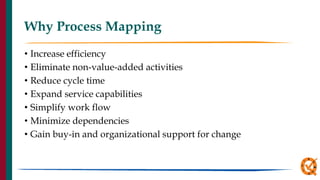
• Increase efficiency
• Eliminate non-value-added activities
• Reduce cycle time
• Expand service capabilities
• Simplify work flow
• Minimize dependencies
• Gain buy-in and organizational support for change
Looking at patient processes
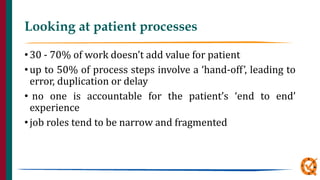
•30 - 70% of work doesn’t add value for patient
•up to 50% of process steps involve a ‘hand-off’, leading to
error, duplication or delay
• no one is accountable for the patient’s ‘end to end’
experience
•job roles tend to be narrow and fragmented
Symbols used to Process Map
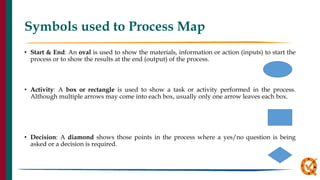
• Start & End: An oval is used to show the materials, information or action (inputs) to start the
process or to show the results at the end (output) of the process.
• Activity: A box or rectangle is used to show a task or activity performed in the process.
Although multiple arrows may come into each box, usually only one arrow leaves each box.
• Decision: A diamond shows those points in the process where a yes/no question is being
asked or a decision is required.
Important Points
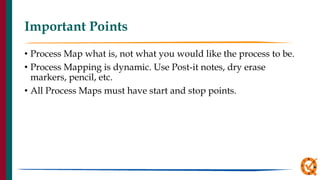
• Process Map what is, not what you would like the process to be.
• Process Mapping is dynamic. Use Post-it notes, dry erase
markers, pencil, etc.
• All Process Maps must have start and stop points.
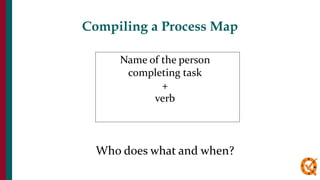
Name of the person
completing task
+
verb
Who does what and when?
Compiling a Process Map
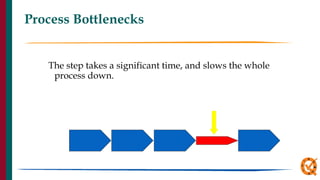
Process Bottlenecks
The step takes a significant time, and slows the whole
process down.
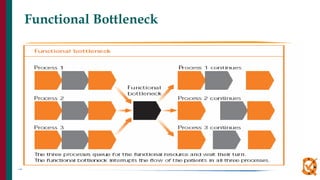
Functional Bottleneck
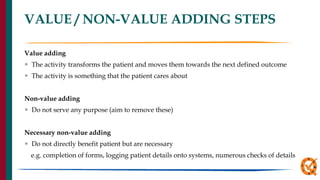
VALUE / NON-VALUE ADDING STEPS
Value adding
 The activity transforms the patient and moves them towards the next defined outcome
 The activity is something that the patient cares about
Non-value adding
 Do not serve any purpose (aim to remove these)
Necessary non-value adding
 Do not directly benefit patient but are necessary
e.g. completion of forms, logging patient details onto systems, numerous checks of details
Value-added Task
• It is done right the first time with no waste or rework.
• It is value-added or it is waste (non-value added)
WASTE IS A SENSITIVE ISSUE
• Its critical to eliminate “waste”
• Its also critical to recognise that the non value adding activities
may have been a core part of someone job for many years
• It’s the activities that are non value adding not the person
Wastes in Hospitals (MUDAS)
1. confusion
2. Motion/conveyance.
3. waiting
4. over processing
5. inventory.
6. defects
7. over production.
Wastes in Hospitals (MUDAS)
1. Confusion:
• Nurses spend 65% of their time looking for things they could
not find, clarifying unclear instructions and doing redundant
paperwork. (Jimmerson et al. 2005). Confusion includes questions
like:
• What do I do with this requisition?
• What does this order mean?
• Where do I have to store this item?
Wastes in Hospitals (MUDAS)
2. Motion/conveyance:
• Physical movement required to get a simple task done and to
move people from place to place.
• Redundant reaching for items.
• Walking to another location only to return to the starting point.
• Conveyance of patients and materials from room to room or
department to department.
Wastes in Hospitals (MUDAS)
3. waiting:
• Waiting for :
• a procedure to be done,
• a medication to arrive,
• or a doctor’s order to be given.
Wastes in Hospitals (MUDAS)
4. over processing:
• Doing more activities than is necessary to complete a work.
• Multiple entries of patient’s demographic details during the
hospital visit.
Wastes in Hospitals (MUDAS)
5. Inventory:
• Stored supply that are:
• Obsolete.
• Duplicated.
• Unnecessary.
• Missed charges for items used.
Wastes in Hospitals (MUDAS)
6. defects:
• Medication errors.
• Wrong site surgery.
• Leaving instruments in patient’s body.
• Wrong blood group errors.
• Bed sores.
• Incidence of fall from bed.
Wastes in Hospitals (MUDAS)
7. Over Production:
Doing more work than necessary.
Redundant Paper work. (Waste of patient time, possibility of error, )
Analysing the process map
 How many steps in your process?
 How many duplications?
 How many hand-offs?
 What is the approximate time of or between each step?
 Where are possible delays?
 Where are major bottlenecks?
 How many steps do not add value for patients?
 How many types of wastes are there between each step?
 Where are the problems for patients and staff?
Add value
Remove waste
Remember always aim to
Basic Process Redesign Techniques
• Eliminate non-value-added activities
• Eliminate duplicate activities
• Combine related activities
• Identify and remove waste at each step.
• Process in parallel
• Use decision-based, alternative process flow paths
Let us map a process
• Read the write up provided.
• Make a Process map of the process on the chart provided.
• Identify value adding and non value adding activities.
• Identify Process bottleneck.
• Identify wastes in the process.
• Design an alternative Process map.
Thank
you

Process Mapping Revised.pptxgejhshxbsjdijd

  • 1.
  • 2.
    Objective of thissession • Discussion on What is Process & Process Mapping • Why Process Mapping is important • How to Map the Process • Wastes in Hospital (MUDAS) • Exercise
  • 3.
    QUALITY IS DOING THERIGHT THINGS IN A RIGHT WAY FIRST TIME & EVERY TIME.
  • 5.
    WHAT IS APROCESS A process is a set of interrelated or interacting activities which transforms inputs into outputs A process is defined as “a series of steps which convert one or more inputs into one or more outputs.”
  • 6.
    What is aprocess map ? • Graphical representation of the series of steps of a process • A pictorial representation of the sequence of actions that comprise a process. • It traces the flow of physical product and information through the steps • If there is no physical product, the map is used to document the step-by-step activities involved in providing a service
  • 7.
  • 8.
    Why Process Mapping? •Visually represents the work process • Before you can improve a process, you must understand it. • Provides a common understanding of the entire process and specific roles and contributions of process participants. • Identifies problem areas and opportunities for process improvement • Process maps are a great problem solving tool • Helps us determine what is the problem/what it is not • You don’t learn to Process Map, You Process Map to learn. (Dr.Myron Tribus)
  • 9.
    Why Process Mapping •Increase efficiency • Eliminate non-value-added activities • Reduce cycle time • Expand service capabilities • Simplify work flow • Minimize dependencies • Gain buy-in and organizational support for change
  • 10.
    Looking at patientprocesses •30 - 70% of work doesn’t add value for patient •up to 50% of process steps involve a ‘hand-off’, leading to error, duplication or delay • no one is accountable for the patient’s ‘end to end’ experience •job roles tend to be narrow and fragmented
  • 11.
    Symbols used toProcess Map • Start & End: An oval is used to show the materials, information or action (inputs) to start the process or to show the results at the end (output) of the process. • Activity: A box or rectangle is used to show a task or activity performed in the process. Although multiple arrows may come into each box, usually only one arrow leaves each box. • Decision: A diamond shows those points in the process where a yes/no question is being asked or a decision is required.
  • 12.
    Important Points • ProcessMap what is, not what you would like the process to be. • Process Mapping is dynamic. Use Post-it notes, dry erase markers, pencil, etc. • All Process Maps must have start and stop points.
  • 13.
    Name of theperson completing task + verb Who does what and when? Compiling a Process Map
  • 14.
    Process Bottlenecks The steptakes a significant time, and slows the whole process down.
  • 15.
  • 16.
    VALUE / NON-VALUEADDING STEPS Value adding  The activity transforms the patient and moves them towards the next defined outcome  The activity is something that the patient cares about Non-value adding  Do not serve any purpose (aim to remove these) Necessary non-value adding  Do not directly benefit patient but are necessary e.g. completion of forms, logging patient details onto systems, numerous checks of details
  • 17.
    Value-added Task • Itis done right the first time with no waste or rework. • It is value-added or it is waste (non-value added)
  • 18.
    WASTE IS ASENSITIVE ISSUE • Its critical to eliminate “waste” • Its also critical to recognise that the non value adding activities may have been a core part of someone job for many years • It’s the activities that are non value adding not the person
  • 19.
    Wastes in Hospitals(MUDAS) 1. confusion 2. Motion/conveyance. 3. waiting 4. over processing 5. inventory. 6. defects 7. over production.
  • 20.
    Wastes in Hospitals(MUDAS) 1. Confusion: • Nurses spend 65% of their time looking for things they could not find, clarifying unclear instructions and doing redundant paperwork. (Jimmerson et al. 2005). Confusion includes questions like: • What do I do with this requisition? • What does this order mean? • Where do I have to store this item?
  • 21.
    Wastes in Hospitals(MUDAS) 2. Motion/conveyance: • Physical movement required to get a simple task done and to move people from place to place. • Redundant reaching for items. • Walking to another location only to return to the starting point. • Conveyance of patients and materials from room to room or department to department.
  • 22.
    Wastes in Hospitals(MUDAS) 3. waiting: • Waiting for : • a procedure to be done, • a medication to arrive, • or a doctor’s order to be given.
  • 23.
    Wastes in Hospitals(MUDAS) 4. over processing: • Doing more activities than is necessary to complete a work. • Multiple entries of patient’s demographic details during the hospital visit.
  • 24.
    Wastes in Hospitals(MUDAS) 5. Inventory: • Stored supply that are: • Obsolete. • Duplicated. • Unnecessary. • Missed charges for items used.
  • 25.
    Wastes in Hospitals(MUDAS) 6. defects: • Medication errors. • Wrong site surgery. • Leaving instruments in patient’s body. • Wrong blood group errors. • Bed sores. • Incidence of fall from bed.
  • 26.
    Wastes in Hospitals(MUDAS) 7. Over Production: Doing more work than necessary. Redundant Paper work. (Waste of patient time, possibility of error, )
  • 27.
    Analysing the processmap  How many steps in your process?  How many duplications?  How many hand-offs?  What is the approximate time of or between each step?  Where are possible delays?  Where are major bottlenecks?  How many steps do not add value for patients?  How many types of wastes are there between each step?  Where are the problems for patients and staff?
  • 28.
  • 29.
    Basic Process RedesignTechniques • Eliminate non-value-added activities • Eliminate duplicate activities • Combine related activities • Identify and remove waste at each step. • Process in parallel • Use decision-based, alternative process flow paths
  • 30.
    Let us mapa process • Read the write up provided. • Make a Process map of the process on the chart provided. • Identify value adding and non value adding activities. • Identify Process bottleneck. • Identify wastes in the process. • Design an alternative Process map.
  • 31.