Copyright © 2013 by ScottMadden, Inc. All rights reserved.
Process Mapping—
Improving Organizational
Performance
November 14, 2013
GBAS Business Administrator Institute
Copyright © 2013 by ScottMadden, Inc. All rights reserved.
Agenda
 Introduction to Process Improvement Framework
 Analyze
 Design
 Implement
 Applying What We’ve Learned
 Breakout Session
 Report Out
 Wrap-up
1
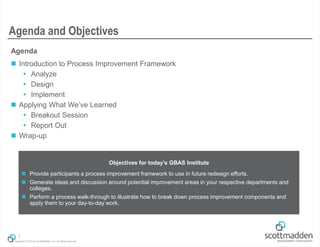
Agenda and Objectives
Objectives for today’s GBAS Institute
 Provide participants a process improvement framework to use in future redesign efforts.
 Generate ideas and discussion around potential improvement areas in your respective departments and
colleges.
 Perform a process walk-through to illustrate how to break down process improvement components and
apply them to your day-to-day work.
Introduction to the Process
Improvement Framework
Copyright © 2013 by ScottMadden, Inc. All rights reserved.
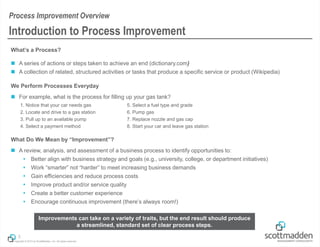
What’s a Process?
 A series of actions or steps taken to achieve an end (dictionary.com)
 A collection of related, structured activities or tasks that produce a specific service or product (Wikipedia)
We Perform Processes Everyday
 For example, what is the process for filling up your gas tank?
What Do We Mean by “Improvement”?
 A review, analysis, and assessment of a business process to identify opportunities to:
 Better align with business strategy and goals (e.g., university, college, or department initiatives)
 Work “smarter” not “harder” to meet increasing business demands
 Gain efficiencies and reduce process costs
 Improve product and/or service quality
 Create a better customer experience
 Encourage continuous improvement (there’s always room!)
3
Introduction to Process Improvement
Process Improvement Overview
1. Notice that your car needs gas
2. Locate and drive to a gas station
3. Pull up to an available pump
4. Select a payment method
5. Select a fuel type and grade
6. Pump gas
7. Replace nozzle and gas cap
8. Start your car and leave gas station
Improvements can take on a variety of traits, but the end result should produce
a streamlined, standard set of clear process steps.
Copyright © 2013 by ScottMadden, Inc. All rights reserved.
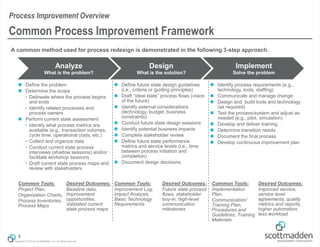
A common method used for process redesign is demonstrated in the following 3-step approach.
Analyze
What is the problem?
Design
What is the solution?
Implement
Solve the problem
4
Common Process Improvement Framework
Process Improvement Overview
 Define the problem
 Determine the scope
• Delineate where the process begins
and ends
• Identify related processes and
process owners
 Perform current state assessment
• Identify what process metrics are
available (e.g., transaction volumes,
cycle time, operational costs, etc.)
• Collect and organize data
• Conduct current state process
interviews (shadow sessions) and/or
facilitate workshop sessions
• Draft current state process maps and
review with stakeholders
 Define future state design guidelines
(i.e., criteria or guiding principles)
 Draft “ideal state” process flows (vision
of the future)
 Identify external considerations
(technology, budget, business
constraints)
 Conduct future state design sessions
 Identify potential business impacts
 Complete stakeholder review
 Define future state performance
metrics and service levels (i.e., time
between process initiation and
completion)
 Document design decisions
 Identify process requirements (e.g.,
technology, tools, staffing)
 Communicate and manage change
 Design and build tools and technology
(as required)
 Test the process/system and adjust as
needed (e.g., pilot, simulation)
 Develop and deliver training
 Determine transition needs
 Document the final process
 Develop continuous improvement plan
Common Tools:
Project Plan,
Organization Charts,
Process Inventories,
Process Maps
Desired Outcomes:
Baseline data,
Improvement
opportunities,
Validated current
state process maps
Common Tools:
Improvement Log,
Impact Analysis,
Basic Technology
Requirements
Desired Outcomes:
Future state process
flows, stakeholder
buy-in, high-level
communication
milestones
Common Tools:
Implementation
Plan,
Communication/
Training Plan,
Procedures and
Guidelines, Training
Materials
Desired Outcomes:
Improved service,
service level
agreements, quality
metrics and reports,
higher automation,
less workload
Analyze
Copyright © 2013 by ScottMadden, Inc. All rights reserved.
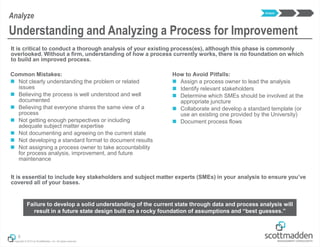
It is critical to conduct a thorough analysis of your existing process(es), although this phase is commonly
overlooked. Without a firm, understanding of how a process currently works, there is no foundation on which
to build an improved process.
It is essential to include key stakeholders and subject matter experts (SMEs) in your analysis to ensure you’ve
covered all of your bases.
6
Understanding and Analyzing a Process for Improvement
Analyze
Failure to develop a solid understanding of the current state through data and process analysis will
result in a future state design built on a rocky foundation of assumptions and “best guesses.”
Common Mistakes:
 Not clearly understanding the problem or related
issues
 Believing the process is well understood and well
documented
 Believing that everyone shares the same view of a
process
 Not getting enough perspectives or including
adequate subject matter expertise
 Not documenting and agreeing on the current state
 Not developing a standard format to document results
 Not assigning a process owner to take accountability
for process analysis, improvement, and future
maintenance
Analyze
How to Avoid Pitfalls:
 Assign a process owner to lead the analysis
 Identify relevant stakeholders
 Determine which SMEs should be involved at the
appropriate juncture
 Collaborate and develop a standard template (or
use an existing one provided by the University)
 Document process flows
Copyright © 2013 by ScottMadden, Inc. All rights reserved.
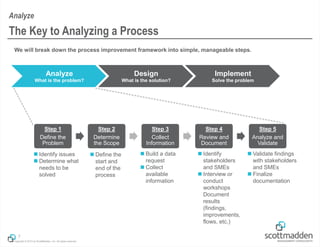
We will break down the process improvement framework into simple, manageable steps.
7
The Key to Analyzing a Process
Analyze
Analyze
What is the problem?
Design
What is the solution?
Implement
Solve the problem
Step 1
Define the
Problem
Step 2
Determine
the Scope
Step 3
Collect
Information
Step 4
Review and
Document
Step 5
Analyze and
Validate
 Build a data
request
 Collect
available
information
 Identify
stakeholders
and SMEs
 Interview or
conduct
workshops
Document
results
(findings,
improvements,
flows, etc.)
 Validate findings
with stakeholders
and SMEs
 Finalize
documentation
 Identify issues
 Determine what
needs to be
solved
 Define the
start and
end of the
process
Copyright © 2013 by ScottMadden, Inc. All rights reserved.
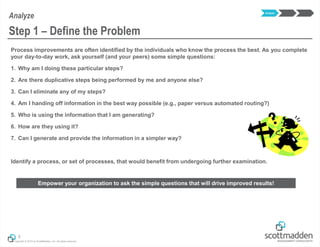
Process improvements are often identified by the individuals who know the process the best. As you complete
your day-to-day work, ask yourself (and your peers) some simple questions:
1. Why am I doing these particular steps?
2. Are there duplicative steps being performed by me and anyone else?
3. Can I eliminate any of my steps?
4. Am I handing off information in the best way possible (e.g., paper versus automated routing?)
5. Who is using the information that I am generating?
6. How are they using it?
7. Can I generate and provide the information in a simpler way?
Identify a process, or set of processes, that would benefit from undergoing further examination.
8
Step 1 – Define the Problem
Analyze
Empower your organization to ask the simple questions that will drive improved results!
Analyze
Copyright © 2013 by ScottMadden, Inc. All rights reserved.
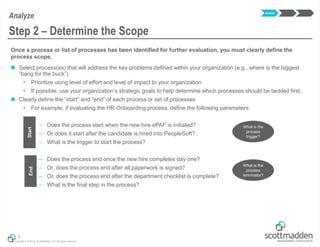
Once a process or list of processes has been identified for further evaluation, you must clearly define the
process scope.
 Select process(es) that will address the key problems defined within your organization (e.g., where is the biggest
“bang for the buck”)
 Prioritize using level of effort and level of impact to your organization
 If possible, use your organization’s strategic goals to help determine which processes should be tackled first.
 Clearly define the “start” and “end” of each process or set of processes
 For example, if evaluating the HR Onboarding process, define the following parameters:
– Does the process start when the new hire ePAF is initiated?
– Or does it start after the candidate is hired into PeopleSoft?
– What is the trigger to start the process?
– Does the process end once the new hire completes day one?
– Or, does the process end after all paperwork is signed?
– Or, does the process end after the department checklist is complete?
– What is the final step in the process?
9
Step 2 – Determine the Scope
Analyze
Analyze
StartEnd
What is the
process
trigger?
What is the
process
terminator?
Copyright © 2013 by ScottMadden, Inc. All rights reserved.
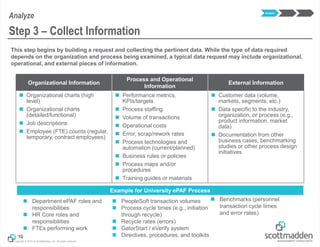
This step begins by building a request and collecting the pertinent data. While the type of data required
depends on the organization and process being examined, a typical data request may include organizational,
operational, and external pieces of information.
10
Step 3 – Collect Information
Analyze
Organizational Information
Process and Operational
Information
External Information
 Organizational charts (high
level)
 Organizational charts
(detailed/functional)
 Job descriptions
 Employee (FTE) counts (regular,
temporary, contract employees)
 Performance metrics,
KPIs/targets
 Process staffing
 Volume of transactions
 Operational costs
 Error, scrap/rework rates
 Process technologies and
automation (current/planned)
 Business rules or policies
 Process maps and/or
procedures
 Training guides or materials
 Customer data (volume,
markets, segments, etc.)
 Data specific to the industry,
organization, or process (e.g.,
product information, market
data)
 Documentation from other
business cases, benchmarking
studies or other process design
initiatives
Analyze
 Department ePAF roles and
responsibilities
 HR Core roles and
responsibilities
 FTEs performing work
Example for University ePAF Process
 PeopleSoft transaction volumes
 Process cycle times (e.g., initiation
through recycle)
 Recycle rates (errors)
 GatorStart / eVerify system
 Directives, procedures, and toolkits
 Benchmarks (personnel
transaction cycle times
and error rates)
Copyright © 2013 by ScottMadden, Inc. All rights reserved.
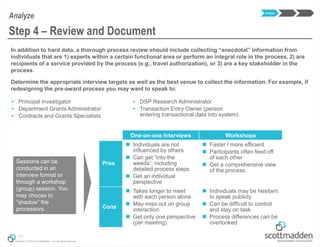
In addition to hard data, a thorough process review should include collecting “anecdotal” information from
individuals that are 1) experts within a certain functional area or perform an integral role in the process, 2) are
recipients of a service provided by the process (e.g., travel authorization), or 3) are a key stakeholder in the
process.
Determine the appropriate interview targets as well as the best venue to collect the information. For example, if
redesigning the pre-award process you may want to speak to:
11
Step 4 – Review and Document
Analyze
 Principal Investigator
 Department Grants Administrator
 Contracts and Grants Specialists
 DSP Research Administrator
 Transaction Entry Owner (person
entering transactional data into system)
One-on-one Interviews Workshops
Pros
 Individuals are not
influenced by others
 Can get “into the
weeds”, including
detailed process steps
 Get an individual
perspective
 Faster / more efficient
 Participants often feed off
of each other
 Get a comprehensive view
of the process
Cons
 Takes longer to meet
with each person alone
 May miss out on group
interaction
 Get only one perspective
(per meeting)
 Individuals may be hesitant
to speak publicly
 Can be difficult to control
and stay on task
 Process differences can be
overlooked
Sessions can be
conducted in an
interview format or
through a workshop
(group) session. You
may choose to
“shadow” the
processors.
Analyze
Copyright © 2013 by ScottMadden, Inc. All rights reserved.
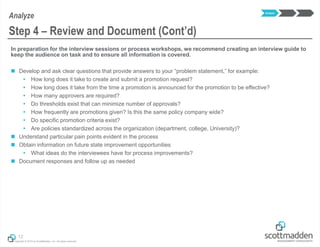
In preparation for the interview sessions or process workshops, we recommend creating an interview guide to
keep the audience on task and to ensure all information is covered.
 Develop and ask clear questions that provide answers to your “problem statement,” for example:
 How long does it take to create and submit a promotion request?
 How long does it take from the time a promotion is announced for the promotion to be effective?
 How many approvers are required?
 Do thresholds exist that can minimize number of approvals?
 How frequently are promotions given? Is this the same policy company wide?
 Do specific promotion criteria exist?
 Are policies standardized across the organization (department, college, University)?
 Understand particular pain points evident in the process
 Obtain information on future state improvement opportunities
 What ideas do the interviewees have for process improvements?
 Document responses and follow up as needed
12
Step 4 – Review and Document (Cont’d)
Analyze
Analyze
Copyright © 2013 by ScottMadden, Inc. All rights reserved.
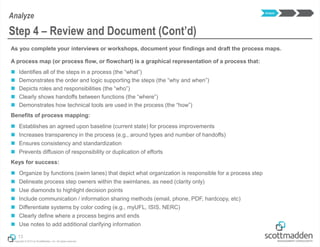
As you complete your interviews or workshops, document your findings and draft the process maps.
A process map (or process flow, or flowchart) is a graphical representation of a process that:
 Identifies all of the steps in a process (the “what”)
 Demonstrates the order and logic supporting the steps (the “why and when”)
 Depicts roles and responsibilities (the “who”)
 Clearly shows handoffs between functions (the “where”)
 Demonstrates how technical tools are used in the process (the “how”)
Benefits of process mapping:
 Establishes an agreed upon baseline (current state) for process improvements
 Increases transparency in the process (e.g., around types and number of handoffs)
 Ensures consistency and standardization
 Prevents diffusion of responsibility or duplication of efforts
Keys for success:
 Organize by functions (swim lanes) that depict what organization is responsible for a process step
 Delineate process step owners within the swimlanes, as need (clarity only)
 Use diamonds to highlight decision points
 Include communication / information sharing methods (email, phone, PDF, hardcopy, etc)
 Differentiate systems by color coding (e.g., myUFL, ISIS, NERC)
 Clearly define where a process begins and ends
 Use notes to add additional clarifying information
13
Step 4 – Review and Document (Cont’d)
Analyze
Analyze
Copyright © 2013 by ScottMadden, Inc. All rights reserved.
14
Step 4 – Review and Document (Cont’d)
Analyze
UF Pre-Awards Process Current State
DeptAdmin/
SSC/PI
DSRAwardsSponsor*
Enter item into
Mail Log and route
to assigned RA
(Sr. Clerk)
Is the
information
complete?
Send NOA PDF to
C&G, PI & Dept
via email
(Sr. Clerk)
Contact Sponsor,
PI, Dept, or SSC
for information
(RA)
Print NOA and
send to approver
(RA)
Funds
Release Part
1
Enter award into
NERDC and
review for
completeness
(RA)
Provide additional
information
Email & Hardcopy
inboxes “triaged”
(Team Lead)
Is the item a
question or for
action?
End
Print hardcopy (if
electronic) and
assign to RA to
work
(Team Lead)
Yes
For Action
Answer email
(Team Lead)
Sign NOA and
return to RA
(Team Lead or
Asst Director)
Note: Information
includes budget,
compliance reviews,
subcontracts,
subprojects, etc.
Merge/Mark NOA
approved in
NERDC
(RA)
Review hardcopy
NOA
(Team Lead or
Asst Director)
DSR
Proposals
Can question
be quickly
answered?
No
Question
Note: Answered emails do not get logged in Mail Log
Receive file
(RA)
Note: Information
could include budget
info, compliance
reviews, etc.
No
Verify PeopleSoft
data complete.
Submit to C&G
(RA)
Forward to Sr.
Clerk to enter into
Mail Log
(Team Lead)
Yes
Approve NOA? Yes
Batch NOA and
send to Sr. Clerk
(RA)
Return to RA to
revise/complete
(RA)
No
Scan supporting
documentation into
IBM Client
(Sr. Clerk or Part-
time staff)
Note: Process shown
for new grants.
However, process
does not change
significantly for
temporary awards
Begin
Analyze
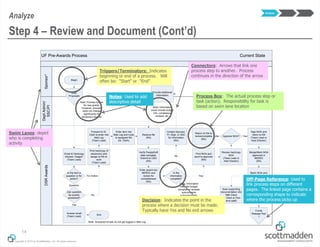
Swim Lanes: depict
who is completing
activity
Triggers/Terminators: Indicates
beginning or end of a process. Will
often be: “Start” or “End”
Process Box: The actual process step or
task (action). Responsibility for task is
based on swim lane location
Off-Page Reference: Used to
link process steps on different
pages. The linked page contains a
corresponding shape to indicate
where the process picks up
Connectors: Arrows that link one
process step to another. Process
continues in the direction of the arrow
Decision: Indicates the point in the
process where a decision must be made.
Typically have Yes and No exit arrows
Notes: Used to add
descriptive detail
Copyright © 2013 by ScottMadden, Inc. All rights reserved.
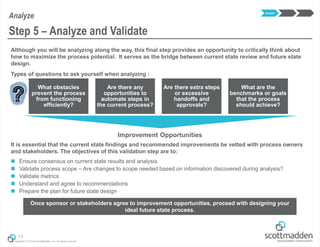
Although you will be analyzing along the way, this final step provides an opportunity to critically think about
how to maximize the process potential. It serves as the bridge between current state review and future state
design.
Types of questions to ask yourself when analyzing :
It is essential that the current state findings and recommended improvements be vetted with process owners
and stakeholders. The objectives of this validation step are to:
 Ensure consensus on current state results and analysis
 Validate process scope – Are changes to scope needed based on information discovered during analysis?
 Validate metrics
 Understand and agree to recommendations
 Prepare the plan for future state design
15
Step 5 – Analyze and Validate
Improvement Opportunities
What obstacles
prevent the process
from functioning
efficiently?
Are there any
opportunities to
automate steps in
the current process?
Are there extra steps
or excessive
handoffs and
approvals?
What are the
benchmarks or goals
that the process
should achieve?
Once sponsor or stakeholders agree to improvement opportunities, proceed with designing your
ideal future state process.
Analyze
Analyze
Copyright © 2013 by ScottMadden, Inc. All rights reserved.
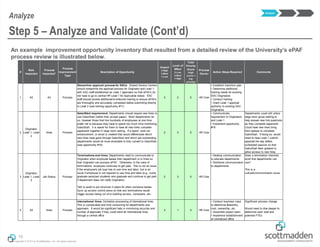
An example improvement opportunity inventory that resulted from a detailed review of the University’s ePAF
process review is illustrated below.
16
Step 5 – Analyze and Validate (Cont’d)
Analyze
Analyze
#
Role
Impacted
Process
Impacted*
Process
Improvement
Type
Description of Opportunity
Impact
3-High
2-Med
1-Low
Level of
Effort
3-Low
2-Med
1-High
Total
Priority
Score
(high
score =
top
priority)
Process
Owner
Action Steps Required Comments
1 All All Process
Streamline approval process for SSCs: Shared Service Centers
should streamline the approval process for Originator and Level 1,
with SSC staff established as Level 1 approvers so that ePAFs do
not have to go to central HR Level 1 for duplicative review. SSC
staff should receive additional/re-enforced training to ensure ePAFs
are thoroughly and accurately completed before submitting directly
to Level 2 (see training opportunity #11)
3 2 5 HR Core
• Establish transition plan
• Determine additional
training needs for existing
SSC Originators
• Conduct training
• Grant Level 1 approval
authority to existing SSC
Originators
2
Originator,
Level 1, Level
2
Hires Process
GatorStart requirement: Departments should require new hires to
use GatorStart (rather than accept paper). Most departments do
so, however those that hire hundreds of employees at one time
prefer not to because they have to spend too much time monitoring
GatorStart. It is easier for them to have all new hires complete
paperwork together in large room setting. If a report, work list
enhancement, or email is created that would differentiate which
new hires have gone through GatorStart and which are outstanding,
departments would be more amenable to fully convert to GatorStart
(see opportunity #18)
2 3 5 HR Core
• Communicate
requirement to Originators
and Level 1
• Implement opportunity
#18
Departments could still utilize
large room group setting to
help answer new hire questions
as they complete paperwork.
Could have new hires bring
their laptops to complete
GatorStart. If doing so, would
need to have Level 1 submit
approval the day before
scheduled session so that
GatorStart feed updated to
allow access to new hires
3
Originator,
Level 1, Level
2
Job Status Process
Terminations and hires: Departments need to communicate to
Originator when employee leaves their department or is hired so
that Originator can process ePAF. Otherwise, in the case of
terminations, employee continues to get paid. This is not an issue
if the employee's job type has to use time and labor, but is an
issue if employee is not required to use time and labor (e.g., some
graduate assistant students who graduate and continue to get paid
if department does not notify Originator).
Talk to audit to put structure in place for when someone leaves.
Sync up access control piece so that any terminations would
trigger access being cut of to building access, computers, etc.
2 3 5 HR Core
• Develop communication
to educate departments
• Distribute communication
to departments
Does a termination checklist
exist that departments can
use?
This is a
cultural/communication issue
4 All Hires Process
International hires: Centralize processing of international hires.
This is complicated and time consuming for departments and
approvers. It would be significant help in minimizing recycles and
number of approvals if they could send all international hires
through a central office
3 1 4 HR Core
• Conduct business case
to determine feasibility,
cost, ownership, etc.
• Assemble project team
• Implement establishment
of centralized office
Significant process change
Would need to dive deeper to
determine work load and
potential FTEs
Future State Design
Copyright © 2013 by ScottMadden, Inc. All rights reserved.
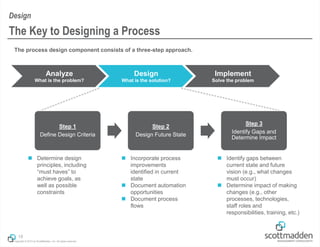
The process design component consists of a three-step approach.
18
The Key to Designing a Process
Design
Analyze
What is the problem?
Design
What is the solution?
Implement
Solve the problem
Step 1
Define Design Criteria
Step 2
Design Future State
Step 3
Identify Gaps and
Determine Impact
 Determine design
principles, including
“must haves” to
achieve goals, as
well as possible
constraints
 Incorporate process
improvements
identified in current
state
 Document automation
opportunities
 Document process
flows
 Identify gaps between
current state and future
vision (e.g., what changes
must occur)
 Determine impact of making
changes (e.g., other
processes, technologies,
staff roles and
responsibilities, training, etc.)
Copyright © 2013 by ScottMadden, Inc. All rights reserved.
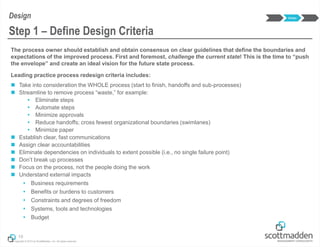
The process owner should establish and obtain consensus on clear guidelines that define the boundaries and
expectations of the improved process. First and foremost, challenge the current state! This is the time to “push
the envelope” and create an ideal vision for the future state process.
Leading practice process redesign criteria includes:
 Take into consideration the WHOLE process (start to finish, handoffs and sub-processes)
 Streamline to remove process “waste,” for example:
 Eliminate steps
 Automate steps
 Minimize approvals
 Reduce handoffs; cross fewest organizational boundaries (swimlanes)
 Minimize paper
 Establish clear, fast communications
 Assign clear accountabilities
 Eliminate dependencies on individuals to extent possible (i.e., no single failure point)
 Don’t break up processes
 Focus on the process, not the people doing the work
 Understand external impacts
 Business requirements
 Benefits or burdens to customers
 Constraints and degrees of freedom
 Systems, tools and technologies
 Budget
19
Step 1 – Define Design Criteria
Design Design
Copyright © 2013 by ScottMadden, Inc. All rights reserved.
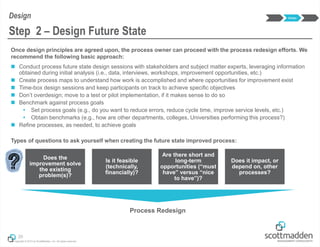
Once design principles are agreed upon, the process owner can proceed with the process redesign efforts. We
recommend the following basic approach:
 Conduct process future state design sessions with stakeholders and subject matter experts, leveraging information
obtained during initial analysis (i.e., data, interviews, workshops, improvement opportunities, etc.)
 Create process maps to understand how work is accomplished and where opportunities for improvement exist
 Time-box design sessions and keep participants on track to achieve specific objectives
 Don’t overdesign; move to a test or pilot implementation, if it makes sense to do so
 Benchmark against process goals
 Set process goals (e.g., do you want to reduce errors, reduce cycle time, improve service levels, etc.)
 Obtain benchmarks (e.g., how are other departments, colleges, Universities performing this process?)
 Refine processes, as needed, to achieve goals
Types of questions to ask yourself when creating the future state improved process:
20
Step 2 – Design Future State
Design Design
Does the
improvement solve
the existing
problem(s)?
Is it feasible
(technically,
financially)?
Are there short and
long-term
opportunities (“must
have” versus “nice
to have”)?
Does it impact, or
depend on, other
processes?
Process Redesign
Copyright © 2013 by ScottMadden, Inc. All rights reserved.
21
Step 2 – Design Future State (Cont’d)
Design
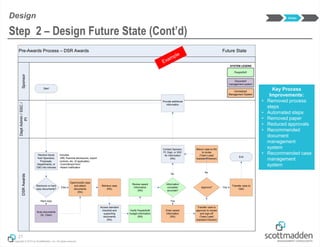
Pre-Awards Process – DSR Awards Future State
DeptAdmin/SSC/
PI
SponsorDSRAwards
PeopleSoft
SYSTEM LEGEND
Scan documents
(Sr. Clerk)
Electronic or hard
copy documents?
Receive inputs
from Sponsors,
Proposals,
Departments, or
C&G into inboxes
Document
management system
Includes:
-IRB, financial disclosures, export
controls, etc. (if applicable)
-Commitment form
-Award notification
Start
Hard copy
Centralized
Management System
Open/modify case
and attach
documents
(RA)
Elec.
Retrieve case
(RA)
Review award
information
(RA)
Verify PeopleSoft/
budget information
(RA)
Access standard
checklist and
supporting
documents
(RA)
Information
complete/
accurate?
Contact Sponsor,
PI, Dept, or SSC
for information
(RA)
No
Provide additional
information
Enter award
information
(RA)
Yes
Transfer case to
approver to review
and sign-off
(Team Lead/
Assistant Director)
Approve?
Transfer case to
C&G
Yes
Return case to RA
to revise
(Team Lead/
Assistant Director)
No
End
Key Process
Improvements:
• Removed process
steps
• Automated steps
• Removed paper
• Reduced approvals
• Recommended
document
management
system
• Recommended case
management
system
Design
Copyright © 2013 by ScottMadden, Inc. All rights reserved.
22
Step 2 – Design Future State (Cont’d)
Design
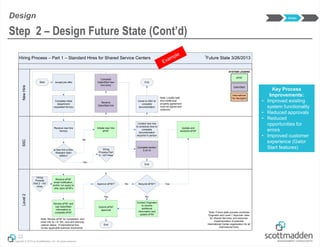
Hiring Process – Part 1 – Standard Hires for Shared Service Centers 1
Future State 3/26/2013
NewHireLevel2SSC
Start Accept job offer
Hiring
Process Part
2 - Int’l Hires
Complete initial
department
requested form(s)
Is new hire a Non-
Resident Alien
(NRA)?
Initiate new hire
ePAF
Receive
GatorStart link
Receive new hire
form(s)
No
Yes
ePAF
SYSTEM LEGEND
GatorStart
International
Tax Navigator
End
Complete
GatorStart new
hire entry
Come to SSC to
complete
documentation
Complete section
2 of I-9
Note: Loyalty oath
and intellectual
property agreement
must be signed and
notarized
Contact new hire
to schedule time to
complete
documentation
required in person
End
Receive ePAF
email notification,
and/or run query to
view open ePAFs
Review ePAF and
use GatorStart
information to
complete ePAF
Approve ePAF?
Note: Review ePAF for completion, and
enter info for I-9, W4, race and ethnicity,
veteran status. If international hire,
review applicable scanned documents
Contact Originator
to receive
additional
information and
update ePAF
Recycle ePAF?
Submit ePAF
approval
Yes
No
No
End
Update and
resubmit ePAF
Yes
Hiring
Process
Part 2 - Int’l
Hires
1
Note: Future state process combines
Originator and Level 1 Approver roles
for Shared Services, and assumes
implementation of potential
International Center organization for all
international hires
Key Process
Improvements:
• Improved existing
system functionality
• Reduced approvals
• Reduced
opportunities for
errors
• Improved customer
experience (Gator
Start features)
Design
Copyright © 2013 by ScottMadden, Inc. All rights reserved.
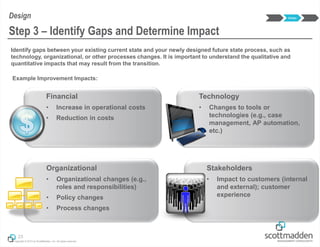
Identify gaps between your existing current state and your newly designed future state process, such as
technology, organizational, or other processes changes. It is important to understand the qualitative and
quantitative impacts that may result from the transition.
23
Step 3 – Identify Gaps and Determine Impact
Design Design
Technology
• Changes to tools or
technologies (e.g., case
management, AP automation,
etc.)
Stakeholders
• Impact to customers (internal
and external); customer
experience
Organizational
• Organizational changes (e.g.,
roles and responsibilities)
• Policy changes
• Process changes
Financial
• Increase in operational costs
• Reduction in costs
Example Improvement Impacts:
Implementation
Copyright © 2013 by ScottMadden, Inc. All rights reserved.
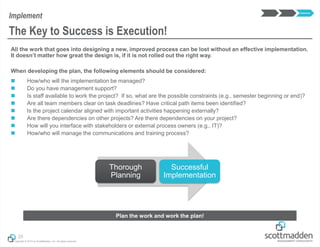
All the work that goes into designing a new, improved process can be lost without an effective implementation.
It doesn’t matter how great the design is, if it is not rolled out the right way.
When developing the plan, the following elements should be considered:
 How/who will the implementation be managed?
 Do you have management support?
 Is staff available to work the project? If so, what are the possible constraints (e.g., semester beginning or end)?
 Are all team members clear on task deadlines? Have critical path items been identified?
 Is the project calendar aligned with important activities happening externally?
 Are there dependencies on other projects? Are there dependencies on your project?
 How will you interface with stakeholders or external process owners (e.g., IT)?
 How/who will manage the communications and training process?
25
The Key to Success is Execution!
Implement
Implement
Thorough
Planning
Successful
Implementation
Plan the work and work the plan!
Copyright © 2013 by ScottMadden, Inc. All rights reserved.
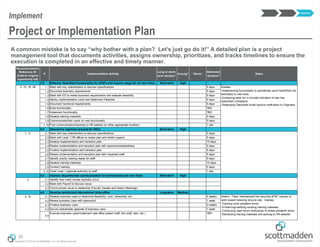
A common mistake is to say “why bother with a plan? Let’s just go do it!” A detailed plan is a project
management tool that documents activities, assigns ownership, prioritizes, and tracks timelines to ensure the
execution is completed in an effective and timely manner.
26
Project or Implementation Plan
Implement
Recomnendation
Reference ID
(links to original
opportunity list)
# Implementation Activity
Long or short-
term solution1 Priority2
Owner
Estimated
Duration3 Notes
1.0 Enhance GatorStart functionality for ePAFs and require usage for all new hires Short-term High
2, 15, 18, 28 1.1 Meet with key stakeholders to discuss specifications 5 days
1.2 Document business requirements 5 days
1.3 Meet with ES to review business requirements and evaluate feasibility 5 days
1.4 Identiy implementation costs and determine if feasible 5 days
1.5 Document technical requirements 5 days
1.6 Build functionality TBD
1.7 Implement functionality TBD
1.8 Develop training materials 5 days
1.9 Communicate/train users on new functionality 5 days
1.10 Post communication/trainting to HR website (or other appropriate location) 1 day
2.0 Streamline approval process for SSCs Short-term High
1, 11 2.1 Meet with key stakeholders to discuss specifications 5 days
2.2 Meet with Level 1 HR offices to review plan and obtain support 5 days
2.3 Develop implementation and transition plan 10 days
2.4 Review implementation and transition plan with sponsors/stakeholders 5 days
2.5 Finalize implementation and transition plan 5 days
2.6 Review implementation and transition plan with impacted staff 5 days
2.7 Identify priority training needs for staff 5 days
2.8 Develop training materials 10 days
2.9 Conduct training 5 days
2.10 Grant Level 1 approval authority to staff 1 day
3.0 Improve departmental communication for terminations and new hires Short-term High
3 3.1 Identify how many issues typically occur
3.2 Meet with Payroll to discuss issue
3.3 Communicate issue to leadership (Faculty Senate and Dean's Meetings)
4.0 Develop centralized international hires office Long-term Medium
4, 10 4.1 Develop business case to determine feasibility, cost, ownership, etc. 4 weeks
4.2 Review business case with sponsor(s) 1 week
4.3 Finalize business case 2 weeks
4.4 Secure stakeholder approval of business case 1 week
4.5
Execute business case/implement new office (select staff, hire staff, train, etc.) TBD
Involves:
-Implementing functionality to periodically send GatorStart link
reminders to new hires
-Enhancing work list to include indication of new hire
GatorStart completion
-Developing GatorStart email bounce notification to Originator
Interim - Track international hire recycled ePAF causes to
work toward reducing recycle rate. Involves:
-Tracking most prevalent errors
-Enhancing/clarifying existing training materials
-Conducting open forum workshops to review prevalent errors
-Distributing training materials and posting to HR website
Implement
Copyright © 2013 by ScottMadden, Inc. All rights reserved.
Inform Engage Prepare
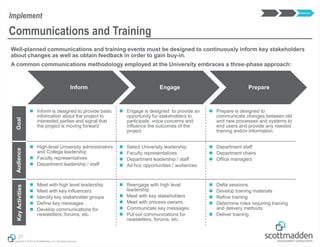
Well-planned communications and training events must be designed to continuously inform key stakeholders
about changes as well as obtain feedback in order to gain buy-in.
A common communications methodology employed at the University embraces a three-phase approach:
27
Communications and Training
ImplementGoal
 Inform is designed to provide basic
information about the project to
interested parties and signal that
the project is moving forward
 Engage is designed to provide an
opportunity for stakeholders to
participate, voice concerns and
influence the outcomes of the
project
 Prepare is designed to
communicate changes between old
and new processes and systems to
end users and provide any needed
training and/or information
Audience
 High-level University administrators
and College leadership
 Faculty representatives
 Department leadership / staff
 Select University leadership
 Faculty representatives
 Department leadership / staff
 Ad hoc opportunities / audiences
 Department staff
 Department chairs
 Office managers
KeyActivities
 Meet with high level leadership
 Meet with key influencers
 Identify key stakeholder groups
 Define key messages
 Develop communications for
newsletters, forums, etc.
 Reengage with high level
leadership
 Meet with key stakeholders
 Meet with process owners
 Communicate key messages
 Put out communications for
newsletters, forums, etc.
 Delta sessions
 Develop training materials
 Refine training
 Determine roles requiring training
and delivery methods
 Deliver training
Implement
Copyright © 2013 by ScottMadden, Inc. All rights reserved.
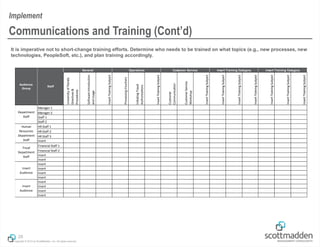
It is imperative not to short-change training efforts. Determine who needs to be trained on what topics (e.g., new processes, new
technologies, PeopleSoft, etc.), and plan training accordingly.
28
Communications and Training (Cont’d)
Implement
UniversityofFlorida
Directives&
Procedures
SoftwareIntroduction
andUsage
InsertTrainingSubject
ProcessingVouchers
InitiatingTravel
Authorizations
InsertTrainingSubject
Customer
Communication
CustomerService
Workshop
InsertTrainingSubject
Manager 1
Manager 2
Staff 1
Staff 2
HR Staff 1
HR Staff 2
HR Staff 3
Insert
Financial Staff 1
Financial Staff 2
Insert
Insert
Insert
Insert
Insert
Insert
Insert
Insert
Insert
Insert
Insert Training Category
Insert
Audience
General Operations Customer Service Insert Training Category
Department
Staff
Human
Resources
Department
Staff
Fiscal
Department
Staff
Insert
Audience
Audience
Group
Staff
Applying What We’ve
Learned
Copyright © 2013 by ScottMadden, Inc. All rights reserved.
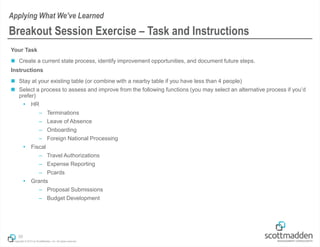
Your Task
 Create a current state process, identify improvement opportunities, and document future steps.
Instructions
 Stay at your existing table (or combine with a nearby table if you have less than 4 people)
 Select a process to assess and improve from the following functions (you may select an alternative process if you’d
prefer)
 HR
– Terminations
– Leave of Absence
– Onboarding
– Foreign National Processing
 Fiscal
– Travel Authorizations
– Expense Reporting
– Pcards
 Grants
– Proposal Submissions
– Budget Development
30
Breakout Session Exercise – Task and Instructions
Applying What We’ve Learned
Copyright © 2013 by ScottMadden, Inc. All rights reserved.
Define the Problem
 For example, what are the main issues with the process you’ve selected?
 Cycle times (process components and start to finish)
 Costs
 Performance
 Manual versus automated processes
 Error rates
 Other?
Define the Process Scope
 What process are you evaluating?
 Are there other sub-processes that may be impacted?
 Where does the process begin and end?
Evaluate and Document the Current State
 Write the steps down in the process (~10 steps); keep relatively high-level at this stage.
 You may do this in a numerical list format, a simple process flow, or however your team
can capture the key information.
31
Breakout Session – Exercise Part 1
Applying What We’ve Learned
You will have 10 minutes to
complete this exercise.
Copyright © 2013 by ScottMadden, Inc. All rights reserved.
After documenting your current state in Exercise Part 1, you are ready to begin designing the ideal future state.
You must identify improvement opportunities.
 Review your findings
 Develop a list of process improvement opportunities (don’t need to draw out process map)
 How would you change the process?
 What overall improvements would you recommend?
32
Breakout Session – Exercise Part 2
Applying What We’ve Learned
You will have 10 minutes to
complete this exercise.
Copyright © 2013 by ScottMadden, Inc. All rights reserved.
Select a volunteer from your table to share your process improvement ideas. Only one group will report out to
everyone.
33
Breakout Session – Report Out
Applying What We’ve Learned
You will have 5 minutes to
complete this exercise.
We welcome volunteers!
Wrap-Up
Copyright © 2013 by ScottMadden, Inc. All rights reserved.
 Return to your departments and share knowledge gained in this session
 Identify potential processes in your areas to further evaluate
 Put a plan into place to analyze, design, and implement
 Follow-up with GBAS leaders on any initiatives undertaken in your area
 Workshop will be planned for 2014 to share lessons learned around a particular process
improvement effort
35
So What’s Next?
Wrap-Up
Copyright © 2013 by ScottMadden, Inc. All rights reserved.
Courtney Jackson
Director
ScottMadden, Inc.
2626 Glenwood Avenue
Suite 480
Raleigh, NC 27608
CourtneyJackson@scottmadden.com
O: 919-781-4191 M: 919-672-7521
ScottMadden, Inc.
2626 Glenwood Avenue
Suite 480
Raleigh, NC 27608
KevinHernandez@scottmadden.com
O: 919-781-4191 M: 202-640-8662
Kevin Hernandez
Senior Associate
Contact Us
36
Appendix: Example Tools
Copyright © 2013 by ScottMadden, Inc. All rights reserved.
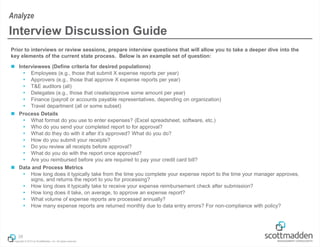
Prior to interviews or review sessions, prepare interview questions that will allow you to take a deeper dive into the
key elements of the current state process. Below is an example set of question:
 Interviewees (Define criteria for desired populations)
 Employees (e.g., those that submit X expense reports per year)
 Approvers (e.g., those that approve X expense reports per year)
 T&E auditors (all)
 Delegates (e.g., those that create/approve some amount per year)
 Finance (payroll or accounts payable representatives, depending on organization)
 Travel department (all or some subset)
 Process Details
 What format do you use to enter expenses? (Excel spreadsheet, software, etc.)
 Who do you send your completed report to for approval?
 What do they do with it after it’s approved? What do you do?
 How do you submit your receipts?
 Do you review all receipts before approval?
 What do you do with the report once approved?
 Are you reimbursed before you are required to pay your credit card bill?
 Data and Process Metrics
 How long does it typically take from the time you complete your expense report to the time your manager approves,
signs, and returns the report to you for processing?
 How long does it typically take to receive your expense reimbursement check after submission?
 How long does it take, on average, to approve an expense report?
 What volume of expense reports are processed annually?
 How many expense reports are returned monthly due to data entry errors? For non-compliance with policy?
38
Interview Discussion Guide
Analyze
Copyright © 2013 by ScottMadden, Inc. All rights reserved.
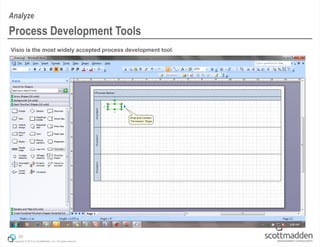
Visio is the most widely accepted process development tool.
39
Process Development Tools
Analyze
Copyright © 2013 by ScottMadden, Inc. All rights reserved.
40
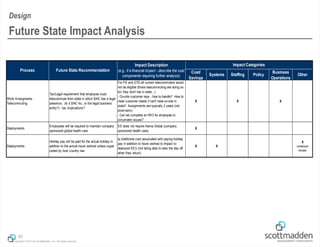
Future State Impact Analysis
Design
Cost/
Savings
Systems Staffing Policy
Business
Operations
Other
Work Arrangments -
Telecommuting
Tax/Legal requirement that employee must
telecommute from state in which BAE has a legal
presence. (Is it BAE Inc. or the legal business
entity?) - tax implications?
For PS and GTS all current telecommuters would
not be eligible (those telecommuting are doing so
b/c they don't live in state...)
- On-site customer reps - how to handle? How to
meet customer needs if can't have on-site in
state? Assignments are typically 2 years (not
short-term)
- Can we complete an IWO for employee to
circumvent issues?
X X X
Deployments
Employees will be required to maintain company
sponsored global health care
ES does not require Aetna Global (company
sponsored health care).
X
Deployments
Holiday pay will be paid for the actual holiday in
addition to the actual hours worked unless super
ceded by host country law
a) Additional cost associated with paying holiday
pay in addition to hours worked b) Impact to
deployed EE's (not being able to take the day off
when they return)
X X
X
(employee
morale)
Process Future State Recommendation
Impact Description
(e.g., if a financial impact - describe the cost
components requiring further analysis)
Impact Categories
Copyright © 2013 by ScottMadden, Inc. All rights reserved.
41
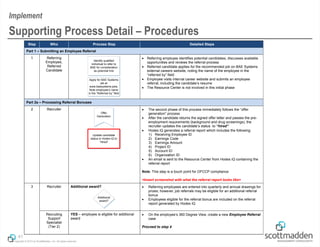
Supporting Process Detail – Procedures
Implement
Step Who Process Step Detailed Steps
Part 1 – Submitting an Employee Referral
1 Referring
Employee,
Referred
Candidate
Identify qualified
individual to refer to
BAE for consideration
as potential hire
Apply for BAE Systems
job at
www.baesystems.jobs.
Note employee’s name
in the “Referred by” field
 Referring employee identifies potential candidates, discusses available
opportunities and reviews the referral process
 Referred candidate applies for the recommended job on BAE Systems
external careers website, noting the name of the employee in the
“referred by” field
 Employee visits internal career website and submits an employee
referral, including the candidate’s resume
 The Resource Center is not involved in this initial phase
Part 2a – Processing Referral Bonuses
2 Recruiter
Offer
Generation
Update candidate
status in Hodes iQ to
“Hired”
 The second phase of this process immediately follows the “offer
generation” process
 After the candidate returns the signed offer letter and passes the pre-
employment requirements (background and drug screenings), the
recruiter updates the candidate’s status to “hired”
 Hodes iQ generates a referral report which includes the following:
1) Receiving Employee ID
2) Earnings Code
3) Earnings Amount
4) Project ID
5) Account ID
6) Organization ID
 An email is sent to the Resource Center from Hodes iQ containing the
referral report
Note: This step is a touch point for OFCCP compliance
<Insert screenshot with what the referral report looks like>
3 Recruiter Additional award?
Additional
award?
 Referring employees are entered into quarterly and annual drawings for
prizes; however, job referrals may be eligible for an additional referral
bonus
 Employees eligible for the referral bonus are included on the referral
report generated by Hodes iQ
Recruiting
Support
Specialist
(Tier 2)
YES – employee is eligible for additional
award
 On the employee’s 360 Degree View, create a new Employee Referral
case
Proceed to step 4

Process mapping

  • 1.
    Copyright © 2013by ScottMadden, Inc. All rights reserved. Process Mapping— Improving Organizational Performance November 14, 2013 GBAS Business Administrator Institute
  • 2.
    Copyright © 2013by ScottMadden, Inc. All rights reserved. Agenda  Introduction to Process Improvement Framework  Analyze  Design  Implement  Applying What We’ve Learned  Breakout Session  Report Out  Wrap-up 1 Agenda and Objectives Objectives for today’s GBAS Institute  Provide participants a process improvement framework to use in future redesign efforts.  Generate ideas and discussion around potential improvement areas in your respective departments and colleges.  Perform a process walk-through to illustrate how to break down process improvement components and apply them to your day-to-day work.
  • 3.
    Introduction to theProcess Improvement Framework
  • 4.
    Copyright © 2013by ScottMadden, Inc. All rights reserved. What’s a Process?  A series of actions or steps taken to achieve an end (dictionary.com)  A collection of related, structured activities or tasks that produce a specific service or product (Wikipedia) We Perform Processes Everyday  For example, what is the process for filling up your gas tank? What Do We Mean by “Improvement”?  A review, analysis, and assessment of a business process to identify opportunities to:  Better align with business strategy and goals (e.g., university, college, or department initiatives)  Work “smarter” not “harder” to meet increasing business demands  Gain efficiencies and reduce process costs  Improve product and/or service quality  Create a better customer experience  Encourage continuous improvement (there’s always room!) 3 Introduction to Process Improvement Process Improvement Overview 1. Notice that your car needs gas 2. Locate and drive to a gas station 3. Pull up to an available pump 4. Select a payment method 5. Select a fuel type and grade 6. Pump gas 7. Replace nozzle and gas cap 8. Start your car and leave gas station Improvements can take on a variety of traits, but the end result should produce a streamlined, standard set of clear process steps.
  • 5.
    Copyright © 2013by ScottMadden, Inc. All rights reserved. A common method used for process redesign is demonstrated in the following 3-step approach. Analyze What is the problem? Design What is the solution? Implement Solve the problem 4 Common Process Improvement Framework Process Improvement Overview  Define the problem  Determine the scope • Delineate where the process begins and ends • Identify related processes and process owners  Perform current state assessment • Identify what process metrics are available (e.g., transaction volumes, cycle time, operational costs, etc.) • Collect and organize data • Conduct current state process interviews (shadow sessions) and/or facilitate workshop sessions • Draft current state process maps and review with stakeholders  Define future state design guidelines (i.e., criteria or guiding principles)  Draft “ideal state” process flows (vision of the future)  Identify external considerations (technology, budget, business constraints)  Conduct future state design sessions  Identify potential business impacts  Complete stakeholder review  Define future state performance metrics and service levels (i.e., time between process initiation and completion)  Document design decisions  Identify process requirements (e.g., technology, tools, staffing)  Communicate and manage change  Design and build tools and technology (as required)  Test the process/system and adjust as needed (e.g., pilot, simulation)  Develop and deliver training  Determine transition needs  Document the final process  Develop continuous improvement plan Common Tools: Project Plan, Organization Charts, Process Inventories, Process Maps Desired Outcomes: Baseline data, Improvement opportunities, Validated current state process maps Common Tools: Improvement Log, Impact Analysis, Basic Technology Requirements Desired Outcomes: Future state process flows, stakeholder buy-in, high-level communication milestones Common Tools: Implementation Plan, Communication/ Training Plan, Procedures and Guidelines, Training Materials Desired Outcomes: Improved service, service level agreements, quality metrics and reports, higher automation, less workload
  • 6.
  • 7.
    Copyright © 2013by ScottMadden, Inc. All rights reserved. It is critical to conduct a thorough analysis of your existing process(es), although this phase is commonly overlooked. Without a firm, understanding of how a process currently works, there is no foundation on which to build an improved process. It is essential to include key stakeholders and subject matter experts (SMEs) in your analysis to ensure you’ve covered all of your bases. 6 Understanding and Analyzing a Process for Improvement Analyze Failure to develop a solid understanding of the current state through data and process analysis will result in a future state design built on a rocky foundation of assumptions and “best guesses.” Common Mistakes:  Not clearly understanding the problem or related issues  Believing the process is well understood and well documented  Believing that everyone shares the same view of a process  Not getting enough perspectives or including adequate subject matter expertise  Not documenting and agreeing on the current state  Not developing a standard format to document results  Not assigning a process owner to take accountability for process analysis, improvement, and future maintenance Analyze How to Avoid Pitfalls:  Assign a process owner to lead the analysis  Identify relevant stakeholders  Determine which SMEs should be involved at the appropriate juncture  Collaborate and develop a standard template (or use an existing one provided by the University)  Document process flows
  • 8.
    Copyright © 2013by ScottMadden, Inc. All rights reserved. We will break down the process improvement framework into simple, manageable steps. 7 The Key to Analyzing a Process Analyze Analyze What is the problem? Design What is the solution? Implement Solve the problem Step 1 Define the Problem Step 2 Determine the Scope Step 3 Collect Information Step 4 Review and Document Step 5 Analyze and Validate  Build a data request  Collect available information  Identify stakeholders and SMEs  Interview or conduct workshops Document results (findings, improvements, flows, etc.)  Validate findings with stakeholders and SMEs  Finalize documentation  Identify issues  Determine what needs to be solved  Define the start and end of the process
  • 9.
    Copyright © 2013by ScottMadden, Inc. All rights reserved. Process improvements are often identified by the individuals who know the process the best. As you complete your day-to-day work, ask yourself (and your peers) some simple questions: 1. Why am I doing these particular steps? 2. Are there duplicative steps being performed by me and anyone else? 3. Can I eliminate any of my steps? 4. Am I handing off information in the best way possible (e.g., paper versus automated routing?) 5. Who is using the information that I am generating? 6. How are they using it? 7. Can I generate and provide the information in a simpler way? Identify a process, or set of processes, that would benefit from undergoing further examination. 8 Step 1 – Define the Problem Analyze Empower your organization to ask the simple questions that will drive improved results! Analyze
  • 10.
    Copyright © 2013by ScottMadden, Inc. All rights reserved. Once a process or list of processes has been identified for further evaluation, you must clearly define the process scope.  Select process(es) that will address the key problems defined within your organization (e.g., where is the biggest “bang for the buck”)  Prioritize using level of effort and level of impact to your organization  If possible, use your organization’s strategic goals to help determine which processes should be tackled first.  Clearly define the “start” and “end” of each process or set of processes  For example, if evaluating the HR Onboarding process, define the following parameters: – Does the process start when the new hire ePAF is initiated? – Or does it start after the candidate is hired into PeopleSoft? – What is the trigger to start the process? – Does the process end once the new hire completes day one? – Or, does the process end after all paperwork is signed? – Or, does the process end after the department checklist is complete? – What is the final step in the process? 9 Step 2 – Determine the Scope Analyze Analyze StartEnd What is the process trigger? What is the process terminator?
  • 11.
    Copyright © 2013by ScottMadden, Inc. All rights reserved. This step begins by building a request and collecting the pertinent data. While the type of data required depends on the organization and process being examined, a typical data request may include organizational, operational, and external pieces of information. 10 Step 3 – Collect Information Analyze Organizational Information Process and Operational Information External Information  Organizational charts (high level)  Organizational charts (detailed/functional)  Job descriptions  Employee (FTE) counts (regular, temporary, contract employees)  Performance metrics, KPIs/targets  Process staffing  Volume of transactions  Operational costs  Error, scrap/rework rates  Process technologies and automation (current/planned)  Business rules or policies  Process maps and/or procedures  Training guides or materials  Customer data (volume, markets, segments, etc.)  Data specific to the industry, organization, or process (e.g., product information, market data)  Documentation from other business cases, benchmarking studies or other process design initiatives Analyze  Department ePAF roles and responsibilities  HR Core roles and responsibilities  FTEs performing work Example for University ePAF Process  PeopleSoft transaction volumes  Process cycle times (e.g., initiation through recycle)  Recycle rates (errors)  GatorStart / eVerify system  Directives, procedures, and toolkits  Benchmarks (personnel transaction cycle times and error rates)
  • 12.
    Copyright © 2013by ScottMadden, Inc. All rights reserved. In addition to hard data, a thorough process review should include collecting “anecdotal” information from individuals that are 1) experts within a certain functional area or perform an integral role in the process, 2) are recipients of a service provided by the process (e.g., travel authorization), or 3) are a key stakeholder in the process. Determine the appropriate interview targets as well as the best venue to collect the information. For example, if redesigning the pre-award process you may want to speak to: 11 Step 4 – Review and Document Analyze  Principal Investigator  Department Grants Administrator  Contracts and Grants Specialists  DSP Research Administrator  Transaction Entry Owner (person entering transactional data into system) One-on-one Interviews Workshops Pros  Individuals are not influenced by others  Can get “into the weeds”, including detailed process steps  Get an individual perspective  Faster / more efficient  Participants often feed off of each other  Get a comprehensive view of the process Cons  Takes longer to meet with each person alone  May miss out on group interaction  Get only one perspective (per meeting)  Individuals may be hesitant to speak publicly  Can be difficult to control and stay on task  Process differences can be overlooked Sessions can be conducted in an interview format or through a workshop (group) session. You may choose to “shadow” the processors. Analyze
  • 13.
    Copyright © 2013by ScottMadden, Inc. All rights reserved. In preparation for the interview sessions or process workshops, we recommend creating an interview guide to keep the audience on task and to ensure all information is covered.  Develop and ask clear questions that provide answers to your “problem statement,” for example:  How long does it take to create and submit a promotion request?  How long does it take from the time a promotion is announced for the promotion to be effective?  How many approvers are required?  Do thresholds exist that can minimize number of approvals?  How frequently are promotions given? Is this the same policy company wide?  Do specific promotion criteria exist?  Are policies standardized across the organization (department, college, University)?  Understand particular pain points evident in the process  Obtain information on future state improvement opportunities  What ideas do the interviewees have for process improvements?  Document responses and follow up as needed 12 Step 4 – Review and Document (Cont’d) Analyze Analyze
  • 14.
    Copyright © 2013by ScottMadden, Inc. All rights reserved. As you complete your interviews or workshops, document your findings and draft the process maps. A process map (or process flow, or flowchart) is a graphical representation of a process that:  Identifies all of the steps in a process (the “what”)  Demonstrates the order and logic supporting the steps (the “why and when”)  Depicts roles and responsibilities (the “who”)  Clearly shows handoffs between functions (the “where”)  Demonstrates how technical tools are used in the process (the “how”) Benefits of process mapping:  Establishes an agreed upon baseline (current state) for process improvements  Increases transparency in the process (e.g., around types and number of handoffs)  Ensures consistency and standardization  Prevents diffusion of responsibility or duplication of efforts Keys for success:  Organize by functions (swim lanes) that depict what organization is responsible for a process step  Delineate process step owners within the swimlanes, as need (clarity only)  Use diamonds to highlight decision points  Include communication / information sharing methods (email, phone, PDF, hardcopy, etc)  Differentiate systems by color coding (e.g., myUFL, ISIS, NERC)  Clearly define where a process begins and ends  Use notes to add additional clarifying information 13 Step 4 – Review and Document (Cont’d) Analyze Analyze
  • 15.
    Copyright © 2013by ScottMadden, Inc. All rights reserved. 14 Step 4 – Review and Document (Cont’d) Analyze UF Pre-Awards Process Current State DeptAdmin/ SSC/PI DSRAwardsSponsor* Enter item into Mail Log and route to assigned RA (Sr. Clerk) Is the information complete? Send NOA PDF to C&G, PI & Dept via email (Sr. Clerk) Contact Sponsor, PI, Dept, or SSC for information (RA) Print NOA and send to approver (RA) Funds Release Part 1 Enter award into NERDC and review for completeness (RA) Provide additional information Email & Hardcopy inboxes “triaged” (Team Lead) Is the item a question or for action? End Print hardcopy (if electronic) and assign to RA to work (Team Lead) Yes For Action Answer email (Team Lead) Sign NOA and return to RA (Team Lead or Asst Director) Note: Information includes budget, compliance reviews, subcontracts, subprojects, etc. Merge/Mark NOA approved in NERDC (RA) Review hardcopy NOA (Team Lead or Asst Director) DSR Proposals Can question be quickly answered? No Question Note: Answered emails do not get logged in Mail Log Receive file (RA) Note: Information could include budget info, compliance reviews, etc. No Verify PeopleSoft data complete. Submit to C&G (RA) Forward to Sr. Clerk to enter into Mail Log (Team Lead) Yes Approve NOA? Yes Batch NOA and send to Sr. Clerk (RA) Return to RA to revise/complete (RA) No Scan supporting documentation into IBM Client (Sr. Clerk or Part- time staff) Note: Process shown for new grants. However, process does not change significantly for temporary awards Begin Analyze Swim Lanes: depict who is completing activity Triggers/Terminators: Indicates beginning or end of a process. Will often be: “Start” or “End” Process Box: The actual process step or task (action). Responsibility for task is based on swim lane location Off-Page Reference: Used to link process steps on different pages. The linked page contains a corresponding shape to indicate where the process picks up Connectors: Arrows that link one process step to another. Process continues in the direction of the arrow Decision: Indicates the point in the process where a decision must be made. Typically have Yes and No exit arrows Notes: Used to add descriptive detail
  • 16.
    Copyright © 2013by ScottMadden, Inc. All rights reserved. Although you will be analyzing along the way, this final step provides an opportunity to critically think about how to maximize the process potential. It serves as the bridge between current state review and future state design. Types of questions to ask yourself when analyzing : It is essential that the current state findings and recommended improvements be vetted with process owners and stakeholders. The objectives of this validation step are to:  Ensure consensus on current state results and analysis  Validate process scope – Are changes to scope needed based on information discovered during analysis?  Validate metrics  Understand and agree to recommendations  Prepare the plan for future state design 15 Step 5 – Analyze and Validate Improvement Opportunities What obstacles prevent the process from functioning efficiently? Are there any opportunities to automate steps in the current process? Are there extra steps or excessive handoffs and approvals? What are the benchmarks or goals that the process should achieve? Once sponsor or stakeholders agree to improvement opportunities, proceed with designing your ideal future state process. Analyze Analyze
  • 17.
    Copyright © 2013by ScottMadden, Inc. All rights reserved. An example improvement opportunity inventory that resulted from a detailed review of the University’s ePAF process review is illustrated below. 16 Step 5 – Analyze and Validate (Cont’d) Analyze Analyze # Role Impacted Process Impacted* Process Improvement Type Description of Opportunity Impact 3-High 2-Med 1-Low Level of Effort 3-Low 2-Med 1-High Total Priority Score (high score = top priority) Process Owner Action Steps Required Comments 1 All All Process Streamline approval process for SSCs: Shared Service Centers should streamline the approval process for Originator and Level 1, with SSC staff established as Level 1 approvers so that ePAFs do not have to go to central HR Level 1 for duplicative review. SSC staff should receive additional/re-enforced training to ensure ePAFs are thoroughly and accurately completed before submitting directly to Level 2 (see training opportunity #11) 3 2 5 HR Core • Establish transition plan • Determine additional training needs for existing SSC Originators • Conduct training • Grant Level 1 approval authority to existing SSC Originators 2 Originator, Level 1, Level 2 Hires Process GatorStart requirement: Departments should require new hires to use GatorStart (rather than accept paper). Most departments do so, however those that hire hundreds of employees at one time prefer not to because they have to spend too much time monitoring GatorStart. It is easier for them to have all new hires complete paperwork together in large room setting. If a report, work list enhancement, or email is created that would differentiate which new hires have gone through GatorStart and which are outstanding, departments would be more amenable to fully convert to GatorStart (see opportunity #18) 2 3 5 HR Core • Communicate requirement to Originators and Level 1 • Implement opportunity #18 Departments could still utilize large room group setting to help answer new hire questions as they complete paperwork. Could have new hires bring their laptops to complete GatorStart. If doing so, would need to have Level 1 submit approval the day before scheduled session so that GatorStart feed updated to allow access to new hires 3 Originator, Level 1, Level 2 Job Status Process Terminations and hires: Departments need to communicate to Originator when employee leaves their department or is hired so that Originator can process ePAF. Otherwise, in the case of terminations, employee continues to get paid. This is not an issue if the employee's job type has to use time and labor, but is an issue if employee is not required to use time and labor (e.g., some graduate assistant students who graduate and continue to get paid if department does not notify Originator). Talk to audit to put structure in place for when someone leaves. Sync up access control piece so that any terminations would trigger access being cut of to building access, computers, etc. 2 3 5 HR Core • Develop communication to educate departments • Distribute communication to departments Does a termination checklist exist that departments can use? This is a cultural/communication issue 4 All Hires Process International hires: Centralize processing of international hires. This is complicated and time consuming for departments and approvers. It would be significant help in minimizing recycles and number of approvals if they could send all international hires through a central office 3 1 4 HR Core • Conduct business case to determine feasibility, cost, ownership, etc. • Assemble project team • Implement establishment of centralized office Significant process change Would need to dive deeper to determine work load and potential FTEs
  • 18.
  • 19.
    Copyright © 2013by ScottMadden, Inc. All rights reserved. The process design component consists of a three-step approach. 18 The Key to Designing a Process Design Analyze What is the problem? Design What is the solution? Implement Solve the problem Step 1 Define Design Criteria Step 2 Design Future State Step 3 Identify Gaps and Determine Impact  Determine design principles, including “must haves” to achieve goals, as well as possible constraints  Incorporate process improvements identified in current state  Document automation opportunities  Document process flows  Identify gaps between current state and future vision (e.g., what changes must occur)  Determine impact of making changes (e.g., other processes, technologies, staff roles and responsibilities, training, etc.)
  • 20.
    Copyright © 2013by ScottMadden, Inc. All rights reserved. The process owner should establish and obtain consensus on clear guidelines that define the boundaries and expectations of the improved process. First and foremost, challenge the current state! This is the time to “push the envelope” and create an ideal vision for the future state process. Leading practice process redesign criteria includes:  Take into consideration the WHOLE process (start to finish, handoffs and sub-processes)  Streamline to remove process “waste,” for example:  Eliminate steps  Automate steps  Minimize approvals  Reduce handoffs; cross fewest organizational boundaries (swimlanes)  Minimize paper  Establish clear, fast communications  Assign clear accountabilities  Eliminate dependencies on individuals to extent possible (i.e., no single failure point)  Don’t break up processes  Focus on the process, not the people doing the work  Understand external impacts  Business requirements  Benefits or burdens to customers  Constraints and degrees of freedom  Systems, tools and technologies  Budget 19 Step 1 – Define Design Criteria Design Design
  • 21.
    Copyright © 2013by ScottMadden, Inc. All rights reserved. Once design principles are agreed upon, the process owner can proceed with the process redesign efforts. We recommend the following basic approach:  Conduct process future state design sessions with stakeholders and subject matter experts, leveraging information obtained during initial analysis (i.e., data, interviews, workshops, improvement opportunities, etc.)  Create process maps to understand how work is accomplished and where opportunities for improvement exist  Time-box design sessions and keep participants on track to achieve specific objectives  Don’t overdesign; move to a test or pilot implementation, if it makes sense to do so  Benchmark against process goals  Set process goals (e.g., do you want to reduce errors, reduce cycle time, improve service levels, etc.)  Obtain benchmarks (e.g., how are other departments, colleges, Universities performing this process?)  Refine processes, as needed, to achieve goals Types of questions to ask yourself when creating the future state improved process: 20 Step 2 – Design Future State Design Design Does the improvement solve the existing problem(s)? Is it feasible (technically, financially)? Are there short and long-term opportunities (“must have” versus “nice to have”)? Does it impact, or depend on, other processes? Process Redesign
  • 22.
    Copyright © 2013by ScottMadden, Inc. All rights reserved. 21 Step 2 – Design Future State (Cont’d) Design Pre-Awards Process – DSR Awards Future State DeptAdmin/SSC/ PI SponsorDSRAwards PeopleSoft SYSTEM LEGEND Scan documents (Sr. Clerk) Electronic or hard copy documents? Receive inputs from Sponsors, Proposals, Departments, or C&G into inboxes Document management system Includes: -IRB, financial disclosures, export controls, etc. (if applicable) -Commitment form -Award notification Start Hard copy Centralized Management System Open/modify case and attach documents (RA) Elec. Retrieve case (RA) Review award information (RA) Verify PeopleSoft/ budget information (RA) Access standard checklist and supporting documents (RA) Information complete/ accurate? Contact Sponsor, PI, Dept, or SSC for information (RA) No Provide additional information Enter award information (RA) Yes Transfer case to approver to review and sign-off (Team Lead/ Assistant Director) Approve? Transfer case to C&G Yes Return case to RA to revise (Team Lead/ Assistant Director) No End Key Process Improvements: • Removed process steps • Automated steps • Removed paper • Reduced approvals • Recommended document management system • Recommended case management system Design
  • 23.
    Copyright © 2013by ScottMadden, Inc. All rights reserved. 22 Step 2 – Design Future State (Cont’d) Design Hiring Process – Part 1 – Standard Hires for Shared Service Centers 1 Future State 3/26/2013 NewHireLevel2SSC Start Accept job offer Hiring Process Part 2 - Int’l Hires Complete initial department requested form(s) Is new hire a Non- Resident Alien (NRA)? Initiate new hire ePAF Receive GatorStart link Receive new hire form(s) No Yes ePAF SYSTEM LEGEND GatorStart International Tax Navigator End Complete GatorStart new hire entry Come to SSC to complete documentation Complete section 2 of I-9 Note: Loyalty oath and intellectual property agreement must be signed and notarized Contact new hire to schedule time to complete documentation required in person End Receive ePAF email notification, and/or run query to view open ePAFs Review ePAF and use GatorStart information to complete ePAF Approve ePAF? Note: Review ePAF for completion, and enter info for I-9, W4, race and ethnicity, veteran status. If international hire, review applicable scanned documents Contact Originator to receive additional information and update ePAF Recycle ePAF? Submit ePAF approval Yes No No End Update and resubmit ePAF Yes Hiring Process Part 2 - Int’l Hires 1 Note: Future state process combines Originator and Level 1 Approver roles for Shared Services, and assumes implementation of potential International Center organization for all international hires Key Process Improvements: • Improved existing system functionality • Reduced approvals • Reduced opportunities for errors • Improved customer experience (Gator Start features) Design
  • 24.
    Copyright © 2013by ScottMadden, Inc. All rights reserved. Identify gaps between your existing current state and your newly designed future state process, such as technology, organizational, or other processes changes. It is important to understand the qualitative and quantitative impacts that may result from the transition. 23 Step 3 – Identify Gaps and Determine Impact Design Design Technology • Changes to tools or technologies (e.g., case management, AP automation, etc.) Stakeholders • Impact to customers (internal and external); customer experience Organizational • Organizational changes (e.g., roles and responsibilities) • Policy changes • Process changes Financial • Increase in operational costs • Reduction in costs Example Improvement Impacts:
  • 25.
  • 26.
    Copyright © 2013by ScottMadden, Inc. All rights reserved. All the work that goes into designing a new, improved process can be lost without an effective implementation. It doesn’t matter how great the design is, if it is not rolled out the right way. When developing the plan, the following elements should be considered:  How/who will the implementation be managed?  Do you have management support?  Is staff available to work the project? If so, what are the possible constraints (e.g., semester beginning or end)?  Are all team members clear on task deadlines? Have critical path items been identified?  Is the project calendar aligned with important activities happening externally?  Are there dependencies on other projects? Are there dependencies on your project?  How will you interface with stakeholders or external process owners (e.g., IT)?  How/who will manage the communications and training process? 25 The Key to Success is Execution! Implement Implement Thorough Planning Successful Implementation Plan the work and work the plan!
  • 27.
    Copyright © 2013by ScottMadden, Inc. All rights reserved. A common mistake is to say “why bother with a plan? Let’s just go do it!” A detailed plan is a project management tool that documents activities, assigns ownership, prioritizes, and tracks timelines to ensure the execution is completed in an effective and timely manner. 26 Project or Implementation Plan Implement Recomnendation Reference ID (links to original opportunity list) # Implementation Activity Long or short- term solution1 Priority2 Owner Estimated Duration3 Notes 1.0 Enhance GatorStart functionality for ePAFs and require usage for all new hires Short-term High 2, 15, 18, 28 1.1 Meet with key stakeholders to discuss specifications 5 days 1.2 Document business requirements 5 days 1.3 Meet with ES to review business requirements and evaluate feasibility 5 days 1.4 Identiy implementation costs and determine if feasible 5 days 1.5 Document technical requirements 5 days 1.6 Build functionality TBD 1.7 Implement functionality TBD 1.8 Develop training materials 5 days 1.9 Communicate/train users on new functionality 5 days 1.10 Post communication/trainting to HR website (or other appropriate location) 1 day 2.0 Streamline approval process for SSCs Short-term High 1, 11 2.1 Meet with key stakeholders to discuss specifications 5 days 2.2 Meet with Level 1 HR offices to review plan and obtain support 5 days 2.3 Develop implementation and transition plan 10 days 2.4 Review implementation and transition plan with sponsors/stakeholders 5 days 2.5 Finalize implementation and transition plan 5 days 2.6 Review implementation and transition plan with impacted staff 5 days 2.7 Identify priority training needs for staff 5 days 2.8 Develop training materials 10 days 2.9 Conduct training 5 days 2.10 Grant Level 1 approval authority to staff 1 day 3.0 Improve departmental communication for terminations and new hires Short-term High 3 3.1 Identify how many issues typically occur 3.2 Meet with Payroll to discuss issue 3.3 Communicate issue to leadership (Faculty Senate and Dean's Meetings) 4.0 Develop centralized international hires office Long-term Medium 4, 10 4.1 Develop business case to determine feasibility, cost, ownership, etc. 4 weeks 4.2 Review business case with sponsor(s) 1 week 4.3 Finalize business case 2 weeks 4.4 Secure stakeholder approval of business case 1 week 4.5 Execute business case/implement new office (select staff, hire staff, train, etc.) TBD Involves: -Implementing functionality to periodically send GatorStart link reminders to new hires -Enhancing work list to include indication of new hire GatorStart completion -Developing GatorStart email bounce notification to Originator Interim - Track international hire recycled ePAF causes to work toward reducing recycle rate. Involves: -Tracking most prevalent errors -Enhancing/clarifying existing training materials -Conducting open forum workshops to review prevalent errors -Distributing training materials and posting to HR website Implement
  • 28.
    Copyright © 2013by ScottMadden, Inc. All rights reserved. Inform Engage Prepare Well-planned communications and training events must be designed to continuously inform key stakeholders about changes as well as obtain feedback in order to gain buy-in. A common communications methodology employed at the University embraces a three-phase approach: 27 Communications and Training ImplementGoal  Inform is designed to provide basic information about the project to interested parties and signal that the project is moving forward  Engage is designed to provide an opportunity for stakeholders to participate, voice concerns and influence the outcomes of the project  Prepare is designed to communicate changes between old and new processes and systems to end users and provide any needed training and/or information Audience  High-level University administrators and College leadership  Faculty representatives  Department leadership / staff  Select University leadership  Faculty representatives  Department leadership / staff  Ad hoc opportunities / audiences  Department staff  Department chairs  Office managers KeyActivities  Meet with high level leadership  Meet with key influencers  Identify key stakeholder groups  Define key messages  Develop communications for newsletters, forums, etc.  Reengage with high level leadership  Meet with key stakeholders  Meet with process owners  Communicate key messages  Put out communications for newsletters, forums, etc.  Delta sessions  Develop training materials  Refine training  Determine roles requiring training and delivery methods  Deliver training Implement
  • 29.
    Copyright © 2013by ScottMadden, Inc. All rights reserved. It is imperative not to short-change training efforts. Determine who needs to be trained on what topics (e.g., new processes, new technologies, PeopleSoft, etc.), and plan training accordingly. 28 Communications and Training (Cont’d) Implement UniversityofFlorida Directives& Procedures SoftwareIntroduction andUsage InsertTrainingSubject ProcessingVouchers InitiatingTravel Authorizations InsertTrainingSubject Customer Communication CustomerService Workshop InsertTrainingSubject InsertTrainingSubject InsertTrainingSubject InsertTrainingSubject InsertTrainingSubject InsertTrainingSubject InsertTrainingSubject Manager 1 Manager 2 Staff 1 Staff 2 HR Staff 1 HR Staff 2 HR Staff 3 Insert Financial Staff 1 Financial Staff 2 Insert Insert Insert Insert Insert Insert Insert Insert Insert Insert Insert Training Category Insert Audience General Operations Customer Service Insert Training Category Department Staff Human Resources Department Staff Fiscal Department Staff Insert Audience Audience Group Staff
  • 30.
  • 31.
    Copyright © 2013by ScottMadden, Inc. All rights reserved. Your Task  Create a current state process, identify improvement opportunities, and document future steps. Instructions  Stay at your existing table (or combine with a nearby table if you have less than 4 people)  Select a process to assess and improve from the following functions (you may select an alternative process if you’d prefer)  HR – Terminations – Leave of Absence – Onboarding – Foreign National Processing  Fiscal – Travel Authorizations – Expense Reporting – Pcards  Grants – Proposal Submissions – Budget Development 30 Breakout Session Exercise – Task and Instructions Applying What We’ve Learned
  • 32.
    Copyright © 2013by ScottMadden, Inc. All rights reserved. Define the Problem  For example, what are the main issues with the process you’ve selected?  Cycle times (process components and start to finish)  Costs  Performance  Manual versus automated processes  Error rates  Other? Define the Process Scope  What process are you evaluating?  Are there other sub-processes that may be impacted?  Where does the process begin and end? Evaluate and Document the Current State  Write the steps down in the process (~10 steps); keep relatively high-level at this stage.  You may do this in a numerical list format, a simple process flow, or however your team can capture the key information. 31 Breakout Session – Exercise Part 1 Applying What We’ve Learned You will have 10 minutes to complete this exercise.
  • 33.
    Copyright © 2013by ScottMadden, Inc. All rights reserved. After documenting your current state in Exercise Part 1, you are ready to begin designing the ideal future state. You must identify improvement opportunities.  Review your findings  Develop a list of process improvement opportunities (don’t need to draw out process map)  How would you change the process?  What overall improvements would you recommend? 32 Breakout Session – Exercise Part 2 Applying What We’ve Learned You will have 10 minutes to complete this exercise.
  • 34.
    Copyright © 2013by ScottMadden, Inc. All rights reserved. Select a volunteer from your table to share your process improvement ideas. Only one group will report out to everyone. 33 Breakout Session – Report Out Applying What We’ve Learned You will have 5 minutes to complete this exercise. We welcome volunteers!
  • 35.
  • 36.
    Copyright © 2013by ScottMadden, Inc. All rights reserved.  Return to your departments and share knowledge gained in this session  Identify potential processes in your areas to further evaluate  Put a plan into place to analyze, design, and implement  Follow-up with GBAS leaders on any initiatives undertaken in your area  Workshop will be planned for 2014 to share lessons learned around a particular process improvement effort 35 So What’s Next? Wrap-Up
  • 37.
    Copyright © 2013by ScottMadden, Inc. All rights reserved. Courtney Jackson Director ScottMadden, Inc. 2626 Glenwood Avenue Suite 480 Raleigh, NC 27608 CourtneyJackson@scottmadden.com O: 919-781-4191 M: 919-672-7521 ScottMadden, Inc. 2626 Glenwood Avenue Suite 480 Raleigh, NC 27608 KevinHernandez@scottmadden.com O: 919-781-4191 M: 202-640-8662 Kevin Hernandez Senior Associate Contact Us 36
  • 38.
  • 39.
    Copyright © 2013by ScottMadden, Inc. All rights reserved. Prior to interviews or review sessions, prepare interview questions that will allow you to take a deeper dive into the key elements of the current state process. Below is an example set of question:  Interviewees (Define criteria for desired populations)  Employees (e.g., those that submit X expense reports per year)  Approvers (e.g., those that approve X expense reports per year)  T&E auditors (all)  Delegates (e.g., those that create/approve some amount per year)  Finance (payroll or accounts payable representatives, depending on organization)  Travel department (all or some subset)  Process Details  What format do you use to enter expenses? (Excel spreadsheet, software, etc.)  Who do you send your completed report to for approval?  What do they do with it after it’s approved? What do you do?  How do you submit your receipts?  Do you review all receipts before approval?  What do you do with the report once approved?  Are you reimbursed before you are required to pay your credit card bill?  Data and Process Metrics  How long does it typically take from the time you complete your expense report to the time your manager approves, signs, and returns the report to you for processing?  How long does it typically take to receive your expense reimbursement check after submission?  How long does it take, on average, to approve an expense report?  What volume of expense reports are processed annually?  How many expense reports are returned monthly due to data entry errors? For non-compliance with policy? 38 Interview Discussion Guide Analyze
  • 40.
    Copyright © 2013by ScottMadden, Inc. All rights reserved. Visio is the most widely accepted process development tool. 39 Process Development Tools Analyze
  • 41.
    Copyright © 2013by ScottMadden, Inc. All rights reserved. 40 Future State Impact Analysis Design Cost/ Savings Systems Staffing Policy Business Operations Other Work Arrangments - Telecommuting Tax/Legal requirement that employee must telecommute from state in which BAE has a legal presence. (Is it BAE Inc. or the legal business entity?) - tax implications? For PS and GTS all current telecommuters would not be eligible (those telecommuting are doing so b/c they don't live in state...) - On-site customer reps - how to handle? How to meet customer needs if can't have on-site in state? Assignments are typically 2 years (not short-term) - Can we complete an IWO for employee to circumvent issues? X X X Deployments Employees will be required to maintain company sponsored global health care ES does not require Aetna Global (company sponsored health care). X Deployments Holiday pay will be paid for the actual holiday in addition to the actual hours worked unless super ceded by host country law a) Additional cost associated with paying holiday pay in addition to hours worked b) Impact to deployed EE's (not being able to take the day off when they return) X X X (employee morale) Process Future State Recommendation Impact Description (e.g., if a financial impact - describe the cost components requiring further analysis) Impact Categories
  • 42.
    Copyright © 2013by ScottMadden, Inc. All rights reserved. 41 Supporting Process Detail – Procedures Implement Step Who Process Step Detailed Steps Part 1 – Submitting an Employee Referral 1 Referring Employee, Referred Candidate Identify qualified individual to refer to BAE for consideration as potential hire Apply for BAE Systems job at www.baesystems.jobs. Note employee’s name in the “Referred by” field  Referring employee identifies potential candidates, discusses available opportunities and reviews the referral process  Referred candidate applies for the recommended job on BAE Systems external careers website, noting the name of the employee in the “referred by” field  Employee visits internal career website and submits an employee referral, including the candidate’s resume  The Resource Center is not involved in this initial phase Part 2a – Processing Referral Bonuses 2 Recruiter Offer Generation Update candidate status in Hodes iQ to “Hired”  The second phase of this process immediately follows the “offer generation” process  After the candidate returns the signed offer letter and passes the pre- employment requirements (background and drug screenings), the recruiter updates the candidate’s status to “hired”  Hodes iQ generates a referral report which includes the following: 1) Receiving Employee ID 2) Earnings Code 3) Earnings Amount 4) Project ID 5) Account ID 6) Organization ID  An email is sent to the Resource Center from Hodes iQ containing the referral report Note: This step is a touch point for OFCCP compliance <Insert screenshot with what the referral report looks like> 3 Recruiter Additional award? Additional award?  Referring employees are entered into quarterly and annual drawings for prizes; however, job referrals may be eligible for an additional referral bonus  Employees eligible for the referral bonus are included on the referral report generated by Hodes iQ Recruiting Support Specialist (Tier 2) YES – employee is eligible for additional award  On the employee’s 360 Degree View, create a new Employee Referral case Proceed to step 4