Preservation of Audiovisual Content
in Files
Richard Wright
SIPAD14, Mexico City, October 2014
preservationguide.co.uk 2Richard Wright
Overview
 digital preservation
 files and formats
 encodings and wrappers
 lossy compression, lossless compression,
uncompressed
 “OAIS and all that” – and how it applies to
audiovisual material, or doesn’t
 the new problems: risk goes up as storage cost goes
down; format obsolescence; general technology
obsolescence; survival strategies in a digital world
preservationguide.co.uk 3Richard Wright
Overview -- Part two
 Access: this is the payoff of putting up with all the problems
of digital technology: instant free global access – to
everything! (Many examples given yesterday)
 A review of limits to access; limitations on:
 what we keep: increase in risk, increase in amount of content,
decrease in life of storage
 rights; secondary exploitation; public value licensing; legislation
 who gets in: mechanisms for access control: identity,
authorisation
 networks: cost, bandwidth
 tools for understanding storage and risks
preservationguide.co.uk 4Richard Wright
Resources
 AV Digitisation and Digital Preservation TechWatch
Report #02
 https://prestocentre.org/library/resources/av-
digitisation-and-digital-preservation-techwatch-
report-02
 Digitising Contemporary Art D6.2 "Best practices
for a digital storage infrastructure for the long-term
preservation of digital files" Sofie Laier Henriksen,
Wiel Seuskens and Gaby Wijers (LIMA)
 //www.dca-project.eu/deliverables
preservationguide.co.uk 5Richard Wright
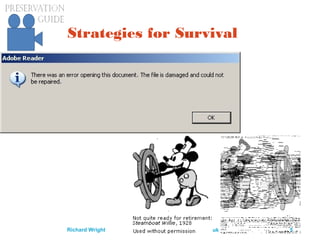
Strategies for Survival
preservationguide.co.uk 6Richard Wright
Stone, papyrus, film, hard
drive: what’s next?
Medium bits/cm² life, yr
Stone 10 10 000
Paper 104
1000
Film 107
100
Disc 1010
10
Each step: 1000 times cheaper, lasts 1/10th as
long
Soon? Infinite Zero
preservationguide.co.uk 7Richard Wright
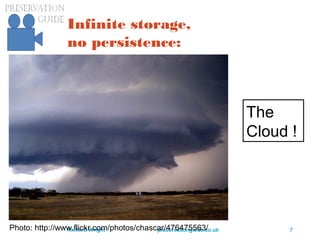
Infinite storage,
no persistence:
Photo: http://www.flickr.com/photos/chascar/476475563/
The
Cloud !
preservationguide.co.uk 8Richard Wright
Direction of Technology
Storage is a service: PrestoSpace, 2004
A file is a performance: PrestoPrime, 2010
2014: Media without media
 Using managed services
 Managing managed services
 Statistics, trust, indemnity
 Advantage: storage provided by professionals;
archivists can do archiving (producers can produce,
curators can curate ...)
preservationguide.co.uk 9Richard Wright
Stages in the life of AV content
 signal: audio from a microphone, video from a
video camera
 recording of a signal onto a carrier
 digitisation of a recording of a signal
 digital preservation of the digitisation of a
recording of a signal
UK Digital Preservation Coalition: Preserving
Moving Pictures and Sound (by R Wright)
http://www.dpconline.org/advice/technology-watch-
reports
preservationguide.co.uk 10Richard Wright
Three kinds of AV content
 analogue
 digital on shelves
 CD, DVD, Blu-Ray
 audio: Minidisc, DAT
 video: DV, professional digital videotape formats
 preservation (ripping): make a clone (if possible)
 there are complications
 there are tools: eg DVAnalyzer
 http://www.avpreserve.com/avpsresources/tools/
 digital in files
preservationguide.co.uk 11Richard Wright
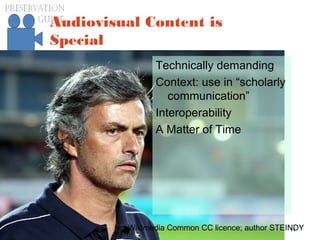
Audiovisual Content is
Special
Technically demanding
Context: use in “scholarly
communication”
Interoperability
A Matter of Time
Wikimedia Common CC licence; author STEINDY
preservationguide.co.uk 12Richard Wright
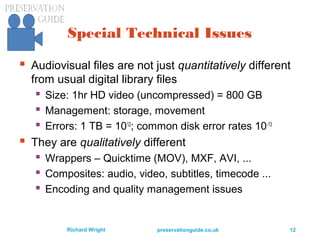
Special Technical Issues
 Audiovisual files are not just quantitatively different
from usual digital library files
 Size: 1hr HD video (uncompressed) = 800 GB
 Management: storage, movement
 Errors: 1 TB = 1012
; common disk error rates 10-13
 They are qualitatively different
 Wrappers – Quicktime (MOV), MXF, AVI, ...
 Composites: audio, video, subtitles, timecode ...
 Encoding and quality management issues
preservationguide.co.uk 13Richard Wright
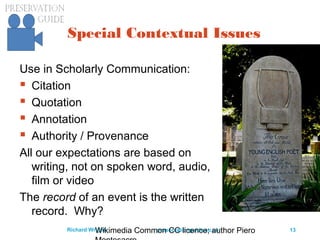
Special Contextual Issues
Use in Scholarly Communication:
 Citation
 Quotation
 Annotation
 Authority / Provenance
All our expectations are based on
writing, not on spoken word, audio,
film or video
The record of an event is the written
record. Why?
Wikimedia Common CC licence; author Piero
preservationguide.co.uk 14Richard Wright
Special Interoperability
Issues
Europeana:
 Harvests OAI-PMH metadata
 Broadcasters never heard of OAI-PMH
 OAI never heard of time-based
metadata
 Storyboard representation (keyframes)
 Subtitles
 Time code
Digital libraries don’t do time-based
access – specific case of lack of
structured access
preservationguide.co.uk 15Richard Wright
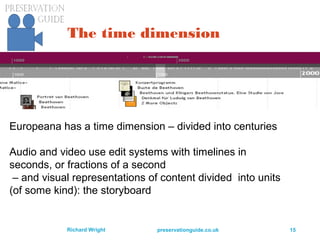
The time dimension
Europeana has a time dimension – divided into centuries
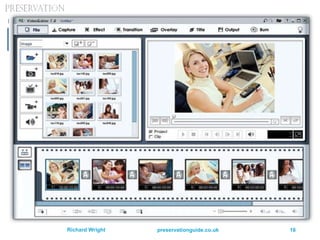
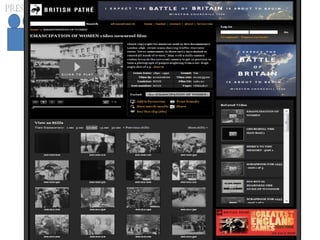
Audio and video use edit systems with timelines in
seconds, or fractions of a second
– and visual representations of content divided into units
(of some kind): the storyboard
preservationguide.co.uk 16Richard Wright
preservationguide.co.uk 17Richard Wright
preservationguide.co.uk 18Richard Wright
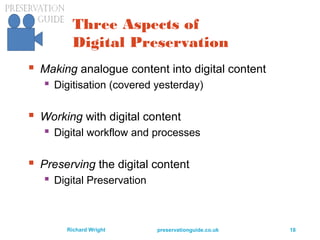
Three Aspects of
Digital Preservation
 Making analogue content into digital content
 Digitisation (covered yesterday)
 Working with digital content
 Digital workflow and processes
 Preserving the digital content
 Digital Preservation
preservationguide.co.uk 19Richard Wright
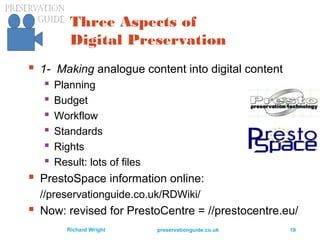
Three Aspects of
Digital Preservation
 1- Making analogue content into digital content
 Planning
 Budget
 Workflow
 Standards
 Rights
 Result: lots of files
 PrestoSpace information online:
//preservationguide.co.uk/RDWiki/
 Now: revised for PrestoCentre = //prestocentre.eu/
preservationguide.co.uk 20Richard Wright
Three Aspects of
Digital Preservation
 2- Working with digital content (lots of files)
 Management
 DAM/MAM
 Repository
 Storage
 Metadata
 digital library technology
 Access
 Rights
preservationguide.co.uk 21Richard Wright
Three Aspects of
Digital Preservation
 3- Preserving the digital content
 Keeping the data ‘forever’
 Coping with obsolescence
 Migration
 Emulation
 Standards: “OAIS and all that”
 Digital preservation technology
 Planning and strategy
preservationguide.co.uk 22Richard Wright
Files and their formats
 (US) LOC has a guide to their preservation
www.digitalpreservation.gov/formats/intro/intro.shtml
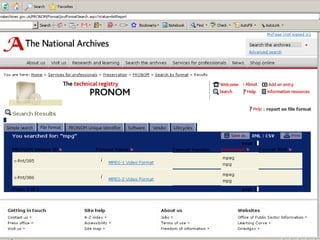
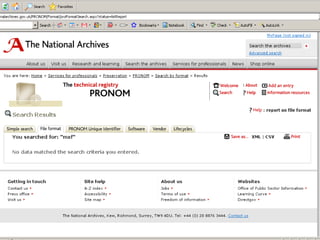
 (UK) National Archive has format registry
PRONOM – and they archive software
www.nationalarchives.gov.uk/pronom/
 (Netherlands) National Library has emulation for
DOS, extending life of software (sort of)
http://dioscuri.sourceforge.net/
 Digital Library technology runs services on files:
JHOVE, DROID, metadata extraction
preservationguide.co.uk 23Richard Wright
Digital Library Services
 Enable automation
 Of ingest
 File format identification DROID, JHOVE
 File validation JHOVE
 Metadata extraction
 National Library of New Zealand
 OAI-PMH protocol for metadata harvesting
 Of migration
 PLANETS ‘preservation planning’ methods
preservationguide.co.uk 24Richard Wright
Why Automation?
 Portico (electronic document repository) has
ingested 9.1 million PDFs in a decade
 (and 800k had validation errors)
 How many files would the BBC send to an
asset management system per day, coming
from how many different applications?
 (1000 files from 100 applications?)
 Meaning a million in three years
 All of which need ingest, validation, preservation
preservationguide.co.uk 25Richard Wright
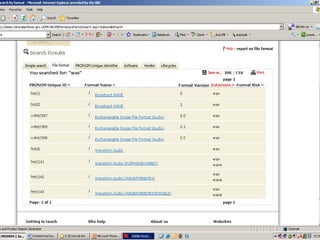
DROID – UK National Archive
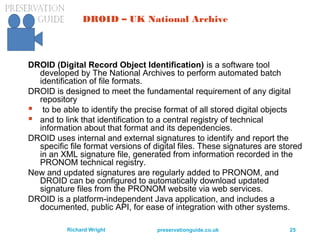
DROID (Digital Record Object Identification) is a software tool
developed by The National Archives to perform automated batch
identification of file formats.
DROID is designed to meet the fundamental requirement of any digital
repository
 to be able to identify the precise format of all stored digital objects
 and to link that identification to a central registry of technical
information about that format and its dependencies.
DROID uses internal and external signatures to identify and report the
specific file format versions of digital files. These signatures are stored
in an XML signature file, generated from information recorded in the
PRONOM technical registry.
New and updated signatures are regularly added to PRONOM, and
DROID can be configured to automatically download updated
signature files from the PRONOM website via web services.
DROID is a platform-independent Java application, and includes a
documented, public API, for ease of integration with other systems.
preservationguide.co.uk 26Richard Wright
preservationguide.co.uk 27Richard Wright
preservationguide.co.uk 28Richard Wright
preservationguide.co.uk 29Richard Wright
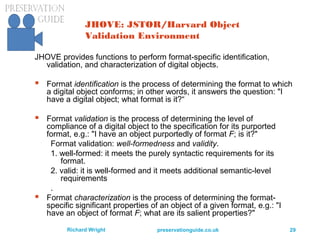
JHOVE: JSTOR/Harvard Object
Validation Environment
JHOVE provides functions to perform format-specific identification,
validation, and characterization of digital objects.
 Format identification is the process of determining the format to which
a digital object conforms; in other words, it answers the question: "I
have a digital object; what format is it?“
 Format validation is the process of determining the level of
compliance of a digital object to the specification for its purported
format, e.g.: "I have an object purportedly of format F; is it?"
Format validation: well-formedness and validity.
1. well-formed: it meets the purely syntactic requirements for its
format.
2. valid: it is well-formed and it meets additional semantic-level
requirements
.
 Format characterization is the process of determining the format-
specific significant properties of an object of a given format, e.g.: "I
have an object of format F; what are its salient properties?"
preservationguide.co.uk 30Richard Wright
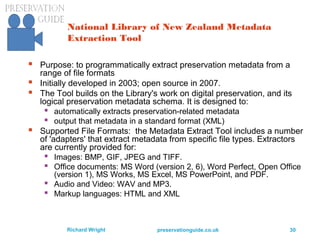
National Library of New Zealand Metadata
Extraction Tool
 Purpose: to programmatically extract preservation metadata from a
range of file formats
 Initially developed in 2003; open source in 2007.
 The Tool builds on the Library's work on digital preservation, and its
logical preservation metadata schema. It is designed to:
 automatically extracts preservation-related metadata
 output that metadata in a standard format (XML)
 Supported File Formats: the Metadata Extract Tool includes a number
of 'adapters' that extract metadata from specific file types. Extractors
are currently provided for:
 Images: BMP, GIF, JPEG and TIFF.
 Office documents: MS Word (version 2, 6), Word Perfect, Open Office
(version 1), MS Works, MS Excel, MS PowerPoint, and PDF.
 Audio and Video: WAV and MP3.
 Markup languages: HTML and XML
preservationguide.co.uk 31Richard Wright
Architecture
Digital library services are generally:
 open source
 web service architecture
 reliant on metadata standards (schema) to work at
all
Do audiovisual archives need these services?
Can these services work (or be made to work) on
professional audiovideo files?
preservationguide.co.uk 32Richard Wright
Encodings and Wrappers
 an MP3 file is MP3 encoded audio in an MP3 file
 BUT- MP3 could also be in an AVI file along with
video
 OR – MP3 could be in an MXF file along with video
(and the video could be in various encodings)
 Hence: when a file can hold various kinds of
encodings, and especially when a file can hold
multiple audio and video signals – we call it a
wrapper so that we can separate:
 the file type (eg AVI, MXF …)
 from the encodings of signals inside the wrapper
preservationguide.co.uk 33Richard Wright
Lossy compression, lossless
compression, uncompressed
 Lossy data reduction should not be created by the
archive
 but if you’re given a lossy file, that’s your ‘artefact’
 Uncompress and save ‘whole’ when obsolescent
 DO NOT recode from one lossy format to another;
that becomes a ‘generation loss’
 Saving SD video ‘whole’ is cheaper than digibeta!
 Saving HD video ‘whole’ may be completely
unfeasible for several more years; shame
preservationguide.co.uk 34Richard Wright
preservation of complex
objects (art!)
 if you’re given a lossy file, that’s your ‘artefact’
 if you’re given a ‘work’ – that’s also your artefact
 basic principle – preserve the artefact
 complex artefacts may not divide into ‘essence’ and
metadata (signals and metadata)
 migration becomes less and less satisfactory
 emulation (esp multivalent approach) may be much
more satisfactory
 Institutions need to maintain legacy ‘platforms’ – as
KB in The Hague is already doing (DOS)
preservationguide.co.uk 35Richard Wright
Lossless “compression”
 For: saves on storage
 but how much is that as % of total dig archive cost?
 Against:
 adds a layer of complexity in creation (one off)
 adds a layer of complexity in playback (forever)
 slows down playback
 may tie you to proprietary software
 or even proprietary hardware!
 destroys the error-tolerance of an uncompressed
file
preservationguide.co.uk 36Richard Wright
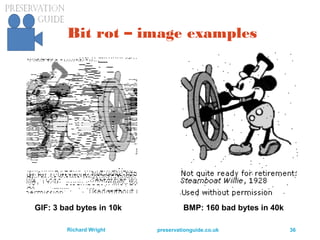
Bit rot – image examples
GIF: 3 bad bytes in 10k BMP: 160 bad bytes in 40k
preservationguide.co.uk 37Richard Wright
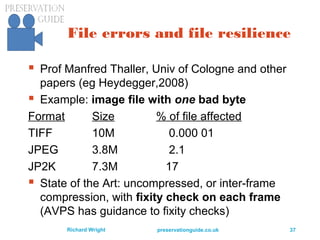
File errors and file resilience
 Prof Manfred Thaller, Univ of Cologne and other
papers (eg Heydegger,2008)
 Example: image file with one bad byte
Format Size % of file affected
TIFF 10M 0.000 01
JPEG 3.8M 2.1
JP2K 7.3M 17
 State of the Art: uncompressed, or inter-frame
compression, with fixity check on each frame
(AVPS has guidance to fixity checks)
preservationguide.co.uk 38Richard Wright
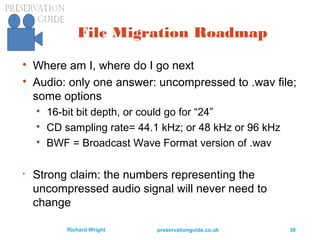
File Migration Roadmap

Where am I, where do I go next

Audio: only one answer: uncompressed to .wav file;
some options

16-bit bit depth, or could go for “24”

CD sampling rate= 44.1 kHz; or 48 kHz or 96 kHz

BWF = Broadcast Wave Format version of .wav

Strong claim: the numbers representing the
uncompressed audio signal will never need to
change
preservationguide.co.uk 39Richard Wright
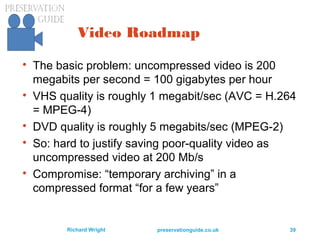
Video Roadmap

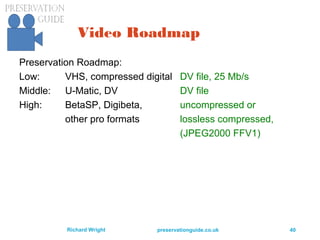
The basic problem: uncompressed video is 200
megabits per second = 100 gigabytes per hour

VHS quality is roughly 1 megabit/sec (AVC = H.264
= MPEG-4)

DVD quality is roughly 5 megabits/sec (MPEG-2)

So: hard to justify saving poor-quality video as
uncompressed video at 200 Mb/s

Compromise: “temporary archiving” in a
compressed format “for a few years”
preservationguide.co.uk 40Richard Wright
Video Roadmap
Preservation Roadmap:
Low: VHS, compressed digital DV file, 25 Mb/s
Middle: U-Matic, DV DV file
High: BetaSP, Digibeta, uncompressed or
other pro formats lossless compressed,
(JPEG2000 FFV1)
preservationguide.co.uk 41Richard Wright
Video Roadmap

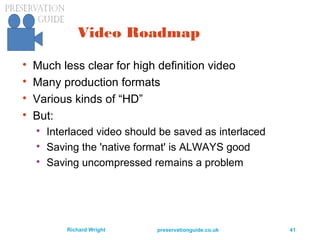
Much less clear for high definition video

Many production formats

Various kinds of “HD”

But:

Interlaced video should be saved as interlaced

Saving the 'native format' is ALWAYS good

Saving uncompressed remains a problem
preservationguide.co.uk 42Richard Wright
Recommended for Video

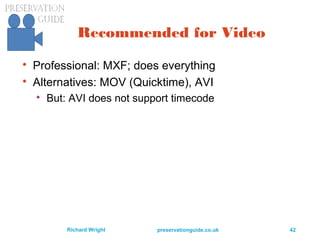
Professional: MXF; does everything

Alternatives: MOV (Quicktime), AVI

But: AVI does not support timecode
preservationguide.co.uk 43Richard Wright
File Formats for Film

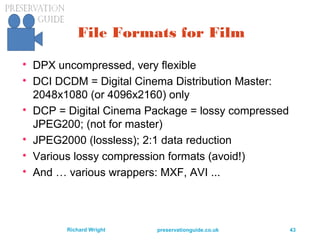
DPX uncompressed, very flexible

DCI DCDM = Digital Cinema Distribution Master:
2048x1080 (or 4096x2160) only

DCP = Digital Cinema Package = lossy compressed
JPEG200; (not for master)

JPEG2000 (lossless); 2:1 data reduction

Various lossy compression formats (avoid!)

And … various wrappers: MXF, AVI ...
preservationguide.co.uk 44Richard Wright
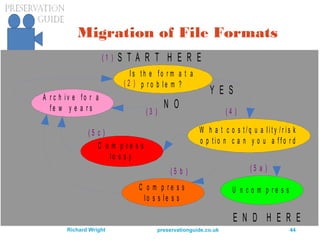
Migration of File Formats
I s t h e f o r m a t a
p r o b l e m ?
S T A R T H E R E
A r c h i v e f o r a
f e w y e a r s
W h a t c o s t / q u a l i t y / r i s k
o p t i o n c a n y o u a f f o r d
C o m p r e s s
l o s s y
Y E S
N O
U n c o m p r e s sC o m p r e s s
l o s s l e s s
E N D H E R E
( 1 )
( 2 )
( 3 ) ( 4 )
( 5 a )( 5 b )
( 5 c )
preservationguide.co.uk 45Richard Wright
Preservation Strategy

Keep what you have as long as it works

Migrate to a new format when the old format has a
problem (usually, obsolete)

Examples: Real Audio, MPEG-1 Video

OR – maybe you can emulate the software needed
to use the file, even after standard software no
longer works

One emulator: Univ of Liverpool Multivalent Browser
preservationguide.co.uk 46Richard Wright
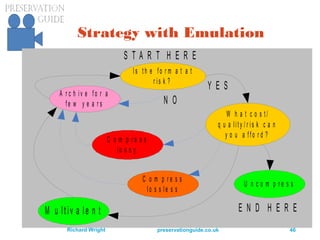
Strategy with Emulation
I s t h e f o r m a t a t
r is k ?
S T A R T H E R E
A r c h i v e f o r a
f e w y e a r s
W h a t c o s t /
q u a lit y / r is k c a n
y o u a f f o r d ?
C o m p r e s s
lo s s y
Y E S
N O
U n c o m p r e s s
C o m p r e s s
lo s s le s s
E N D H E R EM u lt iv a le n t
preservationguide.co.uk 47Richard Wright
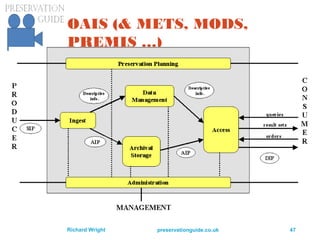
OAIS (& METS, MODS,
PREMIS …)
preservationguide.co.uk 48Richard Wright
“OAIS and all that” – and how it
applies to audiovisual material, or
doesn’t
 Open Archive Information System is a concept for
tightening control over files, so that there is much
less risk of their loss
 “Trusted Digital Repositories” (TDRs) follow OAIS
(and various other principles)
 TRAC – methods for evaluation whether a TDR
deserves the label ‘trusted’
 Much information form DPE = Digital Preservation
Europe URL: www.digitalpreservationeurope.eu/
preservationguide.co.uk 49Richard Wright
OAIS for audiovisual content:
 Some use in US public broadcasting
 Project WNET (with WGBH and NYU) (closed!)
 used Fedora digital repository software
 and METS, PREMIS, PBCORE (not MODS)
 PrestoPRIME implemented OIAS and other digital
preservation technology as a demonstration system
 partner: Ex Libris, Rosetta, New Zealand
 Many repositories now use OAIS “information packages” –
SIP, AIP, DIP; Archivematica is free and open-source
 Overall problem: content that is regularly changed
preservationguide.co.uk 50Richard Wright
More on TRAC
 “The Trustworthy Repositories Audit & Certification:
Criteria and Checklist (TRAC), is the principle tool used
by CRL in its auditing and certification of digital
repositories. TRAC criteria measure the ability of a
given repository to preserve digital content in a way that
serves the repository's stakeholder community.”
 “TRAC metrics are based on the ISO 14721:2012
standard. This standard is commonly referred to as the
OAIS reference model”
 http://www.crl.edu/archiving-preservation/digital-
archives/metrics-assessing-and-certifying
preservationguide.co.uk 51Richard Wright
More on TRAC
 The social, political and economic environment of a
Trusted Digital Repository
 TRAC Criteria Documents
A1.2 Contingency plans, succession plans, escrow arrangements
(as appropriate)
A3.1 Definition of designated community(ies), and policy relating to
service levels
A3.3 Policies relating to legal permissions
A3.5 Policies and procedures relating to feedback
A4.3 Financial procedures
A5.5 Policies/procedures relating to challenges to rights
preservationguide.co.uk 52Richard Wright
More TRAC
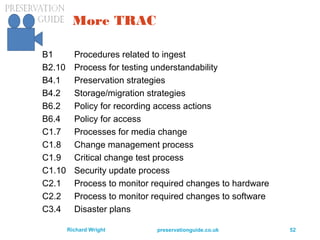
B1 Procedures related to ingest
B2.10 Process for testing understandability
B4.1 Preservation strategies
B4.2 Storage/migration strategies
B6.2 Policy for recording access actions
B6.4 Policy for access
C1.7 Processes for media change
C1.8 Change management process
C1.9 Critical change test process
C1.10 Security update process
C2.1 Process to monitor required changes to hardware
C2.2 Process to monitor required changes to software
C3.4 Disaster plans
preservationguide.co.uk 53Richard Wright
Levels of digital preservation
 NDSA = National Digital Stewardship Alliance
http://www.digitalpreservation.gov/ndsa/
www.digitalpreservation.gov/ndsa/activities/levels.html
protect
know
monitor
repair
 storage, fixity, security, metadata, file formats
 nothing specifically about audiovisual issues
preservationguide.co.uk 55Richard Wright
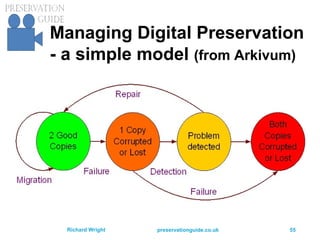
Managing Digital Preservation
- a simple model (from Arkivum)
preservationguide.co.uk 56Richard Wright
Digital: the new problems:
 risk goes up as storage cost goes down;
 format obsolescence;
 general technology obsolescence;
 survival strategies in a digital world
preservationguide.co.uk 57Richard Wright
What will happen to storage:
 Capacity
 Cost
 Usage
 Risk
?
preservationguide.co.uk 58Richard Wright
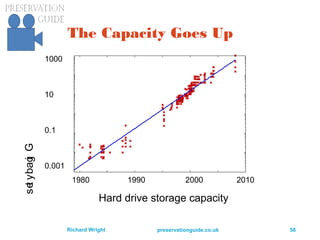
The Capacity Goes Up
1980 1990 2000 2010
Hard drive storage capacity
1000
10
0.1
0.001
Gigabytes
preservationguide.co.uk 59Richard Wright
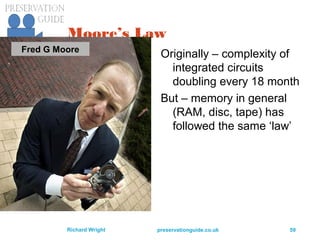
Moore’s Law
Originally – complexity of
integrated circuits
doubling every 18 month
But – memory in general
(RAM, disc, tape) has
followed the same ‘law’
Fred G Moore
preservationguide.co.uk 60Richard Wright
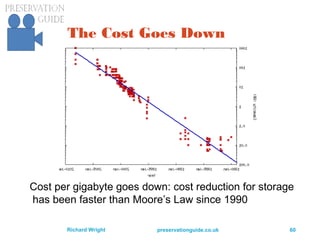
The Cost Goes Down
Cost per gigabyte goes down: cost reduction for storage
has been faster than Moore’s Law since 1990
preservationguide.co.uk 61Richard Wright
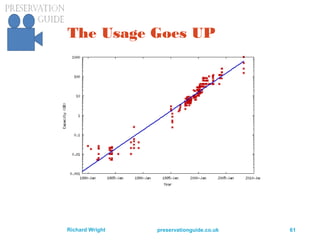
The Usage Goes UP
preservationguide.co.uk 62Richard Wright
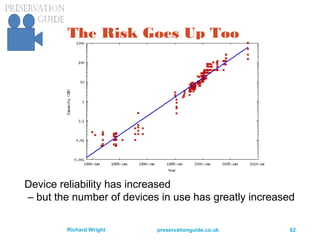
The Risk Goes Up Too
Device reliability has increased
– but the number of devices in use has greatly increased
preservationguide.co.uk 63Richard Wright
Risk, Devices and Reliability
 Risk of loss of data:
 proportional to number of devices
 and to the size of the devices (because each holds
more data)
 and the complexity of storage management (unless
somehow complexity can be used to reduce risk)
 and … to reliability of individual devices
preservationguide.co.uk 64Richard Wright
Risk, Devices and Reliability
 Many more risks besides loss of storage devices
 format obsolescence
 IT infrastructure obsolescence
 file corruption
 system corruption
 errors and other human actions
 Which all increase in significance (impact) in
proportion to the amount of storage in use
preservationguide.co.uk 65Richard Wright
Conclusion:
As storage gets really cheap
… it gets really risky.
preservationguide.co.uk 66Richard Wright
format obsolescence;
general technology
obsolescence;
 OAIS is meant to provide an overall structure that is
entirely independent of implementation technology
 None of this technology has really been proven!
 (and I’m still worried about storage failures and bit
rot)
 ‘continuous migration’ is one answer to all forms of
obsolescence (if always done in time)
preservationguide.co.uk 67Richard Wright
Survival Strategies: Prevention
of loss
 Where most of the attention (and research) is
directed:
 reducing MTBF for devices
 making copies !
 using storage management layer(s)
 introducing virtual storage layer(s)
 using Digital Library technology
 OAIS ‘packages’
 preservation metadata (PREMIS)
preservationguide.co.uk 69Richard Wright
Limits
 Technology: gets better – and worse – at the same
time
 Rights; secondary exploitation; public value
licensing; legislation
 Who gets in: mechanisms for access control:
identity, authorisation
 Networks: cost, bandwidth
 Who doesn’t have Internet?
preservationguide.co.uk 70Richard Wright
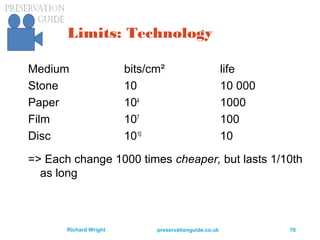
Limits: Technology
Medium bits/cm² life
Stone 10 10 000
Paper 104
1000
Film 107
100
Disc 1010
10
=> Each change 1000 times cheaper, but lasts 1/10th
as long
preservationguide.co.uk 71Richard Wright
Limits: Rights
 See Nan Rubin paper (IFLA-PAC)
 http://www.ifla.org/files/assets/pac/ipn/47-may-
2009.pdf
“Not having clear permission to reuse older programs is
a primary factor that discourages public television
from making an investment in long-term program
preservation. Until rights agreements are improved,
archival content will remain largely inaccessible.”
 BBC Creative Archive – used a version of a Creative
Commons licence
preservationguide.co.uk 72Richard Wright
Limits: Access Mechanisms
 Academic use can be an ‘exception’ to copyright
 Academic institutions use controlled networks
 Shibboleth is an emerging global standard (W3C)
for access / identification (in academia)
 Who supports identification of the general public?
preservationguide.co.uk 73Richard Wright
Limits: Networks and Cost
 Network charges cost more than storage charges in
BBC Open Archive trial
 BUT – solved (?) by YouTube
preservationguide.co.uk 74Richard Wright
Four requirements
for sensible access
 Granularity
 Navigation
 Reference and Citation
 Annotation
preservationguide.co.uk 75Richard Wright
Granularity - division into
meaningful units
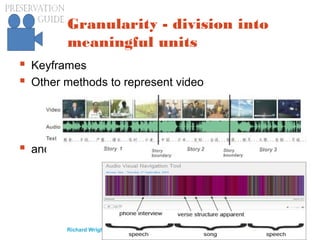
 Keyframes
 Other methods to represent video
 and audio:
preservationguide.co.uk 76Richard Wright
Navigation
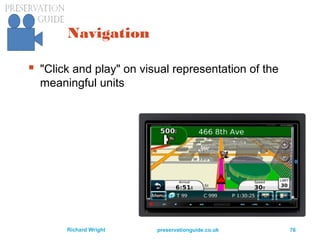
 "Click and play" on visual representation of the
meaningful units
preservationguide.co.uk 77Richard Wright
Reference and Citation
 the core requirement for scholarly discourse
 along with a major change in attitude!
 Needs a permanent place for “things to be”
 Hence the need for stable audiovisual collections
“Hamlet, for example, is comparable to Saxo
Grammaticus' Gesta Danorum.[citation needed]
King Lear is based on King Leir in Historia
Regum Britanniae by Geoffrey of Monmouth,
retold in 1587 by Raphael Holinshed.[citation
needed]
“
wikipedia
preservationguide.co.uk 78Richard Wright
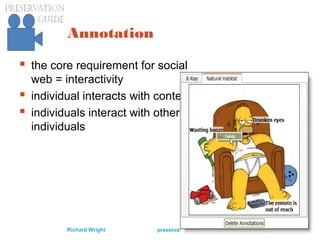
Annotation
 the core requirement for social
web = interactivity
 individual interacts with content
 individuals interact with other
individuals
preservationguide.co.uk 79Richard Wright
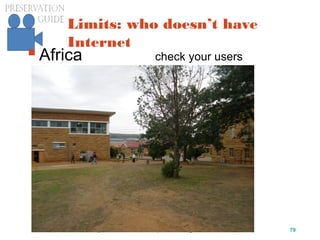
Limits: who doesn’t have
Internet
Africa check your users
preservationguide.co.uk 80Richard Wright
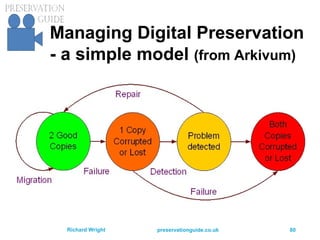
Managing Digital Preservation
- a simple model (from Arkivum)
preservationguide.co.uk 81Richard Wright
And now:
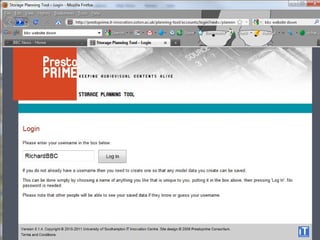
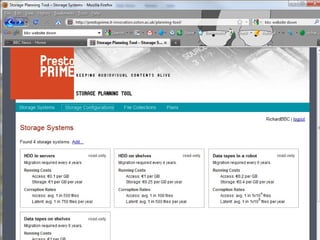
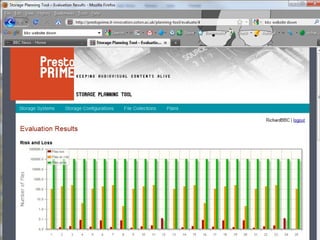
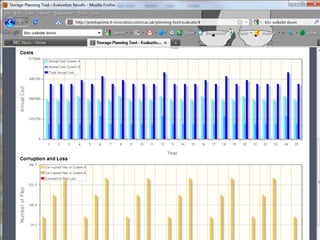
one PrestoPRIME tool
 A model for storage systems, to calculate
 Cost
 Risk
 Loss
 And compare what-if scenarios
 Storage model: http://prestoprime.it-
innovation.soton.ac.uk/planning-tool/
preservationguide.co.uk 82Richard Wright
preservationguide.co.uk 83Richard Wright
preservationguide.co.uk 84Richard Wright
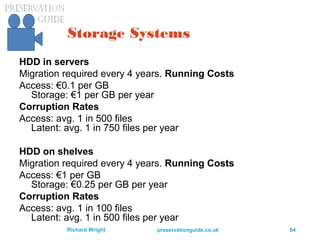
Storage Systems
HDD in servers
Migration required every 4 years. Running Costs
Access: €0.1 per GB
Storage: €1 per GB per year
Corruption Rates
Access: avg. 1 in 500 files
Latent: avg. 1 in 750 files per year
HDD on shelves
Migration required every 4 years. Running Costs
Access: €1 per GB
Storage: €0.25 per GB per year
Corruption Rates
Access: avg. 1 in 100 files
Latent: avg. 1 in 500 files per year
preservationguide.co.uk 85Richard Wright
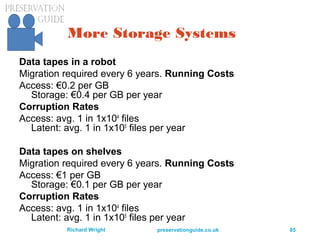
More Storage Systems
Data tapes in a robot
Migration required every 6 years. Running Costs
Access: €0.2 per GB
Storage: €0.4 per GB per year
Corruption Rates
Access: avg. 1 in 1x10⁴
files
Latent: avg. 1 in 1x10⁵
files per year
Data tapes on shelves
Migration required every 6 years. Running Costs
Access: €1 per GB
Storage: €0.1 per GB per year
Corruption Rates
Access: avg. 1 in 1x10⁴
files
Latent: avg. 1 in 1x10⁵
files per year
preservationguide.co.uk 86Richard Wright
preservationguide.co.uk 87Richard Wright
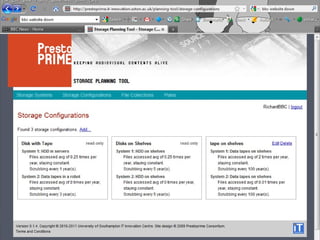
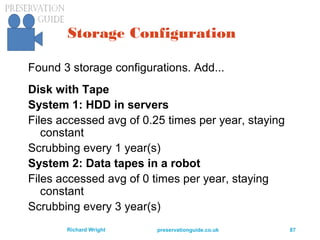
Storage Configuration
Found 3 storage configurations. Add...
Disk with Tape
System 1: HDD in servers
Files accessed avg of 0.25 times per year, staying
constant
Scrubbing every 1 year(s)
System 2: Data tapes in a robot
Files accessed avg of 0 times per year, staying
constant
Scrubbing every 3 year(s)
preservationguide.co.uk 88Richard Wright
preservationguide.co.uk 89Richard Wright
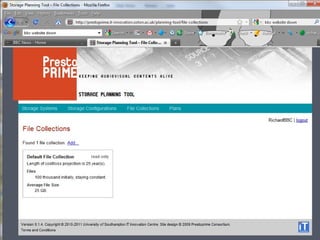
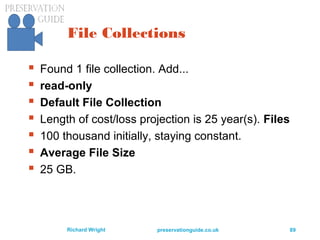
File Collections
 Found 1 file collection. Add...
 read-only
 Default File Collection
 Length of cost/loss projection is 25 year(s). Files
 100 thousand initially, staying constant.
 Average File Size
 25 GB.
preservationguide.co.uk 90Richard Wright
preservationguide.co.uk 91Richard Wright
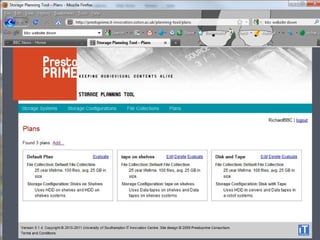
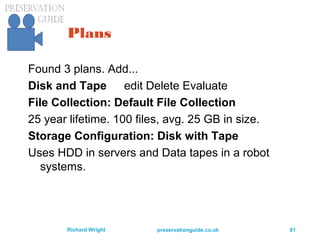
Plans
Found 3 plans. Add...
Disk and Tape edit Delete Evaluate
File Collection: Default File Collection
25 year lifetime. 100 files, avg. 25 GB in size.
Storage Configuration: Disk with Tape
Uses HDD in servers and Data tapes in a robot
systems.
preservationguide.co.uk 92Richard Wright
preservationguide.co.uk 93Richard Wright
preservationguide.co.uk 94Richard Wright
Thank You
 Storage model: http://prestoprime.it-
innovation.soton.ac.uk/planning-tool/
 PrestoCentre prestocentre.eu
 Richard Wright preservation.guide@gmail.com
preservationguide.co.uk

Preservation content in_files

  • 1.
    Preservation of AudiovisualContent in Files Richard Wright SIPAD14, Mexico City, October 2014
  • 2.
    preservationguide.co.uk 2Richard Wright Overview digital preservation  files and formats  encodings and wrappers  lossy compression, lossless compression, uncompressed  “OAIS and all that” – and how it applies to audiovisual material, or doesn’t  the new problems: risk goes up as storage cost goes down; format obsolescence; general technology obsolescence; survival strategies in a digital world
  • 3.
    preservationguide.co.uk 3Richard Wright Overview-- Part two  Access: this is the payoff of putting up with all the problems of digital technology: instant free global access – to everything! (Many examples given yesterday)  A review of limits to access; limitations on:  what we keep: increase in risk, increase in amount of content, decrease in life of storage  rights; secondary exploitation; public value licensing; legislation  who gets in: mechanisms for access control: identity, authorisation  networks: cost, bandwidth  tools for understanding storage and risks
  • 4.
    preservationguide.co.uk 4Richard Wright Resources AV Digitisation and Digital Preservation TechWatch Report #02  https://prestocentre.org/library/resources/av- digitisation-and-digital-preservation-techwatch- report-02  Digitising Contemporary Art D6.2 "Best practices for a digital storage infrastructure for the long-term preservation of digital files" Sofie Laier Henriksen, Wiel Seuskens and Gaby Wijers (LIMA)  //www.dca-project.eu/deliverables
  • 5.
  • 6.
    preservationguide.co.uk 6Richard Wright Stone,papyrus, film, hard drive: what’s next? Medium bits/cm² life, yr Stone 10 10 000 Paper 104 1000 Film 107 100 Disc 1010 10 Each step: 1000 times cheaper, lasts 1/10th as long Soon? Infinite Zero
  • 7.
    preservationguide.co.uk 7Richard Wright Infinitestorage, no persistence: Photo: http://www.flickr.com/photos/chascar/476475563/ The Cloud !
  • 8.
    preservationguide.co.uk 8Richard Wright Directionof Technology Storage is a service: PrestoSpace, 2004 A file is a performance: PrestoPrime, 2010 2014: Media without media  Using managed services  Managing managed services  Statistics, trust, indemnity  Advantage: storage provided by professionals; archivists can do archiving (producers can produce, curators can curate ...)
  • 9.
    preservationguide.co.uk 9Richard Wright Stagesin the life of AV content  signal: audio from a microphone, video from a video camera  recording of a signal onto a carrier  digitisation of a recording of a signal  digital preservation of the digitisation of a recording of a signal UK Digital Preservation Coalition: Preserving Moving Pictures and Sound (by R Wright) http://www.dpconline.org/advice/technology-watch- reports
  • 10.
    preservationguide.co.uk 10Richard Wright Threekinds of AV content  analogue  digital on shelves  CD, DVD, Blu-Ray  audio: Minidisc, DAT  video: DV, professional digital videotape formats  preservation (ripping): make a clone (if possible)  there are complications  there are tools: eg DVAnalyzer  http://www.avpreserve.com/avpsresources/tools/  digital in files
  • 11.
    preservationguide.co.uk 11Richard Wright AudiovisualContent is Special Technically demanding Context: use in “scholarly communication” Interoperability A Matter of Time Wikimedia Common CC licence; author STEINDY
  • 12.
    preservationguide.co.uk 12Richard Wright SpecialTechnical Issues  Audiovisual files are not just quantitatively different from usual digital library files  Size: 1hr HD video (uncompressed) = 800 GB  Management: storage, movement  Errors: 1 TB = 1012 ; common disk error rates 10-13  They are qualitatively different  Wrappers – Quicktime (MOV), MXF, AVI, ...  Composites: audio, video, subtitles, timecode ...  Encoding and quality management issues
  • 13.
    preservationguide.co.uk 13Richard Wright SpecialContextual Issues Use in Scholarly Communication:  Citation  Quotation  Annotation  Authority / Provenance All our expectations are based on writing, not on spoken word, audio, film or video The record of an event is the written record. Why? Wikimedia Common CC licence; author Piero
  • 14.
    preservationguide.co.uk 14Richard Wright SpecialInteroperability Issues Europeana:  Harvests OAI-PMH metadata  Broadcasters never heard of OAI-PMH  OAI never heard of time-based metadata  Storyboard representation (keyframes)  Subtitles  Time code Digital libraries don’t do time-based access – specific case of lack of structured access
  • 15.
    preservationguide.co.uk 15Richard Wright Thetime dimension Europeana has a time dimension – divided into centuries Audio and video use edit systems with timelines in seconds, or fractions of a second – and visual representations of content divided into units (of some kind): the storyboard
  • 16.
  • 17.
  • 18.
    preservationguide.co.uk 18Richard Wright ThreeAspects of Digital Preservation  Making analogue content into digital content  Digitisation (covered yesterday)  Working with digital content  Digital workflow and processes  Preserving the digital content  Digital Preservation
  • 19.
    preservationguide.co.uk 19Richard Wright ThreeAspects of Digital Preservation  1- Making analogue content into digital content  Planning  Budget  Workflow  Standards  Rights  Result: lots of files  PrestoSpace information online: //preservationguide.co.uk/RDWiki/  Now: revised for PrestoCentre = //prestocentre.eu/
  • 20.
    preservationguide.co.uk 20Richard Wright ThreeAspects of Digital Preservation  2- Working with digital content (lots of files)  Management  DAM/MAM  Repository  Storage  Metadata  digital library technology  Access  Rights
  • 21.
    preservationguide.co.uk 21Richard Wright ThreeAspects of Digital Preservation  3- Preserving the digital content  Keeping the data ‘forever’  Coping with obsolescence  Migration  Emulation  Standards: “OAIS and all that”  Digital preservation technology  Planning and strategy
  • 22.
    preservationguide.co.uk 22Richard Wright Filesand their formats  (US) LOC has a guide to their preservation www.digitalpreservation.gov/formats/intro/intro.shtml  (UK) National Archive has format registry PRONOM – and they archive software www.nationalarchives.gov.uk/pronom/  (Netherlands) National Library has emulation for DOS, extending life of software (sort of) http://dioscuri.sourceforge.net/  Digital Library technology runs services on files: JHOVE, DROID, metadata extraction
  • 23.
    preservationguide.co.uk 23Richard Wright DigitalLibrary Services  Enable automation  Of ingest  File format identification DROID, JHOVE  File validation JHOVE  Metadata extraction  National Library of New Zealand  OAI-PMH protocol for metadata harvesting  Of migration  PLANETS ‘preservation planning’ methods
  • 24.
    preservationguide.co.uk 24Richard Wright WhyAutomation?  Portico (electronic document repository) has ingested 9.1 million PDFs in a decade  (and 800k had validation errors)  How many files would the BBC send to an asset management system per day, coming from how many different applications?  (1000 files from 100 applications?)  Meaning a million in three years  All of which need ingest, validation, preservation
  • 25.
    preservationguide.co.uk 25Richard Wright DROID– UK National Archive DROID (Digital Record Object Identification) is a software tool developed by The National Archives to perform automated batch identification of file formats. DROID is designed to meet the fundamental requirement of any digital repository  to be able to identify the precise format of all stored digital objects  and to link that identification to a central registry of technical information about that format and its dependencies. DROID uses internal and external signatures to identify and report the specific file format versions of digital files. These signatures are stored in an XML signature file, generated from information recorded in the PRONOM technical registry. New and updated signatures are regularly added to PRONOM, and DROID can be configured to automatically download updated signature files from the PRONOM website via web services. DROID is a platform-independent Java application, and includes a documented, public API, for ease of integration with other systems.
  • 26.
  • 27.
  • 28.
  • 29.
    preservationguide.co.uk 29Richard Wright JHOVE:JSTOR/Harvard Object Validation Environment JHOVE provides functions to perform format-specific identification, validation, and characterization of digital objects.  Format identification is the process of determining the format to which a digital object conforms; in other words, it answers the question: "I have a digital object; what format is it?“  Format validation is the process of determining the level of compliance of a digital object to the specification for its purported format, e.g.: "I have an object purportedly of format F; is it?" Format validation: well-formedness and validity. 1. well-formed: it meets the purely syntactic requirements for its format. 2. valid: it is well-formed and it meets additional semantic-level requirements .  Format characterization is the process of determining the format- specific significant properties of an object of a given format, e.g.: "I have an object of format F; what are its salient properties?"
  • 30.
    preservationguide.co.uk 30Richard Wright NationalLibrary of New Zealand Metadata Extraction Tool  Purpose: to programmatically extract preservation metadata from a range of file formats  Initially developed in 2003; open source in 2007.  The Tool builds on the Library's work on digital preservation, and its logical preservation metadata schema. It is designed to:  automatically extracts preservation-related metadata  output that metadata in a standard format (XML)  Supported File Formats: the Metadata Extract Tool includes a number of 'adapters' that extract metadata from specific file types. Extractors are currently provided for:  Images: BMP, GIF, JPEG and TIFF.  Office documents: MS Word (version 2, 6), Word Perfect, Open Office (version 1), MS Works, MS Excel, MS PowerPoint, and PDF.  Audio and Video: WAV and MP3.  Markup languages: HTML and XML
  • 31.
    preservationguide.co.uk 31Richard Wright Architecture Digitallibrary services are generally:  open source  web service architecture  reliant on metadata standards (schema) to work at all Do audiovisual archives need these services? Can these services work (or be made to work) on professional audiovideo files?
  • 32.
    preservationguide.co.uk 32Richard Wright Encodingsand Wrappers  an MP3 file is MP3 encoded audio in an MP3 file  BUT- MP3 could also be in an AVI file along with video  OR – MP3 could be in an MXF file along with video (and the video could be in various encodings)  Hence: when a file can hold various kinds of encodings, and especially when a file can hold multiple audio and video signals – we call it a wrapper so that we can separate:  the file type (eg AVI, MXF …)  from the encodings of signals inside the wrapper
  • 33.
    preservationguide.co.uk 33Richard Wright Lossycompression, lossless compression, uncompressed  Lossy data reduction should not be created by the archive  but if you’re given a lossy file, that’s your ‘artefact’  Uncompress and save ‘whole’ when obsolescent  DO NOT recode from one lossy format to another; that becomes a ‘generation loss’  Saving SD video ‘whole’ is cheaper than digibeta!  Saving HD video ‘whole’ may be completely unfeasible for several more years; shame
  • 34.
    preservationguide.co.uk 34Richard Wright preservationof complex objects (art!)  if you’re given a lossy file, that’s your ‘artefact’  if you’re given a ‘work’ – that’s also your artefact  basic principle – preserve the artefact  complex artefacts may not divide into ‘essence’ and metadata (signals and metadata)  migration becomes less and less satisfactory  emulation (esp multivalent approach) may be much more satisfactory  Institutions need to maintain legacy ‘platforms’ – as KB in The Hague is already doing (DOS)
  • 35.
    preservationguide.co.uk 35Richard Wright Lossless“compression”  For: saves on storage  but how much is that as % of total dig archive cost?  Against:  adds a layer of complexity in creation (one off)  adds a layer of complexity in playback (forever)  slows down playback  may tie you to proprietary software  or even proprietary hardware!  destroys the error-tolerance of an uncompressed file
  • 36.
    preservationguide.co.uk 36Richard Wright Bitrot – image examples GIF: 3 bad bytes in 10k BMP: 160 bad bytes in 40k
  • 37.
    preservationguide.co.uk 37Richard Wright Fileerrors and file resilience  Prof Manfred Thaller, Univ of Cologne and other papers (eg Heydegger,2008)  Example: image file with one bad byte Format Size % of file affected TIFF 10M 0.000 01 JPEG 3.8M 2.1 JP2K 7.3M 17  State of the Art: uncompressed, or inter-frame compression, with fixity check on each frame (AVPS has guidance to fixity checks)
  • 38.
    preservationguide.co.uk 38Richard Wright FileMigration Roadmap  Where am I, where do I go next  Audio: only one answer: uncompressed to .wav file; some options  16-bit bit depth, or could go for “24”  CD sampling rate= 44.1 kHz; or 48 kHz or 96 kHz  BWF = Broadcast Wave Format version of .wav  Strong claim: the numbers representing the uncompressed audio signal will never need to change
  • 39.
    preservationguide.co.uk 39Richard Wright VideoRoadmap  The basic problem: uncompressed video is 200 megabits per second = 100 gigabytes per hour  VHS quality is roughly 1 megabit/sec (AVC = H.264 = MPEG-4)  DVD quality is roughly 5 megabits/sec (MPEG-2)  So: hard to justify saving poor-quality video as uncompressed video at 200 Mb/s  Compromise: “temporary archiving” in a compressed format “for a few years”
  • 40.
    preservationguide.co.uk 40Richard Wright VideoRoadmap Preservation Roadmap: Low: VHS, compressed digital DV file, 25 Mb/s Middle: U-Matic, DV DV file High: BetaSP, Digibeta, uncompressed or other pro formats lossless compressed, (JPEG2000 FFV1)
  • 41.
    preservationguide.co.uk 41Richard Wright VideoRoadmap  Much less clear for high definition video  Many production formats  Various kinds of “HD”  But:  Interlaced video should be saved as interlaced  Saving the 'native format' is ALWAYS good  Saving uncompressed remains a problem
  • 42.
    preservationguide.co.uk 42Richard Wright Recommendedfor Video  Professional: MXF; does everything  Alternatives: MOV (Quicktime), AVI  But: AVI does not support timecode
  • 43.
    preservationguide.co.uk 43Richard Wright FileFormats for Film  DPX uncompressed, very flexible  DCI DCDM = Digital Cinema Distribution Master: 2048x1080 (or 4096x2160) only  DCP = Digital Cinema Package = lossy compressed JPEG200; (not for master)  JPEG2000 (lossless); 2:1 data reduction  Various lossy compression formats (avoid!)  And … various wrappers: MXF, AVI ...
  • 44.
    preservationguide.co.uk 44Richard Wright Migrationof File Formats I s t h e f o r m a t a p r o b l e m ? S T A R T H E R E A r c h i v e f o r a f e w y e a r s W h a t c o s t / q u a l i t y / r i s k o p t i o n c a n y o u a f f o r d C o m p r e s s l o s s y Y E S N O U n c o m p r e s sC o m p r e s s l o s s l e s s E N D H E R E ( 1 ) ( 2 ) ( 3 ) ( 4 ) ( 5 a )( 5 b ) ( 5 c )
  • 45.
    preservationguide.co.uk 45Richard Wright PreservationStrategy  Keep what you have as long as it works  Migrate to a new format when the old format has a problem (usually, obsolete)  Examples: Real Audio, MPEG-1 Video  OR – maybe you can emulate the software needed to use the file, even after standard software no longer works  One emulator: Univ of Liverpool Multivalent Browser
  • 46.
    preservationguide.co.uk 46Richard Wright Strategywith Emulation I s t h e f o r m a t a t r is k ? S T A R T H E R E A r c h i v e f o r a f e w y e a r s W h a t c o s t / q u a lit y / r is k c a n y o u a f f o r d ? C o m p r e s s lo s s y Y E S N O U n c o m p r e s s C o m p r e s s lo s s le s s E N D H E R EM u lt iv a le n t
  • 47.
  • 48.
    preservationguide.co.uk 48Richard Wright “OAISand all that” – and how it applies to audiovisual material, or doesn’t  Open Archive Information System is a concept for tightening control over files, so that there is much less risk of their loss  “Trusted Digital Repositories” (TDRs) follow OAIS (and various other principles)  TRAC – methods for evaluation whether a TDR deserves the label ‘trusted’  Much information form DPE = Digital Preservation Europe URL: www.digitalpreservationeurope.eu/
  • 49.
    preservationguide.co.uk 49Richard Wright OAISfor audiovisual content:  Some use in US public broadcasting  Project WNET (with WGBH and NYU) (closed!)  used Fedora digital repository software  and METS, PREMIS, PBCORE (not MODS)  PrestoPRIME implemented OIAS and other digital preservation technology as a demonstration system  partner: Ex Libris, Rosetta, New Zealand  Many repositories now use OAIS “information packages” – SIP, AIP, DIP; Archivematica is free and open-source  Overall problem: content that is regularly changed
  • 50.
    preservationguide.co.uk 50Richard Wright Moreon TRAC  “The Trustworthy Repositories Audit & Certification: Criteria and Checklist (TRAC), is the principle tool used by CRL in its auditing and certification of digital repositories. TRAC criteria measure the ability of a given repository to preserve digital content in a way that serves the repository's stakeholder community.”  “TRAC metrics are based on the ISO 14721:2012 standard. This standard is commonly referred to as the OAIS reference model”  http://www.crl.edu/archiving-preservation/digital- archives/metrics-assessing-and-certifying
  • 51.
    preservationguide.co.uk 51Richard Wright Moreon TRAC  The social, political and economic environment of a Trusted Digital Repository  TRAC Criteria Documents A1.2 Contingency plans, succession plans, escrow arrangements (as appropriate) A3.1 Definition of designated community(ies), and policy relating to service levels A3.3 Policies relating to legal permissions A3.5 Policies and procedures relating to feedback A4.3 Financial procedures A5.5 Policies/procedures relating to challenges to rights
  • 52.
    preservationguide.co.uk 52Richard Wright MoreTRAC B1 Procedures related to ingest B2.10 Process for testing understandability B4.1 Preservation strategies B4.2 Storage/migration strategies B6.2 Policy for recording access actions B6.4 Policy for access C1.7 Processes for media change C1.8 Change management process C1.9 Critical change test process C1.10 Security update process C2.1 Process to monitor required changes to hardware C2.2 Process to monitor required changes to software C3.4 Disaster plans
  • 53.
    preservationguide.co.uk 53Richard Wright Levelsof digital preservation  NDSA = National Digital Stewardship Alliance http://www.digitalpreservation.gov/ndsa/ www.digitalpreservation.gov/ndsa/activities/levels.html protect know monitor repair  storage, fixity, security, metadata, file formats  nothing specifically about audiovisual issues
  • 54.
    preservationguide.co.uk 55Richard Wright ManagingDigital Preservation - a simple model (from Arkivum)
  • 55.
    preservationguide.co.uk 56Richard Wright Digital:the new problems:  risk goes up as storage cost goes down;  format obsolescence;  general technology obsolescence;  survival strategies in a digital world
  • 56.
    preservationguide.co.uk 57Richard Wright Whatwill happen to storage:  Capacity  Cost  Usage  Risk ?
  • 57.
    preservationguide.co.uk 58Richard Wright TheCapacity Goes Up 1980 1990 2000 2010 Hard drive storage capacity 1000 10 0.1 0.001 Gigabytes
  • 58.
    preservationguide.co.uk 59Richard Wright Moore’sLaw Originally – complexity of integrated circuits doubling every 18 month But – memory in general (RAM, disc, tape) has followed the same ‘law’ Fred G Moore
  • 59.
    preservationguide.co.uk 60Richard Wright TheCost Goes Down Cost per gigabyte goes down: cost reduction for storage has been faster than Moore’s Law since 1990
  • 60.
  • 61.
    preservationguide.co.uk 62Richard Wright TheRisk Goes Up Too Device reliability has increased – but the number of devices in use has greatly increased
  • 62.
    preservationguide.co.uk 63Richard Wright Risk,Devices and Reliability  Risk of loss of data:  proportional to number of devices  and to the size of the devices (because each holds more data)  and the complexity of storage management (unless somehow complexity can be used to reduce risk)  and … to reliability of individual devices
  • 63.
    preservationguide.co.uk 64Richard Wright Risk,Devices and Reliability  Many more risks besides loss of storage devices  format obsolescence  IT infrastructure obsolescence  file corruption  system corruption  errors and other human actions  Which all increase in significance (impact) in proportion to the amount of storage in use
  • 64.
    preservationguide.co.uk 65Richard Wright Conclusion: Asstorage gets really cheap … it gets really risky.
  • 65.
    preservationguide.co.uk 66Richard Wright formatobsolescence; general technology obsolescence;  OAIS is meant to provide an overall structure that is entirely independent of implementation technology  None of this technology has really been proven!  (and I’m still worried about storage failures and bit rot)  ‘continuous migration’ is one answer to all forms of obsolescence (if always done in time)
  • 66.
    preservationguide.co.uk 67Richard Wright SurvivalStrategies: Prevention of loss  Where most of the attention (and research) is directed:  reducing MTBF for devices  making copies !  using storage management layer(s)  introducing virtual storage layer(s)  using Digital Library technology  OAIS ‘packages’  preservation metadata (PREMIS)
  • 67.
    preservationguide.co.uk 69Richard Wright Limits Technology: gets better – and worse – at the same time  Rights; secondary exploitation; public value licensing; legislation  Who gets in: mechanisms for access control: identity, authorisation  Networks: cost, bandwidth  Who doesn’t have Internet?
  • 68.
    preservationguide.co.uk 70Richard Wright Limits:Technology Medium bits/cm² life Stone 10 10 000 Paper 104 1000 Film 107 100 Disc 1010 10 => Each change 1000 times cheaper, but lasts 1/10th as long
  • 69.
    preservationguide.co.uk 71Richard Wright Limits:Rights  See Nan Rubin paper (IFLA-PAC)  http://www.ifla.org/files/assets/pac/ipn/47-may- 2009.pdf “Not having clear permission to reuse older programs is a primary factor that discourages public television from making an investment in long-term program preservation. Until rights agreements are improved, archival content will remain largely inaccessible.”  BBC Creative Archive – used a version of a Creative Commons licence
  • 70.
    preservationguide.co.uk 72Richard Wright Limits:Access Mechanisms  Academic use can be an ‘exception’ to copyright  Academic institutions use controlled networks  Shibboleth is an emerging global standard (W3C) for access / identification (in academia)  Who supports identification of the general public?
  • 71.
    preservationguide.co.uk 73Richard Wright Limits:Networks and Cost  Network charges cost more than storage charges in BBC Open Archive trial  BUT – solved (?) by YouTube
  • 72.
    preservationguide.co.uk 74Richard Wright Fourrequirements for sensible access  Granularity  Navigation  Reference and Citation  Annotation
  • 73.
    preservationguide.co.uk 75Richard Wright Granularity- division into meaningful units  Keyframes  Other methods to represent video  and audio:
  • 74.
    preservationguide.co.uk 76Richard Wright Navigation "Click and play" on visual representation of the meaningful units
  • 75.
    preservationguide.co.uk 77Richard Wright Referenceand Citation  the core requirement for scholarly discourse  along with a major change in attitude!  Needs a permanent place for “things to be”  Hence the need for stable audiovisual collections “Hamlet, for example, is comparable to Saxo Grammaticus' Gesta Danorum.[citation needed] King Lear is based on King Leir in Historia Regum Britanniae by Geoffrey of Monmouth, retold in 1587 by Raphael Holinshed.[citation needed] “ wikipedia
  • 76.
    preservationguide.co.uk 78Richard Wright Annotation the core requirement for social web = interactivity  individual interacts with content  individuals interact with other individuals
  • 77.
    preservationguide.co.uk 79Richard Wright Limits:who doesn’t have Internet Africa check your users
  • 78.
    preservationguide.co.uk 80Richard Wright ManagingDigital Preservation - a simple model (from Arkivum)
  • 79.
    preservationguide.co.uk 81Richard Wright Andnow: one PrestoPRIME tool  A model for storage systems, to calculate  Cost  Risk  Loss  And compare what-if scenarios  Storage model: http://prestoprime.it- innovation.soton.ac.uk/planning-tool/
  • 80.
  • 81.
  • 82.
    preservationguide.co.uk 84Richard Wright StorageSystems HDD in servers Migration required every 4 years. Running Costs Access: €0.1 per GB Storage: €1 per GB per year Corruption Rates Access: avg. 1 in 500 files Latent: avg. 1 in 750 files per year HDD on shelves Migration required every 4 years. Running Costs Access: €1 per GB Storage: €0.25 per GB per year Corruption Rates Access: avg. 1 in 100 files Latent: avg. 1 in 500 files per year
  • 83.
    preservationguide.co.uk 85Richard Wright MoreStorage Systems Data tapes in a robot Migration required every 6 years. Running Costs Access: €0.2 per GB Storage: €0.4 per GB per year Corruption Rates Access: avg. 1 in 1x10⁴ files Latent: avg. 1 in 1x10⁵ files per year Data tapes on shelves Migration required every 6 years. Running Costs Access: €1 per GB Storage: €0.1 per GB per year Corruption Rates Access: avg. 1 in 1x10⁴ files Latent: avg. 1 in 1x10⁵ files per year
  • 84.
  • 85.
    preservationguide.co.uk 87Richard Wright StorageConfiguration Found 3 storage configurations. Add... Disk with Tape System 1: HDD in servers Files accessed avg of 0.25 times per year, staying constant Scrubbing every 1 year(s) System 2: Data tapes in a robot Files accessed avg of 0 times per year, staying constant Scrubbing every 3 year(s)
  • 86.
  • 87.
    preservationguide.co.uk 89Richard Wright FileCollections  Found 1 file collection. Add...  read-only  Default File Collection  Length of cost/loss projection is 25 year(s). Files  100 thousand initially, staying constant.  Average File Size  25 GB.
  • 88.
  • 89.
    preservationguide.co.uk 91Richard Wright Plans Found3 plans. Add... Disk and Tape edit Delete Evaluate File Collection: Default File Collection 25 year lifetime. 100 files, avg. 25 GB in size. Storage Configuration: Disk with Tape Uses HDD in servers and Data tapes in a robot systems.
  • 90.
  • 91.
  • 92.
    preservationguide.co.uk 94Richard Wright ThankYou  Storage model: http://prestoprime.it- innovation.soton.ac.uk/planning-tool/  PrestoCentre prestocentre.eu  Richard Wright preservation.guide@gmail.com preservationguide.co.uk

Editor's Notes

  • #9 Have talked about liberating the content from the carrier; can also liberate the curator from the storage service
  • #40 http://en.wikipedia.org/wiki/H.264/MPEG-4_AVC
  • #42 BBC Dirac as new SMPTE VC-2 standard codec: http://www.bbc.co.uk/rd/pubs/whp/whp159.shtml More on HD: http://www.microsoft.com/windows/windowsmedia/ howto/articles/understandinghdformats.aspx EBU: HD image formats http://tech.ebu.ch/docs/techreview/trev_299-ive.pdf
  • #46 Multivalent Browser (emulation) http://multivalent.sourceforge.net/