Or You Can Lie With Statistics but it’s a Lot Easier with
                                                  Words
Everything is Numbers
 Statistics are used to estimate & describe patterns in
  nature that aren’t easy to see with the naked eye
   Sports-Earned Run Average, Slugging Percentage, QB
    Rating, Goals Against Average
   Economics-Gross Domestic Product, Unemployment,
    Inflation
   Medicine-Heart Rate, % Body Fat, T-Cell Counts
   Education-IQ Scores, SAT scores, Dropout Rates
 As long the statistic is from a source of data that is
  verifiable, it’s hard to lie using it.
Types of Statistics
 Measures of Central Tendency (aka Averages)
   Continuous-Number can take any value.
       Mean (sum of all data divided by the number of data points)
       Median (midpoint of all data when it is ranked from highest to
        lowest)
       Mode (most frequently occurring data value)
   Discrete-Value can only take certain values eg. 0 or 1,
    true or false.
       Proportion-sum of values taking a certain value for a given
        variables divided by the maximum value for that variable.
Types of Statistics (cont.)
 Measures of Spread
        Range-highest data value-lowest data value
        Variance-Average squared deviation from the mean
        Standard Deviation-square root of the variance
 Probability
    Used to measure the chance of events
    Also used to make a statement about the relationship
     between a sample and a population that it’s taken from
     eg. margin of error.
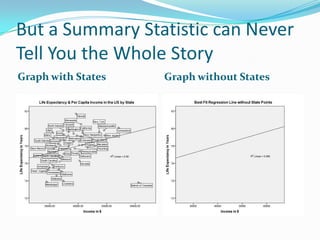
But a Summary Statistic can Never
Tell You the Whole Story
Graph with States   Graph without States
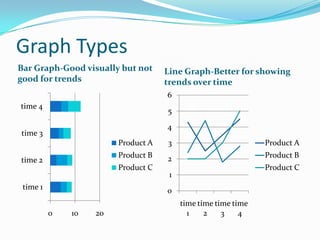
Graph Types
Bar Graph-Good visually but not     Line Graph-Better for showing
good for trends                     trends over time
                                    6
time 4
                                    5
                                    4
time 3
                        Product A   3                          Product A
                        Product B   2                          Product B
time 2
                        Product C                              Product C
                                     1
 time 1                             0
                                         time time time time
          0   10   20                      1    2    3    4
Graph Types (Cont)
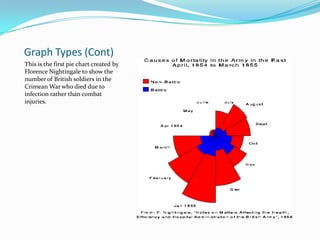
This is the first pie chart created by
Florence Nightingale to show the
number of British soldiers in the
Crimean War who died due to
infection rather than combat
injuries.
Graph Types (cont.)
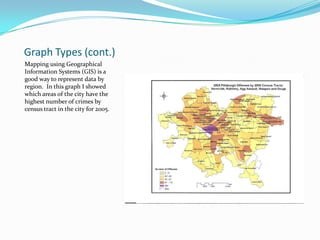
Mapping using Geographical
Information Systems (GIS) is a
good way to represent data by
region. In this graph I showed
which areas of the city have the
highest number of crimes by
census tract in the city for 2005.
Posting Graphs on the Web
 Line, Bar, Pie, & other Graphs can be created using
  Microsoft Excel, SPSS, SAS, ArcGIS, R, & other
  Packages
 If that data package will allow you to save that graph as
  a .jpg, .gif, or .png file you can easily add it to your
  blog.
   Microsoft Excel requires a visual basic command to save
    graphs as image files.
Statistical Packages
 Microsoft Excel-Most readily available but not really
  built for statistical analysis. OK to make basic graphs.
 SPSS-Better for more advanced analysis and graphics
  but less accessible due to cost. User friendly.
 R-Free software package that can be downloaded from
  the web. Can do many types of analyses. BUT it is
  syntax driven. Can save graphics as image files using
  syntax.
Cutting Edge Graphics
 The Gapminder institute provides great interactive
  graphics for free that can be seen in the documentary the
  Joy of Stats.
   URL: www.gapminder.org
   Joy of Stats Clip:
    http://csiwodeadbodies.blogspot.com/2010/12/income-and-
    life-expectancy-what-does-it.html
 The website Fractracker uses advanced graphics and
  mapping techniques to monitor the impacts of Marcellus
  Shale drilling in Pennsylvania and New York.
   URL: http://www.fractracker.org/
Poor Statistical Reasoning Example
 The blog The Audacious Epigone posted an analysis of
 the IQ’s of a sample of McCain & Obama voters which
 can be seen at
 http://anepigone.blogspot.com/2011/05/iq-wars-
 mccains-voters-win.html
Some Good Statistical Blogs
 FiveThirtyEight-Nate Silver’s blog which forecasts
  elections, the Oscars, and other sporting events.
  http://fivethirtyeight.blogs.nytimes.com/
 Data Visualisation-Has more examples of cutting edge
  graphics. http://www.datavis.ca/
 The Incidental Economist-Good Analysis of health
  care data.
  http://theincidentaleconomist.com/wordpress/
 CSI without Dead Bodies-My own website
  http://csiwodeadbodies.blogspot.com
Sources of Data on the Web
 Many websites, such as The Census Bureau’s provide
 data for download with which to do your own analysis.
   Example-Small Area Health Insurance Estimates
    (SAHIE) makes state and county level estimates for the
    whole US from 2005-2007 (2008 and 2009 estimates are
    forthcoming)
    http://www.census.gov/did/www/sahie/index.html
 Other sites provide data that can be copied and pasted
 into a data file.
   Example-CNN makes it’s poll reports available as PDF’s
    but not the raw data
Summary
 When analyzing data leave no stones unturned
   or if that is impossible turn over as many as possible and
    acknowledge that you couldn’t turn all of them over.
 When interpreting an analysis ask yourself if they have
  turned over the important stones and or accounted for
  the ones that they couldn’t turnover.

Presenting statistics in social media

  • 1.
    Or You CanLie With Statistics but it’s a Lot Easier with Words
  • 2.
    Everything is Numbers Statistics are used to estimate & describe patterns in nature that aren’t easy to see with the naked eye  Sports-Earned Run Average, Slugging Percentage, QB Rating, Goals Against Average  Economics-Gross Domestic Product, Unemployment, Inflation  Medicine-Heart Rate, % Body Fat, T-Cell Counts  Education-IQ Scores, SAT scores, Dropout Rates  As long the statistic is from a source of data that is verifiable, it’s hard to lie using it.
  • 3.
    Types of Statistics Measures of Central Tendency (aka Averages)  Continuous-Number can take any value.  Mean (sum of all data divided by the number of data points)  Median (midpoint of all data when it is ranked from highest to lowest)  Mode (most frequently occurring data value)  Discrete-Value can only take certain values eg. 0 or 1, true or false.  Proportion-sum of values taking a certain value for a given variables divided by the maximum value for that variable.
  • 4.
    Types of Statistics(cont.)  Measures of Spread  Range-highest data value-lowest data value  Variance-Average squared deviation from the mean  Standard Deviation-square root of the variance  Probability  Used to measure the chance of events  Also used to make a statement about the relationship between a sample and a population that it’s taken from eg. margin of error.
  • 5.
    But a SummaryStatistic can Never Tell You the Whole Story Graph with States Graph without States
  • 6.
    Graph Types Bar Graph-Goodvisually but not Line Graph-Better for showing good for trends trends over time 6 time 4 5 4 time 3 Product A 3 Product A Product B 2 Product B time 2 Product C Product C 1 time 1 0 time time time time 0 10 20 1 2 3 4
  • 7.
    Graph Types (Cont) Thisis the first pie chart created by Florence Nightingale to show the number of British soldiers in the Crimean War who died due to infection rather than combat injuries.
  • 8.
    Graph Types (cont.) Mappingusing Geographical Information Systems (GIS) is a good way to represent data by region. In this graph I showed which areas of the city have the highest number of crimes by census tract in the city for 2005.
  • 9.
    Posting Graphs onthe Web  Line, Bar, Pie, & other Graphs can be created using Microsoft Excel, SPSS, SAS, ArcGIS, R, & other Packages  If that data package will allow you to save that graph as a .jpg, .gif, or .png file you can easily add it to your blog.  Microsoft Excel requires a visual basic command to save graphs as image files.
  • 10.
    Statistical Packages  MicrosoftExcel-Most readily available but not really built for statistical analysis. OK to make basic graphs.  SPSS-Better for more advanced analysis and graphics but less accessible due to cost. User friendly.  R-Free software package that can be downloaded from the web. Can do many types of analyses. BUT it is syntax driven. Can save graphics as image files using syntax.
  • 11.
    Cutting Edge Graphics The Gapminder institute provides great interactive graphics for free that can be seen in the documentary the Joy of Stats.  URL: www.gapminder.org  Joy of Stats Clip: http://csiwodeadbodies.blogspot.com/2010/12/income-and- life-expectancy-what-does-it.html  The website Fractracker uses advanced graphics and mapping techniques to monitor the impacts of Marcellus Shale drilling in Pennsylvania and New York.  URL: http://www.fractracker.org/
  • 12.
    Poor Statistical ReasoningExample  The blog The Audacious Epigone posted an analysis of the IQ’s of a sample of McCain & Obama voters which can be seen at http://anepigone.blogspot.com/2011/05/iq-wars- mccains-voters-win.html
  • 13.
    Some Good StatisticalBlogs  FiveThirtyEight-Nate Silver’s blog which forecasts elections, the Oscars, and other sporting events. http://fivethirtyeight.blogs.nytimes.com/  Data Visualisation-Has more examples of cutting edge graphics. http://www.datavis.ca/  The Incidental Economist-Good Analysis of health care data. http://theincidentaleconomist.com/wordpress/  CSI without Dead Bodies-My own website http://csiwodeadbodies.blogspot.com
  • 14.
    Sources of Dataon the Web  Many websites, such as The Census Bureau’s provide data for download with which to do your own analysis.  Example-Small Area Health Insurance Estimates (SAHIE) makes state and county level estimates for the whole US from 2005-2007 (2008 and 2009 estimates are forthcoming) http://www.census.gov/did/www/sahie/index.html  Other sites provide data that can be copied and pasted into a data file.  Example-CNN makes it’s poll reports available as PDF’s but not the raw data
  • 15.
    Summary  When analyzingdata leave no stones unturned  or if that is impossible turn over as many as possible and acknowledge that you couldn’t turn all of them over.  When interpreting an analysis ask yourself if they have turned over the important stones and or accounted for the ones that they couldn’t turnover.