COMPUTER VIRUS
Submitted By :-
Nishwa Rubab
Roll No :-23412
Contents
• Introduction
• What is computer virus
• Symptoms
• How does it spread
• What A computer virus do
• Types of computer viruses
• Prevention from computer viruses
• Antivirus software
• Conclusion
Introduction to Virus
A virus is a program designed by a computer programmer
(malicious hacker) to do a certain unwanted function.
What is computer virus ?
Computer virus is a type of destructive program that can
replace itself by making copies of itself without the knowledge
of the user. Computer virus is a term given to man-made
computer software or system to destroy computer programs or
computer. The virus destroys data, useful application,
programs, and even the operating system.
Computer virus hides themselves in other host files. They are
not visible to us. The viruses can corrupt, delete files and
programs. Computer Viruses affect the computer in many ways.
It can destroy data, files or programs and cause the system
malfunction. The destructive effects of viruses are different
according to their types.
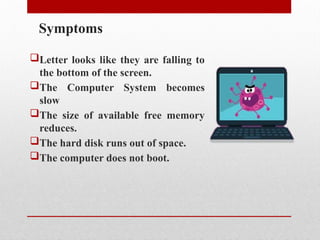
Symptoms
Letter looks like they are falling to
the bottom of the screen.
The Computer System becomes
slow
The size of available free memory
reduces.
The hard disk runs out of space.
The computer does not boot.
HOW DOES IT SPREAD?
➤ Computer Viruses spread by attaching
themselves to other computer program
files.
➤ When you exchange a file or pendrive
with a virus, the virus spreads from one
computer to the another
➤Viruses also spread when a computer
engineer comes to repair your system
and put his/her diagnostics disks in your
PC.
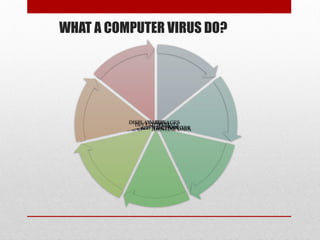
WHAT A COMPUTER VIRUS DO?
SLOW DOWN THE NETWORK
CORRUPT DATA
HIJACK YOUR COMPUTER
STEAL CONFIDENTIAL DATA
DISABLE HARDWAR
DELETE DATA
DISPLAY MESSAGES
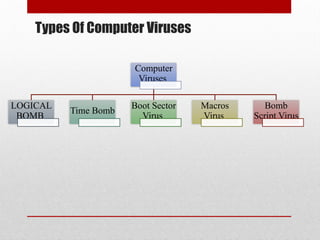
Types Of Computer Viruses
Computer
Viruses
LOGICAL
BOMB
Time Bomb
Boot Sector
Virus
Macros
Virus
Bomb
Script Virus
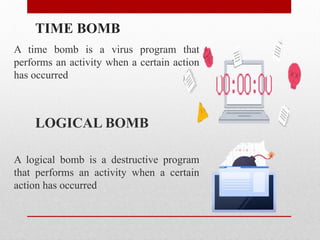
TIME BOMB
A time bomb is a virus program that
performs an activity when a certain action
has occurred
LOGICAL BOMB
A logical bomb is a destructive program
that performs an activity when a certain
action has occurred
BOOT SECTOR VIRUS
➤The boot sector virus infects the information system
during the start-up process.
➤It tends to create the bad sector of the hard drive or
floppy disk.
➤The virus infects the system by using infected diskettes
during start up.
➤The entire computer system becomes slow by reading
the virus from the disk boot sector.
➤The examples of such viruses are C- Brain, Stone, Disk
Killer etc.
Macros Virus
A macro virus is associated with application software like word
and excel. When opening the infected document, macro virus is
loaded into main memory and destroys the data stored in hard
disk.
The virus which is developed by using script language is known
as script virus. This virus uses script language to transfer from
one computer to another. This virus is created by using script
language like VBscript, Javascript. The examples of such
viruses are Readlof.A, Sujim.com.np.
Script Virus
Protection from virus
Computer viruses are very harmful to computer
system. They can destroy data and information.
So, computer should be protected from viruses.
The computer system can be protected from
the viruses by the following ways:
• Install anti-virus software from a well known, reputed
company and use it regularly.
• Do backup your entire system on a regular basis.
Because some viruses may erase or corrupt files on your
hard disk.
• Do not use any pirated software.
• Lock the computer system using password to prevent
your computer from being used by others.
• Do not download any programs from the internet unless
you are confirmed that they are virus free.
• Be careful while checking mail having attached
documents.
Top Seven Antiviral Program
 Kespersky Antivirus
 Data fellows E-Plot
 Mcafee Antivirus
 Symantec Norton Antivirus
 Bit Defender 2010
 Quick Heal Antivirus
 ESaSS ThunderBYTE
CONCLUSION:
 Be aware of the new infections out there.
 Take precaution measures. Always
backup your data.
 Keep up-to-date on new Anti virus
software.
 Simply avoid programs from unknown
sources.

Presentation related to COMPUTER VIRUS.pptx

  • 1.
    COMPUTER VIRUS Submitted By:- Nishwa Rubab Roll No :-23412
  • 2.
    Contents • Introduction • Whatis computer virus • Symptoms • How does it spread • What A computer virus do • Types of computer viruses • Prevention from computer viruses • Antivirus software • Conclusion
  • 3.
    Introduction to Virus Avirus is a program designed by a computer programmer (malicious hacker) to do a certain unwanted function.
  • 4.
    What is computervirus ? Computer virus is a type of destructive program that can replace itself by making copies of itself without the knowledge of the user. Computer virus is a term given to man-made computer software or system to destroy computer programs or computer. The virus destroys data, useful application, programs, and even the operating system. Computer virus hides themselves in other host files. They are not visible to us. The viruses can corrupt, delete files and programs. Computer Viruses affect the computer in many ways. It can destroy data, files or programs and cause the system malfunction. The destructive effects of viruses are different according to their types.
  • 5.
    Symptoms Letter looks likethey are falling to the bottom of the screen. The Computer System becomes slow The size of available free memory reduces. The hard disk runs out of space. The computer does not boot.
  • 6.
    HOW DOES ITSPREAD? ➤ Computer Viruses spread by attaching themselves to other computer program files. ➤ When you exchange a file or pendrive with a virus, the virus spreads from one computer to the another ➤Viruses also spread when a computer engineer comes to repair your system and put his/her diagnostics disks in your PC.
  • 7.
    WHAT A COMPUTERVIRUS DO? SLOW DOWN THE NETWORK CORRUPT DATA HIJACK YOUR COMPUTER STEAL CONFIDENTIAL DATA DISABLE HARDWAR DELETE DATA DISPLAY MESSAGES
  • 8.
    Types Of ComputerViruses Computer Viruses LOGICAL BOMB Time Bomb Boot Sector Virus Macros Virus Bomb Script Virus
  • 9.
    TIME BOMB A timebomb is a virus program that performs an activity when a certain action has occurred LOGICAL BOMB A logical bomb is a destructive program that performs an activity when a certain action has occurred
  • 10.
    BOOT SECTOR VIRUS ➤Theboot sector virus infects the information system during the start-up process. ➤It tends to create the bad sector of the hard drive or floppy disk. ➤The virus infects the system by using infected diskettes during start up. ➤The entire computer system becomes slow by reading the virus from the disk boot sector. ➤The examples of such viruses are C- Brain, Stone, Disk Killer etc.
  • 11.
    Macros Virus A macrovirus is associated with application software like word and excel. When opening the infected document, macro virus is loaded into main memory and destroys the data stored in hard disk. The virus which is developed by using script language is known as script virus. This virus uses script language to transfer from one computer to another. This virus is created by using script language like VBscript, Javascript. The examples of such viruses are Readlof.A, Sujim.com.np. Script Virus
  • 12.
    Protection from virus Computerviruses are very harmful to computer system. They can destroy data and information. So, computer should be protected from viruses.
  • 13.
    The computer systemcan be protected from the viruses by the following ways: • Install anti-virus software from a well known, reputed company and use it regularly. • Do backup your entire system on a regular basis. Because some viruses may erase or corrupt files on your hard disk. • Do not use any pirated software. • Lock the computer system using password to prevent your computer from being used by others. • Do not download any programs from the internet unless you are confirmed that they are virus free. • Be careful while checking mail having attached documents.
  • 14.
    Top Seven AntiviralProgram  Kespersky Antivirus  Data fellows E-Plot  Mcafee Antivirus  Symantec Norton Antivirus  Bit Defender 2010  Quick Heal Antivirus  ESaSS ThunderBYTE
  • 15.
    CONCLUSION:  Be awareof the new infections out there.  Take precaution measures. Always backup your data.  Keep up-to-date on new Anti virus software.  Simply avoid programs from unknown sources.