


Quick Start Guide 
Oracle Database 12c: Manual Rolling Upgrade 
from Single Instance to RAC 
Joel Pérez – Senior DBA Oracle 
Oracle ACE Director 
Bangkok, Thailand 2014
Joel Pérez 
About me Quick Start Guide 
 Oracle Technology Network Expert “OTN” Expert 2003 
 First Latin American to be published as Expert on Oracle 
Web Site 2003 
 Oracle ACE 2004  Oracle ACE Director 2012 
 Consulting Tasks, Conferences and activities related to, in 
over 50 countries around the world 
 More than 25 Oracle certifies 
 One of the first the OCM Cloud 
Administrator In the world 
 Articles Writer for OTN Spanish 
 OTN Portuguese with more than 
40 Published Articles 
 Reviewer of Oracle Books 
Oracle Speaker at many International Oracle Events 
 more and counting 
 …
Quick Start Guide 
JJJJooooeeeellll PPPPéééérrrreeeezzzz 
Oracle Database 12c: Manual Rolling Upgrade 
from Single Instance to RAC 
 What’s Rolling.. ? 
 Upgrade.. ? a.- A database Upgrade is called 
“Upgrade” because the data dictionary will get 
upgrated to a later version.. 
 Conversion from Single Instance to RAC.. ? 
 Zero Downtime.. ? 
 Real Case: Upgrade a database from 11g to 12c ( 
Single Instance to RAC in a Zero Downtime Fashion 
). All Servers are based on Linux Operating System 
 Graphical  Code Steps
Quick Start Guide 
JJJJooooeeeellll PPPPéééérrrreeeezzzz 
Let’s go to 
Start..
Quick Start Guide 
JJJJooooeeeellll PPPPéééérrrreeeezzzz 
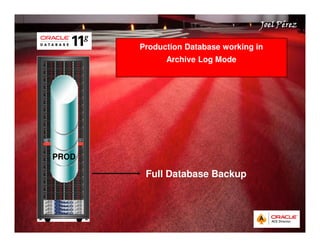
Production Database working in 
Archive Log Mode 
Full Database Backup 
PROD
Quick Start Guide 
JJJJooooeeeellll PPPPéééérrrreeeezzzz 
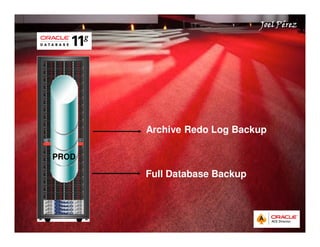
Archive Redo Log Backup 
Full Database Backup 
PROD
Quick Start Guide 
JJJJooooeeeellll PPPPéééérrrreeeezzzz 
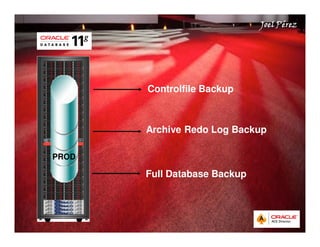
Controlfile Backup 
Archive Redo Log Backup 
Full Database Backup 
PROD
Quick Start Guide 
JJJJooooeeeellll PPPPéééérrrreeeezzzz 
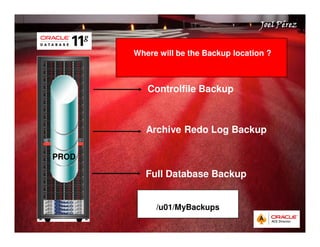
Where will be the Backup location ? 
Controlfile Backup 
Archive Redo Log Backup 
Full Database Backup 
/u01/MyBackups 
PROD
Quick Start Guide 
JJJJooooeeeellll PPPPéééérrrreeeezzzz 
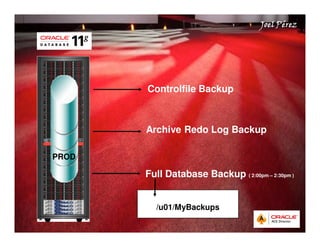
Controlfile Backup 
Archive Redo Log Backup 
Full Database Backup ( 2:00pm – 2:30pm ) 
/u01/MyBackups 
PROD
Quick Start Guide 
JJJJooooeeeellll PPPPéééérrrreeeezzzz 
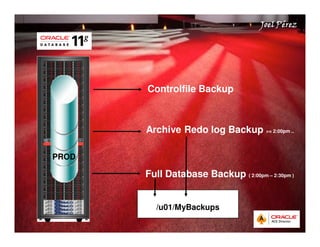
Controlfile Backup 
Archive Redo log Backup = 2:00pm .. 
Full Database Backup ( 2:00pm – 2:30pm ) 
/u01/MyBackups 
PROD
Quick Start Guide 
JJJJooooeeeellll PPPPéééérrrreeeezzzz 
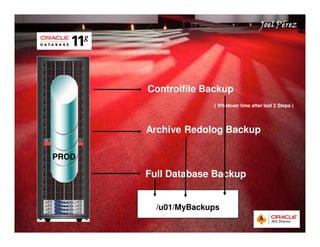
Controlfile Backup 
( Whatever time after last 2 Steps ) 
Archive Redolog Backup 
Full Database Backup 
/u01/MyBackups 
PROD
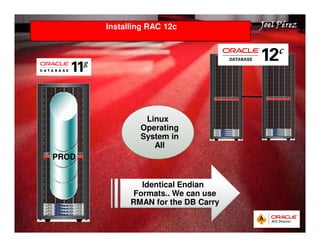
Installing RAC 12c JJJJooooeeeellll PPPPéééérrrreeeezzzz 
Quick Start Guide 
Linux 
Operating 
System in 
All 
Identical Endian 
Formats.. We can use 
RMAN for the DB Carry 
PROD
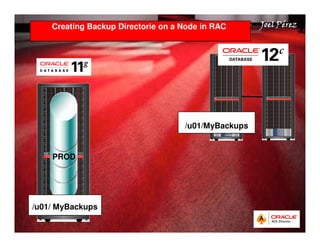
Creating Backup Directorie on a Node in RAC JJJJooooeeeellll PPPPéééérrrreeeezzzz 
Quick Start Guide 
PROD 
/u01/ MyBackups 
/u01/MyBackups
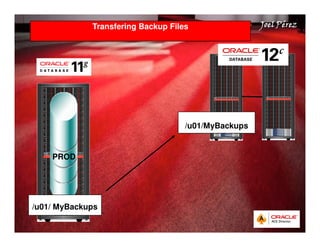
Transfering Backup Files JJJJooooeeeellll PPPPéééérrrreeeezzzz 
Quick Start Guide 
PROD 
/u01/ MyBackups 
/u01/MyBackups
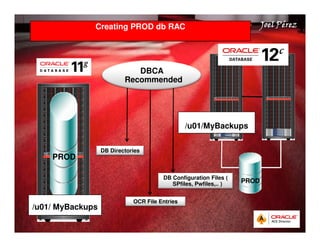
Creating PROD db RAC JJJJooooeeeellll PPPPéééérrrreeeezzzz 
Quick Start Guide 
PROD 
/u01/ MyBackups 
/u01/MyBackups 
PROD 
DBCA 
Recommended 
DB Directories 
DB Configuration Files ( 
SPfiles, Pwfiles,.. ) 
OCR File Entries
Quick Start Guide 
JJJJooooeeeellll PPPPéééérrrreeeezzzz 
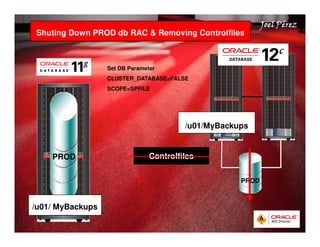
Shuting Down PROD db RAC  Removing Controlfiles 
PROD 
/u01/ MyBackups 
/u01/MyBackups 
Controlfiles 
PROD 
Set DB Parameter 
CLUSTER_DATABASE=FALSE 
SCOPE=SPFILE
Quick Start Guide 
JJJJooooeeeellll PPPPéééérrrreeeezzzz 
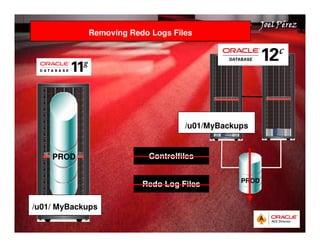
Removing Redo Logs Files 
PROD 
/u01/ MyBackups 
/u01/MyBackups 
Controlfiles 
Redo Log Files PROD
Quick Start Guide 
JJJJooooeeeellll PPPPéééérrrreeeezzzz 
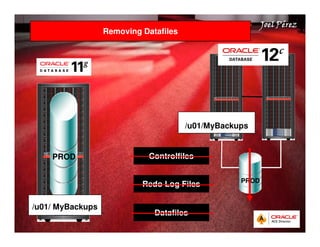
Removing Datafiles 
PROD 
/u01/ MyBackups 
/u01/MyBackups 
Controlfiles 
Redo Log Files 
Datafiles 
PROD
Quick Start Guide 
JJJJooooeeeellll PPPPéééérrrreeeezzzz 
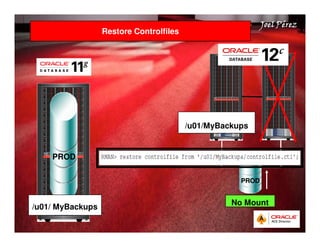
Restore Controlfiles 
PROD 
/u01/ MyBackups 
/u01/MyBackups 
PROD 
No Mount
Quick Start Guide 
JJJJooooeeeellll PPPPéééérrrreeeezzzz 
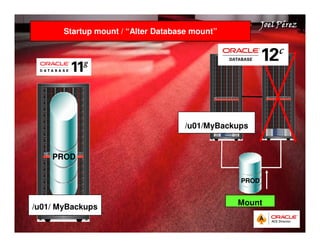
Startup mount / “Alter Database mount” 
PROD 
/u01/ MyBackups 
/u01/MyBackups 
PROD 
Mount
Quick Start Guide 
JJJJooooeeeellll PPPPéééérrrreeeezzzz 
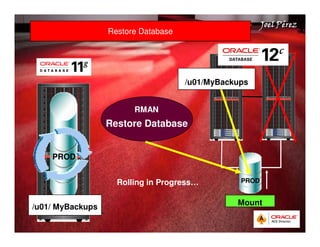
Restore Database 
PROD 
/u01/ MyBackups 
/u01/MyBackups 
PROD 
Mount 
RMAN 
Restore Database 
Rolling in Progress…
Quick Start Guide 
JJJJooooeeeellll PPPPéééérrrreeeezzzz 
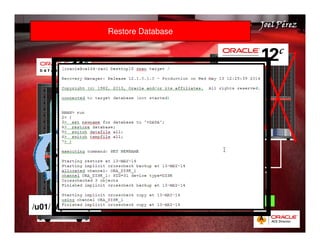
Restore Database 
PROD 
/u01/ MyBackups 
/u01/MyBackups 
PROD 
Mount 
RMAN 
Restore Database 
Rolling in Progress…
Quick Start Guide 
JJJJooooeeeellll PPPPéééérrrreeeezzzz 
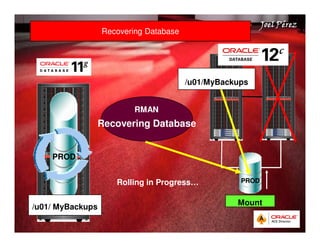
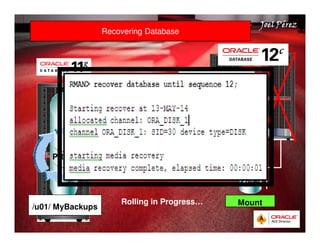
Recovering Database 
PROD 
/u01/ MyBackups 
/u01/MyBackups 
PROD 
Mount 
RMAN 
Recovering Database 
Rolling in Progress…
Quick Start Guide 
JJJJooooeeeellll PPPPéééérrrreeeezzzz 
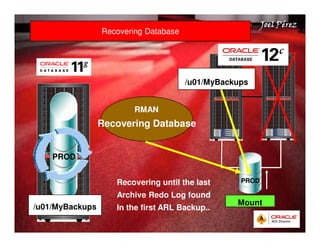
Recovering Database 
PROD 
/u01/MyBackups 
/u01/MyBackups 
PROD 
Mount 
RMAN 
Recovering Database 
Recovering until the last 
Archive Redo Log found 
In the first ARL Backup..
Quick Start Guide 
JJJJooooeeeellll PPPPéééérrrreeeezzzz 
Recovering Database 
PROD 
/u01/ MyBackups 
/u01/MyBackups 
PROD 
Mount 
RMAN 
Recovering Database 
Rolling in Progress…
Quick Start Guide 
JJJJooooeeeellll PPPPéééérrrreeeezzzz 
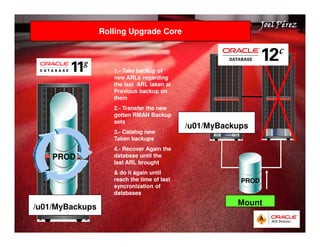
Rolling Upgrade Core 
PROD 
/u01/MyBackups 
/u01/MyBackups 
PROD 
Mount 
1.- Take backup of 
new ARLs regarding 
the last ARL taken at 
Previous backup on 
them 
2.- Transfer the new 
gotten RMAN Backup 
sets 
3.- Catalog new 
Taken backups 
4.- Recover Again the 
database until the 
last ARL brought 
 do it again until 
reach the time of last 
syncronization of 
databases
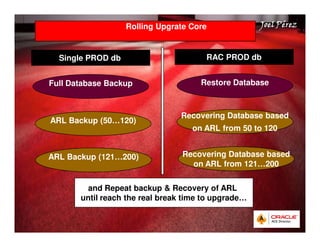
Rolling Upgrate Core JJJJooooeeeellll PPPPéééérrrreeeezzzz 
Quick Start Guide 
Single PROD db RAC PROD db 
Full Database Backup Restore Database 
ARL Backup (50…120) 
Recovering Database based 
on ARL from 50 to 120 
ARL Backup (121…200) Recovering Database based 
on ARL from 121…200 
and Repeat backup  Recovery of ARL 
until reach the real break time to upgrade…
Quick Start Guide 
JJJJooooeeeellll PPPPéééérrrreeeezzzz 
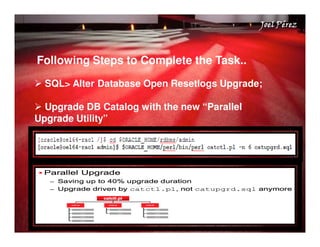
Following Steps to Complete the Task.. 
 SQL Alter Database Open Resetlogs Upgrade; 
 Upgrade DB Catalog with the new “Parallel 
Upgrade Utility”
Quick Start Guide 
JJJJooooeeeellll PPPPéééérrrreeeezzzz 
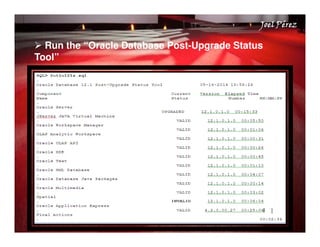
 Run the “Oracle Database Post-Upgrade Status 
Tool”
Quick Start Guide 
JJJJooooeeeellll PPPPéééérrrreeeezzzz 
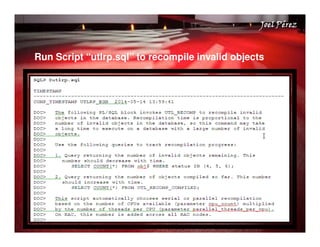
Run Script “utlrp.sql” to recompile invalid objects
Quick Start Guide 
JJJJooooeeeellll PPPPéééérrrreeeezzzz 
. 
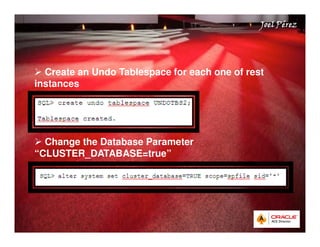
 Create an Undo Tablespace for each one of rest 
instances 
 Change the Database Parameter 
“CLUSTER_DATABASE=true”
Quick Start Guide 
JJJJooooeeeellll PPPPéééérrrreeeezzzz 
. 
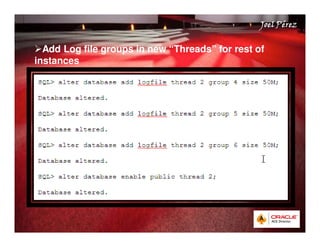
Add Log file groups in new “Threads” for rest of 
instances
Quick Start Guide 
JJJJooooeeeellll PPPPéééérrrreeeezzzz 
Following Steps to Complete the Task.. 
And finally.. 
Shutdown Database and Start it Up function in RAC 
 And that’s all.. 
 You’ve done a Zero Downtime Upgrade from Single 
to RAC
Quick Start Guide 
Direct Contact: 
JJJJooooeeeellll PPPPéééérrrreeeezzzz 
 ACE Director Profile: 
https://apex.oracle.com/pls/otn/f?p=19297:4:1711390 
987197101::NO:4:P4_ID:157 
 OCM Profile: 
http://education.oracle.com/education/otn/JoelPerez. 
htm 
 Linked in: 
https://apex.oracle.com/pls/otn/f?p=19297:4:1711390 
987197101::NO:4:P4_ID:157
Quick Start Guide 
JJJJooooeeeellll PPPPéééérrrreeeezzzz

Presentation joelperez thailand2014

  • 1.
    Quick Start Guide Oracle Database 12c: Manual Rolling Upgrade from Single Instance to RAC Joel Pérez – Senior DBA Oracle Oracle ACE Director Bangkok, Thailand 2014
  • 2.
    Joel Pérez Aboutme Quick Start Guide Oracle Technology Network Expert “OTN” Expert 2003 First Latin American to be published as Expert on Oracle Web Site 2003 Oracle ACE 2004 Oracle ACE Director 2012 Consulting Tasks, Conferences and activities related to, in over 50 countries around the world More than 25 Oracle certifies One of the first the OCM Cloud Administrator In the world Articles Writer for OTN Spanish OTN Portuguese with more than 40 Published Articles Reviewer of Oracle Books Oracle Speaker at many International Oracle Events more and counting …
  • 3.
    Quick Start Guide JJJJooooeeeellll PPPPéééérrrreeeezzzz Oracle Database 12c: Manual Rolling Upgrade from Single Instance to RAC What’s Rolling.. ? Upgrade.. ? a.- A database Upgrade is called “Upgrade” because the data dictionary will get upgrated to a later version.. Conversion from Single Instance to RAC.. ? Zero Downtime.. ? Real Case: Upgrade a database from 11g to 12c ( Single Instance to RAC in a Zero Downtime Fashion ). All Servers are based on Linux Operating System Graphical Code Steps
  • 4.
    Quick Start Guide JJJJooooeeeellll PPPPéééérrrreeeezzzz Let’s go to Start..
  • 5.
    Quick Start Guide JJJJooooeeeellll PPPPéééérrrreeeezzzz Production Database working in Archive Log Mode Full Database Backup PROD
  • 6.
    Quick Start Guide JJJJooooeeeellll PPPPéééérrrreeeezzzz Archive Redo Log Backup Full Database Backup PROD
  • 7.
    Quick Start Guide JJJJooooeeeellll PPPPéééérrrreeeezzzz Controlfile Backup Archive Redo Log Backup Full Database Backup PROD
  • 8.
    Quick Start Guide JJJJooooeeeellll PPPPéééérrrreeeezzzz Where will be the Backup location ? Controlfile Backup Archive Redo Log Backup Full Database Backup /u01/MyBackups PROD
  • 9.
    Quick Start Guide JJJJooooeeeellll PPPPéééérrrreeeezzzz Controlfile Backup Archive Redo Log Backup Full Database Backup ( 2:00pm – 2:30pm ) /u01/MyBackups PROD
  • 10.
    Quick Start Guide JJJJooooeeeellll PPPPéééérrrreeeezzzz Controlfile Backup Archive Redo log Backup = 2:00pm .. Full Database Backup ( 2:00pm – 2:30pm ) /u01/MyBackups PROD
  • 11.
    Quick Start Guide JJJJooooeeeellll PPPPéééérrrreeeezzzz Controlfile Backup ( Whatever time after last 2 Steps ) Archive Redolog Backup Full Database Backup /u01/MyBackups PROD
  • 12.
    Installing RAC 12cJJJJooooeeeellll PPPPéééérrrreeeezzzz Quick Start Guide Linux Operating System in All Identical Endian Formats.. We can use RMAN for the DB Carry PROD
  • 13.
    Creating Backup Directorieon a Node in RAC JJJJooooeeeellll PPPPéééérrrreeeezzzz Quick Start Guide PROD /u01/ MyBackups /u01/MyBackups
  • 14.
    Transfering Backup FilesJJJJooooeeeellll PPPPéééérrrreeeezzzz Quick Start Guide PROD /u01/ MyBackups /u01/MyBackups
  • 15.
    Creating PROD dbRAC JJJJooooeeeellll PPPPéééérrrreeeezzzz Quick Start Guide PROD /u01/ MyBackups /u01/MyBackups PROD DBCA Recommended DB Directories DB Configuration Files ( SPfiles, Pwfiles,.. ) OCR File Entries
  • 16.
    Quick Start Guide JJJJooooeeeellll PPPPéééérrrreeeezzzz Shuting Down PROD db RAC Removing Controlfiles PROD /u01/ MyBackups /u01/MyBackups Controlfiles PROD Set DB Parameter CLUSTER_DATABASE=FALSE SCOPE=SPFILE
  • 17.
    Quick Start Guide JJJJooooeeeellll PPPPéééérrrreeeezzzz Removing Redo Logs Files PROD /u01/ MyBackups /u01/MyBackups Controlfiles Redo Log Files PROD
  • 18.
    Quick Start Guide JJJJooooeeeellll PPPPéééérrrreeeezzzz Removing Datafiles PROD /u01/ MyBackups /u01/MyBackups Controlfiles Redo Log Files Datafiles PROD
  • 19.
    Quick Start Guide JJJJooooeeeellll PPPPéééérrrreeeezzzz Restore Controlfiles PROD /u01/ MyBackups /u01/MyBackups PROD No Mount
  • 20.
    Quick Start Guide JJJJooooeeeellll PPPPéééérrrreeeezzzz Startup mount / “Alter Database mount” PROD /u01/ MyBackups /u01/MyBackups PROD Mount
  • 21.
    Quick Start Guide JJJJooooeeeellll PPPPéééérrrreeeezzzz Restore Database PROD /u01/ MyBackups /u01/MyBackups PROD Mount RMAN Restore Database Rolling in Progress…
  • 22.
    Quick Start Guide JJJJooooeeeellll PPPPéééérrrreeeezzzz Restore Database PROD /u01/ MyBackups /u01/MyBackups PROD Mount RMAN Restore Database Rolling in Progress…
  • 23.
    Quick Start Guide JJJJooooeeeellll PPPPéééérrrreeeezzzz Recovering Database PROD /u01/ MyBackups /u01/MyBackups PROD Mount RMAN Recovering Database Rolling in Progress…
  • 24.
    Quick Start Guide JJJJooooeeeellll PPPPéééérrrreeeezzzz Recovering Database PROD /u01/MyBackups /u01/MyBackups PROD Mount RMAN Recovering Database Recovering until the last Archive Redo Log found In the first ARL Backup..
  • 25.
    Quick Start Guide JJJJooooeeeellll PPPPéééérrrreeeezzzz Recovering Database PROD /u01/ MyBackups /u01/MyBackups PROD Mount RMAN Recovering Database Rolling in Progress…
  • 26.
    Quick Start Guide JJJJooooeeeellll PPPPéééérrrreeeezzzz Rolling Upgrade Core PROD /u01/MyBackups /u01/MyBackups PROD Mount 1.- Take backup of new ARLs regarding the last ARL taken at Previous backup on them 2.- Transfer the new gotten RMAN Backup sets 3.- Catalog new Taken backups 4.- Recover Again the database until the last ARL brought do it again until reach the time of last syncronization of databases
  • 27.
    Rolling Upgrate CoreJJJJooooeeeellll PPPPéééérrrreeeezzzz Quick Start Guide Single PROD db RAC PROD db Full Database Backup Restore Database ARL Backup (50…120) Recovering Database based on ARL from 50 to 120 ARL Backup (121…200) Recovering Database based on ARL from 121…200 and Repeat backup Recovery of ARL until reach the real break time to upgrade…
  • 28.
    Quick Start Guide JJJJooooeeeellll PPPPéééérrrreeeezzzz Following Steps to Complete the Task.. SQL Alter Database Open Resetlogs Upgrade; Upgrade DB Catalog with the new “Parallel Upgrade Utility”
  • 29.
    Quick Start Guide JJJJooooeeeellll PPPPéééérrrreeeezzzz Run the “Oracle Database Post-Upgrade Status Tool”
  • 30.
    Quick Start Guide JJJJooooeeeellll PPPPéééérrrreeeezzzz Run Script “utlrp.sql” to recompile invalid objects
  • 31.
    Quick Start Guide JJJJooooeeeellll PPPPéééérrrreeeezzzz . Create an Undo Tablespace for each one of rest instances Change the Database Parameter “CLUSTER_DATABASE=true”
  • 32.
    Quick Start Guide JJJJooooeeeellll PPPPéééérrrreeeezzzz . Add Log file groups in new “Threads” for rest of instances
  • 33.
    Quick Start Guide JJJJooooeeeellll PPPPéééérrrreeeezzzz Following Steps to Complete the Task.. And finally.. Shutdown Database and Start it Up function in RAC And that’s all.. You’ve done a Zero Downtime Upgrade from Single to RAC
  • 34.
    Quick Start Guide Direct Contact: JJJJooooeeeellll PPPPéééérrrreeeezzzz ACE Director Profile: https://apex.oracle.com/pls/otn/f?p=19297:4:1711390 987197101::NO:4:P4_ID:157 OCM Profile: http://education.oracle.com/education/otn/JoelPerez. htm Linked in: https://apex.oracle.com/pls/otn/f?p=19297:4:1711390 987197101::NO:4:P4_ID:157
  • 35.
    Quick Start Guide JJJJooooeeeellll PPPPéééérrrreeeezzzz