DATA ANALYSIS USING SPSS
SUMIA FATIMA
Research Development Head RSRS
Introduction
The software used is SPSS (Statistical
Package for the Social Sciences)
–commonly used in social sciences
and health fields
–as opposed to other statistical
software such as SAS or R, it requires
little to no coding background
The Big Question.
How should I analyze my data?
It depends on the nature of the data and what
questions you want to answer
To answer those questions, you need to explore
your data. and select the proper analysis
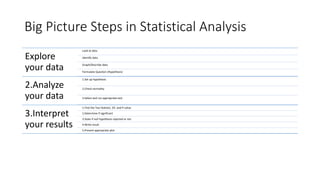
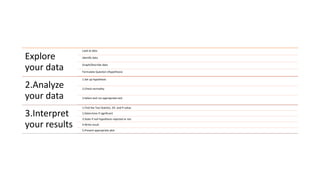
Big Picture Steps in Statistical Analysis
Explore
your data
Look at data
Identify data
Graph/Describe data
Formulate Question (Hypothesis)
2.Analyze
your data
1.Set up hypothesis
2.Check normality
3.Select and run appropriate test
3.Interpret
your results
1.Find the Test Statistic, DF, and P-value
2.Determine if significant
3.State if null hypothesis rejected or not
4.Write result
5.Present appropriate plot
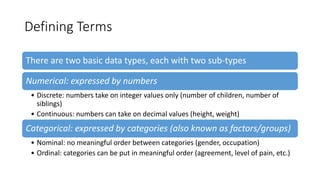
Defining Terms
There are two basic data types, each with two sub-types
Numerical: expressed by numbers
• Discrete: numbers take on integer values only (number of children, number of
siblings)
• Continuous: numbers can take on decimal values (height, weight)
Categorical: expressed by categories (also known as factors/groups)
• Nominal: no meaningful order between categories (gender, occupation)
• Ordinal: categories can be put in meaningful order (agreement, level of pain, etc.)
Defining
Terms
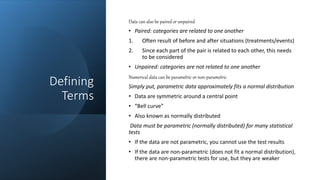
Data can also be paired or unpaired
• Paired: categories are related to one another
1. Often result of before and after situations (treatments/events)
2. Since each part of the pair is related to each other, this needs
to be considered
• Unpaired: categories are not related to one another
Numerical data can be parametric or non-parametric
Simply put, parametric data approximately fits a normal distribution
• Data are symmetric around a central point
• “Bell curve”
• Also known as normally distributed
Data must be parametric (normally distributed) for many statistical
tests
• If the data are not parametric, you cannot use the test results
• If the data are non-parametric (does not fit a normal distribution),
there are non-parametric tests for use, but they are weaker
Defining
Terms 4
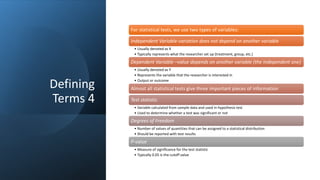
For statistical tests, we use two types of variables:
Independent Variable-variation does not depend on another variable
• Usually denoted as X
• Typically represents what the researcher set up (treatment, group, etc.)
Dependent Variable –value depends on another variable (the independent one)
• Usually denoted as Y
• Represents the variable that the researcher is interested in
• Output or outcome
Almost all statistical tests give three important pieces of information
Test statistic
• Variable calculated from sample data and used in hypothesis test
• Used to determine whether a test was significant or not
Degrees of Freedom
• Number of values of quantities that can be assigned to a statistical distribution
• Should be reported with test results
P-value
• Measure of significance for the test statistic
• Typically 0.05 is the cutoff value
Defining
Terms Recap
• Data can be:
• –Numerical, categorical, or nuisance
• –Paired or unpaired
• –Parametric or non-parametric (usually must run a test to
tell)
• Independent and Dependent Variable
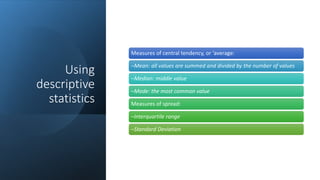
Using
descriptive
statistics
Measures of central tendency, or ‘average:
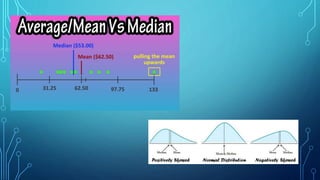
–Mean: all values are summed and divided by the number of values
–Median: middle value
–Mode: the most common value
Measures of spread:
–Interquartile range
–Standard Deviation
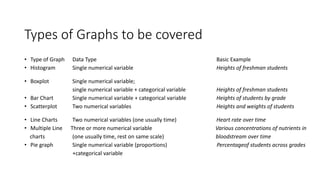
Types of Graphs to be covered
• Type of Graph Data Type Basic Example
• Histogram Single numerical variable Heights of freshman students
• Boxplot Single numerical variable;
single numerical variable + categorical variable Heights of freshman students
• Bar Chart Single numerical variable + categorical variable Heights of students by grade
• Scatterplot Two numerical variables Heights and weights of students
• Line Charts Two numerical variables (one usually time) Heart rate over time
• Multiple Line Three or more numerical variable Various concentrations of nutrients in
charts (one usually time, rest on same scale) bloodstream over time
• Pie graph Single numerical variable (proportions) Percentageof students across grades
+categorical variable
Inferential Statistics
If we want to draw conclusions about an entire
population from our sample, we enter the realm of
inferential statistics
This section will go over a variety of the basic tests
Explore
your data
Look at data
Identify data
Graph/Describe data
Formulate Question (Hypothesis)
2.Analyze
your data
1.Set up hypothesis
2.Check normality
3.Select and run appropriate test
3.Interpret
your results
1.Find the Test Statistic, DF, and P-value
2.Determine if significant
3.State if null hypothesis rejected or not
4.Write result
5.Present appropriate plot
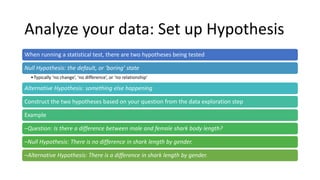
Analyze your data: Set up Hypothesis
When running a statistical test, there are two hypotheses being tested
Null Hypothesis: the default, or ‘boring’ state
•Typically ‘no change’, ‘no difference’, or ‘no relationship’
Alternative Hypothesis: something else happening
Construct the two hypotheses based on your question from the data exploration step
Example
–Question: Is there a difference between male and female shark body length?
–Null Hypothesis: There is no difference in shark length by gender.
–Alternative Hypothesis: There is a difference in shark length by gender.
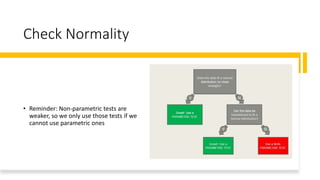
Check Normality
• Reminder: Non-parametric tests are
weaker, so we only use those tests if we
cannot use parametric ones
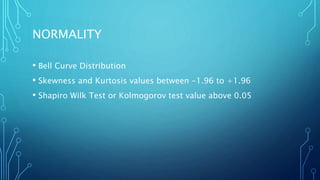
NORMALITY
• Bell Curve Distribution
• Skewness and Kurtosis values between -1.96 to +1.96
• Shapiro Wilk Test or Kolmogorov test value above 0.05
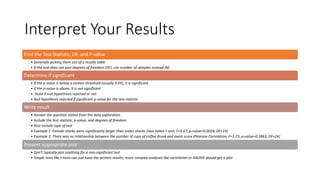
Interpret Your Results
Find the Test Statistic, DF, and P-value
• Generally picking them out of a results table
• If the test does not give degrees of freedom (DF), use number of samples instead (N)
Determine if significant
• If the p-value is below a certain threshold (usually 0.05), it is significant
• If the p-value is above, it is not significant
• .State if null hypothesis rejected or not
• Null hypothesis rejected if significant p-value for the test statistic
Write result
• Answer the question stated from the data exploration
• Include the test statistic, p-value, and degrees of freedom
• Also include type of test
• Example 1: Female sharks were significantly larger than males sharks (two-tailed T-test, F=5.67, p-value=0.0024, DF=19)
• Example 2: There was no relationship between the number of cups of coffee drunk and exam score (Pearson Correlation, F=1.23, p-value=0.5863, DF=24)
Present appropriate plot
• Don’t typically plot anything for a non-significant test
• Simple tests like t-tests can just have the written results; more complex analyses like correlation or ANOVA should get a plot

Presentation 7.pptx

  • 1.
    DATA ANALYSIS USINGSPSS SUMIA FATIMA Research Development Head RSRS
  • 2.
    Introduction The software usedis SPSS (Statistical Package for the Social Sciences) –commonly used in social sciences and health fields –as opposed to other statistical software such as SAS or R, it requires little to no coding background
  • 3.
    The Big Question. Howshould I analyze my data? It depends on the nature of the data and what questions you want to answer To answer those questions, you need to explore your data. and select the proper analysis
  • 4.
    Big Picture Stepsin Statistical Analysis Explore your data Look at data Identify data Graph/Describe data Formulate Question (Hypothesis) 2.Analyze your data 1.Set up hypothesis 2.Check normality 3.Select and run appropriate test 3.Interpret your results 1.Find the Test Statistic, DF, and P-value 2.Determine if significant 3.State if null hypothesis rejected or not 4.Write result 5.Present appropriate plot
  • 5.
    Defining Terms There aretwo basic data types, each with two sub-types Numerical: expressed by numbers • Discrete: numbers take on integer values only (number of children, number of siblings) • Continuous: numbers can take on decimal values (height, weight) Categorical: expressed by categories (also known as factors/groups) • Nominal: no meaningful order between categories (gender, occupation) • Ordinal: categories can be put in meaningful order (agreement, level of pain, etc.)
  • 6.
    Defining Terms Data can alsobe paired or unpaired • Paired: categories are related to one another 1. Often result of before and after situations (treatments/events) 2. Since each part of the pair is related to each other, this needs to be considered • Unpaired: categories are not related to one another Numerical data can be parametric or non-parametric Simply put, parametric data approximately fits a normal distribution • Data are symmetric around a central point • “Bell curve” • Also known as normally distributed Data must be parametric (normally distributed) for many statistical tests • If the data are not parametric, you cannot use the test results • If the data are non-parametric (does not fit a normal distribution), there are non-parametric tests for use, but they are weaker
  • 7.
    Defining Terms 4 For statisticaltests, we use two types of variables: Independent Variable-variation does not depend on another variable • Usually denoted as X • Typically represents what the researcher set up (treatment, group, etc.) Dependent Variable –value depends on another variable (the independent one) • Usually denoted as Y • Represents the variable that the researcher is interested in • Output or outcome Almost all statistical tests give three important pieces of information Test statistic • Variable calculated from sample data and used in hypothesis test • Used to determine whether a test was significant or not Degrees of Freedom • Number of values of quantities that can be assigned to a statistical distribution • Should be reported with test results P-value • Measure of significance for the test statistic • Typically 0.05 is the cutoff value
  • 8.
    Defining Terms Recap • Datacan be: • –Numerical, categorical, or nuisance • –Paired or unpaired • –Parametric or non-parametric (usually must run a test to tell) • Independent and Dependent Variable
  • 9.
    Using descriptive statistics Measures of centraltendency, or ‘average: –Mean: all values are summed and divided by the number of values –Median: middle value –Mode: the most common value Measures of spread: –Interquartile range –Standard Deviation
  • 11.
    Types of Graphsto be covered • Type of Graph Data Type Basic Example • Histogram Single numerical variable Heights of freshman students • Boxplot Single numerical variable; single numerical variable + categorical variable Heights of freshman students • Bar Chart Single numerical variable + categorical variable Heights of students by grade • Scatterplot Two numerical variables Heights and weights of students • Line Charts Two numerical variables (one usually time) Heart rate over time • Multiple Line Three or more numerical variable Various concentrations of nutrients in charts (one usually time, rest on same scale) bloodstream over time • Pie graph Single numerical variable (proportions) Percentageof students across grades +categorical variable
  • 12.
    Inferential Statistics If wewant to draw conclusions about an entire population from our sample, we enter the realm of inferential statistics This section will go over a variety of the basic tests
  • 13.
    Explore your data Look atdata Identify data Graph/Describe data Formulate Question (Hypothesis) 2.Analyze your data 1.Set up hypothesis 2.Check normality 3.Select and run appropriate test 3.Interpret your results 1.Find the Test Statistic, DF, and P-value 2.Determine if significant 3.State if null hypothesis rejected or not 4.Write result 5.Present appropriate plot
  • 14.
    Analyze your data:Set up Hypothesis When running a statistical test, there are two hypotheses being tested Null Hypothesis: the default, or ‘boring’ state •Typically ‘no change’, ‘no difference’, or ‘no relationship’ Alternative Hypothesis: something else happening Construct the two hypotheses based on your question from the data exploration step Example –Question: Is there a difference between male and female shark body length? –Null Hypothesis: There is no difference in shark length by gender. –Alternative Hypothesis: There is a difference in shark length by gender.
  • 15.
    Check Normality • Reminder:Non-parametric tests are weaker, so we only use those tests if we cannot use parametric ones
  • 16.
    NORMALITY • Bell CurveDistribution • Skewness and Kurtosis values between -1.96 to +1.96 • Shapiro Wilk Test or Kolmogorov test value above 0.05
  • 17.
    Interpret Your Results Findthe Test Statistic, DF, and P-value • Generally picking them out of a results table • If the test does not give degrees of freedom (DF), use number of samples instead (N) Determine if significant • If the p-value is below a certain threshold (usually 0.05), it is significant • If the p-value is above, it is not significant • .State if null hypothesis rejected or not • Null hypothesis rejected if significant p-value for the test statistic Write result • Answer the question stated from the data exploration • Include the test statistic, p-value, and degrees of freedom • Also include type of test • Example 1: Female sharks were significantly larger than males sharks (two-tailed T-test, F=5.67, p-value=0.0024, DF=19) • Example 2: There was no relationship between the number of cups of coffee drunk and exam score (Pearson Correlation, F=1.23, p-value=0.5863, DF=24) Present appropriate plot • Don’t typically plot anything for a non-significant test • Simple tests like t-tests can just have the written results; more complex analyses like correlation or ANOVA should get a plot