WELCOME
Today we are going to see about CSS font
properties , list properties and color alignment
of text
Font properties
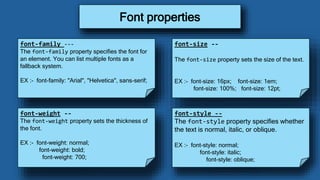
font-family ---
The font-family property specifies the font for
an element. You can list multiple fonts as a
fallback system.
EX :- font-family: "Arial", "Helvetica", sans-serif;
Font properties
font-size --
The font-size property sets the size of the text.
EX :- font-size: 16px; font-size: 1em;
font-size: 100%; font-size: 12pt;
font-weight --
The font-weight property sets the thickness of
the font.
EX :- font-weight: normal;
font-weight: bold;
font-weight: 700;
font-style --
The font-style property specifies whether
the text is normal, italic, or oblique.
EX :- font-style: normal;
font-style: italic;
font-style: oblique;
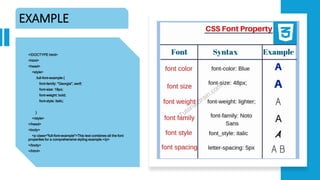
EXAMPLE
<!DOCTYPE html>
<html>
<head>
<style>
.full-font-example {
font-family: "Georgia", serif;
font-size: 18px;
font-weight: bold;
font-style: italic;
}
</style>
</head>
<body>
<p class="full-font-example">This text combines all the font
properties for a comprehensive styling example.</p>
</body>
</html>
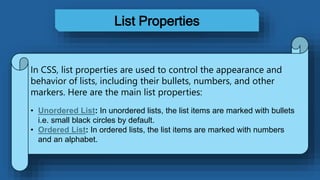
List Properties
In CSS, list properties are used to control the appearance and
behavior of lists, including their bullets, numbers, and other
markers. Here are the main list properties:
• Unordered List: In unordered lists, the list items are marked with bullets
i.e. small black circles by default.
• Ordered List: In ordered lists, the list items are marked with numbers
and an alphabet.
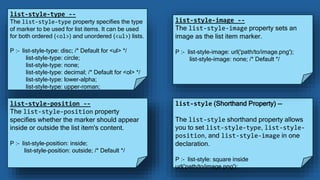
list-style-type --
The list-style-type property specifies the type
of marker to be used for list items. It can be used
for both ordered (<ol>) and unordered (<ul>) lists.
P :- list-style-type: disc; /* Default for <ul> */
list-style-type: circle;
list-style-type: none;
list-style-type: decimal; /* Default for <ol> */
list-style-type: lower-alpha;
list-style-type: upper-roman;
list-style-position --
The list-style-position property
specifies whether the marker should appear
inside or outside the list item's content.
P :- list-style-position: inside;
list-style-position: outside; /* Default */
list-style (Shorthand Property) --
The list-style shorthand property allows
you to set list-style-type, list-style-
position, and list-style-image in one
declaration.
P :- list-style: square inside
url('path/to/image.png');
list-style-image --
The list-style-image property sets an
image as the list item marker.
P :- list-style-image: url('path/to/image.png');
list-style-image: none; /* Default */
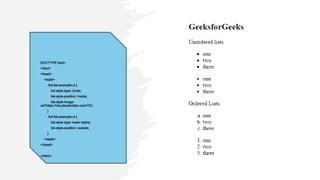
DOCTYPE html>
<html>
<head>
<style>
.full-list-example ul {
list-style-type: circle;
list-style-position: inside;
list-style-image:
url('https://via.placeholder.com/15');
}
.full-list-example ol {
list-style-type: lower-alpha;
list-style-position: outside;
}
</style>
</head>
</html>
In CSS, you can control the color and alignment of text using specific properties.
These properties allow you to enhance the visual appearance and readability of your
web content.
Color and alignment of text
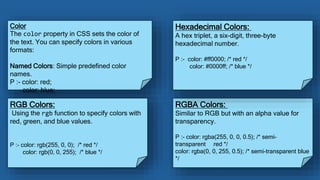
Color
The color property in CSS sets the color of
the text. You can specify colors in various
formats:
Named Colors: Simple predefined color
names.
P :- color: red;
color: blue;
RGB Colors:
Using the rgb function to specify colors with
red, green, and blue values.
P :- color: rgb(255, 0, 0); /* red */
color: rgb(0, 0, 255); /* blue */
RGBA Colors:
Similar to RGB but with an alpha value for
transparency.
P :- color: rgba(255, 0, 0, 0.5); /* semi-
transparent red */
color: rgba(0, 0, 255, 0.5); /* semi-transparent blue
*/
Hexadecimal Colors:
A hex triplet, a six-digit, three-byte
hexadecimal number.
P :- color: #ff0000; /* red */
color: #0000ff; /* blue */
Text Alignment
Text Alignment
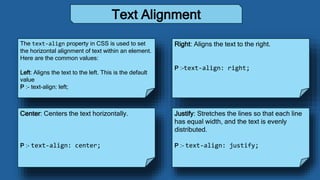
The text-align property in CSS is used to set
the horizontal alignment of text within an element.
Here are the common values:
Left: Aligns the text to the left. This is the default
value
P :- text-align: left;
Right: Aligns the text to the right.
P :-text-align: right;
Center: Centers the text horizontally.
P :- text-align: center;
Justify: Stretches the lines so that each line
has equal width, and the text is evenly
distributed.
P :- text-align: justify;
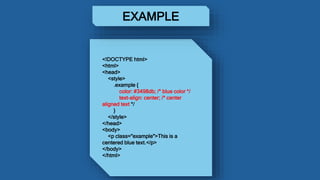
<!DOCTYPE html>
<html>
<head>
<style>
.example {
color: #3498db; /* blue color */
text-align: center; /* center
aligned text */
}
</style>
</head>
<body>
<p class="example">This is a
centered blue text.</p>
</body>
</html>
EXAMPLE
THE END

Presentation 7.07.pptx font properties .

  • 1.
  • 2.
    Today we aregoing to see about CSS font properties , list properties and color alignment of text
  • 3.
  • 4.
    font-family --- The font-familyproperty specifies the font for an element. You can list multiple fonts as a fallback system. EX :- font-family: "Arial", "Helvetica", sans-serif; Font properties font-size -- The font-size property sets the size of the text. EX :- font-size: 16px; font-size: 1em; font-size: 100%; font-size: 12pt; font-weight -- The font-weight property sets the thickness of the font. EX :- font-weight: normal; font-weight: bold; font-weight: 700; font-style -- The font-style property specifies whether the text is normal, italic, or oblique. EX :- font-style: normal; font-style: italic; font-style: oblique;
  • 5.
    EXAMPLE <!DOCTYPE html> <html> <head> <style> .full-font-example { font-family:"Georgia", serif; font-size: 18px; font-weight: bold; font-style: italic; } </style> </head> <body> <p class="full-font-example">This text combines all the font properties for a comprehensive styling example.</p> </body> </html>
  • 6.
    List Properties In CSS,list properties are used to control the appearance and behavior of lists, including their bullets, numbers, and other markers. Here are the main list properties: • Unordered List: In unordered lists, the list items are marked with bullets i.e. small black circles by default. • Ordered List: In ordered lists, the list items are marked with numbers and an alphabet.
  • 7.
    list-style-type -- The list-style-typeproperty specifies the type of marker to be used for list items. It can be used for both ordered (<ol>) and unordered (<ul>) lists. P :- list-style-type: disc; /* Default for <ul> */ list-style-type: circle; list-style-type: none; list-style-type: decimal; /* Default for <ol> */ list-style-type: lower-alpha; list-style-type: upper-roman; list-style-position -- The list-style-position property specifies whether the marker should appear inside or outside the list item's content. P :- list-style-position: inside; list-style-position: outside; /* Default */ list-style (Shorthand Property) -- The list-style shorthand property allows you to set list-style-type, list-style- position, and list-style-image in one declaration. P :- list-style: square inside url('path/to/image.png'); list-style-image -- The list-style-image property sets an image as the list item marker. P :- list-style-image: url('path/to/image.png'); list-style-image: none; /* Default */
  • 8.
    DOCTYPE html> <html> <head> <style> .full-list-example ul{ list-style-type: circle; list-style-position: inside; list-style-image: url('https://via.placeholder.com/15'); } .full-list-example ol { list-style-type: lower-alpha; list-style-position: outside; } </style> </head> </html>
  • 9.
    In CSS, youcan control the color and alignment of text using specific properties. These properties allow you to enhance the visual appearance and readability of your web content. Color and alignment of text
  • 10.
    Color The color propertyin CSS sets the color of the text. You can specify colors in various formats: Named Colors: Simple predefined color names. P :- color: red; color: blue; RGB Colors: Using the rgb function to specify colors with red, green, and blue values. P :- color: rgb(255, 0, 0); /* red */ color: rgb(0, 0, 255); /* blue */ RGBA Colors: Similar to RGB but with an alpha value for transparency. P :- color: rgba(255, 0, 0, 0.5); /* semi- transparent red */ color: rgba(0, 0, 255, 0.5); /* semi-transparent blue */ Hexadecimal Colors: A hex triplet, a six-digit, three-byte hexadecimal number. P :- color: #ff0000; /* red */ color: #0000ff; /* blue */
  • 11.
  • 12.
    Text Alignment The text-alignproperty in CSS is used to set the horizontal alignment of text within an element. Here are the common values: Left: Aligns the text to the left. This is the default value P :- text-align: left; Right: Aligns the text to the right. P :-text-align: right; Center: Centers the text horizontally. P :- text-align: center; Justify: Stretches the lines so that each line has equal width, and the text is evenly distributed. P :- text-align: justify;
  • 13.
    <!DOCTYPE html> <html> <head> <style> .example { color:#3498db; /* blue color */ text-align: center; /* center aligned text */ } </style> </head> <body> <p class="example">This is a centered blue text.</p> </body> </html> EXAMPLE
  • 14.