The Preprocessor
• C# defines several preprocessor directives,
which affect the way that your program’s
source file is interpreted by the compiler.
• The term preprocessor directive comes from
the fact that these instructions were
traditionally handled by a separate compilation
phase called the preprocessor.
• All preprocessor directives begin with a # sign.
In addition, each preprocessor directive must be
on its own line.
• Today’s modern compiler technology no longer
requires a separate preprocessing stage to
handle the directives, but the name has stuck.
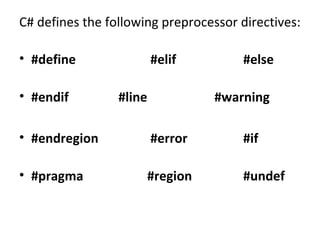
C# defines the following preprocessor directives:
• #define
• #endif

#elif
#line

#else
#warning

• #endregion

#error

#if

• #pragma

#region

#undef
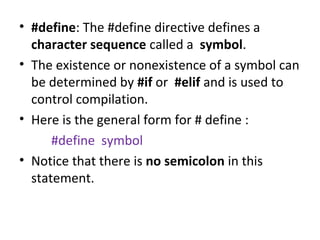
• #define: The #define directive defines a
character sequence called a symbol.
• The existence or nonexistence of a symbol can
be determined by #if or #elif and is used to
control compilation.
• Here is the general form for # define :
#define symbol
• Notice that there is no semicolon in this
statement.
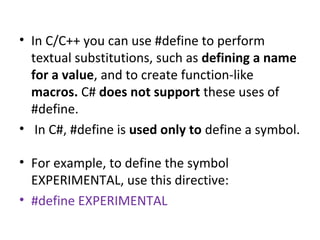
• In C/C++ you can use #define to perform
textual substitutions, such as defining a name
for a value, and to create function-like
macros. C# does not support these uses of
#define.
• In C#, #define is used only to define a symbol.
• For example, to define the symbol
EXPERIMENTAL, use this directive:
• #define EXPERIMENTAL
• #if and #endif: The #if and #endif directives
enable conditional compilation of a sequence
of code based upon whether an expression
involving one or more symbols evaluates to
true.
• A symbol is true if it has been defined. It is
false otherwise.
• Thus, if a symbol has been defined by a
#define directive, it will evaluate as true.
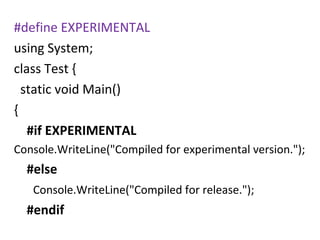
#define EXPERIMENTAL
using System;
class Test {
static void Main()
{
#if EXPERIMENTAL
Console.WriteLine("Compiled for experimental version.");

#else
Console.WriteLine("Compiled for release.");

#endif
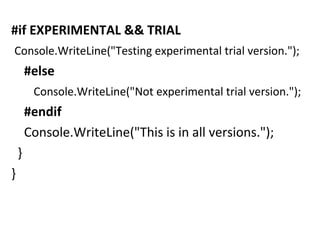
#if EXPERIMENTAL && TRIAL
Console.WriteLine("Testing experimental trial version.");

#else
Console.WriteLine("Not experimental trial version.");

#endif
Console.WriteLine("This is in all versions.");
}
}
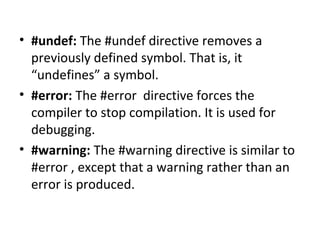
• #undef: The #undef directive removes a
previously defined symbol. That is, it
“undefines” a symbol.
• #error: The #error directive forces the
compiler to stop compilation. It is used for
debugging.
• #warning: The #warning directive is similar to
#error , except that a warning rather than an
error is produced.
• #undef: The #undef directive removes a
previously defined symbol. That is, it
“undefines” a symbol.
• #error: The #error directive forces the
compiler to stop compilation. It is used for
debugging.
• #warning: The #warning directive is similar to
#error , except that a warning rather than an
error is produced.

Preprocessor

  • 1.
  • 2.
    • C# definesseveral preprocessor directives, which affect the way that your program’s source file is interpreted by the compiler. • The term preprocessor directive comes from the fact that these instructions were traditionally handled by a separate compilation phase called the preprocessor. • All preprocessor directives begin with a # sign. In addition, each preprocessor directive must be on its own line. • Today’s modern compiler technology no longer requires a separate preprocessing stage to handle the directives, but the name has stuck.
  • 3.
    C# defines thefollowing preprocessor directives: • #define • #endif #elif #line #else #warning • #endregion #error #if • #pragma #region #undef
  • 4.
    • #define: The#define directive defines a character sequence called a symbol. • The existence or nonexistence of a symbol can be determined by #if or #elif and is used to control compilation. • Here is the general form for # define : #define symbol • Notice that there is no semicolon in this statement.
  • 5.
    • In C/C++you can use #define to perform textual substitutions, such as defining a name for a value, and to create function-like macros. C# does not support these uses of #define. • In C#, #define is used only to define a symbol. • For example, to define the symbol EXPERIMENTAL, use this directive: • #define EXPERIMENTAL
  • 6.
    • #if and#endif: The #if and #endif directives enable conditional compilation of a sequence of code based upon whether an expression involving one or more symbols evaluates to true. • A symbol is true if it has been defined. It is false otherwise. • Thus, if a symbol has been defined by a #define directive, it will evaluate as true.
  • 7.
    #define EXPERIMENTAL using System; classTest { static void Main() { #if EXPERIMENTAL Console.WriteLine("Compiled for experimental version."); #else Console.WriteLine("Compiled for release."); #endif
  • 8.
    #if EXPERIMENTAL &&TRIAL Console.WriteLine("Testing experimental trial version."); #else Console.WriteLine("Not experimental trial version."); #endif Console.WriteLine("This is in all versions."); } }
  • 9.
    • #undef: The#undef directive removes a previously defined symbol. That is, it “undefines” a symbol. • #error: The #error directive forces the compiler to stop compilation. It is used for debugging. • #warning: The #warning directive is similar to #error , except that a warning rather than an error is produced.
  • 10.
    • #undef: The#undef directive removes a previously defined symbol. That is, it “undefines” a symbol. • #error: The #error directive forces the compiler to stop compilation. It is used for debugging. • #warning: The #warning directive is similar to #error , except that a warning rather than an error is produced.