Predictive Maintenance with MATLAB
Table of Contents
1. Introduction
2. Extracting Condition Indicators
3. Estimating Remaining Useful Life
Part 1: Introduction
Predictive Maintenance with MATLAB | 4
Every day we rely on a wide range of machines, but every machine
eventually breaks down unless it’s being maintained. Predictive
maintenance lets you estimate when machine failure will occur. This
way, you can plan maintenance in advance, better manage inventory,
eliminate unplanned downtime, and maximize equipment lifetime.
What Is Predictive Maintenance?
Predictive Maintenance with MATLAB | 5
Reactive Maintenance
With reactive maintenance, the machine is used to its limit
and repairs are performed only after the machine fails. If
you’re maintaining an inexpensive system like a light bulb,
the reactive approach may make sense. But think of a com-
plex system with some very expensive parts, such as an
aircraft engine. You can’t risk running it to failure, as it will
be extremely costly to repair highly damaged parts. But,
more importantly, it’s a safety issue.
Preventive Maintenance
Many organizations try to prevent failure before it occurs
by performing regular checks on their equipment. One big
challenge with preventive maintenance is determining when
to do maintenance. Since you don’t know when failure is
likely to occur, you have to be conservative in your plan-
ning, especially if you’re operating safety-critical equipment.
But by scheduling maintenance very early, you’re wasting
machine life that is still usable, and this adds to your costs.
Predictive Maintenance
Predictive maintenance lets you estimate time-to-failure of
a machine. Knowing the predicted failure time helps you
find the optimum time to schedule maintenance for your
equipment. Predictive maintenance not only predicts a fu-
ture failure, but also pinpoints problems in your complex
machinery and helps you identify what parts need to be
fixed.
Maintenance Strategies
Predictive Maintenance with MATLAB | 6
Implementing predictive maintenance helps reduce downtime, optimize
spare parts inventory, and maximize equipment lifetime. But how do
you get started? First you need to develop an algorithm that will predict
a time window, typically some number of days, when your machine will
fail and you need to perform maintenance. Let’s look at the predictive
maintenance workflow to get started on algorithm development.
Getting Started with Predictive Maintenance
Predictive Maintenance
Algorithm
Failure in 20 2 days
Data
Predictive Maintenance with MATLAB | 7
Predictive Maintenance Workflow at a Glance
Algorithm development starts with data that describes your system in a
range of healthy and faulty conditions. The raw data is preprocessed
to bring it to a form from which you can extract condition indicators.
These are features that help distinguish healthy conditions from faulty.
You can then use the extracted features to train a machine learning
model that can:
• Detect anomalies
• Classify different types of faults
• Estimate the remaining useful life (RUL) of your machine
Finally, you deploy the algorithm and integrate it into your systems for
machine monitoring and maintenance.
In the next sections, we use a triplex pump example to walk through
the workflow steps. Triplex pumps are commonly used in the oil and
gas industry.
PREPROCESS
DATA
ACQUIRE
DATA
IDENTIFY
CONDITION
INDICATORS
TRAIN
MODEL
DEPLOY AND
INTEGRATE
Predictive Maintenance with MATLAB | 8
healthy
+
faulty
Collect data
using sensors
Temperature
Flow
Pressure
Acquire Data
The first step is to collect a large set of sensor data representing
healthy and faulty operation. It’s important to collect this data under
varying operating conditions. For example, you may have same type
of pumps running in different places, one in Alaska and the other one
in Texas. One may be pumping highly viscous fluid whereas the other
one operates with low-viscosity fluid. Although you have the same
type of pump, one may fail sooner than the other due to these different
operating conditions. Capturing all this data will help you develop a
robust algorithm that can better detect faults.
Note: For simplicity in this example, healthy and faulty operations are each represented by a single measure-
ment. In a real-world scenario, there may be hundreds of measurements for both types of conditions.
PREPROCESS
DATA
ACQUIRE
DATA
IDENTIFY
CONDITION
INDICATORS
TRAIN
MODEL
DEPLOY AND
INTEGRATE
Predictive Maintenance with MATLAB | 9
Acquire Data - Continued
In some cases, you may not have enough data representing healthy
and faulty operation. As an alternative, you can build a mathematical
model of the pump and estimate its parameters from sensor data.
You can then simulate this model with different fault states under
varying operating conditions to generate fault data. This data, also
referred to as synthetic data, now supplements your sensor data. You
can use a combination of synthetic and sensor data to develop your
predictive maintenance algorithm.
Learn more: Generate fault data with Simulink
Simulating the model under different fault states to generate fault data.
PREPROCESS
DATA
ACQUIRE
DATA
IDENTIFY
CONDITION
INDICATORS
TRAIN
MODEL
DEPLOY AND
INTEGRATE
Triplex pump
Mathematical model
of the triplex pump
Time
Sensor data
Time
Synthetic data
Inject faults
Refine model
Time
Sensor data
1 Seal leakage
2 Blocked inlet
3 Worn bearing
Predictive Maintenance with MATLAB | 10
Acquire Data with MATLAB
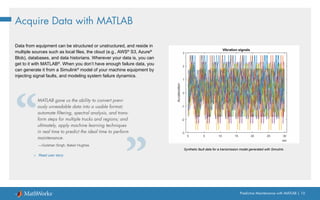
Data from equipment can be structured or unstructured, and reside in
multiple sources such as local files, the cloud (e.g., AWS®
S3, Azure®
Blob), databases, and data historians. Wherever your data is, you can
get to it with MATLAB®
. When you don’t have enough failure data, you
can generate it from a Simulink®
model of your machine equipment by
injecting signal faults, and modeling system failure dynamics.
Synthetic fault data for a transmission model generated with Simulink.
MATLAB gave us the ability to convert previ-
ously unreadable data into a usable format;
automate filtering, spectral analysis, and trans-
form steps for multiple trucks and regions; and
ultimately, apply machine learning techniques
in real time to predict the ideal time to perform
maintenance.
—Gulshan Singh, Baker Hughes
» Read user story
Predictive Maintenance with MATLAB | 11
Frequency
Time
Time
Frequency
Time
Time
Frequency
Time
Time
Preprocess Data
Once you have the data, the next step is to preprocess the data
to convert it to a form from which condition indicators can be easily
extracted. Preprocessing includes techniques such as noise, outlier,
and missing value removal. Sometimes further preprocessing is
necessary to reveal additional information that may not be apparent
in the original form of the data. For example, this preprocessing may
include conversion of time-domain data to frequency-domain.
Preprocessed data
Raw data Preprocessed data
Clean up
data
Convert data to
frequency-domain
PREPROCESS
DATA
ACQUIRE
DATA
IDENTIFY
CONDITION
INDICATORS
TRAIN
MODEL
DEPLOY AND
INTEGRATE
Predictive Maintenance with MATLAB | 12
Preprocess Data with MATLAB
Wavelet Signal Denoiser app for visualizing and denoising signals and comparing results.
Data is messy. With MATLAB, you can preprocess it, reduce its
dimensionality, and engineer features:
• Align data that is sampled at different rates, and account for missing
values and outliers.
• Remove noise, filter data, and analyze transient or changing signals
using advanced signal processing techniques.
• Simplify datasets and reduce overfitting of predictive models using
statistical and dynamic methods for feature extraction and selection.
Predictive Maintenance with MATLAB | 13
Identify Condition Indicators
The next step is to identify condition indicators, features whose
behavior changes in a predictable way as the system degrades.
These features are used to discriminate between healthy and faulty
operation.
In the plot on the right, the peaks in the frequency data shift left as
the pump degrades; therefore, the peak frequencies can serve as
condition indicators.
PREPROCESS
DATA
ACQUIRE
DATA
IDENTIFY
CONDITION
INDICATORS
TRAIN
MODEL
DEPLOY AND
INTEGRATE
Frequency
Healthy operation
Faulty operation
Peak frequencies can serve
as condition indicators.
Predictive Maintenance with MATLAB | 14
Identify Condition Indicators with MATLAB
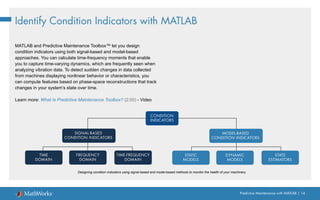
MATLAB and Predictive Maintenance Toolbox™ let you design
condition indicators using both signal-based and model-based
approaches. You can calculate time-frequency moments that enable
you to capture time-varying dynamics, which are frequently seen when
analyzing vibration data. To detect sudden changes in data collected
from machines displaying nonlinear behavior or characteristics, you
can compute features based on phase-space reconstructions that track
changes in your system’s state over time.
Learn more: What Is Predictive Maintenance Toolbox? (2:00) - Video
Designing condition indicators using signal-based and model-based methods to monitor the health of your machinery.
CONDITION
INDICATORS
SIGNAL-BASED
CONDITION INDICATORS
TIME
DOMAIN
FREQUENCY
DOMAIN
TIME-FREQUENCY
DOMAIN
MODEL-BASED
CONDITION INDICATORS
STATIC
MODELS
DYNAMIC
MODELS
STATE
ESTIMATORS
Predictive Maintenance with MATLAB | 15
Train the Model
So far, you’ve extracted some features from your data that help you understand healthy and faulty operation of the pump. But at this stage, it’s
not clear what part needs repair or how much time there is until failure. In the next step, you can use the extracted features to train machine
learning models to do several things.
Learn more: Three Ways to Estimate Remaining Useful Life with MATLAB
Condition indicators
Identify
fault type
Machine
learning
Condition indicators
Estimate
remaining
useful life
Machine
learning
PREPROCESS
DATA
ACQUIRE
DATA
IDENTIFY
CONDITION
INDICATORS
TRAIN
MODEL
DEPLOY AND
INTEGRATE
Detect anomalies
You can track changes in your system to
determine the presence of anomalies.
Detect different types of faults
through classification
You can gain insight into what part of the
pump requires attention.
Predict the transition from healthy state and failure
Finding a model that captures the relationship between the
extracted features and the degradation path of the pump
will help you estimate how much time there is until failure
(remaining useful life) and when you should schedule
maintenance.
Condition indicators
Train
model
Detect
anomalies
Machine
learning
Train
model
Train
model
Learn more: Anomaly Detection for Powertrain Production at Mercedes-Benz
Predictive Maintenance with MATLAB | 16
Train the Model Using Machine Learning with MATLAB
You can identify the root cause of failures and predict time-to-failure
using classification, regression, and time-series modeling techniques
in MATLAB:
• Interactively explore and select the most important variables for
estimating RUL or classifying failure modes.
• Train, compare, and validate multiple predictive models with built-in
functions.
• Calculate and visualize confidence intervals to quantify uncertainty
in predictions.
Classification Learner app for trying different classifiers on your dataset. Find the best fit with
common models like decision trees and support vector machines.
Predictive Maintenance with MATLAB | 17
Deploy and Integrate
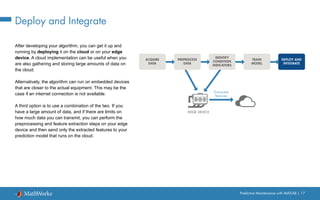
After developing your algorithm, you can get it up and
running by deploying it on the cloud or on your edge
device. A cloud implementation can be useful when you
are also gathering and storing large amounts of data on
the cloud.
Alternatively, the algorithm can run on embedded devices
that are closer to the actual equipment. This may be the
case if an internet connection is not available.
A third option is to use a combination of the two. If you
have a large amount of data, and if there are limits on
how much data you can transmit, you can perform the
preprocessing and feature extraction steps on your edge
device and then send only the extracted features to your
prediction model that runs on the cloud.
PREPROCESS
DATA
ACQUIRE
DATA
IDENTIFY
CONDITION
INDICATORS
TRAIN
MODEL
DEPLOY AND
INTEGRATE
EDGE DEVICE
Extracted
features
Predictive Maintenance with MATLAB | 18
Deploy Algorithms in Production Systems with MATLAB
Data scientists often refer to the ability to share and explain results as
model interpretability. A model that is easily interpretable has:
• A small number of features that typically are created from some
physical understanding of the system
• A transparent decision-making process
Interpretability is important for applications when you need to:
• Prove that your model complies with government
or industry standards
• Explain factors that contributed to a diagnosis
• Show the absence of bias in decision-making
We operate our machines nonstop, even on
Christmas, and we rely on our MATLAB based
monitoring and predictive maintenance
software to run continuously and reliably
in production.
—Dr. Michael Kohlert, Mondi
» Read user story
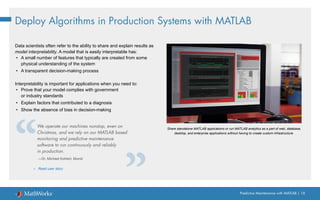
Share standalone MATLAB applications or run MATLAB analytics as a part of web, database,
desktop, and enterprise applications without having to create custom infrastructure.
Learn More
Watch
Predictive Maintenance Tech Talks - Video Series
Predictive Maintenance in MATLAB and Simulink (35:54) - Video
Read
Overcoming Four Common Obstacles to Predictive Maintenance - White Paper
Explore
Predictive Maintenance with MATLAB - Code Examples
Predictive Maintenance Toolbox
Try Predictive Maintenance Toolbox
Part 2: Extracting Condition Indicators
Predictive Maintenance with MATLAB | 21
A key step in predictive maintenance algorithm development is
identifying condition indicators: features in your system data whose
behavior changes in a predictable way as the system degrades.
Condition indicators help you distinguish healthy operation from faulty.
You extract them from preprocessed system data and use them for
fault classification and remaining useful life (RUL) estimation.
What Is a Condition Indicator?
Predictive Maintenance with MATLAB | 22
A Visual Exercise
Let’s start with a visual exercise to understand how condition indicators work. What’s the difference between these two shapes?
It looks like there’s no significant difference because the two circles look almost the same.
Circles
Predictive Maintenance with MATLAB | 23
A Visual Exercise - Continued
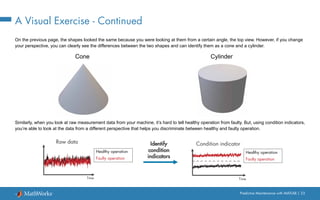
On the previous page, the shapes looked the same because you were looking at them from a certain angle, the top view. However, if you change
your perspective, you can clearly see the differences between the two shapes and can identify them as a cone and a cylinder.
Similarly, when you look at raw measurement data from your machine, it’s hard to tell healthy operation from faulty. But, using condition indicators,
you’re able to look at the data from a different perspective that helps you discriminate between healthy and faulty operation.
Cylinder
Cone
Identify
condition
indicators
Time
Condition indicator
Time
Raw data
Healthy operation
Faulty operation
Healthy operation
Faulty operation
Predictive Maintenance with MATLAB | 24
Feature Extraction Using Signal-Based Methods
You can derive condition indicators from data by using time, frequency, and time-frequency domain features:
Signal-Based Condition Indicators
Frequency-domain
features
Time-frequency
domain features
Power bandwidth
Peak values
Peak frequencies
Mean frequency
Spectral entropy
Spectral kurtosis
Harmonics
.
.
.
.
.
.
Mean
Standard deviation
Skewness
Root-mean square
.
.
.
Kurtosis
Conditional spectral moment
Conditional temporal moment
Joint time-frequency moment
Time-domain
features
Predictive Maintenance with MATLAB | 25
Feature Extraction Using Signal-Based Methods - Continued
Time-Domain Features
For some systems, simple statistical features of time signals can
serve as condition indicators, distinguishing faulty conditions from
healthy. For example, the average value of a particular signal or its
standard deviation might change as system health degrades. You can
also use higher-order moments of the signal such as skewness and
kurtosis. With such features, you can try to identify threshold values
that distinguish healthy operation from faulty operation, or look for
abrupt changes in the value that mark changes in system state.
Predictive Maintenance Toolbox™, an add-on product for MATLAB®
,
contains additional functions for computing time-domain features,
demonstrated in the example Turbine High-Speed Bearing Prognosis.
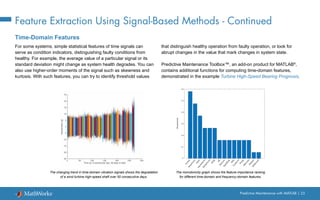
The changing trend in time-domain vibration signals shows the degradation
of a wind turbine high-speed shaft over 50 consecutive days.
The monotonicity graph shows the feature importance ranking
for different time-domain and frequency-domain features.
Predictive Maintenance with MATLAB | 26
Feature Extraction Using Signal-Based Methods - Continued
Frequency-Domain Features
Sometimes, time-domain features alone are not sufficient to act
as condition indicators, so you’ll want to look at frequency-domain
features as well.
Take a machine with rotational components and three vibration
sources: bearing, motor shaft, and disc. If you look at the vibration data
from the machine in the time domain, you see the combined effect
of all the vibrations from these different rotating components. But by
analyzing the data in the frequency domain, you can isolate different
sources of vibration, as seen in the second plot. The peak amplitudes,
and how much they change from nominal values, can indicate the
severity of the faults.
More information on calculating frequency-domain condition indicators
can be found in the example Condition Monitoring and Prognostics
Using Vibration Signals.
Disc
Bearing
Motor
shaft
Machine with
rotating components
Amplitude
Disc
Bearing Motor
shaft
Amplitude
Frequency
Nominal
Faulty
When analyzing the vibration data from the machine in the time domain, the bearing, motor shaft, and disc all affect vibration amplitude.
Using frequency-domain analysis, you can distinguish between different sources of vibration.
Predictive Maintenance with MATLAB | 27
Feature Extraction Using Signal-Based Methods - Continued
The histogram shows a clear separation between the three bearing conditions.
The log ratio between the bandpass frequency inner and outer race amplitudes
is a valid feature to classify bearing faults.
Time-Frequency Domain Features
Another way to extract features is to perform time-frequency spectral
analysis on the data, which helps characterize changes in the spectral
content of a signal over time. Time-frequency domain condition
indicators include features such as spectral kurtosis and spectral
entropy.
The Rolling Element Bearing Fault Diagnosis example shows how to
use kurtogram, spectral kurtosis, and envelope spectrum to identify
different types of faults in rolling element bearings.
» Learn more about time, frequency, and time-frequency
domain features
-4 -3 -2 -1 0 1 2 3
log(Ball Pass Frequency Inner Race Amplitude/Ball Pass Frequency Outer Race Amplitude)
0
0.5
1
1.5
2
2.5
3
Count
Outer Race Fault - Train
Outer Race Fault - Test
Normal - Train
Normal - Test
Inner Race Fault - Train
Inner Race Fault - Test
Classification Boundary
Predictive Maintenance with MATLAB | 28
Predictive Maintenance Workflow
Now that you’ve looked at what condition indicators are, it’s time to take a look at the steps involved in extracting the features for identifying
condition indicators. Designing a predictive maintenance algorithm starts with collecting data from your machine under different operating
conditions and fault states. The raw data is then preprocessed for cleaning it up and bringing it into a form from which condition indicators can
be extracted. Feature extraction looks for features that are distinctive, meaning they uniquely define healthy operation and different fault types.
These features will be your condition indicators.
Using the extracted features, you can train a machine learning model for fault classification and remaining useful life estimation. You can then
deploy your algorithm and integrate it into your systems for machine monitoring and maintenance.
PREPROCESS
DATA
ACQUIRE
DATA
IDENTIFY
CONDITION
INDICATORS
TRAIN
MODEL
DEPLOY AND
INTEGRATE
Predictive Maintenance with MATLAB | 29
What Are Distinctive Features and Why Are They Important?
Once you identify some useful features, you can use them to train a machine learning model. If the selected set of features is distinctive, the
model can correctly estimate the machine’s current condition when you feed new data from the machine to the model.
Feature
1
Feature 2
Fault type I
Fault type II
Healthy
Feature
1
Feature 2
Fault type I
Fault type II
Healthy
Feature
1
Feature 2
Fault type I
Fault type II
Healthy
Feature
1
Feature 2
Fault type I
Fault type II
Healthy
New data point to be
classified by the
machine learning model
Health condition of the
new data point is correctly
estimated by the
machine learning model
New data point to be
classified by the
machine learning model
Health condition of the
new data point is
estimated incorrectly.
Predictive Maintenance with MATLAB | 30
Example: The Triplex Pump
This example uses a triplex pump to demonstrate the workflow. The
pump has a motor that turns the crankshaft that in turn drives three
plungers. The fluid gets sucked into the inlet and discharged through
the outlet, where the pressure is measured by a sensor. Faults that can
develop in such a pump include:
• Seal leakage
• Blocked inlet
• Worn bearing
Predictive Maintenance with MATLAB | 31
Acquiring Data
This pressure data includes one-second-long measurements taken at
steady state from normal operation, all three fault types, and also their
combinations:
• Healthy
• Blocked inlet
• Worn bearing
• Seal leakage
• Blocked inlet, worn bearing
• Seal leakage, worn bearing
• Seal leakage, blocked inlet
Plot of the pressure data that has been collected from the triplex pump.
PREPROCESS
DATA
ACQUIRE
DATA
IDENTIFY
CONDITION
INDICATORS
TRAIN
MODEL
DEPLOY AND
INTEGRATE
0.5 1 1.5 2 2.5 3 3.5 4
Time (s)
6.5
7
7.5
8
8.5
9
9.5
10
Raw data
Pressure
(bar)
Predictive Maintenance with MATLAB | 32
Preprocessing Data
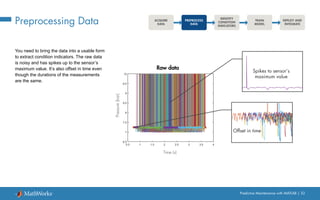
You need to bring the data into a usable form
to extract condition indicators. The raw data
is noisy and has spikes up to the sensor’s
maximum value. It’s also offset in time even
though the durations of the measurements
are the same.
PREPROCESS
DATA
ACQUIRE
DATA
IDENTIFY
CONDITION
INDICATORS
TRAIN
MODEL
DEPLOY AND
INTEGRATE
0.5 1 1.5 2 2.5 3 3.5 4
Time (s)
6.5
7
7.5
8
8.5
9
9.5
10
Raw data
Pressure
(bar)
Spikes to sensor’s
maximum value
Offset in time
Predictive Maintenance with MATLAB | 33
Preprocessing Data - Continued
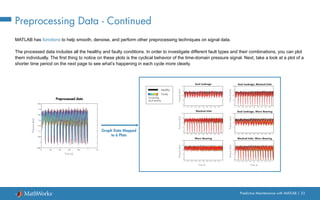
MATLAB has functions to help smooth, denoise, and perform other preprocessing techniques on signal data.
The processed data includes all the healthy and faulty conditions. In order to investigate different fault types and their combinations, you can plot
them individually. The first thing to notice on these plots is the cyclical behavior of the time-domain pressure signal. Next, take a look at a plot of a
shorter time period on the next page to see what’s happening in each cycle more clearly.
Time (s)
Preprocessed data
Pressure
(bar)
0 0.2 0.4 0.6 0.8 1 1.2
6.95
7
7.05
7.1
7.15
7.2
7.25
7.3
7.35
Blocked Inlet
Blocked Inlet, Worn Bearing
Seal Leakage
0 0.1 0.2 0.3 0.4 0.5 0.6 0.7 0.8 0.9 1
7
7.1
7.2
7.3
7.4
Seal Leakage, Blocked Inlet
Seal Leakage, Worn Bearing
Worn Bearing
Pressure
(bar)
Pressure
(bar)
Pressure
(bar)
Pressure
(bar)
Pressure
(bar)
Pressure
(bar)
Time (s) Time (s)
Graph Data Mapped
to 6 Plots
Healthy
Faulty
Increasing
fault severity
0 0.1 0.2 0.3 0.4 0.5 0.6 0.7 0.8 0.9 1
7
7.1
7.2
7.3
7.4
0 0.1 0.2 0.3 0.4 0.5 0.6 0.7 0.8 0.9 1
7
7.1
7.2
7.3
7.4
0 0.1 0.2 0.3 0.4 0.5 0.6 0.7 0.8 0.9 1
7
7.1
7.2
7.3
7.4
0 0.1 0.2 0.3 0.4 0.5 0.6 0.7 0.8 0.9
7
7.1
7.2
7.3
7.4
0 0.1 0.2 0.3 0.4 0.5 0.6 0.7 0.8 0.9
7
7.1
7.2
7.3
7.4
Predictive Maintenance with MATLAB | 34
Preprocessing Data - Continued
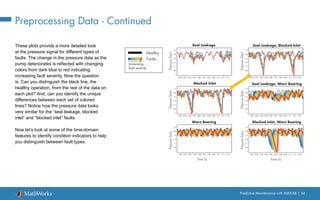
These plots provide a more detailed look
at the pressure signal for different types of
faults. The change in the pressure data as the
pump deteriorates is reflected with changing
colors from dark blue to red indicating
increasing fault severity. Now the question
is: Can you distinguish the black line, the
healthy operation, from the rest of the data on
each plot? And, can you identify the unique
differences between each set of colored
lines? Notice how the pressure data looks
very similar for the “seal leakage, blocked
inlet” and “blocked inlet” faults.
Now let’s look at some of the time-domain
features to identify condition indicators to help
you distinguish between fault types.
0.62 0.63 0.64 0.65 0.66 0.67 0.68 0.69 0.7 0.71 0.72
7
7.05
7.1
7.15
7.2
7.25
7.3
Blocked Inlet
Blocked Inlet, Worn Bearing
Seal Leakage Seal Leakage, Blocked Inlet
Seal Leakage, Worn Bearing
Worn Bearing
Pressure
(bar)
Pressure
(bar)
Pressure
(bar)
Pressure
(bar)
Pressure
(bar)
Pressure
(bar)
Time (s) Time (s)
Blocked Inlet
Blocked Inlet, Worn Bearing
Seal Leakage Seal Leakage, Blocked Inlet
Seal Leakage, Worn Bearing
Worn Bearing
Pressure
(bar)
Pressure
(bar)
Pressure
(bar)
Pressure
(bar)
Pressure
(bar)
Pressure
(bar)
Time (s) Time (s)
Healthy
Faulty
Increasing
fault severity
0.62 0.63 0.64 0.65 0.66 0.67 0.68 0.69 0.7 0.71 0.72
7
7.05
7.1
7.15
7.2
7.25
7.3
0.62 0.63 0.64 0.65 0.66 0.67 0.68 0.69 0.7 0.71 0.72
7
7.05
7.1
7.15
7.2
7.25
7.3
0.62 0.63 0.64 0.65 0.66 0.67 0.68 0.69 0.7 0.71 0.72
7
7.05
7.1
7.15
7.2
7.25
7.3
0.62 0.63 0.64 0.65 0.66 0.67 0.68 0.69 0.7 0.71 0.72
7
7.05
7.1
7.15
7.2
7.25
7.3
0.62 0.63 0.64 0.65 0.66 0.67 0.68 0.69 0.7 0.71 0.72
7
7.05
7.1
7.15
7.2
7.25
7.3
Predictive Maintenance with MATLAB | 35
Using Time-Domain Features for
Identifying Condition Indicators
PREPROCESS
DATA
ACQUIRE
DATA
IDENTIFY
CONDITION
INDICATORS
TRAIN
MODEL
DEPLOY AND
INTEGRATE
Use trial and error to see how each of the following set of common
time-domain features performs: Mean, Variance, Skewness, and
Kurtosis.
One way to understand if these condition indicators can differentiate
between types of faults is to investigate them using a boxplot. First,
plot a single feature, such as the mean, for the healthy condition and
blocked inlet fault.
The boxes don’t overlap in the plot. This means there’s a difference
between these data groups. By using the mean of the pressure data,
you can easily distinguish the blocked inlet fault from healthy condition.
Blocked Inlet Healthy
7.225
7.23
7.235
7.24
7.245
7.25
MEAN
No overlap
Median
25th percentile
75th percentile
Minimum
Maximum
Predictive Maintenance with MATLAB | 36
Using Time-Domain Features for
Identifying Condition Indicators - Continued
Things change when you add the datasets for other fault types as well. You’re not able to distinguish between all the fault types as some of them
overlap. Due to this overlapping, the mean on its own is not enough to set fault types apart.
7.21
7.215
7.22
7.225
7.23
7.235
7.24
7.245
7.25
MEAN
Fault type
Healthy
Blocked Inlet
Seal Leakage
Worn Bearing
Blocked Inlet, Worn Bearing
Seal Leakage, Worn Bearing
Seal Leakage, Blocked Inlet
Predictive Maintenance with MATLAB | 37
Using Time-Domain Features for
Identifying Condition Indicators - Continued
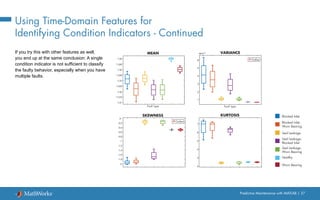
If you try this with other features as well,
you end up at the same conclusion: A single
condition indicator is not sufficient to classify
the faulty behavior, especially when you have
multiple faults.
MEAN VARIANCE
KURTOSIS
Healthy
Blocked Inlet
Seal Leakage
Worn Bearing
Blocked Inlet,
Worn Bearing
Seal Leakage,
Worn Bearing
Seal Leakage,
Blocked Inlet
7.21
7.215
7.22
7.225
7.23
7.235
7.24
7.245
7.25
SKEWNESS
-2
-1.8
-1.6
-1.4
-1.2
-1
-0.8
-0.6
-0.4
-0.2
0
1
2
3
4
5
6
10-3
2
3
4
5
6
7
Fault type Fault type
Outlier
Outlier
Predictive Maintenance with MATLAB | 38
Using Time-Domain Features for
Identifying Condition Indicators - Continued
Below is a scatter plot of a combination of the features: mean, variance, and skewness. Notice how well the variance versus mean plot
distinguishes between different types of faults.
You can immediately see that two condition indicators are better than one for separating different faults. You can try different pairs of features to
see which ones are better at classifying faults.
Healthy
Blocked Inlet
Seal Leakage
Worn Bearing
Blocked Inlet, Worn Bearing
Seal Leakage, Worn Bearing
Seal Leakage, Blocked Inlet
Variance
Mean
Variance
Skewness
Skewness
Mean
Predictive Maintenance with MATLAB | 39
Using Time-Domain Features for
Identifying Condition Indicators - Continued
Frequency-domain analysis is important in analyzing periodic data
and data acquired from a machine with rotating components; let’s see
if you can extract additional features by analyzing your data in the
frequency domain.
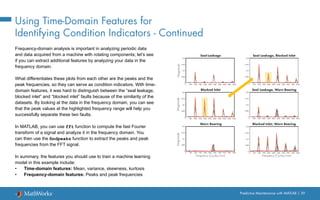
What differentiates these plots from each other are the peaks and the
peak frequencies, so they can serve as condition indicators. With time-
domain features, it was hard to distinguish between the “seal leakage,
blocked inlet” and “blocked inlet” faults because of the similarity of the
datasets. By looking at the data in the frequency domain, you can see
that the peak values at the highlighted frequency range will help you
successfully separate these two faults.
In MATLAB, you can use fft function to compute the fast Fourier
transform of a signal and analyze it in the frequency domain. You
can then use the findpeaks function to extract the peaks and peak
frequencies from the FFT signal.
In summary, the features you should use to train a machine learning
model in this example include:
• Time-domain features: Mean, variance, skewness, kurtosis
• Frequency-domain features: Peaks and peak frequencies
Blocked Inlet
Frequency (Cycles/min)
Blocked Inlet, Worn Bearing
0 500 1000 1500 2000 2500 3000 3500 4000 4500 5000
0
0.005
0.01
0.015
0.02
Seal Leakage Seal Leakage, Blocked Inlet
Seal Leakage, Worn Bearing
Frequency (Cycles/min)
Worn Bearing
Magnitude
Magnitude
Magnitude
0 500 1000 1500 2000 2500 3000 3500 4000 4500 5000
0
0.005
0.01
0.015
0.02
0 500 1000 1500 2000 2500 3000 3500 4000 4500 5000
0
0.005
0.01
0.015
0.02
0 500 1000 1500 2000 2500 3000 3500 4000 4500 5000
0
0.005
0.01
0.015
0.02
0 500 1000 1500 2000 2500 3000 3500 4000 4500 5000
0
0.005
0.01
0.015
0.02
0 500 1000 1500 2000 2500 3000 3500 4000 4500 5000
0
0.005
0.01
0.015
0.02
Predictive Maintenance with MATLAB | 40
Using Time-Domain Features for
Identifying Condition Indicators - Continued
After selecting the frequency-domain features, try to perform an
analysis like you did with the time-domain features. The below plot
shows the second and fifth peaks with respect to each other.
These features effectively separate different groups, which are
highlighted with yellow circles. This means that the selected features
are distinctive and good candidates for training a machine learning
model.
Note that when you’re investigating these features, not only are you
looking for different clusters, but you also want them to be further away
from each other. This makes it easier for the trained models to identify
new data points.
The previous page shows plots of the peaks for each of the faults,
with the faults in color and the healthy condition in black. Notice that
the “worn bearing” plot contains only Peak 3 for the worn bearing and
healthy conditions. This is why these conditions don't show up on a
plot representing Peaks 2 and 5. This is another reason why we need
multiple features to effectively separate the different groups.
Blocked Inlet
Seal Leakage
Blocked Inlet, Worn Bearing
Seal Leakage, Worn Bearing
Seal Leakage, Blocked Inlet
Peak
2
Peak 5
Predictive Maintenance with MATLAB | 41
Training the Model
After extracting the condition indicators, you can train a machine
learning model with the extracted features and check the accuracy of
the trained model with a confusion matrix. The confusion matrix at right
shows the results of one the best-performing classifiers that has been
trained with the extracted features. The Classification Learner app in
MATLAB helps you find the best classifier for your dataset quickly.
The plot shows the true positive rates in green and false negative rates
in red.
If you’re satisfied with the accuracy of your machine learning model,
you can continue with deploying your predictive maintenance algorithm
and integrating it into your system. Otherwise, you should revisit the
feature extraction step of the predictive maintenance workflow and
try training machine learning models with different sets of features, as
highlighted with the arrows in the workflow chart.
You may be wondering, how many features are enough to train a
machine learning model? Unfortunately, there’s no magic number.
Just remember that machine learning models can benefit from a high-
dimensional set of features that are distinctive and can effectively
differentiate fault types.
PREPROCESS
DATA
ACQUIRE
DATA
IDENTIFY
CONDITION
INDICATORS
TRAIN
MODEL
DEPLOY AND
INTEGRATE
Healthy
Blocked
Inlet
Seal Leakage
Blocked
Inlet&
W
orn
Bearing
Seal Leakage&
W
orn
Bearing
Healthy
Blocked Inlet
Seal Leakage
Worn Bearing
Seal Leakage&
Blocked Inlet
Blocked Inlet&
Worn Bearing
Seal Leakage&
Worn Bearing
Seal Leakage&
Blocked
Inlet
W
orn
Bearing
Confusion Matrix
True
Class
Predicted Class
Learn More
Watch
Predictive Maintenance Tech Talks - Video Series
Predictive Maintenance in MATLAB and Simulink (35:54) - Video
Feature Extraction Using Diagnostic Feature Designer App (4:45) - Video
Read
Overcoming Four Common Obstacles to Predictive Maintenance - White Paper
Explore
Predictive Maintenance with MATLAB - Code Examples
Predictive Maintenance Toolbox - Overview
» Try Predictive Maintenance Toolbox
Part 3: Estimating Remaining Useful Life
Predictive Maintenance with MATLAB | 44
One of the goals of predictive maintenance is to estimate the
remaining useful life (RUL) of a system. RUL is the time between a
system’s current condition and failure. Depending on your system,
time can be represented in terms of days, flights, cycles, or any other
quantity.
On the plot, we see the deterioration path of a machine over time.
This ebook explores three common models used to estimate RUL
(similarity, survival, and degradation) and then walks through the RUL
workflow with an example using a similarity model.
What Is Remaining Useful Life?
Time
Machine deterioration profile
Remaining useful life (RUL)
Current condition
Failure condition
[ Number of days ]
[ Miles ]
[ Cycles ]
…
Condition
indicator
Predictive Maintenance with MATLAB | 45
Three Common Ways to Estimate RUL
There are three common models used to estimate RUL: similarity,
survival, and degradation. Which model should you use? It depends on
how much information you have.
Use a survival model if you have data only from time of failure rather
than complete run-to-failure histories.
Use a degradation model if you have some data between a heathy
state and failure, and you know a safety threshold that shouldn’t be
exceeded.
Use a similarity model if your data spans the full degradation of a
system from a healthy state to failure.
Find more detailed information on RUL Estimator Models used in predictive maintenance.
The following aircraft engine example illustrates how estimator models work.
RUL ESTIMATOR MODELS
Healthy state Failure
Safety
threshold
Healthy state Failure
SURVIVAL MODEL
Healthy state Failure
DEGRADATION MODEL SIMILARITY MODEL
Predictive Maintenance with MATLAB | 46
The Working Principle of RUL Estimator Models: The Survival Model
In this example, you want to figure out how many flights the engine can
operate until its parts need repair or replacement.
The yellow line on the plot represents your engine, which has been in
operation for 20 flights. The blue lines represent the data from a fleet
with the same type of engine. The red marks indicate when the engines
failed.
If you don’t have the complete histories from the fleet, but you do have
the failure data, then you can use survival models to estimate RUL.
You can determine how many engines failed after a certain number
of cycles (number of flights), and you also know how many flights the
engine has been in operation. The survival model uses a probability
distribution of this data to estimate the remaining useful life.
Number of flights
Condition
indicator
100 200 300
Engine in operation
Historical fleet data
Engine failures
20
Probability density function for the RUL estimation after 20 flights
Estimated RUL: 192.3
Number of flights
RUL ESTIMATOR MODELS
SURVIVAL MODEL DEGRADATION MODEL SIMILARITY MODEL
Use when you have failure
data from similar machines
Predictive Maintenance with MATLAB | 47
The Working Principle of RUL Estimator Models:
The Survival Model in MATLAB
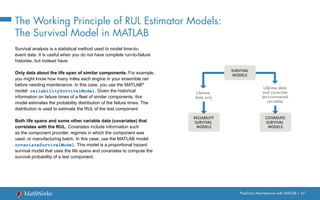
Survival analysis is a statistical method used to model time-to-
event data. It is useful when you do not have complete run-to-failure
histories, but instead have:
Only data about the life span of similar components. For example,
you might know how many miles each engine in your ensemble ran
before needing maintenance. In this case, you use the MATLAB®
model reliabilitySurvivalModel. Given the historical
information on failure times of a fleet of similar components, this
model estimates the probability distribution of the failure times. The
distribution is used to estimate the RUL of the test component.
Both life spans and some other variable data (covariates) that
correlates with the RUL. Covariates include information such
as the component provider, regimes in which the component was
used, or manufacturing batch. In this case, use the MATLAB model
covariateSurvivalModel. This model is a proportional hazard
survival model that uses the life spans and covariates to compute the
survival probability of a test component.
Lifetime
data only
COVARIATE
SURVIVAL
MODELS
RELIABILITY
SURVIVAL
MODELS
Lifetime data
and covariate
(environmental
variable)
SURVIVAL
MODELS
Predictive Maintenance with MATLAB | 48
The Working Principle of RUL Estimator Models:
The Degradation Model
In some cases, no failure data is available from similar
machines. But you may have knowledge about a safety
threshold that shouldn’t be crossed as this may cause
failure. You can use this information to fit a degradation
model to the condition indicator, which uses the past
information from our engine to predict how the condition
indicator will change in the future. This way, you can
statistically estimate how many cycles there are until the
condition indicator crosses the threshold, which helps you
estimate the remaining useful life.
Number of flights
Condition
indicator
100 200 300
Engine in operation
Safety threshold
Degradation model
Confidence interval
RUL ESTIMATOR MODELS
SURVIVAL MODEL DEGRADATION MODEL SIMILARITY MODEL
Use when you have know a threshold of
some condition indicator that indicates failure
Predictive Maintenance with MATLAB | 49
The Working Principle of RUL Estimator Models:
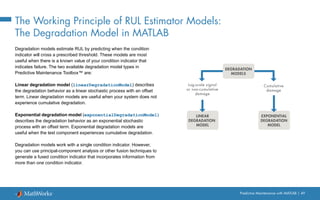
The Degradation Model in MATLAB
Degradation models estimate RUL by predicting when the condition
indicator will cross a prescribed threshold. These models are most
useful when there is a known value of your condition indicator that
indicates failure. The two available degradation model types in
Predictive Maintenance Toolbox™ are:
Linear degradation model (linearDegradationModel) describes
the degradation behavior as a linear stochastic process with an offset
term. Linear degradation models are useful when your system does not
experience cumulative degradation.
Exponential degradation model (exponentialDegradationModel)
describes the degradation behavior as an exponential stochastic
process with an offset term. Exponential degradation models are
useful when the test component experiences cumulative degradation.
Degradation models work with a single condition indicator. However,
you can use principal-component analysis or other fusion techniques to
generate a fused condition indicator that incorporates information from
more than one condition indicator.
Log-scale signal
or non-cumulative
damage
EXPONENTIAL
DEGRADATION
MODEL
LINEAR
DEGRADATION
MODEL
Cumulative
damage
DEGRADATION
MODELS
Predictive Maintenance with MATLAB | 50
The Working Principle of RUL Estimator Models:
The Similarity Model
Similarity models are useful when you have run-to-failure
data (the complete histories from a fleet with the same
type of engine, from healthy state through to degradation
and failure).
Number of flights
Condition
indicator
100 200 300
Engine in operation
Historical fleet data
Engine failures
RUL ESTIMATOR MODELS
SURVIVAL MODEL DEGRADATION MODEL SIMILARITY MODEL
Use when you have run-to-failure
histories from similar machines
Predictive Maintenance with MATLAB | 51
The Working Principle of RUL Estimator Models:
The Similarity Model in MATLAB
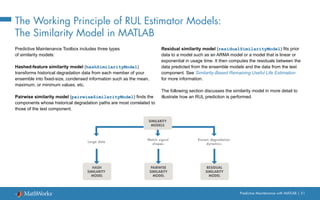
Predictive Maintenance Toolbox includes three types
of similarity models:
Hashed-feature similarity model (hashSimilarityModel)
transforms historical degradation data from each member of your
ensemble into fixed-size, condensed information such as the mean,
maximum, or minimum values, etc.
Pairwise similarity model (pairwiseSimilarityModel) finds the
components whose historical degradation paths are most correlated to
those of the test component.
Residual similarity model (residualSimilarityModel) fits prior
data to a model such as an ARMA model or a model that is linear or
exponential in usage time. It then computes the residuals between the
data predicted from the ensemble models and the data from the test
component. See Similarity-Based Remaining Useful Life Estimation
for more information.
The following section discusses the similarity model in more detail to
illustrate how an RUL prediction is performed.
Large data
PAIRWISE
SIMILARITY
MODEL
HASH
SIMILARITY
MODEL
Match signal
shapes
RESIDUAL
SIMILARITY
MODEL
Known degradation
dynamics
SIMILARITY
MODELS
Predictive Maintenance with MATLAB | 52
RUL Estimation Workflow
Using the Similarity Model
Acquiring Data
The similarity model is a useful RUL estimation technique. See how this
model is used in an example to better understand how an RUL prediction
is performed.
The first step when developing a predictive maintenance model is to
acquire data. This example uses the Prognostics and Health Management
challenge dataset publicly available on NASA’s data repository. This data
set includes run-to-failure data from 218 engines, where each engine
dataset contains measurements from 21 sensors. Measurements such as
fuel flow, temperature, and pressure are gathered through sensors placed
in various locations in the engine to provide measurements to the control
system and monitor the engine’s health. The plot shows what one sensor’s
measurements look like for all 218 engines.
On the plot, the x-axis shows the number of cycles (flights), and the
y-values represent the averaged sensor values at each flight. Each engine
starts in a healthy state and ends in failure.
Sensor
-
4
Number of flights
0 50 100 150 200 250 300 350
-2
0
2
4
Healthy state
Failure
PREPROCESS
DATA
ACQUIRE
DATA
IDENTIFY
CONDITION
INDICATORS
TRAIN
MODEL
DEPLOY AND
INTEGRATE
Predictive Maintenance with MATLAB | 53
RUL Estimation Workflow
Using the Similarity Model continued
Preprocessing Data and Identifying Condition Indicators
The previous page showed data from Sensor 4, but the full dataset also includes data from 20 other sensors. If you take a closer look at some of
the other sensor readings, you can see that some of these measurements don’t show a significant trend toward failure (such as Sensors 1, 5, 6,
and 10). Therefore, they won’t contribute to the selection of useful features for training a similarity model.
PREPROCESS
DATA
ACQUIRE
DATA
IDENTIFY
CONDITION
INDICATORS
TRAIN
MODEL
DEPLOY AND
INTEGRATE
Predictive Maintenance with MATLAB | 54
RUL Estimation Workflow Using the Similarity Model continued
Instead of using all the sensor measurements, identify the three most
trendable datasets (the ones that show a significant change in their
profile between the healthy state and failure). Sensors 2, 11, and 15
are good candidates to use together to create degradation profiles.
Degradation profiles represent the evolution of one or more condition
indicators for each machine in the ensemble (each component), as the
machine transitions from a healthy state to a faulty state.
In the preprocessing step, data reduction is performed by selecting
only the most trendable sensors (Sensor 2, 11, and 15) and combining
them to compute condition indicators.
For more information on how to select and employ condition indicators,
see Predictive Maintenance: Extracting Condition Indicators
with MATLAB.
To estimate the remaining useful life for the current engine (shown in
yellow), you would use Sensors 2, 11, and 15 to compute condition
indicators that represent the degradation profiles of the fleet. In the
graph on the right, you can see that the engine is currently at 60 flights,
and the red dots mark where similar engines in the fleet have failed.
Engine in operation
Combine the most
trendable sensors to
compute condition indicators
Number of flights
Condition
indicator 100 200 300
Preprocessing Data and Identifying Condition Indicators
Predictive Maintenance with MATLAB | 55
RUL Estimation Workflow
Using the Similarity Model continued
Training a Similarity Model
You’ll want to split the data into two groups, using a larger
portion of it to train a similarity model and the rest to test
the trained model. You use the known RUL to evaluate the
trained model’s accuracy.
The similarity model works by finding the closest engine
profiles to your engine up to the current cycle. You have
the failure times of the closest engines from the historical
fleet data, which gives you an idea of the expected failure
time of your current engine. You can use this data to fit a
probability distribution as seen in the bottom plot.
The median of this distribution gives you the remaining
useful life estimate of your engine, which you can compare
to the actual RUL to measure accuracy.
0
0
50 100 150 200 250 300 350
0.2
0.4
0.6
0.8
1
1.2
Current cycle: 60
Engine in operation
* Degradation profile of the fleet
Closest 50 degradation profiles
to the engine in operation
Data set
Test
Training
PREPROCESS
DATA
ACQUIRE
DATA
IDENTIFY
CONDITION
INDICATORS
TRAIN
MODEL
DEPLOY AND
INTEGRATE
Predictive Maintenance with MATLAB | 56
RUL Estimation Workflow Using the Similarity Model continued
Training a Similarity Model
At each iteration of the RUL computation, the similarity model finds the closest engine paths, which are shown in green, and computes the RUL
using a probability distribution plot (shown on the right). The plots below show the engine profiles and their probability distribution for three cycles:
25, 65, and 115.
Current Cycle 25
Current Cycle 65
Current Cycle 115
Engine in operation
Closest 50 profiles
Failure times
Engine in operation
Closest 50 profiles
Failure times
Engine in operation
Closest 50 profiles
Failure times
RUL estimate
Actual RUL
RUL estimate
Actual RUL
RUL estimate
Actual RUL
Remaining Useful Life (cycles)
Predictive Maintenance with MATLAB | 57
RUL Estimation Workflow Using the Similarity Model continued
Training a Similarity Model
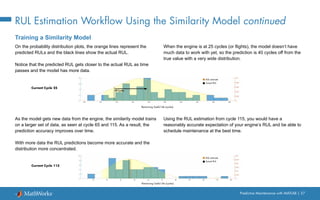
On the probability distribution plots, the orange lines represent the
predicted RULs and the black lines show the actual RUL.
Notice that the predicted RUL gets closer to the actual RUL as time
passes and the model has more data.
When the engine is at 25 cycles (or flights), the model doesn’t have
much data to work with yet, so the prediction is 40 cycles off from the
true value with a very wide distribution.
As the model gets new data from the engine, the similarity model trains
on a larger set of data, as seen at cycle 65 and 115. As a result, the
prediction accuracy improves over time.
With more data the RUL predictions become more accurate and the
distribution more concentrated.
Using the RUL estimation from cycle 115, you would have a
reasonably accurate expectation of your engine’s RUL and be able to
schedule maintenance at the best time.
RUL estimate
Actual RUL
RUL estimate
Actual RUL
Current Cycle 25
Current Cycle 115
40 Cycles
Remaining Useful Life (cycles)
Learn More
Ready for a deeper dive? Explore these resources to learn more about
predictive maintenance workflow, examples, and tools.
Watch
What Is Predictive Maintenance Toolbox? (2:06) - Video
Predictive Maintenance Tech Talks - Video Series
Predictive Maintenance in MATLAB and Simulink (35:54) - Video
Feature Extraction Using Diagnostic Feature Designer App (4:45) - Video
Read
Overcoming Four Common Obstacles to Predictive Maintenance - White Paper
MATLAB and Simulink for Predictive Maintenance - Overview
MATLAB Predictive Maintenance Examples - Code Examples
© 2020 The MathWorks, Inc. MATLAB and Simulink are registered trademarks of The MathWorks, Inc. See mathworks.com/trademarks for
a list of additional trademarks. Other product or brand names may be trademarks or registered trademarks of their respective holders. 12/20

predictive-maintenance-ebook-all-chapters.pdf

  • 1.
  • 2.
    Table of Contents 1.Introduction 2. Extracting Condition Indicators 3. Estimating Remaining Useful Life
  • 3.
  • 4.
    Predictive Maintenance withMATLAB | 4 Every day we rely on a wide range of machines, but every machine eventually breaks down unless it’s being maintained. Predictive maintenance lets you estimate when machine failure will occur. This way, you can plan maintenance in advance, better manage inventory, eliminate unplanned downtime, and maximize equipment lifetime. What Is Predictive Maintenance?
  • 5.
    Predictive Maintenance withMATLAB | 5 Reactive Maintenance With reactive maintenance, the machine is used to its limit and repairs are performed only after the machine fails. If you’re maintaining an inexpensive system like a light bulb, the reactive approach may make sense. But think of a com- plex system with some very expensive parts, such as an aircraft engine. You can’t risk running it to failure, as it will be extremely costly to repair highly damaged parts. But, more importantly, it’s a safety issue. Preventive Maintenance Many organizations try to prevent failure before it occurs by performing regular checks on their equipment. One big challenge with preventive maintenance is determining when to do maintenance. Since you don’t know when failure is likely to occur, you have to be conservative in your plan- ning, especially if you’re operating safety-critical equipment. But by scheduling maintenance very early, you’re wasting machine life that is still usable, and this adds to your costs. Predictive Maintenance Predictive maintenance lets you estimate time-to-failure of a machine. Knowing the predicted failure time helps you find the optimum time to schedule maintenance for your equipment. Predictive maintenance not only predicts a fu- ture failure, but also pinpoints problems in your complex machinery and helps you identify what parts need to be fixed. Maintenance Strategies
  • 6.
    Predictive Maintenance withMATLAB | 6 Implementing predictive maintenance helps reduce downtime, optimize spare parts inventory, and maximize equipment lifetime. But how do you get started? First you need to develop an algorithm that will predict a time window, typically some number of days, when your machine will fail and you need to perform maintenance. Let’s look at the predictive maintenance workflow to get started on algorithm development. Getting Started with Predictive Maintenance Predictive Maintenance Algorithm Failure in 20 2 days Data
  • 7.
    Predictive Maintenance withMATLAB | 7 Predictive Maintenance Workflow at a Glance Algorithm development starts with data that describes your system in a range of healthy and faulty conditions. The raw data is preprocessed to bring it to a form from which you can extract condition indicators. These are features that help distinguish healthy conditions from faulty. You can then use the extracted features to train a machine learning model that can: • Detect anomalies • Classify different types of faults • Estimate the remaining useful life (RUL) of your machine Finally, you deploy the algorithm and integrate it into your systems for machine monitoring and maintenance. In the next sections, we use a triplex pump example to walk through the workflow steps. Triplex pumps are commonly used in the oil and gas industry. PREPROCESS DATA ACQUIRE DATA IDENTIFY CONDITION INDICATORS TRAIN MODEL DEPLOY AND INTEGRATE
  • 8.
    Predictive Maintenance withMATLAB | 8 healthy + faulty Collect data using sensors Temperature Flow Pressure Acquire Data The first step is to collect a large set of sensor data representing healthy and faulty operation. It’s important to collect this data under varying operating conditions. For example, you may have same type of pumps running in different places, one in Alaska and the other one in Texas. One may be pumping highly viscous fluid whereas the other one operates with low-viscosity fluid. Although you have the same type of pump, one may fail sooner than the other due to these different operating conditions. Capturing all this data will help you develop a robust algorithm that can better detect faults. Note: For simplicity in this example, healthy and faulty operations are each represented by a single measure- ment. In a real-world scenario, there may be hundreds of measurements for both types of conditions. PREPROCESS DATA ACQUIRE DATA IDENTIFY CONDITION INDICATORS TRAIN MODEL DEPLOY AND INTEGRATE
  • 9.
    Predictive Maintenance withMATLAB | 9 Acquire Data - Continued In some cases, you may not have enough data representing healthy and faulty operation. As an alternative, you can build a mathematical model of the pump and estimate its parameters from sensor data. You can then simulate this model with different fault states under varying operating conditions to generate fault data. This data, also referred to as synthetic data, now supplements your sensor data. You can use a combination of synthetic and sensor data to develop your predictive maintenance algorithm. Learn more: Generate fault data with Simulink Simulating the model under different fault states to generate fault data. PREPROCESS DATA ACQUIRE DATA IDENTIFY CONDITION INDICATORS TRAIN MODEL DEPLOY AND INTEGRATE Triplex pump Mathematical model of the triplex pump Time Sensor data Time Synthetic data Inject faults Refine model Time Sensor data 1 Seal leakage 2 Blocked inlet 3 Worn bearing
  • 10.
    Predictive Maintenance withMATLAB | 10 Acquire Data with MATLAB Data from equipment can be structured or unstructured, and reside in multiple sources such as local files, the cloud (e.g., AWS® S3, Azure® Blob), databases, and data historians. Wherever your data is, you can get to it with MATLAB® . When you don’t have enough failure data, you can generate it from a Simulink® model of your machine equipment by injecting signal faults, and modeling system failure dynamics. Synthetic fault data for a transmission model generated with Simulink. MATLAB gave us the ability to convert previ- ously unreadable data into a usable format; automate filtering, spectral analysis, and trans- form steps for multiple trucks and regions; and ultimately, apply machine learning techniques in real time to predict the ideal time to perform maintenance. —Gulshan Singh, Baker Hughes » Read user story
  • 11.
    Predictive Maintenance withMATLAB | 11 Frequency Time Time Frequency Time Time Frequency Time Time Preprocess Data Once you have the data, the next step is to preprocess the data to convert it to a form from which condition indicators can be easily extracted. Preprocessing includes techniques such as noise, outlier, and missing value removal. Sometimes further preprocessing is necessary to reveal additional information that may not be apparent in the original form of the data. For example, this preprocessing may include conversion of time-domain data to frequency-domain. Preprocessed data Raw data Preprocessed data Clean up data Convert data to frequency-domain PREPROCESS DATA ACQUIRE DATA IDENTIFY CONDITION INDICATORS TRAIN MODEL DEPLOY AND INTEGRATE
  • 12.
    Predictive Maintenance withMATLAB | 12 Preprocess Data with MATLAB Wavelet Signal Denoiser app for visualizing and denoising signals and comparing results. Data is messy. With MATLAB, you can preprocess it, reduce its dimensionality, and engineer features: • Align data that is sampled at different rates, and account for missing values and outliers. • Remove noise, filter data, and analyze transient or changing signals using advanced signal processing techniques. • Simplify datasets and reduce overfitting of predictive models using statistical and dynamic methods for feature extraction and selection.
  • 13.
    Predictive Maintenance withMATLAB | 13 Identify Condition Indicators The next step is to identify condition indicators, features whose behavior changes in a predictable way as the system degrades. These features are used to discriminate between healthy and faulty operation. In the plot on the right, the peaks in the frequency data shift left as the pump degrades; therefore, the peak frequencies can serve as condition indicators. PREPROCESS DATA ACQUIRE DATA IDENTIFY CONDITION INDICATORS TRAIN MODEL DEPLOY AND INTEGRATE Frequency Healthy operation Faulty operation Peak frequencies can serve as condition indicators.
  • 14.
    Predictive Maintenance withMATLAB | 14 Identify Condition Indicators with MATLAB MATLAB and Predictive Maintenance Toolbox™ let you design condition indicators using both signal-based and model-based approaches. You can calculate time-frequency moments that enable you to capture time-varying dynamics, which are frequently seen when analyzing vibration data. To detect sudden changes in data collected from machines displaying nonlinear behavior or characteristics, you can compute features based on phase-space reconstructions that track changes in your system’s state over time. Learn more: What Is Predictive Maintenance Toolbox? (2:00) - Video Designing condition indicators using signal-based and model-based methods to monitor the health of your machinery. CONDITION INDICATORS SIGNAL-BASED CONDITION INDICATORS TIME DOMAIN FREQUENCY DOMAIN TIME-FREQUENCY DOMAIN MODEL-BASED CONDITION INDICATORS STATIC MODELS DYNAMIC MODELS STATE ESTIMATORS
  • 15.
    Predictive Maintenance withMATLAB | 15 Train the Model So far, you’ve extracted some features from your data that help you understand healthy and faulty operation of the pump. But at this stage, it’s not clear what part needs repair or how much time there is until failure. In the next step, you can use the extracted features to train machine learning models to do several things. Learn more: Three Ways to Estimate Remaining Useful Life with MATLAB Condition indicators Identify fault type Machine learning Condition indicators Estimate remaining useful life Machine learning PREPROCESS DATA ACQUIRE DATA IDENTIFY CONDITION INDICATORS TRAIN MODEL DEPLOY AND INTEGRATE Detect anomalies You can track changes in your system to determine the presence of anomalies. Detect different types of faults through classification You can gain insight into what part of the pump requires attention. Predict the transition from healthy state and failure Finding a model that captures the relationship between the extracted features and the degradation path of the pump will help you estimate how much time there is until failure (remaining useful life) and when you should schedule maintenance. Condition indicators Train model Detect anomalies Machine learning Train model Train model Learn more: Anomaly Detection for Powertrain Production at Mercedes-Benz
  • 16.
    Predictive Maintenance withMATLAB | 16 Train the Model Using Machine Learning with MATLAB You can identify the root cause of failures and predict time-to-failure using classification, regression, and time-series modeling techniques in MATLAB: • Interactively explore and select the most important variables for estimating RUL or classifying failure modes. • Train, compare, and validate multiple predictive models with built-in functions. • Calculate and visualize confidence intervals to quantify uncertainty in predictions. Classification Learner app for trying different classifiers on your dataset. Find the best fit with common models like decision trees and support vector machines.
  • 17.
    Predictive Maintenance withMATLAB | 17 Deploy and Integrate After developing your algorithm, you can get it up and running by deploying it on the cloud or on your edge device. A cloud implementation can be useful when you are also gathering and storing large amounts of data on the cloud. Alternatively, the algorithm can run on embedded devices that are closer to the actual equipment. This may be the case if an internet connection is not available. A third option is to use a combination of the two. If you have a large amount of data, and if there are limits on how much data you can transmit, you can perform the preprocessing and feature extraction steps on your edge device and then send only the extracted features to your prediction model that runs on the cloud. PREPROCESS DATA ACQUIRE DATA IDENTIFY CONDITION INDICATORS TRAIN MODEL DEPLOY AND INTEGRATE EDGE DEVICE Extracted features
  • 18.
    Predictive Maintenance withMATLAB | 18 Deploy Algorithms in Production Systems with MATLAB Data scientists often refer to the ability to share and explain results as model interpretability. A model that is easily interpretable has: • A small number of features that typically are created from some physical understanding of the system • A transparent decision-making process Interpretability is important for applications when you need to: • Prove that your model complies with government or industry standards • Explain factors that contributed to a diagnosis • Show the absence of bias in decision-making We operate our machines nonstop, even on Christmas, and we rely on our MATLAB based monitoring and predictive maintenance software to run continuously and reliably in production. —Dr. Michael Kohlert, Mondi » Read user story Share standalone MATLAB applications or run MATLAB analytics as a part of web, database, desktop, and enterprise applications without having to create custom infrastructure.
  • 19.
    Learn More Watch Predictive MaintenanceTech Talks - Video Series Predictive Maintenance in MATLAB and Simulink (35:54) - Video Read Overcoming Four Common Obstacles to Predictive Maintenance - White Paper Explore Predictive Maintenance with MATLAB - Code Examples Predictive Maintenance Toolbox Try Predictive Maintenance Toolbox
  • 20.
    Part 2: ExtractingCondition Indicators
  • 21.
    Predictive Maintenance withMATLAB | 21 A key step in predictive maintenance algorithm development is identifying condition indicators: features in your system data whose behavior changes in a predictable way as the system degrades. Condition indicators help you distinguish healthy operation from faulty. You extract them from preprocessed system data and use them for fault classification and remaining useful life (RUL) estimation. What Is a Condition Indicator?
  • 22.
    Predictive Maintenance withMATLAB | 22 A Visual Exercise Let’s start with a visual exercise to understand how condition indicators work. What’s the difference between these two shapes? It looks like there’s no significant difference because the two circles look almost the same. Circles
  • 23.
    Predictive Maintenance withMATLAB | 23 A Visual Exercise - Continued On the previous page, the shapes looked the same because you were looking at them from a certain angle, the top view. However, if you change your perspective, you can clearly see the differences between the two shapes and can identify them as a cone and a cylinder. Similarly, when you look at raw measurement data from your machine, it’s hard to tell healthy operation from faulty. But, using condition indicators, you’re able to look at the data from a different perspective that helps you discriminate between healthy and faulty operation. Cylinder Cone Identify condition indicators Time Condition indicator Time Raw data Healthy operation Faulty operation Healthy operation Faulty operation
  • 24.
    Predictive Maintenance withMATLAB | 24 Feature Extraction Using Signal-Based Methods You can derive condition indicators from data by using time, frequency, and time-frequency domain features: Signal-Based Condition Indicators Frequency-domain features Time-frequency domain features Power bandwidth Peak values Peak frequencies Mean frequency Spectral entropy Spectral kurtosis Harmonics . . . . . . Mean Standard deviation Skewness Root-mean square . . . Kurtosis Conditional spectral moment Conditional temporal moment Joint time-frequency moment Time-domain features
  • 25.
    Predictive Maintenance withMATLAB | 25 Feature Extraction Using Signal-Based Methods - Continued Time-Domain Features For some systems, simple statistical features of time signals can serve as condition indicators, distinguishing faulty conditions from healthy. For example, the average value of a particular signal or its standard deviation might change as system health degrades. You can also use higher-order moments of the signal such as skewness and kurtosis. With such features, you can try to identify threshold values that distinguish healthy operation from faulty operation, or look for abrupt changes in the value that mark changes in system state. Predictive Maintenance Toolbox™, an add-on product for MATLAB® , contains additional functions for computing time-domain features, demonstrated in the example Turbine High-Speed Bearing Prognosis. The changing trend in time-domain vibration signals shows the degradation of a wind turbine high-speed shaft over 50 consecutive days. The monotonicity graph shows the feature importance ranking for different time-domain and frequency-domain features.
  • 26.
    Predictive Maintenance withMATLAB | 26 Feature Extraction Using Signal-Based Methods - Continued Frequency-Domain Features Sometimes, time-domain features alone are not sufficient to act as condition indicators, so you’ll want to look at frequency-domain features as well. Take a machine with rotational components and three vibration sources: bearing, motor shaft, and disc. If you look at the vibration data from the machine in the time domain, you see the combined effect of all the vibrations from these different rotating components. But by analyzing the data in the frequency domain, you can isolate different sources of vibration, as seen in the second plot. The peak amplitudes, and how much they change from nominal values, can indicate the severity of the faults. More information on calculating frequency-domain condition indicators can be found in the example Condition Monitoring and Prognostics Using Vibration Signals. Disc Bearing Motor shaft Machine with rotating components Amplitude Disc Bearing Motor shaft Amplitude Frequency Nominal Faulty When analyzing the vibration data from the machine in the time domain, the bearing, motor shaft, and disc all affect vibration amplitude. Using frequency-domain analysis, you can distinguish between different sources of vibration.
  • 27.
    Predictive Maintenance withMATLAB | 27 Feature Extraction Using Signal-Based Methods - Continued The histogram shows a clear separation between the three bearing conditions. The log ratio between the bandpass frequency inner and outer race amplitudes is a valid feature to classify bearing faults. Time-Frequency Domain Features Another way to extract features is to perform time-frequency spectral analysis on the data, which helps characterize changes in the spectral content of a signal over time. Time-frequency domain condition indicators include features such as spectral kurtosis and spectral entropy. The Rolling Element Bearing Fault Diagnosis example shows how to use kurtogram, spectral kurtosis, and envelope spectrum to identify different types of faults in rolling element bearings. » Learn more about time, frequency, and time-frequency domain features -4 -3 -2 -1 0 1 2 3 log(Ball Pass Frequency Inner Race Amplitude/Ball Pass Frequency Outer Race Amplitude) 0 0.5 1 1.5 2 2.5 3 Count Outer Race Fault - Train Outer Race Fault - Test Normal - Train Normal - Test Inner Race Fault - Train Inner Race Fault - Test Classification Boundary
  • 28.
    Predictive Maintenance withMATLAB | 28 Predictive Maintenance Workflow Now that you’ve looked at what condition indicators are, it’s time to take a look at the steps involved in extracting the features for identifying condition indicators. Designing a predictive maintenance algorithm starts with collecting data from your machine under different operating conditions and fault states. The raw data is then preprocessed for cleaning it up and bringing it into a form from which condition indicators can be extracted. Feature extraction looks for features that are distinctive, meaning they uniquely define healthy operation and different fault types. These features will be your condition indicators. Using the extracted features, you can train a machine learning model for fault classification and remaining useful life estimation. You can then deploy your algorithm and integrate it into your systems for machine monitoring and maintenance. PREPROCESS DATA ACQUIRE DATA IDENTIFY CONDITION INDICATORS TRAIN MODEL DEPLOY AND INTEGRATE
  • 29.
    Predictive Maintenance withMATLAB | 29 What Are Distinctive Features and Why Are They Important? Once you identify some useful features, you can use them to train a machine learning model. If the selected set of features is distinctive, the model can correctly estimate the machine’s current condition when you feed new data from the machine to the model. Feature 1 Feature 2 Fault type I Fault type II Healthy Feature 1 Feature 2 Fault type I Fault type II Healthy Feature 1 Feature 2 Fault type I Fault type II Healthy Feature 1 Feature 2 Fault type I Fault type II Healthy New data point to be classified by the machine learning model Health condition of the new data point is correctly estimated by the machine learning model New data point to be classified by the machine learning model Health condition of the new data point is estimated incorrectly.
  • 30.
    Predictive Maintenance withMATLAB | 30 Example: The Triplex Pump This example uses a triplex pump to demonstrate the workflow. The pump has a motor that turns the crankshaft that in turn drives three plungers. The fluid gets sucked into the inlet and discharged through the outlet, where the pressure is measured by a sensor. Faults that can develop in such a pump include: • Seal leakage • Blocked inlet • Worn bearing
  • 31.
    Predictive Maintenance withMATLAB | 31 Acquiring Data This pressure data includes one-second-long measurements taken at steady state from normal operation, all three fault types, and also their combinations: • Healthy • Blocked inlet • Worn bearing • Seal leakage • Blocked inlet, worn bearing • Seal leakage, worn bearing • Seal leakage, blocked inlet Plot of the pressure data that has been collected from the triplex pump. PREPROCESS DATA ACQUIRE DATA IDENTIFY CONDITION INDICATORS TRAIN MODEL DEPLOY AND INTEGRATE 0.5 1 1.5 2 2.5 3 3.5 4 Time (s) 6.5 7 7.5 8 8.5 9 9.5 10 Raw data Pressure (bar)
  • 32.
    Predictive Maintenance withMATLAB | 32 Preprocessing Data You need to bring the data into a usable form to extract condition indicators. The raw data is noisy and has spikes up to the sensor’s maximum value. It’s also offset in time even though the durations of the measurements are the same. PREPROCESS DATA ACQUIRE DATA IDENTIFY CONDITION INDICATORS TRAIN MODEL DEPLOY AND INTEGRATE 0.5 1 1.5 2 2.5 3 3.5 4 Time (s) 6.5 7 7.5 8 8.5 9 9.5 10 Raw data Pressure (bar) Spikes to sensor’s maximum value Offset in time
  • 33.
    Predictive Maintenance withMATLAB | 33 Preprocessing Data - Continued MATLAB has functions to help smooth, denoise, and perform other preprocessing techniques on signal data. The processed data includes all the healthy and faulty conditions. In order to investigate different fault types and their combinations, you can plot them individually. The first thing to notice on these plots is the cyclical behavior of the time-domain pressure signal. Next, take a look at a plot of a shorter time period on the next page to see what’s happening in each cycle more clearly. Time (s) Preprocessed data Pressure (bar) 0 0.2 0.4 0.6 0.8 1 1.2 6.95 7 7.05 7.1 7.15 7.2 7.25 7.3 7.35 Blocked Inlet Blocked Inlet, Worn Bearing Seal Leakage 0 0.1 0.2 0.3 0.4 0.5 0.6 0.7 0.8 0.9 1 7 7.1 7.2 7.3 7.4 Seal Leakage, Blocked Inlet Seal Leakage, Worn Bearing Worn Bearing Pressure (bar) Pressure (bar) Pressure (bar) Pressure (bar) Pressure (bar) Pressure (bar) Time (s) Time (s) Graph Data Mapped to 6 Plots Healthy Faulty Increasing fault severity 0 0.1 0.2 0.3 0.4 0.5 0.6 0.7 0.8 0.9 1 7 7.1 7.2 7.3 7.4 0 0.1 0.2 0.3 0.4 0.5 0.6 0.7 0.8 0.9 1 7 7.1 7.2 7.3 7.4 0 0.1 0.2 0.3 0.4 0.5 0.6 0.7 0.8 0.9 1 7 7.1 7.2 7.3 7.4 0 0.1 0.2 0.3 0.4 0.5 0.6 0.7 0.8 0.9 7 7.1 7.2 7.3 7.4 0 0.1 0.2 0.3 0.4 0.5 0.6 0.7 0.8 0.9 7 7.1 7.2 7.3 7.4
  • 34.
    Predictive Maintenance withMATLAB | 34 Preprocessing Data - Continued These plots provide a more detailed look at the pressure signal for different types of faults. The change in the pressure data as the pump deteriorates is reflected with changing colors from dark blue to red indicating increasing fault severity. Now the question is: Can you distinguish the black line, the healthy operation, from the rest of the data on each plot? And, can you identify the unique differences between each set of colored lines? Notice how the pressure data looks very similar for the “seal leakage, blocked inlet” and “blocked inlet” faults. Now let’s look at some of the time-domain features to identify condition indicators to help you distinguish between fault types. 0.62 0.63 0.64 0.65 0.66 0.67 0.68 0.69 0.7 0.71 0.72 7 7.05 7.1 7.15 7.2 7.25 7.3 Blocked Inlet Blocked Inlet, Worn Bearing Seal Leakage Seal Leakage, Blocked Inlet Seal Leakage, Worn Bearing Worn Bearing Pressure (bar) Pressure (bar) Pressure (bar) Pressure (bar) Pressure (bar) Pressure (bar) Time (s) Time (s) Blocked Inlet Blocked Inlet, Worn Bearing Seal Leakage Seal Leakage, Blocked Inlet Seal Leakage, Worn Bearing Worn Bearing Pressure (bar) Pressure (bar) Pressure (bar) Pressure (bar) Pressure (bar) Pressure (bar) Time (s) Time (s) Healthy Faulty Increasing fault severity 0.62 0.63 0.64 0.65 0.66 0.67 0.68 0.69 0.7 0.71 0.72 7 7.05 7.1 7.15 7.2 7.25 7.3 0.62 0.63 0.64 0.65 0.66 0.67 0.68 0.69 0.7 0.71 0.72 7 7.05 7.1 7.15 7.2 7.25 7.3 0.62 0.63 0.64 0.65 0.66 0.67 0.68 0.69 0.7 0.71 0.72 7 7.05 7.1 7.15 7.2 7.25 7.3 0.62 0.63 0.64 0.65 0.66 0.67 0.68 0.69 0.7 0.71 0.72 7 7.05 7.1 7.15 7.2 7.25 7.3 0.62 0.63 0.64 0.65 0.66 0.67 0.68 0.69 0.7 0.71 0.72 7 7.05 7.1 7.15 7.2 7.25 7.3
  • 35.
    Predictive Maintenance withMATLAB | 35 Using Time-Domain Features for Identifying Condition Indicators PREPROCESS DATA ACQUIRE DATA IDENTIFY CONDITION INDICATORS TRAIN MODEL DEPLOY AND INTEGRATE Use trial and error to see how each of the following set of common time-domain features performs: Mean, Variance, Skewness, and Kurtosis. One way to understand if these condition indicators can differentiate between types of faults is to investigate them using a boxplot. First, plot a single feature, such as the mean, for the healthy condition and blocked inlet fault. The boxes don’t overlap in the plot. This means there’s a difference between these data groups. By using the mean of the pressure data, you can easily distinguish the blocked inlet fault from healthy condition. Blocked Inlet Healthy 7.225 7.23 7.235 7.24 7.245 7.25 MEAN No overlap Median 25th percentile 75th percentile Minimum Maximum
  • 36.
    Predictive Maintenance withMATLAB | 36 Using Time-Domain Features for Identifying Condition Indicators - Continued Things change when you add the datasets for other fault types as well. You’re not able to distinguish between all the fault types as some of them overlap. Due to this overlapping, the mean on its own is not enough to set fault types apart. 7.21 7.215 7.22 7.225 7.23 7.235 7.24 7.245 7.25 MEAN Fault type Healthy Blocked Inlet Seal Leakage Worn Bearing Blocked Inlet, Worn Bearing Seal Leakage, Worn Bearing Seal Leakage, Blocked Inlet
  • 37.
    Predictive Maintenance withMATLAB | 37 Using Time-Domain Features for Identifying Condition Indicators - Continued If you try this with other features as well, you end up at the same conclusion: A single condition indicator is not sufficient to classify the faulty behavior, especially when you have multiple faults. MEAN VARIANCE KURTOSIS Healthy Blocked Inlet Seal Leakage Worn Bearing Blocked Inlet, Worn Bearing Seal Leakage, Worn Bearing Seal Leakage, Blocked Inlet 7.21 7.215 7.22 7.225 7.23 7.235 7.24 7.245 7.25 SKEWNESS -2 -1.8 -1.6 -1.4 -1.2 -1 -0.8 -0.6 -0.4 -0.2 0 1 2 3 4 5 6 10-3 2 3 4 5 6 7 Fault type Fault type Fault type Fault type Outlier Outlier
  • 38.
    Predictive Maintenance withMATLAB | 38 Using Time-Domain Features for Identifying Condition Indicators - Continued Below is a scatter plot of a combination of the features: mean, variance, and skewness. Notice how well the variance versus mean plot distinguishes between different types of faults. You can immediately see that two condition indicators are better than one for separating different faults. You can try different pairs of features to see which ones are better at classifying faults. Healthy Blocked Inlet Seal Leakage Worn Bearing Blocked Inlet, Worn Bearing Seal Leakage, Worn Bearing Seal Leakage, Blocked Inlet Variance Mean Variance Skewness Skewness Mean
  • 39.
    Predictive Maintenance withMATLAB | 39 Using Time-Domain Features for Identifying Condition Indicators - Continued Frequency-domain analysis is important in analyzing periodic data and data acquired from a machine with rotating components; let’s see if you can extract additional features by analyzing your data in the frequency domain. What differentiates these plots from each other are the peaks and the peak frequencies, so they can serve as condition indicators. With time- domain features, it was hard to distinguish between the “seal leakage, blocked inlet” and “blocked inlet” faults because of the similarity of the datasets. By looking at the data in the frequency domain, you can see that the peak values at the highlighted frequency range will help you successfully separate these two faults. In MATLAB, you can use fft function to compute the fast Fourier transform of a signal and analyze it in the frequency domain. You can then use the findpeaks function to extract the peaks and peak frequencies from the FFT signal. In summary, the features you should use to train a machine learning model in this example include: • Time-domain features: Mean, variance, skewness, kurtosis • Frequency-domain features: Peaks and peak frequencies Blocked Inlet Frequency (Cycles/min) Blocked Inlet, Worn Bearing 0 500 1000 1500 2000 2500 3000 3500 4000 4500 5000 0 0.005 0.01 0.015 0.02 Seal Leakage Seal Leakage, Blocked Inlet Seal Leakage, Worn Bearing Frequency (Cycles/min) Worn Bearing Magnitude Magnitude Magnitude 0 500 1000 1500 2000 2500 3000 3500 4000 4500 5000 0 0.005 0.01 0.015 0.02 0 500 1000 1500 2000 2500 3000 3500 4000 4500 5000 0 0.005 0.01 0.015 0.02 0 500 1000 1500 2000 2500 3000 3500 4000 4500 5000 0 0.005 0.01 0.015 0.02 0 500 1000 1500 2000 2500 3000 3500 4000 4500 5000 0 0.005 0.01 0.015 0.02 0 500 1000 1500 2000 2500 3000 3500 4000 4500 5000 0 0.005 0.01 0.015 0.02
  • 40.
    Predictive Maintenance withMATLAB | 40 Using Time-Domain Features for Identifying Condition Indicators - Continued After selecting the frequency-domain features, try to perform an analysis like you did with the time-domain features. The below plot shows the second and fifth peaks with respect to each other. These features effectively separate different groups, which are highlighted with yellow circles. This means that the selected features are distinctive and good candidates for training a machine learning model. Note that when you’re investigating these features, not only are you looking for different clusters, but you also want them to be further away from each other. This makes it easier for the trained models to identify new data points. The previous page shows plots of the peaks for each of the faults, with the faults in color and the healthy condition in black. Notice that the “worn bearing” plot contains only Peak 3 for the worn bearing and healthy conditions. This is why these conditions don't show up on a plot representing Peaks 2 and 5. This is another reason why we need multiple features to effectively separate the different groups. Blocked Inlet Seal Leakage Blocked Inlet, Worn Bearing Seal Leakage, Worn Bearing Seal Leakage, Blocked Inlet Peak 2 Peak 5
  • 41.
    Predictive Maintenance withMATLAB | 41 Training the Model After extracting the condition indicators, you can train a machine learning model with the extracted features and check the accuracy of the trained model with a confusion matrix. The confusion matrix at right shows the results of one the best-performing classifiers that has been trained with the extracted features. The Classification Learner app in MATLAB helps you find the best classifier for your dataset quickly. The plot shows the true positive rates in green and false negative rates in red. If you’re satisfied with the accuracy of your machine learning model, you can continue with deploying your predictive maintenance algorithm and integrating it into your system. Otherwise, you should revisit the feature extraction step of the predictive maintenance workflow and try training machine learning models with different sets of features, as highlighted with the arrows in the workflow chart. You may be wondering, how many features are enough to train a machine learning model? Unfortunately, there’s no magic number. Just remember that machine learning models can benefit from a high- dimensional set of features that are distinctive and can effectively differentiate fault types. PREPROCESS DATA ACQUIRE DATA IDENTIFY CONDITION INDICATORS TRAIN MODEL DEPLOY AND INTEGRATE Healthy Blocked Inlet Seal Leakage Blocked Inlet& W orn Bearing Seal Leakage& W orn Bearing Healthy Blocked Inlet Seal Leakage Worn Bearing Seal Leakage& Blocked Inlet Blocked Inlet& Worn Bearing Seal Leakage& Worn Bearing Seal Leakage& Blocked Inlet W orn Bearing Confusion Matrix True Class Predicted Class
  • 42.
    Learn More Watch Predictive MaintenanceTech Talks - Video Series Predictive Maintenance in MATLAB and Simulink (35:54) - Video Feature Extraction Using Diagnostic Feature Designer App (4:45) - Video Read Overcoming Four Common Obstacles to Predictive Maintenance - White Paper Explore Predictive Maintenance with MATLAB - Code Examples Predictive Maintenance Toolbox - Overview » Try Predictive Maintenance Toolbox
  • 43.
    Part 3: EstimatingRemaining Useful Life
  • 44.
    Predictive Maintenance withMATLAB | 44 One of the goals of predictive maintenance is to estimate the remaining useful life (RUL) of a system. RUL is the time between a system’s current condition and failure. Depending on your system, time can be represented in terms of days, flights, cycles, or any other quantity. On the plot, we see the deterioration path of a machine over time. This ebook explores three common models used to estimate RUL (similarity, survival, and degradation) and then walks through the RUL workflow with an example using a similarity model. What Is Remaining Useful Life? Time Machine deterioration profile Remaining useful life (RUL) Current condition Failure condition [ Number of days ] [ Miles ] [ Cycles ] … Condition indicator
  • 45.
    Predictive Maintenance withMATLAB | 45 Three Common Ways to Estimate RUL There are three common models used to estimate RUL: similarity, survival, and degradation. Which model should you use? It depends on how much information you have. Use a survival model if you have data only from time of failure rather than complete run-to-failure histories. Use a degradation model if you have some data between a heathy state and failure, and you know a safety threshold that shouldn’t be exceeded. Use a similarity model if your data spans the full degradation of a system from a healthy state to failure. Find more detailed information on RUL Estimator Models used in predictive maintenance. The following aircraft engine example illustrates how estimator models work. RUL ESTIMATOR MODELS Healthy state Failure Safety threshold Healthy state Failure SURVIVAL MODEL Healthy state Failure DEGRADATION MODEL SIMILARITY MODEL
  • 46.
    Predictive Maintenance withMATLAB | 46 The Working Principle of RUL Estimator Models: The Survival Model In this example, you want to figure out how many flights the engine can operate until its parts need repair or replacement. The yellow line on the plot represents your engine, which has been in operation for 20 flights. The blue lines represent the data from a fleet with the same type of engine. The red marks indicate when the engines failed. If you don’t have the complete histories from the fleet, but you do have the failure data, then you can use survival models to estimate RUL. You can determine how many engines failed after a certain number of cycles (number of flights), and you also know how many flights the engine has been in operation. The survival model uses a probability distribution of this data to estimate the remaining useful life. Number of flights Condition indicator 100 200 300 Engine in operation Historical fleet data Engine failures 20 Probability density function for the RUL estimation after 20 flights Estimated RUL: 192.3 Number of flights RUL ESTIMATOR MODELS SURVIVAL MODEL DEGRADATION MODEL SIMILARITY MODEL Use when you have failure data from similar machines
  • 47.
    Predictive Maintenance withMATLAB | 47 The Working Principle of RUL Estimator Models: The Survival Model in MATLAB Survival analysis is a statistical method used to model time-to- event data. It is useful when you do not have complete run-to-failure histories, but instead have: Only data about the life span of similar components. For example, you might know how many miles each engine in your ensemble ran before needing maintenance. In this case, you use the MATLAB® model reliabilitySurvivalModel. Given the historical information on failure times of a fleet of similar components, this model estimates the probability distribution of the failure times. The distribution is used to estimate the RUL of the test component. Both life spans and some other variable data (covariates) that correlates with the RUL. Covariates include information such as the component provider, regimes in which the component was used, or manufacturing batch. In this case, use the MATLAB model covariateSurvivalModel. This model is a proportional hazard survival model that uses the life spans and covariates to compute the survival probability of a test component. Lifetime data only COVARIATE SURVIVAL MODELS RELIABILITY SURVIVAL MODELS Lifetime data and covariate (environmental variable) SURVIVAL MODELS
  • 48.
    Predictive Maintenance withMATLAB | 48 The Working Principle of RUL Estimator Models: The Degradation Model In some cases, no failure data is available from similar machines. But you may have knowledge about a safety threshold that shouldn’t be crossed as this may cause failure. You can use this information to fit a degradation model to the condition indicator, which uses the past information from our engine to predict how the condition indicator will change in the future. This way, you can statistically estimate how many cycles there are until the condition indicator crosses the threshold, which helps you estimate the remaining useful life. Number of flights Condition indicator 100 200 300 Engine in operation Safety threshold Degradation model Confidence interval RUL ESTIMATOR MODELS SURVIVAL MODEL DEGRADATION MODEL SIMILARITY MODEL Use when you have know a threshold of some condition indicator that indicates failure
  • 49.
    Predictive Maintenance withMATLAB | 49 The Working Principle of RUL Estimator Models: The Degradation Model in MATLAB Degradation models estimate RUL by predicting when the condition indicator will cross a prescribed threshold. These models are most useful when there is a known value of your condition indicator that indicates failure. The two available degradation model types in Predictive Maintenance Toolbox™ are: Linear degradation model (linearDegradationModel) describes the degradation behavior as a linear stochastic process with an offset term. Linear degradation models are useful when your system does not experience cumulative degradation. Exponential degradation model (exponentialDegradationModel) describes the degradation behavior as an exponential stochastic process with an offset term. Exponential degradation models are useful when the test component experiences cumulative degradation. Degradation models work with a single condition indicator. However, you can use principal-component analysis or other fusion techniques to generate a fused condition indicator that incorporates information from more than one condition indicator. Log-scale signal or non-cumulative damage EXPONENTIAL DEGRADATION MODEL LINEAR DEGRADATION MODEL Cumulative damage DEGRADATION MODELS
  • 50.
    Predictive Maintenance withMATLAB | 50 The Working Principle of RUL Estimator Models: The Similarity Model Similarity models are useful when you have run-to-failure data (the complete histories from a fleet with the same type of engine, from healthy state through to degradation and failure). Number of flights Condition indicator 100 200 300 Engine in operation Historical fleet data Engine failures RUL ESTIMATOR MODELS SURVIVAL MODEL DEGRADATION MODEL SIMILARITY MODEL Use when you have run-to-failure histories from similar machines
  • 51.
    Predictive Maintenance withMATLAB | 51 The Working Principle of RUL Estimator Models: The Similarity Model in MATLAB Predictive Maintenance Toolbox includes three types of similarity models: Hashed-feature similarity model (hashSimilarityModel) transforms historical degradation data from each member of your ensemble into fixed-size, condensed information such as the mean, maximum, or minimum values, etc. Pairwise similarity model (pairwiseSimilarityModel) finds the components whose historical degradation paths are most correlated to those of the test component. Residual similarity model (residualSimilarityModel) fits prior data to a model such as an ARMA model or a model that is linear or exponential in usage time. It then computes the residuals between the data predicted from the ensemble models and the data from the test component. See Similarity-Based Remaining Useful Life Estimation for more information. The following section discusses the similarity model in more detail to illustrate how an RUL prediction is performed. Large data PAIRWISE SIMILARITY MODEL HASH SIMILARITY MODEL Match signal shapes RESIDUAL SIMILARITY MODEL Known degradation dynamics SIMILARITY MODELS
  • 52.
    Predictive Maintenance withMATLAB | 52 RUL Estimation Workflow Using the Similarity Model Acquiring Data The similarity model is a useful RUL estimation technique. See how this model is used in an example to better understand how an RUL prediction is performed. The first step when developing a predictive maintenance model is to acquire data. This example uses the Prognostics and Health Management challenge dataset publicly available on NASA’s data repository. This data set includes run-to-failure data from 218 engines, where each engine dataset contains measurements from 21 sensors. Measurements such as fuel flow, temperature, and pressure are gathered through sensors placed in various locations in the engine to provide measurements to the control system and monitor the engine’s health. The plot shows what one sensor’s measurements look like for all 218 engines. On the plot, the x-axis shows the number of cycles (flights), and the y-values represent the averaged sensor values at each flight. Each engine starts in a healthy state and ends in failure. Sensor - 4 Number of flights 0 50 100 150 200 250 300 350 -2 0 2 4 Healthy state Failure PREPROCESS DATA ACQUIRE DATA IDENTIFY CONDITION INDICATORS TRAIN MODEL DEPLOY AND INTEGRATE
  • 53.
    Predictive Maintenance withMATLAB | 53 RUL Estimation Workflow Using the Similarity Model continued Preprocessing Data and Identifying Condition Indicators The previous page showed data from Sensor 4, but the full dataset also includes data from 20 other sensors. If you take a closer look at some of the other sensor readings, you can see that some of these measurements don’t show a significant trend toward failure (such as Sensors 1, 5, 6, and 10). Therefore, they won’t contribute to the selection of useful features for training a similarity model. PREPROCESS DATA ACQUIRE DATA IDENTIFY CONDITION INDICATORS TRAIN MODEL DEPLOY AND INTEGRATE
  • 54.
    Predictive Maintenance withMATLAB | 54 RUL Estimation Workflow Using the Similarity Model continued Instead of using all the sensor measurements, identify the three most trendable datasets (the ones that show a significant change in their profile between the healthy state and failure). Sensors 2, 11, and 15 are good candidates to use together to create degradation profiles. Degradation profiles represent the evolution of one or more condition indicators for each machine in the ensemble (each component), as the machine transitions from a healthy state to a faulty state. In the preprocessing step, data reduction is performed by selecting only the most trendable sensors (Sensor 2, 11, and 15) and combining them to compute condition indicators. For more information on how to select and employ condition indicators, see Predictive Maintenance: Extracting Condition Indicators with MATLAB. To estimate the remaining useful life for the current engine (shown in yellow), you would use Sensors 2, 11, and 15 to compute condition indicators that represent the degradation profiles of the fleet. In the graph on the right, you can see that the engine is currently at 60 flights, and the red dots mark where similar engines in the fleet have failed. Engine in operation Combine the most trendable sensors to compute condition indicators Number of flights Condition indicator 100 200 300 Preprocessing Data and Identifying Condition Indicators
  • 55.
    Predictive Maintenance withMATLAB | 55 RUL Estimation Workflow Using the Similarity Model continued Training a Similarity Model You’ll want to split the data into two groups, using a larger portion of it to train a similarity model and the rest to test the trained model. You use the known RUL to evaluate the trained model’s accuracy. The similarity model works by finding the closest engine profiles to your engine up to the current cycle. You have the failure times of the closest engines from the historical fleet data, which gives you an idea of the expected failure time of your current engine. You can use this data to fit a probability distribution as seen in the bottom plot. The median of this distribution gives you the remaining useful life estimate of your engine, which you can compare to the actual RUL to measure accuracy. 0 0 50 100 150 200 250 300 350 0.2 0.4 0.6 0.8 1 1.2 Current cycle: 60 Engine in operation * Degradation profile of the fleet Closest 50 degradation profiles to the engine in operation Data set Test Training PREPROCESS DATA ACQUIRE DATA IDENTIFY CONDITION INDICATORS TRAIN MODEL DEPLOY AND INTEGRATE
  • 56.
    Predictive Maintenance withMATLAB | 56 RUL Estimation Workflow Using the Similarity Model continued Training a Similarity Model At each iteration of the RUL computation, the similarity model finds the closest engine paths, which are shown in green, and computes the RUL using a probability distribution plot (shown on the right). The plots below show the engine profiles and their probability distribution for three cycles: 25, 65, and 115. Current Cycle 25 Current Cycle 65 Current Cycle 115 Engine in operation Closest 50 profiles Failure times Engine in operation Closest 50 profiles Failure times Engine in operation Closest 50 profiles Failure times RUL estimate Actual RUL RUL estimate Actual RUL RUL estimate Actual RUL Remaining Useful Life (cycles) Remaining Useful Life (cycles) Remaining Useful Life (cycles)
  • 57.
    Predictive Maintenance withMATLAB | 57 RUL Estimation Workflow Using the Similarity Model continued Training a Similarity Model On the probability distribution plots, the orange lines represent the predicted RULs and the black lines show the actual RUL. Notice that the predicted RUL gets closer to the actual RUL as time passes and the model has more data. When the engine is at 25 cycles (or flights), the model doesn’t have much data to work with yet, so the prediction is 40 cycles off from the true value with a very wide distribution. As the model gets new data from the engine, the similarity model trains on a larger set of data, as seen at cycle 65 and 115. As a result, the prediction accuracy improves over time. With more data the RUL predictions become more accurate and the distribution more concentrated. Using the RUL estimation from cycle 115, you would have a reasonably accurate expectation of your engine’s RUL and be able to schedule maintenance at the best time. RUL estimate Actual RUL RUL estimate Actual RUL Current Cycle 25 Current Cycle 115 40 Cycles Remaining Useful Life (cycles) Remaining Useful Life (cycles)
  • 58.
    Learn More Ready fora deeper dive? Explore these resources to learn more about predictive maintenance workflow, examples, and tools. Watch What Is Predictive Maintenance Toolbox? (2:06) - Video Predictive Maintenance Tech Talks - Video Series Predictive Maintenance in MATLAB and Simulink (35:54) - Video Feature Extraction Using Diagnostic Feature Designer App (4:45) - Video Read Overcoming Four Common Obstacles to Predictive Maintenance - White Paper MATLAB and Simulink for Predictive Maintenance - Overview MATLAB Predictive Maintenance Examples - Code Examples © 2020 The MathWorks, Inc. MATLAB and Simulink are registered trademarks of The MathWorks, Inc. See mathworks.com/trademarks for a list of additional trademarks. Other product or brand names may be trademarks or registered trademarks of their respective holders. 12/20