TECHNOLOGY DEPARTMENT
                                                             OPENOFFICE WRITTER


                                 PRACTICE 9


1. Copy: LA CASA DE TUS SUEÑOS. Press font size 40, centred, font colour
   Light Magenta and font name Times New Roman.
2. Select the text. Follow the next route: Format → Character → Relief: Engraved
   → Background: Pale yellow → Press OK
3. Do an internet search (use Google pictures). Find a picture of a house. Save it in
   the PICTURES folder.
4. Now click (with the mouse) at the end of the title. Press Enter twice. Follow the
   next route: Insert → Picture → From File → Select the picture of the house →
   Press OK.
5. Click twice on the picture. Follow the next route: Type → Width=5cm →
   Height=5cm → Press OK.
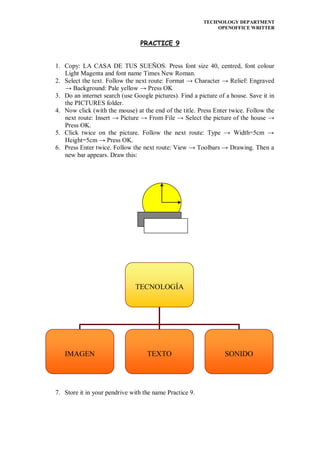
6. Press Enter twice. Follow the next route: View → Toolbars → Drawing. Then a
   new bar appears. Draw this:


                               TECNOLOGÍA


   IMAGEN                          TEXTO                         SONIDO


7. Store it in your pendrive with the name Practice 9.

Practice 9 (1º ESO)

  • 1.
    TECHNOLOGY DEPARTMENT OPENOFFICE WRITTER PRACTICE 9 1. Copy: LA CASA DE TUS SUEÑOS. Press font size 40, centred, font colour Light Magenta and font name Times New Roman. 2. Select the text. Follow the next route: Format → Character → Relief: Engraved → Background: Pale yellow → Press OK 3. Do an internet search (use Google pictures). Find a picture of a house. Save it in the PICTURES folder. 4. Now click (with the mouse) at the end of the title. Press Enter twice. Follow the next route: Insert → Picture → From File → Select the picture of the house → Press OK. 5. Click twice on the picture. Follow the next route: Type → Width=5cm → Height=5cm → Press OK. 6. Press Enter twice. Follow the next route: View → Toolbars → Drawing. Then a new bar appears. Draw this: TECNOLOGÍA IMAGEN TEXTO SONIDO 7. Store it in your pendrive with the name Practice 9.