1 Practical Guidance for Large Scale Migrations public
Practical Guidance for Large Scale Migrations 
SharePoint vNext: The true Story of a bulk migration 
Andries den HaanNovember 2014
A brief personal introduction 
•Working in IT since 1999 
•Passionate about portals, collaboration and social media 
•Certified expert on Microsoft SharePoint products and technologies 
•Focus on business processes optimization, platform infrastructure, migrations and governance 
•Contact details: 
•andries.denhaan@kpn.com 
•www.twitter.com/awdhaan 
•www.linkedin.com/in/andriesdenhaan 
•www.slideshare.net/awdhaan. 
3 Practical Guidance for Large Scale Migrations public
…and working at KPN Consulting 
•Veterans when it comes to the web, enterprise search, corporate portals, content management and information worker solutions 
•The current Web, Apps and Data team is the typical “Gallic village” within the greater KPN 
•Part of Application Services (ERP/Applications/Testing) 
•Not only SharePoint, but also: 
•Mobile Apps (TEDx Amsterdam, Bijenradar) 
•Application frameworks (Amber Alert) 
•Content management (Tridion, Orchard). 
4 Practical Guidance for Large Scale Migrations public
What you can expect from this session 
•A true story on how we approach(ed) large scale legacy SharePoint migration projects 
•How to deal with common pitfalls 
•Working with 3rdparty tools and extending them to fit our needs 
•Lessons learned on choices we’ve made and issues we solved along the way. 
5 Practical Guidance for Large Scale Migrations public
Agenda 
•Setting the scene 
•Our approach 
•Tooling choices 
•Challenges along the way 
•Lessons learned 
6 Practical Guidance for Large Scale Migrations public
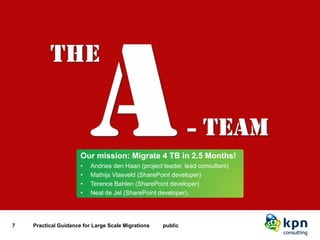
Our mission: “Migrate 4 TB in 2.5 Months!” 
7 Practical Guidance for Large Scale Migrations public 
Our mission: Migrate 4 TB in 2.5 Months! 
•Andries den Haan (project leader, lead consultant) 
•Mathijs Vlasveld (SharePoint developer) 
•Terence Bahlen (SharePoint developer) 
•Neal de Jel (SharePoint developer).
Prior to the project, a site survey was performed to gain insight on the state of things 
•Microsoft SharePoint Portal Server 2003 
•Some metrics: 
•3-tier topology (2 WFE’s, 1 APP) 
•Total data volume: 4.5 TB 
•Approx. 12.000 site collections 
•Data gathered via: 
•Microsoft tooling (stsadm) 
•Database queries (and being naughty by doing so) 
•Typical tooling (e.g. Windiff, SPSitemanager) 
•Server, web.configscan (manual ) 
•Site owner interviews (e.g. for special sites). 
8 Practical Guidance for Large Scale Migrations public
The site survey showed some interesting challenges to be expected during the migration 
•Support effort focused on availability 
•No governance model: 
•Unlimited site growth 
•2 GB file uploads possible 
•No blocked file types 
•Multiple site collections above 300 GB 
•Large sites within the same database 
•A fair amount of orphaned items 
•Custom site definitions and web parts (used in over 6.000 site collections). 
9 Practical Guidance for Large Scale Migrations public
Main project drivers 
10 Practical Guidance for Large Scale Migrations public 
Main project drivers: 
•Clean-up and restructure required 
•The existing SharePoint version was not able to keep up with evolving user requirements 
•Software and hardware end-of-life (duh!) 
•Improve on governance and support.
Customer expectations were straight forward! 
11 Practical Guidance for Large Scale Migrations public 
Customer expectations were straight forward!
The migration was to be finished before the end of the year! 
12 Practical Guidance for Large Scale Migrations public 
The migration was to be finished before the end of the year!
The urgency to migrate was also driven by the state 
13 Practical Guidance for Large Scale Migrations public 
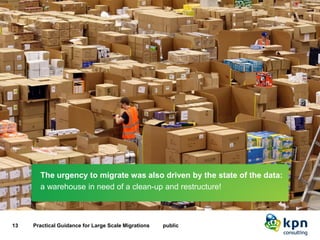
The urgency to migrate was also driven by the state of the data: 
a warehouse in need of a clean-up and restructure!
Our customer’s expectations were clear and simple, avoid disrupting daily business! 
14 Practical Guidance for Large Scale Migrations public 
Business continuity was key: 
Avoid disrupting daily business!
Risks 
15 Practical Guidance for Large Scale Migrations public 
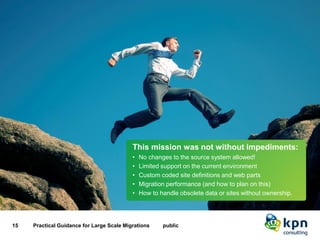
This mission was not without impediments: 
•No changes to the source system allowed! 
•Limited support on the current environment 
•Custom coded site definitions and web parts 
•Migration performance (and how to plan on this) 
•How to handle obsolete data or sites without ownership.
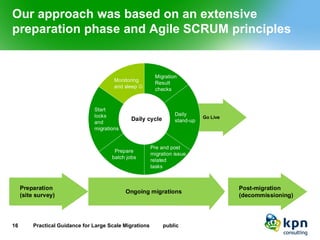
Our approach was based on an extensive preparation phase and Agile SCRUM principles 
16 Practical Guidance for Large Scale Migrations public 
Preparation(site survey) Go LiveStartlocks andmigrationsDailystand-upPreparebatch jobsPre and post migration issue relatedtasksMonitoring and sleep  MigrationResultchecksDaily cyclePost-migration(decommissioning) Ongoing migrations
Why did we choose 3rdparty tooling to support the migration? 
•No direct upgrade path from SharePoint Portal Server 2003 to SharePoint Server 2010 
•Required clean-up and restructure 
•Pressure to deliver within a short timeframe 
•Migration requirements: 
•Preservation of (system)metadata and permissions 
•Speed: optimize the throughput to meet our deadline 
•Mapping of old and new sites or definitions, content types, lists or web parts 
•Granularity (sometimes only a sub site/list/specific item may require migration) 
•Filtering (e.g. on date or other properties) 
•Support for full and incremental (bulk) migrations. 
17 Practical Guidance for Large Scale Migrations public
The AvePoint DocAve platform provided us with the tools needed to get the job done 
•Track record(including large scale Microsoft IT migration) 
•Rich set of migration (and content mgt.) capabilities 
•Acceptable software costs 
•Warm response to vendor inquiry 
•Handling of support requests prior and during the project. 
Extensions required to optimize the bulk migration process! 
18 Practical Guidance for Large Scale Migrations public
We built a custom batch builder tool to support planning and reporting of ongoing migrations 
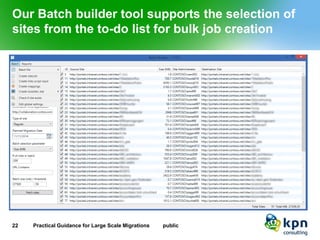
We extended the DocAve tooling to optimize bulk migration planning and reporting: 
•Import unscheduled sites from the migration to-do list matching the amount of data that could be processed within a service window 
•Choose target database (allowing for redistribution of site collections) 
•Create DocAve batch migration configuration job files for the selected sites 
•Check on potential issues prior to migration 
•Generate mapping files for automated redirects and various scripts 
•Read back migration job reports from DocAve and update the To-do list. 
19 Practical Guidance for Large Scale Migrations public
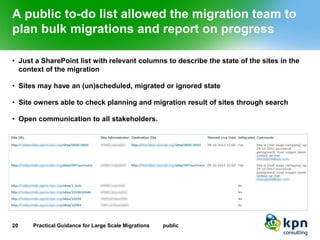
A public to-do list allowed the migration team to plan bulk migrations and report on progress 
•Just a SharePoint list with relevant columns to describe the state of the sites in the context of the migration 
•Sites may have an (un)scheduled, migrated or ignored state 
•Site owners able to check planning and migration result of sites through search 
•Open communication to all stakeholders. 
20 Practical Guidance for Large Scale Migrations public
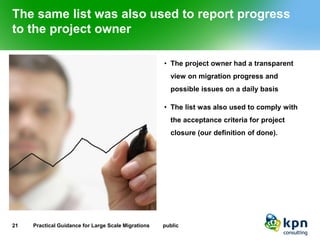
The same list was also used to report progress to the project owner 
•The project owner had a transparent view on migration progress and possible issues on a daily basis 
•The list was also used to comply with the acceptance criteria for project closure (our definition of done). 
21 Practical Guidance for Large Scale Migrations public
Our Batch builder tool supports the selection of sites from the to-do list for bulk job creation 
22 Practical Guidance for Large Scale Migrations public
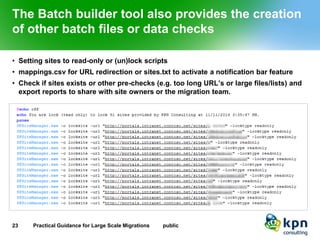
The Batch builder tool also provides the creation of other batch files or data checks 
•Setting sites to read-only or (un)lock scripts 
•mappings.csv for URL redirection or sites.txt to activate a notification bar feature 
•Check if sites exists or other pre-checks (e.g. too long URL’s or large files/lists) and export reports to share with site owners or the migration team. 
23 Practical Guidance for Large Scale Migrations public
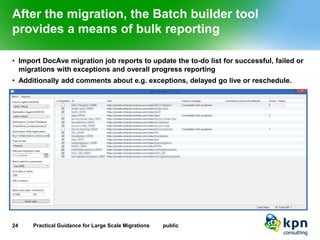
After the migration, the Batch builder tool provides a means of bulk reporting 
•Import DocAve migration job reports to update the to-do list for successful, failed or migrations with exceptions and overall progress reporting 
•Additionally add comments about e.g. exceptions, delayed go live or reschedule. 
24 Practical Guidance for Large Scale Migrations public
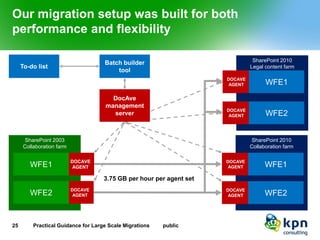
Our migration setup was built for both performance and flexibility 
25 Practical Guidance for Large Scale Migrations public 
SharePoint 2003 
Collaboration farm 
DOCAVE 
AGENT 
DOCAVE 
AGENT 
Batch builder tool 
SharePoint 2010 
Collaboration farm 
DOCAVE 
AGENT 
DOCAVE 
AGENT 
WFE1 
WFE2 
WFE1 
WFE2 
3.75 GB per hour per agent set 
To-do list 
SharePoint 2010Legal content farm 
DOCAVE 
AGENT 
DOCAVE 
AGENT 
WFE1 
WFE2 
DocAve management server
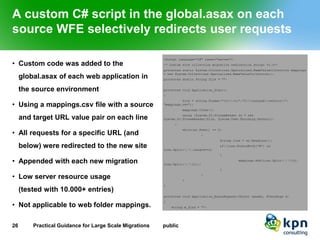
A custom C# script in the global.asax on each source WFE selectively redirects user requests 
•Custom code was added to the global.asax of each web application in the source environment 
•Using a mappings.csv file with a source and target URL value pair on each line 
•All requests for a specific URL (and below) were redirected to the new site 
•Appended with each new migration 
•Low server resource usage(tested with 10.000+ entries) 
•Not applicable to web folder mappings. 
26 Practical Guidance for Large Scale Migrations public
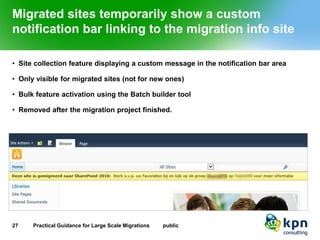
Migrated sites temporarily show a custom notification bar linking to the migration info site 
•Site collection feature displaying a custom message in the notification bar area 
•Only visible for migrated sites (not for new ones) 
•Bulk feature activation using the Batch builder tool 
•Removed after the migration project finished. 
27 Practical Guidance for Large Scale Migrations public
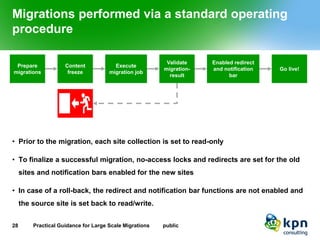
Migrations performed via a standard operating procedure 
•Prior to the migration, each site collection is set to read-only 
•To finalize a successful migration, no-access locks and redirects are set for the old sites and notification bars enabled for the new sites 
•In case of a roll-back, the redirect and notification bar functions are not enabled and the source site is set back to read/write. 
28 Practical Guidance for Large Scale Migrations public 
Content freeze 
Execute migration job 
Enabled redirect and notification bar 
Go live! 
Validate migration- result 
Prepare migrations
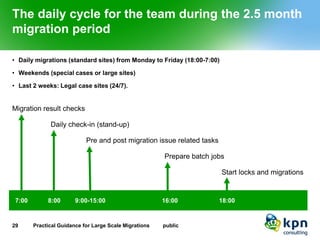
The daily cycle for the team during the 2.5 month migration period 
•Daily migrations (standard sites) from Monday to Friday (18:00-7:00) 
•Weekends (special cases or large sites) 
•Last 2 weeks: Legal case sites (24/7). 
29 Practical Guidance for Large Scale Migrations public 
7:00 
8:00 
16:00 
9:00-15:00 
Migration result checks 
Daily check-in (stand-up) 
Pre and post migration issue related tasks 
Prepare batch jobs 
18:00 
Start locks and migrations
Our challenges and solutions 
30 Practical Guidance for Large Scale Migrations public 
Common challenges along the way: 
•Extra large file uploads not possible in the new farm 
•Blocked file types (so MP3’s, .EXE files, VB scripts, …) 
•Supersized site collections (over 200 GB) 
•Large lists (slow migration).
But we also had some unexpected challenges 
For reasons still unknown the migration of a large site collection (100+ webs) had an unexpected result: 
•Each library URL in the site collection was named after the first folder or item within that library 
•Resolved by using a database query (being naughty again ) in the source system to get the original library URL’s and PowerShell to “system”updatethe library URL’s in bulk ($list.RootFolder.MoveTo($listUrl)) 
•Apart from this the migration was successful . 
31 Practical Guidance for Large Scale Migrations public
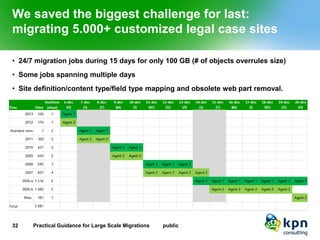
We saved the biggest challenge for last: migrating 5.000+ customized legal case sites 
•24/7 migration jobs during 15 days for only 100 GB (# of objects overrules size) 
•Some jobs spanning multiple days 
•Site definition/content type/field type mapping and obsolete web part removal. 
32 Practical Guidance for Large Scale Migrations public
Highlights of a successful project 
•2.220 sites (4.1 TB) migrated in 2.5 months 
•5.681 customized sites migrated within the last 2 weeks 
•Creative solutions for (un)expected challenges 
•Project delivery within time and budget 
•Effective collaboration with the other teams: 
•Adaptation 
•Infrastructure 
•Offshore support 
•AvePoint support. 
33 Practical Guidance for Large Scale Migrations public
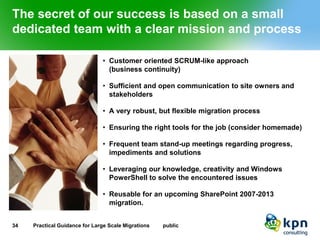
The secret of our success is based on a small dedicated team with a clear mission and process 
•Customer oriented SCRUM-like approach(business continuity) 
•Sufficient and open communication to site owners and stakeholders 
•A very robust, but flexible migration process 
•Ensuring the right tools for the job (consider homemade) 
•Frequent team stand-up meetings regarding progress, impediments and solutions 
•Leveraging our knowledge, creativity and Windows PowerShell to solve the encountered issues 
•Reusable for an upcoming SharePoint 2007-2013 migration. 
34 Practical Guidance for Large Scale Migrations public
Connect | Share | Discover 
Would you like to know more? 
andries.denhaan@kpn.com
36 Practical Guidance for Large Scale Migrations public

Practical large scale migration guidance

  • 1.
    1 Practical Guidancefor Large Scale Migrations public
  • 2.
    Practical Guidance forLarge Scale Migrations SharePoint vNext: The true Story of a bulk migration Andries den HaanNovember 2014
  • 3.
    A brief personalintroduction •Working in IT since 1999 •Passionate about portals, collaboration and social media •Certified expert on Microsoft SharePoint products and technologies •Focus on business processes optimization, platform infrastructure, migrations and governance •Contact details: •andries.denhaan@kpn.com •www.twitter.com/awdhaan •www.linkedin.com/in/andriesdenhaan •www.slideshare.net/awdhaan. 3 Practical Guidance for Large Scale Migrations public
  • 4.
    …and working atKPN Consulting •Veterans when it comes to the web, enterprise search, corporate portals, content management and information worker solutions •The current Web, Apps and Data team is the typical “Gallic village” within the greater KPN •Part of Application Services (ERP/Applications/Testing) •Not only SharePoint, but also: •Mobile Apps (TEDx Amsterdam, Bijenradar) •Application frameworks (Amber Alert) •Content management (Tridion, Orchard). 4 Practical Guidance for Large Scale Migrations public
  • 5.
    What you canexpect from this session •A true story on how we approach(ed) large scale legacy SharePoint migration projects •How to deal with common pitfalls •Working with 3rdparty tools and extending them to fit our needs •Lessons learned on choices we’ve made and issues we solved along the way. 5 Practical Guidance for Large Scale Migrations public
  • 6.
    Agenda •Setting thescene •Our approach •Tooling choices •Challenges along the way •Lessons learned 6 Practical Guidance for Large Scale Migrations public
  • 7.
    Our mission: “Migrate4 TB in 2.5 Months!” 7 Practical Guidance for Large Scale Migrations public Our mission: Migrate 4 TB in 2.5 Months! •Andries den Haan (project leader, lead consultant) •Mathijs Vlasveld (SharePoint developer) •Terence Bahlen (SharePoint developer) •Neal de Jel (SharePoint developer).
  • 8.
    Prior to theproject, a site survey was performed to gain insight on the state of things •Microsoft SharePoint Portal Server 2003 •Some metrics: •3-tier topology (2 WFE’s, 1 APP) •Total data volume: 4.5 TB •Approx. 12.000 site collections •Data gathered via: •Microsoft tooling (stsadm) •Database queries (and being naughty by doing so) •Typical tooling (e.g. Windiff, SPSitemanager) •Server, web.configscan (manual ) •Site owner interviews (e.g. for special sites). 8 Practical Guidance for Large Scale Migrations public
  • 9.
    The site surveyshowed some interesting challenges to be expected during the migration •Support effort focused on availability •No governance model: •Unlimited site growth •2 GB file uploads possible •No blocked file types •Multiple site collections above 300 GB •Large sites within the same database •A fair amount of orphaned items •Custom site definitions and web parts (used in over 6.000 site collections). 9 Practical Guidance for Large Scale Migrations public
  • 10.
    Main project drivers 10 Practical Guidance for Large Scale Migrations public Main project drivers: •Clean-up and restructure required •The existing SharePoint version was not able to keep up with evolving user requirements •Software and hardware end-of-life (duh!) •Improve on governance and support.
  • 11.
    Customer expectations werestraight forward! 11 Practical Guidance for Large Scale Migrations public Customer expectations were straight forward!
  • 12.
    The migration wasto be finished before the end of the year! 12 Practical Guidance for Large Scale Migrations public The migration was to be finished before the end of the year!
  • 13.
    The urgency tomigrate was also driven by the state 13 Practical Guidance for Large Scale Migrations public The urgency to migrate was also driven by the state of the data: a warehouse in need of a clean-up and restructure!
  • 14.
    Our customer’s expectationswere clear and simple, avoid disrupting daily business! 14 Practical Guidance for Large Scale Migrations public Business continuity was key: Avoid disrupting daily business!
  • 15.
    Risks 15 PracticalGuidance for Large Scale Migrations public This mission was not without impediments: •No changes to the source system allowed! •Limited support on the current environment •Custom coded site definitions and web parts •Migration performance (and how to plan on this) •How to handle obsolete data or sites without ownership.
  • 16.
    Our approach wasbased on an extensive preparation phase and Agile SCRUM principles 16 Practical Guidance for Large Scale Migrations public Preparation(site survey) Go LiveStartlocks andmigrationsDailystand-upPreparebatch jobsPre and post migration issue relatedtasksMonitoring and sleep  MigrationResultchecksDaily cyclePost-migration(decommissioning) Ongoing migrations
  • 17.
    Why did wechoose 3rdparty tooling to support the migration? •No direct upgrade path from SharePoint Portal Server 2003 to SharePoint Server 2010 •Required clean-up and restructure •Pressure to deliver within a short timeframe •Migration requirements: •Preservation of (system)metadata and permissions •Speed: optimize the throughput to meet our deadline •Mapping of old and new sites or definitions, content types, lists or web parts •Granularity (sometimes only a sub site/list/specific item may require migration) •Filtering (e.g. on date or other properties) •Support for full and incremental (bulk) migrations. 17 Practical Guidance for Large Scale Migrations public
  • 18.
    The AvePoint DocAveplatform provided us with the tools needed to get the job done •Track record(including large scale Microsoft IT migration) •Rich set of migration (and content mgt.) capabilities •Acceptable software costs •Warm response to vendor inquiry •Handling of support requests prior and during the project. Extensions required to optimize the bulk migration process! 18 Practical Guidance for Large Scale Migrations public
  • 19.
    We built acustom batch builder tool to support planning and reporting of ongoing migrations We extended the DocAve tooling to optimize bulk migration planning and reporting: •Import unscheduled sites from the migration to-do list matching the amount of data that could be processed within a service window •Choose target database (allowing for redistribution of site collections) •Create DocAve batch migration configuration job files for the selected sites •Check on potential issues prior to migration •Generate mapping files for automated redirects and various scripts •Read back migration job reports from DocAve and update the To-do list. 19 Practical Guidance for Large Scale Migrations public
  • 20.
    A public to-dolist allowed the migration team to plan bulk migrations and report on progress •Just a SharePoint list with relevant columns to describe the state of the sites in the context of the migration •Sites may have an (un)scheduled, migrated or ignored state •Site owners able to check planning and migration result of sites through search •Open communication to all stakeholders. 20 Practical Guidance for Large Scale Migrations public
  • 21.
    The same listwas also used to report progress to the project owner •The project owner had a transparent view on migration progress and possible issues on a daily basis •The list was also used to comply with the acceptance criteria for project closure (our definition of done). 21 Practical Guidance for Large Scale Migrations public
  • 22.
    Our Batch buildertool supports the selection of sites from the to-do list for bulk job creation 22 Practical Guidance for Large Scale Migrations public
  • 23.
    The Batch buildertool also provides the creation of other batch files or data checks •Setting sites to read-only or (un)lock scripts •mappings.csv for URL redirection or sites.txt to activate a notification bar feature •Check if sites exists or other pre-checks (e.g. too long URL’s or large files/lists) and export reports to share with site owners or the migration team. 23 Practical Guidance for Large Scale Migrations public
  • 24.
    After the migration,the Batch builder tool provides a means of bulk reporting •Import DocAve migration job reports to update the to-do list for successful, failed or migrations with exceptions and overall progress reporting •Additionally add comments about e.g. exceptions, delayed go live or reschedule. 24 Practical Guidance for Large Scale Migrations public
  • 25.
    Our migration setupwas built for both performance and flexibility 25 Practical Guidance for Large Scale Migrations public SharePoint 2003 Collaboration farm DOCAVE AGENT DOCAVE AGENT Batch builder tool SharePoint 2010 Collaboration farm DOCAVE AGENT DOCAVE AGENT WFE1 WFE2 WFE1 WFE2 3.75 GB per hour per agent set To-do list SharePoint 2010Legal content farm DOCAVE AGENT DOCAVE AGENT WFE1 WFE2 DocAve management server
  • 26.
    A custom C#script in the global.asax on each source WFE selectively redirects user requests •Custom code was added to the global.asax of each web application in the source environment •Using a mappings.csv file with a source and target URL value pair on each line •All requests for a specific URL (and below) were redirected to the new site •Appended with each new migration •Low server resource usage(tested with 10.000+ entries) •Not applicable to web folder mappings. 26 Practical Guidance for Large Scale Migrations public
  • 27.
    Migrated sites temporarilyshow a custom notification bar linking to the migration info site •Site collection feature displaying a custom message in the notification bar area •Only visible for migrated sites (not for new ones) •Bulk feature activation using the Batch builder tool •Removed after the migration project finished. 27 Practical Guidance for Large Scale Migrations public
  • 28.
    Migrations performed viaa standard operating procedure •Prior to the migration, each site collection is set to read-only •To finalize a successful migration, no-access locks and redirects are set for the old sites and notification bars enabled for the new sites •In case of a roll-back, the redirect and notification bar functions are not enabled and the source site is set back to read/write. 28 Practical Guidance for Large Scale Migrations public Content freeze Execute migration job Enabled redirect and notification bar Go live! Validate migration- result Prepare migrations
  • 29.
    The daily cyclefor the team during the 2.5 month migration period •Daily migrations (standard sites) from Monday to Friday (18:00-7:00) •Weekends (special cases or large sites) •Last 2 weeks: Legal case sites (24/7). 29 Practical Guidance for Large Scale Migrations public 7:00 8:00 16:00 9:00-15:00 Migration result checks Daily check-in (stand-up) Pre and post migration issue related tasks Prepare batch jobs 18:00 Start locks and migrations
  • 30.
    Our challenges andsolutions 30 Practical Guidance for Large Scale Migrations public Common challenges along the way: •Extra large file uploads not possible in the new farm •Blocked file types (so MP3’s, .EXE files, VB scripts, …) •Supersized site collections (over 200 GB) •Large lists (slow migration).
  • 31.
    But we alsohad some unexpected challenges For reasons still unknown the migration of a large site collection (100+ webs) had an unexpected result: •Each library URL in the site collection was named after the first folder or item within that library •Resolved by using a database query (being naughty again ) in the source system to get the original library URL’s and PowerShell to “system”updatethe library URL’s in bulk ($list.RootFolder.MoveTo($listUrl)) •Apart from this the migration was successful . 31 Practical Guidance for Large Scale Migrations public
  • 32.
    We saved thebiggest challenge for last: migrating 5.000+ customized legal case sites •24/7 migration jobs during 15 days for only 100 GB (# of objects overrules size) •Some jobs spanning multiple days •Site definition/content type/field type mapping and obsolete web part removal. 32 Practical Guidance for Large Scale Migrations public
  • 33.
    Highlights of asuccessful project •2.220 sites (4.1 TB) migrated in 2.5 months •5.681 customized sites migrated within the last 2 weeks •Creative solutions for (un)expected challenges •Project delivery within time and budget •Effective collaboration with the other teams: •Adaptation •Infrastructure •Offshore support •AvePoint support. 33 Practical Guidance for Large Scale Migrations public
  • 34.
    The secret ofour success is based on a small dedicated team with a clear mission and process •Customer oriented SCRUM-like approach(business continuity) •Sufficient and open communication to site owners and stakeholders •A very robust, but flexible migration process •Ensuring the right tools for the job (consider homemade) •Frequent team stand-up meetings regarding progress, impediments and solutions •Leveraging our knowledge, creativity and Windows PowerShell to solve the encountered issues •Reusable for an upcoming SharePoint 2007-2013 migration. 34 Practical Guidance for Large Scale Migrations public
  • 35.
    Connect | Share| Discover Would you like to know more? andries.denhaan@kpn.com
  • 36.
    36 Practical Guidancefor Large Scale Migrations public