School Of Computing Science & Engineering
Programming with Python
Overview of Python
Programming
Galgotias University, Greater Noida
 Looping
Outline
 Introduction to python
 Installing python
 Hello World program using python
 Data types
 Variables
 Expressions
 Functions
 String
 List
 Tuple
 Set
 Dictionary
 Functions
 Unit 01 – Overview of Python 3
Introduction to Python
• Python is an open source, interpreted, high-level, general-purpose programming
language.
• Python's design philosophy emphasizes code readability with its notable use of
significant whitespace.
• Python is dynamically typed and garbage-collected language.
• Python was conceived in the late 1980s as a successor to the ABC language.
• Python was Created by Guido van Rossum and first released in 1991.
• Python 2.0, released in 2000,
• introduced features like list comprehensions and a garbage collection system with
reference counting.
• Python 3.0 released in 2008 and current version of python is 3.8.3 (as of June-
2020).
• The Python 2 language was officially discontinued in 2020
 Unit 01 – Overview of Python 4
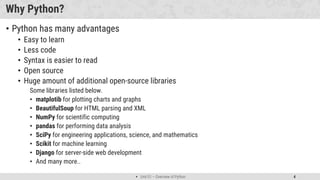
Why Python?
• Python has many advantages
• Easy to learn
• Less code
• Syntax is easier to read
• Open source
• Huge amount of additional open-source libraries
Some libraries listed below.
• matplotib for plotting charts and graphs
• BeautifulSoup for HTML parsing and XML
• NumPy for scientific computing
• pandas for performing data analysis
• SciPy for engineering applications, science, and mathematics
• Scikit for machine learning
• Django for server-side web development
• And many more..
 Unit 01 – Overview of Python 5
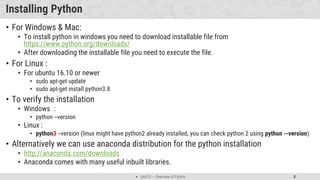
Installing Python
• For Windows & Mac:
• To install python in windows you need to download installable file from
https://www.python.org/downloads/
• After downloading the installable file you need to execute the file.
• For Linux :
• For ubuntu 16.10 or newer
• sudo apt-get update
• sudo apt-get install python3.8
• To verify the installation
• Windows :
• python --version
• Linux :
• python3 --version (linux might have python2 already installed, you can check python 2 using python --version)
• Alternatively we can use anaconda distribution for the python installation
• http://anaconda.com/downloads
• Anaconda comes with many useful inbuilt libraries.
 Unit 01 – Overview of Python 6
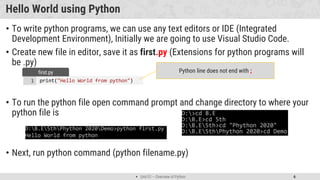
Hello World using Python
• To write python programs, we can use any text editors or IDE (Integrated
Development Environment), Initially we are going to use Visual Studio Code.
• Create new file in editor, save it as first.py (Extensions for python programs will
be .py)
• To run the python file open command prompt and change directory to where your
python file is
• Next, run python command (python filename.py)
print("Hello World from python")
1
first.py Python line does not end with ;
 Unit 01 – Overview of Python 7
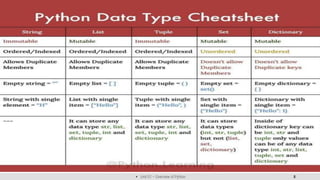
Data types in Python
Name Type Description
Data Types
Integer Int Whole number such as 0,1,5, -5 etc..
Float Float Numbers with decimal points such as 1.5, 7.9, -8.2 etc..
String Str Sequence of character (Ordered) such as “Galgotias”, ‘University’, “Greater Noida” etc..
Boolean Bool Logical values indicating True or False (T and F here are capital in python)
Data Structures
List list
Ordered Sequence of objects, will be represented with square brackets [ ]
Example : [ 18, “galgotias”, True, 102.3 ]
Tuple tup
Ordered immutable sequence of objects, will be represented with round brackets ( )
Example : ( 18, “galgotias”, True, 102.3 )
Set set
Unordered collection of unique objects, will be represented with the curly brackets { }
Example : { 18, “galgotias”, True, 102.3 }
Dictionary dict
Unordered key : value pair of objects , will be represented with curly brackets { }
Example : { “college”: “galgotias”, “course”: “MCA” }
 Unit 01 – Overview of Python 8
 Unit 01 – Overview of Python 9
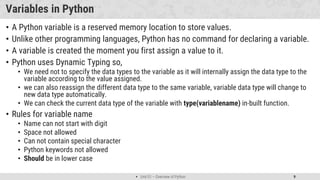
Variables in Python
• A Python variable is a reserved memory location to store values.
• Unlike other programming languages, Python has no command for declaring a variable.
• A variable is created the moment you first assign a value to it.
• Python uses Dynamic Typing so,
• We need not to specify the data types to the variable as it will internally assign the data type to the
variable according to the value assigned.
• we can also reassign the different data type to the same variable, variable data type will change to
new data type automatically.
• We can check the current data type of the variable with type(variablename) in-built function.
• Rules for variable name
• Name can not start with digit
• Space not allowed
• Can not contain special character
• Python keywords not allowed
• Should be in lower case
 Unit 01 – Overview of Python 10
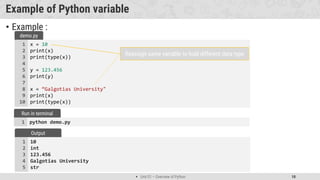
Example of Python variable
• Example :
x = 10
print(x)
print(type(x))
y = 123.456
print(y)
x = “Galgotias University"
print(x)
print(type(x))
1
2
3
4
5
6
7
8
9
10
demo.py
python demo.py
1
Run in terminal
10
int
123.456
Galgotias University
str
1
2
3
4
5
Output
Reassign same variable to hold different data type
 Unit 01 – Overview of Python 11
String in python
• String is Ordered Sequence of character such as “Galgotias”, ‘University’, “Greater
Noida” etc..
• Strings are arrays of bytes representing Unicode characters.
• String can be represented as single, double or triple quotes.
• String with triple Quotes allows multiple lines.
• String in python is immutable.
• Square brackets can be used to access elements of the string, Ex. “Galgotia”[1] =
a, characters can also be accessed with reverse index like “Galgotia”[-1] = a.
x = " G a l g o t i a "
index = 0 1 2 3 4 5 6 7
Reverse index = -8 -7 -6 -5 -4 -3 -2 -1
String index
 Unit 01 – Overview of Python 12
String functions in python
• Python has lots of built-in methods that you can use on strings, we are going to
cover some frequently used methods for string like
• len()
• count()
• capitalize(), lower(), upper()
• istitle(), islower(), isupper()
• find(), rfind(), replace()
• index(), rindex()
• Methods for validations like
• isalpha(), isalnum(), isdecimal(), isdigit()
• strip(), lstrip(), rstrip()
• Etc..
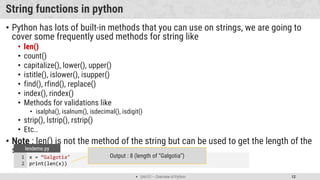
• Note : len() is not the method of the string but can be used to get the length of the
string
x = “Galgotia"
print(len(x))
1
2
lendemo.py
Output : 8 (length of “Galgotia”)
 Unit 01 – Overview of Python 13
String methods (cont.)
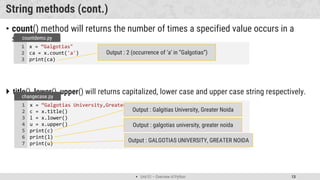
• count() method will returns the number of times a specified value occurs in a
string.
 title(), lower(), upper() will returns capitalized, lower case and upper case string respectively.
x = “Galgotias"
ca = x.count('a')
print(ca)
1
2
3
countdemo.py
Output : 2 (occurrence of ‘a’ in “Galgotias”)
x = “Galgotias University,Greater Noida"
c = x.title()
l = x.lower()
u = x.upper()
print(c)
print(l)
print(u)
1
2
3
4
5
6
7
changecase.py
Output : Galgitias University, Greater Noida
Output : galgotias university, greater noida
Output : GALGOTIAS UNIVERSITY, GREATER NOIDA
 Unit 01 – Overview of Python 14
String methods (cont.)
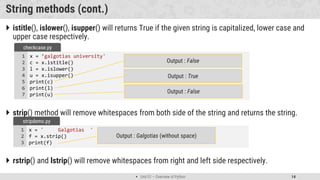
 istitle(), islower(), isupper() will returns True if the given string is capitalized, lower case and
upper case respectively.
 strip() method will remove whitespaces from both side of the string and returns the string.
 rstrip() and lstrip() will remove whitespaces from right and left side respectively.
x = ' Galgotias '
f = x.strip()
print(f)
1
2
3
stripdemo.py
Output : Galgotias (without space)
x = ’galgotias university'
c = x.istitle()
l = x.islower()
u = x.isupper()
print(c)
print(l)
print(u)
1
2
3
4
5
6
7
checkcase.py
Output : False
Output : True
Output : False
 Unit 01 – Overview of Python 15
String methods (cont.)
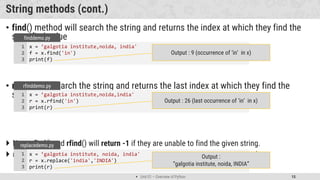
• find() method will search the string and returns the index at which they find the
specified value
• rfind() will search the string and returns the last index at which they find the
specified value
 Note : find() and rfind() will return -1 if they are unable to find the given string.
 replace() will replace str1 with str2 from our string and return the updated string
x = ’galgotia institute,noida, india'
f = x.find('in')
print(f)
1
2
3
finddemo.py
Output : 9 (occurrence of ‘in’ in x)
x = ’galgotia institute,noida,india'
r = x.rfind('in')
print(r)
1
2
3
rfinddemo.py
Output : 26 (last occurrence of ‘in’ in x)
x = ’galgotia institute, noida, india'
r = x.replace('india','INDIA')
print(r)
1
2
3
replacedemo.py
Output :
“galgotia institute, noida, INDIA”
 Unit 01 – Overview of Python 16
String methods (cont.)
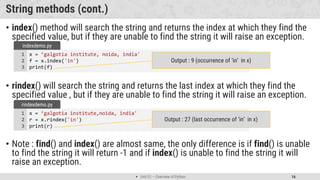
• index() method will search the string and returns the index at which they find the
specified value, but if they are unable to find the string it will raise an exception.
• rindex() will search the string and returns the last index at which they find the
specified value , but if they are unable to find the string it will raise an exception.
• Note : find() and index() are almost same, the only difference is if find() is unable
to find the string it will return -1 and if index() is unable to find the string it will
raise an exception.
x = ’galgotia institute, noida, india'
f = x.index('in')
print(f)
1
2
3
indexdemo.py
Output : 9 (occurrence of ‘in’ in x)
x = ’galgotia institute,noida, india'
r = x.rindex('in')
print(r)
1
2
3
rindexdemo.py
Output : 27 (last occurrence of ‘in’ in x)
 Unit 01 – Overview of Python 17
String methods (cont.)
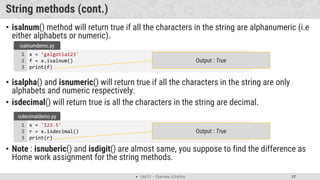
• isalnum() method will return true if all the characters in the string are alphanumeric (i.e
either alphabets or numeric).
• isalpha() and isnumeric() will return true if all the characters in the string are only
alphabets and numeric respectively.
• isdecimal() will return true is all the characters in the string are decimal.
• Note : isnuberic() and isdigit() are almost same, you suppose to find the difference as
Home work assignment for the string methods.
x = ’galgotia123'
f = x.isalnum()
print(f)
1
2
3
isalnumdemo.py
Output : True
x = '123.5'
r = x.isdecimal()
print(r)
1
2
3
isdecimaldemo.py
Output : True
 Unit 01 – Overview of Python 18
String Slicing
• We can get the substring in python using string slicing, we can specify start index,
end index and steps (colon separated) to slice the string.
x = ’galgotia institute of engineering and technology, noida, up, INDIA'
subx = x[startindex:endindex:steps]
syntax
x = ’galgotia institute of engineering and technology, noida, up, INDIA'
subx1 = x[0:8]
subx2 = x[49:54]
subx3 = x[62:]
subx4 = x[::2]
subx5 = x[::-1]
print(subx1)
print(subx2)
print(subx3)
print(subx4)
print(subx5)
1
2
3
4
5
6
7
8
9
10
11
strslicedemo.py
Output : galgotia
endindex will not be included in the substring
Output : noida
Output : INDIA
Output : gloi nttt fegneigadtcnlg,nia p NI
Output : AIDNI ,pu ,adion ,ygolonhcet dna gnireenigne fo etutitsni aitoglag
 Unit 01 – Overview of Python 19
String print format
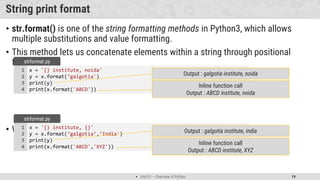
• str.format() is one of the string formatting methods in Python3, which allows
multiple substitutions and value formatting.
• This method lets us concatenate elements within a string through positional
formatting.
• We can specify multiple parameters to the function
x = '{} institute, noida'
y = x.format(‘galgotia')
print(y)
print(x.format('ABCD'))
1
2
3
4
strformat.py
Output : galgotia institute, noida
Inline function call
Output : ABCD institute, noida
x = '{} institute, {}'
y = x.format(‘galgotia’,’India')
print(y)
print(x.format('ABCD','XYZ'))
1
2
3
4
strformat.py
Output : galgotia institute, india
Inline function call
Output : ABCD institute, XYZ
 Unit 01 – Overview of Python 20
String print format (cont.)
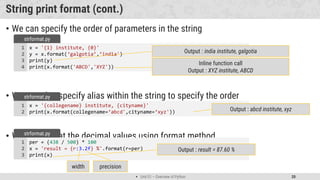
• We can specify the order of parameters in the string
• We can also specify alias within the string to specify the order
• We can format the decimal values using format method
x = '{1} institute, {0}'
y = x.format(‘galgotia’,’india')
print(y)
print(x.format('ABCD','XYZ'))
1
2
3
4
strformat.py
Output : india institute, galgotia
Inline function call
Output : XYZ institute, ABCD
x = '{collegename} institute, {cityname}'
print(x.format(collegename=‘abcd',cityname=‘xyz'))
1
2
strformat.py
Output : abcd institute, xyz
per = (438 / 500) * 100
x = 'result = {r:3.2f} %'.format(r=per)
print(x)
1
2
3
strformat.py
Output : result = 87.60 %
width precision
 Unit 01 – Overview of Python 21
Data structures in python
• There are four built-in data structures in Python - list, dictionary, tuple and set.
• Lets explore all the data structures in detail…
Name Type Description
List list
Ordered Sequence of objects, will be represented with square brackets [ ]
Example : [ 18, “abcd”, True, 102.3 ]
Dictionary dict
Unordered key : value pair of objects , will be represented with curly brackets { }
Example : { “college”: “abcd”, “code”: “054” }
Tuple tup
Ordered immutable sequence of objects, will be represented with round brackets ( )
Example : ( 18, “abcd”, True, 102.3 )
Set set
Unordered collection of unique objects, will be represented with the curly brackets { }
Example : { 18, “abcd”, True, 102.3 }
 Unit 01 – Overview of Python 22
List
• List is a mutable ordered sequence of objects, duplicate values are allowed inside
list.
• List will be represented by square brackets [ ].
• Python does not have array, List can be used similar to Array.
• We can use slicing similar to string in order to get the sub list from the list.
my_list = [‘abcdefg’, ’institute', ’nida']
print(my_list[1])
print(len(my_list))
my_list[2] = ”noida"
print(my_list)
print(my_list[-1])
1
2
3
4
5
6
list.py
Output : 3 (length of the List)
Output : institute (List index starts with 0)
Output : [‘abcdefg', 'institute', ‘noida']
Note : spelling of noida is updated
my_list = [‘galgotia', 'institute’, ’noida’,’up','INDIA']
print(my_list[1:3])
1
2
list.py
Output : ['institute', ‘noida]
Note : end index not included
Output : Noida (-1 represent last element)
 Unit 01 – Overview of Python 23
List methods
• append() method will add element at the end of the list.
• insert() method will add element at the specified index in the list
• extend() method will add one data structure (List or any) to current List
my_list = [‘galgotia', 'institute', ’noida']
my_list.append(‘up')
print(my_list)
1
2
3
appendlistdemo.py
Output : [‘galgotia', 'institute', ‘noida', ‘up']
my_list = [galgotia', 'institute', ’noida ']
my_list.insert(2,'of')
my_list.insert(3,'engineering')
print(my_list)
1
2
3
4
insertlistdemo.py
Output : [‘galgotia', 'institute', 'of', 'engineering', ‘noida']
my_list1 = [‘galgotia', 'institute']
my_list2 = [‘noida’,’up']
my_list1.extend(my_list2)
print(my_list1)
1
2
3
4
extendlistdemo.py
Output : [‘galgotia', 'institute’, ‘noida’, ‘up']
 Unit 01 – Overview of Python 24
List methods (cont.)
• pop() method will remove the last element from the list and return it.
• remove() method will remove first occurrence of specified element
• clear() method will remove all the elements from the List
• index() method will return first index of the specified element.
my_list = [‘galgotia', 'institute', ’noida ']
temp = my_list.pop()
print(temp)
print(my_list)
1
2
3
4
poplistdemo.py
Output : noida
my_list = [‘galgotia', 'institute’,’galgotia ’noida ']
my_list.remove(‘galgotia')
print(my_list)
1
2
3
removelistdemo.py
Output : ['institute', ‘galgotia', ‘noida']
my_list = [‘galgotia', 'institute’,’galgotia ’noida ']
my_list.clear()
print(my_list)
1
2
3
clearlistdemo.py
Output : []
Output : [‘galgotia', 'institute‘]
 Unit 01 – Overview of Python 25
List methods (cont.)
• count() method will return the number of occurrence of the specified element.
• reverse() method will reverse the elements of the List
• sort() method will sort the elements in the List
my_list = [‘abc', 'institute', ’abc’,’xyz]
c = my_list.count(‘abc')
print(c)
1
2
3
countlistdemo.py
Output : 2
my_list = [‘abc', 'institute’,’xyz']
my_list.reverse()
print(my_list)
1
2
3
reverselistdemo.py
Output : [‘xyz', ‘institute’,’abc']
my_list = [galgotia', 'institute’,’galgotia ’noida ']
my_list.sort()
print(my_list)
my_list.sort(reverse=True)
print(my_list)
1
2
3
4
5
sortlistdemo.py
Output : [‘galgotia', ‘galgotia', ‘institute', ‘noida']
Output : [‘Noida’, 'institute’,galgotia’,
galgotia ']
 Unit 01 – Overview of Python 26
Tuple
• Tuple is a immutable ordered sequence of objects, duplicate values are allowed
inside list.
• Tuple will be represented by round brackets ( ).
• Tuple is similar to List but List is mutable whearas Tuple is immutable.
my_tuple = (‘abcd','institute','of','engineering',’noida')
print(my_tuple)
print(my_tuple.index('engineering'))
print(my_tuple.count('of'))
print(my_tuple[-1])
1
2
3
4
5
tupledemo.py
Output : 3 (index of ‘engineering’)
Output : (‘abc', 'institute', 'of', 'engineering', '‘noida’)
Output : 2
Output : noida
 Unit 01 – Overview of Python 27
Dictionary
• Dictionary is a unordered collection of key value pairs.
• Dictionary will be represented by curly brackets { }.
• Dictionary is mutable.
my_dict = {'college’: ‘abcd’, 'city’: ‘Noida’, 'type':"engineering"}
print(my_dict['college'])
print(my_dict.get('city'))
1
2
3
dictdemo.py
values can be accessed using key inside square brackets
as well as using get() method
Output : abcd
noida
my_dict = { 'key1':'value1', 'key2':'value2' }
syntax
Key value is seperated by : Key value pairs is seperated by ,
 Unit 01 – Overview of Python 28
Dictionary methods
• keys() method will return list of all the keys associated with the Dictionary.
• values() method will return list of all the values associated with the Dictionary.
• items() method will return list of tuples for each key value pair associated with the
Dictionary.
my_dict = {'college’: ‘abcd’, 'city’: ‘indore’,'type’: ‘engineering’}
print(my_dict.keys())
1
2
keydemo.py
my_dict = {'college’: ‘abcd’, 'city’: ‘indore’,'type’: ‘engineering’}
print(my_dict.values())
1
2
valuedemo.py
Output : [‘abcd', ‘indore', 'engineering']
my_dict = {'college’: ‘abcd’, 'city’: ‘indore’,'type’: ‘engineering’}
print(my_dict.items())
1
2
itemsdemo.py
Output : [('college', ‘abcd'), ('city', ‘indore), ('type',
'engineering')]
Output : ['college', 'city', 'type']
 Unit 01 – Overview of Python 29
Set
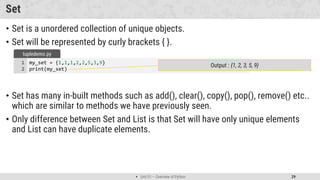
• Set is a unordered collection of unique objects.
• Set will be represented by curly brackets { }.
• Set has many in-built methods such as add(), clear(), copy(), pop(), remove() etc..
which are similar to methods we have previously seen.
• Only difference between Set and List is that Set will have only unique elements
and List can have duplicate elements.
my_set = {1,1,1,2,2,5,3,9}
print(my_set)
1
2
tupledemo.py
Output : {1, 2, 3, 5, 9}
 Unit 01 – Overview of Python 30
Operators in python
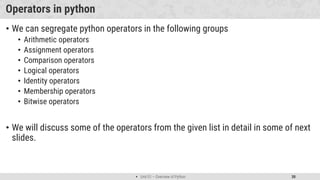
• We can segregate python operators in the following groups
• Arithmetic operators
• Assignment operators
• Comparison operators
• Logical operators
• Identity operators
• Membership operators
• Bitwise operators
• We will discuss some of the operators from the given list in detail in some of next
slides.
 Unit 01 – Overview of Python 31
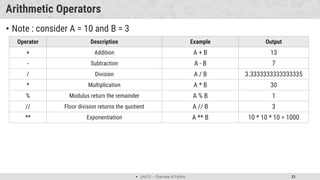
Arithmetic Operators
• Note : consider A = 10 and B = 3
Operator Description Example Output
+ Addition A + B 13
- Subtraction A - B 7
/ Division A / B 3.3333333333333335
* Multiplication A * B 30
% Modulus return the remainder A % B 1
// Floor division returns the quotient A // B 3
** Exponentiation A ** B 10 * 10 * 10 = 1000
 Unit 01 – Overview of Python 32
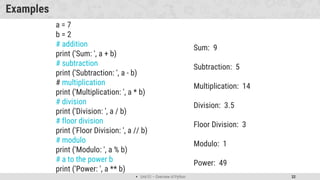
Examples
a = 7
b = 2
# addition
print ('Sum: ', a + b)
# subtraction
print ('Subtraction: ', a - b)
# multiplication
print ('Multiplication: ', a * b)
# division
print ('Division: ', a / b)
# floor division
print ('Floor Division: ', a // b)
# modulo
print ('Modulo: ', a % b)
# a to the power b
print ('Power: ', a ** b)
Sum: 9
Subtraction: 5
Multiplication: 14
Division: 3.5
Floor Division: 3
Modulo: 1
Power: 49
 Unit 01 – Overview of Python 33
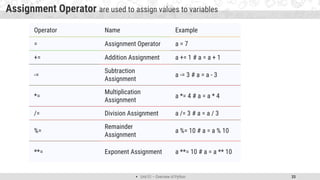
Assignment Operator are used to assign values to variables
Operator Name Example
= Assignment Operator a = 7
+= Addition Assignment a += 1 # a = a + 1
-=
Subtraction
Assignment
a -= 3 # a = a - 3
*=
Multiplication
Assignment
a *= 4 # a = a * 4
/= Division Assignment a /= 3 # a = a / 3
%=
Remainder
Assignment
a %= 10 # a = a % 10
**= Exponent Assignment a **= 10 # a = a ** 10
 Unit 01 – Overview of Python 34
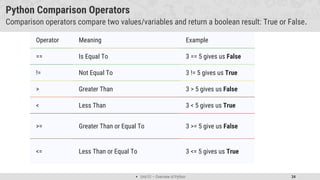
Python Comparison Operators
Comparison operators compare two values/variables and return a boolean result: True or False.
Operator Meaning Example
== Is Equal To 3 == 5 gives us False
!= Not Equal To 3 != 5 gives us True
> Greater Than 3 > 5 gives us False
< Less Than 3 < 5 gives us True
>= Greater Than or Equal To 3 >= 5 give us False
<= Less Than or Equal To 3 <= 5 gives us True
 Unit 01 – Overview of Python 35
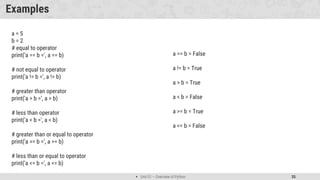
Examples
a = 5
b = 2
# equal to operator
print('a == b =', a == b)
# not equal to operator
print('a != b =', a != b)
# greater than operator
print('a > b =', a > b)
# less than operator
print('a < b =', a < b)
# greater than or equal to operator
print('a >= b =', a >= b)
# less than or equal to operator
print('a <= b =', a <= b)
a == b = False
a != b = True
a > b = True
a < b = False
a >= b = True
a <= b = False
 Unit 01 – Overview of Python 36
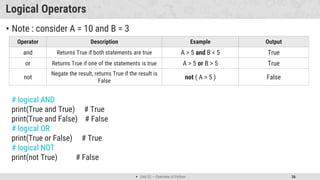
Logical Operators
• Note : consider A = 10 and B = 3
Operator Description Example Output
and Returns True if both statements are true A > 5 and B < 5 True
or Returns True if one of the statements is true A > 5 or B > 5 True
not
Negate the result, returns True if the result is
False
not ( A > 5 ) False
# logical AND
print(True and True) # True
print(True and False) # False
# logical OR
print(True or False) # True
# logical NOT
print(not True) # False
 Unit 01 – Overview of Python 37
Identity & Member Operators
• Identity Operator
• Note : consider A = [1,2], B = [1,2] and C=A
• x1 = 5
• y1 = 5
• x2 = 'Hello'
• y2 = 'Hello'
• x3 = [1,2,3]
• y3 = [1,2,3]
• print(x1 is not y1) # prints False
• print(x2 is y2) # prints True
• print(x3 is y3) # prints False
Operator Description Example Output
is
Returns True if both variables are
the same object
A is B
A is C
FALSE
TRUE
is not
Returns True if both variables are
different object
A is not B TRUE
x3 and y3 are lists. They are equal but not identical. It is because the
interpreter locates them separately in memory although they are equal.
 Unit 01 – Overview of Python 38
Operator Description Example Output
in
Returns True if a sequence with the
specified value is present in the object
A in B TRUE
not in
Returns True if a sequence with the
specified value is not present in the object
A not in B FALSE
Member Operator
Note : consider A = 2 and B = [1,2,3]
x = 'Hello world'
y = {1:'a', 2:'b'}
# check if 'H' is present in x string
print('H' in x) # prints True
# check if 'hello' is present in x string
print('hello' not in x) # prints True
# check if '1' key is present in y
print(1 in y) # prints True
 Unit 01 – Overview of Python 39
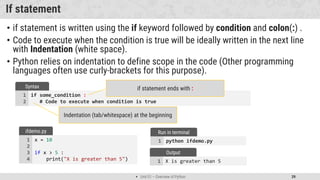
X is greater than 5
1
Output
If statement
• if statement is written using the if keyword followed by condition and colon(:) .
• Code to execute when the condition is true will be ideally written in the next line
with Indentation (white space).
• Python relies on indentation to define scope in the code (Other programming
languages often use curly-brackets for this purpose).
if some_condition :
# Code to execute when condition is true
1
2
Syntax if statement ends with :
Indentation (tab/whitespace) at the beginning
x = 10
if x > 5 :
print("X is greater than 5")
1
2
3
4
ifdemo.py
python ifdemo.py
1
Run in terminal
 Unit 01 – Overview of Python 40
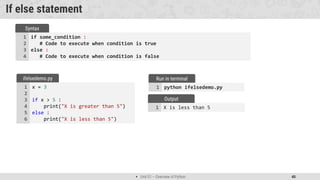
X is less than 5
1
Output
If else statement
if some_condition :
# Code to execute when condition is true
else :
# Code to execute when condition is false
1
2
3
4
Syntax
x = 3
if x > 5 :
print("X is greater than 5")
else :
print("X is less than 5")
1
2
3
4
5
6
ifelsedemo.py
python ifelsedemo.py
1
Run in terminal
 Unit 01 – Overview of Python 41
X is greater than 5
1
Output
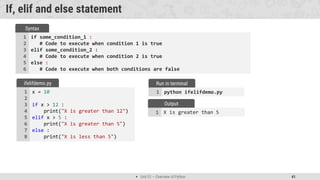
If, elif and else statement
if some_condition_1 :
# Code to execute when condition 1 is true
elif some_condition_2 :
# Code to execute when condition 2 is true
else :
# Code to execute when both conditions are false
1
2
3
4
5
6
Syntax
x = 10
if x > 12 :
print("X is greater than 12")
elif x > 5 :
print("X is greater than 5")
else :
print("X is less than 5")
1
2
3
4
5
6
7
8
ifelifdemo.py
python ifelifdemo.py
1
Run in terminal
 Unit 01 – Overview of Python 42
For loop in python
• Many objects in python are iterable, meaning we can iterate over every element in
the object.
• such as every elements from the List, every characters from the string etc..
• We can use for loop to execute block of code for each element of iterable object.
for temp_item in iterable_object :
# Code to execute for each object in iterable
1
2
Syntax For loop ends with :
Indentation (tab/whitespace) at the beginning
my_list = [1, 2, 3, 4]
for list_item in my_list :
print(list_item)
1
2
3
fordemo1.py Output :
1
2
3
4
my_list = [1,2,3,4,5,6,7,8,9]
for list_item in my_list :
if list_item % 2 == 0 :
print(list_item)
1
2
3
4
fordemo2.py Output :
2
4
6
8
 Unit 01 – Overview of Python 43
For loop (tuple unpacking)
• Sometimes we have nested data structure like List of tuples, and if we want to
iterate with such list we can use tuple unpacking.
• range() function will create a list from 0 till (not including) the value specified as
argument.
my_list = [(1,2,3), (4,5,6), (7,8,9)]
for list_item in my_list :
print(list_item[1])
1
2
3
withouttupleunapacking.py
Output :
2
5
8
my_list = [(1,2,3), (4,5,6), (7,8,9)]
for a,b,c in my_list :
print(b)
1
2
3
withtupleunpacking.py
Output :
2
5
8
This
technique is
known as
tuple
unpacking
my_list = range(5)
for list_item in my_list :
print(list_item)
1
2
3
rangedemo.py Output :
0
1
2
3
4
 Unit 01 – Overview of Python 44
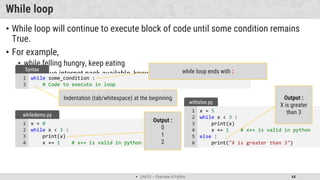
While loop
• While loop will continue to execute block of code until some condition remains
True.
• For example,
• while felling hungry, keep eating
• while have internet pack available, keep watching videos
while some_condition :
# Code to execute in loop
1
2
Syntax while loop ends with :
Indentation (tab/whitespace) at the beginning
x = 0
while x < 3 :
print(x)
x += 1 # x++ is valid in python
1
2
3
4
whiledemo.py
Output :
0
1
2
x = 5
while x < 3 :
print(x)
x += 1 # x++ is valid in python
else :
print("X is greater than 3")
1
2
3
4
5
6
withelse.py
Output :
X is greater
than 3
 Unit 01 – Overview of Python 45
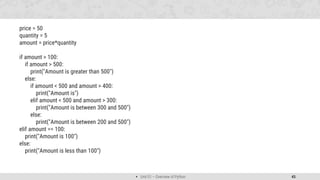
price = 50
quantity = 5
amount = price*quantity
if amount > 100:
if amount > 500:
print("Amount is greater than 500")
else:
if amount < 500 and amount > 400:
print("Amount is")
elif amount < 500 and amount > 300:
print("Amount is between 300 and 500")
else:
print("Amount is between 200 and 500")
elif amount == 100:
print("Amount is 100")
else:
print("Amount is less than 100")
 Unit 01 – Overview of Python 46
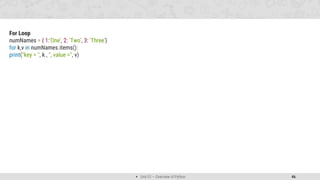
For Loop
numNames = { 1:'One', 2: 'Two', 3: 'Three’}
for k,v in numNames.items():
print("key = ", k , ", value =", v)
 Unit 01 – Overview of Python 47
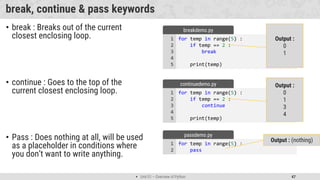
break, continue & pass keywords
• break : Breaks out of the current
closest enclosing loop.
• continue : Goes to the top of the
current closest enclosing loop.
• Pass : Does nothing at all, will be used
as a placeholder in conditions where
you don’t want to write anything.
for temp in range(5) :
if temp == 2 :
break
print(temp)
1
2
3
4
5
breakdemo.py
Output :
0
1
for temp in range(5) :
if temp == 2 :
continue
print(temp)
1
2
3
4
5
continuedemo.py Output :
0
1
3
4
for temp in range(5) :
pass
1
2
passdemo.py
Output : (nothing)
 Unit 01 – Overview of Python 48
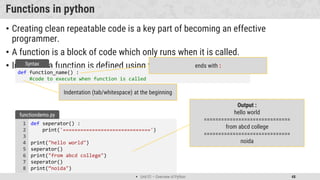
Functions in python
• Creating clean repeatable code is a key part of becoming an effective
programmer.
• A function is a block of code which only runs when it is called.
• In Python a function is defined using the def keyword:
def function_name() :
#code to execute when function is called
Syntax ends with :
Indentation (tab/whitespace) at the beginning
def seperator() :
print('==============================')
print("hello world")
seperator()
print("from abcd college")
seperator()
print(”noida")
1
2
3
4
5
6
7
8
functiondemo.py
Output :
hello world
==============================
from abcd college
==============================
noida
 Unit 01 – Overview of Python 49
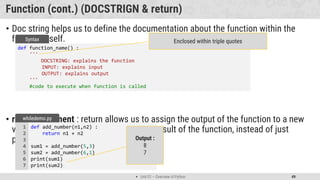
Function (cont.) (DOCSTRIGN & return)
• Doc string helps us to define the documentation about the function within the
function itself.
• return statement : return allows us to assign the output of the function to a new
variable, return is use to send back the result of the function, instead of just
printing it out.
def function_name() :
'''
DOCSTRING: explains the function
INPUT: explains input
OUTPUT: explains output
'''
#code to execute when function is called
Syntax Enclosed within triple quotes
def add_number(n1,n2) :
return n1 + n2
sum1 = add_number(5,3)
sum2 = add_number(6,1)
print(sum1)
print(sum2)
1
2
3
4
5
6
7
whiledemo.py
Output :
8
7
 Unit 01 – Overview of Python 50
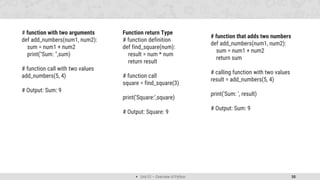
# function with two arguments
def add_numbers(num1, num2):
sum = num1 + num2
print("Sum: ",sum)
# function call with two values
add_numbers(5, 4)
# Output: Sum: 9
Function return Type
# function definition
def find_square(num):
result = num * num
return result
# function call
square = find_square(3)
print('Square:',square)
# Output: Square: 9
# function that adds two numbers
def add_numbers(num1, num2):
sum = num1 + num2
return sum
# calling function with two values
result = add_numbers(5, 4)
print('Sum: ', result)
# Output: Sum: 9
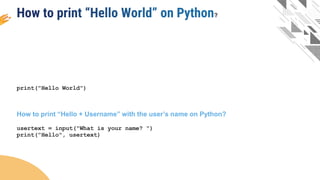
print("Hello World")
How to print “Hello + Username” with the user’s name on Python?
usertext = input("What is your name? ")
print("Hello", usertext)
?
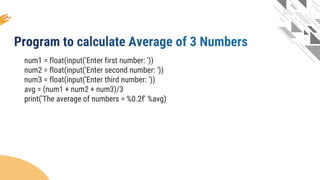
num1 = float(input('Enter first number: '))
num2 = float(input('Enter second number: '))
num3 = float(input('Enter third number: '))
avg = (num1 + num2 + num3)/3
print('The average of numbers = %0.2f' %avg)
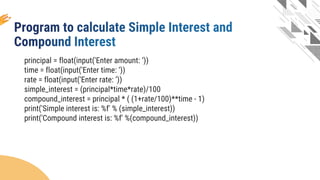
principal = float(input('Enter amount: ‘))
time = float(input('Enter time: ‘))
rate = float(input('Enter rate: ‘))
simple_interest = (principal*time*rate)/100
compound_interest = principal * ( (1+rate/100)**time - 1)
print('Simple interest is: %f' % (simple_interest))
print('Compound interest is: %f' %(compound_interest))
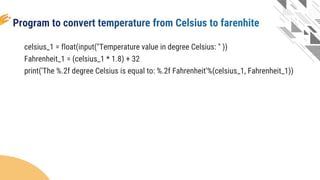
celsius_1 = float(input("Temperature value in degree Celsius: " ))
Fahrenheit_1 = (celsius_1 * 1.8) + 32
print('The %.2f degree Celsius is equal to: %.2f Fahrenheit'%(celsius_1, Fahrenheit_1))
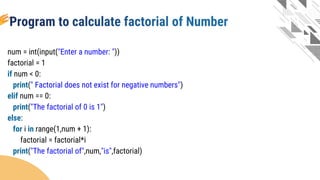
num = int(input("Enter a number: "))
factorial = 1
if num < 0:
print(" Factorial does not exist for negative numbers")
elif num == 0:
print("The factorial of 0 is 1")
else:
for i in range(1,num + 1):
factorial = factorial*i
print("The factorial of",num,"is",factorial)
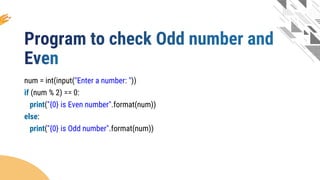
num = int(input("Enter a number: "))
if (num % 2) == 0:
print("{0} is Even number".format(num))
else:
print("{0} is Odd number".format(num))

PPT on Python - illustrating Python for BBA, B.Tech

  • 1.
    School Of ComputingScience & Engineering Programming with Python Overview of Python Programming Galgotias University, Greater Noida
  • 2.
     Looping Outline  Introductionto python  Installing python  Hello World program using python  Data types  Variables  Expressions  Functions  String  List  Tuple  Set  Dictionary  Functions
  • 3.
     Unit 01– Overview of Python 3 Introduction to Python • Python is an open source, interpreted, high-level, general-purpose programming language. • Python's design philosophy emphasizes code readability with its notable use of significant whitespace. • Python is dynamically typed and garbage-collected language. • Python was conceived in the late 1980s as a successor to the ABC language. • Python was Created by Guido van Rossum and first released in 1991. • Python 2.0, released in 2000, • introduced features like list comprehensions and a garbage collection system with reference counting. • Python 3.0 released in 2008 and current version of python is 3.8.3 (as of June- 2020). • The Python 2 language was officially discontinued in 2020
  • 4.
     Unit 01– Overview of Python 4 Why Python? • Python has many advantages • Easy to learn • Less code • Syntax is easier to read • Open source • Huge amount of additional open-source libraries Some libraries listed below. • matplotib for plotting charts and graphs • BeautifulSoup for HTML parsing and XML • NumPy for scientific computing • pandas for performing data analysis • SciPy for engineering applications, science, and mathematics • Scikit for machine learning • Django for server-side web development • And many more..
  • 5.
     Unit 01– Overview of Python 5 Installing Python • For Windows & Mac: • To install python in windows you need to download installable file from https://www.python.org/downloads/ • After downloading the installable file you need to execute the file. • For Linux : • For ubuntu 16.10 or newer • sudo apt-get update • sudo apt-get install python3.8 • To verify the installation • Windows : • python --version • Linux : • python3 --version (linux might have python2 already installed, you can check python 2 using python --version) • Alternatively we can use anaconda distribution for the python installation • http://anaconda.com/downloads • Anaconda comes with many useful inbuilt libraries.
  • 6.
     Unit 01– Overview of Python 6 Hello World using Python • To write python programs, we can use any text editors or IDE (Integrated Development Environment), Initially we are going to use Visual Studio Code. • Create new file in editor, save it as first.py (Extensions for python programs will be .py) • To run the python file open command prompt and change directory to where your python file is • Next, run python command (python filename.py) print("Hello World from python") 1 first.py Python line does not end with ;
  • 7.
     Unit 01– Overview of Python 7 Data types in Python Name Type Description Data Types Integer Int Whole number such as 0,1,5, -5 etc.. Float Float Numbers with decimal points such as 1.5, 7.9, -8.2 etc.. String Str Sequence of character (Ordered) such as “Galgotias”, ‘University’, “Greater Noida” etc.. Boolean Bool Logical values indicating True or False (T and F here are capital in python) Data Structures List list Ordered Sequence of objects, will be represented with square brackets [ ] Example : [ 18, “galgotias”, True, 102.3 ] Tuple tup Ordered immutable sequence of objects, will be represented with round brackets ( ) Example : ( 18, “galgotias”, True, 102.3 ) Set set Unordered collection of unique objects, will be represented with the curly brackets { } Example : { 18, “galgotias”, True, 102.3 } Dictionary dict Unordered key : value pair of objects , will be represented with curly brackets { } Example : { “college”: “galgotias”, “course”: “MCA” }
  • 8.
     Unit 01– Overview of Python 8
  • 9.
     Unit 01– Overview of Python 9 Variables in Python • A Python variable is a reserved memory location to store values. • Unlike other programming languages, Python has no command for declaring a variable. • A variable is created the moment you first assign a value to it. • Python uses Dynamic Typing so, • We need not to specify the data types to the variable as it will internally assign the data type to the variable according to the value assigned. • we can also reassign the different data type to the same variable, variable data type will change to new data type automatically. • We can check the current data type of the variable with type(variablename) in-built function. • Rules for variable name • Name can not start with digit • Space not allowed • Can not contain special character • Python keywords not allowed • Should be in lower case
  • 10.
     Unit 01– Overview of Python 10 Example of Python variable • Example : x = 10 print(x) print(type(x)) y = 123.456 print(y) x = “Galgotias University" print(x) print(type(x)) 1 2 3 4 5 6 7 8 9 10 demo.py python demo.py 1 Run in terminal 10 int 123.456 Galgotias University str 1 2 3 4 5 Output Reassign same variable to hold different data type
  • 11.
     Unit 01– Overview of Python 11 String in python • String is Ordered Sequence of character such as “Galgotias”, ‘University’, “Greater Noida” etc.. • Strings are arrays of bytes representing Unicode characters. • String can be represented as single, double or triple quotes. • String with triple Quotes allows multiple lines. • String in python is immutable. • Square brackets can be used to access elements of the string, Ex. “Galgotia”[1] = a, characters can also be accessed with reverse index like “Galgotia”[-1] = a. x = " G a l g o t i a " index = 0 1 2 3 4 5 6 7 Reverse index = -8 -7 -6 -5 -4 -3 -2 -1 String index
  • 12.
     Unit 01– Overview of Python 12 String functions in python • Python has lots of built-in methods that you can use on strings, we are going to cover some frequently used methods for string like • len() • count() • capitalize(), lower(), upper() • istitle(), islower(), isupper() • find(), rfind(), replace() • index(), rindex() • Methods for validations like • isalpha(), isalnum(), isdecimal(), isdigit() • strip(), lstrip(), rstrip() • Etc.. • Note : len() is not the method of the string but can be used to get the length of the string x = “Galgotia" print(len(x)) 1 2 lendemo.py Output : 8 (length of “Galgotia”)
  • 13.
     Unit 01– Overview of Python 13 String methods (cont.) • count() method will returns the number of times a specified value occurs in a string.  title(), lower(), upper() will returns capitalized, lower case and upper case string respectively. x = “Galgotias" ca = x.count('a') print(ca) 1 2 3 countdemo.py Output : 2 (occurrence of ‘a’ in “Galgotias”) x = “Galgotias University,Greater Noida" c = x.title() l = x.lower() u = x.upper() print(c) print(l) print(u) 1 2 3 4 5 6 7 changecase.py Output : Galgitias University, Greater Noida Output : galgotias university, greater noida Output : GALGOTIAS UNIVERSITY, GREATER NOIDA
  • 14.
     Unit 01– Overview of Python 14 String methods (cont.)  istitle(), islower(), isupper() will returns True if the given string is capitalized, lower case and upper case respectively.  strip() method will remove whitespaces from both side of the string and returns the string.  rstrip() and lstrip() will remove whitespaces from right and left side respectively. x = ' Galgotias ' f = x.strip() print(f) 1 2 3 stripdemo.py Output : Galgotias (without space) x = ’galgotias university' c = x.istitle() l = x.islower() u = x.isupper() print(c) print(l) print(u) 1 2 3 4 5 6 7 checkcase.py Output : False Output : True Output : False
  • 15.
     Unit 01– Overview of Python 15 String methods (cont.) • find() method will search the string and returns the index at which they find the specified value • rfind() will search the string and returns the last index at which they find the specified value  Note : find() and rfind() will return -1 if they are unable to find the given string.  replace() will replace str1 with str2 from our string and return the updated string x = ’galgotia institute,noida, india' f = x.find('in') print(f) 1 2 3 finddemo.py Output : 9 (occurrence of ‘in’ in x) x = ’galgotia institute,noida,india' r = x.rfind('in') print(r) 1 2 3 rfinddemo.py Output : 26 (last occurrence of ‘in’ in x) x = ’galgotia institute, noida, india' r = x.replace('india','INDIA') print(r) 1 2 3 replacedemo.py Output : “galgotia institute, noida, INDIA”
  • 16.
     Unit 01– Overview of Python 16 String methods (cont.) • index() method will search the string and returns the index at which they find the specified value, but if they are unable to find the string it will raise an exception. • rindex() will search the string and returns the last index at which they find the specified value , but if they are unable to find the string it will raise an exception. • Note : find() and index() are almost same, the only difference is if find() is unable to find the string it will return -1 and if index() is unable to find the string it will raise an exception. x = ’galgotia institute, noida, india' f = x.index('in') print(f) 1 2 3 indexdemo.py Output : 9 (occurrence of ‘in’ in x) x = ’galgotia institute,noida, india' r = x.rindex('in') print(r) 1 2 3 rindexdemo.py Output : 27 (last occurrence of ‘in’ in x)
  • 17.
     Unit 01– Overview of Python 17 String methods (cont.) • isalnum() method will return true if all the characters in the string are alphanumeric (i.e either alphabets or numeric). • isalpha() and isnumeric() will return true if all the characters in the string are only alphabets and numeric respectively. • isdecimal() will return true is all the characters in the string are decimal. • Note : isnuberic() and isdigit() are almost same, you suppose to find the difference as Home work assignment for the string methods. x = ’galgotia123' f = x.isalnum() print(f) 1 2 3 isalnumdemo.py Output : True x = '123.5' r = x.isdecimal() print(r) 1 2 3 isdecimaldemo.py Output : True
  • 18.
     Unit 01– Overview of Python 18 String Slicing • We can get the substring in python using string slicing, we can specify start index, end index and steps (colon separated) to slice the string. x = ’galgotia institute of engineering and technology, noida, up, INDIA' subx = x[startindex:endindex:steps] syntax x = ’galgotia institute of engineering and technology, noida, up, INDIA' subx1 = x[0:8] subx2 = x[49:54] subx3 = x[62:] subx4 = x[::2] subx5 = x[::-1] print(subx1) print(subx2) print(subx3) print(subx4) print(subx5) 1 2 3 4 5 6 7 8 9 10 11 strslicedemo.py Output : galgotia endindex will not be included in the substring Output : noida Output : INDIA Output : gloi nttt fegneigadtcnlg,nia p NI Output : AIDNI ,pu ,adion ,ygolonhcet dna gnireenigne fo etutitsni aitoglag
  • 19.
     Unit 01– Overview of Python 19 String print format • str.format() is one of the string formatting methods in Python3, which allows multiple substitutions and value formatting. • This method lets us concatenate elements within a string through positional formatting. • We can specify multiple parameters to the function x = '{} institute, noida' y = x.format(‘galgotia') print(y) print(x.format('ABCD')) 1 2 3 4 strformat.py Output : galgotia institute, noida Inline function call Output : ABCD institute, noida x = '{} institute, {}' y = x.format(‘galgotia’,’India') print(y) print(x.format('ABCD','XYZ')) 1 2 3 4 strformat.py Output : galgotia institute, india Inline function call Output : ABCD institute, XYZ
  • 20.
     Unit 01– Overview of Python 20 String print format (cont.) • We can specify the order of parameters in the string • We can also specify alias within the string to specify the order • We can format the decimal values using format method x = '{1} institute, {0}' y = x.format(‘galgotia’,’india') print(y) print(x.format('ABCD','XYZ')) 1 2 3 4 strformat.py Output : india institute, galgotia Inline function call Output : XYZ institute, ABCD x = '{collegename} institute, {cityname}' print(x.format(collegename=‘abcd',cityname=‘xyz')) 1 2 strformat.py Output : abcd institute, xyz per = (438 / 500) * 100 x = 'result = {r:3.2f} %'.format(r=per) print(x) 1 2 3 strformat.py Output : result = 87.60 % width precision
  • 21.
     Unit 01– Overview of Python 21 Data structures in python • There are four built-in data structures in Python - list, dictionary, tuple and set. • Lets explore all the data structures in detail… Name Type Description List list Ordered Sequence of objects, will be represented with square brackets [ ] Example : [ 18, “abcd”, True, 102.3 ] Dictionary dict Unordered key : value pair of objects , will be represented with curly brackets { } Example : { “college”: “abcd”, “code”: “054” } Tuple tup Ordered immutable sequence of objects, will be represented with round brackets ( ) Example : ( 18, “abcd”, True, 102.3 ) Set set Unordered collection of unique objects, will be represented with the curly brackets { } Example : { 18, “abcd”, True, 102.3 }
  • 22.
     Unit 01– Overview of Python 22 List • List is a mutable ordered sequence of objects, duplicate values are allowed inside list. • List will be represented by square brackets [ ]. • Python does not have array, List can be used similar to Array. • We can use slicing similar to string in order to get the sub list from the list. my_list = [‘abcdefg’, ’institute', ’nida'] print(my_list[1]) print(len(my_list)) my_list[2] = ”noida" print(my_list) print(my_list[-1]) 1 2 3 4 5 6 list.py Output : 3 (length of the List) Output : institute (List index starts with 0) Output : [‘abcdefg', 'institute', ‘noida'] Note : spelling of noida is updated my_list = [‘galgotia', 'institute’, ’noida’,’up','INDIA'] print(my_list[1:3]) 1 2 list.py Output : ['institute', ‘noida] Note : end index not included Output : Noida (-1 represent last element)
  • 23.
     Unit 01– Overview of Python 23 List methods • append() method will add element at the end of the list. • insert() method will add element at the specified index in the list • extend() method will add one data structure (List or any) to current List my_list = [‘galgotia', 'institute', ’noida'] my_list.append(‘up') print(my_list) 1 2 3 appendlistdemo.py Output : [‘galgotia', 'institute', ‘noida', ‘up'] my_list = [galgotia', 'institute', ’noida '] my_list.insert(2,'of') my_list.insert(3,'engineering') print(my_list) 1 2 3 4 insertlistdemo.py Output : [‘galgotia', 'institute', 'of', 'engineering', ‘noida'] my_list1 = [‘galgotia', 'institute'] my_list2 = [‘noida’,’up'] my_list1.extend(my_list2) print(my_list1) 1 2 3 4 extendlistdemo.py Output : [‘galgotia', 'institute’, ‘noida’, ‘up']
  • 24.
     Unit 01– Overview of Python 24 List methods (cont.) • pop() method will remove the last element from the list and return it. • remove() method will remove first occurrence of specified element • clear() method will remove all the elements from the List • index() method will return first index of the specified element. my_list = [‘galgotia', 'institute', ’noida '] temp = my_list.pop() print(temp) print(my_list) 1 2 3 4 poplistdemo.py Output : noida my_list = [‘galgotia', 'institute’,’galgotia ’noida '] my_list.remove(‘galgotia') print(my_list) 1 2 3 removelistdemo.py Output : ['institute', ‘galgotia', ‘noida'] my_list = [‘galgotia', 'institute’,’galgotia ’noida '] my_list.clear() print(my_list) 1 2 3 clearlistdemo.py Output : [] Output : [‘galgotia', 'institute‘]
  • 25.
     Unit 01– Overview of Python 25 List methods (cont.) • count() method will return the number of occurrence of the specified element. • reverse() method will reverse the elements of the List • sort() method will sort the elements in the List my_list = [‘abc', 'institute', ’abc’,’xyz] c = my_list.count(‘abc') print(c) 1 2 3 countlistdemo.py Output : 2 my_list = [‘abc', 'institute’,’xyz'] my_list.reverse() print(my_list) 1 2 3 reverselistdemo.py Output : [‘xyz', ‘institute’,’abc'] my_list = [galgotia', 'institute’,’galgotia ’noida '] my_list.sort() print(my_list) my_list.sort(reverse=True) print(my_list) 1 2 3 4 5 sortlistdemo.py Output : [‘galgotia', ‘galgotia', ‘institute', ‘noida'] Output : [‘Noida’, 'institute’,galgotia’, galgotia ']
  • 26.
     Unit 01– Overview of Python 26 Tuple • Tuple is a immutable ordered sequence of objects, duplicate values are allowed inside list. • Tuple will be represented by round brackets ( ). • Tuple is similar to List but List is mutable whearas Tuple is immutable. my_tuple = (‘abcd','institute','of','engineering',’noida') print(my_tuple) print(my_tuple.index('engineering')) print(my_tuple.count('of')) print(my_tuple[-1]) 1 2 3 4 5 tupledemo.py Output : 3 (index of ‘engineering’) Output : (‘abc', 'institute', 'of', 'engineering', '‘noida’) Output : 2 Output : noida
  • 27.
     Unit 01– Overview of Python 27 Dictionary • Dictionary is a unordered collection of key value pairs. • Dictionary will be represented by curly brackets { }. • Dictionary is mutable. my_dict = {'college’: ‘abcd’, 'city’: ‘Noida’, 'type':"engineering"} print(my_dict['college']) print(my_dict.get('city')) 1 2 3 dictdemo.py values can be accessed using key inside square brackets as well as using get() method Output : abcd noida my_dict = { 'key1':'value1', 'key2':'value2' } syntax Key value is seperated by : Key value pairs is seperated by ,
  • 28.
     Unit 01– Overview of Python 28 Dictionary methods • keys() method will return list of all the keys associated with the Dictionary. • values() method will return list of all the values associated with the Dictionary. • items() method will return list of tuples for each key value pair associated with the Dictionary. my_dict = {'college’: ‘abcd’, 'city’: ‘indore’,'type’: ‘engineering’} print(my_dict.keys()) 1 2 keydemo.py my_dict = {'college’: ‘abcd’, 'city’: ‘indore’,'type’: ‘engineering’} print(my_dict.values()) 1 2 valuedemo.py Output : [‘abcd', ‘indore', 'engineering'] my_dict = {'college’: ‘abcd’, 'city’: ‘indore’,'type’: ‘engineering’} print(my_dict.items()) 1 2 itemsdemo.py Output : [('college', ‘abcd'), ('city', ‘indore), ('type', 'engineering')] Output : ['college', 'city', 'type']
  • 29.
     Unit 01– Overview of Python 29 Set • Set is a unordered collection of unique objects. • Set will be represented by curly brackets { }. • Set has many in-built methods such as add(), clear(), copy(), pop(), remove() etc.. which are similar to methods we have previously seen. • Only difference between Set and List is that Set will have only unique elements and List can have duplicate elements. my_set = {1,1,1,2,2,5,3,9} print(my_set) 1 2 tupledemo.py Output : {1, 2, 3, 5, 9}
  • 30.
     Unit 01– Overview of Python 30 Operators in python • We can segregate python operators in the following groups • Arithmetic operators • Assignment operators • Comparison operators • Logical operators • Identity operators • Membership operators • Bitwise operators • We will discuss some of the operators from the given list in detail in some of next slides.
  • 31.
     Unit 01– Overview of Python 31 Arithmetic Operators • Note : consider A = 10 and B = 3 Operator Description Example Output + Addition A + B 13 - Subtraction A - B 7 / Division A / B 3.3333333333333335 * Multiplication A * B 30 % Modulus return the remainder A % B 1 // Floor division returns the quotient A // B 3 ** Exponentiation A ** B 10 * 10 * 10 = 1000
  • 32.
     Unit 01– Overview of Python 32 Examples a = 7 b = 2 # addition print ('Sum: ', a + b) # subtraction print ('Subtraction: ', a - b) # multiplication print ('Multiplication: ', a * b) # division print ('Division: ', a / b) # floor division print ('Floor Division: ', a // b) # modulo print ('Modulo: ', a % b) # a to the power b print ('Power: ', a ** b) Sum: 9 Subtraction: 5 Multiplication: 14 Division: 3.5 Floor Division: 3 Modulo: 1 Power: 49
  • 33.
     Unit 01– Overview of Python 33 Assignment Operator are used to assign values to variables Operator Name Example = Assignment Operator a = 7 += Addition Assignment a += 1 # a = a + 1 -= Subtraction Assignment a -= 3 # a = a - 3 *= Multiplication Assignment a *= 4 # a = a * 4 /= Division Assignment a /= 3 # a = a / 3 %= Remainder Assignment a %= 10 # a = a % 10 **= Exponent Assignment a **= 10 # a = a ** 10
  • 34.
     Unit 01– Overview of Python 34 Python Comparison Operators Comparison operators compare two values/variables and return a boolean result: True or False. Operator Meaning Example == Is Equal To 3 == 5 gives us False != Not Equal To 3 != 5 gives us True > Greater Than 3 > 5 gives us False < Less Than 3 < 5 gives us True >= Greater Than or Equal To 3 >= 5 give us False <= Less Than or Equal To 3 <= 5 gives us True
  • 35.
     Unit 01– Overview of Python 35 Examples a = 5 b = 2 # equal to operator print('a == b =', a == b) # not equal to operator print('a != b =', a != b) # greater than operator print('a > b =', a > b) # less than operator print('a < b =', a < b) # greater than or equal to operator print('a >= b =', a >= b) # less than or equal to operator print('a <= b =', a <= b) a == b = False a != b = True a > b = True a < b = False a >= b = True a <= b = False
  • 36.
     Unit 01– Overview of Python 36 Logical Operators • Note : consider A = 10 and B = 3 Operator Description Example Output and Returns True if both statements are true A > 5 and B < 5 True or Returns True if one of the statements is true A > 5 or B > 5 True not Negate the result, returns True if the result is False not ( A > 5 ) False # logical AND print(True and True) # True print(True and False) # False # logical OR print(True or False) # True # logical NOT print(not True) # False
  • 37.
     Unit 01– Overview of Python 37 Identity & Member Operators • Identity Operator • Note : consider A = [1,2], B = [1,2] and C=A • x1 = 5 • y1 = 5 • x2 = 'Hello' • y2 = 'Hello' • x3 = [1,2,3] • y3 = [1,2,3] • print(x1 is not y1) # prints False • print(x2 is y2) # prints True • print(x3 is y3) # prints False Operator Description Example Output is Returns True if both variables are the same object A is B A is C FALSE TRUE is not Returns True if both variables are different object A is not B TRUE x3 and y3 are lists. They are equal but not identical. It is because the interpreter locates them separately in memory although they are equal.
  • 38.
     Unit 01– Overview of Python 38 Operator Description Example Output in Returns True if a sequence with the specified value is present in the object A in B TRUE not in Returns True if a sequence with the specified value is not present in the object A not in B FALSE Member Operator Note : consider A = 2 and B = [1,2,3] x = 'Hello world' y = {1:'a', 2:'b'} # check if 'H' is present in x string print('H' in x) # prints True # check if 'hello' is present in x string print('hello' not in x) # prints True # check if '1' key is present in y print(1 in y) # prints True
  • 39.
     Unit 01– Overview of Python 39 X is greater than 5 1 Output If statement • if statement is written using the if keyword followed by condition and colon(:) . • Code to execute when the condition is true will be ideally written in the next line with Indentation (white space). • Python relies on indentation to define scope in the code (Other programming languages often use curly-brackets for this purpose). if some_condition : # Code to execute when condition is true 1 2 Syntax if statement ends with : Indentation (tab/whitespace) at the beginning x = 10 if x > 5 : print("X is greater than 5") 1 2 3 4 ifdemo.py python ifdemo.py 1 Run in terminal
  • 40.
     Unit 01– Overview of Python 40 X is less than 5 1 Output If else statement if some_condition : # Code to execute when condition is true else : # Code to execute when condition is false 1 2 3 4 Syntax x = 3 if x > 5 : print("X is greater than 5") else : print("X is less than 5") 1 2 3 4 5 6 ifelsedemo.py python ifelsedemo.py 1 Run in terminal
  • 41.
     Unit 01– Overview of Python 41 X is greater than 5 1 Output If, elif and else statement if some_condition_1 : # Code to execute when condition 1 is true elif some_condition_2 : # Code to execute when condition 2 is true else : # Code to execute when both conditions are false 1 2 3 4 5 6 Syntax x = 10 if x > 12 : print("X is greater than 12") elif x > 5 : print("X is greater than 5") else : print("X is less than 5") 1 2 3 4 5 6 7 8 ifelifdemo.py python ifelifdemo.py 1 Run in terminal
  • 42.
     Unit 01– Overview of Python 42 For loop in python • Many objects in python are iterable, meaning we can iterate over every element in the object. • such as every elements from the List, every characters from the string etc.. • We can use for loop to execute block of code for each element of iterable object. for temp_item in iterable_object : # Code to execute for each object in iterable 1 2 Syntax For loop ends with : Indentation (tab/whitespace) at the beginning my_list = [1, 2, 3, 4] for list_item in my_list : print(list_item) 1 2 3 fordemo1.py Output : 1 2 3 4 my_list = [1,2,3,4,5,6,7,8,9] for list_item in my_list : if list_item % 2 == 0 : print(list_item) 1 2 3 4 fordemo2.py Output : 2 4 6 8
  • 43.
     Unit 01– Overview of Python 43 For loop (tuple unpacking) • Sometimes we have nested data structure like List of tuples, and if we want to iterate with such list we can use tuple unpacking. • range() function will create a list from 0 till (not including) the value specified as argument. my_list = [(1,2,3), (4,5,6), (7,8,9)] for list_item in my_list : print(list_item[1]) 1 2 3 withouttupleunapacking.py Output : 2 5 8 my_list = [(1,2,3), (4,5,6), (7,8,9)] for a,b,c in my_list : print(b) 1 2 3 withtupleunpacking.py Output : 2 5 8 This technique is known as tuple unpacking my_list = range(5) for list_item in my_list : print(list_item) 1 2 3 rangedemo.py Output : 0 1 2 3 4
  • 44.
     Unit 01– Overview of Python 44 While loop • While loop will continue to execute block of code until some condition remains True. • For example, • while felling hungry, keep eating • while have internet pack available, keep watching videos while some_condition : # Code to execute in loop 1 2 Syntax while loop ends with : Indentation (tab/whitespace) at the beginning x = 0 while x < 3 : print(x) x += 1 # x++ is valid in python 1 2 3 4 whiledemo.py Output : 0 1 2 x = 5 while x < 3 : print(x) x += 1 # x++ is valid in python else : print("X is greater than 3") 1 2 3 4 5 6 withelse.py Output : X is greater than 3
  • 45.
     Unit 01– Overview of Python 45 price = 50 quantity = 5 amount = price*quantity if amount > 100: if amount > 500: print("Amount is greater than 500") else: if amount < 500 and amount > 400: print("Amount is") elif amount < 500 and amount > 300: print("Amount is between 300 and 500") else: print("Amount is between 200 and 500") elif amount == 100: print("Amount is 100") else: print("Amount is less than 100")
  • 46.
     Unit 01– Overview of Python 46 For Loop numNames = { 1:'One', 2: 'Two', 3: 'Three’} for k,v in numNames.items(): print("key = ", k , ", value =", v)
  • 47.
     Unit 01– Overview of Python 47 break, continue & pass keywords • break : Breaks out of the current closest enclosing loop. • continue : Goes to the top of the current closest enclosing loop. • Pass : Does nothing at all, will be used as a placeholder in conditions where you don’t want to write anything. for temp in range(5) : if temp == 2 : break print(temp) 1 2 3 4 5 breakdemo.py Output : 0 1 for temp in range(5) : if temp == 2 : continue print(temp) 1 2 3 4 5 continuedemo.py Output : 0 1 3 4 for temp in range(5) : pass 1 2 passdemo.py Output : (nothing)
  • 48.
     Unit 01– Overview of Python 48 Functions in python • Creating clean repeatable code is a key part of becoming an effective programmer. • A function is a block of code which only runs when it is called. • In Python a function is defined using the def keyword: def function_name() : #code to execute when function is called Syntax ends with : Indentation (tab/whitespace) at the beginning def seperator() : print('==============================') print("hello world") seperator() print("from abcd college") seperator() print(”noida") 1 2 3 4 5 6 7 8 functiondemo.py Output : hello world ============================== from abcd college ============================== noida
  • 49.
     Unit 01– Overview of Python 49 Function (cont.) (DOCSTRIGN & return) • Doc string helps us to define the documentation about the function within the function itself. • return statement : return allows us to assign the output of the function to a new variable, return is use to send back the result of the function, instead of just printing it out. def function_name() : ''' DOCSTRING: explains the function INPUT: explains input OUTPUT: explains output ''' #code to execute when function is called Syntax Enclosed within triple quotes def add_number(n1,n2) : return n1 + n2 sum1 = add_number(5,3) sum2 = add_number(6,1) print(sum1) print(sum2) 1 2 3 4 5 6 7 whiledemo.py Output : 8 7
  • 50.
     Unit 01– Overview of Python 50 # function with two arguments def add_numbers(num1, num2): sum = num1 + num2 print("Sum: ",sum) # function call with two values add_numbers(5, 4) # Output: Sum: 9 Function return Type # function definition def find_square(num): result = num * num return result # function call square = find_square(3) print('Square:',square) # Output: Square: 9 # function that adds two numbers def add_numbers(num1, num2): sum = num1 + num2 return sum # calling function with two values result = add_numbers(5, 4) print('Sum: ', result) # Output: Sum: 9
  • 51.
    print("Hello World") How toprint “Hello + Username” with the user’s name on Python? usertext = input("What is your name? ") print("Hello", usertext) ?
  • 52.
    num1 = float(input('Enterfirst number: ')) num2 = float(input('Enter second number: ')) num3 = float(input('Enter third number: ')) avg = (num1 + num2 + num3)/3 print('The average of numbers = %0.2f' %avg)
  • 53.
    principal = float(input('Enteramount: ‘)) time = float(input('Enter time: ‘)) rate = float(input('Enter rate: ‘)) simple_interest = (principal*time*rate)/100 compound_interest = principal * ( (1+rate/100)**time - 1) print('Simple interest is: %f' % (simple_interest)) print('Compound interest is: %f' %(compound_interest))
  • 54.
    celsius_1 = float(input("Temperaturevalue in degree Celsius: " )) Fahrenheit_1 = (celsius_1 * 1.8) + 32 print('The %.2f degree Celsius is equal to: %.2f Fahrenheit'%(celsius_1, Fahrenheit_1))
  • 56.
    num = int(input("Entera number: ")) factorial = 1 if num < 0: print(" Factorial does not exist for negative numbers") elif num == 0: print("The factorial of 0 is 1") else: for i in range(1,num + 1): factorial = factorial*i print("The factorial of",num,"is",factorial)
  • 57.
    num = int(input("Entera number: ")) if (num % 2) == 0: print("{0} is Even number".format(num)) else: print("{0} is Odd number".format(num))