UNIT I
INTRODUCTION AND SYNTAX
OF PYTHON PROGRAM
Mrs. AISHWARYA B. BOLEGAVE
Agenda
 What is Python?….
 History of Python
 Features
 Uses of Python in industry
 Python Building Blocks
 Python environment setup
 Simple Python program
 PyCharm IDE installtion
 Python Data Types
What is Python
 Python is a high-level, general-purpose and a very
popular programming language.
 Python is an interpreted, interactive and object
oriented language.
History of Python
 The idea of Python started in late 1980S
 Real implementation of Python was started in
December 1989
 Finally published in February 1990(Netherland) by
Guido van Rossum , and released.
 Picked ‘Python’ name- comedy show(Monty Python’s
flying circus).
Features
 Following are features of Python –
 Interactive
 Object -oriented
 Interpreted
 Platform independent
 Automatic memory management
 free and open source
 readability
 dynamically typed
Uses of Python in industry
 Python uses in Central Intelligence Agency (CIA)
 Google's first search engine
 Facebook (in their production engineering)
 NASA uses Workflow Automation Tool which is written in
python
 Nokia uses python for its platform s60
 The entire stack of dropbox was written in python
Dropbox.
 Quora is social commenting site which is written in
python.
 Instagram (uses python for front end).
 YouTube
Python Building Blocks
 Python Identifiers:
All the variables, class, object, functions, lists,
dictionaries etc. in Python are known as Identifiers.
 Rules for giving identifier:
1. Case sensitive.(num and Num both are different
functions)
2. Name should not be keyword.
3. Name can begin with letter or underscore(_) only
4. contains both numbers and letters along with
underscores (A-z, 0-9, and _ ).
Python Building Blocks
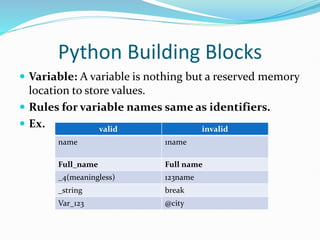
 Variable: A variable is nothing but a reserved memory
location to store values.
 Rules for variable names same as identifiers.
 Ex. valid invalid
name 1name
Full_name Full name
_4(meaningless) 123name
_string break
Var_123 @city
 Variables
Do not require explicit declaration.
other programming language Python language
int a=20; a=20
Allows to assign value to multiple variables
a1=a2=a3=a4=30
Allows to assign sequence of values to sequence of
variables
s1,s2,s3=10,20,30
 Keywords:
1. The keywords are special words reserved for some
purpose.
2. The names of keywords can be not be used as
variable name.
 Keywords are as follows:
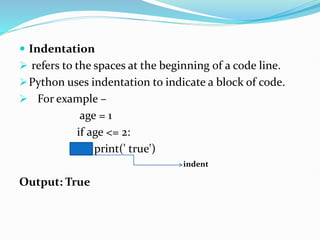
 Indentation
 refers to the spaces at the beginning of a code line.
Python uses indentation to indicate a block of code.
 For example –
age = 1
if age <= 2:
print(' true')
Output: True
indent
 Comments
Comments can be used to explain Python code.
In Python, we use the hash (#) symbol to start writing
a comment.
ex. A=12 #value 12 assign to variable a
Python Interpreter ignores comment.
For multiple line comments uses three single quotes (‘’’
……..‘’’) three double quotes (””” ……“””).
Python Environmental Setup
1. First, download the latest version of Python from the
official website. I have downloaded python 3.10.2
version. For that purpose open the web site
https://www.python.org
Download this version
2. Now Select the file based on processor of your PC. For Windows
it can be 32 bit or 64 bit. If it is 64 bit then select the file as
follows
3. Downloaded in my pc
4. Just check the Add path checkbox and
click on customize installation
5.Check features and click on next button
Click on next
Click on install for all users and install
button
Click on
Finally you will get successful
installation message.
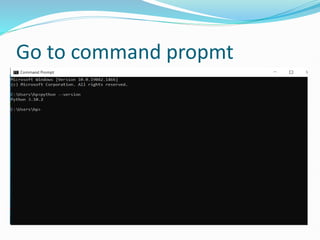
Go to command propmt
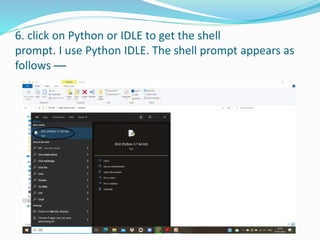
6. click on Python or IDLE to get the shell
prompt. I use Python IDLE. The shell prompt appears as
follows —
7. The python shell will be displayed and >>>
prompt will be displayed
Write a simple first program
Modes of Working in Python
 1) Interactive mode- gives immediate feedback for
each statement. Fed statements are stored in active
memory.
 2) Script mode- python commands are stored in a file
and the file is saved using the extension .py
For new file
Creating new file and save as test.py
test.py
Output(test.py)
Program for practice
1. Running Simple Python program to Display multiple
lines Message(script mode)
2. Running Simple Python to Display 'welcome'
Message(interactive mode)
Download PyCharm IDE also
Download
community
PyCharm community setup
Click on next button and installing
pycharm
Check this
checkbox
Creating new project
Python Data Types
 Data types are used to define type of variable.
Data types
numeric Strings Tuples Lists Dictionary
Python Data Types
1) Numeric/Numbers:
 Number stores numeric values.
 The integer, long, float, and complex values belong to a Python
Numbers data-type.
 type() function to know the data-type of the variable.
 isinstance() function is used to check an object belongs to a
particular class.
num=10
a=54.3 #float number
B=0o2345 #octal number
Bin=0b10101 #bin number
hex=0x4325 #hex. number
X+yj=3+6j #complex
Numeric values(integer, float, complex) assigned to
variables
Output
2) String :
 String is a collection of characters.
 uses single quote(‘…’), double quote (“….”)or triple quote
(”””…..”””)to define a string.
 We can use three operators along with the string is slicing
operator[] or[:],concatenate operator(+), repetition operator *.
ex. >>> strl="My"
>>> str2="Python“
>>> print (str2[0]) #slicing operator
output: P
>>> print (str2)
>>>Python
>>> print (strl+str2) # concatenate operator
output: MyPython
>>> print (str2*3) # repetition operator
output: PythonPythonPython
‘”””Python””””
3) List :
 similar to array in C or C++ but it can simultaneously
hold different types of data in list.
 It is basically an ordered sequence of some data
written using square brackets([]) and commas(,).
 Ex. -
>>> #List of only strings
>>> b=["Sun", "Mon”, “Tue", "Wed“]
>>> print (b)
output: ['Sun', 'Mon', 'Tue', 'Wed']
Like string Same
operators use in list-
slicing operator[] or [:],
concatenate
operator(+), repetition
operator(*)
4) Tuple :
 collection of elements and it is similar to the List.
 But the items of the tuple are separated by comma(,)
and the elements are enclosed in ( ) parenthesis.
 Tuples are immutable.(can not change value)
 Ex.->>> #Tuple of both integers and strings
>>> b=(“one”,1, 2, "two", "three", 3)
>>> print (b)
output: ('one', 1, 2, ‘two', 'three',3)
>>> print (b[3]) # slicing operator
output: two
Like string Same
operators use in list-
slicing operator[] or [:],
concatenate
operator(+), repetition
operator(*)
5) Dictionary
 collection of elements in the form of key:value pair.
for example-{1:’Red’, 2:’black’}
 dictionaries are like a hash-table that has pair of
index(key) and element(value).
 present in the curly brackets.
 Ex. – dict={1:’red’,2:’blue’,3:’green’}
>>>print(dict)
output:{1:’red’,2:’blue’,3:’green’}
>>>print(dict.keys())
output: dict_keys([1,2,3])
>>>print(dict.values())
output: dict_values([red,blue,green])
Input through keyboard
 Here, python have built-in function input() to read
input value.
Ex. print(“enter your name”)
name=input()
 The default of read value is string only.
 Type casting is nothing but it convert one data type
(string) into other another data type.
Ex. print(“enter your age”)
name=int(input())

unit (1)INTRODUCTION TO PYTHON course.pptx

  • 1.
    UNIT I INTRODUCTION ANDSYNTAX OF PYTHON PROGRAM Mrs. AISHWARYA B. BOLEGAVE
  • 2.
    Agenda  What isPython?….  History of Python  Features  Uses of Python in industry  Python Building Blocks  Python environment setup  Simple Python program  PyCharm IDE installtion  Python Data Types
  • 3.
    What is Python Python is a high-level, general-purpose and a very popular programming language.  Python is an interpreted, interactive and object oriented language.
  • 4.
    History of Python The idea of Python started in late 1980S  Real implementation of Python was started in December 1989  Finally published in February 1990(Netherland) by Guido van Rossum , and released.  Picked ‘Python’ name- comedy show(Monty Python’s flying circus).
  • 5.
    Features  Following arefeatures of Python –  Interactive  Object -oriented  Interpreted  Platform independent  Automatic memory management  free and open source  readability  dynamically typed
  • 6.
    Uses of Pythonin industry  Python uses in Central Intelligence Agency (CIA)  Google's first search engine  Facebook (in their production engineering)  NASA uses Workflow Automation Tool which is written in python  Nokia uses python for its platform s60  The entire stack of dropbox was written in python Dropbox.  Quora is social commenting site which is written in python.  Instagram (uses python for front end).  YouTube
  • 7.
    Python Building Blocks Python Identifiers: All the variables, class, object, functions, lists, dictionaries etc. in Python are known as Identifiers.  Rules for giving identifier: 1. Case sensitive.(num and Num both are different functions) 2. Name should not be keyword. 3. Name can begin with letter or underscore(_) only 4. contains both numbers and letters along with underscores (A-z, 0-9, and _ ).
  • 8.
    Python Building Blocks Variable: A variable is nothing but a reserved memory location to store values.  Rules for variable names same as identifiers.  Ex. valid invalid name 1name Full_name Full name _4(meaningless) 123name _string break Var_123 @city
  • 9.
     Variables Do notrequire explicit declaration. other programming language Python language int a=20; a=20 Allows to assign value to multiple variables a1=a2=a3=a4=30 Allows to assign sequence of values to sequence of variables s1,s2,s3=10,20,30
  • 10.
     Keywords: 1. Thekeywords are special words reserved for some purpose. 2. The names of keywords can be not be used as variable name.
  • 11.
     Keywords areas follows:
  • 12.
     Indentation  refersto the spaces at the beginning of a code line. Python uses indentation to indicate a block of code.  For example – age = 1 if age <= 2: print(' true') Output: True indent
  • 13.
     Comments Comments canbe used to explain Python code. In Python, we use the hash (#) symbol to start writing a comment. ex. A=12 #value 12 assign to variable a Python Interpreter ignores comment. For multiple line comments uses three single quotes (‘’’ ……..‘’’) three double quotes (””” ……“””).
  • 14.
    Python Environmental Setup 1.First, download the latest version of Python from the official website. I have downloaded python 3.10.2 version. For that purpose open the web site https://www.python.org
  • 15.
  • 16.
    2. Now Selectthe file based on processor of your PC. For Windows it can be 32 bit or 64 bit. If it is 64 bit then select the file as follows
  • 17.
  • 18.
    4. Just checkthe Add path checkbox and click on customize installation
  • 19.
    5.Check features andclick on next button Click on next
  • 20.
    Click on installfor all users and install button Click on
  • 21.
    Finally you willget successful installation message.
  • 22.
  • 23.
    6. click onPython or IDLE to get the shell prompt. I use Python IDLE. The shell prompt appears as follows —
  • 24.
    7. The pythonshell will be displayed and >>> prompt will be displayed
  • 25.
    Write a simplefirst program
  • 26.
    Modes of Workingin Python  1) Interactive mode- gives immediate feedback for each statement. Fed statements are stored in active memory.  2) Script mode- python commands are stored in a file and the file is saved using the extension .py
  • 27.
  • 28.
    Creating new fileand save as test.py test.py
  • 29.
  • 30.
    Program for practice 1.Running Simple Python program to Display multiple lines Message(script mode) 2. Running Simple Python to Display 'welcome' Message(interactive mode)
  • 31.
    Download PyCharm IDEalso Download community
  • 32.
  • 33.
    Click on nextbutton and installing pycharm Check this checkbox
  • 34.
  • 35.
    Python Data Types Data types are used to define type of variable. Data types numeric Strings Tuples Lists Dictionary
  • 36.
    Python Data Types 1)Numeric/Numbers:  Number stores numeric values.  The integer, long, float, and complex values belong to a Python Numbers data-type.  type() function to know the data-type of the variable.  isinstance() function is used to check an object belongs to a particular class. num=10 a=54.3 #float number B=0o2345 #octal number Bin=0b10101 #bin number hex=0x4325 #hex. number X+yj=3+6j #complex
  • 37.
    Numeric values(integer, float,complex) assigned to variables
  • 38.
  • 39.
    2) String : String is a collection of characters.  uses single quote(‘…’), double quote (“….”)or triple quote (”””…..”””)to define a string.  We can use three operators along with the string is slicing operator[] or[:],concatenate operator(+), repetition operator *. ex. >>> strl="My" >>> str2="Python“ >>> print (str2[0]) #slicing operator output: P >>> print (str2) >>>Python >>> print (strl+str2) # concatenate operator output: MyPython >>> print (str2*3) # repetition operator output: PythonPythonPython ‘”””Python””””
  • 40.
    3) List : similar to array in C or C++ but it can simultaneously hold different types of data in list.  It is basically an ordered sequence of some data written using square brackets([]) and commas(,).  Ex. - >>> #List of only strings >>> b=["Sun", "Mon”, “Tue", "Wed“] >>> print (b) output: ['Sun', 'Mon', 'Tue', 'Wed'] Like string Same operators use in list- slicing operator[] or [:], concatenate operator(+), repetition operator(*)
  • 41.
    4) Tuple : collection of elements and it is similar to the List.  But the items of the tuple are separated by comma(,) and the elements are enclosed in ( ) parenthesis.  Tuples are immutable.(can not change value)  Ex.->>> #Tuple of both integers and strings >>> b=(“one”,1, 2, "two", "three", 3) >>> print (b) output: ('one', 1, 2, ‘two', 'three',3) >>> print (b[3]) # slicing operator output: two Like string Same operators use in list- slicing operator[] or [:], concatenate operator(+), repetition operator(*)
  • 42.
    5) Dictionary  collectionof elements in the form of key:value pair. for example-{1:’Red’, 2:’black’}  dictionaries are like a hash-table that has pair of index(key) and element(value).  present in the curly brackets.  Ex. – dict={1:’red’,2:’blue’,3:’green’} >>>print(dict) output:{1:’red’,2:’blue’,3:’green’} >>>print(dict.keys()) output: dict_keys([1,2,3]) >>>print(dict.values()) output: dict_values([red,blue,green])
  • 43.
    Input through keyboard Here, python have built-in function input() to read input value. Ex. print(“enter your name”) name=input()  The default of read value is string only.  Type casting is nothing but it convert one data type (string) into other another data type. Ex. print(“enter your age”) name=int(input())