Computer Security
Submitted to:
Mrs. Lakhvinder Kaur Romana
Assist. Prof. In Computer
Submitted By:
Nidhi Bansal, Kajal Garg,
Sumandeep Kaur, Manisha
and Kirti
Sub Topics
 Data Encryption
 Digital Signature
 Digital Certificate
 Firewall
 Threats for Client Computers
 Security of Client Computers
DataEncryption/Decryption
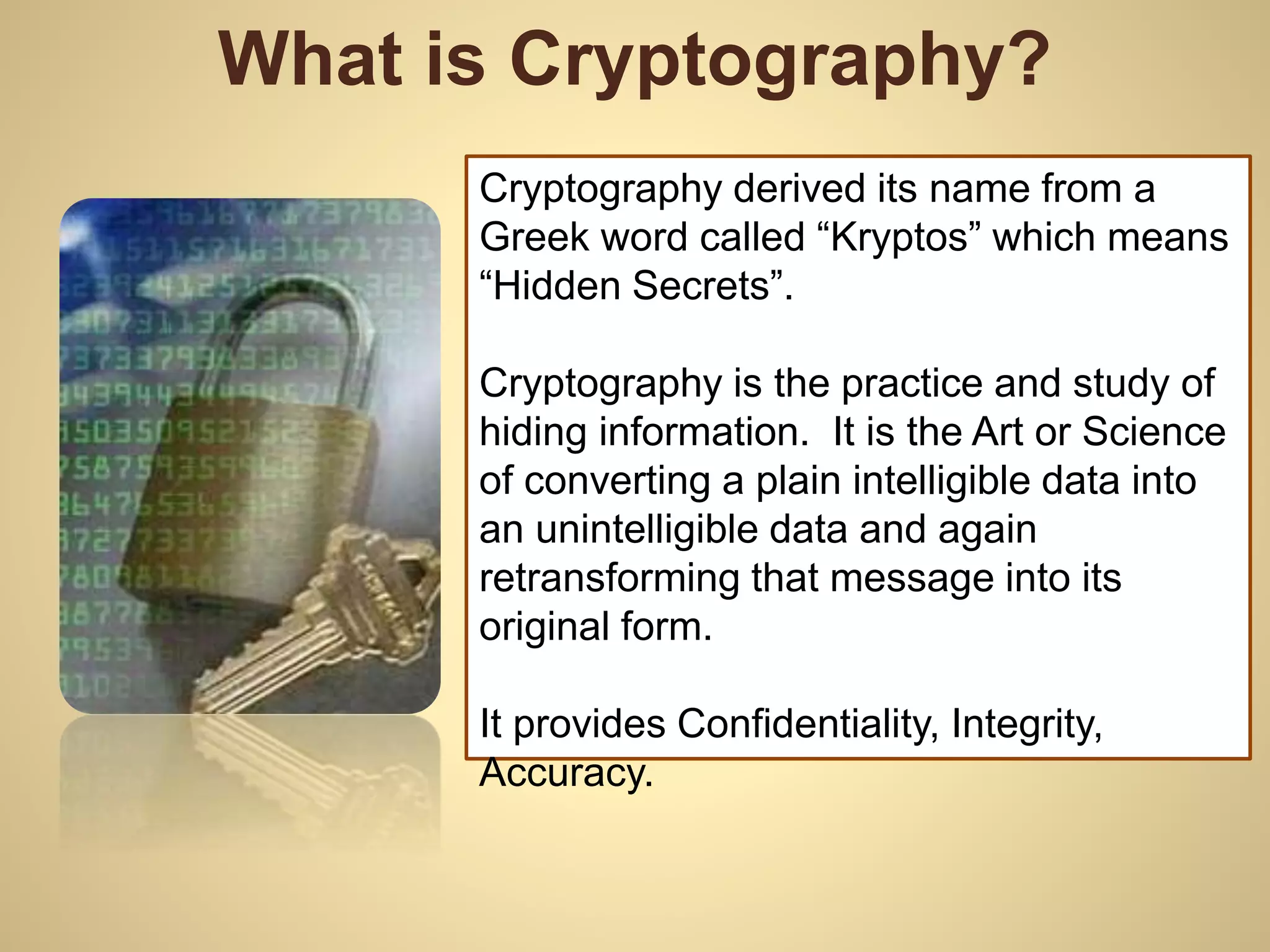
What is Cryptography?
Cryptography derived its name from a
Greek word called “Kryptos” which means
“Hidden Secrets”.
Cryptography is the practice and study of
hiding information. It is the Art or Science
of converting a plain intelligible data into
an unintelligible data and again
retransforming that message into its
original form.
It provides Confidentiality, Integrity,
Accuracy.
What is Encryption / Decryption
 Encryption –
◦ The process of converting plain text into an
unintelligible format (cipher text) is called
Encryption.
 Decryption –
◦ The process of converting cipher text into a plain
text is called Decryption.
What are the Types of Cryptography
 Symmetric Key Cryptography (Secret Key Cryptography)
◦ Same Key is used by both parties
Advantages : Simpler and Faster
Disadvantages : Less Secured
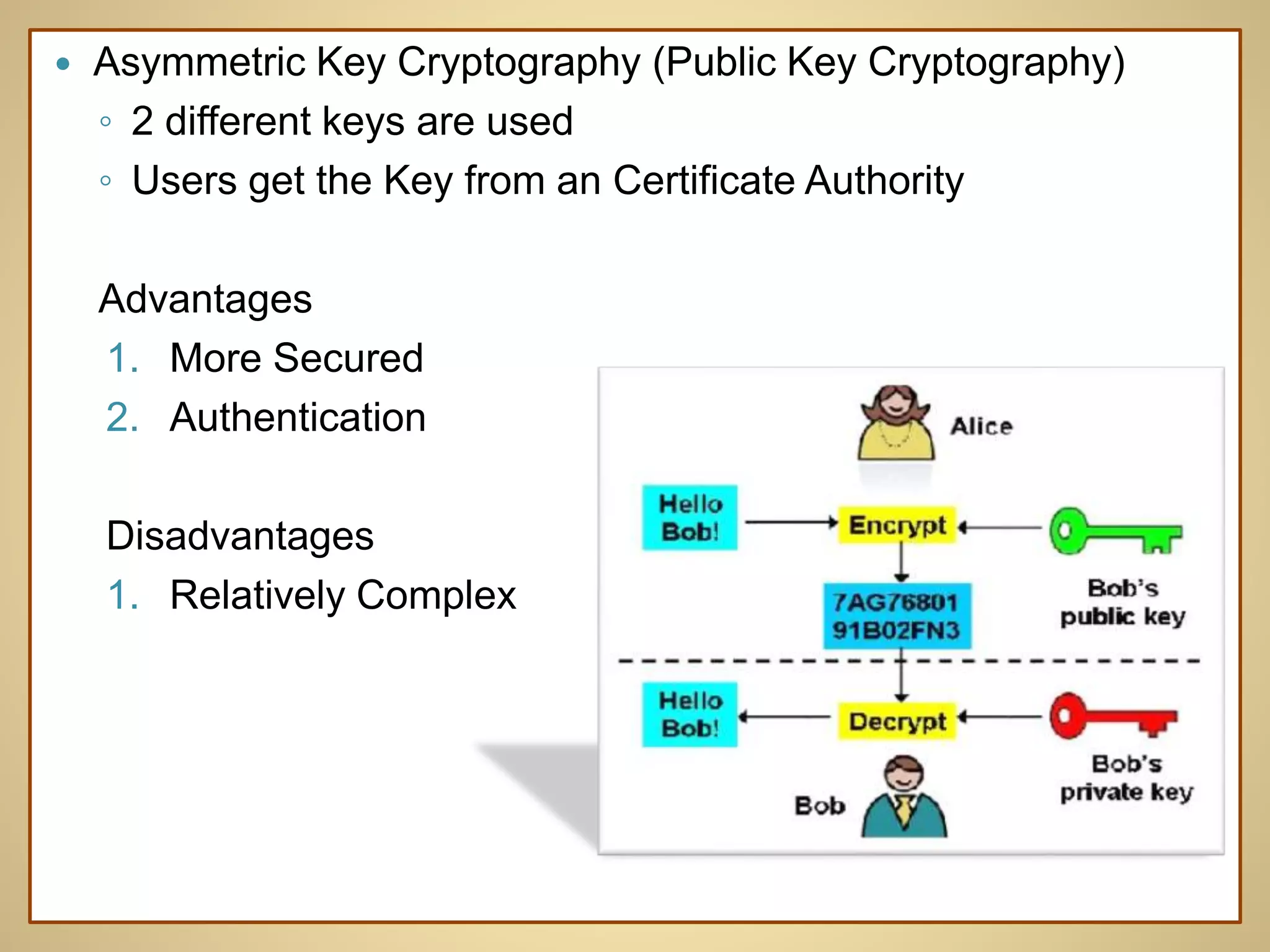
 Asymmetric Key Cryptography (Public Key Cryptography)
◦ 2 different keys are used
◦ Users get the Key from an Certificate Authority
Advantages
1. More Secured
2. Authentication
Disadvantages
1. Relatively Complex
 What is a Key
◦ In cryptography, a key is a variable value that is applied using
an algorithm to a string or block of unencrypted text to produce
encrypted text, or to decrypt encrypted text. The length of the
key is a factor in considering how difficult it will be to decrypt
the text in a given message.
 What is a Block Cipher?
◦ A method of encrypting / decrypting data
◦ Key is used for encryption / decryption.
◦ Same size of I/P and O/P
Introduction with Digital
Signature
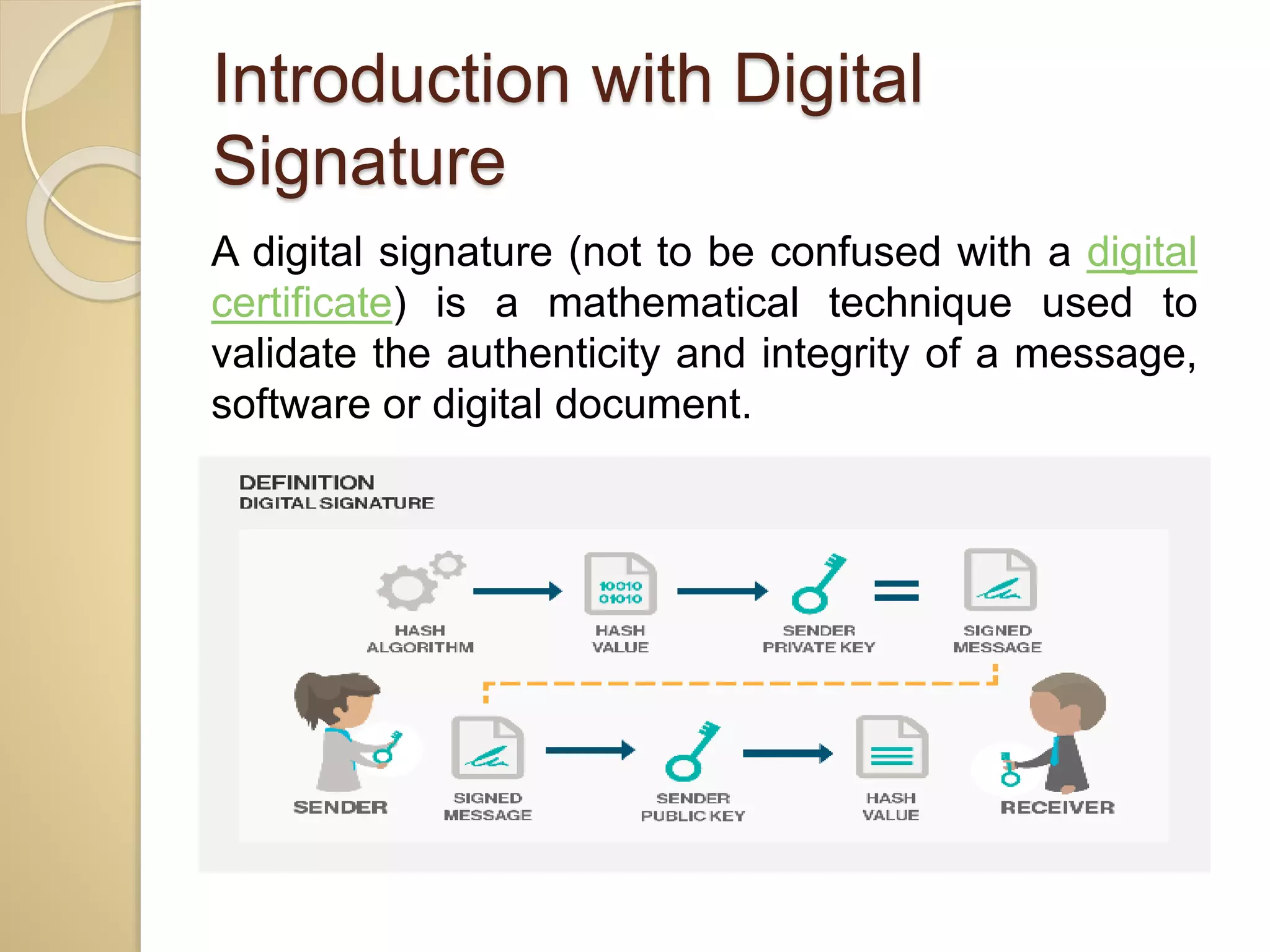
A digital signature (not to be confused with a digital
certificate) is a mathematical technique used to
validate the authenticity and integrity of a message,
software or digital document.
Applying the Signature
1. When you click "sign", a unique digital fingerprint (called a
hash) of the document is created using a mathematical
algorithm. This hash is specific to this particular
document; even the slightest change would result in a
different hash.
2. The hash is encrypted using the signer's private key. The
encrypted hash and the signer's public key are combined into
a digital signature, which is appended to the document.
3. The digitally signed document is ready for distribution.
Verifying the Signature
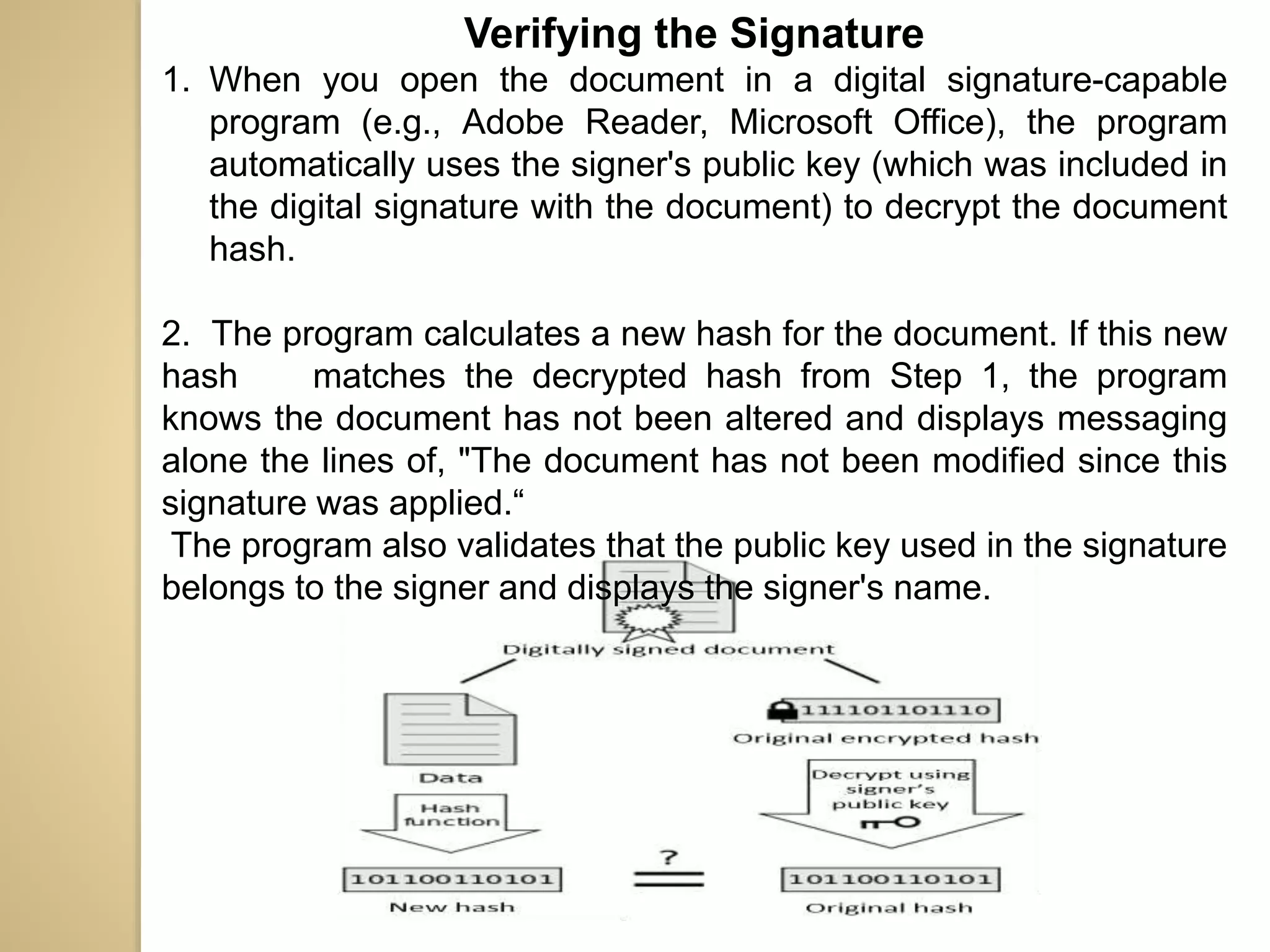
1. When you open the document in a digital signature-capable
program (e.g., Adobe Reader, Microsoft Office), the program
automatically uses the signer's public key (which was included in
the digital signature with the document) to decrypt the document
hash.
2. The program calculates a new hash for the document. If this new
hash matches the decrypted hash from Step 1, the program
knows the document has not been altered and displays messaging
alone the lines of, "The document has not been modified since this
signature was applied.“
The program also validates that the public key used in the signature
belongs to the signer and displays the signer's name.
Introduction with Digital
Certificate
A digital certificate is an electronic "passport"
that allows a person, computer or organization to
exchange information securely over the Internet
using the public keyinfrastructure (PKI). A digital
certificate may also be referred to as a public key
certificate.
Digital Certificates and
Certification Authorities
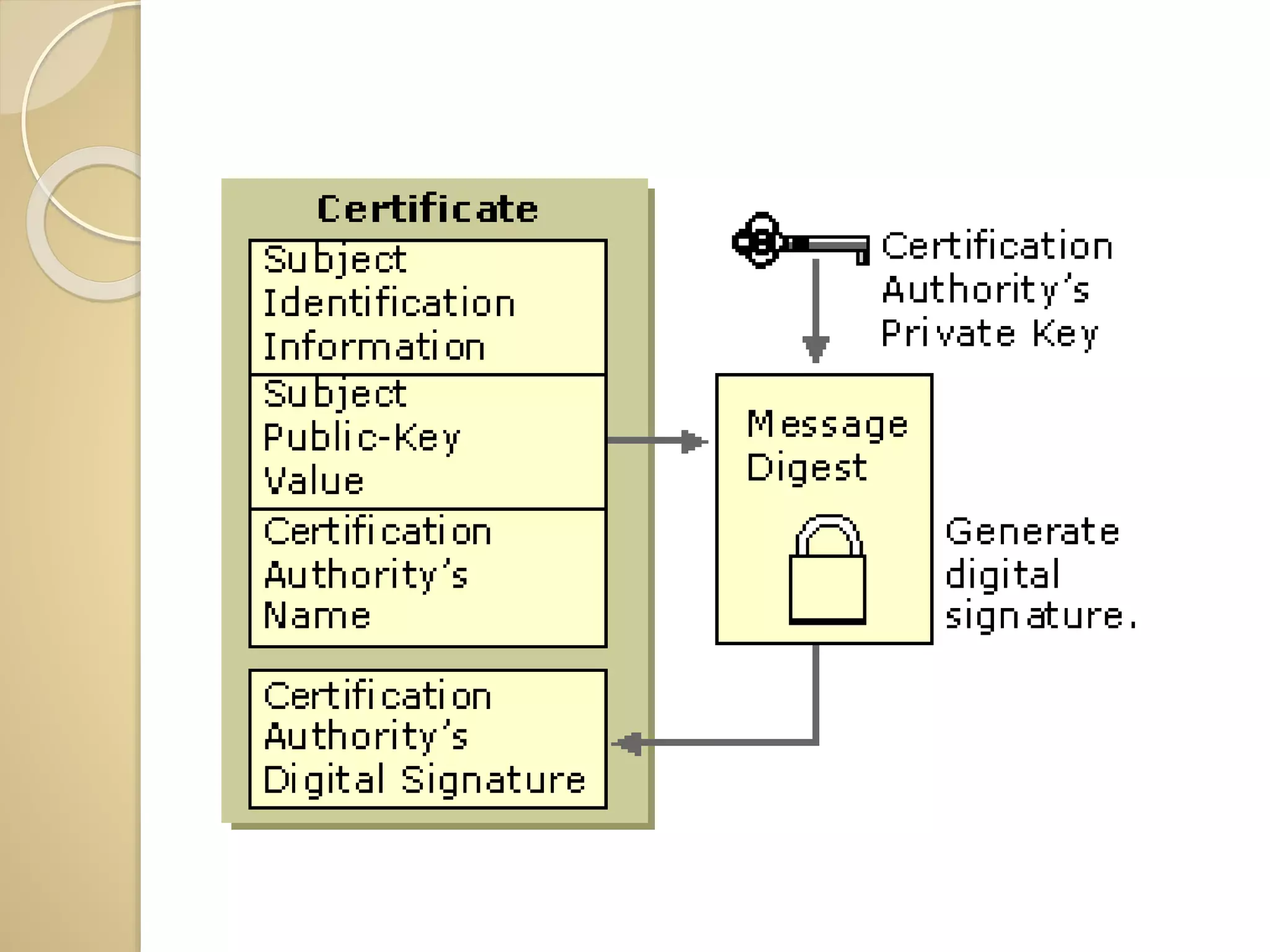
 Digital Certificates are issued by Certification
Authorities (CA). Like a central trusted body
is used to issue driving licenses or passports,
a CA fulfil the role of the Trusted Third Party
by accepting Certificate applications from
entities, authenticating applications, issuing
Certificates and maintaining status
information about the Certificates issued.
 The incorporation of a CA into PKI ensures
that people cannot masquerade on the
Internet as people they are not by issuing
their own fake Digital Certificates for
illegitimate use.
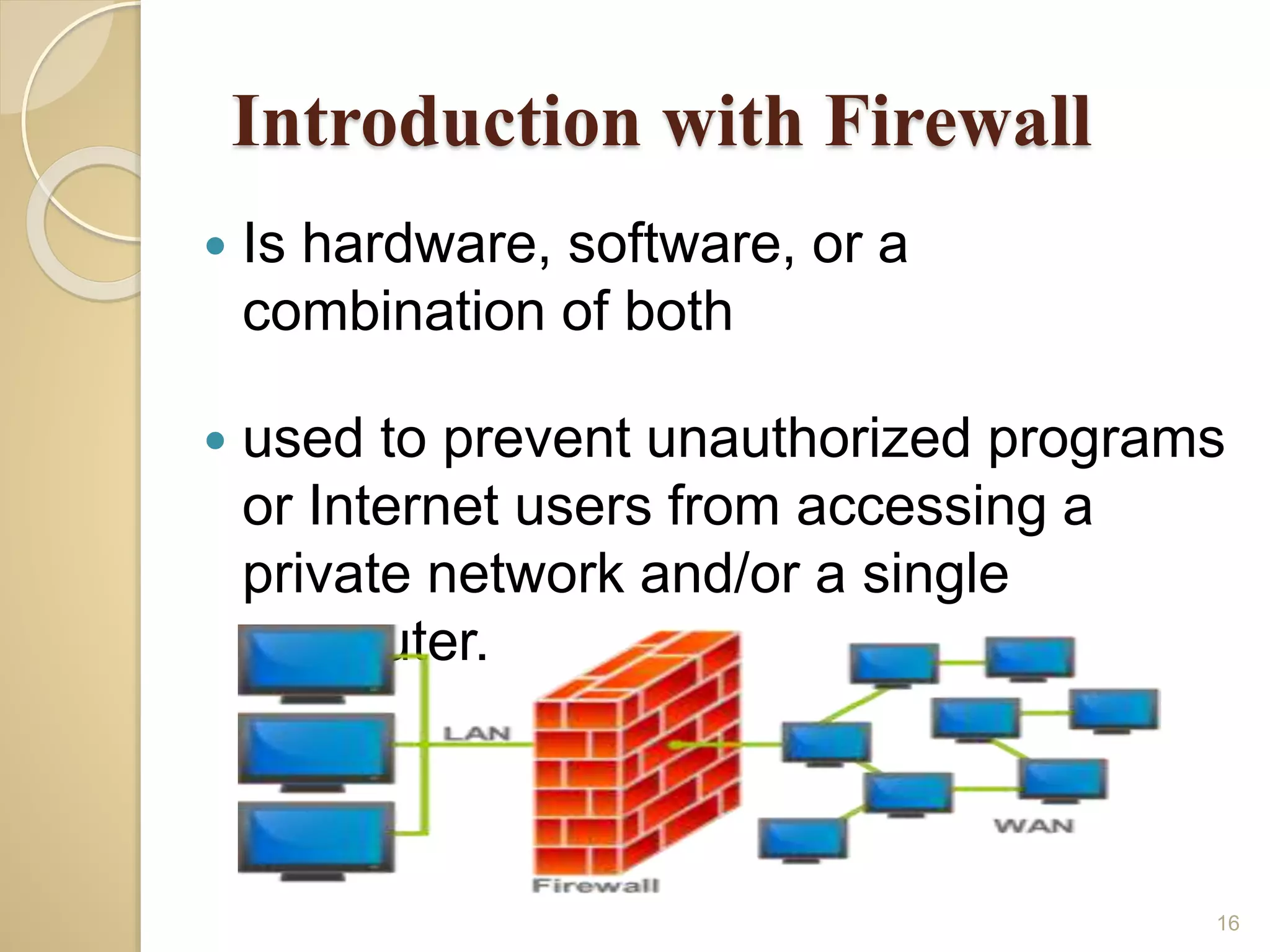
Introduction with Firewall
 Is hardware, software, or a
combination of both
 used to prevent unauthorized programs
or Internet users from accessing a
private network and/or a single
computer.
16
Hardware vs. Software
Firewalls
17
 Hardware Firewalls
◦ Protect an entire network
◦ Implemented on the router level
◦ Usually more expensive, harder to
configure
 Software Firewalls
◦ Protect a single computer
◦ Usually less expensive, easier to
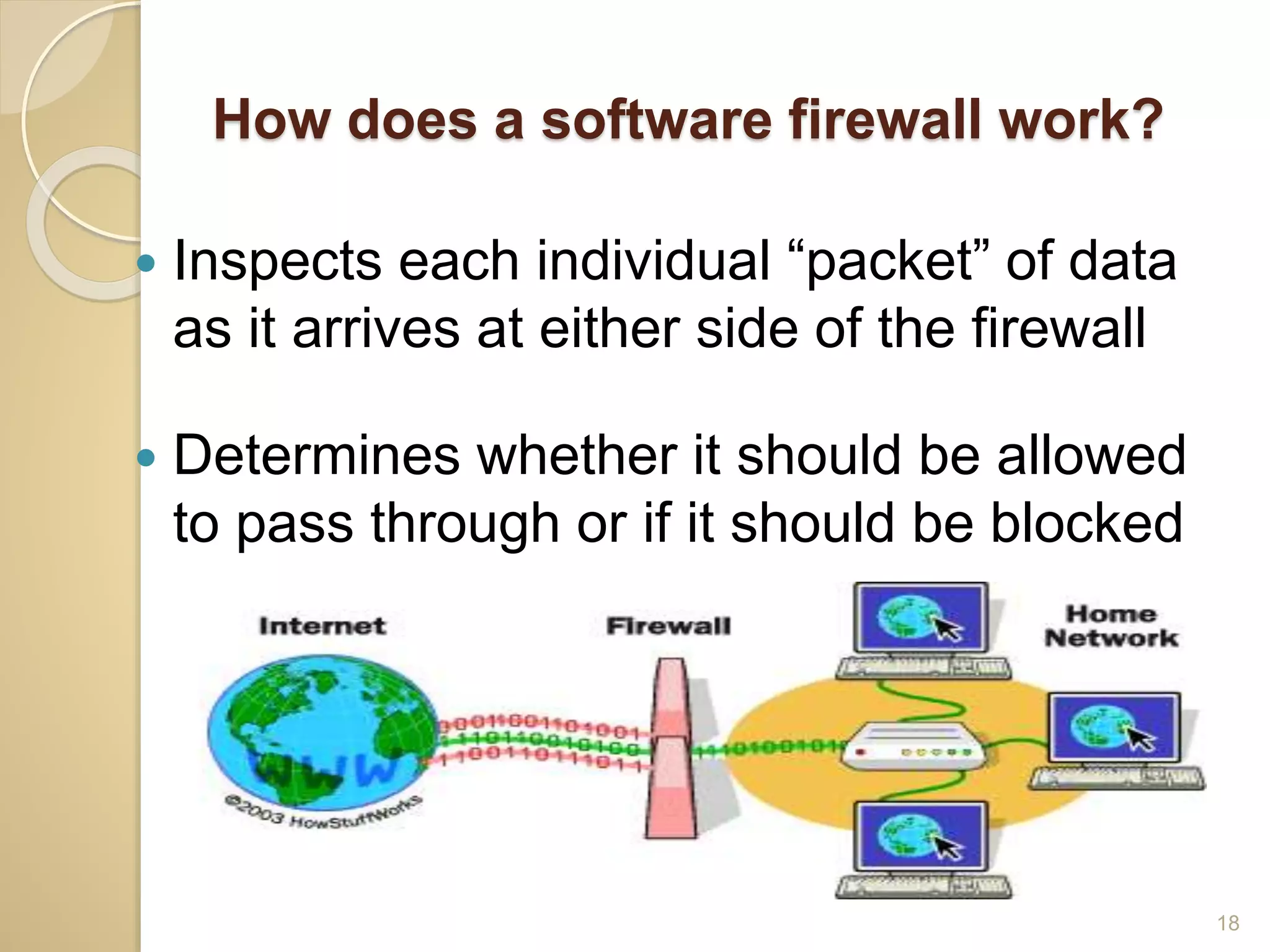
How does a software firewall work?
18
 Inspects each individual “packet” of data
as it arrives at either side of the firewall
 Determines whether it should be allowed
to pass through or if it should be blocked
Firewall Rules
19
 Allow – traffic that flows automatically
because it has been deemed
 Block – traffic that is blocked because
it has been deemed dangerous to your
computer
 Ask – asks the user whether or not the
traffic is allowed to pass through
Types of Firewalls:
 Packet Filtering Firewall
 Application level Gateway
 Circuit level gateway
20
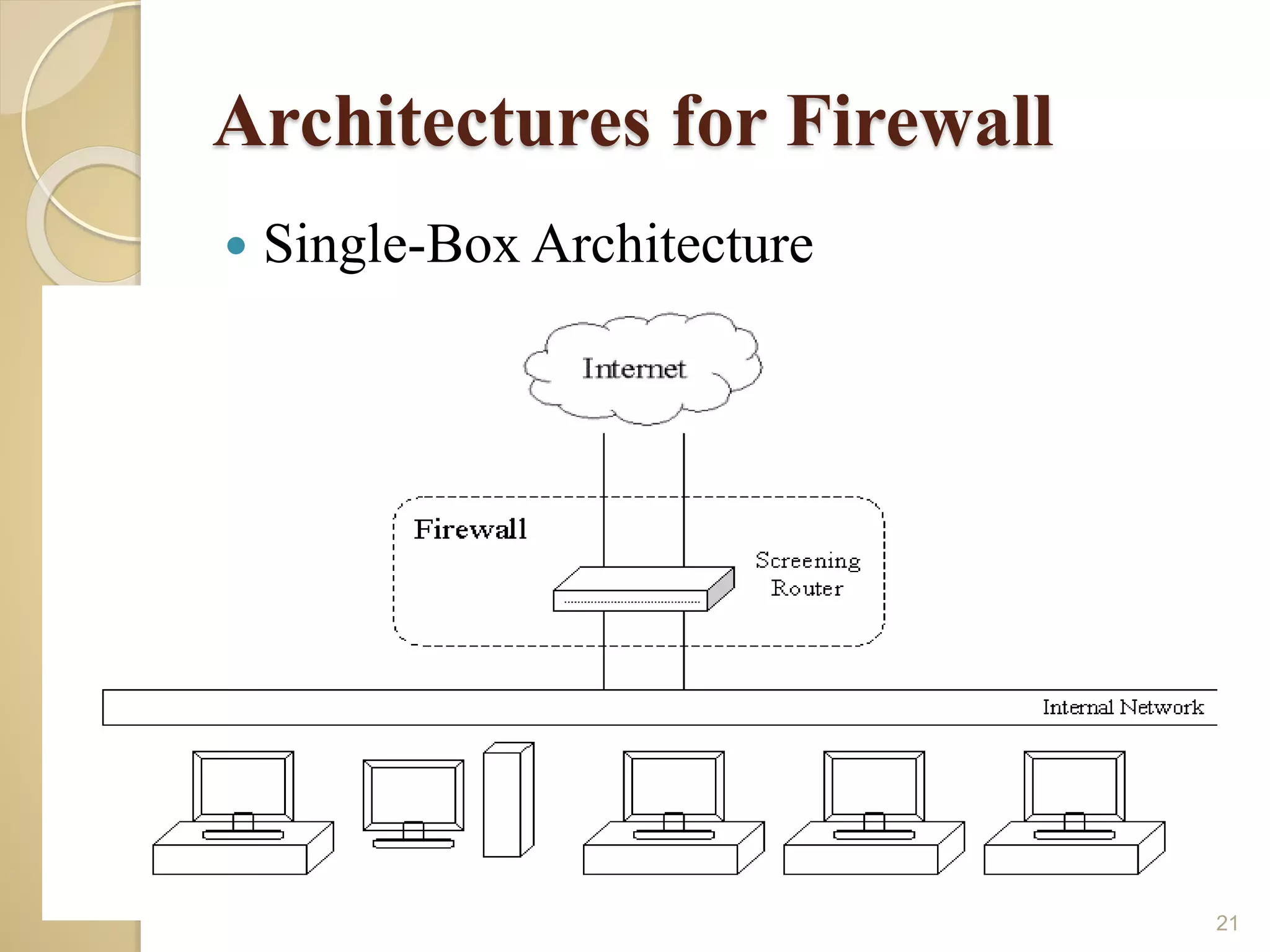
Architectures for Firewall
 Single-Box Architecture
21
Threats for Client Computers
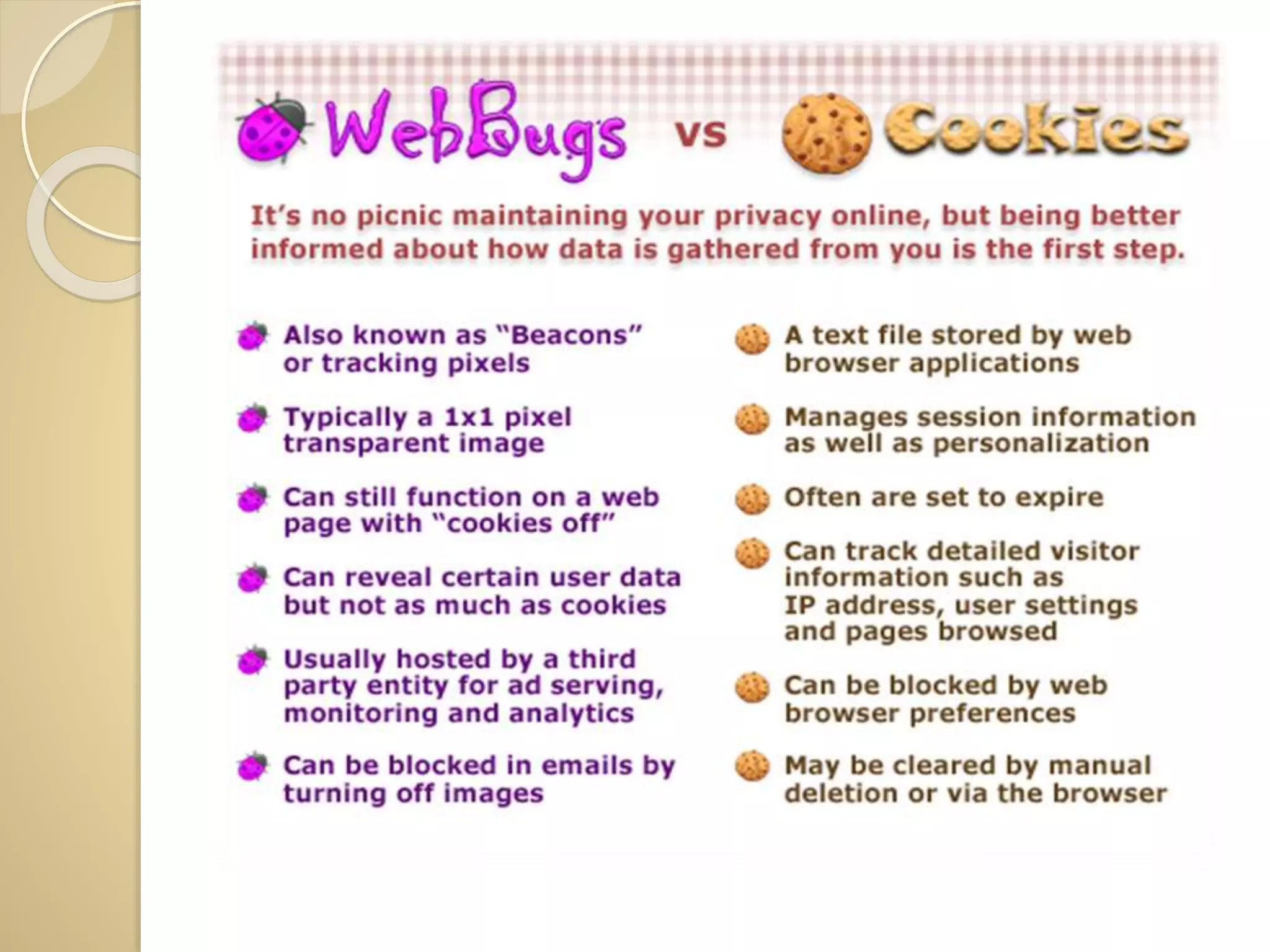
Cookies
Cookies are small files which are stored on a user's
computer. They are designed to hold a modest amount of
data specific to a particular client and website, and can be
accessed either by the web server or the client computer.
This allows the server to deliver a page tailored to a
particular user, or the page itself can contain some script
which is aware of the data in the cookie and so is able to
carry information from one visit to the website (or related
site) to the next.
A Web bug, also known as a Web beacon, is a file object
that is placed on a Web page or in an e-mail message to
monitor user behaviour.
Java Applets
 Java applets that executes with in another program
and cannot execute directly on a computer. Once
downloaded embedded java code can run on a client
computers which means that security violation can
occur.
Security of Client Computers
 Anti Malware Software: The amends of Malware in the
form of virus worms etc. requires anti malware software.
These worms requires takes a few minutes to infect
every machine of network.
 Secure Protocols: Client computers should only connect
with other server using secure protocol. For instance
http creates secure connection to websites.
THANK YOU

Ppt

  • 1.
    Computer Security Submitted to: Mrs.Lakhvinder Kaur Romana Assist. Prof. In Computer Submitted By: Nidhi Bansal, Kajal Garg, Sumandeep Kaur, Manisha and Kirti
  • 2.
    Sub Topics  DataEncryption  Digital Signature  Digital Certificate  Firewall  Threats for Client Computers  Security of Client Computers
  • 3.
  • 5.
    What is Cryptography? Cryptographyderived its name from a Greek word called “Kryptos” which means “Hidden Secrets”. Cryptography is the practice and study of hiding information. It is the Art or Science of converting a plain intelligible data into an unintelligible data and again retransforming that message into its original form. It provides Confidentiality, Integrity, Accuracy.
  • 6.
    What is Encryption/ Decryption  Encryption – ◦ The process of converting plain text into an unintelligible format (cipher text) is called Encryption.  Decryption – ◦ The process of converting cipher text into a plain text is called Decryption.
  • 7.
    What are theTypes of Cryptography  Symmetric Key Cryptography (Secret Key Cryptography) ◦ Same Key is used by both parties Advantages : Simpler and Faster Disadvantages : Less Secured
  • 8.
     Asymmetric KeyCryptography (Public Key Cryptography) ◦ 2 different keys are used ◦ Users get the Key from an Certificate Authority Advantages 1. More Secured 2. Authentication Disadvantages 1. Relatively Complex
  • 9.
     What isa Key ◦ In cryptography, a key is a variable value that is applied using an algorithm to a string or block of unencrypted text to produce encrypted text, or to decrypt encrypted text. The length of the key is a factor in considering how difficult it will be to decrypt the text in a given message.  What is a Block Cipher? ◦ A method of encrypting / decrypting data ◦ Key is used for encryption / decryption. ◦ Same size of I/P and O/P
  • 10.
    Introduction with Digital Signature Adigital signature (not to be confused with a digital certificate) is a mathematical technique used to validate the authenticity and integrity of a message, software or digital document.
  • 11.
    Applying the Signature 1.When you click "sign", a unique digital fingerprint (called a hash) of the document is created using a mathematical algorithm. This hash is specific to this particular document; even the slightest change would result in a different hash. 2. The hash is encrypted using the signer's private key. The encrypted hash and the signer's public key are combined into a digital signature, which is appended to the document. 3. The digitally signed document is ready for distribution.
  • 12.
    Verifying the Signature 1.When you open the document in a digital signature-capable program (e.g., Adobe Reader, Microsoft Office), the program automatically uses the signer's public key (which was included in the digital signature with the document) to decrypt the document hash. 2. The program calculates a new hash for the document. If this new hash matches the decrypted hash from Step 1, the program knows the document has not been altered and displays messaging alone the lines of, "The document has not been modified since this signature was applied.“ The program also validates that the public key used in the signature belongs to the signer and displays the signer's name.
  • 13.
    Introduction with Digital Certificate Adigital certificate is an electronic "passport" that allows a person, computer or organization to exchange information securely over the Internet using the public keyinfrastructure (PKI). A digital certificate may also be referred to as a public key certificate.
  • 14.
    Digital Certificates and CertificationAuthorities  Digital Certificates are issued by Certification Authorities (CA). Like a central trusted body is used to issue driving licenses or passports, a CA fulfil the role of the Trusted Third Party by accepting Certificate applications from entities, authenticating applications, issuing Certificates and maintaining status information about the Certificates issued.  The incorporation of a CA into PKI ensures that people cannot masquerade on the Internet as people they are not by issuing their own fake Digital Certificates for illegitimate use.
  • 16.
    Introduction with Firewall Is hardware, software, or a combination of both  used to prevent unauthorized programs or Internet users from accessing a private network and/or a single computer. 16
  • 17.
    Hardware vs. Software Firewalls 17 Hardware Firewalls ◦ Protect an entire network ◦ Implemented on the router level ◦ Usually more expensive, harder to configure  Software Firewalls ◦ Protect a single computer ◦ Usually less expensive, easier to
  • 18.
    How does asoftware firewall work? 18  Inspects each individual “packet” of data as it arrives at either side of the firewall  Determines whether it should be allowed to pass through or if it should be blocked
  • 19.
    Firewall Rules 19  Allow– traffic that flows automatically because it has been deemed  Block – traffic that is blocked because it has been deemed dangerous to your computer  Ask – asks the user whether or not the traffic is allowed to pass through
  • 20.
    Types of Firewalls: Packet Filtering Firewall  Application level Gateway  Circuit level gateway 20
  • 21.
    Architectures for Firewall Single-Box Architecture 21
  • 22.
    Threats for ClientComputers Cookies Cookies are small files which are stored on a user's computer. They are designed to hold a modest amount of data specific to a particular client and website, and can be accessed either by the web server or the client computer. This allows the server to deliver a page tailored to a particular user, or the page itself can contain some script which is aware of the data in the cookie and so is able to carry information from one visit to the website (or related site) to the next. A Web bug, also known as a Web beacon, is a file object that is placed on a Web page or in an e-mail message to monitor user behaviour.
  • 24.
    Java Applets  Javaapplets that executes with in another program and cannot execute directly on a computer. Once downloaded embedded java code can run on a client computers which means that security violation can occur. Security of Client Computers  Anti Malware Software: The amends of Malware in the form of virus worms etc. requires anti malware software. These worms requires takes a few minutes to infect every machine of network.  Secure Protocols: Client computers should only connect with other server using secure protocol. For instance http creates secure connection to websites.
  • 25.