OPENSHIFT
Workshop
PRESENTED
BY
Shekhar
Gulati
Power up Magnolia CMS with
OpenShift
IN CASE YOU CARE
•
Shekhar Gulati – Works at Red Hat
•
Principal OpenShift Developer Evangelist
•
Java / Python/ JavaScript / NoSQL / Cloud Guy
•
Twitter Handle : shekhargulati
•
Github https://github.com/shekhargulati
•
Slides http://www.slideshare.net/shekhargulati
AGENDA
➔ Learn a bit about Cloud and PaaS basics
➔ Why PaaS Matters
➔ Deploying Magnolia CMS on OpenShift
➔ Minimal Magnolia CMS Configuration
➔ Reduced Magnolia CMS Configuration
● You know about Magnolia CMS
● You know Git
● You like to write code rather than
managing servers.
ASSUMPTIONS
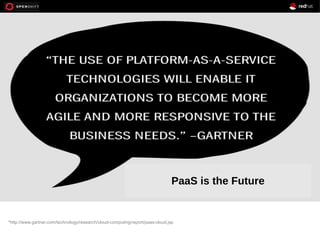
*http://www.gartner.com/technology/research/cloud-computing/report/paas-cloud.jsp
PaaS is the Future
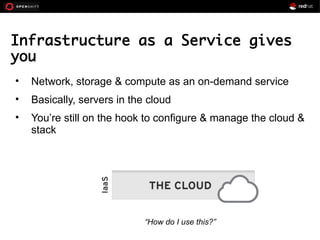
Infrastructure as a Service gives
you
• Network, storage & compute as an on-demand service
• Basically, servers in the cloud
• You’re still on the hook to configure & manage the cloud &
stack
“How do I use this?”
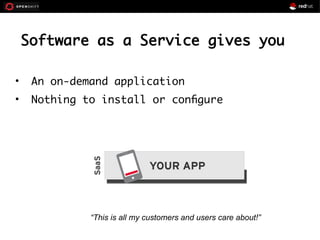
Software as a Service gives you
• An on-demand application
• Nothing to install or configure
“This is all my customers and users care about!”
Platform as a Service delivers
• Application run-time environment in the
cloud
• Configures & manages both the cloud &
stack for your application
“The cloud is now useful!”
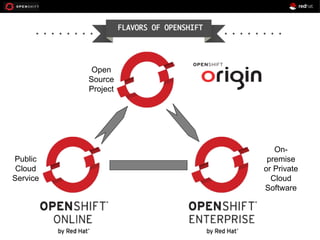
origin
Public
Cloud
Service
On-
premise
or Private
Cloud
Software
Open
Source
Project
FLAVORS OF OPENSHIFT
11
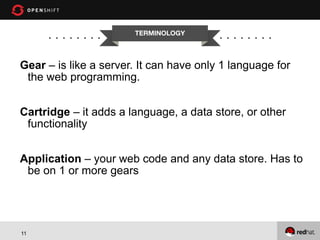
TERMINOLOGY
Gear – is like a server. It can have only 1 language for
the web programming.
Cartridge – it adds a language, a data store, or other
functionality
Application – your web code and any data store. Has to
be on 1 or more gears
12
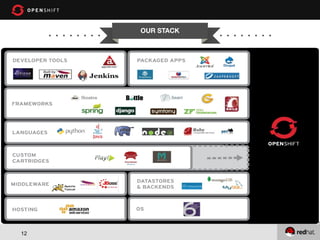
OUR STACK
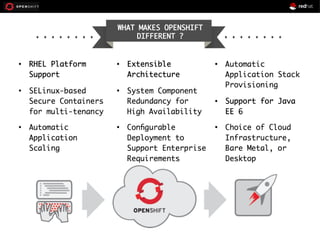
WHAT MAKES OPENSHIFT
DIFFERENT ?
WHERE DOES MAGNOLIA
FITS IN?
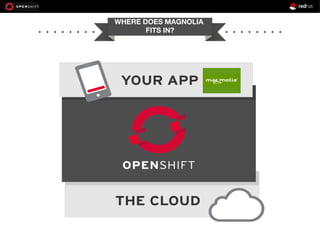
WHERE DOES MAGNOLIA
FITS IN?
● On-demand self-service Magnolia CMS certified
stack.
● Standardize Magnolia CMS application development
and deployment.
● Auto scaling of Magnolia CMS.
● Automate application environment deployment.
● Reduce time to market.
OpenShift Magnolia Integration
Benefits
DEMO TIME
● Sign up for OpenShift Online
● Install OpenShift rhc ruby gem
● rhc create-app magnoliacms tomcat-7
● git rm -rf src/ pom.xml
● git commit -am “template files”
● git remote add upstream
https://github.com/shekhargulati/mg-5.0.4-tomcat7-openshift.git
● git pull -s recursive -X theirs upstream master
● git push
Magnolia CMS 5.0.4 on OpenShift
http://magnoliacms-t20.rhcloud.com/
● You can also use
– JBoss AS 7
– JBoss EAP 6
– MySQL
– PostgreSQL
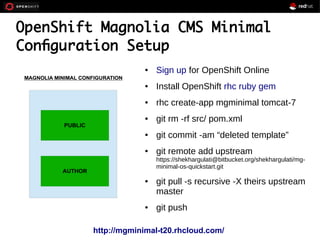
OpenShift Magnolia CMS Minimal
Configuration Setup
● Sign up for OpenShift Online
● Install OpenShift rhc ruby gem
● rhc create-app mgminimal tomcat-7
● git rm -rf src/ pom.xml
● git commit -am “deleted template”
● git remote add upstream
https://shekhargulati@bitbucket.org/shekhargulati/mg-
minimal-os-quickstart.git
● git pull -s recursive -X theirs upstream
master
● git push
http://mgminimal-t20.rhcloud.com/
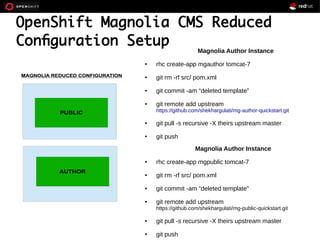
OpenShift Magnolia CMS Reduced
Configuration Setup
Magnolia Author Instance
● rhc create-app mgauthor tomcat-7
● git rm -rf src/ pom.xml
● git commit -am “deleted template”
● git remote add upstream
https://github.com/shekhargulati/mg-author-quickstart.git
● git pull -s recursive -X theirs upstream master
● git push
Magnolia Author Instance
● rhc create-app mgpublic tomcat-7
● git rm -rf src/ pom.xml
● git commit -am “deleted template”
● git remote add upstream
https://github.com/shekhargulati/mg-public-quickstart.git
● git pull -s recursive -X theirs upstream master
● git push
http://mgauthor-t20.rhcloud.com/magnoliaAuthor/
http://mgpublic-t20.rhcloud.com/magnoliaPublic/
● You can have single author instance and
multiple public subscribers
● You can scale public and author instance
● You can use Jenkins for deployment
● You can write cartridge for Magnolia CMS
What Else Is Feasible?
QUESTIONS?
DONE!

Power up Magnolia CMS with OpenShift

  • 1.
  • 2.
    IN CASE YOUCARE • Shekhar Gulati – Works at Red Hat • Principal OpenShift Developer Evangelist • Java / Python/ JavaScript / NoSQL / Cloud Guy • Twitter Handle : shekhargulati • Github https://github.com/shekhargulati • Slides http://www.slideshare.net/shekhargulati
  • 3.
    AGENDA ➔ Learn abit about Cloud and PaaS basics ➔ Why PaaS Matters ➔ Deploying Magnolia CMS on OpenShift ➔ Minimal Magnolia CMS Configuration ➔ Reduced Magnolia CMS Configuration
  • 4.
    ● You knowabout Magnolia CMS ● You know Git ● You like to write code rather than managing servers. ASSUMPTIONS
  • 5.
  • 7.
    Infrastructure as aService gives you • Network, storage & compute as an on-demand service • Basically, servers in the cloud • You’re still on the hook to configure & manage the cloud & stack “How do I use this?”
  • 8.
    Software as aService gives you • An on-demand application • Nothing to install or configure “This is all my customers and users care about!”
  • 9.
    Platform as aService delivers • Application run-time environment in the cloud • Configures & manages both the cloud & stack for your application “The cloud is now useful!”
  • 10.
  • 11.
    11 TERMINOLOGY Gear – islike a server. It can have only 1 language for the web programming. Cartridge – it adds a language, a data store, or other functionality Application – your web code and any data store. Has to be on 1 or more gears
  • 12.
  • 13.
  • 14.
  • 15.
  • 16.
    ● On-demand self-serviceMagnolia CMS certified stack. ● Standardize Magnolia CMS application development and deployment. ● Auto scaling of Magnolia CMS. ● Automate application environment deployment. ● Reduce time to market. OpenShift Magnolia Integration Benefits
  • 17.
  • 18.
    ● Sign upfor OpenShift Online ● Install OpenShift rhc ruby gem ● rhc create-app magnoliacms tomcat-7 ● git rm -rf src/ pom.xml ● git commit -am “template files” ● git remote add upstream https://github.com/shekhargulati/mg-5.0.4-tomcat7-openshift.git ● git pull -s recursive -X theirs upstream master ● git push Magnolia CMS 5.0.4 on OpenShift http://magnoliacms-t20.rhcloud.com/
  • 19.
    ● You canalso use – JBoss AS 7 – JBoss EAP 6 – MySQL – PostgreSQL
  • 20.
    OpenShift Magnolia CMSMinimal Configuration Setup ● Sign up for OpenShift Online ● Install OpenShift rhc ruby gem ● rhc create-app mgminimal tomcat-7 ● git rm -rf src/ pom.xml ● git commit -am “deleted template” ● git remote add upstream https://shekhargulati@bitbucket.org/shekhargulati/mg- minimal-os-quickstart.git ● git pull -s recursive -X theirs upstream master ● git push http://mgminimal-t20.rhcloud.com/
  • 21.
    OpenShift Magnolia CMSReduced Configuration Setup Magnolia Author Instance ● rhc create-app mgauthor tomcat-7 ● git rm -rf src/ pom.xml ● git commit -am “deleted template” ● git remote add upstream https://github.com/shekhargulati/mg-author-quickstart.git ● git pull -s recursive -X theirs upstream master ● git push Magnolia Author Instance ● rhc create-app mgpublic tomcat-7 ● git rm -rf src/ pom.xml ● git commit -am “deleted template” ● git remote add upstream https://github.com/shekhargulati/mg-public-quickstart.git ● git pull -s recursive -X theirs upstream master ● git push
  • 22.
  • 23.
    ● You canhave single author instance and multiple public subscribers ● You can scale public and author instance ● You can use Jenkins for deployment ● You can write cartridge for Magnolia CMS What Else Is Feasible?
  • 24.
  • 25.