Sutton University:
               Computers/Technical
                                            PowerPoint: Moving a Slide
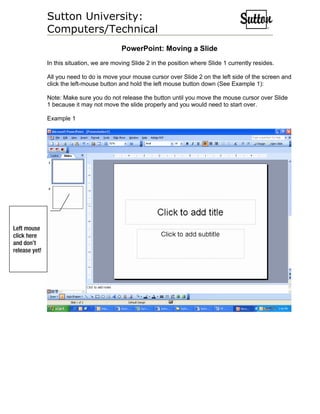
               In this situation, we are moving Slide 2 in the position where Slide 1 currently resides.

               All you need to do is move your mouse cursor over Slide 2 on the left side of the screen and
               click the left-mouse button and hold the left mouse button down (See Example 1):

               Note: Make sure you do not release the button until you move the mouse cursor over Slide
               1 because it may not move the slide properly and you would need to start over.

               Example 1


Left mouse
click here
and don’t
release yet!
Sutton University:
                Computers/Technical
                Once you have your mouse button clicked and held, move your mouse up to where Slide 1
                is located and then release the left mouse button.

                You will notice that the slides have now changed places. Slide 2 is now Slide 1 and vice
                versa (See Example 2).

                Example 2


Slide 1
(now) used
to be Slide 2


Slide 2
(now) used
to be Slide 1

Power point moving a slide

  • 1.
    Sutton University: Computers/Technical PowerPoint: Moving a Slide In this situation, we are moving Slide 2 in the position where Slide 1 currently resides. All you need to do is move your mouse cursor over Slide 2 on the left side of the screen and click the left-mouse button and hold the left mouse button down (See Example 1): Note: Make sure you do not release the button until you move the mouse cursor over Slide 1 because it may not move the slide properly and you would need to start over. Example 1 Left mouse click here and don’t release yet!
  • 2.
    Sutton University: Computers/Technical Once you have your mouse button clicked and held, move your mouse up to where Slide 1 is located and then release the left mouse button. You will notice that the slides have now changed places. Slide 2 is now Slide 1 and vice versa (See Example 2). Example 2 Slide 1 (now) used to be Slide 2 Slide 2 (now) used to be Slide 1