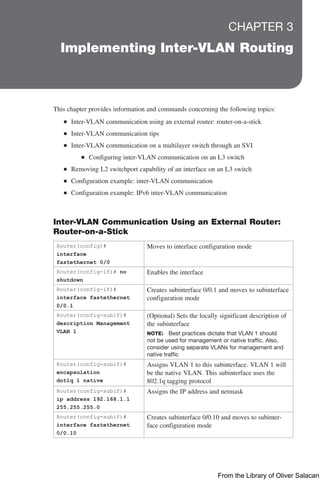
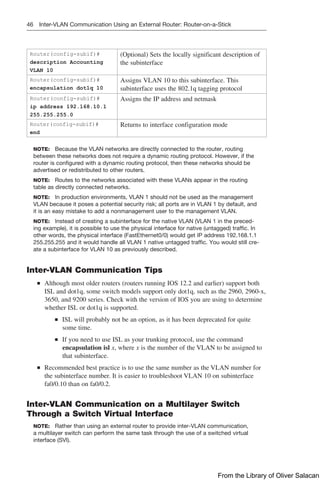
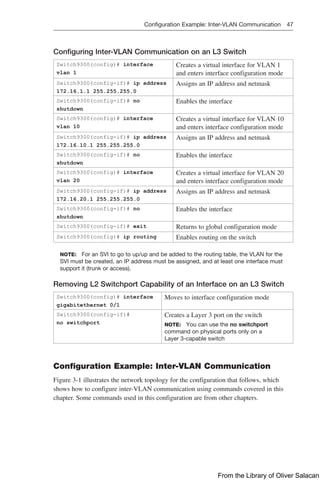
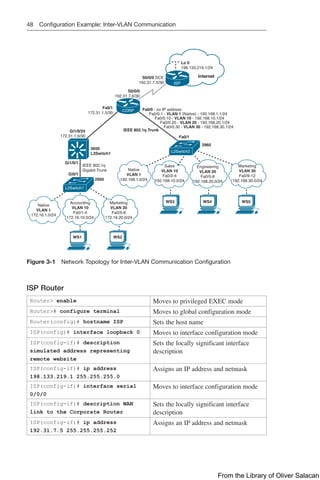
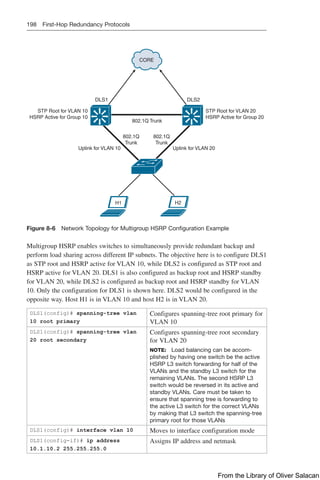
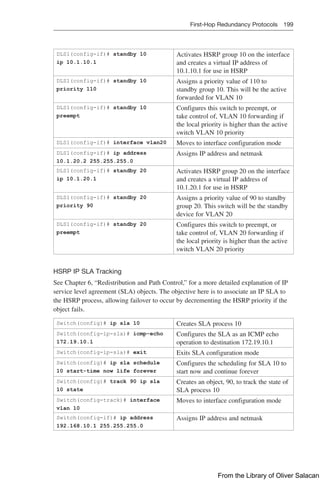
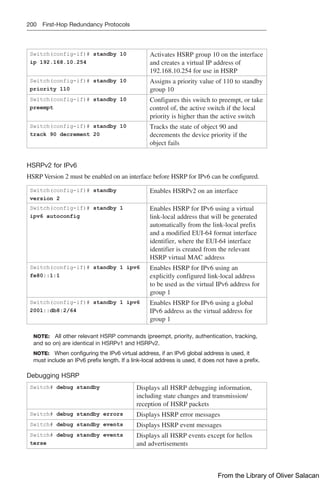
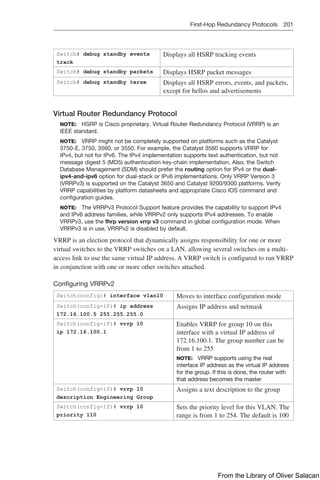
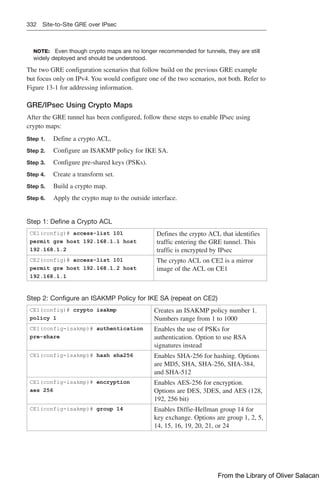
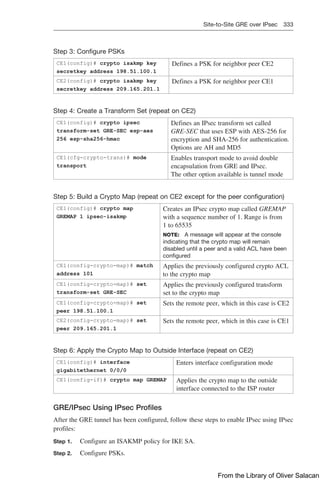
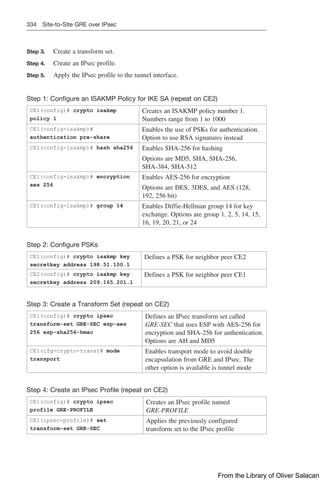
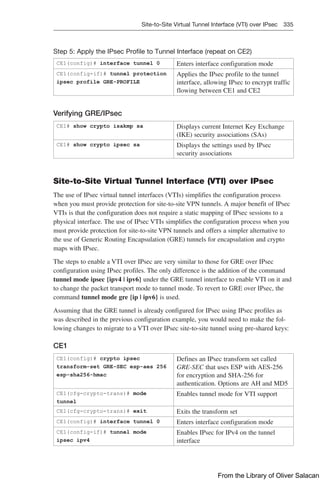
From the Library of Oliver Salacan
CCNP and CCIE Enterprise Core &
CCNP Enterprise Advanced Routing
Portable Command Guide
All ENCOR (350-401) and ENARSI (300-410)
Commands in One Compact, Portable Resource
Scott Empson
Patrick Gargano
Cisco Press
From the Library of Oliver Salacan
CCNP and CCIE Enterprise Core & CCNP Enterprise
Advanced Routing Portable Command Guide
Scott Empson, Patrick Gargano
Copyright© 2020 Cisco Systems, Inc.
Published by:
Cisco Press
All rights reserved. No part of this book may be reproduced or transmitted in
any form or by any means, electronic or mechanical, including photocopying,
recording, or by any information storage and retrieval system, without written
permission from the publisher, except for the inclusion of brief quotations in
a review.
ScoutAutomatedPrintCode
Library of Congress Control Number: 2019956928
ISBN-13: 978-0-13-576816-7
ISBN-10: 0-13-576816-0
Warning and Disclaimer
This book is designed to provide information about the CCNP and CCIE
Enterprise Core (ENCOR 350-401) and CCNP Enterprise Advanced Routing
(ENARSI 300-410) exams. Every effort has been made to make this book as
complete and as accurate as possible, but no warranty or fitness is implied.
The information is provided on an “as is” basis. The authors, Cisco Press, and
Cisco Systems, Inc. shall have neither liability nor responsibility to any person
or entity with respect to any loss or damages arising from the information
­
contained in this book or from the use of the discs or programs that may
accompany it.
The opinions expressed in this book belong to the authors and are not
necessarily those of Cisco Systems, Inc.
Trademark Acknowledgments
All terms mentioned in this book that are known to be trademarks or service
marks have been appropriately capitalized. Cisco Press or Cisco Systems, Inc.,
cannot attest to the accuracy of this information. Use of a term in this book
should not be regarded as affecting the validity of any trademark or service mark.
Special Sales
For information about buying this title in bulk quantities, or for special sales
opportunities (which may include electronic versions; custom cover designs;
and content particular to your business, training goals, marketing focus,
or branding interests), please contact our corporate sales department at
corpsales@pearsoned.com or (800) 382-3419.
For government sales inquiries, please contact governmentsales@pearsoned.com.
For questions about sales outside the U.S., please contact intlcs@pearson.com.
Editor-In-Chief
Mark Taub
Alliances Manager,
Cisco Press
Arezou Gol
Product Line Manager
Brett Bartow
Senior Editor
James Manly
Managing Editor
Sandra Schroeder
Development Editor
Eleanor Bru
Senior Project Editor
Lori Lyons
Copy Editor
Bill McManus
Technical Editor
Bob Vachon
Editorial Assistant
Cindy Teeters
Cover Designer
Chuti Prasertsith
Production Manager
Vaishnavi Venkatesan/
codeMantra
Composition
codeMantra
Indexer
Ken Johnson
Proofreader
Abigail Manheim
From the Library of Oliver Salacan
iii  
Feedback Information
At Cisco Press, our goal is to create in-depth technical books of the highest quality and value. Each book
is crafted with care and precision, undergoing rigorous development that involves the unique expertise of
members from the professional technical community.
Readers’ feedback is a natural continuation of this process. If you have any ­
comments regarding how we
could improve the quality of this book, or ­
otherwise alter it to better suit your needs, you can contact us
through email at feedback@ciscopress.com. Please make sure to include the book title and ISBN in your
message.
We greatly appreciate your assistance.
Cisco and the Cisco logo are trademarks or registered trademarks of Cisco and/or its affiliates in the U.S. and other countries. To view a list of Cisco trademarks,
go to this URL: www.cisco.com/go/trademarks. Third party trademarks mentioned are the property of their respective owners. The use of the word partner does
not imply a partnership relationship between Cisco and any other company. (1110R)
Americas Headquarters
Cisco Systems, Inc.
San Jose, CA
Asia Pacific Headquarters
Cisco Systems (USA) Pte. Ltd.
Singapore
Europe Headquarters
Cisco Systems International BV Amsterdam,
The Netherlands
Cisco has more than 200 offices worldwide. Addresses, phone numbers, and fax numbers are listed on the Cisco Website at www.cisco.com/go/offices.
Reader Services
Register your copy at www.ciscopress.com/title/9780135768167 for convenient access
to downloads, updates, and corrections as they become available. To start the registration
process, go to www.ciscopress.com/register and log in or create an account*. Enter the
product ISBN 9780135768167 and click Submit. When the process is complete, you will
find any available bonus content under Registered Products.
*Be sure to check the box that you would like to hear from us to receive exclusive
­
discounts on future editions of this product.
From the Library of Oliver Salacan
iv Contents at a Glance
Contents at a Glance
About the Authors xvi
Introduction xix
Part I: Layer 2 Infrastructure
CHAPTER 1 VLANs 1
CHAPTER 2 Spanning Tree Protocol 23
CHAPTER 3 Implementing Inter-VLAN Routing 45
Part II: Layer 3 Infrastructure
CHAPTER 4 EIGRP 61
CHAPTER 5 OSPF 87
CHAPTER 6 Redistribution and Path Control 127
CHAPTER 7 BGP 155
Part III: Infrastructure Services
CHAPTER 8 IP Services 185
CHAPTER 9 Device Management 231
Part IV: Infrastructure Security
CHAPTER 10 Infrastructure Security 245
Part V: Network Assurance
CHAPTER 11 Network Assurance 261
Part VI: Wireless
CHAPTER 12 Wireless Security and Troubleshooting 299
Part VII: Overlays and Virtualization
CHAPTER 13 Overlay Tunnels and VRF 325
Part VIII: Appendix
APPENDIX A Create Your Own Journal Here 347
INDEX 361
From the Library of Oliver Salacan
v  
Table of Contents
About the Authors xvi
Introduction xix
Part I: Layer 2 Infrastructure
CHAPTER 1 VLANs 1
Virtual LANs 1
Creating Static VLANs Using VLAN Configuration Mode 2
Assigning Ports to Data and Voice VLANs 2
Using the range Command 3
Dynamic Trunking Protocol (DTP) 3
Setting the Trunk Encapsulation and Allowed VLANs 4
VLAN Trunking Protocol (VTP) 5
Verifying VTP 6
Verifying VLAN Information 7
Saving VLAN Configurations 7
Erasing VLAN Configurations 7
Configuration Example: VLANs 8
Layer 2 Link Aggregation 11
Interface Modes in EtherChannel 12
Default EtherChannel Configuration 12
Guidelines for Configuring EtherChannel 12
Configuring Layer 2 EtherChannel 14
Configuring Layer 3 EtherChannel 14
Configuring EtherChannel Load Balancing 15
Configuring LACP Hot-Standby Ports 16
Monitoring and Verifying EtherChannel 17
Configuration Example: EtherChannel 18
CHAPTER 2 Spanning Tree Protocol 23
Spanning Tree Protocol Definition 24
Enabling Spanning Tree Protocol 24
Changing the Spanning-Tree Mode 25
Configuring the Root Switch 25
Configuring a Secondary Root Switch 26
Configuring Port Priority 26
Configuring the Path Cost 27
From the Library of Oliver Salacan
vi Table of Contents
Configuring the Switch Priority of a VLAN 27
Configuring STP Timers 27
Configuring Optional Spanning-Tree Features 28
PortFast 28
BPDU Guard (2xxx/older 3xxx Series) 29
BPDU Guard (3650/9xxx Series) 29
BPDU Filter 30
UplinkFast 30
BackboneFast 31
Root Guard 31
Loop Guard 32
Unidirectional Link Detection 33
Configuring and Verifying Port Error Conditions 33
Enabling Rapid Spanning Tree 36
Rapid Spanning Tree Link Types 36
Enabling Multiple Spanning Tree 37
Verifying the Extended System ID 39
Verifying STP 39
Troubleshooting Spanning Tree Protocol 40
Configuration Example: PVST+ 40
Spanning-Tree Migration Example: PVST+ to ­
Rapid-PVST+ 43
CHAPTER 3 Implementing Inter-VLAN Routing 45
Inter-VLAN Communication Using an External Router:
Router-on-a-Stick 45
Inter-VLAN Communication Tips 46
Inter-VLAN Communication on a Multilayer Switch
Through a Switch Virtual Interface 46
Configuring Inter-VLAN Communication on
an L3 Switch 47
Removing L2 Switchport Capability of an Interface
on an L3 Switch 47
Configuration Example: Inter-VLAN Communication 47
Configuration Example: IPv6 Inter-VLAN Communication 55
Part II: Layer 3 Infrastructure
CHAPTER 4 EIGRP 61
Enhanced Interior Gateway Routing Protocol (EIGRP) 62
Enabling EIGRP for IPv4 Using Classic Mode Configuration 62
Enabling EIGRP for IPv6 Using Classic Mode Configuration 63
From the Library of Oliver Salacan
vii  
EIGRP Using Named Mode Configuration 64
EIGRP Named Mode Subconfiguration Modes 66
Upgrading Classic Mode to Named Mode Configuration 66
EIGRP Router ID 67
Authentication for EIGRP 67
Configuring Authentication in Classic Mode 67
Configuring Authentication in Named Mode 68
Verifying and Troubleshooting EIGRP Authentication 70
Auto-Summarization for EIGRP 70
IPv4 Manual Summarization for EIGRP 70
IPv6 Manual Summarization for EIGRP 71
Timers for EIGRP 71
Passive Interfaces for EIGRP 72
“Pseudo” Passive EIGRP Interfaces 72
Injecting a Default Route into EIGRP: Redistribution of
a Static Route 73
Injecting a Default Route into EIGRP: ip default-network 74
Injecting a Default Route into EIGRP: Summarize to 0.0.0.0/0 74
Accepting Exterior Routing Information: default-information 75
Equal-cost Load Balancing: maximum-paths 75
Unequal-cost Load Balancing: variance 76
EIGRP Traffic Sharing 76
Bandwidth Use for EIGRP 77
Stub Routing for EIGRP 77
EIGRP Unicast Neighbors 79
EIGRP Wide Metrics 79
Adjusting the EIGRP Metric Weights 80
Verifying EIGRP 80
Troubleshooting EIGRP 82
Configuration Example: EIGRP for IPv4 and
IPv6 Using Named Mode 83
CHAPTER 5 OSPF 87
Comparing OSPFv2 and OSPFv3 88
Configuring OSPF 89
Configuring Multiarea OSPF 89
Using Wildcard Masks with OSPF Areas 90
Configuring Traditional OSPFv3 91
Enabling OSPF for IPv6 on an Interface 91
OSPFv3 and Stub/NSSA Areas 92
From the Library of Oliver Salacan
viii Table of Contents
Interarea OSPFv3 Route Summarization 92
Enabling an IPv4 Router ID for OSPFv3 93
Forcing an SPF Calculation 93
OSPFv3 Address Families 93
Configuring the IPv6 Address Family in OSPFv3 94
Configuring the IPv4 Address Family in OSPFv3 94
Applying Parameters in Address Family Configuration Mode 94
Authentication for OSPF 95
Configuring OSPFv2 Authentication: Simple Password 95
Configuring OSPFv2 Cryptographic Authentication:
SHA-256 96
Configuring OSPFv3 Authentication and Encryption 97
Verifying OSPFv2 and OSPFv3 Authentication 98
Optimizing OSPF Parameters 98
Loopback Interfaces 98
Router ID 99
DR/BDR Elections 99
Passive Interfaces 100
Modifying Cost Metrics 100
OSPF Reference Bandwidth 101
OSPF LSDB Overload Protection 101
Timers 101
IP MTU 102
Propagating a Default Route 102
Route Summarization 103
Interarea Route Summarization 103
External Route Summarization 103
OSPF Route Filtering 104
Using the filter-list Command 104
Using the area range not-advertise Command 104
Using the distribute-list in Command 104
Using the summary-address not-advertise Command 105
OSPF Special Area Types 105
Stub Areas 105
Totally Stubby Areas 106
Not-So-Stubby Areas (NSSA) 106
Totally NSSA 107
Virtual Links 108
Configuration Example: Virtual Links 108
From the Library of Oliver Salacan
ix  
Verifying OSPF Configuration 109
Troubleshooting OSPF 111
Configuration Example: Single-Area OSPF 111
Configuration Example: Multiarea OSPF 114
Configuration Example: Traditional OSPFv3 117
Configuration Example: OSPFv3 with Address Families 120
CHAPTER 6 Redistribution and Path Control 127
Defining Seed and Default Metrics 128
Redistributing Connected Networks 129
Redistributing Static Routes 129
Redistributing Subnets into OSPF 130
Assigning E1 or E2 Routes in OSPF 130
Redistributing OSPF Internal and External Routes 131
Configuration Example: Route Redistribution for IPv4 131
Configuration Example: Route Redistribution for IPv6 132
Verifying Route Redistribution 134
Route Filtering Using the distribute-list Command 134
Configuration Example: Inbound and Outbound
Distribute List Route Filters 134
Configuration Example: Controlling Redistribution
with Outbound Distribute Lists 135
Verifying Route Filters 136
Route Filtering Using Prefix Lists 137
Configuration Example: Using a Distribute List
That References a Prefix List to Control Redistribution 139
Verifying Prefix Lists 140
Using Route Maps with Route Redistribution 140
Configuration Example: Route Maps 141
Manipulating Redistribution Using Route Tagging 142
Changing Administrative Distance 143
Path Control with Policy-Based Routing 144
Verifying Policy-Based Routing 145
Configuration Example: PBR with Route Maps 146
Cisco IOS IP SLA 147
Configuring Authentication for IP SLA 149
Monitoring IP SLA Operations 150
PBR with Cisco IOS IP SLA 150
Step 1: Define Probe(s) 151
Step 2: Define Tracking Object(s) 152
From the Library of Oliver Salacan
x Table of Contents
Step 3a: Define the Action on the Tracking Object(s) 152
Step 3b: Define Policy Routing Using the Tracking
Object(s) 152
Step 4: Verify IP SLA Operations 152
CHAPTER 7 BGP 155
Configuring BGP: Classic Configuration 156
Configuring Multiprotocol BGP (MP-BGP) 157
Configuring BGP: Address Families 158
Configuration Example: Using MP-BGP Address
Families to Exchange IPv4 and IPv6 Routes 159
BGP Support for 4-Byte AS Numbers 160
BGP Timers 161
BGP and update-source 161
IBGP Next-Hop Behavior 162
EBGP Multihop 162
Attributes 164
Route Selection Decision Process—The BGP Best
Path Algorithm 164
Weight Attribute 164
Using AS Path Access Lists to Manipulate
the Weight Attribute 166
Using Prefix Lists and Route Maps to Manipulate
the Weight Attribute 166
Local Preference Attribute 167
Using AS Path Access Lists with Route Maps to
Manipulate the Local Preference Attribute 167
AS Path Attribute Prepending 169
AS Path: Removing Private Autonomous Systems 171
Multi-Exit Discriminator (MED) Attribute 171
Verifying BGP 174
Troubleshooting BGP 175
Default Routes 177
Route Aggregation 177
Route Reflectors 177
Regular Expressions 178
Regular Expressions: Examples 179
BGP Route Filtering Using Access Lists and Distribute Lists 180
Configuration Example: Using Prefix Lists and AS
Path Access Lists 181
BGP Peer Groups 182
From the Library of Oliver Salacan
xi  
Authentication for BGP 184
Configuring Authentication Between BGP Peers 184
Verifying BGP Authentication 184
Part III: Infrastructure Services
CHAPTER 8 IP Services 185
Network Address Translation (NAT) 186
Private IP Addresses: RFC 1918 186
Configuring Static NAT 187
Configuring Dynamic NAT 188
Configuring Port Address Translation (PAT) 189
Configuring a NAT Virtual Interface 190
Verifying NAT and PAT Configurations 190
Troubleshooting NAT and PAT Configurations 191
Configuration Example: PAT 191
Configuration Example: NAT Virtual Interfaces
and Static NAT 193
First-Hop Redundancy Protocols 194
Hot Standby Router Protocol 194
Virtual Router Redundancy Protocol 201
IPv4 Configuration Example: HSRP on L3 Switch 204
IPv4 Configuration Example: VRRPv2 on Router
and L3 Switch with IP SLA Tracking 209
IPv6 Configuration Example: HSRPv2 on Router
and L3 Switch 212
Dynamic Host Control Protocol (DHCP) 217
Implementing DHCP for IPv4 217
Implementing DHCP for IPv6 221
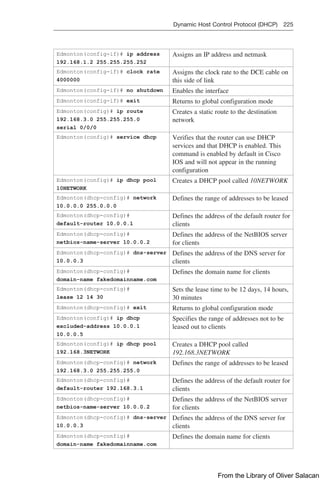
Configuration Example: DHCP for IPv4 224
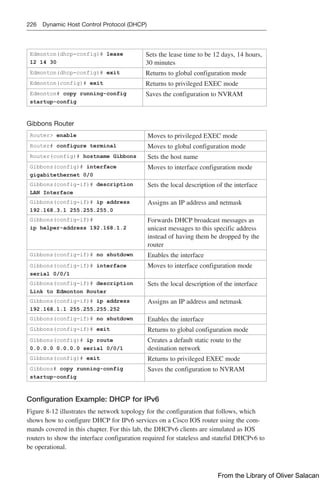
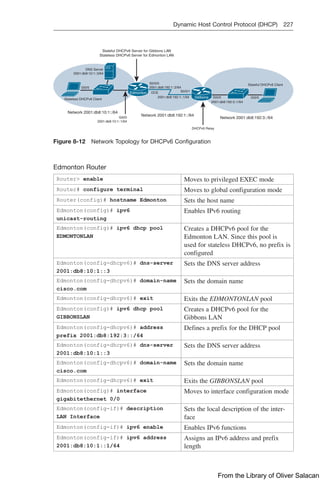
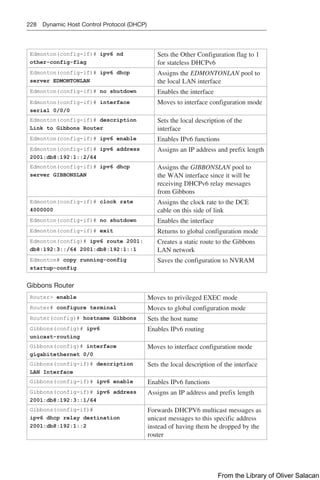
Configuration Example: DHCP for IPv6 226
CHAPTER 9 Device Management 231
Configuring Passwords 231
Cleartext Password Encryption 232
Password Encryption Algorithm Types 233
Configuring SSH 234
Verifying SSH 235
Boot System Commands 235
The Cisco IOS File System 236
From the Library of Oliver Salacan
xii Table of Contents
Viewing the Cisco IOS File System 236
Commonly Used URL Prefixes for Cisco Network Devices 236
Deciphering IOS Image Filenames 237
Backing Up Configurations to a TFTP Server 238
Restoring Configurations from a TFTP Server 238
Backing Up the Cisco IOS Software to a TFTP Server 239
Restoring/Upgrading the Cisco IOS Software from a TFTP Server 239
Restoring the Cisco IOS Software Using the ROM Monitor
Environmental Variables and tftpdnld Command 240
Secure Copy Protocol (SCP) 241
Configuring an SCP Server 241
Verifying and Troubleshooting SCP 241
Configuration Example: SCP 241
Disabling Unneeded Services 242
Useful Device Management Options 243
Part IV: Infrastructure Security
CHAPTER 10 Infrastructure Security 245
IPv4 Access Control Lists (ACLs) 246
Configuring and Applying Standard IPv4 ACLs 246
Configuring and Applying Extended IPv4 ACLs 247
Configuring and Applying Time-based ACLs 248
Configuring and Applying VTY ACLs 249
IPv6 ACLs 250
Configuring and Applying IPv6 ACLs 250
Verifying IPv4 and IPv6 ACLs 251
Implementing Authentication Methods 251
Simple Local Database Authentication 252
AAA-based Local Database Authentication 252
RADIUS Authentication 253
TACACS+ Authentication 255
Configuring Authorization and Accounting 256
Troubleshooting AAA 257
Control Plane Policing (CoPP) 257
Step 1: Define ACLs to Identify Permitted
CoPP Traffic Flows 258
Step 2: Define Class Maps for Matched Traffic 258
Step 3: Define a Policy Map to Police Matched Traffic 259
From the Library of Oliver Salacan
xiii  
Step 4: Assign a Policy Map to the Control Plane 259
Verifying CoPP 260
Unicast Reverse Path Forwarding (uRPF) 260
Configuring uRPF 260
Verifying and Troubleshooting uRPF 260
Part V: Network Assurance
CHAPTER 11 Network Assurance 261
Internet Control Message Protocol Redirect Messages 262
The ping Command 262
Examples of Using the ping and the Extended ping Commands 263
The traceroute Command 265
The debug Command 265
Conditionally Triggered Debugs 266
Configuring Secure SNMP 267
Securing SNMPv1 or SNMPv2c 267
Securing SNMPv3 268
Verifying SNMP 269
Implementing Logging 269
Configuring Syslog 269
Syslog Message Format 269
Syslog Severity Levels 270
Syslog Message Example 270
Configuring NetFlow 271
Configuring Flexible NetFlow 272
Step 1: Configure a Flow Record 272
Step 2: Configure a Flow Exporter 272
Step 3: Configure a Flow Monitor 272
Step 4: Apply the Flow Monitor to an Interface 273
Verifying NetFlow 273
Implementing Port Mirroring 273
Default SPAN and RSPAN Configuration 273
Configuring Local SPAN 274
Local SPAN Guidelines for Configuration 274
Configuration Example: Local SPAN 274
Configuring Remote SPAN 277
Remote SPAN Guidelines for Configuration 278
Configuration Example: Remote SPAN 278
From the Library of Oliver Salacan
xiv Table of Contents
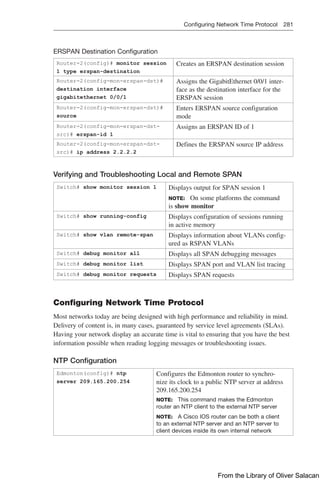
Configuring Encapsulated RSPAN (ERSPAN) 280
Verifying and Troubleshooting Local and Remote SPAN 281
Configuring Network Time Protocol 281
NTP Configuration 281
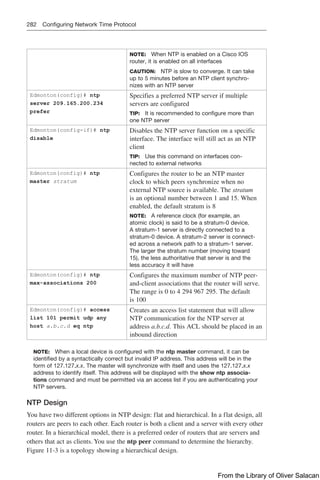
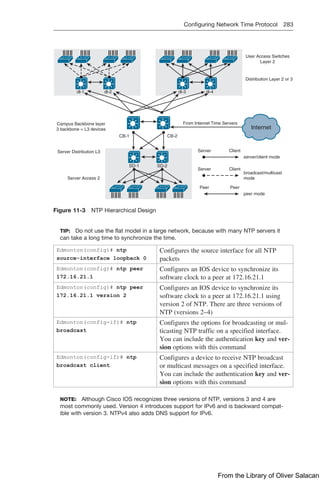
NTP Design 282
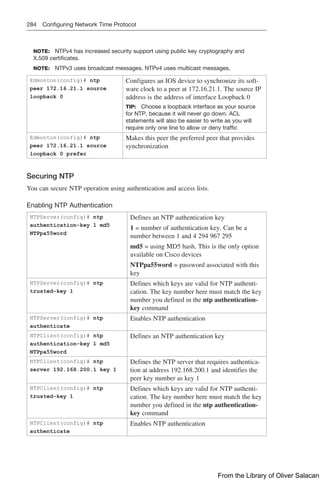
Securing NTP 284
Verifying and Troubleshooting NTP 286
Setting the Clock on a Router 286
Using Time Stamps 290
Configuration Example: NTP 290
Tool Command Language (Tcl) 294
Embedded Event Manager (EEM) 295
EEM Configuration Examples 296
EEM and Tcl Scripts 298
Verifying EEM 298
Part VI: Wireless
CHAPTER 12 Wireless Security and Troubleshooting 299
Authenticating Wireless Clients 299
Open Authentication 300
Authenticating with a Pre-shared Key 302
Authenticating with EAP 304
Authenticating with WebAuth 310
Troubleshooting from the Wireless LAN Controller 312
Troubleshooting Wireless Client Connectivity 318
Cisco AireOS Monitoring Dashboard GUI 318
Cisco IOS XE GUI 322
Part VII: Overlays and Virtualization
CHAPTER 13 Overlay Tunnels and VRF 325
Generic Routing Encapsulation (GRE) 325
Configuring an IPv4 GRE Tunnel 326
Configuring an IPv6 GRE Tunnel 326
Verifying IPv4 and IPv6 GRE Tunnels 327
Configuration Example: IPv4 and IPv6 GRE
Tunnels with OSPFv3 327
From the Library of Oliver Salacan
xv  
Site-to-Site GRE over IPsec 331
GRE/IPsec Using Crypto Maps 332
GRE/IPsec Using IPsec Profiles 333
Verifying GRE/IPsec 335
Site-to-Site Virtual Tunnel Interface (VTI) over IPsec 335
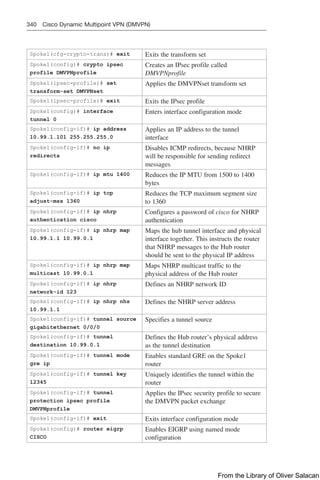
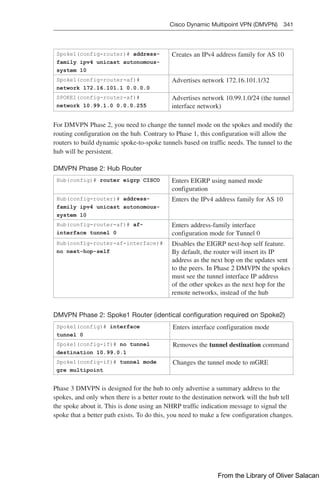
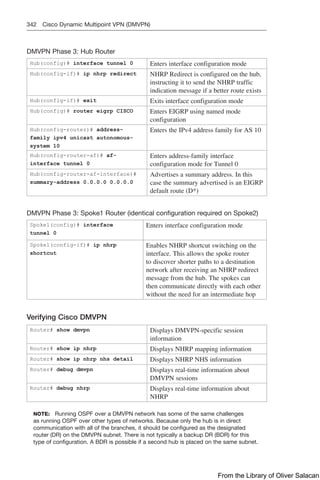
Cisco Dynamic Multipoint VPN (DMVPN) 336
Configuration Example: Cisco DMVPN for IPv4 337
Verifying Cisco DMVPN 342
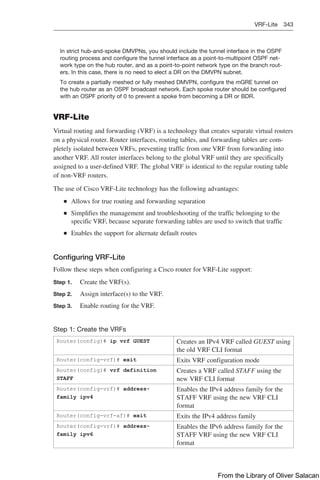
VRF-Lite 343
Configuring VRF-Lite 343
Verifying VRF-Lite 345
APPENDIX A Create Your Own Journal Here 347
INDEX 361
From the Library of Oliver Salacan
xvi About the Authors
About the Authors
Scott Empson is an instructor in the Department of Information Systems Technology
at the Northern Alberta Institute of Technology in Edmonton, Alberta, Canada, where
he has taught for over 21 years. He teaches technical courses in Cisco routing and
switching, along with courses in professional development and leadership. Scott ­
created
the CCNA Command Quick Reference in 2004 as a companion guide to the Cisco
Networking Academy Program, and this guide became the CCNA Portable Command
Guide in 2005. Other titles in the series in the areas of CCNP, Wireless, Security,
Microsoft, and Linux followed beginning in 2006. Scott has a Master of Education
degree along with three undergraduate degrees: a Bachelor of Arts, with a major in
English; a Bachelor of Education, again with a major in English/language arts; and
a Bachelor of Applied Information Systems Technology, with a major in network
­
management. Scott lives in Edmonton, Alberta, with his wife, Trina, and two university-
attending-but-still-haven’t-moved-out-yet-but-hope-to-move-out-as-soon-as-possible-
after-graduation-so-Dad-can-have-the-TV-room-back children, Zachariah and Shaelyn.
Patrick Gargano has been an educator since 1996, a Cisco Networking Academy
Instructor since 2000, and a Certified Cisco Systems Instructor (CCSI) since 2005. He
is currently based in Australia, where he is a Content Development Engineer at Skyline
ATS, responsible for CCNP Enterprise course development with Learning@Cisco. He
previously led the Networking Academy program at Collège La Cité in Ottawa, Canada,
where he taught CCNA/CCNP-level courses, and he has also worked for Cisco Learning
Partners Fast Lane UK, ARP Technologies, and NterOne.
In 2018 Patrick was awarded the Networking Academy Above and Beyond Instructor
award for leading CCNA CyberOps early adoption and instructor training in Quebec,
Canada. Patrick has also twice led the Cisco Networking Academy Dream Team at Cisco
Live US.
Patrick’s previous Cisco Press publications include the CCNP Routing and Switching
Portable Command Guide (2014) and 31 Days Before Your CCNA Security Exam
(2016). His certifications include CCNA (R&S), CCNA Wireless, CCNA Security,
CCNA CyberOps, and CCNP (R&S). He holds Bachelor of Education and Bachelor of
Arts degrees from the University of Ottawa, and is completing a Master of Professional
Studies in Computer Networking at Fort Hays State University (Kansas).
About the Technical Reviewer
Bob Vachon is a professor in the Computer Systems Technology program at Cambrian
College in Sudbury, Ontario, Canada, where he teaches networking infrastructure cours-
es. He has worked and taught in the computer networking and information technology
field since 1984. He has collaborated on various CCNA, CCNA Security, and CCNP
projects for the Cisco Networking Academy as team lead, lead author, and subject matter
expert. He enjoys playing the guitar and being outdoors.
From the Library of Oliver Salacan
Acknowledgments xvii  
Dedications
Scott Empson: As always, this book is dedicated to Trina, Zach, and Shae. Also, this
book is dedicated to Florence Empson. I couldn’t have asked for a better mother. I love
you. Cancer sucks.
—Scott
Patrick Gargano: To my wife Kathryn. I am grateful for your love, patience, and
constant support, not only during the writing of this book but always. Thank you for
­
taking us on this Australian adventure. Je t’aime.
To our son Sam. What a lovely, kind, interesting little person you are becoming. It is such
a pleasure to have you in our lives and to share in your passions. Je t’aime, Samu.
—Patrick
Acknowledgments
Anyone who has ever had anything to do with the publishing industry knows that it
takes many, many people to create a book. Our names may be on the cover, but there
is no way that we can take credit for all that occurred to get this book from idea to
­
publication. Therefore, we must thank the following:
Scott Empson: The team at Cisco Press. Once again, you amaze me with your profes-
sionalism and the ability to make me look good. James and Ellie—thank you for your
continued support and belief in my little engineering journal. Thanks to the Production
team: Lori, Bill, and Vaishnavi.
To our technical reviewer, Bob Vachon, thanks for keeping us on track and making sure
that what we wrote is correct and relevant. I brought you on board with me all those
years ago for the CCNA Security Portable Command Guide, and I have always enjoyed
working with and collaborating with you. This time has been no different.
A big thank you goes to my co-author Patrick Gargano; you have made this a better
book with your presence and your knowledge. I am truly honoured to have you as part of
the Portable Command Guide family.
Patrick Gargano: I first want to thank Mary Beth Ray for welcoming me into the Cisco
Press family back in 2013. I hope you enjoy a well-deserved retirement as you embrace
this new, more-relaxed chapter in your life. Namaste.
James, Ellie, Lori, and Bill at Cisco Press did a fabulous job keeping the project on the
rails and looking its best.
Bob, always a pleasure working with you. Your attention to detail and technical
­
suggestions were truly appreciated.
From the Library of Oliver Salacan
xviii Acknowledgments
Finally, to my good friend Scott. Like the first book we worked on together, this one has
been fun and engaging. Thanks for putting up with all those early-morning and late-night
calls as we dealt with the 15-hour time difference between Edmonton and Perth. For the
last time, no, I don’t have the winning lottery ticket numbers even though it’s already
tomorrow in Australia.
Command Syntax Conventions
The conventions used to present command syntax in this book are the same conventions
used in the IOS Command Reference. The Command Reference describes these conven-
tions as follows:
Q
Q Boldface indicates commands and keywords that are entered literally as shown.
In actual configuration examples and output (not general command syntax),
boldface indicates commands that are manually input by the user (such as a show
command).
Q
Q Italic indicates arguments for which you supply actual values.
Q
Q Vertical bars (|) separate alternative, mutually exclusive elements.
Q
Q Square brackets ([ ]) indicate an optional element.
Q
Q Braces ({ }) indicate a required choice.
Q
Q Braces within brackets ([{ }]) indicate a required choice within an optional
element.
From the Library of Oliver Salacan
Introduction xix  
Introduction
Welcome to the CCNP and CCIE Enterprise Core & CCNP Enterprise Advanced
Routing Portable Command Guide, a handy resource that you can use both on the job
and to study for the ENCOR 350-401 and ENARSI 300-410 exams. I truly hope that a
shortened name comes along for this title soon as that is a real bother to continually type
out. In order to increase sales, I suggested to Cisco Press that we call this one Harry
Potter and the CCNP ENCORE & ENARSI Portable Command Guide, but I was quickly
vetoed—the title is still too long, I guess. Who can really understand what lawyers say,
anyway?
In June 2019, during his Cisco Live keynote address, Cisco Systems CEO Chuck
Robbins made an announcement that turned the Cisco certification world completely
around. The entire certification program is being reinvented—a new vision, new exams,
new paths—including the DevNet pathway that focuses on programmability expertise
and software skills. In response to this announcement, authors around the world jumped
back into their respective home office/lab space (some would say we never truly left)
and started the enormous task of updating the content needed to prepare for these
new exams, scheduled to launch in February 2020. This book is one of many titles (at
one point I heard that over 35 new titles were being worked on) created over the last
12 months to meet the demands of industry and academia in both the CCNP and CCIE
certification space. After studying the new blueprints of all the new CCNP Enterprise
exams, Patrick and I decided to combine outcomes from two certification exams into a
single volume for this latest edition of our Portable Command Guide. Enterprise Core
and Enterprise Advanced Routing are very closely related, so it made sense to create this
volume for you to use to prepare for the new exams, and to use as a reference to accom-
plish tasks you may be undertaking in your production networks.
For those of you who have used one or more Portable Command Guides before, thank
you for looking at this one. For those of you who are new to the Portable Command
Guides, you are reading what is essentially a cleaned-up version of a personal engineer-
ing journal—a small notebook that can be carried around with you that contains little
nuggets of information; commands that you use but then forget; IP address schemes
for the parts of the network you work with only on occasion; and little reminders about
concepts that you work with only once or twice a year but still need to know when those
times roll around.. Having a journal of commands at your fingertips, without having to
search Cisco.com (or resort to textbooks if the network is down and you are responsible
for getting it back online), can be a real timesaver.
With the creation of the new CCNP Enterprise exam objectives, there is always some-
thing new to read, a new podcast to listen to, or a slideshow from Cisco Live that you
want to review. To make this guide even more practical for you to use, it includes an
appendix of blank pages where you can add details that you glean from these other
resources, as well as add your own configurations, commands that are not in this book
but are needed in your world, and so on. You can make this book your personal engineer-
ing journal, a central repository of information that won’t weigh you down as you carry
it from the office or cubicle to the server and infrastructure rooms in some remote part of
the building or some branch office.
From the Library of Oliver Salacan
xx Who Should Read This Book?
Who Should Read This Book?
This book is for those people preparing for the CCNP and CCIE Enterprise Core
(ENCOR 350-401) exam and/or the CCNP Enterprise Advanced Routing (ENARSI
300-410) exam, whether through self-study, on-the-job training and practice, study
within the Cisco Academy Program, or study through the use of a Cisco Training
Partner. There are also many handy notes and tips along the way to make life a bit easier
for you in this endeavor. This book is also useful in the workplace. It is small enough
that you will find it easy to carry around with you. Big, heavy textbooks might look
impressive on your bookshelf in your office, but can you really carry them all around
with you when you are working in some server room or equipment closet somewhere?
Strategies for Exam Preparation
The strategy you use to prepare for the ENCOR and ENARSI exams might differ from
strategies used by other readers, mainly based on the skills, knowledge, and experi-
ence you already have obtained. For instance, if you have attended a course offered by
a Cisco Learning Partner or through the Cisco Networking Academy, you might take a
different approach than someone who learned routing via on-the-job training or through
self-study. Regardless of the strategy you use or the background you have, this book is
designed to help you minimize the amount of time required to get to the point where
you can pass the exam. For instance, there is no need for you to practice or read about
EIGRP, OSPF, WLCs, or VLANs if you fully understand the topic already. However,
many people like to make sure that they truly know a topic and therefore read over mate-
rial that they already know. Several book features will help you gain the confidence that
you need to be convinced that you know some material already, and to also help you
know what topics you need to study more.
How This Book Is Organized
Although this book could be read cover to cover, we strongly advise against it, unless
you really are having problems sleeping at night. The book is designed to be a simple
listing of the commands that you need to understand to pass the ENCOR and ENARSI
exams. Portable Command Guides contain very little theory; the series is designed to
focus on the commands needed at this level of study.
This book focuses primarily on the configure and troubleshoot exam topics found in the
CCNP and CCIE Enterprise Core (ENCOR 350-401) and CCNP Enterprise Advanced
Routing (ENARSI 300-410) exam blueprints. Although this book covers two separate
exams, commands for both are grouped logically according to this structure:
Part I: Layer 2 Infrastructure
Q
Q Chapter 1, “VLANs”: Troubleshooting static and dynamic 802.1Q trunking
protocols; troubleshooting static and dynamic EtherChannels
From the Library of Oliver Salacan
How This Book Is Organized xxi  
Q
Q Chapter 2, “Spanning Tree Protocol”: Configuring and verifying common
Spanning Tree Protocols—RSPT and MST
Q
Q Chapter 3, “Implementing Inter-VLAN Routing”: Configuring inter-VLAN
­
routing
Part II: Layer 3 Infrastructure
Q
Q Chapter 4, “EIGRP”: Troubleshooting EIGRP, in both classic and named modes
for IPv4 and IPv6
Q
Q Chapter 5, “OSPF”: Configuring, verifying, and troubleshooting OSPF environ-
ments, using both classic modes and address families for IPv4 and IPv6
Q
Q Chapter 6, “Redistribution and Path Control”: Configuring, verifying, and
troubleshooting route redistribution between protocols; troubleshooting network
performance issues; loop prevention mechanisms
Q
Q Chapter 7, “BGP”: Configuring, verifying, and troubleshooting BGP, both
internal and external, for IPv4 and IPv6
Part III: Infrastructure Services
Q
Q Chapter 8, “IP Services”: Configuring and verifying NAT and PAT; ­
configuring
and verifying first-hop redundancy protocols; troubleshooting IPv4 and IPv6
DHCP
Q
Q Chapter 9, “Device Management”: Configuring and verifying line and password
protection; troubleshooting device management of console, VTY, Telnet, HTTP,
SSH, TFTP, and SCP
Part IV: Infrastructure Security
Q
Q Chapter 10, “Infrastructure Security”: Configuring and verifying device access
control; configuring and verifying authentication/authorization using AAA;
troubleshooting device security using Cisco IOS AAA; troubleshooting control
plane policing
Part V: Network Assurance
Q
Q Chapter 11, “Network Assurance”: Diagnosing network problems using ­
different
tools such as debug, traceroute, ping, SNMP, and syslog; configuring and verifying
device monitoring; configuring and verifying NetFlow and Flexible NetFlow; con-
figuring and verifying NTP; constructing Tcl scripts; constructing EEM applets
Part VI: Wireless
Q
Q Chapter 12, “Wireless Security and Troubleshooting”: Configuring and
verifying wireless security features such as authentication; troubleshooting WLAN
configurations and wireless client connectivity issues
Part VII: Overlays and Virtualization
Q
Q Chapter 13, “Overlay Tunnels and VRF”: Configuring and verifying DMVPN;
configuring and verifying VRF
From the Library of Oliver Salacan
CHAPTER 1
VLANs
This chapter provides information about the following topics:
Q
Q Virtual LANs
Q
Q Creating static VLANs using VLAN configuration mode
Q
Q Assigning ports to data and voice VLANs
Q
Q Using the range command
Q
Q Dynamic Trunking Protocol (DTP)
Q
Q Setting the trunk encapsulation and allowed VLANs
Q
Q VLAN Trunking Protocol (VTP)
Q
Q Verifying VTP
Q
Q Verifying VLAN information
Q
Q Saving VLAN information
Q
Q Erasing VLAN information
Q
Q Configuration example: VLANs
Q
Q Layer 2 link aggregation
Q
Q Interface modes in EtherChannel
Q
Q Default EtherChannel configuration
Q
Q Guidelines for configuring EtherChannel
Q
Q Configuring Layer 2 EtherChannel
Q
Q Configuring Layer 3 EtherChannel
Q
Q Configuring EtherChannel load balancing
Q
Q Configuring LACP hot-standby ports
Q
Q Monitoring and verifying EtherChannel
Q
Q Configuration example: EtherChannel
Virtual LANs
A VLAN is a switched network that logically segments by function, project teams,
or applications, without regard to the physical locations of the users. VLANs are the
Layer 2 (L2) partitioning of a physical switch into two or more virtual switches. Ports
assigned to one VLAN are in a single broadcast domain and are L2 forwarded only
within that broadcast domain. Each VLAN is considered its own logical network where
any traffic destined for outside the logical network must be forwarded by a router. Each
From the Library of Oliver Salacan
2 Virtual LANs
VLAN can support its own instance of spanning tree. VLANs can be extended across
multiple interconnected switches by tagging the VLAN number on each Ethernet frame
transmitted or received between them. This tagging of frames is supported by IEEE
802.1Q trunking.
Creating Static VLANs Using VLAN Configuration Mode
Static VLANs occur when a switch port is manually assigned by the network administra-
tor to belong to a VLAN. Each port is associated with a specific VLAN. By default, all
ports are originally assigned to VLAN 1. You create VLANs using the VLAN configura-
tion mode.
NOTE: VLAN database mode has been deprecated in IOS Version 15.
Switch(config)# vlan 3 Creates VLAN 3 and enters VLAN configuration
mode for further definitions
Switch(config-vlan)# name
Engineering
Assigns a name to the VLAN. The length of the
name can be from 1 to 32 characters
Switch(config-vlan)# exit Applies changes, increases the VTP revision ­
number
by 1, and returns to global configuration mode
NOTE: The VLAN is not created until you exit VLAN
configuration mode
Switch(config)#
NOTE: Use this method to add normal-range VLANs (1–1005) or extended-range
VLANs (1006–4094). Configuration information for normal-range VLANs is always saved
in the VLAN database, and you can display this information by entering the show vlan
privileged EXEC command.
NOTE: The VLAN Trunking Protocol (VTP) revision number is increased by one each
time a VLAN is created or changed.
NOTE: VTP Version 3 supports propagation of extended-range VLANs. VTP Versions 1
and 2 propagate only VLANs 1–1005.
NOTE: Transparent mode does not increment the VTP revision number.
Assigning Ports to Data and Voice VLANs
Switch(config)# interface
fastethernet 0/1
Moves to interface configuration mode
Switch(config-if)# switchport mode
access
Sets the port to access mode
Switch(config-if)# switchport
access vlan 10
Assigns this port to data VLAN 10
Switch(config-if)# switchport voice
vlan 11
Assigns this port to include tagged
voice frames in VLAN 11
NOTE: When the switchport mode access command is used, the port will operate as
a nontrunking single VLAN interface that transmits and receives untagged frames. An
access port can belong to only one VLAN.
NOTE: When the switchport voice command is used together with the switchport
access command, a pseudo-trunk is created allowing two VLANs on the port, one for
From the Library of Oliver Salacan
Virtual LANs 3  
voice traffic and one for all other traffic. The voice traffic is forwarded in 802.1Q tagged
frames and the remaining nonvoice VLAN has no 802.1Q tagging (native VLAN). The
internal mini-switch in a Cisco VoIP phone will pass untagged frames to an attached
PC and forward 802.1Q tagged VoIP traffic with a differentiated services code point
(DSCP) quality of service (QoS) value of EF (or Expedited Forwarding) to the switch
port. In this special case, the switch port can belong to two VLANs, one for data and
one for voice traffic.
Using the range Command
Switch(config)# interface
range fastethernet 0/1 – 9
Enables you to set the same configuration
parameters on multiple ports at the same time
NOTE: Depending on the model of switch, there
is a space before and after the hyphen in the
interface range command. Be careful with your
typing
Switch(config-if-range)#
switchport mode access
Sets ports 1–9 as access ports
Switch(config-if-range)#
switchport access vlan 10
Assigns ports 1–9 to VLAN 10
Switch(config-if-range)#
switchport voice vlan 11
Assigns ports 1–9 to include tagged voice
frames in VLAN 11
Dynamic Trunking Protocol (DTP)
Switch(config)# interface
fastethernet 0/1
Moves to interface configuration mode
Switch(config-if)#
switchport mode dynamic
desirable
Makes the interface actively attempt to convert the
link to a trunk link
NOTE: With the switchport mode dynamic
­
desirable command set, the interface becomes a
trunk link if the neighboring interface is set to trunk,
desirable, or auto
Switch(config-if)#
switchport mode dynamic
auto
Makes the interface able to convert into a trunk link
NOTE: With the switchport mode dynamic auto
command set, the interface becomes a trunk link if
the neighboring interface is set to trunk or desirable
Switch(config-if)#
switchport nonegotiate
Prevents the interface from generating DTP frames
NOTE: Use the switchport mode nonegotiate
­
command only when the interface switchport mode
is access or trunk. You must manually configure the
neighboring interface to establish a trunk link
Switch(config-if)#
switchport mode trunk
Puts the interface into permanent trunking mode
and negotiates to convert the link into a trunk link
NOTE: With the switchport mode trunk command
set, the interface becomes a trunk link even if the
neighboring interface is not a trunk link
NOTE: The default mode is dependent on the platform. For the 2960/9200 series, the
default mode is dynamic auto.
From the Library of Oliver Salacan
4 Virtual LANs
NOTE: On a 2960/9200 series switch, the default for all ports is to be an access
port. However, with the default DTP mode being dynamic auto, an access port can be
­
converted into a trunk port if that port receives DTP information from the other side of
the link and that other side is set to trunk or desirable. It is therefore recommended
that you hard-code all access ports as access ports with the switchport mode access
command. This way, DTP information will not inadvertently change an access port to a
trunk port. Any port set with the switchport mode access command ignores any DTP
requests to convert the link.
NOTE: VLAN Trunking Protocol (VTP) domain names must match for a DTP to
negotiate a trunk.
Setting the Trunk Encapsulation and Allowed VLANs
Depending on the series of switch that you are using, you may have a choice as to what
type of trunk encapsulation you want to use: the Cisco proprietary Inter-Switch Link (ISL)
or IEEE 802.1Q (dot1q).
CAUTION: Cisco ISL has been deprecated. Depending on the age and model of your
Cisco switch, you may still be able to change the encapsulation type between dot1q
and ISL.
CAUTION: The 2960, 2960-x, and 9200 series of switches support only dot1q trunk-
ing. Therefore, some commands such as switchport trunk encapsulation {isl | dotq1}
are not available.
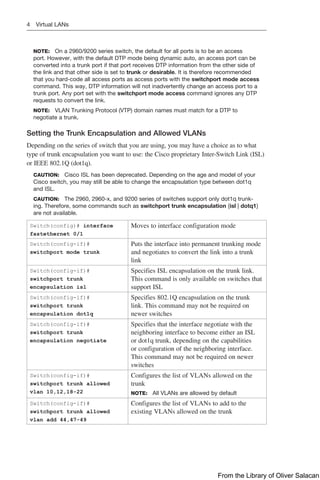
Switch(config)# interface
fastethernet 0/1
Moves to interface configuration mode
Switch(config-if)#
switchport mode trunk
Puts the interface into permanent trunking mode
and negotiates to convert the link into a trunk
link
Switch(config-if)#
switchport trunk
encapsulation isl
Specifies ISL encapsulation on the trunk link.
This command is only available on switches that
support ISL
Switch(config-if)#
switchport trunk
encapsulation dot1q
Specifies 802.1Q encapsulation on the trunk
link. This command may not be required on
newer switches
Switch(config-if)#
switchport trunk
encapsulation negotiate
Specifies that the interface negotiate with the
neighboring interface to become either an ISL
or dot1q trunk, depending on the capabilities
or configuration of the neighboring interface.
This command may not be required on newer
switches
Switch(config-if)#
switchport trunk allowed
vlan 10,12,18-22
Configures the list of VLANs allowed on the
trunk
NOTE: All VLANs are allowed by default
Switch(config-if)#
switchport trunk allowed
vlan add 44,47-49
Configures the list of VLANs to add to the
existing VLANs allowed on the trunk
From the Library of Oliver Salacan
Virtual LANs 5  
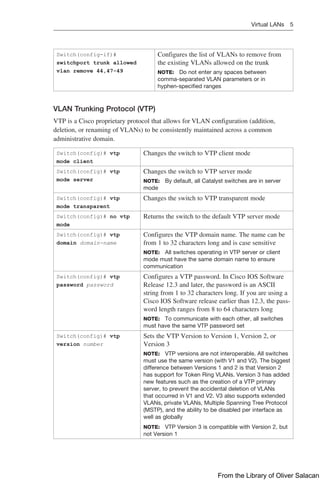
Switch(config-if)#
switchport trunk allowed
vlan remove 44,47-49
Configures the list of VLANs to remove from
the existing VLANs allowed on the trunk
NOTE: Do not enter any spaces between
comma-separated VLAN parameters or in
hyphen-specified ranges
VLAN Trunking Protocol (VTP)
VTP is a Cisco proprietary protocol that allows for VLAN configuration (addition,
­
deletion, or renaming of VLANs) to be consistently maintained across a common
­
administrative domain.
Switch(config)# vtp
mode client
Changes the switch to VTP client mode
Switch(config)# vtp
mode server
Changes the switch to VTP server mode
NOTE: By default, all Catalyst switches are in server
mode
Switch(config)# vtp
mode transparent
Changes the switch to VTP transparent mode
Switch(config)# no vtp
mode
Returns the switch to the default VTP server mode
Switch(config)# vtp
domain domain-name
Configures the VTP domain name. The name can be
from 1 to 32 characters long and is case sensitive
NOTE: All switches operating in VTP server or client
mode must have the same domain name to ensure
­
communication
Switch(config)# vtp
password password
Configures a VTP password. In Cisco IOS Software
Release 12.3 and later, the password is an ASCII
string from 1 to 32 characters long. If you are using a
Cisco IOS Software release earlier than 12.3, the pass-
word length ranges from 8 to 64 characters long
NOTE: To communicate with each other, all switches
must have the same VTP password set
Switch(config)# vtp
version number
Sets the VTP Version to Version 1, Version 2, or
Version 3
NOTE: VTP versions are not interoperable. All switches
must use the same version (with V1 and V2). The ­
biggest
difference between Versions 1 and 2 is that Version 2
has support for Token Ring VLANs. Version 3 has added
new features such as the creation of a VTP primary
server, to prevent the accidental deletion of VLANs
that occurred in V1 and V2. V3 also supports extended
VLANs, private VLANs, Multiple Spanning Tree Protocol
(MSTP), and the ability to be disabled per interface as
well as globally
NOTE: VTP Version 3 is compatible with Version 2, but
not Version 1
From the Library of Oliver Salacan
6 Virtual LANs
Switch# vtp primary
Switch# vtp
primary-server
Changes the operation state of a switch from a second-
ary server (the default state) to a primary server and
advertises the configuration to the domain. If the switch
password is configured as hidden, you are prompted to
reenter the password. This happens only if configured
in Version 2. This prompt occurs in privileged EXEC
mode but not in global configuration mode
NOTE: The vtp primary-server [vlan | mst | force]
commands are only available on older model switches.
On newer switches running more recent IOS/IOS-XE,
use the vtp primary [vlan | mst | force] command
instead
Switch# vtp primary vlan (Optional) Configures the device as the primary VTP
server for VLANs
Switch# vtp primary mst (Optional) Configures the devices as the primary VTP
server for the multiple spanning tree (MST) feature
Switch# vtp primary
force
(Optional) Configures the device to not check for
­
conflicting devices when configuring the primary
server
Switch(config)# vtp
pruning
Enables VTP pruning
NOTE: By default, VTP pruning is disabled. You need
to enable VTP pruning on only one switch in VTP server
mode
NOTE: Only VLANs included in the pruning-eligible list can be pruned. VLANs 2
through 1001 are pruning eligible by default on trunk ports. Reserved VLANs and
extended-range VLANs cannot be pruned. To change which eligible VLANs can be
pruned, use the interface-specific switchport trunk pruning vlan command:
Switch(config-if)# switchport trunk pruning vlan remove 4,20-30
! Removes VLANs 4 and 20-30
Switch(config-if)# switchport trunk pruning vlan except 40-50
! All VLANs are added to the pruning list except for 40-50
CAUTION: Due to the inherent risk in having VTP servers overwrite each other and
cause VLANs to disappear, Cisco recommends as a best practice deploying VTP in
transparent mode. If you are going to use a client/server model, use Version 3 and the
use of a VTPv3 primary server to prevent accidental database overwrites.
Verifying VTP
Switch# show vtp status Displays general information about VTP configuration
Switch# show vtp
counters
Displays the VTP counters for the switch
Switch# show vtp
password
Displays the VTP passwords
NOTE: If trunking has been established before VTP is set up, VTP information is propa-
gated throughout the switch fabric almost immediately. However, because VTP informa-
tion is advertised only every 300 seconds (5 minutes), unless a change has been made
to force an update, it can take several minutes for VTP information to be propagated.
From the Library of Oliver Salacan
Virtual LANs 7  
Verifying VLAN Information
Switch# show vlan Displays VLAN information
Switch# show vlan brief Displays VLAN information in brief
Switch# show vlan id 2 Displays information of VLAN 2 only
Switch# show vlan name
marketing
Displays information of VLAN named marketing only
Switch# show
interfaces trunk
Displays trunk ports, trunking modes, encapsulation,
and native and allowed VLANs
Switch# show
interfaces switchport
Displays the administrative and operational status of
trunks, encapsulation, private VLAN, voice VLAN,
and trunk VLAN pruning
Switch# show interface
fastethernet 0/1 trunk
Displays the administrative and operational status of a
trunking port
Saving VLAN Configurations
The stored configurations of VLANs 1 through 1005 are always saved in the VLAN
database; the filename is vlan.dat and is stored in flash:. After creating or deleting a
VLAN in VLAN configuration mode, the exit command will apply any new changes to
the VLAN database.
If you are using VTP transparent mode, the configurations are also saved in the
running configuration, and can be saved to the startup configuration using the copy
running-config startup-config command.
If the VTP mode is transparent in the startup configuration, and the VLAN database and
the VTP domain name from the VLAN database matches that in the startup configuration
file, the VLAN database is ignored (cleared), and the VTP and VLAN configurations
in the startup configuration file are used. The VLAN database revision number remains
unchanged in the VLAN database.
Erasing VLAN Configurations
Switch# delete
flash:vlan.dat
Removes entire VLAN database from flash
CAUTION: Make sure that there is no space between
the colon (:) and the characters vlan.dat. You can
­
potentially erase the entire contents of the flash with this
command if the syntax is not correct. Make sure to read
the output from the switch. If you need to cancel, press
Ctrl+C to escape back to privileged mode:
Switch#
Switch# delete flash:vlan.dat
Delete filename [vlan.dat]?
Delete flash:vlan.dat? [confirm]
Switch#
Switch(config)# interface
fastethernet 0/5
Moves to interface configuration mode
From the Library of Oliver Salacan
8 Virtual LANs
Switch(config-if)#
no switchport access
vlan 5
Removes port from VLAN 5 and reassigns it to
VLAN 1 (the default VLAN)
Switch(config-if)# exit Moves to global configuration mode
Switch(config)# no
vlan 5
Removes VLAN 5 from the VLAN database
NOTE: When you delete a VLAN from a switch that is in VTP server mode, the VLAN is
removed from the VLAN database for all switches in the VTP domain. When you delete
a VLAN from a switch that is in VTP transparent mode, the VLAN is deleted only on that
specific switch.
NOTE: You cannot delete the default VLANs for the different media types: Ethernet
VLAN 1 and FDDI or Token Ring VLANs 1002 to 1005.
CAUTION: When you delete a VLAN, any ports assigned to that VLAN become inac-
tive. This “inactive” state can be seen using the show interfaces switchport command
for the port or ports in question. The ports remain associated with the VLAN (and thus
inactive) until you assign those ports to a defined VLAN. Therefore, it is recommended
that you reassign ports to a new VLAN or the default VLAN before you delete a VLAN
from the VLAN database.
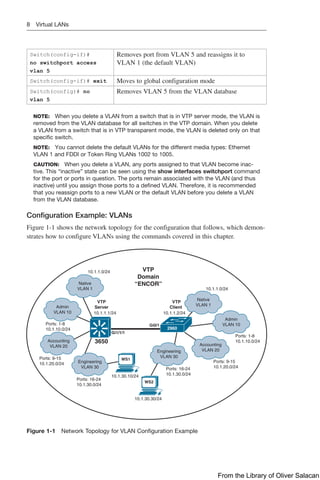
Configuration Example: VLANs
Figure 1-1 shows the network topology for the configuration that follows, which demon-
strates how to configure VLANs using the commands covered in this chapter.
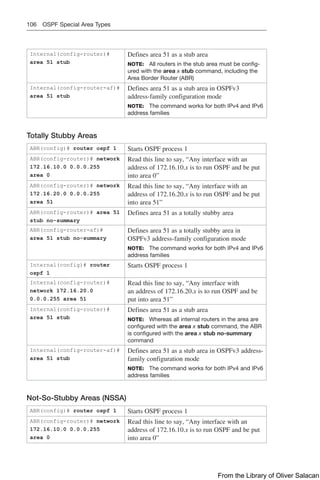
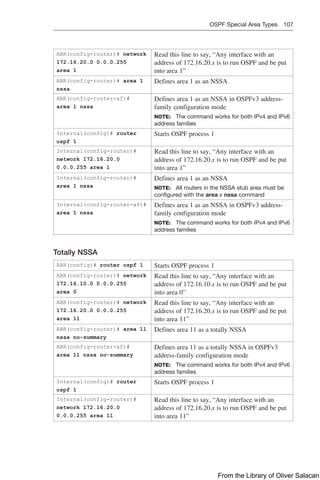
3650
2960
Gi0/1
Gi1/1/1
10.1.1.0/24
Native
VLAN 1
Accounting
VLAN 20
Admin
VLAN 10
Engineering
VLAN 30
10.1.1.1/24 10.1.1.2/24
10.1.1.0/24
Native
VLAN 1
Ports: 1-8
10.1.10.0/24
Admin
VLAN 10
Ports: 9-15
10.1.20.0/24
Accounting
VLAN 20
Ports: 16-24
10.1.30.0/24
Engineering
VLAN 30
WS1
WS2
Ports: 9-15
10.1.20.0/24
Ports: 1-8
10.1.10.0/24
Ports: 16-24
10.1.30.0/24
10.1.30.30/24
10.1.30.10/24
VTP
Domain
“ENCOR”
VTP
Client
VTP
Server
Figure 1-1 Network Topology for VLAN Configuration Example
From the Library of Oliver Salacan
Virtual LANs 9  
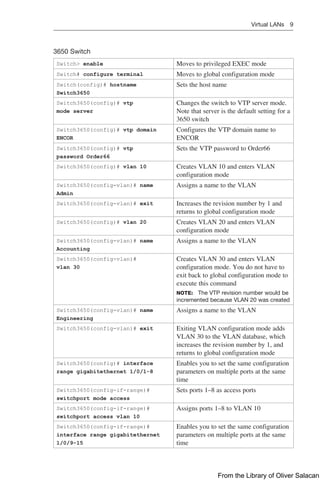
3650 Switch
Switch> enable Moves to privileged EXEC mode
Switch# configure terminal Moves to global configuration mode
Switch(config)# hostname
Switch3650
Sets the host name
Switch3650(config)# vtp
mode server
Changes the switch to VTP server mode.
Note that server is the default setting for a
3650 switch
Switch3650(config)# vtp domain
ENCOR
Configures the VTP domain name to
ENCOR
Switch3650(config)# vtp
password Order66
Sets the VTP password to Order66
Switch3650(config)# vlan 10 Creates VLAN 10 and enters VLAN
configuration mode
Switch3650(config-vlan)# name
Admin
Assigns a name to the VLAN
Switch3650(config-vlan)# exit Increases the revision number by 1 and
returns to global configuration mode
Switch3650(config)# vlan 20 Creates VLAN 20 and enters VLAN
configuration mode
Switch3650(config-vlan)# name
Accounting
Assigns a name to the VLAN
Switch3650(config-vlan)#
vlan 30
Creates VLAN 30 and enters VLAN
configuration mode. You do not have to
exit back to global configuration mode to
execute this command
NOTE: The VTP revision number would be
incremented because VLAN 20 was created
Switch3650(config-vlan)# name
Engineering
Assigns a name to the VLAN
Switch3650(config-vlan)# exit Exiting VLAN configuration mode adds
VLAN 30 to the VLAN database, which
increases the revision number by 1, and
returns to global configuration mode
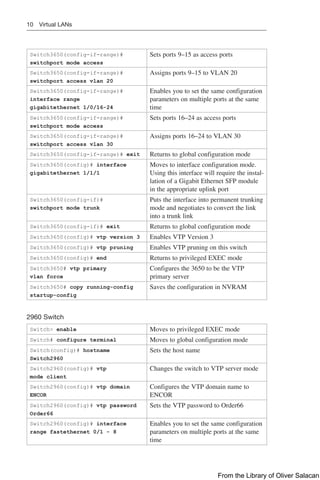
Switch3650(config)# interface
range gigabitethernet 1/0/1-8
Enables you to set the same configuration
parameters on multiple ports at the same
time
Switch3650(config-if-range)#
switchport mode access
Sets ports 1–8 as access ports
Switch3650(config-if-range)#
switchport access vlan 10
Assigns ports 1–8 to VLAN 10
Switch3650(config-if-range)#
interface range gigabitethernet
1/0/9-15
Enables you to set the same configuration
parameters on multiple ports at the same
time
From the Library of Oliver Salacan
10 Virtual LANs
Switch3650(config-if-range)#
switchport mode access
Sets ports 9–15 as access ports
Switch3650(config-if-range)#
switchport access vlan 20
Assigns ports 9–15 to VLAN 20
Switch3650(config-if-range)#
interface range
gigabitethernet 1/0/16-24
Enables you to set the same configuration
parameters on multiple ports at the same
time
Switch3650(config-if-range)#
switchport mode access
Sets ports 16–24 as access ports
Switch3650(config-if-range)#
switchport access vlan 30
Assigns ports 16–24 to VLAN 30
Switch3650(config-if-range)# exit Returns to global configuration mode
Switch3650(config)# interface
gigabitethernet 1/1/1
Moves to interface configuration mode.
Using this interface will require the instal-
lation of a Gigabit Ethernet SFP module
in the appropriate uplink port
Switch3650(config-if)#
switchport mode trunk
Puts the interface into permanent trunking
mode and negotiates to convert the link
into a trunk link
Switch3650(config-if)# exit Returns to global configuration mode
Switch3650(config)# vtp version 3 Enables VTP Version 3
Switch3650(config)# vtp pruning Enables VTP pruning on this switch
Switch3650(config)# end Returns to privileged EXEC mode
Switch3650# vtp primary
vlan force
Configures the 3650 to be the VTP
primary server
Switch3650# copy running-config
startup-config
Saves the configuration in NVRAM
2960 Switch
Switch> enable Moves to privileged EXEC mode
Switch# configure terminal Moves to global configuration mode
Switch(config)# hostname
Switch2960
Sets the host name
Switch2960(config)# vtp
mode client
Changes the switch to VTP server mode
Switch2960(config)# vtp domain
ENCOR
Configures the VTP domain name to
ENCOR
Switch2960(config)# vtp password
Order66
Sets the VTP password to Order66
Switch2960(config)# interface
range fastethernet 0/1 - 8
Enables you to set the same configuration
parameters on multiple ports at the same
time
From the Library of Oliver Salacan
Layer 2 Link Aggregation 11  
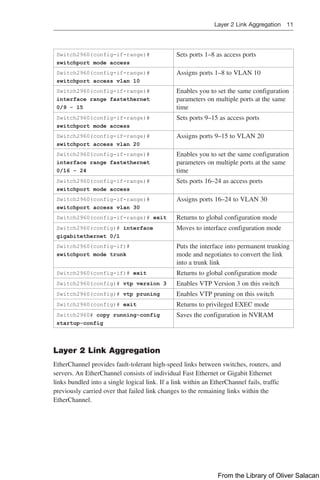
Switch2960(config-if-range)#
switchport mode access
Sets ports 1–8 as access ports
Switch2960(config-if-range)#
switchport access vlan 10
Assigns ports 1–8 to VLAN 10
Switch2960(config-if-range)#
interface range fastethernet
0/9 - 15
Enables you to set the same configuration
parameters on multiple ports at the same
time
Switch2960(config-if-range)#
switchport mode access
Sets ports 9–15 as access ports
Switch2960(config-if-range)#
switchport access vlan 20
Assigns ports 9–15 to VLAN 20
Switch2960(config-if-range)#
interface range fastethernet
0/16 - 24
Enables you to set the same configuration
parameters on multiple ports at the same
time
Switch2960(config-if-range)#
switchport mode access
Sets ports 16–24 as access ports
Switch2960(config-if-range)#
switchport access vlan 30
Assigns ports 16–24 to VLAN 30
Switch2960(config-if-range)# exit Returns to global configuration mode
Switch2960(config)# interface
gigabitethernet 0/1
Moves to interface configuration mode
Switch2960(config-if)#
switchport mode trunk
Puts the interface into permanent trunking
mode and negotiates to convert the link
into a trunk link
Switch2960(config-if)# exit Returns to global configuration mode
Switch2960(config)# vtp version 3 Enables VTP Version 3 on this switch
Switch2960(config)# vtp pruning Enables VTP pruning on this switch
Switch2960(config)# exit Returns to privileged EXEC mode
Switch2960# copy running-config
startup-config
Saves the configuration in NVRAM
Layer 2 Link Aggregation
EtherChannel provides fault-tolerant high-speed links between switches, routers, and
servers. An EtherChannel consists of individual Fast Ethernet or Gigabit Ethernet
links bundled into a single logical link. If a link within an EtherChannel fails, ­
traffic
­
previously carried over that failed link changes to the remaining links within the
EtherChannel.
From the Library of Oliver Salacan
12 Layer 2 Link Aggregation
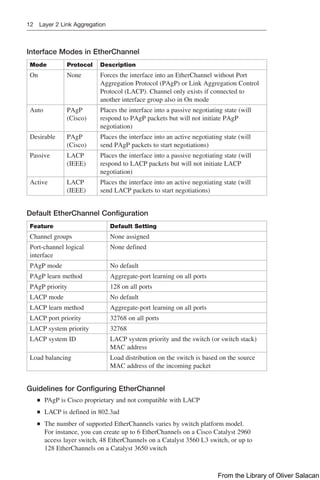
Interface Modes in EtherChannel
Mode Protocol Description
On None Forces the interface into an EtherChannel without Port
Aggregation Protocol (PAgP) or Link Aggregation Control
Protocol (LACP). Channel only exists if connected to
­
another interface group also in On mode
Auto PAgP
(Cisco)
Places the interface into a passive negotiating state (will
respond to PAgP packets but will not initiate PAgP
­
negotiation)
Desirable PAgP
(Cisco)
Places the interface into an active negotiating state (will
send PAgP packets to start negotiations)
Passive LACP
(IEEE)
Places the interface into a passive negotiating state (will
respond to LACP packets but will not initiate LACP
negotiation)
Active LACP
(IEEE)
Places the interface into an active negotiating state (will
send LACP packets to start negotiations)
Default EtherChannel Configuration
Feature Default Setting
Channel groups None assigned
Port-channel logical
­
interface
None defined
PAgP mode No default
PAgP learn method Aggregate-port learning on all ports
PAgP priority 128 on all ports
LACP mode No default
LACP learn method Aggregate-port learning on all ports
LACP port priority 32768 on all ports
LACP system priority 32768
LACP system ID LACP system priority and the switch (or switch stack)
MAC address
Load balancing Load distribution on the switch is based on the source
MAC address of the incoming packet
Guidelines for Configuring EtherChannel
Q
Q PAgP is Cisco proprietary and not compatible with LACP
Q
Q LACP is defined in 802.3ad
Q
Q The number of supported EtherChannels varies by switch platform model.
For instance, you can create up to 6 EtherChannels on a Cisco Catalyst 2960
access layer switch, 48 EtherChannels on a Catalyst 3560 L3 switch, or up to
128 EtherChannels on a Catalyst 3650 switch
From the Library of Oliver Salacan
Layer 2 Link Aggregation 13  
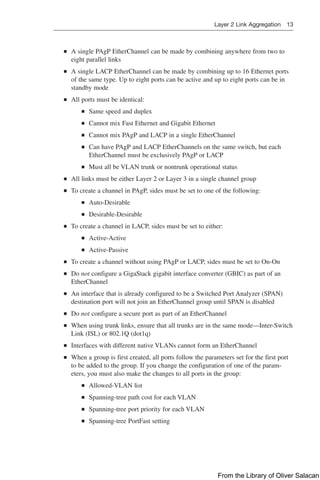
Q
Q A single PAgP EtherChannel can be made by combining anywhere from two to
eight parallel links
Q
Q A single LACP EtherChannel can be made by combining up to 16 Ethernet ports
of the same type. Up to eight ports can be active and up to eight ports can be in
standby mode
Q
Q All ports must be identical:
Q
Q Same speed and duplex
Q
Q Cannot mix Fast Ethernet and Gigabit Ethernet
Q
Q Cannot mix PAgP and LACP in a single EtherChannel
Q
Q Can have PAgP and LACP EtherChannels on the same switch, but each
EtherChannel must be exclusively PAgP or LACP
Q
Q Must all be VLAN trunk or nontrunk operational status
Q
Q All links must be either Layer 2 or Layer 3 in a single channel group
Q
Q To create a channel in PAgP, sides must be set to one of the following:
Q
Q Auto-Desirable
Q
Q Desirable-Desirable
Q
Q To create a channel in LACP, sides must be set to either:
Q
Q Active-Active
Q
Q Active-Passive
Q
Q To create a channel without using PAgP or LACP, sides must be set to On-On
Q
Q Do not configure a GigaStack gigabit interface converter (GBIC) as part of an
EtherChannel
Q
Q An interface that is already configured to be a Switched Port Analyzer (SPAN)
destination port will not join an EtherChannel group until SPAN is disabled
Q
Q Do not configure a secure port as part of an EtherChannel
Q
Q When using trunk links, ensure that all trunks are in the same mode—Inter-Switch
Link (ISL) or 802.1Q (dot1q)
Q
Q Interfaces with different native VLANs cannot form an EtherChannel
Q
Q When a group is first created, all ports follow the parameters set for the first port
to be added to the group. If you change the configuration of one of the param-
eters, you must also make the changes to all ports in the group:
Q
Q Allowed-VLAN list
Q
Q Spanning-tree path cost for each VLAN
Q
Q Spanning-tree port priority for each VLAN
Q
Q Spanning-tree PortFast setting
From the Library of Oliver Salacan
14 Layer 2 Link Aggregation
Q
Q Do not configure a port that is an active or a not-yet-active member of an
EtherChannel as an IEEE 802.1X port. If you try to enable IEEE 802.1X on an
EtherChannel port, an error message will appear, and IEEE 802.1X is not enabled
Q
Q For a Layer 3 EtherChannel, assign the Layer 3 address to the port-channel logical
interface, not the physical ports in the channel
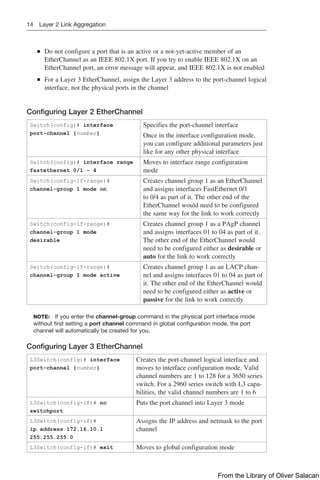
Configuring Layer 2 EtherChannel
Switch(config)# interface
port-channel {number}
Specifies the port-channel interface
Once in the interface configuration mode,
you can configure additional parameters just
like for any other physical interface
Switch(config)# interface range
fastethernet 0/1 - 4
Moves to interface range configuration
mode
Switch(config-if-range)#
channel-group 1 mode on
Creates channel group 1 as an EtherChannel
and assigns interfaces FastEthernet 0/1
to 0/4 as part of it. The other end of the
EtherChannel would need to be configured
the same way for the link to work correctly
Switch(config-if-range)#
channel-group 1 mode
desirable
Creates channel group 1 as a PAgP channel
and assigns interfaces 01 to 04 as part of it.
The other end of the EtherChannel would
need to be configured either as desirable or
auto for the link to work correctly
Switch(config-if-range)#
channel-group 1 mode active
Creates channel group 1 as an LACP chan-
nel and assigns interfaces 01 to 04 as part of
it. The other end of the EtherChannel would
need to be configured either as active or
passive for the link to work correctly
NOTE: If you enter the channel-group command in the physical port interface mode
without first setting a port channel command in global configuration mode, the port
channel will automatically be created for you.
Configuring Layer 3 EtherChannel
L3Switch(config)# interface
port-channel {number}
Creates the port-channel logical interface and
moves to interface configuration mode. Valid
channel numbers are 1 to 128 for a 3650 series
switch. For a 2960 series switch with L3 capa-
bilities, the valid channel numbers are 1 to 6
L3Switch(config-if)# no
switchport
Puts the port channel into Layer 3 mode
L3Switch(config-if)#
ip address 172.16.10.1
255.255.255.0
Assigns the IP address and netmask to the port
channel
L3Switch(config-if)# exit Moves to global configuration mode
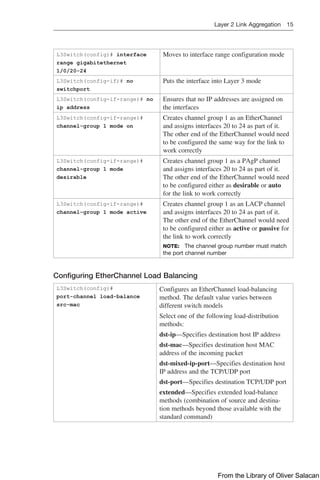
From the Library of Oliver Salacan
Layer 2 Link Aggregation 15  
L3Switch(config)# interface
range gigabitethernet
1/0/20-24
Moves to interface range configuration mode
L3Switch(config-if)# no
switchport
Puts the interface into Layer 3 mode
L3Switch(config-if-range)# no
ip address
Ensures that no IP addresses are assigned on
the interfaces
L3Switch(config-if-range)#
channel-group 1 mode on
Creates channel group 1 as an EtherChannel
and assigns interfaces 20 to 24 as part of it.
The other end of the EtherChannel would need
to be configured the same way for the link to
work correctly
L3Switch(config-if-range)#
channel-group 1 mode
desirable
Creates channel group 1 as a PAgP channel
and assigns interfaces 20 to 24 as part of it.
The other end of the EtherChannel would need
to be configured either as desirable or auto
for the link to work correctly
L3Switch(config-if-range)#
channel-group 1 mode active
Creates channel group 1 as an LACP channel
and assigns interfaces 20 to 24 as part of it.
The other end of the EtherChannel would need
to be configured either as active or passive for
the link to work correctly
NOTE: The channel group number must match
the port channel number
Configuring EtherChannel Load Balancing
L3Switch(config)#
port-channel load-balance
src-mac
Configures an EtherChannel load-balancing
method. The default value varies between
­
different switch models
Select one of the following load-distribution
methods:
dst-ip—Specifies destination host IP address
dst-mac—Specifies destination host MAC
address of the incoming packet
dst-mixed-ip-port—Specifies destination host
IP address and the TCP/UDP port
dst-port—Specifies destination TCP/UDP port
extended—Specifies extended load-balance
methods (combination of source and destina-
tion methods beyond those available with the
­
standard command)
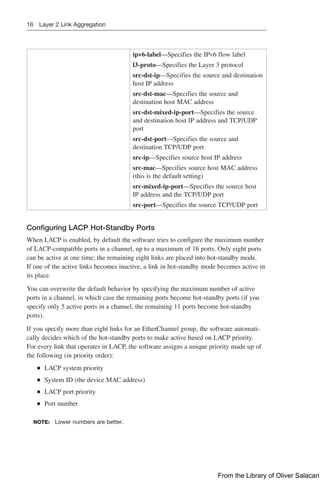
From the Library of Oliver Salacan
16 Layer 2 Link Aggregation
ipv6-label—Specifies the IPv6 flow label
l3-proto—Specifies the Layer 3 protocol
src-dst-ip—Specifies the source and destination
host IP address
src-dst-mac—Specifies the source and
­
destination host MAC address
src-dst-mixed-ip-port—Specifies the source
and destination host IP address and TCP/UDP
port
src-dst-port—Specifies the source and
­
destination TCP/UDP port
src-ip—Specifies source host IP address
src-mac—Specifies source host MAC address
(this is the default setting)
src-mixed-ip-port—Specifies the source host
IP address and the TCP/UDP port
src-port—Specifies the source TCP/UDP port
Configuring LACP Hot-Standby Ports
When LACP is enabled, by default the software tries to configure the maximum number
of LACP-compatible ports in a channel, up to a maximum of 16 ports. Only eight ports
can be active at one time; the remaining eight links are placed into hot-standby mode.
If one of the active links becomes inactive, a link in hot-standby mode becomes active in
its place.
You can overwrite the default behavior by specifying the maximum number of active
ports in a channel, in which case the remaining ports become hot-standby ports (if you
specify only 5 active ports in a channel, the remaining 11 ports become hot-standby
ports).
If you specify more than eight links for an EtherChannel group, the software automati-
cally decides which of the hot-standby ports to make active based on LACP priority.
For every link that operates in LACP, the software assigns a unique priority made up of
the following (in priority order):
Q
Q LACP system priority
Q
Q System ID (the device MAC address)
Q
Q LACP port priority
Q
Q Port number
NOTE: Lower numbers are better.
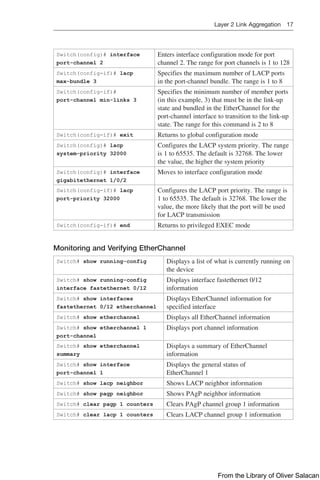
From the Library of Oliver Salacan
Layer 2 Link Aggregation 17  
Switch(config)# interface
port-channel 2
Enters interface configuration mode for port
channel 2. The range for port channels is 1 to 128
Switch(config-if)# lacp
max-bundle 3
Specifies the maximum number of LACP ports
in the port-channel bundle. The range is 1 to 8
Switch(config-if)#
port-channel min-links 3
Specifies the minimum number of member ports
(in this example, 3) that must be in the link-up
state and bundled in the EtherChannel for the
port-channel interface to transition to the link-up
state. The range for this command is 2 to 8
Switch(config-if)# exit Returns to global configuration mode
Switch(config)# lacp
system-priority 32000
Configures the LACP system priority. The range
is 1 to 65535. The default is 32768. The lower
the value, the higher the system priority
Switch(config)# interface
gigabitethernet 1/0/2
Moves to interface configuration mode
Switch(config-if)# lacp
port-priority 32000
Configures the LACP port priority. The range is
1 to 65535. The default is 32768. The lower the
value, the more likely that the port will be used
for LACP transmission
Switch(config-if)# end Returns to privileged EXEC mode
Monitoring and Verifying EtherChannel
Switch# show running-config Displays a list of what is currently running on
the device
Switch# show running-config
interface fastethernet 0/12
Displays interface fastethernet 0/12
­
information
Switch# show interfaces
fastethernet 0/12 etherchannel
Displays EtherChannel information for
specified interface
Switch# show etherchannel Displays all EtherChannel information
Switch# show etherchannel 1
port-channel
Displays port channel information
Switch# show etherchannel
summary
Displays a summary of EtherChannel
information
Switch# show interface
port-channel 1
Displays the general status of
EtherChannel 1
Switch# show lacp neighbor Shows LACP neighbor information
Switch# show pagp neighbor Shows PAgP neighbor information
Switch# clear pagp 1 counters Clears PAgP channel group 1 information
Switch# clear lacp 1 counters Clears LACP channel group 1 information
From the Library of Oliver Salacan
18 Layer 2 Link Aggregation
Configuration Example: EtherChannel
Figure 1-2 shows the network topology for the configuration that follows, which demon-
strates how to configure EtherChannel using commands covered in this chapter.
Fa0/1
Fa0/2
Gi0/1
Gi0/2
Gi0/1
Gi0/2
Gi0/3
Gi0/4
ALSwitch1 (2960) ALSwitch2 (2960)
DLSwitch (3650)
Fa0/12
FEC
IEEE 802.1q
trunk
FEC
IEEE 802.1q
trunk
172.16.10.3/24 172.16.20.3/24
WS3 WS4
Accounting
VLAN 10
Fa 0/5-8
172.16.10.0/24
Marketing
VLAN 20
Fa 0/9-12
172.16.20.0/24
Fa0/12
Fa0/6
172.16.10.2/24
WS1 WS2
Accounting
VLAN 10
Fa 0/5-8
172.16.10.0/24
Marketing
VLAN 20
Fa 0/9-12
172.16.20.0/24
Fa0/6
172.16.20.2/24
Figure 1-2 Network Topology for EtherChannel Configuration
DLSwitch (3650)
Switch> enable Moves to privileged EXEC mode
Switch# configure terminal Moves to global configuration mode
Switch(config)# hostname DLSwitch Sets the host name
DLSwitch(config)# no ip
domain-lookup
Turns off DNS queries so that spelling
mistakes do not slow you down
DLSwitch(config)# vtp mode server Changes the switch to VTP server
mode
DLSwitch(config)# vtp domain
testdomain
Configures the VTP domain name to
testdomain
DLSwitch(config)# vlan 10 Creates VLAN 10 and enters VLAN
configuration mode
DLSwitch(config-vlan)# name
Accounting
Assigns a name to the VLAN
DLSwitch(config-vlan)# exit Returns to global configuration mode
DLSwitch(config)# vlan 20 Creates VLAN 20 and enters VLAN
configuration mode
DLSwitch(config-vlan)# name
Marketing
Assigns a name to the VLAN
DLSwitch(config-vlan)# exit Returns to global configuration mode
From the Library of Oliver Salacan
Layer 2 Link Aggregation 19  
DLSwitch(config)# interface range
gigabitethernet 1/0/1-4
Moves to interface range configuration
mode
DLSwitch(config-if)# switchport
mode trunk
Puts the interface into permanent
trunking mode and negotiates to
­
convert the link into a trunk link
DLSwitch(config-if)# exit Returns to global configuration mode
DLSwitch(config)# interface range
gigabitethernet 1/0/1-2
Moves to interface range configuration
mode
DLSwitch(config-if)# channel-group 1
mode desirable
Creates channel group 1 and assigns
interfaces 01 to 02 as part of it
DLSwitch(config-if)# exit Moves to global configuration mode
DLSwitch(config)# interface range
gigabitethernet 1/0/3-4
Moves to interface range configuration
mode
DLSwitch(config-if)# channel-group 2
mode desirable
Creates channel group 2 and assigns
interfaces 03 to 04 as part of it
DLSwitch(config-if)# exit Moves to global configuration mode
DLSwitch(config)# port-channel
load-balance dst-mac
Configures load balancing based on
destination MAC address
DLSwitch(config)# exit Moves to privileged EXEC mode
DLSwitch# copy running-config
startup-config
Saves the configuration to NVRAM
ALSwitch1 (2960)
Switch> enable Moves to privileged EXEC mode
Switch# configure terminal Moves to global configuration mode
Switch(config)# hostname
ALSwitch1
Sets host name
ALSwitch1(config)# no
ip domain-lookup
Turns off DNS queries so that spelling
mistakes do not slow you down
ALSwitch1(config)# vtp
mode client
Changes the switch to VTP client mode
ALSwitch1(config)# vtp domain
testdomain
Configures the VTP domain name to
testdomain
ALSwitch1(config)# interface
range fastethernet 0/5 – 8
Moves to interface range configuration
mode
ALSwitch1(config-if-range)#
switchport mode access
Sets ports 05 to 08 as access ports
ALSwitch1(config-if-range)#
switchport access vlan 10
Assigns ports to VLAN 10
ALSwitch1(config-if-range)# exit Moves to global configuration mode
ALSwitch1(config)# interface
range fastethernet 0/9 – 12
Moves to interface range configuration
mode
From the Library of Oliver Salacan
20 Layer 2 Link Aggregation
ALSwitch1(config-if-range)#
switchport mode access
Sets ports 09 to 12 as access ports
ALSwitch1(config-if-range)#
switchport access vlan 20
Assigns ports to VLAN 20
ALSwitch1(config-if-range)# exit Moves to global configuration mode
ALSwitch1(config)# interface
range gigabitethernet 0/1 – 2
Moves to interface range configuration
mode
ALSwitch1(config-if-range)#
switchport mode trunk
Puts the interface into permanent trunking
mode and negotiates to convert the link into
a trunk link
ALSwitch1(config-if-range)#
channel-group 1 mode desirable
Creates channel group 1 and assigns
interfaces 01 to 02 as part of it
ALSwitch1(config-if-range)# exit Moves to global configuration mode
ALSwitch1(config)# exit Moves to privileged EXEC mode
ALSwitch1# copy running-config
startup-config
Saves the configuration to NVRAM
ALSwitch2 (2960)
Switch> enable Moves to privileged EXEC mode
Switch# configure terminal Moves to global configuration mode
Switch(config)# hostname
ALSwitch2
Sets host name
ALSwitch2(config)# no
ip domain-lookup
Turns off DNS queries so that spelling
mistakes do not slow you down
ALSwitch2(config)# vtp
mode client
Changes the switch to VTP client mode
ALSwitch2(config)# vtp domain
testdomain
Configures the VTP domain name to
testdomain
ALSwitch2(config)# interface
range fastethernet 0/5 – 8
Moves to interface range configuration
mode
ALSwitch2(config-if-range)#
switchport mode access
Sets ports 05 to 08 as access ports
ALSwitch2(config-if-range)#
switchport access vlan 10
Assigns ports to VLAN 10
ALSwitch2(config-if-range)# exit Moves to global configuration mode
ALSwitch2(config)# interface
range fastethernet 0/9 – 12
Moves to interface range configuration
mode
ALSwitch2(config-if-range)#
switchport mode access
Sets ports 09 to 12 as access ports
ALSwitch2(config-if-range)#
switchport access vlan 20
Assigns ports to VLAN 20
ALSwitch2(config-if-range)# exit Moves to global configuration mode
From the Library of Oliver Salacan
Layer 2 Link Aggregation 21  
ALSwitch2(config)# interface
range gigabitethernet 0/1 – 2
Moves to interface range configuration
mode
ALSwitch2(config-if-range)#
switchport mode trunk
Puts the interface into permanent trunking
mode and negotiates to convert the link into
a trunk link
ALSwitch2(config-if-range)#
channel-group 2 mode desirable
Creates channel group 2 and assigns
­
interfaces 01 to 02 as part of it
NOTE: Although the local channel group
number does not have to match the channel
group number on a neighboring switch, the
numbers are often chosen to be the same
for ease of management and documentation
purposes
ALSwitch2(config-if-range)# exit Moves to global configuration mode
ALSwitch2(config)# exit Moves to privileged EXEC mode
ALSwitch2# copy running-config
startup-config
Saves the configuration to NVRAM
From the Library of Oliver Salacan
CHAPTER 2
Spanning Tree Protocol
This chapter provides information and commands concerning the following topics:
Q
Q Spanning Tree Protocol definition
Q
Q Enabling Spanning Tree Protocol
Q
Q Changing the spanning-tree mode
Q
Q Configuring the root switch
Q
Q Configuring a secondary root switch
Q
Q Configuring port priority
Q
Q Configuring the path cost
Q
Q Configuring the switch priority of a VLAN
Q
Q Configuring STP timers
Q
Q Configuring optional spanning-tree features
Q
Q PortFast
Q
Q BPDU Guard (2xxx/older 3xxx series)
Q
Q BPDU Guard (3650/9xxx series)
Q
Q BPDU Filter
Q
Q UplinkFast
Q
Q BackboneFast
Q
Q Root Guard
Q
Q Loop Guard
Q
Q Unidirectional link detection
Q
Q Configuring and verifying port error conditions
Q
Q Enabling Rapid Spanning Tree (RSTP)
Q
Q RSTP link types
Q
Q Enabling Multiple Spanning Tree (MST)
Q
Q Verifying the extended system ID
Q
Q Verifying STP
Q
Q Troubleshooting Spanning Tree Protocol
Q
Q Configuration example: PVST+
Q
Q Spanning Tree migration example: PVST+ to Rapid PVST+
From the Library of Oliver Salacan
24 Spanning Tree Protocol Definition
Spanning Tree Protocol Definition
The spanning-tree standards offer the same safety that routing protocols provide in
Layer 3 forwarding environments to Layer 2 bridging environments. A single best path
to a main bridge is found and maintained in the Layer 2 domain, and other redundant
paths are managed by selective port blocking. Appropriate blocked ports begin forward-
ing when primary paths to the main bridge are no longer available.
There are several different spanning-tree modes and protocols:
Q
Q Per VLAN Spanning Tree (PVST+): This spanning-tree mode is based on the IEEE
802.1D standard and Cisco proprietary extensions. The PVST+ runs on each VLAN
on the device up to the maximum supported, ensuring that each has a loop-free path
through the network. PVST+ provides Layer 2 load balancing for the VLAN on
which it runs. You can create different logical topologies by using the VLANs on
your network to ensure that all of your links are used but that no one link is over-
subscribed. Each instance of PVST+ on a VLAN has a single root device. This root
device propagates the spanning-tree information associated with that VLAN to all
other devices in the network. Because each device has the same information about
the network, this process ensures that the network topology is maintained.
Q
Q Rapid PVST+: This spanning-tree mode is the same as PVST+ except that it
uses a rapid convergence based on the IEEE 802.1w standard. Beginning from
Cisco IOS Release 15.2(4)E, the STP default mode is Rapid PVST+. To provide
rapid convergence, Rapid PVST+ immediately deletes dynamically learned MAC
address entries on a per-port basis upon receiving a topology change. By contrast,
PVST+ uses a short aging time for dynamically learned MAC address entries.
Rapid PVST+ uses the same configuration as PVST+ and the device needs only
minimal extra configuration. The benefit of Rapid PVST+ is that you can migrate
a large PVST+ install base to Rapid PVST+ without having to learn the complexi-
ties of the Multiple Spanning Tree Protocol (MSTP) configuration and without
having to reprovision your network. In Rapid PVST+ mode, each VLAN runs its
own spanning-tree instance up to the maximum supported.
Q
Q Multiple Spanning Tree Protocol (MSTP): This spanning-tree mode is based on
the IEEE 802.1s standard. You can map multiple VLANs to the same spanning-
tree instance, which reduces the number of spanning-tree instances required to
support a large number of VLANs. MSTP runs on top of the Rapid Spanning Tree
Protocol (RSTP) (based on IEEE 802.1w), which provides for rapid convergence
of the spanning tree by eliminating the forward delay and by quickly transition-
ing root ports and designated ports to the forwarding state. In a device stack, the
cross-stack rapid transition (CSRT) feature performs the same function as RSTP.
You cannot run MSTP without RSTP or CSRT.
NOTE: Default spanning-tree implementation for Catalyst 2950, 2960, 3550, 3560, and
3750 switches is PVST+. This is a per-VLAN implementation of 802.1D. Beginning from
Cisco IOS Release 15.2(4)E, the STP default mode is Rapid PVST+ on all switch platforms.
Enabling Spanning Tree Protocol
Switch(config)# spanning-tree vlan 5 Enables STP on VLAN 5
Switch(config)# no spanning-tree vlan 5 Disables STP on VLAN 5
From the Library of Oliver Salacan
Configuring the Root Switch 25  
NOTE: Many access switches such as the Catalyst 2960, 3550, 3560, 3650, 9200,
and 9300 support a maximum 128 spanning trees using any combination of PVST+
or Rapid PVST+. The 2950 model supports only 64 instances. Any VLANs created in
excess of 128 spanning trees cannot have a spanning-tree instance running in them.
There is a possibility of an L2 loop that could not be broken in the case where a VLAN
without spanning tree is transported across a trunk. It is recommended that you use
MSTP if the number of VLANs in a common topology is high.
CAUTION: Spanning tree is enabled by default on VLAN 1 and on all newly created
VLANs up to the spanning-tree limit. Disable spanning tree only if you are sure there
are no loops in the network topology. When spanning tree is disabled and loops are
present in the topology, excessive traffic and indefinite packet duplication can drasti-
cally reduce network performance. Networks have been known to crash in seconds
due to broadcast storms created by loops.
Changing the Spanning-Tree Mode
You can configure different types of spanning trees on a Cisco switch. The options vary
according to the platform.
Switch(config)# spanning-
tree mode pvst
Enables PVST+. This is the default setting
Switch(config)# spanning-
tree mode mst
Enters MST mode
Switch(config)# spanning-
tree mst configuration
Enters MST subconfiguration mode
NOTE: Use the command no spanning-
tree mst configuration to clear the MST
­
configuration
Switch(config)# spanning-
tree mode rapid-pvst
Enables Rapid PVST+
Switch# clear spanning-tree
detected-protocols
If any port on the device is connected to a port
on a legacy IEEE 802.1D device, this command
restarts the protocol migration process on the
entire device
This step is optional if the designated device
detects that this device is running Rapid PVST+
Configuring the Root Switch
Switch(config)#
spanning-tree vlan 5
root primary
Modifies the switch priority from the default 32768 to a
lower value to allow the switch to become the primary
root switch for VLAN 5
NOTE: This switch sets its priority to 24576. If any
other switch has a priority set to below 24576 already,
this switch sets its own priority to 4096 less than the
lowest switch priority. If by doing this the switch has a
priority of less than 1, this command fails
From the Library of Oliver Salacan
26 Configuring the Root Switch
Switch(config)#
spanning-tree vlan 5
root primary
Configures the switch to become the root switch for
VLAN 5
NOTE: The maximum switch topology width and the
hello-time can be set within this command
TIP: The root switch should be a backbone or
­
distribution switch
Switch(config)#
spanning-tree vlan
5 root primary
diameter 6
Configures the switch to be the root switch for VLAN 5
and sets the network diameter to 6
TIP: The diameter keyword defines the maximum
­
number of switches between any two end stations. The
range is from 2 to 7 switches. The default value is 7
TIP: The hello-time keyword sets the hello-interval
timer to any amount between 1 and 10 seconds. The
default time is 2 seconds
Configuring a Secondary Root Switch
Switch(config)# spanning-
tree vlan 5 root secondary
Configures the switch to become the root switch
for VLAN 5 should the primary root switch fail
NOTE: This switch lowers its priority to 28672.
If the root switch fails and all other switches are
set to the default priority of 32768, this becomes
the new root switch
Switch(config)# spanning-
tree vlan 5 root secondary
diameter 7
Configures the switch to be the secondary
root switch for VLAN 5 and sets the network
­
diameter to 7
Configuring Port Priority
Switch(config)# interface
gigabitethernet 1/0/1
Moves to interface configuration mode
Switch(config-if)# spanning-
tree port-priority 64
Configures the port priority for the interface that
is an access port
Switch(config-if)# spanning-
tree vlan 5 port-priority 64
Configures the VLAN port priority for an inter-
face that is a trunk port
NOTE: If a loop occurs, spanning tree uses the
port priority when selecting an interface to put
into the forwarding state. Assign a higher prior-
ity value (lower numerical number) to interfaces
you want selected first and a lower priority
value (higher numerical number) to interfaces
you want selected last
The number can be between 0 and 240 in incre-
ments of 16. The default port priority is 128
NOTE The port priority setting supersedes the physical port number in spanning-tree
calculations.
From the Library of Oliver Salacan
Configuring STP Timers 27  
Configuring the Path Cost
Switch(config)# interface
gigabitethernet 1/0/1
Moves to interface configuration mode
Switch(config-if)#
spanning-tree cost 100000
Configures the cost for the interface that is an
access port. The range is 1 to 200000000; the
default value is derived from the media speed of
the interface
Switch(config-if)#
spanning-tree vlan 5 cost
1500000
Configures the VLAN cost for an interface that is
a trunk port. The VLAN number can be specified
as a single VLAN ID number, a range of VLANs
separated by a hyphen, or a series of VLANs
separated by a comma. The range is 1 to 4094.
For the cost, the range is 1 to 200000000; the
default value is derived from the media speed of
the ­
interface
NOTE: If a loop occurs, STP uses the path cost
when trying to determine which interface to place
into the forwarding state. A higher path cost
means a lower-speed transmission
Configuring the Switch Priority of a VLAN
Switch(config)# spanning-
tree vlan 5 priority 12288
Configures the switch priority of VLAN 5 to
12288
NOTE: With the priority keyword, the range is 0 to 61440 in increments of 4096. The
default is 32768. The lower the priority, the more likely the switch will be chosen as the
root switch. Only the following numbers can be used as priority values:
0 4096 8192 12288
16384 20480 24576 28672
32768 36864 40960 45056
49152 53248 57344 61440
CAUTION: Cisco recommends caution when using this command. Cisco further rec-
ommends that the spanning-tree vlan x root primary or the spanning-tree vlan x
root secondary command be used instead to modify the switch priority.
Configuring STP Timers
Switch(config)# spanning-tree
vlan 5 hello-time 4
Changes the hello-delay timer to 4 seconds on
VLAN 5
Switch(config)# spanning-tree
vlan 5 forward-time 20
Changes the forward-delay timer to 20 seconds
on VLAN 5
Switch(config)# spanning-tree
vlan 5 max-age 25
Changes the maximum-aging timer to
­
25 ­
seconds on VLAN 5
From the Library of Oliver Salacan
28 Configuring STP Timers
NOTE: For the hello-time command, the range is 1 to 10 seconds. The default is
2 seconds.
For the forward-time command, the range is 4 to 30 seconds. The default is
15 seconds.
For the max-age command, the range is 6 to 40 seconds. The default is 20 seconds.
Configuring Optional Spanning-Tree Features
Although the following commands are not mandatory for STP to work, you might find
these helpful to fine-tune your network.
PortFast
NOTE: By default, PortFast is disabled on all interfaces.
Switch(config)#
interface
gigabitethernet 1/0/10
Moves to interface configuration mode
Switch(config-if)#
spanning-tree portfast
Enables PortFast if the port is already configured as
an access port
Switch(config-if)#
spanning-tree portfast
disable
Disables PortFast for the interface
Switch(config-if)#
spanning-tree portfast
edge
Enables the PortFast edge feature for the interface
Switch(config-if)#
spanning-tree portfast
network
Enables PortFast network for the interface
NOTE: Use this command on trunk ports to enable
the Bridge Assurance feature, which protects
against loops by detecting unidirectional links in the
­
spanning-tree topology
NOTE: Bridge Assurance is enabled globally by
default
Switch(config-if)#
spanning-tree portfast
trunk
Enables PortFast on a trunk port
CAUTION: Use the PortFast command only when
connecting a single end station to an access or trunk
port. Using this command on a port connected to
a switch or hub might prevent spanning tree from
detecting loops
NOTE: If you enable the voice VLAN feature,
PortFast is enabled automatically. If you disable voice
VLAN, PortFast is still enabled
Switch(config)#
spanning-tree portfast
default
Globally enables PortFast on all switchports that are
nontrunking
NOTE: You can override the spanning-tree portfast
default global configuration command by using the
spanning-tree portfast disable interface configura-
tion command
From the Library of Oliver Salacan
Configuring Optional Spanning-Tree Features 29  
Switch# show spanning-
tree interface
gigabitethernet 1/0/10
portfast
Displays PortFast information on interface
GigabitEthernet 1/0/10
BPDU Guard (2xxx/older 3xxx Series)
Switch(config)# spanning-tree
portfast bpduguard default
Globally enables BPDU Guard on ports
where portfast is enabled
Switch(config)# interface range
fastethernet 0/1 - 5
Enters interface range configuration mode
Switch(config-if-range)#
spanning-tree portfast
Enables PortFast on all interfaces in the
range
NOTE: Best practice is to enable PortFast
at the same time as BPDU Guard
Switch(config-if-range)#
spanning-tree bpduguard enable
Enables BPDU Guard on the interface
NOTE: By default, BPDU Guard is disabled
Switch(config-if)# spanning-
tree bpduguard disable
Disables BPDU Guard on the interface
Switch(config)# errdisable
recovery cause bpduguard
Allows port to reenable itself if the cause
of the error is BPDU Guard by setting a
­
recovery timer
Switch(config)# errdisable
recovery interval 400
Sets recovery timer to 400 seconds. The
default is 300 seconds. The range is from
30 to 86 400 seconds
Switch# show spanning-tree
summary totals
Verifies whether BPDU Guard is enabled or
disabled
Switch# show errdisable
recovery
Displays errdisable recovery timer
­
information
BPDU Guard (3650/9xxx Series)
You can enable the BPDU Guard feature if your switch is running PVST+, Rapid
PVST+, or MSTP.
The BPDU Guard feature can be globally enabled on the switch or can be enabled
per port.
When you enable BPDU Guard at the global level on PortFast-enabled ports, spanning
tree shuts down ports that are in a PortFast-operational state if any BPDU is received
on them. When you enable BPDU Guard at the interface level on any port without
also enabling the PortFast feature, and the port receives a BPDU, it is put in the error-
disabled state.
From the Library of Oliver Salacan
30 Configuring Optional Spanning-Tree Features
Switch(config)# spanning-tree
portfast bpduguard default
Enables BPDU Guard globally
NOTE: By default, BPDU Guard is disabled
Switch(config)# interface
gigabitethernet 1/0/2
Enters into interface configuration mode
Switch(config-if)# spanning-
tree portfast edge
Enables the PortFast edge feature
Switch(config-if)# end Returns to privileged EXEC mode
BPDU Filter
Switch(config)# spanning-
tree portfast bpdufilter
default
Globally enables BPDU filtering on PortFast-
enabled port; prevents ports in PortFast from
sending or receiving BPDUs
Switch(config)# interface
range gigabitethernet 1/0/1-4
Enters interface range configuration mode
Switch(config-if-range)#
spanning-tree portfast
Enables PortFast on all interfaces in the range
Switch(config-if-range)#
spanning-tree portfast edge
Enables PortFast on all interfaces in the range
NOTE: This is the command for the
3650/9300 series
Switch(config-if-range)#
spanning-tree bpdufilter
enable
Enables BPDU Filter on all interfaces in the
range configured with “PortFast”
NOTE: By default, BPDU filtering is disabled.
Also, BPDU Guard has no effect on an inter-
face if BPDU filtering is enabled
CAUTION: Enabling BPDU filtering on an
interface, or globally, is the same as disabling
STP, which can result in spanning-tree loops
being created but not detected
Switch# show spanning-tree
summary totals
Displays global BPDU filtering configuration
information
Switch# show spanning-tree
interface [interface-type,
interface-number] detail
Displays detailed spanning-tree interface status
and configuration information of the specified
interface
UplinkFast
Switch(config)# spanning-tree
uplinkfast
Enables UplinkFast. UplinkFast provides
fast convergence after a direct link failure
Switch(config)# spanning-tree
uplinkfast max-update-rate 200
Enables UplinkFast and sets the update
packet rate to 200 packets/second
NOTE: UplinkFast cannot be set on
an individual VLAN. The spanning-tree
uplinkfast command affects all VLANs
From the Library of Oliver Salacan
Configuring Optional Spanning-Tree Features 31  
NOTE: For the max-update-rate argu-
ment, the range is 0 to 32,000 packets/
second. The default is 150. If you set
the rate to 0, station-learning frames
are not generated. This will cause STP
to converge more slowly after a loss of
­
connectivity
Switch# show spanning-tree
summary
Verifies whether UplinkFast has been
enabled
Switch# show spanning-tree
uplinkfast
Displays spanning-tree UplinkFast status,
which includes maximum update packet
rate and participating interfaces
NOTE: UplinkFast cannot be enabled on VLANs that have been configured for switch
priority.
NOTE: UplinkFast is most useful in access layer switches, or switches at the edge of
the network. It is not appropriate for backbone devices.
NOTE: You can configure the UplinkFast feature for Rapid PVST+ or for the MSTP,
but the feature remains disabled (inactive) until you change the spanning-tree mode to
PVST+.
BackboneFast
Switch(config)# spanning-tree
backbonefast
Enables BackboneFast. BackboneFast is
initiated when a root port or blocked port
receives an inferior BPDU from its desig-
nated bridge
Switch# show spanning-tree
summary
Verifies BackboneFast has been enabled
Switch# show spanning-tree
backbonefast
Displays spanning-tree BackboneFast
status, which includes the number of
root link query protocol data units
(PDUs) sent/received and number of
BackboneFast transitions
NOTE: You can configure the BackboneFast feature for Rapid PVST+ or for the MSTP,
but the feature remains disabled (inactive) until you change the spanning-tree mode to
PVST+.
NOTE: If you use BackboneFast, you must enable it on all switches in the network.
Root Guard
You can use Root Guard to limit which switch can become the root bridge. Root Guard
should be enabled on all ports where the root bridge is not anticipated, such as access
ports.
Switch(config)# interface
gigabitethernet 1/0/1
Moves to interface configuration mode
Switch(config-if)# spanning-tree
guard root
Enables Root Guard on the interface
From the Library of Oliver Salacan
32 Configuring Optional Spanning-Tree Features
Switch# show spanning-tree
inconsistentports
Indicates whether any ports are in a root-
inconsistent state
Switch# show spanning-tree root Displays the status and configuration of
the root bridge
NOTE: The show spanning-tree root
command output includes root ID for all
VLANs, the associated root costs, timer
settings, and root ports
Switch# show spanning-tree Displays detailed spanning-tree state
and configuration for each VLAN on the
switch, including bridge and root IDs,
timers, root costs, and forwarding status
NOTE: You cannot enable both Root Guard and Loop Guard at the same time.
NOTE: Root Guard enabled on an interface applies to all VLANs to which the interface
belongs.
NOTE: Do not enable Root Guard on interfaces to be used by the UplinkFast feature.
Loop Guard
Loop Guard is used to prevent alternate or root ports from becoming designated ports
due to a failure that leads to a unidirectional link. Loop Guard operates only on inter-
faces that are considered point to point by the spanning tree. Spanning tree determines a
port to be point to point or shared from the port duplex setting. You can use Loop Guard
to prevent alternate or root ports from becoming designated ports because of a failure
that leads to a unidirectional link. This feature is most effective when it is enabled on
the entire switched network. When Loop Guard is enabled, spanning tree does not send
BPDUs on root or alternate ports.
NOTE: Both the port duplex and the spanning-tree link type can be set manually.
NOTE: You cannot enable both Loop Guard and Root Guard on the same port. The
Loop Guard feature is most effective when it is configured on the entire switched
­
network.
Switch# show spanning-tree
­
active
Shows which ports are alternate or root ports
Switch# show spanning-tree mst Shows which ports are alternate or root ports
when the switch is operating in MST mode
Switch# configure terminal Moves to global configuration mode
Switch(config)# spanning-tree
loopguard default
Enables Loop Guard globally on the switch
for those interfaces that the spanning tree
identifies as point to point
Switch(config)# interface
­
gigabitethernet 1/0/1
Moves to interface configuration mode
Switch(config-if)# spanning-
tree guard loop
Enables Loop Guard on all the VLANs asso-
ciated with the selected interface
Switch(config-if)# exit Returns to privileged EXEC mode
From the Library of Oliver Salacan
Configuring and Verifying Port Error Conditions 33  
Switch# show spanning-tree
­
summary
Verifies whether Loop Guard has been
enabled
Switch# show spanning-tree
­
interface detail
Display spanning-tree link type. A link type
of “point to point” is required for Loop
Guard
Unidirectional Link Detection
Switch(config)# udld
enable
Enables unidirectional link detection (UDLD) on all
fiber-optic interfaces to determine the Layer 1 status
of the link
NOTE: By default, UDLD is disabled
Switch(config)# udld
­
aggressive
Enables UDLD aggressive mode on all fiber-optic
interfaces
Switch(config)# interface
­
gigabitethernet 1/0/1
Moves to interface configuration mode
Switch(config-if)# udld
port ­
[aggressive]
Enables UDLD on this interface (required for copper-­
based interfaces) in normal or aggressive mode
NOTE: On a fiber-optic (FO) interface, the interface
command udld port overrides the global command
udld enable. Therefore, if you issue the command
no udld port on an FO interface, you will still have
the globally enabled udld enable command to
deal with
Switch# show udld Displays UDLD information
Switch# show udld
interface
gigabitethernet 1/0/1
Displays UDLD information for interface Gigabit
Ethernet 1/0/1
Switch# udld reset Resets all interfaces shut down by UDLD
NOTE: You can also use the shutdown command,
followed by a no shutdown command in interface
configuration mode, to restart a disabled interface
Configuring and Verifying Port Error Conditions
A port is “error-disabled” when the switch detects any one of a number of port viola-
tions. No traffic is sent or received when the port is in error-disabled state. The show
errdisable detect command displays a list for the possible error-disabled reasons and
whether enabled.
The errdisable detect cause command allows the network device administrator to enable or
disable detection of individual error-disabled causes. All causes are enabled by default. All
causes, except for per-VLAN error disabling, are configured to shut down the entire port.
The errdisable recovery command enables the network device administrator to config-
ure automatic recovery mechanism variables. This would allow the switch port to again
From the Library of Oliver Salacan
34 Configuring and Verifying Port Error Conditions
send and receive traffic after a configured period of time if the initial error condition is
no longer present. All recovery mechanisms are disabled by default.
Switch(config)# errdisable
detect cause all
Enables error detection for all error-disabled
causes
Switch(config)# errdisable
detect cause bpduguard
shutdown vlan
Enables per-VLAN error-disable for BPDU
Guard
Switch(config)# errdisable
detect cause dhcp-rate-limit
Enables error detection for DHCP snooping
Switch(config)# errdisable
detect cause dtp-flap
Enables error detection for Dynamic Trunk
Protocol (DTP) flapping
Switch(config)# errdisable
detect cause gbic-invalid
Enables error detection for invalid Gigabit
Interface Converter (GBIC) module.
NOTE: You can also use the shutdown
command, followed by a no shutdown
command in interface configuration mode, to
restart a disabled interface. This error refers
to an invalid small form-factor pluggable (SFP)
module on the switch
Switch(config)# errdisable
detect cause inline-power
Enables error detection for inline power
Switch(config)# errdisable
detect cause link-flap
Enables error detection for link-state flapping
Switch(config)# errdisable
detect cause loopback
Enables error detection for detected loopbacks
Switch(config)# errdisable
detect cause pagp-flap
Enables error detection for the Port
Aggregation Protocol (PAgP) flap error-­
disabled cause
Switch(config)# errdisable
detect cause security-
violation shutdown vlan
Enables voice-aware 802.1X security
Switch(config)# errdisable
detect cause sfp-config-
mismatch
Enables error detection on an SFP configura-
tion mismatch
Switch(config)# errdisable
recovery interval 3600
Configures errdisable recovery timer to 3600
seconds
NOTE: The same interval is applied to all
causes. The range is 30 to 86,400 seconds.
The default interval is 300 seconds
Switch(config)# errdisable
recovery cause parameter
Enables the error-disabled mechanism to
recover from specific cause parameter.
Parameters are shown below
Switch(config)# errdisable
recovery cause all
Enables the timer to recover from all error-
disabled causes
From the Library of Oliver Salacan
Configuring and Verifying Port Error Conditions 35  
Switch(config)# errdisable
recovery cause bpduguard
Enables the timer to recover from BPDU
Guard error-disabled state
Switch(config)# errdisable
recovery cause channel-
misconfig
Enable the timer to recover from the
EtherChannel misconfiguration error-disabled
state
Switch(config)# errdisable
recovery cause dhcp-rate-
limit
Enables the timer to recover from the DHCP
snooping error-disabled state
Switch(config)# errdisable
recovery cause dtp-flap
Enables the timer to recover from the DTP-flap
error-disabled state
Switch(config)# errdisable
recovery cause gbic-invalid
Enables the timer to recover from the GBIC
module error-disabled state
NOTE: This error refers to an invalid SFP
error-disabled state
Switch(config)# errdisable
recovery cause inline-power
Enables the timer to recover for inline power
Switch(config)# errdisable
recovery cause link-flap
Enables the timer to recover from the link-flap
error-disabled state
Switch(config)# errdisable
recovery cause loopback
Enables the timer to recover from a loopback
error-disabled state
Switch(config)# errdisable
recovery cause pagp-flap
Enables the timer to recover from the PAgP-
flap error-disabled state
Switch(config)# errdisable
recovery cause psecure-
violation
Enables the timer to recover from a port secu-
rity violation disabled state
Switch(config)# errdisable
recovery cause security-
violation
Enables the timer to recover from an IEEE
802.1X-violation disabled state
Switch(config)# errdisable
recovery cause sfp-mismatch
Enables the timer to recover from an SFP con-
figuration mismatch
Switch# show errdisable
detect
Displays error-disabled detection status
Switch# show errdisable
detect | begin expression
Display begins with the line that matches the
expression
NOTE: expression is the output to use as a
reference point
Switch# show errdisable
­
detect | exclude expression
Display excludes lines that match the
­
expression
Switch# show errdisable
­
detect | include expression
Display includes lines that match the
­
expression
Switch# show errdisable
­
recovery
Displays the error-disabled recovery timer
­
status information
From the Library of Oliver Salacan
36 Configuring and Verifying Port Error Conditions
Switch# show errdisable
­
recovery | begin expression
Display begins with the line that matches the
expression
Switch# show errdisable
­
recovery | exclude expression
Display excludes lines that match the
­
expression
Switch# show errdisable
recovery | include expression
Display includes lines that match the
e­
xpression
Enabling Rapid Spanning Tree
Switch(config)# spanning-tree
mode rapid-pvst
Enables Rapid PVST+
Switch# clear spanning-tree
detected-protocols
Restarts the protocol migration process.
With no arguments, the command is
applied to every port of the switch
Switch# clear spanning-tree
detected-protocols interface
gigabitethernet 1/0/1
Restarts the protocol migration process on
interface GigabitEthernet 1/0/1
Switch# clear spanning-tree
detected-protocols port-channel 1
Restarts the protocol migration process on
interface port-channel 1
Switch# show spanning-tree Displays mode, root and bridge IDs,
­
participating ports, and their spanning-
tree states
Switch# show spanning-tree
summary
Summarizes configured port states,
including spanning-tree mode
Switch# show spanning-tree detail Displays a detailed summary of spanning-
tree interface information, including
mode, priority, system ID, MAC address,
timers, and role in the spanning tree for
each VLAN and port
Rapid Spanning Tree Link Types
The link type in RSTP can predetermine the active role that the port plays as it stands
by for immediate transition to a forwarding state, if certain parameters are met. These
parameters are different for edge ports and non-edge ports. An edge port is a switch port
that is never intended to be connected to another switch device. It immediately transi-
tions to the forwarding state when enabled—similar to an STP port with the PortFast
featured enabled. However, an edge port that receives a BPDU immediately loses its
edge port status and becomes a normal spanning-tree port. Non-edge ports are ports that
are intended to be connected to another switch device. Link type is automatically deter-
mined but can be overwritten with an explicit port configuration. There are two different
link types for non-edge ports, as shown in Table 2-1.
From the Library of Oliver Salacan
Enabling Multiple Spanning Tree 37  
Link Type Description
Point-to-point A port operating in full-duplex mode. It is assumed that the
port is connected to a single switch device at the other end of
the link
Shared A port operating in half-duplex mode. It is assumed that the
port is connected to shared media where multiple switches
may exist
TABLE 2-1 RSTP Non-Edge Link Types
Switch(config)#
spanning-tree mode rapid-pvst
Enables Rapid PVST+
Switch(config)#
interface gigabitethernet 1/0/1
Moves to interface configuration mode
Switch(config-if)#
spanning-tree link-type auto
Sets the link type based on the duplex set-
ting of the interface
Switch(config-if)#
spanning-tree link-type
point-to-point
Specifies that the interface is a point-to-
point link
Switch(config-if)#
spanning-tree link-type shared
Specifies that the interface is a shared
medium
Switch(config-if)#
exit
Returns to global configuration mode
Enabling Multiple Spanning Tree
Switch(config)# spanning-tree
mode mst
Enters MST mode
Switch(config)# spanning-tree
mst configuration
Enters MST configuration submode
Switch(config-mst)# instance 1
vlan 4
Maps VLAN 4 to Multiple Spanning Tree
(MST) instance 1
Switch(config-mst)# instance 1
vlan 1-15
Maps VLANs 1–15 to MST instance 1
Switch(config-mst)# instance 1
vlan 10,20,30
Maps VLANs 10, 20, and 30 to MST
instance 1
NOTE: For the instance x vlan y com-
mand, the instance must be a number
between 1 and 15, and the VLAN range is
1 to 4094
Switch(config-mst)# name
region12
Specifies the name for the MST region. The
default is an empty string
NOTE: The name argument can be up to
32 characters long and is case sensitive
From the Library of Oliver Salacan
38 Enabling Multiple Spanning Tree
Switch(config-mst)# revision 4 Specifies the revision number
NOTE: The range for the revision argu-
ment is 0 to 65,535
NOTE: For two or more bridges to be in
the same MST region, they must have the
identical MST name, VLAN-to-instance
mapping, and MST revision number
Switch(config-mst)# show
current
Displays the summary of what is currently
configured for the MST region
Switch(config-mst)# show
pending
Verifies the configuration by displaying a
summary of what you have configured for
the MST region
Switch(config-mst)# exit Applies all changes and returns to global
configuration mode
Switch(config)# spanning-tree
mst 1 priority 4096
Sets the bridge priority for the spanning tree
to 4096. The priority can be a number from
0–61440 in increments of 4096
CAUTION: Changing spanning-tree modes
can disrupt traffic because all spanning-
tree instances are stopped for the old
mode and restarted in the new mode
NOTE: You cannot run both MSTP and
PVST at the same time
Switch(config)# spanning-tree
mst 1 root primary
Configures a switch as a primary root
switch within MST instance 1. The primary
root switch priority is 24,576
Switch(config)# spanning-tree
mst 1 root secondary
Configures a switch as a secondary root
switch within MST instance 1. The second-
ary root switch priority is 28,672
Switch(config-if)# spanning-
tree mst 20 port-priority 0
Configures an interface with a port priority
of 0 for MST instance 20
NOTE: The priority range is 0 to 240 in
increments of 16, where the lower the
number, the higher the priority. The
default is 128. The range and increment
values are platform and IOS version
­
dependent
Switch(config-if)# spanning-
tree mst 2 cost 250
Sets the path cost to 250 for MST
instance 2 calculations. Path cost is 1 to
200,000,000, with higher values meaning
higher costs
Switch(config-if)# end Returns to privileged EXEC mode
From the Library of Oliver Salacan
Verifying STP 39  
Verifying the Extended System ID
Switch# show spanning-tree
summary
Verifies that the extended system ID is
enabled
Switch# show spanning-tree
bridge
Displays the extended system ID as part of
the bridge ID
NOTE: The 12-bit extended system ID
is the VLAN number for the instance of
PVST+ and PVRST+ spanning tree. In
MST, these 12 bits carry the instance
number
Verifying STP
Switch# show spanning-tree Displays STP information
Switch# show spanning-tree
active
Displays STP information on active interfaces
only
Switch# show spanning-tree
bridge
Displays status and configuration of this
bridge
Switch# show spanning-tree
detail
Displays a detailed summary of interface
information
Switch# show spanning-tree
interface gigabitethernet
1/0/1
Displays STP information for interface giga-
bitethernet 1/0/1
Switch# show spanning-tree
summary
Displays a summary of port states
Switch# show spanning-tree
summary totals
Displays the total lines of the STP section
Switch# show spanning-tree
vlan 5
Displays STP information for VLAN 5
Switch# show spanning-tree
mst configuration
Displays the MST region configuration
Switch# show spanning-tree
mst configuration digest
Displays the message digest 5 (MD5) authen-
tication digest included in the current MST
configuration identifier (MSTCI)
Switch# show spanning-tree
mst 1
Displays the MST information for instance 1
Switch# show spanning-tree
mst interface gigabitethernet
1/0/1
Displays the MST information for interface
GigabitEthernet 1/0/1
Switch# show spanning-
tree mst 1 interface
gigabitethernet 1/0/1
Displays the MST information for instance 1
on interface GigabitEthernet 1/0/1
Switch# show spanning-tree
mst 1 detail
Shows detailed information about MST
instance 1
From the Library of Oliver Salacan
40 Troubleshooting Spanning Tree Protocol
Troubleshooting Spanning Tree Protocol
Switch# debug spanning-tree all Displays all spanning-tree debugging
events
Switch# debug spanning-tree events Displays spanning-tree debugging
topology events
Switch# debug spanning-tree
backbonefast
Displays spanning-tree debugging
BackboneFast events
Switch# debug spanning-tree
uplinkfast
Displays spanning-tree debugging
UplinkFast events
Switch# debug spanning-tree mstp all Displays all MST debugging events
Switch# debug spanning-tree switch
state
Displays spanning-tree port state
changes
Switch# debug spanning-tree pvst+ Displays PVST+ events
Configuration Example: PVST+
Figure 2-1 shows the network topology for the configuration of PVST+ using commands
covered in this chapter. Assume that other commands needed for connectivity have
already been configured. For example, all inter-switch links in this topology are config-
ured as 802.1Q trunks.
Fa0/5
Fa0/2
G1/0/4
Fa0/5
Fa0/1
G1/0/8
Core (3650)
VLAN 1 Root Primary
VTP Server
G1/0/2
G0/2
G1/0/5
G1/0/3
G1/0/3
Fa0/3
G1/0/5
G1/0/8
G1/0/8
G1/0/1
G1/0/1
G0/1
G1/0/1 G1/0/2
G1/0/2
Access1 (2960)
VTP Client
Access2 (2960)
VTP Client
VTP
Domain
STPDEMO
VTP Client
VLAN 10 Root Primary
VLAN 20 Root Secondary
Distribution1 (3650)
VTP Client
VLAN 20 Root Primary
VLAN 10 Root Secondary
Distribution2 (3650)
Port 6-12
VLAN 10
Port 6-12
VLAN 20
Access 1 Access 2
Figure 2-1 Network Topology for STP Configuration Example
From the Library of Oliver Salacan
Configuration Example: PVST+ 41  
Core Switch (3650)
Switch> enable Moves to privileged EXEC mode
Switch# configure terminal Moves to global configuration mode
Switch(config)# hostname Core Sets the host name
Core(config)# no ip domain-lookup Turns off Domain Name System (DNS)
queries so that spelling mistakes do not
slow you down
Core(config)# vtp mode server Changes the switch to VTP server mode.
This is the default mode
Core(config)# vtp domain STPDEMO Configures the VTP domain name to
STPDEMO
Core(config)# vlan 10 Creates VLAN 10 and enters VLAN
­
configuration mode
Core(config-vlan)# name
Accounting
Assigns a name to the VLAN
Core(config-vlan)# exit Returns to global configuration mode
Core(config)# vlan 20 Creates VLAN 20 and enters VLAN
­
configuration mode
Core(config-vlan)# name Marketing Assigns a name to the VLAN
Core(config-vlan)# exit Returns to global configuration mode
Core(config)# spanning-tree
vlan 1 root primary
Configures the switch to become the root
switch for VLAN 1
Core(config)# exit Returns to privileged EXEC mode
Core# copy running-config
startup-config
Saves the configuration to NVRAM
Distribution 1 Switch (3650)
Switch> enable Moves to privileged EXEC mode
Switch# configure terminal Moves to global configuration mode
Switch(config)# hostname
Distribution1
Sets the host name
Distribution1(config)# no ip domain-
lookup
Turns off DNS queries so that spelling
mistakes do not slow you down
Distribution1(config)# vtp domain
STPDEMO
Configures the VTP domain name to
STPDEMO
Distribution1(config)# vtp mode
client
Changes the switch to VTP client
mode
Distribution1(config)# spanning-tree
vlan 10 root primary
Configures the switch to become the
root switch of VLAN 10
Distribution1(config)# spanning-tree
vlan 10 root secondary
Configures the switch to become the
secondary root switch of VLAN 20
From the Library of Oliver Salacan
42 Configuration Example: PVST+
Distribution1(config)# exit Returns to privileged EXEC mode
Distribution1# copy running-config
startup-config
Saves the configuration to NVRAM
Distribution 2 Switch (3650)
Switch>enable Moves to privileged EXEC mode
Switch# configure terminal Moves to global configuration mode
Switch(config)# hostname
Distribution2
Sets the host name
Distribution2(config)# no ip
domain-lookup
Turns off DNS queries so that spelling
mistakes do not slow you down
Distribution2(config)# vtp domain
STPDEMO
Configures the VTP domain name to
STPDEMO
Distribution2(config)# vtp mode
client
Changes the switch to VTP client mode
Distribution2(config)# spanning-
tree vlan 20 root primary
Configures the switch to become the
root switch of VLAN 20
Distribution2(config)# spanning-
tree vlan 10 root secondary
Configures the switch to become the
secondary root switch of VLAN 10
Distribution2(config)# exit Returns to privileged EXEC mode
Distribution2# copy running-config
startup-config
Saves the configuration to NVRAM
Access 1 Switch (2960)
Switch> enable Moves to privileged EXEC mode
Switch# configure terminal Moves to global configuration mode
Switch(config)# hostname
Access1
Sets the host name
Access1(config)# no ip domain-
lookup
Turns off DNS queries so that spelling mis-
takes do not slow you down
Access1(config)# vtp domain
STPDEMO
Configures the VTP domain name to
STPDEMO
Access1(config)# vtp mode
client
Changes the switch to VTP client mode
Access1(config)# interface
range fastethernet 0/6 - 12
Moves to interface range configuration mode
Access1(config-if-range)#
switchport mode access
Places all interfaces in switchport access
mode
Access1(config-if-range)#
switchport access vlan 10
Assigns all interfaces to VLAN 10
From the Library of Oliver Salacan
Spanning-Tree Migration Example: PVST+ to ­
Rapid-PVST+ 43  
Access1(config-if-range)#
spanning-tree portfast
Places all ports directly into forwarding
mode
Access1(config-if-range)#
spanning-tree bpduguard enable
Enables BPDU Guard
Access1(config-if-range)# end Moves back to privileged EXEC mode
Access1# copy running-config
startup-config
Saves the configuration to NVRAM
Access 2 Switch (2960)
Switch> enable Moves to privileged EXEC mode
Switch# configure terminal Moves to global configuration mode
Switch(config)# hostname Access2 Sets the host name
Access2(config)# no ip domain-
lookup
Turns off DNS queries so that spelling
mistakes do not slow you down
Access2(config)# vtp domain
STPDEMO
Configures the VTP domain name to
STPDEMO
Access2(config)# vtp mode client Changes the switch to VTP client mode
Access2(config)# interface range
fastethernet 0/6 - 12
Moves to interface range configuration
mode
Access2(config-if-range)#
switchport mode access
Places all interfaces in switchport access
mode
Access2(config-if-range)#
switchport access vlan 20
Assigns all interfaces to VLAN 20
Access2(config-if-range)#
spanning-tree portfast
Places all ports directly into forwarding
mode
Access2(config-if-range)#
spanning-tree bpduguard enable
Enables BPDU Guard
Access2(config-if-range)# exit Moves back to global configuration mode
Access2(config)# spanning-tree
vlan 1,10,20 priority 61440
Ensures this switch does not become the
root switch for VLAN 10
Access2(config)# exit Returns to privileged EXEC mode
Access2# copy running-config
startup-config
Saves config to NVRAM
Spanning-Tree Migration Example: PVST+ to
­
Rapid-PVST+
The topology in Figure 2-1 is used for this migration example and adds to the configura-
tion of the previous example.
Rapid-PVST+ uses the same BPDU format as 802.1D. This interoperability between the
two spanning-tree protocols enables a longer conversion time in large networks without
disrupting services.
From the Library of Oliver Salacan
44 Spanning-Tree Migration Example: PVST+ to ­
Rapid-PVST+
The spanning-tree features UplinkFast and BackboneFast in 802.1D-based PVST+ are
already incorporated in the 802.1w-based Rapid-PVST+ and are disabled when you
enable Rapid-PVST+. The 802.1D-based features of PVST+ such as PortFast, BPDU
Guard, BPDU Filter, Root Guard, and Loop Guard are applicable in Rapid-PVST+ mode
and need not be changed.
Access 1 Switch (2960)
Access1> enable Moves to privileged EXEC mode
Access1# configure terminal Moves to global configuration mode
Access1 (config)# spanning-tree
mode rapid-pvst
Enables 802.1w-based Rapid-PVST+
Access1(config)# no spanning-tree
uplinkfast
Removes UplinkFast programming line
if it exists
Access1(config)# no spanning-tree
backbonefast
Removes BackboneFast programming
line if it exists
Access 2 Switch (2960)
Access2> enable Moves to privileged EXEC mode
Access2# configure terminal Moves to global configuration mode
Access2(config)# spanning-tree
mode rapid-pvst
Enables 802.1w-based Rapid-PVST+
Distribution 1 Switch (3650)
Distribution1> enable Moves to privileged EXEC mode
Distribution1# configure terminal Moves to global configuration mode
Distribution1(config)# spanning-tree
mode rapid-pvst
Enables 802.1w-based Rapid-PVST+
Distribution 2 Switch (3650)
Distribution2> enable Moves to privileged EXEC mode
Distribution2# configure terminal Moves to global configuration mode
Distribution2(config)# spanning-tree
mode rapid-pvst
Enables 802.1w-based Rapid-PVST+
Core Switch (3650)
Core> enable Moves to privileged EXEC mode
Core# configure terminal Moves to global configuration mode
Core(config)# spanning-tree mode
rapid-pvst
Enables 802.1w-based Rapid-PVST+
From the Library of Oliver Salacan
CHAPTER 3
Implementing Inter-VLAN Routing
This chapter provides information and commands concerning the following topics:
■
■ Inter-VLAN communication using an external router: router-on-a-stick
■
■ Inter-VLAN communication tips
■
■ Inter-VLAN communication on a multilayer switch through an SVI
■
■ Configuring inter-VLAN communication on an L3 switch
■
■ Removing L2 switchport capability of an interface on an L3 switch
■
■ Configuration example: inter-VLAN communication
■
■ Configuration example: IPv6 inter-VLAN communication
Inter-VLAN Communication Using an External Router:
Router-on-a-Stick
Router(config)#
interface
fastethernet 0/0
Moves to interface configuration mode
Router(config-if)# no
shutdown
Enables the interface
Router(config-if)#
interface fastethernet
0/0.1
Creates subinterface 0/0.1 and moves to subinterface
configuration mode
Router(config-subif)#
description Management
VLAN 1
(Optional) Sets the locally significant description of
the subinterface
NOTE: Best practices dictate that VLAN 1 should
not be used for management or native traffic. Also,
consider using separate VLANs for management and
native traffic
Router(config-subif)#
encapsulation
dot1q 1 native
Assigns VLAN 1 to this subinterface. VLAN 1 will
be the native VLAN. This subinterface uses the
802.1q tagging protocol
Router(config-subif)#
ip address 192.168.1.1
255.255.255.0
Assigns the IP address and netmask
Router(config-subif)#
interface fastethernet
0/0.10
Creates subinterface 0/0.10 and moves to subinter-
face configuration mode
From the Library of Oliver Salacan
46 Inter-VLAN Communication Using an External Router: Router-on-a-Stick
Router(config-subif)#
description Accounting
VLAN 10
(Optional) Sets the locally significant description of
the subinterface
Router(config-subif)#
encapsulation dot1q 10
Assigns VLAN 10 to this subinterface. This
­
subinterface uses the 802.1q tagging protocol
Router(config-subif)#
ip address 192.168.10.1
255.255.255.0
Assigns the IP address and netmask
Router(config-subif)#
end
Returns to interface configuration mode
NOTE: Because the VLAN networks are directly connected to the router, routing
between these networks does not require a dynamic routing protocol. However, if the
router is configured with a dynamic routing protocol, then these networks should be
advertised or redistributed to other routers.
NOTE: Routes to the networks associated with these VLANs appear in the routing
table as directly connected networks.
NOTE: In production environments, VLAN 1 should not be used as the management
VLAN because it poses a potential security risk; all ports are in VLAN 1 by default, and
it is an easy mistake to add a nonmanagement user to the management VLAN.
NOTE: Instead of creating a subinterface for the native VLAN (VLAN 1 in the preced-
ing example), it is possible to use the physical interface for native (untagged) traffic. In
other words, the physical interface (FastEthernet0/0) would get IP address 192.168.1.1
255.255.255 and it would handle all VLAN 1 native untagged traffic. You would still cre-
ate a subinterface for VLAN 10 as previously described.
Inter-VLAN Communication Tips
■
■ Although most older routers (routers running IOS 12.2 and earlier) support both
ISL and dot1q, some switch models support only dot1q, such as the 2960, 2960-x,
3650, and 9200 series. Check with the version of IOS you are using to determine
whether ISL or dot1q is supported.
■
■ ISL will probably not be an option, as it has been deprecated for quite
some time.
■
■ If you need to use ISL as your trunking protocol, use the command
­
encapsulation isl x, where x is the number of the VLAN to be assigned to
that subinterface.
■
■ Recommended best practice is to use the same number as the VLAN number for
the subinterface number. It is easier to troubleshoot VLAN 10 on subinterface
fa0/0.10 than on fa0/0.2.
Inter-VLAN Communication on a Multilayer Switch
Through a Switch Virtual Interface
NOTE: Rather than using an external router to provide inter-VLAN communication,
a multilayer switch can perform the same task through the use of a switched virtual
­
interface (SVI).
From the Library of Oliver Salacan
Configuration Example: Inter-VLAN Communication 47  
Configuring Inter-VLAN Communication on an L3 Switch
Switch9300(config)# interface
vlan 1
Creates a virtual interface for VLAN 1
and enters interface configuration mode
Switch9300(config-if)# ip address
172.16.1.1 255.255.255.0
Assigns an IP address and netmask
Switch9300(config-if)# no
shutdown
Enables the interface
Switch9300(config)# interface
vlan 10
Creates a virtual interface for VLAN 10
and enters interface configuration mode
Switch9300(config-if)# ip address
172.16.10.1 255.255.255.0
Assigns an IP address and netmask
Switch9300(config-if)# no
shutdown
Enables the interface
Switch9300(config)# interface
vlan 20
Creates a virtual interface for VLAN 20
and enters interface configuration mode
Switch9300(config-if)# ip address
172.16.20.1 255.255.255.0
Assigns an IP address and netmask
Switch9300(config-if)# no
shutdown
Enables the interface
Switch9300(config-if)# exit Returns to global configuration mode
Switch9300(config)# ip routing Enables routing on the switch
NOTE: For an SVI to go to up/up and be added to the routing table, the VLAN for the
SVI must be created, an IP address must be assigned, and at least one interface must
support it (trunk or access).
Removing L2 Switchport Capability of an Interface on an L3 Switch
Switch9300(config)# interface
gigabitethernet 0/1
Moves to interface configuration mode
Switch9300(config-if)#
no switchport
Creates a Layer 3 port on the switch
NOTE: You can use the no switchport
command on physical ports only on a
Layer 3-capable switch
Configuration Example: Inter-VLAN Communication
Figure 3-1 illustrates the network topology for the configuration that follows, which
shows how to configure inter-VLAN communication using commands covered in this
chapter. Some commands used in this configuration are from other chapters.
From the Library of Oliver Salacan
48 Configuration Example: Inter-VLAN Communication
Lo 0
198.133.219.1/24
S0/0/0 DCE
192.31.7.5/30
S0/0/0
192.31.7.6/30
Fa0/0 - no IP address
Fa0/0.1 - VLAN 1 (Native) - 192.168.1.1/24
Fa0/0.10 - VLAN 10 - 192.168.10.1/24
Fa0/0.20 - VLAN 20 - 192.168.20.1/24
Fa0/0.30 - VLAN 30 - 192.168.30.1/24
IEEE 802.1q Trunk
2950
2960
Fa0/1
Fa0/1
172.31.1.5/30
Gi1/0/24
172.31.1.6/30
Gi1/0/1
Gi0/1
IEEE 802.1q
Gigabit Trunk
3650
L3Switch1
Internet
Native
VLAN 1
172.16.1.0/24
Accounting
VLAN 10
Fa0/1-4
172.16.10.0/24
Marketing
VLAN 20
Fa0/5-8
172.16.20.0/24
Native
VLAN 1
192.168.1.0/24
Sales
VLAN 10
Fa0/2-4
192.168.10.0/24
Engineering
VLAN 20
Fa0/5-8
192.168.20.0/24
Marketing
VLAN 30
Fa0/9-12
192.168.30.0/24
WS1 WS2
WS3 WS4 WS5
L2Switch2
L2Switch1
CORP
ISP
Figure 3-1 Network Topology for Inter-VLAN Communication Configuration
ISP Router
Router> enable Moves to privileged EXEC mode
Router># configure terminal Moves to global configuration mode
Router(config)# hostname ISP Sets the host name
ISP(config)# interface loopback 0 Moves to interface configuration mode
ISP(config-if)# description
­
simulated address representing
remote website
Sets the locally significant interface
description
ISP(config-if)# ip address
198.133.219.1 255.255.255.0
Assigns an IP address and netmask
ISP(config-if)# interface serial
0/0/0
Moves to interface configuration mode
ISP(config-if)# description WAN
link to the Corporate Router
Sets the locally significant interface
description
ISP(config-if)# ip address
192.31.7.5 255.255.255.252
Assigns an IP address and netmask
From the Library of Oliver Salacan
Configuration Example: Inter-VLAN Communication 49  
ISP(config-if)# clock
rate 4000000
Assigns a clock rate to the interface;
DCE cable is plugged into this interface
ISP(config-if)# no shutdown Enables the interface
ISP(config-if)# exit Returns to global configuration mode
ISP(config-if)# router
eigrp 10
Creates Enhanced Interior Gateway
Routing Protocol (EIGRP) routing
­
process 10
ISP(config-router)# network
198.133.219.0 0.0.0.255
Advertises directly connected networks
ISP(config-router)# network
192.31.7.0 0.0.0.255
Advertises directly connected networks
ISP(config-router)# end Returns to privileged EXEC mode
ISP# copy running-config
startup-config
Saves the configuration to NVRAM
CORP Router
Router> enable Moves to privileged EXEC mode
Router># configure terminal Moves to global configuration mode
Router(config)# hostname CORP Sets the host name
CORP(config)# no ip
domain-lookup
Turns off Domain Name System (DNS)
resolution to avoid wait time due to
DNS lookup of spelling errors
CORP(config)# interface serial
0/0/0
Moves to interface configuration mode
CORP(config-if)# description
link to ISP
Sets the locally significant interface
description
CORP(config-if)# ip address
192.31.7.6 255.255.255.252
Assigns an IP address and netmask
CORP(config-if)# no shutdown Enables the interface
CORP(config)# interface
­
fastethernet 0/1
Moves to interface configuration mode
CORP(config-if)# description
link to L3Switch1
Sets the locally significant interface
description
CORP(config-if)# ip address
172.31.1.5 255.255.255.252
Assigns an IP address and netmask
CORP(config-if)# no shutdown Enables the interface
CORP(config-if)# exit Returns to global configuration mode
CORP(config)# interface
­
fastethernet 0/0
Enters interface configuration mode
CORP(config-if)# no shutdown Enables the interface
CORP(config-if)# interface
fastethernet 0/0.1
Creates a virtual subinterface and moves
to subinterface configuration mode
From the Library of Oliver Salacan
50 Configuration Example: Inter-VLAN Communication
CORP(config-subif)# description
Management VLAN 1 - Native VLAN
Sets the locally significant interface
description
CORP(config-subif)# encapsulation
dot1q 1 native
Assigns VLAN 1 to this subinterface.
VLAN 1 is the native VLAN. This
­
subinterface uses the 802.1q protocol
CORP(config-subif)# ip address
192.168.1.1 255.255.255.0
Assigns an IP address and netmask
CORP(config-subif)# interface
fastethernet 0/0.10
Creates a virtual subinterface and moves
to subinterface configuration mode
CORP(config-subif)# description
Sales VLAN 10
Sets the locally significant interface
description
CORP(config-subif)# encapsulation
dot1q 10
Assigns VLAN 10 to this ­
subinterface.
This subinterface uses the 802.1q
­
protocol
CORP(config-subif)# ip address
192.168.10.1 255.255.255.0
Assigns an IP address and netmask
CORP(config-subif)# interface
fastethernet 0/0.20
Creates a virtual subinterface and moves
to subinterface configuration mode
CORP(config-subif)# description
Engineering VLAN 20
Sets the locally significant interface
description
CORP(config-subif)# encapsulation
dot1q 20
Assigns VLAN 20 to this subin-
terface. This subinterface uses the
802.1q ­
protocol
CORP(config-subif)# ip address
192.168.20.1 255.255.255.0
Assigns an IP address and netmask
CORP(config-subif)# interface
fastethernet 0/0.30
Creates a virtual subinterface and moves
to subinterface configuration mode
CORP(config-subif)# description
Marketing VLAN 30
Sets the locally significant interface
description
CORP(config-subif)# encapsulation
dot1q 30
Assigns VLAN 30 to this ­
subinterface.
This subinterface uses the
802.1q ­
protocol
CORP(config-subif)# ip add
192.168.30.1 255.255.255.0
Assigns an IP address and netmask
CORP(config-subif)# exit Returns to global configuration mode
CORP(config)# router eigrp 10 Creates EIGRP routing process 10 and
moves to router configuration mode
CORP(config-router)# network
192.168.1.0 0.0.0.255
Advertises the 192.168.1.0 network
CORP(config-router)# network
192.168.10.0 0.0.0.255
Advertises the 192.168.10.0 network
CORP(config-router)# network
192.168.20.0 0.0.0.255
Advertises the 192.168.20.0 network
From the Library of Oliver Salacan
Configuration Example: Inter-VLAN Communication 51  
CORP(config-router)# network
192.168.30.0 0.0.0.255
Advertises the 192.168.30.0 network
CORP(config-router)# network
172.31.0.0 0.0.255.255
Advertises the 172.31.0.0 network
CORP(config-router)# network
192.31.7.0 0.0.0.3
Advertises the 192.31.7.0 network
CORP(config-router)# end Returns to privileged EXEC mode
CORP# copy running-config
startup-config
Saves the configuration in NVRAM
L2Switch2 (Catalyst 2960)
Switch> enable Moves to privileged EXEC mode
Switch# configure terminal Moves to global configuration mode
Switch(config)# hostname L2Switch2 Sets the host name
L2Switch2(config)#
no ip domain-lookup
Turns off DNS resolution
L2Switch2(config)# vlan 10 Creates VLAN 10 and enters VLAN
configuration mode
L2Switch2(config-vlan)# name Sales Assigns a name to the VLAN
L2Switch2(config-vlan)# exit Returns to global configuration mode
L2Switch2(config)# vlan 20 Creates VLAN 20 and enters VLAN
configuration mode
L2Switch2(config-vlan)# name
Engineering
Assigns a name to the VLAN
L2Switch2(config-vlan)#
vlan 30
Creates VLAN 30 and enters VLAN
configuration mode. Note that you do
not have to exit back to global configu-
ration mode to execute this command
L2Switch2(config-vlan)# name
Marketing
Assigns a name to the VLAN
L2Switch2(config-vlan)# exit Returns to global configuration mode
L2Switch2(config)# interface
range fastethernet 0/2 - 4
Enters interface range configuration
mode and allows you to set the same
configuration parameters on multiple
ports at the same time
L2Switch2(config-if-range)#
switchport mode access
Sets ports 2–4 as access ports
L2Switch2(config-if-range)#
switchport access vlan 10
Assigns ports 2–4 to VLAN 10
L2Switch2(config-if-range)#
interface range fastethernet
0/5 - 8
Enters interface range configuration
mode and allows you to set the same
configuration parameters on multiple
ports at the same time
From the Library of Oliver Salacan
52 Configuration Example: Inter-VLAN Communication
L2Switch2(config-if-range)#
switchport mode access
Sets ports 5–8 as access ports
L2Switch2(config-if-range)#
switchport access vlan 20
Assigns ports 5–8 to VLAN 20
L2Switch2(config-if-range)#
interface range fastethernet
0/9 - 12
Enters interface range configuration
mode and allows you to set the same
configuration parameters on multiple
ports at the same time
L2Switch2(config-if-range)#
switchport mode access
Sets ports 9–12 as access ports
L2Switch2(config-if-range)#
switchport access vlan 30
Assigns ports 9–12 to VLAN 30
L2Switch2(config-if-range)# exit Returns to global configuration mode
L2Switch2(config)# interface
fastethernet 0/1
Moves to interface configuration mode
L2Switch2(config)# description
Trunk Link to CORP Router
Sets the locally significant interface
description
L2Switch2(config-if)#
switchport mode trunk
Puts the interface into trunking mode
and negotiates to convert the link into a
trunk link
L2Switch2(config-if)# exit Returns to global configuration mode
L2Switch2(config)#
interface vlan 1
Creates a virtual interface for VLAN 1
and enters interface configuration mode
L2Switch2(config-if)# ip address
192.168.1.2 255.255.255.0
Assigns an IP address and netmask
L2Switch2(config-if)# no shutdown Enables the interface
L2Switch2(config-if)# exit Returns to global configuration mode
L2Switch2(config)# ip
default-gateway 192.168.1.1
Assigns a default gateway address
L2Switch2(config)# exit Returns to privileged EXEC mode
L2Switch2# copy running-config
startup-config
Saves the configuration in NVRAM
L3Switch1 (Catalyst 3650)
Switch> enable Moves to privileged EXEC mode
Switch# configure terminal Moves to global configuration mode
Switch(config)# hostname L3Switch1 Sets the host name
L3Switch1(config)#
no ip domain-lookup
Turns off DNS queries so that spelling
mistakes do not slow you down
L3Switch1(config)# vtp mode server Changes the switch to VTP server mode
L3Switch1(config)# vtp domain
testdomain
Configures the VTP domain name to
testdomain
From the Library of Oliver Salacan
Configuration Example: Inter-VLAN Communication 53  
L3Switch1(config)# vlan 10 Creates VLAN 10 and enters VLAN
configuration mode
L3Switch1(config-vlan)# name
Accounting
Assigns a name to the VLAN
L3Switch1(config-vlan)# exit Returns to global configuration mode
L3Switch1(config)# vlan 20 Creates VLAN 20 and enters VLAN
configuration mode
L3Switch1(config-vlan)# name
Marketing
Assigns a name to the VLAN
L3Switch1(config-vlan)# exit Returns to global configuration mode
L3Switch1(config)# interface
gigabitethernet 1/0/1
Moves to interface configuration mode
L3Switch1(config-if)# switchport
trunk encapsulation dot1q
Specifies 802.1Q tagging on the trunk
link (only necessary on older model
switches like the 3560 and 3750)
L3Switch1(config-if)# switchport
mode trunk
Puts the interface into trunking mode
and negotiates to convert the link into a
trunk link
L3Switch1(config-if)# exit Returns to global configuration mode
L3Switch1(config)# ip routing Enables IP routing on this device
L3Switch1(config)# interface vlan 1 Creates a virtual interface for VLAN 1
and enters interface configuration mode
L3Switch1(config-if)# ip address
172.16.1.1 255.255.255.0
Assigns an IP address and netmask
L3Switch1(config-if)# no shutdown Enables the interface
L3Switch1(config-if)# interface
vlan 10
Creates a virtual interface for VLAN 10
and enters interface configuration mode
L3Switch1(config-if)# ip address
172.16.10.1 255.255.255.0
Assigns an IP address and mask
L3Switch1(config-if)# no shutdown Enables the interface
L3Switch1(config-if)# interface
vlan 20
Creates a virtual interface for VLAN 20
and enters interface configuration mode
L3Switch1(config-if)# ip address
172.16.20.1 255.255.255.0
Assigns an IP address and mask
L3Switch1(config-if)# no shutdown Enables the interface
L3Switch1(config-if)# exit Returns to global configuration mode
L3Switch1(config)# interface
gigabitethernet 1/0/24
Enters interface configuration mode
L3Switch1(config-if)#
no switchport
Creates a Layer 3 port on the switch
L3Switch1(config-if)# ip address
172.31.1.6 255.255.255.252
Assigns an IP address and netmask
L3Switch1(config-if)# exit Returns to global configuration mode
From the Library of Oliver Salacan
54 Configuration Example: Inter-VLAN Communication
L3Switch1(config)# router
eigrp 10
Creates EIGRP routing process 10 and
moves to router configuration mode
L3Switch1(config-router)# network
172.16.0.0 0.0.255.255
Advertises the 172.16.0.0 network
L3Switch1(config-router)# network
172.31.0.0 0.0.255.255
Advertises the 172.31.0.0 network
L3Switch1(config-router)# end Applies changes and returns to
­
privileged EXEC mode
L3Switch1# copy running-config
startup-config
Saves configuration in NVRAM
L2Switch1 (Catalyst 2960)
Switch> enable Moves to privileged EXEC mode
Switch# configure terminal Moves to global configuration mode
Switch(config)# hostname L2Switch1 Sets the host name
L2Switch1(config)# no ip
domain-lookup
Turns off DNS queries so that spelling
mistakes do not slow you down
L2Switch1(config)# vtp domain
testdomain
Configures the VTP domain name to
testdomain
L2Switch1(config)# vtp mode client Changes the switch to VTP client mode
L2Switch1(config)# interface
range fastethernet 0/1 - 4
Enters interface range configuration
mode and allows you to set the same
configuration parameters on multiple
ports at the same time
L2Switch1(config-if-range)#
switchport mode access
Sets ports 1–4 as access ports
L2Switch1(config-if-range)#
switchport access vlan 10
Assigns ports 1–4 to VLAN 10
L2Switch1(config-if-range)#
interface range fastethernet
0/5 - 8
Enters interface range configuration
mode and allows you to set the same
configuration parameters on multiple
ports at the same time
L2Switch1(config-if-range)#
switchport mode access
Sets ports 5–8 as access ports
L2Switch1(config-if-range)#
switchport access vlan 20
Assigns ports 5–8 to VLAN 20
L2Switch1(config-if-range)# exit Returns to global configuration mode
L2Switch1(config)# interface
gigabitethernet 0/1
Moves to interface configuration mode
L2Switch1(config-if)# switchport
mode trunk
Puts the interface into trunking mode
and negotiates to convert the link into a
trunk link
L2Switch1(config-if)# exit Returns to global configuration mode
From the Library of Oliver Salacan
Configuration Example: IPv6 Inter-VLAN Communication 55  
L2Switch1(config)# interface
vlan 1
Creates a virtual interface for VLAN 1
and enters interface configuration mode
L2Switch1(config-if)# ip address
172.16.1.2 255.255.255.0
Assigns an IP address and netmask
L2Switch1(config-if)# no shutdown Enables the interface
L2Switch1(config-if)# exit Returns to global configuration mode
L2Switch1(config)# ip
default-gateway 172.16.1.1
Assigns the default gateway address
L2Switch1(config)# exit Returns to privileged EXEC mode
L2Switch1# copy running-config
startup-config
Saves the configuration in NVRAM
Configuration Example: IPv6 Inter-VLAN Communication
Figure 3-2 shows the network topology for the configuration that follows, which demon-
strates how to configure IPv6 inter-VLAN communication using commands covered in
this chapter. Some commands used in this configuration are from previous chapters.
NOTE: This configuration uses traditional OSPFv3 for routing. For more information on
OSPFv3, see Chapter 5, “OSPF.”
Lo 0
2001:db8:0:A::1/64
S0/0/0 DCE
2001:db8:0:8::1/64
S0/0/0
2001:db8:0:8::2/64
Gi0/0 - no IP address
Gi0/0.1 - VLAN 1 (Native) - 2001:db8:0:2::1/64
Gi0/0.10 - VLAN 30 - 2001:db8:0:30::1/64
Gi0/0.20 - VLAN 40 - 2001:db8:0:40::1/64
Gi0/0.30 - VLAN 50 - 2001:db8:0:50::1/64
IEEE 802.1q Trunk
2960
2960
Fa0/1
Fa0/1
2001:db8:0:7::2/64
Gi1/0/24
2001:db8:0:7::1/64
Gi1/0/1
Gi0/1
IEEE 802.1q
Gigabit Trunk
3650
L3Switch1
Internet
Native
VLAN 1
2001:db8:0:1::/64
Accounting
VLAN 10
Fa0/1-4
2001:db8:0:10::/64
Marketing
VLAN 20
Fa0/5-8
2001:db8:0:20::/64
Native
VLAN 1
2001:db8:0:2::/64
Sales
VLAN 30
Fa0/12-14
2001:db8:0:30::/64
Engineering
VLAN 40
Fa0/15-18
2001:db8:0:40::/64
Marketing
VLAN 50
Fa0/19-22
2001:db8:0:50::/64
WS1 WS2
WS3 WS4 WS5
L2Switch2
L2Switch1
CORP
ISP
Figure 3-2 Network Topology for IPv6 Inter-VLAN Communication Configuration
From the Library of Oliver Salacan
56 Configuration Example: IPv6 Inter-VLAN Communication
ISP Router
Router(config)# hostname ISP Sets the hostname
ISP(config)# ipv6 unicast-routing Enables IPv6 routing
ISP(config)# interface loopback 0 Enters interface configuration mode
ISP(config-if)# ipv6 address
2001:db8:0:a::1/64
Assigns an IPv6 address
ISP(config-if)# interface
serial 0/0/0
Enters interface configuration mode
ISP(config-if)# clock
rate 4000000
Assigns a clock rate to the interface;
DCE cable is plugged into this interface
ISP(config-if)# ipv6 address
2001:db8:0:8::1/64
Assigns an IPv6 address
ISP(config-if)# no shutdown Turns on this interface
ISP(config-if)# exit Exits into global configuration mode
ISP(config)# ipv6 route ::/0
serial 0/0/0
Creates a default static route to return
traffic from the Internet
NOTE: A dynamic routing protocol can
also be used here
ISP(config)# end Returns to privileged EXEC mode
CORP Router
Router(config)# hostname CORP Sets the hostname
CORP(config)# ipv6 unicast-routing Enables global IPv6 forwarding
CORP(config)# ipv6 router ospf 1 Enters OSPFv3 programming mode
CORP(config-rtr)# router-id
192.168.1.1
Assigns a router ID for the OSPFv3
process
CORP(config-rtr)# default-
information originate
Adds any default routing information to
the OSPFv3 updates
CORP(config-rtr)# exit Exits to global configuration mode
CORP(config)# interface
gigabitethernet 0/0.1
Enters subinterface programming mode
CORP(config-subif)# encapsulation
dot1q 1 native
Assigns 802.1Q as the trunking
­
protocol and associates VLAN 1 to this
­
subinterface
CORP(config-subif)# ipv6 address
2001:db8:0:2::1/64
Assigns an IPv6 address
CORP(config-subif)# ipv6 ospf 1
area 0
Specifies this as an interface that will
participate in OSPFv3
CORP(config-subif)# interface
gigabitethernet 0/0.30
Enters subinterface programming mode
From the Library of Oliver Salacan
Configuration Example: IPv6 Inter-VLAN Communication 57  
CORP(config-subif)# encapsulation
dot1q 30
Assigns 802.1Q as the trunking ­
protocol
and associates VLAN 30 to this
­
subinterface
CORP(config-subif)# ipv6 address
2001:db8:0:30::1/64
Assigns an IPv6 address
CORP(config-subif)# ipv6 ospf 1
area 0
Specifies this as an interface that will
participate in OSPFv3
CORP(config-subif)# interface
gigabitethernet 0/0.40
Enters subinterface programming mode
CORP(config-subif)# encapsulation
dot1q 40
Assigns 802.1Q as the trunking ­
protocol
and associates VLAN 40 to this
­
subinterface
CORP(config-subif)# ipv6 address
2001:db8:0:40::1/64
Assigns an IPv6 address
CORP(config-subif)# ipv6 ospf 1
area 0
Specifies this as an interface that will
participate in OSPFv3
CORP(config-subif)# interface
gigabitethernet 0/0.50
Enters subinterface programming mode
CORP(config-subif)# encapsulation
dot1q 50
Assigns 802.1Q as the trunking ­
protocol
and associates VLAN 50 to this
­
subinterface
CORP(config-subif)# ipv6 address
2001:db8:0:50::1/64
Assigns an IPv6 address
CORP(config-subif)# ipv6 ospf 1
area 0
Specifies this as an interface that will
participate in OSPFv3
CORP(config-subif)# interface
gigabitethernet 0/1
Enters interface programming mode
CORP(config-if)# ipv6 address
2001:db8:0:7::2/64
Assigns an IPv6 address
CORP(config-if)# ipv6 ospf 1
area 0
Specifies this as an interface that will
participate in OSPFv3
CORP(config-if)# interface
gigabitethernet 0/0
Enters interface programming mode
CORP(config-if)# no shutdown Turns this interface on
CORP(config-if)# interface
serial 0/0/0
Enters interface programming mode
CORP(config-if)# ipv6 address
2001:db8:0:8::2/64
Assigns an IPv6 address
CORP(config-if)# no shutdown Turns this interface on
CORP(config-if)# exit Exits to global configuration
programming mode
CORP(config)# ipv6 route ::/0
serial 0/0/0
Creates a default static route pointing to
the ISP
CORP(config)# end Returns to privileged EXEC mode
From the Library of Oliver Salacan
58 Configuration Example: IPv6 Inter-VLAN Communication
L2Switch2 (Catalyst 2960)
Switch(config)# hostname L2Switch2 Sets the hostname
L2Switch2(config)# sdm prefer
dual-ipv4-and-ipv6 default
Configures the Switching Database
Manager (SDM) on the switch to
­
optimize memory and operating
­
system for both IPv4 and IPv6 Layer 3
­
forwarding
NOTE: If this is a change in the SDM
settings, the switch must be reloaded
for this change to take effect
L2Switch2(config)# vlan 30,40,50 Creates VLANs 30, 40, and 50
L2Switch2(config-vlan)# exit Exits VLAN configuration mode
L2Switch2(config)# interface
fastethernet 0/5
Enters switchport interface configuration
mode
L2Switch2(config-if)# switchport
mode trunk
Sets this port to trunk unconditionally
L2Sw2(config-if)# interface range
fastethernet 0/12 - 14
Enters switchport configuration mode
for a range of switch ports
L2Switch2(config-if-range)#
switchport mode access
Sets these ports to be access ports
L2Switch2(config-if-range)#
switchport access vlan 30
Assigns these ports to VLAN 30
L2Switch2(config-if-range)#
interface range
fastethernet 0/15 - 18
Enters switchport configuration mode
for a range of switch ports
L2Switch2(config-if-range)#
switchport mode access
Sets these ports to be access ports
L2Switch2(config-if-range)#
switchport access vlan 40
Assigns these ports to VLAN 20
L2Switch2(config-if-range)#
interface range
fastethernet 0/19 - 22
Enters switchport configuration mode
for a range of switchports
L2Switch2(config-if-range)#
switchport mode access
Sets these ports to be access ports
L2Switch2(config-if-range)#
switchport access vlan 50
Assigns these ports to VLAN 50
L2Switch2(config-if-range)#
interface vlan1
Enters interface configuration mode for
the management VLAN
L2Switch2(config-if)# ipv6 address
2001:db8:0:2::/64
Assigns an IPv6 address
L2Switch2(config-if)# no shutdown Turns this interface on
L2Switch2(config-if)# exit Exits to global configuration mode
From the Library of Oliver Salacan
Configuration Example: IPv6 Inter-VLAN Communication 59  
L2Switch2(config)#
ipv6 route ::/0 2001:db8:0:2::1
Assigns a default gateway
L2Switch2(config)# end Returns to privileged EXEC mode
L3Switch1 (Catalyst 3650)
Switch(config)# hostname L3Switch1 Sets the hostname
L3Switch1(config)# ipv6
unicast-routing
Enables IPv6 forwarding
L3Switch1(config)# vlan 10,20 Creates VLANs 10 and 20
L3Switch1(config-vlan)# exit Exits VLAN configuration mode
L3Switch1(config)# interface
gigabitethernet 1/0/1
Enters interface configuration mode
L3Switch1(config-if)# switchport
mode trunk
Sets this port to trunk unconditionally
L3Switch1(config-if)# ipv6
router ospf 1
Enters OSPFv3 configuration mode
L3Switch1(config-rtr)# router-id
192.168.1.2
Assigns the OSPFv3 router ID
L3Switch1(config-rtr)# exit Exits to global configuration mode
L3Switch1(config)# interface
gigabitethernet 1/0/24
Enters switchport interface configuration
mode
L3Switch1(config-if)# no
switchport
Changes this Layer 2 switch port to a
Layer 3 routed port
L3Switch1(config-if)# ipv6 address
2001:db8:0:7::1/64
Assigns an IPv6 address
L3Switch1(config-if)# ipv6
ospf 1 area 0
Specifies this as an interface that will
participate in OSPFv3
L3Switch1(config-if)# interface
vlan1
Enters interface configuration mode for
VLAN 1
L3Switch1(config-if)# ipv6 address
2001:db8:0:1::1/64
Assigns an IPv6 address
L3Switch1(config-if)# ipv6
ospf 1 area 0
Specifies this as an interface that will
participate in OSPFv3
L3Switch1(config-if)# interface
vlan10
Enters interface configuration mode for
VLAN 10
L3Switch1(config-if)# ipv6 address
2001:db8:0:10::1/64
Assigns an IPv6 address
L3Switch1(config-if)# ipv6
ospf 1 area 0
Specifies this as an interface that will
participate in OSPFv3
L3Switch1(config-if)# interface
vlan20
Enters interface configuration mode for
VLAN 20
L3Switch1(config-if)# ipv6 address
2001:db8:0:20::1/64
Assigns an IPv6 address
From the Library of Oliver Salacan
60 Configuration Example: IPv6 Inter-VLAN Communication
L3Switch1(config-if)# ipv6
ospf 1 area 0
Specifies this as an interface that will
participate in OSPFv3
L3Switch1(config-if)# end Returns to privileged EXEC mode
L2Switch1 (Catalyst 2960)
Switch(config)# hostname L2Switch1 Sets the hostname
L2Switch1(config)# sdm prefer
dual-ipv4-and-ipv6 default
Configures the Switching Database
Manager on the switch to optimize
memory and operating system for both
IPv4 and IPv6 Layer 3 forwarding
L2Switch1(config)# vlan 10,20 Creates VLANs 10 and 20
L2Switch1(config-vlan)# exit Exits VLAN configuration mode
L2Switch1(config)# interface
gigabitethernet 0/1
Enters switchport interface configuration
mode
L2Switch1(config-if)# switchport
mode trunk
Sets this port to trunk unconditionally
L2Switch1(config-if)# interface
range fastethernet 0/12 - 14
Enters switchport configuration mode
for a range of switch ports
L2Switch1(config-if-range)#
switchport mode access
Sets these ports to be access ports
L2Switch1(config-if-range)#
switchport access vlan 10
Assigns these ports to VLAN 10
L2Switch1(config-if-range)#
interface range
fastethernet 0/15 - 18
Enters switchport configuration mode
for a range of switch ports
L2Switch1(config-if-range)#
switchport mode access
Sets these ports to be access ports
L2Switch1(config-if-range)#
switchport access vlan 20
Assigns these ports to VLAN 20
L2Switch1(config-if-range)#
interface vlan1
Moves to interface configuration mode
L2Switch1(config-if)# ipv6
address 2001:0:0:4::2/64
Assigns an IPv6 address
L2Switch1(config-if)# exit Returns to global configuration mode
L2Switch1(config)#
ipv6 route ::/0 2001:db8:0:1::1
Assigns a default gateway
L2Switch1(config)# end Returns to privileged EXEC mode
From the Library of Oliver Salacan
CHAPTER 4
EIGRP
This chapter provides information and commands concerning the following topics:
■
■ Enhanced Interior Gateway Routing Protocol (EIGRP)
■
■ Enabling EIGRP for IPv4 using classic mode configuration
■
■ Enabling EIGRP for IPv6 using classic mode configuration
■
■ EIGRP using named mode configuration
■
■ EIGRP named mode subconfiguration modes
■
■ Upgrading classic mode to named mode configuration
■
■ EIGRP router ID
■
■ Authentication for EIGRP
■
■ Configuring authentication in classic mode
■
■ Configuring authentication in named mode
■
■ Verifying and troubleshooting EIGRP authentication
■
■ Auto-summarization for EIGRP
■
■ IPv4 manual summarization for EIGRP
■
■ IPv6 manual summarization for EIGRP
■
■ Timers for EIGRP
■
■ Passive interfaces for EIGRP
■
■ “Pseudo” passive EIGRP interfaces
■
■ Injecting a default route into EIGRP
■
■ Redistribution of a static route
■
■ IP default network
■
■ Summarize to 0.0.0.0/0
■
■ Accepting exterior routing information: default-information
■
■ Equal-cost load balancing: maximum-paths
■
■ Unequal-cost load balancing: variance
■
■ EIGRP Traffic Sharing
■
■ Bandwidth use for EIGRP
■
■ Stub routing for EIGRP
From the Library of Oliver Salacan
62 Enhanced Interior Gateway Routing Protocol (EIGRP)
■
■ EIGRP unicast neighbors
■
■ EIGRP Wide Metrics
■
■ Adjusting the EIGRP metric weights
■
■ Verifying EIGRP
■
■ Troubleshooting EIGRP
■
■ Configuration example: EIGRP for IPv4 and IPv6 using named mode
Enhanced Interior Gateway Routing Protocol (EIGRP)
The Enhanced Interior Gateway Routing Protocol (EIGRP) is an enhanced version of
the Interior Gateway Routing Protocol (IGRP) developed by Cisco. The convergence
­
properties and the operating efficiency of EIGRP have improved substantially over IGRP,
and IGRP is now obsolete.
The convergence technology of EIGRP is based on an algorithm called the Diffusing
Update Algorithm (DUAL). The algorithm guarantees loop-free operation at every
instant throughout a route computation and allows all devices involved in a ­
topology
change to synchronize. Devices that are not affected by topology changes are not
involved in recomputations.
Enabling EIGRP for IPv4 Using Classic Mode
Configuration
Classic mode is the original way of configuring EIGRP. In classic mode, EIGRP
­
configurations are scattered across the router and the interface configuration modes.
Router(config)# router
eigrp 100
Turns on the EIGRP process. 100 is the
­
autonomous system (AS) number, which can be a
number between 1 and 65,535
NOTE: All routers must use the same AS ­
number
to communicate with each other
Router(config-router)#
network 10.0.0.0
Specifies which network to advertise in EIGRP
Router(config-router)#
network 10.0.0.0
0.255.255.255
Identifies which interfaces or networks to include
in EIGRP. Interfaces must be ­
configured with
addresses that fall within the wildcard mask range
of the network statement. It is possible to enter a
subnet mask instead of a wildcard mask; Cisco IOS
is intelligent enough to recognize the difference and
correct the error for you. The running configuration
will only display wildcard masks
From the Library of Oliver Salacan
Enabling EIGRP for IPv6 Using Classic Mode Configuration 63  
Router(config-if)#
bandwidth 256
Sets the bandwidth of this interface to 256 kilobits
to allow EIGRP to make a ­
better metric calculation.
Value ranges from 1–10 000 000
NOTE: This command is entered at the ­
interface
command prompt (config-if) and not at the router
process prompt (config-router). The setting can
­
differ for each interface to which it is applied
TIP: The bandwidth command is used for ­
metric
calculations only. It does not change interface
­
performance
Router(config-router)#
eigrp log-neighbor-
changes
Changes which neighbors will be displayed
Router(config-router)#
eigrp log-neighbor-
warnings 300
Configures the logging intervals of EIGRP neighbor
warning messages to 300 seconds. The default is
10 seconds
Router(config-router)# no
network 10.0.0.0
0.255.255.255
Removes the network from the EIGRP process
Router(config)# no router
eigrp 100
Disables routing process 100 and removes the
entire EIGRP configuration from the running
­
configuration
TIP: There is no limit to the number of network statements (that is, network ­
commands)
that you can configure on a router.
TIP: The use of a wildcard mask or network mask is optional. Wildcard masks should
be used when advertising subnetted networks.
TIP: If you do not use the wildcard mask, the EIGRP process assumes that all directly
connected networks that are part of the overall major network will participate in the
EIGRP process and that EIGRP will attempt to establish neighbor relationships from
each interface that is part of that Class A, B, or C major network.
TIP: If you use the network 172.16.1.0 0.0.0.255 command with a wildcard mask, the
command specifies that only interfaces on the 172.16.1.0/24 subnet will participate in
EIGRP. EIGRP automatically summarizes routes on the major network boundary when
in a discontiguous IP address network topology when the auto-summary command is
enabled.
TIP: Since Cisco IOS Software Release 15.0, EIGRP no longer automatically
­
summarizes networks at the classful boundary by default.
Enabling EIGRP for IPv6 Using Classic Mode
Configuration
No linkage exists between EIGRP for IPv4 and EIGRP for IPv6; the two are configured
and managed separately. However, the commands for configuration of EIGRP for IPv4
and IPv6 using classic mode are similar, making the transition easy.
From the Library of Oliver Salacan
64 Enabling EIGRP for IPv6 Using Classic Mode Configuration
Router(config)# ipv6 unicast-
routing
Enables the forwarding of IPv6 unicast data-
grams globally on the router. This command is
required before any IPv6 routing protocol can
be configured
Router(config)# interface
gigabitethernet 0/0/0
Moves to interface configuration mode
Router(config-if)# ipv6 eigrp
100
Enables EIGRP for IPv6 on the interface and
creates the IPv6 EIGRP process
Router(config-if)# ipv6
router eigrp 100
Enters router configuration mode and creates
an EIGRP IPv6 routing process if it does not
already exist
Router(config)# ipv6 router
eigrp 100
Creates the EIGRP IPv6 process and enters
router configuration mode
Router(config-rtr)# eigrp
router-id 10.1.1.1
Enables the use of a fixed router ID
Router(config-rtr)# no
shutdown
Enables the EIGRP routing process. This is
only necessary on older routing platforms
NOTE: It is possible to temporarily disable
the EIGRP process using the shutdown
command
NOTE: The eigrp router-id w.x.y.z command is typically used when an IPv4 address
is not defined on the router or when manual defining is desired.
EIGRP Using Named Mode Configuration
Named mode is the new way of configuring EIGRP; this mode allows EIGRP configura-
tions to be entered in a hierarchical manner under the router configuration mode. Each
named mode configuration can have multiple address families and autonomous system
number combinations. The two most commonly used address families are IPv4 unicast
and IPv6 unicast. Multicast for both IPv4 and IPv6 is also supported. The default address
families for both IPv4 and IPv6 are unicast.
Router(config)# router eigrp
TEST
Creates a named EIGRP virtual instance called
TEST
NOTE: The name of the virtual instance is
locally significant only
NOTE: The name does not need to match
between neighbor routers
NOTE: This command defines a single
EIGRP instance that can be used for all
address families. At least one address ­
family
must be defined
From the Library of Oliver Salacan
EIGRP Using Named Mode Configuration 65  
Router(config-router)#
address-family ipv4
autonomous-system 1
Enables the IPv4 address family and starts
EIGRP autonomous system 1. By default, this
is a unicast address family
Router(config-router-af)#
network 172.16.10.0 0.0.0.255
Enables EIGRP for IPv4 on interfaces in the
172.16.10.0 network
Router(config-router-af)#
network 0.0.0.0
Enables EIGRP for IPv4 on all IPv4 enabled
interfaces
NOTE: In address family ­
configuration mode,
you can define other general ­
parameters for
EIGRP, such as router-id or eigrp stub
Router(config-router-af)#
af-interface
gigabitethernet 0/0/0
Moves the router into address family
­
interface configuration mode for interface
GigabitEthernet 0/0/0
Router(config-router-af-
interface)# summary-address
192.168.10.0/23
Configures a summary aggregate address
Router(config)# router eigrp
TEST
Creates a named EIGRP virtual instance called
TEST
Router(config-router)#
address-family ipv6
autonomous-system 1
Enables the IPv6 address family and starts
EIGRP autonomous system 1. By default, this
is a unicast address family
NOTE: All IPv6 enabled interfaces are auto-
matically included in the EIGRP process
Router(config-router-af)#
af-interface default
Moves the router into address family interface
configuration mode for all interfaces
Router(config-router-
af-interface)# passive-
interface
Configures all IPv6 interfaces as passive for
EIGRP
Router(config-router-
af-interface)# exit
Returns the router to address family
­
configuration mode
NOTE: The complete command is
­
exit-af-interface, but the more commonly
used ­
shortcut of exit is presented here
Router(config-router-af)#
af-interface
gigabitethernet 0/0/0
Moves the router into address family
­
interface configuration mode for interface
GigabitEthernet 0/0/0
Router(config-router-af-
interface)# no passive-
interface
Removes the passive interface configuration
from this interface
From the Library of Oliver Salacan
66 EIGRP Named Mode Subconfiguration Modes
EIGRP Named Mode Subconfiguration Modes
EIGRP using named mode configuration gathers all EIGRP options and parameters
under specific subconfiguration modes:
Mode Commands Used in This Mode
Address family configuration
mode
Router(config-router-
af)#
General configuration commands:
eigrp router-id
eigrp stub
metric weights
network
Address family interface
­
configuration mode
Router(config-router-
af-interface)#
Interface-specific configuration commands:
authentication key-chain
authentication mode
bandwidth-percent
hello-interval
hold-time
passive-interface
summary-address
Address family topology
­
configuration mode
Router(config-router-
af-topology)#
Configuration commands that affect the topology table:
maximum-paths
redistribute
variance
traffic-share
NOTE: From address family configuration mode,
enter the topology base command to access topol-
ogy ­
configuration mode
Upgrading Classic Mode to Named Mode Configuration
The eigrp upgrade-cli command allows you to upgrade from classic mode to named
mode without causing network or neighbor flaps or requiring the EIGRP process to
restart. After conversion, the running configuration on the device will show only named
mode configurations; you will be unable to see any classic mode configurations. This
command is available only under EIGRP classic router configuration mode. You must
use the eigrp upgrade-cli command for every classic router configuration in order to
ensure that this configuration is upgraded to named mode. Therefore, if multiple classic
configurations exist, you must use this command per autonomous system number. The
new configurations will be present only in the running configuration; they will not be
automatically saved to the startup configuration.
Router(config-router)#
eigrp upgrade-cli TEST
Upgrades EIGRP configuration from classic mode
to named mode. EIGRP virtual instance is now
named TEST
From the Library of Oliver Salacan
Authentication for EIGRP 67  
NOTE: The eigrp upgrade-cli command allows you to convert only classic mode
configurations to named mode and not vice versa. To revert to classic mode configura-
tions, you can reload the router without saving the running configurations.
EIGRP Router ID
Router(config)# router eigrp
100
Enters EIGRP router configuration mode for
AS 100
Router(config-router)# eigrp
router-id 172.16.3.3
Manually sets the router ID to 172.16.3.3.
Can be any IPv4 address except 0.0.0.0 and
255.255.255.255. If not set, the router ID will
be the highest IP address of any ­
loopback
interfaces. If no loopback interfaces are
­
configured, the router ID will be the highest IP
address of your active local interface
Router(config-router)# no
eigrp router-id 172.16.3.3
Removes the static router ID from the
­
configuration
Router(config)# router eigrp
TEST
Creates a named EIGRP virtual instance called
TEST
Router(config-router)#
address-family ipv4
autonomous-system 1
Enables the IPv4 address family and starts
EIGRP autonomous system 1
Router(config-router-af)#
eigrp router-id 172.16.3.3
Manually sets the router ID to 172.16.3.3
NOTE: There is no IPv6 form of the router ID. Even if a router is using IPv6 exclusively,
the router ID will still be in the format of an IPv4 address.
Authentication for EIGRP
Authentication for routers using EIGRP relies on the use of predefined passwords.
NOTE: EIGRP for IPv4 and EIGRP for IPv6 use the same commands for
­
authentication.
Configuring Authentication in Classic Mode
Router(config)# key
chain romeo
Identifies a key chain. The name must match the
name configured in interface configuration mode
Router(config-keychain)#
key 1
Identifies the key number
NOTE: The range of keys is from 0 to
2 147 483 647. The key identification numbers do
not need to be consecutive. There must be at least
one key defined on a key chain
Router(config-keychain-
key)# key-string
shakespeare
Identifies the key string
NOTE: The string can contain from 1 to 80 upper-
case and lowercase alphanumeric ­
characters, except
that the first character cannot be a number
From the Library of Oliver Salacan
68 Authentication for EIGRP
Router(config-keychain-
key)# accept-lifetime
[local] start-time
{infinite | end-time |
duration seconds}
(Optional) Specifies the period during which the key
can be received
local keyword specifies time in local time zone
NOTE: After the time is entered, you have the
option to add the specific day/month/year to this
command
NOTE: The default start time and the earliest
acceptable date is January 1, 1993. The default end
time is an infinite time period
Router(config-keychain-
key)# send-lifetime
[local] start-time
{infinite | end-time |
duration seconds}
(Optional) Specifies the period during which the key
can be sent
local keyword specifies time in local time zone
NOTE: After the time is entered, you have the
option to add the specific day/month/year to this
command
NOTE: The default start time and the earliest
acceptable date is January 1, 1993. The default end
time is an infinite period
Router(config)#
interface
gigabitethernet 0/0/0
Enters interface configuration mode
Router(config-if)#
ip authentication mode
eigrp 100 md5
Enables message digest 5 (MD5) authentication in
EIGRP packets over the interface
Router(config-if)# ip
authentication key-chain
eigrp 100 romeo
Enables authentication of EIGRP packets using
romeo as the key chain
Router(config-if)# exit Returns to global configuration mode
NOTE: For the start time and the end time to have relevance, ensure that the router
knows the correct time. Recommended practice dictates that you run NTP or some
other time-synchronization method if you intend to set lifetimes on keys.
Configuring Authentication in Named Mode
NOTE: EIGRP support for SHA was introduced in Cisco IOS 15 together with EIGRP
using named mode configuration.
NOTE: Both MD5 and SHA can be used in either IPv4 or IPv6. Not all permutations
are shown in the following example.
Router(config)# router eigrp
TEST
Creates a named EIGRP virtual instance called
TEST
Router(config-router)#
address-family ipv4
autonomous-system 1
Enables the IPv4 address family and starts
EIGRP AS 1
Router(config-router-af)#
af-interface
gigabitethernet 0/0/0
Moves the router into address family inter-
face ­
configuration mode for interface
GigabitEthernet 0/0/0
From the Library of Oliver Salacan
Authentication for EIGRP 69  
Router(config-router-af-
interface)# authentication
key-chain romeo
Identifies a key chain
Router(config-router-
af-interface)#
authentication mode md5
Enables message digest 5 (MD5) authentica-
tion in EIGRP packets over the interface
Router(config-router-af-
interface)# authentication
mode hmac-sha-256
Enables Hashed Message Authentication Code
(HMAC)-Secure Hash Algorithm (SHA-256)
authentication in EIGRP packets over the
interface
Router(config-router-af-
interface)# exit-af-
interface
Exits from address family interface configura-
tion mode
Router(config-router-af)#
exit-address-family
Exits address family configuration mode
Router(config-router)#
address-family ipv6
autonomous-system 1
Enables the IPv6 address family and starts
EIGRP AS 1
Router(config-router-af)#
af-interface
gigabitethernet 0/0/0
Moves the router into address family
­
interface configuration mode for interface
GigabitEthernet 0/0/0
Router(config-router-af-
interface)# authentication
key-chain romeo
Identifies a key chain
Router(config-router-af-
interface)# authentication
mode hmac-sha-256 0
password1
Enables HMAC-SHA-256 authentication in
EIGRP packets over the interface
7 – Indicates there is an explicit password
encryption. A 0 indicates that there is no
­
password encryption. 0 is the default
The password string used is password1. The
string can contain 1 to 32 characters, includ-
ing white spaces; however, the first character
­
cannot be a number
Router(config-router-af-
interface)# exit-af-interface
Exits from address family interface
­
configuration mode
Router(config-router-af)#
exit-address-family
Exits address family configuration mode
Router(config-router)# exit Exits routing protocol configuration mode
Router(config)# key chain
romeo
Identifies a key chain. Name must match the
name configured in interface configuration
mode
Router(config-keychain)# key 1 Identifies the key number
Router(config-keychain-key)#
key-string shakespeare
Identifies the key string
From the Library of Oliver Salacan
70 Authentication for EIGRP
Router(config-keychain-key)#
accept-lifetime start-time
{infinite | end-time |
duration seconds}
(Optional) Specifies the period during which
the key can be received
Router(config-keychain-key)#
send-lifetime start-time
{infinite | end-time |
duration seconds}
(Optional) Specifies the period during which
the key can be sent
Verifying and Troubleshooting EIGRP Authentication
Router# show ip eigrp
neighbor
Displays EIGRP neighbor table. Incorrect
authentication configuration will prevent
neighbor relationships from forming
Router# show ipv6 eigrp
neighbor
Displays EIGRP IPv6 neighbor table. Incorrect
authentication configuration will prevent
neighbor relationships from forming
Router# show key chain Displays key chains created on the router
Router# debug eigrp packet Displays output about EIGRP packets.
Incorrect key string configuration will cause
failures, which will be shown in this output
Auto-Summarization for EIGRP
Router(config-router)#
auto-summary
Enables auto-summarization for the EIGRP
process
NOTE: The behavior of the auto-­
summary
command is disabled by default for
Cisco IOS Software Release 15 and later.
Earlier ­
software generally has automatic
­
summarization enabled by default
Router(config-router)# no
auto-summary
Disables the auto-summarization feature
IPv4 Manual Summarization for EIGRP
Router(config)# interface
gigabitethernet 0/0/0
Enters interface configuration mode
Router(config-if)# ip
­
summary-address eigrp 100
10.10.0.0 255.255.0.0 75
Enables manual summarization for EIGRP
AS 100 (classic mode) on this specific inter-
face for the given address and mask. An
­
administrative distance of 75 is assigned to
this ­
summary route
NOTE: The administrative-distance ­
argument
is optional in this command. Without it, an
administrative distance of 5 is automatically
applied to the summary route
From the Library of Oliver Salacan
Timers for EIGRP 71  
Router(config-router-af-
interface)# summary-address
192.168.0.0 255.255.0.0
Enables manual summarization for EIGRP
using named mode configuration
IPv6 Manual Summarization for EIGRP
Router(config)# interface
­
serial 0/0/0
Moves to interface configuration mode
Router(config-if)# ipv6
summary-address eigrp
100 2001:db8:0:1::/64
Configures a summary address for a specified
interface using classic mode
There is an optional administrative distance
parameter for this command
This command behaves similarly to the
ip ­
summary-address eigrp command
Router(config-router-af-
interface)# summary-address
2001:db8::/48
Enables manual summarization for EIGRP
using named mode configuration
Timers for EIGRP
Router(config)# interface
serial 0/1/0
Moves to interface configuration mode
Router(config-if)# ip
hello-interval eigrp 100 10
Configures the EIGRP hello time interval for
AS 100 to 10 seconds
Router(config-if)# ip
hold-time eigrp 100 30
Configures the EIGRP hold timer interval for
AS 100 to 30 seconds
NOTE: Hold time should be set to three
times the hello interval
Router(config-if)# ipv6
hello-interval eigrp 100 10
Configures the hello interval for EIGRP for
IPv6 process 100 to be 10 seconds
Router(config-if)# ipv6
hold-time eigrp 100 30
Configures the hold timer for EIGRP for IPv6
process 100 to be 30 seconds
Router(config-router-af-
interface)# hello-interval 3
Configures a hello interval of 3 seconds for
EIGRP using named mode configuration
Router(config-router-af-
interface)# hold-time 9
Configures a hold time of 9 seconds for
EIGRP using named mode configuration
NOTE: EIGRP hello and hold timers do not have to match between neighbors to
­
successfully establish a neighbor relationship. However, the reciprocating hello interval
should be within the defined hold time.
NOTE: The AS number in these commands must match the AS number of EIGRP on
the router for these changes to take effect.
TIP: It is recommended that you match the timers between neighbors; otherwise, you
may experience flapping neighbor relationships or network instability.
From the Library of Oliver Salacan
72 Passive Interfaces for EIGRP
Passive Interfaces for EIGRP
Router(config)# router eigrp
110
Starts the EIGRP routing process
Router(config-router)#
network 10.0.0.0 0.0.0.255
Specifies a network to advertise in the EIGRP
routing process
Router(config-router)#
passive-interface
gigabitethernet 0/0/0
Prevents the sending of hello packets out the
GigabitEthernet 0/0/0 interface. No neighbor
adjacency is formed
Router(config-router)#
passive-interface default
Prevents the sending of hello packets out all
interfaces
Router(config-router)# no
passive-interface
serial 0/1/0
Enables hello packets to be sent out interface
Serial 0/0/1, thereby allowing neighbor
adjacencies to form
Router(config)# ipv6 router
eigrp 110
Starts the EIGRP for IPv6 routing process
Router(config-rtr)#
passive-interface
gigabitethernet 0/0/0
Prevents the sending of hello packets out the
GigabitEthernet 0/0/0 interface. No neighbor
adjacency is formed
Router(config-rtr)#
passive-interface default
Prevents the sending of hello packets out all
interfaces
Router(config-rtr)# no
passive-interface
serial 0/1/0
Enables hello packets to be sent out interface
Serial 0/1/0, thereby allowing neighbor
adjacencies to form
Router(config-router-af)#
af-interface
gigabitethernet 0/0/0
Enters address-family interface configuration
mode for GigabitEthernet 0/0/0
Router(config-router-af-
interface)# passive-
interface
Prevents the sending of hello packets out of
the GigabitEthernet 0/0/0 interface
Router(config-router-af)#
af-interface default
Enters address-family default interface
configuration mode
Router(config-router-af-
interface)# passive-
interface
Prevents the sending of hello packets out all
interfaces
“Pseudo” Passive EIGRP Interfaces
A passive interface cannot send EIGRP hellos, which prevents adjacency relationships
with link partners. An administrator can create a “pseudo” passive EIGRP interface by
using a route filter that suppresses all routes from the EIGRP routing update. A neighbor
relationship will form, but no routes will be sent out a specific interface.
From the Library of Oliver Salacan
Injecting a Default Route into EIGRP: Redistribution of a Static Route 73  
Router(config)# router
eigrp 100
Starts the EIGRP routing process
Router(config-router)#
network 10.0.0.0 0.0.0.255
Specifies a network to advertise in the EIGRP
routing process
Router(config-router)#
distribute-list 5 out
serial 0/1/0
Creates an outgoing distribute list for interface
Serial 0/1/0 and refers to ACL 5
Router(config-router)# exit Returns to global configuration mode
Router(config)# access-list
5 deny any
Matches and drops packets from any
source. This ACL, when used in the earlier
­
distribute-list command, will prevent EIGRP
100 routing packets from being sent out of
Serial 0/1/0
Injecting a Default Route into EIGRP: Redistribution of
a Static Route
Router(config)# ip route
0.0.0.0 0.0.0.0 serial 0/1/0
Creates a static default route to send all traffic
with a destination network not in the routing
table out interface Serial 0/1/0
NOTE: Adding a static route (for example,
ip route 0.0.0.0 0.0.0.0 gigabitethernet 1/1)
will cause the route to be inserted into the
routing table only when the interface is up
Router(config)# router eigrp
100
Creates EIGRP routing process 100
Router(config-router)#
redistribute static
Advertises into EIGRP any static routes that
are configured on the router
Router(config)# router eigrp
TEST
Enters EIGRP using named mode
­
configuration
Router(config-router)#
address-family ipv4
autonomous-system 10
Enters the IPv4 address family for AS 10
Router(config-router-af)#
topology base
Enters address-family topology
subconfiguration mode
Router(config-router-af-
topology)# redistribute
static
Advertises static routes into the EIGRP
process
NOTE: Use this method when you want to draw all traffic to unknown destinations to a
default route at the core of the network.
NOTE: This method is effective for advertising default connections to the Internet, but
it will also redistribute all static routes into EIGRP.
From the Library of Oliver Salacan
74 Injecting a Default Route into EIGRP: ip default-network
Injecting a Default Route into EIGRP: ip default-network
Router(config)# router
eigrp 100
Creates EIGRP routing process 100
Router(config-router)#
­
network 192.168.100.0
0.0.0.255
Specifies which network to advertise in EIGRP
Router(config-router)# exit Returns to global configuration mode
Router(config)# ip route
0.0.0.0 0.0.0.0 192.168.100.5
Creates a static default route to send all traffic
with a destination network not in the routing
table to next-hop address 192.168.100.5
Router(config)# ip
default-network 192.168.100.0
Defines a route to the 192.168.100.0 network
as a candidate default route
NOTE: For EIGRP to propagate the route, the network specified by the ip default-
network command must be known to EIGRP. This means that the network must be
an EIGRP-derived network in the routing table, or the static route used to generate
the route to the network must be redistributed into EIGRP, or advertised into these
protocols using the network command.
TIP: In a complex topology, many networks can be identified as candidate defaults.
Without any dynamic protocols running, you can configure your router to choose
from several candidate default routes based on whether the routing table has routes
to networks other than 0.0.0.0/0. The ip default-network command enables you
to configure robustness into the selection of a gateway of last resort. Rather than
configuring static routes to specific next hops, you can have the router choose a
default route to a particular network by checking in the routing table.
TIP: The network 0.0.0.0 command enables EIGRP for all interfaces on the router.
Injecting a Default Route into EIGRP: Summarize
to 0.0.0.0/0
Router(config)# router eigrp
100
Creates EIGRP routing process 100
Router(config-router)#
network 192.168.100.0
Specifies which network to advertise in EIGRP
Router(config-router)# exit Returns to global configuration mode
Router(config)# interface
serial 0/1/0
Enters interface configuration mode
Router(config-if)# ip address
192.168.100.1 255.255.255.0
Assigns the IP address and subnet mask to the
interface
Router(config-if)#ip
summary-address eigrp 100
0.0.0.0 0.0.0.0 75
Enables manual summarization for EIGRP
AS 100 on this specific interface for the given
address and mask. An optional administrative
distance of 75 is assigned to this summary
route
From the Library of Oliver Salacan
Equal-cost Load Balancing: maximum-paths 75  
NOTE: Summarizing to a default route is effective only when you want to provide
remote sites with a default route, and not propagate the default route toward the core
of your network.
NOTE: Because summaries are configured per interface, you do not need to worry
about using distribute lists or other mechanisms to prevent the default route from being
propagated toward the core of your network.
Accepting Exterior Routing Information:
default-information
Router(config)# router
eigrp 100
Creates routing process 100
Router(config-router)#
default-information in
Allows exterior or default routes to be
received by the EIGRP process AS 100. This
is the default action; exterior routes are always
accepted, and default information is passed
between EIGRP processes when redistribution
occurs
Router(config-router)#
no default-information in
Suppresses exterior or default routing
information
Equal-cost Load Balancing: maximum-paths
Router(config)# router
eigrp 100
Creates routing process 100
Router(config-router)#
network 10.0.0.0
Specifies which network to advertise in EIGRP
Router(config-router)#
maximum-paths 6
Sets the maximum number of parallel routes
that EIGRP will support to six routes
Router(config)# ipv6 router
eigrp 100
Creates routing process 100 for EIGRP for
IPv6
Router(config-rtr)#
maximum-paths 6
Sets the maximum number of parallel routes
that EIGRP for IPv6 will support to six routes
Router(config-router-af)#
topology base
Enters address-family topology subconfigura-
tion mode for EIGRP using named mode
Router(config-router-af-
topology)# maximum-paths 6
Sets the maximum number of parallel routes
that EIGRP using named mode configuration
will support to six routes
NOTE: With the maximum-paths router configuration command, up to 32 equal-cost
entries can be in the routing table for the same destination. The default is 4.
NOTE: Setting maximum-path to 1 disables load balancing.
From the Library of Oliver Salacan
76 Unequal-cost Load Balancing: variance
Unequal-cost Load Balancing: variance
Router(config)# router eigrp
100
Creates EIGRP routing process for AS 100
Router(config-router)#
network 10.0.0.0 0.0.0.255
Specifies which network to advertise in EIGRP
Router(config-router)#
variance n
Instructs the router to include routes with
a metric less than or equal to n times the
­
minimum metric route for that destina-
tion, where n is the number specified by the
­
variance command
Router(config)# ipv6 router
eigrp 100
Creates IPv6 EIGRP routing process for
AS 100
Router(config-rtr)#
variance n
Instructs the router to include routes with
a metric less than or equal to n times the
­
minimum metric route for that ­
destination,
where n is the number specified by the
­
variance ­
command
Router(config-router-af-
topology)# variance n
Sets the variance for EIGRP using named
mode configuration.
This command is entered under address family
topology subconfiguration mode
NOTE: If a path is not a feasible successor, it is not used in load balancing.
NOTE: EIGRP variance can be set to a number between 1 and 128.
EIGRP Traffic Sharing
EIGRP not only provides unequal cost path load balancing, but also intelligent load bal-
ancing such as traffic sharing. To control how traffic is distributed among routes when
there are multiple routes for the same destination network that have different costs, use
the traffic-share balanced command. With the balanced keyword, the router distrib-
utes traffic proportionately to the ratios of the metrics that are associated with different
routes. This is the default setting. Similarly, when you use the traffic-share command
with the min keyword, the traffic is sent only across the minimum-cost path, even when
there are multiple paths in the routing table. This is identical to the forwarding behav-
ior without use of the variance command. However, if you use the traffic-share min
­
command and the variance command, even though traffic is sent over the minimum-cost
path only, all feasible routes get installed into the routing table, which decreases conver-
gence times.
Router(config)# router
eigrp 100
Creates EIGRP routing process for AS 100
Router(config-router)#
traffic-share balanced
Sets the EIGRP traffic share feature to load
balance proportionately to the ratios of the
metrics. This is the default value
From the Library of Oliver Salacan
Stub Routing for EIGRP 77  
Router(config-router)#
traffic-share min across-
interfaces
Sets the EIGRP traffic share feature to only
send traffic across the minimum cost path
Router(config-router-af-
topology)# traffic-share
balanced
Router(config-router-af-
topology)# traffic-share min
across-interfaces
Sets the traffic share feature for EIGRP using
named mode configuration
NOTE: These commands are entered under
address family topology subconfiguration
mode
Bandwidth Use for EIGRP
Router(config)# interface
serial 0/1/0
Enters interface configuration mode
Router(config-if)#
bandwidth 256
Sets the bandwidth of this interface to
256 kilobits to allow EIGRP to make a better
metric calculation
Router(config-if)# ip
bandwidth-percent
eigrp 50 100
Configures the percentage of bandwidth that
may be used by EIGRP on an interface
50 is the EIGRP AS number
100 is the percentage value
100% × 256 = 256 kbps
Router(config-if)# ipv6
bandwidth-percent
eigrp 100 75
Configures the percentage of bandwidth (75%)
that may be used by EIGRP 100 for IPv6 on
the interface
Router(config-router-af-
interface)# bandwidth-
percent 25
Configures the percentage of bandwidth (25%)
that may be used by EIGRP under the address-
family interface subconfiguration mode
NOTE: By default, EIGRP is set to use only up to 50 percent of the bandwidth of an
interface to exchange routing information. Values greater than 100 percent can be con-
figured. This configuration option might prove useful if the bandwidth is set artificially
low for other reasons, such as manipulation of the routing metric or to accommodate
an oversubscribed multipoint Frame Relay configuration.
NOTE: The ip bandwidth-percent command relies on the value set by the bandwidth
command.
Stub Routing for EIGRP
Router(config)# router
eigrp 100
Creates routing process 100
Router(config-router)# eigrp
stub
Configures the router to send updates contain-
ing its connected and summary routes only
NOTE: Only the stub router needs to have the
eigrp stub command enabled
From the Library of Oliver Salacan
78 Stub Routing for EIGRP
Router(config-router)# eigrp
stub connected
Permits the EIGRP stub routing feature to send
only connected routes
NOTE: If the connected routes are not covered
by a network statement, it might be necessary
to redistribute connected routes with the
redistribute connected command
TIP: The connected option is enabled by
default
Router(config-router)# eigrp
stub static
Permits the EIGRP stub routing feature to send
static routes
NOTE: Without this option, EIGRP will not
send static routes, including ­
internal static
routes that normally would be ­
automatically
redistributed. It will still be necessary to
redistribute static routes with the ­
redistribute
static command
Router(config-router)# eigrp
stub summary
Permits the EIGRP stub routing feature to send
summary routes
NOTE: Summary routes can be created
manually, or through automatic summarization at
a major network boundary if the auto-summary
command is enabled
TIP: The summary option is enabled by
default
Router(config-router)# eigrp
stub receive-only
Restricts the router from sharing any of its
routes with any other router in that EIGRP
autonomous system
Router(config-router)# eigrp
stub redistributed
Advertises redistributed routes, if redistribu-
tion is configured on the stub router using the
redistribute command
Router(config)# ipv6 router
eigrp 100
Enters router configuration mode and creates
an EIGRP IPv6 routing process
Router(config-rtr)# eigrp
stub
Configures a router as a stub using EIGRP
Router(config-router-af)#
eigrp stub
Configures the router to send updates contain-
ing its connected and summary routes only
NOTE: This command is entered under the
EIGRP address family when using named
mode configuration
NOTE: You can use the optional arguments (connected, redistributed, static, and
summary) as part of the same command on a single line:
Router(config-router)# eigrp stub connected static summary
­
redistributed
From the Library of Oliver Salacan
EIGRP Wide Metrics 79  
You cannot use the keyword receive-only with any other option because it prevents any
type of route from being sent.
NOTE: The same keywords in the eigrp stub command that work with EIGRP for
IPv4 will also work with EIGRP for IPv6: connected | summary | static | redistributed |
receive-only
EIGRP Unicast Neighbors
R2(config)# router eigrp 100 Enables EIGRP routing for AS 100
R2(config-router)# network
192.168.1.0 0.0.0.255
Identifies which networks to include in EIGRP
R2(config-router)#
neighbor 192.168.1.101
gigabitethernet 0/0/0
Identifies a specific neighbor with which to
exchange routing information. Instead of using
multicast packets to exchange information,
unicast packets will now be used on the inter-
face on which this neighbor resides. If there
are other neighbors on this same interface,
neighbor statements must also be configured
for them; otherwise, no EIGRP packets will be
exchanged with them
Router(config-router-af)#
neighbor 172.16.1.2
gigabitethernet 0/0/1
When using EIGRP named mode configura-
tion, the neighbor command is entered under
the address family
EIGRP Wide Metrics
The EIGRP composite metric (calculated using the bandwidth, delay, reliability, and
load) is not scaled correctly for high-bandwidth interfaces or EtherChannels, resulting
in incorrect or inconsistent routing behavior. The lowest delay that can be configured for
an interface is 10 microseconds. As a result, high-speed interfaces, such as 10 Gigabit
Ethernet (GE) interfaces, or high-speed interfaces channeled together (GE EtherChannel)
will appear to EIGRP as a single GE interface. This may cause undesirable equal-metric
load balancing. To resolve this issue, the EIGRP Wide Metrics feature supports 64-bit
metric calculations and Routing Information Base (RIB) scaling that provide the ability
to support interfaces (either directly or via channeling techniques like EtherChannels) up
to approximately 4.2 terabits.
NOTE: The 64-bit metric calculations work only in EIGRP using named mode
­
configurations. EIGRP classic mode uses 32-bit metric calculations. With the calcula-
tion of larger bandwidths, EIGRP can no longer fit the computed metric into a 4-byte
unsigned long value that is needed by the Cisco RIB. To set the RIB scaling factor for
EIGRP, use the metric rib-scale command. When you configure the metric rib-scale
­
command, all EIGRP routes in the RIB are cleared and replaced with the new metric
values.
NOTE: The EIGRP Wide Metrics feature also introduces K6 as an additional K value
for future use.
From the Library of Oliver Salacan
80 Adjusting the EIGRP Metric Weights
Adjusting the EIGRP Metric Weights
Use the metric weights command to adjust the default behavior of EIGRP routing and
metric computations.
Router(config)# router eigrp
100
Enables EIGRP routing for AS 100
Router(config-router)# metric
weights tos k1 k2 k3 k4 k5
Changes the default K-values used in metric
calculation.
These are the default values:
tos=0, k1=1, k2=0, k3=1, k4=0, k5=0
Router(config)# ipv6 router
eigrp 100
Enters router configuration mode and creates
an EIGRP IPv6 routing process
Router(config-router)# metric
weights tos k1 k2 k3 k4 k5
Changes the default K-values used in metric
calculation.
These are the default values:
tos=0, k1=1, k2=0, k3=1, k4=0, k5=0
Router(config)# router eigrp
CISCO
Enters router configuration mode and creates
an EIGRP process using named mode
Router(config-router)#
address-family ipv4 unicast
autonomous-system 100
Enters IPv4 unicast address family mode
Router(config-router-af)#
metric weights tos k1 k2 k3
k4 k5 k6
Changes the default K-values used in metric
calculation.
These are the default values:
tos=0, k1=1, k2=0, k3=1, k4=0, k5=0, k6=0
Router(config-router-af)#
metric rib-scale 128
Sets scaling value for RIB installation. The
default value is 128, and the range is from
1 to 255
NOTE: tos is a reference to the original Interior Gateway Routing Protocol (IGRP)
intention to have IGRP perform type-of-service routing. Because this was never
adopted into practice, the tos field in this command is always set to zero (0).
NOTE: With default settings in place, the metric of EIGRP is reduced to the slowest
bandwidth plus the sum of all the delays of the exit interfaces from the local router to
the destination network.
TIP: For two routers to form a neighbor relationship in EIGRP, the K-values must
match.
CAUTION: Unless you are very familiar with what is occurring in your network, it is
recommended that you do not change the K-values.
Verifying EIGRP
Router# clear ip route * Deletes all routes from the IPv4 routing table
Router# clear ip route
172.16.10.0
Clears this specific route from the IPv4 ­
routing table
From the Library of Oliver Salacan
Verifying EIGRP 81  
Router# clear ipv6 route * Deletes all routes from the IPv6 routing table
NOTE: Clearing all routes from the routing
table will cause high CPU utilization rates as
the routing table is rebuilt
Router# clear ipv6 route
2001:db8:c18:3::/64
Clears this specific route from the IPv6 ­
routing
table
Router# clear ipv6 traffic Resets IPv6 traffic counters
Router# show ip eigrp
neighbors
Displays the neighbor table
Router# show ip eigrp
neighbors detail
Displays a detailed neighbor table
TIP: The show ip eigrp neighbors detail
command will verify whether a neighbor is
configured as a stub router
Router# show ip eigrp
interfaces
Shows info for each interface
Router# show ip eigrp
interfaces detail
Shows more detailed information for each
interface, such as timers and percent
bandwidth
Router# show ip eigrp
interface serial 0/0/0
Shows info for a specific interface
Router# show ip eigrp
interface 100
Shows info for interfaces running process 100
Router# show ip eigrp
topology
Displays the topology table
TIP: The show ip eigrp topology ­
command
shows where your feasible ­
successors are
Router# show ip eigrp
topology all-links
Displays all entries in the EIGRP topology
table, including nonfeasible-successor sources
Router# show ip eigrp
traffic
Shows the number and type of packets sent
and received
Router# show ip interface Displays the status of interfaces configured
for IPv4
Router# show ip interface
brief
Displays a summarized status of interfaces
configured for IPv4
Router# show ip protocols Shows the parameters and current state of the
active routing protocol process
Router# show ip route Shows the complete routing table
Router# show ip route eigrp Shows a routing table with only EIGRP entries
Router# show ipv6 eigrp
interfaces
Displays IPv6 info for each interface
Router# show ipv6 eigrp
interface serial 0/0/0
Displays IPv6 info for specific interface
Router# show ipv6 eigrp
interface 100
Displays IPv6 info for interfaces running
process 100
From the Library of Oliver Salacan
82 Verifying EIGRP
Router# show ipv6 eigrp
neighbors
Displays the EIGRP IPv6 neighbor table
Router# show ipv6 eigrp
neighbors detail
Displays a detailed EIGRP IPv6 neighbor table
Router# show ipv6 eigrp
topology
Displays the EIGRP IPv6 topology table
Router# show ipv6 interface Displays the status of interfaces configured for
IPv6
Router# show ipv6 interface
brief
Displays a summarized status of interfaces
configured for IPv6
Router# show ipv6 neighbors Displays IPv6 neighbor discovery cache
­
information
Router# show ipv6 protocols Displays the parameters and current state of
the active IPv6 routing protocol processes
Router# show ipv6 route Displays the current IPv6 routing table
Router# show ipv6 route eigrp Displays the current IPv6 routing table with
only EIGRP routes
Router# show ipv6 route
summary
Displays a summarized form of the current
IPv6 routing table
Router# show ipv6 routers Displays IPv6 router advertisement
­
information received from other routers
Router# show ipv6 traffic Displays statistics about IPv6 traffic
Troubleshooting EIGRP
Router# debug eigrp fsm Displays events/actions related to EIGRP
­
feasible successor metrics (FSM)
NOTE: FSM is sometimes referred to as the
Finite State Machine
Router# debug eigrp packets Displays events/actions related to EIGRP
packets
Router# debug eigrp neighbors Displays events/actions related to your EIGRP
neighbors
Router# debug ip eigrp Displays events/actions related to EIGRP
­
protocol packets
Router# debug ip eigrp
notifications
Displays EIGRP event notifications
Router# debug ipv6 eigrp Displays information about the EIGRP for
IPv6 protocol
Router# debug ipv6 neighbor
2001:db8:c18:3::1
Displays information about the specified
EIGRP for IPv6 neighbor
Router# debug ipv6 neighbor
notification
Displays EIGRP for IPv6 events and
notifications in the console of the router
From the Library of Oliver Salacan
Configuration Example: EIGRP for IPv4 and IPv6 Using Named Mode 83  
Router# debug ipv6 neighbor
summary
Displays a summary of EIGRP for IPv6
­
routing information
Router# debug ipv6 packet Displays debug messages for IPv6 packets
TIP: Send your debug output to a syslog
server to ensure that you have a copy of it in
case your router is overloaded and needs to
reboot
Router# debug ipv6 routing Displays debug messages for IPv6 routing
table updates and route cache updates
Configuration Example: EIGRP for IPv4 and
IPv6 Using Named Mode
Figure 4-1 shows the network topology for the configuration that follows, which shows
how to configure EIGRP using commands covered in this chapter.
S0/0/0
192.168.0.1/24
2001:db8:0:0:1/64
S0/0/1
192.168.1.1/24
2001:db8:0:1::1/64
S0/0/0
192.168.0.2/24
2001:db8:0:0::2/64
S0/0/1
192.168.1.2/24
2001:db8:0:1::2/64
Gi0/0
198.133.219.1/24
2001:db8:0:ee::1/64
WAN
WAN
WAN to
Corporate
HQ
R2
R3
R1
Figure 4-1 Network Topology for EIGRP Configuration
R1 Router
R1> enable Enters privileged EXEC mode
R1# configure terminal Moves to global configuration mode
R1(config)# router eigrp
ConfigEG
Creates a named EIGRP virtual instance called
ConfigEG
R1(config-router)#
address-family ipv4
autonomous-system 1
Enables the IPv4 address family and starts
EIGRP autonomous system 1
R1(config-router-af)# network
198.133.219.0 0.0.0.255
Enables EIGRP for IPv4 on interfaces in the
198.133.219.0 network
From the Library of Oliver Salacan
84 Configuration Example: EIGRP for IPv4 and IPv6 Using Named Mode
R1(config-router-af)# network
192.168.0.0 0.0.0.255
Enables EIGRP for IPv4 on interfaces in the
192.168.0.0/24 network
R1(config-router-af)# network
192.168.1.0 0.0.0.255
Enables EIGRP for IPv4 on interfaces in the
192.168.1.0/24 network
R1(config-router-af)#
af-interface
gigabitethernet 0/0
Moves the router into address-family
­
interface configuration mode for interface
GigabitEthernet 0/0
R1(config-router-af-
interface)# summary-address
192.168.0.0/23
Configures a summary aggregate address for
the two serial prefixes
NOTE: The command summary-address
192.168.0.0 255.255.254.0 is also a valid
entry here
R1(config-router-af-
interface)# exit
Returns to address-family configuration mode
R1(config-router-af)# exit Returns to EIGRP router configuration mode
NOTE: The complete command is
exit-address-family
R1(config-router)# address-
family ipv6 autonomous-
system 1
Enables the IPv6 address family and starts
EIGRP autonomous system 1. All IPv6
enabled interfaces are included in the
EIGRPv6 process
R1(config-router-af)# exit Returns to EIGRP router configuration mode
R1(config-router)# exit Returns to global configuration mode
R1(config)# exit Returns to privileged EXEC mode
R1# copy running-config
startup-config
Copies the running configuration to NVRAM
R2 Router
R2> enable Enters privileged EXEC mode
R2# configure terminal Moves to global configuration mode
R2(config)# router eigrp
ConfigEG
Creates a named EIGRP virtual instance called
ConfigEG
R2(config-router)# address-
family ipv4 autonomous-
system 1
Enables the IPv4 address family and starts
EIGRP autonomous system 1
R2(config-router-af)# network
192.168.0.0
Enables EIGRP for IPv4 on interfaces in the
192.168.0.0 network
R2(config-router-af)# exit Returns to EIGRP router configuration mode
NOTE: The complete command is exit-
address-family
R2(config-router)# address-
family ipv6 autonomous-
system 1
Enables the IPv6 address family and starts
EIGRP autonomous system 1. All IPv6
enabled interfaces are included in the
EIGRPv6 process
From the Library of Oliver Salacan
Configuration Example: EIGRP for IPv4 and IPv6 Using Named Mode 85  
R2(config-router-af)# exit Returns to EIGRP router configuration mode
R2(config-router)# exit Returns to global configuration mode
R2(config)# exit Returns to privileged EXEC mode
R2# copy running-config
startup-config
Copies the running configuration to NVRAM
R3 Router
R3> enable Enters privileged EXEC mode
R3# configure terminal Moves to global configuration mode
R3(config)# router eigrp
ConfigEG
Creates a named EIGRP virtual-instance called
ConfigEG
R3(config-router)#
address-family ipv4
autonomous-system 1
Enables the IPv4 address family and starts
EIGRP autonomous system 1
R3(config-router-af)# network
192.168.1.0
Enables EIGRP for IPv4 on interfaces in the
192.168.1.0 network
R3(config-router-af)# exit Returns to EIGRP router configuration mode
NOTE: The complete command is
­
exit-address-family
R3(config-router)#
address-family ipv6
autonomous-system 1
Enables the IPv6 address family and starts
EIGRP autonomous system 1. All IPv6
enabled interfaces are included in the
EIGRPv6 process
R3(config-router-af)# exit Returns to EIGRP router configuration mode
R3(config-router)# exit Returns to global configuration mode
R3(config)# exit Returns to privileged EXEC mode
R3# copy running-config
startup-config
Copies the running configuration to NVRAM
From the Library of Oliver Salacan
CHAPTER 5
OSPF
This chapter provides information about the following topics:
■
■ Comparing OSPFv2 and OSPFv3
■
■ Configuring OSPFv2
■
■ Configuring multiarea OSPFv2
■
■ Using wildcard masks with OSPFv2 areas
■
■ Configuring traditional OSPFv3
■
■ Enabling OSPFv3 for IPv6 on an interface
■
■ OSPFv3 and stub/NSSA areas
■
■ Interarea OSPFv3 route summarization
■
■ Enabling an IPv4 router ID for OSPFv3
■
■ Forcing an SPF calculation
■
■ OSPFv3 address families
■
■ Configuring the IPv6 address family in OSPFv3
■
■ Configuring the IPv4 address family in OSPFv3
■
■ Applying parameters in address family configuration mode
■
■ Authentication for OSPF
■
■ Configuring OSPFv2 authentication: simple password
■
■ Configuring OSPFv2 cryptographic authentication: MD5
■
■ Configuring OSPFv2 cryptographic authentication: SHA-256
■
■ Configuring OSPFv3 authentication and encryption
■
■ Verifying OSPFv2 and OSPFv3 authentication
■
■ Optimizing OSPF parameters
■
■ Loopback interfaces
■
■ Router ID
■
■ DR/BDR elections
■
■ Passive interfaces
■
■ Modifying cost metrics
■
■ OSPF reference bandwidth
From the Library of Oliver Salacan
88 Comparing OSPFv2 and OSPFv3
■
■ OSPF LSDB overload protection
■
■ Timers
■
■ IP MTU
■
■ Propagating a default route
■
■ Route summarization
■
■ Interarea route summarization
■
■ External route summarization
■
■ OSPF route filtering
■
■ Using the filter-list command
■
■ Using the area range not-advertise command
■
■ Using the distribute-list in command
■
■ Using the summary-address not-advertise command
■
■ OSPF special area types
■
■ Stub areas
■
■ Totally stubby areas
■
■ Not-so-stubby areas
■
■ Totally NSSA
■
■ Virtual Links
■
■ Configuration example: virtual links
■
■ Verifying OSPF configuration
■
■ Troubleshooting OSPF
■
■ Configuration example: single-area OSPF
■
■ Configuration example: multiarea OSPF
■
■ Configuration example: traditional OSPFv3
■
■ Configuration example: OSPFv3 with address families
Comparing OSPFv2 and OSPFv3
Open Shortest Path First (OSPF) was developed in the 1980s and was standardized in
1989 as RFC 1131. The current version of OSPF, OSPFv2, was standardized in 1998 as
RFC 2328. Now that router technology has dramatically improved, and with the arrival
of IPv6, rather than modify OSPFv2 for IPv6, it was decided to create a new version of
OSPF (OSPFv3), not just for IPv6, but for other newer technologies as well. OSPFv3
was standardized in 2008 as RFC 5340.
In most Cisco documentation, if you see something refer to OSPF, it is assumed to be
referring to OSPFv2, and working with the IPv4 protocol stack.
From the Library of Oliver Salacan
Configuring Multiarea OSPF 89  
The earliest release of the OSPFv3 protocol worked with IPv6 exclusively; if you needed
to run OSPF for both IPv4 and IPv6, you had to have OSPFv2 and OSPFv3 running
concurrently. Newer updates to OSPFv3 allow for OSPFv3 to handle both IPv4 and IPv6
address families.
Configuring OSPF
Router(config)# router
ospf 123
Starts OSPF process 123. The process ID is any
­
positive integer value between 1 and 65,535. The
process ID is not related to the OSPF area. The
process ID merely distinguishes one process from
another within the device
NOTE: The process ID number of one router does
not have to match the process ID of any other router.
Unlike Enhanced Interior Gateway Routing Protocol
(EIGRP), matching this number across all routers does
not ensure that network adjacencies will form
Router(config-router)#
network 172.16.10.0
0.0.0.255 area 0
OSPF advertises interfaces, not networks. It uses
the wildcard mask to determine which interfaces to
advertise. Read this line to say, “Any interface with
an address of 172.16.10.x is to run OSPF and be put
into area 0”
Router(config-router)#
log-adjacency-changes
detail
Configures the router to send a syslog message when
there is a change of state between OSPF neighbors
TIP: Although the log-adjacency-changes command
is on by default, only up/down events are reported
unless you use the detail keyword
Router(config)# interface
gigabitethernet 0/0
Moves to interface configuration mode
Router(config-if)# ip
ospf 123 area 0
Enables OSPF area 0 directly on this interface
NOTE: Because this command is configured directly
on the interface, it takes precedence over the network
area command entered in router configuration mode
CAUTION: Running two different OSPF processes does not create multiarea OSPF;
it merely creates two separate instances of OSPF that do not communicate with each
other. To create multiarea OSPF, you use two separate network statements and adver-
tise two different links into different areas. See the following section for examples.
Configuring Multiarea OSPF
To create multiarea OSPF, you use two separate network statements and advertise
two different links into different areas. You can also enable two different areas on two
­
different interfaces to achieve the same result.
Router(config)# router ospf 1 Starts OSPF process 1
Router(config-router)# network
172.16.10.0 0.0.0.255 area 0
Read this line to say, “Any interface with an
address of 172.16.10.x is to run OSPF and be
put into area 0”
From the Library of Oliver Salacan
90 Configuring Multiarea OSPF
Router(config-router)# network
10.10.10.1 0.0.0.0 area 51
Read this line to say, “Any interface with an
exact address of 10.10.10.1 is to run OSPF and
be put into area 51”
Router(config)# interface
gigabitethernet 0/0
Moves to interface configuration mode
Router(config-if)# ip ospf 1
area 0
Enables OSPF area 0 directly on this interface
NOTE: Because this command is configured
directly on the interface, it takes precedence
over the network area command entered in
router configuration mode
Router(config-if)# interface
gigabitethernet 0/1
Moves to interface configuration mode
Router(config-if)# ip ospf 1
area 51
Enables OSPF area 51 directly on this
interface
Using Wildcard Masks with OSPF Areas
When compared to an IP address, a wildcard mask identifies what addresses are matched
to run OSPF and to be placed into an area:
■
■ A 0 (zero) in a wildcard mask means to check the corresponding bit in the address
for an exact match.
■
■ A 1 (one) in a wildcard mask means to ignore the corresponding bit in the
address—can be either 1 or 0.
Example 1: 172.16.0.0 0.0.255.255
      172.16.0.0 = 10101100.00010000.00000000.00000000
0.0.255.255 = 00000000.00000000.11111111.11111111
Result = 10101100.00010000.xxxxxxxx.xxxxxxxx
172.16.x.x (anything between 172.16.0.0 and 172.16.255.255 matches the example
statement)
TIP: An octet in the wildcard mask of all 0s means that the octet has to match the
address exactly. An octet in the wildcard mask of all 1s means that the octet can be
ignored.
Example 2: 172.16.8.0 0.0.7.255
     172.16.8.0 = 10101100.00010000.00001000.00000000
0.0.0.7.255 = 00000000.00000000.00000111.11111111
Result = 10101100.00010000.00001xxx.xxxxxxxx
  00001xxx = 00001000 to 00001111 = 8–15
  xxxxxxxx = 00000000 to 11111111 = 0–255
Anything between 172.16.8.0 and 172.16.15.255 matches the example statement
From the Library of Oliver Salacan
Configuring Traditional OSPFv3 91  
Router(config-router)# network
172.16.10.1 0.0.0.0 area 0
Read this line to say, “Any interface with an
exact address of 172.16.10.1 is to run OSPF
and be put into area 0”
Router(config-router)# network
172.16.0.0 0.0.255.255 area 0
Read this line to say, “Any interface with an
address of 172.16.x.x is to run OSPF and be
put into area 0”
Router(config-router)# network
0.0.0.0 255.255.255.255 area 0
Read this line to say, “Any interface with any
address is to run OSPF and be put into area 0”
TIP: If you have problems determining which wildcard mask to use to place your
interfaces into an OSPF area, use the ip ospf process ID area area number command
directly on the interface.
Router(config)# interface
gigabitethernet 0/0
Moves to interface configuration mode
Router(config-if)# ip ospf 1
area 51
Places this interface into area 51 of OSPF
process 1
Router(config-if)# interface
gigabitethernet 0/1
Moves to interface configuration mode
Router(config-if)# ip ospf 1
area 0
Places this interface into area 0 of OSPF
process 1
TIP: If you assign interfaces to OSPF areas without first using the router ospf x
­
command, the router creates the router process for you, and it shows up in show
running-config output.
Configuring Traditional OSPFv3
OSPFv3 is a routing protocol for IPv4 and IPv6. Much of OSPFv3 is the same as in
OSPFv2. OSPFv3, which is described in RFC 5340, expands on OSPFv2 to provide
­
support for IPv6 routing prefixes and the larger size of IPv6 addresses. OSPFv3 also
supports IPv6 and IPv4 unicast address families.
Enabling OSPF for IPv6 on an Interface
Router(config)# ipv6
unicast-routing
Enables the forwarding of IPv6 unicast datagrams
globally on the router
NOTE: This command is required before any IPv6
routing protocol can be configured
Router(config)# interface
gigabitethernet 0/0
Moves to interface configuration mode
Router(config-if)# ipv6
address 2001:db8:0:1::1/64
Configures a global IPv6 address on the interface
and enables IPv6 processing on the interface
From the Library of Oliver Salacan
92 Configuring Traditional OSPFv3
Router(config-if)# ipv6
ospf 1 area 0
Enables traditional OSPFv3 process 1 on the
­
interface and places this interface into area 0
NOTE: The OSPFv3 process is created automatically
when OSPFv3 is enabled on an interface
NOTE: The ipv6 ospf x area y command has to be
configured on each interface that will take part in
OSPFv3
NOTE: If a router ID has not been created first, the
router may return a “NORTRID” warning (no router ID)
stating that the process could not pick a router ID. It
will then tell you to manually configure a router ID
Router(config-if)# ipv6
ospf priority 30
Assigns a priority number to this interface for use
in the designated router (DR) election. The priority
can be a number from 0 to 255. The default is 1.
A router with a priority set to 0 is ineligible to
become the DR or the backup DR (BDR)
Router(config-if)# ipv6
ospf cost 20
Assigns a cost value of 20 to this interface. The cost
value can be an integer value from 1 to 65 535
Router(config-if)#
ipv6 ospf neighbor
fe80::a8bb:ccff:fe00:c01
Configures a neighbor for use on nonbroadcast
­
multiaccess (NBMA) networks
NOTE: Only link-local addresses may be used in this
command
OSPFv3 and Stub/NSSA Areas
Router(config)#
ipv6 router ospf
Creates the OSPFv3 process if it has not already
been created, and moves to router configuration
mode
Router(config-rtr)#
area 1 stub
The router is configured to be part of a stub area
Router(config-rtr)#
area 1 stub no-summary
The router is configured to be in a totally stubby
area. Only the ABR requires this no-summary
­
keyword
Router(config-rtr)#
area 1 nssa
The router is configured to be in an NSSA
Router(config-rtr)#
area 1 nssa no summary
The router is configured to be in a totally
stubby, NSSA area. Only the ABR requires the
no summary keyword
Interarea OSPFv3 Route Summarization
Router(config)# ipv6 router ospf 1 Creates the OSPFv3 process if it has not
already been created, and moves to router
configuration mode
Router(config-rtr)# area 1 range
2001:db8::/48
Summarizes area 1 routes to the specified
summary address, at an area boundary,
before injecting them into a different area
From the Library of Oliver Salacan
OSPFv3 Address Families 93  
Enabling an IPv4 Router ID for OSPFv3
Router(config)# ipv6 router
ospf 1
Creates the OSPFv3 process if it has not already
been created, and moves to router configuration
mode.
Router(config-rtr)#
router-id 192.168.254.255
Creates an IPv4 32-bit router ID for this router.
NOTE: In OSPFv3 for IPv6, it is possible that no
IPv4 addresses will be configured on any ­
interface.
In this case, the user must use the router-id
­
command to configure a router ID before the
OSPFv3 process will be started. If an IPv4 address
does exist when OSPFv3 for IPv6 is enabled on an
interface, that IPv4 address is used for the router
ID. If more than one IPv4 address is available, a
router ID is chosen using the same rules as for
OSPF Version 2.
Forcing an SPF Calculation
Router# clear ipv6 ospf 1
process
The OSPF database is cleared and repopulated,
and then the SPF algorithm is performed.
Router# clear ipv6 ospf 1
force-spf
The OSPF database is not cleared; just an SPF
calculation is performed.
CAUTION: As with OSPFv2, clearing the OSPFv3 database and forcing a recalculation
of the shortest path first (SPF) algorithm is processor intensive and should be used with
caution.
OSPFv3 Address Families
The OSPFv3 address families feature is supported as of Cisco IOS Release 15.1(3)S and
Cisco IOS Release 15.2(1)T. Cisco devices that run software older than these releases
and third-party devices will not form neighbor relationships with devices running the
address families feature for the IPv4 address family because they do not set the address
family bit. Therefore, those devices will not participate in the IPv4 address family SPF
calculations and will not install the IPv4 OSPFv3 routes in the IPv6 RIB.
NOTE: Devices running OSPFv2 will not communicate with devices running OSPFv3
for IPv4.
NOTE: To use the IPv4 unicast address families (AFs) in OSPFv3, you must enable
IPv6 on a link, although the link may not be participating in IPv6 unicast AF.
NOTE: With the OSPFv3 address families feature, users may have two processes per
interface, but only one process per AF. If the AF is IPv4, an IPv4 address must first be
configured on the interface, but IPv6 must be enabled on the interface.
From the Library of Oliver Salacan
94 OSPFv3 Address Families
Configuring the IPv6 Address Family in OSPFv3
Router(config)# router ospfv3 1 Enables OSPFv3 router configuration mode
for the IPv4 or IPv6 address family
Router(config-router)#
address-family ipv6 unicast
Router(config-router-af)#
Enters IPv6 address family configuration
mode for OSPFv3
Notice the prompt change
Router(config)# interface
gigabitethernet 0/0
Enters interface configuration mode for the
GigabitEthernet 0/0 interface
Router(config-if)# ospfv3 1
ipv6 area 0
Places the interfaces in area 0 for the
IPv6 address family
Configuring the IPv4 Address Family in OSPFv3
Router(config)# router ospfv3 1 Enables OSPFv3 router configuration mode
for the IPv4 or IPv6 address family
Router(config-router)#
address-family ipv4 unicast
Router(config-router-af)#
Enters IPv4 address family configuration
mode for OSPFv3
Notice the prompt change
Router(config)# interface
gigabitethernet 0/0
Enters interface configuration mode for the
GigabitEthernet 0/0 interface
Router(config-if)# ospfv3 1
ipv4 area 0
Places the interfaces in area 0 for the IPv4
address family
Applying Parameters in Address Family Configuration Mode
Router(config-router-af)# area 1
range 2001:db8:0:0::0/56
Summarizes area 1 routes to the specified
summary address, at an area boundary,
before injecting them into a different area
Router(config-router-af)#
default area 1
Resets OSPFv3 area 1 parameters to their
default values
Router(config-router-af)# area 0
range 172.16.0.0 255.255.0.0
Summarizes area 0 routes to specified
­
summary address, before injecting them into
a different area
Router(config-router-af)#
default-metric 10
Sets default metric values for IPv4 and IPv6
routes redistributed into the OSPFv3 routing
protocol
Router(config-router-af)#
maximum-paths 4
Sets the maximum number of equal-cost
routes that a process for OSPFv3 routing
can support
NOTE: The maximum number of paths you
can set is platform dependent
Router(config-router-af)#
summary-prefix 2001:0:0:10::/60
Configures an IPv6 summary prefix. This
is done on an Autonomous System Border
Router (ASBR)
From the Library of Oliver Salacan
Authentication for OSPF 95  
NOTE: Other commands that are available in AF mode include the following:
area nssa
area stub
passive-interface
router-id
Authentication for OSPF
Authentication for routers using OSPF relies on the use of predefined passwords.
Configuring OSPFv2 Authentication: Simple Password
Router(config)# router
ospf 1
Starts OSPF process 1
Router(config-router)#
area 0 authentication
Enables simple authentication; password will be
sent in clear text for the entire area
Router(config-router)#
exit
Returns to global configuration mode
Router(config)# interface
gigabitethernet 0/0
Moves to interface configuration mode
Router(config-if)# ip ospf
authentication
Another way to enable authentication if it has not
been set up in router configuration mode shown
earlier
Router(config-if)# ip
ospf authentication-key
cleartxt
Sets key (password) to cleartxt
NOTE: The password can be any continuous string
of characters that can be entered from the ­
keyboard,
up to eight characters in length. To be able to
exchange OSPF information, all neighboring routers
on the same network must have the same password
Configuring OSPFv2 Cryptographic Authentication: MD5
Router(config)# router
ospf 13
Starts OSPF process 13
Router(config-router)#
area 0 authentication
message-digest
Enables authentication with MD5 password
encryption for the entire area
NOTE: MD5 authentication can also be enabled
directly on the interface using the ip ospf authen-
tication message-digest command in interface
configuration mode
Router(config-router)# exit Returns to global configuration mode
Router(config)# interface
gigabitethernet 0/0
Moves to interface configuration mode
Router(config-if)# ip
ospf authentication
message-digest
Provides another way to enable authentication
if it has not been set up in router configuration
mode shown earlier
From the Library of Oliver Salacan
96 Authentication for OSPF
Router(config-if)# ip
ospf message-digest-key 1
md5 secret
1 is the key ID. This value must be the same as
that of your neighboring router
md5 indicates that the MD5 hash algorithm will
be used
secret is the key (password) and must be the
same as that of your neighboring router
TIP: It is recommended that you keep no more than one key per interface. Every time
you add a new key, you should remove the old key to prevent the local system from
continuing to communicate with a hostile system that knows the old key.
NOTE: If the service password-encryption command is not used when configuring
OSPF authentication, the key will be stored as plain text in the router configuration. If
you use the service password-encryption command, there will be an encryption type
of 7 specified before the encrypted key.
Configuring OSPFv2 Cryptographic Authentication: SHA-256
Starting with Cisco IOS Release 15.4(1)T, OSPFv2 supports SHA hashing authentication
using key chains. Cisco refers to this feature as OSPFv2 Cryptographic Authentication.
The feature prevents unauthorized or invalid routing updates in a network by authenticat-
ing OSPFv2 protocol packets using HMAC-SHA-256 algorithms.
Router(config)# key chain
samplechain
Specifies the key chain name and enters
­
key-chain configuration mode
Router(config-keychain)# key 1 Specifies the key identifier and enters
­
key-chain key configuration mode. The range
is from 1 to 255
Router(config-keychain-key)#
key-string
ThisIsASampleKey54321
Specifies the key string
Router(config-keychain-key)#
cryptographic-algorithm
hmac-sha-256
Configures the key with the specified
­
cryptographic algorithm.
Options for SHA are platform dependent but
can include SHA-1, SHA-256, SHA-384, and
SHA-512
Router(config-keychain-key)#
send-lifetime local 10:00:00
15 October 2019 infinite
Sets the time period during which an authen-
tication key on a key chain is valid to be sent
during key exchange with another device
Router(config-keychain-key)#
exit
Exits key-chain key configuration mode and
returns to key-chain configuration mode
Router(config-keychain)# exit Exits key-chain configuration mode and
returns to global configuration mode
Router(config)# interface
gigabitethernet 0/0
Enters interface configuration mode
Router(config-if)# ip ospf
authentication key-chain
samplechain
Specifies the key chain for the interface
From the Library of Oliver Salacan
Authentication for OSPF 97  
Configuring OSPFv3 Authentication and Encryption
TIP: OSPFv3 requires the use of IPsec to enable authentication. Crypto images are
therefore needed for authentication, as they are the only images that include the IPsec
application programming interface (API) needed for use with OSPFv3.
NOTE: Authentication and encryption do not need to be done on both the interface
and on the area, but rather only in one location. The following section shows both
methods.
NOTE: RFC 7166 adds non-IPsec cryptographic authentication to OSPFv3. It is now
possible to use the SHA encryption method previously described thanks to the addition
of a new Authentication Trailer (AT) to OSPFv3 packets. The command to apply the
key chain to an interface for use with OSPFv3 is ospfv3 x authentication key-chain.
The key chain can also be applied to an entire area with the area x authentication
­
key-chain router configuration command.
Router(config)# interface
gigabitethernet 0/0
Moves to interface configuration mode
Router(config-if)# ipv6 ospf
authentication ipsec spi 500 md5
1234567890abcdef1234567890abcdef
Applies authentication policy to the
­
interface.
spi (security policy index) is analogous
to key numbers in a key chain but is
­
communicated via the Authentication
Header (AH). The SPI is a number between
256 and 4 294 967 295
md5 = using the MD5 hash algorithm.
SHA1 is also an option
NOTE: The key string length is precise;
it must be 32 hex digits for MD5 or 40 for
SHA1
Router(config-if)# ospfv3
­
authentication ipsec spi 500 md5
1234567890abcdef1234567890abcdef
Alternative way of applying authentication
policy to the interface
Router(config-if)# ipv6 ospf
­
encryption ipsec spi 256 esp
­
aes-cbc 128 12345678901234567890
1234567890AB sha1 12345678901234
56789012345678901234567890
Specifies the encryption type for the
­
interface to AES-128 and the ­
authentication
type to SHA
Router(config-if)# ospfv3
­
encryption ipsec spi 257 esp
­
aes-cbc 128 12345678901234567890
1234567890AB md5 123456789012345
678901234567890AB
Alternative way of specifying the
­
encryption type for the interface. In
this example, AES-128 is enabled for
­
encryption and MD5 is enabled for
­
authentication
Router(config-if)# exit Returns to global configuration mode
Router(config)# router ospfv3 1 Moves to routing protocol configuration
mode
From the Library of Oliver Salacan
98 Authentication for OSPF
Router(config-router)# area 0
­
authentication ipsec spi sha1 12
3456789012345678901234567890123
4567890
Applies authentication policy to an entire
area
Router(config-router)# area 0
­
encryption ipsec spi 300 esp
­
aes-cbc 128 12345678901234567890
1234567890AB sha1 12345678901234
56789012345678901234567890
Enables AES-128 encryption and SHA
authentication for the entire area
Router(config-router)# exit Returns to global configuration mode
Verifying OSPFv2 and OSPFv3 Authentication
Router# show ip ospf ­
neighbor Displays OSPF neighbor table. Incorrect
authentication configuration will prevent
neighbor ­
relationships from forming
Router# show ip route ospf Displays the OSPF routes in the routing table.
Incorrect authentication configuration will
prevent routes from being inserted into the
routing table
Router# show ospfv3 ­
neighbor Displays the OSPFv3 neighbor table
Router# show ipv6 route ospf Displays the OSPFv3 routes in the routing table
Router# show ip ospf
­
interface gigabitethernet 0/0
Verifies authentication setup on a specific
­
interface
Router# show crypto ipsec sa
interface gigabitethernet 0/0
Displays IPsec security associations on a
­
specific interface
Router# debug ip ospf adj Displays information about OSPF adjacencies
and authentication for IPv4
Router# debug ipv6 ospf adj Displays information about OSPF adjacencies
and authentication for IPv6
Optimizing OSPF Parameters
The following sections are optional but may be required in your tuning of OSPF for your
network.
Loopback Interfaces
Router(config)#
interface loopback 0
Creates a virtual interface named Loopback 0 and then
moves the router to interface configuration mode
Router(config-if)# ip
address 192.168.100.1
255.255.255.255
Assigns the IP address to the interface
NOTE: Loopback interfaces are always “up and up” and
do not go down unless manually shut down. This makes
loopback interfaces great for use as an OSPF router ID
From the Library of Oliver Salacan
Optimizing OSPF Parameters 99  
Router ID
Router(config)# router
ospf 1
Starts OSPF process 1
Router(config-router)#
router-id 10.1.1.1
Sets the router ID to 10.1.1.1. If this command is
used on an OSPF router process that is already active
(has neighbors), the new router ID is used at the next
reload or at a manual OSPF process restart
Router(config-router)#
no router-id 10.1.1.1
Removes the static router ID from the configuration.
If this command is used on an OSPF router process
that is already active (has neighbors), the old router
ID behavior is used at the next reload or at a manual
OSPF process restart
Router(config-router-af)#
router-id 10.1.1.1
Sets the router ID to 10.1.1.1 in address family
­
configuration mode
NOTE: This works for either IPv4 or IPv6 address-family
configuration mode, and also under the global OSPFv3
process. When entered there, the command applies to
both address families
NOTE: To choose the router ID at the time of OSPF process initialization, the router
uses the following criteria in this specific order:
1. Use the router ID specified in the router-id w.x.y.z command.
2. Use the highest IP address of all active loopback interfaces on the router.
3. Use the highest IP address among all active nonloopback interfaces.
NOTE: To have the manually configured router ID take effect, you must clear the
OSPF routing process with the clear ip ospf process command.
NOTE: There is no IPv6 form of router ID. All router IDs are 32-bit numbers in the form
of an IPv4 address. Even if a router is running IPv6 exclusively, the router ID is still in
the form of an IPv4 address.
DR/BDR Elections
Router(config)#
interface
gigabitethernet 0/0
Enters interface configuration mode
Router(config-if)# ip
ospf priority 50
Changes the OSPF interface priority to 50
NOTE: The assigned priority can be between 0 and
255. A priority of 0 makes the router ineligible to
become a designated router (DR) or backup designated
router (BDR). The highest priority wins the election and
becomes the DR; the second highest priority becomes
the BDR. A priority of 255 guarantees at least a tie in the
election—assuming another router is also set to 255.
If all routers have the same priority, regardless of the
priority number, they tie. Ties are broken by the highest
router ID. The default priority setting is 1
TIP: Do not assign the same priority value to more than
one router
From the Library of Oliver Salacan
100 Optimizing OSPF Parameters
Router(config-if)# ipv6
ospf priority 100
Changes the interface priority to 100 for traditional
OSPFv3
Router(config-if)#
ospfv3 1 priority 100
Changes the interface priority to 100 for all OSPFv3
address families. It is possible to assign different pri-
ority values for each address family (IPv4 or IPv6)
Passive Interfaces
Router(config)# router
ospf 1
Starts OSPF process 1
Router(config-router)#
network 172.16.10.0
0.0.0.255 area 0
Read this line to say, “Any interface with an address
of 172.16.10.x is to be put into area 0”
Router(config-router)#
passive-interface
gigabitethernet 0/0
Disables the sending of any OSPF packets on this
interface
Router(config-router)#
passive-interface
default
Disables the sending of any OSPF packets out all
interfaces
Router(config-router)#
no passive-interface
serial 0/0/1
When entered following the passive interface default
command, enables OSPF packets to be sent out inter-
face Serial 0/0/1, thereby allowing neighbor adjacen-
cies to form
Router(config-router-
af)# passive-interface
gigabitethernet 0/0
Disables the sending of any OSPF packets on this
interface for a specific OSPFv3 address family. It
is possible to apply the passive-interface command
under the global OSPFv3 process or under each
address family
Modifying Cost Metrics
Router(config)#
interface serial 0/0/0
Enters interface configuration mode
Router(config-if)#
bandwidth 128
Or
Router(config-if)# ip
ospf cost 1564
If you change the bandwidth, OSPF will recalculate
the cost of the link
NOTE: The cost of a link is determined by dividing the
reference bandwidth by the interface bandwidth
Changes the cost to a value of 1564
The bandwidth of the interface is a number between 1
and 10 000 000. The unit of measurement is kilobits
per second (Kbps). The cost is a number between 1
and 65 535. The cost has no unit of measurement; it is
just a number
Router(config-if)#
ospfv3 1 cost 5000
The OSPFv3 interface cost can be modified ­
globally
for all address families or for a specific address ­
family
From the Library of Oliver Salacan
Optimizing OSPF Parameters 101  
OSPF Reference Bandwidth
Router(config)# router
ospf 1
Starts OSPF process 1
Router(config-router)#
auto-cost reference-
bandwidth 1000
Changes the reference bandwidth that OSPF uses to
calculate the cost of an interface
NOTE: The range of the reference bandwidth is 1 to
4 294 967 294. The default is 100. The unit of
measurement is megabits per second (Mbps)
NOTE: The value set by the ip ospf cost ­
command
overrides the cost resulting from the auto-cost
­
command
TIP: If you use the command auto-cost reference-
bandwidth reference-bandwidth, you need to configure
all the routers to use the same value. Failure to do so
will result in routers using a different reference cost
to calculate the shortest path, resulting in potential
­
suboptimum routing paths
OSPF LSDB Overload Protection
Router(config)# router
ospf 1
Starts OSPF process 1
Router(config-router)#
max-lsa 12000
Limits the number of non-self-generated LSAs that
this process can receive to 12 000. This number can
be between 1 and 4 294 967 294
NOTE: If other routers are configured incorrectly, causing, for example, a redistribu-
tion of a large number of prefixes, large numbers of LSAs can be generated. This can
drain local CPU and memory resources. With the max-lsa x feature enabled, the router
keeps count of the number of received (non-self-generated) LSAs that it keeps in its
LSDB. An error message is logged when this number reaches a configured threshold
number, and a notification is sent when it exceeds the threshold number.
If the LSA count still exceeds the threshold after 1 minute, the OSPF process takes
down all adjacencies and clears the OSPF database. This is called the ignore state. In the
ignore state, no OSPF packets are sent or received by interfaces that belong to the OSPF
process. The OSPF process will remain in the ignore state for the time that is defined
by the ignore-time parameter. If the OSPF process remains normal for the time that is
defined by the reset-time parameter, the ignore state counter is reset to 0.
Timers
Router(config-if)# ip ospf
hello-interval timer 20
Changes the hello interval timer to 20 seconds
Router(config-if)# ip ospf
dead-interval 80
Changes the dead interval timer to 80 seconds
Router(config-if)# ospfv3
1 ipv4 hello-interval 3
Changes the hello interval to 3 seconds for the
OSPFv3 IPv4 address family. It is possible to mod-
ify the hello interval for the global OSPFv3 process
or for individual address families
From the Library of Oliver Salacan
102 Optimizing OSPF Parameters
Router(config-if)# ospfv3
1 ipv6 dead-interval 12
Changes the dead interval to 12 seconds for the
OSPFv3 IPv6 address family. It is possible to mod-
ify the dead interval for the global OSPFv3 process
or for individual address families
NOTE: Hello and dead interval timers must match for
routers to become neighbors
NOTE: The default hello timer is 10 seconds on multiaccess and point-to-point
­
segments. The default hello timer is 30 seconds on nonbroadcast multiaccess (NBMA)
segments such as Frame Relay, X.25, or ATM.
NOTE: The default dead interval timer is 40 seconds on multiaccess and point-to-
point segments. The default hello timer is 120 seconds on NBMA segments such as
Frame Relay, X.25, or ATM.
NOTE: If you change the hello interval timer, the dead interval timer will automatically
be adjusted to four times the new hello interval timer.
IP MTU
The IP maximum transmission unit (MTU) parameter determines the maximum size of a
packet that can be forwarded without fragmentation.
Router(config)# interface
gigabitethernet 0/0
Moves to interface configuration mode
Router(config-if)# ip mtu
1400
Changes the MTU size to 1400 bytes. The range of
this command is 68 to 1500 bytes
CAUTION: The MTU size must match between all OSPF neighbors on a link. If OSPF
routers have mismatched MTU sizes, they will not form a neighbor adjacency.
Propagating a Default Route
Router(config)# ip route
0.0.0.0 0.0.0.0
serial 0/0/0
Creates a default route
Router(config)# router
ospf 1
Starts OSPF process 1
Router(config-router)#
default-information
originate
Sets the default route to be propagated to all OSPF
routers
Router(config-router)#
default-information
originate always
The always option will propagate a default
“quad-0” route even if this router does not have a
default route itself
NOTE: The default-information originate ­
command
or the default-information originate always
­
command is usually configured on the “entrance”
or “gateway” router, the router that connects your
­
network to the outside world—the Autonomous
System Boundary Router (ASBR)
From the Library of Oliver Salacan
Route Summarization 103  
Router(config-router-af)#
default-information
originate
Sets the default route to be propagated to all
OSPFv3 routers for a specific address family
NOTE: This works for either IPv4 or IPv6 address-
family configuration mode
Router(config-router-af)#
default-information
­
originate always
Sets the default route to be propagated to all
OSPFv3 routers for a specific address family even
if this router does not have a default route itself
NOTE: This works for either IPv4 or IPv6 address-
family configuration mode
Route Summarization
In OSPF, there are two different types of summarization:
■
■ Interarea route summarization
■
■ External route summarization
Interarea Route Summarization
NOTE: Interarea route summarization is to be configured on an ABR only.
NOTE: By default, ABRs do not summarize routes between areas.
Router(config)# router
ospf 1
Starts OSPF process 1
Router(config-router)#
area 1 range 192.168.64.0
255.255.224.0
Summarizes area 1 routes to the specified summary
address, before injecting them into a different area
Router(config-router-af)#
area 1 range 192.168.64.0
255.255.224.0
Summarizes area 1 routes to the specified summary
address, before injecting them into a different area
using the OSPFv3 IPv4 address family
Router(config-router-af)#
area 1 range
2001:db8:0:10::/60
Summarizes area 1 routes to the specified summary
address, before injecting them into a different area
using the OSPFv3 IPv6 address family
External Route Summarization
NOTE: External route summarization is to be configured on an ASBR only.
NOTE: By default, ASBRs do not summarize routes.
Router(config)# router
ospf 1
Starts OSPF process 1
Router(config-router)#
summary-address
192.168.64.0 255.255.224.0
Advertises a single route for all the redistributed
routes that are covered by a specified network
address and netmask
From the Library of Oliver Salacan
104 Route Summarization
Router(config-router-af)#
summary-prefix
192.168.64.0 255.255.224.0
Advertises a single route for all the redistributed
routes that are covered by a specified network
address and netmask in OSPFv3 IPv4 address
­
family configuration mode
Router(config-router-af)#
summary-prefix
2001:db8:0:10::/60
Advertises a single route for all the redistributed
routes that are covered by a specified network
address and netmask in OSPFv3 IPv6 address
­
family configuration mode
OSPF Route Filtering
This section covers four methods of applying route filtering to OSPF:
■
■ Using the filter-list command
■
■ Using the area range not-advertise command
■
■ Using the distribute-list in command
■
■ Using the summary-address not-advertise command
Using the filter-list Command
ABR(config)# ip prefix-list
MyPFList permit 172.16.0.0/16
le 32
Defines a prefix list called MyPFList that
permits all 172.16.0.0 prefixes with a mask
between /16 and /32
ABR(config)# router ospf 202 Enters OSPF process 202
ABR(config-router)# area 1
filter-list prefix MyPFList out
Uses a prefix list called MyPFList to filter
Type-3 LSAs coming out of area 1
ABR(config-router)# area 1
filter-list prefix MyPFList in
Uses a prefix list called MyPFList to filter
Type-3 LSAs going into area 1
Using the area range not-advertise Command
ABR(config)# router ospf 202 Enters OSPF process 202
ABR(config-router)# area 1
range 10.1.1.0 255.255.255.0
not-advertise
Filters the 10.1.1.0/24 prefix from being
advertised out of area 1 as a Type-3
Summary LSA
Using the distribute-list in Command
ABR(config)# access-list 1
permit 192.168.1.0 0.0.0.255
Defines an ACL that permits the 192.168.1.0/24
prefix
ABR(config)# router ospf 202 Enters OSPF process 202
ABR(config-router)#
distribute-list 1 in
Allows the router to only learn the
192.168.1.0/24 prefix
NOTE: The inbound logic does not filter inbound
LSAs; it instead filters the routes that SPF chooses
to add to its own local routing table
From the Library of Oliver Salacan
OSPF Special Area Types 105  
NOTE: It is also possible to use a prefix list or a route map with the distribute-list
command instead of an ACL.
Using the summary-address not-advertise Command
ASBR(config)# router ospf
202
Enters OSPF process 202
ASBR(config-router)#
summary-address 172.17.10
255.255.255.0 not-advertise
Filters the 172.17.10/24 prefix from being
advertised into the OSPF network as a Type-5
External LSA
NOTE: This command is only applied to an ASBR
NOTE: Recall that the summary-address command is replaced by the summary-
prefix command under OSPFv3.
OSPF Special Area Types
This section covers four different special areas with respect to OSPF:
■
■ Stub areas
■
■ Totally stubby areas
■
■ Not-so-stubby areas (NSSAs)
■
■ Totally NSSA
Stub Areas
ABR(config)# router ospf 1 Starts OSPF process 1
ABR(config-router)# network
172.16.10.0 0.0.0.255
area 0
Read this line to say, “Any interface with an
address of 172.16.10.x is to run OSPF and be put
into area 0”
ABR(config-router)# network
172.16.20.0 0.0.0.255
area 51
Read this line to say, “Any interface with an
address of 172.16.20.x is to run OSPF and be put
into area 51”
ABR(config-router)# area 51
stub
Defines area 51 as a stub area
ABR(config-router)# area 51
default-cost 10
Defines the cost of a default route sent into the
stub area. Default is 1
NOTE: This is an optional command
ABR(config-router-af)# area
51 stub
Defines area 51 as a stub area in OSPFv3 address-
family configuration mode
NOTE: The command works for both IPv4 and IPv6
address families
Internal(config)# router
ospf 1
Starts OSPF process 1
Internal(config-router)#
network 172.16.20.0
0.0.0.255 area 51
Read this line to say, “Any interface with an
address of 172.16.20.x is to run OSPF and be put
into area 51”
From the Library of Oliver Salacan
106 OSPF Special Area Types
Internal(config-router)#
area 51 stub
Defines area 51 as a stub area
NOTE: All routers in the stub area must be config-
ured with the area x stub command, including the
Area Border Router (ABR)
Internal(config-router-af)#
area 51 stub
Defines area 51 as a stub area in OSPFv3
­
address-family configuration mode
NOTE: The command works for both IPv4 and IPv6
address families
Totally Stubby Areas
ABR(config)# router ospf 1 Starts OSPF process 1
ABR(config-router)# network
172.16.10.0 0.0.0.255
area 0
Read this line to say, “Any interface with an
address of 172.16.10.x is to run OSPF and be put
into area 0”
ABR(config-router)# network
172.16.20.0 0.0.0.255
area 51
Read this line to say, “Any interface with an
address of 172.16.20.x is to run OSPF and be put
into area 51”
ABR(config-router)# area 51
stub no-summary
Defines area 51 as a totally stubby area
ABR(config-router-af)#
area 51 stub no-summary
Defines area 51 as a totally stubby area in
OSPFv3 address-family configuration mode
NOTE: The command works for both IPv4 and IPv6
address families
Internal(config)# router
ospf 1
Starts OSPF process 1
Internal(config-router)#
network 172.16.20.0
0.0.0.255 area 51
Read this line to say, “Any interface with
an address of 172.16.20.x is to run OSPF and be
put into area 51”
Internal(config-router)#
area 51 stub
Defines area 51 as a stub area
NOTE: Whereas all internal routers in the area are
configured with the area x stub command, the ABR
is configured with the area x stub no-summary
command
Internal(config-router-af)#
area 51 stub
Defines area 51 as a stub area in OSPFv3 address-
family configuration mode
NOTE: The command works for both IPv4 and IPv6
address families
Not-So-Stubby Areas (NSSA)
ABR(config)# router ospf 1 Starts OSPF process 1
ABR(config-router)# network
172.16.10.0 0.0.0.255
area 0
Read this line to say, “Any interface with an
address of 172.16.10.x is to run OSPF and be put
into area 0”
From the Library of Oliver Salacan
OSPF Special Area Types 107  
ABR(config-router)# network
172.16.20.0 0.0.0.255
area 1
Read this line to say, “Any interface with an
address of 172.16.20.x is to run OSPF and be put
into area 1”
ABR(config-router)# area 1
nssa
Defines area 1 as an NSSA
ABR(config-router-af)#
area 1 nssa
Defines area 1 as an NSSA in OSPFv3 address-
family configuration mode
NOTE: The command works for both IPv4 and IPv6
address families
Internal(config)# router
ospf 1
Starts OSPF process 1
Internal(config-router)#
network 172.16.20.0
0.0.0.255 area 1
Read this line to say, “Any interface with an
address of 172.16.20.x is to run OSPF and be put
into area 1”
Internal(config-router)#
area 1 nssa
Defines area 1 as an NSSA
NOTE: All routers in the NSSA stub area must be
configured with the area x nssa command
Internal(config-router-af)#
area 1 nssa
Defines area 1 as an NSSA in OSPFv3 address-
family configuration mode
NOTE: The command works for both IPv4 and IPv6
address families
Totally NSSA
ABR(config)# router ospf 1 Starts OSPF process 1
ABR(config-router)# network
172.16.10.0 0.0.0.255
area 0
Read this line to say, “Any interface with an
address of 172.16.10.x is to run OSPF and be put
into area 0”
ABR(config-router)# network
172.16.20.0 0.0.0.255
area 11
Read this line to say, “Any interface with an
address of 172.16.20.x is to run OSPF and be put
into area 11”
ABR(config-router)# area 11
nssa no-summary
Defines area 11 as a totally NSSA
ABR(config-router-af)#
area 11 nssa no-summary
Defines area 11 as a totally NSSA in OSPFv3
address-family configuration mode
NOTE: The command works for both IPv4 and IPv6
address families
Internal(config)# router
ospf 1
Starts OSPF process 1
Internal(config-router)#
network 172.16.20.0
0.0.0.255 area 11
Read this line to say, “Any interface with an
address of 172.16.20.x is to run OSPF and be put
into area 11”
From the Library of Oliver Salacan
108 OSPF Special Area Types
Internal(config-router)#
area 11 nssa
Defines area 11 as an NSSA
NOTE: Whereas all internal routers in the area,
including the ASBR, are configured with the area
x nssa command, the ABR is configured with the
area x nssa no-summary command
Internal(config-router-af)#
area 11 nssa
Defines area 11 as a totally NSSA in OSPFv3
address-family configuration mode
NOTE: The command works for both IPv4 and IPv6
address families
Virtual Links
In OSPF, all areas must be connected to a backbone area. If there is a break in ­
backbone
continuity, or the backbone is purposefully partitioned, you can establish a virtual link.
The two endpoints of a virtual link are ABRs. The virtual link must be configured in
both routers. The configuration information in each router consists of the other ­
virtual
endpoint (the other ABR) and the non-backbone area that the two routers have in
­
common (called the transit area). A virtual link is a temporary solution to a topology
problem.
NOTE: Virtual links cannot be configured through stub areas.
NOTE: One of these two routers must be connected to the backbone.
NOTE: The routers establishing the virtual link do not have to be directly connected.
Configuration Example: Virtual Links
Figure 5-1 shows the network topology for the configuration that follows, which demon-
strates how to create a virtual link.
192.168.0.2
192.168.0.1
192.168.1.2
192.8.1.1
Virtual Link
Area 3
Transit Area Backbone Area
Area 0
Area 51
192.168.2.1
192.168.2.2
ID 10.0.0.2
ABR
ID 10.0.0.1
ABR
RTC RTA RTB RTD
Figure 5-1 Virtual Areas: OSPF
RTA(config)# router ospf 1 Starts OSPF process 1
RTA(config-router)#
router-id 10.0.0.2
Sets the router ID to 10.0.0.2
RTA(config-router)# network
192.168.0.0 0.0.0.255
area 51
Read this line to say, “Any interface with an
address of 192.168.0.x is to run OSPF and be put
into area 51”
RTA(config-router)# network
192.168.1.0 0.0.0.255
area 3
Read this line to say, “Any interface with an
address of 192.168.1.x is to run OSPF and be put
into area 3”
From the Library of Oliver Salacan
Verifying OSPF Configuration 109  
RTA(config-router)# area 3
virtual-link 10.0.0.1
Creates a virtual link with RTB
RTB(config)# router ospf 1 Starts OSPF process 1
RTB(config-router)#
router-id 10.0.0.1
Sets the router ID to 10.0.0.1
RTB(config-router)# network
192.168.1.0 0.0.0.255
area 3
Read this line to say, “Any interface with an
address of 192.168.1.x is to run OSPF and be put
into area 3”
RTB(config-router)# network
192.168.2.0 0.0.0.255
area 0
Read this line to say, “Any interface with an
address of 192.168.2.x is to run OSPF and be put
into area 0”
RTB(config-router)# area 3
virtual-link 10.0.0.2
Creates a virtual link with RTA
NOTE: According to RFC 5838, OSPFv3 only supports virtual links for the IPv6
address family. Virtual links are not supported for the IPv4 address family.
Verifying OSPF Configuration
Router# show ip protocols Displays parameters for all protocols running on
the router
Router# show ip route Displays a complete IP routing table
Router# show ip route ospf Displays the OSPF routes in the routing table
Router# show ip route
ospfv3
Displays the OSPFv3 routes in the routing table
Router# show ip ospf Displays basic information about OSPF routing
processes
Router# show ip ospf
border-routers
Displays border and boundary router information
Router# show ip ospf
database
Displays the contents of the OSPF database
Router# show ip ospf
database asbr-summary
Displays Type-4 LSAs
Router# show ip ospf
database external
Displays Type-5 LSAs
Router# show ip ospf
database nssa-external
Displays NSSA external link states
Router# show ip ospf
database network
Displays network LSAs
Router# show ip ospf
database router
self-originate
Displays locally generated LSAs
Router# show ip ospf
database summary
Displays a summary of the OSPF database
From the Library of Oliver Salacan
110 Verifying OSPF Configuration
Router# show ip ospf
interface
Displays OSPF info as it relates to all interfaces
Router# show ip
ospf interface
gigabitethernet 0/0
Displays OSPF information for interface
GigabitEthernet 0/0
Router# show ip ospf
neighbor
Lists all OSPF neighbors and their states
Router# show ip ospf
neighbor detail
Displays a detailed list of neighbors
Router# show ipv6
­
interface
Displays the status of interfaces configured for
IPv6
Router# show ipv6
­
interface brief
Displays a summarized status of interfaces
­
configured for IPv6
Router# show ipv6
­
neighbors
Displays IPv6 neighbor discovery cache
­
information
Router# show ipv6 ospf Displays general information about the OSPFv3
routing process
Router# show ipv6 ospf
border-routers
Displays the internal OSPF routing table entries to
an ABR or ASBR
Router# show ipv6 ospf
­
database
Displays OSPFv3-related database information
Router# show ipv6 ospf
­
database database-summary
Displays how many of each type of LSA exist for
each area in the database
Router# show ipv6 ospf
­
interface
Displays OSPFv3-related interface information
Router# show ipv6 ospf
neighbor
Displays OSPFv3-related neighbor information
Router# show ipv6 ospf
virtual-links
Displays parameters and the current state of
OSPFv3 virtual links
Router# show ipv6
­
protocols
Displays the parameters and current state of the
active IPv6 routing protocol processes
Router# show ipv6 route Displays the current IPv6 routing table
Router# show ipv6 route
summary
Displays a summarized form of the current IPv6
routing table
Router# show ipv6 routers Displays IPv6 router advertisement information
received from other routers
Router# show ipv6 traffic Displays statistics about IPv6 traffic
Router# show ip ospf
­
virtual-links
Displays information about virtual links
Router# show ospfv3
­
database
Displays the OSPFv3 database
Router# show ospfv3
­
neighbor
Displays OSPFv3 neighbor information on a
­
per-interface basis
From the Library of Oliver Salacan
Configuration Example: Single-Area OSPF 111  
Troubleshooting OSPF
Router# clear ip route * Clears the entire routing table, forcing it to rebuild
Router# clear ip route
a.b.c.d
Clears a specific route to network a.b.c.d
Router# clear ipv6 route * Deletes all routes from the IPv6 routing table
Router# clear ipv6 route
2001:db8:c18:3::/64
Clears this specific route from the IPv6 routing
table
Router# clear ipv6 traffic Resets IPv6 traffic counters
Router# clear ip ospf
­
counters
Resets OSPF counters
Router# clear ip ospf
­
process
Resets the entire OSPF process, forcing OSPF to
re-create neighbors, database, and routing table
Router# clear ip ospf 13
process
Resets OSPF process 13, forcing OSPF to
­
re-create neighbors, database, and routing table
Router# clear ipv6 ospf
process
Resets the entire OSPFv3 process, forcing
OSPFv3 to re-create neighbors, database, and
routing table
Router# clear ipv6 ospf 13
process
Resets OSPFv3 process 13, forcing OSPF to
­
re-create neighbors, database, and routing table
Router# debug ip ospf
events
Displays all OSPF events
Router# debug ip ospf
­
adjacency
Displays various OSPF states and DR/BDR
­
election between adjacent routers
Router# debug ipv6 ospf
­
adjacency
Displays debug messages about the OSPF
­
adjacency process
Router# debug ipv6 packet Displays debug messages for IPv6 packets
Router# debug ip ospf
­
packet
Displays information about each OSPF packet
received
Router# debug ipv6 routing Displays debug messages for IPv6 routing table
updates and route cache updates
Router# undebug all Turns off all debug commands
Configuration Example: Single-Area OSPF
Figure 5-2 shows the network topology for the configuration that follows, which
­
demonstrates how to configure single-area OSPF using the commands covered in this
chapter.
From the Library of Oliver Salacan
112 Configuration Example: Single-Area OSPF
Austin Galveston
Houston
Area 0
S0/0/0 S0/0/0
S0/0/1 S0/0/1
Gi0/0
172.16.40.1
172.16.40.2
172.16.20.2
172.16.50.1
Gi0/0 172.16.30.1
Gi0/0 172.16.10.1
172.16.10.10 172.16.30.30
Network 172.16.30.0/24 Network 172.16.50.0/24
Network 172.16.10.0/24
Network 172.16.20.0/24 Network 172.16.40.0/24
172.16.50.50
172.16.20.1
DCE DCE
Figure 5-2 Network Topology for Single-Area OSPF Configuration
Austin Router
Austin(config)# router ospf 1 Starts OSPF process 1
Austin(config-router)#
network 172.16.10.0 0.0.0.255
area 0
Read this line to say, “Any interface with an
address of 172.16.10.x is to run OSPF and be
put into area 0”
Austin(config-router)#
network 172.16.20.0 0.0.0.255
area 0
Read this line to say, “Any interface with an
address of 172.16.20.x is to run OSPF and be
put into area 0”
Austin(config-router)# <CTRL> z Returns to privileged EXEC mode
Austin# copy running-config
startup-config
Saves the configuration to NVRAM
OR
Austin(config)# interface
gigabitethernet 0/0
Moves to interface configuration mode
Austin(config-if)# ip ospf 1
area 0
Enables OSPF area 0 on this interface
Austin(config-if)# interface
serial 0/0/0
Moves to interface configuration mode
Austin(config-if)# ip ospf 1
area 0
Enables OSPF area 0 on this interface
Austin(config-if)# <CTRL> z Returns to privileged EXEC mode
Austin# copy running-config
startup-config
Saves the configuration to NVRAM
From the Library of Oliver Salacan
Configuration Example: Single-Area OSPF 113  
Houston Router
Houston(config)# router ospf 1 Starts OSPF process 1
Houston(config-router)#
network 172.16.0.0 0.0.255.255
area 0
Read this line to say, “Any interface with
an address of 172.16.x.x is to run OSPF and
be put into area 0.” One statement will now
advertise all three interfaces
Houston(config-router)#
<CTRL> z
Returns to privileged EXEC mode
Houston# copy running-config
startup-config
Saves the configuration to NVRAM
OR
Houston(config)# interface
gigabitethernet 0/0
Moves to interface configuration mode
Houston(config-if)# ip ospf 1
area 0
Enables OSPF area 0 on this interface
Houston(config-if)# interface
serial 0/0/0
Moves to interface configuration mode
Houston(config-if)# ip ospf 1
area 0
Enables OSPF area 0 on this interface
Houston(config)# interface
­
serial 0/0/1
Moves to interface configuration mode
Houston(config-if)# ip ospf 1
area 0
Enables OSPF area 0 on this interface
Houston(config-if)# <CTRL> z Returns to privileged EXEC mode
Houston# copy running-config
startup-config
Saves the configuration to NVRAM
Galveston Router
Galveston(config)# router
ospf 1
Starts OSPF process 1
Galveston(config-router)#
network 172.16.40.2 0.0.0.0
area 0
Read this line to say, “Any interface with an
exact address of 172.16.40.2 is to run OSPF
and be put into area 0”
This is the most precise way to place an exact
address into the OSPF routing process
Galveston(config-router)#
network 172.16.50.1 0.0.0.0
area 0
Read this line to say, “Any interface with an
exact address of 172.16.50.1 is to be put into
area 0”
Galveston(config-router)#
<CTRL> z
Returns to privileged EXEC mode
Galveston# copy running-config
startup-config
Saves the configuration to NVRAM
OR
Galveston(config)# interface
­
gigabitethernet 0/0
Moves to interface configuration mode
From the Library of Oliver Salacan
114 Configuration Example: Single-Area OSPF
Galveston(config-if)# ip ospf
1 area 0
Enables OSPF area 0 on this interface
Galveston(config-if)#
interface serial 0/0/1
Moves to interface configuration mode
Galveston(config-if)# ip ospf
1 area 0
Enables OSPF area 0 on this interface
Galveston(config-if)#
<CTRL> z
Returns to privileged EXEC mode
Galveston# copy running-config
startup-config
Saves the configuration to NVRAM
Configuration Example: Multiarea OSPF
Figure 5-3 shows the network topology for the configuration that follows, which demon-
strates how to configure multiarea OSPF using the commands covered in this chapter.
Gi0/0
Gi0/1
172.16.1.2/24
Gi1/0
172.16.1.1/24 S0/0/0
S0/0/1
172.16.10.5/30
172.16.20.1/24
Backbone Area
Area 0
Area 1
Gi0/0
172.16.1.3/24
10.1.0.1/24
Gi1/1
10.0.0.0/8
11.0.0.0/8
12.0.0.0/8
13.0.0.0/8
172.16.51.1/24
Area 51
ASBR
Lo0 – Router ID
192.168.1.1/32
ABR-1
Lo0 – Router ID
192.168.2.1/32
ABR-2
Lo0 – Router ID
192.168.3.1/32
Internal
Lo0 – Router ID
192.168.4.1/32
Internal
ABR-1
ASBR
ABR-2
Figure 5-3 Network Topology for Multiarea OSPF Configuration
ASBR Router
Router> enable Moves to privileged EXEC mode
Router# configure terminal Moves to global configuration mode
Router(config)# hostname ASBR Sets the router host name
ASBR(config)# interface
­
loopback 0
Enters loopback interface mode
ASBR(config-if)# ip address
192.168.1.1 255.255.255.255
Assigns an IP address and netmask
ASBR(config-if)# description
Router ID
Sets a locally significant description
From the Library of Oliver Salacan
Configuration Example: Multiarea OSPF 115  
ASBR(config-if)# exit Returns to global configuration mode
ASBR(config)# ip route
0.0.0.0 0.0.0.0 10.1.0.2
gigabitethernet 1/1
Creates default route. Using both an
exit interface and next-hop address on a
GigabitEthernet interface prevents recursive
lookups in the routing table
ASBR(config)# ip route
11.0.0.0 255.0.0.0 null0
Creates a static route to a null interface. In this
example, these routes represent a simulated
remote destination
ASBR(config)# ip route
12.0.0.0 255.0.0.0 null0
Creates a static route to a null interface. In this
example, these routes represent a simulated
remote destination
ASBR(config)# ip route
13.0.0.0 255.0.0.0 null0
Creates a static route to a null interface. In this
example, these routes represent a simulated
remote destination
ASBR(config)# interface
­
gigabitethernet 1/0
Enters interface configuration mode
ASBR(config-if)# ip ospf 1
area 0
Enables OSPF area 0 on this interface. Also
creates the OSPF routing process
ASBR(config)# exit Returns to global configuration mode
ASBR(config)# router ospf 1 Enters OSPF configuration mode
ASBR(config-router)# default-
information originate
Sets the default route to be propagated to all
OSPF routers
ASBR(config-router)#
redistribute static
Redistributes static routes into the OSPF
process. This turns the router into an ASBR
because static routes are not part of OSPF, and
the definition of an ASBR is a router that sits
between OSPF and another routing process—
in this case, static routing
ASBR(config-router)# exit Returns to global configuration mode
ASBR(config)# exit Returns to privileged EXEC mode
ASBR# copy running-config
startup-config
Saves the configuration to NVRAM
ABR-1 Router
Router> enable Moves to privileged EXEC mode
Router# configure terminal Moves to global configuration mode
Router(config)# hostname ABR-1 Sets the router host name
ABR-1(config)# interface
loopback 0
Enters loopback interface mode
ABR-1(config-if)# ip address
192.168.2.1 255.255.255.255
Assigns an IP address and netmask
ABR-1(config-if)# description
Router ID
Sets a locally significant description
From the Library of Oliver Salacan
116 Configuration Example: Multiarea OSPF
ABR-1(config-if)# exit Returns to global configuration mode
ABR-1(config)# interface
gigabitethernet 0/1
Enters interface configuration mode
ABR-1(config-if)# ip ospf 1
area 0
Enables OSPF on this interface and creates the
OSPF routing process
ABR-1(config-if)# ip ospf
priority 200
Sets the priority for the DR/BDR election pro-
cess. This router will win and become the DR
ABR-1(config-if)# exit Returns to global configuration mode
ABR-1(config)# interface
gigabitethernet 0/0
Enters interface configuration mode
ABR-1(config-if)# ip ospf 1
area 51
Enables OSPF on this interface
ABR-1(config-if)# exit Returns to global configuration mode
ABR-1(config)# exit Returns to privileged EXEC mode
ABR-1# copy running-config
startup-config
Saves the configuration to NVRAM
ABR-2 Router
Router> enable Moves to privileged EXEC mode
Router# configure terminal Moves to global configuration mode
Router(config)# hostname ABR-2 Sets the router host name
ABR-2(config)# interface
loopback 0
Enters loopback interface mode
ABR-2(config-if)# ip address
192.168.3.1 255.255.255.255
Assigns an IP address and netmask
ABR-2(config-if)# description
Router ID
Sets a locally significant description
ABR-2(config-if)# exit Returns to global configuration mode
ABR-2(config)# interface
gigabitethernet 0/0
Enters interface configuration mode
ABR-2(config-if)# ip ospf 1
area 0
Places this interface into OSPF area 0 and
enables the OSPF routing process
ABR-2(config-if)# ip ospf
priority 100
Sets the priority for the DR/BDR election
process. This router will become the BDR to
ABR-1’s DR
ABR-2(config)# interface
serial 0/0/0
Enters interface configuration mode
ABR-2(config-if)# ip ospf 1
area 1
Places this interface into OSPF area 0 and
enables the OSPF routing process
ABR-2(config-if)# exit Returns to global configuration mode
ABR-2(config)# router ospf 1 Enters OSPF process 1
From the Library of Oliver Salacan
Configuration Example: Traditional OSPFv3 117  
ABR-2(config-router)# area 1
stub
Makes area 1 a stub area. Type-4 and Type-5
LSAs are blocked and not sent into area 1.
A default route is injected into the stub area,
pointing to the ABR
ABR-2(config-router)# exit Returns to global configuration mode
ABR-2(config)# exit Returns to privileged EXEC mode
ABR-2# copy running-config
startup-config
Saves the configuration to NVRAM
Internal Router
Router> enable Moves to privileged EXEC mode
Router# configure terminal Moves to global configuration mode
Router(config)# hostname
Internal
Sets the router host name
Internal(config)# interface
loopback 0
Enters loopback interface mode
Internal(config-if)#
ip address 192.168.4.1
255.255.255.255
Assigns an IP address and netmask
Internal(config-if)#
description Router ID
Sets a locally significant description
Internal(config)# interface
serial 0/0/0
Enters interface configuration mode
Internal(config-if)# ip ospf
1 area 1
Places this interface into OSPF area 1 and
enables the OSPF routing process
Internal(config)# interface
gigabitethernet 0/0
Enters interface configuration mode
Internal(config-if)# ip ospf
1 area 1
Places this interface into OSPF area 1
Internal(config-if)# exit Returns to global configuration mode
Internal(config)# router ospf 1 Enters OSPF process 1
Internal(config-router)# area
1 stub
Makes area 1 a stub area
Internal(config-router)# exit Returns to global configuration mode
Internal(config)# exit Returns to privileged EXEC mode
Internal# copy running-config
startup-config
Saves the configuration to NVRAM
Configuration Example: Traditional OSPFv3
Figure 5-4 shows the network topology for the configuration that follows, which
­
demonstrates how to configure traditional OSPFv3 using the commands covered in this
chapter.
From the Library of Oliver Salacan
118 Configuration Example: Traditional OSPFv3
R3
R1
R4
R2
2001:db8:0:2::1/64
2001:db8:0:1::3/64
2001:db8:0:3::1/64
2001:db8:0:1::2/64 2001:db8:0:1::1/64
2001:db8:0:7::1/64
2001:db8:0:7::2/64
Gi0/0
Gi0/0 Gi0/0
Area 1
Backbone Area
Area 0
S0/0/0
S0/0/0
DCE
Lo0
Lo0
Router ID 3.3.3.3
Router ID 1.1.1.1
Router ID 4.4.4.4
Router ID 2.2.2.2
Figure 5-4 Network Topology for Traditional OSPFv3 Configuration
R3 Router
R3(config)# ipv6
unicast-routing
Enables the forwarding of IPv6 unicast data-
grams globally on the router. This command is
required before any IPv6 routing protocol can
be configured
R3(config)# ipv6 router ospf 1 Moves to OSPFv3 router configuration mode
R3(config-rtr)# router-id
3.3.3.3
Sets a manually configured router ID
R3(config-rtr)# exit Returns to global configuration mode
R3(config)# interface
gigabitethernet 0/0
Moves to interface configuration mode
R3(config-if)# ipv6 address
2001:db8:0:1::3/64
Configures a global IPv6 address on the
interface and enables IPv6 processing on the
interface
R3(config-if)# ipv6 ospf 1
area 1
Enables OSPFv3 on the interface and places
this interface into area 1
R3(config-if)# no shutdown Enables the interface
R3(config-if)# interface
loopback 0
Moves to interface configuration mode
R3(config-if)# ipv6 address
2001:db8:0:2::1/64
Configures a global IPv6 address on the
interface and enables IPv6 processing on the
interface
R3(config-if)# ipv6 ospf 1
area 1
Enables OSPFv3 on the interface and places
this interface into area 1
R3(config-if)# exit Moves to global configuration mode
R3(config)# exit Moves to privileged EXEC mode
R3# copy running-config
startup-config
Saves the configuration to NVRAM
From the Library of Oliver Salacan
Configuration Example: Traditional OSPFv3 119  
R2 Router
R2(config)# ipv6 unicast-routing Enables the forwarding of IPv6 unicast
datagrams globally on the router. This
command is required before any IPv6 rout-
ing protocol can be configured
R2(config)# ipv6 router ospf 1 Moves to OSPFv3 router configuration mode
R2(config-rtr)# router-id 2.2.2.2 Sets a manually configured router ID
R2(config-rtr)# exit Returns to global configuration mode
R2(config)# interface
gigabitethernet 0/0
Moves to interface configuration mode
R2(config-if)# ipv6 address
2001:db8:0:1::2/64
Configures a global IPv6 address on the
interface and enables IPv6 processing on
the interface
R2(config-if)# ipv6 ospf 1 area 1 Enables OSPFv3 on the interface and
places this interface into area 1
R2(config-if)# no shutdown Enables the interface
R2(config-if)# interface
loopback 0
Moves to interface configuration mode
R2(config-if)# ipv6 address
2001:db8:0:3::1/64
Configures a global IPv6 address on the
interface and enables IPv6 processing on
the interface
R2(config-if)# ipv6 ospf 1 area 1 Enables OSPFv3 on the interface and
places this interface into area 1
R2(config-if)# no shutdown Enables the interface
R2(config-if)# exit Moves to global configuration mode
R2(config)# exit Moves to privileged EXEC mode
R2# copy running-config
startup-config
Saves the configuration to NVRAM
R1 Router
R1(config)# ipv6 unicast-routing Enables the forwarding of IPv6 unicast
datagrams globally on the router. This
command is required before any IPv6 rout-
ing protocol can be configured
R1(config)# ipv6 router ospf 1 Moves to OSPFv3 router configuration
mode
R1(config-rtr)# router-id 1.1.1.1 Sets a manually configured router ID
R1(config-rtr)# exit Returns to global configuration mode
R1(config)# interface
gigabitethernet 0/0
Moves to interface configuration mode
R1(config-if)# ipv6 address
2001:db8:0:1::1/64
Configures a global IPv6 address on the
interface and enables IPv6 processing on
the interface
From the Library of Oliver Salacan
120 Configuration Example: Traditional OSPFv3
R1(config-if)# ipv6 ospf 1 area 1 Enables OSPFv3 on the interface and
places this interface into area 1
R1(config-if)# no shutdown Enables the interface
R1(config-if)# interface
serial 0/0/0
Moves to interface configuration mode
R1(config-if)# ipv6 address
2001:db8:0:7::1/64
Configures a global IPv6 address on the
interface and enables IPv6 processing on
the interface
R1(config-if)# ipv6 ospf 1 area 0 Enables OSPFv3 on the interface and
places this interface into area 0
R1(config-if)# clock rate 4000000 Assigns a clock rate to this interface
R1(config-if)# no shutdown Enables the interface
R1(config-if)# exit Moves to global configuration mode
R1(config)# exit Moves to privileged EXEC mode
R1# copy running-config
startup-config
Saves the configuration to NVRAM
R4 Router
R4(config)# ipv6 unicast-routing Enables the forwarding of IPv6 unicast
datagrams globally on the router. This
command is required before any IPv6
routing protocol can be configured
R4(config)# ipv6 router ospf 1 Moves to OSPFv3 router configuration
mode
R4(config-rtr)# router-id 4.4.4.4 Sets a manually configured router ID
R4(config-rtr)# exit Returns to global configuration mode
R4(config)# interface serial 0/0/0 Moves to interface configuration mode
R4(config-if)# ipv6 address
2001:db8:0:7::2/64
Configures a global IPv6 address on the
interface and enables IPv6 processing on
the interface
R4(config-if)# ipv6 ospf 1 area 0 Enables OSPFv3 on the interface and
places this interface into area 1
R4(config-if)# no shutdown Enables the interface
R4(config-if)# exit Moves to global configuration mode
R4(config)# exit Moves to privileged EXEC mode
R4# copy running-config
startup-config
Saves the configuration to NVRAM
Configuration Example: OSPFv3 with Address Families
Figure 5-5 shows the network topology for the configuration that follows, which
­
demonstrates how to configure OSPFv3 address families using the commands covered in
this chapter.
From the Library of Oliver Salacan
Configuration Example: OSPFv3 with Address Families 121  
192.168.3.1/24
2001:db8:0:3::1/64
Lo0
172.16.1.3/24
2001:db8:1:1::3/64
Gi0/0
172.16.1.2/24
2001:db8:1:1::2/64
Gi0/0
172.16.1.1/24
2001:db8:1:1::1/64
Gi0/0
Area 0
192.168.2.1/24
2001:db8:0:2::1/64
Lo0 Lo0
Router ID 3.3.3.3
Router ID 2.2.2.2 Router ID 1.1.1.1
192.168.1.1/24
2001:db8:0:1::1/64
R3
R1
R2
Figure 5-5 Network Topology for OSPFv3 Address Families Configuration
R1 Router
R1(config)# ipv6 unicast-routing Enables the forwarding of IPv6 unicast data-
grams globally on the router. This command
is required before any IPv6 routing protocol
can be configured
R1(config)# interface loopback 0 Moves to interface configuration mode
R1(config-if)# ip address
192.168.1.1 255.255.255.0
Assigns an IP address and netmask
R1(config-if)# ipv6 address
2001:db8:0:1::1/64
Configures a global IPv6 address on the
interface and enables IPv6 processing on the
interface
R1(config-if)# interface
gigabitethernet 0/0
Moves to interface configuration mode
R1(config-if)# ip address
172.16.1.1 255.255.255.0
Assigns an IP address and netmask
R1(config-if)# ipv6 address
2001:db8:1:1::1/64
Configures a global IPv6 address on the
interface and enables IPv6 processing on the
interface
R1(config-if)# no shutdown Enables the interface
R1(config-if)# exit Returns to global configuration mode
R1(config)# router ospfv3 1 Enables OSPFv3 router configuration mode
for the IPv4 or IPv6 address family
R1(config-router)# log-
adjacency-changes
Configures the router to send a syslog
­
message when an OSPFv3 neighbor goes up
or down
From the Library of Oliver Salacan
122 Configuration Example: OSPFv3 with Address Families
R1(config-router)# router-id
1.1.1.1
Configures a fixed router ID
R1(config-router)# address-
family ipv6 unicast
Enters IPv6 address family configuration
mode for OSPFv3
R1(config-router-af)#
passive-interface loopback 0
Prevents interface loopback 0 from
­
exchanging any OSPF packets, including
hello packets
R1(config-router-af)#
address-family ipv4 unicast
Enters IPv4 address family configuration
mode for OSPFv3
R1(config-router-af)#
passive-interface loopback 0
Prevents interface loopback 0 from
­
exchanging any OSPF packets, including
hello packets
R1(config-router-af)# exit Returns to OSPFv3 router configuration
mode
R1(config-router)# exit Returns to global configuration mode
R1(config)# interface loopback 0 Moves to interface configuration mode
R1(config-if)# ospfv3 1 ipv6
area 0
Enables OSPFv3 instance 1 with the IPv6
address family in area 0
R1(config-if)# ospfv3 1 ipv4
area 0
Enables OSPFv3 instance 1 with the IPv4
address family in area 0
R1(config-if)# interface
gigabitethernet 0/0
Moves to interface configuration mode
R1(config-if)# ospfv3 1 ipv6
area 0
Enables OSPFv3 instance 1 with the IPv6
address family in area 0
R1(config-if)# ospfv3 1 ipv4
area 0
Enables OSPFv3 instance 1 with the IPv4
address family in area 0
R1(config-if)# exit Returns to global configuration mode
R1(config)# exit Returns to privileged EXEC mode
R1# copy running-config
startup-config
Copies the running configuration to
NVRAM
R2 Router
R2(config)# ipv6 unicast-routing Enables the forwarding of IPv6 unicast data-
grams globally on the router. This command
is required before any IPv6 routing protocol
can be configured
R2(config)# interface loopback 0 Moves to interface configuration mode
R2(config-if)# ip address
192.168.2.1 255.255.255.0
Assigns an IP address and netmask
R2(config-if)# ipv6 address
2001:db8:0:2::1/64
Configures a global IPv6 address on the
interface and enables IPv6 processing on the
interface
From the Library of Oliver Salacan
Configuration Example: OSPFv3 with Address Families 123  
R2(config-if)# interface
gigabitethernet 0/0
Moves to interface configuration mode
R2(config-if)# ip address
172.16.1.2 255.255.255.0
Assigns an IP address and netmask
R2(config-if)# ipv6 address
2001:db8:1:1::2/64
Configures a global IPv6 address on the
interface and enables IPv6 processing on the
interface
R2(config-if)# no shutdown Enables the interface
R2(config-if)# exit Returns to global configuration mode
R2(config)# router ospfv3 1 Enables OSPFv3 router configuration mode
for the IPv4 or IPv6 address family
R2(config-router)#
log-adjacency-changes
Configures the router to send a syslog
­
message when an OSPFv3 neighbor goes up
or down
R2(config-router)# router-id
2.2.2.2
Configures a fixed router ID
R2(config-router)#
address-family ipv6 unicast
Enters IPv6 address family configuration
mode for OSPFv3
R2(config-router-af)#
passive-interface loopback 0
Prevents interface loopback 0 from
­
exchanging any OSPF packets, including
hello packets
R2(config-router-af)#
address-family ipv4 unicast
Enters IPv4 address family configuration
mode for OSPFv3
R2(config-router-af)#
passive-interface loopback 0
Prevents interface loopback 0 from
­
exchanging any OSPF packets, including
hello packets
R2(config-router-af)# exit Returns to OSPFv3 router configuration mode
R2(config-router)# exit Returns to global configuration mode
R2(config)# interface loopback 0 Moves to interface configuration mode
R2(config-if)# ospfv3 1 ipv6
area 0
Enables OSPFv3 instance 1 with the IPv6
address family in area 0
R2(config-if)# ospfv3 1 ipv4
area 0
Enables OSPFv3 instance 1 with the IPv4
address family in area 0
R2(config-if)# interface
gigabitethernet 0/0
Moves to interface configuration mode
R2(config-if)# ospfv3 1 ipv6
area 0
Enables OSPFv3 instance 1 with the IPv6
address family in area 0
R2(config-if)# ospfv3 1 ipv4
area 0
Enables OSPFv3 instance 1 with the IPv4
address family in area 0
R2(config-if)# exit Returns to global configuration mode
R2(config)# exit Returns to privileged EXEC mode
R2# copy running-config
startup-config
Copies the running configuration to
NVRAM
From the Library of Oliver Salacan
124 Configuration Example: OSPFv3 with Address Families
R3 Router
R3(config)# ipv6 unicast-routing Enables the forwarding of IPv6 unicast data-
grams globally on the router. This command
is required before any IPv6 routing protocol
can be configured
R3(config)# interface loopback 0 Moves to interface configuration mode
R3(config-if)# ip address
192.168.3.1 255.255.255.0
Assigns an IP address and netmask
R3(config-if)# ipv6 address
2001:db8:0:3::1/64
Configures a global IPv6 address on the
interface and enables IPv6 processing on the
interface
R3(config-if)# interface
gigabitethernet 0/0
Moves to interface configuration mode
R3(config-if)# ip address
172.16.1.3 255.255.255.0
Assigns an IP address and netmask
R3(config-if)# ipv6 address
2001:db8:1:1::3/64
Configures a global IPv6 address on the
interface and enables IPv6 processing on the
interface
R3(config-if)# no shutdown Enables the interface
R3(config-if)# exit Returns to global configuration mode
R3(config)# router ospfv3 1 Enables OSPFv3 router configuration mode
for the IPv4 or IPv6 address family
R3(config-router)#
log-adjacency-changes
Configures the router to send a syslog
message when an OSPFv3 neighbor goes up
or down
R3(config-router)# router-id
3.3.3.3
Configures a fixed router ID
R3(config-router)#
address-family ipv6 unicast
Enters IPv6 address family configuration
mode for OSPFv3
R3(config-router-af)#
passive-interface loopback 0
Prevents interface loopback 0 from
­
exchanging any OSPF packets, including
hello packets
R3(config-router-af)#
address-family ipv4 unicast
Enters IPv4 address family configuration
mode for OSPFv3
R3(config-router-af)#
passive-interface loopback 0
Prevents interface loopback 0 from
­
exchanging any OSPF packets, including
hello packets
R3(config-router-af)# exit Returns to OSPFv3 router configuration mode
R3(config-router)# exit Returns to global configuration mode
R3(config)# interface loopback 0 Moves to interface configuration mode
R3(config-if)# ospfv3 1 ipv6
area 0
Enables OSPFv3 instance 1 with the IPv6
address family in area 0
From the Library of Oliver Salacan
Configuration Example: OSPFv3 with Address Families 125  
R3(config-if)# ospfv3 1 ipv4
area 0
Enables OSPFv3 instance 1 with the IPv4
address family in area 0
R3(config-if)# interface
gigabitethernet 0/0
Moves to interface configuration mode
R3(config-if)# ospfv3 1 ipv6
area 0
Enables OSPFv3 instance 1 with the IPv6
address family in area 0
R3(config-if)# ospfv3 1 ipv4
area 0
Enables OSPFv3 instance 1 with the IPv4
address family in area 0
R3(config-if)# exit Returns to global configuration mode
R3(config)# exit Returns to privileged EXEC mode
R3# copy running-config
startup-config
Copies the running configuration to
NVRAM
From the Library of Oliver Salacan
CHAPTER 6
Redistribution and Path Control
This chapter provides information about the following redistribution and path control
topics:
Q
Q Defining seed and default metrics
Q
Q Redistributing connected networks
Q
Q Redistributing static routes
Q
Q Redistributing subnets into OSPF
Q
Q Assigning E1 or E2 routes in OSPF
Q
Q Redistributing OSPF internal and external routes
Q
Q Configuration example: route redistribution for IPv4
Q
Q Configuration example: route redistribution for IPv6
Q
Q Verifying route redistribution
Q
Q Route filtering using the distribute-list command
Q
Q Configuration example: inbound and outbound distribute list route filters
Q
Q Configuration example: controlling redistribution with outbound
distribute lists
Q
Q Verifying route filters
Q
Q Route filtering using prefix lists
Q
Q Configuration example: using a distribute list that references a prefix list to
control redistribution
Q
Q Verifying prefix lists
Q
Q Using route maps with route redistribution
Q
Q Configuration example: route maps
Q
Q Manipulating redistribution using route tagging
Q
Q Changing administrative distance
Q
Q Path control with policy-based routing
Q
Q Verifying policy-based routing
Q
Q Configuration example: PBR with route maps
Q
Q Cisco IOS IP SLA
Q
Q Configuring Authentication for IP SLA
Q
Q Monitoring IP SLA Operations
From the Library of Oliver Salacan
128 Defining Seed and Default Metrics
Q
Q PBR with Cisco IOS IP SLA
Q
Q Step 1: Define Probe(s)
Q
Q Step 2: Define Tracking Object(s)
Q
Q Step 3a: Define the Action on the Tracking Object(s)
Q
Q Step 3b: Define Policy Routing Using the Tracking Object(s)
Q
Q Step 4: Verify IP SLA Operations
Defining Seed and Default Metrics
Router(config)# router eigrp
100
Starts the EIGRP routing process
Router(config-router)# network
172.16.0.0
Specifies which network to advertise in EIGRP
Router(config-router)#
redistribute ospf 1
Redistributes routes learned from OSPF into
EIGRP
Router(config-router)#
default-metric 1000 100 250
1 1500
Or
Router(config-router)#
redistribute ospf 1 metric
1000 100 255 1 1500
The metrics assigned to these learned routes
will be calculated using the following
components:
1000 = Bandwidth in Kbps
100 = Delay in tens of microseconds
255 = Reliability out of 255
1 = Load out of 255
1500 = Maximum transmission unit (MTU)
size
The metric keyword in the second option
assigns a starting EIGRP metric that is
calculated using the following components:
1000, 100, 255, 1 1500
NOTE: The values used in this command constitute the seed metric for these OSPF
routes being redistributed into EIGRP. The seed metric is the initial value of an import-
ed route and it must be consistent with the destination protocol.
NOTE: The default seed metrics are as follows:
Q
Q Connected: 1
Q
Q Static: 1
Q
Q RIP: Infinity
Q
Q EIGRP: Infinity
Q
Q OSPF: 20 for all except for BGP, which is 1
Q
Q BGP: BGP metric is set to IGP metric value
From the Library of Oliver Salacan
Redistributing Static Routes 129  
NOTE: If both the metric keyword in the redistribute command and the default-
metric command are used, the value of the metric keyword in the redistribute
command takes precedence.
TIP: If a value is not specified for the metric option, and no value is specified using
the default-metric command, the default metric value is 0, except for OSPF, where the
default cost is 20. RIP and EIGRP must have the appropriate metrics assigned to any
redistributed routes; otherwise, redistribution will not work. BGP will use the IGP metric,
while both connected networks and static routes will receive an initial default value of 1.
TIP: The default-metric command is useful when routes are being redistributed from
more than one source because it eliminates the need for defining the metrics separately
for each redistribution.
TIP: Redistributed routes between EIGRP processes do not need metrics configured.
Redistributed routes are tagged as EIGRP external routes and will appear in the routing
table with a code of D EX.
Redistributing Connected Networks
Router(config)# router
ospf 1
Starts the OSPF routing process
Router(config-router)#
redistribute connected
Redistributes all directly connected networks
NOTE: It is not necessary to redistribute networks
that are already configured under the routing protocol
NOTE: The connected keyword refers to routes that
are established automatically by virtue of having IP
enabled on an interface. For routing protocols such as
OSPF, Intermediate System-to-Intermediate System
(IS-IS), and EIGRP, these routes are redistributed as
external to the autonomous system
Router(config-router)#
redistribute connected
metric 50
Redistributes all directly connected networks and
assigns them a starting metric of 50
NOTE: The redistribute connected command is not
affected by the default-metric command
Redistributing Static Routes
Router(config)# ip route
10.1.1.0 255.255.255.0
serial 0/0/0
Creates a static route for network 10.1.1.0/24
exiting out of interface Serial 0/0/0
Router(config)# router
eigrp 10
Starts the EIGRP routing process
Router(config-router)#
redistribute static
Redistributes static routes on this router into the
EIGRP routing process
From the Library of Oliver Salacan
130 Redistributing Subnets into OSPF
Redistributing Subnets into OSPF
Router(config)# router
ospf 1
Starts the OSPF routing process
Router(config-router)#
redistribute eigrp 10
metric 100 subnets
Redistributes routes learned from EIGRP
autonomous system 10. A metric of 100 is
assigned to all routes. Subnets will also be
redistributed
NOTE: Without the subnets keyword, no subnets
will be redistributed into the OSPF domain. (Only
routes that are in the routing table with the default
classful mask will be redistributed.) The subnets
keyword is only necessary for OSPFv2. OSPFv3
automatically redistributes all classless prefixes
Assigning E1 or E2 Routes in OSPF
Router(config)# router ospf 1 Starts the OSPF routing process
Router(config-router)#
redistribute eigrp 1
metric-type 1
Redistributes routes learned from EIGRP
autonomous system 1. Routes will be advertised
as E1 routes
NOTE: If the metric-type argument is not used,
routes will be advertised by default in OSPF as
E2 routes. E2 routes have a default fixed cost of
20 associated with them, but this value can be
changed with the metric keyword. For E2 routes,
the metric will not change as the route is propa-
gated throughout the OSPF area. E1 routes will
have internal area costs added to the seed metric
TIP: Use external type 1 (E1) routes when there are multiple Autonomous System
Border Routers (ASBRs) advertising an external route to the same autonomous system
to avoid suboptimal routing (see Figure 6-1).
Redistribute
Redistribute
Subnet 1
R1
R2
Subnet 2
EIGRP1 OSPF2
Figure 6-1 Network Topology with Two ASBRs
From the Library of Oliver Salacan
Configuration Example: Route Redistribution for IPv4 131  
TIP: Use external type 2 (E2) routes if only one ASBR is advertising an external route
to the AS (see Figure 6-2).
Redistribute
Subnet 1
R1
Subnet 2
EIGRP1 OSPF2
Figure 6-2 Network Topology with One ASBR
Redistributing OSPF Internal and External Routes
Router(config)# router eigrp 10 Starts the EIGRP routing process for
autonomous system 10
Router(config-router)#
redistribute ospf 1 match
internal external 1
Redistributes internal and external type 1
routes learned from OSPF process ID 1.
Available keywords are match internal,
external 1, and external 2. These instruct
EIGRP to only redistribute internal, external
type 1 and type 2 OSPF routes
NOTE: The default behavior when
redistributing OSPF routes is to redistribute
all routes—internal, external 1, and external 2.
The keywords match internal external 1 and
external 2 are required only if router behavior
is to be modified
Configuration Example: Route Redistribution for IPv4
Figure 6-3 shows the network topology for the configuration that follows, which dem-
onstrates how to implement single-point two-way basic redistribution between EIGRP
and OSPF for IPv4, using the commands covered in this chapter. For this configuration
example, assume that EIGRP and OSPF routing has been configured correctly on all four
routers.
From the Library of Oliver Salacan
132 Configuration Example: Route Redistribution for IPv4
Ottawa Montreal Toronto
Winnipeg
EIGRP AS 10 OSPFv2 - ID 1 - AREA 0
Gi0/0/0
192.168.1.1/30
Gi0/0/1
192.168.2.1/30
Gi0/0/0
192.168.1.2/30
Gi0/0/1
192.168.2.2/30 Lo0 192.168.100.1/32
S0/2/0
192.168.3.1/30
S0/2/0
192.168.3.2/30
Lo0 172.16.1.1/32
Lo1 172.16.2.1/32
Lo2 172.16.3.1/32
Lo4 172.16.4.1/32
Lo0 10.1.1.1/32
Lo1 10.1.2.1/32
Lo2 10.1.3.1/32
Lo3 10.1.4.1/32
Figure 6-3 Network Topology for IPv4 Route Redistribution
Montreal(config)# router
eigrp 10
Enters EIGRP configuration mode
Montreal(config-router)#
redistribute ospf 1 metric
1500 10 255 1 1500
Redistributes routes from OSPF process ID 1
into EIGRP AS 10 and assigns a seed metric
to these routes
Montreal(config-router)# exit Returns to global configuration mode
Montreal(config)# router
ospf 1
Enters OSPF configuration mode
Montreal(config-router)#
redistribute eigrp 10 subnets
Redistributes classless routes from EIGRP AS
10 into OSPF process ID 1 as external type 2
(E2) with a metric of 20, which is fixed and
does not change across the OSPF domain
NOTE: Omitting the subnets keyword is a
common configuration error. Without this
keyword, only networks in the routing table with
a classful mask will be redistributed. Subnets will
not be redistributed
Montreal(config-router)#
redistribute eigrp 10
metric-type 1 subnets
Redistributes classless routes from EIGRP AS
10 into OSPF process ID 1 as external type 1
(E1). Type 1 external routes calculate the cost
by adding the external cost (20) to the internal
cost of each link that the packet crosses
Configuration Example: Route Redistribution for IPv6
Figure 6-4 shows the network topology for the configuration that follows, which dem-
onstrates how to implement single-point two-way basic redistribution between EIGRP
using named mode configuration and OSPFv3 for IPv6, with the commands covered in
this chapter. For this configuration example, assume that EIGRP and OSPF routing for
IPv6 has been configured correctly on all four routers.
From the Library of Oliver Salacan
Configuration Example: Route Redistribution for IPv6 133  
Ottawa Montreal Toronto
Winnipeg
EIGRP AS 10 OSPFv3 - PROCESS ID 1 - AREA 0
Gi0/0/0
2001:db8:1::1/126
Gi0/0/1
2001:db8:2::1/126
Gi0/0/0
2001:db8:1::2/126
Gi0/0/1
2001:db8:2::2/126
Lo0 2001:db8:30::1/128
S0/2/0
2001:db8:3::1/126
S0/2/0
2001:db8:3::2/126
Lo0 2001:db8:40::1/128
Lo1 2001:db8:41::1/128
Lo2 2001:db8:42::1/128
Lo3 2001:db8:43::1/128
Lo0 2001:db8:10::1/128
Lo1 2001:db8:11::1/128
Lo2 2001:db8:12::1/128
Lo3 2001:db8:13::1/128
Figure 6-4 Network Topology for IPv6 Route Redistribution
Montreal(config)# router
eigrp DEMO
Enters EIGRP using named mode configuration
Montreal(config-router)#
address-family ipv6 unicast
autonomous-system 10
Enables the IPv6 unicast address family for
AS 10
Montreal(config-router-af)#
topology base
Enters EIGRP address-family topology
subconfiguration mode
Montreal(config-router-af-
topology)# redistribute ospf
1 metric 1500 10 255 1 1500
include-connected
Redistributes IPv6 routes from OSPF process ID
1 into EIGRP AS 10 and assigns a seed metric
to these routes
NOTE: The include-connected keywords
instruct the source routing protocol to redistribute
the connected interfaces if the source routing pro-
tocol is running on them
Montreal(config-router-af-
topology)# router ospfv3 1
Enters OSPFv3 process ID 1 configuration
mode
Montreal(config-router)#
address-family ipv6 unicast
Enters the OSPFv3 IPv6 unicast address family
Montreal(config-router-
af)# redistribute eigrp 10
include-connected
Redistributes IPv6 routes from EIGRP AS 10
into OSPFv3 process ID 1 as external type 2
(E2) with a metric of 20, which is fixed and
does not change across the OSPF domain
Montreal(config-router-af)#
redistribute eigrp 10 metric-
type 1 include-connected
Redistributes IPv6 routes from EIGRP AS 10
into OSPFv3 process ID 1 as external type 1
(E1). Type 1 external routes calculate the cost
by adding the external cost (20) to the internal
cost of each link that the packet crosses
NOTE: The subnets keyword does not exist in
OSPFv3 redistribution configuration
From the Library of Oliver Salacan
134 Verifying Route Redistribution
Verifying Route Redistribution
Router# show ip route
Router# show ipv6 route
Displays the current state of the routing
table
Router# show ip eigrp topology
Router# show ipv6 eigrp topology
Displays the EIGRP topology table
Router# show ip protocols
Router# show ipv6 protocols
Displays parameters and the current state of
any active routing process
Router# show ip rip database
Router# show ipv6 rip database
Displays summary address entries in the
RIP routing database
Router# show ip ospf database
Router# show ospfv3 database
Displays the link-state advertisement (LSA)
types within the link-state database (LSDB)
Route Filtering Using the distribute-list Command
Router(config)# router eigrp 10 Starts the EIGRP routing process for
autonomous system 10
NOTE: If using EIGRP named mode
configuration with address families, the
distribute-list command is entered under
the topology subconfiguration mode:
Router(config-router-af-topology)#
NOTE: If using OSPFv3 with address
families, the distribute-list command is
entered under the specific address family in
use on the router: Router(config-router-af)#
Router(config-router)#
distribute-list 1 in
Creates an incoming global distribute list
that refers to access control list (ACL) 1
Router(config-router)#
distribute-list 2 out
Creates an outgoing global distribute list
that refers to ACL 2
Router(config-router)#
distribute-list 3 in
gigabitethernet 0/0/0
Creates an incoming distribute list for
interface GigabitEthernet 0/0/0 and refers
to ACL 3
Router(config-router)#
distribute-list 4 out serial
0/2/0
Creates an outgoing distribute list for
interface Serial 0/2/0 and refers to ACL 4
Router(config-router)#
distribute-list 5 out ospf 1
Filters updates redistributed from OSPF
process ID 1 into EIGRP AS 10 according
to ACL 5
Configuration Example: Inbound and Outbound Distribute List
Route Filters
Figure 6-5 shows the network topology for the configuration that follows, which dem-
onstrates how to configure inbound and outbound route filters to control routing updates
using the commands covered in this chapter. Assume that all basic configurations and
EIGRP routing have been configured correctly.
From the Library of Oliver Salacan
Route Filtering Using the distribute-list Command 135  
Ottawa Hull Aylmer
EIGRP AS 1
10.0.0.0
172.16.0.0 192.168.5.0
192.168.6.0
S0/2/0 S0/2/0
Figure 6-5 Network Topology for Inbound and Outbound Distribute List Route Filters
The first objective is to prevent router Aylmer from learning the 10.0.0.0/8 network using
an outbound distribute list on router Hull.
Hull(config)# access-list 10 deny
10.0.0.0 0.255.255.255
Creates a standard ACL number 10 and
explicitly denies the 10.0.0.0/8 network
Hull(config)# access-list 10
permit any
Adds a second line to ACL 10 which
permits all other networks
Hull(config)# router eigrp 1 Enters EIGRP AS 1 routing process
Hull(config-router)# distribute-
list 10 out
Or
Hull(config-router)# distribute-
list 10 out serial 0/2/0
Creates an outbound global distribute list
that refers to ACL 10
Creates an outgoing distribute list for
interface Serial 0/2/0 that refers to
ACL 10
The second objective is to prevent router Ottawa from learning the 192.168.6.0/24
network using an inbound distribute list on router Ottawa.
Ottawa(config)# access-list 20
deny 192.168.6.0 0.0.0.255
Creates a standard ACL number 20 and
explicitly denies the 192.168.6.0/24 network
Ottawa(config)# access-list 20
permit any
Adds a second line to ACL 20 which
permits all other networks
Ottawa(config)# router eigrp 1 Enters EIGRP AS 1 routing process
Ottawa(config-router)#
distribute-list 20 in
Or
Ottawa(config-router)#
distribute-list 20 in serial
0/2/0
Creates an inbound global distribute list that
refers to ACL 20
Creates an inbound distribute list for
interface Serial 0/2/0 that refers to ACL 20
Configuration Example: Controlling Redistribution with Outbound
Distribute Lists
Figure 6-6 shows the network topology for the configuration that follows, which demon-
strates how to control redistribution with an outbound distribute list using the commands
covered in this chapter. Assume that all basic configurations and routing have been con-
figured correctly. This example uses OSPFv3 with address families.
From the Library of Oliver Salacan
136 Route Filtering Using the distribute-list Command
Ottawa Hull Aylmer
EIGRP AS 10
OSPFv3 ID 1
172.16.1.0/24
172.16.2.0/24
172.16.3.0/24
172.16.4.0/24
Figure 6-6 
Network Topology for Controlling Redistribution with Outbound Distribute
Lists
The objective is to prevent networks 172.16.3.0/24 and 172.16.4.0/24 from being redis-
tributed into the OSPF domain.
Hull(config)# access-list 30
permit 172.16.1.0 0.0.0.255
Creates a standard ACL number 30 and
explicitly permits the 172.16.1.0/24
network
Hull(config)# access-list 30
permit 172.16.2.0 0.0.0.255
Adds a second line to ACL 30 that
explicitly permits the 172.16.2.0/24
network
Hull(config)# router ospfv3 1 Enters OSPFv3 process ID 1 routing
process
Hull(config-router)#
address-family ipv4 unicast
Enters the OSPFv3 IPv4 address family
Hull(config-router-af)#
redistribute eigrp 10
Redistributes all EIGRP networks into
OSPFv3
Hull(config-router-af)#
distribute-list 30 out eigrp 10
Creates an outbound distribute list to filter
routes being redistributed from EIGRP
into OSPFv3
NOTE: The implicit “deny any” statement
at the end of the access list prevents rout-
ing updates about any other network from
being advertised. As a result, networks
172.16.3.0/24 and 172.16.4.0/24 will not be
redistributed into OSPFv3
Verifying Route Filters
Router# show ip protocols
Routing Protocol is eigrp 10
Outgoing update filter list for all
interfaces is 2
Redistributed ospf 1 filtered by 5
Serial 0/2/0 filtered by 4
Incoming update filter list for all
interfaces is 1
GigabitEthernet 0/0/0 filtered by 3
Displays the parameters
and current state of active
routing protocols
From the Library of Oliver Salacan
Route Filtering Using Prefix Lists 137  
NOTE: For each interface and routing process, Cisco IOS permits the following:
Q
Q One incoming global distribute list
Q
Q One outgoing global distribute list
Q
Q One incoming interface distribute list
Q
Q One outgoing interface distribute list
Q
Q One outgoing redistribution distribute list
CAUTION: For OSPF, route filters have no effect on LSAs or the LSDB. A basic
requirement of link-state routing protocols is that routers in an area must have identical
LSDBs.
NOTE: OSPF routes cannot be filtered from entering the OSPF database. The
distribute-list in command filters routes only from entering the routing table, but it
doesn’t prevent link-state packets (LSPs) from being propagated.
NOTE: The command distribute-list out works only on the routes being redistributed
by the ASBR into OSPF. It can be applied to external type-2 and external type-1 routes
but not to intra-area and interarea routes.
Route Filtering Using Prefix Lists
The general syntax for configuring IPv4 and IPv6 prefix lists is as follows:
Router(config)# ip prefix-list list-name [seq seq-value]
{deny | permit} network/len [ge ge-value] [le le-value]
Router(config)# ipv6 prefix-list list-name [seq seq-value]
{deny | permit} network/len [ge ge-value] [le le-value]
The table that follows describes the parameters for this command.
Parameter Description
list-name The name of the prefix list
seq (Optional) Applies a sequence number to the entry being created or
deleted
seq-value (Optional) Specifies the sequence number
deny Denies access to matching conditions
permit Permits access for matching conditions
network/len (Mandatory) The IPv4 or IPv6 network number and length (in bits) of
the netmask
ge (Optional) Applies ge-value to the range specified
ge-value (Optional) Specifies the lesser value of a range (the “from” portion of
the range description)
le (Optional) Applies le-value to the range specified
le-value (Optional) Specifies the greater value of a range (the “to” portion of
the range description)
TIP: You must define a prefix list before you can apply it as a route filter.
TIP: There is an implicit deny statement at the end of each prefix list.
From the Library of Oliver Salacan
138 Route Filtering Using Prefix Lists
TIP: The range of sequence numbers that can be entered is from 1 to 4 294 967 294.
If a sequence number is not entered when configuring this command, a default
sequence numbering is applied to the prefix list. The number 5 is applied to the first
prefix entry, and subsequent unnumbered entries are incremented by 5.
A router tests for prefix list matches from the lowest sequence number to the highest. By
numbering your prefix-list statements, you can add new entries at any point in the list.
The following examples show how you can use the prefix-list command to filter
networks using some of the more commonly used options.
Router(config)# ip prefix-list
ROSE permit 192.0.0.0/8 le 24
Creates a prefix list where the prefix length
to be permitted needs to be between /8
and /24, inclusive, and where the first
octet is 192. Because no sequence number
is identified, the default number of 5 is
applied
Router(config)# ip prefix-list
ROSE deny 192.0.0.0/8 ge 25
Creates a prefix list where the prefix length
to be denied needs to be between 25 and
32, inclusive, and where the first octet
is 192. Because no sequence number is
identified, the number 10 is applied—an
increment of 5 over the previous statement
NOTE: This configuration will permit routes
such as 192.2.0.0/16 or 192.2.20.0/24 but
will deny a more specific subnet such as
192.168.10.128/25
Router(config)# ip prefix-list
TOWER permit 10.0.0.0/8 ge 16
le 24
Creates a prefix list that permits all prefixes
that have a length between 16 and 24 bits
(greater than or equal to 16 bits, and less
than or equal to 24 bits), and where the first
octet is 10
Router(config)# ip prefix-list
TEST seq 5 permit 0.0.0.0/0
Creates a prefix list and assigns a sequence
number of 5 to a statement that permits
only the default route 0.0.0.0/0
Router(config)# ip prefix-list
TEST seq 10 permit 0.0.0.0/0
ge 30 le 30
Creates a prefix list and assigns a sequence
number of 10 to a statement that permits
any prefix with a length of exactly 30 bits
Router(config)# ip prefix-list
TEST seq 15 permit 0.0.0.0/0
le 32
Creates a prefix list and assigns a sequence
number of 15 to a statement that permits
any address or subnet (permit any)
Router(config)# no ip prefix-
list TEST seq 10 0.0.0.0/0 ge
30 le 30
Removes sequence number 10 from the
prefix list
Router(config)# ipv6 prefix-
list V6TEST seq 5 permit ::/0
Creates a prefix list and assigns a sequence
number of 5 to a statement that permits
only the default route
From the Library of Oliver Salacan
Route Filtering Using Prefix Lists 139  
Router(config)# ipv6 prefix-list
V6TEST seq 10 permit ::/0 le 128
Creates a prefix list and assigns a sequence
number of 10 to a statement that permits
any address or prefix length (permit any)
Configuration Example: Using a Distribute List That References a
Prefix List to Control Redistribution
Figure 6-7 shows the network topology for the configuration that follows, which demon-
strates how to control redistribution with a prefix list using the commands covered in this
chapter. Assume that all basic configurations and EIGRP and OSPF routing have been
configured correctly.
Ottawa Hull Aylmer
EIGRP AS 10
OSPFv3 ID 1
172.16.1.0/24
172.16.2.0/24
172.16.3.0/24
172.16.4.0/24
Figure 6-7 Network Topology for Distribute List Configuration with Prefix Lists
The objective is to prevent networks 172.16.3.0/24 and 172.16.4.0/24 from being redis-
tributed into the OSPF domain.
Hull(config)# ip prefix-
list FILTER seq 5 permit
172.16.1.0/24
Creates a prefix list called FILTER with a
first sequence number of 5 that explicitly
permits the 172.16.1.0/24 network
Hull(config)# ip prefix-
list FILTER seq 10 permit
172.16.2.0/24
Adds a second line to the FILTER prefix
list that explicitly permits the 172.16.2.0/24
network
Hull(config)# router ospf 1 Enters OSPF process ID 1 routing process
Hull(config-router)#
redistribute eigrp 10 subnets
Redistributes all EIGRP networks into OSPF.
The subnets keyword is required for accurate
OSPFv2 redistribution of subnets learned
from the Aylmer router
Hull(config-router)#
distribute-list prefix FILTER
out eigrp 10
Creates an outbound distribute list to filter
routes being redistributed from EIGRP into
OSPF that references the prefix list
NOTE: The implicit deny any statement at the
end of the prefix list prevents routing updates
about any other network from being adver-
tised. As a result, networks 172.16.3.0/24 and
172.16.4.0/24 will not be redistributed into
OSPF
From the Library of Oliver Salacan
140 Route Filtering Using Prefix Lists
TIP: You can attach prefix lists to the redistribution process either via a distribute list
or via a route map.
Verifying Prefix Lists
show ip prefix-list [detail |
summary]
show ipv6 prefix-list [detail |
summary]
Displays information on all prefix lists.
Specifying the detail keyword includes the
description and the hit count (the number
of times the entry matches a route) in the
display
clear ip prefix-list prefix-
list-name [network/length]
clear ipv6 prefix-list prefix-
list-name [network/length]
Resets the hit count shown on prefix list
entries
Using Route Maps with Route Redistribution
Router(config)# route-map MY_
MAP permit 10
Creates a route map called MY_MAP. This
route-map statement will be used to permit
redistribution based on subsequent criteria.
A sequence number of 10 is assigned
Router(config-route-map)# match
ip address 5
Specifies the match criteria (the conditions
that should be tested); in this case, match
addresses filtered using a standard access list
number 5
Router(config-route-map)# set
metric 500
Specifies the set action (what action is to
be performed if the match criteria is met);
in this case, set the external metric to 500
(instead of the default value of 20 for OSPF)
Router(config-route-map)# set
metric-type type-1
Specifies a second set action for the same
match criteria. In this case, set the external
OSPF network type to E1
Router(config-route-map)#
route-map MY_MAP deny 20
Adds a second statement to the MY_MAP
route map that will deny redistribution based
on subsequent criteria
Router(config-route-map)# match
ip address prefix-list MY_PFL
Specifies the match criteria (the conditions
that should be tested); in this case, match
addresses filtered using a prefix list named
MY_PFL
Router(config-route-map)#
route-map MY_MAP permit 30
Adds a third statement to the MY_MAP route
map that will permit redistribution based on
subsequent criteria
NOTE: When no “match” criteria are explicitly
specified, all other routes will be redistributed
with the following “set” criteria applied
From the Library of Oliver Salacan
Using Route Maps with Route Redistribution 141  
Router(config-route-map)# set
metric 5000
Specifies the set action (what action is to be
performed if the match criteria is met); in
this case, since no match criteria is defined,
it sets the external metric to 5000 (instead of
the default value of 20) for all other routes
Router(config-route-map)# set
metric-type type-2
Specifies a second set action for the same
match criteria; in this case, set the external
OSPF network type to E2. This is optional
since the default type for redistributed routes
into OSPF is external type 2
Router(config-route-map)#
router ospf 10
Enters OSPF process ID 10 routing process
Router(config-router)#
redistribute eigrp 1 route-map
MY_MAP subnets
Redistributes only EIGRP routes into OSPF
that are permitted by route map MY_MAP
NOTE: When used to filter redistribution, route map permit or deny statements
determine whether the route will be redistributed. Routes without a match will not be
redistributed. Like an access list or prefix list, a route map stops processing at the first
match and there is also an implicit deny statement at the end.
Configuration Example: Route Maps
Figure 6-8 shows the network topology for the configuration that follows, which dem-
onstrates how to control redistribution with a route map using the commands covered
in this chapter. Assume that all basic configurations and EIGRP and OSPF routing have
been configured correctly.
Ottawa Hull Aylmer
EIGRP AS 10
OSPFv3 ID 1
172.16.1.0/24
172.16.2.0/24
172.16.3.0/24
172.16.4.0/24
Figure 6-8 Network Topology for Route Map Configuration
The objective is to only redistribute networks 172.16.1.0/24 and 172.16.2.0/24 into
OSPF and advertise them as external type 1 (E1) routes with an external metric of 50.
Hull(config)# access-list 5
permit 172.16.1.0 0.0.0.255
Creates a standard ACL number 5 and
explicitly permits the 172.16.1.0/24 network
Hull(config)# access-list 5
permit 172.16.2.0 0.0.0.255
Adds a second line to ACL 5 that explicitly
permits the 172.16.2.0/24 network
Hull(config)# route-map FILTER
permit 10
Creates a route map called FILTER. This route
map will permit traffic based on subsequent
criteria. A sequence number of 10 is assigned
From the Library of Oliver Salacan
142 Using Route Maps with Route Redistribution
Hull(config-route-map)# match
ip address 5
Specifies the match criteria; match addresses
filtered from ACL 5
Hull(config-route-map)# set
metric 50
Hull(config-route-map)# set
metric-type type-1
Specifies the set actions (what actions are to be
performed if the match criterion is met); in this
case, sets the external metric to 50 and sets the
type to external type 1 (E1)
Hull(config-route-map)# router
ospf 1
Enters OSPF process ID 1 routing process
Hull(config)# redistribute
eigrp 10 subnets route-map
FILTER
Redistributes only those EIGRP networks into
OSPF that match the route map
NOTE: Networks 172.16.2.0/24 and
172.16.3.0/24 will not be redistributed because
of the implicit deny any at the end of the route
map
Manipulating Redistribution Using Route Tagging
There are several ways redistribution can be enabled, including one-way one-point,
two-way one-point, one-way multipoint, and two-way multipoint redistribution. Two-
way multipoint redistribution can introduce routing loops in the network. One option to
prevent redistribution of already redistributed routes is to use route tagging. In two-way
multipoint redistribution scenarios, route tags must be applied and filtered in both direc-
tions and on both routers performing redistribution.
Figure 6-9 shows the network topology for the configuration that follows, which demon-
strates how to control redistribution with route tags using the commands covered in this
chapter. Assume that all basic configurations and EIGRP and OSPF routing have been
configured correctly. A tag number of 11 is used to identify OSPF routes, and a tag of 22
is used to identify EIGRP routes.
EIGRP AS 22
OSPF ID 11 AREA 0
Hull
Wendover
Ottawa Aylmer
Figure 6-9 Network Topology for Redistribution Using Route Tagging
The following configuration only shows the commands entered on the Hull router. For
filtering using route tags, the following configuration would need to be entered on both
the Hull and Wendover routers.
From the Library of Oliver Salacan
Changing Administrative Distance 143  
Hull(config)# route-map
EIGRPtoOSPF deny 10
Hull(config-route-map)# match
tag 11
Creates a route map named EIGRPtoOSPF
and denies redistribution for all routes tagged
with the value 11
Hull(config-route-map)# route-
map EIGRPtoOSPF permit 20
Hull(config-route-map)# set tag
22
Creates a second statement for route map
EIGRPtoOSPF permitting all other routes to
be redistributed with a tag of 22
Hull(config-route-map)# route-
map OSPFtoEIGRP deny 10
Hull(config-route-map)# match
tag 22
Creates a route map named OSPFtoEIGRP
and denies redistribution for all routes tagged
with the value 22
Hull(config-route-map)# route-
map OSPFtoEIGRP permit 20
Hull(config-route-map)# set tag
11
Creates a second statement for route map
OSPFtoEIGRP permitting all other routes to
be redistributed with a tag of 11
Hull(config-route-map)# router
ospf 11
Enters OSPF configuration mode
Hull(config-router)#
redistribute eigrp 22 subnets
route-map EIGRPtoOSPF
Redistributes all EIGRP routes with a tag of
22 into the OSPF domain
Hull(config-router)# router
eigrp 22
Enters EIGRP configuration mode
Hull(config-router)#
redistribute ospf 11 metric
1500 1 255 1 1500 route-map
OSPFtoEIGRP
Redistributes all OSPF routes with a tag of
11 into the EIGRP domain
NOTE: The result here is to ensure that only
routes originating in the OSPF domain are
redistributed into EIGRP, while only routes orig-
inating in the EIGRP domain are redistributed
into the OSPF domain. This avoids a scenario
where a route is redistributed back into the
domain from which it originated
Changing Administrative Distance
The commands to change the administrative distance (AD) for internal and external
routes are as follows.
Router(config)# router ospf 1 Starts the OSPF routing process
Router(config-router)# distance
ospf intra-area 105 inter-area
105 external 125
Changes the AD to 105 for intra-area and
interarea routes, and changes the AD to 125
for external routes
Router(config)# router eigrp 100 Starts the EIGRP routing process
From the Library of Oliver Salacan
144 Changing Administrative Distance
Router(config-router)# distance
eigrp 80 105
Changes the AD to 80 for internal EIGRP
routes and to 105 for EIGRP external routes
Router(config)# router bgp 65001 Starts the BGP routing process
Router(config-router)# distance
bgp 30 200 220
Changes the AD to 30 for external BGP
routes, 200 for internal BGP routes, and 220
for local BGP routes
It is also possible to change the AD for certain routes learned from specific neighbors.
These commands can be used for all routing protocols.
Router(config-router)#
distance 50
Sets an AD of 50 for all routes learned
through a specific routing protocol
Router(config-router)#
distance 255
Sets an AD of 255 for all routes learned
through a specific routing protocol. This
instructs the router to ignore all routing
updates from networking devices for which
an explicit distance has not been set
Router(config-router)# distance
85 192.168.40.0 0.0.0.255
Sets the AD to 85 for all routes learned
from neighbors on network 192.168.40.0/24
Router(config-router)# distance
125 172.16.200.5 0.0.0.0 10
Sets the AD to 125 for all routes
specifically from neighbor 172.16.200.5/32
that match ACL 10
Path Control with Policy-Based Routing
Path control is the mechanism that changes default packet forwarding across a network.
It is not quality of service (QoS) or MPLS Traffic Engineering (MPLS-TE). Path control
is a collection of tools or a set of commands that gives you more control over routing by
extending and complementing the existing mechanisms provided by routing protocols.
Bypassing the default packet forwarding decision may be required to obtain better resil-
iency, performance, or availability in your network.
Configuring Policy Based Routing (PBR) is a two-step process. First, a route map is
created that specifies the new forwarding decision to be implemented. Second, the route
map is applied to an incoming interface.
Router(config)# route-
map ISP1 permit 10
Creates a route map named ISP1. This route map will
permit traffic based on subsequent criteria. A sequence
number of 10 is assigned
NOTE: In route maps, the default action is to permit
NOTE: The sequence-number is used to indicate the
position the route map statement is to have within the
route map. A route map is composed of route map state-
ments with the same route map name. If no sequence
number is given, the first statement in the route map is
automatically numbered as 10
From the Library of Oliver Salacan
Verifying Policy-Based Routing 145  
Router(config-route-
map)# match ip
address 1
Specifies the match criteria (the conditions that should
be tested); in this case, match addresses using ACL 1
Router(config-route-
map)# set ip next-hop
209.165.201.1
Specifies the set action (what action is to be performed
if the match criteria are met); in this case, output
packets to the router at IP address 209.165.201.1
Router(config-route-
map)# set interface
serial 0/2/0
Specifies the set action (what action is to be performed
if the match criteria are met); in this case, forward
packets out interface Serial 0/2/0
NOTE: If no explicit route exists in the routing table
for the destination network address of the packet (that
is, the packet is a broadcast packet or destined to an
unknown address), the set interface command has no
effect and is ignored
NOTE: A default route in the routing table will not be
considered an explicit route for an unknown destination
address
Router(config-route-
map)# set ip default
next-hop 209.165.201.1
Defines where to output packets that pass a match
clause of a route map for policy routing and for which
the router has no explicit route to the destination address
Router(config-route-
map)# set default
interface serial 0/2/0
Defines where to output packets that pass a match
clause of a route map for policy routing and for which
the router has no explicit route to the destination address
NOTE: This is recommended for point-to-point links only
Router(config-route-
map)# exit
Returns to global configuration mode
Router(config)#
interface
gigabitethernet 0/0/0
Moves to interface configuration mode
Router(config-if)# ip
policy route-map ISP1
Specifies a route map to use for policy routing on an
incoming interface that is receiving the packets that
need to be policy routed
Router(config-if)# exit Returns to global configuration mode
Router(config)# ip
local policy route-map
ISP1
Specifies a route map to use for policy routing on all
packets originating on the router
TIP: Packets that are generated by the router are not normally policy routed. Using
the ip local policy route-map [map-name] command will make these packets adhere
to a policy. For example, you may want packets originating from the router to take a
route other than the best path according to the routing table.
Verifying Policy-Based Routing
Router# show ip policy Displays route maps that are configured on the
interfaces
Router# show route-map
[map-name]
Displays route maps
From the Library of Oliver Salacan
146 Verifying Policy-Based Routing
Router# debug ip policy Enables the display of IP policy routing events
Router# traceroute Enables the extended traceroute command,
which allows the specification of the source
address
Router# ping Enables the extended ping command, which
allows for the specification of the source
address
Configuration Example: PBR with Route Maps
Figure 6-10 shows the network topology for the configuration that follows, which dem-
onstrates how to configure PBR with route maps using the commands covered in this
chapter.
Customer
A
ISP 1
ISP 2
Internet
10.1.1.0/24
10.1.2.0/24
Gi0/0/0
S0/2/1
S0/2/0
192.168.1.0
192.168.2.0 .1
.1
R1
R2
R3
Figure 6-10 Network Topology for PBR with Route Maps
The objective is to forward Internet traffic sourced from the 10.1.1.0/24 network to ISP 1
and traffic sourced from the 10.1.2.0/24 network to ISP 2. Assume that all basic configu-
rations and routing have been configured.
R1(config)# access-list 11 permit
10.1.1.0 0.0.0.255
Creates a standard access list that
matches traffic originating from network
10.1.1.0/24. The number 11 is used for
this ACL
R1(config)# access-list 12 permit
10.1.2.0 0.0.0.255
Creates a standard access list that
matches traffic originating from network
10.1.2.0/24. The number 12 is used for
this ACL
R1(config)# route-map PBR
permit 10
Creates a route map named PBR. This
route map will permit traffic based on
subsequent criteria. A sequence number of
10 is assigned
R1(config-route-map)# match ip
address 11
Specifies the match criteria—match
addresses permitted by ACL 11
From the Library of Oliver Salacan
Cisco IOS IP SLA 147  
R1(config-route-map)# set ip
next-hop 192.168.1.1
Specifies the set action (what action is to
be performed if the match criteria are met);
in this case, forward packets to the router
at 192.168.1.1 (ISP1)
R1(config-route-map)# route-map
PBR permit 20
Adds a second statement to the PBR route
map. A sequence number of 20 is assigned
R1(config-route-map)# match ip
address 12
Specifies the match criteria; match
addresses permitted by ACL 12
R1(config-route-map)# set ip
next-hop 192.168.2.1
Specifies the set action (what action is to
be performed if the match criteria are met);
in this case, forward packets to the router
at 192.168.2.1 (ISP 2)
R1(config-route-map)# route-map
PBR permit 30
Adds a third statement to the PBR route
map. A sequence number of 30 is assigned
R1(config-route-map)# set default
interface null0
Specifies that all other traffic not matching
ACL 11 or ACL 12 will be sent to the
Null0 interface (traffic is dropped)
R1(config-route-map)# exit Exits the route map configuration mode
R1(config)# interface
gigabitethernet 0/0/0
Enters GigabitEthernet 0/0/0 interface
configuration mode
R1(config-if)# ip policy
route-map PBR
Applies the PBR route map to the
interface. This is the incoming interface
receiving the packets to be policy-routed
Cisco IOS IP SLA
Cisco IOS IP service level agreements (SLAs) send data across the network to measure
performance between multiple network locations or network paths. They simulate net-
work data and IP services and collect network performance information in real time. IP
SLAs can also send SNMP traps that are triggered by events such as these:
Q
Q Connection loss
Q
Q Timeout
Q
Q Round-trip time threshold
Q
Q Average jitter threshold
Q
Q One-way packet loss
Q
Q One-way jitter
Q
Q One-way mean opinion score (MOS)
Q
Q One-way latency
From the Library of Oliver Salacan
148 Cisco IOS IP SLA
Cisco IOS IP SLAs can also test the following services:
Q
Q DNS
Q
Q HTTP
Q
Q DHCP
Q
Q FTP
NOTE: Cisco IOS IP SLAs are used to perform network performance measurements
within Cisco Systems devices using active traffic monitoring.
TIP: SLAs use time-stamp information to calculate performance metrics such as jitter,
latency, network and server response times, packet loss, and mean opinion score.
Figure 6-11 is the network topology for the IP SLA commands.
ISP
172.19.1.2/30
DLS1
DLS2
IP SLA 12
10.1.2.1/24
10.1.3.1/24
10.1.1.1/24
LAN
Border
IP SLA 11
Figure 6-11 IP SLA Network Topology
DLS1# configure terminal Enters global configuration mode
DLS1(config)# ip sla 11 Creates an IP SLA operation and enters IP
SLA configuration mode
DLS1(config-ip-sla)# icmp-echo
10.1.2.1 source-ip 10.1.1.1
Configures the IP SLA as an ICMP echo
operation and enters ICMP echo configuration
mode
NOTE: The ICMP echo operation does not
require the IP SLA responder to be enabled
From the Library of Oliver Salacan
Cisco IOS IP SLA 149  
DLS1(config-ip-sla-echo)#
frequency 5
Sets the rate at which the IP SLA operation
repeats. Frequency is measured in seconds.
The default value is 60 seconds
DLS1(config-ip-sla-echo)# exit Exits IP SLA configuration mode
DLS1(config)# ip sla schedule
11 start-time now life forever
Configures the IP SLA operation scheduling
parameters to start now and continue forever
NOTE: The start time for the SLA can be set to
a particular time and day, to be recurring, to be
activated after a threshold is passed, and kept
as an active process for a configurable number
of seconds
DLS2(config)# ip sla responder Enables IP SLA responder functionality in
response to control messages from the source.
This command is entered on the target device
DLS1(config)# ip sla 12 Creates an IP SLA operation and enters IP
SLA configuration mode
DLS1(config-ip-sla)# path-
jitter 172.19.1.2 source-ip
10.1.1.1 [targetOnly]
Configures the IP SLA as an ICMP path-jitter
operation and enters path-jitter configuration
mode. ICMP path jitter provides hop-by-hop
jitter, packet loss, and delay measurement
statistics in an IP network. Adding the
targetOnly keyword bypasses the hop-by-hop
measurements and echo probes are sent to the
destination only
NOTE: The ICMP path-jitter SLA sends 10
packets per operation with a 20-ms time inter-
val between them by default. These values are
configurable
DLS1(config-ip-sla-path-
jitter)# frequency 5
Sets the rate at which the IP SLA operation
repeats. The default value is 60 seconds
DLS1(config-ip-sla-path-
jitter)# exit
Exits path-jitter configuration mode
DLS1(config)# ip sla schedule
12 recurring start-time 07:00
life 3600
Configures the IP SLA operation scheduling
parameters to start at 7 a.m. and continue for
1 hour every day. 3600 seconds is the default
life time for an IP SLA. The switch will
require accurate time and date to implement
the SLA schedule
TIP: When using udp-echo, udp-jitter, or tcp-connect IP SLA operations, you must
configure the target device as an IP SLA responder with either the udp-echo or tcp-
connect commands.
Configuring Authentication for IP SLA
Router(config)# key chain Juliet Identifies a key chain
Router(config-keychain)# key 1 Identifies the key number
Router(config-keychain)#
key-string Shakespeare
Identifies the key string
From the Library of Oliver Salacan
150 Cisco IOS IP SLA
Router(config-keychain)# exit Returns to global configuration mode
Router(config)# ip sla key-chain
Juliet
Applies the key chain to the IP SLA
process
NOTE: This must also be done on the
responder
Monitoring IP SLA Operations
Router# show ip sla application Displays global information about Cisco
IOS IP SLAs
NOTE: The show ip sla application
command displays supported SLA operation
types and supported SLA protocols
Router# show ip sla
configuration 11
Displays configuration values including all
defaults for SLA 11
NOTE: The use of a number in this
command is optional
Router# show ip sla statistics Displays current or aggregated operational
status and statistics
PBR with Cisco IOS IP SLA
Figure 6-12 shows the network topology for the configuration that follows, which shows
the use of PBR with Cisco IOS IP SLA functionality for path control. Assume that all
basic configurations have been configured.
Customer
A
ISP 1
ISP 2
Internet
10.1.1.0/24
10.1.2.0/24
Gi0/0/0
S0/2/1
S0/2/0
192.168.1.0
192.168.2.0 .1
.1
R1
R2
R3
Figure 6-12 Network Topology for PBR with IOS IP SLA
Customer requirements:
Q
Q Customer A is multihoming to ISP 1 and ISP 2.
Q
Q The link to ISP 1 is the primary link for all traffic.
Q
Q Customer A is using default routes to the Internet service providers (ISPs).
Q
Q Customer A is using these default routes with different administrative distances to
make ISP 1 the preferred route.
From the Library of Oliver Salacan
PBR with Cisco IOS IP SLA 151  
Potential problem: If ISP 1 is having uplink connectivity problems to the Internet,
Customer A will still be sending all its traffic to ISP 1, only to have that traffic get
dropped by the ISP.
Possible solutions: (1) IOS IP SLA can be used to conditionally announce the default
route, or (2) the IP SLA can be used to verify availability for PBR.
Follow these steps to configure Cisco IOS IP SLA functionality:
1. Define probe(s).
2. Define tracking object(s).
3a. Define the action on the tracking object(s).
or
3b. Define policy routing using the tracking object(s).
4. Verify IP SLA operations.
NOTE: Only the configuration on R1 for neighbor ISP 1 is shown. Typically, in a multi-
homing scenario, R1 would be configured with two SLAs, two tracking objects, and two
default routes (one for each ISP) with different AD values.
Step 1: Define Probe(s)
R1(config)# ip sla 1 Begins configuration for an IP SLA operation
and enters SLA configuration mode. 1 is
the operation number and can be a number
between 1 and 2 147 483 647
R1(config-ip-sla)# icmp-echo
192.168.1.1 source-interface
gigabitethernet 0/0/0
Defines an ICMP echo operation to destination
address 192.168.1.1 using a source interface of
GigabitEthernet 0/0/0 and enters ICMP echo
configuration mode
TIP: Typically, the address tested is farther
within the ISP network instead of the next hop
R1(config-ip-sla-echo)#
frequency 10
Sets the rate at which the operation repeats.
Measured in seconds from 1 to 604 800
(7 days)
R1(config-ip-sla-echo)#
timeout 5000
Length of time the operation waits to receive
a response from its request packet, in
milliseconds. Range is 0 to 604 800 000
TIP: It is recommended that the timeout value
be based on the sum of both the maximum
round-trip time (RTT) value for the packets and
the processing time of the IP SLAs operation
R1(config-ip-sla-echo)# exit Exits IP SLA ICMP echo configuration mode
and returns to global configuration mode
R1(config)# ip sla schedule 1
start-time now life forever
Sets a schedule for IP SLA monitor 1. Packets
will be sent out immediately and will continue
forever
From the Library of Oliver Salacan
152 PBR with Cisco IOS IP SLA
Step 2: Define Tracking Object(s)
R1(config)# track 11 ip sla
1 reachability
R1(config-track)# exit
Configures a tracking object to track the
reachability of IP SLA 1
Returns to global configuration mode
Step 3a: Define the Action on the Tracking Object(s)
R1(config)# ip route 0.0.0.0
0.0.0.0 192.168.1.1 2
track 11
Adds a default route with a next hop of
192.168.1.1 with an AD of 2 to the routing
table if tracking object 11 is up
OR
Step 3b: Define Policy Routing Using the Tracking Object(s)
R1(config)# route-map IPSLA
permit 10
Creates a route map that will use the tracking
object. No match criteria is specified so all traffic
will be policy routed
R1(config-route-map)# set ip
next-hop verify-availability
192.168.1.1 10 track 11
Configures policy routing to verify the
reachability of the next hop 192.168.1.1 before
the router performs policy routing to that next
hop. A sequence number of 10 is used and
tracking object 11 is referenced
NOTE: The sequence number is used when
tracking the availability of multiple addresses.
Each address tracked would get its own sequence
number (for example, 10, 20, 30). If the first
tracking objects fails, the next one in the sequence
is used. If all tracking objects fail, the policy routing
fails, and the packets are routed according to the
routing table
R1(config-route-map)#
interface
gigabitethernet 0/0/0
Enters interface configuration mode
R1(config-if)# ip policy
route-map IPSLA
Applies the IPSLA route map to the interface.
This is the incoming interface receiving the
packets to be policy routed
Step 4: Verify IP SLA Operations
R1# show ip sla configuration Displays configuration values including
all defaults for all SLAs
R1# show ip sla statistics Displays the current operational status
and statistics of all SLAs
R1# show track Displays information about objects that
are tracked by the tracking process
From the Library of Oliver Salacan
PBR with Cisco IOS IP SLA 153  
NOTE: Effective with Cisco IOS Releases 12.4(4)T, 12.2(33)SB, and 12.2(33)SXI, the
ip sla monitor command is replaced by the ip sla command.
NOTE: Effective with Cisco IOS Releases 12.4(4)T, 12.2(33)SB, and 12.2(33)SXI, the
type echo protocol ipIcmpEcho command is replaced by the icmp-echo command.
NOTE: Effective with Cisco IOS Releases 12.4(20)T, 12.2(33)SXI1, and 12.2(33)SRE
and Cisco IOS XE Release 2.4, the track rtr command is replaced by the track ip sla
command.
NOTE: Effective with Cisco IOS Releases 12.4(20)T, 12.2(33)SXI1, and 12.2(33)SRE
and Cisco IOS XE Release 2.4, the show ip sla monitor configuration command is
replaced by the show ip sla configuration command.
NOTE: Effective with Cisco IOS Releases 12.4(20)T, 12.2(33)SXI1, and 12.2(33)
SRE and Cisco IOS XE Release 2.4, the show ip sla monitor statistics command is
replaced by the show ip sla statistics command.
From the Library of Oliver Salacan
CHAPTER 7
BGP
This chapter provides information about the following topics:
Q
Q Configuring BGP: classic configuration
Q
Q Configuring Multiprotocol BGP (MP-BGP)
Q
Q Configuring BGP: address families
Q
Q Configuration example: using MP-BGP address families to exchange IPv4 and
IPv6 routes
Q
Q BGP support for 4-byte AS numbers
Q
Q BGP timers
Q
Q BGP and update-source
Q
Q IBGP next-hop behavior
Q
Q EBGP multihop
Q
Q Attributes
Q
Q Route selection decision process—the BGP best path algorithm
Q
Q Weight attribute
Q
Q Using AS path access lists to manipulate the weight attribute
Q
Q Using prefix lists and route maps to manipulate the weight attribute
Q
Q Local preference attribute
Q
Q Using AS path access lists and route maps to manipulate the local prefer-
ence attribute
Q
Q AS Path attribute prepending
Q
Q AS Path: removing private autonomous systems
Q
Q Multi-exit Discriminator (MED) attribute
Q
Q Verifying BGP
Q
Q Troubleshooting BGP
Q
Q Default routes
Q
Q Route aggregation
Q
Q Route reflectors
Q
Q Regular expressions
Q
Q Regular expressions: examples
Q
Q BGP route filtering using access lists and distribute lists
From the Library of Oliver Salacan
156 Configuring BGP: Classic Configuration
Q
Q Configuration example: using prefix lists and AS path access lists
Q
Q BGP peer groups
Q
Q Authentication for BGP
Q
Q Configuring authentication between BGP peers
Q
Q Verifying BGP authentication
Configuring BGP: Classic Configuration
Router(config)# router
bgp 100
Starts BGP routing process 100
NOTE: Cisco IOS Software permits only one
Border Gateway Protocol (BGP) process to run at
a time; therefore, a router cannot belong to more
than one autonomous system (AS)
Router(config-router)#
neighbor 192.31.7.1
remote-as 200
Identifies a peer router with which this router
will establish a BGP session. The AS number
will determine whether the neighbor router is an
external BGP (EBGP) or internal BGP (IBGP)
neighbor
TIP: If the AS number configured in the router bgp
command is identical to the AS number configured
in the neighbor statement, BGP initiates an internal
session (IBGP). If the field values differ, BGP builds
an external session (EBGP)
TIP: neighbor statements must be symmetrical for
a neighbor relationship to be established
Router(config-router)#
network 192.135.250.0
Tells the BGP process what locally learned net-
works to advertise
NOTE: The networks can be connected routes,
static routes, or routes learned via a dynamic routing
protocol, such as Open Shortest Path First (OSPF)
NOTE: Configuring just a network statement will
not establish a BGP neighbor relationship
NOTE: The networks must also exist in the local
router’s routing table; otherwise, they will not be sent
out in updates
Router(config-router)#
network 128.107.0.0 mask
255.255.255.0
Used to specify an individual subnet that must
be present in the routing table or it will not be
advertised by BGP
TIP: Routes learned by the BGP process are propagated by default but are often
filtered by a routing policy.
CAUTION: If you misconfigure a network command, such as the example network
192.168.1.1 mask 255.255.255.0, BGP will look for exactly 192.168.1.1/24 in the
routing table. It may find 192.168.1.0/24 or 192.168.1.1/32; however, it may never find
192.168.1.1/24. Because there is no exact match for the 192.168.1.1/24 network, BGP
does not announce it to any neighbors.
From the Library of Oliver Salacan
Configuring Multiprotocol BGP (MP-BGP) 157  
TIP: If you issue the command network 192.168.0.0 mask 255.255.0.0 to advertise
a CIDR block, BGP will look for 192.168.0.0/16 in the routing table. It may find
192.168.1.0/24 or 192.168.1.1/32; however, it may never find 192.168.0.0/16. Because
there is no exact match for the 192.168.0.0/16 network, BGP does not announce it to
any neighbors. In this case, you can configure a static route towards the Null interface
so BGP can find an exact match in the routing table:
ip route 192.168.0.0 255.255.0.0 null0
After finding this exact match in the routing table, BGP will announce the
192.168.0.0/16 network to any neighbors.
Configuring Multiprotocol BGP (MP-BGP)
Original BGP was designed to carry only IPv4-specific information. A recent extension
was defined to also support other protocols like IPv6. This extension is called MP-BGP
(Multiprotocol BGP). MP-BGP is the supported Exterior Gateway Protocol (EGP)
for IPv6. IPv6 enhancements to MP-BGP include support for IPv6 address family
configuration. You can run MP-BGP over IPv4 or IPv6 transport and can exchange
routes for IPv4, IPv6, or both. BGP uses TCP for peering, and this has no relevance
to the routes carried inside the BGP exchanges. Both IPv4 and IPv6 can be used to
transport a TCP connection on the network layer.
R1(config)# ipv6
unicast-routing
Enables the forwarding of IPV6 unicast datagrams globally
on the router
R1(config)#
router bgp 65500
Starts the BGP routing process
R1(config-router)#
bgp router-id
192.168.99.70
Configures a fixed 32-bit router ID as the identifier of the
local device running BGP
NOTE: Configuring a router ID using the bgp router-id
command resets all active BGP peering sessions, if any are
already established
R1(config-router)#
no bgp default
ipv4-unicast
Disables the IPv4 unicast address family for the current BGP
routing process
NOTE: Routing information for the IPv4 unicast address
family is advertised by default for each BGP routing session
configured with the neighbor remote-as command unless you
configure the no bgp default ipv4-unicast command before
configuring the neighbor remote-as command. This command
is optional and only required if the router is only routing for IPv6
R1(config-router)#
neighbor
2001:0db8:12::2
remote-as 65501
Configures an IPv6 BGP neighbor
NOTE: When configuring BGP on a device that is enabled only for IPv6 (that is, the
device does not have an IPv4 address), you must manually configure the BGP router ID
for the device. The BGP router ID, which is represented as a 32-bit value using an IPv4
address syntax, must be unique to the BGP peers of the device.
From the Library of Oliver Salacan
158 Configuring BGP: Address Families
Configuring BGP: Address Families
Router(config)# router bgp 100 Starts BGP routing process 100
Router(config)# neighbor
10.0.0.44 remote-as 200
Adds the IPv4 address of the neighbor in the
specified AS to the IPv4 multiprotocol BGP
neighbor table of the local device
Router(config)# neighbor
2001:db8:0:cc00::1 remote-
as 200
Adds the IPv6 address of the neighbor in the
specified AS to the IPv6 multiprotocol BGP
neighbor table of the local device
Router(config-router)# address-
family ipv4
Enters into address-family configuration
mode for IPv4. By default, the device is
placed in configuration mode for the IPv4
unicast address family if a keyword is not
specified
Router(config-router)# address-
family ipv4 multicast
Enters into address-family configuration
mode and specifies only multicast address
prefixes for the IPv4 address family
Router(config-router)# address-
family ipv4 unicast
Enters into address-family configuration
mode and specifies only unicast address
prefixes for the IPv4 address family
Router(config-router)# address-
family ipv4 vrf CustomerA
Enters into address-family configuration
mode and specifies CustomerA as the name
of the VRF instance to associate with sub-
sequent IPv4 address-family configuration
mode commands
NOTE: Use this form of the command, which
specifies a VRF, only to configure routing
exchanges between provider edge (PE) and
customer edge (CE) devices
Router(config-router-af)#
neighbor 10.0.0.44 activate
Enables the exchange of information with a
BGP neighbor
Router(config-router-af)#
no neighbor 2001:db8:1:1::1
activate
Disables the exchange of information with
the specified IPv6 neighbor
Router(config-router-af)#
network 10.108.0.0 mask
255.255.0.0
Specifies the network to be advertised by
the BGP routing process
Router(config-router-af)# exit Exits the IPv4 unicast address family
Router(config-router)# address-
family ipv6
Enters into address-family configuration
mode for IPv6
NOTE: By default, the device is placed
into configuration mode for the IPv6 unicast
address family. The keyword multicast is also
a valid entry here, just like in IPv4
Router(config-router-af)#
neighbor 2001:db8:0:cc00::1
activate
Enables the neighbor to exchange prefixes
for the IPv6 address family with the local
device
From the Library of Oliver Salacan
Configuration Example: Using MP-BGP Address Families to Exchange IPv4 and IPv6 Routes 159  
Router(config-router-af)#
network 2001:db8:1:1::/64
Specifies the network to be advertised by
the BGP routing process
Configuration Example: Using MP-BGP Address Families
to Exchange IPv4 and IPv6 Routes
In this example, MP-BGP is used to exchange both IPv4 and IPv6 routes. The IPv4 routes
will use an IPv4 TCP connection, and the IPv6 routes will use an IPv6 TCP connection.
Figure 7-1 shows the network topology for the configuration that follows, which dem-
onstrates how to configure MP-BGP using address families to exchange both IPv4 and
IPv6 routes. Assume that all basic configurations are accurate.
R1 R2
AS 65500
Lo0 10.1.1.1/32
Lo1 2001:db8:1::1/64
Lo0 10.2.2.2/32
Lo1 2001:db8:2::1/64
AS 65501
192.168.1.1/30
2001:db8:12::1/64
192.168.1.2/30
2001:db8:12::2/64
MP-BGP
(EBGP)
Figure 7-1 
Configuring MP-BGP Using Address Families to Exchange IPv4 and IPv6
Routes
R1(config)# ipv6 unicast-routing Enables the forwarding of IPv6 unicast
datagrams globally on the router
R1(config)# router bgp 65500 Starts the BGP routing process
R1(config-router)# neighbor
2001:db8:12::2 remote-as 65501
Configures R2 as an IPv6 BGP neighbor
R1(config-router)# neighbor
192.168.1.2 remote-as 65501
Configures R2 as an IPv4 BGP neighbor
R1(config-router)# address-family
ipv4 unicast
Enters IPv4 address-family configuration
mode for unicast address prefixes
TIP: Unicast address prefixes are the
default when IPv4 address prefixes are
configured
R1(config-router-af)# neighbor
192.168.1.2 activate
Enables the exchange of IPv4 BGP
information with R2. The IPv4 neighbors
will be automatically activated, so this
command is optional
R1(config-router-af)# network
10.1.1.1 mask 255.255.255.255
Advertises an IPv4 network into BGP
R1(config-router-af)# exit Exits the IPv4 address-family
configuration mode
R1(config-router)# address-family
ipv6 unicast
Enters IPv6 address-family configuration
mode for unicast address prefixes
TIP: Unicast address prefixes are the
default when IPv6 address prefixes are
configured
From the Library of Oliver Salacan
160 Configuration Example: Using MP-BGP Address Families to Exchange IPv4 and IPv6 Routes
R1(config-router-af)# neighbor
2001:db8:12::2 activate
Enables the exchange of IPv6 BGP
information with R2
R1(config-router-af)# network
2001:db8:1::1/64
Advertises an IPv6 network into BGP
R2(config)# ipv6 unicast-routing Enables the forwarding of IPv6 unicast
datagrams globally on the router
R2(config)# router bgp 65501 Starts the BGP routing process
R2(config-router)# neighbor
2001:db8:12::1 remote-as 65500
Configures R1 as an IPv6 BGP neighbor
R2(config-router)# neighbor
192.168.1.1 remote-as 65500
Configures R1 as an IPv4 BGP neighbor
R2(config-router)# address-family
ipv4 unicast
Enters IPv4 address-family configuration
mode for unicast address prefixes
R2(config-router-af)# neighbor
192.168.1.1 activate
Enables the exchange of IPv4 BGP
information with R1. The IPv4 neighbors
will be automatically activated, so this
command is optional
R2(config-router-af)# network
10.2.2.2 mask 255.255.255.255
Advertises an IPv4 network into BGP
R2(config-router-af)# exit Exits the IPv4 address-family
configuration mode
R2(config-router)# address-family
ipv6 unicast
Enters IPv6 address-family configuration
mode for unicast address prefixes
R2(config-router-af)# neighbor
2001:db8:12::1 activate
Enables the exchange of IPv6 BGP
information with R1
R2(config-router-af)# network
2001:db8:2::1/64
Advertises an IPv6 network into BGP
BGP Support for 4-Byte AS Numbers
Prior to January 2009, BGP autonomous system (AS) numbers that were allocated
to companies were two-octet numbers in the range from 1 to 65 535 as described in
RFC 4271. Due to increased demand for AS numbers, the Internet Assigned Number
Authority (IANA) started to allocate four-octet AS numbers in the range from 65 536 to
4 294 967 295.
Cisco has implemented the following two methods:
Q
Q Asplain: Decimal value notation where both 2-byte and 4-byte AS numbers are
represented by their decimal value. For example, 65 526 is a 2-byte AS number
and 234 567 is a 4-byte AS number.
Q
Q Asdot: Autonomous system dot notation where 2-byte AS numbers are
represented by their decimal value and 4-byte AS numbers are represented by a
dot notation. For example, 65 526 is a 2-byte AS number and 1.169031 is a 4-byte
AS number (this is dot notation for the 234 567 decimal number).
From the Library of Oliver Salacan
BGP and update-source 161  
Cisco implementation of 4-byte autonomous system (AS) numbers uses asplain—65 538,
for example—as the default regular expression match and output display format for AS
numbers, but you can configure 4-byte AS numbers in both the asplain format and the
asdot format as described in RFC 5396.
Router(config-router)#
bgp asnotation dot
Changes the default output format of BGP 4-byte AS
numbers from asplain (decimal values) to dot notation.
Use the no keyword with this command to revert to
the asplain format
NOTE: 4-byte AS numbers can be configured using
either asplain format or asdot format. This command
affects only the output displayed for show commands or
the matching of regular expressions
Router# clear ip bgp * Clears and resets all current BGP sessions
A hard reset is performed to ensure that the 4-byte AS
number format change is reflected in all BGP sessions
BGP Timers
Router(config-router)#
timers bgp 70 120
Sets BGP network timers. BGP keepalives will
be sent every 70 seconds and the holdtime for
declaring a BGP peer as dead is set to 120 seconds
NOTE: By default, the keepalive timer is set
to 60 seconds and the holdtime timer is set to
180 seconds
BGP and update-source
Router(config)# router bgp
100
Starts the BGP routing process
Router(config-router)#
neighbor 172.16.1.2 update-
source loopback 0
The update-source keyword informs the
router to use any operational interface as
the source IP address for TCP connections.
The loopback interface is commonly selected
because it never goes down, which adds
stability to the configuration
TIP: Without the neighbor update-source
command, BGP will use the closest IP interface
to the peer. This command provides BGP with
a more robust configuration, because BGP will
still operate in the event the link to the closest
interface fails
NOTE: You can use the neighbor update-
source command with either EBGP or IBGP
sessions. In the case of a point-to-point EBGP
session, this command is not needed because
there is only one path for BGP to use
From the Library of Oliver Salacan
162 IBGP Next-Hop Behavior
IBGP Next-Hop Behavior
The EBGP next-hop attribute is the IP address that is used to reach the advertising router.
For EBGP peers, the next-hop address is, in most cases, the IP address of the connection
between the peers. For IBGP, the EBGP next-hop address is carried into the local AS.
Figure 7-2 shows the network topology for the configuration that follows, which
demonstrates how to configure the next-hop attribute. The objective here is to allow
R3 to learn the correct next-hop address when trying to reach networks outside its AS.
Assume that all basic and OSPF configurations are accurate.
R1 R2 R3
AS 64496
209.165.202.129
209.165.201.0/27
Lo0 172.16.1.1/32 Lo0 172.16.1.2/32
192.168.1.0/30
.1 .2
AS 64511
OSPF
Figure 7-2 IBGP Next-Hop Behavior
R2(config)# router bgp 64511 Starts the BGP routing process
R2(config-router)# neighbor
209.165.202.129 remote-as 64496
Identifies R1 as an EBGP neighbor
R2(config-router)# neighbor
172.16.1.2 remote-as 64511
Identifies R3 as an IBGP neighbor
R2(config-router)# neighbor
172.16.1.2 update-source
loopback 0
Informs R2 to use the Loopback 0 IP
address (172.16.1.1) as the source IP
address for all BGP TCP packets sent to R3
R2(config-router)# neighbor
172.16.1.2 next-hop-self
Allows R2 to advertise itself as the next
hop to its IBGP neighbor for networks
learned from AS 64496. R3 will then use
172.16.1.1 as the next hop to reach network
209.165.201.0/27 instead of using the
EBGP next hop of 209.165.202.129
EBGP Multihop
By default, EBGP neighbors exchange packets with a TTL (Time To Live) set to 1.
If you attempt to establish an EBGP session between loopbacks, BGP packets will be
dropped due to an expired TTL.
Figure 7-3 shows the network topology for the configuration that follows, which
demonstrates how to configure EBGP multihop. Assume that all basic configurations are
accurate.
From the Library of Oliver Salacan
EBGP Multihop 163  
R1 R2
AS 64496
EBGP
209.165.201.1/27 209.165.201.2/27
Lo0 10.10.10.1 Lo0 10.20.20.1
AS 64511
Figure 7-3 EBGP Multihop
R1(config)# ip route
10.20.20.1 255.255.255.255
209.165.201.2
Defines a static route to the Loopback 0
address on R2
R1(config)# router bgp 64496 Starts the BGP routing process
R1(config-router)# neighbor
10.20.20.1 remote-as 64511
Identifies a peer router at 10.20.20.1
R1(config-router)# neighbor
10.20.20.1 update-source
loopback 0
Informs R1 to use the Loopback 0 IP address
as the source IP address for all BGP TCP
packets sent to R2
R1(config-router)# neighbor
10.20.20.1 ebgp-multihop 2
Allows for two routers that are not directly
connected to establish an EBGP session.
A TTL value of 2 is defined
R2(config)# ip route
10.10.10.1 255.255.255.255
209.165.201.1
Defines a static route to the Loopback 0
address on R1
R2(config)# router bgp 64511 Starts the BGP routing process
R2(config-router)# neighbor
10.10.10.1 remote-as 64496
Identifies a peer router at 10.10.10.1
R2(config-router)# neighbor
10.10.10.1 update-source
loopback 0
Informs R2 to use the Loopback 0 IP address
as the source IP address for all BGP TCP
packets sent to R1
R2(config-router)# neighbor
10.10.10.1 ebgp-multihop 2
Allows for two routers that are not directly
connected to establish an EBGP session.
A TTL value of 2 is defined
NOTE: The ebgp-multihop keyword is a Cisco IOS option. It must be configured on
each peer. The ebgp-multihop keyword is only used for EBGP sessions, not for IBGP.
EBGP neighbors are usually directly connected (over a WAN connection, for example)
to establish an EBGP session. However, sometimes one of the directly connected rout-
ers is unable to run BGP. The ebgp-multihop keyword allows for a logical connection
to be made between peer routers, even if they are not directly connected. The ebgp-
multihop keyword allows for an EBGP peer to be up to 255 hops away and still create
an EBGP session.
NOTE: If redundant links exist between two EBGP neighbors and loopback addresses
are used, you must configure ebgp-multihop. Otherwise, the router decrements the
TTL before giving the packet to the loopback interface, meaning that the normal IP
forwarding logic discards the packet.
From the Library of Oliver Salacan
164 Attributes
Attributes
Routes learned via BGP have associated properties that are used to determine the best route
to a destination when multiple paths exist to a particular destination. These properties are
referred to as BGP attributes, and an understanding of how BGP attributes influence route
selection is required for the design of robust networks. After describing the route selection
process, this section describes the attributes that BGP uses in the route selection process.
Route Selection Decision Process—The BGP Best Path Algorithm
Border Gateway Protocol routers typically receive multiple paths to the same destination.
The BGP best path algorithm decides which is the best path to install in the IP routing
table and to use for traffic forwarding.
Initially, a path is not considered if its next hop cannot be reached. Afterward, the decision
process for determining the best path to reach a destination is based on the following:
1. Prefer the path with the highest weight (local to the router).
2. If the weights are the same, prefer the path with the highest local preference
(global within the AS).
3. If the local preferences are the same, prefer the path that was originated by the
local router (next hop = 0.0.0.0).
4. If no route was originated, prefer the route that has the shortest autonomous
system path.
5. If all paths have the same AS path length, prefer the path with the lowest origin
code (where IGP is lower than EGP, and EGP is lower than Incomplete).
6. If the origin codes are the same, prefer the path with the lowest Multi-exit
Discriminator (MED) attribute.
7. If the paths have the same MED, prefer the external path (EBGP) over the internal
path (IBGP).
8. If the paths are still the same, prefer the path through the lowest IGP metric to the
BGP next hop.
9. Determine if multiple paths require installation in the routing table for BGP
Multipath.
10. For EBGP paths, select the oldest route to minimize the effects of route flapping.
11. Prefer the route with the lowest neighbor BGP router ID value.
12. If the originator or router ID is the same for multiple paths, prefer the path with
the minimum cluster list length.
13. If the BGP router IDs are the same, prefer the router with the lowest neighbor
IP address.
Weight Attribute
Weight is a Cisco-specific parameter. The weight is configured locally on a router and is
not propagated to any other routers. This attribute applies when one router is used with
From the Library of Oliver Salacan
Attributes 165  
multiple exit points out of an AS, as opposed to the local preference attribute, which is
used when two or more routers provide multiple exit points.
Figure 7-4 shows the network topology for the configuration that follows, which
demonstrates how to configure the weight attribute. Assume that all basic configurations
are accurate.
172.16.10.0
192.168.7.1
AS 100 2000
Weight
(Added by Houston)
Network
AS 300
AS 100 AS 200
Update Source
172.16.10.0
AS 200 1000
172.16.10.0
AS 400
BG
P
Update
for
172.16.10.0
BG
P
Update
for
172.16.10.0
192.168.219.1
Austin Galveston
Laredo
Houston
Figure 7-4 Weight Attribute
Houston(config)# router bgp 300 Starts the BGP routing process
Houston(config-router)# neighbor
192.168.7.1 remote-as 100
Identifies a peer router at 192.168.7.1
Houston(config-router)# neighbor
192.168.7.1 weight 2000
Sets the weight of all route updates from
neighbor 192.168.7.1 to 2000
Houston(config-router)# neighbor
192.168.219.1 remote-as 200
Identifies a peer router at 192.168.219.1
Houston(config-router)# neighbor
192.168.219.1 weight 1000
Sets the weight of all route updates from
neighbor 192.168.219.1 to 1000
The result of this configuration will have Houston forward traffic to the 172.16.10.0
network through AS 100, because the route entering AS 300 from AS 100 has a higher
weight attribute set compared to that same route advertised from AS 200.
NOTE: The weight attribute is local to the router and not propagated to other routers.
By default, the weight attribute is 32 768 for paths that the router originates, and 0 for
other paths. Routes with a higher weight are preferred when there are multiple routes to
the same destination.
From the Library of Oliver Salacan
166 Attributes
Using AS Path Access Lists to Manipulate the Weight Attribute
Refer to Figure 7-4 for the configuration that follows, which demonstrates how to
configure the weight attribute using AS path access lists.
Houston(config)# router bgp 300 Starts the BGP routing process
Houston(config-router)# neighbor
192.168.7.1 remote-as 100
Identifies a peer router at 192.168.7.1
Houston(config-router)# neighbor
192.168.7.1 filter-list 5 weight
2000
Assigns a weight attribute of 2000 to
updates from the neighbor at 192.168.7.1
that are permitted by access list 5. Access
list 5 is defined in the ip as-path access-
list 5 command listed below in global
configuration mode. Filter list 5 refers to
the ip as-path access-list 5 command that
defines which path will be used to have
this weight value assigned to it
Houston(config-router)# neighbor
192.168.219.1 remote-as 200
Identifies a peer router at 192.168.219.1
Houston(config-router)# neighbor
192.168.219.1 filter-list 6
weight 1000
Assigns a weight attribute of 1000
to updates from the neighbor at
192.168.219.1 that are permitted by
access list 6. Access list 6 is defined in
the ip as-path access-list 5 command
listed below in global configuration mode
Houston(config-router)# exit Returns to global configuration mode
Houston(config)# ip as-path
access-list 5 permit _100_
Permits updates whose AS path attribute
shows the update passing through AS 100
NOTE: The _ symbol is used to form
regular expressions. See the section
“Regular Expressions” in this chapter (after
the sections on the different attributes) for
more examples
Houston(config)# ip as-path
access-list 6 permit _200_
Permits updates whose AS path attribute
shows the update passing through AS 200
The result of this configuration will have Houston forward traffic for the 172.16.10.0
network through AS 100, because it has a higher weight attribute set as compared to
the weight attribute set for the same update from AS 200. Adding the AS path access
list allows you to filter prefixes based on (1) their originating AS, (2) the AS they pass
through, or (3) the identity of the connected neighbor AS.
Using Prefix Lists and Route Maps to Manipulate the Weight Attribute
Refer to Figure 7-4 for the configuration that follows, which demonstrates how to
configure the weight attribute using prefix lists and route maps. The objective here is for
Houston to prefer the path through Austin to reach the 172.16.10.0/24 network.
From the Library of Oliver Salacan
Attributes 167  
Houston(config)# ip prefix-list
AS400_ROUTES permit 172.16.10.0/24
Creates a prefix list that matches the
172.16.10.0/24 network belonging to
AS 400
Houston(config)# route-map
SETWEIGHT permit 10
Creates a route map called SETWEIGHT.
This route map will permit traffic based
on the subsequent criteria. A sequence
number of 10 is assigned
Houston(config-route-map)# match ip
address prefix-list AS400_ROUTES
Specifies the condition under which
policy routing is allowed, matching the
AS400_ROUTES prefix list
Houston(config-route-map)# set
weight 200
Assigns a weight of 200 to any route
update that meets the condition of prefix
list AS400_ROUTES
Houston(config-route-map)# route-
map SETWEIGHT permit 20
Creates the second statement for the
route map named SETWEIGHT. This
route map will permit traffic based on
subsequent criteria. A sequence number
of 20 is assigned
Houston(config-route-map)# set
weight 100
Assigns a weight of 100 to all other
route updates/networks learned
Houston(config-route-map)# exit Returns to global configuration mode
Houston(config)# router bgp 300 Starts the BGP routing process
Houston(config-router)# neighbor
192.168.7.1 route-map SETWEIGHT in
Uses the route map SETWEIGHT to
filter all routes learned from neighbor
192.168.7.1
Local Preference Attribute
Local preference is a BGP attribute that provides information to routers in the AS
about the path that is preferred for exiting the AS. A path with a higher local preference
is preferred. The local preference is an attribute that is configured on a router and
exchanged among routers within the same AS only.
R1(config-router)# bgp default
local-preference 150
Changes the default local preference
value from 100 to 150
NOTE: The local preference value can be a number between 0 and 429 496 729.
Higher is preferred. If a local-preference value is not set, the default is 100.
NOTE: The local preference attribute is local to the AS; it is exchanged between IBGP
peers but not advertised to EBGP peers. Use the local preference attribute to force
BGP routers to prefer one exit point over another.
Using AS Path Access Lists with Route Maps to Manipulate
the Local Preference Attribute
Route maps provide more flexibility than the bgp default local-preference router
configuration command.
From the Library of Oliver Salacan
168 Attributes
Figure 7-5 shows the network topology for the configuration that follows, which dem-
onstrates how to configure the local-preference attribute using AS path access lists with
route maps. The objective here is to prefer Galveston as the exit point out of AS 256 for
all networks originating in AS 300.
172.16.1.1
172.16.1.2
10.1.1.1
IBGP
10.1.1.2
AS 256
172.17.1.2
172.17.1.1
AS 300
AS 100
AS 200
AS 34
192.168.100.0
Nashville Atlanta
Houston Galveston
Figure 7-5 
Using AS Path Access Lists with Route Maps to Manipulate the Local
Preference Attribute
Galveston(config)# router bgp
256
Starts the BGP routing process
Galveston(config-router)#
neighbor 172.17.1.1 remote-
as 300
Identifies a peer router at 172.17.1.1
Galveston(config-router)#
neighbor 172.17.1.1 route-map
SETLOCAL in
Refers to a route map called SETLOCAL.
All network updates received from neighbor
172.17.1.1 will be processed by the route map
Galveston(config-router)#
neighbor 10.1.1.1 remote-as
256
Identifies a peer router at 10.1.1.1
Galveston(config-router)# exit Returns to global configuration mode
Galveston(config)# ip
as-path access-list 7 permit
^300$
Permits updates whose AS path attribute starts
with 300 (represented by the ^) and ends with
300 (represented by the $)
From the Library of Oliver Salacan
Attributes 169  
Galveston(config)# route-map
SETLOCAL permit 10
Creates a route map called SETLOCAL. This
route map will permit traffic based on sub-
sequent criteria. A sequence number of 10 is
assigned
Galveston(config-route-map)#
match as-path 7
Specifies the condition under which policy
routing is allowed, matching the BGP ACL 7
Galveston(config-route-map)#
set local-preference 200
Assigns a local preference of 200 to any
update originating from AS 300, as defined
by ACL 7
Galveston(config-route-map)#
route-map SETLOCAL permit 20
Creates the second statement of the route map
SETLOCAL. This instance will accept all
other routes
NOTE: Forgetting a permit statement at the
end of the route map is a common mistake that
prevents the router from learning any other routes
AS Path Attribute Prepending
AS paths can be manipulated by prepending AS numbers to the existing AS paths.
Assuming that the values of all other attributes are the same, routers will pick the short-
est AS path attribute; therefore, prepending numbers to the path will manipulate the deci-
sion as to the best path. Normally, AS path prepending is performed on outgoing EBGP
updates over the undesired return path.
Refer to Figure 7-6 for the configuration that follows, which demonstrates the commands
necessary to configure the as-path prepend option. Assume that all basic configurations
are accurate.
AS_PATH for 192.168.219.0/24
Before Prepend
AS_PATH=
192.168.219.0/24 After Prepend
AS_PATH=
192.168.219.0/24 100 300
AS_PATH=
192.168.219.0/24 100 300 300 300
AS_PATH=
192.168.219.0/24 200 300
AS 600 AS 400
AS 100
192.168.7.2
AS 200
AS 300
192.168.220.2
192.168.7.1
192.168.219.0/24
192.168.220.1
AS_PATH=
192.168.219.0/24 300
AS_PATH=
192.168.219.0/24 400 200 300
AS_PATH=192.168.219.0/24 300
AS_PATH=192.168.219.0/24 300 300 300
Galveston
Austin
Houston
Figure 7-6 AS Path Attribute Prepending
From the Library of Oliver Salacan
170 Attributes
In this scenario, you want to use the configuration on Houston to influence the choice
of paths in AS 600. Currently, the routers in AS 600 have reachability information to the
192.168.219.0/24 network via two routes: (1) via AS 100 with an AS path attribute of
(100, 300), and (2) via AS 400 with an AS path attribute of (400, 200, 300). Assuming
that the values of all other attributes are the same, the routers in AS 600 will pick the
shortest AS path attribute: the route through AS 100. You will prepend, or add, extra AS
numbers to the AS path attribute for routes that Houston advertises to AS 100 to have AS
600 select AS 400 as the preferred path of reaching the 192.168.219.0/24 network.
Houston(config)# router bgp 300 Starts the BGP routing process
Houston(config-router)# network
192.168.219.0
Tells the BGP process what locally
learned networks to advertise
Houston(config-router)# neighbor
192.168.220.2 remote-as 200
Identifies a peer router at 192.168.220.2
Houston(config-router)# neighbor
192.168.7.2 remote-as 100
Identifies a peer router at 192.168.7.2
Houston(config-router)# neighbor
192.168.7.2 route-map SETPATH out
Read this command to say, “All routes
sent to neighbor 192.168.7.2 will have
to follow the conditions laid out by the
SETPATH route map”
Houston(config-router)# exit Returns to global configuration mode
Houston(config)# route-map
SETPATH permit 10
Creates a route map named SETPATH.
This route map will permit traffic based
on subsequent criteria. A sequence num-
ber of 10 is assigned
Houston(config-route-map)# set
as-path prepend 300 300
Read this command to say, “The local
router will add (prepend) the AS number
300 twice to the AS path attribute before
sending updates out to its neighbor at
192.168.7.2”
The result of this configuration is that the AS path attribute of updates for network
192.168.219.0 that AS 600 receives via AS 100 will be (100, 300, 300, 300), which is
longer than the value of the AS path attribute of updates for network 192.168.219.0 that
AS 600 receives via AS 400 (400, 200, 300).
AS 600 will choose AS 400 (400, 200, 300) as the better path. This is because BGP is
a path vector routing protocol that chooses the path with the least number of ASs that it
must cross.
From the Library of Oliver Salacan
Attributes 171  
AS Path: Removing Private Autonomous Systems
Private AS numbers (64,512 to 65,535) cannot be passed on to the Internet because they
are not unique. Cisco has implemented a feature, remove-private-as, to strip private AS
numbers out of the AS path list before the routes get propagated to the Internet.
Figure 7-7 shows the network topology for the configuration that follows, which demon-
strates the remove-private-as option. Assume that all basic configurations are accurate.
172.16.20.2/24
198.133.219.1/24
AS 7
AS 65001 AS 1
Private AS
172.16.100.0/24
AS1
172.16.100.0/24
AS65001
172.16.100.0/24
RTB
RTA RTC
Figure 7-7 AS Path: Removing Private Autonomous Systems
RTB(config)# router bgp 1 Starts the BGP routing process
RTB(config-router)# neighbor
172.16.20.2 remote-as 65001
Identifies a peer router at 172.16.20.2
RTB(config-router)# neighbor
198.133.219.1 remote-as 7
Identifies a peer router at 198.133.219.1
RTB(config-router)# neighbor
198.133.219.1 remove-private-as
Removes private AS numbers from the path
in outbound routing updates
NOTE: The remove-private-as command is
available for EBGP neighbors only
Multi-Exit Discriminator (MED) Attribute
The MED attribute, also called the BGP metric, can be used to indicate to EBGP
neighbors what the preferred path is into an AS. Unlike local preference, the MED is
exchanged between ASs. The MED is sent to EBGP peers. By default, a router compares
the MED attribute only for paths from neighbors in the same AS. The metric command
is used to configure the MED attribute.
Figure 7-8 shows the commands necessary to configure the MED attribute. Assume
that all basic configurations are accurate. The objective here is to influence Mazatlan to
choose Houston as the entry point for AS 300 to reach network 192.168.100.0.
From the Library of Oliver Salacan
172 Attributes
192.168.100.0
MED=120
AS 100
170.10.0.0
AS 400
AS 300
10.2.0.2/16
10.2.0.1/16
10.1.0.2/16
192.168.100.0
10.4.0.1/16
10.4.0.2/16
10.1.0.1/16
10.5.0.2/16
10.5.0.1/16
192.168.100.0
MED=50
192.168.100.0
MED=200
10.3.0.2/16
10.3.0.1/16
Acapulco
Mazatlan
Houston Galveston
Figure 7-8 MED Attribute
Mazatlan(config)# router bgp 100 Starts the BGP routing process
Mazatlan(config-router)# neighbor
10.2.0.1 remote-as 300
Identifies a peer router at 10.2.0.1
Mazatlan(config-router)# neighbor
10.3.0.1 remote-as 300
Identifies a peer router at 10.3.0.1
Mazatlan(config-router)# neighbor
10.4.0.1 remote-as 400
Identifies a peer router at 10.4.0.1
Acapulco(config)# router bgp 400 Starts the BGP routing process
Acapulco(config-router)# neighbor
10.4.0.2 remote-as 100
Identifies a peer router at 10.4.0.2
Acapulco(config-router)# neighbor
10.4.0.2 route-map SETMEDOUT out
Refers to a route map named
SETMEDOUT
Acapulco(config-router)# neighbor
10.5.0.2 remote-as 300
Identifies a peer router at 10.5.0.2
Acapulco(config-router)# exit Returns to global configuration mode
Acapulco(config)# route-map
SETMEDOUT permit 10
Creates a route map named
SETMEDOUT. This route map will
permit traffic based on subsequent
criteria. A sequence number of 10 is
assigned
Acapulco(config-route-map)# set
metric 50
Sets the metric value for BGP
Houston(config)# router bgp 300 Starts the BGP routing process
Houston(config-router)# neighbor
10.2.0.2 remote-as 100
Identifies a peer router at 10.2.0.1
From the Library of Oliver Salacan
Attributes 173  
Houston(config-router)# neighbor
10.2.0.2 route-map SETMEDOUT out
Refers to a route map named
SETMEDOUT
Houston(config-router)# neighbor
10.1.0.2 remote-as 300
Identifies a peer router at 10.1.0.2
Houston(config-router)# exit Returns to global configuration mode
Houston(config)# route-map SETMEDOUT
permit 10
Creates a route map named
SETMEDOUT. This route map will
permit traffic based on subsequent
criteria. A sequence number of 10 is
assigned
Houston(config-route-map)# set
metric 120
Sets the metric value for BGP
Galveston(config)# router bgp 300 Starts the BGP routing process
Galveston(config-router)# neighbor
10.3.0.2 remote-as 100
Identifies a peer router at 10.3.0.2
Galveston(config-router)# neighbor
10.3.0.2 route-map SETMEDOUT out
Refers to a route map named
SETMEDOUT
Galveston(config-router)# neighbor
10.1.0.1 remote-as 300
Identifies a peer router at 10.1.0.1
Galveston(config-router)# neighbor
10.5.0.1 remote-as 400
Identifies a peer router at 10.5.0.1
Galveston(config-router)# exit Returns to global configuration mode
Galveston(config)# route-map
SETMEDOUT permit 10
Creates a route map named
SETMEDOUT. This route map will
permit traffic based on subsequent
criteria. A sequence number of 10 is
assigned
Galveston(config-route-map)# set
metric 200
Sets the metric value for BGP
Q
Q A lower MED value is preferred over a higher MED value. The default value of
the MED is 0. It is possible to change the default value of the MED using the
default-metric command under the BGP process.
Q
Q Unlike local preference, the MED attribute is exchanged between autonomous
systems, but a MED attribute that comes into an AS does not leave the AS.
Q
Q Unless otherwise specified, the router compares MED attributes for paths from
external neighbors that are in the same AS.
Q
Q If you want MED attributes from neighbors in other ASs to be compared, you
must configure the bgp always-compare-med command.
NOTE: By default, BGP compares the MED attributes of routes coming from neighbors
in the same external AS (such as AS 300). Mazatlan can only compare the MED
attribute coming from Houston (120) to the MED attribute coming from Galveston (200)
even though the update coming from Acapulco has the lowest MED value. Mazatlan
will choose Houston as the best path for reaching network 192.168.100.0.
From the Library of Oliver Salacan
174 Attributes
To force Mazatlan to include updates for network 192.168.100.0 from Acapulco in
the comparison, use the bgp always-compare-med router configuration command on
Mazatlan:
Mazatlan(config)# router bgp 100
Mazatlan(config-router)# neighbor 10.2.0.1 remote-as 300
Mazatlan(config-router)# neighbor 10.3.0.1 remote-as 300
Mazatlan(config-router)# neighbor 10.4.0.1 remote-as 400
Mazatlan(config-router)# bgp always-compare-med
Assuming that all other attributes are the same, Mazatlan will choose Acapulco as the
best next hop for reaching network 192.168.100.0.
NOTE: The most recent IETF decision about BGP MED assigns a value of infinity to
the missing MED, making the route that is lacking the MED variable the least preferred.
The default behavior of BGP routers that are running Cisco IOS Software is to treat
routes without the MED attribute as having a MED of 0, making the route that is lacking
the MED variable the most preferred. To configure the router to conform to the IETF
standard, use the bgp bestpath missing-as-worst command.
Verifying BGP
Router# show bgp all community Displays routes for all address families
belonging to a particular BGP community
Router# show bgp all neighbors Displays information about BGP connec-
tions to neighbors of all address families
Router# show bgp ipv6 unicast Displays entries in the IPv6 BGP routing
table
Router# show bgp ipv6 unicast
rib-failure
Displays the IPv6 BGP routes that fail to
install in the Routing Information Base
(RIB) table
Router# show ip bgp Displays entries in the BGP table
Router# show ip bgp neighbors Displays information about the BGP and
TCP connections to neighbors
Router# show ip bgp rib-failure Displays networks that are not installed in
the RIB and the reason that they were not
installed
Router# show ip bgp summary Displays the status of all IPv4 BGP
connections
Router# show bgp ipv6 unicast
summary
Displays the status of all IPv6 BGP
connections
Router# show ip route bgp Displays the IPv4 BGP entries from the
routing table
Router# show ipv6 route bgp Displays the IPv6 BGP entries from the
routing table
From the Library of Oliver Salacan
Troubleshooting BGP 175  
Troubleshooting BGP
Whenever the routing policy changes due to a configuration change, BGP peering ses-
sions must be reset by using the clear ip bgp command. Cisco IOS Software supports
the following three mechanisms to reset BGP peering sessions:
Q
Q Hard reset: A hard reset tears down the specified peering sessions, including the
TCP connection, and deletes routes coming from the specified peer.
Q
Q Soft reset: A soft reset uses stored prefix information to reconfigure and activate
BGP routing tables without tearing down existing peering sessions. Soft recon-
figuration can be configured for inbound or outbound sessions.
Q
Q Dynamic inbound soft reset: The route refresh capability, as defined in RFC
2918, allows the local device to reset inbound routing tables dynamically by
exchanging route refresh requests to supporting peers. To determine if a BGP
device supports this capability, use the show ip bgp neighbors command. This is
the preferred method of refreshing BGP information.
Router# clear ip bgp * Forces BGP to clear its table and resets
all BGP sessions
Router# clear ip bgp ipv4
unicast autonomous-system-number
Resets BGP connections for the IPv4
unicast address family session for the
specified autonomous-system-number
Router# clear ip bgp ipv6
unicast autonomous-system-number
Resets BGP connections for the IPv6
unicast address family session for the
specified autonomous-system-number
Router# clear ip bgp 10.1.1.1 Resets the specific BGP session with the
neighbor at 10.1.1.1
Router# clear ip bgp 10.1.1.2
soft out
Forces the remote router to resend all
BGP information to the neighbor without
resetting the connection. Routes from this
neighbor are not lost
TIP: The clear ip bgp w.x.y.z soft out
command is highly recommended when
you are changing an outbound policy on
the router. The soft out option does not
help if you are changing an inbound policy
TIP: The soft keyword of this command
is optional; clear ip bgp out will do a soft
reset for all outbound updates
Router(config-router)#
neighbor 10.1.1.2
soft-reconfiguration inbound
Causes the router to store all updates from
this neighbor in case the inbound policy
is changed
CAUTION: The soft-reconfiguration
inbound command is memory intensive
Router# clear ip bgp 10.1.1.2
soft in
Uses the stored information to generate
new inbound updates
From the Library of Oliver Salacan
176 Troubleshooting BGP
Router# clear ip bgp {* |
10.1.1.2} [soft in | in]
Creates a dynamic soft reset of inbound
BGP routing table updates. Routes are not
withdrawn. Updates are not stored locally.
The connection remains established. See
the notes that follow for more information
on when this command can be used
Router# debug ip bgp Displays all information related to BGP
Router# debug ip bgp events Displays all BGP event information
Router# debug ip bgp updates Displays information about the processing
of BGP update
Router# debug ip bgp ipv4 unicast Displays all IPv4 unicast address family
information
Router# debug ip bgp ipv6 unicast Displays all IPv6 unicast address family
information
NOTE: Beginning with Cisco IOS Releases 12.0(2)S and 12.0(6)T, Cisco introduced
a BGP soft reset enhancement feature known as route refresh. Route refresh is not
dependent on stored routing table update information. This method requires no pre-
configuration and requires less memory than previous soft methods for inbound routing
table updates.
NOTE: To determine whether a BGP router supports route refresh capability, use the
show ip bgp neighbors command. The following message is displayed in the output
when route refresh is supported:
Received route refresh capability from peer
NOTE: When a BGP session is reset and soft reconfiguration is used, several com-
mands enable you to monitor BGP routes that are received, sent, or filtered:
Router# show ip bgp
Router# show ip bgp neighbor address advertised
Router# show ip bgp neighbor address received
Router# show ip bgp neighbor address routes
CAUTION: The clear ip bgp * command is both processor and memory intensive and
should be used only in smaller environments. A more reasonable approach is to clear
only a specific network or a specific session with a neighbor with the clear ip bgp
specific-network command. However, you can use this command whenever the follow-
ing changes occur:
Q
Q Additions or changes to the BGP-related access lists
Q
Q Changes to BGP-related weights
Q
Q Changes to BGP-related distribution lists
Q
Q Changes in the BGP timer’s specifications
Q
Q Changes to the BGP administrative distance
Q
Q Changes to BGP-related route maps
From the Library of Oliver Salacan
Route Reflectors 177  
Default Routes
Router(config)# router bgp 100 Starts the BGP routing process
Router(config-router)# neighbor
192.168.100.1 remote-as 200
Identifies a peer router at 192.168.100.1
Router(config-router)# neighbor
192.168.100.1 default-originate
States that the default route of 0.0.0.0 will
only be sent to 192.168.100.1
NOTE: If you want your BGP router to advertise a default to all peers and the 0.0.0.0
route exists in the routing table, use the network command with an address of 0.0.0.0:
R1(config)# router bgp 100
R1(config-router)# neighbor 172.16.20.1 remote-as 150
R1(config-router)# neighbor 172.17.1.1 remote-as 200
R1(config-router)# network 0.0.0.0
Route Aggregation
R1(config-router)# aggregate-
address 172.16.0.0 255.255.0.0
Creates an aggregate entry in the BGP rout-
ing table if any more-specific BGP routes
are available that fall within the specified
range. The aggregate route will be advertised
as coming from your AS and will have the
atomic aggregate attribute set. More specific
routes will also be advertised unless the
summary-only keyword is added at the end
of the command
R1(config-router)# aggregate-
address 172.16.0.0 255.255.0.0
summary-only
Creates the aggregate route but also suppresses
advertisements of more-specific routes to
all neighbors. Specific AS path information
to the individual subnets that fall within the
summary is lost
R1(config-router)# aggregate-
address 172.16.0.0 255.255.0.0
as-set
Creates an aggregate entry but the path adver-
tised for this route will be a list of AS paths
from where the individual subnets originated
Route Reflectors
By default, a router that receives an EBGP route advertises it to its EBGP and IBGP
peers. However, if it receives it through IBGP, it does not advertise it to its IBGP peers,
as a loop-prevention mechanism (split horizon). Because of this behavior, the only way
for all IBGP routers to receive a route after it is originated into the AS is to have a full
mesh of IBGP peers. This can get complex with a large number of peers. A route reflec-
tor allows a topology to get around the IBGP limitation of having to have a full mesh.
Figure 7-9 shows the commands necessary to configure BGP route reflectors. Assume
that basic BGP configurations are accurate. The objective is to allow R2 to advertise to
From the Library of Oliver Salacan
178 Route Reflectors
R1 the 209.165.201.0/27 network learned from R3. Without these commands, R1 will
never learn the 209.165.201.0/27 network unless a full-mesh IBGP topology is built.
R1
R2
R3 R4
AS 65010 AS 65020
209.165.201.0/27
EBGP
IBGP
IBGP
10.3.3.3
10.1.1.1
Figure 7-9 Route Reflectors
R2(config)# router bgp 65010 Enters BGP routing configuration mode
R2(config-router)# neighbor
10.1.1.1 route-reflector-client
Configures the local router as a BGP
route reflector and the specified neighbor
as a client
R2(config-router)# neighbor
10.3.3.3 route-reflector-client
Configures the local router as a BGP
route reflector and the specified neighbor
as a client
Regular Expressions
A regular expression is a pattern to match against an input string, such as those listed in
the following table.
Character Description
^ Matches the beginning of the input string
$ Matches the end of the input string
_ Matches a space, comma, left brace, right brace, the beginning of an
input string, or the ending of an input stream
. Matches any single character
* Matches 0 or more single- or multiple-character patterns
For example, in the case of the ip as-path access-list command, the input string is the
AS path attribute.
Router(config)# ip as-path
access-list 1 permit 2150
Matches any AS path that includes the
pattern of 2150
Router# show ip bgp regexp 2150 Matches any AS path that includes the
pattern of 2150
NOTE: In both previous commands, not only
will AS 2150 be a match, but so will AS 12 150
or 21 507
From the Library of Oliver Salacan
Regular Expressions: Examples 179  
Router(config)# ip as-path
access-list 6 deny ^200$
Denies updates whose AS path attribute
starts with 200 (represented by the ^) and
ends with 200 (represented by the $)
Router(config)# ip as-path
access-list 1 permit .*
Permits updates whose AS path attribute
starts with any character—represented by
the period (.) symbol—and repeats that
character—the asterisk (*) symbol means a
repetition of that character
NOTE: The argument of .* will match any
value of the AS path attribute
Regular Expressions: Examples
Refer to the following show ip bgp output to see how different examples of regular
expressions can help filter specific patterns:
R1# show ip bgp
Network Next Hop Metric LocPrf Weight Path
* i172.16.0.0    172.20.50.1 100        0    65005 65004 65003 i
*i     192.168.28.1   100          0             65002 65003 i
*i172.24.0.0     172.20.50.1 100           0             65005 i
* i     192.168.28.1   100            0            65002 65003 65004
65005 i
*i172.30.0.0     172.20.50.1 100            0            65005 65004 i
* i     192.168.28.1   100          0             65002 65003 65004 i
*i192.168.3.3/32 0.0.0.0      0       32768 i
To find all subnets originating from AS 65004 (AS path ends with 65004):
R1# show ip bgp regexp _65004$
Network Next Hop Metric LocPrf Weight Path
*i172.30.0.0    172.20.50.1     100             0            65005 65004 i
* i    192.168.28.1        100 0            65002 65003 65004 i
To find all subnets reachable via AS 65002 (AS path begins with 65002):
R1# show ip bgp regexp ^65002_
Network Next Hop Metric LocPrf Weight Path
*i172.16.0.0    192.168.28.1        100           
0            65002 65003 i
* i172.24.0.0    192.168.28.1        100            0             65002 65003 65004
65005 i
* i172.30.0.0    192.168.28.1        100            0           65002 65003
65004 i
From the Library of Oliver Salacan
180 Regular Expressions: Examples
To find all routes transiting through AS 65005:
R1# show ip bgp regexp _65005_
Network                 Next Hop   Metric        LocPrf Weight    Path
* i172.16.0.0      172.20.50.1               100          0               65005 65004
65003 i
*i172.24.0.0       172.20.50.1       100         0 65005 i
* i         192.168.28.1               100           0 
65002 65003 65004
65005 i
*i172.30.0.0         172.20.50.1              100        0               65005 65004 i
To find subnets that originate from R1’s AS (AS path is blank):
R1# show ip bgp regexp ^$
Network    Next Hop           Metric         LocPrf Weight   Path
*i192.168.3.3/32 0.0.0.0                0              32768                 i
BGP Route Filtering Using Access Lists and
Distribute Lists
Figure 7-10 shows the commands necessary to configure route filters using access lists
and distribute lists.
172.16.20.2
172.16.1.2
172.16.20.1
172.16.1.1
AS 3
2
S
A
1
S
A
172.16.65.0/24
192.168.10.0/24
172.16.10.0/24
Houston filters update
to Austin so it does not
include the 192.168.10.0/24
network.
Laredo
Galveston
Austin
Houston
Figure 7-10 BGP Route Filtering Using Access Lists and Distribute Lists
In this scenario, we want to have Houston filter updates to Austin so that it does not
include the 192.168.10.0/24 network.
Houston(config)# router bgp 3 Starts the BGP routing process
Houston(config-router)# neighbor
172.16.1.2 remote-as 3
Identifies a peer router at 172.16.1.2
From the Library of Oliver Salacan
Configuration Example: Using Prefix Lists and AS Path Access Lists 181  
Houston(config-router)# neighbor
172.16.20.1 remote-as 1
Identifies a peer router at 172.16.20.1
Houston(config-router)# neighbor
172.16.20.1 distribute-list 1 out
Applies a filter of ACL 1 to updates sent
to neighbor 172.16.20.1
Houston(config-router)# exit Returns to global configuration mode
Houston(config)# access-list 1
deny 192.168.10.0 0.0.0.255
Creates the filter to prevent the
192.168.10.0/24 network from being part
of the routing update
Houston(config)# access-list 1
permit any
Creates the filter that allows all other net-
works to be part of the routing update
TIP: A standard ACL offers limited functionality. If you want to advertise the aggregate
address of 172.16.0.0/16 but not the individual subnet, a standard ACL will not work.
You need to use an extended ACL.
When you are using extended ACLs with BGP route filters, the extended ACL will first
match the network address and then match the subnet mask of the prefix. To do this,
both the network and the netmask are paired with their own wildcard bitmask:
Router(config)# access-list 101 permit ip 172.16.0.0 0.0.255.255
255.255.0.0 0.0.0.0
To help overcome the confusing nature of this syntax, Cisco IOS Software introduced
the ip prefix-list command in Cisco IOS Release 12.0.
Configuration Example: Using Prefix Lists and
AS Path Access Lists
Figure 7-11 shows the network topology for the configuration that follows, which dem-
onstrates how to configure prefix lists and AS path access lists. Assume that all BGP and
basic configurations are accurate. There are two objectives here. The first is to allow CE1
and CE2 to only learn ISP routes with a mask greater than /15 (ge 16) and less than /25
(le 24). The second is to ensure that AS 65 000 does not become a transit AS for ISP1 to
reach ISP2 (and vice versa).
Internet
AS 65501
AS 65502
AS 65500
209.165.202.129/27
209.165.200.225/27
ISP1
ISP2
CE2
CE1
Figure 7-11 Configuration Example: Using Prefix Lists and AS Path Access Lists
From the Library of Oliver Salacan
182 Configuration Example: Using Prefix Lists and AS Path Access Lists
CE1(config)# ip prefix-list ISP1
permit 0.0.0.0 ge 16 le 24
Creates a prefix list that only permits
routes with a mask between 16 and 24
CE1(config)# ip as-path access-
list 1 permit ^$
Creates an AS path access list matching
routes that originate only from within AS
65 500
CE1(config)# router bgp 65000 Starts the BGP routing process
CE1(config-router)# neighbor
209.165.202.129 prefix-list ISP1 in
Assigns the ISP1 prefix list to neighbor
209.165.202.129 (ISP1) for all routes
learned from that neighbor
CE1(config-router)# neighbor
209.165.202.129 filter-list 1 out
Assigns the AS path access list to neigh-
bor 209.165.202.129 (ISP1) for all routes
sent to that neighbor
CE2(config)# ip prefix-list ISP2
permit 0.0.0.0 ge 16 le 24
Creates a prefix list that only permits
routes with a mask between 16 and 24
CE2(config)# ip as-path access-
list 1 permit ^$
Creates an AS path access list matching
routes that originate only from within
AS 65 500
CE2(config)# router bgp 65000 Starts the BGP routing process
CE2(config-router)# neighbor
209.165.200.225 prefix-list ISP2 in
Assigns the ISP2 prefix list to neighbor
209.165.200.225 (ISP2) for all routes
learned from that neighbor
CE2(config-router)# neighbor
209.165.200.225 filter-list 1 out
Assigns the AS path access list to
neighbor 209.165.200.225 (ISP2) for all
routes sent to that neighbor
BGP Peer Groups
To ease the burden of configuring a large number of neighbors with identical or simi-
lar parameters (for example, route maps, filter lists, or prefix lists), the concept of peer
groups was introduced. The administrator configures the peer group with all the BGP
parameters that are to be applied to multiple BGP peers. Actual BGP neighbors are
bound to the peer group, and the network administrator applies the peer group configura-
tion on each of the BGP sessions.
Figure 7-12 shows the network topology for the configuration that follows, which
demonstrates how to configure peer groups. Assume that all BGP, OSPF, and basic
configurations are accurate.
From the Library of Oliver Salacan
BGP Peer Groups 183  
R6
R2 R1
R5
R4
R3
AS 65501
AS 65500
Lo0 192.168.1.2/32
Lo0 192.168.1.1/32
Lo0 192.168.1.3/32 Lo0 192.168.1.4/32
OSPF Area 0
Lo0 192.168.1.5/32
Figure 7-12 BGP Peer Groups
R1(config)# router bgp 65500 Starts the BGP routing process
R1(config-router)# neighbor
INTERNAL peer-group
Creates a BGP peer group called
INTERNAL
R1(config-router)# neighbor
INTERNAL remote-as 65500
Assigns a first parameter to the peer
group
R1(config-router)# neighbor
INTERNAL next-hop-self
Assigns a second parameter to the peer
group
R1(config-router)# neighbor
INTERNAL update-source loopback 0
Assigns a third parameter to the peer
group
R1(config-router)# neighbor
INTERNAL route-reflector-client
Assigns a fourth parameter to the peer
group
R1(config-router)# neighbor
192.168.1.2 peer-group INTERNAL
Assigns the peer group to neighbor R2
R1(config-router)# neighbor
192.168.1.3 peer-group INTERNAL
Assigns the peer group to neighbor R3
R1(config-router)# neighbor
192.168.1.4 peer-group INTERNAL
Assigns the peer group to neighbor R4
R1(config-router)# neighbor
192.168.1.5 peer-group INTERNAL
Assigns the peer group to neighbor R5
The result here is that all four IBGP neighbors have the same basic BGP configuration
assigned to them.
From the Library of Oliver Salacan
184 BGP Peer Groups
TIP: A peer group can be, among others, configured to do the following:
Q
Q Use the IP address of a specific interface as the source address when opening
the TCP session or use the next-hop-self feature
Q
Q Use, or not use, the EBGP multihop function
Q
Q Use, or not use, MD5 authentication on the BGP sessions
Q
Q Filter out any incoming or outgoing routes using a prefix list, a filter list, and a
route map
Q
Q Assign a specific weight value to the routes that are received
Authentication for BGP
Authentication for routers using BGP relies on the use of predefined passwords and
uses MD5.
Configuring Authentication Between BGP Peers
Router(config)# router bgp
65100
Enters routing protocol configuration mode
Router(config-router) neighbor
209.165.202.130 remote-as 65000
Defines a BGP peer at IP address
209.165.202.130
Router(config-router)# neighbor
209.165.202.130 password
P@55word
Enables MD5 authentication on a TCP
connection with peer at IP address
209.165.202.130. The password is
P@55word
Router(config-router)# neighbor
2001:db8:0:10::1 password
P@55word
Enables MD5 authentication on a TCP
connection with peer at IPv6 address
2001:db8:0:10::1. The password is
P@55word
NOTE: To avoid losing your peer relationship,
the same password must be configured on
your remote peer before the hold-down timer
expires, which has a default setting of 180
seconds
Verifying BGP Authentication
Router# show ip bgp summary Displays summary of BGP neighbor
status
Router# show ip bgp neighbors Displays detailed information on TCP and
BGP neighbor connections
Router# show bgp ipv6 unicast
summary
Displays the status of all IPv6 BGP
connections
Router# show bgp ipv6 unicast
neighbors
Displays information about IPv6 BGP
connections to neighbors
From the Library of Oliver Salacan
CHAPTER 8
IP Services
This chapter provides information and commands concerning the following topics:
Q
Q Network Address Translation (NAT)
Q
Q Private IP addresses: RFC 1918
Q
Q Configuring static NAT
Q
Q Configuring dynamic NAT
Q
Q Configuring Port Address Translation (PAT)
Q
Q Configuring a NAT virtual interface
Q
Q Verifying NAT and PAT configurations
Q
Q Troubleshooting NAT and PAT configurations
Q
Q Configuration example: PAT
Q
Q Configuration example: NAT virtual interfaces and static NAT
Q
Q First-hop redundancy protocols
Q
Q Hot Standby Router Protocol (HSRP)
Q
Q Default HSRP configuration settings
Q
Q Configuring HSRP
Q
Q Verifying HSRP
Q
Q HSRP optimization options
Q
Q Preempt
Q
Q HSRP message timers
Q
Q Authentication
Q
Q Interface tracking
Q
Q Multiple HSRP groups
Q
Q HSRP IP SLA tracking
Q
Q HSRPv2 for IPv6
Q
Q Debugging HSRP
From the Library of Oliver Salacan
186 Network Address Translation (NAT)
Q
Q Virtual Router Redundancy Protocol (VRRP)
Q
Q Configuring VRRP
Q
Q VRRP optimization options
Q
Q Interface tracking
Q
Q Verifying VRRP
Q
Q Debugging VRRP
Q
Q IPv4 configuration example: HSRP on L3 switch
Q
Q IP SLA tracking: switch DLS1 VLAN 10
Q
Q IPv4 configuration example: VRRP on router and L3 switch with IP SLA
tracking
Q
Q IPv6 configuration example: HSRPv2 on router and L3 switch
Q
Q Dynamic Host Control Protocol (DHCP)
Q
Q Implementing DHCP for IPv4
Q
Q Configuring a DHCP server on a Cisco IOS router
Q
Q Configuring DHCP manual assignment
Q
Q Configuring DHCP replay
Q
Q Configuring a DHCP client on a Cisco IOS Software Ethernet
interface
Q
Q Verifying and troubleshooting DHCP configuration
Q
Q Implementing DHCP for IPv6
Q
Q Using SLAAC and configuring a router as a stateless DHCPv6 server
Q
Q Configuring a router as a stateful DHCPv6 server
Q
Q Configuring a DHCPv6 client
Q
Q Configuring a DHCPv6 relay agent
Q
Q Verifying and troubleshooting DHCPv6
Q
Q Configuration example: DHCP for IPv4
Q
Q Configuration example: DHCP for IPv6
Network Address Translation (NAT)
Private IP Addresses: RFC 1918
Table 8-1 lists the RFC 1918 private address ranges available to use within a private
network. These will be your “inside-the-LAN” addresses that will have to be translated
into public addresses that can be routed across the Internet. Any network can use these
addresses; however, these addresses are not allowed to be routed onto the public Internet.
From the Library of Oliver Salacan
Network Address Translation (NAT) 187  
TABLE 8-1 RFC 1918 Private Address Ranges
Internal Address Range CIDR Prefix Traditional Class
10.0.0.0–10.255.255.255 10.0.0.0/8 A
172.16.0.0–172.31.255.255 172.16.0.0/12 B
192.168.0.0–192.168.255.255 192.168.0.0/16 C
Configuring Static NAT
Figure 8-1 shows the network topology for the configuration that follows, which demon-
strates how to configure static Network Address Translation (NAT). The objective here is
to statically translate the address of the server to a public IP address.
R1
Inside
Gi0/0/1
192.168.1.1/24
192.168.1.10/24
Gi0/0/0
209.165.201.2/29
ISP
Outside
Figure 8-1 Configuring Static NAT
R1(config)# interface
gigabitgethernet 0/0/0
Enters GigabitEthernet 0/0/0 interface
configuration mode
R1(config-if)# ip address
209.165.201.2 255.255.255.248
Assigns a public IP address to the outside
interface
R1(config-if)# ip nat outside Defines which interface is the outside
interface for NAT
R1(config-if)# interface
gigabitethernet 0/0/1
Enters GigabitEthernet 0/0/1 interface
configuration mode
R1(config-if)# ip address
192.168.1.1 255.255.255.0
Assigns a private IP address to the inside
interface
R1(config-if)# ip nat inside Defines which interface is the inside
interface for NAT. You can have multiple
NAT inside interfaces on a router
R1(config-if)# exit Returns to global configuration mode
R1(config)# ip nat inside source
static 192.168.1.10 209.165.201.5
Permanently translates the inside address
of 192.168.1.10 to a public address of
209.165.201.5
Use the command for each of the private
IP addresses you want to statically map to
a public address
From the Library of Oliver Salacan
188 Network Address Translation (NAT)
Configuring Dynamic NAT
Figure 8-2 shows the network topology for the configuration that follows, which
demonstrates how to configure dynamic NAT. The objective here is to dynamically
translate the addresses of the PCs to a range of public IP addresses.
Inside Outside
Gi0/0/0
209.165.201.2/29
ISP
Gi0/0/1
192.168.1.1/24
192.168.1.20/24
192.168.1.21/24
R1
Figure 8-2 Configuring Dynamic NAT
R1(config)# access-list 1 permit
192.168.1.0 0.0.0.255
Defines an access list that identifies the pri-
vate network that will be translated
R1(config)# ip nat pool R1_POOL
209.165.201.8 209.165.201.15
netmask 255.255.255.248
Creates a pool of eight public addresses
named R1_POOL that will be used for
translation
On certain IOS devices, you can include
the add-route keyword at the end of the
command to automatically add a static route
in the routing table that points to the NAT
virtual interface (NVI)
R1(config)# interface
gigabitethernet 0/0/0
Enters GigabitEthernet 0/0/0 interface con-
figuration mode
R1(config-if)# ip address
209.165.201.2 255.255.255.248
Assigns a public IP address to the outside
interface
R1(config-if)# ip nat outside Defines which interface is the outside inter-
face for NAT
R1(config-if)# interface
gigabitethernet 0/0/1
Enters GigabitEthernet 0/0/1 interface con-
figuration mode
R1(config-if)# ip address
192.168.1.1 255.255.255.0
Assigns a private IP address to the inside
interface
R1(config-if)# ip nat inside Defines which interface is the inside inter-
face for NAT. There can be multiple inside
interfaces
R1(config-if)# exit Returns to global configuration mode
R1(config)# ip nat inside source
list 1 pool R1_POOL
Enables translation of addresses permitted
by ACL number 1 to the addresses in pool
R1_POOL
From the Library of Oliver Salacan
Network Address Translation (NAT) 189  
Configuring Port Address Translation (PAT)
Figure 8-3 shows the network topology for the configuration that follows, which
demonstrates how to configure NAT overload or Port Address Translation (PAT).
The objective here is to translate the PC’s addresses to the address of the router’s public
interface.
Inside Outside
Gi0/0/0
209.165.201.2/29
ISP
Gi0/0/1
192.168.1.1/24
192.168.1.20/24
192.168.1.21/24
R1
Figure 8-3 Configuring Port Address Translation (PAT)
R1(config)# access-list 1 permit
192.168.1.0 0.0.0.255
Defines an access list that identifies the
private network that will be translated
R1(config)# interface
gigabitethernet 0/0/0
Enters GigabitEthernet 0/0/0 interface
configuration mode
R1(config-if)# ip address
209.165.201.2 255.255.255.248
Assigns a public IP address to the outside
interface
R1(config-if)# ip nat outside Defines which interface is the outside
interface for NAT
R1(config-if)# interface
gigabitethernet 0/0/1
Enters GigabitEthernet 0/0/1 interface
configuration mode
R1(config-if)# ip address
192.168.1.1 255.255.255.0
Assigns a private IP address to the inside
interface
R1(config-if)# ip nat inside Defines which interface is the inside
interface for NAT. There can be multiple
inside interfaces
R1(config-if)# exit Returns to global configuration mode
R1(config)# ip nat inside
source list 1 interface
gigabitethernet 0/0/0 overload
Enables translation of addresses permitted
by ACL number 1 and uses the interface
GigabitEthernet 0/0/0 IP address for the
NAT process. The keyword overload
allows multiple inside devices to share
a single public IP address while keeping
track of port numbers to ensure sessions
remain unique
From the Library of Oliver Salacan
190 Network Address Translation (NAT)
NOTE: It is possible to overload a dynamic pool instead of an interface. This allows
the inside private devices to share multiple public IP address instead of only one.
Use the command ip nat inside source list acl pool pool overload to achieve this.
Also, instead of a pool of multiple addresses, the pool used for overloading could be
a pool of only one public address. For example, the command ip nat pool MyPool
203.0.113.1 203.0.113.1 netmask 255.255.255.0 creates a pool of one public address
that can be overloaded.
Configuring a NAT Virtual Interface
A NAT virtual interface, or NVI, removes the requirements to configure an interface as
either inside or outside. Also, because NVI performs routing, translation, and routing
again, it is possible to route packets from inside to inside interfaces successfully.
R1(config-if)# ip nat
enable
Allows the interface to participate in NVI translation
processing
R1# show ip nat nvi
translations
Displays the list of active NVI translations
NOTE: Legacy NAT terminology does not apply
because there are no “inside” or “outside” interfaces.
Instead, NVI uses the source global, source local,
destination global, and destination local terminology
R1# show ip nat nvi
statistics
Displays the interfaces participating in NVI
translation processing, as well as Hit and Miss
counters
NOTE: NAT virtual interfaces are not supported in the Cisco IOS XE software.
Verifying NAT and PAT Configurations
Router# show access-list Displays access lists
Router# show ip nat translations Displays the translation table
Router# show ip nat statistics Displays NAT statistics
Router# clear ip nat translation
inside 1.1.1.1 2.2.2.2 outside
3.3.3.3 4.4.4.4
Clears a specific translation from
the table before it times out:
1.1.1.1 = Global IP address
2.2.2.2 = Local IP address
3.3.3.3 = Local IP address
4.4.4.4 = Global IP address
Router# clear ip nat translation * Clears the entire translation table
before entries time out
NOTE: The default timeout for a translation entry in a NAT table is 24 hours.
From the Library of Oliver Salacan
Network Address Translation (NAT) 191  
Troubleshooting NAT and PAT Configurations
Router# debug
ip nat
Displays information about every packet that is translated
CAUTION: Using this command can potentially generate a
tremendous amount of output and overwhelm the router
Router# debug ip
nat detailed
Displays greater detail about packets being translated
Configuration Example: PAT
Figure 8-4 shows the network topology for the PAT configuration that follows using the
commands covered in this chapter.
172.16.10.10 Lo0
192.31.7.1/24
Gi0/0
172.16.10.1
S0/0/0
198.133.219.1/30
Network 172.16.10.0/24 Network 198.133.219.0/30
IP NAT
Inside
IP NAT
Outside
DCE
S0/0/1
Company
ISP
198.133.219.2/30
Figure 8-4 Port Address Translation Configuration
ISP Router
Router enable Moves to privileged EXEC mode
Router# configure terminal Moves to global configuration mode
Router(config)# hostname ISP Sets the host name
ISP(config)# no ip domain-lookup Turns off Domain Name System
(DNS) resolution to avoid wait time
due to DNS lookup of spelling errors
ISP(config)# enable secret cisco Sets the encrypted password to cisco
ISP(config)# line console 0 Moves to line console mode
ISP(config-line)# password cisco Sets the console line password to class
ISP(config-line)# login Requires user to log in to be able to
access the console port
ISP(config-line)# logging
synchronous
Displays unsolicited messages and
debug output on a separate line than
user input.
ISP(config-line)# exit Returns to global configuration mode
ISP(config)# interface serial 0/0/1 Moves to interface configuration mode
From the Library of Oliver Salacan
192 Network Address Translation (NAT)
ISP(config-if)# ip address
198.133.219.2 255.255.255.252
Assigns an IP address and netmask
ISP(config-if)# clock rate 4000000 Assigns the clock rate to the DCE
cable on this side of the link
ISP(config-if)# no shutdown Enables the interface
ISP(config-if)# interface loopback 0 Creates loopback interface 0 and
moves to interface configuration mode
ISP(config-if)# ip address
192.31.7.1 255.255.255.255
Assigns an IP address and netmask
ISP(config-if)# exit Returns to global configuration mode
ISP(config)# exit Returns to privileged EXEC mode
ISP# copy running-config startup-
config
Saves the configuration to NVRAM
Company Router
Router enable Moves to privileged EXEC mode
Router# configure terminal Moves to global configuration mode
Router(config)# hostname Company Sets the host name
Company(config)# no ip
domain-lookup
Turns off DNS resolution to avoid wait
time due to DNS lookup of spelling errors
Company(config)# enable secret
cisco
Sets the secret password to cisco
Company(config)# line console 0 Moves to line console mode
Company(config-line)#
password class
Sets the console line password to class
Company(config-line)# login Requires user to log in to be able to access
the console port
Company(config-line)# logging
synchronous
Causes commands to be appended to a new
line
Company(config-line)# exit Returns to global configuration mode
Company(config)# interface
gigabitethernet 0/0
Moves to interface configuration mode
Company(config-if)# ip address
172.16.10.1 255.255.255.0
Assigns an IP address and netmask
Company(config-if)# no shutdown Enables the interface
Company(config-if)# interface
serial 0/0/0
Moves to interface configuration mode
Company(config-if)# ip address
198.133.219.1 255.255.255.252
Assigns an IP address and netmask
Company(config-if)# no shutdown Enables the interface
Company(config-if)# exit Returns to global configuration mode
Company(config)# ip route
0.0.0.0 0.0.0.0 198.133.219.2
Sends all packets not defined in the routing
table to the ISP router
From the Library of Oliver Salacan
Network Address Translation (NAT) 193  
Company(config)# access-list 1
permit 172.16.10.0 0.0.0.255
Defines which addresses are permitted
through; these addresses are those that will
be allowed to be translated with NAT
Company(config)# ip nat inside
source list 1 interface serial
0/0/0 overload
Creates NAT by combining list 1 with the
interface Serial 0/0/0. Overloading will take
place
Company(config)# interface
gigabitethernet 0/0
Moves to interface configuration mode
Company(config-if)# ip nat
inside
Specifies location of private inside
addresses
Company(config-if)# interface
serial 0/0/0
Moves to interface configuration mode
Company(config-if)# ip nat
outside
Specifies location of public outside
addresses
Company(config-if)# end Returns to privileged EXEC mode
Company# copy running-config
startup-config
Saves the configuration to NVRAM
Configuration Example: NAT Virtual Interfaces and Static NAT
Figure 8-5 shows the network topology for the configuration that follows, which demon-
strates how to configure NAT virtual interfaces with dynamic NAT and static NAT, using
the commands covered in this chapter. Assume that all basic configurations are accurate.
Recall that this configuration example will not work on a Cisco IOS XE router.
R1
192.168.1.21/24
192.168.1.20/24
172.16.1.100/24
Fa1/0
172.16.1.1/24
ISP
Fa0/0
209.165.201.2/29
Fa0/1
192.168.1.1/24
Figure 8-5 Configuration Example: NAT Virtual Interfaces and Static NAT
R1(config)# access-list 1 permit
192.168.1.0 0.0.0.255
Defines an access list that identifies the
private network that will be translated
R1(config)# ip nat pool R1_POOL
209.165.201.8 209.165.201.15
netmask 255.255.255.248
Creates a pool of eight public addresses
named R1_POOL that will be used for
translation
From the Library of Oliver Salacan
194 Network Address Translation (NAT)
R1(config)# ip nat source list 1
pool R1_POOL
Enables translation of addresses permitted
by ACL number 1 to the addresses in pool
R1_POOL
R1(config)# ip nat source static
172.16.1.100 209.165.201.5
Permanently translates the inside address
of 172.16.1.100 to a public address of
209.165.201.5
R1(config)# interface
fastethernet 0/0
Enters FastEthernet 0/0 interface
configuration mode
R1(config-if)# ip nat enable Enables NVI processing on the interface
R1(config-if)# interface
fastethernet 0/1
Enters FastEthernet 0/1 interface
configuration mode
R1(config-if)# ip nat enable Enables NVI processing on the interface
R1(config-if)# interface
fastethernet 1/0
Enters FastEthernet 1/0 interface
configuration mode
R1(config-if)# ip nat enable Enables NVI processing on the interface
First-Hop Redundancy Protocols
A first-hop redundancy protocol (FHRP) is a networking protocol that is designed to
protect the default gateway by allowing two or more routers or Layer 3 switches to pro-
vide backup for that address. If one first-hop device fails, the backup router will take
over the address, by default, within a few seconds. FHRPs are equally at home on rout-
ers as Layer 3 (L3) switches. Hot Standby Router Protocol (HSRP) and Virtual Router
Redundancy Protocol (VRRP) are implemented for both IPv4 and IPv6 environments.
Platform IOS matrices should be consulted for next-hop redundancy protocol support.
Hot Standby Router Protocol
HSRP provides network redundancy for IP networks, ensuring that user traffic immedi-
ately and transparently recovers from first-hop failures in network-edge devices or access
circuits.
When configuring HSRP on a switch platform, the specified interface must be a Layer 3
interface and Layer 3 functions must be enabled:
Q
Q Routed port: A physical port configured as a Layer 3 port by entering the no
switchport interface configuration command
Q
Q SVI: A VLAN interface created by using the interface vlan vlan_id global con-
figuration command and by default a Layer 3 interface
Q
Q EtherChannel port channel in Layer 3 mode: A port-channel logical interface
created by using the interface port-channel port-channel-number global configu-
ration command and binding the Ethernet interface into the channel group
From the Library of Oliver Salacan
First-Hop Redundancy Protocols 195  
Default HSRP Configuration Settings
Feature Default Setting
HSRP version Version 1
NOTE: HSRPv1 and HSRPv2 have different
packet structures. The same HSRP version must be
configured on all devices of an HSRP group
HSRP groups None configured
Standby group number 0
Standby MAC address System assigned as 0000.0c07.acXX, where XX is
the HSRP group number. For HSRPv2, the MAC
address will be 0000.0c9f.fXXX
Standby priority 100
Standby delay 0 (no delay)
Standby track interface priority 10
Standby hello time 3 seconds
Standby holdtime 10 seconds
Configuring Basic HSRP
Switch(config)# interface
vlan10
Moves to interface configuration mode on the switch
virtual interface (SVI)
Switch(config-if)# ip
address 172.16.0.10
255.255.255.0
Assigns IP address and netmask
Switch(config-if)#
standby 1 ip 172.16.0.1
Activates HSRP group 1 on the interface and creates
a virtual IP address of 172.16.0.1 for use in HSRP
NOTE: The group number can be from 0 to 255. The
default is 0
Switch(config-if)#
standby 1 priority 120
Assigns a priority value of 120 to standby group 1
NOTE: The priority value can be from 1 to 255. The
default is 100. A higher priority will result in that switch
being elected the active switch. If the priorities of all
switches in the group are equal, the switch with the
highest IP address becomes the active switch
NOTE: HSRP configuration commands for a router are the same as HSRP configuration
commands on a Layer 3 switch platform.
Verifying HSRP
Switch# show standby Displays HSRP information
Switch# show standby brief Displays a single-line output summary of each
standby group
Switch# show standby vlan 1 Displays HSRP information on the VLAN 1
group
From the Library of Oliver Salacan
196 First-Hop Redundancy Protocols
HSRP Optimization Options
Options are available that make it possible to optimize HSRP operation in the campus
network. The next sections explain four of these options: standby preempt, message tim-
ers, authentication, and interface tracking.
Preempt
Switch(config)# interface vlan10 Moves to interface configuration mode
Switch(config-if)# standby 1
preempt
Configures this switch to preempt, or take
control of, the active switch if the local
priority is higher than the priority of the
active switch
Switch(config-if)# standby 1
preempt delay minimum 180
reload 140
Causes the local switch to postpone
taking over as the active switch for 180
seconds since the HSRP process on that
switch was last restarted or 140 seconds
since the switch was last reloaded
Switch(config-if)# no standby 1
preempt delay
Disables the preemption delay, but
preemption itself is still enabled. Use
the no standby x preempt command to
eliminate preemption
NOTE: If the preempt argument is not
configured, the local switch assumes
control as the active switch only if the local
switch receives information indicating that
there is no switch currently in the active
state
HSRP Message Timers
Switch(config)# interface vlan10 Moves to interface configuration mode
Switch(config-if)# standby 1
timers 5 15
Sets the hello timer to 5 seconds and sets
the hold timer to 15 seconds
NOTE: The hold timer is normally set to
be greater than or equal to three times the
hello timer
NOTE: The hello timer can be from 1 to
254; the default is 3. The hold timer can be
from 1 to 255; the default is 10. The default
unit of time is seconds
Switch(config-if)# standby 1
timers msec 200 msec 600
Sets the hello timer to 200 milliseconds and
sets the hold timer to 600 milliseconds
NOTE: If the msec argument is used, the
timers can be an integer from 15 to 999
From the Library of Oliver Salacan
First-Hop Redundancy Protocols 197  
Authentication
Switch(config)# key chain
MyHSRPChain
Creates an authentication key chain called
MyHSRPChain
Switch(config-keychain)# key 1 Adds a first key to the key chain
Switch(config-keychain-key)#
key-string australia
Configures a key string of australia
Switch(config-keychain-key)#
interface vlan10
Moves to interface configuration mode
Switch(config-if)# standby 1
authentication text canada
Configures canada as the plain-text
authentication string used by group 1
Switch(config-if)# standby 2
authentication md5 key-string
england
Configures england as the MD5
authentication key string used by group 2
Switch(config-if)# standby 3
authentication md5 key-chain
MyHSRPChain
Configures MD5 authentication using key
chain MyHSRPChain. HSRP queries the
key chain to obtain the current live key
and key ID
Interface Tracking
Switch(config)# interface
vlan10
Moves to interface configuration mode
Switch(config-if)#
standby 1 track
gigabitethernet 1/0/1 25
Causes HSRP to track the availability of interface
GigabitEthernet 1/0/1. If GigabitEthernet 1/0/1
goes down, the priority of the switch in group 1
will be decremented by 25
NOTE: The default value of the track argument
is 10
TIP: The track argument does not assign a
new priority if the tracked interface goes down.
The track argument assigns a value that the
priority will be decreased if the tracked interface
goes down. Therefore, if you are tracking
GigabitEthernet 1/0/1 with a track value of 25
(standby 1 track gigabitethernet 1/0/1 25) and
GigabitEthernet 1/0/1 goes down, the priority will
be decreased by 25; assuming a default priority of
100, the new priority will now be 75
Multiple HSRP Groups
Figure 8-6 shows the network topology for the configuration that follows, which dem-
onstrates how to configure multiple HSRP groups using the commands covered in this
chapter. Note that only the commands specific to HSRP and STP are shown in this
example.
From the Library of Oliver Salacan
198 First-Hop Redundancy Protocols
STP Root for VLAN 10
HSRP Active for Group 10
802.1Q Trunk
Uplink for VLAN 10 Uplink for VLAN 20
802.1Q
Trunk
802.1Q
Trunk
STP Root for VLAN 20
HSRP Active for Group 20
CORE
DLS1 DLS2
H1 H2
Figure 8-6 Network Topology for Multigroup HSRP Configuration Example
Multigroup HSRP enables switches to simultaneously provide redundant backup and
perform load sharing across different IP subnets. The objective here is to configure DLS1
as STP root and HSRP active for VLAN 10, while DLS2 is configured as STP root and
HSRP active for VLAN 20. DLS1 is also configured as backup root and HSRP standby
for VLAN 20, while DLS2 is configured as backup root and HSRP standby for VLAN
10. Only the configuration for DLS1 is shown here. DLS2 would be configured in the
opposite way. Host H1 is in VLAN 10 and host H2 is in VLAN 20.
DLS1(config)# spanning-tree vlan
10 root primary
Configures spanning-tree root primary for
VLAN 10
DLS1(config)# spanning-tree vlan
20 root secondary
Configures spanning-tree root secondary
for VLAN 20
NOTE: Load balancing can be accom-
plished by having one switch be the active
HSRP L3 switch forwarding for half of the
VLANs and the standby L3 switch for the
remaining VLANs. The second HSRP L3
switch would be reversed in its active and
standby VLANs. Care must be taken to
ensure that spanning tree is forwarding to
the active L3 switch for the correct VLANs
by making that L3 switch the spanning-tree
primary root for those VLANs
DLS1(config)# interface vlan 10 Moves to interface configuration mode
DLS1(config-if)# ip address
10.1.10.2 255.255.255.0
Assigns IP address and netmask
From the Library of Oliver Salacan
First-Hop Redundancy Protocols 199  
DLS1(config-if)# standby 10
ip 10.1.10.1
Activates HSRP group 10 on the interface
and creates a virtual IP address of
10.1.10.1 for use in HSRP
DLS1(config-if)# standby 10
priority 110
Assigns a priority value of 110 to
standby group 10. This will be the active
forwarded for VLAN 10
DLS1(config-if)# standby 10
preempt
Configures this switch to preempt, or
take control of, VLAN 10 forwarding if
the local priority is higher than the active
switch VLAN 10 priority
DLS1(config-if)# interface vlan20 Moves to interface configuration mode
DLS1(config-if)# ip address
10.1.20.2 255.255.255.0
Assigns IP address and netmask
DLS1(config-if)# standby 20
ip 10.1.20.1
Activates HSRP group 20 on the interface
and creates a virtual IP address of
10.1.20.1 for use in HSRP
DLS1(config-if)# standby 20
priority 90
Assigns a priority value of 90 to standby
group 20. This switch will be the standby
device for VLAN 20
DLS1(config-if)# standby 20
preempt
Configures this switch to preempt, or
take control of, VLAN 20 forwarding if
the local priority is higher than the active
switch VLAN 20 priority
HSRP IP SLA Tracking
See Chapter 6, “Redistribution and Path Control,” for a more detailed explanation of IP
service level agreement (SLA) objects. The objective here is to associate an IP SLA to
the HSRP process, allowing failover to occur by decrementing the HSRP priority if the
object fails.
Switch(config)# ip sla 10 Creates SLA process 10
Switch(config-ip-sla)# icmp-echo
172.19.10.1
Configures the SLA as an ICMP echo
operation to destination 172.19.10.1
Switch(config-ip-sla)# exit Exits SLA configuration mode
Switch(config)# ip sla schedule
10 start-time now life forever
Configures the scheduling for SLA 10 to
start now and continue forever
Switch(config)# track 90 ip sla
10 state
Creates an object, 90, to track the state of
SLA process 10
Switch(config-track)# interface
vlan 10
Moves to interface configuration mode
Switch(config-if)# ip address
192.168.10.1 255.255.255.0
Assigns IP address and netmask
From the Library of Oliver Salacan
200 First-Hop Redundancy Protocols
Switch(config-if)# standby 10
ip 192.168.10.254
Activates HSRP group 10 on the interface
and creates a virtual IP address of
192.168.10.254 for use in HSRP
Switch(config-if)# standby 10
priority 110
Assigns a priority value of 110 to standby
group 10
Switch(config-if)# standby 10
preempt
Configures this switch to preempt, or take
control of, the active switch if the local
priority is higher than the active switch
Switch(config-if)# standby 10
track 90 decrement 20
Tracks the state of object 90 and
decrements the device priority if the
object fails
HSRPv2 for IPv6
HSRP Version 2 must be enabled on an interface before HSRP for IPv6 can be configured.
Switch(config-if)# standby
version 2
Enables HSRPv2 on an interface
Switch(config-if)# standby 1
ipv6 autoconfig
Enables HSRP for IPv6 using a virtual
link-local address that will be generated
automatically from the link-local prefix
and a modified EUI-64 format interface
identifier, where the EUI-64 interface
identifier is created from the relevant
HSRP virtual MAC address
Switch(config-if)# standby 1 ipv6
fe80::1:1
Enables HSRP for IPv6 using an
explicitly configured link-local address
to be used as the virtual IPv6 address for
group 1
Switch(config-if)# standby 1 ipv6
2001::db8:2/64
Enables HSRP for IPv6 using a global
IPv6 address as the virtual address for
group 1
NOTE: All other relevant HSRP commands (preempt, priority, authentication, tracking,
and so on) are identical in HSRPv1 and HSRPv2.
NOTE: When configuring the IPv6 virtual address, if an IPv6 global address is used, it
must include an IPv6 prefix length. If a link-local address is used, it does not have a prefix.
Debugging HSRP
Switch# debug standby Displays all HSRP debugging information,
including state changes and transmission/
reception of HSRP packets
Switch# debug standby errors Displays HSRP error messages
Switch# debug standby events Displays HSRP event messages
Switch# debug standby events
terse
Displays all HSRP events except for hellos
and advertisements
From the Library of Oliver Salacan
First-Hop Redundancy Protocols 201  
Switch# debug standby events
track
Displays all HSRP tracking events
Switch# debug standby packets Displays HSRP packet messages
Switch# debug standby terse Displays all HSRP errors, events, and packets,
except for hellos and advertisements
Virtual Router Redundancy Protocol
NOTE: HSRP is Cisco proprietary. Virtual Router Redundancy Protocol (VRRP) is an
IEEE standard.
NOTE: VRRP might not be completely supported on platforms such as the Catalyst
3750-E, 3750, 3560, or 3550. For example, the Catalyst 3560 supports VRRP for
IPv4, but not for IPv6. The IPv4 implementation supports text authentication, but not
message digest 5 (MD5) authentication key-chain implementation. Also, the Switch
Database Management (SDM) should prefer the routing option for IPv4 or the dual-
ipv4-and-ipv6 option for dual-stack or IPv6 implementations. Only VRRP Version 3
(VRRPv3) is supported on the Catalyst 3650 and Catalyst 9200/9300 platforms. Verify
VRRP capabilities by platform datasheets and appropriate Cisco IOS command and
configuration guides.
NOTE: The VRRPv3 Protocol Support feature provides the capability to support IPv4
and IPv6 address families, while VRRPv2 only supports IPv4 addresses. To enable
VRRPv3, use the fhrp version vrrp v3 command in global configuration mode. When
VRRPv3 is in use, VRRPv2 is disabled by default.
VRRP is an election protocol that dynamically assigns responsibility for one or more
virtual switches to the VRRP switches on a LAN, allowing several switches on a multi-
access link to use the same virtual IP address. A VRRP switch is configured to run VRRP
in conjunction with one or more other switches attached.
Configuring VRRPv2
Switch(config)# interface vlan10 Moves to interface configuration mode
Switch(config-if)# ip address
172.16.100.5 255.255.255.0
Assigns IP address and netmask
Switch(config-if)# vrrp 10
ip 172.16.100.1
Enables VRRP for group 10 on this
interface with a virtual IP address of
172.16.100.1. The group number can be
from 1 to 255
NOTE: VRRP supports using the real
interface IP address as the virtual IP address
for the group. If this is done, the router with
that address becomes the master
Switch(config-if)# vrrp 10
description Engineering Group
Assigns a text description to the group
Switch(config-if)# vrrp 10
priority 110
Sets the priority level for this VLAN. The
range is from 1 to 254. The default is 100
From the Library of Oliver Salacan
202 First-Hop Redundancy Protocols
Switch(config-if)# vrrp 10 preempt Configures this switch to preempt, or
take over, as the virtual switch master for
group 10 if it has a higher priority than
the current virtual switch master
NOTE: The switch that is the IP address
owner will preempt, regardless of the
setting of this command
NOTE: The preempt VRRP option is
enabled by default
Switch(config-if)# vrrp 10 preempt
delay minimum 60
Configures this switch to preempt, but
only after a delay of 60 seconds
NOTE: The default delay period is
0 seconds
Switch(config-if)# vrrp 10 timers
advertise 15
Configures the interval between
successful advertisements by the virtual
switch master
NOTE: The default interval value is
1 second
NOTE: All switches in a VRRP group must
use the same timer values. If switches have
different timer values set, the VRRP group
will not communicate with each other
NOTE: The range of the advertisement
timer is 1 to 255 seconds. If you use the
msec argument, you change the timer
to measure in milliseconds. The range in
milliseconds is 50 to 999
Switch(config-if)# vrrp 10 timers
learn
Configures the switch, when acting as
a virtual switch backup, to learn the
advertisement interval used by the virtual
switch master
Switch(config-if)# vrrp 10
shutdown
Disables VRRP on the interface, but
configuration is still retained
Switch(config-if)# no vrrp 10
shutdown
Reenables the VRRP group using the
previous configuration
Switch(config-if) vrrp 10
authentication text ottawa
Configures plain-text authentication for
group 10 using the key ottawa
Switch(config-if)# vrrp 10
authentication md5 key-string
winnipeg
Configures MD5 authentication for group
10 using the key winnipeg
Configuring VRRPv3
Switch(config)# fhrp version
vrrp v3
Enables the ability to configure VRRPv3
Switch(config)# interface vlan 10 Moves to interface configuration mode
Switch(config-if)# vrrp 10
address-family ipv4
Creates a VRRP group number 10 and
enters VRRP configuration mode for
IPV4
From the Library of Oliver Salacan
First-Hop Redundancy Protocols 203  
Switch(config-if-vrrp)#
address 10.0.1.10
Specifies an IPv4 address for the VRRP
group
Switch(config-if-vrrp)#
priority 150
Specifies the priority value of the VRRP
group. The priority of a VRRP group is
100 by default
Switch(config-if-vrrp)# preempt
delay minimum 30
Enables preemption of lower priority
master device with a 30 second delay
Preemption is enabled by default
Switch(config-if-vrrp)# timers
advertise 5000
Sets the advertisement timer to 5000
milliseconds. The advertisement timer is
set to 1000 milliseconds by default
Switch(config-if-vrrp)# vrrpv2 Enables support for VRRPv2
simultaneously, so as to interoperate
with devices that only support VRRP v2.
VRRPv2 is disabled by default
VRRP Optimization Options
Interface Tracking
VRRP does not have a native interface tracking mechanism. Instead, it has the ability
to track objects. This allows the VRRP master to lose its status if a tracked object
(interface, IP SLA, and so on) fails.
Switch(config)# track 10
interface gigabitethernet 1/0/1
line-protocol
Creates a tracked object, where the status of
the uplink interface is tracked
Switch(config-track)# interface
vlan 10
Moves to interface configuration mode
Switch(config-if)# vrrp 1
track 10 decrement 30
Configures VRRP to track the previously
created object and decrease the VRRP priority
by 30 should the uplink interface fail
Verifying VRRP
NOTE: The VRRP verification commands are the same for IPv6 and IPv4.
Switch# show vrrp Displays VRRP information
Switch# show vrrp brief Displays a brief status of all VRRP groups
Switch# show vrrp 10 Displays detailed information about VRRP group 10
Switch# show vrrp
interface vlan10
Displays information about VRRPv2 as enabled on
interface VLAN 10
Switch# show vrrp
interface vlan10 brief
Displays a brief summary about VRRPv2 on
interface VLAN 10
Switch# show vrrp
ipv4 vlan 10
Displays information about VRRPv3 as enabled on
interface VLAN 10
Switch# show vrrp brief
vlan 10
Displays a brief summary about VRRPv3 on
interface VLAN 10
From the Library of Oliver Salacan
204 First-Hop Redundancy Protocols
Debugging VRRP
Switch# debug vrrp all Displays all VRRP messages
Switch# debug vrrp error Displays all VRRP error messages
Switch# debug vrrp events Displays all VRRP event messages
Switch# debug vrrp packet Displays messages about packets sent and received
Switch# debug vrrp state Displays messages about state transitions
IPv4 Configuration Example: HSRP on L3 Switch
Figure 8-7 shows the network topology for the configuration that follows, which
demonstrates how to configure HSRP using the commands covered in this chapter.
Note that only the commands specific to HSRP are shown in this example.
802.1Q
Trunk
802.1Q
Trunk
802.1Q
Trunk
802.1Q
Trunk
EtherChannel
802.1Q Trunk
Gi1/0/7
Gi1/0/12
Gi1/0/11
Gi1/0/12
Gi1/0/11
Gi1/0/9 Gi1/0/9
Fa0/9 Fa0/9
Gi0/0/0
172.19.10.1/24
Gi0/0/1
172.19.20.1/24
Gi0/0/1
172.19.40.1/24
Interface Address
VLAN 1 192.168.1.1/24
VLAN 10 192.168.10.1/24
VLAN 20 192.168.20.1/24
VLAN 30 192.168.30.1/24
DLS1 - STP
Primary Root for VLAN 1 and 10
Secondary Root for VLAN 20 and 30
DLS2 - STP
Primary Root for VLAN 20 and 30
Secondary Root for VLAN 1 and 10
Virtual Switch Addresses
VLAN Address
1 192.168.1.254
10 192.168.10.254
20 192.168.20.254
30 192.168.30.254
Interface Address
VLAN 1
VLAN 10
VLAN 20
VLAN 30
192.168.1.2/24
192.168.10.2/24
192.168.20.2/24
192.168.30.2/24
Interface Address
VLAN 1 192.168.1.3/24
Interface Address
VLAN 1 192.168.1.4/24
Gi1/0/2
172.19.40.2/24
Gi1/0/2
172.19.20.2/24
Fa0/7
Fa0/1
EIGRP 1
192.168.10.32/24
Gi1/0/7
Gi0/0/0
172.19.30.1/24
Gi1/0/1
172.19.10.2/24
Gi1/0/1
172.19.30.2/24
Fa0/7
Fa0/24
192.168.20.32/24
ISP
209.165.201.1
Border1 Border2
H1 H2
ALS2
ALS1
Figure 8-7 Network Topology for HSRP Configuration Example
The network devices are configured as follows:
Q
Q DLS1 and DLS2 are configured as Layer 3 devices; ALS1 and ALS2 are
configured as Layer 2 devices.
From the Library of Oliver Salacan
First-Hop Redundancy Protocols 205  
Q
Q Border1, Border2, DLS1, and DLS2 run Enhanced Interior Gateway Routing
Protocol (EIGRP). Border1 and Border2 also provide default routing into the cloud.
Q
Q The links from DLS1 and DLS2 to Border1 and Border2 are routed links using
the no switchport command on DLS1 and DLS2.
Q
Q Four VLANs are configured on DLS1. DLS1 is the VTP server for DLS2, ALS1,
and ALS2.
Q
Q A Layer 2 EtherChannel trunk connects DLS1 and DLS2.
Q
Q All connections towards the access layer are 802.1Q trunks.
Q
Q DLS1 is the spanning-tree primary root for VLANs 1 and 10 and DLS1 is the
secondary root for VLANs 20 and 30.
Q
Q DLS2 is the spanning-tree primary root for VLANs 20 and 30 and DLS1 is the
secondary root for VLANs 1 and 10.
Q
Q DLS1 is to be HSRP active for VLANs 1 and 10, and HSRP standby for VLANs
20 and 30.
Q
Q DLS2 is to be HSRP active for VLANs 20 and 30, and HSRP standby for VLANs
1 and 10.
Q
Q Interface tracking is configured to allow for HSRP failover to occur if an uplink fails.
Switch DLS1
DLS1(config)#
interface vlan 1
Moves to interface configuration mode
DLS1(config-if)# standby 1
ip 192.168.1.254
Activates HSRP group 1 on the interface and
creates a virtual IP address of 192.168.1.254 for
use in HSRP
DLS1(config-if)# standby 1
priority 105
Assigns a priority value of 105 to standby group 1
DLS1(config-if)# standby 1
preempt
Configures this switch to preempt, or take control
of, VLAN 1 forwarding if the local priority is
higher than the active switch VLAN 1 priority
DLS1(config-if)#
standby 1 track
gigabitethernet 1/0/1 20
HSRP will track the availability of interface
GigabitEthernet 1/0/1. If GigabitEthernet 1/0/1
goes down, the priority of the switch in group 1
will be decremented by 20
DLS1(config-if)# standby 1
track gigabitethernet 1/0/2
HSRP will track the availability of interface
GigabitEthernet 1/0/2. If GigabitEthernet 1/0/2
goes down, the priority of the switch in group 1
will be decremented by the default value of 10
DLS1(config-if)# exit Moves to global configuration mode
DLS1(config)# interface
vlan 10
Moves to interface configuration mode
DLS1(config-if)# standby
10 ip 192.168.10.254
Activates HSRP group 10 on the interface and cre-
ates a virtual IP address of 192.168.10.254 for use
in HSRP
DLS1(config-if)# standby
10 priority 105
Assigns a priority value of 105 to standby
group 10
From the Library of Oliver Salacan
206 First-Hop Redundancy Protocols
DLS1(config-if)# standby
10 preempt
Configures this switch to preempt, or take control
of, VLAN 10 forwarding if the local priority is
higher than the active switch VLAN 10 priority
DLS1(config-if)#
standby 10 track
gigabitethernet 1/0/1 20
HSRP will track the availability of interface
GigabitEthernet 1/0/1. If GigabitEthernet 1/0/1
goes down, the priority of the switch in group 10
will be decremented by 20
DLS1(config-if)#
standby 10 track
gigabitethernet 1/0/2
HSRP will track the availability of interface
GigabitEthernet 1/0/2. If GigabitEthernet 1/0/2
goes down, the priority of the switch in group 10
will be decremented by the default value of 10
DLS1(config-if)# exit Moves to global configuration mode
DLS1(config)# interface
vlan20
Moves to interface configuration mode
DLS1(config-if)# standby
20 ip 192.168.20.254
Activates HSRP group 20 on the interface and cre-
ates a virtual IP address of 192.168.20.254 for use
in HSRP
DLS1(config-if)# standby
20 priority 100
Assigns a priority value of 100 to standby group
20
DLS1(config-if)#
standby 20 track
gigabitethernet 1/0/1 20
HSRP will track the availability of interface
GigabitEthernet 1/0/1. If GigabitEthernet 1/0/1
goes down, the priority of the switch in group 20
will be decremented by 20
DLS1(config-if)#
standby 20 track
gigabitethernet 1/0/2
HSRP will track the availability of interface
GigabitEthernet 1/0/2. If GigabitEthernet 1/0/2
goes down, the priority of the switch in group 20
will be decremented by the default value of 10
DLS1(config-if)# exit Moves to global configuration mode
DLS1(config)# interface
vlan30
Moves to interface configuration mode
DLS1(config-if)# standby
30 ip 192.168.30.254
Activates HSRP group 30 on the interface and cre-
ates a virtual IP address of 192.168.30.254 for use
in HSRP
DLS1(config-if)# standby
30 priority 100
Assigns a priority value of 100 to standby
group 30
DLS1(config-if)#
standby 30 track
gigabitethernet 1/0/1 20
HSRP will track the availability of interface
GigabitEthernet 1/0/1. If GigabitEthernet 1/0/1
goes down, the priority of the switch in group 30
will be decremented by 20
DLS1(config-if)#
standby 30 track
gigabitethernet 1/0/2
HSRP will track the availability of interface
GigabitEthernet 1/0/2. If GigabitEthernet 1/0/2
goes down, the priority of the switch in group 30
will be decremented by the default value of 10
DLS1(config-if)# exit Moves to global configuration mode
From the Library of Oliver Salacan
First-Hop Redundancy Protocols 207  
Switch DLS2
DLS2(config)# interface vlan1 Moves to interface configuration mode
DLS2(config-if)# standby 1
ip 192.168.1.254
Activates HSRP group 1 on the interface and
creates a virtual IP address of 192.168.1.254 for
use in HSRP
DLS2(config-if)# standby 1
priority 100
Assigns a priority value of 100 to standby
group 1
DLS2(config-if)# standby 1
track gigabitethernet 1/0/1 20
HSRP will track the availability of interface
GigabitEthernet 1/0/1. If GigabitEthernet 1/0/1
goes down, the priority of the switch in group 1
will be decremented by 20
DLS2(config-if)# standby 1
track gigabitethernet 1/0/2
HSRP will track the availability of interface
GigabitEthernet 1/0/2. If GigabitEthernet 1/0/2
goes down, the priority of the switch in group 1
will be decremented by the default value of 10
DLS2(config-if)# exit Moves to global configuration mode
DLS2(config)# interface
vlan10
Moves to interface configuration mode
DLS2(config-if)# standby 10
ip 192.168.10.254
Activates HSRP group 10 on the interface and
creates a virtual IP address of 192.168.10.254
for use in HSRP
DLS2(config-if)# standby 10
priority 100
Assigns a priority value of 100 to standby
group 10
DLS2(config-if)# standby 10
track gigabitethernet 1/0/1 20
HSRP will track the availability of interface
GigabitEthernet 1/0/1. If GigabitEthernet
1/0/1 goes down, the priority of the switch in
group 10 will be decremented by 20
DLS2(config-if)# standby 10
track gigabitethernet 1/0/2
HSRP will track the availability of interface
GigabitEthernet 1/0/2. If GigabitEthernet 1/0/2
goes down, the priority of the switch in
group 10 will be decremented by the default
value of 10
DLS2(config-if)# exit Moves to global configuration mode
DLS2(config)# interface
vlan20
Moves to interface configuration mode
DLS2(config-if)# standby 20
ip 192.168.20.254
Activates HSRP group 20 on the interface and
creates a virtual IP address of 192.168.20.254
for use in HSRP
DLS2(config-if)# standby 20
priority 105
Assigns a priority value of 105 to standby
group 20
DLS2(config-if)# standby 20
preempt
Configures this switch to preempt, or take
control of, VLAN 20 forwarding if the local
priority is higher than the active switch
VLAN 20 priority
DLS2(config-if)# standby 20
track gigabitethernet 1/0/1 20
HSRP will track the availability of interface
GigabitEthernet 1/0/1. If GigabitEthernet 1/0/1
goes down, the priority of the switch in group
20 will be decremented by 20
From the Library of Oliver Salacan
208 First-Hop Redundancy Protocols
DLS2(config-if)# standby 20
track gigabitethernet 1/0/2
HSRP will track the availability of interface
GigabitEthernet 1/0/2. If GigabitEthernet 1/0/2
goes down, the priority of the switch in
group 20 will be decremented by the default
value of 10
DLS2(config-if)# exit Moves to global configuration mode
DLS2(config)# interface
vlan30
Moves to interface configuration mode
DLS2(config-if)# standby 30
ip 192.168.30.254
Activates HSRP group 30 on the interface and
creates a virtual IP address of 192.168.30.254
for use in HSRP
DLS2(config-if)# standby 30
priority 105
Assigns a priority value of 105 to standby
group 30
DLS2(config-if)# standby 30
preempt
Configures this switch to preempt, or take
control of, VLAN 30 forwarding if the local
priority is higher than the active switch VLAN
30 priority
DLS2(config-if)# standby 30
track gigabitethernet 1/0/1 20
HSRP will track the availability of interface
GigabitEthernet 1/0/1. If GigabitEthernet 1/0/1
goes down, the priority of the switch in group
30 will be decremented by 20
DLS2(config-if)# standby 30
track gigabitethernet 1/0/2
HSRP will track the availability of interface
GigabitEthernet 1/0/2. If GigabitEthernet 1/0/2
goes down, the priority of the switch in
group 30 will be decremented by the default
value of 10
DLS2(config-if)# exit Moves to global configuration mode
IP SLA Tracking: Switch DLS1 VLAN 10
Refer to Figure 8-7. The objective here is to probe the availability of a web server
hosted in the ISP cloud at address 209.165.201.1. If the server does not respond to the
IP SLA ping, the HSRP priority on interface VLAN 10 will be decremented by 20.
This configuration could be applied to all other VLANs where the HSRP Active device
resides (DLS1 for VLANs 1 and 10; DLS2 for VLANs 20 and 30).
DLS1(config)# ip sla 10 Creates SLA process 10
DLS1(config-ip-sla)# icmp-echo
192.168.10.1
Configures the SLA as an ICMP echo
operation to destination 192.168.10.1
DLS1(config-ip-sla-echo)# exit Exits SLA configuration mode
DLS1(config)# ip sla schedule 10
start-time now life forever
Configures the scheduling for SLA 10
process to start now and continue forever
DLS1(config)# track 90 ip sla 10
state
Creates an object, 90, to track the state of
SLA process 10
DLS1(config-track)# exit Moves to global configuration mode
From the Library of Oliver Salacan
First-Hop Redundancy Protocols 209  
DLS1(config)# interface vlan 10 Moves to interface configuration mode
DLS1(config-if)# standby 10 track
90 decrement 20
Tracks the state of object 90 and
decrements the device priority by 20 if
the object fails
DLS1(config-if)# exit Moves to global configuration mode
IPv4 Configuration Example: VRRPv2 on Router and
L3 Switch with IP SLA Tracking
Figure 8-8 shows the network topology for the configuration that follows, which shows
how to configure VRRPv2 using the commands covered in this chapter. Note that
only the commands specific to VRRPv2 are shown in this example. Full routing and
connectivity are assumed. R1 and DLS-2 are the participating devices in VRRPv2.
ALS-2
ALS-1
R2
R1
Internet
DSL-2
Lo1
10.10.10.10/32
Lo0
10.2.2.1/32
Gi0/0/2
10.3.1.6/30
Gi0/0/1
10.3.1.2/30
Gi1/0/5
10.3.1.1/30
Gi0/0/2
10.3.1.5/30
Lo0
10.2.1.1/32
Gi0/0/1
10.1.10.2/24
Fa0/2
Fa0/2
Gi1/0/2
Fa0/13
Network 2
10.1.11.0/24
Network 1
10.1.10.0/24
Gi0/0/0
10.1.11.2/24
Lo0
10.2.3.1/32
802.1Q
VLANs 1,11
DLS-2 SVI’s:
int VLAN 10 : 10.1.10.3/24
int VLAN 11 : 10.1.11.3/24
802.1Q
VLANs 1,10
Fa0/4
Fa0/3
Gi1/0/7
Fa0/13
PC-1 PC-2
Figure 8-8 VRRP for IPv4 Using Router and L3 Switch
From the Library of Oliver Salacan
210 First-Hop Redundancy Protocols
The network devices are configured as follows:
Q
Q R1 and DLS-2 are VRRP partners.
Q
Q ALS-1 and ALS-2 are Layer 2 switches, where ALS-1 is the network switch for
10.1.10.0/24 and ALS-2 is the network switch for 10.1.11.0/24.
Q
Q R1, R2, and DLS-2 are OSPF neighbors; GigabitEthernet 1/0/5 on DLS-2 is a
routed port.
Q
Q VLAN 10 is configured on ALS-1; VLAN 11 is configured on ALS-2; DLS-2 has
both VLAN 10 and 11 configured.
Q
Q All lines connecting DLS-2, ALS-1, and ALS-2 are 802.1Q trunks.
Q
Q R1 is the preferred forwarder for network 10.1.10.0/24 and DLS-2 is the preferred
forwarder for network 10.1.11.0/24.
R1
R1(config)# ip sla 10 Enters SLA programming mode
R1(config-ip-sla)# icmp-echo
10.10.10.10
Has the SLA ping 10.10.10.10
R1(config-ip-sla-echo)#
frequency 5
Pings 10.10.10.10 every 5 seconds
R1(config-ip-sla-echo)# exit Exits SLA programming mode
R1(config)# ip sla schedule 10
life forever start-time now
Specifies the SLA start time and duration
R1(config)# track 100 ip sla 10 Creates tracking object 100 calling SLA 10
R1(config)# track 2 interface
gigabitethernet 0/0/2
line-protocol
Creates tracking object 2 to monitor line
protocol up/down status of interface
GigabitEthernet 0/0/2
R1(config-track)# exit Exits tracking configuration mode
R1(config)# interface
gigabitethernet 0/0/0
Enters interface configuration mode for
GigabitEthernet 0/0/0
R1(config-if)# ip address
10.1.11.2 255.255.255.0
Assigns the physical interface address of
10.1.11.2/24
R1(config-if)# vrrp 11
ip 10.1.11.1
Assigns the VRRP virtual IP address of
10.1.11.1 for VRRP group 11
R1(config-if)# vrrp 11
authentication text CISCO123
Uses the string CISCO123 for
authentication between group 11 members
NOTE: Authentication by key chain is not
available on some L3 switch platforms
R1(config-if)# vrrp 11 track 2 Has VRRP group 11 watch tracking object
2, line protocol up/down on interface
GigabitEthernet 0/0/2
R1(config-if)# interface
gigabitethernet 0/0/1
Enters interface configuration mode
R1(config-if)# ip address
10.1.10.2 255.255.255.0
Assigns the physical interface address of
10.1.10.2/24
From the Library of Oliver Salacan
First-Hop Redundancy Protocols 211  
R1(config-if)# vrrp 10
ip 10.1.10.1
Assigns the VRRP virtual IP address of
10.1.10.1 for VRRP group 10
R1(config-if)# vrrp 10
priority 105
Assigns group 10 virtual forwarder priority
of 105. The default is 100
R1(config-if)# vrrp 10 track 2 Has VRRP group 10 watch tracking object
2, line protocol up/down on interface
GigabitEthernet 0/0/2
R1(config-if)# vrrp 10
track 100 decrement 6
Has VRRP group 10 watch a second
tracking object. Object 100 looks for ICMP
ping connectivity to 10.10.10.10 every 5
seconds
R1(config-if)# end Returns to privileged EXEC mode
DLS-2
DLS-2(config)# ip sla 10 Enters SLA 10 programming mode
DLS-2(config-ip-sla)# icmp-echo
10.10.10.10
Has the SLA ping 10.10.10.10
DLS-2(config-ip-sla-echo)#
frequency 5
Pings 10.10.10.10 every 5 seconds
DLS-2(config-ip-sla-echo)# exit Exits SLA programming mode
DLS-2(config)# ip sla schedule 10
life forever start-time now
Specifies SLA 10 start time and duration
DLS-2(config)# track 100 ip sla 10 Creates tracking object 100, which calls
SLA 10
DLS-2(config)# track 2 interface
gigabitethernet 1/0/5 line-protocol
Creates tracking object 2 to monitor line
protocol up/down status of interface
GigabitEthernet 1/0/5 (routed port to R2)
DLS-2(config-if)# interface
gigabitethernet 1/0/5
Enters interface configuration mode
DLS-2(config-if)# no switchport Changes GigabitEthernet 1/0/5 to a
Layer 3 port
DLS-2(config-if)# ip address
10.3.1.1 255.255.255.252
Assigns IPv4 address 10.3.1.1/30
DLS-2(config)# interface
gigabitethernet 1/0/2
Enters interface configuration mode
DLS-2(config-if)# switchport
mode trunk
Forces trunk mode
DLS-2(config-if)# switchport trunk
allowed vlan 1,10
Limits VLAN traffic on this trunk to
VLANs 1 and 10
DLS-2(config-if)# interface
gigabitethernet 1/0/7
Enters interface configuration mode
DLS-2(config-if)# switchport mode
trunk
Forces trunk mode
From the Library of Oliver Salacan
212 First-Hop Redundancy Protocols
DLS-2(config-if)# switchport trunk
allowed vlan 1,11
Limits VLAN traffic on this trunk to
VLANs 1 and 11
DLS-2(config-if)# interface vlan 10 Enters switched virtual interface
configuration mode for VLAN 10
DLS-2(config-if)# ip address
10.1.10.3 255.255.255.0
Assigns IPv4 address 10.1.10.3/24
DLS-2(config-if)# vrrp 10
ip 10.1.10.1
Assigns the VRRP virtual IP address of
10.1.10.1 for VRRP group 10
DLS-2(config-if)# vrrp 10 track 2 Has VRRP group 10 watch tracking
object 2, line protocol up/down on
interface GigabitEthernet 1/0/5
DLS-2(config-if)# interface vlan 11 Enters switched virtual interface
configuration mode for VLAN 11
DLS-2(config-if)# ip address
10.1.11.3 255.255.255.0
Assigns IPv4 address 10.1.11.3/24
DLS-2(config-if)# vrrp 11
ip 10.1.11.1
Assigns the VRRP virtual IP address of
10.1.11.1 for VRRP group 11
DLS-2(config-if)# vrrp 11
priority 105
Assigns group 11 virtual forwarder
priority of 105. The default is 100
DLS-2(config-if)# vrrp 11
authentication text CISCO123
Uses the string CISCO123 for
authentication between group 11 members
DLS-2(config-if)# vrrp 11 track 2 Has VRRP group 11 watch tracking
object 2, line protocol up/down on
interface GigabitEthernet 1/0/5
DLS-2(config-if)# vrrp 11 track
100 decrement 6
Has VRRP group 11 watch a second
tracking object. Object 100 looks for
ICMP ping connectivity to 10.10.10.10
every 5 seconds
DLS-2(config-if)# exit Returns to privileged EXEC mode
IPv6 Configuration Example: HSRPv2 on Router and L3 Switch
Figure 8-9 shows the network topology for the IPv6 HSRPv2 configuration that follows.
Router R1 and L3 switch DLS-2 are the HSRP pair.
From the Library of Oliver Salacan
First-Hop Redundancy Protocols 213  
ALS-2
ALS-1
Internet
Lo1
2001:0:0:8::1/64
Lo0
10.2.2.1/32
2001:0:0:2::1/64
Gi0/0/2
2001::2/64
Gi0/0/1
2001:0:0:1::2/64
Gi1/0/5
2001:0:0:1::1/64
10.2.3.1/32
2001:0:0:3::1/64
Gi0/0/2
2001::1/64
10.2.1.1/32
2001:0:0:4::1/64
Lo0
Gi0/0/1
2001:0:0:5::2/64
Fa0/2
Fa0/2
Gi1/0/2
Fa0/13 Fa0/13
Network 1
2001:0:0:5::0/64
Network 2
2001:0:0:6::0/64
Gi0/0/0
2001:0:0:6::2/64
Lo0
802.1Q
VLANs 1,11
802.1Q
VLANs 1,10
Fa0/4
VLAN 10
2001:0:0:5::4/64
VLAN 11
2001:0:0:6::4/64
Fa0/3
Gi1/0/7
R2
R1
DSL-2
PC-1 PC-2
Figure 8-9 HSRPv2 IPv6 with Router and L3 Switch
R1
The network devices are configured similar to those in the previous example:
Q
Q R1 and DLS-2 are HSRPv2 partners.
Q
Q ALS-1 and ALS-2 are Layer 2 switches, where ALS-1 is the network switch for
2001:0:0:5::0/64 and ALS-2 is the network switch for 2001:0:0:6::0/64.
Q
Q R1, R2, and DLS-2 are OSPFv3 neighbors; GigabitEthernet 1/0/5 on DLS-2 is a
routed port.
From the Library of Oliver Salacan
214 First-Hop Redundancy Protocols
Q
Q VLAN 10 is configured on ALS-1; VLAN 11 is configured on ALS-2; DLS-2 has
both VLANs 10 and 11 configured.
Q
Q All lines connecting DLS-2, ALS-1, and ALS-2 are 802.1Q trunks.
Q
Q R1 is the preferred forwarder for network 2001:0:0:5::0/64 and DLS-2 is the
preferred forwarder for network 2001:0:0:6::0/64.
R1(config)# ipv6 unicast-routing Enables IPv6 forwarding
R1(config)# ip sla 11 Enters SLA programming mode for process
11
R1(config-ip-sla)# icmp-echo
2001:0:0:8::1 source-interface
gigabitethernet 0/0/2
Has the SLA ping 2001:0:0:8::1
R1(config-ip-sla-echo)#
frequency 5
Pings every 5 seconds
R1(config-ip-sla-echo)# exit Exits SLA programming mode
1(config)# ip sla schedule 11
life forever start-time now
Defines the start and duration for SLA 11
R1(config)# track 111 ip sla 11 Creates tracking object 111 that uses SLA
11
R1(config-track)# exit Exits tracking
R1(config)# interface
gigabitethernet 0/0/0
Enters interface configuration mode
R1(config-if)# ipv6 address
2001:0:0:6::2/64
Assigns IPv6 unicast address
R1(config-if)# standby
version 2
Enables HSRPv2
NOTE: HSRPv2 is required for IPv6
implementation
R1(config-if)# standby 11 ipv6
autoconfig
Creates IPv6 HSRP virtual address
NOTE: When you enter the standby ipv6
command, a modified EUI-64 format interface
identifier is generated in which the EUI-64
interface identifier is created from the rel-
evant HSRP virtual MAC address
NOTE: The standby group ipv6 interface
command can offer different options when
using different platforms. For example, a
3560 L3 switch will allow an IPv6 prefix argu-
ment, whereas a 2911G2 router will not
R1(config-if)# standby 11
preempt
Configures this device to preempt, or take
control of, the active forwarding if the
local priority is higher than any of the other
members of the HSRP group
NOTE: The same preempt command argu-
ments are available for IPv6 as in IPv4
From the Library of Oliver Salacan
First-Hop Redundancy Protocols 215  
R1(config-if)# standby 11 track
gigabitethernet 0/0/2 12
Instructs HSRPv2 to follow the line proto-
col of GigabitEthernet 0/0/2 and decrement
the interface group priority by 12 when the
interface goes down
NOTE: When the preceding tracking
command is entered, the router creates the
following line protocol tracking object:
track x interface GigabitEthernet 0/0/2
line-protocol, where x is the next available
number available for a tracking object. The
IOS then substitutes the tracking command
standby 11 track x decrement 12 at the
interface (as seen below)
R1(config-if)# standby 11 track
1 decrement 12
Has HSRP group 11 watch tracking
object 1, line protocol up/down on interface
GigabitEthernet 0/0/2
R1(config-if)# interface
gigabitethernet 0/1
Enters interface configuration mode
R1(config-if)# ipv6 address
2001:0:0:5::2/64
Assigns an IPv6 unicast address
R1(config-if)# standby version 2 Selects HSRPv2
R1(config-if)# standby 10 ipv6
autoconfig
Creates IPv6 HSRP virtual address
R1(config-if)# standby 10
priority 105
Sets a priority of 105 for standby group 10
on this interface
R1(config-if)# standby 10
preempt
Configures this device to preempt, or take
control of, the active forwarding if the
local priority is higher than any of the other
members of the HSRP group
R1(config-if)# standby 10
track 1 decrement 12
Links tracking object 1 to this HSRP group
and decreases this device’s priority by 12
when tracking object 1 is asserted
R1(config-if)# standby 10
track 111 decrement 7
Links a second tracking object to this
HSRP group and decreases the device’s
priority by 7 when asserted
DLS-2
DLS-2(config)# ip routing Enables IOS Layer 3 functionality
DLS-2(config)# ipv6
unicast-routing
Enables IOS IPv6 Layer 3 functionality
DLS-2(config)# sdm prefer
dual-ipv4-and-ipv6
Configures the Switching Database Manager
on the switch to optimize memory and
operating system for both IPv4 and IPv6
Layer 3 forwarding
CAUTION: This command requires a reload of
the switch to take effect and is not available on
the Catalyst 3650
From the Library of Oliver Salacan
216 First-Hop Redundancy Protocols
DLS-2(config)# ip sla 11 Creates and enters SLA 11
NOTE: The SLAs are added only as an illustra-
tion of capability
NOTE: There seems to be no distinction
between IPv4 and IPv6 in the ip sla command
DLS-2(config-ip-sla)#
icmp-echo 2001:0:0:8::1
Assigns 2001:0:0:8::1 as the ICMP ping
destination for this SLA
DLS-2(config-ip-sla-echo)#
frequency 5
Sends pings every 5 seconds
DLS-2(config-ip-sla-echo)#
exit
Exits SLA configuration mode
DLS-2(config)# ip sla schedule
11 life forever start-time now
Assigns the start time and duration for SLA 11
DLS-2(config)# track 101
ip sla 11
Creates tracking object 101, which uses
SLA 11
DLS-2(config-track)# exit Exits tracking configuration mode
DLS-2(config)# interface
loopback 0
Enters interface configuration mode
DLS-2(config-if)# ipv6 address
2001:0:0:3::1/64
Assigns an IPv6 unicast address
DLS-2(config-if)# interface
gigabitethernet 1/0/5
Enters interface configuration mode
DLS-2(config-if)# no
switchport
Changes Layer 2 switch port to a Layer 3
routed port
DLS-2(config-if)# ipv6 address
2001:0:0:1::1/64
Assigns an IPv6 address to this L3 forwarding
port
DLS-2(config-if)# interface
gigabitethernet 1/0/2
Enters interface configuration mode for L2
interface
DLS-2(config-if)# switchport
trunk allowed vlan 1,10
Permits traffic from VLANs 1 and 10 on
the trunk
DLS-2(config-if)# switchport
mode trunk
Sets the port to trunk unconditionally
DLS-2(config-if)# interface
gigabitfastethernet 0/7
Enters interface configuration mode
DLS-2(config-if)# switchport
trunk allowed vlan 1,11
Permits traffic from VLANs 1 and 11 on the
trunk
DLS-2(config-if)# switchport
mode trunk
Sets the port to trunk unconditionally
DLS-2(config-if)# interface
vlan 10
Enters interface programming mode for VLAN
10 SVI
DLS-2(config-if)# standby
version 2
Specifies HSRPv2
DLS-2(config-if)# ipv6 address
2001:0:0:5::3/64
Assigns IPv6 unicast address
From the Library of Oliver Salacan
Dynamic Host Control Protocol (DHCP) 217  
DLS-2(config-if)# standby 10
ipv6 autoconfig
Creates IPv6 HSRP virtual address
DLS-2(config-if)# standby 10
preempt
Enables this group’s HSRP forwarder to
become active at any time when its group
priority is the highest
DLS-2(config-if)# standby 10
track 111 decrement 10
Links tracking object 111 to this standby group
and decreases this device’s priority by 10
when tracking object 111 is asserted
DLS-2(config-if)# interface
vlan 11
Enters interface configuration mode for
VLAN 11 SVI
DLS-2(config-if)# ipv6 address
2001:0:0:6::3/64
Assigns IPv6 unicast address
DLS-2(config-if)# standby
version 2
Specifies HSRPv2
DLS-2(config-if)# standby 11
ipv6 autoconfig
Creates IPv6 HSRP virtual address
DLS-2(config-if)# standby 11
priority 105
Sets a priority of 105 for standby group 11 on
this interface
DLS-2(config-if)# standby 11
preempt
Enables this group’s HSRP forwarder to
transition to active at any time when its group
priority is the highest
DLS-2(config-if)# standby 11
track 111 decrement 10
Links tracking object 111 to HSRP group 11
and decreases this device’s priority by 10
when tracking object 111 is asserted
NOTE: HSRP verification and debug commands are the same for IPv4 and IPv6.
Dynamic Host Control Protocol (DHCP)
DHCP is a network management protocol used on UDP/IP networks whereby a DHCP
server dynamically assigns an IP address and other network configuration parameters to
each device on a network so that the devices can communicate with other IP networks.
Implementing DHCP for IPv4
DHCP was first defined in RFC 1531 in October 1993, but due to errors in the editorial
process was almost immediately reissued as RFC 1541.
Configuring a DHCP Server on a Cisco IOS Router
Router(config)# ip dhcp pool
INTERNAL
Creates a DHCP pool named INTERNAL.
The name can be anything of your choosing
Router(dhcp-config)# network
172.16.10.0 255.255.255.0
Defines the range of addresses to be leased
Router(dhcp-config) #
default-router 172.16.10.1
Defines the address of the default router for the
client. One IP address is required; however,
you can specify up to eight IP addresses in the
command line, listed in order of precedence
From the Library of Oliver Salacan
218 Dynamic Host Control Protocol (DHCP)
Router(dhcp-config)#
dns-server 172.16.10.10
Defines the address of the DNS server for the
client
Router(dhcp-config)#
netbios-name-server
172.16.10.10
Defines the address of the NetBIOS server for
the client
Router(dhcp-config)#
domain-name fakedomainname.com
Defines the domain name for the client
Router(dhcp-config)# lease
14 12 23
Defines the lease time to be 14 days, 12 hours,
23 minutes
Router(dhcp-config)# lease
infinite
Sets the lease time to infinity; the default time
is 1 day
Router(dhcp-config)# exit Returns to global configuration mode
Router(config)# ip dhcp
excluded-address 172.16.10.1
172.16.10.10
Specifies the range of addresses not to be leased
out to clients
Router(config)#
service dhcp
Enables the DHCP service and relay features on
a Cisco IOS router
Router(config)#
no service dhcp
Turns off the DHCP service, which is on by
default in Cisco IOS Software
Configuring DHCP Manual IP Assignment
It is sometimes desirable to link a specific network device with a specific IPv4 address
using a Cisco device’s DHCP service. The Cisco device uses a “client ID” to identify a
DHCP client device and is programmed into the DHCP pool.
NOTE: The DHCP client device ID can be determined using the show ip dhcp binding
command after the client has successfully obtained the next available IP address from
the DHCP pool.
The DHCP pool programming must also include any other required programming such
as default router IP, DNS, or WINS addresses, and so on.
Router(config)# ip dhcp pool POOL1 Creates a DHCP pool named POOL1
Router(dhcp-config)# host
172.22.12.88/24
Defines the single IP address for the
DHCP pool in dotted decimal with
subnet mask or CIDR notation
Router(dhcp-config)#
client-identifier 0063.6973.636f.2d
30.3030.362e.6636.3962.2e65.3331.31
2d.4769.302f.31
Specifies the client ID of the network
device that should receive the specific IP
Router(dhcp-config)# default-router
172.22.12.1
Specifies the gateway router for the
DHCP clients
Router(dhcp-config)# dns-server
192.168.22.11
Specifies the IP address of the DNS
service
Router(dhcp-config)# lease 1 0 0 Specifies the DHCP lease length in
“days hours minutes”
Router(dhcp-config)# exit Leaves DHCP configuration mode
From the Library of Oliver Salacan
Dynamic Host Control Protocol (DHCP) 219  
Configuring DHCP Relay
DHCP services can reside anywhere within the network. The DHCP relay service
translates a client broadcast DHCP service request to a unicast DHCP request directed
to the DHCP server IP address. The command is added to the Layer 3 interface on the
IP segment from which the DHCP broadcast request originates.
Router(config)# interface
gigabitethernet 0/0
Moves to interface configuration mode
Router(config-if)#
ip helper-address
172.16.20.2
Forwards DHCP broadcast messages as unicast
messages to this specific address instead of having
them be dropped by the router
NOTE: The ip helper-address command forwards broadcast packets as a unicast to
eight different UDP ports by default:
Q
Q TFTP (port 69)
Q
Q DNS (port 53)
Q
Q Time service (port 37)
Q
Q NetBIOS name server (port 137)
Q
Q NetBIOS datagram server (port 138)
Q
Q Boot Protocol (BOOTP) client and server datagrams (ports 67 and 68)
Q
Q TACACS service (port 49)
If you want to close some of these ports, use the no ip forward-protocol udp x
command at the global configuration prompt, where x is the port number you want
to close. Services not forwarded by ip helper-address can be added using the
ip forward-protocol global command.
Router(config-if)# ip helper-
address 10.1.1.1
Forwards the DHCP traffic to the DHCP
server at 10.1.1.1
Router(config)# no ip forward-
protocol udp 37
Prevents forwarding of traffic for UDP
time services using port 37
Router(config)# ip forward-
protocol udp 5858
Forwards traffic for UDP services using
port 5858
Configuring a DHCP Client on a Cisco IOS Software Ethernet Interface
Figure 8-10 shows the network topology for the configuration that follows, which
demonstrates how to configure provider-assigned IPv4 DHCP address.
EDGE
Corporate
LAN
ISP Network/
Internet
209.165.201.1/27
ISP
Gi0/0
Figure 8-10 Configure a Provider-Assigned DHCP IPv4 Address
From the Library of Oliver Salacan
220 Dynamic Host Control Protocol (DHCP)
EDGE(config)# interface
gigabitethernet 0/0
Enters GigabitEthernet 0/0 interface
configuration mode
EDGE(config-if)# ip address dhcp Allows the interface to obtain an address
dynamically from the ISP
EDGE(config-if)# no shutdown Enables the interface
NOTE: If the default gateway optional parameter is contained within the DHCP reply
packet, the router will install a static default route in its routing table, with the default
gateway’s IP address as the next hop. The default route is installed with the administra-
tive distance of 254, which makes it a floating static route. To disable this feature, use
the interface-level command no ip dhcp client request router.
Verifying and Troubleshooting DHCP Configuration
Router# show ip dhcp binding Displays a list of all bindings created
Router# show ip dhcp binding
w.x.y.z
Displays the bindings for a specific DHCP
client with an IP address of w.x.y.z
Router# clear ip dhcp binding
a.b.c.d
Clears an automatic address binding from
the DHCP server database
Router# clear ip dhcp binding * Clears all automatic DHCP bindings
Router# show ip dhcp conflict Displays a list of all address conflicts that
the DHCP server recorded
Router# clear ip dhcp conflict
a.b.c.d
Clears an address conflict from the database
Router# clear ip dhcp conflict * Clears conflicts for all addresses
Router# show ip dhcp database Displays recent activity on the DHCP
database
Router# show ip dhcp pool Displays information about DHCP address
pools
Router# show ip dhcp pool name Displays information about the DHCP pool
named name
Router# show ip dhcp interface Displays interface on which DHCP is
enabled
Router# show ip dhcp server
statistics
Displays a list of the number of messages
sent and received by the DHCP server
Router# clear ip dhcp server
statistics
Resets all DHCP server counters to 0
Router# debug ip dhcp server
{events | packet | linkage |
class}
Displays the DHCP process of addresses
being leased and returned
Router# debug ip dhcp server
events
Report address assignments, lease
expirations, and so on
Router# debug ip dhcp server
packets
Decodes DHCP server message receptions
and transmissions
From the Library of Oliver Salacan
Dynamic Host Control Protocol (DHCP) 221  
Implementing DHCP for IPv6
DHCPv6 can deliver both stateful and stateless information. Stateful, or centrally man-
aged, information is used to provide parameters not available through stateless address
autoconfiguration (SLAAC) or neighbor discovery. SLAAC means that the client picks
their own address based on the router prefix being advertised. Additional parameters
such as a DNS server address must be provided by stateless DHCPv6 services.
DHCPv6 clients and servers are identified to each other by a DHCP unique identifier
(DUID) using the lowest number interface MAC address. DHCPv6 exchanges are either
normal four-message (solicit, advertise, request, reply) exchanges or the rapid commit
two-message (solicit, reply) exchanges.
The DHCPv6 server maintains a binding table in RAM that maintains configuration
parameters.
NOTE: Unlike DHCPv4, the DHCPv6 service does not give out IP addresses; instead,
it gives out prefixes. The client creates the remaining bits for a valid IPv6 address. The
duplicate address detection (DAD) mechanism ensures the uniqueness of the address.
There is no DHCPv6 excluded-address command.
There are three methods for dynamically allocating IPv6 addressing and configuration
information:
1. SLAAC (no DHCPv6 server required)
2. SLAAC and a stateless DHCPv6 server
3. Stateful DHCPv6 server
Using SLAAC and Configuring a Router as a Stateless DHCPv6 Server
A stateless DHCPv6 server doesn’t allocate or maintain IPv6 global unicast addressing
information. A stateless server only provides common network information that is available
to all devices on the network, such as a list of DNS server addresses or a domain name.
The SLAAC with stateless DHCPv6 method involves setting the Other Configuration
flag (O flag) to 1. With this method the device creates its own global unicast address
(GUA) using SLAAC. It also needs to use information from other sources, such as the
link MTU contained in the router advertisement (RA). In this scenario, the three RA
flags are as follows:
Q
Q A flag = 1 – Use SLAAC to create a global unicast address
Q
Q O flag = 1 – Communicate with a stateless DHCPv6 server for other addressing
information
Q
Q M flag = 0 – Do not need to communicate with a stateful DHCPv6 server
Router# configure terminal Enters global configuration mode
Router(config)# ipv6 dhcp pool
STATELESS
Creates a DHCPv6 pool named
STATELESS
From the Library of Oliver Salacan
222 Dynamic Host Control Protocol (DHCP)
Router(config-dhcp)# domain-name
nodomain.com
Configures a domain name for a DHCPv6
client
Router(config-dhcp)# dns-server
2001:db8:3000:3000::42
Specifies the DNS server address for the
DHCPv6 clients
Router(config-dhcp)# exit Leaves DHCPv6 configuration mode
Router(config)# interface
gigabitethernet 0/0
Specifies an interface type and number,
and enters interface configuration mode
Router(config-if)# ipv6 nd
other-config-flag
Sets the router advertisement Other
Configuration flag (O flag) to 1
NOTE: The default setting of the O flag is 0
NOTE: To set the O flag back to the
default setting of 0, use the no ipv6 nd
other-config-flag command
NOTE: When the O flag is set to 1, this
tells the end client device that other
information is available from a stateless
DHCPv6 server
Router(config-if)# ipv6 dhcp
server STATELESS
Enables DHCPv6 on an interface for the
appropriate IPv6 address pool
Router(config-if)# end Moves to privileged EXEC mode
Configuring a Router as a Stateful DHCPv6 Server
Unlike the other methods used to assign IPv6 addresses to clients, stateful DHCPv6 does
not utilize SLAAC to generate a global unicast address. Stateful DHCPv6 is similar to
the DHCP services provided for IPv4.
A stateful DHCPv6 server provides IPv6 GUA addresses to clients and keeps track of
which devices have been allocated IPv6 addresses.
The stateful DHCPv6 method involves modifying two flags: the Managed Address
Configuration flag (M flag) and the Address Autoconfiguration flag (A flag). In this
scenario, the three RA flags are as follows:
Q
Q A flag = 0 – Do not use SLAAC to create a global unicast address
Q
Q O flag = 0 – No need to communicate with a stateless DHCPv6 server
Q
Q M flag = 1 – Obtain the global unicast address and other information from a
stateful DHCPv6 server
Router# configure terminal Enters global configuration mode
Router(config)# ipv6 dhcp pool
STATEFUL-DHCPv6
Creates a DHCPv6 pool named
STATEFUL-DHCPv6
Router(config-dhcp)# address
prefix 2001:db8:cafe:1::/64
Causes the router to be a stateful DHCPv6
server and to allocate addresses. The pre-
fix length indicates the number of available
address in the pool
From the Library of Oliver Salacan
Dynamic Host Control Protocol (DHCP) 223  
Router(config-dhcp)#
domain-name nodomain.com
Configures a domain name for a DHCPv6
client
Router(config-dhcp)# dns-
server 2001:db8:cafe:1::8888
Specifies the DNS server address for the
DHCPv6 clients
Router(config-dhcp)# exit Leaves DHCPv6 configuration mode
Router(config)# interface
gigabitethernet 0/0
Specifies an interface type and number, and
enters interface configuration mode
Router(config-if)# ipv6 nd
managed-config-flag
Sets the Managed Configuration flag (M flag)
to 1
NOTE: The default setting of the M flag is 0
NOTE: To set the M flag back to the default set-
ting of 0, use the no ipv6 nd managed-config-
flag command
Router(config-if)# ipv6 nd
prefix 2001:db8:cafe:1::/64
no-autoconfig
Assigns an IPv6 address to the interface
The no-autoconfig keyword sets the A flag
to 0. This ensures that the interface won’t use
SLAAC in its RA messages to clients
Router(config-if)# ipv6 dhcp
server STATEFUL-DHCPv6
Enables the DHCPv6 service on the client-
facing interface and associates it with the pool
STATEFUL-DHCPv6
NOTE: You can add the rapid-commit keyword
at the of this command to enable the use of the
two-message exchange between server and client
Router(config-if)# end Moves to privileged EXEC mode
Configuring DHCPv6 Client
Router# configure terminal Enters global configuration mode
Router(config)# interface
interface-id
Enters interface configuration mode, and
specifies the interface to configure
Router(config-if)# ipv6
address dhcp
Enables the interface to acquire an IPv6
address using the four-message exchange from
the DHCPv6 server
Router(config-if)# ipv6
address dhcp rapid-commit
Enables the interface to acquire an IPv6
address using the two-message exchange from
the DHCPv6 server
Configuring DHCPv6 Relay Agent
Router# configure terminal Enters global configuration mode
Router(config)# interface
gigabitethernet 0/0
Specifies an interface type and number, and
enters interface configuration mode
Router(config-if)#
ipv6 dhcp relay destination
fe80::250:a2ff:febf:a056
gigabitethernet 0/1
Specifies a destination address to which client
packets are forwarded and enables DHCPv6
relay service on the interface
NOTE: It is possible to use a global unicast
IPv6 address as the relay destination instead of
a link-local address
Router(config-if)# end Return to privileged EXEC mode
From the Library of Oliver Salacan
224 Dynamic Host Control Protocol (DHCP)
Verifying and Troubleshooting DHCPv6
Router# show ipv6 dhcp binding Displays the IPv6 to MAC address bindings
Router# show ipv6 dhcp pool Displays DHCPv6 pool statistics
Router# show ipv6 dhcp
interface
Displays interface on which DHCPv6 is
enabled
Router# debug ipv6 dhcp
[detail]
Enables DHCPv6 debugging
Router# debug ipv6 dhcp relay Enables DHCPv6 relay agent debugging
Configuration Example: DHCP for IPv4
Figure 8-11 illustrates the network topology for the configuration that follows, which
shows how to configure DHCP services on a Cisco IOS router using the commands
covered in this chapter.
NetBIOS Server
10.0.0.2/8
DNS Server
10.0.0.3/8
Edmonton
is an IOS
DHCP
Server
Network 10.0.0.0/8 Network 192.168.1.0/30 Network 192.168.3.0/24
Gi0/0
10.0.0.1/24
S0/0/0
192.168.1.2/30 Gi0/0
192.168.3.1/24
192.168.1.1/30
DCE
DHCP Client
DHCP Client
S0/0/1
Edmonton
Gibbons
Figure 8-11 Network Topology for DHCP Configuration
Edmonton Router
Router enable Moves to privileged EXEC mode
Router# configure terminal Moves to global configuration mode
Router(config)# hostname Edmonton Sets the host name
Edmonton(config)# interface
gigabitethernet 0/0
Moves to interface configuration mode
Edmonton(config-if)# description
LAN Interface
Sets the local description of the interface
Edmonton(config-if)# ip address
10.0.0.1 255.0.0.0
Assigns an IP address and netmask
Edmonton(config-if)# no shutdown Enables the interface
Edmonton(config-if)# interface
serial 0/0/0
Moves to interface configuration mode
Edmonton(config-if)# description
Link to Gibbons Router
Sets the local description of the interface
From the Library of Oliver Salacan
Dynamic Host Control Protocol (DHCP) 225  
Edmonton(config-if)# ip address
192.168.1.2 255.255.255.252
Assigns an IP address and netmask
Edmonton(config-if)# clock rate
4000000
Assigns the clock rate to the DCE cable on
this side of link
Edmonton(config-if)# no shutdown Enables the interface
Edmonton(config-if)# exit Returns to global configuration mode
Edmonton(config)# ip route
192.168.3.0 255.255.255.0
serial 0/0/0
Creates a static route to the destination
network
Edmonton(config)# service dhcp Verifies that the router can use DHCP
services and that DHCP is enabled. This
command is enabled by default in Cisco
IOS and will not appear in the running
configuration
Edmonton(config)# ip dhcp pool
10NETWORK
Creates a DHCP pool called 10NETWORK
Edmonton(dhcp-config)# network
10.0.0.0 255.0.0.0
Defines the range of addresses to be leased
Edmonton(dhcp-config)#
default-router 10.0.0.1
Defines the address of the default router for
clients
Edmonton(dhcp-config)#
netbios-name-server 10.0.0.2
Defines the address of the NetBIOS server
for clients
Edmonton(dhcp-config)# dns-server
10.0.0.3
Defines the address of the DNS server for
clients
Edmonton(dhcp-config)#
domain-name fakedomainname.com
Defines the domain name for clients
Edmonton(dhcp-config)#
lease 12 14 30
Sets the lease time to be 12 days, 14 hours,
30 minutes
Edmonton(dhcp-config)# exit Returns to global configuration mode
Edmonton(config)# ip dhcp
excluded-address 10.0.0.1
10.0.0.5
Specifies the range of addresses not to be
leased out to clients
Edmonton(config)# ip dhcp pool
192.168.3NETWORK
Creates a DHCP pool called
192.168.3NETWORK
Edmonton(dhcp-config)# network
192.168.3.0 255.255.255.0
Defines the range of addresses to be leased
Edmonton(dhcp-config)#
default-router 192.168.3.1
Defines the address of the default router for
clients
Edmonton(dhcp-config)#
netbios-name-server 10.0.0.2
Defines the address of the NetBIOS server
for clients
Edmonton(dhcp-config)# dns-server
10.0.0.3
Defines the address of the DNS server for
clients
Edmonton(dhcp-config)#
domain-name fakedomainname.com
Defines the domain name for clients
From the Library of Oliver Salacan
226 Dynamic Host Control Protocol (DHCP)
Edmonton(dhcp-config)# lease
12 14 30
Sets the lease time to be 12 days, 14 hours,
30 minutes
Edmonton(dhcp-config)# exit Returns to global configuration mode
Edmonton(config)# exit Returns to privileged EXEC mode
Edmonton# copy running-config
startup-config
Saves the configuration to NVRAM
Gibbons Router
Router enable Moves to privileged EXEC mode
Router# configure terminal Moves to global configuration mode
Router(config)# hostname Gibbons Sets the host name
Gibbons(config)# interface
gigabitethernet 0/0
Moves to interface configuration mode
Gibbons(config-if)# description
LAN Interface
Sets the local description of the interface
Gibbons(config-if)# ip address
192.168.3.1 255.255.255.0
Assigns an IP address and netmask
Gibbons(config-if)#
ip helper-address 192.168.1.2
Forwards DHCP broadcast messages as
unicast messages to this specific address
instead of having them be dropped by the
router
Gibbons(config-if)# no shutdown Enables the interface
Gibbons(config-if)# interface
serial 0/0/1
Moves to interface configuration mode
Gibbons(config-if)# description
Link to Edmonton Router
Sets the local description of the interface
Gibbons(config-if)# ip address
192.168.1.1 255.255.255.252
Assigns an IP address and netmask
Gibbons(config-if)# no shutdown Enables the interface
Gibbons(config-if)# exit Returns to global configuration mode
Gibbons(config)# ip route
0.0.0.0 0.0.0.0 serial 0/0/1
Creates a default static route to the
destination network
Gibbons(config)# exit Returns to privileged EXEC mode
Gibbons# copy running-config
startup-config
Saves the configuration to NVRAM
Configuration Example: DHCP for IPv6
Figure 8-12 illustrates the network topology for the configuration that follows, which
shows how to configure DHCP for IPv6 services on a Cisco IOS router using the com-
mands covered in this chapter. For this lab, the DHCPv6 clients are simulated as IOS
routers to show the interface configuration required for stateless and stateful DHCPv6 to
be operational.
From the Library of Oliver Salacan
Dynamic Host Control Protocol (DHCP) 227  
S0/0/0
2001:db8:192:1::2/64
S0/0/1
2001:db8:192:1::1/64
DCE
2001:db8:192:3::1/64
Gi0/0
Stateful DHCPv6 Client
Network 2001:db8:192:3::/64
Network 2001:db8:192:1::/64
Gi0/0
2001:db8:10:1::1/64
Network 2001:db8:10:1::/64
DNS Server
2001:db8:10:1::3/64
Stateless DHCPv6 Client
DHCPv6 Relay
Stateful DHCPv6 Server for Gibbons LAN
Stateless DHCPv6 Server for Edmonton LAN
Gi0/0
Gi0/0
Edmonton
Gibbons
Figure 8-12 Network Topology for DHCPv6 Configuration
Edmonton Router
Router enable Moves to privileged EXEC mode
Router# configure terminal Moves to global configuration mode
Router(config)# hostname Edmonton Sets the host name
Edmonton(config)# ipv6
unicast-routing
Enables IPv6 routing
Edmonton(config)# ipv6 dhcp pool
EDMONTONLAN
Creates a DHCPv6 pool for the
Edmonton LAN. Since this pool is
used for stateless DHCPv6, no prefix is
configured
Edmonton(config-dhcpv6)# dns-server
2001:db8:10:1::3
Sets the DNS server address
Edmonton(config-dhcpv6)# domain-name
cisco.com
Sets the domain name
Edmonton(config-dhcpv6)# exit Exits the EDMONTONLAN pool
Edmonton(config)# ipv6 dhcp pool
GIBBONSLAN
Creates a DHCPv6 pool for the
Gibbons LAN
Edmonton(config-dhcpv6)# address
prefix 2001:db8:192:3::/64
Defines a prefix for the DHCP pool
Edmonton(config-dhcpv6)# dns-server
2001:db8:10:1::3
Sets the DNS server address
Edmonton(config-dhcpv6)# domain-name
cisco.com
Sets the domain name
Edmonton(config-dhcpv6)# exit Exits the GIBBONSLAN pool
Edmonton(config)# interface
gigabitethernet 0/0
Moves to interface configuration mode
Edmonton(config-if)# description
LAN Interface
Sets the local description of the inter-
face
Edmonton(config-if)# ipv6 enable Enables IPv6 functions
Edmonton(config-if)# ipv6 address
2001:db8:10:1::1/64
Assigns an IPv6 address and prefix
length
From the Library of Oliver Salacan
228 Dynamic Host Control Protocol (DHCP)
Edmonton(config-if)# ipv6 nd
other-config-flag
Sets the Other Configuration flag to 1
for stateless DHCPv6
Edmonton(config-if)# ipv6 dhcp
server EDMONTONLAN
Assigns the EDMONTONLAN pool to
the local LAN interface
Edmonton(config-if)# no shutdown Enables the interface
Edmonton(config-if)# interface
serial 0/0/0
Moves to interface configuration mode
Edmonton(config-if)# description
Link to Gibbons Router
Sets the local description of the
interface
Edmonton(config-if)# ipv6 enable Enables IPv6 functions
Edmonton(config-if)# ipv6 address
2001:db8:192:1::2/64
Assigns an IP address and prefix length
Edmonton(config-if)# ipv6 dhcp
server GIBBONSLAN
Assigns the GIBBONSLAN pool to
the WAN interface since it will be
receiving DHCPv6 relay messages
from Gibbons
Edmonton(config-if)# clock rate
4000000
Assigns the clock rate to the DCE
cable on this side of link
Edmonton(config-if)# no shutdown Enables the interface
Edmonton(config-if)# exit Returns to global configuration mode
Edmonton(config)# ipv6 route 2001:
db8:192:3::/64 2001:db8:192:1::1
Creates a static route to the Gibbons
LAN network
Edmonton# copy running-config
startup-config
Saves the configuration to NVRAM
Gibbons Router
Router enable Moves to privileged EXEC mode
Router# configure terminal Moves to global configuration mode
Router(config)# hostname Gibbons Sets the host name
Gibbons(config)# ipv6
unicast-routing
Enables IPv6 routing
Gibbons(config)# interface
gigabitethernet 0/0
Moves to interface configuration mode
Gibbons(config-if)# description
LAN Interface
Sets the local description of the interface
Gibbons(config-if)# ipv6 enable Enables IPv6 functions
Gibbons(config-if)# ipv6 address
2001:db8:192:3::1/64
Assigns an IP address and prefix length
Gibbons(config-if)#
ipv6 dhcp relay destination
2001:db8:192:1::2
Forwards DHCPV6 multicast messages as
unicast messages to this specific address
instead of having them be dropped by the
router
From the Library of Oliver Salacan
Dynamic Host Control Protocol (DHCP) 229  
Gibbons(config-if)# ipv6 nd
managed-config-flag
Sets the Managed Address Configuration
flag to 1 for stateful DHCPv6
Gibbons(config-if)# no shutdown Enables the interface
Gibbons(config-if)# interface
serial 0/0/1
Moves to interface configuration mode
Gibbons(config-if)# description
Link to Edmonton Router
Sets the local description of the interface
Gibbons(config-if)# ipv6 enable Enables IPv6 functions
Gibbons(config-if)# ipv6 address
2001:db8:192:1::1/64
Assigns an IP address prefix length
Gibbons(config-if)# no shutdown Enables the interface
Gibbons(config-if)# exit Returns to global configuration mode
Gibbons(config)# ipv6 route ::/0
2001:db8:192:1::2
Creates an IPv6 default static route that
points to the Edmonton router
Gibbons(config)# exit Returns to privileged EXEC mode
Gibbons# copy running-config
startup-config
Saves the configuration to NVRAM
EdmontonPC Stateless DHCPv6 Client (IOS Router)
EdmontonPC(config)# interface
gigabitethernet 0/0
Moves to interface configuration mode
EdmontonPC(config-if)# ipv6
enable
Enables IPv6 functions
EdmontonPC(config-if)# ipv6
address autoconfig default
Sets the interface for SLAAC and installs
an IPv6 default route to the Edmonton
GigabitEthernet 0/0 interface link-local
address
EdmontonPC(config-if)# no
shutdown
Enables the interface
EdmontonPC(config)# exit Returns to privileged EXEC mode
EdmontonPC# copy running-config
startup-config
Saves the configuration to NVRAM
GibbonsPC Stateful DHCPv6 Client (IOS Router)
GibbonsPC(config)# interface
gigabitethernet 0/0
Moves to interface configuration mode
GibbonsPC(config-if)# ipv6 enable Enables IPv6 functions
GibbonsPC(config-if)# ipv6
address dhcp
Sets the interface for stateful DHCPv6
GibbonsPC(config-if)# no shutdown Enables the interface
GibbonsPC# copy running-config
startup-config
Saves the configuration to NVRAM
From the Library of Oliver Salacan
CHAPTER 9
Device Management
This chapter provides information about the following topics:
Q
Q Configuring passwords
Q
Q Cleartext password encryption
Q
Q Password encryption algorithm types
Q
Q Configuring SSH
Q
Q Verifying SSH
Q
Q Boot system commands
Q
Q The Cisco IOS File System
Q
Q Viewing the Cisco IOS File System
Q
Q Commonly used URL prefixes for Cisco network devices
Q
Q Deciphering IOS image filenames
Q
Q Backing up configurations to a TFTP server
Q
Q Restoring configurations from a TFTP server
Q
Q Backing up the Cisco IOS Software to a TFTP server
Q
Q Restoring/upgrading the Cisco IOS Software from a TFTP server
Q
Q Restoring the Cisco IOS Software using the ROM Monitor environmental
variables and tftpdnld command
Q
Q Secure Copy Protocol (SCP)
Q
Q Configuring an SCP server
Q
Q Verifying and troubleshooting SCP
Q
Q Configuration example: SCP
Q
Q Disabling unused services
Q
Q Useful device management options
Configuring Passwords
These commands work on both routers and switches.
Edmonton(config)# enable password
cisco
Sets the enable password. This password
is stored as cleartext
Edmonton(config)# enable secret
class
Sets the enable secret password. This
password is stored using a cryptographic
hash function (MD5)
From the Library of Oliver Salacan
232 Configuring Passwords
Edmonton(config)# enable
algorithm-type sha256 secret
class
Sets the enable secret password using the
SHA-256 algorithm, which is a stronger
hashing algorithm than MD5
Edmonton(config)# enable
algorithm-type scrypt secret
class
Sets the enable secret password using
the scrypt algorithm, which is a stronger
hashing algorithm than MD5
Edmonton(config)# line console 0 Enters console line configuration mode
Edmonton(config-line)# password
cisco12345
Sets the console line mode password to
cisco12345
Edmonton(config-line)# login Enables password checking at login
Edmonton(config-line)# line vty
0 4
Enters vty line configuration mode for all
five vty lines
Edmonton(config-line)# password
cisco12345
Sets the vty password to cisco12345
Edmonton(config-line)# login Enables password checking at login
Edmonton(config-line)# line aux 0 Enters auxiliary line configuration mode
Edmonton(config-line)# password
backdoor
Sets the auxiliary line mode password to
backdoor
Edmonton(config-line)# login Enables password checking at login
Edmonton(config-line)# no exec Disables access to the AUX port when it
is not in use
CAUTION: The enable secret password is encrypted by default using the MD5
cryptographic hash function. The enable password password is not; it is stored as
cleartext. For this reason, recommended practice is that you never use the enable
password command. Use only the enable secret command in a router or switch
configuration. The enable secret command password takes precedence over the
enable password command password. For instance, if enable secret class and
enable password cisco are both configured, Cisco IOS will only grant privileged EXEC
mode access when the enable secret password class is entered.
TIP: You can set both enable secret password and enable password password to
the same password. However, doing so defeats the use of encryption.
CAUTION: Line passwords are stored as cleartext. They should be encrypted using
the service password-encryption command as a bare minimum. However, this
encryption method is weak and easily reversible.
TIP: The best place to store passwords is an external AAA (authentication, authorization,
and accounting) server.
Cleartext Password Encryption
Edmonton(config)# service password-
encryption
Applies a Vigenère cipher (type 7)
weak encryption to passwords
Edmonton(config)# no service
password-encryption
Turns off password encryption
CAUTION: If you have turned on service password encryption, used it, and then turned
it off, any passwords that you have encrypted will stay encrypted. New passwords will
remain unencrypted.
From the Library of Oliver Salacan
Password Encryption Algorithm Types 233  
TIP: The service password-encryption command will work on the following cleartext
passwords:
Q
Q Username
Q
Q Authentication key
Q
Q Console
Q
Q Virtual terminal line access
Q
Q BGP neighbors
Q
Q Passwords using this encryption are shown as type 7 passwords in the router
configuration:
Edmonton# show run | include
secret | line con 0 | password |
line vty 0 | password
no service password-encryption
enable secret 5
Rv4kArhts7yA2xd8BD2YTVbts
line con 0
password 7 00271A5307542A02D22842
line vty 0 4
password 7 00271A5307542A02D22842
5 signifies MD5 hash
7 signifies Vigenère cipher
Password Encryption Algorithm Types
There are different algorithm types available to hash a password in Cisco IOS:
Q
Q Type 4: Specified a SHA-256 encrypted secret string
Q
Q Deprecated due to a software bug that allowed this password to be viewed
in plaintext under certain conditions
Q
Q Type 5: Specifies a message digest algorithm 5 (MD5) encrypted secret
Q
Q Type 8: Specifies a Password-Based Key Derivation Function 2 with SHA-256
hashed secret (PBKDF2 with SHA-256)
Q
Q Type 9: Specifies a scrypt hashed secret (SCRYPT)
TIP: MD5 is no longer considered to be secure. Therefore, it is recommended that
type 8 or type 9 always be configured.
Edmonton(config)# username
demo5 secret cisco
OR
Edmonton(config)# username
demo5 algorithm-type md5
secret cisco
Either option generates password encrypted
with a type 5 algorithm
Edmonton(config)# username
demo8 algorithm-type sha256
secret cisco
Generates password encrypted with a type 8
algorithm
Edmonton(config)# username
demo9 algorithm-type scrypt
secret cisco
Generates password encrypted with a type 9
algorithm
From the Library of Oliver Salacan
234 Password Encryption Algorithm Types
NOTE: Type 5, type 8, and type 9 passwords are not reversible.
CAUTION: If you configure type 8 or type 9 passwords and then downgrade to a
Cisco IOS Software release that does not support type 8 and type 9 passwords, you
must configure the type 5 passwords before downgrading. If not, you will be locked out
of the device and a password recovery is required. Type 8 and type 9 passwords have
been supported since 15.3(3)M.
Configuring SSH
Telnet and Secure Shell (SSH) are two remote access methods to connect to a device.
Although popular, Telnet is not secure because Telnet traffic is forwarded in cleartext.
Therefore, its content can easily be read if intercepted.
Secure Shell (SSH) encrypts all traffic between source and destination and is therefore
the recommended remote access method. SSH should always be used if available.
CAUTION: SSH Version 1 implementations have known security issues. It is recommended
to use SSH Version 2 whenever possible.
NOTE: SSH provides encryption services using private and public cryptographic keys
that are created using the crypto key generate rsa global configuration command.
However, the crypto key command requires that a device host name (i.e., hostname
name) and a fully qualified domain name (i.e., ip domain-name name) first be config-
ured. SSH cannot use the default host names (e.g., Switch or Router).
NOTE: The Cisco implementation of SSH requires Cisco IOS Software to support
Rivest, Shamir, Adleman (RSA) authentication and minimum Data Encryption Standard
(DES) encryption (a cryptographic software image).
Edmonton(config)# username BabyYoda
password mandalorian
Creates a locally significant username/
password combination. These are the
credentials you must enter when con-
necting to the router with SSH client
software
Edmonton(config)# username BabyYoda
privilege 15 secret mandalorian
Creates a locally significant username
of BabyYoda with privilege level 15.
Assigns a secret password of mandalorian
Edmonton(config)# ip domain-name
test.lab
Creates a host domain for the router
Edmonton(config)# crypto key
generate rsa modulus 2048
Enables the SSH server for local and
remote authentication on the router and
generates an RSA key pair. The number
of modulus bits on the command line is
2048 bits. The size of the key modulus
is 360 to 4096 bits. If a crypto key
already exists on the router, use the
crypto key zeroize rsa command to
remove it
Edmonton(config)# ip ssh version 2 Enables SSH version 2 on the device
NOTE: To work, SSH requires a local
username database, a local IP domain,
and an RSA key to be generated
From the Library of Oliver Salacan
Boot System Commands 235  
Edmonton(config)# ip ssh
authentication-retries 2
Sets the maximum number of password
prompts provided to the user to 2. The
default is 3
Edmonton(config)# ip ssh time-out
90
Sets the time interval that the router
waits for the SSH client to respond to
90 seconds. The default is 120
Edmonton(config)# ip ssh
source-interface loopback 1
Forces the SSH client to use the IP
address of the Loopback 1 interface as
the source address for SSH packets
Edmonton(config)# line vty 0 4 Moves to vty configuration mode for all
five vty lines of the router
NOTE: Depending on the Cisco IOS
Software release and platform, there may
be more than 5 vty lines
Edmonton(config-line)# login local Enables password checking on a per-
user basis. Username and password
will be checked against the data entered
with the username global configuration
command. Ensure that a local username
database has been configured before
entering this command
Edmonton(config-line)# transport
input ssh
Limits remote connectivity to SSH
connections only−disables Telnet. It is
possible to specify other input methods,
but the most common ones are SSH and
Telnet
Verifying SSH
Edmonton# show ip ssh Verifies that SSH is enabled
Edmonton# show ssh Checks the SSH connection to the device
Boot System Commands
Router(config)# boot system
flash image-name
Loads the Cisco IOS Software with
image-name
Router(config)# boot system
tftp://172.16.10.3/image-name
Loads the Cisco IOS Software with
image-name from a TFTP server
Router(config)# boot system
rom
Loads the Cisco IOS Software from ROM
Router(config)# exit Returns to privileged EXEC mode
Router# copy running-config
startup-config
Saves the running configuration to NVRAM.
The router executes commands in their order
on the next reload
From the Library of Oliver Salacan
236 Boot System Commands
TIP: If you enter boot system flash first, that is the first place the router goes to look
for the Cisco IOS Software. If you want to go to a TFTP server first, make sure that the
boot system tftp command is the first command you enter.
TIP: If the configuration has no boot system commands, the router defaults to
loading the first valid Cisco IOS image in flash memory and running it. If no valid Cisco
IOS image is found in flash memory, the router attempts to boot from a network TFTP
server. After six unsuccessful attempts of locating a network TFTP server, the router
loads into ROMmon mode.
The Cisco IOS File System
The Cisco IOS File System (IFS) provides a single interface to all the file systems
available on a routing device, including the flash memory file system; network file
systems such as TFTP, remote copy protocol (rcp), and FTP; and any other endpoint
for reading and writing data, such as NVRAM, or the running configuration. The
Cisco IFS minimizes the required prompting for many commands. Instead of entering
in an EXEC-level copy command and then having the system prompt you for more
information, you can enter a single command on one line with all necessary information.
Cisco IOS Software Commands IFS Commands
copy tftp running-config copy tftp: system:running-config
copy tftp startup-config copy tftp: nvram:startup-config
show startup-config more nvram:startup-config
erase startup-config erase nvram:
copy running-config startup-
config
copy system:running-config
nvram:startup-config
copy running-config tftp copy system:running-config tftp:
show running-config more system:running-config
Viewing the Cisco IOS File System
Router# show file
systems
Displays all the available file systems on the device
NOTE: The Cisco IOS File System uses a URL convention to specify files on network
devices and the network. Many of the most commonly used URL prefixes are also
available in the Cisco IOS File System.
Commonly Used URL Prefixes for Cisco
Network Devices
The URL prefix specifies the file system. The list of available file systems differs by
platform and operation. Refer to your product documentation or use the show file
systems command in privileged EXEC mode to determine which prefixes are available
on your platform. File system prefixes are listed in Table 9-1.
From the Library of Oliver Salacan
Deciphering IOS Image Filenames 237  
TABLE 9-1 File System Prefixes
Prefix File System
bootflash: Boot Flash memory
flash: Flash memory. Available on all platforms. An alias for the
flash: prefix is slot0
ftp:
sftp:
FTP and secure FTP network server
http: HTTP server
https: HTTPS server
null: Null destination for copies
NOTE: You can copy a remote file to null to determine its size
nvram: NVRAM
rcp: Remote copy protocol network server
scp: Secure Copy
system: Contains system memory, including the current running
configuration
tar: For creating TAR files
tftp: TFTP network server
xmodem: Obtains the file from a network machine using the Xmodem
protocol
ymodem: Obtains the file from a network machine using the Ymodem
protocol
usbflash0:,
usbflash1:,
usb0:,
usb1:
Universal Serial Bus (USB) flash
Deciphering IOS Image Filenames
Although it looks long and complex, there is a reason that Cisco names its IOS images
the way that it does. It is important to understand the meaning behind an IOS image
name so that you can correctly choose which file to work with.
There are different parts to the image filename, as shown in the following example and
described in the table:
isr4300-universalk9.16.09.04.SPA.bin
isr4300 Indicates the platform on which the image runs. In this case, it is a
Cisco ISR 4300 series router
universal Specifies the feature set. Universal on a 4300 would include IP Base,
Security, Unified Communication, and Data feature sets. Each router is
activated for IP Base; the others need software activation
NOTE: k9 in an image name means that strong encryption, such as
3DES/AES, is included
From the Library of Oliver Salacan
238 Deciphering IOS Image Filenames
16.09.04 Identifies the version number of the software. In this case, it is major
release 16, minor release 9, new feature release 4
SPA Indicates this software is digitally signed. There are two file extensions
possible: SPA and SSA. The first character S stands for digitally signed
software. The second character P in SPA means that this release is
meant for production. A second character S in SSA means it is a special
image and has limited use or special conditions. The third character
A indicates the key version used to digitally sign the image
.bin Represents the file extension. .bin shows that this file is a binary
executable file
NOTE: The Cisco IOS naming conventions, meanings, content, and other details are
subject to change.
Backing Up Configurations to a TFTP Server
Denver# copy running-config
startup-config
Saves the running configuration from
DRAM to NVRAM (locally)
Denver# copy running-config tftp Copies the running configuration to the
remote TFTP server
Address or name of remote
host[ ]? 192.168.119.20
The IP address of the TFTP server
Destination Filename
[Denver-confg]?
The name to use for the file saved on the
TFTP server
!!!!!!!!!!!!!!! Each bang symbol (!) = 1 datagram of data
624 bytes copied in 7.05 secs
Denver# File has been transferred successfully
NOTE: You can also use the preceding sequence for a copy startup-config tftp
command sequence.
Restoring Configurations from a TFTP Server
Denver# copy tftp running-config Merges the configuration file from
the TFTP server with the running-
config file in DRAM
Address or name of remote host[ ]?
192.168.119.20
The IP address of the TFTP server
Source filename [ ]? Denver-confg Enter the name of the file you want
to retrieve
Destination filename [running-
config]?
Pressing the Enter key will begin the
copy process
Accessing tftp://192.168.119.20/
Denver-confg...
From the Library of Oliver Salacan
Restoring/Upgrading the Cisco IOS Software from a TFTP Server 239  
Loading Denver-confg from
192.168.119.02 (via GigabitEthernet
0/0):
!!!!!!!!!!!!!!
[OK-624 bytes]
624 bytes copied in 9.45 secs
Denver# File has been transferred successfully
NOTE: You can also use the preceding sequence for a copy tftp startup-config
command sequence.
NOTE: When copying a file into a configuration file, the no shutdown command does
not carry over into the configuration file. You must enable the interfaces with the no
shutdown command.
Backing Up the Cisco IOS Software to a TFTP Server
Denver# copy flash: tftp: Copies from flash to a remote
TFTP server
Source filename [ ]? isr4300-
universalk9.16.09.04.SPA.bin
Name of the Cisco IOS Software
image
Address or name of remote host [ ]?
192.168.119.20
Address of the TFTP server
Destination filename [isr4300-
universalk9.16.09.04.SPA.bin]?
The destination filename is the same
as the source filename, so just press
!!!!!!!!!!!!!!!!!!!!!!!!!!!!!!!!!!!!!!
!!!!!!!!!!!!!!!!!!!!!!!!!!!!!!!!!!!!!!
!!!!!!!!
8906589 bytes copied in 263.68 seconds
Denver#
Restoring/Upgrading the Cisco IOS Software
from a TFTP Server
Denver# copy tftp: flash: Copies from a remote TFTP server
to flash
Address or name of remote host [ ]?
192.168.119.20
Source filename [ ]? isr4300-
universalk9.16.09.04.SPA.bin
Destination filename [isr4300-
universalk9.16.09.04.SPA.bin]?
From the Library of Oliver Salacan
240 Restoring/Upgrading the Cisco IOS Software from a TFTP Server
Accessing tftp://192.168.119.20/
isr4300-universalk9.16.09.04.SPA.bin
Erase flash: before copying?
[confirm]
If flash memory is full, erase it first
Erasing the flash file system will
remove all files
Continue? [confirm] Press Ctrl-C if you want to cancel
Erasing device eeeeeeeeeeeeeeeeee...
erased
Each e represents data being erased
Loading isr4300-universalk9.16.09.04.
SPA.bin from 192.168.119.20
(via GigabitEthernet 0/0): !!!!!!!!!
!!!!!!!!!!!!!!!!!!!!!!!!!!!!!!!!!!!!
!!!!!!!!!!!!!!!!!!!!!!!!!!!!!!!!!!!!
!!!!!!!!!!
Each bang symbol (!) = 1 datagram
of data
Verifying Check sum
.................. OK
[OK - 8906589 Bytes]
8906589 bytes copied in 277.45 secs
Denver# Success
Restoring the Cisco IOS Software Using the ROM
Monitor Environmental Variables and tftpdnld Command
rommon 1 IP_
ADDRESS=192.168.100.1
Indicates the IP address for this unit
rommon 2 IP_SUBNET_
MASK=255.255.255.0
Indicates the subnet mask for this unit
rommon 3 DEFAULT_
GATEWAY=192.168.100.1
Indicates the default gateway for this unit
rommon 4 TFTP_
SERVER=192.168.100.2
Indicates the IP address of the TFTP server
rommon 5 TFTP_FILE=
c2900-universalk9-mz.SPA.
152-4.M1.bin
Indicates the filename to fetch from the TFTP
server
rommon 6 tftpdnld Starts the process
...output cut...
Do you wish to continue? y/n:
[n]:y
...output cut...
rommon 7 i Resets the router. The i stands for initialize
From the Library of Oliver Salacan
Secure Copy Protocol (SCP) 241  
CAUTION: Commands and environmental variables are case sensitive, so be sure that
you do not accidentally add spaces between variables and answers.
Secure Copy Protocol (SCP)
The Secure Copy Protocol (SCP) feature provides a secure and authenticated method for
copying device configurations or device image files. SCP relies on Secure Shell (SSH).
SCP allows a user with appropriate authorization to copy any file that exists in the Cisco
IOS File System (IFS) to and from a device by using the copy command.
NOTE: Before enabling SCP, you must correctly configure SSH, authentication, and
authorization on the device and replace Telnet with SSH on the vty ports. See the
section “Configuring SSH” earlier in this chapter for the commands needed to configure
SSH.
NOTE: Because SCP relies on SSH for its secure transport, the device must have a
Rivest, Shamir, and Adelman (RSA) key pair.
Configuring an SCP Server
Denver# configure terminal Moves to global configuration mode
Denver(config)# aaa new-model Sets AAA authentication at login
Denver(config)# aaa
authentication login default
local
Enables the AAA access control system.
In this example, authentication comes from
a local username
Denver(config)# aaa
authorization exec default local
Sets parameters that restrict user access to
a network. In this example, authorization
comes from a local database
Denver(config)# username
superuser privilege 15 secret
superpassword
Creates a local username/password
combination. In this example, the username
is superuser, the privilege level is 15, and
the MD5 password is superpassword
Denver(config)# ip scp server
enable
Enables SCP server-side functionality
Verifying and Troubleshooting SCP
Denver# show running-config Shows the current configuration in DRAM.
The IP SCP server is enabled and visible in
the running config
Denver# debug ip scp Displays output related to SCP
authentication problems
Configuration Example: SCP
The following example shows the commands for using SCP to transfer a Cisco IOS
image from flash to a remote host that supports SSH.
From the Library of Oliver Salacan
242 Secure Copy Protocol (SCP)
NOTE: Your router does not need to be set up as an SCP server for this transfer to
work. You only need to have SSH configured.
Denver# copy flash: scp: Initiates secure copy from flash: to
a remote host
Source filename []? isr4300-
universalk9.16.09.04.SPA.bin
Enter the name of the file you want
to transfer
Address or name of remote host[]?
192.168.119.20
The IP address of the remote host
Destination username [Denver]?
superuser
The username needed for the
connection
Destination filename [isr4300-
universalk9.16.09.04.SPA.bin]?
Press Enter, as the filename is
already prompted
Writing isr4300-
universalk9.16.09.04.SPA.bin
Connection is being created and
verified
Password: Enter the password when prompted
!!!!!!!!!!!!!!!!!!!!!!!!!!!!!!!!!!!!!
!!!!!!
Each bang symbol (!) = 1 datagram
of data
Denver# File has been transferred
successfully
NOTE: As with any use of the copy command, you can enter some of the specific
details into the command itself:
Denver# copy flash:isr4300-universalk9.16.09.04.SPA.bin
scp://superuser@192.168.119.20/
Disabling Unneeded Services
Services that are not being used on a router can represent a potential security risk. If you
do not need a specific service, you should disable it.
TIP: If a service is off by default, disabling it does not appear in the running
configuration.
TIP: Do not assume that a service is disabled by default; you should explicitly disable
all unneeded services, even if you think they are already disabled.
TIP: Depending on the Cisco IOS Software release, some services are on by default;
some are off. Be sure to check the IOS configuration guide for your specific software
release to determine the default state of the service.
Table 9-2 lists the services that you should disable if you are not using them.
From the Library of Oliver Salacan
Useful Device Management Options 243  
TABLE 9-2 Disabling Unneeded Services
Service Commands Used to Disable Service
DNS name resolution Edmonton(config)# no ip domain-
lookup
Or
Edmonton(config)# no ip domain
lookup
Cisco Discovery Protocol (CDP)
(globally)
Edmonton(config)# no cdp run
CDP (on a specific interface) Edmonton(config-if)# no cdp enable
Network Time Protocol (NTP) Edmonton(config-if)# ntp disable
BOOTP server Edmonton(config)# no ip bootp server
DHCP Edmonton(config)# no service dhcp
Proxy Address Resolution Protocol
(ARP)
Edmonton(config-if)# no ip proxy-arp
IP source routing Edmonton(config)# no ip source-route
IP redirects Edmonton(config-if)# no ip redirects
HTTP service Edmonton(config)# no ip http server
HTTPS service Edmonton(config)# no ip http
secure-server
Useful Device Management Options
The following commands are useful options available when using FTP and HTTP/
HTTPS for device management.
Perth(config)# ip ftp
source-interface loopback 1
Specifies the source IP address for FTP
connections
Perth (config)# ip ftp username
admin
Specifies the username to be used for FTP
connections
Perth (config)# ip ftp password
cisco
Specifies the password to be used for FTP
connections
Perth (config)# ip http
authentication local
Specifies the authentication method to be
used for login when a client connects to
the HTTP server. In this case, the local
database is used for authentication
Perth (config)# ip http
access-class 10
Specifies that access list 10 should be used
to allow access to the HTTP server
Perth (config)# ip http path
flash:/GUI
Sets the base HTTP path for HTML files
Router(config)# ip http
max-connections 10
Sets the maximum number of allowed
concurrent connections to the HTTP server.
The default value is 5
From the Library of Oliver Salacan
CHAPTER 10
Infrastructure Security
This chapter provides information about the following topics:
Q
Q IPv4 access control lists (ACLs)
Q
Q Configuring and applying standard IPv4 ACLs
Q
Q Configuring and applying extended IPv4 ACLs
Q
Q Configuring and applying time-based ACLs
Q
Q Configuring and applying vty ACLs
Q
Q IPv6 ACLs
Q
Q Configuring and applying IPv6 ACLs
Q
Q Verifying IPv4 and IPv6 ACLs
Q
Q Implementing authentication methods
Q
Q Simple local database authentication
Q
Q AAA-based local database authentication
Q
Q RADIUS authentication
Q
Q Legacy configuration for RADIUS servers
Q
Q Modular configuration for RADIUS servers
Q
Q TACACS+ authentication
Q
Q Legacy configuration for TACACS+ servers
Q
Q Modular configuration for TACACS+ servers
Q
Q Configuring authorization and accounting
Q
Q Authorization
Q
Q Accounting
Q
Q Troubleshooting AAA
Q
Q Control Plane Policing (CoPP)
Q
Q Define ACLs to identify permitted CoPP traffic flows
Q
Q Define class maps for matched traffic
Q
Q Define a policy map to police matched traffic
Q
Q Assign a policy map to the control plane
Q
Q Verifying CoPP
From the Library of Oliver Salacan
246 IPv4 Access Control Lists (ACLs)
Q
Q Unicast Reverse Path Forwarding (uRPF)
Q
Q Configuring uRPF
Q
Q Verifying and troubleshooting uRPF
CAUTION: Your hardware platform or software release might not support all the
­
commands documented in this chapter. Please refer to the Cisco website for specific
platform and software release notes.
IPv4 Access Control Lists (ACLs)
When configuring IPv4 ACLs, many options are available. You can configure either
­
standard (numbered or named) or extended (numbered or named) IPv4 ACLs, and
you also can configure time-based or vty ACLs. These options are all explored in the
­
following sections.
Configuring and Applying Standard IPv4 ACLs
It is possible to configure numbered or named standard IPv4 ACLs. Standard IPv4 ACLs,
whether numbered (1 to 99 and 1300 to 1999) or named, filter packets that are based on
a source address and mask, and they permit or deny the entire TCP/IP protocol suite.
Numbered Standard IPv4 ACL
Router(config)# access-list 1
permit host 192.168.1.5
Permits traffic that matches the source
address 192.168.1.5
Router(config)# access-list 1
permit 192.168.2.0 0.0.0.255
Permits traffic that matches any source
address that starts with 192.168.2.x
Router(config)# access-list 1
permit any
Permits traffic that matches any source
address
Router(config)# access-list 1
deny 10.0.0.0 0.255.255.255
Denies traffic that matches any source
address that starts with 10.x.x.x
Router(config)# no access-list 1 Removes the entire numbered ACL 1
Router(config)# interface
gigabitethernet 0/0/0
Moves to interface configuration mode
Router(config-if)#
ip access-group 1 in
Applies ACL 1 on the interface as an
inbound filter
Router(config-if)#
ip access-group 1 out
Applies ACL 1 on the interface as
an outbound filter
Named Standard IPv4 ACL
Router(config)# ip access-list
standard MyFilter
Creates a named standard ACL called
MyFilter and moves to standard named ACL
configuration mode
Router(config-std-nacl)# deny
host 172.16.50.12
Denies traffic that matches the source
address 172.16.50.12
Router(config-std-nacl)# permit
172.16.50.0 0.0.0.255
Permits traffic that matches any source
address that starts with 172.16.50.x
From the Library of Oliver Salacan
Configuring and Applying Extended IPv4 ACLs 247  
Router(config-std-nacl)# permit
any
Permits traffic that matches any source
address
Router(config-std-nacl)#
interface gigabitethernet 0/0/0
Moves to interface configuration mode
Router(config-if)# ip
access-group MyFilter in
Applies ACL MyFilter on the interface as
an inbound filter
Router(config-if)# ip
access-group MyFilter out
Applies ACL MyFilter on the interface as
an outbound filter
Router(config)# no ip
access-list standard MyFilter
From global configuration mode, removes
the entire named ACL MyFilter
Configuring and Applying Extended IPv4 ACLs
It is possible to configure numbered or named extended IPv4 ACLs. Extended IPv4
ACLs, whether numbered (100 to 199, or 2000 to 2699,) or named, provide a greater
range of control. In addition to verifying packet source addresses, extended ACLs also
check destination addresses, protocols, and port numbers.
Numbered Extended IPv4 ACL
Router(config)# access-list 120
permit tcp 192.168.1.0 0.0.0.255
any eq www
Permits HTTP traffic that matches any
source that starts with 192.168.1.x to any
destination
Router(config)# access-list 120
permit udp 192.168.1.0 0.0.0.255
any eq domain
Permits DNS traffic that matches any
source address that starts with 192.168.1.x
to any destination
Router(config)# access-list 120
permit ip any any
Permits all IPv4 traffic that matches any
source address to any destination address
Router(config)# access-list 120
deny tcp any host 209.165.201.1
eq ftp
Denies FTP traffic that matches any
source address and is destined to address
209.165.201.1
Router(config)# access-list 120
permit tcp any eq 443 10.0.0.0
0.0.0.255 established
Permits HTTPS replies from any source
to any destination in the 10.0.0.0/24
­
network. The established keyword option
can be used with the TCP protocol only.
It indicates an established connection
Router(config)# no access-list 120 Removes the entire numbered ACL 120
Router(config)# interface
gigabitethernet 0/0/0
Moves to interface configuration mode
Router(config-if)# ip access-group
120 in
Applies ACL 120 on the interface as
an inbound filter
Router(config-if)# ip access-group
120 out
Applies ACL 120 on the interface as
an outbound filter
From the Library of Oliver Salacan
248 Configuring and Applying Extended IPv4 ACLs
Named Extended IPv4 ACL
Router(config)# ip access-list
extended MyExtFilter
Creates a named extended ACL called
MyExtFilter and moves to extended
named ACL configuration mode
Router(config-ext-nacl)# permit ip
192.168.1.0 0.0.0.255 any
Permits all IPv4 traffic that matches any
address in the 192.168.1.0/24 network to
any destination
Router(config-ext-nacl)# permit
tcp any any eq 22
Permits SSH traffic that matches any
source address to any destination
Router(config-ext-nacl)# permit
udp any host 172.16.100.100 eq
snmp
Permits SNMP traffic that matches any
source address destined to 172.16.100.100
Router(config-ext-nacl)# interface
gigabitethernet 0/0/0
Moves to interface configuration mode
Router(config-if)# ip access-group
MyExtFilter in
Applies ACL MyExtFilter on the
interface as an inbound filter
Router(config-if)# ip access-group
MyFilter out
Applies ACL MyExtFilter on the
interface as an outbound filter
Router(config)# no ip access-list
extended MyExtFilter
From global configuration mode, removes
the entire named ACL MyExtFilter
NOTE: You may add the log keyword at the end of any standard or extended access
list entry. Doing so causes an informational logging message about the packet match-
ing the entry to be sent to the console.
Configuring and Applying Time-based ACLs
A time-based ACL permits or denies traffic based on a configurable time range.
Therefore, access can be restricted selectively at different times, without any systems
administrator action. Unlike most ACLs, which are always active, time-based ACLs
allow the specification of periodic time ranges to enable or disable specific packet flows.
Router(config)# time-range
LUNCHACCESS
Defines a time range called LUNCHACCESS
Router(config-time-range)#
periodic weekdays 12:00
to 13:00
Defines a recurring period of time from
12:00 to 13:00 Monday to Friday (weekdays)
NOTE: Other periodic keywords available
include daily, weekends, Monday, Tuesday,
Wednesday, Thursday, Friday, Saturday, and
Sunday
Router(config-time-range)#
periodic Saturday 0:00 to
Sunday 23:59
Defines a recurring 48-hour period of time
from midnight Saturday to 23:59 Sunday
(weekend)
NOTE: It is also possible to use the following
with the same result: periodic weekend
0:00 to 23:59
Router(config-time-range)# exit Exits time-range configuration mode
From the Library of Oliver Salacan
Configuring and Applying Extended IPv4 ACLs 249  
Router(config)# ip access-list
extended MyTimeACL
Creates a named extended IPv4 access list
called MyTimeACL
Router(config-ext-nacl)# permit
tcp any any eq 80 time-range
LUNCHACCESS
Permits HTTP traffic from any source to any
destination according to the predefined time
ranges
NOTE: Outside the defined time ranges, this
access list entry is ignored by the router when
processing packets
Router(config-ext-nacl)# deny
tcp any any eq 80
Denies HTTP traffic from any source to any
destination
Router(config-ext-nacl)# permit
ip any any
Permits all IP traffic from any source to any
destination
Router(config-ext-nacl)# exit Exits named ACL configuration mode
Router(config)# interface
gigabitethernet 0/0/0
Enters interface configuration mode
Router(config-if)#
ip access-group MyTimedACL out
Applies the time-based ACL outbound on the
GigabitEthernet 0/0/0 interface
NOTE: The time period is based on the router’s clock. Either manually set the correct
time on the router or use a centralized NTP server to synchronize the router’s clock to
the correct time and date.
Configuring and Applying VTY ACLs
To control traffic into and out of the router (not through the router), you must protect the
router virtual ports. A virtual port is called a vty. By default, the traditional virtual termi-
nal lines are numbered vty 0 through vty 4. Note that some Cisco devices can even sup-
port up to 98 vty lines (0 to 97). The examples that follow will use the range from 0 to 4.
Restricting vty access is primarily a technique for increasing network security and defin-
ing which addresses are allowed remote terminal access to the router EXEC process.
Filtering Telnet or SSH traffic is typically considered an extended IP ACL function
because it filters a higher-level protocol. Because you are filtering incoming or outgoing
Telnet or SSH sessions by source addresses and applying the filter using the access-class
command to the vty lines, you can use standard IP ACL statements to control vty access.
Router(config)# access-list 10
permit 172.16.100.0 0.0.0.255
Permits any traffic with a source address of
172.16.100.x
Router(config)# line vty 0 4 Enters vty line configuration mode
From the Library of Oliver Salacan
250 Configuring and Applying Extended IPv4 ACLs
Router(config-line)#
access-class 10 in
Applies the standard ACL number 10 to
­
traffic entering (in) any of the five vty lines
NOTE: Notice that identical restrictions have
been set on every vty line (0 to 4) because you
cannot control on which vty line a user will
connect
NOTE: The implicit deny any statement
still applies to the ACL when it is used as an
access class entry
IPv6 ACLs
In contrast to IPv4 ACLs, all IPv6 ACLs are named and extended. Some commands
are slightly different, but all the basic concepts remain the same. Note that instead of
a wildcard mask, IPv6 access list entries use the prefix length. Also, the implicit deny
ipv6 any any at the end of the ACL has changed to permit critical ICMPv6 Neighbor
Discovery (ND) messages. IPv6 ACLs can filter packets based on source and destination
address, as well as port and protocol information. Also note that you can use IPv6 ACLs
for time-based or vty ACL filtering.
Configuring and Applying IPv6 ACLs
Router(config)# ipv6 access-
list v6Filter
Creates an IPv6 ACL called v6Filter and enters
IPv6 ACL configuration mode
Router(config-ipv6-acl)#
permit tcp any eq www
2001:db8:10:1::/64
established
Permits HTTP traffic to return to the
2001:db8:10:1::/64 network from any source
if that traffic was originally sourced from the
2001:db8:10:1::/64 network
Router(config-ipv6-acl)#
permit tcp any eq 443
2001:db8:10:1::/64
established
Permits HTTPS traffic to return to the
2001:db8:10:1::/64 network from any source
if that traffic was originally sourced from the
2001:db8:10:1::/64 network
Router(config-ipv6-acl)#
permit udp any eq domain any
Permits DNS responses from any source to any
destination
Router(config-ipv6-acl)#
permit icmp any any
echo-reply
Permits ICMP ping responses from any source
to any destination
Router(config-ipv6-acl)#
sequence 5 deny ipv6 host
2001:db8:10:1::100 any
Inserts a new ACL entry at line 5 that denies all
IPv6 traffic from device 2001:db8:10:1::100 to
any destination
Router(config-ipv6-acl)# exit Returns to global configuration mode
Router(config)# interface
gigabitethernet 0/0/0
Enters GigabitEthernet 0/0/0 interface configu-
ration mode
Router(config-if)# ipv6
­
traffic-filter v6Filter in
Applies the IPv6 access list named v6Filter to
the interface in the inbound direction
From the Library of Oliver Salacan
Implementing Authentication Methods 251  
Router(config)# no ipv6
­
access-list v6Filter
From global configuration mode, removes the
entire named ACL v6Filter
NOTE: The implicit deny ipv6 any any rule has changed for IPv6 access lists to
­
consider the importance of the Neighbor Discovery protocol. ND is to IPv6 what
Address Resolution Protocol (ARP) is to IPv4, so naturally the protocol should not
be disrupted. That is the reason two additional implicit statements have been added
before the implicit deny ipv6 any any statement at the end of each IPv6 ACL.
These three new implicit rules are as follows:
permit icmp any any nd-na
permit icmp any any nd-ns
deny ipv6 any any
It is important to understand that any explicit deny ipv6 any any statement overrides all
three implicit statements, which can lead to problems because ND traffic is blocked.
Verifying IPv4 and IPv6 ACLs
Router# show ip interface
­
interface-type interface-
number
Displays any IPv4 ACL applied inbound or
outbound to an interface
Router# show ipv6 interface
interface-type interface-
number
Displays any IPv6 ACL applied inbound or
outbound to an interface
Router# show access-lists Displays the contents of all ACLs on the
router, including any matches and sequence
numbers
Router# show ip access-lists Displays the contents of all IPv4 ACLs on the
router, including any matches and sequence
numbers
Router# show ipv6 access-lists Displays the contents of all IPv6 ACLs on the
router, including any matches and sequence
numbers
Router# show access-lists 1 Displays the contents of ACL 1 only
TIP: Sequence numbers are used to allow for easier editing of your ACLs. Each entry
in an ACL is automatically given a number, unless you specify one during configuration.
Numbers start at 10 and increment by 10 for each line. This allows for simple editing of
ACLs. You can add or remove an entry by referencing its line number. This applies to
standard (numbered or named) and extended (numbered or named) IPv4 ACLs, as well
as to IPv6 ACLs.
Implementing Authentication Methods
Authentication, authorization, and accounting (AAA) is a standards-based framework
that you can implement to control who is permitted to access a network (authenticate),
what they can do while they are there (authorize), and audit what actions they performed
while accessing the network (accounting). AAA can be deployed in two models: local
From the Library of Oliver Salacan
252 Implementing Authentication Methods
database authentication and sever-based authentication. Server-based authentication
utilizes either RADIUS or TACACS+ protocols and offers a more scalable approach to
network authentication.
Simple Local Database Authentication
Router(config)# username ADMIN
­
secret cisco123
Creates an entry in the local database with
a message digest 5 (MD5) authentication
encrypted password
Router(config)# line console 0 Enters line console configuration mode
Router(config-line)# login local Enables username and password ­
checking
from the local database when a user
attempts to log into the router
NOTE: The preceding example demonstrates the use of a locally defined username
database without enabling AAA.
AAA-based Local Database Authentication
Router(config)# username
ADMIN privilege 15 secret
cisco123
Creates an entry in the local database with a
privilege level of 15 and a message digest 5
(MD5) authentication encrypted password
Router(config)# aaa new-model Enables AAA access control mode
Router(config)# aaa
authentication login
default local-case enable
Defines the default authentication method list to
authenticate to the case-sensitive local database
first. If there are no entries, it should use the
enable password second
Router(config)# aaa
­
authentication login
VTY-Lines local line
Defines the authentication method list VTY-
Lines to authenticate to the local database first.
If there are no entries, it should use the line
configured password
Router(config)# line vty 0 4 Enters the vty line configuration mode
Router(config-line)# login
­
authentication VTY-Lines
Specifies the AAA service to use the authenti-
cation method list VTY-Lines when a user logs
in via the vty lines
Router(config-line)# exit Returns to global configuration mode
Router(config)# line console
0
Enters Console 0 configuration mode
Router(config-line)# login
authentication default
Specifies the AAA service to use the default
method list when a user logs in via the console.
This command is optional because the default
list would automatically apply to the line
NOTE: A method list describes the sequence and authentication methods to be
­
queried to authenticate a user. The software uses the first method listed to authenti-
cate users; if that method fails to respond, the software selects the next authentication
method in the method list. This process continues until there is successful communica-
From the Library of Oliver Salacan
Implementing Authentication Methods 253  
tion with a listed authentication method or until all defined methods are exhausted. If
authentication fails at any point in this cycle, the authentication process stops, and no
other authentication methods are attempted.
RADIUS Authentication
RADIUS is a fully open standard protocol (RFCs 2865 and 2866). According to the
RFCs, RADIUS uses UDP port 1812 for the authentication and authorization, and port
1813 for accounting. However, Cisco implementations default to UDP ports 1645 and
1646 (authentication and accounting, respectively).
Legacy Configuration for RADIUS Servers
The traditional approach to configure a RADIUS server on a Cisco IOS device would be
with the radius-server global configuration command.
Router(config)# username
admin secret cisco
Creates user with username admin and
­
encrypted password cisco
Router(config)# aaa new-model Enables AAA access control mode
Router(config)# radius-server
host 192.168.55.12
auth-port 1812 acct-port
1813 key S3CR3TKEY
Specifies a RADIUS server at 192.168.55.12
with S3CR3TKEY as the authentication key
using UDP port 1812 for authentication requests
and UDP port 1813 for accounting requests
Router(config)# aaa
authentication login default
group radius local line
Sets login authentication for the default method
list to authenticate to the RADIUS server first,
locally defined users second, and use the line
password as the last resort
Router(config)# aaa
authentication login
NO_AUTH none
Specifies the authentication method list
NO_AUTH to require no authentication
Router(config)# line vty 0 4 Moves to vty line configuration mode
Router(config-line)# login
authentication default
Specifies the AAA service to use the default
method list when a user logs in via vty
Router(config-line)# password
S3cr3Tw0Rd
Specifies a vty line password on lines 0
through 4
Router(config-line)# line
console 0
Moves to console 0 configuration mode
Router(config-line)# login
authentication NO_AUTH
Specifies the AAA service to use the authenti-
cation method list NO_AUTH when a user logs
in via the console port
NOTE: If authentication is not specifically set
for a line, the default is to deny access and no
authentication is performed
Modular Configuration for RADIUS Servers
The legacy configuration method outlined in the previous section will soon be
deprecated. The new approach brings modularity and consistency when configuring
From the Library of Oliver Salacan
254 Implementing Authentication Methods
RADIUS in both IPv4 and IPv6 environments. The new method is configured in three
steps: (1) set the RADIUS server parameters, (2) define the RADIUS server group, and
(3) define the AAA commands that use RADIUS.
Router(config)# aaa new-model Enables AAA access control mode
Router(config)# radius server
RADSRV
Specifies the name RADSRV for the RADIUS
server configuration and enters RADIUS
server configuration mode
Router(config-radius-server)#
address ipv4 192.168.100.100
auth-port 1812 acct-port 1813
Configures the IPv4 address for the RADIUS
server, as well as the accounting and authenti-
cation parameters
Router(config-radius-server)#
key C1sc0
Defines the shared secret key configured on
the RADIUS server. Depending on the Cisco
IOS software release, this command might
trigger a warning message:
WARNING: Command has been added to
the configuration using a type 0
­
password. However, type 0 passwords
will soon be deprecated. Migrate to
a supported password type.
See the Note following this table for an
explanation
Router(config-radius-server)#
exit
Returns to global configuration mode
Router(config)# ip radius
source-interface
­
gigabitethernet 0/0/0
Forces RADIUS to use the IP address of a
specified interface for all outgoing RADIUS
packets
Router(config)# aaa group
server radius RADSRVGRP
Defines a RADIUS server group called
RADSRVGRP
Router(config-sg-radius)#
server name RADSRV
Adds the RADIUS server RADSRV to the
RADSRVGRP group
Router(config-sg-radius)# exit Returns to global configuration mode
Router(config)# aaa
authentication login RAD_LIST
group RADSRVGRP local
Configures login authentication using a
method list called RAD_LIST, which uses
RADSRVGRP as the primary authentication
option and local user database as a backup
Router(config)# line vty 0 4 Moves to vty line configuration mode
Router(config)# authentication
RAD_LIST
Applies the RAD_LIST method list to the
vty lines
NOTE: The warning message produced by the router appears after you enter a
cleartext RADIUS or TACACS server key. This message says that at some point in the
future Cisco IOS will no longer store plaintext passwords in either the running-config or
startup-config. Instead, it will store only hashed passwords (MD5/SHA/scrypt) and
securely encrypted passwords (AES). This requires either that the password is already
hashed/encrypted at the time you enter it at the CLI or that the router is configured
with strong password encryption so that after you enter the password in plaintext,
IOS is immediately able to encrypt and store it in the configuration in the encrypted
From the Library of Oliver Salacan
Implementing Authentication Methods 255  
form. Although IOS will still accept plaintext passwords entered at the CLI, it will not
store them as plaintext in the configuration. To enable strong password encryption
using AES, you need to enter two commands. The first, key config-key password-
encryption [master key], allows you to configure a master key that will be used to
encrypt all other keys in the router configuration. The master key is not stored in the
router configuration and cannot be seen or obtained in any way while connected to the
router. The second command, password encryption aes, triggers the actual password
encryption process.
For more on this security feature, see “Encrypt Pre-shared Keys in Cisco IOS Router
Configuration Example” at https://www.cisco.com/c/en/us/support/docs/security-vpn/
ipsec-negotiation-ike-protocols/46420-pre-sh-keys-ios-rtr-cfg.html.
TACACS+ Authentication
TACACS+ is a Cisco proprietary protocol that is not compatible with the older ver-
sions such as TACACS or XTACACS, which are now deprecated. TACACS+ allows for
greater modularity, by total separation of all three AAA functions. TACACS+ uses TCP
port 49, and thus reliability is ensured by the transport protocol itself. Entire TACACS+
packets are encrypted, so communication between Network Access Server (NAS) and
the TACACS+ server is completely secure.
Legacy Configuration for TACACS+ Servers
The traditional approach to configure a TACACS+ server on a Cisco IOS device would
be with the tacacs-server global configuration command.
Router(config)# username
admin secret cisco
Creates user with username admin and encrypted
password cisco
Router(config)# aaa
new-model
Enables AAA access control mode
Router(config)# tacacs-
server host 192.168.55.13
single-connection key C1sc0
Specifies a TACACS+ server at 192.168.55.13
with an encryption key of C1sc0. The single-
connection keyword maintains a single open TCP
connection between the switch and the server
Router(config)# aaa
authentication login TACSRV
group tacacs+ local
Sets login authentication for the TACSRV
­
method list to authenticate to the TACACS+
server first, and the locally defined username and
password second
Router(config)# line
console 0
Moves to console 0 configuration mode
Router(config-line)# login
authentication TACSRV
Specifies the AAA service to use the TACSRV
authentication method list when users connect to
the console port
Modular Configuration for TACACS+ Servers
Similar to the RADIUS modular configuration shown in the previous section, it is
­
possible to use a modular approach when configuring TACACS+. The same three steps
apply (define TACACS+ server parameters, define TACACS+ server group, and define
AAA commands).
From the Library of Oliver Salacan
256 Implementing Authentication Methods
Router(config)# aaa
new-model
Enables AAA access control mode
Router(config)# tacacs
server TACSRV
Specifies the name TACSRV for the TACACS+
server configuration and enters TACACS+
server configuration mode
Router(config-server-
tacacs)# address ipv4
192.168.100.200
Configures the IPv4 address for the TACACS+
server
Router(config-server-
tacacs)# key C1sc0
Defines the shared secret key that is configured
on the TACACS+ server
Router(config-server-
tacacs)# single-connection
Enables all TACACS+ packets to be sent to the
same server using a single TCP connection
Router(config-server-
tacacs)# exit
Returns to global configuration mode
Router(config)# aaa group
server tacacs+ TACSRVGRP
Defines a TACACS+ server group called
TACSRVGRP
Router(config-sg-tacacs+)#
server name TACSRV
Adds the TACACS+ server TACSRV to the
TACSRVGRP group
Router(config-sg-tacacs+)#
exit
Returns to global configuration mode
Router(config)# aaa
­
authentication login
TAC_LIST group TACSRVGRP
local
Configures login authentication using a method
list called TAC_LIST, which uses TACSRVGRP
as the primary authentication option and the
local user database as a backup
Router(config)# line vty 0 4 Moves to vty line configuration mode
Router(config-line)# login
authentication TAC_LIST
Applies the TAC_LIST method list to the vty
lines
Configuring Authorization and Accounting
After AAA has been enabled on a Cisco IOS device and AAA authentication has been
configured, you can optionally configure AAA authorization and AAA accounting.
Authorization
Configuring authorization is a two-step process. First define a method list, and then
apply it to a corresponding interface or line.
Router(config)# aaa authorization
exec default group radius group
tacacs+ local
Defines the default EXEC authorization
method list, which uses the RADIUS
­
servers first, the TACACS+ servers second,
and the local user database as backup
Router(config-line)# line
vty 0 4
Moves to vty line configuration mode
From the Library of Oliver Salacan
Control Plane Policing (CoPP) 257  
Router(config-if)#
authorization exec default
Applies the default authorization list to the
vty lines
Accounting
Configuring accounting is also a two-step process. First define a method list, and then
apply it to a corresponding interface or line.
Router(config)# aaa accounting
exec default start-stop group
radius
Defines the default EXEC accounting method
list to send to the RADIUS server, a start
accounting notice at the beginning of the
requested event, and a stop accounting notice
at the end of the event
Router(config)# line vty 0 4 Moves to vty line configuration mode
Router(config-line)#
accounting exec default
Applies the default accounting list to the
vty lines
Troubleshooting AAA
Router# debug aaa authentication Enables debugging of the AAA authentica-
tion process
Router# debug aaa authorization Enables debugging of the AAA authoriza-
tion process
Router# debug aaa accounting Enables debugging of the AAA accounting
process
Control Plane Policing (CoPP)
To prevent a Cisco device from denial of service (DoS) attacks to the control plane,
Cisco IOS employs Control Plane Policing (CoPP). CoPP increases security on the
device by protecting the system from unnecessary or DoS traffic and gives priority to
important control-plane and management traffic. CoPP uses a dedicated control-plane
configuration through Cisco Modular QoS CLI (MQC) to provide filtering and rate-­
limiting capabilities for control-plane packets. Configuring CoPP is a four-step process:
1. Define ACLs to identify permitted CoPP traffic flows
2. Define class maps for matched traffic
3. Define a policy map to police matched traffic
4. Assign a policy map to the control plane
In the CoPP configuration example that follows, routing protocols (OSPF, EIGRP, BGP),
management traffic (Telnet, SSH, SNMP), and ICMP traffic destined to the router’s
­
control plane are policed.
From the Library of Oliver Salacan
258 Control Plane Policing (CoPP)
Step 1: Define ACLs to Identify Permitted CoPP Traffic Flows
Router(config)# ip access-list
­
extended copp-routing-acl
Creates an extended ACL called
­
copp-routing-acl
Router(config-ext-nacl)# permit
ospf any host 224.0.0.5
Permits OSPF traffic for CoPP inspection
Router(config-ext-nacl)# permit
ospf any host 224.0.0.6
Permits OSPF traffic for CoPP inspection
Router(config-ext-nacl)# permit
eigrp any host 224.0.0.10
Permits EIGRP traffic for CoPP
­
inspection
Router(config-ext-nacl)# permit
tcp any any eq bgp
Permits BGP traffic for CoPP inspection
Router(config-ext-nacl)# permit
tcp any eq bgp any
Permits BGP traffic for CoPP inspection
Router(config-ext-nacl)# exit Exits named ACL configuration mode
Router(config)# ip access-list
­
extended copp-management-acl
Creates an extended ACL called
­
copp-management-acl
Router(config-ext-nacl)# permit
tcp any any eq telnet
Permits Telnet traffic for CoPP inspection
Router(config-ext-nacl)# permit
tcp any any eq 22
Permits SSH traffic for CoPP inspection
Router(config-ext-nacl)# permit
udp any any eq snmp
Permits SNMP traffic for CoPP
­
inspection
Router(config-ext-nacl)# exit Exits named ACL configuration mode
Router(config)# ip access-list
­
extended copp-icmp-acl
Creates an extended ACL called
­
copp-icmp-acl
Router(config-ext-nacl)# permit
icmp any any echo
Permits ICMP echo request traffic for
CoPP inspection
Router(config-ext-nacl)# permit
icmp any any echo-reply
Permits ICMP echo reply traffic for CoPP
inspection
Step 2: Define Class Maps for Matched Traffic
Router(config)# class-map
match-all copp-routing-map
Creates a class map called copp-routing-
map
Router(config-cmap)# match access-
group name copp-routing-acl
Assigns the CoPP routing ACL to the
CoPP routing class map
Router(config-cmap)# class-map
match-all copp-management-map
Creates a class map called copp-­
management-map
Router(config-cmap)# match access-
group name copp-management-acl
Assigns the CoPP management ACL to
the CoPP management class map
Router(config-cmap)# class-map
match-all copp-icmp-map
Creates a class map called
copp-icmp-map
From the Library of Oliver Salacan
Control Plane Policing (CoPP) 259  
Router(config-cmap)# match access-
group name copp-icmp-acl
Assigns the CoPP ICMP ACL to the
CoPP ICMP class map
Step 3: Define a Policy Map to Police Matched Traffic
Router(config)# policy-map
­
copp-policy
Creates a CoPP policy called copp-policy
Router(config-pmap)# class
­
copp-routing-map
Assigns the CoPP routing class map to the
policy map
Router(config-pmap-c)# police
1000000 conform-action transmit
exceed-action drop
Polices up to 1 Mbps any routing protocol
traffic sent to the control plane. Packets
exceeding 1 Mbps are dropped
Router(config-pmap-c-police)#
class copp-management-map
Assigns the CoPP management class map to
the policy map
Router(config-pmap-c)# police
100000 conform-action transmit
exceed-action drop
Polices up to 100 Kbps any management
traffic sent to the control plane. Packets
exceeding 100 Kbps are dropped
Router(config-pmap-c-police)#
class copp-icmp-map
Assigns the CoPP ICMP class map to the
policy map
Router(config-pmap-c)# police
50000 conform-action transmit
exceed-action drop
Polices up to 50 Kbps any ICMP traffic
sent to the control plane. Packets exceeding
50 Kbps are dropped
Router(config-pmap-c-police)#
class class-default
Assigns the CoPP default class map to the
policy map
Router(config-pmap-c)# police
8000 conform-action transmit
exceed-action drop
Polices up to 8 Kbps any ICMP traffic sent
to the control plane. Packets exceeding
8 Kbps are dropped
NOTE: When more than one class of traffic is defined within a policy map, the order of
classes is important, as traffic is compared against successive classes, top-down, until
a match is recorded. Once a packet has matched a class, no further comparisons are
made. If no match is found after processing all classes, packets automatically match
the always-defined class, class-default. The class class-default is special in MQC
because it is always automatically placed at the end of every policy map. Match criteria
cannot be configured for class-default because it automatically includes an implied
match for all packets. Only a traffic policy can be configured for class-default.
Step 4: Assign a Policy Map to the Control Plane
Router(config)# control-plane Enters control-plane configuration mode
Router(config-cp)# service-
policy input copp-policy
Assigns the CoPP policy map to the input
interface of the router’s control plane
From the Library of Oliver Salacan
260 Control Plane Policing (CoPP)
Verifying CoPP
Router# show access-lists Displays all configured ACLs
Router# show class-map Displays all configured class maps
Router# show policy-map Displays all configured policy maps
Router# show policy-map
control-plane
Displays the dynamic information about the actual
policy applied, including rate information and the
number of bytes (and packets) that conformed to or
exceeded the configured policies
Unicast Reverse Path Forwarding (uRPF)
Network administrators can deploy Unicast Reverse Path Forwarding (uRPF) as an
­
antispoofing mechanism to help limit malicious traffic on an enterprise network. This
security feature works by enabling a router to verify the reachability of the source
address in packets being forwarded. This capability can limit the appearance of spoofed
addresses on a network. If the source IP address is not valid, the packet is discarded.
uRPF works in one of two modes: strict mode or loose mode. When administrators use
uRPF in strict mode, the packet must be received on the interface that the router would
use to forward the return packet. When administrators use uRPF in loose mode, the
source address must appear in the routing table.
Configuring uRPF
Router(config)# interface
gigabitethernet 0/0/0
Moves to interface configuration mode
Router(config-if)# ip verify
­
unicast source reachable-via rx
Enables uRPF strict mode
Router(config-if)# ip verify
­
unicast source reachable-via any
Enables uRPF loose mode
Router(config-if)# ip verify
­
unicast source reachable-via
rx 120
Enables uRPF strict mode with ACL
applied to bypass the drop function
Router(config-if)# ip verify
­
unicast source reachable-via rx
allow-default
Enables uRPF strict mode with permission
to use a default route for the uRPF check
NOTE: It is possible to add the
allow-­
self-ping option, but this is not
recommended by Cisco. It could lead to a
DoS condition on the router
Verifying and Troubleshooting uRPF
Router# debug ip cef drops rpf Displays information about dropped
­
packets caused by uRPF
Router# show ip traffic Displays information about uRPF drops
Router# show cef interface Shows if uRPF is configured on an
­
interface
From the Library of Oliver Salacan
CHAPTER 11
Network Assurance
This chapter provides information and commands concerning the following topics:
Q
Q Internet Control Message Protocol redirect messages
Q
Q The ping command
Q
Q Examples of using the ping and the extended ping commands
Q
Q The traceroute command
Q
Q The debug command
Q
Q Conditionally triggered debugs
Q
Q Configuring secure SNMP
Q
Q Securing SNMPv1 or SNMPv2
Q
Q Securing SNMPv3
Q
Q Verifying SNMP
Q
Q Implementing logging
Q
Q Configuring syslog
Q
Q Syslog message format
Q
Q Syslog severity levels
Q
Q Syslog message example
Q
Q Configuring NetFlow
Q
Q Configuring Flexible NetFlow
Q
Q Verifying NetFlow
Q
Q Implementing port mirroring
Q
Q Default SPAN and RSPAN configuration
Q
Q Configuring local SPAN
Q
Q Local SPAN guidelines for configuration
Q
Q Configuration example: Local SPAN
Q
Q Configuring remote SPAN
Q
Q Remote SPAN guidelines for configuration
Q
Q Configuration example: Remote SPAN
Q
Q Configuring Encapsulated RSPAN (ERSPAN)
Q
Q Verifying and troubleshooting local and remote SPAN
From the Library of Oliver Salacan
262 Internet Control Message Protocol Redirect Messages
Q
Q Configuring Network Time Protocol
Q
Q NTP configuration
Q
Q NTP design
Q
Q Securing NTP
Q
Q Verifying and troubleshooting NTP
Q
Q Setting the clock on a router
Q
Q Using time stamps
Q
Q Configuration example: NTP
Q
Q Tool Command Language (Tcl)
Q
Q Embedded Event Manager (EEM)
Q
Q EEM configuration examples
Q
Q EEM and Tcl scripts
Q
Q Verifying EEM
Internet Control Message Protocol Redirect Messages
Internet Control Message Protocol (ICMP) is used to communicate to the original
source the errors encountered while routing packets and to exercise control on the traf-
fic. Routers use ICMP redirect messages to notify the hosts on the data link that a better
route is available for a particular destination.
Router(config-if)# no ip
redirects
Disables ICMP redirects from this specific interface
Router(config-if)# ip
redirects
Reenables ICMP redirects from this specific
interface
The ping Command
Router# ping w.x.y.z Checks for Layer 3 connectivity with the device at IPv4
address w.x.y.z
Router# ping aaaa:aaaa:
aaaa:aaaa:aaaa:aaaa:
aaaa:aaaa
Checks for Layer 3 connectivity with the device at IPv6
address aaaa:aaaa:aaaa:aaaa:aaaa:aaaa:aaaa:aaaa
Router# ping
172.16.20.1 source
loopback 1
Checks for Layer 3 connectivity with the device at IPv4
address 172.16.20.1 with the packets originating from
source interface loopback 1
Router# ping 2001::1
source loopback 1
Checks for Layer 3 connectivity with the device at
IPv6 address 2001::1 with the packets originating from
source interface loopback 1
Router# ping Enters extended ping mode, which provides more
options
From the Library of Oliver Salacan
Examples of Using the ping and the Extended ping Commands 263  
Table 11-1 describes the possible ping output characters.
TABLE 11-1 ping Output Characters
Character Description
! Each exclamation point indicates receipt of a reply
. Each period indicates that the network server timed out while wait-
ing for a reply
? Unknown error
@ Unreachable for unknown reason
A Administratively unreachable. Usually means that an access con-
trol list (ACL) is blocking traffic
B Packet too big
H Host unreachable
N Network unreachable (beyond scope)
P Port unreachable
R Parameter problem
T Time exceeded
U No route to host
Examples of Using the ping and the Extended ping
Commands
Router# ping 172.16.20.1 Performs a basic Layer 3 test to IPv4 address
172.16.20.1
Router# ping paris Same as above but through the IP host name
Router# ping
2001:db8:d1a5:c900::2
Checks for Layer 3 connectivity with the device
at IPv6 address 2001:db8:d1a5:c900::2
Router# ping Enters extended ping mode; can now change
parameters of ping test
Protocol [ip]: Press to use ping for IP
Target IP address:
172.16.20.1
Enter the target IP address
Repeat count [5]: 100 Enter the number of echo requests you want to
send. The default is 5
Datagram size [100]: Enter the size of datagrams being sent. The
default is 100
Timeout in seconds [2]: Enter the timeout delay between sending echo
requests
Extended commands [n]: yes Allows you to configure extended commands
From the Library of Oliver Salacan
264 Examples of Using the ping and the Extended ping Commands
Source address or interface:
10.0.10.1
Allows you to explicitly set where the pings are
originating from. An interface name may also be
used here
Type of Service [0] Allows you to set the TOS field in the IP header
Set DF bit in IP header [no] Allows you to set the DF bit in the IP header
Validate reply data? [no] Allows you to set whether you want validation
Data Pattern [0xABCD] Allows you to change the data pattern in the
data field of the ICMP echo request packet
Loose, Strict, Record,
Timestamp, Verbose[none]:
Offers IP header options. This prompt offers
more than one of the following options to be
selected:
Verbose is automatically selected along with
any other option
Record is a very useful option because it dis-
plays the address(es) of the hops (up to nine) the
packet goes through
Loose allows you to influence the path by speci-
fying the address(es) of the hop(s) you want the
packet to go through
Strict is used to specify the hop(s) that you want
the packet to go through, but no other hop(s) are
allowed to be visited
Timestamp is used to measure roundtrip time to
particular hosts
Sweep range of sizes [no]: Allows you to vary the sizes of the echo packets
that are sent
Type escape sequence to
abort
Sending 100, 100-byte ICMP
Echos to 172.16.20.1,
timeout is 2 seconds:
Packet sent with a source
address of 10.0.10.1
!!!!!!!!!!!!!!!!!!!!!!!!!!!
!!!!!!!!!!!!!!!!!!!!!!!!!!!
!!!!!!!!!!!!!!!!!!!!!!!!!!!
!!!!!!!!!!!!!!!!!!!!!!!!!!!
!!!!!!!!!!!!!!
Success rate is 100 percent
(100/100) round-trip min/
avg/max = 1/1/4 ms
TIP: If you want to interrupt the ping operation, use the Ctrl-Shift-6 keystroke combi-
nation. This ends the operation and returns you to the prompt.
From the Library of Oliver Salacan
The debug Command 265  
The traceroute Command
The traceroute command (or tracert in Microsoft Windows) is a utility that allows
observation of the path between two hosts.
Router# traceroute
172.16.20.1
Discovers the route taken to travel to the IPv4 destina-
tion of 172.16.20.1
Router# traceroute
paris
Shows command with IP host name rather than IP
address
Router# traceroute
2001:db8:d1a5:c900::2
Discovers the route taken to travel to the IPv6 destina-
tion of 2001:db8:d1a5:c900::2
Router# trace
172.16.20.1
Shows common shortcut spelling of the traceroute
command
NOTE: In Microsoft Windows operating systems, the command to allow observation
between two hosts is tracert:
C:Windowssystem32tracert 172.16.20.1
C:Windowssystem32tracert 2001:db8:c:18:2::1
The debug Command
The output from debug privileged EXEC commands provides diagnostic information
that includes a variety of internetworking events related to protocol status and network
activity in general.
CAUTION: Using the debug command may severely affect router performance and
might even cause the router to reboot. Always exercise caution when using the debug
command, and do not leave it on. Use debug long enough to gather needed informa-
tion, and then disable debugging with the undebug all or no debug all command.
TIP: Send your debug output to a syslog server to ensure that you have a copy of it
in case your router is overloaded and needs to reboot. Use the no logging console
command to turn off logging to the console if you have configured a syslog server to
receive debug output.
Router# debug all Turns on all possible debugging
CAUTION: This is just an example. Do not use
this command in a production network
Router# u all
(short form of undebug all)
Turns off all possible debugging
Router# show debug Lists what debug commands are on
Router# debug ip packet 10 Turns on IPv4 packet debugging that matches
the criteria defined in ACL 10
NOTE: The debug ip packet command helps
you to better understand the IP packet forward-
ing process, but this command only produces
information on packets that are process-
switched by the router. Packets generated by
a router or destined for a router are process-
switched and are therefore displayed with the
debug ip packet command
From the Library of Oliver Salacan
266 The debug Command
Router# terminal monitor Displays debug output through a Telnet/SSH (a
vty line connection) session (default is to only
send output on the console screen)
Conditionally Triggered Debugs
When the Conditionally Triggered Debugging feature is enabled, the router generates
debugging messages for packets entering or leaving the router on a specified interface;
the router does not generate debugging output for packets entering or leaving through a
different interface.
Use the debug condition command to restrict the debug output for some commands.
If any debug condition commands are enabled, output is generated only for interfaces
associated with the specified keyword. In addition, this command enables debugging out-
put for conditional debugging events. Messages are displayed as different interfaces meet
specific conditions.
If multiple debug condition commands are enabled, output is displayed if at least one
condition matches. All the conditions do not need to match. The no form of this com-
mand removes the debug condition specified by the condition identifier.
The condition identifier is displayed after you use a debug condition command or in the
output of the show debug condition command. If the last condition is removed, debug-
ging output resumes for all interfaces. You will be asked for confirmation before remov-
ing the last condition or all conditions.
Not all debugging output is affected by the debug condition command. Some com-
mands generate output whenever they are enabled, regardless of whether they meet any
conditions.
Router# debug condition
interface interface-type
interface number
Filters output on the basis of the specified inter-
face
Router# debug condition ip Filters output on the basis of the specified IP
address
Router# debug condition
mac-address
Filters messages on the specified MAC address
Router# debug condition
username
Filters output on the basis of the specified user-
name
Router# debug condition vlan Filters output on the basis of the specified
VLAN ID
Router# show debug condition Displays which conditional debugs are enabled
From the Library of Oliver Salacan
Configuring Secure SNMP 267  
Configuring Secure SNMP
Simple Network Management Protocol (SNMP) is the most commonly used network
management protocol. It is important to restrict SNMP access to the routers on which it
is enabled.
TIP: If SNMP is not required on a router, you should turn it off by using the no snmp-
server global configuration command:
Edmonton(config)# no snmp-server
NOTE: Beginning with SNMPv3, methods to ensure the secure transmission of data
between manager and agent were added. You can now define a security policy per
group, or limit IP addresses to which its members can belong. You now have to define
encryption and hashing algorithms and passwords for each user.
Table 11-2 shows the different SNMP security models.
TABLE 11-2 SNMP Security Models
SNMP Version Access Mode Authentication Encryption
SNMPv1 noAuthNoPriv Community string No
SNMPv2c noAuthNoPriv Community string No
SNMPv3 noAuthNoPriv
authNoPriv
authPriv
Username
MD5 or SHA-1
MD5 or SHA-1
No
No
DES, 3DES, or AES
TIP: The SNMP security levels are as follows:
Q
Q noAuthNoPriv: Authenticates SNMP messages using a community string. No
encryption provided.
Q
Q authNoPriv: Authenticates SNMP messages using either HMAC with MD5 or
SHA-1. No encryption provided.
Q
Q authPriv: Authenticates SNMP messages by using either HMAC-MD5 or SHA.
Encrypts SNMP messages using DES, 3DES, or AES.
Q
Q priv: Does not authenticate SNMP messages. Encrypts only using either DES or
AES.
TIP: SNMPv3 provides all three security level options. It should be used wherever
possible.
TIP: If SNMPv3 cannot be used, then use SNMPv2c and secure it using uncommon,
complex community strings and by enabling read-only access.
TIP: If community strings are also used for SNMP traps, they must be different from
community strings for get and set methods. This is considered best practice.
Securing SNMPv1 or SNMPv2c
Edmonton(config)# snmp-server
community C0mpl3xAdmin ro 98
Sets a community string named
C0mpl3xAdmin. It is read-only and refers
to ACL 98 to limit SNMP access to the
authorized hosts
NOTE: A named ACL can be used as
well
From the Library of Oliver Salacan
268 Configuring Secure SNMP
Edmonton(config)# access-list 98
permit host 192.168.10.3
Creates an ACL that will limit the SNMP
access to the specific host of 192.168.10.3
Edmonton(config)# snmp-server
host 192.168.10.3 AdminC0mpl3x
Sets the Network Management System
(NMS) IP address of 192.168.10.3 and
the community string of AdminC0mpl3x,
which will be used to protect the sending
of the SNMP traps. The community string
is also used to connect to the host
Securing SNMPv3
Edmonton(config)# access-list 99
permit 10.1.1.0 0.0.0.255
Creates an ACL that will be used to limit
SNMP access to the local device from
SNMP managers within the 10.1.1.0/24
subnet
Edmonton(config)# snmp-server
view MGMT sysUpTime included
Defines an SNMP view named MGMT to
include an OID name of sysUpTime
Edmonton(config)# snmp-server
view MGMT ifDescr included
Defines an SNMP view named MGMT to
include an OID name of ifDescr
Edmonton(config)# snmp-server
view MGMT ifAdminStatus included
Defines an SNMP view named MGMT
and an OID name of ifAdminStatus. This
OID is included in the view
Edmonton(config)# snmp-server
view MGMT ifOperStatus included
Defines an SNMP view named MGMT
and an OID name of ifOperStatus. This
OID is included in the view
Edmonton(config)# snmp-server
group groupAAA v3 priv read MGMT
write MGMT access 99
Defines an SNMPv3 group called group-
AAA and configures it with the authPriv
security level. SNMP read and write
access to the MGMT view is limited to
devices defined in ACL 99
Edmonton(config)# snmp-server
user userAAA groupAAA v3 auth
sha itsa5ecret priv aes 256
another5ecret
Configures a new user called userAAA
to the SNMPv3 group groupAAA
with authentication and encryption.
Authentication uses SHA with a password
of itsa5ecret. Encryption uses AES-256
with a password of another5ecret
Edmonton(config)# snmp-server
enable traps
Enables SNMP traps
Edmonton(config)# snmp-server
host 10.1.1.50 traps version 3
priv userAAA cpu port-security
Defines a receiving manager for traps at
IP address 10.1.1.50. The user userAAA
is used to authenticate the host. The
traps sent relate to CPU and port security
events
From the Library of Oliver Salacan
Implementing Logging 269  
Edmonton(config)# snmp-server
ifindex persist
Prevents index shuffle
NOTE: SNMP does not identify object
instances by names but by numeric
indexes. Index number may change due
to instance changes, such as a new
interface being configured. This com-
mand will guarantee index persistence
when changes occur
Verifying SNMP
Edmonton# show snmp Provides basic information about SNMP configura-
tion
Edmonton# show snmp view Provides information about SNMP views
Edmonton# show snmp group Provides information about configured SNMP
groups
Edmonton# show snmp user Provides information about configured SNMP users
Implementing Logging
It is important for network administrators to implement logging to get insight into what
is occurring in their network. When a router reloads, all local logs are lost, so it is impor-
tant to implement logging to an external destination. The following sections deal with
the different mechanisms that you can use to configure logging to a remote location.
Configuring Syslog
Edmonton(config)# logging on Enables logging to all supported destina-
tions
Edmonton(config)# logging
192.168.10.53
Sends logging messages to a syslog server
host at address 192.168.10.53
Edmonton(config)# logging
sysadmin
Sends logging messages to a syslog server
host named sysadmin
Edmonton(config)# logging trap x Sets the syslog server logging level to
value x, where x is a number between 0
and 7 or a word defining the level. Table
11-3 provides more details
Edmonton(config)# service
sequence-numbers
Stamps syslog messages with a sequence
number
Edmonton(config)# service
timestamps log datetime
Causes a time stamp to be included in
syslog messages
Syslog Message Format
The general format of syslog messages generated on Cisco IOS Software is as follows:
seq no:timestamp: %facility-severity-MNEMONIC:description
From the Library of Oliver Salacan
270 Implementing Logging
Item in Syslog
Message Definition
seq no Sequence number. Stamped only if the service sequence-
numbers global configuration command is configured
timestamp Date and time of the message. Appears only if the service
timestamps log datetime global configuration command is
configured
facility The facility to which the message refers (SNMP, SYS, and
so on)
severity Single-digit code from 0 to 7 that defines the severity of the
message. See Table 11-3 for descriptions of the levels
MNEMONIC String of text that uniquely defines the message
description String of text that contains detailed information about the event
being reported
Syslog Severity Levels
Table 11-3 outlines the eight levels of severity in logging messages.
TABLE 11-3 Syslog Severity Levels
Level # Level Name Description
0 Emergencies System is unusable
1 Alerts Immediate action needed
2 Critical Critical conditions
3 Errors Error conditions
4 Warnings Warning conditions
5 Notifications Normal but significant conditions
6 Informational Informational messages (default level)
7 Debugging Debugging messages
Setting a level means you will get that level and everything numerically below it; for
example, setting level 6 means you will receive messages for levels 0 through 6.
Syslog Message Example
The easiest syslog message to use as an example is the one that shows up every time you
exit from global configuration mode back to privileged EXEC mode. You have just fin-
ished entering a command and you want to save your work, but after you type exit you
see something like this (your output will differ depending on whether you have sequence
numbers and/or time/date stamps configured):
Edmonton(config)# exit
Edmonton#
From the Library of Oliver Salacan
Configuring NetFlow 271  
*Oct 23:22:45:20.878: %SYS-5-CONFIG_I: Configured from console by
console
Edmonton#
So, what does this all mean?
Q
Q No sequence number is part of this message
Q
Q The message occurred on October 23, at 22:45:20.878 (or 10:45 PM, and 20.878
seconds)
Q
Q It is a SYS message, and it is level 5 (a notification)
Q
Q It is a CONFIG message, and the configuration occurred from the console
Configuring NetFlow
NetFlow is an application for collecting IP traffic information. It is used for network
accounting and security auditing.
CAUTION: NetFlow consumes additional memory. If you have limited memory, you
might want to preset the size of the NetFlow cache to contain a smaller amount of
entries. The default cache size depends on the platform of the device.
Edmonton(config)# interface
gigabitethernet 0/0/0
Moves to interface configuration mode
Edmonton(config-if)# ip flow
ingress
Enables NetFlow on the interface.
Captures traffic that is being received by
the interface
Edmonton(config-if)# ip flow
egress
Enables NetFlow on the interface.
Captures traffic that is being transmitted
by the interface
Edmonton(config-if)# exit Returns to global configuration mode
Edmonton(config)# ip flow-export
destination ip_address udp_port
Defines the IP address of the workstation
to which you want to send the NetFlow
information as well as the UDP port on
which the workstation is listening for the
information
Edmonton(config)# ip flow-export
version x
Specifies the version format that the
export packets used
NOTE: NetFlow exports data in UDP in one of five formats: 1, 5, 7, 8, 9. Version 9 is
the most versatile, but is not backward compatible with versions 5 or 8. The default
is version 1. Version 5 is the most commonly used format, but version 9 is the latest
format and has some advantages for key technologies such as security, traffic analysis,
and multicast.
From the Library of Oliver Salacan
272 Configuring Flexible NetFlow
Configuring Flexible NetFlow
Flexible NetFlow improves on original NetFlow by adding the capability to customize
the traffic analysis parameters for your specific requirements. Flexible NetFlow facili-
tates the creation of more complex configurations for traffic analysis and data export
through the use of reusable configuration components. Flexible NetFlow is an extension
of NetFlow v9.
Configuring Flexible NetFlow is a four-step process:
Step 1. Configure a flow record.
Step 2. Configure a flow exporter.
Step 3. Configure a flow monitor.
Step 4. Apply the flow monitor to an interface.
Step 1: Configure a Flow Record
R1(config)# flow record R1-FLOW-
RECORD
Creates a new flow record called
R1-FLOW-RECORD
R1(config-flow-record)# match
ipv4 source address
Includes the source IPv4 address to the
flow record
R1(config-flow-record)# match
ipv4 destination address
Includes the destination IPv4 address to
the flow record
R1(config-flow-record)# collect
counter bytes
Includes statistics on the number of bytes
in the flow record
Step 2: Configure a Flow Exporter
R1(config)# flow exporter R1-
FLOW-EXPORTER
Creates a flow exporter called R1-FLOW-
EXPORTER
R1(config-flow-exporter)#
destination 10.250.250.25
Specifies the IP address of the NetFlow
collector
Step 3: Configure a Flow Monitor
R1(config)# flow monitor R1-FLOW-
MONITOR
Creates a flow monitor called R1-FLOW-
MONITOR
R1(config-flow-monitor)# exporter
R1-FLOW-EXPORTER
Assigns the flow exporter to the flow
monitor
R1(config-flow-monitor)# record
R1-FLOW-RECORD
Assigns the flow record to the flow moni-
tor
From the Library of Oliver Salacan
Implementing Port Mirroring 273  
Step 4: Apply the Flow Monitor to an Interface
R1(config)# interface
gigabitethernet 0/0/0
Enters interface configuration mode
R1(config-if)# ip flow monitor
R1-FLOW-MONITOR input
Applies the flow monitor to the interface
in the input direction
Verifying NetFlow
Edmonton# show ip interface
gigabitethernet 0/0/0
Displays information about the interface,
including NetFlow as being either ingress or
egress enabled
Edmonton# show ip flow export Verifies status and statistics for NetFlow
accounting data export
Edmonton# show ip cache flow Displays a summary of NetFlow statistics on
a Cisco IOS router
Edmonton# show flow monitor Displays a summary of the Flexible NetFlow
configuration
Edmonton# show flow exporter Displays information about the Flexible
NetFlow exporter configuration
Edmonton# show flow record Displays information about the configured
Flexible NetFlow records
NOTE: The show ip cache flow command is useful for seeing which protocols use
the highest volume of traffic and between which hosts this traffic flows.
Implementing Port Mirroring
Using a traffic sniffer can be a valuable tool to monitor and troubleshoot a network. In
the modern era of switches, using the Switched Port Analyzer (SPAN) feature enables
you to instruct a switch to send copies of packets seen on one port to another port on the
same switch.
Default SPAN and RSPAN Configuration
Table 11-4 shows the default SPAN and remote SPAN (RSPAN) settings.
TABLE 11-4 SPAN and RSPAN Default Settings
Feature Default Setting
SPAN state (SPAN and RSPAN) Disabled
Source port traffic to monitor Both received and sent traffic (both
SPAN and RSPAN)
Encapsulation type (destination port) Native form (untagged packets)
Ingress forwarding (destination port) Disabled
From the Library of Oliver Salacan
274 Implementing Port Mirroring
Feature Default Setting
VLAN filtering On a trunk interface used as a source port,
all VLANs are monitored
RSPAN VLANs None configured
Configuring Local SPAN
Local SPAN supports a SPAN session entirely within one switch; all source ports or
source VLANs and destination ports are in the same switch or switch stack. Local SPAN
copies traffic from one or more source ports in any VLAN or from one or more VLANs
to a destination port for analysis.
Local SPAN Guidelines for Configuration
When configuring SPAN, follow these guidelines:
Q
Q For SPAN sources, you can monitor traffic for a single port or VLAN or a series
or range of ports or VLANs for each session. You cannot mix source ports and
source VLANs within a single SPAN session.
Q
Q The destination port cannot be a source port; a source port cannot be a destination
port.
Q
Q You cannot have two SPAN sessions using the same destination port.
Q
Q When you configure a switch port as a SPAN destination port, it is no longer a
normal switch port; only monitored traffic passes through the SPAN destination
port.
Q
Q Entering SPAN configuration commands does not remove previously configured
SPAN parameters. You must enter the no monitor session {session_number | all |
local | remote} global configuration command to delete configured SPAN param-
eters.
Q
Q For local SPAN, outgoing packets through the SPAN destination port carry the
original encapsulation headers (untagged or IEEE 802.1Q) if the encapsulation
replicate keywords are specified. If the keywords are not specified, the packets
are sent in native form. For RSPAN destination ports, outgoing packets are not
tagged.
Q
Q You can configure a disabled port to be a source or destination port, but the SPAN
function does not start until the destination port and at least one source port or
source VLAN are enabled.
Q
Q You can limit SPAN traffic to specific VLANs by using the filter vlan keywords.
If a trunk port is being monitored, only traffic on the VLANs specified with these
keywords are monitored. By default, all VLANs are monitored on a trunk port.
Q
Q You cannot mix source VLANs and filter VLANs within a single SPAN session.
Configuration Example: Local SPAN
Figure 11-1 is the network topology for local SPAN commands.
From the Library of Oliver Salacan
Implementing Port Mirroring 275  
Original traffic
Gi0/1 Gi0/2
Gi0/24
Copy of traffic
WS1 WS2
Sniffer
Switch
Figure 11-1 Local SPAN
Switch(config)# no monitor
session 1
Removes any existing SPAN configura-
tion on session 1. The session number is a
number between 1 and 66
Switch(config)# no monitor
session all
Removes all SPAN sessions
Switch(config)# no monitor
session local
Removes all local SPAN sessions
Switch(config)# no monitor
session remote
Removes all remote SPAN sessions
Switch(config)# monitor
session 1 source interface
gigabitethernet 0/1
Sets a new SPAN session where the
source of the traffic will be interface
GigabitEthernet 0/1
Switch(config)# monitor session 2
source gigabitethernet 0/2 rx
Configures session 2 to monitor received
traffic on interface GigabitEthernet 0/2
Switch(config)# monitor session
session_number source {interface
interface-id | vlan vlan-id} [, |
-] [both | rx | tx]
Options for this command include the fol-
lowing:
session_number: Any number between 1
and 66
interface-id: Specifies the source port to
monitor. Can be any valid physical inter-
face or port channel logical interface
vlan-id: Specifies the source VLAN to
monitor. The range is 1 to 4094
From the Library of Oliver Salacan
276 Implementing Port Mirroring
, | - (optional): To be used to help specify
a series or ranges of interfaces. There
must be a space both before and after the
comma or hyphen
both (optional): Monitors both received
and sent traffic. This is the default setting
rx (optional): Monitors received traffic
tx (optional): Monitors sent traffic
NOTE: A single session can include
multiple sources (ports or VLANs),
defined in a series of commands, but you
cannot combine source ports and source
VLANs in one session
NOTE: You can use the monitor session
session_number source command multi-
ple times to configure multiple source ports
Switch(config)# monitor session 1
filter vlan 6 - 10
Limits the SPAN source traffic to VLANs
6 to 10
Switch(config)# monitor session
session_number filter vlan
vlan-id [, | -]
Options for this command include the fol-
lowing:
session_number: Must match the ses-
sion number used in the monitor session
source command
vlan-id: Specifies the source VLAN to
monitor. The range is 1 to 4094
, | - (optional): To be used to help specify
a series or ranges of interfaces. There
must be a space both before and after the
comma or hyphen
Switch(config)# monitor session 1
destination interface
gigabitethernet 0/24 encapsulation
replicate
Sets a new SPAN session where the des-
tination for the traffic will be interface
GigabitEthernet 0/24. The encapsulation
method will be retained
Switch(config)# monitor session 2
destination interface
gigabitethernet 0/24 encapsulation
replicate ingress dot1q vlan 6
Monitored traffic from session 2 will be
sent to interface GigabitEthernet 0/24. It
will have the same egress encapsulation
type as the source port, and will enable
ingress forwarding with IEEE 802.1Q
encapsulation and VLAN 6 as the default
ingress VLAN
From the Library of Oliver Salacan
Implementing Port Mirroring 277  
Switch(config)# monitor session
session_number destination
{interface interface-id [, |
-] [encapsulation {dot1q |
replicate}]} [ingress {dot1q vlan
vlan-id | untaggedvlan vlan-id |
vlan vlan-id}]}
Options for this command include the fol-
lowing:
session_number: Enter the session num-
ber used in the source command earlier
in this example. For local SPAN, you
must use the same session number for the
source and destination interfaces
interface-id: Specifies the destination
port. This must be a physical port; it can-
not be an EtherChannel, and it cannot be
a VLAN
, | - (optional): To be used to help specify
a series or ranges of interfaces. There
must be a space both before and after the
comma or hyphen
encapsulation dot1q: Specifies that the
destination interface use the IEEE 802.1Q
encapsulation method
encapsulation replicate: Specifies that
the destination interface replicate the
source interface encapsulation method
NOTE: If no encapsulation method is
selected, the default is to send packets
in native form (untagged)
ingress dot1q vlan vlan-id: Accept
incoming packets with IEEE 802.1Q
encapsulation with the specified VLAN as
the default VLAN
ingress untagged vlan vlan-id: Accept
incoming packets with untagged encap-
sulation with the specified VLAN as the
default VLAN
ingress vlan vlan-id: Accept incoming
packets with untagged encapsulation with
the specified VLAN as the default VLAN
NOTE: You can use the monitor ses-
sion session_number destination com-
mand multiple times to configure multiple
destination ports
Configuring Remote SPAN
While local SPAN supports source and destination ports only on one switch, a remote
SPAN supports source and destination ports on different switches. RSPAN consists of an
RSPAN VLAN, an RSPAN source session, and an RSPAN destination session. You sepa-
rately configure RSPAN source sessions and destination sessions on different switches.
From the Library of Oliver Salacan
278 Implementing Port Mirroring
Remote SPAN Guidelines for Configuration
When configuring RSPAN, follow these guidelines:
Q
Q All the items in the local SPAN guidelines for configuration apply to RSPAN.
Q
Q Because RSPAN VLANs have special properties, you should reserve a few
VLANs across your network for use as RSPAN VLANs; do not assign access
ports to these VLANs.
Q
Q You can apply an output access control list (ACL) to RSPAN traffic to selectively
filter or monitor specific packets. Specify this ACL on the RSPAN VLAN in the
RSPAN source switches.
Q
Q For RSPAN configuration, you can distribute the source ports and the destination
ports across multiple switches in your network.
Q
Q RSPAN does not support bridge protocol data unit (BPDU) packet monitoring or
other Layer 2 switch protocols.
Q
Q The RSPAN VLAN is configured only on trunk ports and not on access ports.
To avoid unwanted traffic in RSPAN VLANs, make sure that the VLAN Remote
SPAN feature is supported in all the participating switches.
Q
Q Access ports (including voice VLAN ports) on the RSPAN VLAN are put in the
inactive state.
Q
Q RSPAN VLANs are included as sources for port-based RSPAN sessions when
source trunk ports have active RSPAN VLANs. RSPAN VLANs can also be
sources in SPAN sessions. However, because the switch does not monitor spanned
traffic, it does not support egress spanning of packets on any RSPAN VLAN iden-
tified as the destination of an RSPAN source session on the switch.
Q
Q You can configure any VLAN as an RSPAN VLAN as long as these conditions are
met:
Q
Q The same RSPAN VLAN is used for an RSPAN session in all the switches.
Q
Q All participating switches support RSPAN.
Q
Q Configure an RSPAN VLAN before you configure an RSPAN source or a destina-
tion session.
Q
Q If you enable VTP and VTP pruning, RSPAN traffic is pruned in the trunks to pre-
vent the unwanted flooding of RSPAN traffic across the network for VLAN IDs
that are lower than 1005.
Configuration Example: Remote SPAN
Figure 11-2 is the network topology for remote SPAN commands.
From the Library of Oliver Salacan
Implementing Port Mirroring 279  
Original traffic
Gi0/1 Gi0/2
Copy of traffic
Trunk Carrying
RSPAN VLAN
WS1 WS2
Sniffer
Switch1
Gi0/24
Switch2
Figure 11-2 Remote SPAN
Switch1(config)# vlan 901 Creates VLAN 901 on Switch1
Switch1(config-vlan)# remote span Makes this VLAN an RSPAN VLAN
Switch1(config-vlan)# end Returns to global configuration mode
Switch2(config)# vlan 901 Creates VLAN 901 on Switch2
Switch2(config-vlan)# remote span Makes this VLAN an RSPAN VLAN
Switch2(config-vlan)# end Returns to global configuration mode
NOTE: You must create the RSPAN VLAN in all switches that will participate in
RSPAN.
NOTE: If the RSPAN VLAN ID is in the normal range (lower than 1005) and VTP is
enabled in the network, you can create the RSPAN VLAN in one switch, and VTP
propagates it to the other switches in the VTP domain. For extended-range VLANs
(greater than 1005), you must configure the RSPAN VLAN on both source and destina-
tion switches and any intermediate switches.
TIP: Use VTP pruning to get an efficient flow of RSPAN traffic, or manually delete the
RSPAN VLAN from all trunks that do not need to carry the RSPAN traffic.
Switch1(config)# no monitor
session 1
Removes any previous configurations for
session 1
Switch1(config)# monitor
session 1 source interface
gigabitethernet 0/1 tx
Configures session 1 to monitor transmit-
ted traffic on interface GigabitEthernet
0/1
Switch1(config)# monitor
session 1 source interface
gigabitethernet 0/2 rx
Configures session 1 to monitor received
traffic on interface GigabitEthernet 0/2
From the Library of Oliver Salacan
280 Implementing Port Mirroring
Switch1(config)# monitor session 1
destination remote vlan 901
Configures session 1 to have a destination
of RSPAN VLAN 901
Switch2(config)# no monitor
session 1
Removes any previous configurations for
session 1
Switch2(config)# monitor session 1
source remote vlan 901
Configures session 1 to have a source of
VLAN 901
Switch2(config)# monitor
session 1 destination interface
gigabitethernet 0/24
Configures session 1 to have a destination
interface of GigabitEthernet 0/24
NOTE: The commands to configure incoming traffic on a destination port and to filter
VLAN traffic are the same for remote SPAN as they are for local SPAN.
Configuring Encapsulated RSPAN (ERSPAN)
The Cisco ERSPAN feature allows you to monitor traffic on one or more ports or
one or more VLANs, and send the monitored traffic to one or more destination ports.
ERSPAN sends traffic to a network analyzer such as a Switch Probe device or other
Remote Monitoring (RMON) probe. ERSPAN supports source ports, source VLANs,
and destination ports on different routers, which provides remote monitoring of multiple
routers across a network. The traffic is encapsulated in Generic Routing Encapsulation
(GRE) and is, therefore, routable across a Layer 3 network between the “source” switch
and the “destination” switch. ERSPAN consists of an ERSPAN source session, routable
ERSPAN GRE encapsulated traffic, and an ERSPAN destination session.
NOTE: ERSPAN is a Cisco proprietary feature and is available only to Catalyst 6500,
7600, 9200, 9300, Nexus, and ASR 1000 platforms to date. The ASR 1000 supports
ERSPAN source (monitoring) only on FastEthernet, GigabitEthernet, and port-channel
interfaces.
ERSPAN Source Configuration
Router-1(config)# monitor session 1
type erspan-source
Creates an ERSPAN source session
Router-1(config-mon-erspan-src)#
source interface
gigabitethernet 0/0/1
Assigns the GigabitEthernet 0/0/1
interface as the source interface for
the ERSPAN session
Router-1(config-mon-erspan-src)#
destination
Enters ERSPAN destination configu-
ration mode
Router-1(config-mon-erspan-src-dst)#
erspan-id 1
Assigns an ERSPAN ID of 1
Router-1(config-mon-erspan-src-dst)#
ip address 2.2.2.2
Defines the ERSPAN destination IP
address
Router-1(config-mon-erspan-src-dst)#
origin ip address 1.1.1.1
Defines the ERSPAN source IP
address
From the Library of Oliver Salacan
Configuring Network Time Protocol 281  
ERSPAN Destination Configuration
Router-2(config)# monitor session
1 type erspan-destination
Creates an ERSPAN destination session
Router-2(config-mon-erspan-dst)#
destination interface
gigabitethernet 0/0/1
Assigns the GigabitEthernet 0/0/1 inter-
face as the destination interface for the
ERSPAN session
Router-2(config-mon-erspan-dst)#
source
Enters ERSPAN source configuration
mode
Router-2(config-mon-erspan-dst-
src)# erspan-id 1
Assigns an ERSPAN ID of 1
Router-2(config-mon-erspan-dst-
src)# ip address 2.2.2.2
Defines the ERSPAN source IP address
Verifying and Troubleshooting Local and Remote SPAN
Switch# show monitor session 1 Displays output for SPAN session 1
NOTE: On some platforms the command
is show monitor
Switch# show running-config Displays configuration of sessions running
in active memory
Switch# show vlan remote-span Displays information about VLANs config-
ured as RSPAN VLANs
Switch# debug monitor all Displays all SPAN debugging messages
Switch# debug monitor list Displays SPAN port and VLAN list tracing
Switch# debug monitor requests Displays SPAN requests
Configuring Network Time Protocol
Most networks today are being designed with high performance and reliability in mind.
Delivery of content is, in many cases, guaranteed by service level agreements (SLAs).
Having your network display an accurate time is vital to ensuring that you have the best
information possible when reading logging messages or troubleshooting issues.
NTP Configuration
Edmonton(config)# ntp
server 209.165.200.254
Configures the Edmonton router to synchro-
nize its clock to a public NTP server at address
209.165.200.254
NOTE: This command makes the Edmonton
router an NTP client to the external NTP server
NOTE: A Cisco IOS router can be both a client
to an external NTP server and an NTP server to
client devices inside its own internal network
From the Library of Oliver Salacan
282 Configuring Network Time Protocol
NOTE: When NTP is enabled on a Cisco IOS
router, it is enabled on all interfaces
CAUTION: NTP is slow to converge. It can take
up to 5 minutes before an NTP client synchro-
nizes with an NTP server
Edmonton(config)# ntp
server 209.165.200.234
prefer
Specifies a preferred NTP server if multiple
servers are configured
TIP: It is recommended to configure more than
one NTP server
Edmonton(config-if)# ntp
disable
Disables the NTP server function on a specific
interface. The interface will still act as an NTP
client
TIP: Use this command on interfaces con-
nected to external networks
Edmonton(config)# ntp
master stratum
Configures the router to be an NTP master
clock to which peers synchronize when no
external NTP source is available. The stratum
is an optional number between 1 and 15. When
enabled, the default stratum is 8
NOTE: A reference clock (for example, an
atomic clock) is said to be a stratum-0 device.
A stratum-1 server is directly connected to a
stratum-0 device. A stratum-2 server is connect-
ed across a network path to a stratum-1 server.
The larger the stratum number (moving toward
15), the less authoritative that server is and the
less accuracy it will have
Edmonton(config)# ntp
max-associations 200
Configures the maximum number of NTP peer-
and-client associations that the router will serve.
The range is 0 to 4 294 967 295. The default
is 100
Edmonton(config)# access
list 101 permit udp any
host a.b.c.d eq ntp
Creates an access list statement that will allow
NTP communication for the NTP server at
address a.b.c.d. This ACL should be placed in an
inbound direction
NOTE: When a local device is configured with the ntp master command, it can be
identified by a syntactically correct but invalid IP address. This address will be in the
form of 127.127.x.x. The master will synchronize with itself and uses the 127.127.x.x
address to identify itself. This address will be displayed with the show ntp associa-
tions command and must be permitted via an access list if you are authenticating your
NTP servers.
NTP Design
You have two different options in NTP design: flat and hierarchical. In a flat design, all
routers are peers to each other. Each router is both a client and a server with every other
router. In a hierarchical model, there is a preferred order of routers that are servers and
others that act as clients. You use the ntp peer command to determine the hierarchy.
Figure 11-3 is a topology showing a hierarchical design.
From the Library of Oliver Salacan
Configuring Network Time Protocol 283  
Internet
dl-1 dl-2 dl-3 dl-4
SD-1
Distribution Layer 2 or 3
Server Distribution L3
Server Access 2
Campus Backbone layer
3 backbone = L3 devices
CB-2
From Internet Time Servers
Server
server/client mode
broadcast/multicast
mode
peer mode
Client
CB-1
User Access Switches
Layer 2
SD-2
Server Client
Peer Peer
Figure 11-3 NTP Hierarchical Design
TIP: Do not use the flat model in a large network, because with many NTP servers it
can take a long time to synchronize the time.
Edmonton(config)# ntp
source-interface loopback 0
Configures the source interface for all NTP
packets
Edmonton(config)# ntp peer
172.16.21.1
Configures an IOS device to synchronize its
software clock to a peer at 172.16.21.1
Edmonton(config)# ntp peer
172.16.21.1 version 2
Configures an IOS device to synchronize its
software clock to a peer at 172.16.21.1 using
version 2 of NTP. There are three versions of
NTP (versions 2–4)
Edmonton(config-if)# ntp
broadcast
Configures the options for broadcasting or mul-
ticasting NTP traffic on a specified interface.
You can include the authentication key and ver-
sion options with this command
Edmonton(config-if)# ntp
broadcast client
Configures a device to receive NTP broadcast
or multicast messages on a specified interface.
You can include the authentication key and ver-
sion options with this command
NOTE: Although Cisco IOS recognizes three versions of NTP, versions 3 and 4 are
most commonly used. Version 4 introduces support for IPv6 and is backward compat-
ible with version 3. NTPv4 also adds DNS support for IPv6.
From the Library of Oliver Salacan
284 Configuring Network Time Protocol
NOTE: NTPv4 has increased security support using public key cryptography and
X.509 certificates.
NOTE: NTPv3 uses broadcast messages. NTPv4 uses multicast messages.
Edmonton(config)# ntp
peer 172.16.21.1 source
loopback 0
Configures an IOS device to synchronize its soft-
ware clock to a peer at 172.16.21.1. The source IP
address is the address of interface Loopback 0
TIP: Choose a loopback interface as your source
for NTP, because it will never go down. ACL
statements will also be easier to write as you will
require only one line to allow or deny traffic
Edmonton(config)# ntp
peer 172.16.21.1 source
loopback 0 prefer
Makes this peer the preferred peer that provides
synchronization
Securing NTP
You can secure NTP operation using authentication and access lists.
Enabling NTP Authentication
NTPServer(config)# ntp
authentication-key 1 md5
NTPpa55word
Defines an NTP authentication key
1 = number of authentication key. Can be a
number between 1 and 4 294 967 295
md5 = using MD5 hash. This is the only option
available on Cisco devices
NTPpa55word = password associated with this
key
NTPServer(config)# ntp
trusted-key 1
Defines which keys are valid for NTP authenti-
cation. The key number here must match the key
number you defined in the ntp authentication-
key command
NTPServer(config)# ntp
authenticate
Enables NTP authentication
NTPClient(config)# ntp
authentication-key 1 md5
NTPpa55word
Defines an NTP authentication key
NTPClient(config)# ntp
server 192.168.200.1 key 1
Defines the NTP server that requires authentica-
tion at address 192.168.200.1 and identifies the
peer key number as key 1
NTPClient(config)# ntp
trusted-key 1
Defines which keys are valid for NTP authenti-
cation. The key number here must match the key
number you defined in the ntp authentication-
key command
NTPClient(config)# ntp
authenticate
Enables NTP authentication
From the Library of Oliver Salacan
Configuring Network Time Protocol 285  
NOTE: You can configure the device to authenticate the time sources to which the
local clock is synchronized. When you enable NTP authentication, the device synchro-
nizes to a time source only if the source carries one of the authentication keys specified
by the ntp trusted-key command. The device drops any packets that fail the authen-
tication check and prevents them from updating the local clock. NTP authentication is
disabled by default.
You can also control access to NTP services by using access lists. Specifically, you can
decide the types of requests that the device allows and the servers from which it accepts
responses. If you do not configure any ACLs, NTP access is granted to all devices. If
you configure ACLs, NTP access is granted only to the remote device whose source IP
address passes the access list criteria.
NOTE: Once a device is synchronized to an NTP source, it becomes an NTP server to
any device that requests synchronization.
Limiting NTP Access with Access Lists
Edmonton(config)# access-list
1 permit 10.1.0.0 0.0.255.255
Defines an access list that permits only packets
with a source address of 10.1.x.x
Edmonton(config)# ntp access-
group peer 1
Creates an access group to control NTP access
and applies access list 1. The peer keyword
enables the device to receive time requests and
NTP control queries and to synchronize itself
to servers specified in the access list
Edmonton(config)# ntp access-
group serve 1
Creates an access group to control NTP access
and applies access list 1. The serve keyword
enables the device to receive time requests and
NTP control queries from the servers specified
in the access list but not to synchronize itself
to the specified servers
Edmonton(config)# ntp access-
group serve-only 1
Creates an access group to control NTP access
and applies access list 1. The serve-only key-
word enables the device to receive only time
requests from servers specified in the access
list
Edmonton(config)# ntp access-
group query-only 1
Creates an access group to control NTP access
and applies access list 1. The query-only key-
word enables the device to receive only NTP
control queries from the servers specified in
the access list
NOTE: NTP access group options are scanned from least restrictive to most restrictive
in the following order: peer, serve, serve-only, query-only. However, if NTP matches
a deny ACL rule in a configured peer, ACL processing stops and does not continue to
the next access group option.
From the Library of Oliver Salacan
286 Configuring Network Time Protocol
Verifying and Troubleshooting NTP
Edmonton# show ntp
associations
Displays the status of NTP associations
Edmonton# show ntp
associations detail
Displays detailed information about each
NTP association
Edmonton# show ntp status Displays the status of the NTP configuration.
This command shows whether the router’s
clock has synchronized with the external
NTP server
Edmonton# debug ip packets Checks to see whether NTP packets are
received and sent
Edmonton# debug ip packet 1 Limits debug output to ACL 1
Edmonton# debug ntp adjust Displays debug output for NTP clock
adjustments
Edmonton# debug ntp all Displays all NTP debugging output
Edmonton# debug ntp events Displays all NTP debugging events
Edmonton# debug ntp packet Displays NTP packet debugging; lets you see
the time that the peer/server gives you in a
received packet
Edmonton# debug ntp packet
detail
Displays detailed NTP packet dump
Edmonton# debug ntp packet
peer a.b.c.d
Displays debugging from NTP peer at
address a.b.c.d
Setting the Clock on a Router
NOTE: It is important to have your routers display the correct time for use with time
stamps and other logging features.
If the system is synchronized by a valid outside timing mechanism, such as an NTP
server, or if you have a router with a hardware clock, you do not need to set the software
clock. Use the software clock if no other time sources are available.
Edmonton# calendar
set 16:30:00 23
October 2019
Manually sets the system hardware clock. Time is set
using military (24-hour) format. The hardware clock
runs continuously, even if the router is powered off or
rebooted
Edmonton# show
calendar
Displays the hardware calendar
Edmonton(config)#
clock calendar-valid
Configures the system as an authoritative time source for
a network based on its hardware clock
NOTE: Because the hardware clock is not as accu-
rate as other time sources (it runs off of a battery), you
should use this only when a more accurate time source
(such as NTP) is not available
Edmonton# clock
read-calendar
Manually reads the hardware clock settings into the soft-
ware clock
From the Library of Oliver Salacan
Configuring Network Time Protocol 287  
Edmonton# clock set
16:30:00 23 October
2019
Manually sets the system software clock. Time is set
using military (24-hour) format
Edmonton(config)#
clock summer-time
zone recurring [week
day month hh:mm week
day month hh:mm
[offset]]
Edmonton(config)#
clock summer-time
zone date date month
year hh:mm date month
year hh:mm [offset]
Edmonton(config)#
clock summer-time
zone date month date
year hh:mm month date
year hh:mm [offset]
Configures the system to automatically switch to sum-
mer time (daylight saving time)
NOTE: Summer time is disabled by default
Arguments for the command are as follows:
zone: Name of the time zone (see Tables 11-5 and 11-6
for alternative ways to specify the time zone)
recurring: Indicates that summer time should start and
end on the corresponding specified days every year
date: Indicates that summer time should start on the first
specific date listed in the command and end on the sec-
ond specific date in the command
week: (Optional) Week of the month (1 to 4 or last)
day: (Optional) Day of the week (Sunday, Monday, and
so on)
date: Date of the month (1 to 31)
month: (Optional) Month (January, February, and so on)
year: Year (1993 to 2035)
hh:mm: (Optional) Time (military format) in hours and
minutes
offset: (Optional) Number of minutes to add during sum-
mer time (default is 60)
Edmonton(config)#
clock timezone
zone hours-offset
[minutes-offset]
Configures the time zone for display purposes. To set
the time to Coordinated Universal Time (UTC), use the
no form of this command
zone: Name of the time zone to be displayed when stan-
dard time is in effect
hours-offset: Hours difference from UTC
minutes-offset: (Optional) Minutes difference from UTC
Edmonton(config)#
clock timezone
PST -8
Configures the time zone to Pacific Standard Time,
which is 8 hours behind UTC
Edmonton(config)#
clock timezone
NL -3 30
Configures the time zone to Newfoundland time for
Newfoundland, Canada, which is 3.5 hours behind UTC
Edmonton# clock
update-calendar
Updates the hardware clock from the software clock
Edmonton# show clock Displays the time and date from the system software
clock
Edmonton# show clock
detail
Displays the clock source (NTP, hardware) and the cur-
rent summer-time setting (if any)
From the Library of Oliver Salacan
288 Configuring Network Time Protocol
Table 11-5 shows the common acronyms used for setting the time zone on a router.
TABLE 11-5 Common Time Zone Acronyms
Region/Acronym Time Zone Name and UTC Offset
Europe
GMT Greenwich Mean Time, as UTC
BST British Summer Time, as UTC +1 hour
IST Irish Summer Time, as UTC +1 hour
WET Western Europe Time, as UTC
WEST Western Europe Summer Time, as UTC +1 hour
CET Central Europe Time, as UTC +1
CEST Central Europe Summer Time, as UTC +2
EET Eastern Europe Time, as UTC +2
EEST Eastern Europe Summer Time, as UTC +3
MSK Moscow Time, as UTC +3
MSD Moscow Summer Time, as UTC +4
United States and Canada
AST Atlantic Standard Time, as UTC –4 hours
ADT Atlantic Daylight Time, as UTC –3 hours
ET Eastern Time, either as EST or EDT, depending on place
and time of year
EST Eastern Standard Time, as UTC –5 hours
EDT Eastern Daylight Time, as UTC –4 hours
CT Central Time, either as CST or CDT, depending on place
and time of year
CST Central Standard Time, as UTC –6 hours
CDT Central Daylight Time, as UTC –5 hours
MT Mountain Time, either as MST or MDT, depending on
place and time of year
MST Mountain Standard Time, as UTC –7 hours
MDT Mountain Daylight Time, as UTC –6 hours
PT Pacific Time, either as PST or PDT, depending on place
and time of year
PST Pacific Standard Time, as UTC –8 hours
PDT Pacific Daylight Time, as UTC –7 hours
AKST Alaska Standard Time, as UTC –9 hours
AKDT Alaska Standard Daylight Time, as UTC –8 hours
HST Hawaiian Standard Time, as UTC –10 hours
From the Library of Oliver Salacan
Configuring Network Time Protocol 289  
Region/Acronym Time Zone Name and UTC Offset
Australia
WST Western Standard Time, as UTC +8 hours
CST Central Standard Time, as UTC +9.5 hours
EST Eastern Standard/Summer time, as UTC +10 hours (+11
hours during summer time)
Table 11-6 lists an alternative method for referring to time zones, in which single letters
are used to refer to the time zone difference from UTC. Using this method, the letter Z
is used to indicate the zero meridian, equivalent to UTC, and the letter J (Juliet) is used
to refer to the local time zone. Using this method, the international date line is between
time zones M and Y.
TABLE 11-6 Single-Letter Time Zone Designators
Letter Designator Word Designator Difference from UTC
Y Yankee UTC –12 hours
X X-ray UTC –11 hours
W Whiskey UTC –10 hours
V Victor UTC –9 hours
U Uniform UTC –8 hours
T Tango UTC –7 hours
S Sierra UTC –6 hours
R Romeo UTC –5 hours
Q Quebec UTC –4 hours
P Papa UTC –3 hours
O Oscar UTC –2 hours
N November UTC –1 hour
Z Zulu Same as UTC
A Alpha UTC +1 hour
B Bravo UTC +2 hours
C Charlie UTC +3 hours
D Delta UTC +4 hours
E Echo UTC +5 hours
F Foxtrot UTC +6 hours
G Golf UTC +7 hours
H Hotel UTC +8 hours
I India UTC +9 hours
K Kilo UTC +10 hours
L Lima UTC +11 hours
M Mike UTC +12 hours
From the Library of Oliver Salacan
290 Configuring Network Time Protocol
Using Time Stamps
Edmonton(config)# service
timestamps
Adds a time stamp to all system logging
messages
Edmonton(config)# service
timestamps debug
Adds a time stamp to all debugging messages
Edmonton(config)# service
timestamps debug uptime
Adds a time stamp along with the total
uptime of the router to all debugging mes-
sages
Edmonton(config)# service
timestamps debug datetime
localtime
Adds a time stamp displaying the local time
and the date to all debugging messages
Edmonton(config)# no service
timestamps
Disables all time stamps
Configuration Example: NTP
Figure 11-4 shows the network topology for the configuration that follows, which dem-
onstrates how to configure NTP using the commands covered in this chapter.
ALSwitch1
Public NTP Servers
209.165.201.44
209.165.201.111
209.165.201.133
209.165.201.222
209.165.201.233 (preferred)
ALSwitch2
DLSwitch2
DLSwitch1
Lo0
192.168.224.1
Lo0
192.168.223.1
Lo0
192.168.225.1
Lo0
192.168.226.1
Lo0
192.168.228.1
Lo0
192.168.227.1
CORE1 CORE2
Internet
Figure 11-4 Network Topology for NTP Configuration
From the Library of Oliver Salacan
Configuring Network Time Protocol 291  
Core1 Router
Core1(config)# ntp server
209.165.201.44
Configures router to synchronize its
clock to a public NTP server at address
209.165.201.44
Core1(config)# ntp server
209.165.201.111
Configures router to synchronize its
clock to a public NTP server at address
209.165.201.111
Core1(config)# ntp server
209.165.201.133
Configures router to synchronize its
clock to a public NTP server at address
209.165.201.133
Core1(config)# ntp server
209.165.201.222
Configures router to synchronize its
clock to a public NTP server at address
209.165.201.222
Core1(config)# ntp server
209.165.201.233 prefer
Configures router to synchronize its
clock to a public NTP server at address
209.165.201.233. This is the preferred NTP
server
Core1(config)# ntp max-
associations 200
Configures the maximum number of NTP
peer-and-client associations that the router
will serve
Core1(config)# clock timezone
EST -5
Sets time zone to Eastern Standard Time
Core1(config)# clock summer-time
EDT recurring 2 Sun Mar 2:00 1
Sun Nov 2:00
Configures the system to automatically
switch to summer time and to repeat on the
same day
Core1(config)# ntp master 10 Configures the router to serve as a master
clock if the external NTP server is not
available
Core1(config)# ntp source
Loopback 0
Sets the source of all NTP packets to
192.168.223.1, which is the address of
Loopback 0
Core1(config)# access-list 1
permit 127.127.1.1
Sets access 1 list to permit packets coming
from 127.127.1.1
Core1(config)# access-list 2
permit 192.168.0.0 0.0.255.255
Sets access list 2 to permit packets coming
from 192.168.x.x
Core1(config)# ntp access-group
peer 1
Configures Core1 to peer with any devices
identified in access list 1
Core1(config)# ntp access-group
serve-only 2
Configures Core1 to receive only time
requests from devices specified in the ACL
From the Library of Oliver Salacan
292 Configuring Network Time Protocol
Core2 Router
Core2(config)# ntp server
209.165.201.44
Configures router to synchronize its
clock to a public NTP server at address
209.165.201.44
Core2(config)# ntp server
209.165.201.111
Configures router to synchronize its
clock to a public NTP server at address
209.165.201.111
Core2(config)# ntp server
209.165.201.133
Configures router to synchronize its
clock to a public NTP server at address
209.165.201.133
Core2(config)# ntp server
209.165.201.222
Configures router to synchronize its
clock to a public NTP server at address
209.165.201.222
Core2(config)# ntp server
209.165.201.233 prefer
Configures router to synchronize its
clock to a public NTP server at address
209.165.201.233. This is the preferred NTP
server
Core2(config)# ntp
max-associations 200
Configures the maximum number of NTP
peer-and-client associations that the router
will serve
Core2(config)# clock timezone
EST -5
Sets time zone to Eastern Standard Time
Core2(config)# clock summer-time
EDT recurring 2 Sun Mar 2:00 1
Sun Nov 2:00
Configures the system to automatically
switch to summer time and to repeat on the
same day
Core2(config)# ntp master 10 Configures the router to serve as a master
clock if the external NTP server is not
available
Core2(config)# ntp source
Loopback 0
Sets the source of all NTP packets to
192.168.224.1, which is the address of
Loopback 0
Core2(config)# access-list 1
permit 127.127.1.1
Sets ACL 1 to permit packets coming from
127.127.1.1
Core2(config)# access-list 2
permit 192.168.0.0 0.0.255.255
Sets ACL 2 to permit packets coming from
192.168.x.x
Core2(config)# ntp access-group
peer 1
Configures Core2 to peer with any devices
identified in ACL 1
Core2(config)# ntp access-group
serve-only 2
Configures Core2 to receive only time
requests from devices specified in the ACL
From the Library of Oliver Salacan
Configuring Network Time Protocol 293  
DLSwitch1
DLSwitch1(config)# ntp source
Loopback 0
Sets the source of all NTP packets to
192.168.225.1, which is the address of
Loopback 0
DLSwitch1(config)# ntp server
192.168.223.1
Configures DLSwitch1 to synchronize
its clock to an NTP server at address
192.168.223.1
DLSwitch1(config)# ntp server
192.168.224.1
Configures DLSwitch1 to synchronize
its clock to an NTP server at address
192.168.224.1
DLSwitch1(config)# clock
timezone EST -5
Sets time zone to Eastern Standard Time
DLSwitch1(config)# clock summer-
time EDT recurring 2 Sun Mar
2:00 1 Sun Nov 2:00
Configures the system to automatically
switch to summer time and to repeat on the
same day
DLSwitch2
DLSwitch2(config)# ntp source
Loopback 0
Sets the source of all NTP packets to
192.168.226.1, which is the address of
Loopback 0
DLSwitch2(config)# ntp server
192.168.223.1
Configures DLSwitch2 to synchronize
its clock to an NTP server at address
192.168.223.1
DLSwitch2(config)# ntp server
192.168.224.1
Configures DLSwitch2 to synchronize
its clock to an NTP server at address
192.168.224.1
DLSwitch2(config)# clock
timezone EST -5
Sets time zone to Eastern Standard Time
DLSwitch2(config)# clock summer-
time EDT recurring 2 Sun Mar
2:00 1 Sun Nov 2:00
Configures the system to automatically
switch to summer time and to repeat on the
same day
ALSwitch1
ALSwitch1(config)# ntp source
Loopback 0
Sets the source of all NTP packets to
192.168.227.1, which is the address of
Loopback 0
ALSwitch1(config)# ntp server
192.168.223.1
Configures ALSwitch1 to synchronize
its clock to an NTP server at address
192.168.223.1
ALSwitch1(config)# ntp server
192.168.224.1
Configures ALSwitch1 to synchronize
its clock to an NTP server at address
192.168.224.1
From the Library of Oliver Salacan
294 Configuring Network Time Protocol
ALSwitch1(config)# clock
timezone EST -5
Sets time zone to Eastern Standard Time
ALSwitch1(config)# clock summer-
time EDT recurring 2 Sun Mar
2:00 1 Sun Nov 2:00
Configures the system to automatically
switch to summer time and to repeat on the
same day
ALSwitch2
ALSwitch2(config)# ntp source
Loopback 0
Sets the source of all NTP packets to
192.168.228.1, which is the address of
Loopback 0
ALSwitch2(config)# ntp server
192.168.223.1
Configures ALSwitch2 to synchronize
its clock to an NTP server at address
192.168.223.1
ALSwitch2(config)# ntp server
192.168.224.1
Configures ALSwitch2 to synchronize
its clock to an NTP server at address
192.168.224.1
ALSwitch2(config)# clock
timezone EST -5
Sets time zone to Eastern Standard Time
ALSwitch2(config)# clock summer-
time EDT recurring 2 Sun Mar
2:00 1 Sun Nov 2:00
Configures the system to automatically
switch to summer time and to repeat on the
same day
Tool Command Language (Tcl)
Tcl shell is a feature that is built into Cisco routers and switches that allows engineers
to interact directly with the device by using various Tcl scripts. Tcl scripting has been
around for quite some time and is a very useful scripting language. Tcl provides many
ways to streamline different tasks that can help with day-to-day operations and monitor-
ing of a network. Some of the following are tasks that can be automated by using these
scripts:
Q
Q Verify IP and IPv6 reachability, using ping
Q
Q Verify IP and IPv6 reachability, using traceroute
Q
Q Check interface statistics
Q
Q Retrieve SNMP information by accessing Management Information Base (MIB)
objects
Q
Q Send email messages containing CLI outputs from Tcl script
Most often, basic Tcl scripts are entered line by line within the Tcl shell, although, for
some of the more advanced scripting methods, you can load the script into the flash of
the device you are working on and execute the script from there using a command like
source flash:ping.tcl from the Tcl shell.
From the Library of Oliver Salacan
Embedded Event Manager (EEM) 295  
A classic use case for Tcl scripting is when you need to perform network testing using
ping. The following example shows the general syntax for a Tcl script:
Router# tclsh
Router(tcl)# foreach address {
+(tcl)# 172.16.10.1
+(tcl)# 172.16.10.2
+(tcl)# 172.16.10.3
+(tcl)# } { ping $address
+(tcl)# }
Type escape sequence to abort.
Sending 5, 100-byte ICMP Echos to
172.16.10.1, timeout is 2 seconds:
!!!!!
Success rate is 100 percent (5/5),
round-trip min/avg/max = 1/2/6 ms
Type escape sequence to abort.
Sending 5, 100-byte ICMP Echos to
172.16.10.2 timeout is 2 seconds:
!!!!!
Success rate is 100 percent (5/5),
round-trip min/avg/max = 1/3/5 ms
Type escape sequence to abort.
Sending 5, 100-byte ICMP Echos to
172.16.10.3, timeout is 2 seconds:
!!!!!
Success rate is 100 percent (5/5),
round-trip min/avg/max = 1/2/6 ms
Router(tcl)# tclquit
Router#
This simple Tcl script automates a ping
test to the 172.16.10.1, 172.16.10.2,
and 172.16.10.3 addresses. Notice that
the test executes as soon as you enter
the closing brace
The tclsh command grants you access
to the Tcl shell
The tclquit command returns you to
privileged EXEC mode
Embedded Event Manager (EEM)
Embedded Event Manager is a flexible system designed to customize Cisco IOS, XR,
and NX-OS. EEM allows you to automate tasks, perform minor enhancements, and
create workarounds. Applets and scripting are two pieces of EEM. Applets are a collec-
tion of CLI commands, while scripts are actions coded in Tcl. Event detectors are used
by EEM, and actions provide notifications of the events. EEM event detectors include
SNMP object monitoring, syslog message monitoring, interface counter monitoring, CLI
event monitoring, and IP SLA and NetFlow event monitoring.
EEM actions can include sending an email, executing a CLI command, generating an
SNMP trap, reloading a device, and generating specific syslog messages.
From the Library of Oliver Salacan
296 Embedded Event Manager (EEM)
NOTE: The following examples assume that the first command is typed in global
­
configuration mode.
EEM Configuration Examples
EEM Example 1
The first EEM example shows an applet that monitors the GigabitEthernet 0/0/0 inter-
face. If a syslog message indicates that its state has changed to administratively down,
the applet is triggered, the interface is re-enabled, and an email is sent containing a list
of users currently logged into the router.
Notice the use of the $_cli_result keyword in the email configuration. This means that
the email body will include the output of any CLI commands that were issued in the
applet. In this case, the output of the show users command will be included in the debug
and the email message.
event manager applet interface_Shutdown
event syslog pattern Interface GigabitEthernet 0/0/0, changed state
to administratively down
action 1.0 cli command enable
action 1.5 cli command config terminal
action 2.0 cli command interface gigabitethernet0/0/0
action 2.5 cli command no shutdown
action 3.0 cli command end
action 3.5 cli command show users
action 4.0 mail server 209.165.201.1 to engineer@cisco.com from EEM@
cisco.com subject ISP1 Interface GigabitEthernet0/0/0 SHUT. body
Current users $_cli_result
end
EEM Example 2
The second EEM example shows an applet that monitors the CLI for the debug ip packet
command. When this pattern is matched, the applet will skip the command so that it
does not take effect. The action list first enters the enabled mode and issues the show
users | append flash:Debug command. This command will append the output from the
show users command to the end of a file in flash called Debug. The next action will
then append the current time stamp to the end of the file in flash named Debug_clock.
By matching the order of the entries in both files you will have a list of the users that
tried to enter the debug command and the date and time that the user attempted it.
event manager applet Stop_Debug
event cli pattern debug ip packet sync no skip yes
action 1.0 cli command enable
action 2.0 cli command show users | append flash:Debug
action 3.0 cli command show clock | append flash:Debug_clock
end
From the Library of Oliver Salacan
Embedded Event Manager (EEM) 297  
EEM Example 3
The third EEM example shows an applet that matches a CLI pattern that starts with
“wr”. When a match is detected, the applet is triggered. Cisco IOS prompting is disabled
and a copy of the new startup-configuration file is backed up to a TFTP server. A syslog
message is triggered confirming a successful TFTP file transfer. Notice that two environ-
ment variables were created and are used within the applet, one for the file name and one
for the IP address.
event manager environment filename router.cfg
event manager environment tftpserver tftp://10.99.1.101/
event manager applet SAVE-to-TFTP
event cli pattern wr.* sync yes
action 1.0 cli command enable
action 2.0 cli command configure terminal
action 3.0 cli command file prompt quiet
action 4.0 cli command end
action 5.0 cli command copy start $tftpserver$filename
action 6.0 cli command configure terminal
action 7.0 cli command no file prompt quiet
action 8.0 syslog priority informational msg Running-config saved
to NVRAM! TFTP backup successful.
EEM Example 4
The final example is more complex but demonstrates how powerful EEM applets can
be. This example is based on the latest version of EEM (version 4). In this scenario,
an IP SLA is configured to send an ICMP echo request every 10 seconds to address
209.165.201.1. IP SLA reaction alerts are enabled, which allows the IP SLA to send an
alert after three consecutive timeouts. This triggers the EEM applet and a syslog message
is displayed. Notice the use of the $_ipsla_oper_id variable. This is a built-in environ-
ment variable and returns the IP SLA number, which in this case is 1.
ip sla 1
icmp-echo 209.165.201.1
frequency 10
ip sla schedule 1 life forever start-time now
ip sla reaction-configuration 1 react timeout threshold-type consecu-
tive 3
ip sla enable reaction-alerts
!
event manager applet IPSLA
event ipsla operation-id 1 reaction-type timeout
action 1.0 syslog priority emergencies msg IP SLA operation
$_ipsla_oper_id to ISP DNS server has timed out
From the Library of Oliver Salacan
298 Embedded Event Manager (EEM)
EEM and Tcl Scripts
Using an EEM applet to call Tcl scripts is another very powerful aspect of EEM. This
example shows how to manually execute an EEM applet that will, in turn, execute a Tcl
script that is locally stored in the device’s flash memory. It is important to understand
that there are many ways to use EEM and that manually triggered applets are also a
very useful tool. The following example depicts an EEM script that is configured with
the event none command. This means that there is no automatic event that the applet is
monitoring, and that this applet will only run when it is triggered manually. To manually
run an EEM applet, the event manager run command must be used, as illustrated at the
router prompt. In this example, the ping_script.tcl file is a Tcl script similar to the one
described earlier in this chapter.
event manager applet myping
event none
action 1.0 cli command enable
action 1.1 cli command tclsh flash:/ping_script.tcl
Router# event manager run myping
Router#
Verifying EEM
Router# debug event manager
­
action cli
Displays actual actions taking place when
an applet is running
Router# show event manager
­
policy registered
Displays all configured applets, their
triggers and actions
Router# show event manager
­
version
Displays the version of EEM that is
supported in the Cisco IOS software
From the Library of Oliver Salacan
CHAPTER 12
Wireless Security and
Troubleshooting
This chapter provides information and commands concerning the following topics:
Q
Q Authenticating wireless clients
Q
Q Open authentication
Q
Q Authenticating with a pre-shared key
Q
Q Authenticating with EAP
Q
Q Configuring EAP-based authentication with external RADIUS
servers
Q
Q Configuring EAP-based authentication with local EAP
Q
Q Verifying EAP-based authentication configuration
Q
Q Authenticating with WebAuth
Q
Q Troubleshooting from the Wireless LAN Controller
Q
Q Cisco AireOS Monitoring Dashboard GUI
Q
Q Cisco AireOS Advanced GUI
Q
Q Cisco IOS XE GUI
Q
Q Cisco AireOS/IOS XE CLI
Q
Q Troubleshooting client connectivity problems
Q
Q Cisco AireOS Monitoring Dashboard GUI
Q
Q Cisco IOS XE GUI
Authenticating Wireless Clients
Before a wireless client device can communicate on your network through the access
point, the client device must authenticate to the access point by using open or shared-key
authentication. Networks can leverage many technologies and protocols to protect infor-
mation sent wirelessly. This section explores different methods to authenticate wireless
clients before they are granted access to the wireless network. Note that the figures used
throughout this client authentication section are from the Cisco AireOS Advanced
configuration GUI.
From the Library of Oliver Salacan
300 Authenticating Wireless Clients
Open Authentication
Open authentication allows any device to authenticate and then attempt to communicate
with the access point. Open authentication is true to its name; it offers open access to a
WLAN. The only requirement is that a client must use an 802.11 authentication request
before it attempts to associate with an AP. No other credentials are needed.
To create a WLAN with open authentication, first create a new WLAN. From the
Advanced Monitor Summary screen, click WLANs in the top menu bar. You will see
a list of already configured WLANs. Figure 12-1 shows one WLAN already created,
named CCNPPCG. Click the Go button to create a new WLAN.
Figure 12-1 Creating a New WLAN
On the next screen, choose WLAN from the Type drop-down menu, enter the profile
name and SSID, and choose your ID. The typical configuration, but not required, is to
have the same profile name and SSID. Figure 12-2 shows this completed page, using 10
as the ID, to match with VLAN 10. Your choices for ID number range from 1 to 512.
Click Apply when finished.
Figure 12-2 New WLAN Created
The next screen shows you what you entered on the previous screen. Verify that the
information is correct and ensure that the Enabled check box for this new WLAN is
checked, as shown in Figure 12-3.
NOTE: If you do not enable the WLAN, you will not be able to join the Cisco Wireless
LAN Controller (WLC) from your wireless client.
From the Library of Oliver Salacan
Authenticating Wireless Clients 301  
Figure 12-3 Enabling the New WLAN
Next, click the Security tab to configure the WLAN security and user authentication
parameters. Click the Layer 2 subtab, then choose None from the Layer 2 Security drop-
down menu to configure open authentication, as shown in Figure 12-4.
Figure 12-4 Configuring Open Authentication for a WLAN
When you are finished configuring the WLAN, click the Apply button. Return to the
General tab and verify that the Security Policies field is set to None, as shown in
Figure 12-5. Click the Apply button when finished. Figure 12-6 confirms that the new
WLAN has been created and that there is no authentication set when showing the list of
created WLANs.
From the Library of Oliver Salacan
302 Authenticating Wireless Clients
Figure 12-5 Verifying Open Authentication in the WLAN Configuration
Figure 12-6 Verifying Open Authentication from the List of WLANs
Authenticating with a Pre-shared Key
When the Wired Equivalent Privacy (WEP) standard was found to be weak and eas-
ily breakable, both the Electrical and Electronics Engineers (IEEE) 802.11 committee
and the Wi-Fi Alliance worked to replace it. Two generations of solutions emerged:
Wi-Fi Protected Access (WPA) in 2003 and its successor, WPA2, in 2004. These solu-
tions offer a security framework for authentication and encryption. In 2018, the Wi-Fi
Alliance announced the release of WPA3 with several security improvements over
WPA2.
WPA2 is the current implementation of the 802.11i security standard and deprecates
the use of WEP and WPA. WPA2, being 802.11i compliant, is the current standard for
enterprise networks. Unlike WPA, WPA2 provides support for IEEE 802.11n/ac. WPA2
provides either 802.1X or PSK authentication, and determines two modes of wireless
protected access.
WPA2 Personal Mode
Q
Q Uses WPA2-PSK (Pre-Shared Key) authentication; a common key is statically
configured on the client and the AP.
Q
Q Designed for environments where there is no RADIUS authentication server.
Q
Q Provides inadequate security for an enterprise wireless network; if attackers break
the WPA2 PSK, they can access all device data.
From the Library of Oliver Salacan
Authenticating Wireless Clients 303  
WPA2 Enterprise Mode
Q
Q Uses IEEE 802.1X and EAP authentication; each user or device is individually
authenticated.
Q
Q Incorporates a RADIUS authentication server for authentication and key management.
Q
Q Used by enterprise-class networks.
802.1X
You can configure WPA2 Personal mode and the pre-shared key in one step.
Figures 12-7 and 12-8 show the screen in which this can occur. Click the WLANs tab
and either click Go to create a new WLAN, or select the WLAN ID of an existing
WLAN to edit. Make sure that the parameters on the General tab are set appropri-
ately. Click the Security tab followed by the Layer 2 subtab. Here you can choose the
Layer 2 security option you require. Figure 12-7 shows WPA+WPA2 being selected for
the WLAN named CCNPPCG. In the WPA+WPA2 Parameters section, WPA Policy is
unchecked, leaving only WPA2 Policy and WPA2 Encryption AES selected.
Figure 12-7 Selecting WPA2 Personal Security for a WLAN
The bottom portion of the Layer 2 subtab is the Authentication Key Management sec-
tion. Check the Enable check box to enable PSK, and then enter the pre-shared key
string in the box next to PSK Format, as shown Figure 12-8.
Figure 12-8 Selecting the Authentication Key Management Options
From the Library of Oliver Salacan
304 Authenticating Wireless Clients
TIP: The controller will allow you to check both the WPA Policy and WPA2 Policy
check boxes. You should do this only if you have legacy equipment that requires WPA
support.
You can verify the security settings from the General tab for the WLAN. Click Apply to
commit the changes. Figure 12-9 shows the Security Policies for the CCNPPCG WLAN
have seen set to [WPA2][Auth(PSK)]. This is also shown in Figure 12-10.
Figure 12-9 Verifying PSK Authentication in WLAN Configuration
Figure 12-10 Verifying PSK Authentication in WLAN Summary Page
Authenticating with EAP
Rather than build additional authentication methods into the 802.11 standard, the
Extensible Authentication Protocol (EAP) offers a more flexible and scalable authenti-
cation framework. As its name implies, EAP is extensible and does not consist of any
one authentication method. Instead, EAP defines a set of common functions that actual
authentication methods can use to authenticate users.
EAP has another interesting quality: It can integrate with the IEEE 802.1X port-based
access control standard. When 802.1X is enabled, it limits access to a network media
until a client authenticates. This means that a wireless client might be able to associate
with an AP, but will not be able to pass data to any other part of the network until it suc-
cessfully authenticates.
From the Library of Oliver Salacan
Authenticating Wireless Clients 305  
With open and PSK authentication, wireless clients are authenticated locally at the AP
without further intervention. The scenario changes with 802.1X; the client uses open
authentication to associate with the AP, and then the actual client authentication process
occurs at a dedicated authentication server.
The authentication server functionality in the EAP process can be provided by the
­
following:
Q
Q Locally by a Cisco Wireless LAN Controller (referred to as local EAP)
Q
Q Local EAP can use either the local user database or a Lightweight
Directory Access Protocol (LDAP) database to authenticate users. Local
EAP can also be used as a backup for RADIUS authentication. This
approach allows wireless clients to authenticate even if the controller loses
connectivity to the RADIUS server.
Q
Q Globally by a RADIUS server such as:
Q
Q Cisco Identity Services Engine (ISE)
Q
Q Microsoft Server that is configured for RADIUS-NPS
Q
Q Any RADIUS-compliant server
802.1X and EAP address authentication but not encryption. 802.1X and EAP can
be used with or without encryption. For 802.1X and EAP authentication, all pack-
ets must be relayed between the client and the authentication server. The content of
the EAP messages is of no importance to the controller and AP, which simply relay
the information.
There are multiple types of EAP. The three current most commonly used are EAP-TLS,
PEAP, and EAP-FAST. PEAP is currently the most prominently used, as it is used with
Microsoft servers; however, EAP-TLS is gaining in popularity because it can be sup-
ported by Cisco ISE.
Configuring EAP-based Authentication with External RADIUS Servers
Begin by configuring one or more external RADIUS servers on the controller. Navigate
to Security  AAA  RADIUS  Authentication. Click the New button to define a
new server or select the Server Index number to edit an existing server definition. In
Figure 12-11, a new RADIUS server is being defined. Navigate to Security  AAA 
RADIUS  Authentication and enter the appropriate information, and make sure the
RADIUS port number is correct and that the Server Status is set to Enabled. Click
Apply when you are finished.
From the Library of Oliver Salacan
306 Authenticating Wireless Clients
Figure 12-11 Defining a RADIUS Server for WPA2 Enterprise Authentication
Next, you need to enable 802.1X authentication on the WLAN. Navigate to WLANs and
either click Go to create a new WLAN or click the number of an existing WLAN in the
WLAN ID column to edit it. As an example, configure the WLAN security to use WPA2
Enterprise. Under the Security  Layer 2 subtab, select WPA+WPA2 and make sure
that the WPA2 Policy check box is checked and that the WPA Policy check box is not
checked. Beside WPA2 Encryption, check the box next to AES to use the most robust
encryption. In the Authentication Key Management section, check the Enable check box
next to 802.1X to enable the Enterprise mode. Make sure that the Enable check box next
to PSK is not checked so that Personal mode will remain disabled. Figures 12-12 and
12-13 illustrate the settings that are needed to configure WPA2 Enterprise mode with
802.1X authentication.
Figure 12-12 Enabling WPA2 Enterprise Mode with 802.1X Authentication
From the Library of Oliver Salacan
Authenticating Wireless Clients 307  
Figure 12-13 Enabling WPA2 Enterprise Mode with 802.1X Authentication, Part 2
By default, a controller will use the global list of RADIUS servers in the order you have
defined under Security  AAA  RADIUS  Authentication. You can override that list
from the AAA Servers tab, where you can define which RADIUS servers will be used
for 802.1X authentication. You can define up to six RADIUS servers that will be tried in
sequential order, designated as Server 1, Server 2, and so on. Choose a predefined server
by clicking the drop-down menu next to one of the server entries. In Figure 12-14, the
RADIUS server at 192.168.100.9 will be used as Server 1. After selecting your serv-
ers, you can edit other parameters or click Apply to make your configuration changes
­
operational.
Figure 12-14 Selecting RADIUS Servers to Authenticate Clients in the WLAN
Configuring EAP-based Authentication with Local EAP
If your environment is relatively small or you do not have a RADIUS server in produc-
tion, you can use an authentication server that is built in to the Wireless LAN Controller.
This is called local EAP, which supports LEAP, EAP-FAST, PEAP, and EAP-TLS.
First, you need to define and enable the local EAP service on the controller. Navigate
to Security  Local EAP  Profiles and click the New button. Enter a name for the
From the Library of Oliver Salacan
308 Authenticating Wireless Clients
local EAP profile, which will be used to define the authentication server methods. In
Figure 12-15, a new profile called LocalEAP has been defined. Click the Apply button
to create the profile. Now you should see the new profile listed, along with the authen-
tication methods it supports, as shown in Figure 12-16. From this list, you can check
or uncheck the boxes to enable or disable each method. In this example, LocalEAP has
been configured to use PEAP.
Figure 12-15 Defining a Local EAP Profile on a Controller
Figure 12-16 Displaying Configured Local EAP Profiles
Next, you need to configure the WLAN to use the local EAP server rather than a regular
external RADIUS server. Navigate to WLANs, click the WLAN’s number in the WLAN
ID column, and then select the Security  Layer 2 subtab and enable WPA2, AES, and
802.1X as before.
If you have defined any RADIUS servers in the global list under Security  AAA 
RADIUS  Authentication or any specific RADIUS servers in the WLAN configura-
tion, the controller will use those first. Local EAP will then be used as a backup method.
To make local EAP the primary authentication method, you must make sure that no
RADIUS servers are defined on the controller. Click the AAA Servers tab and make
sure that all three RADIUS servers are set to None in the drop-down menus, as shown in
Figure 12-17.
From the Library of Oliver Salacan
Authenticating Wireless Clients 309  
Figure 12-17 Removing RADIUS Servers for Authentication
On the bottom of the same screen, in the Local EAP Authentication section, check the
Enabled check box to begin using the local EAP server. Select the EAP profile name
that you have previously configured. In Figure 12-18, the local EAP authentication
server is enabled and will use the LocalEAP profile, which was configured for PEAP.
Figure 12-18 Enabling Local EAP Authentication for a WLAN
Because the local EAP server is local to the controller, you will have to maintain a local
database of users or define one or more LDAP servers on the controller. You can cre-
ate users by navigating to Security  AAA  Local Net Users. In Figure 12-19, a user
named testuser has been defined and authorized for access to the Support_Staff WLAN.
Figure 12-19 Creating a Local User for Local EAP Authentication
From the Library of Oliver Salacan
310 Authenticating Wireless Clients
Verifying EAP-based Authentication Configuration
You can verify the WLAN and its security settings from the list of WLANs by select-
ing WLANs  WLAN, as shown in Figure 12-20. For EAP-based authentication, the
Security Policies field should display [Auth(802.1X)]. You can also verify that the
WLAN status is enabled and active.
Figure 12-20 Verifying EAP Authentication on a WLAN
Authenticating with WebAuth
WebAuth is a process that allows users, typically guests, to authenticate to the network
through a web portal via a browser interface. Clients that attempt to access the WLAN
using HTTP are automatically redirected to a login page where they are prompted for
their credentials. Their credentials are then passed to an authentication server, which then
assigns the appropriate VLAN and ACLs for guest access to the Internet.
TIP: Web authentication can be handled locally on the WLC for smaller environments
through local web authentication (LWA). When there are many controllers providing
web authentication, it makes sense to use LWA with an external database on a RADIUS
server such as Cisco ISE, keeping the user database centralized.
To configure WebAuth on a WLAN, first create the new WLAN and map it to the correct
VLAN. Go to the General tab and enter the SSID string, apply the appropriate controller
interface, and change the status to Enabled.
On the Security tab, click the Layer 2 subtab to choose a wireless security scheme to be used
on the WLAN. In Figure 12-21, the WLAN is named Guest_webauth, the SSID is Guest_
webauth, and open authentication will be used because the None method has been selected.
Figure 12-21 Configuring Open Authentication for WebAuth
From the Library of Oliver Salacan
Authenticating Wireless Clients 311  
Next, click the Security  Layer 3 subtab and choose the Layer 3 Security type Web
Policy, as shown in Figure 12-22. When the Authentication radio button is selected (the
default), web authentication will be performed locally on the WLC by prompting the
user for credentials that will be checked against RADIUS, LDAP, or local EAP servers.
In Figure 12-22, Passthrough has been selected, which will display web content such as
an acceptable use policy to the user and prompt for acceptance. Through the other radio
buttons, WebAuth can redirect the user to an external web server for content and interac-
tion. Click the Apply button to apply the changes to the WLAN configuration.
Figure 12-22 Configuring WebAuth with Passthrough Authentication
You will need to configure the WLC’s local web server with content to display during a
WebAuth session. Navigate to Security  Web Auth  Web Login Page, as shown in
Figure 12-23. By default, internal WebAuth is used. You can enter the web content that
will be displayed to the user by defining a text string to be used as the headline, as well
as a block of message text.
Figure 12-23 Configuring the WebAuth Page Content
From the Library of Oliver Salacan
312 Authenticating Wireless Clients
Figure 12-24 shows the web content that is presented to a user that attempts to connect
to the WLAN. The user must click the Submit button to be granted network access.
Figure 12-24 Example Web Content Presented by WebAuth Passthrough
You can verify the WebAuth security settings from the list of WLANs by selecting
WLANs  WLAN. Figure 12-25 shows that WLAN 100 with SSID Guest_webauth
uses the Web-Passthrough security policy. You can also verify that the WLAN status is
enabled and active.
Figure 12-25 Verifying WebAuth Authentication on a WLAN
Troubleshooting from the Wireless LAN Controller
The Cisco Wireless LAN Controller (WLC) interface can be accessed using either of
two modes: the command-line interface (CLI) or the graphical user interface (GUI).
Unless you are using a network management system, the Cisco WLC GUI is where you
will typically monitor your system. Here, you have access to overall health and specific
issues in your WLAN. Depending on the model of WLC that you are using, you will see
different GUIs. The following sections introduce, in turn, the Cisco AireOS Monitoring
Dashboard GUI, the Cisco AireOS Advanced GUI, the Cisco IOS XE GUI, and the
Cisco AireOS/IOS XE CLI.
Cisco AireOS Monitoring Dashboard GUI
The Cisco AireOS controller GUI has a new monitoring dashboard that gives a single-
window overview of the network devices that are connected to the controller. The
From the Library of Oliver Salacan
Troubleshooting from the Wireless LAN Controller 313  
Monitoring Dashboard screen is the default screen when you log in to the GUI of the
AireOS controller. This screen is split into sections: numerical statistics and graphical
widgets, as shown in Figure 12-26 and described next. From there it is possible to access
the Advanced GUI (introduced in the next section) by clicking the Advanced menu item
in the top right of the Monitoring Dashboard screen, as highlighted in Figure 12-26.
Figure 12-26 Cisco AireOS Monitoring Dashboard
Numerical Statistics
The top section of the dashboard (see Figure 12-27) is where you get a quick view of
what is found on the network:
Q
Q Wireless Networks: Shows the number of WLANs enabled and disabled on this
WLC
Q
Q Wired Networks: Shows the number of remote LANs and clients that are associ-
ated to the network (not displayed in Figure 12-27)
Q
Q Access Points: Shows the number of active Cisco APs in the network
Q
Q Active Clients: Shows the number of 2.4- and 5-GHz clients in the network
Q
Q Rogues: Shows the number of unauthorized/unclassified APs and clients found in
your network
Q
Q Interferers: Shows the number of detected interference devices on the 2.4- and
5-GHz bands
Figure 12-27 Cisco WLC Network Summary Statistics
From the Library of Oliver Salacan
314 Troubleshooting from the Wireless LAN Controller
Graphical Widgets
These graphical widgets (see Figure 12-28) present the numbers in the form of graphs.
You can select the widgets to display from the available list:
Q
Q Access Points
Q
Q Operating Systems
Q
Q Clients
Q
Q Applications
Q
Q Top WLANs (not displayed in Figure 12-28)
Figure 12-28 Cisco WLC Network Summary Widgets
From the Monitoring navigation pane along the left side of the dashboard (refer to
Figure 12-26), you have the following options that are useful for troubleshooting:
Q
Q Network Summary  Access Points: Displays the list of Cisco APs connected to
the controller
Q
Q Network Summary  Clients: Displays the list of clients connected to the con-
troller (partially shown in Figure 12-28)
This Monitoring Dashboard is quite limited. For further troubleshooting options, access
the Cisco AireOS Advanced GUI by clicking the Advanced button.
Cisco AireOS Advanced GUI
The Cisco AireOS WLC Advanced GUI includes the following troubleshooting options
and menus:
Q
Q Monitor tab Summary screen (shown in Figure 12-29)
Q
Q Controller Summary: Overall health of the WLC
Q
Q Most Recent Traps: Quick view of the trap logs
Q
Q Access Point Summary: How many APs or radios are up or down
Q
Q Client Summary: How many clients (plus any issues)
From the Library of Oliver Salacan
Troubleshooting from the Wireless LAN Controller 315  
Q
Q Wireless tab All APs screen
Q
Q Displays the physical AP uptime and sorts by WLC associated time
Q
Q Check the bottom of the AP list for any recent AP disruptions
Q
Q Select the AP to see controller associated time (duration)
Q
Q Management tab
Q
Q Message Logs: Message information on system conditions (for example,
mobility group connection failure)
Q
Q Trap Logs: Show rogues, AP and channel changes, and invalid settings
Q
Q Tech Support: Information that the Cisco Technical Assistance Center
(TAC) may require
Q
Q Monitor tab Cisco CleanAir screen
Q
Q Check for interference devices per radio and AP (are they severe, and what
is the duty cycle?)
Q
Q Examine the Worst Air Quality Report to get a quick summary
Q
Q Run the AQI report to get details on what the effect is to the WLAN
Figure 12-29 Cisco WLC Advanced GUI Page
Cisco IOS XE GUI
The Cisco IOS XE WLC GUI offers a new monitoring dashboard when you first log in.
Like the AireOS GUI, it has a series of menus and widgets, as shown in Figure 12-30.
The options available from the navigation pane on the left are as follows:
Q
Q Dashboard: This is the home screen for the IOS XE GUI. This page offers
numerical information about WLANs, APs, Clients, Rogue APs, and Interferers,
as well as graphical widgets relating to APs, clients, and system statistics. This is
very similar to what is found in the AireOS Monitoring Dashboard GUI.
From the Library of Oliver Salacan
316 Troubleshooting from the Wireless LAN Controller
Q
Q Monitoring: This menu includes options to view information about general con-
troller details, network services, and wireless APs and clients.
Q
Q Configuration: This menu includes options for configuring controller interfaces,
routing protocols, security, RF, network services, tags, profiles, and WLANs.
Q
Q Administration: This menu includes options for accessing the CLI, and configur-
ing DNS parameters, DHCP pools, licensing, software upgrades, and administra-
tive users.
Q
Q Troubleshooting: This screen enables you to access troubleshooting tools such as
syslog and debug, as well as packet capture, ping, and traceroute.
Figure 12-30 Cisco IOS XE GUI Dashboard
Cisco AireOS/IOS XE CLI
You may not always have access to the GUI of your Cisco Wireless LAN Controller,
so it is good to know a few CLI commands to quickly access important troubleshooting
information.
The Wireless LAN Controller CLI show commands to monitor the WLAN are listed in
the following table. When the show commands differ between AireOS and IOS XE, both
commands are listed in that order.
Clients
(Cisco Controller)  show client
summary [ssid | ip | username |
devicetype]
Displays a summary of clients associ-
ated with a Cisco lightweight access
point
IOSXE# show wireless client summary
From the Library of Oliver Salacan
Troubleshooting from the Wireless LAN Controller 317  
(Cisco Controller)  show client
­
detail mac-address
Displays client information learned
through DNS snooping, including cli-
ent username, associated AP, SSID, IP
address, supported data rates, mobility
state, security, and VLAN
IOSXE# show wireless client mac-­
address mac-address detail
(Cisco Controller)  show client ap
{802.11a | 802.11b} ap-name
Displays the clients on a radio for an
AP
IOSXE# show wireless client ap name
ap-name dot11 {24ghz | 5ghz}
Logs
(Cisco Controller)  show traplog Displays the latest SNMP trap log
information
(Cisco Controller)  show logging Displays the syslog facility logging
parameters, current log severity level,
and buffer contents
Radios
(Cisco Controller)  show {802.11a |
802.11b | 802.11h}
Displays radio networking settings
(status, rates, supported, power, and
channel)
IOSXE# show ap dot11 {24ghz | 5ghz}
network
WLANs
(Cisco Controller) 
IOSXE#
show wlan {apgroups | summary |
wlan-id | foreignAp | lobby-
admin-access}
Displays WLAN information (name,
security, status, and all settings).
Keywords include
apgroups: Displays access point
group information
summary: Displays a summary of all
WLANs
wlan_id: Displays the configuration of
a WLAN. The WLAN identifier range
is from 1 to 512
foreignAp: Displays the configuration
for support of foreign access points
lobby-admin-access: Displays all
WLANs that have lobby-admin-access
enabled
APs
(Cisco Controller)  show ap config
{802.11a | 802.11b} [summary] ap-name
Displays AP detailed configuration
settings by radio
IOSXE# show ap dot11 {24ghz | 5ghz}
summary
From the Library of Oliver Salacan
318 Troubleshooting from the Wireless LAN Controller
(Cisco Controller)  show ap config
general ap-name
Displays general AP configuration
information
IOSXE# show ap name ap-name config
general
(Cisco Controller)  show ap join
stats summary ap-mac
Displays MAC, IP address, name, and
join status of all APs joined
IOSXE# show ap mac-address mac-
address join stats {detailed | summary}
WLC# show ap join stats summary
(Cisco Controller) 
IOSXE#
show ap summary [ap-name]
Displays APs (model, MAC, IP
address, country, and number of
­
clients)
(Cisco Controller)  show ap wlan
{802.11a | 802.11b} ap-name
Displays WLAN IDs, interfaces, and
BSSID
IOSXE# show ap name ap-name wlan
dot11 {24ghz | 5ghz }
NOTE: When logging output from the Wireless LAN Controller, enter the config
paging disable command first to stop page breaks.
Just as with routers and switches, debug commands are available on the Cisco WLC.
One particular debug command that may be useful for troubleshooting wireless client
connectivity is debug client mac_address. It is a macro that enables eight debug com-
mands, plus a filter on the MAC address that is provided, so only messages that contain
the specified MAC address are shown. The eight debug commands show the most
important details about client association and authentication. The filter helps with situa-
tions where there are multiple wireless clients and too much output is generated, or the
controller is overloaded when debugging is enabled without the filter.
Troubleshooting Wireless Client Connectivity
If clients are reporting problems, a good place to start troubleshooting is at the Cisco
Wireless LAN Controller. This section shows the output from two different GUIs: the
Cisco AireOS Monitoring Dashboard GUI and the Cisco IOS XE GUI.
Cisco AireOS Monitoring Dashboard GUI
From the Monitoring pane along the left side of the AireOS Dashboard GUI, select
Network Summary  Access Points to check if the APs are functioning correctly.
The Access Point View page, shown in Figure 12-31, is displayed when an AP is
selected. The AP details section provides tabs with information on the clients, RF
Troubleshooting with neighboring and rogue APs (2.4 and 5 GHz) found in the sur-
roundings, Clean Air with active interferers, and the tool tab to restart the AP.
From the Library of Oliver Salacan
Troubleshooting Wireless Client Connectivity 319  
Figure 12-31 Cisco AireOS WLC Access Point View Details
Next, navigate to Network Summary  Clients. The Client View page is displayed
when a client is selected. On this page, the client’s general details are shown. There
are two infographic representations on the Client View page. The first infographic (see
Figure 12-32) shows the connection stage of the client.
Figure 12-32 Cisco AireOS WLC Client View Details Connectivity Stage
From the Library of Oliver Salacan
320 Troubleshooting Wireless Client Connectivity
The second infographic (see Figure 12-33) shows the connectivity roadmap between the
controller and the client. It also shows the types of connection and the path that is used
in the network from the controller to the client.
Figure 12-33 Cisco AireOS WLC Client View Details Connectivity Roadmap
The Client View page also offers the following debugging tools, as shown in Figure 12-34,
to assess the connectivity from the client with the controller:
Q
Q Ping Test: Helps to determine the connectivity status and the latency between the
two systems in a network
Q
Q Connection: Shows the connection logs for a client
Q
Q Event Log: Records the events and the option to save the logs to a spreadsheet
Q
Q Packet Capture: Provides various options to get precise information about the
flow of packets to help resolve issues
Figure 12-34 Cisco AireOS WLC Client Test Tools
You can also go to the top right side of the Monitor Dashboard screen and click
Advanced to be taken to the Monitor screen in the controller. From there you can drill
down on any of the issues from that screen and menus. Click Clients from the menu
on the left to display a list of all wireless clients associated with the WLC. From there,
clicking a MAC address displays detailed information for that client, as shown in
Figure 12-35.
From the Library of Oliver Salacan
Troubleshooting Wireless Client Connectivity 321  
Figure 12-35 Verifying Client Details
The Clients  Detail page displays the IP address, the VLAN ID, the Policy Manager
State, the type of security that client is using, the AP name and WLAN profile, as well as
the client Reason Code and client Status Code.
The Policy Manager State will display one of these messages relating to the authentica-
tion state of the client:
Q
Q START: Initializing the authentication process
Q
Q 802.1X-REQD: 802.1X (L2) authentication pending
Q
Q DHCP_REQD: IP learning state
Q
Q WEBAUTH_REQD: Web (L3) Authentication pending
Q
Q RUN: Client traffic forwarding
The client Reason Code can be one of the following:
no reason code (0) Indicates normal operation
unspecified reason (1) Indicates that the client associated but is no
longer authorized
previousAuthNotValid (2) Indicates that the client associated but was not
authorized
deauthenticationLeaving (3) Indicates that the AP went offline, deauthenti-
cating the client
disassociationDueToInactivity (4) Indicates that the client session was timeout
exceeded
From the Library of Oliver Salacan
322 Troubleshooting Wireless Client Connectivity
disassociationAPBusy (5) Indicates that the AP is busy, for example,
performing load balancing
class2FrameFromNonAuthStation (6) Indicates that the client attempted to transfer
data before it was authenticated
class2FrameFromNonAssStation (7) Indicates that the client attempted to transfer
data before it was associated
disassociationStaHasLeft (8) Indicates that the operating system moved the
client to another AP using nonaggressive load
balancing
staReqAssociationWithoutAuth (9) Indicates that the client is not authorized yet
and is still attempting to associate with the AP
missingReasonCode (99) Indicates that the client is momentarily in an
unknown state
The client Status Code may be one of the following:
idle (0) Indicates normal operation; no rejections of
client association requests
aaaPending (1) Indicates that a AAA transaction completed
authenticated (2) Indicates that 802.11 authentication completed
associated (3) Indicates that 802.11 association completed
powersave (4) Indicates that the client is in power-save mode
disassociated (5) Indicates that the 802.11 disassociation
completed
tobedeleted (6) Indicates that the client should be deleted after
disassociation
probing (7) Indicates that the client is not associated or
authorized yet
disabled (8) Indicates that the operating system auto-
matically disabled the client for an operator-
defined time
Cisco IOS XE GUI
When troubleshooting client connectivity from the IOS XE controller GUI, you can use
the Monitoring menu. First, navigating to Monitoring  AP Statistics will list all APs
associated with the WLC. Clicking a specific AP will display general information about
that AP, including AP name, IP address, model, power status, number of clients, and RF
utilization, as shown in Figure 12-36.
From the Library of Oliver Salacan
Troubleshooting Wireless Client Connectivity 323  
Figure 12-36 Verifying AP Details in IOS XE WLC
For specific client information, navigate to Monitoring  Clients and select a client
from the list of all clients associated with the WLC. As shown in Figure 12-37, you
can observe general client properties, AP properties, security information, and client
­
statistics.
Figure 12-37 Verifying Client Details in IOS XE WLC
From the Library of Oliver Salacan
CHAPTER 13
Overlay Tunnels and VRF
This chapter provides information about the following topics:
Q
Q Generic Routing Encapsulation (GRE)
Q
Q Configuring an IPv4 GRE tunnel
Q
Q Configuring an IPv6 GRE tunnel
Q
Q Verifying IPv4 and IPv6 GRE tunnels
Q
Q Configuration example: IPv4 and IPv6 GRE tunnels with OSPFv3
Q
Q Site-to-site GRE over IPsec
Q
Q GRE/IPsec using crypto maps
Q
Q GRE/IPsec using tunnel IPsec profiles
Q
Q Verifying GRE/IPsec
Q
Q Site-to-site virtual tunnel interface (VTI) over IPsec
Q
Q Cisco Dynamic Multipoint VPN (DMVPN)
Q
Q Configuration example: Cisco DMVPN for IPv4
Q
Q Verifying Cisco DMVPN
Q
Q VRF-Lite
Q
Q Configuring VRF-Lite
Q
Q Verifying VRF-Lite
CAUTION: Your hardware platform or software release might not support all the
commands documented in this chapter. Please refer to Cisco.com for specific plat-
form and software release notes.
Generic Routing Encapsulation (GRE)
GRE, defined in RFC 2784, is a carrier protocol that can be used with a variety of under-
lying transport protocols and that can carry a variety of passenger protocols. RFC 2784
also covers the use of GRE with IPv4 as the transport protocol and the passenger proto-
col. Cisco IOS Software supports GRE as the carrier protocol with many combinations
of passenger and transport protocols such as:
Q
Q GRE over IPv4 networks: GRE is the carrier protocol, and IPv4 is the transport
protocol. This is the most common type of GRE tunnel.
Q
Q GRE over IPv6 networks: GRE is the carrier protocol, and IPv6 is the transport
protocol. Cisco IOS Software supports IPv4 and IPv6 as passenger protocols with
GRE/IPv6.
From the Library of Oliver Salacan
326 Generic Routing Encapsulation (GRE)
Configuring an IPv4 GRE Tunnel
Perform the following configuration steps to configure a GRE tunnel. A tunnel interface
is used to transport protocol traffic across a network that does not normally support the
protocol. To build a tunnel, a tunnel interface must be defined on each of two routers and
the tunnel interfaces must reference each other. At each router, the tunnel interface must
be configured with a Layer 3 address. The tunnel endpoints, tunnel source, and tunnel
destination must be defined, and the type of tunnel must be selected. Optional steps can
be performed to customize the tunnel.
Router(config)# interface
tunnel 0
Moves to interface configuration mode
Router(config-if)# tunnel mode
gre ip
Specifies the encapsulation protocol to be
used in the tunnel. By default, the tunnel
protocol is GRE and the transport protocol
is IPv4; therefore entering this command is
optional and won’t appear in the device’s
running configuration
Router(config-if)# ip address
192.168.1.1 255.255.255.0
Assigns an IP address and subnet mask to the
tunnel interface
Router(config-if)# tunnel
source 209.165.201.1
Or
Router(config-if)# tunnel
source gigabitethernet 0/0/0
Identifies the local source of the tunnel. You
can use either an interface name or the IP
address of the interface that will transmit
tunneled packets
NOTE: The tunnel source can be a physical
interface or a loopback interface
Router(config-if)# tunnel
destination 198.51.100.1
Identifies the remote destination IP address
Router(config-if)# bandwidth
8192
Defines the tunnel bandwidth for use with
a routing protocol or QoS in kilobits per
second. In the example, the bandwidth is set
to 8192 Kbps
Router(config-if)# keepalive
3 5
Sets the tunnel keepalives to 3 seconds and
the number of retries to five to ensure that
bidirectional communication exists between
tunnel endpoints. The default timer is 10
seconds, with three retries
Router(config-if)# ip mtu 1400 Set the maximum transmission unit (MTU)
size of IP packets sent on an interface to
1400 bytes. The default MTU is 1500 bytes
NOTE: The GRE tunnel adds a minimum of 24
bytes to the packet size
Configuring an IPv6 GRE Tunnel
The same process that is described for IPv4 is used to configure an IPv6 GRE tunnel.
From the Library of Oliver Salacan
Generic Routing Encapsulation (GRE) 327  
Router(config)# interface
tunnel 1
Moves to interface configuration mode
Router(config-if)# tunnel mode
gre ipv6
Specifies the encapsulation protocol to be
used in the tunnel
Router(config-if)# ip address
2001:db8:192:100::1/64
Assigns an IPv6 address and subnet mask to
the tunnel interface
Router(config-if)# tunnel
source 2001:db8:209:201::1
Or
Router(config-if)# tunnel
source gigabitethernet 0/0/0
Identifies the local source of the tunnel.
You can use either an interface name or
the IPv6 address of the interface that will
transmit tunneled packets
NOTE: The tunnel source can be a physical
interface or a loopback interface
Router(config-if)# tunnel
destination 2001:db8:198:51::1
Identifies the remote destination IPv6
address
Router(config-if)# bandwidth
4096
Defines the tunnel bandwidth for use with
a routing protocol or QoS in kilobits per
second. In the example, the bandwidth is set
to 4096 Kbps
Router(config-if)# keepalive
3 5
Sets the tunnel keepalives to 3 seconds and
the number of retries to five to ensure that
bidirectional communication exists between
tunnel endpoints. The default timer is 10
seconds, with three retries
Router(config-if)# ipv6 mtu
1400
Set the maximum transmission unit (MTU)
size of IPv6 packets sent on an interface to
1400 bytes. The default MTU is 1500 bytes
NOTE: The GRE tunnel adds a minimum of
24 bytes to the packet size
Verifying IPv4 and IPv6 GRE Tunnels
Router# show interfaces tunnel
number
Displays general information about the
tunnel interface
Router# show ip interface tunnel
number
Displays IPv4 information about the
tunnel interface
Router# show ipv6 interface
tunnel number
Displays IPv6 information about the
tunnel interface
Configuration Example: IPv4 and IPv6 GRE Tunnels with OSPFv3
Figure 13-1 shows the network topology for the configuration that follows, which dem-
onstrates how to configure IPv4 and IPv6 GRE tunnels to allow for OSPFv3 connectivity
between two customer edge routers that peer with separate ISP routers. This example
assumes that ISP1 and ISP2 are configured to route traffic across the underlay network
between CE1 and CE2. Tunnel 0 is used for IPv4 and Tunnel 1 is used for IPv6.
From the Library of Oliver Salacan
328 Generic Routing Encapsulation (GRE)
Tunnel 0
192.168.1.0/24
OSPFv3 Area 0
Tunnel 1
2001:db8:192:100::/64
.1
::1
.1
::1 Gi0/0/0
Gi0/0/0
198.51.100.0./30
2001:db8:198:51::/64
209.165.201.0/30
2001:db8:209:201::/64
.2
::2
.2
::2
.1
::1
.2
::2
10.2.2.1/24
2001:db8:10:2::1/64
OSPFv3 Area 2
Lo0
203.0.113.0/30
2001:db8:203:113::/64
10.1.1.1/24
2001:db8:10:1::1/64
OSPFv3 Area 1
Lo0
ISP1 ISP2
CE1 CE2
Figure 13-1 Network Topology for IPv4/IPv6 GRE Example
The example is built following these steps:
Step 1. Underlay configuration (physical/logical interfaces, default routing).
Step 2. Overlay configuration (tunnel interfaces).
Step 3. Overlay routing with OSPFv3.
Step 1: Underlay Configuration
CE1(config)# ipv6 unicast-routing Enables routing for IPv6 packets
CE1(config)# interface
gigabitethernet 0/0/0
Enters interface configuration mode
CE1(config-if)# ip address
209.165.201.1 255.255.255.252
Applies an IPv4 address to the interface
CE1(config-if)# ipv6 address
2001:db8:209:201::1/64
Applies an IPv6 address to the interface
CE1(config-if)# no shutdown Enables the interface
CE1(config-if)# exit Exits interface configuration mode
CE1(config)# interface loopback 0 Enters interface configuration mode
CE1(config-if)# ip address
10.1.1.1 255.255.255.0
Applies an IPv4 address to the interface
CE1(config-if)# ipv6 address
2001:db8:10:1::1/64
Applies an IPv6 address to the interface
CE1(config-if)# exit Exits interface configuration mode
CE1(config)# ip route 0.0.0.0
0.0.0.0 209.165.201.2
Defines an IPv4 default route to send all
packets to ISP1
CE1(config)# ipv6 route ::/0
2001:db8:209:201::2
Defines an IPv6 default route to send all
packets to ISP1
From the Library of Oliver Salacan
Generic Routing Encapsulation (GRE) 329  
CE2(config)# ipv6 unicast-routing Enables routing for IPv6 packets
CE2(config)# interface
gigabitethernet 0/0/0
Enters interface configuration mode
CE2(config-if)# ip address
198.51.100.1 255.255.255.252
Applies an IPv4 address to the interface
CE2(config-if)# ipv6 address
2001:db8:198:51::1/64
Applies an IPv6 address to the interface
CE2(config-if)# no shutdown Enables the interface
CE2(config-if)# exit Exits interface configuration mode
CE2(config)# interface loopback 0 Enters interface configuration mode
CE2(config-if)# ip address
10.2.2.1 255.255.255.0
Applies an IPv4 address to the interface
CE2(config-if)# ipv6 address
2001:db8:10:2::1/64
Applies an IPv6 address to the interface
CE2(config-if)# exit Exits interface configuration mode
CE2(config)# ip route 0.0.0.0
0.0.0.0 198.51.100.2
Defines an IPv4 default route to send all
packets to ISP1
CE2(config)# ipv6 route ::/0
2001:db8:198:51::2
Defines an IPv6 default route to send all
packets to ISP1
Step 2: Overlay Configuration
CE1(config)# interface tunnel 0 Enters interface configuration mode
CE1(config-if)# ip address
192.168.1.1 255.255.255.0
Applies an IPv4 address to the interface
CE1(config-if)# tunnel source
gigabitethernet 0/0/0
Defines the physical source of the tunnel
CE1(config-if)# tunnel destination
198.51.100.1
Defines the tunnel destination across the
underlay network
CE1(config-if)# tunnel mode gre ip Enables GRE tunnel mode for IPv4. This
is the default value and won’t appear in
the running configuration
CE1(config-if)# ip mtu 1400 Lowers the MTU to 1400 bytes from its
default of 1500
CE1(config-if)# ipv6 enable Enables IPv6 on the interface. This is
required for OSPFv3 routing in the next
step since there is no IPv6 address on
Tunnel 0
CE1(config-if)# interface tunnel 1 Enters interface configuration mode
CE1(config-if)# ipv6 address
2001:db8:192:100::1/64
Applies an IPv6 address to the interface
CE1(config-if)# tunnel source
gigabitethernet 0/0/0
Defines the physical source of the tunnel
From the Library of Oliver Salacan
330 Generic Routing Encapsulation (GRE)
CE1(config-if)# tunnel destination
2001:db8:198:51::1
Defines the tunnel destination across the
underlay network
CE1(config-if)# tunnel mode gre
ipv6
Enables GRE tunnel mode for IPv6
CE2(config)# interface tunnel 0 Enters interface configuration mode
CE2(config-if)# ip address
192.168.1.2 255.255.255.0
Applies an IPv4 address to the interface
CE2(config-if)# tunnel source
gigabitethernet 0/0/0
Defines the physical source of the tunnel
CE2(config-if)# tunnel destination
209.165.201.1
Defines the tunnel destination across the
underlay network
CE2(config-if)# tunnel mode gre ip Enables GRE tunnel mode for IPv4.
This is the default value and won’t
appear in the running configuration
CE2(config-if)# ip mtu 1400 Lowers the MTU to 1400 bytes from its
default of 1500
CE2(config-if)# ipv6 enable Enables IPv6 on the interface. This is
required for OSPFv3 routing in the next
step since there is no IPv6 address on
Tunnel 0
CE2(config-if)# interface tunnel 1 Enters interface configuration mode
CE2(config-if)# ipv6 address
2001:db8:192:100::2/64
Applies an IPv6 address to the interface
CE2(config-if)# tunnel source
gigabitethernet 0/0/0
Defines the physical source of the tunnel
CE2(config-if)# tunnel destination
2001:db8:209:201::1
Defines the tunnel destination across the
underlay network
CE2(config-if)# tunnel mode gre
ipv6
Enables GRE tunnel mode for IPv6
Step 3: Overlay Routing with OSPFv3
CE1(config)# router ospfv3 1 Starts OSPFv3 with a process ID of 1
CE1(config-router)# address-family
ipv4 unicast
Creates the IPv4 unicast address family
CE1(config-router-af)# router-id
1.1.1.1
Defines a router ID of 1.1.1.1
CE1(config-router-af)#
address-family ipv6 unicast
Creates the IPv6 unicast address family
CE1(config-router-af)# router-id
1.1.1.1
Defines a router ID of 1.1.1.1
CE1(config-router-af)# interface
tunnel 0
Enters interface configuration mode
CE1(config-if)# ospfv3 1 ipv4
area 0
Assigns the Tunnel 0 interface to area 0
for the OSPFv3 IPv4 address family
From the Library of Oliver Salacan
Site-to-Site GRE over IPsec 331  
CE1(config-if)# interface
tunnel 1
Enters interface configuration mode
CE1(config-if)# ospfv3 1 ipv6
area 0
Assigns the Tunnel 1 interface to area 0
for the OSPFv3 IPv6 address family
CE1(config-router-af)# interface
loopback 0
Enters interface configuration mode
CE1(config-if)# ospfv3 1 ipv4
area 1
Assigns the Loopback 0 interface to area 1
for the OSPFv3 IPv4 address family
CE1(config-if)# ospfv3 1 ipv6
area 1
Assigns the Loopback 0 interface to area 1
for the OSPFv3 IPv6 address family
CE2(config)# router ospfv3 1 Starts OSPFv3 with a process ID of 1
CE2(config-router)# address-family
ipv4 unicast
Creates the IPv4 unicast address family
CE2(config-router-af)# router-id
2.2.2.2
Defines a router ID of 2.2.2.2
CE2(config-router-af)# address-
family ipv6 unicast
Creates the IPv6 unicast address family
CE2(config-router-af)# router-id
2.2.2.2
Defines a router ID of 2.2.2.2
CE2(config-router-af)# interface
tunnel 0
Enters interface configuration mode
CE2(config-if)# ospfv3 1 ipv4
area 0
Assigns the Tunnel 0 interface to area 0
for the OSPFv3 IPv4 address family
CE2(config-if)# interface
tunnel 1
Enters interface configuration mode
CE2(config-if)# ospfv3 1 ipv6
area 0
Assigns the Tunnel 1 interface to area 0
for the OSPFv3 IPv6 address family
CE2(config-router-af)# interface
loopback 0
Enters interface configuration mode
CE2(config-if)# ospfv3 1 ipv4
area 1
Assigns the Loopback 0 interface to area 1
for the OSPFv3 IPv4 address family
CE2(config-if)# ospfv3 1 ipv6
area 1
Assigns the Loopback 0 interface to area 1
for the OSPFv3 IPv6 address family
Site-to-Site GRE over IPsec
In GRE over IPsec (usually written GRE/IPsec for short), data packets are first encap-
sulated within GRE/IP, which results in a new IP packet being created inside the router.
This packet is then selected for encryption (the traffic selector being GRE from local
to remote endpoint IP address), and encapsulated into IPsec. Since a new IP header has
already been added, IPsec transport mode is generally used to keep the overhead to a
minimum. There are two different ways to encrypt traffic over a GRE tunnel:
Q
Q Using crypto maps (old method)
Q
Q Using tunnel IPsec profiles (newer method)
From the Library of Oliver Salacan
332 Site-to-Site GRE over IPsec
NOTE: Even though crypto maps are no longer recommended for tunnels, they are still
widely deployed and should be understood.
The two GRE configuration scenarios that follow build on the previous GRE example
but focus only on IPv4. You would configure one of the two scenarios, not both. Refer to
Figure 13-1 for addressing information.
GRE/IPsec Using Crypto Maps
After the GRE tunnel has been configured, follow these steps to enable IPsec using
crypto maps:
Step 1. Define a crypto ACL.
Step 2. Configure an ISAKMP policy for IKE SA.
Step 3. Configure pre-shared keys (PSKs).
Step 4. Create a transform set.
Step 5. Build a crypto map.
Step 6. Apply the crypto map to the outside interface.
Step 1: Define a Crypto ACL
CE1(config)# access-list 101
permit gre host 192.168.1.1 host
192.168.1.2
Defines the crypto ACL that identifies
traffic entering the GRE tunnel. This
traffic is encrypted by IPsec
CE2(config)# access-list 101
permit gre host 192.168.1.2 host
192.168.1.1
The crypto ACL on CE2 is a mirror
image of the ACL on CE1
Step 2: Configure an ISAKMP Policy for IKE SA (repeat on CE2)
CE1(config)# crypto isakmp
policy 1
Creates an ISAKMP policy number 1.
Numbers range from 1 to 1000
CE1(config-isakmp)# authentication
pre-share
Enables the use of PSKs for
authentication. Option to use RSA
signatures instead
CE1(config-isakmp)# hash sha256 Enables SHA-256 for hashing. Options
are MD5, SHA, SHA-256, SHA-384,
and SHA-512
CE1(config-isakmp)# encryption
aes 256
Enables AES-256 for encryption.
Options are DES, 3DES, and AES (128,
192, 256 bit)
CE1(config-isakmp)# group 14 Enables Diffie-Hellman group 14 for
key exchange. Options are group 1, 2, 5,
14, 15, 16, 19, 20, 21, or 24
From the Library of Oliver Salacan
Site-to-Site GRE over IPsec 333  
Step 3: Configure PSKs
CE1(config)# crypto isakmp key
secretkey address 198.51.100.1
Defines a PSK for neighbor peer CE2
CE2(config)# crypto isakmp key
secretkey address 209.165.201.1
Defines a PSK for neighbor peer CE1
Step 4: Create a Transform Set (repeat on CE2)
CE1(config)# crypto ipsec
transform-set GRE-SEC esp-aes
256 esp-sha256-hmac
Defines an IPsec transform set called
GRE-SEC that uses ESP with AES-256 for
encryption and SHA-256 for authentication.
Options are AH and MD5
CE1(cfg-crypto-trans)# mode
transport
Enables transport mode to avoid double
encapsulation from GRE and IPsec.
The other option available is tunnel mode
Step 5: Build a Crypto Map (repeat on CE2 except for the peer configuration)
CE1(config)# crypto map
GREMAP 1 ipsec-isakmp
Creates an IPsec crypto map called GREMAP
with a sequence number of 1. Range is from
1 to 65535
NOTE: A message will appear at the console
indicating that the crypto map will remain
disabled until a peer and a valid ACL have been
configured
CE1(config-crypto-map)# match
address 101
Applies the previously configured crypto ACL
to the crypto map
CE1(config-crypto-map)# set
transform-set GRE-SEC
Applies the previously configured transform
set to the crypto map
CE1(config-crypto-map)# set
peer 198.51.100.1
Sets the remote peer, which in this case is CE2
CE2(config-crypto-map)# set
peer 209.165.201.1
Sets the remote peer, which in this case is CE1
Step 6: Apply the Crypto Map to Outside Interface (repeat on CE2)
CE1(config)# interface
gigabitethernet 0/0/0
Enters interface configuration mode
CE1(config-if)# crypto map GREMAP Applies the crypto map to the outside
interface connected to the ISP router
GRE/IPsec Using IPsec Profiles
After the GRE tunnel has been configured, follow these steps to enable IPsec using IPsec
profiles:
Step 1. Configure an ISAKMP policy for IKE SA.
Step 2. Configure PSKs.
From the Library of Oliver Salacan
334 Site-to-Site GRE over IPsec
Step 3. Create a transform set.
Step 4. Create an IPsec profile.
Step 5. Apply the IPsec profile to the tunnel interface.
Step 1: Configure an ISAKMP Policy for IKE SA (repeat on CE2)
CE1(config)# crypto isakmp
policy 1
Creates an ISAKMP policy number 1.
Numbers range from 1 to 1000
CE1(config-isakmp)#
authentication pre-share
Enables the use of PSKs for authentication.
Option to use RSA signatures instead
CE1(config-isakmp)# hash sha256 Enables SHA-256 for hashing
Options are MD5, SHA, SHA-256,
SHA-384, SHA-512
CE1(config-isakmp)# encryption
aes 256
Enables AES-256 for encryption
Options are DES, 3DES, and AES (128,
192, 256 bit)
CE1(config-isakmp)# group 14 Enables Diffie-Hellman group 14 for key
exchange. Options are group 1, 2, 5, 14, 15,
16, 19, 20, 21, or 24
Step 2: Configure PSKs
CE1(config)# crypto isakmp key
secretkey address 198.51.100.1
Defines a PSK for neighbor peer CE2
CE2(config)# crypto isakmp key
secretkey address 209.165.201.1
Defines a PSK for neighbor peer CE1
Step 3: Create a Transform Set (repeat on CE2)
CE1(config)# crypto ipsec
transform-set GRE-SEC esp-aes
256 esp-sha256-hmac
Defines an IPsec transform set called
GRE-SEC that uses ESP with AES-256 for
encryption and SHA-256 for authentication.
Options are AH and MD5
CE1(cfg-crypto-trans)# mode
transport
Enables transport mode to avoid double
encapsulation from GRE and IPsec. The
other option is available is tunnel mode
Step 4: Create an IPsec Profile (repeat on CE2)
CE1(config)# crypto ipsec
profile GRE-PROFILE
Creates an IPsec profile named
GRE-PROFILE
CE1(ipsec-profile)# set
transform-set GRE-SEC
Applies the previously configured
transform set to the IPsec profile
From the Library of Oliver Salacan
Site-to-Site Virtual Tunnel Interface (VTI) over IPsec 335  
Step 5: Apply the IPsec Profile to Tunnel Interface (repeat on CE2)
CE1(config)# interface tunnel 0 Enters interface configuration mode
CE1(config-if)# tunnel protection
ipsec profile GRE-PROFILE
Applies the IPsec profile to the tunnel
interface, allowing IPsec to encrypt traffic
flowing between CE1 and CE2
Verifying GRE/IPsec
CE1# show crypto isakmp sa Displays current Internet Key Exchange
(IKE) security associations (SAs)
CE1# show crypto ipsec sa Displays the settings used by IPsec
security associations
Site-to-Site Virtual Tunnel Interface (VTI) over IPsec
The use of IPsec virtual tunnel interfaces (VTIs) simplifies the configuration process
when you must provide protection for site-to-site VPN tunnels. A major benefit of IPsec
VTIs is that the configuration does not require a static mapping of IPsec sessions to a
physical interface. The use of IPsec VTIs simplifies the configuration process when you
must provide protection for site-to-site VPN tunnels and offers a simpler alternative to
the use of Generic Routing Encapsulation (GRE) tunnels for encapsulation and crypto
maps with IPsec.
The steps to enable a VTI over IPsec are very similar to those for GRE over IPsec
configuration using IPsec profiles. The only difference is the addition of the command
tunnel mode ipsec {ipv4 | ipv6} under the GRE tunnel interface to enable VTI on it and
to change the packet transport mode to tunnel mode. To revert to GRE over IPsec, the
command tunnel mode gre {ip | ipv6} is used.
Assuming that the GRE tunnel is already configured for IPsec using IPsec profiles as
was described in the previous configuration example, you would need to make the fol-
lowing changes to migrate to a VTI over IPsec site-to-site tunnel using pre-shared keys:
CE1
CE1(config)# crypto ipsec
transform-set GRE-SEC esp-aes 256
esp-sha256-hmac
Defines an IPsec transform set called
GRE-SEC that uses ESP with AES-256
for encryption and SHA-256 for
authentication. Options are AH and MD5
CE1(cfg-crypto-trans)# mode
tunnel
Enables tunnel mode for VTI support
CE1(cfg-crypto-trans)# exit Exits the transform set
CE1(config)# interface tunnel 0 Enters interface configuration mode
CE1(config-if)# tunnel mode
ipsec ipv4
Enables IPsec for IPv4 on the tunnel
interface
From the Library of Oliver Salacan
336 Site-to-Site Virtual Tunnel Interface (VTI) over IPsec
CE2
CE2(config)# crypto ipsec
transform-set GRE-SEC esp-aes 256
esp-sha256-hmac
Defines an IPsec transform set called
GRE-SEC that uses ESP with AES-256
for encryption and SHA-256 for
authentication. Options are AH and MD5
CE2(cfg-crypto-trans)# mode
tunnel
Enables tunnel mode for VTI support
CE2(cfg-crypto-trans)# exit Exits the transform set
CE2(config)# interface tunnel 0 Enters interface configuration mode
CE2(config-if)# tunnel mode ipsec
ipv4
Enables IPsec for IPv4 on the tunnel
interface
Cisco Dynamic Multipoint VPN (DMVPN)
Cisco DMVPN is a solution that leverages IPsec and GRE to enable enterprises to estab-
lish a secure connection in a hub-and-spoke network or spoke-to-spoke network easily
and effectively. All of the spokes in a DMVPN network are configured to connect to the
hub and, when interesting traffic calls for it, each spoke can connect directly to another
spoke as well.
DMVPN uses two primary technologies:
Q
Q Multipoint GRE (mGRE) with IPsec, which allows the routers in the solution to
establish multiple GRE tunnels using only one configured tunnel interface
Q
Q Next Hop Resolution Protocol (NHRP), which is similar to ARP on Ethernet
There are three different deployment options for DMVPN, which are called phases:
Q
Q Phase 1: This phase can be deployed only as a hub-and-spoke tunnel deployment.
In this deployment the hub is configured with an mGRE tunnel interface and the
spokes have point-to-point GRE tunnel interface configurations. All traffic, includ-
ing inter-spoke traffic, must traverse the hub.
Q
Q Phase 2: This phase improves on Phase 1 by establishing a mechanism for spokes
to build dynamic spoke-to-spoke tunnels on demand. Spokes in this deployment
type have mGRE tunnel interfaces and learn of their peer spoke addresses and
specific downstream routes using a routing protocol.
Q
Q Phase 3: This phase is very similar to Phase 2, but the routing table must have
the spoke address and all specific downstream routes propagated to all other
spokes. This means that the hub cannot use summarization of routes in the routing
protocol. The hub uses NHRP redirect messages to inform the spoke of a more
effective path to the spoke’s network, and the spoke will accept the “shortcut” and
build the dynamic tunnel to the peer spoke.
From the Library of Oliver Salacan
Cisco Dynamic Multipoint VPN (DMVPN) 337  
Configuration Example: Cisco DMVPN for IPv4
Figure 13-2 shows the network topology for the configuration that follows, which dem-
onstrates how to configure Cisco DMVPN for IPv4. The example shows you how to
configure all three DMVPN phases and assumes that the physical interfaces are already
configured with IP addresses.
Gi0/0/0 –10.99.0.1/24
Tunnel 0 –10.99.1.1/24
Gi0/0/0 –10.99.0.101/24
Tunnel 0 –10.99.1.101/24
Gi0/0/0 – 10.99.0.102/24
Tunnel 0 – 10.99.1.102/24
Lo0 172.16.101.1/32 Lo0 172.16.102.1/32
Lo0 172.16.1.1/32
HUB
SPOKE1 SPOKE2
ISP
10.99.0.0/24
Figure 13-2 Network Topology for Cisco DMVPN for IPv4 Example
When configuring Cisco DMVPN, follow these steps:
1. Configure an ISAKMP policy for IKE SA.
2. Configure pre-shared keys (PSKs).
3. Create a transform set.
4. Create a crypto IPsec profile.
5. Define an mGRE tunnel interface.
6. Enable NHRP on the tunnel interface.
7. Apply the IPsec security profile to the tunnel interface.
8. Enable dynamic routing across the tunnel interface.
DMVPN Phase 1: Hub Router
Hub(config)# crypto isakmp
policy 10
Creates an ISAKMP policy with the
number 10
Hub(config-isakmp)# encryption
aes 256
Enables AES-256 encryption
Hub(config-isakmp)# hash sha256 Enables SHA-256 hashing
From the Library of Oliver Salacan
338 Cisco Dynamic Multipoint VPN (DMVPN)
Hub(config-isakmp)#
authentication pre-share
Enables PSK authentication
Hub(config-isakmp)# group 16 Enables Diffie-Hellman group 16
(4096-bit)
Hub(config-isakmp)# exit Exits the ISAKMP policy
Hub(config)# crypto isakmp key
CiscoDMVPNKey address 0.0.0.0
Defines a PSK to be used for any
ISAKMP neighbor
Hub(config)# crypto ipsec
transform-set DMVPNset esp-aes
256 esp-sha256-hmac
Creates an IPsec transform set called
DMVPNset that uses AES-256 and
SHA-256 for ESP
Hub(cfg-crypto-trans)# mode
transport
Enables tunnel mode for the IPsec tunnel
Hub(cfg-crypto-trans)# exit Exits the transform set
Hub(config)# crypto ipsec profile
DMVPNprofile
Creates an IPsec profile called
DMVPNprofile
Hub(ipsec-profile)# set
transform-set DMVPNset
Applies the DMVPNset transform set
Hub(ipsec-profile)# exit Exits the IPsec profile
Hub(config)# interface tunnel 0 Enters interface configuration mode
Hub(config-if)# ip address
10.99.1.1 255.255.255.0
Applies an IP address to the tunnel
interface
Hub(config-if)# no ip redirects Disables ICMP redirects, because NHRP
will be responsible for sending redirect
messages
Hub(config-if)# ip mtu 1400 Reduces the IP MTU from 1500 to 1400
bytes
Hub(config-if)# ip tcp adjust-mss
1360
Reduces the TCP maximum segment size
to 1360
Hub(config-if)# ip nhrp
authentication cisco
Configures a password of cisco for NHRP
authentication
Hub(config-if)# ip nhrp map
multicast dynamic
Allows NHRP to automatically add spoke
routers to the multicast NHRP mappings
when these spoke routers initiate the
mGRE tunnel and register their unicast
NHRP mappings
Hub(config-if)# ip nhrp network-
id 123
Defines an NHRP network ID
Hub(config-if)# tunnel source
gigabitethernet 0/0/0
Specifies a tunnel source
Hub(config-if)# tunnel mode gre
multipoint
Enables mGRE on the Hub router0
Hub(config-if)# tunnel key 12345 Uniquely identifies the tunnel within the
router
From the Library of Oliver Salacan
Cisco Dynamic Multipoint VPN (DMVPN) 339  
Hub(config-if)# tunnel protection
ipsec profile DMVPNprofile
Applies the IPsec security profile to
secure the DMVPN packet exchange
Hub(config-if)# exit Exits interface configuration mode
Hub(config)# router eigrp CISCO Enables EIGRP using named mode
configuration
Hub(config-router)# address-
family ipv4 unicast autonomous-
system 10
Creates an IPv4 address family for AS 10
Hub(config-router-af)# network
172.16.1.1 0.0.0.0
Advertises network 172.16.1.1/32
Hub(config-router-af)# network
10.99.1.0 0.0.0.255
Advertises network 10.99.1.0/24 (the
tunnel interface network)
Hub(config-router-af)# af-
interface tunnel 0
Enters address-family interface
configuration mode for Tunnel 0
Hub(config-router-af-interface)#
no split-horizon
Disables split horizon to allow the hub to
retransmit routes learned from the peers
to the other peers. Because all the routes
are being learned through the tunnel
interface, EIGRP will not by default
advertise routes learned from an interface
back out the same interface
DMVPN Phase 1: Spoke1 Router (similar configuration required on Spoke2)
Spoke1(config)# crypto isakmp
policy 10
Creates an ISAKMP policy with the
number 10
Spoke1(config-isakmp)#
encryption aes 256
Enables AES-256 encryption
Spoke1(config-isakmp)# hash
sha256
Enables SHA-256 hashing
Spoke1(config-isakmp)#
authentication pre-share
Enables PSK authentication
Spoke1(config-isakmp)# group 16 Enables Diffie-Hellman group 16
(4096-bit)
Spoke1(config-isakmp)# exit Exits the ISAKMP policy
Spoke1(config)# crypto isakmp
key CiscoDMVPNKey address
0.0.0.0
Defines a PSK to be used for any ISAKMP
neighbor
Spoke1(config)# crypto ipsec
transform-set DMVPNset esp-aes
256 esp-sha256-hmac
Creates an IPsec transform set called
DMVPNset that uses AES-256 and
SHA-256 for ESP
Spoke1(cfg-crypto-trans)# mode
transport
Enables tunnel mode for the IPsec tunnel
From the Library of Oliver Salacan
340 Cisco Dynamic Multipoint VPN (DMVPN)
Spoke1(cfg-crypto-trans)# exit Exits the transform set
Spoke1(config)# crypto ipsec
profile DMVPNprofile
Creates an IPsec profile called
DMVPNprofile
Spoke1(ipsec-profile)# set
transform-set DMVPNset
Applies the DMVPNset transform set
Spoke1(ipsec-profile)# exit Exits the IPsec profile
Spoke1(config)# interface
tunnel 0
Enters interface configuration mode
Spoke1(config-if)# ip address
10.99.1.101 255.255.255.0
Applies an IP address to the tunnel
interface
Spoke1(config-if)# no ip
redirects
Disables ICMP redirects, because NHRP
will be responsible for sending redirect
messages
Spoke1(config-if)# ip mtu 1400 Reduces the IP MTU from 1500 to 1400
bytes
Spoke1(config-if)# ip tcp
adjust-mss 1360
Reduces the TCP maximum segment size
to 1360
Spoke1(config-if)# ip nhrp
authentication cisco
Configures a password of cisco for NHRP
authentication
Spoke1(config-if)# ip nhrp map
10.99.1.1 10.99.0.1
Maps the hub tunnel interface and physical
interface together. This instructs the router
that NHRP messages to the Hub router
should be sent to the physical IP address
Spoke1(config-if)# ip nhrp map
multicast 10.99.0.1
Maps NHRP multicast traffic to the
physical address of the Hub router
Spoke1(config-if)# ip nhrp
network-id 123
Defines an NHRP network ID
Spoke1(config-if)# ip nhrp nhs
10.99.1.1
Defines the NHRP server address
Spoke1(config-if)# tunnel source
gigabitethernet 0/0/0
Specifies a tunnel source
Spoke1(config-if)# tunnel
destination 10.99.0.1
Defines the Hub router’s physical address
as the tunnel destination
Spoke1(config-if)# tunnel mode
gre ip
Enables standard GRE on the Spoke1
router
Spoke1(config-if)# tunnel key
12345
Uniquely identifies the tunnel within the
router
Spoke1(config-if)# tunnel
protection ipsec profile
DMVPNprofile
Applies the IPsec security profile to secure
the DMVPN packet exchange
Spoke1(config-if)# exit Exits interface configuration mode
Spoke1(config)# router eigrp
CISCO
Enables EIGRP using named mode
configuration
From the Library of Oliver Salacan
Cisco Dynamic Multipoint VPN (DMVPN) 341  
Spoke1(config-router)# address-
family ipv4 unicast autonomous-
system 10
Creates an IPv4 address family for AS 10
Spoke1(config-router-af)#
network 172.16.101.1 0.0.0.0
Advertises network 172.16.101.1/32
SPOKE1(config-router-af)#
network 10.99.1.0 0.0.0.255
Advertises network 10.99.1.0/24 (the tunnel
interface network)
For DMVPN Phase 2, you need to change the tunnel mode on the spokes and modify the
routing configuration on the hub. Contrary to Phase 1, this configuration will allow the
routers to build dynamic spoke-to-spoke tunnels based on traffic needs. The tunnel to the
hub will be persistent.
DMVPN Phase 2: Hub Router
Hub(config)# router eigrp CISCO Enters EIGRP using named mode
configuration
Hub(config-router)# address-
family ipv4 unicast autonomous-
system 10
Enters the IPv4 address family for AS 10
Hub(config-router-af)# af-
interface tunnel 0
Enters address-family interface
configuration mode for Tunnel 0
Hub(config-router-af-interface)#
no next-hop-self
Disables the EIGRP next-hop self feature.
By default, the router will insert its IP
address as the next hop on the updates sent
to the peers. In Phase 2 DMVPN the spokes
must see the tunnel interface IP address
of the other spokes as the next hop for the
remote networks, instead of the hub
DMVPN Phase 2: Spoke1 Router (identical configuration required on Spoke2)
Spoke1(config)# interface
tunnel 0
Enters interface configuration mode
Spoke1(config-if)# no tunnel
destination 10.99.0.1
Removes the tunnel destination command
Spoke1(config-if)# tunnel mode
gre multipoint
Changes the tunnel mode to mGRE
Phase 3 DMVPN is designed for the hub to only advertise a summary address to the
spokes, and only when there is a better route to the destination network will the hub tell
the spoke about it. This is done using an NHRP traffic indication message to signal the
spoke that a better path exists. To do this, you need to make a few configuration changes.
From the Library of Oliver Salacan
342 Cisco Dynamic Multipoint VPN (DMVPN)
DMVPN Phase 3: Hub Router
Hub(config)# interface tunnel 0 Enters interface configuration mode
Hub(config-if)# ip nhrp redirect NHRP Redirect is configured on the hub,
instructing it to send the NHRP traffic
indication message if a better route exists
Hub(config-if)# exit Exits interface configuration mode
Hub(config)# router eigrp CISCO Enters EIGRP using named mode
configuration
Hub(config-router)# address-
family ipv4 unicast autonomous-
system 10
Enters the IPv4 address family for AS 10
Hub(config-router-af)# af-
interface tunnel 0
Enters address-family interface
configuration mode for Tunnel 0
Hub(config-router-af-interface)#
summary-address 0.0.0.0 0.0.0.0
Advertises a summary address. In this
case the summary advertised is an EIGRP
default route (D*)
DMVPN Phase 3: Spoke1 Router (identical configuration required on Spoke2)
Spoke1(config)# interface
tunnel 0
Enters interface configuration mode
Spoke1(config-if)# ip nhrp
shortcut
Enables NHRP shortcut switching on the
interface. This allows the spoke router
to discover shorter paths to a destination
network after receiving an NHRP redirect
message from the hub. The spokes can
then communicate directly with each other
without the need for an intermediate hop
Verifying Cisco DMVPN
Router# show dmvpn Displays DMVPN-specific session
information
Router# show ip nhrp Displays NHRP mapping information
Router# show ip nhrp nhs detail Displays NHRP NHS information
Router# debug dmvpn Displays real-time information about
DMVPN sessions
Router# debug nhrp Displays real-time information about
NHRP
NOTE: Running OSPF over a DMVPN network has some of the same challenges
as running OSPF over other types of networks. Because only the hub is in direct
communication with all of the branches, it should be configured as the designated
router (DR) on the DMVPN subnet. There is not typically a backup DR (BDR) for this
type of configuration. A BDR is possible if a second hub is placed on the same subnet.
From the Library of Oliver Salacan
VRF-Lite 343  
In strict hub-and-spoke DMVPNs, you should include the tunnel interface in the OSPF
routing process and configure the tunnel interface as a point-to-multipoint OSPF net-
work type on the hub router, and as a point-to-point network type on the branch rout-
ers. In this case, there is no need to elect a DR on the DMVPN subnet.
To create a partially meshed or fully meshed DMVPN, configure the mGRE tunnel on
the hub router as an OSPF broadcast network. Each spoke router should be configured
with an OSPF priority of 0 to prevent a spoke from becoming a DR or BDR.
VRF-Lite
Virtual routing and forwarding (VRF) is a technology that creates separate virtual routers
on a physical router. Router interfaces, routing tables, and forwarding tables are com-
pletely isolated between VRFs, preventing traffic from one VRF from forwarding into
another VRF. All router interfaces belong to the global VRF until they are specifically
assigned to a user-defined VRF. The global VRF is identical to the regular routing table
of non-VRF routers.
The use of Cisco VRF-Lite technology has the following advantages:
Q
Q Allows for true routing and forwarding separation
Q
Q Simplifies the management and troubleshooting of the traffic belonging to the
specific VRF, because separate forwarding tables are used to switch that traffic
Q
Q Enables the support for alternate default routes
Configuring VRF-Lite
Follow these steps when configuring a Cisco router for VRF-Lite support:
Step 1. Create the VRF(s).
Step 2. Assign interface(s) to the VRF.
Step 3. Enable routing for the VRF.
Step 1: Create the VRFs
Router(config)# ip vrf GUEST Creates an IPv4 VRF called GUEST using
the old VRF CLI format
Router(config-vrf)# exit Exits VRF configuration mode
Router(config)# vrf definition
STAFF
Creates a VRF called STAFF using the
new VRF CLI format
Router(config-vrf)# address-
family ipv4
Enables the IPv4 address family for the
STAFF VRF using the new VRF CLI
format
Router(config-vrf-af)# exit Exits the IPv4 address family
Router(config-vrf)# address-
family ipv6
Enables the IPv6 address family for the
STAFF VRF using the new VRF CLI
format
From the Library of Oliver Salacan
344 VRF-Lite
Router(config-vrf-af)# exit Exits the IPv6 address family
Router(config-vrf)# exit Exits VRF configuration mode
Step 2: Assign an Interface to the VRF
Router(config)# interface
gigabitethernet 0/0/0
Enters interface configuration mode
Router(config-if)# ip vrf
forwarding GUEST
Assigns the GigabitEthernet 0/0/0
interface to the GUEST VRF using the
old CLI format
Router(config-if)# interface
gigabitethernet 0/0/1
Enters interface configuration mode
Router(config-if)# vrf forwarding
STAFF
Assigns the GigabitEthernet 0/0/1
interface to the STAFF VRF using the
new CLI format
Step 3: Enable Routing for the VRF
The following configuration examples demonstrate how IPv4 VRFs can be associated
with a routing process. The same commands would apply for IPv6 VRFs.
Router(config)# ip route vrf
GUEST 0.0.0.0 0.0.0.0 172.16.16.2
Defines a default route for the GUEST
VRF
Router(config)# router ospf 1 vrf
STAFF
Enables OSPFv2 for the STAFF VRF
Router(config)# router ospfv3 1 Enables OSPFv3
Router(config-router)# address-
family ipv4 unicast vrf STAFF
Assigns the STAFF VRF to the IPv4
unicast address family
Router(config)# router eigrp
CISCO
Enables EIGRP using named mode
configuration
Router(config-router)# address-
family ipv4 unicast vrf GUEST
autonomous-system 100
Assigns the GUEST VRF to the IPv4
unicast address family for AS 100
Router(config)# router bgp 65001 Enables BGP for AS 65001
Router(config-router)# address-
family ipv4 vrf STAFF
Assigns the STAFF VRF to the IPv4
address family
NOTE: Cisco IOS supports the old and new VRF CLI formats. Old Cisco IOS VRF con-
figuration style supports IPv4 only. New multiprotocol VRF CLI now supports both IPv4
and IPv6. Cisco IOS offers a migration tool that upgrades a VRF instance or all VRFs
configured on the router to support multiple address families under the same VRF. The
vrf upgrade-cli multi-af-mode {common-policies | non-common-policies} [vrf vrf-
name] command is issued in global configuration mode.
From the Library of Oliver Salacan
VRF-Lite 345  
Verifying VRF-Lite
Router# show vrf Displays a list of all configured VRFs,
their address families, and their interfaces
Router# show vrf detail vrf-name Provides detailed information about a
specific VRF
From the Library of Oliver Salacan
___________________________________________________________
___________________________________________________________
___________________________________________________________
___________________________________________________________
___________________________________________________________
___________________________________________________________
___________________________________________________________
___________________________________________________________
___________________________________________________________
___________________________________________________________
___________________________________________________________
___________________________________________________________
___________________________________________________________
___________________________________________________________
___________________________________________________________
___________________________________________________________
___________________________________________________________
___________________________________________________________
___________________________________________________________
___________________________________________________________
___________________________________________________________
___________________________________________________________
___________________________________________________________
___________________________________________________________
___________________________________________________________
___________________________________________________________
APPENDIX A
Create Your Own Journal Here
From the Library of Oliver Salacan
348   Create Your Own Journal Here
___________________________________________________________
___________________________________________________________
___________________________________________________________
___________________________________________________________
___________________________________________________________
___________________________________________________________
___________________________________________________________
___________________________________________________________
___________________________________________________________
___________________________________________________________
___________________________________________________________
___________________________________________________________
___________________________________________________________
___________________________________________________________
___________________________________________________________
___________________________________________________________
___________________________________________________________
___________________________________________________________
___________________________________________________________
___________________________________________________________
___________________________________________________________
___________________________________________________________
___________________________________________________________
___________________________________________________________
___________________________________________________________
___________________________________________________________
___________________________________________________________
___________________________________________________________
___________________________________________________________
___________________________________________________________
___________________________________________________________
From the Library of Oliver Salacan
   Create Your Own Journal Here   349  
___________________________________________________________
___________________________________________________________
___________________________________________________________
___________________________________________________________
___________________________________________________________
___________________________________________________________
___________________________________________________________
___________________________________________________________
___________________________________________________________
___________________________________________________________
___________________________________________________________
___________________________________________________________
___________________________________________________________
___________________________________________________________
___________________________________________________________
___________________________________________________________
___________________________________________________________
___________________________________________________________
___________________________________________________________
___________________________________________________________
___________________________________________________________
___________________________________________________________
___________________________________________________________
___________________________________________________________
___________________________________________________________
___________________________________________________________
___________________________________________________________
___________________________________________________________
___________________________________________________________
___________________________________________________________
___________________________________________________________
From the Library of Oliver Salacan
350   Create Your Own Journal Here
___________________________________________________________
___________________________________________________________
___________________________________________________________
___________________________________________________________
___________________________________________________________
___________________________________________________________
___________________________________________________________
___________________________________________________________
___________________________________________________________
___________________________________________________________
___________________________________________________________
___________________________________________________________
___________________________________________________________
___________________________________________________________
___________________________________________________________
___________________________________________________________
___________________________________________________________
___________________________________________________________
___________________________________________________________
___________________________________________________________
___________________________________________________________
___________________________________________________________
___________________________________________________________
___________________________________________________________
___________________________________________________________
___________________________________________________________
___________________________________________________________
___________________________________________________________
___________________________________________________________
___________________________________________________________
___________________________________________________________
From the Library of Oliver Salacan
   Create Your Own Journal Here   351  
___________________________________________________________
___________________________________________________________
___________________________________________________________
___________________________________________________________
___________________________________________________________
___________________________________________________________
___________________________________________________________
___________________________________________________________
___________________________________________________________
___________________________________________________________
___________________________________________________________
___________________________________________________________
___________________________________________________________
___________________________________________________________
___________________________________________________________
___________________________________________________________
___________________________________________________________
___________________________________________________________
___________________________________________________________
___________________________________________________________
___________________________________________________________
___________________________________________________________
___________________________________________________________
___________________________________________________________
___________________________________________________________
___________________________________________________________
___________________________________________________________
___________________________________________________________
___________________________________________________________
___________________________________________________________
___________________________________________________________
From the Library of Oliver Salacan
352   Create Your Own Journal Here
___________________________________________________________
___________________________________________________________
___________________________________________________________
___________________________________________________________
___________________________________________________________
___________________________________________________________
___________________________________________________________
___________________________________________________________
___________________________________________________________
___________________________________________________________
___________________________________________________________
___________________________________________________________
___________________________________________________________
___________________________________________________________
___________________________________________________________
___________________________________________________________
___________________________________________________________
___________________________________________________________
___________________________________________________________
___________________________________________________________
___________________________________________________________
___________________________________________________________
___________________________________________________________
___________________________________________________________
___________________________________________________________
___________________________________________________________
___________________________________________________________
___________________________________________________________
___________________________________________________________
___________________________________________________________
___________________________________________________________
From the Library of Oliver Salacan
   Create Your Own Journal Here   353  
___________________________________________________________
___________________________________________________________
___________________________________________________________
___________________________________________________________
___________________________________________________________
___________________________________________________________
___________________________________________________________
___________________________________________________________
___________________________________________________________
___________________________________________________________
___________________________________________________________
___________________________________________________________
___________________________________________________________
___________________________________________________________
___________________________________________________________
___________________________________________________________
___________________________________________________________
___________________________________________________________
___________________________________________________________
___________________________________________________________
___________________________________________________________
___________________________________________________________
___________________________________________________________
___________________________________________________________
___________________________________________________________
___________________________________________________________
___________________________________________________________
___________________________________________________________
___________________________________________________________
___________________________________________________________
___________________________________________________________
From the Library of Oliver Salacan
354   Create Your Own Journal Here
___________________________________________________________
___________________________________________________________
___________________________________________________________
___________________________________________________________
___________________________________________________________
___________________________________________________________
___________________________________________________________
___________________________________________________________
___________________________________________________________
___________________________________________________________
___________________________________________________________
___________________________________________________________
___________________________________________________________
___________________________________________________________
___________________________________________________________
___________________________________________________________
___________________________________________________________
___________________________________________________________
___________________________________________________________
___________________________________________________________
___________________________________________________________
___________________________________________________________
___________________________________________________________
___________________________________________________________
___________________________________________________________
___________________________________________________________
___________________________________________________________
___________________________________________________________
___________________________________________________________
___________________________________________________________
___________________________________________________________
From the Library of Oliver Salacan
   Create Your Own Journal Here   355  
___________________________________________________________
___________________________________________________________
___________________________________________________________
___________________________________________________________
___________________________________________________________
___________________________________________________________
___________________________________________________________
___________________________________________________________
___________________________________________________________
___________________________________________________________
___________________________________________________________
___________________________________________________________
___________________________________________________________
___________________________________________________________
___________________________________________________________
___________________________________________________________
___________________________________________________________
___________________________________________________________
___________________________________________________________
___________________________________________________________
___________________________________________________________
___________________________________________________________
___________________________________________________________
___________________________________________________________
___________________________________________________________
___________________________________________________________
___________________________________________________________
___________________________________________________________
___________________________________________________________
___________________________________________________________
___________________________________________________________
From the Library of Oliver Salacan
356   Create Your Own Journal Here
___________________________________________________________
___________________________________________________________
___________________________________________________________
___________________________________________________________
___________________________________________________________
___________________________________________________________
___________________________________________________________
___________________________________________________________
___________________________________________________________
___________________________________________________________
___________________________________________________________
___________________________________________________________
___________________________________________________________
___________________________________________________________
___________________________________________________________
___________________________________________________________
___________________________________________________________
___________________________________________________________
___________________________________________________________
___________________________________________________________
___________________________________________________________
___________________________________________________________
___________________________________________________________
___________________________________________________________
___________________________________________________________
___________________________________________________________
___________________________________________________________
___________________________________________________________
___________________________________________________________
___________________________________________________________
___________________________________________________________
From the Library of Oliver Salacan
   Create Your Own Journal Here   357  
___________________________________________________________
___________________________________________________________
___________________________________________________________
___________________________________________________________
___________________________________________________________
___________________________________________________________
___________________________________________________________
___________________________________________________________
___________________________________________________________
___________________________________________________________
___________________________________________________________
___________________________________________________________
___________________________________________________________
___________________________________________________________
___________________________________________________________
___________________________________________________________
___________________________________________________________
___________________________________________________________
___________________________________________________________
___________________________________________________________
___________________________________________________________
___________________________________________________________
___________________________________________________________
___________________________________________________________
___________________________________________________________
___________________________________________________________
___________________________________________________________
___________________________________________________________
___________________________________________________________
___________________________________________________________
___________________________________________________________
From the Library of Oliver Salacan
358   Create Your Own Journal Here
___________________________________________________________
___________________________________________________________
___________________________________________________________
___________________________________________________________
___________________________________________________________
___________________________________________________________
___________________________________________________________
___________________________________________________________
___________________________________________________________
___________________________________________________________
___________________________________________________________
___________________________________________________________
___________________________________________________________
___________________________________________________________
___________________________________________________________
___________________________________________________________
___________________________________________________________
___________________________________________________________
___________________________________________________________
___________________________________________________________
___________________________________________________________
___________________________________________________________
___________________________________________________________
___________________________________________________________
___________________________________________________________
___________________________________________________________
___________________________________________________________
___________________________________________________________
___________________________________________________________
___________________________________________________________
___________________________________________________________
From the Library of Oliver Salacan
   Create Your Own Journal Here   359  
___________________________________________________________
___________________________________________________________
___________________________________________________________
___________________________________________________________
___________________________________________________________
___________________________________________________________
___________________________________________________________
___________________________________________________________
___________________________________________________________
___________________________________________________________
___________________________________________________________
___________________________________________________________
___________________________________________________________
___________________________________________________________
___________________________________________________________
___________________________________________________________
___________________________________________________________
___________________________________________________________
___________________________________________________________
___________________________________________________________
___________________________________________________________
___________________________________________________________
___________________________________________________________
___________________________________________________________
___________________________________________________________
___________________________________________________________
___________________________________________________________
___________________________________________________________
___________________________________________________________
___________________________________________________________
___________________________________________________________
From the Library of Oliver Salacan
360   Create Your Own Journal Here
___________________________________________________________
___________________________________________________________
___________________________________________________________
___________________________________________________________
___________________________________________________________
___________________________________________________________
___________________________________________________________
___________________________________________________________
___________________________________________________________
___________________________________________________________
___________________________________________________________
___________________________________________________________
___________________________________________________________
___________________________________________________________
___________________________________________________________
___________________________________________________________
___________________________________________________________
___________________________________________________________
___________________________________________________________
___________________________________________________________
___________________________________________________________
___________________________________________________________
___________________________________________________________
___________________________________________________________
___________________________________________________________
___________________________________________________________
___________________________________________________________
___________________________________________________________
___________________________________________________________
___________________________________________________________
___________________________________________________________
From the Library of Oliver Salacan
Index
Numbers
0.0.0.0/0 summarization, EIGRP, 74–75
802.1Q (dot1q) trunking, 4–5
802.1x, 307–308
A
AAA (Authentication, Authorization,
Accounting)
accounting, configurations, 257
authentication, 251–252
AAA-based local database
authentication, 252–253
RADIUS authentication, 253–255
simple local database
authentication, 252
TACACS+ authentication,
255–256
authorization, configurations,
256–257
servers, password storage, 232
troubleshooting, 257
access lists
BGP route filtering, 180–182
NTP security, 285
accounting, configurations, 257
ACL (Access Control Lists)
CoPP traffic flows (permitted), 258
IPv4
extended ACL configurations,
247–248
standard ACL configurations,
246–247
time-based ACL configurations,
248–249
verifying, 251
VTY ACL configurations,
249–250
IPv6
configurations, 250–251
verifying, 251
AD (Administrative Distance)
EIGRP IPv4 manual
summarization, 71
internal/external routes, 143–144
AireOS
Advanced GUI, WLCs,
troubleshooting, 318–319
CLI, WLCs, troubleshooting,
320–322
Monitoring Dashboard GUI,
troubleshooting
wireless client connectivity,
322–326
WLCs, 316–318
AF (Address Families)
BGP, 158–160
configuration mode, 94–95
MP-BGP, 159–160
OSPFv3, 93
configurations, 120–125
IPv4, 94
IPv6, 94
aggregating routes, BGP, 177
AH (Authentication Headers), spi, 97
allowed VLANs, 4–5
applets, EEM, 295, 298
From the Library of Oliver Salacan
362 area range not-advertise command, OSPF route filtering
area range not-advertise command, OSPF
route filtering, 104
area x authentication key-chain router
configuration command, 97
AS (Autonomous Systems)
AS path attribute prepending (BGP),
169–170
path access lists, BGP, 181–182
local preference attribute
manipulation, 167–169
weight attribute manipulation,
166
private AS removal, 171
ASBR (Autonomous System Border
Routers)
network topologies, 130–131
OSPFv3 AF, 94
routers, multiarea OSPF
configurations, 114–115
Asdot, 160
Asplain, 160
attributes (BGP), 164
local preference attribute, 167–169
MED attribute, 171–174
AS path attribute prepending,
169–170
weight attribute, 164–165
AS path access lists, 166
prefix lists, 166–167
route maps, 166–167
authentication, 251–252
802.1x, 307–308
AAA-based local databases,
252–253
AH, spi, 97
area x authentication key-chain router
configuration command, 97
authentication key-chain
command, 66
authentication mode command, 66
BGP
between peers, 184
verifying, 184
EAP, 308–309
localEAP, 311–314
RADIUS servers (external),
308–309
EIGRP, 67
classic mode authentication,
67–68
named mode authentication,
68–70
troubleshooting, 70
verifying, 70
HSRP, 197
IP SLAs, 149–150
MD5, 97, 233
EIGRP named mode
authentication, 68–70
OSPFv2 authentication, 95–96
NTP, 284–285
OSPFv2
cryptographic authentication,
95–96
ip ospf authentication message-
digest command, 95
MD5, 95–96
service password-encryption
command, 96
SHA-256, 96
simple password authentication, 95
verifying, 98
OSPFv3, 97–98
area x authentication key-
chain router configuration
command, 97
ospfv3 x authentication key-
chain command, 97
verifying, 98
pre-shared keys, 306–308
RADIUS, 253, 309–314
key config-key password-
encryption command, 254–255
legacy authentication, 253
modular authentication, 253–255
password encryption aes
command, 254–255
RSA, 234
SHA, 68–70, 97
simple local databases, 252
TACACS+, 255
legacy authentication, 255
modular authentication,
255–256
From the Library of Oliver Salacan
BGP (Border Gateway Protocol) 363  
auto-cost command, 101
auto-cost reference-bandwidth
command, 101
ip ospf cost command, 101
OSPF, 101
BDR (Backup Designated Routers)
OSPFv2, BDR elections, 99–100
OSPFv3
BDR elections, 99–100
enabling IPv6 on an interface, 92
BGP (Border Gateway Protocol)
4-byte AS numbers, 160–161
access lists, 180–182
AS path access lists, 181–182
attributes, 164
local preference attribute,
167–169
MED attribute, 171–174
AS path attribute prepending,
169–170
weight attribute, 164–167
authentication
between peers, 184
verifying, 184
best path algorithm, 164
bgp bestpath missing-as-worst
command, 174
bgp default ipv4-unicast command,
157
bgp router-id command, 157
bgp-always-compare-med
command, 173–174
clear ip bgp command,
175–176
configurations
AF, 158–159
classic configurations,
156–157
default routes, 177
distribute lists, 180–181
EBGP
multihop, 162–163
next-hop behavior, 162
IBGP, next-hop behavior, 162
ip as-path access-list command, 178
MP-BGP
WebAuth, 314–316
wireless clients, 303
802.1x, 307–308
EAP, 308–314
LWA, 314
open authentication, 304–306
pre-shared keys, 306–308
WebAuth, 314–316
WPA2, 306–307
WLANs, open authentication,
304–306
WPA2, 306–307
MD5 authentication, 97, 233
EIGRP named mode authentication,
68–70
OSPFv2 authentication, 95–96
authNoPriv security level, SNMP, 267
authorization, configurations, 256–257
authPriv security level, SNMP, 267
auto-cost command, 101
auto-cost reference-bandwidth command,
101
AS (Autonomous System) numbers
4-byte AS numbers and BGP,
160–161
Asdot, 160
Asplain, 160
auto-summary command, 63, 70, 78
B
BackboneFast
PVST+, 44
Rapid PVST+, 31, 44
STP configurations, 31
backups
Cisco IFS
configurations, 238
to TFTP servers, 238
IOS software to TFTP servers, 239
bandwidth
bandwidth command, 77
bandwidth-percent command,
66, 77
EIGRP, 77
reference bandwidth
From the Library of Oliver Salacan
364 BGP (Border Gateway Protocol)
AF, exchanging IPv4/IPv6
routes, 159–160
configurations, 157
neighbor remote-as command, 157
neighbor update-source command,
161–162
network command, 156–157, 177
peer groups, 182–183
prefix lists, 181–182
private AS removal, 171
redistribution, default metrics,
defining, 128
regular expressions, 178–180
route aggregation, 177
route filtering, 180–181
route reflectors, 177–178
route refresh, 176
route selection process, 164
router bgp command, 156
router IDs, 157
show ip bgp command,
179–180
show ip bgp neighbor command, 176
soft-reconfiguration inbound
command, 175
timers, 161
troubleshooting, 175–176
verifying, 174
boot system, SSH commands,
235–236
bootflash, 237
BPDUs (Bridge Protocol Data Units)
BPDU Filter, 30, 44
BPDU Guard, 29–30, 44
Rapid PVST+, 43
C
channel-group command, port channels, 14
Cisco AireOS
Advanced GUI, troubleshooting
WLCs, 318–319
CLI, troubleshooting WLCs,
320–322
Monitoring Dashboard GUI
wireless client connectivity,
troubleshooting, 322–326
WLCs, troubleshooting,
316–318
Cisco IFS (IOS File System), 236
configurations
backing up to TFTP servers, 238
copy startup-config tftp
command, 238
copy tftp startup-config
command, 239
no shutdown command, 239
restoring from TFTP servers,
238–239
IOS image filenames, 237–238
IOS software
backing up to TFTP servers, 239
restoring from TFTP servers,
239–240
restoring using ROM monitor
environmental variables,
240–241
upgrading from TFTP servers,
239–240
SCP, 241
configurations, 241–242
troubleshooting, 241
verifying, 241
show file systems command, 236
unneeded services, disabling,
242–243
URL prefixes (commonly-used),
236–237
viewing, 236
Cisco IOS
image filenames, 237–238
IP SLAs, 147–149
software
backing up to TFTP servers, 239
restoring, 239–241
upgrading, from TFTP servers,
239–240
XE CLI, WLCs, troubleshooting,
320–322
XE GUI, troubleshooting
From the Library of Oliver Salacan
configuring 365  
BPDU Guard, STP configurations,
29–30
DHCP, IPv4 configurations,
224–229
IOS router configurations,
217–218
IOS software Ethernet interfaces,
219–220
manual IP assignments, 218
relays, 219
troubleshooting, 220
verifying, 220
DHCP, IPv6 configurations
DHCPv6 clients, 223
DHCPv6 relay agents, 223
EdmontonPC Stateless DHCPv6
Client (IOS routers), 229
GibbonsPC Stateful DHCPv6
Client (IOS routers), 229
no ipv6 nd managed-config-flag
command, 223
routers as stateful DHCPv6
servers, 222–223
routers as stateless DHCPv6
servers, 221–222
SLAAC, 221–222
troubleshooting configurations,
223
verifying configurations, 224
dynamic NAT, 188
EEM, 296–297
EIGRP
IPv4 classic mode
configurations, 62–63
IPv6 classic mode
configurations, 63–64
named mode configurations,
64–65, 83
named mode subconfiguration
modes, 66
upgrading classic mode
configurations to named
mode, 66–67
ERSPANs
destination configuration, 281
source configuration, 280
wireless client connectivity,
326–327
WLCs, 319–320
class maps for matched traffic (CoPP),
258–259
classic mode (EIGRP)
authentication, 67–68
IPv4 configurations, 62–63
auto-summary command, 63
wildcard masks, 63
IPv6 configurations, 63–64
upgrading configurations to named
mode, 66–67
clear ip bgp command, 175, 176
clear ip ospf process command, 99
cleartext password encryption,
232–233
client mode (VTP), 5
company routers, PAT configurations,
192–193
conditionally triggered debugs, 266
configuration mode
AF, 94–95
static VLANs, 2
configuring
accounting, 257
ACL
extended ACL configurations,
247–248
IPv4 configurations, 246–250
IPv6 configurations, 250–251
standard ACL configurations,
246–247
time-based ACL configurations,
248–249
VTY ACL configurations,
249–250
authorization, 256–257
BackboneFast, STP configurations,
31
BGP
AF, 158–159
classic configurations, 156–157
MP-BGP, 157, 159–160
BPDU Filter, STP configurations, 30
From the Library of Oliver Salacan
366 configuring
EtherChannel configurations
configuration guidelines, 12–14
default configurations, 12
example of, 18
Layer 2 configurations, 14
Layer 3 configurations, 14–15
network topology, 18
Flexible NetFlow, 272–273
GRE
IPv4 configurations, 330,
331–335
IPv6 configurations, 330–335
overlay configurations, 333–334
underlay configurations, 332–333
verifying, IPv4, 331
HSRP
basic configurations, 195
settings, 195
IFS
backing up configurations to
TFTP servers, 238
copy startup-config tftp
command, 238
copy tftp startup-config
command, 239
no shutdown command, 239
restoring configurations from
TFTP servers, 238–239
inter-VLAN routing, 47–48
IP SLA authentication, 149–150
IPv4 configurations
EIGRP classic mode
configurations, 62–63
GRE, 331–335
IPv6 configurations
EIGRP classic mode
configurations, 63–64
GRE, 331–335
inter-VLAN routing, 55–60
ISAKMP policies, site-to-site GRE
over IPsec, 336, 338
local SPANs configurations,
274–277
logging, 271
Loop Guard, STP configurations,
32–33
MP-BGP, 157, 159–160
multiarea OSPF configurations,
89–90, 114–117
NAT
troubleshooting, 191
verifying, 190
virtual interfaces, 190, 193–194
NTP, 281–282
network topologies, 290
OSPFv2, 89
log-adjacency-changes
command, 89
multiarea OSPF, 89–90, 114–117
network area command, 89
single-area configurations,
111–114
verifying configurations, 109–110
virtual links, 108–109
OSPFv3, 89
with AF, 120–125
enabling IPv6 on an interface,
91–92
log-adjacency-changes
command, 89
multiarea OSPF, 89–90, 114–117
network area command, 89
single-area configurations,
111–114
traditional configurations, 91,
117–120
verifying configurations, 109–110
virtual links, 108–109
passwords, 231–232
PAT, 189–190
company routers, 192–193
example of, 191–193
ISP routers, 191–192
troubleshooting, 191
verifying, 190
PBR with route maps, 146–147
port error conditions, STP
configurations, 33–36
PortFast, STP configurations, 28–29
PSK, site-to-site GRE over IPsec,
337, 338
From the Library of Oliver Salacan
CSRT (Cross-Stack Rapid Transition) 367  
PVST+, 41–43
network topologies, 40
Rapid PVST+, 36
Root Guard, STP configurations,
31–32
route maps, 141–142
RSPANs
configuration examples,
278–280
configuration guidelines,
277–278
SCP, 241–242
single-area OSPF configurations,
111–114
SNMP, 267
no snmp-server global command,
267
security levels, 267
security models, 267
SNMPv1, 267–268
SNMPv2c, 267–268
SNMPv3, 267–269
SPANs
default configurations, 273–274
local SPANs, 274–277, 281
RSPANs, 277–281
SSH, 234–235
static NAT, 187, 193–194
STP configurations
BackboneFast, 31
BPDU Filter, 30
BPDU Guard, 29–30
changing modes, 25
Loop Guard, 32–33
path costs, 27
port error conditions, 33–36
port priority, 26
PortFast, 28–29
PVST+, 40–43
Rapid PVST+, 36
Root Guard, 31–32
root switches, 25–26
secondary root switches, 26
timers, 27–28
UDLD, 33
UplinkFast, 30–31
VLAN switch priority, 27
Syslog, 269
UDLD, STP configurations, 33
UplinkFast, STP configurations,
30–31
uRPF, 260
virtual links, OSPF, 108–109
VLAN configurations
2960 series switches, 10–11
3650 series switches, 9–10
erasing, 7–8
example of, 8
network topology, 8
saving, 7
VRF-Lite, 347–348
VRRPv2, 201–202,
209–212
VRRPv3, 202–203
connected networks, redistributing, 129
connectivity (wireless clients),
troubleshooting
Cisco AireOS Monitoring
Dashboard GUI, 322–326
Cisco IOS XE GUI, 326–327
CoPP (Control Plane Policing), 257
ACL and permitted CoPP traffic
flows, 258
class maps for matched traffic,
258–259
policy maps
control plane assignments, 259
policing matched traffic, 259
verifying, 260
copy startup-config tftp command, 238
copy tftp startup-config command, 239
cost metrics, OSPF, 100
crypto key generate rsa global
configuration command, 234
crypto key zeroize rsa command, 234
crypto maps, GRE/IPsec, 336–337
cryptographic authentication, OSPFv2
MD5, 95–96
SHA-256, 96
CSRT (Cross-Stack Rapid Transition), 24
From the Library of Oliver Salacan
368 data VLAN port assignments
D
data VLAN port assignments, 2
default mode, 3–4
DTP, 3–4
interface range command, 3
range command, 3
switchport mode access command,
2–4
switchport mode dynamic auto
command, 3
switchport mode dynamic desirable
command, 3
switchport mode nonegotiate
command, 3
switchport mode trunk command, 3
switchport voice command, 2–3
database mode (VLANs), 2
dead interval timers, 101–102
debugging
debug command, 111, 217,
265–266
debug condition command, 266
debug ip packet command, 266
HSRP, 200–201
VRRP, 204
default information-originate always
command, 102
default information-originate command,
102
default-metric command, 129
default metrics (redistribution), defining,
128–129
default routes
BGP, 177
propagating, OSPF, 102–103
DES (Data Encryption Standard), 234
device management
FTP options, 243
HTTP options, 243
HTTPS options, 243
IFS, 236
backing up configurations to
TFTP servers, 238
copy startup-config tftp
command, 238
copy tftp startup-config
command, 239
disabling unneeded services,
242–243
IOS image filenames, 237–238
IOS software, backing up to
TFTP servers, 239
IOS software, restoring from
TFTP servers, 239–240
IOS software, restoring using
ROM monitor environmental
variables, 240–241
IOS software, upgrading from
TFTP servers, 239–240
no shutdown command, 239
restoring configurations from
TFTP servers, 238–239
SCP, 241–242
show file systems command, 236
URL prefixes (commonly-used),
236–237
viewing, 236
passwords
cleartext password encryption,
232–233
configurations, 231–232
enable secret password
command, 232
encryption types, 233–234
MD5, 233
service password-encryption
command, 232–233
storage, 232
SSH
boot system commands, 235–236
configurations, 234–235
crypto key generate rsa global
configuration command, 234
crypto key zeroize rsa command,
234
verifying, 235
Telnet, 234
unneeded services, disabling,
242–243
URL prefixes for Cisco network
devices, 236–237
From the Library of Oliver Salacan
edge ports, Rapid PVST+ 369  
prefix lists and redistribution,
139–140
DMVPNs (Dynamic Multipoint VPNs), 340
IPv4 configurations
hub routers, 341–343, 345–346
spoke1 routers, 343–346
OSPF, 346–347
verifying, 346
domain names, VTP, 4–5
DoS, (Denial of Service) attacks, CoPP, 257
dot1q
encapsulation dot1q, local SPANs,
277
ingress dot1q vlan, local SPANs, 277
trunking, 4–5, 46
DR (Designated Routers)
BDR, OSPFv3, enabling IPv6 on an
interface, 92
OSPFv2, DR elections, 99–100
OSPFv3
DR elections, 99–100
enabling IPv6 on an interface, 92
dst-ip load distribution method, 15
dst-mac load distribution method, 15
dst-mixed-ip-port load distribution
method, 15
dst-port load distribution method, 15
DTP (Dynamic Trunking Protocol)
VLAN port assignments, 3–4
VTP domain names, 4
DUAL (Diffusing Update Algorithm), 62
dynamic NAT, configurations, 188
E
E1 routes, OSPF assignments, 130–131
E2 routes, OSPF assignments, 130–131
EAP (Extensible Authentication Protocol),
308–309
localEAP, 311–314
RADIUS servers (external),
309–311
EBGP (External Border Gateway Protocol)
multihop, 162–163
next-hop behavior, 162
edge ports, Rapid PVST+, 36
DHCP (Dynamic Host Configuration
Protocol), 217
IPv4
configuration examples, 224–229
IOS router configurations,
217–218
IOS software Ethernet interfaces,
219–220
ip forward-protocol command, 219
ip helper-address command, 219
manual IP assignments, 218
network topologies, 224,
226–227
no ip forward-protocol udp x
command, 219
relays, 219
show ip dhcp binding command,
218
troubleshooting configurations,
220
verifying configurations, 220
IPv6, 221
DHCPv6 clients, 223
DHCPv6 relay agents, 223
no ipv6 nd managed-config-flag
command, 223
routers as stateful DHCPv6
servers, 222–223
routers as stateless DHCPv6
servers, 221–222
SLAAC, 221–222
troubleshooting configurations,
224
verifying configurations, 224
no ip dhcp client request router
command, 220
disabling unneeded services, 242–243
distribute lists
BGP route filtering, 180–181
distribute-list command, 73, 105
distribute-list in command, OSPF
route filtering, 104–105
inbound distribute list route filters,
134–135
outbound distribute list route filters,
134–136
From the Library of Oliver Salacan
370 EEM (Embedded Event Manager)
EEM (Embedded Event Manager), 295–296
applets, 295, 298
configurations, 296–297
event manager run command, 298
event none command, 298
scripts, 295
TCL scripting, 298
verifying, 298
EF (Expedited Forwarding), 2–3
EIGRP (Enhanced Interior Gateway
Protocol)
0.0.0.0/0 summarization, 74–75
authentication, 67
authentication key-chain
command, 66
authentication mode
command, 66
classic mode authentication,
67–68
named mode authentication,
68–70
troubleshooting, 70
verifying, 70
auto-summarization, 70
auto-summary command, 63, 70, 78
bandwidth
bandwidth command, 77
usage, 77
bandwidth-percent command,
66, 77
ip bandwidth-percent
command, 77
classic mode
authentication, 67–68
IPv4 configurations, 62–63
IPv6 configurations, 63–64
upgrading configurations to
named mode, 66–67
distribute-list command, 73
DUAL, 62
eigrp router-id command, 66
eigrp router-id w.x.y.z. command, 64
eigrp stub command, 66, 77, 79
eigrp upgrade-cli command, 66–67
exit-address-family command, 84, 85
exterior routing, accepting
information, 75
hello-interval command, 66
hold-time command, 66
injecting default routes
0.0.0.0/0 summarization, 74–75
ip-default networks, 74
static route redistribution, 73
ip bandwidth-percent command, 77
ip default-network command, 74
load balancing
equal-cost, maximum paths, 75
unequal-cost, variance, 76
manual summarization
administrative-distance, 71
IPv4 summarization, 70–71
IPv6 summarization, 71
maximum-paths command, 66, 75
metric weights command, 66
metrics
metric rib-scale command, 79
metric weights command, 80
weight adjustments, 80
Wide Metrics, 79
named mode
authentication, 68–70
configurations, 64–65, 83
subconfiguration modes, 66
neighbor command, 79
network 0.0.0.0 command, 74
network command, 66
network summaries, 63
network topologies, 83
passive interfaces, 72
passive-interface command, 66
“pseudo” passive interfaces, 72–73
redistribution
default metrics, defining,
128–129
IPv4 routes, 131–132
IPv4 routes, verifying, 134
IPv6 routes, 132–133
IPv6 routes, verifying, 134
redistribute command, 66, 78
redistribute connected
command, 78
From the Library of Oliver Salacan
external routes 371  
redistribute static command, 78
route filtering, 134
route tagging, 142–143
seed metrics, defining, 128–129
route tagging, 142–143
router IDs, 67
SHA and named mode
authentication, 68–70
show ip eigrp neighbors detail
command, 81
show ip eigrp topology command, 81
static route redistribution, 73
stub routing, 77–79
summary-address command, 66, 84
timers, 71
topology base command, 66
traffic sharing, 76–77
traffic-share command, 66, 76–77
troubleshooting, 82–83
unicast neighbors, 79
variance
load balancing, 76
variance command, 66, 76
verifying, 80–82
Wide Metrics, 79
wildcard masks, 63
enable secret password command, 232
encapsulation dot1q, local SPANs, 277
encapsulation isl x command, 46
encapsulation replicate, local SPANs, 277
encryption
cleartext password encryption,
232–233
DES, 234
key config-key password-encryption
command, 254–255
OSPFv3, 97–98
passwords
password encryption aes
command, 254–255
types of encryption, 233–234
SSH
boot system commands,
235–236
configurations, 234–235
crypto key generate rsa global
configuration command, 234
crypto key zeroize rsa command,
234
verifying, 235
enterprise mode (WPA2), 307
equal-cost load balancing, EIGRP, 75
erasing VLAN configurations, 7–8
ERSPANs (Encapsulated RSPANs), 280
destination configuration, 281
source configuration, 280
EtherChannel, 11–12
configurations
default configurations, 12
example of, 18
guidelines, 12–14
Layer 2 configurations, 14
Layer 3 configurations, 14–15
network topology, 18
GBIC, 13
LACP, 12–13, 16–17
load balancing, 12, 15–16
monitoring, 17
PAgP, 12–13
port channel in Layer 3 mode,
HSRP, 194
SPANs, 13
verifying, 17
VLANs, 13
Ethernet interfaces (IOS software), DHCP
and IPv4 configurations, 219–220
event manager run command, 298
event none command, 298
exit command, VLAN configurations, 7
exit-address-family command, 84–85
extended ACL configurations, 247–248
extended load distribution method, 15
extended ping commands, 263–264
extended system ID (STP), verifying, 39
extended-range VLANs, 2
external routers, inter-VLAN routing, 45–46
external routes
AD, changing, 143–144
OSPF
redistribution, 131
summarization, 103–104
From the Library of Oliver Salacan
372 FHRP (First-Hop Redundancy Protocol)
F
FHRP (First-Hop Redundancy Protocol),
194
fhrp version vrrp v3 command, 201
HSRP, 194
authentication, 197
basic configurations, 195
configuration settings, 195
debugging, 200–201, 217
EtherChannel port channel in
Layer 3 mode, 194
HSRPv2 for IPv6, 200, 212–217
interface port channel global
configuration command, 194
interface tracking, 197
interface vlan vlan_id global
configuration command, 194
IP SLA tracking, 199–200,
208–209
IPv4, Layer 3 switches, 204–209
message timers, 196
multiple HSRP groups, 197–199
no switchport interface
configuration command, 194
optimization options, 196–197
preempt, 196
routed ports, 194
SVIs, 194
verifying, 195, 217
VRRP, 201
debugging, 204
fhrp version vrrp v3 command,
201
interface tracking, 203
optimization options, 203
verifying, 203
VRRPv2 configurations,
201–202, 209–212
VRRPv3, 201–203
filenames (image), Cisco IOS, 237–238
filtering (route)
BGP, 180–181
EIGRP, 134
inbound distribute list route filters,
134–135
LSAs, 137
LSDBs, 137
OSPF, 104, 137
distribute-list command, 105
distribute-list in command,
104–105
filter-list command, 104
summary-address not-advertise
command, 105
outbound distribute list route filters,
134–136
prefix lists, 137–140
verifying, 136–137
flash, 237
Flexible NetFlow
configurations, 272–273
flow exporter, 272
flow monitors, 272–273
flow records, 272
flow exporter, Flexible NetFlow, 272
flow monitors, Flexible NetFlow, 272–273
flow records, Flexible NetFlow, 272
forwarding VRF-Lite, 347
configurations, 347–348
verifying, 349
forward-time command, 27, 28
FTP (File Transfer Protocol), 237, 243
G
GBIC (Gigabit Interface Converters),
EtherChannel, 13
GRE(Generic Route Encapsulation), 329
configurations
overlay configurations, 333–334
underlay configurations, 332–333
DMVPNs, 340
IPv4 configurations, 341–346
OSPF, 346–347
verifying, 346
IPv4
configurations, 330
configurations with OSPFv3,
331–335
verifying, 331
IPv6
configurations, 330–331
From the Library of Oliver Salacan
inbound distribute list route filters 373  
configurations with OSPFv3,
331–335
verifying, 331
site-to-site GRE over IPsec, 335
crypto maps, 336–337
IPsec profiles, 337–339
verifying, 339
site-to-site VTI over IPsec, 339
H
hello-interval command, 66
hello-time command, 27–28
hello timers
EIGRP, 71
OSPF, 101–102
hold-time command, 66
hold timers, EIGRP, 71
hot-standby ports, LACP, 16–17
HSRP (Hot Standby Router Protocol), 194
authentication, 197
configurations
basic configurations, 195
IPv4, Layer 3 switches, 204–209
settings, 195
debugging, 200–201, 217
EtherChannel port channel in Layer
3 mode, 194
HSRPv2 for IPv6, 200, 212–217
interface port channel global
configuration command, 194
interface tracking, 197
interface vlan vlan_id global
configuration command, 194
IP SLA tracking, 199–200, 208–209
message timers, 196
multiple HSRP groups, 197–199
no switchport interface
configuration command, 194
optimization options, 196–197
preempt, 196
routed ports, 194
SVIs, 194
verifying, 195, 217
HTTP (Hypertext Transfer Protocol),
237, 243
HTTPS (HTTP Secure), 237, 243
I
IBGP (Internal Border Gateway Protocol),
next-hop behavior, 162
ICMP (Internet Control Message Protocol)
icmp-echo command, 153
redirect messages, 262
IFS (IOS File System), 236
configurations
backing up to TFTP servers, 238
copy startup-config tftp
command, 238
copy tftp startup-config
command, 239
no shutdown command, 239
restoring from TFTP servers,
238–239
IOS image filenames, 237–238
IOS software
backing up to TFTP servers,
239
restoring from TFTP servers,
239–240
restoring using ROM monitor
environmental variables,
240–241
upgrading from TFTP servers,
239–240
SCP, 241
configurations, 241–242
troubleshooting, 241
verifying, 241
show file systems command, 236
unneeded services, disabling,
242–243
URL prefixes (commonly-used),
236–237
viewing, 236
ignore state, OSPF, 101
IGRP (Interior Gateway Routing
Protocol), 80
IKE SAs (Internet Key Exchange, Security
Associations), ISAKMP policies and
site-to-site GRE over IPsec, 336, 338
image filenames, Cisco IOS, 237–238
inbound distribute list route filters,
134–135
From the Library of Oliver Salacan
374 infrastructure security
infrastructure security
AAA
configurations, 256–257
troubleshooting, 257
accounting, configurations, 257
ACL
CoPP traffic flows (permitted),
258
extended ACL configurations,
247–248
IPv4, verifying, 251
IPv4 configurations, 246–250
IPv6, verifying, 251
IPv6 configurations, 250–251
standard ACL configurations,
246–247
time-based ACL configurations,
248–249
VTY ACL configurations,
249–250
authentication, 251–252
AAA-based local database
authentication, 252–253
RADIUS authentication,
253–255
simple local database
authentication, 252
TACACS+ authentication,
255–256
authorization, configurations,
256–257
CoPP, 257
ACL and permitted CoPP traffic
flows, 258
class maps for matched traffic,
258–259
policy maps, control plane
assignments, 259
policy maps, policing matched
traffic, 259
verifying, 260
uRPF
configurations, 260
loose mode, 260
strict mode, 260
troubleshooting, 260
verifying, 260
ingress dot1q vlan, local SPANs, 277
ingress untagged vlan, local SPANs, 277
ingress vlan, local SPANs, 277
interarea route summarization, OSPF, 103
interface modes, EtherChannel, 12
interface port channel global configuration
command, 194
interface range command, 3
interface tracking
HSRP, 197
VRRP, 203
interface vlan vlan_id global configuration
command, 194
internal routers, multiarea OSPF
configurations, 117
internal routes
AD, changing, 143–144
OSPF redistribution, 131
inter-VLAN routing
best practices, 46
configurations, 47–48
encapsulation isl x command, 46
IPv6 configurations, 55
Layer 3 switches, 46–47
multilayer switches, 46–47
network topologies, 47–48
routers-on-a-stick, 45–46
switch virtual interfaces, 46–47
IOS software
backing up to TFTP servers, 239
Ethernet interfaces, DHCP, IPv4
configurations, 219–220
restoring
from TFTP servers, 239–240
using ROM monitor
environmental variables,
240–241
upgrading, from TFTP servers,
239–240
IOS XE CLI, troubleshooting WLCs,
320–322
IOS XE GUI, troubleshooting
wireless client connectivity, 326–327
WLCs, 319–320
From the Library of Oliver Salacan
load balancing 375  
show ip sla monitor statistics
command, 153
show ip sla statistics command, 153
tcp-connect command, 149
track ip sla command, 153
track rtr command, 153
type echo protocol ipIcmpEcho
command, 153
upd-echo command, 149
verifying, 152–153
VRRPv2 IP SLA tracking, routers/
L3 switches, 209–212
ISAKMP (Internet Security Association
and Key Management Protocol)
policies, site-to-site GRE over IPsec,
336, 338
ISL (Inter-Switch Linking), 4
ISP (Internet Service Provider) routers
inter-VLAN routing, 48–49, 56
PAT configurations, 191–192
J - K
keepalive timers, BGP, 161
K-values, EIGRP metric weight
adjustments, 80
L
LACP (Link Aggregation Control
Protocol), 12–13, 16–17
Layer 3 mode, EtherChannel port channel
in, 194
Layer 3 switches
inter-VLAN routing, 46–47
L2 switchport capability,
removing, 47
VRRPv2 IP SLA tracking, 209–212
legacy RADIUS authentication, 253
legacy TACACS+ authentication, 255
load balancing
EIGRP
equal-cost, maximum paths, 75
unequal-cost, variance, 76
EtherChannel, 12, 15–16
ip as-path access-list command, BGP
regular expressions, 178
ip bandwidth-percent command, 77
ip-default networks
EIGRP, 74
ip default-network command, 74
ip helper-address command, 219
ip local policy route-map command, 145
IP MTU (Internet Protocol Maximum
Transmission Units), OSPF, 102
ip ospf authentication message-digest
command, 95
ip ospf cost command, 101
ip ospf process id area area number
command, 91
IPSec (IP Security)
DMVPNs, 340
IPv4 configurations, 341–346
OSPF, 346–347
verifying, 346
site-to-site GRE over IPsec, 335
crypto maps, 336–337
IPsec profiles, 337–339
verifying, 339
site-to-site VTI over IPsec, 339–340
IP SLAs (Internet Protocol Service Layer
Agreements)
authentication, 149–150
Cisco IOS IP SLAs, 147–149
HSRP IP SLA tracking, 199–200,
208–209
icmp-echo command, 153
ip sla command, 150
ip sla monitor command, 150
monitoring, 150
network topologies, 148
PBR with IP SLAs, 150–151
probes, 151
tracking objects, 152
verifying, 152–153
show ip sla application command,
150
show ip sla configuration command,
153
show ip sla monitor configuration
command, 153
From the Library of Oliver Salacan
376 local database authentication
local database authentication
AAA-based authentication, 252–253
simple authentication, 252
local preference attribute (BGP), 167–169
local SPANs
configurations
example of, 274–277
guidelines, 274
encapsulation dot1q, 277
encapsulation replicate, 277
ingress dot1q vlan, 277
ingress untagged vlan, 277
ingress vlan, 277
monitor session destination
command, 277
monitor session source command,
276–277
no monitor session global
configuration command, 274
show ip cache flow command, 273
troubleshooting, 281
verifying, 281
localEAP, 311–314
log-adjacency-changes command, 89
logging
EEM, 295–296
applets, 295, 298
configurations, 296–297
event manager run command, 298
event none command, 298
TCL scripting, 295, 298
verifying, 298
Flexible NetFlow
flow exporter, 272
flow monitors, 272–273
flow records, 272
NetFlow
Flexible NetFlow configurations,
272–273
verifying, 273
NTP
configurations, 281–282,
290–294
design, 282–284
ntp authentication-key
command, 284
ntp master command, 282
ntp peer command, 282
ntp trusted-key command, 285
NTPv3, 283–284
NTPv4, 283–284
security, 284–285
setting router clocks, 286–289
show ntp associations command,
282
time stamps, 290
troubleshooting, 286
verifying, 286
Syslog
configurations, 269
message example, 270–271
message format, 269–270
security levels, 270
TCL scripting, 294–295
Loop Guard
PVST+, 44
Rapid PVST+, 44
STP configurations, 32–33
loopback addresses, OSPF, 98
loose mode (uRPF), 260
loose option, ping command, 264
LSAs (Link-State Advertisements)
LSDB overload protection, 101
route filtering, 137
LSDBs (Link-State Databases)
overload protection, OSPF, 101
route filtering, 137
LWA (Local Web Authentication), 314
M
manual summarization, EIGRP
IPv4, 70–71
IPv6, 71
max-age command, 27, 28
maximum-paths command, 66, 75
MD5 authentication, 97, 233
EIGRP named mode authentication,
68–70
OSPFv2 authentication, 95–96
MED (Multi-Exit Discriminator) attribute,
BGP, 171–174
From the Library of Oliver Salacan
network assurance 377  
message timers, HSRP, 196
metrics
default metrics (redistribution),
defining, 128–129
default-metric command, 129
EIGRP
weight adjustments, 80
Wide Metrics, 79
metric command, MED attribute
(BGP), 171
metric rib-scale command, 79
metric weights command, 66, 80
seed metrics (redistribution),
defining, 128–129
migrating from PVST+ to Rapid
PVST+, 43–44
modular RADIUS authentication,
253–255
modular TACACS+ authentication, 255–256
monitor session destination command, 277
monitor session source command, 276–277
monitoring
EtherChannel, 17
IP SLAs, 150
MP-BGP (Multiprotocol-BGP), 157,
159–160
MST (Multiple Spanning Tree), 6
MSTP (Multiple Spanning Tree Protocol),
24–25
BackboneFast, 31
enabling, 37–38
UplinkFast, 31
multiarea OSPF configurations, 89–90 114
multicast addressing
IPv4, 64
IPv6, 64
multihop, EBGP, 162–163
multilayer switches, inter-VLAN routing,
46–47
N
named mode (EIGRP)
authentication, 68–70
configurations, 64–66, 83
NAT (Network Address Translation)
configurations
troubleshooting, 191
verifying, 190
dynamic NAT, 188
RFC 1918 private address ranges,
186–187
static NAT, 187, 193–194
virtual interfaces, 190, 193–194
native VLANs, 2–3
NBMA (Nonbroadcast Multiaccess)
networks
hello timers, 102
OSPFv3, enabling IPv6 on an
interface, 92
neighbor command, 79
neighbor remote-as command, 157
neighbor update-source command, BGP,
161–162
NetFlow
configurations, 271
Flexible NetFlow configurations,
272–273
verifying, 273
network 0.0.0.0 command, 74
network area command, 89–90
network assurance
conditionally triggered debugs, 266
debug command, 265–266
EEM, 295–296
applets, 295, 298
configurations, 296–297
event manager run command, 298
event none command, 298
TCL scripting, 295, 298
verifying, 298
Flexible NetFlow
flow exporter, 272
flow monitors, 272–273
flow records, 272
ICMP redirect messages, 262
logging, configurations, 271
NetFlow
Flexible NetFlow configurations,
272–273
verifying, 273
From the Library of Oliver Salacan
378 network assurance
NTP
configurations, 281–282, 290–294
design, 282–284
ntp authentication-key
command, 284
ntp master command, 282
ntp peer command, 282
ntp trusted-key command, 285
NTPv3, 283–284
NTPv4, 283–284
security, 284–285
setting router clocks, 286–289
show ntp associations command,
282
time stamps, 290
troubleshooting, 286
verifying, 286
ping command, 262
examples, 262
extended ping commands, 262
interrupting ping operations, 264
loose option, 264
output characters, 263
record option, 264
strict option, 264
timestamp option, 264
verbose option, 264
port mirroring
ERSPANs, 280–281
local SPANs, 274–277, 281
RSPANs, 273–274, 277–281
SPANs, 273–277
SNMP
no snmp-server global command,
267
security levels, 267
security models, 267
SNMPv1, 267–268
SNMPv2c, 267–268
SNMPv3, 267–269
verifying, 269
Syslog
configurations, 269
message example, 270–271
message format, 269–270
security levels, 270
TCL scripting, 294–295
traceroute command, 265
network command
BGP
configurations, 156–157
default routes, 177
EIGRP named mode
configurations, 66
network topologies
ASBR, 130–131
DHCP, IPv4, 224, 226–227
EIGRP, 83
EtherChannel configurations, 18
inbound distribute list route filters,
134–135
inter-VLAN routing configurations,
47–48, 55
IP SLAs, 148
IPv4 route redistribution, 131–132
IPv6 route redistribution, 132–133
NTP configurations, 290
OSPF
with AF, 120–121
multiarea OSPF configurations,
114
single-area OSPF configurations,
108
traditional OSPF configurations,
117–118
virtual links, 108
outbound distribute list route filters,
134–136
PBR with route maps, 146
PVST+, 40
route tagging and redistribution, 142
VLAN configurations, 8
networks
connected networks, redistributing,
129
DMVPNs, 340
IPv4 configurations, 341–346
OSPF, 346–347
verifying, 346
ip-default networks, EIGRP, 74
NBMA networks
hello timers, 102
From the Library of Oliver Salacan
OSPFv2 (Open Shortest Path First version 2) 379  
OSPFv3, enabling IPv6 on an
interface, 92
summaries, EIGRP, IPv4 classic
mode configurations, 63
timers, BGP, 161
WLANs
EAP, 312–314
open authentication, 304–306
WebAuth, 314–316
next-hop behavior
EBGP, 162
IBGP, 162
no debug all command, 265
no ip dhcp client request router command,
220
no ip forward-protocol udp x command,
219
no ipv6 nd managed-config-flag
command, 223
no logging console command, 265
no monitor session global configuration
command, 274
no shutdown command, 33, 239
no snmp-server global command, 267
no switchport interface configuration
command, 194
noAuthNoPriv security level, SNMP, 267
non-edge link types, Rapid PVST+, 37
non-edge ports, Rapid PVST+, 36
normal-range VLANs, 2
NORTRID (No Router ID) warnings, 92
NSSA (Not-So-Stubby-Areas)
OSPF, 106–107
OSPFv3, 92
totally NSSA, 107–108
NTP (Network Time Protocol)
configurations, 281–282
network topologies, 290
design, 282–284
ntp authentication-key command,
284
ntp master command, 282
ntp peer command, 282
ntp trusted-key command, 285
NTPv3, 283–284
NTPv4, 283–284
router clocks, setting, 286–287
time zone acronyms, 288–289
time zone designators, 289
security
access lists, 285
authentication, 284–285
show ntp associations command,
282
time stamps, 290
troubleshooting, 286
verifying, 286
O
OSPFv2 (Open Shortest Path First
version 2)
authentication
cryptographic authentication,
95–96
ip ospf authentication message-
digest command, 95
MD5, 95–96
service password-encryption
command, 96
SHA-256, 96
simple password authentication,
95
verifying, 98
auto-cost command, 101
auto-cost reference-bandwidth
command, 101
BDR elections, 99–100
configurations, 89
log-adjacency-changes
command, 89
multiarea OSPF, 89–90
multiarea OSPF configurations,
114–117
network area command, 89–90
single-area configurations,
111–114
verifying, 109–110
virtual links, 108–109
cost metrics, 100
DMVPNs, 346–347
DR elections, 99–100
From the Library of Oliver Salacan
380 OSPFv2 (Open Shortest Path First version 2)
E1 route assignments, 130–131
E2 route assignments, 130–131
ignore state, 101
IP MTU, 102
ip ospf cost command, 101
ip ospf process id area area number
command, 91
IPv4, 89
IPv6, 89
loopback addresses, 98
LSDB overload protection, 101
multiarea OSPF, 89–90
network topologies
multiarea OSPF configurations,
114
single-area OSPF configurations,
108
traditional OSPF configurations,
117–118
virtual links, 108
OSPFv3 comparisons, 88–89
passive interfaces, 100
redistribution
connected networks, 129
default metrics, defining,
128–129
external routes, 131
internal routes, 131
IPv4 routes, 131–132, 134
IPv6 routes, 132–134
route tagging, 142–143
seed metrics, defining, 128–129
subnets, 130
reference bandwidth, 101
route filtering, 104, 137, 142–143
area range not-advertise
command, 104
distribute-list command, 105
distribute-list in command,
104–105
filter-list command, 104
summary-address not-advertise
command, 105
route summarization
external route summarization,
103–104
interarea route summarization,
103
router IDs, 99
router ospf x command, 91
router-id w.x.y.z. command, 99
routing, propagating default routes,
102–103
stub areas, 105–106
NSSA, 106–107
totally NSSA, 107–108
totally stubby areas, 106
timers, 101–102
troubleshooting, 111
virtual links, 108–109
wildcard masks, 90–91
OSPFv3 (Open Shortest Path First
version 3)
AF, 93
IPv4, 94
IPv6, 94
parameters in configuration
mode, 94–95
authentication, 97–98
area x authentication key-chain
router configuration
command, 97
ospfv3 x authentication key-
chain command, 97
verifying, 98
auto-cost command, 101
auto-cost reference-bandwidth
command, 101
BDR elections, 99–100
configurations, 89
with AF, 120–125
enabling IPv6 on an interface,
91–92
log-adjacency-changes
command, 89
multiarea OSPF, 89–90
multiarea OSPF configurations,
114–117
network area command, 89–90
single-area configurations,
111–114
From the Library of Oliver Salacan
overlay tunnels 381  
traditional configurations, 91,
117–120
verifying, 109–110
virtual links, 108–109
cost metrics, 100
DMVPNs, 346–347
DR elections, 99–100
E1 route assignments, 130–131
E2 route assignments, 130–131
encryption, 97–98
ignore state, 101
interarea route summarization, 92
IP MTU, 102
ip ospf cost command, 101
ip ospf process id area area number
command, 91
IPv4, 89
AF, 94
router IDs, 93
tunneling configurations,
331–335
IPv6, 88–89
AF, 94
ipv6 ospf x area y command, 92
traditional configurations, 91–92
tunneling configurations, 331–335
loopback addresses, 98
LSDB overload protection, 101
multiarea OSPF, 89–90
network topologies
multiarea OSPF configurations,
114
OSPF with AF, 120–121
single-area OSPF configurations,
108
traditional OSPF configurations,
117–118
virtual links, 108
NSSA areas, 92
OSPFv2 comparisons, 88–89
ospfv3 x authentication key-chain
command, 97
passive interfaces, 100
redistribution
connected networks, 129
default metrics, defining, 128–129
external routes, 131
internal routes, 131
IPv4 routes, 131–132
IPv4 routes, verifying, 134
IPv6 routes, 132–133
IPv6 routes, verifying, 134
route tagging, 142–143
seed metrics, defining, 128–129
subnets, 130
reference bandwidth, 101
RFC 5838, 109
route filtering, 104, 137
area range not-advertise
command, 104
distribute-list command, 105
distribute-list in command,
104–105
filter-list command, 104
summary-address not-advertise
command, 105
route summarization
external route summarization,
103–104
interarea route summarization, 103
route tagging, 142–143
router IDs, 99
router ospf x command, 91
router-id w.x.y.z. command, 99
routing, propagating default routes,
102–103
SPF calculations, 93
stub areas, 92, 105–106
NSSA, 106–107
totally NSSA, 107–108
totally stubby areas, 106
summary-address command, 105
summary-prefix command, 105
timers, 101–102
troubleshooting, 111
virtual links, 108–109
wildcard masks, 90–91
outbound distribute list route filters,
134–136
overlay tunnels
GRE, 329
DMVPNs, 340–347
From the Library of Oliver Salacan
382 overlay tunnels
IPv4 configurations, 330–335
IPv6 configurations, 330–335
overlay configurations, 333–334
site-to-site GRE over IPsec,
335–339
site-to-site VTI over IPsec,
339–340
underlay configurations, 332–333
verifying, IPv4, 331
VTI, site-to-site VTI over IPsec,
339–340
overload protection (LSDBs), OSPF, 101
P
PAgP (Port Aggregation Protocol), 12, 13
passive interfaces
EIGRP, 72
OSPF, 100
passive interface default
command, 100
passive-interface command, 66, 100
passwords
cleartext password encryption,
232–233
configurations, 231–232
enable secret password command,
232
encryption types, 233–234
key config-key password-encryption
command, 254–255
MD5, 233
OSPFv2 authentication, 95
password encryption aes command,
254–255
service password-encryption
command, 232–233
storage, 232
VTP, 5, 6
PAT (Port Address Translation),
configurations, 189–190
example of, 191–193
troubleshooting, 191
verifying, 190
path access lists (AS), BGP, 181–182
local preference attribute
manipulation, 167–169
weight attribute manipulation, 166
path control
defined, 144
PBR, 144–145
IP SLAs, 150–153
route maps, 146–147
verifying, 145–146
set interface command, 145
path costs, STP configurations, 27
PBR (Policy-Based Routing)
IP SLAs, 150–151
probes, 151
tracking objects, 152
verifying, 152–153
path control, 144–145
configurations, 146–147
network topologies, 146
route maps, 146–147
verifying, 145–146
peer groups, BGP, 182–183
personal mode (WPA2), 306
ping command, 262
examples, 262
extended ping commands, 262
interrupting ping operations, 264
loose option, 264
output characters, 263
record option, 264
strict option, 264
TCL scripting, 295
timestamp option, 264
verbose option, 264
point-to-point links, Rapid PVST+, 37
policy maps (CoPP)
control plane assignments, 259
policing matched traffic, 259
port mirroring
ERSPANs, 280
destination configuration, 281
source configuration, 280
local SPANs, 273–277, 281
RSPANs, default configurations,
273–274, 277–281
From the Library of Oliver Salacan
redistribution 383  
PortFast
PVST+, 44
Rapid PVST+, 44
STP configurations, 28–29
ports
channel-group command, 14
edge ports, Rapid PVST+, 36
EF values, 2–3
error conditions, STP
configurations, 33–36
EtherChannel port channel in Layer
3 mode, 194
LACP, hot-standby ports, 16–17
non-edge ports, Rapid PVST+, 36
PAgP, 12–13
port channel command, 14
priority, STP configurations, 26
routed ports, HSRP, 194
SPANs, EtherChannel, 13
VLANs
data VLAN port assignments,
2–4
voice VLAN port assignments,
2–4
preempt, HSRP, 196
prefix lists
BGP, 166–167, 181–182
route filtering, 137–140
verifying, 140
pre-shared keys, authentication, wireless
clients, 306–308
primary servers, VTP, 6
priv security level, SNMP, 267
private AS (Autonomous Systems),
removing, 171
private IP addresses, 186–187
probes, PBR with IP SLAs, 151
pruning VTP, 6
“pseudo” passive interfaces, EIGRP, 72–73
PSK (Pre-Shared Key) configurations,
site-to-site GRE over IPsec, 337–338
PVST+(Per VLAN Spanning Tree Plus),
24–25
BackboneFast, 44
BPDU Filter, 44
BPDU Guard, 44
configurations
network topologies, 40
Loop Guard, 44
migrating to Rapid PVST+, 43–44
PortFast, 44
Rapid PVST+, 24, 25
Root Guard, 44
UplinkFast, 44
Q - R
RADIUS authentication, 253, 309–314
key config-key password-encryption
command, 254–255
legacy authentication, 253
modular RADIUS authentication,
253–255
password encryption aes command,
254–255
range command, 3
Rapid PVST+, 24–25
BackboneFast, 31, 44
BPDUs, 43
BPDU Filter, 44
BPDU Guard, 44
edge ports, 36
enabling, 36
Loop Guard, 44
non-edge link types, 37
non-edge ports, 36
point-to-point links, 37
PortFast, 44
PVST+ migration to, 43–44
Root Guard, 44
shared links, 37
UplinkFast, 31, 44
rcp (Remote Copy Protocol), 237
record option, ping command, 264
redirect messages (ICMP), 262
redistribution
AD, changing, 143–144
BGP, default metrics, defining, 128
connected networks, 129
default metrics, defining, 128–129
distribute lists, route filtering,
139–140
From the Library of Oliver Salacan
384 redistribution
E1 routes, OSPF assignments,
130–131
E2 routes, OSPF assignments,
130–131
EIGRP
default metrics, defining,
128–129
IPv4 routes, 131–132
IPv4 routes, verifying, 134
IPv6 routes, 132–133
IPv6 routes, verifying, 134
route filtering, 134
seed metrics, defining, 128–129
IPv4 routes, 131–132, 134
IPv6 routes, 132–134
OSPF
connected networks, 129
default metrics, defining,
128–129
E1 route assignments, 130–131
E2 route assignments, 130–131
external routes, 131
internal routes, 131
IPv4 routes, 131–132, 134
IPv4 routes, verifying,
IPv6 routes, 132–134
seed metrics, defining, 128–129
subnets, 130
prefix lists
route filtering, 137–140
verifying, 140
redistribute command, 66, 78, 129
redistribute connected command,
78, 129
redistribute static command, 78
RIP, default metrics, defining, 128
route filtering
EIGRP, 134
inbound distribute list route
filters, 134–135
outbound distribute list route
filters, 134–136
prefix lists, 137–140
verifying, 136–137
route maps, 140–142
route tagging, 142–143
seed metrics, defining, 128–129
static routes, 129
subnets into OSPF, 130
reference bandwidth
auto-cost command, 101
auto-cost reference-bandwidth
command, 101
ip ospf cost command, 101
OSPF, 101
regular expressions, BGP, 178–180
relays (DHCP), 219
remove-private-as command, 171
restoring
IFS configurations from TFTP
servers, 238–239
IOS software
from TFTP servers, 239–240
using ROM monitor
environmental variables,
240–241
RFC 1918, 186–187
RFC 2784, 329
RFC 5340, 88
RFC 5838, 109
RIP (Routing Information Protocol),
redistribution, 128
ROM monitor environmental variables,
restoring IO software, 240–241
Root Guard
PVST+, 44
Rapid PVST+, 44
STP configurations, 31–32
UplinkFast, 32
VLANs, 32
root switches, STP configurations, 25–26
RSA authentication, 234
RSPANs (Remote SPANs)
configurations
default configurations, 273–274
example of, 278–280
guidelines, 277–278
ERSPANs, 280
destination configuration, 281
source configuration, 280
From the Library of Oliver Salacan
SLAs (Service Level Agreements), IP SLAs 385  
service password-encryption command,
96, 232–233
set interface command, 145
sftp (Secure FTP), 237
SHA (Secure Hash Algorithm)
EIGRP named mode authentication,
68–70
SHA1, 97
SHA-256, OSPFv2 authentication, 96
shared links, Rapid PVST+, 37
show debug condition command, 266
show file systems command, 236
show ip bgp command, BGP regular
expressions, 179–180
show ip bgp neighbor command, 176
show ip cache flow command, 273
show ip dhcp binding command, 218
show ip eigrp neighbors detail command, 81
show ip eigrp topology command, 81
show ip sla application command, 150
show ip sla configuration command, 153
show ip sla monitor configuration
command, 153
show ip sla monitor statistics command, 153
show ip sla statistics command, 153
show monitor command, 281
show ntp associations command, 282
show vlan privileged EXEC command, 2
shutdown command, UDLD, 33
simple local database authentication, 252
simple password authentication,
OSPFv2, 95
single-area OSPF configurations, 111–112
site-to-site GRE over IPsec, IPSec,
335–337
site-to-site VTI over IPsec, 339–340
SLAAC (Stateless Autoconfiguration),
DHCP and IPv6 configurations,
221–222
SLAs (Service Level Agreements), IP SLAs
authentication, 149–150
Cisco IOS IP SLAs, 147–149
icmp-echo command, 153
ip sla command, 150
ip sla monitor command, 150
show monitor command, 281
troubleshooting, 281
verifying, 281
RSTP (Rapid Spanning Tree Protocol), 24
S
saving VLAN configurations, 7
SCP (Secure Copy Protocol), 237, 241
configurations, 241–242
troubleshooting, 241
verifying, 241
seed metrics (redistribution), defining,
128–129
sequence numbers, route maps, 144
server mode (VTP), 5
servers
AAA servers, password storage, 232
primary servers, VTP, 6
RADIUS server authentication, 253
key config-key password-
encryption command,
254–255
legacy authentication, 253
modular authentication, 253–255
password encryption aes
command, 254–255
SCP servers, configurations, 241, 242
TACACS+ server authentication, 255
legacy authentication, 255
modular authentication, 255–256
TFTP servers
backing up IFS configurations to
TFTP servers, 238
backing up IOS software, 239
copy startup-config tftp
command, 238
copy tftp startup-config
command, 239
restoring IFS configurations
from TFTP servers, 238–239
restoring IOS software, 239–240
upgrading IOS software,
239–240
VTP servers, overwriting, 6
From the Library of Oliver Salacan
386 SLAs (Service Level Agreements), IP SLAs
monitoring, 150
PBR with IP SLAs, 150–153
show ip sla application command,
150
show ip sla configuration command,
153
show ip sla monitor configuration
command, 153
show ip sla monitor statistics
command, 153
show ip sla statistics command, 153
tcp-connect command, 149
track ip sla command, 153
track rtr command, 153
type echo protocol ipIcmpEcho
command, 153
upd-echo command, 149
verifying, 152–153
SNMP (Simple Network Management
Protocol), 267
no snmp-server global command,
267
security levels, 267
security models, 267
SNMPv1, 267–268
SNMPv2c, 267–268
SNMPv3, 267–269
verifying, 269
soft-reconfiguration inbound command, 175
software (IOS)
ROM monitor environmental
variables, restoring using,
240–241
TFTP servers
backing up to, 239
restoring from, 239–240
upgrading from, 239–240
source flash:ping.tcl command, 294
SPANs (Switched Port Analyzers)
configurations
default configurations, 273–274
local SPANs, 274–277, 281
RSPANs, 277–281
ERSPANs, 280
destination configuration, 281
source configuration, 280
EtherChannel, 13
local SPANs
configuration examples, 274–277
configuration guidelines, 274
encapsulation dot1q, 277
encapsulation replicate, 277
ingress dot1q vlan, 277
ingress untagged vlan, 277
ingress vlan, 277
monitor session destination
command, 277
monitor session source
command, 276, 277
no monitor session global
configuration command, 274
show ip cache flow command, 273
troubleshooting, 281
verifying, 281
RSPANs
configuration example, 278–280
configuration guidelines,
277–278
show monitor command, 281
troubleshooting, 281
verifying, 281
SPF (Shortest Path First) calculations,
OSPFv3, 93
spi (Security Policy Index), 97
src-dst-ip load distribution method, 16
src-dst-mac load distribution method, 16
src-dst-mixed-ip-port load distribution
method, 16
src-dst-port load distribution method, 16
src-ip load distribution method, 16
src-mac load distribution method, 16
src-mixed-ip-port load distribution
method, 16
src-port load distribution method, 16
SSH (Secure Shell)
boot system commands, 235–236
configurations, 234–235
crypto key generate rsa global
configuration command, 234
crypto key zeroize rsa command, 234
verifying, 235
standard ACL configurations, 246–247
From the Library of Oliver Salacan
switchport mode dynamic auto command 387  
Rapid PVST+, 24–25
BackboneFast, 31, 44
BPDUs, 43
BPDU Filter, 44
BPDU Guard, 44
edge ports, 36
enabling, 36
Loop Guard, 44
non-edge link types, 37
non-edge ports, 36
point-to-point links, 37
PortFast, 44
PVST+ migration to, 43–44
Root Guard, 44
shared links, 37
UplinkFast, 31, 44
RSTP, 24
timers, 27–28
troubleshooting, 40
verifying, 39
VLANs, 25
strict mode (uRPF), 260
strict option, ping command, 264
stub areas, 105–106
NSSA, 106–107
OSPFv3, 92
totally NSSA 107–108
totally stubby areas, OSPF, 106
stub routing, EIGRP, 77–79
subnets, redistribution into OSPF, 130
summarization
EIGRP
auto-summarization, 70
manual summarization, 70–71
OSPF
external route summarization,
103–104
interarea route summarization,
103
summary-address command, 66, 84, 105
summary-address not-advertise command,
OSPF route filtering, 105
summary-prefix command, 105
SVIs (Switch Virtual Interfaces), HSRP, 194
switchport mode access command, 2–4
switchport mode dynamic auto command, 3
static NAT configurations, 187, 193–194
static route redistribution, 73, 129
static VLANs, creating, 2
storage, passwords, 232
STP (Spanning Tree Protocol)
changing modes, 25
configurations
BackboneFast, 31
BPDU Filter, 30
BPDU Guard, 29–30
changing modes, 25
Loop Guard, 32–33
path costs, 27
port error conditions, 33–36
port priority, 26
PortFast, 28–29
Rapid PVST+, 36
Root Guard, 31–32
root switches, 25–26
secondary root switches, 26
timers, 27–28
UDLD, 33
UplinkFast, 30–31
VLAN switch priority, 27
defined, 24
enabling, 24–25
extended system ID, verifying, 39
forward-time command, 27–28
hello-time command, 27–28
max-age command, 27–28
MSTP, 24–25
BackboneFast, 31
enabling, 37–38
UplinkFast, 31
PVST+, 24–25
BackboneFast, 44
BPDU Filter, 44
BPDU Guard, 44
configurations, 40–43
Loop Guard, 44
migrating to Rapid PVST+,
43–44
PortFast, 44
Root Guard, 44
UplinkFast, 44
From the Library of Oliver Salacan
388 switchport mode dynamic desirable command
switchport mode dynamic desirable
command, 3
switchport mode nonegotiate command, 3
switchport mode trunk command, 3
switchport mode trunk encapsulation
command, 4
switchport voice command, 2–3
Syslog
configurations, 269
logging, configurations, 271
message example, 270–271
message format, 269–270
security levels, 270
system (URL prefix), 237
T
TACACS+ authentication, 255
legacy authentication, 255
modular authentication, 255–256
tar, 237
TCL scripting, 294–295, 298
tclquit command, 295
tclsh command, 295
tcp-connect command, 149
Telnet, 234
tftp, 237
TFTP servers
Cisco IFS
backing up configurations to
TFTP servers, 238
restoring configurations from
TFTP servers, 238–239
copy startup-config tftp command,
238
copy tftp startup-config command,
239
IOS software
backing up, 239
restoring, 239–240
upgrading, 239–240
time stamps
NTP, 290
timestamp option, ping command,
264
time zones, router clock setups
time zone acronyms, 288–289
time zone designators, 289
time-based ACL configurations, 248–249
timers
BGP, 161
dead interval timers, 101–102
EIGRP, 71
forward-time command, 27–28
hello timers, 101–102
hello-time command, 27–28
keepalive timers, BGP, 161
max-age command, 27–28
message timers, HSRP, 196
network timers, BGP, 161
OSPF, 101–102
STP configurations, 27–28
tos, EIGRP metric weight adjustments, 80
totally NSSA, OSPF, 107–108
totally stubby areas, OSPF, 106
traceroute command, 265
track ip sla command, 153
track rtr command, 153
tracking
interface tracking
HSRP, 197
VRRP, 203
IP SLA tracking, HSRP, 199–200
objects, PBR with IP SLAs, 152
traffic-share command, 66, 76–77
transform sets, site-to-site GRE over IPsec,
337, 338
transparent mode
VLANs, 2
VTP, 5, 6, 7
troubleshooting
AAA, 256–257
BGP, 175–176
debug commands, 111
DHCP
IPv4 configurations, 220
IPv6 configurations, 223
EIGRP, 70, 82–83
local SPANs, 281
NAT configurations, 191
From the Library of Oliver Salacan
upgrading 389  
tunneling
GRE, 329
DMVPNs, 340–347
IPv4 configurations, 330
IPv4 configurations with
OSPFv3, 331–335
IPv6 configurations, 330–331
IPv6 configurations with
OSPFv3, 331–335
overlay configurations, 333–334
site-to-site GRE over IPsec,
335–339
site-to-site VTI over IPsec,
339–340
underlay configurations, 332–333
verifying, IPv4, 331
VTI, site-to-site VTI over IPsec,
339–340
U
UDLD (Unidirectional Link Detection)
no shutdown command, 33
shutdown command, 33
STP configurations, 33
undebug all command, 265
underlay configurations, GRE, 332–333
unequal-cost load balancing, EIGRP, 76
unicast addressing
EIGRP unicast neighbors, 79
IPv4, 64
IPv6, 64
universal IOS image filename, 237
unneeded IFS services, disabling, 242–243
upd-echo command, 149
upgrading
EIGRP
eigrp upgrade-cli command,
66–67
upgrading classic mode
configurations to named
mode, 66–67
IOS software from TFTP servers,
239–240
NTP, 286
OSPF, 111
PAT configurations, 191
RSPANs, 281
SCP, 241
STP, 40
uRPF, 260
wireless client connectivity
Cisco AireOS Monitoring
Dashboard GUI, 322–326
Cisco IOS XE GUI, 326–327
WLCs, 316
Cisco AireOS Advanced GUI,
318–319
Cisco AireOS CLI, 320–322
Cisco AireOS Monitoring
Dashboard GUI, 316–318
Cisco IOS XE CLI, 320–322
Cisco IOS XE GUI, 319–320
trunking
dot1q trunking, 4–5, 46
DTP
VLAN port assignments, 3–4
VTP domain names, 4
VLANs
dot1q trunking, 4–5
DTP, 3–4
port assignments, 3–4
trunk encapsulation, 4–5
VTP, 2, 4, 5–6
VTP, 2
client mode, 5
domain names, 4–5
DTP trunk negotiations, 4
overwriting servers, 6
passwords, 5–6
primary servers, 6
pruning, 6
server mode, 5
transparent mode, 5
verifying, 6
versions, 5
VLAN configuration, 5–6
VTP primary server command, 6
From the Library of Oliver Salacan
390 UplinkFast
UplinkFast
PVST+, 44
Rapid PVST+, 31, 44
Root Guard, 32
STP configurations, 30–31
URL prefixes for Cisco network devices,
236–237
uRPF (Unicast Reverse Path Forwarding)
configurations, 260
loose mode, 260
strict mode, 260
troubleshooting, 260
verifying, 260
V
variance
EIGRP load balancing, 76
variance command, 66, 76
verbose option, ping command, 264
verifying
ACL
IPv4, 251
IPv6, 251
BGP, 174, 184
CoPP, 260
DHCP
IPv4 configurations, 220
IPv6 configurations, 224
DMVPNs, 346
EEM, 298
EIGRP, 70, 80–82
EtherChannel, 17
extended system ID (STP), 39
GRE, 331, 339
HSRP, 195, 217
IP SLAs, 152–153
IPSec, site-to-site GRE over
IPsec, 339
IPv4 route redistribution, 134
IPv6 route redistribution, 134
local SPANs, 281
NAT configurations, 190
NetFlow, 273
NTP, 286
OSPF, 109–110
OSPFv2 authentication, 98
OSPFv3 authentication, 98
PAT configurations, 190
PBR, path control, 145–146
port error conditions, STP
configurations, 33–36
prefix lists, 140
route filtering, 136–137
RSPANs, 281
SCP, 241
SNMP, 269
SPANs
local SPANs, 281
RSPANs, 281
STP, 39
uRPF, 260
VLAN information, 7
VRF-Lite, 349
VRRP, 203
VTP, 6
virtual interfaces
NAT interfaces, configurations, 190,
193–194
switch virtual interfaces, inter-
VLAN routing, 46–47
virtual links, OSPF, 108–109
VLANs (Virtual Local Area Networks)
2960 series switches, 10–11
3650 series switches, 9–10
allowed VLANs, 4–5
configuration mode, static VLANs, 2
configurations
2960 series switches, 10–11
3650 series switches, 9–10
erasing, 7–8
example of, 8
network topology, 8
saving, 7
copy running-config startup-config
command, 7
creating, 2
data VLANs, port assignments, 2–4
database mode, 2
defined, 1–2
dot1q trunking, 4–5
DTP, 3–4
From the Library of Oliver Salacan
VRRP (Virtual Router Redundancy Protocol) 391  
EtherChannel configurations, 13
exit command, 7
extended-range VLANs, 2
ingress dot1q vlan, local SPANs, 277
ingress untagged vlan, local SPANs,
277
ingress vlan, local SPANs, 277
interface range command, 3
inter-VLAN routing
best practices, 46
configurations, 47–48
encapsulation isl x command, 46
external routers, 45–46
IPv6 configurations, 55–60
multilayer switches, 46–47
network topologies, 47–48
routers-on-a-stick, 45–46
switch virtual interfaces, 46–47
MSTP, 24
native VLANs, 2–3
normal-range VLANs, 2
port assignments
data VLANs, 2–4
voice VLANs, 2–4
PVST+, 24
range command, 3
Root Guard, 32
show vlan privileged EXEC
command, 2
SPANs
local SPANs, 274–277
RSPANs, 278–280
static VLANs, creating, 2
STP, 25
path costs, 27
switch priority, 27
timers, 27–28
switchport mode access command,
2–4
switchport mode dynamic auto
command, 3
switchport mode dynamic desirable
command, 3
switchport mode nonegotiate
command, 3
switchport mode trunk command, 3
switchport mode trunk
encapsulation command, 4
switchport voice command, 2–3
transparent mode, 2
trunk encapsulation, 4–5
verifying information, 7
voice VLANs
port assignments, 2–4
switchport voice command, 2–3
VTP, 2, 5–6
client mode, 5
domain names, 4–5
DTP trunk negotiations, 4
overwriting servers, 6
passwords, 5–6
primary servers, 6
pruning, 6
server mode, 5
transparent mode, 5–7
verifying, 6
versions, 5
VTP primary server command, 6
VPNs (Virtual Private Networks),
DMVPNs, 340
IPv4 configurations, 341–346
OSPF, 346–347
verifying, 346
vrf upgrade-cli multi-af-mode command,
348
VRF-Lite, 347
configurations, 347–348
verifying, 349
VRF
creating, 347–348
interface assignments,
347–348
routing, 348
VRRP (Virtual Router Redundancy
Protocol), 201
debugging, 204
fhrp version vrrp v3 command, 201
interface tracking, 203
optimization options, 203
verifying, 203
From the Library of Oliver Salacan
392 VRRP (Virtual Router Redundancy Protocol)
VRRPv2
configurations, 201–202
routers/L3 switches with IP SLA
tracking, 209–212
VRRPv3, 201, 202–203
VTI (Virtual Tunnel Interface), site-to-site
VTI over IPsec, 339–340
VTY ACL configurations, 249–250
W
WebAuth, 314–316
weight attribute (BGP), 164–165
AS path access lists, 166
prefix lists, 166–167
route maps, 166–167
WEP (Wired Equivalent Privacy) standard,
306
Wide Metrics (EIGRP), 79
wildcard masks
EIGRP IPv4 classic mode
configurations, 63
OSPF, 90–91
wireless clients
authentication, 303
802.1x, 307–308
EAP, 308–314
LWA, 314
open authentication, 304–306
pre-shared keys, 306–308
WebAuth, 314–316
WPA2, 306–307
connectivity, troubleshooting
Cisco AireOS Monitoring
Dashboard GUI, 322–326
Cisco IOS XE GUI, 326–327
WLCs, troubleshooting, 316
Cisco AireOS Advanced GUI,
318–319
Cisco AireOS CLI, 320–322
Cisco AireOS Monitoring
Dashboard GUI, 316–318
Cisco IOS XE CLI, 320–322
Cisco IOS XE GUI, 319–320
wireless security, 307–308
WEP standard, 306
wireless client authentication, 303
802.1x, 307–308
EAP, 308–314
LWA, 314
open authentication, 304–306
pre-shared keys, 306–308
WebAuth, 314–316
WPA2, 306–307
WLANs (Wireless Local Area Networks)
EAP, 312–314
open authentication, 304–306
WebAuth, 314–316
WLCs (Wireless LAN Controllers),
troubleshooting, 316
Cisco AireOS
Advanced GUI, 318–319
CLI, 320–322
Monitoring Dashboard GUI,
316–318
Cisco IOS XE
CLI, 320–322
GUI, 319–320
WPA2 (Wired Protected Access 2), 306
enterprise mode, 307
personal mode, 306
X - Y - Z
xmodem, 237
ymodem, 237
From the Library of Oliver Salacan
ciscopress.com/video
Exclusive Offer – 40% OFF
Advance Your Skills
Get started with
fundamentals, become an
expert, or get certified.
Train Anywhere
Train anywhere,
at your own pace,
on any device.
Learn
Learn from trusted
author trainers published
by Cisco Press.
Cisco Press
Video Training
ciscopress.com/video
Use coupon code CPVIDEO40 during checkout.
Video Instruction from Technology Experts
Try Our Popular Video Training for FREE!
ciscopress.com/video
Explore hundreds of FREE video lessons from our growing library of
Complete Video Courses, LiveLessons, networking talks, and workshops.
From the Library of Oliver Salacan
REGISTER YOUR PRODUCT at CiscoPress.com/register
Access Additional Benefits and SAVE 35% on Your Next Purchase
• Download available product updates.
• Access bonus material when applicable.
• Receive exclusive offers on new editions and related products.
(Just check the box to hear from us when setting up your account.)
• Get a coupon for 35% for your next purchase, valid for 30 days.
Your code will be available in your Cisco Press cart. (You will also find
it in the Manage Codes section of your account page.)
Registration benefits vary by product. Benefits will be listed on your account
page under Registered Products.
CiscoPress.com – Learning Solutions for Self-Paced Study, Enterprise, and the Classroom
Cisco Press is the Cisco Systems authorized book publisher of Cisco networking technology,
Cisco certification self-study, and Cisco Networking Academy Program materials.
At CiscoPress.com you can
• Shop our books, eBooks, software, and video training.
• Take advantage of our special offers and promotions (ciscopress.com/promotions).
• Sign up for special offers and content newsletters (ciscopress.com/newsletters).
• Read free articles, exam profiles, and blogs by information technology experts.
• Access thousands of free chapters and video lessons.
Connect with Cisco Press – Visit CiscoPress.com/community
Learn about Cisco Press community events and programs.
From the Library of Oliver Salacan

Portable Command Guide.pdf

  • 1.
    From the Libraryof Oliver Salacan
  • 2.
    CCNP and CCIEEnterprise Core & CCNP Enterprise Advanced Routing Portable Command Guide All ENCOR (350-401) and ENARSI (300-410) Commands in One Compact, Portable Resource Scott Empson Patrick Gargano Cisco Press From the Library of Oliver Salacan
  • 3.
    CCNP and CCIEEnterprise Core & CCNP Enterprise Advanced Routing Portable Command Guide Scott Empson, Patrick Gargano Copyright© 2020 Cisco Systems, Inc. Published by: Cisco Press All rights reserved. No part of this book may be reproduced or transmitted in any form or by any means, electronic or mechanical, including photocopying, recording, or by any information storage and retrieval system, without written permission from the publisher, except for the inclusion of brief quotations in a review. ScoutAutomatedPrintCode Library of Congress Control Number: 2019956928 ISBN-13: 978-0-13-576816-7 ISBN-10: 0-13-576816-0 Warning and Disclaimer This book is designed to provide information about the CCNP and CCIE Enterprise Core (ENCOR 350-401) and CCNP Enterprise Advanced Routing (ENARSI 300-410) exams. Every effort has been made to make this book as complete and as accurate as possible, but no warranty or fitness is implied. The information is provided on an “as is” basis. The authors, Cisco Press, and Cisco Systems, Inc. shall have neither liability nor responsibility to any person or entity with respect to any loss or damages arising from the information ­ contained in this book or from the use of the discs or programs that may accompany it. The opinions expressed in this book belong to the authors and are not necessarily those of Cisco Systems, Inc. Trademark Acknowledgments All terms mentioned in this book that are known to be trademarks or service marks have been appropriately capitalized. Cisco Press or Cisco Systems, Inc., cannot attest to the accuracy of this information. Use of a term in this book should not be regarded as affecting the validity of any trademark or service mark. Special Sales For information about buying this title in bulk quantities, or for special sales opportunities (which may include electronic versions; custom cover designs; and content particular to your business, training goals, marketing focus, or branding interests), please contact our corporate sales department at corpsales@pearsoned.com or (800) 382-3419. For government sales inquiries, please contact governmentsales@pearsoned.com. For questions about sales outside the U.S., please contact intlcs@pearson.com. Editor-In-Chief Mark Taub Alliances Manager, Cisco Press Arezou Gol Product Line Manager Brett Bartow Senior Editor James Manly Managing Editor Sandra Schroeder Development Editor Eleanor Bru Senior Project Editor Lori Lyons Copy Editor Bill McManus Technical Editor Bob Vachon Editorial Assistant Cindy Teeters Cover Designer Chuti Prasertsith Production Manager Vaishnavi Venkatesan/ codeMantra Composition codeMantra Indexer Ken Johnson Proofreader Abigail Manheim From the Library of Oliver Salacan
  • 4.
    iii   Feedback Information At CiscoPress, our goal is to create in-depth technical books of the highest quality and value. Each book is crafted with care and precision, undergoing rigorous development that involves the unique expertise of members from the professional technical community. Readers’ feedback is a natural continuation of this process. If you have any ­ comments regarding how we could improve the quality of this book, or ­ otherwise alter it to better suit your needs, you can contact us through email at feedback@ciscopress.com. Please make sure to include the book title and ISBN in your message. We greatly appreciate your assistance. Cisco and the Cisco logo are trademarks or registered trademarks of Cisco and/or its affiliates in the U.S. and other countries. To view a list of Cisco trademarks, go to this URL: www.cisco.com/go/trademarks. Third party trademarks mentioned are the property of their respective owners. The use of the word partner does not imply a partnership relationship between Cisco and any other company. (1110R) Americas Headquarters Cisco Systems, Inc. San Jose, CA Asia Pacific Headquarters Cisco Systems (USA) Pte. Ltd. Singapore Europe Headquarters Cisco Systems International BV Amsterdam, The Netherlands Cisco has more than 200 offices worldwide. Addresses, phone numbers, and fax numbers are listed on the Cisco Website at www.cisco.com/go/offices. Reader Services Register your copy at www.ciscopress.com/title/9780135768167 for convenient access to downloads, updates, and corrections as they become available. To start the registration process, go to www.ciscopress.com/register and log in or create an account*. Enter the product ISBN 9780135768167 and click Submit. When the process is complete, you will find any available bonus content under Registered Products. *Be sure to check the box that you would like to hear from us to receive exclusive ­ discounts on future editions of this product. From the Library of Oliver Salacan
  • 5.
    iv Contents ata Glance Contents at a Glance About the Authors xvi Introduction xix Part I: Layer 2 Infrastructure CHAPTER 1 VLANs 1 CHAPTER 2 Spanning Tree Protocol 23 CHAPTER 3 Implementing Inter-VLAN Routing 45 Part II: Layer 3 Infrastructure CHAPTER 4 EIGRP 61 CHAPTER 5 OSPF 87 CHAPTER 6 Redistribution and Path Control 127 CHAPTER 7 BGP 155 Part III: Infrastructure Services CHAPTER 8 IP Services 185 CHAPTER 9 Device Management 231 Part IV: Infrastructure Security CHAPTER 10 Infrastructure Security 245 Part V: Network Assurance CHAPTER 11 Network Assurance 261 Part VI: Wireless CHAPTER 12 Wireless Security and Troubleshooting 299 Part VII: Overlays and Virtualization CHAPTER 13 Overlay Tunnels and VRF 325 Part VIII: Appendix APPENDIX A Create Your Own Journal Here 347 INDEX 361 From the Library of Oliver Salacan
  • 6.
    v   Table of Contents Aboutthe Authors xvi Introduction xix Part I: Layer 2 Infrastructure CHAPTER 1 VLANs 1 Virtual LANs 1 Creating Static VLANs Using VLAN Configuration Mode 2 Assigning Ports to Data and Voice VLANs 2 Using the range Command 3 Dynamic Trunking Protocol (DTP) 3 Setting the Trunk Encapsulation and Allowed VLANs 4 VLAN Trunking Protocol (VTP) 5 Verifying VTP 6 Verifying VLAN Information 7 Saving VLAN Configurations 7 Erasing VLAN Configurations 7 Configuration Example: VLANs 8 Layer 2 Link Aggregation 11 Interface Modes in EtherChannel 12 Default EtherChannel Configuration 12 Guidelines for Configuring EtherChannel 12 Configuring Layer 2 EtherChannel 14 Configuring Layer 3 EtherChannel 14 Configuring EtherChannel Load Balancing 15 Configuring LACP Hot-Standby Ports 16 Monitoring and Verifying EtherChannel 17 Configuration Example: EtherChannel 18 CHAPTER 2 Spanning Tree Protocol 23 Spanning Tree Protocol Definition 24 Enabling Spanning Tree Protocol 24 Changing the Spanning-Tree Mode 25 Configuring the Root Switch 25 Configuring a Secondary Root Switch 26 Configuring Port Priority 26 Configuring the Path Cost 27 From the Library of Oliver Salacan
  • 7.
    vi Table ofContents Configuring the Switch Priority of a VLAN 27 Configuring STP Timers 27 Configuring Optional Spanning-Tree Features 28 PortFast 28 BPDU Guard (2xxx/older 3xxx Series) 29 BPDU Guard (3650/9xxx Series) 29 BPDU Filter 30 UplinkFast 30 BackboneFast 31 Root Guard 31 Loop Guard 32 Unidirectional Link Detection 33 Configuring and Verifying Port Error Conditions 33 Enabling Rapid Spanning Tree 36 Rapid Spanning Tree Link Types 36 Enabling Multiple Spanning Tree 37 Verifying the Extended System ID 39 Verifying STP 39 Troubleshooting Spanning Tree Protocol 40 Configuration Example: PVST+ 40 Spanning-Tree Migration Example: PVST+ to ­ Rapid-PVST+ 43 CHAPTER 3 Implementing Inter-VLAN Routing 45 Inter-VLAN Communication Using an External Router: Router-on-a-Stick 45 Inter-VLAN Communication Tips 46 Inter-VLAN Communication on a Multilayer Switch Through a Switch Virtual Interface 46 Configuring Inter-VLAN Communication on an L3 Switch 47 Removing L2 Switchport Capability of an Interface on an L3 Switch 47 Configuration Example: Inter-VLAN Communication 47 Configuration Example: IPv6 Inter-VLAN Communication 55 Part II: Layer 3 Infrastructure CHAPTER 4 EIGRP 61 Enhanced Interior Gateway Routing Protocol (EIGRP) 62 Enabling EIGRP for IPv4 Using Classic Mode Configuration 62 Enabling EIGRP for IPv6 Using Classic Mode Configuration 63 From the Library of Oliver Salacan
  • 8.
    vii   EIGRP Using NamedMode Configuration 64 EIGRP Named Mode Subconfiguration Modes 66 Upgrading Classic Mode to Named Mode Configuration 66 EIGRP Router ID 67 Authentication for EIGRP 67 Configuring Authentication in Classic Mode 67 Configuring Authentication in Named Mode 68 Verifying and Troubleshooting EIGRP Authentication 70 Auto-Summarization for EIGRP 70 IPv4 Manual Summarization for EIGRP 70 IPv6 Manual Summarization for EIGRP 71 Timers for EIGRP 71 Passive Interfaces for EIGRP 72 “Pseudo” Passive EIGRP Interfaces 72 Injecting a Default Route into EIGRP: Redistribution of a Static Route 73 Injecting a Default Route into EIGRP: ip default-network 74 Injecting a Default Route into EIGRP: Summarize to 0.0.0.0/0 74 Accepting Exterior Routing Information: default-information 75 Equal-cost Load Balancing: maximum-paths 75 Unequal-cost Load Balancing: variance 76 EIGRP Traffic Sharing 76 Bandwidth Use for EIGRP 77 Stub Routing for EIGRP 77 EIGRP Unicast Neighbors 79 EIGRP Wide Metrics 79 Adjusting the EIGRP Metric Weights 80 Verifying EIGRP 80 Troubleshooting EIGRP 82 Configuration Example: EIGRP for IPv4 and IPv6 Using Named Mode 83 CHAPTER 5 OSPF 87 Comparing OSPFv2 and OSPFv3 88 Configuring OSPF 89 Configuring Multiarea OSPF 89 Using Wildcard Masks with OSPF Areas 90 Configuring Traditional OSPFv3 91 Enabling OSPF for IPv6 on an Interface 91 OSPFv3 and Stub/NSSA Areas 92 From the Library of Oliver Salacan
  • 9.
    viii Table ofContents Interarea OSPFv3 Route Summarization 92 Enabling an IPv4 Router ID for OSPFv3 93 Forcing an SPF Calculation 93 OSPFv3 Address Families 93 Configuring the IPv6 Address Family in OSPFv3 94 Configuring the IPv4 Address Family in OSPFv3 94 Applying Parameters in Address Family Configuration Mode 94 Authentication for OSPF 95 Configuring OSPFv2 Authentication: Simple Password 95 Configuring OSPFv2 Cryptographic Authentication: SHA-256 96 Configuring OSPFv3 Authentication and Encryption 97 Verifying OSPFv2 and OSPFv3 Authentication 98 Optimizing OSPF Parameters 98 Loopback Interfaces 98 Router ID 99 DR/BDR Elections 99 Passive Interfaces 100 Modifying Cost Metrics 100 OSPF Reference Bandwidth 101 OSPF LSDB Overload Protection 101 Timers 101 IP MTU 102 Propagating a Default Route 102 Route Summarization 103 Interarea Route Summarization 103 External Route Summarization 103 OSPF Route Filtering 104 Using the filter-list Command 104 Using the area range not-advertise Command 104 Using the distribute-list in Command 104 Using the summary-address not-advertise Command 105 OSPF Special Area Types 105 Stub Areas 105 Totally Stubby Areas 106 Not-So-Stubby Areas (NSSA) 106 Totally NSSA 107 Virtual Links 108 Configuration Example: Virtual Links 108 From the Library of Oliver Salacan
  • 10.
    ix   Verifying OSPF Configuration109 Troubleshooting OSPF 111 Configuration Example: Single-Area OSPF 111 Configuration Example: Multiarea OSPF 114 Configuration Example: Traditional OSPFv3 117 Configuration Example: OSPFv3 with Address Families 120 CHAPTER 6 Redistribution and Path Control 127 Defining Seed and Default Metrics 128 Redistributing Connected Networks 129 Redistributing Static Routes 129 Redistributing Subnets into OSPF 130 Assigning E1 or E2 Routes in OSPF 130 Redistributing OSPF Internal and External Routes 131 Configuration Example: Route Redistribution for IPv4 131 Configuration Example: Route Redistribution for IPv6 132 Verifying Route Redistribution 134 Route Filtering Using the distribute-list Command 134 Configuration Example: Inbound and Outbound Distribute List Route Filters 134 Configuration Example: Controlling Redistribution with Outbound Distribute Lists 135 Verifying Route Filters 136 Route Filtering Using Prefix Lists 137 Configuration Example: Using a Distribute List That References a Prefix List to Control Redistribution 139 Verifying Prefix Lists 140 Using Route Maps with Route Redistribution 140 Configuration Example: Route Maps 141 Manipulating Redistribution Using Route Tagging 142 Changing Administrative Distance 143 Path Control with Policy-Based Routing 144 Verifying Policy-Based Routing 145 Configuration Example: PBR with Route Maps 146 Cisco IOS IP SLA 147 Configuring Authentication for IP SLA 149 Monitoring IP SLA Operations 150 PBR with Cisco IOS IP SLA 150 Step 1: Define Probe(s) 151 Step 2: Define Tracking Object(s) 152 From the Library of Oliver Salacan
  • 11.
    x Table ofContents Step 3a: Define the Action on the Tracking Object(s) 152 Step 3b: Define Policy Routing Using the Tracking Object(s) 152 Step 4: Verify IP SLA Operations 152 CHAPTER 7 BGP 155 Configuring BGP: Classic Configuration 156 Configuring Multiprotocol BGP (MP-BGP) 157 Configuring BGP: Address Families 158 Configuration Example: Using MP-BGP Address Families to Exchange IPv4 and IPv6 Routes 159 BGP Support for 4-Byte AS Numbers 160 BGP Timers 161 BGP and update-source 161 IBGP Next-Hop Behavior 162 EBGP Multihop 162 Attributes 164 Route Selection Decision Process—The BGP Best Path Algorithm 164 Weight Attribute 164 Using AS Path Access Lists to Manipulate the Weight Attribute 166 Using Prefix Lists and Route Maps to Manipulate the Weight Attribute 166 Local Preference Attribute 167 Using AS Path Access Lists with Route Maps to Manipulate the Local Preference Attribute 167 AS Path Attribute Prepending 169 AS Path: Removing Private Autonomous Systems 171 Multi-Exit Discriminator (MED) Attribute 171 Verifying BGP 174 Troubleshooting BGP 175 Default Routes 177 Route Aggregation 177 Route Reflectors 177 Regular Expressions 178 Regular Expressions: Examples 179 BGP Route Filtering Using Access Lists and Distribute Lists 180 Configuration Example: Using Prefix Lists and AS Path Access Lists 181 BGP Peer Groups 182 From the Library of Oliver Salacan
  • 12.
    xi   Authentication for BGP184 Configuring Authentication Between BGP Peers 184 Verifying BGP Authentication 184 Part III: Infrastructure Services CHAPTER 8 IP Services 185 Network Address Translation (NAT) 186 Private IP Addresses: RFC 1918 186 Configuring Static NAT 187 Configuring Dynamic NAT 188 Configuring Port Address Translation (PAT) 189 Configuring a NAT Virtual Interface 190 Verifying NAT and PAT Configurations 190 Troubleshooting NAT and PAT Configurations 191 Configuration Example: PAT 191 Configuration Example: NAT Virtual Interfaces and Static NAT 193 First-Hop Redundancy Protocols 194 Hot Standby Router Protocol 194 Virtual Router Redundancy Protocol 201 IPv4 Configuration Example: HSRP on L3 Switch 204 IPv4 Configuration Example: VRRPv2 on Router and L3 Switch with IP SLA Tracking 209 IPv6 Configuration Example: HSRPv2 on Router and L3 Switch 212 Dynamic Host Control Protocol (DHCP) 217 Implementing DHCP for IPv4 217 Implementing DHCP for IPv6 221 Configuration Example: DHCP for IPv4 224 Configuration Example: DHCP for IPv6 226 CHAPTER 9 Device Management 231 Configuring Passwords 231 Cleartext Password Encryption 232 Password Encryption Algorithm Types 233 Configuring SSH 234 Verifying SSH 235 Boot System Commands 235 The Cisco IOS File System 236 From the Library of Oliver Salacan
  • 13.
    xii Table ofContents Viewing the Cisco IOS File System 236 Commonly Used URL Prefixes for Cisco Network Devices 236 Deciphering IOS Image Filenames 237 Backing Up Configurations to a TFTP Server 238 Restoring Configurations from a TFTP Server 238 Backing Up the Cisco IOS Software to a TFTP Server 239 Restoring/Upgrading the Cisco IOS Software from a TFTP Server 239 Restoring the Cisco IOS Software Using the ROM Monitor Environmental Variables and tftpdnld Command 240 Secure Copy Protocol (SCP) 241 Configuring an SCP Server 241 Verifying and Troubleshooting SCP 241 Configuration Example: SCP 241 Disabling Unneeded Services 242 Useful Device Management Options 243 Part IV: Infrastructure Security CHAPTER 10 Infrastructure Security 245 IPv4 Access Control Lists (ACLs) 246 Configuring and Applying Standard IPv4 ACLs 246 Configuring and Applying Extended IPv4 ACLs 247 Configuring and Applying Time-based ACLs 248 Configuring and Applying VTY ACLs 249 IPv6 ACLs 250 Configuring and Applying IPv6 ACLs 250 Verifying IPv4 and IPv6 ACLs 251 Implementing Authentication Methods 251 Simple Local Database Authentication 252 AAA-based Local Database Authentication 252 RADIUS Authentication 253 TACACS+ Authentication 255 Configuring Authorization and Accounting 256 Troubleshooting AAA 257 Control Plane Policing (CoPP) 257 Step 1: Define ACLs to Identify Permitted CoPP Traffic Flows 258 Step 2: Define Class Maps for Matched Traffic 258 Step 3: Define a Policy Map to Police Matched Traffic 259 From the Library of Oliver Salacan
  • 14.
    xiii   Step 4: Assigna Policy Map to the Control Plane 259 Verifying CoPP 260 Unicast Reverse Path Forwarding (uRPF) 260 Configuring uRPF 260 Verifying and Troubleshooting uRPF 260 Part V: Network Assurance CHAPTER 11 Network Assurance 261 Internet Control Message Protocol Redirect Messages 262 The ping Command 262 Examples of Using the ping and the Extended ping Commands 263 The traceroute Command 265 The debug Command 265 Conditionally Triggered Debugs 266 Configuring Secure SNMP 267 Securing SNMPv1 or SNMPv2c 267 Securing SNMPv3 268 Verifying SNMP 269 Implementing Logging 269 Configuring Syslog 269 Syslog Message Format 269 Syslog Severity Levels 270 Syslog Message Example 270 Configuring NetFlow 271 Configuring Flexible NetFlow 272 Step 1: Configure a Flow Record 272 Step 2: Configure a Flow Exporter 272 Step 3: Configure a Flow Monitor 272 Step 4: Apply the Flow Monitor to an Interface 273 Verifying NetFlow 273 Implementing Port Mirroring 273 Default SPAN and RSPAN Configuration 273 Configuring Local SPAN 274 Local SPAN Guidelines for Configuration 274 Configuration Example: Local SPAN 274 Configuring Remote SPAN 277 Remote SPAN Guidelines for Configuration 278 Configuration Example: Remote SPAN 278 From the Library of Oliver Salacan
  • 15.
    xiv Table ofContents Configuring Encapsulated RSPAN (ERSPAN) 280 Verifying and Troubleshooting Local and Remote SPAN 281 Configuring Network Time Protocol 281 NTP Configuration 281 NTP Design 282 Securing NTP 284 Verifying and Troubleshooting NTP 286 Setting the Clock on a Router 286 Using Time Stamps 290 Configuration Example: NTP 290 Tool Command Language (Tcl) 294 Embedded Event Manager (EEM) 295 EEM Configuration Examples 296 EEM and Tcl Scripts 298 Verifying EEM 298 Part VI: Wireless CHAPTER 12 Wireless Security and Troubleshooting 299 Authenticating Wireless Clients 299 Open Authentication 300 Authenticating with a Pre-shared Key 302 Authenticating with EAP 304 Authenticating with WebAuth 310 Troubleshooting from the Wireless LAN Controller 312 Troubleshooting Wireless Client Connectivity 318 Cisco AireOS Monitoring Dashboard GUI 318 Cisco IOS XE GUI 322 Part VII: Overlays and Virtualization CHAPTER 13 Overlay Tunnels and VRF 325 Generic Routing Encapsulation (GRE) 325 Configuring an IPv4 GRE Tunnel 326 Configuring an IPv6 GRE Tunnel 326 Verifying IPv4 and IPv6 GRE Tunnels 327 Configuration Example: IPv4 and IPv6 GRE Tunnels with OSPFv3 327 From the Library of Oliver Salacan
  • 16.
    xv   Site-to-Site GRE overIPsec 331 GRE/IPsec Using Crypto Maps 332 GRE/IPsec Using IPsec Profiles 333 Verifying GRE/IPsec 335 Site-to-Site Virtual Tunnel Interface (VTI) over IPsec 335 Cisco Dynamic Multipoint VPN (DMVPN) 336 Configuration Example: Cisco DMVPN for IPv4 337 Verifying Cisco DMVPN 342 VRF-Lite 343 Configuring VRF-Lite 343 Verifying VRF-Lite 345 APPENDIX A Create Your Own Journal Here 347 INDEX 361 From the Library of Oliver Salacan
  • 17.
    xvi About theAuthors About the Authors Scott Empson is an instructor in the Department of Information Systems Technology at the Northern Alberta Institute of Technology in Edmonton, Alberta, Canada, where he has taught for over 21 years. He teaches technical courses in Cisco routing and switching, along with courses in professional development and leadership. Scott ­ created the CCNA Command Quick Reference in 2004 as a companion guide to the Cisco Networking Academy Program, and this guide became the CCNA Portable Command Guide in 2005. Other titles in the series in the areas of CCNP, Wireless, Security, Microsoft, and Linux followed beginning in 2006. Scott has a Master of Education degree along with three undergraduate degrees: a Bachelor of Arts, with a major in English; a Bachelor of Education, again with a major in English/language arts; and a Bachelor of Applied Information Systems Technology, with a major in network ­ management. Scott lives in Edmonton, Alberta, with his wife, Trina, and two university- attending-but-still-haven’t-moved-out-yet-but-hope-to-move-out-as-soon-as-possible- after-graduation-so-Dad-can-have-the-TV-room-back children, Zachariah and Shaelyn. Patrick Gargano has been an educator since 1996, a Cisco Networking Academy Instructor since 2000, and a Certified Cisco Systems Instructor (CCSI) since 2005. He is currently based in Australia, where he is a Content Development Engineer at Skyline ATS, responsible for CCNP Enterprise course development with Learning@Cisco. He previously led the Networking Academy program at Collège La Cité in Ottawa, Canada, where he taught CCNA/CCNP-level courses, and he has also worked for Cisco Learning Partners Fast Lane UK, ARP Technologies, and NterOne. In 2018 Patrick was awarded the Networking Academy Above and Beyond Instructor award for leading CCNA CyberOps early adoption and instructor training in Quebec, Canada. Patrick has also twice led the Cisco Networking Academy Dream Team at Cisco Live US. Patrick’s previous Cisco Press publications include the CCNP Routing and Switching Portable Command Guide (2014) and 31 Days Before Your CCNA Security Exam (2016). His certifications include CCNA (R&S), CCNA Wireless, CCNA Security, CCNA CyberOps, and CCNP (R&S). He holds Bachelor of Education and Bachelor of Arts degrees from the University of Ottawa, and is completing a Master of Professional Studies in Computer Networking at Fort Hays State University (Kansas). About the Technical Reviewer Bob Vachon is a professor in the Computer Systems Technology program at Cambrian College in Sudbury, Ontario, Canada, where he teaches networking infrastructure cours- es. He has worked and taught in the computer networking and information technology field since 1984. He has collaborated on various CCNA, CCNA Security, and CCNP projects for the Cisco Networking Academy as team lead, lead author, and subject matter expert. He enjoys playing the guitar and being outdoors. From the Library of Oliver Salacan
  • 18.
    Acknowledgments xvii   Dedications Scott Empson:As always, this book is dedicated to Trina, Zach, and Shae. Also, this book is dedicated to Florence Empson. I couldn’t have asked for a better mother. I love you. Cancer sucks. —Scott Patrick Gargano: To my wife Kathryn. I am grateful for your love, patience, and constant support, not only during the writing of this book but always. Thank you for ­ taking us on this Australian adventure. Je t’aime. To our son Sam. What a lovely, kind, interesting little person you are becoming. It is such a pleasure to have you in our lives and to share in your passions. Je t’aime, Samu. —Patrick Acknowledgments Anyone who has ever had anything to do with the publishing industry knows that it takes many, many people to create a book. Our names may be on the cover, but there is no way that we can take credit for all that occurred to get this book from idea to ­ publication. Therefore, we must thank the following: Scott Empson: The team at Cisco Press. Once again, you amaze me with your profes- sionalism and the ability to make me look good. James and Ellie—thank you for your continued support and belief in my little engineering journal. Thanks to the Production team: Lori, Bill, and Vaishnavi. To our technical reviewer, Bob Vachon, thanks for keeping us on track and making sure that what we wrote is correct and relevant. I brought you on board with me all those years ago for the CCNA Security Portable Command Guide, and I have always enjoyed working with and collaborating with you. This time has been no different. A big thank you goes to my co-author Patrick Gargano; you have made this a better book with your presence and your knowledge. I am truly honoured to have you as part of the Portable Command Guide family. Patrick Gargano: I first want to thank Mary Beth Ray for welcoming me into the Cisco Press family back in 2013. I hope you enjoy a well-deserved retirement as you embrace this new, more-relaxed chapter in your life. Namaste. James, Ellie, Lori, and Bill at Cisco Press did a fabulous job keeping the project on the rails and looking its best. Bob, always a pleasure working with you. Your attention to detail and technical ­ suggestions were truly appreciated. From the Library of Oliver Salacan
  • 19.
    xviii Acknowledgments Finally, tomy good friend Scott. Like the first book we worked on together, this one has been fun and engaging. Thanks for putting up with all those early-morning and late-night calls as we dealt with the 15-hour time difference between Edmonton and Perth. For the last time, no, I don’t have the winning lottery ticket numbers even though it’s already tomorrow in Australia. Command Syntax Conventions The conventions used to present command syntax in this book are the same conventions used in the IOS Command Reference. The Command Reference describes these conven- tions as follows: Q Q Boldface indicates commands and keywords that are entered literally as shown. In actual configuration examples and output (not general command syntax), boldface indicates commands that are manually input by the user (such as a show command). Q Q Italic indicates arguments for which you supply actual values. Q Q Vertical bars (|) separate alternative, mutually exclusive elements. Q Q Square brackets ([ ]) indicate an optional element. Q Q Braces ({ }) indicate a required choice. Q Q Braces within brackets ([{ }]) indicate a required choice within an optional element. From the Library of Oliver Salacan
  • 20.
    Introduction xix   Introduction Welcome tothe CCNP and CCIE Enterprise Core & CCNP Enterprise Advanced Routing Portable Command Guide, a handy resource that you can use both on the job and to study for the ENCOR 350-401 and ENARSI 300-410 exams. I truly hope that a shortened name comes along for this title soon as that is a real bother to continually type out. In order to increase sales, I suggested to Cisco Press that we call this one Harry Potter and the CCNP ENCORE & ENARSI Portable Command Guide, but I was quickly vetoed—the title is still too long, I guess. Who can really understand what lawyers say, anyway? In June 2019, during his Cisco Live keynote address, Cisco Systems CEO Chuck Robbins made an announcement that turned the Cisco certification world completely around. The entire certification program is being reinvented—a new vision, new exams, new paths—including the DevNet pathway that focuses on programmability expertise and software skills. In response to this announcement, authors around the world jumped back into their respective home office/lab space (some would say we never truly left) and started the enormous task of updating the content needed to prepare for these new exams, scheduled to launch in February 2020. This book is one of many titles (at one point I heard that over 35 new titles were being worked on) created over the last 12 months to meet the demands of industry and academia in both the CCNP and CCIE certification space. After studying the new blueprints of all the new CCNP Enterprise exams, Patrick and I decided to combine outcomes from two certification exams into a single volume for this latest edition of our Portable Command Guide. Enterprise Core and Enterprise Advanced Routing are very closely related, so it made sense to create this volume for you to use to prepare for the new exams, and to use as a reference to accom- plish tasks you may be undertaking in your production networks. For those of you who have used one or more Portable Command Guides before, thank you for looking at this one. For those of you who are new to the Portable Command Guides, you are reading what is essentially a cleaned-up version of a personal engineer- ing journal—a small notebook that can be carried around with you that contains little nuggets of information; commands that you use but then forget; IP address schemes for the parts of the network you work with only on occasion; and little reminders about concepts that you work with only once or twice a year but still need to know when those times roll around.. Having a journal of commands at your fingertips, without having to search Cisco.com (or resort to textbooks if the network is down and you are responsible for getting it back online), can be a real timesaver. With the creation of the new CCNP Enterprise exam objectives, there is always some- thing new to read, a new podcast to listen to, or a slideshow from Cisco Live that you want to review. To make this guide even more practical for you to use, it includes an appendix of blank pages where you can add details that you glean from these other resources, as well as add your own configurations, commands that are not in this book but are needed in your world, and so on. You can make this book your personal engineer- ing journal, a central repository of information that won’t weigh you down as you carry it from the office or cubicle to the server and infrastructure rooms in some remote part of the building or some branch office. From the Library of Oliver Salacan
  • 21.
    xx Who ShouldRead This Book? Who Should Read This Book? This book is for those people preparing for the CCNP and CCIE Enterprise Core (ENCOR 350-401) exam and/or the CCNP Enterprise Advanced Routing (ENARSI 300-410) exam, whether through self-study, on-the-job training and practice, study within the Cisco Academy Program, or study through the use of a Cisco Training Partner. There are also many handy notes and tips along the way to make life a bit easier for you in this endeavor. This book is also useful in the workplace. It is small enough that you will find it easy to carry around with you. Big, heavy textbooks might look impressive on your bookshelf in your office, but can you really carry them all around with you when you are working in some server room or equipment closet somewhere? Strategies for Exam Preparation The strategy you use to prepare for the ENCOR and ENARSI exams might differ from strategies used by other readers, mainly based on the skills, knowledge, and experi- ence you already have obtained. For instance, if you have attended a course offered by a Cisco Learning Partner or through the Cisco Networking Academy, you might take a different approach than someone who learned routing via on-the-job training or through self-study. Regardless of the strategy you use or the background you have, this book is designed to help you minimize the amount of time required to get to the point where you can pass the exam. For instance, there is no need for you to practice or read about EIGRP, OSPF, WLCs, or VLANs if you fully understand the topic already. However, many people like to make sure that they truly know a topic and therefore read over mate- rial that they already know. Several book features will help you gain the confidence that you need to be convinced that you know some material already, and to also help you know what topics you need to study more. How This Book Is Organized Although this book could be read cover to cover, we strongly advise against it, unless you really are having problems sleeping at night. The book is designed to be a simple listing of the commands that you need to understand to pass the ENCOR and ENARSI exams. Portable Command Guides contain very little theory; the series is designed to focus on the commands needed at this level of study. This book focuses primarily on the configure and troubleshoot exam topics found in the CCNP and CCIE Enterprise Core (ENCOR 350-401) and CCNP Enterprise Advanced Routing (ENARSI 300-410) exam blueprints. Although this book covers two separate exams, commands for both are grouped logically according to this structure: Part I: Layer 2 Infrastructure Q Q Chapter 1, “VLANs”: Troubleshooting static and dynamic 802.1Q trunking protocols; troubleshooting static and dynamic EtherChannels From the Library of Oliver Salacan
  • 22.
    How This BookIs Organized xxi   Q Q Chapter 2, “Spanning Tree Protocol”: Configuring and verifying common Spanning Tree Protocols—RSPT and MST Q Q Chapter 3, “Implementing Inter-VLAN Routing”: Configuring inter-VLAN ­ routing Part II: Layer 3 Infrastructure Q Q Chapter 4, “EIGRP”: Troubleshooting EIGRP, in both classic and named modes for IPv4 and IPv6 Q Q Chapter 5, “OSPF”: Configuring, verifying, and troubleshooting OSPF environ- ments, using both classic modes and address families for IPv4 and IPv6 Q Q Chapter 6, “Redistribution and Path Control”: Configuring, verifying, and troubleshooting route redistribution between protocols; troubleshooting network performance issues; loop prevention mechanisms Q Q Chapter 7, “BGP”: Configuring, verifying, and troubleshooting BGP, both internal and external, for IPv4 and IPv6 Part III: Infrastructure Services Q Q Chapter 8, “IP Services”: Configuring and verifying NAT and PAT; ­ configuring and verifying first-hop redundancy protocols; troubleshooting IPv4 and IPv6 DHCP Q Q Chapter 9, “Device Management”: Configuring and verifying line and password protection; troubleshooting device management of console, VTY, Telnet, HTTP, SSH, TFTP, and SCP Part IV: Infrastructure Security Q Q Chapter 10, “Infrastructure Security”: Configuring and verifying device access control; configuring and verifying authentication/authorization using AAA; troubleshooting device security using Cisco IOS AAA; troubleshooting control plane policing Part V: Network Assurance Q Q Chapter 11, “Network Assurance”: Diagnosing network problems using ­ different tools such as debug, traceroute, ping, SNMP, and syslog; configuring and verifying device monitoring; configuring and verifying NetFlow and Flexible NetFlow; con- figuring and verifying NTP; constructing Tcl scripts; constructing EEM applets Part VI: Wireless Q Q Chapter 12, “Wireless Security and Troubleshooting”: Configuring and verifying wireless security features such as authentication; troubleshooting WLAN configurations and wireless client connectivity issues Part VII: Overlays and Virtualization Q Q Chapter 13, “Overlay Tunnels and VRF”: Configuring and verifying DMVPN; configuring and verifying VRF From the Library of Oliver Salacan
  • 23.
    From the Libraryof Oliver Salacan
  • 24.
    CHAPTER 1 VLANs This chapterprovides information about the following topics: Q Q Virtual LANs Q Q Creating static VLANs using VLAN configuration mode Q Q Assigning ports to data and voice VLANs Q Q Using the range command Q Q Dynamic Trunking Protocol (DTP) Q Q Setting the trunk encapsulation and allowed VLANs Q Q VLAN Trunking Protocol (VTP) Q Q Verifying VTP Q Q Verifying VLAN information Q Q Saving VLAN information Q Q Erasing VLAN information Q Q Configuration example: VLANs Q Q Layer 2 link aggregation Q Q Interface modes in EtherChannel Q Q Default EtherChannel configuration Q Q Guidelines for configuring EtherChannel Q Q Configuring Layer 2 EtherChannel Q Q Configuring Layer 3 EtherChannel Q Q Configuring EtherChannel load balancing Q Q Configuring LACP hot-standby ports Q Q Monitoring and verifying EtherChannel Q Q Configuration example: EtherChannel Virtual LANs A VLAN is a switched network that logically segments by function, project teams, or applications, without regard to the physical locations of the users. VLANs are the Layer 2 (L2) partitioning of a physical switch into two or more virtual switches. Ports assigned to one VLAN are in a single broadcast domain and are L2 forwarded only within that broadcast domain. Each VLAN is considered its own logical network where any traffic destined for outside the logical network must be forwarded by a router. Each From the Library of Oliver Salacan
  • 25.
    2 Virtual LANs VLANcan support its own instance of spanning tree. VLANs can be extended across multiple interconnected switches by tagging the VLAN number on each Ethernet frame transmitted or received between them. This tagging of frames is supported by IEEE 802.1Q trunking. Creating Static VLANs Using VLAN Configuration Mode Static VLANs occur when a switch port is manually assigned by the network administra- tor to belong to a VLAN. Each port is associated with a specific VLAN. By default, all ports are originally assigned to VLAN 1. You create VLANs using the VLAN configura- tion mode. NOTE: VLAN database mode has been deprecated in IOS Version 15. Switch(config)# vlan 3 Creates VLAN 3 and enters VLAN configuration mode for further definitions Switch(config-vlan)# name Engineering Assigns a name to the VLAN. The length of the name can be from 1 to 32 characters Switch(config-vlan)# exit Applies changes, increases the VTP revision ­ number by 1, and returns to global configuration mode NOTE: The VLAN is not created until you exit VLAN configuration mode Switch(config)# NOTE: Use this method to add normal-range VLANs (1–1005) or extended-range VLANs (1006–4094). Configuration information for normal-range VLANs is always saved in the VLAN database, and you can display this information by entering the show vlan privileged EXEC command. NOTE: The VLAN Trunking Protocol (VTP) revision number is increased by one each time a VLAN is created or changed. NOTE: VTP Version 3 supports propagation of extended-range VLANs. VTP Versions 1 and 2 propagate only VLANs 1–1005. NOTE: Transparent mode does not increment the VTP revision number. Assigning Ports to Data and Voice VLANs Switch(config)# interface fastethernet 0/1 Moves to interface configuration mode Switch(config-if)# switchport mode access Sets the port to access mode Switch(config-if)# switchport access vlan 10 Assigns this port to data VLAN 10 Switch(config-if)# switchport voice vlan 11 Assigns this port to include tagged voice frames in VLAN 11 NOTE: When the switchport mode access command is used, the port will operate as a nontrunking single VLAN interface that transmits and receives untagged frames. An access port can belong to only one VLAN. NOTE: When the switchport voice command is used together with the switchport access command, a pseudo-trunk is created allowing two VLANs on the port, one for From the Library of Oliver Salacan
  • 26.
    Virtual LANs 3   voicetraffic and one for all other traffic. The voice traffic is forwarded in 802.1Q tagged frames and the remaining nonvoice VLAN has no 802.1Q tagging (native VLAN). The internal mini-switch in a Cisco VoIP phone will pass untagged frames to an attached PC and forward 802.1Q tagged VoIP traffic with a differentiated services code point (DSCP) quality of service (QoS) value of EF (or Expedited Forwarding) to the switch port. In this special case, the switch port can belong to two VLANs, one for data and one for voice traffic. Using the range Command Switch(config)# interface range fastethernet 0/1 – 9 Enables you to set the same configuration parameters on multiple ports at the same time NOTE: Depending on the model of switch, there is a space before and after the hyphen in the interface range command. Be careful with your typing Switch(config-if-range)# switchport mode access Sets ports 1–9 as access ports Switch(config-if-range)# switchport access vlan 10 Assigns ports 1–9 to VLAN 10 Switch(config-if-range)# switchport voice vlan 11 Assigns ports 1–9 to include tagged voice frames in VLAN 11 Dynamic Trunking Protocol (DTP) Switch(config)# interface fastethernet 0/1 Moves to interface configuration mode Switch(config-if)# switchport mode dynamic desirable Makes the interface actively attempt to convert the link to a trunk link NOTE: With the switchport mode dynamic ­ desirable command set, the interface becomes a trunk link if the neighboring interface is set to trunk, desirable, or auto Switch(config-if)# switchport mode dynamic auto Makes the interface able to convert into a trunk link NOTE: With the switchport mode dynamic auto command set, the interface becomes a trunk link if the neighboring interface is set to trunk or desirable Switch(config-if)# switchport nonegotiate Prevents the interface from generating DTP frames NOTE: Use the switchport mode nonegotiate ­ command only when the interface switchport mode is access or trunk. You must manually configure the neighboring interface to establish a trunk link Switch(config-if)# switchport mode trunk Puts the interface into permanent trunking mode and negotiates to convert the link into a trunk link NOTE: With the switchport mode trunk command set, the interface becomes a trunk link even if the neighboring interface is not a trunk link NOTE: The default mode is dependent on the platform. For the 2960/9200 series, the default mode is dynamic auto. From the Library of Oliver Salacan
  • 27.
    4 Virtual LANs NOTE:On a 2960/9200 series switch, the default for all ports is to be an access port. However, with the default DTP mode being dynamic auto, an access port can be ­ converted into a trunk port if that port receives DTP information from the other side of the link and that other side is set to trunk or desirable. It is therefore recommended that you hard-code all access ports as access ports with the switchport mode access command. This way, DTP information will not inadvertently change an access port to a trunk port. Any port set with the switchport mode access command ignores any DTP requests to convert the link. NOTE: VLAN Trunking Protocol (VTP) domain names must match for a DTP to negotiate a trunk. Setting the Trunk Encapsulation and Allowed VLANs Depending on the series of switch that you are using, you may have a choice as to what type of trunk encapsulation you want to use: the Cisco proprietary Inter-Switch Link (ISL) or IEEE 802.1Q (dot1q). CAUTION: Cisco ISL has been deprecated. Depending on the age and model of your Cisco switch, you may still be able to change the encapsulation type between dot1q and ISL. CAUTION: The 2960, 2960-x, and 9200 series of switches support only dot1q trunk- ing. Therefore, some commands such as switchport trunk encapsulation {isl | dotq1} are not available. Switch(config)# interface fastethernet 0/1 Moves to interface configuration mode Switch(config-if)# switchport mode trunk Puts the interface into permanent trunking mode and negotiates to convert the link into a trunk link Switch(config-if)# switchport trunk encapsulation isl Specifies ISL encapsulation on the trunk link. This command is only available on switches that support ISL Switch(config-if)# switchport trunk encapsulation dot1q Specifies 802.1Q encapsulation on the trunk link. This command may not be required on newer switches Switch(config-if)# switchport trunk encapsulation negotiate Specifies that the interface negotiate with the neighboring interface to become either an ISL or dot1q trunk, depending on the capabilities or configuration of the neighboring interface. This command may not be required on newer switches Switch(config-if)# switchport trunk allowed vlan 10,12,18-22 Configures the list of VLANs allowed on the trunk NOTE: All VLANs are allowed by default Switch(config-if)# switchport trunk allowed vlan add 44,47-49 Configures the list of VLANs to add to the existing VLANs allowed on the trunk From the Library of Oliver Salacan
  • 28.
    Virtual LANs 5   Switch(config-if)# switchporttrunk allowed vlan remove 44,47-49 Configures the list of VLANs to remove from the existing VLANs allowed on the trunk NOTE: Do not enter any spaces between comma-separated VLAN parameters or in hyphen-specified ranges VLAN Trunking Protocol (VTP) VTP is a Cisco proprietary protocol that allows for VLAN configuration (addition, ­ deletion, or renaming of VLANs) to be consistently maintained across a common ­ administrative domain. Switch(config)# vtp mode client Changes the switch to VTP client mode Switch(config)# vtp mode server Changes the switch to VTP server mode NOTE: By default, all Catalyst switches are in server mode Switch(config)# vtp mode transparent Changes the switch to VTP transparent mode Switch(config)# no vtp mode Returns the switch to the default VTP server mode Switch(config)# vtp domain domain-name Configures the VTP domain name. The name can be from 1 to 32 characters long and is case sensitive NOTE: All switches operating in VTP server or client mode must have the same domain name to ensure ­ communication Switch(config)# vtp password password Configures a VTP password. In Cisco IOS Software Release 12.3 and later, the password is an ASCII string from 1 to 32 characters long. If you are using a Cisco IOS Software release earlier than 12.3, the pass- word length ranges from 8 to 64 characters long NOTE: To communicate with each other, all switches must have the same VTP password set Switch(config)# vtp version number Sets the VTP Version to Version 1, Version 2, or Version 3 NOTE: VTP versions are not interoperable. All switches must use the same version (with V1 and V2). The ­ biggest difference between Versions 1 and 2 is that Version 2 has support for Token Ring VLANs. Version 3 has added new features such as the creation of a VTP primary server, to prevent the accidental deletion of VLANs that occurred in V1 and V2. V3 also supports extended VLANs, private VLANs, Multiple Spanning Tree Protocol (MSTP), and the ability to be disabled per interface as well as globally NOTE: VTP Version 3 is compatible with Version 2, but not Version 1 From the Library of Oliver Salacan
  • 29.
    6 Virtual LANs Switch#vtp primary Switch# vtp primary-server Changes the operation state of a switch from a second- ary server (the default state) to a primary server and advertises the configuration to the domain. If the switch password is configured as hidden, you are prompted to reenter the password. This happens only if configured in Version 2. This prompt occurs in privileged EXEC mode but not in global configuration mode NOTE: The vtp primary-server [vlan | mst | force] commands are only available on older model switches. On newer switches running more recent IOS/IOS-XE, use the vtp primary [vlan | mst | force] command instead Switch# vtp primary vlan (Optional) Configures the device as the primary VTP server for VLANs Switch# vtp primary mst (Optional) Configures the devices as the primary VTP server for the multiple spanning tree (MST) feature Switch# vtp primary force (Optional) Configures the device to not check for ­ conflicting devices when configuring the primary server Switch(config)# vtp pruning Enables VTP pruning NOTE: By default, VTP pruning is disabled. You need to enable VTP pruning on only one switch in VTP server mode NOTE: Only VLANs included in the pruning-eligible list can be pruned. VLANs 2 through 1001 are pruning eligible by default on trunk ports. Reserved VLANs and extended-range VLANs cannot be pruned. To change which eligible VLANs can be pruned, use the interface-specific switchport trunk pruning vlan command: Switch(config-if)# switchport trunk pruning vlan remove 4,20-30 ! Removes VLANs 4 and 20-30 Switch(config-if)# switchport trunk pruning vlan except 40-50 ! All VLANs are added to the pruning list except for 40-50 CAUTION: Due to the inherent risk in having VTP servers overwrite each other and cause VLANs to disappear, Cisco recommends as a best practice deploying VTP in transparent mode. If you are going to use a client/server model, use Version 3 and the use of a VTPv3 primary server to prevent accidental database overwrites. Verifying VTP Switch# show vtp status Displays general information about VTP configuration Switch# show vtp counters Displays the VTP counters for the switch Switch# show vtp password Displays the VTP passwords NOTE: If trunking has been established before VTP is set up, VTP information is propa- gated throughout the switch fabric almost immediately. However, because VTP informa- tion is advertised only every 300 seconds (5 minutes), unless a change has been made to force an update, it can take several minutes for VTP information to be propagated. From the Library of Oliver Salacan
  • 30.
    Virtual LANs 7   VerifyingVLAN Information Switch# show vlan Displays VLAN information Switch# show vlan brief Displays VLAN information in brief Switch# show vlan id 2 Displays information of VLAN 2 only Switch# show vlan name marketing Displays information of VLAN named marketing only Switch# show interfaces trunk Displays trunk ports, trunking modes, encapsulation, and native and allowed VLANs Switch# show interfaces switchport Displays the administrative and operational status of trunks, encapsulation, private VLAN, voice VLAN, and trunk VLAN pruning Switch# show interface fastethernet 0/1 trunk Displays the administrative and operational status of a trunking port Saving VLAN Configurations The stored configurations of VLANs 1 through 1005 are always saved in the VLAN database; the filename is vlan.dat and is stored in flash:. After creating or deleting a VLAN in VLAN configuration mode, the exit command will apply any new changes to the VLAN database. If you are using VTP transparent mode, the configurations are also saved in the running configuration, and can be saved to the startup configuration using the copy running-config startup-config command. If the VTP mode is transparent in the startup configuration, and the VLAN database and the VTP domain name from the VLAN database matches that in the startup configuration file, the VLAN database is ignored (cleared), and the VTP and VLAN configurations in the startup configuration file are used. The VLAN database revision number remains unchanged in the VLAN database. Erasing VLAN Configurations Switch# delete flash:vlan.dat Removes entire VLAN database from flash CAUTION: Make sure that there is no space between the colon (:) and the characters vlan.dat. You can ­ potentially erase the entire contents of the flash with this command if the syntax is not correct. Make sure to read the output from the switch. If you need to cancel, press Ctrl+C to escape back to privileged mode: Switch# Switch# delete flash:vlan.dat Delete filename [vlan.dat]? Delete flash:vlan.dat? [confirm] Switch# Switch(config)# interface fastethernet 0/5 Moves to interface configuration mode From the Library of Oliver Salacan
  • 31.
    8 Virtual LANs Switch(config-if)# noswitchport access vlan 5 Removes port from VLAN 5 and reassigns it to VLAN 1 (the default VLAN) Switch(config-if)# exit Moves to global configuration mode Switch(config)# no vlan 5 Removes VLAN 5 from the VLAN database NOTE: When you delete a VLAN from a switch that is in VTP server mode, the VLAN is removed from the VLAN database for all switches in the VTP domain. When you delete a VLAN from a switch that is in VTP transparent mode, the VLAN is deleted only on that specific switch. NOTE: You cannot delete the default VLANs for the different media types: Ethernet VLAN 1 and FDDI or Token Ring VLANs 1002 to 1005. CAUTION: When you delete a VLAN, any ports assigned to that VLAN become inac- tive. This “inactive” state can be seen using the show interfaces switchport command for the port or ports in question. The ports remain associated with the VLAN (and thus inactive) until you assign those ports to a defined VLAN. Therefore, it is recommended that you reassign ports to a new VLAN or the default VLAN before you delete a VLAN from the VLAN database. Configuration Example: VLANs Figure 1-1 shows the network topology for the configuration that follows, which demon- strates how to configure VLANs using the commands covered in this chapter. 3650 2960 Gi0/1 Gi1/1/1 10.1.1.0/24 Native VLAN 1 Accounting VLAN 20 Admin VLAN 10 Engineering VLAN 30 10.1.1.1/24 10.1.1.2/24 10.1.1.0/24 Native VLAN 1 Ports: 1-8 10.1.10.0/24 Admin VLAN 10 Ports: 9-15 10.1.20.0/24 Accounting VLAN 20 Ports: 16-24 10.1.30.0/24 Engineering VLAN 30 WS1 WS2 Ports: 9-15 10.1.20.0/24 Ports: 1-8 10.1.10.0/24 Ports: 16-24 10.1.30.0/24 10.1.30.30/24 10.1.30.10/24 VTP Domain “ENCOR” VTP Client VTP Server Figure 1-1 Network Topology for VLAN Configuration Example From the Library of Oliver Salacan
  • 32.
    Virtual LANs 9   3650Switch Switch> enable Moves to privileged EXEC mode Switch# configure terminal Moves to global configuration mode Switch(config)# hostname Switch3650 Sets the host name Switch3650(config)# vtp mode server Changes the switch to VTP server mode. Note that server is the default setting for a 3650 switch Switch3650(config)# vtp domain ENCOR Configures the VTP domain name to ENCOR Switch3650(config)# vtp password Order66 Sets the VTP password to Order66 Switch3650(config)# vlan 10 Creates VLAN 10 and enters VLAN configuration mode Switch3650(config-vlan)# name Admin Assigns a name to the VLAN Switch3650(config-vlan)# exit Increases the revision number by 1 and returns to global configuration mode Switch3650(config)# vlan 20 Creates VLAN 20 and enters VLAN configuration mode Switch3650(config-vlan)# name Accounting Assigns a name to the VLAN Switch3650(config-vlan)# vlan 30 Creates VLAN 30 and enters VLAN configuration mode. You do not have to exit back to global configuration mode to execute this command NOTE: The VTP revision number would be incremented because VLAN 20 was created Switch3650(config-vlan)# name Engineering Assigns a name to the VLAN Switch3650(config-vlan)# exit Exiting VLAN configuration mode adds VLAN 30 to the VLAN database, which increases the revision number by 1, and returns to global configuration mode Switch3650(config)# interface range gigabitethernet 1/0/1-8 Enables you to set the same configuration parameters on multiple ports at the same time Switch3650(config-if-range)# switchport mode access Sets ports 1–8 as access ports Switch3650(config-if-range)# switchport access vlan 10 Assigns ports 1–8 to VLAN 10 Switch3650(config-if-range)# interface range gigabitethernet 1/0/9-15 Enables you to set the same configuration parameters on multiple ports at the same time From the Library of Oliver Salacan
  • 33.
    10 Virtual LANs Switch3650(config-if-range)# switchportmode access Sets ports 9–15 as access ports Switch3650(config-if-range)# switchport access vlan 20 Assigns ports 9–15 to VLAN 20 Switch3650(config-if-range)# interface range gigabitethernet 1/0/16-24 Enables you to set the same configuration parameters on multiple ports at the same time Switch3650(config-if-range)# switchport mode access Sets ports 16–24 as access ports Switch3650(config-if-range)# switchport access vlan 30 Assigns ports 16–24 to VLAN 30 Switch3650(config-if-range)# exit Returns to global configuration mode Switch3650(config)# interface gigabitethernet 1/1/1 Moves to interface configuration mode. Using this interface will require the instal- lation of a Gigabit Ethernet SFP module in the appropriate uplink port Switch3650(config-if)# switchport mode trunk Puts the interface into permanent trunking mode and negotiates to convert the link into a trunk link Switch3650(config-if)# exit Returns to global configuration mode Switch3650(config)# vtp version 3 Enables VTP Version 3 Switch3650(config)# vtp pruning Enables VTP pruning on this switch Switch3650(config)# end Returns to privileged EXEC mode Switch3650# vtp primary vlan force Configures the 3650 to be the VTP primary server Switch3650# copy running-config startup-config Saves the configuration in NVRAM 2960 Switch Switch> enable Moves to privileged EXEC mode Switch# configure terminal Moves to global configuration mode Switch(config)# hostname Switch2960 Sets the host name Switch2960(config)# vtp mode client Changes the switch to VTP server mode Switch2960(config)# vtp domain ENCOR Configures the VTP domain name to ENCOR Switch2960(config)# vtp password Order66 Sets the VTP password to Order66 Switch2960(config)# interface range fastethernet 0/1 - 8 Enables you to set the same configuration parameters on multiple ports at the same time From the Library of Oliver Salacan
  • 34.
    Layer 2 LinkAggregation 11   Switch2960(config-if-range)# switchport mode access Sets ports 1–8 as access ports Switch2960(config-if-range)# switchport access vlan 10 Assigns ports 1–8 to VLAN 10 Switch2960(config-if-range)# interface range fastethernet 0/9 - 15 Enables you to set the same configuration parameters on multiple ports at the same time Switch2960(config-if-range)# switchport mode access Sets ports 9–15 as access ports Switch2960(config-if-range)# switchport access vlan 20 Assigns ports 9–15 to VLAN 20 Switch2960(config-if-range)# interface range fastethernet 0/16 - 24 Enables you to set the same configuration parameters on multiple ports at the same time Switch2960(config-if-range)# switchport mode access Sets ports 16–24 as access ports Switch2960(config-if-range)# switchport access vlan 30 Assigns ports 16–24 to VLAN 30 Switch2960(config-if-range)# exit Returns to global configuration mode Switch2960(config)# interface gigabitethernet 0/1 Moves to interface configuration mode Switch2960(config-if)# switchport mode trunk Puts the interface into permanent trunking mode and negotiates to convert the link into a trunk link Switch2960(config-if)# exit Returns to global configuration mode Switch2960(config)# vtp version 3 Enables VTP Version 3 on this switch Switch2960(config)# vtp pruning Enables VTP pruning on this switch Switch2960(config)# exit Returns to privileged EXEC mode Switch2960# copy running-config startup-config Saves the configuration in NVRAM Layer 2 Link Aggregation EtherChannel provides fault-tolerant high-speed links between switches, routers, and servers. An EtherChannel consists of individual Fast Ethernet or Gigabit Ethernet links bundled into a single logical link. If a link within an EtherChannel fails, ­ traffic ­ previously carried over that failed link changes to the remaining links within the EtherChannel. From the Library of Oliver Salacan
  • 35.
    12 Layer 2Link Aggregation Interface Modes in EtherChannel Mode Protocol Description On None Forces the interface into an EtherChannel without Port Aggregation Protocol (PAgP) or Link Aggregation Control Protocol (LACP). Channel only exists if connected to ­ another interface group also in On mode Auto PAgP (Cisco) Places the interface into a passive negotiating state (will respond to PAgP packets but will not initiate PAgP ­ negotiation) Desirable PAgP (Cisco) Places the interface into an active negotiating state (will send PAgP packets to start negotiations) Passive LACP (IEEE) Places the interface into a passive negotiating state (will respond to LACP packets but will not initiate LACP negotiation) Active LACP (IEEE) Places the interface into an active negotiating state (will send LACP packets to start negotiations) Default EtherChannel Configuration Feature Default Setting Channel groups None assigned Port-channel logical ­ interface None defined PAgP mode No default PAgP learn method Aggregate-port learning on all ports PAgP priority 128 on all ports LACP mode No default LACP learn method Aggregate-port learning on all ports LACP port priority 32768 on all ports LACP system priority 32768 LACP system ID LACP system priority and the switch (or switch stack) MAC address Load balancing Load distribution on the switch is based on the source MAC address of the incoming packet Guidelines for Configuring EtherChannel Q Q PAgP is Cisco proprietary and not compatible with LACP Q Q LACP is defined in 802.3ad Q Q The number of supported EtherChannels varies by switch platform model. For instance, you can create up to 6 EtherChannels on a Cisco Catalyst 2960 access layer switch, 48 EtherChannels on a Catalyst 3560 L3 switch, or up to 128 EtherChannels on a Catalyst 3650 switch From the Library of Oliver Salacan
  • 36.
    Layer 2 LinkAggregation 13   Q Q A single PAgP EtherChannel can be made by combining anywhere from two to eight parallel links Q Q A single LACP EtherChannel can be made by combining up to 16 Ethernet ports of the same type. Up to eight ports can be active and up to eight ports can be in standby mode Q Q All ports must be identical: Q Q Same speed and duplex Q Q Cannot mix Fast Ethernet and Gigabit Ethernet Q Q Cannot mix PAgP and LACP in a single EtherChannel Q Q Can have PAgP and LACP EtherChannels on the same switch, but each EtherChannel must be exclusively PAgP or LACP Q Q Must all be VLAN trunk or nontrunk operational status Q Q All links must be either Layer 2 or Layer 3 in a single channel group Q Q To create a channel in PAgP, sides must be set to one of the following: Q Q Auto-Desirable Q Q Desirable-Desirable Q Q To create a channel in LACP, sides must be set to either: Q Q Active-Active Q Q Active-Passive Q Q To create a channel without using PAgP or LACP, sides must be set to On-On Q Q Do not configure a GigaStack gigabit interface converter (GBIC) as part of an EtherChannel Q Q An interface that is already configured to be a Switched Port Analyzer (SPAN) destination port will not join an EtherChannel group until SPAN is disabled Q Q Do not configure a secure port as part of an EtherChannel Q Q When using trunk links, ensure that all trunks are in the same mode—Inter-Switch Link (ISL) or 802.1Q (dot1q) Q Q Interfaces with different native VLANs cannot form an EtherChannel Q Q When a group is first created, all ports follow the parameters set for the first port to be added to the group. If you change the configuration of one of the param- eters, you must also make the changes to all ports in the group: Q Q Allowed-VLAN list Q Q Spanning-tree path cost for each VLAN Q Q Spanning-tree port priority for each VLAN Q Q Spanning-tree PortFast setting From the Library of Oliver Salacan
  • 37.
    14 Layer 2Link Aggregation Q Q Do not configure a port that is an active or a not-yet-active member of an EtherChannel as an IEEE 802.1X port. If you try to enable IEEE 802.1X on an EtherChannel port, an error message will appear, and IEEE 802.1X is not enabled Q Q For a Layer 3 EtherChannel, assign the Layer 3 address to the port-channel logical interface, not the physical ports in the channel Configuring Layer 2 EtherChannel Switch(config)# interface port-channel {number} Specifies the port-channel interface Once in the interface configuration mode, you can configure additional parameters just like for any other physical interface Switch(config)# interface range fastethernet 0/1 - 4 Moves to interface range configuration mode Switch(config-if-range)# channel-group 1 mode on Creates channel group 1 as an EtherChannel and assigns interfaces FastEthernet 0/1 to 0/4 as part of it. The other end of the EtherChannel would need to be configured the same way for the link to work correctly Switch(config-if-range)# channel-group 1 mode desirable Creates channel group 1 as a PAgP channel and assigns interfaces 01 to 04 as part of it. The other end of the EtherChannel would need to be configured either as desirable or auto for the link to work correctly Switch(config-if-range)# channel-group 1 mode active Creates channel group 1 as an LACP chan- nel and assigns interfaces 01 to 04 as part of it. The other end of the EtherChannel would need to be configured either as active or passive for the link to work correctly NOTE: If you enter the channel-group command in the physical port interface mode without first setting a port channel command in global configuration mode, the port channel will automatically be created for you. Configuring Layer 3 EtherChannel L3Switch(config)# interface port-channel {number} Creates the port-channel logical interface and moves to interface configuration mode. Valid channel numbers are 1 to 128 for a 3650 series switch. For a 2960 series switch with L3 capa- bilities, the valid channel numbers are 1 to 6 L3Switch(config-if)# no switchport Puts the port channel into Layer 3 mode L3Switch(config-if)# ip address 172.16.10.1 255.255.255.0 Assigns the IP address and netmask to the port channel L3Switch(config-if)# exit Moves to global configuration mode From the Library of Oliver Salacan
  • 38.
    Layer 2 LinkAggregation 15   L3Switch(config)# interface range gigabitethernet 1/0/20-24 Moves to interface range configuration mode L3Switch(config-if)# no switchport Puts the interface into Layer 3 mode L3Switch(config-if-range)# no ip address Ensures that no IP addresses are assigned on the interfaces L3Switch(config-if-range)# channel-group 1 mode on Creates channel group 1 as an EtherChannel and assigns interfaces 20 to 24 as part of it. The other end of the EtherChannel would need to be configured the same way for the link to work correctly L3Switch(config-if-range)# channel-group 1 mode desirable Creates channel group 1 as a PAgP channel and assigns interfaces 20 to 24 as part of it. The other end of the EtherChannel would need to be configured either as desirable or auto for the link to work correctly L3Switch(config-if-range)# channel-group 1 mode active Creates channel group 1 as an LACP channel and assigns interfaces 20 to 24 as part of it. The other end of the EtherChannel would need to be configured either as active or passive for the link to work correctly NOTE: The channel group number must match the port channel number Configuring EtherChannel Load Balancing L3Switch(config)# port-channel load-balance src-mac Configures an EtherChannel load-balancing method. The default value varies between ­ different switch models Select one of the following load-distribution methods: dst-ip—Specifies destination host IP address dst-mac—Specifies destination host MAC address of the incoming packet dst-mixed-ip-port—Specifies destination host IP address and the TCP/UDP port dst-port—Specifies destination TCP/UDP port extended—Specifies extended load-balance methods (combination of source and destina- tion methods beyond those available with the ­ standard command) From the Library of Oliver Salacan
  • 39.
    16 Layer 2Link Aggregation ipv6-label—Specifies the IPv6 flow label l3-proto—Specifies the Layer 3 protocol src-dst-ip—Specifies the source and destination host IP address src-dst-mac—Specifies the source and ­ destination host MAC address src-dst-mixed-ip-port—Specifies the source and destination host IP address and TCP/UDP port src-dst-port—Specifies the source and ­ destination TCP/UDP port src-ip—Specifies source host IP address src-mac—Specifies source host MAC address (this is the default setting) src-mixed-ip-port—Specifies the source host IP address and the TCP/UDP port src-port—Specifies the source TCP/UDP port Configuring LACP Hot-Standby Ports When LACP is enabled, by default the software tries to configure the maximum number of LACP-compatible ports in a channel, up to a maximum of 16 ports. Only eight ports can be active at one time; the remaining eight links are placed into hot-standby mode. If one of the active links becomes inactive, a link in hot-standby mode becomes active in its place. You can overwrite the default behavior by specifying the maximum number of active ports in a channel, in which case the remaining ports become hot-standby ports (if you specify only 5 active ports in a channel, the remaining 11 ports become hot-standby ports). If you specify more than eight links for an EtherChannel group, the software automati- cally decides which of the hot-standby ports to make active based on LACP priority. For every link that operates in LACP, the software assigns a unique priority made up of the following (in priority order): Q Q LACP system priority Q Q System ID (the device MAC address) Q Q LACP port priority Q Q Port number NOTE: Lower numbers are better. From the Library of Oliver Salacan
  • 40.
    Layer 2 LinkAggregation 17   Switch(config)# interface port-channel 2 Enters interface configuration mode for port channel 2. The range for port channels is 1 to 128 Switch(config-if)# lacp max-bundle 3 Specifies the maximum number of LACP ports in the port-channel bundle. The range is 1 to 8 Switch(config-if)# port-channel min-links 3 Specifies the minimum number of member ports (in this example, 3) that must be in the link-up state and bundled in the EtherChannel for the port-channel interface to transition to the link-up state. The range for this command is 2 to 8 Switch(config-if)# exit Returns to global configuration mode Switch(config)# lacp system-priority 32000 Configures the LACP system priority. The range is 1 to 65535. The default is 32768. The lower the value, the higher the system priority Switch(config)# interface gigabitethernet 1/0/2 Moves to interface configuration mode Switch(config-if)# lacp port-priority 32000 Configures the LACP port priority. The range is 1 to 65535. The default is 32768. The lower the value, the more likely that the port will be used for LACP transmission Switch(config-if)# end Returns to privileged EXEC mode Monitoring and Verifying EtherChannel Switch# show running-config Displays a list of what is currently running on the device Switch# show running-config interface fastethernet 0/12 Displays interface fastethernet 0/12 ­ information Switch# show interfaces fastethernet 0/12 etherchannel Displays EtherChannel information for specified interface Switch# show etherchannel Displays all EtherChannel information Switch# show etherchannel 1 port-channel Displays port channel information Switch# show etherchannel summary Displays a summary of EtherChannel information Switch# show interface port-channel 1 Displays the general status of EtherChannel 1 Switch# show lacp neighbor Shows LACP neighbor information Switch# show pagp neighbor Shows PAgP neighbor information Switch# clear pagp 1 counters Clears PAgP channel group 1 information Switch# clear lacp 1 counters Clears LACP channel group 1 information From the Library of Oliver Salacan
  • 41.
    18 Layer 2Link Aggregation Configuration Example: EtherChannel Figure 1-2 shows the network topology for the configuration that follows, which demon- strates how to configure EtherChannel using commands covered in this chapter. Fa0/1 Fa0/2 Gi0/1 Gi0/2 Gi0/1 Gi0/2 Gi0/3 Gi0/4 ALSwitch1 (2960) ALSwitch2 (2960) DLSwitch (3650) Fa0/12 FEC IEEE 802.1q trunk FEC IEEE 802.1q trunk 172.16.10.3/24 172.16.20.3/24 WS3 WS4 Accounting VLAN 10 Fa 0/5-8 172.16.10.0/24 Marketing VLAN 20 Fa 0/9-12 172.16.20.0/24 Fa0/12 Fa0/6 172.16.10.2/24 WS1 WS2 Accounting VLAN 10 Fa 0/5-8 172.16.10.0/24 Marketing VLAN 20 Fa 0/9-12 172.16.20.0/24 Fa0/6 172.16.20.2/24 Figure 1-2 Network Topology for EtherChannel Configuration DLSwitch (3650) Switch> enable Moves to privileged EXEC mode Switch# configure terminal Moves to global configuration mode Switch(config)# hostname DLSwitch Sets the host name DLSwitch(config)# no ip domain-lookup Turns off DNS queries so that spelling mistakes do not slow you down DLSwitch(config)# vtp mode server Changes the switch to VTP server mode DLSwitch(config)# vtp domain testdomain Configures the VTP domain name to testdomain DLSwitch(config)# vlan 10 Creates VLAN 10 and enters VLAN configuration mode DLSwitch(config-vlan)# name Accounting Assigns a name to the VLAN DLSwitch(config-vlan)# exit Returns to global configuration mode DLSwitch(config)# vlan 20 Creates VLAN 20 and enters VLAN configuration mode DLSwitch(config-vlan)# name Marketing Assigns a name to the VLAN DLSwitch(config-vlan)# exit Returns to global configuration mode From the Library of Oliver Salacan
  • 42.
    Layer 2 LinkAggregation 19   DLSwitch(config)# interface range gigabitethernet 1/0/1-4 Moves to interface range configuration mode DLSwitch(config-if)# switchport mode trunk Puts the interface into permanent trunking mode and negotiates to ­ convert the link into a trunk link DLSwitch(config-if)# exit Returns to global configuration mode DLSwitch(config)# interface range gigabitethernet 1/0/1-2 Moves to interface range configuration mode DLSwitch(config-if)# channel-group 1 mode desirable Creates channel group 1 and assigns interfaces 01 to 02 as part of it DLSwitch(config-if)# exit Moves to global configuration mode DLSwitch(config)# interface range gigabitethernet 1/0/3-4 Moves to interface range configuration mode DLSwitch(config-if)# channel-group 2 mode desirable Creates channel group 2 and assigns interfaces 03 to 04 as part of it DLSwitch(config-if)# exit Moves to global configuration mode DLSwitch(config)# port-channel load-balance dst-mac Configures load balancing based on destination MAC address DLSwitch(config)# exit Moves to privileged EXEC mode DLSwitch# copy running-config startup-config Saves the configuration to NVRAM ALSwitch1 (2960) Switch> enable Moves to privileged EXEC mode Switch# configure terminal Moves to global configuration mode Switch(config)# hostname ALSwitch1 Sets host name ALSwitch1(config)# no ip domain-lookup Turns off DNS queries so that spelling mistakes do not slow you down ALSwitch1(config)# vtp mode client Changes the switch to VTP client mode ALSwitch1(config)# vtp domain testdomain Configures the VTP domain name to testdomain ALSwitch1(config)# interface range fastethernet 0/5 – 8 Moves to interface range configuration mode ALSwitch1(config-if-range)# switchport mode access Sets ports 05 to 08 as access ports ALSwitch1(config-if-range)# switchport access vlan 10 Assigns ports to VLAN 10 ALSwitch1(config-if-range)# exit Moves to global configuration mode ALSwitch1(config)# interface range fastethernet 0/9 – 12 Moves to interface range configuration mode From the Library of Oliver Salacan
  • 43.
    20 Layer 2Link Aggregation ALSwitch1(config-if-range)# switchport mode access Sets ports 09 to 12 as access ports ALSwitch1(config-if-range)# switchport access vlan 20 Assigns ports to VLAN 20 ALSwitch1(config-if-range)# exit Moves to global configuration mode ALSwitch1(config)# interface range gigabitethernet 0/1 – 2 Moves to interface range configuration mode ALSwitch1(config-if-range)# switchport mode trunk Puts the interface into permanent trunking mode and negotiates to convert the link into a trunk link ALSwitch1(config-if-range)# channel-group 1 mode desirable Creates channel group 1 and assigns interfaces 01 to 02 as part of it ALSwitch1(config-if-range)# exit Moves to global configuration mode ALSwitch1(config)# exit Moves to privileged EXEC mode ALSwitch1# copy running-config startup-config Saves the configuration to NVRAM ALSwitch2 (2960) Switch> enable Moves to privileged EXEC mode Switch# configure terminal Moves to global configuration mode Switch(config)# hostname ALSwitch2 Sets host name ALSwitch2(config)# no ip domain-lookup Turns off DNS queries so that spelling mistakes do not slow you down ALSwitch2(config)# vtp mode client Changes the switch to VTP client mode ALSwitch2(config)# vtp domain testdomain Configures the VTP domain name to testdomain ALSwitch2(config)# interface range fastethernet 0/5 – 8 Moves to interface range configuration mode ALSwitch2(config-if-range)# switchport mode access Sets ports 05 to 08 as access ports ALSwitch2(config-if-range)# switchport access vlan 10 Assigns ports to VLAN 10 ALSwitch2(config-if-range)# exit Moves to global configuration mode ALSwitch2(config)# interface range fastethernet 0/9 – 12 Moves to interface range configuration mode ALSwitch2(config-if-range)# switchport mode access Sets ports 09 to 12 as access ports ALSwitch2(config-if-range)# switchport access vlan 20 Assigns ports to VLAN 20 ALSwitch2(config-if-range)# exit Moves to global configuration mode From the Library of Oliver Salacan
  • 44.
    Layer 2 LinkAggregation 21   ALSwitch2(config)# interface range gigabitethernet 0/1 – 2 Moves to interface range configuration mode ALSwitch2(config-if-range)# switchport mode trunk Puts the interface into permanent trunking mode and negotiates to convert the link into a trunk link ALSwitch2(config-if-range)# channel-group 2 mode desirable Creates channel group 2 and assigns ­ interfaces 01 to 02 as part of it NOTE: Although the local channel group number does not have to match the channel group number on a neighboring switch, the numbers are often chosen to be the same for ease of management and documentation purposes ALSwitch2(config-if-range)# exit Moves to global configuration mode ALSwitch2(config)# exit Moves to privileged EXEC mode ALSwitch2# copy running-config startup-config Saves the configuration to NVRAM From the Library of Oliver Salacan
  • 45.
    From the Libraryof Oliver Salacan
  • 46.
    CHAPTER 2 Spanning TreeProtocol This chapter provides information and commands concerning the following topics: Q Q Spanning Tree Protocol definition Q Q Enabling Spanning Tree Protocol Q Q Changing the spanning-tree mode Q Q Configuring the root switch Q Q Configuring a secondary root switch Q Q Configuring port priority Q Q Configuring the path cost Q Q Configuring the switch priority of a VLAN Q Q Configuring STP timers Q Q Configuring optional spanning-tree features Q Q PortFast Q Q BPDU Guard (2xxx/older 3xxx series) Q Q BPDU Guard (3650/9xxx series) Q Q BPDU Filter Q Q UplinkFast Q Q BackboneFast Q Q Root Guard Q Q Loop Guard Q Q Unidirectional link detection Q Q Configuring and verifying port error conditions Q Q Enabling Rapid Spanning Tree (RSTP) Q Q RSTP link types Q Q Enabling Multiple Spanning Tree (MST) Q Q Verifying the extended system ID Q Q Verifying STP Q Q Troubleshooting Spanning Tree Protocol Q Q Configuration example: PVST+ Q Q Spanning Tree migration example: PVST+ to Rapid PVST+ From the Library of Oliver Salacan
  • 47.
    24 Spanning TreeProtocol Definition Spanning Tree Protocol Definition The spanning-tree standards offer the same safety that routing protocols provide in Layer 3 forwarding environments to Layer 2 bridging environments. A single best path to a main bridge is found and maintained in the Layer 2 domain, and other redundant paths are managed by selective port blocking. Appropriate blocked ports begin forward- ing when primary paths to the main bridge are no longer available. There are several different spanning-tree modes and protocols: Q Q Per VLAN Spanning Tree (PVST+): This spanning-tree mode is based on the IEEE 802.1D standard and Cisco proprietary extensions. The PVST+ runs on each VLAN on the device up to the maximum supported, ensuring that each has a loop-free path through the network. PVST+ provides Layer 2 load balancing for the VLAN on which it runs. You can create different logical topologies by using the VLANs on your network to ensure that all of your links are used but that no one link is over- subscribed. Each instance of PVST+ on a VLAN has a single root device. This root device propagates the spanning-tree information associated with that VLAN to all other devices in the network. Because each device has the same information about the network, this process ensures that the network topology is maintained. Q Q Rapid PVST+: This spanning-tree mode is the same as PVST+ except that it uses a rapid convergence based on the IEEE 802.1w standard. Beginning from Cisco IOS Release 15.2(4)E, the STP default mode is Rapid PVST+. To provide rapid convergence, Rapid PVST+ immediately deletes dynamically learned MAC address entries on a per-port basis upon receiving a topology change. By contrast, PVST+ uses a short aging time for dynamically learned MAC address entries. Rapid PVST+ uses the same configuration as PVST+ and the device needs only minimal extra configuration. The benefit of Rapid PVST+ is that you can migrate a large PVST+ install base to Rapid PVST+ without having to learn the complexi- ties of the Multiple Spanning Tree Protocol (MSTP) configuration and without having to reprovision your network. In Rapid PVST+ mode, each VLAN runs its own spanning-tree instance up to the maximum supported. Q Q Multiple Spanning Tree Protocol (MSTP): This spanning-tree mode is based on the IEEE 802.1s standard. You can map multiple VLANs to the same spanning- tree instance, which reduces the number of spanning-tree instances required to support a large number of VLANs. MSTP runs on top of the Rapid Spanning Tree Protocol (RSTP) (based on IEEE 802.1w), which provides for rapid convergence of the spanning tree by eliminating the forward delay and by quickly transition- ing root ports and designated ports to the forwarding state. In a device stack, the cross-stack rapid transition (CSRT) feature performs the same function as RSTP. You cannot run MSTP without RSTP or CSRT. NOTE: Default spanning-tree implementation for Catalyst 2950, 2960, 3550, 3560, and 3750 switches is PVST+. This is a per-VLAN implementation of 802.1D. Beginning from Cisco IOS Release 15.2(4)E, the STP default mode is Rapid PVST+ on all switch platforms. Enabling Spanning Tree Protocol Switch(config)# spanning-tree vlan 5 Enables STP on VLAN 5 Switch(config)# no spanning-tree vlan 5 Disables STP on VLAN 5 From the Library of Oliver Salacan
  • 48.
    Configuring the RootSwitch 25   NOTE: Many access switches such as the Catalyst 2960, 3550, 3560, 3650, 9200, and 9300 support a maximum 128 spanning trees using any combination of PVST+ or Rapid PVST+. The 2950 model supports only 64 instances. Any VLANs created in excess of 128 spanning trees cannot have a spanning-tree instance running in them. There is a possibility of an L2 loop that could not be broken in the case where a VLAN without spanning tree is transported across a trunk. It is recommended that you use MSTP if the number of VLANs in a common topology is high. CAUTION: Spanning tree is enabled by default on VLAN 1 and on all newly created VLANs up to the spanning-tree limit. Disable spanning tree only if you are sure there are no loops in the network topology. When spanning tree is disabled and loops are present in the topology, excessive traffic and indefinite packet duplication can drasti- cally reduce network performance. Networks have been known to crash in seconds due to broadcast storms created by loops. Changing the Spanning-Tree Mode You can configure different types of spanning trees on a Cisco switch. The options vary according to the platform. Switch(config)# spanning- tree mode pvst Enables PVST+. This is the default setting Switch(config)# spanning- tree mode mst Enters MST mode Switch(config)# spanning- tree mst configuration Enters MST subconfiguration mode NOTE: Use the command no spanning- tree mst configuration to clear the MST ­ configuration Switch(config)# spanning- tree mode rapid-pvst Enables Rapid PVST+ Switch# clear spanning-tree detected-protocols If any port on the device is connected to a port on a legacy IEEE 802.1D device, this command restarts the protocol migration process on the entire device This step is optional if the designated device detects that this device is running Rapid PVST+ Configuring the Root Switch Switch(config)# spanning-tree vlan 5 root primary Modifies the switch priority from the default 32768 to a lower value to allow the switch to become the primary root switch for VLAN 5 NOTE: This switch sets its priority to 24576. If any other switch has a priority set to below 24576 already, this switch sets its own priority to 4096 less than the lowest switch priority. If by doing this the switch has a priority of less than 1, this command fails From the Library of Oliver Salacan
  • 49.
    26 Configuring theRoot Switch Switch(config)# spanning-tree vlan 5 root primary Configures the switch to become the root switch for VLAN 5 NOTE: The maximum switch topology width and the hello-time can be set within this command TIP: The root switch should be a backbone or ­ distribution switch Switch(config)# spanning-tree vlan 5 root primary diameter 6 Configures the switch to be the root switch for VLAN 5 and sets the network diameter to 6 TIP: The diameter keyword defines the maximum ­ number of switches between any two end stations. The range is from 2 to 7 switches. The default value is 7 TIP: The hello-time keyword sets the hello-interval timer to any amount between 1 and 10 seconds. The default time is 2 seconds Configuring a Secondary Root Switch Switch(config)# spanning- tree vlan 5 root secondary Configures the switch to become the root switch for VLAN 5 should the primary root switch fail NOTE: This switch lowers its priority to 28672. If the root switch fails and all other switches are set to the default priority of 32768, this becomes the new root switch Switch(config)# spanning- tree vlan 5 root secondary diameter 7 Configures the switch to be the secondary root switch for VLAN 5 and sets the network ­ diameter to 7 Configuring Port Priority Switch(config)# interface gigabitethernet 1/0/1 Moves to interface configuration mode Switch(config-if)# spanning- tree port-priority 64 Configures the port priority for the interface that is an access port Switch(config-if)# spanning- tree vlan 5 port-priority 64 Configures the VLAN port priority for an inter- face that is a trunk port NOTE: If a loop occurs, spanning tree uses the port priority when selecting an interface to put into the forwarding state. Assign a higher prior- ity value (lower numerical number) to interfaces you want selected first and a lower priority value (higher numerical number) to interfaces you want selected last The number can be between 0 and 240 in incre- ments of 16. The default port priority is 128 NOTE The port priority setting supersedes the physical port number in spanning-tree calculations. From the Library of Oliver Salacan
  • 50.
    Configuring STP Timers27   Configuring the Path Cost Switch(config)# interface gigabitethernet 1/0/1 Moves to interface configuration mode Switch(config-if)# spanning-tree cost 100000 Configures the cost for the interface that is an access port. The range is 1 to 200000000; the default value is derived from the media speed of the interface Switch(config-if)# spanning-tree vlan 5 cost 1500000 Configures the VLAN cost for an interface that is a trunk port. The VLAN number can be specified as a single VLAN ID number, a range of VLANs separated by a hyphen, or a series of VLANs separated by a comma. The range is 1 to 4094. For the cost, the range is 1 to 200000000; the default value is derived from the media speed of the ­ interface NOTE: If a loop occurs, STP uses the path cost when trying to determine which interface to place into the forwarding state. A higher path cost means a lower-speed transmission Configuring the Switch Priority of a VLAN Switch(config)# spanning- tree vlan 5 priority 12288 Configures the switch priority of VLAN 5 to 12288 NOTE: With the priority keyword, the range is 0 to 61440 in increments of 4096. The default is 32768. The lower the priority, the more likely the switch will be chosen as the root switch. Only the following numbers can be used as priority values: 0 4096 8192 12288 16384 20480 24576 28672 32768 36864 40960 45056 49152 53248 57344 61440 CAUTION: Cisco recommends caution when using this command. Cisco further rec- ommends that the spanning-tree vlan x root primary or the spanning-tree vlan x root secondary command be used instead to modify the switch priority. Configuring STP Timers Switch(config)# spanning-tree vlan 5 hello-time 4 Changes the hello-delay timer to 4 seconds on VLAN 5 Switch(config)# spanning-tree vlan 5 forward-time 20 Changes the forward-delay timer to 20 seconds on VLAN 5 Switch(config)# spanning-tree vlan 5 max-age 25 Changes the maximum-aging timer to ­ 25 ­ seconds on VLAN 5 From the Library of Oliver Salacan
  • 51.
    28 Configuring STPTimers NOTE: For the hello-time command, the range is 1 to 10 seconds. The default is 2 seconds. For the forward-time command, the range is 4 to 30 seconds. The default is 15 seconds. For the max-age command, the range is 6 to 40 seconds. The default is 20 seconds. Configuring Optional Spanning-Tree Features Although the following commands are not mandatory for STP to work, you might find these helpful to fine-tune your network. PortFast NOTE: By default, PortFast is disabled on all interfaces. Switch(config)# interface gigabitethernet 1/0/10 Moves to interface configuration mode Switch(config-if)# spanning-tree portfast Enables PortFast if the port is already configured as an access port Switch(config-if)# spanning-tree portfast disable Disables PortFast for the interface Switch(config-if)# spanning-tree portfast edge Enables the PortFast edge feature for the interface Switch(config-if)# spanning-tree portfast network Enables PortFast network for the interface NOTE: Use this command on trunk ports to enable the Bridge Assurance feature, which protects against loops by detecting unidirectional links in the ­ spanning-tree topology NOTE: Bridge Assurance is enabled globally by default Switch(config-if)# spanning-tree portfast trunk Enables PortFast on a trunk port CAUTION: Use the PortFast command only when connecting a single end station to an access or trunk port. Using this command on a port connected to a switch or hub might prevent spanning tree from detecting loops NOTE: If you enable the voice VLAN feature, PortFast is enabled automatically. If you disable voice VLAN, PortFast is still enabled Switch(config)# spanning-tree portfast default Globally enables PortFast on all switchports that are nontrunking NOTE: You can override the spanning-tree portfast default global configuration command by using the spanning-tree portfast disable interface configura- tion command From the Library of Oliver Salacan
  • 52.
    Configuring Optional Spanning-TreeFeatures 29   Switch# show spanning- tree interface gigabitethernet 1/0/10 portfast Displays PortFast information on interface GigabitEthernet 1/0/10 BPDU Guard (2xxx/older 3xxx Series) Switch(config)# spanning-tree portfast bpduguard default Globally enables BPDU Guard on ports where portfast is enabled Switch(config)# interface range fastethernet 0/1 - 5 Enters interface range configuration mode Switch(config-if-range)# spanning-tree portfast Enables PortFast on all interfaces in the range NOTE: Best practice is to enable PortFast at the same time as BPDU Guard Switch(config-if-range)# spanning-tree bpduguard enable Enables BPDU Guard on the interface NOTE: By default, BPDU Guard is disabled Switch(config-if)# spanning- tree bpduguard disable Disables BPDU Guard on the interface Switch(config)# errdisable recovery cause bpduguard Allows port to reenable itself if the cause of the error is BPDU Guard by setting a ­ recovery timer Switch(config)# errdisable recovery interval 400 Sets recovery timer to 400 seconds. The default is 300 seconds. The range is from 30 to 86 400 seconds Switch# show spanning-tree summary totals Verifies whether BPDU Guard is enabled or disabled Switch# show errdisable recovery Displays errdisable recovery timer ­ information BPDU Guard (3650/9xxx Series) You can enable the BPDU Guard feature if your switch is running PVST+, Rapid PVST+, or MSTP. The BPDU Guard feature can be globally enabled on the switch or can be enabled per port. When you enable BPDU Guard at the global level on PortFast-enabled ports, spanning tree shuts down ports that are in a PortFast-operational state if any BPDU is received on them. When you enable BPDU Guard at the interface level on any port without also enabling the PortFast feature, and the port receives a BPDU, it is put in the error- disabled state. From the Library of Oliver Salacan
  • 53.
    30 Configuring OptionalSpanning-Tree Features Switch(config)# spanning-tree portfast bpduguard default Enables BPDU Guard globally NOTE: By default, BPDU Guard is disabled Switch(config)# interface gigabitethernet 1/0/2 Enters into interface configuration mode Switch(config-if)# spanning- tree portfast edge Enables the PortFast edge feature Switch(config-if)# end Returns to privileged EXEC mode BPDU Filter Switch(config)# spanning- tree portfast bpdufilter default Globally enables BPDU filtering on PortFast- enabled port; prevents ports in PortFast from sending or receiving BPDUs Switch(config)# interface range gigabitethernet 1/0/1-4 Enters interface range configuration mode Switch(config-if-range)# spanning-tree portfast Enables PortFast on all interfaces in the range Switch(config-if-range)# spanning-tree portfast edge Enables PortFast on all interfaces in the range NOTE: This is the command for the 3650/9300 series Switch(config-if-range)# spanning-tree bpdufilter enable Enables BPDU Filter on all interfaces in the range configured with “PortFast” NOTE: By default, BPDU filtering is disabled. Also, BPDU Guard has no effect on an inter- face if BPDU filtering is enabled CAUTION: Enabling BPDU filtering on an interface, or globally, is the same as disabling STP, which can result in spanning-tree loops being created but not detected Switch# show spanning-tree summary totals Displays global BPDU filtering configuration information Switch# show spanning-tree interface [interface-type, interface-number] detail Displays detailed spanning-tree interface status and configuration information of the specified interface UplinkFast Switch(config)# spanning-tree uplinkfast Enables UplinkFast. UplinkFast provides fast convergence after a direct link failure Switch(config)# spanning-tree uplinkfast max-update-rate 200 Enables UplinkFast and sets the update packet rate to 200 packets/second NOTE: UplinkFast cannot be set on an individual VLAN. The spanning-tree uplinkfast command affects all VLANs From the Library of Oliver Salacan
  • 54.
    Configuring Optional Spanning-TreeFeatures 31   NOTE: For the max-update-rate argu- ment, the range is 0 to 32,000 packets/ second. The default is 150. If you set the rate to 0, station-learning frames are not generated. This will cause STP to converge more slowly after a loss of ­ connectivity Switch# show spanning-tree summary Verifies whether UplinkFast has been enabled Switch# show spanning-tree uplinkfast Displays spanning-tree UplinkFast status, which includes maximum update packet rate and participating interfaces NOTE: UplinkFast cannot be enabled on VLANs that have been configured for switch priority. NOTE: UplinkFast is most useful in access layer switches, or switches at the edge of the network. It is not appropriate for backbone devices. NOTE: You can configure the UplinkFast feature for Rapid PVST+ or for the MSTP, but the feature remains disabled (inactive) until you change the spanning-tree mode to PVST+. BackboneFast Switch(config)# spanning-tree backbonefast Enables BackboneFast. BackboneFast is initiated when a root port or blocked port receives an inferior BPDU from its desig- nated bridge Switch# show spanning-tree summary Verifies BackboneFast has been enabled Switch# show spanning-tree backbonefast Displays spanning-tree BackboneFast status, which includes the number of root link query protocol data units (PDUs) sent/received and number of BackboneFast transitions NOTE: You can configure the BackboneFast feature for Rapid PVST+ or for the MSTP, but the feature remains disabled (inactive) until you change the spanning-tree mode to PVST+. NOTE: If you use BackboneFast, you must enable it on all switches in the network. Root Guard You can use Root Guard to limit which switch can become the root bridge. Root Guard should be enabled on all ports where the root bridge is not anticipated, such as access ports. Switch(config)# interface gigabitethernet 1/0/1 Moves to interface configuration mode Switch(config-if)# spanning-tree guard root Enables Root Guard on the interface From the Library of Oliver Salacan
  • 55.
    32 Configuring OptionalSpanning-Tree Features Switch# show spanning-tree inconsistentports Indicates whether any ports are in a root- inconsistent state Switch# show spanning-tree root Displays the status and configuration of the root bridge NOTE: The show spanning-tree root command output includes root ID for all VLANs, the associated root costs, timer settings, and root ports Switch# show spanning-tree Displays detailed spanning-tree state and configuration for each VLAN on the switch, including bridge and root IDs, timers, root costs, and forwarding status NOTE: You cannot enable both Root Guard and Loop Guard at the same time. NOTE: Root Guard enabled on an interface applies to all VLANs to which the interface belongs. NOTE: Do not enable Root Guard on interfaces to be used by the UplinkFast feature. Loop Guard Loop Guard is used to prevent alternate or root ports from becoming designated ports due to a failure that leads to a unidirectional link. Loop Guard operates only on inter- faces that are considered point to point by the spanning tree. Spanning tree determines a port to be point to point or shared from the port duplex setting. You can use Loop Guard to prevent alternate or root ports from becoming designated ports because of a failure that leads to a unidirectional link. This feature is most effective when it is enabled on the entire switched network. When Loop Guard is enabled, spanning tree does not send BPDUs on root or alternate ports. NOTE: Both the port duplex and the spanning-tree link type can be set manually. NOTE: You cannot enable both Loop Guard and Root Guard on the same port. The Loop Guard feature is most effective when it is configured on the entire switched ­ network. Switch# show spanning-tree ­ active Shows which ports are alternate or root ports Switch# show spanning-tree mst Shows which ports are alternate or root ports when the switch is operating in MST mode Switch# configure terminal Moves to global configuration mode Switch(config)# spanning-tree loopguard default Enables Loop Guard globally on the switch for those interfaces that the spanning tree identifies as point to point Switch(config)# interface ­ gigabitethernet 1/0/1 Moves to interface configuration mode Switch(config-if)# spanning- tree guard loop Enables Loop Guard on all the VLANs asso- ciated with the selected interface Switch(config-if)# exit Returns to privileged EXEC mode From the Library of Oliver Salacan
  • 56.
    Configuring and VerifyingPort Error Conditions 33   Switch# show spanning-tree ­ summary Verifies whether Loop Guard has been enabled Switch# show spanning-tree ­ interface detail Display spanning-tree link type. A link type of “point to point” is required for Loop Guard Unidirectional Link Detection Switch(config)# udld enable Enables unidirectional link detection (UDLD) on all fiber-optic interfaces to determine the Layer 1 status of the link NOTE: By default, UDLD is disabled Switch(config)# udld ­ aggressive Enables UDLD aggressive mode on all fiber-optic interfaces Switch(config)# interface ­ gigabitethernet 1/0/1 Moves to interface configuration mode Switch(config-if)# udld port ­ [aggressive] Enables UDLD on this interface (required for copper-­ based interfaces) in normal or aggressive mode NOTE: On a fiber-optic (FO) interface, the interface command udld port overrides the global command udld enable. Therefore, if you issue the command no udld port on an FO interface, you will still have the globally enabled udld enable command to deal with Switch# show udld Displays UDLD information Switch# show udld interface gigabitethernet 1/0/1 Displays UDLD information for interface Gigabit Ethernet 1/0/1 Switch# udld reset Resets all interfaces shut down by UDLD NOTE: You can also use the shutdown command, followed by a no shutdown command in interface configuration mode, to restart a disabled interface Configuring and Verifying Port Error Conditions A port is “error-disabled” when the switch detects any one of a number of port viola- tions. No traffic is sent or received when the port is in error-disabled state. The show errdisable detect command displays a list for the possible error-disabled reasons and whether enabled. The errdisable detect cause command allows the network device administrator to enable or disable detection of individual error-disabled causes. All causes are enabled by default. All causes, except for per-VLAN error disabling, are configured to shut down the entire port. The errdisable recovery command enables the network device administrator to config- ure automatic recovery mechanism variables. This would allow the switch port to again From the Library of Oliver Salacan
  • 57.
    34 Configuring andVerifying Port Error Conditions send and receive traffic after a configured period of time if the initial error condition is no longer present. All recovery mechanisms are disabled by default. Switch(config)# errdisable detect cause all Enables error detection for all error-disabled causes Switch(config)# errdisable detect cause bpduguard shutdown vlan Enables per-VLAN error-disable for BPDU Guard Switch(config)# errdisable detect cause dhcp-rate-limit Enables error detection for DHCP snooping Switch(config)# errdisable detect cause dtp-flap Enables error detection for Dynamic Trunk Protocol (DTP) flapping Switch(config)# errdisable detect cause gbic-invalid Enables error detection for invalid Gigabit Interface Converter (GBIC) module. NOTE: You can also use the shutdown command, followed by a no shutdown command in interface configuration mode, to restart a disabled interface. This error refers to an invalid small form-factor pluggable (SFP) module on the switch Switch(config)# errdisable detect cause inline-power Enables error detection for inline power Switch(config)# errdisable detect cause link-flap Enables error detection for link-state flapping Switch(config)# errdisable detect cause loopback Enables error detection for detected loopbacks Switch(config)# errdisable detect cause pagp-flap Enables error detection for the Port Aggregation Protocol (PAgP) flap error-­ disabled cause Switch(config)# errdisable detect cause security- violation shutdown vlan Enables voice-aware 802.1X security Switch(config)# errdisable detect cause sfp-config- mismatch Enables error detection on an SFP configura- tion mismatch Switch(config)# errdisable recovery interval 3600 Configures errdisable recovery timer to 3600 seconds NOTE: The same interval is applied to all causes. The range is 30 to 86,400 seconds. The default interval is 300 seconds Switch(config)# errdisable recovery cause parameter Enables the error-disabled mechanism to recover from specific cause parameter. Parameters are shown below Switch(config)# errdisable recovery cause all Enables the timer to recover from all error- disabled causes From the Library of Oliver Salacan
  • 58.
    Configuring and VerifyingPort Error Conditions 35   Switch(config)# errdisable recovery cause bpduguard Enables the timer to recover from BPDU Guard error-disabled state Switch(config)# errdisable recovery cause channel- misconfig Enable the timer to recover from the EtherChannel misconfiguration error-disabled state Switch(config)# errdisable recovery cause dhcp-rate- limit Enables the timer to recover from the DHCP snooping error-disabled state Switch(config)# errdisable recovery cause dtp-flap Enables the timer to recover from the DTP-flap error-disabled state Switch(config)# errdisable recovery cause gbic-invalid Enables the timer to recover from the GBIC module error-disabled state NOTE: This error refers to an invalid SFP error-disabled state Switch(config)# errdisable recovery cause inline-power Enables the timer to recover for inline power Switch(config)# errdisable recovery cause link-flap Enables the timer to recover from the link-flap error-disabled state Switch(config)# errdisable recovery cause loopback Enables the timer to recover from a loopback error-disabled state Switch(config)# errdisable recovery cause pagp-flap Enables the timer to recover from the PAgP- flap error-disabled state Switch(config)# errdisable recovery cause psecure- violation Enables the timer to recover from a port secu- rity violation disabled state Switch(config)# errdisable recovery cause security- violation Enables the timer to recover from an IEEE 802.1X-violation disabled state Switch(config)# errdisable recovery cause sfp-mismatch Enables the timer to recover from an SFP con- figuration mismatch Switch# show errdisable detect Displays error-disabled detection status Switch# show errdisable detect | begin expression Display begins with the line that matches the expression NOTE: expression is the output to use as a reference point Switch# show errdisable ­ detect | exclude expression Display excludes lines that match the ­ expression Switch# show errdisable ­ detect | include expression Display includes lines that match the ­ expression Switch# show errdisable ­ recovery Displays the error-disabled recovery timer ­ status information From the Library of Oliver Salacan
  • 59.
    36 Configuring andVerifying Port Error Conditions Switch# show errdisable ­ recovery | begin expression Display begins with the line that matches the expression Switch# show errdisable ­ recovery | exclude expression Display excludes lines that match the ­ expression Switch# show errdisable recovery | include expression Display includes lines that match the e­ xpression Enabling Rapid Spanning Tree Switch(config)# spanning-tree mode rapid-pvst Enables Rapid PVST+ Switch# clear spanning-tree detected-protocols Restarts the protocol migration process. With no arguments, the command is applied to every port of the switch Switch# clear spanning-tree detected-protocols interface gigabitethernet 1/0/1 Restarts the protocol migration process on interface GigabitEthernet 1/0/1 Switch# clear spanning-tree detected-protocols port-channel 1 Restarts the protocol migration process on interface port-channel 1 Switch# show spanning-tree Displays mode, root and bridge IDs, ­ participating ports, and their spanning- tree states Switch# show spanning-tree summary Summarizes configured port states, including spanning-tree mode Switch# show spanning-tree detail Displays a detailed summary of spanning- tree interface information, including mode, priority, system ID, MAC address, timers, and role in the spanning tree for each VLAN and port Rapid Spanning Tree Link Types The link type in RSTP can predetermine the active role that the port plays as it stands by for immediate transition to a forwarding state, if certain parameters are met. These parameters are different for edge ports and non-edge ports. An edge port is a switch port that is never intended to be connected to another switch device. It immediately transi- tions to the forwarding state when enabled—similar to an STP port with the PortFast featured enabled. However, an edge port that receives a BPDU immediately loses its edge port status and becomes a normal spanning-tree port. Non-edge ports are ports that are intended to be connected to another switch device. Link type is automatically deter- mined but can be overwritten with an explicit port configuration. There are two different link types for non-edge ports, as shown in Table 2-1. From the Library of Oliver Salacan
  • 60.
    Enabling Multiple SpanningTree 37   Link Type Description Point-to-point A port operating in full-duplex mode. It is assumed that the port is connected to a single switch device at the other end of the link Shared A port operating in half-duplex mode. It is assumed that the port is connected to shared media where multiple switches may exist TABLE 2-1 RSTP Non-Edge Link Types Switch(config)# spanning-tree mode rapid-pvst Enables Rapid PVST+ Switch(config)# interface gigabitethernet 1/0/1 Moves to interface configuration mode Switch(config-if)# spanning-tree link-type auto Sets the link type based on the duplex set- ting of the interface Switch(config-if)# spanning-tree link-type point-to-point Specifies that the interface is a point-to- point link Switch(config-if)# spanning-tree link-type shared Specifies that the interface is a shared medium Switch(config-if)# exit Returns to global configuration mode Enabling Multiple Spanning Tree Switch(config)# spanning-tree mode mst Enters MST mode Switch(config)# spanning-tree mst configuration Enters MST configuration submode Switch(config-mst)# instance 1 vlan 4 Maps VLAN 4 to Multiple Spanning Tree (MST) instance 1 Switch(config-mst)# instance 1 vlan 1-15 Maps VLANs 1–15 to MST instance 1 Switch(config-mst)# instance 1 vlan 10,20,30 Maps VLANs 10, 20, and 30 to MST instance 1 NOTE: For the instance x vlan y com- mand, the instance must be a number between 1 and 15, and the VLAN range is 1 to 4094 Switch(config-mst)# name region12 Specifies the name for the MST region. The default is an empty string NOTE: The name argument can be up to 32 characters long and is case sensitive From the Library of Oliver Salacan
  • 61.
    38 Enabling MultipleSpanning Tree Switch(config-mst)# revision 4 Specifies the revision number NOTE: The range for the revision argu- ment is 0 to 65,535 NOTE: For two or more bridges to be in the same MST region, they must have the identical MST name, VLAN-to-instance mapping, and MST revision number Switch(config-mst)# show current Displays the summary of what is currently configured for the MST region Switch(config-mst)# show pending Verifies the configuration by displaying a summary of what you have configured for the MST region Switch(config-mst)# exit Applies all changes and returns to global configuration mode Switch(config)# spanning-tree mst 1 priority 4096 Sets the bridge priority for the spanning tree to 4096. The priority can be a number from 0–61440 in increments of 4096 CAUTION: Changing spanning-tree modes can disrupt traffic because all spanning- tree instances are stopped for the old mode and restarted in the new mode NOTE: You cannot run both MSTP and PVST at the same time Switch(config)# spanning-tree mst 1 root primary Configures a switch as a primary root switch within MST instance 1. The primary root switch priority is 24,576 Switch(config)# spanning-tree mst 1 root secondary Configures a switch as a secondary root switch within MST instance 1. The second- ary root switch priority is 28,672 Switch(config-if)# spanning- tree mst 20 port-priority 0 Configures an interface with a port priority of 0 for MST instance 20 NOTE: The priority range is 0 to 240 in increments of 16, where the lower the number, the higher the priority. The default is 128. The range and increment values are platform and IOS version ­ dependent Switch(config-if)# spanning- tree mst 2 cost 250 Sets the path cost to 250 for MST instance 2 calculations. Path cost is 1 to 200,000,000, with higher values meaning higher costs Switch(config-if)# end Returns to privileged EXEC mode From the Library of Oliver Salacan
  • 62.
    Verifying STP 39   Verifyingthe Extended System ID Switch# show spanning-tree summary Verifies that the extended system ID is enabled Switch# show spanning-tree bridge Displays the extended system ID as part of the bridge ID NOTE: The 12-bit extended system ID is the VLAN number for the instance of PVST+ and PVRST+ spanning tree. In MST, these 12 bits carry the instance number Verifying STP Switch# show spanning-tree Displays STP information Switch# show spanning-tree active Displays STP information on active interfaces only Switch# show spanning-tree bridge Displays status and configuration of this bridge Switch# show spanning-tree detail Displays a detailed summary of interface information Switch# show spanning-tree interface gigabitethernet 1/0/1 Displays STP information for interface giga- bitethernet 1/0/1 Switch# show spanning-tree summary Displays a summary of port states Switch# show spanning-tree summary totals Displays the total lines of the STP section Switch# show spanning-tree vlan 5 Displays STP information for VLAN 5 Switch# show spanning-tree mst configuration Displays the MST region configuration Switch# show spanning-tree mst configuration digest Displays the message digest 5 (MD5) authen- tication digest included in the current MST configuration identifier (MSTCI) Switch# show spanning-tree mst 1 Displays the MST information for instance 1 Switch# show spanning-tree mst interface gigabitethernet 1/0/1 Displays the MST information for interface GigabitEthernet 1/0/1 Switch# show spanning- tree mst 1 interface gigabitethernet 1/0/1 Displays the MST information for instance 1 on interface GigabitEthernet 1/0/1 Switch# show spanning-tree mst 1 detail Shows detailed information about MST instance 1 From the Library of Oliver Salacan
  • 63.
    40 Troubleshooting SpanningTree Protocol Troubleshooting Spanning Tree Protocol Switch# debug spanning-tree all Displays all spanning-tree debugging events Switch# debug spanning-tree events Displays spanning-tree debugging topology events Switch# debug spanning-tree backbonefast Displays spanning-tree debugging BackboneFast events Switch# debug spanning-tree uplinkfast Displays spanning-tree debugging UplinkFast events Switch# debug spanning-tree mstp all Displays all MST debugging events Switch# debug spanning-tree switch state Displays spanning-tree port state changes Switch# debug spanning-tree pvst+ Displays PVST+ events Configuration Example: PVST+ Figure 2-1 shows the network topology for the configuration of PVST+ using commands covered in this chapter. Assume that other commands needed for connectivity have already been configured. For example, all inter-switch links in this topology are config- ured as 802.1Q trunks. Fa0/5 Fa0/2 G1/0/4 Fa0/5 Fa0/1 G1/0/8 Core (3650) VLAN 1 Root Primary VTP Server G1/0/2 G0/2 G1/0/5 G1/0/3 G1/0/3 Fa0/3 G1/0/5 G1/0/8 G1/0/8 G1/0/1 G1/0/1 G0/1 G1/0/1 G1/0/2 G1/0/2 Access1 (2960) VTP Client Access2 (2960) VTP Client VTP Domain STPDEMO VTP Client VLAN 10 Root Primary VLAN 20 Root Secondary Distribution1 (3650) VTP Client VLAN 20 Root Primary VLAN 10 Root Secondary Distribution2 (3650) Port 6-12 VLAN 10 Port 6-12 VLAN 20 Access 1 Access 2 Figure 2-1 Network Topology for STP Configuration Example From the Library of Oliver Salacan
  • 64.
    Configuration Example: PVST+41   Core Switch (3650) Switch> enable Moves to privileged EXEC mode Switch# configure terminal Moves to global configuration mode Switch(config)# hostname Core Sets the host name Core(config)# no ip domain-lookup Turns off Domain Name System (DNS) queries so that spelling mistakes do not slow you down Core(config)# vtp mode server Changes the switch to VTP server mode. This is the default mode Core(config)# vtp domain STPDEMO Configures the VTP domain name to STPDEMO Core(config)# vlan 10 Creates VLAN 10 and enters VLAN ­ configuration mode Core(config-vlan)# name Accounting Assigns a name to the VLAN Core(config-vlan)# exit Returns to global configuration mode Core(config)# vlan 20 Creates VLAN 20 and enters VLAN ­ configuration mode Core(config-vlan)# name Marketing Assigns a name to the VLAN Core(config-vlan)# exit Returns to global configuration mode Core(config)# spanning-tree vlan 1 root primary Configures the switch to become the root switch for VLAN 1 Core(config)# exit Returns to privileged EXEC mode Core# copy running-config startup-config Saves the configuration to NVRAM Distribution 1 Switch (3650) Switch> enable Moves to privileged EXEC mode Switch# configure terminal Moves to global configuration mode Switch(config)# hostname Distribution1 Sets the host name Distribution1(config)# no ip domain- lookup Turns off DNS queries so that spelling mistakes do not slow you down Distribution1(config)# vtp domain STPDEMO Configures the VTP domain name to STPDEMO Distribution1(config)# vtp mode client Changes the switch to VTP client mode Distribution1(config)# spanning-tree vlan 10 root primary Configures the switch to become the root switch of VLAN 10 Distribution1(config)# spanning-tree vlan 10 root secondary Configures the switch to become the secondary root switch of VLAN 20 From the Library of Oliver Salacan
  • 65.
    42 Configuration Example:PVST+ Distribution1(config)# exit Returns to privileged EXEC mode Distribution1# copy running-config startup-config Saves the configuration to NVRAM Distribution 2 Switch (3650) Switch>enable Moves to privileged EXEC mode Switch# configure terminal Moves to global configuration mode Switch(config)# hostname Distribution2 Sets the host name Distribution2(config)# no ip domain-lookup Turns off DNS queries so that spelling mistakes do not slow you down Distribution2(config)# vtp domain STPDEMO Configures the VTP domain name to STPDEMO Distribution2(config)# vtp mode client Changes the switch to VTP client mode Distribution2(config)# spanning- tree vlan 20 root primary Configures the switch to become the root switch of VLAN 20 Distribution2(config)# spanning- tree vlan 10 root secondary Configures the switch to become the secondary root switch of VLAN 10 Distribution2(config)# exit Returns to privileged EXEC mode Distribution2# copy running-config startup-config Saves the configuration to NVRAM Access 1 Switch (2960) Switch> enable Moves to privileged EXEC mode Switch# configure terminal Moves to global configuration mode Switch(config)# hostname Access1 Sets the host name Access1(config)# no ip domain- lookup Turns off DNS queries so that spelling mis- takes do not slow you down Access1(config)# vtp domain STPDEMO Configures the VTP domain name to STPDEMO Access1(config)# vtp mode client Changes the switch to VTP client mode Access1(config)# interface range fastethernet 0/6 - 12 Moves to interface range configuration mode Access1(config-if-range)# switchport mode access Places all interfaces in switchport access mode Access1(config-if-range)# switchport access vlan 10 Assigns all interfaces to VLAN 10 From the Library of Oliver Salacan
  • 66.
    Spanning-Tree Migration Example:PVST+ to ­ Rapid-PVST+ 43   Access1(config-if-range)# spanning-tree portfast Places all ports directly into forwarding mode Access1(config-if-range)# spanning-tree bpduguard enable Enables BPDU Guard Access1(config-if-range)# end Moves back to privileged EXEC mode Access1# copy running-config startup-config Saves the configuration to NVRAM Access 2 Switch (2960) Switch> enable Moves to privileged EXEC mode Switch# configure terminal Moves to global configuration mode Switch(config)# hostname Access2 Sets the host name Access2(config)# no ip domain- lookup Turns off DNS queries so that spelling mistakes do not slow you down Access2(config)# vtp domain STPDEMO Configures the VTP domain name to STPDEMO Access2(config)# vtp mode client Changes the switch to VTP client mode Access2(config)# interface range fastethernet 0/6 - 12 Moves to interface range configuration mode Access2(config-if-range)# switchport mode access Places all interfaces in switchport access mode Access2(config-if-range)# switchport access vlan 20 Assigns all interfaces to VLAN 20 Access2(config-if-range)# spanning-tree portfast Places all ports directly into forwarding mode Access2(config-if-range)# spanning-tree bpduguard enable Enables BPDU Guard Access2(config-if-range)# exit Moves back to global configuration mode Access2(config)# spanning-tree vlan 1,10,20 priority 61440 Ensures this switch does not become the root switch for VLAN 10 Access2(config)# exit Returns to privileged EXEC mode Access2# copy running-config startup-config Saves config to NVRAM Spanning-Tree Migration Example: PVST+ to ­ Rapid-PVST+ The topology in Figure 2-1 is used for this migration example and adds to the configura- tion of the previous example. Rapid-PVST+ uses the same BPDU format as 802.1D. This interoperability between the two spanning-tree protocols enables a longer conversion time in large networks without disrupting services. From the Library of Oliver Salacan
  • 67.
    44 Spanning-Tree MigrationExample: PVST+ to ­ Rapid-PVST+ The spanning-tree features UplinkFast and BackboneFast in 802.1D-based PVST+ are already incorporated in the 802.1w-based Rapid-PVST+ and are disabled when you enable Rapid-PVST+. The 802.1D-based features of PVST+ such as PortFast, BPDU Guard, BPDU Filter, Root Guard, and Loop Guard are applicable in Rapid-PVST+ mode and need not be changed. Access 1 Switch (2960) Access1> enable Moves to privileged EXEC mode Access1# configure terminal Moves to global configuration mode Access1 (config)# spanning-tree mode rapid-pvst Enables 802.1w-based Rapid-PVST+ Access1(config)# no spanning-tree uplinkfast Removes UplinkFast programming line if it exists Access1(config)# no spanning-tree backbonefast Removes BackboneFast programming line if it exists Access 2 Switch (2960) Access2> enable Moves to privileged EXEC mode Access2# configure terminal Moves to global configuration mode Access2(config)# spanning-tree mode rapid-pvst Enables 802.1w-based Rapid-PVST+ Distribution 1 Switch (3650) Distribution1> enable Moves to privileged EXEC mode Distribution1# configure terminal Moves to global configuration mode Distribution1(config)# spanning-tree mode rapid-pvst Enables 802.1w-based Rapid-PVST+ Distribution 2 Switch (3650) Distribution2> enable Moves to privileged EXEC mode Distribution2# configure terminal Moves to global configuration mode Distribution2(config)# spanning-tree mode rapid-pvst Enables 802.1w-based Rapid-PVST+ Core Switch (3650) Core> enable Moves to privileged EXEC mode Core# configure terminal Moves to global configuration mode Core(config)# spanning-tree mode rapid-pvst Enables 802.1w-based Rapid-PVST+ From the Library of Oliver Salacan
  • 68.
    CHAPTER 3 Implementing Inter-VLANRouting This chapter provides information and commands concerning the following topics: ■ ■ Inter-VLAN communication using an external router: router-on-a-stick ■ ■ Inter-VLAN communication tips ■ ■ Inter-VLAN communication on a multilayer switch through an SVI ■ ■ Configuring inter-VLAN communication on an L3 switch ■ ■ Removing L2 switchport capability of an interface on an L3 switch ■ ■ Configuration example: inter-VLAN communication ■ ■ Configuration example: IPv6 inter-VLAN communication Inter-VLAN Communication Using an External Router: Router-on-a-Stick Router(config)# interface fastethernet 0/0 Moves to interface configuration mode Router(config-if)# no shutdown Enables the interface Router(config-if)# interface fastethernet 0/0.1 Creates subinterface 0/0.1 and moves to subinterface configuration mode Router(config-subif)# description Management VLAN 1 (Optional) Sets the locally significant description of the subinterface NOTE: Best practices dictate that VLAN 1 should not be used for management or native traffic. Also, consider using separate VLANs for management and native traffic Router(config-subif)# encapsulation dot1q 1 native Assigns VLAN 1 to this subinterface. VLAN 1 will be the native VLAN. This subinterface uses the 802.1q tagging protocol Router(config-subif)# ip address 192.168.1.1 255.255.255.0 Assigns the IP address and netmask Router(config-subif)# interface fastethernet 0/0.10 Creates subinterface 0/0.10 and moves to subinter- face configuration mode From the Library of Oliver Salacan
  • 69.
    46 Inter-VLAN CommunicationUsing an External Router: Router-on-a-Stick Router(config-subif)# description Accounting VLAN 10 (Optional) Sets the locally significant description of the subinterface Router(config-subif)# encapsulation dot1q 10 Assigns VLAN 10 to this subinterface. This ­ subinterface uses the 802.1q tagging protocol Router(config-subif)# ip address 192.168.10.1 255.255.255.0 Assigns the IP address and netmask Router(config-subif)# end Returns to interface configuration mode NOTE: Because the VLAN networks are directly connected to the router, routing between these networks does not require a dynamic routing protocol. However, if the router is configured with a dynamic routing protocol, then these networks should be advertised or redistributed to other routers. NOTE: Routes to the networks associated with these VLANs appear in the routing table as directly connected networks. NOTE: In production environments, VLAN 1 should not be used as the management VLAN because it poses a potential security risk; all ports are in VLAN 1 by default, and it is an easy mistake to add a nonmanagement user to the management VLAN. NOTE: Instead of creating a subinterface for the native VLAN (VLAN 1 in the preced- ing example), it is possible to use the physical interface for native (untagged) traffic. In other words, the physical interface (FastEthernet0/0) would get IP address 192.168.1.1 255.255.255 and it would handle all VLAN 1 native untagged traffic. You would still cre- ate a subinterface for VLAN 10 as previously described. Inter-VLAN Communication Tips ■ ■ Although most older routers (routers running IOS 12.2 and earlier) support both ISL and dot1q, some switch models support only dot1q, such as the 2960, 2960-x, 3650, and 9200 series. Check with the version of IOS you are using to determine whether ISL or dot1q is supported. ■ ■ ISL will probably not be an option, as it has been deprecated for quite some time. ■ ■ If you need to use ISL as your trunking protocol, use the command ­ encapsulation isl x, where x is the number of the VLAN to be assigned to that subinterface. ■ ■ Recommended best practice is to use the same number as the VLAN number for the subinterface number. It is easier to troubleshoot VLAN 10 on subinterface fa0/0.10 than on fa0/0.2. Inter-VLAN Communication on a Multilayer Switch Through a Switch Virtual Interface NOTE: Rather than using an external router to provide inter-VLAN communication, a multilayer switch can perform the same task through the use of a switched virtual ­ interface (SVI). From the Library of Oliver Salacan
  • 70.
    Configuration Example: Inter-VLANCommunication 47   Configuring Inter-VLAN Communication on an L3 Switch Switch9300(config)# interface vlan 1 Creates a virtual interface for VLAN 1 and enters interface configuration mode Switch9300(config-if)# ip address 172.16.1.1 255.255.255.0 Assigns an IP address and netmask Switch9300(config-if)# no shutdown Enables the interface Switch9300(config)# interface vlan 10 Creates a virtual interface for VLAN 10 and enters interface configuration mode Switch9300(config-if)# ip address 172.16.10.1 255.255.255.0 Assigns an IP address and netmask Switch9300(config-if)# no shutdown Enables the interface Switch9300(config)# interface vlan 20 Creates a virtual interface for VLAN 20 and enters interface configuration mode Switch9300(config-if)# ip address 172.16.20.1 255.255.255.0 Assigns an IP address and netmask Switch9300(config-if)# no shutdown Enables the interface Switch9300(config-if)# exit Returns to global configuration mode Switch9300(config)# ip routing Enables routing on the switch NOTE: For an SVI to go to up/up and be added to the routing table, the VLAN for the SVI must be created, an IP address must be assigned, and at least one interface must support it (trunk or access). Removing L2 Switchport Capability of an Interface on an L3 Switch Switch9300(config)# interface gigabitethernet 0/1 Moves to interface configuration mode Switch9300(config-if)# no switchport Creates a Layer 3 port on the switch NOTE: You can use the no switchport command on physical ports only on a Layer 3-capable switch Configuration Example: Inter-VLAN Communication Figure 3-1 illustrates the network topology for the configuration that follows, which shows how to configure inter-VLAN communication using commands covered in this chapter. Some commands used in this configuration are from other chapters. From the Library of Oliver Salacan
  • 71.
    48 Configuration Example:Inter-VLAN Communication Lo 0 198.133.219.1/24 S0/0/0 DCE 192.31.7.5/30 S0/0/0 192.31.7.6/30 Fa0/0 - no IP address Fa0/0.1 - VLAN 1 (Native) - 192.168.1.1/24 Fa0/0.10 - VLAN 10 - 192.168.10.1/24 Fa0/0.20 - VLAN 20 - 192.168.20.1/24 Fa0/0.30 - VLAN 30 - 192.168.30.1/24 IEEE 802.1q Trunk 2950 2960 Fa0/1 Fa0/1 172.31.1.5/30 Gi1/0/24 172.31.1.6/30 Gi1/0/1 Gi0/1 IEEE 802.1q Gigabit Trunk 3650 L3Switch1 Internet Native VLAN 1 172.16.1.0/24 Accounting VLAN 10 Fa0/1-4 172.16.10.0/24 Marketing VLAN 20 Fa0/5-8 172.16.20.0/24 Native VLAN 1 192.168.1.0/24 Sales VLAN 10 Fa0/2-4 192.168.10.0/24 Engineering VLAN 20 Fa0/5-8 192.168.20.0/24 Marketing VLAN 30 Fa0/9-12 192.168.30.0/24 WS1 WS2 WS3 WS4 WS5 L2Switch2 L2Switch1 CORP ISP Figure 3-1 Network Topology for Inter-VLAN Communication Configuration ISP Router Router> enable Moves to privileged EXEC mode Router># configure terminal Moves to global configuration mode Router(config)# hostname ISP Sets the host name ISP(config)# interface loopback 0 Moves to interface configuration mode ISP(config-if)# description ­ simulated address representing remote website Sets the locally significant interface description ISP(config-if)# ip address 198.133.219.1 255.255.255.0 Assigns an IP address and netmask ISP(config-if)# interface serial 0/0/0 Moves to interface configuration mode ISP(config-if)# description WAN link to the Corporate Router Sets the locally significant interface description ISP(config-if)# ip address 192.31.7.5 255.255.255.252 Assigns an IP address and netmask From the Library of Oliver Salacan
  • 72.
    Configuration Example: Inter-VLANCommunication 49   ISP(config-if)# clock rate 4000000 Assigns a clock rate to the interface; DCE cable is plugged into this interface ISP(config-if)# no shutdown Enables the interface ISP(config-if)# exit Returns to global configuration mode ISP(config-if)# router eigrp 10 Creates Enhanced Interior Gateway Routing Protocol (EIGRP) routing ­ process 10 ISP(config-router)# network 198.133.219.0 0.0.0.255 Advertises directly connected networks ISP(config-router)# network 192.31.7.0 0.0.0.255 Advertises directly connected networks ISP(config-router)# end Returns to privileged EXEC mode ISP# copy running-config startup-config Saves the configuration to NVRAM CORP Router Router> enable Moves to privileged EXEC mode Router># configure terminal Moves to global configuration mode Router(config)# hostname CORP Sets the host name CORP(config)# no ip domain-lookup Turns off Domain Name System (DNS) resolution to avoid wait time due to DNS lookup of spelling errors CORP(config)# interface serial 0/0/0 Moves to interface configuration mode CORP(config-if)# description link to ISP Sets the locally significant interface description CORP(config-if)# ip address 192.31.7.6 255.255.255.252 Assigns an IP address and netmask CORP(config-if)# no shutdown Enables the interface CORP(config)# interface ­ fastethernet 0/1 Moves to interface configuration mode CORP(config-if)# description link to L3Switch1 Sets the locally significant interface description CORP(config-if)# ip address 172.31.1.5 255.255.255.252 Assigns an IP address and netmask CORP(config-if)# no shutdown Enables the interface CORP(config-if)# exit Returns to global configuration mode CORP(config)# interface ­ fastethernet 0/0 Enters interface configuration mode CORP(config-if)# no shutdown Enables the interface CORP(config-if)# interface fastethernet 0/0.1 Creates a virtual subinterface and moves to subinterface configuration mode From the Library of Oliver Salacan
  • 73.
    50 Configuration Example:Inter-VLAN Communication CORP(config-subif)# description Management VLAN 1 - Native VLAN Sets the locally significant interface description CORP(config-subif)# encapsulation dot1q 1 native Assigns VLAN 1 to this subinterface. VLAN 1 is the native VLAN. This ­ subinterface uses the 802.1q protocol CORP(config-subif)# ip address 192.168.1.1 255.255.255.0 Assigns an IP address and netmask CORP(config-subif)# interface fastethernet 0/0.10 Creates a virtual subinterface and moves to subinterface configuration mode CORP(config-subif)# description Sales VLAN 10 Sets the locally significant interface description CORP(config-subif)# encapsulation dot1q 10 Assigns VLAN 10 to this ­ subinterface. This subinterface uses the 802.1q ­ protocol CORP(config-subif)# ip address 192.168.10.1 255.255.255.0 Assigns an IP address and netmask CORP(config-subif)# interface fastethernet 0/0.20 Creates a virtual subinterface and moves to subinterface configuration mode CORP(config-subif)# description Engineering VLAN 20 Sets the locally significant interface description CORP(config-subif)# encapsulation dot1q 20 Assigns VLAN 20 to this subin- terface. This subinterface uses the 802.1q ­ protocol CORP(config-subif)# ip address 192.168.20.1 255.255.255.0 Assigns an IP address and netmask CORP(config-subif)# interface fastethernet 0/0.30 Creates a virtual subinterface and moves to subinterface configuration mode CORP(config-subif)# description Marketing VLAN 30 Sets the locally significant interface description CORP(config-subif)# encapsulation dot1q 30 Assigns VLAN 30 to this ­ subinterface. This subinterface uses the 802.1q ­ protocol CORP(config-subif)# ip add 192.168.30.1 255.255.255.0 Assigns an IP address and netmask CORP(config-subif)# exit Returns to global configuration mode CORP(config)# router eigrp 10 Creates EIGRP routing process 10 and moves to router configuration mode CORP(config-router)# network 192.168.1.0 0.0.0.255 Advertises the 192.168.1.0 network CORP(config-router)# network 192.168.10.0 0.0.0.255 Advertises the 192.168.10.0 network CORP(config-router)# network 192.168.20.0 0.0.0.255 Advertises the 192.168.20.0 network From the Library of Oliver Salacan
  • 74.
    Configuration Example: Inter-VLANCommunication 51   CORP(config-router)# network 192.168.30.0 0.0.0.255 Advertises the 192.168.30.0 network CORP(config-router)# network 172.31.0.0 0.0.255.255 Advertises the 172.31.0.0 network CORP(config-router)# network 192.31.7.0 0.0.0.3 Advertises the 192.31.7.0 network CORP(config-router)# end Returns to privileged EXEC mode CORP# copy running-config startup-config Saves the configuration in NVRAM L2Switch2 (Catalyst 2960) Switch> enable Moves to privileged EXEC mode Switch# configure terminal Moves to global configuration mode Switch(config)# hostname L2Switch2 Sets the host name L2Switch2(config)# no ip domain-lookup Turns off DNS resolution L2Switch2(config)# vlan 10 Creates VLAN 10 and enters VLAN configuration mode L2Switch2(config-vlan)# name Sales Assigns a name to the VLAN L2Switch2(config-vlan)# exit Returns to global configuration mode L2Switch2(config)# vlan 20 Creates VLAN 20 and enters VLAN configuration mode L2Switch2(config-vlan)# name Engineering Assigns a name to the VLAN L2Switch2(config-vlan)# vlan 30 Creates VLAN 30 and enters VLAN configuration mode. Note that you do not have to exit back to global configu- ration mode to execute this command L2Switch2(config-vlan)# name Marketing Assigns a name to the VLAN L2Switch2(config-vlan)# exit Returns to global configuration mode L2Switch2(config)# interface range fastethernet 0/2 - 4 Enters interface range configuration mode and allows you to set the same configuration parameters on multiple ports at the same time L2Switch2(config-if-range)# switchport mode access Sets ports 2–4 as access ports L2Switch2(config-if-range)# switchport access vlan 10 Assigns ports 2–4 to VLAN 10 L2Switch2(config-if-range)# interface range fastethernet 0/5 - 8 Enters interface range configuration mode and allows you to set the same configuration parameters on multiple ports at the same time From the Library of Oliver Salacan
  • 75.
    52 Configuration Example:Inter-VLAN Communication L2Switch2(config-if-range)# switchport mode access Sets ports 5–8 as access ports L2Switch2(config-if-range)# switchport access vlan 20 Assigns ports 5–8 to VLAN 20 L2Switch2(config-if-range)# interface range fastethernet 0/9 - 12 Enters interface range configuration mode and allows you to set the same configuration parameters on multiple ports at the same time L2Switch2(config-if-range)# switchport mode access Sets ports 9–12 as access ports L2Switch2(config-if-range)# switchport access vlan 30 Assigns ports 9–12 to VLAN 30 L2Switch2(config-if-range)# exit Returns to global configuration mode L2Switch2(config)# interface fastethernet 0/1 Moves to interface configuration mode L2Switch2(config)# description Trunk Link to CORP Router Sets the locally significant interface description L2Switch2(config-if)# switchport mode trunk Puts the interface into trunking mode and negotiates to convert the link into a trunk link L2Switch2(config-if)# exit Returns to global configuration mode L2Switch2(config)# interface vlan 1 Creates a virtual interface for VLAN 1 and enters interface configuration mode L2Switch2(config-if)# ip address 192.168.1.2 255.255.255.0 Assigns an IP address and netmask L2Switch2(config-if)# no shutdown Enables the interface L2Switch2(config-if)# exit Returns to global configuration mode L2Switch2(config)# ip default-gateway 192.168.1.1 Assigns a default gateway address L2Switch2(config)# exit Returns to privileged EXEC mode L2Switch2# copy running-config startup-config Saves the configuration in NVRAM L3Switch1 (Catalyst 3650) Switch> enable Moves to privileged EXEC mode Switch# configure terminal Moves to global configuration mode Switch(config)# hostname L3Switch1 Sets the host name L3Switch1(config)# no ip domain-lookup Turns off DNS queries so that spelling mistakes do not slow you down L3Switch1(config)# vtp mode server Changes the switch to VTP server mode L3Switch1(config)# vtp domain testdomain Configures the VTP domain name to testdomain From the Library of Oliver Salacan
  • 76.
    Configuration Example: Inter-VLANCommunication 53   L3Switch1(config)# vlan 10 Creates VLAN 10 and enters VLAN configuration mode L3Switch1(config-vlan)# name Accounting Assigns a name to the VLAN L3Switch1(config-vlan)# exit Returns to global configuration mode L3Switch1(config)# vlan 20 Creates VLAN 20 and enters VLAN configuration mode L3Switch1(config-vlan)# name Marketing Assigns a name to the VLAN L3Switch1(config-vlan)# exit Returns to global configuration mode L3Switch1(config)# interface gigabitethernet 1/0/1 Moves to interface configuration mode L3Switch1(config-if)# switchport trunk encapsulation dot1q Specifies 802.1Q tagging on the trunk link (only necessary on older model switches like the 3560 and 3750) L3Switch1(config-if)# switchport mode trunk Puts the interface into trunking mode and negotiates to convert the link into a trunk link L3Switch1(config-if)# exit Returns to global configuration mode L3Switch1(config)# ip routing Enables IP routing on this device L3Switch1(config)# interface vlan 1 Creates a virtual interface for VLAN 1 and enters interface configuration mode L3Switch1(config-if)# ip address 172.16.1.1 255.255.255.0 Assigns an IP address and netmask L3Switch1(config-if)# no shutdown Enables the interface L3Switch1(config-if)# interface vlan 10 Creates a virtual interface for VLAN 10 and enters interface configuration mode L3Switch1(config-if)# ip address 172.16.10.1 255.255.255.0 Assigns an IP address and mask L3Switch1(config-if)# no shutdown Enables the interface L3Switch1(config-if)# interface vlan 20 Creates a virtual interface for VLAN 20 and enters interface configuration mode L3Switch1(config-if)# ip address 172.16.20.1 255.255.255.0 Assigns an IP address and mask L3Switch1(config-if)# no shutdown Enables the interface L3Switch1(config-if)# exit Returns to global configuration mode L3Switch1(config)# interface gigabitethernet 1/0/24 Enters interface configuration mode L3Switch1(config-if)# no switchport Creates a Layer 3 port on the switch L3Switch1(config-if)# ip address 172.31.1.6 255.255.255.252 Assigns an IP address and netmask L3Switch1(config-if)# exit Returns to global configuration mode From the Library of Oliver Salacan
  • 77.
    54 Configuration Example:Inter-VLAN Communication L3Switch1(config)# router eigrp 10 Creates EIGRP routing process 10 and moves to router configuration mode L3Switch1(config-router)# network 172.16.0.0 0.0.255.255 Advertises the 172.16.0.0 network L3Switch1(config-router)# network 172.31.0.0 0.0.255.255 Advertises the 172.31.0.0 network L3Switch1(config-router)# end Applies changes and returns to ­ privileged EXEC mode L3Switch1# copy running-config startup-config Saves configuration in NVRAM L2Switch1 (Catalyst 2960) Switch> enable Moves to privileged EXEC mode Switch# configure terminal Moves to global configuration mode Switch(config)# hostname L2Switch1 Sets the host name L2Switch1(config)# no ip domain-lookup Turns off DNS queries so that spelling mistakes do not slow you down L2Switch1(config)# vtp domain testdomain Configures the VTP domain name to testdomain L2Switch1(config)# vtp mode client Changes the switch to VTP client mode L2Switch1(config)# interface range fastethernet 0/1 - 4 Enters interface range configuration mode and allows you to set the same configuration parameters on multiple ports at the same time L2Switch1(config-if-range)# switchport mode access Sets ports 1–4 as access ports L2Switch1(config-if-range)# switchport access vlan 10 Assigns ports 1–4 to VLAN 10 L2Switch1(config-if-range)# interface range fastethernet 0/5 - 8 Enters interface range configuration mode and allows you to set the same configuration parameters on multiple ports at the same time L2Switch1(config-if-range)# switchport mode access Sets ports 5–8 as access ports L2Switch1(config-if-range)# switchport access vlan 20 Assigns ports 5–8 to VLAN 20 L2Switch1(config-if-range)# exit Returns to global configuration mode L2Switch1(config)# interface gigabitethernet 0/1 Moves to interface configuration mode L2Switch1(config-if)# switchport mode trunk Puts the interface into trunking mode and negotiates to convert the link into a trunk link L2Switch1(config-if)# exit Returns to global configuration mode From the Library of Oliver Salacan
  • 78.
    Configuration Example: IPv6Inter-VLAN Communication 55   L2Switch1(config)# interface vlan 1 Creates a virtual interface for VLAN 1 and enters interface configuration mode L2Switch1(config-if)# ip address 172.16.1.2 255.255.255.0 Assigns an IP address and netmask L2Switch1(config-if)# no shutdown Enables the interface L2Switch1(config-if)# exit Returns to global configuration mode L2Switch1(config)# ip default-gateway 172.16.1.1 Assigns the default gateway address L2Switch1(config)# exit Returns to privileged EXEC mode L2Switch1# copy running-config startup-config Saves the configuration in NVRAM Configuration Example: IPv6 Inter-VLAN Communication Figure 3-2 shows the network topology for the configuration that follows, which demon- strates how to configure IPv6 inter-VLAN communication using commands covered in this chapter. Some commands used in this configuration are from previous chapters. NOTE: This configuration uses traditional OSPFv3 for routing. For more information on OSPFv3, see Chapter 5, “OSPF.” Lo 0 2001:db8:0:A::1/64 S0/0/0 DCE 2001:db8:0:8::1/64 S0/0/0 2001:db8:0:8::2/64 Gi0/0 - no IP address Gi0/0.1 - VLAN 1 (Native) - 2001:db8:0:2::1/64 Gi0/0.10 - VLAN 30 - 2001:db8:0:30::1/64 Gi0/0.20 - VLAN 40 - 2001:db8:0:40::1/64 Gi0/0.30 - VLAN 50 - 2001:db8:0:50::1/64 IEEE 802.1q Trunk 2960 2960 Fa0/1 Fa0/1 2001:db8:0:7::2/64 Gi1/0/24 2001:db8:0:7::1/64 Gi1/0/1 Gi0/1 IEEE 802.1q Gigabit Trunk 3650 L3Switch1 Internet Native VLAN 1 2001:db8:0:1::/64 Accounting VLAN 10 Fa0/1-4 2001:db8:0:10::/64 Marketing VLAN 20 Fa0/5-8 2001:db8:0:20::/64 Native VLAN 1 2001:db8:0:2::/64 Sales VLAN 30 Fa0/12-14 2001:db8:0:30::/64 Engineering VLAN 40 Fa0/15-18 2001:db8:0:40::/64 Marketing VLAN 50 Fa0/19-22 2001:db8:0:50::/64 WS1 WS2 WS3 WS4 WS5 L2Switch2 L2Switch1 CORP ISP Figure 3-2 Network Topology for IPv6 Inter-VLAN Communication Configuration From the Library of Oliver Salacan
  • 79.
    56 Configuration Example:IPv6 Inter-VLAN Communication ISP Router Router(config)# hostname ISP Sets the hostname ISP(config)# ipv6 unicast-routing Enables IPv6 routing ISP(config)# interface loopback 0 Enters interface configuration mode ISP(config-if)# ipv6 address 2001:db8:0:a::1/64 Assigns an IPv6 address ISP(config-if)# interface serial 0/0/0 Enters interface configuration mode ISP(config-if)# clock rate 4000000 Assigns a clock rate to the interface; DCE cable is plugged into this interface ISP(config-if)# ipv6 address 2001:db8:0:8::1/64 Assigns an IPv6 address ISP(config-if)# no shutdown Turns on this interface ISP(config-if)# exit Exits into global configuration mode ISP(config)# ipv6 route ::/0 serial 0/0/0 Creates a default static route to return traffic from the Internet NOTE: A dynamic routing protocol can also be used here ISP(config)# end Returns to privileged EXEC mode CORP Router Router(config)# hostname CORP Sets the hostname CORP(config)# ipv6 unicast-routing Enables global IPv6 forwarding CORP(config)# ipv6 router ospf 1 Enters OSPFv3 programming mode CORP(config-rtr)# router-id 192.168.1.1 Assigns a router ID for the OSPFv3 process CORP(config-rtr)# default- information originate Adds any default routing information to the OSPFv3 updates CORP(config-rtr)# exit Exits to global configuration mode CORP(config)# interface gigabitethernet 0/0.1 Enters subinterface programming mode CORP(config-subif)# encapsulation dot1q 1 native Assigns 802.1Q as the trunking ­ protocol and associates VLAN 1 to this ­ subinterface CORP(config-subif)# ipv6 address 2001:db8:0:2::1/64 Assigns an IPv6 address CORP(config-subif)# ipv6 ospf 1 area 0 Specifies this as an interface that will participate in OSPFv3 CORP(config-subif)# interface gigabitethernet 0/0.30 Enters subinterface programming mode From the Library of Oliver Salacan
  • 80.
    Configuration Example: IPv6Inter-VLAN Communication 57   CORP(config-subif)# encapsulation dot1q 30 Assigns 802.1Q as the trunking ­ protocol and associates VLAN 30 to this ­ subinterface CORP(config-subif)# ipv6 address 2001:db8:0:30::1/64 Assigns an IPv6 address CORP(config-subif)# ipv6 ospf 1 area 0 Specifies this as an interface that will participate in OSPFv3 CORP(config-subif)# interface gigabitethernet 0/0.40 Enters subinterface programming mode CORP(config-subif)# encapsulation dot1q 40 Assigns 802.1Q as the trunking ­ protocol and associates VLAN 40 to this ­ subinterface CORP(config-subif)# ipv6 address 2001:db8:0:40::1/64 Assigns an IPv6 address CORP(config-subif)# ipv6 ospf 1 area 0 Specifies this as an interface that will participate in OSPFv3 CORP(config-subif)# interface gigabitethernet 0/0.50 Enters subinterface programming mode CORP(config-subif)# encapsulation dot1q 50 Assigns 802.1Q as the trunking ­ protocol and associates VLAN 50 to this ­ subinterface CORP(config-subif)# ipv6 address 2001:db8:0:50::1/64 Assigns an IPv6 address CORP(config-subif)# ipv6 ospf 1 area 0 Specifies this as an interface that will participate in OSPFv3 CORP(config-subif)# interface gigabitethernet 0/1 Enters interface programming mode CORP(config-if)# ipv6 address 2001:db8:0:7::2/64 Assigns an IPv6 address CORP(config-if)# ipv6 ospf 1 area 0 Specifies this as an interface that will participate in OSPFv3 CORP(config-if)# interface gigabitethernet 0/0 Enters interface programming mode CORP(config-if)# no shutdown Turns this interface on CORP(config-if)# interface serial 0/0/0 Enters interface programming mode CORP(config-if)# ipv6 address 2001:db8:0:8::2/64 Assigns an IPv6 address CORP(config-if)# no shutdown Turns this interface on CORP(config-if)# exit Exits to global configuration programming mode CORP(config)# ipv6 route ::/0 serial 0/0/0 Creates a default static route pointing to the ISP CORP(config)# end Returns to privileged EXEC mode From the Library of Oliver Salacan
  • 81.
    58 Configuration Example:IPv6 Inter-VLAN Communication L2Switch2 (Catalyst 2960) Switch(config)# hostname L2Switch2 Sets the hostname L2Switch2(config)# sdm prefer dual-ipv4-and-ipv6 default Configures the Switching Database Manager (SDM) on the switch to ­ optimize memory and operating ­ system for both IPv4 and IPv6 Layer 3 ­ forwarding NOTE: If this is a change in the SDM settings, the switch must be reloaded for this change to take effect L2Switch2(config)# vlan 30,40,50 Creates VLANs 30, 40, and 50 L2Switch2(config-vlan)# exit Exits VLAN configuration mode L2Switch2(config)# interface fastethernet 0/5 Enters switchport interface configuration mode L2Switch2(config-if)# switchport mode trunk Sets this port to trunk unconditionally L2Sw2(config-if)# interface range fastethernet 0/12 - 14 Enters switchport configuration mode for a range of switch ports L2Switch2(config-if-range)# switchport mode access Sets these ports to be access ports L2Switch2(config-if-range)# switchport access vlan 30 Assigns these ports to VLAN 30 L2Switch2(config-if-range)# interface range fastethernet 0/15 - 18 Enters switchport configuration mode for a range of switch ports L2Switch2(config-if-range)# switchport mode access Sets these ports to be access ports L2Switch2(config-if-range)# switchport access vlan 40 Assigns these ports to VLAN 20 L2Switch2(config-if-range)# interface range fastethernet 0/19 - 22 Enters switchport configuration mode for a range of switchports L2Switch2(config-if-range)# switchport mode access Sets these ports to be access ports L2Switch2(config-if-range)# switchport access vlan 50 Assigns these ports to VLAN 50 L2Switch2(config-if-range)# interface vlan1 Enters interface configuration mode for the management VLAN L2Switch2(config-if)# ipv6 address 2001:db8:0:2::/64 Assigns an IPv6 address L2Switch2(config-if)# no shutdown Turns this interface on L2Switch2(config-if)# exit Exits to global configuration mode From the Library of Oliver Salacan
  • 82.
    Configuration Example: IPv6Inter-VLAN Communication 59   L2Switch2(config)# ipv6 route ::/0 2001:db8:0:2::1 Assigns a default gateway L2Switch2(config)# end Returns to privileged EXEC mode L3Switch1 (Catalyst 3650) Switch(config)# hostname L3Switch1 Sets the hostname L3Switch1(config)# ipv6 unicast-routing Enables IPv6 forwarding L3Switch1(config)# vlan 10,20 Creates VLANs 10 and 20 L3Switch1(config-vlan)# exit Exits VLAN configuration mode L3Switch1(config)# interface gigabitethernet 1/0/1 Enters interface configuration mode L3Switch1(config-if)# switchport mode trunk Sets this port to trunk unconditionally L3Switch1(config-if)# ipv6 router ospf 1 Enters OSPFv3 configuration mode L3Switch1(config-rtr)# router-id 192.168.1.2 Assigns the OSPFv3 router ID L3Switch1(config-rtr)# exit Exits to global configuration mode L3Switch1(config)# interface gigabitethernet 1/0/24 Enters switchport interface configuration mode L3Switch1(config-if)# no switchport Changes this Layer 2 switch port to a Layer 3 routed port L3Switch1(config-if)# ipv6 address 2001:db8:0:7::1/64 Assigns an IPv6 address L3Switch1(config-if)# ipv6 ospf 1 area 0 Specifies this as an interface that will participate in OSPFv3 L3Switch1(config-if)# interface vlan1 Enters interface configuration mode for VLAN 1 L3Switch1(config-if)# ipv6 address 2001:db8:0:1::1/64 Assigns an IPv6 address L3Switch1(config-if)# ipv6 ospf 1 area 0 Specifies this as an interface that will participate in OSPFv3 L3Switch1(config-if)# interface vlan10 Enters interface configuration mode for VLAN 10 L3Switch1(config-if)# ipv6 address 2001:db8:0:10::1/64 Assigns an IPv6 address L3Switch1(config-if)# ipv6 ospf 1 area 0 Specifies this as an interface that will participate in OSPFv3 L3Switch1(config-if)# interface vlan20 Enters interface configuration mode for VLAN 20 L3Switch1(config-if)# ipv6 address 2001:db8:0:20::1/64 Assigns an IPv6 address From the Library of Oliver Salacan
  • 83.
    60 Configuration Example:IPv6 Inter-VLAN Communication L3Switch1(config-if)# ipv6 ospf 1 area 0 Specifies this as an interface that will participate in OSPFv3 L3Switch1(config-if)# end Returns to privileged EXEC mode L2Switch1 (Catalyst 2960) Switch(config)# hostname L2Switch1 Sets the hostname L2Switch1(config)# sdm prefer dual-ipv4-and-ipv6 default Configures the Switching Database Manager on the switch to optimize memory and operating system for both IPv4 and IPv6 Layer 3 forwarding L2Switch1(config)# vlan 10,20 Creates VLANs 10 and 20 L2Switch1(config-vlan)# exit Exits VLAN configuration mode L2Switch1(config)# interface gigabitethernet 0/1 Enters switchport interface configuration mode L2Switch1(config-if)# switchport mode trunk Sets this port to trunk unconditionally L2Switch1(config-if)# interface range fastethernet 0/12 - 14 Enters switchport configuration mode for a range of switch ports L2Switch1(config-if-range)# switchport mode access Sets these ports to be access ports L2Switch1(config-if-range)# switchport access vlan 10 Assigns these ports to VLAN 10 L2Switch1(config-if-range)# interface range fastethernet 0/15 - 18 Enters switchport configuration mode for a range of switch ports L2Switch1(config-if-range)# switchport mode access Sets these ports to be access ports L2Switch1(config-if-range)# switchport access vlan 20 Assigns these ports to VLAN 20 L2Switch1(config-if-range)# interface vlan1 Moves to interface configuration mode L2Switch1(config-if)# ipv6 address 2001:0:0:4::2/64 Assigns an IPv6 address L2Switch1(config-if)# exit Returns to global configuration mode L2Switch1(config)# ipv6 route ::/0 2001:db8:0:1::1 Assigns a default gateway L2Switch1(config)# end Returns to privileged EXEC mode From the Library of Oliver Salacan
  • 84.
    CHAPTER 4 EIGRP This chapterprovides information and commands concerning the following topics: ■ ■ Enhanced Interior Gateway Routing Protocol (EIGRP) ■ ■ Enabling EIGRP for IPv4 using classic mode configuration ■ ■ Enabling EIGRP for IPv6 using classic mode configuration ■ ■ EIGRP using named mode configuration ■ ■ EIGRP named mode subconfiguration modes ■ ■ Upgrading classic mode to named mode configuration ■ ■ EIGRP router ID ■ ■ Authentication for EIGRP ■ ■ Configuring authentication in classic mode ■ ■ Configuring authentication in named mode ■ ■ Verifying and troubleshooting EIGRP authentication ■ ■ Auto-summarization for EIGRP ■ ■ IPv4 manual summarization for EIGRP ■ ■ IPv6 manual summarization for EIGRP ■ ■ Timers for EIGRP ■ ■ Passive interfaces for EIGRP ■ ■ “Pseudo” passive EIGRP interfaces ■ ■ Injecting a default route into EIGRP ■ ■ Redistribution of a static route ■ ■ IP default network ■ ■ Summarize to 0.0.0.0/0 ■ ■ Accepting exterior routing information: default-information ■ ■ Equal-cost load balancing: maximum-paths ■ ■ Unequal-cost load balancing: variance ■ ■ EIGRP Traffic Sharing ■ ■ Bandwidth use for EIGRP ■ ■ Stub routing for EIGRP From the Library of Oliver Salacan
  • 85.
    62 Enhanced InteriorGateway Routing Protocol (EIGRP) ■ ■ EIGRP unicast neighbors ■ ■ EIGRP Wide Metrics ■ ■ Adjusting the EIGRP metric weights ■ ■ Verifying EIGRP ■ ■ Troubleshooting EIGRP ■ ■ Configuration example: EIGRP for IPv4 and IPv6 using named mode Enhanced Interior Gateway Routing Protocol (EIGRP) The Enhanced Interior Gateway Routing Protocol (EIGRP) is an enhanced version of the Interior Gateway Routing Protocol (IGRP) developed by Cisco. The convergence ­ properties and the operating efficiency of EIGRP have improved substantially over IGRP, and IGRP is now obsolete. The convergence technology of EIGRP is based on an algorithm called the Diffusing Update Algorithm (DUAL). The algorithm guarantees loop-free operation at every instant throughout a route computation and allows all devices involved in a ­ topology change to synchronize. Devices that are not affected by topology changes are not involved in recomputations. Enabling EIGRP for IPv4 Using Classic Mode Configuration Classic mode is the original way of configuring EIGRP. In classic mode, EIGRP ­ configurations are scattered across the router and the interface configuration modes. Router(config)# router eigrp 100 Turns on the EIGRP process. 100 is the ­ autonomous system (AS) number, which can be a number between 1 and 65,535 NOTE: All routers must use the same AS ­ number to communicate with each other Router(config-router)# network 10.0.0.0 Specifies which network to advertise in EIGRP Router(config-router)# network 10.0.0.0 0.255.255.255 Identifies which interfaces or networks to include in EIGRP. Interfaces must be ­ configured with addresses that fall within the wildcard mask range of the network statement. It is possible to enter a subnet mask instead of a wildcard mask; Cisco IOS is intelligent enough to recognize the difference and correct the error for you. The running configuration will only display wildcard masks From the Library of Oliver Salacan
  • 86.
    Enabling EIGRP forIPv6 Using Classic Mode Configuration 63   Router(config-if)# bandwidth 256 Sets the bandwidth of this interface to 256 kilobits to allow EIGRP to make a ­ better metric calculation. Value ranges from 1–10 000 000 NOTE: This command is entered at the ­ interface command prompt (config-if) and not at the router process prompt (config-router). The setting can ­ differ for each interface to which it is applied TIP: The bandwidth command is used for ­ metric calculations only. It does not change interface ­ performance Router(config-router)# eigrp log-neighbor- changes Changes which neighbors will be displayed Router(config-router)# eigrp log-neighbor- warnings 300 Configures the logging intervals of EIGRP neighbor warning messages to 300 seconds. The default is 10 seconds Router(config-router)# no network 10.0.0.0 0.255.255.255 Removes the network from the EIGRP process Router(config)# no router eigrp 100 Disables routing process 100 and removes the entire EIGRP configuration from the running ­ configuration TIP: There is no limit to the number of network statements (that is, network ­ commands) that you can configure on a router. TIP: The use of a wildcard mask or network mask is optional. Wildcard masks should be used when advertising subnetted networks. TIP: If you do not use the wildcard mask, the EIGRP process assumes that all directly connected networks that are part of the overall major network will participate in the EIGRP process and that EIGRP will attempt to establish neighbor relationships from each interface that is part of that Class A, B, or C major network. TIP: If you use the network 172.16.1.0 0.0.0.255 command with a wildcard mask, the command specifies that only interfaces on the 172.16.1.0/24 subnet will participate in EIGRP. EIGRP automatically summarizes routes on the major network boundary when in a discontiguous IP address network topology when the auto-summary command is enabled. TIP: Since Cisco IOS Software Release 15.0, EIGRP no longer automatically ­ summarizes networks at the classful boundary by default. Enabling EIGRP for IPv6 Using Classic Mode Configuration No linkage exists between EIGRP for IPv4 and EIGRP for IPv6; the two are configured and managed separately. However, the commands for configuration of EIGRP for IPv4 and IPv6 using classic mode are similar, making the transition easy. From the Library of Oliver Salacan
  • 87.
    64 Enabling EIGRPfor IPv6 Using Classic Mode Configuration Router(config)# ipv6 unicast- routing Enables the forwarding of IPv6 unicast data- grams globally on the router. This command is required before any IPv6 routing protocol can be configured Router(config)# interface gigabitethernet 0/0/0 Moves to interface configuration mode Router(config-if)# ipv6 eigrp 100 Enables EIGRP for IPv6 on the interface and creates the IPv6 EIGRP process Router(config-if)# ipv6 router eigrp 100 Enters router configuration mode and creates an EIGRP IPv6 routing process if it does not already exist Router(config)# ipv6 router eigrp 100 Creates the EIGRP IPv6 process and enters router configuration mode Router(config-rtr)# eigrp router-id 10.1.1.1 Enables the use of a fixed router ID Router(config-rtr)# no shutdown Enables the EIGRP routing process. This is only necessary on older routing platforms NOTE: It is possible to temporarily disable the EIGRP process using the shutdown command NOTE: The eigrp router-id w.x.y.z command is typically used when an IPv4 address is not defined on the router or when manual defining is desired. EIGRP Using Named Mode Configuration Named mode is the new way of configuring EIGRP; this mode allows EIGRP configura- tions to be entered in a hierarchical manner under the router configuration mode. Each named mode configuration can have multiple address families and autonomous system number combinations. The two most commonly used address families are IPv4 unicast and IPv6 unicast. Multicast for both IPv4 and IPv6 is also supported. The default address families for both IPv4 and IPv6 are unicast. Router(config)# router eigrp TEST Creates a named EIGRP virtual instance called TEST NOTE: The name of the virtual instance is locally significant only NOTE: The name does not need to match between neighbor routers NOTE: This command defines a single EIGRP instance that can be used for all address families. At least one address ­ family must be defined From the Library of Oliver Salacan
  • 88.
    EIGRP Using NamedMode Configuration 65   Router(config-router)# address-family ipv4 autonomous-system 1 Enables the IPv4 address family and starts EIGRP autonomous system 1. By default, this is a unicast address family Router(config-router-af)# network 172.16.10.0 0.0.0.255 Enables EIGRP for IPv4 on interfaces in the 172.16.10.0 network Router(config-router-af)# network 0.0.0.0 Enables EIGRP for IPv4 on all IPv4 enabled interfaces NOTE: In address family ­ configuration mode, you can define other general ­ parameters for EIGRP, such as router-id or eigrp stub Router(config-router-af)# af-interface gigabitethernet 0/0/0 Moves the router into address family ­ interface configuration mode for interface GigabitEthernet 0/0/0 Router(config-router-af- interface)# summary-address 192.168.10.0/23 Configures a summary aggregate address Router(config)# router eigrp TEST Creates a named EIGRP virtual instance called TEST Router(config-router)# address-family ipv6 autonomous-system 1 Enables the IPv6 address family and starts EIGRP autonomous system 1. By default, this is a unicast address family NOTE: All IPv6 enabled interfaces are auto- matically included in the EIGRP process Router(config-router-af)# af-interface default Moves the router into address family interface configuration mode for all interfaces Router(config-router- af-interface)# passive- interface Configures all IPv6 interfaces as passive for EIGRP Router(config-router- af-interface)# exit Returns the router to address family ­ configuration mode NOTE: The complete command is ­ exit-af-interface, but the more commonly used ­ shortcut of exit is presented here Router(config-router-af)# af-interface gigabitethernet 0/0/0 Moves the router into address family ­ interface configuration mode for interface GigabitEthernet 0/0/0 Router(config-router-af- interface)# no passive- interface Removes the passive interface configuration from this interface From the Library of Oliver Salacan
  • 89.
    66 EIGRP NamedMode Subconfiguration Modes EIGRP Named Mode Subconfiguration Modes EIGRP using named mode configuration gathers all EIGRP options and parameters under specific subconfiguration modes: Mode Commands Used in This Mode Address family configuration mode Router(config-router- af)# General configuration commands: eigrp router-id eigrp stub metric weights network Address family interface ­ configuration mode Router(config-router- af-interface)# Interface-specific configuration commands: authentication key-chain authentication mode bandwidth-percent hello-interval hold-time passive-interface summary-address Address family topology ­ configuration mode Router(config-router- af-topology)# Configuration commands that affect the topology table: maximum-paths redistribute variance traffic-share NOTE: From address family configuration mode, enter the topology base command to access topol- ogy ­ configuration mode Upgrading Classic Mode to Named Mode Configuration The eigrp upgrade-cli command allows you to upgrade from classic mode to named mode without causing network or neighbor flaps or requiring the EIGRP process to restart. After conversion, the running configuration on the device will show only named mode configurations; you will be unable to see any classic mode configurations. This command is available only under EIGRP classic router configuration mode. You must use the eigrp upgrade-cli command for every classic router configuration in order to ensure that this configuration is upgraded to named mode. Therefore, if multiple classic configurations exist, you must use this command per autonomous system number. The new configurations will be present only in the running configuration; they will not be automatically saved to the startup configuration. Router(config-router)# eigrp upgrade-cli TEST Upgrades EIGRP configuration from classic mode to named mode. EIGRP virtual instance is now named TEST From the Library of Oliver Salacan
  • 90.
    Authentication for EIGRP67   NOTE: The eigrp upgrade-cli command allows you to convert only classic mode configurations to named mode and not vice versa. To revert to classic mode configura- tions, you can reload the router without saving the running configurations. EIGRP Router ID Router(config)# router eigrp 100 Enters EIGRP router configuration mode for AS 100 Router(config-router)# eigrp router-id 172.16.3.3 Manually sets the router ID to 172.16.3.3. Can be any IPv4 address except 0.0.0.0 and 255.255.255.255. If not set, the router ID will be the highest IP address of any ­ loopback interfaces. If no loopback interfaces are ­ configured, the router ID will be the highest IP address of your active local interface Router(config-router)# no eigrp router-id 172.16.3.3 Removes the static router ID from the ­ configuration Router(config)# router eigrp TEST Creates a named EIGRP virtual instance called TEST Router(config-router)# address-family ipv4 autonomous-system 1 Enables the IPv4 address family and starts EIGRP autonomous system 1 Router(config-router-af)# eigrp router-id 172.16.3.3 Manually sets the router ID to 172.16.3.3 NOTE: There is no IPv6 form of the router ID. Even if a router is using IPv6 exclusively, the router ID will still be in the format of an IPv4 address. Authentication for EIGRP Authentication for routers using EIGRP relies on the use of predefined passwords. NOTE: EIGRP for IPv4 and EIGRP for IPv6 use the same commands for ­ authentication. Configuring Authentication in Classic Mode Router(config)# key chain romeo Identifies a key chain. The name must match the name configured in interface configuration mode Router(config-keychain)# key 1 Identifies the key number NOTE: The range of keys is from 0 to 2 147 483 647. The key identification numbers do not need to be consecutive. There must be at least one key defined on a key chain Router(config-keychain- key)# key-string shakespeare Identifies the key string NOTE: The string can contain from 1 to 80 upper- case and lowercase alphanumeric ­ characters, except that the first character cannot be a number From the Library of Oliver Salacan
  • 91.
    68 Authentication forEIGRP Router(config-keychain- key)# accept-lifetime [local] start-time {infinite | end-time | duration seconds} (Optional) Specifies the period during which the key can be received local keyword specifies time in local time zone NOTE: After the time is entered, you have the option to add the specific day/month/year to this command NOTE: The default start time and the earliest acceptable date is January 1, 1993. The default end time is an infinite time period Router(config-keychain- key)# send-lifetime [local] start-time {infinite | end-time | duration seconds} (Optional) Specifies the period during which the key can be sent local keyword specifies time in local time zone NOTE: After the time is entered, you have the option to add the specific day/month/year to this command NOTE: The default start time and the earliest acceptable date is January 1, 1993. The default end time is an infinite period Router(config)# interface gigabitethernet 0/0/0 Enters interface configuration mode Router(config-if)# ip authentication mode eigrp 100 md5 Enables message digest 5 (MD5) authentication in EIGRP packets over the interface Router(config-if)# ip authentication key-chain eigrp 100 romeo Enables authentication of EIGRP packets using romeo as the key chain Router(config-if)# exit Returns to global configuration mode NOTE: For the start time and the end time to have relevance, ensure that the router knows the correct time. Recommended practice dictates that you run NTP or some other time-synchronization method if you intend to set lifetimes on keys. Configuring Authentication in Named Mode NOTE: EIGRP support for SHA was introduced in Cisco IOS 15 together with EIGRP using named mode configuration. NOTE: Both MD5 and SHA can be used in either IPv4 or IPv6. Not all permutations are shown in the following example. Router(config)# router eigrp TEST Creates a named EIGRP virtual instance called TEST Router(config-router)# address-family ipv4 autonomous-system 1 Enables the IPv4 address family and starts EIGRP AS 1 Router(config-router-af)# af-interface gigabitethernet 0/0/0 Moves the router into address family inter- face ­ configuration mode for interface GigabitEthernet 0/0/0 From the Library of Oliver Salacan
  • 92.
    Authentication for EIGRP69   Router(config-router-af- interface)# authentication key-chain romeo Identifies a key chain Router(config-router- af-interface)# authentication mode md5 Enables message digest 5 (MD5) authentica- tion in EIGRP packets over the interface Router(config-router-af- interface)# authentication mode hmac-sha-256 Enables Hashed Message Authentication Code (HMAC)-Secure Hash Algorithm (SHA-256) authentication in EIGRP packets over the interface Router(config-router-af- interface)# exit-af- interface Exits from address family interface configura- tion mode Router(config-router-af)# exit-address-family Exits address family configuration mode Router(config-router)# address-family ipv6 autonomous-system 1 Enables the IPv6 address family and starts EIGRP AS 1 Router(config-router-af)# af-interface gigabitethernet 0/0/0 Moves the router into address family ­ interface configuration mode for interface GigabitEthernet 0/0/0 Router(config-router-af- interface)# authentication key-chain romeo Identifies a key chain Router(config-router-af- interface)# authentication mode hmac-sha-256 0 password1 Enables HMAC-SHA-256 authentication in EIGRP packets over the interface 7 – Indicates there is an explicit password encryption. A 0 indicates that there is no ­ password encryption. 0 is the default The password string used is password1. The string can contain 1 to 32 characters, includ- ing white spaces; however, the first character ­ cannot be a number Router(config-router-af- interface)# exit-af-interface Exits from address family interface ­ configuration mode Router(config-router-af)# exit-address-family Exits address family configuration mode Router(config-router)# exit Exits routing protocol configuration mode Router(config)# key chain romeo Identifies a key chain. Name must match the name configured in interface configuration mode Router(config-keychain)# key 1 Identifies the key number Router(config-keychain-key)# key-string shakespeare Identifies the key string From the Library of Oliver Salacan
  • 93.
    70 Authentication forEIGRP Router(config-keychain-key)# accept-lifetime start-time {infinite | end-time | duration seconds} (Optional) Specifies the period during which the key can be received Router(config-keychain-key)# send-lifetime start-time {infinite | end-time | duration seconds} (Optional) Specifies the period during which the key can be sent Verifying and Troubleshooting EIGRP Authentication Router# show ip eigrp neighbor Displays EIGRP neighbor table. Incorrect authentication configuration will prevent neighbor relationships from forming Router# show ipv6 eigrp neighbor Displays EIGRP IPv6 neighbor table. Incorrect authentication configuration will prevent neighbor relationships from forming Router# show key chain Displays key chains created on the router Router# debug eigrp packet Displays output about EIGRP packets. Incorrect key string configuration will cause failures, which will be shown in this output Auto-Summarization for EIGRP Router(config-router)# auto-summary Enables auto-summarization for the EIGRP process NOTE: The behavior of the auto-­ summary command is disabled by default for Cisco IOS Software Release 15 and later. Earlier ­ software generally has automatic ­ summarization enabled by default Router(config-router)# no auto-summary Disables the auto-summarization feature IPv4 Manual Summarization for EIGRP Router(config)# interface gigabitethernet 0/0/0 Enters interface configuration mode Router(config-if)# ip ­ summary-address eigrp 100 10.10.0.0 255.255.0.0 75 Enables manual summarization for EIGRP AS 100 (classic mode) on this specific inter- face for the given address and mask. An ­ administrative distance of 75 is assigned to this ­ summary route NOTE: The administrative-distance ­ argument is optional in this command. Without it, an administrative distance of 5 is automatically applied to the summary route From the Library of Oliver Salacan
  • 94.
    Timers for EIGRP71   Router(config-router-af- interface)# summary-address 192.168.0.0 255.255.0.0 Enables manual summarization for EIGRP using named mode configuration IPv6 Manual Summarization for EIGRP Router(config)# interface ­ serial 0/0/0 Moves to interface configuration mode Router(config-if)# ipv6 summary-address eigrp 100 2001:db8:0:1::/64 Configures a summary address for a specified interface using classic mode There is an optional administrative distance parameter for this command This command behaves similarly to the ip ­ summary-address eigrp command Router(config-router-af- interface)# summary-address 2001:db8::/48 Enables manual summarization for EIGRP using named mode configuration Timers for EIGRP Router(config)# interface serial 0/1/0 Moves to interface configuration mode Router(config-if)# ip hello-interval eigrp 100 10 Configures the EIGRP hello time interval for AS 100 to 10 seconds Router(config-if)# ip hold-time eigrp 100 30 Configures the EIGRP hold timer interval for AS 100 to 30 seconds NOTE: Hold time should be set to three times the hello interval Router(config-if)# ipv6 hello-interval eigrp 100 10 Configures the hello interval for EIGRP for IPv6 process 100 to be 10 seconds Router(config-if)# ipv6 hold-time eigrp 100 30 Configures the hold timer for EIGRP for IPv6 process 100 to be 30 seconds Router(config-router-af- interface)# hello-interval 3 Configures a hello interval of 3 seconds for EIGRP using named mode configuration Router(config-router-af- interface)# hold-time 9 Configures a hold time of 9 seconds for EIGRP using named mode configuration NOTE: EIGRP hello and hold timers do not have to match between neighbors to ­ successfully establish a neighbor relationship. However, the reciprocating hello interval should be within the defined hold time. NOTE: The AS number in these commands must match the AS number of EIGRP on the router for these changes to take effect. TIP: It is recommended that you match the timers between neighbors; otherwise, you may experience flapping neighbor relationships or network instability. From the Library of Oliver Salacan
  • 95.
    72 Passive Interfacesfor EIGRP Passive Interfaces for EIGRP Router(config)# router eigrp 110 Starts the EIGRP routing process Router(config-router)# network 10.0.0.0 0.0.0.255 Specifies a network to advertise in the EIGRP routing process Router(config-router)# passive-interface gigabitethernet 0/0/0 Prevents the sending of hello packets out the GigabitEthernet 0/0/0 interface. No neighbor adjacency is formed Router(config-router)# passive-interface default Prevents the sending of hello packets out all interfaces Router(config-router)# no passive-interface serial 0/1/0 Enables hello packets to be sent out interface Serial 0/0/1, thereby allowing neighbor adjacencies to form Router(config)# ipv6 router eigrp 110 Starts the EIGRP for IPv6 routing process Router(config-rtr)# passive-interface gigabitethernet 0/0/0 Prevents the sending of hello packets out the GigabitEthernet 0/0/0 interface. No neighbor adjacency is formed Router(config-rtr)# passive-interface default Prevents the sending of hello packets out all interfaces Router(config-rtr)# no passive-interface serial 0/1/0 Enables hello packets to be sent out interface Serial 0/1/0, thereby allowing neighbor adjacencies to form Router(config-router-af)# af-interface gigabitethernet 0/0/0 Enters address-family interface configuration mode for GigabitEthernet 0/0/0 Router(config-router-af- interface)# passive- interface Prevents the sending of hello packets out of the GigabitEthernet 0/0/0 interface Router(config-router-af)# af-interface default Enters address-family default interface configuration mode Router(config-router-af- interface)# passive- interface Prevents the sending of hello packets out all interfaces “Pseudo” Passive EIGRP Interfaces A passive interface cannot send EIGRP hellos, which prevents adjacency relationships with link partners. An administrator can create a “pseudo” passive EIGRP interface by using a route filter that suppresses all routes from the EIGRP routing update. A neighbor relationship will form, but no routes will be sent out a specific interface. From the Library of Oliver Salacan
  • 96.
    Injecting a DefaultRoute into EIGRP: Redistribution of a Static Route 73   Router(config)# router eigrp 100 Starts the EIGRP routing process Router(config-router)# network 10.0.0.0 0.0.0.255 Specifies a network to advertise in the EIGRP routing process Router(config-router)# distribute-list 5 out serial 0/1/0 Creates an outgoing distribute list for interface Serial 0/1/0 and refers to ACL 5 Router(config-router)# exit Returns to global configuration mode Router(config)# access-list 5 deny any Matches and drops packets from any source. This ACL, when used in the earlier ­ distribute-list command, will prevent EIGRP 100 routing packets from being sent out of Serial 0/1/0 Injecting a Default Route into EIGRP: Redistribution of a Static Route Router(config)# ip route 0.0.0.0 0.0.0.0 serial 0/1/0 Creates a static default route to send all traffic with a destination network not in the routing table out interface Serial 0/1/0 NOTE: Adding a static route (for example, ip route 0.0.0.0 0.0.0.0 gigabitethernet 1/1) will cause the route to be inserted into the routing table only when the interface is up Router(config)# router eigrp 100 Creates EIGRP routing process 100 Router(config-router)# redistribute static Advertises into EIGRP any static routes that are configured on the router Router(config)# router eigrp TEST Enters EIGRP using named mode ­ configuration Router(config-router)# address-family ipv4 autonomous-system 10 Enters the IPv4 address family for AS 10 Router(config-router-af)# topology base Enters address-family topology subconfiguration mode Router(config-router-af- topology)# redistribute static Advertises static routes into the EIGRP process NOTE: Use this method when you want to draw all traffic to unknown destinations to a default route at the core of the network. NOTE: This method is effective for advertising default connections to the Internet, but it will also redistribute all static routes into EIGRP. From the Library of Oliver Salacan
  • 97.
    74 Injecting aDefault Route into EIGRP: ip default-network Injecting a Default Route into EIGRP: ip default-network Router(config)# router eigrp 100 Creates EIGRP routing process 100 Router(config-router)# ­ network 192.168.100.0 0.0.0.255 Specifies which network to advertise in EIGRP Router(config-router)# exit Returns to global configuration mode Router(config)# ip route 0.0.0.0 0.0.0.0 192.168.100.5 Creates a static default route to send all traffic with a destination network not in the routing table to next-hop address 192.168.100.5 Router(config)# ip default-network 192.168.100.0 Defines a route to the 192.168.100.0 network as a candidate default route NOTE: For EIGRP to propagate the route, the network specified by the ip default- network command must be known to EIGRP. This means that the network must be an EIGRP-derived network in the routing table, or the static route used to generate the route to the network must be redistributed into EIGRP, or advertised into these protocols using the network command. TIP: In a complex topology, many networks can be identified as candidate defaults. Without any dynamic protocols running, you can configure your router to choose from several candidate default routes based on whether the routing table has routes to networks other than 0.0.0.0/0. The ip default-network command enables you to configure robustness into the selection of a gateway of last resort. Rather than configuring static routes to specific next hops, you can have the router choose a default route to a particular network by checking in the routing table. TIP: The network 0.0.0.0 command enables EIGRP for all interfaces on the router. Injecting a Default Route into EIGRP: Summarize to 0.0.0.0/0 Router(config)# router eigrp 100 Creates EIGRP routing process 100 Router(config-router)# network 192.168.100.0 Specifies which network to advertise in EIGRP Router(config-router)# exit Returns to global configuration mode Router(config)# interface serial 0/1/0 Enters interface configuration mode Router(config-if)# ip address 192.168.100.1 255.255.255.0 Assigns the IP address and subnet mask to the interface Router(config-if)#ip summary-address eigrp 100 0.0.0.0 0.0.0.0 75 Enables manual summarization for EIGRP AS 100 on this specific interface for the given address and mask. An optional administrative distance of 75 is assigned to this summary route From the Library of Oliver Salacan
  • 98.
    Equal-cost Load Balancing:maximum-paths 75   NOTE: Summarizing to a default route is effective only when you want to provide remote sites with a default route, and not propagate the default route toward the core of your network. NOTE: Because summaries are configured per interface, you do not need to worry about using distribute lists or other mechanisms to prevent the default route from being propagated toward the core of your network. Accepting Exterior Routing Information: default-information Router(config)# router eigrp 100 Creates routing process 100 Router(config-router)# default-information in Allows exterior or default routes to be received by the EIGRP process AS 100. This is the default action; exterior routes are always accepted, and default information is passed between EIGRP processes when redistribution occurs Router(config-router)# no default-information in Suppresses exterior or default routing information Equal-cost Load Balancing: maximum-paths Router(config)# router eigrp 100 Creates routing process 100 Router(config-router)# network 10.0.0.0 Specifies which network to advertise in EIGRP Router(config-router)# maximum-paths 6 Sets the maximum number of parallel routes that EIGRP will support to six routes Router(config)# ipv6 router eigrp 100 Creates routing process 100 for EIGRP for IPv6 Router(config-rtr)# maximum-paths 6 Sets the maximum number of parallel routes that EIGRP for IPv6 will support to six routes Router(config-router-af)# topology base Enters address-family topology subconfigura- tion mode for EIGRP using named mode Router(config-router-af- topology)# maximum-paths 6 Sets the maximum number of parallel routes that EIGRP using named mode configuration will support to six routes NOTE: With the maximum-paths router configuration command, up to 32 equal-cost entries can be in the routing table for the same destination. The default is 4. NOTE: Setting maximum-path to 1 disables load balancing. From the Library of Oliver Salacan
  • 99.
    76 Unequal-cost LoadBalancing: variance Unequal-cost Load Balancing: variance Router(config)# router eigrp 100 Creates EIGRP routing process for AS 100 Router(config-router)# network 10.0.0.0 0.0.0.255 Specifies which network to advertise in EIGRP Router(config-router)# variance n Instructs the router to include routes with a metric less than or equal to n times the ­ minimum metric route for that destina- tion, where n is the number specified by the ­ variance command Router(config)# ipv6 router eigrp 100 Creates IPv6 EIGRP routing process for AS 100 Router(config-rtr)# variance n Instructs the router to include routes with a metric less than or equal to n times the ­ minimum metric route for that ­ destination, where n is the number specified by the ­ variance ­ command Router(config-router-af- topology)# variance n Sets the variance for EIGRP using named mode configuration. This command is entered under address family topology subconfiguration mode NOTE: If a path is not a feasible successor, it is not used in load balancing. NOTE: EIGRP variance can be set to a number between 1 and 128. EIGRP Traffic Sharing EIGRP not only provides unequal cost path load balancing, but also intelligent load bal- ancing such as traffic sharing. To control how traffic is distributed among routes when there are multiple routes for the same destination network that have different costs, use the traffic-share balanced command. With the balanced keyword, the router distrib- utes traffic proportionately to the ratios of the metrics that are associated with different routes. This is the default setting. Similarly, when you use the traffic-share command with the min keyword, the traffic is sent only across the minimum-cost path, even when there are multiple paths in the routing table. This is identical to the forwarding behav- ior without use of the variance command. However, if you use the traffic-share min ­ command and the variance command, even though traffic is sent over the minimum-cost path only, all feasible routes get installed into the routing table, which decreases conver- gence times. Router(config)# router eigrp 100 Creates EIGRP routing process for AS 100 Router(config-router)# traffic-share balanced Sets the EIGRP traffic share feature to load balance proportionately to the ratios of the metrics. This is the default value From the Library of Oliver Salacan
  • 100.
    Stub Routing forEIGRP 77   Router(config-router)# traffic-share min across- interfaces Sets the EIGRP traffic share feature to only send traffic across the minimum cost path Router(config-router-af- topology)# traffic-share balanced Router(config-router-af- topology)# traffic-share min across-interfaces Sets the traffic share feature for EIGRP using named mode configuration NOTE: These commands are entered under address family topology subconfiguration mode Bandwidth Use for EIGRP Router(config)# interface serial 0/1/0 Enters interface configuration mode Router(config-if)# bandwidth 256 Sets the bandwidth of this interface to 256 kilobits to allow EIGRP to make a better metric calculation Router(config-if)# ip bandwidth-percent eigrp 50 100 Configures the percentage of bandwidth that may be used by EIGRP on an interface 50 is the EIGRP AS number 100 is the percentage value 100% × 256 = 256 kbps Router(config-if)# ipv6 bandwidth-percent eigrp 100 75 Configures the percentage of bandwidth (75%) that may be used by EIGRP 100 for IPv6 on the interface Router(config-router-af- interface)# bandwidth- percent 25 Configures the percentage of bandwidth (25%) that may be used by EIGRP under the address- family interface subconfiguration mode NOTE: By default, EIGRP is set to use only up to 50 percent of the bandwidth of an interface to exchange routing information. Values greater than 100 percent can be con- figured. This configuration option might prove useful if the bandwidth is set artificially low for other reasons, such as manipulation of the routing metric or to accommodate an oversubscribed multipoint Frame Relay configuration. NOTE: The ip bandwidth-percent command relies on the value set by the bandwidth command. Stub Routing for EIGRP Router(config)# router eigrp 100 Creates routing process 100 Router(config-router)# eigrp stub Configures the router to send updates contain- ing its connected and summary routes only NOTE: Only the stub router needs to have the eigrp stub command enabled From the Library of Oliver Salacan
  • 101.
    78 Stub Routingfor EIGRP Router(config-router)# eigrp stub connected Permits the EIGRP stub routing feature to send only connected routes NOTE: If the connected routes are not covered by a network statement, it might be necessary to redistribute connected routes with the redistribute connected command TIP: The connected option is enabled by default Router(config-router)# eigrp stub static Permits the EIGRP stub routing feature to send static routes NOTE: Without this option, EIGRP will not send static routes, including ­ internal static routes that normally would be ­ automatically redistributed. It will still be necessary to redistribute static routes with the ­ redistribute static command Router(config-router)# eigrp stub summary Permits the EIGRP stub routing feature to send summary routes NOTE: Summary routes can be created manually, or through automatic summarization at a major network boundary if the auto-summary command is enabled TIP: The summary option is enabled by default Router(config-router)# eigrp stub receive-only Restricts the router from sharing any of its routes with any other router in that EIGRP autonomous system Router(config-router)# eigrp stub redistributed Advertises redistributed routes, if redistribu- tion is configured on the stub router using the redistribute command Router(config)# ipv6 router eigrp 100 Enters router configuration mode and creates an EIGRP IPv6 routing process Router(config-rtr)# eigrp stub Configures a router as a stub using EIGRP Router(config-router-af)# eigrp stub Configures the router to send updates contain- ing its connected and summary routes only NOTE: This command is entered under the EIGRP address family when using named mode configuration NOTE: You can use the optional arguments (connected, redistributed, static, and summary) as part of the same command on a single line: Router(config-router)# eigrp stub connected static summary ­ redistributed From the Library of Oliver Salacan
  • 102.
    EIGRP Wide Metrics79   You cannot use the keyword receive-only with any other option because it prevents any type of route from being sent. NOTE: The same keywords in the eigrp stub command that work with EIGRP for IPv4 will also work with EIGRP for IPv6: connected | summary | static | redistributed | receive-only EIGRP Unicast Neighbors R2(config)# router eigrp 100 Enables EIGRP routing for AS 100 R2(config-router)# network 192.168.1.0 0.0.0.255 Identifies which networks to include in EIGRP R2(config-router)# neighbor 192.168.1.101 gigabitethernet 0/0/0 Identifies a specific neighbor with which to exchange routing information. Instead of using multicast packets to exchange information, unicast packets will now be used on the inter- face on which this neighbor resides. If there are other neighbors on this same interface, neighbor statements must also be configured for them; otherwise, no EIGRP packets will be exchanged with them Router(config-router-af)# neighbor 172.16.1.2 gigabitethernet 0/0/1 When using EIGRP named mode configura- tion, the neighbor command is entered under the address family EIGRP Wide Metrics The EIGRP composite metric (calculated using the bandwidth, delay, reliability, and load) is not scaled correctly for high-bandwidth interfaces or EtherChannels, resulting in incorrect or inconsistent routing behavior. The lowest delay that can be configured for an interface is 10 microseconds. As a result, high-speed interfaces, such as 10 Gigabit Ethernet (GE) interfaces, or high-speed interfaces channeled together (GE EtherChannel) will appear to EIGRP as a single GE interface. This may cause undesirable equal-metric load balancing. To resolve this issue, the EIGRP Wide Metrics feature supports 64-bit metric calculations and Routing Information Base (RIB) scaling that provide the ability to support interfaces (either directly or via channeling techniques like EtherChannels) up to approximately 4.2 terabits. NOTE: The 64-bit metric calculations work only in EIGRP using named mode ­ configurations. EIGRP classic mode uses 32-bit metric calculations. With the calcula- tion of larger bandwidths, EIGRP can no longer fit the computed metric into a 4-byte unsigned long value that is needed by the Cisco RIB. To set the RIB scaling factor for EIGRP, use the metric rib-scale command. When you configure the metric rib-scale ­ command, all EIGRP routes in the RIB are cleared and replaced with the new metric values. NOTE: The EIGRP Wide Metrics feature also introduces K6 as an additional K value for future use. From the Library of Oliver Salacan
  • 103.
    80 Adjusting theEIGRP Metric Weights Adjusting the EIGRP Metric Weights Use the metric weights command to adjust the default behavior of EIGRP routing and metric computations. Router(config)# router eigrp 100 Enables EIGRP routing for AS 100 Router(config-router)# metric weights tos k1 k2 k3 k4 k5 Changes the default K-values used in metric calculation. These are the default values: tos=0, k1=1, k2=0, k3=1, k4=0, k5=0 Router(config)# ipv6 router eigrp 100 Enters router configuration mode and creates an EIGRP IPv6 routing process Router(config-router)# metric weights tos k1 k2 k3 k4 k5 Changes the default K-values used in metric calculation. These are the default values: tos=0, k1=1, k2=0, k3=1, k4=0, k5=0 Router(config)# router eigrp CISCO Enters router configuration mode and creates an EIGRP process using named mode Router(config-router)# address-family ipv4 unicast autonomous-system 100 Enters IPv4 unicast address family mode Router(config-router-af)# metric weights tos k1 k2 k3 k4 k5 k6 Changes the default K-values used in metric calculation. These are the default values: tos=0, k1=1, k2=0, k3=1, k4=0, k5=0, k6=0 Router(config-router-af)# metric rib-scale 128 Sets scaling value for RIB installation. The default value is 128, and the range is from 1 to 255 NOTE: tos is a reference to the original Interior Gateway Routing Protocol (IGRP) intention to have IGRP perform type-of-service routing. Because this was never adopted into practice, the tos field in this command is always set to zero (0). NOTE: With default settings in place, the metric of EIGRP is reduced to the slowest bandwidth plus the sum of all the delays of the exit interfaces from the local router to the destination network. TIP: For two routers to form a neighbor relationship in EIGRP, the K-values must match. CAUTION: Unless you are very familiar with what is occurring in your network, it is recommended that you do not change the K-values. Verifying EIGRP Router# clear ip route * Deletes all routes from the IPv4 routing table Router# clear ip route 172.16.10.0 Clears this specific route from the IPv4 ­ routing table From the Library of Oliver Salacan
  • 104.
    Verifying EIGRP 81   Router#clear ipv6 route * Deletes all routes from the IPv6 routing table NOTE: Clearing all routes from the routing table will cause high CPU utilization rates as the routing table is rebuilt Router# clear ipv6 route 2001:db8:c18:3::/64 Clears this specific route from the IPv6 ­ routing table Router# clear ipv6 traffic Resets IPv6 traffic counters Router# show ip eigrp neighbors Displays the neighbor table Router# show ip eigrp neighbors detail Displays a detailed neighbor table TIP: The show ip eigrp neighbors detail command will verify whether a neighbor is configured as a stub router Router# show ip eigrp interfaces Shows info for each interface Router# show ip eigrp interfaces detail Shows more detailed information for each interface, such as timers and percent bandwidth Router# show ip eigrp interface serial 0/0/0 Shows info for a specific interface Router# show ip eigrp interface 100 Shows info for interfaces running process 100 Router# show ip eigrp topology Displays the topology table TIP: The show ip eigrp topology ­ command shows where your feasible ­ successors are Router# show ip eigrp topology all-links Displays all entries in the EIGRP topology table, including nonfeasible-successor sources Router# show ip eigrp traffic Shows the number and type of packets sent and received Router# show ip interface Displays the status of interfaces configured for IPv4 Router# show ip interface brief Displays a summarized status of interfaces configured for IPv4 Router# show ip protocols Shows the parameters and current state of the active routing protocol process Router# show ip route Shows the complete routing table Router# show ip route eigrp Shows a routing table with only EIGRP entries Router# show ipv6 eigrp interfaces Displays IPv6 info for each interface Router# show ipv6 eigrp interface serial 0/0/0 Displays IPv6 info for specific interface Router# show ipv6 eigrp interface 100 Displays IPv6 info for interfaces running process 100 From the Library of Oliver Salacan
  • 105.
    82 Verifying EIGRP Router#show ipv6 eigrp neighbors Displays the EIGRP IPv6 neighbor table Router# show ipv6 eigrp neighbors detail Displays a detailed EIGRP IPv6 neighbor table Router# show ipv6 eigrp topology Displays the EIGRP IPv6 topology table Router# show ipv6 interface Displays the status of interfaces configured for IPv6 Router# show ipv6 interface brief Displays a summarized status of interfaces configured for IPv6 Router# show ipv6 neighbors Displays IPv6 neighbor discovery cache ­ information Router# show ipv6 protocols Displays the parameters and current state of the active IPv6 routing protocol processes Router# show ipv6 route Displays the current IPv6 routing table Router# show ipv6 route eigrp Displays the current IPv6 routing table with only EIGRP routes Router# show ipv6 route summary Displays a summarized form of the current IPv6 routing table Router# show ipv6 routers Displays IPv6 router advertisement ­ information received from other routers Router# show ipv6 traffic Displays statistics about IPv6 traffic Troubleshooting EIGRP Router# debug eigrp fsm Displays events/actions related to EIGRP ­ feasible successor metrics (FSM) NOTE: FSM is sometimes referred to as the Finite State Machine Router# debug eigrp packets Displays events/actions related to EIGRP packets Router# debug eigrp neighbors Displays events/actions related to your EIGRP neighbors Router# debug ip eigrp Displays events/actions related to EIGRP ­ protocol packets Router# debug ip eigrp notifications Displays EIGRP event notifications Router# debug ipv6 eigrp Displays information about the EIGRP for IPv6 protocol Router# debug ipv6 neighbor 2001:db8:c18:3::1 Displays information about the specified EIGRP for IPv6 neighbor Router# debug ipv6 neighbor notification Displays EIGRP for IPv6 events and notifications in the console of the router From the Library of Oliver Salacan
  • 106.
    Configuration Example: EIGRPfor IPv4 and IPv6 Using Named Mode 83   Router# debug ipv6 neighbor summary Displays a summary of EIGRP for IPv6 ­ routing information Router# debug ipv6 packet Displays debug messages for IPv6 packets TIP: Send your debug output to a syslog server to ensure that you have a copy of it in case your router is overloaded and needs to reboot Router# debug ipv6 routing Displays debug messages for IPv6 routing table updates and route cache updates Configuration Example: EIGRP for IPv4 and IPv6 Using Named Mode Figure 4-1 shows the network topology for the configuration that follows, which shows how to configure EIGRP using commands covered in this chapter. S0/0/0 192.168.0.1/24 2001:db8:0:0:1/64 S0/0/1 192.168.1.1/24 2001:db8:0:1::1/64 S0/0/0 192.168.0.2/24 2001:db8:0:0::2/64 S0/0/1 192.168.1.2/24 2001:db8:0:1::2/64 Gi0/0 198.133.219.1/24 2001:db8:0:ee::1/64 WAN WAN WAN to Corporate HQ R2 R3 R1 Figure 4-1 Network Topology for EIGRP Configuration R1 Router R1> enable Enters privileged EXEC mode R1# configure terminal Moves to global configuration mode R1(config)# router eigrp ConfigEG Creates a named EIGRP virtual instance called ConfigEG R1(config-router)# address-family ipv4 autonomous-system 1 Enables the IPv4 address family and starts EIGRP autonomous system 1 R1(config-router-af)# network 198.133.219.0 0.0.0.255 Enables EIGRP for IPv4 on interfaces in the 198.133.219.0 network From the Library of Oliver Salacan
  • 107.
    84 Configuration Example:EIGRP for IPv4 and IPv6 Using Named Mode R1(config-router-af)# network 192.168.0.0 0.0.0.255 Enables EIGRP for IPv4 on interfaces in the 192.168.0.0/24 network R1(config-router-af)# network 192.168.1.0 0.0.0.255 Enables EIGRP for IPv4 on interfaces in the 192.168.1.0/24 network R1(config-router-af)# af-interface gigabitethernet 0/0 Moves the router into address-family ­ interface configuration mode for interface GigabitEthernet 0/0 R1(config-router-af- interface)# summary-address 192.168.0.0/23 Configures a summary aggregate address for the two serial prefixes NOTE: The command summary-address 192.168.0.0 255.255.254.0 is also a valid entry here R1(config-router-af- interface)# exit Returns to address-family configuration mode R1(config-router-af)# exit Returns to EIGRP router configuration mode NOTE: The complete command is exit-address-family R1(config-router)# address- family ipv6 autonomous- system 1 Enables the IPv6 address family and starts EIGRP autonomous system 1. All IPv6 enabled interfaces are included in the EIGRPv6 process R1(config-router-af)# exit Returns to EIGRP router configuration mode R1(config-router)# exit Returns to global configuration mode R1(config)# exit Returns to privileged EXEC mode R1# copy running-config startup-config Copies the running configuration to NVRAM R2 Router R2> enable Enters privileged EXEC mode R2# configure terminal Moves to global configuration mode R2(config)# router eigrp ConfigEG Creates a named EIGRP virtual instance called ConfigEG R2(config-router)# address- family ipv4 autonomous- system 1 Enables the IPv4 address family and starts EIGRP autonomous system 1 R2(config-router-af)# network 192.168.0.0 Enables EIGRP for IPv4 on interfaces in the 192.168.0.0 network R2(config-router-af)# exit Returns to EIGRP router configuration mode NOTE: The complete command is exit- address-family R2(config-router)# address- family ipv6 autonomous- system 1 Enables the IPv6 address family and starts EIGRP autonomous system 1. All IPv6 enabled interfaces are included in the EIGRPv6 process From the Library of Oliver Salacan
  • 108.
    Configuration Example: EIGRPfor IPv4 and IPv6 Using Named Mode 85   R2(config-router-af)# exit Returns to EIGRP router configuration mode R2(config-router)# exit Returns to global configuration mode R2(config)# exit Returns to privileged EXEC mode R2# copy running-config startup-config Copies the running configuration to NVRAM R3 Router R3> enable Enters privileged EXEC mode R3# configure terminal Moves to global configuration mode R3(config)# router eigrp ConfigEG Creates a named EIGRP virtual-instance called ConfigEG R3(config-router)# address-family ipv4 autonomous-system 1 Enables the IPv4 address family and starts EIGRP autonomous system 1 R3(config-router-af)# network 192.168.1.0 Enables EIGRP for IPv4 on interfaces in the 192.168.1.0 network R3(config-router-af)# exit Returns to EIGRP router configuration mode NOTE: The complete command is ­ exit-address-family R3(config-router)# address-family ipv6 autonomous-system 1 Enables the IPv6 address family and starts EIGRP autonomous system 1. All IPv6 enabled interfaces are included in the EIGRPv6 process R3(config-router-af)# exit Returns to EIGRP router configuration mode R3(config-router)# exit Returns to global configuration mode R3(config)# exit Returns to privileged EXEC mode R3# copy running-config startup-config Copies the running configuration to NVRAM From the Library of Oliver Salacan
  • 109.
    From the Libraryof Oliver Salacan
  • 110.
    CHAPTER 5 OSPF This chapterprovides information about the following topics: ■ ■ Comparing OSPFv2 and OSPFv3 ■ ■ Configuring OSPFv2 ■ ■ Configuring multiarea OSPFv2 ■ ■ Using wildcard masks with OSPFv2 areas ■ ■ Configuring traditional OSPFv3 ■ ■ Enabling OSPFv3 for IPv6 on an interface ■ ■ OSPFv3 and stub/NSSA areas ■ ■ Interarea OSPFv3 route summarization ■ ■ Enabling an IPv4 router ID for OSPFv3 ■ ■ Forcing an SPF calculation ■ ■ OSPFv3 address families ■ ■ Configuring the IPv6 address family in OSPFv3 ■ ■ Configuring the IPv4 address family in OSPFv3 ■ ■ Applying parameters in address family configuration mode ■ ■ Authentication for OSPF ■ ■ Configuring OSPFv2 authentication: simple password ■ ■ Configuring OSPFv2 cryptographic authentication: MD5 ■ ■ Configuring OSPFv2 cryptographic authentication: SHA-256 ■ ■ Configuring OSPFv3 authentication and encryption ■ ■ Verifying OSPFv2 and OSPFv3 authentication ■ ■ Optimizing OSPF parameters ■ ■ Loopback interfaces ■ ■ Router ID ■ ■ DR/BDR elections ■ ■ Passive interfaces ■ ■ Modifying cost metrics ■ ■ OSPF reference bandwidth From the Library of Oliver Salacan
  • 111.
    88 Comparing OSPFv2and OSPFv3 ■ ■ OSPF LSDB overload protection ■ ■ Timers ■ ■ IP MTU ■ ■ Propagating a default route ■ ■ Route summarization ■ ■ Interarea route summarization ■ ■ External route summarization ■ ■ OSPF route filtering ■ ■ Using the filter-list command ■ ■ Using the area range not-advertise command ■ ■ Using the distribute-list in command ■ ■ Using the summary-address not-advertise command ■ ■ OSPF special area types ■ ■ Stub areas ■ ■ Totally stubby areas ■ ■ Not-so-stubby areas ■ ■ Totally NSSA ■ ■ Virtual Links ■ ■ Configuration example: virtual links ■ ■ Verifying OSPF configuration ■ ■ Troubleshooting OSPF ■ ■ Configuration example: single-area OSPF ■ ■ Configuration example: multiarea OSPF ■ ■ Configuration example: traditional OSPFv3 ■ ■ Configuration example: OSPFv3 with address families Comparing OSPFv2 and OSPFv3 Open Shortest Path First (OSPF) was developed in the 1980s and was standardized in 1989 as RFC 1131. The current version of OSPF, OSPFv2, was standardized in 1998 as RFC 2328. Now that router technology has dramatically improved, and with the arrival of IPv6, rather than modify OSPFv2 for IPv6, it was decided to create a new version of OSPF (OSPFv3), not just for IPv6, but for other newer technologies as well. OSPFv3 was standardized in 2008 as RFC 5340. In most Cisco documentation, if you see something refer to OSPF, it is assumed to be referring to OSPFv2, and working with the IPv4 protocol stack. From the Library of Oliver Salacan
  • 112.
    Configuring Multiarea OSPF89   The earliest release of the OSPFv3 protocol worked with IPv6 exclusively; if you needed to run OSPF for both IPv4 and IPv6, you had to have OSPFv2 and OSPFv3 running concurrently. Newer updates to OSPFv3 allow for OSPFv3 to handle both IPv4 and IPv6 address families. Configuring OSPF Router(config)# router ospf 123 Starts OSPF process 123. The process ID is any ­ positive integer value between 1 and 65,535. The process ID is not related to the OSPF area. The process ID merely distinguishes one process from another within the device NOTE: The process ID number of one router does not have to match the process ID of any other router. Unlike Enhanced Interior Gateway Routing Protocol (EIGRP), matching this number across all routers does not ensure that network adjacencies will form Router(config-router)# network 172.16.10.0 0.0.0.255 area 0 OSPF advertises interfaces, not networks. It uses the wildcard mask to determine which interfaces to advertise. Read this line to say, “Any interface with an address of 172.16.10.x is to run OSPF and be put into area 0” Router(config-router)# log-adjacency-changes detail Configures the router to send a syslog message when there is a change of state between OSPF neighbors TIP: Although the log-adjacency-changes command is on by default, only up/down events are reported unless you use the detail keyword Router(config)# interface gigabitethernet 0/0 Moves to interface configuration mode Router(config-if)# ip ospf 123 area 0 Enables OSPF area 0 directly on this interface NOTE: Because this command is configured directly on the interface, it takes precedence over the network area command entered in router configuration mode CAUTION: Running two different OSPF processes does not create multiarea OSPF; it merely creates two separate instances of OSPF that do not communicate with each other. To create multiarea OSPF, you use two separate network statements and adver- tise two different links into different areas. See the following section for examples. Configuring Multiarea OSPF To create multiarea OSPF, you use two separate network statements and advertise two different links into different areas. You can also enable two different areas on two ­ different interfaces to achieve the same result. Router(config)# router ospf 1 Starts OSPF process 1 Router(config-router)# network 172.16.10.0 0.0.0.255 area 0 Read this line to say, “Any interface with an address of 172.16.10.x is to run OSPF and be put into area 0” From the Library of Oliver Salacan
  • 113.
    90 Configuring MultiareaOSPF Router(config-router)# network 10.10.10.1 0.0.0.0 area 51 Read this line to say, “Any interface with an exact address of 10.10.10.1 is to run OSPF and be put into area 51” Router(config)# interface gigabitethernet 0/0 Moves to interface configuration mode Router(config-if)# ip ospf 1 area 0 Enables OSPF area 0 directly on this interface NOTE: Because this command is configured directly on the interface, it takes precedence over the network area command entered in router configuration mode Router(config-if)# interface gigabitethernet 0/1 Moves to interface configuration mode Router(config-if)# ip ospf 1 area 51 Enables OSPF area 51 directly on this interface Using Wildcard Masks with OSPF Areas When compared to an IP address, a wildcard mask identifies what addresses are matched to run OSPF and to be placed into an area: ■ ■ A 0 (zero) in a wildcard mask means to check the corresponding bit in the address for an exact match. ■ ■ A 1 (one) in a wildcard mask means to ignore the corresponding bit in the address—can be either 1 or 0. Example 1: 172.16.0.0 0.0.255.255       172.16.0.0 = 10101100.00010000.00000000.00000000 0.0.255.255 = 00000000.00000000.11111111.11111111 Result = 10101100.00010000.xxxxxxxx.xxxxxxxx 172.16.x.x (anything between 172.16.0.0 and 172.16.255.255 matches the example statement) TIP: An octet in the wildcard mask of all 0s means that the octet has to match the address exactly. An octet in the wildcard mask of all 1s means that the octet can be ignored. Example 2: 172.16.8.0 0.0.7.255      172.16.8.0 = 10101100.00010000.00001000.00000000 0.0.0.7.255 = 00000000.00000000.00000111.11111111 Result = 10101100.00010000.00001xxx.xxxxxxxx   00001xxx = 00001000 to 00001111 = 8–15   xxxxxxxx = 00000000 to 11111111 = 0–255 Anything between 172.16.8.0 and 172.16.15.255 matches the example statement From the Library of Oliver Salacan
  • 114.
    Configuring Traditional OSPFv391   Router(config-router)# network 172.16.10.1 0.0.0.0 area 0 Read this line to say, “Any interface with an exact address of 172.16.10.1 is to run OSPF and be put into area 0” Router(config-router)# network 172.16.0.0 0.0.255.255 area 0 Read this line to say, “Any interface with an address of 172.16.x.x is to run OSPF and be put into area 0” Router(config-router)# network 0.0.0.0 255.255.255.255 area 0 Read this line to say, “Any interface with any address is to run OSPF and be put into area 0” TIP: If you have problems determining which wildcard mask to use to place your interfaces into an OSPF area, use the ip ospf process ID area area number command directly on the interface. Router(config)# interface gigabitethernet 0/0 Moves to interface configuration mode Router(config-if)# ip ospf 1 area 51 Places this interface into area 51 of OSPF process 1 Router(config-if)# interface gigabitethernet 0/1 Moves to interface configuration mode Router(config-if)# ip ospf 1 area 0 Places this interface into area 0 of OSPF process 1 TIP: If you assign interfaces to OSPF areas without first using the router ospf x ­ command, the router creates the router process for you, and it shows up in show running-config output. Configuring Traditional OSPFv3 OSPFv3 is a routing protocol for IPv4 and IPv6. Much of OSPFv3 is the same as in OSPFv2. OSPFv3, which is described in RFC 5340, expands on OSPFv2 to provide ­ support for IPv6 routing prefixes and the larger size of IPv6 addresses. OSPFv3 also supports IPv6 and IPv4 unicast address families. Enabling OSPF for IPv6 on an Interface Router(config)# ipv6 unicast-routing Enables the forwarding of IPv6 unicast datagrams globally on the router NOTE: This command is required before any IPv6 routing protocol can be configured Router(config)# interface gigabitethernet 0/0 Moves to interface configuration mode Router(config-if)# ipv6 address 2001:db8:0:1::1/64 Configures a global IPv6 address on the interface and enables IPv6 processing on the interface From the Library of Oliver Salacan
  • 115.
    92 Configuring TraditionalOSPFv3 Router(config-if)# ipv6 ospf 1 area 0 Enables traditional OSPFv3 process 1 on the ­ interface and places this interface into area 0 NOTE: The OSPFv3 process is created automatically when OSPFv3 is enabled on an interface NOTE: The ipv6 ospf x area y command has to be configured on each interface that will take part in OSPFv3 NOTE: If a router ID has not been created first, the router may return a “NORTRID” warning (no router ID) stating that the process could not pick a router ID. It will then tell you to manually configure a router ID Router(config-if)# ipv6 ospf priority 30 Assigns a priority number to this interface for use in the designated router (DR) election. The priority can be a number from 0 to 255. The default is 1. A router with a priority set to 0 is ineligible to become the DR or the backup DR (BDR) Router(config-if)# ipv6 ospf cost 20 Assigns a cost value of 20 to this interface. The cost value can be an integer value from 1 to 65 535 Router(config-if)# ipv6 ospf neighbor fe80::a8bb:ccff:fe00:c01 Configures a neighbor for use on nonbroadcast ­ multiaccess (NBMA) networks NOTE: Only link-local addresses may be used in this command OSPFv3 and Stub/NSSA Areas Router(config)# ipv6 router ospf Creates the OSPFv3 process if it has not already been created, and moves to router configuration mode Router(config-rtr)# area 1 stub The router is configured to be part of a stub area Router(config-rtr)# area 1 stub no-summary The router is configured to be in a totally stubby area. Only the ABR requires this no-summary ­ keyword Router(config-rtr)# area 1 nssa The router is configured to be in an NSSA Router(config-rtr)# area 1 nssa no summary The router is configured to be in a totally stubby, NSSA area. Only the ABR requires the no summary keyword Interarea OSPFv3 Route Summarization Router(config)# ipv6 router ospf 1 Creates the OSPFv3 process if it has not already been created, and moves to router configuration mode Router(config-rtr)# area 1 range 2001:db8::/48 Summarizes area 1 routes to the specified summary address, at an area boundary, before injecting them into a different area From the Library of Oliver Salacan
  • 116.
    OSPFv3 Address Families93   Enabling an IPv4 Router ID for OSPFv3 Router(config)# ipv6 router ospf 1 Creates the OSPFv3 process if it has not already been created, and moves to router configuration mode. Router(config-rtr)# router-id 192.168.254.255 Creates an IPv4 32-bit router ID for this router. NOTE: In OSPFv3 for IPv6, it is possible that no IPv4 addresses will be configured on any ­ interface. In this case, the user must use the router-id ­ command to configure a router ID before the OSPFv3 process will be started. If an IPv4 address does exist when OSPFv3 for IPv6 is enabled on an interface, that IPv4 address is used for the router ID. If more than one IPv4 address is available, a router ID is chosen using the same rules as for OSPF Version 2. Forcing an SPF Calculation Router# clear ipv6 ospf 1 process The OSPF database is cleared and repopulated, and then the SPF algorithm is performed. Router# clear ipv6 ospf 1 force-spf The OSPF database is not cleared; just an SPF calculation is performed. CAUTION: As with OSPFv2, clearing the OSPFv3 database and forcing a recalculation of the shortest path first (SPF) algorithm is processor intensive and should be used with caution. OSPFv3 Address Families The OSPFv3 address families feature is supported as of Cisco IOS Release 15.1(3)S and Cisco IOS Release 15.2(1)T. Cisco devices that run software older than these releases and third-party devices will not form neighbor relationships with devices running the address families feature for the IPv4 address family because they do not set the address family bit. Therefore, those devices will not participate in the IPv4 address family SPF calculations and will not install the IPv4 OSPFv3 routes in the IPv6 RIB. NOTE: Devices running OSPFv2 will not communicate with devices running OSPFv3 for IPv4. NOTE: To use the IPv4 unicast address families (AFs) in OSPFv3, you must enable IPv6 on a link, although the link may not be participating in IPv6 unicast AF. NOTE: With the OSPFv3 address families feature, users may have two processes per interface, but only one process per AF. If the AF is IPv4, an IPv4 address must first be configured on the interface, but IPv6 must be enabled on the interface. From the Library of Oliver Salacan
  • 117.
    94 OSPFv3 AddressFamilies Configuring the IPv6 Address Family in OSPFv3 Router(config)# router ospfv3 1 Enables OSPFv3 router configuration mode for the IPv4 or IPv6 address family Router(config-router)# address-family ipv6 unicast Router(config-router-af)# Enters IPv6 address family configuration mode for OSPFv3 Notice the prompt change Router(config)# interface gigabitethernet 0/0 Enters interface configuration mode for the GigabitEthernet 0/0 interface Router(config-if)# ospfv3 1 ipv6 area 0 Places the interfaces in area 0 for the IPv6 address family Configuring the IPv4 Address Family in OSPFv3 Router(config)# router ospfv3 1 Enables OSPFv3 router configuration mode for the IPv4 or IPv6 address family Router(config-router)# address-family ipv4 unicast Router(config-router-af)# Enters IPv4 address family configuration mode for OSPFv3 Notice the prompt change Router(config)# interface gigabitethernet 0/0 Enters interface configuration mode for the GigabitEthernet 0/0 interface Router(config-if)# ospfv3 1 ipv4 area 0 Places the interfaces in area 0 for the IPv4 address family Applying Parameters in Address Family Configuration Mode Router(config-router-af)# area 1 range 2001:db8:0:0::0/56 Summarizes area 1 routes to the specified summary address, at an area boundary, before injecting them into a different area Router(config-router-af)# default area 1 Resets OSPFv3 area 1 parameters to their default values Router(config-router-af)# area 0 range 172.16.0.0 255.255.0.0 Summarizes area 0 routes to specified ­ summary address, before injecting them into a different area Router(config-router-af)# default-metric 10 Sets default metric values for IPv4 and IPv6 routes redistributed into the OSPFv3 routing protocol Router(config-router-af)# maximum-paths 4 Sets the maximum number of equal-cost routes that a process for OSPFv3 routing can support NOTE: The maximum number of paths you can set is platform dependent Router(config-router-af)# summary-prefix 2001:0:0:10::/60 Configures an IPv6 summary prefix. This is done on an Autonomous System Border Router (ASBR) From the Library of Oliver Salacan
  • 118.
    Authentication for OSPF95   NOTE: Other commands that are available in AF mode include the following: area nssa area stub passive-interface router-id Authentication for OSPF Authentication for routers using OSPF relies on the use of predefined passwords. Configuring OSPFv2 Authentication: Simple Password Router(config)# router ospf 1 Starts OSPF process 1 Router(config-router)# area 0 authentication Enables simple authentication; password will be sent in clear text for the entire area Router(config-router)# exit Returns to global configuration mode Router(config)# interface gigabitethernet 0/0 Moves to interface configuration mode Router(config-if)# ip ospf authentication Another way to enable authentication if it has not been set up in router configuration mode shown earlier Router(config-if)# ip ospf authentication-key cleartxt Sets key (password) to cleartxt NOTE: The password can be any continuous string of characters that can be entered from the ­ keyboard, up to eight characters in length. To be able to exchange OSPF information, all neighboring routers on the same network must have the same password Configuring OSPFv2 Cryptographic Authentication: MD5 Router(config)# router ospf 13 Starts OSPF process 13 Router(config-router)# area 0 authentication message-digest Enables authentication with MD5 password encryption for the entire area NOTE: MD5 authentication can also be enabled directly on the interface using the ip ospf authen- tication message-digest command in interface configuration mode Router(config-router)# exit Returns to global configuration mode Router(config)# interface gigabitethernet 0/0 Moves to interface configuration mode Router(config-if)# ip ospf authentication message-digest Provides another way to enable authentication if it has not been set up in router configuration mode shown earlier From the Library of Oliver Salacan
  • 119.
    96 Authentication forOSPF Router(config-if)# ip ospf message-digest-key 1 md5 secret 1 is the key ID. This value must be the same as that of your neighboring router md5 indicates that the MD5 hash algorithm will be used secret is the key (password) and must be the same as that of your neighboring router TIP: It is recommended that you keep no more than one key per interface. Every time you add a new key, you should remove the old key to prevent the local system from continuing to communicate with a hostile system that knows the old key. NOTE: If the service password-encryption command is not used when configuring OSPF authentication, the key will be stored as plain text in the router configuration. If you use the service password-encryption command, there will be an encryption type of 7 specified before the encrypted key. Configuring OSPFv2 Cryptographic Authentication: SHA-256 Starting with Cisco IOS Release 15.4(1)T, OSPFv2 supports SHA hashing authentication using key chains. Cisco refers to this feature as OSPFv2 Cryptographic Authentication. The feature prevents unauthorized or invalid routing updates in a network by authenticat- ing OSPFv2 protocol packets using HMAC-SHA-256 algorithms. Router(config)# key chain samplechain Specifies the key chain name and enters ­ key-chain configuration mode Router(config-keychain)# key 1 Specifies the key identifier and enters ­ key-chain key configuration mode. The range is from 1 to 255 Router(config-keychain-key)# key-string ThisIsASampleKey54321 Specifies the key string Router(config-keychain-key)# cryptographic-algorithm hmac-sha-256 Configures the key with the specified ­ cryptographic algorithm. Options for SHA are platform dependent but can include SHA-1, SHA-256, SHA-384, and SHA-512 Router(config-keychain-key)# send-lifetime local 10:00:00 15 October 2019 infinite Sets the time period during which an authen- tication key on a key chain is valid to be sent during key exchange with another device Router(config-keychain-key)# exit Exits key-chain key configuration mode and returns to key-chain configuration mode Router(config-keychain)# exit Exits key-chain configuration mode and returns to global configuration mode Router(config)# interface gigabitethernet 0/0 Enters interface configuration mode Router(config-if)# ip ospf authentication key-chain samplechain Specifies the key chain for the interface From the Library of Oliver Salacan
  • 120.
    Authentication for OSPF97   Configuring OSPFv3 Authentication and Encryption TIP: OSPFv3 requires the use of IPsec to enable authentication. Crypto images are therefore needed for authentication, as they are the only images that include the IPsec application programming interface (API) needed for use with OSPFv3. NOTE: Authentication and encryption do not need to be done on both the interface and on the area, but rather only in one location. The following section shows both methods. NOTE: RFC 7166 adds non-IPsec cryptographic authentication to OSPFv3. It is now possible to use the SHA encryption method previously described thanks to the addition of a new Authentication Trailer (AT) to OSPFv3 packets. The command to apply the key chain to an interface for use with OSPFv3 is ospfv3 x authentication key-chain. The key chain can also be applied to an entire area with the area x authentication ­ key-chain router configuration command. Router(config)# interface gigabitethernet 0/0 Moves to interface configuration mode Router(config-if)# ipv6 ospf authentication ipsec spi 500 md5 1234567890abcdef1234567890abcdef Applies authentication policy to the ­ interface. spi (security policy index) is analogous to key numbers in a key chain but is ­ communicated via the Authentication Header (AH). The SPI is a number between 256 and 4 294 967 295 md5 = using the MD5 hash algorithm. SHA1 is also an option NOTE: The key string length is precise; it must be 32 hex digits for MD5 or 40 for SHA1 Router(config-if)# ospfv3 ­ authentication ipsec spi 500 md5 1234567890abcdef1234567890abcdef Alternative way of applying authentication policy to the interface Router(config-if)# ipv6 ospf ­ encryption ipsec spi 256 esp ­ aes-cbc 128 12345678901234567890 1234567890AB sha1 12345678901234 56789012345678901234567890 Specifies the encryption type for the ­ interface to AES-128 and the ­ authentication type to SHA Router(config-if)# ospfv3 ­ encryption ipsec spi 257 esp ­ aes-cbc 128 12345678901234567890 1234567890AB md5 123456789012345 678901234567890AB Alternative way of specifying the ­ encryption type for the interface. In this example, AES-128 is enabled for ­ encryption and MD5 is enabled for ­ authentication Router(config-if)# exit Returns to global configuration mode Router(config)# router ospfv3 1 Moves to routing protocol configuration mode From the Library of Oliver Salacan
  • 121.
    98 Authentication forOSPF Router(config-router)# area 0 ­ authentication ipsec spi sha1 12 3456789012345678901234567890123 4567890 Applies authentication policy to an entire area Router(config-router)# area 0 ­ encryption ipsec spi 300 esp ­ aes-cbc 128 12345678901234567890 1234567890AB sha1 12345678901234 56789012345678901234567890 Enables AES-128 encryption and SHA authentication for the entire area Router(config-router)# exit Returns to global configuration mode Verifying OSPFv2 and OSPFv3 Authentication Router# show ip ospf ­ neighbor Displays OSPF neighbor table. Incorrect authentication configuration will prevent neighbor ­ relationships from forming Router# show ip route ospf Displays the OSPF routes in the routing table. Incorrect authentication configuration will prevent routes from being inserted into the routing table Router# show ospfv3 ­ neighbor Displays the OSPFv3 neighbor table Router# show ipv6 route ospf Displays the OSPFv3 routes in the routing table Router# show ip ospf ­ interface gigabitethernet 0/0 Verifies authentication setup on a specific ­ interface Router# show crypto ipsec sa interface gigabitethernet 0/0 Displays IPsec security associations on a ­ specific interface Router# debug ip ospf adj Displays information about OSPF adjacencies and authentication for IPv4 Router# debug ipv6 ospf adj Displays information about OSPF adjacencies and authentication for IPv6 Optimizing OSPF Parameters The following sections are optional but may be required in your tuning of OSPF for your network. Loopback Interfaces Router(config)# interface loopback 0 Creates a virtual interface named Loopback 0 and then moves the router to interface configuration mode Router(config-if)# ip address 192.168.100.1 255.255.255.255 Assigns the IP address to the interface NOTE: Loopback interfaces are always “up and up” and do not go down unless manually shut down. This makes loopback interfaces great for use as an OSPF router ID From the Library of Oliver Salacan
  • 122.
    Optimizing OSPF Parameters99   Router ID Router(config)# router ospf 1 Starts OSPF process 1 Router(config-router)# router-id 10.1.1.1 Sets the router ID to 10.1.1.1. If this command is used on an OSPF router process that is already active (has neighbors), the new router ID is used at the next reload or at a manual OSPF process restart Router(config-router)# no router-id 10.1.1.1 Removes the static router ID from the configuration. If this command is used on an OSPF router process that is already active (has neighbors), the old router ID behavior is used at the next reload or at a manual OSPF process restart Router(config-router-af)# router-id 10.1.1.1 Sets the router ID to 10.1.1.1 in address family ­ configuration mode NOTE: This works for either IPv4 or IPv6 address-family configuration mode, and also under the global OSPFv3 process. When entered there, the command applies to both address families NOTE: To choose the router ID at the time of OSPF process initialization, the router uses the following criteria in this specific order: 1. Use the router ID specified in the router-id w.x.y.z command. 2. Use the highest IP address of all active loopback interfaces on the router. 3. Use the highest IP address among all active nonloopback interfaces. NOTE: To have the manually configured router ID take effect, you must clear the OSPF routing process with the clear ip ospf process command. NOTE: There is no IPv6 form of router ID. All router IDs are 32-bit numbers in the form of an IPv4 address. Even if a router is running IPv6 exclusively, the router ID is still in the form of an IPv4 address. DR/BDR Elections Router(config)# interface gigabitethernet 0/0 Enters interface configuration mode Router(config-if)# ip ospf priority 50 Changes the OSPF interface priority to 50 NOTE: The assigned priority can be between 0 and 255. A priority of 0 makes the router ineligible to become a designated router (DR) or backup designated router (BDR). The highest priority wins the election and becomes the DR; the second highest priority becomes the BDR. A priority of 255 guarantees at least a tie in the election—assuming another router is also set to 255. If all routers have the same priority, regardless of the priority number, they tie. Ties are broken by the highest router ID. The default priority setting is 1 TIP: Do not assign the same priority value to more than one router From the Library of Oliver Salacan
  • 123.
    100 Optimizing OSPFParameters Router(config-if)# ipv6 ospf priority 100 Changes the interface priority to 100 for traditional OSPFv3 Router(config-if)# ospfv3 1 priority 100 Changes the interface priority to 100 for all OSPFv3 address families. It is possible to assign different pri- ority values for each address family (IPv4 or IPv6) Passive Interfaces Router(config)# router ospf 1 Starts OSPF process 1 Router(config-router)# network 172.16.10.0 0.0.0.255 area 0 Read this line to say, “Any interface with an address of 172.16.10.x is to be put into area 0” Router(config-router)# passive-interface gigabitethernet 0/0 Disables the sending of any OSPF packets on this interface Router(config-router)# passive-interface default Disables the sending of any OSPF packets out all interfaces Router(config-router)# no passive-interface serial 0/0/1 When entered following the passive interface default command, enables OSPF packets to be sent out inter- face Serial 0/0/1, thereby allowing neighbor adjacen- cies to form Router(config-router- af)# passive-interface gigabitethernet 0/0 Disables the sending of any OSPF packets on this interface for a specific OSPFv3 address family. It is possible to apply the passive-interface command under the global OSPFv3 process or under each address family Modifying Cost Metrics Router(config)# interface serial 0/0/0 Enters interface configuration mode Router(config-if)# bandwidth 128 Or Router(config-if)# ip ospf cost 1564 If you change the bandwidth, OSPF will recalculate the cost of the link NOTE: The cost of a link is determined by dividing the reference bandwidth by the interface bandwidth Changes the cost to a value of 1564 The bandwidth of the interface is a number between 1 and 10 000 000. The unit of measurement is kilobits per second (Kbps). The cost is a number between 1 and 65 535. The cost has no unit of measurement; it is just a number Router(config-if)# ospfv3 1 cost 5000 The OSPFv3 interface cost can be modified ­ globally for all address families or for a specific address ­ family From the Library of Oliver Salacan
  • 124.
    Optimizing OSPF Parameters101   OSPF Reference Bandwidth Router(config)# router ospf 1 Starts OSPF process 1 Router(config-router)# auto-cost reference- bandwidth 1000 Changes the reference bandwidth that OSPF uses to calculate the cost of an interface NOTE: The range of the reference bandwidth is 1 to 4 294 967 294. The default is 100. The unit of measurement is megabits per second (Mbps) NOTE: The value set by the ip ospf cost ­ command overrides the cost resulting from the auto-cost ­ command TIP: If you use the command auto-cost reference- bandwidth reference-bandwidth, you need to configure all the routers to use the same value. Failure to do so will result in routers using a different reference cost to calculate the shortest path, resulting in potential ­ suboptimum routing paths OSPF LSDB Overload Protection Router(config)# router ospf 1 Starts OSPF process 1 Router(config-router)# max-lsa 12000 Limits the number of non-self-generated LSAs that this process can receive to 12 000. This number can be between 1 and 4 294 967 294 NOTE: If other routers are configured incorrectly, causing, for example, a redistribu- tion of a large number of prefixes, large numbers of LSAs can be generated. This can drain local CPU and memory resources. With the max-lsa x feature enabled, the router keeps count of the number of received (non-self-generated) LSAs that it keeps in its LSDB. An error message is logged when this number reaches a configured threshold number, and a notification is sent when it exceeds the threshold number. If the LSA count still exceeds the threshold after 1 minute, the OSPF process takes down all adjacencies and clears the OSPF database. This is called the ignore state. In the ignore state, no OSPF packets are sent or received by interfaces that belong to the OSPF process. The OSPF process will remain in the ignore state for the time that is defined by the ignore-time parameter. If the OSPF process remains normal for the time that is defined by the reset-time parameter, the ignore state counter is reset to 0. Timers Router(config-if)# ip ospf hello-interval timer 20 Changes the hello interval timer to 20 seconds Router(config-if)# ip ospf dead-interval 80 Changes the dead interval timer to 80 seconds Router(config-if)# ospfv3 1 ipv4 hello-interval 3 Changes the hello interval to 3 seconds for the OSPFv3 IPv4 address family. It is possible to mod- ify the hello interval for the global OSPFv3 process or for individual address families From the Library of Oliver Salacan
  • 125.
    102 Optimizing OSPFParameters Router(config-if)# ospfv3 1 ipv6 dead-interval 12 Changes the dead interval to 12 seconds for the OSPFv3 IPv6 address family. It is possible to mod- ify the dead interval for the global OSPFv3 process or for individual address families NOTE: Hello and dead interval timers must match for routers to become neighbors NOTE: The default hello timer is 10 seconds on multiaccess and point-to-point ­ segments. The default hello timer is 30 seconds on nonbroadcast multiaccess (NBMA) segments such as Frame Relay, X.25, or ATM. NOTE: The default dead interval timer is 40 seconds on multiaccess and point-to- point segments. The default hello timer is 120 seconds on NBMA segments such as Frame Relay, X.25, or ATM. NOTE: If you change the hello interval timer, the dead interval timer will automatically be adjusted to four times the new hello interval timer. IP MTU The IP maximum transmission unit (MTU) parameter determines the maximum size of a packet that can be forwarded without fragmentation. Router(config)# interface gigabitethernet 0/0 Moves to interface configuration mode Router(config-if)# ip mtu 1400 Changes the MTU size to 1400 bytes. The range of this command is 68 to 1500 bytes CAUTION: The MTU size must match between all OSPF neighbors on a link. If OSPF routers have mismatched MTU sizes, they will not form a neighbor adjacency. Propagating a Default Route Router(config)# ip route 0.0.0.0 0.0.0.0 serial 0/0/0 Creates a default route Router(config)# router ospf 1 Starts OSPF process 1 Router(config-router)# default-information originate Sets the default route to be propagated to all OSPF routers Router(config-router)# default-information originate always The always option will propagate a default “quad-0” route even if this router does not have a default route itself NOTE: The default-information originate ­ command or the default-information originate always ­ command is usually configured on the “entrance” or “gateway” router, the router that connects your ­ network to the outside world—the Autonomous System Boundary Router (ASBR) From the Library of Oliver Salacan
  • 126.
    Route Summarization 103   Router(config-router-af)# default-information originate Setsthe default route to be propagated to all OSPFv3 routers for a specific address family NOTE: This works for either IPv4 or IPv6 address- family configuration mode Router(config-router-af)# default-information ­ originate always Sets the default route to be propagated to all OSPFv3 routers for a specific address family even if this router does not have a default route itself NOTE: This works for either IPv4 or IPv6 address- family configuration mode Route Summarization In OSPF, there are two different types of summarization: ■ ■ Interarea route summarization ■ ■ External route summarization Interarea Route Summarization NOTE: Interarea route summarization is to be configured on an ABR only. NOTE: By default, ABRs do not summarize routes between areas. Router(config)# router ospf 1 Starts OSPF process 1 Router(config-router)# area 1 range 192.168.64.0 255.255.224.0 Summarizes area 1 routes to the specified summary address, before injecting them into a different area Router(config-router-af)# area 1 range 192.168.64.0 255.255.224.0 Summarizes area 1 routes to the specified summary address, before injecting them into a different area using the OSPFv3 IPv4 address family Router(config-router-af)# area 1 range 2001:db8:0:10::/60 Summarizes area 1 routes to the specified summary address, before injecting them into a different area using the OSPFv3 IPv6 address family External Route Summarization NOTE: External route summarization is to be configured on an ASBR only. NOTE: By default, ASBRs do not summarize routes. Router(config)# router ospf 1 Starts OSPF process 1 Router(config-router)# summary-address 192.168.64.0 255.255.224.0 Advertises a single route for all the redistributed routes that are covered by a specified network address and netmask From the Library of Oliver Salacan
  • 127.
    104 Route Summarization Router(config-router-af)# summary-prefix 192.168.64.0255.255.224.0 Advertises a single route for all the redistributed routes that are covered by a specified network address and netmask in OSPFv3 IPv4 address ­ family configuration mode Router(config-router-af)# summary-prefix 2001:db8:0:10::/60 Advertises a single route for all the redistributed routes that are covered by a specified network address and netmask in OSPFv3 IPv6 address ­ family configuration mode OSPF Route Filtering This section covers four methods of applying route filtering to OSPF: ■ ■ Using the filter-list command ■ ■ Using the area range not-advertise command ■ ■ Using the distribute-list in command ■ ■ Using the summary-address not-advertise command Using the filter-list Command ABR(config)# ip prefix-list MyPFList permit 172.16.0.0/16 le 32 Defines a prefix list called MyPFList that permits all 172.16.0.0 prefixes with a mask between /16 and /32 ABR(config)# router ospf 202 Enters OSPF process 202 ABR(config-router)# area 1 filter-list prefix MyPFList out Uses a prefix list called MyPFList to filter Type-3 LSAs coming out of area 1 ABR(config-router)# area 1 filter-list prefix MyPFList in Uses a prefix list called MyPFList to filter Type-3 LSAs going into area 1 Using the area range not-advertise Command ABR(config)# router ospf 202 Enters OSPF process 202 ABR(config-router)# area 1 range 10.1.1.0 255.255.255.0 not-advertise Filters the 10.1.1.0/24 prefix from being advertised out of area 1 as a Type-3 Summary LSA Using the distribute-list in Command ABR(config)# access-list 1 permit 192.168.1.0 0.0.0.255 Defines an ACL that permits the 192.168.1.0/24 prefix ABR(config)# router ospf 202 Enters OSPF process 202 ABR(config-router)# distribute-list 1 in Allows the router to only learn the 192.168.1.0/24 prefix NOTE: The inbound logic does not filter inbound LSAs; it instead filters the routes that SPF chooses to add to its own local routing table From the Library of Oliver Salacan
  • 128.
    OSPF Special AreaTypes 105   NOTE: It is also possible to use a prefix list or a route map with the distribute-list command instead of an ACL. Using the summary-address not-advertise Command ASBR(config)# router ospf 202 Enters OSPF process 202 ASBR(config-router)# summary-address 172.17.10 255.255.255.0 not-advertise Filters the 172.17.10/24 prefix from being advertised into the OSPF network as a Type-5 External LSA NOTE: This command is only applied to an ASBR NOTE: Recall that the summary-address command is replaced by the summary- prefix command under OSPFv3. OSPF Special Area Types This section covers four different special areas with respect to OSPF: ■ ■ Stub areas ■ ■ Totally stubby areas ■ ■ Not-so-stubby areas (NSSAs) ■ ■ Totally NSSA Stub Areas ABR(config)# router ospf 1 Starts OSPF process 1 ABR(config-router)# network 172.16.10.0 0.0.0.255 area 0 Read this line to say, “Any interface with an address of 172.16.10.x is to run OSPF and be put into area 0” ABR(config-router)# network 172.16.20.0 0.0.0.255 area 51 Read this line to say, “Any interface with an address of 172.16.20.x is to run OSPF and be put into area 51” ABR(config-router)# area 51 stub Defines area 51 as a stub area ABR(config-router)# area 51 default-cost 10 Defines the cost of a default route sent into the stub area. Default is 1 NOTE: This is an optional command ABR(config-router-af)# area 51 stub Defines area 51 as a stub area in OSPFv3 address- family configuration mode NOTE: The command works for both IPv4 and IPv6 address families Internal(config)# router ospf 1 Starts OSPF process 1 Internal(config-router)# network 172.16.20.0 0.0.0.255 area 51 Read this line to say, “Any interface with an address of 172.16.20.x is to run OSPF and be put into area 51” From the Library of Oliver Salacan
  • 129.
    106 OSPF SpecialArea Types Internal(config-router)# area 51 stub Defines area 51 as a stub area NOTE: All routers in the stub area must be config- ured with the area x stub command, including the Area Border Router (ABR) Internal(config-router-af)# area 51 stub Defines area 51 as a stub area in OSPFv3 ­ address-family configuration mode NOTE: The command works for both IPv4 and IPv6 address families Totally Stubby Areas ABR(config)# router ospf 1 Starts OSPF process 1 ABR(config-router)# network 172.16.10.0 0.0.0.255 area 0 Read this line to say, “Any interface with an address of 172.16.10.x is to run OSPF and be put into area 0” ABR(config-router)# network 172.16.20.0 0.0.0.255 area 51 Read this line to say, “Any interface with an address of 172.16.20.x is to run OSPF and be put into area 51” ABR(config-router)# area 51 stub no-summary Defines area 51 as a totally stubby area ABR(config-router-af)# area 51 stub no-summary Defines area 51 as a totally stubby area in OSPFv3 address-family configuration mode NOTE: The command works for both IPv4 and IPv6 address families Internal(config)# router ospf 1 Starts OSPF process 1 Internal(config-router)# network 172.16.20.0 0.0.0.255 area 51 Read this line to say, “Any interface with an address of 172.16.20.x is to run OSPF and be put into area 51” Internal(config-router)# area 51 stub Defines area 51 as a stub area NOTE: Whereas all internal routers in the area are configured with the area x stub command, the ABR is configured with the area x stub no-summary command Internal(config-router-af)# area 51 stub Defines area 51 as a stub area in OSPFv3 address- family configuration mode NOTE: The command works for both IPv4 and IPv6 address families Not-So-Stubby Areas (NSSA) ABR(config)# router ospf 1 Starts OSPF process 1 ABR(config-router)# network 172.16.10.0 0.0.0.255 area 0 Read this line to say, “Any interface with an address of 172.16.10.x is to run OSPF and be put into area 0” From the Library of Oliver Salacan
  • 130.
    OSPF Special AreaTypes 107   ABR(config-router)# network 172.16.20.0 0.0.0.255 area 1 Read this line to say, “Any interface with an address of 172.16.20.x is to run OSPF and be put into area 1” ABR(config-router)# area 1 nssa Defines area 1 as an NSSA ABR(config-router-af)# area 1 nssa Defines area 1 as an NSSA in OSPFv3 address- family configuration mode NOTE: The command works for both IPv4 and IPv6 address families Internal(config)# router ospf 1 Starts OSPF process 1 Internal(config-router)# network 172.16.20.0 0.0.0.255 area 1 Read this line to say, “Any interface with an address of 172.16.20.x is to run OSPF and be put into area 1” Internal(config-router)# area 1 nssa Defines area 1 as an NSSA NOTE: All routers in the NSSA stub area must be configured with the area x nssa command Internal(config-router-af)# area 1 nssa Defines area 1 as an NSSA in OSPFv3 address- family configuration mode NOTE: The command works for both IPv4 and IPv6 address families Totally NSSA ABR(config)# router ospf 1 Starts OSPF process 1 ABR(config-router)# network 172.16.10.0 0.0.0.255 area 0 Read this line to say, “Any interface with an address of 172.16.10.x is to run OSPF and be put into area 0” ABR(config-router)# network 172.16.20.0 0.0.0.255 area 11 Read this line to say, “Any interface with an address of 172.16.20.x is to run OSPF and be put into area 11” ABR(config-router)# area 11 nssa no-summary Defines area 11 as a totally NSSA ABR(config-router-af)# area 11 nssa no-summary Defines area 11 as a totally NSSA in OSPFv3 address-family configuration mode NOTE: The command works for both IPv4 and IPv6 address families Internal(config)# router ospf 1 Starts OSPF process 1 Internal(config-router)# network 172.16.20.0 0.0.0.255 area 11 Read this line to say, “Any interface with an address of 172.16.20.x is to run OSPF and be put into area 11” From the Library of Oliver Salacan
  • 131.
    108 OSPF SpecialArea Types Internal(config-router)# area 11 nssa Defines area 11 as an NSSA NOTE: Whereas all internal routers in the area, including the ASBR, are configured with the area x nssa command, the ABR is configured with the area x nssa no-summary command Internal(config-router-af)# area 11 nssa Defines area 11 as a totally NSSA in OSPFv3 address-family configuration mode NOTE: The command works for both IPv4 and IPv6 address families Virtual Links In OSPF, all areas must be connected to a backbone area. If there is a break in ­ backbone continuity, or the backbone is purposefully partitioned, you can establish a virtual link. The two endpoints of a virtual link are ABRs. The virtual link must be configured in both routers. The configuration information in each router consists of the other ­ virtual endpoint (the other ABR) and the non-backbone area that the two routers have in ­ common (called the transit area). A virtual link is a temporary solution to a topology problem. NOTE: Virtual links cannot be configured through stub areas. NOTE: One of these two routers must be connected to the backbone. NOTE: The routers establishing the virtual link do not have to be directly connected. Configuration Example: Virtual Links Figure 5-1 shows the network topology for the configuration that follows, which demon- strates how to create a virtual link. 192.168.0.2 192.168.0.1 192.168.1.2 192.8.1.1 Virtual Link Area 3 Transit Area Backbone Area Area 0 Area 51 192.168.2.1 192.168.2.2 ID 10.0.0.2 ABR ID 10.0.0.1 ABR RTC RTA RTB RTD Figure 5-1 Virtual Areas: OSPF RTA(config)# router ospf 1 Starts OSPF process 1 RTA(config-router)# router-id 10.0.0.2 Sets the router ID to 10.0.0.2 RTA(config-router)# network 192.168.0.0 0.0.0.255 area 51 Read this line to say, “Any interface with an address of 192.168.0.x is to run OSPF and be put into area 51” RTA(config-router)# network 192.168.1.0 0.0.0.255 area 3 Read this line to say, “Any interface with an address of 192.168.1.x is to run OSPF and be put into area 3” From the Library of Oliver Salacan
  • 132.
    Verifying OSPF Configuration109   RTA(config-router)# area 3 virtual-link 10.0.0.1 Creates a virtual link with RTB RTB(config)# router ospf 1 Starts OSPF process 1 RTB(config-router)# router-id 10.0.0.1 Sets the router ID to 10.0.0.1 RTB(config-router)# network 192.168.1.0 0.0.0.255 area 3 Read this line to say, “Any interface with an address of 192.168.1.x is to run OSPF and be put into area 3” RTB(config-router)# network 192.168.2.0 0.0.0.255 area 0 Read this line to say, “Any interface with an address of 192.168.2.x is to run OSPF and be put into area 0” RTB(config-router)# area 3 virtual-link 10.0.0.2 Creates a virtual link with RTA NOTE: According to RFC 5838, OSPFv3 only supports virtual links for the IPv6 address family. Virtual links are not supported for the IPv4 address family. Verifying OSPF Configuration Router# show ip protocols Displays parameters for all protocols running on the router Router# show ip route Displays a complete IP routing table Router# show ip route ospf Displays the OSPF routes in the routing table Router# show ip route ospfv3 Displays the OSPFv3 routes in the routing table Router# show ip ospf Displays basic information about OSPF routing processes Router# show ip ospf border-routers Displays border and boundary router information Router# show ip ospf database Displays the contents of the OSPF database Router# show ip ospf database asbr-summary Displays Type-4 LSAs Router# show ip ospf database external Displays Type-5 LSAs Router# show ip ospf database nssa-external Displays NSSA external link states Router# show ip ospf database network Displays network LSAs Router# show ip ospf database router self-originate Displays locally generated LSAs Router# show ip ospf database summary Displays a summary of the OSPF database From the Library of Oliver Salacan
  • 133.
    110 Verifying OSPFConfiguration Router# show ip ospf interface Displays OSPF info as it relates to all interfaces Router# show ip ospf interface gigabitethernet 0/0 Displays OSPF information for interface GigabitEthernet 0/0 Router# show ip ospf neighbor Lists all OSPF neighbors and their states Router# show ip ospf neighbor detail Displays a detailed list of neighbors Router# show ipv6 ­ interface Displays the status of interfaces configured for IPv6 Router# show ipv6 ­ interface brief Displays a summarized status of interfaces ­ configured for IPv6 Router# show ipv6 ­ neighbors Displays IPv6 neighbor discovery cache ­ information Router# show ipv6 ospf Displays general information about the OSPFv3 routing process Router# show ipv6 ospf border-routers Displays the internal OSPF routing table entries to an ABR or ASBR Router# show ipv6 ospf ­ database Displays OSPFv3-related database information Router# show ipv6 ospf ­ database database-summary Displays how many of each type of LSA exist for each area in the database Router# show ipv6 ospf ­ interface Displays OSPFv3-related interface information Router# show ipv6 ospf neighbor Displays OSPFv3-related neighbor information Router# show ipv6 ospf virtual-links Displays parameters and the current state of OSPFv3 virtual links Router# show ipv6 ­ protocols Displays the parameters and current state of the active IPv6 routing protocol processes Router# show ipv6 route Displays the current IPv6 routing table Router# show ipv6 route summary Displays a summarized form of the current IPv6 routing table Router# show ipv6 routers Displays IPv6 router advertisement information received from other routers Router# show ipv6 traffic Displays statistics about IPv6 traffic Router# show ip ospf ­ virtual-links Displays information about virtual links Router# show ospfv3 ­ database Displays the OSPFv3 database Router# show ospfv3 ­ neighbor Displays OSPFv3 neighbor information on a ­ per-interface basis From the Library of Oliver Salacan
  • 134.
    Configuration Example: Single-AreaOSPF 111   Troubleshooting OSPF Router# clear ip route * Clears the entire routing table, forcing it to rebuild Router# clear ip route a.b.c.d Clears a specific route to network a.b.c.d Router# clear ipv6 route * Deletes all routes from the IPv6 routing table Router# clear ipv6 route 2001:db8:c18:3::/64 Clears this specific route from the IPv6 routing table Router# clear ipv6 traffic Resets IPv6 traffic counters Router# clear ip ospf ­ counters Resets OSPF counters Router# clear ip ospf ­ process Resets the entire OSPF process, forcing OSPF to re-create neighbors, database, and routing table Router# clear ip ospf 13 process Resets OSPF process 13, forcing OSPF to ­ re-create neighbors, database, and routing table Router# clear ipv6 ospf process Resets the entire OSPFv3 process, forcing OSPFv3 to re-create neighbors, database, and routing table Router# clear ipv6 ospf 13 process Resets OSPFv3 process 13, forcing OSPF to ­ re-create neighbors, database, and routing table Router# debug ip ospf events Displays all OSPF events Router# debug ip ospf ­ adjacency Displays various OSPF states and DR/BDR ­ election between adjacent routers Router# debug ipv6 ospf ­ adjacency Displays debug messages about the OSPF ­ adjacency process Router# debug ipv6 packet Displays debug messages for IPv6 packets Router# debug ip ospf ­ packet Displays information about each OSPF packet received Router# debug ipv6 routing Displays debug messages for IPv6 routing table updates and route cache updates Router# undebug all Turns off all debug commands Configuration Example: Single-Area OSPF Figure 5-2 shows the network topology for the configuration that follows, which ­ demonstrates how to configure single-area OSPF using the commands covered in this chapter. From the Library of Oliver Salacan
  • 135.
    112 Configuration Example:Single-Area OSPF Austin Galveston Houston Area 0 S0/0/0 S0/0/0 S0/0/1 S0/0/1 Gi0/0 172.16.40.1 172.16.40.2 172.16.20.2 172.16.50.1 Gi0/0 172.16.30.1 Gi0/0 172.16.10.1 172.16.10.10 172.16.30.30 Network 172.16.30.0/24 Network 172.16.50.0/24 Network 172.16.10.0/24 Network 172.16.20.0/24 Network 172.16.40.0/24 172.16.50.50 172.16.20.1 DCE DCE Figure 5-2 Network Topology for Single-Area OSPF Configuration Austin Router Austin(config)# router ospf 1 Starts OSPF process 1 Austin(config-router)# network 172.16.10.0 0.0.0.255 area 0 Read this line to say, “Any interface with an address of 172.16.10.x is to run OSPF and be put into area 0” Austin(config-router)# network 172.16.20.0 0.0.0.255 area 0 Read this line to say, “Any interface with an address of 172.16.20.x is to run OSPF and be put into area 0” Austin(config-router)# <CTRL> z Returns to privileged EXEC mode Austin# copy running-config startup-config Saves the configuration to NVRAM OR Austin(config)# interface gigabitethernet 0/0 Moves to interface configuration mode Austin(config-if)# ip ospf 1 area 0 Enables OSPF area 0 on this interface Austin(config-if)# interface serial 0/0/0 Moves to interface configuration mode Austin(config-if)# ip ospf 1 area 0 Enables OSPF area 0 on this interface Austin(config-if)# <CTRL> z Returns to privileged EXEC mode Austin# copy running-config startup-config Saves the configuration to NVRAM From the Library of Oliver Salacan
  • 136.
    Configuration Example: Single-AreaOSPF 113   Houston Router Houston(config)# router ospf 1 Starts OSPF process 1 Houston(config-router)# network 172.16.0.0 0.0.255.255 area 0 Read this line to say, “Any interface with an address of 172.16.x.x is to run OSPF and be put into area 0.” One statement will now advertise all three interfaces Houston(config-router)# <CTRL> z Returns to privileged EXEC mode Houston# copy running-config startup-config Saves the configuration to NVRAM OR Houston(config)# interface gigabitethernet 0/0 Moves to interface configuration mode Houston(config-if)# ip ospf 1 area 0 Enables OSPF area 0 on this interface Houston(config-if)# interface serial 0/0/0 Moves to interface configuration mode Houston(config-if)# ip ospf 1 area 0 Enables OSPF area 0 on this interface Houston(config)# interface ­ serial 0/0/1 Moves to interface configuration mode Houston(config-if)# ip ospf 1 area 0 Enables OSPF area 0 on this interface Houston(config-if)# <CTRL> z Returns to privileged EXEC mode Houston# copy running-config startup-config Saves the configuration to NVRAM Galveston Router Galveston(config)# router ospf 1 Starts OSPF process 1 Galveston(config-router)# network 172.16.40.2 0.0.0.0 area 0 Read this line to say, “Any interface with an exact address of 172.16.40.2 is to run OSPF and be put into area 0” This is the most precise way to place an exact address into the OSPF routing process Galveston(config-router)# network 172.16.50.1 0.0.0.0 area 0 Read this line to say, “Any interface with an exact address of 172.16.50.1 is to be put into area 0” Galveston(config-router)# <CTRL> z Returns to privileged EXEC mode Galveston# copy running-config startup-config Saves the configuration to NVRAM OR Galveston(config)# interface ­ gigabitethernet 0/0 Moves to interface configuration mode From the Library of Oliver Salacan
  • 137.
    114 Configuration Example:Single-Area OSPF Galveston(config-if)# ip ospf 1 area 0 Enables OSPF area 0 on this interface Galveston(config-if)# interface serial 0/0/1 Moves to interface configuration mode Galveston(config-if)# ip ospf 1 area 0 Enables OSPF area 0 on this interface Galveston(config-if)# <CTRL> z Returns to privileged EXEC mode Galveston# copy running-config startup-config Saves the configuration to NVRAM Configuration Example: Multiarea OSPF Figure 5-3 shows the network topology for the configuration that follows, which demon- strates how to configure multiarea OSPF using the commands covered in this chapter. Gi0/0 Gi0/1 172.16.1.2/24 Gi1/0 172.16.1.1/24 S0/0/0 S0/0/1 172.16.10.5/30 172.16.20.1/24 Backbone Area Area 0 Area 1 Gi0/0 172.16.1.3/24 10.1.0.1/24 Gi1/1 10.0.0.0/8 11.0.0.0/8 12.0.0.0/8 13.0.0.0/8 172.16.51.1/24 Area 51 ASBR Lo0 – Router ID 192.168.1.1/32 ABR-1 Lo0 – Router ID 192.168.2.1/32 ABR-2 Lo0 – Router ID 192.168.3.1/32 Internal Lo0 – Router ID 192.168.4.1/32 Internal ABR-1 ASBR ABR-2 Figure 5-3 Network Topology for Multiarea OSPF Configuration ASBR Router Router> enable Moves to privileged EXEC mode Router# configure terminal Moves to global configuration mode Router(config)# hostname ASBR Sets the router host name ASBR(config)# interface ­ loopback 0 Enters loopback interface mode ASBR(config-if)# ip address 192.168.1.1 255.255.255.255 Assigns an IP address and netmask ASBR(config-if)# description Router ID Sets a locally significant description From the Library of Oliver Salacan
  • 138.
    Configuration Example: MultiareaOSPF 115   ASBR(config-if)# exit Returns to global configuration mode ASBR(config)# ip route 0.0.0.0 0.0.0.0 10.1.0.2 gigabitethernet 1/1 Creates default route. Using both an exit interface and next-hop address on a GigabitEthernet interface prevents recursive lookups in the routing table ASBR(config)# ip route 11.0.0.0 255.0.0.0 null0 Creates a static route to a null interface. In this example, these routes represent a simulated remote destination ASBR(config)# ip route 12.0.0.0 255.0.0.0 null0 Creates a static route to a null interface. In this example, these routes represent a simulated remote destination ASBR(config)# ip route 13.0.0.0 255.0.0.0 null0 Creates a static route to a null interface. In this example, these routes represent a simulated remote destination ASBR(config)# interface ­ gigabitethernet 1/0 Enters interface configuration mode ASBR(config-if)# ip ospf 1 area 0 Enables OSPF area 0 on this interface. Also creates the OSPF routing process ASBR(config)# exit Returns to global configuration mode ASBR(config)# router ospf 1 Enters OSPF configuration mode ASBR(config-router)# default- information originate Sets the default route to be propagated to all OSPF routers ASBR(config-router)# redistribute static Redistributes static routes into the OSPF process. This turns the router into an ASBR because static routes are not part of OSPF, and the definition of an ASBR is a router that sits between OSPF and another routing process— in this case, static routing ASBR(config-router)# exit Returns to global configuration mode ASBR(config)# exit Returns to privileged EXEC mode ASBR# copy running-config startup-config Saves the configuration to NVRAM ABR-1 Router Router> enable Moves to privileged EXEC mode Router# configure terminal Moves to global configuration mode Router(config)# hostname ABR-1 Sets the router host name ABR-1(config)# interface loopback 0 Enters loopback interface mode ABR-1(config-if)# ip address 192.168.2.1 255.255.255.255 Assigns an IP address and netmask ABR-1(config-if)# description Router ID Sets a locally significant description From the Library of Oliver Salacan
  • 139.
    116 Configuration Example:Multiarea OSPF ABR-1(config-if)# exit Returns to global configuration mode ABR-1(config)# interface gigabitethernet 0/1 Enters interface configuration mode ABR-1(config-if)# ip ospf 1 area 0 Enables OSPF on this interface and creates the OSPF routing process ABR-1(config-if)# ip ospf priority 200 Sets the priority for the DR/BDR election pro- cess. This router will win and become the DR ABR-1(config-if)# exit Returns to global configuration mode ABR-1(config)# interface gigabitethernet 0/0 Enters interface configuration mode ABR-1(config-if)# ip ospf 1 area 51 Enables OSPF on this interface ABR-1(config-if)# exit Returns to global configuration mode ABR-1(config)# exit Returns to privileged EXEC mode ABR-1# copy running-config startup-config Saves the configuration to NVRAM ABR-2 Router Router> enable Moves to privileged EXEC mode Router# configure terminal Moves to global configuration mode Router(config)# hostname ABR-2 Sets the router host name ABR-2(config)# interface loopback 0 Enters loopback interface mode ABR-2(config-if)# ip address 192.168.3.1 255.255.255.255 Assigns an IP address and netmask ABR-2(config-if)# description Router ID Sets a locally significant description ABR-2(config-if)# exit Returns to global configuration mode ABR-2(config)# interface gigabitethernet 0/0 Enters interface configuration mode ABR-2(config-if)# ip ospf 1 area 0 Places this interface into OSPF area 0 and enables the OSPF routing process ABR-2(config-if)# ip ospf priority 100 Sets the priority for the DR/BDR election process. This router will become the BDR to ABR-1’s DR ABR-2(config)# interface serial 0/0/0 Enters interface configuration mode ABR-2(config-if)# ip ospf 1 area 1 Places this interface into OSPF area 0 and enables the OSPF routing process ABR-2(config-if)# exit Returns to global configuration mode ABR-2(config)# router ospf 1 Enters OSPF process 1 From the Library of Oliver Salacan
  • 140.
    Configuration Example: TraditionalOSPFv3 117   ABR-2(config-router)# area 1 stub Makes area 1 a stub area. Type-4 and Type-5 LSAs are blocked and not sent into area 1. A default route is injected into the stub area, pointing to the ABR ABR-2(config-router)# exit Returns to global configuration mode ABR-2(config)# exit Returns to privileged EXEC mode ABR-2# copy running-config startup-config Saves the configuration to NVRAM Internal Router Router> enable Moves to privileged EXEC mode Router# configure terminal Moves to global configuration mode Router(config)# hostname Internal Sets the router host name Internal(config)# interface loopback 0 Enters loopback interface mode Internal(config-if)# ip address 192.168.4.1 255.255.255.255 Assigns an IP address and netmask Internal(config-if)# description Router ID Sets a locally significant description Internal(config)# interface serial 0/0/0 Enters interface configuration mode Internal(config-if)# ip ospf 1 area 1 Places this interface into OSPF area 1 and enables the OSPF routing process Internal(config)# interface gigabitethernet 0/0 Enters interface configuration mode Internal(config-if)# ip ospf 1 area 1 Places this interface into OSPF area 1 Internal(config-if)# exit Returns to global configuration mode Internal(config)# router ospf 1 Enters OSPF process 1 Internal(config-router)# area 1 stub Makes area 1 a stub area Internal(config-router)# exit Returns to global configuration mode Internal(config)# exit Returns to privileged EXEC mode Internal# copy running-config startup-config Saves the configuration to NVRAM Configuration Example: Traditional OSPFv3 Figure 5-4 shows the network topology for the configuration that follows, which ­ demonstrates how to configure traditional OSPFv3 using the commands covered in this chapter. From the Library of Oliver Salacan
  • 141.
    118 Configuration Example:Traditional OSPFv3 R3 R1 R4 R2 2001:db8:0:2::1/64 2001:db8:0:1::3/64 2001:db8:0:3::1/64 2001:db8:0:1::2/64 2001:db8:0:1::1/64 2001:db8:0:7::1/64 2001:db8:0:7::2/64 Gi0/0 Gi0/0 Gi0/0 Area 1 Backbone Area Area 0 S0/0/0 S0/0/0 DCE Lo0 Lo0 Router ID 3.3.3.3 Router ID 1.1.1.1 Router ID 4.4.4.4 Router ID 2.2.2.2 Figure 5-4 Network Topology for Traditional OSPFv3 Configuration R3 Router R3(config)# ipv6 unicast-routing Enables the forwarding of IPv6 unicast data- grams globally on the router. This command is required before any IPv6 routing protocol can be configured R3(config)# ipv6 router ospf 1 Moves to OSPFv3 router configuration mode R3(config-rtr)# router-id 3.3.3.3 Sets a manually configured router ID R3(config-rtr)# exit Returns to global configuration mode R3(config)# interface gigabitethernet 0/0 Moves to interface configuration mode R3(config-if)# ipv6 address 2001:db8:0:1::3/64 Configures a global IPv6 address on the interface and enables IPv6 processing on the interface R3(config-if)# ipv6 ospf 1 area 1 Enables OSPFv3 on the interface and places this interface into area 1 R3(config-if)# no shutdown Enables the interface R3(config-if)# interface loopback 0 Moves to interface configuration mode R3(config-if)# ipv6 address 2001:db8:0:2::1/64 Configures a global IPv6 address on the interface and enables IPv6 processing on the interface R3(config-if)# ipv6 ospf 1 area 1 Enables OSPFv3 on the interface and places this interface into area 1 R3(config-if)# exit Moves to global configuration mode R3(config)# exit Moves to privileged EXEC mode R3# copy running-config startup-config Saves the configuration to NVRAM From the Library of Oliver Salacan
  • 142.
    Configuration Example: TraditionalOSPFv3 119   R2 Router R2(config)# ipv6 unicast-routing Enables the forwarding of IPv6 unicast datagrams globally on the router. This command is required before any IPv6 rout- ing protocol can be configured R2(config)# ipv6 router ospf 1 Moves to OSPFv3 router configuration mode R2(config-rtr)# router-id 2.2.2.2 Sets a manually configured router ID R2(config-rtr)# exit Returns to global configuration mode R2(config)# interface gigabitethernet 0/0 Moves to interface configuration mode R2(config-if)# ipv6 address 2001:db8:0:1::2/64 Configures a global IPv6 address on the interface and enables IPv6 processing on the interface R2(config-if)# ipv6 ospf 1 area 1 Enables OSPFv3 on the interface and places this interface into area 1 R2(config-if)# no shutdown Enables the interface R2(config-if)# interface loopback 0 Moves to interface configuration mode R2(config-if)# ipv6 address 2001:db8:0:3::1/64 Configures a global IPv6 address on the interface and enables IPv6 processing on the interface R2(config-if)# ipv6 ospf 1 area 1 Enables OSPFv3 on the interface and places this interface into area 1 R2(config-if)# no shutdown Enables the interface R2(config-if)# exit Moves to global configuration mode R2(config)# exit Moves to privileged EXEC mode R2# copy running-config startup-config Saves the configuration to NVRAM R1 Router R1(config)# ipv6 unicast-routing Enables the forwarding of IPv6 unicast datagrams globally on the router. This command is required before any IPv6 rout- ing protocol can be configured R1(config)# ipv6 router ospf 1 Moves to OSPFv3 router configuration mode R1(config-rtr)# router-id 1.1.1.1 Sets a manually configured router ID R1(config-rtr)# exit Returns to global configuration mode R1(config)# interface gigabitethernet 0/0 Moves to interface configuration mode R1(config-if)# ipv6 address 2001:db8:0:1::1/64 Configures a global IPv6 address on the interface and enables IPv6 processing on the interface From the Library of Oliver Salacan
  • 143.
    120 Configuration Example:Traditional OSPFv3 R1(config-if)# ipv6 ospf 1 area 1 Enables OSPFv3 on the interface and places this interface into area 1 R1(config-if)# no shutdown Enables the interface R1(config-if)# interface serial 0/0/0 Moves to interface configuration mode R1(config-if)# ipv6 address 2001:db8:0:7::1/64 Configures a global IPv6 address on the interface and enables IPv6 processing on the interface R1(config-if)# ipv6 ospf 1 area 0 Enables OSPFv3 on the interface and places this interface into area 0 R1(config-if)# clock rate 4000000 Assigns a clock rate to this interface R1(config-if)# no shutdown Enables the interface R1(config-if)# exit Moves to global configuration mode R1(config)# exit Moves to privileged EXEC mode R1# copy running-config startup-config Saves the configuration to NVRAM R4 Router R4(config)# ipv6 unicast-routing Enables the forwarding of IPv6 unicast datagrams globally on the router. This command is required before any IPv6 routing protocol can be configured R4(config)# ipv6 router ospf 1 Moves to OSPFv3 router configuration mode R4(config-rtr)# router-id 4.4.4.4 Sets a manually configured router ID R4(config-rtr)# exit Returns to global configuration mode R4(config)# interface serial 0/0/0 Moves to interface configuration mode R4(config-if)# ipv6 address 2001:db8:0:7::2/64 Configures a global IPv6 address on the interface and enables IPv6 processing on the interface R4(config-if)# ipv6 ospf 1 area 0 Enables OSPFv3 on the interface and places this interface into area 1 R4(config-if)# no shutdown Enables the interface R4(config-if)# exit Moves to global configuration mode R4(config)# exit Moves to privileged EXEC mode R4# copy running-config startup-config Saves the configuration to NVRAM Configuration Example: OSPFv3 with Address Families Figure 5-5 shows the network topology for the configuration that follows, which ­ demonstrates how to configure OSPFv3 address families using the commands covered in this chapter. From the Library of Oliver Salacan
  • 144.
    Configuration Example: OSPFv3with Address Families 121   192.168.3.1/24 2001:db8:0:3::1/64 Lo0 172.16.1.3/24 2001:db8:1:1::3/64 Gi0/0 172.16.1.2/24 2001:db8:1:1::2/64 Gi0/0 172.16.1.1/24 2001:db8:1:1::1/64 Gi0/0 Area 0 192.168.2.1/24 2001:db8:0:2::1/64 Lo0 Lo0 Router ID 3.3.3.3 Router ID 2.2.2.2 Router ID 1.1.1.1 192.168.1.1/24 2001:db8:0:1::1/64 R3 R1 R2 Figure 5-5 Network Topology for OSPFv3 Address Families Configuration R1 Router R1(config)# ipv6 unicast-routing Enables the forwarding of IPv6 unicast data- grams globally on the router. This command is required before any IPv6 routing protocol can be configured R1(config)# interface loopback 0 Moves to interface configuration mode R1(config-if)# ip address 192.168.1.1 255.255.255.0 Assigns an IP address and netmask R1(config-if)# ipv6 address 2001:db8:0:1::1/64 Configures a global IPv6 address on the interface and enables IPv6 processing on the interface R1(config-if)# interface gigabitethernet 0/0 Moves to interface configuration mode R1(config-if)# ip address 172.16.1.1 255.255.255.0 Assigns an IP address and netmask R1(config-if)# ipv6 address 2001:db8:1:1::1/64 Configures a global IPv6 address on the interface and enables IPv6 processing on the interface R1(config-if)# no shutdown Enables the interface R1(config-if)# exit Returns to global configuration mode R1(config)# router ospfv3 1 Enables OSPFv3 router configuration mode for the IPv4 or IPv6 address family R1(config-router)# log- adjacency-changes Configures the router to send a syslog ­ message when an OSPFv3 neighbor goes up or down From the Library of Oliver Salacan
  • 145.
    122 Configuration Example:OSPFv3 with Address Families R1(config-router)# router-id 1.1.1.1 Configures a fixed router ID R1(config-router)# address- family ipv6 unicast Enters IPv6 address family configuration mode for OSPFv3 R1(config-router-af)# passive-interface loopback 0 Prevents interface loopback 0 from ­ exchanging any OSPF packets, including hello packets R1(config-router-af)# address-family ipv4 unicast Enters IPv4 address family configuration mode for OSPFv3 R1(config-router-af)# passive-interface loopback 0 Prevents interface loopback 0 from ­ exchanging any OSPF packets, including hello packets R1(config-router-af)# exit Returns to OSPFv3 router configuration mode R1(config-router)# exit Returns to global configuration mode R1(config)# interface loopback 0 Moves to interface configuration mode R1(config-if)# ospfv3 1 ipv6 area 0 Enables OSPFv3 instance 1 with the IPv6 address family in area 0 R1(config-if)# ospfv3 1 ipv4 area 0 Enables OSPFv3 instance 1 with the IPv4 address family in area 0 R1(config-if)# interface gigabitethernet 0/0 Moves to interface configuration mode R1(config-if)# ospfv3 1 ipv6 area 0 Enables OSPFv3 instance 1 with the IPv6 address family in area 0 R1(config-if)# ospfv3 1 ipv4 area 0 Enables OSPFv3 instance 1 with the IPv4 address family in area 0 R1(config-if)# exit Returns to global configuration mode R1(config)# exit Returns to privileged EXEC mode R1# copy running-config startup-config Copies the running configuration to NVRAM R2 Router R2(config)# ipv6 unicast-routing Enables the forwarding of IPv6 unicast data- grams globally on the router. This command is required before any IPv6 routing protocol can be configured R2(config)# interface loopback 0 Moves to interface configuration mode R2(config-if)# ip address 192.168.2.1 255.255.255.0 Assigns an IP address and netmask R2(config-if)# ipv6 address 2001:db8:0:2::1/64 Configures a global IPv6 address on the interface and enables IPv6 processing on the interface From the Library of Oliver Salacan
  • 146.
    Configuration Example: OSPFv3with Address Families 123   R2(config-if)# interface gigabitethernet 0/0 Moves to interface configuration mode R2(config-if)# ip address 172.16.1.2 255.255.255.0 Assigns an IP address and netmask R2(config-if)# ipv6 address 2001:db8:1:1::2/64 Configures a global IPv6 address on the interface and enables IPv6 processing on the interface R2(config-if)# no shutdown Enables the interface R2(config-if)# exit Returns to global configuration mode R2(config)# router ospfv3 1 Enables OSPFv3 router configuration mode for the IPv4 or IPv6 address family R2(config-router)# log-adjacency-changes Configures the router to send a syslog ­ message when an OSPFv3 neighbor goes up or down R2(config-router)# router-id 2.2.2.2 Configures a fixed router ID R2(config-router)# address-family ipv6 unicast Enters IPv6 address family configuration mode for OSPFv3 R2(config-router-af)# passive-interface loopback 0 Prevents interface loopback 0 from ­ exchanging any OSPF packets, including hello packets R2(config-router-af)# address-family ipv4 unicast Enters IPv4 address family configuration mode for OSPFv3 R2(config-router-af)# passive-interface loopback 0 Prevents interface loopback 0 from ­ exchanging any OSPF packets, including hello packets R2(config-router-af)# exit Returns to OSPFv3 router configuration mode R2(config-router)# exit Returns to global configuration mode R2(config)# interface loopback 0 Moves to interface configuration mode R2(config-if)# ospfv3 1 ipv6 area 0 Enables OSPFv3 instance 1 with the IPv6 address family in area 0 R2(config-if)# ospfv3 1 ipv4 area 0 Enables OSPFv3 instance 1 with the IPv4 address family in area 0 R2(config-if)# interface gigabitethernet 0/0 Moves to interface configuration mode R2(config-if)# ospfv3 1 ipv6 area 0 Enables OSPFv3 instance 1 with the IPv6 address family in area 0 R2(config-if)# ospfv3 1 ipv4 area 0 Enables OSPFv3 instance 1 with the IPv4 address family in area 0 R2(config-if)# exit Returns to global configuration mode R2(config)# exit Returns to privileged EXEC mode R2# copy running-config startup-config Copies the running configuration to NVRAM From the Library of Oliver Salacan
  • 147.
    124 Configuration Example:OSPFv3 with Address Families R3 Router R3(config)# ipv6 unicast-routing Enables the forwarding of IPv6 unicast data- grams globally on the router. This command is required before any IPv6 routing protocol can be configured R3(config)# interface loopback 0 Moves to interface configuration mode R3(config-if)# ip address 192.168.3.1 255.255.255.0 Assigns an IP address and netmask R3(config-if)# ipv6 address 2001:db8:0:3::1/64 Configures a global IPv6 address on the interface and enables IPv6 processing on the interface R3(config-if)# interface gigabitethernet 0/0 Moves to interface configuration mode R3(config-if)# ip address 172.16.1.3 255.255.255.0 Assigns an IP address and netmask R3(config-if)# ipv6 address 2001:db8:1:1::3/64 Configures a global IPv6 address on the interface and enables IPv6 processing on the interface R3(config-if)# no shutdown Enables the interface R3(config-if)# exit Returns to global configuration mode R3(config)# router ospfv3 1 Enables OSPFv3 router configuration mode for the IPv4 or IPv6 address family R3(config-router)# log-adjacency-changes Configures the router to send a syslog message when an OSPFv3 neighbor goes up or down R3(config-router)# router-id 3.3.3.3 Configures a fixed router ID R3(config-router)# address-family ipv6 unicast Enters IPv6 address family configuration mode for OSPFv3 R3(config-router-af)# passive-interface loopback 0 Prevents interface loopback 0 from ­ exchanging any OSPF packets, including hello packets R3(config-router-af)# address-family ipv4 unicast Enters IPv4 address family configuration mode for OSPFv3 R3(config-router-af)# passive-interface loopback 0 Prevents interface loopback 0 from ­ exchanging any OSPF packets, including hello packets R3(config-router-af)# exit Returns to OSPFv3 router configuration mode R3(config-router)# exit Returns to global configuration mode R3(config)# interface loopback 0 Moves to interface configuration mode R3(config-if)# ospfv3 1 ipv6 area 0 Enables OSPFv3 instance 1 with the IPv6 address family in area 0 From the Library of Oliver Salacan
  • 148.
    Configuration Example: OSPFv3with Address Families 125   R3(config-if)# ospfv3 1 ipv4 area 0 Enables OSPFv3 instance 1 with the IPv4 address family in area 0 R3(config-if)# interface gigabitethernet 0/0 Moves to interface configuration mode R3(config-if)# ospfv3 1 ipv6 area 0 Enables OSPFv3 instance 1 with the IPv6 address family in area 0 R3(config-if)# ospfv3 1 ipv4 area 0 Enables OSPFv3 instance 1 with the IPv4 address family in area 0 R3(config-if)# exit Returns to global configuration mode R3(config)# exit Returns to privileged EXEC mode R3# copy running-config startup-config Copies the running configuration to NVRAM From the Library of Oliver Salacan
  • 149.
    From the Libraryof Oliver Salacan
  • 150.
    CHAPTER 6 Redistribution andPath Control This chapter provides information about the following redistribution and path control topics: Q Q Defining seed and default metrics Q Q Redistributing connected networks Q Q Redistributing static routes Q Q Redistributing subnets into OSPF Q Q Assigning E1 or E2 routes in OSPF Q Q Redistributing OSPF internal and external routes Q Q Configuration example: route redistribution for IPv4 Q Q Configuration example: route redistribution for IPv6 Q Q Verifying route redistribution Q Q Route filtering using the distribute-list command Q Q Configuration example: inbound and outbound distribute list route filters Q Q Configuration example: controlling redistribution with outbound distribute lists Q Q Verifying route filters Q Q Route filtering using prefix lists Q Q Configuration example: using a distribute list that references a prefix list to control redistribution Q Q Verifying prefix lists Q Q Using route maps with route redistribution Q Q Configuration example: route maps Q Q Manipulating redistribution using route tagging Q Q Changing administrative distance Q Q Path control with policy-based routing Q Q Verifying policy-based routing Q Q Configuration example: PBR with route maps Q Q Cisco IOS IP SLA Q Q Configuring Authentication for IP SLA Q Q Monitoring IP SLA Operations From the Library of Oliver Salacan
  • 151.
    128 Defining Seedand Default Metrics Q Q PBR with Cisco IOS IP SLA Q Q Step 1: Define Probe(s) Q Q Step 2: Define Tracking Object(s) Q Q Step 3a: Define the Action on the Tracking Object(s) Q Q Step 3b: Define Policy Routing Using the Tracking Object(s) Q Q Step 4: Verify IP SLA Operations Defining Seed and Default Metrics Router(config)# router eigrp 100 Starts the EIGRP routing process Router(config-router)# network 172.16.0.0 Specifies which network to advertise in EIGRP Router(config-router)# redistribute ospf 1 Redistributes routes learned from OSPF into EIGRP Router(config-router)# default-metric 1000 100 250 1 1500 Or Router(config-router)# redistribute ospf 1 metric 1000 100 255 1 1500 The metrics assigned to these learned routes will be calculated using the following components: 1000 = Bandwidth in Kbps 100 = Delay in tens of microseconds 255 = Reliability out of 255 1 = Load out of 255 1500 = Maximum transmission unit (MTU) size The metric keyword in the second option assigns a starting EIGRP metric that is calculated using the following components: 1000, 100, 255, 1 1500 NOTE: The values used in this command constitute the seed metric for these OSPF routes being redistributed into EIGRP. The seed metric is the initial value of an import- ed route and it must be consistent with the destination protocol. NOTE: The default seed metrics are as follows: Q Q Connected: 1 Q Q Static: 1 Q Q RIP: Infinity Q Q EIGRP: Infinity Q Q OSPF: 20 for all except for BGP, which is 1 Q Q BGP: BGP metric is set to IGP metric value From the Library of Oliver Salacan
  • 152.
    Redistributing Static Routes129   NOTE: If both the metric keyword in the redistribute command and the default- metric command are used, the value of the metric keyword in the redistribute command takes precedence. TIP: If a value is not specified for the metric option, and no value is specified using the default-metric command, the default metric value is 0, except for OSPF, where the default cost is 20. RIP and EIGRP must have the appropriate metrics assigned to any redistributed routes; otherwise, redistribution will not work. BGP will use the IGP metric, while both connected networks and static routes will receive an initial default value of 1. TIP: The default-metric command is useful when routes are being redistributed from more than one source because it eliminates the need for defining the metrics separately for each redistribution. TIP: Redistributed routes between EIGRP processes do not need metrics configured. Redistributed routes are tagged as EIGRP external routes and will appear in the routing table with a code of D EX. Redistributing Connected Networks Router(config)# router ospf 1 Starts the OSPF routing process Router(config-router)# redistribute connected Redistributes all directly connected networks NOTE: It is not necessary to redistribute networks that are already configured under the routing protocol NOTE: The connected keyword refers to routes that are established automatically by virtue of having IP enabled on an interface. For routing protocols such as OSPF, Intermediate System-to-Intermediate System (IS-IS), and EIGRP, these routes are redistributed as external to the autonomous system Router(config-router)# redistribute connected metric 50 Redistributes all directly connected networks and assigns them a starting metric of 50 NOTE: The redistribute connected command is not affected by the default-metric command Redistributing Static Routes Router(config)# ip route 10.1.1.0 255.255.255.0 serial 0/0/0 Creates a static route for network 10.1.1.0/24 exiting out of interface Serial 0/0/0 Router(config)# router eigrp 10 Starts the EIGRP routing process Router(config-router)# redistribute static Redistributes static routes on this router into the EIGRP routing process From the Library of Oliver Salacan
  • 153.
    130 Redistributing Subnetsinto OSPF Redistributing Subnets into OSPF Router(config)# router ospf 1 Starts the OSPF routing process Router(config-router)# redistribute eigrp 10 metric 100 subnets Redistributes routes learned from EIGRP autonomous system 10. A metric of 100 is assigned to all routes. Subnets will also be redistributed NOTE: Without the subnets keyword, no subnets will be redistributed into the OSPF domain. (Only routes that are in the routing table with the default classful mask will be redistributed.) The subnets keyword is only necessary for OSPFv2. OSPFv3 automatically redistributes all classless prefixes Assigning E1 or E2 Routes in OSPF Router(config)# router ospf 1 Starts the OSPF routing process Router(config-router)# redistribute eigrp 1 metric-type 1 Redistributes routes learned from EIGRP autonomous system 1. Routes will be advertised as E1 routes NOTE: If the metric-type argument is not used, routes will be advertised by default in OSPF as E2 routes. E2 routes have a default fixed cost of 20 associated with them, but this value can be changed with the metric keyword. For E2 routes, the metric will not change as the route is propa- gated throughout the OSPF area. E1 routes will have internal area costs added to the seed metric TIP: Use external type 1 (E1) routes when there are multiple Autonomous System Border Routers (ASBRs) advertising an external route to the same autonomous system to avoid suboptimal routing (see Figure 6-1). Redistribute Redistribute Subnet 1 R1 R2 Subnet 2 EIGRP1 OSPF2 Figure 6-1 Network Topology with Two ASBRs From the Library of Oliver Salacan
  • 154.
    Configuration Example: RouteRedistribution for IPv4 131   TIP: Use external type 2 (E2) routes if only one ASBR is advertising an external route to the AS (see Figure 6-2). Redistribute Subnet 1 R1 Subnet 2 EIGRP1 OSPF2 Figure 6-2 Network Topology with One ASBR Redistributing OSPF Internal and External Routes Router(config)# router eigrp 10 Starts the EIGRP routing process for autonomous system 10 Router(config-router)# redistribute ospf 1 match internal external 1 Redistributes internal and external type 1 routes learned from OSPF process ID 1. Available keywords are match internal, external 1, and external 2. These instruct EIGRP to only redistribute internal, external type 1 and type 2 OSPF routes NOTE: The default behavior when redistributing OSPF routes is to redistribute all routes—internal, external 1, and external 2. The keywords match internal external 1 and external 2 are required only if router behavior is to be modified Configuration Example: Route Redistribution for IPv4 Figure 6-3 shows the network topology for the configuration that follows, which dem- onstrates how to implement single-point two-way basic redistribution between EIGRP and OSPF for IPv4, using the commands covered in this chapter. For this configuration example, assume that EIGRP and OSPF routing has been configured correctly on all four routers. From the Library of Oliver Salacan
  • 155.
    132 Configuration Example:Route Redistribution for IPv4 Ottawa Montreal Toronto Winnipeg EIGRP AS 10 OSPFv2 - ID 1 - AREA 0 Gi0/0/0 192.168.1.1/30 Gi0/0/1 192.168.2.1/30 Gi0/0/0 192.168.1.2/30 Gi0/0/1 192.168.2.2/30 Lo0 192.168.100.1/32 S0/2/0 192.168.3.1/30 S0/2/0 192.168.3.2/30 Lo0 172.16.1.1/32 Lo1 172.16.2.1/32 Lo2 172.16.3.1/32 Lo4 172.16.4.1/32 Lo0 10.1.1.1/32 Lo1 10.1.2.1/32 Lo2 10.1.3.1/32 Lo3 10.1.4.1/32 Figure 6-3 Network Topology for IPv4 Route Redistribution Montreal(config)# router eigrp 10 Enters EIGRP configuration mode Montreal(config-router)# redistribute ospf 1 metric 1500 10 255 1 1500 Redistributes routes from OSPF process ID 1 into EIGRP AS 10 and assigns a seed metric to these routes Montreal(config-router)# exit Returns to global configuration mode Montreal(config)# router ospf 1 Enters OSPF configuration mode Montreal(config-router)# redistribute eigrp 10 subnets Redistributes classless routes from EIGRP AS 10 into OSPF process ID 1 as external type 2 (E2) with a metric of 20, which is fixed and does not change across the OSPF domain NOTE: Omitting the subnets keyword is a common configuration error. Without this keyword, only networks in the routing table with a classful mask will be redistributed. Subnets will not be redistributed Montreal(config-router)# redistribute eigrp 10 metric-type 1 subnets Redistributes classless routes from EIGRP AS 10 into OSPF process ID 1 as external type 1 (E1). Type 1 external routes calculate the cost by adding the external cost (20) to the internal cost of each link that the packet crosses Configuration Example: Route Redistribution for IPv6 Figure 6-4 shows the network topology for the configuration that follows, which dem- onstrates how to implement single-point two-way basic redistribution between EIGRP using named mode configuration and OSPFv3 for IPv6, with the commands covered in this chapter. For this configuration example, assume that EIGRP and OSPF routing for IPv6 has been configured correctly on all four routers. From the Library of Oliver Salacan
  • 156.
    Configuration Example: RouteRedistribution for IPv6 133   Ottawa Montreal Toronto Winnipeg EIGRP AS 10 OSPFv3 - PROCESS ID 1 - AREA 0 Gi0/0/0 2001:db8:1::1/126 Gi0/0/1 2001:db8:2::1/126 Gi0/0/0 2001:db8:1::2/126 Gi0/0/1 2001:db8:2::2/126 Lo0 2001:db8:30::1/128 S0/2/0 2001:db8:3::1/126 S0/2/0 2001:db8:3::2/126 Lo0 2001:db8:40::1/128 Lo1 2001:db8:41::1/128 Lo2 2001:db8:42::1/128 Lo3 2001:db8:43::1/128 Lo0 2001:db8:10::1/128 Lo1 2001:db8:11::1/128 Lo2 2001:db8:12::1/128 Lo3 2001:db8:13::1/128 Figure 6-4 Network Topology for IPv6 Route Redistribution Montreal(config)# router eigrp DEMO Enters EIGRP using named mode configuration Montreal(config-router)# address-family ipv6 unicast autonomous-system 10 Enables the IPv6 unicast address family for AS 10 Montreal(config-router-af)# topology base Enters EIGRP address-family topology subconfiguration mode Montreal(config-router-af- topology)# redistribute ospf 1 metric 1500 10 255 1 1500 include-connected Redistributes IPv6 routes from OSPF process ID 1 into EIGRP AS 10 and assigns a seed metric to these routes NOTE: The include-connected keywords instruct the source routing protocol to redistribute the connected interfaces if the source routing pro- tocol is running on them Montreal(config-router-af- topology)# router ospfv3 1 Enters OSPFv3 process ID 1 configuration mode Montreal(config-router)# address-family ipv6 unicast Enters the OSPFv3 IPv6 unicast address family Montreal(config-router- af)# redistribute eigrp 10 include-connected Redistributes IPv6 routes from EIGRP AS 10 into OSPFv3 process ID 1 as external type 2 (E2) with a metric of 20, which is fixed and does not change across the OSPF domain Montreal(config-router-af)# redistribute eigrp 10 metric- type 1 include-connected Redistributes IPv6 routes from EIGRP AS 10 into OSPFv3 process ID 1 as external type 1 (E1). Type 1 external routes calculate the cost by adding the external cost (20) to the internal cost of each link that the packet crosses NOTE: The subnets keyword does not exist in OSPFv3 redistribution configuration From the Library of Oliver Salacan
  • 157.
    134 Verifying RouteRedistribution Verifying Route Redistribution Router# show ip route Router# show ipv6 route Displays the current state of the routing table Router# show ip eigrp topology Router# show ipv6 eigrp topology Displays the EIGRP topology table Router# show ip protocols Router# show ipv6 protocols Displays parameters and the current state of any active routing process Router# show ip rip database Router# show ipv6 rip database Displays summary address entries in the RIP routing database Router# show ip ospf database Router# show ospfv3 database Displays the link-state advertisement (LSA) types within the link-state database (LSDB) Route Filtering Using the distribute-list Command Router(config)# router eigrp 10 Starts the EIGRP routing process for autonomous system 10 NOTE: If using EIGRP named mode configuration with address families, the distribute-list command is entered under the topology subconfiguration mode: Router(config-router-af-topology)# NOTE: If using OSPFv3 with address families, the distribute-list command is entered under the specific address family in use on the router: Router(config-router-af)# Router(config-router)# distribute-list 1 in Creates an incoming global distribute list that refers to access control list (ACL) 1 Router(config-router)# distribute-list 2 out Creates an outgoing global distribute list that refers to ACL 2 Router(config-router)# distribute-list 3 in gigabitethernet 0/0/0 Creates an incoming distribute list for interface GigabitEthernet 0/0/0 and refers to ACL 3 Router(config-router)# distribute-list 4 out serial 0/2/0 Creates an outgoing distribute list for interface Serial 0/2/0 and refers to ACL 4 Router(config-router)# distribute-list 5 out ospf 1 Filters updates redistributed from OSPF process ID 1 into EIGRP AS 10 according to ACL 5 Configuration Example: Inbound and Outbound Distribute List Route Filters Figure 6-5 shows the network topology for the configuration that follows, which dem- onstrates how to configure inbound and outbound route filters to control routing updates using the commands covered in this chapter. Assume that all basic configurations and EIGRP routing have been configured correctly. From the Library of Oliver Salacan
  • 158.
    Route Filtering Usingthe distribute-list Command 135   Ottawa Hull Aylmer EIGRP AS 1 10.0.0.0 172.16.0.0 192.168.5.0 192.168.6.0 S0/2/0 S0/2/0 Figure 6-5 Network Topology for Inbound and Outbound Distribute List Route Filters The first objective is to prevent router Aylmer from learning the 10.0.0.0/8 network using an outbound distribute list on router Hull. Hull(config)# access-list 10 deny 10.0.0.0 0.255.255.255 Creates a standard ACL number 10 and explicitly denies the 10.0.0.0/8 network Hull(config)# access-list 10 permit any Adds a second line to ACL 10 which permits all other networks Hull(config)# router eigrp 1 Enters EIGRP AS 1 routing process Hull(config-router)# distribute- list 10 out Or Hull(config-router)# distribute- list 10 out serial 0/2/0 Creates an outbound global distribute list that refers to ACL 10 Creates an outgoing distribute list for interface Serial 0/2/0 that refers to ACL 10 The second objective is to prevent router Ottawa from learning the 192.168.6.0/24 network using an inbound distribute list on router Ottawa. Ottawa(config)# access-list 20 deny 192.168.6.0 0.0.0.255 Creates a standard ACL number 20 and explicitly denies the 192.168.6.0/24 network Ottawa(config)# access-list 20 permit any Adds a second line to ACL 20 which permits all other networks Ottawa(config)# router eigrp 1 Enters EIGRP AS 1 routing process Ottawa(config-router)# distribute-list 20 in Or Ottawa(config-router)# distribute-list 20 in serial 0/2/0 Creates an inbound global distribute list that refers to ACL 20 Creates an inbound distribute list for interface Serial 0/2/0 that refers to ACL 20 Configuration Example: Controlling Redistribution with Outbound Distribute Lists Figure 6-6 shows the network topology for the configuration that follows, which demon- strates how to control redistribution with an outbound distribute list using the commands covered in this chapter. Assume that all basic configurations and routing have been con- figured correctly. This example uses OSPFv3 with address families. From the Library of Oliver Salacan
  • 159.
    136 Route FilteringUsing the distribute-list Command Ottawa Hull Aylmer EIGRP AS 10 OSPFv3 ID 1 172.16.1.0/24 172.16.2.0/24 172.16.3.0/24 172.16.4.0/24 Figure 6-6 Network Topology for Controlling Redistribution with Outbound Distribute Lists The objective is to prevent networks 172.16.3.0/24 and 172.16.4.0/24 from being redis- tributed into the OSPF domain. Hull(config)# access-list 30 permit 172.16.1.0 0.0.0.255 Creates a standard ACL number 30 and explicitly permits the 172.16.1.0/24 network Hull(config)# access-list 30 permit 172.16.2.0 0.0.0.255 Adds a second line to ACL 30 that explicitly permits the 172.16.2.0/24 network Hull(config)# router ospfv3 1 Enters OSPFv3 process ID 1 routing process Hull(config-router)# address-family ipv4 unicast Enters the OSPFv3 IPv4 address family Hull(config-router-af)# redistribute eigrp 10 Redistributes all EIGRP networks into OSPFv3 Hull(config-router-af)# distribute-list 30 out eigrp 10 Creates an outbound distribute list to filter routes being redistributed from EIGRP into OSPFv3 NOTE: The implicit “deny any” statement at the end of the access list prevents rout- ing updates about any other network from being advertised. As a result, networks 172.16.3.0/24 and 172.16.4.0/24 will not be redistributed into OSPFv3 Verifying Route Filters Router# show ip protocols Routing Protocol is eigrp 10 Outgoing update filter list for all interfaces is 2 Redistributed ospf 1 filtered by 5 Serial 0/2/0 filtered by 4 Incoming update filter list for all interfaces is 1 GigabitEthernet 0/0/0 filtered by 3 Displays the parameters and current state of active routing protocols From the Library of Oliver Salacan
  • 160.
    Route Filtering UsingPrefix Lists 137   NOTE: For each interface and routing process, Cisco IOS permits the following: Q Q One incoming global distribute list Q Q One outgoing global distribute list Q Q One incoming interface distribute list Q Q One outgoing interface distribute list Q Q One outgoing redistribution distribute list CAUTION: For OSPF, route filters have no effect on LSAs or the LSDB. A basic requirement of link-state routing protocols is that routers in an area must have identical LSDBs. NOTE: OSPF routes cannot be filtered from entering the OSPF database. The distribute-list in command filters routes only from entering the routing table, but it doesn’t prevent link-state packets (LSPs) from being propagated. NOTE: The command distribute-list out works only on the routes being redistributed by the ASBR into OSPF. It can be applied to external type-2 and external type-1 routes but not to intra-area and interarea routes. Route Filtering Using Prefix Lists The general syntax for configuring IPv4 and IPv6 prefix lists is as follows: Router(config)# ip prefix-list list-name [seq seq-value] {deny | permit} network/len [ge ge-value] [le le-value] Router(config)# ipv6 prefix-list list-name [seq seq-value] {deny | permit} network/len [ge ge-value] [le le-value] The table that follows describes the parameters for this command. Parameter Description list-name The name of the prefix list seq (Optional) Applies a sequence number to the entry being created or deleted seq-value (Optional) Specifies the sequence number deny Denies access to matching conditions permit Permits access for matching conditions network/len (Mandatory) The IPv4 or IPv6 network number and length (in bits) of the netmask ge (Optional) Applies ge-value to the range specified ge-value (Optional) Specifies the lesser value of a range (the “from” portion of the range description) le (Optional) Applies le-value to the range specified le-value (Optional) Specifies the greater value of a range (the “to” portion of the range description) TIP: You must define a prefix list before you can apply it as a route filter. TIP: There is an implicit deny statement at the end of each prefix list. From the Library of Oliver Salacan
  • 161.
    138 Route FilteringUsing Prefix Lists TIP: The range of sequence numbers that can be entered is from 1 to 4 294 967 294. If a sequence number is not entered when configuring this command, a default sequence numbering is applied to the prefix list. The number 5 is applied to the first prefix entry, and subsequent unnumbered entries are incremented by 5. A router tests for prefix list matches from the lowest sequence number to the highest. By numbering your prefix-list statements, you can add new entries at any point in the list. The following examples show how you can use the prefix-list command to filter networks using some of the more commonly used options. Router(config)# ip prefix-list ROSE permit 192.0.0.0/8 le 24 Creates a prefix list where the prefix length to be permitted needs to be between /8 and /24, inclusive, and where the first octet is 192. Because no sequence number is identified, the default number of 5 is applied Router(config)# ip prefix-list ROSE deny 192.0.0.0/8 ge 25 Creates a prefix list where the prefix length to be denied needs to be between 25 and 32, inclusive, and where the first octet is 192. Because no sequence number is identified, the number 10 is applied—an increment of 5 over the previous statement NOTE: This configuration will permit routes such as 192.2.0.0/16 or 192.2.20.0/24 but will deny a more specific subnet such as 192.168.10.128/25 Router(config)# ip prefix-list TOWER permit 10.0.0.0/8 ge 16 le 24 Creates a prefix list that permits all prefixes that have a length between 16 and 24 bits (greater than or equal to 16 bits, and less than or equal to 24 bits), and where the first octet is 10 Router(config)# ip prefix-list TEST seq 5 permit 0.0.0.0/0 Creates a prefix list and assigns a sequence number of 5 to a statement that permits only the default route 0.0.0.0/0 Router(config)# ip prefix-list TEST seq 10 permit 0.0.0.0/0 ge 30 le 30 Creates a prefix list and assigns a sequence number of 10 to a statement that permits any prefix with a length of exactly 30 bits Router(config)# ip prefix-list TEST seq 15 permit 0.0.0.0/0 le 32 Creates a prefix list and assigns a sequence number of 15 to a statement that permits any address or subnet (permit any) Router(config)# no ip prefix- list TEST seq 10 0.0.0.0/0 ge 30 le 30 Removes sequence number 10 from the prefix list Router(config)# ipv6 prefix- list V6TEST seq 5 permit ::/0 Creates a prefix list and assigns a sequence number of 5 to a statement that permits only the default route From the Library of Oliver Salacan
  • 162.
    Route Filtering UsingPrefix Lists 139   Router(config)# ipv6 prefix-list V6TEST seq 10 permit ::/0 le 128 Creates a prefix list and assigns a sequence number of 10 to a statement that permits any address or prefix length (permit any) Configuration Example: Using a Distribute List That References a Prefix List to Control Redistribution Figure 6-7 shows the network topology for the configuration that follows, which demon- strates how to control redistribution with a prefix list using the commands covered in this chapter. Assume that all basic configurations and EIGRP and OSPF routing have been configured correctly. Ottawa Hull Aylmer EIGRP AS 10 OSPFv3 ID 1 172.16.1.0/24 172.16.2.0/24 172.16.3.0/24 172.16.4.0/24 Figure 6-7 Network Topology for Distribute List Configuration with Prefix Lists The objective is to prevent networks 172.16.3.0/24 and 172.16.4.0/24 from being redis- tributed into the OSPF domain. Hull(config)# ip prefix- list FILTER seq 5 permit 172.16.1.0/24 Creates a prefix list called FILTER with a first sequence number of 5 that explicitly permits the 172.16.1.0/24 network Hull(config)# ip prefix- list FILTER seq 10 permit 172.16.2.0/24 Adds a second line to the FILTER prefix list that explicitly permits the 172.16.2.0/24 network Hull(config)# router ospf 1 Enters OSPF process ID 1 routing process Hull(config-router)# redistribute eigrp 10 subnets Redistributes all EIGRP networks into OSPF. The subnets keyword is required for accurate OSPFv2 redistribution of subnets learned from the Aylmer router Hull(config-router)# distribute-list prefix FILTER out eigrp 10 Creates an outbound distribute list to filter routes being redistributed from EIGRP into OSPF that references the prefix list NOTE: The implicit deny any statement at the end of the prefix list prevents routing updates about any other network from being adver- tised. As a result, networks 172.16.3.0/24 and 172.16.4.0/24 will not be redistributed into OSPF From the Library of Oliver Salacan
  • 163.
    140 Route FilteringUsing Prefix Lists TIP: You can attach prefix lists to the redistribution process either via a distribute list or via a route map. Verifying Prefix Lists show ip prefix-list [detail | summary] show ipv6 prefix-list [detail | summary] Displays information on all prefix lists. Specifying the detail keyword includes the description and the hit count (the number of times the entry matches a route) in the display clear ip prefix-list prefix- list-name [network/length] clear ipv6 prefix-list prefix- list-name [network/length] Resets the hit count shown on prefix list entries Using Route Maps with Route Redistribution Router(config)# route-map MY_ MAP permit 10 Creates a route map called MY_MAP. This route-map statement will be used to permit redistribution based on subsequent criteria. A sequence number of 10 is assigned Router(config-route-map)# match ip address 5 Specifies the match criteria (the conditions that should be tested); in this case, match addresses filtered using a standard access list number 5 Router(config-route-map)# set metric 500 Specifies the set action (what action is to be performed if the match criteria is met); in this case, set the external metric to 500 (instead of the default value of 20 for OSPF) Router(config-route-map)# set metric-type type-1 Specifies a second set action for the same match criteria. In this case, set the external OSPF network type to E1 Router(config-route-map)# route-map MY_MAP deny 20 Adds a second statement to the MY_MAP route map that will deny redistribution based on subsequent criteria Router(config-route-map)# match ip address prefix-list MY_PFL Specifies the match criteria (the conditions that should be tested); in this case, match addresses filtered using a prefix list named MY_PFL Router(config-route-map)# route-map MY_MAP permit 30 Adds a third statement to the MY_MAP route map that will permit redistribution based on subsequent criteria NOTE: When no “match” criteria are explicitly specified, all other routes will be redistributed with the following “set” criteria applied From the Library of Oliver Salacan
  • 164.
    Using Route Mapswith Route Redistribution 141   Router(config-route-map)# set metric 5000 Specifies the set action (what action is to be performed if the match criteria is met); in this case, since no match criteria is defined, it sets the external metric to 5000 (instead of the default value of 20) for all other routes Router(config-route-map)# set metric-type type-2 Specifies a second set action for the same match criteria; in this case, set the external OSPF network type to E2. This is optional since the default type for redistributed routes into OSPF is external type 2 Router(config-route-map)# router ospf 10 Enters OSPF process ID 10 routing process Router(config-router)# redistribute eigrp 1 route-map MY_MAP subnets Redistributes only EIGRP routes into OSPF that are permitted by route map MY_MAP NOTE: When used to filter redistribution, route map permit or deny statements determine whether the route will be redistributed. Routes without a match will not be redistributed. Like an access list or prefix list, a route map stops processing at the first match and there is also an implicit deny statement at the end. Configuration Example: Route Maps Figure 6-8 shows the network topology for the configuration that follows, which dem- onstrates how to control redistribution with a route map using the commands covered in this chapter. Assume that all basic configurations and EIGRP and OSPF routing have been configured correctly. Ottawa Hull Aylmer EIGRP AS 10 OSPFv3 ID 1 172.16.1.0/24 172.16.2.0/24 172.16.3.0/24 172.16.4.0/24 Figure 6-8 Network Topology for Route Map Configuration The objective is to only redistribute networks 172.16.1.0/24 and 172.16.2.0/24 into OSPF and advertise them as external type 1 (E1) routes with an external metric of 50. Hull(config)# access-list 5 permit 172.16.1.0 0.0.0.255 Creates a standard ACL number 5 and explicitly permits the 172.16.1.0/24 network Hull(config)# access-list 5 permit 172.16.2.0 0.0.0.255 Adds a second line to ACL 5 that explicitly permits the 172.16.2.0/24 network Hull(config)# route-map FILTER permit 10 Creates a route map called FILTER. This route map will permit traffic based on subsequent criteria. A sequence number of 10 is assigned From the Library of Oliver Salacan
  • 165.
    142 Using RouteMaps with Route Redistribution Hull(config-route-map)# match ip address 5 Specifies the match criteria; match addresses filtered from ACL 5 Hull(config-route-map)# set metric 50 Hull(config-route-map)# set metric-type type-1 Specifies the set actions (what actions are to be performed if the match criterion is met); in this case, sets the external metric to 50 and sets the type to external type 1 (E1) Hull(config-route-map)# router ospf 1 Enters OSPF process ID 1 routing process Hull(config)# redistribute eigrp 10 subnets route-map FILTER Redistributes only those EIGRP networks into OSPF that match the route map NOTE: Networks 172.16.2.0/24 and 172.16.3.0/24 will not be redistributed because of the implicit deny any at the end of the route map Manipulating Redistribution Using Route Tagging There are several ways redistribution can be enabled, including one-way one-point, two-way one-point, one-way multipoint, and two-way multipoint redistribution. Two- way multipoint redistribution can introduce routing loops in the network. One option to prevent redistribution of already redistributed routes is to use route tagging. In two-way multipoint redistribution scenarios, route tags must be applied and filtered in both direc- tions and on both routers performing redistribution. Figure 6-9 shows the network topology for the configuration that follows, which demon- strates how to control redistribution with route tags using the commands covered in this chapter. Assume that all basic configurations and EIGRP and OSPF routing have been configured correctly. A tag number of 11 is used to identify OSPF routes, and a tag of 22 is used to identify EIGRP routes. EIGRP AS 22 OSPF ID 11 AREA 0 Hull Wendover Ottawa Aylmer Figure 6-9 Network Topology for Redistribution Using Route Tagging The following configuration only shows the commands entered on the Hull router. For filtering using route tags, the following configuration would need to be entered on both the Hull and Wendover routers. From the Library of Oliver Salacan
  • 166.
    Changing Administrative Distance143   Hull(config)# route-map EIGRPtoOSPF deny 10 Hull(config-route-map)# match tag 11 Creates a route map named EIGRPtoOSPF and denies redistribution for all routes tagged with the value 11 Hull(config-route-map)# route- map EIGRPtoOSPF permit 20 Hull(config-route-map)# set tag 22 Creates a second statement for route map EIGRPtoOSPF permitting all other routes to be redistributed with a tag of 22 Hull(config-route-map)# route- map OSPFtoEIGRP deny 10 Hull(config-route-map)# match tag 22 Creates a route map named OSPFtoEIGRP and denies redistribution for all routes tagged with the value 22 Hull(config-route-map)# route- map OSPFtoEIGRP permit 20 Hull(config-route-map)# set tag 11 Creates a second statement for route map OSPFtoEIGRP permitting all other routes to be redistributed with a tag of 11 Hull(config-route-map)# router ospf 11 Enters OSPF configuration mode Hull(config-router)# redistribute eigrp 22 subnets route-map EIGRPtoOSPF Redistributes all EIGRP routes with a tag of 22 into the OSPF domain Hull(config-router)# router eigrp 22 Enters EIGRP configuration mode Hull(config-router)# redistribute ospf 11 metric 1500 1 255 1 1500 route-map OSPFtoEIGRP Redistributes all OSPF routes with a tag of 11 into the EIGRP domain NOTE: The result here is to ensure that only routes originating in the OSPF domain are redistributed into EIGRP, while only routes orig- inating in the EIGRP domain are redistributed into the OSPF domain. This avoids a scenario where a route is redistributed back into the domain from which it originated Changing Administrative Distance The commands to change the administrative distance (AD) for internal and external routes are as follows. Router(config)# router ospf 1 Starts the OSPF routing process Router(config-router)# distance ospf intra-area 105 inter-area 105 external 125 Changes the AD to 105 for intra-area and interarea routes, and changes the AD to 125 for external routes Router(config)# router eigrp 100 Starts the EIGRP routing process From the Library of Oliver Salacan
  • 167.
    144 Changing AdministrativeDistance Router(config-router)# distance eigrp 80 105 Changes the AD to 80 for internal EIGRP routes and to 105 for EIGRP external routes Router(config)# router bgp 65001 Starts the BGP routing process Router(config-router)# distance bgp 30 200 220 Changes the AD to 30 for external BGP routes, 200 for internal BGP routes, and 220 for local BGP routes It is also possible to change the AD for certain routes learned from specific neighbors. These commands can be used for all routing protocols. Router(config-router)# distance 50 Sets an AD of 50 for all routes learned through a specific routing protocol Router(config-router)# distance 255 Sets an AD of 255 for all routes learned through a specific routing protocol. This instructs the router to ignore all routing updates from networking devices for which an explicit distance has not been set Router(config-router)# distance 85 192.168.40.0 0.0.0.255 Sets the AD to 85 for all routes learned from neighbors on network 192.168.40.0/24 Router(config-router)# distance 125 172.16.200.5 0.0.0.0 10 Sets the AD to 125 for all routes specifically from neighbor 172.16.200.5/32 that match ACL 10 Path Control with Policy-Based Routing Path control is the mechanism that changes default packet forwarding across a network. It is not quality of service (QoS) or MPLS Traffic Engineering (MPLS-TE). Path control is a collection of tools or a set of commands that gives you more control over routing by extending and complementing the existing mechanisms provided by routing protocols. Bypassing the default packet forwarding decision may be required to obtain better resil- iency, performance, or availability in your network. Configuring Policy Based Routing (PBR) is a two-step process. First, a route map is created that specifies the new forwarding decision to be implemented. Second, the route map is applied to an incoming interface. Router(config)# route- map ISP1 permit 10 Creates a route map named ISP1. This route map will permit traffic based on subsequent criteria. A sequence number of 10 is assigned NOTE: In route maps, the default action is to permit NOTE: The sequence-number is used to indicate the position the route map statement is to have within the route map. A route map is composed of route map state- ments with the same route map name. If no sequence number is given, the first statement in the route map is automatically numbered as 10 From the Library of Oliver Salacan
  • 168.
    Verifying Policy-Based Routing145   Router(config-route- map)# match ip address 1 Specifies the match criteria (the conditions that should be tested); in this case, match addresses using ACL 1 Router(config-route- map)# set ip next-hop 209.165.201.1 Specifies the set action (what action is to be performed if the match criteria are met); in this case, output packets to the router at IP address 209.165.201.1 Router(config-route- map)# set interface serial 0/2/0 Specifies the set action (what action is to be performed if the match criteria are met); in this case, forward packets out interface Serial 0/2/0 NOTE: If no explicit route exists in the routing table for the destination network address of the packet (that is, the packet is a broadcast packet or destined to an unknown address), the set interface command has no effect and is ignored NOTE: A default route in the routing table will not be considered an explicit route for an unknown destination address Router(config-route- map)# set ip default next-hop 209.165.201.1 Defines where to output packets that pass a match clause of a route map for policy routing and for which the router has no explicit route to the destination address Router(config-route- map)# set default interface serial 0/2/0 Defines where to output packets that pass a match clause of a route map for policy routing and for which the router has no explicit route to the destination address NOTE: This is recommended for point-to-point links only Router(config-route- map)# exit Returns to global configuration mode Router(config)# interface gigabitethernet 0/0/0 Moves to interface configuration mode Router(config-if)# ip policy route-map ISP1 Specifies a route map to use for policy routing on an incoming interface that is receiving the packets that need to be policy routed Router(config-if)# exit Returns to global configuration mode Router(config)# ip local policy route-map ISP1 Specifies a route map to use for policy routing on all packets originating on the router TIP: Packets that are generated by the router are not normally policy routed. Using the ip local policy route-map [map-name] command will make these packets adhere to a policy. For example, you may want packets originating from the router to take a route other than the best path according to the routing table. Verifying Policy-Based Routing Router# show ip policy Displays route maps that are configured on the interfaces Router# show route-map [map-name] Displays route maps From the Library of Oliver Salacan
  • 169.
    146 Verifying Policy-BasedRouting Router# debug ip policy Enables the display of IP policy routing events Router# traceroute Enables the extended traceroute command, which allows the specification of the source address Router# ping Enables the extended ping command, which allows for the specification of the source address Configuration Example: PBR with Route Maps Figure 6-10 shows the network topology for the configuration that follows, which dem- onstrates how to configure PBR with route maps using the commands covered in this chapter. Customer A ISP 1 ISP 2 Internet 10.1.1.0/24 10.1.2.0/24 Gi0/0/0 S0/2/1 S0/2/0 192.168.1.0 192.168.2.0 .1 .1 R1 R2 R3 Figure 6-10 Network Topology for PBR with Route Maps The objective is to forward Internet traffic sourced from the 10.1.1.0/24 network to ISP 1 and traffic sourced from the 10.1.2.0/24 network to ISP 2. Assume that all basic configu- rations and routing have been configured. R1(config)# access-list 11 permit 10.1.1.0 0.0.0.255 Creates a standard access list that matches traffic originating from network 10.1.1.0/24. The number 11 is used for this ACL R1(config)# access-list 12 permit 10.1.2.0 0.0.0.255 Creates a standard access list that matches traffic originating from network 10.1.2.0/24. The number 12 is used for this ACL R1(config)# route-map PBR permit 10 Creates a route map named PBR. This route map will permit traffic based on subsequent criteria. A sequence number of 10 is assigned R1(config-route-map)# match ip address 11 Specifies the match criteria—match addresses permitted by ACL 11 From the Library of Oliver Salacan
  • 170.
    Cisco IOS IPSLA 147   R1(config-route-map)# set ip next-hop 192.168.1.1 Specifies the set action (what action is to be performed if the match criteria are met); in this case, forward packets to the router at 192.168.1.1 (ISP1) R1(config-route-map)# route-map PBR permit 20 Adds a second statement to the PBR route map. A sequence number of 20 is assigned R1(config-route-map)# match ip address 12 Specifies the match criteria; match addresses permitted by ACL 12 R1(config-route-map)# set ip next-hop 192.168.2.1 Specifies the set action (what action is to be performed if the match criteria are met); in this case, forward packets to the router at 192.168.2.1 (ISP 2) R1(config-route-map)# route-map PBR permit 30 Adds a third statement to the PBR route map. A sequence number of 30 is assigned R1(config-route-map)# set default interface null0 Specifies that all other traffic not matching ACL 11 or ACL 12 will be sent to the Null0 interface (traffic is dropped) R1(config-route-map)# exit Exits the route map configuration mode R1(config)# interface gigabitethernet 0/0/0 Enters GigabitEthernet 0/0/0 interface configuration mode R1(config-if)# ip policy route-map PBR Applies the PBR route map to the interface. This is the incoming interface receiving the packets to be policy-routed Cisco IOS IP SLA Cisco IOS IP service level agreements (SLAs) send data across the network to measure performance between multiple network locations or network paths. They simulate net- work data and IP services and collect network performance information in real time. IP SLAs can also send SNMP traps that are triggered by events such as these: Q Q Connection loss Q Q Timeout Q Q Round-trip time threshold Q Q Average jitter threshold Q Q One-way packet loss Q Q One-way jitter Q Q One-way mean opinion score (MOS) Q Q One-way latency From the Library of Oliver Salacan
  • 171.
    148 Cisco IOSIP SLA Cisco IOS IP SLAs can also test the following services: Q Q DNS Q Q HTTP Q Q DHCP Q Q FTP NOTE: Cisco IOS IP SLAs are used to perform network performance measurements within Cisco Systems devices using active traffic monitoring. TIP: SLAs use time-stamp information to calculate performance metrics such as jitter, latency, network and server response times, packet loss, and mean opinion score. Figure 6-11 is the network topology for the IP SLA commands. ISP 172.19.1.2/30 DLS1 DLS2 IP SLA 12 10.1.2.1/24 10.1.3.1/24 10.1.1.1/24 LAN Border IP SLA 11 Figure 6-11 IP SLA Network Topology DLS1# configure terminal Enters global configuration mode DLS1(config)# ip sla 11 Creates an IP SLA operation and enters IP SLA configuration mode DLS1(config-ip-sla)# icmp-echo 10.1.2.1 source-ip 10.1.1.1 Configures the IP SLA as an ICMP echo operation and enters ICMP echo configuration mode NOTE: The ICMP echo operation does not require the IP SLA responder to be enabled From the Library of Oliver Salacan
  • 172.
    Cisco IOS IPSLA 149   DLS1(config-ip-sla-echo)# frequency 5 Sets the rate at which the IP SLA operation repeats. Frequency is measured in seconds. The default value is 60 seconds DLS1(config-ip-sla-echo)# exit Exits IP SLA configuration mode DLS1(config)# ip sla schedule 11 start-time now life forever Configures the IP SLA operation scheduling parameters to start now and continue forever NOTE: The start time for the SLA can be set to a particular time and day, to be recurring, to be activated after a threshold is passed, and kept as an active process for a configurable number of seconds DLS2(config)# ip sla responder Enables IP SLA responder functionality in response to control messages from the source. This command is entered on the target device DLS1(config)# ip sla 12 Creates an IP SLA operation and enters IP SLA configuration mode DLS1(config-ip-sla)# path- jitter 172.19.1.2 source-ip 10.1.1.1 [targetOnly] Configures the IP SLA as an ICMP path-jitter operation and enters path-jitter configuration mode. ICMP path jitter provides hop-by-hop jitter, packet loss, and delay measurement statistics in an IP network. Adding the targetOnly keyword bypasses the hop-by-hop measurements and echo probes are sent to the destination only NOTE: The ICMP path-jitter SLA sends 10 packets per operation with a 20-ms time inter- val between them by default. These values are configurable DLS1(config-ip-sla-path- jitter)# frequency 5 Sets the rate at which the IP SLA operation repeats. The default value is 60 seconds DLS1(config-ip-sla-path- jitter)# exit Exits path-jitter configuration mode DLS1(config)# ip sla schedule 12 recurring start-time 07:00 life 3600 Configures the IP SLA operation scheduling parameters to start at 7 a.m. and continue for 1 hour every day. 3600 seconds is the default life time for an IP SLA. The switch will require accurate time and date to implement the SLA schedule TIP: When using udp-echo, udp-jitter, or tcp-connect IP SLA operations, you must configure the target device as an IP SLA responder with either the udp-echo or tcp- connect commands. Configuring Authentication for IP SLA Router(config)# key chain Juliet Identifies a key chain Router(config-keychain)# key 1 Identifies the key number Router(config-keychain)# key-string Shakespeare Identifies the key string From the Library of Oliver Salacan
  • 173.
    150 Cisco IOSIP SLA Router(config-keychain)# exit Returns to global configuration mode Router(config)# ip sla key-chain Juliet Applies the key chain to the IP SLA process NOTE: This must also be done on the responder Monitoring IP SLA Operations Router# show ip sla application Displays global information about Cisco IOS IP SLAs NOTE: The show ip sla application command displays supported SLA operation types and supported SLA protocols Router# show ip sla configuration 11 Displays configuration values including all defaults for SLA 11 NOTE: The use of a number in this command is optional Router# show ip sla statistics Displays current or aggregated operational status and statistics PBR with Cisco IOS IP SLA Figure 6-12 shows the network topology for the configuration that follows, which shows the use of PBR with Cisco IOS IP SLA functionality for path control. Assume that all basic configurations have been configured. Customer A ISP 1 ISP 2 Internet 10.1.1.0/24 10.1.2.0/24 Gi0/0/0 S0/2/1 S0/2/0 192.168.1.0 192.168.2.0 .1 .1 R1 R2 R3 Figure 6-12 Network Topology for PBR with IOS IP SLA Customer requirements: Q Q Customer A is multihoming to ISP 1 and ISP 2. Q Q The link to ISP 1 is the primary link for all traffic. Q Q Customer A is using default routes to the Internet service providers (ISPs). Q Q Customer A is using these default routes with different administrative distances to make ISP 1 the preferred route. From the Library of Oliver Salacan
  • 174.
    PBR with CiscoIOS IP SLA 151   Potential problem: If ISP 1 is having uplink connectivity problems to the Internet, Customer A will still be sending all its traffic to ISP 1, only to have that traffic get dropped by the ISP. Possible solutions: (1) IOS IP SLA can be used to conditionally announce the default route, or (2) the IP SLA can be used to verify availability for PBR. Follow these steps to configure Cisco IOS IP SLA functionality: 1. Define probe(s). 2. Define tracking object(s). 3a. Define the action on the tracking object(s). or 3b. Define policy routing using the tracking object(s). 4. Verify IP SLA operations. NOTE: Only the configuration on R1 for neighbor ISP 1 is shown. Typically, in a multi- homing scenario, R1 would be configured with two SLAs, two tracking objects, and two default routes (one for each ISP) with different AD values. Step 1: Define Probe(s) R1(config)# ip sla 1 Begins configuration for an IP SLA operation and enters SLA configuration mode. 1 is the operation number and can be a number between 1 and 2 147 483 647 R1(config-ip-sla)# icmp-echo 192.168.1.1 source-interface gigabitethernet 0/0/0 Defines an ICMP echo operation to destination address 192.168.1.1 using a source interface of GigabitEthernet 0/0/0 and enters ICMP echo configuration mode TIP: Typically, the address tested is farther within the ISP network instead of the next hop R1(config-ip-sla-echo)# frequency 10 Sets the rate at which the operation repeats. Measured in seconds from 1 to 604 800 (7 days) R1(config-ip-sla-echo)# timeout 5000 Length of time the operation waits to receive a response from its request packet, in milliseconds. Range is 0 to 604 800 000 TIP: It is recommended that the timeout value be based on the sum of both the maximum round-trip time (RTT) value for the packets and the processing time of the IP SLAs operation R1(config-ip-sla-echo)# exit Exits IP SLA ICMP echo configuration mode and returns to global configuration mode R1(config)# ip sla schedule 1 start-time now life forever Sets a schedule for IP SLA monitor 1. Packets will be sent out immediately and will continue forever From the Library of Oliver Salacan
  • 175.
    152 PBR withCisco IOS IP SLA Step 2: Define Tracking Object(s) R1(config)# track 11 ip sla 1 reachability R1(config-track)# exit Configures a tracking object to track the reachability of IP SLA 1 Returns to global configuration mode Step 3a: Define the Action on the Tracking Object(s) R1(config)# ip route 0.0.0.0 0.0.0.0 192.168.1.1 2 track 11 Adds a default route with a next hop of 192.168.1.1 with an AD of 2 to the routing table if tracking object 11 is up OR Step 3b: Define Policy Routing Using the Tracking Object(s) R1(config)# route-map IPSLA permit 10 Creates a route map that will use the tracking object. No match criteria is specified so all traffic will be policy routed R1(config-route-map)# set ip next-hop verify-availability 192.168.1.1 10 track 11 Configures policy routing to verify the reachability of the next hop 192.168.1.1 before the router performs policy routing to that next hop. A sequence number of 10 is used and tracking object 11 is referenced NOTE: The sequence number is used when tracking the availability of multiple addresses. Each address tracked would get its own sequence number (for example, 10, 20, 30). If the first tracking objects fails, the next one in the sequence is used. If all tracking objects fail, the policy routing fails, and the packets are routed according to the routing table R1(config-route-map)# interface gigabitethernet 0/0/0 Enters interface configuration mode R1(config-if)# ip policy route-map IPSLA Applies the IPSLA route map to the interface. This is the incoming interface receiving the packets to be policy routed Step 4: Verify IP SLA Operations R1# show ip sla configuration Displays configuration values including all defaults for all SLAs R1# show ip sla statistics Displays the current operational status and statistics of all SLAs R1# show track Displays information about objects that are tracked by the tracking process From the Library of Oliver Salacan
  • 176.
    PBR with CiscoIOS IP SLA 153   NOTE: Effective with Cisco IOS Releases 12.4(4)T, 12.2(33)SB, and 12.2(33)SXI, the ip sla monitor command is replaced by the ip sla command. NOTE: Effective with Cisco IOS Releases 12.4(4)T, 12.2(33)SB, and 12.2(33)SXI, the type echo protocol ipIcmpEcho command is replaced by the icmp-echo command. NOTE: Effective with Cisco IOS Releases 12.4(20)T, 12.2(33)SXI1, and 12.2(33)SRE and Cisco IOS XE Release 2.4, the track rtr command is replaced by the track ip sla command. NOTE: Effective with Cisco IOS Releases 12.4(20)T, 12.2(33)SXI1, and 12.2(33)SRE and Cisco IOS XE Release 2.4, the show ip sla monitor configuration command is replaced by the show ip sla configuration command. NOTE: Effective with Cisco IOS Releases 12.4(20)T, 12.2(33)SXI1, and 12.2(33) SRE and Cisco IOS XE Release 2.4, the show ip sla monitor statistics command is replaced by the show ip sla statistics command. From the Library of Oliver Salacan
  • 177.
    From the Libraryof Oliver Salacan
  • 178.
    CHAPTER 7 BGP This chapterprovides information about the following topics: Q Q Configuring BGP: classic configuration Q Q Configuring Multiprotocol BGP (MP-BGP) Q Q Configuring BGP: address families Q Q Configuration example: using MP-BGP address families to exchange IPv4 and IPv6 routes Q Q BGP support for 4-byte AS numbers Q Q BGP timers Q Q BGP and update-source Q Q IBGP next-hop behavior Q Q EBGP multihop Q Q Attributes Q Q Route selection decision process—the BGP best path algorithm Q Q Weight attribute Q Q Using AS path access lists to manipulate the weight attribute Q Q Using prefix lists and route maps to manipulate the weight attribute Q Q Local preference attribute Q Q Using AS path access lists and route maps to manipulate the local prefer- ence attribute Q Q AS Path attribute prepending Q Q AS Path: removing private autonomous systems Q Q Multi-exit Discriminator (MED) attribute Q Q Verifying BGP Q Q Troubleshooting BGP Q Q Default routes Q Q Route aggregation Q Q Route reflectors Q Q Regular expressions Q Q Regular expressions: examples Q Q BGP route filtering using access lists and distribute lists From the Library of Oliver Salacan
  • 179.
    156 Configuring BGP:Classic Configuration Q Q Configuration example: using prefix lists and AS path access lists Q Q BGP peer groups Q Q Authentication for BGP Q Q Configuring authentication between BGP peers Q Q Verifying BGP authentication Configuring BGP: Classic Configuration Router(config)# router bgp 100 Starts BGP routing process 100 NOTE: Cisco IOS Software permits only one Border Gateway Protocol (BGP) process to run at a time; therefore, a router cannot belong to more than one autonomous system (AS) Router(config-router)# neighbor 192.31.7.1 remote-as 200 Identifies a peer router with which this router will establish a BGP session. The AS number will determine whether the neighbor router is an external BGP (EBGP) or internal BGP (IBGP) neighbor TIP: If the AS number configured in the router bgp command is identical to the AS number configured in the neighbor statement, BGP initiates an internal session (IBGP). If the field values differ, BGP builds an external session (EBGP) TIP: neighbor statements must be symmetrical for a neighbor relationship to be established Router(config-router)# network 192.135.250.0 Tells the BGP process what locally learned net- works to advertise NOTE: The networks can be connected routes, static routes, or routes learned via a dynamic routing protocol, such as Open Shortest Path First (OSPF) NOTE: Configuring just a network statement will not establish a BGP neighbor relationship NOTE: The networks must also exist in the local router’s routing table; otherwise, they will not be sent out in updates Router(config-router)# network 128.107.0.0 mask 255.255.255.0 Used to specify an individual subnet that must be present in the routing table or it will not be advertised by BGP TIP: Routes learned by the BGP process are propagated by default but are often filtered by a routing policy. CAUTION: If you misconfigure a network command, such as the example network 192.168.1.1 mask 255.255.255.0, BGP will look for exactly 192.168.1.1/24 in the routing table. It may find 192.168.1.0/24 or 192.168.1.1/32; however, it may never find 192.168.1.1/24. Because there is no exact match for the 192.168.1.1/24 network, BGP does not announce it to any neighbors. From the Library of Oliver Salacan
  • 180.
    Configuring Multiprotocol BGP(MP-BGP) 157   TIP: If you issue the command network 192.168.0.0 mask 255.255.0.0 to advertise a CIDR block, BGP will look for 192.168.0.0/16 in the routing table. It may find 192.168.1.0/24 or 192.168.1.1/32; however, it may never find 192.168.0.0/16. Because there is no exact match for the 192.168.0.0/16 network, BGP does not announce it to any neighbors. In this case, you can configure a static route towards the Null interface so BGP can find an exact match in the routing table: ip route 192.168.0.0 255.255.0.0 null0 After finding this exact match in the routing table, BGP will announce the 192.168.0.0/16 network to any neighbors. Configuring Multiprotocol BGP (MP-BGP) Original BGP was designed to carry only IPv4-specific information. A recent extension was defined to also support other protocols like IPv6. This extension is called MP-BGP (Multiprotocol BGP). MP-BGP is the supported Exterior Gateway Protocol (EGP) for IPv6. IPv6 enhancements to MP-BGP include support for IPv6 address family configuration. You can run MP-BGP over IPv4 or IPv6 transport and can exchange routes for IPv4, IPv6, or both. BGP uses TCP for peering, and this has no relevance to the routes carried inside the BGP exchanges. Both IPv4 and IPv6 can be used to transport a TCP connection on the network layer. R1(config)# ipv6 unicast-routing Enables the forwarding of IPV6 unicast datagrams globally on the router R1(config)# router bgp 65500 Starts the BGP routing process R1(config-router)# bgp router-id 192.168.99.70 Configures a fixed 32-bit router ID as the identifier of the local device running BGP NOTE: Configuring a router ID using the bgp router-id command resets all active BGP peering sessions, if any are already established R1(config-router)# no bgp default ipv4-unicast Disables the IPv4 unicast address family for the current BGP routing process NOTE: Routing information for the IPv4 unicast address family is advertised by default for each BGP routing session configured with the neighbor remote-as command unless you configure the no bgp default ipv4-unicast command before configuring the neighbor remote-as command. This command is optional and only required if the router is only routing for IPv6 R1(config-router)# neighbor 2001:0db8:12::2 remote-as 65501 Configures an IPv6 BGP neighbor NOTE: When configuring BGP on a device that is enabled only for IPv6 (that is, the device does not have an IPv4 address), you must manually configure the BGP router ID for the device. The BGP router ID, which is represented as a 32-bit value using an IPv4 address syntax, must be unique to the BGP peers of the device. From the Library of Oliver Salacan
  • 181.
    158 Configuring BGP:Address Families Configuring BGP: Address Families Router(config)# router bgp 100 Starts BGP routing process 100 Router(config)# neighbor 10.0.0.44 remote-as 200 Adds the IPv4 address of the neighbor in the specified AS to the IPv4 multiprotocol BGP neighbor table of the local device Router(config)# neighbor 2001:db8:0:cc00::1 remote- as 200 Adds the IPv6 address of the neighbor in the specified AS to the IPv6 multiprotocol BGP neighbor table of the local device Router(config-router)# address- family ipv4 Enters into address-family configuration mode for IPv4. By default, the device is placed in configuration mode for the IPv4 unicast address family if a keyword is not specified Router(config-router)# address- family ipv4 multicast Enters into address-family configuration mode and specifies only multicast address prefixes for the IPv4 address family Router(config-router)# address- family ipv4 unicast Enters into address-family configuration mode and specifies only unicast address prefixes for the IPv4 address family Router(config-router)# address- family ipv4 vrf CustomerA Enters into address-family configuration mode and specifies CustomerA as the name of the VRF instance to associate with sub- sequent IPv4 address-family configuration mode commands NOTE: Use this form of the command, which specifies a VRF, only to configure routing exchanges between provider edge (PE) and customer edge (CE) devices Router(config-router-af)# neighbor 10.0.0.44 activate Enables the exchange of information with a BGP neighbor Router(config-router-af)# no neighbor 2001:db8:1:1::1 activate Disables the exchange of information with the specified IPv6 neighbor Router(config-router-af)# network 10.108.0.0 mask 255.255.0.0 Specifies the network to be advertised by the BGP routing process Router(config-router-af)# exit Exits the IPv4 unicast address family Router(config-router)# address- family ipv6 Enters into address-family configuration mode for IPv6 NOTE: By default, the device is placed into configuration mode for the IPv6 unicast address family. The keyword multicast is also a valid entry here, just like in IPv4 Router(config-router-af)# neighbor 2001:db8:0:cc00::1 activate Enables the neighbor to exchange prefixes for the IPv6 address family with the local device From the Library of Oliver Salacan
  • 182.
    Configuration Example: UsingMP-BGP Address Families to Exchange IPv4 and IPv6 Routes 159   Router(config-router-af)# network 2001:db8:1:1::/64 Specifies the network to be advertised by the BGP routing process Configuration Example: Using MP-BGP Address Families to Exchange IPv4 and IPv6 Routes In this example, MP-BGP is used to exchange both IPv4 and IPv6 routes. The IPv4 routes will use an IPv4 TCP connection, and the IPv6 routes will use an IPv6 TCP connection. Figure 7-1 shows the network topology for the configuration that follows, which dem- onstrates how to configure MP-BGP using address families to exchange both IPv4 and IPv6 routes. Assume that all basic configurations are accurate. R1 R2 AS 65500 Lo0 10.1.1.1/32 Lo1 2001:db8:1::1/64 Lo0 10.2.2.2/32 Lo1 2001:db8:2::1/64 AS 65501 192.168.1.1/30 2001:db8:12::1/64 192.168.1.2/30 2001:db8:12::2/64 MP-BGP (EBGP) Figure 7-1 Configuring MP-BGP Using Address Families to Exchange IPv4 and IPv6 Routes R1(config)# ipv6 unicast-routing Enables the forwarding of IPv6 unicast datagrams globally on the router R1(config)# router bgp 65500 Starts the BGP routing process R1(config-router)# neighbor 2001:db8:12::2 remote-as 65501 Configures R2 as an IPv6 BGP neighbor R1(config-router)# neighbor 192.168.1.2 remote-as 65501 Configures R2 as an IPv4 BGP neighbor R1(config-router)# address-family ipv4 unicast Enters IPv4 address-family configuration mode for unicast address prefixes TIP: Unicast address prefixes are the default when IPv4 address prefixes are configured R1(config-router-af)# neighbor 192.168.1.2 activate Enables the exchange of IPv4 BGP information with R2. The IPv4 neighbors will be automatically activated, so this command is optional R1(config-router-af)# network 10.1.1.1 mask 255.255.255.255 Advertises an IPv4 network into BGP R1(config-router-af)# exit Exits the IPv4 address-family configuration mode R1(config-router)# address-family ipv6 unicast Enters IPv6 address-family configuration mode for unicast address prefixes TIP: Unicast address prefixes are the default when IPv6 address prefixes are configured From the Library of Oliver Salacan
  • 183.
    160 Configuration Example:Using MP-BGP Address Families to Exchange IPv4 and IPv6 Routes R1(config-router-af)# neighbor 2001:db8:12::2 activate Enables the exchange of IPv6 BGP information with R2 R1(config-router-af)# network 2001:db8:1::1/64 Advertises an IPv6 network into BGP R2(config)# ipv6 unicast-routing Enables the forwarding of IPv6 unicast datagrams globally on the router R2(config)# router bgp 65501 Starts the BGP routing process R2(config-router)# neighbor 2001:db8:12::1 remote-as 65500 Configures R1 as an IPv6 BGP neighbor R2(config-router)# neighbor 192.168.1.1 remote-as 65500 Configures R1 as an IPv4 BGP neighbor R2(config-router)# address-family ipv4 unicast Enters IPv4 address-family configuration mode for unicast address prefixes R2(config-router-af)# neighbor 192.168.1.1 activate Enables the exchange of IPv4 BGP information with R1. The IPv4 neighbors will be automatically activated, so this command is optional R2(config-router-af)# network 10.2.2.2 mask 255.255.255.255 Advertises an IPv4 network into BGP R2(config-router-af)# exit Exits the IPv4 address-family configuration mode R2(config-router)# address-family ipv6 unicast Enters IPv6 address-family configuration mode for unicast address prefixes R2(config-router-af)# neighbor 2001:db8:12::1 activate Enables the exchange of IPv6 BGP information with R1 R2(config-router-af)# network 2001:db8:2::1/64 Advertises an IPv6 network into BGP BGP Support for 4-Byte AS Numbers Prior to January 2009, BGP autonomous system (AS) numbers that were allocated to companies were two-octet numbers in the range from 1 to 65 535 as described in RFC 4271. Due to increased demand for AS numbers, the Internet Assigned Number Authority (IANA) started to allocate four-octet AS numbers in the range from 65 536 to 4 294 967 295. Cisco has implemented the following two methods: Q Q Asplain: Decimal value notation where both 2-byte and 4-byte AS numbers are represented by their decimal value. For example, 65 526 is a 2-byte AS number and 234 567 is a 4-byte AS number. Q Q Asdot: Autonomous system dot notation where 2-byte AS numbers are represented by their decimal value and 4-byte AS numbers are represented by a dot notation. For example, 65 526 is a 2-byte AS number and 1.169031 is a 4-byte AS number (this is dot notation for the 234 567 decimal number). From the Library of Oliver Salacan
  • 184.
    BGP and update-source161   Cisco implementation of 4-byte autonomous system (AS) numbers uses asplain—65 538, for example—as the default regular expression match and output display format for AS numbers, but you can configure 4-byte AS numbers in both the asplain format and the asdot format as described in RFC 5396. Router(config-router)# bgp asnotation dot Changes the default output format of BGP 4-byte AS numbers from asplain (decimal values) to dot notation. Use the no keyword with this command to revert to the asplain format NOTE: 4-byte AS numbers can be configured using either asplain format or asdot format. This command affects only the output displayed for show commands or the matching of regular expressions Router# clear ip bgp * Clears and resets all current BGP sessions A hard reset is performed to ensure that the 4-byte AS number format change is reflected in all BGP sessions BGP Timers Router(config-router)# timers bgp 70 120 Sets BGP network timers. BGP keepalives will be sent every 70 seconds and the holdtime for declaring a BGP peer as dead is set to 120 seconds NOTE: By default, the keepalive timer is set to 60 seconds and the holdtime timer is set to 180 seconds BGP and update-source Router(config)# router bgp 100 Starts the BGP routing process Router(config-router)# neighbor 172.16.1.2 update- source loopback 0 The update-source keyword informs the router to use any operational interface as the source IP address for TCP connections. The loopback interface is commonly selected because it never goes down, which adds stability to the configuration TIP: Without the neighbor update-source command, BGP will use the closest IP interface to the peer. This command provides BGP with a more robust configuration, because BGP will still operate in the event the link to the closest interface fails NOTE: You can use the neighbor update- source command with either EBGP or IBGP sessions. In the case of a point-to-point EBGP session, this command is not needed because there is only one path for BGP to use From the Library of Oliver Salacan
  • 185.
    162 IBGP Next-HopBehavior IBGP Next-Hop Behavior The EBGP next-hop attribute is the IP address that is used to reach the advertising router. For EBGP peers, the next-hop address is, in most cases, the IP address of the connection between the peers. For IBGP, the EBGP next-hop address is carried into the local AS. Figure 7-2 shows the network topology for the configuration that follows, which demonstrates how to configure the next-hop attribute. The objective here is to allow R3 to learn the correct next-hop address when trying to reach networks outside its AS. Assume that all basic and OSPF configurations are accurate. R1 R2 R3 AS 64496 209.165.202.129 209.165.201.0/27 Lo0 172.16.1.1/32 Lo0 172.16.1.2/32 192.168.1.0/30 .1 .2 AS 64511 OSPF Figure 7-2 IBGP Next-Hop Behavior R2(config)# router bgp 64511 Starts the BGP routing process R2(config-router)# neighbor 209.165.202.129 remote-as 64496 Identifies R1 as an EBGP neighbor R2(config-router)# neighbor 172.16.1.2 remote-as 64511 Identifies R3 as an IBGP neighbor R2(config-router)# neighbor 172.16.1.2 update-source loopback 0 Informs R2 to use the Loopback 0 IP address (172.16.1.1) as the source IP address for all BGP TCP packets sent to R3 R2(config-router)# neighbor 172.16.1.2 next-hop-self Allows R2 to advertise itself as the next hop to its IBGP neighbor for networks learned from AS 64496. R3 will then use 172.16.1.1 as the next hop to reach network 209.165.201.0/27 instead of using the EBGP next hop of 209.165.202.129 EBGP Multihop By default, EBGP neighbors exchange packets with a TTL (Time To Live) set to 1. If you attempt to establish an EBGP session between loopbacks, BGP packets will be dropped due to an expired TTL. Figure 7-3 shows the network topology for the configuration that follows, which demonstrates how to configure EBGP multihop. Assume that all basic configurations are accurate. From the Library of Oliver Salacan
  • 186.
    EBGP Multihop 163   R1R2 AS 64496 EBGP 209.165.201.1/27 209.165.201.2/27 Lo0 10.10.10.1 Lo0 10.20.20.1 AS 64511 Figure 7-3 EBGP Multihop R1(config)# ip route 10.20.20.1 255.255.255.255 209.165.201.2 Defines a static route to the Loopback 0 address on R2 R1(config)# router bgp 64496 Starts the BGP routing process R1(config-router)# neighbor 10.20.20.1 remote-as 64511 Identifies a peer router at 10.20.20.1 R1(config-router)# neighbor 10.20.20.1 update-source loopback 0 Informs R1 to use the Loopback 0 IP address as the source IP address for all BGP TCP packets sent to R2 R1(config-router)# neighbor 10.20.20.1 ebgp-multihop 2 Allows for two routers that are not directly connected to establish an EBGP session. A TTL value of 2 is defined R2(config)# ip route 10.10.10.1 255.255.255.255 209.165.201.1 Defines a static route to the Loopback 0 address on R1 R2(config)# router bgp 64511 Starts the BGP routing process R2(config-router)# neighbor 10.10.10.1 remote-as 64496 Identifies a peer router at 10.10.10.1 R2(config-router)# neighbor 10.10.10.1 update-source loopback 0 Informs R2 to use the Loopback 0 IP address as the source IP address for all BGP TCP packets sent to R1 R2(config-router)# neighbor 10.10.10.1 ebgp-multihop 2 Allows for two routers that are not directly connected to establish an EBGP session. A TTL value of 2 is defined NOTE: The ebgp-multihop keyword is a Cisco IOS option. It must be configured on each peer. The ebgp-multihop keyword is only used for EBGP sessions, not for IBGP. EBGP neighbors are usually directly connected (over a WAN connection, for example) to establish an EBGP session. However, sometimes one of the directly connected rout- ers is unable to run BGP. The ebgp-multihop keyword allows for a logical connection to be made between peer routers, even if they are not directly connected. The ebgp- multihop keyword allows for an EBGP peer to be up to 255 hops away and still create an EBGP session. NOTE: If redundant links exist between two EBGP neighbors and loopback addresses are used, you must configure ebgp-multihop. Otherwise, the router decrements the TTL before giving the packet to the loopback interface, meaning that the normal IP forwarding logic discards the packet. From the Library of Oliver Salacan
  • 187.
    164 Attributes Attributes Routes learnedvia BGP have associated properties that are used to determine the best route to a destination when multiple paths exist to a particular destination. These properties are referred to as BGP attributes, and an understanding of how BGP attributes influence route selection is required for the design of robust networks. After describing the route selection process, this section describes the attributes that BGP uses in the route selection process. Route Selection Decision Process—The BGP Best Path Algorithm Border Gateway Protocol routers typically receive multiple paths to the same destination. The BGP best path algorithm decides which is the best path to install in the IP routing table and to use for traffic forwarding. Initially, a path is not considered if its next hop cannot be reached. Afterward, the decision process for determining the best path to reach a destination is based on the following: 1. Prefer the path with the highest weight (local to the router). 2. If the weights are the same, prefer the path with the highest local preference (global within the AS). 3. If the local preferences are the same, prefer the path that was originated by the local router (next hop = 0.0.0.0). 4. If no route was originated, prefer the route that has the shortest autonomous system path. 5. If all paths have the same AS path length, prefer the path with the lowest origin code (where IGP is lower than EGP, and EGP is lower than Incomplete). 6. If the origin codes are the same, prefer the path with the lowest Multi-exit Discriminator (MED) attribute. 7. If the paths have the same MED, prefer the external path (EBGP) over the internal path (IBGP). 8. If the paths are still the same, prefer the path through the lowest IGP metric to the BGP next hop. 9. Determine if multiple paths require installation in the routing table for BGP Multipath. 10. For EBGP paths, select the oldest route to minimize the effects of route flapping. 11. Prefer the route with the lowest neighbor BGP router ID value. 12. If the originator or router ID is the same for multiple paths, prefer the path with the minimum cluster list length. 13. If the BGP router IDs are the same, prefer the router with the lowest neighbor IP address. Weight Attribute Weight is a Cisco-specific parameter. The weight is configured locally on a router and is not propagated to any other routers. This attribute applies when one router is used with From the Library of Oliver Salacan
  • 188.
    Attributes 165   multiple exitpoints out of an AS, as opposed to the local preference attribute, which is used when two or more routers provide multiple exit points. Figure 7-4 shows the network topology for the configuration that follows, which demonstrates how to configure the weight attribute. Assume that all basic configurations are accurate. 172.16.10.0 192.168.7.1 AS 100 2000 Weight (Added by Houston) Network AS 300 AS 100 AS 200 Update Source 172.16.10.0 AS 200 1000 172.16.10.0 AS 400 BG P Update for 172.16.10.0 BG P Update for 172.16.10.0 192.168.219.1 Austin Galveston Laredo Houston Figure 7-4 Weight Attribute Houston(config)# router bgp 300 Starts the BGP routing process Houston(config-router)# neighbor 192.168.7.1 remote-as 100 Identifies a peer router at 192.168.7.1 Houston(config-router)# neighbor 192.168.7.1 weight 2000 Sets the weight of all route updates from neighbor 192.168.7.1 to 2000 Houston(config-router)# neighbor 192.168.219.1 remote-as 200 Identifies a peer router at 192.168.219.1 Houston(config-router)# neighbor 192.168.219.1 weight 1000 Sets the weight of all route updates from neighbor 192.168.219.1 to 1000 The result of this configuration will have Houston forward traffic to the 172.16.10.0 network through AS 100, because the route entering AS 300 from AS 100 has a higher weight attribute set compared to that same route advertised from AS 200. NOTE: The weight attribute is local to the router and not propagated to other routers. By default, the weight attribute is 32 768 for paths that the router originates, and 0 for other paths. Routes with a higher weight are preferred when there are multiple routes to the same destination. From the Library of Oliver Salacan
  • 189.
    166 Attributes Using ASPath Access Lists to Manipulate the Weight Attribute Refer to Figure 7-4 for the configuration that follows, which demonstrates how to configure the weight attribute using AS path access lists. Houston(config)# router bgp 300 Starts the BGP routing process Houston(config-router)# neighbor 192.168.7.1 remote-as 100 Identifies a peer router at 192.168.7.1 Houston(config-router)# neighbor 192.168.7.1 filter-list 5 weight 2000 Assigns a weight attribute of 2000 to updates from the neighbor at 192.168.7.1 that are permitted by access list 5. Access list 5 is defined in the ip as-path access- list 5 command listed below in global configuration mode. Filter list 5 refers to the ip as-path access-list 5 command that defines which path will be used to have this weight value assigned to it Houston(config-router)# neighbor 192.168.219.1 remote-as 200 Identifies a peer router at 192.168.219.1 Houston(config-router)# neighbor 192.168.219.1 filter-list 6 weight 1000 Assigns a weight attribute of 1000 to updates from the neighbor at 192.168.219.1 that are permitted by access list 6. Access list 6 is defined in the ip as-path access-list 5 command listed below in global configuration mode Houston(config-router)# exit Returns to global configuration mode Houston(config)# ip as-path access-list 5 permit _100_ Permits updates whose AS path attribute shows the update passing through AS 100 NOTE: The _ symbol is used to form regular expressions. See the section “Regular Expressions” in this chapter (after the sections on the different attributes) for more examples Houston(config)# ip as-path access-list 6 permit _200_ Permits updates whose AS path attribute shows the update passing through AS 200 The result of this configuration will have Houston forward traffic for the 172.16.10.0 network through AS 100, because it has a higher weight attribute set as compared to the weight attribute set for the same update from AS 200. Adding the AS path access list allows you to filter prefixes based on (1) their originating AS, (2) the AS they pass through, or (3) the identity of the connected neighbor AS. Using Prefix Lists and Route Maps to Manipulate the Weight Attribute Refer to Figure 7-4 for the configuration that follows, which demonstrates how to configure the weight attribute using prefix lists and route maps. The objective here is for Houston to prefer the path through Austin to reach the 172.16.10.0/24 network. From the Library of Oliver Salacan
  • 190.
    Attributes 167   Houston(config)# ipprefix-list AS400_ROUTES permit 172.16.10.0/24 Creates a prefix list that matches the 172.16.10.0/24 network belonging to AS 400 Houston(config)# route-map SETWEIGHT permit 10 Creates a route map called SETWEIGHT. This route map will permit traffic based on the subsequent criteria. A sequence number of 10 is assigned Houston(config-route-map)# match ip address prefix-list AS400_ROUTES Specifies the condition under which policy routing is allowed, matching the AS400_ROUTES prefix list Houston(config-route-map)# set weight 200 Assigns a weight of 200 to any route update that meets the condition of prefix list AS400_ROUTES Houston(config-route-map)# route- map SETWEIGHT permit 20 Creates the second statement for the route map named SETWEIGHT. This route map will permit traffic based on subsequent criteria. A sequence number of 20 is assigned Houston(config-route-map)# set weight 100 Assigns a weight of 100 to all other route updates/networks learned Houston(config-route-map)# exit Returns to global configuration mode Houston(config)# router bgp 300 Starts the BGP routing process Houston(config-router)# neighbor 192.168.7.1 route-map SETWEIGHT in Uses the route map SETWEIGHT to filter all routes learned from neighbor 192.168.7.1 Local Preference Attribute Local preference is a BGP attribute that provides information to routers in the AS about the path that is preferred for exiting the AS. A path with a higher local preference is preferred. The local preference is an attribute that is configured on a router and exchanged among routers within the same AS only. R1(config-router)# bgp default local-preference 150 Changes the default local preference value from 100 to 150 NOTE: The local preference value can be a number between 0 and 429 496 729. Higher is preferred. If a local-preference value is not set, the default is 100. NOTE: The local preference attribute is local to the AS; it is exchanged between IBGP peers but not advertised to EBGP peers. Use the local preference attribute to force BGP routers to prefer one exit point over another. Using AS Path Access Lists with Route Maps to Manipulate the Local Preference Attribute Route maps provide more flexibility than the bgp default local-preference router configuration command. From the Library of Oliver Salacan
  • 191.
    168 Attributes Figure 7-5shows the network topology for the configuration that follows, which dem- onstrates how to configure the local-preference attribute using AS path access lists with route maps. The objective here is to prefer Galveston as the exit point out of AS 256 for all networks originating in AS 300. 172.16.1.1 172.16.1.2 10.1.1.1 IBGP 10.1.1.2 AS 256 172.17.1.2 172.17.1.1 AS 300 AS 100 AS 200 AS 34 192.168.100.0 Nashville Atlanta Houston Galveston Figure 7-5 Using AS Path Access Lists with Route Maps to Manipulate the Local Preference Attribute Galveston(config)# router bgp 256 Starts the BGP routing process Galveston(config-router)# neighbor 172.17.1.1 remote- as 300 Identifies a peer router at 172.17.1.1 Galveston(config-router)# neighbor 172.17.1.1 route-map SETLOCAL in Refers to a route map called SETLOCAL. All network updates received from neighbor 172.17.1.1 will be processed by the route map Galveston(config-router)# neighbor 10.1.1.1 remote-as 256 Identifies a peer router at 10.1.1.1 Galveston(config-router)# exit Returns to global configuration mode Galveston(config)# ip as-path access-list 7 permit ^300$ Permits updates whose AS path attribute starts with 300 (represented by the ^) and ends with 300 (represented by the $) From the Library of Oliver Salacan
  • 192.
    Attributes 169   Galveston(config)# route-map SETLOCALpermit 10 Creates a route map called SETLOCAL. This route map will permit traffic based on sub- sequent criteria. A sequence number of 10 is assigned Galveston(config-route-map)# match as-path 7 Specifies the condition under which policy routing is allowed, matching the BGP ACL 7 Galveston(config-route-map)# set local-preference 200 Assigns a local preference of 200 to any update originating from AS 300, as defined by ACL 7 Galveston(config-route-map)# route-map SETLOCAL permit 20 Creates the second statement of the route map SETLOCAL. This instance will accept all other routes NOTE: Forgetting a permit statement at the end of the route map is a common mistake that prevents the router from learning any other routes AS Path Attribute Prepending AS paths can be manipulated by prepending AS numbers to the existing AS paths. Assuming that the values of all other attributes are the same, routers will pick the short- est AS path attribute; therefore, prepending numbers to the path will manipulate the deci- sion as to the best path. Normally, AS path prepending is performed on outgoing EBGP updates over the undesired return path. Refer to Figure 7-6 for the configuration that follows, which demonstrates the commands necessary to configure the as-path prepend option. Assume that all basic configurations are accurate. AS_PATH for 192.168.219.0/24 Before Prepend AS_PATH= 192.168.219.0/24 After Prepend AS_PATH= 192.168.219.0/24 100 300 AS_PATH= 192.168.219.0/24 100 300 300 300 AS_PATH= 192.168.219.0/24 200 300 AS 600 AS 400 AS 100 192.168.7.2 AS 200 AS 300 192.168.220.2 192.168.7.1 192.168.219.0/24 192.168.220.1 AS_PATH= 192.168.219.0/24 300 AS_PATH= 192.168.219.0/24 400 200 300 AS_PATH=192.168.219.0/24 300 AS_PATH=192.168.219.0/24 300 300 300 Galveston Austin Houston Figure 7-6 AS Path Attribute Prepending From the Library of Oliver Salacan
  • 193.
    170 Attributes In thisscenario, you want to use the configuration on Houston to influence the choice of paths in AS 600. Currently, the routers in AS 600 have reachability information to the 192.168.219.0/24 network via two routes: (1) via AS 100 with an AS path attribute of (100, 300), and (2) via AS 400 with an AS path attribute of (400, 200, 300). Assuming that the values of all other attributes are the same, the routers in AS 600 will pick the shortest AS path attribute: the route through AS 100. You will prepend, or add, extra AS numbers to the AS path attribute for routes that Houston advertises to AS 100 to have AS 600 select AS 400 as the preferred path of reaching the 192.168.219.0/24 network. Houston(config)# router bgp 300 Starts the BGP routing process Houston(config-router)# network 192.168.219.0 Tells the BGP process what locally learned networks to advertise Houston(config-router)# neighbor 192.168.220.2 remote-as 200 Identifies a peer router at 192.168.220.2 Houston(config-router)# neighbor 192.168.7.2 remote-as 100 Identifies a peer router at 192.168.7.2 Houston(config-router)# neighbor 192.168.7.2 route-map SETPATH out Read this command to say, “All routes sent to neighbor 192.168.7.2 will have to follow the conditions laid out by the SETPATH route map” Houston(config-router)# exit Returns to global configuration mode Houston(config)# route-map SETPATH permit 10 Creates a route map named SETPATH. This route map will permit traffic based on subsequent criteria. A sequence num- ber of 10 is assigned Houston(config-route-map)# set as-path prepend 300 300 Read this command to say, “The local router will add (prepend) the AS number 300 twice to the AS path attribute before sending updates out to its neighbor at 192.168.7.2” The result of this configuration is that the AS path attribute of updates for network 192.168.219.0 that AS 600 receives via AS 100 will be (100, 300, 300, 300), which is longer than the value of the AS path attribute of updates for network 192.168.219.0 that AS 600 receives via AS 400 (400, 200, 300). AS 600 will choose AS 400 (400, 200, 300) as the better path. This is because BGP is a path vector routing protocol that chooses the path with the least number of ASs that it must cross. From the Library of Oliver Salacan
  • 194.
    Attributes 171   AS Path:Removing Private Autonomous Systems Private AS numbers (64,512 to 65,535) cannot be passed on to the Internet because they are not unique. Cisco has implemented a feature, remove-private-as, to strip private AS numbers out of the AS path list before the routes get propagated to the Internet. Figure 7-7 shows the network topology for the configuration that follows, which demon- strates the remove-private-as option. Assume that all basic configurations are accurate. 172.16.20.2/24 198.133.219.1/24 AS 7 AS 65001 AS 1 Private AS 172.16.100.0/24 AS1 172.16.100.0/24 AS65001 172.16.100.0/24 RTB RTA RTC Figure 7-7 AS Path: Removing Private Autonomous Systems RTB(config)# router bgp 1 Starts the BGP routing process RTB(config-router)# neighbor 172.16.20.2 remote-as 65001 Identifies a peer router at 172.16.20.2 RTB(config-router)# neighbor 198.133.219.1 remote-as 7 Identifies a peer router at 198.133.219.1 RTB(config-router)# neighbor 198.133.219.1 remove-private-as Removes private AS numbers from the path in outbound routing updates NOTE: The remove-private-as command is available for EBGP neighbors only Multi-Exit Discriminator (MED) Attribute The MED attribute, also called the BGP metric, can be used to indicate to EBGP neighbors what the preferred path is into an AS. Unlike local preference, the MED is exchanged between ASs. The MED is sent to EBGP peers. By default, a router compares the MED attribute only for paths from neighbors in the same AS. The metric command is used to configure the MED attribute. Figure 7-8 shows the commands necessary to configure the MED attribute. Assume that all basic configurations are accurate. The objective here is to influence Mazatlan to choose Houston as the entry point for AS 300 to reach network 192.168.100.0. From the Library of Oliver Salacan
  • 195.
    172 Attributes 192.168.100.0 MED=120 AS 100 170.10.0.0 AS400 AS 300 10.2.0.2/16 10.2.0.1/16 10.1.0.2/16 192.168.100.0 10.4.0.1/16 10.4.0.2/16 10.1.0.1/16 10.5.0.2/16 10.5.0.1/16 192.168.100.0 MED=50 192.168.100.0 MED=200 10.3.0.2/16 10.3.0.1/16 Acapulco Mazatlan Houston Galveston Figure 7-8 MED Attribute Mazatlan(config)# router bgp 100 Starts the BGP routing process Mazatlan(config-router)# neighbor 10.2.0.1 remote-as 300 Identifies a peer router at 10.2.0.1 Mazatlan(config-router)# neighbor 10.3.0.1 remote-as 300 Identifies a peer router at 10.3.0.1 Mazatlan(config-router)# neighbor 10.4.0.1 remote-as 400 Identifies a peer router at 10.4.0.1 Acapulco(config)# router bgp 400 Starts the BGP routing process Acapulco(config-router)# neighbor 10.4.0.2 remote-as 100 Identifies a peer router at 10.4.0.2 Acapulco(config-router)# neighbor 10.4.0.2 route-map SETMEDOUT out Refers to a route map named SETMEDOUT Acapulco(config-router)# neighbor 10.5.0.2 remote-as 300 Identifies a peer router at 10.5.0.2 Acapulco(config-router)# exit Returns to global configuration mode Acapulco(config)# route-map SETMEDOUT permit 10 Creates a route map named SETMEDOUT. This route map will permit traffic based on subsequent criteria. A sequence number of 10 is assigned Acapulco(config-route-map)# set metric 50 Sets the metric value for BGP Houston(config)# router bgp 300 Starts the BGP routing process Houston(config-router)# neighbor 10.2.0.2 remote-as 100 Identifies a peer router at 10.2.0.1 From the Library of Oliver Salacan
  • 196.
    Attributes 173   Houston(config-router)# neighbor 10.2.0.2route-map SETMEDOUT out Refers to a route map named SETMEDOUT Houston(config-router)# neighbor 10.1.0.2 remote-as 300 Identifies a peer router at 10.1.0.2 Houston(config-router)# exit Returns to global configuration mode Houston(config)# route-map SETMEDOUT permit 10 Creates a route map named SETMEDOUT. This route map will permit traffic based on subsequent criteria. A sequence number of 10 is assigned Houston(config-route-map)# set metric 120 Sets the metric value for BGP Galveston(config)# router bgp 300 Starts the BGP routing process Galveston(config-router)# neighbor 10.3.0.2 remote-as 100 Identifies a peer router at 10.3.0.2 Galveston(config-router)# neighbor 10.3.0.2 route-map SETMEDOUT out Refers to a route map named SETMEDOUT Galveston(config-router)# neighbor 10.1.0.1 remote-as 300 Identifies a peer router at 10.1.0.1 Galveston(config-router)# neighbor 10.5.0.1 remote-as 400 Identifies a peer router at 10.5.0.1 Galveston(config-router)# exit Returns to global configuration mode Galveston(config)# route-map SETMEDOUT permit 10 Creates a route map named SETMEDOUT. This route map will permit traffic based on subsequent criteria. A sequence number of 10 is assigned Galveston(config-route-map)# set metric 200 Sets the metric value for BGP Q Q A lower MED value is preferred over a higher MED value. The default value of the MED is 0. It is possible to change the default value of the MED using the default-metric command under the BGP process. Q Q Unlike local preference, the MED attribute is exchanged between autonomous systems, but a MED attribute that comes into an AS does not leave the AS. Q Q Unless otherwise specified, the router compares MED attributes for paths from external neighbors that are in the same AS. Q Q If you want MED attributes from neighbors in other ASs to be compared, you must configure the bgp always-compare-med command. NOTE: By default, BGP compares the MED attributes of routes coming from neighbors in the same external AS (such as AS 300). Mazatlan can only compare the MED attribute coming from Houston (120) to the MED attribute coming from Galveston (200) even though the update coming from Acapulco has the lowest MED value. Mazatlan will choose Houston as the best path for reaching network 192.168.100.0. From the Library of Oliver Salacan
  • 197.
    174 Attributes To forceMazatlan to include updates for network 192.168.100.0 from Acapulco in the comparison, use the bgp always-compare-med router configuration command on Mazatlan: Mazatlan(config)# router bgp 100 Mazatlan(config-router)# neighbor 10.2.0.1 remote-as 300 Mazatlan(config-router)# neighbor 10.3.0.1 remote-as 300 Mazatlan(config-router)# neighbor 10.4.0.1 remote-as 400 Mazatlan(config-router)# bgp always-compare-med Assuming that all other attributes are the same, Mazatlan will choose Acapulco as the best next hop for reaching network 192.168.100.0. NOTE: The most recent IETF decision about BGP MED assigns a value of infinity to the missing MED, making the route that is lacking the MED variable the least preferred. The default behavior of BGP routers that are running Cisco IOS Software is to treat routes without the MED attribute as having a MED of 0, making the route that is lacking the MED variable the most preferred. To configure the router to conform to the IETF standard, use the bgp bestpath missing-as-worst command. Verifying BGP Router# show bgp all community Displays routes for all address families belonging to a particular BGP community Router# show bgp all neighbors Displays information about BGP connec- tions to neighbors of all address families Router# show bgp ipv6 unicast Displays entries in the IPv6 BGP routing table Router# show bgp ipv6 unicast rib-failure Displays the IPv6 BGP routes that fail to install in the Routing Information Base (RIB) table Router# show ip bgp Displays entries in the BGP table Router# show ip bgp neighbors Displays information about the BGP and TCP connections to neighbors Router# show ip bgp rib-failure Displays networks that are not installed in the RIB and the reason that they were not installed Router# show ip bgp summary Displays the status of all IPv4 BGP connections Router# show bgp ipv6 unicast summary Displays the status of all IPv6 BGP connections Router# show ip route bgp Displays the IPv4 BGP entries from the routing table Router# show ipv6 route bgp Displays the IPv6 BGP entries from the routing table From the Library of Oliver Salacan
  • 198.
    Troubleshooting BGP 175   TroubleshootingBGP Whenever the routing policy changes due to a configuration change, BGP peering ses- sions must be reset by using the clear ip bgp command. Cisco IOS Software supports the following three mechanisms to reset BGP peering sessions: Q Q Hard reset: A hard reset tears down the specified peering sessions, including the TCP connection, and deletes routes coming from the specified peer. Q Q Soft reset: A soft reset uses stored prefix information to reconfigure and activate BGP routing tables without tearing down existing peering sessions. Soft recon- figuration can be configured for inbound or outbound sessions. Q Q Dynamic inbound soft reset: The route refresh capability, as defined in RFC 2918, allows the local device to reset inbound routing tables dynamically by exchanging route refresh requests to supporting peers. To determine if a BGP device supports this capability, use the show ip bgp neighbors command. This is the preferred method of refreshing BGP information. Router# clear ip bgp * Forces BGP to clear its table and resets all BGP sessions Router# clear ip bgp ipv4 unicast autonomous-system-number Resets BGP connections for the IPv4 unicast address family session for the specified autonomous-system-number Router# clear ip bgp ipv6 unicast autonomous-system-number Resets BGP connections for the IPv6 unicast address family session for the specified autonomous-system-number Router# clear ip bgp 10.1.1.1 Resets the specific BGP session with the neighbor at 10.1.1.1 Router# clear ip bgp 10.1.1.2 soft out Forces the remote router to resend all BGP information to the neighbor without resetting the connection. Routes from this neighbor are not lost TIP: The clear ip bgp w.x.y.z soft out command is highly recommended when you are changing an outbound policy on the router. The soft out option does not help if you are changing an inbound policy TIP: The soft keyword of this command is optional; clear ip bgp out will do a soft reset for all outbound updates Router(config-router)# neighbor 10.1.1.2 soft-reconfiguration inbound Causes the router to store all updates from this neighbor in case the inbound policy is changed CAUTION: The soft-reconfiguration inbound command is memory intensive Router# clear ip bgp 10.1.1.2 soft in Uses the stored information to generate new inbound updates From the Library of Oliver Salacan
  • 199.
    176 Troubleshooting BGP Router#clear ip bgp {* | 10.1.1.2} [soft in | in] Creates a dynamic soft reset of inbound BGP routing table updates. Routes are not withdrawn. Updates are not stored locally. The connection remains established. See the notes that follow for more information on when this command can be used Router# debug ip bgp Displays all information related to BGP Router# debug ip bgp events Displays all BGP event information Router# debug ip bgp updates Displays information about the processing of BGP update Router# debug ip bgp ipv4 unicast Displays all IPv4 unicast address family information Router# debug ip bgp ipv6 unicast Displays all IPv6 unicast address family information NOTE: Beginning with Cisco IOS Releases 12.0(2)S and 12.0(6)T, Cisco introduced a BGP soft reset enhancement feature known as route refresh. Route refresh is not dependent on stored routing table update information. This method requires no pre- configuration and requires less memory than previous soft methods for inbound routing table updates. NOTE: To determine whether a BGP router supports route refresh capability, use the show ip bgp neighbors command. The following message is displayed in the output when route refresh is supported: Received route refresh capability from peer NOTE: When a BGP session is reset and soft reconfiguration is used, several com- mands enable you to monitor BGP routes that are received, sent, or filtered: Router# show ip bgp Router# show ip bgp neighbor address advertised Router# show ip bgp neighbor address received Router# show ip bgp neighbor address routes CAUTION: The clear ip bgp * command is both processor and memory intensive and should be used only in smaller environments. A more reasonable approach is to clear only a specific network or a specific session with a neighbor with the clear ip bgp specific-network command. However, you can use this command whenever the follow- ing changes occur: Q Q Additions or changes to the BGP-related access lists Q Q Changes to BGP-related weights Q Q Changes to BGP-related distribution lists Q Q Changes in the BGP timer’s specifications Q Q Changes to the BGP administrative distance Q Q Changes to BGP-related route maps From the Library of Oliver Salacan
  • 200.
    Route Reflectors 177   DefaultRoutes Router(config)# router bgp 100 Starts the BGP routing process Router(config-router)# neighbor 192.168.100.1 remote-as 200 Identifies a peer router at 192.168.100.1 Router(config-router)# neighbor 192.168.100.1 default-originate States that the default route of 0.0.0.0 will only be sent to 192.168.100.1 NOTE: If you want your BGP router to advertise a default to all peers and the 0.0.0.0 route exists in the routing table, use the network command with an address of 0.0.0.0: R1(config)# router bgp 100 R1(config-router)# neighbor 172.16.20.1 remote-as 150 R1(config-router)# neighbor 172.17.1.1 remote-as 200 R1(config-router)# network 0.0.0.0 Route Aggregation R1(config-router)# aggregate- address 172.16.0.0 255.255.0.0 Creates an aggregate entry in the BGP rout- ing table if any more-specific BGP routes are available that fall within the specified range. The aggregate route will be advertised as coming from your AS and will have the atomic aggregate attribute set. More specific routes will also be advertised unless the summary-only keyword is added at the end of the command R1(config-router)# aggregate- address 172.16.0.0 255.255.0.0 summary-only Creates the aggregate route but also suppresses advertisements of more-specific routes to all neighbors. Specific AS path information to the individual subnets that fall within the summary is lost R1(config-router)# aggregate- address 172.16.0.0 255.255.0.0 as-set Creates an aggregate entry but the path adver- tised for this route will be a list of AS paths from where the individual subnets originated Route Reflectors By default, a router that receives an EBGP route advertises it to its EBGP and IBGP peers. However, if it receives it through IBGP, it does not advertise it to its IBGP peers, as a loop-prevention mechanism (split horizon). Because of this behavior, the only way for all IBGP routers to receive a route after it is originated into the AS is to have a full mesh of IBGP peers. This can get complex with a large number of peers. A route reflec- tor allows a topology to get around the IBGP limitation of having to have a full mesh. Figure 7-9 shows the commands necessary to configure BGP route reflectors. Assume that basic BGP configurations are accurate. The objective is to allow R2 to advertise to From the Library of Oliver Salacan
  • 201.
    178 Route Reflectors R1the 209.165.201.0/27 network learned from R3. Without these commands, R1 will never learn the 209.165.201.0/27 network unless a full-mesh IBGP topology is built. R1 R2 R3 R4 AS 65010 AS 65020 209.165.201.0/27 EBGP IBGP IBGP 10.3.3.3 10.1.1.1 Figure 7-9 Route Reflectors R2(config)# router bgp 65010 Enters BGP routing configuration mode R2(config-router)# neighbor 10.1.1.1 route-reflector-client Configures the local router as a BGP route reflector and the specified neighbor as a client R2(config-router)# neighbor 10.3.3.3 route-reflector-client Configures the local router as a BGP route reflector and the specified neighbor as a client Regular Expressions A regular expression is a pattern to match against an input string, such as those listed in the following table. Character Description ^ Matches the beginning of the input string $ Matches the end of the input string _ Matches a space, comma, left brace, right brace, the beginning of an input string, or the ending of an input stream . Matches any single character * Matches 0 or more single- or multiple-character patterns For example, in the case of the ip as-path access-list command, the input string is the AS path attribute. Router(config)# ip as-path access-list 1 permit 2150 Matches any AS path that includes the pattern of 2150 Router# show ip bgp regexp 2150 Matches any AS path that includes the pattern of 2150 NOTE: In both previous commands, not only will AS 2150 be a match, but so will AS 12 150 or 21 507 From the Library of Oliver Salacan
  • 202.
    Regular Expressions: Examples179   Router(config)# ip as-path access-list 6 deny ^200$ Denies updates whose AS path attribute starts with 200 (represented by the ^) and ends with 200 (represented by the $) Router(config)# ip as-path access-list 1 permit .* Permits updates whose AS path attribute starts with any character—represented by the period (.) symbol—and repeats that character—the asterisk (*) symbol means a repetition of that character NOTE: The argument of .* will match any value of the AS path attribute Regular Expressions: Examples Refer to the following show ip bgp output to see how different examples of regular expressions can help filter specific patterns: R1# show ip bgp Network Next Hop Metric LocPrf Weight Path * i172.16.0.0    172.20.50.1 100        0    65005 65004 65003 i *i     192.168.28.1   100          0             65002 65003 i *i172.24.0.0     172.20.50.1 100           0             65005 i * i     192.168.28.1   100            0            65002 65003 65004 65005 i *i172.30.0.0     172.20.50.1 100            0            65005 65004 i * i     192.168.28.1   100          0             65002 65003 65004 i *i192.168.3.3/32 0.0.0.0      0       32768 i To find all subnets originating from AS 65004 (AS path ends with 65004): R1# show ip bgp regexp _65004$ Network Next Hop Metric LocPrf Weight Path *i172.30.0.0    172.20.50.1     100             0            65005 65004 i * i    192.168.28.1        100 0            65002 65003 65004 i To find all subnets reachable via AS 65002 (AS path begins with 65002): R1# show ip bgp regexp ^65002_ Network Next Hop Metric LocPrf Weight Path *i172.16.0.0    192.168.28.1        100            0            65002 65003 i * i172.24.0.0    192.168.28.1        100            0             65002 65003 65004 65005 i * i172.30.0.0    192.168.28.1        100            0           65002 65003 65004 i From the Library of Oliver Salacan
  • 203.
    180 Regular Expressions:Examples To find all routes transiting through AS 65005: R1# show ip bgp regexp _65005_ Network                 Next Hop   Metric        LocPrf Weight    Path * i172.16.0.0      172.20.50.1               100          0               65005 65004 65003 i *i172.24.0.0       172.20.50.1       100         0 65005 i * i         192.168.28.1               100           0 65002 65003 65004 65005 i *i172.30.0.0         172.20.50.1              100        0               65005 65004 i To find subnets that originate from R1’s AS (AS path is blank): R1# show ip bgp regexp ^$ Network    Next Hop           Metric         LocPrf Weight   Path *i192.168.3.3/32 0.0.0.0                0              32768                 i BGP Route Filtering Using Access Lists and Distribute Lists Figure 7-10 shows the commands necessary to configure route filters using access lists and distribute lists. 172.16.20.2 172.16.1.2 172.16.20.1 172.16.1.1 AS 3 2 S A 1 S A 172.16.65.0/24 192.168.10.0/24 172.16.10.0/24 Houston filters update to Austin so it does not include the 192.168.10.0/24 network. Laredo Galveston Austin Houston Figure 7-10 BGP Route Filtering Using Access Lists and Distribute Lists In this scenario, we want to have Houston filter updates to Austin so that it does not include the 192.168.10.0/24 network. Houston(config)# router bgp 3 Starts the BGP routing process Houston(config-router)# neighbor 172.16.1.2 remote-as 3 Identifies a peer router at 172.16.1.2 From the Library of Oliver Salacan
  • 204.
    Configuration Example: UsingPrefix Lists and AS Path Access Lists 181   Houston(config-router)# neighbor 172.16.20.1 remote-as 1 Identifies a peer router at 172.16.20.1 Houston(config-router)# neighbor 172.16.20.1 distribute-list 1 out Applies a filter of ACL 1 to updates sent to neighbor 172.16.20.1 Houston(config-router)# exit Returns to global configuration mode Houston(config)# access-list 1 deny 192.168.10.0 0.0.0.255 Creates the filter to prevent the 192.168.10.0/24 network from being part of the routing update Houston(config)# access-list 1 permit any Creates the filter that allows all other net- works to be part of the routing update TIP: A standard ACL offers limited functionality. If you want to advertise the aggregate address of 172.16.0.0/16 but not the individual subnet, a standard ACL will not work. You need to use an extended ACL. When you are using extended ACLs with BGP route filters, the extended ACL will first match the network address and then match the subnet mask of the prefix. To do this, both the network and the netmask are paired with their own wildcard bitmask: Router(config)# access-list 101 permit ip 172.16.0.0 0.0.255.255 255.255.0.0 0.0.0.0 To help overcome the confusing nature of this syntax, Cisco IOS Software introduced the ip prefix-list command in Cisco IOS Release 12.0. Configuration Example: Using Prefix Lists and AS Path Access Lists Figure 7-11 shows the network topology for the configuration that follows, which dem- onstrates how to configure prefix lists and AS path access lists. Assume that all BGP and basic configurations are accurate. There are two objectives here. The first is to allow CE1 and CE2 to only learn ISP routes with a mask greater than /15 (ge 16) and less than /25 (le 24). The second is to ensure that AS 65 000 does not become a transit AS for ISP1 to reach ISP2 (and vice versa). Internet AS 65501 AS 65502 AS 65500 209.165.202.129/27 209.165.200.225/27 ISP1 ISP2 CE2 CE1 Figure 7-11 Configuration Example: Using Prefix Lists and AS Path Access Lists From the Library of Oliver Salacan
  • 205.
    182 Configuration Example:Using Prefix Lists and AS Path Access Lists CE1(config)# ip prefix-list ISP1 permit 0.0.0.0 ge 16 le 24 Creates a prefix list that only permits routes with a mask between 16 and 24 CE1(config)# ip as-path access- list 1 permit ^$ Creates an AS path access list matching routes that originate only from within AS 65 500 CE1(config)# router bgp 65000 Starts the BGP routing process CE1(config-router)# neighbor 209.165.202.129 prefix-list ISP1 in Assigns the ISP1 prefix list to neighbor 209.165.202.129 (ISP1) for all routes learned from that neighbor CE1(config-router)# neighbor 209.165.202.129 filter-list 1 out Assigns the AS path access list to neigh- bor 209.165.202.129 (ISP1) for all routes sent to that neighbor CE2(config)# ip prefix-list ISP2 permit 0.0.0.0 ge 16 le 24 Creates a prefix list that only permits routes with a mask between 16 and 24 CE2(config)# ip as-path access- list 1 permit ^$ Creates an AS path access list matching routes that originate only from within AS 65 500 CE2(config)# router bgp 65000 Starts the BGP routing process CE2(config-router)# neighbor 209.165.200.225 prefix-list ISP2 in Assigns the ISP2 prefix list to neighbor 209.165.200.225 (ISP2) for all routes learned from that neighbor CE2(config-router)# neighbor 209.165.200.225 filter-list 1 out Assigns the AS path access list to neighbor 209.165.200.225 (ISP2) for all routes sent to that neighbor BGP Peer Groups To ease the burden of configuring a large number of neighbors with identical or simi- lar parameters (for example, route maps, filter lists, or prefix lists), the concept of peer groups was introduced. The administrator configures the peer group with all the BGP parameters that are to be applied to multiple BGP peers. Actual BGP neighbors are bound to the peer group, and the network administrator applies the peer group configura- tion on each of the BGP sessions. Figure 7-12 shows the network topology for the configuration that follows, which demonstrates how to configure peer groups. Assume that all BGP, OSPF, and basic configurations are accurate. From the Library of Oliver Salacan
  • 206.
    BGP Peer Groups183   R6 R2 R1 R5 R4 R3 AS 65501 AS 65500 Lo0 192.168.1.2/32 Lo0 192.168.1.1/32 Lo0 192.168.1.3/32 Lo0 192.168.1.4/32 OSPF Area 0 Lo0 192.168.1.5/32 Figure 7-12 BGP Peer Groups R1(config)# router bgp 65500 Starts the BGP routing process R1(config-router)# neighbor INTERNAL peer-group Creates a BGP peer group called INTERNAL R1(config-router)# neighbor INTERNAL remote-as 65500 Assigns a first parameter to the peer group R1(config-router)# neighbor INTERNAL next-hop-self Assigns a second parameter to the peer group R1(config-router)# neighbor INTERNAL update-source loopback 0 Assigns a third parameter to the peer group R1(config-router)# neighbor INTERNAL route-reflector-client Assigns a fourth parameter to the peer group R1(config-router)# neighbor 192.168.1.2 peer-group INTERNAL Assigns the peer group to neighbor R2 R1(config-router)# neighbor 192.168.1.3 peer-group INTERNAL Assigns the peer group to neighbor R3 R1(config-router)# neighbor 192.168.1.4 peer-group INTERNAL Assigns the peer group to neighbor R4 R1(config-router)# neighbor 192.168.1.5 peer-group INTERNAL Assigns the peer group to neighbor R5 The result here is that all four IBGP neighbors have the same basic BGP configuration assigned to them. From the Library of Oliver Salacan
  • 207.
    184 BGP PeerGroups TIP: A peer group can be, among others, configured to do the following: Q Q Use the IP address of a specific interface as the source address when opening the TCP session or use the next-hop-self feature Q Q Use, or not use, the EBGP multihop function Q Q Use, or not use, MD5 authentication on the BGP sessions Q Q Filter out any incoming or outgoing routes using a prefix list, a filter list, and a route map Q Q Assign a specific weight value to the routes that are received Authentication for BGP Authentication for routers using BGP relies on the use of predefined passwords and uses MD5. Configuring Authentication Between BGP Peers Router(config)# router bgp 65100 Enters routing protocol configuration mode Router(config-router) neighbor 209.165.202.130 remote-as 65000 Defines a BGP peer at IP address 209.165.202.130 Router(config-router)# neighbor 209.165.202.130 password P@55word Enables MD5 authentication on a TCP connection with peer at IP address 209.165.202.130. The password is P@55word Router(config-router)# neighbor 2001:db8:0:10::1 password P@55word Enables MD5 authentication on a TCP connection with peer at IPv6 address 2001:db8:0:10::1. The password is P@55word NOTE: To avoid losing your peer relationship, the same password must be configured on your remote peer before the hold-down timer expires, which has a default setting of 180 seconds Verifying BGP Authentication Router# show ip bgp summary Displays summary of BGP neighbor status Router# show ip bgp neighbors Displays detailed information on TCP and BGP neighbor connections Router# show bgp ipv6 unicast summary Displays the status of all IPv6 BGP connections Router# show bgp ipv6 unicast neighbors Displays information about IPv6 BGP connections to neighbors From the Library of Oliver Salacan
  • 208.
    CHAPTER 8 IP Services Thischapter provides information and commands concerning the following topics: Q Q Network Address Translation (NAT) Q Q Private IP addresses: RFC 1918 Q Q Configuring static NAT Q Q Configuring dynamic NAT Q Q Configuring Port Address Translation (PAT) Q Q Configuring a NAT virtual interface Q Q Verifying NAT and PAT configurations Q Q Troubleshooting NAT and PAT configurations Q Q Configuration example: PAT Q Q Configuration example: NAT virtual interfaces and static NAT Q Q First-hop redundancy protocols Q Q Hot Standby Router Protocol (HSRP) Q Q Default HSRP configuration settings Q Q Configuring HSRP Q Q Verifying HSRP Q Q HSRP optimization options Q Q Preempt Q Q HSRP message timers Q Q Authentication Q Q Interface tracking Q Q Multiple HSRP groups Q Q HSRP IP SLA tracking Q Q HSRPv2 for IPv6 Q Q Debugging HSRP From the Library of Oliver Salacan
  • 209.
    186 Network AddressTranslation (NAT) Q Q Virtual Router Redundancy Protocol (VRRP) Q Q Configuring VRRP Q Q VRRP optimization options Q Q Interface tracking Q Q Verifying VRRP Q Q Debugging VRRP Q Q IPv4 configuration example: HSRP on L3 switch Q Q IP SLA tracking: switch DLS1 VLAN 10 Q Q IPv4 configuration example: VRRP on router and L3 switch with IP SLA tracking Q Q IPv6 configuration example: HSRPv2 on router and L3 switch Q Q Dynamic Host Control Protocol (DHCP) Q Q Implementing DHCP for IPv4 Q Q Configuring a DHCP server on a Cisco IOS router Q Q Configuring DHCP manual assignment Q Q Configuring DHCP replay Q Q Configuring a DHCP client on a Cisco IOS Software Ethernet interface Q Q Verifying and troubleshooting DHCP configuration Q Q Implementing DHCP for IPv6 Q Q Using SLAAC and configuring a router as a stateless DHCPv6 server Q Q Configuring a router as a stateful DHCPv6 server Q Q Configuring a DHCPv6 client Q Q Configuring a DHCPv6 relay agent Q Q Verifying and troubleshooting DHCPv6 Q Q Configuration example: DHCP for IPv4 Q Q Configuration example: DHCP for IPv6 Network Address Translation (NAT) Private IP Addresses: RFC 1918 Table 8-1 lists the RFC 1918 private address ranges available to use within a private network. These will be your “inside-the-LAN” addresses that will have to be translated into public addresses that can be routed across the Internet. Any network can use these addresses; however, these addresses are not allowed to be routed onto the public Internet. From the Library of Oliver Salacan
  • 210.
    Network Address Translation(NAT) 187   TABLE 8-1 RFC 1918 Private Address Ranges Internal Address Range CIDR Prefix Traditional Class 10.0.0.0–10.255.255.255 10.0.0.0/8 A 172.16.0.0–172.31.255.255 172.16.0.0/12 B 192.168.0.0–192.168.255.255 192.168.0.0/16 C Configuring Static NAT Figure 8-1 shows the network topology for the configuration that follows, which demon- strates how to configure static Network Address Translation (NAT). The objective here is to statically translate the address of the server to a public IP address. R1 Inside Gi0/0/1 192.168.1.1/24 192.168.1.10/24 Gi0/0/0 209.165.201.2/29 ISP Outside Figure 8-1 Configuring Static NAT R1(config)# interface gigabitgethernet 0/0/0 Enters GigabitEthernet 0/0/0 interface configuration mode R1(config-if)# ip address 209.165.201.2 255.255.255.248 Assigns a public IP address to the outside interface R1(config-if)# ip nat outside Defines which interface is the outside interface for NAT R1(config-if)# interface gigabitethernet 0/0/1 Enters GigabitEthernet 0/0/1 interface configuration mode R1(config-if)# ip address 192.168.1.1 255.255.255.0 Assigns a private IP address to the inside interface R1(config-if)# ip nat inside Defines which interface is the inside interface for NAT. You can have multiple NAT inside interfaces on a router R1(config-if)# exit Returns to global configuration mode R1(config)# ip nat inside source static 192.168.1.10 209.165.201.5 Permanently translates the inside address of 192.168.1.10 to a public address of 209.165.201.5 Use the command for each of the private IP addresses you want to statically map to a public address From the Library of Oliver Salacan
  • 211.
    188 Network AddressTranslation (NAT) Configuring Dynamic NAT Figure 8-2 shows the network topology for the configuration that follows, which demonstrates how to configure dynamic NAT. The objective here is to dynamically translate the addresses of the PCs to a range of public IP addresses. Inside Outside Gi0/0/0 209.165.201.2/29 ISP Gi0/0/1 192.168.1.1/24 192.168.1.20/24 192.168.1.21/24 R1 Figure 8-2 Configuring Dynamic NAT R1(config)# access-list 1 permit 192.168.1.0 0.0.0.255 Defines an access list that identifies the pri- vate network that will be translated R1(config)# ip nat pool R1_POOL 209.165.201.8 209.165.201.15 netmask 255.255.255.248 Creates a pool of eight public addresses named R1_POOL that will be used for translation On certain IOS devices, you can include the add-route keyword at the end of the command to automatically add a static route in the routing table that points to the NAT virtual interface (NVI) R1(config)# interface gigabitethernet 0/0/0 Enters GigabitEthernet 0/0/0 interface con- figuration mode R1(config-if)# ip address 209.165.201.2 255.255.255.248 Assigns a public IP address to the outside interface R1(config-if)# ip nat outside Defines which interface is the outside inter- face for NAT R1(config-if)# interface gigabitethernet 0/0/1 Enters GigabitEthernet 0/0/1 interface con- figuration mode R1(config-if)# ip address 192.168.1.1 255.255.255.0 Assigns a private IP address to the inside interface R1(config-if)# ip nat inside Defines which interface is the inside inter- face for NAT. There can be multiple inside interfaces R1(config-if)# exit Returns to global configuration mode R1(config)# ip nat inside source list 1 pool R1_POOL Enables translation of addresses permitted by ACL number 1 to the addresses in pool R1_POOL From the Library of Oliver Salacan
  • 212.
    Network Address Translation(NAT) 189   Configuring Port Address Translation (PAT) Figure 8-3 shows the network topology for the configuration that follows, which demonstrates how to configure NAT overload or Port Address Translation (PAT). The objective here is to translate the PC’s addresses to the address of the router’s public interface. Inside Outside Gi0/0/0 209.165.201.2/29 ISP Gi0/0/1 192.168.1.1/24 192.168.1.20/24 192.168.1.21/24 R1 Figure 8-3 Configuring Port Address Translation (PAT) R1(config)# access-list 1 permit 192.168.1.0 0.0.0.255 Defines an access list that identifies the private network that will be translated R1(config)# interface gigabitethernet 0/0/0 Enters GigabitEthernet 0/0/0 interface configuration mode R1(config-if)# ip address 209.165.201.2 255.255.255.248 Assigns a public IP address to the outside interface R1(config-if)# ip nat outside Defines which interface is the outside interface for NAT R1(config-if)# interface gigabitethernet 0/0/1 Enters GigabitEthernet 0/0/1 interface configuration mode R1(config-if)# ip address 192.168.1.1 255.255.255.0 Assigns a private IP address to the inside interface R1(config-if)# ip nat inside Defines which interface is the inside interface for NAT. There can be multiple inside interfaces R1(config-if)# exit Returns to global configuration mode R1(config)# ip nat inside source list 1 interface gigabitethernet 0/0/0 overload Enables translation of addresses permitted by ACL number 1 and uses the interface GigabitEthernet 0/0/0 IP address for the NAT process. The keyword overload allows multiple inside devices to share a single public IP address while keeping track of port numbers to ensure sessions remain unique From the Library of Oliver Salacan
  • 213.
    190 Network AddressTranslation (NAT) NOTE: It is possible to overload a dynamic pool instead of an interface. This allows the inside private devices to share multiple public IP address instead of only one. Use the command ip nat inside source list acl pool pool overload to achieve this. Also, instead of a pool of multiple addresses, the pool used for overloading could be a pool of only one public address. For example, the command ip nat pool MyPool 203.0.113.1 203.0.113.1 netmask 255.255.255.0 creates a pool of one public address that can be overloaded. Configuring a NAT Virtual Interface A NAT virtual interface, or NVI, removes the requirements to configure an interface as either inside or outside. Also, because NVI performs routing, translation, and routing again, it is possible to route packets from inside to inside interfaces successfully. R1(config-if)# ip nat enable Allows the interface to participate in NVI translation processing R1# show ip nat nvi translations Displays the list of active NVI translations NOTE: Legacy NAT terminology does not apply because there are no “inside” or “outside” interfaces. Instead, NVI uses the source global, source local, destination global, and destination local terminology R1# show ip nat nvi statistics Displays the interfaces participating in NVI translation processing, as well as Hit and Miss counters NOTE: NAT virtual interfaces are not supported in the Cisco IOS XE software. Verifying NAT and PAT Configurations Router# show access-list Displays access lists Router# show ip nat translations Displays the translation table Router# show ip nat statistics Displays NAT statistics Router# clear ip nat translation inside 1.1.1.1 2.2.2.2 outside 3.3.3.3 4.4.4.4 Clears a specific translation from the table before it times out: 1.1.1.1 = Global IP address 2.2.2.2 = Local IP address 3.3.3.3 = Local IP address 4.4.4.4 = Global IP address Router# clear ip nat translation * Clears the entire translation table before entries time out NOTE: The default timeout for a translation entry in a NAT table is 24 hours. From the Library of Oliver Salacan
  • 214.
    Network Address Translation(NAT) 191   Troubleshooting NAT and PAT Configurations Router# debug ip nat Displays information about every packet that is translated CAUTION: Using this command can potentially generate a tremendous amount of output and overwhelm the router Router# debug ip nat detailed Displays greater detail about packets being translated Configuration Example: PAT Figure 8-4 shows the network topology for the PAT configuration that follows using the commands covered in this chapter. 172.16.10.10 Lo0 192.31.7.1/24 Gi0/0 172.16.10.1 S0/0/0 198.133.219.1/30 Network 172.16.10.0/24 Network 198.133.219.0/30 IP NAT Inside IP NAT Outside DCE S0/0/1 Company ISP 198.133.219.2/30 Figure 8-4 Port Address Translation Configuration ISP Router Router enable Moves to privileged EXEC mode Router# configure terminal Moves to global configuration mode Router(config)# hostname ISP Sets the host name ISP(config)# no ip domain-lookup Turns off Domain Name System (DNS) resolution to avoid wait time due to DNS lookup of spelling errors ISP(config)# enable secret cisco Sets the encrypted password to cisco ISP(config)# line console 0 Moves to line console mode ISP(config-line)# password cisco Sets the console line password to class ISP(config-line)# login Requires user to log in to be able to access the console port ISP(config-line)# logging synchronous Displays unsolicited messages and debug output on a separate line than user input. ISP(config-line)# exit Returns to global configuration mode ISP(config)# interface serial 0/0/1 Moves to interface configuration mode From the Library of Oliver Salacan
  • 215.
    192 Network AddressTranslation (NAT) ISP(config-if)# ip address 198.133.219.2 255.255.255.252 Assigns an IP address and netmask ISP(config-if)# clock rate 4000000 Assigns the clock rate to the DCE cable on this side of the link ISP(config-if)# no shutdown Enables the interface ISP(config-if)# interface loopback 0 Creates loopback interface 0 and moves to interface configuration mode ISP(config-if)# ip address 192.31.7.1 255.255.255.255 Assigns an IP address and netmask ISP(config-if)# exit Returns to global configuration mode ISP(config)# exit Returns to privileged EXEC mode ISP# copy running-config startup- config Saves the configuration to NVRAM Company Router Router enable Moves to privileged EXEC mode Router# configure terminal Moves to global configuration mode Router(config)# hostname Company Sets the host name Company(config)# no ip domain-lookup Turns off DNS resolution to avoid wait time due to DNS lookup of spelling errors Company(config)# enable secret cisco Sets the secret password to cisco Company(config)# line console 0 Moves to line console mode Company(config-line)# password class Sets the console line password to class Company(config-line)# login Requires user to log in to be able to access the console port Company(config-line)# logging synchronous Causes commands to be appended to a new line Company(config-line)# exit Returns to global configuration mode Company(config)# interface gigabitethernet 0/0 Moves to interface configuration mode Company(config-if)# ip address 172.16.10.1 255.255.255.0 Assigns an IP address and netmask Company(config-if)# no shutdown Enables the interface Company(config-if)# interface serial 0/0/0 Moves to interface configuration mode Company(config-if)# ip address 198.133.219.1 255.255.255.252 Assigns an IP address and netmask Company(config-if)# no shutdown Enables the interface Company(config-if)# exit Returns to global configuration mode Company(config)# ip route 0.0.0.0 0.0.0.0 198.133.219.2 Sends all packets not defined in the routing table to the ISP router From the Library of Oliver Salacan
  • 216.
    Network Address Translation(NAT) 193   Company(config)# access-list 1 permit 172.16.10.0 0.0.0.255 Defines which addresses are permitted through; these addresses are those that will be allowed to be translated with NAT Company(config)# ip nat inside source list 1 interface serial 0/0/0 overload Creates NAT by combining list 1 with the interface Serial 0/0/0. Overloading will take place Company(config)# interface gigabitethernet 0/0 Moves to interface configuration mode Company(config-if)# ip nat inside Specifies location of private inside addresses Company(config-if)# interface serial 0/0/0 Moves to interface configuration mode Company(config-if)# ip nat outside Specifies location of public outside addresses Company(config-if)# end Returns to privileged EXEC mode Company# copy running-config startup-config Saves the configuration to NVRAM Configuration Example: NAT Virtual Interfaces and Static NAT Figure 8-5 shows the network topology for the configuration that follows, which demon- strates how to configure NAT virtual interfaces with dynamic NAT and static NAT, using the commands covered in this chapter. Assume that all basic configurations are accurate. Recall that this configuration example will not work on a Cisco IOS XE router. R1 192.168.1.21/24 192.168.1.20/24 172.16.1.100/24 Fa1/0 172.16.1.1/24 ISP Fa0/0 209.165.201.2/29 Fa0/1 192.168.1.1/24 Figure 8-5 Configuration Example: NAT Virtual Interfaces and Static NAT R1(config)# access-list 1 permit 192.168.1.0 0.0.0.255 Defines an access list that identifies the private network that will be translated R1(config)# ip nat pool R1_POOL 209.165.201.8 209.165.201.15 netmask 255.255.255.248 Creates a pool of eight public addresses named R1_POOL that will be used for translation From the Library of Oliver Salacan
  • 217.
    194 Network AddressTranslation (NAT) R1(config)# ip nat source list 1 pool R1_POOL Enables translation of addresses permitted by ACL number 1 to the addresses in pool R1_POOL R1(config)# ip nat source static 172.16.1.100 209.165.201.5 Permanently translates the inside address of 172.16.1.100 to a public address of 209.165.201.5 R1(config)# interface fastethernet 0/0 Enters FastEthernet 0/0 interface configuration mode R1(config-if)# ip nat enable Enables NVI processing on the interface R1(config-if)# interface fastethernet 0/1 Enters FastEthernet 0/1 interface configuration mode R1(config-if)# ip nat enable Enables NVI processing on the interface R1(config-if)# interface fastethernet 1/0 Enters FastEthernet 1/0 interface configuration mode R1(config-if)# ip nat enable Enables NVI processing on the interface First-Hop Redundancy Protocols A first-hop redundancy protocol (FHRP) is a networking protocol that is designed to protect the default gateway by allowing two or more routers or Layer 3 switches to pro- vide backup for that address. If one first-hop device fails, the backup router will take over the address, by default, within a few seconds. FHRPs are equally at home on rout- ers as Layer 3 (L3) switches. Hot Standby Router Protocol (HSRP) and Virtual Router Redundancy Protocol (VRRP) are implemented for both IPv4 and IPv6 environments. Platform IOS matrices should be consulted for next-hop redundancy protocol support. Hot Standby Router Protocol HSRP provides network redundancy for IP networks, ensuring that user traffic immedi- ately and transparently recovers from first-hop failures in network-edge devices or access circuits. When configuring HSRP on a switch platform, the specified interface must be a Layer 3 interface and Layer 3 functions must be enabled: Q Q Routed port: A physical port configured as a Layer 3 port by entering the no switchport interface configuration command Q Q SVI: A VLAN interface created by using the interface vlan vlan_id global con- figuration command and by default a Layer 3 interface Q Q EtherChannel port channel in Layer 3 mode: A port-channel logical interface created by using the interface port-channel port-channel-number global configu- ration command and binding the Ethernet interface into the channel group From the Library of Oliver Salacan
  • 218.
    First-Hop Redundancy Protocols195   Default HSRP Configuration Settings Feature Default Setting HSRP version Version 1 NOTE: HSRPv1 and HSRPv2 have different packet structures. The same HSRP version must be configured on all devices of an HSRP group HSRP groups None configured Standby group number 0 Standby MAC address System assigned as 0000.0c07.acXX, where XX is the HSRP group number. For HSRPv2, the MAC address will be 0000.0c9f.fXXX Standby priority 100 Standby delay 0 (no delay) Standby track interface priority 10 Standby hello time 3 seconds Standby holdtime 10 seconds Configuring Basic HSRP Switch(config)# interface vlan10 Moves to interface configuration mode on the switch virtual interface (SVI) Switch(config-if)# ip address 172.16.0.10 255.255.255.0 Assigns IP address and netmask Switch(config-if)# standby 1 ip 172.16.0.1 Activates HSRP group 1 on the interface and creates a virtual IP address of 172.16.0.1 for use in HSRP NOTE: The group number can be from 0 to 255. The default is 0 Switch(config-if)# standby 1 priority 120 Assigns a priority value of 120 to standby group 1 NOTE: The priority value can be from 1 to 255. The default is 100. A higher priority will result in that switch being elected the active switch. If the priorities of all switches in the group are equal, the switch with the highest IP address becomes the active switch NOTE: HSRP configuration commands for a router are the same as HSRP configuration commands on a Layer 3 switch platform. Verifying HSRP Switch# show standby Displays HSRP information Switch# show standby brief Displays a single-line output summary of each standby group Switch# show standby vlan 1 Displays HSRP information on the VLAN 1 group From the Library of Oliver Salacan
  • 219.
    196 First-Hop RedundancyProtocols HSRP Optimization Options Options are available that make it possible to optimize HSRP operation in the campus network. The next sections explain four of these options: standby preempt, message tim- ers, authentication, and interface tracking. Preempt Switch(config)# interface vlan10 Moves to interface configuration mode Switch(config-if)# standby 1 preempt Configures this switch to preempt, or take control of, the active switch if the local priority is higher than the priority of the active switch Switch(config-if)# standby 1 preempt delay minimum 180 reload 140 Causes the local switch to postpone taking over as the active switch for 180 seconds since the HSRP process on that switch was last restarted or 140 seconds since the switch was last reloaded Switch(config-if)# no standby 1 preempt delay Disables the preemption delay, but preemption itself is still enabled. Use the no standby x preempt command to eliminate preemption NOTE: If the preempt argument is not configured, the local switch assumes control as the active switch only if the local switch receives information indicating that there is no switch currently in the active state HSRP Message Timers Switch(config)# interface vlan10 Moves to interface configuration mode Switch(config-if)# standby 1 timers 5 15 Sets the hello timer to 5 seconds and sets the hold timer to 15 seconds NOTE: The hold timer is normally set to be greater than or equal to three times the hello timer NOTE: The hello timer can be from 1 to 254; the default is 3. The hold timer can be from 1 to 255; the default is 10. The default unit of time is seconds Switch(config-if)# standby 1 timers msec 200 msec 600 Sets the hello timer to 200 milliseconds and sets the hold timer to 600 milliseconds NOTE: If the msec argument is used, the timers can be an integer from 15 to 999 From the Library of Oliver Salacan
  • 220.
    First-Hop Redundancy Protocols197   Authentication Switch(config)# key chain MyHSRPChain Creates an authentication key chain called MyHSRPChain Switch(config-keychain)# key 1 Adds a first key to the key chain Switch(config-keychain-key)# key-string australia Configures a key string of australia Switch(config-keychain-key)# interface vlan10 Moves to interface configuration mode Switch(config-if)# standby 1 authentication text canada Configures canada as the plain-text authentication string used by group 1 Switch(config-if)# standby 2 authentication md5 key-string england Configures england as the MD5 authentication key string used by group 2 Switch(config-if)# standby 3 authentication md5 key-chain MyHSRPChain Configures MD5 authentication using key chain MyHSRPChain. HSRP queries the key chain to obtain the current live key and key ID Interface Tracking Switch(config)# interface vlan10 Moves to interface configuration mode Switch(config-if)# standby 1 track gigabitethernet 1/0/1 25 Causes HSRP to track the availability of interface GigabitEthernet 1/0/1. If GigabitEthernet 1/0/1 goes down, the priority of the switch in group 1 will be decremented by 25 NOTE: The default value of the track argument is 10 TIP: The track argument does not assign a new priority if the tracked interface goes down. The track argument assigns a value that the priority will be decreased if the tracked interface goes down. Therefore, if you are tracking GigabitEthernet 1/0/1 with a track value of 25 (standby 1 track gigabitethernet 1/0/1 25) and GigabitEthernet 1/0/1 goes down, the priority will be decreased by 25; assuming a default priority of 100, the new priority will now be 75 Multiple HSRP Groups Figure 8-6 shows the network topology for the configuration that follows, which dem- onstrates how to configure multiple HSRP groups using the commands covered in this chapter. Note that only the commands specific to HSRP and STP are shown in this example. From the Library of Oliver Salacan
  • 221.
    198 First-Hop RedundancyProtocols STP Root for VLAN 10 HSRP Active for Group 10 802.1Q Trunk Uplink for VLAN 10 Uplink for VLAN 20 802.1Q Trunk 802.1Q Trunk STP Root for VLAN 20 HSRP Active for Group 20 CORE DLS1 DLS2 H1 H2 Figure 8-6 Network Topology for Multigroup HSRP Configuration Example Multigroup HSRP enables switches to simultaneously provide redundant backup and perform load sharing across different IP subnets. The objective here is to configure DLS1 as STP root and HSRP active for VLAN 10, while DLS2 is configured as STP root and HSRP active for VLAN 20. DLS1 is also configured as backup root and HSRP standby for VLAN 20, while DLS2 is configured as backup root and HSRP standby for VLAN 10. Only the configuration for DLS1 is shown here. DLS2 would be configured in the opposite way. Host H1 is in VLAN 10 and host H2 is in VLAN 20. DLS1(config)# spanning-tree vlan 10 root primary Configures spanning-tree root primary for VLAN 10 DLS1(config)# spanning-tree vlan 20 root secondary Configures spanning-tree root secondary for VLAN 20 NOTE: Load balancing can be accom- plished by having one switch be the active HSRP L3 switch forwarding for half of the VLANs and the standby L3 switch for the remaining VLANs. The second HSRP L3 switch would be reversed in its active and standby VLANs. Care must be taken to ensure that spanning tree is forwarding to the active L3 switch for the correct VLANs by making that L3 switch the spanning-tree primary root for those VLANs DLS1(config)# interface vlan 10 Moves to interface configuration mode DLS1(config-if)# ip address 10.1.10.2 255.255.255.0 Assigns IP address and netmask From the Library of Oliver Salacan
  • 222.
    First-Hop Redundancy Protocols199   DLS1(config-if)# standby 10 ip 10.1.10.1 Activates HSRP group 10 on the interface and creates a virtual IP address of 10.1.10.1 for use in HSRP DLS1(config-if)# standby 10 priority 110 Assigns a priority value of 110 to standby group 10. This will be the active forwarded for VLAN 10 DLS1(config-if)# standby 10 preempt Configures this switch to preempt, or take control of, VLAN 10 forwarding if the local priority is higher than the active switch VLAN 10 priority DLS1(config-if)# interface vlan20 Moves to interface configuration mode DLS1(config-if)# ip address 10.1.20.2 255.255.255.0 Assigns IP address and netmask DLS1(config-if)# standby 20 ip 10.1.20.1 Activates HSRP group 20 on the interface and creates a virtual IP address of 10.1.20.1 for use in HSRP DLS1(config-if)# standby 20 priority 90 Assigns a priority value of 90 to standby group 20. This switch will be the standby device for VLAN 20 DLS1(config-if)# standby 20 preempt Configures this switch to preempt, or take control of, VLAN 20 forwarding if the local priority is higher than the active switch VLAN 20 priority HSRP IP SLA Tracking See Chapter 6, “Redistribution and Path Control,” for a more detailed explanation of IP service level agreement (SLA) objects. The objective here is to associate an IP SLA to the HSRP process, allowing failover to occur by decrementing the HSRP priority if the object fails. Switch(config)# ip sla 10 Creates SLA process 10 Switch(config-ip-sla)# icmp-echo 172.19.10.1 Configures the SLA as an ICMP echo operation to destination 172.19.10.1 Switch(config-ip-sla)# exit Exits SLA configuration mode Switch(config)# ip sla schedule 10 start-time now life forever Configures the scheduling for SLA 10 to start now and continue forever Switch(config)# track 90 ip sla 10 state Creates an object, 90, to track the state of SLA process 10 Switch(config-track)# interface vlan 10 Moves to interface configuration mode Switch(config-if)# ip address 192.168.10.1 255.255.255.0 Assigns IP address and netmask From the Library of Oliver Salacan
  • 223.
    200 First-Hop RedundancyProtocols Switch(config-if)# standby 10 ip 192.168.10.254 Activates HSRP group 10 on the interface and creates a virtual IP address of 192.168.10.254 for use in HSRP Switch(config-if)# standby 10 priority 110 Assigns a priority value of 110 to standby group 10 Switch(config-if)# standby 10 preempt Configures this switch to preempt, or take control of, the active switch if the local priority is higher than the active switch Switch(config-if)# standby 10 track 90 decrement 20 Tracks the state of object 90 and decrements the device priority if the object fails HSRPv2 for IPv6 HSRP Version 2 must be enabled on an interface before HSRP for IPv6 can be configured. Switch(config-if)# standby version 2 Enables HSRPv2 on an interface Switch(config-if)# standby 1 ipv6 autoconfig Enables HSRP for IPv6 using a virtual link-local address that will be generated automatically from the link-local prefix and a modified EUI-64 format interface identifier, where the EUI-64 interface identifier is created from the relevant HSRP virtual MAC address Switch(config-if)# standby 1 ipv6 fe80::1:1 Enables HSRP for IPv6 using an explicitly configured link-local address to be used as the virtual IPv6 address for group 1 Switch(config-if)# standby 1 ipv6 2001::db8:2/64 Enables HSRP for IPv6 using a global IPv6 address as the virtual address for group 1 NOTE: All other relevant HSRP commands (preempt, priority, authentication, tracking, and so on) are identical in HSRPv1 and HSRPv2. NOTE: When configuring the IPv6 virtual address, if an IPv6 global address is used, it must include an IPv6 prefix length. If a link-local address is used, it does not have a prefix. Debugging HSRP Switch# debug standby Displays all HSRP debugging information, including state changes and transmission/ reception of HSRP packets Switch# debug standby errors Displays HSRP error messages Switch# debug standby events Displays HSRP event messages Switch# debug standby events terse Displays all HSRP events except for hellos and advertisements From the Library of Oliver Salacan
  • 224.
    First-Hop Redundancy Protocols201   Switch# debug standby events track Displays all HSRP tracking events Switch# debug standby packets Displays HSRP packet messages Switch# debug standby terse Displays all HSRP errors, events, and packets, except for hellos and advertisements Virtual Router Redundancy Protocol NOTE: HSRP is Cisco proprietary. Virtual Router Redundancy Protocol (VRRP) is an IEEE standard. NOTE: VRRP might not be completely supported on platforms such as the Catalyst 3750-E, 3750, 3560, or 3550. For example, the Catalyst 3560 supports VRRP for IPv4, but not for IPv6. The IPv4 implementation supports text authentication, but not message digest 5 (MD5) authentication key-chain implementation. Also, the Switch Database Management (SDM) should prefer the routing option for IPv4 or the dual- ipv4-and-ipv6 option for dual-stack or IPv6 implementations. Only VRRP Version 3 (VRRPv3) is supported on the Catalyst 3650 and Catalyst 9200/9300 platforms. Verify VRRP capabilities by platform datasheets and appropriate Cisco IOS command and configuration guides. NOTE: The VRRPv3 Protocol Support feature provides the capability to support IPv4 and IPv6 address families, while VRRPv2 only supports IPv4 addresses. To enable VRRPv3, use the fhrp version vrrp v3 command in global configuration mode. When VRRPv3 is in use, VRRPv2 is disabled by default. VRRP is an election protocol that dynamically assigns responsibility for one or more virtual switches to the VRRP switches on a LAN, allowing several switches on a multi- access link to use the same virtual IP address. A VRRP switch is configured to run VRRP in conjunction with one or more other switches attached. Configuring VRRPv2 Switch(config)# interface vlan10 Moves to interface configuration mode Switch(config-if)# ip address 172.16.100.5 255.255.255.0 Assigns IP address and netmask Switch(config-if)# vrrp 10 ip 172.16.100.1 Enables VRRP for group 10 on this interface with a virtual IP address of 172.16.100.1. The group number can be from 1 to 255 NOTE: VRRP supports using the real interface IP address as the virtual IP address for the group. If this is done, the router with that address becomes the master Switch(config-if)# vrrp 10 description Engineering Group Assigns a text description to the group Switch(config-if)# vrrp 10 priority 110 Sets the priority level for this VLAN. The range is from 1 to 254. The default is 100 From the Library of Oliver Salacan
  • 225.
    202 First-Hop RedundancyProtocols Switch(config-if)# vrrp 10 preempt Configures this switch to preempt, or take over, as the virtual switch master for group 10 if it has a higher priority than the current virtual switch master NOTE: The switch that is the IP address owner will preempt, regardless of the setting of this command NOTE: The preempt VRRP option is enabled by default Switch(config-if)# vrrp 10 preempt delay minimum 60 Configures this switch to preempt, but only after a delay of 60 seconds NOTE: The default delay period is 0 seconds Switch(config-if)# vrrp 10 timers advertise 15 Configures the interval between successful advertisements by the virtual switch master NOTE: The default interval value is 1 second NOTE: All switches in a VRRP group must use the same timer values. If switches have different timer values set, the VRRP group will not communicate with each other NOTE: The range of the advertisement timer is 1 to 255 seconds. If you use the msec argument, you change the timer to measure in milliseconds. The range in milliseconds is 50 to 999 Switch(config-if)# vrrp 10 timers learn Configures the switch, when acting as a virtual switch backup, to learn the advertisement interval used by the virtual switch master Switch(config-if)# vrrp 10 shutdown Disables VRRP on the interface, but configuration is still retained Switch(config-if)# no vrrp 10 shutdown Reenables the VRRP group using the previous configuration Switch(config-if) vrrp 10 authentication text ottawa Configures plain-text authentication for group 10 using the key ottawa Switch(config-if)# vrrp 10 authentication md5 key-string winnipeg Configures MD5 authentication for group 10 using the key winnipeg Configuring VRRPv3 Switch(config)# fhrp version vrrp v3 Enables the ability to configure VRRPv3 Switch(config)# interface vlan 10 Moves to interface configuration mode Switch(config-if)# vrrp 10 address-family ipv4 Creates a VRRP group number 10 and enters VRRP configuration mode for IPV4 From the Library of Oliver Salacan
  • 226.
    First-Hop Redundancy Protocols203   Switch(config-if-vrrp)# address 10.0.1.10 Specifies an IPv4 address for the VRRP group Switch(config-if-vrrp)# priority 150 Specifies the priority value of the VRRP group. The priority of a VRRP group is 100 by default Switch(config-if-vrrp)# preempt delay minimum 30 Enables preemption of lower priority master device with a 30 second delay Preemption is enabled by default Switch(config-if-vrrp)# timers advertise 5000 Sets the advertisement timer to 5000 milliseconds. The advertisement timer is set to 1000 milliseconds by default Switch(config-if-vrrp)# vrrpv2 Enables support for VRRPv2 simultaneously, so as to interoperate with devices that only support VRRP v2. VRRPv2 is disabled by default VRRP Optimization Options Interface Tracking VRRP does not have a native interface tracking mechanism. Instead, it has the ability to track objects. This allows the VRRP master to lose its status if a tracked object (interface, IP SLA, and so on) fails. Switch(config)# track 10 interface gigabitethernet 1/0/1 line-protocol Creates a tracked object, where the status of the uplink interface is tracked Switch(config-track)# interface vlan 10 Moves to interface configuration mode Switch(config-if)# vrrp 1 track 10 decrement 30 Configures VRRP to track the previously created object and decrease the VRRP priority by 30 should the uplink interface fail Verifying VRRP NOTE: The VRRP verification commands are the same for IPv6 and IPv4. Switch# show vrrp Displays VRRP information Switch# show vrrp brief Displays a brief status of all VRRP groups Switch# show vrrp 10 Displays detailed information about VRRP group 10 Switch# show vrrp interface vlan10 Displays information about VRRPv2 as enabled on interface VLAN 10 Switch# show vrrp interface vlan10 brief Displays a brief summary about VRRPv2 on interface VLAN 10 Switch# show vrrp ipv4 vlan 10 Displays information about VRRPv3 as enabled on interface VLAN 10 Switch# show vrrp brief vlan 10 Displays a brief summary about VRRPv3 on interface VLAN 10 From the Library of Oliver Salacan
  • 227.
    204 First-Hop RedundancyProtocols Debugging VRRP Switch# debug vrrp all Displays all VRRP messages Switch# debug vrrp error Displays all VRRP error messages Switch# debug vrrp events Displays all VRRP event messages Switch# debug vrrp packet Displays messages about packets sent and received Switch# debug vrrp state Displays messages about state transitions IPv4 Configuration Example: HSRP on L3 Switch Figure 8-7 shows the network topology for the configuration that follows, which demonstrates how to configure HSRP using the commands covered in this chapter. Note that only the commands specific to HSRP are shown in this example. 802.1Q Trunk 802.1Q Trunk 802.1Q Trunk 802.1Q Trunk EtherChannel 802.1Q Trunk Gi1/0/7 Gi1/0/12 Gi1/0/11 Gi1/0/12 Gi1/0/11 Gi1/0/9 Gi1/0/9 Fa0/9 Fa0/9 Gi0/0/0 172.19.10.1/24 Gi0/0/1 172.19.20.1/24 Gi0/0/1 172.19.40.1/24 Interface Address VLAN 1 192.168.1.1/24 VLAN 10 192.168.10.1/24 VLAN 20 192.168.20.1/24 VLAN 30 192.168.30.1/24 DLS1 - STP Primary Root for VLAN 1 and 10 Secondary Root for VLAN 20 and 30 DLS2 - STP Primary Root for VLAN 20 and 30 Secondary Root for VLAN 1 and 10 Virtual Switch Addresses VLAN Address 1 192.168.1.254 10 192.168.10.254 20 192.168.20.254 30 192.168.30.254 Interface Address VLAN 1 VLAN 10 VLAN 20 VLAN 30 192.168.1.2/24 192.168.10.2/24 192.168.20.2/24 192.168.30.2/24 Interface Address VLAN 1 192.168.1.3/24 Interface Address VLAN 1 192.168.1.4/24 Gi1/0/2 172.19.40.2/24 Gi1/0/2 172.19.20.2/24 Fa0/7 Fa0/1 EIGRP 1 192.168.10.32/24 Gi1/0/7 Gi0/0/0 172.19.30.1/24 Gi1/0/1 172.19.10.2/24 Gi1/0/1 172.19.30.2/24 Fa0/7 Fa0/24 192.168.20.32/24 ISP 209.165.201.1 Border1 Border2 H1 H2 ALS2 ALS1 Figure 8-7 Network Topology for HSRP Configuration Example The network devices are configured as follows: Q Q DLS1 and DLS2 are configured as Layer 3 devices; ALS1 and ALS2 are configured as Layer 2 devices. From the Library of Oliver Salacan
  • 228.
    First-Hop Redundancy Protocols205   Q Q Border1, Border2, DLS1, and DLS2 run Enhanced Interior Gateway Routing Protocol (EIGRP). Border1 and Border2 also provide default routing into the cloud. Q Q The links from DLS1 and DLS2 to Border1 and Border2 are routed links using the no switchport command on DLS1 and DLS2. Q Q Four VLANs are configured on DLS1. DLS1 is the VTP server for DLS2, ALS1, and ALS2. Q Q A Layer 2 EtherChannel trunk connects DLS1 and DLS2. Q Q All connections towards the access layer are 802.1Q trunks. Q Q DLS1 is the spanning-tree primary root for VLANs 1 and 10 and DLS1 is the secondary root for VLANs 20 and 30. Q Q DLS2 is the spanning-tree primary root for VLANs 20 and 30 and DLS1 is the secondary root for VLANs 1 and 10. Q Q DLS1 is to be HSRP active for VLANs 1 and 10, and HSRP standby for VLANs 20 and 30. Q Q DLS2 is to be HSRP active for VLANs 20 and 30, and HSRP standby for VLANs 1 and 10. Q Q Interface tracking is configured to allow for HSRP failover to occur if an uplink fails. Switch DLS1 DLS1(config)# interface vlan 1 Moves to interface configuration mode DLS1(config-if)# standby 1 ip 192.168.1.254 Activates HSRP group 1 on the interface and creates a virtual IP address of 192.168.1.254 for use in HSRP DLS1(config-if)# standby 1 priority 105 Assigns a priority value of 105 to standby group 1 DLS1(config-if)# standby 1 preempt Configures this switch to preempt, or take control of, VLAN 1 forwarding if the local priority is higher than the active switch VLAN 1 priority DLS1(config-if)# standby 1 track gigabitethernet 1/0/1 20 HSRP will track the availability of interface GigabitEthernet 1/0/1. If GigabitEthernet 1/0/1 goes down, the priority of the switch in group 1 will be decremented by 20 DLS1(config-if)# standby 1 track gigabitethernet 1/0/2 HSRP will track the availability of interface GigabitEthernet 1/0/2. If GigabitEthernet 1/0/2 goes down, the priority of the switch in group 1 will be decremented by the default value of 10 DLS1(config-if)# exit Moves to global configuration mode DLS1(config)# interface vlan 10 Moves to interface configuration mode DLS1(config-if)# standby 10 ip 192.168.10.254 Activates HSRP group 10 on the interface and cre- ates a virtual IP address of 192.168.10.254 for use in HSRP DLS1(config-if)# standby 10 priority 105 Assigns a priority value of 105 to standby group 10 From the Library of Oliver Salacan
  • 229.
    206 First-Hop RedundancyProtocols DLS1(config-if)# standby 10 preempt Configures this switch to preempt, or take control of, VLAN 10 forwarding if the local priority is higher than the active switch VLAN 10 priority DLS1(config-if)# standby 10 track gigabitethernet 1/0/1 20 HSRP will track the availability of interface GigabitEthernet 1/0/1. If GigabitEthernet 1/0/1 goes down, the priority of the switch in group 10 will be decremented by 20 DLS1(config-if)# standby 10 track gigabitethernet 1/0/2 HSRP will track the availability of interface GigabitEthernet 1/0/2. If GigabitEthernet 1/0/2 goes down, the priority of the switch in group 10 will be decremented by the default value of 10 DLS1(config-if)# exit Moves to global configuration mode DLS1(config)# interface vlan20 Moves to interface configuration mode DLS1(config-if)# standby 20 ip 192.168.20.254 Activates HSRP group 20 on the interface and cre- ates a virtual IP address of 192.168.20.254 for use in HSRP DLS1(config-if)# standby 20 priority 100 Assigns a priority value of 100 to standby group 20 DLS1(config-if)# standby 20 track gigabitethernet 1/0/1 20 HSRP will track the availability of interface GigabitEthernet 1/0/1. If GigabitEthernet 1/0/1 goes down, the priority of the switch in group 20 will be decremented by 20 DLS1(config-if)# standby 20 track gigabitethernet 1/0/2 HSRP will track the availability of interface GigabitEthernet 1/0/2. If GigabitEthernet 1/0/2 goes down, the priority of the switch in group 20 will be decremented by the default value of 10 DLS1(config-if)# exit Moves to global configuration mode DLS1(config)# interface vlan30 Moves to interface configuration mode DLS1(config-if)# standby 30 ip 192.168.30.254 Activates HSRP group 30 on the interface and cre- ates a virtual IP address of 192.168.30.254 for use in HSRP DLS1(config-if)# standby 30 priority 100 Assigns a priority value of 100 to standby group 30 DLS1(config-if)# standby 30 track gigabitethernet 1/0/1 20 HSRP will track the availability of interface GigabitEthernet 1/0/1. If GigabitEthernet 1/0/1 goes down, the priority of the switch in group 30 will be decremented by 20 DLS1(config-if)# standby 30 track gigabitethernet 1/0/2 HSRP will track the availability of interface GigabitEthernet 1/0/2. If GigabitEthernet 1/0/2 goes down, the priority of the switch in group 30 will be decremented by the default value of 10 DLS1(config-if)# exit Moves to global configuration mode From the Library of Oliver Salacan
  • 230.
    First-Hop Redundancy Protocols207   Switch DLS2 DLS2(config)# interface vlan1 Moves to interface configuration mode DLS2(config-if)# standby 1 ip 192.168.1.254 Activates HSRP group 1 on the interface and creates a virtual IP address of 192.168.1.254 for use in HSRP DLS2(config-if)# standby 1 priority 100 Assigns a priority value of 100 to standby group 1 DLS2(config-if)# standby 1 track gigabitethernet 1/0/1 20 HSRP will track the availability of interface GigabitEthernet 1/0/1. If GigabitEthernet 1/0/1 goes down, the priority of the switch in group 1 will be decremented by 20 DLS2(config-if)# standby 1 track gigabitethernet 1/0/2 HSRP will track the availability of interface GigabitEthernet 1/0/2. If GigabitEthernet 1/0/2 goes down, the priority of the switch in group 1 will be decremented by the default value of 10 DLS2(config-if)# exit Moves to global configuration mode DLS2(config)# interface vlan10 Moves to interface configuration mode DLS2(config-if)# standby 10 ip 192.168.10.254 Activates HSRP group 10 on the interface and creates a virtual IP address of 192.168.10.254 for use in HSRP DLS2(config-if)# standby 10 priority 100 Assigns a priority value of 100 to standby group 10 DLS2(config-if)# standby 10 track gigabitethernet 1/0/1 20 HSRP will track the availability of interface GigabitEthernet 1/0/1. If GigabitEthernet 1/0/1 goes down, the priority of the switch in group 10 will be decremented by 20 DLS2(config-if)# standby 10 track gigabitethernet 1/0/2 HSRP will track the availability of interface GigabitEthernet 1/0/2. If GigabitEthernet 1/0/2 goes down, the priority of the switch in group 10 will be decremented by the default value of 10 DLS2(config-if)# exit Moves to global configuration mode DLS2(config)# interface vlan20 Moves to interface configuration mode DLS2(config-if)# standby 20 ip 192.168.20.254 Activates HSRP group 20 on the interface and creates a virtual IP address of 192.168.20.254 for use in HSRP DLS2(config-if)# standby 20 priority 105 Assigns a priority value of 105 to standby group 20 DLS2(config-if)# standby 20 preempt Configures this switch to preempt, or take control of, VLAN 20 forwarding if the local priority is higher than the active switch VLAN 20 priority DLS2(config-if)# standby 20 track gigabitethernet 1/0/1 20 HSRP will track the availability of interface GigabitEthernet 1/0/1. If GigabitEthernet 1/0/1 goes down, the priority of the switch in group 20 will be decremented by 20 From the Library of Oliver Salacan
  • 231.
    208 First-Hop RedundancyProtocols DLS2(config-if)# standby 20 track gigabitethernet 1/0/2 HSRP will track the availability of interface GigabitEthernet 1/0/2. If GigabitEthernet 1/0/2 goes down, the priority of the switch in group 20 will be decremented by the default value of 10 DLS2(config-if)# exit Moves to global configuration mode DLS2(config)# interface vlan30 Moves to interface configuration mode DLS2(config-if)# standby 30 ip 192.168.30.254 Activates HSRP group 30 on the interface and creates a virtual IP address of 192.168.30.254 for use in HSRP DLS2(config-if)# standby 30 priority 105 Assigns a priority value of 105 to standby group 30 DLS2(config-if)# standby 30 preempt Configures this switch to preempt, or take control of, VLAN 30 forwarding if the local priority is higher than the active switch VLAN 30 priority DLS2(config-if)# standby 30 track gigabitethernet 1/0/1 20 HSRP will track the availability of interface GigabitEthernet 1/0/1. If GigabitEthernet 1/0/1 goes down, the priority of the switch in group 30 will be decremented by 20 DLS2(config-if)# standby 30 track gigabitethernet 1/0/2 HSRP will track the availability of interface GigabitEthernet 1/0/2. If GigabitEthernet 1/0/2 goes down, the priority of the switch in group 30 will be decremented by the default value of 10 DLS2(config-if)# exit Moves to global configuration mode IP SLA Tracking: Switch DLS1 VLAN 10 Refer to Figure 8-7. The objective here is to probe the availability of a web server hosted in the ISP cloud at address 209.165.201.1. If the server does not respond to the IP SLA ping, the HSRP priority on interface VLAN 10 will be decremented by 20. This configuration could be applied to all other VLANs where the HSRP Active device resides (DLS1 for VLANs 1 and 10; DLS2 for VLANs 20 and 30). DLS1(config)# ip sla 10 Creates SLA process 10 DLS1(config-ip-sla)# icmp-echo 192.168.10.1 Configures the SLA as an ICMP echo operation to destination 192.168.10.1 DLS1(config-ip-sla-echo)# exit Exits SLA configuration mode DLS1(config)# ip sla schedule 10 start-time now life forever Configures the scheduling for SLA 10 process to start now and continue forever DLS1(config)# track 90 ip sla 10 state Creates an object, 90, to track the state of SLA process 10 DLS1(config-track)# exit Moves to global configuration mode From the Library of Oliver Salacan
  • 232.
    First-Hop Redundancy Protocols209   DLS1(config)# interface vlan 10 Moves to interface configuration mode DLS1(config-if)# standby 10 track 90 decrement 20 Tracks the state of object 90 and decrements the device priority by 20 if the object fails DLS1(config-if)# exit Moves to global configuration mode IPv4 Configuration Example: VRRPv2 on Router and L3 Switch with IP SLA Tracking Figure 8-8 shows the network topology for the configuration that follows, which shows how to configure VRRPv2 using the commands covered in this chapter. Note that only the commands specific to VRRPv2 are shown in this example. Full routing and connectivity are assumed. R1 and DLS-2 are the participating devices in VRRPv2. ALS-2 ALS-1 R2 R1 Internet DSL-2 Lo1 10.10.10.10/32 Lo0 10.2.2.1/32 Gi0/0/2 10.3.1.6/30 Gi0/0/1 10.3.1.2/30 Gi1/0/5 10.3.1.1/30 Gi0/0/2 10.3.1.5/30 Lo0 10.2.1.1/32 Gi0/0/1 10.1.10.2/24 Fa0/2 Fa0/2 Gi1/0/2 Fa0/13 Network 2 10.1.11.0/24 Network 1 10.1.10.0/24 Gi0/0/0 10.1.11.2/24 Lo0 10.2.3.1/32 802.1Q VLANs 1,11 DLS-2 SVI’s: int VLAN 10 : 10.1.10.3/24 int VLAN 11 : 10.1.11.3/24 802.1Q VLANs 1,10 Fa0/4 Fa0/3 Gi1/0/7 Fa0/13 PC-1 PC-2 Figure 8-8 VRRP for IPv4 Using Router and L3 Switch From the Library of Oliver Salacan
  • 233.
    210 First-Hop RedundancyProtocols The network devices are configured as follows: Q Q R1 and DLS-2 are VRRP partners. Q Q ALS-1 and ALS-2 are Layer 2 switches, where ALS-1 is the network switch for 10.1.10.0/24 and ALS-2 is the network switch for 10.1.11.0/24. Q Q R1, R2, and DLS-2 are OSPF neighbors; GigabitEthernet 1/0/5 on DLS-2 is a routed port. Q Q VLAN 10 is configured on ALS-1; VLAN 11 is configured on ALS-2; DLS-2 has both VLAN 10 and 11 configured. Q Q All lines connecting DLS-2, ALS-1, and ALS-2 are 802.1Q trunks. Q Q R1 is the preferred forwarder for network 10.1.10.0/24 and DLS-2 is the preferred forwarder for network 10.1.11.0/24. R1 R1(config)# ip sla 10 Enters SLA programming mode R1(config-ip-sla)# icmp-echo 10.10.10.10 Has the SLA ping 10.10.10.10 R1(config-ip-sla-echo)# frequency 5 Pings 10.10.10.10 every 5 seconds R1(config-ip-sla-echo)# exit Exits SLA programming mode R1(config)# ip sla schedule 10 life forever start-time now Specifies the SLA start time and duration R1(config)# track 100 ip sla 10 Creates tracking object 100 calling SLA 10 R1(config)# track 2 interface gigabitethernet 0/0/2 line-protocol Creates tracking object 2 to monitor line protocol up/down status of interface GigabitEthernet 0/0/2 R1(config-track)# exit Exits tracking configuration mode R1(config)# interface gigabitethernet 0/0/0 Enters interface configuration mode for GigabitEthernet 0/0/0 R1(config-if)# ip address 10.1.11.2 255.255.255.0 Assigns the physical interface address of 10.1.11.2/24 R1(config-if)# vrrp 11 ip 10.1.11.1 Assigns the VRRP virtual IP address of 10.1.11.1 for VRRP group 11 R1(config-if)# vrrp 11 authentication text CISCO123 Uses the string CISCO123 for authentication between group 11 members NOTE: Authentication by key chain is not available on some L3 switch platforms R1(config-if)# vrrp 11 track 2 Has VRRP group 11 watch tracking object 2, line protocol up/down on interface GigabitEthernet 0/0/2 R1(config-if)# interface gigabitethernet 0/0/1 Enters interface configuration mode R1(config-if)# ip address 10.1.10.2 255.255.255.0 Assigns the physical interface address of 10.1.10.2/24 From the Library of Oliver Salacan
  • 234.
    First-Hop Redundancy Protocols211   R1(config-if)# vrrp 10 ip 10.1.10.1 Assigns the VRRP virtual IP address of 10.1.10.1 for VRRP group 10 R1(config-if)# vrrp 10 priority 105 Assigns group 10 virtual forwarder priority of 105. The default is 100 R1(config-if)# vrrp 10 track 2 Has VRRP group 10 watch tracking object 2, line protocol up/down on interface GigabitEthernet 0/0/2 R1(config-if)# vrrp 10 track 100 decrement 6 Has VRRP group 10 watch a second tracking object. Object 100 looks for ICMP ping connectivity to 10.10.10.10 every 5 seconds R1(config-if)# end Returns to privileged EXEC mode DLS-2 DLS-2(config)# ip sla 10 Enters SLA 10 programming mode DLS-2(config-ip-sla)# icmp-echo 10.10.10.10 Has the SLA ping 10.10.10.10 DLS-2(config-ip-sla-echo)# frequency 5 Pings 10.10.10.10 every 5 seconds DLS-2(config-ip-sla-echo)# exit Exits SLA programming mode DLS-2(config)# ip sla schedule 10 life forever start-time now Specifies SLA 10 start time and duration DLS-2(config)# track 100 ip sla 10 Creates tracking object 100, which calls SLA 10 DLS-2(config)# track 2 interface gigabitethernet 1/0/5 line-protocol Creates tracking object 2 to monitor line protocol up/down status of interface GigabitEthernet 1/0/5 (routed port to R2) DLS-2(config-if)# interface gigabitethernet 1/0/5 Enters interface configuration mode DLS-2(config-if)# no switchport Changes GigabitEthernet 1/0/5 to a Layer 3 port DLS-2(config-if)# ip address 10.3.1.1 255.255.255.252 Assigns IPv4 address 10.3.1.1/30 DLS-2(config)# interface gigabitethernet 1/0/2 Enters interface configuration mode DLS-2(config-if)# switchport mode trunk Forces trunk mode DLS-2(config-if)# switchport trunk allowed vlan 1,10 Limits VLAN traffic on this trunk to VLANs 1 and 10 DLS-2(config-if)# interface gigabitethernet 1/0/7 Enters interface configuration mode DLS-2(config-if)# switchport mode trunk Forces trunk mode From the Library of Oliver Salacan
  • 235.
    212 First-Hop RedundancyProtocols DLS-2(config-if)# switchport trunk allowed vlan 1,11 Limits VLAN traffic on this trunk to VLANs 1 and 11 DLS-2(config-if)# interface vlan 10 Enters switched virtual interface configuration mode for VLAN 10 DLS-2(config-if)# ip address 10.1.10.3 255.255.255.0 Assigns IPv4 address 10.1.10.3/24 DLS-2(config-if)# vrrp 10 ip 10.1.10.1 Assigns the VRRP virtual IP address of 10.1.10.1 for VRRP group 10 DLS-2(config-if)# vrrp 10 track 2 Has VRRP group 10 watch tracking object 2, line protocol up/down on interface GigabitEthernet 1/0/5 DLS-2(config-if)# interface vlan 11 Enters switched virtual interface configuration mode for VLAN 11 DLS-2(config-if)# ip address 10.1.11.3 255.255.255.0 Assigns IPv4 address 10.1.11.3/24 DLS-2(config-if)# vrrp 11 ip 10.1.11.1 Assigns the VRRP virtual IP address of 10.1.11.1 for VRRP group 11 DLS-2(config-if)# vrrp 11 priority 105 Assigns group 11 virtual forwarder priority of 105. The default is 100 DLS-2(config-if)# vrrp 11 authentication text CISCO123 Uses the string CISCO123 for authentication between group 11 members DLS-2(config-if)# vrrp 11 track 2 Has VRRP group 11 watch tracking object 2, line protocol up/down on interface GigabitEthernet 1/0/5 DLS-2(config-if)# vrrp 11 track 100 decrement 6 Has VRRP group 11 watch a second tracking object. Object 100 looks for ICMP ping connectivity to 10.10.10.10 every 5 seconds DLS-2(config-if)# exit Returns to privileged EXEC mode IPv6 Configuration Example: HSRPv2 on Router and L3 Switch Figure 8-9 shows the network topology for the IPv6 HSRPv2 configuration that follows. Router R1 and L3 switch DLS-2 are the HSRP pair. From the Library of Oliver Salacan
  • 236.
    First-Hop Redundancy Protocols213   ALS-2 ALS-1 Internet Lo1 2001:0:0:8::1/64 Lo0 10.2.2.1/32 2001:0:0:2::1/64 Gi0/0/2 2001::2/64 Gi0/0/1 2001:0:0:1::2/64 Gi1/0/5 2001:0:0:1::1/64 10.2.3.1/32 2001:0:0:3::1/64 Gi0/0/2 2001::1/64 10.2.1.1/32 2001:0:0:4::1/64 Lo0 Gi0/0/1 2001:0:0:5::2/64 Fa0/2 Fa0/2 Gi1/0/2 Fa0/13 Fa0/13 Network 1 2001:0:0:5::0/64 Network 2 2001:0:0:6::0/64 Gi0/0/0 2001:0:0:6::2/64 Lo0 802.1Q VLANs 1,11 802.1Q VLANs 1,10 Fa0/4 VLAN 10 2001:0:0:5::4/64 VLAN 11 2001:0:0:6::4/64 Fa0/3 Gi1/0/7 R2 R1 DSL-2 PC-1 PC-2 Figure 8-9 HSRPv2 IPv6 with Router and L3 Switch R1 The network devices are configured similar to those in the previous example: Q Q R1 and DLS-2 are HSRPv2 partners. Q Q ALS-1 and ALS-2 are Layer 2 switches, where ALS-1 is the network switch for 2001:0:0:5::0/64 and ALS-2 is the network switch for 2001:0:0:6::0/64. Q Q R1, R2, and DLS-2 are OSPFv3 neighbors; GigabitEthernet 1/0/5 on DLS-2 is a routed port. From the Library of Oliver Salacan
  • 237.
    214 First-Hop RedundancyProtocols Q Q VLAN 10 is configured on ALS-1; VLAN 11 is configured on ALS-2; DLS-2 has both VLANs 10 and 11 configured. Q Q All lines connecting DLS-2, ALS-1, and ALS-2 are 802.1Q trunks. Q Q R1 is the preferred forwarder for network 2001:0:0:5::0/64 and DLS-2 is the preferred forwarder for network 2001:0:0:6::0/64. R1(config)# ipv6 unicast-routing Enables IPv6 forwarding R1(config)# ip sla 11 Enters SLA programming mode for process 11 R1(config-ip-sla)# icmp-echo 2001:0:0:8::1 source-interface gigabitethernet 0/0/2 Has the SLA ping 2001:0:0:8::1 R1(config-ip-sla-echo)# frequency 5 Pings every 5 seconds R1(config-ip-sla-echo)# exit Exits SLA programming mode 1(config)# ip sla schedule 11 life forever start-time now Defines the start and duration for SLA 11 R1(config)# track 111 ip sla 11 Creates tracking object 111 that uses SLA 11 R1(config-track)# exit Exits tracking R1(config)# interface gigabitethernet 0/0/0 Enters interface configuration mode R1(config-if)# ipv6 address 2001:0:0:6::2/64 Assigns IPv6 unicast address R1(config-if)# standby version 2 Enables HSRPv2 NOTE: HSRPv2 is required for IPv6 implementation R1(config-if)# standby 11 ipv6 autoconfig Creates IPv6 HSRP virtual address NOTE: When you enter the standby ipv6 command, a modified EUI-64 format interface identifier is generated in which the EUI-64 interface identifier is created from the rel- evant HSRP virtual MAC address NOTE: The standby group ipv6 interface command can offer different options when using different platforms. For example, a 3560 L3 switch will allow an IPv6 prefix argu- ment, whereas a 2911G2 router will not R1(config-if)# standby 11 preempt Configures this device to preempt, or take control of, the active forwarding if the local priority is higher than any of the other members of the HSRP group NOTE: The same preempt command argu- ments are available for IPv6 as in IPv4 From the Library of Oliver Salacan
  • 238.
    First-Hop Redundancy Protocols215   R1(config-if)# standby 11 track gigabitethernet 0/0/2 12 Instructs HSRPv2 to follow the line proto- col of GigabitEthernet 0/0/2 and decrement the interface group priority by 12 when the interface goes down NOTE: When the preceding tracking command is entered, the router creates the following line protocol tracking object: track x interface GigabitEthernet 0/0/2 line-protocol, where x is the next available number available for a tracking object. The IOS then substitutes the tracking command standby 11 track x decrement 12 at the interface (as seen below) R1(config-if)# standby 11 track 1 decrement 12 Has HSRP group 11 watch tracking object 1, line protocol up/down on interface GigabitEthernet 0/0/2 R1(config-if)# interface gigabitethernet 0/1 Enters interface configuration mode R1(config-if)# ipv6 address 2001:0:0:5::2/64 Assigns an IPv6 unicast address R1(config-if)# standby version 2 Selects HSRPv2 R1(config-if)# standby 10 ipv6 autoconfig Creates IPv6 HSRP virtual address R1(config-if)# standby 10 priority 105 Sets a priority of 105 for standby group 10 on this interface R1(config-if)# standby 10 preempt Configures this device to preempt, or take control of, the active forwarding if the local priority is higher than any of the other members of the HSRP group R1(config-if)# standby 10 track 1 decrement 12 Links tracking object 1 to this HSRP group and decreases this device’s priority by 12 when tracking object 1 is asserted R1(config-if)# standby 10 track 111 decrement 7 Links a second tracking object to this HSRP group and decreases the device’s priority by 7 when asserted DLS-2 DLS-2(config)# ip routing Enables IOS Layer 3 functionality DLS-2(config)# ipv6 unicast-routing Enables IOS IPv6 Layer 3 functionality DLS-2(config)# sdm prefer dual-ipv4-and-ipv6 Configures the Switching Database Manager on the switch to optimize memory and operating system for both IPv4 and IPv6 Layer 3 forwarding CAUTION: This command requires a reload of the switch to take effect and is not available on the Catalyst 3650 From the Library of Oliver Salacan
  • 239.
    216 First-Hop RedundancyProtocols DLS-2(config)# ip sla 11 Creates and enters SLA 11 NOTE: The SLAs are added only as an illustra- tion of capability NOTE: There seems to be no distinction between IPv4 and IPv6 in the ip sla command DLS-2(config-ip-sla)# icmp-echo 2001:0:0:8::1 Assigns 2001:0:0:8::1 as the ICMP ping destination for this SLA DLS-2(config-ip-sla-echo)# frequency 5 Sends pings every 5 seconds DLS-2(config-ip-sla-echo)# exit Exits SLA configuration mode DLS-2(config)# ip sla schedule 11 life forever start-time now Assigns the start time and duration for SLA 11 DLS-2(config)# track 101 ip sla 11 Creates tracking object 101, which uses SLA 11 DLS-2(config-track)# exit Exits tracking configuration mode DLS-2(config)# interface loopback 0 Enters interface configuration mode DLS-2(config-if)# ipv6 address 2001:0:0:3::1/64 Assigns an IPv6 unicast address DLS-2(config-if)# interface gigabitethernet 1/0/5 Enters interface configuration mode DLS-2(config-if)# no switchport Changes Layer 2 switch port to a Layer 3 routed port DLS-2(config-if)# ipv6 address 2001:0:0:1::1/64 Assigns an IPv6 address to this L3 forwarding port DLS-2(config-if)# interface gigabitethernet 1/0/2 Enters interface configuration mode for L2 interface DLS-2(config-if)# switchport trunk allowed vlan 1,10 Permits traffic from VLANs 1 and 10 on the trunk DLS-2(config-if)# switchport mode trunk Sets the port to trunk unconditionally DLS-2(config-if)# interface gigabitfastethernet 0/7 Enters interface configuration mode DLS-2(config-if)# switchport trunk allowed vlan 1,11 Permits traffic from VLANs 1 and 11 on the trunk DLS-2(config-if)# switchport mode trunk Sets the port to trunk unconditionally DLS-2(config-if)# interface vlan 10 Enters interface programming mode for VLAN 10 SVI DLS-2(config-if)# standby version 2 Specifies HSRPv2 DLS-2(config-if)# ipv6 address 2001:0:0:5::3/64 Assigns IPv6 unicast address From the Library of Oliver Salacan
  • 240.
    Dynamic Host ControlProtocol (DHCP) 217   DLS-2(config-if)# standby 10 ipv6 autoconfig Creates IPv6 HSRP virtual address DLS-2(config-if)# standby 10 preempt Enables this group’s HSRP forwarder to become active at any time when its group priority is the highest DLS-2(config-if)# standby 10 track 111 decrement 10 Links tracking object 111 to this standby group and decreases this device’s priority by 10 when tracking object 111 is asserted DLS-2(config-if)# interface vlan 11 Enters interface configuration mode for VLAN 11 SVI DLS-2(config-if)# ipv6 address 2001:0:0:6::3/64 Assigns IPv6 unicast address DLS-2(config-if)# standby version 2 Specifies HSRPv2 DLS-2(config-if)# standby 11 ipv6 autoconfig Creates IPv6 HSRP virtual address DLS-2(config-if)# standby 11 priority 105 Sets a priority of 105 for standby group 11 on this interface DLS-2(config-if)# standby 11 preempt Enables this group’s HSRP forwarder to transition to active at any time when its group priority is the highest DLS-2(config-if)# standby 11 track 111 decrement 10 Links tracking object 111 to HSRP group 11 and decreases this device’s priority by 10 when tracking object 111 is asserted NOTE: HSRP verification and debug commands are the same for IPv4 and IPv6. Dynamic Host Control Protocol (DHCP) DHCP is a network management protocol used on UDP/IP networks whereby a DHCP server dynamically assigns an IP address and other network configuration parameters to each device on a network so that the devices can communicate with other IP networks. Implementing DHCP for IPv4 DHCP was first defined in RFC 1531 in October 1993, but due to errors in the editorial process was almost immediately reissued as RFC 1541. Configuring a DHCP Server on a Cisco IOS Router Router(config)# ip dhcp pool INTERNAL Creates a DHCP pool named INTERNAL. The name can be anything of your choosing Router(dhcp-config)# network 172.16.10.0 255.255.255.0 Defines the range of addresses to be leased Router(dhcp-config) # default-router 172.16.10.1 Defines the address of the default router for the client. One IP address is required; however, you can specify up to eight IP addresses in the command line, listed in order of precedence From the Library of Oliver Salacan
  • 241.
    218 Dynamic HostControl Protocol (DHCP) Router(dhcp-config)# dns-server 172.16.10.10 Defines the address of the DNS server for the client Router(dhcp-config)# netbios-name-server 172.16.10.10 Defines the address of the NetBIOS server for the client Router(dhcp-config)# domain-name fakedomainname.com Defines the domain name for the client Router(dhcp-config)# lease 14 12 23 Defines the lease time to be 14 days, 12 hours, 23 minutes Router(dhcp-config)# lease infinite Sets the lease time to infinity; the default time is 1 day Router(dhcp-config)# exit Returns to global configuration mode Router(config)# ip dhcp excluded-address 172.16.10.1 172.16.10.10 Specifies the range of addresses not to be leased out to clients Router(config)# service dhcp Enables the DHCP service and relay features on a Cisco IOS router Router(config)# no service dhcp Turns off the DHCP service, which is on by default in Cisco IOS Software Configuring DHCP Manual IP Assignment It is sometimes desirable to link a specific network device with a specific IPv4 address using a Cisco device’s DHCP service. The Cisco device uses a “client ID” to identify a DHCP client device and is programmed into the DHCP pool. NOTE: The DHCP client device ID can be determined using the show ip dhcp binding command after the client has successfully obtained the next available IP address from the DHCP pool. The DHCP pool programming must also include any other required programming such as default router IP, DNS, or WINS addresses, and so on. Router(config)# ip dhcp pool POOL1 Creates a DHCP pool named POOL1 Router(dhcp-config)# host 172.22.12.88/24 Defines the single IP address for the DHCP pool in dotted decimal with subnet mask or CIDR notation Router(dhcp-config)# client-identifier 0063.6973.636f.2d 30.3030.362e.6636.3962.2e65.3331.31 2d.4769.302f.31 Specifies the client ID of the network device that should receive the specific IP Router(dhcp-config)# default-router 172.22.12.1 Specifies the gateway router for the DHCP clients Router(dhcp-config)# dns-server 192.168.22.11 Specifies the IP address of the DNS service Router(dhcp-config)# lease 1 0 0 Specifies the DHCP lease length in “days hours minutes” Router(dhcp-config)# exit Leaves DHCP configuration mode From the Library of Oliver Salacan
  • 242.
    Dynamic Host ControlProtocol (DHCP) 219   Configuring DHCP Relay DHCP services can reside anywhere within the network. The DHCP relay service translates a client broadcast DHCP service request to a unicast DHCP request directed to the DHCP server IP address. The command is added to the Layer 3 interface on the IP segment from which the DHCP broadcast request originates. Router(config)# interface gigabitethernet 0/0 Moves to interface configuration mode Router(config-if)# ip helper-address 172.16.20.2 Forwards DHCP broadcast messages as unicast messages to this specific address instead of having them be dropped by the router NOTE: The ip helper-address command forwards broadcast packets as a unicast to eight different UDP ports by default: Q Q TFTP (port 69) Q Q DNS (port 53) Q Q Time service (port 37) Q Q NetBIOS name server (port 137) Q Q NetBIOS datagram server (port 138) Q Q Boot Protocol (BOOTP) client and server datagrams (ports 67 and 68) Q Q TACACS service (port 49) If you want to close some of these ports, use the no ip forward-protocol udp x command at the global configuration prompt, where x is the port number you want to close. Services not forwarded by ip helper-address can be added using the ip forward-protocol global command. Router(config-if)# ip helper- address 10.1.1.1 Forwards the DHCP traffic to the DHCP server at 10.1.1.1 Router(config)# no ip forward- protocol udp 37 Prevents forwarding of traffic for UDP time services using port 37 Router(config)# ip forward- protocol udp 5858 Forwards traffic for UDP services using port 5858 Configuring a DHCP Client on a Cisco IOS Software Ethernet Interface Figure 8-10 shows the network topology for the configuration that follows, which demonstrates how to configure provider-assigned IPv4 DHCP address. EDGE Corporate LAN ISP Network/ Internet 209.165.201.1/27 ISP Gi0/0 Figure 8-10 Configure a Provider-Assigned DHCP IPv4 Address From the Library of Oliver Salacan
  • 243.
    220 Dynamic HostControl Protocol (DHCP) EDGE(config)# interface gigabitethernet 0/0 Enters GigabitEthernet 0/0 interface configuration mode EDGE(config-if)# ip address dhcp Allows the interface to obtain an address dynamically from the ISP EDGE(config-if)# no shutdown Enables the interface NOTE: If the default gateway optional parameter is contained within the DHCP reply packet, the router will install a static default route in its routing table, with the default gateway’s IP address as the next hop. The default route is installed with the administra- tive distance of 254, which makes it a floating static route. To disable this feature, use the interface-level command no ip dhcp client request router. Verifying and Troubleshooting DHCP Configuration Router# show ip dhcp binding Displays a list of all bindings created Router# show ip dhcp binding w.x.y.z Displays the bindings for a specific DHCP client with an IP address of w.x.y.z Router# clear ip dhcp binding a.b.c.d Clears an automatic address binding from the DHCP server database Router# clear ip dhcp binding * Clears all automatic DHCP bindings Router# show ip dhcp conflict Displays a list of all address conflicts that the DHCP server recorded Router# clear ip dhcp conflict a.b.c.d Clears an address conflict from the database Router# clear ip dhcp conflict * Clears conflicts for all addresses Router# show ip dhcp database Displays recent activity on the DHCP database Router# show ip dhcp pool Displays information about DHCP address pools Router# show ip dhcp pool name Displays information about the DHCP pool named name Router# show ip dhcp interface Displays interface on which DHCP is enabled Router# show ip dhcp server statistics Displays a list of the number of messages sent and received by the DHCP server Router# clear ip dhcp server statistics Resets all DHCP server counters to 0 Router# debug ip dhcp server {events | packet | linkage | class} Displays the DHCP process of addresses being leased and returned Router# debug ip dhcp server events Report address assignments, lease expirations, and so on Router# debug ip dhcp server packets Decodes DHCP server message receptions and transmissions From the Library of Oliver Salacan
  • 244.
    Dynamic Host ControlProtocol (DHCP) 221   Implementing DHCP for IPv6 DHCPv6 can deliver both stateful and stateless information. Stateful, or centrally man- aged, information is used to provide parameters not available through stateless address autoconfiguration (SLAAC) or neighbor discovery. SLAAC means that the client picks their own address based on the router prefix being advertised. Additional parameters such as a DNS server address must be provided by stateless DHCPv6 services. DHCPv6 clients and servers are identified to each other by a DHCP unique identifier (DUID) using the lowest number interface MAC address. DHCPv6 exchanges are either normal four-message (solicit, advertise, request, reply) exchanges or the rapid commit two-message (solicit, reply) exchanges. The DHCPv6 server maintains a binding table in RAM that maintains configuration parameters. NOTE: Unlike DHCPv4, the DHCPv6 service does not give out IP addresses; instead, it gives out prefixes. The client creates the remaining bits for a valid IPv6 address. The duplicate address detection (DAD) mechanism ensures the uniqueness of the address. There is no DHCPv6 excluded-address command. There are three methods for dynamically allocating IPv6 addressing and configuration information: 1. SLAAC (no DHCPv6 server required) 2. SLAAC and a stateless DHCPv6 server 3. Stateful DHCPv6 server Using SLAAC and Configuring a Router as a Stateless DHCPv6 Server A stateless DHCPv6 server doesn’t allocate or maintain IPv6 global unicast addressing information. A stateless server only provides common network information that is available to all devices on the network, such as a list of DNS server addresses or a domain name. The SLAAC with stateless DHCPv6 method involves setting the Other Configuration flag (O flag) to 1. With this method the device creates its own global unicast address (GUA) using SLAAC. It also needs to use information from other sources, such as the link MTU contained in the router advertisement (RA). In this scenario, the three RA flags are as follows: Q Q A flag = 1 – Use SLAAC to create a global unicast address Q Q O flag = 1 – Communicate with a stateless DHCPv6 server for other addressing information Q Q M flag = 0 – Do not need to communicate with a stateful DHCPv6 server Router# configure terminal Enters global configuration mode Router(config)# ipv6 dhcp pool STATELESS Creates a DHCPv6 pool named STATELESS From the Library of Oliver Salacan
  • 245.
    222 Dynamic HostControl Protocol (DHCP) Router(config-dhcp)# domain-name nodomain.com Configures a domain name for a DHCPv6 client Router(config-dhcp)# dns-server 2001:db8:3000:3000::42 Specifies the DNS server address for the DHCPv6 clients Router(config-dhcp)# exit Leaves DHCPv6 configuration mode Router(config)# interface gigabitethernet 0/0 Specifies an interface type and number, and enters interface configuration mode Router(config-if)# ipv6 nd other-config-flag Sets the router advertisement Other Configuration flag (O flag) to 1 NOTE: The default setting of the O flag is 0 NOTE: To set the O flag back to the default setting of 0, use the no ipv6 nd other-config-flag command NOTE: When the O flag is set to 1, this tells the end client device that other information is available from a stateless DHCPv6 server Router(config-if)# ipv6 dhcp server STATELESS Enables DHCPv6 on an interface for the appropriate IPv6 address pool Router(config-if)# end Moves to privileged EXEC mode Configuring a Router as a Stateful DHCPv6 Server Unlike the other methods used to assign IPv6 addresses to clients, stateful DHCPv6 does not utilize SLAAC to generate a global unicast address. Stateful DHCPv6 is similar to the DHCP services provided for IPv4. A stateful DHCPv6 server provides IPv6 GUA addresses to clients and keeps track of which devices have been allocated IPv6 addresses. The stateful DHCPv6 method involves modifying two flags: the Managed Address Configuration flag (M flag) and the Address Autoconfiguration flag (A flag). In this scenario, the three RA flags are as follows: Q Q A flag = 0 – Do not use SLAAC to create a global unicast address Q Q O flag = 0 – No need to communicate with a stateless DHCPv6 server Q Q M flag = 1 – Obtain the global unicast address and other information from a stateful DHCPv6 server Router# configure terminal Enters global configuration mode Router(config)# ipv6 dhcp pool STATEFUL-DHCPv6 Creates a DHCPv6 pool named STATEFUL-DHCPv6 Router(config-dhcp)# address prefix 2001:db8:cafe:1::/64 Causes the router to be a stateful DHCPv6 server and to allocate addresses. The pre- fix length indicates the number of available address in the pool From the Library of Oliver Salacan
  • 246.
    Dynamic Host ControlProtocol (DHCP) 223   Router(config-dhcp)# domain-name nodomain.com Configures a domain name for a DHCPv6 client Router(config-dhcp)# dns- server 2001:db8:cafe:1::8888 Specifies the DNS server address for the DHCPv6 clients Router(config-dhcp)# exit Leaves DHCPv6 configuration mode Router(config)# interface gigabitethernet 0/0 Specifies an interface type and number, and enters interface configuration mode Router(config-if)# ipv6 nd managed-config-flag Sets the Managed Configuration flag (M flag) to 1 NOTE: The default setting of the M flag is 0 NOTE: To set the M flag back to the default set- ting of 0, use the no ipv6 nd managed-config- flag command Router(config-if)# ipv6 nd prefix 2001:db8:cafe:1::/64 no-autoconfig Assigns an IPv6 address to the interface The no-autoconfig keyword sets the A flag to 0. This ensures that the interface won’t use SLAAC in its RA messages to clients Router(config-if)# ipv6 dhcp server STATEFUL-DHCPv6 Enables the DHCPv6 service on the client- facing interface and associates it with the pool STATEFUL-DHCPv6 NOTE: You can add the rapid-commit keyword at the of this command to enable the use of the two-message exchange between server and client Router(config-if)# end Moves to privileged EXEC mode Configuring DHCPv6 Client Router# configure terminal Enters global configuration mode Router(config)# interface interface-id Enters interface configuration mode, and specifies the interface to configure Router(config-if)# ipv6 address dhcp Enables the interface to acquire an IPv6 address using the four-message exchange from the DHCPv6 server Router(config-if)# ipv6 address dhcp rapid-commit Enables the interface to acquire an IPv6 address using the two-message exchange from the DHCPv6 server Configuring DHCPv6 Relay Agent Router# configure terminal Enters global configuration mode Router(config)# interface gigabitethernet 0/0 Specifies an interface type and number, and enters interface configuration mode Router(config-if)# ipv6 dhcp relay destination fe80::250:a2ff:febf:a056 gigabitethernet 0/1 Specifies a destination address to which client packets are forwarded and enables DHCPv6 relay service on the interface NOTE: It is possible to use a global unicast IPv6 address as the relay destination instead of a link-local address Router(config-if)# end Return to privileged EXEC mode From the Library of Oliver Salacan
  • 247.
    224 Dynamic HostControl Protocol (DHCP) Verifying and Troubleshooting DHCPv6 Router# show ipv6 dhcp binding Displays the IPv6 to MAC address bindings Router# show ipv6 dhcp pool Displays DHCPv6 pool statistics Router# show ipv6 dhcp interface Displays interface on which DHCPv6 is enabled Router# debug ipv6 dhcp [detail] Enables DHCPv6 debugging Router# debug ipv6 dhcp relay Enables DHCPv6 relay agent debugging Configuration Example: DHCP for IPv4 Figure 8-11 illustrates the network topology for the configuration that follows, which shows how to configure DHCP services on a Cisco IOS router using the commands covered in this chapter. NetBIOS Server 10.0.0.2/8 DNS Server 10.0.0.3/8 Edmonton is an IOS DHCP Server Network 10.0.0.0/8 Network 192.168.1.0/30 Network 192.168.3.0/24 Gi0/0 10.0.0.1/24 S0/0/0 192.168.1.2/30 Gi0/0 192.168.3.1/24 192.168.1.1/30 DCE DHCP Client DHCP Client S0/0/1 Edmonton Gibbons Figure 8-11 Network Topology for DHCP Configuration Edmonton Router Router enable Moves to privileged EXEC mode Router# configure terminal Moves to global configuration mode Router(config)# hostname Edmonton Sets the host name Edmonton(config)# interface gigabitethernet 0/0 Moves to interface configuration mode Edmonton(config-if)# description LAN Interface Sets the local description of the interface Edmonton(config-if)# ip address 10.0.0.1 255.0.0.0 Assigns an IP address and netmask Edmonton(config-if)# no shutdown Enables the interface Edmonton(config-if)# interface serial 0/0/0 Moves to interface configuration mode Edmonton(config-if)# description Link to Gibbons Router Sets the local description of the interface From the Library of Oliver Salacan
  • 248.
    Dynamic Host ControlProtocol (DHCP) 225   Edmonton(config-if)# ip address 192.168.1.2 255.255.255.252 Assigns an IP address and netmask Edmonton(config-if)# clock rate 4000000 Assigns the clock rate to the DCE cable on this side of link Edmonton(config-if)# no shutdown Enables the interface Edmonton(config-if)# exit Returns to global configuration mode Edmonton(config)# ip route 192.168.3.0 255.255.255.0 serial 0/0/0 Creates a static route to the destination network Edmonton(config)# service dhcp Verifies that the router can use DHCP services and that DHCP is enabled. This command is enabled by default in Cisco IOS and will not appear in the running configuration Edmonton(config)# ip dhcp pool 10NETWORK Creates a DHCP pool called 10NETWORK Edmonton(dhcp-config)# network 10.0.0.0 255.0.0.0 Defines the range of addresses to be leased Edmonton(dhcp-config)# default-router 10.0.0.1 Defines the address of the default router for clients Edmonton(dhcp-config)# netbios-name-server 10.0.0.2 Defines the address of the NetBIOS server for clients Edmonton(dhcp-config)# dns-server 10.0.0.3 Defines the address of the DNS server for clients Edmonton(dhcp-config)# domain-name fakedomainname.com Defines the domain name for clients Edmonton(dhcp-config)# lease 12 14 30 Sets the lease time to be 12 days, 14 hours, 30 minutes Edmonton(dhcp-config)# exit Returns to global configuration mode Edmonton(config)# ip dhcp excluded-address 10.0.0.1 10.0.0.5 Specifies the range of addresses not to be leased out to clients Edmonton(config)# ip dhcp pool 192.168.3NETWORK Creates a DHCP pool called 192.168.3NETWORK Edmonton(dhcp-config)# network 192.168.3.0 255.255.255.0 Defines the range of addresses to be leased Edmonton(dhcp-config)# default-router 192.168.3.1 Defines the address of the default router for clients Edmonton(dhcp-config)# netbios-name-server 10.0.0.2 Defines the address of the NetBIOS server for clients Edmonton(dhcp-config)# dns-server 10.0.0.3 Defines the address of the DNS server for clients Edmonton(dhcp-config)# domain-name fakedomainname.com Defines the domain name for clients From the Library of Oliver Salacan
  • 249.
    226 Dynamic HostControl Protocol (DHCP) Edmonton(dhcp-config)# lease 12 14 30 Sets the lease time to be 12 days, 14 hours, 30 minutes Edmonton(dhcp-config)# exit Returns to global configuration mode Edmonton(config)# exit Returns to privileged EXEC mode Edmonton# copy running-config startup-config Saves the configuration to NVRAM Gibbons Router Router enable Moves to privileged EXEC mode Router# configure terminal Moves to global configuration mode Router(config)# hostname Gibbons Sets the host name Gibbons(config)# interface gigabitethernet 0/0 Moves to interface configuration mode Gibbons(config-if)# description LAN Interface Sets the local description of the interface Gibbons(config-if)# ip address 192.168.3.1 255.255.255.0 Assigns an IP address and netmask Gibbons(config-if)# ip helper-address 192.168.1.2 Forwards DHCP broadcast messages as unicast messages to this specific address instead of having them be dropped by the router Gibbons(config-if)# no shutdown Enables the interface Gibbons(config-if)# interface serial 0/0/1 Moves to interface configuration mode Gibbons(config-if)# description Link to Edmonton Router Sets the local description of the interface Gibbons(config-if)# ip address 192.168.1.1 255.255.255.252 Assigns an IP address and netmask Gibbons(config-if)# no shutdown Enables the interface Gibbons(config-if)# exit Returns to global configuration mode Gibbons(config)# ip route 0.0.0.0 0.0.0.0 serial 0/0/1 Creates a default static route to the destination network Gibbons(config)# exit Returns to privileged EXEC mode Gibbons# copy running-config startup-config Saves the configuration to NVRAM Configuration Example: DHCP for IPv6 Figure 8-12 illustrates the network topology for the configuration that follows, which shows how to configure DHCP for IPv6 services on a Cisco IOS router using the com- mands covered in this chapter. For this lab, the DHCPv6 clients are simulated as IOS routers to show the interface configuration required for stateless and stateful DHCPv6 to be operational. From the Library of Oliver Salacan
  • 250.
    Dynamic Host ControlProtocol (DHCP) 227   S0/0/0 2001:db8:192:1::2/64 S0/0/1 2001:db8:192:1::1/64 DCE 2001:db8:192:3::1/64 Gi0/0 Stateful DHCPv6 Client Network 2001:db8:192:3::/64 Network 2001:db8:192:1::/64 Gi0/0 2001:db8:10:1::1/64 Network 2001:db8:10:1::/64 DNS Server 2001:db8:10:1::3/64 Stateless DHCPv6 Client DHCPv6 Relay Stateful DHCPv6 Server for Gibbons LAN Stateless DHCPv6 Server for Edmonton LAN Gi0/0 Gi0/0 Edmonton Gibbons Figure 8-12 Network Topology for DHCPv6 Configuration Edmonton Router Router enable Moves to privileged EXEC mode Router# configure terminal Moves to global configuration mode Router(config)# hostname Edmonton Sets the host name Edmonton(config)# ipv6 unicast-routing Enables IPv6 routing Edmonton(config)# ipv6 dhcp pool EDMONTONLAN Creates a DHCPv6 pool for the Edmonton LAN. Since this pool is used for stateless DHCPv6, no prefix is configured Edmonton(config-dhcpv6)# dns-server 2001:db8:10:1::3 Sets the DNS server address Edmonton(config-dhcpv6)# domain-name cisco.com Sets the domain name Edmonton(config-dhcpv6)# exit Exits the EDMONTONLAN pool Edmonton(config)# ipv6 dhcp pool GIBBONSLAN Creates a DHCPv6 pool for the Gibbons LAN Edmonton(config-dhcpv6)# address prefix 2001:db8:192:3::/64 Defines a prefix for the DHCP pool Edmonton(config-dhcpv6)# dns-server 2001:db8:10:1::3 Sets the DNS server address Edmonton(config-dhcpv6)# domain-name cisco.com Sets the domain name Edmonton(config-dhcpv6)# exit Exits the GIBBONSLAN pool Edmonton(config)# interface gigabitethernet 0/0 Moves to interface configuration mode Edmonton(config-if)# description LAN Interface Sets the local description of the inter- face Edmonton(config-if)# ipv6 enable Enables IPv6 functions Edmonton(config-if)# ipv6 address 2001:db8:10:1::1/64 Assigns an IPv6 address and prefix length From the Library of Oliver Salacan
  • 251.
    228 Dynamic HostControl Protocol (DHCP) Edmonton(config-if)# ipv6 nd other-config-flag Sets the Other Configuration flag to 1 for stateless DHCPv6 Edmonton(config-if)# ipv6 dhcp server EDMONTONLAN Assigns the EDMONTONLAN pool to the local LAN interface Edmonton(config-if)# no shutdown Enables the interface Edmonton(config-if)# interface serial 0/0/0 Moves to interface configuration mode Edmonton(config-if)# description Link to Gibbons Router Sets the local description of the interface Edmonton(config-if)# ipv6 enable Enables IPv6 functions Edmonton(config-if)# ipv6 address 2001:db8:192:1::2/64 Assigns an IP address and prefix length Edmonton(config-if)# ipv6 dhcp server GIBBONSLAN Assigns the GIBBONSLAN pool to the WAN interface since it will be receiving DHCPv6 relay messages from Gibbons Edmonton(config-if)# clock rate 4000000 Assigns the clock rate to the DCE cable on this side of link Edmonton(config-if)# no shutdown Enables the interface Edmonton(config-if)# exit Returns to global configuration mode Edmonton(config)# ipv6 route 2001: db8:192:3::/64 2001:db8:192:1::1 Creates a static route to the Gibbons LAN network Edmonton# copy running-config startup-config Saves the configuration to NVRAM Gibbons Router Router enable Moves to privileged EXEC mode Router# configure terminal Moves to global configuration mode Router(config)# hostname Gibbons Sets the host name Gibbons(config)# ipv6 unicast-routing Enables IPv6 routing Gibbons(config)# interface gigabitethernet 0/0 Moves to interface configuration mode Gibbons(config-if)# description LAN Interface Sets the local description of the interface Gibbons(config-if)# ipv6 enable Enables IPv6 functions Gibbons(config-if)# ipv6 address 2001:db8:192:3::1/64 Assigns an IP address and prefix length Gibbons(config-if)# ipv6 dhcp relay destination 2001:db8:192:1::2 Forwards DHCPV6 multicast messages as unicast messages to this specific address instead of having them be dropped by the router From the Library of Oliver Salacan
  • 252.
    Dynamic Host ControlProtocol (DHCP) 229   Gibbons(config-if)# ipv6 nd managed-config-flag Sets the Managed Address Configuration flag to 1 for stateful DHCPv6 Gibbons(config-if)# no shutdown Enables the interface Gibbons(config-if)# interface serial 0/0/1 Moves to interface configuration mode Gibbons(config-if)# description Link to Edmonton Router Sets the local description of the interface Gibbons(config-if)# ipv6 enable Enables IPv6 functions Gibbons(config-if)# ipv6 address 2001:db8:192:1::1/64 Assigns an IP address prefix length Gibbons(config-if)# no shutdown Enables the interface Gibbons(config-if)# exit Returns to global configuration mode Gibbons(config)# ipv6 route ::/0 2001:db8:192:1::2 Creates an IPv6 default static route that points to the Edmonton router Gibbons(config)# exit Returns to privileged EXEC mode Gibbons# copy running-config startup-config Saves the configuration to NVRAM EdmontonPC Stateless DHCPv6 Client (IOS Router) EdmontonPC(config)# interface gigabitethernet 0/0 Moves to interface configuration mode EdmontonPC(config-if)# ipv6 enable Enables IPv6 functions EdmontonPC(config-if)# ipv6 address autoconfig default Sets the interface for SLAAC and installs an IPv6 default route to the Edmonton GigabitEthernet 0/0 interface link-local address EdmontonPC(config-if)# no shutdown Enables the interface EdmontonPC(config)# exit Returns to privileged EXEC mode EdmontonPC# copy running-config startup-config Saves the configuration to NVRAM GibbonsPC Stateful DHCPv6 Client (IOS Router) GibbonsPC(config)# interface gigabitethernet 0/0 Moves to interface configuration mode GibbonsPC(config-if)# ipv6 enable Enables IPv6 functions GibbonsPC(config-if)# ipv6 address dhcp Sets the interface for stateful DHCPv6 GibbonsPC(config-if)# no shutdown Enables the interface GibbonsPC# copy running-config startup-config Saves the configuration to NVRAM From the Library of Oliver Salacan
  • 253.
    From the Libraryof Oliver Salacan
  • 254.
    CHAPTER 9 Device Management Thischapter provides information about the following topics: Q Q Configuring passwords Q Q Cleartext password encryption Q Q Password encryption algorithm types Q Q Configuring SSH Q Q Verifying SSH Q Q Boot system commands Q Q The Cisco IOS File System Q Q Viewing the Cisco IOS File System Q Q Commonly used URL prefixes for Cisco network devices Q Q Deciphering IOS image filenames Q Q Backing up configurations to a TFTP server Q Q Restoring configurations from a TFTP server Q Q Backing up the Cisco IOS Software to a TFTP server Q Q Restoring/upgrading the Cisco IOS Software from a TFTP server Q Q Restoring the Cisco IOS Software using the ROM Monitor environmental variables and tftpdnld command Q Q Secure Copy Protocol (SCP) Q Q Configuring an SCP server Q Q Verifying and troubleshooting SCP Q Q Configuration example: SCP Q Q Disabling unused services Q Q Useful device management options Configuring Passwords These commands work on both routers and switches. Edmonton(config)# enable password cisco Sets the enable password. This password is stored as cleartext Edmonton(config)# enable secret class Sets the enable secret password. This password is stored using a cryptographic hash function (MD5) From the Library of Oliver Salacan
  • 255.
    232 Configuring Passwords Edmonton(config)#enable algorithm-type sha256 secret class Sets the enable secret password using the SHA-256 algorithm, which is a stronger hashing algorithm than MD5 Edmonton(config)# enable algorithm-type scrypt secret class Sets the enable secret password using the scrypt algorithm, which is a stronger hashing algorithm than MD5 Edmonton(config)# line console 0 Enters console line configuration mode Edmonton(config-line)# password cisco12345 Sets the console line mode password to cisco12345 Edmonton(config-line)# login Enables password checking at login Edmonton(config-line)# line vty 0 4 Enters vty line configuration mode for all five vty lines Edmonton(config-line)# password cisco12345 Sets the vty password to cisco12345 Edmonton(config-line)# login Enables password checking at login Edmonton(config-line)# line aux 0 Enters auxiliary line configuration mode Edmonton(config-line)# password backdoor Sets the auxiliary line mode password to backdoor Edmonton(config-line)# login Enables password checking at login Edmonton(config-line)# no exec Disables access to the AUX port when it is not in use CAUTION: The enable secret password is encrypted by default using the MD5 cryptographic hash function. The enable password password is not; it is stored as cleartext. For this reason, recommended practice is that you never use the enable password command. Use only the enable secret command in a router or switch configuration. The enable secret command password takes precedence over the enable password command password. For instance, if enable secret class and enable password cisco are both configured, Cisco IOS will only grant privileged EXEC mode access when the enable secret password class is entered. TIP: You can set both enable secret password and enable password password to the same password. However, doing so defeats the use of encryption. CAUTION: Line passwords are stored as cleartext. They should be encrypted using the service password-encryption command as a bare minimum. However, this encryption method is weak and easily reversible. TIP: The best place to store passwords is an external AAA (authentication, authorization, and accounting) server. Cleartext Password Encryption Edmonton(config)# service password- encryption Applies a Vigenère cipher (type 7) weak encryption to passwords Edmonton(config)# no service password-encryption Turns off password encryption CAUTION: If you have turned on service password encryption, used it, and then turned it off, any passwords that you have encrypted will stay encrypted. New passwords will remain unencrypted. From the Library of Oliver Salacan
  • 256.
    Password Encryption AlgorithmTypes 233   TIP: The service password-encryption command will work on the following cleartext passwords: Q Q Username Q Q Authentication key Q Q Console Q Q Virtual terminal line access Q Q BGP neighbors Q Q Passwords using this encryption are shown as type 7 passwords in the router configuration: Edmonton# show run | include secret | line con 0 | password | line vty 0 | password no service password-encryption enable secret 5 Rv4kArhts7yA2xd8BD2YTVbts line con 0 password 7 00271A5307542A02D22842 line vty 0 4 password 7 00271A5307542A02D22842 5 signifies MD5 hash 7 signifies Vigenère cipher 7 signifies Vigenère cipher Password Encryption Algorithm Types There are different algorithm types available to hash a password in Cisco IOS: Q Q Type 4: Specified a SHA-256 encrypted secret string Q Q Deprecated due to a software bug that allowed this password to be viewed in plaintext under certain conditions Q Q Type 5: Specifies a message digest algorithm 5 (MD5) encrypted secret Q Q Type 8: Specifies a Password-Based Key Derivation Function 2 with SHA-256 hashed secret (PBKDF2 with SHA-256) Q Q Type 9: Specifies a scrypt hashed secret (SCRYPT) TIP: MD5 is no longer considered to be secure. Therefore, it is recommended that type 8 or type 9 always be configured. Edmonton(config)# username demo5 secret cisco OR Edmonton(config)# username demo5 algorithm-type md5 secret cisco Either option generates password encrypted with a type 5 algorithm Edmonton(config)# username demo8 algorithm-type sha256 secret cisco Generates password encrypted with a type 8 algorithm Edmonton(config)# username demo9 algorithm-type scrypt secret cisco Generates password encrypted with a type 9 algorithm From the Library of Oliver Salacan
  • 257.
    234 Password EncryptionAlgorithm Types NOTE: Type 5, type 8, and type 9 passwords are not reversible. CAUTION: If you configure type 8 or type 9 passwords and then downgrade to a Cisco IOS Software release that does not support type 8 and type 9 passwords, you must configure the type 5 passwords before downgrading. If not, you will be locked out of the device and a password recovery is required. Type 8 and type 9 passwords have been supported since 15.3(3)M. Configuring SSH Telnet and Secure Shell (SSH) are two remote access methods to connect to a device. Although popular, Telnet is not secure because Telnet traffic is forwarded in cleartext. Therefore, its content can easily be read if intercepted. Secure Shell (SSH) encrypts all traffic between source and destination and is therefore the recommended remote access method. SSH should always be used if available. CAUTION: SSH Version 1 implementations have known security issues. It is recommended to use SSH Version 2 whenever possible. NOTE: SSH provides encryption services using private and public cryptographic keys that are created using the crypto key generate rsa global configuration command. However, the crypto key command requires that a device host name (i.e., hostname name) and a fully qualified domain name (i.e., ip domain-name name) first be config- ured. SSH cannot use the default host names (e.g., Switch or Router). NOTE: The Cisco implementation of SSH requires Cisco IOS Software to support Rivest, Shamir, Adleman (RSA) authentication and minimum Data Encryption Standard (DES) encryption (a cryptographic software image). Edmonton(config)# username BabyYoda password mandalorian Creates a locally significant username/ password combination. These are the credentials you must enter when con- necting to the router with SSH client software Edmonton(config)# username BabyYoda privilege 15 secret mandalorian Creates a locally significant username of BabyYoda with privilege level 15. Assigns a secret password of mandalorian Edmonton(config)# ip domain-name test.lab Creates a host domain for the router Edmonton(config)# crypto key generate rsa modulus 2048 Enables the SSH server for local and remote authentication on the router and generates an RSA key pair. The number of modulus bits on the command line is 2048 bits. The size of the key modulus is 360 to 4096 bits. If a crypto key already exists on the router, use the crypto key zeroize rsa command to remove it Edmonton(config)# ip ssh version 2 Enables SSH version 2 on the device NOTE: To work, SSH requires a local username database, a local IP domain, and an RSA key to be generated From the Library of Oliver Salacan
  • 258.
    Boot System Commands235   Edmonton(config)# ip ssh authentication-retries 2 Sets the maximum number of password prompts provided to the user to 2. The default is 3 Edmonton(config)# ip ssh time-out 90 Sets the time interval that the router waits for the SSH client to respond to 90 seconds. The default is 120 Edmonton(config)# ip ssh source-interface loopback 1 Forces the SSH client to use the IP address of the Loopback 1 interface as the source address for SSH packets Edmonton(config)# line vty 0 4 Moves to vty configuration mode for all five vty lines of the router NOTE: Depending on the Cisco IOS Software release and platform, there may be more than 5 vty lines Edmonton(config-line)# login local Enables password checking on a per- user basis. Username and password will be checked against the data entered with the username global configuration command. Ensure that a local username database has been configured before entering this command Edmonton(config-line)# transport input ssh Limits remote connectivity to SSH connections only−disables Telnet. It is possible to specify other input methods, but the most common ones are SSH and Telnet Verifying SSH Edmonton# show ip ssh Verifies that SSH is enabled Edmonton# show ssh Checks the SSH connection to the device Boot System Commands Router(config)# boot system flash image-name Loads the Cisco IOS Software with image-name Router(config)# boot system tftp://172.16.10.3/image-name Loads the Cisco IOS Software with image-name from a TFTP server Router(config)# boot system rom Loads the Cisco IOS Software from ROM Router(config)# exit Returns to privileged EXEC mode Router# copy running-config startup-config Saves the running configuration to NVRAM. The router executes commands in their order on the next reload From the Library of Oliver Salacan
  • 259.
    236 Boot SystemCommands TIP: If you enter boot system flash first, that is the first place the router goes to look for the Cisco IOS Software. If you want to go to a TFTP server first, make sure that the boot system tftp command is the first command you enter. TIP: If the configuration has no boot system commands, the router defaults to loading the first valid Cisco IOS image in flash memory and running it. If no valid Cisco IOS image is found in flash memory, the router attempts to boot from a network TFTP server. After six unsuccessful attempts of locating a network TFTP server, the router loads into ROMmon mode. The Cisco IOS File System The Cisco IOS File System (IFS) provides a single interface to all the file systems available on a routing device, including the flash memory file system; network file systems such as TFTP, remote copy protocol (rcp), and FTP; and any other endpoint for reading and writing data, such as NVRAM, or the running configuration. The Cisco IFS minimizes the required prompting for many commands. Instead of entering in an EXEC-level copy command and then having the system prompt you for more information, you can enter a single command on one line with all necessary information. Cisco IOS Software Commands IFS Commands copy tftp running-config copy tftp: system:running-config copy tftp startup-config copy tftp: nvram:startup-config show startup-config more nvram:startup-config erase startup-config erase nvram: copy running-config startup- config copy system:running-config nvram:startup-config copy running-config tftp copy system:running-config tftp: show running-config more system:running-config Viewing the Cisco IOS File System Router# show file systems Displays all the available file systems on the device NOTE: The Cisco IOS File System uses a URL convention to specify files on network devices and the network. Many of the most commonly used URL prefixes are also available in the Cisco IOS File System. Commonly Used URL Prefixes for Cisco Network Devices The URL prefix specifies the file system. The list of available file systems differs by platform and operation. Refer to your product documentation or use the show file systems command in privileged EXEC mode to determine which prefixes are available on your platform. File system prefixes are listed in Table 9-1. From the Library of Oliver Salacan
  • 260.
    Deciphering IOS ImageFilenames 237   TABLE 9-1 File System Prefixes Prefix File System bootflash: Boot Flash memory flash: Flash memory. Available on all platforms. An alias for the flash: prefix is slot0 ftp: sftp: FTP and secure FTP network server http: HTTP server https: HTTPS server null: Null destination for copies NOTE: You can copy a remote file to null to determine its size nvram: NVRAM rcp: Remote copy protocol network server scp: Secure Copy system: Contains system memory, including the current running configuration tar: For creating TAR files tftp: TFTP network server xmodem: Obtains the file from a network machine using the Xmodem protocol ymodem: Obtains the file from a network machine using the Ymodem protocol usbflash0:, usbflash1:, usb0:, usb1: Universal Serial Bus (USB) flash Deciphering IOS Image Filenames Although it looks long and complex, there is a reason that Cisco names its IOS images the way that it does. It is important to understand the meaning behind an IOS image name so that you can correctly choose which file to work with. There are different parts to the image filename, as shown in the following example and described in the table: isr4300-universalk9.16.09.04.SPA.bin isr4300 Indicates the platform on which the image runs. In this case, it is a Cisco ISR 4300 series router universal Specifies the feature set. Universal on a 4300 would include IP Base, Security, Unified Communication, and Data feature sets. Each router is activated for IP Base; the others need software activation NOTE: k9 in an image name means that strong encryption, such as 3DES/AES, is included From the Library of Oliver Salacan
  • 261.
    238 Deciphering IOSImage Filenames 16.09.04 Identifies the version number of the software. In this case, it is major release 16, minor release 9, new feature release 4 SPA Indicates this software is digitally signed. There are two file extensions possible: SPA and SSA. The first character S stands for digitally signed software. The second character P in SPA means that this release is meant for production. A second character S in SSA means it is a special image and has limited use or special conditions. The third character A indicates the key version used to digitally sign the image .bin Represents the file extension. .bin shows that this file is a binary executable file NOTE: The Cisco IOS naming conventions, meanings, content, and other details are subject to change. Backing Up Configurations to a TFTP Server Denver# copy running-config startup-config Saves the running configuration from DRAM to NVRAM (locally) Denver# copy running-config tftp Copies the running configuration to the remote TFTP server Address or name of remote host[ ]? 192.168.119.20 The IP address of the TFTP server Destination Filename [Denver-confg]? The name to use for the file saved on the TFTP server !!!!!!!!!!!!!!! Each bang symbol (!) = 1 datagram of data 624 bytes copied in 7.05 secs Denver# File has been transferred successfully NOTE: You can also use the preceding sequence for a copy startup-config tftp command sequence. Restoring Configurations from a TFTP Server Denver# copy tftp running-config Merges the configuration file from the TFTP server with the running- config file in DRAM Address or name of remote host[ ]? 192.168.119.20 The IP address of the TFTP server Source filename [ ]? Denver-confg Enter the name of the file you want to retrieve Destination filename [running- config]? Pressing the Enter key will begin the copy process Accessing tftp://192.168.119.20/ Denver-confg... From the Library of Oliver Salacan
  • 262.
    Restoring/Upgrading the CiscoIOS Software from a TFTP Server 239   Loading Denver-confg from 192.168.119.02 (via GigabitEthernet 0/0): !!!!!!!!!!!!!! [OK-624 bytes] 624 bytes copied in 9.45 secs Denver# File has been transferred successfully NOTE: You can also use the preceding sequence for a copy tftp startup-config command sequence. NOTE: When copying a file into a configuration file, the no shutdown command does not carry over into the configuration file. You must enable the interfaces with the no shutdown command. Backing Up the Cisco IOS Software to a TFTP Server Denver# copy flash: tftp: Copies from flash to a remote TFTP server Source filename [ ]? isr4300- universalk9.16.09.04.SPA.bin Name of the Cisco IOS Software image Address or name of remote host [ ]? 192.168.119.20 Address of the TFTP server Destination filename [isr4300- universalk9.16.09.04.SPA.bin]? The destination filename is the same as the source filename, so just press !!!!!!!!!!!!!!!!!!!!!!!!!!!!!!!!!!!!!! !!!!!!!!!!!!!!!!!!!!!!!!!!!!!!!!!!!!!! !!!!!!!! 8906589 bytes copied in 263.68 seconds Denver# Restoring/Upgrading the Cisco IOS Software from a TFTP Server Denver# copy tftp: flash: Copies from a remote TFTP server to flash Address or name of remote host [ ]? 192.168.119.20 Source filename [ ]? isr4300- universalk9.16.09.04.SPA.bin Destination filename [isr4300- universalk9.16.09.04.SPA.bin]? From the Library of Oliver Salacan
  • 263.
    240 Restoring/Upgrading theCisco IOS Software from a TFTP Server Accessing tftp://192.168.119.20/ isr4300-universalk9.16.09.04.SPA.bin Erase flash: before copying? [confirm] If flash memory is full, erase it first Erasing the flash file system will remove all files Continue? [confirm] Press Ctrl-C if you want to cancel Erasing device eeeeeeeeeeeeeeeeee... erased Each e represents data being erased Loading isr4300-universalk9.16.09.04. SPA.bin from 192.168.119.20 (via GigabitEthernet 0/0): !!!!!!!!! !!!!!!!!!!!!!!!!!!!!!!!!!!!!!!!!!!!! !!!!!!!!!!!!!!!!!!!!!!!!!!!!!!!!!!!! !!!!!!!!!! Each bang symbol (!) = 1 datagram of data Verifying Check sum .................. OK [OK - 8906589 Bytes] 8906589 bytes copied in 277.45 secs Denver# Success Restoring the Cisco IOS Software Using the ROM Monitor Environmental Variables and tftpdnld Command rommon 1 IP_ ADDRESS=192.168.100.1 Indicates the IP address for this unit rommon 2 IP_SUBNET_ MASK=255.255.255.0 Indicates the subnet mask for this unit rommon 3 DEFAULT_ GATEWAY=192.168.100.1 Indicates the default gateway for this unit rommon 4 TFTP_ SERVER=192.168.100.2 Indicates the IP address of the TFTP server rommon 5 TFTP_FILE= c2900-universalk9-mz.SPA. 152-4.M1.bin Indicates the filename to fetch from the TFTP server rommon 6 tftpdnld Starts the process ...output cut... Do you wish to continue? y/n: [n]:y ...output cut... rommon 7 i Resets the router. The i stands for initialize From the Library of Oliver Salacan
  • 264.
    Secure Copy Protocol(SCP) 241   CAUTION: Commands and environmental variables are case sensitive, so be sure that you do not accidentally add spaces between variables and answers. Secure Copy Protocol (SCP) The Secure Copy Protocol (SCP) feature provides a secure and authenticated method for copying device configurations or device image files. SCP relies on Secure Shell (SSH). SCP allows a user with appropriate authorization to copy any file that exists in the Cisco IOS File System (IFS) to and from a device by using the copy command. NOTE: Before enabling SCP, you must correctly configure SSH, authentication, and authorization on the device and replace Telnet with SSH on the vty ports. See the section “Configuring SSH” earlier in this chapter for the commands needed to configure SSH. NOTE: Because SCP relies on SSH for its secure transport, the device must have a Rivest, Shamir, and Adelman (RSA) key pair. Configuring an SCP Server Denver# configure terminal Moves to global configuration mode Denver(config)# aaa new-model Sets AAA authentication at login Denver(config)# aaa authentication login default local Enables the AAA access control system. In this example, authentication comes from a local username Denver(config)# aaa authorization exec default local Sets parameters that restrict user access to a network. In this example, authorization comes from a local database Denver(config)# username superuser privilege 15 secret superpassword Creates a local username/password combination. In this example, the username is superuser, the privilege level is 15, and the MD5 password is superpassword Denver(config)# ip scp server enable Enables SCP server-side functionality Verifying and Troubleshooting SCP Denver# show running-config Shows the current configuration in DRAM. The IP SCP server is enabled and visible in the running config Denver# debug ip scp Displays output related to SCP authentication problems Configuration Example: SCP The following example shows the commands for using SCP to transfer a Cisco IOS image from flash to a remote host that supports SSH. From the Library of Oliver Salacan
  • 265.
    242 Secure CopyProtocol (SCP) NOTE: Your router does not need to be set up as an SCP server for this transfer to work. You only need to have SSH configured. Denver# copy flash: scp: Initiates secure copy from flash: to a remote host Source filename []? isr4300- universalk9.16.09.04.SPA.bin Enter the name of the file you want to transfer Address or name of remote host[]? 192.168.119.20 The IP address of the remote host Destination username [Denver]? superuser The username needed for the connection Destination filename [isr4300- universalk9.16.09.04.SPA.bin]? Press Enter, as the filename is already prompted Writing isr4300- universalk9.16.09.04.SPA.bin Connection is being created and verified Password: Enter the password when prompted !!!!!!!!!!!!!!!!!!!!!!!!!!!!!!!!!!!!! !!!!!! Each bang symbol (!) = 1 datagram of data Denver# File has been transferred successfully NOTE: As with any use of the copy command, you can enter some of the specific details into the command itself: Denver# copy flash:isr4300-universalk9.16.09.04.SPA.bin scp://superuser@192.168.119.20/ Disabling Unneeded Services Services that are not being used on a router can represent a potential security risk. If you do not need a specific service, you should disable it. TIP: If a service is off by default, disabling it does not appear in the running configuration. TIP: Do not assume that a service is disabled by default; you should explicitly disable all unneeded services, even if you think they are already disabled. TIP: Depending on the Cisco IOS Software release, some services are on by default; some are off. Be sure to check the IOS configuration guide for your specific software release to determine the default state of the service. Table 9-2 lists the services that you should disable if you are not using them. From the Library of Oliver Salacan
  • 266.
    Useful Device ManagementOptions 243   TABLE 9-2 Disabling Unneeded Services Service Commands Used to Disable Service DNS name resolution Edmonton(config)# no ip domain- lookup Or Edmonton(config)# no ip domain lookup Cisco Discovery Protocol (CDP) (globally) Edmonton(config)# no cdp run CDP (on a specific interface) Edmonton(config-if)# no cdp enable Network Time Protocol (NTP) Edmonton(config-if)# ntp disable BOOTP server Edmonton(config)# no ip bootp server DHCP Edmonton(config)# no service dhcp Proxy Address Resolution Protocol (ARP) Edmonton(config-if)# no ip proxy-arp IP source routing Edmonton(config)# no ip source-route IP redirects Edmonton(config-if)# no ip redirects HTTP service Edmonton(config)# no ip http server HTTPS service Edmonton(config)# no ip http secure-server Useful Device Management Options The following commands are useful options available when using FTP and HTTP/ HTTPS for device management. Perth(config)# ip ftp source-interface loopback 1 Specifies the source IP address for FTP connections Perth (config)# ip ftp username admin Specifies the username to be used for FTP connections Perth (config)# ip ftp password cisco Specifies the password to be used for FTP connections Perth (config)# ip http authentication local Specifies the authentication method to be used for login when a client connects to the HTTP server. In this case, the local database is used for authentication Perth (config)# ip http access-class 10 Specifies that access list 10 should be used to allow access to the HTTP server Perth (config)# ip http path flash:/GUI Sets the base HTTP path for HTML files Router(config)# ip http max-connections 10 Sets the maximum number of allowed concurrent connections to the HTTP server. The default value is 5 From the Library of Oliver Salacan
  • 267.
    From the Libraryof Oliver Salacan
  • 268.
    CHAPTER 10 Infrastructure Security Thischapter provides information about the following topics: Q Q IPv4 access control lists (ACLs) Q Q Configuring and applying standard IPv4 ACLs Q Q Configuring and applying extended IPv4 ACLs Q Q Configuring and applying time-based ACLs Q Q Configuring and applying vty ACLs Q Q IPv6 ACLs Q Q Configuring and applying IPv6 ACLs Q Q Verifying IPv4 and IPv6 ACLs Q Q Implementing authentication methods Q Q Simple local database authentication Q Q AAA-based local database authentication Q Q RADIUS authentication Q Q Legacy configuration for RADIUS servers Q Q Modular configuration for RADIUS servers Q Q TACACS+ authentication Q Q Legacy configuration for TACACS+ servers Q Q Modular configuration for TACACS+ servers Q Q Configuring authorization and accounting Q Q Authorization Q Q Accounting Q Q Troubleshooting AAA Q Q Control Plane Policing (CoPP) Q Q Define ACLs to identify permitted CoPP traffic flows Q Q Define class maps for matched traffic Q Q Define a policy map to police matched traffic Q Q Assign a policy map to the control plane Q Q Verifying CoPP From the Library of Oliver Salacan
  • 269.
    246 IPv4 AccessControl Lists (ACLs) Q Q Unicast Reverse Path Forwarding (uRPF) Q Q Configuring uRPF Q Q Verifying and troubleshooting uRPF CAUTION: Your hardware platform or software release might not support all the ­ commands documented in this chapter. Please refer to the Cisco website for specific platform and software release notes. IPv4 Access Control Lists (ACLs) When configuring IPv4 ACLs, many options are available. You can configure either ­ standard (numbered or named) or extended (numbered or named) IPv4 ACLs, and you also can configure time-based or vty ACLs. These options are all explored in the ­ following sections. Configuring and Applying Standard IPv4 ACLs It is possible to configure numbered or named standard IPv4 ACLs. Standard IPv4 ACLs, whether numbered (1 to 99 and 1300 to 1999) or named, filter packets that are based on a source address and mask, and they permit or deny the entire TCP/IP protocol suite. Numbered Standard IPv4 ACL Router(config)# access-list 1 permit host 192.168.1.5 Permits traffic that matches the source address 192.168.1.5 Router(config)# access-list 1 permit 192.168.2.0 0.0.0.255 Permits traffic that matches any source address that starts with 192.168.2.x Router(config)# access-list 1 permit any Permits traffic that matches any source address Router(config)# access-list 1 deny 10.0.0.0 0.255.255.255 Denies traffic that matches any source address that starts with 10.x.x.x Router(config)# no access-list 1 Removes the entire numbered ACL 1 Router(config)# interface gigabitethernet 0/0/0 Moves to interface configuration mode Router(config-if)# ip access-group 1 in Applies ACL 1 on the interface as an inbound filter Router(config-if)# ip access-group 1 out Applies ACL 1 on the interface as an outbound filter Named Standard IPv4 ACL Router(config)# ip access-list standard MyFilter Creates a named standard ACL called MyFilter and moves to standard named ACL configuration mode Router(config-std-nacl)# deny host 172.16.50.12 Denies traffic that matches the source address 172.16.50.12 Router(config-std-nacl)# permit 172.16.50.0 0.0.0.255 Permits traffic that matches any source address that starts with 172.16.50.x From the Library of Oliver Salacan
  • 270.
    Configuring and ApplyingExtended IPv4 ACLs 247   Router(config-std-nacl)# permit any Permits traffic that matches any source address Router(config-std-nacl)# interface gigabitethernet 0/0/0 Moves to interface configuration mode Router(config-if)# ip access-group MyFilter in Applies ACL MyFilter on the interface as an inbound filter Router(config-if)# ip access-group MyFilter out Applies ACL MyFilter on the interface as an outbound filter Router(config)# no ip access-list standard MyFilter From global configuration mode, removes the entire named ACL MyFilter Configuring and Applying Extended IPv4 ACLs It is possible to configure numbered or named extended IPv4 ACLs. Extended IPv4 ACLs, whether numbered (100 to 199, or 2000 to 2699,) or named, provide a greater range of control. In addition to verifying packet source addresses, extended ACLs also check destination addresses, protocols, and port numbers. Numbered Extended IPv4 ACL Router(config)# access-list 120 permit tcp 192.168.1.0 0.0.0.255 any eq www Permits HTTP traffic that matches any source that starts with 192.168.1.x to any destination Router(config)# access-list 120 permit udp 192.168.1.0 0.0.0.255 any eq domain Permits DNS traffic that matches any source address that starts with 192.168.1.x to any destination Router(config)# access-list 120 permit ip any any Permits all IPv4 traffic that matches any source address to any destination address Router(config)# access-list 120 deny tcp any host 209.165.201.1 eq ftp Denies FTP traffic that matches any source address and is destined to address 209.165.201.1 Router(config)# access-list 120 permit tcp any eq 443 10.0.0.0 0.0.0.255 established Permits HTTPS replies from any source to any destination in the 10.0.0.0/24 ­ network. The established keyword option can be used with the TCP protocol only. It indicates an established connection Router(config)# no access-list 120 Removes the entire numbered ACL 120 Router(config)# interface gigabitethernet 0/0/0 Moves to interface configuration mode Router(config-if)# ip access-group 120 in Applies ACL 120 on the interface as an inbound filter Router(config-if)# ip access-group 120 out Applies ACL 120 on the interface as an outbound filter From the Library of Oliver Salacan
  • 271.
    248 Configuring andApplying Extended IPv4 ACLs Named Extended IPv4 ACL Router(config)# ip access-list extended MyExtFilter Creates a named extended ACL called MyExtFilter and moves to extended named ACL configuration mode Router(config-ext-nacl)# permit ip 192.168.1.0 0.0.0.255 any Permits all IPv4 traffic that matches any address in the 192.168.1.0/24 network to any destination Router(config-ext-nacl)# permit tcp any any eq 22 Permits SSH traffic that matches any source address to any destination Router(config-ext-nacl)# permit udp any host 172.16.100.100 eq snmp Permits SNMP traffic that matches any source address destined to 172.16.100.100 Router(config-ext-nacl)# interface gigabitethernet 0/0/0 Moves to interface configuration mode Router(config-if)# ip access-group MyExtFilter in Applies ACL MyExtFilter on the interface as an inbound filter Router(config-if)# ip access-group MyFilter out Applies ACL MyExtFilter on the interface as an outbound filter Router(config)# no ip access-list extended MyExtFilter From global configuration mode, removes the entire named ACL MyExtFilter NOTE: You may add the log keyword at the end of any standard or extended access list entry. Doing so causes an informational logging message about the packet match- ing the entry to be sent to the console. Configuring and Applying Time-based ACLs A time-based ACL permits or denies traffic based on a configurable time range. Therefore, access can be restricted selectively at different times, without any systems administrator action. Unlike most ACLs, which are always active, time-based ACLs allow the specification of periodic time ranges to enable or disable specific packet flows. Router(config)# time-range LUNCHACCESS Defines a time range called LUNCHACCESS Router(config-time-range)# periodic weekdays 12:00 to 13:00 Defines a recurring period of time from 12:00 to 13:00 Monday to Friday (weekdays) NOTE: Other periodic keywords available include daily, weekends, Monday, Tuesday, Wednesday, Thursday, Friday, Saturday, and Sunday Router(config-time-range)# periodic Saturday 0:00 to Sunday 23:59 Defines a recurring 48-hour period of time from midnight Saturday to 23:59 Sunday (weekend) NOTE: It is also possible to use the following with the same result: periodic weekend 0:00 to 23:59 Router(config-time-range)# exit Exits time-range configuration mode From the Library of Oliver Salacan
  • 272.
    Configuring and ApplyingExtended IPv4 ACLs 249   Router(config)# ip access-list extended MyTimeACL Creates a named extended IPv4 access list called MyTimeACL Router(config-ext-nacl)# permit tcp any any eq 80 time-range LUNCHACCESS Permits HTTP traffic from any source to any destination according to the predefined time ranges NOTE: Outside the defined time ranges, this access list entry is ignored by the router when processing packets Router(config-ext-nacl)# deny tcp any any eq 80 Denies HTTP traffic from any source to any destination Router(config-ext-nacl)# permit ip any any Permits all IP traffic from any source to any destination Router(config-ext-nacl)# exit Exits named ACL configuration mode Router(config)# interface gigabitethernet 0/0/0 Enters interface configuration mode Router(config-if)# ip access-group MyTimedACL out Applies the time-based ACL outbound on the GigabitEthernet 0/0/0 interface NOTE: The time period is based on the router’s clock. Either manually set the correct time on the router or use a centralized NTP server to synchronize the router’s clock to the correct time and date. Configuring and Applying VTY ACLs To control traffic into and out of the router (not through the router), you must protect the router virtual ports. A virtual port is called a vty. By default, the traditional virtual termi- nal lines are numbered vty 0 through vty 4. Note that some Cisco devices can even sup- port up to 98 vty lines (0 to 97). The examples that follow will use the range from 0 to 4. Restricting vty access is primarily a technique for increasing network security and defin- ing which addresses are allowed remote terminal access to the router EXEC process. Filtering Telnet or SSH traffic is typically considered an extended IP ACL function because it filters a higher-level protocol. Because you are filtering incoming or outgoing Telnet or SSH sessions by source addresses and applying the filter using the access-class command to the vty lines, you can use standard IP ACL statements to control vty access. Router(config)# access-list 10 permit 172.16.100.0 0.0.0.255 Permits any traffic with a source address of 172.16.100.x Router(config)# line vty 0 4 Enters vty line configuration mode From the Library of Oliver Salacan
  • 273.
    250 Configuring andApplying Extended IPv4 ACLs Router(config-line)# access-class 10 in Applies the standard ACL number 10 to ­ traffic entering (in) any of the five vty lines NOTE: Notice that identical restrictions have been set on every vty line (0 to 4) because you cannot control on which vty line a user will connect NOTE: The implicit deny any statement still applies to the ACL when it is used as an access class entry IPv6 ACLs In contrast to IPv4 ACLs, all IPv6 ACLs are named and extended. Some commands are slightly different, but all the basic concepts remain the same. Note that instead of a wildcard mask, IPv6 access list entries use the prefix length. Also, the implicit deny ipv6 any any at the end of the ACL has changed to permit critical ICMPv6 Neighbor Discovery (ND) messages. IPv6 ACLs can filter packets based on source and destination address, as well as port and protocol information. Also note that you can use IPv6 ACLs for time-based or vty ACL filtering. Configuring and Applying IPv6 ACLs Router(config)# ipv6 access- list v6Filter Creates an IPv6 ACL called v6Filter and enters IPv6 ACL configuration mode Router(config-ipv6-acl)# permit tcp any eq www 2001:db8:10:1::/64 established Permits HTTP traffic to return to the 2001:db8:10:1::/64 network from any source if that traffic was originally sourced from the 2001:db8:10:1::/64 network Router(config-ipv6-acl)# permit tcp any eq 443 2001:db8:10:1::/64 established Permits HTTPS traffic to return to the 2001:db8:10:1::/64 network from any source if that traffic was originally sourced from the 2001:db8:10:1::/64 network Router(config-ipv6-acl)# permit udp any eq domain any Permits DNS responses from any source to any destination Router(config-ipv6-acl)# permit icmp any any echo-reply Permits ICMP ping responses from any source to any destination Router(config-ipv6-acl)# sequence 5 deny ipv6 host 2001:db8:10:1::100 any Inserts a new ACL entry at line 5 that denies all IPv6 traffic from device 2001:db8:10:1::100 to any destination Router(config-ipv6-acl)# exit Returns to global configuration mode Router(config)# interface gigabitethernet 0/0/0 Enters GigabitEthernet 0/0/0 interface configu- ration mode Router(config-if)# ipv6 ­ traffic-filter v6Filter in Applies the IPv6 access list named v6Filter to the interface in the inbound direction From the Library of Oliver Salacan
  • 274.
    Implementing Authentication Methods251   Router(config)# no ipv6 ­ access-list v6Filter From global configuration mode, removes the entire named ACL v6Filter NOTE: The implicit deny ipv6 any any rule has changed for IPv6 access lists to ­ consider the importance of the Neighbor Discovery protocol. ND is to IPv6 what Address Resolution Protocol (ARP) is to IPv4, so naturally the protocol should not be disrupted. That is the reason two additional implicit statements have been added before the implicit deny ipv6 any any statement at the end of each IPv6 ACL. These three new implicit rules are as follows: permit icmp any any nd-na permit icmp any any nd-ns deny ipv6 any any It is important to understand that any explicit deny ipv6 any any statement overrides all three implicit statements, which can lead to problems because ND traffic is blocked. Verifying IPv4 and IPv6 ACLs Router# show ip interface ­ interface-type interface- number Displays any IPv4 ACL applied inbound or outbound to an interface Router# show ipv6 interface interface-type interface- number Displays any IPv6 ACL applied inbound or outbound to an interface Router# show access-lists Displays the contents of all ACLs on the router, including any matches and sequence numbers Router# show ip access-lists Displays the contents of all IPv4 ACLs on the router, including any matches and sequence numbers Router# show ipv6 access-lists Displays the contents of all IPv6 ACLs on the router, including any matches and sequence numbers Router# show access-lists 1 Displays the contents of ACL 1 only TIP: Sequence numbers are used to allow for easier editing of your ACLs. Each entry in an ACL is automatically given a number, unless you specify one during configuration. Numbers start at 10 and increment by 10 for each line. This allows for simple editing of ACLs. You can add or remove an entry by referencing its line number. This applies to standard (numbered or named) and extended (numbered or named) IPv4 ACLs, as well as to IPv6 ACLs. Implementing Authentication Methods Authentication, authorization, and accounting (AAA) is a standards-based framework that you can implement to control who is permitted to access a network (authenticate), what they can do while they are there (authorize), and audit what actions they performed while accessing the network (accounting). AAA can be deployed in two models: local From the Library of Oliver Salacan
  • 275.
    252 Implementing AuthenticationMethods database authentication and sever-based authentication. Server-based authentication utilizes either RADIUS or TACACS+ protocols and offers a more scalable approach to network authentication. Simple Local Database Authentication Router(config)# username ADMIN ­ secret cisco123 Creates an entry in the local database with a message digest 5 (MD5) authentication encrypted password Router(config)# line console 0 Enters line console configuration mode Router(config-line)# login local Enables username and password ­ checking from the local database when a user attempts to log into the router NOTE: The preceding example demonstrates the use of a locally defined username database without enabling AAA. AAA-based Local Database Authentication Router(config)# username ADMIN privilege 15 secret cisco123 Creates an entry in the local database with a privilege level of 15 and a message digest 5 (MD5) authentication encrypted password Router(config)# aaa new-model Enables AAA access control mode Router(config)# aaa authentication login default local-case enable Defines the default authentication method list to authenticate to the case-sensitive local database first. If there are no entries, it should use the enable password second Router(config)# aaa ­ authentication login VTY-Lines local line Defines the authentication method list VTY- Lines to authenticate to the local database first. If there are no entries, it should use the line configured password Router(config)# line vty 0 4 Enters the vty line configuration mode Router(config-line)# login ­ authentication VTY-Lines Specifies the AAA service to use the authenti- cation method list VTY-Lines when a user logs in via the vty lines Router(config-line)# exit Returns to global configuration mode Router(config)# line console 0 Enters Console 0 configuration mode Router(config-line)# login authentication default Specifies the AAA service to use the default method list when a user logs in via the console. This command is optional because the default list would automatically apply to the line NOTE: A method list describes the sequence and authentication methods to be ­ queried to authenticate a user. The software uses the first method listed to authenti- cate users; if that method fails to respond, the software selects the next authentication method in the method list. This process continues until there is successful communica- From the Library of Oliver Salacan
  • 276.
    Implementing Authentication Methods253   tion with a listed authentication method or until all defined methods are exhausted. If authentication fails at any point in this cycle, the authentication process stops, and no other authentication methods are attempted. RADIUS Authentication RADIUS is a fully open standard protocol (RFCs 2865 and 2866). According to the RFCs, RADIUS uses UDP port 1812 for the authentication and authorization, and port 1813 for accounting. However, Cisco implementations default to UDP ports 1645 and 1646 (authentication and accounting, respectively). Legacy Configuration for RADIUS Servers The traditional approach to configure a RADIUS server on a Cisco IOS device would be with the radius-server global configuration command. Router(config)# username admin secret cisco Creates user with username admin and ­ encrypted password cisco Router(config)# aaa new-model Enables AAA access control mode Router(config)# radius-server host 192.168.55.12 auth-port 1812 acct-port 1813 key S3CR3TKEY Specifies a RADIUS server at 192.168.55.12 with S3CR3TKEY as the authentication key using UDP port 1812 for authentication requests and UDP port 1813 for accounting requests Router(config)# aaa authentication login default group radius local line Sets login authentication for the default method list to authenticate to the RADIUS server first, locally defined users second, and use the line password as the last resort Router(config)# aaa authentication login NO_AUTH none Specifies the authentication method list NO_AUTH to require no authentication Router(config)# line vty 0 4 Moves to vty line configuration mode Router(config-line)# login authentication default Specifies the AAA service to use the default method list when a user logs in via vty Router(config-line)# password S3cr3Tw0Rd Specifies a vty line password on lines 0 through 4 Router(config-line)# line console 0 Moves to console 0 configuration mode Router(config-line)# login authentication NO_AUTH Specifies the AAA service to use the authenti- cation method list NO_AUTH when a user logs in via the console port NOTE: If authentication is not specifically set for a line, the default is to deny access and no authentication is performed Modular Configuration for RADIUS Servers The legacy configuration method outlined in the previous section will soon be deprecated. The new approach brings modularity and consistency when configuring From the Library of Oliver Salacan
  • 277.
    254 Implementing AuthenticationMethods RADIUS in both IPv4 and IPv6 environments. The new method is configured in three steps: (1) set the RADIUS server parameters, (2) define the RADIUS server group, and (3) define the AAA commands that use RADIUS. Router(config)# aaa new-model Enables AAA access control mode Router(config)# radius server RADSRV Specifies the name RADSRV for the RADIUS server configuration and enters RADIUS server configuration mode Router(config-radius-server)# address ipv4 192.168.100.100 auth-port 1812 acct-port 1813 Configures the IPv4 address for the RADIUS server, as well as the accounting and authenti- cation parameters Router(config-radius-server)# key C1sc0 Defines the shared secret key configured on the RADIUS server. Depending on the Cisco IOS software release, this command might trigger a warning message: WARNING: Command has been added to the configuration using a type 0 ­ password. However, type 0 passwords will soon be deprecated. Migrate to a supported password type. See the Note following this table for an explanation Router(config-radius-server)# exit Returns to global configuration mode Router(config)# ip radius source-interface ­ gigabitethernet 0/0/0 Forces RADIUS to use the IP address of a specified interface for all outgoing RADIUS packets Router(config)# aaa group server radius RADSRVGRP Defines a RADIUS server group called RADSRVGRP Router(config-sg-radius)# server name RADSRV Adds the RADIUS server RADSRV to the RADSRVGRP group Router(config-sg-radius)# exit Returns to global configuration mode Router(config)# aaa authentication login RAD_LIST group RADSRVGRP local Configures login authentication using a method list called RAD_LIST, which uses RADSRVGRP as the primary authentication option and local user database as a backup Router(config)# line vty 0 4 Moves to vty line configuration mode Router(config)# authentication RAD_LIST Applies the RAD_LIST method list to the vty lines NOTE: The warning message produced by the router appears after you enter a cleartext RADIUS or TACACS server key. This message says that at some point in the future Cisco IOS will no longer store plaintext passwords in either the running-config or startup-config. Instead, it will store only hashed passwords (MD5/SHA/scrypt) and securely encrypted passwords (AES). This requires either that the password is already hashed/encrypted at the time you enter it at the CLI or that the router is configured with strong password encryption so that after you enter the password in plaintext, IOS is immediately able to encrypt and store it in the configuration in the encrypted From the Library of Oliver Salacan
  • 278.
    Implementing Authentication Methods255   form. Although IOS will still accept plaintext passwords entered at the CLI, it will not store them as plaintext in the configuration. To enable strong password encryption using AES, you need to enter two commands. The first, key config-key password- encryption [master key], allows you to configure a master key that will be used to encrypt all other keys in the router configuration. The master key is not stored in the router configuration and cannot be seen or obtained in any way while connected to the router. The second command, password encryption aes, triggers the actual password encryption process. For more on this security feature, see “Encrypt Pre-shared Keys in Cisco IOS Router Configuration Example” at https://www.cisco.com/c/en/us/support/docs/security-vpn/ ipsec-negotiation-ike-protocols/46420-pre-sh-keys-ios-rtr-cfg.html. TACACS+ Authentication TACACS+ is a Cisco proprietary protocol that is not compatible with the older ver- sions such as TACACS or XTACACS, which are now deprecated. TACACS+ allows for greater modularity, by total separation of all three AAA functions. TACACS+ uses TCP port 49, and thus reliability is ensured by the transport protocol itself. Entire TACACS+ packets are encrypted, so communication between Network Access Server (NAS) and the TACACS+ server is completely secure. Legacy Configuration for TACACS+ Servers The traditional approach to configure a TACACS+ server on a Cisco IOS device would be with the tacacs-server global configuration command. Router(config)# username admin secret cisco Creates user with username admin and encrypted password cisco Router(config)# aaa new-model Enables AAA access control mode Router(config)# tacacs- server host 192.168.55.13 single-connection key C1sc0 Specifies a TACACS+ server at 192.168.55.13 with an encryption key of C1sc0. The single- connection keyword maintains a single open TCP connection between the switch and the server Router(config)# aaa authentication login TACSRV group tacacs+ local Sets login authentication for the TACSRV ­ method list to authenticate to the TACACS+ server first, and the locally defined username and password second Router(config)# line console 0 Moves to console 0 configuration mode Router(config-line)# login authentication TACSRV Specifies the AAA service to use the TACSRV authentication method list when users connect to the console port Modular Configuration for TACACS+ Servers Similar to the RADIUS modular configuration shown in the previous section, it is ­ possible to use a modular approach when configuring TACACS+. The same three steps apply (define TACACS+ server parameters, define TACACS+ server group, and define AAA commands). From the Library of Oliver Salacan
  • 279.
    256 Implementing AuthenticationMethods Router(config)# aaa new-model Enables AAA access control mode Router(config)# tacacs server TACSRV Specifies the name TACSRV for the TACACS+ server configuration and enters TACACS+ server configuration mode Router(config-server- tacacs)# address ipv4 192.168.100.200 Configures the IPv4 address for the TACACS+ server Router(config-server- tacacs)# key C1sc0 Defines the shared secret key that is configured on the TACACS+ server Router(config-server- tacacs)# single-connection Enables all TACACS+ packets to be sent to the same server using a single TCP connection Router(config-server- tacacs)# exit Returns to global configuration mode Router(config)# aaa group server tacacs+ TACSRVGRP Defines a TACACS+ server group called TACSRVGRP Router(config-sg-tacacs+)# server name TACSRV Adds the TACACS+ server TACSRV to the TACSRVGRP group Router(config-sg-tacacs+)# exit Returns to global configuration mode Router(config)# aaa ­ authentication login TAC_LIST group TACSRVGRP local Configures login authentication using a method list called TAC_LIST, which uses TACSRVGRP as the primary authentication option and the local user database as a backup Router(config)# line vty 0 4 Moves to vty line configuration mode Router(config-line)# login authentication TAC_LIST Applies the TAC_LIST method list to the vty lines Configuring Authorization and Accounting After AAA has been enabled on a Cisco IOS device and AAA authentication has been configured, you can optionally configure AAA authorization and AAA accounting. Authorization Configuring authorization is a two-step process. First define a method list, and then apply it to a corresponding interface or line. Router(config)# aaa authorization exec default group radius group tacacs+ local Defines the default EXEC authorization method list, which uses the RADIUS ­ servers first, the TACACS+ servers second, and the local user database as backup Router(config-line)# line vty 0 4 Moves to vty line configuration mode From the Library of Oliver Salacan
  • 280.
    Control Plane Policing(CoPP) 257   Router(config-if)# authorization exec default Applies the default authorization list to the vty lines Accounting Configuring accounting is also a two-step process. First define a method list, and then apply it to a corresponding interface or line. Router(config)# aaa accounting exec default start-stop group radius Defines the default EXEC accounting method list to send to the RADIUS server, a start accounting notice at the beginning of the requested event, and a stop accounting notice at the end of the event Router(config)# line vty 0 4 Moves to vty line configuration mode Router(config-line)# accounting exec default Applies the default accounting list to the vty lines Troubleshooting AAA Router# debug aaa authentication Enables debugging of the AAA authentica- tion process Router# debug aaa authorization Enables debugging of the AAA authoriza- tion process Router# debug aaa accounting Enables debugging of the AAA accounting process Control Plane Policing (CoPP) To prevent a Cisco device from denial of service (DoS) attacks to the control plane, Cisco IOS employs Control Plane Policing (CoPP). CoPP increases security on the device by protecting the system from unnecessary or DoS traffic and gives priority to important control-plane and management traffic. CoPP uses a dedicated control-plane configuration through Cisco Modular QoS CLI (MQC) to provide filtering and rate-­ limiting capabilities for control-plane packets. Configuring CoPP is a four-step process: 1. Define ACLs to identify permitted CoPP traffic flows 2. Define class maps for matched traffic 3. Define a policy map to police matched traffic 4. Assign a policy map to the control plane In the CoPP configuration example that follows, routing protocols (OSPF, EIGRP, BGP), management traffic (Telnet, SSH, SNMP), and ICMP traffic destined to the router’s ­ control plane are policed. From the Library of Oliver Salacan
  • 281.
    258 Control PlanePolicing (CoPP) Step 1: Define ACLs to Identify Permitted CoPP Traffic Flows Router(config)# ip access-list ­ extended copp-routing-acl Creates an extended ACL called ­ copp-routing-acl Router(config-ext-nacl)# permit ospf any host 224.0.0.5 Permits OSPF traffic for CoPP inspection Router(config-ext-nacl)# permit ospf any host 224.0.0.6 Permits OSPF traffic for CoPP inspection Router(config-ext-nacl)# permit eigrp any host 224.0.0.10 Permits EIGRP traffic for CoPP ­ inspection Router(config-ext-nacl)# permit tcp any any eq bgp Permits BGP traffic for CoPP inspection Router(config-ext-nacl)# permit tcp any eq bgp any Permits BGP traffic for CoPP inspection Router(config-ext-nacl)# exit Exits named ACL configuration mode Router(config)# ip access-list ­ extended copp-management-acl Creates an extended ACL called ­ copp-management-acl Router(config-ext-nacl)# permit tcp any any eq telnet Permits Telnet traffic for CoPP inspection Router(config-ext-nacl)# permit tcp any any eq 22 Permits SSH traffic for CoPP inspection Router(config-ext-nacl)# permit udp any any eq snmp Permits SNMP traffic for CoPP ­ inspection Router(config-ext-nacl)# exit Exits named ACL configuration mode Router(config)# ip access-list ­ extended copp-icmp-acl Creates an extended ACL called ­ copp-icmp-acl Router(config-ext-nacl)# permit icmp any any echo Permits ICMP echo request traffic for CoPP inspection Router(config-ext-nacl)# permit icmp any any echo-reply Permits ICMP echo reply traffic for CoPP inspection Step 2: Define Class Maps for Matched Traffic Router(config)# class-map match-all copp-routing-map Creates a class map called copp-routing- map Router(config-cmap)# match access- group name copp-routing-acl Assigns the CoPP routing ACL to the CoPP routing class map Router(config-cmap)# class-map match-all copp-management-map Creates a class map called copp-­ management-map Router(config-cmap)# match access- group name copp-management-acl Assigns the CoPP management ACL to the CoPP management class map Router(config-cmap)# class-map match-all copp-icmp-map Creates a class map called copp-icmp-map From the Library of Oliver Salacan
  • 282.
    Control Plane Policing(CoPP) 259   Router(config-cmap)# match access- group name copp-icmp-acl Assigns the CoPP ICMP ACL to the CoPP ICMP class map Step 3: Define a Policy Map to Police Matched Traffic Router(config)# policy-map ­ copp-policy Creates a CoPP policy called copp-policy Router(config-pmap)# class ­ copp-routing-map Assigns the CoPP routing class map to the policy map Router(config-pmap-c)# police 1000000 conform-action transmit exceed-action drop Polices up to 1 Mbps any routing protocol traffic sent to the control plane. Packets exceeding 1 Mbps are dropped Router(config-pmap-c-police)# class copp-management-map Assigns the CoPP management class map to the policy map Router(config-pmap-c)# police 100000 conform-action transmit exceed-action drop Polices up to 100 Kbps any management traffic sent to the control plane. Packets exceeding 100 Kbps are dropped Router(config-pmap-c-police)# class copp-icmp-map Assigns the CoPP ICMP class map to the policy map Router(config-pmap-c)# police 50000 conform-action transmit exceed-action drop Polices up to 50 Kbps any ICMP traffic sent to the control plane. Packets exceeding 50 Kbps are dropped Router(config-pmap-c-police)# class class-default Assigns the CoPP default class map to the policy map Router(config-pmap-c)# police 8000 conform-action transmit exceed-action drop Polices up to 8 Kbps any ICMP traffic sent to the control plane. Packets exceeding 8 Kbps are dropped NOTE: When more than one class of traffic is defined within a policy map, the order of classes is important, as traffic is compared against successive classes, top-down, until a match is recorded. Once a packet has matched a class, no further comparisons are made. If no match is found after processing all classes, packets automatically match the always-defined class, class-default. The class class-default is special in MQC because it is always automatically placed at the end of every policy map. Match criteria cannot be configured for class-default because it automatically includes an implied match for all packets. Only a traffic policy can be configured for class-default. Step 4: Assign a Policy Map to the Control Plane Router(config)# control-plane Enters control-plane configuration mode Router(config-cp)# service- policy input copp-policy Assigns the CoPP policy map to the input interface of the router’s control plane From the Library of Oliver Salacan
  • 283.
    260 Control PlanePolicing (CoPP) Verifying CoPP Router# show access-lists Displays all configured ACLs Router# show class-map Displays all configured class maps Router# show policy-map Displays all configured policy maps Router# show policy-map control-plane Displays the dynamic information about the actual policy applied, including rate information and the number of bytes (and packets) that conformed to or exceeded the configured policies Unicast Reverse Path Forwarding (uRPF) Network administrators can deploy Unicast Reverse Path Forwarding (uRPF) as an ­ antispoofing mechanism to help limit malicious traffic on an enterprise network. This security feature works by enabling a router to verify the reachability of the source address in packets being forwarded. This capability can limit the appearance of spoofed addresses on a network. If the source IP address is not valid, the packet is discarded. uRPF works in one of two modes: strict mode or loose mode. When administrators use uRPF in strict mode, the packet must be received on the interface that the router would use to forward the return packet. When administrators use uRPF in loose mode, the source address must appear in the routing table. Configuring uRPF Router(config)# interface gigabitethernet 0/0/0 Moves to interface configuration mode Router(config-if)# ip verify ­ unicast source reachable-via rx Enables uRPF strict mode Router(config-if)# ip verify ­ unicast source reachable-via any Enables uRPF loose mode Router(config-if)# ip verify ­ unicast source reachable-via rx 120 Enables uRPF strict mode with ACL applied to bypass the drop function Router(config-if)# ip verify ­ unicast source reachable-via rx allow-default Enables uRPF strict mode with permission to use a default route for the uRPF check NOTE: It is possible to add the allow-­ self-ping option, but this is not recommended by Cisco. It could lead to a DoS condition on the router Verifying and Troubleshooting uRPF Router# debug ip cef drops rpf Displays information about dropped ­ packets caused by uRPF Router# show ip traffic Displays information about uRPF drops Router# show cef interface Shows if uRPF is configured on an ­ interface From the Library of Oliver Salacan
  • 284.
    CHAPTER 11 Network Assurance Thischapter provides information and commands concerning the following topics: Q Q Internet Control Message Protocol redirect messages Q Q The ping command Q Q Examples of using the ping and the extended ping commands Q Q The traceroute command Q Q The debug command Q Q Conditionally triggered debugs Q Q Configuring secure SNMP Q Q Securing SNMPv1 or SNMPv2 Q Q Securing SNMPv3 Q Q Verifying SNMP Q Q Implementing logging Q Q Configuring syslog Q Q Syslog message format Q Q Syslog severity levels Q Q Syslog message example Q Q Configuring NetFlow Q Q Configuring Flexible NetFlow Q Q Verifying NetFlow Q Q Implementing port mirroring Q Q Default SPAN and RSPAN configuration Q Q Configuring local SPAN Q Q Local SPAN guidelines for configuration Q Q Configuration example: Local SPAN Q Q Configuring remote SPAN Q Q Remote SPAN guidelines for configuration Q Q Configuration example: Remote SPAN Q Q Configuring Encapsulated RSPAN (ERSPAN) Q Q Verifying and troubleshooting local and remote SPAN From the Library of Oliver Salacan
  • 285.
    262 Internet ControlMessage Protocol Redirect Messages Q Q Configuring Network Time Protocol Q Q NTP configuration Q Q NTP design Q Q Securing NTP Q Q Verifying and troubleshooting NTP Q Q Setting the clock on a router Q Q Using time stamps Q Q Configuration example: NTP Q Q Tool Command Language (Tcl) Q Q Embedded Event Manager (EEM) Q Q EEM configuration examples Q Q EEM and Tcl scripts Q Q Verifying EEM Internet Control Message Protocol Redirect Messages Internet Control Message Protocol (ICMP) is used to communicate to the original source the errors encountered while routing packets and to exercise control on the traf- fic. Routers use ICMP redirect messages to notify the hosts on the data link that a better route is available for a particular destination. Router(config-if)# no ip redirects Disables ICMP redirects from this specific interface Router(config-if)# ip redirects Reenables ICMP redirects from this specific interface The ping Command Router# ping w.x.y.z Checks for Layer 3 connectivity with the device at IPv4 address w.x.y.z Router# ping aaaa:aaaa: aaaa:aaaa:aaaa:aaaa: aaaa:aaaa Checks for Layer 3 connectivity with the device at IPv6 address aaaa:aaaa:aaaa:aaaa:aaaa:aaaa:aaaa:aaaa Router# ping 172.16.20.1 source loopback 1 Checks for Layer 3 connectivity with the device at IPv4 address 172.16.20.1 with the packets originating from source interface loopback 1 Router# ping 2001::1 source loopback 1 Checks for Layer 3 connectivity with the device at IPv6 address 2001::1 with the packets originating from source interface loopback 1 Router# ping Enters extended ping mode, which provides more options From the Library of Oliver Salacan
  • 286.
    Examples of Usingthe ping and the Extended ping Commands 263   Table 11-1 describes the possible ping output characters. TABLE 11-1 ping Output Characters Character Description ! Each exclamation point indicates receipt of a reply . Each period indicates that the network server timed out while wait- ing for a reply ? Unknown error @ Unreachable for unknown reason A Administratively unreachable. Usually means that an access con- trol list (ACL) is blocking traffic B Packet too big H Host unreachable N Network unreachable (beyond scope) P Port unreachable R Parameter problem T Time exceeded U No route to host Examples of Using the ping and the Extended ping Commands Router# ping 172.16.20.1 Performs a basic Layer 3 test to IPv4 address 172.16.20.1 Router# ping paris Same as above but through the IP host name Router# ping 2001:db8:d1a5:c900::2 Checks for Layer 3 connectivity with the device at IPv6 address 2001:db8:d1a5:c900::2 Router# ping Enters extended ping mode; can now change parameters of ping test Protocol [ip]: Press to use ping for IP Target IP address: 172.16.20.1 Enter the target IP address Repeat count [5]: 100 Enter the number of echo requests you want to send. The default is 5 Datagram size [100]: Enter the size of datagrams being sent. The default is 100 Timeout in seconds [2]: Enter the timeout delay between sending echo requests Extended commands [n]: yes Allows you to configure extended commands From the Library of Oliver Salacan
  • 287.
    264 Examples ofUsing the ping and the Extended ping Commands Source address or interface: 10.0.10.1 Allows you to explicitly set where the pings are originating from. An interface name may also be used here Type of Service [0] Allows you to set the TOS field in the IP header Set DF bit in IP header [no] Allows you to set the DF bit in the IP header Validate reply data? [no] Allows you to set whether you want validation Data Pattern [0xABCD] Allows you to change the data pattern in the data field of the ICMP echo request packet Loose, Strict, Record, Timestamp, Verbose[none]: Offers IP header options. This prompt offers more than one of the following options to be selected: Verbose is automatically selected along with any other option Record is a very useful option because it dis- plays the address(es) of the hops (up to nine) the packet goes through Loose allows you to influence the path by speci- fying the address(es) of the hop(s) you want the packet to go through Strict is used to specify the hop(s) that you want the packet to go through, but no other hop(s) are allowed to be visited Timestamp is used to measure roundtrip time to particular hosts Sweep range of sizes [no]: Allows you to vary the sizes of the echo packets that are sent Type escape sequence to abort Sending 100, 100-byte ICMP Echos to 172.16.20.1, timeout is 2 seconds: Packet sent with a source address of 10.0.10.1 !!!!!!!!!!!!!!!!!!!!!!!!!!! !!!!!!!!!!!!!!!!!!!!!!!!!!! !!!!!!!!!!!!!!!!!!!!!!!!!!! !!!!!!!!!!!!!!!!!!!!!!!!!!! !!!!!!!!!!!!!! Success rate is 100 percent (100/100) round-trip min/ avg/max = 1/1/4 ms TIP: If you want to interrupt the ping operation, use the Ctrl-Shift-6 keystroke combi- nation. This ends the operation and returns you to the prompt. From the Library of Oliver Salacan
  • 288.
    The debug Command265   The traceroute Command The traceroute command (or tracert in Microsoft Windows) is a utility that allows observation of the path between two hosts. Router# traceroute 172.16.20.1 Discovers the route taken to travel to the IPv4 destina- tion of 172.16.20.1 Router# traceroute paris Shows command with IP host name rather than IP address Router# traceroute 2001:db8:d1a5:c900::2 Discovers the route taken to travel to the IPv6 destina- tion of 2001:db8:d1a5:c900::2 Router# trace 172.16.20.1 Shows common shortcut spelling of the traceroute command NOTE: In Microsoft Windows operating systems, the command to allow observation between two hosts is tracert: C:Windowssystem32tracert 172.16.20.1 C:Windowssystem32tracert 2001:db8:c:18:2::1 The debug Command The output from debug privileged EXEC commands provides diagnostic information that includes a variety of internetworking events related to protocol status and network activity in general. CAUTION: Using the debug command may severely affect router performance and might even cause the router to reboot. Always exercise caution when using the debug command, and do not leave it on. Use debug long enough to gather needed informa- tion, and then disable debugging with the undebug all or no debug all command. TIP: Send your debug output to a syslog server to ensure that you have a copy of it in case your router is overloaded and needs to reboot. Use the no logging console command to turn off logging to the console if you have configured a syslog server to receive debug output. Router# debug all Turns on all possible debugging CAUTION: This is just an example. Do not use this command in a production network Router# u all (short form of undebug all) Turns off all possible debugging Router# show debug Lists what debug commands are on Router# debug ip packet 10 Turns on IPv4 packet debugging that matches the criteria defined in ACL 10 NOTE: The debug ip packet command helps you to better understand the IP packet forward- ing process, but this command only produces information on packets that are process- switched by the router. Packets generated by a router or destined for a router are process- switched and are therefore displayed with the debug ip packet command From the Library of Oliver Salacan
  • 289.
    266 The debugCommand Router# terminal monitor Displays debug output through a Telnet/SSH (a vty line connection) session (default is to only send output on the console screen) Conditionally Triggered Debugs When the Conditionally Triggered Debugging feature is enabled, the router generates debugging messages for packets entering or leaving the router on a specified interface; the router does not generate debugging output for packets entering or leaving through a different interface. Use the debug condition command to restrict the debug output for some commands. If any debug condition commands are enabled, output is generated only for interfaces associated with the specified keyword. In addition, this command enables debugging out- put for conditional debugging events. Messages are displayed as different interfaces meet specific conditions. If multiple debug condition commands are enabled, output is displayed if at least one condition matches. All the conditions do not need to match. The no form of this com- mand removes the debug condition specified by the condition identifier. The condition identifier is displayed after you use a debug condition command or in the output of the show debug condition command. If the last condition is removed, debug- ging output resumes for all interfaces. You will be asked for confirmation before remov- ing the last condition or all conditions. Not all debugging output is affected by the debug condition command. Some com- mands generate output whenever they are enabled, regardless of whether they meet any conditions. Router# debug condition interface interface-type interface number Filters output on the basis of the specified inter- face Router# debug condition ip Filters output on the basis of the specified IP address Router# debug condition mac-address Filters messages on the specified MAC address Router# debug condition username Filters output on the basis of the specified user- name Router# debug condition vlan Filters output on the basis of the specified VLAN ID Router# show debug condition Displays which conditional debugs are enabled From the Library of Oliver Salacan
  • 290.
    Configuring Secure SNMP267   Configuring Secure SNMP Simple Network Management Protocol (SNMP) is the most commonly used network management protocol. It is important to restrict SNMP access to the routers on which it is enabled. TIP: If SNMP is not required on a router, you should turn it off by using the no snmp- server global configuration command: Edmonton(config)# no snmp-server NOTE: Beginning with SNMPv3, methods to ensure the secure transmission of data between manager and agent were added. You can now define a security policy per group, or limit IP addresses to which its members can belong. You now have to define encryption and hashing algorithms and passwords for each user. Table 11-2 shows the different SNMP security models. TABLE 11-2 SNMP Security Models SNMP Version Access Mode Authentication Encryption SNMPv1 noAuthNoPriv Community string No SNMPv2c noAuthNoPriv Community string No SNMPv3 noAuthNoPriv authNoPriv authPriv Username MD5 or SHA-1 MD5 or SHA-1 No No DES, 3DES, or AES TIP: The SNMP security levels are as follows: Q Q noAuthNoPriv: Authenticates SNMP messages using a community string. No encryption provided. Q Q authNoPriv: Authenticates SNMP messages using either HMAC with MD5 or SHA-1. No encryption provided. Q Q authPriv: Authenticates SNMP messages by using either HMAC-MD5 or SHA. Encrypts SNMP messages using DES, 3DES, or AES. Q Q priv: Does not authenticate SNMP messages. Encrypts only using either DES or AES. TIP: SNMPv3 provides all three security level options. It should be used wherever possible. TIP: If SNMPv3 cannot be used, then use SNMPv2c and secure it using uncommon, complex community strings and by enabling read-only access. TIP: If community strings are also used for SNMP traps, they must be different from community strings for get and set methods. This is considered best practice. Securing SNMPv1 or SNMPv2c Edmonton(config)# snmp-server community C0mpl3xAdmin ro 98 Sets a community string named C0mpl3xAdmin. It is read-only and refers to ACL 98 to limit SNMP access to the authorized hosts NOTE: A named ACL can be used as well From the Library of Oliver Salacan
  • 291.
    268 Configuring SecureSNMP Edmonton(config)# access-list 98 permit host 192.168.10.3 Creates an ACL that will limit the SNMP access to the specific host of 192.168.10.3 Edmonton(config)# snmp-server host 192.168.10.3 AdminC0mpl3x Sets the Network Management System (NMS) IP address of 192.168.10.3 and the community string of AdminC0mpl3x, which will be used to protect the sending of the SNMP traps. The community string is also used to connect to the host Securing SNMPv3 Edmonton(config)# access-list 99 permit 10.1.1.0 0.0.0.255 Creates an ACL that will be used to limit SNMP access to the local device from SNMP managers within the 10.1.1.0/24 subnet Edmonton(config)# snmp-server view MGMT sysUpTime included Defines an SNMP view named MGMT to include an OID name of sysUpTime Edmonton(config)# snmp-server view MGMT ifDescr included Defines an SNMP view named MGMT to include an OID name of ifDescr Edmonton(config)# snmp-server view MGMT ifAdminStatus included Defines an SNMP view named MGMT and an OID name of ifAdminStatus. This OID is included in the view Edmonton(config)# snmp-server view MGMT ifOperStatus included Defines an SNMP view named MGMT and an OID name of ifOperStatus. This OID is included in the view Edmonton(config)# snmp-server group groupAAA v3 priv read MGMT write MGMT access 99 Defines an SNMPv3 group called group- AAA and configures it with the authPriv security level. SNMP read and write access to the MGMT view is limited to devices defined in ACL 99 Edmonton(config)# snmp-server user userAAA groupAAA v3 auth sha itsa5ecret priv aes 256 another5ecret Configures a new user called userAAA to the SNMPv3 group groupAAA with authentication and encryption. Authentication uses SHA with a password of itsa5ecret. Encryption uses AES-256 with a password of another5ecret Edmonton(config)# snmp-server enable traps Enables SNMP traps Edmonton(config)# snmp-server host 10.1.1.50 traps version 3 priv userAAA cpu port-security Defines a receiving manager for traps at IP address 10.1.1.50. The user userAAA is used to authenticate the host. The traps sent relate to CPU and port security events From the Library of Oliver Salacan
  • 292.
    Implementing Logging 269   Edmonton(config)#snmp-server ifindex persist Prevents index shuffle NOTE: SNMP does not identify object instances by names but by numeric indexes. Index number may change due to instance changes, such as a new interface being configured. This com- mand will guarantee index persistence when changes occur Verifying SNMP Edmonton# show snmp Provides basic information about SNMP configura- tion Edmonton# show snmp view Provides information about SNMP views Edmonton# show snmp group Provides information about configured SNMP groups Edmonton# show snmp user Provides information about configured SNMP users Implementing Logging It is important for network administrators to implement logging to get insight into what is occurring in their network. When a router reloads, all local logs are lost, so it is impor- tant to implement logging to an external destination. The following sections deal with the different mechanisms that you can use to configure logging to a remote location. Configuring Syslog Edmonton(config)# logging on Enables logging to all supported destina- tions Edmonton(config)# logging 192.168.10.53 Sends logging messages to a syslog server host at address 192.168.10.53 Edmonton(config)# logging sysadmin Sends logging messages to a syslog server host named sysadmin Edmonton(config)# logging trap x Sets the syslog server logging level to value x, where x is a number between 0 and 7 or a word defining the level. Table 11-3 provides more details Edmonton(config)# service sequence-numbers Stamps syslog messages with a sequence number Edmonton(config)# service timestamps log datetime Causes a time stamp to be included in syslog messages Syslog Message Format The general format of syslog messages generated on Cisco IOS Software is as follows: seq no:timestamp: %facility-severity-MNEMONIC:description From the Library of Oliver Salacan
  • 293.
    270 Implementing Logging Itemin Syslog Message Definition seq no Sequence number. Stamped only if the service sequence- numbers global configuration command is configured timestamp Date and time of the message. Appears only if the service timestamps log datetime global configuration command is configured facility The facility to which the message refers (SNMP, SYS, and so on) severity Single-digit code from 0 to 7 that defines the severity of the message. See Table 11-3 for descriptions of the levels MNEMONIC String of text that uniquely defines the message description String of text that contains detailed information about the event being reported Syslog Severity Levels Table 11-3 outlines the eight levels of severity in logging messages. TABLE 11-3 Syslog Severity Levels Level # Level Name Description 0 Emergencies System is unusable 1 Alerts Immediate action needed 2 Critical Critical conditions 3 Errors Error conditions 4 Warnings Warning conditions 5 Notifications Normal but significant conditions 6 Informational Informational messages (default level) 7 Debugging Debugging messages Setting a level means you will get that level and everything numerically below it; for example, setting level 6 means you will receive messages for levels 0 through 6. Syslog Message Example The easiest syslog message to use as an example is the one that shows up every time you exit from global configuration mode back to privileged EXEC mode. You have just fin- ished entering a command and you want to save your work, but after you type exit you see something like this (your output will differ depending on whether you have sequence numbers and/or time/date stamps configured): Edmonton(config)# exit Edmonton# From the Library of Oliver Salacan
  • 294.
    Configuring NetFlow 271   *Oct23:22:45:20.878: %SYS-5-CONFIG_I: Configured from console by console Edmonton# So, what does this all mean? Q Q No sequence number is part of this message Q Q The message occurred on October 23, at 22:45:20.878 (or 10:45 PM, and 20.878 seconds) Q Q It is a SYS message, and it is level 5 (a notification) Q Q It is a CONFIG message, and the configuration occurred from the console Configuring NetFlow NetFlow is an application for collecting IP traffic information. It is used for network accounting and security auditing. CAUTION: NetFlow consumes additional memory. If you have limited memory, you might want to preset the size of the NetFlow cache to contain a smaller amount of entries. The default cache size depends on the platform of the device. Edmonton(config)# interface gigabitethernet 0/0/0 Moves to interface configuration mode Edmonton(config-if)# ip flow ingress Enables NetFlow on the interface. Captures traffic that is being received by the interface Edmonton(config-if)# ip flow egress Enables NetFlow on the interface. Captures traffic that is being transmitted by the interface Edmonton(config-if)# exit Returns to global configuration mode Edmonton(config)# ip flow-export destination ip_address udp_port Defines the IP address of the workstation to which you want to send the NetFlow information as well as the UDP port on which the workstation is listening for the information Edmonton(config)# ip flow-export version x Specifies the version format that the export packets used NOTE: NetFlow exports data in UDP in one of five formats: 1, 5, 7, 8, 9. Version 9 is the most versatile, but is not backward compatible with versions 5 or 8. The default is version 1. Version 5 is the most commonly used format, but version 9 is the latest format and has some advantages for key technologies such as security, traffic analysis, and multicast. From the Library of Oliver Salacan
  • 295.
    272 Configuring FlexibleNetFlow Configuring Flexible NetFlow Flexible NetFlow improves on original NetFlow by adding the capability to customize the traffic analysis parameters for your specific requirements. Flexible NetFlow facili- tates the creation of more complex configurations for traffic analysis and data export through the use of reusable configuration components. Flexible NetFlow is an extension of NetFlow v9. Configuring Flexible NetFlow is a four-step process: Step 1. Configure a flow record. Step 2. Configure a flow exporter. Step 3. Configure a flow monitor. Step 4. Apply the flow monitor to an interface. Step 1: Configure a Flow Record R1(config)# flow record R1-FLOW- RECORD Creates a new flow record called R1-FLOW-RECORD R1(config-flow-record)# match ipv4 source address Includes the source IPv4 address to the flow record R1(config-flow-record)# match ipv4 destination address Includes the destination IPv4 address to the flow record R1(config-flow-record)# collect counter bytes Includes statistics on the number of bytes in the flow record Step 2: Configure a Flow Exporter R1(config)# flow exporter R1- FLOW-EXPORTER Creates a flow exporter called R1-FLOW- EXPORTER R1(config-flow-exporter)# destination 10.250.250.25 Specifies the IP address of the NetFlow collector Step 3: Configure a Flow Monitor R1(config)# flow monitor R1-FLOW- MONITOR Creates a flow monitor called R1-FLOW- MONITOR R1(config-flow-monitor)# exporter R1-FLOW-EXPORTER Assigns the flow exporter to the flow monitor R1(config-flow-monitor)# record R1-FLOW-RECORD Assigns the flow record to the flow moni- tor From the Library of Oliver Salacan
  • 296.
    Implementing Port Mirroring273   Step 4: Apply the Flow Monitor to an Interface R1(config)# interface gigabitethernet 0/0/0 Enters interface configuration mode R1(config-if)# ip flow monitor R1-FLOW-MONITOR input Applies the flow monitor to the interface in the input direction Verifying NetFlow Edmonton# show ip interface gigabitethernet 0/0/0 Displays information about the interface, including NetFlow as being either ingress or egress enabled Edmonton# show ip flow export Verifies status and statistics for NetFlow accounting data export Edmonton# show ip cache flow Displays a summary of NetFlow statistics on a Cisco IOS router Edmonton# show flow monitor Displays a summary of the Flexible NetFlow configuration Edmonton# show flow exporter Displays information about the Flexible NetFlow exporter configuration Edmonton# show flow record Displays information about the configured Flexible NetFlow records NOTE: The show ip cache flow command is useful for seeing which protocols use the highest volume of traffic and between which hosts this traffic flows. Implementing Port Mirroring Using a traffic sniffer can be a valuable tool to monitor and troubleshoot a network. In the modern era of switches, using the Switched Port Analyzer (SPAN) feature enables you to instruct a switch to send copies of packets seen on one port to another port on the same switch. Default SPAN and RSPAN Configuration Table 11-4 shows the default SPAN and remote SPAN (RSPAN) settings. TABLE 11-4 SPAN and RSPAN Default Settings Feature Default Setting SPAN state (SPAN and RSPAN) Disabled Source port traffic to monitor Both received and sent traffic (both SPAN and RSPAN) Encapsulation type (destination port) Native form (untagged packets) Ingress forwarding (destination port) Disabled From the Library of Oliver Salacan
  • 297.
    274 Implementing PortMirroring Feature Default Setting VLAN filtering On a trunk interface used as a source port, all VLANs are monitored RSPAN VLANs None configured Configuring Local SPAN Local SPAN supports a SPAN session entirely within one switch; all source ports or source VLANs and destination ports are in the same switch or switch stack. Local SPAN copies traffic from one or more source ports in any VLAN or from one or more VLANs to a destination port for analysis. Local SPAN Guidelines for Configuration When configuring SPAN, follow these guidelines: Q Q For SPAN sources, you can monitor traffic for a single port or VLAN or a series or range of ports or VLANs for each session. You cannot mix source ports and source VLANs within a single SPAN session. Q Q The destination port cannot be a source port; a source port cannot be a destination port. Q Q You cannot have two SPAN sessions using the same destination port. Q Q When you configure a switch port as a SPAN destination port, it is no longer a normal switch port; only monitored traffic passes through the SPAN destination port. Q Q Entering SPAN configuration commands does not remove previously configured SPAN parameters. You must enter the no monitor session {session_number | all | local | remote} global configuration command to delete configured SPAN param- eters. Q Q For local SPAN, outgoing packets through the SPAN destination port carry the original encapsulation headers (untagged or IEEE 802.1Q) if the encapsulation replicate keywords are specified. If the keywords are not specified, the packets are sent in native form. For RSPAN destination ports, outgoing packets are not tagged. Q Q You can configure a disabled port to be a source or destination port, but the SPAN function does not start until the destination port and at least one source port or source VLAN are enabled. Q Q You can limit SPAN traffic to specific VLANs by using the filter vlan keywords. If a trunk port is being monitored, only traffic on the VLANs specified with these keywords are monitored. By default, all VLANs are monitored on a trunk port. Q Q You cannot mix source VLANs and filter VLANs within a single SPAN session. Configuration Example: Local SPAN Figure 11-1 is the network topology for local SPAN commands. From the Library of Oliver Salacan
  • 298.
    Implementing Port Mirroring275   Original traffic Gi0/1 Gi0/2 Gi0/24 Copy of traffic WS1 WS2 Sniffer Switch Figure 11-1 Local SPAN Switch(config)# no monitor session 1 Removes any existing SPAN configura- tion on session 1. The session number is a number between 1 and 66 Switch(config)# no monitor session all Removes all SPAN sessions Switch(config)# no monitor session local Removes all local SPAN sessions Switch(config)# no monitor session remote Removes all remote SPAN sessions Switch(config)# monitor session 1 source interface gigabitethernet 0/1 Sets a new SPAN session where the source of the traffic will be interface GigabitEthernet 0/1 Switch(config)# monitor session 2 source gigabitethernet 0/2 rx Configures session 2 to monitor received traffic on interface GigabitEthernet 0/2 Switch(config)# monitor session session_number source {interface interface-id | vlan vlan-id} [, | -] [both | rx | tx] Options for this command include the fol- lowing: session_number: Any number between 1 and 66 interface-id: Specifies the source port to monitor. Can be any valid physical inter- face or port channel logical interface vlan-id: Specifies the source VLAN to monitor. The range is 1 to 4094 From the Library of Oliver Salacan
  • 299.
    276 Implementing PortMirroring , | - (optional): To be used to help specify a series or ranges of interfaces. There must be a space both before and after the comma or hyphen both (optional): Monitors both received and sent traffic. This is the default setting rx (optional): Monitors received traffic tx (optional): Monitors sent traffic NOTE: A single session can include multiple sources (ports or VLANs), defined in a series of commands, but you cannot combine source ports and source VLANs in one session NOTE: You can use the monitor session session_number source command multi- ple times to configure multiple source ports Switch(config)# monitor session 1 filter vlan 6 - 10 Limits the SPAN source traffic to VLANs 6 to 10 Switch(config)# monitor session session_number filter vlan vlan-id [, | -] Options for this command include the fol- lowing: session_number: Must match the ses- sion number used in the monitor session source command vlan-id: Specifies the source VLAN to monitor. The range is 1 to 4094 , | - (optional): To be used to help specify a series or ranges of interfaces. There must be a space both before and after the comma or hyphen Switch(config)# monitor session 1 destination interface gigabitethernet 0/24 encapsulation replicate Sets a new SPAN session where the des- tination for the traffic will be interface GigabitEthernet 0/24. The encapsulation method will be retained Switch(config)# monitor session 2 destination interface gigabitethernet 0/24 encapsulation replicate ingress dot1q vlan 6 Monitored traffic from session 2 will be sent to interface GigabitEthernet 0/24. It will have the same egress encapsulation type as the source port, and will enable ingress forwarding with IEEE 802.1Q encapsulation and VLAN 6 as the default ingress VLAN From the Library of Oliver Salacan
  • 300.
    Implementing Port Mirroring277   Switch(config)# monitor session session_number destination {interface interface-id [, | -] [encapsulation {dot1q | replicate}]} [ingress {dot1q vlan vlan-id | untaggedvlan vlan-id | vlan vlan-id}]} Options for this command include the fol- lowing: session_number: Enter the session num- ber used in the source command earlier in this example. For local SPAN, you must use the same session number for the source and destination interfaces interface-id: Specifies the destination port. This must be a physical port; it can- not be an EtherChannel, and it cannot be a VLAN , | - (optional): To be used to help specify a series or ranges of interfaces. There must be a space both before and after the comma or hyphen encapsulation dot1q: Specifies that the destination interface use the IEEE 802.1Q encapsulation method encapsulation replicate: Specifies that the destination interface replicate the source interface encapsulation method NOTE: If no encapsulation method is selected, the default is to send packets in native form (untagged) ingress dot1q vlan vlan-id: Accept incoming packets with IEEE 802.1Q encapsulation with the specified VLAN as the default VLAN ingress untagged vlan vlan-id: Accept incoming packets with untagged encap- sulation with the specified VLAN as the default VLAN ingress vlan vlan-id: Accept incoming packets with untagged encapsulation with the specified VLAN as the default VLAN NOTE: You can use the monitor ses- sion session_number destination com- mand multiple times to configure multiple destination ports Configuring Remote SPAN While local SPAN supports source and destination ports only on one switch, a remote SPAN supports source and destination ports on different switches. RSPAN consists of an RSPAN VLAN, an RSPAN source session, and an RSPAN destination session. You sepa- rately configure RSPAN source sessions and destination sessions on different switches. From the Library of Oliver Salacan
  • 301.
    278 Implementing PortMirroring Remote SPAN Guidelines for Configuration When configuring RSPAN, follow these guidelines: Q Q All the items in the local SPAN guidelines for configuration apply to RSPAN. Q Q Because RSPAN VLANs have special properties, you should reserve a few VLANs across your network for use as RSPAN VLANs; do not assign access ports to these VLANs. Q Q You can apply an output access control list (ACL) to RSPAN traffic to selectively filter or monitor specific packets. Specify this ACL on the RSPAN VLAN in the RSPAN source switches. Q Q For RSPAN configuration, you can distribute the source ports and the destination ports across multiple switches in your network. Q Q RSPAN does not support bridge protocol data unit (BPDU) packet monitoring or other Layer 2 switch protocols. Q Q The RSPAN VLAN is configured only on trunk ports and not on access ports. To avoid unwanted traffic in RSPAN VLANs, make sure that the VLAN Remote SPAN feature is supported in all the participating switches. Q Q Access ports (including voice VLAN ports) on the RSPAN VLAN are put in the inactive state. Q Q RSPAN VLANs are included as sources for port-based RSPAN sessions when source trunk ports have active RSPAN VLANs. RSPAN VLANs can also be sources in SPAN sessions. However, because the switch does not monitor spanned traffic, it does not support egress spanning of packets on any RSPAN VLAN iden- tified as the destination of an RSPAN source session on the switch. Q Q You can configure any VLAN as an RSPAN VLAN as long as these conditions are met: Q Q The same RSPAN VLAN is used for an RSPAN session in all the switches. Q Q All participating switches support RSPAN. Q Q Configure an RSPAN VLAN before you configure an RSPAN source or a destina- tion session. Q Q If you enable VTP and VTP pruning, RSPAN traffic is pruned in the trunks to pre- vent the unwanted flooding of RSPAN traffic across the network for VLAN IDs that are lower than 1005. Configuration Example: Remote SPAN Figure 11-2 is the network topology for remote SPAN commands. From the Library of Oliver Salacan
  • 302.
    Implementing Port Mirroring279   Original traffic Gi0/1 Gi0/2 Copy of traffic Trunk Carrying RSPAN VLAN WS1 WS2 Sniffer Switch1 Gi0/24 Switch2 Figure 11-2 Remote SPAN Switch1(config)# vlan 901 Creates VLAN 901 on Switch1 Switch1(config-vlan)# remote span Makes this VLAN an RSPAN VLAN Switch1(config-vlan)# end Returns to global configuration mode Switch2(config)# vlan 901 Creates VLAN 901 on Switch2 Switch2(config-vlan)# remote span Makes this VLAN an RSPAN VLAN Switch2(config-vlan)# end Returns to global configuration mode NOTE: You must create the RSPAN VLAN in all switches that will participate in RSPAN. NOTE: If the RSPAN VLAN ID is in the normal range (lower than 1005) and VTP is enabled in the network, you can create the RSPAN VLAN in one switch, and VTP propagates it to the other switches in the VTP domain. For extended-range VLANs (greater than 1005), you must configure the RSPAN VLAN on both source and destina- tion switches and any intermediate switches. TIP: Use VTP pruning to get an efficient flow of RSPAN traffic, or manually delete the RSPAN VLAN from all trunks that do not need to carry the RSPAN traffic. Switch1(config)# no monitor session 1 Removes any previous configurations for session 1 Switch1(config)# monitor session 1 source interface gigabitethernet 0/1 tx Configures session 1 to monitor transmit- ted traffic on interface GigabitEthernet 0/1 Switch1(config)# monitor session 1 source interface gigabitethernet 0/2 rx Configures session 1 to monitor received traffic on interface GigabitEthernet 0/2 From the Library of Oliver Salacan
  • 303.
    280 Implementing PortMirroring Switch1(config)# monitor session 1 destination remote vlan 901 Configures session 1 to have a destination of RSPAN VLAN 901 Switch2(config)# no monitor session 1 Removes any previous configurations for session 1 Switch2(config)# monitor session 1 source remote vlan 901 Configures session 1 to have a source of VLAN 901 Switch2(config)# monitor session 1 destination interface gigabitethernet 0/24 Configures session 1 to have a destination interface of GigabitEthernet 0/24 NOTE: The commands to configure incoming traffic on a destination port and to filter VLAN traffic are the same for remote SPAN as they are for local SPAN. Configuring Encapsulated RSPAN (ERSPAN) The Cisco ERSPAN feature allows you to monitor traffic on one or more ports or one or more VLANs, and send the monitored traffic to one or more destination ports. ERSPAN sends traffic to a network analyzer such as a Switch Probe device or other Remote Monitoring (RMON) probe. ERSPAN supports source ports, source VLANs, and destination ports on different routers, which provides remote monitoring of multiple routers across a network. The traffic is encapsulated in Generic Routing Encapsulation (GRE) and is, therefore, routable across a Layer 3 network between the “source” switch and the “destination” switch. ERSPAN consists of an ERSPAN source session, routable ERSPAN GRE encapsulated traffic, and an ERSPAN destination session. NOTE: ERSPAN is a Cisco proprietary feature and is available only to Catalyst 6500, 7600, 9200, 9300, Nexus, and ASR 1000 platforms to date. The ASR 1000 supports ERSPAN source (monitoring) only on FastEthernet, GigabitEthernet, and port-channel interfaces. ERSPAN Source Configuration Router-1(config)# monitor session 1 type erspan-source Creates an ERSPAN source session Router-1(config-mon-erspan-src)# source interface gigabitethernet 0/0/1 Assigns the GigabitEthernet 0/0/1 interface as the source interface for the ERSPAN session Router-1(config-mon-erspan-src)# destination Enters ERSPAN destination configu- ration mode Router-1(config-mon-erspan-src-dst)# erspan-id 1 Assigns an ERSPAN ID of 1 Router-1(config-mon-erspan-src-dst)# ip address 2.2.2.2 Defines the ERSPAN destination IP address Router-1(config-mon-erspan-src-dst)# origin ip address 1.1.1.1 Defines the ERSPAN source IP address From the Library of Oliver Salacan
  • 304.
    Configuring Network TimeProtocol 281   ERSPAN Destination Configuration Router-2(config)# monitor session 1 type erspan-destination Creates an ERSPAN destination session Router-2(config-mon-erspan-dst)# destination interface gigabitethernet 0/0/1 Assigns the GigabitEthernet 0/0/1 inter- face as the destination interface for the ERSPAN session Router-2(config-mon-erspan-dst)# source Enters ERSPAN source configuration mode Router-2(config-mon-erspan-dst- src)# erspan-id 1 Assigns an ERSPAN ID of 1 Router-2(config-mon-erspan-dst- src)# ip address 2.2.2.2 Defines the ERSPAN source IP address Verifying and Troubleshooting Local and Remote SPAN Switch# show monitor session 1 Displays output for SPAN session 1 NOTE: On some platforms the command is show monitor Switch# show running-config Displays configuration of sessions running in active memory Switch# show vlan remote-span Displays information about VLANs config- ured as RSPAN VLANs Switch# debug monitor all Displays all SPAN debugging messages Switch# debug monitor list Displays SPAN port and VLAN list tracing Switch# debug monitor requests Displays SPAN requests Configuring Network Time Protocol Most networks today are being designed with high performance and reliability in mind. Delivery of content is, in many cases, guaranteed by service level agreements (SLAs). Having your network display an accurate time is vital to ensuring that you have the best information possible when reading logging messages or troubleshooting issues. NTP Configuration Edmonton(config)# ntp server 209.165.200.254 Configures the Edmonton router to synchro- nize its clock to a public NTP server at address 209.165.200.254 NOTE: This command makes the Edmonton router an NTP client to the external NTP server NOTE: A Cisco IOS router can be both a client to an external NTP server and an NTP server to client devices inside its own internal network From the Library of Oliver Salacan
  • 305.
    282 Configuring NetworkTime Protocol NOTE: When NTP is enabled on a Cisco IOS router, it is enabled on all interfaces CAUTION: NTP is slow to converge. It can take up to 5 minutes before an NTP client synchro- nizes with an NTP server Edmonton(config)# ntp server 209.165.200.234 prefer Specifies a preferred NTP server if multiple servers are configured TIP: It is recommended to configure more than one NTP server Edmonton(config-if)# ntp disable Disables the NTP server function on a specific interface. The interface will still act as an NTP client TIP: Use this command on interfaces con- nected to external networks Edmonton(config)# ntp master stratum Configures the router to be an NTP master clock to which peers synchronize when no external NTP source is available. The stratum is an optional number between 1 and 15. When enabled, the default stratum is 8 NOTE: A reference clock (for example, an atomic clock) is said to be a stratum-0 device. A stratum-1 server is directly connected to a stratum-0 device. A stratum-2 server is connect- ed across a network path to a stratum-1 server. The larger the stratum number (moving toward 15), the less authoritative that server is and the less accuracy it will have Edmonton(config)# ntp max-associations 200 Configures the maximum number of NTP peer- and-client associations that the router will serve. The range is 0 to 4 294 967 295. The default is 100 Edmonton(config)# access list 101 permit udp any host a.b.c.d eq ntp Creates an access list statement that will allow NTP communication for the NTP server at address a.b.c.d. This ACL should be placed in an inbound direction NOTE: When a local device is configured with the ntp master command, it can be identified by a syntactically correct but invalid IP address. This address will be in the form of 127.127.x.x. The master will synchronize with itself and uses the 127.127.x.x address to identify itself. This address will be displayed with the show ntp associa- tions command and must be permitted via an access list if you are authenticating your NTP servers. NTP Design You have two different options in NTP design: flat and hierarchical. In a flat design, all routers are peers to each other. Each router is both a client and a server with every other router. In a hierarchical model, there is a preferred order of routers that are servers and others that act as clients. You use the ntp peer command to determine the hierarchy. Figure 11-3 is a topology showing a hierarchical design. From the Library of Oliver Salacan
  • 306.
    Configuring Network TimeProtocol 283   Internet dl-1 dl-2 dl-3 dl-4 SD-1 Distribution Layer 2 or 3 Server Distribution L3 Server Access 2 Campus Backbone layer 3 backbone = L3 devices CB-2 From Internet Time Servers Server server/client mode broadcast/multicast mode peer mode Client CB-1 User Access Switches Layer 2 SD-2 Server Client Peer Peer Figure 11-3 NTP Hierarchical Design TIP: Do not use the flat model in a large network, because with many NTP servers it can take a long time to synchronize the time. Edmonton(config)# ntp source-interface loopback 0 Configures the source interface for all NTP packets Edmonton(config)# ntp peer 172.16.21.1 Configures an IOS device to synchronize its software clock to a peer at 172.16.21.1 Edmonton(config)# ntp peer 172.16.21.1 version 2 Configures an IOS device to synchronize its software clock to a peer at 172.16.21.1 using version 2 of NTP. There are three versions of NTP (versions 2–4) Edmonton(config-if)# ntp broadcast Configures the options for broadcasting or mul- ticasting NTP traffic on a specified interface. You can include the authentication key and ver- sion options with this command Edmonton(config-if)# ntp broadcast client Configures a device to receive NTP broadcast or multicast messages on a specified interface. You can include the authentication key and ver- sion options with this command NOTE: Although Cisco IOS recognizes three versions of NTP, versions 3 and 4 are most commonly used. Version 4 introduces support for IPv6 and is backward compat- ible with version 3. NTPv4 also adds DNS support for IPv6. From the Library of Oliver Salacan
  • 307.
    284 Configuring NetworkTime Protocol NOTE: NTPv4 has increased security support using public key cryptography and X.509 certificates. NOTE: NTPv3 uses broadcast messages. NTPv4 uses multicast messages. Edmonton(config)# ntp peer 172.16.21.1 source loopback 0 Configures an IOS device to synchronize its soft- ware clock to a peer at 172.16.21.1. The source IP address is the address of interface Loopback 0 TIP: Choose a loopback interface as your source for NTP, because it will never go down. ACL statements will also be easier to write as you will require only one line to allow or deny traffic Edmonton(config)# ntp peer 172.16.21.1 source loopback 0 prefer Makes this peer the preferred peer that provides synchronization Securing NTP You can secure NTP operation using authentication and access lists. Enabling NTP Authentication NTPServer(config)# ntp authentication-key 1 md5 NTPpa55word Defines an NTP authentication key 1 = number of authentication key. Can be a number between 1 and 4 294 967 295 md5 = using MD5 hash. This is the only option available on Cisco devices NTPpa55word = password associated with this key NTPServer(config)# ntp trusted-key 1 Defines which keys are valid for NTP authenti- cation. The key number here must match the key number you defined in the ntp authentication- key command NTPServer(config)# ntp authenticate Enables NTP authentication NTPClient(config)# ntp authentication-key 1 md5 NTPpa55word Defines an NTP authentication key NTPClient(config)# ntp server 192.168.200.1 key 1 Defines the NTP server that requires authentica- tion at address 192.168.200.1 and identifies the peer key number as key 1 NTPClient(config)# ntp trusted-key 1 Defines which keys are valid for NTP authenti- cation. The key number here must match the key number you defined in the ntp authentication- key command NTPClient(config)# ntp authenticate Enables NTP authentication From the Library of Oliver Salacan
  • 308.
    Configuring Network TimeProtocol 285   NOTE: You can configure the device to authenticate the time sources to which the local clock is synchronized. When you enable NTP authentication, the device synchro- nizes to a time source only if the source carries one of the authentication keys specified by the ntp trusted-key command. The device drops any packets that fail the authen- tication check and prevents them from updating the local clock. NTP authentication is disabled by default. You can also control access to NTP services by using access lists. Specifically, you can decide the types of requests that the device allows and the servers from which it accepts responses. If you do not configure any ACLs, NTP access is granted to all devices. If you configure ACLs, NTP access is granted only to the remote device whose source IP address passes the access list criteria. NOTE: Once a device is synchronized to an NTP source, it becomes an NTP server to any device that requests synchronization. Limiting NTP Access with Access Lists Edmonton(config)# access-list 1 permit 10.1.0.0 0.0.255.255 Defines an access list that permits only packets with a source address of 10.1.x.x Edmonton(config)# ntp access- group peer 1 Creates an access group to control NTP access and applies access list 1. The peer keyword enables the device to receive time requests and NTP control queries and to synchronize itself to servers specified in the access list Edmonton(config)# ntp access- group serve 1 Creates an access group to control NTP access and applies access list 1. The serve keyword enables the device to receive time requests and NTP control queries from the servers specified in the access list but not to synchronize itself to the specified servers Edmonton(config)# ntp access- group serve-only 1 Creates an access group to control NTP access and applies access list 1. The serve-only key- word enables the device to receive only time requests from servers specified in the access list Edmonton(config)# ntp access- group query-only 1 Creates an access group to control NTP access and applies access list 1. The query-only key- word enables the device to receive only NTP control queries from the servers specified in the access list NOTE: NTP access group options are scanned from least restrictive to most restrictive in the following order: peer, serve, serve-only, query-only. However, if NTP matches a deny ACL rule in a configured peer, ACL processing stops and does not continue to the next access group option. From the Library of Oliver Salacan
  • 309.
    286 Configuring NetworkTime Protocol Verifying and Troubleshooting NTP Edmonton# show ntp associations Displays the status of NTP associations Edmonton# show ntp associations detail Displays detailed information about each NTP association Edmonton# show ntp status Displays the status of the NTP configuration. This command shows whether the router’s clock has synchronized with the external NTP server Edmonton# debug ip packets Checks to see whether NTP packets are received and sent Edmonton# debug ip packet 1 Limits debug output to ACL 1 Edmonton# debug ntp adjust Displays debug output for NTP clock adjustments Edmonton# debug ntp all Displays all NTP debugging output Edmonton# debug ntp events Displays all NTP debugging events Edmonton# debug ntp packet Displays NTP packet debugging; lets you see the time that the peer/server gives you in a received packet Edmonton# debug ntp packet detail Displays detailed NTP packet dump Edmonton# debug ntp packet peer a.b.c.d Displays debugging from NTP peer at address a.b.c.d Setting the Clock on a Router NOTE: It is important to have your routers display the correct time for use with time stamps and other logging features. If the system is synchronized by a valid outside timing mechanism, such as an NTP server, or if you have a router with a hardware clock, you do not need to set the software clock. Use the software clock if no other time sources are available. Edmonton# calendar set 16:30:00 23 October 2019 Manually sets the system hardware clock. Time is set using military (24-hour) format. The hardware clock runs continuously, even if the router is powered off or rebooted Edmonton# show calendar Displays the hardware calendar Edmonton(config)# clock calendar-valid Configures the system as an authoritative time source for a network based on its hardware clock NOTE: Because the hardware clock is not as accu- rate as other time sources (it runs off of a battery), you should use this only when a more accurate time source (such as NTP) is not available Edmonton# clock read-calendar Manually reads the hardware clock settings into the soft- ware clock From the Library of Oliver Salacan
  • 310.
    Configuring Network TimeProtocol 287   Edmonton# clock set 16:30:00 23 October 2019 Manually sets the system software clock. Time is set using military (24-hour) format Edmonton(config)# clock summer-time zone recurring [week day month hh:mm week day month hh:mm [offset]] Edmonton(config)# clock summer-time zone date date month year hh:mm date month year hh:mm [offset] Edmonton(config)# clock summer-time zone date month date year hh:mm month date year hh:mm [offset] Configures the system to automatically switch to sum- mer time (daylight saving time) NOTE: Summer time is disabled by default Arguments for the command are as follows: zone: Name of the time zone (see Tables 11-5 and 11-6 for alternative ways to specify the time zone) recurring: Indicates that summer time should start and end on the corresponding specified days every year date: Indicates that summer time should start on the first specific date listed in the command and end on the sec- ond specific date in the command week: (Optional) Week of the month (1 to 4 or last) day: (Optional) Day of the week (Sunday, Monday, and so on) date: Date of the month (1 to 31) month: (Optional) Month (January, February, and so on) year: Year (1993 to 2035) hh:mm: (Optional) Time (military format) in hours and minutes offset: (Optional) Number of minutes to add during sum- mer time (default is 60) Edmonton(config)# clock timezone zone hours-offset [minutes-offset] Configures the time zone for display purposes. To set the time to Coordinated Universal Time (UTC), use the no form of this command zone: Name of the time zone to be displayed when stan- dard time is in effect hours-offset: Hours difference from UTC minutes-offset: (Optional) Minutes difference from UTC Edmonton(config)# clock timezone PST -8 Configures the time zone to Pacific Standard Time, which is 8 hours behind UTC Edmonton(config)# clock timezone NL -3 30 Configures the time zone to Newfoundland time for Newfoundland, Canada, which is 3.5 hours behind UTC Edmonton# clock update-calendar Updates the hardware clock from the software clock Edmonton# show clock Displays the time and date from the system software clock Edmonton# show clock detail Displays the clock source (NTP, hardware) and the cur- rent summer-time setting (if any) From the Library of Oliver Salacan
  • 311.
    288 Configuring NetworkTime Protocol Table 11-5 shows the common acronyms used for setting the time zone on a router. TABLE 11-5 Common Time Zone Acronyms Region/Acronym Time Zone Name and UTC Offset Europe GMT Greenwich Mean Time, as UTC BST British Summer Time, as UTC +1 hour IST Irish Summer Time, as UTC +1 hour WET Western Europe Time, as UTC WEST Western Europe Summer Time, as UTC +1 hour CET Central Europe Time, as UTC +1 CEST Central Europe Summer Time, as UTC +2 EET Eastern Europe Time, as UTC +2 EEST Eastern Europe Summer Time, as UTC +3 MSK Moscow Time, as UTC +3 MSD Moscow Summer Time, as UTC +4 United States and Canada AST Atlantic Standard Time, as UTC –4 hours ADT Atlantic Daylight Time, as UTC –3 hours ET Eastern Time, either as EST or EDT, depending on place and time of year EST Eastern Standard Time, as UTC –5 hours EDT Eastern Daylight Time, as UTC –4 hours CT Central Time, either as CST or CDT, depending on place and time of year CST Central Standard Time, as UTC –6 hours CDT Central Daylight Time, as UTC –5 hours MT Mountain Time, either as MST or MDT, depending on place and time of year MST Mountain Standard Time, as UTC –7 hours MDT Mountain Daylight Time, as UTC –6 hours PT Pacific Time, either as PST or PDT, depending on place and time of year PST Pacific Standard Time, as UTC –8 hours PDT Pacific Daylight Time, as UTC –7 hours AKST Alaska Standard Time, as UTC –9 hours AKDT Alaska Standard Daylight Time, as UTC –8 hours HST Hawaiian Standard Time, as UTC –10 hours From the Library of Oliver Salacan
  • 312.
    Configuring Network TimeProtocol 289   Region/Acronym Time Zone Name and UTC Offset Australia WST Western Standard Time, as UTC +8 hours CST Central Standard Time, as UTC +9.5 hours EST Eastern Standard/Summer time, as UTC +10 hours (+11 hours during summer time) Table 11-6 lists an alternative method for referring to time zones, in which single letters are used to refer to the time zone difference from UTC. Using this method, the letter Z is used to indicate the zero meridian, equivalent to UTC, and the letter J (Juliet) is used to refer to the local time zone. Using this method, the international date line is between time zones M and Y. TABLE 11-6 Single-Letter Time Zone Designators Letter Designator Word Designator Difference from UTC Y Yankee UTC –12 hours X X-ray UTC –11 hours W Whiskey UTC –10 hours V Victor UTC –9 hours U Uniform UTC –8 hours T Tango UTC –7 hours S Sierra UTC –6 hours R Romeo UTC –5 hours Q Quebec UTC –4 hours P Papa UTC –3 hours O Oscar UTC –2 hours N November UTC –1 hour Z Zulu Same as UTC A Alpha UTC +1 hour B Bravo UTC +2 hours C Charlie UTC +3 hours D Delta UTC +4 hours E Echo UTC +5 hours F Foxtrot UTC +6 hours G Golf UTC +7 hours H Hotel UTC +8 hours I India UTC +9 hours K Kilo UTC +10 hours L Lima UTC +11 hours M Mike UTC +12 hours From the Library of Oliver Salacan
  • 313.
    290 Configuring NetworkTime Protocol Using Time Stamps Edmonton(config)# service timestamps Adds a time stamp to all system logging messages Edmonton(config)# service timestamps debug Adds a time stamp to all debugging messages Edmonton(config)# service timestamps debug uptime Adds a time stamp along with the total uptime of the router to all debugging mes- sages Edmonton(config)# service timestamps debug datetime localtime Adds a time stamp displaying the local time and the date to all debugging messages Edmonton(config)# no service timestamps Disables all time stamps Configuration Example: NTP Figure 11-4 shows the network topology for the configuration that follows, which dem- onstrates how to configure NTP using the commands covered in this chapter. ALSwitch1 Public NTP Servers 209.165.201.44 209.165.201.111 209.165.201.133 209.165.201.222 209.165.201.233 (preferred) ALSwitch2 DLSwitch2 DLSwitch1 Lo0 192.168.224.1 Lo0 192.168.223.1 Lo0 192.168.225.1 Lo0 192.168.226.1 Lo0 192.168.228.1 Lo0 192.168.227.1 CORE1 CORE2 Internet Figure 11-4 Network Topology for NTP Configuration From the Library of Oliver Salacan
  • 314.
    Configuring Network TimeProtocol 291   Core1 Router Core1(config)# ntp server 209.165.201.44 Configures router to synchronize its clock to a public NTP server at address 209.165.201.44 Core1(config)# ntp server 209.165.201.111 Configures router to synchronize its clock to a public NTP server at address 209.165.201.111 Core1(config)# ntp server 209.165.201.133 Configures router to synchronize its clock to a public NTP server at address 209.165.201.133 Core1(config)# ntp server 209.165.201.222 Configures router to synchronize its clock to a public NTP server at address 209.165.201.222 Core1(config)# ntp server 209.165.201.233 prefer Configures router to synchronize its clock to a public NTP server at address 209.165.201.233. This is the preferred NTP server Core1(config)# ntp max- associations 200 Configures the maximum number of NTP peer-and-client associations that the router will serve Core1(config)# clock timezone EST -5 Sets time zone to Eastern Standard Time Core1(config)# clock summer-time EDT recurring 2 Sun Mar 2:00 1 Sun Nov 2:00 Configures the system to automatically switch to summer time and to repeat on the same day Core1(config)# ntp master 10 Configures the router to serve as a master clock if the external NTP server is not available Core1(config)# ntp source Loopback 0 Sets the source of all NTP packets to 192.168.223.1, which is the address of Loopback 0 Core1(config)# access-list 1 permit 127.127.1.1 Sets access 1 list to permit packets coming from 127.127.1.1 Core1(config)# access-list 2 permit 192.168.0.0 0.0.255.255 Sets access list 2 to permit packets coming from 192.168.x.x Core1(config)# ntp access-group peer 1 Configures Core1 to peer with any devices identified in access list 1 Core1(config)# ntp access-group serve-only 2 Configures Core1 to receive only time requests from devices specified in the ACL From the Library of Oliver Salacan
  • 315.
    292 Configuring NetworkTime Protocol Core2 Router Core2(config)# ntp server 209.165.201.44 Configures router to synchronize its clock to a public NTP server at address 209.165.201.44 Core2(config)# ntp server 209.165.201.111 Configures router to synchronize its clock to a public NTP server at address 209.165.201.111 Core2(config)# ntp server 209.165.201.133 Configures router to synchronize its clock to a public NTP server at address 209.165.201.133 Core2(config)# ntp server 209.165.201.222 Configures router to synchronize its clock to a public NTP server at address 209.165.201.222 Core2(config)# ntp server 209.165.201.233 prefer Configures router to synchronize its clock to a public NTP server at address 209.165.201.233. This is the preferred NTP server Core2(config)# ntp max-associations 200 Configures the maximum number of NTP peer-and-client associations that the router will serve Core2(config)# clock timezone EST -5 Sets time zone to Eastern Standard Time Core2(config)# clock summer-time EDT recurring 2 Sun Mar 2:00 1 Sun Nov 2:00 Configures the system to automatically switch to summer time and to repeat on the same day Core2(config)# ntp master 10 Configures the router to serve as a master clock if the external NTP server is not available Core2(config)# ntp source Loopback 0 Sets the source of all NTP packets to 192.168.224.1, which is the address of Loopback 0 Core2(config)# access-list 1 permit 127.127.1.1 Sets ACL 1 to permit packets coming from 127.127.1.1 Core2(config)# access-list 2 permit 192.168.0.0 0.0.255.255 Sets ACL 2 to permit packets coming from 192.168.x.x Core2(config)# ntp access-group peer 1 Configures Core2 to peer with any devices identified in ACL 1 Core2(config)# ntp access-group serve-only 2 Configures Core2 to receive only time requests from devices specified in the ACL From the Library of Oliver Salacan
  • 316.
    Configuring Network TimeProtocol 293   DLSwitch1 DLSwitch1(config)# ntp source Loopback 0 Sets the source of all NTP packets to 192.168.225.1, which is the address of Loopback 0 DLSwitch1(config)# ntp server 192.168.223.1 Configures DLSwitch1 to synchronize its clock to an NTP server at address 192.168.223.1 DLSwitch1(config)# ntp server 192.168.224.1 Configures DLSwitch1 to synchronize its clock to an NTP server at address 192.168.224.1 DLSwitch1(config)# clock timezone EST -5 Sets time zone to Eastern Standard Time DLSwitch1(config)# clock summer- time EDT recurring 2 Sun Mar 2:00 1 Sun Nov 2:00 Configures the system to automatically switch to summer time and to repeat on the same day DLSwitch2 DLSwitch2(config)# ntp source Loopback 0 Sets the source of all NTP packets to 192.168.226.1, which is the address of Loopback 0 DLSwitch2(config)# ntp server 192.168.223.1 Configures DLSwitch2 to synchronize its clock to an NTP server at address 192.168.223.1 DLSwitch2(config)# ntp server 192.168.224.1 Configures DLSwitch2 to synchronize its clock to an NTP server at address 192.168.224.1 DLSwitch2(config)# clock timezone EST -5 Sets time zone to Eastern Standard Time DLSwitch2(config)# clock summer- time EDT recurring 2 Sun Mar 2:00 1 Sun Nov 2:00 Configures the system to automatically switch to summer time and to repeat on the same day ALSwitch1 ALSwitch1(config)# ntp source Loopback 0 Sets the source of all NTP packets to 192.168.227.1, which is the address of Loopback 0 ALSwitch1(config)# ntp server 192.168.223.1 Configures ALSwitch1 to synchronize its clock to an NTP server at address 192.168.223.1 ALSwitch1(config)# ntp server 192.168.224.1 Configures ALSwitch1 to synchronize its clock to an NTP server at address 192.168.224.1 From the Library of Oliver Salacan
  • 317.
    294 Configuring NetworkTime Protocol ALSwitch1(config)# clock timezone EST -5 Sets time zone to Eastern Standard Time ALSwitch1(config)# clock summer- time EDT recurring 2 Sun Mar 2:00 1 Sun Nov 2:00 Configures the system to automatically switch to summer time and to repeat on the same day ALSwitch2 ALSwitch2(config)# ntp source Loopback 0 Sets the source of all NTP packets to 192.168.228.1, which is the address of Loopback 0 ALSwitch2(config)# ntp server 192.168.223.1 Configures ALSwitch2 to synchronize its clock to an NTP server at address 192.168.223.1 ALSwitch2(config)# ntp server 192.168.224.1 Configures ALSwitch2 to synchronize its clock to an NTP server at address 192.168.224.1 ALSwitch2(config)# clock timezone EST -5 Sets time zone to Eastern Standard Time ALSwitch2(config)# clock summer- time EDT recurring 2 Sun Mar 2:00 1 Sun Nov 2:00 Configures the system to automatically switch to summer time and to repeat on the same day Tool Command Language (Tcl) Tcl shell is a feature that is built into Cisco routers and switches that allows engineers to interact directly with the device by using various Tcl scripts. Tcl scripting has been around for quite some time and is a very useful scripting language. Tcl provides many ways to streamline different tasks that can help with day-to-day operations and monitor- ing of a network. Some of the following are tasks that can be automated by using these scripts: Q Q Verify IP and IPv6 reachability, using ping Q Q Verify IP and IPv6 reachability, using traceroute Q Q Check interface statistics Q Q Retrieve SNMP information by accessing Management Information Base (MIB) objects Q Q Send email messages containing CLI outputs from Tcl script Most often, basic Tcl scripts are entered line by line within the Tcl shell, although, for some of the more advanced scripting methods, you can load the script into the flash of the device you are working on and execute the script from there using a command like source flash:ping.tcl from the Tcl shell. From the Library of Oliver Salacan
  • 318.
    Embedded Event Manager(EEM) 295   A classic use case for Tcl scripting is when you need to perform network testing using ping. The following example shows the general syntax for a Tcl script: Router# tclsh Router(tcl)# foreach address { +(tcl)# 172.16.10.1 +(tcl)# 172.16.10.2 +(tcl)# 172.16.10.3 +(tcl)# } { ping $address +(tcl)# } Type escape sequence to abort. Sending 5, 100-byte ICMP Echos to 172.16.10.1, timeout is 2 seconds: !!!!! Success rate is 100 percent (5/5), round-trip min/avg/max = 1/2/6 ms Type escape sequence to abort. Sending 5, 100-byte ICMP Echos to 172.16.10.2 timeout is 2 seconds: !!!!! Success rate is 100 percent (5/5), round-trip min/avg/max = 1/3/5 ms Type escape sequence to abort. Sending 5, 100-byte ICMP Echos to 172.16.10.3, timeout is 2 seconds: !!!!! Success rate is 100 percent (5/5), round-trip min/avg/max = 1/2/6 ms Router(tcl)# tclquit Router# This simple Tcl script automates a ping test to the 172.16.10.1, 172.16.10.2, and 172.16.10.3 addresses. Notice that the test executes as soon as you enter the closing brace The tclsh command grants you access to the Tcl shell The tclquit command returns you to privileged EXEC mode Embedded Event Manager (EEM) Embedded Event Manager is a flexible system designed to customize Cisco IOS, XR, and NX-OS. EEM allows you to automate tasks, perform minor enhancements, and create workarounds. Applets and scripting are two pieces of EEM. Applets are a collec- tion of CLI commands, while scripts are actions coded in Tcl. Event detectors are used by EEM, and actions provide notifications of the events. EEM event detectors include SNMP object monitoring, syslog message monitoring, interface counter monitoring, CLI event monitoring, and IP SLA and NetFlow event monitoring. EEM actions can include sending an email, executing a CLI command, generating an SNMP trap, reloading a device, and generating specific syslog messages. From the Library of Oliver Salacan
  • 319.
    296 Embedded EventManager (EEM) NOTE: The following examples assume that the first command is typed in global ­ configuration mode. EEM Configuration Examples EEM Example 1 The first EEM example shows an applet that monitors the GigabitEthernet 0/0/0 inter- face. If a syslog message indicates that its state has changed to administratively down, the applet is triggered, the interface is re-enabled, and an email is sent containing a list of users currently logged into the router. Notice the use of the $_cli_result keyword in the email configuration. This means that the email body will include the output of any CLI commands that were issued in the applet. In this case, the output of the show users command will be included in the debug and the email message. event manager applet interface_Shutdown event syslog pattern Interface GigabitEthernet 0/0/0, changed state to administratively down action 1.0 cli command enable action 1.5 cli command config terminal action 2.0 cli command interface gigabitethernet0/0/0 action 2.5 cli command no shutdown action 3.0 cli command end action 3.5 cli command show users action 4.0 mail server 209.165.201.1 to engineer@cisco.com from EEM@ cisco.com subject ISP1 Interface GigabitEthernet0/0/0 SHUT. body Current users $_cli_result end EEM Example 2 The second EEM example shows an applet that monitors the CLI for the debug ip packet command. When this pattern is matched, the applet will skip the command so that it does not take effect. The action list first enters the enabled mode and issues the show users | append flash:Debug command. This command will append the output from the show users command to the end of a file in flash called Debug. The next action will then append the current time stamp to the end of the file in flash named Debug_clock. By matching the order of the entries in both files you will have a list of the users that tried to enter the debug command and the date and time that the user attempted it. event manager applet Stop_Debug event cli pattern debug ip packet sync no skip yes action 1.0 cli command enable action 2.0 cli command show users | append flash:Debug action 3.0 cli command show clock | append flash:Debug_clock end From the Library of Oliver Salacan
  • 320.
    Embedded Event Manager(EEM) 297   EEM Example 3 The third EEM example shows an applet that matches a CLI pattern that starts with “wr”. When a match is detected, the applet is triggered. Cisco IOS prompting is disabled and a copy of the new startup-configuration file is backed up to a TFTP server. A syslog message is triggered confirming a successful TFTP file transfer. Notice that two environ- ment variables were created and are used within the applet, one for the file name and one for the IP address. event manager environment filename router.cfg event manager environment tftpserver tftp://10.99.1.101/ event manager applet SAVE-to-TFTP event cli pattern wr.* sync yes action 1.0 cli command enable action 2.0 cli command configure terminal action 3.0 cli command file prompt quiet action 4.0 cli command end action 5.0 cli command copy start $tftpserver$filename action 6.0 cli command configure terminal action 7.0 cli command no file prompt quiet action 8.0 syslog priority informational msg Running-config saved to NVRAM! TFTP backup successful. EEM Example 4 The final example is more complex but demonstrates how powerful EEM applets can be. This example is based on the latest version of EEM (version 4). In this scenario, an IP SLA is configured to send an ICMP echo request every 10 seconds to address 209.165.201.1. IP SLA reaction alerts are enabled, which allows the IP SLA to send an alert after three consecutive timeouts. This triggers the EEM applet and a syslog message is displayed. Notice the use of the $_ipsla_oper_id variable. This is a built-in environ- ment variable and returns the IP SLA number, which in this case is 1. ip sla 1 icmp-echo 209.165.201.1 frequency 10 ip sla schedule 1 life forever start-time now ip sla reaction-configuration 1 react timeout threshold-type consecu- tive 3 ip sla enable reaction-alerts ! event manager applet IPSLA event ipsla operation-id 1 reaction-type timeout action 1.0 syslog priority emergencies msg IP SLA operation $_ipsla_oper_id to ISP DNS server has timed out From the Library of Oliver Salacan
  • 321.
    298 Embedded EventManager (EEM) EEM and Tcl Scripts Using an EEM applet to call Tcl scripts is another very powerful aspect of EEM. This example shows how to manually execute an EEM applet that will, in turn, execute a Tcl script that is locally stored in the device’s flash memory. It is important to understand that there are many ways to use EEM and that manually triggered applets are also a very useful tool. The following example depicts an EEM script that is configured with the event none command. This means that there is no automatic event that the applet is monitoring, and that this applet will only run when it is triggered manually. To manually run an EEM applet, the event manager run command must be used, as illustrated at the router prompt. In this example, the ping_script.tcl file is a Tcl script similar to the one described earlier in this chapter. event manager applet myping event none action 1.0 cli command enable action 1.1 cli command tclsh flash:/ping_script.tcl Router# event manager run myping Router# Verifying EEM Router# debug event manager ­ action cli Displays actual actions taking place when an applet is running Router# show event manager ­ policy registered Displays all configured applets, their triggers and actions Router# show event manager ­ version Displays the version of EEM that is supported in the Cisco IOS software From the Library of Oliver Salacan
  • 322.
    CHAPTER 12 Wireless Securityand Troubleshooting This chapter provides information and commands concerning the following topics: Q Q Authenticating wireless clients Q Q Open authentication Q Q Authenticating with a pre-shared key Q Q Authenticating with EAP Q Q Configuring EAP-based authentication with external RADIUS servers Q Q Configuring EAP-based authentication with local EAP Q Q Verifying EAP-based authentication configuration Q Q Authenticating with WebAuth Q Q Troubleshooting from the Wireless LAN Controller Q Q Cisco AireOS Monitoring Dashboard GUI Q Q Cisco AireOS Advanced GUI Q Q Cisco IOS XE GUI Q Q Cisco AireOS/IOS XE CLI Q Q Troubleshooting client connectivity problems Q Q Cisco AireOS Monitoring Dashboard GUI Q Q Cisco IOS XE GUI Authenticating Wireless Clients Before a wireless client device can communicate on your network through the access point, the client device must authenticate to the access point by using open or shared-key authentication. Networks can leverage many technologies and protocols to protect infor- mation sent wirelessly. This section explores different methods to authenticate wireless clients before they are granted access to the wireless network. Note that the figures used throughout this client authentication section are from the Cisco AireOS Advanced configuration GUI. From the Library of Oliver Salacan
  • 323.
    300 Authenticating WirelessClients Open Authentication Open authentication allows any device to authenticate and then attempt to communicate with the access point. Open authentication is true to its name; it offers open access to a WLAN. The only requirement is that a client must use an 802.11 authentication request before it attempts to associate with an AP. No other credentials are needed. To create a WLAN with open authentication, first create a new WLAN. From the Advanced Monitor Summary screen, click WLANs in the top menu bar. You will see a list of already configured WLANs. Figure 12-1 shows one WLAN already created, named CCNPPCG. Click the Go button to create a new WLAN. Figure 12-1 Creating a New WLAN On the next screen, choose WLAN from the Type drop-down menu, enter the profile name and SSID, and choose your ID. The typical configuration, but not required, is to have the same profile name and SSID. Figure 12-2 shows this completed page, using 10 as the ID, to match with VLAN 10. Your choices for ID number range from 1 to 512. Click Apply when finished. Figure 12-2 New WLAN Created The next screen shows you what you entered on the previous screen. Verify that the information is correct and ensure that the Enabled check box for this new WLAN is checked, as shown in Figure 12-3. NOTE: If you do not enable the WLAN, you will not be able to join the Cisco Wireless LAN Controller (WLC) from your wireless client. From the Library of Oliver Salacan
  • 324.
    Authenticating Wireless Clients301   Figure 12-3 Enabling the New WLAN Next, click the Security tab to configure the WLAN security and user authentication parameters. Click the Layer 2 subtab, then choose None from the Layer 2 Security drop- down menu to configure open authentication, as shown in Figure 12-4. Figure 12-4 Configuring Open Authentication for a WLAN When you are finished configuring the WLAN, click the Apply button. Return to the General tab and verify that the Security Policies field is set to None, as shown in Figure 12-5. Click the Apply button when finished. Figure 12-6 confirms that the new WLAN has been created and that there is no authentication set when showing the list of created WLANs. From the Library of Oliver Salacan
  • 325.
    302 Authenticating WirelessClients Figure 12-5 Verifying Open Authentication in the WLAN Configuration Figure 12-6 Verifying Open Authentication from the List of WLANs Authenticating with a Pre-shared Key When the Wired Equivalent Privacy (WEP) standard was found to be weak and eas- ily breakable, both the Electrical and Electronics Engineers (IEEE) 802.11 committee and the Wi-Fi Alliance worked to replace it. Two generations of solutions emerged: Wi-Fi Protected Access (WPA) in 2003 and its successor, WPA2, in 2004. These solu- tions offer a security framework for authentication and encryption. In 2018, the Wi-Fi Alliance announced the release of WPA3 with several security improvements over WPA2. WPA2 is the current implementation of the 802.11i security standard and deprecates the use of WEP and WPA. WPA2, being 802.11i compliant, is the current standard for enterprise networks. Unlike WPA, WPA2 provides support for IEEE 802.11n/ac. WPA2 provides either 802.1X or PSK authentication, and determines two modes of wireless protected access. WPA2 Personal Mode Q Q Uses WPA2-PSK (Pre-Shared Key) authentication; a common key is statically configured on the client and the AP. Q Q Designed for environments where there is no RADIUS authentication server. Q Q Provides inadequate security for an enterprise wireless network; if attackers break the WPA2 PSK, they can access all device data. From the Library of Oliver Salacan
  • 326.
    Authenticating Wireless Clients303   WPA2 Enterprise Mode Q Q Uses IEEE 802.1X and EAP authentication; each user or device is individually authenticated. Q Q Incorporates a RADIUS authentication server for authentication and key management. Q Q Used by enterprise-class networks. 802.1X You can configure WPA2 Personal mode and the pre-shared key in one step. Figures 12-7 and 12-8 show the screen in which this can occur. Click the WLANs tab and either click Go to create a new WLAN, or select the WLAN ID of an existing WLAN to edit. Make sure that the parameters on the General tab are set appropri- ately. Click the Security tab followed by the Layer 2 subtab. Here you can choose the Layer 2 security option you require. Figure 12-7 shows WPA+WPA2 being selected for the WLAN named CCNPPCG. In the WPA+WPA2 Parameters section, WPA Policy is unchecked, leaving only WPA2 Policy and WPA2 Encryption AES selected. Figure 12-7 Selecting WPA2 Personal Security for a WLAN The bottom portion of the Layer 2 subtab is the Authentication Key Management sec- tion. Check the Enable check box to enable PSK, and then enter the pre-shared key string in the box next to PSK Format, as shown Figure 12-8. Figure 12-8 Selecting the Authentication Key Management Options From the Library of Oliver Salacan
  • 327.
    304 Authenticating WirelessClients TIP: The controller will allow you to check both the WPA Policy and WPA2 Policy check boxes. You should do this only if you have legacy equipment that requires WPA support. You can verify the security settings from the General tab for the WLAN. Click Apply to commit the changes. Figure 12-9 shows the Security Policies for the CCNPPCG WLAN have seen set to [WPA2][Auth(PSK)]. This is also shown in Figure 12-10. Figure 12-9 Verifying PSK Authentication in WLAN Configuration Figure 12-10 Verifying PSK Authentication in WLAN Summary Page Authenticating with EAP Rather than build additional authentication methods into the 802.11 standard, the Extensible Authentication Protocol (EAP) offers a more flexible and scalable authenti- cation framework. As its name implies, EAP is extensible and does not consist of any one authentication method. Instead, EAP defines a set of common functions that actual authentication methods can use to authenticate users. EAP has another interesting quality: It can integrate with the IEEE 802.1X port-based access control standard. When 802.1X is enabled, it limits access to a network media until a client authenticates. This means that a wireless client might be able to associate with an AP, but will not be able to pass data to any other part of the network until it suc- cessfully authenticates. From the Library of Oliver Salacan
  • 328.
    Authenticating Wireless Clients305   With open and PSK authentication, wireless clients are authenticated locally at the AP without further intervention. The scenario changes with 802.1X; the client uses open authentication to associate with the AP, and then the actual client authentication process occurs at a dedicated authentication server. The authentication server functionality in the EAP process can be provided by the ­ following: Q Q Locally by a Cisco Wireless LAN Controller (referred to as local EAP) Q Q Local EAP can use either the local user database or a Lightweight Directory Access Protocol (LDAP) database to authenticate users. Local EAP can also be used as a backup for RADIUS authentication. This approach allows wireless clients to authenticate even if the controller loses connectivity to the RADIUS server. Q Q Globally by a RADIUS server such as: Q Q Cisco Identity Services Engine (ISE) Q Q Microsoft Server that is configured for RADIUS-NPS Q Q Any RADIUS-compliant server 802.1X and EAP address authentication but not encryption. 802.1X and EAP can be used with or without encryption. For 802.1X and EAP authentication, all pack- ets must be relayed between the client and the authentication server. The content of the EAP messages is of no importance to the controller and AP, which simply relay the information. There are multiple types of EAP. The three current most commonly used are EAP-TLS, PEAP, and EAP-FAST. PEAP is currently the most prominently used, as it is used with Microsoft servers; however, EAP-TLS is gaining in popularity because it can be sup- ported by Cisco ISE. Configuring EAP-based Authentication with External RADIUS Servers Begin by configuring one or more external RADIUS servers on the controller. Navigate to Security AAA RADIUS Authentication. Click the New button to define a new server or select the Server Index number to edit an existing server definition. In Figure 12-11, a new RADIUS server is being defined. Navigate to Security AAA RADIUS Authentication and enter the appropriate information, and make sure the RADIUS port number is correct and that the Server Status is set to Enabled. Click Apply when you are finished. From the Library of Oliver Salacan
  • 329.
    306 Authenticating WirelessClients Figure 12-11 Defining a RADIUS Server for WPA2 Enterprise Authentication Next, you need to enable 802.1X authentication on the WLAN. Navigate to WLANs and either click Go to create a new WLAN or click the number of an existing WLAN in the WLAN ID column to edit it. As an example, configure the WLAN security to use WPA2 Enterprise. Under the Security Layer 2 subtab, select WPA+WPA2 and make sure that the WPA2 Policy check box is checked and that the WPA Policy check box is not checked. Beside WPA2 Encryption, check the box next to AES to use the most robust encryption. In the Authentication Key Management section, check the Enable check box next to 802.1X to enable the Enterprise mode. Make sure that the Enable check box next to PSK is not checked so that Personal mode will remain disabled. Figures 12-12 and 12-13 illustrate the settings that are needed to configure WPA2 Enterprise mode with 802.1X authentication. Figure 12-12 Enabling WPA2 Enterprise Mode with 802.1X Authentication From the Library of Oliver Salacan
  • 330.
    Authenticating Wireless Clients307   Figure 12-13 Enabling WPA2 Enterprise Mode with 802.1X Authentication, Part 2 By default, a controller will use the global list of RADIUS servers in the order you have defined under Security AAA RADIUS Authentication. You can override that list from the AAA Servers tab, where you can define which RADIUS servers will be used for 802.1X authentication. You can define up to six RADIUS servers that will be tried in sequential order, designated as Server 1, Server 2, and so on. Choose a predefined server by clicking the drop-down menu next to one of the server entries. In Figure 12-14, the RADIUS server at 192.168.100.9 will be used as Server 1. After selecting your serv- ers, you can edit other parameters or click Apply to make your configuration changes ­ operational. Figure 12-14 Selecting RADIUS Servers to Authenticate Clients in the WLAN Configuring EAP-based Authentication with Local EAP If your environment is relatively small or you do not have a RADIUS server in produc- tion, you can use an authentication server that is built in to the Wireless LAN Controller. This is called local EAP, which supports LEAP, EAP-FAST, PEAP, and EAP-TLS. First, you need to define and enable the local EAP service on the controller. Navigate to Security Local EAP Profiles and click the New button. Enter a name for the From the Library of Oliver Salacan
  • 331.
    308 Authenticating WirelessClients local EAP profile, which will be used to define the authentication server methods. In Figure 12-15, a new profile called LocalEAP has been defined. Click the Apply button to create the profile. Now you should see the new profile listed, along with the authen- tication methods it supports, as shown in Figure 12-16. From this list, you can check or uncheck the boxes to enable or disable each method. In this example, LocalEAP has been configured to use PEAP. Figure 12-15 Defining a Local EAP Profile on a Controller Figure 12-16 Displaying Configured Local EAP Profiles Next, you need to configure the WLAN to use the local EAP server rather than a regular external RADIUS server. Navigate to WLANs, click the WLAN’s number in the WLAN ID column, and then select the Security Layer 2 subtab and enable WPA2, AES, and 802.1X as before. If you have defined any RADIUS servers in the global list under Security AAA RADIUS Authentication or any specific RADIUS servers in the WLAN configura- tion, the controller will use those first. Local EAP will then be used as a backup method. To make local EAP the primary authentication method, you must make sure that no RADIUS servers are defined on the controller. Click the AAA Servers tab and make sure that all three RADIUS servers are set to None in the drop-down menus, as shown in Figure 12-17. From the Library of Oliver Salacan
  • 332.
    Authenticating Wireless Clients309   Figure 12-17 Removing RADIUS Servers for Authentication On the bottom of the same screen, in the Local EAP Authentication section, check the Enabled check box to begin using the local EAP server. Select the EAP profile name that you have previously configured. In Figure 12-18, the local EAP authentication server is enabled and will use the LocalEAP profile, which was configured for PEAP. Figure 12-18 Enabling Local EAP Authentication for a WLAN Because the local EAP server is local to the controller, you will have to maintain a local database of users or define one or more LDAP servers on the controller. You can cre- ate users by navigating to Security AAA Local Net Users. In Figure 12-19, a user named testuser has been defined and authorized for access to the Support_Staff WLAN. Figure 12-19 Creating a Local User for Local EAP Authentication From the Library of Oliver Salacan
  • 333.
    310 Authenticating WirelessClients Verifying EAP-based Authentication Configuration You can verify the WLAN and its security settings from the list of WLANs by select- ing WLANs WLAN, as shown in Figure 12-20. For EAP-based authentication, the Security Policies field should display [Auth(802.1X)]. You can also verify that the WLAN status is enabled and active. Figure 12-20 Verifying EAP Authentication on a WLAN Authenticating with WebAuth WebAuth is a process that allows users, typically guests, to authenticate to the network through a web portal via a browser interface. Clients that attempt to access the WLAN using HTTP are automatically redirected to a login page where they are prompted for their credentials. Their credentials are then passed to an authentication server, which then assigns the appropriate VLAN and ACLs for guest access to the Internet. TIP: Web authentication can be handled locally on the WLC for smaller environments through local web authentication (LWA). When there are many controllers providing web authentication, it makes sense to use LWA with an external database on a RADIUS server such as Cisco ISE, keeping the user database centralized. To configure WebAuth on a WLAN, first create the new WLAN and map it to the correct VLAN. Go to the General tab and enter the SSID string, apply the appropriate controller interface, and change the status to Enabled. On the Security tab, click the Layer 2 subtab to choose a wireless security scheme to be used on the WLAN. In Figure 12-21, the WLAN is named Guest_webauth, the SSID is Guest_ webauth, and open authentication will be used because the None method has been selected. Figure 12-21 Configuring Open Authentication for WebAuth From the Library of Oliver Salacan
  • 334.
    Authenticating Wireless Clients311   Next, click the Security Layer 3 subtab and choose the Layer 3 Security type Web Policy, as shown in Figure 12-22. When the Authentication radio button is selected (the default), web authentication will be performed locally on the WLC by prompting the user for credentials that will be checked against RADIUS, LDAP, or local EAP servers. In Figure 12-22, Passthrough has been selected, which will display web content such as an acceptable use policy to the user and prompt for acceptance. Through the other radio buttons, WebAuth can redirect the user to an external web server for content and interac- tion. Click the Apply button to apply the changes to the WLAN configuration. Figure 12-22 Configuring WebAuth with Passthrough Authentication You will need to configure the WLC’s local web server with content to display during a WebAuth session. Navigate to Security Web Auth Web Login Page, as shown in Figure 12-23. By default, internal WebAuth is used. You can enter the web content that will be displayed to the user by defining a text string to be used as the headline, as well as a block of message text. Figure 12-23 Configuring the WebAuth Page Content From the Library of Oliver Salacan
  • 335.
    312 Authenticating WirelessClients Figure 12-24 shows the web content that is presented to a user that attempts to connect to the WLAN. The user must click the Submit button to be granted network access. Figure 12-24 Example Web Content Presented by WebAuth Passthrough You can verify the WebAuth security settings from the list of WLANs by selecting WLANs WLAN. Figure 12-25 shows that WLAN 100 with SSID Guest_webauth uses the Web-Passthrough security policy. You can also verify that the WLAN status is enabled and active. Figure 12-25 Verifying WebAuth Authentication on a WLAN Troubleshooting from the Wireless LAN Controller The Cisco Wireless LAN Controller (WLC) interface can be accessed using either of two modes: the command-line interface (CLI) or the graphical user interface (GUI). Unless you are using a network management system, the Cisco WLC GUI is where you will typically monitor your system. Here, you have access to overall health and specific issues in your WLAN. Depending on the model of WLC that you are using, you will see different GUIs. The following sections introduce, in turn, the Cisco AireOS Monitoring Dashboard GUI, the Cisco AireOS Advanced GUI, the Cisco IOS XE GUI, and the Cisco AireOS/IOS XE CLI. Cisco AireOS Monitoring Dashboard GUI The Cisco AireOS controller GUI has a new monitoring dashboard that gives a single- window overview of the network devices that are connected to the controller. The From the Library of Oliver Salacan
  • 336.
    Troubleshooting from theWireless LAN Controller 313   Monitoring Dashboard screen is the default screen when you log in to the GUI of the AireOS controller. This screen is split into sections: numerical statistics and graphical widgets, as shown in Figure 12-26 and described next. From there it is possible to access the Advanced GUI (introduced in the next section) by clicking the Advanced menu item in the top right of the Monitoring Dashboard screen, as highlighted in Figure 12-26. Figure 12-26 Cisco AireOS Monitoring Dashboard Numerical Statistics The top section of the dashboard (see Figure 12-27) is where you get a quick view of what is found on the network: Q Q Wireless Networks: Shows the number of WLANs enabled and disabled on this WLC Q Q Wired Networks: Shows the number of remote LANs and clients that are associ- ated to the network (not displayed in Figure 12-27) Q Q Access Points: Shows the number of active Cisco APs in the network Q Q Active Clients: Shows the number of 2.4- and 5-GHz clients in the network Q Q Rogues: Shows the number of unauthorized/unclassified APs and clients found in your network Q Q Interferers: Shows the number of detected interference devices on the 2.4- and 5-GHz bands Figure 12-27 Cisco WLC Network Summary Statistics From the Library of Oliver Salacan
  • 337.
    314 Troubleshooting fromthe Wireless LAN Controller Graphical Widgets These graphical widgets (see Figure 12-28) present the numbers in the form of graphs. You can select the widgets to display from the available list: Q Q Access Points Q Q Operating Systems Q Q Clients Q Q Applications Q Q Top WLANs (not displayed in Figure 12-28) Figure 12-28 Cisco WLC Network Summary Widgets From the Monitoring navigation pane along the left side of the dashboard (refer to Figure 12-26), you have the following options that are useful for troubleshooting: Q Q Network Summary Access Points: Displays the list of Cisco APs connected to the controller Q Q Network Summary Clients: Displays the list of clients connected to the con- troller (partially shown in Figure 12-28) This Monitoring Dashboard is quite limited. For further troubleshooting options, access the Cisco AireOS Advanced GUI by clicking the Advanced button. Cisco AireOS Advanced GUI The Cisco AireOS WLC Advanced GUI includes the following troubleshooting options and menus: Q Q Monitor tab Summary screen (shown in Figure 12-29) Q Q Controller Summary: Overall health of the WLC Q Q Most Recent Traps: Quick view of the trap logs Q Q Access Point Summary: How many APs or radios are up or down Q Q Client Summary: How many clients (plus any issues) From the Library of Oliver Salacan
  • 338.
    Troubleshooting from theWireless LAN Controller 315   Q Q Wireless tab All APs screen Q Q Displays the physical AP uptime and sorts by WLC associated time Q Q Check the bottom of the AP list for any recent AP disruptions Q Q Select the AP to see controller associated time (duration) Q Q Management tab Q Q Message Logs: Message information on system conditions (for example, mobility group connection failure) Q Q Trap Logs: Show rogues, AP and channel changes, and invalid settings Q Q Tech Support: Information that the Cisco Technical Assistance Center (TAC) may require Q Q Monitor tab Cisco CleanAir screen Q Q Check for interference devices per radio and AP (are they severe, and what is the duty cycle?) Q Q Examine the Worst Air Quality Report to get a quick summary Q Q Run the AQI report to get details on what the effect is to the WLAN Figure 12-29 Cisco WLC Advanced GUI Page Cisco IOS XE GUI The Cisco IOS XE WLC GUI offers a new monitoring dashboard when you first log in. Like the AireOS GUI, it has a series of menus and widgets, as shown in Figure 12-30. The options available from the navigation pane on the left are as follows: Q Q Dashboard: This is the home screen for the IOS XE GUI. This page offers numerical information about WLANs, APs, Clients, Rogue APs, and Interferers, as well as graphical widgets relating to APs, clients, and system statistics. This is very similar to what is found in the AireOS Monitoring Dashboard GUI. From the Library of Oliver Salacan
  • 339.
    316 Troubleshooting fromthe Wireless LAN Controller Q Q Monitoring: This menu includes options to view information about general con- troller details, network services, and wireless APs and clients. Q Q Configuration: This menu includes options for configuring controller interfaces, routing protocols, security, RF, network services, tags, profiles, and WLANs. Q Q Administration: This menu includes options for accessing the CLI, and configur- ing DNS parameters, DHCP pools, licensing, software upgrades, and administra- tive users. Q Q Troubleshooting: This screen enables you to access troubleshooting tools such as syslog and debug, as well as packet capture, ping, and traceroute. Figure 12-30 Cisco IOS XE GUI Dashboard Cisco AireOS/IOS XE CLI You may not always have access to the GUI of your Cisco Wireless LAN Controller, so it is good to know a few CLI commands to quickly access important troubleshooting information. The Wireless LAN Controller CLI show commands to monitor the WLAN are listed in the following table. When the show commands differ between AireOS and IOS XE, both commands are listed in that order. Clients (Cisco Controller) show client summary [ssid | ip | username | devicetype] Displays a summary of clients associ- ated with a Cisco lightweight access point IOSXE# show wireless client summary From the Library of Oliver Salacan
  • 340.
    Troubleshooting from theWireless LAN Controller 317   (Cisco Controller) show client ­ detail mac-address Displays client information learned through DNS snooping, including cli- ent username, associated AP, SSID, IP address, supported data rates, mobility state, security, and VLAN IOSXE# show wireless client mac-­ address mac-address detail (Cisco Controller) show client ap {802.11a | 802.11b} ap-name Displays the clients on a radio for an AP IOSXE# show wireless client ap name ap-name dot11 {24ghz | 5ghz} Logs (Cisco Controller) show traplog Displays the latest SNMP trap log information (Cisco Controller) show logging Displays the syslog facility logging parameters, current log severity level, and buffer contents Radios (Cisco Controller) show {802.11a | 802.11b | 802.11h} Displays radio networking settings (status, rates, supported, power, and channel) IOSXE# show ap dot11 {24ghz | 5ghz} network WLANs (Cisco Controller) IOSXE# show wlan {apgroups | summary | wlan-id | foreignAp | lobby- admin-access} Displays WLAN information (name, security, status, and all settings). Keywords include apgroups: Displays access point group information summary: Displays a summary of all WLANs wlan_id: Displays the configuration of a WLAN. The WLAN identifier range is from 1 to 512 foreignAp: Displays the configuration for support of foreign access points lobby-admin-access: Displays all WLANs that have lobby-admin-access enabled APs (Cisco Controller) show ap config {802.11a | 802.11b} [summary] ap-name Displays AP detailed configuration settings by radio IOSXE# show ap dot11 {24ghz | 5ghz} summary From the Library of Oliver Salacan
  • 341.
    318 Troubleshooting fromthe Wireless LAN Controller (Cisco Controller) show ap config general ap-name Displays general AP configuration information IOSXE# show ap name ap-name config general (Cisco Controller) show ap join stats summary ap-mac Displays MAC, IP address, name, and join status of all APs joined IOSXE# show ap mac-address mac- address join stats {detailed | summary} WLC# show ap join stats summary (Cisco Controller) IOSXE# show ap summary [ap-name] Displays APs (model, MAC, IP address, country, and number of ­ clients) (Cisco Controller) show ap wlan {802.11a | 802.11b} ap-name Displays WLAN IDs, interfaces, and BSSID IOSXE# show ap name ap-name wlan dot11 {24ghz | 5ghz } NOTE: When logging output from the Wireless LAN Controller, enter the config paging disable command first to stop page breaks. Just as with routers and switches, debug commands are available on the Cisco WLC. One particular debug command that may be useful for troubleshooting wireless client connectivity is debug client mac_address. It is a macro that enables eight debug com- mands, plus a filter on the MAC address that is provided, so only messages that contain the specified MAC address are shown. The eight debug commands show the most important details about client association and authentication. The filter helps with situa- tions where there are multiple wireless clients and too much output is generated, or the controller is overloaded when debugging is enabled without the filter. Troubleshooting Wireless Client Connectivity If clients are reporting problems, a good place to start troubleshooting is at the Cisco Wireless LAN Controller. This section shows the output from two different GUIs: the Cisco AireOS Monitoring Dashboard GUI and the Cisco IOS XE GUI. Cisco AireOS Monitoring Dashboard GUI From the Monitoring pane along the left side of the AireOS Dashboard GUI, select Network Summary Access Points to check if the APs are functioning correctly. The Access Point View page, shown in Figure 12-31, is displayed when an AP is selected. The AP details section provides tabs with information on the clients, RF Troubleshooting with neighboring and rogue APs (2.4 and 5 GHz) found in the sur- roundings, Clean Air with active interferers, and the tool tab to restart the AP. From the Library of Oliver Salacan
  • 342.
    Troubleshooting Wireless ClientConnectivity 319   Figure 12-31 Cisco AireOS WLC Access Point View Details Next, navigate to Network Summary Clients. The Client View page is displayed when a client is selected. On this page, the client’s general details are shown. There are two infographic representations on the Client View page. The first infographic (see Figure 12-32) shows the connection stage of the client. Figure 12-32 Cisco AireOS WLC Client View Details Connectivity Stage From the Library of Oliver Salacan
  • 343.
    320 Troubleshooting WirelessClient Connectivity The second infographic (see Figure 12-33) shows the connectivity roadmap between the controller and the client. It also shows the types of connection and the path that is used in the network from the controller to the client. Figure 12-33 Cisco AireOS WLC Client View Details Connectivity Roadmap The Client View page also offers the following debugging tools, as shown in Figure 12-34, to assess the connectivity from the client with the controller: Q Q Ping Test: Helps to determine the connectivity status and the latency between the two systems in a network Q Q Connection: Shows the connection logs for a client Q Q Event Log: Records the events and the option to save the logs to a spreadsheet Q Q Packet Capture: Provides various options to get precise information about the flow of packets to help resolve issues Figure 12-34 Cisco AireOS WLC Client Test Tools You can also go to the top right side of the Monitor Dashboard screen and click Advanced to be taken to the Monitor screen in the controller. From there you can drill down on any of the issues from that screen and menus. Click Clients from the menu on the left to display a list of all wireless clients associated with the WLC. From there, clicking a MAC address displays detailed information for that client, as shown in Figure 12-35. From the Library of Oliver Salacan
  • 344.
    Troubleshooting Wireless ClientConnectivity 321   Figure 12-35 Verifying Client Details The Clients Detail page displays the IP address, the VLAN ID, the Policy Manager State, the type of security that client is using, the AP name and WLAN profile, as well as the client Reason Code and client Status Code. The Policy Manager State will display one of these messages relating to the authentica- tion state of the client: Q Q START: Initializing the authentication process Q Q 802.1X-REQD: 802.1X (L2) authentication pending Q Q DHCP_REQD: IP learning state Q Q WEBAUTH_REQD: Web (L3) Authentication pending Q Q RUN: Client traffic forwarding The client Reason Code can be one of the following: no reason code (0) Indicates normal operation unspecified reason (1) Indicates that the client associated but is no longer authorized previousAuthNotValid (2) Indicates that the client associated but was not authorized deauthenticationLeaving (3) Indicates that the AP went offline, deauthenti- cating the client disassociationDueToInactivity (4) Indicates that the client session was timeout exceeded From the Library of Oliver Salacan
  • 345.
    322 Troubleshooting WirelessClient Connectivity disassociationAPBusy (5) Indicates that the AP is busy, for example, performing load balancing class2FrameFromNonAuthStation (6) Indicates that the client attempted to transfer data before it was authenticated class2FrameFromNonAssStation (7) Indicates that the client attempted to transfer data before it was associated disassociationStaHasLeft (8) Indicates that the operating system moved the client to another AP using nonaggressive load balancing staReqAssociationWithoutAuth (9) Indicates that the client is not authorized yet and is still attempting to associate with the AP missingReasonCode (99) Indicates that the client is momentarily in an unknown state The client Status Code may be one of the following: idle (0) Indicates normal operation; no rejections of client association requests aaaPending (1) Indicates that a AAA transaction completed authenticated (2) Indicates that 802.11 authentication completed associated (3) Indicates that 802.11 association completed powersave (4) Indicates that the client is in power-save mode disassociated (5) Indicates that the 802.11 disassociation completed tobedeleted (6) Indicates that the client should be deleted after disassociation probing (7) Indicates that the client is not associated or authorized yet disabled (8) Indicates that the operating system auto- matically disabled the client for an operator- defined time Cisco IOS XE GUI When troubleshooting client connectivity from the IOS XE controller GUI, you can use the Monitoring menu. First, navigating to Monitoring AP Statistics will list all APs associated with the WLC. Clicking a specific AP will display general information about that AP, including AP name, IP address, model, power status, number of clients, and RF utilization, as shown in Figure 12-36. From the Library of Oliver Salacan
  • 346.
    Troubleshooting Wireless ClientConnectivity 323   Figure 12-36 Verifying AP Details in IOS XE WLC For specific client information, navigate to Monitoring Clients and select a client from the list of all clients associated with the WLC. As shown in Figure 12-37, you can observe general client properties, AP properties, security information, and client ­ statistics. Figure 12-37 Verifying Client Details in IOS XE WLC From the Library of Oliver Salacan
  • 347.
    From the Libraryof Oliver Salacan
  • 348.
    CHAPTER 13 Overlay Tunnelsand VRF This chapter provides information about the following topics: Q Q Generic Routing Encapsulation (GRE) Q Q Configuring an IPv4 GRE tunnel Q Q Configuring an IPv6 GRE tunnel Q Q Verifying IPv4 and IPv6 GRE tunnels Q Q Configuration example: IPv4 and IPv6 GRE tunnels with OSPFv3 Q Q Site-to-site GRE over IPsec Q Q GRE/IPsec using crypto maps Q Q GRE/IPsec using tunnel IPsec profiles Q Q Verifying GRE/IPsec Q Q Site-to-site virtual tunnel interface (VTI) over IPsec Q Q Cisco Dynamic Multipoint VPN (DMVPN) Q Q Configuration example: Cisco DMVPN for IPv4 Q Q Verifying Cisco DMVPN Q Q VRF-Lite Q Q Configuring VRF-Lite Q Q Verifying VRF-Lite CAUTION: Your hardware platform or software release might not support all the commands documented in this chapter. Please refer to Cisco.com for specific plat- form and software release notes. Generic Routing Encapsulation (GRE) GRE, defined in RFC 2784, is a carrier protocol that can be used with a variety of under- lying transport protocols and that can carry a variety of passenger protocols. RFC 2784 also covers the use of GRE with IPv4 as the transport protocol and the passenger proto- col. Cisco IOS Software supports GRE as the carrier protocol with many combinations of passenger and transport protocols such as: Q Q GRE over IPv4 networks: GRE is the carrier protocol, and IPv4 is the transport protocol. This is the most common type of GRE tunnel. Q Q GRE over IPv6 networks: GRE is the carrier protocol, and IPv6 is the transport protocol. Cisco IOS Software supports IPv4 and IPv6 as passenger protocols with GRE/IPv6. From the Library of Oliver Salacan
  • 349.
    326 Generic RoutingEncapsulation (GRE) Configuring an IPv4 GRE Tunnel Perform the following configuration steps to configure a GRE tunnel. A tunnel interface is used to transport protocol traffic across a network that does not normally support the protocol. To build a tunnel, a tunnel interface must be defined on each of two routers and the tunnel interfaces must reference each other. At each router, the tunnel interface must be configured with a Layer 3 address. The tunnel endpoints, tunnel source, and tunnel destination must be defined, and the type of tunnel must be selected. Optional steps can be performed to customize the tunnel. Router(config)# interface tunnel 0 Moves to interface configuration mode Router(config-if)# tunnel mode gre ip Specifies the encapsulation protocol to be used in the tunnel. By default, the tunnel protocol is GRE and the transport protocol is IPv4; therefore entering this command is optional and won’t appear in the device’s running configuration Router(config-if)# ip address 192.168.1.1 255.255.255.0 Assigns an IP address and subnet mask to the tunnel interface Router(config-if)# tunnel source 209.165.201.1 Or Router(config-if)# tunnel source gigabitethernet 0/0/0 Identifies the local source of the tunnel. You can use either an interface name or the IP address of the interface that will transmit tunneled packets NOTE: The tunnel source can be a physical interface or a loopback interface Router(config-if)# tunnel destination 198.51.100.1 Identifies the remote destination IP address Router(config-if)# bandwidth 8192 Defines the tunnel bandwidth for use with a routing protocol or QoS in kilobits per second. In the example, the bandwidth is set to 8192 Kbps Router(config-if)# keepalive 3 5 Sets the tunnel keepalives to 3 seconds and the number of retries to five to ensure that bidirectional communication exists between tunnel endpoints. The default timer is 10 seconds, with three retries Router(config-if)# ip mtu 1400 Set the maximum transmission unit (MTU) size of IP packets sent on an interface to 1400 bytes. The default MTU is 1500 bytes NOTE: The GRE tunnel adds a minimum of 24 bytes to the packet size Configuring an IPv6 GRE Tunnel The same process that is described for IPv4 is used to configure an IPv6 GRE tunnel. From the Library of Oliver Salacan
  • 350.
    Generic Routing Encapsulation(GRE) 327   Router(config)# interface tunnel 1 Moves to interface configuration mode Router(config-if)# tunnel mode gre ipv6 Specifies the encapsulation protocol to be used in the tunnel Router(config-if)# ip address 2001:db8:192:100::1/64 Assigns an IPv6 address and subnet mask to the tunnel interface Router(config-if)# tunnel source 2001:db8:209:201::1 Or Router(config-if)# tunnel source gigabitethernet 0/0/0 Identifies the local source of the tunnel. You can use either an interface name or the IPv6 address of the interface that will transmit tunneled packets NOTE: The tunnel source can be a physical interface or a loopback interface Router(config-if)# tunnel destination 2001:db8:198:51::1 Identifies the remote destination IPv6 address Router(config-if)# bandwidth 4096 Defines the tunnel bandwidth for use with a routing protocol or QoS in kilobits per second. In the example, the bandwidth is set to 4096 Kbps Router(config-if)# keepalive 3 5 Sets the tunnel keepalives to 3 seconds and the number of retries to five to ensure that bidirectional communication exists between tunnel endpoints. The default timer is 10 seconds, with three retries Router(config-if)# ipv6 mtu 1400 Set the maximum transmission unit (MTU) size of IPv6 packets sent on an interface to 1400 bytes. The default MTU is 1500 bytes NOTE: The GRE tunnel adds a minimum of 24 bytes to the packet size Verifying IPv4 and IPv6 GRE Tunnels Router# show interfaces tunnel number Displays general information about the tunnel interface Router# show ip interface tunnel number Displays IPv4 information about the tunnel interface Router# show ipv6 interface tunnel number Displays IPv6 information about the tunnel interface Configuration Example: IPv4 and IPv6 GRE Tunnels with OSPFv3 Figure 13-1 shows the network topology for the configuration that follows, which dem- onstrates how to configure IPv4 and IPv6 GRE tunnels to allow for OSPFv3 connectivity between two customer edge routers that peer with separate ISP routers. This example assumes that ISP1 and ISP2 are configured to route traffic across the underlay network between CE1 and CE2. Tunnel 0 is used for IPv4 and Tunnel 1 is used for IPv6. From the Library of Oliver Salacan
  • 351.
    328 Generic RoutingEncapsulation (GRE) Tunnel 0 192.168.1.0/24 OSPFv3 Area 0 Tunnel 1 2001:db8:192:100::/64 .1 ::1 .1 ::1 Gi0/0/0 Gi0/0/0 198.51.100.0./30 2001:db8:198:51::/64 209.165.201.0/30 2001:db8:209:201::/64 .2 ::2 .2 ::2 .1 ::1 .2 ::2 10.2.2.1/24 2001:db8:10:2::1/64 OSPFv3 Area 2 Lo0 203.0.113.0/30 2001:db8:203:113::/64 10.1.1.1/24 2001:db8:10:1::1/64 OSPFv3 Area 1 Lo0 ISP1 ISP2 CE1 CE2 Figure 13-1 Network Topology for IPv4/IPv6 GRE Example The example is built following these steps: Step 1. Underlay configuration (physical/logical interfaces, default routing). Step 2. Overlay configuration (tunnel interfaces). Step 3. Overlay routing with OSPFv3. Step 1: Underlay Configuration CE1(config)# ipv6 unicast-routing Enables routing for IPv6 packets CE1(config)# interface gigabitethernet 0/0/0 Enters interface configuration mode CE1(config-if)# ip address 209.165.201.1 255.255.255.252 Applies an IPv4 address to the interface CE1(config-if)# ipv6 address 2001:db8:209:201::1/64 Applies an IPv6 address to the interface CE1(config-if)# no shutdown Enables the interface CE1(config-if)# exit Exits interface configuration mode CE1(config)# interface loopback 0 Enters interface configuration mode CE1(config-if)# ip address 10.1.1.1 255.255.255.0 Applies an IPv4 address to the interface CE1(config-if)# ipv6 address 2001:db8:10:1::1/64 Applies an IPv6 address to the interface CE1(config-if)# exit Exits interface configuration mode CE1(config)# ip route 0.0.0.0 0.0.0.0 209.165.201.2 Defines an IPv4 default route to send all packets to ISP1 CE1(config)# ipv6 route ::/0 2001:db8:209:201::2 Defines an IPv6 default route to send all packets to ISP1 From the Library of Oliver Salacan
  • 352.
    Generic Routing Encapsulation(GRE) 329   CE2(config)# ipv6 unicast-routing Enables routing for IPv6 packets CE2(config)# interface gigabitethernet 0/0/0 Enters interface configuration mode CE2(config-if)# ip address 198.51.100.1 255.255.255.252 Applies an IPv4 address to the interface CE2(config-if)# ipv6 address 2001:db8:198:51::1/64 Applies an IPv6 address to the interface CE2(config-if)# no shutdown Enables the interface CE2(config-if)# exit Exits interface configuration mode CE2(config)# interface loopback 0 Enters interface configuration mode CE2(config-if)# ip address 10.2.2.1 255.255.255.0 Applies an IPv4 address to the interface CE2(config-if)# ipv6 address 2001:db8:10:2::1/64 Applies an IPv6 address to the interface CE2(config-if)# exit Exits interface configuration mode CE2(config)# ip route 0.0.0.0 0.0.0.0 198.51.100.2 Defines an IPv4 default route to send all packets to ISP1 CE2(config)# ipv6 route ::/0 2001:db8:198:51::2 Defines an IPv6 default route to send all packets to ISP1 Step 2: Overlay Configuration CE1(config)# interface tunnel 0 Enters interface configuration mode CE1(config-if)# ip address 192.168.1.1 255.255.255.0 Applies an IPv4 address to the interface CE1(config-if)# tunnel source gigabitethernet 0/0/0 Defines the physical source of the tunnel CE1(config-if)# tunnel destination 198.51.100.1 Defines the tunnel destination across the underlay network CE1(config-if)# tunnel mode gre ip Enables GRE tunnel mode for IPv4. This is the default value and won’t appear in the running configuration CE1(config-if)# ip mtu 1400 Lowers the MTU to 1400 bytes from its default of 1500 CE1(config-if)# ipv6 enable Enables IPv6 on the interface. This is required for OSPFv3 routing in the next step since there is no IPv6 address on Tunnel 0 CE1(config-if)# interface tunnel 1 Enters interface configuration mode CE1(config-if)# ipv6 address 2001:db8:192:100::1/64 Applies an IPv6 address to the interface CE1(config-if)# tunnel source gigabitethernet 0/0/0 Defines the physical source of the tunnel From the Library of Oliver Salacan
  • 353.
    330 Generic RoutingEncapsulation (GRE) CE1(config-if)# tunnel destination 2001:db8:198:51::1 Defines the tunnel destination across the underlay network CE1(config-if)# tunnel mode gre ipv6 Enables GRE tunnel mode for IPv6 CE2(config)# interface tunnel 0 Enters interface configuration mode CE2(config-if)# ip address 192.168.1.2 255.255.255.0 Applies an IPv4 address to the interface CE2(config-if)# tunnel source gigabitethernet 0/0/0 Defines the physical source of the tunnel CE2(config-if)# tunnel destination 209.165.201.1 Defines the tunnel destination across the underlay network CE2(config-if)# tunnel mode gre ip Enables GRE tunnel mode for IPv4. This is the default value and won’t appear in the running configuration CE2(config-if)# ip mtu 1400 Lowers the MTU to 1400 bytes from its default of 1500 CE2(config-if)# ipv6 enable Enables IPv6 on the interface. This is required for OSPFv3 routing in the next step since there is no IPv6 address on Tunnel 0 CE2(config-if)# interface tunnel 1 Enters interface configuration mode CE2(config-if)# ipv6 address 2001:db8:192:100::2/64 Applies an IPv6 address to the interface CE2(config-if)# tunnel source gigabitethernet 0/0/0 Defines the physical source of the tunnel CE2(config-if)# tunnel destination 2001:db8:209:201::1 Defines the tunnel destination across the underlay network CE2(config-if)# tunnel mode gre ipv6 Enables GRE tunnel mode for IPv6 Step 3: Overlay Routing with OSPFv3 CE1(config)# router ospfv3 1 Starts OSPFv3 with a process ID of 1 CE1(config-router)# address-family ipv4 unicast Creates the IPv4 unicast address family CE1(config-router-af)# router-id 1.1.1.1 Defines a router ID of 1.1.1.1 CE1(config-router-af)# address-family ipv6 unicast Creates the IPv6 unicast address family CE1(config-router-af)# router-id 1.1.1.1 Defines a router ID of 1.1.1.1 CE1(config-router-af)# interface tunnel 0 Enters interface configuration mode CE1(config-if)# ospfv3 1 ipv4 area 0 Assigns the Tunnel 0 interface to area 0 for the OSPFv3 IPv4 address family From the Library of Oliver Salacan
  • 354.
    Site-to-Site GRE overIPsec 331   CE1(config-if)# interface tunnel 1 Enters interface configuration mode CE1(config-if)# ospfv3 1 ipv6 area 0 Assigns the Tunnel 1 interface to area 0 for the OSPFv3 IPv6 address family CE1(config-router-af)# interface loopback 0 Enters interface configuration mode CE1(config-if)# ospfv3 1 ipv4 area 1 Assigns the Loopback 0 interface to area 1 for the OSPFv3 IPv4 address family CE1(config-if)# ospfv3 1 ipv6 area 1 Assigns the Loopback 0 interface to area 1 for the OSPFv3 IPv6 address family CE2(config)# router ospfv3 1 Starts OSPFv3 with a process ID of 1 CE2(config-router)# address-family ipv4 unicast Creates the IPv4 unicast address family CE2(config-router-af)# router-id 2.2.2.2 Defines a router ID of 2.2.2.2 CE2(config-router-af)# address- family ipv6 unicast Creates the IPv6 unicast address family CE2(config-router-af)# router-id 2.2.2.2 Defines a router ID of 2.2.2.2 CE2(config-router-af)# interface tunnel 0 Enters interface configuration mode CE2(config-if)# ospfv3 1 ipv4 area 0 Assigns the Tunnel 0 interface to area 0 for the OSPFv3 IPv4 address family CE2(config-if)# interface tunnel 1 Enters interface configuration mode CE2(config-if)# ospfv3 1 ipv6 area 0 Assigns the Tunnel 1 interface to area 0 for the OSPFv3 IPv6 address family CE2(config-router-af)# interface loopback 0 Enters interface configuration mode CE2(config-if)# ospfv3 1 ipv4 area 1 Assigns the Loopback 0 interface to area 1 for the OSPFv3 IPv4 address family CE2(config-if)# ospfv3 1 ipv6 area 1 Assigns the Loopback 0 interface to area 1 for the OSPFv3 IPv6 address family Site-to-Site GRE over IPsec In GRE over IPsec (usually written GRE/IPsec for short), data packets are first encap- sulated within GRE/IP, which results in a new IP packet being created inside the router. This packet is then selected for encryption (the traffic selector being GRE from local to remote endpoint IP address), and encapsulated into IPsec. Since a new IP header has already been added, IPsec transport mode is generally used to keep the overhead to a minimum. There are two different ways to encrypt traffic over a GRE tunnel: Q Q Using crypto maps (old method) Q Q Using tunnel IPsec profiles (newer method) From the Library of Oliver Salacan
  • 355.
    332 Site-to-Site GREover IPsec NOTE: Even though crypto maps are no longer recommended for tunnels, they are still widely deployed and should be understood. The two GRE configuration scenarios that follow build on the previous GRE example but focus only on IPv4. You would configure one of the two scenarios, not both. Refer to Figure 13-1 for addressing information. GRE/IPsec Using Crypto Maps After the GRE tunnel has been configured, follow these steps to enable IPsec using crypto maps: Step 1. Define a crypto ACL. Step 2. Configure an ISAKMP policy for IKE SA. Step 3. Configure pre-shared keys (PSKs). Step 4. Create a transform set. Step 5. Build a crypto map. Step 6. Apply the crypto map to the outside interface. Step 1: Define a Crypto ACL CE1(config)# access-list 101 permit gre host 192.168.1.1 host 192.168.1.2 Defines the crypto ACL that identifies traffic entering the GRE tunnel. This traffic is encrypted by IPsec CE2(config)# access-list 101 permit gre host 192.168.1.2 host 192.168.1.1 The crypto ACL on CE2 is a mirror image of the ACL on CE1 Step 2: Configure an ISAKMP Policy for IKE SA (repeat on CE2) CE1(config)# crypto isakmp policy 1 Creates an ISAKMP policy number 1. Numbers range from 1 to 1000 CE1(config-isakmp)# authentication pre-share Enables the use of PSKs for authentication. Option to use RSA signatures instead CE1(config-isakmp)# hash sha256 Enables SHA-256 for hashing. Options are MD5, SHA, SHA-256, SHA-384, and SHA-512 CE1(config-isakmp)# encryption aes 256 Enables AES-256 for encryption. Options are DES, 3DES, and AES (128, 192, 256 bit) CE1(config-isakmp)# group 14 Enables Diffie-Hellman group 14 for key exchange. Options are group 1, 2, 5, 14, 15, 16, 19, 20, 21, or 24 From the Library of Oliver Salacan
  • 356.
    Site-to-Site GRE overIPsec 333   Step 3: Configure PSKs CE1(config)# crypto isakmp key secretkey address 198.51.100.1 Defines a PSK for neighbor peer CE2 CE2(config)# crypto isakmp key secretkey address 209.165.201.1 Defines a PSK for neighbor peer CE1 Step 4: Create a Transform Set (repeat on CE2) CE1(config)# crypto ipsec transform-set GRE-SEC esp-aes 256 esp-sha256-hmac Defines an IPsec transform set called GRE-SEC that uses ESP with AES-256 for encryption and SHA-256 for authentication. Options are AH and MD5 CE1(cfg-crypto-trans)# mode transport Enables transport mode to avoid double encapsulation from GRE and IPsec. The other option available is tunnel mode Step 5: Build a Crypto Map (repeat on CE2 except for the peer configuration) CE1(config)# crypto map GREMAP 1 ipsec-isakmp Creates an IPsec crypto map called GREMAP with a sequence number of 1. Range is from 1 to 65535 NOTE: A message will appear at the console indicating that the crypto map will remain disabled until a peer and a valid ACL have been configured CE1(config-crypto-map)# match address 101 Applies the previously configured crypto ACL to the crypto map CE1(config-crypto-map)# set transform-set GRE-SEC Applies the previously configured transform set to the crypto map CE1(config-crypto-map)# set peer 198.51.100.1 Sets the remote peer, which in this case is CE2 CE2(config-crypto-map)# set peer 209.165.201.1 Sets the remote peer, which in this case is CE1 Step 6: Apply the Crypto Map to Outside Interface (repeat on CE2) CE1(config)# interface gigabitethernet 0/0/0 Enters interface configuration mode CE1(config-if)# crypto map GREMAP Applies the crypto map to the outside interface connected to the ISP router GRE/IPsec Using IPsec Profiles After the GRE tunnel has been configured, follow these steps to enable IPsec using IPsec profiles: Step 1. Configure an ISAKMP policy for IKE SA. Step 2. Configure PSKs. From the Library of Oliver Salacan
  • 357.
    334 Site-to-Site GREover IPsec Step 3. Create a transform set. Step 4. Create an IPsec profile. Step 5. Apply the IPsec profile to the tunnel interface. Step 1: Configure an ISAKMP Policy for IKE SA (repeat on CE2) CE1(config)# crypto isakmp policy 1 Creates an ISAKMP policy number 1. Numbers range from 1 to 1000 CE1(config-isakmp)# authentication pre-share Enables the use of PSKs for authentication. Option to use RSA signatures instead CE1(config-isakmp)# hash sha256 Enables SHA-256 for hashing Options are MD5, SHA, SHA-256, SHA-384, SHA-512 CE1(config-isakmp)# encryption aes 256 Enables AES-256 for encryption Options are DES, 3DES, and AES (128, 192, 256 bit) CE1(config-isakmp)# group 14 Enables Diffie-Hellman group 14 for key exchange. Options are group 1, 2, 5, 14, 15, 16, 19, 20, 21, or 24 Step 2: Configure PSKs CE1(config)# crypto isakmp key secretkey address 198.51.100.1 Defines a PSK for neighbor peer CE2 CE2(config)# crypto isakmp key secretkey address 209.165.201.1 Defines a PSK for neighbor peer CE1 Step 3: Create a Transform Set (repeat on CE2) CE1(config)# crypto ipsec transform-set GRE-SEC esp-aes 256 esp-sha256-hmac Defines an IPsec transform set called GRE-SEC that uses ESP with AES-256 for encryption and SHA-256 for authentication. Options are AH and MD5 CE1(cfg-crypto-trans)# mode transport Enables transport mode to avoid double encapsulation from GRE and IPsec. The other option is available is tunnel mode Step 4: Create an IPsec Profile (repeat on CE2) CE1(config)# crypto ipsec profile GRE-PROFILE Creates an IPsec profile named GRE-PROFILE CE1(ipsec-profile)# set transform-set GRE-SEC Applies the previously configured transform set to the IPsec profile From the Library of Oliver Salacan
  • 358.
    Site-to-Site Virtual TunnelInterface (VTI) over IPsec 335   Step 5: Apply the IPsec Profile to Tunnel Interface (repeat on CE2) CE1(config)# interface tunnel 0 Enters interface configuration mode CE1(config-if)# tunnel protection ipsec profile GRE-PROFILE Applies the IPsec profile to the tunnel interface, allowing IPsec to encrypt traffic flowing between CE1 and CE2 Verifying GRE/IPsec CE1# show crypto isakmp sa Displays current Internet Key Exchange (IKE) security associations (SAs) CE1# show crypto ipsec sa Displays the settings used by IPsec security associations Site-to-Site Virtual Tunnel Interface (VTI) over IPsec The use of IPsec virtual tunnel interfaces (VTIs) simplifies the configuration process when you must provide protection for site-to-site VPN tunnels. A major benefit of IPsec VTIs is that the configuration does not require a static mapping of IPsec sessions to a physical interface. The use of IPsec VTIs simplifies the configuration process when you must provide protection for site-to-site VPN tunnels and offers a simpler alternative to the use of Generic Routing Encapsulation (GRE) tunnels for encapsulation and crypto maps with IPsec. The steps to enable a VTI over IPsec are very similar to those for GRE over IPsec configuration using IPsec profiles. The only difference is the addition of the command tunnel mode ipsec {ipv4 | ipv6} under the GRE tunnel interface to enable VTI on it and to change the packet transport mode to tunnel mode. To revert to GRE over IPsec, the command tunnel mode gre {ip | ipv6} is used. Assuming that the GRE tunnel is already configured for IPsec using IPsec profiles as was described in the previous configuration example, you would need to make the fol- lowing changes to migrate to a VTI over IPsec site-to-site tunnel using pre-shared keys: CE1 CE1(config)# crypto ipsec transform-set GRE-SEC esp-aes 256 esp-sha256-hmac Defines an IPsec transform set called GRE-SEC that uses ESP with AES-256 for encryption and SHA-256 for authentication. Options are AH and MD5 CE1(cfg-crypto-trans)# mode tunnel Enables tunnel mode for VTI support CE1(cfg-crypto-trans)# exit Exits the transform set CE1(config)# interface tunnel 0 Enters interface configuration mode CE1(config-if)# tunnel mode ipsec ipv4 Enables IPsec for IPv4 on the tunnel interface From the Library of Oliver Salacan
  • 359.
    336 Site-to-Site VirtualTunnel Interface (VTI) over IPsec CE2 CE2(config)# crypto ipsec transform-set GRE-SEC esp-aes 256 esp-sha256-hmac Defines an IPsec transform set called GRE-SEC that uses ESP with AES-256 for encryption and SHA-256 for authentication. Options are AH and MD5 CE2(cfg-crypto-trans)# mode tunnel Enables tunnel mode for VTI support CE2(cfg-crypto-trans)# exit Exits the transform set CE2(config)# interface tunnel 0 Enters interface configuration mode CE2(config-if)# tunnel mode ipsec ipv4 Enables IPsec for IPv4 on the tunnel interface Cisco Dynamic Multipoint VPN (DMVPN) Cisco DMVPN is a solution that leverages IPsec and GRE to enable enterprises to estab- lish a secure connection in a hub-and-spoke network or spoke-to-spoke network easily and effectively. All of the spokes in a DMVPN network are configured to connect to the hub and, when interesting traffic calls for it, each spoke can connect directly to another spoke as well. DMVPN uses two primary technologies: Q Q Multipoint GRE (mGRE) with IPsec, which allows the routers in the solution to establish multiple GRE tunnels using only one configured tunnel interface Q Q Next Hop Resolution Protocol (NHRP), which is similar to ARP on Ethernet There are three different deployment options for DMVPN, which are called phases: Q Q Phase 1: This phase can be deployed only as a hub-and-spoke tunnel deployment. In this deployment the hub is configured with an mGRE tunnel interface and the spokes have point-to-point GRE tunnel interface configurations. All traffic, includ- ing inter-spoke traffic, must traverse the hub. Q Q Phase 2: This phase improves on Phase 1 by establishing a mechanism for spokes to build dynamic spoke-to-spoke tunnels on demand. Spokes in this deployment type have mGRE tunnel interfaces and learn of their peer spoke addresses and specific downstream routes using a routing protocol. Q Q Phase 3: This phase is very similar to Phase 2, but the routing table must have the spoke address and all specific downstream routes propagated to all other spokes. This means that the hub cannot use summarization of routes in the routing protocol. The hub uses NHRP redirect messages to inform the spoke of a more effective path to the spoke’s network, and the spoke will accept the “shortcut” and build the dynamic tunnel to the peer spoke. From the Library of Oliver Salacan
  • 360.
    Cisco Dynamic MultipointVPN (DMVPN) 337   Configuration Example: Cisco DMVPN for IPv4 Figure 13-2 shows the network topology for the configuration that follows, which dem- onstrates how to configure Cisco DMVPN for IPv4. The example shows you how to configure all three DMVPN phases and assumes that the physical interfaces are already configured with IP addresses. Gi0/0/0 –10.99.0.1/24 Tunnel 0 –10.99.1.1/24 Gi0/0/0 –10.99.0.101/24 Tunnel 0 –10.99.1.101/24 Gi0/0/0 – 10.99.0.102/24 Tunnel 0 – 10.99.1.102/24 Lo0 172.16.101.1/32 Lo0 172.16.102.1/32 Lo0 172.16.1.1/32 HUB SPOKE1 SPOKE2 ISP 10.99.0.0/24 Figure 13-2 Network Topology for Cisco DMVPN for IPv4 Example When configuring Cisco DMVPN, follow these steps: 1. Configure an ISAKMP policy for IKE SA. 2. Configure pre-shared keys (PSKs). 3. Create a transform set. 4. Create a crypto IPsec profile. 5. Define an mGRE tunnel interface. 6. Enable NHRP on the tunnel interface. 7. Apply the IPsec security profile to the tunnel interface. 8. Enable dynamic routing across the tunnel interface. DMVPN Phase 1: Hub Router Hub(config)# crypto isakmp policy 10 Creates an ISAKMP policy with the number 10 Hub(config-isakmp)# encryption aes 256 Enables AES-256 encryption Hub(config-isakmp)# hash sha256 Enables SHA-256 hashing From the Library of Oliver Salacan
  • 361.
    338 Cisco DynamicMultipoint VPN (DMVPN) Hub(config-isakmp)# authentication pre-share Enables PSK authentication Hub(config-isakmp)# group 16 Enables Diffie-Hellman group 16 (4096-bit) Hub(config-isakmp)# exit Exits the ISAKMP policy Hub(config)# crypto isakmp key CiscoDMVPNKey address 0.0.0.0 Defines a PSK to be used for any ISAKMP neighbor Hub(config)# crypto ipsec transform-set DMVPNset esp-aes 256 esp-sha256-hmac Creates an IPsec transform set called DMVPNset that uses AES-256 and SHA-256 for ESP Hub(cfg-crypto-trans)# mode transport Enables tunnel mode for the IPsec tunnel Hub(cfg-crypto-trans)# exit Exits the transform set Hub(config)# crypto ipsec profile DMVPNprofile Creates an IPsec profile called DMVPNprofile Hub(ipsec-profile)# set transform-set DMVPNset Applies the DMVPNset transform set Hub(ipsec-profile)# exit Exits the IPsec profile Hub(config)# interface tunnel 0 Enters interface configuration mode Hub(config-if)# ip address 10.99.1.1 255.255.255.0 Applies an IP address to the tunnel interface Hub(config-if)# no ip redirects Disables ICMP redirects, because NHRP will be responsible for sending redirect messages Hub(config-if)# ip mtu 1400 Reduces the IP MTU from 1500 to 1400 bytes Hub(config-if)# ip tcp adjust-mss 1360 Reduces the TCP maximum segment size to 1360 Hub(config-if)# ip nhrp authentication cisco Configures a password of cisco for NHRP authentication Hub(config-if)# ip nhrp map multicast dynamic Allows NHRP to automatically add spoke routers to the multicast NHRP mappings when these spoke routers initiate the mGRE tunnel and register their unicast NHRP mappings Hub(config-if)# ip nhrp network- id 123 Defines an NHRP network ID Hub(config-if)# tunnel source gigabitethernet 0/0/0 Specifies a tunnel source Hub(config-if)# tunnel mode gre multipoint Enables mGRE on the Hub router0 Hub(config-if)# tunnel key 12345 Uniquely identifies the tunnel within the router From the Library of Oliver Salacan
  • 362.
    Cisco Dynamic MultipointVPN (DMVPN) 339   Hub(config-if)# tunnel protection ipsec profile DMVPNprofile Applies the IPsec security profile to secure the DMVPN packet exchange Hub(config-if)# exit Exits interface configuration mode Hub(config)# router eigrp CISCO Enables EIGRP using named mode configuration Hub(config-router)# address- family ipv4 unicast autonomous- system 10 Creates an IPv4 address family for AS 10 Hub(config-router-af)# network 172.16.1.1 0.0.0.0 Advertises network 172.16.1.1/32 Hub(config-router-af)# network 10.99.1.0 0.0.0.255 Advertises network 10.99.1.0/24 (the tunnel interface network) Hub(config-router-af)# af- interface tunnel 0 Enters address-family interface configuration mode for Tunnel 0 Hub(config-router-af-interface)# no split-horizon Disables split horizon to allow the hub to retransmit routes learned from the peers to the other peers. Because all the routes are being learned through the tunnel interface, EIGRP will not by default advertise routes learned from an interface back out the same interface DMVPN Phase 1: Spoke1 Router (similar configuration required on Spoke2) Spoke1(config)# crypto isakmp policy 10 Creates an ISAKMP policy with the number 10 Spoke1(config-isakmp)# encryption aes 256 Enables AES-256 encryption Spoke1(config-isakmp)# hash sha256 Enables SHA-256 hashing Spoke1(config-isakmp)# authentication pre-share Enables PSK authentication Spoke1(config-isakmp)# group 16 Enables Diffie-Hellman group 16 (4096-bit) Spoke1(config-isakmp)# exit Exits the ISAKMP policy Spoke1(config)# crypto isakmp key CiscoDMVPNKey address 0.0.0.0 Defines a PSK to be used for any ISAKMP neighbor Spoke1(config)# crypto ipsec transform-set DMVPNset esp-aes 256 esp-sha256-hmac Creates an IPsec transform set called DMVPNset that uses AES-256 and SHA-256 for ESP Spoke1(cfg-crypto-trans)# mode transport Enables tunnel mode for the IPsec tunnel From the Library of Oliver Salacan
  • 363.
    340 Cisco DynamicMultipoint VPN (DMVPN) Spoke1(cfg-crypto-trans)# exit Exits the transform set Spoke1(config)# crypto ipsec profile DMVPNprofile Creates an IPsec profile called DMVPNprofile Spoke1(ipsec-profile)# set transform-set DMVPNset Applies the DMVPNset transform set Spoke1(ipsec-profile)# exit Exits the IPsec profile Spoke1(config)# interface tunnel 0 Enters interface configuration mode Spoke1(config-if)# ip address 10.99.1.101 255.255.255.0 Applies an IP address to the tunnel interface Spoke1(config-if)# no ip redirects Disables ICMP redirects, because NHRP will be responsible for sending redirect messages Spoke1(config-if)# ip mtu 1400 Reduces the IP MTU from 1500 to 1400 bytes Spoke1(config-if)# ip tcp adjust-mss 1360 Reduces the TCP maximum segment size to 1360 Spoke1(config-if)# ip nhrp authentication cisco Configures a password of cisco for NHRP authentication Spoke1(config-if)# ip nhrp map 10.99.1.1 10.99.0.1 Maps the hub tunnel interface and physical interface together. This instructs the router that NHRP messages to the Hub router should be sent to the physical IP address Spoke1(config-if)# ip nhrp map multicast 10.99.0.1 Maps NHRP multicast traffic to the physical address of the Hub router Spoke1(config-if)# ip nhrp network-id 123 Defines an NHRP network ID Spoke1(config-if)# ip nhrp nhs 10.99.1.1 Defines the NHRP server address Spoke1(config-if)# tunnel source gigabitethernet 0/0/0 Specifies a tunnel source Spoke1(config-if)# tunnel destination 10.99.0.1 Defines the Hub router’s physical address as the tunnel destination Spoke1(config-if)# tunnel mode gre ip Enables standard GRE on the Spoke1 router Spoke1(config-if)# tunnel key 12345 Uniquely identifies the tunnel within the router Spoke1(config-if)# tunnel protection ipsec profile DMVPNprofile Applies the IPsec security profile to secure the DMVPN packet exchange Spoke1(config-if)# exit Exits interface configuration mode Spoke1(config)# router eigrp CISCO Enables EIGRP using named mode configuration From the Library of Oliver Salacan
  • 364.
    Cisco Dynamic MultipointVPN (DMVPN) 341   Spoke1(config-router)# address- family ipv4 unicast autonomous- system 10 Creates an IPv4 address family for AS 10 Spoke1(config-router-af)# network 172.16.101.1 0.0.0.0 Advertises network 172.16.101.1/32 SPOKE1(config-router-af)# network 10.99.1.0 0.0.0.255 Advertises network 10.99.1.0/24 (the tunnel interface network) For DMVPN Phase 2, you need to change the tunnel mode on the spokes and modify the routing configuration on the hub. Contrary to Phase 1, this configuration will allow the routers to build dynamic spoke-to-spoke tunnels based on traffic needs. The tunnel to the hub will be persistent. DMVPN Phase 2: Hub Router Hub(config)# router eigrp CISCO Enters EIGRP using named mode configuration Hub(config-router)# address- family ipv4 unicast autonomous- system 10 Enters the IPv4 address family for AS 10 Hub(config-router-af)# af- interface tunnel 0 Enters address-family interface configuration mode for Tunnel 0 Hub(config-router-af-interface)# no next-hop-self Disables the EIGRP next-hop self feature. By default, the router will insert its IP address as the next hop on the updates sent to the peers. In Phase 2 DMVPN the spokes must see the tunnel interface IP address of the other spokes as the next hop for the remote networks, instead of the hub DMVPN Phase 2: Spoke1 Router (identical configuration required on Spoke2) Spoke1(config)# interface tunnel 0 Enters interface configuration mode Spoke1(config-if)# no tunnel destination 10.99.0.1 Removes the tunnel destination command Spoke1(config-if)# tunnel mode gre multipoint Changes the tunnel mode to mGRE Phase 3 DMVPN is designed for the hub to only advertise a summary address to the spokes, and only when there is a better route to the destination network will the hub tell the spoke about it. This is done using an NHRP traffic indication message to signal the spoke that a better path exists. To do this, you need to make a few configuration changes. From the Library of Oliver Salacan
  • 365.
    342 Cisco DynamicMultipoint VPN (DMVPN) DMVPN Phase 3: Hub Router Hub(config)# interface tunnel 0 Enters interface configuration mode Hub(config-if)# ip nhrp redirect NHRP Redirect is configured on the hub, instructing it to send the NHRP traffic indication message if a better route exists Hub(config-if)# exit Exits interface configuration mode Hub(config)# router eigrp CISCO Enters EIGRP using named mode configuration Hub(config-router)# address- family ipv4 unicast autonomous- system 10 Enters the IPv4 address family for AS 10 Hub(config-router-af)# af- interface tunnel 0 Enters address-family interface configuration mode for Tunnel 0 Hub(config-router-af-interface)# summary-address 0.0.0.0 0.0.0.0 Advertises a summary address. In this case the summary advertised is an EIGRP default route (D*) DMVPN Phase 3: Spoke1 Router (identical configuration required on Spoke2) Spoke1(config)# interface tunnel 0 Enters interface configuration mode Spoke1(config-if)# ip nhrp shortcut Enables NHRP shortcut switching on the interface. This allows the spoke router to discover shorter paths to a destination network after receiving an NHRP redirect message from the hub. The spokes can then communicate directly with each other without the need for an intermediate hop Verifying Cisco DMVPN Router# show dmvpn Displays DMVPN-specific session information Router# show ip nhrp Displays NHRP mapping information Router# show ip nhrp nhs detail Displays NHRP NHS information Router# debug dmvpn Displays real-time information about DMVPN sessions Router# debug nhrp Displays real-time information about NHRP NOTE: Running OSPF over a DMVPN network has some of the same challenges as running OSPF over other types of networks. Because only the hub is in direct communication with all of the branches, it should be configured as the designated router (DR) on the DMVPN subnet. There is not typically a backup DR (BDR) for this type of configuration. A BDR is possible if a second hub is placed on the same subnet. From the Library of Oliver Salacan
  • 366.
    VRF-Lite 343   In stricthub-and-spoke DMVPNs, you should include the tunnel interface in the OSPF routing process and configure the tunnel interface as a point-to-multipoint OSPF net- work type on the hub router, and as a point-to-point network type on the branch rout- ers. In this case, there is no need to elect a DR on the DMVPN subnet. To create a partially meshed or fully meshed DMVPN, configure the mGRE tunnel on the hub router as an OSPF broadcast network. Each spoke router should be configured with an OSPF priority of 0 to prevent a spoke from becoming a DR or BDR. VRF-Lite Virtual routing and forwarding (VRF) is a technology that creates separate virtual routers on a physical router. Router interfaces, routing tables, and forwarding tables are com- pletely isolated between VRFs, preventing traffic from one VRF from forwarding into another VRF. All router interfaces belong to the global VRF until they are specifically assigned to a user-defined VRF. The global VRF is identical to the regular routing table of non-VRF routers. The use of Cisco VRF-Lite technology has the following advantages: Q Q Allows for true routing and forwarding separation Q Q Simplifies the management and troubleshooting of the traffic belonging to the specific VRF, because separate forwarding tables are used to switch that traffic Q Q Enables the support for alternate default routes Configuring VRF-Lite Follow these steps when configuring a Cisco router for VRF-Lite support: Step 1. Create the VRF(s). Step 2. Assign interface(s) to the VRF. Step 3. Enable routing for the VRF. Step 1: Create the VRFs Router(config)# ip vrf GUEST Creates an IPv4 VRF called GUEST using the old VRF CLI format Router(config-vrf)# exit Exits VRF configuration mode Router(config)# vrf definition STAFF Creates a VRF called STAFF using the new VRF CLI format Router(config-vrf)# address- family ipv4 Enables the IPv4 address family for the STAFF VRF using the new VRF CLI format Router(config-vrf-af)# exit Exits the IPv4 address family Router(config-vrf)# address- family ipv6 Enables the IPv6 address family for the STAFF VRF using the new VRF CLI format From the Library of Oliver Salacan
  • 367.
    344 VRF-Lite Router(config-vrf-af)# exitExits the IPv6 address family Router(config-vrf)# exit Exits VRF configuration mode Step 2: Assign an Interface to the VRF Router(config)# interface gigabitethernet 0/0/0 Enters interface configuration mode Router(config-if)# ip vrf forwarding GUEST Assigns the GigabitEthernet 0/0/0 interface to the GUEST VRF using the old CLI format Router(config-if)# interface gigabitethernet 0/0/1 Enters interface configuration mode Router(config-if)# vrf forwarding STAFF Assigns the GigabitEthernet 0/0/1 interface to the STAFF VRF using the new CLI format Step 3: Enable Routing for the VRF The following configuration examples demonstrate how IPv4 VRFs can be associated with a routing process. The same commands would apply for IPv6 VRFs. Router(config)# ip route vrf GUEST 0.0.0.0 0.0.0.0 172.16.16.2 Defines a default route for the GUEST VRF Router(config)# router ospf 1 vrf STAFF Enables OSPFv2 for the STAFF VRF Router(config)# router ospfv3 1 Enables OSPFv3 Router(config-router)# address- family ipv4 unicast vrf STAFF Assigns the STAFF VRF to the IPv4 unicast address family Router(config)# router eigrp CISCO Enables EIGRP using named mode configuration Router(config-router)# address- family ipv4 unicast vrf GUEST autonomous-system 100 Assigns the GUEST VRF to the IPv4 unicast address family for AS 100 Router(config)# router bgp 65001 Enables BGP for AS 65001 Router(config-router)# address- family ipv4 vrf STAFF Assigns the STAFF VRF to the IPv4 address family NOTE: Cisco IOS supports the old and new VRF CLI formats. Old Cisco IOS VRF con- figuration style supports IPv4 only. New multiprotocol VRF CLI now supports both IPv4 and IPv6. Cisco IOS offers a migration tool that upgrades a VRF instance or all VRFs configured on the router to support multiple address families under the same VRF. The vrf upgrade-cli multi-af-mode {common-policies | non-common-policies} [vrf vrf- name] command is issued in global configuration mode. From the Library of Oliver Salacan
  • 368.
    VRF-Lite 345   Verifying VRF-Lite Router#show vrf Displays a list of all configured VRFs, their address families, and their interfaces Router# show vrf detail vrf-name Provides detailed information about a specific VRF From the Library of Oliver Salacan
  • 369.
    From the Libraryof Oliver Salacan
  • 370.
    ___________________________________________________________ ___________________________________________________________ ___________________________________________________________ ___________________________________________________________ ___________________________________________________________ ___________________________________________________________ ___________________________________________________________ ___________________________________________________________ ___________________________________________________________ ___________________________________________________________ ___________________________________________________________ ___________________________________________________________ ___________________________________________________________ ___________________________________________________________ ___________________________________________________________ ___________________________________________________________ ___________________________________________________________ ___________________________________________________________ ___________________________________________________________ ___________________________________________________________ ___________________________________________________________ ___________________________________________________________ ___________________________________________________________ ___________________________________________________________ ___________________________________________________________ ___________________________________________________________ APPENDIX A Create YourOwn Journal Here From the Library of Oliver Salacan
  • 371.
    348   Create YourOwn Journal Here ___________________________________________________________ ___________________________________________________________ ___________________________________________________________ ___________________________________________________________ ___________________________________________________________ ___________________________________________________________ ___________________________________________________________ ___________________________________________________________ ___________________________________________________________ ___________________________________________________________ ___________________________________________________________ ___________________________________________________________ ___________________________________________________________ ___________________________________________________________ ___________________________________________________________ ___________________________________________________________ ___________________________________________________________ ___________________________________________________________ ___________________________________________________________ ___________________________________________________________ ___________________________________________________________ ___________________________________________________________ ___________________________________________________________ ___________________________________________________________ ___________________________________________________________ ___________________________________________________________ ___________________________________________________________ ___________________________________________________________ ___________________________________________________________ ___________________________________________________________ ___________________________________________________________ From the Library of Oliver Salacan
  • 372.
       Create YourOwn Journal Here   349   ___________________________________________________________ ___________________________________________________________ ___________________________________________________________ ___________________________________________________________ ___________________________________________________________ ___________________________________________________________ ___________________________________________________________ ___________________________________________________________ ___________________________________________________________ ___________________________________________________________ ___________________________________________________________ ___________________________________________________________ ___________________________________________________________ ___________________________________________________________ ___________________________________________________________ ___________________________________________________________ ___________________________________________________________ ___________________________________________________________ ___________________________________________________________ ___________________________________________________________ ___________________________________________________________ ___________________________________________________________ ___________________________________________________________ ___________________________________________________________ ___________________________________________________________ ___________________________________________________________ ___________________________________________________________ ___________________________________________________________ ___________________________________________________________ ___________________________________________________________ ___________________________________________________________ From the Library of Oliver Salacan
  • 373.
    350   Create YourOwn Journal Here ___________________________________________________________ ___________________________________________________________ ___________________________________________________________ ___________________________________________________________ ___________________________________________________________ ___________________________________________________________ ___________________________________________________________ ___________________________________________________________ ___________________________________________________________ ___________________________________________________________ ___________________________________________________________ ___________________________________________________________ ___________________________________________________________ ___________________________________________________________ ___________________________________________________________ ___________________________________________________________ ___________________________________________________________ ___________________________________________________________ ___________________________________________________________ ___________________________________________________________ ___________________________________________________________ ___________________________________________________________ ___________________________________________________________ ___________________________________________________________ ___________________________________________________________ ___________________________________________________________ ___________________________________________________________ ___________________________________________________________ ___________________________________________________________ ___________________________________________________________ ___________________________________________________________ From the Library of Oliver Salacan
  • 374.
       Create YourOwn Journal Here   351   ___________________________________________________________ ___________________________________________________________ ___________________________________________________________ ___________________________________________________________ ___________________________________________________________ ___________________________________________________________ ___________________________________________________________ ___________________________________________________________ ___________________________________________________________ ___________________________________________________________ ___________________________________________________________ ___________________________________________________________ ___________________________________________________________ ___________________________________________________________ ___________________________________________________________ ___________________________________________________________ ___________________________________________________________ ___________________________________________________________ ___________________________________________________________ ___________________________________________________________ ___________________________________________________________ ___________________________________________________________ ___________________________________________________________ ___________________________________________________________ ___________________________________________________________ ___________________________________________________________ ___________________________________________________________ ___________________________________________________________ ___________________________________________________________ ___________________________________________________________ ___________________________________________________________ From the Library of Oliver Salacan
  • 375.
    352   Create YourOwn Journal Here ___________________________________________________________ ___________________________________________________________ ___________________________________________________________ ___________________________________________________________ ___________________________________________________________ ___________________________________________________________ ___________________________________________________________ ___________________________________________________________ ___________________________________________________________ ___________________________________________________________ ___________________________________________________________ ___________________________________________________________ ___________________________________________________________ ___________________________________________________________ ___________________________________________________________ ___________________________________________________________ ___________________________________________________________ ___________________________________________________________ ___________________________________________________________ ___________________________________________________________ ___________________________________________________________ ___________________________________________________________ ___________________________________________________________ ___________________________________________________________ ___________________________________________________________ ___________________________________________________________ ___________________________________________________________ ___________________________________________________________ ___________________________________________________________ ___________________________________________________________ ___________________________________________________________ From the Library of Oliver Salacan
  • 376.
       Create YourOwn Journal Here   353   ___________________________________________________________ ___________________________________________________________ ___________________________________________________________ ___________________________________________________________ ___________________________________________________________ ___________________________________________________________ ___________________________________________________________ ___________________________________________________________ ___________________________________________________________ ___________________________________________________________ ___________________________________________________________ ___________________________________________________________ ___________________________________________________________ ___________________________________________________________ ___________________________________________________________ ___________________________________________________________ ___________________________________________________________ ___________________________________________________________ ___________________________________________________________ ___________________________________________________________ ___________________________________________________________ ___________________________________________________________ ___________________________________________________________ ___________________________________________________________ ___________________________________________________________ ___________________________________________________________ ___________________________________________________________ ___________________________________________________________ ___________________________________________________________ ___________________________________________________________ ___________________________________________________________ From the Library of Oliver Salacan
  • 377.
    354   Create YourOwn Journal Here ___________________________________________________________ ___________________________________________________________ ___________________________________________________________ ___________________________________________________________ ___________________________________________________________ ___________________________________________________________ ___________________________________________________________ ___________________________________________________________ ___________________________________________________________ ___________________________________________________________ ___________________________________________________________ ___________________________________________________________ ___________________________________________________________ ___________________________________________________________ ___________________________________________________________ ___________________________________________________________ ___________________________________________________________ ___________________________________________________________ ___________________________________________________________ ___________________________________________________________ ___________________________________________________________ ___________________________________________________________ ___________________________________________________________ ___________________________________________________________ ___________________________________________________________ ___________________________________________________________ ___________________________________________________________ ___________________________________________________________ ___________________________________________________________ ___________________________________________________________ ___________________________________________________________ From the Library of Oliver Salacan
  • 378.
       Create YourOwn Journal Here   355   ___________________________________________________________ ___________________________________________________________ ___________________________________________________________ ___________________________________________________________ ___________________________________________________________ ___________________________________________________________ ___________________________________________________________ ___________________________________________________________ ___________________________________________________________ ___________________________________________________________ ___________________________________________________________ ___________________________________________________________ ___________________________________________________________ ___________________________________________________________ ___________________________________________________________ ___________________________________________________________ ___________________________________________________________ ___________________________________________________________ ___________________________________________________________ ___________________________________________________________ ___________________________________________________________ ___________________________________________________________ ___________________________________________________________ ___________________________________________________________ ___________________________________________________________ ___________________________________________________________ ___________________________________________________________ ___________________________________________________________ ___________________________________________________________ ___________________________________________________________ ___________________________________________________________ From the Library of Oliver Salacan
  • 379.
    356   Create YourOwn Journal Here ___________________________________________________________ ___________________________________________________________ ___________________________________________________________ ___________________________________________________________ ___________________________________________________________ ___________________________________________________________ ___________________________________________________________ ___________________________________________________________ ___________________________________________________________ ___________________________________________________________ ___________________________________________________________ ___________________________________________________________ ___________________________________________________________ ___________________________________________________________ ___________________________________________________________ ___________________________________________________________ ___________________________________________________________ ___________________________________________________________ ___________________________________________________________ ___________________________________________________________ ___________________________________________________________ ___________________________________________________________ ___________________________________________________________ ___________________________________________________________ ___________________________________________________________ ___________________________________________________________ ___________________________________________________________ ___________________________________________________________ ___________________________________________________________ ___________________________________________________________ ___________________________________________________________ From the Library of Oliver Salacan
  • 380.
       Create YourOwn Journal Here   357   ___________________________________________________________ ___________________________________________________________ ___________________________________________________________ ___________________________________________________________ ___________________________________________________________ ___________________________________________________________ ___________________________________________________________ ___________________________________________________________ ___________________________________________________________ ___________________________________________________________ ___________________________________________________________ ___________________________________________________________ ___________________________________________________________ ___________________________________________________________ ___________________________________________________________ ___________________________________________________________ ___________________________________________________________ ___________________________________________________________ ___________________________________________________________ ___________________________________________________________ ___________________________________________________________ ___________________________________________________________ ___________________________________________________________ ___________________________________________________________ ___________________________________________________________ ___________________________________________________________ ___________________________________________________________ ___________________________________________________________ ___________________________________________________________ ___________________________________________________________ ___________________________________________________________ From the Library of Oliver Salacan
  • 381.
    358   Create YourOwn Journal Here ___________________________________________________________ ___________________________________________________________ ___________________________________________________________ ___________________________________________________________ ___________________________________________________________ ___________________________________________________________ ___________________________________________________________ ___________________________________________________________ ___________________________________________________________ ___________________________________________________________ ___________________________________________________________ ___________________________________________________________ ___________________________________________________________ ___________________________________________________________ ___________________________________________________________ ___________________________________________________________ ___________________________________________________________ ___________________________________________________________ ___________________________________________________________ ___________________________________________________________ ___________________________________________________________ ___________________________________________________________ ___________________________________________________________ ___________________________________________________________ ___________________________________________________________ ___________________________________________________________ ___________________________________________________________ ___________________________________________________________ ___________________________________________________________ ___________________________________________________________ ___________________________________________________________ From the Library of Oliver Salacan
  • 382.
       Create YourOwn Journal Here   359   ___________________________________________________________ ___________________________________________________________ ___________________________________________________________ ___________________________________________________________ ___________________________________________________________ ___________________________________________________________ ___________________________________________________________ ___________________________________________________________ ___________________________________________________________ ___________________________________________________________ ___________________________________________________________ ___________________________________________________________ ___________________________________________________________ ___________________________________________________________ ___________________________________________________________ ___________________________________________________________ ___________________________________________________________ ___________________________________________________________ ___________________________________________________________ ___________________________________________________________ ___________________________________________________________ ___________________________________________________________ ___________________________________________________________ ___________________________________________________________ ___________________________________________________________ ___________________________________________________________ ___________________________________________________________ ___________________________________________________________ ___________________________________________________________ ___________________________________________________________ ___________________________________________________________ From the Library of Oliver Salacan
  • 383.
    360   Create YourOwn Journal Here ___________________________________________________________ ___________________________________________________________ ___________________________________________________________ ___________________________________________________________ ___________________________________________________________ ___________________________________________________________ ___________________________________________________________ ___________________________________________________________ ___________________________________________________________ ___________________________________________________________ ___________________________________________________________ ___________________________________________________________ ___________________________________________________________ ___________________________________________________________ ___________________________________________________________ ___________________________________________________________ ___________________________________________________________ ___________________________________________________________ ___________________________________________________________ ___________________________________________________________ ___________________________________________________________ ___________________________________________________________ ___________________________________________________________ ___________________________________________________________ ___________________________________________________________ ___________________________________________________________ ___________________________________________________________ ___________________________________________________________ ___________________________________________________________ ___________________________________________________________ ___________________________________________________________ From the Library of Oliver Salacan
  • 384.
    Index Numbers 0.0.0.0/0 summarization, EIGRP,74–75 802.1Q (dot1q) trunking, 4–5 802.1x, 307–308 A AAA (Authentication, Authorization, Accounting) accounting, configurations, 257 authentication, 251–252 AAA-based local database authentication, 252–253 RADIUS authentication, 253–255 simple local database authentication, 252 TACACS+ authentication, 255–256 authorization, configurations, 256–257 servers, password storage, 232 troubleshooting, 257 access lists BGP route filtering, 180–182 NTP security, 285 accounting, configurations, 257 ACL (Access Control Lists) CoPP traffic flows (permitted), 258 IPv4 extended ACL configurations, 247–248 standard ACL configurations, 246–247 time-based ACL configurations, 248–249 verifying, 251 VTY ACL configurations, 249–250 IPv6 configurations, 250–251 verifying, 251 AD (Administrative Distance) EIGRP IPv4 manual summarization, 71 internal/external routes, 143–144 AireOS Advanced GUI, WLCs, troubleshooting, 318–319 CLI, WLCs, troubleshooting, 320–322 Monitoring Dashboard GUI, troubleshooting wireless client connectivity, 322–326 WLCs, 316–318 AF (Address Families) BGP, 158–160 configuration mode, 94–95 MP-BGP, 159–160 OSPFv3, 93 configurations, 120–125 IPv4, 94 IPv6, 94 aggregating routes, BGP, 177 AH (Authentication Headers), spi, 97 allowed VLANs, 4–5 applets, EEM, 295, 298 From the Library of Oliver Salacan
  • 385.
    362 area rangenot-advertise command, OSPF route filtering area range not-advertise command, OSPF route filtering, 104 area x authentication key-chain router configuration command, 97 AS (Autonomous Systems) AS path attribute prepending (BGP), 169–170 path access lists, BGP, 181–182 local preference attribute manipulation, 167–169 weight attribute manipulation, 166 private AS removal, 171 ASBR (Autonomous System Border Routers) network topologies, 130–131 OSPFv3 AF, 94 routers, multiarea OSPF configurations, 114–115 Asdot, 160 Asplain, 160 attributes (BGP), 164 local preference attribute, 167–169 MED attribute, 171–174 AS path attribute prepending, 169–170 weight attribute, 164–165 AS path access lists, 166 prefix lists, 166–167 route maps, 166–167 authentication, 251–252 802.1x, 307–308 AAA-based local databases, 252–253 AH, spi, 97 area x authentication key-chain router configuration command, 97 authentication key-chain command, 66 authentication mode command, 66 BGP between peers, 184 verifying, 184 EAP, 308–309 localEAP, 311–314 RADIUS servers (external), 308–309 EIGRP, 67 classic mode authentication, 67–68 named mode authentication, 68–70 troubleshooting, 70 verifying, 70 HSRP, 197 IP SLAs, 149–150 MD5, 97, 233 EIGRP named mode authentication, 68–70 OSPFv2 authentication, 95–96 NTP, 284–285 OSPFv2 cryptographic authentication, 95–96 ip ospf authentication message- digest command, 95 MD5, 95–96 service password-encryption command, 96 SHA-256, 96 simple password authentication, 95 verifying, 98 OSPFv3, 97–98 area x authentication key- chain router configuration command, 97 ospfv3 x authentication key- chain command, 97 verifying, 98 pre-shared keys, 306–308 RADIUS, 253, 309–314 key config-key password- encryption command, 254–255 legacy authentication, 253 modular authentication, 253–255 password encryption aes command, 254–255 RSA, 234 SHA, 68–70, 97 simple local databases, 252 TACACS+, 255 legacy authentication, 255 modular authentication, 255–256 From the Library of Oliver Salacan
  • 386.
    BGP (Border GatewayProtocol) 363   auto-cost command, 101 auto-cost reference-bandwidth command, 101 ip ospf cost command, 101 OSPF, 101 BDR (Backup Designated Routers) OSPFv2, BDR elections, 99–100 OSPFv3 BDR elections, 99–100 enabling IPv6 on an interface, 92 BGP (Border Gateway Protocol) 4-byte AS numbers, 160–161 access lists, 180–182 AS path access lists, 181–182 attributes, 164 local preference attribute, 167–169 MED attribute, 171–174 AS path attribute prepending, 169–170 weight attribute, 164–167 authentication between peers, 184 verifying, 184 best path algorithm, 164 bgp bestpath missing-as-worst command, 174 bgp default ipv4-unicast command, 157 bgp router-id command, 157 bgp-always-compare-med command, 173–174 clear ip bgp command, 175–176 configurations AF, 158–159 classic configurations, 156–157 default routes, 177 distribute lists, 180–181 EBGP multihop, 162–163 next-hop behavior, 162 IBGP, next-hop behavior, 162 ip as-path access-list command, 178 MP-BGP WebAuth, 314–316 wireless clients, 303 802.1x, 307–308 EAP, 308–314 LWA, 314 open authentication, 304–306 pre-shared keys, 306–308 WebAuth, 314–316 WPA2, 306–307 WLANs, open authentication, 304–306 WPA2, 306–307 MD5 authentication, 97, 233 EIGRP named mode authentication, 68–70 OSPFv2 authentication, 95–96 authNoPriv security level, SNMP, 267 authorization, configurations, 256–257 authPriv security level, SNMP, 267 auto-cost command, 101 auto-cost reference-bandwidth command, 101 AS (Autonomous System) numbers 4-byte AS numbers and BGP, 160–161 Asdot, 160 Asplain, 160 auto-summary command, 63, 70, 78 B BackboneFast PVST+, 44 Rapid PVST+, 31, 44 STP configurations, 31 backups Cisco IFS configurations, 238 to TFTP servers, 238 IOS software to TFTP servers, 239 bandwidth bandwidth command, 77 bandwidth-percent command, 66, 77 EIGRP, 77 reference bandwidth From the Library of Oliver Salacan
  • 387.
    364 BGP (BorderGateway Protocol) AF, exchanging IPv4/IPv6 routes, 159–160 configurations, 157 neighbor remote-as command, 157 neighbor update-source command, 161–162 network command, 156–157, 177 peer groups, 182–183 prefix lists, 181–182 private AS removal, 171 redistribution, default metrics, defining, 128 regular expressions, 178–180 route aggregation, 177 route filtering, 180–181 route reflectors, 177–178 route refresh, 176 route selection process, 164 router bgp command, 156 router IDs, 157 show ip bgp command, 179–180 show ip bgp neighbor command, 176 soft-reconfiguration inbound command, 175 timers, 161 troubleshooting, 175–176 verifying, 174 boot system, SSH commands, 235–236 bootflash, 237 BPDUs (Bridge Protocol Data Units) BPDU Filter, 30, 44 BPDU Guard, 29–30, 44 Rapid PVST+, 43 C channel-group command, port channels, 14 Cisco AireOS Advanced GUI, troubleshooting WLCs, 318–319 CLI, troubleshooting WLCs, 320–322 Monitoring Dashboard GUI wireless client connectivity, troubleshooting, 322–326 WLCs, troubleshooting, 316–318 Cisco IFS (IOS File System), 236 configurations backing up to TFTP servers, 238 copy startup-config tftp command, 238 copy tftp startup-config command, 239 no shutdown command, 239 restoring from TFTP servers, 238–239 IOS image filenames, 237–238 IOS software backing up to TFTP servers, 239 restoring from TFTP servers, 239–240 restoring using ROM monitor environmental variables, 240–241 upgrading from TFTP servers, 239–240 SCP, 241 configurations, 241–242 troubleshooting, 241 verifying, 241 show file systems command, 236 unneeded services, disabling, 242–243 URL prefixes (commonly-used), 236–237 viewing, 236 Cisco IOS image filenames, 237–238 IP SLAs, 147–149 software backing up to TFTP servers, 239 restoring, 239–241 upgrading, from TFTP servers, 239–240 XE CLI, WLCs, troubleshooting, 320–322 XE GUI, troubleshooting From the Library of Oliver Salacan
  • 388.
    configuring 365   BPDU Guard,STP configurations, 29–30 DHCP, IPv4 configurations, 224–229 IOS router configurations, 217–218 IOS software Ethernet interfaces, 219–220 manual IP assignments, 218 relays, 219 troubleshooting, 220 verifying, 220 DHCP, IPv6 configurations DHCPv6 clients, 223 DHCPv6 relay agents, 223 EdmontonPC Stateless DHCPv6 Client (IOS routers), 229 GibbonsPC Stateful DHCPv6 Client (IOS routers), 229 no ipv6 nd managed-config-flag command, 223 routers as stateful DHCPv6 servers, 222–223 routers as stateless DHCPv6 servers, 221–222 SLAAC, 221–222 troubleshooting configurations, 223 verifying configurations, 224 dynamic NAT, 188 EEM, 296–297 EIGRP IPv4 classic mode configurations, 62–63 IPv6 classic mode configurations, 63–64 named mode configurations, 64–65, 83 named mode subconfiguration modes, 66 upgrading classic mode configurations to named mode, 66–67 ERSPANs destination configuration, 281 source configuration, 280 wireless client connectivity, 326–327 WLCs, 319–320 class maps for matched traffic (CoPP), 258–259 classic mode (EIGRP) authentication, 67–68 IPv4 configurations, 62–63 auto-summary command, 63 wildcard masks, 63 IPv6 configurations, 63–64 upgrading configurations to named mode, 66–67 clear ip bgp command, 175, 176 clear ip ospf process command, 99 cleartext password encryption, 232–233 client mode (VTP), 5 company routers, PAT configurations, 192–193 conditionally triggered debugs, 266 configuration mode AF, 94–95 static VLANs, 2 configuring accounting, 257 ACL extended ACL configurations, 247–248 IPv4 configurations, 246–250 IPv6 configurations, 250–251 standard ACL configurations, 246–247 time-based ACL configurations, 248–249 VTY ACL configurations, 249–250 authorization, 256–257 BackboneFast, STP configurations, 31 BGP AF, 158–159 classic configurations, 156–157 MP-BGP, 157, 159–160 BPDU Filter, STP configurations, 30 From the Library of Oliver Salacan
  • 389.
    366 configuring EtherChannel configurations configurationguidelines, 12–14 default configurations, 12 example of, 18 Layer 2 configurations, 14 Layer 3 configurations, 14–15 network topology, 18 Flexible NetFlow, 272–273 GRE IPv4 configurations, 330, 331–335 IPv6 configurations, 330–335 overlay configurations, 333–334 underlay configurations, 332–333 verifying, IPv4, 331 HSRP basic configurations, 195 settings, 195 IFS backing up configurations to TFTP servers, 238 copy startup-config tftp command, 238 copy tftp startup-config command, 239 no shutdown command, 239 restoring configurations from TFTP servers, 238–239 inter-VLAN routing, 47–48 IP SLA authentication, 149–150 IPv4 configurations EIGRP classic mode configurations, 62–63 GRE, 331–335 IPv6 configurations EIGRP classic mode configurations, 63–64 GRE, 331–335 inter-VLAN routing, 55–60 ISAKMP policies, site-to-site GRE over IPsec, 336, 338 local SPANs configurations, 274–277 logging, 271 Loop Guard, STP configurations, 32–33 MP-BGP, 157, 159–160 multiarea OSPF configurations, 89–90, 114–117 NAT troubleshooting, 191 verifying, 190 virtual interfaces, 190, 193–194 NTP, 281–282 network topologies, 290 OSPFv2, 89 log-adjacency-changes command, 89 multiarea OSPF, 89–90, 114–117 network area command, 89 single-area configurations, 111–114 verifying configurations, 109–110 virtual links, 108–109 OSPFv3, 89 with AF, 120–125 enabling IPv6 on an interface, 91–92 log-adjacency-changes command, 89 multiarea OSPF, 89–90, 114–117 network area command, 89 single-area configurations, 111–114 traditional configurations, 91, 117–120 verifying configurations, 109–110 virtual links, 108–109 passwords, 231–232 PAT, 189–190 company routers, 192–193 example of, 191–193 ISP routers, 191–192 troubleshooting, 191 verifying, 190 PBR with route maps, 146–147 port error conditions, STP configurations, 33–36 PortFast, STP configurations, 28–29 PSK, site-to-site GRE over IPsec, 337, 338 From the Library of Oliver Salacan
  • 390.
    CSRT (Cross-Stack RapidTransition) 367   PVST+, 41–43 network topologies, 40 Rapid PVST+, 36 Root Guard, STP configurations, 31–32 route maps, 141–142 RSPANs configuration examples, 278–280 configuration guidelines, 277–278 SCP, 241–242 single-area OSPF configurations, 111–114 SNMP, 267 no snmp-server global command, 267 security levels, 267 security models, 267 SNMPv1, 267–268 SNMPv2c, 267–268 SNMPv3, 267–269 SPANs default configurations, 273–274 local SPANs, 274–277, 281 RSPANs, 277–281 SSH, 234–235 static NAT, 187, 193–194 STP configurations BackboneFast, 31 BPDU Filter, 30 BPDU Guard, 29–30 changing modes, 25 Loop Guard, 32–33 path costs, 27 port error conditions, 33–36 port priority, 26 PortFast, 28–29 PVST+, 40–43 Rapid PVST+, 36 Root Guard, 31–32 root switches, 25–26 secondary root switches, 26 timers, 27–28 UDLD, 33 UplinkFast, 30–31 VLAN switch priority, 27 Syslog, 269 UDLD, STP configurations, 33 UplinkFast, STP configurations, 30–31 uRPF, 260 virtual links, OSPF, 108–109 VLAN configurations 2960 series switches, 10–11 3650 series switches, 9–10 erasing, 7–8 example of, 8 network topology, 8 saving, 7 VRF-Lite, 347–348 VRRPv2, 201–202, 209–212 VRRPv3, 202–203 connected networks, redistributing, 129 connectivity (wireless clients), troubleshooting Cisco AireOS Monitoring Dashboard GUI, 322–326 Cisco IOS XE GUI, 326–327 CoPP (Control Plane Policing), 257 ACL and permitted CoPP traffic flows, 258 class maps for matched traffic, 258–259 policy maps control plane assignments, 259 policing matched traffic, 259 verifying, 260 copy startup-config tftp command, 238 copy tftp startup-config command, 239 cost metrics, OSPF, 100 crypto key generate rsa global configuration command, 234 crypto key zeroize rsa command, 234 crypto maps, GRE/IPsec, 336–337 cryptographic authentication, OSPFv2 MD5, 95–96 SHA-256, 96 CSRT (Cross-Stack Rapid Transition), 24 From the Library of Oliver Salacan
  • 391.
    368 data VLANport assignments D data VLAN port assignments, 2 default mode, 3–4 DTP, 3–4 interface range command, 3 range command, 3 switchport mode access command, 2–4 switchport mode dynamic auto command, 3 switchport mode dynamic desirable command, 3 switchport mode nonegotiate command, 3 switchport mode trunk command, 3 switchport voice command, 2–3 database mode (VLANs), 2 dead interval timers, 101–102 debugging debug command, 111, 217, 265–266 debug condition command, 266 debug ip packet command, 266 HSRP, 200–201 VRRP, 204 default information-originate always command, 102 default information-originate command, 102 default-metric command, 129 default metrics (redistribution), defining, 128–129 default routes BGP, 177 propagating, OSPF, 102–103 DES (Data Encryption Standard), 234 device management FTP options, 243 HTTP options, 243 HTTPS options, 243 IFS, 236 backing up configurations to TFTP servers, 238 copy startup-config tftp command, 238 copy tftp startup-config command, 239 disabling unneeded services, 242–243 IOS image filenames, 237–238 IOS software, backing up to TFTP servers, 239 IOS software, restoring from TFTP servers, 239–240 IOS software, restoring using ROM monitor environmental variables, 240–241 IOS software, upgrading from TFTP servers, 239–240 no shutdown command, 239 restoring configurations from TFTP servers, 238–239 SCP, 241–242 show file systems command, 236 URL prefixes (commonly-used), 236–237 viewing, 236 passwords cleartext password encryption, 232–233 configurations, 231–232 enable secret password command, 232 encryption types, 233–234 MD5, 233 service password-encryption command, 232–233 storage, 232 SSH boot system commands, 235–236 configurations, 234–235 crypto key generate rsa global configuration command, 234 crypto key zeroize rsa command, 234 verifying, 235 Telnet, 234 unneeded services, disabling, 242–243 URL prefixes for Cisco network devices, 236–237 From the Library of Oliver Salacan
  • 392.
    edge ports, RapidPVST+ 369   prefix lists and redistribution, 139–140 DMVPNs (Dynamic Multipoint VPNs), 340 IPv4 configurations hub routers, 341–343, 345–346 spoke1 routers, 343–346 OSPF, 346–347 verifying, 346 domain names, VTP, 4–5 DoS, (Denial of Service) attacks, CoPP, 257 dot1q encapsulation dot1q, local SPANs, 277 ingress dot1q vlan, local SPANs, 277 trunking, 4–5, 46 DR (Designated Routers) BDR, OSPFv3, enabling IPv6 on an interface, 92 OSPFv2, DR elections, 99–100 OSPFv3 DR elections, 99–100 enabling IPv6 on an interface, 92 dst-ip load distribution method, 15 dst-mac load distribution method, 15 dst-mixed-ip-port load distribution method, 15 dst-port load distribution method, 15 DTP (Dynamic Trunking Protocol) VLAN port assignments, 3–4 VTP domain names, 4 DUAL (Diffusing Update Algorithm), 62 dynamic NAT, configurations, 188 E E1 routes, OSPF assignments, 130–131 E2 routes, OSPF assignments, 130–131 EAP (Extensible Authentication Protocol), 308–309 localEAP, 311–314 RADIUS servers (external), 309–311 EBGP (External Border Gateway Protocol) multihop, 162–163 next-hop behavior, 162 edge ports, Rapid PVST+, 36 DHCP (Dynamic Host Configuration Protocol), 217 IPv4 configuration examples, 224–229 IOS router configurations, 217–218 IOS software Ethernet interfaces, 219–220 ip forward-protocol command, 219 ip helper-address command, 219 manual IP assignments, 218 network topologies, 224, 226–227 no ip forward-protocol udp x command, 219 relays, 219 show ip dhcp binding command, 218 troubleshooting configurations, 220 verifying configurations, 220 IPv6, 221 DHCPv6 clients, 223 DHCPv6 relay agents, 223 no ipv6 nd managed-config-flag command, 223 routers as stateful DHCPv6 servers, 222–223 routers as stateless DHCPv6 servers, 221–222 SLAAC, 221–222 troubleshooting configurations, 224 verifying configurations, 224 no ip dhcp client request router command, 220 disabling unneeded services, 242–243 distribute lists BGP route filtering, 180–181 distribute-list command, 73, 105 distribute-list in command, OSPF route filtering, 104–105 inbound distribute list route filters, 134–135 outbound distribute list route filters, 134–136 From the Library of Oliver Salacan
  • 393.
    370 EEM (EmbeddedEvent Manager) EEM (Embedded Event Manager), 295–296 applets, 295, 298 configurations, 296–297 event manager run command, 298 event none command, 298 scripts, 295 TCL scripting, 298 verifying, 298 EF (Expedited Forwarding), 2–3 EIGRP (Enhanced Interior Gateway Protocol) 0.0.0.0/0 summarization, 74–75 authentication, 67 authentication key-chain command, 66 authentication mode command, 66 classic mode authentication, 67–68 named mode authentication, 68–70 troubleshooting, 70 verifying, 70 auto-summarization, 70 auto-summary command, 63, 70, 78 bandwidth bandwidth command, 77 usage, 77 bandwidth-percent command, 66, 77 ip bandwidth-percent command, 77 classic mode authentication, 67–68 IPv4 configurations, 62–63 IPv6 configurations, 63–64 upgrading configurations to named mode, 66–67 distribute-list command, 73 DUAL, 62 eigrp router-id command, 66 eigrp router-id w.x.y.z. command, 64 eigrp stub command, 66, 77, 79 eigrp upgrade-cli command, 66–67 exit-address-family command, 84, 85 exterior routing, accepting information, 75 hello-interval command, 66 hold-time command, 66 injecting default routes 0.0.0.0/0 summarization, 74–75 ip-default networks, 74 static route redistribution, 73 ip bandwidth-percent command, 77 ip default-network command, 74 load balancing equal-cost, maximum paths, 75 unequal-cost, variance, 76 manual summarization administrative-distance, 71 IPv4 summarization, 70–71 IPv6 summarization, 71 maximum-paths command, 66, 75 metric weights command, 66 metrics metric rib-scale command, 79 metric weights command, 80 weight adjustments, 80 Wide Metrics, 79 named mode authentication, 68–70 configurations, 64–65, 83 subconfiguration modes, 66 neighbor command, 79 network 0.0.0.0 command, 74 network command, 66 network summaries, 63 network topologies, 83 passive interfaces, 72 passive-interface command, 66 “pseudo” passive interfaces, 72–73 redistribution default metrics, defining, 128–129 IPv4 routes, 131–132 IPv4 routes, verifying, 134 IPv6 routes, 132–133 IPv6 routes, verifying, 134 redistribute command, 66, 78 redistribute connected command, 78 From the Library of Oliver Salacan
  • 394.
    external routes 371   redistributestatic command, 78 route filtering, 134 route tagging, 142–143 seed metrics, defining, 128–129 route tagging, 142–143 router IDs, 67 SHA and named mode authentication, 68–70 show ip eigrp neighbors detail command, 81 show ip eigrp topology command, 81 static route redistribution, 73 stub routing, 77–79 summary-address command, 66, 84 timers, 71 topology base command, 66 traffic sharing, 76–77 traffic-share command, 66, 76–77 troubleshooting, 82–83 unicast neighbors, 79 variance load balancing, 76 variance command, 66, 76 verifying, 80–82 Wide Metrics, 79 wildcard masks, 63 enable secret password command, 232 encapsulation dot1q, local SPANs, 277 encapsulation isl x command, 46 encapsulation replicate, local SPANs, 277 encryption cleartext password encryption, 232–233 DES, 234 key config-key password-encryption command, 254–255 OSPFv3, 97–98 passwords password encryption aes command, 254–255 types of encryption, 233–234 SSH boot system commands, 235–236 configurations, 234–235 crypto key generate rsa global configuration command, 234 crypto key zeroize rsa command, 234 verifying, 235 enterprise mode (WPA2), 307 equal-cost load balancing, EIGRP, 75 erasing VLAN configurations, 7–8 ERSPANs (Encapsulated RSPANs), 280 destination configuration, 281 source configuration, 280 EtherChannel, 11–12 configurations default configurations, 12 example of, 18 guidelines, 12–14 Layer 2 configurations, 14 Layer 3 configurations, 14–15 network topology, 18 GBIC, 13 LACP, 12–13, 16–17 load balancing, 12, 15–16 monitoring, 17 PAgP, 12–13 port channel in Layer 3 mode, HSRP, 194 SPANs, 13 verifying, 17 VLANs, 13 Ethernet interfaces (IOS software), DHCP and IPv4 configurations, 219–220 event manager run command, 298 event none command, 298 exit command, VLAN configurations, 7 exit-address-family command, 84–85 extended ACL configurations, 247–248 extended load distribution method, 15 extended ping commands, 263–264 extended system ID (STP), verifying, 39 extended-range VLANs, 2 external routers, inter-VLAN routing, 45–46 external routes AD, changing, 143–144 OSPF redistribution, 131 summarization, 103–104 From the Library of Oliver Salacan
  • 395.
    372 FHRP (First-HopRedundancy Protocol) F FHRP (First-Hop Redundancy Protocol), 194 fhrp version vrrp v3 command, 201 HSRP, 194 authentication, 197 basic configurations, 195 configuration settings, 195 debugging, 200–201, 217 EtherChannel port channel in Layer 3 mode, 194 HSRPv2 for IPv6, 200, 212–217 interface port channel global configuration command, 194 interface tracking, 197 interface vlan vlan_id global configuration command, 194 IP SLA tracking, 199–200, 208–209 IPv4, Layer 3 switches, 204–209 message timers, 196 multiple HSRP groups, 197–199 no switchport interface configuration command, 194 optimization options, 196–197 preempt, 196 routed ports, 194 SVIs, 194 verifying, 195, 217 VRRP, 201 debugging, 204 fhrp version vrrp v3 command, 201 interface tracking, 203 optimization options, 203 verifying, 203 VRRPv2 configurations, 201–202, 209–212 VRRPv3, 201–203 filenames (image), Cisco IOS, 237–238 filtering (route) BGP, 180–181 EIGRP, 134 inbound distribute list route filters, 134–135 LSAs, 137 LSDBs, 137 OSPF, 104, 137 distribute-list command, 105 distribute-list in command, 104–105 filter-list command, 104 summary-address not-advertise command, 105 outbound distribute list route filters, 134–136 prefix lists, 137–140 verifying, 136–137 flash, 237 Flexible NetFlow configurations, 272–273 flow exporter, 272 flow monitors, 272–273 flow records, 272 flow exporter, Flexible NetFlow, 272 flow monitors, Flexible NetFlow, 272–273 flow records, Flexible NetFlow, 272 forwarding VRF-Lite, 347 configurations, 347–348 verifying, 349 forward-time command, 27, 28 FTP (File Transfer Protocol), 237, 243 G GBIC (Gigabit Interface Converters), EtherChannel, 13 GRE(Generic Route Encapsulation), 329 configurations overlay configurations, 333–334 underlay configurations, 332–333 DMVPNs, 340 IPv4 configurations, 341–346 OSPF, 346–347 verifying, 346 IPv4 configurations, 330 configurations with OSPFv3, 331–335 verifying, 331 IPv6 configurations, 330–331 From the Library of Oliver Salacan
  • 396.
    inbound distribute listroute filters 373   configurations with OSPFv3, 331–335 verifying, 331 site-to-site GRE over IPsec, 335 crypto maps, 336–337 IPsec profiles, 337–339 verifying, 339 site-to-site VTI over IPsec, 339 H hello-interval command, 66 hello-time command, 27–28 hello timers EIGRP, 71 OSPF, 101–102 hold-time command, 66 hold timers, EIGRP, 71 hot-standby ports, LACP, 16–17 HSRP (Hot Standby Router Protocol), 194 authentication, 197 configurations basic configurations, 195 IPv4, Layer 3 switches, 204–209 settings, 195 debugging, 200–201, 217 EtherChannel port channel in Layer 3 mode, 194 HSRPv2 for IPv6, 200, 212–217 interface port channel global configuration command, 194 interface tracking, 197 interface vlan vlan_id global configuration command, 194 IP SLA tracking, 199–200, 208–209 message timers, 196 multiple HSRP groups, 197–199 no switchport interface configuration command, 194 optimization options, 196–197 preempt, 196 routed ports, 194 SVIs, 194 verifying, 195, 217 HTTP (Hypertext Transfer Protocol), 237, 243 HTTPS (HTTP Secure), 237, 243 I IBGP (Internal Border Gateway Protocol), next-hop behavior, 162 ICMP (Internet Control Message Protocol) icmp-echo command, 153 redirect messages, 262 IFS (IOS File System), 236 configurations backing up to TFTP servers, 238 copy startup-config tftp command, 238 copy tftp startup-config command, 239 no shutdown command, 239 restoring from TFTP servers, 238–239 IOS image filenames, 237–238 IOS software backing up to TFTP servers, 239 restoring from TFTP servers, 239–240 restoring using ROM monitor environmental variables, 240–241 upgrading from TFTP servers, 239–240 SCP, 241 configurations, 241–242 troubleshooting, 241 verifying, 241 show file systems command, 236 unneeded services, disabling, 242–243 URL prefixes (commonly-used), 236–237 viewing, 236 ignore state, OSPF, 101 IGRP (Interior Gateway Routing Protocol), 80 IKE SAs (Internet Key Exchange, Security Associations), ISAKMP policies and site-to-site GRE over IPsec, 336, 338 image filenames, Cisco IOS, 237–238 inbound distribute list route filters, 134–135 From the Library of Oliver Salacan
  • 397.
    374 infrastructure security infrastructuresecurity AAA configurations, 256–257 troubleshooting, 257 accounting, configurations, 257 ACL CoPP traffic flows (permitted), 258 extended ACL configurations, 247–248 IPv4, verifying, 251 IPv4 configurations, 246–250 IPv6, verifying, 251 IPv6 configurations, 250–251 standard ACL configurations, 246–247 time-based ACL configurations, 248–249 VTY ACL configurations, 249–250 authentication, 251–252 AAA-based local database authentication, 252–253 RADIUS authentication, 253–255 simple local database authentication, 252 TACACS+ authentication, 255–256 authorization, configurations, 256–257 CoPP, 257 ACL and permitted CoPP traffic flows, 258 class maps for matched traffic, 258–259 policy maps, control plane assignments, 259 policy maps, policing matched traffic, 259 verifying, 260 uRPF configurations, 260 loose mode, 260 strict mode, 260 troubleshooting, 260 verifying, 260 ingress dot1q vlan, local SPANs, 277 ingress untagged vlan, local SPANs, 277 ingress vlan, local SPANs, 277 interarea route summarization, OSPF, 103 interface modes, EtherChannel, 12 interface port channel global configuration command, 194 interface range command, 3 interface tracking HSRP, 197 VRRP, 203 interface vlan vlan_id global configuration command, 194 internal routers, multiarea OSPF configurations, 117 internal routes AD, changing, 143–144 OSPF redistribution, 131 inter-VLAN routing best practices, 46 configurations, 47–48 encapsulation isl x command, 46 IPv6 configurations, 55 Layer 3 switches, 46–47 multilayer switches, 46–47 network topologies, 47–48 routers-on-a-stick, 45–46 switch virtual interfaces, 46–47 IOS software backing up to TFTP servers, 239 Ethernet interfaces, DHCP, IPv4 configurations, 219–220 restoring from TFTP servers, 239–240 using ROM monitor environmental variables, 240–241 upgrading, from TFTP servers, 239–240 IOS XE CLI, troubleshooting WLCs, 320–322 IOS XE GUI, troubleshooting wireless client connectivity, 326–327 WLCs, 319–320 From the Library of Oliver Salacan
  • 398.
    load balancing 375   showip sla monitor statistics command, 153 show ip sla statistics command, 153 tcp-connect command, 149 track ip sla command, 153 track rtr command, 153 type echo protocol ipIcmpEcho command, 153 upd-echo command, 149 verifying, 152–153 VRRPv2 IP SLA tracking, routers/ L3 switches, 209–212 ISAKMP (Internet Security Association and Key Management Protocol) policies, site-to-site GRE over IPsec, 336, 338 ISL (Inter-Switch Linking), 4 ISP (Internet Service Provider) routers inter-VLAN routing, 48–49, 56 PAT configurations, 191–192 J - K keepalive timers, BGP, 161 K-values, EIGRP metric weight adjustments, 80 L LACP (Link Aggregation Control Protocol), 12–13, 16–17 Layer 3 mode, EtherChannel port channel in, 194 Layer 3 switches inter-VLAN routing, 46–47 L2 switchport capability, removing, 47 VRRPv2 IP SLA tracking, 209–212 legacy RADIUS authentication, 253 legacy TACACS+ authentication, 255 load balancing EIGRP equal-cost, maximum paths, 75 unequal-cost, variance, 76 EtherChannel, 12, 15–16 ip as-path access-list command, BGP regular expressions, 178 ip bandwidth-percent command, 77 ip-default networks EIGRP, 74 ip default-network command, 74 ip helper-address command, 219 ip local policy route-map command, 145 IP MTU (Internet Protocol Maximum Transmission Units), OSPF, 102 ip ospf authentication message-digest command, 95 ip ospf cost command, 101 ip ospf process id area area number command, 91 IPSec (IP Security) DMVPNs, 340 IPv4 configurations, 341–346 OSPF, 346–347 verifying, 346 site-to-site GRE over IPsec, 335 crypto maps, 336–337 IPsec profiles, 337–339 verifying, 339 site-to-site VTI over IPsec, 339–340 IP SLAs (Internet Protocol Service Layer Agreements) authentication, 149–150 Cisco IOS IP SLAs, 147–149 HSRP IP SLA tracking, 199–200, 208–209 icmp-echo command, 153 ip sla command, 150 ip sla monitor command, 150 monitoring, 150 network topologies, 148 PBR with IP SLAs, 150–151 probes, 151 tracking objects, 152 verifying, 152–153 show ip sla application command, 150 show ip sla configuration command, 153 show ip sla monitor configuration command, 153 From the Library of Oliver Salacan
  • 399.
    376 local databaseauthentication local database authentication AAA-based authentication, 252–253 simple authentication, 252 local preference attribute (BGP), 167–169 local SPANs configurations example of, 274–277 guidelines, 274 encapsulation dot1q, 277 encapsulation replicate, 277 ingress dot1q vlan, 277 ingress untagged vlan, 277 ingress vlan, 277 monitor session destination command, 277 monitor session source command, 276–277 no monitor session global configuration command, 274 show ip cache flow command, 273 troubleshooting, 281 verifying, 281 localEAP, 311–314 log-adjacency-changes command, 89 logging EEM, 295–296 applets, 295, 298 configurations, 296–297 event manager run command, 298 event none command, 298 TCL scripting, 295, 298 verifying, 298 Flexible NetFlow flow exporter, 272 flow monitors, 272–273 flow records, 272 NetFlow Flexible NetFlow configurations, 272–273 verifying, 273 NTP configurations, 281–282, 290–294 design, 282–284 ntp authentication-key command, 284 ntp master command, 282 ntp peer command, 282 ntp trusted-key command, 285 NTPv3, 283–284 NTPv4, 283–284 security, 284–285 setting router clocks, 286–289 show ntp associations command, 282 time stamps, 290 troubleshooting, 286 verifying, 286 Syslog configurations, 269 message example, 270–271 message format, 269–270 security levels, 270 TCL scripting, 294–295 Loop Guard PVST+, 44 Rapid PVST+, 44 STP configurations, 32–33 loopback addresses, OSPF, 98 loose mode (uRPF), 260 loose option, ping command, 264 LSAs (Link-State Advertisements) LSDB overload protection, 101 route filtering, 137 LSDBs (Link-State Databases) overload protection, OSPF, 101 route filtering, 137 LWA (Local Web Authentication), 314 M manual summarization, EIGRP IPv4, 70–71 IPv6, 71 max-age command, 27, 28 maximum-paths command, 66, 75 MD5 authentication, 97, 233 EIGRP named mode authentication, 68–70 OSPFv2 authentication, 95–96 MED (Multi-Exit Discriminator) attribute, BGP, 171–174 From the Library of Oliver Salacan
  • 400.
    network assurance 377   messagetimers, HSRP, 196 metrics default metrics (redistribution), defining, 128–129 default-metric command, 129 EIGRP weight adjustments, 80 Wide Metrics, 79 metric command, MED attribute (BGP), 171 metric rib-scale command, 79 metric weights command, 66, 80 seed metrics (redistribution), defining, 128–129 migrating from PVST+ to Rapid PVST+, 43–44 modular RADIUS authentication, 253–255 modular TACACS+ authentication, 255–256 monitor session destination command, 277 monitor session source command, 276–277 monitoring EtherChannel, 17 IP SLAs, 150 MP-BGP (Multiprotocol-BGP), 157, 159–160 MST (Multiple Spanning Tree), 6 MSTP (Multiple Spanning Tree Protocol), 24–25 BackboneFast, 31 enabling, 37–38 UplinkFast, 31 multiarea OSPF configurations, 89–90 114 multicast addressing IPv4, 64 IPv6, 64 multihop, EBGP, 162–163 multilayer switches, inter-VLAN routing, 46–47 N named mode (EIGRP) authentication, 68–70 configurations, 64–66, 83 NAT (Network Address Translation) configurations troubleshooting, 191 verifying, 190 dynamic NAT, 188 RFC 1918 private address ranges, 186–187 static NAT, 187, 193–194 virtual interfaces, 190, 193–194 native VLANs, 2–3 NBMA (Nonbroadcast Multiaccess) networks hello timers, 102 OSPFv3, enabling IPv6 on an interface, 92 neighbor command, 79 neighbor remote-as command, 157 neighbor update-source command, BGP, 161–162 NetFlow configurations, 271 Flexible NetFlow configurations, 272–273 verifying, 273 network 0.0.0.0 command, 74 network area command, 89–90 network assurance conditionally triggered debugs, 266 debug command, 265–266 EEM, 295–296 applets, 295, 298 configurations, 296–297 event manager run command, 298 event none command, 298 TCL scripting, 295, 298 verifying, 298 Flexible NetFlow flow exporter, 272 flow monitors, 272–273 flow records, 272 ICMP redirect messages, 262 logging, configurations, 271 NetFlow Flexible NetFlow configurations, 272–273 verifying, 273 From the Library of Oliver Salacan
  • 401.
    378 network assurance NTP configurations,281–282, 290–294 design, 282–284 ntp authentication-key command, 284 ntp master command, 282 ntp peer command, 282 ntp trusted-key command, 285 NTPv3, 283–284 NTPv4, 283–284 security, 284–285 setting router clocks, 286–289 show ntp associations command, 282 time stamps, 290 troubleshooting, 286 verifying, 286 ping command, 262 examples, 262 extended ping commands, 262 interrupting ping operations, 264 loose option, 264 output characters, 263 record option, 264 strict option, 264 timestamp option, 264 verbose option, 264 port mirroring ERSPANs, 280–281 local SPANs, 274–277, 281 RSPANs, 273–274, 277–281 SPANs, 273–277 SNMP no snmp-server global command, 267 security levels, 267 security models, 267 SNMPv1, 267–268 SNMPv2c, 267–268 SNMPv3, 267–269 verifying, 269 Syslog configurations, 269 message example, 270–271 message format, 269–270 security levels, 270 TCL scripting, 294–295 traceroute command, 265 network command BGP configurations, 156–157 default routes, 177 EIGRP named mode configurations, 66 network topologies ASBR, 130–131 DHCP, IPv4, 224, 226–227 EIGRP, 83 EtherChannel configurations, 18 inbound distribute list route filters, 134–135 inter-VLAN routing configurations, 47–48, 55 IP SLAs, 148 IPv4 route redistribution, 131–132 IPv6 route redistribution, 132–133 NTP configurations, 290 OSPF with AF, 120–121 multiarea OSPF configurations, 114 single-area OSPF configurations, 108 traditional OSPF configurations, 117–118 virtual links, 108 outbound distribute list route filters, 134–136 PBR with route maps, 146 PVST+, 40 route tagging and redistribution, 142 VLAN configurations, 8 networks connected networks, redistributing, 129 DMVPNs, 340 IPv4 configurations, 341–346 OSPF, 346–347 verifying, 346 ip-default networks, EIGRP, 74 NBMA networks hello timers, 102 From the Library of Oliver Salacan
  • 402.
    OSPFv2 (Open ShortestPath First version 2) 379   OSPFv3, enabling IPv6 on an interface, 92 summaries, EIGRP, IPv4 classic mode configurations, 63 timers, BGP, 161 WLANs EAP, 312–314 open authentication, 304–306 WebAuth, 314–316 next-hop behavior EBGP, 162 IBGP, 162 no debug all command, 265 no ip dhcp client request router command, 220 no ip forward-protocol udp x command, 219 no ipv6 nd managed-config-flag command, 223 no logging console command, 265 no monitor session global configuration command, 274 no shutdown command, 33, 239 no snmp-server global command, 267 no switchport interface configuration command, 194 noAuthNoPriv security level, SNMP, 267 non-edge link types, Rapid PVST+, 37 non-edge ports, Rapid PVST+, 36 normal-range VLANs, 2 NORTRID (No Router ID) warnings, 92 NSSA (Not-So-Stubby-Areas) OSPF, 106–107 OSPFv3, 92 totally NSSA, 107–108 NTP (Network Time Protocol) configurations, 281–282 network topologies, 290 design, 282–284 ntp authentication-key command, 284 ntp master command, 282 ntp peer command, 282 ntp trusted-key command, 285 NTPv3, 283–284 NTPv4, 283–284 router clocks, setting, 286–287 time zone acronyms, 288–289 time zone designators, 289 security access lists, 285 authentication, 284–285 show ntp associations command, 282 time stamps, 290 troubleshooting, 286 verifying, 286 O OSPFv2 (Open Shortest Path First version 2) authentication cryptographic authentication, 95–96 ip ospf authentication message- digest command, 95 MD5, 95–96 service password-encryption command, 96 SHA-256, 96 simple password authentication, 95 verifying, 98 auto-cost command, 101 auto-cost reference-bandwidth command, 101 BDR elections, 99–100 configurations, 89 log-adjacency-changes command, 89 multiarea OSPF, 89–90 multiarea OSPF configurations, 114–117 network area command, 89–90 single-area configurations, 111–114 verifying, 109–110 virtual links, 108–109 cost metrics, 100 DMVPNs, 346–347 DR elections, 99–100 From the Library of Oliver Salacan
  • 403.
    380 OSPFv2 (OpenShortest Path First version 2) E1 route assignments, 130–131 E2 route assignments, 130–131 ignore state, 101 IP MTU, 102 ip ospf cost command, 101 ip ospf process id area area number command, 91 IPv4, 89 IPv6, 89 loopback addresses, 98 LSDB overload protection, 101 multiarea OSPF, 89–90 network topologies multiarea OSPF configurations, 114 single-area OSPF configurations, 108 traditional OSPF configurations, 117–118 virtual links, 108 OSPFv3 comparisons, 88–89 passive interfaces, 100 redistribution connected networks, 129 default metrics, defining, 128–129 external routes, 131 internal routes, 131 IPv4 routes, 131–132, 134 IPv6 routes, 132–134 route tagging, 142–143 seed metrics, defining, 128–129 subnets, 130 reference bandwidth, 101 route filtering, 104, 137, 142–143 area range not-advertise command, 104 distribute-list command, 105 distribute-list in command, 104–105 filter-list command, 104 summary-address not-advertise command, 105 route summarization external route summarization, 103–104 interarea route summarization, 103 router IDs, 99 router ospf x command, 91 router-id w.x.y.z. command, 99 routing, propagating default routes, 102–103 stub areas, 105–106 NSSA, 106–107 totally NSSA, 107–108 totally stubby areas, 106 timers, 101–102 troubleshooting, 111 virtual links, 108–109 wildcard masks, 90–91 OSPFv3 (Open Shortest Path First version 3) AF, 93 IPv4, 94 IPv6, 94 parameters in configuration mode, 94–95 authentication, 97–98 area x authentication key-chain router configuration command, 97 ospfv3 x authentication key- chain command, 97 verifying, 98 auto-cost command, 101 auto-cost reference-bandwidth command, 101 BDR elections, 99–100 configurations, 89 with AF, 120–125 enabling IPv6 on an interface, 91–92 log-adjacency-changes command, 89 multiarea OSPF, 89–90 multiarea OSPF configurations, 114–117 network area command, 89–90 single-area configurations, 111–114 From the Library of Oliver Salacan
  • 404.
    overlay tunnels 381   traditionalconfigurations, 91, 117–120 verifying, 109–110 virtual links, 108–109 cost metrics, 100 DMVPNs, 346–347 DR elections, 99–100 E1 route assignments, 130–131 E2 route assignments, 130–131 encryption, 97–98 ignore state, 101 interarea route summarization, 92 IP MTU, 102 ip ospf cost command, 101 ip ospf process id area area number command, 91 IPv4, 89 AF, 94 router IDs, 93 tunneling configurations, 331–335 IPv6, 88–89 AF, 94 ipv6 ospf x area y command, 92 traditional configurations, 91–92 tunneling configurations, 331–335 loopback addresses, 98 LSDB overload protection, 101 multiarea OSPF, 89–90 network topologies multiarea OSPF configurations, 114 OSPF with AF, 120–121 single-area OSPF configurations, 108 traditional OSPF configurations, 117–118 virtual links, 108 NSSA areas, 92 OSPFv2 comparisons, 88–89 ospfv3 x authentication key-chain command, 97 passive interfaces, 100 redistribution connected networks, 129 default metrics, defining, 128–129 external routes, 131 internal routes, 131 IPv4 routes, 131–132 IPv4 routes, verifying, 134 IPv6 routes, 132–133 IPv6 routes, verifying, 134 route tagging, 142–143 seed metrics, defining, 128–129 subnets, 130 reference bandwidth, 101 RFC 5838, 109 route filtering, 104, 137 area range not-advertise command, 104 distribute-list command, 105 distribute-list in command, 104–105 filter-list command, 104 summary-address not-advertise command, 105 route summarization external route summarization, 103–104 interarea route summarization, 103 route tagging, 142–143 router IDs, 99 router ospf x command, 91 router-id w.x.y.z. command, 99 routing, propagating default routes, 102–103 SPF calculations, 93 stub areas, 92, 105–106 NSSA, 106–107 totally NSSA, 107–108 totally stubby areas, 106 summary-address command, 105 summary-prefix command, 105 timers, 101–102 troubleshooting, 111 virtual links, 108–109 wildcard masks, 90–91 outbound distribute list route filters, 134–136 overlay tunnels GRE, 329 DMVPNs, 340–347 From the Library of Oliver Salacan
  • 405.
    382 overlay tunnels IPv4configurations, 330–335 IPv6 configurations, 330–335 overlay configurations, 333–334 site-to-site GRE over IPsec, 335–339 site-to-site VTI over IPsec, 339–340 underlay configurations, 332–333 verifying, IPv4, 331 VTI, site-to-site VTI over IPsec, 339–340 overload protection (LSDBs), OSPF, 101 P PAgP (Port Aggregation Protocol), 12, 13 passive interfaces EIGRP, 72 OSPF, 100 passive interface default command, 100 passive-interface command, 66, 100 passwords cleartext password encryption, 232–233 configurations, 231–232 enable secret password command, 232 encryption types, 233–234 key config-key password-encryption command, 254–255 MD5, 233 OSPFv2 authentication, 95 password encryption aes command, 254–255 service password-encryption command, 232–233 storage, 232 VTP, 5, 6 PAT (Port Address Translation), configurations, 189–190 example of, 191–193 troubleshooting, 191 verifying, 190 path access lists (AS), BGP, 181–182 local preference attribute manipulation, 167–169 weight attribute manipulation, 166 path control defined, 144 PBR, 144–145 IP SLAs, 150–153 route maps, 146–147 verifying, 145–146 set interface command, 145 path costs, STP configurations, 27 PBR (Policy-Based Routing) IP SLAs, 150–151 probes, 151 tracking objects, 152 verifying, 152–153 path control, 144–145 configurations, 146–147 network topologies, 146 route maps, 146–147 verifying, 145–146 peer groups, BGP, 182–183 personal mode (WPA2), 306 ping command, 262 examples, 262 extended ping commands, 262 interrupting ping operations, 264 loose option, 264 output characters, 263 record option, 264 strict option, 264 TCL scripting, 295 timestamp option, 264 verbose option, 264 point-to-point links, Rapid PVST+, 37 policy maps (CoPP) control plane assignments, 259 policing matched traffic, 259 port mirroring ERSPANs, 280 destination configuration, 281 source configuration, 280 local SPANs, 273–277, 281 RSPANs, default configurations, 273–274, 277–281 From the Library of Oliver Salacan
  • 406.
    redistribution 383   PortFast PVST+, 44 RapidPVST+, 44 STP configurations, 28–29 ports channel-group command, 14 edge ports, Rapid PVST+, 36 EF values, 2–3 error conditions, STP configurations, 33–36 EtherChannel port channel in Layer 3 mode, 194 LACP, hot-standby ports, 16–17 non-edge ports, Rapid PVST+, 36 PAgP, 12–13 port channel command, 14 priority, STP configurations, 26 routed ports, HSRP, 194 SPANs, EtherChannel, 13 VLANs data VLAN port assignments, 2–4 voice VLAN port assignments, 2–4 preempt, HSRP, 196 prefix lists BGP, 166–167, 181–182 route filtering, 137–140 verifying, 140 pre-shared keys, authentication, wireless clients, 306–308 primary servers, VTP, 6 priv security level, SNMP, 267 private AS (Autonomous Systems), removing, 171 private IP addresses, 186–187 probes, PBR with IP SLAs, 151 pruning VTP, 6 “pseudo” passive interfaces, EIGRP, 72–73 PSK (Pre-Shared Key) configurations, site-to-site GRE over IPsec, 337–338 PVST+(Per VLAN Spanning Tree Plus), 24–25 BackboneFast, 44 BPDU Filter, 44 BPDU Guard, 44 configurations network topologies, 40 Loop Guard, 44 migrating to Rapid PVST+, 43–44 PortFast, 44 Rapid PVST+, 24, 25 Root Guard, 44 UplinkFast, 44 Q - R RADIUS authentication, 253, 309–314 key config-key password-encryption command, 254–255 legacy authentication, 253 modular RADIUS authentication, 253–255 password encryption aes command, 254–255 range command, 3 Rapid PVST+, 24–25 BackboneFast, 31, 44 BPDUs, 43 BPDU Filter, 44 BPDU Guard, 44 edge ports, 36 enabling, 36 Loop Guard, 44 non-edge link types, 37 non-edge ports, 36 point-to-point links, 37 PortFast, 44 PVST+ migration to, 43–44 Root Guard, 44 shared links, 37 UplinkFast, 31, 44 rcp (Remote Copy Protocol), 237 record option, ping command, 264 redirect messages (ICMP), 262 redistribution AD, changing, 143–144 BGP, default metrics, defining, 128 connected networks, 129 default metrics, defining, 128–129 distribute lists, route filtering, 139–140 From the Library of Oliver Salacan
  • 407.
    384 redistribution E1 routes,OSPF assignments, 130–131 E2 routes, OSPF assignments, 130–131 EIGRP default metrics, defining, 128–129 IPv4 routes, 131–132 IPv4 routes, verifying, 134 IPv6 routes, 132–133 IPv6 routes, verifying, 134 route filtering, 134 seed metrics, defining, 128–129 IPv4 routes, 131–132, 134 IPv6 routes, 132–134 OSPF connected networks, 129 default metrics, defining, 128–129 E1 route assignments, 130–131 E2 route assignments, 130–131 external routes, 131 internal routes, 131 IPv4 routes, 131–132, 134 IPv4 routes, verifying, IPv6 routes, 132–134 seed metrics, defining, 128–129 subnets, 130 prefix lists route filtering, 137–140 verifying, 140 redistribute command, 66, 78, 129 redistribute connected command, 78, 129 redistribute static command, 78 RIP, default metrics, defining, 128 route filtering EIGRP, 134 inbound distribute list route filters, 134–135 outbound distribute list route filters, 134–136 prefix lists, 137–140 verifying, 136–137 route maps, 140–142 route tagging, 142–143 seed metrics, defining, 128–129 static routes, 129 subnets into OSPF, 130 reference bandwidth auto-cost command, 101 auto-cost reference-bandwidth command, 101 ip ospf cost command, 101 OSPF, 101 regular expressions, BGP, 178–180 relays (DHCP), 219 remove-private-as command, 171 restoring IFS configurations from TFTP servers, 238–239 IOS software from TFTP servers, 239–240 using ROM monitor environmental variables, 240–241 RFC 1918, 186–187 RFC 2784, 329 RFC 5340, 88 RFC 5838, 109 RIP (Routing Information Protocol), redistribution, 128 ROM monitor environmental variables, restoring IO software, 240–241 Root Guard PVST+, 44 Rapid PVST+, 44 STP configurations, 31–32 UplinkFast, 32 VLANs, 32 root switches, STP configurations, 25–26 RSA authentication, 234 RSPANs (Remote SPANs) configurations default configurations, 273–274 example of, 278–280 guidelines, 277–278 ERSPANs, 280 destination configuration, 281 source configuration, 280 From the Library of Oliver Salacan
  • 408.
    SLAs (Service LevelAgreements), IP SLAs 385   service password-encryption command, 96, 232–233 set interface command, 145 sftp (Secure FTP), 237 SHA (Secure Hash Algorithm) EIGRP named mode authentication, 68–70 SHA1, 97 SHA-256, OSPFv2 authentication, 96 shared links, Rapid PVST+, 37 show debug condition command, 266 show file systems command, 236 show ip bgp command, BGP regular expressions, 179–180 show ip bgp neighbor command, 176 show ip cache flow command, 273 show ip dhcp binding command, 218 show ip eigrp neighbors detail command, 81 show ip eigrp topology command, 81 show ip sla application command, 150 show ip sla configuration command, 153 show ip sla monitor configuration command, 153 show ip sla monitor statistics command, 153 show ip sla statistics command, 153 show monitor command, 281 show ntp associations command, 282 show vlan privileged EXEC command, 2 shutdown command, UDLD, 33 simple local database authentication, 252 simple password authentication, OSPFv2, 95 single-area OSPF configurations, 111–112 site-to-site GRE over IPsec, IPSec, 335–337 site-to-site VTI over IPsec, 339–340 SLAAC (Stateless Autoconfiguration), DHCP and IPv6 configurations, 221–222 SLAs (Service Level Agreements), IP SLAs authentication, 149–150 Cisco IOS IP SLAs, 147–149 icmp-echo command, 153 ip sla command, 150 ip sla monitor command, 150 show monitor command, 281 troubleshooting, 281 verifying, 281 RSTP (Rapid Spanning Tree Protocol), 24 S saving VLAN configurations, 7 SCP (Secure Copy Protocol), 237, 241 configurations, 241–242 troubleshooting, 241 verifying, 241 seed metrics (redistribution), defining, 128–129 sequence numbers, route maps, 144 server mode (VTP), 5 servers AAA servers, password storage, 232 primary servers, VTP, 6 RADIUS server authentication, 253 key config-key password- encryption command, 254–255 legacy authentication, 253 modular authentication, 253–255 password encryption aes command, 254–255 SCP servers, configurations, 241, 242 TACACS+ server authentication, 255 legacy authentication, 255 modular authentication, 255–256 TFTP servers backing up IFS configurations to TFTP servers, 238 backing up IOS software, 239 copy startup-config tftp command, 238 copy tftp startup-config command, 239 restoring IFS configurations from TFTP servers, 238–239 restoring IOS software, 239–240 upgrading IOS software, 239–240 VTP servers, overwriting, 6 From the Library of Oliver Salacan
  • 409.
    386 SLAs (ServiceLevel Agreements), IP SLAs monitoring, 150 PBR with IP SLAs, 150–153 show ip sla application command, 150 show ip sla configuration command, 153 show ip sla monitor configuration command, 153 show ip sla monitor statistics command, 153 show ip sla statistics command, 153 tcp-connect command, 149 track ip sla command, 153 track rtr command, 153 type echo protocol ipIcmpEcho command, 153 upd-echo command, 149 verifying, 152–153 SNMP (Simple Network Management Protocol), 267 no snmp-server global command, 267 security levels, 267 security models, 267 SNMPv1, 267–268 SNMPv2c, 267–268 SNMPv3, 267–269 verifying, 269 soft-reconfiguration inbound command, 175 software (IOS) ROM monitor environmental variables, restoring using, 240–241 TFTP servers backing up to, 239 restoring from, 239–240 upgrading from, 239–240 source flash:ping.tcl command, 294 SPANs (Switched Port Analyzers) configurations default configurations, 273–274 local SPANs, 274–277, 281 RSPANs, 277–281 ERSPANs, 280 destination configuration, 281 source configuration, 280 EtherChannel, 13 local SPANs configuration examples, 274–277 configuration guidelines, 274 encapsulation dot1q, 277 encapsulation replicate, 277 ingress dot1q vlan, 277 ingress untagged vlan, 277 ingress vlan, 277 monitor session destination command, 277 monitor session source command, 276, 277 no monitor session global configuration command, 274 show ip cache flow command, 273 troubleshooting, 281 verifying, 281 RSPANs configuration example, 278–280 configuration guidelines, 277–278 show monitor command, 281 troubleshooting, 281 verifying, 281 SPF (Shortest Path First) calculations, OSPFv3, 93 spi (Security Policy Index), 97 src-dst-ip load distribution method, 16 src-dst-mac load distribution method, 16 src-dst-mixed-ip-port load distribution method, 16 src-dst-port load distribution method, 16 src-ip load distribution method, 16 src-mac load distribution method, 16 src-mixed-ip-port load distribution method, 16 src-port load distribution method, 16 SSH (Secure Shell) boot system commands, 235–236 configurations, 234–235 crypto key generate rsa global configuration command, 234 crypto key zeroize rsa command, 234 verifying, 235 standard ACL configurations, 246–247 From the Library of Oliver Salacan
  • 410.
    switchport mode dynamicauto command 387   Rapid PVST+, 24–25 BackboneFast, 31, 44 BPDUs, 43 BPDU Filter, 44 BPDU Guard, 44 edge ports, 36 enabling, 36 Loop Guard, 44 non-edge link types, 37 non-edge ports, 36 point-to-point links, 37 PortFast, 44 PVST+ migration to, 43–44 Root Guard, 44 shared links, 37 UplinkFast, 31, 44 RSTP, 24 timers, 27–28 troubleshooting, 40 verifying, 39 VLANs, 25 strict mode (uRPF), 260 strict option, ping command, 264 stub areas, 105–106 NSSA, 106–107 OSPFv3, 92 totally NSSA 107–108 totally stubby areas, OSPF, 106 stub routing, EIGRP, 77–79 subnets, redistribution into OSPF, 130 summarization EIGRP auto-summarization, 70 manual summarization, 70–71 OSPF external route summarization, 103–104 interarea route summarization, 103 summary-address command, 66, 84, 105 summary-address not-advertise command, OSPF route filtering, 105 summary-prefix command, 105 SVIs (Switch Virtual Interfaces), HSRP, 194 switchport mode access command, 2–4 switchport mode dynamic auto command, 3 static NAT configurations, 187, 193–194 static route redistribution, 73, 129 static VLANs, creating, 2 storage, passwords, 232 STP (Spanning Tree Protocol) changing modes, 25 configurations BackboneFast, 31 BPDU Filter, 30 BPDU Guard, 29–30 changing modes, 25 Loop Guard, 32–33 path costs, 27 port error conditions, 33–36 port priority, 26 PortFast, 28–29 Rapid PVST+, 36 Root Guard, 31–32 root switches, 25–26 secondary root switches, 26 timers, 27–28 UDLD, 33 UplinkFast, 30–31 VLAN switch priority, 27 defined, 24 enabling, 24–25 extended system ID, verifying, 39 forward-time command, 27–28 hello-time command, 27–28 max-age command, 27–28 MSTP, 24–25 BackboneFast, 31 enabling, 37–38 UplinkFast, 31 PVST+, 24–25 BackboneFast, 44 BPDU Filter, 44 BPDU Guard, 44 configurations, 40–43 Loop Guard, 44 migrating to Rapid PVST+, 43–44 PortFast, 44 Root Guard, 44 UplinkFast, 44 From the Library of Oliver Salacan
  • 411.
    388 switchport modedynamic desirable command switchport mode dynamic desirable command, 3 switchport mode nonegotiate command, 3 switchport mode trunk command, 3 switchport mode trunk encapsulation command, 4 switchport voice command, 2–3 Syslog configurations, 269 logging, configurations, 271 message example, 270–271 message format, 269–270 security levels, 270 system (URL prefix), 237 T TACACS+ authentication, 255 legacy authentication, 255 modular authentication, 255–256 tar, 237 TCL scripting, 294–295, 298 tclquit command, 295 tclsh command, 295 tcp-connect command, 149 Telnet, 234 tftp, 237 TFTP servers Cisco IFS backing up configurations to TFTP servers, 238 restoring configurations from TFTP servers, 238–239 copy startup-config tftp command, 238 copy tftp startup-config command, 239 IOS software backing up, 239 restoring, 239–240 upgrading, 239–240 time stamps NTP, 290 timestamp option, ping command, 264 time zones, router clock setups time zone acronyms, 288–289 time zone designators, 289 time-based ACL configurations, 248–249 timers BGP, 161 dead interval timers, 101–102 EIGRP, 71 forward-time command, 27–28 hello timers, 101–102 hello-time command, 27–28 keepalive timers, BGP, 161 max-age command, 27–28 message timers, HSRP, 196 network timers, BGP, 161 OSPF, 101–102 STP configurations, 27–28 tos, EIGRP metric weight adjustments, 80 totally NSSA, OSPF, 107–108 totally stubby areas, OSPF, 106 traceroute command, 265 track ip sla command, 153 track rtr command, 153 tracking interface tracking HSRP, 197 VRRP, 203 IP SLA tracking, HSRP, 199–200 objects, PBR with IP SLAs, 152 traffic-share command, 66, 76–77 transform sets, site-to-site GRE over IPsec, 337, 338 transparent mode VLANs, 2 VTP, 5, 6, 7 troubleshooting AAA, 256–257 BGP, 175–176 debug commands, 111 DHCP IPv4 configurations, 220 IPv6 configurations, 223 EIGRP, 70, 82–83 local SPANs, 281 NAT configurations, 191 From the Library of Oliver Salacan
  • 412.
    upgrading 389   tunneling GRE, 329 DMVPNs,340–347 IPv4 configurations, 330 IPv4 configurations with OSPFv3, 331–335 IPv6 configurations, 330–331 IPv6 configurations with OSPFv3, 331–335 overlay configurations, 333–334 site-to-site GRE over IPsec, 335–339 site-to-site VTI over IPsec, 339–340 underlay configurations, 332–333 verifying, IPv4, 331 VTI, site-to-site VTI over IPsec, 339–340 U UDLD (Unidirectional Link Detection) no shutdown command, 33 shutdown command, 33 STP configurations, 33 undebug all command, 265 underlay configurations, GRE, 332–333 unequal-cost load balancing, EIGRP, 76 unicast addressing EIGRP unicast neighbors, 79 IPv4, 64 IPv6, 64 universal IOS image filename, 237 unneeded IFS services, disabling, 242–243 upd-echo command, 149 upgrading EIGRP eigrp upgrade-cli command, 66–67 upgrading classic mode configurations to named mode, 66–67 IOS software from TFTP servers, 239–240 NTP, 286 OSPF, 111 PAT configurations, 191 RSPANs, 281 SCP, 241 STP, 40 uRPF, 260 wireless client connectivity Cisco AireOS Monitoring Dashboard GUI, 322–326 Cisco IOS XE GUI, 326–327 WLCs, 316 Cisco AireOS Advanced GUI, 318–319 Cisco AireOS CLI, 320–322 Cisco AireOS Monitoring Dashboard GUI, 316–318 Cisco IOS XE CLI, 320–322 Cisco IOS XE GUI, 319–320 trunking dot1q trunking, 4–5, 46 DTP VLAN port assignments, 3–4 VTP domain names, 4 VLANs dot1q trunking, 4–5 DTP, 3–4 port assignments, 3–4 trunk encapsulation, 4–5 VTP, 2, 4, 5–6 VTP, 2 client mode, 5 domain names, 4–5 DTP trunk negotiations, 4 overwriting servers, 6 passwords, 5–6 primary servers, 6 pruning, 6 server mode, 5 transparent mode, 5 verifying, 6 versions, 5 VLAN configuration, 5–6 VTP primary server command, 6 From the Library of Oliver Salacan
  • 413.
    390 UplinkFast UplinkFast PVST+, 44 RapidPVST+, 31, 44 Root Guard, 32 STP configurations, 30–31 URL prefixes for Cisco network devices, 236–237 uRPF (Unicast Reverse Path Forwarding) configurations, 260 loose mode, 260 strict mode, 260 troubleshooting, 260 verifying, 260 V variance EIGRP load balancing, 76 variance command, 66, 76 verbose option, ping command, 264 verifying ACL IPv4, 251 IPv6, 251 BGP, 174, 184 CoPP, 260 DHCP IPv4 configurations, 220 IPv6 configurations, 224 DMVPNs, 346 EEM, 298 EIGRP, 70, 80–82 EtherChannel, 17 extended system ID (STP), 39 GRE, 331, 339 HSRP, 195, 217 IP SLAs, 152–153 IPSec, site-to-site GRE over IPsec, 339 IPv4 route redistribution, 134 IPv6 route redistribution, 134 local SPANs, 281 NAT configurations, 190 NetFlow, 273 NTP, 286 OSPF, 109–110 OSPFv2 authentication, 98 OSPFv3 authentication, 98 PAT configurations, 190 PBR, path control, 145–146 port error conditions, STP configurations, 33–36 prefix lists, 140 route filtering, 136–137 RSPANs, 281 SCP, 241 SNMP, 269 SPANs local SPANs, 281 RSPANs, 281 STP, 39 uRPF, 260 VLAN information, 7 VRF-Lite, 349 VRRP, 203 VTP, 6 virtual interfaces NAT interfaces, configurations, 190, 193–194 switch virtual interfaces, inter- VLAN routing, 46–47 virtual links, OSPF, 108–109 VLANs (Virtual Local Area Networks) 2960 series switches, 10–11 3650 series switches, 9–10 allowed VLANs, 4–5 configuration mode, static VLANs, 2 configurations 2960 series switches, 10–11 3650 series switches, 9–10 erasing, 7–8 example of, 8 network topology, 8 saving, 7 copy running-config startup-config command, 7 creating, 2 data VLANs, port assignments, 2–4 database mode, 2 defined, 1–2 dot1q trunking, 4–5 DTP, 3–4 From the Library of Oliver Salacan
  • 414.
    VRRP (Virtual RouterRedundancy Protocol) 391   EtherChannel configurations, 13 exit command, 7 extended-range VLANs, 2 ingress dot1q vlan, local SPANs, 277 ingress untagged vlan, local SPANs, 277 ingress vlan, local SPANs, 277 interface range command, 3 inter-VLAN routing best practices, 46 configurations, 47–48 encapsulation isl x command, 46 external routers, 45–46 IPv6 configurations, 55–60 multilayer switches, 46–47 network topologies, 47–48 routers-on-a-stick, 45–46 switch virtual interfaces, 46–47 MSTP, 24 native VLANs, 2–3 normal-range VLANs, 2 port assignments data VLANs, 2–4 voice VLANs, 2–4 PVST+, 24 range command, 3 Root Guard, 32 show vlan privileged EXEC command, 2 SPANs local SPANs, 274–277 RSPANs, 278–280 static VLANs, creating, 2 STP, 25 path costs, 27 switch priority, 27 timers, 27–28 switchport mode access command, 2–4 switchport mode dynamic auto command, 3 switchport mode dynamic desirable command, 3 switchport mode nonegotiate command, 3 switchport mode trunk command, 3 switchport mode trunk encapsulation command, 4 switchport voice command, 2–3 transparent mode, 2 trunk encapsulation, 4–5 verifying information, 7 voice VLANs port assignments, 2–4 switchport voice command, 2–3 VTP, 2, 5–6 client mode, 5 domain names, 4–5 DTP trunk negotiations, 4 overwriting servers, 6 passwords, 5–6 primary servers, 6 pruning, 6 server mode, 5 transparent mode, 5–7 verifying, 6 versions, 5 VTP primary server command, 6 VPNs (Virtual Private Networks), DMVPNs, 340 IPv4 configurations, 341–346 OSPF, 346–347 verifying, 346 vrf upgrade-cli multi-af-mode command, 348 VRF-Lite, 347 configurations, 347–348 verifying, 349 VRF creating, 347–348 interface assignments, 347–348 routing, 348 VRRP (Virtual Router Redundancy Protocol), 201 debugging, 204 fhrp version vrrp v3 command, 201 interface tracking, 203 optimization options, 203 verifying, 203 From the Library of Oliver Salacan
  • 415.
    392 VRRP (VirtualRouter Redundancy Protocol) VRRPv2 configurations, 201–202 routers/L3 switches with IP SLA tracking, 209–212 VRRPv3, 201, 202–203 VTI (Virtual Tunnel Interface), site-to-site VTI over IPsec, 339–340 VTY ACL configurations, 249–250 W WebAuth, 314–316 weight attribute (BGP), 164–165 AS path access lists, 166 prefix lists, 166–167 route maps, 166–167 WEP (Wired Equivalent Privacy) standard, 306 Wide Metrics (EIGRP), 79 wildcard masks EIGRP IPv4 classic mode configurations, 63 OSPF, 90–91 wireless clients authentication, 303 802.1x, 307–308 EAP, 308–314 LWA, 314 open authentication, 304–306 pre-shared keys, 306–308 WebAuth, 314–316 WPA2, 306–307 connectivity, troubleshooting Cisco AireOS Monitoring Dashboard GUI, 322–326 Cisco IOS XE GUI, 326–327 WLCs, troubleshooting, 316 Cisco AireOS Advanced GUI, 318–319 Cisco AireOS CLI, 320–322 Cisco AireOS Monitoring Dashboard GUI, 316–318 Cisco IOS XE CLI, 320–322 Cisco IOS XE GUI, 319–320 wireless security, 307–308 WEP standard, 306 wireless client authentication, 303 802.1x, 307–308 EAP, 308–314 LWA, 314 open authentication, 304–306 pre-shared keys, 306–308 WebAuth, 314–316 WPA2, 306–307 WLANs (Wireless Local Area Networks) EAP, 312–314 open authentication, 304–306 WebAuth, 314–316 WLCs (Wireless LAN Controllers), troubleshooting, 316 Cisco AireOS Advanced GUI, 318–319 CLI, 320–322 Monitoring Dashboard GUI, 316–318 Cisco IOS XE CLI, 320–322 GUI, 319–320 WPA2 (Wired Protected Access 2), 306 enterprise mode, 307 personal mode, 306 X - Y - Z xmodem, 237 ymodem, 237 From the Library of Oliver Salacan
  • 416.
    ciscopress.com/video Exclusive Offer –40% OFF Advance Your Skills Get started with fundamentals, become an expert, or get certified. Train Anywhere Train anywhere, at your own pace, on any device. Learn Learn from trusted author trainers published by Cisco Press. Cisco Press Video Training ciscopress.com/video Use coupon code CPVIDEO40 during checkout. Video Instruction from Technology Experts Try Our Popular Video Training for FREE! ciscopress.com/video Explore hundreds of FREE video lessons from our growing library of Complete Video Courses, LiveLessons, networking talks, and workshops. From the Library of Oliver Salacan
  • 417.
    REGISTER YOUR PRODUCTat CiscoPress.com/register Access Additional Benefits and SAVE 35% on Your Next Purchase • Download available product updates. • Access bonus material when applicable. • Receive exclusive offers on new editions and related products. (Just check the box to hear from us when setting up your account.) • Get a coupon for 35% for your next purchase, valid for 30 days. Your code will be available in your Cisco Press cart. (You will also find it in the Manage Codes section of your account page.) Registration benefits vary by product. Benefits will be listed on your account page under Registered Products. CiscoPress.com – Learning Solutions for Self-Paced Study, Enterprise, and the Classroom Cisco Press is the Cisco Systems authorized book publisher of Cisco networking technology, Cisco certification self-study, and Cisco Networking Academy Program materials. At CiscoPress.com you can • Shop our books, eBooks, software, and video training. • Take advantage of our special offers and promotions (ciscopress.com/promotions). • Sign up for special offers and content newsletters (ciscopress.com/newsletters). • Read free articles, exam profiles, and blogs by information technology experts. • Access thousands of free chapters and video lessons. Connect with Cisco Press – Visit CiscoPress.com/community Learn about Cisco Press community events and programs. From the Library of Oliver Salacan