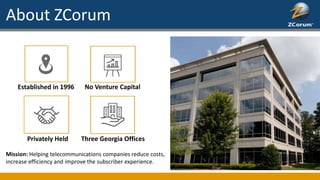
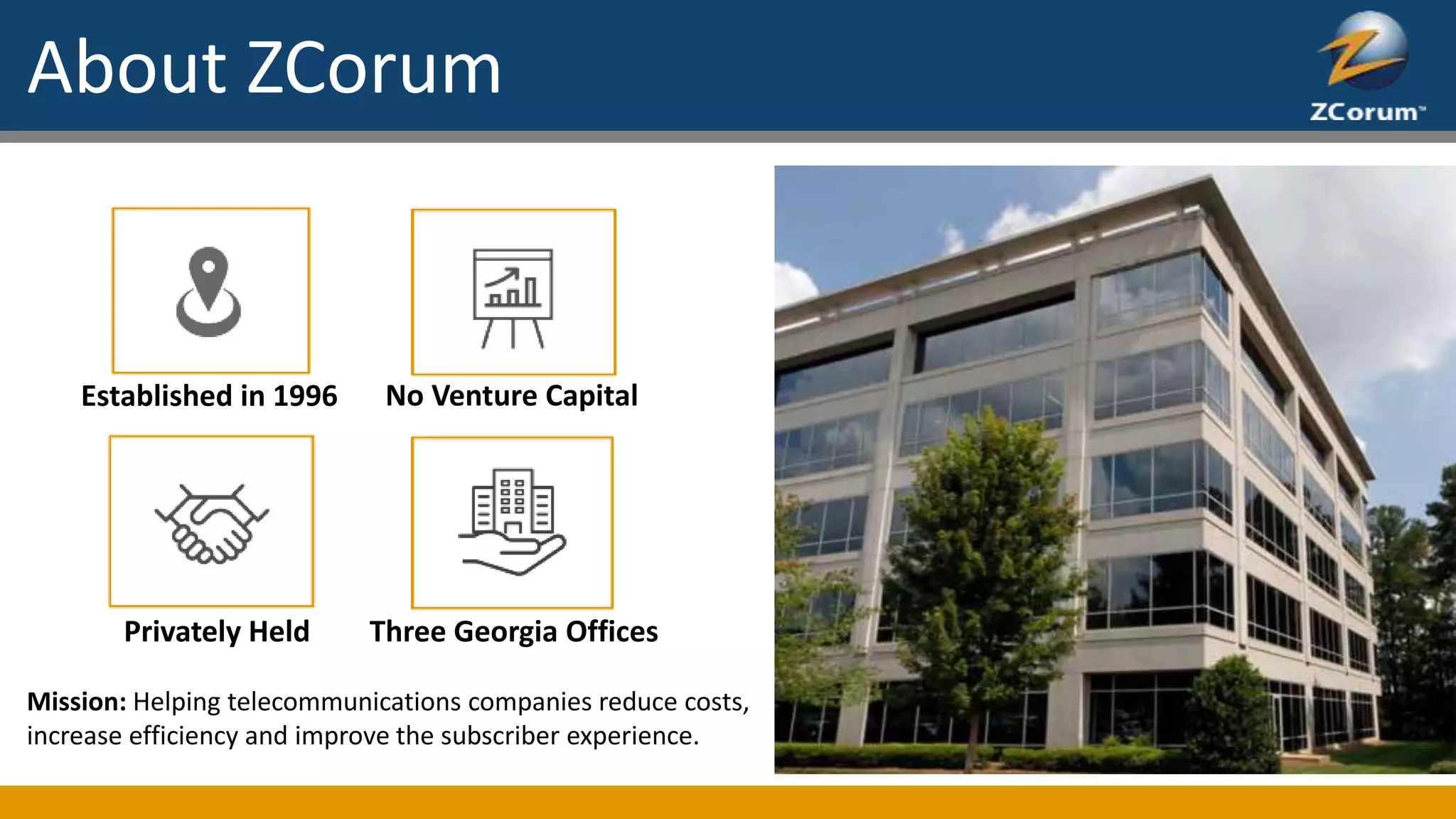
Established in 1996 No Venture Capital
Privately Held Three Georgia Offices
Mission: Helping telecommunications companies reduce costs,
increase efficiency and improve the subscriber experience.
About ZCorum
Unlike some diagnostics applications, TruVizion isn’t
“shelf-ware”. It has a wealth of useful data and powerful
features all wrapped up in an intuitive interface.
TruVizion will help your CSRs, technicians and engineers
reduce operational costs, improve your broadband
network, and increase customer satisfaction.
Services and Diagnostics
ZCorum’s PreEqualization Analyzer is a Proactive Network
Maintenance (PNM) tool that uses DOCSIS pre-
equalization data to show you where the network
impairments are, how bad they are and which modems
are likely being affected by a common problem.
Services and Diagnostics
ZCorum’s Upstream Analyzer is a fully featured,
software-based spectrum analyzer that displays the
upstream spectrum from your CMTS in real time.
ZCorum's Remote Spectrum uses a DOCSIS-
standard feature in newer cable modems and set-
top boxes that allows for full spectrum capture.
That means spectrum details for all digital channels.
Bandwidth Commander puts you back in control of your
broadband network. Not only will you have a tool that
helps reduce bandwidth, especially during peak hours,
you can gain new revenue from subscribers who are
your highest bandwidth consumers.
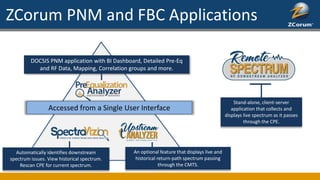
ZCorum PNM and FBC Applications
Stand-alone, client-server
application that collects and
displays live spectrum as it passes
through the CPE.
DOCSIS PNM application with BI Dashboard, Detailed Pre-Eq
and RF Data, Mapping, Correlation groups and more.
Accessed from a Single User Interface
Automatically identifies downstream
spectrum issues. View historical spectrum.
Rescan CPE for current spectrum.
An optional feature that displays live and
historical return-path spectrum passing
through the CMTS.
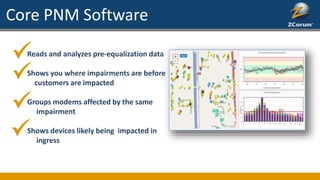
Core PNM Software
Reads and analyzes pre-equalization data
Shows you where impairments are before
customers are impacted
Groups modems affected by the same
impairment
Shows devices likely being impacted in
ingress
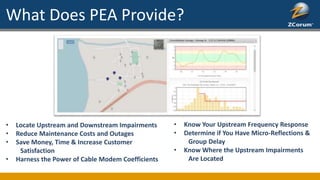
What Does PEA Provide?
• Locate Upstream and Downstream Impairments
• Reduce Maintenance Costs and Outages
• Save Money, Time & Increase Customer
Satisfaction
• Harness the Power of Cable Modem Coefficients
• Know Your Upstream Frequency Response
• Determine if You Have Micro-Reflections &
Group Delay
• Know Where the Upstream Impairments
Are Located
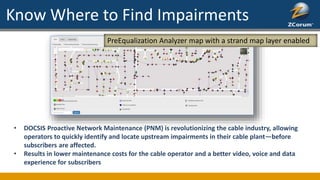
Know Where to Find Impairments
PreEqualization Analyzer map with a strand map layer enabled
• DOCSIS Proactive Network Maintenance (PNM) is revolutionizing the cable industry, allowing
operators to quickly identify and locate upstream impairments in their cable plant—before
subscribers are affected.
• Results in lower maintenance costs for the cable operator and a better video, voice and data
experience for subscribers
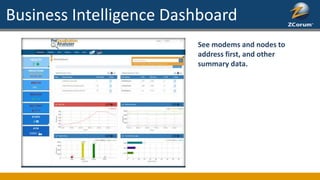
Business Intelligence Dashboard
See modems and nodes to
address first, and other
summary data.
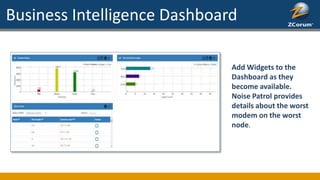
Business Intelligence Dashboard
Add Widgets to the
Dashboard as they
become available.
Noise Patrol provides
details about the worst
modem on the worst
node.
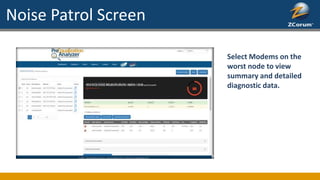
Noise Patrol Screen
Select Modems on the
worst node to view
summary and detailed
diagnostic data.
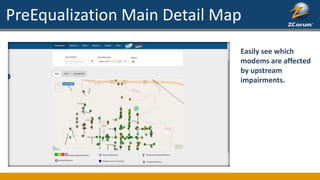
PreEqualization Main Detail Map
Easily see which
modems are affected
by upstream
impairments.
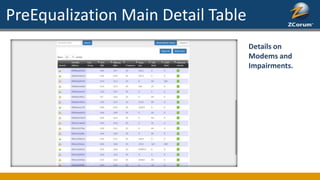
PreEqualization Main Detail Table
Details on
Modems and
Impairments.
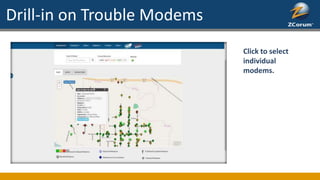
Drill-in on Trouble Modems
Click to select
individual
modems.
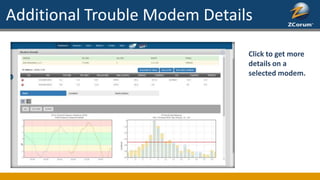
Additional Trouble Modem Details
Click to get more
details on a
selected modem.
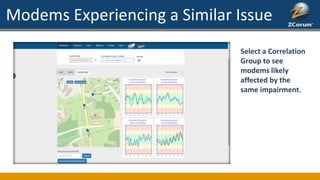
Modems Experiencing a Similar Issue
Select a Correlation
Group to see
modems likely
affected by the
same impairment.
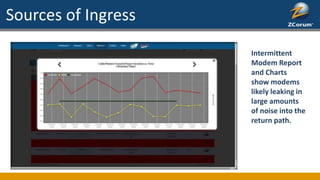
Sources of Ingress
Intermittent
Modem Report
and Charts
show modems
likely leaking in
large amounts
of noise into the
return path.
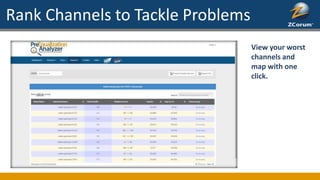
Rank Channels to Tackle Problems
View your worst
channels and
map with one
click.
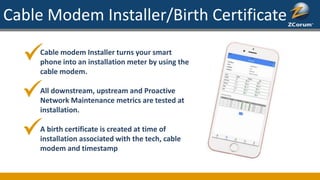
Cable Modem Installer/Birth Certificate
Cable modem Installer turns your smart
phone into an installation meter by using the
cable modem.
All downstream, upstream and Proactive
Network Maintenance metrics are tested at
installation.
A birth certificate is created at time of
installation associated with the tech, cable
modem and timestamp
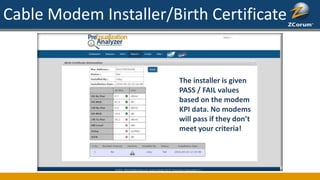
Cable Modem Installer/Birth Certificate
The installer is given
PASS / FAIL values
based on the modem
KPI data. No modems
will pass if they don’t
meet your criteria!
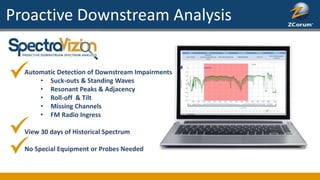
Proactive Downstream Analysis
Automatic Detection of Downstream Impairments
• Suck-outs & Standing Waves
• Resonant Peaks & Adjacency
• Roll-off & Tilt
• Missing Channels
• FM Radio Ingress
View 30 days of Historical Spectrum
No Special Equipment or Probes Needed
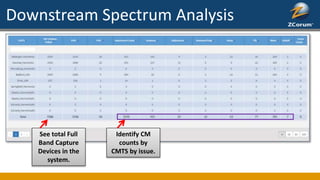
Downstream Spectrum Analysis
See total Full
Band Capture
Devices in the
system.
Identify CM
counts by
CMTS by issue.
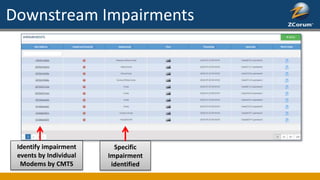
Downstream Impairments
Identify impairment
events by Individual
Modems by CMTS
Specific
Impairment
identified
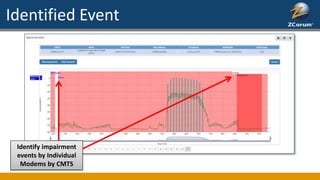
Identified Event
Identify impairment
events by Individual
Modems by CMTS
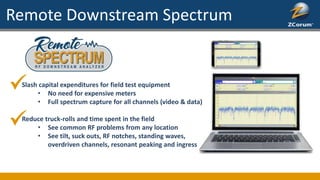
Remote Downstream Spectrum
Slash capital expenditures for field test equipment
• No need for expensive meters
• Full spectrum capture for all channels (video & data)
Reduce truck-rolls and time spent in the field
• See common RF problems from any location
• See tilt, suck outs, RF notches, standing waves,
overdriven channels, resonant peaking and ingress
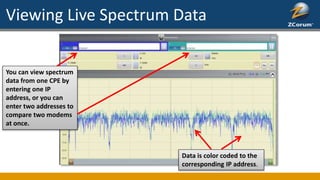
Viewing Live Spectrum Data
You can view spectrum
data from one CPE by
entering one IP
address, or you can
enter two addresses to
compare two modems
at once.
Data is color coded to the
corresponding IP address.
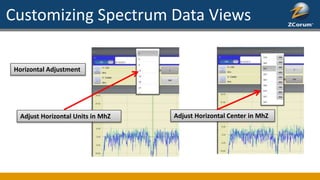
Customizing Spectrum Data Views
Horizontal Adjustment
Adjust Horizontal Units in MhZ Adjust Horizontal Center in MhZ
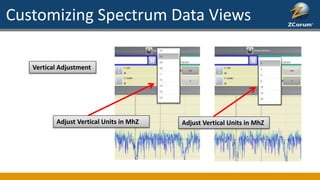
Customizing Spectrum Data Views
Adjust Vertical Units in MhZ Adjust Vertical Units in MhZ
Vertical Adjustment
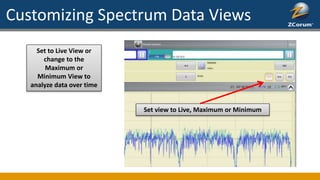
Customizing Spectrum Data Views
Set to Live View or
change to the
Maximum or
Minimum View to
analyze data over time
Set view to Live, Maximum or Minimum
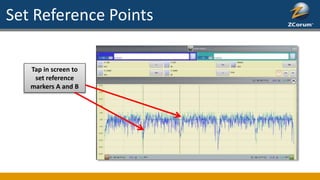
Set Reference Points
Tap in screen to
set reference
markers A and B
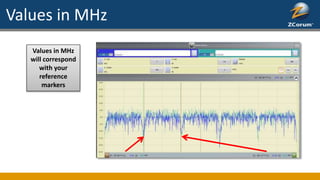
Values in MHz
Values in MHz
will correspond
with your
reference
markers
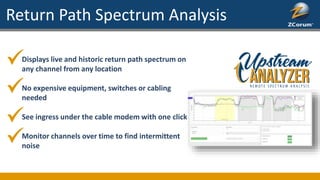
Return Path Spectrum Analysis
Displays live and historic return path spectrum on
any channel from any location
No expensive equipment, switches or cabling
needed
See ingress under the cable modem with one click
Monitor channels over time to find intermittent
noise
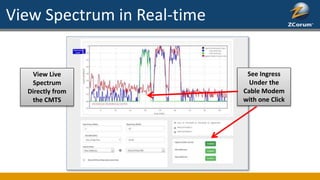
View Spectrum in Real-time
View Live
Spectrum
Directly from
the CMTS
See Ingress
Under the
Cable Modem
with one Click
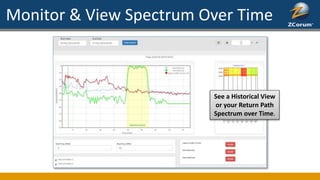
Monitor & View Spectrum Over Time
See a Historical View
or your Return Path
Spectrum over Time.
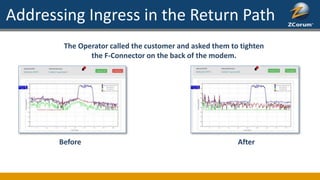
Addressing Ingress in the Return Path
The Operator called the customer and asked them to tighten
the F-Connector on the back of the modem.
Before After
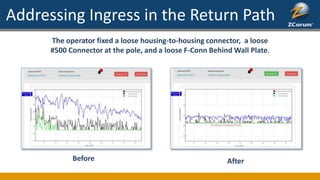
Addressing Ingress in the Return Path
The operator fixed a loose housing-to-housing connector, a loose
#500 Connector at the pole, and a loose F-Conn Behind Wall Plate.
Before After
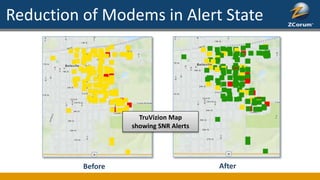
Reduction of Modems in Alert State
Before After
TruVizion Map
showing SNR Alerts
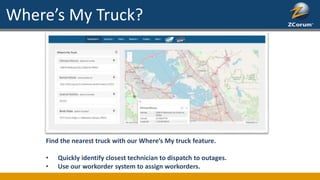
Where’s My Truck?
Find the nearest truck with our Where’s My truck feature.
• Quickly identify closest technician to dispatch to outages.
• Use our workorder system to assign workorders.
PNM Results
MSOs have experienced significant decreases in Truck Roll rates
Increase in overall plant health – better QoS
Experience significant drop in customer complaints by 25%
Easily identify in house problems such as loose connectors, reverse splitters, bad wiring
First 60 days of use 50% decrease in repeat calls. ($6-$9 a call and $75 a truck roll)
Major MSO – 18 months’ experience 6400 plant faults detected, confirmed and fixed
Spikes in summer time calls decrease due to plant issues being fixed
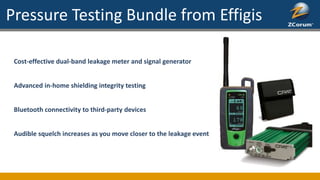
Pressure Testing Bundle from Effigis
Cost-effective dual-band leakage meter and signal generator
Advanced in-home shielding integrity testing
Bluetooth connectivity to third-party devices
Audible squelch increases as you move closer to the leakage event
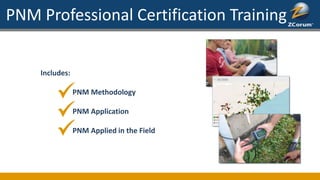
PNM Professional Certification Training
Includes:
PNM Methodology
PNM Application
PNM Applied in the Field
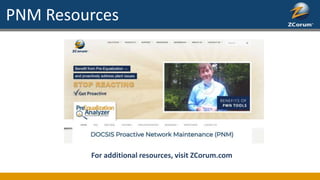
PNM Resources
For additional resources, visit ZCorum.com

PNM Wide Screen International

  • 1.
    Established in 1996No Venture Capital Privately Held Three Georgia Offices Mission: Helping telecommunications companies reduce costs, increase efficiency and improve the subscriber experience. About ZCorum
  • 2.
    Unlike some diagnosticsapplications, TruVizion isn’t “shelf-ware”. It has a wealth of useful data and powerful features all wrapped up in an intuitive interface. TruVizion will help your CSRs, technicians and engineers reduce operational costs, improve your broadband network, and increase customer satisfaction. Services and Diagnostics ZCorum’s PreEqualization Analyzer is a Proactive Network Maintenance (PNM) tool that uses DOCSIS pre- equalization data to show you where the network impairments are, how bad they are and which modems are likely being affected by a common problem.
  • 3.
    Services and Diagnostics ZCorum’sUpstream Analyzer is a fully featured, software-based spectrum analyzer that displays the upstream spectrum from your CMTS in real time. ZCorum's Remote Spectrum uses a DOCSIS- standard feature in newer cable modems and set- top boxes that allows for full spectrum capture. That means spectrum details for all digital channels. Bandwidth Commander puts you back in control of your broadband network. Not only will you have a tool that helps reduce bandwidth, especially during peak hours, you can gain new revenue from subscribers who are your highest bandwidth consumers.
  • 4.
    ZCorum PNM andFBC Applications Stand-alone, client-server application that collects and displays live spectrum as it passes through the CPE. DOCSIS PNM application with BI Dashboard, Detailed Pre-Eq and RF Data, Mapping, Correlation groups and more. Accessed from a Single User Interface Automatically identifies downstream spectrum issues. View historical spectrum. Rescan CPE for current spectrum. An optional feature that displays live and historical return-path spectrum passing through the CMTS.
  • 5.
    Core PNM Software Readsand analyzes pre-equalization data Shows you where impairments are before customers are impacted Groups modems affected by the same impairment Shows devices likely being impacted in ingress
  • 6.
    What Does PEAProvide? • Locate Upstream and Downstream Impairments • Reduce Maintenance Costs and Outages • Save Money, Time & Increase Customer Satisfaction • Harness the Power of Cable Modem Coefficients • Know Your Upstream Frequency Response • Determine if You Have Micro-Reflections & Group Delay • Know Where the Upstream Impairments Are Located
  • 7.
    Know Where toFind Impairments PreEqualization Analyzer map with a strand map layer enabled • DOCSIS Proactive Network Maintenance (PNM) is revolutionizing the cable industry, allowing operators to quickly identify and locate upstream impairments in their cable plant—before subscribers are affected. • Results in lower maintenance costs for the cable operator and a better video, voice and data experience for subscribers
  • 8.
    Business Intelligence Dashboard Seemodems and nodes to address first, and other summary data.
  • 9.
    Business Intelligence Dashboard AddWidgets to the Dashboard as they become available. Noise Patrol provides details about the worst modem on the worst node.
  • 10.
    Noise Patrol Screen SelectModems on the worst node to view summary and detailed diagnostic data.
  • 11.
    PreEqualization Main DetailMap Easily see which modems are affected by upstream impairments.
  • 12.
    PreEqualization Main DetailTable Details on Modems and Impairments.
  • 13.
    Drill-in on TroubleModems Click to select individual modems.
  • 14.
    Additional Trouble ModemDetails Click to get more details on a selected modem.
  • 15.
    Modems Experiencing aSimilar Issue Select a Correlation Group to see modems likely affected by the same impairment.
  • 16.
    Sources of Ingress Intermittent ModemReport and Charts show modems likely leaking in large amounts of noise into the return path.
  • 17.
    Rank Channels toTackle Problems View your worst channels and map with one click.
  • 18.
    Cable Modem Installer/BirthCertificate Cable modem Installer turns your smart phone into an installation meter by using the cable modem. All downstream, upstream and Proactive Network Maintenance metrics are tested at installation. A birth certificate is created at time of installation associated with the tech, cable modem and timestamp
  • 19.
    Cable Modem Installer/BirthCertificate The installer is given PASS / FAIL values based on the modem KPI data. No modems will pass if they don’t meet your criteria!
  • 20.
    Proactive Downstream Analysis AutomaticDetection of Downstream Impairments • Suck-outs & Standing Waves • Resonant Peaks & Adjacency • Roll-off & Tilt • Missing Channels • FM Radio Ingress View 30 days of Historical Spectrum No Special Equipment or Probes Needed
  • 21.
    Downstream Spectrum Analysis Seetotal Full Band Capture Devices in the system. Identify CM counts by CMTS by issue.
  • 22.
    Downstream Impairments Identify impairment eventsby Individual Modems by CMTS Specific Impairment identified
  • 23.
    Identified Event Identify impairment eventsby Individual Modems by CMTS
  • 24.
    Remote Downstream Spectrum Slashcapital expenditures for field test equipment • No need for expensive meters • Full spectrum capture for all channels (video & data) Reduce truck-rolls and time spent in the field • See common RF problems from any location • See tilt, suck outs, RF notches, standing waves, overdriven channels, resonant peaking and ingress
  • 25.
    Viewing Live SpectrumData You can view spectrum data from one CPE by entering one IP address, or you can enter two addresses to compare two modems at once. Data is color coded to the corresponding IP address.
  • 26.
    Customizing Spectrum DataViews Horizontal Adjustment Adjust Horizontal Units in MhZ Adjust Horizontal Center in MhZ
  • 27.
    Customizing Spectrum DataViews Adjust Vertical Units in MhZ Adjust Vertical Units in MhZ Vertical Adjustment
  • 28.
    Customizing Spectrum DataViews Set to Live View or change to the Maximum or Minimum View to analyze data over time Set view to Live, Maximum or Minimum
  • 29.
    Set Reference Points Tapin screen to set reference markers A and B
  • 30.
    Values in MHz Valuesin MHz will correspond with your reference markers
  • 31.
    Return Path SpectrumAnalysis Displays live and historic return path spectrum on any channel from any location No expensive equipment, switches or cabling needed See ingress under the cable modem with one click Monitor channels over time to find intermittent noise
  • 32.
    View Spectrum inReal-time View Live Spectrum Directly from the CMTS See Ingress Under the Cable Modem with one Click
  • 33.
    Monitor & ViewSpectrum Over Time See a Historical View or your Return Path Spectrum over Time.
  • 34.
    Addressing Ingress inthe Return Path The Operator called the customer and asked them to tighten the F-Connector on the back of the modem. Before After
  • 35.
    Addressing Ingress inthe Return Path The operator fixed a loose housing-to-housing connector, a loose #500 Connector at the pole, and a loose F-Conn Behind Wall Plate. Before After
  • 36.
    Reduction of Modemsin Alert State Before After TruVizion Map showing SNR Alerts
  • 37.
    Where’s My Truck? Findthe nearest truck with our Where’s My truck feature. • Quickly identify closest technician to dispatch to outages. • Use our workorder system to assign workorders.
  • 38.
    PNM Results MSOs haveexperienced significant decreases in Truck Roll rates Increase in overall plant health – better QoS Experience significant drop in customer complaints by 25% Easily identify in house problems such as loose connectors, reverse splitters, bad wiring First 60 days of use 50% decrease in repeat calls. ($6-$9 a call and $75 a truck roll) Major MSO – 18 months’ experience 6400 plant faults detected, confirmed and fixed Spikes in summer time calls decrease due to plant issues being fixed
  • 39.
    Pressure Testing Bundlefrom Effigis Cost-effective dual-band leakage meter and signal generator Advanced in-home shielding integrity testing Bluetooth connectivity to third-party devices Audible squelch increases as you move closer to the leakage event
  • 40.
    PNM Professional CertificationTraining Includes: PNM Methodology PNM Application PNM Applied in the Field
  • 41.
    PNM Resources For additionalresources, visit ZCorum.com