Basic PLC Progrmming
Outline
 Introduction to Programming Software
 Ladder Diagram
 Basic Logic Functions
 Mnuemonic Code
 CX-Programmer
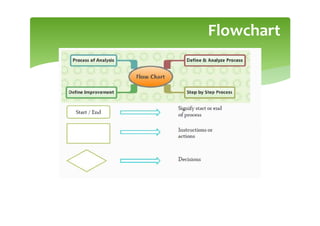
Flowchart
Ladder Diagram
 Primary programming language for PLCs.
 Other programming methods include:
 Function block diagrams (FBDs)
 Structured text (ST)
 Instruction List (IL)
 Sequential function charts (SFCs)
 Visual and Graphical language unlike textual high-level,
such as C, C++, Java…
 Derived form relay logic diagrams
 Primitive Logic Operations
 OR
 AND
 NOT
Ladder Diagram
Ladder Diagram
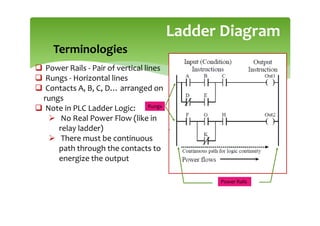
 Power Rails - Pair of vertical lines
 Rungs - Horizontal lines
 Contacts A, B, C, D… arranged on
rungs
 Note in PLC Ladder Logic:
 No Real Power Flow (like in
relay ladder)
 There must be continuous
path through the contacts to
energize the output
Terminologies
Power Rails
Rungs
Ladder Diagram
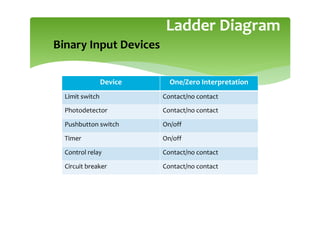
Binary Input Devices
Device One/Zero Interpretation
Limit switch Contact/no contact
Photodetector Contact/no contact
Pushbutton switch On/off
Timer On/off
Control relay Contact/no contact
Circuit breaker Contact/no contact
Ladder Diagram
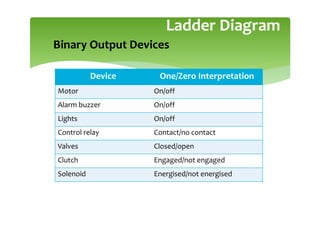
Binary Output Devices
Device One/Zero Interpretation
Motor On/off
Alarm buzzer On/off
Lights On/off
Control relay Contact/no contact
Valves Closed/open
Clutch Engaged/not engaged
Solenoid Energised/not energised
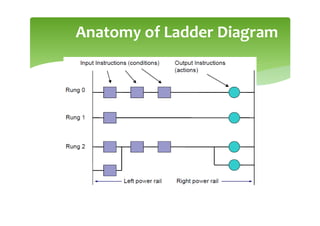
Anatomy of Ladder Diagram
o
Anatomy of Ladder Diagram
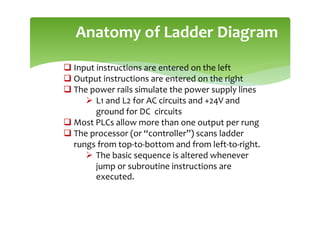
 Input instructions are entered on the left
 Output instructions are entered on the right
 The power rails simulate the power supply lines
 L1 and L2 for AC circuits and +24V and
ground for DC circuits
 Most PLCs allow more than one output per rung
 The processor (or “controller”) scans ladder
rungs from top-to-bottom and from left-to-right.
 The basic sequence is altered whenever
jump or subroutine instructions are
executed.
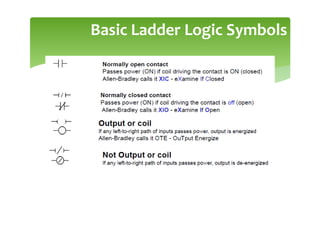
Basic Ladder Logic Symbols
Logic Functions
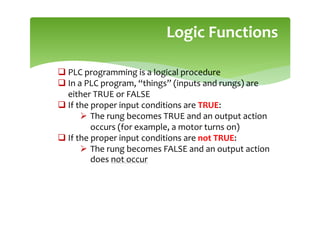
 PLC programming is a logical procedure
 In a PLC program, “things” (inputs and rungs) are
either TRUE or FALSE
 If the proper input conditions are TRUE:
 The rung becomes TRUE and an output action
occurs (for example, a motor turns on)
 If the proper input conditions are not TRUE:
 The rung becomes FALSE and an output action
does not occur
Logic Functions
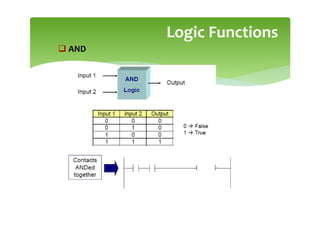
 AND
Logic Functions
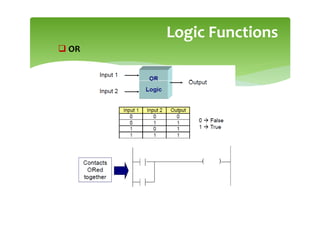
 OR
Logic Functions
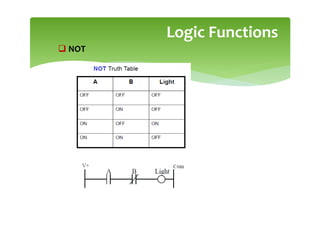
 NOT
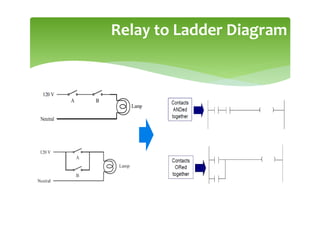
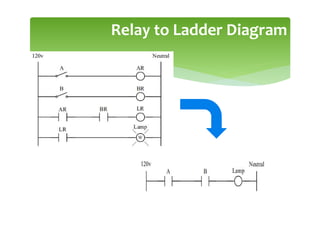
Relay to Ladder Diagram
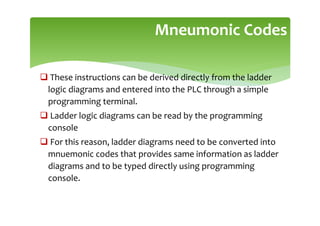
Mneumonic Codes
 These instructions can be derived directly from the ladder
logic diagrams and entered into the PLC through a simple
programming terminal.
 Ladder logic diagrams can be read by the programming
console
 For this reason, ladder diagrams need to be converted into
mnuemonic codes that provides same information as ladder
diagrams and to be typed directly using programming
console.
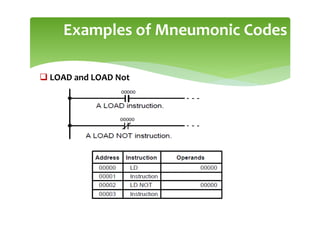
Examples of Mneumonic Codes
 LOAD and LOAD Not
Examples of Mneumonic Codes
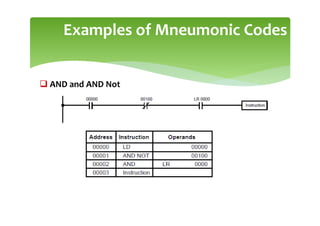
 AND and AND Not
Examples of Mneumonic Codes
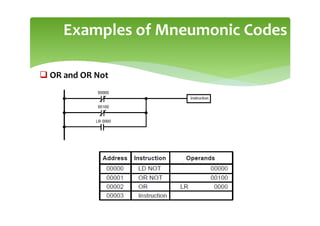
 OR and OR Not
Examples of Mneumonic Codes
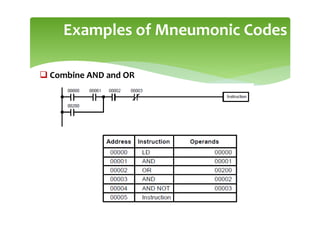
 Combine AND and OR
Examples of Mneumonic Codes
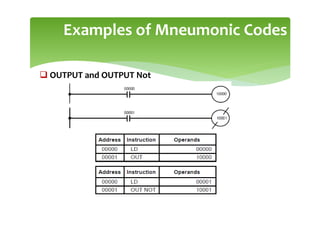
 OUTPUT and OUTPUT Not
Examples of Mneumonic Codes
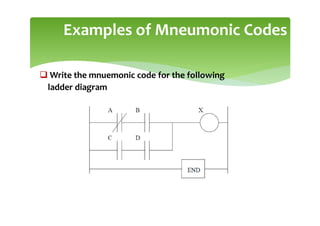
 Write the mnuemonic code for the following
ladder diagram
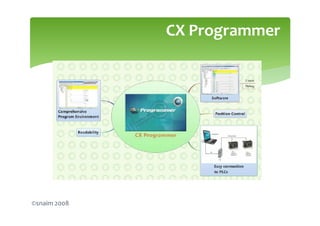
CX-Programmer, the programming software for all Omron's PLC series,
is fully integrated into the CX-One software suite.
 CX-Programmer includes a wide variety of features to speed up the
development of your PLC program. New parameter-setting dialogues
reduce setup time, and with standard function blocks in IEC 61131-3
structured text or conventional ladder language, CX-Programmer makes
development of PLC programs a simple drag  drop configuration.
Entering the Ladder Diagram:
CX Programmer
CX Programmer
©snaim 2008
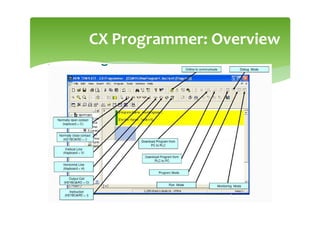
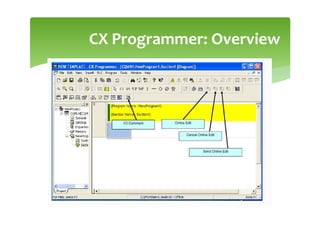
CX Programmer: Overview
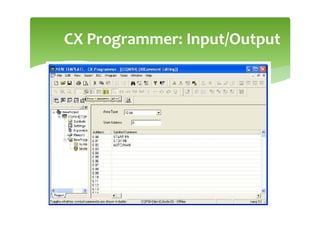
CX Programmer: Input/Output
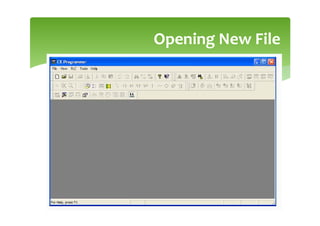
Opening New File
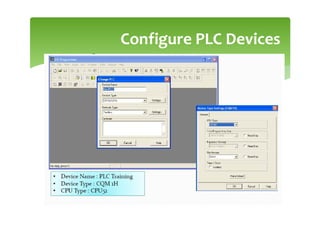
Configure PLC Devices
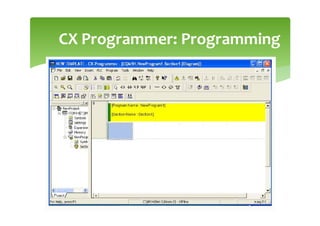
CX Programmer: Programming
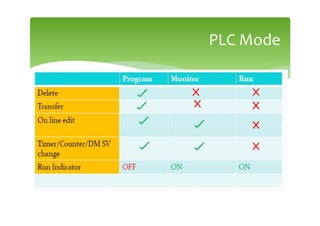
PLC Mode
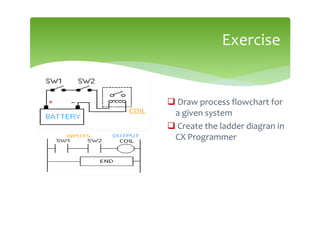
Exercise
 Draw process flowchart for
a given system
 Create the ladder diagran in
CX Programmer
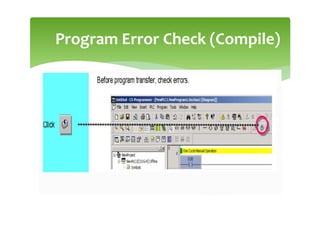
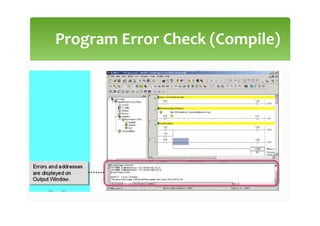
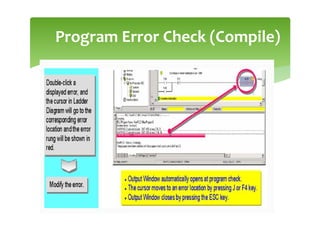
Program Error Check (Compile)
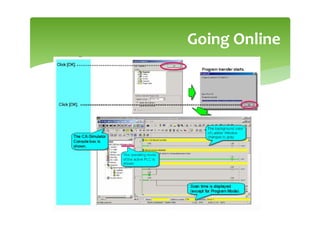
Going Online
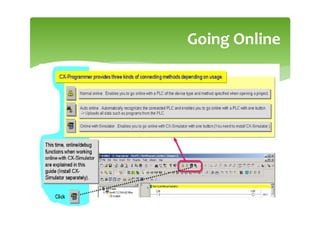
Going Online

PLC BASIC.pdf

  • 1.
  • 2.
    Outline Introduction toProgramming Software Ladder Diagram Basic Logic Functions Mnuemonic Code CX-Programmer
  • 3.
  • 4.
    Ladder Diagram Primaryprogramming language for PLCs. Other programming methods include: Function block diagrams (FBDs) Structured text (ST) Instruction List (IL) Sequential function charts (SFCs) Visual and Graphical language unlike textual high-level, such as C, C++, Java… Derived form relay logic diagrams Primitive Logic Operations OR AND NOT
  • 5.
  • 6.
    Ladder Diagram PowerRails - Pair of vertical lines Rungs - Horizontal lines Contacts A, B, C, D… arranged on rungs Note in PLC Ladder Logic: No Real Power Flow (like in relay ladder) There must be continuous path through the contacts to energize the output Terminologies Power Rails Rungs
  • 7.
    Ladder Diagram Binary InputDevices Device One/Zero Interpretation Limit switch Contact/no contact Photodetector Contact/no contact Pushbutton switch On/off Timer On/off Control relay Contact/no contact Circuit breaker Contact/no contact
  • 8.
    Ladder Diagram Binary OutputDevices Device One/Zero Interpretation Motor On/off Alarm buzzer On/off Lights On/off Control relay Contact/no contact Valves Closed/open Clutch Engaged/not engaged Solenoid Energised/not energised
  • 9.
  • 10.
    Anatomy of LadderDiagram Input instructions are entered on the left Output instructions are entered on the right The power rails simulate the power supply lines L1 and L2 for AC circuits and +24V and ground for DC circuits Most PLCs allow more than one output per rung The processor (or “controller”) scans ladder rungs from top-to-bottom and from left-to-right. The basic sequence is altered whenever jump or subroutine instructions are executed.
  • 11.
  • 12.
    Logic Functions PLCprogramming is a logical procedure In a PLC program, “things” (inputs and rungs) are either TRUE or FALSE If the proper input conditions are TRUE: The rung becomes TRUE and an output action occurs (for example, a motor turns on) If the proper input conditions are not TRUE: The rung becomes FALSE and an output action does not occur
  • 13.
  • 14.
  • 15.
  • 16.
  • 17.
  • 18.
    Mneumonic Codes Theseinstructions can be derived directly from the ladder logic diagrams and entered into the PLC through a simple programming terminal. Ladder logic diagrams can be read by the programming console For this reason, ladder diagrams need to be converted into mnuemonic codes that provides same information as ladder diagrams and to be typed directly using programming console.
  • 19.
    Examples of MneumonicCodes LOAD and LOAD Not
  • 20.
    Examples of MneumonicCodes AND and AND Not
  • 21.
    Examples of MneumonicCodes OR and OR Not
  • 22.
    Examples of MneumonicCodes Combine AND and OR
  • 23.
    Examples of MneumonicCodes OUTPUT and OUTPUT Not
  • 24.
    Examples of MneumonicCodes Write the mnuemonic code for the following ladder diagram
  • 25.
    CX-Programmer, the programmingsoftware for all Omron's PLC series, is fully integrated into the CX-One software suite. CX-Programmer includes a wide variety of features to speed up the development of your PLC program. New parameter-setting dialogues reduce setup time, and with standard function blocks in IEC 61131-3 structured text or conventional ladder language, CX-Programmer makes development of PLC programs a simple drag drop configuration. Entering the Ladder Diagram: CX Programmer
  • 26.
  • 27.
  • 28.
  • 29.
  • 30.
  • 31.
  • 32.
  • 33.
  • 34.
    Exercise Draw processflowchart for a given system Create the ladder diagran in CX Programmer
  • 35.
  • 36.
  • 37.
  • 38.
  • 39.