Marco G. Williams
Program Manager
PlayFab
Integrating PlayFab with a Unity Game
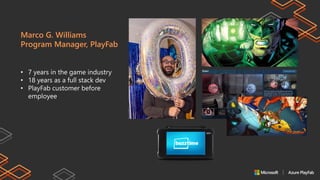
• 7 years in the game industry
• 18 years as a full stack dev
• PlayFab customer before
employee
Marco G. Williams
Program Manager, PlayFab
The Challenge
• Game industry starts in the 70’s with small independent teams
• Larger teams by mid 90’s, introduction to online play and gaming services
• In the mid 2000’s we introduce casual and hyper casual games
▪ Today’s projects require complex economy’s and online services
CHALLENGE
“Today developers need to integrate services from multiple vendors into a single project!”
SOLUTION “Microsoft Azure PlayFab”
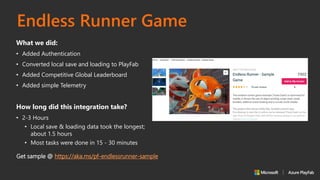
Endless Runner Game
What we did:
• Added Authentication
• Converted local save and loading to PlayFab
• Added Competitive Global Leaderboard
• Added simple Telemetry
How long did this integration take?
• 2-3 Hours
• Local save & loading data took the longest;
about 1.5 hours
• Most tasks were done in 15 - 30 minutes
Get sample @ https://aka.ms/pf-endlessrunner-sample
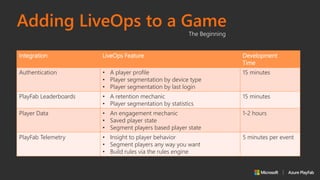
Adding LiveOps to a Game
The Beginning
Integration LiveOps Feature Development
Time
Authentication • A player profile
• Player segmentation by device type
• Player segmentation by last login
15 minutes
PlayFab Leaderboards • A retention mechanic
• Player segmentation by statistics
15 minutes
Player Data • An engagement mechanic
• Saved player state
• Segment players based player state
1-2 hours
PlayFab Telemetry • Insight to player behavior
• Segment players any way you want
• Build rules via the rules engine
5 minutes per event
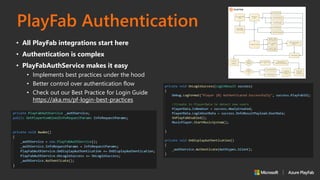
• All PlayFab integrations start here
• Authentication is complex
• PlayFabAuthService makes it easy
• Implements best practices under the hood
• Better control over authentication flow
• Check out our Best Practice for Login Guide
https://aka.ms/pf-login-best-practices
PlayFab Authentication
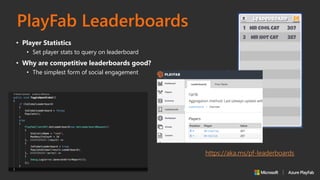
PlayFab Leaderboards
• Player Statistics
• Set player stats to query on leaderboard
• Why are competitive leaderboards good?
• The simplest form of social engagement
https://aka.ms/pf-leaderboards
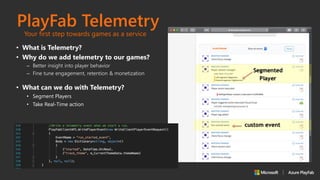
• What is Telemetry?
• Why do we add telemetry to our games?
– Better insight into player behavior
– Fine tune engagement, retention & monetization
PlayFab Telemetry
• What can we do with Telemetry?
• Segment Players
• Take Real-Time action
Your first step towards games as a service
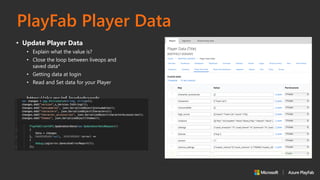
PlayFab Player Data
• Update Player Data
• Explain what the value is?
• Close the loop between liveops and
saved data*
• Getting data at login
• Read and Set data for your Player
https://aka.ms/pf-leaderbaords
PlayFab Unity SDK
• PlayFab Editor Extensions
• The easiest way to get the SDK and stay
up to date
• Other ways to get the SDK?
• docs.microsoft.com/gaming/playfab
• GitHub Download
• PlayFab Unity SDK is Open Source:
https://aka.ms/pf-unity-sdk
Questions?
Thank You!
© 2018 Microsoft Corporation.
All rights reserved. Microsoft, Xbox, Windows, and other product names are or may be registered trademarks and/or trademarks in the U.S. and/or other countries. The
information herein is for informational purposes only and represents the current view of Microsoft Corporation as of the date of this presentation. Because Microsoft must
respond to changing market conditions, it should not be interpreted to be a commitment on the part of Microsoft, and Microsoft cannot guarantee the accuracy of any
information provided after the date of this presentation.
MICROSOFT MAKES NO WARRANTIES, EXPRESS, IMPLIED OR STATUTORY, AS TO THE INFORMATION IN THIS PRESENTATION.

PlayFab and unity gdc2019

  • 1.
    Marco G. Williams ProgramManager PlayFab Integrating PlayFab with a Unity Game
  • 2.
    • 7 yearsin the game industry • 18 years as a full stack dev • PlayFab customer before employee Marco G. Williams Program Manager, PlayFab
  • 3.
    The Challenge • Gameindustry starts in the 70’s with small independent teams • Larger teams by mid 90’s, introduction to online play and gaming services • In the mid 2000’s we introduce casual and hyper casual games ▪ Today’s projects require complex economy’s and online services CHALLENGE “Today developers need to integrate services from multiple vendors into a single project!” SOLUTION “Microsoft Azure PlayFab”
  • 4.
    Endless Runner Game Whatwe did: • Added Authentication • Converted local save and loading to PlayFab • Added Competitive Global Leaderboard • Added simple Telemetry How long did this integration take? • 2-3 Hours • Local save & loading data took the longest; about 1.5 hours • Most tasks were done in 15 - 30 minutes Get sample @ https://aka.ms/pf-endlessrunner-sample
  • 5.
    Adding LiveOps toa Game The Beginning Integration LiveOps Feature Development Time Authentication • A player profile • Player segmentation by device type • Player segmentation by last login 15 minutes PlayFab Leaderboards • A retention mechanic • Player segmentation by statistics 15 minutes Player Data • An engagement mechanic • Saved player state • Segment players based player state 1-2 hours PlayFab Telemetry • Insight to player behavior • Segment players any way you want • Build rules via the rules engine 5 minutes per event
  • 6.
    • All PlayFabintegrations start here • Authentication is complex • PlayFabAuthService makes it easy • Implements best practices under the hood • Better control over authentication flow • Check out our Best Practice for Login Guide https://aka.ms/pf-login-best-practices PlayFab Authentication
  • 7.
    PlayFab Leaderboards • PlayerStatistics • Set player stats to query on leaderboard • Why are competitive leaderboards good? • The simplest form of social engagement https://aka.ms/pf-leaderboards
  • 8.
    • What isTelemetry? • Why do we add telemetry to our games? – Better insight into player behavior – Fine tune engagement, retention & monetization PlayFab Telemetry • What can we do with Telemetry? • Segment Players • Take Real-Time action Your first step towards games as a service
  • 9.
    PlayFab Player Data •Update Player Data • Explain what the value is? • Close the loop between liveops and saved data* • Getting data at login • Read and Set data for your Player https://aka.ms/pf-leaderbaords
  • 10.
    PlayFab Unity SDK •PlayFab Editor Extensions • The easiest way to get the SDK and stay up to date • Other ways to get the SDK? • docs.microsoft.com/gaming/playfab • GitHub Download • PlayFab Unity SDK is Open Source: https://aka.ms/pf-unity-sdk
  • 11.
  • 12.
  • 13.
    © 2018 MicrosoftCorporation. All rights reserved. Microsoft, Xbox, Windows, and other product names are or may be registered trademarks and/or trademarks in the U.S. and/or other countries. The information herein is for informational purposes only and represents the current view of Microsoft Corporation as of the date of this presentation. Because Microsoft must respond to changing market conditions, it should not be interpreted to be a commitment on the part of Microsoft, and Microsoft cannot guarantee the accuracy of any information provided after the date of this presentation. MICROSOFT MAKES NO WARRANTIES, EXPRESS, IMPLIED OR STATUTORY, AS TO THE INFORMATION IN THIS PRESENTATION.