Practical-1
XAMMP Installation
• Step 1: Find a web server that supports PHP and MYSQL.
• Step 2: Then install PHP from its website.
• Step 3: Then install MYSQL DB on your PC.
XAMPP is an open-source web server solution package. It is
mainly used for web application testing on a local host
webserver.
• XAMPP stands for:
• X = Cross-platform
• A = Apache Server
• M = MariaDB
• P = PHP
• P = Perl
How to Install XAMPP?
• Apache friends developed XAMPP, and it is available for
everyone free of cost.
• You can download XAMPP through the official website,
https://www.apachefriends.org/download.html.
• On completing the download of the setup file, begin the
installation process and, in the “Select Components” section,
select all the required components.
• Before you run or start writing any program in PHP, you should start Apache
and MYSQL.
• After starting both servers, you have to write a program in Notepad.
• After writing it, save that file as "program.php".
• Then copy that file program.php to C:/Program Files/XAMPP/htdocs.
• Open the browser and type http://localhost.
• Now run your code in that browser.
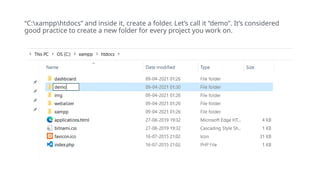
“C:xampphtdocs” and inside it, create a folder. Let’s call it “demo”. It’s considered
good practice to create a new folder for every project you work on.
Inside the demo folder, create a new text file and name it
“index.php” and write the following script.
• <?php
Welcome to php
• >
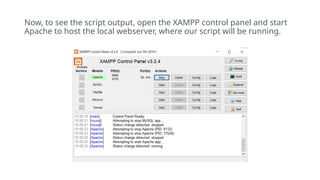
Now, to see the script output, open the XAMPP control panel and start
Apache to host the local webserver, where our script will be running.
Now navigate to your browser and type in “localhost/demo/” in the
address bar to view the output.
Welcome to php

PHP introduction how to create and start php

  • 1.
  • 2.
    • Step 1:Find a web server that supports PHP and MYSQL. • Step 2: Then install PHP from its website. • Step 3: Then install MYSQL DB on your PC.
  • 3.
    XAMPP is anopen-source web server solution package. It is mainly used for web application testing on a local host webserver. • XAMPP stands for: • X = Cross-platform • A = Apache Server • M = MariaDB • P = PHP • P = Perl
  • 4.
    How to InstallXAMPP? • Apache friends developed XAMPP, and it is available for everyone free of cost. • You can download XAMPP through the official website, https://www.apachefriends.org/download.html. • On completing the download of the setup file, begin the installation process and, in the “Select Components” section, select all the required components.
  • 7.
    • Before yourun or start writing any program in PHP, you should start Apache and MYSQL. • After starting both servers, you have to write a program in Notepad. • After writing it, save that file as "program.php". • Then copy that file program.php to C:/Program Files/XAMPP/htdocs. • Open the browser and type http://localhost. • Now run your code in that browser.
  • 8.
    “C:xampphtdocs” and insideit, create a folder. Let’s call it “demo”. It’s considered good practice to create a new folder for every project you work on.
  • 9.
    Inside the demofolder, create a new text file and name it “index.php” and write the following script. • <?php Welcome to php • >
  • 10.
    Now, to seethe script output, open the XAMPP control panel and start Apache to host the local webserver, where our script will be running.
  • 11.
    Now navigate toyour browser and type in “localhost/demo/” in the address bar to view the output. Welcome to php