WEB PROGRAMMING
PHP
S.Muthuganesh M.Sc.,B.Ed
Assistant Professor
Department of Computer Science
Vivekananda College
Tiruvedakam West
ganesh01muthu@gmail.com
Introduction
• PHP is a popular general-purpose scripting language that is especially suited to
web development. (Hypertext Preprocessor)
• It was originally created by Rasmus Lerdorf in 1994.
Advantages of PHP
• PHP is Open Source
• Large amount of databases are supported
• PHP is platform independent
• Compatible with servers
• PHP frameworks built-in feature and tools make it easier to protect the web
applications from the outer attacks and security threats.
• PHP is also stable as compared to other programming languages. It has been in
existence for a long time. The developers have worked on PHP to make it easy for
the programmers to work on developing the PHP web-based applications.
Before Run PHP we must have either one
• XAMPP (/ˈzæmp/ or /ˈɛks.æmp/) is a free and open-source cross-platform web
server solution stack package developed by Apache Friends, consisting mainly of
the Apache HTTP Server, MariaDB database, and interpreters for scripts written in
the PHP and Perl programming languages.
Download from https://www.apachefriends.org/
Or
• WampServer refers to a software stack for the Microsoft Windows operating
system, created by Romain Bourdon and consisting of the Apache web server,
OpenSSL for SSL support, MySQL database and PHP programming language.
Download from http://www.wampserver.com/
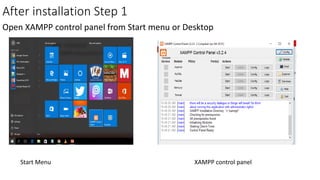
After installation Step 1
Open XAMPP control panel from Start menu or Desktop
Start Menu XAMPP control panel
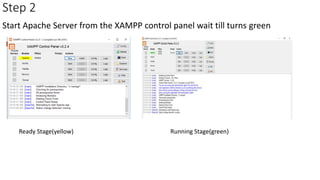
Step 2
Start Apache Server from the XAMPP control panel wait till turns green
Ready Stage(yellow) Running Stage(green)
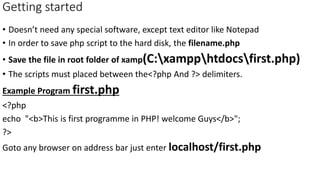
Getting started
• Doesn’t need any special software, except text editor like Notepad
• In order to save php script to the hard disk, the filename.php
• Save the file in root folder of xamp(C:xampphtdocsfirst.php)
• The scripts must placed between the<?php And ?> delimiters.
Example Program first.php
<?php
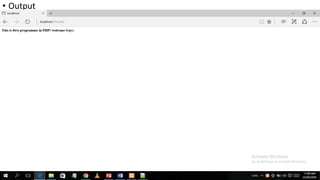
echo "<b>This is first programme in PHP! welcome Guys</b>";
?>
Goto any browser on address bar just enter localhost/first.php
• Output
Thank you

Php

  • 1.
    WEB PROGRAMMING PHP S.Muthuganesh M.Sc.,B.Ed AssistantProfessor Department of Computer Science Vivekananda College Tiruvedakam West ganesh01muthu@gmail.com
  • 2.
    Introduction • PHP isa popular general-purpose scripting language that is especially suited to web development. (Hypertext Preprocessor) • It was originally created by Rasmus Lerdorf in 1994. Advantages of PHP • PHP is Open Source • Large amount of databases are supported • PHP is platform independent • Compatible with servers • PHP frameworks built-in feature and tools make it easier to protect the web applications from the outer attacks and security threats. • PHP is also stable as compared to other programming languages. It has been in existence for a long time. The developers have worked on PHP to make it easy for the programmers to work on developing the PHP web-based applications.
  • 3.
    Before Run PHPwe must have either one • XAMPP (/ˈzæmp/ or /ˈɛks.æmp/) is a free and open-source cross-platform web server solution stack package developed by Apache Friends, consisting mainly of the Apache HTTP Server, MariaDB database, and interpreters for scripts written in the PHP and Perl programming languages. Download from https://www.apachefriends.org/ Or • WampServer refers to a software stack for the Microsoft Windows operating system, created by Romain Bourdon and consisting of the Apache web server, OpenSSL for SSL support, MySQL database and PHP programming language. Download from http://www.wampserver.com/
  • 4.
    After installation Step1 Open XAMPP control panel from Start menu or Desktop Start Menu XAMPP control panel
  • 5.
    Step 2 Start ApacheServer from the XAMPP control panel wait till turns green Ready Stage(yellow) Running Stage(green)
  • 6.
    Getting started • Doesn’tneed any special software, except text editor like Notepad • In order to save php script to the hard disk, the filename.php • Save the file in root folder of xamp(C:xampphtdocsfirst.php) • The scripts must placed between the<?php And ?> delimiters. Example Program first.php <?php echo "<b>This is first programme in PHP! welcome Guys</b>"; ?> Goto any browser on address bar just enter localhost/first.php
  • 7.
  • 8.