PHP
Function creating, calling,
PHP built-in function
Function
• Sub routine.
• A function is a block of code that you can call
throughout your PHP script. Functions are
often used for common functionalities that
can occur in your PHP program. For an
example think that you write a program that
relates to seasonal offers. In many occasions,
you would need to know the final price after a
discount was given. You can define a function
for this as below.
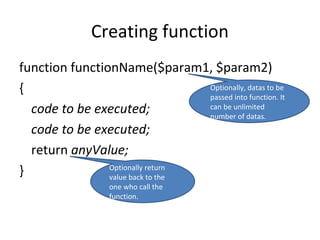
Creating function
function functionName($param1, $param2)
{
code to be executed;
return anyValue;
}
Optionally, datas to be
passed into function. It
can be unlimited
number of datas.
Optionally return
value back to the
one who call the
function.
Creating function- Example
function print_hello()
{
print “Hello”;
}
A function that does not require any external
datas to process. It done the job by just print
word “Hello” to the screen. It return nothing
to the place it is being called.
Creating function- Example
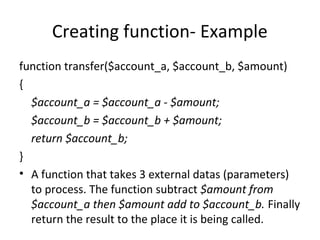
function transfer($account_a, $account_b, $amount)
{
$account_a = $account_a - $amount;
$account_b = $account_b + $amount;
return $account_b;
}
• A function that takes 3 external datas (parameters)
to process. The function subtract $amount from
$account_a then $amount add to $account_b. Finally
return the result to the place it is being called.
Calling function
/*** Functions declaration ***/
function print_hello()
{
print “Hello”;
}
function transfer($account_a, $account_b, $amount)
{
$account_a = $account_a - $amount;
$account_b = $account_b + $amount;
return $account_b;
}
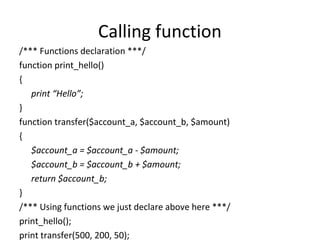
/*** Using functions we just declare above here ***/
print_hello();
print transfer(500, 200, 50);
PHP Built-in Functions
in common use
Useful PHP Built-in functions
• (Q) What is PHP built-in functions?
• (A) Instant, Ready to use functions provided
by PHP producer. No need to create by
ourself.
phpinfo()
Benefit: Print PHP information, configuration,
settings out to screen
Example:
phpinfo();
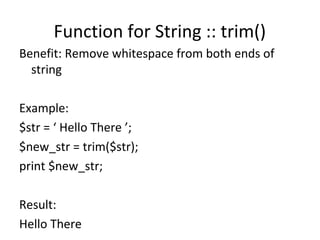
Function for String :: trim()
Benefit: Remove whitespace from both ends of
string
Example:
$str = ‘ Hello There ’;
$new_str = trim($str);
print $new_str;
Result:
Hello There
Function for String :: explode()
Benefit: Explode string into array
$pizza = "piece1 piece2 piece3 piece4 piece5 piece6";
$pieces = explode(" ", $pizza);
print $pieces[0]; // piece1
print $pieces[1]; // piece2
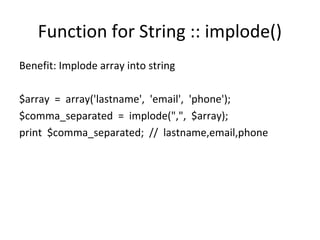
Function for String :: implode()
Benefit: Implode array into string
$array = array('lastname', 'email', 'phone');
$comma_separated = implode(",", $array);
print $comma_separated; // lastname,email,phone
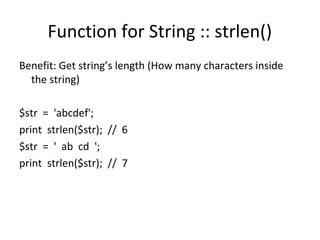
Function for String :: strlen()
Benefit: Get string’s length (How many characters inside
the string)
$str = 'abcdef';
print strlen($str); // 6
$str = ' ab cd ';
print strlen($str); // 7
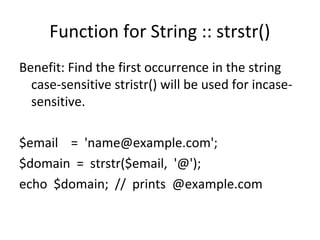
Function for String :: strstr()
Benefit: Find the first occurrence in the string
case-sensitive stristr() will be used for incase-
sensitive.
$email = 'name@example.com';
$domain = strstr($email, '@');
echo $domain; // prints @example.com
Function for Array :: count()
Benefit: Count all elements in array
$a = array();
$a[0] = 1;
$a[1] = 3;
$a[2] = 5;
$result = count($a);
print $result; // output 3
$food = array('fruits' => array('orange', 'banana', 'apple'),
'veggie' => array('carrot', 'collard', 'pea'));
// recursive count
print count($food, COUNT_RECURSIVE); // output 8
// normal count
print count($food); // output 2
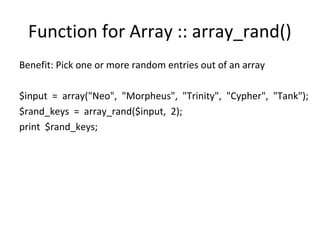
Function for Array :: array_rand()
Benefit: Pick one or more random entries out of an array
$input = array("Neo", "Morpheus", "Trinity", "Cypher", "Tank");
$rand_keys = array_rand($input, 2);
print $rand_keys;
Function for Array :: print_r()
Benefit: Print structure of array.
Note that we should wrap it with
<pre></pre> for readability.
$a = array ('a' => 'apple',
'b' => 'banana',
'c' => array ('x', 'y', 'z'));
print “<pre>”;
print_r($a);
print “<pre>”;
/****
<pre>
Array
(
[a] => apple
[b] => banana
[c] => Array
(
[0] => x
[1] => y
[2] => z
)
)
</pre>
****/

php 2 Function creating, calling, PHP built-in function

  • 1.
  • 2.
  • 3.
    Function • Sub routine. •A function is a block of code that you can call throughout your PHP script. Functions are often used for common functionalities that can occur in your PHP program. For an example think that you write a program that relates to seasonal offers. In many occasions, you would need to know the final price after a discount was given. You can define a function for this as below.
  • 4.
    Creating function function functionName($param1,$param2) { code to be executed; code to be executed; return anyValue; } Optionally, datas to be passed into function. It can be unlimited number of datas. Optionally return value back to the one who call the function.
  • 5.
    Creating function- Example functionprint_hello() { print “Hello”; } A function that does not require any external datas to process. It done the job by just print word “Hello” to the screen. It return nothing to the place it is being called.
  • 6.
    Creating function- Example functiontransfer($account_a, $account_b, $amount) { $account_a = $account_a - $amount; $account_b = $account_b + $amount; return $account_b; } • A function that takes 3 external datas (parameters) to process. The function subtract $amount from $account_a then $amount add to $account_b. Finally return the result to the place it is being called.
  • 7.
    Calling function /*** Functionsdeclaration ***/ function print_hello() { print “Hello”; } function transfer($account_a, $account_b, $amount) { $account_a = $account_a - $amount; $account_b = $account_b + $amount; return $account_b; } /*** Using functions we just declare above here ***/ print_hello(); print transfer(500, 200, 50);
  • 8.
  • 9.
    Useful PHP Built-infunctions • (Q) What is PHP built-in functions? • (A) Instant, Ready to use functions provided by PHP producer. No need to create by ourself.
  • 10.
    phpinfo() Benefit: Print PHPinformation, configuration, settings out to screen Example: phpinfo();
  • 11.
    Function for String:: trim() Benefit: Remove whitespace from both ends of string Example: $str = ‘ Hello There ’; $new_str = trim($str); print $new_str; Result: Hello There
  • 12.
    Function for String:: explode() Benefit: Explode string into array $pizza = "piece1 piece2 piece3 piece4 piece5 piece6"; $pieces = explode(" ", $pizza); print $pieces[0]; // piece1 print $pieces[1]; // piece2
  • 13.
    Function for String:: implode() Benefit: Implode array into string $array = array('lastname', 'email', 'phone'); $comma_separated = implode(",", $array); print $comma_separated; // lastname,email,phone
  • 14.
    Function for String:: strlen() Benefit: Get string’s length (How many characters inside the string) $str = 'abcdef'; print strlen($str); // 6 $str = ' ab cd '; print strlen($str); // 7
  • 15.
    Function for String:: strstr() Benefit: Find the first occurrence in the string case-sensitive stristr() will be used for incase- sensitive. $email = 'name@example.com'; $domain = strstr($email, '@'); echo $domain; // prints @example.com
  • 16.
    Function for Array:: count() Benefit: Count all elements in array $a = array(); $a[0] = 1; $a[1] = 3; $a[2] = 5; $result = count($a); print $result; // output 3 $food = array('fruits' => array('orange', 'banana', 'apple'), 'veggie' => array('carrot', 'collard', 'pea')); // recursive count print count($food, COUNT_RECURSIVE); // output 8 // normal count print count($food); // output 2
  • 17.
    Function for Array:: array_rand() Benefit: Pick one or more random entries out of an array $input = array("Neo", "Morpheus", "Trinity", "Cypher", "Tank"); $rand_keys = array_rand($input, 2); print $rand_keys;
  • 18.
    Function for Array:: print_r() Benefit: Print structure of array. Note that we should wrap it with <pre></pre> for readability. $a = array ('a' => 'apple', 'b' => 'banana', 'c' => array ('x', 'y', 'z')); print “<pre>”; print_r($a); print “<pre>”; /**** <pre> Array ( [a] => apple [b] => banana [c] => Array ( [0] => x [1] => y [2] => z ) ) </pre> ****/