Photoshop Best Practices
for Web Design
Alex Ventpap
Some Photoshop Hints
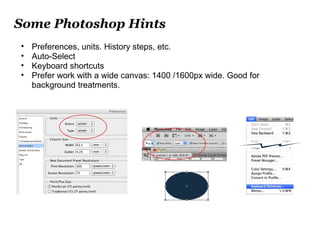
• Preferences, units. History steps, etc.
• Auto-Select
• Keyboard shortcuts
• Prefer work with a wide canvas: 1400 /1600px wide. Good for
background treatments.
Some Photoshop Hints
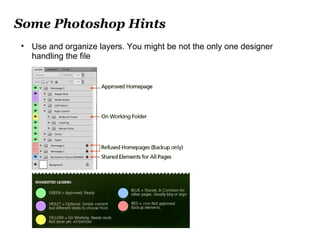
• Use and organize layers. You might be not the only one designer
handling the file
Use Grid System
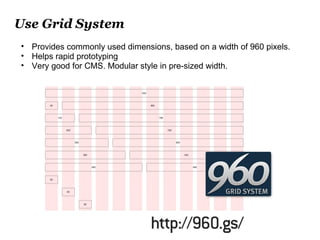
• Provides commonly used dimensions, based on a width of 960 pixels.
• Helps rapid prototyping
• Very good for CMS. Modular style in pre-sized width.
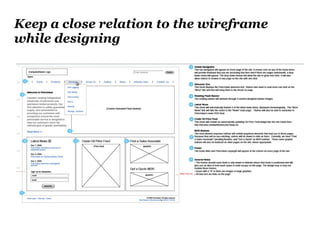
Keep a close relation to the wireframe
while designing
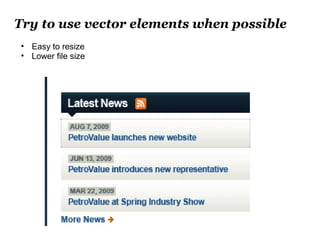
Try to use vector elements when possible
• Easy to resize
• Lower file size
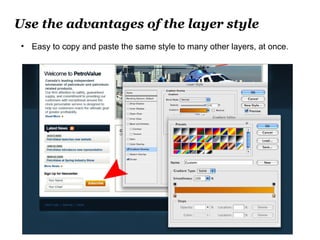
Use the advantages of the layer style
• Easy to copy and paste the same style to many other layers, at once.
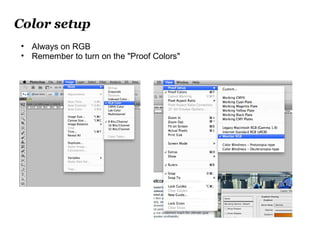
Color setup
• Always on RGB
• Remember to turn on the "Proof Colors"
Related links & articles
• How to Handle a Lack of Creativity Without Burning Billable Hours:
http://goo.gl/ZJK0B
• Photoshop vs. Fireworks: Which Is Best for Web Design?:
http://goo.gl/hHl7x
• Some recommended books: http://goo.gl/3xBrC
• Designing for Drupal: Photoshop Best Practices (Part 1 of 3):
http://goo.gl/nu7C2
• About Improving Performance in Photoshop: http://goo.gl/pGJYt
• Mastering Photoshop: Unknown Tricks and Time-Savers:
http://goo.gl/aE6VM
Thank you
Alex Ventpap - //all-x.ca
Related links & articles
• How to Handle a Lack of Creativity Without Burning Billable Hours:
http://goo.gl/ZJK0B
• Photoshop vs. Fireworks: Which Is Best for Web Design?:
http://goo.gl/hHl7x
• Some recommended books: http://goo.gl/3xBrC
• Designing for Drupal: Photoshop Best Practices (Part 1 of 3):
http://goo.gl/nu7C2
• About Improving Performance in Photoshop: http://goo.gl/pGJYt
• Mastering Photoshop: Unknown Tricks and Time-Savers:
http://goo.gl/aE6VM
Thank you
Alex Ventpap - //all-x.ca

Photoshop Best Practices for Web Design

  • 1.
    Photoshop Best Practices forWeb Design Alex Ventpap
  • 2.
    Some Photoshop Hints •Preferences, units. History steps, etc. • Auto-Select • Keyboard shortcuts • Prefer work with a wide canvas: 1400 /1600px wide. Good for background treatments.
  • 3.
    Some Photoshop Hints •Use and organize layers. You might be not the only one designer handling the file
  • 4.
    Use Grid System •Provides commonly used dimensions, based on a width of 960 pixels. • Helps rapid prototyping • Very good for CMS. Modular style in pre-sized width.
  • 5.
    Keep a closerelation to the wireframe while designing
  • 6.
    Try to usevector elements when possible • Easy to resize • Lower file size
  • 7.
    Use the advantagesof the layer style • Easy to copy and paste the same style to many other layers, at once.
  • 8.
    Color setup • Alwayson RGB • Remember to turn on the "Proof Colors"
  • 9.
    Related links &articles • How to Handle a Lack of Creativity Without Burning Billable Hours: http://goo.gl/ZJK0B • Photoshop vs. Fireworks: Which Is Best for Web Design?: http://goo.gl/hHl7x • Some recommended books: http://goo.gl/3xBrC • Designing for Drupal: Photoshop Best Practices (Part 1 of 3): http://goo.gl/nu7C2 • About Improving Performance in Photoshop: http://goo.gl/pGJYt • Mastering Photoshop: Unknown Tricks and Time-Savers: http://goo.gl/aE6VM Thank you Alex Ventpap - //all-x.ca
  • 10.
    Related links &articles • How to Handle a Lack of Creativity Without Burning Billable Hours: http://goo.gl/ZJK0B • Photoshop vs. Fireworks: Which Is Best for Web Design?: http://goo.gl/hHl7x • Some recommended books: http://goo.gl/3xBrC • Designing for Drupal: Photoshop Best Practices (Part 1 of 3): http://goo.gl/nu7C2 • About Improving Performance in Photoshop: http://goo.gl/pGJYt • Mastering Photoshop: Unknown Tricks and Time-Savers: http://goo.gl/aE6VM Thank you Alex Ventpap - //all-x.ca