Pharmacy Management
System
By Rasel Khan
Outline
Introduction.
Objectives.
Design of the project.
Development of the project.
Demo (Font-end, Backend).
Problems.
Further Developments.
Introduction
Now a day’s Information and communication technology (ICT) plays a great role in
different fields or areas among thus Health care system belongs to this. This leads
to various studies and researches being conducted to selected health care facilities.
It is necessary to ensure a technologically appropriate, equitable, affordable,
efficient, and environmentally adaptable and consumer friendly system, designed to
fully utilize the ICT for the maximum benefit in the health care industry.
Regardless of the type of business you run, you will need a management system of
some description. Within the pharmacology industry, however, this is even more
important. Without adequate pharmacy management, people could get the wrong
medication or medication in the wrong dosage, or it could be unclear whether or
not they are receiving too much medication. These are highly complex computer
systems. These are designed to ensure any pharmacy department, be that in a
hospital, retail or online, is able to have all their needs met. By using a pharmacy
management system, a pharmacy manager or pharmacist is able to have input on
how medication is used in a pharmacy, as well as supervising the dispensation of
medication. There are a lot of activities that are included in these systems.
Objectives
It is the user friendly application for Pharmacist which reduces the burden and helps to
manage all sections of Pharmacy like Medicine management and Billing etc.
It deals with the automating tasks of maintaining of Bills.
In Pharmacy, Billing management is the key process. Including safe data store about
medicine as well as fast searching, delete and update of medicines
The pharmacy management system is easy for use so the user can do pharmacy actions
without ambiguities.
This refers the pharmacy management system project highly minimize time and resource by
which, searching the medicine data you can get the data in quickest time.
The pharmacy management system is built for the sake of ensuring effective and clear data
saving and manipulating as well as neat work on the pharmacy medical products.
A summarized list of drugs dispensed to patient can be viewed for monitoring purposes. Also
PMS will be able to generate report on the list of drugs dispensed in the polyclinic for a given time
period.
Design of the project
System design
System design is most creative and challenging. The
System Design Document describes the system
requirements, operating environment, system and
subsystem architecture, files and database design,
input formats, output layouts, human-machine
interfaces, detailed design, processing logic, and
external interfaces.
Design of the project cont…
Before start design
At first need to check environment for web
application And with Design for Web and with device
checking for our system design by local server by XAMPP.
Details design
Detail design is the main functional part of design phase.
Detail design activity divided into three sub category
such as…
Design of the project cont…
1)User Panel Design (Responsive)
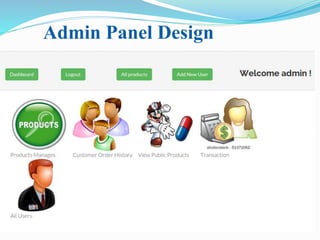
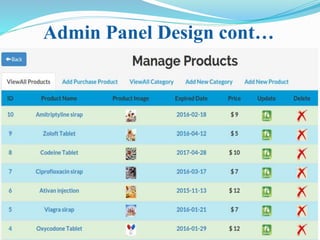
2) Admin Panel Design (Responsive)
3) Files and Database
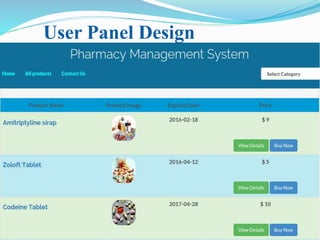
User Panel Design
In user panel design we have done our task for
user. By selecting individual link then you’ll go to
unique content web page . Showing figure for user panel.
User Panel Design
Admin Panel Design
Admin Panel Design cont…
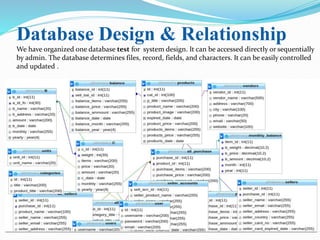
Database Design & Relationship
We have organized one database test for system design. It can be accessed directly or sequentially
by admin. The database determines files, record, fields, and characters. It can be easily controlled
and updated .
Development of the project
The development phase is a operational phase of our system .This phase is
where we starts to written program code for the development of the
system
Minimum Software requirements for Web
Development
XAMPP Software installs on a standard PC system. Hardware requirements are as follows:
Processor –Celeron (R) Dual –Core CPU T3100@1.90 GHz;
Installed Memory (RAM) – at least 1GB ;
System type-32 / 64 bit Operating System;
Model-Presario CQ42 Notebook PC;
Resolution-1366/768;
Software requirements
1) Apache
2) MySQL
3) PHP
4) PhpMyAdmin
5) FileZilla FTP Server
6) XAMPP Control Panel
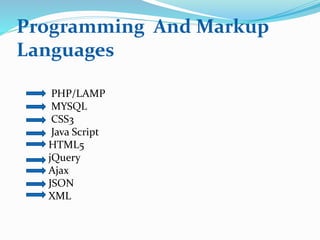
Programming And Markup
Languages
PHP/LAMP
MYSQL
CSS3
Java Script
HTML5
jQuery
Ajax
JSON
XML
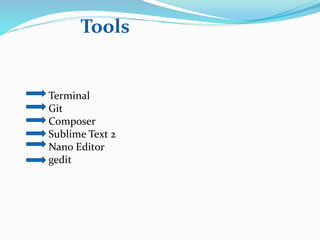
Tools
Terminal
Git
Composer
Sublime Text 2
Nano Editor
gedit
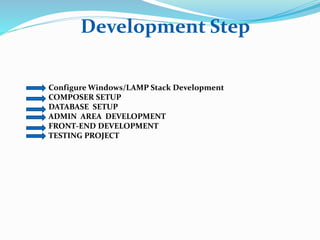
Development Step
Configure Windows/LAMP Stack Development
COMPOSER SETUP
DATABASE SETUP
ADMIN AREA DEVELOPMENT
FRONT-END DEVELOPMENT
TESTING PROJECT
Configure LAMP Stack Development
I’m using LAMP Stack For Web Development Area, Because I’m a Linux user,
here LAMP stands for below
L-Linux,
A-Apache,
M-MySQL
P-PHP/Python
Here, I’m Using Object Oriented Programming With PHP and PCNTL
Process Control support in PHP is not enabled by default. You have to compile the
CGI or CLI version of PHP with--enable-pcntl configuration option when
compiling PHP to enable Process Control support.
COMPOSER SETUP
I’m using composer for this project . Composer is a tool for dependency
management in PHP. It allows you to declare the dependent libraries your project
needs and it will install them in your project for you.
Composer is not a package manager. Yes, it deals with "packages" or libraries, but
it manages them on a per-project basis, installing them in a directory (e.g. vendor)
inside your project. By default it will never install anything globally. Thus, it is a
dependency manager.
DATABASE SETUP
In this project I’ve a Database called ‘pharmacy’ .
Here , more sub-categories table include for this project, and include all post
content and info like as title , Description and so on.
ADMIN AREA DEVELOPMENT
Admin area development is very important for every project, This area allow for
admin CRUD Application LIKE Create, Read, Update and Delete Management
System. Can’t Access another user for this admin area, because this is security for
project .
FRONT-END DEVELOPMENT
In our visually and technologically sophisticated society, access to
information and knowledge seems easier than making sense of it or
decide its veracity - on the web, pages and applications are built by front-
end developers to present and put data or relationships in context .After
complete your backend development you’ll need to show user fronted, So
any user show your post content or information, I’ve showed all info from
database, Retrieve data using PHP and MYSQL.
TESTING PROJECT
When complete all your development project, then you’ll need to testing your
project, Testing is very important for every project, Here I’m using Unit testing
Like PHPUnit for testing my project By Terminal, another way like functional
testing like Behat or Codeception Testing.
HOSTING SERVER
After complete my development project by local server, Now need to remote
server, I’m using cPanel for project, so all user showing globally my project. I’ve
domain register for this project Like as https://pharmacyinfo.com/ i'll upload
this project so that any user brows this URL then he/she will show my project.
Problems
• Issues in interfaces
• Invoice numbers
• Changing the server
• Case sensitive (for searching)
• Handling Accounts & transactions (Payments, sales)
• Handling Stock(Available stock, Expire dates,)
• Bill issuing.
• Product sell.
• Responsibilities of the employees (mistakes,
cheatings)
Further Developments
• Web base system with limited access to
customers .
• More details of employers & suppliers
• Bar code reader .
• User registration and store information .
• Paypal payment .
• Warnings
Thank You !

Pharmacy management

  • 1.
  • 2.
    Outline Introduction. Objectives. Design of theproject. Development of the project. Demo (Font-end, Backend). Problems. Further Developments.
  • 3.
    Introduction Now a day’sInformation and communication technology (ICT) plays a great role in different fields or areas among thus Health care system belongs to this. This leads to various studies and researches being conducted to selected health care facilities. It is necessary to ensure a technologically appropriate, equitable, affordable, efficient, and environmentally adaptable and consumer friendly system, designed to fully utilize the ICT for the maximum benefit in the health care industry. Regardless of the type of business you run, you will need a management system of some description. Within the pharmacology industry, however, this is even more important. Without adequate pharmacy management, people could get the wrong medication or medication in the wrong dosage, or it could be unclear whether or not they are receiving too much medication. These are highly complex computer systems. These are designed to ensure any pharmacy department, be that in a hospital, retail or online, is able to have all their needs met. By using a pharmacy management system, a pharmacy manager or pharmacist is able to have input on how medication is used in a pharmacy, as well as supervising the dispensation of medication. There are a lot of activities that are included in these systems.
  • 4.
    Objectives It is theuser friendly application for Pharmacist which reduces the burden and helps to manage all sections of Pharmacy like Medicine management and Billing etc. It deals with the automating tasks of maintaining of Bills. In Pharmacy, Billing management is the key process. Including safe data store about medicine as well as fast searching, delete and update of medicines The pharmacy management system is easy for use so the user can do pharmacy actions without ambiguities. This refers the pharmacy management system project highly minimize time and resource by which, searching the medicine data you can get the data in quickest time. The pharmacy management system is built for the sake of ensuring effective and clear data saving and manipulating as well as neat work on the pharmacy medical products. A summarized list of drugs dispensed to patient can be viewed for monitoring purposes. Also PMS will be able to generate report on the list of drugs dispensed in the polyclinic for a given time period.
  • 5.
    Design of theproject System design System design is most creative and challenging. The System Design Document describes the system requirements, operating environment, system and subsystem architecture, files and database design, input formats, output layouts, human-machine interfaces, detailed design, processing logic, and external interfaces.
  • 6.
    Design of theproject cont… Before start design At first need to check environment for web application And with Design for Web and with device checking for our system design by local server by XAMPP. Details design Detail design is the main functional part of design phase. Detail design activity divided into three sub category such as…
  • 7.
    Design of theproject cont… 1)User Panel Design (Responsive) 2) Admin Panel Design (Responsive) 3) Files and Database User Panel Design In user panel design we have done our task for user. By selecting individual link then you’ll go to unique content web page . Showing figure for user panel.
  • 8.
  • 9.
  • 10.
  • 11.
    Database Design &Relationship We have organized one database test for system design. It can be accessed directly or sequentially by admin. The database determines files, record, fields, and characters. It can be easily controlled and updated .
  • 12.
    Development of theproject The development phase is a operational phase of our system .This phase is where we starts to written program code for the development of the system Minimum Software requirements for Web Development XAMPP Software installs on a standard PC system. Hardware requirements are as follows: Processor –Celeron (R) Dual –Core CPU T3100@1.90 GHz; Installed Memory (RAM) – at least 1GB ; System type-32 / 64 bit Operating System; Model-Presario CQ42 Notebook PC; Resolution-1366/768;
  • 13.
    Software requirements 1) Apache 2)MySQL 3) PHP 4) PhpMyAdmin 5) FileZilla FTP Server 6) XAMPP Control Panel
  • 14.
  • 15.
  • 16.
    Development Step Configure Windows/LAMPStack Development COMPOSER SETUP DATABASE SETUP ADMIN AREA DEVELOPMENT FRONT-END DEVELOPMENT TESTING PROJECT
  • 17.
    Configure LAMP StackDevelopment I’m using LAMP Stack For Web Development Area, Because I’m a Linux user, here LAMP stands for below L-Linux, A-Apache, M-MySQL P-PHP/Python Here, I’m Using Object Oriented Programming With PHP and PCNTL Process Control support in PHP is not enabled by default. You have to compile the CGI or CLI version of PHP with--enable-pcntl configuration option when compiling PHP to enable Process Control support.
  • 18.
    COMPOSER SETUP I’m usingcomposer for this project . Composer is a tool for dependency management in PHP. It allows you to declare the dependent libraries your project needs and it will install them in your project for you. Composer is not a package manager. Yes, it deals with "packages" or libraries, but it manages them on a per-project basis, installing them in a directory (e.g. vendor) inside your project. By default it will never install anything globally. Thus, it is a dependency manager.
  • 19.
    DATABASE SETUP In thisproject I’ve a Database called ‘pharmacy’ . Here , more sub-categories table include for this project, and include all post content and info like as title , Description and so on. ADMIN AREA DEVELOPMENT Admin area development is very important for every project, This area allow for admin CRUD Application LIKE Create, Read, Update and Delete Management System. Can’t Access another user for this admin area, because this is security for project .
  • 20.
    FRONT-END DEVELOPMENT In ourvisually and technologically sophisticated society, access to information and knowledge seems easier than making sense of it or decide its veracity - on the web, pages and applications are built by front- end developers to present and put data or relationships in context .After complete your backend development you’ll need to show user fronted, So any user show your post content or information, I’ve showed all info from database, Retrieve data using PHP and MYSQL.
  • 21.
    TESTING PROJECT When completeall your development project, then you’ll need to testing your project, Testing is very important for every project, Here I’m using Unit testing Like PHPUnit for testing my project By Terminal, another way like functional testing like Behat or Codeception Testing.
  • 22.
    HOSTING SERVER After completemy development project by local server, Now need to remote server, I’m using cPanel for project, so all user showing globally my project. I’ve domain register for this project Like as https://pharmacyinfo.com/ i'll upload this project so that any user brows this URL then he/she will show my project.
  • 23.
    Problems • Issues ininterfaces • Invoice numbers • Changing the server • Case sensitive (for searching) • Handling Accounts & transactions (Payments, sales) • Handling Stock(Available stock, Expire dates,) • Bill issuing. • Product sell. • Responsibilities of the employees (mistakes, cheatings)
  • 24.
    Further Developments • Webbase system with limited access to customers . • More details of employers & suppliers • Bar code reader . • User registration and store information . • Paypal payment . • Warnings
  • 25.

Editor's Notes