Project Guide : Prof. Simran Pal R
Project Co-Ordinator: Prof. Simran Pal R
Presented By:
NAME: SHIVARAJ
USN :1HK19CS147
8 C-Section ,CSE
CONTENTS
 Abstract
 Company Profile
 Objective
 Design
 Code Implementation
 Project Outcome
 Conclusion
The "Website for Sri Maruthi Pharma" web pharmaceutical
project was created using HTML, CSS, PHP, and MySQL as the
database. Every user can use this application to automate the
manual procedure of buying medicine drugs. The major goal of
creating these programs is to decrease time consumption and
provide medications everywhere in the country with only a
single click. An online pharmacy is a web-based application.
Online drug shopping is available. You are given medicine at
your door. This application will atomize the pharmaceutical
company's medicine distribution process and enhance
consumer relationships and business practices. Distributors can
view comprehensive details of their accounts transactions, drug
information, and orders via this app.
Compsoft Technologies, was incorporated with a goal “To provide high quality and
optimal Technological Solutions to business requirements of the clients”. Every business
is different and has a unique business model and so are the technological requirements.
They focus on clients requirements and also understand the automation of the existing
process into e-client and simple processes are the key features that the clients desire
from the Technological Solution they are looking for.
Compsoft Technologies work with their clients and help them to define their exact
solution requirement. Sometimes even they wonder if they have completely redefined
their solution or new application requirement during the brainstorming session, and
here they position themselves as an IT solutions consulting group composed of high
caliber consultants.
Motto of our organization is to “Collaborate with our clients to provide them with the
best Technological solution hence creating a Good Present and Better Future for our
client which will bring a cascading positive effect in their business shape as well”. It is Our
Vision for Our Clients and for Us, we strive hard to achieve it.
 To provide a comprehensive platform for managing pharmacy operations
and delivering high-quality service to customers.
 To provide consumers with a convenient and easy way to purchase
prescription and over-the-counter medications, as well as other health and
wellness products, through the internet.
 Enhancing medication safety by providing accurate drug information, drug
interaction alerts, and dosage recommendations
 Accessibility: Online pharmacies can be accessed 24/7, which can be
especially important for people who need to fill a prescription outside of
traditional business hours
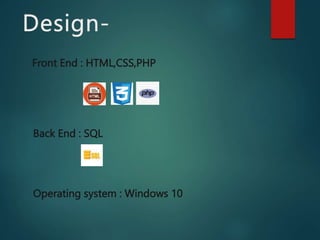
Front End : HTML,CSS,PHP
Back End : SQL
Operating system : Windows 10
PHP
PHP is a server-side programming language used for creating dynamic web pages
and web applications. It stands for Hypertext Preprocessor, and it is an open-source
language, which means it is free to use and can be modified by anyone.
PHP code is executed on the server before the web page is sent to the user's web
browser. This means that PHP can generate dynamic content, such as displaying data
from a database or processing user input from a web form.
PHP code is typically embedded within HTML code, and it is enclosed within <?php
?> tags. PHP code can also be used to access databases, manipulate files on the
server, and interact with other servers through HTTP requests.
Some common uses of PHP include creating content management systems, e-
commerce websites, social networking sites, and web applications that require server-
side processing. PHP is also used in combination with other technologies such as
HTML, CSS, JavaScript, and SQL to create full-stack web applications.
css
CSS, or Cascading Style Sheets, is a style sheet language used to describe the
presentation of a document written in HTML or XML. CSS is used to define the styles,
layout, and formatting of web pages, and it allows web designers to separate the
presentation of a web page from its content.
CSS works by selecting elements within an HTML or XML document and applying styles
to those elements. Styles can be defined using various properties, such as font size,
color, background, margins, padding, and positioning. CSS styles can be defined within
an HTML document using the <style> tag, or they can be defined in an external file and
linked to the HTML document using the <link> tag.
CSS styles are applied to HTML elements using selectors, which are patterns that match
one or more elements in the document. Selectors can be based on the element type,
class, ID, or other attributes. For example, the following CSS rule sets the font size for all
paragraphs in an HTML document:
SQL:
 SQL, or Structured Query Language, was first developed in the early 1970s by
IBM researchers Donald D. Chamberlin and Raymond F. Boyce. Their goal
was to create a language for managing and querying large amounts of data
stored in IBM's System Relational database management system.
 SQL, or Structured Query Language, is a programming language used to
manage and manipulate data in a relational database management system
(RDBMS). It is widely used in the IT industry and is essential for data analysts,
database administrators, and software developers.
 SQL is a declarative language, which means you describe what you want to do
with the data, and the database management system figures out how to do it.
This makes SQL easy to learn and use, even for beginners.
 MySQL is an open-source relational database management system (RDBMS)
that was originally developed by Swedish developers Michael Widenius and
David Axmark in the mid-1990s. The name "MySQL" is a combination of "My",
the name of Widenius's daughter, and "SQL", the acronym for Structured
Query Language
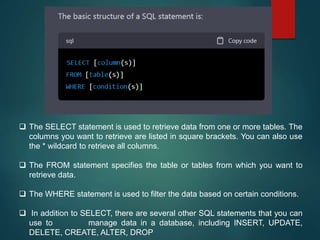
 The SELECT statement is used to retrieve data from one or more tables. The
columns you want to retrieve are listed in square brackets. You can also use
the * wildcard to retrieve all columns.
 The FROM statement specifies the table or tables from which you want to
retrieve data.
 The WHERE statement is used to filter the data based on certain conditions.
 In addition to SELECT, there are several other SQL statements that you can
use to manage data in a database, including INSERT, UPDATE,
DELETE, CREATE, ALTER, DROP
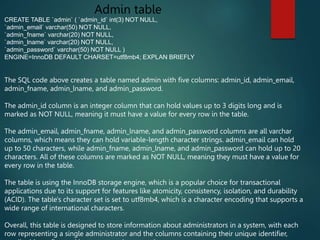
Admin table
CREATE TABLE `admin` ( `admin_id` int(3) NOT NULL,
`admin_email` varchar(50) NOT NULL,
`admin_fname` varchar(20) NOT NULL,
`admin_lname` varchar(20) NOT NULL,
`admin_password` varchar(50) NOT NULL )
ENGINE=InnoDB DEFAULT CHARSET=utf8mb4; EXPLAN BRIEFLY
The SQL code above creates a table named admin with five columns: admin_id, admin_email,
admin_fname, admin_lname, and admin_password.
The admin_id column is an integer column that can hold values up to 3 digits long and is
marked as NOT NULL, meaning it must have a value for every row in the table.
The admin_email, admin_fname, admin_lname, and admin_password columns are all varchar
columns, which means they can hold variable-length character strings. admin_email can hold
up to 50 characters, while admin_fname, admin_lname, and admin_password can hold up to 20
characters. All of these columns are marked as NOT NULL, meaning they must have a value for
every row in the table.
The table is using the InnoDB storage engine, which is a popular choice for transactional
applications due to its support for features like atomicity, consistency, isolation, and durability
(ACID). The table's character set is set to utf8mb4, which is a character encoding that supports a
wide range of international characters.
Overall, this table is designed to store information about administrators in a system, with each
row representing a single administrator and the columns containing their unique identifier,
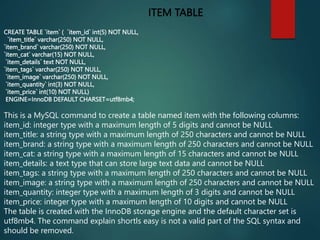
ITEM TABLE
CREATE TABLE `item` ( `item_id` int(5) NOT NULL,
`item_title` varchar(250) NOT NULL,
`item_brand` varchar(250) NOT NULL,
`item_cat` varchar(15) NOT NULL,
`item_details` text NOT NULL,
`item_tags` varchar(250) NOT NULL,
`item_image` varchar(250) NOT NULL,
`item_quantity` int(3) NOT NULL,
`item_price` int(10) NOT NULL)
ENGINE=InnoDB DEFAULT CHARSET=utf8mb4;
This is a MySQL command to create a table named item with the following columns:
item_id: integer type with a maximum length of 5 digits and cannot be NULL
item_title: a string type with a maximum length of 250 characters and cannot be NULL
item_brand: a string type with a maximum length of 250 characters and cannot be NULL
item_cat: a string type with a maximum length of 15 characters and cannot be NULL
item_details: a text type that can store large text data and cannot be NULL
item_tags: a string type with a maximum length of 250 characters and cannot be NULL
item_image: a string type with a maximum length of 250 characters and cannot be NULL
item_quantity: integer type with a maximum length of 3 digits and cannot be NULL
item_price: integer type with a maximum length of 10 digits and cannot be NULL
The table is created with the InnoDB storage engine and the default character set is
utf8mb4. The command explain shortls easy is not a valid part of the SQL syntax and
should be removed.
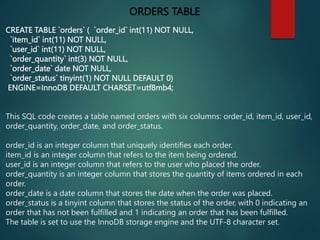
ORDERS TABLE
CREATE TABLE `orders` ( `order_id` int(11) NOT NULL,
`item_id` int(11) NOT NULL,
`user_id` int(11) NOT NULL,
`order_quantity` int(3) NOT NULL,
`order_date` date NOT NULL,
`order_status` tinyint(1) NOT NULL DEFAULT 0)
ENGINE=InnoDB DEFAULT CHARSET=utf8mb4;
This SQL code creates a table named orders with six columns: order_id, item_id, user_id,
order_quantity, order_date, and order_status.
order_id is an integer column that uniquely identifies each order.
item_id is an integer column that refers to the item being ordered.
user_id is an integer column that refers to the user who placed the order.
order_quantity is an integer column that stores the quantity of items ordered in each
order.
order_date is a date column that stores the date when the order was placed.
order_status is a tinyint column that stores the status of the order, with 0 indicating an
order that has not been fulfilled and 1 indicating an order that has been fulfilled.
The table is set to use the InnoDB storage engine and the UTF-8 character set.
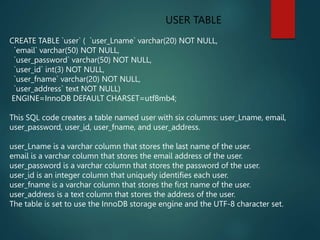
USER TABLE
CREATE TABLE `user` ( `user_Lname` varchar(20) NOT NULL,
`email` varchar(50) NOT NULL,
`user_password` varchar(50) NOT NULL,
`user_id` int(3) NOT NULL,
`user_fname` varchar(20) NOT NULL,
`user_address` text NOT NULL)
ENGINE=InnoDB DEFAULT CHARSET=utf8mb4;
This SQL code creates a table named user with six columns: user_Lname, email,
user_password, user_id, user_fname, and user_address.
user_Lname is a varchar column that stores the last name of the user.
email is a varchar column that stores the email address of the user.
user_password is a varchar column that stores the password of the user.
user_id is an integer column that uniquely identifies each user.
user_fname is a varchar column that stores the first name of the user.
user_address is a text column that stores the address of the user.
The table is set to use the InnoDB storage engine and the UTF-8 character set.
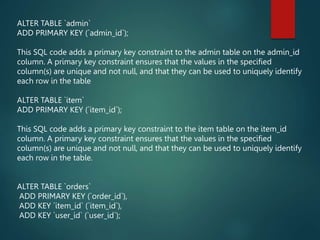
ALTER TABLE `admin`
ADD PRIMARY KEY (`admin_id`);
This SQL code adds a primary key constraint to the admin table on the admin_id
column. A primary key constraint ensures that the values in the specified
column(s) are unique and not null, and that they can be used to uniquely identify
each row in the table
ALTER TABLE `item`
ADD PRIMARY KEY (`item_id`);
This SQL code adds a primary key constraint to the item table on the item_id
column. A primary key constraint ensures that the values in the specified
column(s) are unique and not null, and that they can be used to uniquely identify
each row in the table.
ALTER TABLE `orders`
ADD PRIMARY KEY (`order_id`),
ADD KEY `item_id` (`item_id`),
ADD KEY `user_id` (`user_id`);
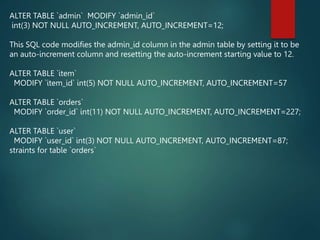
ALTER TABLE `admin` MODIFY `admin_id`
int(3) NOT NULL AUTO_INCREMENT, AUTO_INCREMENT=12;
This SQL code modifies the admin_id column in the admin table by setting it to be
an auto-increment column and resetting the auto-increment starting value to 12.
ALTER TABLE `item`
MODIFY `item_id` int(5) NOT NULL AUTO_INCREMENT, AUTO_INCREMENT=57
ALTER TABLE `orders`
MODIFY `order_id` int(11) NOT NULL AUTO_INCREMENT, AUTO_INCREMENT=227;
ALTER TABLE `user`
MODIFY `user_id` int(3) NOT NULL AUTO_INCREMENT, AUTO_INCREMENT=87;
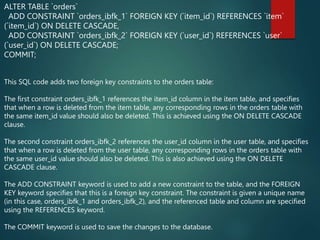
straints for table `orders`
ALTER TABLE `orders`
ADD CONSTRAINT `orders_ibfk_1` FOREIGN KEY (`item_id`) REFERENCES `item`
(`item_id`) ON DELETE CASCADE,
ADD CONSTRAINT `orders_ibfk_2` FOREIGN KEY (`user_id`) REFERENCES `user`
(`user_id`) ON DELETE CASCADE;
COMMIT;
This SQL code adds two foreign key constraints to the orders table:
The first constraint orders_ibfk_1 references the item_id column in the item table, and specifies
that when a row is deleted from the item table, any corresponding rows in the orders table with
the same item_id value should also be deleted. This is achieved using the ON DELETE CASCADE
clause.
The second constraint orders_ibfk_2 references the user_id column in the user table, and specifies
that when a row is deleted from the user table, any corresponding rows in the orders table with
the same user_id value should also be deleted. This is also achieved using the ON DELETE
CASCADE clause.
The ADD CONSTRAINT keyword is used to add a new constraint to the table, and the FOREIGN
KEY keyword specifies that this is a foreign key constraint. The constraint is given a unique name
(in this case, orders_ibfk_1 and orders_ibfk_2), and the referenced table and column are specified
using the REFERENCES keyword.
The COMMIT keyword is used to save the changes to the database.
DASHBOARD
Products list
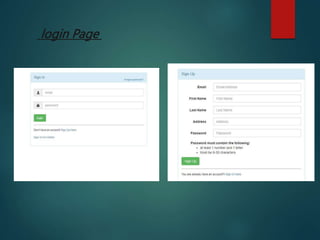
login Page
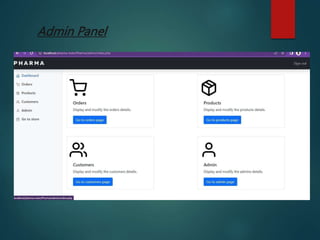
Admin Panel
The website was designed in such a way that future
modifications can be done easily. It provides a friendly web
user interface which proves to be better when compared to
other websites .It gives appropriate access to the
authorized users depending on their permissions. System
security, data security and reliability are the striking
features. In this project we can also include Barcode facility
using the bar code reader which will detect the expiry date
and the other information about the related medicines.
Company using this software will always be able to plan in
future and always be aware of their financial position in the
market.
internship_seminar[_1HK19CS147[1].pptx

internship_seminar[_1HK19CS147[1].pptx

  • 1.
    Project Guide :Prof. Simran Pal R Project Co-Ordinator: Prof. Simran Pal R Presented By: NAME: SHIVARAJ USN :1HK19CS147 8 C-Section ,CSE
  • 2.
    CONTENTS  Abstract  CompanyProfile  Objective  Design  Code Implementation  Project Outcome  Conclusion
  • 3.
    The "Website forSri Maruthi Pharma" web pharmaceutical project was created using HTML, CSS, PHP, and MySQL as the database. Every user can use this application to automate the manual procedure of buying medicine drugs. The major goal of creating these programs is to decrease time consumption and provide medications everywhere in the country with only a single click. An online pharmacy is a web-based application. Online drug shopping is available. You are given medicine at your door. This application will atomize the pharmaceutical company's medicine distribution process and enhance consumer relationships and business practices. Distributors can view comprehensive details of their accounts transactions, drug information, and orders via this app.
  • 4.
    Compsoft Technologies, wasincorporated with a goal “To provide high quality and optimal Technological Solutions to business requirements of the clients”. Every business is different and has a unique business model and so are the technological requirements. They focus on clients requirements and also understand the automation of the existing process into e-client and simple processes are the key features that the clients desire from the Technological Solution they are looking for. Compsoft Technologies work with their clients and help them to define their exact solution requirement. Sometimes even they wonder if they have completely redefined their solution or new application requirement during the brainstorming session, and here they position themselves as an IT solutions consulting group composed of high caliber consultants. Motto of our organization is to “Collaborate with our clients to provide them with the best Technological solution hence creating a Good Present and Better Future for our client which will bring a cascading positive effect in their business shape as well”. It is Our Vision for Our Clients and for Us, we strive hard to achieve it.
  • 5.
     To providea comprehensive platform for managing pharmacy operations and delivering high-quality service to customers.  To provide consumers with a convenient and easy way to purchase prescription and over-the-counter medications, as well as other health and wellness products, through the internet.  Enhancing medication safety by providing accurate drug information, drug interaction alerts, and dosage recommendations  Accessibility: Online pharmacies can be accessed 24/7, which can be especially important for people who need to fill a prescription outside of traditional business hours
  • 6.
    Front End :HTML,CSS,PHP Back End : SQL Operating system : Windows 10
  • 7.
    PHP PHP is aserver-side programming language used for creating dynamic web pages and web applications. It stands for Hypertext Preprocessor, and it is an open-source language, which means it is free to use and can be modified by anyone. PHP code is executed on the server before the web page is sent to the user's web browser. This means that PHP can generate dynamic content, such as displaying data from a database or processing user input from a web form. PHP code is typically embedded within HTML code, and it is enclosed within <?php ?> tags. PHP code can also be used to access databases, manipulate files on the server, and interact with other servers through HTTP requests. Some common uses of PHP include creating content management systems, e- commerce websites, social networking sites, and web applications that require server- side processing. PHP is also used in combination with other technologies such as HTML, CSS, JavaScript, and SQL to create full-stack web applications.
  • 8.
    css CSS, or CascadingStyle Sheets, is a style sheet language used to describe the presentation of a document written in HTML or XML. CSS is used to define the styles, layout, and formatting of web pages, and it allows web designers to separate the presentation of a web page from its content. CSS works by selecting elements within an HTML or XML document and applying styles to those elements. Styles can be defined using various properties, such as font size, color, background, margins, padding, and positioning. CSS styles can be defined within an HTML document using the <style> tag, or they can be defined in an external file and linked to the HTML document using the <link> tag. CSS styles are applied to HTML elements using selectors, which are patterns that match one or more elements in the document. Selectors can be based on the element type, class, ID, or other attributes. For example, the following CSS rule sets the font size for all paragraphs in an HTML document:
  • 9.
    SQL:  SQL, orStructured Query Language, was first developed in the early 1970s by IBM researchers Donald D. Chamberlin and Raymond F. Boyce. Their goal was to create a language for managing and querying large amounts of data stored in IBM's System Relational database management system.  SQL, or Structured Query Language, is a programming language used to manage and manipulate data in a relational database management system (RDBMS). It is widely used in the IT industry and is essential for data analysts, database administrators, and software developers.  SQL is a declarative language, which means you describe what you want to do with the data, and the database management system figures out how to do it. This makes SQL easy to learn and use, even for beginners.  MySQL is an open-source relational database management system (RDBMS) that was originally developed by Swedish developers Michael Widenius and David Axmark in the mid-1990s. The name "MySQL" is a combination of "My", the name of Widenius's daughter, and "SQL", the acronym for Structured Query Language
  • 10.
     The SELECTstatement is used to retrieve data from one or more tables. The columns you want to retrieve are listed in square brackets. You can also use the * wildcard to retrieve all columns.  The FROM statement specifies the table or tables from which you want to retrieve data.  The WHERE statement is used to filter the data based on certain conditions.  In addition to SELECT, there are several other SQL statements that you can use to manage data in a database, including INSERT, UPDATE, DELETE, CREATE, ALTER, DROP
  • 11.
    Admin table CREATE TABLE`admin` ( `admin_id` int(3) NOT NULL, `admin_email` varchar(50) NOT NULL, `admin_fname` varchar(20) NOT NULL, `admin_lname` varchar(20) NOT NULL, `admin_password` varchar(50) NOT NULL ) ENGINE=InnoDB DEFAULT CHARSET=utf8mb4; EXPLAN BRIEFLY The SQL code above creates a table named admin with five columns: admin_id, admin_email, admin_fname, admin_lname, and admin_password. The admin_id column is an integer column that can hold values up to 3 digits long and is marked as NOT NULL, meaning it must have a value for every row in the table. The admin_email, admin_fname, admin_lname, and admin_password columns are all varchar columns, which means they can hold variable-length character strings. admin_email can hold up to 50 characters, while admin_fname, admin_lname, and admin_password can hold up to 20 characters. All of these columns are marked as NOT NULL, meaning they must have a value for every row in the table. The table is using the InnoDB storage engine, which is a popular choice for transactional applications due to its support for features like atomicity, consistency, isolation, and durability (ACID). The table's character set is set to utf8mb4, which is a character encoding that supports a wide range of international characters. Overall, this table is designed to store information about administrators in a system, with each row representing a single administrator and the columns containing their unique identifier,
  • 12.
    ITEM TABLE CREATE TABLE`item` ( `item_id` int(5) NOT NULL, `item_title` varchar(250) NOT NULL, `item_brand` varchar(250) NOT NULL, `item_cat` varchar(15) NOT NULL, `item_details` text NOT NULL, `item_tags` varchar(250) NOT NULL, `item_image` varchar(250) NOT NULL, `item_quantity` int(3) NOT NULL, `item_price` int(10) NOT NULL) ENGINE=InnoDB DEFAULT CHARSET=utf8mb4; This is a MySQL command to create a table named item with the following columns: item_id: integer type with a maximum length of 5 digits and cannot be NULL item_title: a string type with a maximum length of 250 characters and cannot be NULL item_brand: a string type with a maximum length of 250 characters and cannot be NULL item_cat: a string type with a maximum length of 15 characters and cannot be NULL item_details: a text type that can store large text data and cannot be NULL item_tags: a string type with a maximum length of 250 characters and cannot be NULL item_image: a string type with a maximum length of 250 characters and cannot be NULL item_quantity: integer type with a maximum length of 3 digits and cannot be NULL item_price: integer type with a maximum length of 10 digits and cannot be NULL The table is created with the InnoDB storage engine and the default character set is utf8mb4. The command explain shortls easy is not a valid part of the SQL syntax and should be removed.
  • 13.
    ORDERS TABLE CREATE TABLE`orders` ( `order_id` int(11) NOT NULL, `item_id` int(11) NOT NULL, `user_id` int(11) NOT NULL, `order_quantity` int(3) NOT NULL, `order_date` date NOT NULL, `order_status` tinyint(1) NOT NULL DEFAULT 0) ENGINE=InnoDB DEFAULT CHARSET=utf8mb4; This SQL code creates a table named orders with six columns: order_id, item_id, user_id, order_quantity, order_date, and order_status. order_id is an integer column that uniquely identifies each order. item_id is an integer column that refers to the item being ordered. user_id is an integer column that refers to the user who placed the order. order_quantity is an integer column that stores the quantity of items ordered in each order. order_date is a date column that stores the date when the order was placed. order_status is a tinyint column that stores the status of the order, with 0 indicating an order that has not been fulfilled and 1 indicating an order that has been fulfilled. The table is set to use the InnoDB storage engine and the UTF-8 character set.
  • 14.
    USER TABLE CREATE TABLE`user` ( `user_Lname` varchar(20) NOT NULL, `email` varchar(50) NOT NULL, `user_password` varchar(50) NOT NULL, `user_id` int(3) NOT NULL, `user_fname` varchar(20) NOT NULL, `user_address` text NOT NULL) ENGINE=InnoDB DEFAULT CHARSET=utf8mb4; This SQL code creates a table named user with six columns: user_Lname, email, user_password, user_id, user_fname, and user_address. user_Lname is a varchar column that stores the last name of the user. email is a varchar column that stores the email address of the user. user_password is a varchar column that stores the password of the user. user_id is an integer column that uniquely identifies each user. user_fname is a varchar column that stores the first name of the user. user_address is a text column that stores the address of the user. The table is set to use the InnoDB storage engine and the UTF-8 character set.
  • 15.
    ALTER TABLE `admin` ADDPRIMARY KEY (`admin_id`); This SQL code adds a primary key constraint to the admin table on the admin_id column. A primary key constraint ensures that the values in the specified column(s) are unique and not null, and that they can be used to uniquely identify each row in the table ALTER TABLE `item` ADD PRIMARY KEY (`item_id`); This SQL code adds a primary key constraint to the item table on the item_id column. A primary key constraint ensures that the values in the specified column(s) are unique and not null, and that they can be used to uniquely identify each row in the table. ALTER TABLE `orders` ADD PRIMARY KEY (`order_id`), ADD KEY `item_id` (`item_id`), ADD KEY `user_id` (`user_id`);
  • 16.
    ALTER TABLE `admin`MODIFY `admin_id` int(3) NOT NULL AUTO_INCREMENT, AUTO_INCREMENT=12; This SQL code modifies the admin_id column in the admin table by setting it to be an auto-increment column and resetting the auto-increment starting value to 12. ALTER TABLE `item` MODIFY `item_id` int(5) NOT NULL AUTO_INCREMENT, AUTO_INCREMENT=57 ALTER TABLE `orders` MODIFY `order_id` int(11) NOT NULL AUTO_INCREMENT, AUTO_INCREMENT=227; ALTER TABLE `user` MODIFY `user_id` int(3) NOT NULL AUTO_INCREMENT, AUTO_INCREMENT=87; straints for table `orders`
  • 17.
    ALTER TABLE `orders` ADDCONSTRAINT `orders_ibfk_1` FOREIGN KEY (`item_id`) REFERENCES `item` (`item_id`) ON DELETE CASCADE, ADD CONSTRAINT `orders_ibfk_2` FOREIGN KEY (`user_id`) REFERENCES `user` (`user_id`) ON DELETE CASCADE; COMMIT; This SQL code adds two foreign key constraints to the orders table: The first constraint orders_ibfk_1 references the item_id column in the item table, and specifies that when a row is deleted from the item table, any corresponding rows in the orders table with the same item_id value should also be deleted. This is achieved using the ON DELETE CASCADE clause. The second constraint orders_ibfk_2 references the user_id column in the user table, and specifies that when a row is deleted from the user table, any corresponding rows in the orders table with the same user_id value should also be deleted. This is also achieved using the ON DELETE CASCADE clause. The ADD CONSTRAINT keyword is used to add a new constraint to the table, and the FOREIGN KEY keyword specifies that this is a foreign key constraint. The constraint is given a unique name (in this case, orders_ibfk_1 and orders_ibfk_2), and the referenced table and column are specified using the REFERENCES keyword. The COMMIT keyword is used to save the changes to the database.
  • 18.
  • 19.
  • 20.
  • 21.
  • 24.
    The website wasdesigned in such a way that future modifications can be done easily. It provides a friendly web user interface which proves to be better when compared to other websites .It gives appropriate access to the authorized users depending on their permissions. System security, data security and reliability are the striking features. In this project we can also include Barcode facility using the bar code reader which will detect the expiry date and the other information about the related medicines. Company using this software will always be able to plan in future and always be aware of their financial position in the market.