Rapid Upgrades With Pg_Upgrade
BRUCE MOMJIAN
January, 2015
Pg_Upgrade allows migration between major releases of Postgres
without a data dump/reload. This presentation explains how
pg_upgrade works.
Creative Commons Attribution License http://momjian.us/presentations
1 / 24
PostgreSQL the database…
◮ Open Source Object Relational DBMS since 1996
◮ Distributed under the PostgreSQL License
◮ Similar technical heritage as Oracle, SQL Server & DB2
◮ However, a strong adherence to standards (ANSI-SQL 2008)
◮ Highly extensible and adaptable design
◮ Languages, indexing, data types, etc.
◮ E.g. PostGIS, JSONB, SQL/MED
◮ Extensive use throughout the world for applications and
organizations of all types
◮ Bundled into Red Hat Enterprise Linux, Ubuntu, CentOS
and Amazon Linux
Rapid Upgrades With Pg_Upgrade 2 / 24
PostgreSQL the community…
◮ Independent community led by a Core Team of six
◮ Large, active and vibrant community
◮ www.postgresql.org
◮ Downloads, Mailing lists, Documentation
◮ Sponsors sampler:
◮ Google, Red Hat, VMWare, Skype, Salesforce, HP and
EnterpriseDB
◮ http://www.postgresql.org/community/
Rapid Upgrades With Pg_Upgrade 3 / 24
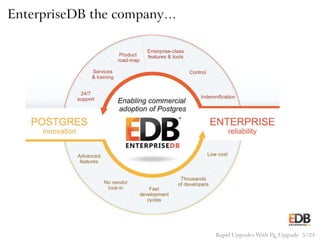
EnterpriseDB the company…
◮ The worldwide leader of Postgres based products and
services founded in 2004
◮ Customers include 50 of the Fortune 500 and 98 of the
Forbes Global 2000
◮ Enterprise offerings:
◮ PostgreSQL Support, Services and Training
◮ Postgres Plus Advanced Server with Oracle Compatibility
◮ Tools for Monitoring, Replication, HA, Backup & Recovery
Community
◮ Citizenship
◮ Contributor of key features: Materialized Views, JSON, &
more
◮ Nine community members on staff
Rapid Upgrades With Pg_Upgrade 4 / 24
EnterpriseDB the company…
Rapid Upgrades With Pg_Upgrade 5 / 24
Traditional Postgres Upgrade Options
◮ pg_dump (logical dump)/restore
◮ Slony
Rapid Upgrades With Pg_Upgrade 6 / 24
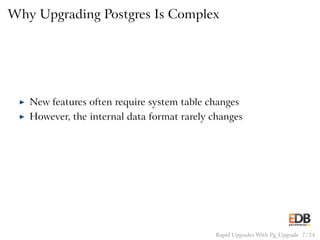
Why Upgrading Postgres Is Complex
◮ New features often require system table changes
◮ However, the internal data format rarely changes
Rapid Upgrades With Pg_Upgrade 7 / 24
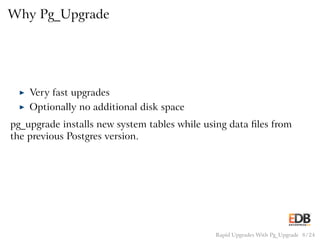
Why Pg_Upgrade
◮ Very fast upgrades
◮ Optionally no additional disk space
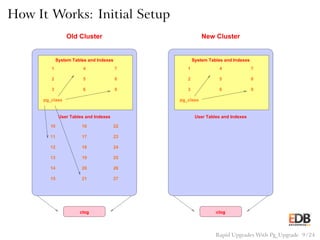
pg_upgrade installs new system tables while using data files from
the previous Postgres version.
Rapid Upgrades With Pg_Upgrade 8 / 24
How It Works: Initial Setup
1
2
3 6
5
4 7
8
9
pg_class
User Tables and Indexes
15 21 27
262014
13 19 25
241812
17 2311
10 16 22
System Tables and Indexes
clog
Old Cluster
1
2
3 6
5
4 7
8
9
pg_class
User Tables and Indexes
System Tables and Indexes
clog
New Cluster
Rapid Upgrades With Pg_Upgrade 9 / 24
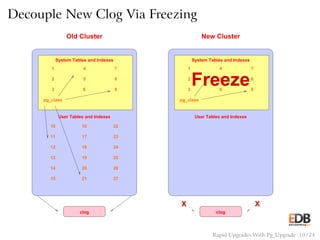
Decouple New Clog Via Freezing
1
2
3 6
5
4 7
8
9
pg_class
User Tables and Indexes
15 21 27
262014
13 19 25
241812
17 2311
10 16 22
System Tables and Indexes
clog
Old Cluster
1
2
3 6
4 7
8
9
pg_class
User Tables and Indexes
System Tables and Indexes
clog
New Cluster
5
Freeze
X X
Rapid Upgrades With Pg_Upgrade 10 / 24
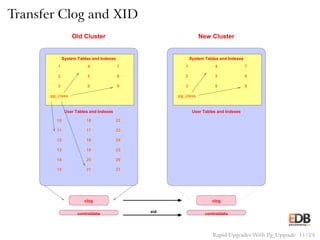
Transfer Clog and XID
1
2
3 6
5
4 7
8
9
pg_class
User Tables and Indexes
15 21 27
262014
13 19 25
241812
17 2311
10 16 22
System Tables and Indexes
clog
Old Cluster
1
2
3 6
5
4 7
8
9
pg_class
User Tables and Indexes
System Tables and Indexes
clog
New Cluster
controldata controldataxid
Rapid Upgrades With Pg_Upgrade 11 / 24
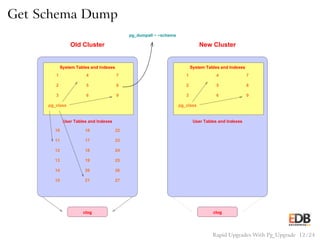
Get Schema Dump
1
2
3 6
5
4 7
8
9
pg_class
User Tables and Indexes
15 21 27
262014
13 19 25
241812
17 2311
10 16 22
System Tables and Indexes
clog
Old Cluster
1
2
3 6
5
4 7
8
9
pg_class
User Tables and Indexes
System Tables and Indexes
clog
New Cluster
pg_dumpall − −schema
Rapid Upgrades With Pg_Upgrade 12 / 24
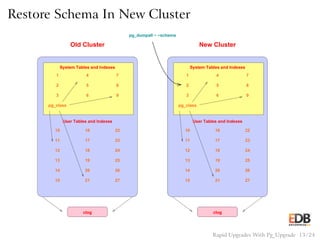
Restore Schema In New Cluster
1
2
3 6
5
4 7
8
9
pg_class
User Tables and Indexes
15 21 27
262014
13 19 25
241812
17 2311
10 16 22
System Tables and Indexes
clog
Old Cluster
1
2
3 6
5
4 7
8
9
pg_class
User Tables and Indexes
26
System Tables and Indexes
clog
New Cluster
pg_dumpall − −schema
17 23
24
25
27
18
10
11
12
13
14
15
16
19
20
21
22
Rapid Upgrades With Pg_Upgrade 13 / 24
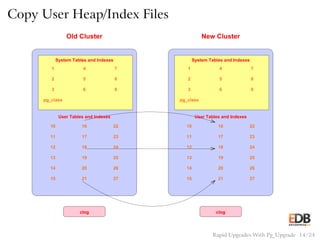
Copy User Heap/Index Files
1
2
3 6
5
4 7
8
9
pg_class
User Tables and Indexes
15 21 27
262014
13 19 25
241812
17 2311
10 16 22
System Tables and Indexes
clog
Old Cluster
1
2
3 6
5
4 7
8
9
pg_class
User Tables and Indexes
26
System Tables and Indexes
clog
New Cluster
1610
11
13
12
14
15
19
20
21
22
23
24
25
27
18
17
Rapid Upgrades With Pg_Upgrade 14 / 24
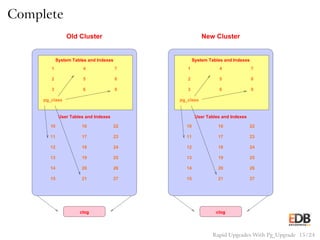
Complete
1
2
3 6
5
4 7
8
9
pg_class
User Tables and Indexes
15 21 27
262014
13 19 25
241812
17 2311
10 16 22
System Tables and Indexes
clog
Old Cluster
1
2
3 6
5
4 7
8
9
pg_class
User Tables and Indexes
26
System Tables and Indexes
clog
New Cluster
24
25
27
10
11
12
13
14
15
16
17
18
19
20
21
22
23
Rapid Upgrades With Pg_Upgrade 15 / 24
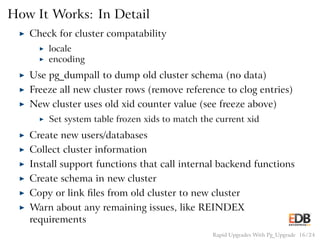
How It Works: In Detail
◮ Check for cluster compatability
◮ locale
◮ encoding
◮ Use pg_dumpall to dump old cluster schema (no data)
◮ Freeze all new cluster rows (remove reference to clog entries)
◮ New cluster uses old xid counter value (see freeze above)
◮ Set system table frozen xids to match the current xid
◮ Create new users/databases
◮ Collect cluster information
◮ Install support functions that call internal backend functions
◮ Create schema in new cluster
◮ Copy or link files from old cluster to new cluster
◮ Warn about any remaining issues, like REINDEX
requirements
Rapid Upgrades With Pg_Upgrade 16 / 24
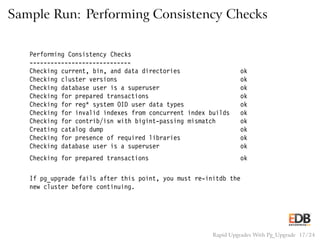
Sample Run: Performing Consistency Checks
Performing Consistency Checks
-----------------------------
Checking current, bin, and data directories ok
Checking cluster versions ok
Checking database user is a superuser ok
Checking for prepared transactions ok
Checking for reg* system OID user data types ok
Checking for invalid indexes from concurrent index builds ok
Checking for contrib/isn with bigint-passing mismatch ok
Creating catalog dump ok
Checking for presence of required libraries ok
Checking database user is a superuser ok
Checking for prepared transactions ok
If pg_upgrade fails after this point, you must re-initdb the
new cluster before continuing.
Rapid Upgrades With Pg_Upgrade 17 / 24
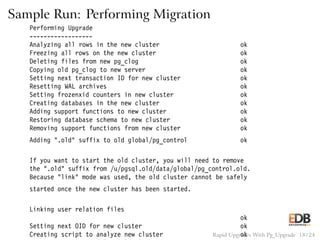
Sample Run: Performing Migration
Performing Upgrade
------------------
Analyzing all rows in the new cluster ok
Freezing all rows on the new cluster ok
Deleting files from new pg_clog ok
Copying old pg_clog to new server ok
Setting next transaction ID for new cluster ok
Resetting WAL archives ok
Setting frozenxid counters in new cluster ok
Creating databases in the new cluster ok
Adding support functions to new cluster ok
Restoring database schema to new cluster ok
Removing support functions from new cluster ok
Adding ".old" suffix to old global/pg_control ok
If you want to start the old cluster, you will need to remove
the ".old" suffix from /u/pgsql.old/data/global/pg_control.old.
Because "link" mode was used, the old cluster cannot be safely
started once the new cluster has been started.
Linking user relation files
ok
Setting next OID for new cluster ok
Creating script to analyze new cluster okRapid Upgrades With Pg_Upgrade 18 / 24
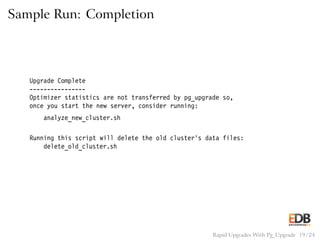
Sample Run: Completion
Upgrade Complete
----------------
Optimizer statistics are not transferred by pg_upgrade so,
once you start the new server, consider running:
analyze_new_cluster.sh
Running this script will delete the old cluster’s data files:
delete_old_cluster.sh
Rapid Upgrades With Pg_Upgrade 19 / 24
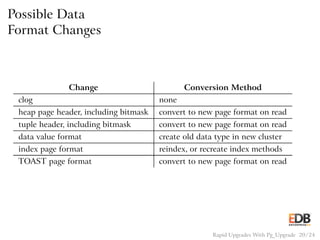
Possible Data
Format Changes
Change Conversion Method
clog none
heap page header, including bitmask convert to new page format on read
tuple header, including bitmask convert to new page format on read
data value format create old data type in new cluster
index page format reindex, or recreate index methods
TOAST page format convert to new page format on read
Rapid Upgrades With Pg_Upgrade 20 / 24
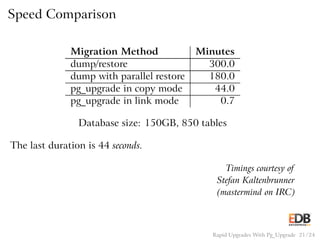
Speed Comparison
Migration Method Minutes
dump/restore 300.0
dump with parallel restore 180.0
pg_upgrade in copy mode 44.0
pg_upgrade in link mode 0.7
Database size: 150GB, 850 tables
The last duration is 44 seconds.
Timings courtesy of
Stefan Kaltenbrunner
(mastermind on IRC)
Rapid Upgrades With Pg_Upgrade 21 / 24
Release History
◮ 9.0 focused on stability
◮ 9.1 focused on performance for databases with many
relations
◮ 9.2 focused on improved debugging and reliability for
non-standard configurations
◮ 9.3 focused on performance via parallelism and reduced
fsync activity
◮ 9.4 dramatically reduced memory usage
Rapid Upgrades With Pg_Upgrade 22 / 24
Additional Resources…
◮ Postgres Downloads:
◮ www.enterprisedb.com/downloads
◮ Product and Services information:
◮ info@enterprisedb.com
Rapid Upgrades With Pg_Upgrade 23 / 24
Conclusion
http://momjian.us/presentations
Rapid Upgrades With Pg_Upgrade 24 / 24

Rapid Upgrades with Pg_Upgrade

  • 1.
    Rapid Upgrades WithPg_Upgrade BRUCE MOMJIAN January, 2015 Pg_Upgrade allows migration between major releases of Postgres without a data dump/reload. This presentation explains how pg_upgrade works. Creative Commons Attribution License http://momjian.us/presentations 1 / 24
  • 2.
    PostgreSQL the database… ◮Open Source Object Relational DBMS since 1996 ◮ Distributed under the PostgreSQL License ◮ Similar technical heritage as Oracle, SQL Server & DB2 ◮ However, a strong adherence to standards (ANSI-SQL 2008) ◮ Highly extensible and adaptable design ◮ Languages, indexing, data types, etc. ◮ E.g. PostGIS, JSONB, SQL/MED ◮ Extensive use throughout the world for applications and organizations of all types ◮ Bundled into Red Hat Enterprise Linux, Ubuntu, CentOS and Amazon Linux Rapid Upgrades With Pg_Upgrade 2 / 24
  • 3.
    PostgreSQL the community… ◮Independent community led by a Core Team of six ◮ Large, active and vibrant community ◮ www.postgresql.org ◮ Downloads, Mailing lists, Documentation ◮ Sponsors sampler: ◮ Google, Red Hat, VMWare, Skype, Salesforce, HP and EnterpriseDB ◮ http://www.postgresql.org/community/ Rapid Upgrades With Pg_Upgrade 3 / 24
  • 4.
    EnterpriseDB the company… ◮The worldwide leader of Postgres based products and services founded in 2004 ◮ Customers include 50 of the Fortune 500 and 98 of the Forbes Global 2000 ◮ Enterprise offerings: ◮ PostgreSQL Support, Services and Training ◮ Postgres Plus Advanced Server with Oracle Compatibility ◮ Tools for Monitoring, Replication, HA, Backup & Recovery Community ◮ Citizenship ◮ Contributor of key features: Materialized Views, JSON, & more ◮ Nine community members on staff Rapid Upgrades With Pg_Upgrade 4 / 24
  • 5.
    EnterpriseDB the company… RapidUpgrades With Pg_Upgrade 5 / 24
  • 6.
    Traditional Postgres UpgradeOptions ◮ pg_dump (logical dump)/restore ◮ Slony Rapid Upgrades With Pg_Upgrade 6 / 24
  • 7.
    Why Upgrading PostgresIs Complex ◮ New features often require system table changes ◮ However, the internal data format rarely changes Rapid Upgrades With Pg_Upgrade 7 / 24
  • 8.
    Why Pg_Upgrade ◮ Veryfast upgrades ◮ Optionally no additional disk space pg_upgrade installs new system tables while using data files from the previous Postgres version. Rapid Upgrades With Pg_Upgrade 8 / 24
  • 9.
    How It Works:Initial Setup 1 2 3 6 5 4 7 8 9 pg_class User Tables and Indexes 15 21 27 262014 13 19 25 241812 17 2311 10 16 22 System Tables and Indexes clog Old Cluster 1 2 3 6 5 4 7 8 9 pg_class User Tables and Indexes System Tables and Indexes clog New Cluster Rapid Upgrades With Pg_Upgrade 9 / 24
  • 10.
    Decouple New ClogVia Freezing 1 2 3 6 5 4 7 8 9 pg_class User Tables and Indexes 15 21 27 262014 13 19 25 241812 17 2311 10 16 22 System Tables and Indexes clog Old Cluster 1 2 3 6 4 7 8 9 pg_class User Tables and Indexes System Tables and Indexes clog New Cluster 5 Freeze X X Rapid Upgrades With Pg_Upgrade 10 / 24
  • 11.
    Transfer Clog andXID 1 2 3 6 5 4 7 8 9 pg_class User Tables and Indexes 15 21 27 262014 13 19 25 241812 17 2311 10 16 22 System Tables and Indexes clog Old Cluster 1 2 3 6 5 4 7 8 9 pg_class User Tables and Indexes System Tables and Indexes clog New Cluster controldata controldataxid Rapid Upgrades With Pg_Upgrade 11 / 24
  • 12.
    Get Schema Dump 1 2 36 5 4 7 8 9 pg_class User Tables and Indexes 15 21 27 262014 13 19 25 241812 17 2311 10 16 22 System Tables and Indexes clog Old Cluster 1 2 3 6 5 4 7 8 9 pg_class User Tables and Indexes System Tables and Indexes clog New Cluster pg_dumpall − −schema Rapid Upgrades With Pg_Upgrade 12 / 24
  • 13.
    Restore Schema InNew Cluster 1 2 3 6 5 4 7 8 9 pg_class User Tables and Indexes 15 21 27 262014 13 19 25 241812 17 2311 10 16 22 System Tables and Indexes clog Old Cluster 1 2 3 6 5 4 7 8 9 pg_class User Tables and Indexes 26 System Tables and Indexes clog New Cluster pg_dumpall − −schema 17 23 24 25 27 18 10 11 12 13 14 15 16 19 20 21 22 Rapid Upgrades With Pg_Upgrade 13 / 24
  • 14.
    Copy User Heap/IndexFiles 1 2 3 6 5 4 7 8 9 pg_class User Tables and Indexes 15 21 27 262014 13 19 25 241812 17 2311 10 16 22 System Tables and Indexes clog Old Cluster 1 2 3 6 5 4 7 8 9 pg_class User Tables and Indexes 26 System Tables and Indexes clog New Cluster 1610 11 13 12 14 15 19 20 21 22 23 24 25 27 18 17 Rapid Upgrades With Pg_Upgrade 14 / 24
  • 15.
    Complete 1 2 3 6 5 4 7 8 9 pg_class UserTables and Indexes 15 21 27 262014 13 19 25 241812 17 2311 10 16 22 System Tables and Indexes clog Old Cluster 1 2 3 6 5 4 7 8 9 pg_class User Tables and Indexes 26 System Tables and Indexes clog New Cluster 24 25 27 10 11 12 13 14 15 16 17 18 19 20 21 22 23 Rapid Upgrades With Pg_Upgrade 15 / 24
  • 16.
    How It Works:In Detail ◮ Check for cluster compatability ◮ locale ◮ encoding ◮ Use pg_dumpall to dump old cluster schema (no data) ◮ Freeze all new cluster rows (remove reference to clog entries) ◮ New cluster uses old xid counter value (see freeze above) ◮ Set system table frozen xids to match the current xid ◮ Create new users/databases ◮ Collect cluster information ◮ Install support functions that call internal backend functions ◮ Create schema in new cluster ◮ Copy or link files from old cluster to new cluster ◮ Warn about any remaining issues, like REINDEX requirements Rapid Upgrades With Pg_Upgrade 16 / 24
  • 17.
    Sample Run: PerformingConsistency Checks Performing Consistency Checks ----------------------------- Checking current, bin, and data directories ok Checking cluster versions ok Checking database user is a superuser ok Checking for prepared transactions ok Checking for reg* system OID user data types ok Checking for invalid indexes from concurrent index builds ok Checking for contrib/isn with bigint-passing mismatch ok Creating catalog dump ok Checking for presence of required libraries ok Checking database user is a superuser ok Checking for prepared transactions ok If pg_upgrade fails after this point, you must re-initdb the new cluster before continuing. Rapid Upgrades With Pg_Upgrade 17 / 24
  • 18.
    Sample Run: PerformingMigration Performing Upgrade ------------------ Analyzing all rows in the new cluster ok Freezing all rows on the new cluster ok Deleting files from new pg_clog ok Copying old pg_clog to new server ok Setting next transaction ID for new cluster ok Resetting WAL archives ok Setting frozenxid counters in new cluster ok Creating databases in the new cluster ok Adding support functions to new cluster ok Restoring database schema to new cluster ok Removing support functions from new cluster ok Adding ".old" suffix to old global/pg_control ok If you want to start the old cluster, you will need to remove the ".old" suffix from /u/pgsql.old/data/global/pg_control.old. Because "link" mode was used, the old cluster cannot be safely started once the new cluster has been started. Linking user relation files ok Setting next OID for new cluster ok Creating script to analyze new cluster okRapid Upgrades With Pg_Upgrade 18 / 24
  • 19.
    Sample Run: Completion UpgradeComplete ---------------- Optimizer statistics are not transferred by pg_upgrade so, once you start the new server, consider running: analyze_new_cluster.sh Running this script will delete the old cluster’s data files: delete_old_cluster.sh Rapid Upgrades With Pg_Upgrade 19 / 24
  • 20.
    Possible Data Format Changes ChangeConversion Method clog none heap page header, including bitmask convert to new page format on read tuple header, including bitmask convert to new page format on read data value format create old data type in new cluster index page format reindex, or recreate index methods TOAST page format convert to new page format on read Rapid Upgrades With Pg_Upgrade 20 / 24
  • 21.
    Speed Comparison Migration MethodMinutes dump/restore 300.0 dump with parallel restore 180.0 pg_upgrade in copy mode 44.0 pg_upgrade in link mode 0.7 Database size: 150GB, 850 tables The last duration is 44 seconds. Timings courtesy of Stefan Kaltenbrunner (mastermind on IRC) Rapid Upgrades With Pg_Upgrade 21 / 24
  • 22.
    Release History ◮ 9.0focused on stability ◮ 9.1 focused on performance for databases with many relations ◮ 9.2 focused on improved debugging and reliability for non-standard configurations ◮ 9.3 focused on performance via parallelism and reduced fsync activity ◮ 9.4 dramatically reduced memory usage Rapid Upgrades With Pg_Upgrade 22 / 24
  • 23.
    Additional Resources… ◮ PostgresDownloads: ◮ www.enterprisedb.com/downloads ◮ Product and Services information: ◮ info@enterprisedb.com Rapid Upgrades With Pg_Upgrade 23 / 24
  • 24.