The Brave New World of
Power BI and Hybrid Cloud
Bhavik.Merchant@nec.com.au
27th August 2015
• Intro
• Session Goals
• Short History Lesson
• Overview of Power BI Components + Demos
• Transitioning and Future Functionality
• Pitfalls & Other Info
• Q&A
Agenda
page 3
• Delivery Manager: Analytics, Collaboration & Content at NEC
• Certified End-to-End Microsoft BI practitioner
• Trainer
• Microsoft PTSP
• Co-organiser of Perth Modern Excel & Power BI User Group
Speaker Introduction
page 4
• Understand landscape prior to Power BI 2.0
• See where Office 365 and Azure fit it
• Learn how to leverage on-premises assets
• Explore functionality and learn deployment process
• Understand how to transition
• Know what to watch out for
Session Goals
page 5
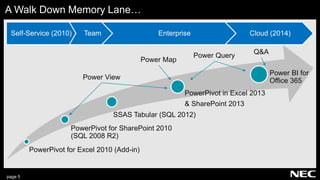
A Walk Down Memory Lane…
Self-Service (2010) Team Enterprise Cloud (2014)
Power View
Power Query
Power Map
PowerPivot for Excel 2010 (Add-in)
PowerPivot for SharePoint 2010
(SQL 2008 R2)
SSAS Tabular (SQL 2012)
PowerPivot in Excel 2013
& SharePoint 2013
Power BI for
Office 365
Q&A
page 6
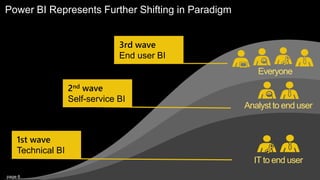
Power BI Represents Further Shifting in Paradigm
Everyone
Analyst to end user
IT to end user
2nd wave
Self-service BI
1st wave
Technical BI
3rd wave
End user BI
page 7
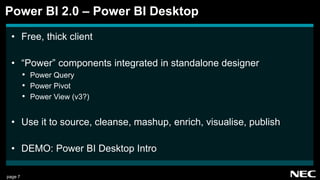
• Free, thick client
• “Power” components integrated in standalone designer
• Power Query
• Power Pivot
• Power View (v3?)
• Use it to source, cleanse, mashup, enrich, visualise, publish
• DEMO: Power BI Desktop Intro
Power BI 2.0 – Power BI Desktop
page 8
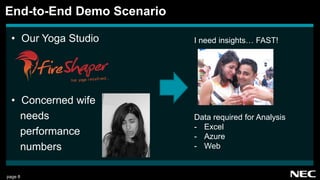
• Our Yoga Studio
• Concerned wife
needs
performance
numbers
End-to-End Demo Scenario
hot yoga r edefi ned...
I need insights… FAST!
Data required for Analysis
- Excel
- Azure
- Web
page 9
• a.k.a “Get Data” in Power BI Desktop
• Fetch data from a HUGE variety of sources
• Transform with point and click, or advanced (M script)
• DEMO: Getting the data in
Power Query
page 10
• a.k.a “Modeling” in Power BI Desktop
• In-memory, columnar database engine
• Add calculated columns, calculated measures
• Relate disparate data sets
• DEMO: Connecting up and adding value
Power Pivot
page 11
• a.k.a “Report” in Power BI Desktop
• MUCH improved from Excel/SharePoint/Office 365
• Easier controls, more formatting options, more visuals
• DEMO: Obligatory eye candy
Power View
page 12
• Login via powerbi.com, or use App Launcher in Office 365
• Lets business users leverage published data
• Create independent cloud hosted reports
• “Dashboards” let us pin individual components, then drill
• Create Group Workspaces, share with others
• DEMO: Publishing to Power BI
Power BI Cloud Service
page 13
• Ask questions in natural language
• Machine learning reads fields, data and applies semantics
• Then customise and pin result
• DEMO: Quick Insights
Q & A
page 14
• Allows scheduled refresh (on-prem sources)
• Windows service on always on computer creates bridge
• Uses Azure Service Bus
• No firewall port opening
• Not required for online sources
• DEMO: Refresh from on-prem to cloud
Other Features – The Personal Gateway
page 15
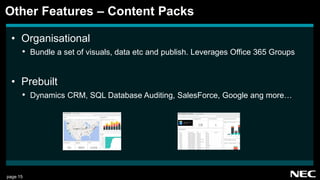
• Organisational
• Bundle a set of visuals, data etc and publish. Leverages Office 365 Groups
• Prebuilt
• Dynamics CRM, SQL Database Auditing, SalesForce, Google ang more…
Other Features – Content Packs
page 16
• Windows, Android, iOS
• DEMO: Mobile Experience
Other Features – Native Mobile Apps
page 17
• Install “Power BI SSAS Connector” on Tabular Server
• Similar to personal gateway
• Live connections
Other Features – Connect to SSAS On-Prem
page 18
• Still getting much love
• Excel 2016 has all Power BI components natively integrated
• You can import Excel PowerPivot models into Power BI Desktop
• Model, data sheets, Power View work. Excel pivot table reports don’t.
• Nice improvements: non destructive editing, field search
• What will this mean for feature parity?
But, I LOVE Excel! Transitioning…
page 19
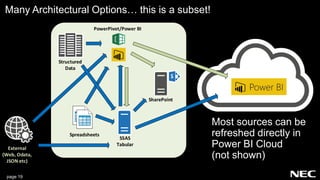
Many Architectural Options… this is a subset!
On Premises
SharePoint
SSAS
Tabular
Structured
Data
External
(Web, Odata,
JSON etc)
PowerPivot/Power BI
Spreadsheets
Most sources can be
refreshed directly in
Power BI Cloud
(not shown)
page 20
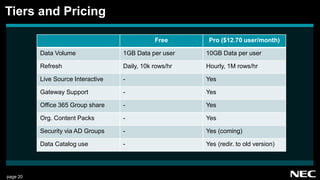
Free Pro ($12.70 user/month)
Data Volume 1GB Data per user 10GB Data per user
Refresh Daily, 10k rows/hr Hourly, 1M rows/hr
Live Source Interactive - Yes
Gateway Support - Yes
Office 365 Group share - Yes
Org. Content Packs - Yes
Security via AD Groups - Yes (coming)
Data Catalog use - Yes (redir. to old version)
Tiers and Pricing
page 21
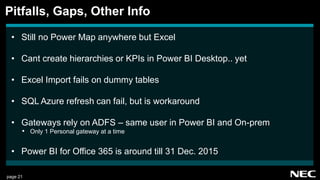
• Still no Power Map anywhere but Excel
• Cant create hierarchies or KPIs in Power BI Desktop.. yet
• Excel Import fails on dummy tables
• SQL Azure refresh can fail, but is workaround
• Gateways rely on ADFS – same user in Power BI and On-prem
• Only 1 Personal gateway at a time
• Power BI for Office 365 is around till 31 Dec. 2015
Pitfalls, Gaps, Other Info
page 22
• Thanks for your valuable time!
• Thanks to NEC for pizza sponsorship
• Go TRY IT, and do come chat to me 
Wrapping Up and Question Time

Perth SharePoint User Group - Hybrid Cloud and Power BI

  • 1.
    The Brave NewWorld of Power BI and Hybrid Cloud Bhavik.Merchant@nec.com.au 27th August 2015
  • 2.
    • Intro • SessionGoals • Short History Lesson • Overview of Power BI Components + Demos • Transitioning and Future Functionality • Pitfalls & Other Info • Q&A Agenda
  • 3.
    page 3 • DeliveryManager: Analytics, Collaboration & Content at NEC • Certified End-to-End Microsoft BI practitioner • Trainer • Microsoft PTSP • Co-organiser of Perth Modern Excel & Power BI User Group Speaker Introduction
  • 4.
    page 4 • Understandlandscape prior to Power BI 2.0 • See where Office 365 and Azure fit it • Learn how to leverage on-premises assets • Explore functionality and learn deployment process • Understand how to transition • Know what to watch out for Session Goals
  • 5.
    page 5 A WalkDown Memory Lane… Self-Service (2010) Team Enterprise Cloud (2014) Power View Power Query Power Map PowerPivot for Excel 2010 (Add-in) PowerPivot for SharePoint 2010 (SQL 2008 R2) SSAS Tabular (SQL 2012) PowerPivot in Excel 2013 & SharePoint 2013 Power BI for Office 365 Q&A
  • 6.
    page 6 Power BIRepresents Further Shifting in Paradigm Everyone Analyst to end user IT to end user 2nd wave Self-service BI 1st wave Technical BI 3rd wave End user BI
  • 7.
    page 7 • Free,thick client • “Power” components integrated in standalone designer • Power Query • Power Pivot • Power View (v3?) • Use it to source, cleanse, mashup, enrich, visualise, publish • DEMO: Power BI Desktop Intro Power BI 2.0 – Power BI Desktop
  • 8.
    page 8 • OurYoga Studio • Concerned wife needs performance numbers End-to-End Demo Scenario hot yoga r edefi ned... I need insights… FAST! Data required for Analysis - Excel - Azure - Web
  • 9.
    page 9 • a.k.a“Get Data” in Power BI Desktop • Fetch data from a HUGE variety of sources • Transform with point and click, or advanced (M script) • DEMO: Getting the data in Power Query
  • 10.
    page 10 • a.k.a“Modeling” in Power BI Desktop • In-memory, columnar database engine • Add calculated columns, calculated measures • Relate disparate data sets • DEMO: Connecting up and adding value Power Pivot
  • 11.
    page 11 • a.k.a“Report” in Power BI Desktop • MUCH improved from Excel/SharePoint/Office 365 • Easier controls, more formatting options, more visuals • DEMO: Obligatory eye candy Power View
  • 12.
    page 12 • Loginvia powerbi.com, or use App Launcher in Office 365 • Lets business users leverage published data • Create independent cloud hosted reports • “Dashboards” let us pin individual components, then drill • Create Group Workspaces, share with others • DEMO: Publishing to Power BI Power BI Cloud Service
  • 13.
    page 13 • Askquestions in natural language • Machine learning reads fields, data and applies semantics • Then customise and pin result • DEMO: Quick Insights Q & A
  • 14.
    page 14 • Allowsscheduled refresh (on-prem sources) • Windows service on always on computer creates bridge • Uses Azure Service Bus • No firewall port opening • Not required for online sources • DEMO: Refresh from on-prem to cloud Other Features – The Personal Gateway
  • 15.
    page 15 • Organisational •Bundle a set of visuals, data etc and publish. Leverages Office 365 Groups • Prebuilt • Dynamics CRM, SQL Database Auditing, SalesForce, Google ang more… Other Features – Content Packs
  • 16.
    page 16 • Windows,Android, iOS • DEMO: Mobile Experience Other Features – Native Mobile Apps
  • 17.
    page 17 • Install“Power BI SSAS Connector” on Tabular Server • Similar to personal gateway • Live connections Other Features – Connect to SSAS On-Prem
  • 18.
    page 18 • Stillgetting much love • Excel 2016 has all Power BI components natively integrated • You can import Excel PowerPivot models into Power BI Desktop • Model, data sheets, Power View work. Excel pivot table reports don’t. • Nice improvements: non destructive editing, field search • What will this mean for feature parity? But, I LOVE Excel! Transitioning…
  • 19.
    page 19 Many ArchitecturalOptions… this is a subset! On Premises SharePoint SSAS Tabular Structured Data External (Web, Odata, JSON etc) PowerPivot/Power BI Spreadsheets Most sources can be refreshed directly in Power BI Cloud (not shown)
  • 20.
    page 20 Free Pro($12.70 user/month) Data Volume 1GB Data per user 10GB Data per user Refresh Daily, 10k rows/hr Hourly, 1M rows/hr Live Source Interactive - Yes Gateway Support - Yes Office 365 Group share - Yes Org. Content Packs - Yes Security via AD Groups - Yes (coming) Data Catalog use - Yes (redir. to old version) Tiers and Pricing
  • 21.
    page 21 • Stillno Power Map anywhere but Excel • Cant create hierarchies or KPIs in Power BI Desktop.. yet • Excel Import fails on dummy tables • SQL Azure refresh can fail, but is workaround • Gateways rely on ADFS – same user in Power BI and On-prem • Only 1 Personal gateway at a time • Power BI for Office 365 is around till 31 Dec. 2015 Pitfalls, Gaps, Other Info
  • 22.
    page 22 • Thanksfor your valuable time! • Thanks to NEC for pizza sponsorship • Go TRY IT, and do come chat to me  Wrapping Up and Question Time