Asma Salim Al-Balushi  SQU,COE,ILT  Tech4102 course  [email_address] Evaluating a computer-based instruction  HYPER STUDIO
Aspects of evaluating computer-based instruction  Section 1
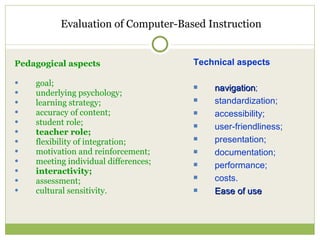
Evaluation of Computer-Based Instruction Pedagogical aspects goal;  underlying psychology;  learning strategy; accuracy of content; student role;  teacher role;  flexibility of integration;  motivation and reinforcement;  meeting individual differences;  interactivity;   assessment; cultural sensitivity. Technical aspects navigation ; standardization; accessibility;  user-friendliness; presentation;  documentation; performance; costs. Ease of use
Ease of Use   labels, buttons, menus, text, and general layout interface are consistent and visually distinct the user get trapped in the material or not  the user can get lost easily in the material provide feedback about the user's responses appropriate flexibility in use require a lot of documentation, technical support, and/or instruction for most students to successfully use the software present information in ways that are familiar for students present information in ways that would be attractive to students
Navigation   Common Look and Feel; Simple Design "Skip To" Links Accessible Images Adjustable Text Size Effective Search Engine Provide clear and consistent navigation mechanisms -- orientation information, navigation bars, a site map, etc.
Interactivity  Allowing for reflection Using a variety of interaction between teacher/student and student/student?   Using multimedia Applying what has been taught Allowing for learner response & providing feedback the user always knows how to proceed  sufficient help is available to the user? If discussion took place, how well did the instructor moderate it?  How did the instructor respond to students' questions and comments?
Teacher’s roles   well prepared for the class Knowledgeable about the subject matter Speaks clearly , audibly and confidently Uses a variety of illustrations &  examples asks simulating and challenging questions Effectively holds class’s attention Achieves active student engagement  Treats students with respect guidance is available   recommended pedagogical techniques are available Utilizes time well  Rewards or recognized students well
Perspectives on Teaching and Learning  with an instructional software Section 2
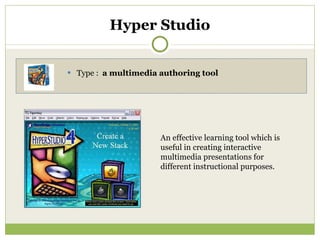
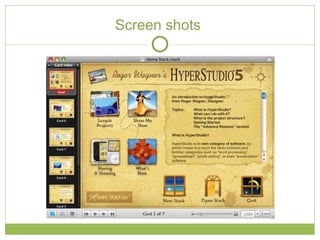
Hyper Studio Type :  a multimedia authoring tool  An effective learning tool which is useful in creating interactive multimedia presentations for different instructional purposes.
Screen shots
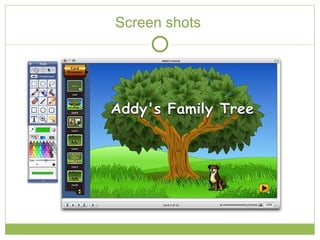
Screen shots
Flexibility of Hyper Studio with instruction  allows the user to create sparkling full-color pictures , lively animation and authentic sounds along with text. learners can exercise critical thinking skills, planning, and collaborative team work. user interaction is accomplished via the click of the mouse on on-screen buttons that are navigational and may launch other applications.  Ability to switch from topic to topic and media to media easily  Everything from multimedia reports, yearbooks, and presentations can be created
Learning perspectives with Hyper studio  With the immediate feedback from computers and powerful collaborative benefits, students learn to make decisions about what to do next on the computer, gaining the confidence needed to work independently. Student motivation and self-esteem  are high due to the small group interaction and unlimited access to technology tools reinforce constructivism, meta-cognition, and use of curriculum that allows students to learn with respect to their own learning styles and strengths
Constructivist Approach with Hyper Studio cooperatively working in groups to create maps, compose research papers, paint murals, and construct Hyper Studio information stacks on the subject matter Students used animation, sound, video images, and buttons to help the user find related topics in a non-linear format collect, organize, analyze, and present the information gathered collectively the process of gathering and assembling information, and learning how to share the results with others
Multiple intelligence with Hyper Studio  Interpersonal:  Collaborating and Engaging in teams work Intrapersonal:  group presentations  Logical/Mathematical:  Understanding navigation through hypermedia design , Engaging in problem solving, showing results, animating  Musical/Rhythmic:  creating presentations that require recording of sounds  Verbal/linguistic : ( the text aspects) incorporate writing and creating with words Visual/spatial :  illustrating the project, identifying the visuals and creating the storyboard for the project
Evaluation strategy  Section 3
The instrument  Type: Peer observation Why this instrument?! An excellent way to have a close eye on the teaching quality and effectiveness. It’s like a checkup whether instructors ,or even students, have any particular issues or not . The main goals of this instrument are to evaluate the range of instructor’s roles and how they support students’ understanding, and investigate the level of interaction .  Another important point to be evaluated, is the software itself by checking some technical features to assess the flexibility of using within instruction  .
References:  Criteria for Peer-Review of Engineering Courseware on the NEEDS Database . Accessed online on 14/3/2010: http://www.engineeringpathway.com/smete/public/about_smete/publications/IEEE96.eibeck/criteria.html;jsessionid=RVZ2BYQEBVKBZABAVRSSFEQ Evaluation Criteria for Peer Reviews.  Accessed online on 14/3/2010 : http://taste.merlot.org/evaluationcriteria.html observation_of_teaching.  Accessed online on 14/3/2010 :  http://www.admin.susx.ac.uk/tldu/documents/peer_obs_policy.doc Peer Observation of Teaching Scheme . Accessed online on 14/3/2010 :  http://www.londonmet.ac.uk/londonmet/library/h32724_3.pdf teacher to teacher . Accessed online on 14/3/2010 :  http://www.teacher2teacher.com/samples/HyperStudio_42_CA_SampleWelcome.pdf technology and multiple intelligence.  Accessed online on 14/3/2010   :  http://daretodifferentiate.wikispaces.com/file/view/MI+for+Think+TAC+TOE.doc Integration of Technology Observation Instrument . Accessed online on 14/3/2010 : http://www.west.asu.edu/pt3/assessment/documents/ASUWObservation.pdf using hyper studio in the classroom.   Accessed online on 14/3/2010 :  http://www.sunburst.com/documents/Hyperstudio_4.5_and_earlier/library/UsingHS.pdf

Peer observation

  • 1.
    Asma Salim Al-Balushi SQU,COE,ILT Tech4102 course [email_address] Evaluating a computer-based instruction HYPER STUDIO
  • 2.
    Aspects of evaluatingcomputer-based instruction Section 1
  • 3.
    Evaluation of Computer-BasedInstruction Pedagogical aspects goal; underlying psychology; learning strategy; accuracy of content; student role; teacher role; flexibility of integration; motivation and reinforcement; meeting individual differences; interactivity; assessment; cultural sensitivity. Technical aspects navigation ; standardization; accessibility; user-friendliness; presentation; documentation; performance; costs. Ease of use
  • 4.
    Ease of Use labels, buttons, menus, text, and general layout interface are consistent and visually distinct the user get trapped in the material or not the user can get lost easily in the material provide feedback about the user's responses appropriate flexibility in use require a lot of documentation, technical support, and/or instruction for most students to successfully use the software present information in ways that are familiar for students present information in ways that would be attractive to students
  • 5.
    Navigation Common Look and Feel; Simple Design "Skip To" Links Accessible Images Adjustable Text Size Effective Search Engine Provide clear and consistent navigation mechanisms -- orientation information, navigation bars, a site map, etc.
  • 6.
    Interactivity Allowingfor reflection Using a variety of interaction between teacher/student and student/student? Using multimedia Applying what has been taught Allowing for learner response & providing feedback the user always knows how to proceed sufficient help is available to the user? If discussion took place, how well did the instructor moderate it? How did the instructor respond to students' questions and comments?
  • 7.
    Teacher’s roles well prepared for the class Knowledgeable about the subject matter Speaks clearly , audibly and confidently Uses a variety of illustrations & examples asks simulating and challenging questions Effectively holds class’s attention Achieves active student engagement Treats students with respect guidance is available recommended pedagogical techniques are available Utilizes time well Rewards or recognized students well
  • 8.
    Perspectives on Teachingand Learning with an instructional software Section 2
  • 9.
    Hyper Studio Type: a multimedia authoring tool An effective learning tool which is useful in creating interactive multimedia presentations for different instructional purposes.
  • 10.
  • 11.
  • 12.
    Flexibility of HyperStudio with instruction allows the user to create sparkling full-color pictures , lively animation and authentic sounds along with text. learners can exercise critical thinking skills, planning, and collaborative team work. user interaction is accomplished via the click of the mouse on on-screen buttons that are navigational and may launch other applications. Ability to switch from topic to topic and media to media easily Everything from multimedia reports, yearbooks, and presentations can be created
  • 13.
    Learning perspectives withHyper studio With the immediate feedback from computers and powerful collaborative benefits, students learn to make decisions about what to do next on the computer, gaining the confidence needed to work independently. Student motivation and self-esteem are high due to the small group interaction and unlimited access to technology tools reinforce constructivism, meta-cognition, and use of curriculum that allows students to learn with respect to their own learning styles and strengths
  • 14.
    Constructivist Approach withHyper Studio cooperatively working in groups to create maps, compose research papers, paint murals, and construct Hyper Studio information stacks on the subject matter Students used animation, sound, video images, and buttons to help the user find related topics in a non-linear format collect, organize, analyze, and present the information gathered collectively the process of gathering and assembling information, and learning how to share the results with others
  • 15.
    Multiple intelligence withHyper Studio Interpersonal: Collaborating and Engaging in teams work Intrapersonal: group presentations Logical/Mathematical: Understanding navigation through hypermedia design , Engaging in problem solving, showing results, animating Musical/Rhythmic: creating presentations that require recording of sounds Verbal/linguistic : ( the text aspects) incorporate writing and creating with words Visual/spatial : illustrating the project, identifying the visuals and creating the storyboard for the project
  • 16.
  • 17.
    The instrument Type: Peer observation Why this instrument?! An excellent way to have a close eye on the teaching quality and effectiveness. It’s like a checkup whether instructors ,or even students, have any particular issues or not . The main goals of this instrument are to evaluate the range of instructor’s roles and how they support students’ understanding, and investigate the level of interaction . Another important point to be evaluated, is the software itself by checking some technical features to assess the flexibility of using within instruction .
  • 18.
    References: Criteriafor Peer-Review of Engineering Courseware on the NEEDS Database . Accessed online on 14/3/2010: http://www.engineeringpathway.com/smete/public/about_smete/publications/IEEE96.eibeck/criteria.html;jsessionid=RVZ2BYQEBVKBZABAVRSSFEQ Evaluation Criteria for Peer Reviews. Accessed online on 14/3/2010 : http://taste.merlot.org/evaluationcriteria.html observation_of_teaching. Accessed online on 14/3/2010 : http://www.admin.susx.ac.uk/tldu/documents/peer_obs_policy.doc Peer Observation of Teaching Scheme . Accessed online on 14/3/2010 : http://www.londonmet.ac.uk/londonmet/library/h32724_3.pdf teacher to teacher . Accessed online on 14/3/2010 : http://www.teacher2teacher.com/samples/HyperStudio_42_CA_SampleWelcome.pdf technology and multiple intelligence. Accessed online on 14/3/2010 : http://daretodifferentiate.wikispaces.com/file/view/MI+for+Think+TAC+TOE.doc Integration of Technology Observation Instrument . Accessed online on 14/3/2010 : http://www.west.asu.edu/pt3/assessment/documents/ASUWObservation.pdf using hyper studio in the classroom. Accessed online on 14/3/2010 : http://www.sunburst.com/documents/Hyperstudio_4.5_and_earlier/library/UsingHS.pdf