




For Google Slides
Pear Deck
• ARTMIKER •
Produced by Artmiker Studios on: June 4, 2023. All Intellectual Property mentioned in this document are owned by their own respective owners. All Rights Reserved. |
source: https://www.pexels.com/photo/photo-of-child-sitting-by-the-table-while-looking-at-the-imac-4145153/
A Google Slides add-on is a software extension or plugin that
integrates with Google Slides, which is a web-based presentation tool
offered by Google.
These add-ons extend the functionality of Google Slides by providing
additional features, tools, and capabilities that enhance the
presentation creation and editing experience.
Introduction
What is Pear Deck?
● By allowing students to participate, Pear Deck elevates
slide-based presentations to a new level of interaction and
engagement.
● The objective is to provide a digital tool for instructors to utilize
in order to produce and deliver information to the class on the
large screen.
● Students may, however, follow along on their mobile devices
and engage when requested, making the presentation
significantly more immersive for the class.
● This is all applicable within Google Slides, so teachers whom
are already using Google Classrooms are allowed to use it.
source: https://www.techlearning.com/how-to/what-is-pear-deck-and-how-does-it-work
History
● 2014 – Pear Deck was founded in Iowa City, Iowa
● 2015 – It was selected as the winner of the “Rise of
Rest” competition by Steve Case.
● 2016 – Pear Deck expanded its sales team to
Kansan City.
● 2020 – It merged with GoGuardian
source: https://www.techlearning.com/how-to/what-is-pear-deck-and-how-does-it-work
Feature of Pear Deck
● There are countless of templates that Pear Decks
provides for a fun and interactive presentation for
teachers.
● You can create custom questions in the slides where
Pear Deck provides several templates for the students
to answer.
● You can add audio to any slide, might it be music or
recording of yourself.
● Students can join your session from any device with a
web browser.
source: https://www.techlearning.com/how-to/what-is-pear-deck-and-how-does-it-work
Pricing
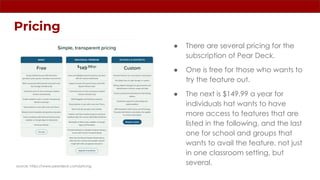
● There are several pricing for the
subscription of Pear Deck.
● One is free for those who wants to
try the feature out.
● The next is $149.99 a year for
individuals hat wants to have
more access to features that are
listed in the following, and the last
one for school and groups that
wants to avail the feature, not just
in one classroom setting, but
several.
source: https://www.peardeck.com/pricing
Creating Pear Deck Account:
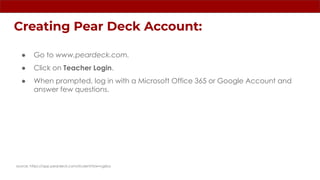
● Go to www.peardeck.com.
● Click on Teacher Login.
● When prompted, log in with a Microsoft Office 365 or Google Account and
answer few questions.
source: https://app.peardeck.com/student/tzwvvgzba
Installing Pear Deck Add-on to Google Slides
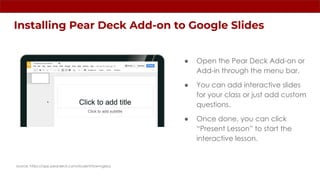
● Open the Pear Deck Add-on or
Add-in through the menu bar.
● You can add interactive slides
for your class or just add custom
questions.
● Once done, you can click
“Present Lesson” to start the
interactive lesson.
source: https://app.peardeck.com/student/tzwvvgzba
Pear Deck Sidebar
source: https://app.peardeck.com/student/tzwvvgzba
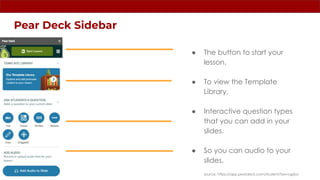
● The button to start your
lesson.
● To view the Template
Library.
● Interactive question types
that you can add in your
slides.
● So you can audio to your
slides.
There are different interactive slides you could
add within your slides for a more interactive
presentation.
source: https://app.peardeck.com/student/tzwvvgzba
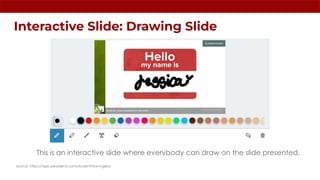
Interactive Slide: Drawing Slide
This is an interactive slide where everybody can draw on the slide presented.
source: https://app.peardeck.com/student/tzwvvgzba
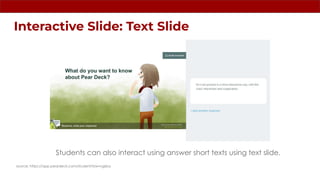
Interactive Slide: Text Slide
Students can also interact using answer short texts using text slide.
source: https://app.peardeck.com/student/tzwvvgzba
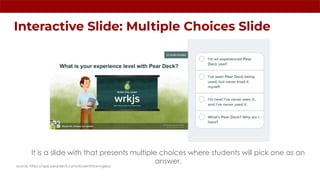
Interactive Slide: Multiple Choices Slide
It is a slide with that presents multiple choices where students will pick one as an
answer.
source: https://app.peardeck.com/student/tzwvvgzba
Interactive Slide: Draggables
A slide feature original to Pear Deck, where the students can drag an icon to answer.
source: https://app.peardeck.com/student/tzwvvgzba
Self-Guide to knowing more about Pear Deck
source: https://www.youtube.com/playlist?list=PL1lHHMSvWNHoVsjmkcmMssbgnDW66Plhn
Citations:
Edwards, L. (2022, October 21). What is Pear Deck and how does it work? tips and tricks. TechLearningMagazine. Retrieved April 28,
2023, from https://www.techlearning.com/how-to/what-is-pear-deck-and-how-does-it-work
Pear Deck Account. Pear Deck. (n.d.). Retrieved April 28, 2023, from https://app.peardeck.com/student/tzwvvgzba
Pear Deck Tutorial. Pear Deck. (n.d.). Retrieved April 28, 2023, from https://app.peardeck.com/student/tzwvvgzba%E2%80%8B
Team, S. (2019, July 3). Activegrade founders create new education startup Pear Deck. Silicon Prairie News.
https://siliconprairienews.com/2014/03/activegrade-founders-create-new-education-startup-pear-deck/
FOR CREATIVE CONTENT & RESEARCH SERVICES, PLEASE VISIT:
www.artmiker.com
END of SLIDE
www.artmiker.com

Pear Deck

  • 1.
    For Google Slides PearDeck • ARTMIKER • Produced by Artmiker Studios on: June 4, 2023. All Intellectual Property mentioned in this document are owned by their own respective owners. All Rights Reserved. | source: https://www.pexels.com/photo/photo-of-child-sitting-by-the-table-while-looking-at-the-imac-4145153/
  • 2.
    A Google Slidesadd-on is a software extension or plugin that integrates with Google Slides, which is a web-based presentation tool offered by Google. These add-ons extend the functionality of Google Slides by providing additional features, tools, and capabilities that enhance the presentation creation and editing experience. Introduction
  • 3.
    What is PearDeck? ● By allowing students to participate, Pear Deck elevates slide-based presentations to a new level of interaction and engagement. ● The objective is to provide a digital tool for instructors to utilize in order to produce and deliver information to the class on the large screen. ● Students may, however, follow along on their mobile devices and engage when requested, making the presentation significantly more immersive for the class. ● This is all applicable within Google Slides, so teachers whom are already using Google Classrooms are allowed to use it. source: https://www.techlearning.com/how-to/what-is-pear-deck-and-how-does-it-work
  • 4.
    History ● 2014 –Pear Deck was founded in Iowa City, Iowa ● 2015 – It was selected as the winner of the “Rise of Rest” competition by Steve Case. ● 2016 – Pear Deck expanded its sales team to Kansan City. ● 2020 – It merged with GoGuardian source: https://www.techlearning.com/how-to/what-is-pear-deck-and-how-does-it-work
  • 5.
    Feature of PearDeck ● There are countless of templates that Pear Decks provides for a fun and interactive presentation for teachers. ● You can create custom questions in the slides where Pear Deck provides several templates for the students to answer. ● You can add audio to any slide, might it be music or recording of yourself. ● Students can join your session from any device with a web browser. source: https://www.techlearning.com/how-to/what-is-pear-deck-and-how-does-it-work
  • 6.
    Pricing ● There areseveral pricing for the subscription of Pear Deck. ● One is free for those who wants to try the feature out. ● The next is $149.99 a year for individuals hat wants to have more access to features that are listed in the following, and the last one for school and groups that wants to avail the feature, not just in one classroom setting, but several. source: https://www.peardeck.com/pricing
  • 7.
    Creating Pear DeckAccount: ● Go to www.peardeck.com. ● Click on Teacher Login. ● When prompted, log in with a Microsoft Office 365 or Google Account and answer few questions. source: https://app.peardeck.com/student/tzwvvgzba
  • 8.
    Installing Pear DeckAdd-on to Google Slides ● Open the Pear Deck Add-on or Add-in through the menu bar. ● You can add interactive slides for your class or just add custom questions. ● Once done, you can click “Present Lesson” to start the interactive lesson. source: https://app.peardeck.com/student/tzwvvgzba
  • 9.
    Pear Deck Sidebar source:https://app.peardeck.com/student/tzwvvgzba ● The button to start your lesson. ● To view the Template Library. ● Interactive question types that you can add in your slides. ● So you can audio to your slides.
  • 10.
    There are differentinteractive slides you could add within your slides for a more interactive presentation. source: https://app.peardeck.com/student/tzwvvgzba
  • 11.
    Interactive Slide: DrawingSlide This is an interactive slide where everybody can draw on the slide presented. source: https://app.peardeck.com/student/tzwvvgzba
  • 12.
    Interactive Slide: TextSlide Students can also interact using answer short texts using text slide. source: https://app.peardeck.com/student/tzwvvgzba
  • 13.
    Interactive Slide: MultipleChoices Slide It is a slide with that presents multiple choices where students will pick one as an answer. source: https://app.peardeck.com/student/tzwvvgzba
  • 14.
    Interactive Slide: Draggables Aslide feature original to Pear Deck, where the students can drag an icon to answer. source: https://app.peardeck.com/student/tzwvvgzba
  • 15.
    Self-Guide to knowingmore about Pear Deck source: https://www.youtube.com/playlist?list=PL1lHHMSvWNHoVsjmkcmMssbgnDW66Plhn
  • 16.
    Citations: Edwards, L. (2022,October 21). What is Pear Deck and how does it work? tips and tricks. TechLearningMagazine. Retrieved April 28, 2023, from https://www.techlearning.com/how-to/what-is-pear-deck-and-how-does-it-work Pear Deck Account. Pear Deck. (n.d.). Retrieved April 28, 2023, from https://app.peardeck.com/student/tzwvvgzba Pear Deck Tutorial. Pear Deck. (n.d.). Retrieved April 28, 2023, from https://app.peardeck.com/student/tzwvvgzba%E2%80%8B Team, S. (2019, July 3). Activegrade founders create new education startup Pear Deck. Silicon Prairie News. https://siliconprairienews.com/2014/03/activegrade-founders-create-new-education-startup-pear-deck/
  • 17.
    FOR CREATIVE CONTENT& RESEARCH SERVICES, PLEASE VISIT: www.artmiker.com
  • 18.