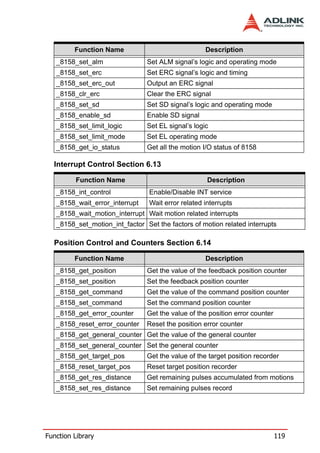
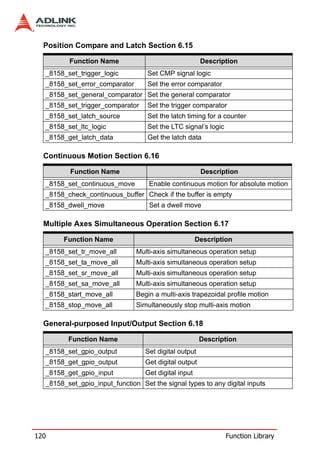
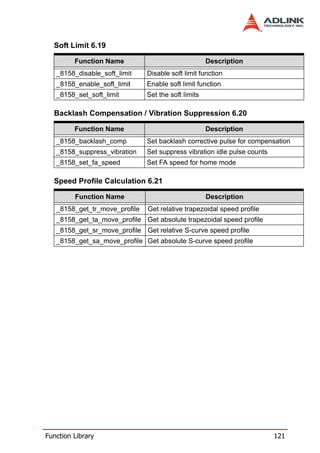
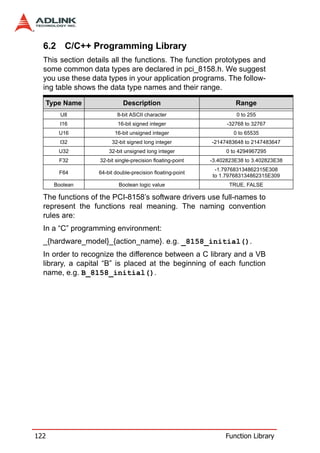
PCI-8158
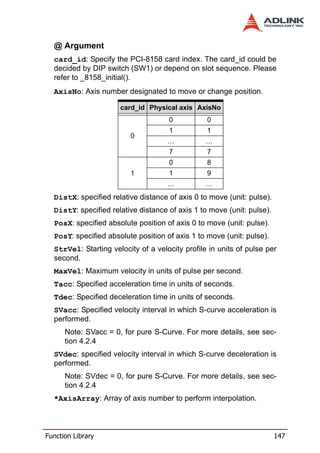
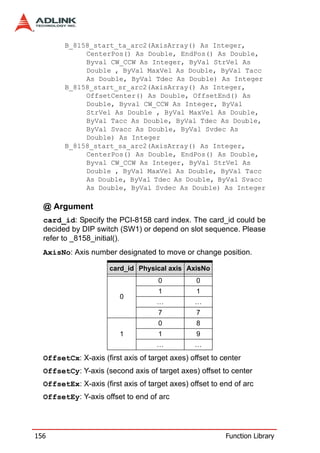
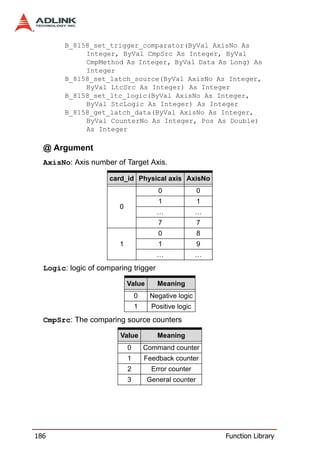
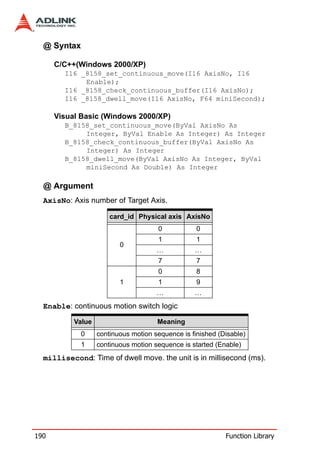
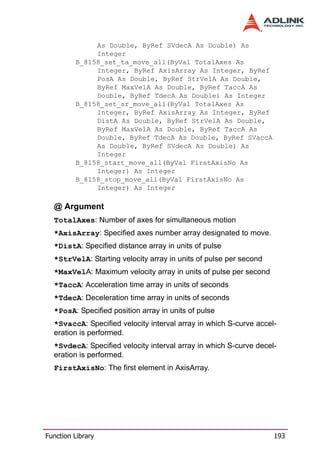
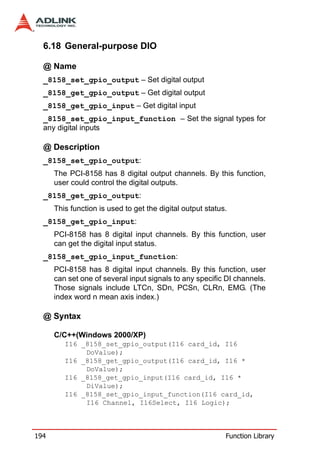
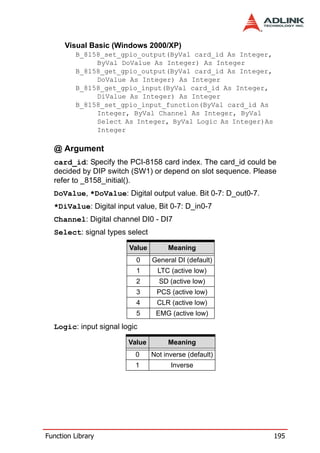
                  High Density & Advanced
                   8-Axis Servo / Stepper
                   Motion Control Card
                    User’s Manual


 Manual Rev.      2.00

 Revision Date:   August 5, 2006

 Part No:         50-11139-1000


Advance Technologies; Automate the World.
Copyright 2006 ADLINK TECHNOLOGY INC.
All Rights Reserved.


The information in this document is subject to change without prior
notice in order to improve reliability, design, and function and does
not represent a commitment on the part of the manufacturer.
In no event will the manufacturer be liable for direct, indirect, spe-
cial, incidental, or consequential damages arising out of the use or
inability to use the product or documentation, even if advised of
the possibility of such damages.
This document contains proprietary information protected by copy-
right. All rights are reserved. No part of this manual may be repro-
duced by any mechanical, electronic, or other means in any form
without prior written permission of the manufacturer.


Trademarks
NuDAQ, NuIPC, DAQBench are registered trademarks of ADLINK
TECHNOLOGY INC.
Product names mentioned herein are used for identification pur-
poses only and may be trademarks and/or registered trademarks
of their respective companies.
Getting Service from ADLINK
Customer Satisfaction is top priority for ADLINK Technology Inc.
Please contact us should you require any service or assistance.
                   ADLINK TECHNOLOGY INC.
Web Site:               http://www.adlinktech.com
Sales & Service:        Service@adlinktech.com
TEL:                    +886-2-82265877
FAX:                    +886-2-82265717
Address:                9F, No. 166, Jian Yi Road, Chungho City,
                        Taipei, 235 Taiwan
Please email or FAX this completed service form for prompt and
satisfactory service.

                        Company Information
Company/Organization
Contact Person
E-mail Address
Address
Country
TEL                        FAX:
Web Site
                          Product Information
Product Model
                           OS:
Environment                M/B:                  CPU:
                           Chipset:              BIOS:


Please give a detailed description of the problem(s):
Table of Contents
Table of Contents..................................................................... i
List of Tables........................................................................... v

List of Figures ........................................................................ vi

1 Introduction ........................................................................ 1
    1.1     Features............................................................................... 5
    1.2     Specifications....................................................................... 6
    1.3     Supported Software ............................................................. 8
              Programming Library ...................................................... 8
              MotionCreatorPro ........................................................... 8
    1.4     Available Terminal Board..................................................... 8

2 Installation .......................................................................... 9
    2.1     Package Contents ............................................................... 9
    2.2     PCI-8158 Outline Drawing ................................................. 10
    2.3     PCI-8158 Hardware Installation......................................... 10
               Hardware configuration ................................................. 10
               PCI slot selection .......................................................... 11
               Installation Procedures ................................................. 11
               Troubleshooting ............................................................ 11
    2.4     Software Driver Installation................................................ 12
    2.5     P1/P2 Pin Assignments: Main Connector.......................... 13
    2.6     K1/K2 Pin Assignments: Simultaneous Start/Stop ............ 14
    2.7     J1 to J16 Jumper Settings for Pulse Output ...................... 15
    2.8     S1 Switch Settings for Card Index ..................................... 16
    2.9     P3 Manual Pulse................................................................ 17

3 Signal Connections.......................................................... 19
    3.1     Pulse Output Signals OUT and DIR .................................. 20
    3.2     Encoder Feedback Signals EA, EB and EZ....................... 23
               Connection to Line Driver Output ................................. 25
               Connection to Open Collector Output ........................... 25
    3.3     Origin Signal ORG ............................................................. 27
    3.4     End-Limit Signals PEL and MEL........................................ 28
    3.5     In-position Signal INP ........................................................ 29
    3.6     Alarm Signal ALM .............................................................. 30


Table of Contents                                                                                       i
3.7    Deviation Counter Clear Signal ERC .................................            31
     3.8    General-purpose Signal SVON..........................................           32
     3.9    General-purpose Signal RDY ............................................         33
     3.10   Multi-Functional output pin: DO/CMP ................................            34
     3.11   Multi-Functional input pin: DI/LTC/SD/PCS/CLR/EMG......                         35
     3.12   Pulse Input Signals PA and PB (PCI-8158) .......................                36
     3.13   Simultaneously Start/Stop Signals STA and STP..............                     37

4 Operation Theory .............................................................. 41
     4.1    Classifications of Motion Controller.................................... 41
               Voltage type motion control Interface ........................... 41
               Pulse type motion control Interface .............................. 42
               Network type motion control Interface .......................... 42
               Software real-time motion control kernel ...................... 42
               DSP based motion control kernel ................................. 43
               ASIC based motion control kernel ................................ 43
               Compare Table of all motion control types ................... 44
               PCI-8158’s motion controller type ................................. 44
     4.2    Motion Control Modes........................................................ 45
               Coordinate system ........................................................ 45
               Absolute and relative position move ............................. 46
               Trapezoidal speed profile ............................................. 47
               S-curve and Bell-curve speed profile ............................ 47
               Velocity mode ............................................................... 49
               One axis position mode ................................................ 50
               Two axes linear interpolation position mode ................. 51
               Two axes circular interpolation mode ........................... 52
               Continuous motion ........................................................ 53
               Home Return Mode ...................................................... 55
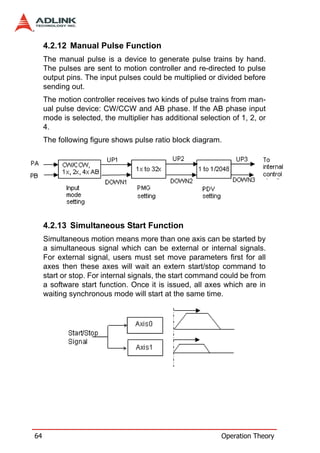
               Home Search Function ................................................. 63
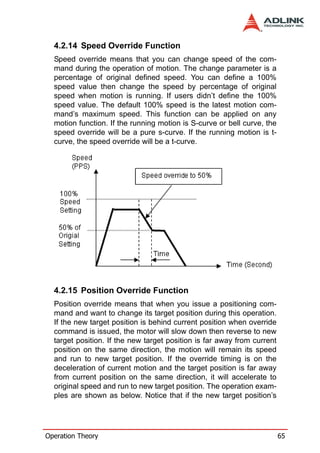
               Manual Pulse Function ................................................. 64
               Simultaneous Start Function ......................................... 64
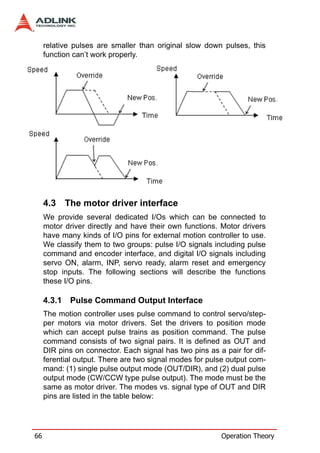
               Speed Override Function .............................................. 65
               Position Override Function ........................................... 65
     4.3    The motor driver interface.................................................. 66
               Pulse Command Output Interface ................................ 66
               Pulse feedback input interface ...................................... 68
               In position signal ........................................................... 70
               Servo alarm signal ........................................................ 71
               Error clear signal ........................................................... 71


ii                                                                         Table of Contents
Servo ON/OFF switch ................................................... 71
               Servo Ready Signal ...................................................... 72
               Servo alarm reset switch .............................................. 72
   4.4     Mechanical switch interface............................................... 72
               Original or home signal ................................................. 73
               End-Limit switch signal ................................................. 73
               Slow down switch ......................................................... 73
               Positioning Start switch ................................................. 73
               Counter Clear switch .................................................... 74
               Counter Latch switch .................................................... 74
               Emergency stop input ................................................... 74
   4.5     The Counters ..................................................................... 74
               Command position counter ........................................... 75
               Feedback position counter ............................................ 75
               Command and Feedback error counter ........................ 75
               General purpose counter .............................................. 76
               Target position recorder ................................................ 76
   4.6     The Comparators............................................................... 77
               Soft end-limit comparators ............................................ 77
               Command and feedback error counter comparators .... 77
               General comparator ...................................................... 77
               Trigger comparator ....................................................... 78
   4.7     Other Motion Functions ..................................................... 78
               Backlash compensation and slip corrections ................ 79
               Vibration restriction function ......................................... 79
               Speed profile calculation function ................................. 79
   4.8     Interrupt Control................................................................. 80
   4.9     Multiple Card Operation..................................................... 84

5 MotionCreatorPro............................................................. 85
   5.1     Execute MotionCreatorPro ................................................ 85
   5.2     About MotionCreatorPro .................................................... 86
   5.3     MotionCreatorPro Form Introducing .................................. 87
             Main Menu .................................................................... 87
             Select Menu .................................................................. 88
             Card Information Menu ................................................. 89
             Configuration Menu ...................................................... 90
             Single Axis Operation Menu ......................................... 95
             Two-Axis Operation Menu .......................................... 102
             2D_Motion Menu ........................................................ 105


Table of Contents                                                                              iii
Help Menu .................................................................. 111

6 Function Library.............................................................. 113
     6.1    List of Functions...............................................................        114
     6.2    C/C++ Programming Library ............................................                  122
     6.3    System & Initialization......................................................           123
     6.4    Pulse Input/Output Configuration.....................................                   127
     6.5    Velocity mode motion.......................................................             130
     6.6    Single Axis Position Mode ...............................................               134
     6.7    Linear Interpolated Motion ...............................................              138
     6.8    Circular Interpolation Motion ............................................              149
     6.9    Home Return Mode..........................................................              159
     6.10   Manual Pulser Motion ......................................................             162
     6.11   Motion Status ...................................................................       165
     6.12   Motion Interface I/O .........................................................          167
     6.13   Interrupt Control ...............................................................       175
     6.14   Position Control and Counters .........................................                 179
     6.15   Position Compare and Latch............................................                  184
     6.16   Continuous motion ...........................................................           189
     6.17   Multiple Axes Simultaneous Operation ............................                       191
     6.18   General-purpose DIO.......................................................              194
     6.19   Soft Limit ..........................................................................   196
     6.20   Backlash Compensation / Vibration Suppression ............                              198
     6.21   Speed Profile Calculation.................................................              200
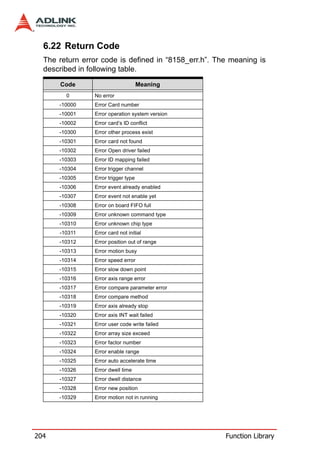
     6.22   Return Code.....................................................................        204

7 Connection Example ...................................................... 207
     7.1    General Description of Wiring .......................................... 207
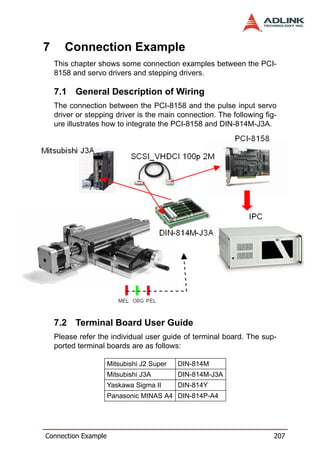
     7.2    Terminal Board User Guide ............................................. 207

Warranty Policy ................................................................... 209


iv                                                                                Table of Contents
List of Tables
   Table   1-1:   Available Terminal Boards ........................................ 8
   Table   2-1:   P1/P2 Pin Assignments .......................................... 13
   Table   2-2:   K1/K2 Pin Assignments .......................................... 14
   Table   2-3:   J1 to J16 Jumper Settings ...................................... 15
   Table   2-4:   S1 Switch Settings .................................................. 16
   Table   2-5:   P3 Manual Pulse .................................................... 17
   Table   3-1:   Pulse Output Signals OUT (P1) .............................. 20
   Table   3-2:   Pulse Output Signals OUT (P2) .............................. 21
   Table   3-3:   Output Signal .......................................................... 22
   Table   4-1:   Motion Interrupt Source Bit Settings ....................... 81
   Table   4-2:   Error Interrupt return codes .................................... 82
   Table   4-3:   GPIO Interrupt Source Bit Settings ......................... 83


List of Tables                                                                                  v
List of Figures
     Figure 1-1: Block Diagram of the PCI-8158 ................................. 2
     Figure 1-2: Flow chart for building an application ........................ 4
     Figure 2-1: PCB Layout of the PCI-8158 ................................... 10


vi                                                                   List of Figures
1      Introduction
    The PCI-8158 is an advanced & high-density 8-axis motion con-
    troller card with a PCI interface. It can generate high frequency
    pulses (6.55MHz) to drive stepper or servomotors. As a motion
    controller, it can provide 8-axis linear and circular interpolation and
    continuous interpolation for continuous velocity. Changing posi-
    tion/speed on the fly is also available with a single axis operation.
    Multiple PCI-8158 cards can be used in one system. Incremental
    encoder interfaces on all eight axes provide the ability to correct
    positioning errors generated by inaccurate mechanical transmis-
    sions.
    The PCI-8158 is a brand new design. The carrier board has 8-axis
    pulse train output control channels. For additional functions, such
    as high-speed triggering or distributed I/O control, users can add
    on daughter boards depending on requirements. The board has a
    position compare function. For line scan applications, a motion
    controller is needed to generate high speed triggering pulse and
    gain the high resolution images. In this situation, adopt a DB-8150
    to extend the function on PCI-8158. Not only designed for motion
    control, the sensors and actuator are also key elements in
    machine automation. Usually, I/O is needed to integrate the sen-
    sors and actuators in the controller. ADLINK also provides another
    way to connect these devices – distributed I/O. A daughter board
    can be used to achieve distributed I/O with the PCI-8158. This
    configuration can save the wiring effort and physical controller
    size, and is also cost-effective.
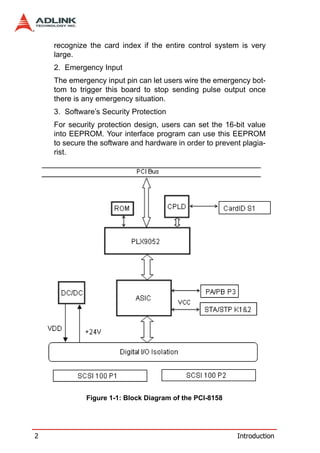
    Figure 1-1 shows the functional block diagram of the PCI-8158
    card. Motion control functions include trapezoidal and S-curve
    acceleration/deceleration, linear and circular interpolation between
    two axes and continuous motion positioning, and 13 home return
    modes. All these functions and complex computations are per-
    formed internally by the ASIC, saving CPU loading.
    The PCI-8158 also offers three user-friendly functions.
       1. Card Index Setting:
       PCI-8158 can assign the card index with the DIP switch setting.
       The value is within 0 to 15. It is useful for machine makers to


Introduction                                                                  1
recognize the card index if the entire control system is very
    large.
    2. Emergency Input
    The emergency input pin can let users wire the emergency bot-
    tom to trigger this board to stop sending pulse output once
    there is any emergency situation.
    3. Software’s Security Protection
    For security protection design, users can set the 16-bit value
    into EEPROM. Your interface program can use this EEPROM
    to secure the software and hardware in order to prevent plagia-
    rist.


             Figure 1-1: Block Diagram of the PCI-8158


2                                                         Introduction
MotionCreatorPro is a Windows-based application develop-
      ment software package included with the PCI-8158. Motion-
      CreatorPro is useful for debugging a motion control system
      during the design phase of a project. An on-screen display lists
      all installed axes information and I/O signal status of the PCI-
      8158.
      Windows programming libraries are also provided for C++
      compiler and Visual Basic. Sample programs are provided to
      illustrate the operations of the functions.


Introduction                                                             3
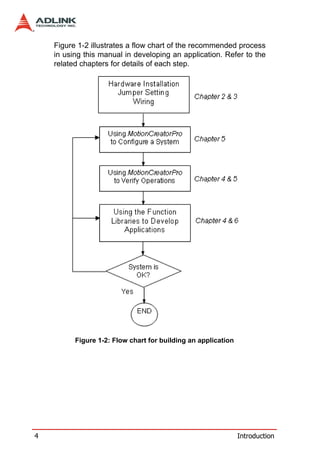
Figure 1-2 illustrates a flow chart of the recommended process
    in using this manual in developing an application. Refer to the
    related chapters for details of each step.


          Figure 1-2: Flow chart for building an application


4                                                              Introduction
1.1 Features
      The following list summarizes the main features of the PCI-
      8158 motion control system.
         32-bit PCI bus Plug and Play (Universal)
         8 axes of step and direction pulse output for controlling
         stepping or servomotor
         Maximum output frequency of 6.55 MPPS
         Pulse output options: OUT/DIR, CW/CCW
         Programmable acceleration and deceleration time for all
         modes
         Trapezoidal and S-curve velocity profiles for all modes
         2 to 4 axes linear interpolation
         2 axes circular interpolation
         Continuous interpolation for contour following motion
         Change position and speed on the fly
         13 home return modes with auto searching
         Hardware backlash compensator and vibration suppression
         2 software end-limits for each axis
         28-bit up/down counter for incremental encoder feedback
         Home switch, index signal (EZ), positive, and negative end
         limit switches interface on all axes
         8-axis high speed position latch input
         8-axis position compare and trigger output (Not for high
         speed. For high speed triggering output, users need to buy
         DB-8150 for extension.)
         All digital input and output signals are 2500Vrms isolated
         Programmable interrupt sources
         Simultaneous start/stop motion on multiple axes
         Manual pulse input interface
         Card index selection
         Security protection on EERPOM
         Dedicated emergency input pin for wiring
         Software supports a maximum of up to 12 PCI-8158 cards


Introduction                                                          5
operation in one system
        Compact PCB design
        Includes MotionCreatorPro, a Microsoft Windows-based
        application development software
        PCI-8158 libraries and utilities for Windows 2000/XP.

    1.2 Specifications
        Applicable Motors:
           Stepping motors
           AC or DC servomotors with pulse train input servo driv-
           ers
        Performance:
           Number of controllable axes: 8
           Maximum pulse output frequency: 6.55MPPS, linear,
           trapezoidal, or S-Curve velocity profile drive
           Internal reference clock: 19.66 MHz
           28-bit up/down counter range: 0-268,435,455 or –
           134,217,728 to +134,217,727
           Position pulse setting range (28-bit): -134,217,728 to
           +134,217,728
           Pulse rate setting range (Pulse Ratio = 1: 65535):
           0.1 PPS to 6553.5 PPS. (Multiplier = 0.1)
           1 PPS to 65535 PPS. (Multiplier = 1)


6                                                           Introduction
100 PPS to 6553500 PPS. (Multiplier = 100)
         I/O Signales:
               Input/Output signals for each axis
               All I/O signal are optically isolated with 2500Vrms isola-
               tion voltage
               Command pulse output pins: OUT and DIR
               Incremental encoder signals input pins: EA and EB
               Encoder index signal input pin: EZ
               Mechanical limit/home signal input pins: ±EL, ORG
               Composite pins: DI / LTC(Latch) / SD(Slow-down) /
               PCS(Position Change Signal) / CLR(Clear) /
               EMG(Emergency Input)
               Servomotor interface I/O pins: INP, ALM, and ERC
               General-purposed digital output pin: SVON, DO
               General-purposed digital input pin: RDY, GDI
               Pulse signal input pin: PA and PB (With Isolation)
               Simultaneous Start/Stop signal: STA and STP
         General Specifications
               Connectors: 68-pin SCSI-type connector
               Operating Temperature: 0°C - 50°C
               Storage Temperature: -20°C - 80°C
               Humidity: 5 - 85%, non-condensing
         Power Consumption
               Slot power supply (input): +5V DC ±5%, 900mA max
               External power supply (input): +24V DC ±5%, 500mA
               max
               External power supply (output): +5V DC ±5%, 500mA,
               max
         PCI-8158 Dimension (PCB size): 185mm(L) X 100 mm(W)


Introduction                                                                7
1.3 Supported Software

    1.3.1   Programming Library
      Windows 2000/XP DLLs are provided for the PCI-8158 users.
      These function libraries are shipped with the board.

    1.3.2   MotionCreatorPro
      This Windows-based utility is used to setup cards, motors, and
      systems. It can also aid in debugging hardware and software
      problems. It allows users to set I/O logic parameters to be
      loaded in their own program. This product is also bundled with
      the card.
      Refer to Chapter 5 for more details.

    1.4 Available Terminal Board
      ADLINK provides the servo & steppers use terminal board for
      easy connection. For steppers, we provide DIN-100S which is
      pin-to-pin terminal board. For servo users, ADLINK offers DIN-
      814M, DIN-814M-J3A, DIN-814Y and DIN-814P-A4. The suit-
      able servos are listed as follows:

                   Mitsubishi J2 Super       DIN-814M
                      Mitsubishi J3A     DIN-814M-J3A
                    Yaskawa Sigma II         DIN-814Y
                  Panasonic MINAS A4     DIN-814P-A4
                  Table 1-1: Available Terminal Boards


8                                                          Introduction
2      Installation
    This chapter describes how to install the PCI-8158. Please follow
    these steps below:
          Check what you have (Section 2.1)
          Check the PCB (Section 2.2)
          Install the hardware (Section 2.3)
          Install the software driver (Section 2.4)
          Understanding the I/O signal connections (Chapter 3) and
          their operation (Chapter 4)
          Understanding the connector pin assignments and wiring
          the connections (the remaining sections)

    2.1 Package Contents
    In addition to this User’s Guide, the package also includes the fol-
    lowing items:
          PCI-8158: advanced 8-axis Servo / Stepper Motion Control
          Card
          ADLINK All-in-one Compact Disc
    The terminal board is an optional accessory. This would not be
    included in PCI-8158 package.
    If any of these items are missing or damaged, contact the dealer
    from whom you purchased the product. Save the shipping materi-
    als and carton to ship or store the product in the future.


Installation                                                               9
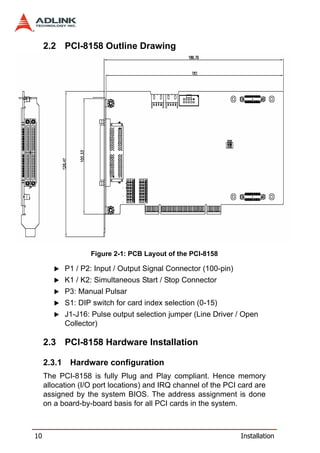
2.2 PCI-8158 Outline Drawing


                    Figure 2-1: PCB Layout of the PCI-8158

             P1 / P2: Input / Output Signal Connector (100-pin)
             K1 / K2: Simultaneous Start / Stop Connector
             P3: Manual Pulsar
             S1: DIP switch for card index selection (0-15)
             J1-J16: Pulse output selection jumper (Line Driver / Open
             Collector)

     2.3 PCI-8158 Hardware Installation

     2.3.1    Hardware configuration
     The PCI-8158 is fully Plug and Play compliant. Hence memory
     allocation (I/O port locations) and IRQ channel of the PCI card are
     assigned by the system BIOS. The address assignment is done
     on a board-by-board basis for all PCI cards in the system.


10                                                                Installation
2.3.2       PCI slot selection
   Your computer system may have both PCI and ISA slots. Do not
   force the PCI card into a PC/AT slot. The PCI-8158 can be used in
   any PCI slot.

   2.3.3       Installation Procedures
      1. Read through this manual and setup the jumper accord-
         ing to your application
      2. Turn off your computer. Turn off all accessories (printer,
         modem, monitor, etc.) connected to computer. Remove
         the cover from your computer.
      3. Select a 32-bit PCI expansion slot. PCI slots are shorter
         than ISA or EISA slots and are usually white or ivory.
      4. Before handling the PCI-8158, discharge any static
         buildup on your body by touching the metal case of the
         computer. Hold the edge of the card and do not touch
         the components.
      5. Position the board into the PCI slot you have selected.
      6. Secure the card in place at the rear panel of the system
         unit using screws removed from the slot.

   2.3.4       Troubleshooting
   If your system doesn’t boot or if you experience erratic operation
   with your PCI board in place, it’s most likely caused by an interrupt
   conflict (possibly an incorrect ISA setup). In general, the solution,
   once determined it is not a simple oversight, is to consult the BIOS
   documentation that comes with your system.
   Check the control panel of the Windows system if the card is listed
   by the system. If not, check the PCI settings in the BIOS or use
   another PCI slot.


Installation                                                               11
2.4 Software Driver Installation
       1. Auto run the ADLINK All-In-One CD. Choose Driver
          Installation -> Motion Control -> PCI-8158
       2. Follow the procedures of the installer.
       3. After setup installation is completed, restart windows.
     Note:   Please download the latest software from the ADLINK web-
             site if necessary.


12                                                              Installation
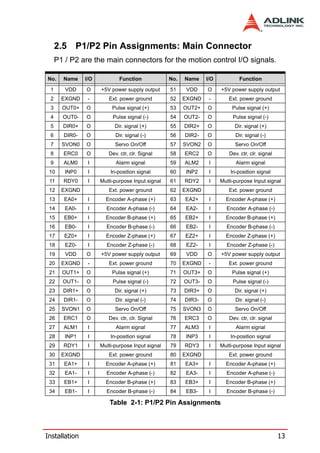
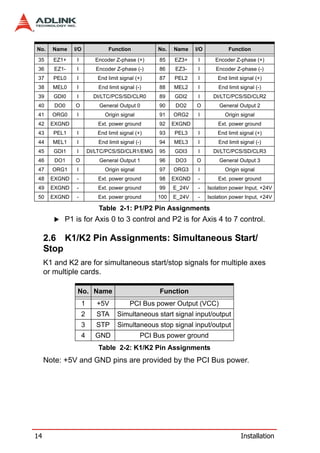
2.5 P1/P2 Pin Assignments: Main Connector
     P1 / P2 are the main connectors for the motion control I/O signals.

No.    Name    I/O           Function             No.   Name    I/O           Function

 1      VDD    O     +5V power supply output      51     VDD    O     +5V power supply output
 2     EXGND    -       Ext. power ground         52    EXGND    -       Ext. power ground
 3     OUT0+   O          Pulse signal (+)        53    OUT2+   O          Pulse signal (+)
 4     OUT0-   O          Pulse signal (-)        54    OUT2-   O          Pulse signal (-)
 5     DIR0+   O           Dir. signal (+)        55    DIR2+   O           Dir. signal (+)
 6     DIR0-   O           Dir. signal (-)        56    DIR2-   O           Dir. signal (-)
 7     SVON0   O           Servo On/Off           57    SVON2   O           Servo On/Off
 8     ERC0    O        Dev. ctr, clr. Signal     58    ERC2    O        Dev. ctr, clr. signal
 9     ALM0     I          Alarm signal           59    ALM2     I          Alarm signal
 10     INP0    I        In-position signal       60    INP2     I        In-position signal
 11    RDY0     I    Multi-purpose Input signal   61    RDY2     I    Multi-purpose Input signal
 12    EXGND            Ext. power ground         62    EXGND            Ext. power ground
 13     EA0+    I      Encoder A-phase (+)        63    EA2+     I      Encoder A-phase (+)
 14     EA0-    I      Encoder A-phase (-)        64    EA2-     I      Encoder A-phase (-)
 15     EB0+    I      Encoder B-phase (+)        65    EB2+     I      Encoder B-phase (+)
 16     EB0-    I      Encoder B-phase (-)        66    EB2-     I      Encoder B-phase (-)
 17     EZ0+    I      Encoder Z-phase (+)        67    EZ2+     I      Encoder Z-phase (+)
 18     EZ0-    I      Encoder Z-phase (-)        68    EZ2-     I      Encoder Z-phase (-)
 19     VDD    O     +5V power supply output      69     VDD    O     +5V power supply output
 20    EXGND    -       Ext. power ground         70    EXGND    -       Ext. power ground
 21    OUT1+   O          Pulse signal (+)        71    OUT3+   O          Pulse signal (+)
 22    OUT1-   O          Pulse signal (-)        72    OUT3-   O          Pulse signal (-)
 23    DIR1+   O           Dir. signal (+)        73    DIR3+   O           Dir. signal (+)
 24    DIR1-   O           Dir. signal (-)        74    DIR3-   O           Dir. signal (-)
 25    SVON1   O           Servo On/Off           75    SVON3   O           Servo On/Off
 26    ERC1    O        Dev. ctr, clr. Signal     76    ERC3    O        Dev. ctr, clr. signal
 27    ALM1     I          Alarm signal           77    ALM3     I          Alarm signal
 28     INP1    I        In-position signal       78    INP3     I        In-position signal
 29    RDY1     I    Multi-purpose Input signal   79    RDY3     I    Multi-purpose Input signal
 30    EXGND            Ext. power ground         80    EXGND            Ext. power ground
 31     EA1+    I      Encoder A-phase (+)        81    EA3+     I      Encoder A-phase (+)
 32     EA1-    I      Encoder A-phase (-)        82    EA3-     I      Encoder A-phase (-)
 33     EB1+    I      Encoder B-phase (+)        83    EB3+     I      Encoder B-phase (+)
 34     EB1-    I      Encoder B-phase (-)        84    EB3-     I      Encoder B-phase (-)

                         Table 2-1: P1/P2 Pin Assignments


Installation                                                                                     13
No.    Name    I/O              Function            No.   Name    I/O           Function

 35     EZ1+    I         Encoder Z-phase (+)       85    EZ3+     I       Encoder Z-phase (+)
 36     EZ1-    I          Encoder Z-phase (-)      86    EZ3-     I       Encoder Z-phase (-)
 37     PEL0    I          End limit signal (+)     87    PEL2     I        End limit signal (+)
 38    MEL0     I           End limit signal (-)    88    MEL2     I        End limit signal (-)
 39     GDI0    I         DI/LTC/PCS/SD/CLR0        89    GDI2     I      DI/LTC/PCS/SD/CLR2
 40     DO0    O            General Output 0        90     DO2    O         General Output 2
 41    ORG0     I              Origin signal        91    ORG2     I           Origin signal
 42    EXGND               Ext. power ground        92    EXGND             Ext. power ground
 43     PEL1    I          End limit signal (+)     93    PEL3     I        End limit signal (+)
 44    MEL1     I           End limit signal (-)    94    MEL3     I        End limit signal (-)
 45     GDI1    I       DI/LTC/PCS/SD/CLR1/EMG      95    GDI3     I      DI/LTC/PCS/SD/CLR3
 46     DO1    O            General Output 1        96     DO3    O         General Output 3
 47    ORG1     I              Origin signal        97    ORG3     I           Origin signal
 48    EXGND    -          Ext. power ground        98    EXGND    -        Ext. power ground
 49    EXGND    -          Ext. power ground        99    E_24V    -    Isolation power Input, +24V
 50    EXGND    -          Ext. power ground        100   E_24V    -    Isolation power Input, +24V

                            Table 2-1: P1/P2 Pin Assignments
           P1 is for Axis 0 to 3 control and P2 is for Axis 4 to 7 control.

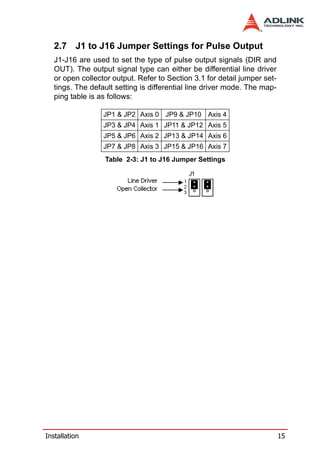
     2.6 K1/K2 Pin Assignments: Simultaneous Start/
     Stop
     K1 and K2 are for simultaneous start/stop signals for multiple axes
     or multiple cards.

                No. Name                            Function
                    1      +5V            PCI Bus power Output (VCC)
                    2      STA      Simultaneous start signal input/output
                    3      STP      Simultaneous stop signal input/output
                    4     GND                  PCI Bus power ground
                            Table 2-2: K1/K2 Pin Assignments
     Note: +5V and GND pins are provided by the PCI Bus power.


14                                                                                    Installation
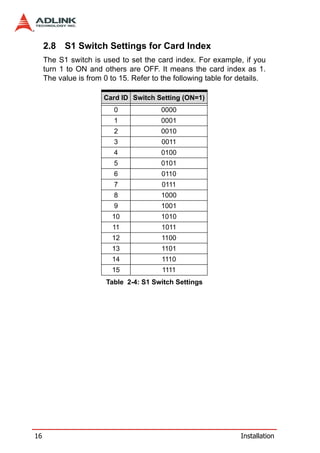
2.7 J1 to J16 Jumper Settings for Pulse Output
   J1-J16 are used to set the type of pulse output signals (DIR and
   OUT). The output signal type can either be differential line driver
   or open collector output. Refer to Section 3.1 for detail jumper set-
   tings. The default setting is differential line driver mode. The map-
   ping table is as follows:

                  JP1 & JP2 Axis 0 JP9 & JP10 Axis 4
                  JP3 & JP4 Axis 1 JP11 & JP12 Axis 5
                  JP5 & JP6 Axis 2 JP13 & JP14 Axis 6
                  JP7 & JP8 Axis 3 JP15 & JP16 Axis 7
                  Table 2-3: J1 to J16 Jumper Settings


Installation                                                               15
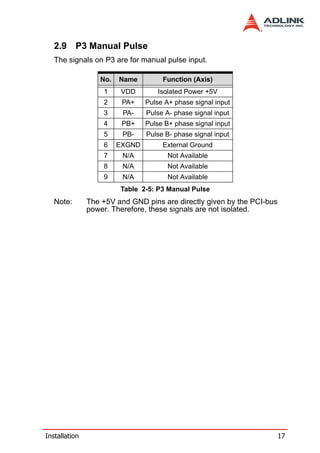
2.8 S1 Switch Settings for Card Index
     The S1 switch is used to set the card index. For example, if you
     turn 1 to ON and others are OFF. It means the card index as 1.
     The value is from 0 to 15. Refer to the following table for details.

                       Card ID Switch Setting (ON=1)
                          0              0000
                          1              0001
                          2              0010
                          3              0011
                          4              0100
                          5              0101
                          6              0110
                          7              0111
                          8              1000
                          9              1001
                          10             1010
                          11             1011
                          12             1100
                          13             1101
                          14             1110
                          15             1111
                        Table 2-4: S1 Switch Settings


16                                                               Installation
2.9 P3 Manual Pulse
   The signals on P3 are for manual pulse input.

                  No.   Name         Function (Axis)
                   1     VDD        Isolated Power +5V
                   2     PA+    Pulse A+ phase signal input
                   3     PA-    Pulse A- phase signal input
                   4     PB+    Pulse B+ phase signal input
                   5     PB-    Pulse B- phase signal input
                   6    EXGND        External Ground
                   7     N/A           Not Available
                   8     N/A           Not Available
                   9     N/A           Not Available
                        Table 2-5: P3 Manual Pulse
   Note:       The +5V and GND pins are directly given by the PCI-bus
               power. Therefore, these signals are not isolated.


Installation                                                            17
18   Installation
3      Signal Connections
    Signal connections of all I/O’s are described in this chapter. Refer
    to the contents of this chapter before wiring any cable between the
    PCI-8158 and any motor driver.
    This chapter contains the following sections:
    Section 3.1      Pulse Output Signals OUT and DIR
    Section 3.2      Encoder Feedback Signals EA, EB and EZ
    Section 3.3      Origin Signal ORG
    Section 3.4      End-Limit Signals PEL and MEL
    Section 3.5      In-position signals INP
    Section 3.6      Alarm signal ALM
    Section 3.7      Deviation counter clear signal ERC
    Section 3.8      general-purposed signals SVON
    Section 3.9      General-purposed signal RDY
    Section 3.10     Multifunction output pin: DO/CMP
    Section 3.11     Multifunction input signal DI/LTC/SD/PCS/CLR/EMG
    Section 3.12     Pulse input signals PA and PB
    Section 3.13     Simultaneous start/stop signals STA and STP
    Section 3.14     Termination Board


Signal Connections                                                         19
3.1 Pulse Output Signals OUT and DIR
     There are 8 axis pulse output signals on the PCI-8158. For each
     axis, two pairs of OUT and DIR differential signals are used to
     transmit the pulse train and indicate the direction. The OUT and
     DIR signals can also be programmed as CW and CCW signal
     pairs. Refer to Section 4.1.1 for details of the logical characteris-
     tics of the OUT and DIR signals. In this section, the electrical char-
     acteristics of the OUT and DIR signals are detailed. Each signal
     consists of a pair of differential signals. For example, OUT0 con-
     sists of OUT0+ and OUT0- signals. The following table shows all
     pulse output signals on P1.

             P1 Pin No. Signal Name        Description         Axis #
                  3         OUT0+        Pulse signals (+)       0
                  4          OUT0-       Pulse signals (-)       0
                  5          DIR0+      Direction signal (+)     0
                  6          DIR0-      Direction signal (-)     0
                 21         OUT1+        Pulse signals (+)       1
                 22          OUT1-       Pulse signals (-)       1
                 23          DIR1+      Direction signal (+)     1
                 24          DIR1-      Direction signal (-)     1
                 53         OUT2+        Pulse signals (+)       2
                 54          OUT2-       Pulse signals (-)       2
                 55          DIR2+      Direction signal (+)     2
                 56          DIR2-      Direction signal (-)     2
                 71         OUT3+        Pulse signals (+)       3
                 72          OUT3-       Pulse signals (-)       3
                 73          DIR3+      Direction signal (+)     3
                 74          DIR3-      Direction signal (-)     3
                  Table 3-1: Pulse Output Signals OUT (P1)


20                                                             Signal Connections
P2 Pin No. Signal Name          Description         Axis #
                 3             OUT4+      Pulse signals (+)       4
                 4             OUT4-      Pulse signals (-)       4
                 5             DIR4+     Direction signal (+)     4
                 6             DIR4-     Direction signal (-)     4
                 21            OUT5+      Pulse signals (+)       5
                 22            OUT5-      Pulse signals (-)       5
                 23            DIR5+     Direction signal (+)     5
                 24            DIR5-     Direction signal (-)     5
                 53            OUT6+      Pulse signals (+)       6
                 54            OUT6-      Pulse signals (-)       6
                 55            DIR6+     Direction signal (+)     6
                 56            DIR6-     Direction signal (-)     6
                 71            OUT7+      Pulse signals (+)       7
                 72            OUT7-      Pulse signals (-)       7
                 73            DIR7+     Direction signal (+)     7
                 74            DIR7-     Direction signal (-)     7
                  Table 3-2: Pulse Output Signals OUT (P2)
   The output of the OUT or DIR signals can be configured by jump-
   ers as either differential line drivers or open collector output. Users
   can select the output mode either by jumper wiring between 1 and
   2 or 2 and 3 of jumpers J1-J16 as follows:

Output   For differential line driver output,   For open collector output, close
Signal   close breaks between 1 and 2 of:         breaks between 2 and 3 of:
OUT0+                    J1                                      J1
DIR0+                    J9                                      J9
OUT1+                    J2                                      J2
DIR1+                    J10                                     J10
OUT2+                    J3                                      J3
DIR2+                    J11                                     J11
OUT3+                    J4                                      J4


 Signal Connections                                                          21
Output    For differential line driver output,   For open collector output, close
Signal    close breaks between 1 and 2 of:         breaks between 2 and 3 of:
DIR3+                     J12                                  J12
OUT4+                     J5                                    J5
DIR4+                     J13                                  J13
OUT5+                     J6                                    J6
DIR5+                     J14                                  J14
OUT6+                     J7                                    J7
DIR6+                     J15                                  J15
OUT7+                     J8                                    J8
DIR7+                     J16                                  J16
                            Table 3-3: Output Signal
      The default setting of OUT and DIR is set to differential line driver
      mode.
      The following wiring diagram is for OUT and DIR signals on the 2
      axes.


      NOTE:     If the pulse output is set to open collector output mode, OUT-
                and DIR- are used to transmit OUT and DIR signals. The
                sink current must not exceed 20mA on the OUT- and
                DIR- pins. The default setting is 1-2 shorted.


 22                                                          Signal Connections
Suggest Usage: Jumper 2-3 shorted and connect OUT-/DIR- to a
  470 ohm pulse input interface’s COM of driver. See the following
  figure. Choose OUT-/DIR- to connect to driver’s OUT/DIR


  Warning: The sink current must not exceed 20mA or the
  26LS31 will be damaged!

  3.2 Encoder Feedback Signals EA, EB and EZ
  The encoder feedback signals include EA, EB, and EZ. Every axis
  has six pins for three differential pairs of phase-A (EA), phase-B
  (EB), and index (EZ) inputs. EA and EB are used for position
  counting, and EZ is used for zero position indexing. Its relative sig-
  nal names, pin numbers, and axis numbers are shown in the fol-
  lowing tables:

    P1 Pin No Signal Name Axis # P1 Pin No Signal Name Axis #
        13           EA0+       0        14          EA0-         0
        15           EB0+       0        16          EB0-         0
        31           EA1+       1        32          EA1-         1
        33           EB1+       1        34          EB1-         1
        63           EA2+       2        64          EA2-         2
        65           EB2+       2        66          EB2-         2
        81           EA3+       3        82          EA3-         3
        83           EB3+       3        84          EB3-         3


Signal Connections                                                         23
P2 Pin No Signal Name Axis # P2 Pin No Signal Name Axis #
          13        EA4+        4        14        EA4-         4
          15        EB4+        4        16        EB4-         4
          31        EA5+        5        32        EA5-         5
          33        EB5+        5        34        EB5-         5
          63        EA6+        6        64        EA6-         6
          65        EB6+        6        66        EB6-         6
          81        EA7+        7        82        EA7-         7
          83        EB7+        7        84        EB7-         7


      P1 Pin No Signal Name Axis # P1 Pin No Signal Name Axis #
          17        EZ0+        0        18        EZ0-         0
          35        EZ1+        1        36        EZ1-         1
          67        EZ2+        2        68        EZ2-         2
          85        EZ3+        3        86        EZ3-         3


      P2 Pin No Signal Name Axis # P2 Pin No Signal Name Axis #
          17        EZ4+        4        18        EZ4-         4
          35        EZ5+        5        36        EZ5-         5
          67        EZ6+        6        68        EZ6-         6
          85        EZ7+        7        86        EZ7-         7
     The input circuit of the EA, EB, and EZ signals is shown as fol-
     lows:


24                                                     Signal Connections
Please note that the voltage across each differential pair of
  encoder input signals (EA+, EA-), (EB+, EB-), and (EZ+, EZ-)
  should be at least 3.5V. Therefore, the output current must be
  observed when connecting to the encoder feedback or motor
  driver feedback as not to over drive the source. The differential
  signal pairs are converted to digital signals EA, EB, and EZ; then
  feed to the motion control ASIC.
  Below are examples of connecting the input signals with an exter-
  nal circuit. The input circuit can be connected to an encoder or
  motor driver if it is equipped with: (1) a differential line driver or (2)
  an open collector output.

  3.2.1    Connection to Line Driver Output
  To drive the PCI-8158 encoder input, the driver output must pro-
  vide at least 3.5V across the differential pairs with at least 8mA
  driving capacity. The grounds of both sides must be tied together.
  The maximum frequency is 4Mhz or more depends on wiring dis-
  tance and signal conditioning.


  3.2.2    Connection to Open Collector Output
  To connect with an open collector output, an external power sup-
  ply is necessary. Some motor drivers can provide the power
  source. The connection between the PCI-8158, encoder, and the
  power supply is shown in the diagram below. Note that an external
  current limiting resistor R is necessary to protect the PCI-8158
  input circuit. The following table lists the suggested resistor values
  according to the encoder power supply.


Signal Connections                                                             25
Encoder Power (V) External Resistor R
                         +5V             0Ω(None)
                        +12V               1.5kΩ
                        +24V               3.0kΩ

     If = 8mA


     For more operation information on the encoder feedback signals,
     refer to Section 4.4.


26                                                    Signal Connections
3.3 Origin Signal ORG
  The origin signals (ORG0-ORG7) are used as input signals for the
  origin of the mechanism. The following table lists signal names,
  pin numbers, and axis numbers:

                     P1 Pin No Signal Name Axis #
                        41         ORG0          0
                        47         ORG1          1
                        91         ORG2          2
                        97         ORG3          3

                     P2 Pin No Signal Name Axis #
                        41         ORG4          4
                        47         ORG5          5
                        91         ORG6          6
                        97         ORG7          7
  The input circuit of the ORG signals is shown below. Usually, a
  limit switch is used to indicate the origin on one axis. The specifi-
  cations of the limit switch should have contact capacity of +24V @
  6mA minimum. An internal filter circuit is used to filter out any high
  frequency spikes, which may cause errors in the operation.


  When the motion controller is operated in the home return mode,
  the ORG signal is used to inhibit the control output signals (OUT
  and DIR). For detailed operations of the ORG signal, refer to Sec-
  tion 4.3.3.


Signal Connections                                                         27
3.4 End-Limit Signals PEL and MEL
     There are two end-limit signals PEL and MEL for each axis. PEL
     indicates the end limit signal is in the plus direction and MEL indi-
     cates the end limit signal is in the minus direction. The signal
     names, pin numbers, and axis numbers are shown in the table
     below:

      P1 Pin No Signal Name Axis # P1 Pin No Signal Name Axis #
          37          PEL0        0        38          MEL0         0
          43          PEL1        1        44          MEL1         1
          87          PEL2        2        88          MEL2         2
          93          PEL3        3        94          MEL3         3

      P2 Pin No Signal Name Axis # P2 Pin No Signal Name Axis #
          37          PEL4        4        38          MEL4         4
          43          PEL5        5        44          MEL5         5
          87          PEL6        6        88          MEL6         6
          93          PEL7        7        94          MEL7         7
     A circuit diagram is shown in the diagram below. The external limit
     switch should have a contact capacity of +24V @ 8mA minimum.
     Either ‘A-type’ (normal open) contact or ‘B-type’ (normal closed)
     contact switches can be used. To set the active logic of the exter-
     nal limit signal, please refer to the explanation of
     _8158_set_limit_logic function.


28                                                         Signal Connections
3.5 In-position Signal INP
  The in-position signal INP from a servo motor driver indicates its
  deviation error. If there is no deviation error then the servo’s posi-
  tion indicates zero. The signal names, pin numbers, and axis
  numbers are shown in the table below:

                     P1 Pin No Signal Name Axis #
                        10          INP0         0
                        28          INP1         1
                        60          INP2         2
                        78          INP3         3

                     P2 Pin No Signal Name Axis #
                        10          INP4         4
                        28          INP5         5
                        60          INP6         6
                        78          INP7         7
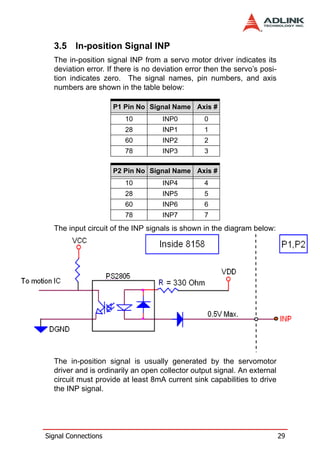
  The input circuit of the INP signals is shown in the diagram below:


  The in-position signal is usually generated by the servomotor
  driver and is ordinarily an open collector output signal. An external
  circuit must provide at least 8mA current sink capabilities to drive
  the INP signal.


Signal Connections                                                         29
3.6 Alarm Signal ALM
     The alarm signal ALM is used to indicate the alarm status from the
     servo driver. The signal names, pin numbers, and axis numbers
     are shown in the table below:

                       P1 Pin No Signal Name Axis #
                           9         ALM0         0
                          27         ALM1         1
                          59         ALM2         2
                          77         ALM3         3

                       P2 Pin No Signal Name Axis #
                           9         ALM4         4
                          27         ALM5         5
                          59         ALM6         6
                          77         ALM7         7
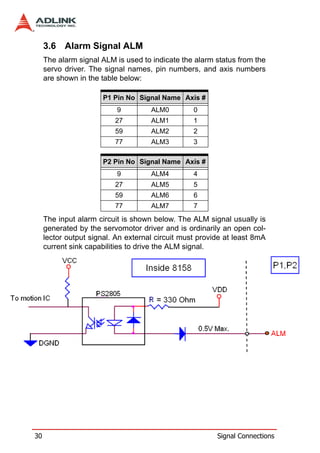
     The input alarm circuit is shown below. The ALM signal usually is
     generated by the servomotor driver and is ordinarily an open col-
     lector output signal. An external circuit must provide at least 8mA
     current sink capabilities to drive the ALM signal.


30                                                       Signal Connections
3.7 Deviation Counter Clear Signal ERC
  The deviation counter clear signal (ERC) is active in the following
  4 situations:
      1. Home return is complete
      2. End-limit switch is active
      3. An alarm signal stops OUT and DIR signals
      4. An emergency stop command is issued by software
         (operator)
  The signal names, pin numbers, and axis numbers are shown in
  the table below:

                     P1 Pin No Signal Name Axis #
                         8            ERC0     0
                        26            ERC1     1
                        58            ERC2     2
                        76            ERC3     3

                     P2 Pin No Signal Name Axis #
                         8            ERC4     4
                        26            ERC5     5
                        58            ERC6     6
                        76            ERC7     7
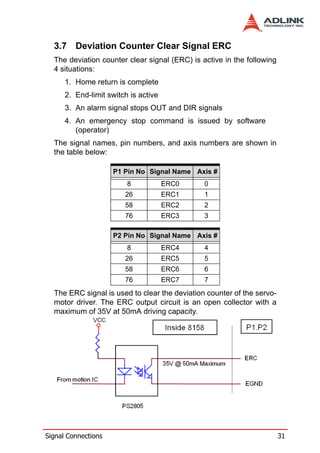
  The ERC signal is used to clear the deviation counter of the servo-
  motor driver. The ERC output circuit is an open collector with a
  maximum of 35V at 50mA driving capacity.


Signal Connections                                                      31
3.8 General-purpose Signal SVON
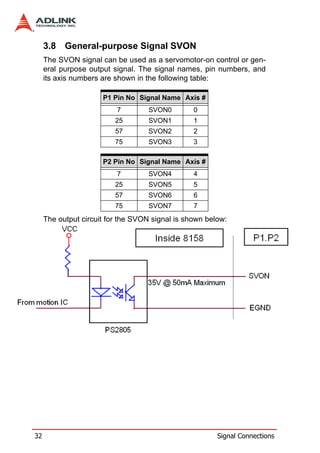
     The SVON signal can be used as a servomotor-on control or gen-
     eral purpose output signal. The signal names, pin numbers, and
     its axis numbers are shown in the following table:

                      P1 Pin No Signal Name Axis #
                          7        SVON0         0
                          25       SVON1         1
                          57       SVON2         2
                          75       SVON3         3

                      P2 Pin No Signal Name Axis #
                          7        SVON4         4
                          25       SVON5         5
                          57       SVON6         6
                          75       SVON7         7
     The output circuit for the SVON signal is shown below:


32                                                      Signal Connections
3.9 General-purpose Signal RDY
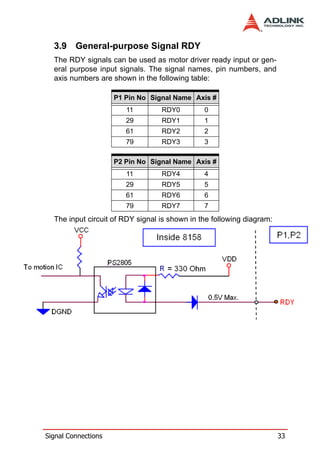
  The RDY signals can be used as motor driver ready input or gen-
  eral purpose input signals. The signal names, pin numbers, and
  axis numbers are shown in the following table:

                     P1 Pin No Signal Name Axis #
                        11        RDY0         0
                        29        RDY1         1
                        61        RDY2         2
                        79        RDY3         3

                     P2 Pin No Signal Name Axis #
                        11        RDY4         4
                        29        RDY5         5
                        61        RDY6         6
                        79        RDY7         7
  The input circuit of RDY signal is shown in the following diagram:


Signal Connections                                                     33
3.10 Multi-Functional output pin: DO/CMP
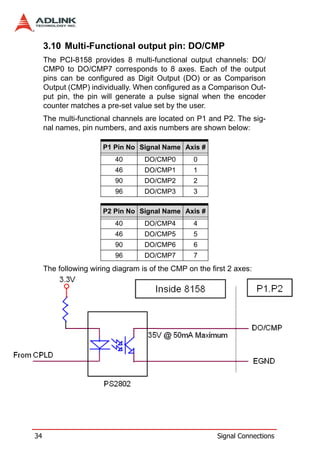
     The PCI-8158 provides 8 multi-functional output channels: DO/
     CMP0 to DO/CMP7 corresponds to 8 axes. Each of the output
     pins can be configured as Digit Output (DO) or as Comparison
     Output (CMP) individually. When configured as a Comparison Out-
     put pin, the pin will generate a pulse signal when the encoder
     counter matches a pre-set value set by the user.
     The multi-functional channels are located on P1 and P2. The sig-
     nal names, pin numbers, and axis numbers are shown below:

                       P1 Pin No Signal Name Axis #
                          40       DO/CMP0        0
                          46       DO/CMP1        1
                          90       DO/CMP2        2
                          96       DO/CMP3        3

                       P2 Pin No Signal Name Axis #
                          40       DO/CMP4        4
                          46       DO/CMP5        5
                          90       DO/CMP6        6
                          96       DO/CMP7        7
     The following wiring diagram is of the CMP on the first 2 axes:


34                                                       Signal Connections
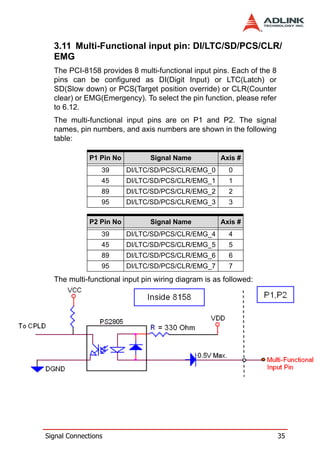
3.11 Multi-Functional input pin: DI/LTC/SD/PCS/CLR/
  EMG
  The PCI-8158 provides 8 multi-functional input pins. Each of the 8
  pins can be configured as DI(Digit Input) or LTC(Latch) or
  SD(Slow down) or PCS(Target position override) or CLR(Counter
  clear) or EMG(Emergency). To select the pin function, please refer
  to 6.12.
  The multi-functional input pins are on P1 and P2. The signal
  names, pin numbers, and axis numbers are shown in the following
  table:

             P1 Pin No         Signal Name           Axis #
                 39      DI/LTC/SD/PCS/CLR/EMG_0       0
                 45      DI/LTC/SD/PCS/CLR/EMG_1       1
                 89      DI/LTC/SD/PCS/CLR/EMG_2       2
                 95      DI/LTC/SD/PCS/CLR/EMG_3       3

             P2 Pin No         Signal Name           Axis #
                 39      DI/LTC/SD/PCS/CLR/EMG_4       4
                 45      DI/LTC/SD/PCS/CLR/EMG_5       5
                 89      DI/LTC/SD/PCS/CLR/EMG_6       6
                 95      DI/LTC/SD/PCS/CLR/EMG_7       7
  The multi-functional input pin wiring diagram is as followed:


Signal Connections                                                     35
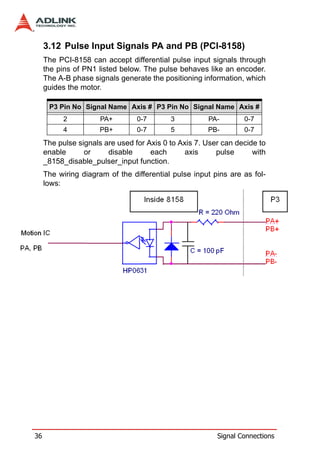
3.12 Pulse Input Signals PA and PB (PCI-8158)
     The PCI-8158 can accept differential pulse input signals through
     the pins of PN1 listed below. The pulse behaves like an encoder.
     The A-B phase signals generate the positioning information, which
     guides the motor.

      P3 Pin No Signal Name Axis # P3 Pin No Signal Name Axis #
           2          PA+        0-7       3          PA-        0-7
           4          PB+        0-7       5          PB-        0-7
     The pulse signals are used for Axis 0 to Axis 7. User can decide to
     enable      or     disable      each       axis     pulse      with
     _8158_disable_pulser_input function.
     The wiring diagram of the differential pulse input pins are as fol-
     lows:


36                                                       Signal Connections
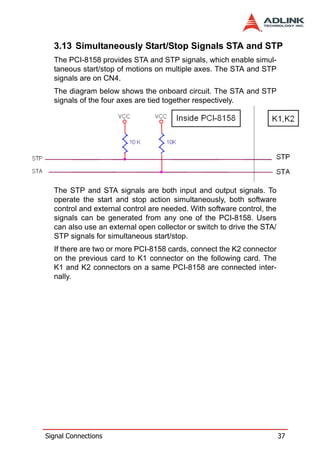
3.13 Simultaneously Start/Stop Signals STA and STP
  The PCI-8158 provides STA and STP signals, which enable simul-
  taneous start/stop of motions on multiple axes. The STA and STP
  signals are on CN4.
  The diagram below shows the onboard circuit. The STA and STP
  signals of the four axes are tied together respectively.


  The STP and STA signals are both input and output signals. To
  operate the start and stop action simultaneously, both software
  control and external control are needed. With software control, the
  signals can be generated from any one of the PCI-8158. Users
  can also use an external open collector or switch to drive the STA/
  STP signals for simultaneous start/stop.
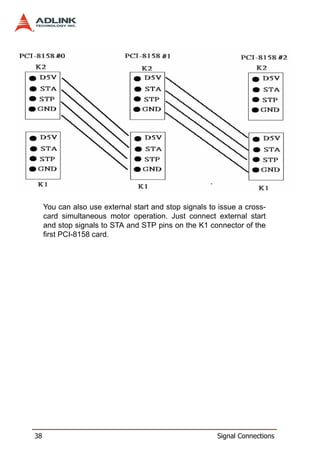
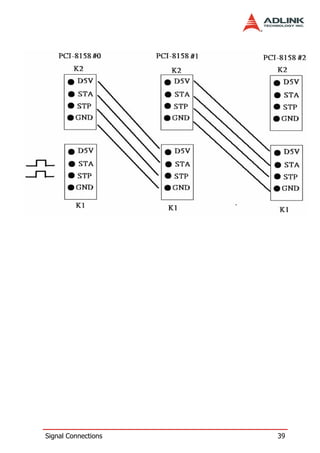
  If there are two or more PCI-8158 cards, connect the K2 connector
  on the previous card to K1 connector on the following card. The
  K1 and K2 connectors on a same PCI-8158 are connected inter-
  nally.


Signal Connections                                                      37
You can also use external start and stop signals to issue a cross-
     card simultaneous motor operation. Just connect external start
     and stop signals to STA and STP pins on the K1 connector of the
     first PCI-8158 card.


38                                                      Signal Connections
Signal Connections   39
40   Signal Connections
4      Operation Theory
    This chapter describes the detail operation of the motion controller
    card. Contents of the following sections are as follows:
    Section 4.1:    Classifications of Motion Controller
    Section 4.2:    Motion Control Modes
    Section 4.3:    Motor Driver Interface
    Section 4.4:    Mechanical switch Interface
    Section 4.5:    The Counters
    Section 4.6:    The Comparators
    Section 4.7:    Other Motion Functions
    Section 4.8:    Interrupt Control
    Section 4.9:    Multiple Cards Operation

    4.1 Classifications of Motion Controller
    When servo/stepper drivers were first introduced, motor control
    was separated into two layers: motor control and motion control.
    Motor control relates to PWM, power stage, closed loop, hall sen-
    sors, vector space, etc. Motion control refers to speed profile gen-
    erating, trajectory following, multi-axes synchronization, and
    coordinating.

    4.1.1   Voltage type motion control Interface
    The interfaces between motion and motor control are changing
    rapidly. From the early years, voltage signals were used as a com-
    mand to motor controller. The amplitude of the signal means how
    fast a motor rotating and the time duration of the voltage changes
    means how fast a motor acceleration from one speed to the other
    speed. Voltage signal as a command to motor driver is so called
    “analog” type motion controller. It is much easier to integrate into
    an analog circuit of motor controller. However, sometimes noise is
    a big issue for this type of motion control. Besides, if you want to
    do positioning control of a motor, the analog type motion controller
    must have a feedback signal of position information and use a
    closed loop control algorithm to make it possible. This increased
    the complexity of motion control.


Operation Theory                                                           41
4.1.2   Pulse type motion control Interface
     The second motion and motor control interface type of is pulses
     train. As a trend of digital world, pulse train types represents a new
     concept to motion control. The counts of pulses show how many
     steps of a motor rotates and the frequency of pulses show how
     fast a motor runs. The time duration of frequency changes repre-
     sent the acceleration rate of a motor. Because of this interface,
     users can control a servo or stepper motor more easier than ana-
     log type for positioning applications. It means that motion and
     motor control can be separated more easily by this way.
     Both of these two interfaces need to take care of gains tuning. For
     analog position controllers, the control loops are built inside and
     users must tune the gain from the controller. For pulses type posi-
     tion controller, the control loops are built outside on the motor driv-
     ers and users must tune the gains on drivers.
     For the operation of more than one axes, motion control seems
     more important than motor control. In industrial applications, reli-
     able is a very important factor. Motor driver vendors make good
     performing products and a motion controller vendors make power-
     ful and variety motion software. Integrated two products make our
     machine go into perfect.

     4.1.3   Network type motion control Interface
     Network motion controllers were recently introduced. The com-
     mand between motor driver and motion controller is not analog or
     pulses signal anymore; it is a network packet which contents posi-
     tion information and motor information. This type of controller is
     more reliable because it is digitized and packetized. Because a
     motion controller must be real-time, the network must have real-
     time capacity around a cycle time below 1 ms. Mitsubishi’s SSC-
     NET network is one type of network that can meet such speed
     requirements.

     4.1.4   Software real-time motion control kernel
     There are three methods used for motion control kernels: DSP-
     based, ASIC based, and software real-time based.


42                                                           Operation Theory
A motion control system needs an absolutely real-time control
  cycle and the calculation on controller must provide a control data
  at the same cycle. If not, the motor will not run smoothly. This is
  typically accomplished by using the PC’s computing power and by
  a simple a feedback counter card and a voltage output or pulse
  output card. This method is very low-end but requires extensive
  software development. To ensure real-time performance, real-time
  software will be used on the system. This increases the complexity
  of the system, but this method is the most flexible way for a profes-
  sional motion control designers. Most of these methods are on NC
  machines.

  4.1.5   DSP based motion control kernel
  A DSP-based motion controller kernel solves real-time software
  problems on computer. A DSP is a micro-processor and all motion
  control calculations can be done on it. There is no real-time soft-
  ware problem because DSP has its own OS to arrange all the pro-
  cedures. There is no interruption from other inputs or context
  switching problem like Windows based computer. Although it has
  such a perfect performance on real-time requirements, its calcula-
  tion speed is not as fast as PC’s CPU at this age. The software
  interfacing between DSP based controller’s vendors and users are
  not easy to use. Some controller vendors provide some kind of
  assembly languages for users to learn and some controller ven-
  dors provide only a handshake documents for users to use. Both
  ways are not easy to use. Naturally, DSP based controller provide
  a better way than software kernel for machine makers to build
  applications.

  4.1.6   ASIC based motion control kernel
  An ASIC-base motion control kernel is quite a bit different than
  software and DSP kernels. It has no real-time problem because all
  motion functions are done via ASIC. Users or controller vendors
  just need to set some parameters which ASIC requires and the
  motion control will be done easily. This kind of motion control sep-
  arates all system integration problems into 4 parts: motor driver’s
  performance, ASIC outputting profile, vendor’s software parame-
  ters to ASIC, and users’ command to vendors’ software. It makes
  motion controller co-operated more smoothly between devices.


Operation Theory                                                          43
4.1.7   Compare Table of all motion control types

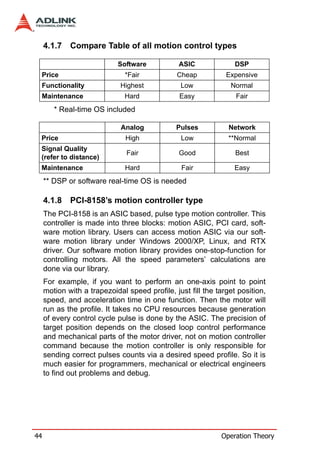
                            Software            ASIC              DSP
 Price                         *Fair           Cheap           Expensive
 Functionality               Highest            Low             Normal
 Maintenance                   Hard             Easy              Fair
        * Real-time OS included

                             Analog            Pulses           Network
 Price                         High             Low             **Normal
 Signal Quality
                               Fair             Good              Best
 (refer to distance)
 Maintenance                   Hard              Fair             Easy
     ** DSP or software real-time OS is needed

     4.1.8   PCI-8158’s motion controller type
     The PCI-8158 is an ASIC based, pulse type motion controller. This
     controller is made into three blocks: motion ASIC, PCI card, soft-
     ware motion library. Users can access motion ASIC via our soft-
     ware motion library under Windows 2000/XP, Linux, and RTX
     driver. Our software motion library provides one-stop-function for
     controlling motors. All the speed parameters’ calculations are
     done via our library.
     For example, if you want to perform an one-axis point to point
     motion with a trapezoidal speed profile, just fill the target position,
     speed, and acceleration time in one function. Then the motor will
     run as the profile. It takes no CPU resources because generation
     of every control cycle pulse is done by the ASIC. The precision of
     target position depends on the closed loop control performance
     and mechanical parts of the motor driver, not on motion controller
     command because the motion controller is only responsible for
     sending correct pulses counts via a desired speed profile. So it is
     much easier for programmers, mechanical or electrical engineers
     to find out problems and debug.


44                                                           Operation Theory
4.2 Motion Control Modes
  Motor control is not only for positive or negative moving, motion
  control can make the motors run according to a specific speed
  profile, path trajectory and synchronous condition with other axes.
  The following sections describe the motion control modes of this
  motion controller could be performed.

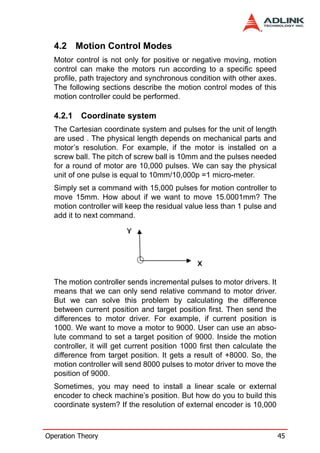
  4.2.1   Coordinate system
  The Cartesian coordinate system and pulses for the unit of length
  are used . The physical length depends on mechanical parts and
  motor’s resolution. For example, if the motor is installed on a
  screw ball. The pitch of screw ball is 10mm and the pulses needed
  for a round of motor are 10,000 pulses. We can say the physical
  unit of one pulse is equal to 10mm/10,000p =1 micro-meter.
  Simply set a command with 15,000 pulses for motion controller to
  move 15mm. How about if we want to move 15.0001mm? The
  motion controller will keep the residual value less than 1 pulse and
  add it to next command.


  The motion controller sends incremental pulses to motor drivers. It
  means that we can only send relative command to motor driver.
  But we can solve this problem by calculating the difference
  between current position and target position first. Then send the
  differences to motor driver. For example, if current position is
  1000. We want to move a motor to 9000. User can use an abso-
  lute command to set a target position of 9000. Inside the motion
  controller, it will get current position 1000 first then calculate the
  difference from target position. It gets a result of +8000. So, the
  motion controller will send 8000 pulses to motor driver to move the
  position of 9000.
  Sometimes, you may need to install a linear scale or external
  encoder to check machine’s position. But how do you to build this
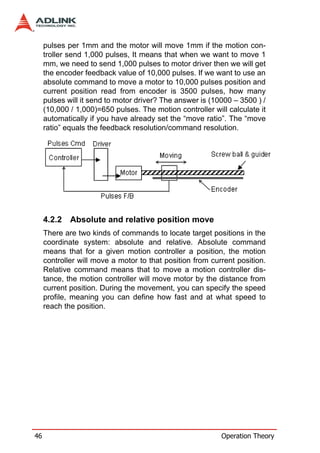
  coordinate system? If the resolution of external encoder is 10,000


Operation Theory                                                           45
pulses per 1mm and the motor will move 1mm if the motion con-
     troller send 1,000 pulses, It means that when we want to move 1
     mm, we need to send 1,000 pulses to motor driver then we will get
     the encoder feedback value of 10,000 pulses. If we want to use an
     absolute command to move a motor to 10,000 pulses position and
     current position read from encoder is 3500 pulses, how many
     pulses will it send to motor driver? The answer is (10000 – 3500 ) /
     (10,000 / 1,000)=650 pulses. The motion controller will calculate it
     automatically if you have already set the “move ratio”. The “move
     ratio” equals the feedback resolution/command resolution.


     4.2.2   Absolute and relative position move
     There are two kinds of commands to locate target positions in the
     coordinate system: absolute and relative. Absolute command
     means that for a given motion controller a position, the motion
     controller will move a motor to that position from current position.
     Relative command means that to move a motion controller dis-
     tance, the motion controller will move motor by the distance from
     current position. During the movement, you can specify the speed
     profile, meaning you can define how fast and at what speed to
     reach the position.


46                                                         Operation Theory
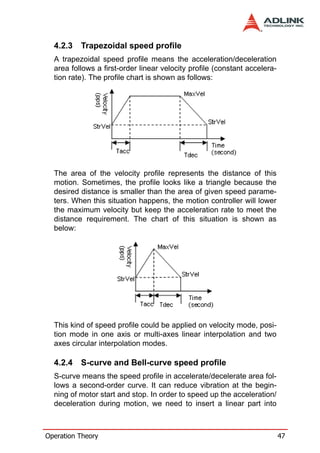
4.2.3   Trapezoidal speed profile
  A trapezoidal speed profile means the acceleration/deceleration
  area follows a first-order linear velocity profile (constant accelera-
  tion rate). The profile chart is shown as follows:


  The area of the velocity profile represents the distance of this
  motion. Sometimes, the profile looks like a triangle because the
  desired distance is smaller than the area of given speed parame-
  ters. When this situation happens, the motion controller will lower
  the maximum velocity but keep the acceleration rate to meet the
  distance requirement. The chart of this situation is shown as
  below:


  This kind of speed profile could be applied on velocity mode, posi-
  tion mode in one axis or multi-axes linear interpolation and two
  axes circular interpolation modes.

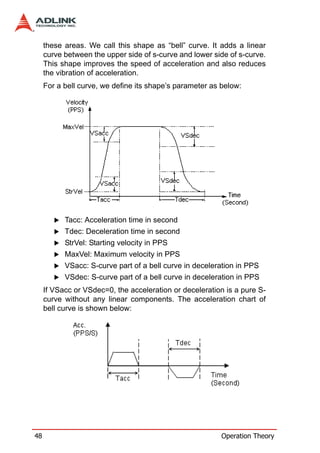
  4.2.4   S-curve and Bell-curve speed profile
  S-curve means the speed profile in accelerate/decelerate area fol-
  lows a second-order curve. It can reduce vibration at the begin-
  ning of motor start and stop. In order to speed up the acceleration/
  deceleration during motion, we need to insert a linear part into


Operation Theory                                                           47
these areas. We call this shape as “bell” curve. It adds a linear
     curve between the upper side of s-curve and lower side of s-curve.
     This shape improves the speed of acceleration and also reduces
     the vibration of acceleration.
     For a bell curve, we define its shape’s parameter as below:


           Tacc: Acceleration time in second
           Tdec: Deceleration time in second
           StrVel: Starting velocity in PPS
           MaxVel: Maximum velocity in PPS
           VSacc: S-curve part of a bell curve in deceleration in PPS
           VSdec: S-curve part of a bell curve in deceleration in PPS
     If VSacc or VSdec=0, the acceleration or deceleration is a pure S-
     curve without any linear components. The acceleration chart of
     bell curve is shown below:


48                                                        Operation Theory
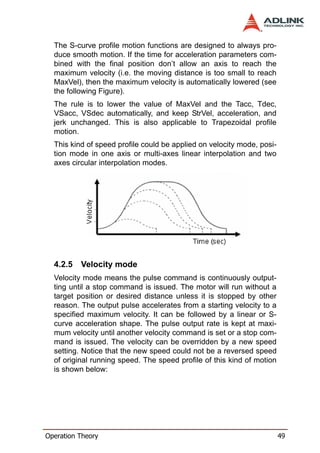
The S-curve profile motion functions are designed to always pro-
  duce smooth motion. If the time for acceleration parameters com-
  bined with the final position don’t allow an axis to reach the
  maximum velocity (i.e. the moving distance is too small to reach
  MaxVel), then the maximum velocity is automatically lowered (see
  the following Figure).
  The rule is to lower the value of MaxVel and the Tacc, Tdec,
  VSacc, VSdec automatically, and keep StrVel, acceleration, and
  jerk unchanged. This is also applicable to Trapezoidal profile
  motion.
  This kind of speed profile could be applied on velocity mode, posi-
  tion mode in one axis or multi-axes linear interpolation and two
  axes circular interpolation modes.


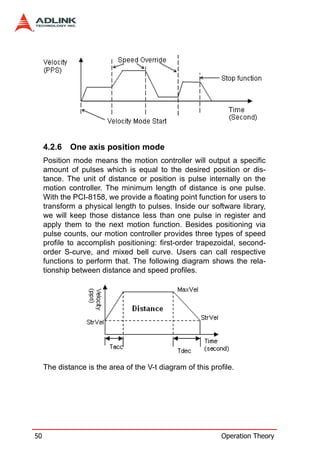
  4.2.5   Velocity mode
  Velocity mode means the pulse command is continuously output-
  ting until a stop command is issued. The motor will run without a
  target position or desired distance unless it is stopped by other
  reason. The output pulse accelerates from a starting velocity to a
  specified maximum velocity. It can be followed by a linear or S-
  curve acceleration shape. The pulse output rate is kept at maxi-
  mum velocity until another velocity command is set or a stop com-
  mand is issued. The velocity can be overridden by a new speed
  setting. Notice that the new speed could not be a reversed speed
  of original running speed. The speed profile of this kind of motion
  is shown below:


Operation Theory                                                        49
4.2.6   One axis position mode
     Position mode means the motion controller will output a specific
     amount of pulses which is equal to the desired position or dis-
     tance. The unit of distance or position is pulse internally on the
     motion controller. The minimum length of distance is one pulse.
     With the PCI-8158, we provide a floating point function for users to
     transform a physical length to pulses. Inside our software library,
     we will keep those distance less than one pulse in register and
     apply them to the next motion function. Besides positioning via
     pulse counts, our motion controller provides three types of speed
     profile to accomplish positioning: first-order trapezoidal, second-
     order S-curve, and mixed bell curve. Users can call respective
     functions to perform that. The following diagram shows the rela-
     tionship between distance and speed profiles.


     The distance is the area of the V-t diagram of this profile.


50                                                           Operation Theory
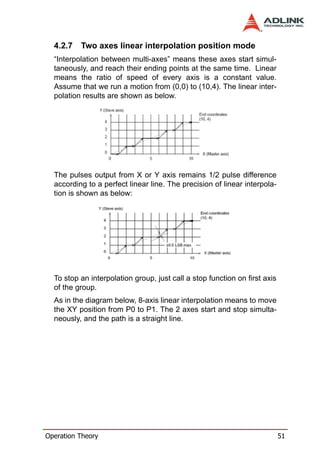
4.2.7   Two axes linear interpolation position mode
  “Interpolation between multi-axes” means these axes start simul-
  taneously, and reach their ending points at the same time. Linear
  means the ratio of speed of every axis is a constant value.
  Assume that we run a motion from (0,0) to (10,4). The linear inter-
  polation results are shown as below.


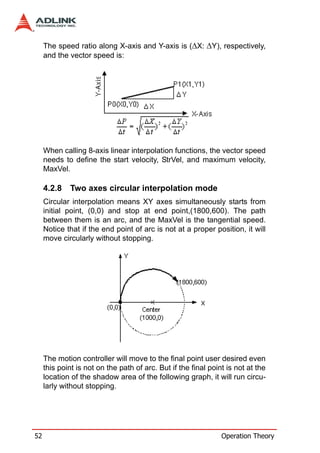
  The pulses output from X or Y axis remains 1/2 pulse difference
  according to a perfect linear line. The precision of linear interpola-
  tion is shown as below:


  To stop an interpolation group, just call a stop function on first axis
  of the group.
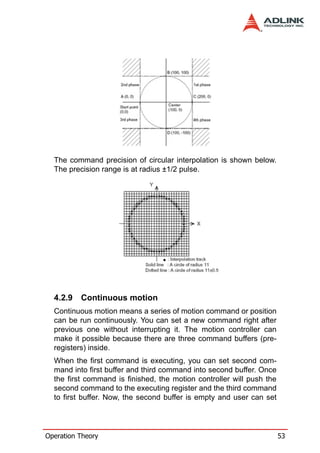
  As in the diagram below, 8-axis linear interpolation means to move
  the XY position from P0 to P1. The 2 axes start and stop simulta-
  neously, and the path is a straight line.


Operation Theory                                                            51
The speed ratio along X-axis and Y-axis is (∆X: ∆Y), respectively,
     and the vector speed is:


     When calling 8-axis linear interpolation functions, the vector speed
     needs to define the start velocity, StrVel, and maximum velocity,
     MaxVel.

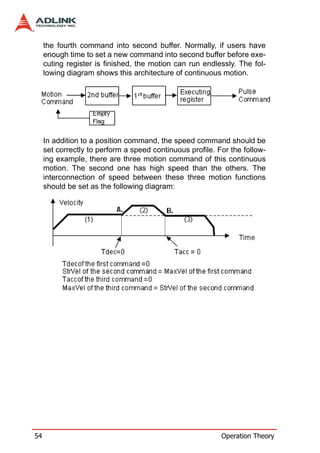
     4.2.8   Two axes circular interpolation mode
     Circular interpolation means XY axes simultaneously starts from
     initial point, (0,0) and stop at end point,(1800,600). The path
     between them is an arc, and the MaxVel is the tangential speed.
     Notice that if the end point of arc is not at a proper position, it will
     move circularly without stopping.


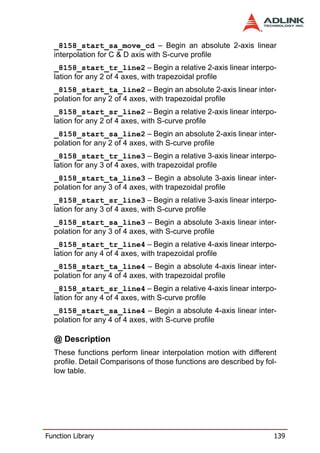
     The motion controller will move to the final point user desired even
     this point is not on the path of arc. But if the final point is not at the
     location of the shadow area of the following graph, it will run circu-
     larly without stopping.


52                                                              Operation Theory
The command precision of circular interpolation is shown below.
  The precision range is at radius ±1/2 pulse.


  4.2.9   Continuous motion
  Continuous motion means a series of motion command or position
  can be run continuously. You can set a new command right after
  previous one without interrupting it. The motion controller can
  make it possible because there are three command buffers (pre-
  registers) inside.
  When the first command is executing, you can set second com-
  mand into first buffer and third command into second buffer. Once
  the first command is finished, the motion controller will push the
  second command to the executing register and the third command
  to first buffer. Now, the second buffer is empty and user can set


Operation Theory                                                       53
the fourth command into second buffer. Normally, if users have
     enough time to set a new command into second buffer before exe-
     cuting register is finished, the motion can run endlessly. The fol-
     lowing diagram shows this architecture of continuous motion.


     In addition to a position command, the speed command should be
     set correctly to perform a speed continuous profile. For the follow-
     ing example, there are three motion command of this continuous
     motion. The second one has high speed than the others. The
     interconnection of speed between these three motion functions
     should be set as the following diagram:


54                                                         Operation Theory
If the speed value of the second command is less than the others,
  the settings would be like the following diagram:


  For 8-axis continuous arc interpolation, it is the same concept. You
  can set the speed matched between the speed settings of two
  commands.


  If the INP checking is enabled, the motion will have some delayed
  between each command in buffers. INP check enabled makes the
  desired point be reached but reduces the smoothing between
  each command. Turn INP checking off, if you don’t need this delay
  and need smooth motion.

  4.2.10 Home Return Mode
  Home return means to search for a zero position point on the coor-
  dinate. Sometimes, you use a ORG, EZ or EL pin as a zero posi-
  tion on the coordinate. During system power-on, the program


Operation Theory                                                         55
needs to find a zero point of this machine. Our motion controller
     provides a home return mode to make it.
     We have many home modes and each mode contents many con-
     trol phases. All of these phases are done by the ASIC. No soft-
     ware is needed or CPU loading will be taken. After home return is
     completed, the target counter will be reset to zero at the desired
     condition of home mode, such as a raising edge when ORG input.
     Sometimes, the motion controller will still output pulses to make
     machine show down after resetting the counter. When the motor
     stops, the counter may not be at zero point but the home return
     procedure is finished. The counter value you see is a reference
     position from machine’s zero point already.
     The following figures show the various home modes: R means
     counter reset (command and position counter) and E means ERC
     signal output.


56                                                       Operation Theory
Operation Theory   57
58   Operation Theory
Operation Theory   59
60   Operation Theory
Operation Theory   61
62   Operation Theory
4.2.11 Home Search Function
  This mode is used to add auto searching function on normal home
  return mode described in previous section no matter which posi-
  tion the axis is. The following diagram shows an example for home
  mode 2 via home search function. The ORG offset can’t be zero.
  The suggested value is the double length of ORG area.


Operation Theory                                                      63
4.2.12 Manual Pulse Function
     The manual pulse is a device to generate pulse trains by hand.
     The pulses are sent to motion controller and re-directed to pulse
     output pins. The input pulses could be multiplied or divided before
     sending out.
     The motion controller receives two kinds of pulse trains from man-
     ual pulse device: CW/CCW and AB phase. If the AB phase input
     mode is selected, the multiplier has additional selection of 1, 2, or
     4.
     The following figure shows pulse ratio block diagram.


     4.2.13 Simultaneous Start Function
     Simultaneous motion means more than one axis can be started by
     a simultaneous signal which can be external or internal signals.
     For external signal, users must set move parameters first for all
     axes then these axes will wait an extern start/stop command to
     start or stop. For internal signals, the start command could be from
     a software start function. Once it is issued, all axes which are in
     waiting synchronous mode will start at the same time.


64                                                          Operation Theory
4.2.14 Speed Override Function
  Speed override means that you can change speed of the com-
  mand during the operation of motion. The change parameter is a
  percentage of original defined speed. You can define a 100%
  speed value then change the speed by percentage of original
  speed when motion is running. If users didn’t define the 100%
  speed value. The default 100% speed is the latest motion com-
  mand’s maximum speed. This function can be applied on any
  motion function. If the running motion is S-curve or bell curve, the
  speed override will be a pure s-curve. If the running motion is t-
  curve, the speed override will be a t-curve.


  4.2.15 Position Override Function
  Position override means that when you issue a positioning com-
  mand and want to change its target position during this operation.
  If the new target position is behind current position when override
  command is issued, the motor will slow down then reverse to new
  target position. If the new target position is far away from current
  position on the same direction, the motion will remain its speed
  and run to new target position. If the override timing is on the
  deceleration of current motion and the target position is far away
  from current position on the same direction, it will accelerate to
  original speed and run to new target position. The operation exam-
  ples are shown as below. Notice that if the new target position’s


Operation Theory                                                         65
relative pulses are smaller than original slow down pulses, this
     function can’t work properly.


     4.3 The motor driver interface
     We provide several dedicated I/Os which can be connected to
     motor driver directly and have their own functions. Motor drivers
     have many kinds of I/O pins for external motion controller to use.
     We classify them to two groups: pulse I/O signals including pulse
     command and encoder interface, and digital I/O signals including
     servo ON, alarm, INP, servo ready, alarm reset and emergency
     stop inputs. The following sections will describe the functions
     these I/O pins.

     4.3.1   Pulse Command Output Interface
     The motion controller uses pulse command to control servo/step-
     per motors via motor drivers. Set the drivers to position mode
     which can accept pulse trains as position command. The pulse
     command consists of two signal pairs. It is defined as OUT and
     DIR pins on connector. Each signal has two pins as a pair for dif-
     ferential output. There are two signal modes for pulse output com-
     mand: (1) single pulse output mode (OUT/DIR), and (2) dual pulse
     output mode (CW/CCW type pulse output). The mode must be the
     same as motor driver. The modes vs. signal type of OUT and DIR
     pins are listed in the table below:


66                                                       Operation Theory
Single Pulse Output Mode (OUT/DIR Mode)

         Mode              Output of OUT pin         Output of DIR pin
   Dual pulse output Pulse signal in plus (or CW)   Pulse signal in minus
      (CW/CCW)                direction              (or CCW) direction
   Single pulse out-
                              Pulse signal          Direction signal (level)
    put (OUT/DIR)
  In this mode, the OUT pin is for outputting command pulse chain.
  The numbers of OUT pulse represent distance in pulse. The fre-
  quency of the OUT pulse represents speed in pulse per second.
  The DIR signal represents command direction of positive (+) or
  negative (-). The diagrams below show the output waveform. It is
  possible to set the polarity of the pulse chain.


     Dual Pulse Output Mode (CW/CCW Mode)
  In this mode, the waveform of the OUT and DIR pins represent
  CW (clockwise) and CCW (counter clockwise) pulse output


Operation Theory                                                               67
respectively. The numbers of pulse represent distance in pulse.
     The frequency of the pulse represents speed in pulse per second.
     Pulses output from the CW pin makes the motor move in positive
     direction, whereas pulse output from the CCW pin makes the
     motor move in negative direction. The following diagram shows
     the output waveform of positive (+) commands and negative (-)
     commands.


     The command pulses are counted by a 28-bit command counter.
     The command counter can store a value of total pulses outputting
     from controller.

     4.3.2   Pulse feedback input interface
     Our motion controller provides one 28-bit up/down counter of each
     axis for pulse feedback counting. This counter is called position
     counter. The position counter counts pulses from the EA and EB
     signal which have plus and minus pins on connector for differential
     signal inputs. It accepts two kinds of pulse types: dual pulse input
     (CW/CCW mode) and AB phase input. The AB phase input can be
     multiplied by 1, 2 or 4. Multiply by 4 AB phase mode is the most
     commonly used in incremental encoder inputs.
     For example, if a rotary encoder has 2000 pulses per rotation,
     then the counter value read from the position counter will be 8000
     pulses per rotation when the AB phase is multiplied by four.


68                                                         Operation Theory
If you don’t use encoder for motion controller, the feedback source
  for this counter must be set as pulse command output or the
  counter value will always be zero. If it is set as pulse command
  output, users can get the position counter value from pulse com-
  mand output counter because the feedback pulses are internal
  counted from command output pulses.
  The following diagrams show these two types of pulse feedback
  signal.


  The pattern of pulses in this mode is the same as the Dual Pulse
  Output Mode in the Pulse Command Output section except that
  the input pins are EA and EB.
  In this mode, pulses from EA pin cause the counter to count up,
  whereas EB pin caused the counter to count down.
     90° phase difference signals Input Mode (AB phase Mode)
     In this mode, the EA signal is a 90° phase leading or lagging in
     comparison with the EB signal. “Lead” or “lag” of phase differ-
     ence between two signals is caused by the turning direction of
     the motor. The up/down counter counts up when the phase of
     EA signal leads the phase of EB signal.


Operation Theory                                                        69
The following diagram shows the waveform.


     The index input (EZ) signal is as the zero reference in linear or
     rotary encoder. The EZ can be used to define the mechanical zero
     position of the mechanism. The logic of signal must also be set
     correctly to get correct result.

     4.3.3   In position signal
     The in-position signal is an output signal from motor driver. It tells
     motion controllers a motor has been reached a position within a
     predefined error. The predefined error value is in-position value.
     Most motor drivers call it as INP value. After motion controller
     issues a positioning command, the motion busy status will keep
     true until the INP signal is ON. You can disable INP check for
     motion busy flag. If it is disabled, the motion busy will be FALSE
     when the pulses command is all sent.


70                                                           Operation Theory
4.3.4   Servo alarm signal
  The alarm signal is an output signal from motor driver. It tells
  motion controller that there has something error inside servo
  motor or driver. Once the motion controller receives this signal, the
  pulses command will stop sending and the status of ALM signal
  will be ON. The reasons of alarm could be servo motor’s over
  speed, over current, over loaded and so on. Please check motor
  driver’s manual about the details.
  The logic of alarm signal must be set correctly. If the alarm logic’s
  setting is not the same as motor driver’s setting, the ALM status
  will be always ON and the pulse command can never be output-
  ted.

  4.3.5   Error clear signal
  The ERC signal is an output from the motion controller. It tells
  motor driver to clear the error counter. The error counter is
  counted from the difference of command pulses and feedback
  pulses. The feedback position will always have a delay from the
  command position. It results in pulse differences between these
  two positions at any moment. The differences are shown in error
  counter. The motor driver uses the error counter as a basic control
  index. The large the error counter value is, the faster the motor
  speed command will be set. If the error counter is zero, it means
  that zero motor speed command will be set.
  At following four situations, the ERC signal will be output automat-
  ically from the motion controller to the motor driver in order to clear
  error counter at the same time.
     1. Home return is complete
     2. The end-limit switch is touched
     3. An alarm signal is active
     4. An emergency stop command is issued

  4.3.6   Servo ON/OFF switch
  The servo on/off switch is a general digital output signal on motion
  controller. It is defined as the SVON pin on the connector. It can be
  used for switching motor driver’s controlling state. Once it is turned


Operation Theory                                                            71
on, the motor will be held because the control loop of driver is
     active. Be careful that when the axis is vertically installed and the
     servo signal is turned off, the axis will be in uncontrolled state and
     it can fall. Some situations, such as a servo alarm and emergency
     signal ON may result in the same state.

     4.3.7   Servo Ready Signal
     The servo ready signal is a general digital input on motion control-
     ler. It has no relative purpose to motion controller. You can connect
     this signal to motor driver’s RDY signal to check if the motor driver
     is in ready state. It lets you check if, for example, the motor driver’s
     power has been input or not. Or, users can connect this pin as a
     general input for other purpose and it does not affect motion con-
     trol.

     4.3.8   Servo alarm reset switch
     The servo driver will raise an alarm signal if there is something
     wrong inside the servo driver. Some alarm situations include servo
     motor over current, over speed, over loading, etc. Power reset can
     clear the alarm status but you usually don’t want to power off the
     servo motor when operating. There is one pin from servo driver for
     users to reset the alarm status. Our motion controller provides one
     general output pin for each axis. You can use this pin for resetting
     servo alarm status.

     4.4 Mechanical switch interface
     We provide some dedicated input pins for mechanical switches
     like original switch (ORG), plus and minus end-limit switch (±EL),
     slow down switch (SD), positioning start switch (PCS), counter
     latch switch (LTC), emergency stop input (EMG) and counter
     clear switch (CLR). These switches’ response time is very short,
     only a few ASIC clock cycles. There is no real-time problem when
     using these signals. All functions are done by the motion ASIC.
     The software does not need to do anything and only needed to
     wait on the results.


72                                                            Operation Theory
4.4.1   Original or home signal
  Our controller provides one original or home signal for each axis.
  This signal is used for defining the zero position of this axis. The
  logic of this signal must be set properly before doing home proce-
  dure. Please refer to home mode section for details.

  4.4.2   End-Limit switch signal
  The end-limit switches are usually installed on both ending sides
  of one axis. We must install plus EL at the positive position of the
  axis and minus EL at the negative position of the axis. These two
  signals are for safety reason. If they are installed reversely, the
  protection will be invalid. Once the motor’s moving part touches
  one of the end-limit signal, the motion controller will stop sending
  pulses and output an ERC signal. It can prevent machine crash
  when a miss operation is missed.

  4.4.3   Slow down switch
  The slow down signals are used to force the command pulse to
  decelerate to the starting velocity when it is active. This signal is
  used to protect a mechanical moving part under high speed move-
  ment toward the mechanism’s limit. The SD signal is effective for
  both plus and minus directions.

  4.4.4   Positioning Start switch
  The positioning start switch is used to move a specific position
  when it is turned on. The function is shown as below.


Operation Theory                                                          73
4.4.5    Counter Clear switch
     The counter clear switch is an input signal which makes the
     counters of motion controller to reset. If you need to reset a
     counter according to external command, use this pin as controlling
     source.

     4.4.6    Counter Latch switch
     The counter latch switch is an input signal which makes counter
     value to be kept into a register when this input active. If you need
     to know counter value at the active moment of one input, they can
     connect this pin to catch that.

     4.4.7    Emergency stop input
     Our motion controller provides a global digital input for emergency
     situation. Once the input is turned on, our motion controller will
     stop all motion of the axes immediately to prevent machine’s dam-
     age. Usually, you can connect an emergency stop button to this
     input on their machine. We suggest this input as normal closed
     type for safety.

     4.5 The Counters
     There are four counters for each axis of this motion controller.
     They are described in this section.
             Command position counter: counts the number of output
             pulses
             Feedback position counter: counts the number of input
             pulses
             Position error counter: counts the error between command
             and feedback pulse numbers.
             General purpose counter: The source can be configured as
             the command position, feedback position, manual pulse, or
             half of the ASIC clock.
             Target position recorder: A software-maintained target posi-
             tion value of latest motion command.


74                                                          Operation Theory
4.5.1   Command position counter
  The command position counter is a 28-bit binary up/down counter.
  Its input source is the output pulses from the motion controller. It
  provides the information of the current command position. It is
  useful for debugging the motion system.
  Our motion system is an open loop type. The motor driver receives
  pulses from motion controller and drive the motor to move. When
  the driver is not moving, it can check this command counter and
  see if there is an update value on it. If it is, it means that the pulses
  have seen sent and the problem could be on the motor driver. Try
  to check motor driver’s pulse receiving counter when this situation
  is happened.
  The unit of command counter is in pulse. The counter value could
  be reset by a counter clear signal or home function completion.
  Users can also use a software command counter setting function
  to reset it.

  4.5.2   Feedback position counter
  The feedback position counter is a 28-bit binary up/down counter.
  Its input source is the input pulses from the EA/EB pins. It counts
  the motor position from motor’s encoder output. This counter
  could be set from a source of command position for an option
  when no external encoder inputs.
  The command output pulses and feedback input pulses will not
  always be the same ratio in mini-meters. Users must set the ratio if
  these two pulses are not 1:1.
  Because our motion controller is not a closed-loop type, the feed-
  back position counter is just for reference after motion is moving.
  The position closed-loop is done by servo motor driver. If the servo
  driver is well tuned and the mechanical parts are well assembled,
  the total position error will remain in acceptable range after motion
  command is finished.

  4.5.3   Command and Feedback error counter
  The command and feedback error counter is used to calculate the
  error between the command position and the feedback position.


Operation Theory                                                              75
The value is calculated from command subtracting feedback posi-
     tion.
     If the ratio between command and feedback is not 1:1, the error
     counter is meaningless.
     This counter is a 16-bit binary up/down counter.

     4.5.4   General purpose counter
     The source of general purpose counter could be any of the follow-
     ing:
        1. Command position output – the same as a command
           position counter
        2. Feedback position input – the same as a feedback posi-
           tion counter
        3. Manual Pulse input – default setting
        4. Clock Ticks – counter from a timer about 9.8MHz

     4.5.5   Target position recorder
     The target position recorder is used for providing target position
     information. It is used in continuous motion because motion con-
     troller need to know the previous motion command’s target posi-
     tion and current motion command’s target position in order to
     calculate relative pulses of current command then send results
     into pre-register. Please check if the target position is the same
     with current command position before continuous motion. Espe-
     cially after the home function and stop function.


76                                                       Operation Theory
4.6 The Comparators
  There are 5 counter comparators of each axis. Each comparator
  has dedicated functions. They are:
     1. Positive soft end-limit comparator to command counter
     2. Negative soft end-limit comparator to command counter
     3. Command and feedback error counter comparator
     4. General comparator for all counters
     5. Trigger comparator for all command and feedback
        counters

  4.6.1   Soft end-limit comparators
  There are two comparators for end-limit function of each axis. We
  call them for the soft end-limit comparators. One is for plus or pos-
  itive end-limit and the other is for minus or negative end-limit. The
  end-limit is to prevent machine crash when over traveling. We can
  use the soft limit instead of a real end-limit switch. Notice that
  these two comparators only compare the command position
  counter. Once the command position is over the limited set inside
  the positive or negative comparators, it will stop moving as it
  touches the end-limit switch.

  4.6.2   Command and feedback error counter comparators
  This comparator is only for command and feedback counter error.
  Users can use this comparator to check if the error is too big. It
  can be set a action when this condition is met. The actions include
  generating interrupt, immediately stop, and deceleration to stop.

  4.6.3   General comparator
  The general comparator let users to choose the source to com-
  pare. It could be chosen from command, feedback position
  counter, error counter or general counter. The compare methods
  could be chosen by equal, greater than or less than with direc-
  tional or directionless. Also, the action when condition is met can
  be chosen from generating interrupt, stop motion or others.


Operation Theory                                                          77
4.6.4   Trigger comparator
     The trigger comparator is much like general comparator. It has an
     additional function, generating a trigger pulse when condition is
     met. Once the condition is met, the CMP pin on the connector will
     output a pulse for specific purpose like triggering a camera to
     catch picture. Not all of axes have this function. It depends on the
     existence of CMP pin of the axis. The following diagram shows the
     application of triggering.


     In this application, the table is controlled by the motion command,
     and the CCD Camera is controlled by CMP pin. When the compar-
     ing position is reached, the pulse will be outputted and the image
     is captured. This is an on-the-fly image capture. If you want to get
     more images during the motion path, try to set a new comparing
     point right after previous image is captured. Continuous image
     capturing can be accomplished by this method.

     4.7 Other Motion Functions
     We provide many other functions on the motion controller. Such as
     backlash compensation, slip correction, vibration restriction,
     speed profile calculation and so on. The following sections will
     describe these functions.


78                                                         Operation Theory
4.7.1   Backlash compensation and slip corrections
  The motion controller has backlash and slip correction functions.
  These functions output the number of command pulses in FA
  speed. The backlash compensation is performed each time when
  the direction changes on operation. The slip correction function is
  performed before a motion command, regardless of the direction.
  The correction amount of pulses can be set through the function
  library.

  4.7.2   Vibration restriction function
  The method of vibration restriction of the motion controller is by
  adding one pulse of reverse direction and then one pulse of for-
  ward direction shortly after completing a motion command. The
  timing of these two dummy pulses are shown below: (RT is
  reverse time and FT is forward time)


  4.7.3   Speed profile calculation function
  Our motion function needs several speed parameters from users.
  Some parameters are conflict in speed profile. For example, if you
  input a very fast speed profile and a very short distance to motion
  function, the speed profile is not exist for these parameters. At this
  situation, motion library will keep the acceleration and deceleration
  rate. It tries to lower the maximum speed from users automatically
  to reform a speed profile feasible. The following diagram shows
  this concept.


Operation Theory                                                           79
Our motion library has a series of functions to know the actual
     speed profile of the command from users.

     4.8 Interrupt Control
     The motion controller can generate an interrupt signal to the host
     PC. It is much useful for event-driven software application. Users
     can use this function _8158_int_control() to enable or disable the
     interrupt service.
     There are three kinds of interrupt sources on PCI-8158. One is
     motion interrupt source and the other is error interrupt source and
     another is GPIO interrupt sources. Motion and GPIO interrupt
     sources can be maskable but error interrupt sources can’t. Motion
     interrupt      sources       can       be        maskable        by
     _8158_set_motion_int_factor(). Its mask bits are shown as follow-
     ing table:


80                                                        Operation Theory
Motion Interrupt Source Bit Settings

   Bit                              Description
    0                              Normally Stop
    1                      Next command in buffer starts
    2     Command pre-register 2 is empty and allow new command to write
    3                                    0
    4                            Acceleration Start
    5                            Acceleration End
    6                            Deceleration Start
    7                            Deceleration End
    8                    +Soft limit or comparator 1 is ON
    9                     -Soft limit or comparator 2 is ON
   10                 Error comparator or comparator 3 is ON
   11                General comparator or comparator 4 is ON
   12                Trigger comparator or comparator 5 is ON
   13                      Counter is reset by CLR input
   14                     Counter is latched by LTC input
   15                    Counter is latched by ORG Input
   16                            SD input turns on
   17                                    0
   18                                    0
   19              CSTA input or _8158_start_move_all() turns on
  20-31                                  0
              Table 4-1: Motion Interrupt Source Bit Settings
  The error interrupt sources are non-maskable but the error num-
  ber of situation could be get from _8158_wait_error_interrupt()’s
  return code if it is not timeout.


Operation Theory                                                       81
Error Interrupt return codes

      Value                            Description
        0                 +Soft Limit is ON and axis is stopped
        1                  -Soft Limit is ON and axis is stopped
        2                Comparator 3 is ON and axis is stopped
        3     General Comparator or comparator 4 is ON and axis is stopped
        4     Trigger Comparator or comparator 5 is ON and axis is stopped
        5                  +End Limit is on and axis is stopped
        6                  -End Limit is on and axis is stopped
        7                   ALM is happened and axis is stop
        8     CSTP is ON or _8158_stop_move_all is on and axis is stopped
        9                    CEMG is on and axis is stopped
       10            SD input is on and axis is slowed down to stop
       11                                    0
       12                 Interpolation operation error and stop
       13              axis is stopped from other axis’s error stop
       14                  Pulse input buffer overflow and stop
       15                     Interpolation counter overflow
       16           Encoder input signal error but axis is not stopped
       17             Pulse input signal error but axis is not stopped
      11-31                                  0
                    Table 4-2: Error Interrupt return codes
     The GPIO interrupt sources are maskable. The mask bits table is
     shown below:


82                                                                 Operation Theory
GPIO Interrupt Source Bit Settings (1=Enable,0=Disable)

         Bit                        Description
         0                        DI0 falling edge
         1                        DI1 falling edge
         2                        DI2 falling edge
         3                        DI3 falling edge
         4                        DI0 raising edge
         5                        DI1 raising edge
         6                        DI2 raising edge
         7                        DI3 raising edge
         8                      Pin23 input interrupt
         9                      Pin57 input interrupt
         10    Pin23/57 interrupt mode selection (0=falling, 1=raising)
       11-14                              0
         15              GPIO interrupt switch ( Always=1)
               Table 4-3: GPIO Interrupt Source Bit Settings
  The steps for using interrupts:
     1. Use _8158_int_control(CARD_ID, Enable=1/Disable=0);
     2. Set interrupt sources for Event or GPIO interrupts.
     3. _8158_set_motion_int_facor(AXIS0, 0x01); // Axis0 nor-
        mally stop
     4. _8158_set_gpio_int_factor(CARD0, 0x01); // DI0 falling
        edge
     5. _8158_wait_motion_interrupt(AXIS0, 0x01, 1000) // Wait
        1000ms for normally stop interrupt
     6. _8158_wait_gpio_interrupt(CARD0, 0x01, 1000) // Wait
        1000ms for DI0 falling edge interrupt
     7. I16 ErrNo=_8158_wait_error_interrupt(AXIS0, 2000); //
        Wait 2000ms for error interrupts


Operation Theory                                                          83
4.9 Multiple Card Operation
     The motion controller allows more than one card in one system.
     Since the motion controller is plug-and-play compatible, the base
     address and IRQ setting of the card are automatically assigned by
     the PCI BIOS at the beginning of system booting. You don’t need
     and can’t change the resource settings.
     When multiple cards are applied to a system, the number of card
     must be noted. The card number depends on the card ID switch
     setting on the board. The axis number is depends on the card ID.
     For example, if three motion controller cards are plugged into PCI
     slots, and the corresponding card ID is set, then the axis number
     on each card will be:


     Notice that if there has the same card ID on multiple cards, the
     function will not work correctly.


84                                                       Operation Theory
5      MotionCreatorPro
    After installing the hardware (Chapters 2 and 3), it is necessary to
    correctly configure all cards and double check the system before
    running. This chapter gives guidelines for establishing a control
    system and manually testing the 8158 cards to verify correct oper-
    ation. The MotionCreatorPro software provides a simple yet pow-
    erful means to setup, configure, test, and debug a motion control
    system that uses 8158 cards.
    Note that MotionCreatorPro is only available for Windows 2000/
    XP with a screen resolution higher than 1024x768. Recommended
    screen resolution is 1024x768. It cannot be executed under the
    DOS environment.

    5.1 Execute MotionCreatorPro
    After installing the software drivers for the 8158 in Windows 2000/
    XP, the MotionCreatorPro program can be located at <chosen
    path> PCI-MotionMotionCreatorPro. To execute the program,
    double click on the executable file or use Start>Program
    Files>PCI-Motion>MotionCreatorPro.


MotionCreatorPro                                                           85
5.2 About MotionCreatorPro
     Before Running MotionCreatorPro, the following issues should be
     kept in mind.
        1. MotionCreatorPro is a program written in VB.NET 2003,
           and is available only for Windows 2000/XP with a screen
           resolution higher than 1024x768. It cannot be run under
           DOS.
        2. 2.MotionCreatorPro allows users to save settings and
           configurations for 8158 cards. Saved configurations will
           be automatically loaded the next time MotionCreatorPro
           is executed. Two files, 8158.ini and 8158MC.ini, in the
           windows root directory are used to save all settings and
           configurations.
        3. To duplicate configurations from one system to another,
           copy 8158.ini and 8158MC.ini into the windows root
           directory.
        4. If multiple 8158 cards use the same MotionCreatorPro
           saved configuration files, the DLL function call
           _8158_config_from_file() can be invoked within a user
           developed program. This function is available in a DOS
           environment as well.


86                                                       MotionCreatorPro
5.3 MotionCreatorPro Form Introducing

  5.3.1   Main Menu
  The main menu appears after running MotionCreatorPro. It is used
  to:


MotionCreatorPro                                                     87
5.3.2   Select Menu
     The select menu appears after running MotionCreatorPro. It is
     used to:


88                                                   MotionCreatorPro
5.3.3   Card Information Menu
  This menu shows Information about this card.


MotionCreatorPro                                 89
5.3.4   Configuration Menu
     In this menu, you can configure ALM, INP, ERC, EL, ORG, and
     EZ.


       1. ALM Logic and Response mode: Select logic and
          response modes of ALM signal. The related function call
          is _8158_set_alm().
       2. INP Logic and Enable/Disable selection: Select logic,
          and Enable/ Disable the INP signal. The related function
          call is _8158_set_inp()
       3. ERC Logic and Active timing: Select the Logic and
          Active timing of the ERC signal. The related function call
          is _8158_set_erc().
       4. EL Response mode: Select the response mode of the
          EL   signal.    The       related function call is
          _8158_set_limit_logic ().


90                                                       MotionCreatorPro
5. ORG Logic: Select the logic of the ORG signal. The
        related function call is _8158_set_home_config().
     6. EZ Logic: Select the logic of the EZ signal. The related
        function call is _8158_set_home_config().
     7. Buttons:
            Next Card: Change operating card.
            Next Axis: Change operating axis.
            Save Config: Save current configuration to 8158.ini and
            8158MC.ini.
            Close: Close the menu.


MotionCreatorPro                                                      91
In this menu, you can configure LTC, SD, PCS, and Select_Input.


        1. LTC Logic: Select the logic of the LTC signal. The
           related function call is _8158_set_ltc_logic().
        2. LTC latch_source: Select the logic of the latch_source
           signal.   The      related     function      call    is
           _8158_set_latch_source ().
        3. SD Configuration: Configure the SD signal. The related
           function call is _8158_set_sd().
        4. PCS Logic: Select the logic of the SelectNo signal. The
           related function call is _8158_set_pcs_logic().
        5. Set gpio input: Select the configurations of the gpio
           input.    The     related      function    call    is
           _8158_set_gpio_input_function.
        6. Gpio Logic: Select the logic of the gpio. The related


92                                                      MotionCreatorPro
function call is _8158_set_gpio_input_function.
     7. Buttons:
            Next Card: Change operating card.
            Next Axis: Change operating axis.
            Save Config: Save current configuration to 8158.ini And
            8158MC.ini.
            Close: Close the menu.


MotionCreatorPro                                                      93
In this menu, you can configure pulse input/output and move ratio
     and INT factor.


        1. Pulse Output Mode: Select the output mode of the
           pulse signal (OUT/ DIR). The related function call is
           _8158_set_pls_outmode().
        2. Pulse Input: Sets the configurations of the Pulse input
           signal(EA/EB). The related function calls are
           _8158_set_pls_iptmode(), _8158_set_feedback_src().
        3. INT Factor: Select factors to initiate the event int. The
           related function call is _8158_set_int_factor().
        4. Buttons:
              Next Card: Change operating card.
              Next Axis: Change operating axis.
              Save Config: Save current configuration to 8158.ini And
              8158MC.ini.
              Close: Close the menu.


94                                                        MotionCreatorPro
5.3.5   Single Axis Operation Menu
  In this menu, you can change the settings a selected axis, includ-
  ing velocity mode motion, preset relative/absolute motion, manual
  pulse move, and home return.


     1. Position:
            Command: displays the value of the command counter.
            The related function is _8158_get_command().
            Feedback: displays the value of the feedback position
            counter. The related function is _8158_get_position()
            Pos Error: displays the value of the position error
            counter. The related function is
            _8158_get_error_counter().
            Target Pos: displays the value of the target position
            recorder. The related function is


MotionCreatorPro                                                       95
_8158_get_target_pos().
     2. Position Reset: clicking this button will set all position-
        ing counters to a specified value. The related functions
        are:
         _8158_set_position()
         _8158_set_command()
         _8158_reset_error_counter()
         _8158_reset_target_pos()
     3. Motion Status: Displays the returned value of the
        _8158_motion_done function. The related function is
        _8158_motion_done().
     4. INT Status:
           int_factor bit no: Set int_factor bit.
           Normal INT: display of Normal INT status. The related
           function is _8158_wait_motion_interrupt ().
           Error INT: display of Error INT status. The related func-
           tion is _8158_wait_error_interrupt ().
           GPIO INT: display of GPIO INT status. The related func-
           tion is _8158_wait_gpio_interrupt ().
     5. Velocity: The absolute value of velocity in units of PPS.
        The related function is _8158_get_current_speed().
     6. Show Velocity Curve Button: Clicking this button will
        open a window showing a velocity vs. time curve. In this
        curve, every 100ms, a new velocity data point will be
        added. To close it, click the same button again. To clear
        data, click on the curve.


96                                                      MotionCreatorPro
7. Operation Mode: Select operation mode.
            Absolute Mode: “Position1” and “position2” will be used
            as absolution target positions for motion. The related
            functions are _8158_start_ta_move(),
            _8158_start_sa_move().
            Relative Mode: “Distance” will be used as relative dis-
            placement for motion. The related function is
            _8158_start_tr_move(), _8158_start_sr_move().
            Cont. Move: Velocity motion mode. The related function
            is _8158_tv_move(), _8158_start_sv_move().
            Manual Pulse Move: Manual Pulse motion. Clicking this
            button will invoke the manual pulse configuration win-
            dow.


            Home Mode: Home return motion. Clicking this button
            will invoke the home move configuration window. The
            related function is _8158_set_home_config().If the


MotionCreatorPro                                                      97
check box “ATU” is checked, it will execute auto homing
           when motion starts.
           ERC Output: Select if the ERC signal will be sent when
           home move completes.
           EZ Count: Set the EZ count number, which is effective
           on certain home return modes.
           Mode: Select the home return mode. There are 13
           modes available.
           Home Mode figure: The figure shown explains the
           actions of the individual home modes.
           Close: Click this button close this window.


     8. Position: Set the absolute position for “Absolute Mode.”
        It is only effective when “Absolute Mode” is selected.
     9. Distance: Set the relative distance for “Relative Mode.”
        It is only effective when “Relative Mode” is selected.
     10.Repeat Mode: When “On” is selected, the motion will
        become repeat mode (forward<->backward or


98                                                       MotionCreatorPro
position1<->position2). It is only effective when “Relative
         Mode” or “Absolute Mode” is selected.
     11. Vel. Profile: Select the velocity profile. Both Trapezoidal
         and S-Curve are available for “Absolute Mode,” “Relative
         Mode,” and “Cont. Move.”
     12.FA Speed/ATU: Sets the configurations of the FA
        Speed.      The      related    function   calls    are
        _8158_set_fa_speed().If the check box “ATU” is
        checked, it will execute auto homing when motion starts.
     13.Motion Parameters: Set the parameters for single axis
        motion. This parameter is meaningless if “Manual Pulse
        Move” is selected, since the velocity and moving dis-
        tance is decided by pulse input.
            Start Velocity: Set the start velocity of motion in units of
            PPS. In “Absolute Mode” or “Relative Mode,” only the
            value is effective. For example, -100.0 is the same as
            100.0. In “Cont. Move,” both the value and sign are
            effective. –100.0 means 100.0 in the minus direction.
            Maximum Velocity: Set the maximum velocity of motion
            in units of PPS. In “Absolute Mode” or “Relative Mode,”
            only the value is effective. For example, -5000.0 is the
            same as 5000.0. In “Cont. Move,” both the value and
            sing is effective. –5000.0 means 5000.0 in the minus
            direction.
            Accel. Time: Set the acceleration time in units of sec-
            ond.
            Decel. Time: Set the deceleration time in units of sec-
            ond.
            SVacc: Set the S-curve range during acceleration in
            units of PPS.
            SVdec: Set the S-curve range during deceleration in
            units of PPS.
            Move Delay: This setting is effective only when repeat
            mode is set “On.” It will cause the 8158 to delay for a
            specified time before it continues to the next motion.


MotionCreatorPro                                                           99
14.Speed_Profile: Clicking this button will show the Speed
         Profile.


      15.Digital I/O: Display and set Digital I/O. The related func-
         tion                                                     is
         _8158_get_gpio_output(),_8158_get_gpio_input(),
         _8158_set_gpio_output().
      16.Servo On: Set the SVON signal output status. The
         related function is _8158_set_servo().
      17.Play Key:
      Left play button: Clicking this button will cause the 8158 start
      to outlet pulses according to previous setting.
            In “Absolute Mode,” it causes the axis to move to
            position1.
            In “Relative Mode,” it causes the axis to move forward.
            In “Cont. Move,” it causes the axis to start to move
            according to the velocity setting.
            In “Manual Pulse Move,” it causes the axis to go into
            pulse move. The speed limit is the value set by “Maxi-
            mum Velocity.”


100                                                      MotionCreatorPro
Right play button: Clicking this button will cause the 8158
     start to outlet pulses according to previous setting.
            In “Absolute Mode,” it causes the axis to move to posi-
            tion.
            In “Relative Mode,” it causes the axis to move back-
            wards.
            In “Cont. Move,” it causes the axis to start to move
            according to the velocity setting, but in the opposite
            direction.
            In “Manual Pulse Move,” it causes the axis to go into
            pulse move. The speed limit is the value set by “Maxi-
            mum Velocity.”
     18.Stop Button: Clicking this button will cause the 8158 to
        decelerate and stop. The deceleration time is defined in
        “Decel. Time.” The related function is _8158_sd_stop().
     19.I/O Status: The status of motion I/O. Light-On means
        Active, while Light-Off indicates inactive. The related
        function is _8158_get_io_status().
     20.Buttons:
            Next Card: Change operating card.
            Next Axis: Change operating axis.
            Save Config: Save current configuration to 8158.ini And
            8158MC.ini.
            Close: Close the menu.


MotionCreatorPro                                                      101
5.3.6   Two-Axis Operation Menu
  In this menu, users can change the settings two selected axis,
  including velocity mode motion, preset relative/absolute motion.


      1. Motion Parameters: Set the parameters for single axis
         motion. This parameter is meaningless if “Manual Pulse
         Move” is selected, since the velocity and moving dis-
         tance is decided by pulse input.
            Start Velocity: Set the start velocity of motion in units of
            PPS. In “Absolute Mode” or “Relative Mode,” only the
            value is effective. For example, -100.0 is the same as
            100.0.
            Maximum Velocity: Set the maximum velocity of motion
            in units of PPS. In “Absolute Mode” or “Relative Mode,”
            only the value is effective. For example, -5000.0 is the
            same as 5000.0.


102                                                       MotionCreatorPro
Tacc: Set the acceleration time in units of second.
            Tdec: Set the deceleration time in units of second.
            Sacc: Set the S-curve range during acceleration in units
            of PPS.
            Sdec: Set the S-curve range during deceleration in units
            of PPS.
     2. Repeat Mode: When “On” is selected, the motion will
        become repeat mode (forward<->backward or
        position1<->position2). It is only effective when “Relative
        Mode” or “Absolute Mode” is selected.
     3. Vel. Profile: Select the velocity profile. Both Trapezoidal
        and S-Curve are available for “Absolute Mode,” “Relative
        Mode,” and “Cont. Move.”
     4. Operation Mode: Select operation mode.
            Absolute Mode: “Position1” and “position2” will be used
            as absolution target positions for motion. The related
            functions are _8158_start_ta_move(),
            _8158_start_sa_move().
            Relative Mode: “Distance” will be used as relative dis-
            placement for motion. The related function is
            _8158_start_tr_move(), _8158_start_sr_move().
     5. Distance: Set the relative distance for “Relative Mode.”
        It is only effective when “Relative Mode” is selected.
     6. Position: Set the absolute position for “Absolute Mode.”
        It is only effective when “Absolute Mode” is selected.
     7. Buttons:
            Next Card: Change operating card.
            Next Axis: Change operating axis.
     8. I/O Status: The status of motion I/O. Light-On means
        Active, while Light-Off indicates inactive. The related
        function is _8158_get_io_status().
     9. Motion status: Displays the returned value of the
        _8158_motion_done function. The related function is
        _8158_motion_done().


MotionCreatorPro                                                      103
10.Current Position:
            Command: displays the value of the command counter.
            The related function is _8158_get_position().
      11. Velocity: The absolute value of velocity in units of PPS.
          The related function is _8158_get_current_speed().
      12.Play Key:
      Left play button: Clicking this button will cause the 8158 start
      to outlet pulses according to previous setting.
            In “Absolute Mode”, it causes the axis to move to
            position1.
            In “Relative Mode”, it causes the axis to move forward.
      Right play button: Clicking this button will cause the 8158
      start to outlet pulses according to previous setting.
            In “Absolute Mode”, it causes the axis to move to
            position2.
            In “Relative Mode”, it causes the axis to move back-
            wards.
      Stop Button: Clicking this button will cause the 8158 to decel-
      erate and stop. The deceleration time is defined in “Decel.
      Time.” The related function is _8158_sd_stop().
      13.Buttons:
            Axis0 Reset: clicking this button will set all positioning
            counters of selected axis to zero. The related functions
            are:
         _8158_set_position()
         _8158_set_command()
         _8158_reset_error_counter()
         _8158_reset_target_pos()
            Axis1 Reset: clicking this button will set all positioning
            counters of selected axis to zero.
            ClearPlots: Clear the Motion Graph.
            Save Config: Save current configuration to 8158.ini and
            8158MC.ini.
            Close: Close the menu.


104                                                       MotionCreatorPro
5.3.7    2D_Motion Menu
  Press 2-D button in operating window will enter this window. This
  is for 2-D motion test. It includes the following topics:
          Linear Interpolation
          Circular Interpolation
          Incremental Jog
          Continuous Jog
          Other Control Objects


     1. Jog Type:
             Continuous Jog: Continuous Jog means that when you
             press one directional button, the axis will continuously
             move with an increasing speed. The longer you press,


MotionCreatorPro                                                    105
the faster it runs. When you un-press the button, the axis
            will stop immediately.


            Incremental Jog: Incremental jog means that when you
            click one directional button, the axis will step a distance
            according to the Step-Size’s setting.


      2. Jog Setting: Set the parameters for single axis motion.
         This parameter is meaningless if       “Jog Mode” is
         selected, since the velocity and moving distance is
         decided by pulse input.
            Start Velocity: Set the start velocity of motion in units of
            PPS.
            Maximum Velocity: Set the maximum velocity of motion
            in units of PPS.
            Tacc: Set the acceleration time in units of second.
      3. Operation Mode: Select operation mode.
            Absolute Mode: “Position” will be used as absolution
            target positions for motion when “Linear Interpolation
            Mode” is selected. “ABS EndPos” and “ABS Center” will
            be used as absolution target positions for motion when
            “Circular Interpolation Mode” is selected. The related
            functions are _8158_start_ta_move(),
            _8158_start_sa_move().
            Relative Mode: “Distance” will be used as absolution


106                                                       MotionCreatorPro
target positions for motion when “Linear Interpolation
            Mode” is selected. “Dis EndPos” and “Dis Center” will be
            used as absolution target positions for motion when “Cir-
            cular Interpolation Mode” is selected. The related func-
            tion is _8158_start_tr_move(), _8158_start_sr_move().
     4. DIR: Specified direction of arc, CW/CCW, It is only effec-
        tive when “Circular Interpolation Mode” is selected.
     5. Vel. Profile: Select the velocity profile. Both Trapezoidal
        and S-Curve are available for “Linear Interpolation
        Mode” and “Circular Interpolation Mode”.
     6. Speed Parameters: Set the parameters for single axis
        motion. This parameter is meaningless if “Linear Interpo-
        lation Mode” or “Circular Interpolation Mode” is selected,
        since the velocity and moving distance is decided by
        pulse input.
            Start Velocity: Set the start velocity of motion in units of
            PPS.
            Maximum Velocity: Set the maximum velocity of motion
            in units of PPS.
            Accel. Time: Set the acceleration time in units of sec-
            ond.
            Decel. Time: Set the deceleration time in units of sec-
            ond.
            SVacc: Set the S-curve range during acceleration in
            units of PPS.
            SVdec: Set the S-curve range during deceleration in
            units of PPS.
     7. Set Distance/End Pos: Set the absolution target posi-
        tions or relative distance for “Linear Interpolation Mode” .
        Set the position end of arc for “Circular Interpolation
        Mode”. It is available for “Linear Interpolation Mode” and
        “Circular Interpolation Mode”.
     8. Set Center: Set the position of center for “Circular Inter-
        polation Mode”. It is only effective when “Circular Inter-
        polation Mode” is selected.


MotionCreatorPro                                                       107
9. Jog Command: Press one directional button to move.


      10.Velocity: The absolute value of velocity in units of PPS.
         The related function is _8158_get_current_speed().
      11. Interpolation Command:
            Command: displays the value of the command counter.
            The related function is _8158_get_command().
      12.Current Position:
            Feedback: displays the value of the feedback position
            counter. The related function is _8158_get_position().
      13.Home Mode: Home return motion. Clicking this button
         will invoke the home move configuration window. The
         related function is _8158_set_home_config().There are
         two home return buttons at the left-down corner of this
         window. It is useful when user need to return to the ori-
         gin.
      14.Mode:
            Linear Interpolation: After setting motion parameters
            correctly in “Motion Parameters Setting Frame”, you can
            enter the destination in this frame. Then click Run button
            to start linear interpolation motion.
            Circular Interpolation: The setting for circular interpola-
            tion mode has three additional parameters in “Motion
            Parameters Setting Frame”. They are arc degree, divi-
            sion axis and optimize option. Please refer to section 6.7
            ,6.8 to set them.


108                                                      MotionCreatorPro
After setting these parameters, you can enter the arc center
     and degree in “Play Key Frame”. Click Run button to start cir-
     cular interpolation motion.
            Jog Type: Continuous Jog


     Continuous Jog means that when you press one directional
     button, the axis will continuously move with an increasing
     speed. The longer you press, the faster it runs. When you un-
     press the button, the axis will stop immediately.
            Incremental Jog: Incremental jog means that when you
            click one directional button, the axis will step a distance
            according to the Step-Size’s setting.


     15.Motion status: Displays the returned value of the
        _8158_motion_done function. The related function is
        _8158_motion_done().
     16.Play Key:
         Play button: Clicking this button will cause the 8158 start to
         outlet pulses according to previous setting.
            In “Linear Mode,” it causes the axis to move to Distance.
            The related function is _8158_start_tr_move_xy,
            _8158_start_sr_move_xy.
            In “Circular Mode,” it causes the axis to move to Dis-
            tance(By Pos/Dist(pulse)).The related function is
            _8158_start_tr_arc_xy, _8158_start_sr_arc_xy.


MotionCreatorPro                                                      109
Stop Button: Clicking this button will cause the 8158 to
         decelerate and stop. The deceleration time is defined in
         “Decel. Time.” The related function is _8158_sd_stop().
      17.Buttons:
            •Next Card: Change operating card.
            •Save Config: Save current configuration to 8158.ini
            And 8158MC.ini.
            •Close: Close the menu.


      18.Graph Range Frame:
            Clear: Clear the Motion Graph.
            Center: Display the Motion Graph in center position.
      19.Graph Range: controls X or Y axis’s display range.
      20.Origin Position: let user to pan the display location.


110                                                      MotionCreatorPro
5.3.8   Help Menu
  In this menu, users can Click Mouse Right Key to show Help Infor-
  mation.


MotionCreatorPro                                                  111
112   MotionCreatorPro
6      Function Library
    This chapter describes the supporting software for the PCI-8158
    card. User can use these functions to develop programs in C,
    C++, or Visual Basic. If Delphi is used as the programming envi-
    ronment, you will need to transform the header files and
    pci_8158.h manually.


Function Library                                                   113
6.1 List of Functions

  System & Initialization Section 6.3

       Function Name                               Description
  _8158_initial              Card initialization
  _8158_close                Card Close
  _8158_get_version          Check the hardware and software version
  _8158_set_security_key     Set security the password
  _8158_check_security_key Check security the password
  _8158_reset_security_key   Reset the security password to default value
  _8158_config_from_file     Config PCI-8158 setting from file

  Pulse Input/Output Configuration Section 6.4

       Function Name                               Description
  _8158_set_pls_outmode      Set pulse command output mode
  _8158_set_pls_iptmode      Set encoder input mode
  _8158_set_feedback_src     Set counter input source

  Velocity mode motion Section 6.5

       Function Name                               Description
                             Accelerate an axis to a constant velocity with trape-
  _8158_tv_move
                             zoidal profile
                             Accelerate an axis to a constant velocity with S-
  _8158_sv_move
                             curve profile
  _8158_sd_stop              Decelerate to stop
  _8158_emg_stop             Immediately stop
  _8158_get_current_speed    Get current speed(pulse/sec)
  _8158_speed_override       Change speed on the fly
  _8158_set_max_override_s
                           Set the maximum override speed
  peed


114                                                         Function Library
Single Axis Position Mode Section 6.6

         Function Name                            Description
   _8158_start_tr_move       Begin a relative trapezoidal profile move
   _8158_start_ta_move       Begin an absolute trapezoidal profile move
   _8158_start_sr_move       Begin a relative S-curve profile move
   _8158_start_sa_move       Begin an absolute S-curve profile move
                             Set the ratio of command pulse and feedback
   _8158_set_move_ratio
                             pulse.
   _8158_position_override   Change position on the fly

  Linear Interpolated Motion Section 6.7

         Function Name                            Description
                             Begin a relative 2-axis linear interpolation for X & Y,
   _8158_start_tr_move_xy
                             with trapezoidal profile
                             Begin an absolute 2-axis linear interpolation for X &
   _8158_start_ta_move_xy
                             Y, with trapezoidal profile
                             Begin a relative 2-axis linear interpolation for X & Y,
   _8158_start_sr_move_xy
                             with S-curve profile
                             Begin an absolute 2-axis linear interpolation for X &
   _8158_start_sa_move_xy
                             Y, with S-curve profile
                             Begin a relative 2-axis linear interpolation for Z &
   _8158_start_tr_move_zu
                             U, with trapezoidal profile
                             Begin an absolute 2-axis linear interpolation for Z &
   _8158_start_ta_move_zu
                             U, with trapezoidal profile
                             Begin a relative 2-axis linear interpolation for Z &
   _8158_start_sr_move_zu
                             U, with S-curve profile
                             Begin a s-curve absolute circular interpolation for Z
   _8158_start_sa_move_zu
                             &U
                             Begin a relative 2-axis linear interpolation for A &
   _8158_start_tr_move_ab
                             B, with trapezoidal profile
                             Begin an absolute 2-axis linear interpolation for A &
   _8158_start_ta_move_ab
                             B, with trapezoidal profile
                             Begin a relative 2-axis linear interpolation for A &
   _8158_start_sr_move_ab
                             B, with S-curve profile
                             Begin a s-curve absolute circular interpolation for A
   _8158_start_sa_move_ab
                             &B


Function Library                                                           115
Function Name                           Description
                           Begin a relative 2-axis linear interpolation for C &
  _8158_start_tr_move_cd
                           D, with trapezoidal profile
                           Begin an absolute 2-axis linear interpolation for C &
  _8158_start_ta_move_cd
                           D, with trapezoidal profile
                           Begin a relative 2-axis linear interpolation for C &
  _8158_start_sr_move_cd
                           D, with S-curve profile
                           Begin an absolute 2-axis linear interpolation for C &
  _8158_start_sa_move_cd
                           D, with S-curve profile
                           Begin a relative 2-axis linear interpolation for any 2
  _8158_start_tr_line2
                           of 4 axes, with trapezoidal profile
                           Begin an absolute 2-axis linear interpolation for any
  _8158_start_ta_line2
                           2 of 4 axes, with trapezoidal profile
                           Begin a relative 2-axis linear interpolation for any 2
  _8158_start_sr_line2
                           of 4 axes, with S-curve profile
                           Begin an absolute 2-axis linear interpolation for any
  _8158_start_sa_line2
                           2 of 4 axes, with S-curve profile
                           Begin a relative 3-axis linear interpolation for any 3
  _8158_start_tr_line3
                           of 4 axes, with trapezoidal profile
                           Begin an absolute 3-axis linear interpolation for any
  _8158_start_ta_line3
                           3 of 4 axes, with trapezoidal profile
                           Begin a relative 3-axis linear interpolation for any 3
  _8158_start_sr_line3
                           of 4 axes, with S-curve profile
                           Begin an absolute 3-axis linear interpolation for any
  _8158_start_sa_line3
                           3 of 4 axes, with S-curve profile
                           Begin a relative 4-axis linear interpolation for any 4
  _8158_start_tr_line4
                           of 4 axes, with trapezoidal profile
                           Begin an absolute 4-axis linear interpolation for any
  _8158_start_ta_line4
                           4 of 4 axes, with trapezoidal profile
                           Begin a relative 4-axis linear interpolation for any 4
  _8158_start_sr_line4
                           of 4 axes, with S-curve profile
                           Begin an absolute 4-axis linear interpolation for any
  _8158_start_sa_line4
                           4 of 4 axes, with S-curve profile


116                                                        Function Library
Circular Interpolation Motion Section 6.8

         Function Name                          Description
                           Begin a t-curve relative circular interpolation for X &
   _8158_start_tr_arc_xy
                           Y
                           Begin a t-curve absolute circular interpolation for X
   _8158_start_ta_arc_xy
                           &Y
                           Begin a s-curve relative circular interpolation for X
   _8158_start_sr_arc_xy
                           &Y
                           Begin a s-curve absolute circular interpolation for X
   _8158_start_sa_arc_xy
                           &Y
                           Begin a t-curve relative circular interpolation for Z &
   _8158_start_tr_arc_zu
                           U
                           Begin a t-curve absolute circular interpolation for Z
   _8158_start_ta_arc_zu
                           &U
                           Begin a s-curve relative circular interpolation for Z
   _8158_start_sr_arc_zu
                           &U
                           Begin a s-curve absolute circular interpolation for Z
   _8158_start_sa_arc_zu
                           &U
                           Begin a t-curve relative circular interpolation for A &
   _8158_start_tr_arc_ab
                           B
                           Begin a t-curve absolute circular interpolation for A
   _8158_start_ta_arc_ab
                           &B
                           Begin a s-curve relative circular interpolation for A
   _8158_start_sr_arc_ab
                           &B
                           Begin a s-curve absolute circular interpolation for A
   _8158_start_sa_arc_ab
                           &B
                           Begin a t-curve relative circular interpolation for C
   _8158_start_tr_arc_cd
                           &D
                           Begin a t-curve absolute circular interpolation for C
   _8158_start_ta_arc_cd
                           &D
                           Begin a s-curve relative circular interpolation for C
   _8158_start_sr_arc_cd
                           &D
                           Begin a s-curve absolute circular interpolation for C
   _8158_start_sa_arc_cd
                           &D
                           Begin a t-curve relative circular interpolation for
   _8158_start_tr_arc2
                           any 2 of 4 axes


Function Library                                                         117
Function Name                               Description
                             Begin a t-curve absolute circular interpolation for
  _8158_start_ta_arc2
                             any 2 of 4 axes
                             Begin a s-curve relative circular interpolation for
  _8158_start_sr_arc2
                             any 2 of 4 axes
                             Begin a s-curve absolute circular interpolation for
  _8158_start_sa_arc2
                             any 2 of 4 axes

  Home Return Mode Section 6.9

       Function Name                               Description
  _8158_set_home_config      Set the home/index logic configuration
  _8158_home_move            Begin a home return action
  _8158_home_search          Perform an auto search home

  Manual Pulse Motion Section 6.10

       Function Name                               Description
  _8158_set_pulser_iptmode    Set pulse input mode
  _8158_disable_pulser_input Disable the pulse input
  _8158_pulser_vmove          Start pulse v move
  _8158_pulser_pmove          Start pulse p move
  _8158_set_pulser_ratio      Set manual pulse ratio for actual output pulse rate

  Motion Status Section 6.11

       Function Name                               Description
  _8158_motion_done           Return the motion status

  Motion Interface I/O Section 6.12

       Function Name                               Description
  _8158_set_servo             Set On-Off state of SVON signal
  _8158_set_pcs_logic         Set PCS(Position Change Signal) signal’s logic
  _8158_set_pcs               Enable PCS for position override
  _8158_set_clr_mode          Set CLR signal’s mode
  _8158_set_inp               Set INP signal’s logic and operating mode


118                                                          Function Library
Function Name                              Description
   _8158_set_alm                Set ALM signal’s logic and operating mode
   _8158_set_erc                Set ERC signal’s logic and timing
   _8158_set_erc_out            Output an ERC signal
   _8158_clr_erc                Clear the ERC signal
   _8158_set_sd                 Set SD signal’s logic and operating mode
   _8158_enable_sd              Enable SD signal
   _8158_set_limit_logic        Set EL signal’s logic
   _8158_set_limit_mode         Set EL operating mode
   _8158_get_io_status          Get all the motion I/O status of 8158

  Interrupt Control Section 6.13

          Function Name                              Description
   _8158_int_control             Enable/Disable INT service
   _8158_wait_error_interrupt    Wait error related interrupts
   _8158_wait_motion_interrupt Wait motion related interrupts
   _8158_set_motion_int_factor Set the factors of motion related interrupts

  Position Control and Counters Section 6.14

         Function Name                              Description
   _8158_get_position           Get the value of the feedback position counter
   _8158_set_position           Set the feedback position counter
   _8158_get_command            Get the value of the command position counter
   _8158_set_command            Set the command position counter
   _8158_get_error_counter      Get the value of the position error counter
   _8158_reset_error_counter    Reset the position error counter
   _8158_get_general_counter Get the value of the general counter
   _8158_set_general_counter Set the general counter
   _8158_get_target_pos         Get the value of the target position recorder
   _8158_reset_target_pos       Reset target position recorder
   _8158_get_res_distance       Get remaining pulses accumulated from motions
   _8158_set_res_distance       Set remaining pulses record


Function Library                                                              119
Position Compare and Latch Section 6.15

         Function Name                                 Description
  _8158_set_trigger_logic          Set CMP signal logic
  _8158_set_error_comparator       Set the error comparator
  _8158_set_general_comparator Set the general comparator
  _8158_set_trigger_comparator     Set the trigger comparator
  _8158_set_latch_source           Set the latch timing for a counter
  _8158_set_ltc_logic              Set the LTC signal’s logic
  _8158_get_latch_data             Get the latch data

  Continuous Motion Section 6.16

          Function Name                                Description
  _8158_set_continuous_move        Enable continuous motion for absolute motion
  _8158_check_continuous_buffer Check if the buffer is empty
  _8158_dwell_move                 Set a dwell move

  Multiple Axes Simultaneous Operation Section 6.17

       Function Name                                  Description
  _8158_set_tr_move_all        Multi-axis simultaneous operation setup
  _8158_set_ta_move_all        Multi-axis simultaneous operation setup
  _8158_set_sr_move_all        Multi-axis simultaneous operation setup
  _8158_set_sa_move_all        Multi-axis simultaneous operation setup
  _8158_start_move_all         Begin a multi-axis trapezoidal profile motion
  _8158_stop_move_all          Simultaneously stop multi-axis motion

  General-purposed Input/Output Section 6.18

         Function Name                                 Description
  _8158_set_gpio_output           Set digital output
  _8158_get_gpio_output           Get digital output
  _8158_get_gpio_input            Get digital input
  _8158_set_gpio_input_function Set the signal types to any digital inputs


120                                                             Function Library
Soft Limit 6.19

         Function Name                               Description
   _8158_disable_soft_limit    Disable soft limit function
   _8158_enable_soft_limit     Enable soft limit function
   _8158_set_soft_limit        Set the soft limits

  Backlash Compensation / Vibration Suppression 6.20

         Function Name                               Description
   _8158_backlash_comp         Set backlash corrective pulse for compensation
   _8158_suppress_vibration    Set suppress vibration idle pulse counts
   _8158_set_fa_speed          Set FA speed for home mode

  Speed Profile Calculation 6.21

         Function Name                               Description
   _8158_get_tr_move_profile   Get relative trapezoidal speed profile
   _8158_get_ta_move_profile Get absolute trapezoidal speed profile
   _8158_get_sr_move_profile Get relative S-curve speed profile
   _8158_get_sa_move_profile Get absolute S-curve speed profile


Function Library                                                          121
6.2 C/C++ Programming Library
  This section details all the functions. The function prototypes and
  some common data types are declared in pci_8158.h. We suggest
  you use these data types in your application programs. The follow-
  ing table shows the data type names and their range.

  Type Name                  Description                             Range
        U8                8-bit ASCII character                      0 to 255
        I16                16-bit signed integer                  -32768 to 32767
       U16               16-bit unsigned integer                    0 to 65535
        I32             32-bit signed long integer          -2147483648 to 2147483647
       U32             32-bit unsigned long integer               0 to 4294967295
       F32         32-bit single-precision floating-point   -3.402823E38 to 3.402823E38
                                                             -1.797683134862315E308
       F64        64-bit double-precision floating-point
                                                            to 1.797683134862315E309
      Boolean              Boolean logic value                     TRUE, FALSE

  The functions of the PCI-8158’s software drivers use full-names to
  represent the functions real meaning. The naming convention
  rules are:
  In a “C” programming environment:
  _{hardware_model}_{action_name}. e.g. _8158_initial().
  In order to recognize the difference between a C library and a VB
  library, a capital “B” is placed at the beginning of each function
  name, e.g. B_8158_initial().


122                                                              Function Library
6.3 System & Initialization

  @ Name
  _8158_initial – Card initialization
  _8158_close – Card close
  _8158_get_version – Check hardware and software version
  information
  _8158_set_security_key – Set the security password
  _8158_check_security_key – Check the security password
  _8158_reset_security_key – Rest the security password to
  default
  _8158_config_from_file Config – PCI-8158 setting from file

  @ Description
  _8158_initial:
      This function is used to initialize an 8158 card and assign hard-
      ware resources. All 8158 cards must be initialized by this func-
      tion before calling other functions in your applications. By
      setting the parameter “Manual_ID”, user can choose the type
      that the card’s ID is assigned manually or automatically.
  _8158_close:
      This function is used to close 8158 card and release its
      resources, which should be called at the end of your applica-
      tions.
  _8158_get_version:
      Lets users read back the firmware’s, driver’s and DLL’s version
      information.
  _8158_set_security_key:
      This function is used to set a security code to the PCI card.
      See also: _8158_check_security_key,
      _8158_reset_security_key
  _8158_check_security_key:


Function Library                                                      123
This function is used to verify the security code which the user
      set by the function “_8158_set_security_key”.
      See also: _8158_set_security_key, _8158_reset_security_key
  _8158_reset_security_key:
      By this function, Users can reset the security code on the PCI
      card to default value. The default security code is 0.
      See also: _8158_check_security_key, _8158_set_security_key
  _8158_config_from_file:
      This function is used to load the configuration of the PCI-8158
      according to specified file. By using MotionCreatorPro, user
      could test and configure the 8158 correctly. After saving the
      configuration, the file would be existed in user’s system direc-
      tory as 8158.ini.
      When this function is executed, all 8158 cards in the system
      will be configured as the following functions were called
      according to parameters recorded in 8158.ini.
         _8158_set_limit_logic
         _8158_set_pcs_logic
         _8158_set_ltc_logic
         _8158_set_inp
         _8158_set_erc
         _8158_set_alm
         _8158_set_pls_iptmode
         _8158_set_pls_outmode
         _8158_set_move_ratio
         _8158_set_latch_source
         _8158_set_feedback_src
         _8158_set_home_config
         _8158_set_soft_limit
         _8158_set_fa_speed
         _8158_set_sd


124                                                      Function Library
@ Syntax

      C/C++(Windows 2000/XP)
         I16 _8158_initial(I16 *CardID_InBit, I16
              Manual_ID);
         I16 _8158_close(void);
         I16 _8158_get_version(I16 card_id, I16
              *firmware_ver, I32 *driver_ver, I32
              *dll_ver);
         I16 _8158_set_security_key(I16 card_id, I16
              old_secu_code, I16 new_secu_code);
         I16 _8158_check_security_key(I16 card_id, I16
              secu_code);
         I16 _8158_reset_security_key(I16 card_id);
         I16 _8158_config_from_file();

      Visual Basic 6(Windows 2000/XP)
         B_8158_initial(CardID_InBit As Integer, ByVal
              Manual_ID As Integer) As Integer
         B_8158_close() As Integer
         B_8158_get_version(ByVal card_id As Integer,
              firmware_ver As Integer, driver_ver As Long,
              dll_ver As Long) As Integer
         B_8158_set_security_key(ByVal card_id As Integer,
              ByVal old_secu_code As Integer, ByVal
              new_secu_code As Integer) As Integer
         B_8158_check_security_key(ByVal card_id As
              Integer, ByVal secu_code As Integer)As
              Integer
         B_8158_reset_security_key(ByVal card_id As
              Integer);
         B_8158_config_from_file() As Integer

  @ Argument
  CardID_InBit:
  Manual_ID: Enable the On board dip switch (SW1) to decide the
  Card ID
      Value meaning:
      The CardID could be decided by:
      0: the sequence of PCI slot.


Function Library                                              125
1: on board DIP switch (SW1).
  card_id: Specify the PCI-8158 card index. The card_id could be
  decided by DIP switch (SW1) or depend on slot sequence. Please
  refer to _8158_initial().
  firmware_ver: The current firmware version.
  driver_ver: The current device driver version.
  dll_ver: The current DLL library version.
  old_secu_code: Old security code.
  new_secu_code: New security code.
  secu_code: security code.


126                                                 Function Library
6.4 Pulse Input/Output Configuration

  @ Name
  _8158_set_pls_iptmode – Set the configuration for feedback
  pulse input.
  _8158_set_pls_outmode – Set the configuration for pulse
  command output.
  _8158_set_feedback_src – Enable/Disable the external feed-
  back pulse input

  @ Description
  _8158_set_pls_iptmode:
      Configure the input modes of external feedback pulses. There
      are 4 types for feedback pulse input. Note that this function
      makes sense only when the Src parameter in
      _8158_set_feedback_src() function is enabled.
  _8158_set_pls_outmode:
      Configure the output modes of command pulses. There are 6
      modes for command pulse output.
  _8158_set_feedback_src:
      If external encoder feedback is available in the system, set the
      Src parameter in this function to an Enabled state. Then, the
      internal 28-bit up/down counter will count according to the con-
      figuration of the _8158_set_pls_iptmode() function. Else, the
      counter will count the command pulse output.

  @ Syntax

      C/C++(Windows 2000/XP)
         I16 _8158_set_pls_iptmode(I16 AxisNo, I16
              pls_iptmode, I16 pls_logic);
         I16 _8158_set_pls_outmode(I16 AxisNo, I16
              pls_outmode);
         I16 _8158_set_feedback_src(I16 AxisNo, I16 Src);


Function Library                                                     127
Visual Basic6 (Windows 2000/XP)
        B_8158_set_pls_iptmode(ByVal AxisNo As Integer,
             ByVal pls_iptmode As Integer, ByVal
             pls_logic As Integer) As Integer
        B_8158_set_pls_outmode(ByVal AxisNo As Integer,
             ByVal pls_outmode As Integer) As Integer
        B_8158_set_feedback_src(ByVal AxisNo As Integer,
             ByVal Src As Integer) As Integer

  @ Argument
  AxisNo: Axis number designated to configure pulse Input/Output.

                    card_id Physical axis AxisNo
                                     0             0
                                     1             1
                       0
                                    …              …
                                     7             7
                                     0             8
                       1             1             9
                                    …              …
  pls_iptmode: setting of encoder feedback pulse input mode

                           Value Meaning
                           0        1X A/B
                           1        2X A/B
                           2        4X A/B
                           3        CW/CCW
  pls_logic: Logic of encoder feedback pulse

                       Value        Meaning
                       0       Not inverse direction
                       1       Inverse direction


128                                                    Function Library
pls_outmode: Setting of command pulse output mode.


  Src: Counter source

                        Value       Meaning
                        0       External Feedback
                        1       Command pulse


Function Library                                       129
6.5 Velocity mode motion

  @ Name
  _8158_tv_move – Accelerate an axis to a constant velocity with
  trapezoidal profile
  _8158_sv_move – Accelerate an axis to a constant velocity with
  S-curve profile
  _8158_emg_stop – Immediately stop
  _8158_sd_stop – Decelerate to stop
  _8158_get_current_speed – Get current speed
  _8158_speed_override – Change speed on the fly
  _8158_set_max_override_speed – Set the maximum over-
  ride speed

  @ Description
  _8158_tv_move:
      This function is to accelerate an axis to the specified constant
      velocity with a trapezoidal profile. The axis will continue to
      travel at a constant velocity until the velocity is changed or the
      axis is commanded to stop. The direction is determined by the
      sign of the velocity parameter.
  _8158_sv_move:
      This function is to accelerate an axis to the specified constant
      velocity with a S-curve profile. The axis will continue to travel at
      a constant velocity until the velocity is changed or the axis is
      commanded to stop. The direction is determined by the sign of
      velocity parameter.
  _8158_emg_stop:
      This function is used to immediately stop an axis. This function
      is also useful when a preset move (both trapezoidal and S-
      curve motion), manual move, or home return function is per-
      formed.
  _8158_sd_stop:


130                                                          Function Library
This function is used to decelerate an axis to stop with a trape-
      zoidal or S-curve profile. This function is also useful when a
      preset move (both trapezoidal and S-curve motion), manual
      move, or home return function is performed. Note: The velocity
      profile is decided by original motion profile.
  _8158_get_current_speed:
      This function is used to read the current pulse output rate
      (pulse/sec) of a specified axis. It is applicable in any time in any
      operation mode.
  _8158_speed_override:
      When    in    motion     operation,     (such     as executing
      "_8158_tv_move"), this function can be used to change the
      speed on the fly. Please refer to section 4.2.14.
      See also : _8158_set_max_override_speed
  8158_set_max_override_speed:
      This function is used to set the maximum override speed
      (100% speed) before speed override operation. Please refer to
      Section 4.2.14
      See also: _8158_speed_override

  @ Syntax

      C/C++(Windows 2000/XP)
         I16 _8158_tv_move(I16 AxisNo, F64 StrVel, F64
              MaxVel, F64 Tacc);
         I16 _8158_sv_move(I16 AxisNo, F64 StrVel, F64
              MaxVel, F64 Tacc, F64 SVacc);
         I16 _8158_emg_stop(I16 AxisNo);
         I16 _8158_sd_stop(I16 AxisNo, F64 Tdec);
         I16 _8158_get_current_speed(I16 AxisNo, F64
              *speed)
         I16 _8158_set_max_override_speed(I16 AxisNo, F64
              OvrdSpeed, I16 Enable);


Function Library                                                         131
Visual Basic6 (Windows 2000/XP)
         B_8158_tv_move(ByVal AxisNo As Integer, ByVal
              StrVel As Double, ByVal MaxVel As Double,
              ByVal Tacc As Double) As Integer
         B_8158_sv_move(ByVal AxisNo As Integer, ByVal
              StrVel As Double, ByVal MaxVel As Double,
              ByVal Tacc As Double, ByVal SVacc As Double)
              As Integer
         B_8158_emg_stop(ByVal AxisNo As Integer) As
              Integer
         B_8158_sd_stop(ByVal AxisNo As Integer, ByVal
              Tdec As Double) As Integer
         B_8158_get_current_speed(ByVal AxisNo As Integer,
              ByRef Speed As Double) As Integer
         B_8158_set_max_override_speed(ByVal AxisNo As
              Integer, ByVal OvrdSpeed As Double, ByVal
              Enable As Integer) As Integer

  @ Argument
  AxisNo: Axis number designated to move or stop.

                     card_id Physical axis AxisNo
                                    0           0
                                    1           1
                         0
                                    …          …
                                    7           7
                                    0           8
                         1          1           9
                                    …          …
  StrVel: Starting velocity in units of pulse per second
  MaxVel: Maximum velocity in units of pulse per second
  Tacc: Specified acceleration time in units of second
  SVacc: Specified velocity interval in which S-curve acceleration is
  performed.
      Note: SVacc = 0, for pure S-Curve
  Tdec: specified deceleration time in units of second
  *Speed: Variable to get current speed (pulse/sec).


132                                                        Function Library
NewVelPercent: The Percentage of maximum override speed
  (100% speed)
  Time: The duration time of current speed to override speed. Unit:
  sec
  OvrdSpeed:The maximum override speed (pulse/s)
  Enable: 0:disable, 1:enable the override speed operation


Function Library                                                  133
6.6 Single Axis Position Mode

  @ Name
  _8158_start_tr_move – Begin a relative trapezoidal profile
  move
  _8158_start_ta_move – Begin an absolute trapezoidal profile
  move
  _8158_start_sr_move – Begin a relative S-curve profile move
  _8158_start_sa_move – Begin an absolute S-curve profile
  move
  _8158_set_move_ratio – Set the ration of command pulse
  and feedback pulse
  _8158_position_override – Change position on the fly

  @ Description

  General:
      The moving direction is determined by the sign of the Pos or
      Dist parameter. If the moving distance is too short to reach the
      specified velocity, the controller will automatically lower the
      MaxVel, and the Tacc, Tdec, VSacc, and VSdec will also
      become shorter while dV/dt(acceleration / deceleration) and
      d(dV/dt)/dt (jerk) are keep unchanged.
  _8158_start_tr_move:
      This function causes the axis to accelerate form a starting
      velocity (StrVel), rotate at constant velocity (MaxVel), and
      decelerate to stop at the relative distance with trapezoidal pro-
      file. The acceleration (Tacc) and deceleration (Tdec) time is
      specified independently–it does not let the program wait for
      motion completion but immediately returns control to the pro-
      gram.
  _8158_start_ta_move:
      This function causes the axis to accelerate from a starting
      velocity (StrVel), rotate at constant velocity (MaxVel), and
      decelerates to stop at the specified absolute position with trap-


134                                                       Function Library
ezoidal profile. The acceleration (Tacc) and deceleration (Tdec)
      time is specified independently. This command does not let the
      program wait for motion completion, but immediately returns
      control to the program.
      _8158_start_sr_move:
      This function causes the axis to accelerate from a starting
      velocity (StrVel), rotate at constant velocity (MaxVel), and
      decelerates to stop at the relative distance with S-curve profile.
      The acceleration (Tacc) and deceleration (Tdec) time is speci-
      fied independently. This command does not let the program
      wait for motion completion, but immediately returns control to
      the program.
      _8158_start_sa_move:
      This function causes the axis to accelerate from a starting
      velocity (StrVel), rotate at constant velocity, and decelerates to
      stop at the specified absolute position with S-curve profile. The
      acceleration and deceleration time is specified independently.
      This command does not let the program wait for motion com-
      pletion but immediately returns control to the program.
      _8158_set_move_ratio:
      This function configures scale factors for the specified axis.
      Usually, the axes only need scale factors if their mechanical
      resolutions are different. For example, if the resolution of feed-
      back sensors is two times resolution of command pulse, then
      the parameter “move_ratio” could be set as 2.
      _8158_position_override:
      This function is used to change target position on the fly. There
      are some limitations on this function. Please refer to section
      4.2.15 before use it.

  @ Syntax

      C/C++(Windows 2000/XP)
         I16 _8158_start_tr_move(I16 AxisNo, F64 Dist, F64
              StrVel, F64 MaxVel, F64 Tacc, F64 Tdec);
         I16 _8158_start_ta_move(I16 AxisNo, F64 Pos, F64
              StrVel, F64 MaxVel, F64 Tacc, F64 Tdec);


Function Library                                                       135
I16 _8158_start_sr_move(I16 AxisNo, F64 Dist,   F64
            StrVel, F64 MaxVel, F64 Tacc, F64 Tdec,    F64
            SVacc, F64 SVdec);
       I16 _8158_start_sa_move(I16 AxisNo, F64 Pos,    F64
            StrVel, F64 MaxVel, F64 Tacc, F64 Tdec,    F64
            SVacc, F64 SVdec);
       I16 _8158_set_move_ratio(I16 AxisNo, F64
            move_ratio);
       I16 _8158_position_override(I16 AxisNo, F64
            NewPos);

  Visual Basic6 (Windows 2000/XP)
       B_8158_start_tr_move(ByVal AxisNo As Integer,
            ByVal Dist As Double, ByVal StrVel As
            Double, ByVal MaxVel As Double, ByVal Tacc
            As Double, ByVal Tdec As Double) As Integer
       B_8158_start_ta_move(ByVal AxisNo As Integer,
            ByVal Pos As Double, ByVal StrVel As Double,
            ByVal MaxVel As Double, ByVal Tacc As
            Double, ByVal Tdec As Double) As Integer
       B_8158_start_sr_move(ByVal AxisNo As Integer,
            ByVal Dist As Double, ByVal StrVel As
            Double, ByVal MaxVel As Double, ByVal Tacc
            As Double, ByVal Tdec As Double, ByVal SVacc
            As Double, ByVal SVdec As Double) As Integer
       B_8158_start_sa_move(ByVal AxisNo As Integer,
            ByVal Pos As Double, ByVal StrVel As Double,
            ByVal MaxVel As Double, ByVal Tacc As
            Double, ByVal Tdec As Double, ByVal SVacc As
            Double, ByVal SVdec As Double) As Integer
       B_8158_set_move_ratio(ByVal AxisNo As Integer,
            ByVal move_ratio As Double) As Integer
       B_8158_position_override(ByVal AxisNo As Integer,
            ByVal NewPos As Double) As Integer


136                                           Function Library
@ Argument
  AxisNo: Axis number designated to move or change position.

                      card_id Physical axis AxisNo
                                     0           0
                                     1           1
                         0
                                     …           …
                                     7           7
                                     0           8
                         1           1           9
                                     …           …
  Dist: Specified relative distance to move (unit: pulse)
  Pos: Specified absolute position to move (unit: pulse)
  StrVel: Starting velocity of a velocity profile in units of pulse per
  second
  MaxVel: Maximum velocity in units of pulse per second
  Tacc: Specified acceleration time in units of seconds
  Tdec: Specified deceleration time in units of seconds
  SVacc: Specified velocity interval in which S-curve acceleration is
  performed.
      Note: SVacc = 0, for pure S-Curve. For more details, see sec-
      tion 4.2.4
  SVdec: specified velocity interval in which S-curve deceleration is
  performed.
      Note: SVdec = 0, for pure S-Curve. For more details, see sec-
      tion 4.2.4
  Move_ratio: ratio of (feedback resolution)/(command resolu-
  tion), should not be 0
  NewPos: specified new absolute position to move


Function Library                                                      137
6.7 Linear Interpolated Motion

  @ Name
  _8158_start_tr_move_xy – Begin a relative 2-axis linear
  interpolation for X & Y axis with trapezoidal profile
  _8158_start_ta_move_xy – Begin an absolute 2-axis linear
  interpolation for X & Y axis with trapezoidal profile
  _8158_start_sr_move_xy – Begin a relative 2-axis linear
  interpolation for X & Y axis with S-curve profile
  _8158_start_sa_move_xy – Begin an absolute 2-axis linear
  interpolation for X & Y axis with S-curve profile
  _8158_start_tr_move_zu – Begin a relative 2-axis linear
  interpolation for Z & U axis with trapezoidal profile
  _8158_start_ta_move_zu – Begin an absolute 2-axis linear
  interpolation for Z & U axis with trapezoidal profile
  _8158_start_sr_move_zu – Begin a relative 2-axis linear
  interpolation for Z & U axis with S-curve profile
  _8158_start_sa_move_zu – Begin an absolute 2-axis linear
  interpolation for Z & U axis with S-curve profile
  _8158_start_tr_move_ab – Begin a relative 2-axis linear
  interpolation for A & B axis with trapezoidal profile
  _8158_start_ta_move_ab – Begin an absolute 2-axis linear
  interpolation for A & B axis with trapezoidal profile
  _8158_start_sr_move_ab – Begin a relative 2-axis linear
  interpolation for A & B axis with S-curve profile
  _8158_start_sa_move_ab – Begin an absolute 2-axis linear
  interpolation for A & B axis with S-curve profile
  _8158_start_tr_move_cd – Begin a relative 2-axis linear
  interpolation for C & D axis with trapezoidal profile
  _8158_start_ta_move_cd – Begin an absolute 2-axis linear
  interpolation for C & D axis with trapezoidal profile
  _8158_start_sr_move_cd – Begin a relative 2-axis linear
  interpolation for C & D axis with S-curve profile


138                                            Function Library
_8158_start_sa_move_cd – Begin an absolute 2-axis linear
  interpolation for C & D axis with S-curve profile
  _8158_start_tr_line2 – Begin a relative 2-axis linear interpo-
  lation for any 2 of 4 axes, with trapezoidal profile
  _8158_start_ta_line2 – Begin an absolute 2-axis linear inter-
  polation for any 2 of 4 axes, with trapezoidal profile
  _8158_start_sr_line2 – Begin a relative 2-axis linear interpo-
  lation for any 2 of 4 axes, with S-curve profile
  _8158_start_sa_line2 – Begin an absolute 2-axis linear inter-
  polation for any 2 of 4 axes, with S-curve profile
  _8158_start_tr_line3 – Begin a relative 3-axis linear interpo-
  lation for any 3 of 4 axes, with trapezoidal profile
  _8158_start_ta_line3 – Begin a absolute 3-axis linear inter-
  polation for any 3 of 4 axes, with trapezoidal profile
  _8158_start_sr_line3 – Begin a relative 3-axis linear interpo-
  lation for any 3 of 4 axes, with S-curve profile
  _8158_start_sa_line3 – Begin a absolute 3-axis linear inter-
  polation for any 3 of 4 axes, with S-curve profile
  _8158_start_tr_line4 – Begin a relative 4-axis linear interpo-
  lation for any 4 of 4 axes, with trapezoidal profile
  _8158_start_ta_line4 – Begin a absolute 4-axis linear inter-
  polation for any 4 of 4 axes, with trapezoidal profile
  _8158_start_sr_line4 – Begin a relative 4-axis linear interpo-
  lation for any 4 of 4 axes, with S-curve profile
  _8158_start_sa_line4 – Begin a absolute 4-axis linear inter-
  polation for any 4 of 4 axes, with S-curve profile

  @ Description
  These functions perform linear interpolation motion with different
  profile. Detail Comparisons of those functions are described by fol-
  low table.


Function Library                                                     139
Function            Total axes Velocity Profile Relative / Absolute Target Axes
      _8158_start_tr_move_xy         2             T                  R              Axes 0 & 1
      _8158_start_ta_move_xy         2             T                  A              Axes 0 & 1
      _8158_start_sr_move_xy         2             S                  R              Axes 0 & 1
      _8158_start_sa_move_xy         2             S                  A              Axes 0 & 1
      _8158_start_tr_move_zu         2             T                  R              Axes 2 & 3
      _8158_start_ta_move_zu         2             T                  A              Axes 2 & 3
      _8158_start_sr_move_zu         2             S                  R              Axes 2 & 3
  _8158_start_sa_move_zu             2             S                  A              Axes 2 & 3
      _8158_start_tr_move_ab         2             T                  R              Axes 4& 5
      _8158_start_ta_move_ab         2             T                  A              Axes 4 & 5
      _8158_start_sr_move_ab         2             S                  R              Axes 4 & 5
  _8158_start_sa_move_ab             2             S                  A              Axes 4 & 5
      _8158_start_tr_move_cd         2             T                  R              Axes 6 & 7
      _8158_start_ta_move_cd         2             T                  A              Axes 6 & 7
      _8158_start_sr_move_cd         2             S                  R              Axes 6 & 7
  _8158_start_sa_move_cd             2             S                  A              Axes 6 & 7

          Function           Total axes Velocity Profile Relative / Absolute    Target Axes
      _8158_start_tr_line2       2             T                  R            Any 2 of 4 axes
      _8158_start_ta_line2       2             T                  A            Any 2 of 4 axes
      _8158_start_sr_line2       2             S                  R            Any 2 of 4 axes
  _8158_start_sa_line2           2             S                  A            Any 2 of 4 axes

  Note:          The target two axes of linear interpolation are the 2 of former
                 0-3 axes or later 4-7 axes on a card. It can not cross over
                 those two groups.
          Function           Total axes Velocity Profile Relative / Absolute    Target Axes
      _8158_start_tr_line3       3             T                  R            Any 3 of 4 axes
      _8158_start_ta_line3       3             T                  A            Any 3 of 4 axes
      _8158_start_sr_line3       3             S                  R            Any 3 of 4 axes
  _8158_start_sa_line3           3             S                  A            Any 3 of 4 axes

  Note:          The target 3 axes of linear interpolation are the 3 of former 4
                 axes or later 4 axes on a card. It can not cross over those two
                 groups.


140                                                                       Function Library
Function           Total axes Velocity Profile Relative / Absolute   Target Axes
    _8158_start_tr_line4       4             T                  R            Any 4 of 4 axes
   _8158_start_ta_line4        4             T                  A            Any 4of 4 axes
   _8158_start_sr_line4        4             S                  R            Any 4 of 4 axes
   _8158_start_sa_line4        4             S                  A            Any 4 of 4 axes

  Note:        The target 4 axes of linear interpolation are the 4 of former 4
               axes or later 4 axes on a card. It can not cross over those two
               groups.

      Velocity profile:
        T: trapezoidal profile
        S: s curve profile

      Relative / Absolute:
        R: Relative distance
        A: Absoulte position

  @ Syntax

      C/C++(Windows 2000/XP)
           I16 _8158_start_tr_move_xy(I16 Card_id, F64
                DistX, F64 DistY, F64 StrVel, F64 MaxVel,
                F64 Tacc, F64 Tdec);
           I16 _8158_start_ta_move_xy(I16 Card_id, F64 PosX,
                F64 PosY, F64 StrVel, F64 MaxVel, F64 Tacc,
                F64 Tdec);
           I16 _8158_start_sr_move_xy(I16 Card_id, F64
                DistX, F64 DistY, F64 StrVel, F64 MaxVel,
                F64 Tacc, F64 Tdec, F64 SVacc, F64 SVdec);
           I16 _8158_start_sa_move_xy(I16 Card_id, F64 PosX,
                F64 PosY, F64 StrVel, F64 MaxVel, F64 Tacc,
                F64 Tdec, F64 SVacc, F64 SVdec);
           I16 _8158_start_tr_move_zu(I16 Card_id, F64
                DistX, F64 DistY, F64 StrVel, F64 MaxVel,
                F64 Tacc, F64 Tdec);
           I16 _8158_start_ta_move_zu(I16 Card_id, F64 PosX,
                F64 PosY, F64 StrVel, F64 MaxVel, F64 Tacc,
                F64 Tdec);


Function Library                                                                    141
I16 _8158_start_sr_move_zu(I16 Card_id, F64
           DistX, F64 DistY, F64 StrVel, F64 MaxVel,
           F64 Tacc, F64 Tdec, F64 SVacc, F64 SVdec);
      I16 _8158_start_sa_move_zu(I16 Card_id, F64 PosX,
           F64 PosY, F64 StrVel, F64 MaxVel, F64 Tacc,
           F64 Tdec, F64 SVacc, F64 SVdec);
      I16 _8158_start_tr_move_ab(I16 Card_id, F64
           DistX, F64 DistY, F64 StrVel, F64 MaxVel,
           F64 Tacc, F64 Tdec);
      I16 _8158_start_ta_move_ab(I16 Card_id, F64 PosX,
           F64 PosY, F64 StrVel, F64 MaxVel, F64 Tacc,
           F64 Tdec);
      I16 _8158_start_sr_move_ab(I16 Card_id, F64
           DistX, F64 DistY, F64 StrVel, F64 MaxVel,
           F64 Tacc, F64 Tdec, F64 SVacc, F64 SVdec);
      I16 _8158_start_sa_move_ab(I16 Card_id, F64 PosX,
           F64 PosY, F64 StrVel, F64 MaxVel, F64 Tacc,
           F64 Tdec, F64 SVacc, F64 SVdec);
      I16 _8158_start_tr_move_cd(I16 Card_id, F64
           DistX, F64 DistY, F64 StrVel, F64 MaxVel,
           F64 Tacc, F64 Tdec);
      I16 _8158_start_ta_move_cd(I16 Card_id, F64 PosX,
           F64 PosY, F64 StrVel, F64 MaxVel, F64 Tacc,
           F64 Tdec);
      I16 _8158_start_sr_move_cd(I16 Card_id, F64
           DistX, F64 DistY, F64 StrVel, F64 MaxVel,
           F64 Tacc, F64 Tdec, F64 SVacc, F64 SVdec);
      I16 _8158_start_sa_move_cd(I16 Card_id, F64 PosX,
           F64 PosY, F64 StrVel, F64 MaxVel, F64 Tacc,
           F64 Tdec, F64 SVacc, F64 SVdec);
      I16 _8158_start_tr_line2(I16 *AxisArray, F64
           *DistArray, F64 StrVel, F64 MaxVel, F64
           Tacc, F64 Tdec);
      I16 _8158_start_ta_line2(I16 *AxisArray, F64
           *PosArray, F64 StrVel, F64 MaxVel, F64 Tacc,
           F64 Tdec);
      I16 _8158_start_sr_line2(I16 *AxisArray, F64
           *DistArray, F64 StrVel, F64 MaxVel, F64
           Tacc, F64 Tdec, F64 SVacc, F64 SVdec);
      I16 _8158_start_sa_line2(I16 *AxisArray, F64
           *PosArray, F64 StrVel, F64 MaxVel, F64 Tacc,
           F64 Tdec, F64 SVacc, F64 SVdec);


142                                          Function Library
I16 _8158_start_tr_line3(I16 *AxisArray, F64
              *DistArray, F64 StrVel, F64 MaxVel, F64
              Tacc, F64 Tdec);
         I16 _8158_start_ta_line3(I16 *AxisArray, F64
              *PosArray, F64 StrVel, F64 MaxVel, F64 Tacc,
              F64 Tdec);
         I16 _8158_start_sr_line3(I16 *AxisArray, F64
              *DistArray, F64 StrVel, F64 MaxVel, F64
              Tacc, F64 Tdec, F64 SVacc, F64 SVdec);
         I16 _8158_start_sa_line3(I16 *AxisArray, F64
              *PosArray, F64 StrVel, F64 MaxVel, F64 Tacc,
              F64 Tdec, F64 SVacc, F64 SVdec);
         I16 _8158_start_tr_line4(I16 *AxisArray, F64
              *DistArray, F64 StrVel, F64 MaxVel, F64
              Tacc, F64 Tdec);
         I16 _8158_start_ta_line4(I16 *AxisArray, F64
              *PosArray, F64 StrVel, F64 MaxVel, F64 Tacc,
              F64 Tdec);
         I16 _8158_start_sr_line4(I16 *AxisArray, F64
              *DistArray, F64 StrVel, F64 MaxVel, F64
              Tacc, F64 Tdec, F64 SVacc, F64 SVdec);
         I16 _8158_start_sa_line4(I16 *AxisArray, F64
              *PosArray, F64 StrVel, F64 MaxVel, F64 Tacc,
              F64 Tdec, F64 SVacc, F64 SVdec);

      Visual Basic6 (Windows 2000/XP)
         B_8158_start_tr_move_xy(ByVal Card_id As Integer,
              ByVal DistX As Double, ByVal DistY As
              Double, ByVal StrVel As Double, ByVal MaxVel
              As Double, ByVal Tacc As Double, ByVal Tdec
              As Double) As Integer
         B_8158_start_ta_move_xy(ByVal Card_id As Integer,
              ByVal PosX As Double, ByVal PosY As Double,
              ByVal StrVel As Double, ByVal MaxVel As
              Double, ByVal Tacc As Double, ByVal Tdec As
              Double) As Integer
         B_8158_start_sr_move_xy(ByVal Card_id As Integer,
              ByVal DistX As Double, ByVal DistY As
              Double, ByVal StrVel As Double, ByVal MaxVel
              As Double, ByVal Tacc As Double, ByVal Tdec
              As Double, ByVal SVacc As Double, ByVal
              SVdec As Double) As Integer


Function Library                                             143
B_8158_start_sa_move_xy(ByVal Card_id As Integer,
           ByVal PosX As Double, ByVal PosY As Double,
           ByVal StrVel As Double, ByVal MaxVel As
           Double, ByVal Tacc As Double, ByVal Tdec As
           Double, ByVal SVacc As Double, ByVal SVdec
           As Double) As Integer
      B_8158_start_tr_move_zu(ByVal Card_id As Integer,
           ByVal DistX As Double, ByVal DistY As
           Double, ByVal StrVel As Double, ByVal MaxVel
           As Double, ByVal Tacc As Double, ByVal Tdec
           As Double);
      B_8158_start_ta_move_zu(ByVal Card_id As Integer,
           ByVal PosX As Double, ByVal PosY As Double,
           ByVal StrVel As Double, ByVal MaxVel As
           Double, ByVal Tacc As Double, ByVal Tdec As
           Double) As Integer
      B_8158_start_sr_move_zu(ByVal Card_id As Integer,
           ByVal DistX As Double, ByVal DistY As
           Double, ByVal StrVel As Double, ByVal MaxVel
           As Double, ByVal Tacc As Double, ByVal Tdec
           As Double, ByVal SVacc As Double, ByVal
           SVdec As Double) As Integer
      B_8158_start_sa_move_zu(ByVal Card_id As Integer,
           ByVal PosX As Double, ByVal PosY As Double,
           ByVal StrVel As Double, ByVal MaxVel As
           Double, ByVal Tacc As Double, ByVal Tdec As
           Double, ByVal SVacc As Double, ByVal SVdec
           As Double) As Integer
      B_8158_start_tr_move_ab(ByVal Card_id As Integer,
           ByVal DistX As Double, ByVal DistY As
           Double, ByVal StrVel As Double, ByVal MaxVel
           As Double, ByVal Tacc As Double, ByVal Tdec
           As Double);
      B_8158_start_ta_move_ab(ByVal Card_id As Integer,
           ByVal PosX As Double, ByVal PosY As Double,
           ByVal StrVel As Double, ByVal MaxVel As
           Double, ByVal Tacc As Double, ByVal Tdec As
           Double) As Integer
      B_8158_start_sr_move_ab(ByVal Card_id As Integer,
           ByVal DistX As Double, ByVal DistY As
           Double, ByVal StrVel As Double, ByVal MaxVel
           As Double, ByVal Tacc As Double, ByVal Tdec


144                                          Function Library
As Double, ByVal SVacc As Double, ByVal
              SVdec As Double) As Integer
         B_8158_start_sa_move_ab(ByVal Card_id As Integer,
              ByVal PosX As Double, ByVal PosY As Double,
              ByVal StrVel As Double, ByVal MaxVel As
              Double, ByVal Tacc As Double, ByVal Tdec As
              Double, ByVal SVacc As Double, ByVal SVdec
              As Double) As Integer
         B_8158_start_tr_move_cd(ByVal Card_id As Integer,
              ByVal DistX As Double, ByVal DistY As
              Double, ByVal StrVel As Double, ByVal MaxVel
              As Double, ByVal Tacc As Double, ByVal Tdec
              As Double);
         B_8158_start_ta_move_cd(ByVal Card_id As Integer,
              ByVal PosX As Double, ByVal PosY As Double,
              ByVal StrVel As Double, ByVal MaxVel As
              Double, ByVal Tacc As Double, ByVal Tdec As
              Double) As Integer
         B_8158_start_sr_move_cd(ByVal Card_id As Integer,
              ByVal DistX As Double, ByVal DistY As
              Double, ByVal StrVel As Double, ByVal MaxVel
              As Double, ByVal Tacc As Double, ByVal Tdec
              As Double, ByVal SVacc As Double, ByVal
              SVdec As Double) As Integer
         B_8158_start_sa_move_cd(ByVal Card_id As Integer,
              ByVal PosX As Double, ByVal PosY As Double,
              ByVal StrVel As Double, ByVal MaxVel As
              Double, ByVal Tacc As Double, ByVal Tdec As
              Double, ByVal SVacc As Double, ByVal SVdec
              As Double) As Integer
         B_8158_start_tr_line2(AxisArray() As Integer,
              DistArray() As Double, ByVal StrVel As
              Double, ByVal MaxVel As Double, ByVal Tacc
              As Double, ByVal Tdec As Double) As Integer
         B_8158_start_ta_line2(AxisArray() As Integer,
              PosArray() As Double, ByVal StrVel As
              Double, ByVal MaxVel As Double, ByVal Tacc
              As Double, ByVal Tdec As Double) As Integer
         B_8158_start_sr_line2((AxisArray() As Integer,
              DistArray() As Double, ByVal StrVel As
              Double, ByVal MaxVel As Double, ByVal Tacc
              As Double, ByVal Tdec As Double, ByVal Svacc
              As Double, ByVal Svdec As Double) As Integer


Function Library                                         145
B_8158_start_sa_line2(AxisArray() As Integer,
           PosArray() As Double, ByVal StrVel As
           Double, ByVal MaxVel As Double, ByVal Tacc
           As Double, ByVal Tdec As Double, ByVal Svacc
           As Double, ByVal Svdec As Double) As Integer
      B_8158_start_tr_line3(AxisArray() As Integer,
           DistArray() As Double, ByVal StrVel As
           Double, ByVal MaxVel As Double, ByVal Tacc
           As Double, ByVal Tdec As Double) As Integer
      B_8158_start_ta_line3(AxisArray() As Integer,
           PosArray() As Double, ByVal StrVel As
           Double, ByVal MaxVel As Double, ByVal Tacc
           As Double, ByVal Tdec As Double) As Integer
      B_8158_start_sr_line3((AxisArray() As Integer,
           DistArray() As Double, ByVal StrVel As
           Double, ByVal MaxVel As Double, ByVal Tacc
           As Double, ByVal Tdec As Double, ByVal Svacc
           As Double, ByVal Svdec As Double) As Integer
      B_8158_start_sa_line3(AxisArray() As Integer,
           PosArray() As Double, ByVal StrVel As
           Double, ByVal MaxVel As Double, ByVal Tacc
           As Double, ByVal Tdec As Double, ByVal Svacc
           As Double, ByVal Svdec As Double) As Integer
      B_8158_start_tr_line4(AxisArray() As Integer,
           DistArray() As Double, ByVal StrVel As
           Double, ByVal MaxVel As Double, ByVal Tacc
           As Double, ByVal Tdec As Double) As Integer
      B_8158_start_ta_line4(AxisArray() As Integer,
           PosArray() As Double, ByVal StrVel As
           Double, ByVal MaxVel As Double, ByVal Tacc
           As Double, ByVal Tdec As Double) As Integer
      B_8158_start_sr_line4((AxisArray() As Integer,
           DistArray() As Double, ByVal StrVel As
           Double, ByVal MaxVel As Double, ByVal Tacc
           As Double, ByVal Tdec As Double, ByVal Svacc
           As Double, ByVal Svdec As Double) As Integer
      B_8158_start_sa_line4(AxisArray() As Integer,
           PosArray() As Double, ByVal StrVel As
           Double, ByVal MaxVel As Double, ByVal Tacc
           As Double, ByVal Tdec As Double, ByVal Svacc
           As Double, ByVal Svdec As Double) As Integer


146                                          Function Library
@ Argument
  card_id: Specify the PCI-8158 card index. The card_id could be
  decided by DIP switch (SW1) or depend on slot sequence. Please
  refer to _8158_initial().
  AxisNo: Axis number designated to move or change position.

                      card_id Physical axis AxisNo
                                     0           0
                                     1           1
                         0
                                     …           …
                                     7           7
                                     0           8
                         1           1           9
                                     …           …
  DistX: specified relative distance of axis 0 to move (unit: pulse).
  DistY: specified relative distance of axis 1 to move (unit: pulse).
  PosX: specified absolute position of axis 0 to move (unit: pulse).
  PosY: specified absolute position of axis 1 to move (unit: pulse).
  StrVel: Starting velocity of a velocity profile in units of pulse per
  second.
  MaxVel: Maximum velocity in units of pulse per second.
  Tacc: Specified acceleration time in units of seconds.
  Tdec: Specified deceleration time in units of seconds.
  SVacc: Specified velocity interval in which S-curve acceleration is
  performed.
      Note: SVacc = 0, for pure S-Curve. For more details, see sec-
      tion 4.2.4
  SVdec: specified velocity interval in which S-curve deceleration is
  performed.
      Note: SVdec = 0, for pure S-Curve. For more details, see sec-
      tion 4.2.4
  *AxisArray: Array of axis number to perform interpolation.


Function Library                                                        147
Example: I16 AxisArray[2] = {0, 3}; //axis 0, & axis 3 (correct)
         I16 AxisArray[3] = {0,2, 3}; //axis 0, 2 & 3 (correct)
         I16 AxisArray[2] = {1, 6}; //axis 1, & axis 6 (incorrect)
  *DistArray: Array of relative distance for linear interpolation.
      Example: I16 AxisArray[2] = {0, 3}; //axis 0, & axis 3
         F64 DistArray[2] = {1000.0, 2000.0} //for axis 0 & 3
  *PosArray: Array of absolute position for linear interpolation.
      Example: I16 AxisArray[3] = {0,2, 3}; //axis 0, 2 & 3
         F64 PosArray[3] = {200.0, 300.0, 400.0} //absolute position
         for axis 0, 2 & 3


148                                                           Function Library
6.8 Circular Interpolation Motion

  @ Name
  _8158_start_tr_arc_xy – Begin a T-curve relative circular
  interpolation for X & Y axis
  _8158_start_ta_arc_xy – Begin a T-curve absolute circular
  interpolation for X & Y axis
  _8158_start_sr_arc_xy – Begin a S-curve relative circular
  interpolation for X & Y axis
  _8158_start_sa_arc_xy –Begin a S-curve absolute circular
  interpolation for X & Y axis
  _8158_start_tr_arc_zu – Begin a T-curve relative circular
  interpolation for Z & U axis
  _8158_start_ta_arc_zu – Begin a T-curve absolute circular
  interpolation for Z & U axis
  _8158_start_sr_arc_zu – Begin a S-curve relative circular
  interpolation for Z & U axis
  _8158_start_sa_arc_zu –Begin a S-curve absolute circular
  interpolation for Z & U axis
  _8158_start_tr_arc_ab – Begin a T-curve relative circular
  interpolation for A & B axis
  _8158_start_ta_arc_ab – Begin a T-curve absolute circular
  interpolation for A & B axis
  _8158_start_sr_arc_b – Begin a S-curve relative circular
  interpolation for A & B axis
  _8158_start_sa_arc_ab –Begin a S-curve absolute circular
  interpolation for A & B axis
  _8158_start_tr_arc_cd – Begin a T-curve relative circular
  interpolation for C & D axis
  _8158_start_ta_arc_cd – Begin a T-curve absolute circular
  interpolation for C & D axis
  _8158_start_sr_arc_cd – Begin a S-curve relative circular
  interpolation for C & D axis


Function Library                                          149
_8158_start_sa_arc_cd –Begin a S-curve absolute circular
  interpolation for C & D axis
  _8158_start_tr_arc2 – Begin a T-curve relative circular inter-
  polation for any 2 of 4 axes
  _8158_start_ta_arc2 – Begin a T-curve absolute circular
  interpolation for any 2 of 4 axes
  _8158_start_sr_arc2 – Begin a S-curve relative circular inter-
  polation for any 2 of 4 axes
  _8158_start_sa_arc2 – Begin a S-curve absolute circular
  interpolation for any 2 of 4 axes

  @ Description
  Those functions perform Circular interpolation motion with differ-
  ent profile. Detail Comparisons of those functions are described by
  follow table.
           Function           Total axes Velocity Profile Relative / Absolute Target Axes
      _8158_start_tr_arc_xy       2         trapezoidal           R            Axes 0 & 1
      _8158_start_ta_arc_xy       2         trapezoidal           A            Axes 0 & 1
      _8158_start_sr_arc_xy       2          S-curve              R            Axes 0 & 1
      _8158_start_sa_arc_xy       2          S-curve              A            Axes 0 & 1
      _8158_start_tr_arc_zu       2         trapezoidal           R            Axes 2 & 3
      _8158_start_ta_arc_zu       2         trapezoidal           A            Axes 2 & 3
      _8158_start_sr_arc_zu       2          S-curve              R            Axes 2 & 3
      _8158_start_sa_arc_zu       2          S-curve              A            Axes 2 & 3
      _8158_start_tr_arc_ab       2         trapezoidal           R            Axes 4 & 5
      _8158_start_ta_arc_ab       2         trapezoidal           A            Axes 4 & 5
      _8158_start_sr_arc_ab       2          S-curve              R            Axes 4 & 5
  _8158_start_sa_arc_ab           2          S-curve              A            Axes 4 & 5
      _8158_start_tr_arc_cd       2         trapezoidal           R            Axes 6 & 7
      _8158_start_ta_arc_cd       2         trapezoidal           A            Axes 6 & 7
      _8158_start_sr_arc_cd       2          S-curve              R            Axes 6 & 7
      _8158_start_sa_arc_cd       2          S-curve              A            Axes 6 & 7


150                                                                   Function Library
Function          Total axes Velocity Profile Relative / Absolute Target Axes
    _8158_start_tr_arc2       2         trapezoidal           R          Any 2 of 4 Axis
   _8158_start_ta_arc2        2         trapezoidal           A          Any 2 of 4 Axis
   _8158_start_sr_arc2        2          S-curve              R          Any 2 of 4 Axis
   _8158_start_sa_arc2        2          S-curve              A          Any 2 of 4 Axis

  Note:        The target two axes of linear interpolation are the 2 of former
               4 axes (0-3) or later 4 axes (4-7) on a card. It can not cross
               over those two groups.

  @ Syntax

      C/C++(Windows 2000/XP)
           I16 _8158_start_tr_arc_xy(I16 card_id, F64
                OffsetCx, F64 OffsetCy, F64 OffsetEx, F64
                OffsetEy, I16 CW_CCW, F64 StrVel,F64
                MaxVel,F64 Tacc,F64 Tdec);
           I16 _8158_start_ta_arc_xy(I16 card_id, F64 Cx,
                F64 Cy, F64 Ex, F64 Ey, I16 CW_CCW, F64
                StrVel,F64 MaxVel,F64 Tacc,F64 Tdec);
           I16 _8158_start_sr_arc_xy(I16 card_id, F64
                OffsetCx, F64 OffsetCy, F64 OffsetEx, F64
                OffsetEy, I16 CW_CCW, F64 StrVel,F64
                MaxVel,F64 Tacc,F64 Tdec,F64 SVacc,F64
                SVdec);
           I16 _8158_start_sa_arc_xy(I16 card_id, F64 Cx,
                F64 Cy, F64 Ex, F64 Ey, I16 CW_CCW, F64
                StrVel,F64 MaxVel,F64 Tacc,F64 Tdec,F64
                SVacc,F64 SVdec);
           I16 _8158_start_tr_arc_zu(I16 card_id, F64
                OffsetCx, F64 OffsetCy, F64 OffsetEx, F64
                OffsetEy, I16 CW_CCW, F64 StrVel,F64
                MaxVel,F64 Tacc,F64 Tdec);
           I16 _8158_start_ta_arc_zu(I16 card_id, F64 Cx,
                F64 Cy, F64 Ex, F64 Ey, I16 CW_CCW, F64
                StrVel,F64 MaxVel,F64 Tacc,F64 Tdec);
           I16 _8158_start_sr_arc_zu(I16 card_id, F64
                OffsetCx, F64 OffsetCy, F64 OffsetEx, F64
                OffsetEy, I16 CW_CCW, F64 StrVel,F64
                MaxVel,F64 Tacc,F64 Tdec,F64 SVacc,F64
                SVdec);


Function Library                                                                 151
I16 _8158_start_sa_arc_zu(I16 card_id, F64 Cx,
           F64 Cy, F64 Ex, F64 Ey, I16 CW_CCW, F64
           StrVel,F64 MaxVel,F64 Tacc,F64 Tdec,F64
           SVacc,F64 SVdec);
      I16 _8158_start_tr_arc_ab(I16 card_id, F64
           OffsetCx, F64 OffsetCy, F64 OffsetEx, F64
           OffsetEy, I16 CW_CCW, F64 StrVel,F64
           MaxVel,F64 Tacc,F64 Tdec);
      I16 _8158_start_ta_arc_ab(I16 card_id, F64 Cx,
           F64 Cy, F64 Ex, F64 Ey, I16 CW_CCW, F64
           StrVel,F64 MaxVel,F64 Tacc,F64 Tdec);
      I16 _8158_start_sr_arc_ab(I16 card_id, F64
           OffsetCx, F64 OffsetCy, F64 OffsetEx, F64
           OffsetEy, I16 CW_CCW, F64 StrVel,F64
           MaxVel,F64 Tacc,F64 Tdec,F64 SVacc,F64
           SVdec);
      I16 _8158_start_sa_arc_ab(I16 card_id, F64 Cx,
           F64 Cy, F64 Ex, F64 Ey, I16 CW_CCW, F64
           StrVel,F64 MaxVel,F64 Tacc,F64 Tdec,F64
           SVacc,F64 SVdec);
      I16 _8158_start_tr_arc_cd(I16 card_id, F64
           OffsetCx, F64 OffsetCy, F64 OffsetEx, F64
           OffsetEy, I16 CW_CCW, F64 StrVel,F64
           MaxVel,F64 Tacc,F64 Tdec);
      I16 _8158_start_ta_arc_cd(I16 card_id, F64 Cx,
           F64 Cy, F64 Ex, F64 Ey, I16 CW_CCW, F64
           StrVel,F64 MaxVel,F64 Tacc,F64 Tdec);
      I16 _8158_start_sr_arc_cd(I16 card_id, F64
           OffsetCx, F64 OffsetCy, F64 OffsetEx, F64
           OffsetEy, I16 CW_CCW, F64 StrVel,F64
           MaxVel,F64 Tacc,F64 Tdec,F64 SVacc,F64
           SVdec);
      I16 _8158_start_sa_arc_cd(I16 card_id, F64 Cx,
           F64 Cy, F64 Ex, F64 Ey, I16 CW_CCW, F64
           StrVel,F64 MaxVel,F64 Tacc,F64 Tdec,F64
           SVacc,F64 SVdec);
      I16 _8158_start_tr_arc2(I16 *AxisArray, F64
           *OffsetCenter, F64 *OffsetEnd, I16 CW_CCW,
           F64 StrVel,F64 MaxVel,F64 Tacc,F64 Tdec);
      I16 _8158_start_ta_arc2(I16 *AxisArray, F64
           *CenterPos, F64 *EndPos, I16 CW_CCW, F64
           StrVel,F64 MaxVel,F64 Tacc,F64 Tdec);


152                                         Function Library
I16 _8158_start_sr_arc2(I16 *AxisArray, F64
              *OffsetCenter, F64 *OffsetEnd, I16 CW_CCW,
              F64 StrVel,F64 MaxVel,F64 Tacc,F64 Tdec, F64
              SVacc,F64 SVdec);
         I16 _8158_start_sa_arc2(I16 *AxisArray, F64
              *CenterPos, F64 *EndPos, I16 CW_CCW, F64
              StrVel,F64 MaxVel, F64 Tacc, F64 Tdec, F64
              SVacc, F64 SVdec);

      Visual Basic6 (Windows 2000/XP)
         B_8158_start_tr_arc_xy( ByVal card_id As Integer,
              ByVal OffsetCx As Double, ByVal OffsetCy As
              Double, ByVal OffsetEx As Double, ByVal
              OffsetEy As Double, ByVal CW_CCW As Integer,
              ByVal StrVel As Double, ByVal MaxVel As
              Double, ByVal Tacc As Double, ByVal Tdec As
              Double);
         B_8158_start_ta_arc_xy(ByVal card_id As Integer,
              ByVal Cx As Double, ByVal Cy As Double,
              ByVal Ex As Double, ByVal Ey As Double,
              ByVal CW_CCW As Integer, ByVal StrVel As
              Double, ByVal MaxVel As Double, ByVal Tacc
              As Double, ByVal Tdec As Double) As Integer
         B_8158_start_sr_arc_xy(ByVal card_id As Integer,
              ByVal OffsetCx As Double, ByVal OffsetCy As
              Double, ByVal OffsetEx As Double, ByVal
              OffsetEy As Double, ByVal CW_CCW As Integer,
              ByVal StrVel As Double, ByVal MaxVel As
              Double, ByVal Tacc As Double, ByVal Tdec As
              Double, ByVal Svacc As Double, ByVal Svdec
              As Double) As Integer
         B_8158_start_sa_arc_xy(ByVal card_id As Integer,
              ByVal Cx As Double, ByVal Cy As Double,
              ByVal Ex As Double, ByVal Ey As Double,
              ByVal CW_CCW As Integer, ByVal StrVel As
              Double, ByVal MaxVel As Double, ByVal Tacc
              As Double, ByVal Tdec As Double, ByVal Svacc
              As Double, ByVal Svdec As Double) As Integer
         B_8158_start_tr_arc_zu( ByVal card_id As Integer,
              ByVal OffsetCx As Double, ByVal OffsetCy As
              Double, ByVal OffsetEx As Double, ByVal
              OffsetEy As Double, ByVal CW_CCW As Integer,
              ByVal StrVel As Double, ByVal MaxVel As


Function Library                                             153
Double, ByVal Tacc As Double, ByVal Tdec As
           Double);
      B_8158_start_ta_arc_zu(ByVal card_id As Integer,
           ByVal Cx As Double, ByVal Cy As Double,
           ByVal Ex As Double, ByVal Ey As Double,
           ByVal CW_CCW As Integer, ByVal StrVel As
           Double, ByVal MaxVel As Double, ByVal Tacc
           As Double, ByVal Tdec As Double) As Integer
      B_8158_start_sr_arc_zu(ByVal card_id As Integer,
           ByVal OffsetCx As Double, ByVal OffsetCy As
           Double, ByVal OffsetEx As Double, ByVal
           OffsetEy As Double, ByVal CW_CCW As Integer,
           ByVal StrVel As Double, ByVal MaxVel As
           Double, ByVal Tacc As Double, ByVal Tdec As
           Double, ByVal Svacc As Double, ByVal Svdec
           As Double) As Integer
      B_8158_start_sa_arc_zu(ByVal card_id As Integer,
           ByVal Cx As Double, ByVal Cy As Double,
           ByVal Ex As Double, ByVal Ey As Double,
           ByVal CW_CCW As Integer, ByVal StrVel As
           Double, ByVal MaxVel As Double, ByVal Tacc
           As Double, ByVal Tdec As Double, ByVal Svacc
           As Double, ByVal Svdec As Double) As Integer
      B_8158_start_tr_arc_ab( ByVal card_id As Integer,
           ByVal OffsetCx As Double, ByVal OffsetCy As
           Double, ByVal OffsetEx As Double, ByVal
           OffsetEy As Double, ByVal CW_CCW As Integer,
           ByVal StrVel As Double, ByVal MaxVel As
           Double, ByVal Tacc As Double, ByVal Tdec As
           Double);
      B_8158_start_ta_arc_ab(ByVal card_id As Integer,
           ByVal Cx As Double, ByVal Cy As Double,
           ByVal Ex As Double, ByVal Ey As Double,
           ByVal CW_CCW As Integer, ByVal StrVel As
           Double, ByVal MaxVel As Double, ByVal Tacc
           As Double, ByVal Tdec As Double) As Integer
      B_8158_start_sr_arc_ab(ByVal card_id As Integer,
           ByVal OffsetCx As Double, ByVal OffsetCy As
           Double, ByVal OffsetEx As Double, ByVal
           OffsetEy As Double, ByVal CW_CCW As Integer,
           ByVal StrVel As Double, ByVal MaxVel As
           Double, ByVal Tacc As Double, ByVal Tdec As


154                                          Function Library
Double, ByVal Svacc As Double, ByVal Svdec
              As Double) As Integer
         B_8158_start_sa_arc_ab(ByVal card_id As Integer,
              ByVal Cx As Double, ByVal Cy As Double,
              ByVal Ex As Double, ByVal Ey As Double,
              ByVal CW_CCW As Integer, ByVal StrVel As
              Double, ByVal MaxVel As Double, ByVal Tacc
              As Double, ByVal Tdec As Double, ByVal Svacc
              As Double, ByVal Svdec As Double) As Integer
         B_8158_start_tr_arc_cd( ByVal card_id As Integer,
              ByVal OffsetCx As Double, ByVal OffsetCy As
              Double, ByVal OffsetEx As Double, ByVal
              OffsetEy As Double, ByVal CW_CCW As Integer,
              ByVal StrVel As Double, ByVal MaxVel As
              Double, ByVal Tacc As Double, ByVal Tdec As
              Double);
         B_8158_start_ta_arc_cd(ByVal card_id As Integer,
              ByVal Cx As Double, ByVal Cy As Double,
              ByVal Ex As Double, ByVal Ey As Double,
              ByVal CW_CCW As Integer, ByVal StrVel As
              Double, ByVal MaxVel As Double, ByVal Tacc
              As Double, ByVal Tdec As Double) As Integer
         B_8158_start_sr_arc_cd(ByVal card_id As Integer,
              ByVal OffsetCx As Double, ByVal OffsetCy As
              Double, ByVal OffsetEx As Double, ByVal
              OffsetEy As Double, ByVal CW_CCW As Integer,
              ByVal StrVel As Double, ByVal MaxVel As
              Double, ByVal Tacc As Double, ByVal Tdec As
              Double, ByVal Svacc As Double, ByVal Svdec
              As Double) As Integer
         B_8158_start_sa_arc_cd(ByVal card_id As Integer,
              ByVal Cx As Double, ByVal Cy As Double,
              ByVal Ex As Double, ByVal Ey As Double,
              ByVal CW_CCW As Integer, ByVal StrVel As
              Double, ByVal MaxVel As Double, ByVal Tacc
              As Double, ByVal Tdec As Double, ByVal Svacc
              As Double, ByVal Svdec As Double) As Integer
         B_8158_start_tr_arc2(AxisArray() As Integer,
              OffsetCenter() As Double, OffsetEnd() As
              Double, Byval CW_CCW As Integer, ByVal
              StrVel As Double , ByVal MaxVel As Double,
              ByVal Tacc As Double, ByVal Tdec As Double)
              As Integer


Function Library                                         155
B_8158_start_ta_arc2(AxisArray() As Integer,
             CenterPos() As Double, EndPos() As Double,
             Byval CW_CCW As Integer, ByVal StrVel As
             Double , ByVal MaxVel As Double, ByVal Tacc
             As Double, ByVal Tdec As Double) As Integer
        B_8158_start_sr_arc2(AxisArray() As Integer,
             OffsetCenter() As Double, OffsetEnd() As
             Double, Byval CW_CCW As Integer, ByVal
             StrVel As Double , ByVal MaxVel As Double,
             ByVal Tacc As Double, ByVal Tdec As Double,
             ByVal Svacc As Double, ByVal Svdec As
             Double) As Integer
        B_8158_start_sa_arc2(AxisArray() As Integer,
             CenterPos() As Double, EndPos() As Double,
             Byval CW_CCW As Integer, ByVal StrVel As
             Double , ByVal MaxVel As Double, ByVal Tacc
             As Double, ByVal Tdec As Double, ByVal Svacc
             As Double, ByVal Svdec As Double) As Integer

  @ Argument
  card_id: Specify the PCI-8158 card index. The card_id could be
  decided by DIP switch (SW1) or depend on slot sequence. Please
  refer to _8158_initial().
  AxisNo: Axis number designated to move or change position.

                      card_id Physical axis AxisNo
                                     0           0
                                     1           1
                         0
                                     …          …
                                     7           7
                                     0           8
                         1           1           9
                                     …          …
  OffsetCx: X-axis (first axis of target axes) offset to center
  OffsetCy: Y-axis (second axis of target axes) offset to center
  OffsetEx: X-axis (first axis of target axes) offset to end of arc
  OffsetEy: Y-axis offset to end of arc


156                                                       Function Library
Cx : X-axis (first axis of target axes) absolute position of center of
  arc
  Cy: Y-axis (second axis of target axes) absolute position of center
  of arc
  Ex: X-axis (first axis of target axes) absolute position of end of arc
  Ey: Y-axis (second axis of target axes) absolute position of end of
  arc
  CW_CCW: Specified direction of arc

                        Value         Meaning
                          0         Clockwise(cw)
                          1     Counterclockwise(ccw)
  StrVel: Starting velocity of a velocity profile in units of pulse per
  second.
  MaxVel: Maximum velocity in units of pulse per second.
  Tacc: Specified acceleration time in units of seconds.
  Tdec: Specified deceleration time in units of seconds.
  SVacc: Specified velocity interval in which S-curve acceleration is
  performed.
      Note: SVacc = 0, for pure S-Curve. For more details, see sec-
      tion 4.2.4
  SVdec: specified velocity interval in which S-curve deceleration is
  performed.
      Note: SVdec = 0, for pure S-Curve. For more details, see sec-
      tion 4.2.4
  *AxisArray: Array of axis number to perform interpolation.
      Example: I16 AxisArray[2] = {0, 3}; //axis 0, & axis 3 (correct)
         I16 AxisArray[2] = {1, 6}; //axis 1, & axis 6 (incorrect)
  *OffsetCenter: Array of the offset to center (relative to the start
  position)
      Example: F64 OffsetCenter[2] = {2000.0, 0.0}; //offset from
      start position(initial point) for 1st & 2nd axes


Function Library                                                         157
*OffsetEnd: Array of the offset to end of arc (relative to the start
  position)
      Example: F64 OffsetEnd[2] = {4000.0, 0.0}; //offset from start
      position(initial point for 1st & 2nd axes
  *CenterPos: Array of the center of arc absolute position
      Example: F64 CenterPos[2] = {2000.0, 0.0}; //absolute center
      position for 1st & 2nd axes
  *EndPos: Array of the end point of arc absolute position
      Example: F64 EndPos[2] = {4000.0, 0.0}; //absolute end posi-
      tion for 1st & 2nd axes


158                                                      Function Library
6.9 Home Return Mode

  @ Name
  _8158_set_home_config – Set the configuration for home
  return move motion
  _8158_home_move – Perform a home return move.
  _8158_home_search –Perform an auto search home

  @ Description
  _8158_set_home_config:
      Configures the home return mode, origin(ORG) and index sig-
      nal(EZ) logic, EZ count, and ERC output options for the
      home_move() function. Refer to section 4.2.10 for the setting
      of home_mode control.
  _8158_home_move:
      This function will cause the axis to perform a home return move
      according to the _8164_set_home_config() function settings.
      The direction of movement is determined by the sign of velocity
      parameter (MaxVel). Since the stopping condition of this func-
      tion is determined by the home_mode setting, users should
      take care in selecting the initial moving direction. Users should
      also take care to handle conditions when the limit switch is
      touched or other conditions that are possible causing the axis
      to stop. For more detail description, see section 4.2.10
  _8158_home_search:
      This function will cause the axis to perform a home-search
      move according to the _8164_set_home_config() function set-
      tings. The direction of movement is determined by the sign of
      velocity parameter (MaxVel). Since the stopping condition of
      this function is determined by the home_mode setting, users
      should take care in selecting the initial moving direction. Users
      should also take care to handle conditions when the limit switch
      is touched or other conditions that are possible causing the
      axis to stop. For more detail description, see section 4.2.11


Function Library                                                      159
@ Syntax

      C/C++(Windows 2000/XP)
        I16 _8158_set_home_config(I16 AxisNo, I16
             home_mode, I16 org_logic, I16 ez_logic, I16
             ez_count, I16 erc_out);
        I16 _8158_home_move(I16 AxisNo, F64 StrVel, F64
             MaxVel, F64 Tacc);
        I16 _8158_home_search(I16 AxisNo, F64 StrVel, F64
             MaxVel, F64 Tacc, F64 ORGOffset);

      Visual Basic (Windows 2000/XP)
        B_8158_set_home_config(ByVal AxisNo As Integer,
             ByVal home_mode As Integer, ByVal org_logic
             As Integer, ByVal ez_logic As Integer, ByVal
             ez_count As Integer, ByVal erc_out As
             Integer) As Integer
        B_8158_home_move(ByVal AxisNo As Integer, ByVal
             StrVel As Double, ByVal MaxVel As Double,
             ByVal Tacc As Double) As Integer
        B_8158_home_search(ByVal AxisNo As Integer, ByVal
             StrVel As Double, ByVal MaxVel As Double,
             ByVal Tacc As Double, ByVal ORGOffset As
             Double) As Integer

  @ Argument
  AxisNo: Axis number designated to move or change position.

                    card_id Physical axis AxisNo
                                 0          0
                                 1          1
                       0
                                 …          …
                                 7          7
                                 0          8
                       1         1          9
                                 …          …
  home_mode: Stopping modes for home return, This value is
  between 0 to 12. Please see Section 4.2.10


160                                                 Function Library
org_logic: Action logic configuration for ORG

                                  Value    Meaning
                                    0     Active low
                                    1     Active high

  ez_logic: Action logic configuration for EZ

                                  Value    Meaning
                                    0     Active low
                                    1     Active high
  ez_count: 0-15 (Please refer to see Section 4.2.10)
  erc_out: Set ERC output options.

                   Value                   Meaning
                    0                     no ERC out
                    1      ERC signal out when home-move finishing
  StrVel: Starting velocity of a velocity profile. (unit: pulse/sec)
  MaxVel: Maximum velocity. (unit: pulse/sec)
  Tacc: Specified acceleration time (Unit: sec)
  ORGOffset: The escape pulse amounts when home search
  touches the ORG singal (Unit: pulse)


Function Library                                                       161
6.10 Manual Pulser Motion

  @ Name
  _8158_disable_pulser_input – Disable the pulse input
  _8158_pulser_pmove – Manual pulse p_move
  _8158_pulser_vmove – Manual pulse v_move
  _8158_set_pulser_ratio – Set manual pulse ratio for actual
  output pulse rate
  _8158_set_pulser_iptmode – Set the input signal modes of
  pulse

  @ Description
  _8158_disable_pulser_input
      This function is used to set the pulse input disable or enable.
  _8158_pulser_pmove
      With this command, the axis begins to move according to the
      manual pulse input. The axis will output one pulse when it
      receives      one      manual       pulse,      until     the
      _8158_disable_pulser_input function disables the pulse or the
      output pulse number reaches the distance.
  _8158_pulser_vmove
      With this command, the axis begins to move according to the
      manual pulse input. The axis will output one pulse when it
      receives     one      manual        pulse,      until   the
      _8158_disable_pulser_input function disables the pulse.
  _8158_set_pulser_ratio
      Set manual pulse ratio for actual output pulse rate. The formula
      for manual pulse output rate is:
            Output Pulse Count = Input Pulse Count × 4 (MultiF +1) ×(Di-
            vF +1) / 2048
            The DivF = 0~2047 Divide Factor
            The MultiF= 0~31 Multiplication Factor


162                                                        Function Library
_8158_set_pulser_iptmode
      This function is used to configure the input mode of manual
      pulse.

  @ Syntax

      C/C++(Windows 2000/XP)
         I16 _8158_disable_pulser_input(I16 AxisNo, U16
              Disable );
         I16 _8158_pulser_pmove(I16 AxisNo, F64 Dist, F64
              SpeedLimit);
         I16 _8158_pulser_vmove(I16 AxisNo, F64
              SpeedLimit);
         I16 _8158_set_pulser_ratio(I16 AxisNo, I16 DivF,
              I16 MultiF);
         I16 _8158_set_pulser_iptmode(I16 AxisNo, I16
              InputMode, I16 Inverse);

      Visual Basic (Windows 2000/XP)
         B_8158_disable_pulser_input(ByVal AxisNo As
              Integer, ByVal Disable As Integer) As
              Integer
         B_8158_pulser_pmove(ByVal AxisNo As Integer,
              ByVal Dist As Double, ByVal SpeedLimit As
              Double) As Integer
         B_8158_pulser_vmove(ByVal AxisNo As Integer,
              ByVal SpeedLimit As Double) As Integer
         B_8158_set_pulser_ratio(ByVal AxisNo As Integer,
              ByVal DivF As Integer, ByVal MultiF As
              Integer) As Integer
         B_8158_set_pulser_iptmode(ByVal AxisNo As
              Integer, ByVal InputMode As Integer, ByVal
              Inverse As Integer) As Integer


Function Library                                                163
@ Argument
  AxisNo: Axis number designated to move or change position.

                      card_id Physical axis AxisNo
                                        0            0
                                        1            1
                           0
                                        …            …
                                        7            7
                                        0            8
                           1            1            9
                                        …            …
  Disable: Disable pulse input.
      Disable = 1, disable pulse
      Disable = 0, enable pulse
  Dist: Specified relative distance to move (unit: pulse)
      For example, if SpeedLimit is set to be 100pps, then the axis
      can move at fastest 100pps , even the input pulse signal rate is
      more then 100pps.
  DivF: Divide factor (0-2047)
  MultiF: Multiplication factor (0-31)
  InputMode: Setting of manual pulse input mode from the PA and
  PB pins

                     Value              Meaning
                       0       1X AB phase type pulse input
                       1       2X AB phase type pulse input
                       2       4X AB phase type pulse input
                       3        CW/CCW type pulse input
  Inverse: Reverse the moving direction from pulse direction

                      Value             Meaning
                           0            no inverse
                           1    Reverse moving direction


164                                                           Function Library
6.11 Motion Status

  @ Name
  _8102_motion_done – Return the motion status

  @ Description
  _8102_motion_done:
      Return the motion status of the 8102. The return code show as
      below:

             0     Normal stopped condition
             1     Waiting for DR
             2     Waiting for CSTA input
             3     Waiting for an internal synchronous signal
             4     Waiting for another axis to stop
             5     Waiting for a completion of ERC timer
             6     Waiting for a completion of direction change timer
             7     Correcting backlash
             8     Wait PA/PB
             9     At FA speed
            10     At FL Speed
            11     Accelerating
            12     At FH Speed
            13     Decelerating
            14     Wait INP
            15     Others(Controlling Start)
            16     SALM
            17     SPEL
            18     SMEL
            19     SEMG
            20     SSTP
            21     SERC


Function Library                                                        165
@ Syntax

      C/C++(Windows 2000/XP)
        I16 _8102_motion_done(I16 AxisNo)

      Visual Basic (Windows 2000/XP)
        B_8102_motion_done(ByVal AxisNo As Integer) As
             Integer

  @ Argument
  AxisNo: Axis number designated to move or change position.

                    card_id Physical axis AxisNo
                                 0          0
                                 1          1
                       0
                                 …          …
                                 7          7
                                 0          8
                       1         1          9
                                 …          …


166                                                 Function Library
6.12 Motion Interface I/O

  @ Name
  _8158_set_servo – Set the ON-OFF state of the SVON signal
  _8158_set_pcs_logic – Set the logic of PCS signal
  _8158_set_pcs – Enable the PCS for position override
  _8158_set_clr_mode – Set the mode of CLR signal
  _8158_set_inp – Set the logic of INP signal and operating
  mode
  _8158_set_alm – Set the logic of ALM signal and operating
  mode
  _8158_set_erc – Set the logic of ERC signal and operating
  mode
  _8158_set_erc_out – Output an ERC signal
  _8158_clr_erc – Clear the ERC signal
  _8158_set_sd – Set the logic SD signal and operating mode
  _8158_enable_sd – Enable SD signal
  _8158_set_limit_logic – Set the logic of PEL/MEL signal
  _8158_set_limit_mode – Set PEL/MEL operating mode
  _8158_get_io_status –Get all the motion I/O statuses of each
  8158

  @ Description
  _8158_set_servo:
      You can set the ON-OFF state of the SVON signal with this
      function. The default value is 1(OFF), which means the SVON
      is open to GND.
  _8158_set_pcs_logic:
      Set the active logic of the PCS signal input
  _8158_set_pcs:


Function Library                                                167
Enable the position override when input signal PCS is turn ON.
      The PCS terminal status can be monitored by
      “_8158_get_io_status” function.
  _8158_set_clr_mode
      CLR inputted signal can reset specified counters(command,
      position, error and general purpose counter). The reset action
      could be set by this function. The reset action mode has 4
      types. For details refer to arguments description.
  _8158_set_inp:
      Set the active logic of the In-Position signal input from the
      servo driver. Users can select whether they want to enable this
      function. It is disabled by default.
  _8158_set_alm:
      Set the active logic of the ALARM signal input from the servo
      driver. Two reacting modes are available when the ALARM sig-
      nal is active.
  _8158_set_erc:
      Users can set the logic and on time of the ERC with this func-
      tion. It also can set the pulse width of ERC signal.
  _8158_set_erc_out:
      This function is used to output the ERC signal manually.
  _8158_clr_erc:
      This function is used to reset the output when the ERC signal
      output is specified to a level type output.
  _8158_set_sd:
      Set the active logic, latch control, and operating mode of the
      SD signal input from a mechanical system. Users can select
      whether they want to enable this function by _8158_enable_sd.
      It is disabled by default
  _8158_enable_sd:
      Enable the SD signal input. Default setting is default.
  _8158_set_limit_logic:


168                                                        Function Library
Set the EL logic, normal open or normal closed.
  _8158_set_limit_mode:
      Set the reacting modes of the EL signal.
  _8158_get_io_status:
      Get all the I/O statuses for each axis. The definition for each bit
      is as follows:

                      Bit Name         Description
                      0    RDY        RDY pin input
                      1    ALM         Alarm Signal
                      2    +EL     Positive Limit Switch
                      3    -EL     Negative Limit Switch
                      4    ORG         Origin Switch
                      5    DIR          DIR output
                      6    EMG         EMG status
                      7    PCS       PCS signal input
                      8    ERC        ERC pin output
                      9     EZ         Index signal
                      10   CLR         Clear signal
                      11   LTC       Latch signal input
                      12    SD    Slow Down signal input
                      13   INP    In-Position signal input
                      14 SVON Servo-ON output status

  @ Syntax

      C/C++(Windows 2000/XP)
         I16 _8158_set_servo(I16 AxisNo, I16 on_off);
         I16 _8158_set_pcs_logic(I16 AxisNo, I16
              pcs_logic);
         I16 _8158_set_pcs(I16 AxisNo, I16 enable);
         I16 _8158_set_clr_mode(I16 AxisNo, I16 clr_mode,
              I16 targetCounterInBit);
         I16 _8158_set_inp(I16 AxisNo, I16 inp_enable, I16
              inp_logic);


Function Library                                                        169
I16 _8158_set_alm(I16 AxisNo, I16 alm_logic, I16
             alm_mode);
        I16 _8158_set_erc(I16 AxisNo, I16 erc_logic, I16
             erc_pulse_width, I16 erc_mode);
        I16 _8158_set_erc_out(I16 AxisNo);
        I16 _8158_clr_erc(I16 AxisNo);
        I16 _8158_set_sd(I16 AxisNo, I16 sd_logic, I16
             sd_latch, I16 sd_mode);
        I16 _8158_enable_sd(I16 AxisNo, I16 enable);
        I16 _8158_set_limit_logic(I16 AxisNo, U16 Logic
             );
        I16 _8158_set_limit_mode(I16 AxisNo, I16
             limit_mode);
        I16 _8158_get_io_status(I16 AxisNo, U16 *io_sts);

      Visual Basic (Windows 2000/XP)
        B_8158_set_servo(ByVal AxisNo As Integer, ByVal
             on_off As Integer) As Integer
        B_8158_set_pcs_logic(ByVal AxisNo As Integer,
             ByVal pcs_logic As Integer) As Integer
        B_8158_set_pcs(ByVal AxisNo As Integer, ByVal
             enable As Integer)As Integer
        B_8158_set_clr_mode(ByVal AxisNo As Integer,
             ByVal clr_mode As Integer, ByBal
             targetCounterInBit as Integer) As Integer
        B_8158_set_inp(ByVal AxisNo As Integer, ByVal
             inp_enable As Integer, ByVal inp_logic As
             Integer) As Integer
        B_8158_set_alm(ByVal AxisNo As Integer, ByVal
             alm_logic As Integer, ByVal alm_mode As
             Integer) As Integer
        B_8158_set_erc(ByVal AxisNo As Integer, ByVal
             erc_logic As Integer, ByVal erc_pulse_width
             As Integer, ByVal erc_mode As Integer) As
             Integer
        B_8158_set_erc_out(ByVal AxisNo As Integer) As
             Integer
        B_8158_clr_erc(ByVal AxisNo As Integer) As
             Integer
        B_8158_set_sd(ByVal AxisNo As Integer, ByVal
             sd_logic As Integer, ByVal sd_latch As
             Integer, ByVal sd_mode As Integer) As
             Integer


170                                            Function Library
B_8158_enable_sd(ByVal AxisNo As Integer, ByVal
              Enable As Integer) As Integer
         B_8158_set_limit_logic(ByVal AxisNo As Integer,
              ByVal Logic As Integer) As Integer
         B_8158_set_limit_mode(ByVal AxisNo As Integer,
              ByVal limit_mode As Integer) As Integer
         I16 _8158_get_io_status(ByVal AxisNo As Integer,
              io_sts As Integer) As Integer

  @ Argument
  AxisNo: Axis number of Target Axis.

                    card_id Physical axis AxisNo
                                        0              0
                                        1              1
                       0
                                        …              …
                                        7              7
                                        0              8
                       1                1              9
                                        …              …
  on_off: ON-OFF state of SVON signal

                              Value Meaning
                                  0         ON
                                  1         OFF
  pcs_logic: PCS signal input logic

                           Value        Meaning
                              0       Negative logic
                              1       Positive logic
  enable: enable or disable

                              Value Meaning
                                  0      Disable
                                  1      Enable
  clr_mode: Specify a CLR input clear mode


Function Library                                            171
clr_mode = 0 , Clear on the falling edge (default)
      clr_mode = 1 , Clear on the rising edge
      clr_mode = 2 , Clear on a LOW level
      clr_mode = 3 , Clear on a HIGH level
  targetCounterInBit: Enable/Disable clear target counter in bit

        Value                           Meaning
         Bit                           Description
          0       Reset command counter when CLR input turns ON
          1        Reset position counter when CLR input turns ON
          2          Reset error counter when CLR input turns ON
          3     Reset general purpose counter when CLR input turns ON
  inp_enable: INP function enabled/disabled
      inp_enable = 0, Disabled (default)
      inp_enable = 1, Enabled
  inp_logic: Set the active logic for the INP signal

                              Value     Meaning
                                0     Negative logic
                                1     Positive logic
  alm_logic: Setting of active logic for ALARM signals

                              Value     Meaning
                                0     Negative logic
                                1     Positive logic
  alm_mode: Reacting modes when receiving an ALARM signal.

                    Value               Meaning
                      0     motor immediately stops (default)
                      1       motor decelerates then stops


172                                                             Function Library
erc_logic: Set the active logic for the ERC signal

                             Value      Meaning
                                0     Negative logic
                                1     Positive logic
  erc_pulse_width: Set the pulse width of the ERC signal

                              Value     Meaning
                                0         12 µs
                                1        102 µs
                                2        409 µs
                                3        1.6 ms
                                4        13 ms
                                5        52 ms
                                6        104 ms
                                7     Level output
  erc_mode:

          Value                         Meaning
             0                           Disable
             1     Output ERC when stopped by EL, ALM, or EMG input
             2          Output ERC when complete home return
             3                        Both 1 and 2
  sd_logic:

                             Value      Meaning
                                0     Negative logic
                                1     Positive logic
  sd_latch: Set the latch control for the SD signal

                              Value     Meaning
                                 0     Do not latch
                                 1        latch


Function Library                                                      173
sd_mode: Set the reacting mode of the SD signal

                        Value              Meaning
                               0        slow down only
                               1     slow down then stop
  enable: Set the ramping-down point for high speed feed.

                      Value                Meaning
                           0           Automatic setting
                           1        Manual setting (default)
  Logic: Set the PEL/MEL logic.

                     Value                 Meaning
                       0           Normal low(normal open)
                       1           Normal high(normal close)
  limit_mode:

                        Value              Meaning
                               0       Stop immediately
                               1     Slow down then stop
  *io_sts: I/O status. Please refer to 6.12 function description.


174                                                            Function Library
6.13 Interrupt Control

  @Name
  _8158_int_control – Enable/Disable INT service
  _8158_set_motion_int_factor – Set the factors of motion
  related interrupts
  _8158_wait_error_interrupt – Wait error related interrupts
  _8158_wait_motion_interrupt – Wait motion related inter-
  rupts

  @ Description
  _8158_int_control:
      This function is used to enable the Windows interrupt event to
      host PC.
  _8158_set_motion_int_factor:
      This function allows users to select motion related factors to ini-
      tiate the event int. The error can never be masked once the
      interrupt service is turned on by _8158_int_control(). Once the
      Interrupt    function     is    enabled,     you      can     use
      _8158_wait_motion_interrupt() to wait event.
  _8158_wait_error_interrupt:
      When      user    enabled       the    Interrupt   function    by
      _8158_int_control(). He could use this function to wait the error
      interrupts. Please refer to the operation theory section 4.8
  _8158_wait_motion_interrupt:
      When      user     enabled     the    Interrupt   function    by
      _8158_int_control() and set the interrupt factors by
      _8158_set_motion_int_factor(). User could use this function to
      wait the specific interrupt. When this function was running, the
      process would never stop until evens were triggered or the
      function was time out.


Function Library                                                        175
@ Syntax

      C/C++(Windows 2000/XP)
        I16 _8158_int_control(I16 card_id, I16 intFlag);
        I16 _8158_set_motion_int_factor(I16 AxisNo, U32
             int_factor );
        I16 _8158_wait_error_interrupt(I16 AxisNo, I32
             TimeOut_ms );
        I16 _8158_wait_motion_interrupt(I16 AxisNo, I16
             IntFactorBitNo, I32 TimeOut_ms );

      Visual Basic (Windows 2000/XP)
        B_8158_int_control(ByVal card_id As Integer,
             ByVal intFlag As Integer) As Integer
        B_8158_wait_error_interrupt(ByVal AxisNo As
             Integer, ByVal TimeOut_ms As Long) As
             Integer
        B_8158_wait_motion_interrupt(ByVal AxisNo As
             Integer, ByVal IntFactorBitNo As Integer,
             ByVal TimeOut_ms As Long) As Integer
        B_8158_set_motion_int_factor(ByVal AxisNo As
             Integer, ByVal int_factor As Long) As
             Integer

  @ Argument
  card_id: Specify the index of target PCI-8158 card. The card_id
  could be decided by DIP switch (SW1) or depend on slot
  sequence. Please refer to _8158_initial().
  intFlag: Enable/Disable the Interrupt function

                            Value Meaning
                              0    Disable
                              1    Enable


176                                                  Function Library
AxisNo: Axis number of Target Axis.

                         card_id Physical axis AxisNo
                                              0           0
                                              1           1
                             0
                                            …             …
                                              7           7
                                              0           8
                             1                1           9
                                            …             …
  int_factor: interrupt factor
      motion INT factors

       Value                  Meaning (0: Disable, 1:Enable)
         Bit   Description
          0    Normal stop
          1    Next command in buffer starts
          2    Command pre-register 2 is empty and allow new command to write
          3    (Reserved) (Always set to 0)
          4    Acceleration Start
          5    Acceleration End
          6    Deceleration Start
          7    Deceleration End
          8    +Soft limit or comparator 1 is ON
          9    -Soft limit or comparator 2 is ON
         10    Error comparator or comparator 3 is ON
         11    General comparator or comparator 4 is ON
         12    Trigger comparator or comparator 5 is ON
         13    Counter is reset by CLR input
         14    Counter is latched by LTC input
         15    Counter is latched by ORG Input
         16    SD input turns on
         17    (Reserved) (Always set to 0)
         18    CSTA input or _8158_start_move_all() turns on
       19~31 Not define (Always set to 0)


Function Library                                                                177
TimeOut_ms: Specifies the time-out interval, in milliseconds. If
  TimeOut_ms is zero, the function tests the states of the specified
  objects and returns immediately. If TimeOut_ms is -1, the func-
  tion's time-out interval never elapses (infinate).
  IntFactorBitNo: Specifies the bit number of the INT factor.
      e.g. IntFactorBitNo = 4, It means waiting the factor of “Acceler-
      ation Start” interrupt.


178                                                       Function Library
6.14 Position Control and Counters

  @ Name
  _8158_get_position – Get the value of feedback position
  counter
  _8158_set_position – Set the feedback position counter
  _8158_get_command – Get the value of command position
  counter
  _8158_set_command – Set the command position counter
  _8158_get_error_counter – Get the value of position error
  counter
  _8158_reset_error_counter – Reset the position error
  counter
  _8158_get_general_counter – get the value of general
  counter
  _8158_set_general_counter – Set the general counter
  _8158_get_target_pos – Get the value of target position
  recorder
  _8158_reset_target_pos – Reset target position recorder
  _8158_get_res_distance – Get remaining pulses accumu-
  lated from motions
  _8158_set_res_distance – Set remaining pulses record

  @ Description
  _8158_get_position:
      This function is used to read the feedback position counter
      value. Note that this value has already been processed by the
      move ratio setting by _8158_set_move_ratio(). If the move
      ratio is 0.5, than the value of position will be twice. The source
      of the feedback counter is selectable by the function
      _8158_set_feedback_src() to be external EA/EB or internal
      pulse output of 8158 .
  _8158_set_position:


Function Library                                                       179
This function is used to change the feedback position counter
      to the specified value. Note that the value to be set will be pro-
      cessed by the move ratio. If move ratio is 0.5, then the set
      value will be twice as given value.
  _8158_get_command:
  This function is used to read the value of the command position
  counter. The source of the command position counter is the pulse
  output of the 8158.
  _8158_set_command:
      This function is used to change the value of the command posi-
      tion counter.
  _8158_get_error_counter:
      This function is used to read the value of the position error
      counter.
  _8158_reset_error_counter:
      This function is used to clear the position error counter.
  _8158_get_general_counter:
      This function is used to read the value of the general counter.
  _8158_set_general_counter:
      This function is used to set the counting source of and change
      the value of general counter (By default, the source is pulse
      input).
  _8158_get_target_pos:
      This function is used to read the value of the target position
      recorder. The target position recorder is maintained by the
      8158 software driver. It records the position to settle down for
      current running motion.
  _8158_reset_target_pos:
      This function is used to set new value for the target position
      recorder. It is necessary to call this function when home return
      completes, or when a new feedback counter value is set by
      function _8158_set_position().


180                                                        Function Library
_8158_get_res_distance:
      This function is used to read the value of the residue distance
      recorder. The target position recorder is maintained by the
      8158 software driver. It records the position to settle down for
      current running motion.
  _8158_set_res_distance:
      This function is used to change the value of the residue dis-
      tance counter

  @ Syntax

      C/C++(Windows 2000/XP)
         I16   _8158_get_position(I16 AxisNo, F64 *Pos);
         I16   _8158_set_position(I16 AxisNo, F64 Pos);
         I16   _8158_get_command(I16 AxisNo, I32 *Command);
         I16   _8158_set_command(I16 AxisNo, I32 Command);
         I16   _8158_get_error_counter(I16 AxisNo, I16
                *error);
         I16   _8158_reset_error_counter(I16 AxisNo);
         I16   _8158_get_general_counter(I16 AxisNo, F64
                *CntValue);
         I16   _8158_set_general_counter(I16 AxisNo, I16
                CntSrc, F64 CntValue);
         I16   _8158_get_target_pos(I16 AxisNo, F64 *T_pos);
         I16   _8158_reset_target_pos(I16 AxisNo, F64
                T_pos);
         I16   _8158_get_res_distance(I16 AxisNo, F64
                *Res_Distance);
         I16   _8158_set_res_distance(I16 AxisNo, F64
                Res_Distance);

      Visual Basic (Windows 2000/XP)
         B_8158_get_position(ByVal AxisNo As Integer, Pos
              As Double) As Integer
         B_8158_set_position(ByVal AxisNo As Integer,
              ByVal Pos As Double) As Integer
         B_8158_get_command(ByVal AxisNo As Integer, Cmd
              As Long) As Integer
         B_8158_set_command(ByVal AxisNo As Integer, ByVal
              Cmd As Long) As Integer


Function Library                                                     181
B_8158_get_error_counter(ByVal AxisNo As Integer,
             ByRef error As Integer) As Integer
        B_8158_reset_error_counter(ByVal AxisNo As
             Integer) As Integer
        B_8158_set_general_counter(ByVal AxisNo As
             Integer, ByVal CntSrc As Integer, ByVal
             CntValue As Double) As Integer
        B_8158_get_general_counter(ByVal AxisNo As
             Integer, ByRef Pos As Double) As Integer
        B_8158_reset_target_pos(ByVal AxisNo As Integer,
             ByVal Pos As Double) As Integer
        B_8158_get_target_pos(ByVal AxisNo As Integer,
             ByRef Pos As Double) As Integer
        B_8158_set_res_distance(ByVal AxisNo As Integer,
             ByVal Res_Distance As Double) As Integer
        B_8158_get_res_distance(ByVal AxisNo As Integer,
             ByRef Res_Distance As Double) As Integer

  @ Argument
  AxisNo: Axis number of Target Axis.

                     card_id Physical axis AxisNo
                                   0         0
                                   1         1
                        0
                                   …        …
                                   7         7
                                   0         8
                        1          1         9
                                   …        …
  Pos, *Pos: Feedback position counter value, (_8158_get/
  set_position)
      range: -134217728-134217727
  Cmd, *Cmd: Command position counter value,
      range: -134217728-134217727
  *error: Position error counter value,
      range: -32768-32767


182                                                 Function Library
CntSrc: general counter source

                       Value       Meaning
                         0     Command pulse
                         1           EA/EB
                         2         Pulse input
                         3     System clock÷2
  CntValue, *CntValue: the counter value
  TargetPos, *TargetPos: Target position recorder value,
      range: -134217728-134217727
  ResDistance, *ResDistance: residue distance


Function Library                                           183
6.15 Position Compare and Latch

  @ Name
  _8158_set_trigger_logic – Set the CMP signal’s logic
  _8158_set_trigger_comparator – Set the trigger compara-
  tor
  _8158_set_error_comparator – Set the error comparator
  _8158_set_general_comparator – Set the general compara-
  tor
  _8158_set_latch_source – Set the latch timing for a counter
  _8158_set_ltc_logic – Set the logic of LTC signal
  _8158_get_latch_data – Get the latch data from counter

  @ Description
  _8158_set_trigger_logic:
      This function is used to set the logic of CMP single.
  _8158_set_error_comparator:
      This function is used to set the comparing method and value
      for the error comparator. When the position error counter’s
      value reaches the comparing value, the 8158 will generate an
      interrupt to the host PC. Also see section 6.14 “Interrupt con-
      trol”.
  _8158_set_general_comparator:
      This function is used to set the comparing source counter, com-
      paring method and value for the general comparator. When the
      comparison conditions are met, there is one of the 4 reactions
      will be done. The detail setting, see the argument description.
  _8158_set_trigger_comparator:
      This function is used to set the comparing source counter, com-
      paring method and value for the trigger comparator. When the
      comparison source counter’s value reaches the comparing
      value, the 8158 will generate a pulse output via CMP and an
      interrupt (event_int_status, bit 12) will also be sent to host PC.


184                                                        Function Library
_8158_set_latch_source:
      There are 4 latch triggering source. By using this function, user
      can choose the event source to latch counters’ data.
  _8158_set_ltc_logic:
      This function is used to set the logic of the latch input.
  _8158_get_latch_data:
      After the latch signal arrived, the function is used to read the
      latched value of counters.

  @ Syntax

      C/C++(Windows 2000/XP)
         I16 _8158_set_trigger_logic(I16 AxisNo, I16
              Logic);
         I16 _8158_set_error_comparator(I16 AxisNo, I16
              CmpMethod, I16 CmpAction, I32 Data);
         I16 _8158_set_general_comparator(I16 AxisNo, I16
              CmpSrc, I16 CmpMethod, I16 CmpAction, I32
              Data);
         I16 _8158_set_trigger_comparator(I16 AxisNo, I16
              CmpSrc, I16 CmpMethod, I32 Data);
         I16 _8158_set_latch_source(I16 AxisNo, I16
              LtcSrc);
         I16 _8158_set_ltc_logic(I16 AxisNo, I16
              LtcLogic);
         I16 _8158_get_latch_data(I16 AxisNo, I16
              CounterNo, F64 *Pos);

      Visual Basic (Windows 2000/XP)
         B_8158_set_trigger_logic(ByVal AxisNo As Integer,
              ByVal Logic As Integer) As Integer
         B_8158_set_error_comparator(ByVal AxisNo As
              Integer, ByVal CmpMethod As Integer, ByVal
              CmpAction As Integer, ByVal Data As Long) As
              Integer
         B_8158_set_general_comparator(ByVal AxisNo As
              Integer, ByVal CmpSrc As Integer, ByVal
              CmpMethod As Integer, ByVal CmpAction As
              Integer, ByVal Data As Long) As Integer


Function Library                                                      185
B_8158_set_trigger_comparator(ByVal AxisNo As
             Integer, ByVal CmpSrc As Integer, ByVal
             CmpMethod As Integer, ByVal Data As Long) As
             Integer
        B_8158_set_latch_source(ByVal AxisNo As Integer,
             ByVal LtcSrc As Integer) As Integer
        B_8158_set_ltc_logic(ByVal AxisNo As Integer,
             ByVal StcLogic As Integer) As Integer
        B_8158_get_latch_data(ByVal AxisNo As Integer,
             ByVal CounterNo As Integer, Pos As Double)
             As Integer

  @ Argument
  AxisNo: Axis number of Target Axis.

                     card_id Physical axis AxisNo
                                        0              0
                                        1              1
                        0
                                       …               …
                                        7              7
                                        0              8
                        1               1              9
                                       …               …
  Logic: logic of comparing trigger

                            Value       Meaning
                                0    Negative logic
                                1     Positive logic
  CmpSrc: The comparing source counters

                        Value           Meaning
                            0       Command counter
                            1       Feedback counter
                            2         Error counter
                            3       General counter


186                                                        Function Library
CmpMethod: The comparing methods

              Value                             Meaning
                   0       No Compare(Disable)
                   1       Data = Source counter (direction independent)
                   2       Data = Source counter (Count up only)
                   3       Data = Source counter (Count down only)
                   4       Data > Source counter
                   5       Data < Source counter
  Data: Comparing value (Position)
  CmpAction:

                                Value           Meaning
                                  0             No action
                                  1         Stop immediately
                                  2        Slow down then stop
  ltc_src:

                   Value                        Meaning
                       0     LTC pin input
                       1     ORG pin input
                       2     General comparator conditions are met
                       3     Trigger comparator conditions are met
  ltc_logic: LTC signal operation edge

                                   Value        Meaning
                                       0      Negative logic
                                       1      Positive logic
  CounterNo: Specified the counter to latch

                                 Value          Meaning
                                   0        Command counter
                                   1        Feedback counter
                                   2          Error counter
                                   3         General counter


Function Library                                                           187
*Pos: Latch data (Position)


188                             Function Library
6.16 Continuous motion

  @ Name
  _8158_set_continuous_move – Enable continuous motion for
  absolute motion
  _8158_check_continuous_buffer – Check if the buffer is
  empty
  _8158_dwell_move – Set a dwell move

  @ Description
  _8158_set_continuous_move:
      This function is necessary before and after continuous motion
      command sequences
  _8158_check_continuous_buffer:
      This function is used to detect if the command pre-register
      (buffer) is empty or not. Once the command pre-register
      (buffer) is empty, users may write the next motion command
      into it. Otherwise, the new command will overwrite the previous
      command in the 2nd command pre-register. If the return code
      is 1 means buffer is full. Otherwise return code is 0, buffer is
      not full.
  _8158_dwell_move:
      This function is used to start a dwell move that means the
      move does not cause real motion for a specific time.
      Example:
         _8158_set_continuous_move( 2, 1 ); // start
              continuous move
         _8158_start_tr_move( 2, 20000.0, 10.0, 10000.0,
              0.1, 0.1);
         _8158_dwell_move( 2, 2000); //dwell move for 2
              sec.
         _8158_start_sr_move( 2, 20000.0, 10.0, 10000.0,
              0.1, 0.1, 0, 0 );
         _8158_set_continuous_move( 2, 0 ); //end
              continuous move


Function Library                                                     189
@ Syntax

      C/C++(Windows 2000/XP)
        I16 _8158_set_continuous_move(I16 AxisNo, I16
             Enable);
        I16 _8158_check_continuous_buffer(I16 AxisNo);
        I16 _8158_dwell_move(I16 AxisNo, F64 miniSecond);

      Visual Basic (Windows 2000/XP)
        B_8158_set_continuous_move(ByVal AxisNo As
             Integer, ByVal Enable As Integer) As Integer
        B_8158_check_continuous_buffer(ByVal AxisNo As
             Integer) As Integer
        B_8158_dwell_move(ByVal AxisNo As Integer, ByVal
             miniSecond As Double) As Integer

  @ Argument
  AxisNo: Axis number of Target Axis.

                       card_id Physical axis AxisNo
                                      0            0
                                      1            1
                          0
                                      …           …
                                      7            7
                                      0            8
                          1           1            9
                                      …           …
  Enable: continuous motion switch logic

           Value                      Meaning
             0     continuous motion sequence is finished (Disable)
             1     continuous motion sequence is started (Enable)
  millisecond: Time of dwell move. the unit is in millisecond (ms).


190                                                         Function Library
6.17 Multiple Axes Simultaneous Operation

  @ Name
  _8158_set_tr_move_all – Multi-axis simultaneous operation
  setup
  _8158_set_ta_move_all – Multi-axis simultaneous operation
  setup
  _8158_set_sr_move_all – Multi-axis simultaneous operation
  setup
  _8158_set_sa_move_all – Multi-axis simultaneous operation
  setup
  _8158_start_move_all – Begin a multi-axis trapezoidal profile
  motion
  _8158_stop_move_all – Simultaneously stop Multi-axis motion

  @ Description
  Theses functions are related to simultaneous operations of multi-
  axes, even in different cards. The simultaneous multi-axis opera-
  tion means to start or stop moving specified axes at the same
  time. The axes moved are specified by the parameter “AxisArray,”
  and the number of axes are defined by parameter “TotalAxes” in
  _8158_set_tr_move_all().
  When properly setup with _8158_set_xx_move_all(), the function
  _8158_start_move_all() will cause all specified axes to begin a
  trapezoidal relative movement, and _8158_stop_move_all() will
  stop them. Both functions guarantee that motion Starting/Stopping
  on all specified axes are at the same time. Note that it is neces-
  sary to make connections according to section 2.6 if these two
  functions are needed.
  The following code demos how to utilize these functions. This
  code moves axis 0 and axis 1 to distance 80000.0 and 120000.0
  respectively. If we choose velocities and accelerations that are
  proportional to the ratio of distances, then the axes will arrive at
  their endpoints at the same time.
      [Example]


Function Library                                                     191
I16   axes[2] = {0, 1};
        F64   dist[2] = {80000.0, 120000.0},
        F64   str_vel[2] = {0.0, 0.0},
        F64   max_vel[2] = {4000.0, 6000.0},
        F64   Tacc[2] = {0.1, 0.6},
        F64   Tdec[2] = {0.1, 0.6};

        _8158_set_tr_move_all(2, axes, dist, str_vel,
             max_vel, Tacc, Tdec);
        _8158_start_move_all(axes[0]);

  @ Syntax

      C/C++(Windows 2000/XP)
        I16 _8158_set_tr_move_all(I16 TotalAxes, I16
             *AxisArray, F64 *DistA, F64 *StrVelA, F64
             *MaxVelA, F64 *TaccA, F64 *TdecA);
        I16 _8158_set_ta_move_all(I16 TotalAx, I16
             *AxisArray, F64 *PosA, F64 *StrVelA, F64
             *MaxVelA, F64 *TaccA, F64 *TdecA);
        I16 _8158_set_sr_move_all(I16 TotalAx, I16
             *AxisArray, F64 *DistA, F64 *StrVelA, F64
             *MaxVelA, F64 *TaccA, F64 *TdecA, F64
             *SVaccA, F64 *SVdecA);
        I16 _8158_set_sa_move_all(I16 TotalAx, I16
             *AxisArray, F64 *PosA, F64 *StrVelA, F64
             *MaxVelA, F64 *TaccA, F64 *TdecA, F64
             *SVaccA, F64 *SVdecA);
        I16 _8158_start_move_all(I16 FirstAxisNo);
        I16 _8158_stop_move_all(I16 FirstAxisNo);

      Visual Basic (Windows 2000/XP)
        B_8158_set_tr_move_all(ByVal TotalAxes As
             Integer, ByRef AxisArray As Integer, ByRef
             DistA As Double, ByRef StrVelA As Double,
             ByRef MaxVelA As Double, ByRef TaccA As
             Double, ByRef TdecA As Double) As Integer
        B_8158_set_sa_move_all(ByVal TotalAxes As
             Integer, ByRef AxisArray As Integer, ByRef
             PosA As Double, ByRef StrVelA As Double,
             ByRef MaxVelA As Double, ByRef TaccA As
             Double, ByRef TdecA As Double, ByRef SVaccA


192                                            Function Library
As Double, ByRef SVdecA As Double) As
              Integer
         B_8158_set_ta_move_all(ByVal TotalAxes As
              Integer, ByRef AxisArray As Integer, ByRef
              PosA As Double, ByRef StrVelA As Double,
              ByRef MaxVelA As Double, ByRef TaccA As
              Double, ByRef TdecA As Double) As Integer
         B_8158_set_sr_move_all(ByVal TotalAxes As
              Integer, ByRef AxisArray As Integer, ByRef
              DistA As Double, ByRef StrVelA As Double,
              ByRef MaxVelA As Double, ByRef TaccA As
              Double, ByRef TdecA As Double, ByRef SVaccA
              As Double, ByRef SVdecA As Double) As
              Integer
         B_8158_start_move_all(ByVal FirstAxisNo As
              Integer) As Integer
         B_8158_stop_move_all(ByVal FirstAxisNo As
              Integer) As Integer

  @ Argument
  TotalAxes: Number of axes for simultaneous motion
  *AxisArray: Specified axes number array designated to move.
  *DistA: Specified distance array in units of pulse
  *StrVelA: Starting velocity array in units of pulse per second
  *MaxVelA: Maximum velocity array in units of pulse per second
  *TaccA: Acceleration time array in units of seconds
  *TdecA: Deceleration time array in units of seconds
  *PosA: Specified position array in units of pulse
  *SvaccA: Specified velocity interval array in which S-curve accel-
  eration is performed.
  *SvdecA: Specified velocity interval array in which S-curve decel-
  eration is performed.
  FirstAxisNo: The first element in AxisArray.


Function Library                                                   193
6.18 General-purpose DIO

  @ Name
  _8158_set_gpio_output – Set digital output
  _8158_get_gpio_output – Get digital output
  _8158_get_gpio_input – Get digital input
  _8158_set_gpio_input_function – Set the signal types for
  any digital inputs

  @ Description
  _8158_set_gpio_output:
      The PCI-8158 has 8 digital output channels. By this function,
      user could control the digital outputs.
  _8158_get_gpio_output:
      This function is used to get the digital output status.
  _8158_get_gpio_input:
      PCI-8158 has 8 digital input channels. By this function, user
      can get the digital input status.
  _8158_set_gpio_input_function:
      PCI-8158 has 8 digital input channels. By this function, user
      can set one of several input signals to any specific DI channels.
      Those signals include LTCn, SDn, PCSn, CLRn, EMG. (The
      index word n mean axis index.)

  @ Syntax

      C/C++(Windows 2000/XP)
         I16 _8158_set_gpio_output(I16 card_id, I16
              DoValue);
         I16 _8158_get_gpio_output(I16 card_id, I16 *
              DoValue);
         I16 _8158_get_gpio_input(I16 card_id, I16 *
              DiValue);
         I16 _8158_set_gpio_input_function(I16 card_id,
              I16 Channel, I16Select, I16 Logic);


194                                                         Function Library
Visual Basic (Windows 2000/XP)
         B_8158_set_gpio_output(ByVal card_id As Integer,
              ByVal DoValue As Integer) As Integer
         B_8158_get_gpio_output(ByVal card_id As Integer,
              DoValue As Integer) As Integer
         B_8158_get_gpio_input(ByVal card_id As Integer,
              DiValue As Integer) As Integer
         B_8158_set_gpio_input_function(ByVal card_id As
              Integer, ByVal Channel As Integer, ByVal
              Select As Integer, ByVal Logic As Integer)As
              Integer

  @ Argument
  card_id: Specify the PCI-8158 card index. The card_id could be
  decided by DIP switch (SW1) or depend on slot sequence. Please
  refer to _8158_initial().
  DoValue, *DoValue: Digital output value. Bit 0-7: D_out0-7.
  *DiValue: Digital input value, Bit 0-7: D_in0-7
  Channel: Digital channel DI0 - DI7
  Select: signal types select

                        Value        Meaning
                          0     General DI (default)
                          1       LTC (active low)
                          2       SD (active low)
                          3      PCS (active low)
                          4      CLR (active low)
                          5      EMG (active low)
  Logic: input signal logic

                        Value        Meaning
                          0     Not inverse (default)
                          1           Inverse


Function Library                                                195
6.19 Soft Limit

  @ Name
  _8158_disable_soft_limit – Disable soft limit function
  _8158_enable_soft_limit – Enable soft limit function
  _8158_set_soft_limit – Set soft limit

  @ Description
  _8158_disable_soft_limit:
      This function is used to disable the soft limit function.
  _8158_enable_soft_limit:
      This function is used to enable the soft limit function. Once
      enabled, the action of soft limit will be exactly the same as
      physical limit.
  _8158_set_soft_limit:
      This function is used to set the soft limit value.

  @ Syntax

      C/C++(Windows 2000/XP)
         I16 _8158_disable_soft_limit(I16 AxisNo);
         I16 _8158_enable_soft_limit(I16 AxisNo, I16
              Action);
         I16 _8158_set_soft_limit(I16 AxisNo, I32
              PlusLimit, I32 MinusLimit);

      Visual Basic (Windows 2000/XP)
         B_8158_disable_soft_limit(ByVal AxisNo As
              Integer) As Integer
         B_8158_enable_soft_limit(ByVal AxisNo As Integer,
              ByVal Action As Integer) As Integer
         B_8158_set_soft_limit(ByVal AxisNo As Integer,
              ByVal PlusLimit As Long, ByVal MinusLimit As
              Long) As Integer


196                                                          Function Library
@ Argument
  AxisNo: Axis number of Target Axis.

                      card_id Physical axis AxisNo
                                      0           0
                                      1           1
                         0
                                      …          …
                                      7           7
                                      0           8
                         1            1           9
                                      …          …
  Action: The reacting method of soft limit

                        Value         Meaning
                             0        INT only
                             1    Immediately stop
                             2   slow down then stop
  PlusLimit: Soft limit value, positive direction
  MinusLimit: Soft limit value, negative direction


Function Library                                       197
6.20 Backlash Compensation / Vibration Suppression

  @ Name
  _8158_backlash_comp – Set backlash corrective pulse for
  compensation
  _8158_suppress_vibration – Set vibration suppressing tim-
  ing
  _8158_set_fa_speed – Set the FA speed

  @ Description
  _8158_backlash_comp:
      Whenever direction change occurs, the 8158 outputs backlash
      corrective pulses before sending commands. This function is
      used to set the compensation pulse numbers.
  _8158_suppress_vibration:
      This function is used to suppress vibration of mechanical sys-
      tems by outputting a single pulse for negative direction and the
      single pulse for positive direction right after completion of com-
      mand movement.
  _8158_set_fa_speed:
      This function is used to specify the low speed for backlash cor-
      rection or slip correction. It also used as a reverse low speed
      for home return operation.

  @ Syntax

      C/C++(Windows 2000/XP)
         I16 _8158_backlash_comp(I16 AxisNo, I16
              CompPulse, I16 Mode);
         I16 _8158_suppress_vibration(I16 AxisNo, U16
              ReverseTime,
         U16 ForwardTime);
         I16 _8158_set_fa_speed(I16 AxisNo, F64 FA_Speed);


198                                                        Function Library
Visual Basic (Windows 2000/XP)
          B_8158_backlash_comps (ByVal AxisNo As Integer,
               ByVal CompPulse As Integer, ByVal Mode As
               Integer) As Integer
          B_8158_suppress_vibration(ByVal AxisNo As
               Integer, ByVal ReverseTime As Integer, ByVal
               ForwardTime As Integer) As Integer
          B_8158_set_fa_speed(ByVal AxisNo As Integer,
               ByVal FA_Speed As Double) As Integer

  @ Argument
  AxisNo: Axis number of Target Axis.

                     card_id Physical axis AxisNo
                                           0         0
                                           1         1
                           0
                                           …         …
                                           7         7
                                           0         8
                           1               1         9
                                           …         …
  CompPulse: Specified number of corrective pulses, 12 bit
  Mode:

                   Value                   Meaning
                    0          Turns off
                    1          Enable backlash compensation
                    2          Slip correction
  ReverseTime: Specified Reverse Time, 0 - 65535, unit 1.6 us
  ForwardTime: Specified Forward Time, 0 - 65535, unit 1.6 us
  FA_Speed: fa speed (unit: pulse/sec)


Function Library                                                199
6.21 Speed Profile Calculation

  @ Name
  _8158_get_tr_move_profile – Get the relative trapezoidal
  speed profile
  _8158_get_ta_move_profile – Get the absolute trapezoidal
  speed profile
  _8158_get_sr_move_profile – Get the relative S-curve
  speed profile
  _8158_get_sa_move_profile – Get the absolute S-curve
  speed profile

  @ Description
  _8158_get_tr_move_profile:
      This function is used to get the relative trapezoidal speed pro-
      files. By this function, user can get the actual speed profile
      before running.
  _8158_get_ta_move_profile:
      This function is used to get the absolute trapezoidal speed pro-
      files. By this function, user can get the actual speed profile
      before running.
  _8158_get_sr_move_profile:
      This function is used to get the relative S-curve speed profiles.
      By this function, user can get the actual speed profile before
      running.
  _8158_get_sa_move_profile:
      This function is used to get the absolute S-curve speed pro-
      files. By this function user can get the actual speed profile
      before running.


200                                                       Function Library
@ Syntax

      C/C++(Windows 2000/XP)
         I16 _8158_get_tr_move_profile(I16 AxisNo, F64
              Dist, F64 StrVel, F64 MaxVel, F64 Tacc, F64
              Tdec, F64 *pStrVel, F64 *pMaxVel, F64
              *pTacc, F64 *pTdec, F64 *pTconst );
         I16 _8158_get_ta_move_profile(I16 AxisNo, F64
              Pos, F64 StrVel, F64 MaxVel, F64 Tacc, F64
              Tdec, F64 *pStrVel, F64 *pMaxVel, F64
              *pTacc, F64 *pTdec, F64 *pTconst );
         I16 _8158_get_sr_move_profile(I16 AxisNo, F64
              Dist, F64 StrVel, F64 MaxVel, F64 Tacc, F64
              Tdec, F64 SVacc, F64 SVdec,F64 *pStrVel, F64
              *pMaxVel, F64 *pTacc, F64 *pTdec, F64
              *pSVacc, F64 *pSVdec, F64 *pTconst);
         I16 _8158_get_sa_move_profile(I16 AxisNo, F64
              Pos, F64 StrVel, F64 MaxVel, F64 Tacc, F64
              Tdec, F64 SVacc, F64 SVdec,F64 *pStrVel, F64
              *pMaxVel, F64 *pTacc, F64 *pTdec, F64
              *pSVacc, F64 *pSVdec, F64 *pTconst);

      Visual Basic (Windows 2000/XP)
         B_8158_get_tr_move_profile(ByVal AxisNo As
              Integer, ByVal Dist As Double, ByVal StrVel
              As Double, ByVal MaxVel As Double, ByVal
              Tacc As Double, ByVal Tdec As Double, ByRef
              pStrVel As Double, ByRef pMaxVel As Double,
              ByRef pTacc As Double, ByRef pTdec As
              Double, ByRef pTconst As Double) As Integer
         B_8158_get_ta_move_profile(ByVal AxisNo As
              Integer, ByVal Pos As Double, ByVal StrVel
              As Double, ByVal MaxVel As Double, ByVal
              Tacc As Double, ByVal Tdec As Double, ByRef
              pStrVel As Double, ByRef pMaxVel As Double,
              ByRef pTacc As Double, ByRef pTdec As
              Double, ByRef pTconst As Double) As Integer
         B_8158_get_sr_move_profile(ByVal AxisNo As
              Integer, ByVal Dist As Double, ByVal StrVel
              As Double, ByVal MaxVel As Double, ByVal
              Tacc As Double, ByVal Tdec As Double, ByVal
              SVacc As Double, ByVal SVdec As Double,
              ByRef pStrVel As Double, ByRef pMaxVel As


Function Library                                             201
Double, ByRef pTacc As Double, ByRef pTdec
              As Double, ByRef pSVacc As Double, ByRef
              pSVdec As Double, ByRef pTconst As Double)
              As Integer
         B_8158_get_sa_move_profile(ByVal AxisNo As
              Integer, ByVal Pos As Double, ByVal StrVel
              As Double, ByVal MaxVel As Double, ByVal
              Tacc As Double, ByVal Tdec As Double, ByVal
              SVacc As Double, ByVal SVdec As Double,
              ByRef pStrVel As Double, ByRef pMaxVel As
              Double, ByRef pTacc As Double, ByRef pTdec
              As Double, ByRef pSVacc As Double, ByRef
              pSVdec As Double, ByRef pTconst As Double)
              As Integer

  @ Argument
  AxisNo: Axis number of Target Axis.

                      card_id Physical axis AxisNo
                                     0              0
                                     1              1
                         0
                                     …             …
                                     7              7
                                     0              8
                         1           1              9
                                     …             …
  Dist: Specified relative distance (unit: pulse)
  Pos: Specified absolute position (unit: pulse)
  StrVel: Starting velocity (unit: pulse/sec)
  MaxVel: Maximum velocity (unit: pulse/sec)
  Tacc: time for acceleration (unit: sec)
  Tdec: time for deceleration (unit: sec)
  SVacc: S-curve region during acceleration (unit: pulse/sec)
      Note: SVacc = 0, for pure S-Curve. For more details, see sec-
      tion 4.2.4


202                                                     Function Library
SVdec: S-curve region during deceleration (unit: pulse/sec)
      Note: SVdec = 0, for pure S-Curve. For more details, see sec-
      tion 4.2.4
  *pStrVel: Starting velocity by calculation
  *pMaxVel: Maximum velocity by calculation
  *pTacc: Acceleration time by calculation
  *pTdec: Deceleration time by calculation
  *pSVacc: S-curve region during acceleration by calculation
  *pSVdec: S-curve region during deceleration by calculation
  *pTconst: constant speed time(maximum speed)


Function Library                                                  203
6.22 Return Code
  The return error code is defined in “8158_err.h”. The meaning is
  described in following table.
      Code                           Meaning
        0       No error
      -10000    Error Card number
      -10001    Error operation system version
      -10002    Error card’s ID conflict
      -10300    Error other process exist
      -10301    Error card not found
      -10302    Error Open driver failed
      -10303    Error ID mapping failed
      -10304    Error trigger channel
      -10305    Error trigger type
      -10306    Error event already enabled
      -10307    Error event not enable yet
      -10308    Error on board FIFO full
      -10309    Error unknown command type
      -10310    Error unknown chip type
      -10311    Error card not initial
      -10312    Error position out of range
      -10313    Error motion busy
      -10314    Error speed error
      -10315    Error slow down point
      -10316    Error axis range error
      -10317    Error compare parameter error
      -10318    Error compare method
      -10319    Error axis already stop
      -10320    Error axis INT wait failed
      -10321    Error user code write failed
      -10322    Error array size exceed
      -10323    Error factor number
      -10324    Error enable range
      -10325    Error auto accelerate time
      -10326    Error dwell time
      -10327    Error dwell distance
      -10328    Error new position
      -10329    Error motion not in running


204                                                   Function Library
Code                        Meaning
        -10330     Error velocity change time
        -10331     Error speed target
        -10332     Error velocity percent
        -10333     Error position change backward
        -10334     Error counter number
        -10335     Error gpio input function parameter
        -10336     Error channel number
        -10337     Error ERC mode
        -10338     Error security code


Function Library                                         205
206   Function Library
7      Connection Example
    This chapter shows some connection examples between the PCI-
    8158 and servo drivers and stepping drivers.

    7.1 General Description of Wiring
    The connection between the PCI-8158 and the pulse input servo
    driver or stepping driver is the main connection. The following fig-
    ure illustrates how to integrate the PCI-8158 and DIN-814M-J3A.


    7.2 Terminal Board User Guide
    Please refer the individual user guide of terminal board. The sup-
    ported terminal boards are as follows:

                     Mitsubishi J2 Super   DIN-814M
                     Mitsubishi J3A        DIN-814M-J3A
                     Yaskawa Sigma II      DIN-814Y
                     Panasonic MINAS A4 DIN-814P-A4


Connection Example                                                     207
208   Connection Example
Warranty Policy
  Thank you for choosing ADLINK. To understand your rights and
  enjoy all the after-sales services we offer, please read the follow-
  ing carefully.
      1. Before using ADLINK’s products please read the user man-
         ual and follow the instructions exactly. When sending in
         damaged products for repair, please attach an RMA appli-
         cation form which can be downloaded from: http://
         rma.adlinktech.com/policy/.
      2. All ADLINK products come with a limited two-year war-
         ranty, one year for products bought in China:
             The warranty period starts on the day the product is
             shipped from ADLINK’s factory.
             Peripherals and third-party products not manufactured
             by ADLINK will be covered by the original manufactur-
             ers' warranty.
             For products containing storage devices (hard drives,
             flash cards, etc.), please back up your data before send-
             ing them for repair. ADLINK is not responsible for any
             loss of data.
             Please ensure the use of properly licensed software with
             our systems. ADLINK does not condone the use of
             pirated software and will not service systems using such
             software. ADLINK will not be held legally responsible for
             products shipped with unlicensed software installed by
             the user.
             For general repairs, please do not include peripheral
             accessories. If peripherals need to be included, be cer-
             tain to specify which items you sent on the RMA Request
             & Confirmation Form. ADLINK is not responsible for
             items not listed on the RMA Request & Confirmation
             Form.


Warranty Policy                                                      209
3. Our repair service is not covered by ADLINK's guarantee
         in the following situations:
            Damage caused by not following instructions in the
            User's Manual.
            Damage caused by carelessness on the user's part dur-
            ing product transportation.
            Damage caused by fire, earthquakes, floods, lightening,
            pollution, other acts of God, and/or incorrect usage of
            voltage transformers.
            Damage caused by unsuitable storage environments
            (i.e. high temperatures, high humidity, or volatile chemi-
            cals).
            Damage caused by leakage of battery fluid during or
            after change of batteries by customer/user.
            Damage from improper repair by unauthorized ADLINK
            technicians.
            Products with altered and/or damaged serial numbers
            are not entitled to our service.
            This warranty is not transferable or extendible.
            Other categories not protected under our warranty.
      4. Customers are responsible for shipping costs to transport
         damaged products to our company or sales office.
      5. To ensure the speed and quality of product repair, please
         download an RMA application form from our company web-
         site: http://rma.adlinktech.com/policy. Damaged products
         with attached RMA forms receive priority.
  If you have any further questions, please email our FAE staff:
  service@adlinktech.com.


210                                                        Warranty Policy

Pci 8158 manual-10

  • 1.
    PCI-8158 High Density & Advanced 8-Axis Servo / Stepper Motion Control Card User’s Manual Manual Rev. 2.00 Revision Date: August 5, 2006 Part No: 50-11139-1000 Advance Technologies; Automate the World.
  • 2.
    Copyright 2006 ADLINKTECHNOLOGY INC. All Rights Reserved. The information in this document is subject to change without prior notice in order to improve reliability, design, and function and does not represent a commitment on the part of the manufacturer. In no event will the manufacturer be liable for direct, indirect, spe- cial, incidental, or consequential damages arising out of the use or inability to use the product or documentation, even if advised of the possibility of such damages. This document contains proprietary information protected by copy- right. All rights are reserved. No part of this manual may be repro- duced by any mechanical, electronic, or other means in any form without prior written permission of the manufacturer. Trademarks NuDAQ, NuIPC, DAQBench are registered trademarks of ADLINK TECHNOLOGY INC. Product names mentioned herein are used for identification pur- poses only and may be trademarks and/or registered trademarks of their respective companies.
  • 3.
    Getting Service fromADLINK Customer Satisfaction is top priority for ADLINK Technology Inc. Please contact us should you require any service or assistance. ADLINK TECHNOLOGY INC. Web Site: http://www.adlinktech.com Sales & Service: Service@adlinktech.com TEL: +886-2-82265877 FAX: +886-2-82265717 Address: 9F, No. 166, Jian Yi Road, Chungho City, Taipei, 235 Taiwan Please email or FAX this completed service form for prompt and satisfactory service. Company Information Company/Organization Contact Person E-mail Address Address Country TEL FAX: Web Site Product Information Product Model OS: Environment M/B: CPU: Chipset: BIOS: Please give a detailed description of the problem(s):
  • 5.
    Table of Contents Tableof Contents..................................................................... i List of Tables........................................................................... v List of Figures ........................................................................ vi 1 Introduction ........................................................................ 1 1.1 Features............................................................................... 5 1.2 Specifications....................................................................... 6 1.3 Supported Software ............................................................. 8 Programming Library ...................................................... 8 MotionCreatorPro ........................................................... 8 1.4 Available Terminal Board..................................................... 8 2 Installation .......................................................................... 9 2.1 Package Contents ............................................................... 9 2.2 PCI-8158 Outline Drawing ................................................. 10 2.3 PCI-8158 Hardware Installation......................................... 10 Hardware configuration ................................................. 10 PCI slot selection .......................................................... 11 Installation Procedures ................................................. 11 Troubleshooting ............................................................ 11 2.4 Software Driver Installation................................................ 12 2.5 P1/P2 Pin Assignments: Main Connector.......................... 13 2.6 K1/K2 Pin Assignments: Simultaneous Start/Stop ............ 14 2.7 J1 to J16 Jumper Settings for Pulse Output ...................... 15 2.8 S1 Switch Settings for Card Index ..................................... 16 2.9 P3 Manual Pulse................................................................ 17 3 Signal Connections.......................................................... 19 3.1 Pulse Output Signals OUT and DIR .................................. 20 3.2 Encoder Feedback Signals EA, EB and EZ....................... 23 Connection to Line Driver Output ................................. 25 Connection to Open Collector Output ........................... 25 3.3 Origin Signal ORG ............................................................. 27 3.4 End-Limit Signals PEL and MEL........................................ 28 3.5 In-position Signal INP ........................................................ 29 3.6 Alarm Signal ALM .............................................................. 30 Table of Contents i
  • 6.
    3.7 Deviation Counter Clear Signal ERC ................................. 31 3.8 General-purpose Signal SVON.......................................... 32 3.9 General-purpose Signal RDY ............................................ 33 3.10 Multi-Functional output pin: DO/CMP ................................ 34 3.11 Multi-Functional input pin: DI/LTC/SD/PCS/CLR/EMG...... 35 3.12 Pulse Input Signals PA and PB (PCI-8158) ....................... 36 3.13 Simultaneously Start/Stop Signals STA and STP.............. 37 4 Operation Theory .............................................................. 41 4.1 Classifications of Motion Controller.................................... 41 Voltage type motion control Interface ........................... 41 Pulse type motion control Interface .............................. 42 Network type motion control Interface .......................... 42 Software real-time motion control kernel ...................... 42 DSP based motion control kernel ................................. 43 ASIC based motion control kernel ................................ 43 Compare Table of all motion control types ................... 44 PCI-8158’s motion controller type ................................. 44 4.2 Motion Control Modes........................................................ 45 Coordinate system ........................................................ 45 Absolute and relative position move ............................. 46 Trapezoidal speed profile ............................................. 47 S-curve and Bell-curve speed profile ............................ 47 Velocity mode ............................................................... 49 One axis position mode ................................................ 50 Two axes linear interpolation position mode ................. 51 Two axes circular interpolation mode ........................... 52 Continuous motion ........................................................ 53 Home Return Mode ...................................................... 55 Home Search Function ................................................. 63 Manual Pulse Function ................................................. 64 Simultaneous Start Function ......................................... 64 Speed Override Function .............................................. 65 Position Override Function ........................................... 65 4.3 The motor driver interface.................................................. 66 Pulse Command Output Interface ................................ 66 Pulse feedback input interface ...................................... 68 In position signal ........................................................... 70 Servo alarm signal ........................................................ 71 Error clear signal ........................................................... 71 ii Table of Contents
  • 7.
    Servo ON/OFF switch................................................... 71 Servo Ready Signal ...................................................... 72 Servo alarm reset switch .............................................. 72 4.4 Mechanical switch interface............................................... 72 Original or home signal ................................................. 73 End-Limit switch signal ................................................. 73 Slow down switch ......................................................... 73 Positioning Start switch ................................................. 73 Counter Clear switch .................................................... 74 Counter Latch switch .................................................... 74 Emergency stop input ................................................... 74 4.5 The Counters ..................................................................... 74 Command position counter ........................................... 75 Feedback position counter ............................................ 75 Command and Feedback error counter ........................ 75 General purpose counter .............................................. 76 Target position recorder ................................................ 76 4.6 The Comparators............................................................... 77 Soft end-limit comparators ............................................ 77 Command and feedback error counter comparators .... 77 General comparator ...................................................... 77 Trigger comparator ....................................................... 78 4.7 Other Motion Functions ..................................................... 78 Backlash compensation and slip corrections ................ 79 Vibration restriction function ......................................... 79 Speed profile calculation function ................................. 79 4.8 Interrupt Control................................................................. 80 4.9 Multiple Card Operation..................................................... 84 5 MotionCreatorPro............................................................. 85 5.1 Execute MotionCreatorPro ................................................ 85 5.2 About MotionCreatorPro .................................................... 86 5.3 MotionCreatorPro Form Introducing .................................. 87 Main Menu .................................................................... 87 Select Menu .................................................................. 88 Card Information Menu ................................................. 89 Configuration Menu ...................................................... 90 Single Axis Operation Menu ......................................... 95 Two-Axis Operation Menu .......................................... 102 2D_Motion Menu ........................................................ 105 Table of Contents iii
  • 8.
    Help Menu ..................................................................111 6 Function Library.............................................................. 113 6.1 List of Functions............................................................... 114 6.2 C/C++ Programming Library ............................................ 122 6.3 System & Initialization...................................................... 123 6.4 Pulse Input/Output Configuration..................................... 127 6.5 Velocity mode motion....................................................... 130 6.6 Single Axis Position Mode ............................................... 134 6.7 Linear Interpolated Motion ............................................... 138 6.8 Circular Interpolation Motion ............................................ 149 6.9 Home Return Mode.......................................................... 159 6.10 Manual Pulser Motion ...................................................... 162 6.11 Motion Status ................................................................... 165 6.12 Motion Interface I/O ......................................................... 167 6.13 Interrupt Control ............................................................... 175 6.14 Position Control and Counters ......................................... 179 6.15 Position Compare and Latch............................................ 184 6.16 Continuous motion ........................................................... 189 6.17 Multiple Axes Simultaneous Operation ............................ 191 6.18 General-purpose DIO....................................................... 194 6.19 Soft Limit .......................................................................... 196 6.20 Backlash Compensation / Vibration Suppression ............ 198 6.21 Speed Profile Calculation................................................. 200 6.22 Return Code..................................................................... 204 7 Connection Example ...................................................... 207 7.1 General Description of Wiring .......................................... 207 7.2 Terminal Board User Guide ............................................. 207 Warranty Policy ................................................................... 209 iv Table of Contents
  • 9.
    List of Tables Table 1-1: Available Terminal Boards ........................................ 8 Table 2-1: P1/P2 Pin Assignments .......................................... 13 Table 2-2: K1/K2 Pin Assignments .......................................... 14 Table 2-3: J1 to J16 Jumper Settings ...................................... 15 Table 2-4: S1 Switch Settings .................................................. 16 Table 2-5: P3 Manual Pulse .................................................... 17 Table 3-1: Pulse Output Signals OUT (P1) .............................. 20 Table 3-2: Pulse Output Signals OUT (P2) .............................. 21 Table 3-3: Output Signal .......................................................... 22 Table 4-1: Motion Interrupt Source Bit Settings ....................... 81 Table 4-2: Error Interrupt return codes .................................... 82 Table 4-3: GPIO Interrupt Source Bit Settings ......................... 83 List of Tables v
  • 10.
    List of Figures Figure 1-1: Block Diagram of the PCI-8158 ................................. 2 Figure 1-2: Flow chart for building an application ........................ 4 Figure 2-1: PCB Layout of the PCI-8158 ................................... 10 vi List of Figures
  • 11.
    1 Introduction The PCI-8158 is an advanced & high-density 8-axis motion con- troller card with a PCI interface. It can generate high frequency pulses (6.55MHz) to drive stepper or servomotors. As a motion controller, it can provide 8-axis linear and circular interpolation and continuous interpolation for continuous velocity. Changing posi- tion/speed on the fly is also available with a single axis operation. Multiple PCI-8158 cards can be used in one system. Incremental encoder interfaces on all eight axes provide the ability to correct positioning errors generated by inaccurate mechanical transmis- sions. The PCI-8158 is a brand new design. The carrier board has 8-axis pulse train output control channels. For additional functions, such as high-speed triggering or distributed I/O control, users can add on daughter boards depending on requirements. The board has a position compare function. For line scan applications, a motion controller is needed to generate high speed triggering pulse and gain the high resolution images. In this situation, adopt a DB-8150 to extend the function on PCI-8158. Not only designed for motion control, the sensors and actuator are also key elements in machine automation. Usually, I/O is needed to integrate the sen- sors and actuators in the controller. ADLINK also provides another way to connect these devices – distributed I/O. A daughter board can be used to achieve distributed I/O with the PCI-8158. This configuration can save the wiring effort and physical controller size, and is also cost-effective. Figure 1-1 shows the functional block diagram of the PCI-8158 card. Motion control functions include trapezoidal and S-curve acceleration/deceleration, linear and circular interpolation between two axes and continuous motion positioning, and 13 home return modes. All these functions and complex computations are per- formed internally by the ASIC, saving CPU loading. The PCI-8158 also offers three user-friendly functions. 1. Card Index Setting: PCI-8158 can assign the card index with the DIP switch setting. The value is within 0 to 15. It is useful for machine makers to Introduction 1
  • 12.
    recognize the cardindex if the entire control system is very large. 2. Emergency Input The emergency input pin can let users wire the emergency bot- tom to trigger this board to stop sending pulse output once there is any emergency situation. 3. Software’s Security Protection For security protection design, users can set the 16-bit value into EEPROM. Your interface program can use this EEPROM to secure the software and hardware in order to prevent plagia- rist. Figure 1-1: Block Diagram of the PCI-8158 2 Introduction
  • 13.
    MotionCreatorPro is aWindows-based application develop- ment software package included with the PCI-8158. Motion- CreatorPro is useful for debugging a motion control system during the design phase of a project. An on-screen display lists all installed axes information and I/O signal status of the PCI- 8158. Windows programming libraries are also provided for C++ compiler and Visual Basic. Sample programs are provided to illustrate the operations of the functions. Introduction 3
  • 14.
    Figure 1-2 illustratesa flow chart of the recommended process in using this manual in developing an application. Refer to the related chapters for details of each step. Figure 1-2: Flow chart for building an application 4 Introduction
  • 15.
    1.1 Features The following list summarizes the main features of the PCI- 8158 motion control system. 32-bit PCI bus Plug and Play (Universal) 8 axes of step and direction pulse output for controlling stepping or servomotor Maximum output frequency of 6.55 MPPS Pulse output options: OUT/DIR, CW/CCW Programmable acceleration and deceleration time for all modes Trapezoidal and S-curve velocity profiles for all modes 2 to 4 axes linear interpolation 2 axes circular interpolation Continuous interpolation for contour following motion Change position and speed on the fly 13 home return modes with auto searching Hardware backlash compensator and vibration suppression 2 software end-limits for each axis 28-bit up/down counter for incremental encoder feedback Home switch, index signal (EZ), positive, and negative end limit switches interface on all axes 8-axis high speed position latch input 8-axis position compare and trigger output (Not for high speed. For high speed triggering output, users need to buy DB-8150 for extension.) All digital input and output signals are 2500Vrms isolated Programmable interrupt sources Simultaneous start/stop motion on multiple axes Manual pulse input interface Card index selection Security protection on EERPOM Dedicated emergency input pin for wiring Software supports a maximum of up to 12 PCI-8158 cards Introduction 5
  • 16.
    operation in onesystem Compact PCB design Includes MotionCreatorPro, a Microsoft Windows-based application development software PCI-8158 libraries and utilities for Windows 2000/XP. 1.2 Specifications Applicable Motors: Stepping motors AC or DC servomotors with pulse train input servo driv- ers Performance: Number of controllable axes: 8 Maximum pulse output frequency: 6.55MPPS, linear, trapezoidal, or S-Curve velocity profile drive Internal reference clock: 19.66 MHz 28-bit up/down counter range: 0-268,435,455 or – 134,217,728 to +134,217,727 Position pulse setting range (28-bit): -134,217,728 to +134,217,728 Pulse rate setting range (Pulse Ratio = 1: 65535): 0.1 PPS to 6553.5 PPS. (Multiplier = 0.1) 1 PPS to 65535 PPS. (Multiplier = 1) 6 Introduction
  • 17.
    100 PPS to6553500 PPS. (Multiplier = 100) I/O Signales: Input/Output signals for each axis All I/O signal are optically isolated with 2500Vrms isola- tion voltage Command pulse output pins: OUT and DIR Incremental encoder signals input pins: EA and EB Encoder index signal input pin: EZ Mechanical limit/home signal input pins: ±EL, ORG Composite pins: DI / LTC(Latch) / SD(Slow-down) / PCS(Position Change Signal) / CLR(Clear) / EMG(Emergency Input) Servomotor interface I/O pins: INP, ALM, and ERC General-purposed digital output pin: SVON, DO General-purposed digital input pin: RDY, GDI Pulse signal input pin: PA and PB (With Isolation) Simultaneous Start/Stop signal: STA and STP General Specifications Connectors: 68-pin SCSI-type connector Operating Temperature: 0°C - 50°C Storage Temperature: -20°C - 80°C Humidity: 5 - 85%, non-condensing Power Consumption Slot power supply (input): +5V DC ±5%, 900mA max External power supply (input): +24V DC ±5%, 500mA max External power supply (output): +5V DC ±5%, 500mA, max PCI-8158 Dimension (PCB size): 185mm(L) X 100 mm(W) Introduction 7
  • 18.
    1.3 Supported Software 1.3.1 Programming Library Windows 2000/XP DLLs are provided for the PCI-8158 users. These function libraries are shipped with the board. 1.3.2 MotionCreatorPro This Windows-based utility is used to setup cards, motors, and systems. It can also aid in debugging hardware and software problems. It allows users to set I/O logic parameters to be loaded in their own program. This product is also bundled with the card. Refer to Chapter 5 for more details. 1.4 Available Terminal Board ADLINK provides the servo & steppers use terminal board for easy connection. For steppers, we provide DIN-100S which is pin-to-pin terminal board. For servo users, ADLINK offers DIN- 814M, DIN-814M-J3A, DIN-814Y and DIN-814P-A4. The suit- able servos are listed as follows: Mitsubishi J2 Super DIN-814M Mitsubishi J3A DIN-814M-J3A Yaskawa Sigma II DIN-814Y Panasonic MINAS A4 DIN-814P-A4 Table 1-1: Available Terminal Boards 8 Introduction
  • 19.
    2 Installation This chapter describes how to install the PCI-8158. Please follow these steps below: Check what you have (Section 2.1) Check the PCB (Section 2.2) Install the hardware (Section 2.3) Install the software driver (Section 2.4) Understanding the I/O signal connections (Chapter 3) and their operation (Chapter 4) Understanding the connector pin assignments and wiring the connections (the remaining sections) 2.1 Package Contents In addition to this User’s Guide, the package also includes the fol- lowing items: PCI-8158: advanced 8-axis Servo / Stepper Motion Control Card ADLINK All-in-one Compact Disc The terminal board is an optional accessory. This would not be included in PCI-8158 package. If any of these items are missing or damaged, contact the dealer from whom you purchased the product. Save the shipping materi- als and carton to ship or store the product in the future. Installation 9
  • 20.
    2.2 PCI-8158 OutlineDrawing Figure 2-1: PCB Layout of the PCI-8158 P1 / P2: Input / Output Signal Connector (100-pin) K1 / K2: Simultaneous Start / Stop Connector P3: Manual Pulsar S1: DIP switch for card index selection (0-15) J1-J16: Pulse output selection jumper (Line Driver / Open Collector) 2.3 PCI-8158 Hardware Installation 2.3.1 Hardware configuration The PCI-8158 is fully Plug and Play compliant. Hence memory allocation (I/O port locations) and IRQ channel of the PCI card are assigned by the system BIOS. The address assignment is done on a board-by-board basis for all PCI cards in the system. 10 Installation
  • 21.
    2.3.2 PCI slot selection Your computer system may have both PCI and ISA slots. Do not force the PCI card into a PC/AT slot. The PCI-8158 can be used in any PCI slot. 2.3.3 Installation Procedures 1. Read through this manual and setup the jumper accord- ing to your application 2. Turn off your computer. Turn off all accessories (printer, modem, monitor, etc.) connected to computer. Remove the cover from your computer. 3. Select a 32-bit PCI expansion slot. PCI slots are shorter than ISA or EISA slots and are usually white or ivory. 4. Before handling the PCI-8158, discharge any static buildup on your body by touching the metal case of the computer. Hold the edge of the card and do not touch the components. 5. Position the board into the PCI slot you have selected. 6. Secure the card in place at the rear panel of the system unit using screws removed from the slot. 2.3.4 Troubleshooting If your system doesn’t boot or if you experience erratic operation with your PCI board in place, it’s most likely caused by an interrupt conflict (possibly an incorrect ISA setup). In general, the solution, once determined it is not a simple oversight, is to consult the BIOS documentation that comes with your system. Check the control panel of the Windows system if the card is listed by the system. If not, check the PCI settings in the BIOS or use another PCI slot. Installation 11
  • 22.
    2.4 Software DriverInstallation 1. Auto run the ADLINK All-In-One CD. Choose Driver Installation -> Motion Control -> PCI-8158 2. Follow the procedures of the installer. 3. After setup installation is completed, restart windows. Note: Please download the latest software from the ADLINK web- site if necessary. 12 Installation
  • 23.
    2.5 P1/P2 PinAssignments: Main Connector P1 / P2 are the main connectors for the motion control I/O signals. No. Name I/O Function No. Name I/O Function 1 VDD O +5V power supply output 51 VDD O +5V power supply output 2 EXGND - Ext. power ground 52 EXGND - Ext. power ground 3 OUT0+ O Pulse signal (+) 53 OUT2+ O Pulse signal (+) 4 OUT0- O Pulse signal (-) 54 OUT2- O Pulse signal (-) 5 DIR0+ O Dir. signal (+) 55 DIR2+ O Dir. signal (+) 6 DIR0- O Dir. signal (-) 56 DIR2- O Dir. signal (-) 7 SVON0 O Servo On/Off 57 SVON2 O Servo On/Off 8 ERC0 O Dev. ctr, clr. Signal 58 ERC2 O Dev. ctr, clr. signal 9 ALM0 I Alarm signal 59 ALM2 I Alarm signal 10 INP0 I In-position signal 60 INP2 I In-position signal 11 RDY0 I Multi-purpose Input signal 61 RDY2 I Multi-purpose Input signal 12 EXGND Ext. power ground 62 EXGND Ext. power ground 13 EA0+ I Encoder A-phase (+) 63 EA2+ I Encoder A-phase (+) 14 EA0- I Encoder A-phase (-) 64 EA2- I Encoder A-phase (-) 15 EB0+ I Encoder B-phase (+) 65 EB2+ I Encoder B-phase (+) 16 EB0- I Encoder B-phase (-) 66 EB2- I Encoder B-phase (-) 17 EZ0+ I Encoder Z-phase (+) 67 EZ2+ I Encoder Z-phase (+) 18 EZ0- I Encoder Z-phase (-) 68 EZ2- I Encoder Z-phase (-) 19 VDD O +5V power supply output 69 VDD O +5V power supply output 20 EXGND - Ext. power ground 70 EXGND - Ext. power ground 21 OUT1+ O Pulse signal (+) 71 OUT3+ O Pulse signal (+) 22 OUT1- O Pulse signal (-) 72 OUT3- O Pulse signal (-) 23 DIR1+ O Dir. signal (+) 73 DIR3+ O Dir. signal (+) 24 DIR1- O Dir. signal (-) 74 DIR3- O Dir. signal (-) 25 SVON1 O Servo On/Off 75 SVON3 O Servo On/Off 26 ERC1 O Dev. ctr, clr. Signal 76 ERC3 O Dev. ctr, clr. signal 27 ALM1 I Alarm signal 77 ALM3 I Alarm signal 28 INP1 I In-position signal 78 INP3 I In-position signal 29 RDY1 I Multi-purpose Input signal 79 RDY3 I Multi-purpose Input signal 30 EXGND Ext. power ground 80 EXGND Ext. power ground 31 EA1+ I Encoder A-phase (+) 81 EA3+ I Encoder A-phase (+) 32 EA1- I Encoder A-phase (-) 82 EA3- I Encoder A-phase (-) 33 EB1+ I Encoder B-phase (+) 83 EB3+ I Encoder B-phase (+) 34 EB1- I Encoder B-phase (-) 84 EB3- I Encoder B-phase (-) Table 2-1: P1/P2 Pin Assignments Installation 13
  • 24.
    No. Name I/O Function No. Name I/O Function 35 EZ1+ I Encoder Z-phase (+) 85 EZ3+ I Encoder Z-phase (+) 36 EZ1- I Encoder Z-phase (-) 86 EZ3- I Encoder Z-phase (-) 37 PEL0 I End limit signal (+) 87 PEL2 I End limit signal (+) 38 MEL0 I End limit signal (-) 88 MEL2 I End limit signal (-) 39 GDI0 I DI/LTC/PCS/SD/CLR0 89 GDI2 I DI/LTC/PCS/SD/CLR2 40 DO0 O General Output 0 90 DO2 O General Output 2 41 ORG0 I Origin signal 91 ORG2 I Origin signal 42 EXGND Ext. power ground 92 EXGND Ext. power ground 43 PEL1 I End limit signal (+) 93 PEL3 I End limit signal (+) 44 MEL1 I End limit signal (-) 94 MEL3 I End limit signal (-) 45 GDI1 I DI/LTC/PCS/SD/CLR1/EMG 95 GDI3 I DI/LTC/PCS/SD/CLR3 46 DO1 O General Output 1 96 DO3 O General Output 3 47 ORG1 I Origin signal 97 ORG3 I Origin signal 48 EXGND - Ext. power ground 98 EXGND - Ext. power ground 49 EXGND - Ext. power ground 99 E_24V - Isolation power Input, +24V 50 EXGND - Ext. power ground 100 E_24V - Isolation power Input, +24V Table 2-1: P1/P2 Pin Assignments P1 is for Axis 0 to 3 control and P2 is for Axis 4 to 7 control. 2.6 K1/K2 Pin Assignments: Simultaneous Start/ Stop K1 and K2 are for simultaneous start/stop signals for multiple axes or multiple cards. No. Name Function 1 +5V PCI Bus power Output (VCC) 2 STA Simultaneous start signal input/output 3 STP Simultaneous stop signal input/output 4 GND PCI Bus power ground Table 2-2: K1/K2 Pin Assignments Note: +5V and GND pins are provided by the PCI Bus power. 14 Installation
  • 25.
    2.7 J1 toJ16 Jumper Settings for Pulse Output J1-J16 are used to set the type of pulse output signals (DIR and OUT). The output signal type can either be differential line driver or open collector output. Refer to Section 3.1 for detail jumper set- tings. The default setting is differential line driver mode. The map- ping table is as follows: JP1 & JP2 Axis 0 JP9 & JP10 Axis 4 JP3 & JP4 Axis 1 JP11 & JP12 Axis 5 JP5 & JP6 Axis 2 JP13 & JP14 Axis 6 JP7 & JP8 Axis 3 JP15 & JP16 Axis 7 Table 2-3: J1 to J16 Jumper Settings Installation 15
  • 26.
    2.8 S1 SwitchSettings for Card Index The S1 switch is used to set the card index. For example, if you turn 1 to ON and others are OFF. It means the card index as 1. The value is from 0 to 15. Refer to the following table for details. Card ID Switch Setting (ON=1) 0 0000 1 0001 2 0010 3 0011 4 0100 5 0101 6 0110 7 0111 8 1000 9 1001 10 1010 11 1011 12 1100 13 1101 14 1110 15 1111 Table 2-4: S1 Switch Settings 16 Installation
  • 27.
    2.9 P3 ManualPulse The signals on P3 are for manual pulse input. No. Name Function (Axis) 1 VDD Isolated Power +5V 2 PA+ Pulse A+ phase signal input 3 PA- Pulse A- phase signal input 4 PB+ Pulse B+ phase signal input 5 PB- Pulse B- phase signal input 6 EXGND External Ground 7 N/A Not Available 8 N/A Not Available 9 N/A Not Available Table 2-5: P3 Manual Pulse Note: The +5V and GND pins are directly given by the PCI-bus power. Therefore, these signals are not isolated. Installation 17
  • 28.
    18 Installation
  • 29.
    3 Signal Connections Signal connections of all I/O’s are described in this chapter. Refer to the contents of this chapter before wiring any cable between the PCI-8158 and any motor driver. This chapter contains the following sections: Section 3.1 Pulse Output Signals OUT and DIR Section 3.2 Encoder Feedback Signals EA, EB and EZ Section 3.3 Origin Signal ORG Section 3.4 End-Limit Signals PEL and MEL Section 3.5 In-position signals INP Section 3.6 Alarm signal ALM Section 3.7 Deviation counter clear signal ERC Section 3.8 general-purposed signals SVON Section 3.9 General-purposed signal RDY Section 3.10 Multifunction output pin: DO/CMP Section 3.11 Multifunction input signal DI/LTC/SD/PCS/CLR/EMG Section 3.12 Pulse input signals PA and PB Section 3.13 Simultaneous start/stop signals STA and STP Section 3.14 Termination Board Signal Connections 19
  • 30.
    3.1 Pulse OutputSignals OUT and DIR There are 8 axis pulse output signals on the PCI-8158. For each axis, two pairs of OUT and DIR differential signals are used to transmit the pulse train and indicate the direction. The OUT and DIR signals can also be programmed as CW and CCW signal pairs. Refer to Section 4.1.1 for details of the logical characteris- tics of the OUT and DIR signals. In this section, the electrical char- acteristics of the OUT and DIR signals are detailed. Each signal consists of a pair of differential signals. For example, OUT0 con- sists of OUT0+ and OUT0- signals. The following table shows all pulse output signals on P1. P1 Pin No. Signal Name Description Axis # 3 OUT0+ Pulse signals (+) 0 4 OUT0- Pulse signals (-) 0 5 DIR0+ Direction signal (+) 0 6 DIR0- Direction signal (-) 0 21 OUT1+ Pulse signals (+) 1 22 OUT1- Pulse signals (-) 1 23 DIR1+ Direction signal (+) 1 24 DIR1- Direction signal (-) 1 53 OUT2+ Pulse signals (+) 2 54 OUT2- Pulse signals (-) 2 55 DIR2+ Direction signal (+) 2 56 DIR2- Direction signal (-) 2 71 OUT3+ Pulse signals (+) 3 72 OUT3- Pulse signals (-) 3 73 DIR3+ Direction signal (+) 3 74 DIR3- Direction signal (-) 3 Table 3-1: Pulse Output Signals OUT (P1) 20 Signal Connections
  • 31.
    P2 Pin No.Signal Name Description Axis # 3 OUT4+ Pulse signals (+) 4 4 OUT4- Pulse signals (-) 4 5 DIR4+ Direction signal (+) 4 6 DIR4- Direction signal (-) 4 21 OUT5+ Pulse signals (+) 5 22 OUT5- Pulse signals (-) 5 23 DIR5+ Direction signal (+) 5 24 DIR5- Direction signal (-) 5 53 OUT6+ Pulse signals (+) 6 54 OUT6- Pulse signals (-) 6 55 DIR6+ Direction signal (+) 6 56 DIR6- Direction signal (-) 6 71 OUT7+ Pulse signals (+) 7 72 OUT7- Pulse signals (-) 7 73 DIR7+ Direction signal (+) 7 74 DIR7- Direction signal (-) 7 Table 3-2: Pulse Output Signals OUT (P2) The output of the OUT or DIR signals can be configured by jump- ers as either differential line drivers or open collector output. Users can select the output mode either by jumper wiring between 1 and 2 or 2 and 3 of jumpers J1-J16 as follows: Output For differential line driver output, For open collector output, close Signal close breaks between 1 and 2 of: breaks between 2 and 3 of: OUT0+ J1 J1 DIR0+ J9 J9 OUT1+ J2 J2 DIR1+ J10 J10 OUT2+ J3 J3 DIR2+ J11 J11 OUT3+ J4 J4 Signal Connections 21
  • 32.
    Output For differential line driver output, For open collector output, close Signal close breaks between 1 and 2 of: breaks between 2 and 3 of: DIR3+ J12 J12 OUT4+ J5 J5 DIR4+ J13 J13 OUT5+ J6 J6 DIR5+ J14 J14 OUT6+ J7 J7 DIR6+ J15 J15 OUT7+ J8 J8 DIR7+ J16 J16 Table 3-3: Output Signal The default setting of OUT and DIR is set to differential line driver mode. The following wiring diagram is for OUT and DIR signals on the 2 axes. NOTE: If the pulse output is set to open collector output mode, OUT- and DIR- are used to transmit OUT and DIR signals. The sink current must not exceed 20mA on the OUT- and DIR- pins. The default setting is 1-2 shorted. 22 Signal Connections
  • 33.
    Suggest Usage: Jumper2-3 shorted and connect OUT-/DIR- to a 470 ohm pulse input interface’s COM of driver. See the following figure. Choose OUT-/DIR- to connect to driver’s OUT/DIR Warning: The sink current must not exceed 20mA or the 26LS31 will be damaged! 3.2 Encoder Feedback Signals EA, EB and EZ The encoder feedback signals include EA, EB, and EZ. Every axis has six pins for three differential pairs of phase-A (EA), phase-B (EB), and index (EZ) inputs. EA and EB are used for position counting, and EZ is used for zero position indexing. Its relative sig- nal names, pin numbers, and axis numbers are shown in the fol- lowing tables: P1 Pin No Signal Name Axis # P1 Pin No Signal Name Axis # 13 EA0+ 0 14 EA0- 0 15 EB0+ 0 16 EB0- 0 31 EA1+ 1 32 EA1- 1 33 EB1+ 1 34 EB1- 1 63 EA2+ 2 64 EA2- 2 65 EB2+ 2 66 EB2- 2 81 EA3+ 3 82 EA3- 3 83 EB3+ 3 84 EB3- 3 Signal Connections 23
  • 34.
    P2 Pin NoSignal Name Axis # P2 Pin No Signal Name Axis # 13 EA4+ 4 14 EA4- 4 15 EB4+ 4 16 EB4- 4 31 EA5+ 5 32 EA5- 5 33 EB5+ 5 34 EB5- 5 63 EA6+ 6 64 EA6- 6 65 EB6+ 6 66 EB6- 6 81 EA7+ 7 82 EA7- 7 83 EB7+ 7 84 EB7- 7 P1 Pin No Signal Name Axis # P1 Pin No Signal Name Axis # 17 EZ0+ 0 18 EZ0- 0 35 EZ1+ 1 36 EZ1- 1 67 EZ2+ 2 68 EZ2- 2 85 EZ3+ 3 86 EZ3- 3 P2 Pin No Signal Name Axis # P2 Pin No Signal Name Axis # 17 EZ4+ 4 18 EZ4- 4 35 EZ5+ 5 36 EZ5- 5 67 EZ6+ 6 68 EZ6- 6 85 EZ7+ 7 86 EZ7- 7 The input circuit of the EA, EB, and EZ signals is shown as fol- lows: 24 Signal Connections
  • 35.
    Please note thatthe voltage across each differential pair of encoder input signals (EA+, EA-), (EB+, EB-), and (EZ+, EZ-) should be at least 3.5V. Therefore, the output current must be observed when connecting to the encoder feedback or motor driver feedback as not to over drive the source. The differential signal pairs are converted to digital signals EA, EB, and EZ; then feed to the motion control ASIC. Below are examples of connecting the input signals with an exter- nal circuit. The input circuit can be connected to an encoder or motor driver if it is equipped with: (1) a differential line driver or (2) an open collector output. 3.2.1 Connection to Line Driver Output To drive the PCI-8158 encoder input, the driver output must pro- vide at least 3.5V across the differential pairs with at least 8mA driving capacity. The grounds of both sides must be tied together. The maximum frequency is 4Mhz or more depends on wiring dis- tance and signal conditioning. 3.2.2 Connection to Open Collector Output To connect with an open collector output, an external power sup- ply is necessary. Some motor drivers can provide the power source. The connection between the PCI-8158, encoder, and the power supply is shown in the diagram below. Note that an external current limiting resistor R is necessary to protect the PCI-8158 input circuit. The following table lists the suggested resistor values according to the encoder power supply. Signal Connections 25
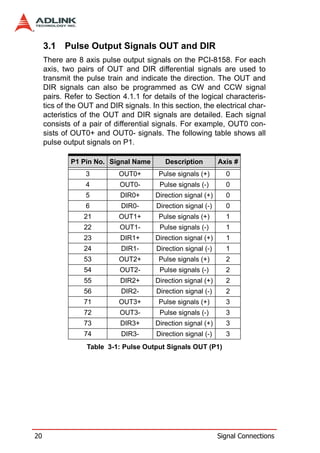
  • 36.
    Encoder Power (V)External Resistor R +5V 0Ω(None) +12V 1.5kΩ +24V 3.0kΩ If = 8mA For more operation information on the encoder feedback signals, refer to Section 4.4. 26 Signal Connections
  • 37.
    3.3 Origin SignalORG The origin signals (ORG0-ORG7) are used as input signals for the origin of the mechanism. The following table lists signal names, pin numbers, and axis numbers: P1 Pin No Signal Name Axis # 41 ORG0 0 47 ORG1 1 91 ORG2 2 97 ORG3 3 P2 Pin No Signal Name Axis # 41 ORG4 4 47 ORG5 5 91 ORG6 6 97 ORG7 7 The input circuit of the ORG signals is shown below. Usually, a limit switch is used to indicate the origin on one axis. The specifi- cations of the limit switch should have contact capacity of +24V @ 6mA minimum. An internal filter circuit is used to filter out any high frequency spikes, which may cause errors in the operation. When the motion controller is operated in the home return mode, the ORG signal is used to inhibit the control output signals (OUT and DIR). For detailed operations of the ORG signal, refer to Sec- tion 4.3.3. Signal Connections 27
  • 38.
    3.4 End-Limit SignalsPEL and MEL There are two end-limit signals PEL and MEL for each axis. PEL indicates the end limit signal is in the plus direction and MEL indi- cates the end limit signal is in the minus direction. The signal names, pin numbers, and axis numbers are shown in the table below: P1 Pin No Signal Name Axis # P1 Pin No Signal Name Axis # 37 PEL0 0 38 MEL0 0 43 PEL1 1 44 MEL1 1 87 PEL2 2 88 MEL2 2 93 PEL3 3 94 MEL3 3 P2 Pin No Signal Name Axis # P2 Pin No Signal Name Axis # 37 PEL4 4 38 MEL4 4 43 PEL5 5 44 MEL5 5 87 PEL6 6 88 MEL6 6 93 PEL7 7 94 MEL7 7 A circuit diagram is shown in the diagram below. The external limit switch should have a contact capacity of +24V @ 8mA minimum. Either ‘A-type’ (normal open) contact or ‘B-type’ (normal closed) contact switches can be used. To set the active logic of the exter- nal limit signal, please refer to the explanation of _8158_set_limit_logic function. 28 Signal Connections
  • 39.
    3.5 In-position SignalINP The in-position signal INP from a servo motor driver indicates its deviation error. If there is no deviation error then the servo’s posi- tion indicates zero. The signal names, pin numbers, and axis numbers are shown in the table below: P1 Pin No Signal Name Axis # 10 INP0 0 28 INP1 1 60 INP2 2 78 INP3 3 P2 Pin No Signal Name Axis # 10 INP4 4 28 INP5 5 60 INP6 6 78 INP7 7 The input circuit of the INP signals is shown in the diagram below: The in-position signal is usually generated by the servomotor driver and is ordinarily an open collector output signal. An external circuit must provide at least 8mA current sink capabilities to drive the INP signal. Signal Connections 29
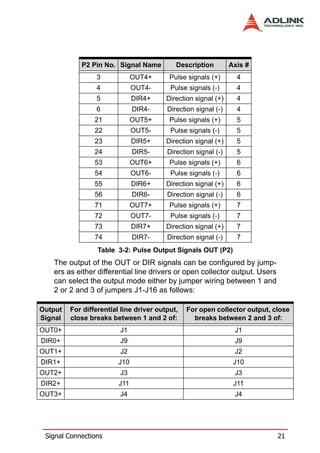
  • 40.
    3.6 Alarm SignalALM The alarm signal ALM is used to indicate the alarm status from the servo driver. The signal names, pin numbers, and axis numbers are shown in the table below: P1 Pin No Signal Name Axis # 9 ALM0 0 27 ALM1 1 59 ALM2 2 77 ALM3 3 P2 Pin No Signal Name Axis # 9 ALM4 4 27 ALM5 5 59 ALM6 6 77 ALM7 7 The input alarm circuit is shown below. The ALM signal usually is generated by the servomotor driver and is ordinarily an open col- lector output signal. An external circuit must provide at least 8mA current sink capabilities to drive the ALM signal. 30 Signal Connections
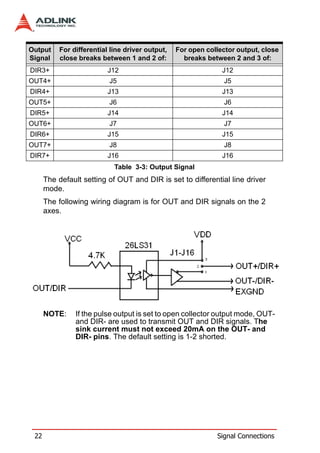
  • 41.
    3.7 Deviation CounterClear Signal ERC The deviation counter clear signal (ERC) is active in the following 4 situations: 1. Home return is complete 2. End-limit switch is active 3. An alarm signal stops OUT and DIR signals 4. An emergency stop command is issued by software (operator) The signal names, pin numbers, and axis numbers are shown in the table below: P1 Pin No Signal Name Axis # 8 ERC0 0 26 ERC1 1 58 ERC2 2 76 ERC3 3 P2 Pin No Signal Name Axis # 8 ERC4 4 26 ERC5 5 58 ERC6 6 76 ERC7 7 The ERC signal is used to clear the deviation counter of the servo- motor driver. The ERC output circuit is an open collector with a maximum of 35V at 50mA driving capacity. Signal Connections 31
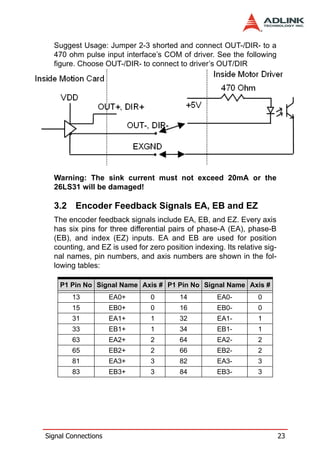
  • 42.
    3.8 General-purpose SignalSVON The SVON signal can be used as a servomotor-on control or gen- eral purpose output signal. The signal names, pin numbers, and its axis numbers are shown in the following table: P1 Pin No Signal Name Axis # 7 SVON0 0 25 SVON1 1 57 SVON2 2 75 SVON3 3 P2 Pin No Signal Name Axis # 7 SVON4 4 25 SVON5 5 57 SVON6 6 75 SVON7 7 The output circuit for the SVON signal is shown below: 32 Signal Connections
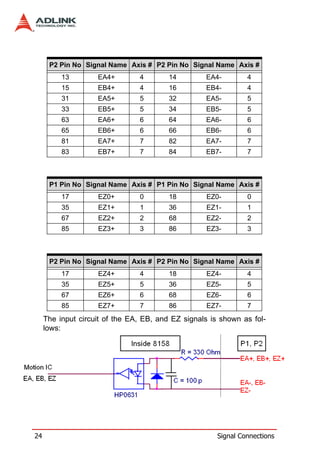
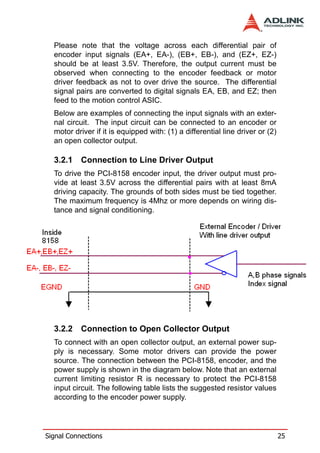
  • 43.
    3.9 General-purpose SignalRDY The RDY signals can be used as motor driver ready input or gen- eral purpose input signals. The signal names, pin numbers, and axis numbers are shown in the following table: P1 Pin No Signal Name Axis # 11 RDY0 0 29 RDY1 1 61 RDY2 2 79 RDY3 3 P2 Pin No Signal Name Axis # 11 RDY4 4 29 RDY5 5 61 RDY6 6 79 RDY7 7 The input circuit of RDY signal is shown in the following diagram: Signal Connections 33
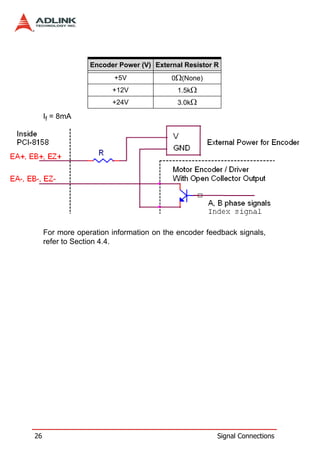
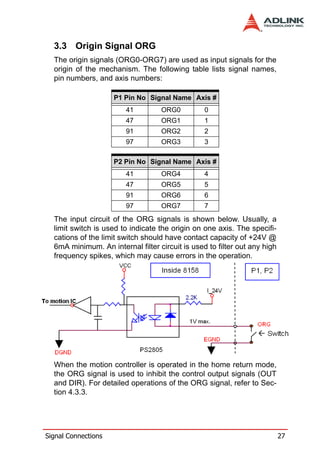
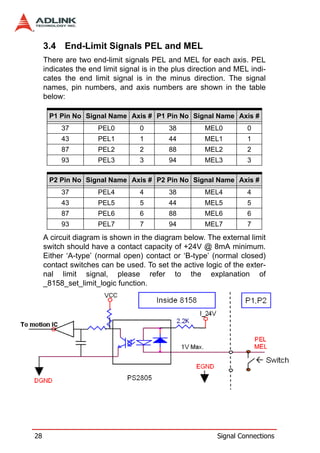
  • 44.
    3.10 Multi-Functional outputpin: DO/CMP The PCI-8158 provides 8 multi-functional output channels: DO/ CMP0 to DO/CMP7 corresponds to 8 axes. Each of the output pins can be configured as Digit Output (DO) or as Comparison Output (CMP) individually. When configured as a Comparison Out- put pin, the pin will generate a pulse signal when the encoder counter matches a pre-set value set by the user. The multi-functional channels are located on P1 and P2. The sig- nal names, pin numbers, and axis numbers are shown below: P1 Pin No Signal Name Axis # 40 DO/CMP0 0 46 DO/CMP1 1 90 DO/CMP2 2 96 DO/CMP3 3 P2 Pin No Signal Name Axis # 40 DO/CMP4 4 46 DO/CMP5 5 90 DO/CMP6 6 96 DO/CMP7 7 The following wiring diagram is of the CMP on the first 2 axes: 34 Signal Connections
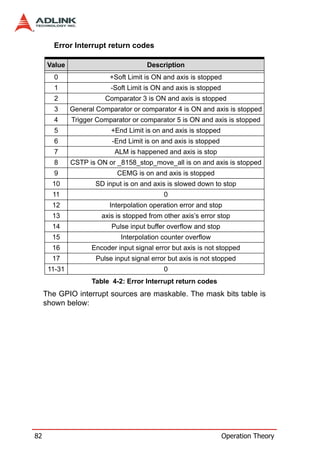
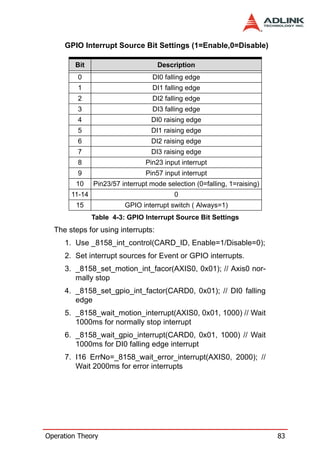
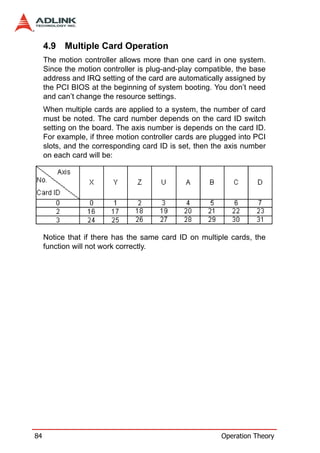
  • 45.
    3.11 Multi-Functional inputpin: DI/LTC/SD/PCS/CLR/ EMG The PCI-8158 provides 8 multi-functional input pins. Each of the 8 pins can be configured as DI(Digit Input) or LTC(Latch) or SD(Slow down) or PCS(Target position override) or CLR(Counter clear) or EMG(Emergency). To select the pin function, please refer to 6.12. The multi-functional input pins are on P1 and P2. The signal names, pin numbers, and axis numbers are shown in the following table: P1 Pin No Signal Name Axis # 39 DI/LTC/SD/PCS/CLR/EMG_0 0 45 DI/LTC/SD/PCS/CLR/EMG_1 1 89 DI/LTC/SD/PCS/CLR/EMG_2 2 95 DI/LTC/SD/PCS/CLR/EMG_3 3 P2 Pin No Signal Name Axis # 39 DI/LTC/SD/PCS/CLR/EMG_4 4 45 DI/LTC/SD/PCS/CLR/EMG_5 5 89 DI/LTC/SD/PCS/CLR/EMG_6 6 95 DI/LTC/SD/PCS/CLR/EMG_7 7 The multi-functional input pin wiring diagram is as followed: Signal Connections 35
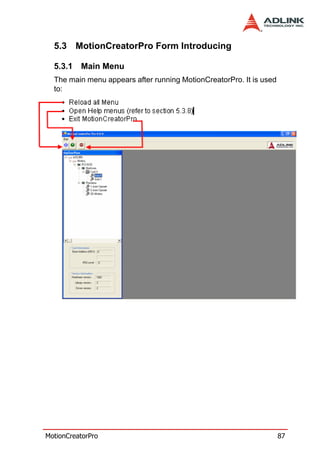
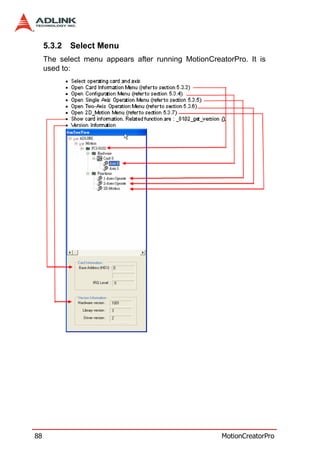
  • 46.
    3.12 Pulse InputSignals PA and PB (PCI-8158) The PCI-8158 can accept differential pulse input signals through the pins of PN1 listed below. The pulse behaves like an encoder. The A-B phase signals generate the positioning information, which guides the motor. P3 Pin No Signal Name Axis # P3 Pin No Signal Name Axis # 2 PA+ 0-7 3 PA- 0-7 4 PB+ 0-7 5 PB- 0-7 The pulse signals are used for Axis 0 to Axis 7. User can decide to enable or disable each axis pulse with _8158_disable_pulser_input function. The wiring diagram of the differential pulse input pins are as fol- lows: 36 Signal Connections
  • 47.
    3.13 Simultaneously Start/StopSignals STA and STP The PCI-8158 provides STA and STP signals, which enable simul- taneous start/stop of motions on multiple axes. The STA and STP signals are on CN4. The diagram below shows the onboard circuit. The STA and STP signals of the four axes are tied together respectively. The STP and STA signals are both input and output signals. To operate the start and stop action simultaneously, both software control and external control are needed. With software control, the signals can be generated from any one of the PCI-8158. Users can also use an external open collector or switch to drive the STA/ STP signals for simultaneous start/stop. If there are two or more PCI-8158 cards, connect the K2 connector on the previous card to K1 connector on the following card. The K1 and K2 connectors on a same PCI-8158 are connected inter- nally. Signal Connections 37
  • 48.
    You can alsouse external start and stop signals to issue a cross- card simultaneous motor operation. Just connect external start and stop signals to STA and STP pins on the K1 connector of the first PCI-8158 card. 38 Signal Connections
  • 49.
  • 50.
    40 Signal Connections
  • 51.
    4 Operation Theory This chapter describes the detail operation of the motion controller card. Contents of the following sections are as follows: Section 4.1: Classifications of Motion Controller Section 4.2: Motion Control Modes Section 4.3: Motor Driver Interface Section 4.4: Mechanical switch Interface Section 4.5: The Counters Section 4.6: The Comparators Section 4.7: Other Motion Functions Section 4.8: Interrupt Control Section 4.9: Multiple Cards Operation 4.1 Classifications of Motion Controller When servo/stepper drivers were first introduced, motor control was separated into two layers: motor control and motion control. Motor control relates to PWM, power stage, closed loop, hall sen- sors, vector space, etc. Motion control refers to speed profile gen- erating, trajectory following, multi-axes synchronization, and coordinating. 4.1.1 Voltage type motion control Interface The interfaces between motion and motor control are changing rapidly. From the early years, voltage signals were used as a com- mand to motor controller. The amplitude of the signal means how fast a motor rotating and the time duration of the voltage changes means how fast a motor acceleration from one speed to the other speed. Voltage signal as a command to motor driver is so called “analog” type motion controller. It is much easier to integrate into an analog circuit of motor controller. However, sometimes noise is a big issue for this type of motion control. Besides, if you want to do positioning control of a motor, the analog type motion controller must have a feedback signal of position information and use a closed loop control algorithm to make it possible. This increased the complexity of motion control. Operation Theory 41
  • 52.
    4.1.2 Pulse type motion control Interface The second motion and motor control interface type of is pulses train. As a trend of digital world, pulse train types represents a new concept to motion control. The counts of pulses show how many steps of a motor rotates and the frequency of pulses show how fast a motor runs. The time duration of frequency changes repre- sent the acceleration rate of a motor. Because of this interface, users can control a servo or stepper motor more easier than ana- log type for positioning applications. It means that motion and motor control can be separated more easily by this way. Both of these two interfaces need to take care of gains tuning. For analog position controllers, the control loops are built inside and users must tune the gain from the controller. For pulses type posi- tion controller, the control loops are built outside on the motor driv- ers and users must tune the gains on drivers. For the operation of more than one axes, motion control seems more important than motor control. In industrial applications, reli- able is a very important factor. Motor driver vendors make good performing products and a motion controller vendors make power- ful and variety motion software. Integrated two products make our machine go into perfect. 4.1.3 Network type motion control Interface Network motion controllers were recently introduced. The com- mand between motor driver and motion controller is not analog or pulses signal anymore; it is a network packet which contents posi- tion information and motor information. This type of controller is more reliable because it is digitized and packetized. Because a motion controller must be real-time, the network must have real- time capacity around a cycle time below 1 ms. Mitsubishi’s SSC- NET network is one type of network that can meet such speed requirements. 4.1.4 Software real-time motion control kernel There are three methods used for motion control kernels: DSP- based, ASIC based, and software real-time based. 42 Operation Theory
  • 53.
    A motion controlsystem needs an absolutely real-time control cycle and the calculation on controller must provide a control data at the same cycle. If not, the motor will not run smoothly. This is typically accomplished by using the PC’s computing power and by a simple a feedback counter card and a voltage output or pulse output card. This method is very low-end but requires extensive software development. To ensure real-time performance, real-time software will be used on the system. This increases the complexity of the system, but this method is the most flexible way for a profes- sional motion control designers. Most of these methods are on NC machines. 4.1.5 DSP based motion control kernel A DSP-based motion controller kernel solves real-time software problems on computer. A DSP is a micro-processor and all motion control calculations can be done on it. There is no real-time soft- ware problem because DSP has its own OS to arrange all the pro- cedures. There is no interruption from other inputs or context switching problem like Windows based computer. Although it has such a perfect performance on real-time requirements, its calcula- tion speed is not as fast as PC’s CPU at this age. The software interfacing between DSP based controller’s vendors and users are not easy to use. Some controller vendors provide some kind of assembly languages for users to learn and some controller ven- dors provide only a handshake documents for users to use. Both ways are not easy to use. Naturally, DSP based controller provide a better way than software kernel for machine makers to build applications. 4.1.6 ASIC based motion control kernel An ASIC-base motion control kernel is quite a bit different than software and DSP kernels. It has no real-time problem because all motion functions are done via ASIC. Users or controller vendors just need to set some parameters which ASIC requires and the motion control will be done easily. This kind of motion control sep- arates all system integration problems into 4 parts: motor driver’s performance, ASIC outputting profile, vendor’s software parame- ters to ASIC, and users’ command to vendors’ software. It makes motion controller co-operated more smoothly between devices. Operation Theory 43
  • 54.
    4.1.7 Compare Table of all motion control types Software ASIC DSP Price *Fair Cheap Expensive Functionality Highest Low Normal Maintenance Hard Easy Fair * Real-time OS included Analog Pulses Network Price High Low **Normal Signal Quality Fair Good Best (refer to distance) Maintenance Hard Fair Easy ** DSP or software real-time OS is needed 4.1.8 PCI-8158’s motion controller type The PCI-8158 is an ASIC based, pulse type motion controller. This controller is made into three blocks: motion ASIC, PCI card, soft- ware motion library. Users can access motion ASIC via our soft- ware motion library under Windows 2000/XP, Linux, and RTX driver. Our software motion library provides one-stop-function for controlling motors. All the speed parameters’ calculations are done via our library. For example, if you want to perform an one-axis point to point motion with a trapezoidal speed profile, just fill the target position, speed, and acceleration time in one function. Then the motor will run as the profile. It takes no CPU resources because generation of every control cycle pulse is done by the ASIC. The precision of target position depends on the closed loop control performance and mechanical parts of the motor driver, not on motion controller command because the motion controller is only responsible for sending correct pulses counts via a desired speed profile. So it is much easier for programmers, mechanical or electrical engineers to find out problems and debug. 44 Operation Theory
  • 55.
    4.2 Motion ControlModes Motor control is not only for positive or negative moving, motion control can make the motors run according to a specific speed profile, path trajectory and synchronous condition with other axes. The following sections describe the motion control modes of this motion controller could be performed. 4.2.1 Coordinate system The Cartesian coordinate system and pulses for the unit of length are used . The physical length depends on mechanical parts and motor’s resolution. For example, if the motor is installed on a screw ball. The pitch of screw ball is 10mm and the pulses needed for a round of motor are 10,000 pulses. We can say the physical unit of one pulse is equal to 10mm/10,000p =1 micro-meter. Simply set a command with 15,000 pulses for motion controller to move 15mm. How about if we want to move 15.0001mm? The motion controller will keep the residual value less than 1 pulse and add it to next command. The motion controller sends incremental pulses to motor drivers. It means that we can only send relative command to motor driver. But we can solve this problem by calculating the difference between current position and target position first. Then send the differences to motor driver. For example, if current position is 1000. We want to move a motor to 9000. User can use an abso- lute command to set a target position of 9000. Inside the motion controller, it will get current position 1000 first then calculate the difference from target position. It gets a result of +8000. So, the motion controller will send 8000 pulses to motor driver to move the position of 9000. Sometimes, you may need to install a linear scale or external encoder to check machine’s position. But how do you to build this coordinate system? If the resolution of external encoder is 10,000 Operation Theory 45
  • 56.
    pulses per 1mmand the motor will move 1mm if the motion con- troller send 1,000 pulses, It means that when we want to move 1 mm, we need to send 1,000 pulses to motor driver then we will get the encoder feedback value of 10,000 pulses. If we want to use an absolute command to move a motor to 10,000 pulses position and current position read from encoder is 3500 pulses, how many pulses will it send to motor driver? The answer is (10000 – 3500 ) / (10,000 / 1,000)=650 pulses. The motion controller will calculate it automatically if you have already set the “move ratio”. The “move ratio” equals the feedback resolution/command resolution. 4.2.2 Absolute and relative position move There are two kinds of commands to locate target positions in the coordinate system: absolute and relative. Absolute command means that for a given motion controller a position, the motion controller will move a motor to that position from current position. Relative command means that to move a motion controller dis- tance, the motion controller will move motor by the distance from current position. During the movement, you can specify the speed profile, meaning you can define how fast and at what speed to reach the position. 46 Operation Theory
  • 57.
    4.2.3 Trapezoidal speed profile A trapezoidal speed profile means the acceleration/deceleration area follows a first-order linear velocity profile (constant accelera- tion rate). The profile chart is shown as follows: The area of the velocity profile represents the distance of this motion. Sometimes, the profile looks like a triangle because the desired distance is smaller than the area of given speed parame- ters. When this situation happens, the motion controller will lower the maximum velocity but keep the acceleration rate to meet the distance requirement. The chart of this situation is shown as below: This kind of speed profile could be applied on velocity mode, posi- tion mode in one axis or multi-axes linear interpolation and two axes circular interpolation modes. 4.2.4 S-curve and Bell-curve speed profile S-curve means the speed profile in accelerate/decelerate area fol- lows a second-order curve. It can reduce vibration at the begin- ning of motor start and stop. In order to speed up the acceleration/ deceleration during motion, we need to insert a linear part into Operation Theory 47
  • 58.
    these areas. Wecall this shape as “bell” curve. It adds a linear curve between the upper side of s-curve and lower side of s-curve. This shape improves the speed of acceleration and also reduces the vibration of acceleration. For a bell curve, we define its shape’s parameter as below: Tacc: Acceleration time in second Tdec: Deceleration time in second StrVel: Starting velocity in PPS MaxVel: Maximum velocity in PPS VSacc: S-curve part of a bell curve in deceleration in PPS VSdec: S-curve part of a bell curve in deceleration in PPS If VSacc or VSdec=0, the acceleration or deceleration is a pure S- curve without any linear components. The acceleration chart of bell curve is shown below: 48 Operation Theory
  • 59.
    The S-curve profilemotion functions are designed to always pro- duce smooth motion. If the time for acceleration parameters com- bined with the final position don’t allow an axis to reach the maximum velocity (i.e. the moving distance is too small to reach MaxVel), then the maximum velocity is automatically lowered (see the following Figure). The rule is to lower the value of MaxVel and the Tacc, Tdec, VSacc, VSdec automatically, and keep StrVel, acceleration, and jerk unchanged. This is also applicable to Trapezoidal profile motion. This kind of speed profile could be applied on velocity mode, posi- tion mode in one axis or multi-axes linear interpolation and two axes circular interpolation modes. 4.2.5 Velocity mode Velocity mode means the pulse command is continuously output- ting until a stop command is issued. The motor will run without a target position or desired distance unless it is stopped by other reason. The output pulse accelerates from a starting velocity to a specified maximum velocity. It can be followed by a linear or S- curve acceleration shape. The pulse output rate is kept at maxi- mum velocity until another velocity command is set or a stop com- mand is issued. The velocity can be overridden by a new speed setting. Notice that the new speed could not be a reversed speed of original running speed. The speed profile of this kind of motion is shown below: Operation Theory 49
  • 60.
    4.2.6 One axis position mode Position mode means the motion controller will output a specific amount of pulses which is equal to the desired position or dis- tance. The unit of distance or position is pulse internally on the motion controller. The minimum length of distance is one pulse. With the PCI-8158, we provide a floating point function for users to transform a physical length to pulses. Inside our software library, we will keep those distance less than one pulse in register and apply them to the next motion function. Besides positioning via pulse counts, our motion controller provides three types of speed profile to accomplish positioning: first-order trapezoidal, second- order S-curve, and mixed bell curve. Users can call respective functions to perform that. The following diagram shows the rela- tionship between distance and speed profiles. The distance is the area of the V-t diagram of this profile. 50 Operation Theory
  • 61.
    4.2.7 Two axes linear interpolation position mode “Interpolation between multi-axes” means these axes start simul- taneously, and reach their ending points at the same time. Linear means the ratio of speed of every axis is a constant value. Assume that we run a motion from (0,0) to (10,4). The linear inter- polation results are shown as below. The pulses output from X or Y axis remains 1/2 pulse difference according to a perfect linear line. The precision of linear interpola- tion is shown as below: To stop an interpolation group, just call a stop function on first axis of the group. As in the diagram below, 8-axis linear interpolation means to move the XY position from P0 to P1. The 2 axes start and stop simulta- neously, and the path is a straight line. Operation Theory 51
  • 62.
    The speed ratioalong X-axis and Y-axis is (∆X: ∆Y), respectively, and the vector speed is: When calling 8-axis linear interpolation functions, the vector speed needs to define the start velocity, StrVel, and maximum velocity, MaxVel. 4.2.8 Two axes circular interpolation mode Circular interpolation means XY axes simultaneously starts from initial point, (0,0) and stop at end point,(1800,600). The path between them is an arc, and the MaxVel is the tangential speed. Notice that if the end point of arc is not at a proper position, it will move circularly without stopping. The motion controller will move to the final point user desired even this point is not on the path of arc. But if the final point is not at the location of the shadow area of the following graph, it will run circu- larly without stopping. 52 Operation Theory
  • 63.
    The command precisionof circular interpolation is shown below. The precision range is at radius ±1/2 pulse. 4.2.9 Continuous motion Continuous motion means a series of motion command or position can be run continuously. You can set a new command right after previous one without interrupting it. The motion controller can make it possible because there are three command buffers (pre- registers) inside. When the first command is executing, you can set second com- mand into first buffer and third command into second buffer. Once the first command is finished, the motion controller will push the second command to the executing register and the third command to first buffer. Now, the second buffer is empty and user can set Operation Theory 53
  • 64.
    the fourth commandinto second buffer. Normally, if users have enough time to set a new command into second buffer before exe- cuting register is finished, the motion can run endlessly. The fol- lowing diagram shows this architecture of continuous motion. In addition to a position command, the speed command should be set correctly to perform a speed continuous profile. For the follow- ing example, there are three motion command of this continuous motion. The second one has high speed than the others. The interconnection of speed between these three motion functions should be set as the following diagram: 54 Operation Theory
  • 65.
    If the speedvalue of the second command is less than the others, the settings would be like the following diagram: For 8-axis continuous arc interpolation, it is the same concept. You can set the speed matched between the speed settings of two commands. If the INP checking is enabled, the motion will have some delayed between each command in buffers. INP check enabled makes the desired point be reached but reduces the smoothing between each command. Turn INP checking off, if you don’t need this delay and need smooth motion. 4.2.10 Home Return Mode Home return means to search for a zero position point on the coor- dinate. Sometimes, you use a ORG, EZ or EL pin as a zero posi- tion on the coordinate. During system power-on, the program Operation Theory 55
  • 66.
    needs to finda zero point of this machine. Our motion controller provides a home return mode to make it. We have many home modes and each mode contents many con- trol phases. All of these phases are done by the ASIC. No soft- ware is needed or CPU loading will be taken. After home return is completed, the target counter will be reset to zero at the desired condition of home mode, such as a raising edge when ORG input. Sometimes, the motion controller will still output pulses to make machine show down after resetting the counter. When the motor stops, the counter may not be at zero point but the home return procedure is finished. The counter value you see is a reference position from machine’s zero point already. The following figures show the various home modes: R means counter reset (command and position counter) and E means ERC signal output. 56 Operation Theory
  • 67.
  • 68.
    58 Operation Theory
  • 69.
  • 70.
    60 Operation Theory
  • 71.
  • 72.
    62 Operation Theory
  • 73.
    4.2.11 Home SearchFunction This mode is used to add auto searching function on normal home return mode described in previous section no matter which posi- tion the axis is. The following diagram shows an example for home mode 2 via home search function. The ORG offset can’t be zero. The suggested value is the double length of ORG area. Operation Theory 63
  • 74.
    4.2.12 Manual PulseFunction The manual pulse is a device to generate pulse trains by hand. The pulses are sent to motion controller and re-directed to pulse output pins. The input pulses could be multiplied or divided before sending out. The motion controller receives two kinds of pulse trains from man- ual pulse device: CW/CCW and AB phase. If the AB phase input mode is selected, the multiplier has additional selection of 1, 2, or 4. The following figure shows pulse ratio block diagram. 4.2.13 Simultaneous Start Function Simultaneous motion means more than one axis can be started by a simultaneous signal which can be external or internal signals. For external signal, users must set move parameters first for all axes then these axes will wait an extern start/stop command to start or stop. For internal signals, the start command could be from a software start function. Once it is issued, all axes which are in waiting synchronous mode will start at the same time. 64 Operation Theory
  • 75.
    4.2.14 Speed OverrideFunction Speed override means that you can change speed of the com- mand during the operation of motion. The change parameter is a percentage of original defined speed. You can define a 100% speed value then change the speed by percentage of original speed when motion is running. If users didn’t define the 100% speed value. The default 100% speed is the latest motion com- mand’s maximum speed. This function can be applied on any motion function. If the running motion is S-curve or bell curve, the speed override will be a pure s-curve. If the running motion is t- curve, the speed override will be a t-curve. 4.2.15 Position Override Function Position override means that when you issue a positioning com- mand and want to change its target position during this operation. If the new target position is behind current position when override command is issued, the motor will slow down then reverse to new target position. If the new target position is far away from current position on the same direction, the motion will remain its speed and run to new target position. If the override timing is on the deceleration of current motion and the target position is far away from current position on the same direction, it will accelerate to original speed and run to new target position. The operation exam- ples are shown as below. Notice that if the new target position’s Operation Theory 65
  • 76.
    relative pulses aresmaller than original slow down pulses, this function can’t work properly. 4.3 The motor driver interface We provide several dedicated I/Os which can be connected to motor driver directly and have their own functions. Motor drivers have many kinds of I/O pins for external motion controller to use. We classify them to two groups: pulse I/O signals including pulse command and encoder interface, and digital I/O signals including servo ON, alarm, INP, servo ready, alarm reset and emergency stop inputs. The following sections will describe the functions these I/O pins. 4.3.1 Pulse Command Output Interface The motion controller uses pulse command to control servo/step- per motors via motor drivers. Set the drivers to position mode which can accept pulse trains as position command. The pulse command consists of two signal pairs. It is defined as OUT and DIR pins on connector. Each signal has two pins as a pair for dif- ferential output. There are two signal modes for pulse output com- mand: (1) single pulse output mode (OUT/DIR), and (2) dual pulse output mode (CW/CCW type pulse output). The mode must be the same as motor driver. The modes vs. signal type of OUT and DIR pins are listed in the table below: 66 Operation Theory
  • 77.
    Single Pulse OutputMode (OUT/DIR Mode) Mode Output of OUT pin Output of DIR pin Dual pulse output Pulse signal in plus (or CW) Pulse signal in minus (CW/CCW) direction (or CCW) direction Single pulse out- Pulse signal Direction signal (level) put (OUT/DIR) In this mode, the OUT pin is for outputting command pulse chain. The numbers of OUT pulse represent distance in pulse. The fre- quency of the OUT pulse represents speed in pulse per second. The DIR signal represents command direction of positive (+) or negative (-). The diagrams below show the output waveform. It is possible to set the polarity of the pulse chain. Dual Pulse Output Mode (CW/CCW Mode) In this mode, the waveform of the OUT and DIR pins represent CW (clockwise) and CCW (counter clockwise) pulse output Operation Theory 67
  • 78.
    respectively. The numbersof pulse represent distance in pulse. The frequency of the pulse represents speed in pulse per second. Pulses output from the CW pin makes the motor move in positive direction, whereas pulse output from the CCW pin makes the motor move in negative direction. The following diagram shows the output waveform of positive (+) commands and negative (-) commands. The command pulses are counted by a 28-bit command counter. The command counter can store a value of total pulses outputting from controller. 4.3.2 Pulse feedback input interface Our motion controller provides one 28-bit up/down counter of each axis for pulse feedback counting. This counter is called position counter. The position counter counts pulses from the EA and EB signal which have plus and minus pins on connector for differential signal inputs. It accepts two kinds of pulse types: dual pulse input (CW/CCW mode) and AB phase input. The AB phase input can be multiplied by 1, 2 or 4. Multiply by 4 AB phase mode is the most commonly used in incremental encoder inputs. For example, if a rotary encoder has 2000 pulses per rotation, then the counter value read from the position counter will be 8000 pulses per rotation when the AB phase is multiplied by four. 68 Operation Theory
  • 79.
    If you don’tuse encoder for motion controller, the feedback source for this counter must be set as pulse command output or the counter value will always be zero. If it is set as pulse command output, users can get the position counter value from pulse com- mand output counter because the feedback pulses are internal counted from command output pulses. The following diagrams show these two types of pulse feedback signal. The pattern of pulses in this mode is the same as the Dual Pulse Output Mode in the Pulse Command Output section except that the input pins are EA and EB. In this mode, pulses from EA pin cause the counter to count up, whereas EB pin caused the counter to count down. 90° phase difference signals Input Mode (AB phase Mode) In this mode, the EA signal is a 90° phase leading or lagging in comparison with the EB signal. “Lead” or “lag” of phase differ- ence between two signals is caused by the turning direction of the motor. The up/down counter counts up when the phase of EA signal leads the phase of EB signal. Operation Theory 69
  • 80.
    The following diagramshows the waveform. The index input (EZ) signal is as the zero reference in linear or rotary encoder. The EZ can be used to define the mechanical zero position of the mechanism. The logic of signal must also be set correctly to get correct result. 4.3.3 In position signal The in-position signal is an output signal from motor driver. It tells motion controllers a motor has been reached a position within a predefined error. The predefined error value is in-position value. Most motor drivers call it as INP value. After motion controller issues a positioning command, the motion busy status will keep true until the INP signal is ON. You can disable INP check for motion busy flag. If it is disabled, the motion busy will be FALSE when the pulses command is all sent. 70 Operation Theory
  • 81.
    4.3.4 Servo alarm signal The alarm signal is an output signal from motor driver. It tells motion controller that there has something error inside servo motor or driver. Once the motion controller receives this signal, the pulses command will stop sending and the status of ALM signal will be ON. The reasons of alarm could be servo motor’s over speed, over current, over loaded and so on. Please check motor driver’s manual about the details. The logic of alarm signal must be set correctly. If the alarm logic’s setting is not the same as motor driver’s setting, the ALM status will be always ON and the pulse command can never be output- ted. 4.3.5 Error clear signal The ERC signal is an output from the motion controller. It tells motor driver to clear the error counter. The error counter is counted from the difference of command pulses and feedback pulses. The feedback position will always have a delay from the command position. It results in pulse differences between these two positions at any moment. The differences are shown in error counter. The motor driver uses the error counter as a basic control index. The large the error counter value is, the faster the motor speed command will be set. If the error counter is zero, it means that zero motor speed command will be set. At following four situations, the ERC signal will be output automat- ically from the motion controller to the motor driver in order to clear error counter at the same time. 1. Home return is complete 2. The end-limit switch is touched 3. An alarm signal is active 4. An emergency stop command is issued 4.3.6 Servo ON/OFF switch The servo on/off switch is a general digital output signal on motion controller. It is defined as the SVON pin on the connector. It can be used for switching motor driver’s controlling state. Once it is turned Operation Theory 71
  • 82.
    on, the motorwill be held because the control loop of driver is active. Be careful that when the axis is vertically installed and the servo signal is turned off, the axis will be in uncontrolled state and it can fall. Some situations, such as a servo alarm and emergency signal ON may result in the same state. 4.3.7 Servo Ready Signal The servo ready signal is a general digital input on motion control- ler. It has no relative purpose to motion controller. You can connect this signal to motor driver’s RDY signal to check if the motor driver is in ready state. It lets you check if, for example, the motor driver’s power has been input or not. Or, users can connect this pin as a general input for other purpose and it does not affect motion con- trol. 4.3.8 Servo alarm reset switch The servo driver will raise an alarm signal if there is something wrong inside the servo driver. Some alarm situations include servo motor over current, over speed, over loading, etc. Power reset can clear the alarm status but you usually don’t want to power off the servo motor when operating. There is one pin from servo driver for users to reset the alarm status. Our motion controller provides one general output pin for each axis. You can use this pin for resetting servo alarm status. 4.4 Mechanical switch interface We provide some dedicated input pins for mechanical switches like original switch (ORG), plus and minus end-limit switch (±EL), slow down switch (SD), positioning start switch (PCS), counter latch switch (LTC), emergency stop input (EMG) and counter clear switch (CLR). These switches’ response time is very short, only a few ASIC clock cycles. There is no real-time problem when using these signals. All functions are done by the motion ASIC. The software does not need to do anything and only needed to wait on the results. 72 Operation Theory
  • 83.
    4.4.1 Original or home signal Our controller provides one original or home signal for each axis. This signal is used for defining the zero position of this axis. The logic of this signal must be set properly before doing home proce- dure. Please refer to home mode section for details. 4.4.2 End-Limit switch signal The end-limit switches are usually installed on both ending sides of one axis. We must install plus EL at the positive position of the axis and minus EL at the negative position of the axis. These two signals are for safety reason. If they are installed reversely, the protection will be invalid. Once the motor’s moving part touches one of the end-limit signal, the motion controller will stop sending pulses and output an ERC signal. It can prevent machine crash when a miss operation is missed. 4.4.3 Slow down switch The slow down signals are used to force the command pulse to decelerate to the starting velocity when it is active. This signal is used to protect a mechanical moving part under high speed move- ment toward the mechanism’s limit. The SD signal is effective for both plus and minus directions. 4.4.4 Positioning Start switch The positioning start switch is used to move a specific position when it is turned on. The function is shown as below. Operation Theory 73
  • 84.
    4.4.5 Counter Clear switch The counter clear switch is an input signal which makes the counters of motion controller to reset. If you need to reset a counter according to external command, use this pin as controlling source. 4.4.6 Counter Latch switch The counter latch switch is an input signal which makes counter value to be kept into a register when this input active. If you need to know counter value at the active moment of one input, they can connect this pin to catch that. 4.4.7 Emergency stop input Our motion controller provides a global digital input for emergency situation. Once the input is turned on, our motion controller will stop all motion of the axes immediately to prevent machine’s dam- age. Usually, you can connect an emergency stop button to this input on their machine. We suggest this input as normal closed type for safety. 4.5 The Counters There are four counters for each axis of this motion controller. They are described in this section. Command position counter: counts the number of output pulses Feedback position counter: counts the number of input pulses Position error counter: counts the error between command and feedback pulse numbers. General purpose counter: The source can be configured as the command position, feedback position, manual pulse, or half of the ASIC clock. Target position recorder: A software-maintained target posi- tion value of latest motion command. 74 Operation Theory
  • 85.
    4.5.1 Command position counter The command position counter is a 28-bit binary up/down counter. Its input source is the output pulses from the motion controller. It provides the information of the current command position. It is useful for debugging the motion system. Our motion system is an open loop type. The motor driver receives pulses from motion controller and drive the motor to move. When the driver is not moving, it can check this command counter and see if there is an update value on it. If it is, it means that the pulses have seen sent and the problem could be on the motor driver. Try to check motor driver’s pulse receiving counter when this situation is happened. The unit of command counter is in pulse. The counter value could be reset by a counter clear signal or home function completion. Users can also use a software command counter setting function to reset it. 4.5.2 Feedback position counter The feedback position counter is a 28-bit binary up/down counter. Its input source is the input pulses from the EA/EB pins. It counts the motor position from motor’s encoder output. This counter could be set from a source of command position for an option when no external encoder inputs. The command output pulses and feedback input pulses will not always be the same ratio in mini-meters. Users must set the ratio if these two pulses are not 1:1. Because our motion controller is not a closed-loop type, the feed- back position counter is just for reference after motion is moving. The position closed-loop is done by servo motor driver. If the servo driver is well tuned and the mechanical parts are well assembled, the total position error will remain in acceptable range after motion command is finished. 4.5.3 Command and Feedback error counter The command and feedback error counter is used to calculate the error between the command position and the feedback position. Operation Theory 75
  • 86.
    The value iscalculated from command subtracting feedback posi- tion. If the ratio between command and feedback is not 1:1, the error counter is meaningless. This counter is a 16-bit binary up/down counter. 4.5.4 General purpose counter The source of general purpose counter could be any of the follow- ing: 1. Command position output – the same as a command position counter 2. Feedback position input – the same as a feedback posi- tion counter 3. Manual Pulse input – default setting 4. Clock Ticks – counter from a timer about 9.8MHz 4.5.5 Target position recorder The target position recorder is used for providing target position information. It is used in continuous motion because motion con- troller need to know the previous motion command’s target posi- tion and current motion command’s target position in order to calculate relative pulses of current command then send results into pre-register. Please check if the target position is the same with current command position before continuous motion. Espe- cially after the home function and stop function. 76 Operation Theory
  • 87.
    4.6 The Comparators There are 5 counter comparators of each axis. Each comparator has dedicated functions. They are: 1. Positive soft end-limit comparator to command counter 2. Negative soft end-limit comparator to command counter 3. Command and feedback error counter comparator 4. General comparator for all counters 5. Trigger comparator for all command and feedback counters 4.6.1 Soft end-limit comparators There are two comparators for end-limit function of each axis. We call them for the soft end-limit comparators. One is for plus or pos- itive end-limit and the other is for minus or negative end-limit. The end-limit is to prevent machine crash when over traveling. We can use the soft limit instead of a real end-limit switch. Notice that these two comparators only compare the command position counter. Once the command position is over the limited set inside the positive or negative comparators, it will stop moving as it touches the end-limit switch. 4.6.2 Command and feedback error counter comparators This comparator is only for command and feedback counter error. Users can use this comparator to check if the error is too big. It can be set a action when this condition is met. The actions include generating interrupt, immediately stop, and deceleration to stop. 4.6.3 General comparator The general comparator let users to choose the source to com- pare. It could be chosen from command, feedback position counter, error counter or general counter. The compare methods could be chosen by equal, greater than or less than with direc- tional or directionless. Also, the action when condition is met can be chosen from generating interrupt, stop motion or others. Operation Theory 77
  • 88.
    4.6.4 Trigger comparator The trigger comparator is much like general comparator. It has an additional function, generating a trigger pulse when condition is met. Once the condition is met, the CMP pin on the connector will output a pulse for specific purpose like triggering a camera to catch picture. Not all of axes have this function. It depends on the existence of CMP pin of the axis. The following diagram shows the application of triggering. In this application, the table is controlled by the motion command, and the CCD Camera is controlled by CMP pin. When the compar- ing position is reached, the pulse will be outputted and the image is captured. This is an on-the-fly image capture. If you want to get more images during the motion path, try to set a new comparing point right after previous image is captured. Continuous image capturing can be accomplished by this method. 4.7 Other Motion Functions We provide many other functions on the motion controller. Such as backlash compensation, slip correction, vibration restriction, speed profile calculation and so on. The following sections will describe these functions. 78 Operation Theory
  • 89.
    4.7.1 Backlash compensation and slip corrections The motion controller has backlash and slip correction functions. These functions output the number of command pulses in FA speed. The backlash compensation is performed each time when the direction changes on operation. The slip correction function is performed before a motion command, regardless of the direction. The correction amount of pulses can be set through the function library. 4.7.2 Vibration restriction function The method of vibration restriction of the motion controller is by adding one pulse of reverse direction and then one pulse of for- ward direction shortly after completing a motion command. The timing of these two dummy pulses are shown below: (RT is reverse time and FT is forward time) 4.7.3 Speed profile calculation function Our motion function needs several speed parameters from users. Some parameters are conflict in speed profile. For example, if you input a very fast speed profile and a very short distance to motion function, the speed profile is not exist for these parameters. At this situation, motion library will keep the acceleration and deceleration rate. It tries to lower the maximum speed from users automatically to reform a speed profile feasible. The following diagram shows this concept. Operation Theory 79
  • 90.
    Our motion libraryhas a series of functions to know the actual speed profile of the command from users. 4.8 Interrupt Control The motion controller can generate an interrupt signal to the host PC. It is much useful for event-driven software application. Users can use this function _8158_int_control() to enable or disable the interrupt service. There are three kinds of interrupt sources on PCI-8158. One is motion interrupt source and the other is error interrupt source and another is GPIO interrupt sources. Motion and GPIO interrupt sources can be maskable but error interrupt sources can’t. Motion interrupt sources can be maskable by _8158_set_motion_int_factor(). Its mask bits are shown as follow- ing table: 80 Operation Theory
  • 91.
    Motion Interrupt SourceBit Settings Bit Description 0 Normally Stop 1 Next command in buffer starts 2 Command pre-register 2 is empty and allow new command to write 3 0 4 Acceleration Start 5 Acceleration End 6 Deceleration Start 7 Deceleration End 8 +Soft limit or comparator 1 is ON 9 -Soft limit or comparator 2 is ON 10 Error comparator or comparator 3 is ON 11 General comparator or comparator 4 is ON 12 Trigger comparator or comparator 5 is ON 13 Counter is reset by CLR input 14 Counter is latched by LTC input 15 Counter is latched by ORG Input 16 SD input turns on 17 0 18 0 19 CSTA input or _8158_start_move_all() turns on 20-31 0 Table 4-1: Motion Interrupt Source Bit Settings The error interrupt sources are non-maskable but the error num- ber of situation could be get from _8158_wait_error_interrupt()’s return code if it is not timeout. Operation Theory 81
  • 92.
    Error Interrupt returncodes Value Description 0 +Soft Limit is ON and axis is stopped 1 -Soft Limit is ON and axis is stopped 2 Comparator 3 is ON and axis is stopped 3 General Comparator or comparator 4 is ON and axis is stopped 4 Trigger Comparator or comparator 5 is ON and axis is stopped 5 +End Limit is on and axis is stopped 6 -End Limit is on and axis is stopped 7 ALM is happened and axis is stop 8 CSTP is ON or _8158_stop_move_all is on and axis is stopped 9 CEMG is on and axis is stopped 10 SD input is on and axis is slowed down to stop 11 0 12 Interpolation operation error and stop 13 axis is stopped from other axis’s error stop 14 Pulse input buffer overflow and stop 15 Interpolation counter overflow 16 Encoder input signal error but axis is not stopped 17 Pulse input signal error but axis is not stopped 11-31 0 Table 4-2: Error Interrupt return codes The GPIO interrupt sources are maskable. The mask bits table is shown below: 82 Operation Theory
  • 93.
    GPIO Interrupt SourceBit Settings (1=Enable,0=Disable) Bit Description 0 DI0 falling edge 1 DI1 falling edge 2 DI2 falling edge 3 DI3 falling edge 4 DI0 raising edge 5 DI1 raising edge 6 DI2 raising edge 7 DI3 raising edge 8 Pin23 input interrupt 9 Pin57 input interrupt 10 Pin23/57 interrupt mode selection (0=falling, 1=raising) 11-14 0 15 GPIO interrupt switch ( Always=1) Table 4-3: GPIO Interrupt Source Bit Settings The steps for using interrupts: 1. Use _8158_int_control(CARD_ID, Enable=1/Disable=0); 2. Set interrupt sources for Event or GPIO interrupts. 3. _8158_set_motion_int_facor(AXIS0, 0x01); // Axis0 nor- mally stop 4. _8158_set_gpio_int_factor(CARD0, 0x01); // DI0 falling edge 5. _8158_wait_motion_interrupt(AXIS0, 0x01, 1000) // Wait 1000ms for normally stop interrupt 6. _8158_wait_gpio_interrupt(CARD0, 0x01, 1000) // Wait 1000ms for DI0 falling edge interrupt 7. I16 ErrNo=_8158_wait_error_interrupt(AXIS0, 2000); // Wait 2000ms for error interrupts Operation Theory 83
  • 94.
    4.9 Multiple CardOperation The motion controller allows more than one card in one system. Since the motion controller is plug-and-play compatible, the base address and IRQ setting of the card are automatically assigned by the PCI BIOS at the beginning of system booting. You don’t need and can’t change the resource settings. When multiple cards are applied to a system, the number of card must be noted. The card number depends on the card ID switch setting on the board. The axis number is depends on the card ID. For example, if three motion controller cards are plugged into PCI slots, and the corresponding card ID is set, then the axis number on each card will be: Notice that if there has the same card ID on multiple cards, the function will not work correctly. 84 Operation Theory
  • 95.
    5 MotionCreatorPro After installing the hardware (Chapters 2 and 3), it is necessary to correctly configure all cards and double check the system before running. This chapter gives guidelines for establishing a control system and manually testing the 8158 cards to verify correct oper- ation. The MotionCreatorPro software provides a simple yet pow- erful means to setup, configure, test, and debug a motion control system that uses 8158 cards. Note that MotionCreatorPro is only available for Windows 2000/ XP with a screen resolution higher than 1024x768. Recommended screen resolution is 1024x768. It cannot be executed under the DOS environment. 5.1 Execute MotionCreatorPro After installing the software drivers for the 8158 in Windows 2000/ XP, the MotionCreatorPro program can be located at <chosen path> PCI-MotionMotionCreatorPro. To execute the program, double click on the executable file or use Start>Program Files>PCI-Motion>MotionCreatorPro. MotionCreatorPro 85
  • 96.
    5.2 About MotionCreatorPro Before Running MotionCreatorPro, the following issues should be kept in mind. 1. MotionCreatorPro is a program written in VB.NET 2003, and is available only for Windows 2000/XP with a screen resolution higher than 1024x768. It cannot be run under DOS. 2. 2.MotionCreatorPro allows users to save settings and configurations for 8158 cards. Saved configurations will be automatically loaded the next time MotionCreatorPro is executed. Two files, 8158.ini and 8158MC.ini, in the windows root directory are used to save all settings and configurations. 3. To duplicate configurations from one system to another, copy 8158.ini and 8158MC.ini into the windows root directory. 4. If multiple 8158 cards use the same MotionCreatorPro saved configuration files, the DLL function call _8158_config_from_file() can be invoked within a user developed program. This function is available in a DOS environment as well. 86 MotionCreatorPro
  • 97.
    5.3 MotionCreatorPro FormIntroducing 5.3.1 Main Menu The main menu appears after running MotionCreatorPro. It is used to: MotionCreatorPro 87
  • 98.
    5.3.2 Select Menu The select menu appears after running MotionCreatorPro. It is used to: 88 MotionCreatorPro
  • 99.
    5.3.3 Card Information Menu This menu shows Information about this card. MotionCreatorPro 89
  • 100.
    5.3.4 Configuration Menu In this menu, you can configure ALM, INP, ERC, EL, ORG, and EZ. 1. ALM Logic and Response mode: Select logic and response modes of ALM signal. The related function call is _8158_set_alm(). 2. INP Logic and Enable/Disable selection: Select logic, and Enable/ Disable the INP signal. The related function call is _8158_set_inp() 3. ERC Logic and Active timing: Select the Logic and Active timing of the ERC signal. The related function call is _8158_set_erc(). 4. EL Response mode: Select the response mode of the EL signal. The related function call is _8158_set_limit_logic (). 90 MotionCreatorPro
  • 101.
    5. ORG Logic:Select the logic of the ORG signal. The related function call is _8158_set_home_config(). 6. EZ Logic: Select the logic of the EZ signal. The related function call is _8158_set_home_config(). 7. Buttons: Next Card: Change operating card. Next Axis: Change operating axis. Save Config: Save current configuration to 8158.ini and 8158MC.ini. Close: Close the menu. MotionCreatorPro 91
  • 102.
    In this menu,you can configure LTC, SD, PCS, and Select_Input. 1. LTC Logic: Select the logic of the LTC signal. The related function call is _8158_set_ltc_logic(). 2. LTC latch_source: Select the logic of the latch_source signal. The related function call is _8158_set_latch_source (). 3. SD Configuration: Configure the SD signal. The related function call is _8158_set_sd(). 4. PCS Logic: Select the logic of the SelectNo signal. The related function call is _8158_set_pcs_logic(). 5. Set gpio input: Select the configurations of the gpio input. The related function call is _8158_set_gpio_input_function. 6. Gpio Logic: Select the logic of the gpio. The related 92 MotionCreatorPro
  • 103.
    function call is_8158_set_gpio_input_function. 7. Buttons: Next Card: Change operating card. Next Axis: Change operating axis. Save Config: Save current configuration to 8158.ini And 8158MC.ini. Close: Close the menu. MotionCreatorPro 93
  • 104.
    In this menu,you can configure pulse input/output and move ratio and INT factor. 1. Pulse Output Mode: Select the output mode of the pulse signal (OUT/ DIR). The related function call is _8158_set_pls_outmode(). 2. Pulse Input: Sets the configurations of the Pulse input signal(EA/EB). The related function calls are _8158_set_pls_iptmode(), _8158_set_feedback_src(). 3. INT Factor: Select factors to initiate the event int. The related function call is _8158_set_int_factor(). 4. Buttons: Next Card: Change operating card. Next Axis: Change operating axis. Save Config: Save current configuration to 8158.ini And 8158MC.ini. Close: Close the menu. 94 MotionCreatorPro
  • 105.
    5.3.5 Single Axis Operation Menu In this menu, you can change the settings a selected axis, includ- ing velocity mode motion, preset relative/absolute motion, manual pulse move, and home return. 1. Position: Command: displays the value of the command counter. The related function is _8158_get_command(). Feedback: displays the value of the feedback position counter. The related function is _8158_get_position() Pos Error: displays the value of the position error counter. The related function is _8158_get_error_counter(). Target Pos: displays the value of the target position recorder. The related function is MotionCreatorPro 95
  • 106.
    _8158_get_target_pos(). 2. Position Reset: clicking this button will set all position- ing counters to a specified value. The related functions are: _8158_set_position() _8158_set_command() _8158_reset_error_counter() _8158_reset_target_pos() 3. Motion Status: Displays the returned value of the _8158_motion_done function. The related function is _8158_motion_done(). 4. INT Status: int_factor bit no: Set int_factor bit. Normal INT: display of Normal INT status. The related function is _8158_wait_motion_interrupt (). Error INT: display of Error INT status. The related func- tion is _8158_wait_error_interrupt (). GPIO INT: display of GPIO INT status. The related func- tion is _8158_wait_gpio_interrupt (). 5. Velocity: The absolute value of velocity in units of PPS. The related function is _8158_get_current_speed(). 6. Show Velocity Curve Button: Clicking this button will open a window showing a velocity vs. time curve. In this curve, every 100ms, a new velocity data point will be added. To close it, click the same button again. To clear data, click on the curve. 96 MotionCreatorPro
  • 107.
    7. Operation Mode:Select operation mode. Absolute Mode: “Position1” and “position2” will be used as absolution target positions for motion. The related functions are _8158_start_ta_move(), _8158_start_sa_move(). Relative Mode: “Distance” will be used as relative dis- placement for motion. The related function is _8158_start_tr_move(), _8158_start_sr_move(). Cont. Move: Velocity motion mode. The related function is _8158_tv_move(), _8158_start_sv_move(). Manual Pulse Move: Manual Pulse motion. Clicking this button will invoke the manual pulse configuration win- dow. Home Mode: Home return motion. Clicking this button will invoke the home move configuration window. The related function is _8158_set_home_config().If the MotionCreatorPro 97
  • 108.
    check box “ATU”is checked, it will execute auto homing when motion starts. ERC Output: Select if the ERC signal will be sent when home move completes. EZ Count: Set the EZ count number, which is effective on certain home return modes. Mode: Select the home return mode. There are 13 modes available. Home Mode figure: The figure shown explains the actions of the individual home modes. Close: Click this button close this window. 8. Position: Set the absolute position for “Absolute Mode.” It is only effective when “Absolute Mode” is selected. 9. Distance: Set the relative distance for “Relative Mode.” It is only effective when “Relative Mode” is selected. 10.Repeat Mode: When “On” is selected, the motion will become repeat mode (forward<->backward or 98 MotionCreatorPro
  • 109.
    position1<->position2). It isonly effective when “Relative Mode” or “Absolute Mode” is selected. 11. Vel. Profile: Select the velocity profile. Both Trapezoidal and S-Curve are available for “Absolute Mode,” “Relative Mode,” and “Cont. Move.” 12.FA Speed/ATU: Sets the configurations of the FA Speed. The related function calls are _8158_set_fa_speed().If the check box “ATU” is checked, it will execute auto homing when motion starts. 13.Motion Parameters: Set the parameters for single axis motion. This parameter is meaningless if “Manual Pulse Move” is selected, since the velocity and moving dis- tance is decided by pulse input. Start Velocity: Set the start velocity of motion in units of PPS. In “Absolute Mode” or “Relative Mode,” only the value is effective. For example, -100.0 is the same as 100.0. In “Cont. Move,” both the value and sign are effective. –100.0 means 100.0 in the minus direction. Maximum Velocity: Set the maximum velocity of motion in units of PPS. In “Absolute Mode” or “Relative Mode,” only the value is effective. For example, -5000.0 is the same as 5000.0. In “Cont. Move,” both the value and sing is effective. –5000.0 means 5000.0 in the minus direction. Accel. Time: Set the acceleration time in units of sec- ond. Decel. Time: Set the deceleration time in units of sec- ond. SVacc: Set the S-curve range during acceleration in units of PPS. SVdec: Set the S-curve range during deceleration in units of PPS. Move Delay: This setting is effective only when repeat mode is set “On.” It will cause the 8158 to delay for a specified time before it continues to the next motion. MotionCreatorPro 99
  • 110.
    14.Speed_Profile: Clicking thisbutton will show the Speed Profile. 15.Digital I/O: Display and set Digital I/O. The related func- tion is _8158_get_gpio_output(),_8158_get_gpio_input(), _8158_set_gpio_output(). 16.Servo On: Set the SVON signal output status. The related function is _8158_set_servo(). 17.Play Key: Left play button: Clicking this button will cause the 8158 start to outlet pulses according to previous setting. In “Absolute Mode,” it causes the axis to move to position1. In “Relative Mode,” it causes the axis to move forward. In “Cont. Move,” it causes the axis to start to move according to the velocity setting. In “Manual Pulse Move,” it causes the axis to go into pulse move. The speed limit is the value set by “Maxi- mum Velocity.” 100 MotionCreatorPro
  • 111.
    Right play button:Clicking this button will cause the 8158 start to outlet pulses according to previous setting. In “Absolute Mode,” it causes the axis to move to posi- tion. In “Relative Mode,” it causes the axis to move back- wards. In “Cont. Move,” it causes the axis to start to move according to the velocity setting, but in the opposite direction. In “Manual Pulse Move,” it causes the axis to go into pulse move. The speed limit is the value set by “Maxi- mum Velocity.” 18.Stop Button: Clicking this button will cause the 8158 to decelerate and stop. The deceleration time is defined in “Decel. Time.” The related function is _8158_sd_stop(). 19.I/O Status: The status of motion I/O. Light-On means Active, while Light-Off indicates inactive. The related function is _8158_get_io_status(). 20.Buttons: Next Card: Change operating card. Next Axis: Change operating axis. Save Config: Save current configuration to 8158.ini And 8158MC.ini. Close: Close the menu. MotionCreatorPro 101
  • 112.
    5.3.6 Two-Axis Operation Menu In this menu, users can change the settings two selected axis, including velocity mode motion, preset relative/absolute motion. 1. Motion Parameters: Set the parameters for single axis motion. This parameter is meaningless if “Manual Pulse Move” is selected, since the velocity and moving dis- tance is decided by pulse input. Start Velocity: Set the start velocity of motion in units of PPS. In “Absolute Mode” or “Relative Mode,” only the value is effective. For example, -100.0 is the same as 100.0. Maximum Velocity: Set the maximum velocity of motion in units of PPS. In “Absolute Mode” or “Relative Mode,” only the value is effective. For example, -5000.0 is the same as 5000.0. 102 MotionCreatorPro
  • 113.
    Tacc: Set theacceleration time in units of second. Tdec: Set the deceleration time in units of second. Sacc: Set the S-curve range during acceleration in units of PPS. Sdec: Set the S-curve range during deceleration in units of PPS. 2. Repeat Mode: When “On” is selected, the motion will become repeat mode (forward<->backward or position1<->position2). It is only effective when “Relative Mode” or “Absolute Mode” is selected. 3. Vel. Profile: Select the velocity profile. Both Trapezoidal and S-Curve are available for “Absolute Mode,” “Relative Mode,” and “Cont. Move.” 4. Operation Mode: Select operation mode. Absolute Mode: “Position1” and “position2” will be used as absolution target positions for motion. The related functions are _8158_start_ta_move(), _8158_start_sa_move(). Relative Mode: “Distance” will be used as relative dis- placement for motion. The related function is _8158_start_tr_move(), _8158_start_sr_move(). 5. Distance: Set the relative distance for “Relative Mode.” It is only effective when “Relative Mode” is selected. 6. Position: Set the absolute position for “Absolute Mode.” It is only effective when “Absolute Mode” is selected. 7. Buttons: Next Card: Change operating card. Next Axis: Change operating axis. 8. I/O Status: The status of motion I/O. Light-On means Active, while Light-Off indicates inactive. The related function is _8158_get_io_status(). 9. Motion status: Displays the returned value of the _8158_motion_done function. The related function is _8158_motion_done(). MotionCreatorPro 103
  • 114.
    10.Current Position: Command: displays the value of the command counter. The related function is _8158_get_position(). 11. Velocity: The absolute value of velocity in units of PPS. The related function is _8158_get_current_speed(). 12.Play Key: Left play button: Clicking this button will cause the 8158 start to outlet pulses according to previous setting. In “Absolute Mode”, it causes the axis to move to position1. In “Relative Mode”, it causes the axis to move forward. Right play button: Clicking this button will cause the 8158 start to outlet pulses according to previous setting. In “Absolute Mode”, it causes the axis to move to position2. In “Relative Mode”, it causes the axis to move back- wards. Stop Button: Clicking this button will cause the 8158 to decel- erate and stop. The deceleration time is defined in “Decel. Time.” The related function is _8158_sd_stop(). 13.Buttons: Axis0 Reset: clicking this button will set all positioning counters of selected axis to zero. The related functions are: _8158_set_position() _8158_set_command() _8158_reset_error_counter() _8158_reset_target_pos() Axis1 Reset: clicking this button will set all positioning counters of selected axis to zero. ClearPlots: Clear the Motion Graph. Save Config: Save current configuration to 8158.ini and 8158MC.ini. Close: Close the menu. 104 MotionCreatorPro
  • 115.
    5.3.7 2D_Motion Menu Press 2-D button in operating window will enter this window. This is for 2-D motion test. It includes the following topics: Linear Interpolation Circular Interpolation Incremental Jog Continuous Jog Other Control Objects 1. Jog Type: Continuous Jog: Continuous Jog means that when you press one directional button, the axis will continuously move with an increasing speed. The longer you press, MotionCreatorPro 105
  • 116.
    the faster itruns. When you un-press the button, the axis will stop immediately. Incremental Jog: Incremental jog means that when you click one directional button, the axis will step a distance according to the Step-Size’s setting. 2. Jog Setting: Set the parameters for single axis motion. This parameter is meaningless if “Jog Mode” is selected, since the velocity and moving distance is decided by pulse input. Start Velocity: Set the start velocity of motion in units of PPS. Maximum Velocity: Set the maximum velocity of motion in units of PPS. Tacc: Set the acceleration time in units of second. 3. Operation Mode: Select operation mode. Absolute Mode: “Position” will be used as absolution target positions for motion when “Linear Interpolation Mode” is selected. “ABS EndPos” and “ABS Center” will be used as absolution target positions for motion when “Circular Interpolation Mode” is selected. The related functions are _8158_start_ta_move(), _8158_start_sa_move(). Relative Mode: “Distance” will be used as absolution 106 MotionCreatorPro
  • 117.
    target positions formotion when “Linear Interpolation Mode” is selected. “Dis EndPos” and “Dis Center” will be used as absolution target positions for motion when “Cir- cular Interpolation Mode” is selected. The related func- tion is _8158_start_tr_move(), _8158_start_sr_move(). 4. DIR: Specified direction of arc, CW/CCW, It is only effec- tive when “Circular Interpolation Mode” is selected. 5. Vel. Profile: Select the velocity profile. Both Trapezoidal and S-Curve are available for “Linear Interpolation Mode” and “Circular Interpolation Mode”. 6. Speed Parameters: Set the parameters for single axis motion. This parameter is meaningless if “Linear Interpo- lation Mode” or “Circular Interpolation Mode” is selected, since the velocity and moving distance is decided by pulse input. Start Velocity: Set the start velocity of motion in units of PPS. Maximum Velocity: Set the maximum velocity of motion in units of PPS. Accel. Time: Set the acceleration time in units of sec- ond. Decel. Time: Set the deceleration time in units of sec- ond. SVacc: Set the S-curve range during acceleration in units of PPS. SVdec: Set the S-curve range during deceleration in units of PPS. 7. Set Distance/End Pos: Set the absolution target posi- tions or relative distance for “Linear Interpolation Mode” . Set the position end of arc for “Circular Interpolation Mode”. It is available for “Linear Interpolation Mode” and “Circular Interpolation Mode”. 8. Set Center: Set the position of center for “Circular Inter- polation Mode”. It is only effective when “Circular Inter- polation Mode” is selected. MotionCreatorPro 107
  • 118.
    9. Jog Command:Press one directional button to move. 10.Velocity: The absolute value of velocity in units of PPS. The related function is _8158_get_current_speed(). 11. Interpolation Command: Command: displays the value of the command counter. The related function is _8158_get_command(). 12.Current Position: Feedback: displays the value of the feedback position counter. The related function is _8158_get_position(). 13.Home Mode: Home return motion. Clicking this button will invoke the home move configuration window. The related function is _8158_set_home_config().There are two home return buttons at the left-down corner of this window. It is useful when user need to return to the ori- gin. 14.Mode: Linear Interpolation: After setting motion parameters correctly in “Motion Parameters Setting Frame”, you can enter the destination in this frame. Then click Run button to start linear interpolation motion. Circular Interpolation: The setting for circular interpola- tion mode has three additional parameters in “Motion Parameters Setting Frame”. They are arc degree, divi- sion axis and optimize option. Please refer to section 6.7 ,6.8 to set them. 108 MotionCreatorPro
  • 119.
    After setting theseparameters, you can enter the arc center and degree in “Play Key Frame”. Click Run button to start cir- cular interpolation motion. Jog Type: Continuous Jog Continuous Jog means that when you press one directional button, the axis will continuously move with an increasing speed. The longer you press, the faster it runs. When you un- press the button, the axis will stop immediately. Incremental Jog: Incremental jog means that when you click one directional button, the axis will step a distance according to the Step-Size’s setting. 15.Motion status: Displays the returned value of the _8158_motion_done function. The related function is _8158_motion_done(). 16.Play Key: Play button: Clicking this button will cause the 8158 start to outlet pulses according to previous setting. In “Linear Mode,” it causes the axis to move to Distance. The related function is _8158_start_tr_move_xy, _8158_start_sr_move_xy. In “Circular Mode,” it causes the axis to move to Dis- tance(By Pos/Dist(pulse)).The related function is _8158_start_tr_arc_xy, _8158_start_sr_arc_xy. MotionCreatorPro 109
  • 120.
    Stop Button: Clickingthis button will cause the 8158 to decelerate and stop. The deceleration time is defined in “Decel. Time.” The related function is _8158_sd_stop(). 17.Buttons: •Next Card: Change operating card. •Save Config: Save current configuration to 8158.ini And 8158MC.ini. •Close: Close the menu. 18.Graph Range Frame: Clear: Clear the Motion Graph. Center: Display the Motion Graph in center position. 19.Graph Range: controls X or Y axis’s display range. 20.Origin Position: let user to pan the display location. 110 MotionCreatorPro
  • 121.
    5.3.8 Help Menu In this menu, users can Click Mouse Right Key to show Help Infor- mation. MotionCreatorPro 111
  • 122.
    112 MotionCreatorPro
  • 123.
    6 Function Library This chapter describes the supporting software for the PCI-8158 card. User can use these functions to develop programs in C, C++, or Visual Basic. If Delphi is used as the programming envi- ronment, you will need to transform the header files and pci_8158.h manually. Function Library 113
  • 124.
    6.1 List ofFunctions System & Initialization Section 6.3 Function Name Description _8158_initial Card initialization _8158_close Card Close _8158_get_version Check the hardware and software version _8158_set_security_key Set security the password _8158_check_security_key Check security the password _8158_reset_security_key Reset the security password to default value _8158_config_from_file Config PCI-8158 setting from file Pulse Input/Output Configuration Section 6.4 Function Name Description _8158_set_pls_outmode Set pulse command output mode _8158_set_pls_iptmode Set encoder input mode _8158_set_feedback_src Set counter input source Velocity mode motion Section 6.5 Function Name Description Accelerate an axis to a constant velocity with trape- _8158_tv_move zoidal profile Accelerate an axis to a constant velocity with S- _8158_sv_move curve profile _8158_sd_stop Decelerate to stop _8158_emg_stop Immediately stop _8158_get_current_speed Get current speed(pulse/sec) _8158_speed_override Change speed on the fly _8158_set_max_override_s Set the maximum override speed peed 114 Function Library
  • 125.
    Single Axis PositionMode Section 6.6 Function Name Description _8158_start_tr_move Begin a relative trapezoidal profile move _8158_start_ta_move Begin an absolute trapezoidal profile move _8158_start_sr_move Begin a relative S-curve profile move _8158_start_sa_move Begin an absolute S-curve profile move Set the ratio of command pulse and feedback _8158_set_move_ratio pulse. _8158_position_override Change position on the fly Linear Interpolated Motion Section 6.7 Function Name Description Begin a relative 2-axis linear interpolation for X & Y, _8158_start_tr_move_xy with trapezoidal profile Begin an absolute 2-axis linear interpolation for X & _8158_start_ta_move_xy Y, with trapezoidal profile Begin a relative 2-axis linear interpolation for X & Y, _8158_start_sr_move_xy with S-curve profile Begin an absolute 2-axis linear interpolation for X & _8158_start_sa_move_xy Y, with S-curve profile Begin a relative 2-axis linear interpolation for Z & _8158_start_tr_move_zu U, with trapezoidal profile Begin an absolute 2-axis linear interpolation for Z & _8158_start_ta_move_zu U, with trapezoidal profile Begin a relative 2-axis linear interpolation for Z & _8158_start_sr_move_zu U, with S-curve profile Begin a s-curve absolute circular interpolation for Z _8158_start_sa_move_zu &U Begin a relative 2-axis linear interpolation for A & _8158_start_tr_move_ab B, with trapezoidal profile Begin an absolute 2-axis linear interpolation for A & _8158_start_ta_move_ab B, with trapezoidal profile Begin a relative 2-axis linear interpolation for A & _8158_start_sr_move_ab B, with S-curve profile Begin a s-curve absolute circular interpolation for A _8158_start_sa_move_ab &B Function Library 115
  • 126.
    Function Name Description Begin a relative 2-axis linear interpolation for C & _8158_start_tr_move_cd D, with trapezoidal profile Begin an absolute 2-axis linear interpolation for C & _8158_start_ta_move_cd D, with trapezoidal profile Begin a relative 2-axis linear interpolation for C & _8158_start_sr_move_cd D, with S-curve profile Begin an absolute 2-axis linear interpolation for C & _8158_start_sa_move_cd D, with S-curve profile Begin a relative 2-axis linear interpolation for any 2 _8158_start_tr_line2 of 4 axes, with trapezoidal profile Begin an absolute 2-axis linear interpolation for any _8158_start_ta_line2 2 of 4 axes, with trapezoidal profile Begin a relative 2-axis linear interpolation for any 2 _8158_start_sr_line2 of 4 axes, with S-curve profile Begin an absolute 2-axis linear interpolation for any _8158_start_sa_line2 2 of 4 axes, with S-curve profile Begin a relative 3-axis linear interpolation for any 3 _8158_start_tr_line3 of 4 axes, with trapezoidal profile Begin an absolute 3-axis linear interpolation for any _8158_start_ta_line3 3 of 4 axes, with trapezoidal profile Begin a relative 3-axis linear interpolation for any 3 _8158_start_sr_line3 of 4 axes, with S-curve profile Begin an absolute 3-axis linear interpolation for any _8158_start_sa_line3 3 of 4 axes, with S-curve profile Begin a relative 4-axis linear interpolation for any 4 _8158_start_tr_line4 of 4 axes, with trapezoidal profile Begin an absolute 4-axis linear interpolation for any _8158_start_ta_line4 4 of 4 axes, with trapezoidal profile Begin a relative 4-axis linear interpolation for any 4 _8158_start_sr_line4 of 4 axes, with S-curve profile Begin an absolute 4-axis linear interpolation for any _8158_start_sa_line4 4 of 4 axes, with S-curve profile 116 Function Library
  • 127.
    Circular Interpolation MotionSection 6.8 Function Name Description Begin a t-curve relative circular interpolation for X & _8158_start_tr_arc_xy Y Begin a t-curve absolute circular interpolation for X _8158_start_ta_arc_xy &Y Begin a s-curve relative circular interpolation for X _8158_start_sr_arc_xy &Y Begin a s-curve absolute circular interpolation for X _8158_start_sa_arc_xy &Y Begin a t-curve relative circular interpolation for Z & _8158_start_tr_arc_zu U Begin a t-curve absolute circular interpolation for Z _8158_start_ta_arc_zu &U Begin a s-curve relative circular interpolation for Z _8158_start_sr_arc_zu &U Begin a s-curve absolute circular interpolation for Z _8158_start_sa_arc_zu &U Begin a t-curve relative circular interpolation for A & _8158_start_tr_arc_ab B Begin a t-curve absolute circular interpolation for A _8158_start_ta_arc_ab &B Begin a s-curve relative circular interpolation for A _8158_start_sr_arc_ab &B Begin a s-curve absolute circular interpolation for A _8158_start_sa_arc_ab &B Begin a t-curve relative circular interpolation for C _8158_start_tr_arc_cd &D Begin a t-curve absolute circular interpolation for C _8158_start_ta_arc_cd &D Begin a s-curve relative circular interpolation for C _8158_start_sr_arc_cd &D Begin a s-curve absolute circular interpolation for C _8158_start_sa_arc_cd &D Begin a t-curve relative circular interpolation for _8158_start_tr_arc2 any 2 of 4 axes Function Library 117
  • 128.
    Function Name Description Begin a t-curve absolute circular interpolation for _8158_start_ta_arc2 any 2 of 4 axes Begin a s-curve relative circular interpolation for _8158_start_sr_arc2 any 2 of 4 axes Begin a s-curve absolute circular interpolation for _8158_start_sa_arc2 any 2 of 4 axes Home Return Mode Section 6.9 Function Name Description _8158_set_home_config Set the home/index logic configuration _8158_home_move Begin a home return action _8158_home_search Perform an auto search home Manual Pulse Motion Section 6.10 Function Name Description _8158_set_pulser_iptmode Set pulse input mode _8158_disable_pulser_input Disable the pulse input _8158_pulser_vmove Start pulse v move _8158_pulser_pmove Start pulse p move _8158_set_pulser_ratio Set manual pulse ratio for actual output pulse rate Motion Status Section 6.11 Function Name Description _8158_motion_done Return the motion status Motion Interface I/O Section 6.12 Function Name Description _8158_set_servo Set On-Off state of SVON signal _8158_set_pcs_logic Set PCS(Position Change Signal) signal’s logic _8158_set_pcs Enable PCS for position override _8158_set_clr_mode Set CLR signal’s mode _8158_set_inp Set INP signal’s logic and operating mode 118 Function Library
  • 129.
    Function Name Description _8158_set_alm Set ALM signal’s logic and operating mode _8158_set_erc Set ERC signal’s logic and timing _8158_set_erc_out Output an ERC signal _8158_clr_erc Clear the ERC signal _8158_set_sd Set SD signal’s logic and operating mode _8158_enable_sd Enable SD signal _8158_set_limit_logic Set EL signal’s logic _8158_set_limit_mode Set EL operating mode _8158_get_io_status Get all the motion I/O status of 8158 Interrupt Control Section 6.13 Function Name Description _8158_int_control Enable/Disable INT service _8158_wait_error_interrupt Wait error related interrupts _8158_wait_motion_interrupt Wait motion related interrupts _8158_set_motion_int_factor Set the factors of motion related interrupts Position Control and Counters Section 6.14 Function Name Description _8158_get_position Get the value of the feedback position counter _8158_set_position Set the feedback position counter _8158_get_command Get the value of the command position counter _8158_set_command Set the command position counter _8158_get_error_counter Get the value of the position error counter _8158_reset_error_counter Reset the position error counter _8158_get_general_counter Get the value of the general counter _8158_set_general_counter Set the general counter _8158_get_target_pos Get the value of the target position recorder _8158_reset_target_pos Reset target position recorder _8158_get_res_distance Get remaining pulses accumulated from motions _8158_set_res_distance Set remaining pulses record Function Library 119
  • 130.
    Position Compare andLatch Section 6.15 Function Name Description _8158_set_trigger_logic Set CMP signal logic _8158_set_error_comparator Set the error comparator _8158_set_general_comparator Set the general comparator _8158_set_trigger_comparator Set the trigger comparator _8158_set_latch_source Set the latch timing for a counter _8158_set_ltc_logic Set the LTC signal’s logic _8158_get_latch_data Get the latch data Continuous Motion Section 6.16 Function Name Description _8158_set_continuous_move Enable continuous motion for absolute motion _8158_check_continuous_buffer Check if the buffer is empty _8158_dwell_move Set a dwell move Multiple Axes Simultaneous Operation Section 6.17 Function Name Description _8158_set_tr_move_all Multi-axis simultaneous operation setup _8158_set_ta_move_all Multi-axis simultaneous operation setup _8158_set_sr_move_all Multi-axis simultaneous operation setup _8158_set_sa_move_all Multi-axis simultaneous operation setup _8158_start_move_all Begin a multi-axis trapezoidal profile motion _8158_stop_move_all Simultaneously stop multi-axis motion General-purposed Input/Output Section 6.18 Function Name Description _8158_set_gpio_output Set digital output _8158_get_gpio_output Get digital output _8158_get_gpio_input Get digital input _8158_set_gpio_input_function Set the signal types to any digital inputs 120 Function Library
  • 131.
    Soft Limit 6.19 Function Name Description _8158_disable_soft_limit Disable soft limit function _8158_enable_soft_limit Enable soft limit function _8158_set_soft_limit Set the soft limits Backlash Compensation / Vibration Suppression 6.20 Function Name Description _8158_backlash_comp Set backlash corrective pulse for compensation _8158_suppress_vibration Set suppress vibration idle pulse counts _8158_set_fa_speed Set FA speed for home mode Speed Profile Calculation 6.21 Function Name Description _8158_get_tr_move_profile Get relative trapezoidal speed profile _8158_get_ta_move_profile Get absolute trapezoidal speed profile _8158_get_sr_move_profile Get relative S-curve speed profile _8158_get_sa_move_profile Get absolute S-curve speed profile Function Library 121
  • 132.
    6.2 C/C++ ProgrammingLibrary This section details all the functions. The function prototypes and some common data types are declared in pci_8158.h. We suggest you use these data types in your application programs. The follow- ing table shows the data type names and their range. Type Name Description Range U8 8-bit ASCII character 0 to 255 I16 16-bit signed integer -32768 to 32767 U16 16-bit unsigned integer 0 to 65535 I32 32-bit signed long integer -2147483648 to 2147483647 U32 32-bit unsigned long integer 0 to 4294967295 F32 32-bit single-precision floating-point -3.402823E38 to 3.402823E38 -1.797683134862315E308 F64 64-bit double-precision floating-point to 1.797683134862315E309 Boolean Boolean logic value TRUE, FALSE The functions of the PCI-8158’s software drivers use full-names to represent the functions real meaning. The naming convention rules are: In a “C” programming environment: _{hardware_model}_{action_name}. e.g. _8158_initial(). In order to recognize the difference between a C library and a VB library, a capital “B” is placed at the beginning of each function name, e.g. B_8158_initial(). 122 Function Library
  • 133.
    6.3 System &Initialization @ Name _8158_initial – Card initialization _8158_close – Card close _8158_get_version – Check hardware and software version information _8158_set_security_key – Set the security password _8158_check_security_key – Check the security password _8158_reset_security_key – Rest the security password to default _8158_config_from_file Config – PCI-8158 setting from file @ Description _8158_initial: This function is used to initialize an 8158 card and assign hard- ware resources. All 8158 cards must be initialized by this func- tion before calling other functions in your applications. By setting the parameter “Manual_ID”, user can choose the type that the card’s ID is assigned manually or automatically. _8158_close: This function is used to close 8158 card and release its resources, which should be called at the end of your applica- tions. _8158_get_version: Lets users read back the firmware’s, driver’s and DLL’s version information. _8158_set_security_key: This function is used to set a security code to the PCI card. See also: _8158_check_security_key, _8158_reset_security_key _8158_check_security_key: Function Library 123
  • 134.
    This function isused to verify the security code which the user set by the function “_8158_set_security_key”. See also: _8158_set_security_key, _8158_reset_security_key _8158_reset_security_key: By this function, Users can reset the security code on the PCI card to default value. The default security code is 0. See also: _8158_check_security_key, _8158_set_security_key _8158_config_from_file: This function is used to load the configuration of the PCI-8158 according to specified file. By using MotionCreatorPro, user could test and configure the 8158 correctly. After saving the configuration, the file would be existed in user’s system direc- tory as 8158.ini. When this function is executed, all 8158 cards in the system will be configured as the following functions were called according to parameters recorded in 8158.ini. _8158_set_limit_logic _8158_set_pcs_logic _8158_set_ltc_logic _8158_set_inp _8158_set_erc _8158_set_alm _8158_set_pls_iptmode _8158_set_pls_outmode _8158_set_move_ratio _8158_set_latch_source _8158_set_feedback_src _8158_set_home_config _8158_set_soft_limit _8158_set_fa_speed _8158_set_sd 124 Function Library
  • 135.
    @ Syntax C/C++(Windows 2000/XP) I16 _8158_initial(I16 *CardID_InBit, I16 Manual_ID); I16 _8158_close(void); I16 _8158_get_version(I16 card_id, I16 *firmware_ver, I32 *driver_ver, I32 *dll_ver); I16 _8158_set_security_key(I16 card_id, I16 old_secu_code, I16 new_secu_code); I16 _8158_check_security_key(I16 card_id, I16 secu_code); I16 _8158_reset_security_key(I16 card_id); I16 _8158_config_from_file(); Visual Basic 6(Windows 2000/XP) B_8158_initial(CardID_InBit As Integer, ByVal Manual_ID As Integer) As Integer B_8158_close() As Integer B_8158_get_version(ByVal card_id As Integer, firmware_ver As Integer, driver_ver As Long, dll_ver As Long) As Integer B_8158_set_security_key(ByVal card_id As Integer, ByVal old_secu_code As Integer, ByVal new_secu_code As Integer) As Integer B_8158_check_security_key(ByVal card_id As Integer, ByVal secu_code As Integer)As Integer B_8158_reset_security_key(ByVal card_id As Integer); B_8158_config_from_file() As Integer @ Argument CardID_InBit: Manual_ID: Enable the On board dip switch (SW1) to decide the Card ID Value meaning: The CardID could be decided by: 0: the sequence of PCI slot. Function Library 125
  • 136.
    1: on boardDIP switch (SW1). card_id: Specify the PCI-8158 card index. The card_id could be decided by DIP switch (SW1) or depend on slot sequence. Please refer to _8158_initial(). firmware_ver: The current firmware version. driver_ver: The current device driver version. dll_ver: The current DLL library version. old_secu_code: Old security code. new_secu_code: New security code. secu_code: security code. 126 Function Library
  • 137.
    6.4 Pulse Input/OutputConfiguration @ Name _8158_set_pls_iptmode – Set the configuration for feedback pulse input. _8158_set_pls_outmode – Set the configuration for pulse command output. _8158_set_feedback_src – Enable/Disable the external feed- back pulse input @ Description _8158_set_pls_iptmode: Configure the input modes of external feedback pulses. There are 4 types for feedback pulse input. Note that this function makes sense only when the Src parameter in _8158_set_feedback_src() function is enabled. _8158_set_pls_outmode: Configure the output modes of command pulses. There are 6 modes for command pulse output. _8158_set_feedback_src: If external encoder feedback is available in the system, set the Src parameter in this function to an Enabled state. Then, the internal 28-bit up/down counter will count according to the con- figuration of the _8158_set_pls_iptmode() function. Else, the counter will count the command pulse output. @ Syntax C/C++(Windows 2000/XP) I16 _8158_set_pls_iptmode(I16 AxisNo, I16 pls_iptmode, I16 pls_logic); I16 _8158_set_pls_outmode(I16 AxisNo, I16 pls_outmode); I16 _8158_set_feedback_src(I16 AxisNo, I16 Src); Function Library 127
  • 138.
    Visual Basic6 (Windows2000/XP) B_8158_set_pls_iptmode(ByVal AxisNo As Integer, ByVal pls_iptmode As Integer, ByVal pls_logic As Integer) As Integer B_8158_set_pls_outmode(ByVal AxisNo As Integer, ByVal pls_outmode As Integer) As Integer B_8158_set_feedback_src(ByVal AxisNo As Integer, ByVal Src As Integer) As Integer @ Argument AxisNo: Axis number designated to configure pulse Input/Output. card_id Physical axis AxisNo 0 0 1 1 0 … … 7 7 0 8 1 1 9 … … pls_iptmode: setting of encoder feedback pulse input mode Value Meaning 0 1X A/B 1 2X A/B 2 4X A/B 3 CW/CCW pls_logic: Logic of encoder feedback pulse Value Meaning 0 Not inverse direction 1 Inverse direction 128 Function Library
  • 139.
    pls_outmode: Setting ofcommand pulse output mode. Src: Counter source Value Meaning 0 External Feedback 1 Command pulse Function Library 129
  • 140.
    6.5 Velocity modemotion @ Name _8158_tv_move – Accelerate an axis to a constant velocity with trapezoidal profile _8158_sv_move – Accelerate an axis to a constant velocity with S-curve profile _8158_emg_stop – Immediately stop _8158_sd_stop – Decelerate to stop _8158_get_current_speed – Get current speed _8158_speed_override – Change speed on the fly _8158_set_max_override_speed – Set the maximum over- ride speed @ Description _8158_tv_move: This function is to accelerate an axis to the specified constant velocity with a trapezoidal profile. The axis will continue to travel at a constant velocity until the velocity is changed or the axis is commanded to stop. The direction is determined by the sign of the velocity parameter. _8158_sv_move: This function is to accelerate an axis to the specified constant velocity with a S-curve profile. The axis will continue to travel at a constant velocity until the velocity is changed or the axis is commanded to stop. The direction is determined by the sign of velocity parameter. _8158_emg_stop: This function is used to immediately stop an axis. This function is also useful when a preset move (both trapezoidal and S- curve motion), manual move, or home return function is per- formed. _8158_sd_stop: 130 Function Library
  • 141.
    This function isused to decelerate an axis to stop with a trape- zoidal or S-curve profile. This function is also useful when a preset move (both trapezoidal and S-curve motion), manual move, or home return function is performed. Note: The velocity profile is decided by original motion profile. _8158_get_current_speed: This function is used to read the current pulse output rate (pulse/sec) of a specified axis. It is applicable in any time in any operation mode. _8158_speed_override: When in motion operation, (such as executing "_8158_tv_move"), this function can be used to change the speed on the fly. Please refer to section 4.2.14. See also : _8158_set_max_override_speed 8158_set_max_override_speed: This function is used to set the maximum override speed (100% speed) before speed override operation. Please refer to Section 4.2.14 See also: _8158_speed_override @ Syntax C/C++(Windows 2000/XP) I16 _8158_tv_move(I16 AxisNo, F64 StrVel, F64 MaxVel, F64 Tacc); I16 _8158_sv_move(I16 AxisNo, F64 StrVel, F64 MaxVel, F64 Tacc, F64 SVacc); I16 _8158_emg_stop(I16 AxisNo); I16 _8158_sd_stop(I16 AxisNo, F64 Tdec); I16 _8158_get_current_speed(I16 AxisNo, F64 *speed) I16 _8158_set_max_override_speed(I16 AxisNo, F64 OvrdSpeed, I16 Enable); Function Library 131
  • 142.
    Visual Basic6 (Windows2000/XP) B_8158_tv_move(ByVal AxisNo As Integer, ByVal StrVel As Double, ByVal MaxVel As Double, ByVal Tacc As Double) As Integer B_8158_sv_move(ByVal AxisNo As Integer, ByVal StrVel As Double, ByVal MaxVel As Double, ByVal Tacc As Double, ByVal SVacc As Double) As Integer B_8158_emg_stop(ByVal AxisNo As Integer) As Integer B_8158_sd_stop(ByVal AxisNo As Integer, ByVal Tdec As Double) As Integer B_8158_get_current_speed(ByVal AxisNo As Integer, ByRef Speed As Double) As Integer B_8158_set_max_override_speed(ByVal AxisNo As Integer, ByVal OvrdSpeed As Double, ByVal Enable As Integer) As Integer @ Argument AxisNo: Axis number designated to move or stop. card_id Physical axis AxisNo 0 0 1 1 0 … … 7 7 0 8 1 1 9 … … StrVel: Starting velocity in units of pulse per second MaxVel: Maximum velocity in units of pulse per second Tacc: Specified acceleration time in units of second SVacc: Specified velocity interval in which S-curve acceleration is performed. Note: SVacc = 0, for pure S-Curve Tdec: specified deceleration time in units of second *Speed: Variable to get current speed (pulse/sec). 132 Function Library
  • 143.
    NewVelPercent: The Percentageof maximum override speed (100% speed) Time: The duration time of current speed to override speed. Unit: sec OvrdSpeed:The maximum override speed (pulse/s) Enable: 0:disable, 1:enable the override speed operation Function Library 133
  • 144.
    6.6 Single AxisPosition Mode @ Name _8158_start_tr_move – Begin a relative trapezoidal profile move _8158_start_ta_move – Begin an absolute trapezoidal profile move _8158_start_sr_move – Begin a relative S-curve profile move _8158_start_sa_move – Begin an absolute S-curve profile move _8158_set_move_ratio – Set the ration of command pulse and feedback pulse _8158_position_override – Change position on the fly @ Description General: The moving direction is determined by the sign of the Pos or Dist parameter. If the moving distance is too short to reach the specified velocity, the controller will automatically lower the MaxVel, and the Tacc, Tdec, VSacc, and VSdec will also become shorter while dV/dt(acceleration / deceleration) and d(dV/dt)/dt (jerk) are keep unchanged. _8158_start_tr_move: This function causes the axis to accelerate form a starting velocity (StrVel), rotate at constant velocity (MaxVel), and decelerate to stop at the relative distance with trapezoidal pro- file. The acceleration (Tacc) and deceleration (Tdec) time is specified independently–it does not let the program wait for motion completion but immediately returns control to the pro- gram. _8158_start_ta_move: This function causes the axis to accelerate from a starting velocity (StrVel), rotate at constant velocity (MaxVel), and decelerates to stop at the specified absolute position with trap- 134 Function Library
  • 145.
    ezoidal profile. Theacceleration (Tacc) and deceleration (Tdec) time is specified independently. This command does not let the program wait for motion completion, but immediately returns control to the program. _8158_start_sr_move: This function causes the axis to accelerate from a starting velocity (StrVel), rotate at constant velocity (MaxVel), and decelerates to stop at the relative distance with S-curve profile. The acceleration (Tacc) and deceleration (Tdec) time is speci- fied independently. This command does not let the program wait for motion completion, but immediately returns control to the program. _8158_start_sa_move: This function causes the axis to accelerate from a starting velocity (StrVel), rotate at constant velocity, and decelerates to stop at the specified absolute position with S-curve profile. The acceleration and deceleration time is specified independently. This command does not let the program wait for motion com- pletion but immediately returns control to the program. _8158_set_move_ratio: This function configures scale factors for the specified axis. Usually, the axes only need scale factors if their mechanical resolutions are different. For example, if the resolution of feed- back sensors is two times resolution of command pulse, then the parameter “move_ratio” could be set as 2. _8158_position_override: This function is used to change target position on the fly. There are some limitations on this function. Please refer to section 4.2.15 before use it. @ Syntax C/C++(Windows 2000/XP) I16 _8158_start_tr_move(I16 AxisNo, F64 Dist, F64 StrVel, F64 MaxVel, F64 Tacc, F64 Tdec); I16 _8158_start_ta_move(I16 AxisNo, F64 Pos, F64 StrVel, F64 MaxVel, F64 Tacc, F64 Tdec); Function Library 135
  • 146.
    I16 _8158_start_sr_move(I16 AxisNo,F64 Dist, F64 StrVel, F64 MaxVel, F64 Tacc, F64 Tdec, F64 SVacc, F64 SVdec); I16 _8158_start_sa_move(I16 AxisNo, F64 Pos, F64 StrVel, F64 MaxVel, F64 Tacc, F64 Tdec, F64 SVacc, F64 SVdec); I16 _8158_set_move_ratio(I16 AxisNo, F64 move_ratio); I16 _8158_position_override(I16 AxisNo, F64 NewPos); Visual Basic6 (Windows 2000/XP) B_8158_start_tr_move(ByVal AxisNo As Integer, ByVal Dist As Double, ByVal StrVel As Double, ByVal MaxVel As Double, ByVal Tacc As Double, ByVal Tdec As Double) As Integer B_8158_start_ta_move(ByVal AxisNo As Integer, ByVal Pos As Double, ByVal StrVel As Double, ByVal MaxVel As Double, ByVal Tacc As Double, ByVal Tdec As Double) As Integer B_8158_start_sr_move(ByVal AxisNo As Integer, ByVal Dist As Double, ByVal StrVel As Double, ByVal MaxVel As Double, ByVal Tacc As Double, ByVal Tdec As Double, ByVal SVacc As Double, ByVal SVdec As Double) As Integer B_8158_start_sa_move(ByVal AxisNo As Integer, ByVal Pos As Double, ByVal StrVel As Double, ByVal MaxVel As Double, ByVal Tacc As Double, ByVal Tdec As Double, ByVal SVacc As Double, ByVal SVdec As Double) As Integer B_8158_set_move_ratio(ByVal AxisNo As Integer, ByVal move_ratio As Double) As Integer B_8158_position_override(ByVal AxisNo As Integer, ByVal NewPos As Double) As Integer 136 Function Library
  • 147.
    @ Argument AxisNo: Axis number designated to move or change position. card_id Physical axis AxisNo 0 0 1 1 0 … … 7 7 0 8 1 1 9 … … Dist: Specified relative distance to move (unit: pulse) Pos: Specified absolute position to move (unit: pulse) StrVel: Starting velocity of a velocity profile in units of pulse per second MaxVel: Maximum velocity in units of pulse per second Tacc: Specified acceleration time in units of seconds Tdec: Specified deceleration time in units of seconds SVacc: Specified velocity interval in which S-curve acceleration is performed. Note: SVacc = 0, for pure S-Curve. For more details, see sec- tion 4.2.4 SVdec: specified velocity interval in which S-curve deceleration is performed. Note: SVdec = 0, for pure S-Curve. For more details, see sec- tion 4.2.4 Move_ratio: ratio of (feedback resolution)/(command resolu- tion), should not be 0 NewPos: specified new absolute position to move Function Library 137
  • 148.
    6.7 Linear InterpolatedMotion @ Name _8158_start_tr_move_xy – Begin a relative 2-axis linear interpolation for X & Y axis with trapezoidal profile _8158_start_ta_move_xy – Begin an absolute 2-axis linear interpolation for X & Y axis with trapezoidal profile _8158_start_sr_move_xy – Begin a relative 2-axis linear interpolation for X & Y axis with S-curve profile _8158_start_sa_move_xy – Begin an absolute 2-axis linear interpolation for X & Y axis with S-curve profile _8158_start_tr_move_zu – Begin a relative 2-axis linear interpolation for Z & U axis with trapezoidal profile _8158_start_ta_move_zu – Begin an absolute 2-axis linear interpolation for Z & U axis with trapezoidal profile _8158_start_sr_move_zu – Begin a relative 2-axis linear interpolation for Z & U axis with S-curve profile _8158_start_sa_move_zu – Begin an absolute 2-axis linear interpolation for Z & U axis with S-curve profile _8158_start_tr_move_ab – Begin a relative 2-axis linear interpolation for A & B axis with trapezoidal profile _8158_start_ta_move_ab – Begin an absolute 2-axis linear interpolation for A & B axis with trapezoidal profile _8158_start_sr_move_ab – Begin a relative 2-axis linear interpolation for A & B axis with S-curve profile _8158_start_sa_move_ab – Begin an absolute 2-axis linear interpolation for A & B axis with S-curve profile _8158_start_tr_move_cd – Begin a relative 2-axis linear interpolation for C & D axis with trapezoidal profile _8158_start_ta_move_cd – Begin an absolute 2-axis linear interpolation for C & D axis with trapezoidal profile _8158_start_sr_move_cd – Begin a relative 2-axis linear interpolation for C & D axis with S-curve profile 138 Function Library
  • 149.
    _8158_start_sa_move_cd – Beginan absolute 2-axis linear interpolation for C & D axis with S-curve profile _8158_start_tr_line2 – Begin a relative 2-axis linear interpo- lation for any 2 of 4 axes, with trapezoidal profile _8158_start_ta_line2 – Begin an absolute 2-axis linear inter- polation for any 2 of 4 axes, with trapezoidal profile _8158_start_sr_line2 – Begin a relative 2-axis linear interpo- lation for any 2 of 4 axes, with S-curve profile _8158_start_sa_line2 – Begin an absolute 2-axis linear inter- polation for any 2 of 4 axes, with S-curve profile _8158_start_tr_line3 – Begin a relative 3-axis linear interpo- lation for any 3 of 4 axes, with trapezoidal profile _8158_start_ta_line3 – Begin a absolute 3-axis linear inter- polation for any 3 of 4 axes, with trapezoidal profile _8158_start_sr_line3 – Begin a relative 3-axis linear interpo- lation for any 3 of 4 axes, with S-curve profile _8158_start_sa_line3 – Begin a absolute 3-axis linear inter- polation for any 3 of 4 axes, with S-curve profile _8158_start_tr_line4 – Begin a relative 4-axis linear interpo- lation for any 4 of 4 axes, with trapezoidal profile _8158_start_ta_line4 – Begin a absolute 4-axis linear inter- polation for any 4 of 4 axes, with trapezoidal profile _8158_start_sr_line4 – Begin a relative 4-axis linear interpo- lation for any 4 of 4 axes, with S-curve profile _8158_start_sa_line4 – Begin a absolute 4-axis linear inter- polation for any 4 of 4 axes, with S-curve profile @ Description These functions perform linear interpolation motion with different profile. Detail Comparisons of those functions are described by fol- low table. Function Library 139
  • 150.
    Function Total axes Velocity Profile Relative / Absolute Target Axes _8158_start_tr_move_xy 2 T R Axes 0 & 1 _8158_start_ta_move_xy 2 T A Axes 0 & 1 _8158_start_sr_move_xy 2 S R Axes 0 & 1 _8158_start_sa_move_xy 2 S A Axes 0 & 1 _8158_start_tr_move_zu 2 T R Axes 2 & 3 _8158_start_ta_move_zu 2 T A Axes 2 & 3 _8158_start_sr_move_zu 2 S R Axes 2 & 3 _8158_start_sa_move_zu 2 S A Axes 2 & 3 _8158_start_tr_move_ab 2 T R Axes 4& 5 _8158_start_ta_move_ab 2 T A Axes 4 & 5 _8158_start_sr_move_ab 2 S R Axes 4 & 5 _8158_start_sa_move_ab 2 S A Axes 4 & 5 _8158_start_tr_move_cd 2 T R Axes 6 & 7 _8158_start_ta_move_cd 2 T A Axes 6 & 7 _8158_start_sr_move_cd 2 S R Axes 6 & 7 _8158_start_sa_move_cd 2 S A Axes 6 & 7 Function Total axes Velocity Profile Relative / Absolute Target Axes _8158_start_tr_line2 2 T R Any 2 of 4 axes _8158_start_ta_line2 2 T A Any 2 of 4 axes _8158_start_sr_line2 2 S R Any 2 of 4 axes _8158_start_sa_line2 2 S A Any 2 of 4 axes Note: The target two axes of linear interpolation are the 2 of former 0-3 axes or later 4-7 axes on a card. It can not cross over those two groups. Function Total axes Velocity Profile Relative / Absolute Target Axes _8158_start_tr_line3 3 T R Any 3 of 4 axes _8158_start_ta_line3 3 T A Any 3 of 4 axes _8158_start_sr_line3 3 S R Any 3 of 4 axes _8158_start_sa_line3 3 S A Any 3 of 4 axes Note: The target 3 axes of linear interpolation are the 3 of former 4 axes or later 4 axes on a card. It can not cross over those two groups. 140 Function Library
  • 151.
    Function Total axes Velocity Profile Relative / Absolute Target Axes _8158_start_tr_line4 4 T R Any 4 of 4 axes _8158_start_ta_line4 4 T A Any 4of 4 axes _8158_start_sr_line4 4 S R Any 4 of 4 axes _8158_start_sa_line4 4 S A Any 4 of 4 axes Note: The target 4 axes of linear interpolation are the 4 of former 4 axes or later 4 axes on a card. It can not cross over those two groups. Velocity profile: T: trapezoidal profile S: s curve profile Relative / Absolute: R: Relative distance A: Absoulte position @ Syntax C/C++(Windows 2000/XP) I16 _8158_start_tr_move_xy(I16 Card_id, F64 DistX, F64 DistY, F64 StrVel, F64 MaxVel, F64 Tacc, F64 Tdec); I16 _8158_start_ta_move_xy(I16 Card_id, F64 PosX, F64 PosY, F64 StrVel, F64 MaxVel, F64 Tacc, F64 Tdec); I16 _8158_start_sr_move_xy(I16 Card_id, F64 DistX, F64 DistY, F64 StrVel, F64 MaxVel, F64 Tacc, F64 Tdec, F64 SVacc, F64 SVdec); I16 _8158_start_sa_move_xy(I16 Card_id, F64 PosX, F64 PosY, F64 StrVel, F64 MaxVel, F64 Tacc, F64 Tdec, F64 SVacc, F64 SVdec); I16 _8158_start_tr_move_zu(I16 Card_id, F64 DistX, F64 DistY, F64 StrVel, F64 MaxVel, F64 Tacc, F64 Tdec); I16 _8158_start_ta_move_zu(I16 Card_id, F64 PosX, F64 PosY, F64 StrVel, F64 MaxVel, F64 Tacc, F64 Tdec); Function Library 141
  • 152.
    I16 _8158_start_sr_move_zu(I16 Card_id,F64 DistX, F64 DistY, F64 StrVel, F64 MaxVel, F64 Tacc, F64 Tdec, F64 SVacc, F64 SVdec); I16 _8158_start_sa_move_zu(I16 Card_id, F64 PosX, F64 PosY, F64 StrVel, F64 MaxVel, F64 Tacc, F64 Tdec, F64 SVacc, F64 SVdec); I16 _8158_start_tr_move_ab(I16 Card_id, F64 DistX, F64 DistY, F64 StrVel, F64 MaxVel, F64 Tacc, F64 Tdec); I16 _8158_start_ta_move_ab(I16 Card_id, F64 PosX, F64 PosY, F64 StrVel, F64 MaxVel, F64 Tacc, F64 Tdec); I16 _8158_start_sr_move_ab(I16 Card_id, F64 DistX, F64 DistY, F64 StrVel, F64 MaxVel, F64 Tacc, F64 Tdec, F64 SVacc, F64 SVdec); I16 _8158_start_sa_move_ab(I16 Card_id, F64 PosX, F64 PosY, F64 StrVel, F64 MaxVel, F64 Tacc, F64 Tdec, F64 SVacc, F64 SVdec); I16 _8158_start_tr_move_cd(I16 Card_id, F64 DistX, F64 DistY, F64 StrVel, F64 MaxVel, F64 Tacc, F64 Tdec); I16 _8158_start_ta_move_cd(I16 Card_id, F64 PosX, F64 PosY, F64 StrVel, F64 MaxVel, F64 Tacc, F64 Tdec); I16 _8158_start_sr_move_cd(I16 Card_id, F64 DistX, F64 DistY, F64 StrVel, F64 MaxVel, F64 Tacc, F64 Tdec, F64 SVacc, F64 SVdec); I16 _8158_start_sa_move_cd(I16 Card_id, F64 PosX, F64 PosY, F64 StrVel, F64 MaxVel, F64 Tacc, F64 Tdec, F64 SVacc, F64 SVdec); I16 _8158_start_tr_line2(I16 *AxisArray, F64 *DistArray, F64 StrVel, F64 MaxVel, F64 Tacc, F64 Tdec); I16 _8158_start_ta_line2(I16 *AxisArray, F64 *PosArray, F64 StrVel, F64 MaxVel, F64 Tacc, F64 Tdec); I16 _8158_start_sr_line2(I16 *AxisArray, F64 *DistArray, F64 StrVel, F64 MaxVel, F64 Tacc, F64 Tdec, F64 SVacc, F64 SVdec); I16 _8158_start_sa_line2(I16 *AxisArray, F64 *PosArray, F64 StrVel, F64 MaxVel, F64 Tacc, F64 Tdec, F64 SVacc, F64 SVdec); 142 Function Library
  • 153.
    I16 _8158_start_tr_line3(I16 *AxisArray,F64 *DistArray, F64 StrVel, F64 MaxVel, F64 Tacc, F64 Tdec); I16 _8158_start_ta_line3(I16 *AxisArray, F64 *PosArray, F64 StrVel, F64 MaxVel, F64 Tacc, F64 Tdec); I16 _8158_start_sr_line3(I16 *AxisArray, F64 *DistArray, F64 StrVel, F64 MaxVel, F64 Tacc, F64 Tdec, F64 SVacc, F64 SVdec); I16 _8158_start_sa_line3(I16 *AxisArray, F64 *PosArray, F64 StrVel, F64 MaxVel, F64 Tacc, F64 Tdec, F64 SVacc, F64 SVdec); I16 _8158_start_tr_line4(I16 *AxisArray, F64 *DistArray, F64 StrVel, F64 MaxVel, F64 Tacc, F64 Tdec); I16 _8158_start_ta_line4(I16 *AxisArray, F64 *PosArray, F64 StrVel, F64 MaxVel, F64 Tacc, F64 Tdec); I16 _8158_start_sr_line4(I16 *AxisArray, F64 *DistArray, F64 StrVel, F64 MaxVel, F64 Tacc, F64 Tdec, F64 SVacc, F64 SVdec); I16 _8158_start_sa_line4(I16 *AxisArray, F64 *PosArray, F64 StrVel, F64 MaxVel, F64 Tacc, F64 Tdec, F64 SVacc, F64 SVdec); Visual Basic6 (Windows 2000/XP) B_8158_start_tr_move_xy(ByVal Card_id As Integer, ByVal DistX As Double, ByVal DistY As Double, ByVal StrVel As Double, ByVal MaxVel As Double, ByVal Tacc As Double, ByVal Tdec As Double) As Integer B_8158_start_ta_move_xy(ByVal Card_id As Integer, ByVal PosX As Double, ByVal PosY As Double, ByVal StrVel As Double, ByVal MaxVel As Double, ByVal Tacc As Double, ByVal Tdec As Double) As Integer B_8158_start_sr_move_xy(ByVal Card_id As Integer, ByVal DistX As Double, ByVal DistY As Double, ByVal StrVel As Double, ByVal MaxVel As Double, ByVal Tacc As Double, ByVal Tdec As Double, ByVal SVacc As Double, ByVal SVdec As Double) As Integer Function Library 143
  • 154.
    B_8158_start_sa_move_xy(ByVal Card_id AsInteger, ByVal PosX As Double, ByVal PosY As Double, ByVal StrVel As Double, ByVal MaxVel As Double, ByVal Tacc As Double, ByVal Tdec As Double, ByVal SVacc As Double, ByVal SVdec As Double) As Integer B_8158_start_tr_move_zu(ByVal Card_id As Integer, ByVal DistX As Double, ByVal DistY As Double, ByVal StrVel As Double, ByVal MaxVel As Double, ByVal Tacc As Double, ByVal Tdec As Double); B_8158_start_ta_move_zu(ByVal Card_id As Integer, ByVal PosX As Double, ByVal PosY As Double, ByVal StrVel As Double, ByVal MaxVel As Double, ByVal Tacc As Double, ByVal Tdec As Double) As Integer B_8158_start_sr_move_zu(ByVal Card_id As Integer, ByVal DistX As Double, ByVal DistY As Double, ByVal StrVel As Double, ByVal MaxVel As Double, ByVal Tacc As Double, ByVal Tdec As Double, ByVal SVacc As Double, ByVal SVdec As Double) As Integer B_8158_start_sa_move_zu(ByVal Card_id As Integer, ByVal PosX As Double, ByVal PosY As Double, ByVal StrVel As Double, ByVal MaxVel As Double, ByVal Tacc As Double, ByVal Tdec As Double, ByVal SVacc As Double, ByVal SVdec As Double) As Integer B_8158_start_tr_move_ab(ByVal Card_id As Integer, ByVal DistX As Double, ByVal DistY As Double, ByVal StrVel As Double, ByVal MaxVel As Double, ByVal Tacc As Double, ByVal Tdec As Double); B_8158_start_ta_move_ab(ByVal Card_id As Integer, ByVal PosX As Double, ByVal PosY As Double, ByVal StrVel As Double, ByVal MaxVel As Double, ByVal Tacc As Double, ByVal Tdec As Double) As Integer B_8158_start_sr_move_ab(ByVal Card_id As Integer, ByVal DistX As Double, ByVal DistY As Double, ByVal StrVel As Double, ByVal MaxVel As Double, ByVal Tacc As Double, ByVal Tdec 144 Function Library
  • 155.
    As Double, ByValSVacc As Double, ByVal SVdec As Double) As Integer B_8158_start_sa_move_ab(ByVal Card_id As Integer, ByVal PosX As Double, ByVal PosY As Double, ByVal StrVel As Double, ByVal MaxVel As Double, ByVal Tacc As Double, ByVal Tdec As Double, ByVal SVacc As Double, ByVal SVdec As Double) As Integer B_8158_start_tr_move_cd(ByVal Card_id As Integer, ByVal DistX As Double, ByVal DistY As Double, ByVal StrVel As Double, ByVal MaxVel As Double, ByVal Tacc As Double, ByVal Tdec As Double); B_8158_start_ta_move_cd(ByVal Card_id As Integer, ByVal PosX As Double, ByVal PosY As Double, ByVal StrVel As Double, ByVal MaxVel As Double, ByVal Tacc As Double, ByVal Tdec As Double) As Integer B_8158_start_sr_move_cd(ByVal Card_id As Integer, ByVal DistX As Double, ByVal DistY As Double, ByVal StrVel As Double, ByVal MaxVel As Double, ByVal Tacc As Double, ByVal Tdec As Double, ByVal SVacc As Double, ByVal SVdec As Double) As Integer B_8158_start_sa_move_cd(ByVal Card_id As Integer, ByVal PosX As Double, ByVal PosY As Double, ByVal StrVel As Double, ByVal MaxVel As Double, ByVal Tacc As Double, ByVal Tdec As Double, ByVal SVacc As Double, ByVal SVdec As Double) As Integer B_8158_start_tr_line2(AxisArray() As Integer, DistArray() As Double, ByVal StrVel As Double, ByVal MaxVel As Double, ByVal Tacc As Double, ByVal Tdec As Double) As Integer B_8158_start_ta_line2(AxisArray() As Integer, PosArray() As Double, ByVal StrVel As Double, ByVal MaxVel As Double, ByVal Tacc As Double, ByVal Tdec As Double) As Integer B_8158_start_sr_line2((AxisArray() As Integer, DistArray() As Double, ByVal StrVel As Double, ByVal MaxVel As Double, ByVal Tacc As Double, ByVal Tdec As Double, ByVal Svacc As Double, ByVal Svdec As Double) As Integer Function Library 145
  • 156.
    B_8158_start_sa_line2(AxisArray() As Integer, PosArray() As Double, ByVal StrVel As Double, ByVal MaxVel As Double, ByVal Tacc As Double, ByVal Tdec As Double, ByVal Svacc As Double, ByVal Svdec As Double) As Integer B_8158_start_tr_line3(AxisArray() As Integer, DistArray() As Double, ByVal StrVel As Double, ByVal MaxVel As Double, ByVal Tacc As Double, ByVal Tdec As Double) As Integer B_8158_start_ta_line3(AxisArray() As Integer, PosArray() As Double, ByVal StrVel As Double, ByVal MaxVel As Double, ByVal Tacc As Double, ByVal Tdec As Double) As Integer B_8158_start_sr_line3((AxisArray() As Integer, DistArray() As Double, ByVal StrVel As Double, ByVal MaxVel As Double, ByVal Tacc As Double, ByVal Tdec As Double, ByVal Svacc As Double, ByVal Svdec As Double) As Integer B_8158_start_sa_line3(AxisArray() As Integer, PosArray() As Double, ByVal StrVel As Double, ByVal MaxVel As Double, ByVal Tacc As Double, ByVal Tdec As Double, ByVal Svacc As Double, ByVal Svdec As Double) As Integer B_8158_start_tr_line4(AxisArray() As Integer, DistArray() As Double, ByVal StrVel As Double, ByVal MaxVel As Double, ByVal Tacc As Double, ByVal Tdec As Double) As Integer B_8158_start_ta_line4(AxisArray() As Integer, PosArray() As Double, ByVal StrVel As Double, ByVal MaxVel As Double, ByVal Tacc As Double, ByVal Tdec As Double) As Integer B_8158_start_sr_line4((AxisArray() As Integer, DistArray() As Double, ByVal StrVel As Double, ByVal MaxVel As Double, ByVal Tacc As Double, ByVal Tdec As Double, ByVal Svacc As Double, ByVal Svdec As Double) As Integer B_8158_start_sa_line4(AxisArray() As Integer, PosArray() As Double, ByVal StrVel As Double, ByVal MaxVel As Double, ByVal Tacc As Double, ByVal Tdec As Double, ByVal Svacc As Double, ByVal Svdec As Double) As Integer 146 Function Library
  • 157.
    @ Argument card_id: Specify the PCI-8158 card index. The card_id could be decided by DIP switch (SW1) or depend on slot sequence. Please refer to _8158_initial(). AxisNo: Axis number designated to move or change position. card_id Physical axis AxisNo 0 0 1 1 0 … … 7 7 0 8 1 1 9 … … DistX: specified relative distance of axis 0 to move (unit: pulse). DistY: specified relative distance of axis 1 to move (unit: pulse). PosX: specified absolute position of axis 0 to move (unit: pulse). PosY: specified absolute position of axis 1 to move (unit: pulse). StrVel: Starting velocity of a velocity profile in units of pulse per second. MaxVel: Maximum velocity in units of pulse per second. Tacc: Specified acceleration time in units of seconds. Tdec: Specified deceleration time in units of seconds. SVacc: Specified velocity interval in which S-curve acceleration is performed. Note: SVacc = 0, for pure S-Curve. For more details, see sec- tion 4.2.4 SVdec: specified velocity interval in which S-curve deceleration is performed. Note: SVdec = 0, for pure S-Curve. For more details, see sec- tion 4.2.4 *AxisArray: Array of axis number to perform interpolation. Function Library 147
  • 158.
    Example: I16 AxisArray[2]= {0, 3}; //axis 0, & axis 3 (correct) I16 AxisArray[3] = {0,2, 3}; //axis 0, 2 & 3 (correct) I16 AxisArray[2] = {1, 6}; //axis 1, & axis 6 (incorrect) *DistArray: Array of relative distance for linear interpolation. Example: I16 AxisArray[2] = {0, 3}; //axis 0, & axis 3 F64 DistArray[2] = {1000.0, 2000.0} //for axis 0 & 3 *PosArray: Array of absolute position for linear interpolation. Example: I16 AxisArray[3] = {0,2, 3}; //axis 0, 2 & 3 F64 PosArray[3] = {200.0, 300.0, 400.0} //absolute position for axis 0, 2 & 3 148 Function Library
  • 159.
    6.8 Circular InterpolationMotion @ Name _8158_start_tr_arc_xy – Begin a T-curve relative circular interpolation for X & Y axis _8158_start_ta_arc_xy – Begin a T-curve absolute circular interpolation for X & Y axis _8158_start_sr_arc_xy – Begin a S-curve relative circular interpolation for X & Y axis _8158_start_sa_arc_xy –Begin a S-curve absolute circular interpolation for X & Y axis _8158_start_tr_arc_zu – Begin a T-curve relative circular interpolation for Z & U axis _8158_start_ta_arc_zu – Begin a T-curve absolute circular interpolation for Z & U axis _8158_start_sr_arc_zu – Begin a S-curve relative circular interpolation for Z & U axis _8158_start_sa_arc_zu –Begin a S-curve absolute circular interpolation for Z & U axis _8158_start_tr_arc_ab – Begin a T-curve relative circular interpolation for A & B axis _8158_start_ta_arc_ab – Begin a T-curve absolute circular interpolation for A & B axis _8158_start_sr_arc_b – Begin a S-curve relative circular interpolation for A & B axis _8158_start_sa_arc_ab –Begin a S-curve absolute circular interpolation for A & B axis _8158_start_tr_arc_cd – Begin a T-curve relative circular interpolation for C & D axis _8158_start_ta_arc_cd – Begin a T-curve absolute circular interpolation for C & D axis _8158_start_sr_arc_cd – Begin a S-curve relative circular interpolation for C & D axis Function Library 149
  • 160.
    _8158_start_sa_arc_cd –Begin aS-curve absolute circular interpolation for C & D axis _8158_start_tr_arc2 – Begin a T-curve relative circular inter- polation for any 2 of 4 axes _8158_start_ta_arc2 – Begin a T-curve absolute circular interpolation for any 2 of 4 axes _8158_start_sr_arc2 – Begin a S-curve relative circular inter- polation for any 2 of 4 axes _8158_start_sa_arc2 – Begin a S-curve absolute circular interpolation for any 2 of 4 axes @ Description Those functions perform Circular interpolation motion with differ- ent profile. Detail Comparisons of those functions are described by follow table. Function Total axes Velocity Profile Relative / Absolute Target Axes _8158_start_tr_arc_xy 2 trapezoidal R Axes 0 & 1 _8158_start_ta_arc_xy 2 trapezoidal A Axes 0 & 1 _8158_start_sr_arc_xy 2 S-curve R Axes 0 & 1 _8158_start_sa_arc_xy 2 S-curve A Axes 0 & 1 _8158_start_tr_arc_zu 2 trapezoidal R Axes 2 & 3 _8158_start_ta_arc_zu 2 trapezoidal A Axes 2 & 3 _8158_start_sr_arc_zu 2 S-curve R Axes 2 & 3 _8158_start_sa_arc_zu 2 S-curve A Axes 2 & 3 _8158_start_tr_arc_ab 2 trapezoidal R Axes 4 & 5 _8158_start_ta_arc_ab 2 trapezoidal A Axes 4 & 5 _8158_start_sr_arc_ab 2 S-curve R Axes 4 & 5 _8158_start_sa_arc_ab 2 S-curve A Axes 4 & 5 _8158_start_tr_arc_cd 2 trapezoidal R Axes 6 & 7 _8158_start_ta_arc_cd 2 trapezoidal A Axes 6 & 7 _8158_start_sr_arc_cd 2 S-curve R Axes 6 & 7 _8158_start_sa_arc_cd 2 S-curve A Axes 6 & 7 150 Function Library
  • 161.
    Function Total axes Velocity Profile Relative / Absolute Target Axes _8158_start_tr_arc2 2 trapezoidal R Any 2 of 4 Axis _8158_start_ta_arc2 2 trapezoidal A Any 2 of 4 Axis _8158_start_sr_arc2 2 S-curve R Any 2 of 4 Axis _8158_start_sa_arc2 2 S-curve A Any 2 of 4 Axis Note: The target two axes of linear interpolation are the 2 of former 4 axes (0-3) or later 4 axes (4-7) on a card. It can not cross over those two groups. @ Syntax C/C++(Windows 2000/XP) I16 _8158_start_tr_arc_xy(I16 card_id, F64 OffsetCx, F64 OffsetCy, F64 OffsetEx, F64 OffsetEy, I16 CW_CCW, F64 StrVel,F64 MaxVel,F64 Tacc,F64 Tdec); I16 _8158_start_ta_arc_xy(I16 card_id, F64 Cx, F64 Cy, F64 Ex, F64 Ey, I16 CW_CCW, F64 StrVel,F64 MaxVel,F64 Tacc,F64 Tdec); I16 _8158_start_sr_arc_xy(I16 card_id, F64 OffsetCx, F64 OffsetCy, F64 OffsetEx, F64 OffsetEy, I16 CW_CCW, F64 StrVel,F64 MaxVel,F64 Tacc,F64 Tdec,F64 SVacc,F64 SVdec); I16 _8158_start_sa_arc_xy(I16 card_id, F64 Cx, F64 Cy, F64 Ex, F64 Ey, I16 CW_CCW, F64 StrVel,F64 MaxVel,F64 Tacc,F64 Tdec,F64 SVacc,F64 SVdec); I16 _8158_start_tr_arc_zu(I16 card_id, F64 OffsetCx, F64 OffsetCy, F64 OffsetEx, F64 OffsetEy, I16 CW_CCW, F64 StrVel,F64 MaxVel,F64 Tacc,F64 Tdec); I16 _8158_start_ta_arc_zu(I16 card_id, F64 Cx, F64 Cy, F64 Ex, F64 Ey, I16 CW_CCW, F64 StrVel,F64 MaxVel,F64 Tacc,F64 Tdec); I16 _8158_start_sr_arc_zu(I16 card_id, F64 OffsetCx, F64 OffsetCy, F64 OffsetEx, F64 OffsetEy, I16 CW_CCW, F64 StrVel,F64 MaxVel,F64 Tacc,F64 Tdec,F64 SVacc,F64 SVdec); Function Library 151
  • 162.
    I16 _8158_start_sa_arc_zu(I16 card_id,F64 Cx, F64 Cy, F64 Ex, F64 Ey, I16 CW_CCW, F64 StrVel,F64 MaxVel,F64 Tacc,F64 Tdec,F64 SVacc,F64 SVdec); I16 _8158_start_tr_arc_ab(I16 card_id, F64 OffsetCx, F64 OffsetCy, F64 OffsetEx, F64 OffsetEy, I16 CW_CCW, F64 StrVel,F64 MaxVel,F64 Tacc,F64 Tdec); I16 _8158_start_ta_arc_ab(I16 card_id, F64 Cx, F64 Cy, F64 Ex, F64 Ey, I16 CW_CCW, F64 StrVel,F64 MaxVel,F64 Tacc,F64 Tdec); I16 _8158_start_sr_arc_ab(I16 card_id, F64 OffsetCx, F64 OffsetCy, F64 OffsetEx, F64 OffsetEy, I16 CW_CCW, F64 StrVel,F64 MaxVel,F64 Tacc,F64 Tdec,F64 SVacc,F64 SVdec); I16 _8158_start_sa_arc_ab(I16 card_id, F64 Cx, F64 Cy, F64 Ex, F64 Ey, I16 CW_CCW, F64 StrVel,F64 MaxVel,F64 Tacc,F64 Tdec,F64 SVacc,F64 SVdec); I16 _8158_start_tr_arc_cd(I16 card_id, F64 OffsetCx, F64 OffsetCy, F64 OffsetEx, F64 OffsetEy, I16 CW_CCW, F64 StrVel,F64 MaxVel,F64 Tacc,F64 Tdec); I16 _8158_start_ta_arc_cd(I16 card_id, F64 Cx, F64 Cy, F64 Ex, F64 Ey, I16 CW_CCW, F64 StrVel,F64 MaxVel,F64 Tacc,F64 Tdec); I16 _8158_start_sr_arc_cd(I16 card_id, F64 OffsetCx, F64 OffsetCy, F64 OffsetEx, F64 OffsetEy, I16 CW_CCW, F64 StrVel,F64 MaxVel,F64 Tacc,F64 Tdec,F64 SVacc,F64 SVdec); I16 _8158_start_sa_arc_cd(I16 card_id, F64 Cx, F64 Cy, F64 Ex, F64 Ey, I16 CW_CCW, F64 StrVel,F64 MaxVel,F64 Tacc,F64 Tdec,F64 SVacc,F64 SVdec); I16 _8158_start_tr_arc2(I16 *AxisArray, F64 *OffsetCenter, F64 *OffsetEnd, I16 CW_CCW, F64 StrVel,F64 MaxVel,F64 Tacc,F64 Tdec); I16 _8158_start_ta_arc2(I16 *AxisArray, F64 *CenterPos, F64 *EndPos, I16 CW_CCW, F64 StrVel,F64 MaxVel,F64 Tacc,F64 Tdec); 152 Function Library
  • 163.
    I16 _8158_start_sr_arc2(I16 *AxisArray,F64 *OffsetCenter, F64 *OffsetEnd, I16 CW_CCW, F64 StrVel,F64 MaxVel,F64 Tacc,F64 Tdec, F64 SVacc,F64 SVdec); I16 _8158_start_sa_arc2(I16 *AxisArray, F64 *CenterPos, F64 *EndPos, I16 CW_CCW, F64 StrVel,F64 MaxVel, F64 Tacc, F64 Tdec, F64 SVacc, F64 SVdec); Visual Basic6 (Windows 2000/XP) B_8158_start_tr_arc_xy( ByVal card_id As Integer, ByVal OffsetCx As Double, ByVal OffsetCy As Double, ByVal OffsetEx As Double, ByVal OffsetEy As Double, ByVal CW_CCW As Integer, ByVal StrVel As Double, ByVal MaxVel As Double, ByVal Tacc As Double, ByVal Tdec As Double); B_8158_start_ta_arc_xy(ByVal card_id As Integer, ByVal Cx As Double, ByVal Cy As Double, ByVal Ex As Double, ByVal Ey As Double, ByVal CW_CCW As Integer, ByVal StrVel As Double, ByVal MaxVel As Double, ByVal Tacc As Double, ByVal Tdec As Double) As Integer B_8158_start_sr_arc_xy(ByVal card_id As Integer, ByVal OffsetCx As Double, ByVal OffsetCy As Double, ByVal OffsetEx As Double, ByVal OffsetEy As Double, ByVal CW_CCW As Integer, ByVal StrVel As Double, ByVal MaxVel As Double, ByVal Tacc As Double, ByVal Tdec As Double, ByVal Svacc As Double, ByVal Svdec As Double) As Integer B_8158_start_sa_arc_xy(ByVal card_id As Integer, ByVal Cx As Double, ByVal Cy As Double, ByVal Ex As Double, ByVal Ey As Double, ByVal CW_CCW As Integer, ByVal StrVel As Double, ByVal MaxVel As Double, ByVal Tacc As Double, ByVal Tdec As Double, ByVal Svacc As Double, ByVal Svdec As Double) As Integer B_8158_start_tr_arc_zu( ByVal card_id As Integer, ByVal OffsetCx As Double, ByVal OffsetCy As Double, ByVal OffsetEx As Double, ByVal OffsetEy As Double, ByVal CW_CCW As Integer, ByVal StrVel As Double, ByVal MaxVel As Function Library 153
  • 164.
    Double, ByVal TaccAs Double, ByVal Tdec As Double); B_8158_start_ta_arc_zu(ByVal card_id As Integer, ByVal Cx As Double, ByVal Cy As Double, ByVal Ex As Double, ByVal Ey As Double, ByVal CW_CCW As Integer, ByVal StrVel As Double, ByVal MaxVel As Double, ByVal Tacc As Double, ByVal Tdec As Double) As Integer B_8158_start_sr_arc_zu(ByVal card_id As Integer, ByVal OffsetCx As Double, ByVal OffsetCy As Double, ByVal OffsetEx As Double, ByVal OffsetEy As Double, ByVal CW_CCW As Integer, ByVal StrVel As Double, ByVal MaxVel As Double, ByVal Tacc As Double, ByVal Tdec As Double, ByVal Svacc As Double, ByVal Svdec As Double) As Integer B_8158_start_sa_arc_zu(ByVal card_id As Integer, ByVal Cx As Double, ByVal Cy As Double, ByVal Ex As Double, ByVal Ey As Double, ByVal CW_CCW As Integer, ByVal StrVel As Double, ByVal MaxVel As Double, ByVal Tacc As Double, ByVal Tdec As Double, ByVal Svacc As Double, ByVal Svdec As Double) As Integer B_8158_start_tr_arc_ab( ByVal card_id As Integer, ByVal OffsetCx As Double, ByVal OffsetCy As Double, ByVal OffsetEx As Double, ByVal OffsetEy As Double, ByVal CW_CCW As Integer, ByVal StrVel As Double, ByVal MaxVel As Double, ByVal Tacc As Double, ByVal Tdec As Double); B_8158_start_ta_arc_ab(ByVal card_id As Integer, ByVal Cx As Double, ByVal Cy As Double, ByVal Ex As Double, ByVal Ey As Double, ByVal CW_CCW As Integer, ByVal StrVel As Double, ByVal MaxVel As Double, ByVal Tacc As Double, ByVal Tdec As Double) As Integer B_8158_start_sr_arc_ab(ByVal card_id As Integer, ByVal OffsetCx As Double, ByVal OffsetCy As Double, ByVal OffsetEx As Double, ByVal OffsetEy As Double, ByVal CW_CCW As Integer, ByVal StrVel As Double, ByVal MaxVel As Double, ByVal Tacc As Double, ByVal Tdec As 154 Function Library
  • 165.
    Double, ByVal SvaccAs Double, ByVal Svdec As Double) As Integer B_8158_start_sa_arc_ab(ByVal card_id As Integer, ByVal Cx As Double, ByVal Cy As Double, ByVal Ex As Double, ByVal Ey As Double, ByVal CW_CCW As Integer, ByVal StrVel As Double, ByVal MaxVel As Double, ByVal Tacc As Double, ByVal Tdec As Double, ByVal Svacc As Double, ByVal Svdec As Double) As Integer B_8158_start_tr_arc_cd( ByVal card_id As Integer, ByVal OffsetCx As Double, ByVal OffsetCy As Double, ByVal OffsetEx As Double, ByVal OffsetEy As Double, ByVal CW_CCW As Integer, ByVal StrVel As Double, ByVal MaxVel As Double, ByVal Tacc As Double, ByVal Tdec As Double); B_8158_start_ta_arc_cd(ByVal card_id As Integer, ByVal Cx As Double, ByVal Cy As Double, ByVal Ex As Double, ByVal Ey As Double, ByVal CW_CCW As Integer, ByVal StrVel As Double, ByVal MaxVel As Double, ByVal Tacc As Double, ByVal Tdec As Double) As Integer B_8158_start_sr_arc_cd(ByVal card_id As Integer, ByVal OffsetCx As Double, ByVal OffsetCy As Double, ByVal OffsetEx As Double, ByVal OffsetEy As Double, ByVal CW_CCW As Integer, ByVal StrVel As Double, ByVal MaxVel As Double, ByVal Tacc As Double, ByVal Tdec As Double, ByVal Svacc As Double, ByVal Svdec As Double) As Integer B_8158_start_sa_arc_cd(ByVal card_id As Integer, ByVal Cx As Double, ByVal Cy As Double, ByVal Ex As Double, ByVal Ey As Double, ByVal CW_CCW As Integer, ByVal StrVel As Double, ByVal MaxVel As Double, ByVal Tacc As Double, ByVal Tdec As Double, ByVal Svacc As Double, ByVal Svdec As Double) As Integer B_8158_start_tr_arc2(AxisArray() As Integer, OffsetCenter() As Double, OffsetEnd() As Double, Byval CW_CCW As Integer, ByVal StrVel As Double , ByVal MaxVel As Double, ByVal Tacc As Double, ByVal Tdec As Double) As Integer Function Library 155
  • 166.
    B_8158_start_ta_arc2(AxisArray() As Integer, CenterPos() As Double, EndPos() As Double, Byval CW_CCW As Integer, ByVal StrVel As Double , ByVal MaxVel As Double, ByVal Tacc As Double, ByVal Tdec As Double) As Integer B_8158_start_sr_arc2(AxisArray() As Integer, OffsetCenter() As Double, OffsetEnd() As Double, Byval CW_CCW As Integer, ByVal StrVel As Double , ByVal MaxVel As Double, ByVal Tacc As Double, ByVal Tdec As Double, ByVal Svacc As Double, ByVal Svdec As Double) As Integer B_8158_start_sa_arc2(AxisArray() As Integer, CenterPos() As Double, EndPos() As Double, Byval CW_CCW As Integer, ByVal StrVel As Double , ByVal MaxVel As Double, ByVal Tacc As Double, ByVal Tdec As Double, ByVal Svacc As Double, ByVal Svdec As Double) As Integer @ Argument card_id: Specify the PCI-8158 card index. The card_id could be decided by DIP switch (SW1) or depend on slot sequence. Please refer to _8158_initial(). AxisNo: Axis number designated to move or change position. card_id Physical axis AxisNo 0 0 1 1 0 … … 7 7 0 8 1 1 9 … … OffsetCx: X-axis (first axis of target axes) offset to center OffsetCy: Y-axis (second axis of target axes) offset to center OffsetEx: X-axis (first axis of target axes) offset to end of arc OffsetEy: Y-axis offset to end of arc 156 Function Library
  • 167.
    Cx : X-axis(first axis of target axes) absolute position of center of arc Cy: Y-axis (second axis of target axes) absolute position of center of arc Ex: X-axis (first axis of target axes) absolute position of end of arc Ey: Y-axis (second axis of target axes) absolute position of end of arc CW_CCW: Specified direction of arc Value Meaning 0 Clockwise(cw) 1 Counterclockwise(ccw) StrVel: Starting velocity of a velocity profile in units of pulse per second. MaxVel: Maximum velocity in units of pulse per second. Tacc: Specified acceleration time in units of seconds. Tdec: Specified deceleration time in units of seconds. SVacc: Specified velocity interval in which S-curve acceleration is performed. Note: SVacc = 0, for pure S-Curve. For more details, see sec- tion 4.2.4 SVdec: specified velocity interval in which S-curve deceleration is performed. Note: SVdec = 0, for pure S-Curve. For more details, see sec- tion 4.2.4 *AxisArray: Array of axis number to perform interpolation. Example: I16 AxisArray[2] = {0, 3}; //axis 0, & axis 3 (correct) I16 AxisArray[2] = {1, 6}; //axis 1, & axis 6 (incorrect) *OffsetCenter: Array of the offset to center (relative to the start position) Example: F64 OffsetCenter[2] = {2000.0, 0.0}; //offset from start position(initial point) for 1st & 2nd axes Function Library 157
  • 168.
    *OffsetEnd: Array ofthe offset to end of arc (relative to the start position) Example: F64 OffsetEnd[2] = {4000.0, 0.0}; //offset from start position(initial point for 1st & 2nd axes *CenterPos: Array of the center of arc absolute position Example: F64 CenterPos[2] = {2000.0, 0.0}; //absolute center position for 1st & 2nd axes *EndPos: Array of the end point of arc absolute position Example: F64 EndPos[2] = {4000.0, 0.0}; //absolute end posi- tion for 1st & 2nd axes 158 Function Library
  • 169.
    6.9 Home ReturnMode @ Name _8158_set_home_config – Set the configuration for home return move motion _8158_home_move – Perform a home return move. _8158_home_search –Perform an auto search home @ Description _8158_set_home_config: Configures the home return mode, origin(ORG) and index sig- nal(EZ) logic, EZ count, and ERC output options for the home_move() function. Refer to section 4.2.10 for the setting of home_mode control. _8158_home_move: This function will cause the axis to perform a home return move according to the _8164_set_home_config() function settings. The direction of movement is determined by the sign of velocity parameter (MaxVel). Since the stopping condition of this func- tion is determined by the home_mode setting, users should take care in selecting the initial moving direction. Users should also take care to handle conditions when the limit switch is touched or other conditions that are possible causing the axis to stop. For more detail description, see section 4.2.10 _8158_home_search: This function will cause the axis to perform a home-search move according to the _8164_set_home_config() function set- tings. The direction of movement is determined by the sign of velocity parameter (MaxVel). Since the stopping condition of this function is determined by the home_mode setting, users should take care in selecting the initial moving direction. Users should also take care to handle conditions when the limit switch is touched or other conditions that are possible causing the axis to stop. For more detail description, see section 4.2.11 Function Library 159
  • 170.
    @ Syntax C/C++(Windows 2000/XP) I16 _8158_set_home_config(I16 AxisNo, I16 home_mode, I16 org_logic, I16 ez_logic, I16 ez_count, I16 erc_out); I16 _8158_home_move(I16 AxisNo, F64 StrVel, F64 MaxVel, F64 Tacc); I16 _8158_home_search(I16 AxisNo, F64 StrVel, F64 MaxVel, F64 Tacc, F64 ORGOffset); Visual Basic (Windows 2000/XP) B_8158_set_home_config(ByVal AxisNo As Integer, ByVal home_mode As Integer, ByVal org_logic As Integer, ByVal ez_logic As Integer, ByVal ez_count As Integer, ByVal erc_out As Integer) As Integer B_8158_home_move(ByVal AxisNo As Integer, ByVal StrVel As Double, ByVal MaxVel As Double, ByVal Tacc As Double) As Integer B_8158_home_search(ByVal AxisNo As Integer, ByVal StrVel As Double, ByVal MaxVel As Double, ByVal Tacc As Double, ByVal ORGOffset As Double) As Integer @ Argument AxisNo: Axis number designated to move or change position. card_id Physical axis AxisNo 0 0 1 1 0 … … 7 7 0 8 1 1 9 … … home_mode: Stopping modes for home return, This value is between 0 to 12. Please see Section 4.2.10 160 Function Library
  • 171.
    org_logic: Action logicconfiguration for ORG Value Meaning 0 Active low 1 Active high ez_logic: Action logic configuration for EZ Value Meaning 0 Active low 1 Active high ez_count: 0-15 (Please refer to see Section 4.2.10) erc_out: Set ERC output options. Value Meaning 0 no ERC out 1 ERC signal out when home-move finishing StrVel: Starting velocity of a velocity profile. (unit: pulse/sec) MaxVel: Maximum velocity. (unit: pulse/sec) Tacc: Specified acceleration time (Unit: sec) ORGOffset: The escape pulse amounts when home search touches the ORG singal (Unit: pulse) Function Library 161
  • 172.
    6.10 Manual PulserMotion @ Name _8158_disable_pulser_input – Disable the pulse input _8158_pulser_pmove – Manual pulse p_move _8158_pulser_vmove – Manual pulse v_move _8158_set_pulser_ratio – Set manual pulse ratio for actual output pulse rate _8158_set_pulser_iptmode – Set the input signal modes of pulse @ Description _8158_disable_pulser_input This function is used to set the pulse input disable or enable. _8158_pulser_pmove With this command, the axis begins to move according to the manual pulse input. The axis will output one pulse when it receives one manual pulse, until the _8158_disable_pulser_input function disables the pulse or the output pulse number reaches the distance. _8158_pulser_vmove With this command, the axis begins to move according to the manual pulse input. The axis will output one pulse when it receives one manual pulse, until the _8158_disable_pulser_input function disables the pulse. _8158_set_pulser_ratio Set manual pulse ratio for actual output pulse rate. The formula for manual pulse output rate is: Output Pulse Count = Input Pulse Count × 4 (MultiF +1) ×(Di- vF +1) / 2048 The DivF = 0~2047 Divide Factor The MultiF= 0~31 Multiplication Factor 162 Function Library
  • 173.
    _8158_set_pulser_iptmode This function is used to configure the input mode of manual pulse. @ Syntax C/C++(Windows 2000/XP) I16 _8158_disable_pulser_input(I16 AxisNo, U16 Disable ); I16 _8158_pulser_pmove(I16 AxisNo, F64 Dist, F64 SpeedLimit); I16 _8158_pulser_vmove(I16 AxisNo, F64 SpeedLimit); I16 _8158_set_pulser_ratio(I16 AxisNo, I16 DivF, I16 MultiF); I16 _8158_set_pulser_iptmode(I16 AxisNo, I16 InputMode, I16 Inverse); Visual Basic (Windows 2000/XP) B_8158_disable_pulser_input(ByVal AxisNo As Integer, ByVal Disable As Integer) As Integer B_8158_pulser_pmove(ByVal AxisNo As Integer, ByVal Dist As Double, ByVal SpeedLimit As Double) As Integer B_8158_pulser_vmove(ByVal AxisNo As Integer, ByVal SpeedLimit As Double) As Integer B_8158_set_pulser_ratio(ByVal AxisNo As Integer, ByVal DivF As Integer, ByVal MultiF As Integer) As Integer B_8158_set_pulser_iptmode(ByVal AxisNo As Integer, ByVal InputMode As Integer, ByVal Inverse As Integer) As Integer Function Library 163
  • 174.
    @ Argument AxisNo: Axis number designated to move or change position. card_id Physical axis AxisNo 0 0 1 1 0 … … 7 7 0 8 1 1 9 … … Disable: Disable pulse input. Disable = 1, disable pulse Disable = 0, enable pulse Dist: Specified relative distance to move (unit: pulse) For example, if SpeedLimit is set to be 100pps, then the axis can move at fastest 100pps , even the input pulse signal rate is more then 100pps. DivF: Divide factor (0-2047) MultiF: Multiplication factor (0-31) InputMode: Setting of manual pulse input mode from the PA and PB pins Value Meaning 0 1X AB phase type pulse input 1 2X AB phase type pulse input 2 4X AB phase type pulse input 3 CW/CCW type pulse input Inverse: Reverse the moving direction from pulse direction Value Meaning 0 no inverse 1 Reverse moving direction 164 Function Library
  • 175.
    6.11 Motion Status @ Name _8102_motion_done – Return the motion status @ Description _8102_motion_done: Return the motion status of the 8102. The return code show as below: 0 Normal stopped condition 1 Waiting for DR 2 Waiting for CSTA input 3 Waiting for an internal synchronous signal 4 Waiting for another axis to stop 5 Waiting for a completion of ERC timer 6 Waiting for a completion of direction change timer 7 Correcting backlash 8 Wait PA/PB 9 At FA speed 10 At FL Speed 11 Accelerating 12 At FH Speed 13 Decelerating 14 Wait INP 15 Others(Controlling Start) 16 SALM 17 SPEL 18 SMEL 19 SEMG 20 SSTP 21 SERC Function Library 165
  • 176.
    @ Syntax C/C++(Windows 2000/XP) I16 _8102_motion_done(I16 AxisNo) Visual Basic (Windows 2000/XP) B_8102_motion_done(ByVal AxisNo As Integer) As Integer @ Argument AxisNo: Axis number designated to move or change position. card_id Physical axis AxisNo 0 0 1 1 0 … … 7 7 0 8 1 1 9 … … 166 Function Library
  • 177.
    6.12 Motion InterfaceI/O @ Name _8158_set_servo – Set the ON-OFF state of the SVON signal _8158_set_pcs_logic – Set the logic of PCS signal _8158_set_pcs – Enable the PCS for position override _8158_set_clr_mode – Set the mode of CLR signal _8158_set_inp – Set the logic of INP signal and operating mode _8158_set_alm – Set the logic of ALM signal and operating mode _8158_set_erc – Set the logic of ERC signal and operating mode _8158_set_erc_out – Output an ERC signal _8158_clr_erc – Clear the ERC signal _8158_set_sd – Set the logic SD signal and operating mode _8158_enable_sd – Enable SD signal _8158_set_limit_logic – Set the logic of PEL/MEL signal _8158_set_limit_mode – Set PEL/MEL operating mode _8158_get_io_status –Get all the motion I/O statuses of each 8158 @ Description _8158_set_servo: You can set the ON-OFF state of the SVON signal with this function. The default value is 1(OFF), which means the SVON is open to GND. _8158_set_pcs_logic: Set the active logic of the PCS signal input _8158_set_pcs: Function Library 167
  • 178.
    Enable the positionoverride when input signal PCS is turn ON. The PCS terminal status can be monitored by “_8158_get_io_status” function. _8158_set_clr_mode CLR inputted signal can reset specified counters(command, position, error and general purpose counter). The reset action could be set by this function. The reset action mode has 4 types. For details refer to arguments description. _8158_set_inp: Set the active logic of the In-Position signal input from the servo driver. Users can select whether they want to enable this function. It is disabled by default. _8158_set_alm: Set the active logic of the ALARM signal input from the servo driver. Two reacting modes are available when the ALARM sig- nal is active. _8158_set_erc: Users can set the logic and on time of the ERC with this func- tion. It also can set the pulse width of ERC signal. _8158_set_erc_out: This function is used to output the ERC signal manually. _8158_clr_erc: This function is used to reset the output when the ERC signal output is specified to a level type output. _8158_set_sd: Set the active logic, latch control, and operating mode of the SD signal input from a mechanical system. Users can select whether they want to enable this function by _8158_enable_sd. It is disabled by default _8158_enable_sd: Enable the SD signal input. Default setting is default. _8158_set_limit_logic: 168 Function Library
  • 179.
    Set the ELlogic, normal open or normal closed. _8158_set_limit_mode: Set the reacting modes of the EL signal. _8158_get_io_status: Get all the I/O statuses for each axis. The definition for each bit is as follows: Bit Name Description 0 RDY RDY pin input 1 ALM Alarm Signal 2 +EL Positive Limit Switch 3 -EL Negative Limit Switch 4 ORG Origin Switch 5 DIR DIR output 6 EMG EMG status 7 PCS PCS signal input 8 ERC ERC pin output 9 EZ Index signal 10 CLR Clear signal 11 LTC Latch signal input 12 SD Slow Down signal input 13 INP In-Position signal input 14 SVON Servo-ON output status @ Syntax C/C++(Windows 2000/XP) I16 _8158_set_servo(I16 AxisNo, I16 on_off); I16 _8158_set_pcs_logic(I16 AxisNo, I16 pcs_logic); I16 _8158_set_pcs(I16 AxisNo, I16 enable); I16 _8158_set_clr_mode(I16 AxisNo, I16 clr_mode, I16 targetCounterInBit); I16 _8158_set_inp(I16 AxisNo, I16 inp_enable, I16 inp_logic); Function Library 169
  • 180.
    I16 _8158_set_alm(I16 AxisNo,I16 alm_logic, I16 alm_mode); I16 _8158_set_erc(I16 AxisNo, I16 erc_logic, I16 erc_pulse_width, I16 erc_mode); I16 _8158_set_erc_out(I16 AxisNo); I16 _8158_clr_erc(I16 AxisNo); I16 _8158_set_sd(I16 AxisNo, I16 sd_logic, I16 sd_latch, I16 sd_mode); I16 _8158_enable_sd(I16 AxisNo, I16 enable); I16 _8158_set_limit_logic(I16 AxisNo, U16 Logic ); I16 _8158_set_limit_mode(I16 AxisNo, I16 limit_mode); I16 _8158_get_io_status(I16 AxisNo, U16 *io_sts); Visual Basic (Windows 2000/XP) B_8158_set_servo(ByVal AxisNo As Integer, ByVal on_off As Integer) As Integer B_8158_set_pcs_logic(ByVal AxisNo As Integer, ByVal pcs_logic As Integer) As Integer B_8158_set_pcs(ByVal AxisNo As Integer, ByVal enable As Integer)As Integer B_8158_set_clr_mode(ByVal AxisNo As Integer, ByVal clr_mode As Integer, ByBal targetCounterInBit as Integer) As Integer B_8158_set_inp(ByVal AxisNo As Integer, ByVal inp_enable As Integer, ByVal inp_logic As Integer) As Integer B_8158_set_alm(ByVal AxisNo As Integer, ByVal alm_logic As Integer, ByVal alm_mode As Integer) As Integer B_8158_set_erc(ByVal AxisNo As Integer, ByVal erc_logic As Integer, ByVal erc_pulse_width As Integer, ByVal erc_mode As Integer) As Integer B_8158_set_erc_out(ByVal AxisNo As Integer) As Integer B_8158_clr_erc(ByVal AxisNo As Integer) As Integer B_8158_set_sd(ByVal AxisNo As Integer, ByVal sd_logic As Integer, ByVal sd_latch As Integer, ByVal sd_mode As Integer) As Integer 170 Function Library
  • 181.
    B_8158_enable_sd(ByVal AxisNo AsInteger, ByVal Enable As Integer) As Integer B_8158_set_limit_logic(ByVal AxisNo As Integer, ByVal Logic As Integer) As Integer B_8158_set_limit_mode(ByVal AxisNo As Integer, ByVal limit_mode As Integer) As Integer I16 _8158_get_io_status(ByVal AxisNo As Integer, io_sts As Integer) As Integer @ Argument AxisNo: Axis number of Target Axis. card_id Physical axis AxisNo 0 0 1 1 0 … … 7 7 0 8 1 1 9 … … on_off: ON-OFF state of SVON signal Value Meaning 0 ON 1 OFF pcs_logic: PCS signal input logic Value Meaning 0 Negative logic 1 Positive logic enable: enable or disable Value Meaning 0 Disable 1 Enable clr_mode: Specify a CLR input clear mode Function Library 171
  • 182.
    clr_mode = 0, Clear on the falling edge (default) clr_mode = 1 , Clear on the rising edge clr_mode = 2 , Clear on a LOW level clr_mode = 3 , Clear on a HIGH level targetCounterInBit: Enable/Disable clear target counter in bit Value Meaning Bit Description 0 Reset command counter when CLR input turns ON 1 Reset position counter when CLR input turns ON 2 Reset error counter when CLR input turns ON 3 Reset general purpose counter when CLR input turns ON inp_enable: INP function enabled/disabled inp_enable = 0, Disabled (default) inp_enable = 1, Enabled inp_logic: Set the active logic for the INP signal Value Meaning 0 Negative logic 1 Positive logic alm_logic: Setting of active logic for ALARM signals Value Meaning 0 Negative logic 1 Positive logic alm_mode: Reacting modes when receiving an ALARM signal. Value Meaning 0 motor immediately stops (default) 1 motor decelerates then stops 172 Function Library
  • 183.
    erc_logic: Set theactive logic for the ERC signal Value Meaning 0 Negative logic 1 Positive logic erc_pulse_width: Set the pulse width of the ERC signal Value Meaning 0 12 µs 1 102 µs 2 409 µs 3 1.6 ms 4 13 ms 5 52 ms 6 104 ms 7 Level output erc_mode: Value Meaning 0 Disable 1 Output ERC when stopped by EL, ALM, or EMG input 2 Output ERC when complete home return 3 Both 1 and 2 sd_logic: Value Meaning 0 Negative logic 1 Positive logic sd_latch: Set the latch control for the SD signal Value Meaning 0 Do not latch 1 latch Function Library 173
  • 184.
    sd_mode: Set thereacting mode of the SD signal Value Meaning 0 slow down only 1 slow down then stop enable: Set the ramping-down point for high speed feed. Value Meaning 0 Automatic setting 1 Manual setting (default) Logic: Set the PEL/MEL logic. Value Meaning 0 Normal low(normal open) 1 Normal high(normal close) limit_mode: Value Meaning 0 Stop immediately 1 Slow down then stop *io_sts: I/O status. Please refer to 6.12 function description. 174 Function Library
  • 185.
    6.13 Interrupt Control @Name _8158_int_control – Enable/Disable INT service _8158_set_motion_int_factor – Set the factors of motion related interrupts _8158_wait_error_interrupt – Wait error related interrupts _8158_wait_motion_interrupt – Wait motion related inter- rupts @ Description _8158_int_control: This function is used to enable the Windows interrupt event to host PC. _8158_set_motion_int_factor: This function allows users to select motion related factors to ini- tiate the event int. The error can never be masked once the interrupt service is turned on by _8158_int_control(). Once the Interrupt function is enabled, you can use _8158_wait_motion_interrupt() to wait event. _8158_wait_error_interrupt: When user enabled the Interrupt function by _8158_int_control(). He could use this function to wait the error interrupts. Please refer to the operation theory section 4.8 _8158_wait_motion_interrupt: When user enabled the Interrupt function by _8158_int_control() and set the interrupt factors by _8158_set_motion_int_factor(). User could use this function to wait the specific interrupt. When this function was running, the process would never stop until evens were triggered or the function was time out. Function Library 175
  • 186.
    @ Syntax C/C++(Windows 2000/XP) I16 _8158_int_control(I16 card_id, I16 intFlag); I16 _8158_set_motion_int_factor(I16 AxisNo, U32 int_factor ); I16 _8158_wait_error_interrupt(I16 AxisNo, I32 TimeOut_ms ); I16 _8158_wait_motion_interrupt(I16 AxisNo, I16 IntFactorBitNo, I32 TimeOut_ms ); Visual Basic (Windows 2000/XP) B_8158_int_control(ByVal card_id As Integer, ByVal intFlag As Integer) As Integer B_8158_wait_error_interrupt(ByVal AxisNo As Integer, ByVal TimeOut_ms As Long) As Integer B_8158_wait_motion_interrupt(ByVal AxisNo As Integer, ByVal IntFactorBitNo As Integer, ByVal TimeOut_ms As Long) As Integer B_8158_set_motion_int_factor(ByVal AxisNo As Integer, ByVal int_factor As Long) As Integer @ Argument card_id: Specify the index of target PCI-8158 card. The card_id could be decided by DIP switch (SW1) or depend on slot sequence. Please refer to _8158_initial(). intFlag: Enable/Disable the Interrupt function Value Meaning 0 Disable 1 Enable 176 Function Library
  • 187.
    AxisNo: Axis numberof Target Axis. card_id Physical axis AxisNo 0 0 1 1 0 … … 7 7 0 8 1 1 9 … … int_factor: interrupt factor motion INT factors Value Meaning (0: Disable, 1:Enable) Bit Description 0 Normal stop 1 Next command in buffer starts 2 Command pre-register 2 is empty and allow new command to write 3 (Reserved) (Always set to 0) 4 Acceleration Start 5 Acceleration End 6 Deceleration Start 7 Deceleration End 8 +Soft limit or comparator 1 is ON 9 -Soft limit or comparator 2 is ON 10 Error comparator or comparator 3 is ON 11 General comparator or comparator 4 is ON 12 Trigger comparator or comparator 5 is ON 13 Counter is reset by CLR input 14 Counter is latched by LTC input 15 Counter is latched by ORG Input 16 SD input turns on 17 (Reserved) (Always set to 0) 18 CSTA input or _8158_start_move_all() turns on 19~31 Not define (Always set to 0) Function Library 177
  • 188.
    TimeOut_ms: Specifies thetime-out interval, in milliseconds. If TimeOut_ms is zero, the function tests the states of the specified objects and returns immediately. If TimeOut_ms is -1, the func- tion's time-out interval never elapses (infinate). IntFactorBitNo: Specifies the bit number of the INT factor. e.g. IntFactorBitNo = 4, It means waiting the factor of “Acceler- ation Start” interrupt. 178 Function Library
  • 189.
    6.14 Position Controland Counters @ Name _8158_get_position – Get the value of feedback position counter _8158_set_position – Set the feedback position counter _8158_get_command – Get the value of command position counter _8158_set_command – Set the command position counter _8158_get_error_counter – Get the value of position error counter _8158_reset_error_counter – Reset the position error counter _8158_get_general_counter – get the value of general counter _8158_set_general_counter – Set the general counter _8158_get_target_pos – Get the value of target position recorder _8158_reset_target_pos – Reset target position recorder _8158_get_res_distance – Get remaining pulses accumu- lated from motions _8158_set_res_distance – Set remaining pulses record @ Description _8158_get_position: This function is used to read the feedback position counter value. Note that this value has already been processed by the move ratio setting by _8158_set_move_ratio(). If the move ratio is 0.5, than the value of position will be twice. The source of the feedback counter is selectable by the function _8158_set_feedback_src() to be external EA/EB or internal pulse output of 8158 . _8158_set_position: Function Library 179
  • 190.
    This function isused to change the feedback position counter to the specified value. Note that the value to be set will be pro- cessed by the move ratio. If move ratio is 0.5, then the set value will be twice as given value. _8158_get_command: This function is used to read the value of the command position counter. The source of the command position counter is the pulse output of the 8158. _8158_set_command: This function is used to change the value of the command posi- tion counter. _8158_get_error_counter: This function is used to read the value of the position error counter. _8158_reset_error_counter: This function is used to clear the position error counter. _8158_get_general_counter: This function is used to read the value of the general counter. _8158_set_general_counter: This function is used to set the counting source of and change the value of general counter (By default, the source is pulse input). _8158_get_target_pos: This function is used to read the value of the target position recorder. The target position recorder is maintained by the 8158 software driver. It records the position to settle down for current running motion. _8158_reset_target_pos: This function is used to set new value for the target position recorder. It is necessary to call this function when home return completes, or when a new feedback counter value is set by function _8158_set_position(). 180 Function Library
  • 191.
    _8158_get_res_distance: This function is used to read the value of the residue distance recorder. The target position recorder is maintained by the 8158 software driver. It records the position to settle down for current running motion. _8158_set_res_distance: This function is used to change the value of the residue dis- tance counter @ Syntax C/C++(Windows 2000/XP) I16 _8158_get_position(I16 AxisNo, F64 *Pos); I16 _8158_set_position(I16 AxisNo, F64 Pos); I16 _8158_get_command(I16 AxisNo, I32 *Command); I16 _8158_set_command(I16 AxisNo, I32 Command); I16 _8158_get_error_counter(I16 AxisNo, I16 *error); I16 _8158_reset_error_counter(I16 AxisNo); I16 _8158_get_general_counter(I16 AxisNo, F64 *CntValue); I16 _8158_set_general_counter(I16 AxisNo, I16 CntSrc, F64 CntValue); I16 _8158_get_target_pos(I16 AxisNo, F64 *T_pos); I16 _8158_reset_target_pos(I16 AxisNo, F64 T_pos); I16 _8158_get_res_distance(I16 AxisNo, F64 *Res_Distance); I16 _8158_set_res_distance(I16 AxisNo, F64 Res_Distance); Visual Basic (Windows 2000/XP) B_8158_get_position(ByVal AxisNo As Integer, Pos As Double) As Integer B_8158_set_position(ByVal AxisNo As Integer, ByVal Pos As Double) As Integer B_8158_get_command(ByVal AxisNo As Integer, Cmd As Long) As Integer B_8158_set_command(ByVal AxisNo As Integer, ByVal Cmd As Long) As Integer Function Library 181
  • 192.
    B_8158_get_error_counter(ByVal AxisNo AsInteger, ByRef error As Integer) As Integer B_8158_reset_error_counter(ByVal AxisNo As Integer) As Integer B_8158_set_general_counter(ByVal AxisNo As Integer, ByVal CntSrc As Integer, ByVal CntValue As Double) As Integer B_8158_get_general_counter(ByVal AxisNo As Integer, ByRef Pos As Double) As Integer B_8158_reset_target_pos(ByVal AxisNo As Integer, ByVal Pos As Double) As Integer B_8158_get_target_pos(ByVal AxisNo As Integer, ByRef Pos As Double) As Integer B_8158_set_res_distance(ByVal AxisNo As Integer, ByVal Res_Distance As Double) As Integer B_8158_get_res_distance(ByVal AxisNo As Integer, ByRef Res_Distance As Double) As Integer @ Argument AxisNo: Axis number of Target Axis. card_id Physical axis AxisNo 0 0 1 1 0 … … 7 7 0 8 1 1 9 … … Pos, *Pos: Feedback position counter value, (_8158_get/ set_position) range: -134217728-134217727 Cmd, *Cmd: Command position counter value, range: -134217728-134217727 *error: Position error counter value, range: -32768-32767 182 Function Library
  • 193.
    CntSrc: general countersource Value Meaning 0 Command pulse 1 EA/EB 2 Pulse input 3 System clock÷2 CntValue, *CntValue: the counter value TargetPos, *TargetPos: Target position recorder value, range: -134217728-134217727 ResDistance, *ResDistance: residue distance Function Library 183
  • 194.
    6.15 Position Compareand Latch @ Name _8158_set_trigger_logic – Set the CMP signal’s logic _8158_set_trigger_comparator – Set the trigger compara- tor _8158_set_error_comparator – Set the error comparator _8158_set_general_comparator – Set the general compara- tor _8158_set_latch_source – Set the latch timing for a counter _8158_set_ltc_logic – Set the logic of LTC signal _8158_get_latch_data – Get the latch data from counter @ Description _8158_set_trigger_logic: This function is used to set the logic of CMP single. _8158_set_error_comparator: This function is used to set the comparing method and value for the error comparator. When the position error counter’s value reaches the comparing value, the 8158 will generate an interrupt to the host PC. Also see section 6.14 “Interrupt con- trol”. _8158_set_general_comparator: This function is used to set the comparing source counter, com- paring method and value for the general comparator. When the comparison conditions are met, there is one of the 4 reactions will be done. The detail setting, see the argument description. _8158_set_trigger_comparator: This function is used to set the comparing source counter, com- paring method and value for the trigger comparator. When the comparison source counter’s value reaches the comparing value, the 8158 will generate a pulse output via CMP and an interrupt (event_int_status, bit 12) will also be sent to host PC. 184 Function Library
  • 195.
    _8158_set_latch_source: There are 4 latch triggering source. By using this function, user can choose the event source to latch counters’ data. _8158_set_ltc_logic: This function is used to set the logic of the latch input. _8158_get_latch_data: After the latch signal arrived, the function is used to read the latched value of counters. @ Syntax C/C++(Windows 2000/XP) I16 _8158_set_trigger_logic(I16 AxisNo, I16 Logic); I16 _8158_set_error_comparator(I16 AxisNo, I16 CmpMethod, I16 CmpAction, I32 Data); I16 _8158_set_general_comparator(I16 AxisNo, I16 CmpSrc, I16 CmpMethod, I16 CmpAction, I32 Data); I16 _8158_set_trigger_comparator(I16 AxisNo, I16 CmpSrc, I16 CmpMethod, I32 Data); I16 _8158_set_latch_source(I16 AxisNo, I16 LtcSrc); I16 _8158_set_ltc_logic(I16 AxisNo, I16 LtcLogic); I16 _8158_get_latch_data(I16 AxisNo, I16 CounterNo, F64 *Pos); Visual Basic (Windows 2000/XP) B_8158_set_trigger_logic(ByVal AxisNo As Integer, ByVal Logic As Integer) As Integer B_8158_set_error_comparator(ByVal AxisNo As Integer, ByVal CmpMethod As Integer, ByVal CmpAction As Integer, ByVal Data As Long) As Integer B_8158_set_general_comparator(ByVal AxisNo As Integer, ByVal CmpSrc As Integer, ByVal CmpMethod As Integer, ByVal CmpAction As Integer, ByVal Data As Long) As Integer Function Library 185
  • 196.
    B_8158_set_trigger_comparator(ByVal AxisNo As Integer, ByVal CmpSrc As Integer, ByVal CmpMethod As Integer, ByVal Data As Long) As Integer B_8158_set_latch_source(ByVal AxisNo As Integer, ByVal LtcSrc As Integer) As Integer B_8158_set_ltc_logic(ByVal AxisNo As Integer, ByVal StcLogic As Integer) As Integer B_8158_get_latch_data(ByVal AxisNo As Integer, ByVal CounterNo As Integer, Pos As Double) As Integer @ Argument AxisNo: Axis number of Target Axis. card_id Physical axis AxisNo 0 0 1 1 0 … … 7 7 0 8 1 1 9 … … Logic: logic of comparing trigger Value Meaning 0 Negative logic 1 Positive logic CmpSrc: The comparing source counters Value Meaning 0 Command counter 1 Feedback counter 2 Error counter 3 General counter 186 Function Library
  • 197.
    CmpMethod: The comparingmethods Value Meaning 0 No Compare(Disable) 1 Data = Source counter (direction independent) 2 Data = Source counter (Count up only) 3 Data = Source counter (Count down only) 4 Data > Source counter 5 Data < Source counter Data: Comparing value (Position) CmpAction: Value Meaning 0 No action 1 Stop immediately 2 Slow down then stop ltc_src: Value Meaning 0 LTC pin input 1 ORG pin input 2 General comparator conditions are met 3 Trigger comparator conditions are met ltc_logic: LTC signal operation edge Value Meaning 0 Negative logic 1 Positive logic CounterNo: Specified the counter to latch Value Meaning 0 Command counter 1 Feedback counter 2 Error counter 3 General counter Function Library 187
  • 198.
    *Pos: Latch data(Position) 188 Function Library
  • 199.
    6.16 Continuous motion @ Name _8158_set_continuous_move – Enable continuous motion for absolute motion _8158_check_continuous_buffer – Check if the buffer is empty _8158_dwell_move – Set a dwell move @ Description _8158_set_continuous_move: This function is necessary before and after continuous motion command sequences _8158_check_continuous_buffer: This function is used to detect if the command pre-register (buffer) is empty or not. Once the command pre-register (buffer) is empty, users may write the next motion command into it. Otherwise, the new command will overwrite the previous command in the 2nd command pre-register. If the return code is 1 means buffer is full. Otherwise return code is 0, buffer is not full. _8158_dwell_move: This function is used to start a dwell move that means the move does not cause real motion for a specific time. Example: _8158_set_continuous_move( 2, 1 ); // start continuous move _8158_start_tr_move( 2, 20000.0, 10.0, 10000.0, 0.1, 0.1); _8158_dwell_move( 2, 2000); //dwell move for 2 sec. _8158_start_sr_move( 2, 20000.0, 10.0, 10000.0, 0.1, 0.1, 0, 0 ); _8158_set_continuous_move( 2, 0 ); //end continuous move Function Library 189
  • 200.
    @ Syntax C/C++(Windows 2000/XP) I16 _8158_set_continuous_move(I16 AxisNo, I16 Enable); I16 _8158_check_continuous_buffer(I16 AxisNo); I16 _8158_dwell_move(I16 AxisNo, F64 miniSecond); Visual Basic (Windows 2000/XP) B_8158_set_continuous_move(ByVal AxisNo As Integer, ByVal Enable As Integer) As Integer B_8158_check_continuous_buffer(ByVal AxisNo As Integer) As Integer B_8158_dwell_move(ByVal AxisNo As Integer, ByVal miniSecond As Double) As Integer @ Argument AxisNo: Axis number of Target Axis. card_id Physical axis AxisNo 0 0 1 1 0 … … 7 7 0 8 1 1 9 … … Enable: continuous motion switch logic Value Meaning 0 continuous motion sequence is finished (Disable) 1 continuous motion sequence is started (Enable) millisecond: Time of dwell move. the unit is in millisecond (ms). 190 Function Library
  • 201.
    6.17 Multiple AxesSimultaneous Operation @ Name _8158_set_tr_move_all – Multi-axis simultaneous operation setup _8158_set_ta_move_all – Multi-axis simultaneous operation setup _8158_set_sr_move_all – Multi-axis simultaneous operation setup _8158_set_sa_move_all – Multi-axis simultaneous operation setup _8158_start_move_all – Begin a multi-axis trapezoidal profile motion _8158_stop_move_all – Simultaneously stop Multi-axis motion @ Description Theses functions are related to simultaneous operations of multi- axes, even in different cards. The simultaneous multi-axis opera- tion means to start or stop moving specified axes at the same time. The axes moved are specified by the parameter “AxisArray,” and the number of axes are defined by parameter “TotalAxes” in _8158_set_tr_move_all(). When properly setup with _8158_set_xx_move_all(), the function _8158_start_move_all() will cause all specified axes to begin a trapezoidal relative movement, and _8158_stop_move_all() will stop them. Both functions guarantee that motion Starting/Stopping on all specified axes are at the same time. Note that it is neces- sary to make connections according to section 2.6 if these two functions are needed. The following code demos how to utilize these functions. This code moves axis 0 and axis 1 to distance 80000.0 and 120000.0 respectively. If we choose velocities and accelerations that are proportional to the ratio of distances, then the axes will arrive at their endpoints at the same time. [Example] Function Library 191
  • 202.
    I16 axes[2] = {0, 1}; F64 dist[2] = {80000.0, 120000.0}, F64 str_vel[2] = {0.0, 0.0}, F64 max_vel[2] = {4000.0, 6000.0}, F64 Tacc[2] = {0.1, 0.6}, F64 Tdec[2] = {0.1, 0.6}; _8158_set_tr_move_all(2, axes, dist, str_vel, max_vel, Tacc, Tdec); _8158_start_move_all(axes[0]); @ Syntax C/C++(Windows 2000/XP) I16 _8158_set_tr_move_all(I16 TotalAxes, I16 *AxisArray, F64 *DistA, F64 *StrVelA, F64 *MaxVelA, F64 *TaccA, F64 *TdecA); I16 _8158_set_ta_move_all(I16 TotalAx, I16 *AxisArray, F64 *PosA, F64 *StrVelA, F64 *MaxVelA, F64 *TaccA, F64 *TdecA); I16 _8158_set_sr_move_all(I16 TotalAx, I16 *AxisArray, F64 *DistA, F64 *StrVelA, F64 *MaxVelA, F64 *TaccA, F64 *TdecA, F64 *SVaccA, F64 *SVdecA); I16 _8158_set_sa_move_all(I16 TotalAx, I16 *AxisArray, F64 *PosA, F64 *StrVelA, F64 *MaxVelA, F64 *TaccA, F64 *TdecA, F64 *SVaccA, F64 *SVdecA); I16 _8158_start_move_all(I16 FirstAxisNo); I16 _8158_stop_move_all(I16 FirstAxisNo); Visual Basic (Windows 2000/XP) B_8158_set_tr_move_all(ByVal TotalAxes As Integer, ByRef AxisArray As Integer, ByRef DistA As Double, ByRef StrVelA As Double, ByRef MaxVelA As Double, ByRef TaccA As Double, ByRef TdecA As Double) As Integer B_8158_set_sa_move_all(ByVal TotalAxes As Integer, ByRef AxisArray As Integer, ByRef PosA As Double, ByRef StrVelA As Double, ByRef MaxVelA As Double, ByRef TaccA As Double, ByRef TdecA As Double, ByRef SVaccA 192 Function Library
  • 203.
    As Double, ByRefSVdecA As Double) As Integer B_8158_set_ta_move_all(ByVal TotalAxes As Integer, ByRef AxisArray As Integer, ByRef PosA As Double, ByRef StrVelA As Double, ByRef MaxVelA As Double, ByRef TaccA As Double, ByRef TdecA As Double) As Integer B_8158_set_sr_move_all(ByVal TotalAxes As Integer, ByRef AxisArray As Integer, ByRef DistA As Double, ByRef StrVelA As Double, ByRef MaxVelA As Double, ByRef TaccA As Double, ByRef TdecA As Double, ByRef SVaccA As Double, ByRef SVdecA As Double) As Integer B_8158_start_move_all(ByVal FirstAxisNo As Integer) As Integer B_8158_stop_move_all(ByVal FirstAxisNo As Integer) As Integer @ Argument TotalAxes: Number of axes for simultaneous motion *AxisArray: Specified axes number array designated to move. *DistA: Specified distance array in units of pulse *StrVelA: Starting velocity array in units of pulse per second *MaxVelA: Maximum velocity array in units of pulse per second *TaccA: Acceleration time array in units of seconds *TdecA: Deceleration time array in units of seconds *PosA: Specified position array in units of pulse *SvaccA: Specified velocity interval array in which S-curve accel- eration is performed. *SvdecA: Specified velocity interval array in which S-curve decel- eration is performed. FirstAxisNo: The first element in AxisArray. Function Library 193
  • 204.
    6.18 General-purpose DIO @ Name _8158_set_gpio_output – Set digital output _8158_get_gpio_output – Get digital output _8158_get_gpio_input – Get digital input _8158_set_gpio_input_function – Set the signal types for any digital inputs @ Description _8158_set_gpio_output: The PCI-8158 has 8 digital output channels. By this function, user could control the digital outputs. _8158_get_gpio_output: This function is used to get the digital output status. _8158_get_gpio_input: PCI-8158 has 8 digital input channels. By this function, user can get the digital input status. _8158_set_gpio_input_function: PCI-8158 has 8 digital input channels. By this function, user can set one of several input signals to any specific DI channels. Those signals include LTCn, SDn, PCSn, CLRn, EMG. (The index word n mean axis index.) @ Syntax C/C++(Windows 2000/XP) I16 _8158_set_gpio_output(I16 card_id, I16 DoValue); I16 _8158_get_gpio_output(I16 card_id, I16 * DoValue); I16 _8158_get_gpio_input(I16 card_id, I16 * DiValue); I16 _8158_set_gpio_input_function(I16 card_id, I16 Channel, I16Select, I16 Logic); 194 Function Library
  • 205.
    Visual Basic (Windows2000/XP) B_8158_set_gpio_output(ByVal card_id As Integer, ByVal DoValue As Integer) As Integer B_8158_get_gpio_output(ByVal card_id As Integer, DoValue As Integer) As Integer B_8158_get_gpio_input(ByVal card_id As Integer, DiValue As Integer) As Integer B_8158_set_gpio_input_function(ByVal card_id As Integer, ByVal Channel As Integer, ByVal Select As Integer, ByVal Logic As Integer)As Integer @ Argument card_id: Specify the PCI-8158 card index. The card_id could be decided by DIP switch (SW1) or depend on slot sequence. Please refer to _8158_initial(). DoValue, *DoValue: Digital output value. Bit 0-7: D_out0-7. *DiValue: Digital input value, Bit 0-7: D_in0-7 Channel: Digital channel DI0 - DI7 Select: signal types select Value Meaning 0 General DI (default) 1 LTC (active low) 2 SD (active low) 3 PCS (active low) 4 CLR (active low) 5 EMG (active low) Logic: input signal logic Value Meaning 0 Not inverse (default) 1 Inverse Function Library 195
  • 206.
    6.19 Soft Limit @ Name _8158_disable_soft_limit – Disable soft limit function _8158_enable_soft_limit – Enable soft limit function _8158_set_soft_limit – Set soft limit @ Description _8158_disable_soft_limit: This function is used to disable the soft limit function. _8158_enable_soft_limit: This function is used to enable the soft limit function. Once enabled, the action of soft limit will be exactly the same as physical limit. _8158_set_soft_limit: This function is used to set the soft limit value. @ Syntax C/C++(Windows 2000/XP) I16 _8158_disable_soft_limit(I16 AxisNo); I16 _8158_enable_soft_limit(I16 AxisNo, I16 Action); I16 _8158_set_soft_limit(I16 AxisNo, I32 PlusLimit, I32 MinusLimit); Visual Basic (Windows 2000/XP) B_8158_disable_soft_limit(ByVal AxisNo As Integer) As Integer B_8158_enable_soft_limit(ByVal AxisNo As Integer, ByVal Action As Integer) As Integer B_8158_set_soft_limit(ByVal AxisNo As Integer, ByVal PlusLimit As Long, ByVal MinusLimit As Long) As Integer 196 Function Library
  • 207.
    @ Argument AxisNo: Axis number of Target Axis. card_id Physical axis AxisNo 0 0 1 1 0 … … 7 7 0 8 1 1 9 … … Action: The reacting method of soft limit Value Meaning 0 INT only 1 Immediately stop 2 slow down then stop PlusLimit: Soft limit value, positive direction MinusLimit: Soft limit value, negative direction Function Library 197
  • 208.
    6.20 Backlash Compensation/ Vibration Suppression @ Name _8158_backlash_comp – Set backlash corrective pulse for compensation _8158_suppress_vibration – Set vibration suppressing tim- ing _8158_set_fa_speed – Set the FA speed @ Description _8158_backlash_comp: Whenever direction change occurs, the 8158 outputs backlash corrective pulses before sending commands. This function is used to set the compensation pulse numbers. _8158_suppress_vibration: This function is used to suppress vibration of mechanical sys- tems by outputting a single pulse for negative direction and the single pulse for positive direction right after completion of com- mand movement. _8158_set_fa_speed: This function is used to specify the low speed for backlash cor- rection or slip correction. It also used as a reverse low speed for home return operation. @ Syntax C/C++(Windows 2000/XP) I16 _8158_backlash_comp(I16 AxisNo, I16 CompPulse, I16 Mode); I16 _8158_suppress_vibration(I16 AxisNo, U16 ReverseTime, U16 ForwardTime); I16 _8158_set_fa_speed(I16 AxisNo, F64 FA_Speed); 198 Function Library
  • 209.
    Visual Basic (Windows2000/XP) B_8158_backlash_comps (ByVal AxisNo As Integer, ByVal CompPulse As Integer, ByVal Mode As Integer) As Integer B_8158_suppress_vibration(ByVal AxisNo As Integer, ByVal ReverseTime As Integer, ByVal ForwardTime As Integer) As Integer B_8158_set_fa_speed(ByVal AxisNo As Integer, ByVal FA_Speed As Double) As Integer @ Argument AxisNo: Axis number of Target Axis. card_id Physical axis AxisNo 0 0 1 1 0 … … 7 7 0 8 1 1 9 … … CompPulse: Specified number of corrective pulses, 12 bit Mode: Value Meaning 0 Turns off 1 Enable backlash compensation 2 Slip correction ReverseTime: Specified Reverse Time, 0 - 65535, unit 1.6 us ForwardTime: Specified Forward Time, 0 - 65535, unit 1.6 us FA_Speed: fa speed (unit: pulse/sec) Function Library 199
  • 210.
    6.21 Speed ProfileCalculation @ Name _8158_get_tr_move_profile – Get the relative trapezoidal speed profile _8158_get_ta_move_profile – Get the absolute trapezoidal speed profile _8158_get_sr_move_profile – Get the relative S-curve speed profile _8158_get_sa_move_profile – Get the absolute S-curve speed profile @ Description _8158_get_tr_move_profile: This function is used to get the relative trapezoidal speed pro- files. By this function, user can get the actual speed profile before running. _8158_get_ta_move_profile: This function is used to get the absolute trapezoidal speed pro- files. By this function, user can get the actual speed profile before running. _8158_get_sr_move_profile: This function is used to get the relative S-curve speed profiles. By this function, user can get the actual speed profile before running. _8158_get_sa_move_profile: This function is used to get the absolute S-curve speed pro- files. By this function user can get the actual speed profile before running. 200 Function Library
  • 211.
    @ Syntax C/C++(Windows 2000/XP) I16 _8158_get_tr_move_profile(I16 AxisNo, F64 Dist, F64 StrVel, F64 MaxVel, F64 Tacc, F64 Tdec, F64 *pStrVel, F64 *pMaxVel, F64 *pTacc, F64 *pTdec, F64 *pTconst ); I16 _8158_get_ta_move_profile(I16 AxisNo, F64 Pos, F64 StrVel, F64 MaxVel, F64 Tacc, F64 Tdec, F64 *pStrVel, F64 *pMaxVel, F64 *pTacc, F64 *pTdec, F64 *pTconst ); I16 _8158_get_sr_move_profile(I16 AxisNo, F64 Dist, F64 StrVel, F64 MaxVel, F64 Tacc, F64 Tdec, F64 SVacc, F64 SVdec,F64 *pStrVel, F64 *pMaxVel, F64 *pTacc, F64 *pTdec, F64 *pSVacc, F64 *pSVdec, F64 *pTconst); I16 _8158_get_sa_move_profile(I16 AxisNo, F64 Pos, F64 StrVel, F64 MaxVel, F64 Tacc, F64 Tdec, F64 SVacc, F64 SVdec,F64 *pStrVel, F64 *pMaxVel, F64 *pTacc, F64 *pTdec, F64 *pSVacc, F64 *pSVdec, F64 *pTconst); Visual Basic (Windows 2000/XP) B_8158_get_tr_move_profile(ByVal AxisNo As Integer, ByVal Dist As Double, ByVal StrVel As Double, ByVal MaxVel As Double, ByVal Tacc As Double, ByVal Tdec As Double, ByRef pStrVel As Double, ByRef pMaxVel As Double, ByRef pTacc As Double, ByRef pTdec As Double, ByRef pTconst As Double) As Integer B_8158_get_ta_move_profile(ByVal AxisNo As Integer, ByVal Pos As Double, ByVal StrVel As Double, ByVal MaxVel As Double, ByVal Tacc As Double, ByVal Tdec As Double, ByRef pStrVel As Double, ByRef pMaxVel As Double, ByRef pTacc As Double, ByRef pTdec As Double, ByRef pTconst As Double) As Integer B_8158_get_sr_move_profile(ByVal AxisNo As Integer, ByVal Dist As Double, ByVal StrVel As Double, ByVal MaxVel As Double, ByVal Tacc As Double, ByVal Tdec As Double, ByVal SVacc As Double, ByVal SVdec As Double, ByRef pStrVel As Double, ByRef pMaxVel As Function Library 201
  • 212.
    Double, ByRef pTaccAs Double, ByRef pTdec As Double, ByRef pSVacc As Double, ByRef pSVdec As Double, ByRef pTconst As Double) As Integer B_8158_get_sa_move_profile(ByVal AxisNo As Integer, ByVal Pos As Double, ByVal StrVel As Double, ByVal MaxVel As Double, ByVal Tacc As Double, ByVal Tdec As Double, ByVal SVacc As Double, ByVal SVdec As Double, ByRef pStrVel As Double, ByRef pMaxVel As Double, ByRef pTacc As Double, ByRef pTdec As Double, ByRef pSVacc As Double, ByRef pSVdec As Double, ByRef pTconst As Double) As Integer @ Argument AxisNo: Axis number of Target Axis. card_id Physical axis AxisNo 0 0 1 1 0 … … 7 7 0 8 1 1 9 … … Dist: Specified relative distance (unit: pulse) Pos: Specified absolute position (unit: pulse) StrVel: Starting velocity (unit: pulse/sec) MaxVel: Maximum velocity (unit: pulse/sec) Tacc: time for acceleration (unit: sec) Tdec: time for deceleration (unit: sec) SVacc: S-curve region during acceleration (unit: pulse/sec) Note: SVacc = 0, for pure S-Curve. For more details, see sec- tion 4.2.4 202 Function Library
  • 213.
    SVdec: S-curve regionduring deceleration (unit: pulse/sec) Note: SVdec = 0, for pure S-Curve. For more details, see sec- tion 4.2.4 *pStrVel: Starting velocity by calculation *pMaxVel: Maximum velocity by calculation *pTacc: Acceleration time by calculation *pTdec: Deceleration time by calculation *pSVacc: S-curve region during acceleration by calculation *pSVdec: S-curve region during deceleration by calculation *pTconst: constant speed time(maximum speed) Function Library 203
  • 214.
    6.22 Return Code The return error code is defined in “8158_err.h”. The meaning is described in following table. Code Meaning 0 No error -10000 Error Card number -10001 Error operation system version -10002 Error card’s ID conflict -10300 Error other process exist -10301 Error card not found -10302 Error Open driver failed -10303 Error ID mapping failed -10304 Error trigger channel -10305 Error trigger type -10306 Error event already enabled -10307 Error event not enable yet -10308 Error on board FIFO full -10309 Error unknown command type -10310 Error unknown chip type -10311 Error card not initial -10312 Error position out of range -10313 Error motion busy -10314 Error speed error -10315 Error slow down point -10316 Error axis range error -10317 Error compare parameter error -10318 Error compare method -10319 Error axis already stop -10320 Error axis INT wait failed -10321 Error user code write failed -10322 Error array size exceed -10323 Error factor number -10324 Error enable range -10325 Error auto accelerate time -10326 Error dwell time -10327 Error dwell distance -10328 Error new position -10329 Error motion not in running 204 Function Library
  • 215.
    Code Meaning -10330 Error velocity change time -10331 Error speed target -10332 Error velocity percent -10333 Error position change backward -10334 Error counter number -10335 Error gpio input function parameter -10336 Error channel number -10337 Error ERC mode -10338 Error security code Function Library 205
  • 216.
    206 Function Library
  • 217.
    7 Connection Example This chapter shows some connection examples between the PCI- 8158 and servo drivers and stepping drivers. 7.1 General Description of Wiring The connection between the PCI-8158 and the pulse input servo driver or stepping driver is the main connection. The following fig- ure illustrates how to integrate the PCI-8158 and DIN-814M-J3A. 7.2 Terminal Board User Guide Please refer the individual user guide of terminal board. The sup- ported terminal boards are as follows: Mitsubishi J2 Super DIN-814M Mitsubishi J3A DIN-814M-J3A Yaskawa Sigma II DIN-814Y Panasonic MINAS A4 DIN-814P-A4 Connection Example 207
  • 218.
    208 Connection Example
  • 219.
    Warranty Policy Thank you for choosing ADLINK. To understand your rights and enjoy all the after-sales services we offer, please read the follow- ing carefully. 1. Before using ADLINK’s products please read the user man- ual and follow the instructions exactly. When sending in damaged products for repair, please attach an RMA appli- cation form which can be downloaded from: http:// rma.adlinktech.com/policy/. 2. All ADLINK products come with a limited two-year war- ranty, one year for products bought in China: The warranty period starts on the day the product is shipped from ADLINK’s factory. Peripherals and third-party products not manufactured by ADLINK will be covered by the original manufactur- ers' warranty. For products containing storage devices (hard drives, flash cards, etc.), please back up your data before send- ing them for repair. ADLINK is not responsible for any loss of data. Please ensure the use of properly licensed software with our systems. ADLINK does not condone the use of pirated software and will not service systems using such software. ADLINK will not be held legally responsible for products shipped with unlicensed software installed by the user. For general repairs, please do not include peripheral accessories. If peripherals need to be included, be cer- tain to specify which items you sent on the RMA Request & Confirmation Form. ADLINK is not responsible for items not listed on the RMA Request & Confirmation Form. Warranty Policy 209
  • 220.
    3. Our repairservice is not covered by ADLINK's guarantee in the following situations: Damage caused by not following instructions in the User's Manual. Damage caused by carelessness on the user's part dur- ing product transportation. Damage caused by fire, earthquakes, floods, lightening, pollution, other acts of God, and/or incorrect usage of voltage transformers. Damage caused by unsuitable storage environments (i.e. high temperatures, high humidity, or volatile chemi- cals). Damage caused by leakage of battery fluid during or after change of batteries by customer/user. Damage from improper repair by unauthorized ADLINK technicians. Products with altered and/or damaged serial numbers are not entitled to our service. This warranty is not transferable or extendible. Other categories not protected under our warranty. 4. Customers are responsible for shipping costs to transport damaged products to our company or sales office. 5. To ensure the speed and quality of product repair, please download an RMA application form from our company web- site: http://rma.adlinktech.com/policy. Damaged products with attached RMA forms receive priority. If you have any further questions, please email our FAE staff: service@adlinktech.com. 210 Warranty Policy