PanelBuilder32
Application Development
Software for PanelView
Standard Terminals
Quick Start
Important User Information
Because of the variety of uses for the products described in this publication, those responsible for the application
and use of this control equipment must satisfy themselves that all necessary steps have been taken to assure that
each application and use meets all performance and safety requirements, including any applicable laws,
regulations, codes and standards.
The illustrations, charts, sample programs and layout examples shown in this guide are intended solely for
purposes of example. Since there are many variables and requirements associated with any particular installation,
Allen-Bradley does not assume responsibility or liability (to include intellectual property liability) for actual use
based upon the examples shown in or included with this publication.
Allen-Bradley publication SGI-1.1, Safety Guidelines for the Application, Installation and Maintenance of
Solid-State Control (available from your local Allen-Bradley office), describes some important differences
between solid-state equipment and electromechanical devices that should be taken into consideration when
applying products such as those described in this publication.
Reproduction of the contents of this copyrighted publication, in whole or part, without written permission of
Rockwell Automation is prohibited.
Throughout this manual we use notes to make you aware of safety considerations:
Attention statements help you to:
• identify a hazard
• avoid a hazard
• recognize the consequences
Note: Identifies information that is critical for successful application and understanding of the product.
MicroLogix, ControlLogix, SLC, PLC, PanelView, PanelBuilder32 are trademarks of Rockwell Automation.
Microsoft, Windows and Windows NT are registered trademarks of Microsoft Corporation.
Allen-Bradley is a trademark of Rockwell Automation
Identifies information about practices or circumstances that can lead
to personal injury or death, property damage or economic loss.
!
Table of Contents
toc-i
Table of Contents
Preface
Contents of this guide . . . . . . . . . . . . . . . . . . . . . . . . . . . . . . . . . . . . . . . . . . . . . . . . . . . P-2
What you need . . . . . . . . . . . . . . . . . . . . . . . . . . . . . . . . . . . . . . . . . . . . . . . . . . . . . . . . . P-3
Download cables . . . . . . . . . . . . . . . . . . . . . . . . . . . . . . . . . . . . . . . . . . . . . . . . . . . P-3
Communication cables . . . . . . . . . . . . . . . . . . . . . . . . . . . . . . . . . . . . . . . . . . . . . . . P-4
Personal Computer . . . . . . . . . . . . . . . . . . . . . . . . . . . . . . . . . . . . . . . . . . . . . . . . . . P-4
Software . . . . . . . . . . . . . . . . . . . . . . . . . . . . . . . . . . . . . . . . . . . . . . . . . . . . . . . . . . P-5
Sample application and ladder logic. . . . . . . . . . . . . . . . . . . . . . . . . . . . . . . . . . . . . P-5
1 System setup
Safety Guidelines. . . . . . . . . . . . . . . . . . . . . . . . . . . . . . . . . . . . . . . . . . . . . . . . . . . . . . . 1-1
DH-485 connections . . . . . . . . . . . . . . . . . . . . . . . . . . . . . . . . . . . . . . . . . . . . . . . . . . . . 1-2
RS-232 connections (DH485 protocol) . . . . . . . . . . . . . . . . . . . . . . . . . . . . . . . . . . . . . . 1-3
RS-232 connections (DF1 protocol) . . . . . . . . . . . . . . . . . . . . . . . . . . . . . . . . . . . . . . . . 1-4
Remote I/O connections . . . . . . . . . . . . . . . . . . . . . . . . . . . . . . . . . . . . . . . . . . . . . . . . . 1-5
DH+ connections . . . . . . . . . . . . . . . . . . . . . . . . . . . . . . . . . . . . . . . . . . . . . . . . . . . . . . . 1-6
DeviceNet connections . . . . . . . . . . . . . . . . . . . . . . . . . . . . . . . . . . . . . . . . . . . . . . . . . . 1-7
ControlNet connections . . . . . . . . . . . . . . . . . . . . . . . . . . . . . . . . . . . . . . . . . . . . . . . . . . 1-8
Controller ladder logic. . . . . . . . . . . . . . . . . . . . . . . . . . . . . . . . . . . . . . . . . . . . . . . . . . . 1-8
2 Overview of application
Purpose of application . . . . . . . . . . . . . . . . . . . . . . . . . . . . . . . . . . . . . . . . . . . . . . . . . . . 2-1
Application screens . . . . . . . . . . . . . . . . . . . . . . . . . . . . . . . . . . . . . . . . . . . . . . . . . . . . . 2-2
Motor Control and Status screen . . . . . . . . . . . . . . . . . . . . . . . . . . . . . . . . . . . . . . . 2-3
Set Motor Speed screen . . . . . . . . . . . . . . . . . . . . . . . . . . . . . . . . . . . . . . . . . . . . . . 2-4
Alarm Banner . . . . . . . . . . . . . . . . . . . . . . . . . . . . . . . . . . . . . . . . . . . . . . . . . . . . . . 2-5
Application tags . . . . . . . . . . . . . . . . . . . . . . . . . . . . . . . . . . . . . . . . . . . . . . . . . . . . 2-6
3 Creating the application
Starting PanelBuilder32. . . . . . . . . . . . . . . . . . . . . . . . . . . . . . . . . . . . . . . . . . . . . . . . . . 3-1
Creating a new application . . . . . . . . . . . . . . . . . . . . . . . . . . . . . . . . . . . . . . . . . . . . . . . 3-2
Creating the Set Motor Speed screen. . . . . . . . . . . . . . . . . . . . . . . . . . . . . . . . . . . . . . . . 3-4
Creating objects on the Motor Status screen . . . . . . . . . . . . . . . . . . . . . . . . . . . . . . . . . . 3-5
Creating the Start Motor push button. . . . . . . . . . . . . . . . . . . . . . . . . . . . . . . . . . . . 3-5
Creating the Stop Motor push button . . . . . . . . . . . . . . . . . . . . . . . . . . . . . . . . . . . . 3-7
Creating the Motor Speed screen button . . . . . . . . . . . . . . . . . . . . . . . . . . . . . . . . . 3-9
Creating the Motor Speed display . . . . . . . . . . . . . . . . . . . . . . . . . . . . . . . . . . . . . 3-10
Creating the Motor Status indicator . . . . . . . . . . . . . . . . . . . . . . . . . . . . . . . . . . . . 3-12
Creating the screen title for the Motor Status screen . . . . . . . . . . . . . . . . . . . . . . . 3-14
Table of Contents
toc--ii
Creating objects on the Set Motor Speed screen . . . . . . . . . . . . . . . . . . . . . . . . . . . . . .3-15
Creating a numeric entry object for setting the motor speed . . . . . . . . . . . . . . . . .3-15
Creating the Motor Status screen button. . . . . . . . . . . . . . . . . . . . . . . . . . . . . . . . .3-17
Creating the screen title for the Set Motor Speed screen . . . . . . . . . . . . . . . . . . . .3-18
Creating a Goto Config Screen button . . . . . . . . . . . . . . . . . . . . . . . . . . . . . . . . . . . . . .3-18
Creating the alarm banner and messages . . . . . . . . . . . . . . . . . . . . . . . . . . . . . . . . . . . .3-19
Creating the alarm banner . . . . . . . . . . . . . . . . . . . . . . . . . . . . . . . . . . . . . . . . . . . .3-19
Defining an alarm trigger . . . . . . . . . . . . . . . . . . . . . . . . . . . . . . . . . . . . . . . . . . . .3-20
Defining alarm messages . . . . . . . . . . . . . . . . . . . . . . . . . . . . . . . . . . . . . . . . . . . .3-20
Closing the screens. . . . . . . . . . . . . . . . . . . . . . . . . . . . . . . . . . . . . . . . . . . . . . . . . . . . .3-22
Defining the startup screen for the application. . . . . . . . . . . . . . . . . . . . . . . . . . . . . . . .3-22
Saving the application . . . . . . . . . . . . . . . . . . . . . . . . . . . . . . . . . . . . . . . . . . . . . . . . . .3-23
Converting application for another terminal type . . . . . . . . . . . . . . . . . . . . . . . . . . . . .3-24
4 Configuring communications
Configuring DH-485 communications. . . . . . . . . . . . . . . . . . . . . . . . . . . . . . . . . . . . . . .4-2
Configuring DH+ communications . . . . . . . . . . . . . . . . . . . . . . . . . . . . . . . . . . . . . . . . .4-3
Configuring Remote I/O communications . . . . . . . . . . . . . . . . . . . . . . . . . . . . . . . . . . . .4-4
Configuring DeviceNet communications. . . . . . . . . . . . . . . . . . . . . . . . . . . . . . . . . . . . .4-5
Configuring ControlNet communications . . . . . . . . . . . . . . . . . . . . . . . . . . . . . . . . . . . .4-6
Configuring DF1 communications. . . . . . . . . . . . . . . . . . . . . . . . . . . . . . . . . . . . . . . . . .4-7
Saving the application . . . . . . . . . . . . . . . . . . . . . . . . . . . . . . . . . . . . . . . . . . . . . . . . . . .4-7
5 Entering application tags
Opening the tag editor . . . . . . . . . . . . . . . . . . . . . . . . . . . . . . . . . . . . . . . . . . . . . . . . . . .5-1
Description of the application tags. . . . . . . . . . . . . . . . . . . . . . . . . . . . . . . . . . . . . . . . . .5-2
DH-485, DH+, and DF1 application tags . . . . . . . . . . . . . . . . . . . . . . . . . . . . . . . . .5-2
Remote I/O application tags . . . . . . . . . . . . . . . . . . . . . . . . . . . . . . . . . . . . . . . . . . .5-2
ControlNet unscheduled application tags . . . . . . . . . . . . . . . . . . . . . . . . . . . . . . . . .5-3
ControlNet scheduled application tags . . . . . . . . . . . . . . . . . . . . . . . . . . . . . . . . . . .5-3
DeviceNet application tags . . . . . . . . . . . . . . . . . . . . . . . . . . . . . . . . . . . . . . . . . . . .5-4
Entering the application tags . . . . . . . . . . . . . . . . . . . . . . . . . . . . . . . . . . . . . . . . . . . . . .5-5
Saving the application . . . . . . . . . . . . . . . . . . . . . . . . . . . . . . . . . . . . . . . . . . . . . . . . . . .5-6
Table of Contents
toc-iii
6 Downloading the application
Checking the application for errors . . . . . . . . . . . . . . . . . . . . . . . . . . . . . . . . . . . . . . . . . 6-1
Downloading the application. . . . . . . . . . . . . . . . . . . . . . . . . . . . . . . . . . . . . . . . . . . . . . 6-2
Close the application and exit PanelBuilder32 . . . . . . . . . . . . . . . . . . . . . . . . . . . . . . . . 6-5
7 Running the application
Motor Status screen . . . . . . . . . . . . . . . . . . . . . . . . . . . . . . . . . . . . . . . . . . . . . . . . . . . . . 7-1
Motor Speed screen . . . . . . . . . . . . . . . . . . . . . . . . . . . . . . . . . . . . . . . . . . . . . . . . . . . . . 7-2
Alarm Banner. . . . . . . . . . . . . . . . . . . . . . . . . . . . . . . . . . . . . . . . . . . . . . . . . . . . . . . . . . 7-3
Application programs
PanelBuilder32 application programs . . . . . . . . . . . . . . . . . . . . . . . . . . . . . . . . . . . . . . .A-2
Ladder logic programs. . . . . . . . . . . . . . . . . . . . . . . . . . . . . . . . . . . . . . . . . . . . . . . . . . .A-3
Scanner programs . . . . . . . . . . . . . . . . . . . . . . . . . . . . . . . . . . . . . . . . . . . . . . . . . . . . .A-38
Table of Contents
toc--iv
Preface
P-1
Preface
Welcome to PanelBuilder32. To help you get started and become a successful user of
PanelBuilder32, this guide provides you with a sample application. It will take you
through all the steps required to create, download, and run the application in a
PanelView terminal.
Application tags and ladder logic are provided so that you can run the application on
the following communication networks:
• DH+ or DH-485
• ControlNet (unscheduled and scheduled)
• DeviceNet (I/O messaging)
• Remote I/O
• DF1
For more information on PanelBuilder32’s software features, refer to the Getting
Results manual and the extensive online help available within PanelBuilder32.
PanelBuilder32 runs in the Microsoft Windows environment. You should be familiar
with basic window operations such as using menus, dialogs and toolbars.
Preface
P-2
Contents of this guide
• Preface
An overview of this guide and what you need to create, download and run the
sample application.
• Chapter 1 - Initial system setup
Describes the setup of system components.
• Chapter 2 - Overview of sample application
Provides a description of the sample application and its function.
• Chapter 3 - Creating the sample application
Provides step-by-step procedures for creating the sample application.
• Chapter 4 - Configuring communications
Shows how to configure network communications for your PanelView terminal
and logic controller.
• Chapter 5 - Entering application tags
Shows how to use the tag editor to enter your application tags.
• Chapter 6 - Downloading the application
Show how to validate and download your application to the PanelView terminal.
• Chapter 7 - Running the application
Shows how to run the application in the PanelView terminal.
• Appendix A - Application Programs
Listing of the available ladder logic programs suitable for your application. Also
provides a printout of each program.
Preface
P-3
What you need
This section lists the requirements for creating, downloading and running the
application on Remote I/O, DH+, DH-485, ControlNet, DeviceNet, or DF1networks.
Download cables
Your terminal has an RS-232 (DF1), RS-232 (DH485), or DH-485 port through which
applications are transferred. Use one of the following download cables:
RS-232 Programming Port - To download an application to an RS-232
programming port on a PanelView terminal, you will need a download cable. Use one
of the following:
• 3 meter (10 foot) cable (Catalog No. 2706-NC13)
• 5 meter (16.4 foot) cable (Catalog No. 2711-NC13)
• 10 meter (32.7 foot) cable (Catalog No. 2711-NC14)
DH-485 Programming Port - To download an application to a DH-485 terminal you
will need:
• Personal Computer Interface Converter (PIC), Catalog No. 1747-PIC.
• DH-485 cable (Catalog No. 1747-C10, -C11, -C20)
or
• 1761-NET-AIC link coupler and 1747-CP3 cable
The Personal Computer Interface Converter receives power from an SLC controller.
If you are downloading to a terminal without an SLC connected, you will need either
a power supply (Catalog No. 1747-NP1) or a powered link coupler (Catalog No.
1747-NET-AIC).
Preface
P-4
Communication cables
DH-485 PanelView Terminals - To connect a PanelView DH-485 port to a DH-485
connector on an SLC, use DH-485 cable (Catalog No. 1747-C10, -C11, -C20).
RS-232 (DF1 or DH485) PanelView Terminals - To connect a PanelView RS-232/
DF1 or DH485 communications port to an RS-232 port on a controller, use RS-232
cable (Catalog No. 2706-NC13, 2711-NC13, or NC14).
Remote I/O Terminals - To connect a PanelView RIO port to an RIO port on a PLC,
use cable (Catalog No. 1770-CD) which is equivalent to Belden 9463.
DH + PanelView Terminals - To connect a PanelView DH+ port to a DH+ port on a
PLC, use cable (Catalog No. 1770-CD) which is equivalent to Belden 9463.
ControlNet Terminals - To connect a PanelView to a ControlNet network, use
coaxial cable (Catalog No. 1786-CP).
DeviceNet Terminals -To connect a PanelView to a DeviceNet network, use cable
(Catalog No. 1485C-P1A50, -P1A150, -P1A300). Refer to the AIC+ Advanced
Interface Converter user manual (1761-6.4) for additional network configurations.
Personal Computer
The minimum requirements for running PanelBuilder32 are:
• 100MHz Pentium Class 2 or greater PC compatible
• 30 MB free hard disk space required for a minimum installation
• 270 MB free hard disk space required for a full package installation
• 32 MB of installed RAM (48 MB RAM recommended)
• CD-ROM drive
• 500K free conventional memory
Preface
P-5
Software
In addition to PanelBuilder32, you will also need to load the applicable controller
programming and network configuration software:
SLC or MicroLogix
Advanced Programming Software (APS), PLC-500 AI Software, RSLogix 500
PLC
• 6200 Series Programming Software, PLC-5 AI Software, RSLogix 5
ControlLogix
• RSLogix 5000, version 2.01 or greater
• RSNetworks for DeviceNet or DeviceNet Manager
• RSNetworks for ControlNet
Sample application and ladder logic
Important: Installing the sample applications on your computer’s hard drive is an
option available during the installation of PanelBuilder32. If these files were not
installed, you can still access them off the installation CD from the autorun menu.
The PanelBuilder32 installation CD contains:
• Sample applications (.PBA) for each of the PanelView terminals.
• Ladder logic to run the application for each of the communication protocols.
Refer to Appendix A for a list of these files.
PanelBuilder Application (.pba) files are located in the Quick StartPV directory on
the PanelBuilder32 installation CD.
Ladder Logic Program (.rss, .rsp, .acd) files are located in the Quick StartSLC, ML,
CL or PLC directories on the PanelBuilder32 installation CD.
All other program files, such as DeviceNet SDN, scanner files are located in the
Quick StartDNet or CNet directories on the PanelBuilder32 installation CD.
Preface
P-6
System setup
1-1
1 System setup
PanelView terminals are available with many different communication options. In
this chapter we provide a brief summary of the minimum equipment setups required
to run the sample application. For specifics such as cable termination and baud rates,
we recommend that you refer to the user and/or communications manual provided
with your terminal. Refer to the section that applies to your terminal type.
• DH-485
• RS-232 (DH485)
• RS-232 (DF1)
• RIO
• DH+
• DeviceNet
• ControlNet
Safety Guidelines
Refer to the PanelView terminal user manual (Publication 2711-UM014A-EN-P) for
installation instructions and safety precautions.
If you are running this sample application as a pre-installation desktop setup, the
same safety precautions still apply. Make sure that you disconnect power from
devices prior to making any communication connections.
System setup
1-2
DH-485 connections
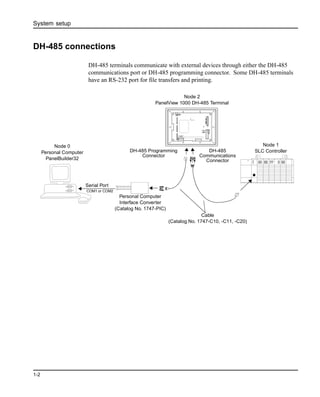
DH-485 terminals communicate with external devices through either the DH-485
communications port or DH-485 programming connector. Some DH-485 terminals
have an RS-232 port for file transfers and printing.
COM1 or COM2
Serial Port
Node 0
Personal Computer
PanelBuilder32
Node 2
PanelView 1000 DH-485 Terminal
DH-485 Programming
Connector
DH-485
Communications
Connector
Personal Computer
Interface Converter
(Catalog No. 1747-PIC)
Cable
(Catalog No. 1747-C10, -C11, -C20)
Node 1
SLC Controller
System setup
1-3
RS-232 connections (DH485 protocol)
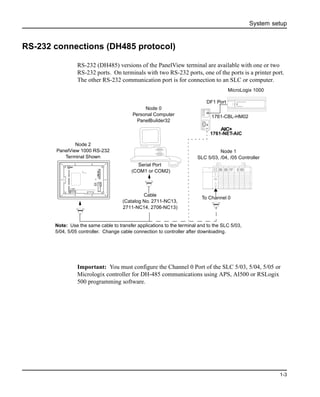
RS-232 (DH485) versions of the PanelView terminal are available with one or two
RS-232 ports. On terminals with two RS-232 ports, one of the ports is a printer port.
The other RS-232 communication port is for connection to an SLC or computer.
Important: You must configure the Channel 0 Port of the SLC 5/03, 5/04, 5/05 or
Micrologix controller for DH-485 communications using APS, AI500 or RSLogix
500 programming software.
Cable
(Catalog No. 2711-NC13,
2711-NC14, 2706-NC13)
Node 2
PanelView 1000 RS-232
Terminal Shown
Node 0
Personal Computer
PanelBuilder32
Node 1
SLC 5/03, /04, /05 Controller
Note: Use the same cable to transfer applications to the terminal and to the SLC 5/03,
5/04, 5/05 controller. Change cable connection to controller after downloading.
1761-CBL-HM02
DF1 Port
1761-NET-AIC
AIC+
To Channel 0
(COM1 or COM2)
Serial Port
MicroLogix 1000
System setup
1-4
RS-232 connections (DF1 protocol)
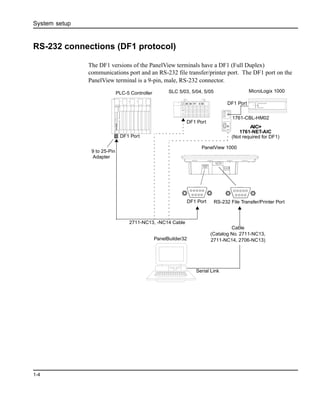
The DF1 versions of the PanelView terminals have a DF1 (Full Duplex)
communications port and an RS-232 file transfer/printer port. The DF1 port on the
PanelView terminal is a 9-pin, male, RS-232 connector.
DF1 Port
2711-NC13, -NC14 Cable
9 to 25-Pin
Adapter
DF1 Port
PLC-5 Controller
DF1 Port
Serial Link
Cable
(Catalog No. 2711-NC13,
2711-NC14, 2706-NC13)
1761-CBL-HM02
DF1 Port
1761-NET-AIC
AIC+
RS-232 File Transfer/Printer Port
(Not required for DF1)
PanelBuilder32
SLC 5/03, 5/04, 5/05
PanelView 1000
MicroLogix 1000
System setup
1-5
Remote I/O connections
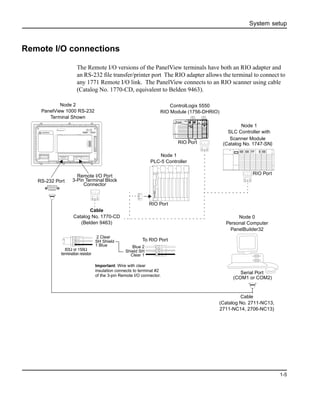
The Remote I/O versions of the PanelView terminals have both an RIO adapter and
an RS-232 file transfer/printer port The RIO adapter allows the terminal to connect to
any 1771 Remote I/O link. The PanelView connects to an RIO scanner using cable
(Catalog No. 1770-CD, equivalent to Belden 9463).
Cable
(Catalog No. 2711-NC13,
2711-NC14, 2706-NC13)
Node 2
PanelView 1000 RS-232
Terminal Shown
Node 0
Personal Computer
PanelBuilder32
Node 1
PLC-5 Controller
RIO Port
Cable
Catalog No. 1770-CD
(Belden 9463)
RS-232 Port
Remote I/O Port
3-Pin Terminal Block
Connector
To RIO Port
2 Clear
SH Shield
1 Blue Blue 2
Shield SH
Clear 1
82Ω or 150Ω
termination resistor
Scanner Module
(Catalog No. 1747-SN)
Node 1
SLC Controller with
RIO Port
ControlLogix 5550
RIO Module (1756-DHRIO)
RIO Port
Important: Wire with clear
insulation connects to terminal #2
of the 3-pin Remote I/O connector.
Serial Port
(COM1 or COM2)
System setup
1-6
DH+ connections
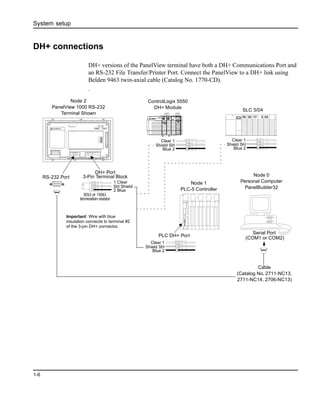
DH+ versions of the PanelView terminal have both a DH+ Communications Port and
an RS-232 File Transfer/Printer Port. Connect the PanelView to a DH+ link using
Belden 9463 twin-axial cable (Catalog No. 1770-CD).
.
Cable
(Catalog No. 2711-NC13,
2711-NC14, 2706-NC13)
Node 2
PanelView 1000 RS-232
Terminal Shown
Node 0
Personal Computer
PanelBuilder32
Node 1
PLC-5 Controller
PLC DH+ Port
RS-232 Port
DH+ Port
3-Pin Terminal Block
1 Clear
SH Shield
2 Blue
Clear 1
Shield SH
Blue 2
82Ω or 150Ω
termination resistor
ControlLogix 5550
DH+ Module
SLC 5/04
Clear 1
Shield SH
Blue 2
Clear 1
Shield SH
Blue 2
Important: Wire with blue
insulation connects to terminal #2
of the 3-pin DH+ connector.
Serial Port
(COM1 or COM2)
System setup
1-7
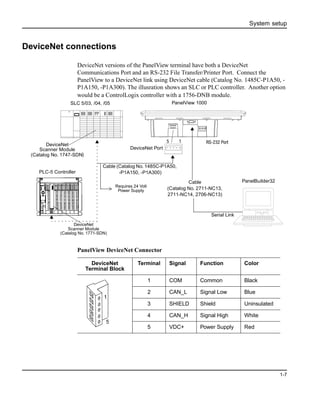
DeviceNet connections
DeviceNet versions of the PanelView terminal have both a DeviceNet
Communications Port and an RS-232 File Transfer/Printer Port. Connect the
PanelView to a DeviceNet link using DeviceNet cable (Catalog No. 1485C-P1A50, -
P1A150, -P1A300). The illusration shows an SLC or PLC controller. Another option
would be a ControlLogix controller with a 1756-DNB module.
PanelView DeviceNet Connector
RS-232 Port
Serial Link
DeviceNet
Scanner Module
(Catalog No. 1747-SDN)
15
Cable
(Catalog No. 2711-NC13,
2711-NC14, 2706-NC13)
Cable (Catalog No. 1485C-P1A50,
-P1A150, -P1A300)
DeviceNet
Scanner Module
(Catalog No. 1771-SDN)
DeviceNet Port
Requires 24 Volt
Power Supply
PLC-5 Controller
PanelView 1000SLC 5/03, /04, /05
PanelBuilder32
DeviceNet
Terminal Block
Terminal Signal Function Color
1 COM Common Black
2 CAN_L Signal Low Blue
3 SHIELD Shield Uninsulated
4 CAN_H Signal High White
5 VDC+ Power Supply Red
1
5
System setup
1-8
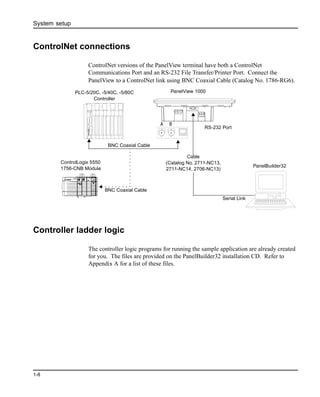
ControlNet connections
ControlNet versions of the PanelView terminal have both a ControlNet
Communications Port and an RS-232 File Transfer/Printer Port. Connect the
PanelView to a ControlNet link using BNC Coaxial Cable (Catalog No. 1786-RG6).
Controller ladder logic
The controller logic programs for running the sample application are already created
for you. The files are provided on the PanelBuilder32 installation CD. Refer to
Appendix A for a list of these files.
RS-232 Port
Serial Link
PLC-5/20C, -5/40C, -5/80C
Controller
BNC Coaxial Cable
Cable
(Catalog No. 2711-NC13,
2711-NC14, 2706-NC13)
BNC Coaxial Cable
ControlLogix 5550
1756-CNB Module
A B
PanelBuilder32
PanelView 1000
Overview of application
2-1
2 Overview of application
This chapter covers:
• purpose of application
• overview of application screens
• application tags
Purpose of application
The application contains objects that control and monitor the status of a motor.
Depending on the communication protocol used, the PanelView terminal reads/writes
data to either:
• SLC or Micrologix controller on a DH-485 network
• SLC, PLC-5, or ControlLogix controller on a DH+ network
• PLC 5 , SLC, or ControlLogix controller on a Remote I/O network
• SLC, PLC, or Micrologix controller on an RS-232 (DF1) network
• ControlLogix, PLC-5, or SLC controller on a DeviceNet network
• ControlLogix or PLC-5 controller on a ControlNet network (unscheduled)
• ControlLogix controller on a ControlNet network (scheduled)
Chapter 4 give procedures for creating the application on a PanelView 600 keypad
terminal.
• If creating the application for a touch screen terminal, touch cell input is
automatically enabled and you do not have to assign function keys.
• If creating the application for other size terminals, use the appropriate text sizes.
You can create any of the sample applications for another PanelView terminal size.
For instructions on how to do this, see page 3-24.
All of the sample applications are on the installation CD in the QuickStartPV
directory.
Overview of application
2-2
Application screens
The application contains 3 screens:
• Motor Status - contains objects to start or stop a motor, show the on/off status of
the motor, and display the current motor speed.
• Set Motor Speed - contains a numeric entry object allowing you to enter a
maximum speed for the motor.
If the motor speed is changed, the new speed won’t take effect until the motor is
stopped and started again.
• Alarm Banner - global display that opens over the Motor Status or Set Motor
Speed screen when an alarm is triggered.
The Motor Status and Set Motor Speed screen each contain a screen button allowing
you to navigate between the two screens.
If you want the operator to access the Configuration Mode menu from a touch screen
terminal, you should include a Goto Config screen button on the application screen.
On keypad only terminals, press the left and right arrow keys simultaneously
on the terminal’s keypad to display the configuration menu.
Overview of application
2-3
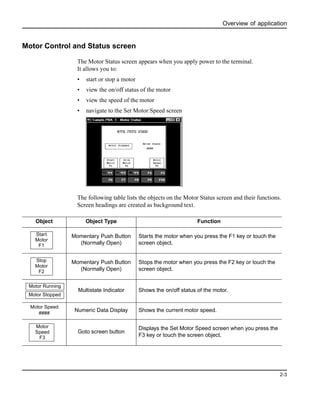
Motor Control and Status screen
The Motor Status screen appears when you apply power to the terminal.
It allows you to:
• start or stop a motor
• view the on/off status of the motor
• view the speed of the motor
• navigate to the Set Motor Speed screen
The following table lists the objects on the Motor Status screen and their functions.
Screen headings are created as background text.
Object Object Type Function
Momentary Push Button
(Normally Open)
Starts the motor when you press the F1 key or touch the
screen object.
Momentary Push Button
(Normally Open)
Stops the motor when you press the F2 key or touch the
screen object.
Multistate Indicator Shows the on/off status of the motor.
Numeric Data Display Shows the current motor speed.
Goto screen button
Displays the Set Motor Speed screen when you press the
F3 key or touch the screen object.
Start
Motor
F1
Stop
Motor
F2
Motor Running
Motor Stopped
Motor Speed
####
Motor
Speed
F3
Overview of application
2-4
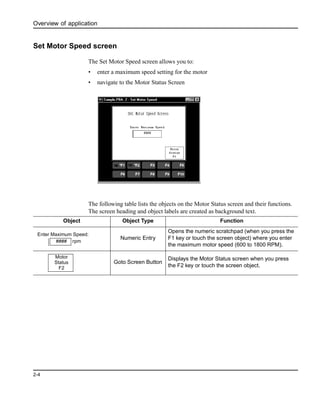
Set Motor Speed screen
The Set Motor Speed screen allows you to:
• enter a maximum speed setting for the motor
• navigate to the Motor Status Screen
The following table lists the objects on the Motor Status screen and their functions.
The screen heading and object labels are created as background text.
Object Object Type Function
Numeric Entry
Opens the numeric scratchpad (when you press the
F1 key or touch the screen object) where you enter
the maximum motor speed (600 to 1800 RPM).
Goto Screen Button
Displays the Motor Status screen when you press
the F2 key or touch the screen object.
Enter Maximum Speed:
#### rpm
Motor
Status
F2
Overview of application
2-5
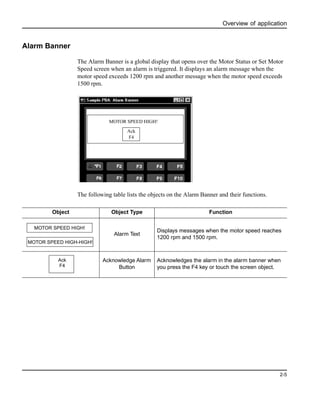
Alarm Banner
The Alarm Banner is a global display that opens over the Motor Status or Set Motor
Speed screen when an alarm is triggered. It displays an alarm message when the
motor speed exceeds 1200 rpm and another message when the motor speed exceeds
1500 rpm.
The following table lists the objects on the Alarm Banner and their functions.
MOTOR SPEED HIGH!
Ack
F4
Object Object Type Function
Alarm Text
Displays messages when the motor speed reaches
1200 rpm and 1500 rpm.
Acknowledge Alarm
Button
Acknowledges the alarm in the alarm banner when
you press the F4 key or touch the screen object.
MOTOR SPEED HIGH-HIGH!
MOTOR SPEED HIGH!
Ack
F4
Overview of application
2-6
Application tags
The sample application requires only 6 tags. Tags are a group of parameters that
define a controller address. Each tag is identified by a unique name.
These are the tags that are used in this application. Notice how the tags are assigned
descriptive names. This makes it easier to create and modify an application.
v Start_Motor - assigned to the motor start button
v Stop_Motor - assigned to the motor stop button
v Motor_Status_Ind - assigned to the motor status indicator
v Motor_Speed - assigned to the motor speed data display
v Set_Max_Motor_Speed - assigned to the data entry display for motor speed
v Speed_Alarm - assigned to the trigger for the alarm banner
Tag information is entered using either:
• Tag Form dialog - accessed from an object’s dialog by clicking the Edit Tags
button. Allows editing of all tag fields.
• Tag Editor - accessed from the Tools menu or the System folder in the
Application window. The tag editor displays all of the assigned tags within the
application and allows editing of most tag fields. (Some protocol specific fields
cannot be accessed from the tag editor.)
Each application requires slightly different tag information depending on the terminal
communications. Some communication settings are specific to a protocol and cannot
be accessed from the tag editor. You must use the Tag Form dialog. Chapters 4 and 5
provide the information you need for each terminal type along with instructions for
entering tags.
Creating the application
3-1
3 Creating the application
Follow the procedures in this chapter to:
• create the application screens (Motor Status, Set Motor Speed, Alarm Banner)
• select the startup screen for the application
• save the application
Starting PanelBuilder32
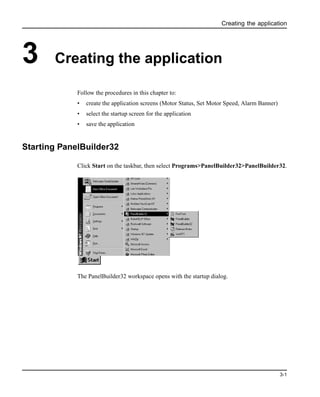
Click Start on the taskbar, then select Programs>PanelBuilder32>PanelBuilder32.
The PanelBuilder32 workspace opens with the startup dialog.
Creating the application
3-2
Creating a new application
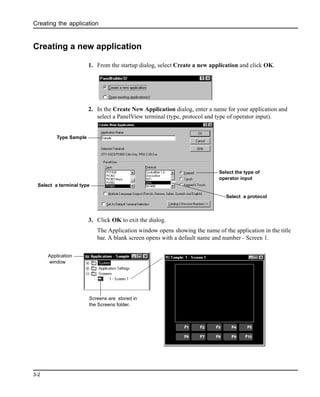
1. From the startup dialog, select Create a new application and click OK.
2. In the Create New Application dialog, enter a name for your application and
select a PanelView terminal (type, protocol and type of operator input).
3. Click OK to exit the dialog.
The Application window opens showing the name of the application in the title
bar. A blank screen opens with a default name and number - Screen 1.
Type Sample
Select a terminal type
Select a protocol
Select the type of
operator input
Screens are stored in
the Screens folder.
Application
window
Creating the application
3-3
Renaming and changing the color of Screen 1
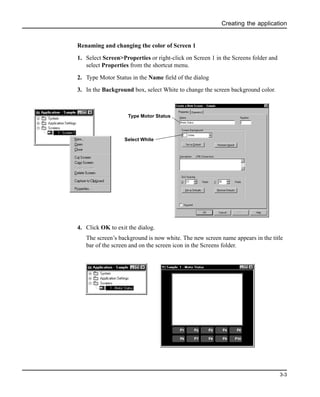
1. Select Screen>Properties or right-click on Screen 1 in the Screens folder and
select Properties from the shortcut menu.
2. Type Motor Status in the Name field of the dialog
3. In the Background box, select White to change the screen background color.
4. Click OK to exit the dialog.
The screen’s background is now white. The new screen name appears in the title
bar of the screen and on the screen icon in the Screens folder.
Type Motor Status
Select White
Creating the application
3-4
Creating the Set Motor Speed screen
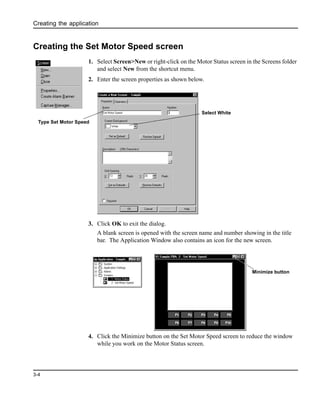
1. Select Screen>New or right-click on the Motor Status screen in the Screens folder
and select New from the shortcut menu.
2. Enter the screen properties as shown below.
3. Click OK to exit the dialog.
A blank screen is opened with the screen name and number showing in the title
bar. The Application Window also contains an icon for the new screen.
4. Click the Minimize button on the Set Motor Speed screen to reduce the window
while you work on the Motor Status screen.
Type Set Motor Speed
Select White
Minimize button
Creating the application
3-5
Creating objects on the Motor Status screen
Creating the Start Motor push button
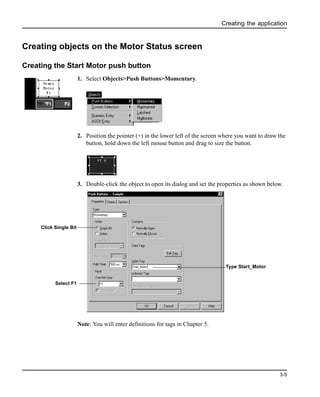
1. Select Objects>Push Buttons>Momentary.
2. Position the pointer (+) in the lower left of the screen where you want to draw the
button, hold down the left mouse button and drag to size the button.
3. Double-click the object to open its dialog and set the properties as shown below.
Note: You will enter definitions for tags in Chapter 5.
Click Single Bit
Type Start_Motor
Select F1
Creating the application
3-6
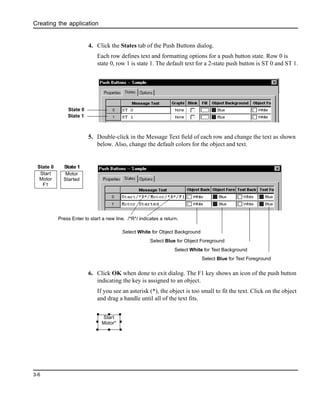
4. Click the States tab of the Push Buttons dialog.
Each row defines text and formatting options for a push button state. Row 0 is
state 0, row 1 is state 1. The default text for a 2-state push button is ST 0 and ST 1.
5. Double-click in the Message Text field of each row and change the text as shown
below. Also, change the default colors for the object and text.
6. Click OK when done to exit dialog. The F1 key shows an icon of the push button
indicating the key is assigned to an object.
If you see an asterisk (*), the object is too small to fit the text. Click on the object
and drag a handle until all of the text fits.
State 0
State 1
Select White for Text Background
Select Blue for Object Foreground
Select Blue for Text Foreground
Select White for Object Background
Press Enter to start a new line. /*R*/ indicates a return.
Start
Motor
F1
Motor
Started
State 0 State 1
Start
Motor*
Creating the application
3-7
Creating the Stop Motor push button
The Stop Motor push button is created using copy and paste commands.
1. Select (left-click on) the Start Motor button (if not selected).
2. Select Edit>Copy or click the Copy tool on the toolbar.
3. Select Edit>Paste or click the Paste tool on the toolbar.
An outline of the button appears.
4. Move the outline to the right of the Start Motor push button and click the left
mouse button to paste it on the screen.
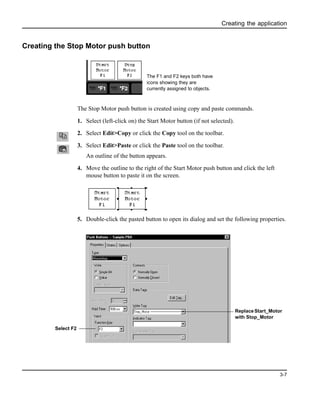
5. Double-click the pasted button to open its dialog and set the following properties.
The F1 and F2 keys both have
icons showing they are
currently assigned to objects.
Select F2
Replace Start_Motor
with Stop_Motor
Creating the application
3-8
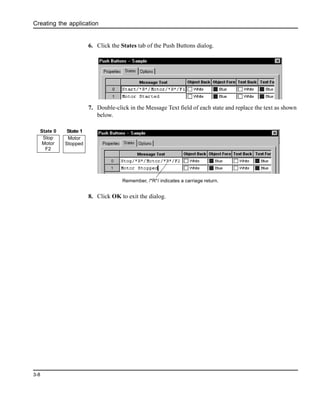
6. Click the States tab of the Push Buttons dialog.
7. Double-click in the Message Text field of each state and replace the text as shown
below.
8. Click OK to exit the dialog.
Remember, /*R*/ indicates a carriage return.
Stop
Motor
F2
Motor
Stopped
State 0 State 1
Creating the application
3-9
Creating the Motor Speed screen button
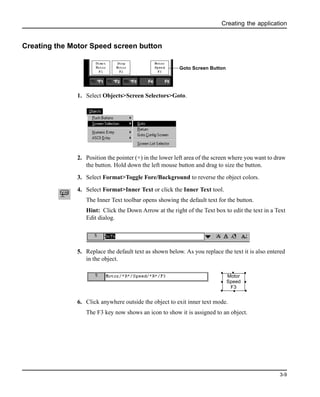
1. Select Objects>Screen Selectors>Goto.
2. Position the pointer (+) in the lower left area of the screen where you want to draw
the button. Hold down the left mouse button and drag to size the button.
3. Select Format>Toggle Fore/Background to reverse the object colors.
4. Select Format>Inner Text or click the Inner Text tool.
The Inner Text toolbar opens showing the default text for the button.
Hint: Click the Down Arrow at the right of the Text box to edit the text in a Text
Edit dialog.
5. Replace the default text as shown below. As you replace the text it is also entered
in the object.
6. Click anywhere outside the object to exit inner text mode.
The F3 key now shows an icon to show it is assigned to an object.
Goto Screen Button
Motor
Speed
F3
Creating the application
3-10
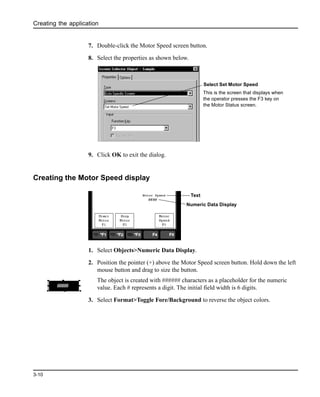
7. Double-click the Motor Speed screen button.
8. Select the properties as shown below.
9. Click OK to exit the dialog.
Creating the Motor Speed display
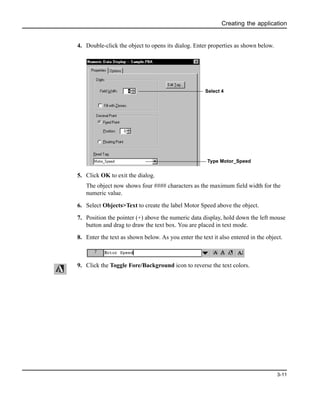
1. Select Objects>Numeric Data Display.
2. Position the pointer (+) above the Motor Speed screen button. Hold down the left
mouse button and drag to size the button.
The object is created with ###### characters as a placeholder for the numeric
value. Each # represents a digit. The initial field width is 6 digits.
3. Select Format>Toggle Fore/Background to reverse the object colors.
Select Set Motor Speed
This is the screen that displays when
the operator presses the F3 key on
the Motor Status screen.
Numeric Data Display
Text
####
Creating the application
3-11
4. Double-click the object to opens its dialog. Enter properties as shown below.
5. Click OK to exit the dialog.
The object now shows four #### characters as the maximum field width for the
numeric value.
6. Select Objects>Text to create the label Motor Speed above the object.
7. Position the pointer (+) above the numeric data display, hold down the left mouse
button and drag to draw the text box. You are placed in text mode.
8. Enter the text as shown below. As you enter the text it also entered in the object.
9. Click the Toggle Fore/Background icon to reverse the text colors.
Select 4
Type Motor_Speed
Creating the application
3-12
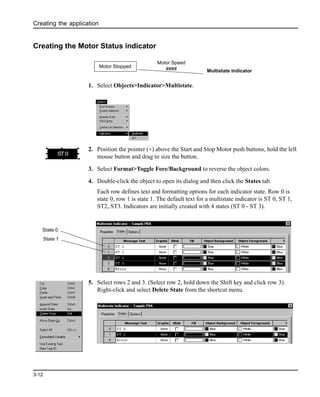
Creating the Motor Status indicator
1. Select Objects>Indicator>Multistate.
2. Position the pointer (+) above the Start and Stop Motor push buttons, hold the left
mouse button and drag to size the button.
3. Select Format>Toggle Fore/Background to reverse the object colors.
4. Double-click the object to open its dialog and then click the States tab.
Each row defines text and formatting options for each indicator state. Row 0 is
state 0, row 1 is state 1. The default text for a multistate indicator is ST 0, ST 1,
ST2, ST3. Indicators are initially created with 4 states (ST 0 - ST 3).
5. Select rows 2 and 3. (Select row 2, hold down the Shift key and click row 3).
Right-click and select Delete State from the shortcut menu.
Multistate Indicator
Motor Stopped
Motor Speed
####
ST0
State 0
State 1
Creating the application
3-13
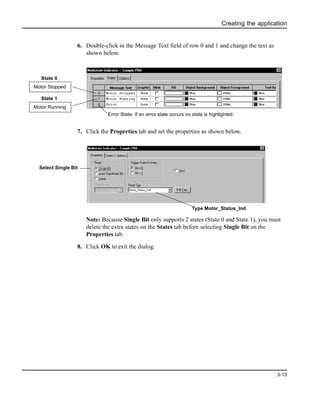
6. Double-click in the Message Text field of row 0 and 1 and change the text as
shown below.
7. Click the Properties tab and set the properties as shown below.
Note: Because Single Bit only supports 2 states (State 0 and State 1), you must
delete the extra states on the States tab before selecting Single Bit on the
Properties tab.
8. Click OK to exit the dialog.
Motor Stopped
State 0
Motor Running
State 1
Error State- If an error state occurs no state is highlighted.
Type Motor_Status_Ind
Select Single Bit
Creating the application
3-14
Creating the screen title for the Motor Status screen
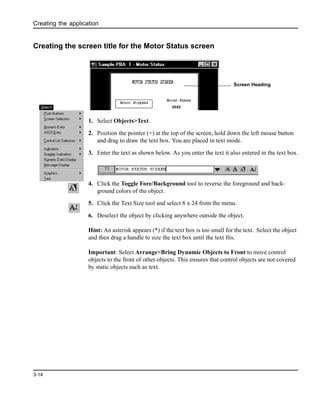
1. Select Objects>Text.
2. Position the pointer (+) at the top of the screen, hold down the left mouse button
and drag to draw the text box. You are placed in text mode.
3. Enter the text as shown below. As you enter the text it also entered in the text box.
4. Click the Toggle Fore/Background tool to reverse the foreground and back-
ground colors of the object.
5. Click the Text Size tool and select 8 x 24 from the menu.
6. Deselect the object by clicking anywhere outside the object.
Hint: An asterisk appears (*) if the text box is too small for the text. Select the object
and then drag a handle to size the text box until the text fits.
Important: Select Arrange>Bring Dynamic Objects to Front to move control
objects to the front of other objects. This ensures that control objects are not covered
by static objects such as text.
Screen Heading
Creating the application
3-15
Creating objects on the Set Motor Speed screen
Creating a numeric entry object for setting the motor speed
1. Open the Set Motor Speed screen (Screen 2) by clicking on in the title bar of
the minimized screen.
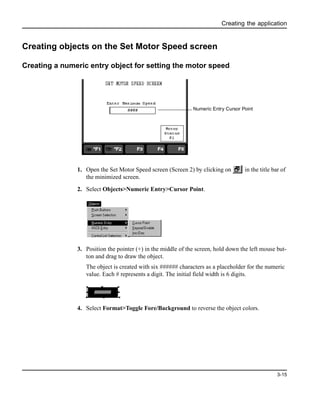
2. Select Objects>Numeric Entry>Cursor Point.
3. Position the pointer (+) in the middle of the screen, hold down the left mouse but-
ton and drag to draw the object.
The object is created with six ###### characters as a placeholder for the numeric
value. Each # represents a digit. The initial field width is 6 digits.
4. Select Format>Toggle Fore/Background to reverse the object colors.
Numeric Entry Cursor Point
######
Creating the application
3-16
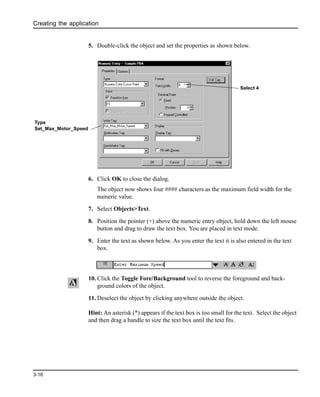
5. Double-click the object and set the properties as shown below.
6. Click OK to close the dialog.
The object now shows four #### characters as the maximum field width for the
numeric value.
7. Select Objects>Text.
8. Position the pointer (+) above the numeric entry object, hold down the left mouse
button and drag to draw the text box. You are placed in text mode.
9. Enter the text as shown below. As you enter the text it is also entered in the text
box.
10. Click the Toggle Fore/Background tool to reverse the foreground and back-
ground colors of the object.
11. Deselect the object by clicking anywhere outside the object.
Hint: An asterisk (*) appears if the text box is too small for the text. Select the object
and then drag a handle to size the text box until the text fits.
Type
Set_Max_Motor_Speed
Select 4
Creating the application
3-17
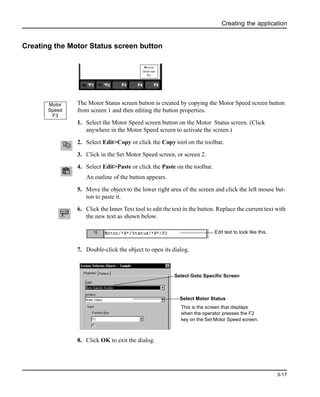
Creating the Motor Status screen button
The Motor Status screen button is created by copying the Motor Speed screen button
from screen 1 and then editing the button properties.
1. Select the Motor Speed screen button on the Motor Status screen. (Click
anywhere in the Motor Speed screen to activate the screen.)
2. Select Edit>Copy or click the Copy tool on the toolbar.
3. Click in the Set Motor Speed screen, or screen 2.
4. Select Edit>Paste or click the Paste on the toolbar.
An outline of the button appears.
5. Move the object to the lower right area of the screen and click the left mouse but-
ton to paste it.
6. Click the Inner Text tool to edit the text in the button. Replace the current text with
the new text as shown below.
7. Double-click the object to open its dialog.
8. Click OK to exit the dialog.
Motor
Speed
F3
Edit text to look like this.
Select Goto Specific Screen
Select Motor Status
This is the screen that displays
when the operator presses the F2
key on the Set Motor Speed screen.
Creating the application
3-18
Creating the screen title for the Set Motor Speed screen
1. Select Objects>Text.
2. Position the pointer (+) at the top of the screen, hold down the left mouse button
and drag to draw the text box. You are placed in text mode.
3. Enter the text as shown below. As you enter the text it also entered in the text box.
4. Click the Toggle Fore/Background tool to reverse the foreground and back-
ground colors of the object.
5. Click the Text Size tool and select 8 x 24 from the menu.
6. Deselect the object by clicking anywhere outside the object.
7. Hint: An asterisk (*) appears if the text box is too small for the text. Select the
object and then drag a handle to size the text box until the text fits.
Important: Select Arrange>Bring Dynamic Objects to Front to move control
objects to the front of other objects. This ensures that control objects are not covered
by static objects such as text.
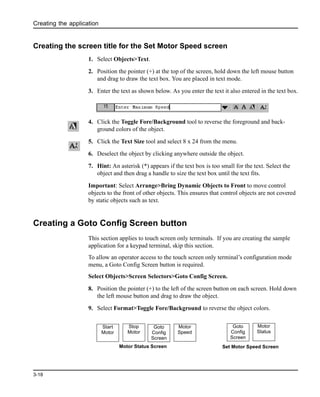
Creating a Goto Config Screen button
This section applies to touch screen only terminals. If you are creating the sample
application for a keypad terminal, skip this section.
To allow an operator access to the touch screen only terminal’s configuration mode
menu, a Goto Config Screen button is required.
Select Objects>Screen Selectors>Goto Config Screen.
8. Position the pointer (+) to the left of the screen button on each screen. Hold down
the left mouse button and drag to draw the object.
9. Select Format>Toggle Fore/Background to reverse the object colors.
Motor Status Screen Set Motor Speed Screen
Start
Motor
Stop
Motor
Goto
Config
Screen
Motor
Speed
Goto
Config
Screen
Motor
Status
Creating the application
3-19
Creating the alarm banner and messages
In this section, you will create:
• alarm banner that opens over the current screen when an alarm is triggered. The
banner will contain a message display and an Acknowledge button.
• alarm trigger tag defining the address where the controller writes a bit to trigger an
alarm.
• alarm messages to appear in the alarm banner when an alarm is triggered
Creating the alarm banner
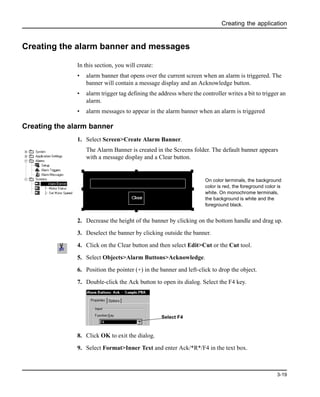
1. Select Screen>Create Alarm Banner.
The Alarm Banner is created in the Screens folder. The default banner appears
with a message display and a Clear button.
2. Decrease the height of the banner by clicking on the bottom handle and drag up.
3. Deselect the banner by clicking outside the banner.
4. Click on the Clear button and then select Edit>Cut or the Cut tool.
5. Select Objects>Alarm Buttons>Acknowledge.
6. Position the pointer (+) in the banner and left-click to drop the object.
7. Double-click the Ack button to open its dialog. Select the F4 key.
8. Click OK to exit the dialog.
9. Select Format>Inner Text and enter Ack/*R*/F4 in the text box.
Clear
On color terminals, the background
color is red, the foreground color is
white. On monochrome terminals,
the background is white and the
foreground black.
Select F4
Creating the application
3-20
Defining an alarm trigger
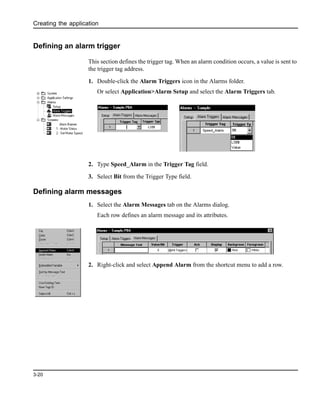
This section defines the trigger tag. When an alarm condition occurs, a value is sent to
the trigger tag address.
1. Double-click the Alarm Triggers icon in the Alarms folder.
Or select Application>Alarm Setup and select the Alarm Triggers tab.
2. Type Speed_Alarm in the Trigger Tag field.
3. Select Bit from the Trigger Type field.
Defining alarm messages
1. Select the Alarm Messages tab on the Alarms dialog.
Each row defines an alarm message and its attributes.
2. Right-click and select Append Alarm from the shortcut menu to add a row.
Creating the application
3-21
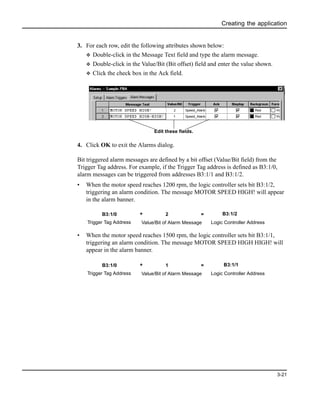
3. For each row, edit the following attributes shown below:
v Double-click in the Message Text field and type the alarm message.
v Double-click in the Value/Bit (Bit offset) field and enter the value shown.
v Click the check box in the Ack field.
4. Click OK to exit the Alarms dialog.
Bit triggered alarm messages are defined by a bit offset (Value/Bit field) from the
Trigger Tag address. For example, if the Trigger Tag address is defined as B3:1/0,
alarm messages can be triggered from addresses B3:1/1 and B3:1/2.
• When the motor speed reaches 1200 rpm, the logic controller sets bit B3:1/2,
triggering an alarm condition. The message MOTOR SPEED HIGH! will appear
in the alarm banner.
• When the motor speed reaches 1500 rpm, the logic controller sets bit B3:1/1,
triggering an alarm condition. The message MOTOR SPEED HIGH HIGH! will
appear in the alarm banner.
Edit these fields.
B3:1/0 + 2 =
Trigger Tag Address Value/Bit of Alarm Message
B3:1/2
Logic Controller Address
B3:1/0 + 1 =
Trigger Tag Address Value/Bit of Alarm Message
B3:1/1
Logic Controller Address
Creating the application
3-22
Closing the screens
Close each screen by clicking the X in the title bar of the screen. Or select
Screen>Close to close each screen.
Or select Windows>Close all Current Application Screens to close all screens.
Defining the startup screen for the application
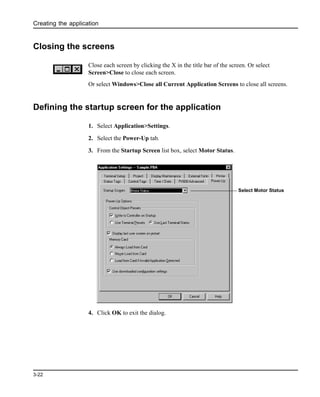
1. Select Application>Settings.
2. Select the Power-Up tab.
3. From the Startup Screen list box, select Motor Status.
4. Click OK to exit the dialog.
Select Motor Status
Creating the application
3-23
Saving the application
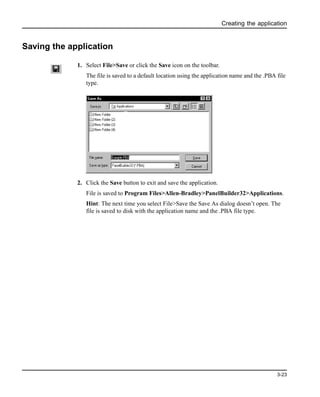
1. Select File>Save or click the Save icon on the toolbar.
The file is saved to a default location using the application name and the .PBA file
type.
2. Click the Save button to exit and save the application.
File is saved to Program Files>Allen-Bradley>PanelBuilder32>Applications.
Hint: The next time you select File>Save the Save As dialog doesn’t open. The
file is saved to disk with the application name and the .PBA file type.
Creating the application
3-24
Converting application for another terminal type
The sample application was created for the PanelView 600 keypad terminal and is
available for DH-485, DH+, DF1, Remote I/O, DeviceNet and ControlNet protocols.
You can convert any one these applications to another terminal size such as
PanelView 1000 by following the procedure below.
1. Select Application>Settings.
2. Click the Setup tab.
3. Select the PanelView terminal for which you want to convert the application.
4. When you click OK, the application is converted and validated for any errors.
If the application is converted successfully, the Exceptions window shows the
message:
[Application] Conversion Passed - No Errors Found
Important: Depending on the terminal size, you may want to reposition and resize
objects appropriately. You may also want to adjust the text sizes.
If the terminal uses a different protocol, you can select the Convert option on the Edit
Tag tab of the Tools>Options dialog and the tag editor will convert the current tags to
the appropriate fields for the new protocol. You still need to update the tag data.
Configuring communications
4-1
4 Configuring communications
This chapter shows how to configure network communications for your PanelView
terminal and logic controller. Configuration is provided for the following
communication protocols.
• DH-485 - configures a DH-485 PanelView Terminal and an SLC or MicroLogix
controller
• DH+ - configures a DH+ PanelView terminal and a PLC 5, SLC 5/04, or
ControlLogix DH+ module.
• Remote I/O - configures a Remote I/O terminal and a PLC 5, SLC 5/03, 5/04 or
5/05 controller with a 1747-SN/B scanner or ControlLogix DHRIO module.
• ControlNet - configures a ControlNet PanelView terminal and a ControlLogix
CNet module or PLC-5 controller using scheduled or unscheduled messaging.
• DeviceNet - configures a DeviceNet PanelView terminal to communicate as a
slave device on a DeviceNet network or ControlLogix DNET module.
• DF1- configures a DF1 PanelView terminal and a PLC 5, SLC 5/03, 5/04, 5/05,
or MicroLogix controller.
Refer to the section that is appropriate for your terminal.
Configuring communications
4-2
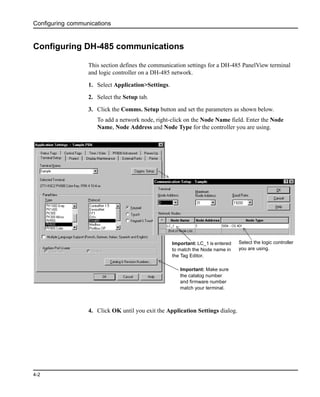
Configuring DH-485 communications
This section defines the communication settings for a DH-485 PanelView terminal
and logic controller on a DH-485 network.
1. Select Application>Settings.
2. Select the Setup tab.
3. Click the Comms. Setup button and set the parameters as shown below.
To add a network node, right-click on the Node Name field. Enter the Node
Name, Node Address and Node Type for the controller you are using.
4. Click OK until you exit the Application Settings dialog.
Important: Make sure
the catalog number
and firmware number
match your terminal.
Select the logic controller
you are using.
Important: LC_1 is entered
to match the Node name in
the Tag Editor.
Configuring communications
4-3
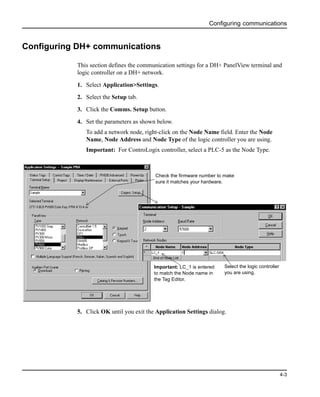
Configuring DH+ communications
This section defines the communication settings for a DH+ PanelView terminal and
logic controller on a DH+ network.
1. Select Application>Settings.
2. Select the Setup tab.
3. Click the Comms. Setup button.
4. Set the parameters as shown below.
To add a network node, right-click on the Node Name field. Enter the Node
Name, Node Address and Node Type of the logic controller you are using.
Important: For ControLogix controller, select a PLC-5 as the Node Type.
5. Click OK until you exit the Application Settings dialog.
Important: LC_1 is entered
to match the Node name in
the Tag Editor.
Check the firmware number to make
sure it matches your hardware.
Select the logic controller
you are using.
Configuring communications
4-4
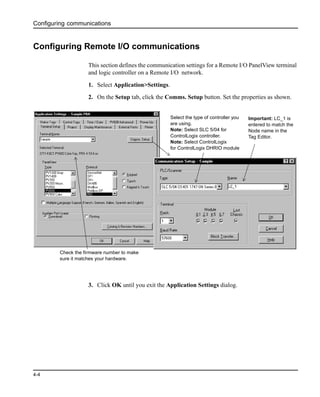
Configuring Remote I/O communications
This section defines the communication settings for a Remote I/O PanelView terminal
and logic controller on a Remote I/O network.
1. Select Application>Settings.
2. On the Setup tab, click the Comms. Setup button. Set the properties as shown.
3. Click OK until you exit the Application Settings dialog.
Important: LC_1 is
entered to match the
Node name in the
Tag Editor.
Select the type of controller you
are using.
Note: Select SLC 5/04 for
ControlLogix controller.
Note: Select ControlLogix
for ControlLogix DHRIO module
Check the firmware number to make
sure it matches your hardware.
Configuring communications
4-5
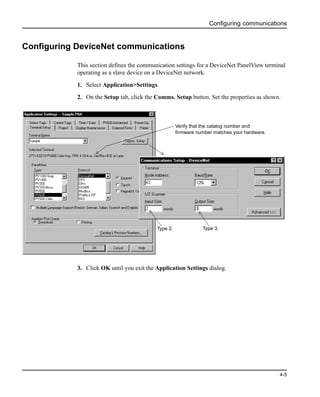
Configuring DeviceNet communications
This section defines the communication settings for a DeviceNet PanelView terminal
operating as a slave device on a DeviceNet network.
1. Select Application>Settings.
2. On the Setup tab, click the Comms. Setup button. Set the properties as shown.
3. Click OK until you exit the Application Settings dialog.
Verify that the catalog number and
firmware number matches your hardware.
Type 2. Type 3.
Configuring communications
4-6
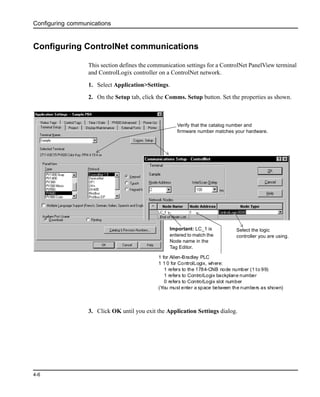
Configuring ControlNet communications
This section defines the communication settings for a ControlNet PanelView terminal
and ControlLogix controller on a ControlNet network.
1. Select Application>Settings.
2. On the Setup tab, click the Comms. Setup button. Set the properties as shown.
3. Click OK until you exit the Application Settings dialog.
Important: LC_1 is
entered to match the
Node name in the
Tag Editor.
Select the logic
controller you are using.
Verify that the catalog number and
firmware number matches your hardware.
1 for Allen-Bradley PLC
1 1 0 for ControlLogix, where:
1 refers to the 1784-CNB node number (1 to 99)
1 refers to ControlLogix backplane number
0 refers to ControlLogix slot number
(You must enter a space between the numbers as shown)
Configuring communications
4-7
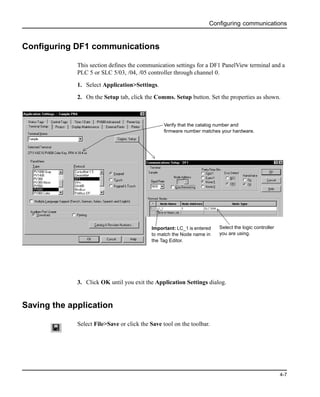
Configuring DF1 communications
This section defines the communication settings for a DF1 PanelView terminal and a
PLC 5 or SLC 5/03, /04, /05 controller through channel 0.
1. Select Application>Settings.
2. On the Setup tab, click the Comms. Setup button. Set the properties as shown.
3. Click OK until you exit the Application Settings dialog.
Saving the application
Select File>Save or click the Save tool on the toolbar.
Important: LC_1 is entered
to match the Node name in
the Tag Editor.
Select the logic controller
you are using.
Verify that the catalog number and
firmware number matches your hardware.
Configuring communications
4-8
Entering application tags
5-1
5 Entering application tags
This chapter shows how to:
• open the tag editor
• enter tags in the worksheet for each communication protocol
• save the tags
Opening the tag editor
To open the tag editor:
• Select Tools>Tag Editor.
• Or open the System folder in the Application window and double-click on the Tag
Database icon.
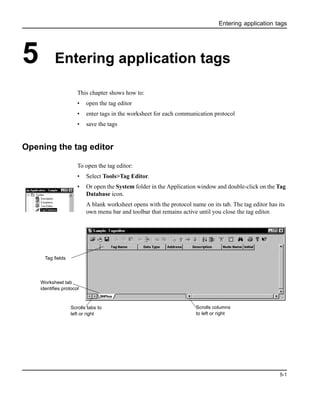
A blank worksheet opens with the protocol name on its tab. The tag editor has its
own menu bar and toolbar that remains active until you close the tag editor.
Scrolls tabs to
left or right
Scrolls columns
to left or right
Worksheet tab
identifies protocol
Tag fields
Entering application tags
5-2
Description of the application tags
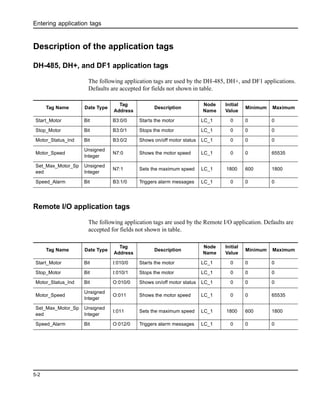
DH-485, DH+, and DF1 application tags
The following application tags are used by the DH-485, DH+, and DF1 applications.
Defaults are accepted for fields not shown in table.
Remote I/O application tags
The following application tags are used by the Remote I/O application. Defaults are
accepted for fields not shown in table.
Tag Name Date Type
Tag
Address
Description
Node
Name
Initial
Value
Minimum Maximum
Start_Motor Bit B3:0/0 Starts the motor LC_1 0 0 0
Stop_Motor Bit B3:0/1 Stops the motor LC_1 0 0 0
Motor_Status_Ind Bit B3:0/2 Shows on/off motor status LC_1 0 0 0
Motor_Speed
Unsigned
Integer
N7:0 Shows the motor speed LC_1 0 0 65535
Set_Max_Motor_Sp
eed
Unsigned
Integer
N7:1 Sets the maximum speed LC_1 1800 600 1800
Speed_Alarm Bit B3:1/0 Triggers alarm messages LC_1 0 0 0
Tag Name Date Type
Tag
Address
Description
Node
Name
Initial
Value
Minimum Maximum
Start_Motor Bit I:010/0 Starts the motor LC_1 0 0 0
Stop_Motor Bit I:010/1 Stops the motor LC_1 0 0 0
Motor_Status_Ind Bit O:010/0 Shows on/off motor status LC_1 0 0 0
Motor_Speed
Unsigned
Integer
O:011 Shows the motor speed LC_1 0 0 65535
Set_Max_Motor_Sp
eed
Unsigned
Integer
I:011 Sets the maximum speed LC_1 1800 600 1800
Speed_Alarm Bit O:012/0 Triggers alarm messages LC_1 0 0 0
Entering application tags
5-3
ControlNet unscheduled application tags
The following application tags are used by the ControlNet application using
unscheduled messaging. Note: Tags are shown for a ControlLogix application.
Defaults are accepted for fields not shown in table.
ControlNet scheduled application tags
The following application tags are used by the ControlNet application using
scheduled messaging. Defaults are accepted for fields not shown in table.
Tag Name Date Type Tag Address Description
Node
Name
Initial
Value
Minimum Maximum
Start_Motor Bit Motor_Control.00 Starts the motor LC_1 0 0 0
Stop_Motor Bit Motor_Control.01 Stops the motor LC_1 0 0 0
Motor_Status_Ind Bit Motor_Control.02
Shows on/off
motor status
LC_1 0 0 0
Motor_Speed
Signed
Integer/INT
Motor_Speed[0]
Shows the motor
speed
LC_1 0 -32768 32767
Set_Max_Motor_Sp
eed
Signed
Integer/INT
Motor_Speed[1]
Sets the
maximum speed
LC_1 1800 600 1800
Speed_Alarm Bit Alarms.00
Triggers alarm
messages
LC_1 0 0 0
Tag Name
Date
Type
Tag
Address
Description
Node
Name
Initial
Value
Minimum Maximum
Start_Motor Bit SI0:0/0
Starts the
motor
ControlNet_Scheduled
_File
0 0 0
Stop_Motor Bit SI0:0/1
Stops the
motor
ControlNet_Scheduled
_File
0 0 0
Motor_Status_Ind Bit SO0:0/0
Shows on/off
motor status
ControlNet_Scheduled
_File
0 0 0
Motor_Speed
Signed
Integer/
INT
SO0:1
Shows the
motor speed
ControlNet_Scheduled
_File
0 -32768 32767
Set_Max_Motor_Sp
eed
Signed
Integer/
INT
SI0:1
Sets the
maximum
speed
ControlNet_Scheduled
_File
1800 600 1800
Speed_Alarm Bit SO0:2/0
Triggers
alarm
messages
ControlNet_Scheduled
_File
0 0 0
Entering application tags
5-4
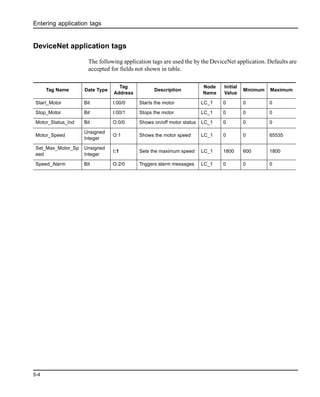
DeviceNet application tags
The following application tags are used the by the DeviceNet application. Defaults are
accepted for fields not shown in table.
Tag Name Date Type
Tag
Address
Description
Node
Name
Initial
Value
Minimum Maximum
Start_Motor Bit I:00/0 Starts the motor LC_1 0 0 0
Stop_Motor Bit I:00/1 Stops the motor LC_1 0 0 0
Motor_Status_Ind Bit O:0/0 Shows on/off motor status LC_1 0 0 0
Motor_Speed
Unsigned
Integer
O:1 Shows the motor speed LC_1 0 0 65535
Set_Max_Motor_Sp
eed
Unsigned
Integer
I:1 Sets the maximum speed LC_1 1800 600 1800
Speed_Alarm Bit O:2/0 Triggers alarm messages LC_1 0 0 0
Entering application tags
5-5
Entering the application tags
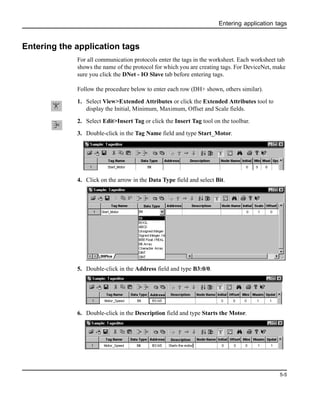
For all communication protocols enter the tags in the worksheet. Each worksheet tab
shows the name of the protocol for which you are creating tags. For DeviceNet, make
sure you click the DNet - IO Slave tab before entering tags.
Follow the procedure below to enter each row (DH+ shown, others similar).
1. Select View>Extended Attributes or click the Extended Attributes tool to
display the Initial, Minimum, Maximum, Offset and Scale fields.
2. Select Edit>Insert Tag or click the Insert Tag tool on the toolbar.
3. Double-click in the Tag Name field and type Start_Motor.
4. Click on the arrow in the Data Type field and select Bit.
5. Double-click in the Address field and type B3:0/0.
6. Double-click in the Description field and type Starts the Motor.
Entering application tags
5-6
7. Click on the arrow in the Node Name field and select LC_1. This node name was
entered for the logic controller when you defined communication settings.
For ControlNet scheduled tags, you must select ControlNet_Scheduled_File
from the Node Name filed.
The defaults are accepted for the rest of the tag attributes. However, for the
Set_Max_Motor_Speed tag enter 600 in the Minimum field, and 1800 in the
Initial Value and Maximum fields.
8. Repeat steps 1 - 6 to enter the rest of the tags.
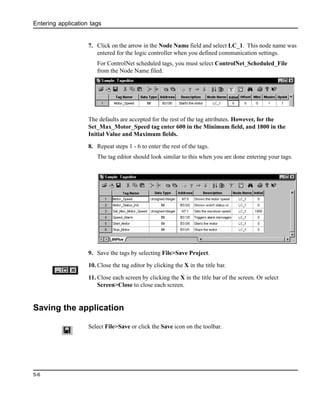
The tag editor should look similar to this when you are done entering your tags.
9. Save the tags by selecting File>Save Project.
10. Close the tag editor by clicking the X in the title bar.
11. Close each screen by clicking the X in the title bar of the screen. Or select
Screen>Close to close each screen.
Saving the application
Select File>Save or click the Save icon on the toolbar.
Downloading the application
6-1
6 Downloading the application
This chapter shows how to:
• validate the application
• download the application using a point-to-point serial connection
• close the application
Checking the application for errors
This section shows you how to validate the application for errors. The application is
also validated automatically during the download process.
1. Select Application>Validate All.
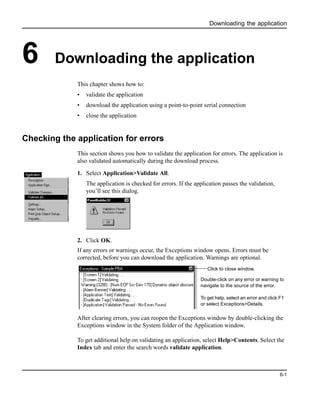
The application is checked for errors. If the application passes the validation,
you’ll see this dialog.
2. Click OK.
If any errors or warnings occur, the Exceptions window opens. Errors must be
corrected, before you can download the application. Warnings are optional.
After clearing errors, you can reopen the Exceptions window by double-clicking the
Exceptions window in the System folder of the Application window.
To get additional help on validating an application, select Help>Contents. Select the
Index tab and enter the search words validate application.
Click to close window.
Double-click on any error or warning to
navigate to the source of the error.
To get help, select an error and click F1
or select Exceptions>Details.
Downloading the application
6-2
Downloading the application
DH+, Remote I/O, DF1, ControlNet, and DeviceNet PanelView Terminals
This section shows how to download an application from your computer to a DH+,
RIO, ControlNet, or DeviceNet PanelView terminal using a point-to-point serial
connection and PanelBuilder32’s DF1 driver.
Important: Check your cable connections as shown in Chapter 1.
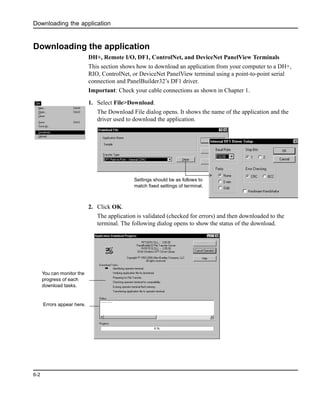
1. Select File>Download.
The Download File dialog opens. It shows the name of the application and the
driver used to download the application.
2. Click OK.
The application is validated (checked for errors) and then downloaded to the
terminal. The following dialog opens to show the status of the download.
Settings should be as follows to
match fixed settings of terminal.
You can monitor the
progress of each
download tasks.
Errors appear here.
Downloading the application
6-3
When the download is complete, the terminal resets, verifies and displays the startup
screen of the application.
DH485 and RS232 (DH485 protocol) PanelView Terminals
This section shows how to download an application from your computer to a DH485
or RS-232 (DH485 protocol) PanelView terminal using the RSLinx 1747-PIC
Device driver. RSLinx is installed as part of the PanelBuilder32 installation.
Important: The DF1 driver will not be available if any of the serial ports on your
computer are configured to use an RSLinx driver.
Important: Check your cable connections as shown in Chapter 1.
1. Configure the RSLinx 1747-PIC driver as described in steps 2 through 5
2. Select File>Workstation Setup
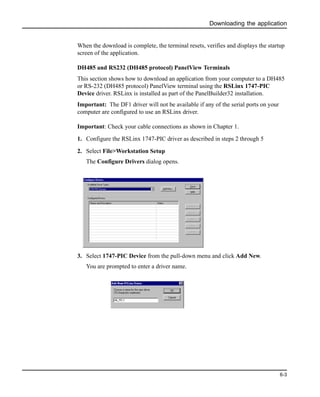
The Configure Drivers dialog opens.
3. Select 1747-PIC Device from the pull-down menu and click Add New.
You are prompted to enter a driver name.
Downloading the application
6-4
4. Click OK to save the driver name.
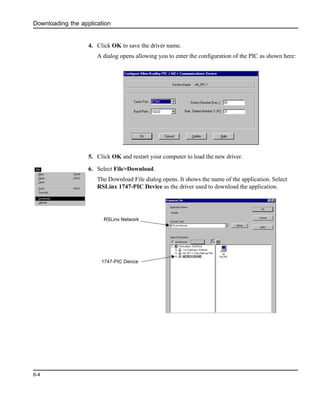
A dialog opens allowing you to enter the configuration of the PIC as shown here:
5. Click OK and restart your computer to load the new driver.
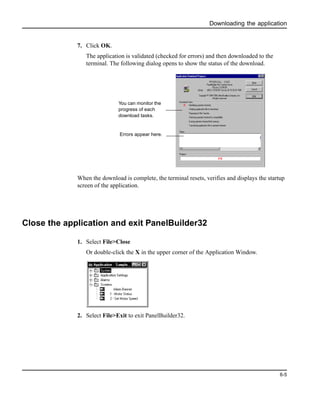
6. Select File>Download.
The Download File dialog opens. It shows the name of the application. Select
RSLinx 1747-PIC Device as the driver used to download the application.
RSLinx Network
1747-PIC Device
Downloading the application
6-5
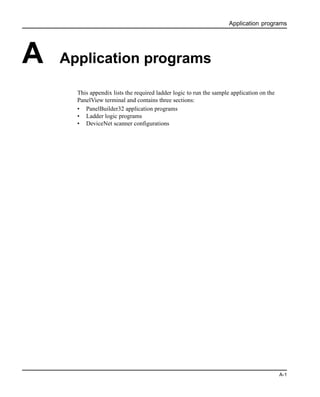
7. Click OK.
The application is validated (checked for errors) and then downloaded to the
terminal. The following dialog opens to show the status of the download.
When the download is complete, the terminal resets, verifies and displays the startup
screen of the application.
Close the application and exit PanelBuilder32
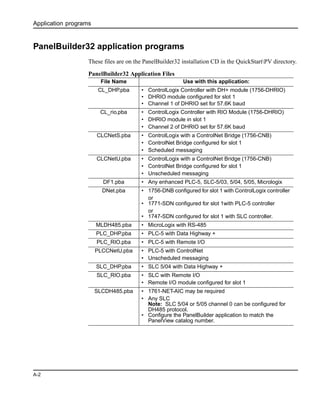
1. Select File>Close
Or double-click the X in the upper corner of the Application Window.
2. Select File>Exit to exit PanelBuilder32.
You can monitor the
progress of each
download tasks.
Errors appear here.
Downloading the application
6-6
Running the application
7-1
7 Running the application
This chapter provides some guidance in checking the operation of the application.
Motor Status screen
After receiving the downloaded application, the PanelView terminal displays the
Motor Status screen.
To start/stop the motor:
1. Press the [F1] key. On touch screens, touch
Notice how the Start / Stop Motor push button changes each time it is pressed.
2. Stop the motor by pressing [F2] or on touch screens
Notice that the stop button also changes inner text each time it is pressed.
Start
Motor
F1
Stop
Motor
F2
Motor
Status
F3
Motor Stopped Motor Speed
568
MOTOR STATUS SCREEN
Start
Motor
F1
Start
Motor
F1
Motor
Started
Stop
Motor
F2
Stop
Motor
F2
Motor
Stopped
Running the application
7-2
3. Press the Motor Start/Stop buttons and note how the motor status indicator also
changes.
Motor Speed screen
Access the Motor Speed Screen by pressing [F3]. On touch screens, touch
To enter a motor speed:
1. Press the [F1] key. On touch screens, touch
The numeric entry scratchpad opens
Motor Running
Motor Stopped
Start
Motor
F1
Stop
Motor
F2
Motor
Status
F3
Motor Stopped Motor Speed
568
MOTOR STATUS SCREEN
Motor
Speed
F3
Motor
Status
F2
SET MOTOR SPEED SCREEN
Enter Maximum Speed
850
Enter Maximum Speed
####
Keypad and Keypad/Touch Screen550 Touch Screen only
Terminal Scratchpad
900/1000/1400Touch Screen
Terminal Scratchpad
Terminal Scratchpad
Current value entered in scratchpad
Running the application
7-3
2. Enter a motor speed between 600 and 1800 on the scratchpad using the numeric
entry keys. On touch screens, touch the numeric keys displayed on the screen.
Note: During data entry, wait until the number you enter appears in the
scratchpad before entering the next number.
3. Press Enter (↵) to save the value and close the scratchpad.
4. Press the [F2] key. On touch screens, touch
Notice the new motor speed displayed on the Status screen.
The new speed will not take effect until the motor is stopped and restarted.
Alarm Banner
Create an alarm condition by entering a motor max speed between 1200 - 1500 as
described in the previous section and then starting the motor. An alarm banner is
displayed over the current screen.
5. To acknowledge the alarm, press the [F4] key. On touch screens, touch
The alarm banner is cleared.
Note: When the motor speed is in the range 1500 -1800 rpm, a different alarm
message is displayed.
Motor
Status
F2
Motor Stopped Motor Speed
568
MOTORSTATUSSCREENMOTOR SPEED HIGH!
Ack
F4
Stop
Motor
F2
Start
Motor
F1
Motor
Status
F3
Ack
F4
Running the application
7-4
Application programs
A-1
A Application programs
This appendix lists the required ladder logic to run the sample application on the
PanelView terminal and contains three sections:
• PanelBuilder32 application programs
• Ladder logic programs
• DeviceNet scanner configurations
Application programs
A-2
PanelBuilder32 application programs
These files are on the PanelBuilder32 installation CD in the QuickStartPV directory.
PanelBuilder32 Application Files
File Name Use with this application:
CL_DHP.pba • ControlLogix Controller with DH+ module (1756-DHRIO)
• DHRIO module configured for slot 1
• Channel 1 of DHRIO set for 57.6K baud
CL_rio.pba • ControlLogix Controller with RIO Module (1756-DHRIO)
• DHRIO module in slot 1
• Channel 2 of DHRIO set for 57.6K baud
CLCNetS.pba • ControlLogix with a ControlNet Bridge (1756-CNB)
• ControlNet Bridge configured for slot 1
• Scheduled messaging
CLCNetU.pba • ControlLogix with a ControlNet Bridge (1756-CNB)
• ControlNet Bridge configured for slot 1
• Unscheduled messaging
DF1.pba • Any enhanced PLC-5, SLC-5/03, 5/04, 5/05, Micrologix
DNet.pba • 1756-DNB configured for slot 1 with ControlLogix controller
or
• 1771-SDN configured for slot 1with PLC-5 controller
or
• 1747-SDN configured for slot 1 with SLC controller.
MLDH485.pba • MicroLogix with RS-485
PLC_DHP.pba • PLC-5 with Data Highway +
PLC_RIO.pba • PLC-5 with Remote I/O
PLCCNetU.pba • PLC-5 with ControlNet
• Unscheduled messaging
SLC_DHP.pba • SLC 5/04 with Data Highway +
SLC_RIO.pba • SLC with Remote I/O
• Remote I/O module configured for slot 1
SLCDH485.pba • 1761-NET-AIC may be required
• Any SLC
Note: SLC 5/04 or 5/05 channel 0 can be configured for
DH485 protocol.
• Configure the PanelBuilder application to match the
PanelView catalog number.
Application programs
A-3
Ladder logic programs
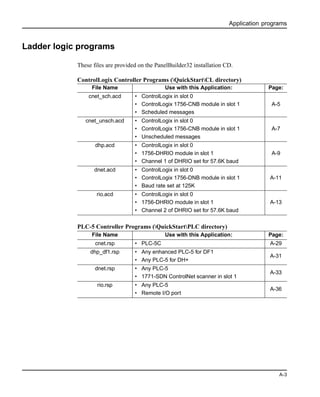
These files are provided on the PanelBuilder32 installation CD.
ControlLogix Controller Programs (QuickStartCL directory)
PLC-5 Controller Programs (QuickStartPLC directory)
File Name Use with this Application: Page:
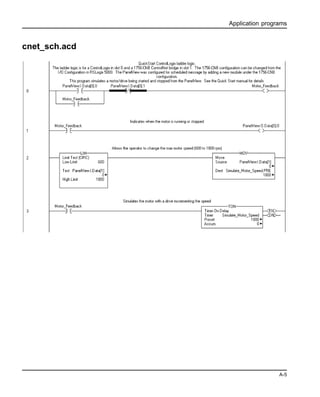
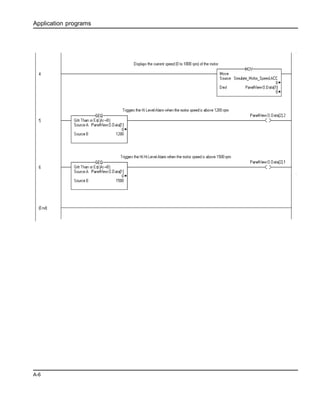
cnet_sch.acd • ControlLogix in slot 0
• ControlLogix 1756-CNB module in slot 1
• Scheduled messages
A-5
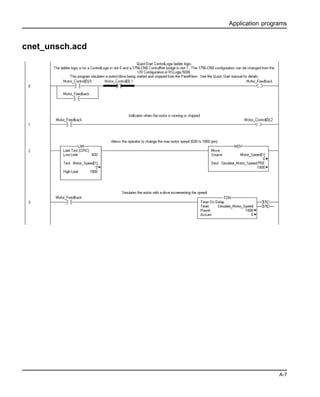
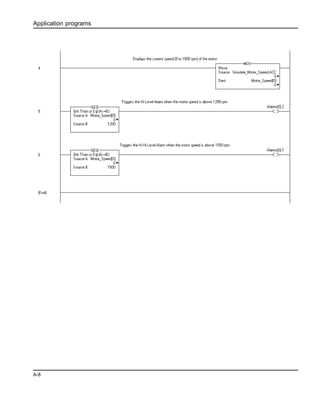
cnet_unsch.acd • ControlLogix in slot 0
• ControlLogix 1756-CNB module in slot 1
• Unscheduled messages
A-7
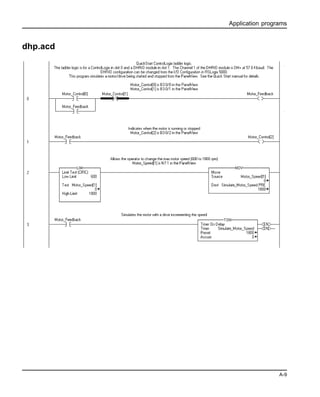
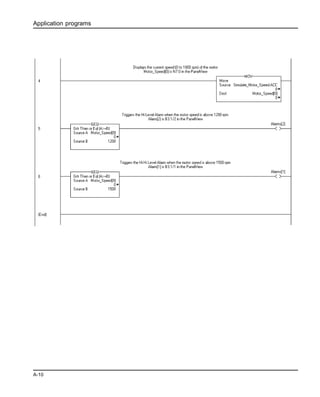
dhp.acd • ControlLogix in slot 0
• 1756-DHRIO module in slot 1
• Channel 1 of DHRIO set for 57.6K baud
A-9
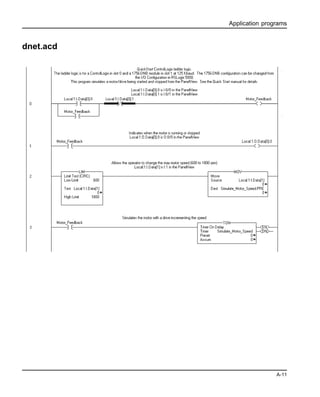
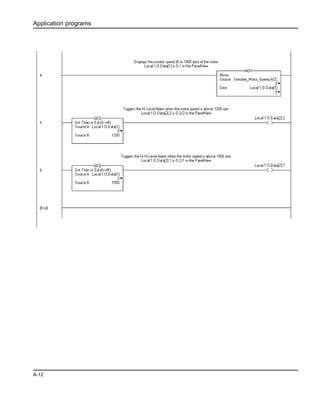
dnet.acd • ControlLogix in slot 0
• ControlLogix 1756-DNB module in slot 1
• Baud rate set at 125K
A-11
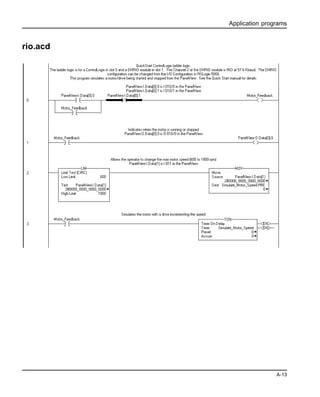
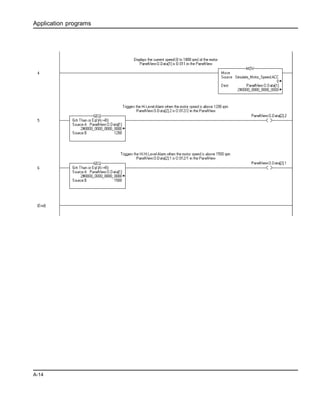
rio.acd • ControlLogix in slot 0
• 1756-DHRIO module in slot 1
• Channel 2 of DHRIO set for 57.6K baud
A-13
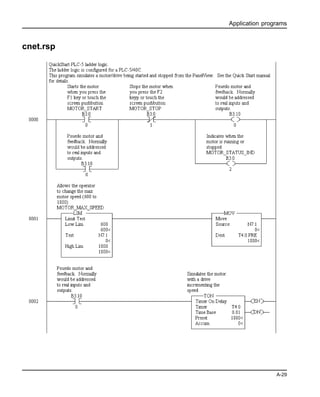
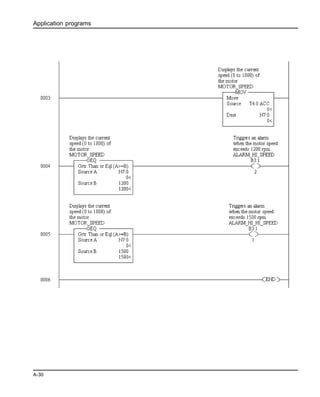
File Name Use with this Application: Page:
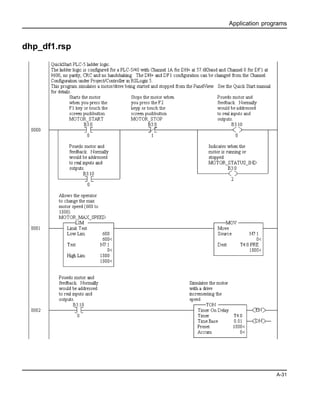
cnet.rsp • PLC-5C A-29
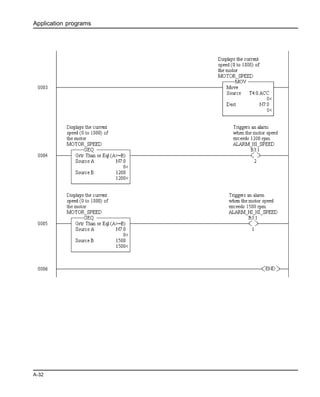
dhp_df1.rsp • Any enhanced PLC-5 for DF1
• Any PLC-5 for DH+
A-31
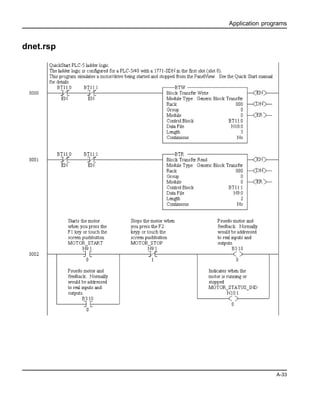
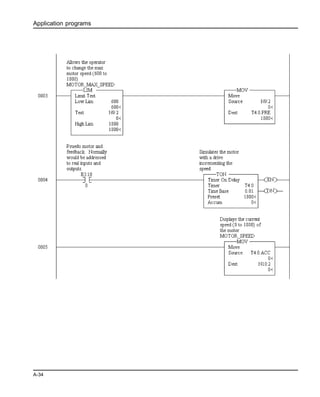
dnet.rsp • Any PLC-5
• 1771-SDN ControlNet scanner in slot 1
A-33
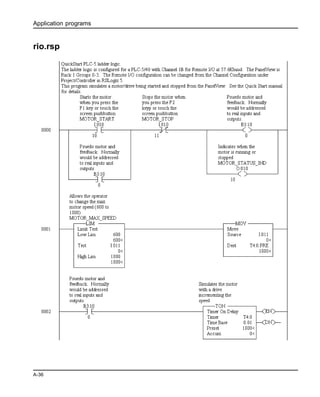
rio.rsp • Any PLC-5
• Remote I/O port
A-36
Application programs
A-4
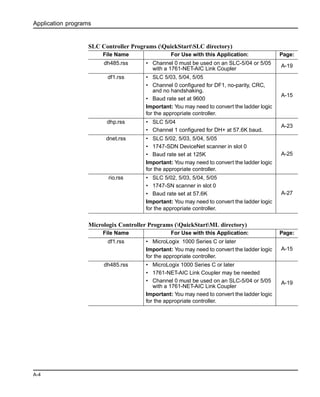
SLC Controller Programs (QuickStartSLC directory)
Micrologix Controller Programs (QuickStartML directory)
File Name For Use with this Application: Page:
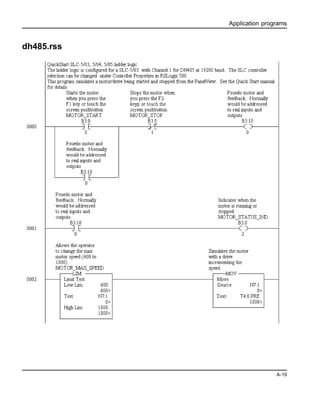
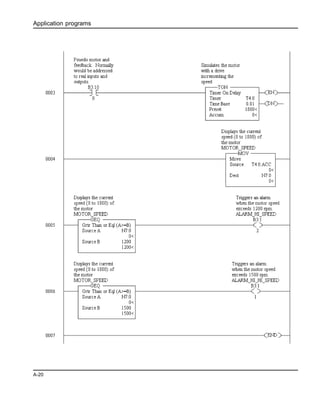
dh485.rss • Channel 0 must be used on an SLC-5/04 or 5/05
with a 1761-NET-AIC Link Coupler
A-19
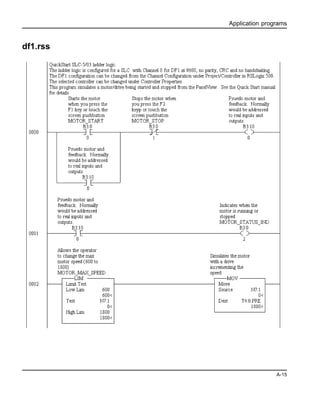
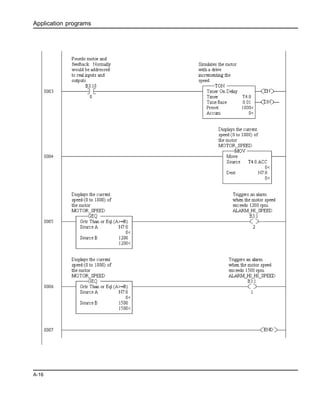
df1.rss • SLC 5/03, 5/04, 5/05
• Channel 0 configured for DF1, no-parity, CRC,
and no handshaking.
• Baud rate set at 9600
Important: You may need to convert the ladder logic
for the appropriate controller.
A-15
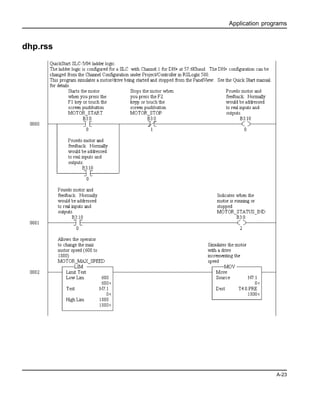
dhp.rss • SLC 5/04
• Channel 1 configured for DH+ at 57.6K baud.
A-23
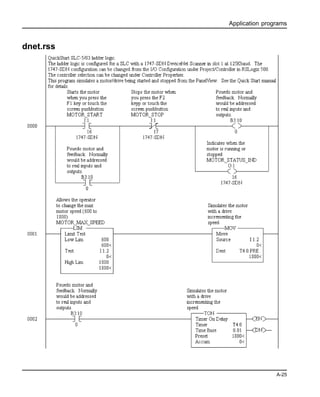
dnet.rss • SLC 5/02, 5/03, 5/04, 5/05
• 1747-SDN DeviceNet scanner in slot 0
• Baud rate set at 125K
Important: You may need to convert the ladder logic
for the appropriate controller.
A-25
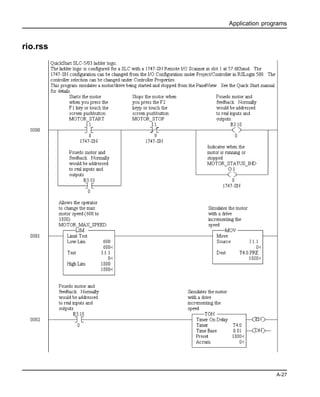
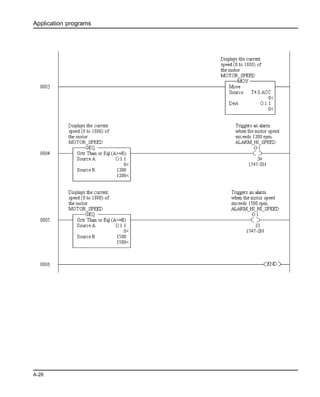
rio.rss • SLC 5/02, 5/03, 5/04, 5/05
• 1747-SN scanner in slot 0
• Baud rate set at 57.6K
Important: You may need to convert the ladder logic
for the appropriate controller.
A-27
File Name For Use with this Application: Page:
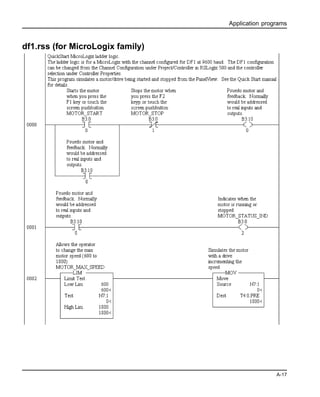
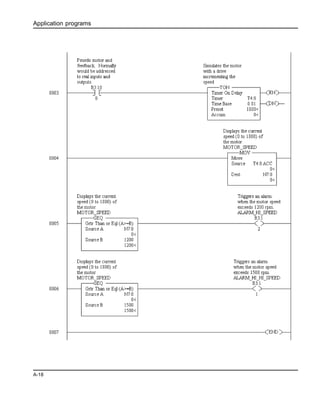
df1.rss • MicroLogix 1000 Series C or later
Important: You may need to convert the ladder logic
for the appropriate controller.
A-15
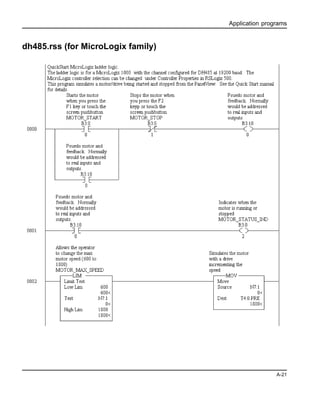
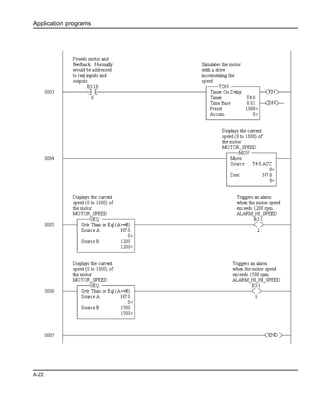
dh485.rss • MicroLogix 1000 Series C or later
• 1761-NET-AIC Link Coupler may be needed
• Channel 0 must be used on an SLC-5/04 or 5/05
with a 1761-NET-AIC Link Coupler
Important: You may need to convert the ladder logic
for the appropriate controller.
A-19
Application programs
A-5
cnet_sch.acd
Application programs
A-6
Application programs
A-7
cnet_unsch.acd
Application programs
A-8
Application programs
A-9
dhp.acd
Application programs
A-10
Application programs
A-11
dnet.acd
Application programs
A-12
Application programs
A-13
rio.acd
Application programs
A-14
Application programs
A-15
df1.rss
Application programs
A-16
Application programs
A-17
df1.rss (for MicroLogix family)
Application programs
A-18
Application programs
A-19
dh485.rss
Application programs
A-20
Application programs
A-21
dh485.rss (for MicroLogix family)
Application programs
A-22
Application programs
A-23
dhp.rss
Application programs
A-24
Application programs
A-25
dnet.rss
Application programs
A-26
Application programs
A-27
rio.rss
Application programs
A-28
Application programs
A-29
cnet.rsp
Application programs
A-30
Application programs
A-31
dhp_df1.rsp
Application programs
A-32
Application programs
A-33
dnet.rsp
Application programs
A-34
Application programs
A-35
Application programs
A-36
rio.rsp
Application programs
A-37
Application programs
A-38
Scanner programs
These files are provided on the PanelBuilder32 installation CD in the
(QuickStartDNet directory).
DeviceNet Applications using RSNetworks for DeviceNet
File Name Use with these application files:
1747sdn.dnt • dnet.rss
• dnet.pba
1756dnb.dnt • dnet.acd
• dnet.pba
1771sdn.dnt • dnet.rsp
• dnet.pba
Publication 2711-QS003A-EN-P - September 2000 41061-159-01(A)
Supersedes Publication 2711-6.20 - March 2000 © 2000 Rockwell International Corporation. Printed in the U.S.A.

Pb32x

  • 1.
    PanelBuilder32 Application Development Software forPanelView Standard Terminals Quick Start
  • 2.
    Important User Information Becauseof the variety of uses for the products described in this publication, those responsible for the application and use of this control equipment must satisfy themselves that all necessary steps have been taken to assure that each application and use meets all performance and safety requirements, including any applicable laws, regulations, codes and standards. The illustrations, charts, sample programs and layout examples shown in this guide are intended solely for purposes of example. Since there are many variables and requirements associated with any particular installation, Allen-Bradley does not assume responsibility or liability (to include intellectual property liability) for actual use based upon the examples shown in or included with this publication. Allen-Bradley publication SGI-1.1, Safety Guidelines for the Application, Installation and Maintenance of Solid-State Control (available from your local Allen-Bradley office), describes some important differences between solid-state equipment and electromechanical devices that should be taken into consideration when applying products such as those described in this publication. Reproduction of the contents of this copyrighted publication, in whole or part, without written permission of Rockwell Automation is prohibited. Throughout this manual we use notes to make you aware of safety considerations: Attention statements help you to: • identify a hazard • avoid a hazard • recognize the consequences Note: Identifies information that is critical for successful application and understanding of the product. MicroLogix, ControlLogix, SLC, PLC, PanelView, PanelBuilder32 are trademarks of Rockwell Automation. Microsoft, Windows and Windows NT are registered trademarks of Microsoft Corporation. Allen-Bradley is a trademark of Rockwell Automation Identifies information about practices or circumstances that can lead to personal injury or death, property damage or economic loss. !
  • 3.
    Table of Contents toc-i Tableof Contents Preface Contents of this guide . . . . . . . . . . . . . . . . . . . . . . . . . . . . . . . . . . . . . . . . . . . . . . . . . . . P-2 What you need . . . . . . . . . . . . . . . . . . . . . . . . . . . . . . . . . . . . . . . . . . . . . . . . . . . . . . . . . P-3 Download cables . . . . . . . . . . . . . . . . . . . . . . . . . . . . . . . . . . . . . . . . . . . . . . . . . . . P-3 Communication cables . . . . . . . . . . . . . . . . . . . . . . . . . . . . . . . . . . . . . . . . . . . . . . . P-4 Personal Computer . . . . . . . . . . . . . . . . . . . . . . . . . . . . . . . . . . . . . . . . . . . . . . . . . . P-4 Software . . . . . . . . . . . . . . . . . . . . . . . . . . . . . . . . . . . . . . . . . . . . . . . . . . . . . . . . . . P-5 Sample application and ladder logic. . . . . . . . . . . . . . . . . . . . . . . . . . . . . . . . . . . . . P-5 1 System setup Safety Guidelines. . . . . . . . . . . . . . . . . . . . . . . . . . . . . . . . . . . . . . . . . . . . . . . . . . . . . . . 1-1 DH-485 connections . . . . . . . . . . . . . . . . . . . . . . . . . . . . . . . . . . . . . . . . . . . . . . . . . . . . 1-2 RS-232 connections (DH485 protocol) . . . . . . . . . . . . . . . . . . . . . . . . . . . . . . . . . . . . . . 1-3 RS-232 connections (DF1 protocol) . . . . . . . . . . . . . . . . . . . . . . . . . . . . . . . . . . . . . . . . 1-4 Remote I/O connections . . . . . . . . . . . . . . . . . . . . . . . . . . . . . . . . . . . . . . . . . . . . . . . . . 1-5 DH+ connections . . . . . . . . . . . . . . . . . . . . . . . . . . . . . . . . . . . . . . . . . . . . . . . . . . . . . . . 1-6 DeviceNet connections . . . . . . . . . . . . . . . . . . . . . . . . . . . . . . . . . . . . . . . . . . . . . . . . . . 1-7 ControlNet connections . . . . . . . . . . . . . . . . . . . . . . . . . . . . . . . . . . . . . . . . . . . . . . . . . . 1-8 Controller ladder logic. . . . . . . . . . . . . . . . . . . . . . . . . . . . . . . . . . . . . . . . . . . . . . . . . . . 1-8 2 Overview of application Purpose of application . . . . . . . . . . . . . . . . . . . . . . . . . . . . . . . . . . . . . . . . . . . . . . . . . . . 2-1 Application screens . . . . . . . . . . . . . . . . . . . . . . . . . . . . . . . . . . . . . . . . . . . . . . . . . . . . . 2-2 Motor Control and Status screen . . . . . . . . . . . . . . . . . . . . . . . . . . . . . . . . . . . . . . . 2-3 Set Motor Speed screen . . . . . . . . . . . . . . . . . . . . . . . . . . . . . . . . . . . . . . . . . . . . . . 2-4 Alarm Banner . . . . . . . . . . . . . . . . . . . . . . . . . . . . . . . . . . . . . . . . . . . . . . . . . . . . . . 2-5 Application tags . . . . . . . . . . . . . . . . . . . . . . . . . . . . . . . . . . . . . . . . . . . . . . . . . . . . 2-6 3 Creating the application Starting PanelBuilder32. . . . . . . . . . . . . . . . . . . . . . . . . . . . . . . . . . . . . . . . . . . . . . . . . . 3-1 Creating a new application . . . . . . . . . . . . . . . . . . . . . . . . . . . . . . . . . . . . . . . . . . . . . . . 3-2 Creating the Set Motor Speed screen. . . . . . . . . . . . . . . . . . . . . . . . . . . . . . . . . . . . . . . . 3-4 Creating objects on the Motor Status screen . . . . . . . . . . . . . . . . . . . . . . . . . . . . . . . . . . 3-5 Creating the Start Motor push button. . . . . . . . . . . . . . . . . . . . . . . . . . . . . . . . . . . . 3-5 Creating the Stop Motor push button . . . . . . . . . . . . . . . . . . . . . . . . . . . . . . . . . . . . 3-7 Creating the Motor Speed screen button . . . . . . . . . . . . . . . . . . . . . . . . . . . . . . . . . 3-9 Creating the Motor Speed display . . . . . . . . . . . . . . . . . . . . . . . . . . . . . . . . . . . . . 3-10 Creating the Motor Status indicator . . . . . . . . . . . . . . . . . . . . . . . . . . . . . . . . . . . . 3-12 Creating the screen title for the Motor Status screen . . . . . . . . . . . . . . . . . . . . . . . 3-14
  • 4.
    Table of Contents toc--ii Creatingobjects on the Set Motor Speed screen . . . . . . . . . . . . . . . . . . . . . . . . . . . . . .3-15 Creating a numeric entry object for setting the motor speed . . . . . . . . . . . . . . . . .3-15 Creating the Motor Status screen button. . . . . . . . . . . . . . . . . . . . . . . . . . . . . . . . .3-17 Creating the screen title for the Set Motor Speed screen . . . . . . . . . . . . . . . . . . . .3-18 Creating a Goto Config Screen button . . . . . . . . . . . . . . . . . . . . . . . . . . . . . . . . . . . . . .3-18 Creating the alarm banner and messages . . . . . . . . . . . . . . . . . . . . . . . . . . . . . . . . . . . .3-19 Creating the alarm banner . . . . . . . . . . . . . . . . . . . . . . . . . . . . . . . . . . . . . . . . . . . .3-19 Defining an alarm trigger . . . . . . . . . . . . . . . . . . . . . . . . . . . . . . . . . . . . . . . . . . . .3-20 Defining alarm messages . . . . . . . . . . . . . . . . . . . . . . . . . . . . . . . . . . . . . . . . . . . .3-20 Closing the screens. . . . . . . . . . . . . . . . . . . . . . . . . . . . . . . . . . . . . . . . . . . . . . . . . . . . .3-22 Defining the startup screen for the application. . . . . . . . . . . . . . . . . . . . . . . . . . . . . . . .3-22 Saving the application . . . . . . . . . . . . . . . . . . . . . . . . . . . . . . . . . . . . . . . . . . . . . . . . . .3-23 Converting application for another terminal type . . . . . . . . . . . . . . . . . . . . . . . . . . . . .3-24 4 Configuring communications Configuring DH-485 communications. . . . . . . . . . . . . . . . . . . . . . . . . . . . . . . . . . . . . . .4-2 Configuring DH+ communications . . . . . . . . . . . . . . . . . . . . . . . . . . . . . . . . . . . . . . . . .4-3 Configuring Remote I/O communications . . . . . . . . . . . . . . . . . . . . . . . . . . . . . . . . . . . .4-4 Configuring DeviceNet communications. . . . . . . . . . . . . . . . . . . . . . . . . . . . . . . . . . . . .4-5 Configuring ControlNet communications . . . . . . . . . . . . . . . . . . . . . . . . . . . . . . . . . . . .4-6 Configuring DF1 communications. . . . . . . . . . . . . . . . . . . . . . . . . . . . . . . . . . . . . . . . . .4-7 Saving the application . . . . . . . . . . . . . . . . . . . . . . . . . . . . . . . . . . . . . . . . . . . . . . . . . . .4-7 5 Entering application tags Opening the tag editor . . . . . . . . . . . . . . . . . . . . . . . . . . . . . . . . . . . . . . . . . . . . . . . . . . .5-1 Description of the application tags. . . . . . . . . . . . . . . . . . . . . . . . . . . . . . . . . . . . . . . . . .5-2 DH-485, DH+, and DF1 application tags . . . . . . . . . . . . . . . . . . . . . . . . . . . . . . . . .5-2 Remote I/O application tags . . . . . . . . . . . . . . . . . . . . . . . . . . . . . . . . . . . . . . . . . . .5-2 ControlNet unscheduled application tags . . . . . . . . . . . . . . . . . . . . . . . . . . . . . . . . .5-3 ControlNet scheduled application tags . . . . . . . . . . . . . . . . . . . . . . . . . . . . . . . . . . .5-3 DeviceNet application tags . . . . . . . . . . . . . . . . . . . . . . . . . . . . . . . . . . . . . . . . . . . .5-4 Entering the application tags . . . . . . . . . . . . . . . . . . . . . . . . . . . . . . . . . . . . . . . . . . . . . .5-5 Saving the application . . . . . . . . . . . . . . . . . . . . . . . . . . . . . . . . . . . . . . . . . . . . . . . . . . .5-6
  • 5.
    Table of Contents toc-iii 6Downloading the application Checking the application for errors . . . . . . . . . . . . . . . . . . . . . . . . . . . . . . . . . . . . . . . . . 6-1 Downloading the application. . . . . . . . . . . . . . . . . . . . . . . . . . . . . . . . . . . . . . . . . . . . . . 6-2 Close the application and exit PanelBuilder32 . . . . . . . . . . . . . . . . . . . . . . . . . . . . . . . . 6-5 7 Running the application Motor Status screen . . . . . . . . . . . . . . . . . . . . . . . . . . . . . . . . . . . . . . . . . . . . . . . . . . . . . 7-1 Motor Speed screen . . . . . . . . . . . . . . . . . . . . . . . . . . . . . . . . . . . . . . . . . . . . . . . . . . . . . 7-2 Alarm Banner. . . . . . . . . . . . . . . . . . . . . . . . . . . . . . . . . . . . . . . . . . . . . . . . . . . . . . . . . . 7-3 Application programs PanelBuilder32 application programs . . . . . . . . . . . . . . . . . . . . . . . . . . . . . . . . . . . . . . .A-2 Ladder logic programs. . . . . . . . . . . . . . . . . . . . . . . . . . . . . . . . . . . . . . . . . . . . . . . . . . .A-3 Scanner programs . . . . . . . . . . . . . . . . . . . . . . . . . . . . . . . . . . . . . . . . . . . . . . . . . . . . .A-38
  • 6.
  • 7.
    Preface P-1 Preface Welcome to PanelBuilder32.To help you get started and become a successful user of PanelBuilder32, this guide provides you with a sample application. It will take you through all the steps required to create, download, and run the application in a PanelView terminal. Application tags and ladder logic are provided so that you can run the application on the following communication networks: • DH+ or DH-485 • ControlNet (unscheduled and scheduled) • DeviceNet (I/O messaging) • Remote I/O • DF1 For more information on PanelBuilder32’s software features, refer to the Getting Results manual and the extensive online help available within PanelBuilder32. PanelBuilder32 runs in the Microsoft Windows environment. You should be familiar with basic window operations such as using menus, dialogs and toolbars.
  • 8.
    Preface P-2 Contents of thisguide • Preface An overview of this guide and what you need to create, download and run the sample application. • Chapter 1 - Initial system setup Describes the setup of system components. • Chapter 2 - Overview of sample application Provides a description of the sample application and its function. • Chapter 3 - Creating the sample application Provides step-by-step procedures for creating the sample application. • Chapter 4 - Configuring communications Shows how to configure network communications for your PanelView terminal and logic controller. • Chapter 5 - Entering application tags Shows how to use the tag editor to enter your application tags. • Chapter 6 - Downloading the application Show how to validate and download your application to the PanelView terminal. • Chapter 7 - Running the application Shows how to run the application in the PanelView terminal. • Appendix A - Application Programs Listing of the available ladder logic programs suitable for your application. Also provides a printout of each program.
  • 9.
    Preface P-3 What you need Thissection lists the requirements for creating, downloading and running the application on Remote I/O, DH+, DH-485, ControlNet, DeviceNet, or DF1networks. Download cables Your terminal has an RS-232 (DF1), RS-232 (DH485), or DH-485 port through which applications are transferred. Use one of the following download cables: RS-232 Programming Port - To download an application to an RS-232 programming port on a PanelView terminal, you will need a download cable. Use one of the following: • 3 meter (10 foot) cable (Catalog No. 2706-NC13) • 5 meter (16.4 foot) cable (Catalog No. 2711-NC13) • 10 meter (32.7 foot) cable (Catalog No. 2711-NC14) DH-485 Programming Port - To download an application to a DH-485 terminal you will need: • Personal Computer Interface Converter (PIC), Catalog No. 1747-PIC. • DH-485 cable (Catalog No. 1747-C10, -C11, -C20) or • 1761-NET-AIC link coupler and 1747-CP3 cable The Personal Computer Interface Converter receives power from an SLC controller. If you are downloading to a terminal without an SLC connected, you will need either a power supply (Catalog No. 1747-NP1) or a powered link coupler (Catalog No. 1747-NET-AIC).
  • 10.
    Preface P-4 Communication cables DH-485 PanelViewTerminals - To connect a PanelView DH-485 port to a DH-485 connector on an SLC, use DH-485 cable (Catalog No. 1747-C10, -C11, -C20). RS-232 (DF1 or DH485) PanelView Terminals - To connect a PanelView RS-232/ DF1 or DH485 communications port to an RS-232 port on a controller, use RS-232 cable (Catalog No. 2706-NC13, 2711-NC13, or NC14). Remote I/O Terminals - To connect a PanelView RIO port to an RIO port on a PLC, use cable (Catalog No. 1770-CD) which is equivalent to Belden 9463. DH + PanelView Terminals - To connect a PanelView DH+ port to a DH+ port on a PLC, use cable (Catalog No. 1770-CD) which is equivalent to Belden 9463. ControlNet Terminals - To connect a PanelView to a ControlNet network, use coaxial cable (Catalog No. 1786-CP). DeviceNet Terminals -To connect a PanelView to a DeviceNet network, use cable (Catalog No. 1485C-P1A50, -P1A150, -P1A300). Refer to the AIC+ Advanced Interface Converter user manual (1761-6.4) for additional network configurations. Personal Computer The minimum requirements for running PanelBuilder32 are: • 100MHz Pentium Class 2 or greater PC compatible • 30 MB free hard disk space required for a minimum installation • 270 MB free hard disk space required for a full package installation • 32 MB of installed RAM (48 MB RAM recommended) • CD-ROM drive • 500K free conventional memory
  • 11.
    Preface P-5 Software In addition toPanelBuilder32, you will also need to load the applicable controller programming and network configuration software: SLC or MicroLogix Advanced Programming Software (APS), PLC-500 AI Software, RSLogix 500 PLC • 6200 Series Programming Software, PLC-5 AI Software, RSLogix 5 ControlLogix • RSLogix 5000, version 2.01 or greater • RSNetworks for DeviceNet or DeviceNet Manager • RSNetworks for ControlNet Sample application and ladder logic Important: Installing the sample applications on your computer’s hard drive is an option available during the installation of PanelBuilder32. If these files were not installed, you can still access them off the installation CD from the autorun menu. The PanelBuilder32 installation CD contains: • Sample applications (.PBA) for each of the PanelView terminals. • Ladder logic to run the application for each of the communication protocols. Refer to Appendix A for a list of these files. PanelBuilder Application (.pba) files are located in the Quick StartPV directory on the PanelBuilder32 installation CD. Ladder Logic Program (.rss, .rsp, .acd) files are located in the Quick StartSLC, ML, CL or PLC directories on the PanelBuilder32 installation CD. All other program files, such as DeviceNet SDN, scanner files are located in the Quick StartDNet or CNet directories on the PanelBuilder32 installation CD.
  • 12.
  • 13.
    System setup 1-1 1 Systemsetup PanelView terminals are available with many different communication options. In this chapter we provide a brief summary of the minimum equipment setups required to run the sample application. For specifics such as cable termination and baud rates, we recommend that you refer to the user and/or communications manual provided with your terminal. Refer to the section that applies to your terminal type. • DH-485 • RS-232 (DH485) • RS-232 (DF1) • RIO • DH+ • DeviceNet • ControlNet Safety Guidelines Refer to the PanelView terminal user manual (Publication 2711-UM014A-EN-P) for installation instructions and safety precautions. If you are running this sample application as a pre-installation desktop setup, the same safety precautions still apply. Make sure that you disconnect power from devices prior to making any communication connections.
  • 14.
    System setup 1-2 DH-485 connections DH-485terminals communicate with external devices through either the DH-485 communications port or DH-485 programming connector. Some DH-485 terminals have an RS-232 port for file transfers and printing. COM1 or COM2 Serial Port Node 0 Personal Computer PanelBuilder32 Node 2 PanelView 1000 DH-485 Terminal DH-485 Programming Connector DH-485 Communications Connector Personal Computer Interface Converter (Catalog No. 1747-PIC) Cable (Catalog No. 1747-C10, -C11, -C20) Node 1 SLC Controller
  • 15.
    System setup 1-3 RS-232 connections(DH485 protocol) RS-232 (DH485) versions of the PanelView terminal are available with one or two RS-232 ports. On terminals with two RS-232 ports, one of the ports is a printer port. The other RS-232 communication port is for connection to an SLC or computer. Important: You must configure the Channel 0 Port of the SLC 5/03, 5/04, 5/05 or Micrologix controller for DH-485 communications using APS, AI500 or RSLogix 500 programming software. Cable (Catalog No. 2711-NC13, 2711-NC14, 2706-NC13) Node 2 PanelView 1000 RS-232 Terminal Shown Node 0 Personal Computer PanelBuilder32 Node 1 SLC 5/03, /04, /05 Controller Note: Use the same cable to transfer applications to the terminal and to the SLC 5/03, 5/04, 5/05 controller. Change cable connection to controller after downloading. 1761-CBL-HM02 DF1 Port 1761-NET-AIC AIC+ To Channel 0 (COM1 or COM2) Serial Port MicroLogix 1000
  • 16.
    System setup 1-4 RS-232 connections(DF1 protocol) The DF1 versions of the PanelView terminals have a DF1 (Full Duplex) communications port and an RS-232 file transfer/printer port. The DF1 port on the PanelView terminal is a 9-pin, male, RS-232 connector. DF1 Port 2711-NC13, -NC14 Cable 9 to 25-Pin Adapter DF1 Port PLC-5 Controller DF1 Port Serial Link Cable (Catalog No. 2711-NC13, 2711-NC14, 2706-NC13) 1761-CBL-HM02 DF1 Port 1761-NET-AIC AIC+ RS-232 File Transfer/Printer Port (Not required for DF1) PanelBuilder32 SLC 5/03, 5/04, 5/05 PanelView 1000 MicroLogix 1000
  • 17.
    System setup 1-5 Remote I/Oconnections The Remote I/O versions of the PanelView terminals have both an RIO adapter and an RS-232 file transfer/printer port The RIO adapter allows the terminal to connect to any 1771 Remote I/O link. The PanelView connects to an RIO scanner using cable (Catalog No. 1770-CD, equivalent to Belden 9463). Cable (Catalog No. 2711-NC13, 2711-NC14, 2706-NC13) Node 2 PanelView 1000 RS-232 Terminal Shown Node 0 Personal Computer PanelBuilder32 Node 1 PLC-5 Controller RIO Port Cable Catalog No. 1770-CD (Belden 9463) RS-232 Port Remote I/O Port 3-Pin Terminal Block Connector To RIO Port 2 Clear SH Shield 1 Blue Blue 2 Shield SH Clear 1 82Ω or 150Ω termination resistor Scanner Module (Catalog No. 1747-SN) Node 1 SLC Controller with RIO Port ControlLogix 5550 RIO Module (1756-DHRIO) RIO Port Important: Wire with clear insulation connects to terminal #2 of the 3-pin Remote I/O connector. Serial Port (COM1 or COM2)
  • 18.
    System setup 1-6 DH+ connections DH+versions of the PanelView terminal have both a DH+ Communications Port and an RS-232 File Transfer/Printer Port. Connect the PanelView to a DH+ link using Belden 9463 twin-axial cable (Catalog No. 1770-CD). . Cable (Catalog No. 2711-NC13, 2711-NC14, 2706-NC13) Node 2 PanelView 1000 RS-232 Terminal Shown Node 0 Personal Computer PanelBuilder32 Node 1 PLC-5 Controller PLC DH+ Port RS-232 Port DH+ Port 3-Pin Terminal Block 1 Clear SH Shield 2 Blue Clear 1 Shield SH Blue 2 82Ω or 150Ω termination resistor ControlLogix 5550 DH+ Module SLC 5/04 Clear 1 Shield SH Blue 2 Clear 1 Shield SH Blue 2 Important: Wire with blue insulation connects to terminal #2 of the 3-pin DH+ connector. Serial Port (COM1 or COM2)
  • 19.
    System setup 1-7 DeviceNet connections DeviceNetversions of the PanelView terminal have both a DeviceNet Communications Port and an RS-232 File Transfer/Printer Port. Connect the PanelView to a DeviceNet link using DeviceNet cable (Catalog No. 1485C-P1A50, - P1A150, -P1A300). The illusration shows an SLC or PLC controller. Another option would be a ControlLogix controller with a 1756-DNB module. PanelView DeviceNet Connector RS-232 Port Serial Link DeviceNet Scanner Module (Catalog No. 1747-SDN) 15 Cable (Catalog No. 2711-NC13, 2711-NC14, 2706-NC13) Cable (Catalog No. 1485C-P1A50, -P1A150, -P1A300) DeviceNet Scanner Module (Catalog No. 1771-SDN) DeviceNet Port Requires 24 Volt Power Supply PLC-5 Controller PanelView 1000SLC 5/03, /04, /05 PanelBuilder32 DeviceNet Terminal Block Terminal Signal Function Color 1 COM Common Black 2 CAN_L Signal Low Blue 3 SHIELD Shield Uninsulated 4 CAN_H Signal High White 5 VDC+ Power Supply Red 1 5
  • 20.
    System setup 1-8 ControlNet connections ControlNetversions of the PanelView terminal have both a ControlNet Communications Port and an RS-232 File Transfer/Printer Port. Connect the PanelView to a ControlNet link using BNC Coaxial Cable (Catalog No. 1786-RG6). Controller ladder logic The controller logic programs for running the sample application are already created for you. The files are provided on the PanelBuilder32 installation CD. Refer to Appendix A for a list of these files. RS-232 Port Serial Link PLC-5/20C, -5/40C, -5/80C Controller BNC Coaxial Cable Cable (Catalog No. 2711-NC13, 2711-NC14, 2706-NC13) BNC Coaxial Cable ControlLogix 5550 1756-CNB Module A B PanelBuilder32 PanelView 1000
  • 21.
    Overview of application 2-1 2Overview of application This chapter covers: • purpose of application • overview of application screens • application tags Purpose of application The application contains objects that control and monitor the status of a motor. Depending on the communication protocol used, the PanelView terminal reads/writes data to either: • SLC or Micrologix controller on a DH-485 network • SLC, PLC-5, or ControlLogix controller on a DH+ network • PLC 5 , SLC, or ControlLogix controller on a Remote I/O network • SLC, PLC, or Micrologix controller on an RS-232 (DF1) network • ControlLogix, PLC-5, or SLC controller on a DeviceNet network • ControlLogix or PLC-5 controller on a ControlNet network (unscheduled) • ControlLogix controller on a ControlNet network (scheduled) Chapter 4 give procedures for creating the application on a PanelView 600 keypad terminal. • If creating the application for a touch screen terminal, touch cell input is automatically enabled and you do not have to assign function keys. • If creating the application for other size terminals, use the appropriate text sizes. You can create any of the sample applications for another PanelView terminal size. For instructions on how to do this, see page 3-24. All of the sample applications are on the installation CD in the QuickStartPV directory.
  • 22.
    Overview of application 2-2 Applicationscreens The application contains 3 screens: • Motor Status - contains objects to start or stop a motor, show the on/off status of the motor, and display the current motor speed. • Set Motor Speed - contains a numeric entry object allowing you to enter a maximum speed for the motor. If the motor speed is changed, the new speed won’t take effect until the motor is stopped and started again. • Alarm Banner - global display that opens over the Motor Status or Set Motor Speed screen when an alarm is triggered. The Motor Status and Set Motor Speed screen each contain a screen button allowing you to navigate between the two screens. If you want the operator to access the Configuration Mode menu from a touch screen terminal, you should include a Goto Config screen button on the application screen. On keypad only terminals, press the left and right arrow keys simultaneously on the terminal’s keypad to display the configuration menu.
  • 23.
    Overview of application 2-3 MotorControl and Status screen The Motor Status screen appears when you apply power to the terminal. It allows you to: • start or stop a motor • view the on/off status of the motor • view the speed of the motor • navigate to the Set Motor Speed screen The following table lists the objects on the Motor Status screen and their functions. Screen headings are created as background text. Object Object Type Function Momentary Push Button (Normally Open) Starts the motor when you press the F1 key or touch the screen object. Momentary Push Button (Normally Open) Stops the motor when you press the F2 key or touch the screen object. Multistate Indicator Shows the on/off status of the motor. Numeric Data Display Shows the current motor speed. Goto screen button Displays the Set Motor Speed screen when you press the F3 key or touch the screen object. Start Motor F1 Stop Motor F2 Motor Running Motor Stopped Motor Speed #### Motor Speed F3
  • 24.
    Overview of application 2-4 SetMotor Speed screen The Set Motor Speed screen allows you to: • enter a maximum speed setting for the motor • navigate to the Motor Status Screen The following table lists the objects on the Motor Status screen and their functions. The screen heading and object labels are created as background text. Object Object Type Function Numeric Entry Opens the numeric scratchpad (when you press the F1 key or touch the screen object) where you enter the maximum motor speed (600 to 1800 RPM). Goto Screen Button Displays the Motor Status screen when you press the F2 key or touch the screen object. Enter Maximum Speed: #### rpm Motor Status F2
  • 25.
    Overview of application 2-5 AlarmBanner The Alarm Banner is a global display that opens over the Motor Status or Set Motor Speed screen when an alarm is triggered. It displays an alarm message when the motor speed exceeds 1200 rpm and another message when the motor speed exceeds 1500 rpm. The following table lists the objects on the Alarm Banner and their functions. MOTOR SPEED HIGH! Ack F4 Object Object Type Function Alarm Text Displays messages when the motor speed reaches 1200 rpm and 1500 rpm. Acknowledge Alarm Button Acknowledges the alarm in the alarm banner when you press the F4 key or touch the screen object. MOTOR SPEED HIGH-HIGH! MOTOR SPEED HIGH! Ack F4
  • 26.
    Overview of application 2-6 Applicationtags The sample application requires only 6 tags. Tags are a group of parameters that define a controller address. Each tag is identified by a unique name. These are the tags that are used in this application. Notice how the tags are assigned descriptive names. This makes it easier to create and modify an application. v Start_Motor - assigned to the motor start button v Stop_Motor - assigned to the motor stop button v Motor_Status_Ind - assigned to the motor status indicator v Motor_Speed - assigned to the motor speed data display v Set_Max_Motor_Speed - assigned to the data entry display for motor speed v Speed_Alarm - assigned to the trigger for the alarm banner Tag information is entered using either: • Tag Form dialog - accessed from an object’s dialog by clicking the Edit Tags button. Allows editing of all tag fields. • Tag Editor - accessed from the Tools menu or the System folder in the Application window. The tag editor displays all of the assigned tags within the application and allows editing of most tag fields. (Some protocol specific fields cannot be accessed from the tag editor.) Each application requires slightly different tag information depending on the terminal communications. Some communication settings are specific to a protocol and cannot be accessed from the tag editor. You must use the Tag Form dialog. Chapters 4 and 5 provide the information you need for each terminal type along with instructions for entering tags.
  • 27.
    Creating the application 3-1 3Creating the application Follow the procedures in this chapter to: • create the application screens (Motor Status, Set Motor Speed, Alarm Banner) • select the startup screen for the application • save the application Starting PanelBuilder32 Click Start on the taskbar, then select Programs>PanelBuilder32>PanelBuilder32. The PanelBuilder32 workspace opens with the startup dialog.
  • 28.
    Creating the application 3-2 Creatinga new application 1. From the startup dialog, select Create a new application and click OK. 2. In the Create New Application dialog, enter a name for your application and select a PanelView terminal (type, protocol and type of operator input). 3. Click OK to exit the dialog. The Application window opens showing the name of the application in the title bar. A blank screen opens with a default name and number - Screen 1. Type Sample Select a terminal type Select a protocol Select the type of operator input Screens are stored in the Screens folder. Application window
  • 29.
    Creating the application 3-3 Renamingand changing the color of Screen 1 1. Select Screen>Properties or right-click on Screen 1 in the Screens folder and select Properties from the shortcut menu. 2. Type Motor Status in the Name field of the dialog 3. In the Background box, select White to change the screen background color. 4. Click OK to exit the dialog. The screen’s background is now white. The new screen name appears in the title bar of the screen and on the screen icon in the Screens folder. Type Motor Status Select White
  • 30.
    Creating the application 3-4 Creatingthe Set Motor Speed screen 1. Select Screen>New or right-click on the Motor Status screen in the Screens folder and select New from the shortcut menu. 2. Enter the screen properties as shown below. 3. Click OK to exit the dialog. A blank screen is opened with the screen name and number showing in the title bar. The Application Window also contains an icon for the new screen. 4. Click the Minimize button on the Set Motor Speed screen to reduce the window while you work on the Motor Status screen. Type Set Motor Speed Select White Minimize button
  • 31.
    Creating the application 3-5 Creatingobjects on the Motor Status screen Creating the Start Motor push button 1. Select Objects>Push Buttons>Momentary. 2. Position the pointer (+) in the lower left of the screen where you want to draw the button, hold down the left mouse button and drag to size the button. 3. Double-click the object to open its dialog and set the properties as shown below. Note: You will enter definitions for tags in Chapter 5. Click Single Bit Type Start_Motor Select F1
  • 32.
    Creating the application 3-6 4.Click the States tab of the Push Buttons dialog. Each row defines text and formatting options for a push button state. Row 0 is state 0, row 1 is state 1. The default text for a 2-state push button is ST 0 and ST 1. 5. Double-click in the Message Text field of each row and change the text as shown below. Also, change the default colors for the object and text. 6. Click OK when done to exit dialog. The F1 key shows an icon of the push button indicating the key is assigned to an object. If you see an asterisk (*), the object is too small to fit the text. Click on the object and drag a handle until all of the text fits. State 0 State 1 Select White for Text Background Select Blue for Object Foreground Select Blue for Text Foreground Select White for Object Background Press Enter to start a new line. /*R*/ indicates a return. Start Motor F1 Motor Started State 0 State 1 Start Motor*
  • 33.
    Creating the application 3-7 Creatingthe Stop Motor push button The Stop Motor push button is created using copy and paste commands. 1. Select (left-click on) the Start Motor button (if not selected). 2. Select Edit>Copy or click the Copy tool on the toolbar. 3. Select Edit>Paste or click the Paste tool on the toolbar. An outline of the button appears. 4. Move the outline to the right of the Start Motor push button and click the left mouse button to paste it on the screen. 5. Double-click the pasted button to open its dialog and set the following properties. The F1 and F2 keys both have icons showing they are currently assigned to objects. Select F2 Replace Start_Motor with Stop_Motor
  • 34.
    Creating the application 3-8 6.Click the States tab of the Push Buttons dialog. 7. Double-click in the Message Text field of each state and replace the text as shown below. 8. Click OK to exit the dialog. Remember, /*R*/ indicates a carriage return. Stop Motor F2 Motor Stopped State 0 State 1
  • 35.
    Creating the application 3-9 Creatingthe Motor Speed screen button 1. Select Objects>Screen Selectors>Goto. 2. Position the pointer (+) in the lower left area of the screen where you want to draw the button. Hold down the left mouse button and drag to size the button. 3. Select Format>Toggle Fore/Background to reverse the object colors. 4. Select Format>Inner Text or click the Inner Text tool. The Inner Text toolbar opens showing the default text for the button. Hint: Click the Down Arrow at the right of the Text box to edit the text in a Text Edit dialog. 5. Replace the default text as shown below. As you replace the text it is also entered in the object. 6. Click anywhere outside the object to exit inner text mode. The F3 key now shows an icon to show it is assigned to an object. Goto Screen Button Motor Speed F3
  • 36.
    Creating the application 3-10 7.Double-click the Motor Speed screen button. 8. Select the properties as shown below. 9. Click OK to exit the dialog. Creating the Motor Speed display 1. Select Objects>Numeric Data Display. 2. Position the pointer (+) above the Motor Speed screen button. Hold down the left mouse button and drag to size the button. The object is created with ###### characters as a placeholder for the numeric value. Each # represents a digit. The initial field width is 6 digits. 3. Select Format>Toggle Fore/Background to reverse the object colors. Select Set Motor Speed This is the screen that displays when the operator presses the F3 key on the Motor Status screen. Numeric Data Display Text ####
  • 37.
    Creating the application 3-11 4.Double-click the object to opens its dialog. Enter properties as shown below. 5. Click OK to exit the dialog. The object now shows four #### characters as the maximum field width for the numeric value. 6. Select Objects>Text to create the label Motor Speed above the object. 7. Position the pointer (+) above the numeric data display, hold down the left mouse button and drag to draw the text box. You are placed in text mode. 8. Enter the text as shown below. As you enter the text it also entered in the object. 9. Click the Toggle Fore/Background icon to reverse the text colors. Select 4 Type Motor_Speed
  • 38.
    Creating the application 3-12 Creatingthe Motor Status indicator 1. Select Objects>Indicator>Multistate. 2. Position the pointer (+) above the Start and Stop Motor push buttons, hold the left mouse button and drag to size the button. 3. Select Format>Toggle Fore/Background to reverse the object colors. 4. Double-click the object to open its dialog and then click the States tab. Each row defines text and formatting options for each indicator state. Row 0 is state 0, row 1 is state 1. The default text for a multistate indicator is ST 0, ST 1, ST2, ST3. Indicators are initially created with 4 states (ST 0 - ST 3). 5. Select rows 2 and 3. (Select row 2, hold down the Shift key and click row 3). Right-click and select Delete State from the shortcut menu. Multistate Indicator Motor Stopped Motor Speed #### ST0 State 0 State 1
  • 39.
    Creating the application 3-13 6.Double-click in the Message Text field of row 0 and 1 and change the text as shown below. 7. Click the Properties tab and set the properties as shown below. Note: Because Single Bit only supports 2 states (State 0 and State 1), you must delete the extra states on the States tab before selecting Single Bit on the Properties tab. 8. Click OK to exit the dialog. Motor Stopped State 0 Motor Running State 1 Error State- If an error state occurs no state is highlighted. Type Motor_Status_Ind Select Single Bit
  • 40.
    Creating the application 3-14 Creatingthe screen title for the Motor Status screen 1. Select Objects>Text. 2. Position the pointer (+) at the top of the screen, hold down the left mouse button and drag to draw the text box. You are placed in text mode. 3. Enter the text as shown below. As you enter the text it also entered in the text box. 4. Click the Toggle Fore/Background tool to reverse the foreground and back- ground colors of the object. 5. Click the Text Size tool and select 8 x 24 from the menu. 6. Deselect the object by clicking anywhere outside the object. Hint: An asterisk appears (*) if the text box is too small for the text. Select the object and then drag a handle to size the text box until the text fits. Important: Select Arrange>Bring Dynamic Objects to Front to move control objects to the front of other objects. This ensures that control objects are not covered by static objects such as text. Screen Heading
  • 41.
    Creating the application 3-15 Creatingobjects on the Set Motor Speed screen Creating a numeric entry object for setting the motor speed 1. Open the Set Motor Speed screen (Screen 2) by clicking on in the title bar of the minimized screen. 2. Select Objects>Numeric Entry>Cursor Point. 3. Position the pointer (+) in the middle of the screen, hold down the left mouse but- ton and drag to draw the object. The object is created with six ###### characters as a placeholder for the numeric value. Each # represents a digit. The initial field width is 6 digits. 4. Select Format>Toggle Fore/Background to reverse the object colors. Numeric Entry Cursor Point ######
  • 42.
    Creating the application 3-16 5.Double-click the object and set the properties as shown below. 6. Click OK to close the dialog. The object now shows four #### characters as the maximum field width for the numeric value. 7. Select Objects>Text. 8. Position the pointer (+) above the numeric entry object, hold down the left mouse button and drag to draw the text box. You are placed in text mode. 9. Enter the text as shown below. As you enter the text it is also entered in the text box. 10. Click the Toggle Fore/Background tool to reverse the foreground and back- ground colors of the object. 11. Deselect the object by clicking anywhere outside the object. Hint: An asterisk (*) appears if the text box is too small for the text. Select the object and then drag a handle to size the text box until the text fits. Type Set_Max_Motor_Speed Select 4
  • 43.
    Creating the application 3-17 Creatingthe Motor Status screen button The Motor Status screen button is created by copying the Motor Speed screen button from screen 1 and then editing the button properties. 1. Select the Motor Speed screen button on the Motor Status screen. (Click anywhere in the Motor Speed screen to activate the screen.) 2. Select Edit>Copy or click the Copy tool on the toolbar. 3. Click in the Set Motor Speed screen, or screen 2. 4. Select Edit>Paste or click the Paste on the toolbar. An outline of the button appears. 5. Move the object to the lower right area of the screen and click the left mouse but- ton to paste it. 6. Click the Inner Text tool to edit the text in the button. Replace the current text with the new text as shown below. 7. Double-click the object to open its dialog. 8. Click OK to exit the dialog. Motor Speed F3 Edit text to look like this. Select Goto Specific Screen Select Motor Status This is the screen that displays when the operator presses the F2 key on the Set Motor Speed screen.
  • 44.
    Creating the application 3-18 Creatingthe screen title for the Set Motor Speed screen 1. Select Objects>Text. 2. Position the pointer (+) at the top of the screen, hold down the left mouse button and drag to draw the text box. You are placed in text mode. 3. Enter the text as shown below. As you enter the text it also entered in the text box. 4. Click the Toggle Fore/Background tool to reverse the foreground and back- ground colors of the object. 5. Click the Text Size tool and select 8 x 24 from the menu. 6. Deselect the object by clicking anywhere outside the object. 7. Hint: An asterisk (*) appears if the text box is too small for the text. Select the object and then drag a handle to size the text box until the text fits. Important: Select Arrange>Bring Dynamic Objects to Front to move control objects to the front of other objects. This ensures that control objects are not covered by static objects such as text. Creating a Goto Config Screen button This section applies to touch screen only terminals. If you are creating the sample application for a keypad terminal, skip this section. To allow an operator access to the touch screen only terminal’s configuration mode menu, a Goto Config Screen button is required. Select Objects>Screen Selectors>Goto Config Screen. 8. Position the pointer (+) to the left of the screen button on each screen. Hold down the left mouse button and drag to draw the object. 9. Select Format>Toggle Fore/Background to reverse the object colors. Motor Status Screen Set Motor Speed Screen Start Motor Stop Motor Goto Config Screen Motor Speed Goto Config Screen Motor Status
  • 45.
    Creating the application 3-19 Creatingthe alarm banner and messages In this section, you will create: • alarm banner that opens over the current screen when an alarm is triggered. The banner will contain a message display and an Acknowledge button. • alarm trigger tag defining the address where the controller writes a bit to trigger an alarm. • alarm messages to appear in the alarm banner when an alarm is triggered Creating the alarm banner 1. Select Screen>Create Alarm Banner. The Alarm Banner is created in the Screens folder. The default banner appears with a message display and a Clear button. 2. Decrease the height of the banner by clicking on the bottom handle and drag up. 3. Deselect the banner by clicking outside the banner. 4. Click on the Clear button and then select Edit>Cut or the Cut tool. 5. Select Objects>Alarm Buttons>Acknowledge. 6. Position the pointer (+) in the banner and left-click to drop the object. 7. Double-click the Ack button to open its dialog. Select the F4 key. 8. Click OK to exit the dialog. 9. Select Format>Inner Text and enter Ack/*R*/F4 in the text box. Clear On color terminals, the background color is red, the foreground color is white. On monochrome terminals, the background is white and the foreground black. Select F4
  • 46.
    Creating the application 3-20 Definingan alarm trigger This section defines the trigger tag. When an alarm condition occurs, a value is sent to the trigger tag address. 1. Double-click the Alarm Triggers icon in the Alarms folder. Or select Application>Alarm Setup and select the Alarm Triggers tab. 2. Type Speed_Alarm in the Trigger Tag field. 3. Select Bit from the Trigger Type field. Defining alarm messages 1. Select the Alarm Messages tab on the Alarms dialog. Each row defines an alarm message and its attributes. 2. Right-click and select Append Alarm from the shortcut menu to add a row.
  • 47.
    Creating the application 3-21 3.For each row, edit the following attributes shown below: v Double-click in the Message Text field and type the alarm message. v Double-click in the Value/Bit (Bit offset) field and enter the value shown. v Click the check box in the Ack field. 4. Click OK to exit the Alarms dialog. Bit triggered alarm messages are defined by a bit offset (Value/Bit field) from the Trigger Tag address. For example, if the Trigger Tag address is defined as B3:1/0, alarm messages can be triggered from addresses B3:1/1 and B3:1/2. • When the motor speed reaches 1200 rpm, the logic controller sets bit B3:1/2, triggering an alarm condition. The message MOTOR SPEED HIGH! will appear in the alarm banner. • When the motor speed reaches 1500 rpm, the logic controller sets bit B3:1/1, triggering an alarm condition. The message MOTOR SPEED HIGH HIGH! will appear in the alarm banner. Edit these fields. B3:1/0 + 2 = Trigger Tag Address Value/Bit of Alarm Message B3:1/2 Logic Controller Address B3:1/0 + 1 = Trigger Tag Address Value/Bit of Alarm Message B3:1/1 Logic Controller Address
  • 48.
    Creating the application 3-22 Closingthe screens Close each screen by clicking the X in the title bar of the screen. Or select Screen>Close to close each screen. Or select Windows>Close all Current Application Screens to close all screens. Defining the startup screen for the application 1. Select Application>Settings. 2. Select the Power-Up tab. 3. From the Startup Screen list box, select Motor Status. 4. Click OK to exit the dialog. Select Motor Status
  • 49.
    Creating the application 3-23 Savingthe application 1. Select File>Save or click the Save icon on the toolbar. The file is saved to a default location using the application name and the .PBA file type. 2. Click the Save button to exit and save the application. File is saved to Program Files>Allen-Bradley>PanelBuilder32>Applications. Hint: The next time you select File>Save the Save As dialog doesn’t open. The file is saved to disk with the application name and the .PBA file type.
  • 50.
    Creating the application 3-24 Convertingapplication for another terminal type The sample application was created for the PanelView 600 keypad terminal and is available for DH-485, DH+, DF1, Remote I/O, DeviceNet and ControlNet protocols. You can convert any one these applications to another terminal size such as PanelView 1000 by following the procedure below. 1. Select Application>Settings. 2. Click the Setup tab. 3. Select the PanelView terminal for which you want to convert the application. 4. When you click OK, the application is converted and validated for any errors. If the application is converted successfully, the Exceptions window shows the message: [Application] Conversion Passed - No Errors Found Important: Depending on the terminal size, you may want to reposition and resize objects appropriately. You may also want to adjust the text sizes. If the terminal uses a different protocol, you can select the Convert option on the Edit Tag tab of the Tools>Options dialog and the tag editor will convert the current tags to the appropriate fields for the new protocol. You still need to update the tag data.
  • 51.
    Configuring communications 4-1 4 Configuringcommunications This chapter shows how to configure network communications for your PanelView terminal and logic controller. Configuration is provided for the following communication protocols. • DH-485 - configures a DH-485 PanelView Terminal and an SLC or MicroLogix controller • DH+ - configures a DH+ PanelView terminal and a PLC 5, SLC 5/04, or ControlLogix DH+ module. • Remote I/O - configures a Remote I/O terminal and a PLC 5, SLC 5/03, 5/04 or 5/05 controller with a 1747-SN/B scanner or ControlLogix DHRIO module. • ControlNet - configures a ControlNet PanelView terminal and a ControlLogix CNet module or PLC-5 controller using scheduled or unscheduled messaging. • DeviceNet - configures a DeviceNet PanelView terminal to communicate as a slave device on a DeviceNet network or ControlLogix DNET module. • DF1- configures a DF1 PanelView terminal and a PLC 5, SLC 5/03, 5/04, 5/05, or MicroLogix controller. Refer to the section that is appropriate for your terminal.
  • 52.
    Configuring communications 4-2 Configuring DH-485communications This section defines the communication settings for a DH-485 PanelView terminal and logic controller on a DH-485 network. 1. Select Application>Settings. 2. Select the Setup tab. 3. Click the Comms. Setup button and set the parameters as shown below. To add a network node, right-click on the Node Name field. Enter the Node Name, Node Address and Node Type for the controller you are using. 4. Click OK until you exit the Application Settings dialog. Important: Make sure the catalog number and firmware number match your terminal. Select the logic controller you are using. Important: LC_1 is entered to match the Node name in the Tag Editor.
  • 53.
    Configuring communications 4-3 Configuring DH+communications This section defines the communication settings for a DH+ PanelView terminal and logic controller on a DH+ network. 1. Select Application>Settings. 2. Select the Setup tab. 3. Click the Comms. Setup button. 4. Set the parameters as shown below. To add a network node, right-click on the Node Name field. Enter the Node Name, Node Address and Node Type of the logic controller you are using. Important: For ControLogix controller, select a PLC-5 as the Node Type. 5. Click OK until you exit the Application Settings dialog. Important: LC_1 is entered to match the Node name in the Tag Editor. Check the firmware number to make sure it matches your hardware. Select the logic controller you are using.
  • 54.
    Configuring communications 4-4 Configuring RemoteI/O communications This section defines the communication settings for a Remote I/O PanelView terminal and logic controller on a Remote I/O network. 1. Select Application>Settings. 2. On the Setup tab, click the Comms. Setup button. Set the properties as shown. 3. Click OK until you exit the Application Settings dialog. Important: LC_1 is entered to match the Node name in the Tag Editor. Select the type of controller you are using. Note: Select SLC 5/04 for ControlLogix controller. Note: Select ControlLogix for ControlLogix DHRIO module Check the firmware number to make sure it matches your hardware.
  • 55.
    Configuring communications 4-5 Configuring DeviceNetcommunications This section defines the communication settings for a DeviceNet PanelView terminal operating as a slave device on a DeviceNet network. 1. Select Application>Settings. 2. On the Setup tab, click the Comms. Setup button. Set the properties as shown. 3. Click OK until you exit the Application Settings dialog. Verify that the catalog number and firmware number matches your hardware. Type 2. Type 3.
  • 56.
    Configuring communications 4-6 Configuring ControlNetcommunications This section defines the communication settings for a ControlNet PanelView terminal and ControlLogix controller on a ControlNet network. 1. Select Application>Settings. 2. On the Setup tab, click the Comms. Setup button. Set the properties as shown. 3. Click OK until you exit the Application Settings dialog. Important: LC_1 is entered to match the Node name in the Tag Editor. Select the logic controller you are using. Verify that the catalog number and firmware number matches your hardware. 1 for Allen-Bradley PLC 1 1 0 for ControlLogix, where: 1 refers to the 1784-CNB node number (1 to 99) 1 refers to ControlLogix backplane number 0 refers to ControlLogix slot number (You must enter a space between the numbers as shown)
  • 57.
    Configuring communications 4-7 Configuring DF1communications This section defines the communication settings for a DF1 PanelView terminal and a PLC 5 or SLC 5/03, /04, /05 controller through channel 0. 1. Select Application>Settings. 2. On the Setup tab, click the Comms. Setup button. Set the properties as shown. 3. Click OK until you exit the Application Settings dialog. Saving the application Select File>Save or click the Save tool on the toolbar. Important: LC_1 is entered to match the Node name in the Tag Editor. Select the logic controller you are using. Verify that the catalog number and firmware number matches your hardware.
  • 58.
  • 59.
    Entering application tags 5-1 5Entering application tags This chapter shows how to: • open the tag editor • enter tags in the worksheet for each communication protocol • save the tags Opening the tag editor To open the tag editor: • Select Tools>Tag Editor. • Or open the System folder in the Application window and double-click on the Tag Database icon. A blank worksheet opens with the protocol name on its tab. The tag editor has its own menu bar and toolbar that remains active until you close the tag editor. Scrolls tabs to left or right Scrolls columns to left or right Worksheet tab identifies protocol Tag fields
  • 60.
    Entering application tags 5-2 Descriptionof the application tags DH-485, DH+, and DF1 application tags The following application tags are used by the DH-485, DH+, and DF1 applications. Defaults are accepted for fields not shown in table. Remote I/O application tags The following application tags are used by the Remote I/O application. Defaults are accepted for fields not shown in table. Tag Name Date Type Tag Address Description Node Name Initial Value Minimum Maximum Start_Motor Bit B3:0/0 Starts the motor LC_1 0 0 0 Stop_Motor Bit B3:0/1 Stops the motor LC_1 0 0 0 Motor_Status_Ind Bit B3:0/2 Shows on/off motor status LC_1 0 0 0 Motor_Speed Unsigned Integer N7:0 Shows the motor speed LC_1 0 0 65535 Set_Max_Motor_Sp eed Unsigned Integer N7:1 Sets the maximum speed LC_1 1800 600 1800 Speed_Alarm Bit B3:1/0 Triggers alarm messages LC_1 0 0 0 Tag Name Date Type Tag Address Description Node Name Initial Value Minimum Maximum Start_Motor Bit I:010/0 Starts the motor LC_1 0 0 0 Stop_Motor Bit I:010/1 Stops the motor LC_1 0 0 0 Motor_Status_Ind Bit O:010/0 Shows on/off motor status LC_1 0 0 0 Motor_Speed Unsigned Integer O:011 Shows the motor speed LC_1 0 0 65535 Set_Max_Motor_Sp eed Unsigned Integer I:011 Sets the maximum speed LC_1 1800 600 1800 Speed_Alarm Bit O:012/0 Triggers alarm messages LC_1 0 0 0
  • 61.
    Entering application tags 5-3 ControlNetunscheduled application tags The following application tags are used by the ControlNet application using unscheduled messaging. Note: Tags are shown for a ControlLogix application. Defaults are accepted for fields not shown in table. ControlNet scheduled application tags The following application tags are used by the ControlNet application using scheduled messaging. Defaults are accepted for fields not shown in table. Tag Name Date Type Tag Address Description Node Name Initial Value Minimum Maximum Start_Motor Bit Motor_Control.00 Starts the motor LC_1 0 0 0 Stop_Motor Bit Motor_Control.01 Stops the motor LC_1 0 0 0 Motor_Status_Ind Bit Motor_Control.02 Shows on/off motor status LC_1 0 0 0 Motor_Speed Signed Integer/INT Motor_Speed[0] Shows the motor speed LC_1 0 -32768 32767 Set_Max_Motor_Sp eed Signed Integer/INT Motor_Speed[1] Sets the maximum speed LC_1 1800 600 1800 Speed_Alarm Bit Alarms.00 Triggers alarm messages LC_1 0 0 0 Tag Name Date Type Tag Address Description Node Name Initial Value Minimum Maximum Start_Motor Bit SI0:0/0 Starts the motor ControlNet_Scheduled _File 0 0 0 Stop_Motor Bit SI0:0/1 Stops the motor ControlNet_Scheduled _File 0 0 0 Motor_Status_Ind Bit SO0:0/0 Shows on/off motor status ControlNet_Scheduled _File 0 0 0 Motor_Speed Signed Integer/ INT SO0:1 Shows the motor speed ControlNet_Scheduled _File 0 -32768 32767 Set_Max_Motor_Sp eed Signed Integer/ INT SI0:1 Sets the maximum speed ControlNet_Scheduled _File 1800 600 1800 Speed_Alarm Bit SO0:2/0 Triggers alarm messages ControlNet_Scheduled _File 0 0 0
  • 62.
    Entering application tags 5-4 DeviceNetapplication tags The following application tags are used the by the DeviceNet application. Defaults are accepted for fields not shown in table. Tag Name Date Type Tag Address Description Node Name Initial Value Minimum Maximum Start_Motor Bit I:00/0 Starts the motor LC_1 0 0 0 Stop_Motor Bit I:00/1 Stops the motor LC_1 0 0 0 Motor_Status_Ind Bit O:0/0 Shows on/off motor status LC_1 0 0 0 Motor_Speed Unsigned Integer O:1 Shows the motor speed LC_1 0 0 65535 Set_Max_Motor_Sp eed Unsigned Integer I:1 Sets the maximum speed LC_1 1800 600 1800 Speed_Alarm Bit O:2/0 Triggers alarm messages LC_1 0 0 0
  • 63.
    Entering application tags 5-5 Enteringthe application tags For all communication protocols enter the tags in the worksheet. Each worksheet tab shows the name of the protocol for which you are creating tags. For DeviceNet, make sure you click the DNet - IO Slave tab before entering tags. Follow the procedure below to enter each row (DH+ shown, others similar). 1. Select View>Extended Attributes or click the Extended Attributes tool to display the Initial, Minimum, Maximum, Offset and Scale fields. 2. Select Edit>Insert Tag or click the Insert Tag tool on the toolbar. 3. Double-click in the Tag Name field and type Start_Motor. 4. Click on the arrow in the Data Type field and select Bit. 5. Double-click in the Address field and type B3:0/0. 6. Double-click in the Description field and type Starts the Motor.
  • 64.
    Entering application tags 5-6 7.Click on the arrow in the Node Name field and select LC_1. This node name was entered for the logic controller when you defined communication settings. For ControlNet scheduled tags, you must select ControlNet_Scheduled_File from the Node Name filed. The defaults are accepted for the rest of the tag attributes. However, for the Set_Max_Motor_Speed tag enter 600 in the Minimum field, and 1800 in the Initial Value and Maximum fields. 8. Repeat steps 1 - 6 to enter the rest of the tags. The tag editor should look similar to this when you are done entering your tags. 9. Save the tags by selecting File>Save Project. 10. Close the tag editor by clicking the X in the title bar. 11. Close each screen by clicking the X in the title bar of the screen. Or select Screen>Close to close each screen. Saving the application Select File>Save or click the Save icon on the toolbar.
  • 65.
    Downloading the application 6-1 6Downloading the application This chapter shows how to: • validate the application • download the application using a point-to-point serial connection • close the application Checking the application for errors This section shows you how to validate the application for errors. The application is also validated automatically during the download process. 1. Select Application>Validate All. The application is checked for errors. If the application passes the validation, you’ll see this dialog. 2. Click OK. If any errors or warnings occur, the Exceptions window opens. Errors must be corrected, before you can download the application. Warnings are optional. After clearing errors, you can reopen the Exceptions window by double-clicking the Exceptions window in the System folder of the Application window. To get additional help on validating an application, select Help>Contents. Select the Index tab and enter the search words validate application. Click to close window. Double-click on any error or warning to navigate to the source of the error. To get help, select an error and click F1 or select Exceptions>Details.
  • 66.
    Downloading the application 6-2 Downloadingthe application DH+, Remote I/O, DF1, ControlNet, and DeviceNet PanelView Terminals This section shows how to download an application from your computer to a DH+, RIO, ControlNet, or DeviceNet PanelView terminal using a point-to-point serial connection and PanelBuilder32’s DF1 driver. Important: Check your cable connections as shown in Chapter 1. 1. Select File>Download. The Download File dialog opens. It shows the name of the application and the driver used to download the application. 2. Click OK. The application is validated (checked for errors) and then downloaded to the terminal. The following dialog opens to show the status of the download. Settings should be as follows to match fixed settings of terminal. You can monitor the progress of each download tasks. Errors appear here.
  • 67.
    Downloading the application 6-3 Whenthe download is complete, the terminal resets, verifies and displays the startup screen of the application. DH485 and RS232 (DH485 protocol) PanelView Terminals This section shows how to download an application from your computer to a DH485 or RS-232 (DH485 protocol) PanelView terminal using the RSLinx 1747-PIC Device driver. RSLinx is installed as part of the PanelBuilder32 installation. Important: The DF1 driver will not be available if any of the serial ports on your computer are configured to use an RSLinx driver. Important: Check your cable connections as shown in Chapter 1. 1. Configure the RSLinx 1747-PIC driver as described in steps 2 through 5 2. Select File>Workstation Setup The Configure Drivers dialog opens. 3. Select 1747-PIC Device from the pull-down menu and click Add New. You are prompted to enter a driver name.
  • 68.
    Downloading the application 6-4 4.Click OK to save the driver name. A dialog opens allowing you to enter the configuration of the PIC as shown here: 5. Click OK and restart your computer to load the new driver. 6. Select File>Download. The Download File dialog opens. It shows the name of the application. Select RSLinx 1747-PIC Device as the driver used to download the application. RSLinx Network 1747-PIC Device
  • 69.
    Downloading the application 6-5 7.Click OK. The application is validated (checked for errors) and then downloaded to the terminal. The following dialog opens to show the status of the download. When the download is complete, the terminal resets, verifies and displays the startup screen of the application. Close the application and exit PanelBuilder32 1. Select File>Close Or double-click the X in the upper corner of the Application Window. 2. Select File>Exit to exit PanelBuilder32. You can monitor the progress of each download tasks. Errors appear here.
  • 70.
  • 71.
    Running the application 7-1 7Running the application This chapter provides some guidance in checking the operation of the application. Motor Status screen After receiving the downloaded application, the PanelView terminal displays the Motor Status screen. To start/stop the motor: 1. Press the [F1] key. On touch screens, touch Notice how the Start / Stop Motor push button changes each time it is pressed. 2. Stop the motor by pressing [F2] or on touch screens Notice that the stop button also changes inner text each time it is pressed. Start Motor F1 Stop Motor F2 Motor Status F3 Motor Stopped Motor Speed 568 MOTOR STATUS SCREEN Start Motor F1 Start Motor F1 Motor Started Stop Motor F2 Stop Motor F2 Motor Stopped
  • 72.
    Running the application 7-2 3.Press the Motor Start/Stop buttons and note how the motor status indicator also changes. Motor Speed screen Access the Motor Speed Screen by pressing [F3]. On touch screens, touch To enter a motor speed: 1. Press the [F1] key. On touch screens, touch The numeric entry scratchpad opens Motor Running Motor Stopped Start Motor F1 Stop Motor F2 Motor Status F3 Motor Stopped Motor Speed 568 MOTOR STATUS SCREEN Motor Speed F3 Motor Status F2 SET MOTOR SPEED SCREEN Enter Maximum Speed 850 Enter Maximum Speed #### Keypad and Keypad/Touch Screen550 Touch Screen only Terminal Scratchpad 900/1000/1400Touch Screen Terminal Scratchpad Terminal Scratchpad Current value entered in scratchpad
  • 73.
    Running the application 7-3 2.Enter a motor speed between 600 and 1800 on the scratchpad using the numeric entry keys. On touch screens, touch the numeric keys displayed on the screen. Note: During data entry, wait until the number you enter appears in the scratchpad before entering the next number. 3. Press Enter (↵) to save the value and close the scratchpad. 4. Press the [F2] key. On touch screens, touch Notice the new motor speed displayed on the Status screen. The new speed will not take effect until the motor is stopped and restarted. Alarm Banner Create an alarm condition by entering a motor max speed between 1200 - 1500 as described in the previous section and then starting the motor. An alarm banner is displayed over the current screen. 5. To acknowledge the alarm, press the [F4] key. On touch screens, touch The alarm banner is cleared. Note: When the motor speed is in the range 1500 -1800 rpm, a different alarm message is displayed. Motor Status F2 Motor Stopped Motor Speed 568 MOTORSTATUSSCREENMOTOR SPEED HIGH! Ack F4 Stop Motor F2 Start Motor F1 Motor Status F3 Ack F4
  • 74.
  • 75.
    Application programs A-1 A Applicationprograms This appendix lists the required ladder logic to run the sample application on the PanelView terminal and contains three sections: • PanelBuilder32 application programs • Ladder logic programs • DeviceNet scanner configurations
  • 76.
    Application programs A-2 PanelBuilder32 applicationprograms These files are on the PanelBuilder32 installation CD in the QuickStartPV directory. PanelBuilder32 Application Files File Name Use with this application: CL_DHP.pba • ControlLogix Controller with DH+ module (1756-DHRIO) • DHRIO module configured for slot 1 • Channel 1 of DHRIO set for 57.6K baud CL_rio.pba • ControlLogix Controller with RIO Module (1756-DHRIO) • DHRIO module in slot 1 • Channel 2 of DHRIO set for 57.6K baud CLCNetS.pba • ControlLogix with a ControlNet Bridge (1756-CNB) • ControlNet Bridge configured for slot 1 • Scheduled messaging CLCNetU.pba • ControlLogix with a ControlNet Bridge (1756-CNB) • ControlNet Bridge configured for slot 1 • Unscheduled messaging DF1.pba • Any enhanced PLC-5, SLC-5/03, 5/04, 5/05, Micrologix DNet.pba • 1756-DNB configured for slot 1 with ControlLogix controller or • 1771-SDN configured for slot 1with PLC-5 controller or • 1747-SDN configured for slot 1 with SLC controller. MLDH485.pba • MicroLogix with RS-485 PLC_DHP.pba • PLC-5 with Data Highway + PLC_RIO.pba • PLC-5 with Remote I/O PLCCNetU.pba • PLC-5 with ControlNet • Unscheduled messaging SLC_DHP.pba • SLC 5/04 with Data Highway + SLC_RIO.pba • SLC with Remote I/O • Remote I/O module configured for slot 1 SLCDH485.pba • 1761-NET-AIC may be required • Any SLC Note: SLC 5/04 or 5/05 channel 0 can be configured for DH485 protocol. • Configure the PanelBuilder application to match the PanelView catalog number.
  • 77.
    Application programs A-3 Ladder logicprograms These files are provided on the PanelBuilder32 installation CD. ControlLogix Controller Programs (QuickStartCL directory) PLC-5 Controller Programs (QuickStartPLC directory) File Name Use with this Application: Page: cnet_sch.acd • ControlLogix in slot 0 • ControlLogix 1756-CNB module in slot 1 • Scheduled messages A-5 cnet_unsch.acd • ControlLogix in slot 0 • ControlLogix 1756-CNB module in slot 1 • Unscheduled messages A-7 dhp.acd • ControlLogix in slot 0 • 1756-DHRIO module in slot 1 • Channel 1 of DHRIO set for 57.6K baud A-9 dnet.acd • ControlLogix in slot 0 • ControlLogix 1756-DNB module in slot 1 • Baud rate set at 125K A-11 rio.acd • ControlLogix in slot 0 • 1756-DHRIO module in slot 1 • Channel 2 of DHRIO set for 57.6K baud A-13 File Name Use with this Application: Page: cnet.rsp • PLC-5C A-29 dhp_df1.rsp • Any enhanced PLC-5 for DF1 • Any PLC-5 for DH+ A-31 dnet.rsp • Any PLC-5 • 1771-SDN ControlNet scanner in slot 1 A-33 rio.rsp • Any PLC-5 • Remote I/O port A-36
  • 78.
    Application programs A-4 SLC ControllerPrograms (QuickStartSLC directory) Micrologix Controller Programs (QuickStartML directory) File Name For Use with this Application: Page: dh485.rss • Channel 0 must be used on an SLC-5/04 or 5/05 with a 1761-NET-AIC Link Coupler A-19 df1.rss • SLC 5/03, 5/04, 5/05 • Channel 0 configured for DF1, no-parity, CRC, and no handshaking. • Baud rate set at 9600 Important: You may need to convert the ladder logic for the appropriate controller. A-15 dhp.rss • SLC 5/04 • Channel 1 configured for DH+ at 57.6K baud. A-23 dnet.rss • SLC 5/02, 5/03, 5/04, 5/05 • 1747-SDN DeviceNet scanner in slot 0 • Baud rate set at 125K Important: You may need to convert the ladder logic for the appropriate controller. A-25 rio.rss • SLC 5/02, 5/03, 5/04, 5/05 • 1747-SN scanner in slot 0 • Baud rate set at 57.6K Important: You may need to convert the ladder logic for the appropriate controller. A-27 File Name For Use with this Application: Page: df1.rss • MicroLogix 1000 Series C or later Important: You may need to convert the ladder logic for the appropriate controller. A-15 dh485.rss • MicroLogix 1000 Series C or later • 1761-NET-AIC Link Coupler may be needed • Channel 0 must be used on an SLC-5/04 or 5/05 with a 1761-NET-AIC Link Coupler Important: You may need to convert the ladder logic for the appropriate controller. A-19
  • 79.
  • 80.
  • 81.
  • 82.
  • 83.
  • 84.
  • 85.
  • 86.
  • 87.
  • 88.
  • 89.
  • 90.
  • 91.
  • 92.
  • 93.
  • 94.
  • 95.
  • 96.
  • 97.
  • 98.
  • 99.
  • 100.
  • 101.
  • 102.
  • 103.
  • 104.
  • 105.
  • 106.
  • 107.
  • 108.
  • 109.
  • 110.
  • 111.
  • 112.
    Application programs A-38 Scanner programs Thesefiles are provided on the PanelBuilder32 installation CD in the (QuickStartDNet directory). DeviceNet Applications using RSNetworks for DeviceNet File Name Use with these application files: 1747sdn.dnt • dnet.rss • dnet.pba 1756dnb.dnt • dnet.acd • dnet.pba 1771sdn.dnt • dnet.rsp • dnet.pba
  • 114.
    Publication 2711-QS003A-EN-P -September 2000 41061-159-01(A) Supersedes Publication 2711-6.20 - March 2000 © 2000 Rockwell International Corporation. Printed in the U.S.A.