Paytm Integration in Swift
This blog is about how to integrate Paytm with the iOS App.
Steps to integrate paytm via SDK
1. Import the library :
A library can be imported by two process :
a) Via pods
• Add pod 'Paytm-Payments' in the pod file.
• Run 'pod install' from terminal.
• Now open the xcworkspace
• Go to "Link Binary With Libraries" in the "Build Phases" in the project settings, and add
SystemConfiguration.framework
• Now Check if PaytmSDK.framework is added in both “Link Binary With Libraries” and
“Embedded Binaries”. If not, add by clicking on the plus icon
b) Via direct add library to the project
• Download SDK from the https://github.com/Paytm-
Payments/Paytm_iOS_App_Kit/tree/master/Swift
• Add Paytm.framework to the project
• Go to "Link Binary With Libraries" in the "Build Phases" in the project settings, and add
SystemConfiguration.framework
• Now Check if PaytmSDK.framework is added in both “Link Binary With Libraries” and
“Embedded Binaries”. If not, add by clicking on the plus icon
2. Add PaytmSDK to ViewController
import PaymentSDK
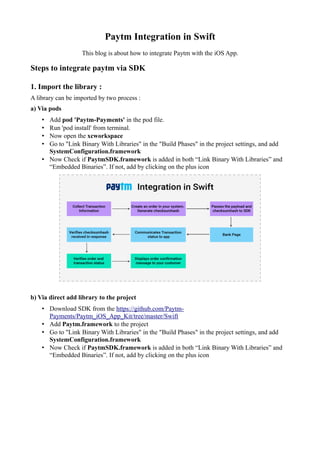
3. Generate Checksum
Checksumhash is a unique id used by the paytm to ensured that the transaction has not been
tempered. Checksumhash has been generated from serverside.
4. Start the payment process
A transaction can be done via the following process
1. Firstly choose the paytm server based on the environment. For Staging Create an instance of
the PGServerEnvironment and set the serverType to eServerTypeStaging. For
Production Create an instance of the PGServerEnvironment and set the serverType to
eServerTypeProduction.
2. Now create the PGOrder instance with all the parameters.
3. Create the PGTransactionViewController instance by calling initTransactionForOrder
and pass the instance of PGOrder as a parameter.
private func setupPaytm() {
serv = serv.createStagingEnvironment()
let type :ServerType = .eServerTypeStaging
let order = PGOrder(orderID: "", customerID: "", amount: "", eMail: "",
mobile: "")
order.params = ["MID":"rxazcv89315285234363",
"ORDER_ID":"order1",
"CUST_ID": "121",
"CHANNEL_ID":"WAP",
"INDUSTRY_TYPE_ID":"Retail",
"WEBSITE": "APP_STAGING",
"TXN_AMOUNT": "1024",
"CHECKSUMHASH":"oCDBVF+hvVb68JvzbKI40TOtcxlNjMdixi9FnRSh80Ub7XfjvgNr9NrfrOCPLmt6
5UhStCkrDnlYkclz1qE0uBMOrmuKLGlybuErulbLYSQ=",
"CALLBACK_URL" :"https://securegw-
stage.paytm.in/theia/paytmCallback?ORDER_ID=order1"]
self.txnController = self.txnController.initTransaction(for: order) as?
PGTransactionViewController
self.txnController.title = "Paytm Payments"
self.txnController.setLoggingEnabled(true)
if(type != ServerType.eServerTypeNone) {
self.txnController.serverType = type;
} else {
return
}
self.txnController.merchant =
PGMerchantConfiguration.defaultConfiguration()
self.txnController.delegate = self
self.navigationController?.pushViewController(self.txnController
, animated: true)
}
5. Implement protocol 'PGTransactionDelegate'
Implement protocol 'PGTransactionDelegate' to the viewcontroller from where have to do payment
//MARK : Delegate Methods
extension ScheduleOnOderVC : PGTransactionDelegate {
//this function triggers when transaction gets finished
func didFinishedResponse(_ controller: PGTransactionViewController, response
responseString: String) {
let msg : String = responseString
var titlemsg : String = ""
if let data = responseString.data(using: String.Encoding.utf8) {
do {
if let jsonresponse = try JSONSerialization.jsonObject(with:
data, options: .mutableContainers) as? [String:Any] , jsonresponse.count > 0{
titlemsg = jsonresponse["STATUS"] as? String ?? ""
}
} catch {
print("Something went wrong")
}
}
let actionSheetController: UIAlertController = UIAlertController(title:
titlemsg , message: msg, preferredStyle: .alert)
let cancelAction : UIAlertAction = UIAlertAction(title: "OK", style:
.cancel) {
action -> Void in
controller.navigationController?.popViewController(animated: true)
}
actionSheetController.addAction(cancelAction)
self.present(actionSheetController, animated: true, completion: nil)
}
//this function triggers when transaction gets cancelled
func didCancelTrasaction(_ controller : PGTransactionViewController) {
controller.navigationController?.popViewController(animated: true)
}
//Called when a required parameter is missing.
func errorMisssingParameter(_ controller : PGTransactionViewController,
error : NSError?) {
controller.navigationController?.popViewController(animated: true)
}
}
6. Verify checksum
Checksumhash needs to be verified so that response have not been tampered. Verification is done on
the server side.

Paytm integration in swift

  • 1.
    Paytm Integration inSwift This blog is about how to integrate Paytm with the iOS App. Steps to integrate paytm via SDK 1. Import the library : A library can be imported by two process : a) Via pods • Add pod 'Paytm-Payments' in the pod file. • Run 'pod install' from terminal. • Now open the xcworkspace • Go to "Link Binary With Libraries" in the "Build Phases" in the project settings, and add SystemConfiguration.framework • Now Check if PaytmSDK.framework is added in both “Link Binary With Libraries” and “Embedded Binaries”. If not, add by clicking on the plus icon b) Via direct add library to the project • Download SDK from the https://github.com/Paytm- Payments/Paytm_iOS_App_Kit/tree/master/Swift • Add Paytm.framework to the project • Go to "Link Binary With Libraries" in the "Build Phases" in the project settings, and add SystemConfiguration.framework • Now Check if PaytmSDK.framework is added in both “Link Binary With Libraries” and “Embedded Binaries”. If not, add by clicking on the plus icon
  • 2.
    2. Add PaytmSDKto ViewController import PaymentSDK 3. Generate Checksum Checksumhash is a unique id used by the paytm to ensured that the transaction has not been tempered. Checksumhash has been generated from serverside. 4. Start the payment process A transaction can be done via the following process 1. Firstly choose the paytm server based on the environment. For Staging Create an instance of the PGServerEnvironment and set the serverType to eServerTypeStaging. For Production Create an instance of the PGServerEnvironment and set the serverType to
  • 3.
    eServerTypeProduction. 2. Now createthe PGOrder instance with all the parameters. 3. Create the PGTransactionViewController instance by calling initTransactionForOrder and pass the instance of PGOrder as a parameter. private func setupPaytm() { serv = serv.createStagingEnvironment() let type :ServerType = .eServerTypeStaging let order = PGOrder(orderID: "", customerID: "", amount: "", eMail: "", mobile: "") order.params = ["MID":"rxazcv89315285234363", "ORDER_ID":"order1", "CUST_ID": "121", "CHANNEL_ID":"WAP", "INDUSTRY_TYPE_ID":"Retail", "WEBSITE": "APP_STAGING", "TXN_AMOUNT": "1024", "CHECKSUMHASH":"oCDBVF+hvVb68JvzbKI40TOtcxlNjMdixi9FnRSh80Ub7XfjvgNr9NrfrOCPLmt6 5UhStCkrDnlYkclz1qE0uBMOrmuKLGlybuErulbLYSQ=", "CALLBACK_URL" :"https://securegw- stage.paytm.in/theia/paytmCallback?ORDER_ID=order1"] self.txnController = self.txnController.initTransaction(for: order) as? PGTransactionViewController self.txnController.title = "Paytm Payments" self.txnController.setLoggingEnabled(true) if(type != ServerType.eServerTypeNone) { self.txnController.serverType = type; } else { return } self.txnController.merchant = PGMerchantConfiguration.defaultConfiguration() self.txnController.delegate = self self.navigationController?.pushViewController(self.txnController , animated: true) } 5. Implement protocol 'PGTransactionDelegate' Implement protocol 'PGTransactionDelegate' to the viewcontroller from where have to do payment //MARK : Delegate Methods extension ScheduleOnOderVC : PGTransactionDelegate { //this function triggers when transaction gets finished func didFinishedResponse(_ controller: PGTransactionViewController, response responseString: String) { let msg : String = responseString var titlemsg : String = "" if let data = responseString.data(using: String.Encoding.utf8) { do { if let jsonresponse = try JSONSerialization.jsonObject(with: data, options: .mutableContainers) as? [String:Any] , jsonresponse.count > 0{
  • 4.
    titlemsg = jsonresponse["STATUS"]as? String ?? "" } } catch { print("Something went wrong") } } let actionSheetController: UIAlertController = UIAlertController(title: titlemsg , message: msg, preferredStyle: .alert) let cancelAction : UIAlertAction = UIAlertAction(title: "OK", style: .cancel) { action -> Void in controller.navigationController?.popViewController(animated: true) } actionSheetController.addAction(cancelAction) self.present(actionSheetController, animated: true, completion: nil) } //this function triggers when transaction gets cancelled func didCancelTrasaction(_ controller : PGTransactionViewController) { controller.navigationController?.popViewController(animated: true) } //Called when a required parameter is missing. func errorMisssingParameter(_ controller : PGTransactionViewController, error : NSError?) { controller.navigationController?.popViewController(animated: true) } } 6. Verify checksum Checksumhash needs to be verified so that response have not been tampered. Verification is done on the server side.